Microsoft has announced the rollout of Windows Holographic version 20H2. Now available via Windows Update, the release brings some new features to HoloLens 2 and HoloLens headsets, including auto eye positioning, a certificate manager in settings, and improved Kiosk Mode functionality.
With the new auto eye position support, HoloLens 2 will now actively compute eye positions without users going through Eye Tracking calibration. In addition, the certificate manager allows new simpler methods to install and remove certificates from the Settings app. Some of the other changes can be seen below, and the full list is available at Microsoft here.
Provisioning packages on USB drives now automatically prompt the provisioning page in OOBE.
Provisioning packages are automatically are now applied during OOBE from the provisioning page.
You can now use autopilot from device Wi-Fi without need for ethernet adapter
Kiosk mode failure now has restrictive fallback.
A new policy allows users to uses group membership cache to use Kiosk mode offline for set number of days.
MRC recordings are no longer capped to 5 minutes
You can now use research mode in HoloLens 2
Newly enabled policies allowi control of updates
Newly supported policies allow for power timeout settings
You can now set an application to launch automatically when signing into a multiple-app kiosk mode.
Once available for download, users should see that Windows Holographic version 20H2 will appear as a monthly update to Windows Update. The build number will remain the same, and Windows Update will show a monthly release to version 2004, build 19041. More information on how to download the update is available here.
Microsoft’s first-party exclusive from Obsidian Entertainment, Grounded has reached the illustrious 5 million players milestone this week and seems to be steadily climbing.
In conjunction with a hefty game update that brings players into the brand-new biome of Koi Pond’s underwater world, the Grounded team over at Obsidian also revealed how well the game has been doing amongst players on Xbox with a neat little YouTube dedication video for the fans.
As part of a bet, the internal Grounded team had amongst its employees and a senior global product marketing manager for the Southern California based Xbox Studio division, Marcus Morgan, the 5 million player milestone was commemorated with a tattoo. Morgan got the invaluable robot friend BURG.L inked on his forearm.
While the tattoo symbolically represents the bet Microsoft made with Grounded, there is a real substantive bet that was met from the Obsidian side of things by going exclusive to the second-rate console of the last generation. Fortunately, for both parties, it appears the gambits are paying off.
As Microsoft’s next-gen flagship console makes its way to gamers this week, the team over at Grounded would like to remind players that its Grounded game has been optimized for improved graphical fidelity, shorter loading times, and HDR supported play on both the X/S series consoles for just $29.99. Gamers using Steam can also pick it up for $29.99
If you’re looking for an immersive gaming experience on the go, a Windows 10 gaming console is the perfect choice.
If you like the idea of comfortably playing your favorite games on a small portable device, and use the same controls as those available on consoles, you’ve come to the right place.
In this article, we’re going to list the best Windows 10 game consoles currently available on the market.
Editor’s note: the products in the links may be the subject of different automatic changes: prices, models, etc.
The XAMMUE One Netbook OneGx1 has a powerful Intel Core 10th Generation Intel CoRE i5-10210Y 4 Cores 8 Threads,1.0GHz~4.0GHz, paired with a Intel HD Graphics 615 Integrated GPU (300 MHz Up to 1.05 GHz).
It’s easy to take it out for gaming on the go due to its 7 inches IPS. This handheld video game laptop is only 1/2 size of a conventional 12-inch notebook.
This game console is ultra-portable, you can simply slip it in your pocket and play your favorite games on the go.
The device features 6 inches H-IPS technology touchscreen, that supports 1280 x 720 pixels and is powered by an Intel Core Kaby Lake m3-8100y 2 Cores/4 Threads processor, capable of reaching up to 2.60Ghz.
As far as storage is concerned, 8GB RAM and 128GB ROM are yours to use. If you want to increase the storage space, and it weights only 460 g.
The GDP WIN Max game console uses Intel 10th Generation Core i5-1035G7 processor. The display chip has a base frequency of 300MHz and a maximum dynamic frequency of 1.05GHz.
This console has the fastest low-power memory currently on the market, 16GB of LPDDR4X 3733, and it also allows users to replace the built-in SSD. However, due to space constraints, it only supports single-sided M.2 2280 SSDs.
We’ll end our list here. If you’ve used any of the devices listed below, tell us more about your experience in the comment section below.
Microsoft has quietly made its Edge Insider channels available on two additional platforms, the HoloLens 2 and the Windows 10X emulator. Installers for the Edge Beta, Dev and Canary channels are now available from the Microsoft Edge Insider website (via Windows Central), as you can see in the image below.
While Microsoft made it previously possible to try the new Microsoft Edge on the Windows 10X emulator earlier this year, testers can now install the Edge Beta, Dev, or Canary channels in the emulator on their own. However, it wasn’t possible to install the new Chromium-based Edge on HoloLens 2 headsets before, though the Legacy Edge worked fine.
Both Windows 10X and the HoloLens 2 OS are based on Windows Core OS (WCOS), a new modular version of Windows that doesn’t support legacy Win32 apps. “The MSIX version of the new Microsoft Edge, when installed on a WCOS product, operates via a SHIM that allows the legacy application to run as if it were a modern app, translating those legacy APIs and talking to the OS as if it were native,” Windows Central reported.
It’s been a while since we had any news about Windows 10X, though the OS’ new out of box experience was recently discovered in a recent Windows 10 Insider build from October. The Windows 10X emulator and other development tools are still available on this page.
Windows 10X was initially expected to make its debut this year on dual-screen devices such as Microsoft’s Surface Neo, but the company has since changed its plans delayed the device. According to previous reports, Windows 10X will now ship first on Chromebook-like devices where web apps and the company’s new Edge browser should play a big role. Microsoft may also be working on the ability to stream legacy Win32 apps when necessary.
Microsoft has acknowledged an issue with its Outlook.com service causing deleted emails to reappear in the inbox (via Bleeping Computer). The company says that it’s already working on a fix for all affected users, though there’s no ETA yet.
“In the meantime, if the emails being reverted are coming from connected accounts you may be able to go to the Inbox of the originating account and delete the email to workaround the issue. For example, if you have a Gmail connected account, go to Gmail.com and delete the email from there,” Microsoft explained on its Windows Support site.
At this point, it’s hard to know if this undeletable emails issue is affecting many Outlook.com users right now. Also, there’s no workaround available for users with a standard Outlook.com account yet, and they may need to wait until Microsoft deploys a fix.
Have you been affected by this Outlook.com incident recently? Let us know in the comments below.
An enclosure, whether for a hard drive or a solid-state drive (SSD), is a special casing that holds and powers your hard drive or SSD, with support for linking between one or more computers.
With advancements in technology, you can now get the best USB-C enclosure for your hard drive or SSD. The Type C connector is famed for its fast speeds and power, unlike type A or B.
The advantages you can get from the best USB-C enclosure include adding more drives, RAID capabilities, storage, and a variety of media to computers.
You can also easily transfer data between computers that are not networked, plus it prevents heat from the hard drive from increasing the heat within the computer case.
USB-C enclosures prevent wear and tear while lowering the cost of removable storage.
Here are our top picks for the best USB-C enclosure.
Our first item on the list is this premium enclosure case from Cable Matters, which is an excellent choice for to connecting a 2.5″ SSD or HDD drive to a computer. It’s good to note that 3.5″ HDD is not compatible with this device.
Besides the USB C/Thunderbolt 3 port compatibility, the device is also backward compatible with USB-A ports with included USB-C to USB-A cable.
The aluminum design keeps some of the heat away from the SSD, and the vet at the back helps even more.
Users have also appreciated the customer service’s timely responses.
The wide compatibility of this UGREEN hard drive enclosure has ensured you can connect it to older Windows OS (2000, XP or Vista included).
If you use it with macOS, have a USB C to USB C cable at hand, because it is not included in the original package.
Setting up your drive in the enclosure is easy and the sturdy foam in the enclosure holds the drive well. The overall design and material quality are also some of the perks this item brings.
This enclosure supports 2230/2242/2260/2280 form factor drives with M key/ B+M key. Despite the screwdriver-free design, some users complained that their SSDs didn’t fit the enclosure case, so you might want to be extra careful about this detail.
The case boasts compatibility with a wide range of devices (laptops, smartphones, PC, and gaming consoles) and to this end, it includes both USB-C to USB-C and USB-C to USB-A cables.
Up to a certain point, the Aura Sync lighting technology that provides ambient lighting can also be considered one of the perks this case holds.
MOKiN’s USB 3.1 Gen 2 enclosure is a perfect solution for data transfer and backup since it can reach speeds of up to 10Gbps. However, this depends mostly on the speed of your SSD, USB port type, your device performance, etc.
This USB C to M.2 NVMe enclosure comes with a tool-free design which allows the quick installation of an M.2 NVMe SSD in just a few seconds. Note that the NVMe SSD is not included in the original package.
Overall, this enclosure might be your best choice for making an NMVe drive into a portable storage unit.
The Vantec Nextar TX 2.5-inch hard drive enclosure include a super speed plus USB 3.1 Gen 2 transfer speed, with two cables for compatibility with type A or C ports.
Its full aluminum enclosure and tray build is designed for heat dissipation and elegance, with ultrafast SATA III support, plus it is a plug and play so you don’t have to install any drivers to use it.
Besides being compatible with Windows and other operating systems, it has smart features that spin down with your computer (hibernate/shutdown), and it comes with an activity LED light, on/off switch, and an optional power connector.
If you want high-performance, tool-free installation, safety and protection for your hard drive and SSD, then Orico is the best USB-C enclosure you can buy.
It supports SATA HDD up to 8TB, and USB 3.0 type C to SATA III interface, plus it is compatible with Windows operating system.
In terms of performance, the Orico enclosure is ultrafast with a maximum data transfer rate of 5Gbps, with a UASP protocol that increases speed by 20 percent compared to traditional USB specifications.
You don’t need any drivers or reboots to install this enclosure, simply plug and play, then the LED light will indicate whether your hard drive or SSD is working at maximum performance.
In terms of safety and protection, Orico’s 12V power adapter supplies steady power so your hard drive or SSD runs effortlessly, plus it has a shockproof sponge or foam material for reinforced protection.
Backup your data anytime and anywhere with the best USB-C enclosure from the Startech brand.
This enclosure lets you store and access data with support for high-capacity drives of up to 15 mm in height, plus it comes with a type C and type-A cable for more connectivity.
Enjoy ultrafast speeds of up to 10Gbps, portability, and quick access to your data wherever you go to browse files and edit documents.
You can also retain data after an upgrade to a new HDD or SSD in your computer, do drive cloning and data backups for continued safeguarding of your data all the time.
It is versatile, compatible with Windows and your devices, and comes with a type C micro-B cable for connecting to modern USB-C enabled devices and laptops.
Its sleek aluminum housing also keeps your data safe, dissipates heat, and passively cools the hard drive or SSD to prevent drive failure and data loss.
It comes with a 2-year Startech warranty and free lifetime tech support.
Video files are very large usually, and this can cause some troubles when you want to share them with others, upload them on different websites, and even host them.
Although 1MB of video does not last more than one minute, uncompressed it can take up to 120-130 MB space on your Windows 10 device or Mac.
If having the highest possible resolution for your video files is not something extremely important, then compressing the file is the better solution here.
Not only you will be able to share and upload the video file easily, but it will also free up some space on your device.
In this article we will show you some easy steps you can make in order to compress your .mov files in both Windows 10 and Mac, so make sure to keep reading.
1. Give WinZip a try
There are several tools out there that you can use to compress your video files and after testing them we would recommend you try WinZip.
Sharing, editing, and managing files are some of its amazing features. This all-in-one software has to offer more than just compressing options.
If you are concerned with regard to the privacy of your files, rest assured WinZip will have you covered. The strong encryption features will keep your video files protected while you compress them.
Navigating and working with WinZip is easy and intuitive and in just a few clicks you will be able to compress the desired video files.
WinZip connects with most cloud storage out there, such as Google Drive, Dropbox, OneDrive and allows easy access to your files and documents.
Let’s have a quick look at its key features:
File extraction.
Microsoft Teams integration.
ZIP file repair.
Password protection.
File Manager and File Splitter features.
Data back-up and sharing options.
WinZip
Compress all your important .mov files with this complex tool with minimal quality loss. Try it now!
Go to the File menu and select the Convert option.
Click the Add button and then select the video you want to convert.
Next, click on the Convert/Save button.
In the Profile section, select Video – H.265+ MP3 (MP4).
Click on Destination and select the place where you want the file to be saved.
Next, click Open.
Finally, click on Start and wait for the conversion process to be finished.
It can take a few minutes for the compression process to be completed, depending on the size of the video file. Make sure to keep the window open until is done, otherwise the process could be corrupted.
Note: Parameters such as codec, frame rate, resolution and others can be changed from the settings window. We do recommend that you don’t change the aspect ratio parameters, as that will affect the quality of your video and make it unusable.
3. Convert the .mov file online
If you don’t have a lot of time on your hands and would like to be more efficient with compressing the video files, then using an online website to do this could be an option.
Keep in mind though that in using such online websites you may not have the option to choose which MP4 technology is being used.
Adittionaly, on almost all websites there is a size limit to how big can be the video file you are trying to compress.
There are various websites where you can convert the .mov files and is a great option to use especially when you don’t have a lot of time on your hands.
One such online website is Wondershare. There you can easily compress your video file, as long as the file size is 100 MB or smaller.
The compressing process is quite simple. Once you access the website you will need to upload your video file and then wait to be prompted into downloading the compressed archive. It should not take longer than a few minutes.
Taking into consideration that you will be downloading the file over the Internet, we recommend you install antivirus software on your PC or Mac if you don’t have one already.
With this, we will conclude our article. Compressing a video file, as seen in the above steps, does not have to be a tedious process and it can be done by following a few easy steps.
We hope that one of our solutions helped you and if you have additional suggestions or comments, please let us know in the comments section below.
Deep-sea divers must agree with the fact that recording videos can be sometimes tricky in saltwater. If your old underwater camera has started showing signs of aging, this is the perfect time to get a new one.
Underwater cameras generally come in different styles and designs to serve the needs of a wide range of customers. Many camera retailers often offer some interesting deals on new cameras.
If you’re planning to wave goodbye to your old underwater camera, here is a list of the best underwater camera deals to help you make a choice.
What are the best underwater cameras to use in saltwater?
Eyoyo Fish Finder O0417MG is designed to record high-quality videos in oceans, rivers, lakes, and even under ice.
Unlike all other underwater cameras, it offers the best of everything. Although some of you might find it a bit expensive, still it’s certainly worth buying.
Moreover, do note that the product ships with 8 GB micro SD card, a battery charger, sunshade, and fishing accessories.
The Aqua-Vu AV125c underwater camera is one of those devices truly worthy of your full attention. It comes with a 1-year warranty just in case if you need it.
The LEDs make it easy for you to record in saltwater. If your lakes are not clear, you can’t go wrong with it.
As for the removable sunvisor, it is ideal for those times when you simply need to avoid the direct strong sunlight.
If you like to record videos under saltwater on a regular basis, you should try this Moocor Fish Finder LQ-3505D portable camera.
With an image sensor chip and CMOS sensor, this underwater camera is the perfect choice for recording videos in low-level lighting conditions.
As for the high-resolution LCD fish monitor, note that it has a sun visor and highlight LED backlight, as well as multiple functions such as 4x digital zoom and low battery power reminder.
The MarCum Recon 5 Plus is not a cheap option, that’s something that you need to know from the very start. However, it is considered to be a great underwater camera for quality recordings in saltwater.
The camera comes with a 32 GB micro SD card to record videos for long hours. You can view the video on the screen while it is being recorded and stored.
You can manually adjust the brightness and contrast of your screen monitor. As for the large 50-meter cable, it can help you with saltwater fishing.
The Olymbros underwater fishing camera is the right choice for those who are looking for a budget-friendly product that offers maximum performance.
D1 has an AVI cycle recording (3 minutes) function, which can catch each follow, strike, and hit by underwater lives. Besides AVI recording, the camera also comes with an exclusive HD video recording capability.
So, you can use the D1 fishing camera to capture underwater video while casting, trolling, and bottom fishing in lakes, rivers, and sea.
These are the best underwater cameras for saltwater to meet all your requirements. All of these cameras come with their own features, and they are ideal for all kinds of water sports activities.
However, regardless of the underwater camera that you purchase, it still needs proper cleaning and maintenance. Let us know your choice in the comments area below.
Microsoft Lists is Microsoft’s new information tracking app for Microsoft 365. As a centralised information repository, Lists features good integration with the other members of the 365 family. In this article, we’ll show you how to manage your Lists within Microsoft Teams.
First, you’ll need to launch Teams and select a Channel to add Lists to. Click the “+” button at the top of the channel and then search for the Lists app. When you’re prompted to add Lists to the channel, click the “Save” button.
Once the tab has been added, you’ll be prompted to select the list to display within it. You can either create a brand-new list or select an existing one. We’ll create a new list using the “Asset manager” template for this tutorial. Follow the prompts to create your list or specify the URL to an existing one.
Once you’re done, the list will appear within the Teams tab. You’ll get the full Lists interface, including support for the “New item” form, grid view editor and top-right filtering options. What’s more, the Lists UI will inherit the theme of your Teams app – so dark mode is fully supported, should you have it enabled in Teams.
You can now interact with the data in your list wherever you have access to Microsoft Teams. Other members of your channel will also be able to use the Lists tab, making it simpler for you to acccess shared information when working remotely.
Microsoft Lists is the newest addition to the Microsoft 365 app stable. While the name may tempt you to write it off as yet another Outlook Tasks, To-Do or Planner iteration, Lists is in fact a unique offering that’s closer to Excel than any of the above.
Powered by SharePoint and accessed via a web interface, Lists can be seen as a Microsoft attempt to replicate low-code solutions such as Airtable. It’s more “app-like” than a spreadsheet, while giving users much more control than a regular listing app like To-Do or its predecessor Wunderlist.
Lists’ power is only really appreciated by seeing it in action. Assuming you’ve got a valid subscription, the app will show up in the Office 365 app drawer – it has a brightly coloured icon with a warm palette.
Click the prominent “New List” button to get started. It’s worth taking a little time to preview the default templates, as they illustrate the way in which Lists is meant to be used.
Take the default Issue Tracker, for example. It uses a grid-based layout that’s somewhere in-between a spreadsheet and a conventional listing app. Then there’s the Asset Manager, which is even more visual – it includes images and a number of coloured information chips.
You can start a new list from a template by clicking “Use template”. You can also create a list from scratch, which will require you to use a SharePoint-style interface to setup your own fields. It’s possible to import an Excel spreadsheet too, further narrowing the gap between Lists and conventional desktop applications.
However you create your list, you’ll need to give it a name, description, colour and icon. Once you’re setup, the list will open to an empty slate.
You can add data by clicking the “New” button in the top-left. This will bring up a form that lets you add a new item to the list. The fields on the form will match those configured in the list.
When you’re making multiple additions at one time, you can switch to Grid view from the top-left corner. This turns everything on the screen into an editable field, very much akin to a spreadsheet. Using this interface, you can rapidly manage the data within your list.
You can export your data into an Excel spreadsheet using the button on the top toolbar. Another option is to get an email or SMS alert whenever data changes within the list – click the three dots (“…”) icon at the top, then “Alert me”. The dialog which appears will give you comprehensive options to let you choose what you get alerted about and when and where notifications are delivered.
This completes our initial tour of Lists. In future articles, we’ll look at creating and modifying lists, managing data within lists and exploring the different view options available within the app. It’s also worth noting that Lists can integrate into many other Microsoft tools, including Power Apps, Automate and Microsoft Teams, letting you use the service as a central repository for your information.
Microsoft has released a new major version of .NET, the company’s open source development platform. The cross-platform, multi-architecture library has reached version 5.0, bringing with it performance enhancements and developer tooling improvements.
.NET is a cross-platform and multi-architecture framework available for Windows, macOS, Linux and IoT devices. Version 5.0 is an important milestone in Microsoft’s multi-year quest to unify the ecosystem. This manifests in improved toolchain customisation, with developers now able to pick just the components they need for the platforms they target. There’s the promise of further improvements in this area to come with .NET 6.0.
Besides greater unification, today’s 5.0 release brings with it a bevy of performance improvements throughout the .NET components. There’s also expanded platform support, with ARM64 Windows devices (like the Surface Pro X) now targetable by .NET apps.
Developers who migrate to .NET 5.0 and create an ARM64 build of their app will now be able to support for this new generation of Windows devices. Microsoft is continuing to optimise performance on the ARM platform and said it’s working directly with ARM engineers to take the best advantage of its capabilities.
.NET 5.0 additionally includes new major versions of the C# and F# programming languages – C# 9 and F# 5 respectively. The Visual Studio tooling has been enhanced too, notably incorporating an updated Windows Forms designer. Used to graphically layout Windows desktop interfaces, the new Designer now supports the full set of Windows Forms controls.
.NET 5.0 is available to download and use from today. Windows developers will need Visual Studio 16.8 or later, whereas Mac users should use the latest version of Visual Studio for Mac. Being a “current” release, .NET 5.0 will be supported for three months beyond the launch of the next major release – with 6.0 expected in November 2021, that means 5.0 should be around until February 2022.
Microsoft may have been in the console business for almost 20 years, but the company has never really managed to make a dent in Japan, a very important market for video games that is still dominated by Sony and Nintendo. But as a new console generation is kicking off this week, Microsoft may be interested in adding Japanese developers to its Xbox Game Studios division.
Great to be back in Japan with the team talking and listening to amazing studios and publishers about 2020 and beyond. Really strong energy and excitement here about gaming's future.
There’s obviously a renewed interest in the Japanese market from Microsoft as we’ve seen with Xbox head Phil Spencer’s numerous trips to Japan in recent years. Back in September, Spencer said that Japan was Xbox’s fastest-growing market, with “more players on Xbox devices, games, and services than at any time in our history in the market.”
Spencer’s statements don’t really mean much if Xbox is starting from very low in Japan. According to the Japanese video games magazine Famitsu (via Bloomberg), Xbox One consoles accounted for just 0.1% console sales in the market between January and November 1, trailing behind the PlayStation 4 (10.1%) and the massively popular Nintendo Switch (89.8%).
Still, Microsoft may be looking to strengthen Xbox’s position in Japan with new studio acquisitions. The company already has good relationships with Sega, with the publisher bringing some of its games to Microsoft’s Xbox Game Pass subscription service, but Jeremy Hinton, head of Xbox operations in Asia told Bloomberg that Microsoft was open to the idea of acquiring local studios:
When asked about potential purchases of Japanese companies, Jeremy Hinton, head of Xbox operations in Asia, said Microsoft is always open to discussions with creators that are a good fit. He said acquisitions are a possibility but there are no announcements to share at this time.
If Microsoft’s Xbox One console was released in Japan almost a year later after its launch in other markets, the company’s new Xbox Series X and Series S consoles have started shipping in 40 Xbox markets today, Japan included. It remains to be seen if Microsoft launching an affordable console with the Series S will help the company gain ground in Japan, though the $299 console may ultimately not move the needle in a significant way.
“Microsoft will continue to have a hard time in Japan, and I don’t see any reason why the next Xbox should do better in Japan than the previous models,” game-industry consultant Toto told Bloomberg. “All signs point that for the next years, Nintendo will stay king in Japan, and I really don’t understand why Microsoft is still so obsessed with Japan,” he added.
Is Surface Book 3, which starts at $1599, the most powerful laptop from Microsoft so far?
The company thinks so, and it talks it up as a machine for professionals that demand higher computing power.
The device, which replaces Surface Book 2, boasts appreciable graphic capabilities too.
But is it a worthy successor to Surface Book 2?
Surface Book 3 Specs
There are several variants of the device, all of which have 10th Generation Intel Core processors.
According to Microsoft, the processing capabilities of the device should give you 50% more computing power than possible with Surface Book 2.
As for GPU, you have two options: NVIDIA GeForce GTX or Quadro RTX. The discrete built of NVDIA GPUs is of great interest to gamers.
It provides maximum video memory, which supercharges demanding gaming applications.
The laptop comes with superior RAM specs too. You can expand its memory up to 32GB, which would be ideal for RAM-hungry applications, including gaming, coding, and computer-aided design (CAD).
You have the choice of a 13.5” or 15” touchscreen for your Surface Book 3. The device boasts versatile connectivity options too, including a full-size SD card reader.
Its USB-C and USB-A ports are a much faster standard for data transfer, compared to USB 3.0.
It is understandable why one might be under the impression that Surface Book 3 and Surface Book 2 are one and the same thing.
Externally, they look the same because Microsoft has not altered the size of the device as well as screen dimensions.
But when you dig deeper into internal specs, you start seeing some hardware differences that can impact performance.
Starting with what is common between the two devices—both come in two screen size options, 13” and 15.”
Both variants have PixelSense Display tech, and the resolution for each screen size is the same. So, if size is an issue to you, you are not getting anything better with the Surface Book 3.
Small differences emerge when you start looking at things like battery life. According to Microsoft, Surface Book 3 can operate for 17.5 hours without running out of battery juice.
That is a meager 30-min longer than its predecessor’s battery life.
Surface Book 3 has a processor update too. It comes with either Quad-core 10th Gen Intel Core i5-1035G7 or Quad-core 10th Gen Intel Core i7-1065G7 processor.
Its predecessor had several variations of 8th gen Core i7 processors.
The latest Surface Book from Microsoft supports up to 32GB of RAM. Surface Book 2 RAM can only expand up to 16GB.
These improvements make for a faster and more streamlined PC performance. Storage-wise, Surface Book 3 supports up to 2TB, while its predecessor has a maximum of 1TB capacity.
The upgrade in solid-state drive options is certainly welcome among commercial users.
Microsoft has upgraded graphics capabilities for the new Surface Book too.
The older model has Intel UHD Graphics 620 and NVIDIA GeForce GTX 1060 options for GPU, while the latest comes with Intel Iris Plus and GeForce GTX 1660 Ti (Max-Q design).
There is also a third option with a NVIDIA Quadro RTX™ 3000 GPU, though.
Specs
Surface Book 3 15"
Surface Book 2 15"
Processor
Quad-core 10th Gen Intel® Core™ i7-1065G7 Processor
8th Gen Intel Core i7-8650U Max Turbo
RAM
16GB or 32GB 3733Mhz LPDDR4x
Surface Book 2 15”
16GB RAM 1866Mhz LPDDR3
Storage
Up to 2TB
Up to 1TB
Display
PixelSense™ Display
Resolution: 3240 x 2160, (260 PPI)
10 point multi-touch G5
PixelSense™ Display
Resolution: 3240 x 2160, (260 PPI)
10 point multi-touch G5
Graphics
Nvidia GeForce 1660 Ti Max-Q or Nvidia Quadro RTX 3000 Max-Q
Intel UHD Graphics 620
NVIDIA GeForce GTX 1060
Surface Book 3 is an improvement, but not a game changer
Surface Book 3 has obvious hardware improvements. However, these do not appear to be significant enough to render its predecessor obsolete.
If you can still design your projects, develop software, and play GPU-intensive games on Surface Book 2, then pricing may be the only important difference here.
Feel free to leave any questions or feedback in the comments section below.
Would you like to get the best PC gaming controller for use with Windows 10 operating system? We’ve selected the top popular picks that deliver an immersive gaming experience.
A gaming controller helps the player/players to control objects or characters within the game they’re playing. It is simply connected to a console or a computer, whether wired or wirelessly, and can include such devices as keyboards, joysticks, and gamepads among others.
However, there is another PC gaming controller category that includes steering wheels and light guns, specifically for racing games or shooting games respectively.
If you want the best PC gaming controller for Windows 10, check out our top picks below.
This PC gaming controller is compatible with the Windows operating system but also with Nintendo Switch, macOS and Android.
The SN30 Pro is the world’s first, fully featured retro controller. It comes with a full button set with clickable joysticks, rumble vibration, motion controls, Bluetooth 4.0, rechargeable battery, home and screenshot buttons, and a USB-C connector. Not to mention an awesome d-pad.
Manufactured by Geek Theory, this gaming controller is also compatible wirelessly and has four controller modes, including X-input and D-input.
You can connect wirelessly via Bluetooth or use USB-C to play your games.
This is probably one of the top PC gaming controller brands in the gaming world, and it is compatible with Windows 7/8.1/10.
With this controller, you get enhanced comfort, wireless range two times that of previous Xbox One controllers, and a USB cable for a sturdy gaming experience.
Added comfort means you enjoy an immersive gaming experience with zero hassles as this controller features a streamlined, sleek design with a textured grip, and you can plug in any headset with a 3.5mm jack. The USB cable that comes with this controller lets you play your favorite games with a wired connection anywhere you are.
The PC requirements however, may vary for games on Windows 10 operating system. You can also get the Xbox controller with an adapter, or with a cable.
The Steam PC gaming controller lets you enjoy a whole new level of control with precision on all your favorite games.
You can play games both on your PC, or even your TV. Its features include dual trackpads that allow for absolute position input via virtual controls, back grip buttons, and dual stage triggers that can be used as analog or digital input simultaneously.
You know a controller is designed with the gamer in mind when its buttons and input zones are positioned based on precision, comfort, and frequency of use. This is what the Steam controller offers so you don’t have to leave your couch until you’re done. It also provides wireless connectivity for different devices.
This PC gaming controller comes highly recommended by most users who have given it a high rating based on its features and usability.
It delivers precision control, enhanced comfort with its feel, shape and sensitivity, plus it has a built-in speaker and headset jack.
It comes in various colors: Gold, Jet Black, Magma red, silver, Green Camouflage, and Wave blue so you can pick your favorite color and play away.
Besides familiar controls on any gaming controller, the SONY DualShock also lets you upload gameplay videos and screenshots using the share button, without disturbing your game progress.
Its unique light bar lets you identify players and adjust your screen while playing with friends in one room.
This is a plug-and-play PC gaming controller compatible with Windows 98/ME/Vista/2000/2003/XP/7/8/8/1/10. It uses a standard USB port but can be used without drivers or patches.
It comes with a 5-foot long cord, sensitive buttons for precision control, and you get a 100% money-back guarantee and a 6-month hassle-free replacement warranty with friendly customer care.
As its name suggests, this PC gaming controller delivers easy but precise gaming. It supports Windows XP/7/8/8.1/10 OS, and has a flexible cord for a wireless kind of experience.
It also comes with a powered USB port, but only works for PC games supporting X-input mode. You also get vibration feedback for a riveting gaming experience, an 8-way directional pad, and two pressure-point triggers. On the controller are fire buttons, function buttons to start, pause or go back, and vibration function.
When you purchase this product, you get a controller, Nano receiver, and the manual.
This PC gaming controller supports Windows XP/7/8/10, plus a plug-and-play option only for PC games supporting Xinput mode.
Its salient features include a USB wired gamepad with a 1.5m USB cable, multi-mode input both Xinput and/or DirectInput for PC games, USB 2.0 and 3.0 ports, and vibration feedback.
This PC gaming controller is also compatible with Windows operating systems: Vista/7/8/10. It has 16 action buttons with the braille style of identification, and delivers exclusive precision control.
It is designed with the gamer in mind what with its realistic controls and flight control system.
It also features striking orange accents and backlighting for a more immersive gaming experience, and employs the HEART technology – HallEffect AccuRate Technology – which delivers surgical precision during the game.
Its design can be switched between right hand or left hand use, plus you can tailor your profiles to enhance the controller and load or create mapping profiles for each game. It is also ergonomically designed to give you top comfort and game precision.
This gaming controller is designed for precision gaming and comes with a stereo headphone jack, dual vibration feedback for a riveting gaming experience, plus it has been redesigned for optimum comfort while you play.
It has a battery that goes for more than 60 hours before recharging again thanks to the advanced Bluetooth technology. It also incorporates Google voice commands so you can start games using your voice and it brings it up for you – so smart!
FYOO V-One is a versatile gaming controller that you can use on all Windows OS versions, gaming platforms or mobile devices. However, keep in mind that the peripheral does not support gaming consoles.
If you own a computer that supports Xinput mode, all you need to do is plug the controller to your machine and you’re ready to play.
Despite the low-end price tag, FYOO V-One actually looks and feels like a mid-range controller. It’s very responsive and accurate.
What to look for when choosing a PC gaming controller
When looking for a PC gaming controller, you need to keep in mind that different controllers offer different features, so understanding these features is where you can start to help you make an informed decision.
Some of the features in a standard PC gaming controller include:
Wired or wireless: you can connect to your PC with a wire, or you can have a cordless controller that uses batteries and wireless signal to operate.
USB connection: with this, you can plug into other devices with USB connectors to your gaming controller.
Vibration feedback function: this simply makes the game more riveting and enjoyable and can make the controller vibrate. You can choose to have this on while you play, or turn if off if you don’t feel like it
Action buttons: this feature lets you play different games, especially those that involve shooting and firing. You can also multitask at a go during your play.
Analog/Digital controls: you can get either or both on your controller
Pressure sensitive triggers
Multiple speed shifters
Compatibility with different operating systems such as Windows versions from 98 to Windows 10. This should ideally be on the package label so you know which controller you want to buy.
Before making the purchase, check your type of PC, the operating system, the type of PC games you want to play using the controller, and the different functions you can get with the controller. Like the NVIDIA Shield can do so much more with Google Assist function especially with Smart Homes.
Have you found your favorite PC gamingcontroller from our top picks? Share with us your choice in the comments section below.
The release of this month’s Patch Tuesday updates is of major interest to Windows 10 v2004, Windows 10 1909, and 1903 users.
Simply put, it fixes issues identified in the software program you run on a regular basis and brings major security improvements.
Unlike regular updates that rarely demand much attention, Patch Tuesday updates involve a much bigger process.
In spite of that, certain issues do arise. System and user certificates might be lost when users update their PC from Windows 10, version 1809 or later to a later version of Windows 10.
October Patch Tuesday may cause system certificate issues
Microsoft has recently distributed a new cumulative update KB4586781 to its users via Windows Update and WSUS.
This non-security patch increases the build numbers of version 2004 to 19041.630 and version 20H2 to 19042.630.
According to the official Microsoft changelog regarding the KB4586781 cumulative updates, it seems that they may lead to problems related to system and user certificates:
Devices will only be impacted if they have already installed any Latest cumulative update (LCU) released September 16, 2020 or later and then proceed to update to a later version of Windows 10 from media or an installation source which does not have an LCU released October 13, 2020 or later integrated.
This primarily happens when managed devices are updated using outdated bundles or media through an update management tool such as Windows Server Update Services (WSUS) or Microsoft Endpoint Configuration Manager.
Things are no different for KB4586786 cumulative updates (OS builds 18362.1198 and 18363.1198). If you are also bothered by this issue, feel free to mitigate it within the uninstall window by going back to your previous version of Windows.
That covers our topic for today. If you need a summary of the November Patch Tuesday, we have written this dedicated article that includes the download links that you can use to get the updates right away.
The next Patch Tuesday falls on December 8, so rest assured that we’ll return with new details. Until then, enjoy your patching and make sure to keep your PC safe from the latest threats.
Moreover, don’t hesitate to let us know whether or not you intend to apply the cumulative updates immediately. Do so by using the comments area below.
With the November Patch Tuesday updates having just arrived, many users have been updating their PCs to see what news features and fixes have arrived.
As always, these updates have come for all major versions of Windows 10, but they aren’t all the same, since they vary based on the number of changes and the type of changes that are brought.
One great example is that of cumulative update KB4586830, which is now available for Windows 10 V1607
Allows administrators to use a Group Policy to enable Save Target As for users in Microsoft Edge IE Mode.
Allows you to restrict the JScript Scripting Engine to a process.
Address an issue that causes an application to stop working if the app uses a hook.
Addresses an issue that causes the Microsoft Management Console (MMC) Group Policy application to stop working when you are editing the Group Policy Security settings. The error message is, MMC cannot initialize the snap-in.
Addresses an issue with devices on which Credential Guard is enabled; if these devices use a Machine Bound certificate, authentication requests might fail. This occurs because Windows 2016 and Windows 2019 domain controllers add duplicate KeyID values to the msDS-KeyCredentialLink attribute of these devices.
Addresses an issue that might cause stop error 7E in nfssvr.sys on servers running the Network File System (NFS) service.
Addresses an issue with Remote Desktop Session Host (RDSH) connection brokers that prevents users from connecting to a Remote Desktop in collections. This issue occurs because of an access violation in tssdis.exe.
Addresses an issue that causes the Windows Management Instrumentation (WMI) Provider Host(WmiPrvSE.exe)to leak registry key handles when querying Win32_RDCentralPublishedDeploymentSettings.
Besides the obvious changes and improvements brought to Group Policies, the latest cumulative update also addresses several issues that would usually result in error messages or program functionality issues.
These range from fixes brought to the Microsoft Management Console, to the Credential Guard feature, and even the WMI.
All in all, those of you that need or frequently use these tools should have fewer issues with them now.
That pretty much wraps up the changes brought up by KB4586830.
Keep in mind that as time passes new issues may be discovered and that they may be covered in the next cumulative updates that will be available in precisely one week.
As for the next Patch Tuesday updates for Windows 10 v1607, you’ll just have to wait until December 8 for them to be available.
Until then, make sure you keep your PC updated and well protected, and get this update for the sake of security improvements, or else fall victim to Exploit Wednesday and Uninstall Thursday.
Did you install the latest cumulative update?
Let us know whether you think the changes are worth the update, or if you plan on waiting a bit longer by leaving us your feedback in the comments section below.
2020 is drawing to an end but that doesn’t stop Microsoft from releasing their monthly cumulative updates.
On that note, the November Patch Tuesday updates have just been released, bringing new improvements, fixes, and security enhancements.
As always, all major versions of Windows 10 will receive an update, and depending on the build, each will be slightly different from the rest.
Since we believe that updating to the latest version is always important, we created this article where we will be showcasing the cumulative update for each version of the OS.
More so, we will be providing a brief changelog for each of the, as well as a direct download link to the Windows Catalog, just like we did in previous months as well.
Changes included in the November Patch Tuesday Updates
Windows 10, version 20H2
Windows 10 v20H2 is the latest major version of Windows 10, and as such has the most experimental features on it. That being the case you should install this version as soon as possible if your hardware allows it.
Take note that Windows 10 v2009’s system requirements aren’t that high, so don’t worry about compatibility issues.
Updates the 2020 DST start date for the Fiji Islands to December 20, 2020.
Security updates to the Microsoft Scripting Engine, Windows Input and Composition, Microsoft Graphics Component, the Windows Wallet Service, Windows Fundamentals, and the Windows Kernel.
Known Issues
Users of the Microsoft Input Method Editor (IME) for Japanese or Chinese languages might experience issues when attempting various tasks. You might have issues with input, receive unexpected results, or might not be able to enter text.
System and user certificates might be lost when updating a device from Windows 10, version 1809, or later to a later version of Windows 10.
Devices will only be impacted if they have already installed any Latest cumulative update (LCU) released September 16, 2020 or later and then proceed to update to a later version of Windows 10 from media or an installation source which does not have an LCU released October 13, 2020 or later integrated.
This primarily happens when managed devices are updated using outdated bundles or media through an update management tool such as Windows Server Update Services (WSUS) or Microsoft Endpoint Configuration Manager.
This might also happen when using outdated physical media or ISO images that do not have the latest updates integrated.
Windows 10 v1909 shares a core structure,core operating system, and an identical set of system files with Windows 10 v1903, therefore all cumulative updates that apply to one version are available to the other as well.
Updates the 2020 DST start date for the Fiji Islands to December 20, 2020.
Addresses an issue with the package frame launcher (PSF) that passes a malformed parameter to a shim.
Security updates to the Microsoft Scripting Engine, the Microsoft Graphics Component, Windows Input and Composition, the Windows Wallet Service, Windows Fundamentals, and the Windows Kernel.
Known Issues
System and user certificates might be lost when updating a device from Windows 10, version 1809, or later to a later version of Windows 10.
Devices will only be impacted if they have already installed any Latest cumulative update (LCU) released September 16, 2020 or later and then proceed to update to a later version of Windows 10 from media or an installation source which does not have an LCU released October 13, 2020 or later integrated.
This primarily happens when managed devices are updated using outdated bundles or media through an update management tool such as Windows Server Update Services (WSUS) or Microsoft Endpoint Configuration Manager.
This might also happen when using outdated physical media or ISO images that do not have the latest updates integrated.
Windows 10 v1903 shares a core structure, core operating system, and an identical set of system files with Windows 10 v1909, therefore all cumulative updates that apply to one version are available to the other as well.
Those of you still running the Home, Pro, Pro for Workstation, and IoT Core editions of Windows 10 V1809 should know that it will reach End of Service in November.
That is why it is advised that you update your OS to a newer, supported version.
Updates the 2020 DST start date for the Fiji Islands to December 20, 2020.
Security updates to the Microsoft Scripting Engine, Microsoft Graphics Component, Windows Input and Composition, the Windows Wallet Service, Windows Fundamentals, and the Windows Kernel.
Known Issues
After installing KB4493509, devices with some Asian language packs installed may receive the error, 0x800f0982 – PSFX_E_MATCHING_COMPONENT_NOT_FOUND.
At first, it as reported that Windows 10, version 1803 has reached the end of mainstream support, and starting with July there wouldn’t be any more optional, non-security releases for this version of Windows 10.
Allows administrators to use a Group Policy to enable Save Target As for users in Microsoft Edge IE Mode.
Allows you to restrict the JScript Scripting Engine to a process.
Addresses an issue that might prevent Microsoft Edge from opening or might prevent you from browsing in certain circumstances.
Updates the 2020 DST start date for the Fiji Islands to December 20, 2020.
Security updates to the Microsoft Scripting Engine,Microsoft Graphics Component,Windows Input and Composition, Windows Wallet Service, Windows Fundamentals, Windows Kernel, and Windows Peripherals.
Known Issues
Microsoft is not currently aware of any issues with this update.
Allows you to restrict the JScript Scripting Engine to a process.
Updates the 2020 DST start date for the Fiji Islands to December 20, 2020.
Security updates to the Microsoft Scripting Engine, Windows App Platform and Frameworks,theMicrosoft Graphics Component, the Windows Wallet Service,theWindows Kernel, andWindows Fundamentals.
Known Issues
Microsoft is not currently aware of any issues with this update.
Note:Windows 10, version 1607 has reached the end of service for all of its available editions. Update to the latest version ofWindows 10in order to keep your system protected
Allows administrators to use a Group Policy to enable Save Target As for users in Microsoft Edge IE Mode.
Allows you to restrict the JScript Scripting Engine to a process.
Address an issue that causes an application to stop working if the app uses a hook.
Addresses an issue that causes the Microsoft Management Console (MMC) Group Policy application to stop working when you are editing the Group Policy Security settings. The error message is, MMC cannot initialize the snap-in.
Addresses an issue with devices on which Credential Guard is enabled; if these devices use a Machine Bound certificate, authentication requests might fail. This occurs because Windows 2016 and Windows 2019 domain controllers add duplicate KeyID values to themsDS-KeyCredentialLinkattribute of these devices.
Addresses an issue that might cause stop error 7E innfssvr.syson servers running the Network File System (NFS) service.
Addresses an issue with Remote Desktop Session Host (RDSH) connection brokers that prevents users from connecting to a Remote Desktop in collections. This issue occurs because of an access violation intssdis.exe.
Addresses an issue that causes the Windows Management Instrumentation (WMI) Provider Host(WmiPrvSE.exe)to leak registry key handles when queryingWin32_RDCentralPublishedDeploymentSettings.
Updates the 2020 DST start date for the Fiji Islands to December 20, 2020.
Addresses an issue that might cause Windows 10 devices that enable Credential Guard to fail authentication requests when they use the machine certificate.
Security updates to the Microsoft Scripting Engine, the Microsoft Graphics Component, the Windows Wallet Service, Windows Fundamentals, the Windows Kernel, and Windows Virtualization.
Known Issues
After installing KB4467684, the cluster service may fail to start with the error 2245 (NERR_PasswordTooShort) if the group policy Minimum Password Length is configured with greater than 14 characters.
Allows administrators to use a Group Policy to enable Save Target As for users in Microsoft Edge IE Mode.
Allows you to restrict the JScript Scripting Engine to a process.
Updates the 2020 DST start date for the Fiji Islands to December 20, 2020.
Security updates to the Microsoft Scripting Engine,theMicrosoft Graphics Component,theWindows Wallet Service,Windows Cryptography,andWindows Fundamentals.
Known Issues
Microsoft is not currently aware of any issues with this update.
That’s pretty much it for this round of monthly updates.
Don’t forget that a few smaller cumulative updates will also be coming in about two weeks, but those are usually smaller fixes to whatever problems these updates will bring.
More so, remember that updating your OS is important from a security stand-point, because Patch Tuesday is usually followed by Exploit Wednesday and Uninstall Thursday, two days where hackers and malware will try to take advantage of those that still haven’t applied the latest security patches.
We hope that you’ve found this information useful, and that the provided direct download links will help you get the updates faster, even if your Windows Update feature doesn’t show the latest patches there yet.
Let us know what else you would like us to include in future updates by leaving your feedback in the comments section below.
Microsoft’s scheduled release of the latest security fixes for its Windows operating system and software applications brings countless new fixes and tweaks for Windows 10 users this month.
Quite a few cybersecurity incidents took place in 2020. Therefore, there is no surprise that the November Patch Tuesday updates include dozens of security enhancements.
Take a closer look at this quick rundown on the number of CVEs that have been tracked down this year:
As usual, Microsoft products present the highest number of vulnerabilities, with 112 found out of the total 126, the remaining 14 being related to Adobe products.
Vulnerabilities found in Adobe products
This month’s vulnerabilities were identified for the following Adobe products: Acrobat and Reader.
Four of these CVEs were rated as Critical and could lead to code execution if a user opened a specially crafted PDF.
Vulnerabilities found in Microsoft products
As expected, quite a few Microsoft products were affected by vulnerabilities. These include products like Microsoft Windows, Office and Office Services and Web Apps, Internet Explorer, Edge (EdgeHTML-based and Chromium-based), Microsoft Teams, Exchange Server, Microsoft Dynamics, Azure Sphere, Windows Defender, Visual Studio, and ChakraCore.
Of these 112 patches, 17 were rated as Critical, 93 were rated as Important, and 2 were considered Low in severity.
Which were some of the most severe CVEs?
Of the126 discovered vulnerabilities, here are those that stood out more than the others:
CVE-2020-17087 – Windows Kernel Local Elevation of Privilege Vulnerability
CVE-2020-17084 – Microsoft Exchange Server Remote Code Execution Vulnerability
CVE-2020-17051 – Windows Network File System Remote Code Execution Vulnerability
CVE-2020-17040 – Windows Hyper-V Security Feature Bypass Vulnerability
Keep in mind that updating your PC is essential when it comes to getting the latest fixes and helping it run efficiently.
In fact, Patch Tuesday updates are far more important than all other regular updates. If you still don’t know how Patch Tuesday works, you’ll find all the answers you’re looking for in this dedicated guide.
For a complete list of all identified CVEs for the November Patch Tuesday updates, also take your time to check out this useful article.
If you are worried about other vulnerabilities that haven’t yet been covered this month, rest assured that they will most likely be fixed by the next Patch Tuesday updates. Keep an eye on us for fresh info.
ExpressVPN is one of the best VPNs for video streaming. But many users report that its MediaStreamer feature doesn’t work with Netflix. If you’re one of these people, here’s how to fix it in just a few steps.
What does ExpressVPN MediaStreamer do?
MediaStreamer is an exclusive feature of ExpressVPN that helps you watch streaming movies and TV shows on Netflix US. It does so by using Smart DNS to spoof your location.
A Smart DNS service isn’t the same as a VPN, because it doesn’t hide your IP address, encrypt your traffic, or switch locations. More importantly, you can’t use both a VPN and a Smart DNS service at the same time.
The bottom line is that you shouldn’t use a Smart DNS to hide your web activity from your ISP. Instead, you should only use MediaStreamer to evade geoblocks when your privacy protection isn’t a priority.
And it’s particularly useful for devices without native VPN support. Examples include Apple TV, Samsung TV and other Smart TVs, or Xbox, PS4, and other gaming consoles.
You can effortlessly set up the ExpressVPN MediaStreamer for Netflix. It becomes problematic when the Smart DNS service stops working, however. When that happens, make sure to follow out 7 easy solutions below.
How do I fix ExpressVPN MediaStreamer not working with Netflix?
1. Update and restart your device
Are you sure you’re running the latest OS update on your streaming device? Check this and then reboot it before verifying the MediaStreamer.
For example, if you’re using an Apple TV, go to Settings > System > Restart. You would be surprised at the number of issues that can be resolved with a simple restart.
2. Check the MediaStreamer IP addresses
Remember that you must first register your IP address on the ExpressVPN dashboard to be able to set up the MediaStreamer on any device in your home. Are you sure it’s correct?
If your ISP assigned a dynamic IP address, that could be the reason why the ExpressVPN MediaStreamer isn’t working with Netflix anymore. It’s possible that it changed in the meantime.
In that case, you should update the new IP address in the ExpressVPN dashboard. But it’s only a temporary solution since you will have to do it again as soon as your it rotates.
A better way to fix this is by requesting a static IP address from your ISP. Or, you can set up a dynamic DNS if your router and firmware allow it.
Since you’re doing this, have a look at the DNS servers you registered on your streaming device to ensure there aren’t any typos.
3. Restart your router or switch to Ethernet
Your router might be the culprit if the ExpressVPN MediaStreamer doesn’t work with Netflix. Perhaps it’s experiencing a technical issue that can be resolved by just rebooting the router.
Make sure to wait a few seconds until you test MediaStreamer again. Also, if you have a dynamic IP address, recheck if it’s correctly registered in the ExpressVPN dashboard, just in case your IP address was reset when you restarted the router.
If this doesn’t solve the problem, switch to wired mode and try the MediaStreamer again. If it works, it means that you must troubleshoot your Wi-Fi issues.
4. Check your Internet connection
If your Internet connection is too slow for streaming, this usually results in buffering. However, it can also cause the ExpressVPN MediaStreamer to stop working properly, even if it’s not as resource-consuming as a VPN.
You can run a speed test at different hours throughout the day and in the weekend to check the download and upload speed. It might also be a good idea to contact your ISP for help if you’re paying for a premium plan but receive disappointing connection speeds.
5. Set up the MediaStreamer on your router
Installing the MediaStreamer at the router level is an excellent alternative to using the Smart DNS service directly on the streaming device, particularly if the network settings of your Smart TV or gaming console are incorrect.
It’s not ideal, especially on slow Internet connections, but there’s no harm in using the VPN connections of ExpressVPN instead of the MediaStreamer.
Remember that you can’t use both simultaneously. So, don’t forget to access the dashboard and remove your IP address before connecting to a US VPN server and trying to use ExpressVPN to watch Netflix.
Evidently, this solution won’t work on streaming devices without native VPN support. But you can either install ExpressVPN on desktop and mobile or set it up on your router to share your VPN account with all connected devices.
7. Contact the ExpressVPN support team
If everything else fails and you get the Netflix proxy error with ExpressVPN, with or without the MediaStreamer, it’s time to contact the support team. Luckily, it has 24/7 live chat support.
The problem might be that Netflix has successfully detected and blocked the IP addresses and DNS requests used by ExpressVPN. In that case, all that you can do is draw the support team’s attention and wait until the issue gets fixed.
If you haven’t already used ExpressVPN but are carefully examining your options to see which is the best for unblocking Netflix, you should know that ExpressVPN is one of the top products in the market.
Few VPN services have a Smart DNS feature that allows you to unblock streaming services on devices without built-in VPN support, and ExpressVPN is one of them, thanks to its MediaStreamer feature.
Here’s what else you should about this VPN before buying a subscription plan:
Unblocks Netflix US using VPN and MediaStreamer
Out-of-the-box router setup for Asus, Linksys, Netgear
A strict zero-logging policy
No IP, DNS, or WebRTC leaks
30-day money-back guarantee
ExpressVPN
Get this powerful VPN to unblock Netflix US and use MediaStreamer on any device without native VPN support.
In conclusion, if the ExpressVPN MediaStreamer doesn’t work with Netflix, our easy solutions above will surely fix the problem. If it doesn’t, you can always look for an alternative VPN for Netflix.
Did we leave out any other solutions to fix the MediaStreamer? Let us know in the comment section below.
With only two more months to go before the end of 2020, Microsoft carries on releasing its monthly updates, and today is the time for the November Patch Tuesday updates.
As always, the Patch Tuesday updates affect all versions of Windows 10, from the oldest (Windows 10 v1507) to the newest (Windows v2009).
Speaking of which, this is the first round of Patch Tuesday updates since the release of the October Update, and although it went through a rocky start, updates continued to roll to make it better, and more accessible for everyone.
This what the November Patch Tuesday updates bring
Users can get a good idea regarding what to expect during the live release of the next cumulative updates by looking back at the past developments, as there is a high chance many of them will be applied later in live versions.
In the case of this month’s updates, here are the changes that were most noticeable:
Another center of focus is this month’s CVE report since last month was the first time in 2020 when the number of detected CVEs stopped ascending, although the total number of CVE detected in 2020 is well above that of 2019.
Beats headphonesare regarded as some of the most coveted brands in the music market, as they release products that are both of good quality, and that looks incredibly sleek and modern.
However, Beats has released countless models over the years. Because of this, knowing what to get yourself this year can be a bit tricky, and that is why we decided to compile a list of what we think are the best Beats headphones that you can buy today.
Note: Deals are subject to change. Keep in mind that the price tag often varies. We recommend going on the vendor’s website to check the price. Some of the products may be out of stock by the time you’ve made your purchasing decision. So, hurry up and hit the buy button.
If you love to enjoy the freedom of listening to music, few headphones can come close to what the Beats Solo3 can offer you, thanks to its completely wireless design.
The brilliant on-ear controls also let you take calls, control your music and activate Siri, and the ear cushions are incredibly comfortable and will keep the headphones steady on your head.
If you’re looking for a pair of Beats headphones that emphasize comfort and great music playback capabilities, then the Beats Studio3 is just what you need.
It features an incredibly long-lasting battery life, and the soft yet firm ear cushions make it so that earing the headphones for extended periods of time feels enjoyable.
It also features Pure Adaptive Noise Canceling technology that automatically shuts off on low battery so that the headphones can last even longer.
Probably the most affordable pair of headphones on our list, the Beats EP brings you all of the typical features you’d expect in a pair of Beats headphones.
It is extremely rugged, being made from durable, lightweight design reinforced with stainless steel, and the adjustable sliders mean that they will fit on pretty much anyone’s head.
If you enjoy the feeling of listening to music undisturbed, then you need a pair of Beats Solo Pro. These headphones provide noise-canceling capabilities, while the Transparency feature helps you stay aware of your surroundings while listening to music.
The sound quality is also great, and the battery life makes it so that you can listen to your favorite tunes all day long before needing your next recharge.
No matter if you are a fan of wired or wireless headphones, listening to music at the highest quality, or simply listening to music while undisturbed by what is happening around you, Beats surely has a model that fits your taste.
While their products may be a bit pricey, they are well worth the investment in the long run, as you will finally find out what it is like to listen to premium-quality music.
Microsoft today announced the release of Edge Dev version 88.0.692.0, and with it comes a fan-favorite feature from the Legacy Microsoft Edge. Indeed, the release now makes it possible to pin a website to the Start Menu. In addition, there are the usual reliability and other fixes, too. Here’s a look at what you need to know.
First off, we begin with the new features. In addition to the new ability to pin websites to the Start Menu, Edge Dev is also getting support for Guided Switch on Mac. Also new as the ability for Kiosk Mode to open all popups in the new tabs instead of windows.
Now, for the reliability fixes and changed behaviors. There’s a few to note this week. Microsoft finally fixed a crash on launch when Edge is set to restore the previous session. Also fixed are issues where uninstalling a website installed as an app might crash the browser. Please see a look below for everything else you need to know. The list is short this week.
Fixed a crash when opening certain PDFs.
Fixed a crash when syncing Collections.
Fixed a hang during navigation.
Fixed an issue where some PDFs opened straight from the internet fail to load.
Fixed an issue where webpages sometimes flicker or flash constantly.
Fixed an issue where the button to close an InPrivate window doesn’t work.
Fixed an issue where work or school users sometimes don’t see the personalization or changes away from the default that they expect to see on the new tab page.
Fixed an issue where the Force Sync management policy didn’t work when using on-premises profiles.
Fixed an issue where the new tab page shows an error that “Something is wrong” when certain management policies are applied.
Fixed an issue where pages sometimes don’t have images properly added to their entries in a Collection.
As for the known issues, there are a few in this release. Please be aware that certain extensions such as the Microsoft Editor extension don’t work on Linux. As soon as they’re installed, they crash and are disabled. Microsoft is investigating. Of course, there are also the persisting issues too. Problems with ad-blocking extensions, tabs, and extensions crashing, Kaspersky Internet Suire causing websites to fail to load, duplicate favorites, Edge windows becoming black, wobbling when scrolling, and no sound with multiple audio output devices, all still are problems here, too.
Please be aware that Microsoft says this update will be the last for the month. The holidays are coming up, and the Edge team will be getting some much-needed rest.
Whether your profession involves taking precise measurements of things or you have your own home project, an electronic micrometer caliper can help you with precise measurements.
Electronic calipers are easy to use and the precise measurement offered by these tools makes it much harder to make mistakes in your project.
In this article, we have listed the best electronic micrometer calipers so that you have the right equipment for the job that requires precision in every phase.
Note: Deals are subject to change. Keep in mind that the price tag often varies. We recommend going on the vendor’s website to check the price. Some of the products may be out of stock by the time you’ve made your purchasing decision. So, hurry up and hit the buy button.
What are the best electronic micrometer calipers to buy?
This is a sleek stainless steel battery-powered caliper, with a 1/2″x1 1/2″ precise display and a measurement range of 0-6 inches/150mm.
The tool has been redesigned recently and added a depthometer. Besides, each caliper is calibrated before sale. However, note that not all models come with a certificate, in case you need one.
You can conveniently connect this caliper to a computer to transfer your data. Remember that it only works with a VINCA DTCR-03 cable that sells separately.
Pretty much like the previous models, Neiko’s caliper is made from stainless steel for durability, features a large LCD display, and the regular measuring modes – inch, fraction, and millimeter.
As a bonus compared to the other two calipers, this one sells with the storage case.
All the electronic calipers listed in this article offer micrometer measurement. Depending on your requirements, you can pick a premium one or a low-cost one. The important thing is to get accurate measurements.
Tell us which one do you prefer in the comments below.
Whenever you go to high school or college, you better have a really big and sturdy backpack.
This is because you will need the space to carry books, notebooks, a laptop and maybe even some personal items.
High Sierra is a well-known brand that makes such backpacks, and they are among the most popular brands among students and parents alike.
That’s why we’ve compiled a list of the best High Siera backpacks that highschoolers and students can buy today.
Note: Deals are subject to change. Keep in mind that the price tag often varies. We recommend going on the vendor’s website to check the price. Some of the products may be out of stock by the time you’ve made your purchasing decision. So, hurry up and hit the buy button.
Topping out our list is the High Sierra Loop Student’s Backpack which has pretty much everything a student can ever ask for.
This includes a spacious interior with pockets that allow good item organization, and the straps and paddings make it comfortable to carry, even after hours and hours of carrying.
If you have back problems and can’t carry too much weight, then a bag like the High Sierra Freewheel Backpack might be what you need.
thanks to the telescopic handle and wheels, it can easily be used as both a backpack and a troller, and the water-resistant material makes it great if you get caught in the rain.
The High Sierra Swerve Laptop Backpack is one of the best all-around student’s backpacks that you could ask for. It can store a 17-inch laptop while keeping it safe and secure, and it also has enough space in the main pocket and in the organizer to keep things compacts and neat.
More so, it is extremely comfortable to wear and it comes with a zippered accessory pocket with a USB port so you can listen to music or charge your phone on the go.
No matter what you need to carry, the High Sierra Fat Boy Backpack, Flower Pop/Black/Crimson, 19.5 x 13 x 7-Inch has you covered, thanks to the incredibly sturdy Duralite build that makes it resistant to ripping and water.
More so, you won’t even feel it thanks to the extra layers of padding on both the back panel and the straps, and the headphone port will let you list to music while you travel between classes.
A good backpack is a vital part of any high schooler or college student’s arsenal, as it may stick with them for a few good years until they finish their studies.
That is why it is good to always go for a top-quality item that has as many useful features as possible so that your child can have an easier and more enjoyable school year.
The advancement in technology has made things easier for the average consumer, resulting in individuals having access to multiple USB powered devices and gadgets.
With all the convenience of these gadgets come the cables and the sheer task of managing them.
No matter how neatly you try to fold up your cables and keep them away, at the end of the day these cables turn into some jigsaw puzzle that might take more than a few minutes if not hours to solve.
This is where USB cable organizers comes in handy. In this article, we have listed the best USB cable organizers for your gadgets, offering a clean and clutter-free look for your desk.
Note: Deals are subject to change. Keep in mind that the price tag often varies. We recommend going on the vendor’s website to check the price. Some products may be out of stock by the time you’ve made your purchasing decision. So, hurry up and hit the buy button.
What are the best USB cable organizer deals to get?
If your USB cables are connected to multiple sources, it is better to use cable clips. OHill Cable Clips comes in a pack of 16 cord organizers with self-adhesive cord holders.
Apart from your USB cable, these clips can also be used as pen holders, flosser holders, etc. The sticky pad holds the cable and the clip in place and supports various surfaces.
Baskiss Cable Clip is capable to organize 7 cables at a time. This cable clip is a great help when it comes to organizing your cords at home, in your office, or at any place you may need.
It is constructed by durable silicone material, and the great advantage of it is that you can quickly and easily put your cables inside the clip to ensure it doesn’t get tangled over and over again.
ENVISIONED Organizer is a heavy-duty USB cable organizer to save you from the frustration of looking for the USB cables every morning.
This organizer supports small and large cables, including Apple’s lightning cable, USB, HDMI, and network cables.
ENVISIONED Organizer comes with a heavy non-slip base to offer a clutter-free desk setup without using adhesive to keep the base in place. It also comes in multiple colors for those who like funky colors.
Made from natural wood, Akwox’s wooden cable organizer is a solid USB cable manager. It comes with five slots and supports both small and large size cables including lighting, USB type-C, USB type-A as well as micro USB cables.
Akwox wooden cable organizer comes with self-adhesive that can be fixed on to any surface. This eco-friendly wooden organizer offers an elegant look while keeping your desk neat and clean.
SOULWIT’s cable clip holder offers similar functionality as other USB cable clip holder listed in this article.
The package comes with 3 silicon cable holders with 3M double-face adhesive tape attached on the back that offers a long-lasting and firm grip on the desk or wall.
The cable holder supports up to 6 mm USB cables including Apple Lightning as well as USB Type-A cables.
Everyone likes a neat and tidy desk with well-managed cables. However, with the addition of new devices every few months, managing all the USB cables can be a tedious task.
By using the USB cable organizers listed in this article, you can easily manage them.
The gaming industry has changed dramatically throughout its history. It is one of the most accessible hobbies right now, which is why its popularity is getting bigger at a fast rate.
Video games are electronic games that involve interaction with a user interface. The term “gaming” suggests regular gameplay, mainly as a hobby rather than a profession.
Video games were created to entertain and educate, but many people are doing it as a full-time profession. The industry tends to make more money than sports and movies, and Xbox makes no exception.
To make things more appealing, there are a lot of Xbox bundles on the market. We’ve gathered the best ones currently available to make things a little easier for you.
Note: Deals are subject to change. Keep in mind that the price tag often varies. We recommend going on the vendor’s website to check the price. Some of the products may be out of stock by the time you’ve made your purchasing decision. So, hurry up and hit the buy button.
Xbox One fans that love racing games will love this bundle, especially if they love the Forza Horizon or the Lego franchises.
The games are available as disks that come together with the bundle, but you also get digital codes to download them off the Microsoft Store, so choose whichever you like most.
All in all, if you have 2 controllers and love challenging your friends, get this bundle without hesitation.
This particular entry is for the gamer that has more diverse tastes and doesn’t just stick to one genre.
For example, besides the actual 1TB console that you get, you also get Minecraft, the best building game in the world, Sea of Thieves, a staple for any Xbox player, and Fortnite, the current best battle royale game.
So, if you want to get both an Xbox console and a few games to get started, this bundle is the best for you.
The Battlefield series is one of the most critically-acclaimed FPS game series to have ever hit the gaming market, and the latest title, Battlefield V, is not a letdown at all.
For those of you that want to get it, and enjoy it at full performance there’s the Xbox One X – Battlefield V Bundle.
The bundle contains an Xbox One X Gold Rush Special Edition 1TB console, an Xbox Wireless controller, a full copy of Battlefield™ V Deluxe Edition, a full copy of Battlefield™ 1, and a full copy of Battlefield™ 1943.
People love bundles because it is only natural for us to love what we think is a solid deal, and developers have caught up with this trend, and that’s how bundles that include Xbox console and games came to be.
Additionally, if they manage to make a console design in a limited edition form, collectors and avid fans will likely go crazy, because they can show off their dedication to a certain franchise.
A printing calculator is similar to a regular calculator, just that it is usually made for business use. As such, it usually comes with the neat ability to print out your calculations and results on paper.
But these calculators are pretty common, so figuring out which are the best ones can be pretty tricky.
That is why we’ve compiled a list of what we think are the best printing calculators so that your accounting needs will be more easily fulfilled.
Note: Deals are subject to change. Keep in mind that the price tag often varies. We recommend going on the vendor’s website to check the price. Some of the products may be out of stock by the time you’ve made your purchasing decision. So, hurry up and hit the buy button.
What are the best professional printing calculators that I can buy?
The Casio Inc. HR-100TM is a compact but powerful printing calculator is perfect for home or office, as it is capable of producing two lines per second, for fast entry and printing.
It also comes with a large, 12-digit display that is 33 percent larger than comparable models, making it great for fast error-free inputs and the multitude of supported equations makes it great for a wide variety of uses.
Important functions that the device has are sign change, item total, grand total, tax, and currency exchange.
The highlight of this calculator is its increased portability, while still managing to maintain a wide screen allowing you to more easily input digits without error.
More so, it supports features such as currency conversion and tax calculations just with the touch of one button, making it great for accountants that are on the go. The same with Cost/Sell/Margin.
If you’re looking for a heavy-duty professional printing calculator for actual office work, then the Sharp EL-1197PIII is the right model for you.
As an added bonus, if you’re concerned about your personal health, you should know that it comes with built-in antimicrobial protection that inhibits the growth of damaging bacteria.
The Canon P23-DH V 2 is a great printing calculator if you need medium-to-advanced accounting calculations while still having an easy interface and button arrangement.
It is ideal for those that can make fast calculations, as it has a printer that supports 2.3 lines per second, and the profit margin function makes it great for basic accounting endeavors.
Unlike the other entries on our list, the Canon MP11DX is mostly designed for everyone’s first printing calculator.
The simplistic button arrangement, as well as the functions it boasts, makes it suitable for beginners or home accounting, and you can later move on to more advanced and specialized models.
Regardless of whether you are trying to calculate your personal home expenses or the profit rate for a specific deal at your office, having a printing calculator can definitely come in handy.
Having one that offers fast printing speeds and complex functions makes it even better, even if they will probably be pricier.
However, given the use of the item, the investment return should be easy to see in the long run.
In a post on their blog, Rocket League developer Psyonix. announced what special enhancements are coming to the vehicular soccer video game on the recently released Xbox Series X and Xbox Series S consoles.
Rocket League players will enjoy faster game load times and improved split-screen performance on both Xbox Series X and Xbox Series S consoles. Plus, there are special enhancements coming to Rocket League depending on which Xbox console you own. Additionally, there will be a future Rocket League content update which will add a new “Video Quality” setting within the Video tab of the Settings menu, which will allow users to change video settings based on Quality vs. Performance.
When using the “Quality” setting, Rocket League is available to play at 4K resolution at 60 FPS with HDR on the Xbox Series X. On the Xbox Series S, you can play Rocket League at 1080p resolution at 60 FPS with HDR. If you choose “performance” to play Rocket League on either next-generation Xbox console, you will be able to play Rocket League at 120 FPS, but at 70% of the maximum capable resolution available on either Xbox console.
Keep in mind, you will need a 4K and HDR display that is capable of handling 120 FPS at the appropriate resolution for you to take advantage of these upcoming Rocket League features. For PlayStation 5 owners, there will be no option available for “Quality vs. Performance,” and Rocket League will only be available at 4K resolution (checkerboard) at 60 FPS with HDR.
Rocket League is now free-to-play on all platforms and it also supports crossplay multiplayer and cross-progression. You can download the game on your console using the link below.
Sony has been offering us some of the best selection of electronic equipment for more than 50 years.
Having this amount of time to build experience and a customer review database would set any company ahead of its competition, and Sony is no different.
Keeping a competitive status in the speaker market, Sony has amazed customers with the slick designs and effective builds of their sound systems, as the quality of the sound produced by these setups is incredible.
In today’s guide, we will discuss some of the best options available on the market this year. You will see a general description of the products, and we will also present you with a simple pros and cons list for better understanding.
Read on to find out more details about the best deals on Sony speakers available online.
Note: Deals are subject to change. Keep in mind that the price tag often varies. We recommend going on the vendor’s website to check the price. Some of the products may be out of stock by the time you’ve made your purchasing decision. So, hurry up and hit the buy button.
The Sony SSCS5 3-way speakers offer excellent sound quality at an affordable price.
This bookshelf speaker set works with a 3-driver setup and uses a 5-inches foamed-mica cellular reinforced woofer and a 1-inch polyester main tweeter that cover the entire spectrum of low and high frequencies.
Even though the size of these speakers is small, they can pack a punch, delivering sound for up to 100 W, and with a 6 Ohm speaker impedance.
The XB72 from Sony has an incredible amount of power for its size and the crystal-clear sounds it can produce baffle even the most pretentious listeners.
This Bluetooth-enabled speaker offers very deep bass and the mid and high-frequency sounds it can reproduce highlight the reasons for this speaker being presented in this list.
In order to truly make a statement, the XB72 speakers are equipped with line lights, speaker lights, and a flashing strobe that only consume 0.5 W of power. This allows your parties to have that little edge that makes a big difference.
The Sony SS-CS3 speaker system offers a professional-level sound and a slim but effective design.
This speaker system uses a 3-way technology for crisp and clear sounds for all ranges of frequencies, and 4 drivers for great power and exact reproduction of all sounds.
Music has never sounded better than through this speaker set, offering you the possibility of throwing the most amazing parties at home or have epic movie nights with your family and friends.
Each speaker from this set features a 1-inch polyester main tweeter and a 3/4-inches super tweeter. The power outage of this clocks in at 145W peak power, and with a 6 Ohm speaker impedance.
The Sony sound quality is undeniably one of the best on the market, so no matter if you’re planning on throwing an incredible party, or you just need a set of reliable speakers, you are all set.
What Sony speakers did you decide to buy? Let us know by using the comment section below.
This specific deal is part of our bigger selection of the best speaker deals you can find.
December marks the end of support for Windows 10 version 1903, but Microsoft came prepared. In an attempt to protect potentially-vulnerable devices from security threats, the company will start force-upgrading Windows 10 1903 devices to the newer 1909 version.
Although Microsoft‘s strategy should cover all devices that run 1903, some may skillfully dodge this update, willingly or otherwise. However, the company urges customers who might be running end-of-service versions of the OS to perform the upgrade as soon as possible.
Windows 10 1903 nearing end of service
In a recent announcement on the Microsoft website, the company reminds its customers that Windows 10, version 1903 will soon reach its end of support.
On December 8, 2020, all editions of Windows 10, version 1903 and Windows 10 Server, version 1903 will reach end of service.
In the same manner, Microsoft lets us know that it won’t provide monthly quality and security patches for devices that run the end-of-service editions of the operating system.
Windows 10 Home, Pro, Pro Education, Pro for Workstation, Enterprise, Education, and IoT Enterprise running on version 1903 are the ones targeted by Microsoft‘s announcement.
Windows 10 1809 reached end of support
As a side note, we want to remind you that today, November 10, 2020, marks the end of service for Windows 10, version 1809. The affected editions are as follows:
Windows 10 Home, version 1809
Windows 10 Pro, version 1809
Windows 10 Pro for Workstation, 1809
Windows 10 IoT Core, version 1809
If you’re in this situation, it’s highly recommended that you upgrade to a newer version, if you want to keep receiving security, non-security and quality updates on your devices.
Mandatory Windows 10 1909 updates
Microsoft will attempt to upgrade devices that run Windows 10, version 1903 to the 1909 version automatically, as they explain in the announcement on the Windows message center website.
To keep you protected and productive, we will soon begin updating devices running Windows 10, version 1903 to Windows 10, version 1909. This update will install like a monthly update, resulting in a far faster update experience.
If you discover that your device didn’t receive the forced OS upgrade, you may want to try and apply it by yourself by using the Check for updates function in Windows 10.
Naturally, if you’ve already upgraded to Windows 10 20H2, this whole situation shouldn’t be a concern to you. Unless you’re among the unlucky ones who experience severe issues with 20H2, such as forced reboots or BSODs.
What do you think about Microsoft‘s forced Windows 10 1909 upgrades? Tell us how you prepared for 1903 nearing end of service in the comments section below:
When you’re holding a live performance, you may want to conceal your metronome from your audience. This is mostly so that you don’t look like a beginner.
If you do want to show it, at least make it a mechanical one that people will enjoy looking at.
Thus, we’ve compiled a list of what we think are the best metronomes for you to buy if you’re holding live performances.
They are chosen to either be tiny enough to hide them from the audience, or elegant enough so you won’t be ashamed to show them off.
Note: Deals are subject to change. Keep in mind that the price tag often varies. We recommend going on the vendor’s website to check the price. Some products may be out of stock by the time you’ve made your purchasing decision. So, hurry up and hit the buy button.
What are the best metronomes for live performances?
Since live performances need to go impeccably, having a tuner, metronome and tone generator all in one device is one way to make sure things will be OK.
The metronome component is extremely easy to use, and it supports a broad range of 30-250 Beats Per Minute, tap tempo, and various beats and rhythm patterns.
The Seiko SQ50-V is a good metronome thanks to the unique way it lets you know you should maintain a tempo.
Instead of a ticking sound that may be difficult to hear during an on-stage performance, you had a red LED light that flashes that you will easily be able to keep up with.
The only mechanical metronome on our list, the Tempi Metronome is a wonder to behold especially in the case of orchestral live performances.
You won’t be ashamed to show this little gadget on-stage, especially if you’ll be playing instruments such as cello, violin, piano, or others of the sort.
The BOSS DB-90 looks like a simple electronic metronome, but it is unique in its own way since it doesn’t use regular ticks or other similar sounds to help you keep up the tempo.
Instead, it uses a human-like voice that counts your tunes, making you feel like your coach is there with you, even while on stage.
The Korg MA-2 is probably the most simple and modern metronome on our list, thanks to the innovative, and now larger, Beat Counting display.
It features 9 beats and 8 patterns that offer rhythmic diversity, and the tempo can be set three ways: full steps, pendulum steps, and tap tempo button.
It is easy to get caught up in the heat of the moment and lose a bit of tempo during really intense moments on stage, so having a trusty metronome is something that even veteran musicians do.
Thus, try to have a metronome that you can easily notice since you’ll have to focus both on it, and on the song that you are playing at the same time.
If for whatever reason your PC‘s motherboard cable failed on you, or if you’re building a new PC from scratch, you will need to buy some new motherboard cables that are good and that will last for a very long time.
Normally, whenever you buy a motherboard, it should come packaged with all of the cables that it needs. However, if you don’t trust those packaged deals, then you should check out our list of the best cables you could buy for your motherboard.
Keep in mind that there are several cables that go in and out of a motherboard, so this list contains a few of each category.
Note: Deals are subject to change. Keep in mind that the price tag often varies. We recommend going on the vendor’s website to check the price. Some of the products may be out of stock by the time you’ve made your purchasing decision. So, hurry up and hit the buy button.
What are the best motherboard cables that I can buy?
The Silverstone PP07-MBW is an individually sleeved extension power cable set with a single Motherboard 24-pin connector that is useful for systems with larger cases.
It behaves within regular limits, and the design is great for users that have open-case PCs and want their cable management to look sleek and smooth.
The Cable Matters SATA to 90-Degree SATA III 6 Gbps Cable is the ultimate solution for connecting SATA III and legacy SATA I, II drives to internal motherboards and host controllers.
Because it is easy to install, it is a great cable to buy when having multiple PCs to wire up, and you can install your latest hard drives fast and efficiently, and thanks to the latching clips, they will stay there securely.
When it comes to straightforward computer building, you need all the appropriate tools for the job. This includes a cable that can easily connect ATA hard drives or optical drives to a power supply.
If that’s all you need, then you should get the Cable Matters 4 Pin Molex to SATA Power Cable, as it is built to do just that, and it does it while respecting performance standards.
The StarTech IDE and EIDE cable is an IDE cable designed to connect internal devices in your computer to the Motherboard while providing better overall airflow.
You can use this cable to connect CD-ROMs, zip drives, hard drives, DVD-ROMs, CD burners, etc, and it is indeed built to last and work within and above standards.
If the motherboard is considered the heart of the PC, then the cables that go to and from it are probably the blood vessels, and we all know how good it is to have those in healthy conditions.
The same can be said about motherboard cables, so you always want to have the best available.
It’s enough for just one of those cables to fry and one component, if not the entire PC, will be out for the count until you can find a replacement.
If you’re steaming, it’s important to properly adjust the audio levels, and this is where an audio mixer comes in handy.
Whether you’re streaming on Twitch or creating YouTube videos, a great audio mixer is a must-have, especially if you want to quickly and easily adjust the audio levels.
Today we’re going to show you the best audio mixers for streaming, so don’t hesitate to take a closer look at the list detailed below.
What are the best audio mixers for steaming and video editing?
If you are looking for a portable mixing desk with 4 channel mixer with 1/4inches line-level inputs and a high impedance input for electric guitar and bass, then Alesis MultiMix is an ideal choice.
You need to know from the very start that it easily connects to all your studio equipment thanks to the included 1/4inches outputs for monitors, amplifiers, and recording devices.
There is even a headphone output with independent level control, while the multicolour LED metering for real time, visual level feedback is a major advantage.
If you’re looking for a good audio mixer for YouTube, this model might be just what you need. The mixer weighs only 2.4 pounds, and it has 8 inputs.
In addition, there are two onboard studio-grade XENYX Mic Preamps and a 3-band British equalizer. The device also has a USB interface, which is perfect while making YouTube videos.
That’s why this premium ultra-low noise, high headroom analog mixer is on this list. Users worldwide confirm that it works incredibly well, with no issues regarding Windows 10 sound drivers.
Another great mixer for video editing and streaming is Alesis MultiMix 8 USB FX. This device comes with 8 channels and a USB port for easy recording and playback.
The mixer has XLR inputs with gain trim, switchable-high pass filters, and there’s also 48V phantom power available.
Multiple effects are also available, so you can easily modify the sound coming from the mixer.
This audio mixer comes with eight channels so it’s perfect for making YouTube videos. The mixer has a built-in 32-bit/24bit AD-DA converter DSP sound-effects processor.
The USB port is also available so you can use it for audio playback or recording. Bluetooth support is there as well, so you can play music directly from your phone or tablet.
If you want to fine-tune your sound, keep in mind that you can easily do so using a 7-band graphic equalizer.
If you need a professional audio mixer for video editing or streaming, this might be the perfect model for you.
This mixer has 12 channels and it comes with 6 low-noise Mackie Vita mic preamps. ReadyFX effect engine is also available and it brings you 16 different audio effects.
Regarding the sound enhancement, there’s a 7-band graphic equalizer and 3 band equalizer for each channel. A USB port is also available and you can use it for audio recording or playback.
Video editing and streaming require that you properly optimize your audio, but that doesn’t have to be hard, as long as you have a proper audio mixer.
We hope that our article was helpful and that you managed to find the best mixer for your needs. Let us know your choice in the comments area below.
Metronomes have been with us for a very long time, and they are here to help musicians learn how to keep the beat. They are used with pretty much any instrument, so their use is quite large.
When it comes to playing the piano, you may want to go for a metronome that also looks in a certain way, such as the elegant mechanical ones with a wooden finish.
For the piano players out there, we’ve compiled a list of what we think are the best metronomes to use when playing the piano.
Note: Deals are subject to change. Keep in mind that the price tag often varies. We recommend going on the vendor’s website to check the price. Some products may be out of stock by the time you’ve made your purchasing decision. So, hurry up and hit the buy button.
What are the best metronomes for piano that I can buy?
The Veteto mechanical metronome is easy to use even for children and beginners. You only have to take out the brake, pull off the cover, adjust the beat and tempo, and then you are ready to use it.
This mechanical metronome helps you develop rhythm, to maintain tempo, or to play accurately. An average single full wind (2160 clicks) lasts at least 18 minutes depending on the tempo.
Metronomes are simple devices by design, so they are pretty much all alike, besides the exterior design and the quality of the build.
For example, the Tempi Metronome manages to teach you how to hold a tempo fast and easily, and the exterior design makes it blend in perfectly with your piano and vintage furniture.
If beauty is what you value most in the world, then a device like a Creatov Mechanical Metronome will definitely satisfy your craving for all things elegant.
Not only does it have the same classic pyramid design, but the black finish and metallic parts make it look like something out of the 17th century.
Donner Mechanical Metronome
Classical pyramid design
Requires no batteries
The pendulum can make up 40 to 208 beats per minuteApplicable for practicing piano, violin, guitar, bass, drum and other musical instruments.
The NEUMA Mechanical Metronome stands out among our other entries thanks to its more futuristic and minimalist design.
It still has the classic pyramid shape, but the angles and shapes that go into it make it look like the 17th and 21st century met when it was created.
Just because a metronome is something used to learn how to play music, it doesn’t mean that it shouldn’t look great as well.
While there are electronic metronomes out there, nothing can compare to the classic design of a mechanical pyramid metronome that just looks so well with an acoustic piano or some solid vintage furniture.
Whenever you go traveling, you need to have a backpack that is sturdy and large enough to fit everything you need.
More so, it needs to be comfortable to wear, even when filled to the brim, and it needs to look good enough for business travels as well.
Since OGIO is great at creating such backpacks, we’ve decided to take a look at all of their models and rank them based on multiple criteria.
Note: Deals are subject to change. Keep in mind that the price tag often varies. We recommend going to the vendor’s website to check the price. Some products may be out of stock by the time you’ve made your purchasing decision. So, hurry up and hit the buy button.
If you travel frequently and hate wasting money on constantly replacing your old raggedy travel bags, then getting one that is as durable and resistant as the OGIO Layover Travel Bag can be a great thing to do.
It features a durable double and triple-stitched build, a roomy main zip compartment for your travel essentials, and internal compression straps that will help you squeeze it into the overhead compartment.
If you’re looking for a traveling bag that perfectly blends portability, endurance, and a decent price, then the OGIO Stealth Terminal Bag is just what you need.
It makes it easy for you to organize your belongings on the inside thanks to the many mesh dividers, and the neoprene lining and a telescoping handle make it extremely compact when it needs to be.
If you’re going away for a long time, then you’ll definitely need to pack some extra pairs of pretty much anything, and that is when an extremely large travelling bag like the OGIO ALPHA Convoy 4-Wheel Spinner Carry-on Travel Bag.
Regardless of what you are packing, this bag will be prepared for anything, from single large objects to multiple smaller ones that need organizing, thanks to the smart and intuitive interior design.
If you love the bags from the OGIO ALPHA Convoy series, then you’ll love the much larger OGIO ALPHA Convoy Large Travel Bag.
While it may not be suited to carry-on baggage like its lesser version, the extra space that it brings more than makes up for it, and the inside design makes it great for organizing your belongings.
Whenever you are traveling, your worst nightmare could be not having enough room in your luggage, or having something in your luggage break.
Because of this, always try to invest in a good traveling backpack from Ogio, laptop backpack, or a bag, as the investment return will come slowly but steadily over time, compared to buying new traveling bags year after year.
A USB GPS receiver is an affordable option for travelers who are looking for a positioning device that can be connected to the laptop.
USB GPS receivers are designed to deliver superior performance at the fraction of a conventional GPS system’s cost. These receivers connect to any Windows computers with ease and predict satellite location in advance.
In this article, we have listed the best USB GPS receiver to help you navigate in all weather conditions with ease.
Note: Deals are subject to change. Keep in mind that the price tag often varies. We recommend going on the vendor’s website to check the price. Some of the products may be out of stock by the time you’ve made your purchasing decision. So, hurry up and hit the buy button.
If you are looking for a magnet mount USB GPS receiver, the GlobalSat BU-353-S4 is a highly sensitive, low power consumption chipset packed in a compact form factor.
GlobalSat BU-353-S4 is compatible with Windows 7 to Windows 10 running laptops and is powered by a SiRF Star IV GPS chipset to provide superior performance everywhere.
With the help of SiRF CGEE, this device can predict the satellite position for up to 3 days in advance.
The Stratux Vk-162 is a remote mount USB GPS receiver offering affordable positioning hardware for the drivers and laptop owners. It offers an impressive start time of 32 seconds to get signals.
Stratux Vk-162 comes with plug-and-play functionality and depends on the Stratux project to establish a connection. This GPS receiver offers IPX6 certification making it water and dust resistant.
Pros:
Value for money USB GPS receiver
IPX6 certification for water and dust resistant build
The VFAN USB GPS Receiver is another low-cost GPS hardware that is compatible with most of the Windows OS editions. It can also be used with Ubuntu and macOS with some tweaking.
VFAN USB GPS Receiver is powered by a Ublox 7 chipset which helps in initiating location-based searches. To activate the GPS you need to install the UBlox’s UCenter software that triggers the 56-Channel VFAN receiver.
USB GPS receivers offer a low-cost alternative to big, bulky, and expensive GPS receivers that require consistent recharging.
All the USB GPS receivers listed in this article are compatible with Windows laptops and work with either proprietary software or third-party navigation software like Google Earth.



![3 Best Windows Game Consoles to Own Today [2026 Guide]](https://windowsreport.com/wp-content/uploads/2019/11/best-Windows-10-game-consoles-to-own-today.jpg)


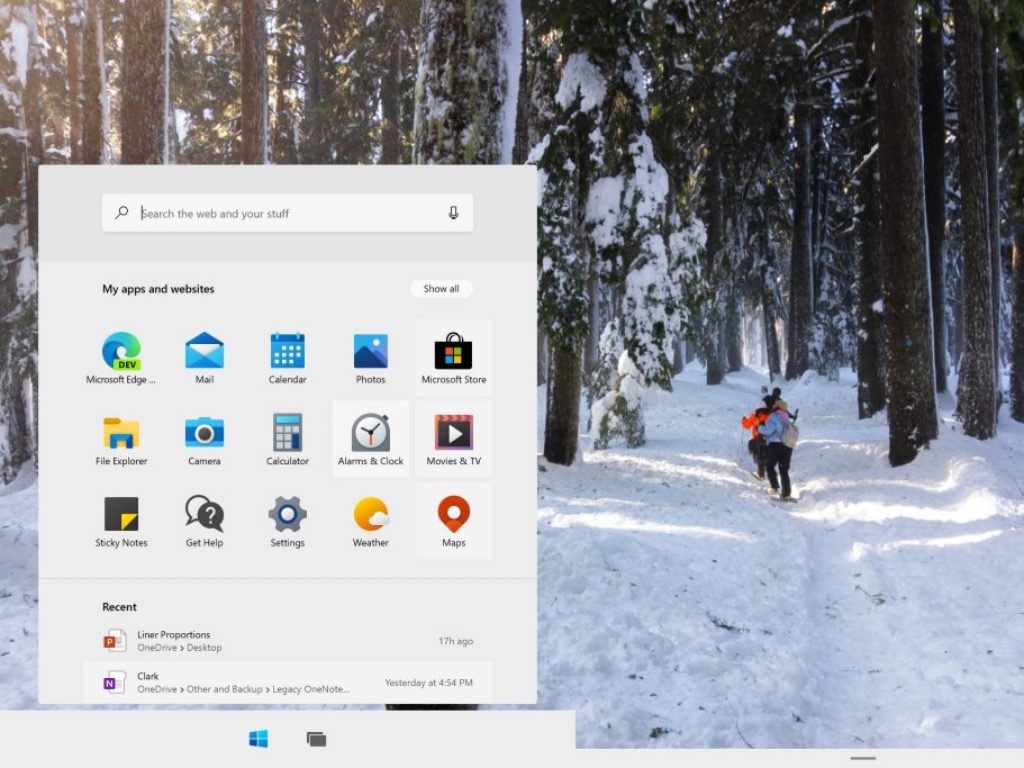
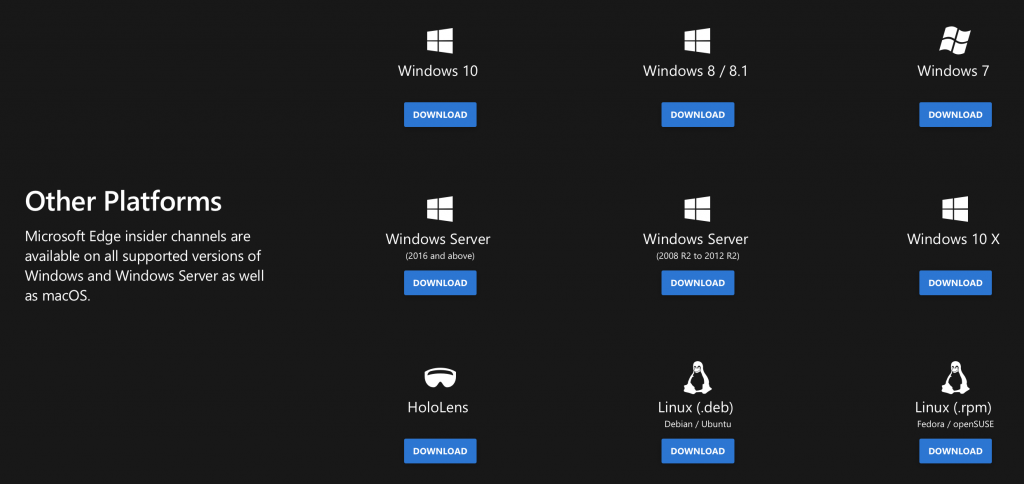

![7 Best USB-C Enclosures For Fast Data Transfer [2026 Guide]](https://windowsreport.com/wp-content/uploads/2019/11/usb-enclosure-case.jpg)


![How to ZIP a video file [Windows 10, Mac]](https://windowsreport.com/wp-content/uploads/2020/10/How-to-ZIP-a-video-file-Windows-10-Mac.jpg)







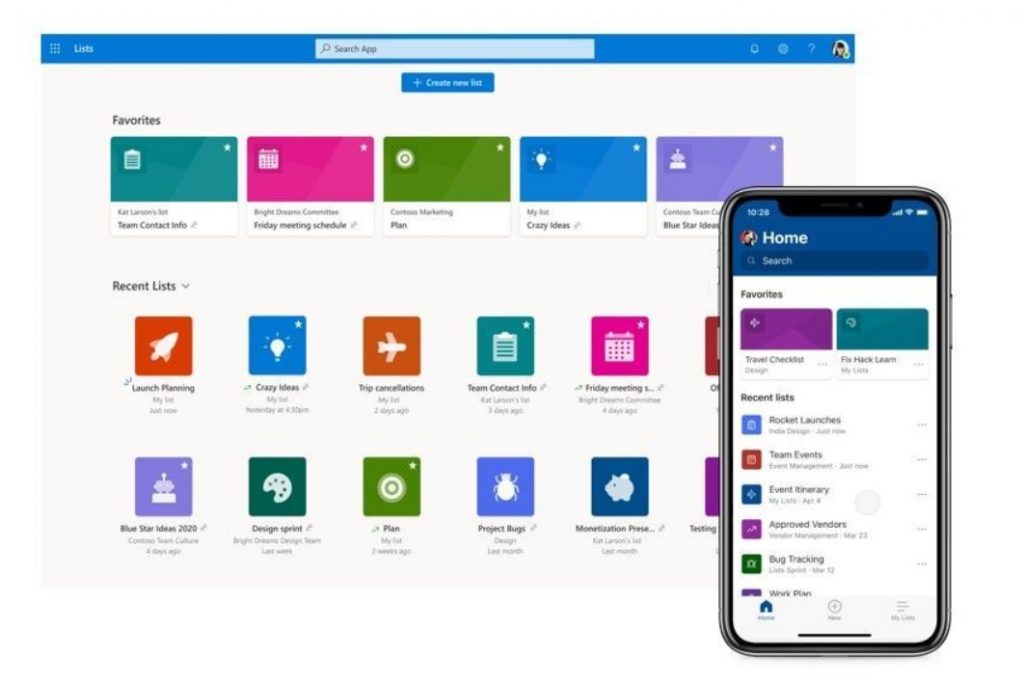
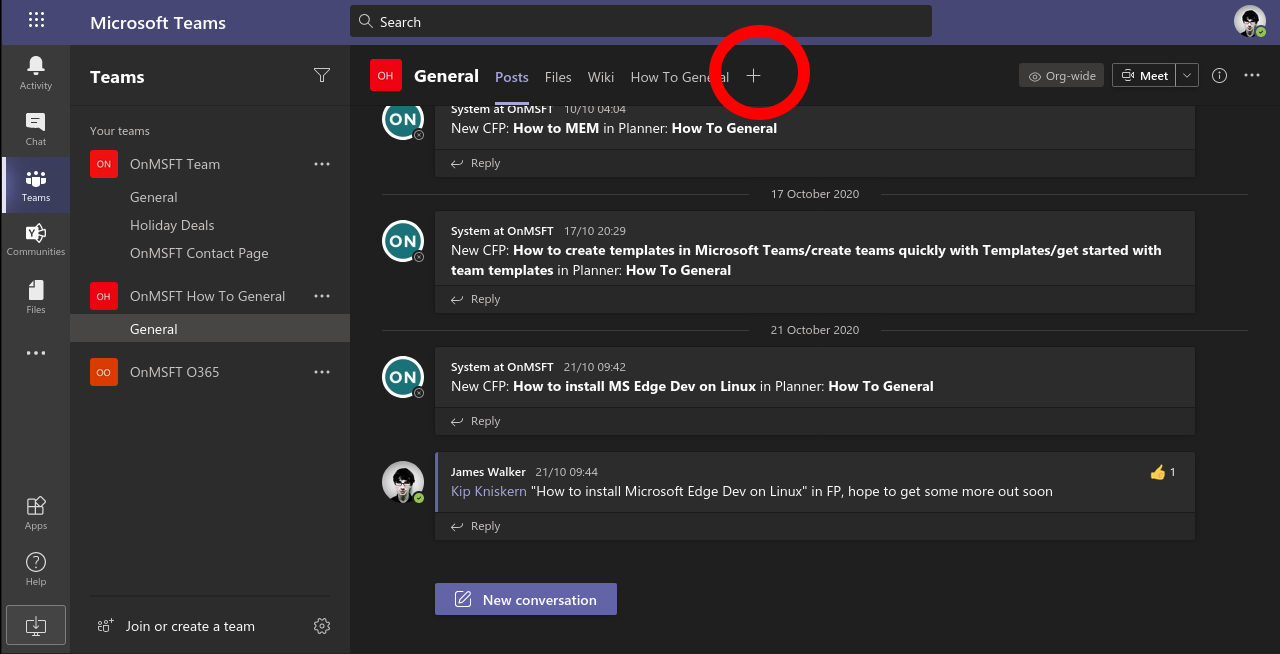
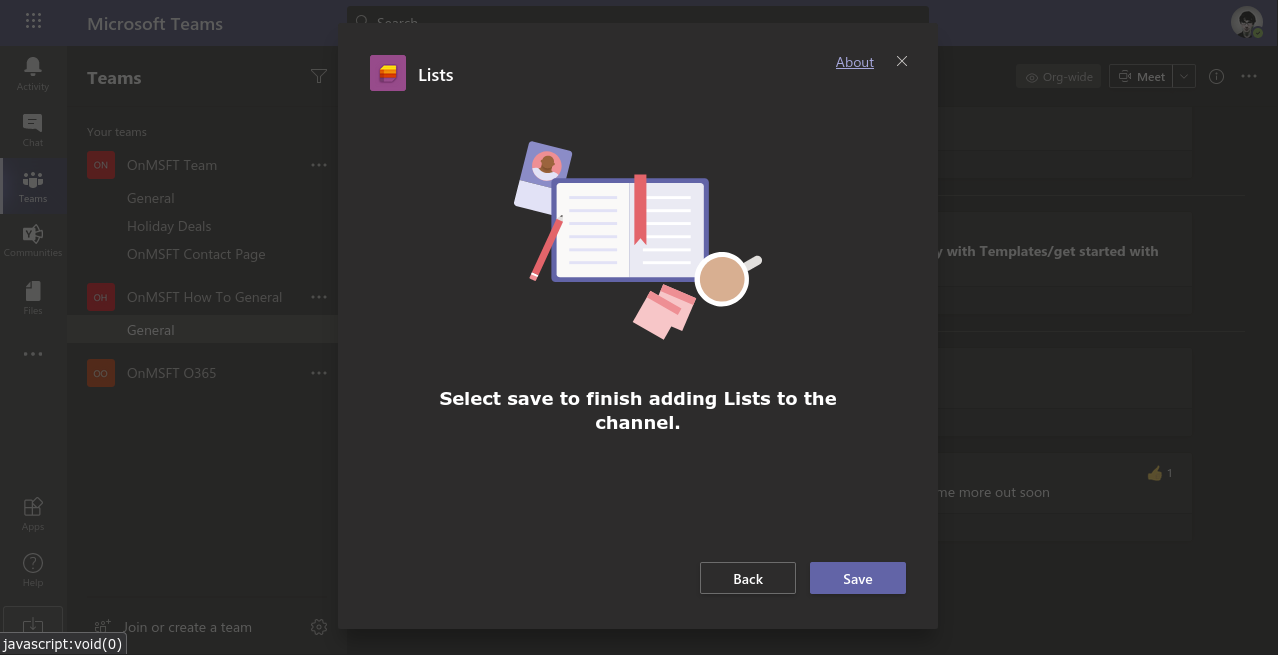
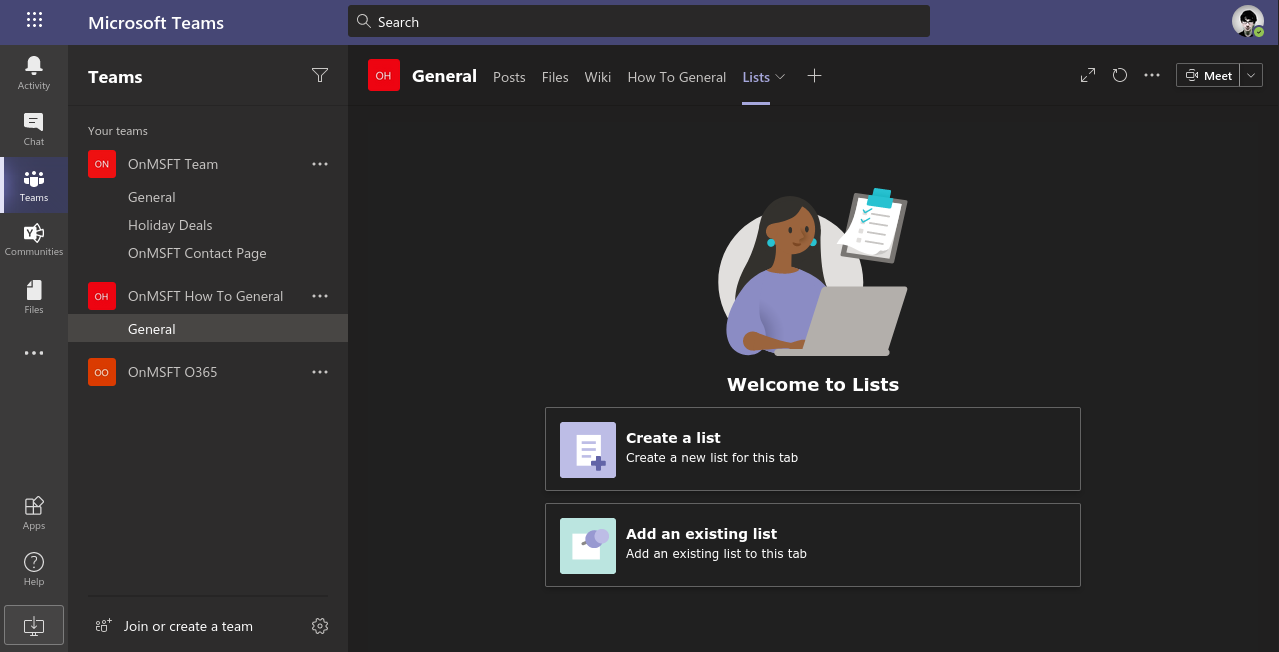
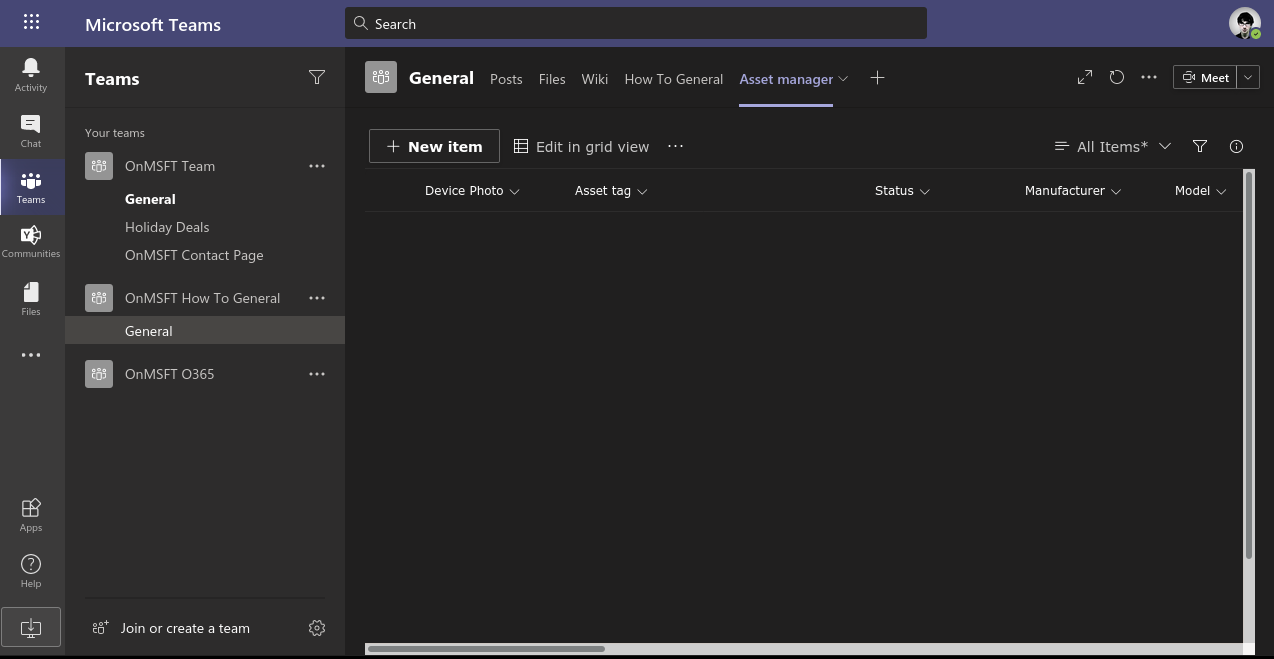
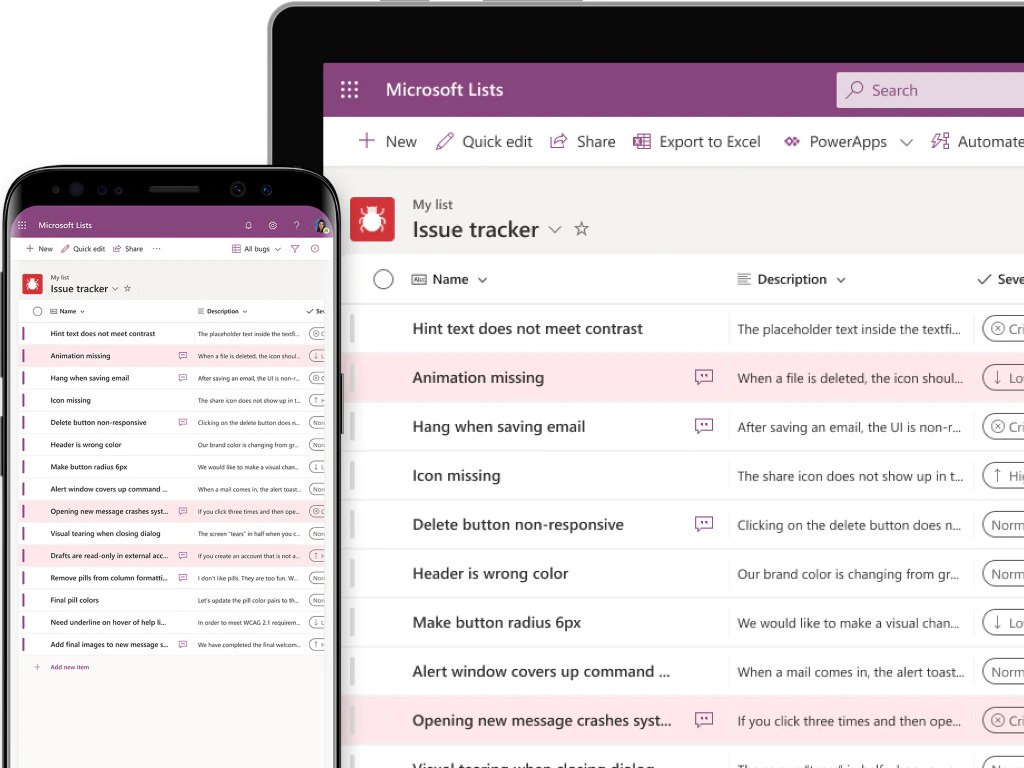
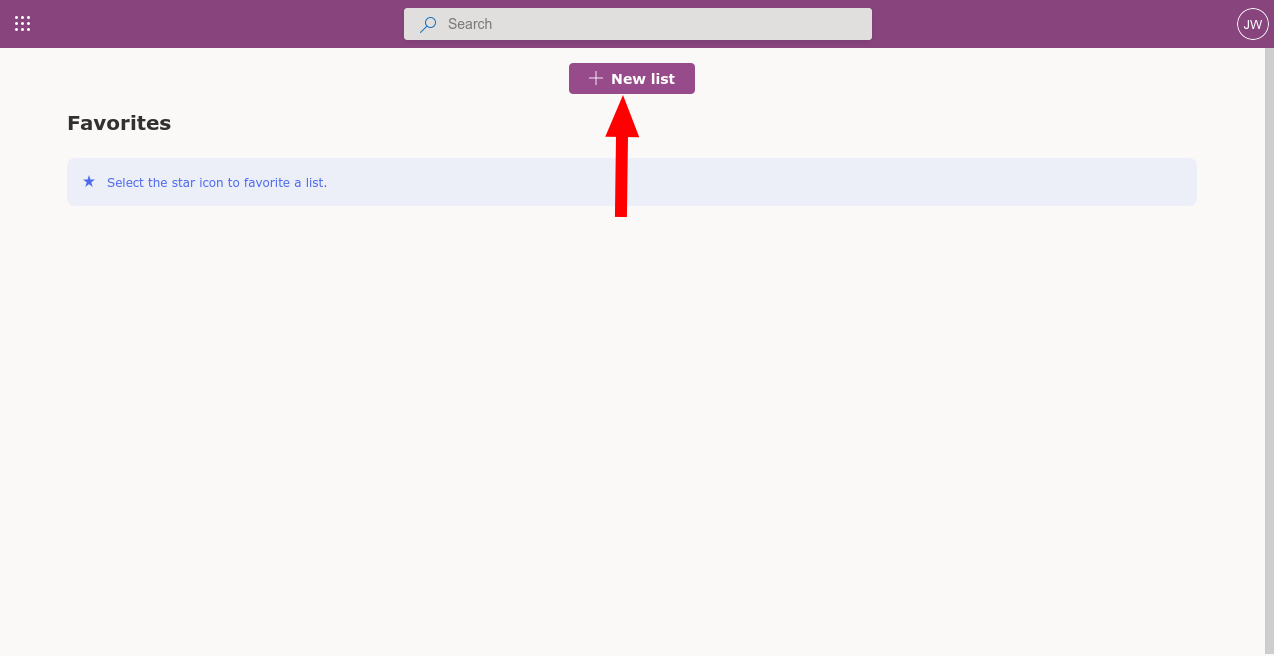
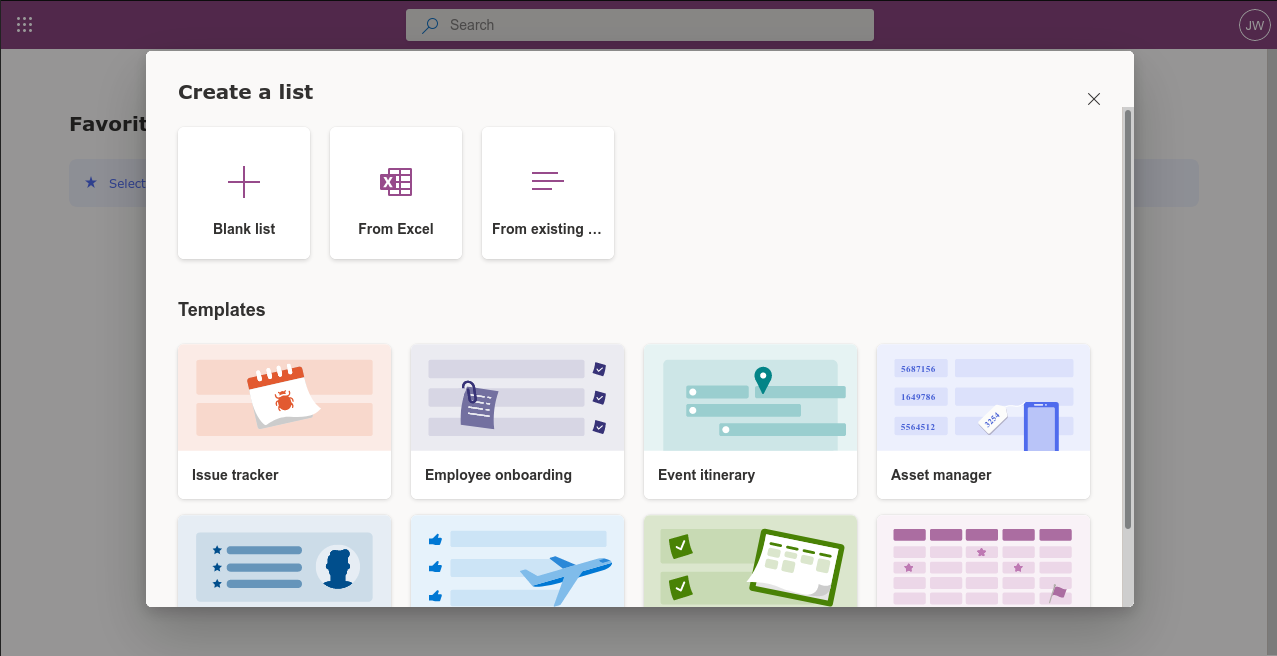
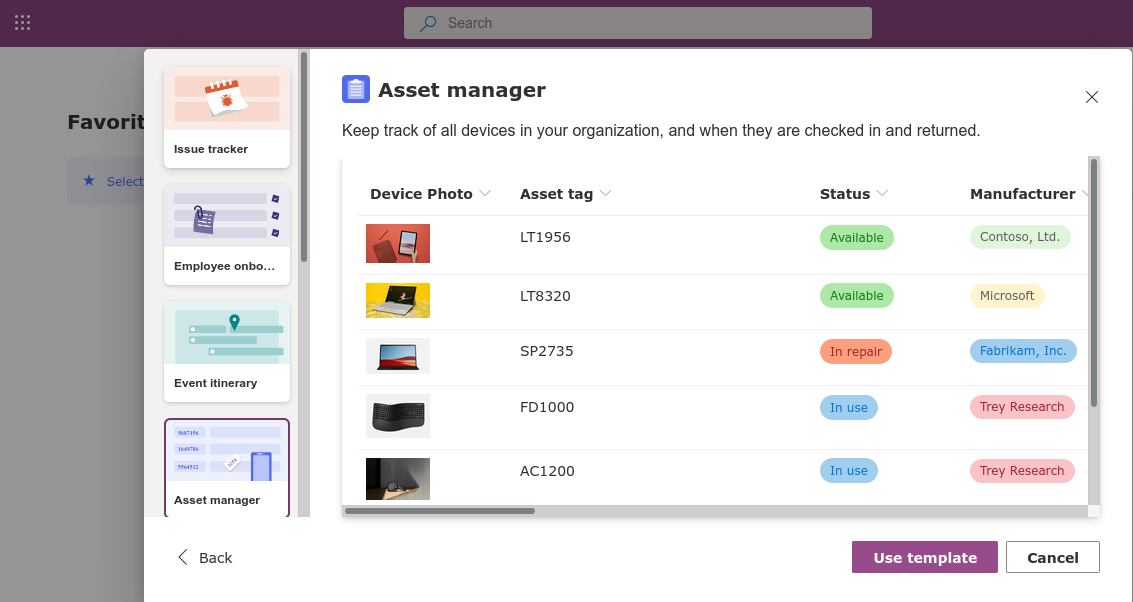
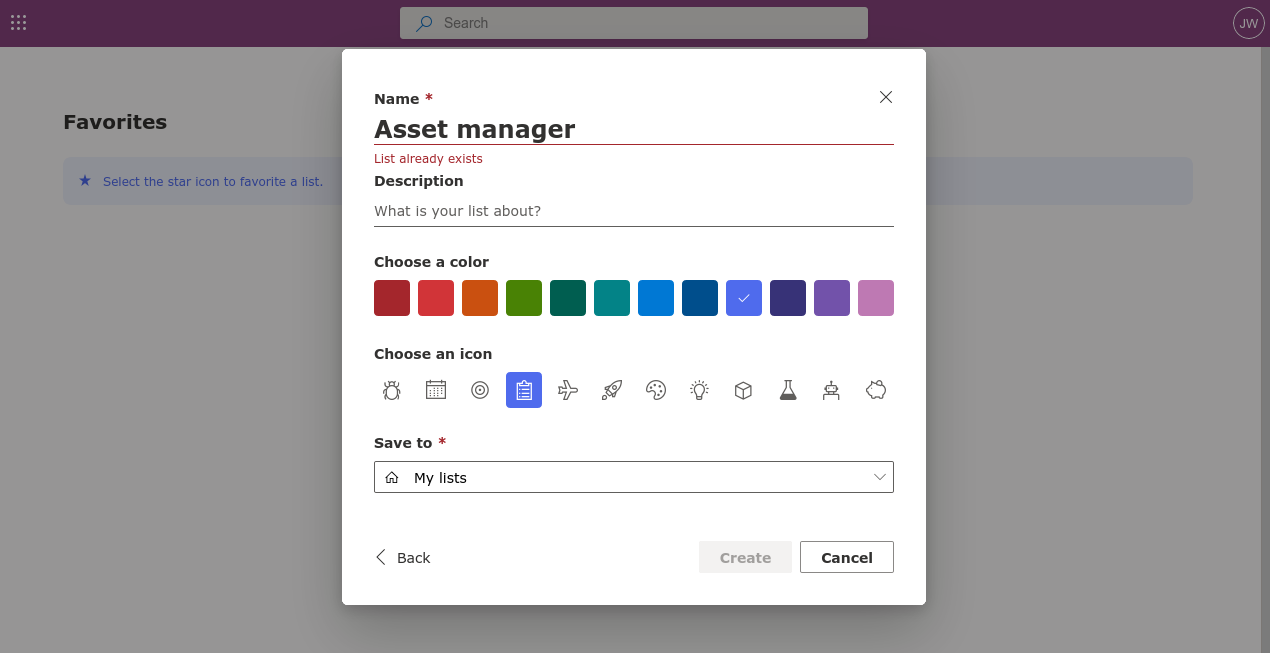
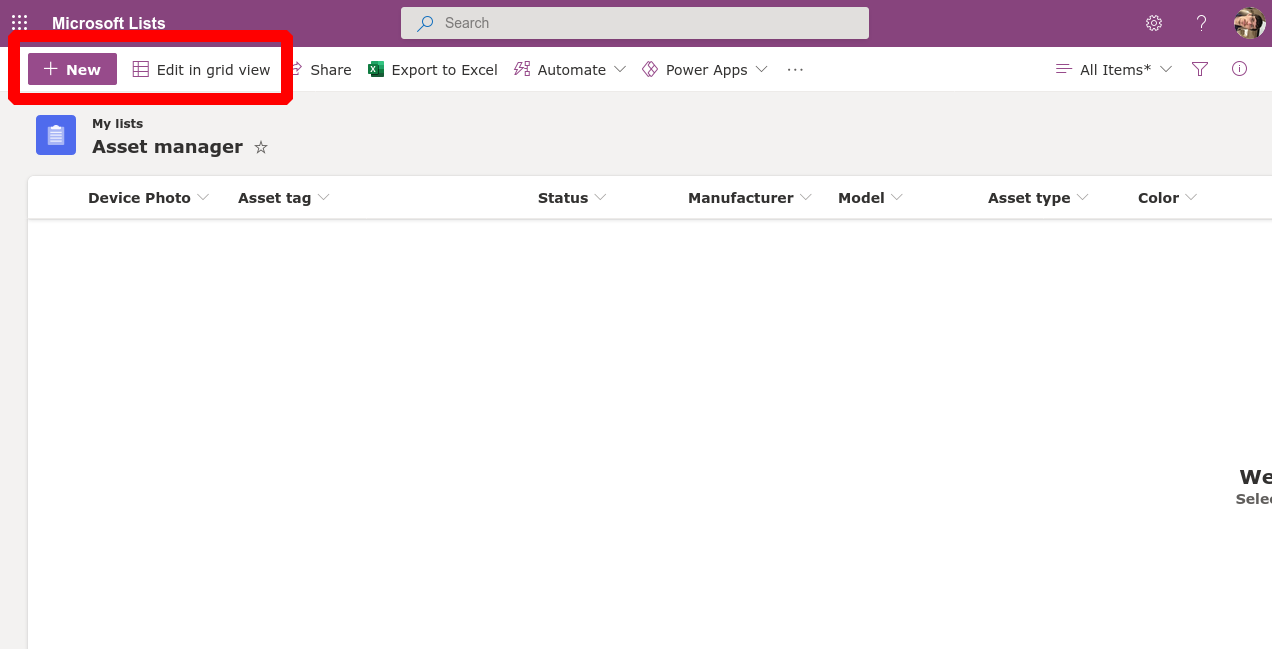
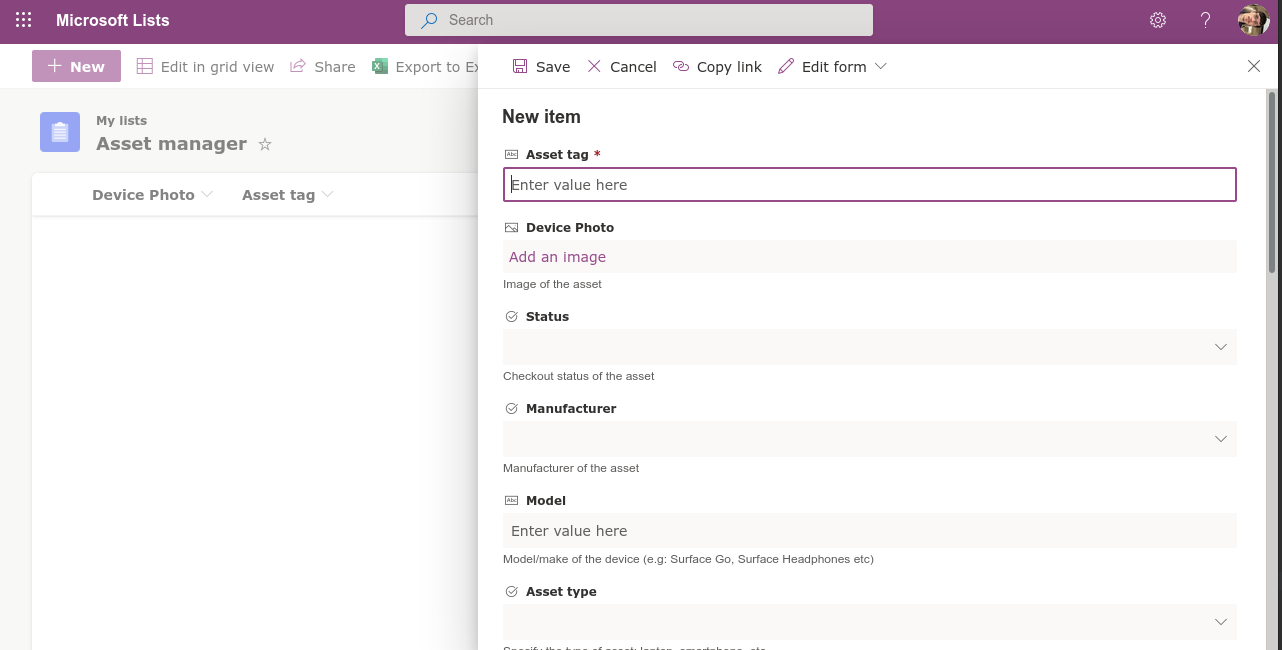
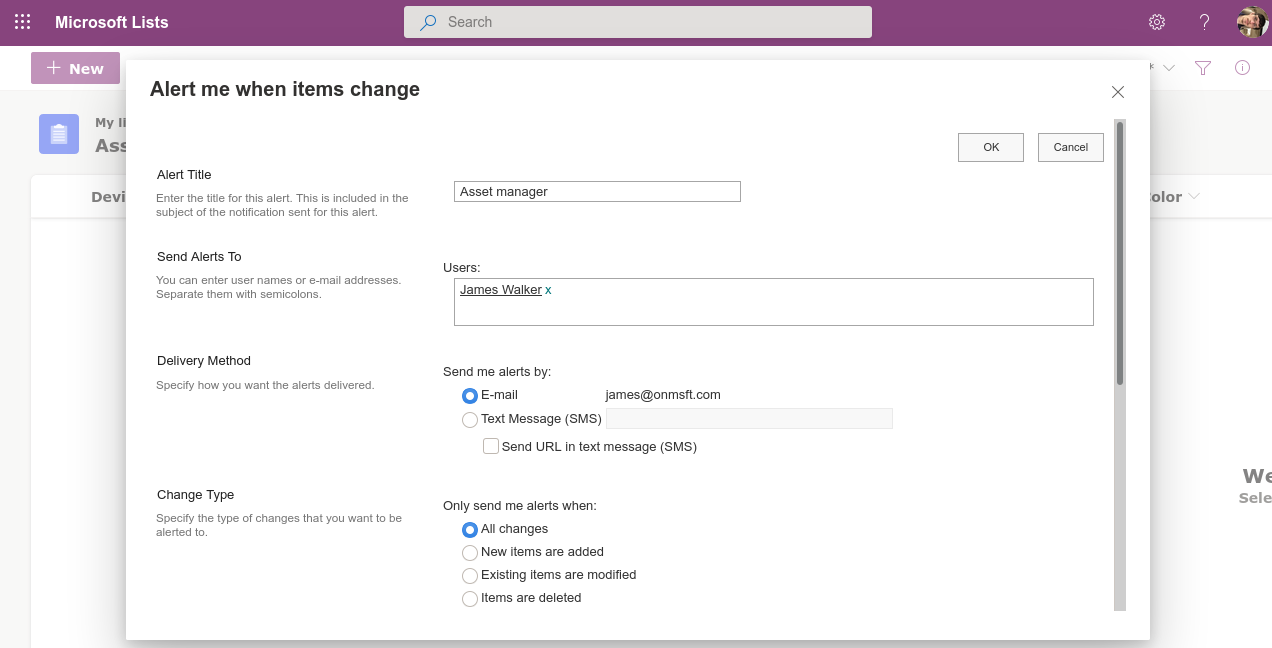
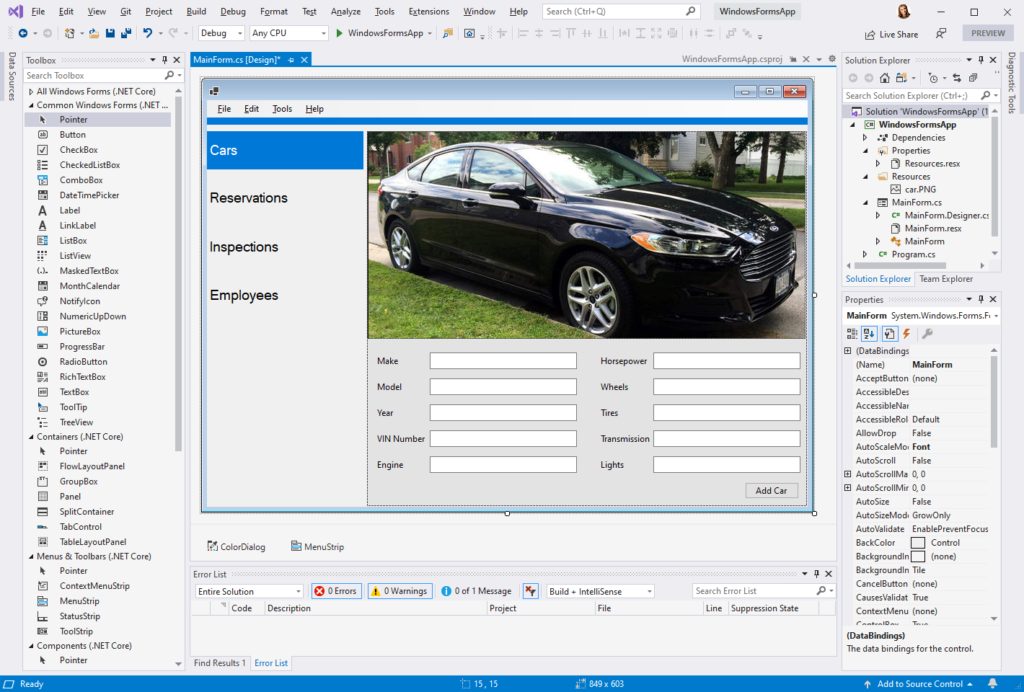

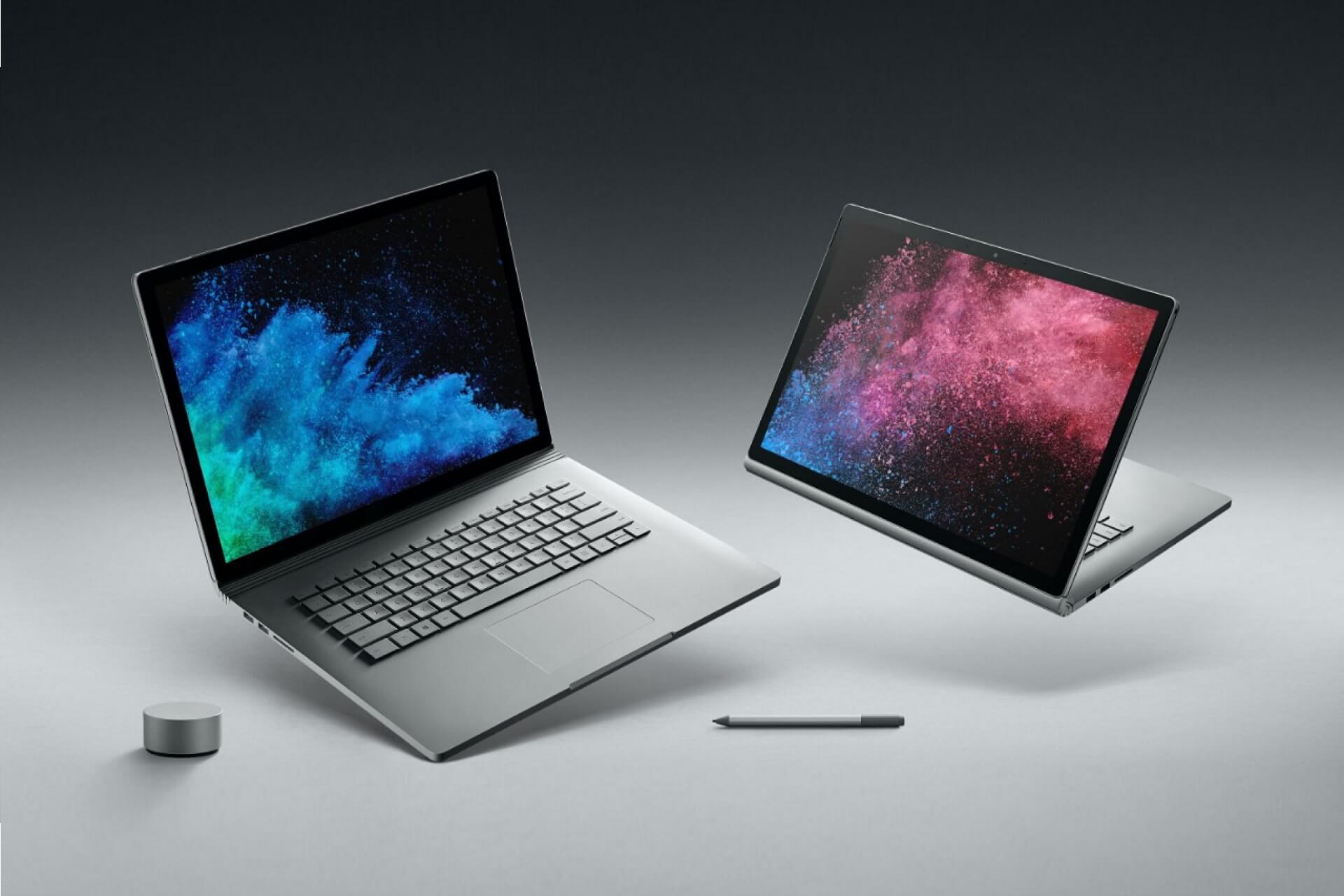
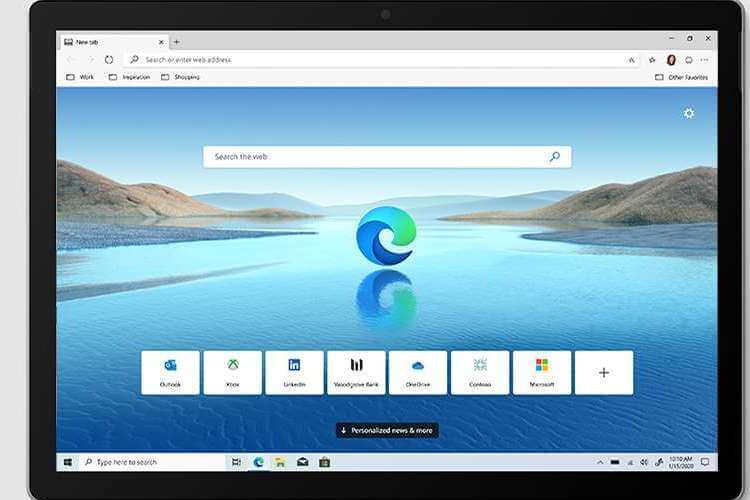





![Windows 10 November Patch Tuesday [DIRECT DOWNLOAD LINKS]](https://windowsreport.com/wp-content/uploads/2020/11/Download-November.jpg)

















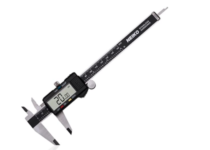











![3 Best Sony Speakers To Buy [2026 Guide]](https://windowsreport.com/wp-content/uploads/2019/11/sony-logo.jpg)