Xbox Confirms More Project Helix News Coming Later This Year

While expectations were high for fresh details related to next-gen Xbox Project Helix, the latest update from the Xbox Game Dev Spring ’26 Showcase appears to be more of a structured recap of GDC 2026 than a full reveal.

Today’s Xbox Game Dev Update showcase only highlighted GDC 2026 recap

The presentation revisits earlier announcements, offering a consolidated look at what Xbox has been building toward with Project Helix. That being said, Xbox is positioning the hardware as its central pillar. Jason Ronald, VP of Next Generation at Xbox, made that stance clear in the presentation.

He stated that the “console is absolutely core to Xbox, it is the heart of who we are, it will always be around, and it is critically important to our future.”

The presentation itself does not introduce major new features or hardware surprises, but it still reinforces Xbox’s long-term roadmap. Speaking of which, Jason Ronald later clarified on X that the video mainly serves as a recap for those who missed GDC coverage earlier this year.

He also hinted that more details on Project Helix are expected later in 2026, although the exact timing remains unclear. It could arrive during a major showcase event, or possibly closer to Xbox’s anniversary plans.

Project Helix and memory crunch concerns

Recently, in an interview, Xbox CEO Asha Sharma said that memory costs will affect the pricing and availability of the Project Helix console. “We will take that into consideration. So, we’re not ready to share a launch timeline right now. The world’s pretty dynamic. My number one focus, though, is to focus on what’s in our control, build a great console to play great games, including your PC games,” she further added.

As of now, there is no concrete release date for Project Helix, but rumors point to a possible late 2027 launch.

Windows 11 Preview Builds Reveal Smaller and Resizable Taskbar

New Windows 11 preview builds reveal smaller taskbar support, resizing controls, and movable taskbar functionality in testing.

Microsoft appears to be bringing back more classic taskbar functionality to Windows 11. As Windows Latest reports, the company is internally testing a smaller taskbar mode with proper resize controls, similar to the behavior users had in Windows 10.

The changes were reportedly spotted in Windows 11 preview build 26300.8346, where Microsoft continues experimenting with multiple taskbar improvements. Internal builds already show smaller UI elements, including a more compact Widgets button.

Smaller taskbar mode is finally coming

Unlike the current Windows 11 option that only shrinks taskbar icons, the upcoming implementation reportedly reduces the size of the entire taskbar. That means users could soon get a more compact desktop layout similar to older Windows versions.

Microsoft also appears to be working on resizable taskbar support. Internal testing reportedly allows users to drag the taskbar edges and adjust its size manually, another feature that existed in previous Windows releases but disappeared with Windows 11.

Movable taskbar support is also in testing

Movable taskbar functionality is also partially working internally. While the feature does not appear complete yet, it suggests Microsoft may finally restore additional customization options many users requested since Windows 11 launched.

These changes are part of a broader effort to improve the Windows 11 experience and bring back missing functionality from Windows 10.

Microsoft is also making File Explorer faster

Microsoft is also reportedly working on a new Low Latency Profile designed to speed up app launches and improve responsiveness across the operating system.

Other upcoming improvements include a modern File Explorer Properties dialog, a redesigned Run dialog, and additional File Explorer optimizations. Microsoft recently started testing preloading techniques that keep parts of File Explorer cached in memory, helping folders and windows open faster.

The company continues refining Windows 11 under its broader quality and reliability initiatives, and these taskbar updates could become one of the platform’s most noticeable usability improvements in years.

Spotify Now Lets AI Agents Create & Save Personalized Podcasts to Your Library

Earlier today, Spotify announced that its AI-powered DJ feature is getting new languages and personas. But that’s not all. In the latest announcement, the company has also confirmed a new feature that could make AI-generated audio far more useful for everyday users.

Spotify says users can now save and play “Personal Podcasts” directly inside Spotify, that too by allowing AI agents to generate private audio briefings, summaries, and learning sessions. Guess what? The company is welcoming these AI-generated personal podcasts into the Spotify library.

AI agents can now generate save personalized podcasts directly inside Spotify

In the announcement post, Spotify acknowledges that “People are already starting to use their agents to create personal audio that guides their day: from summaries of class notes before an exam to briefings of what’s on their calendar.” The company further adds that the new feature is a result of users “asking for a way to listen to it on Spotify, where they already listen to everything else.” So, what exactly can you do?

Well, Spotify says users can create these Personal Podcasts using supported AI agents such as OpenAI Codex, Claude Code, and OpenClaw GitHub through the new “Save to Spotify” beta tool. Once connected, users can prompt the AI agent to generate personalized audio content ranging from daily briefings to study guides and weekend itineraries. The generated podcast is then automatically saved inside Spotify’s library for playback across devices.

Image credit: Spotify

Spotify also highlighted several examples of how the feature can be used. Users can create quick morning briefings that summarize meetings, weather, and commute podcasts, or generate deeper educational audio sessions using personal notes, saved articles, searches, and uploaded files. The company says these experiences are designed to evolve over time and become increasingly personalized.

To use the feature, users need to install the Save to Spotify CLI tool on desktop and sign into Spotify through a browser. As of now, the feature is available in beta for eligible Spotify Free and Premium users globally.

Spotify Expands AI-Powered DJ Experience With 4 New Languages & Personas

Spotify has been on a spree this year when it comes to announcing new features and upgrades for its platform. Recently, the company introduced badges to curb AI-generated spam profiles. Today, Spotify has announced another major update, this time expanding its AI-powered DJ experience to more users globally while also introducing support for four new languages.

Spotify’s AI DJ is getting four new language options and reaching more markets

In the announcement post from earlier today, the music streaming giant has confirmed that DJ is expanding with support for French, German, Italian, and Brazilian Portuguese. Alongside new language support, the feature is also landing in more markets including Brazil, France, Germany, Italy, Portugal, Austria, South Korea, Switzerland, and more. According to the company, DJ is now available in over 75 markets worldwide for Premium users.

For those unaware, Spotify DJ is the company’s AI-powered personalized listening experience that combines music recommendations with AI-generated commentary. The feature curates playlists based on listening habits, while also resurfacing old favorites, suggesting fresh tracks, and introducing users to new artists. Spotify also says users can directly request different moods, genres, or vibes through voice and text prompts.

To support the latest expansion, Spotify has introduced four new DJ personalities tailored for different regions and languages. These include Maïa for French, Ben for German, Alex for Italian, and Dani for Brazilian Portuguese. According to Spotify, each DJ personality has been designed with help from local teams to better match cultural tone and listening habits.

The company also notes that users can switch DJ languages directly through the app’s three-dot menu inside the DJ card. As of now, the feature remains in beta, which means Spotify will likely continue improving the experience over time. Speaking of new features, Spotify has also recently introduced SongDNA feature that allows you see how tracks are connected.

Windows 11’s New “Low Latency Profile” Will Reportedly Speed Up App Launches & More

Earlier this year, Microsoft promised that it’ll fix Windows 11 from scratch, and it seems the effort is already in motion internally as part of the Windows K2 plan. For those unaware, one of the critical areas of the leaked Windows K2 plan is making the OS faster and more stable.

Well, new details are now out regarding the same, with Windows Central now reporting that Microsoft is working on a new performance boost feature reportedly called “Low Latency Profile.”

The new feature will reportedly max out CPU frequency in short bursts for improving responsiveness

The new performance boost feature reportedly focuses on improving the responsiveness of common tasks by boosting the “CPU to max frequency for between 1 and 3 seconds.”

While it’s unclear whether users can toggle this feature on or off, the report mentions that it automatically triggers in the background when users perform high-priority actions like opening apps, the Start menu, system flyouts, or context menus.

The report also mentions that the “Low Latency Profile” feature can improve app launch speeds by up to 40% for apps like Edge and Outlook. That’s not all, Start menu and context menu launch times could reportedly improve by up to 70%, with benefits extending to third-party apps as well.

The good news is that the feature reportedly has only minimal impact on battery life and thermals since the CPU boost duration is relatively very short.

As of now, the Low Latency Profile is reportedly in the testing phase, so it’s highly likely that the final version will have adjusted duration and frequency for the boost before Microsoft unveils it to the masses. Speaking of improvements, Microsoft is also working on making File Explorer snappier, alongside giving its properties dialog a modern overhaul. Notably, the Clock app’s Focus mode is also likely to get a major AI-powered upgrade. All that said, it seems Microsoft is finally rushing to fix Windows 11 for good.

Microsoft Admits Nobody Expected Win32 to Still Power Windows in 2026

Microsoft has officially acknowledged something many Windows users already suspected: the Win32 API was never expected to remain this important in 2026. Yet despite decades of replacement attempts, it still powers much of Windows today.

As Windows Latest reports, Microsoft Technical Fellow Mark Russinovich recently described Win32 as the “bedrock” of Windows, admitting that nobody expected it to remain a first-class platform this long.

Win32 became impossible to replace

Originally introduced during the Windows 95 era, Win32 evolved into the foundation of the Windows desktop ecosystem. Millions of applications still rely on it today, especially enterprise software and professional desktop tools that depend on deep Windows integration and long-term compatibility.

According to Russinovich, backward compatibility became one of the biggest reasons for Win32’s survival. Businesses needed older applications to continue working, while developers still required unrestricted access to system-level Windows features that newer frameworks often failed to provide.

Microsoft spent years attempting to move developers toward platforms such as UWP and WinRT, but those efforts never fully replaced traditional desktop development. Many developers viewed UWP as too restrictive because sandbox limitations blocked deeper operating system access. Frequent strategy changes also damaged trust in Microsoft’s long-term Windows app direction, and the UI development became chaotic.

WebView2 pushed Windows toward web apps

Over the past several years, Microsoft has increasingly adopted web technologies through WebView2, leading to a new generation of Windows applications built around Chromium-based interfaces instead of native desktop code.

Apps such as Microsoft Teams, Microsoft Outlook, Microsoft Copilot, Clipchamp, and Windows Widgets all became associated with this shift toward web-based experiences.

That transition also drew criticism from users who complained about heavier RAM usage, worse responsiveness, and weaker desktop optimization compared to native Win32 applications. Many users connected these issues to broader memory and performance complaints surrounding Windows 11.

Microsoft now appears to be moving back toward native apps

Microsoft now seems focused on modernizing Windows without abandoning the strengths of Win32. Instead of trying to fully replace the platform, the company appears to be combining newer UI frameworks with native desktop performance and compatibility.

The company continues investing in WinUI 3 and the Windows App SDK while still preserving traditional Win32 access. Recent examples include the redesigned File Explorer Properties dialog and the rewritten Win + R Run dialog.

Microsoft reportedly built the new Run dialog using .NET AOT technology, achieving a median launch time of roughly 94 milliseconds. According to the company, the updated implementation can now match or even exceed the responsiveness of older Win32-based components.

The shift suggests Microsoft no longer views Win32 as aging technology waiting to disappear. Instead, the company increasingly appears to treat it as the permanent foundation of Windows moving forward.

Halo Next Leak Hints at a New Direction for the Halo Franchise

Microsoft may finally be preparing the next major phase of the Halo franchise. New reports suggest that Halo Campaign Evolved now has a leaked release window, while Halo Studios is also rumored to be exploring remakes of Halo 2 and Halo 3.

The latest claims arrive alongside additional details about a new mainline Halo project reportedly known internally as “Halo Next” (via Windows Central).

Halo Next reportedly in development

Recent information points to Halo Studios actively working on the next core Halo campaign experience. A job listing reportedly referenced “Halo Next,” suggesting the studio has already moved beyond Halo Infinite’s current storyline planning phase.

Earlier reports claimed that a project known as “Campaign Next” was once led by Joseph Staten and designed as a direct continuation of Halo Infinite. However, internal restructuring and layoffs in 2023 reportedly changed those plans significantly.

The original direction allegedly avoided bringing back the Flood immediately and instead focused on pushing Halo into a new narrative era.

The Endless may remain the franchise’s next major threat

Halo Infinite already hinted at a new long-term enemy through The Endless. The game’s ending positioned the faction as a major future threat, and reports claim that Halo: Edge of Dawn continues building that storyline.

That leaves Halo Studios with a major decision regarding the franchise’s future direction.

The Flood remains one of the most iconic enemies in Halo history, and many fans still want the classic horror-focused faction to return in a larger role. Others support moving the series forward with newer threats instead of relying entirely on nostalgia from the original trilogy.

Right now, it remains unclear whether Halo Studios plans to fully commit to The Endless or accelerate the return of the Flood due to fan demand.

Halo Infinite still receives major updates

While future Halo projects dominate discussion, Halo Infinite continues receiving substantial content updates.

The game recently added Firefight: Gauntlet, a new PvE survival mode focused on four-player co-op combat, scaling difficulty, and arena-based progression. The update arrived unexpectedly after earlier messaging suggested Halo Infinite was nearing the end of its major content cycle.

That combination of ongoing Halo Infinite support, leaked future projects, and remake rumors suggests Microsoft still sees Halo as one of Xbox’s biggest long-term franchises.

Xbox to Offer “Closer Look at Project Helix” At Today’s Game Dev Spring ’26 Showcase

Xbox’s next-gen console, codenamed Project Helix, might still be far away, but if you have been eager for more details, don’t forget to tune into today’s Game Dev Spring ’26 Update showcase. In a blog post published in late April, Microsoft hinted that today’s showcase will offer a closer look at Project Helix, the company’s next-generation Xbox hardware that will succeed the Xbox Series X|S consoles. The company has confirmed that the first episode of the Game Dev Update will air on its YouTube channel today, May 7 at 9 AM PDT / 12 PM EDT / 6 PM CEST.

Xbox’s next-generation Project Helix console will focus on Xbox, PC, and future DirectX technologies

As previously announced, Project Helix is powered by a custom AMD-based SoC and is being co-designed alongside the next generation of DirectX technologies. As Microsoft puts it, “Project Helix will create new opportunities for you to optimize build workflows, improve performance, and iterate more efficiently.”

At GDC 2026, Xbox VP Jason Ronald first teased Project Helix during a “Building for the Future with Xbox” session. During that presentation, Ronald explained that the next-generation hardware would function as a platform for both Xbox and PC games.

Microsoft also confirmed at the time that developer kits for the system would not begin shipping until 2027. Though, there’s still no update on the launch timeline of the next-gen Xbox console. However, in a recent interview, Asha Sharma confirmed that memory costs “will impact” the pricing and availability of Project Helix.

Ever since Asha Sharma assumed the role of Xbox CEO, Project Helix has been in the spotlight. Not to forget, the company has previously also confirmed that Project Helix is a first-party console, whereas leaks and rumors have hinted that Project Helix could rival high-end gaming PCs. When Project Helix was first officially teased, Asha Sharma also claimed that the next-gen Xbox console would “lead in performance.” Well, we expect to hear more about Project Helix at today’s event. And, if there’s anything new, we’ll update you through new articles.

Hackers Use Fake Claude AI Download to Deploy New Beagle Malware on Windows

A fake Claude AI website is being used to spread a previously undocumented Windows backdoor called Beagle. The campaign impersonates Claude through a malicious claude-pro[.]com domain and promotes a bogus “Claude-Pro Relay” download aimed at developers.

As Bleeping Computer writes, the fake site advertises the tool as software for “Claude-Code,” but the download installs malware in the background. The 505MB ZIP file, named Claude-Pro-windows-x64.zip, includes an MSI installer that appears to work normally while deploying the backdoor silently.

The fake Claude installer hides malware in the background

Once installed, the malware drops several files into the Windows Startup folder, including NOVupdate.exe, NOVupdate.exe.dat, and avk.dll. This allows the malware to maintain persistence after reboot.

The attack also abuses a signed G Data updater to sideload the malicious DLL. This technique helps the malware run under the cover of a trusted binary and makes detection harder for security tools.

Beagle uses in-memory execution to avoid detection

The infection chain starts with DonutLoader, an in-memory injector used to launch the next-stage payload without writing it directly to disk. The final payload is Beagle, a new Windows backdoor with a limited but dangerous command set.

Beagle can execute CMD and PowerShell commands, upload and download files, list directories, create folders, rename files, delete directories, and maintain remote access to an infected system.

The malware also uses encrypted payloads, encrypted command-and-control traffic, anti-analysis checks, and anti-VM protections. These features suggest the operators designed the campaign to avoid researchers and automated sandboxes.

The campaign shows links to PlugX-style activity

Although attribution has not been confirmed, the tradecraft overlaps with PlugX-linked campaigns. Researchers also found related samples from February through April that use the same decryption key.

The wider campaign appears to test different lures, including fake updates for CrowdStrike, SentinelOne, Trellix, and Microsoft Defender. Some related attacks also used decoy PDFs and shellcode loaders.

The fake Claude malware communicates with license[.]claude-pro[.]com over TCP 443 and/or UDP 8080. The traffic is AES-encrypted, while the infrastructure is tied to an Alibaba Cloud IP range.

Users should avoid unofficial AI tool downloads

This is not the first time attackers have abused interest in Claude to spread malware. Last month, threat actors used a Claude Code leak as a lure to distribute malware through GitHub.

Users should download AI tools only from official websites and avoid sponsored search results for installers. Security teams should also monitor Startup folders for NOVupdate-related files and investigate suspicious outbound traffic to the fake Claude domain.

In other security news, CloudZ RAT can steal one-time passwords through Phone Link, while hackers have also used Microsoft Teams in espionage campaigns that are likely state-sponsored.

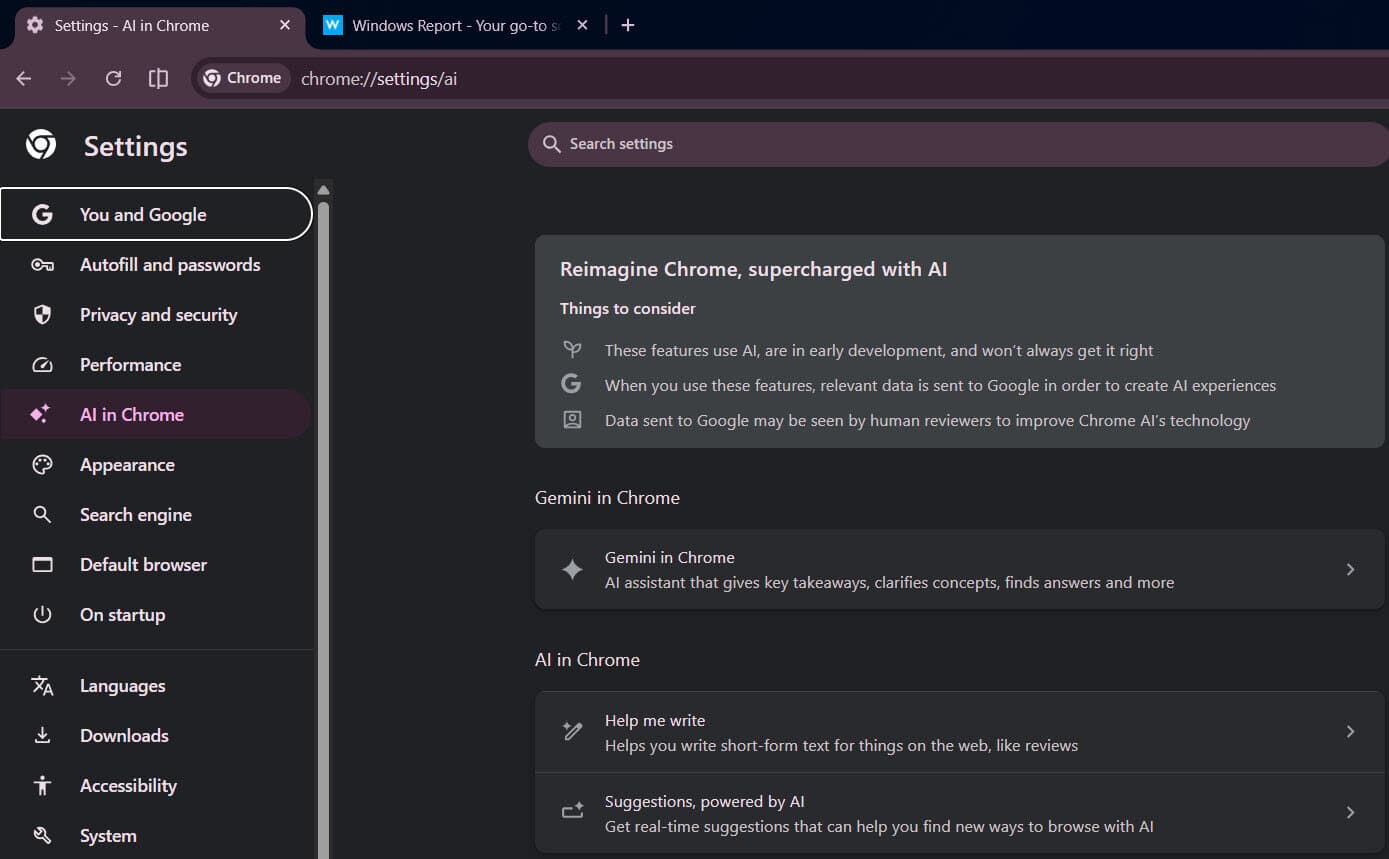
Chrome UI Refresh 2026 starts in Settings with new themed colors on Windows 11

Chrome Canary now applies stronger themed colors across the Settings page and renames the browser’s “AI innovations” section to “AI in Chrome.” These changes show up in recent Canary builds on Windows 11 and look like the first visible pieces of Chrome’s latest UI changes, which we refer to here as Chrome’s 2026 UI refresh.

Chromium changes internally refer to this project as “GlowUp.” Recent commits linked to GlowUp mention themed colors, refreshed WebUI styling, updated icons, and work on internal pages, including Settings, Bookmarks, and History. Google has not announced a public name for this set of visual updates, but for clarity, we call it “Chrome UI Refresh 2026” in this article.

The biggest visual change appears in chrome://settings. Compared to Chrome Beta, Canary now spreads the selected browser theme color across more of the Settings interface instead of relying mainly on neutral gray surfaces and blue accents.

The top toolbar carries a deeper tint, while the search field, sidebar highlight, buttons, and some toggles now match the active browser color more closely. Chrome Beta still keeps several parts of the page closer to Chrome’s default color styling, so the difference is easy to spot side by side.

Chrome Canary does not change the Settings layout itself; the update focuses on how colors appear across the page. A Chromium change called “[GlowUp] Use themed colors in Settings” lines up with the visual differences now visible in Canary.

The color work appears alongside another change called “[GlowUp] Update AI settings page title.” In current Canary builds, Chrome now labels the AI hub in Settings as “AI in Chrome” instead of “AI innovations,” while keeping tools like “Help me write” under the same page.

Internal wording says this section groups settings related to AI features in Chrome, which makes the label clearer and helps the page feel like a normal part of the browser instead of a separate experiment.

Google has also started testing a “Suggestions, powered by AI” toggle in this section,which offers real‑time browsing suggestions based on open tabs.

STRANGER THAN HEAVEN Releases Day One on Xbox Game Pass This Winter

After a trailer leak and Xbox’s promise to reveal the game, Stranger Than Heaven has finally been showcased via a new 30-minute presentation. The presentation revealed fresh story details, multiple Japanese cities, new gameplay mechanics, celebrity appearances, and a brand-new combat system designed specifically for the game.

Notably, Stranger Than Heaven is set to launch this winter for Xbox Series X|S and will also be available day one on Xbox Game Pass. The game will also launch on PS5 and PC via Steam.

Stranger Than Heaven spans 50 years, five cities, and introduces a brand-new dual-control combat system

RGG Studio confirmed that Stranger Than Heaven follows protagonist Makoto Daito across five decades of his life. Born to an American father and Japanese mother, Makoto loses both parents early before eventually traveling to Japan in 1915. During the journey, he meets Orpheus, played by Snoop Dogg, alongside Yu Shinjo, who later becomes both his closest ally and biggest rival.

The game takes players across five Japanese locations, including Kokura, Kure, Osaka’s Minami district, Atami, and finally Shinjuku in Tokyo. Each city represents a different era, while also introducing new themes ranging from organized crime to entertainment and post-war cultural shifts. RGG Studio also showed several side activities, including gambling minigames, target shooting, arm wrestling, and music management systems.

One of the biggest gameplay additions revolves around Makoto’s musical talent. Players can collect sounds from the environment, ranging from train noises to street sounds, and later use them to create original compositions. Stranger Than Heaven also introduces management mechanics where players organize performances, recruit artists, and manage showbusiness activities. Singer characters include appearances from Satoshi Fujihara and Tori Kelly, who also contributed to the game’s theme song.

Combat appears to be one of the game’s standout features. RGG Studio revealed a new dual-control combat system where players independently control Makoto’s left and right limbs. Players can block with one arm, attack with the other, use contextual finishers, and wield various weapons including katanas, hammers, knives, and more. Speaking of which, the cinematic presentation and dense gameplay systems already make Stranger Than Heaven look like one of Xbox’s most ambitious partnerships with RGG Studio so far.

Microsoft’s First-Ever Voluntary Retirement Package Details Out Now, Check What’s Being Offered

Late last month, multiple reports hinted that Microsoft is preparing voluntary buyouts for U.S. employees. The move comes as Microsoft continues to ramp up spending on AI infrastructure and services. Speaking of which, Microsoft is reportedly also considering delaying or even abandoning its 2030 clean energy target. Coming back to voluntary retirement, a fresh report by The Verge has now detailed what Microsoft will be offering to its long-serving employees.

Microsoft’s voluntary retirement offer will reward long-serving employees the most

Per the report, around 7 percent of Microsoft’s US workforce, roughly 8,750 employees, are reportedly qualified for the offer. Microsoft employees in the US whose age and years of service combine to 70 or more will qualify for the voluntary retirement offer. The package reportedly includes up to five years of healthcare coverage, a lump-sum severance payment, and accelerated vesting for unvested stock options.

The healthcare portion may attract long-time employees the most. Microsoft is said to fully subsidize medical, dental, vision, and well-being coverage during the first year. However, workers choosing the package would need to pay monthly premiums for the remaining four years. Additionally, retiring employees will reportedly receive six months of accelerated stock vesting, extending to 12 months for workers with at least 24 years of continuous service.

The severance structure changes depending on employee level. Microsoft’s mid-senior employees at level 64 may receive one week of base pay for every six months worked, capped at 39 weeks. More senior staff in levels 65 through 67 are reportedly being offered two weeks of pay for every six months of service, with the same cap. Notably, employees will have 30 days to decide whether to accept the offer.

At a time when major tech firms continue restructuring around AI investments, the move stands out because Microsoft has never offered a voluntary retirement program in its 50-year history. Let’s not forget that Microsoft has also reshuffled leadership at the top, with former LinkedIn CEO Ryan Roslansky now set to lead Teams as well.

Microsoft and IBM Reportedly Clashed Over the Tab Key During OS/2 Era

Back in 1987, Microsoft and IBM worked together on OS/2, one of the most ambitious operating system projects of its time. While the collaboration aimed to shape the future of personal computing, one surprisingly small disagreement reportedly escalated all the way to upper management: the Tab key.

The story comes from a recent blog post shared by Raymond Chen, who explained how both companies clashed over which keyboard key users should press to move between dialog fields.

Microsoft wanted the Tab key to handle navigation between fields, something that already felt natural to many PC users at the time. IBM, however, strongly objected to the decision and reportedly escalated the issue through multiple management layers.

Why the Tab key became a serious issue

At the time, the Tab key already served several important functions across computing environments. Users relied on it for navigating forms, aligning text, improving workflow efficiency, and triggering command-line auto-complete actions in some software.

Microsoft engineers viewed Tab-based navigation as an obvious usability choice. IBM apparently disagreed enough to keep pushing the debate higher within the company hierarchy.

According to Chen’s account, the disagreement eventually reached the vice president level inside IBM. The company then requested equivalent escalation from Microsoft’s side.

Microsoft’s response reportedly ended the dispute immediately: “Bill Gates’s mother is not interested in the Tab key.”

The joke highlighted the very different management structures between the two companies. IBM operated with a far more structured and hierarchical decision-making process, while Microsoft allowed developers and smaller teams to make many product decisions independently.

A small UX decision with a lasting impact

The disagreement may sound trivial today, but the Tab key eventually became one of the most important navigation standards in modern software interfaces.

Users still rely on Tab navigation across operating systems, websites, desktop applications, and accessibility tools decades later. What looked like a tiny interface debate during the OS/2 era ultimately helped shape how people interact with computers today.

The story also offers a rare glimpse into the cultural tension between IBM and Microsoft during the late 1980s. While both companies collaborated on OS/2 initially, their partnership eventually collapsed as Microsoft shifted focus toward Windows.

In other Microsoft news, the company continues improving Windows 11 performance behind the scenes, including File Explorer responsiveness changes. Reports also suggest that former LinkedIn leadership now plays a bigger role in the future direction of Microsoft Teams.

Separate reports additionally claim Microsoft could reconsider parts of its long-term 2030 clean energy commitments.

Via Neowin

[UPDATE] Xbox Free Play Days Brings CATAN & Deadside This Weekend (May 7-10)

[UPDATE: May 7, 2026 | 03:45PM UTC] Microsoft has officially confirmed that the two games, CATAN and Deadside, we reported earlier today will be part of this weekend’s Xbox Free Play Days lineup. Xbox Game Pass Ultimate, Premium and Essential members can play both the games for free this weekend. Not to forget, you can also grab Deadside at a discounted price of $12.49 if you buy it during the Free Play Days window.


[ORIGINAL STORY] It’s Thursday, which means Microsoft is set for yet another Xbox Free Play Days lineup announcement later today. However, we already have the names of at least two games expected to be part of this weekend’s lineup.

As usual, the details come from Reddit user Oliomono, who has a solid track record with Free Play Days leaks.

CATAN and Deadside likely to join this weekend’s Xbox Free Play Days lineup

In a Reddit post from earlier today, u/Oliomono claimed that Microsoft is highly likely to add CATAN (Console Edition) and Deadside as part of this weekend’s Free Play Days lineup.

Notably, the window to play these games officially starts today, May 7 through May 10, Sunday. That said, this list is not final, and Microsoft is highly likely to add more games to the Free Play Days lineup over the weekend. It’s also possible that discounts will be available on select titles if players choose to purchase them during the event period.

Microsoft will officially announce the Free Play Days lineup later in the day. Once the final list is confirmed, we’ll update this piece with additional information. For now, it’s still unclear which of these games may require Xbox Game Pass subscription to play this weekend.

Lenovo Legion Go 2 Now Costs $1,199 After Major Price Reduction

Last month, the Lenovo Legion Go 2 received a price increase at Best Buy, with the 2TB model also becoming more expensive. Now, Lenovo appears to be changing direction, as the company has significantly reduced the price of another Legion Go 2 configuration.

As reported by VideoCardz, the handheld now costs $1,199 instead of its original $1,599.99 price tag. That marks a roughly 25% discount, while additional EDU and affiliate pricing reportedly lowers the device to around $1,071.99.

Legion Go 2 still targets premium handheld gaming

This particular Legion Go 2 model uses AMD’s Ryzen Z2 processor instead of the higher-end Z2 Extreme chip. The processor features 8 Zen 4 CPU cores with 16 threads alongside RDNA 3 graphics with 12 compute units. Lenovo also configured the handheld with a 15W to 30W TDP range for adjustable performance and battery balancing.

The system ships with 16GB of LPDDR5X memory and a 1TB SSD. Lenovo also includes dual USB4 Type-C ports and microSD card support for expanded storage options.

Lenovo continues to position the Legion Go 2 as a premium handheld gaming device. The hardware includes an 8.8-inch OLED display with a 1920×1200 resolution and a 144Hz refresh rate. A large 74Wh battery also aims to improve gaming sessions compared to smaller handheld rivals.

Lenovo pushes harder into handheld gaming market

Even after the price reduction, the Legion Go 2 remains one of the more expensive handheld gaming PCs currently available. However, the aggressive discount suggests Lenovo wants to remain competitive as more companies enter the high-end portable gaming market.

The handheld PC space has become increasingly crowded over the past year, especially with AMD-powered devices targeting players who want console-style portability with PC gaming flexibility.

In other Lenovo gaming news, the company recently confirmed that the original Legion Go will continue receiving updates following online speculation about long-term software support.

Microsoft Refreshes Xbox Startup Animation With Classic Green Branding

Recently, we saw the Xbox logo evolve into a dynamic background across Microsoft’s branding materials, and it now looks like the company is continuing that visual refresh with a redesigned startup animation for Xbox Series X and Xbox Series S consoles, according to Neowin.

The new startup experience begins rolling out on May 13, 2026, bringing updated visuals and a refreshed Xbox identity to current-generation consoles.

Xbox is bringing back a stronger green identity

The updated startup sequence places a new green-focused Xbox logo front and center. Microsoft is removing the older startup animation that featured a flatter white logo alongside a subtle green glow effect.

While the startup sound remains similar to the current version, the visual presentation changes significantly. The new sequence uses brighter colors and a more classic Xbox-inspired style that leans heavily into the brand’s signature green identity.

The redesign follows Microsoft’s recent shift toward more dynamic Xbox branding, including the updated animated Xbox logo background introduced across marketing and platform assets.

Part of a broader Xbox branding refresh

The startup refresh arrives under the leadership of Asha Sharma and appears to be part of a broader effort to reconnect Xbox with players through stronger branding and identity changes.

Although the update focuses mostly on visuals, it signals a larger transition happening inside Xbox. Microsoft has recently started reshaping the brand’s direction, with reports suggesting additional leadership changes are planned across multiple Xbox divisions.

The company also recently confirmed that Copilot on Xbox has been canceled as priorities shift toward different long-term goals for the platform.

Hackers Used Microsoft Teams and Fake Ransomware to Hide Espionage Campaign

Iranian hacking group MuddyWater posed as a ransomware operation while using Microsoft Teams to gain access to targeted organizations, according to Rapid7.

The campaign used Chaos ransomware branding, but the real goal likely wasn’t financial extortion. Instead, the activity appears to fit a cyber-espionage operation designed to hide behind criminal-looking tactics.

Teams was used as the entry point

The attackers contacted employees directly through Microsoft Teams and pushed them into screen-sharing sessions. From there, they used social engineering to guide victims through actions that exposed credentials and access paths.

One method involved fake Microsoft Quick Assist phishing pages. Attackers also tricked victims into typing passwords into local files and attempted to manipulate multi-factor authentication settings.

The attackers used remote access tools to move deeper

After gaining access, the group used tools such as RDP, AnyDesk, and DWAgent to maintain control. The attackers also reached internal systems, including a domain controller, which suggests a deeper compromise than a simple ransomware incident.

The campaign also deployed a loader named ms_upd.exe and a backdoor called Game.exe. The backdoor was disguised as a WebView2 application and supported command execution through PowerShell and CMD, file uploads, file deletion, and persistent remote shell access.

Ransomware branding likely helped hide the real goal

Using Chaos ransomware branding gave the operation a criminal appearance. This can make attribution harder and distract defenders from the possibility of state-backed espionage.

Rapid7 linked the activity to MuddyWater through infrastructure overlap, known malware patterns such as Stagecomp and Darkcomp, and tradecraft consistent with previous operations. The malware also used anti-analysis checks, anti-VM detection, and a certificate previously associated with MuddyWater-linked activity.

Microsoft Teams attacks remain a growing concern

The report comes after Microsoft warned about rising attacks that abuse Teams for social engineering. The company is also developing new anti-phishing tools to help organizations reduce this type of threat.

In other cybersecurity news, CloudZ RAT has been exploiting Microsoft Phone Link to steal one-time passwords, showing how attackers continue to abuse trusted communication and productivity tools.

Via Bleeping Computer

Microsoft Outlook Is Finally Getting Cross-Tenant Email Recall

Microsoft is working on a long-requested Outlook feature that will let users recall emails sent outside their organization. The feature targets Microsoft Outlook and Exchange Online and could help reduce accidental emails sent to clients, contractors, and partners.

The new capability recently appeared on the Microsoft 365 Roadmap under ID 561330. According to the listing, Microsoft plans to enable cross-tenant message recall, removing one of Outlook’s longest-standing limitations.

Outlook recall will work outside your organization

Until now, Outlook’s recall feature only worked within the same organization or tenant. If a user accidentally sent an email to someone outside the company, the recall option usually failed immediately.

Microsoft now plans to expand the feature across tenants. This means users may finally get a chance to pull back emails sent to external recipients, assuming the receiving organization supports the feature.

The change could become especially useful for businesses that regularly communicate with external partners, agencies, suppliers, or customers. Accidentally sharing sensitive files or unfinished information may become less risky if recalls work properly across organizations.

There are still some limitations

The feature will not work automatically everywhere. Microsoft says the receiving organization must explicitly allow cross-tenant recalls.

IT administrators will also need to place senders on a dedicated allow list before recalls can function between organizations. Without these settings enabled, recalls may still fail.

This approach likely exists to prevent abuse or unauthorized message manipulation between companies.

Microsoft plans rollout for August 2026

Microsoft currently lists the feature with a planned General Availability date of August 2026. As with all roadmap entries, the timeline may still change before release.

The addition comes shortly after Microsoft removed Contact Masking in Outlook, a decision that frustrated many enterprise users because it eliminated the ability to remove individual autocomplete suggestions.

Outlook has also seen several other recent changes. Microsoft recently acknowledged a bug that caused blank Office documents in Outlook, while the company also continues expanding Copilot features for email and calendar management.

Via Neowin

Pragmata Gets Better Image Quality & Resolution Upgrade on PS5 Pro With New Patch

Pragmata has been in the spotlight since its launch on April 17, 2026, across major gaming platforms, largely for its ambitious sci-fi setting and strong technical presentation. Early reviews praised its performance and atmosphere, though some players pointed out uneven visual scaling across console modes, especially on PS5 Pro.

Pragmata update boosts PS5 Pro visuals

Capcom has now rolled out Pragmata Update 1.21, and while it does not list major visual changes in the patch notes, it introduces a significant behind-the-scenes improvement. The update reportedly raises the internal resolution on PS5 Pro from 864p to 1080p in 60 FPS mode, bringing it in line with the standard PS5 version.

Before this update, the PS5 Pro build was already delivering stable performance, but it was running at a lower internal resolution. That approach leaned on Sony’s PSSR upscaling to maintain image quality, particularly in ray-traced reflections and lighting.

Following the update, early analysis suggests a noticeable improvement in clarity. As noted by Brazil Pixel and later examined by Digital Foundry, there is a visible upgrade in geometry and edge definition, especially in scenes with long straight lines and complex environments.

Digital Foundry highlights clearer image quality shift

Speaking of technical analysis, Digital Foundry’s testing of versions 1.20 and 1.21 shows a clear difference in image reconstruction quality. The updated version appears more stable in motion, with improved sharpness and reduced softness in certain reflective surfaces.

That being said, the most notable change remains the uplift in internal resolution, which also impacts ray-traced reflections that previously appeared lower in quality despite upscaling support. As of now, Capcom has not officially detailed these visual adjustments, leaving players to rely on community and technical breakdowns to understand the full scope of the update.

Microsoft Reportedly Considering to “Delay or Even Abandon” 2030 Clean Energy Target

Microsoft is reportedly reassessing one of its most ambitious clean energy commitments. That’s according to a new Bloomberg report which suggests that the company is mulling over whether to delay or even abandon its 2030 goal of matching 100% of its hourly electricity use with renewable energy purchases. This comes at a time when data center growth is accelerating faster than many earlier sustainability plans anticipated.

Microsoft weighs rethink of 2030 clean energy target amid AI data center boom

The report also adds that the discussions are still ongoing, so no final decision has been made yet. Now, you must be wondering, what exactly is making Microsoft “delaying or abandoning” its 2030 target, right? Well, the pressure appears to be coming from the massive energy demands of AI-driven expansion.

The build-out of data centers for services like cloud and AI tools is proving both costly and highly energy intensive. This apparently is raising questions about how realistic earlier climate targets remain in the current scenario.

However, Microsoft has pushed back against the idea that it is stepping away from its clean energy strategy. In a statement provided to Seeking Alpha, a Microsoft Spokesperson has said “continues to look for opportunities to maintain its annual matching goal.” As part of this effort, Microsoft has recently “executed a portfolio of agreements with We Energies to bring an additional 1.2 GW of carbon-free energy projects in Wisconsin onto the grid. The agreements support the development of solar and battery projects that the company expects to start coming online in December of 2028,” the spokesperson told Seeking Alpha.

That said, Microsoft is not alone in this shift. Reportedly, its rivals such as Amazon and Alphabet are also scaling up AI infrastructure, with spending reaching hundreds of billions of dollars across the industry. These new data centers are expected to operate at multi-gigawatt scale, with a single gigawatt roughly powering hundreds of thousands of homes. That level of demand is already reshaping how tech companies approach energy sourcing.

Google Updates AI Mode & AI Overviews with New Ways to Explore the Web

Google is rolling out a new update to Search, and this time the focus is clearly on how users discover content across the web. The company is expanding its generative experiences, including AI Mode and AI Overviews, to make it easier to find relevant links, deeper insights, and original sources without leaving the search flow.

Google updates AI Search with new ways to explore the web

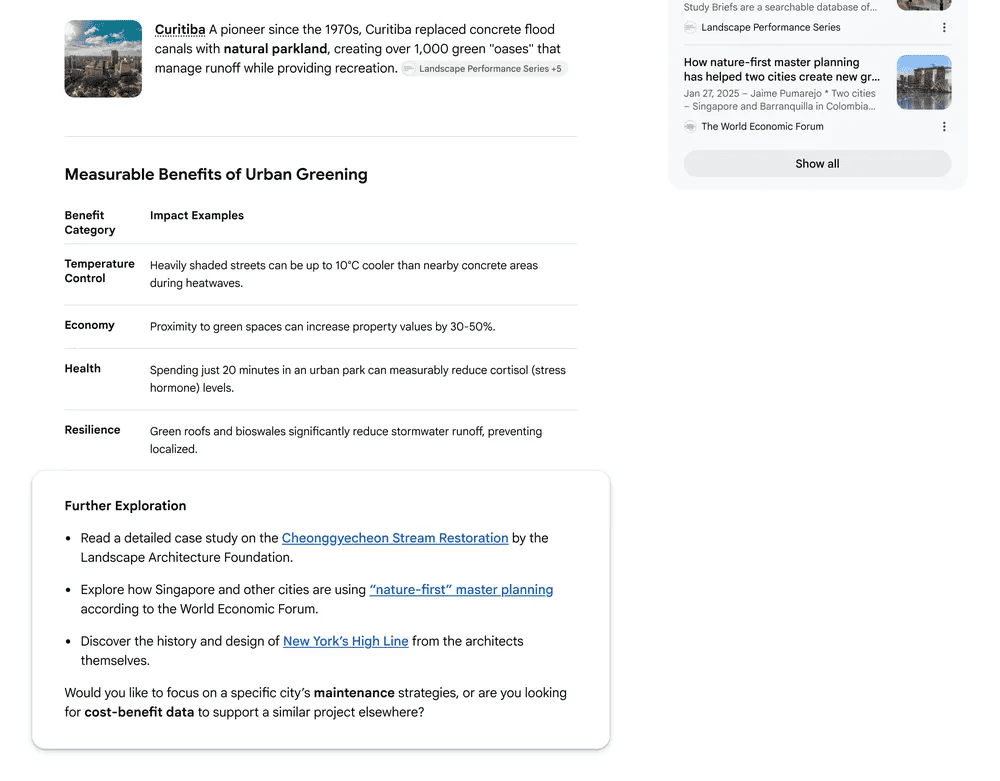
As part of the update, Google is introducing five key changes that aim to improve how links appear and how users interact with them. One of the notable additions is a new “explore more” section, which shows up at the end of AI responses. This section highlights different angles of a topic, linking to in-depth articles, case studies, or reports so users can dive deeper beyond the initial answer.

Image: Google

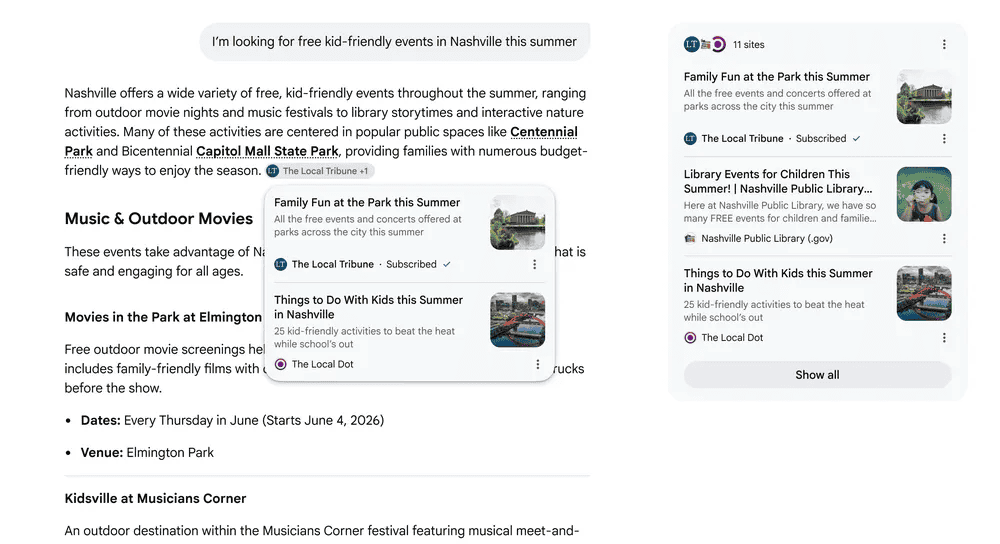
Another change focuses on subscriptions. Google is now highlighting links from a user’s subscribed sources directly inside AI responses, making it easier to access trusted content. Early testing reportedly shows users are more likely to click on links labeled as part of their subscriptions.

Image: Google

At a time when people increasingly rely on community-driven insights, Google is also adding perspectives from forums, social media, and public discussions. These previews include context like creator names or community tags, helping users decide which sources to explore further.

Image: Google

Speaking of usability, Google is now placing more links directly within AI-generated responses, right next to the relevant text. This means users can jump to specific guides or articles without needing to scroll through separate results.

Image: Google

On desktop, hovering over these links will now show a quick preview of the website, including the page title and source. The idea is to give users more confidence before clicking, especially when they are unsure about where a link leads.

Image: Google

All that said, Google notes it is continuing to refine how links are ranked and surfaced using techniques like query fan-out, which helps pull more relevant sources from across the web.

Google Chrome Reportedly Downloads a 4GB AI Model Without User Consent

Google Chrome is reportedly downloading a large on-device AI model in the background without clearly notifying users, according to a new report highlighted by Neowin. The download appears tied to Gemini Nano features inside Chrome, including tools such as “Help me write”.

The model reportedly arrives as a weights.bin file that can consume around 4GB of storage space. Users found it stored inside Chrome profile folders under a directory named OptGuideOnDeviceModel.

Chrome reportedly installs Gemini Nano components silently

According to That Privacy Guy, the download can happen automatically on supported Windows and macOS systems. The process reportedly runs in the background without visible installation prompts, progress windows, or setup notifications.

The report claims the file uses generic naming conventions and can finish downloading in roughly 14 minutes depending on connection speed. Some users reportedly only discovered it after noticing sudden storage usage or unexpected bandwidth consumption.

The model powers local AI functions inside Chrome rather than Google’s cloud-based AI Mode. Features such as “Help me write” rely on Gemini Nano running directly on the device instead of processing requests entirely online.

Deleting the file reportedly does not stop Chrome

One of the biggest complaints centers around persistence. Users report that manually deleting the AI model does not permanently remove it because Chrome downloads the file again automatically later.

Critics also describe the behavior as a “dark pattern” because Chrome allegedly installs the feature without an obvious opt-in process. The report further claims users cannot easily disable the download from standard Chrome settings.

Google reportedly only installs the model on compatible hardware, but users still argue the browser should provide clearer explanations and explicit consent before downloading several gigabytes of AI assets.

Privacy and bandwidth concerns emerge

The situation has sparked concerns about privacy, bandwidth usage, and storage consumption. A 4GB download may create problems for users with limited SSD space or capped internet plans.

Some users also raised legal concerns involving European privacy regulations such as GDPR and the ePrivacy Directive. Critics argue browsers should clearly disclose large background downloads tied to AI functionality.

At the moment, the reported AI model appears unrelated to Chrome’s broader cloud AI features. Instead, it specifically supports local on-device AI processing.

How users can reportedly stop the download

According to the report, deleting the folder alone does not work. Users instead need to disable the related Chrome AI functionality through chrome://flags or enterprise management policies.

Google has not publicly addressed the criticism so far.

In other Google news, a recent Gemini advertisement appeared to mock Microsoft Copilot. Chrome for Android may also receive a redesigned bottom bar and a new upload shortcut inside the search interface in future updates.

LinkedIn’s Former CEO, Ryan Roslansky, Reportedly Now Heads Microsoft Teams

Just yesterday, Asha Sharma announced that Xbox will be bringing over new leaders, while also confirming that the company is winding down Copilot on mobile and axing Copilot on console. Now, a fresh report by The Verge claims that Microsoft is reshuffling its leadership once again, and it appears the company is now doubling down on how its core productivity and collaboration tools are structured. The latest changes come after a major transition at the top, with responsibilities being redistributed across key executives.

Microsoft reorganizes core productivity teams

The news comes from Tom Warren, who, in the report, notes that Ryan Roslansky, who took over as head of Office last year, is getting added responsibility. Per Warren’s sources, the Microsoft Teams organization will now report to Roslansky, who is set to lead a newly formed Work Experiences Group inside Microsoft.

The added responsibility comes as a result of Rajesh Jha’s retirement, who, in case you don’t know, was responsible for teams across Windows, Office, Copilot, and Microsoft 365. As part of the leadership change, Charles Lamanna is reportedly also taking on a bigger role. Per the report, he will now lead the Copilot, Agents, and Platform team, which includes Microsoft 365 and Dynamics 365 services, along with BizChat.

Teams like Microsoft 365 Core, OneDrive and SharePoint, and Data Platform and Growth are also moving under him. This also means veteran executives Jeff Teper and Kirk Koenigsbauer will now report to Lamanna. Teper will serve as executive vice president of apps and agents, while Koenigsbauer will take on the role of president of Data Platform and Growth. Notably, TechCrunch also reports that Ryan Roslansky has also stepped down as LinkedIn’s CEO today. The company’s COO, Dan Shapero, reportedly takes over the role of CEO immediately.

Pavan Davuluri continues to lead the Windows and Devices segment

Speaking of other changes, Pavan Davuluri will continue to lead the Windows and Devices segment, while the Intentional team, originally founded by Charles Simonyi, is moving under his leadership. At the same time, Perry Clarke is stepping into a new role as CTO of Application Systems. His focus will be on the overall architecture across Microsoft 365 and Copilot, and how these systems align with Azure cloud and underlying hardware.

In an internal memo seen by The Verge, Lamanna also acknowledged Clarke’s contribution, highlighting the foundation built by the Microsoft 365 Core team over the years. “The bar they’ve set for engineering rigor and customer obsession laid the foundation for the next generation of AI products and capabilities,” Lamanna added in the memo.

Halo Infinite Gets Surprise Update With New Firefight: Gauntlet PvE Mode

Microsoft unexpectedly released a new update for Halo Infinite, adding a brand-new PvE experience called Firefight: Gauntlet. The update weighs around 10GB across Xbox and PC and introduces a more intense co-op survival mode focused on teamwork, scaling difficulty, and replayability.

The addition comes as a surprise because Halo Infinite previously received messaging that suggested major content updates were winding down. Instead, players now have an entirely new mode built around long-form PvE combat.

Firefight: Gauntlet adds a new survival challenge

Firefight: Gauntlet is a 4-player co-op survival mode where teams battle through five different arenas filled with endless enemy waves. To advance, players must defeat powerful arena “champions” before moving forward.

Each arena becomes progressively harder, pushing teams to constantly adapt their strategy. The mode also includes randomized elements, meaning no two runs play out exactly the same.

Players can improve their Spartan during matches by upgrading several attributes, including damage, recovery, resistance, and movement speed. The update also introduces a new AI Aggro system that tracks which player enemies focus on during combat.

The Harbinger appears if players fall behind

343 Industries designed the mode around fast-paced, high-pressure gameplay. If teams spend too much time inside an arena, The Harbinger eventually joins the fight and increases the challenge even further.

Players receive a short 30-second break between arenas to resupply before entering the next combat zone.

The overall structure heavily emphasizes coordination and communication, especially during later waves where enemies become far more aggressive.

Halo Infinite support continues unexpectedly

The update suggests Microsoft and Halo Studios still plan to support Halo Infinite despite ongoing work on future Halo projects. The scaling difficulty system and randomized mechanics also add more replay value for longtime players looking for tougher PvE content.

In other Halo news, data miners recently discovered a possible release date for Halo Campaign Evolved. Reports also claim that remakes of Halo 2 and Halo 3 remain in early development.

AMD Projects 20% Gaming Revenue Drop in H2 Citing Rising Memory & Component Costs

It’s not hidden anymore that the gaming industry is under tremendous pressure given the situation around memory and internal component costs. In the recent past, we have come across reports about a whopping jump in the price of gaming handhelds as well as the prices of mainstream laptops, including Microsoft Surface lineup. Now, AMD is warning that the memory crunch is likely to extend pressure across the gaming segment. This comes during the earnings call for the first quarter of 2026, which the company shared yesterday.

AMD warns of dip in the gaming segment in the second half of the year

During the earnings call, CEO Lisa Su noted that AMD expects gaming revenue to decline by around 20% in the second half of the year. The primary reason appears to be higher memory and component costs, which are making it more expensive to develop gaming hardware.

At a time when demand for GPUs and gaming chips remains relatively stable, it is the supply side that is causing issues. Memory pricing has been trending upward, and that is starting to impact margins across the board.

That being said, AMD’s overall business is not slowing down at the same pace as it reported $10.1 billion in Q1 revenue. The company is doing fairly well when it comes to segments like data center, as it continues to show strength, helping it balances the expected dip in gaming.

Memory crunch to extend further

Speaking of what lies ahead, Lisa Su also pointed towards memory crunch continuing into the coming quarters. This could affect supply further and keep costs elevated, not just for AMD but for all the players across the chip industry.

Back in earlier cycles, similar conditions have led to price hikes and limited availability of gaming hardware. It is still unclear if things will escalate to that level again. There is also the possibility that AMD may shift more focus toward higher-margin segments if the gaming slowdown deepens. That could reshape priorities, at least in the near term.

AMD’s New CPPC Feature Could Improve Windows 11 CPU Scheduling

AMD is preparing a new CPPC feature called “Highest Frequency” that could improve how Windows 11 and Linux handle CPU scheduling and boost behavior. As Neowin reports, the upcoming addition aims to expose a processor’s real maximum boost frequency directly to the operating system instead of relying on estimated values.

The change could help both Windows and Linux make more accurate scheduling decisions on modern Ryzen processors, especially as CPU architectures continue becoming more complex.

AMD wants operating systems to read real boost frequencies

CPPC, or Collaborative Processor Performance Control, already helps operating systems identify the best-performing CPU cores for demanding workloads. Windows 11 and Linux currently use the system to prioritize preferred cores during gaming, productivity, and multitasking workloads.

At the moment, operating systems estimate maximum boost clocks through interpolation methods. However, those calculated performance values do not always match the processor’s actual clock behavior, which can lead to inaccurate boost predictions and less efficient scheduling.

AMD’s new “Highest Frequency” feature changes that approach by introducing a dedicated register that exposes the CPU’s true maximum frequency directly to the operating system.

Instead of estimating boost behavior, Windows and Linux will be able to read the actual hardware-reported limit.

Better scheduling and frequency scaling expected

The update should improve CPU capacity calculations and allow operating systems to make smarter decisions when assigning workloads to different cores.

More accurate reporting could also improve boost scaling behavior and help systems use high-performance cores more efficiently under heavy workloads.

The feature may become increasingly important for future Ryzen generations as modern processors continue using more advanced boosting and power-management technologies.

Windows and Linux support already planned

AMD is currently introducing the feature through Linux kernel patches submitted to LKML. The company also plans to add support through the upcoming ACPI 6.7 specification update, which would help standardize the functionality across platforms.

The feature is expected to work on both Windows and Linux systems once operating system support becomes available.

Reports suggest the capability could appear in future AMD architectures beyond Zen 5, including possible Zen 6 processors. Future Windows releases, including potential Windows 11 26H2 and 27H2 updates, may eventually optimize scheduling behavior around the new feature.

In other AMD-related news, a recent Linux update fixed an AMD Audio Co-Processor driver issue affecting the Steam Deck. Microsoft is also making Windows 11 File Explorer faster with additional under-the-hood improvements.

Trusted Assassin’s Creed Leaker Shares Original Invictus Screenshot Following Ubisoft’s “Misinformation” Accusation

Ubisoft has called out a fresh Assassin’s Creed Invictus screenshot leak that is making rounds online. Not to mention, the moment quickly turned tense, especially given the source behind the leak.

Ubisoft pushes back on viral Assassin’s Creed Invictus leak, claiming it has been heavily modified

A well-known Assassin’s Creed leaker, xj0nathan, recently shared what was claimed to be a screenshot from a private playtest of Assassin’s Creed Invictus. The project, reportedly a Fall Guys-inspired multiplayer spin-off, has already been circulating in rumors for some time.

However, Ubisoft stepped in soon after, suggesting the image may not be entirely authentic. In a reply on X to xj0nathan’s post, the official Assassin’s Creed account noted, “Nice try… This might have started as an image from our private test, but it’s been heavily altered (most probably with AI). Not great to spread misinformation. 👎For those genuinely curious about the project: we’ll share more when the time is right!”

Leaker hits back with the original version

As expected, the response did not sit well with the leaker. xj0nathan pushed back, saying only minor color adjustments were made to remove the playtest watermark and enhance visuals. He later shared what he described as the original version, which appeared nearly identical at a glance. Here’s the post from the leaker:

For those unaware, Invictus is reportedly being developed by For Honor veterans at Ubisoft Montreal, with a strong PvP focus. Ubisoft has also hinted at a “new approach” to multiplayer within the franchise. Do note that the same leaker had earlier claimed that a recent playtest held on April 30 received less-than-positive feedback. Some reports also hint that the game, once expected in 2025, may now slip to 2026 or beyond, with a possibility of cancellation.

Teams to Soon Detect and Warn Users About Brand Impersonation Calls

In the past few months Microsoft has added a few new features to Teams and has plans to add more down the line. Now, it seems, the company has yet another safety feature in its pipeline for Teams Calling, which looks to curb the growing concern around scam calls and impersonation attempts. The new feature, called Brand Impersonation Protection, is now scheduled to begin rolling out in mid-May 2026 after a slight delay from earlier timelines.

Brand Impersonation Protection for Teams Calling is coming mid-May

The feature is designed to detect suspicious inbound calls, especially from first-time external callers who may try to pose as trusted brands. When a potential risk is identified, users will see a warning before answering the call, giving them a chance to decide how to proceed.

In some cases, these alerts may continue during the call if risk signals remain. Users can then choose to accept, block, or end the call based on the warning shown. At a time when social engineering attacks are becoming more common, this move appears to be part of Microsoft’s broader push to strengthen identity protection across its platforms.

Here’s a quick look at what you can expect:

  • Teams will evaluate inbound calls for signs of brand impersonation.
  • Users will see high-risk call warnings before answering suspicious calls.
  • Warnings may continue during the call if risk signals persist.
  • Users can accept, block, or end the call.
  • The feature will be enabled by default.
  • Existing Teams Calling policies remain unchanged.

The rollout is expected to start in mid-May and complete by late May for targeted release users, while general availability timeline is still unclear. The feature will be enabled by default, as Microsoft says existing Teams Calling policies will remain unchanged.

That being said, organizations may still want to prepare internally. Helpdesk teams could start seeing queries once users notice these warnings, and training materials may need slight updates to reflect the new experience.

via: Neowin

Valve Publishes Steam Controller CAD Models for Modders and Accessory Makers

Valve has published official CAD files for the new Steam Controller shortly after the device reportedly sold out within a day of launch and began appearing on eBay through resellers. The move suggests Valve expects a strong modding and accessory ecosystem around the controller from the start.

As Valve shared, the download package includes STP and STL models for both the Steam Controller and the Steam Controller Puck. The files also contain detailed engineering drawings, measurements, and keep-out zones under a Creative Commons license.

Valve opens the door for custom accessories

The released files make it easier for modders, hobbyists, and accessory makers to create custom hardware without relying on reverse engineering.

Users can now design custom shells, grips, stands, docks, mounts, and other accessories with accurate dimensions directly from Valve’s official models. That could significantly speed up third-party accessory development, especially within the 3D-printing community.

Accessory manufacturers and hardware partners may also benefit from the release since they can prototype products faster and avoid compatibility issues.

Valve continues its open hardware approach

This is not the first time Valve has shared hardware design resources publicly. The company previously released CAD files for earlier hardware products, continuing its long-standing approach toward mod-friendly devices and community experimentation.

The reported upcoming Steam Machine also appears to follow that philosophy. According to early details, the device features a removable front panel, and CAD files for those panels may arrive later as well.

Why the release matters

Publishing official CAD files gives the community a head start on building accessories and modifications around the Steam ecosystem. It also allows Valve to gather indirect feedback through community-created ideas and hardware experiments.

The timing also adds more attention to Valve’s hardware plans after reports claimed the company recently imported roughly 50 tons of gaming hardware into the United States. That sparked speculation that a new Steam Machine announcement could happen soon.

Via VideoCardz

Microsoft Is Quietly Making Windows 11 File Explorer Faster

Microsoft continues its push to improve Windows 11 performance, and File Explorer is now getting another round of optimizations. As Microsoft works on its broader internal Windows K2 quality initiative, the company appears focused on making core parts of the operating system feel faster and more reliable.

The changes come shortly after the company introduced a new, modern Run dialog that launches faster than the legacy version. Now, attention has shifted toward improving the responsiveness of File Explorer, one of the most criticized parts of Windows 11.

Microsoft is preloading File Explorer in the background

According to reports from Windows Latest, Microsoft has started improving File Explorer launch speeds by preloading parts of the app into memory before users open it.

The idea is simple. Instead of loading File Explorer only after a user clicks it, Windows 11 now keeps parts of the experience cached in RAM ahead of time. This allows File Explorer to appear almost instantly when launched.

The tradeoff is additional memory usage. Reports suggest the feature uses around 35MB of RAM in the background.

Some users welcomed the faster startup times, especially on lower-end devices where File Explorer delays have remained noticeable for years. Others criticized the approach and argued Microsoft should focus on fixing the underlying architectural issues instead of masking them through preloading.

Why File Explorer still feels slow

The startup delay is only part of the problem. Many Windows 11 users complain more about sluggish navigation, delayed context menus, thumbnail loading, and occasional hangs inside File Explorer itself.

A major reason involves the app’s mixed architecture. Modern versions of File Explorer combine older Win32 components with newer XAML and WinUI 3 layers. While this transition helps Microsoft modernize the interface visually, it also adds extra overhead.

Those additional layers can increase latency and create responsiveness problems even after File Explorer opens successfully.

Because of that, some critics described the new preload system as a temporary workaround instead of a complete fix.

Microsoft says optimizations are happening in parallel

Reports indicate Microsoft is not relying solely on preloading. The company reportedly follows an “AND” strategy internally, meaning it plans to combine instant-launch techniques with deeper performance improvements over time.

Microsoft continues removing unnecessary background tasks and animations that can slow File Explorer responsiveness. The company also appears to be improving how File Explorer initializes during startup for faster launches.

Additional optimizations target excessive disk reads and system hangs, both of which can affect responsiveness during everyday use. Microsoft also continues gradually transitioning Windows 11 toward newer UI technologies as part of its long-term modernization effort.

The latest performance work likely represents only part of Microsoft’s broader File Explorer overhaul. Windows 11 is also expected to receive a redesigned modern Properties dialog inside File Explorer as Microsoft replaces more legacy Windows interfaces.

Users should expect gradual improvements over the coming months instead of one massive update. While preloading alone may not solve every File Explorer complaint, Microsoft appears to be targeting both short-term responsiveness and longer-term architectural fixes simultaneously.

OpenAI Launches GPT-5.5 Instant as New Default ChatGPT Model

OpenAI has officially released GPT-5.5 Instant, a new lightweight AI model that now serves as the default experience inside ChatGPT. The launch comes shortly after the company introduced GPT-5.5 and after Microsoft added the model family to Microsoft Foundry.

The new GPT-5.5 Instant replaces GPT-5.3 Instant as the standard model for all ChatGPT users. OpenAI says the updated model delivers more accurate answers, a more natural conversational style, and improved reasoning performance, especially in STEM-related tasks and image understanding.

GPT-5.5 Instant focuses on speed and accuracy

According to OpenAI, GPT-5.5 Instant reduces hallucinations by 52.5% compared to GPT-5.3 Instant. The company also shared several benchmark results showing gains across reasoning and multimodal tasks.

The model reportedly scored 85.6% on GPQA, 81.2% on AIME 2026, and 76% on MMMU-Pro. OpenAI says these improvements should make ChatGPT responses more reliable while keeping the fast response times users expect from the Instant model lineup.

OpenAI also refined the conversational tone of the model. Responses should now feel shorter, clearer, and more natural during regular chats.

Personalization and memory features are expanding

Another major change involves ChatGPT personalization. OpenAI introduced a new “memory sources” section that shows users exactly what information ChatGPT uses for context.

This includes memories, previous chats, uploaded files, and integrations such as Gmail. Users can also edit or remove stored memories directly from the interface.

The company says the personalization upgrades currently roll out first to Plus and Pro users on the web. Support for mobile apps and additional plans, including Free, Go, Business, and Enterprise, will expand later.

GPT-5.3 Instant will remain temporarily available

While GPT-5.5 Instant becomes the default model for ChatGPT, OpenAI confirmed GPT-5.3 Instant will remain available for paid subscribers for the next three months.

Developers can also access the new model through the API under the “chat-latest” identifier.

OpenAI additionally announced GPT-5.5-Cyber, a separate model designed to assist cybersecurity professionals with research and defensive workflows.

Via Neowin

Microsoft Flight Simulator Gets Massive Australia Overhaul in World Update 21

Microsoft has released World Update 21 for Microsoft Flight Simulator, delivering a major visual overhaul centered entirely on Australia. The update significantly improves terrain detail, city rendering, coastlines, deserts, mountains, and landmarks throughout the country.

This is the first major World Update since the Japan expansion launched in September 2025. According to Neowin, Microsoft worked with Bing Maps, Vexcel, Gaya, and Asobo Studio to recreate large parts of Australia using upgraded aerial imagery, photogrammetry, and advanced surface texturing.

Major Australian cities receive upgrades

World Update 21 upgrades several major Australian cities, including Sydney, Melbourne, Brisbane, Perth, Adelaide, Hobart, Darwin, and Canberra. Microsoft also added 40 new detailed points of interest covering both urban environments and regional natural landmarks.

The update focuses heavily on improving visual realism across coastlines, mountain ranges, remote desert areas, and populated metropolitan regions.

Six handcrafted airports included

Microsoft also introduced six handcrafted airports as part of the expansion. These include Broken Hill Airport, Broome International Airport, Coober Pedy Airport, Bathurst Airport, RAAF Base Tindal, and Lord Howe Island Airport.

Each location features upgraded textures, custom buildings, and more detailed surroundings compared to the default airport versions.

Microsoft Flight Simulator 2024 gets extra activities

Players using Microsoft Flight Simulator 2024 also receive additional gameplay content through the update. Microsoft added new discovery flights, precision landing challenges, low-altitude activities, and rally race events.

Some of these activities remain limited in the older Microsoft Flight Simulator 2020 release.

Free download available now

World Update 21 is available now as a free optional download through the in-game marketplace for both simulator versions.

In other gaming news, Xbox recently received new leadership changes tied to Microsoft’s CoreAI division, while the Xbox CEO confirmed that the planned Copilot on Xbox initiative has been canceled. Microsoft also recently revealed the latest Game Pass Wave 1 lineup for subscribers.

Via Neowin

Copilot Cowork Gets Mobile Apps, Skills, and New Integrations

Microsoft is expanding Copilot Cowork with new capabilities, as Neowin reports, bringing mobile support, reusable Skills, and broader integrations across its ecosystem. The update builds on its earlier availability within the Microsoft 365 Frontier program and signals a push toward more autonomous, task-driven AI workflows.

Agentic AI moves beyond chat

Copilot Cowork centers on agentic AI, designed to run tasks in the background without constant user input. Users can launch multiple processes at once, while a dedicated dashboard tracks progress and results. This approach positions Copilot less as a chat assistant and more as a task orchestrator across work environments.

Mobile support expands flexibility

One of the biggest changes is mobile support, now available on both iOS and Android. This allows users to assign and manage tasks on the go, without needing a PC to remain active. Microsoft is targeting more flexible, mobile-first workflows with this move.

Skills introduce reusable workflows

Another key addition is Skills, a new feature that enables reusable workflows. Users can define task instructions, tone, and structure once, then apply them repeatedly across similar jobs. Microsoft is also introducing built-in Skills for common use cases, while enterprises can create custom versions tailored to internal processes.

Deeper integrations across Microsoft 365

The update also deepens integration across Microsoft 365 services, including document creation, meetings, and research workflows. At the same time, Microsoft is expanding third-party connectivity, adding plugins and connectors for platforms like Miro, monday.com, and LSEG, alongside industry-focused tools such as S&P Global.

Enterprise automation and customization

Further enterprise capabilities include integration with Power BI and Dynamics 365, allowing businesses to automate workflows across sales, customer service, and ERP systems. Companies can also build custom plugins tied to internal systems, helping standardize processes and reduce repetitive work.

Gradual rollout continues

The expanded Copilot Cowork experience remains available through the Microsoft 365 Frontier program, with features rolling out gradually. This phased approach suggests Microsoft is still refining how agentic AI operates at scale within enterprise environments.

In other Copilot developments, Microsoft recently expanded Copilot Checkout to support more than 500,000 merchants, signaling continued investment in making Copilot a broader platform beyond productivity.

Microsoft Edge Keeps Decrypted Passwords in Memory, Study Reveals

A security researcher has uncovered a behavior in Microsoft Edge that could raise concerns for enterprise environments and shared systems. The browser appears to load saved credentials into memory in plaintext as soon as it starts, rather than only when needed.

What was discovered

According to Neowin, researcher Tom Jøran Sønstebyseter Rønning analyzed how Edge handles stored login data. His findings show that usernames and passwords are decrypted and loaded into RAM at browser startup, remaining there throughout the session.

This means credentials stay accessible in memory even when users are not actively logging into websites.

Proof-of-concept demonstrates the risk

To validate the behavior, the researcher released a tool called “EdgeSavedPasswordsDumper” on GitHub. The tool reads the browser’s process memory and extracts stored credentials in plaintext from the parent process.

Although intended for security testing, the tool highlights how easily sensitive data can be accessed once the system is already compromised.

Security implications

The behavior does not create a remote vulnerability by itself. An attacker must already have elevated or system-level access to read process memory and extract credentials.

However, the risk becomes more serious in environments where multiple users share the same system or where administrative access has been compromised. In such cases, stored credentials from different users could be exposed without additional authentication barriers, even though the browser still prompts users to log in normally.

How Edge compares to other browsers

Other Chromium-based browsers such as Google Chrome and Brave reportedly decrypt credentials only when required. They avoid keeping passwords persistently available in memory, which reduces exposure time.

Edge behaves differently by keeping decrypted credentials accessible during the entire session, making it stand out among similar browsers.

Microsoft response

Microsoft reviewed the findings and classified the behavior as “by design.” The company has not indicated any plans to change this approach, suggesting it aligns with internal design decisions related to performance or usability.

This discovery comes as Microsoft continues to adjust Microsoft Edge features and priorities. The company is reportedly removing parts of the sidebar to focus more on Copilot integration.

At the same time, the broader security landscape remains active. Recent reports show that CloudZ RAT can steal one-time passwords through Phone Link by accessing synced notifications on Windows systems. In a separate issue, Microsoft confirmed that its April 2026 update triggered backup problems linked to blocked kernel drivers.

Microsoft Retires Outlook Contact Masking, Enterprise Users Push Back

As Neowin reports, Microsoft has officially removed the contact masking feature in Microsoft Outlook, leaving users without a way to delete individual autocomplete suggestions.

The feature was quietly retired on March 31, 2026, and the change is already causing frustration among enterprise users and IT administrators.

What Contact Masking Did

Contact masking gave users a simple way to clean up their email suggestions. By clicking the “X” next to a suggested contact, users could remove that entry permanently from the autocomplete list.

This helped eliminate outdated, mistyped, or irrelevant email addresses and prevented them from appearing again in future suggestions.

Only One Option Remains

With the feature gone, users now face a much more restrictive option. The only available workaround is to clear the entire autocomplete list through Outlook settings using the “Empty Auto-Complete List” option.

This removes all saved suggestions at once, not just the unwanted ones, making it far less practical for daily use.

Why Microsoft Removed It

Microsoft says the feature created inconsistencies across its ecosystem, particularly affecting services like Microsoft Teams and Microsoft 365 Search.
According to the company, contact masking caused confusion when data behaved differently across connected services, prompting its removal to standardize behavior.

Enterprise Backlash Growing

The decision has triggered strong backlash, especially in business environments where email accuracy is critical.

Organizations report increased support requests and daily friction caused by the lack of granular control. Users now face a higher risk of sending emails to the wrong recipients, which can lead to undeliverables or even sensitive data exposure.

Feedback portals and community forums have filled with requests asking Microsoft to restore the feature or provide an alternative.

Key Concerns From Users

The biggest issue remains the loss of precision. Without the ability to remove a single suggestion, users must choose between keeping problematic entries or wiping their entire history.

This directly impacts productivity and raises security concerns, especially in environments where incorrect recipients can lead to compliance issues.

No Fix or Alternative in Sight

Microsoft has not offered a replacement feature or toggle to restore the old behavior. As of now, the removal remains in place with no indication that it will be reversed.

Pressure continues to build as more users report workflow disruptions tied to the change.

This change comes amid other ongoing problems in Outlook. Microsoft has recently confirmed a bug causing some Office documents to appear blank when accessed through the app.

At the same time, both Outlook and Teams are expected to receive additional Copilot-related updates, signaling continued investment in AI features despite user concerns over core functionality.

Google’s Gemini in Chrome Promo Takes Dig at Copilot, Tells Edge Users: Get AI Assistance “Without Switching Tabs”

Google is promoting Gemini in Chrome on its homepage with browser-specific messaging that directly targets Microsoft Edge’s Copilot. The search giant uses different promotional wording based on which browser visitors are using, with the Edge version delivering a clear competitive jab.

Gemini in Chrome is Google’s AI assistant, integrated directly into the browser as a side panel. It launched in the U.S. in January 2026 and expanded to India in March 2026.

Gemini can summarize content across multiple tabs, compare information from different websites, and work closely with Google apps like Gmail, Calendar, Maps, and YouTube. It also includes Nano Banana for AI image generation and Auto-Browse for completing tasks on paid plans.

Gemini in Chrome promo message Targets Copilot in Microsoft Edge

Google shows different promotional text based on the browser users are using to visit Google.com, appearing directly below the search box.

Chrome and Brave users see: “New! Say hello to Gemini in Chrome, your new personal browsing assistant”.

Image Credit: Venkat | Windows Report.

Edge users get a different message: “New! Get AI assistance without switching tabs. Try Gemini in Chrome.”

Image Credit: Venkat | Windows Report.

Firefox and Opera users see: “New! Get AI assistance straight from your Gemini in Chrome side panel. Try now”. This message emphasizes Chrome’s side panel feature.

Google rotates multiple variants. During testing by Windows Report, another prompt for Chrome said: “New! Never browse the same way again with Gemini in Chrome. Want to learn more?”

The wording for Edge users stands out. It positions Gemini as getting AI help “without switching tabs,” instead of introducing it just as a browsing assistant. This language aligns with how AI tools are promoted within Edge itself, especially for sidebar experiences. Google tells Edge users who already have Copilot built in to switch to Chrome for a better AI experience.

Google has promoted its products on the homepage before, including earlier nudges for Chrome users to try Gemini. With Gemini in Chrome now rolling out widely, the company has expanded to targeting specific browsers, including Edge users.

While homepage promotions are common for Google, this campaign stands out for its direct focus on Microsoft. The tailored messages show that Google isn’t just promoting a feature; it is actively trying to draw users away from Edge’s Copilot.

All homepage prompts link to google.com/chrome/ai-innovations. The campaign parameters show this is an April 2026 initiative.

Google is also testing real-time AI-powered suggestions in Chrome based on the tabs you have open.