Windows “Cerdigent” Threat Warnings Spread, But Many May Be False Positives

Microsoft Defender is warning users about a threat labeled “Cerdigent” on Windows systems, but early analysis suggests many of these alerts may not reflect real infections.

The detections appeared across multiple systems globally, raising concerns among users and IT admins. However, the issue seems linked to a broader certificate security incident rather than a newly spreading malware strain.

Certificate breach behind the alerts

The root cause traces back to a breach involving DigiCert, a major certificate authority responsible for issuing trusted digital certificates.

An attacker reportedly compromised a DigiCert support employee’s machine and gained access to certificate initialization codes. Using this access, the attacker generated legitimate code-signing certificates.

These certificates allowed malicious software to appear trusted by Windows and security tools, effectively bypassing standard trust checks.

Malware signed as legitimate software

The attacker used the compromised certificates to sign malware known as Zhong Stealer. Because the files carried valid signatures, systems treated them as safe applications.

This tactic blurs the line between legitimate and malicious software, making detection significantly harder for antivirus tools.

Microsoft Defender’s “Cerdigent” detection appears to flag activity related to this certificate abuse rather than identifying a distinct malware family.

DigiCert revokes affected certificates

DigiCert responded by revoking 60 certificates in total, including 27 directly tied to the attacker’s activity, while another 33 were pulled as a precaution. This move limits further abuse, but some systems may continue to trigger alerts until security databases are fully updated.

Why the alerts may be false positives

Many of the current “Cerdigent” warnings appear to stem from files that were previously trusted but are now signed with revoked certificates.

This shift causes legitimate-looking files to appear suspicious, prompts security tools to flag activity retroactively, and leads systems to generate alerts even without an active compromise. As a result, users may encounter warnings despite having no actual malware on their devices.

What users should do now

Users and administrators should take a measured approach:

  • Monitor updates from Microsoft and security vendors
  • Wait for updated Defender signatures and clarifications
  • Avoid deleting files immediately unless confirmed malicious
  • Check for additional signs like unusual processes or data exfiltration

Panic-driven actions could disrupt normal system operations without improving security.

Broader security implications

This incident highlights a key weakness in trust-based security systems. Code-signing certificates play a central role in verifying software integrity, and their compromise can undermine that trust model.

Even a limited breach can trigger widespread alerts and confusion across ecosystems that rely heavily on certificate validation.

Microsoft recently warned about a high-risk Linux kernel vulnerability that could allow privilege escalation across multiple distributions. The company also fixed a crash affecting protected PDFs in Microsoft Edge and began blocking drivers used by Macrium Reflect due to security risks.

The “Cerdigent” situation adds to a growing list of security challenges, showing how even trusted infrastructure can become a vector for disruption.

Via Neowin

Microsoft Confirms Outlook Bug Causing Blank Office Documents, Fix Rolling Out

Microsoft has confirmed an issue in the classic version of Microsoft Outlook that causes Office documents to appear blank when opened from shared links. As Neowin reports, the bug affects files accessed via SharePoint and OneDrive and has already disrupted enterprise workflows.

Files opening blank or showing errors

The issue appears when users open shared Word, Excel, or PowerPoint files directly from Outlook (Classic). Instead of loading normally, documents may open as empty, display corruption warnings, or prompt users to repair the file.

In some cases, Outlook ignores user preferences and forces files to open in desktop apps instead of a browser. This behavior stems from how Outlook handles shared file links tied to Microsoft 365 services.

Microsoft rolls out service-side fix

Microsoft has started deploying a service-side fix, meaning users do not need to install a manual update. The rollout begins on May 4, 2026, and should gradually resolve the issue across affected environments.

Users may need to restart Outlook after the fix reaches their system to restore normal behavior.

Workarounds available until fix completes

Until the rollout finishes, Microsoft suggests several temporary solutions for affected users.

Users can configure Outlook to always open files in desktop apps by navigating to File, Options, Advanced, and then adjusting File and browser preferences. Another option involves right-clicking links and choosing to open them in a browser.

Copying and pasting the file link directly into a browser also works reliably. Opening documents directly from SharePoint or switching to Outlook Web App avoids the issue entirely.

Registry tweak for advanced users

For IT admins and experienced users, Microsoft provided a registry-based workaround to force files to open in a browser.

Path: HKEY_CURRENT_USER\Software\Microsoft\office\16.0\Common\Internet
DWORD: OpenDirectlyInApp
Value: 0

This method requires caution and should only be used in managed environments.

Broader Outlook issues continue

This bug marks another recent disruption for Outlook users. The service experienced an outage last week, and while Microsoft resolved it, some users still report login issues.

At the same time, Microsoft continues expanding Outlook capabilities. The company recently introduced agentic Copilot features designed to improve email and calendar management through AI-powered assistance.

While the fix is already rolling out, full resolution depends on deployment completion across the Microsoft 365 infrastructure. Until then, users rely on workarounds to maintain productivity when accessing shared Office files.

Sony Agrees to $7.8M Settlement Over PlayStation Store Monopoly Claims

Sony has agreed to a preliminary $7.8 million settlement in a U.S. class-action lawsuit over PlayStation Store practices, potentially impacting millions of PlayStation 5 users.

As Complex reports, the case, Caccuri v. Sony Interactive Entertainment, centers on allegations that Sony restricted competition in digital game sales by preventing third-party retailers from offering download codes, effectively forcing purchases through its own storefront.

Lawsuit targets PlayStation Store exclusivity

The lawsuit claims Sony engaged in anti-competitive behavior starting in 2019, when retailers such as GameStop and Best Buy stopped selling digital PlayStation game codes.

Plaintiffs argue that this move limited consumer choice and allowed Sony to maintain higher prices by eliminating alternative sellers.

This issue became more significant with the rise of digital-only consoles, where players rely entirely on online storefronts to purchase games.

Settlement details and eligibility

Sony’s proposed settlement totals $7.8 million, though compensation will not come as direct cash payments.

Instead, eligible users will receive PlayStation Network credits automatically, provided they made qualifying purchases.

To be eligible, users must have bought digital PlayStation content between April 1, 2019, and December 31, 2023.

An earlier attempt to settle the case in 2025 was rejected due to concerns over how payouts would be distributed, prompting revisions to the current agreement.

Legal positions and next steps

Plaintiffs maintain that Sony “unlawfully monopolized” digital game sales within its ecosystem.

Sony denies any wrongdoing, stating that its digital storefront reflects necessary investments in infrastructure, security, and platform development.

The settlement still requires final court approval. A fairness hearing is scheduled for October 15, 2026, while users have until July 2, 2026, to opt out or file objections.

Wider implications for digital gaming

The case highlights ongoing concerns around closed digital ecosystems in the gaming industry.

As more players shift toward digital purchases, platform holders like Sony face increasing scrutiny over pricing control, distribution limitations, and ownership rights.

In separate but related developments, PlayStation users recently raised concerns about a newly discovered 30-day online check requirement for some digital games.

After days of speculation, Sony clarified the situation, explaining how the DRM timer works and when an internet connection is required. The company indicated that the system is tied to license validation rather than continuous online enforcement, aiming to balance security with accessibility.

The clarification comes amid growing debate over digital ownership, reinforcing concerns raised by the ongoing lawsuit and settlement.

Rockstar Hiring Signals GTA 6 Marketing Push Ahead of November Release

Rockstar Games appears to be ramping up preparations for Grand Theft Auto 6, following renewed confirmation of its release timeline. As reported by Notebookcheck, the studio has opened a new role focused on marketing production, hinting that a broader promotional campaign is getting closer.

The position is for a Production Artist based in New York City. It is a temporary, in-person role centered on creating both digital and print marketing assets. Responsibilities include work on social media campaigns, websites, and large-scale billboard-style advertising, pointing to a wide-reaching global push once marketing fully begins.

Marketing buildup underway, but not in full swing

The timing of the hire places it roughly six months before the expected November 19 release. This suggests Rockstar is still in the preparation phase rather than launching its main campaign immediately. The role may also support post-launch content, not just pre-release promotion.

Digital advertising will remain a key focus, but traditional out-of-home campaigns are also expected. Rockstar has a history of large physical marketing efforts, including murals and billboards, and GTA 6 will likely follow the same approach on a bigger scale.

Take-Two hints at campaign starting soon

Strauss Zelnick, CEO of Take-Two Interactive, recently stated that the marketing campaign will begin “soon.” Industry expectations point to a more aggressive promotional phase starting in summer 2026.

The company’s next earnings call, scheduled for May 21, could provide further updates. Some analysts believe Rockstar may release new promotional material around that time to strengthen investor confidence.

Trailer speculation continues to build

The first trailer for Grand Theft Auto 6 launched in May 2025. Based on Rockstar’s past patterns, fans expect another trailer to arrive before the upcoming earnings call or shortly after.

While there is no official confirmation yet, early May remains a strong candidate window. Anticipation continues to grow, especially as the release date gets closer.

No real-world ads inside the game

Rockstar will stick with its traditional approach to in-game branding. The company does not plan to include real-world product placements in GTA 6. Instead, it will continue using fictional brands for vehicles, food, and other in-game elements, maintaining the series’ satirical identity.

While many are expecting to see a new trailer in early May, fans are still dissecting the original trailer. Many believe it hints at more advanced gameplay systems, improved AI behavior, and a more dynamic open world compared to previous entries.

Rockstar’s latest hiring move points to early-stage preparation for a massive global marketing campaign. The full rollout has not started yet, but all signs suggest it will begin soon, with summer 2026 shaping up as the key period for major announcements and trailers.

Valve Steam Survey April 2026: Windows 11 Grows, Mid-Range PCs Still Dominate

As Valve revealed in its latest Steam Hardware & Software Survey for April 2026, Windows 11 continues to strengthen its position as the leading OS among gamers, while familiar mid-range hardware configurations remain the standard across the platform.

Windows 11 keeps pulling ahead

The May results highlight a steady shift toward Windows 11, which now accounts for 67.74% of all surveyed systems, marking a 0.89% increase. Meanwhile, Windows 10 holds 25.63% with almost no change, signaling a plateau as users continue upgrading.

Overall, Windows dominates Steam with a combined 93.47% share, up 1.14%. Competing platforms continue to lag behind, with Linux dropping to 4.52% and macOS declining to 2.01%, reinforcing their niche status in PC gaming.

CPU market remains competitive

Processor data shows a close race between the two major chipmakers. Intel leads with 54.81%, while AMD follows at 45.19%.

The most common CPU configuration remains a 6-core processor, used by 28.62% of players. This suggests that mainstream gaming setups continue to favor balanced performance over high-end configurations.

NVIDIA dominates GPU share

Graphics card data paints a clearer picture of market leadership. NVIDIA holds a commanding 73.21% share, far ahead of AMD at 18.6% and Intel at 7.81%.

Among individual models, the NVIDIA GeForce RTX 3060 remains the most widely used GPU at 3.99%, followed by the RTX 3050 (3.04%) and the newer RTX 5070 (2.86%). The data highlights strong adoption of RTX-class cards, even as newer generations begin to gain traction.

Mid-range hardware still defines the average PC

Despite rapid innovation in PC hardware, the typical gaming system remains firmly mid-range. The most common setup includes 16 GB of RAM (40.86%), 8 GB of VRAM (26.76%), and a 1920×1080 display resolution, still used by over half of surveyed users (52.21%).

This consistency indicates that most players prioritize affordability and stability over cutting-edge performance.

The latest survey confirms a clear trend: Windows 11 continues to expand its dominance, while Linux and macOS struggle to gain meaningful ground in gaming.

At the same time, the data shows that the “average” gaming PC has not dramatically changed, with 6-core CPUs, 16 GB RAM, and RTX GPUs forming the backbone of the Steam ecosystem.

In other Valve news, the company has confirmed the release date and pricing for the upcoming Steam Controller. It is also finalizing Steam Machine pricing, despite earlier delays tied to RAM supply constraints, as it prepares for a broader hardware push.

Via Neowin

Microsoft Warns of High-Risk Linux Kernel Flaw Allowing Root Access

Microsoft has warned about a serious Linux kernel vulnerability that could allow attackers to gain full control of affected systems. The flaw, tracked as CVE-2026-31431, carries a CVSS score of 7.8 and impacts a wide range of widely used distributions.

A flaw deep inside the Linux kernel

The issue exists in the Linux kernel’s cryptographic subsystem, specifically within the algif_aead interface tied to AF_ALG sockets. Researchers traced the root cause to improper in-place memory handling introduced years ago, which enables controlled overwrites in kernel memory.

This type of flaw opens the door to privilege escalation, allowing a local attacker to elevate access to root level. Once exploited, attackers can modify critical system binaries such as /usr/bin/su, effectively taking over the entire system.

Broad impact across major distributions

The vulnerability affects most mainstream Linux environments, including Ubuntu, Red Hat Enterprise Linux, Debian, Fedora Linux, Arch Linux, SUSE Linux Enterprise, and Amazon Linux.

Because these systems share common kernel components, the exploit works across distributions without requiring modification, making it particularly dangerous in heterogeneous environments.

Highly reliable exploit raises concerns

Security researchers describe the exploit as unusually reliable. It does not depend on race conditions and works deterministically, which lowers the barrier for attackers. The proof-of-concept code remains compact, reportedly around 732 bytes, further increasing the risk of widespread abuse.

The vulnerability also poses a serious threat to containerized and cloud infrastructures. Since containers share the host kernel, a successful exploit inside one container could compromise the entire node and enable lateral movement across workloads.

CISA and Microsoft urge immediate action

The Cybersecurity and Infrastructure Security Agency (CISA) has labeled the issue a significant enterprise risk. While there are no confirmed reports of active exploitation in the wild yet, the availability of proof-of-concept code raises urgency.

Microsoft has released detection signatures through Microsoft Defender XDR to help organizations identify potential exploitation attempts.

Mitigation steps and recommendations

Administrators should prioritize applying kernel patches as soon as they become available. Additional mitigation options include disabling the affected crypto interface or restricting access to AF_ALG sockets.

Security teams should also enforce strict access controls, isolate sensitive workloads, and consider recycling or rebuilding nodes if compromise is suspected.

Growing wave of security threats

This disclosure comes as Microsoft continues tightening its own ecosystem security, including recent driver blocklist updates in Windows. In parallel, CISA has ordered urgent patching of an actively exploited Windows Shell vulnerability, while reports indicate that more than 1,300 SharePoint servers remain exposed to a separate exploit.

Even without active attacks in the wild, CVE-2026-31431 stands out due to its reliability and cross-platform reach. Enterprises running Linux at scale, especially in cloud environments, face heightened risk and should move quickly to patch and harden their systems.

Via Neowin

Macrium Reflect Hit by Windows 11 Security Block After KB5083769 and KB5083631

Microsoft has added a driver used by Macrium Reflect to its vulnerable driver blocklist, leading to backup-related issues on some Windows 11 systems, as reported by Neowin. The change appeared after recent updates, including KB5083769 from April Patch Tuesday and the newer KB5083631 preview update.

The issue stems from Microsoft blocking the psmounterex.sys driver, which Macrium Reflect relies on to mount backup images as virtual drives. Once blocked, users can no longer browse or access those images directly.

Security measure causes compatibility problems

The vulnerable driver blocklist in Windows 11 exists to prevent malicious or outdated kernel drivers from being exploited. Microsoft uses it to block drivers that could enable privilege escalation or arbitrary code execution.

In this case, the blocked driver links to CVE-2023-43896, a vulnerability that allowed out-of-bounds memory writes. Attackers could use this flaw to gain elevated privileges and potentially execute code at the kernel level.

Microsoft’s decision to block the driver aligns with its ongoing effort to strengthen system security. However, the move has created unintended side effects for users relying on Macrium Reflect for backups.

What users are experiencing

After installing the affected updates, users report several issues when working with backup images:

  • Inability to mount or browse backup files as virtual drives
  • Restore operations failing or timing out
  • Errors such as “VSS has timed out during snapshot creation”
  • VSS_E_BAD_STATE messages appearing during backup tasks

Event Viewer logs also show Code Integrity blocks, often with Event ID 3077. Users can verify the issue by checking the Code Integrity Operational log and looking for Policy ID {D2BDA982-CCF6-4344-AC5B-0B44427B6816}.

Despite these problems, full backup creation generally continues to work as expected.

Why the driver is still blocked

Microsoft considers the block intentional and part of its security hardening strategy. The company keeps the driver on the blocklist until it meets updated security requirements.

This situation becomes more complex because Macrium reportedly patched the vulnerability back in October 2023. However, older versions of the software, particularly version 8.1, still rely on the affected driver. Newer releases, such as version 10, avoid using it.

For now, Microsoft has not provided an official fix or exception.

Workaround exists, but comes with risks

Some users have found a temporary workaround by disabling the vulnerable driver blocklist through the registry:

reg add "HKLM\SYSTEM\CurrentControlSet\Control\CI\Config" /v VulnerableDriverBlocklistEnable /t REG_DWORD /d 0 /f

This requires administrator privileges and a system restart. While it restores functionality, it lowers system security and exposes the system to potential kernel-level threats. It should only be used as a short-term measure.

This case highlights a familiar trade-off in modern Windows updates. Microsoft continues to prioritize security by blocking risky drivers, even when it disrupts legitimate workflows.

The long-term solution will likely depend on updated drivers or changes to the blocklist. Until then, users affected by the issue may need to upgrade their backup software or adjust workflows.

In parallel, Microsoft has also released a new set of Windows 11 Dynamic Updates, continuing its broader effort to improve system stability and deployment reliability.

Microsoft Releases KB5083991, KB5087583, KB5084812 With Windows 11 Dynamic Updates

As Microsoft continues refining its update pipeline, the company has released a new set of Dynamic Updates alongside Windows 11 KB5083631 for versions 24H2 and 25H2, as reported by Neowin.

The latest rollout focuses on improving upgrade reliability, recovery tools, and overall system performance, with no known issues officially listed so far.

Dynamic Updates target setup and recovery improvements

Dynamic Updates are designed to apply to Windows images before deployment. They help preserve Language Packs (LP) and Features on Demand (FODs), ensuring systems remain consistent during upgrades.

With this release, Microsoft introduced several updates aimed at strengthening both the setup process and recovery environment.

KB5083991, targeting an upcoming Windows 11 26H1 release, delivers a Safe OS update for the Windows Recovery Environment. It upgrades WinRE to version 10.0.28000.1887, improving recovery capabilities.

For current versions 24H2 and 25H2, KB5087583 acts as a Setup Dynamic Update. It enhances setup binaries and refines the feature update process to reduce potential upgrade failures.

Another Safe OS update, KB5084812, also focuses on WinRE for 24H2 and 25H2 systems. It updates the recovery environment to version 10.0.26100.8309, continuing Microsoft’s push to make system recovery more reliable.

All of these updates install automatically through Windows Update and work in the background before or during system upgrades.

KB5083631 adds performance gains and system fixes

Alongside these Dynamic Updates, Microsoft released KB5083631, a preview cumulative update that introduces performance improvements and stability fixes across the operating system.

While the update itself does not list major issues, some users may notice an additional reboot during installation. This behavior ties to ongoing system-level changes and is expected on certain devices.

The update also resolves a recent issue affecting Remote Desktop security warnings. On some systems, especially those with multiple monitors and mixed scaling settings, security dialogs appeared misaligned or difficult to read. The fix restores proper rendering and usability.

Broader effort to stabilize Windows updates

This release reflects Microsoft’s broader effort to improve how Windows updates are delivered and installed. By strengthening setup components and the recovery environment, the company aims to reduce upgrade failures and simplify troubleshooting when issues occur.

With more changes expected in upcoming releases, Microsoft continues to focus on reliability rather than new features, ensuring that core system updates remain stable across a wide range of devices.

Microsoft Edge Fixes Protected PDF Crash and Patches Critical Vulnerabilities

Microsoft Edge version 147.0.3912.98 is now rolling out as a minor maintenance release, focusing on stability and security improvements rather than new features, as Neowin writes.

The most notable fix targets a crash that occurred when printing protected PDF files. The issue affected documents secured with Azure Information Protection and Microsoft Purview Information Protection, both widely used in enterprise environments to classify and safeguard sensitive data.

These protection systems restrict actions such as copying, editing, or sharing files, making them essential for organizations handling confidential information. The bug caused Edge to crash during print operations, disrupting workflows for business users.

Security patches address Chromium vulnerabilities

Alongside the bug fix, the update includes several security patches inherited from the Chromium engine. Microsoft confirmed that multiple vulnerabilities were resolved, including three rated as critical.

No browser-specific vulnerabilities unique to Edge were disclosed in this release, but the inclusion of upstream Chromium fixes remains a key part of maintaining browser security.

Extended Stable version also updated

Microsoft also pushed an update to the Extended Stable channel with version 146.0.3856.139. This release focuses on general bug fixes and performance improvements for organizations that rely on a slower update cadence.

What’s next for Edge

Looking ahead, Edge 148 is expected to arrive in early May, continuing Microsoft’s regular release cycle.

Meanwhile, the company is working on several upcoming changes and fixes. These include efforts to block so-called “shadow AI” usage within the browser, as well as resolving a bug that currently affects access to Microsoft Teams meetings.

Microsoft is also promoting the browser through a new $1 million sweepstakes campaign aimed at increasing user engagement.

This update remains a typical maintenance release, but the PDF crash fix stands out for enterprise users relying on protected documents. Combined with critical security patches, it reinforces Microsoft’s ongoing focus on stability and security across its browser ecosystem.

New Windows 11 Experimental (Canary) Build Improves Task Manager & More

In addition to Experimental (Future Platforms) Build 29580.1000, Microsoft is also rolling out Experimental (26H1) Build 28020.1921. Notably, the changes rolled out with this build also applies to Insiders in the in the Canary 28000 series Channel.

This update brings a smaller set of improvements, while also focusing on refining the overall experience for Insiders running this build. First, Microsoft has confirmed that users in the Canary 28000 Series will begin transitioning to the new Experimental (26H1) channel. The company previously announced this, but it seems the rollout is now gradually taking place. Now, let’s jump to what’s improved.

Microsoft upgrades Task Manager and rolls out updated Feedback Hub with Build 28020.1921

As for Task Manager, Microsoft is adding deeper visibility into NPU usage on supported PCs, with new optional columns such as NPU and NPU Engine across Processes, Users, and Details pages. On top of that, the Details page now includes NPU Dedicated Memory and Shared Memory columns, offering a clearer view of how AI workloads are using system resources.

There is also a small but important addition where neural engines tied to the GPU will now show up on the Performance page. Besides that, a new Isolation column is being introduced, allowing users to identify which apps are running inside an AppContainer. That’s not all; Microsoft has also fixed inaccurate CPU speed readings for virtual machines after resuming from hibernate, which previously showed unrealistic spikes.

Speaking of improvements, the Feedback Hub is getting version 2.2604.301.0 with a series of user-driven updates. Reliability has been improved, while design, accessibility, and localization tweaks continue to roll out. Non-English users can now switch the Community section view to English, and translations for collection titles and official responses are expanding.

The update also restores the 500 MB file upload limit and improves the accuracy of upvote and comment counts. These changes may seem incremental, but they suggest Microsoft is steadily refining how feedback is collected and surfaced across regions. Not to forget, Microsoft has also rolled out the modern run dialog with Experimental (Dev) Build 26300.8346. Moreover, Beta channel Insiders are getting Build 26220.8340 with Windows Share improvements and more.

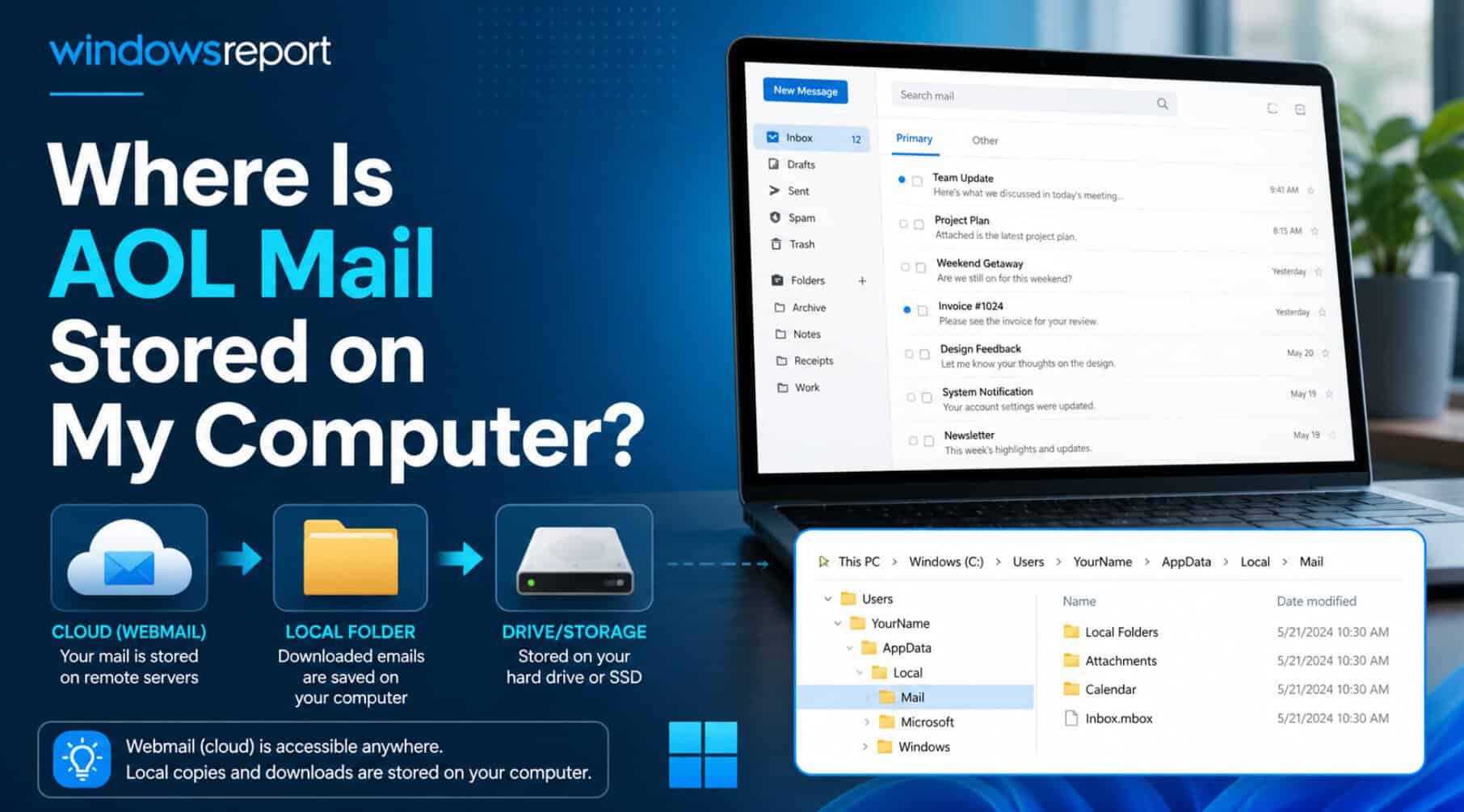
Where is AOL Mail stored on my computer?

AOL Mail is not usually stored in one obvious “AOL Mail” folder on your Windows PC. If you use AOL Mail in a browser, your messages remain in your AOL mailbox online, while your computer may only keep temporary browser cache files. Local mail storage appears when you use AOL Desktop Gold, Outlook, Thunderbird, Windows Mail, or another mail client configured with POP or IMAP. AOL explains that POP downloads a copy of messages to the app, while IMAP keeps the app and AOL mailbox synchronized.

Where AOL Mail may be stored on Windows

AOL Mail setupWhere to look
AOL Mail in a browserNot stored as readable email files on your PC; only temporary browser cache may exist
AOL Desktop Gold%LOCALAPPDATA%\AOLDesktopData\db or use Desktop Gold’s My Data export option
Older AOL Desktop versionsC:\ProgramData\AOL\... folders, often organize or backup, depending on the AOL version
Outlook with AOL account.pst files in C:\Users\<username>\Documents\Outlook Files; .ost files in C:\Users\<username>\AppData\Local\Microsoft\Outlook
Thunderbird with AOL account%APPDATA%\Thunderbird\Profiles\
Windows Mail / Mail and CalendarLocal items may exist, but Microsoft ended support for Windows Mail and Calendar on December 31, 2024

1. If you use AOL Mail in a browser

If you open AOL Mail from mail.aol.com, your inbox is not saved as a normal local folder on your computer. Your PC may store cookies, cached pages, and temporary web files, but these are not a reliable AOL Mail backup.

To save a real local copy, connect AOL Mail to a desktop mail app such as Outlook or Thunderbird using IMAP or POP. AOL’s IMAP guide also notes that large mailboxes can take days or longer to download and that backup users should make sure the app downloads full email content, not just previews.

2. Find AOL Desktop Gold mail data

For AOL Desktop Gold, press Windows + R, paste the following path, and press Enter:

%LOCALAPPDATA%\AOLDesktopData\db

AOL’s own feedback page previously identified this as the local database folder for the Personal Filing Cabinet in AOL Gold. Do not edit or delete files inside this folder unless you already made a backup.

The safer method is to use AOL Desktop Gold’s built-in export tool:

  1. Open AOL Desktop Gold.
  2. Click Settings.
  3. Go to General settings.
  4. Open the My Data tab.
  5. Click Export.
  6. Choose where to save the file.

AOL says the export file is saved by default in My Documents and named AOL Desktop Backup plus the backup date.

3. Find older AOL Desktop “Saved on My PC” mail

Older AOL Desktop versions used the AOL Personal Filing Cabinet, or PFC. The Library of Congress describes PFC as a proprietary local database format used by AOL Desktop for offline data, including stored AOL email messages, and notes that each AOL username can have its own PFC file in an Organize folder.

Common older locations include:

C:\ProgramData\AOL\
C:\ProgramData\AOL\C_AOL Desktop 9.x\organize
C:\ProgramData\AOL\C_AOL Desktop 9.x\backup

For older AOL Desktop versions, AOL’s feedback page also points users to a ProgramData AOL version folder and says the file may be named after the AOL screen name with no extension.

A quick way to search is:

  1. Open File Explorer.
  2. Select This PC.
  3. Search for:
*.pfc

Also search for your old AOL screen name if you remember it. If you find old AOL data, copy it to another folder before trying to import it into AOL Desktop Gold.

4. Find AOL Mail stored in Outlook

If you added AOL Mail to classic Outlook, your mail may be stored in an Outlook data file.

Check these locations:

C:\Users\<username>\Documents\Outlook Files
C:\Users\<username>\AppData\Local\Microsoft\Outlook

Microsoft says POP account data is stored in a .pst file and lists Documents\Outlook Files as the Windows 10 and Windows 11 location. For IMAP, Outlook.com, and Exchange-style accounts, Microsoft says Outlook uses an offline .ost file in AppData\Local\Microsoft\Outlook; this is a synchronized server copy, not the best backup file to rely on.

To find the exact Outlook file:

  1. Open Outlook.
  2. Go to File.
  3. Select Account Settings > Account Settings.
  4. Open the Data Files tab.
  5. Select the AOL account file.
  6. Click Open File Location.

5. Find AOL Mail stored in Thunderbird

If you use AOL Mail in Thunderbird, open the Thunderbird profile folder:

%APPDATA%\Thunderbird\Profiles\

Mozilla says Thunderbird stores Windows profiles by default in C:\Users\<your Windows login username>\AppData\Roaming\Thunderbird\Profiles\, and you can open it quickly with Windows + R and %APPDATA%\Thunderbird\Profiles\.

Inside the profile, look for folders such as:

ImapMail
Mail
Local Folders

The exact folder depends on whether AOL was configured as IMAP, POP, or moved into Thunderbird’s Local Folders.

6. What about Windows Mail or the new Outlook?

If you used the old Windows Mail and Calendar apps, do not treat their local files as a long-term AOL Mail backup. Microsoft says support for Windows Mail, Calendar, and People ended on December 31, 2024, and recommends moving to the new Outlook or Outlook.com. Local emails, calendar events, and contacts remain exportable through Microsoft’s migration steps.

How to create a proper AOL Mail backup

The most reliable approach is to export from the app that actually stores the mail locally.

For AOL Desktop Gold, use Settings > General settings > My Data > Export. AOL says this export includes personal data such as Mail, Favorites, Address Book, and settings.

For Outlook, export to a .pst file or copy the existing .pst after closing Outlook.

For Thunderbird, copy the entire profile folder from:

%APPDATA%\Thunderbird\Profiles\

For a new third-party mail app, AOL provides POP and IMAP settings, including imap.aol.com on port 993 with SSL and smtp.aol.com on port 465 with SSL. Older apps may also require an AOL app password instead of the normal account password.

Final answer

AOL Mail is stored online unless you used a desktop app to download or archive it. Check AOL Desktop Gold’s local database or export tool, Outlook’s .pst or .ost files, Thunderbird’s profile folder, or older AOL Desktop PFC folders. If you only used AOL Mail in a browser, you probably do not have readable AOL emails stored locally on the computer.

Windows 11 Experimental (Canary) Build 29580 Out With Updated Feedback Hub

Microsoft has released Build 29580.1000 for Windows Insiders in the Experimental (Future Platforms) channel. All the changes rolling out with this build also applies to those who are in the Canary 29500 series Channel.

Feedback Hub jumps to new version with Experimental (Canary) Build 29580.1000

As for the changes, this update brings a smaller set of general fixes, while improving the overall experience for Insiders running this build. Speaking of updates, Microsoft is also rolling out a new version (2.2604.301.0) of the Feedback Hub with Build 29580.1000. The company says this update is based directly on user feedback, which shows in a few practical changes.

For starters, reliability has been improved, alongside some tweaks to design, accessibility, and localization. The Community feedback section is also getting more flexible, as non-English users can now switch to an English view if needed. There are also improvements to translations. As part of this improvement, collection titles and official responses will now be automatically translated into top languages, which should make browsing feedback easier across regions.

Another small but useful change is the return of the 500 MB file upload limit when submitting feedback. On top of that, upvote and comment counts should now appear more accurate, which helps reflect engagement more clearly.

Notably, these changes are rolling out to Insiders in the Experimental (26H1) channel via Build 28020.1921. Speaking of updates, Microsoft has also rolled out the modern run dialog as part of Experimental (Dev) Build 26300.8346. Meanwhile, Beta channel Insiders are getting Build 26220.8340 with Windows Share improvements and more.

Windows 11’s Latest Beta Update Improves Windows Share & More

Microsoft has released new Beta Build 26220.8340 for Windows Insiders. It’s worth noting that changes related to Windows Share and Storage are identical to the ones in Experimental Channel Build 26300.8346, which also apply to Insiders in the Dev channel.

Windows Share gets smarter with the latest Beta update

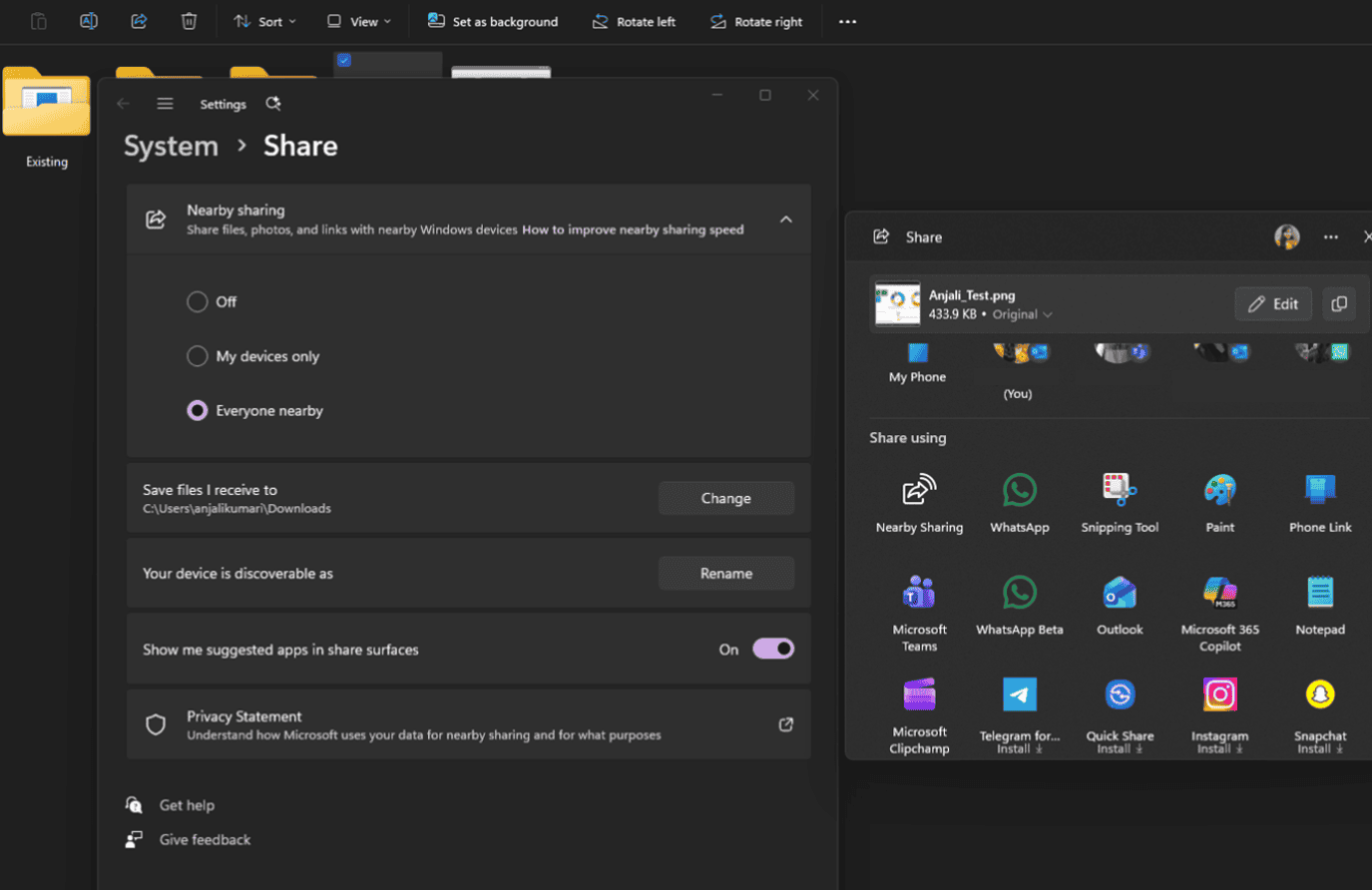
Starting with Windows Share, Microsoft is making the ShareSheet more useful, especially for AAD users. You can now discover and install relevant apps directly within the sharing interface, without jumping to the Microsoft Store. This feature was previously limited to MSA accounts, but is now expanding, which adds more flexibility.

Image credit: Microsoft

There is also a new level of control here. Users can choose whether they want to see app recommendations at all, thanks to a toggle in the ShareSheet settings. The interface itself now shows a row of suggested apps with “Install” labels, along with a Settings option in the overflow menu to manage the experience.

On the storage side, Microsoft is making a practical tweak. When creating a Dev Drive, you can now specify the size in GB instead of just MB. The same applies when resizing volumes under system storage settings, which should make things more straightforward.

Minor improvements made to Task Scheduler and Task Manager

Alongside these changes, a couple of smaller improvements are rolling out. Task Scheduler will now remember column width adjustments in the task list view across sessions, which should save time for regular users.

Meanwhile, Task Manager is getting a fix related to virtual machines. CPU speed readings on the Performance page should now appear more accurate after resuming from hibernate, instead of showing unusually high values.

Last but not least, Microsoft is also rolling out two Experimental builds (Build 29580.1000 and 28020.1921), which apply to Insiders in the Canary 29000 and 28000 series channels, respectively.

Windows 11 New Experimental (Dev) Build Brings Modern Run Dialog & Key Improvements

Microsoft has wrapped up the week with a bunch of new builds. Speaking of which, the company has rolled out Build 26300.8346 in the Experimental channel. As a reminder, the changes included in this build apply to Windows 11 Insiders in the Dev channel too. As part of this update, Microsoft has updated the Run Dialog, introduced some changes to Widgets, fixed a few issues related File Explorer, and more. Here’s all changes and improvements gradually being rolled out as part of Experimental Build 26300.8346.

Widgets gets quieter while core apps like File Explorer get some important fixes and improvements

As for Widgets, Microsoft say, it’s testing “new set of default settings” listed below to reduce unexpected alerts and visual interruptions:

  • Disabling Open on hover by default
  • Turning off taskbar badging by default
  • Opening to widgets experience on first launch
  • Limiting taskbar alerts until you choose to open and engage with the Widgets experience

Next up, Microsoft has fixed a grey flash on load and unexpected scrolling to the top on the Home page in some cases. That’s not all; File Explorer’s Favorites section won’t be showing duplicated OneDrive files in some cases. Meanwhile, file thumbnails are getting improved in the Recommended section on the Home page. Microsoft says they are now more “crispier and easier to read.”

Modern looking Run dialog, Windows Share updates, Magnifier improvements & more

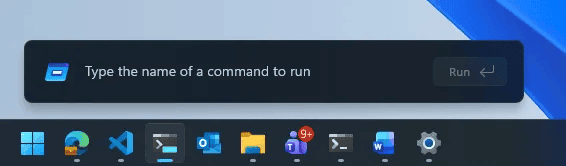
Interestingly, Microsoft has also rolled out the updated Run dialog as part of Build 26300.8346. The Run dialog experience now looks more modern, accompanied by improved usability. As of now, Microsoft is offering the modern-looking Run dialog as an opt-in experience for Insiders in the Experimental channel. In case you are willing to try it out, make sure to check our dedicated guide in which we explained how to enable it.

Image credit: Microsoft

Moving on, Windows Share is getting smarter, especially for AAD users. You can now discover and install relevant apps directly from the ShareSheet without jumping to the Microsoft Store. This feature was previously limited to MSA users but now it expands to AAD accounts as well. There is also a new Settings option within the ShareSheet, letting you control whether app recommendations appear, making the experience more flexible and user controlled.

Image credit: Microsoft

Speaking of improvements, Windows Magnifier is getting more precise controls. You can now enter an exact zoom percentage or choose from preset steps ranging from 5 percent to 400 percent. This should make zooming feel more consistent and easier to manage.

Image credit: Microsoft

On the storage side, Microsoft has updated Dev Drive settings. Users can now specify sizes in GB instead of just MB, both during creation and while resizing volumes.

Finally, the Feedback Hub is receiving version 2.2604.301.0. This update improves reliability, refines design and accessibility, and expands localization support. It also restores the 500 MB file upload limit, improves translation for feedback content, and makes upvote and comment counts more accurate. Not to forget, some of the changes we discussed above related to Windows Share and Storage applies to Beta channel Insider, who are getting them with Build 26220.8340.

Other fixes and known issues in this update

Microsoft is also addressing a few system-level issues. If you were noticing a large number of APISet events showing up in Event Viewer after recent Insider builds, that behavior should now be resolved with this release. In addition, Task Scheduler is getting a small but useful improvement. Column width adjustments in the task list view will now persist across sessions, so you won’t have to reset them every time. There is also a fix for Task Manager, specifically for virtual machines. CPU speed readings on the Performance page should now appear more accurate after resuming from hibernate, instead of showing unusually high and unrealistic values.

As for known issues, users who enable the Release Preview toggle in WIP settings may find that it does not actually allow selection. If that happens, exiting and reopening the settings page appears to resolve it. Meanwhile, those using Feature flags to enable the new WIP experience might notice the feature state being incorrectly labeled as current. That said, changing the state and applying updates should still work as expected.

Moreover, let’s not forget that the company is also rolling out two Experimental builds (Build 29580.1000 and 28020.1921), which apply to Insiders in the Canary 29000 and 28000 series channels, respectively.

Chrome’s New AI Suggestions Use Your Tabs to Tell You What to Do Next

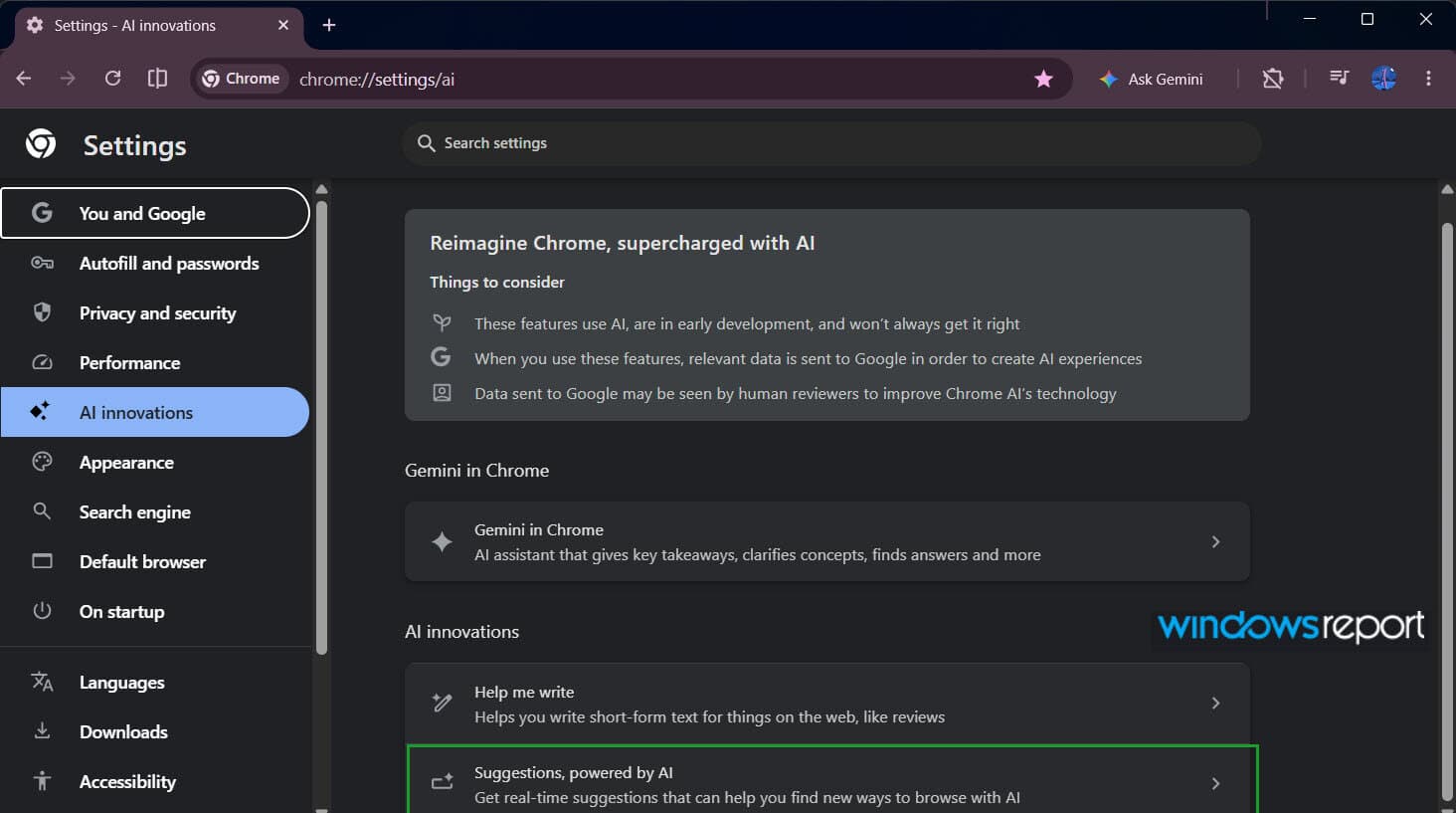
Google is testing a new AI-driven suggestions feature in Google Chrome, spotted in its Canary version. The option, called “Suggestions, powered by AI,” introduces a new way for Chrome to respond to what users have open in their tabs.

The feature appears as a separate card in the AI innovations section, next to Gemini in Chrome and Help me write. Google describes it as “get real-time suggestions that can help you find new ways to browse with AI.”

Image Credit: Venkat.

Opening the card leads to a settings page with a Show suggestions toggle. Users can choose to turn the feature on or off, rather than have it work quietly in the background.

How Chrome’s AI suggestions work

The description explains that Chrome uses the titles and URLs of open tabs to generate suggestions related to what is currently open. In simple terms, the browser uses tab context to decide what to show next.

Image Credit: Venkat.

Chrome also considers user interaction. Suggestions that are accepted or ignored can affect what shows up later, so the system changes over time based on usage.

Google provides more information on how it handles data. Chrome may process titles and URLs either on the device or in a “private space in the cloud.” Some processing may involve Google’s servers, with extra controls in place.

The settings page also mentions that titles and URLs can continue to support other Chrome features even when Suggestions is off. It includes links to sync controls for users who want to manage their data stored in the cloud.

Currently, there are no visible suggestions in the interface during normal browsing. The toggle remains stable in Canary, but Chrome does not yet show suggestions in the user interface.

Right now, the feature is limited to desktop Canary builds and has not appeared on Android or stable versions. Microsoft Edge already offers similar functionality through Copilot. It provides context-aware actions based on open pages. Chrome is now following a similar path, with a stronger focus on tab context, which may reduce the need to search again or switch tabs.

Like other AI features in Chrome’s AI innovations section, Suggestions is optional and can be turned on or off. Its description also states that tab data may be processed on-device or in the cloud, with some processing involving Google’s servers.

Windows 11 Update Expands App Removal Control for IT Admins

Microsoft is giving IT administrators more control over Windows 11 environments with new app management capabilities rolling out in versions 24H2 and 25H2. The change arrives alongside the KB5083631 update and focuses on simplifying how organizations manage preinstalled apps across devices.

Broader control over preinstalled apps

With this update, admins can now remove virtually any preinstalled Microsoft Store app using its Package Family Name (PFN). This marks a clear shift from previous limitations, where only a subset of apps could be removed.

The feature relies on a policy called RemoveDefaultMicrosoftStorePackages, which allows dynamic lists of apps to be targeted and removed. It supports a wider range of MSIX and APPX packages, making system cleanup more flexible in managed environments.

Enterprise-focused deployment

Microsoft designed this capability specifically for enterprise and education users. It is not available on Home or Pro editions, reinforcing its role as an administrative tool rather than a consumer-facing feature.

Admins can deploy the policy using Group Policy (GPO) or custom OMA-URI configurations through mobile device management (MDM) systems. Native support in Microsoft Intune’s Settings Catalog is not yet available, though Microsoft is expected to add it in the coming months.

Important limitations and considerations

Despite the expanded control, the feature does not allow removal of core system components. It strictly targets apps installed through the Microsoft Store framework.

Removing an app also deletes its associated local data, which makes planning essential before deployment. Microsoft recommends notifying users in advance and ensuring important data is backed up to avoid unintended data loss.

Part of a broader Windows management push

The update reflects Microsoft’s continued push toward giving organizations tighter control over Windows environments. By allowing admins to strip out unnecessary apps, companies can streamline systems, reduce clutter, and maintain more standardized deployments.

However, the feature remains carefully restricted. Microsoft is clearly balancing flexibility with system integrity, ensuring that critical components remain untouched.

Wider context around KB5083631

This change arrives as part of the KB5083631 rollout, which also includes other fixes and adjustments across Windows 11. Microsoft recently clarified that some systems may experience an extra restart during installation due to Secure Boot certificate updates, a security-driven change tied to long-term platform protection.

The same update also addresses a Remote Desktop issue where security warning dialogs rendered incorrectly, improving usability for affected users.

Overall, the expanded app removal controls highlight Microsoft’s ongoing effort to refine Windows 11 for enterprise needs, with more granular management tools expected to follow in future updates.

Via Neowin

Microsoft Confirms Extra Reboot in Windows 11 KB5083631 Update

Microsoft has released Windows 11 KB5083631 for versions 24H2 and 25H2, and some users may notice their systems restarting more than once during installation. This behavior may look unusual, but it is expected and not caused by a bug.

The company clarified that the extra restart happens as part of a security-related process, not due to an issue with the update itself.

Why KB5083631 may restart your PC twice

The additional reboot is tied to the deployment of updated Secure Boot certificates. Microsoft is rolling out newer certificates as part of a broader initiative to refresh the Secure Boot infrastructure across Windows devices.

During the update process, certain systems need an extra restart to properly apply these new security components. This ensures that the updated certificates integrate correctly into the system’s boot process.

Secure Boot changes explained

Secure Boot plays a critical role in protecting systems from low-level threats such as bootkits. These attacks target the startup process before the operating system fully loads, making them difficult to detect and remove.

The original Secure Boot keys used across many systems are now approaching their expiration window, roughly 15 years after their introduction. Many of these keys are set to expire around 2026.

To avoid disruptions and maintain system trust, Microsoft has started deploying updated certificates issued in 2023. These new keys ensure that devices continue to verify trusted software during startup without interruptions.

Limited impact, expected behavior

Not all systems will experience the additional restart. Microsoft notes that only a limited number of devices require this extra step, depending on their current configuration and certificate state.

For affected users, the system may reboot once more than usual during the update process. After that, the installation continues normally without further issues.

Part of a broader rollout

This is not the first time Microsoft has introduced this behavior. A similar pattern appeared in a previous update, KB5083769, which also included Secure Boot-related changes.

The approach reflects a longer-term effort to strengthen platform security while preparing systems for upcoming certificate transitions.

Focus on long-term protection

Although multiple restarts can seem unexpected, the behavior serves a clear purpose. By updating Secure Boot certificates now, Microsoft ensures that Windows systems remain protected against evolving threats and continue operating securely beyond the current certificate lifecycle.

Overall, the extra reboot in KB5083631 is intentional, limited in scope, and part of a wider push to maintain system integrity and security.

Via Neowin

Microsoft Fixes Windows 11 Remote Desktop Security Warning Bug

Microsoft has fixed a Windows 11 bug that caused Remote Desktop security warning dialogs to display incorrectly after the April 2026 security updates.

According to Bleeping Computer, the issue affected the new RDP security warning system and made important prompts difficult or impossible to read on some systems. The problem appeared mainly on devices using multiple monitors with different display scaling settings.

Remote Desktop warnings became hard to use

The bug affected Remote Desktop connection files, also known as .rdp files. After installing the April 2026 security updates, some users saw broken security warning dialogs when opening Remote Desktop sessions.

The dialog could render with misaligned buttons, hidden controls, or unreadable text. In some cases, users could not properly interact with the prompt, which created a serious usability issue for a security feature designed to protect them.

The affected updates included KB5083768 and KB5083769 for Windows 11, KB5082200 for Windows 10, and KB5082063 for Windows Server.

Microsoft fixes the issue in preview update

Microsoft included the fix in the KB5083631 preview update for Windows 11. The release also brings more than 30 other fixes, including improvements for reliability, performance, and system behavior.

The Remote Desktop fix matters because security dialogs need to remain clear and usable. If users cannot read a warning or click the correct button, the protection loses part of its value.

The bug also highlights a common problem with security changes. Microsoft introduced stricter warnings to improve protection around Remote Desktop connections, but display scaling issues created an unexpected UI problem for some users.

The fix restores critical RDP prompts

After installing the update, Remote Desktop security warnings should display correctly again, even on multi-monitor setups with different scaling values.

This should help users make clearer decisions when opening .rdp files, especially in business environments where Remote Desktop remains widely used for remote access, administration, and support work.

The issue did not remove the security warning itself. Instead, it affected how Windows displayed the prompt. Still, the broken layout could block user action or make the warning too unclear to trust.

Windows security remains in focus

The Remote Desktop fix comes as Microsoft continues to address security-related Windows issues across supported systems.

In other news, CISA has ordered an urgent patch for a Windows Shell vulnerability, adding more pressure on administrators to keep Windows devices updated. For IT teams, the latest fixes show why preview updates and security patches still need careful testing, especially on systems with complex display setups or enterprise configurations.

Chrome for Android is testing a “bottom bar” redesign

Chrome for Android is testing a new layout that places key browser controls at the bottom of the screen while the address bar stays at the top. In the current design, these controls appear higher on the page, so most actions require reaching to the top of the screen.

The feature is available in Chrome Canary via an “Android Bottom Bar” flag, which offers multiple layout options, including 1A and 1B, as well as versions for the New Tab Page.

A fixed bar now appears at the bottom of the screen with four actions: Home, new tab, tab switcher, and the three-dot menu. The address bar remains at the top. The layout splits the interface between page content and browser controls. The bottom bar stays visible across pages.

Right now, Chrome places tabs and menu options at the top-right corner. Opening a new tab or switching tabs often requires a grip change. With this layout, those controls move to the bottom edge. Frequent actions stay closer to the thumb and no longer require reaching upward.

Availability is limited to Android and is visible in newer Canary versions. Behavior may vary by device and across the listed variants. Some versions also change how the bottom bar on the New Tab Page works, with slight differences in placement and behavior.

Unlike earlier bottom bar tests, the address bar stays at the top, while only key actions move to the bottom. This keeps the page location at the top while shifting interaction points closer to the user’s hand.

Phone screens have grown taller, which makes the top edge harder to reach. Moving key actions to the bottom keeps them within easier reach and reduces the need to adjust grip. It also changes where users expect to find tabs and menu options.

The feature is under testing. There is no confirmed timeline for when it could reach stable versions.

Chrome on Android is also testing a plus button in the New Tab Page search bar. It lets users upload images and files.

Xbox’s New Logo Rolls Out As Dynamic Backgrounds & More Today

Ever since Asha Sharma assumed the role of Xbox CEO, things are happening thick and fast behind the scenes. Just last month, Asha Sharma and Matt Booty announced the big reset plan for Xbox. While announcing that, the leadership admitted that players are frustrated and Xbox has work to do.

Well, it seems the plan is already under implementation inside Xbox’s walls. In case you are unaware, Sharma responded to a fan request regarding a dynamic background for the new Xbox logo. At the time, she confirmed that Xbox was already “working on it.” Guess what? It’s here, or at least it will be sometime today.

Asha Sharma confirms Xbox new logo is dropping today as dynamic backgrounds and more

In a post on X from earlier today, Asha Sharma confirmed that the new logo in dynamic backgrounds, profile backgrounds, and gamer pics is “dropping today.” Here, we have to commend the turnaround time of Xbox. I mean, it was quick considering the new Xbox logo was unveiled just last week.

At a time when Xbox is pushing hard to establish itself as a platform where “the world plays and creates,” handling feedback or requests from players this quickly will surely help shape perception around the platform.

Although Xbox isn’t doing pretty good in terms of revenue, it’s highly likely that Asha Sharma will lead the platform to a better future, given how she is dealing with things lately. In case you missed, Microsoft, keeping its promise, has also rolled out Xbox Mode for Windows 11 users in select markets. Moreover, Xbox yesterday announced a bunch of updates for the ROG Xbox Ally handhelds and detailed the April update spanning across console, PC, and mobile.

Windows 11 KB5083631 Update Boosts Performance and System Stability

Microsoft has released Windows 11 KB5083631, introducing Builds 26200.8328 and 26100.8328 with a clear focus on performance and reliability. As reported by Neowin, the update forms part of the company’s internal “K2” initiative, which targets long-term improvements to the overall Windows experience.

Instead of adding new features, this release concentrates on making everyday interactions faster and more consistent across the system.

UI and navigation feel faster and more responsive

The update brings noticeable improvements to the Windows interface. Sign-in times are faster, while navigation across menus and system elements feels smoother. Task View and taskbar interactions respond more quickly, reducing delays during multitasking and improving the overall flow of using the operating system.

These refinements aim to remove friction from common actions, especially for users who frequently switch between apps or rely on Windows’ built-in productivity tools.

File Explorer and system processes get stability upgrades

Microsoft has also improved File Explorer performance and the reliability of system processes. Handling files and folders now feels quicker, while the explorer.exe process runs more consistently under load.

The update also addresses an issue where system resources remained in use after closing File Explorer. By resolving this, Microsoft reduces unnecessary memory consumption and improves system stability over longer sessions.

Lower resource usage during updates and background tasks

Another key area of improvement comes from memory and update optimization. Windows now uses less RAM during update downloads, which helps maintain responsiveness even when updates run in the background.

Delivery Optimization has also been refined, allowing updates to download more efficiently. These changes ensure that system performance remains stable during one of the most resource-intensive operations.

Faster startup and improved Settings performance

Startup performance sees further gains with this release. Systems boot faster, and startup applications launch more quickly once the desktop loads.

The Settings app also benefits from performance improvements, particularly in storage-related sections. Loading large drive information now takes less time, and navigation within these menus feels smoother and more responsive.

Focus remains on performance over new features

This update reflects Microsoft’s broader shift toward improving core performance rather than introducing visible features. The “K2” initiative highlights a long-term strategy centered on speed, efficiency, and reliability across Windows 11.

In parallel, Microsoft has made Windows Server 2025 upgrades available directly through Windows Update, simplifying deployment for enterprise users. At the same time, Windows updates continue to grow in size, now often exceeding 5GB, largely due to the increasing presence of AI-related components.

Overall, KB5083631 delivers a series of meaningful refinements that improve how Windows 11 feels in daily use, even if those changes remain mostly behind the scenes.

Toggle VPN Rolls Out Windows App

A digital security brand focused on online privacy, Toggle Inc, officially launched its Windows app. This latest launch takes the company one step closer to its mission: providing access to trustworthy and user-friendly online privacy tools on the platforms people utilize the most.

With the new Toggle VPN for Windows app live, users can securely surf the internet across all their devices — phones, tablets, PCs, laptops, and even TV screens.

A natural step in cross-platform expansion

Windows dominates the majority of desktops and laptops across the world. Therefore, developing a VPN for this operating system was a logical next step for the company.

The company received a request from more than 60% of its active customer base to develop a VPN for the platform over the past year. Also, almost 40% of Toggle’s beta testers reported using public hotspots on their Windows-run laptops at least a few times a week.

Combined, these figures made building the web security app on this operating system an obvious priority.

“Launching this version of the app is a key step in our quest to deliver a universal privacy solution,” the Toggle Inc statement says. “From day one, we have aimed to make online protection easy to use, and with the release of our service on Windows, we can now offer millions of users the same level of security and simplicity we are known for.”

Security and simplicity, side by side

As the issue of data collection and geo-blocking is increasing day by day, the demand for a VPN is on the rise. However, the newly developed service not only masks the IP address.

Toggle’s application is created with simplicity thoroughly considered. From the very first time a user opens the application, the experience feels intuitive. The app’s design is clean and has all the important features where one expects to find them. All it takes is a single click to get started with security. 

But there is more to it. The application is intended for those who look for a sense of privacy on the internet. Some of its important features include:

• One click connect for instant protection

• 1,200+ servers across 26 countries for unrestricted browsing

• WireGuard and Shadowsocks protocols for rock-solid data encryption

• Zero logs: the service does not track or record users’ activities online

• Fast performance: the app runs quietly in the background, never affecting the system

Availability

Currently, users can download VPN for Windows from the official Toggle website. First-time users only have to open the app after it is installed, create a new account, and get connected immediately, being eligible for a 7-day free trial. Existing users can install the app on any Windows 11 or 10 (64-bit) machine, such as a desktop computer, laptop, ultrabook, or hybrid device, and log in with their security code to start right away.

Xbox April Update Brings Major Customization and Cross-Device Features

Microsoft has rolled out its April update for Xbox, introducing a wide range of changes focused on customization, control, and cross-device flexibility. The update spans console, PC, mobile, and handheld devices, reinforcing the company’s push toward a unified gaming ecosystem.

The latest improvements aim to give players more control over how they access, manage, and experience their games, whether locally or through the cloud.

Console experience gets deeper customization options

Xbox consoles now offer significantly more flexibility on the Home screen and overall system behavior.

Players can pin up to 10 Groups on Home, a major increase from the previous limit of two. Managing and reordering Groups also feels more streamlined, making it easier to organize content.

Microsoft also introduced a new color customization system with sliders, allowing users to fine-tune dashboard visuals. In addition, players can now disable Quick Resume on a per-game basis, giving more control over how games launch and resume sessions.

A new Play History tab inside My games & apps improves layout and navigation, helping users quickly jump back into recently played titles.

Streaming improvements enhance cloud gaming experience

The update brings meaningful improvements to Xbox Cloud Gaming, with a focus on performance and transparency.

Players can now select their preferred resolution before starting a stream using the new User Selected Resolution feature. This helps balance performance and visual quality based on network conditions.

The Network Quality Indicator adds real-time feedback on connection stability, helping users identify potential issues during gameplay.

PC updates expand flexibility beyond Xbox storefront

Xbox on PC now removes several ecosystem limitations and opens up broader integration.

Users can add any installed game or app to their Xbox library, regardless of where it was purchased. They can also customize names, icons, and launch options for better organization.

The Jump back in section now supports pinning up to three favorite titles, making it easier to return to frequently played games.

A new gamepad cursor introduces controller-based navigation with mouse-like precision. Meanwhile, the Game Bar allows users to customize notification placement for a cleaner on-screen experience.

Mobile app becomes more actionable and responsive

The Xbox mobile app now focuses on reducing friction between discovery and gameplay.

Users receive notifications for wishlist updates, including discounts, Game Pass additions, and preorder availability. Each alert includes direct links to purchase, install, or start remote play sessions.

This change allows faster transitions from browsing to playing, especially for users managing games on the go.

Handheld support improves with performance and compatibility updates

Microsoft continues to expand support for handheld gaming devices such as the ASUS ROG Ally and ASUS ROG Ally X.

The update improves the docked experience, making it easier to play on external displays like TVs. It also adds support for LE Audio and enhances vibration feedback.

Users can now access more PC-like features on handhelds, including full game libraries and the gamepad cursor. Auto Super Resolution is also available in preview for Insiders, aiming to improve performance and image quality.

Xbox ecosystem continues to expand across devices

Microsoft highlighted ongoing growth across its gaming ecosystem.

More than 1,500 titles now support Xbox Play Anywhere, allowing players to carry progress across devices. Over 1,000 owned games can be streamed through the cloud, further reducing hardware limitations.

Input support continues to expand, with over 190 cloud games supporting mouse and keyboard, and more than 260 titles offering touch controls.

A new compatibility labeling system also helps players identify optimized games for handheld devices, including titles like Hades II and MOUSE: P.I. For Hire.

Rewards and personalization features get a boost

The April update also introduces new dynamic backgrounds inspired by popular titles such as Diablo IV: Lord of Hatred and Overwatch.

Microsoft is also promoting a new Rewards sweepstakes initiative, offering players a chance to win prizes that can reach up to $1 million.

This update reflects Microsoft’s broader strategy to position Xbox as a flexible, cross-device platform rather than a single console experience.

By combining deeper customization, improved streaming tools, and expanded ecosystem support, the April update strengthens Xbox’s focus on accessibility, personalization, and seamless play across devices.

Chrome for Android tests new “+” button in search bar for uploads

Google Chrome for Android is testing a new “+” button in the search bar on the New Tab Page in its Canary build. The button is located on the left side of the field and lets users start searches from the camera, gallery, files, or AI Mode without leaving the page.

Screenshots show both the interface and the process. When you tap the “+,” a bottom sheet opens with these options, letting you take a photo, create an image, or choose a file. This same panel also includes AI Mode.

The menu opens as a bottom sheet and keeps you on the same screen while you choose an option. This keeps the interaction within the search bar instead of moving to a separate page.

Currently, the search bar supports text, voice, and Lens. Before this, you could not upload files and images directly from the field; this test adds those options to the search experience.

Google Lens already lets you search using images, but it works as a separate tool within the search bar. The new “+” button brings image and file input into the search experience itself, so you can start directly with a file or photo without switching to another option.

The change is limited to Chrome Canary on Android and is not available in the stable version at this time.

This is visible on the New Tab Page, where the search bar is the main entry point for most queries on Chrome Android. Placing the button here puts upload and AI options closer to where searches begin.

Chrome already provides AI Mode and Incognito as shortcuts below the search bar. The new button gives another way to access these features directly within the field.

The update consolidates more input options in one place. You can start a search using text, voice, or a file from the same bar, which makes it easier to upload an image or document. It also shows Google bringing more input types directly into the search bar on Android.

There is no information yet on when this will be available for everyone.

Xbox Mode Rolls Out to Windows 11 PCs Today in Select Markets

As promised earlier this year, Microsoft has started rolling out Xbox Mode (FKA Full Screen Experience) on Windows 11 PCs, marking a new step towards console-style gaming with traditional PC flexibility. The rollout starts in select markets today across devices ranging from laptops and desktops to tablets, with a wider release expected over the coming weeks.

Console-inspired experience comes to Windows 11 PCs

Xbox Mode is designed to shift Windows 11 into a more focused, controller-friendly gaming environment. It takes clear inspiration from the Xbox console interface, prioritizing games over background apps and system distractions. Players can browse, launch, and return to titles using a full-screen layout optimized for controllers.

The experience also includes an aggregated game library, pulling in installed titles from multiple PC storefronts along with Xbox Game Pass access. Microsoft says the idea is to make switching between Xbox Mode and the traditional Windows desktop seamless, depending on how players want to use their device.

Since its earlier iteration on handhelds, the feature has reportedly evolved based on user feedback, shaping how it now works across broader PC hardware.

If you happen to be in the region where Xbox Mode is first rolling out today, all you need is to make sure that your Windows 11 PC is set to receive the latest Windows update. To do that, go to Settings > Windows Update > Turn on “Get the latest updates as soon as they are available” option. That’s all, and you are sorted jump into Xbox mode directly from your PC and start playing. As a reminder, Xbox has announced a bunch of updates for the latest handhelds.

Android-Powered Galaxy Books Could Shake Windows 11’s Hold on Samsung’s Laptop Lineup

It seems that Samsung may be headed towards greater uniformity among all its Galaxy products, even the laptops. Although the company already uses an Android-based One UI system for all its phones, tablets, wearables, and TVs, its laptops have been using both Windows and Chrome OS operating systems so far. However, this may change soon.

That’s according to SamMobile, which, in its exclusive report, claims that Samsung is developing new Galaxy Book laptops that could run Android 17-based software with One UI 9 layered on top. The idea appears to be less about replacing existing systems overnight and more about testing a parallel direction for future devices.

Future Galaxy Book laptops may ditch Windows 11 for Android 17-based One UI

The new range will reportedly come in several variants, starting from basic models all the way up to flagship models. While information about them is sparse, it appears that Samsung intends to create a unified design philosophy throughout their laptops, which they have found difficult to achieve due to multiple operating systems.

The laptops are also expected to integrate Galaxy AI features, similar to what is already available on Samsung smartphones and tablets. It may result in better cross-device connectivity, especially for those who already use Samsung products.

Furthermore, DeX integration will be more prominent than ever before. The report hints that Samsung DeX Plus will be included as a part of the OS, making it possible for the user to work in desktop mode while still keeping Android at the core. Given that Android 17 is expected to be unveiled at Google I/O in May 2026, the news outlet speculates that the Galaxy Book One UI laptops could launch “before the end of the year.” Not to mention, if this goes as planned, it could set the stage for Samsung’s next laptop strategy later this year.

Furthermore, it also raises a bigger question about where Windows 11 fits into Samsung’s long-term laptop roadmap. That’s especially if (a big if) Android-based computing gains momentum in premium devices. Microsoft has already been facing massive scrutiny for mishandling Windows 11. But things are slightly getting better. The company reportedly has an internal “Windows K2” plan in place to fix Windows 11 for good. Microsoft is focusing on making the OS faster, more stable, and more polished. A fourth pillar, Community, is also part of the plan, with efforts to reconnect with users through feedback, Insider programs, and public engagement. All that said, if Samsung pivots away from Windows 11 in the near, that would be a big setback for the Redmond Giant.

Legal Agent Lands in Microsoft Word via Frontier Program in the US

Microsoft has started rolling out a new Legal Agent inside Word as part of its Frontier program, bringing structured contract review directly into document workflows. The feature focuses on legal teams that need consistent redlining and audit trails rather than generic AI assistance. It appears inside Copilot in Word on Windows desktop for users in the US.

Structured workflows for contract review

The Legal Agent has been built with legal engineers and follows structured workflows instead of relying on freeform prompting. It reviews contracts clause by clause against internal playbooks and uses a deterministic resolution layer to apply edits consistently.

The system understands Word document structure including tables, formatting, and tracked changes, which helps preserve context during revisions. Microsoft says this approach reduces variability and improves reliability in complex agreements while keeping costs and latency more predictable for enterprise use.

It is designed to understand complex legal documents, compare versions, and highlight risks or obligations directly inside Word. The agent can draft redlines with tracked changes while preserving original formatting, and it also works inside documents that already contain revisions.

Each suggestion includes citations that link back to the source language, allowing reviewers to verify changes quickly. Users can apply edits one by one or across full sections, depending on how much control they want during negotiation and review cycles.

Security and rollout

The feature runs within Microsoft 365 security and governance controls, keeping legal data inside enterprise protections. It is available in Frontier in the US, and users may need to restart Word to access it.

Early feedback from legal professionals highlights interest in structured review and citation-backed Word suggestions. Moreover, Microsoft admits that AI-generated comtent can be inaccurate and warns that “the Legal Agent does not provide legal advice or professional determinations and is not a substitute for the judgment of a qualified legal professional.”

Stranger Than Heaven Xbox Showcase Set for Next Week: Check Date, Time & How to Watch

Xbox is set to spotlight a new deep dive next week, as it prepares to air a special showcase for Stranger Than Heaven from RGG Studio. The broadcast is scheduled for Wednesday, May 6, and will run for around 30 minutes, focusing on story, world design, and character details. You can tune in live at 4pm Pacific / 7pm Eastern (May 7 at 12am UK time).

To catch you up, the was first showcased at Xbox Partner Preview earlier in March. That first reveal hinted at a multi-era narrative set across modern Japan, but many details were still kept under wraps.

Xbox to reveal deeper look at Stranger Than Heaven

The upcoming show promises a closer look at how Stranger Than Heaven structures its story across five distinct eras and five different cities. Xbox says the presentation will go deeper into the game’s ambitious narrative design and long-form storytelling approach.

Developed by RGG Studio, the game follows a 50-year timeline and features a cast of characters tied across different periods. The showcase is expected to highlight more of the story direction and cast performances.

Viewers can watch the event on YouTube, Twitch, and regional Xbox channels, with 4K 60FPS streaming supported on select platforms. Japanese audio, subtitles, and multiple language options will also be available during and after the broadcast.

Xbox has also confirmed accessibility support for the event, including audio descriptions, American Sign Language, and Japanese Sign Language versions on select streams. In case you can’t watch live broadcast, a full recap will be published shortly after the show ends, covering all major reveals and updates from the presentation.

The game itself is confirmed for Xbox Series X|S, PC, and cloud, with Xbox Play Anywhere support and inclusion in Xbox Game Pass.

New ROG Xbox Ally Updates Bring Docking Upgrades, Auto SR Preview, and More

Xbox has announced a new wave of updates for the ROG Xbox Ally and ROG Xbox Ally X. Xbox says it has been focusing on steady improvements rather than big resets. The company has been improving performance, expanding game compatibility, and tuning the overall handheld experience based on player feedback.

Docked play gets a more console-like feel

Xbox is rolling out a set of updates that improve experience when the device is docked to a TV or monitor. When connected, gameplay now automatically shifts to the external display, while the handheld screen turns off to prioritize performance and clarity.

The system also adjusts display settings like resolution, refresh rate, and HDR output based on the connected screen. Smart TVs from Samsung, LG, and Vizio can now automatically switch into gaming modes such as low latency settings.

Image: Microsoft

Accessories like the ROG Bulwark Dock and 100W Charger Dock now support HDR10, while selected setups also gain VRR support for smoother gameplay. A new Display Widget inside Game Bar brings key controls like resolution and refresh rate into one place. Players can adjust visuals using a controller without leaving the game or digging through system menus.

That’s not all; controller handling has also been refined. Once an Xbox controller is paired, built-in controls step back automatically, making docked play cleaner across supported titles.

Auto SR preview and system upgrades expand handheld experience

As previously rumored, Xbox is also rolling out Auto Super Resolution (Auto SR) in preview for Xbox Insiders on the ROG Xbox Ally X. The feature is designed to improve image sharpness and performance, especially when docked to larger displays where higher resolution output matters more.

Image: Microsoft

Gamepad Cursor is also expanding, allowing controller navigation in apps like browsers and third-party launchers that normally require a mouse.

On the audio side, Bluetooth LE Audio support reduces latency and improves battery life. Super wideband stereo voice also improves party chat clarity on supported headsets. The Xbox PC app is getting a unified library update as well. Players can now bring games from different storefronts into one place, along with custom apps and launch options.

Image: Microsoft

At the same time, Xbox continues expanding its handheld compatibility program, now covering more than 1,000 PC games with optimized performance profiles. All in all, Xbox is steadily shaping the ROG Ally lineup into a more console-like experience when docked, while still keeping the flexibility of a full Windows handheld.

Subnautica 2 Finally Gets Firm Early Access Release Date

Subnautica 2 finally has a confirmed Early Access date, alongside a new cinematic trailer that gives a fresh look at the upcoming survival sequel. The developers have now locked in launch timing, pricing, and rollout details ahead of release.

Subnautica 2 launches in Early Access on May 14

As previously expected, Subnautica 2 will enter Early Access on May 14, 2026, at 08:00 PDT and 15:00 UTC. The studio has also shared a global release timing map so players can check exact availability in their region.

The Early Access price is set at $29.99, with regional pricing depending on storefront. Players will only need to purchase the game once during Early Access. That single purchase will include all future updates, additions, and fixes leading up to the full 1.0 release.

Storefront updates and early details

Store pages across Steam, Epic Games, and Xbox have been updated with new screenshots and information. Wishlist options are already live ahead of launch. The team is also encouraging players to join community channels to discuss new details and upcoming updates as the release approaches. Early Access suggests ongoing development, so the launch version may not reflect the full experience at release.

More content and changes are expected over time. With the release date now confirmed, attention remains on how Subnautica 2 evolves during Early Access and what features will be available on day one.

Microsoft Faces Protests in France Over Windows 10 End of Support

Microsoft is facing growing backlash in France as protests emerge over its decision to end support for Windows 10. The move comes alongside broader discussions in the country about reducing reliance on proprietary software, including reported plans by the French government to shift toward Linux-based systems.

Protests target Windows 10 end-of-life decision

According to Neowin, several environmental and consumer advocacy groups have organized protests criticizing Microsoft’s timeline for ending support for Windows 10. Mainstream support officially ended in October 2025, with Extended Security Updates (ESU) available only as a paid or limited option.

Activists argue that this approach pressures users into upgrading to newer systems like Windows 11, often requiring newer hardware that many existing devices cannot support.

The protest movement has gained traction, with around 50,000 people signing a petition calling for changes to Microsoft’s policy.

Environmental groups raise e-waste concerns

Organizations involved in the protests include Non-Violent Action COP21, Alternatiba, Stop Planned Obsolescence, Que Choisir Ensemble, and Zero Waste France.

These groups accuse Microsoft of encouraging “planned obsolescence” by ending support for older systems. They argue that millions of still-functional PCs could become obsolete, leading to unnecessary electronic waste.

Environmental advocates highlight the resource cost of new hardware, noting that manufacturing a single laptop can require roughly 800 kilograms of raw materials.

Calls to extend support until 2030

Protesters are demanding that Microsoft extend support for Windows 10 until at least 2030. They claim the current ESU program does not go far enough to address environmental and consumer concerns.

Despite the pressure, Microsoft is unlikely to revise its plans. The company has consistently communicated its Windows 10 lifecycle timeline and continues to push users toward newer platforms.

Broader pressure on Microsoft

The protests add to a growing list of challenges for the tech giant. In parallel, Microsoft is also facing legal scrutiny in the UK over pricing practices related to Windows Server.

At the same time, France’s interest in Linux-based alternatives signals a wider shift in how governments evaluate long-term software dependencies, particularly in the context of sustainability and digital sovereignty.

Spotify Moves to Verify Real Artists with Badge as AI Fakes Crowd the Platform

Spotify has been constantly adding new features since the start of this year. Among which, SongDNA and the ability to turn off videos are a few of them. Well, the platform has now announced a new verification system for artists, as it looks to offer more clarity to listeners around authenticity in the age of AI-generated music. Besides the new “Verified by Spotify” badge, the company is also rolling out additional artist details to help listeners better understand who they are listening to.

Spotify to add Verified badge to artist profiles

To combat fakes, AI, spam on the platform, the company will roll out new “Verified by Spotify” badge, which appears on artist profiles and in search. This will suggest that Spotify has reviewed the profile and confirmed it meets its authenticity standards.

In order to get verified, artists need consistent listener activity over time, not just short spikes. Spotify is also checking for policy compliance and real-world presence, including social media, concerts, and merch. At launch, profiles that mainly represent AI-generated artists are not eligible. That said, Spotify notes that the definition of authenticity is evolving, leaving room for future changes.

“We’ll pair these standards with human review and judgment to identify real artists behaving in good faith, not just filtering out bad actors, giving you a more reliable signal of the authentic artistry behind the music,” Spotify further added in the announcement post.

New artist details bring more transparency

Spotify is also testing a new section that highlights key artist details. This includes milestones, release activity, and touring information in a simple, easy-to-read format. The company compares this to a “nutrition label” for artists. The idea is to give listeners a quick snapshot of an artist’s activity and credibility on the platform. Notably, these details will appear even for artists without the verification badge. It gives broader context beyond just the music itself.

Image: Spotify

Roll out timeline

The verification system will roll out gradually over the coming weeks. Spotify says more than 99 percent of artists that users actively search for will be verified at launch. This includes a large number of independent artists, not just major names. Moreover, the company is prioritizing artists with real audience engagement over content farms or passive listening tracks.

GPT-5.5-Cyber to Roll Out in Next Few Days for “Critical Cyber Defenders,” Says OpenAI CEO

Earlier this month, OpenAI introduced GPT-4-Cyber, its own frontier cybersecurity model. That came shortly after the announcement of Anthropic’s Claude Mythos cybersecurity model, which is part of Project Glasswing. At the time, OpenAI confirmed that it would initially only be available to vetted security vendors, approved organizations, and selected researchers under its Trusted Access for Cyber (TAC) program.

OpenAI teases GPT-5.5-Cyber with limited details

Now that GPT-5.5 is here, OpenAI is gearing up for the launch of GPT-5.5-Cyber, an upgraded cybersecurity model. The confirmation came straight from CEO Sam Altman on X, as he said it will be available first to “critical cyber defenders in the next few days” (via The Verge)

Altman further added, “we will work with the entire ecosystem and the government to figure out trusted access for cyber; we want to rapidly help secure companies and infrastructure.”

As of now, it’s unclear who exactly will get access to the new cybersecurity model. OpenAI previously said that with its cybersecurity model, it wants to support defensive workflows like vulnerability analysis, code review, and reverse engineering of compiled software.

Notably, Anthropic’s Claude Mythos was reportedly accessed by unauthorized groups days after launch, though no harm was reported. After reports surfaced, the company said it is looking into the matter, stating, “We’re investigating a report claiming unauthorized access to Claude Mythos Preview through one of our third-party vendor environments.”

Following that report Reuters reported that the Reserve Bank of Australia is actively engaging with regulators, government bodies, and industry players as Claude Mythos gains attention. The Reserve Bank of New Zealand also reportedly stepped in to coordinate with both domestic and Australian counterparts over what it described as a “developing risk.”

Intel Releases New Wi-Fi and Bluetooth Drivers with Stability Improvements

Intel rolls out new Wi-Fi and Bluetooth drivers with stability improvements and broader device support, continuing its push to refine wireless performance across modern systems.

The latest update focuses on reliability, smoother connectivity, and better interaction between wireless components, while quietly dropping support for one older adapter.

New Intel drivers target stability and connectivity

According to Neowin, Intel has released updated drivers for both Wi-Fi and Bluetooth adapters, delivering incremental improvements rather than major feature additions.

The new versions include Wi-Fi driver 24.40.0 and Bluetooth driver 24.40.0.3, both aimed at enhancing everyday performance across supported devices.

On the Wi-Fi side, the update improves system stability and connection consistency. It also enhances how Wi-Fi and Bluetooth operate together, reducing interference between the two. One notable change disables channel-load priority for access point selection by default, which may impact how networks get chosen in crowded environments.

Additional minor fixes are included, though Intel has not detailed all of them.

Bluetooth improvements and compatibility changes

The Bluetooth 24.40.0.3 update focuses on general functional improvements, with an emphasis on stability and performance rather than new capabilities.

Both driver updates support a wide range of Intel wireless hardware, including:

  • Wi-Fi 7 adapters such as BE200, BE201, BE202, BE211, and BE213
  • Wi-Fi 6E models like AX210, AX211, and AX411
  • Wi-Fi 6 devices including AX101, AX201, and AX203
  • Older Wireless-AC models such as 9260, 9461/9462, and 9560

However, Intel has removed support for the Wi-Fi 6 AX200 adapter in this release, marking a shift away from some earlier-generation hardware.

The company recommends installing the latest drivers to ensure optimal performance and stability.

Broader context: Intel’s ongoing updates

This release continues Intel’s pattern of frequent driver updates focused on reliability and compatibility rather than headline features. While the changes remain incremental, they play a key role in maintaining stable wireless performance across a wide range of devices.

In related developments, Intel has also recently acknowledged the existence of its upcoming Arc G3 graphics chips during an interview, hinting at continued expansion of its hardware lineup beyond connectivity solutions.

EU Investigates Meta Over Child Safety Failures on Facebook and Instagram

Meta is facing increased pressure from the European Commission after preliminary findings raised concerns about child safety on its platforms. The investigation focuses on whether Facebook and Instagram adequately prevent users under 13 from accessing their services.

The probe, launched in 2024 under the Digital Services Act (DSA), highlights potential gaps in Meta’s approach to age verification and enforcement.

Weak age verification and enforcement under review

According to the Commission’s initial assessment, Meta’s current systems fail to reliably verify user age. Users can easily bypass restrictions by entering false birth dates, with no strong mechanisms in place to confirm their identity.

The findings also point to weak enforcement of existing safeguards. Even when underage accounts get flagged, action does not always follow, raising concerns about the platform’s ability to protect younger users.

Reporting system criticized for complexity

The reporting process itself has also come under criticism. Reporting an underage user can take up to seven clicks, and the form does not automatically include key account details.

This creates friction for users trying to flag violations. In many cases, reported accounts remain active without clear follow-up, which further undermines trust in the system.

Potential DSA violations and financial risks

If the European Commission confirms these findings, Meta could face serious consequences under the DSA. Penalties may reach up to 6% of the company’s global annual revenue.

The investigation remains ongoing, and Meta still has the opportunity to respond before any final decision is issued.

Meta disputes findings as investigation continues

Meta has pushed back against the preliminary conclusions, stating that its platforms are designed for users aged 13 and above. The company says it already uses tools to detect and remove underage accounts.

Despite this, regulators continue to assess whether those measures meet the standards required under EU law.

Broader shifts as Meta doubles down on AI

The scrutiny comes at a time when Meta is reshaping its broader strategy. The company continues to expand its AI energy infrastructure while reportedly planning layoffs affecting around 8,000 employees.

At the same time, its AI ambitions have faced setbacks, including challenges tied to international restrictions, such as China blocking the acquisition of Manus AI.

As the investigation moves forward, the outcome could have lasting implications not only for Meta but also for how major platforms handle child safety across the EU.

Via Neowin

[UPDATE] Xbox Free Play Days Brings Predator: Hunting Grounds & 3 More Games This Weekend

[UPDATE: 30 April 2026, 05:50 PM] Xbox has officially announced the latest Free Play Days lineup, featuring four games, three of which we mentioned earlier in the original article. In addition to NBA Bounce, Railway Empire 2, and Predator: Hunting Grounds, the latest Free Play Days lineup also includes Dragon Ball FighterZ. Railway Empire 2 and NBA Bounce are available for Game Pass Ultimate, Premium, and Essential members from April 30 to May 3. Predator: Hunting Grounds gets an extended window from April 28 to May 4, while Dragon Ball FighterZ is free for all Xbox members from April 30 to May 3. All the games are discounted for this weekend, in case you want to buy any of them, check prices below:

GameOriginal PriceDiscounted Price
Railway Empire 2$49.99$24.99
NBA BOUNCE$19.99$15.99
Predator: Hunting Grounds$19.99$5.99
DRAGON BALL FighterZ$59.99$8.99

[ORIGINAL STORY] It’s Thursday, which means Microsoft is due to announce the Xbox Free Play Days lineup for this weekend. However, we have got hands-on some games from the upcoming lineup, courtesy of Reddit user Oliomono, who has a solid track record with Free Play Days leaks.

This weekend’s Xbox Free Play Days lineup likely to include NBA BOUNCE & Railway Empire 2

In a Reddit post from earlier today, the user says Microsoft is highly likely to add NBA BOUNCE and Railway Empire 2 as part of this weekend’s Free Play Days lineup. The window to play these games officially starts today, April 30, through May 3, Sunday. At the time of writing, PureXbox reports that one additional game, Predator: Hunting Grounds, will also be part of the lineup this weekend.

As usual, this isn’t the final list. In other words, Microsoft will likely add more games to the Free Play Days lineup for this weekend. Notably, you can also grab discounts on some games added to the Free Play Days lineup if you purchase them during the weekend.

Microsoft will officially announce the Free Play Days lineup for this weekend later in the day. Once we have the final list of games, we’ll update this article for you. All that said, it’s unclear which of these games would require Game Pass to play this weekend. We’ll know that later today.

In case you are looking to learn about the aforementioned games, here is a quick trailer and excerpt from the makers of the games below.

NBA BOUNCE

“Ready to step onto the court with your favorite team? Choose from 30 NBA teams like the Boston Celtics, Chicago Bulls, New York Knicks, Golden State Warriors, Los Angeles Lakers, Denver Nuggets, and more as you dribble, and dunk to victory. Play on team-themed courts with energetic mascots and crowds. Go from rookie to pro unlocking cool jerseys, sneakers, and mascots. Play solo or in co-op, with easy controls and game modes like Training, Full Season and Party Mode.”

Railway Empire 2

“Railway Empire 2 features bigger, more detailed and lively maps than ever before. The whole of the US and continental Europe are covered in two huge, sprawling maps, whilst more detailed maps put the focus on specific regions of each continent. Improved track construction helps you focus on the important decisions as you drive the economy and help the growth of the cities. Signals are placed automatically, bridges can hold more than 4 tracks and the expandable train stations can now have up to 8 tracks.”

Are you excited to play these games for free over the weekend? Let us know in the comments below. As a reminder, Xbox Cloud Gaming has also added over 40 streamable games with new expansion.