Former Google Cloud exec to head up Microsoft’s GitHub

Open source repository GitHub has announced the hire of former Google Cloud Platform product management director Shanku Niyogi as its head of product development.

Niyogi, who spent the past the last year working on Google’s Cloud product development, is essentially returning to Microsoft in a different capacity. Prior to his year at Google, Niyogi spent a twenty-year chunk of his career working for Microsoft as a general manager and director for Visual Studios.

Now that Microsoft has become the parent company of GitHub, Niyogi’s hire seems a like match made in heaven as his relationships with the IDE community of Visual Studios may help him integrate needed bridges to the open source development community he’ll now be advocating for.

“At GitHub, we want to be the home for all developers. Over the years, I’ve had a chance to work on a number of developer products- including Visual Studio Code, Typescript, .NET, Kubernetes, Go, and Chef. None of those would have had the impact they did without passionate developer teams, strong open source communities, and the homes they had on GitHub.”

Microsoft has already done some of the heavy lifting in attempting to merge the two historically opposing worlds of open source and Windows development by putting Visual Studio Code on GitHub and open sourcing that project.

However, as Microsoft’s reliance on Windows continues to dwindle, it seems Niyogi’s future may be more of spurring Microsoft-friendly enterprise development and specific tools for the company’s new revenue hoarder, Azure cloud.

“Businesses of every size are becoming software organizations and finding that they have to innovate faster than ever. Doing so doesn’t just require the right tools-companies also need the right talent. With GitHub, every enterprise has the potential to connect with a community of more than 31 million developers, their code, and their software practices, securely and effectively.”

GitHub and Microsoft’s future ambitions appear to be on parallel tracks and it seems as though its only a matter of time before they converge fully.
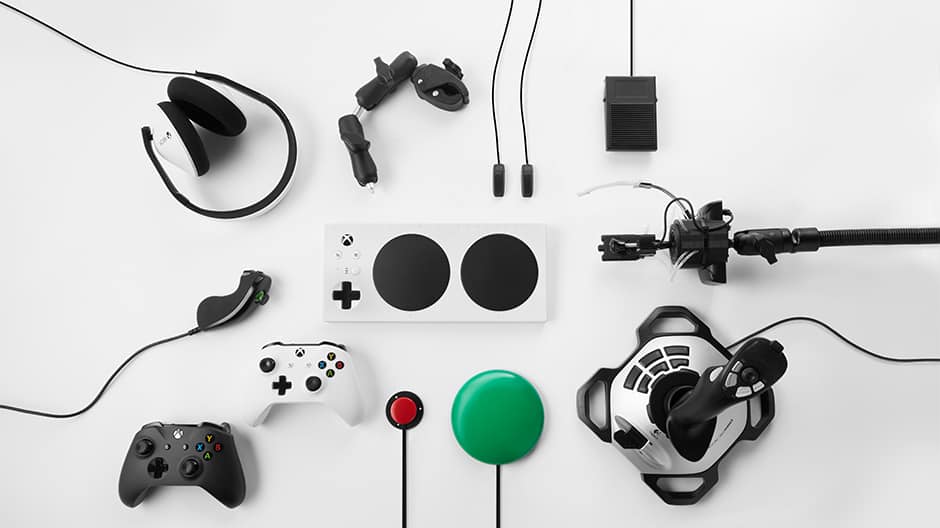
Microsoft’s Xbox Adaptive Controller to get more airtime with new Super Bowl ad

Microsoft posted a video online which is expected to run during the Super Bowl this Sunday (via MSPU). The commercial featured differently-abled children as they struggle to use traditional Xbox wireless controllers. In the commercial, one of the boys says that “I never thought that it was unfair, I just thought this was the way it is, and it’s not going to change.”

However it’s hard not to feel the heartwarming message when Microsoft gives these children their Xbox Adaptive Controller, allowing them to play just as competitively as others. It shows the company’s commitment to support all gamers, no matter their ability. You have to see for yourself in the video:

The Xbox Adaptive Controller was released last fall to support people who don’t sport the same mobility as the rest of us. In addition to its programable touchpads, the controller supports additional switches, buttons, joysticks, and mounts to support additional accessibility.

Xbox Game Pass starting to pay off as gaming revenue had best quarter ever

Xbox Game Pass is starting to pay off for Microsoft, at least that’s according to a report by gamesindustry.biz. As noted in the report, Microsoft CEO Satya Nadella said that this is the “largest gaming revenue quarter” in Microsoft’s history, as part of yesterday’s earnings call.

In a three-month period that ended on December 31, 2018, Microsoft earned revenue in the amount of $4.23 billion from its Xbox games, which is a 8% increase in revenue from last year. Most of the revenue increase came from Microsoft software and services, including a 31% increase in sales revenue from third-party games sales, Xbox Game Pass and Xbox Live Gold subscribers.

Nadella commented on the revenue increase in represented “the highest number of mobile and PC users to date.” Nadella added that Microsoft sees a positive outlook for gaming on Xbox and other platforms.

“Our investments in content community and cloud services across every endpoint drove both record user engagement and record average revenue per user and contributed to our largest gaming revenue quarter ever, driven by software and services. Xbox Game Pass subscribers and Mixer engagement also hit new all-time highs.”

Also in the second quarter, Microsoft bought two more game studios, Obsidian Entertainment, and inXile Entertainment. In all, Microsoft now has 13 internal game development studios. In the last six months, Microsoft more than doubled its first-party game content capacity for Xbox One and Windows 10 PCs. Since Sony will not be attending E3 2019, Microsoft hopes to continue to gain revenue in the next year with gaming on Xbox and Windows 10. Stay tuned.

Microsoft will increase investments in North East India to help in the region’s digital transformation

Microsoft India has announced plans to increase investments in the eight north-eastern states of India. The company aims to leverage the power of its AI and cloud technologies to partner the region in its digital transformation.

The company will focus on the education sector, enhancing transportation and utilities, and enabling better citizen services in the North East by harnessing the power of artificial intelligence and cloud technologies.

Microsoft has also signed an Memorandum of Understanding (MoU) with the Government of Sikkim today to revamp the educational system in the state. Under the MoU, Microsoft will support the state of Sikkim to build new age tech capacity among students and faculty in government schools in the state. The company will integrate IT content in the state board curriculum for grades 6 to 10 to build student capacity and build teacher capacity through the Microsoft Educator Network and Innovative Educator Program.

As part of the Microsoft Innovative Schools Program, the company will adopt two schools nominated by the government to train their teachers and students on Microsoft’s curriculum on creative coding and gaming through apps, robotics, entrepreneurship and tools for collaboration, creativity, and communication.

As part of its Innovative Educator Program, Microsoft will train all educators of primary, secondary, vocational and tertiary education to help them use ICT effectively and innovatively in the classroom.

To enhance digital literacy and digital citizenship, Microsoft will train a batch of 20 District Education officers (DEO) and Principals of the Government Schools nominated by the government on Microsoft Digital Literacy Curriculum & Certification who will go on to further train other schools within their district. Microsoft shall share an online platform to undertake a digital literacy certification after successful completion of the course.

Microsoft, the only provider of services across all three clouds in the country – private, public, and hybrid cloud, was the first global public cloud service provider to be accredited by the Ministry of Electronics and Information Technology (MEITY) and has three datacenters within the country – in Pune, Mumbai, and Chennai.

Microsoft cloud currently powers close to 150 government departments and State Owned Enterprises countrywide and has also recently been empaneled by the Government of Punjab for its cloud services.

Line chat app updates on Windows 10 with funky DM background effects

The official Windows 10 Line app updated today with a similar feature present in Facebook that activates special animations when certain words are used in chat. This update also added a new option for adjusting video playback speed and fixed the usual ambiguous bugs and glitches.

Here’s the official release notes for the Version 5.13.0 Line update:

  • Added fun chat background effects for special occasions or when certain keywords are used.
  • Playback speed can now be adjusted in the video player.
  • Minor bug fixes and other small improvements

Line is one of the most-popular chat apps right now though most of its userbase is located in Japan, Taiwan, and South Korea. It’s had an official app on Windows 10 for a while now that’s mostly been ignored but it’s recently been getting a significantly higher level of support with more frequent updates and new functionality being added.

Recent Windows 10 Line updates added Timeline post and chat translations, markdown support for chats, native Windows 10 notifications, new report options, and paid emoji.

Do you use Line on your Windows 10 device? Let us know in the comments below and then follow us on Pinterest for more Windows 10 app content.

(Old)LINE
(Old)LINE
Developer:
LINE Corporation
Price:
Free

February’s Games With Gold video games are now live on Xbox One consoles

February’s Games With Gold video games are now available to claim and download for Xbox Live Gold subscribers on the Xbox One one day early.

The first game is Assassin’s Creed Rogue which originally launched on the Xbox 360 back in 2014. It eventually got a remastered re-release for the Xbox One so it’s important to note that the one being given away today isn’t that one but the original Xbox 360 version.

The second game is Bloodstained: Curse of the Moon, an Xbox One title that just came out in mid-2018. It’s a 2D action-platformer that draws heavily from retro arcade games such as Castlevania. Given that it usually sells for just $9.99, this free giveaway isn’t too exciting but free is free and it is an Xbox One game that not many would have played.

Are you happy with February’s first Games With Gold titles? Let us know why or why not in the comments below and then follow us on Pinterest for more Xbox gaming content.

Assassin's Creed® Rogue
Developer:
Ubisoft
Price:
$29.99


Bloodstained: Curse of the Moon

Google Chrome will support mixed reality headsets

Mixed reality is Microsoft’s alternative virtual reality that the company introduced with the launch of the HoloLens headset in 2016. Most web browsers currently do not support mixed reality headsets.

However, two recent Chromium Gerrit (code collaboration tool) commits highlight that Google will soon enable mixed reality support for Chromium and other Chromium-based browsers.

Two January commits (code modification references) on the Chromium Gerrit give a lot away about upcoming Chrome mixed reality support. One of the commits states, “Add MixedRealityDevice to support Windows Mixed Reality.” Another commit reference states, “Add a flag for Windows Mixed Reality support.” Therefore, Google intends to add a Windows Mixed Reality flag to Chromium-based browsers, such as Chrome, with future updates.

Chrome support for Windows Mixed Reality might be a consequence of Microsoft’s announcement that future Edge versions will incorporate the Chromium engine. At the end of 2018, Microsoft’s Mr. Belifore stated:

We intend to adopt the Chromium open source project in the development of Microsoft Edge on the desktop to create better web compatibility for our customers and less fragmentation of the web for all web developers.

So, Google is now enabling mixed reality support for all Chromium-based browsers, which Edge will soon become.

Chromium support for mixed reality is great news for Microsoft’s HoloLens 2. That is the upcoming mixed reality headset Microsoft has in the pipeline. Now users will be able to utilize the HoloLens 2 with Chrome after Microsoft releases that headset.

Google has scheduled the next Chrome version updates for March and April 2019. Thus, Google Chrome might support Windows Mixed Reality by the summer.

RELATED STORIES TO CHECK OUT:


Surface Go Won’t Turn on: 3 Ways to Force It

Surface Go is a great device, but some users reported that Surface Go won’t turn on. This can be a problem, and in this article, we’ll show you how to fix this issue.

Not being able to turn on your Surface Go device can be a huge problem, which is closely related to Surface Go not charging issue.

However, there are ways to fix this problem, and today, we will show you how to do it.

Why won’t my Surface turn on?

  • Insufficient charge or a bad power cable
  • Issues with the power outlet
  • Attached USB devices can cause power issues and trigger a black screen on Surface Go 3.
  • Dirty connectors
  • Various device glitches

What can I do if Surface Go won’t turn on?

Before we start fixing this issue, there are a couple of quick fixes that you can try:

  • Make sure that the device is properly charged. If needed, charge it for an hour and try again.
  • Connect the Surface to a different outlet and check if it charges.
  • Disconnect all USB devices and memory cards that you have connected and try again.
  • Check the power cable and make sure LED lights up while using it.
  • Clean the connectors carefully with a pencil eraser and rubbing alcohol.

1. Press and hold the Power button for 30 seconds

  1. Press the Power button.
  2. Hold it for 30 seconds.
  3. After 30 seconds have passed, release it.

Alternatively, you can disconnect and reconnect the Surface Go from the dock and then try holding the Power button.

2. Try performing a hard restart

  1. Press and hold the Power button and Volume up key for about 15-20 seconds and then release the buttons.
  2. Wait for about 10 seconds or so, and then press the Power button to start the device normally.
  3. Check if the issue is still there.

Bear in mind that you need to hold these buttons pressed for 15-20 seconds even if the screen lights up and the Surface logo appears.

3. Use a keyboard shortcut

  1. Press Windows key + Ctrl + Shift + B.
  2. If you’re in Tablet mode, press Volume up and Volume down quickly three times.
  3. Check if the problem is gone.

Not being able to turn on your Surface Go device can be a big problem, but we hope you solve this problem after using one of our solutions.

Unfortunately, this isn’t the only issue, and many reported that Microsoft Surface is overheating, but we covered that issue in a separate guide.

What method did you use to fix this problem? Share it with us in the comments below.

Secure Boot Failure: How to Bypass This Error

Secure Boot prevents malware from affecting your bootloader, but what if Secure Boot failure occurs? If this happens, your PC won’t be protected against these attacks.

This can be a problem since malware can run on your PC even before Windows starts, so it’s essential to fix this issue as soon as possible. and this guide is going to show you how to do it.

How do I fix Secure Boot failure?

1. Turn Off Windows 10 Secure Boot

  1. Force shut your PC by long pressing the power button.
  2. Now switch on the computer and access the BIOS This is by typically pressing a specified key on the keyboard during the boot-up sequence. The commonly used BIOS access keys are F1, F2, F10, F12, and Esc depending on the manufacturer and computer model.
  3. Now locate the Windows 10 Secure Boot setting mostly found under Security.
  4. Using the right key, change it to Disabled.

  5. Save the changes, exit, and retry boot.

In certain instances, you may have to additionally change other firmware to enable legacy support and load the Compatibility Support Module (CSM).

An alternative way to disable Secure Boot

  1. While holding down the Shift key, go to start then choose Restart.
  2. From the next screen, Go to Troubleshoot.
  3. Select Advanced Options. 

  4. Then click UEFI Firmware Settings.
  5. Again find the Secure Boot option, and switch it to Disabled.
  6. Save these changes and exit to allow the PC to reboot.

Overall, since you disable Secure Boot via the PC’s BIOS menus, the procedure for disabling varies among PC manufacturers.

How to re-enable Secure Boot

  1. Uninstall any hardware, drivers, or apps you suspect caused the problem.
  2. Restart the computer.
  3. Go to the PC BIOS menu by starting to press the correct BIOS entry key ( F1, F2, F12, F10, or Esc) immediately after the computer returns.
  4. Look for the Secure Boot setting in the Security tab and set it back to enabled.
  5. Save your new settings and proceed to boot.

If the PC denies you the option to enable Secure Boot, do a factory reset (see the steps later).

2. Use System Restore

  1. Press the power button to turn off the PC.
  2. Then bring it back on by again pressing on the power-on
  3. Wait until the computer brings the sign-in screen.
  4. Now, while holding down the Shift key, click start then power button before choosing restart.
  5. Your PC restarts to a new screen inviting you to Choose an option.
  6. Click Troubleshoot then Advanced options.
     
  7. Now select System Restore.
  8. Again the PC restarts, this time to the System Restore option. Choose your account and enter the password.
  9. Choose a recent restore point from the list shown.
  10. The system will hopefully restore its earlier working settings and henceforth successfully boot.

Alternatively, you can always rely on professional third-party software designed to initiate a complete system restore and optimize your device.

This type of tool performs this complex action automatically, without harming your user data in any way.

3. Run Startup Repair

  1. Repeat steps 1-5 as enumerated in Solution 2.
  2. Click Advanced options.
  3. Choose Startup Repair.

  4. The computer self-diagnoses and attempts to heal whatever is causing the secure boot hitch.

4. Run SFC

  1. Repeat steps 1-5 as enumerated in Solution 2.
  2. Click Advanced options.
  3. Select Command Prompt.

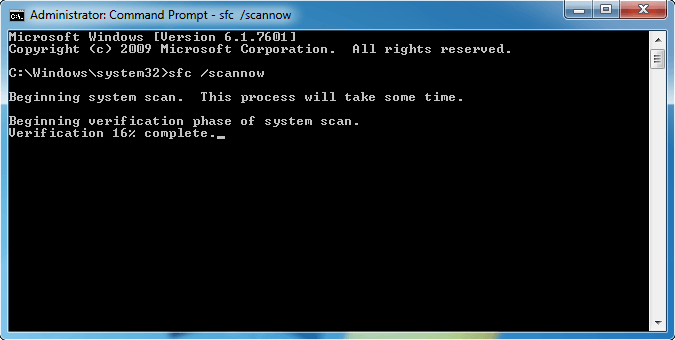
  4. Type sfc/ scannow in the displayed cmd.exe screen then press Enter.Secure Boot Failure Windows 10
  5. Be patient as the tool detects and eliminates pending bugs.

In some instances, sfc /scannow can stop, but that can be easily fixed.

5. Recover Windows 10 from the from a System Image

  1. Insert your external hard disk/DVD into the appropriate drive.
  2. Click the Start
  3. Type backup and restore in the search dialogue box.
  4. Click the backup and restore (windows 7) option.Secure Boot Failure Windows 10
  5. Select create a system image.Secure Boot Failure Windows 10
  6. Choose on a hard disk/one or more DVDs to create the image on a DVD.Secure Boot Failure Windows 10
  7. Click next then start backup.Secure Boot Failure Windows 10
  8. Wait for the image backup creation to finish.

How to use the disk image

  1. Insert the external hard drive/DVD you just created into the USB/DVD drive.
  2. Repeat steps 1-5 as enumerated in Solution 2.
  3. Click Advanced options.
  4. Select System image recovery.
  5. Then click select a system image in the next select.
  6. Click next.
  7. Select the image location (hard drive/DVD) from the next screen and again click next.windows 10 secure boot
  8. Be patient as windows 10 executes the recovery boot. (Click retry if you receive the re-image your computer error ).Windows 10 secure boot failed

In case you’re not familiar with disk images, we have a great guide on what is a disk image that can give you more information.

6. Reset the PC

  1. Repeat steps 1-5 as enumerated in Solution 2.
  2. Now choose Reset this PC (not advanced options as above).
  3. Choose to either Keep my files (to retain your data) or Remove everything as shown.
  4. Confirm that you want to reset by clicking Reset in the next window. 

7. Perform a clean install of Windows 10

If all fails, it could be time to do a fresh installation of Windows 10. And while this will take more time than the previous solutions, it’s 100% guaranteed to work.

For a step-by-step guide on clean install the OS, follow the instructions listed in Windows 10 reinstall guide.

You will, of course, need to reinstall everything, including hardware drivers.  You can always your files from the backup in the Windows.old folder.

Is Secure Boot really necessary?

  • Secure boot validates the software on your PC and prevents unverified software from running.
  • While it provides certain security benefits, it can cause issues with dual boot.
  • It can also cause issues if you willingly try to run uncertified software.

While the feature is helpful for its security benefits, it’s not mandatory to use it, but unless you’re using dual boot or uncertified software, there’s no reason to disable it.

Secure boot failure can leave your system vulnerable, so addressing this issue as soon as possible is essential. This isn’t the only issue, and many reported that Secure Boot is enabled, but not active, and others a SECURE_BOOT_VIOLATION error but we tackled these issues in separate guides.

What method did you use to fix this issue? Let us know in the comments below.

How to fix Legacy Boot issues on Windows 10/11

There are two options when it comes to BIOS firmware. You might go for the more-recent firmware UEFI or stick with the Legacy BIOS. Your choice depends on various factors but we won’t suggest meddling with firmware if you don’t have enough experience.

The common issue is switching from one to another option, as some users are unable to boot with the Legacy boot. There are multiple reasons for that and we provided some solutions below.

What to do if Legacy Boot won’t work

Solution 1 – Disable Raid On and Secure Boot

If you’re unable to boot with the Legacy boot and, for some reason, need to avoid UEFI, our first suggestion is to disable both RAID and Secure boot in boot settings. Once you’ve done that, reboot your PC and try booting again. Of course, make sure that Legacy boot is enabled in boot settings.

If you’re not sure how to access BIOS settings on Windows 10, follow these steps:

  1. Restart your PC 3 time forcibly to access the Advanced Recovery menu.
  2. Choose Troubleshoot.
  3. Select Advanced options.Advanced options
  4. Choose UEFI Firmware settings.
  5. And finally, click Restart.
  6. Once in BIOS/UEFI Settings, disable Secure Boot and RAID On (enable AHCI).

Solution 2 – Repair or rebuild bootloader

Issues with booting with the Legacy BIOS might lie in the bootloader corruption. Instead of MBR, which runs with UEFI, we’ll need you to repair GPT. For this, you’re going to need the Windows 10 installation media created with Media Creation Tool. After you’ve successfully made a bootable drive, follow the steps we listed below:

  1. Boot with the bootable media.
  2. Click Repair.
  3. Choose Startup repair.
  4. Enter the following commands and press Enter after each:
    • diskpart
    • list disk
    • select disk 0
    • list partition
    • select partition 1
    • active
    • exit
  5. Now, just type bcdboot C:windows and press Enter.
  6. Exit the command line and restart your PC.

Solution 3 – Convert HDD to GPT

Finally, if you’ve previously used UEFI boot firmware to install a system on your HDD, you won’t be able to boot into a legacy mode. This drive is probably using MBR which won’t boot as it requires GPT. This can be resolved but, sadly, it requires formatting your drive in order to convert it to GPT partition.

Here’s what you need to do:

  1. Open Command Prompt from the Advanced Recovery menu.
  2. In the command line, type the following commands and press Enter after each:
    • diskpart
    • list disk
  3. Now, remember the number alongside the volume you want to convert. The easiest way to determine which is which is to check the storage space. We’ll use 1 as an example below.
  4. In the command line, type the following commands and press Enter after each:
    • select disk 1
    • clean
    • convert mbr
  5. Reboot PC and try installing Windows 10 again.

With that said, we can conclude this article. In case you have any questions or suggestions, feel free to tell us in the comments section below.

Microsoft’s FY19 Q2 Earnings highlight Azure and Surface increases, Windows declines

Microsoft has just released its earnings report for its second fiscal quarter ending December 2018 and as many predicted, the company’s numbers are up on the whole.

As for the actual earnings details, once again Microsoft’s Azure cloud is the tide that is figuratively lifting all of the company’s other boats this quarter.

Intelligent Cloud

Microsoft’s Intelligent Cloud division which houses its server products and cloud services including Azure saw 20% revenue growth in year over year comparisons for the quarter. More specifically, Azure revenue saw a 76% revenue spike this year while other server products and cloud servers saw a modest 24% increase.

Another underreported area of growth for Microsoft’s Intelligent Cloud business is its Enterprise Mobility install base which also saw significant growth to the tune of 94 million seats in total or 57% growth.

Productivity and Business Processes

The move to a subscription-based Office offering in Office 365 continues to pay off with the Office Commerical still growing revenue by 11% for the quarter as well as Microsoft Dynamics growing its revenue stream by 17%.

However, the consumer side of Office was hit by a softening PC market and only manage to grow its revenue by a modest 1%. On the flip side, Office 365 consumer base has risen to 33.3 million users which is an increase from its 32.5 million last quarter.

More Personal Computing

Perhaps the more volatile of Microsoft’s business divisions and subsequently the most entertaining to report on saw an overall 7% growth in revenue from its Surface and Gaming efforts. Weighing down the division’s numbers is its Windows OEM Pro revenue that saw a 5% decline for the quarter which matches the decline PC manufacturers are also seeing in the market. Complicating things even further are the numbers for Windows OEM non-Pro revenue which tumbled 11% in revenue earnings and Microsoft was forced to admit that entry-level category devices (presumably Chromebooks) are sapping the businesses momentum.

On a brighter note, Microsoft’s Surface line is no threat of being canned anytime soon, as some writers have alluded to over time. The Surface brand and division post close to $2 billion in revenue earned for the quarter. A successful holiday line that included an updated Surface Pro 6, Surface Laptop, Surface Headphones, Surface Studio and Surface Laptop 2 made for a profitable quarter for Microsoft proving that demand for the brand continues to be strong.

On the gaming side of things, Xbox Live monthly active users have increased from 57 million in the previous quarter to 64 million in Q2. The increase in Live subscriptions helps lead the division to a 31% increase in gaming revenue for Xbox software and services.

Honorable mentions go out to Microsoft Search advertising with revenue growth of 14% with an asterisk, excluding traffic acquisition costs. The other notable Microsoft business earning highlight comes from the recent acquisition of LinkedIn which grew its revenue by 29% and has shown record levels of engagement, according to Microsoft’s report.

Recent Xbox Live outage forces users to reboot hardware to fix

Xbox Live outages are an unfortunate reality of the gaming community, to the Xbox servers credit, they are an infrequent occurrence for the most part and have relatively minimal impact on most gamers days.

However, the latest Xbox Live outage has been a bit more crippling for owners of Xbox One consoles. Rather than simply negating the use of some online aspects of the platform such as multiplayer games or game broadcasting and streaming, the latest outage has effectively render consoles unusable from a navigation standpoint.

According to an Xbox One subreddit that’s growing with complaints, users of the Xbox One console hardware are experiencing issues that range from issues signing into accounts to complete black screens immediately after boot up.

Fortunately, the issues appear to be tied to the Xbox Live software and not hardware related. Some people in the Xbox One Reddit thread have come up with homespun solutions such as disconnecting ethernet cords or doing a series of settings adjustments to reestablish normal Xbox One behavior.

Over the past hour or so, the Xbox team has officially addressed the outage and offered their own rather simple workaround.

The support team is still looking into the matter and we expect Microsoft to offer reasoning to this rather severe outage today.

Microsoft begins pushing its “Power Platform:” Power BI, Power Apps, and Flow

Microsoft CEO Satya Nadella is once again ringing the bell of platform cultivation for the company’s many software services and his new highlight is the “Power Platform.”

Unfortunately for comic book fans, Nadella isn’t talking about some collection of superheroes, but instead about how Microsoft’s Power BI, PowerApps and Flow all come together to help build a platform atop the company’s Azure cloud services.

Fortunately, other Microsoft executives have taken up the mantle of further pitching the virtues of the company’s Power Platform and corporate vice president of business applications group James Phillips helps lay out Microsoft’s vision for the platform as well as the specifics of how each individual application can be applied to strengthen the whole.

Our vision for the Power Platform started from the recognition that data is increasingly flowing from everything, and a belief that organizations that harness their data – to gain insights then used to drive intelligent business processes – will outperform those that don’t.

Of the three applications, PowerBI may be the most well known and used as it has become a self-service businesses intelligence visualization solutions for tens of thousands of companies. Supporting 43 languages in over 18,000 cities across the world, PowerBI holds nearly 10 petabytes of data from various sources that include tried and true Excel docs, Oracle databases, SAP or Salesforce applications and hundreds of proprietary technologies.

Next up are PowerApps which is best described as a ‘citizen application development platform.’ PowerApps tie into PowerBI data to help produce web and mobile apps catered to the specific data collected and processed. With a closed-loop development cycle between PowerApps and PowerBI, businesses can continually analyze and redistribute data from the cloud to apps.

Last but not least is Flow which a product that was developed to cater to the growing interest of Robotic Process Automation (RPA) which allows employers to automate workloads. Simple automation has a growing an interest in businesses as they look to optimize simple tasks to lower expense costs.

When combined, the Power Platform will allow businesses to unlock insights and intelligence that many can then convert to intelligible action plans across the web and mobile applications while simultaneously identifying areas of streamlined opportunity through automation, creating what Philips refers to as a “powerful system of continuous improvement.”

Microsoft is planning a Virtual Launch Even that is open to whoever is interested in the company’s developing Power Platform. The Power Platform launch event is scheduled for April 2, 2019, with more details to be announced over the coming months.

Earnings Preview: Microsoft’s FY19Q2 will be marked by continued cloud growth and Surface hardware revenue

As the United States and China enter their 9 straight months of trade warfare that include tariff disputes, some US-based tech companies are begin forced to confront the realities of stalled negotiations as they report earnings to investors each quarter.

A primary example has been the readjusted earnings outlook Apple was forced to inform investors about in late 2018, and as Microsoft steps to the earnings stage, it’ll be interesting to see how their fiscal quarter has been affected, if at all.

NASDAQ.com has issued an early assessment of expected earnings of $1.09 a share on revenue of 32.49 billion for the quarter ending in December 2018 for Microsoft.

Putting things in perspective, a quarter for quarter comparison puts Microsoft’s assessed share price at an increased $.013 a share as well as an increased $5.57 billion in revenue for the quarter. Microsoft’s 2nd quarter earnings call, coming this afternoon, is shaping up to be another great one. 

Unlike Apple, Microsoft has effectively ousted out China through Windows copyright infringements and hasn’t been as reliant on the country as a growth sector for its pivot to the cloud. Reflecting that regional independence has been the three-week-long 13% share price increase from bullish Wall Street investors.

As noted by the NASDAQ assessment, part of the long term confidence from investors comes from the clear, diversified and growth portfolio of businesses Microsoft undertakes.

Microsoft is now more balanced and diversified than ever before, especially when factoring LinkedIn revenue, which is now tied to CEO Satya Nadella’s compensation.

All told, having expanded its reach over the years beyond software and personal computing, Microsoft is posting strong revenue and profit growth and seemingly operating on all cylinders. The company has fully transitioned towards faster-growing businesses

While Microsoft may continue to see growth on its current path, on the horizon competition and a saturated market may squeeze the company’s portfolio.

With the company’s cloud business growth marked at a 24% growth from year over year quarterly comparison in 2017 and 2018, competitors such as Amazon, IBM, Google and Alibaba will be sure to cut into that level of growth as more data points from Intel’s recent earnings reports indicate a leveling off of data center sales demand.
Microsoft is still set to accelerate its cloud growth throughout the rest of 2019 as it continues to sign big name retail brands, government contracts and scientific partnerships around the world.

Microsoft’s Inside Xbox web show to return next week, Teaser trailer launched

Microsoft is preparing to premier its second season of Inside Xbox show next week. As noted by the Xbox team, the new episodic series will feature “exclusive news, content, reveals, interviews and footage,” for fans of the company’s gaming systems.

The series will air live on Twitch, YouTube, Facebook, Twitter, and of course, Microsoft’s own Mixer streaming service. In fact, for those who use the tech giant’s streaming service over Amazon’s (that’s Twitch, for those of you who might not know), the company will be giving away free goodies via their “MixPot” reward system, plus additional behind-the-scenes video not found anywhere else for those who log into the streaming service.

As far as what will be on the main show, the creative director of Crackdown 3, Joseph Staten will be on the show to discuss details of the new game mode landing on the game, which has yet to be released on February 15 on Xbox Game Pass. Plus additional details of what’s to come on other titles such as Mortal Kombat 11, Sea of Thieves, and Metro Exodus will me mentioned in the livestreams, as well.

The show will begin live at 2 P.M. Redmond-time next Tuesday for those interested, and Microsoft encourages those who don’t yet have a Mixer account to create one now if they want the free goodies from their giveaway. In the mean time, you can always watch the teaser trailer above, and let us know your thoughts below.

Chrome blocks drive-by-downloads to prevent accidental downloads

After browsers like Firefox and Internet Explorer blocked drive-by-downloads, Chrome 73 is going to do the same.

Google Chrome is a gigantic browsing platform that offers unlimited browsing worldwide. Since it operates millions of users across the globe, Google takes every step necessary to ensure secure browsing with maximum productivity.

Google already introduced other safe features such as Safe Browsing, Sandboxing and site isolation. The company took this safety strategy one step further and introduced a new Chrome security update that will block down drive-by-downloads for safe browsing.

Drive-by-downloads are unintended downloads. In other words, the downloads that occur without the consent of the user. These downloads, mostly those originating from iFrames, contain malicious code which can threaten the personal information of the user.

In a public document, Google imparts to block only those drive-by-downloads that originate from iFrames and lack user gesture. According to the officials, “We plan to prevent downloads in sandboxed iframes that lack a user gesture, and this restriction could be lifted via an ‘allow-downloads-without-user-activation’ keyword if present in the sandbox attribute list.”

The new security update puts an end to those drive-by-downloads which satisfy the following conditions:

  • The download is triggered via or navigations.
  • Those are the only types of download that could happen without user gesture.
  • The click or the navigation occurs in a sandboxed iframe unless the tokens contain the “allow-downloads-without-user-activation” keyword.
  • The frame does not have a transient user gesture at the moment of click or navigation.

In case you want to be secure while surfing the internet, you will need to get a full-dedicated tool to secure your network.  Install now Cyberghost VPN and secure yourself. It protects your PC from attacks while browsing, masks your IP address and blocks all unwanted access.


The document issues by Google also communicates that the security update will fail the drive-by-downloads without making any notable change. However, developers will receive a console-error.

For the non-technical visitors of WindowsReport, iFrame is an HTML element that is used to embed another webpage inside one webpage. These iFrames are hidden within the layout of the webpage and can install malware without your authorization.

This new update would be available on all platforms by March or April excluding iOS. This is because this kind of security is not supported on WebKit(iOS is based on WebKit engine).

RELATED GUIDES YOU NEED TO CHECK OUT:

How to fix wmpnetwk.exe wasting system resources in Windows 7


You can fix  wmpnetwk.exe high CPU usage by:

  1. Adjusting the Media Player Network Sharing Startup Settings
  2. Uninstalling Windows Media Player
  3. Scanning for Malware

The wmpnetwk.exe is a process that connects Windows Media Player with external networks. It is a process for a service needed for WMP streaming. However, some Windows 7 users have stated that wmpnetwk.exe can hog more than 50 percent RAM. In which case, those users need to fix that process wasting system resources. These are a few fixes for wmpnetwk.exe wasting system resources.

Solutions to fix Wmpnetwok.exe high RAM/CPU usage

1. Adjust the Media Player Network Sharing Startup Settings

Wmpnetwk.exe is the process for the Windows Media Player Network Sharing Service in Win 7. Thus, users can configure that service’s startup to fix its system resource wastage. Follow the guidelines below to adjust the Windows Media Player Network Sharing Service’s startup.

  • Open the Run accessory with the Windows key + R keyboard shortcut.
  • Input ‘services.msc’ in the Open text and click OK to open the window in the snapshot directly below.

  • Double-click the Windows Media Player Network Sharing Service to open the options shown directly below.

  • Select Manual on the Startup type drop-down menu. That will ensure the service only starts when users utilize Windows Media Player for streaming.
  • Alternatively, users can turn off the service by selecting Disabled on the Startup type drop-down menu.
  • Click the Apply and OK buttons.
  • Thereafter, restart Windows 7.

— RELATED: Looking for the best Windows 7 audio player? Here are our top picks

2. Uninstall Windows Media Player

Users who never utilize WMP can also uninstall Windows Media Player to fix wmpnetwk.exe wasting system resources. However, users can’t uninstall Windows Media Player in the same way as third-party software. Follow the guidelines below to turn WMP off.

  • Open the Run accessory.
  • Input ‘appwiz.cpl’ in Run’s text box, and press the OK button. That will open the Programs and Features Control Panel applet below.

  • Click Turn Windows features on or off on the left of the window.

  • Double-click Media Features to expand that category.

  • Then users can deselect Windows Media Player to uninstall it.

3. Scan for Malware

Note that malware also disguises itself as the wmpnetwk.exe process. As such, it might be the case that the wmpnetwk.exe process with excessively high system resource utilization is malware.

Users can scan for and eradicate malware with the freeware version of Malwarebytes. Click Free on the Malwarebytes page to download the freeware version, which is also includes a 14-day trial for the premium package. Open the software’s installer to add it to Windows. Then click the Scan Now button when you’ve opened the software.

So that’s how users can fix wmpnetwk.exe wasting system resources in Windows 7 and 10. The fixes above will free up RAM for other software.

RELATED ARTICLES TO CHECK OUT: 

How to get quick answers to Windows 10 questions with Bing

Microsoft’s Bing Search engine has always been especially useful for Windows 10 users. It’s integrated in the tech giant’s Cortana virtual assistant as well as Microsoft Edge, so it’s no secret that anyone with Windows 10 has likely used it at least a couple of times to perform quick searches.

However, what might not be common knowledge is that Bing can be used as a way to get a quick answer if a user needs to perform an action in Windows 10 and might not know how. The results are a combination of hand written results provided by the Windows content team as well as other results obtained through machine learning, Microsoft told us. There are two easy ways to access Bing when a users has a question about their system.

The first method is though Windows search, located on the bottom left of the taskbar between the Windows and Timeline buttons. From there, just click or tap and type in your question. In our example, we asked “how to change the desktop colors” in Windows 10. The result is a quick, step by step guide on the Microsoft Help website on how to do just that.

A user who wants to change system colors, for example, can find the instructions quickly with Bing though Windows search.

Another way to get answers is by using Bing on Microsoft Edge. You can simple find an answer by opening Edge and typing your question in the URL form. This is especially useful when you have a more complicated answer, because sometimes the answer at the top isn’t always the most relevant. In our case, we asked it “how to delete user account in Windows 10” and instead got a result for how to close an entire Microsoft account. Luckily for you we here at On MSFT already have you covered as you can see our more relevant how to right below.

The first seach result isn’t always the most relevant, so its good there are always others down below.

Microsoft’s Bing is always improving, though. So what might not be the best result now might be so tomorrow. For now, its best for quick answers to simple questions, such as how to make a quick system change or perform a simple action. For more complex tasks, you might have to click the full article or find a more relevant third-party article.

It’s worth noting that these features are not entirely new, and have been a feature in Bing for a couple years now. However as Microsoft has spent this time refining the feature, it has come to our attention that its good enough for most basic tasks for users who need quick info about Windows 10.

What do you think about Microsoft Bing as a quick lookup tool for Windows 10? Feel free to share in the comment area below.

Internet Explorer 10 users encouraged to upgrade to IE11 by 2020, when security updates end

Microsoft is getting ready to officially end support for Internet Explorer 10, which will no longer receive security updates after next year. To speed up the process of moving all users to the newer Internet Explorer 11, the company will be providing users of Windows Server 2012 and Windows Embedded 8 systems with the option to run IE11 in either test environments or pilot rings, so they can make sure everything works in the new and more secure web browser.

Microsoft has stated that Internet Explorer 11 will be the last version of the company’s older web browser. As such, any version before that will stop receiving updates, and the company will push users to use either IE11 or the newer Edge web browser.

Users will have until January 2020 to make the change to IE11 if they wish to keep receiving free security updates. Additionally, with Microsoft bringing Chromium’s Blink browser engine over to Edge, it seems it won’t be long until the total desolation of the company’s legacy web browser.

According to Microsoft, anyone who wishes to upgrade to the newer browser can do so via the Microsoft Update Catalog or in Windows Update, and will later also be able to do so via Windows Update and WSUS as well. Additionally, companies will be able to use Enterprise Mode in IE11, which will allow IE10 dependent web apps to run in the newer version of Internet Explorer until they are updated to support IE11 or another browser.

New AdDuplex survey sees 12.4% of Windows 10 PCs running the October 2018 Update in January

Nearly two weeks ago, Microsoft finally kicked off the “phased rollout” of the Windows 10 October 2018 Update. This means that the major release should be available to download for all users who manually check for updates in Windows Update, assuming there are no hardware of software incompatibilities.

After a slow start, the propagation of the Windows 10 October 2018 should finally accelerate, but it’s not that obvious when you take a look at AdDuplex’s latest data. The ad network for Windows Store apps and games has just published new data for the month of January, and this time only 12.4% of more than 100,000 surveyed PCs are running the October 2018 Update (up 5,8% points).

“While this number is almost double of what we’ve seen last month, it’s still far away from the dominating April 2018 Update (80.2%), noted AdDuplex. “With only a few months to go until the next Windows 10 update is supposed to go mainstream, it is unclear if some PCs may have to install two major updates within a short period of time or go straight from A18U to 19H1.”

Considering that AdDuplex’s pool of surveyed PCs only represents a blip in the sea of 700 million Windows 10 PCs, we always prefer to take the company’s data with some extra caution. Still, the company did insist this month on the fact that the rollout of the October 2018 Update “needs to accelerate in February or be scrapped altogether in favor of going straight to 19H1.” And as you can see in the image below, what the company has been seeing with the October 2018 update is pretty unique in the history of Windows 10 updates.

Unfortunately, Microsoft doesn’t share hard data about the different versions of Windows 10 still in use, so there’s no way to tell if the October 2018 Update really crossed a double digit market share. We really wish Microsoft took a page from Google’s playbook, as the latter regularly shares information about the relative number of devices running a given version of Android. In the meantime, we’re going to ask you directly if you have already received the Windows 10 October 2018 Update, please tell us in the Twitter poll below and feel free to share more details in the comments section.

Former Nintendo exec joins Microsoft to head up Xbox portfolio

Shortly after its bungled Xbox One announcement, Microsoft’s Xbox division quickly course corrected and began putting an emphasis on its more gamer-centric decisions within the company.

From enabling backward compatibility with older Xbox 360 titles and platform flexibility with Play Anywhere to the introduction of its relatively successful Game Pass subscription service, the Xbox One team has been making its games and its gaming experience a priority.

While the aforementioned feats have all laid a solid foundational starting point for next-generation gaming experiences, actual coveted game titles are still something the Xbox One team is struggling with, but they may be getting some veteran help with that soon.

Damon Baker, the former head of partner management at Nintendo America announced his departure from the business and is now the head of portfolio for Xbox.

According to a recent Twitter post, Baker will be overseeing 2nd and 3rd party content for the Xbox One platform.

While acquisitions such as these are never a 1:1 exchange of impact, Bakers expertise and vision should help foster and cultivate a Nintendo like-community of 2nd and 3rd party gaming experiences possibly coming from the Xbox divisions newly acquired Obsidian Entertainment and Ninja Theory studios among others.

Nabisco to give away OREO-themed Xbox One X to lucky winners

Taco Bell may no longer be giving away their exclusive platinum Xbox One X consoles anymore, but that doesn’t mean you’re completely out of luck. If you enjoy Oreo cookies, than Nabisco has a sweet deal for you. The company will be giving away 10 custom-designed Oreo Xbox One X consoles to lucky customers who buy a pack of their iconic sandwich cookies, plus they’re also giving away plenty of free trials of Xbox Game Pass as well, so you’re odds of getting at lease something is pretty decent.

The giveaway is part of their “Stuf Inside” promotion, which is also offering other prices as well including a new Jeep vehicle or some Oreo-branded headphones, with a different prize being given out each day. However as Xbox fans ourselves, we thought this particular one was the most interesting.

To participate in the giveaway, you must scan the code provided on your eligible Oreo package at their promotional website, or you can head over there to see how you can enter for free (and to read the fine print). It starts on February 4th and runs for just 30 days, which puts March 6 as the last day to enter. However, only one of those 30 days will be offering the limited Xbox console, and the company wasn’t ready to reveal the exact date.

It’s certainly a worthwhile promotion for people who are fans of the cookies and Xbox gaming. Is this something you’re interested in? Let us know in the comment area below.

Now if you’ll excuse me, I am going to head to the nearest convenience store a purchase a pack or Oreos.

Microsoft becomes the first global cloud service provider for the Indian state of Punjab

The Department of Governance Reform of Punjab, a state in northern India, has entered in agreements for offering cloud services in the state. Microsoft is the first global cloud service provider to get empaneled for offering cloud services in the state for a period of three years.

The department has empaneled four Microsoft partners in its Cloud Services Directory, allowing government departments and agencies in Punjab to choose Microsoft Cloud to advance their digital transformation and optimize IT operations.

The state’s Land Records Information System and E-Sewa (previously called SUWIDHA – Single User-Friendly Windows Disposal & Helpline for applicants) will soon migrate onto the Microsoft Azure platform.

Microsoft played a key role in the enhancement and efficient delivery of citizenship services in the state and also supports the State Data Center of Punjab.

Microsoft, the only provider of services across all three clouds in the country – private, public, and hybrid cloud, was the first global public cloud service provider to be accredited by the Ministry of Electronics and Information Technology (MEITY) and has three datacenters within the country – in Pune, Mumbai, and Chennai.

According to Parminder Pal Singh, PCS, Director of Governance Reforms, Punjab, the next step of growth will be to move beyond just the Internet and leverage the power of the cloud and hopes Microsoft’s cloud technology will provide transformational e-governance services and financial inclusion opportunities to lakhs of people across Punjab.

iOS and Android Xbox apps begin testing ‘save to phone’ functionality

The week’s update to the beta versions of the iOS and Android Xbox apps added two new features relating to Xbox One video game screenshots and video clips; the ability to share directly to social media from within the app and the ability to download media locally to an iOS or Android smart device.

Currently, clips can only be shared to the Xbox activity feed or sent as an Xbox Live message to other users and the ability to actually download clips with the app has never been a possibility even though it has frequently been one of the most-requested features.

  • Share game captures with friends. In response to your feedback, we’ve added the ability to share game captures with friends and across social media
  • Easily save to phone. Save your game clips and screenshots to your phone
  • From your Captures page, click the existing share button to view these new options

The Xbox beta apps are used to test new features for bugs and glitches with a smaller audience before rolling them out to the general userbase with the regular iOS and Android Xbox apps. With testing of these features having now begun, it’s likely they’ll come to the public apps sometime over the next few months.

The ability to download apps is already possible within the Windows 10 Xbox app. As is social sharing, though only to Twitter.

Are you excited for these new features or is there something else you’ve been waiting for? Let us know in the comments below and then follow us on Pinterest for more Xbox gaming content.

Xbox beta
Xbox beta
Price:
Free

Kingdom Hearts III is now live on Microsoft’s Xbox One consoles

The long-awaited third video game in the Kingdom Hearts trilogy, Kingdom Hearts III, is now live on the Xbox One family of consoles.

Kingdom Hearts III is the first game in the franchise to launch on the current generation of consoles and as a result features a significant graphical upgrade compared to previous entries. The game is enhanced for Xbox One X consoles and will feature two options that can prioritize either visuals or framerate while playing.

Here’s the official game description and gameplay trailer:

The latest entry in the KINGDOM HEARTS series. Having learned that all their struggles thus far were engineered by Master Xehanort in his plot to start another Keyblade War, Sora and his friends continue their search for seven guardians of light capable of standing against the coming darkness. King Mickey and Riku seek out Keyblade veterans from the past, while Sora, Donald, and Goofy begin a new odyssey across Disney worlds to claim the “power of waking.”

Wiser from his many adventures, Sora is about to face his greatest challenge yet. For the first time in KINGDOM HEARTS III, Sora will travel across Pixar and other exciting new Disney worlds that lend the story a grander scale than ever before seen in the series. The battle system reaches new heights as well with thrilling action, rideable theme park attractions, and spectacular team-up moves with Disney’s beloved characters. KINGDOM HEARTS inspires and entertains unlike anything else out there. Don’t miss this brand new installment.

Have you been waiting to play Kingdom Hearts III? Let us know if you’re happy with the final product in the comments below and then follow us on Pinterest for more Xbox gaming content.

KINGDOM HEARTS Ⅲ- Bundle
Developer:
SQUARE ENIX
Price:
Free

How to Fix Microsoft Security Essentials OOBE Errors

Microsoft Security Essentials (MSE) is an antivirus utility primarily for Windows 7. However, an MSE OOBE error arises for some users. The error message’s Event Viewer log states, Microsoft Security Essentials OOBE stopped due to the following error: 0xC000000D. That can even be a BSOD error for some users. These are a few resolutions that can fix the OOBE error.

What can I do to fix the Microsoft Security Essentials OOBE error?

1. Run a System File Checker Scan

  • The OOBE error might be due to corrupted system files, which the System File Checker utility can fix. To run an SFC scan, open the Command Prompt with Run by pressing the Windows key + R hotkey.
  • Enter ‘cmd’ in the Open text box, then press the Ctrl + Shift + Enter hotkey.
  • Enter ‘DISM.exe /Online /Cleanup-image /Restorehealth’ in the Command Prompt, and press the Return key.
  • Then input ‘sfc /scannow’ and press Enter to initiate a System File Checker scan that might take about half an hour.
  • The Command Prompt might tell you that Windows Resource Protection fixed system files when the scan is finished. Restart Windows if that’s the case.

If you want to try an automatic alternative, I recommend a specialized repair tool that can detect all malfunctioning system files and find the new files as replacements.

2. Erase the EppOObe.etl File

Some users have fixed the OOBE error by deleting MSE’s EppOObe.el file. So, erasing the EppOObe.el file might be one of the best resolutions for the OOBE error. Follow the guidelines below to delete that file.

  • Press the Windows key + E hotkey to open File (or Windows) Explorer.
  • First, users need to select the Show hidden files, folders, and drives option. To select that setting in Windows 7, click the Organize button in Explorer and select Folder and search options.
  • Then click the View tab.
  • Select the Show hidden files, folders, and drives option on the View tab.
  • Press the Apply > OK buttons.
  • Users can select the same option in Windows 10 by clicking the Hidden items check box on Explorer’s View tab.
  • Next, open this folder path in Explorer: C:ProgramDataMicrosoftMicrosoft Security ClientSupport.
  • Select the EppOove.etl file, and press the Delete button.
  • Restart the desktop or laptop.

3. Turn Off the Program Compatibility Assistant Service

The OOBE error can also be caused by incompatibility with the Program Compatibility Assistant Service. Turning that service off might fix the OOBE error. This is how users can disable the Program Compatibility Assistant.

  • Open Run in Windows.
  • Input ‘services.msc’ and click OK to open the window shown directly below.
  • Double-click Program Compatibility Assistant Service to open the window below.
  • Press the Stop button if the service is running.
  • Then select Disabled on the Startup type drop-down menu.
  • Press the Apply button to confirm the new settings.
  • Click OK to close the window.

4. Turn Off the OOBE

OOBE item settings can also be responsible for the OOBE error. So disabling the OOBE (Out-of-box experience) for Microsoft Security Essentials can also fix the issue. Follow the guidelines below to turn off the OOBE.

  • Enter ‘compmgmt.msc’ in Run, and select the OK option.
  • Then click System Tools > Performance > Data Collector Sets > Startup Event Traces Session on the left of the Computer Management window.
  • Right-click Microsoft Security Client OOBE and select Properties.
  • Select the Trace Session tab on the window that opens.
  • Deselect the Enabled check box.
  • Press the Apply button to save the settings.
  • Then select the OK option.
  • Restart Windows after adjusting the Enabled OOBE setting.

5. Uninstall Microsoft Security Essentials

Microsoft stopped supporting MSE when Windows 7 reached its end-of-support date in January 2020. So, the antivirus utility wasn’t very good after Microsoft stopped supporting Windows 7.

As such, now might be a good time to uninstall MSE and replace it with a third-party antivirus utility still supported on Windows 7. Thoroughly removing MSE will also probably resolve the OOBE error. Follow the guidelines below to uninstall Microsoft Security Essentials thoroughly.

  • Open the Run accessory.

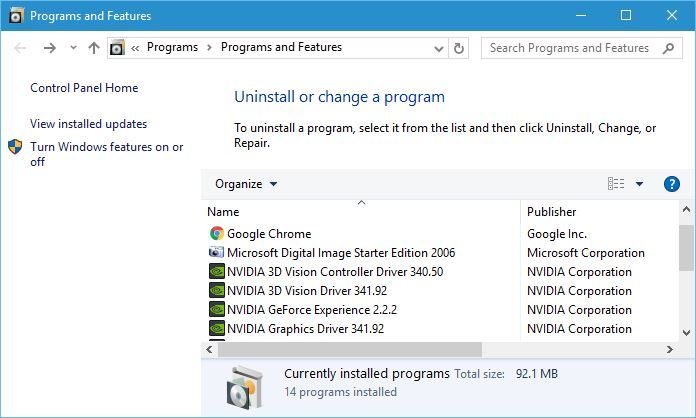
  • Input ‘appwiz.cpl’ in Run’s text box and click OK to open the uninstaller window shown below.
  • Select Microsoft Security Essentials on the program list.
  • Click Uninstall > Yes to remove the software.
  • Thereafter, restart the laptop or desktop.
  • Users will then need to erase some leftovers to remove the software thoroughly. Enter this path in Windows Explorer: C:ProgramDataMicrosoftMicrosoft Security ClientSupport.
  • Erase any files and folders remaining at the path by selecting them and clicking the Delete button.
  • Users will also need to erase MSE’s leftover registry entries with a registry cleaner utility. Click Download on CCleaner’s website to download the freeware version of that utility.
  • Then open the software’s installer to add the freeware CCleaner to Windows.
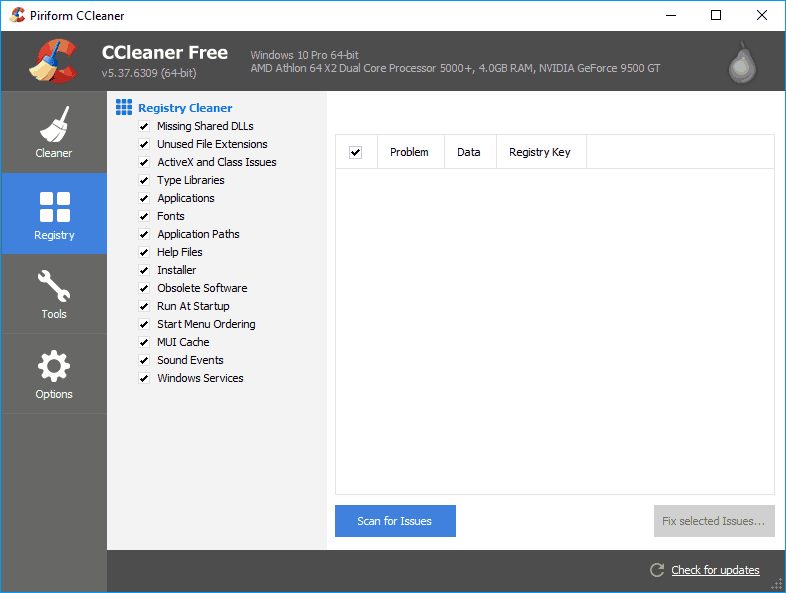
  • Click Registry on CCleaner’s window.
Clean registry errors
  • Then select all the registry check boxes, and press the Scan for Issues button.
  • Select the Fix selected Issues option.
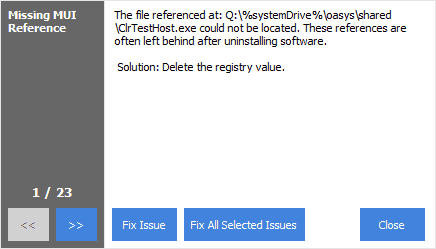
  • Click the Yes button to back up the registry if you prefer. Then press the Save button.
  • Press the Fix All Selected Issues button to clean the registry.
  • Then close CCleaner, and restart the desktop or laptop.

So that’s how users can resolve the Microsoft Security Essentials OOBE error in Windows. With MSE in obsolescence, the best resolution might be to uninstall the utility. This page provides details on how MSE stacks up with the best third-party antivirus software.

You can get rid of the OOBEEULA error on Windows 11 with these expert tips and tricks from our dedicated guide, so don’t hesitate to try it out.

The first Windows 10 v1909 build will land in the coming weeks

Microsoft is already working on the very first Windows 10 v1909 build. Windows 10 19H2 is expected to be launched in October 2019.

The Redmond giant has a lot of work to do. The company is now working on two different projects: completing the Windows 10 19H1 build that will be launched in April 2019 and developing the next OS version slated for release in mid-October 2019. As you can see, Microsoft is indeed planning ahead.

The Windows 10 version 1909 or 19H2 has already been built and compiled according to WZor. This Microsoft enthusiast who tracks Windows news is now the successor of BuildFeed keeping an eye on the new builds launched by the Windows team.Windows 10 v1909 build

Details about the next OS features are not available yet. Still, judging by the usual release schedule of Microsoft, we dare predict that it will reach users in mid-October. Most likely, the rollout will take place in stages.

Windows 10 19H2(Vanadium) is expected to be launched as version 1909 in reference to the month when the RTM build was compiled.

The development of Windows 10 19H1 will be finalized in March. Preview builds are already available online for Fast ring Insiders. As such, the development of Windows 10 19H2 will be completed in September and the final version will be launched in October.

Meet Vanadium and Vibranium

Microsoft started using elements names as codenames for developments of Windows 10, and the first two names are: Vanadium and Vibranium
However, according to the new report, after Windows 10 19H1, instead of using the 19H2 codename, Microsoft will use the element name “Vanadium”.

If the company goes forward with the new scheme, after “Windows 10 Vanadium,” the next feature update releasing in 2020 would carry the Chromium codename. However, Microsoft will most likely use a made-up element name, such as Vibranium since Chromium is already used by Google.

We’ll just wait and see what this new release build brings to the table.

RELATED STORIES TO CHECK OUT:

Windows Lite could feature some Windows 7 design elements

With the evolution of the Windows OS, we know that technology is making progress on a daily basis. Despite the plethora of recent updates, the live tiles view of Start menu hasn’t been updated in a long time. Has Microsoft forgotten about this feature? Or is it working on revamping live tiles? Is the company planning to drop live tiles altogether?

Recent rumors suggest the third variant is the correct one. Reportedly, the big M will add a static menu to Windows Lite and some design elements will be inspired by Windows 7. The surprise is that there will be no live tiles.

Are live tiles useless for users?

Different and consistent tests were conducted according to which people aren’t attentive to the live tile view in the Start menu. This feature allows users to be actively involved in pinning up software according to their needs.

Nevertheless, it is yet to see if the same Start menu makes it to other versions of Windows 10, but for now, it just seems like live tiles aren’t part of Microsoft’s plan. People aren’t really opening the Start menu to look at or customize live tiles. Users prefer pinning everything to the taskbar because it’s easier to open your programs from there rather than from the start menu.

Windows Lite is Microsoft’s Chrome OS rival, which is anticipated to run a user interface known as Webshell which will not be like Windows 10.  It will still be able to track Windows apps, but only those downloaded from the Store.

Live Tiles were a way for Microsoft to try to divert tablet owners to go towards Windows 8 and 8.1. Meanwhile, Windows 10 dropped most of the touchscreen-centric design decisions, apart from live tiles.

It’s still unclear whether Microsoft will drop live tiles on all future OS versions or just on the Lite version.

Are live tiles in Start menu really dead? Tell us what you think about this feature in the comments below.

RELATED GUIDES YOU NEED TO CHECK OUT:

Download NewsGuard browser extension to detects fake news

Accurate and speedy news is important if you want to always be up-to-date. Getting accurate online news is a problem and we still don’t know the solution as to how to cope with it.

Nowadays, this issue is even more severe as online news misinformation seems to run as rampant as ever. In other words, without some technical solutions, the fake news dilemma won’t be solving itself any time soon.

In 2019, Microsoft found a solution to this tricky problem. In order to fight the fake news problem, Microsoft has made NewsGuard available.

This is an extension for its Microsoft Edge web browser for mobile as well as desktop versions, which is included by default, though users must enable it.

Microsoft uses NewsGuard to fight against fake news

The extension is out of beta testing now which was a continuous effort from the company’s engineers. NewsGuard uses journalism to fight unreliable news sources.

Experienced analysts and journalists research online news brands to help readers and viewers identify which ones are trustworthy and which ones aren’t.

Microsoft Edge isn’t a very popular browser, but it still makes an interesting case study in the uncontrollable war against low-quality information online.

NewsGuard is the child brain of Gordon Crovitz and Steven Brill. The extension depends on the human team instead of algorithms.

How NewsGuard works


After you enable the extension, the NewsGuard shield icon appears on your address bar, indicating the reliability of news websites. If you select the icon, you’ll see a definition of the icon’s meaning, and a link to see the full details, including whether the info uses credible sources, regularly updates itself, accurately differentiates news and opinion, as well as financing and ownership details.

Our Green-Red ratings signal if a website is trying to get it right or instead has a hidden agenda or knowingly publishes falsehoods or propaganda, giving readers more context about their news online.

An example is that FoxNews.com is marked as commonly credible, presenting users information responsibly and without using misleading headlines. However, the channel fails to regularly correct errors and does not fully provide ownership and financial details (report by NewsGuard).

The good news is that the company seems to be open to criticism. Their co-founder says they are “happy to be blamed,” and that “they are happy to be responsible for.”

As the service continues to improve by the passage of time, we’ll just have to wait and see how well it deals with the false information that comes out of fake news.

Download NewsGuard from Microsoft Store


How about a browser with a built-in fake news detector?

UR Browser, similar to Microsoft Edge, offers a variety of news portal links on its standard home page. The important thing is that provided articles and news coverage are, firstly, authentic, and secondly, they come from trusted sources.

So there’s no fear of being served a pile of underwhelming pseudo-journalistic rubbish. No need for extensions whatsoever.

ur browser

You can select and curate news UR Browser to your liking and select topics you deem worthy reading and following. Additionally, this browser is privacy-oriented and focused on the safety of its users. Download it today and learn about the details on your own in the simplest way: by testing it.

Editor's recommendation
ur browser
  • Fast page loading
  • VPN-level privacy
  • Enhanced security
  • Built-in virus scanner

RELATED GUIDES YOU NEED TO CHECK OUT:

55% of Windows PCs are running outdated software [Security Alert]

A shocking revelation has just been made by Avast: over half of the applications installed on Windows PC as out-dated. The software vulnerabilities can potentially put the users and their private data at a higher risk.

Revelations Made By Avast PC Trends Report 2019

Around 163 million devices participated in collecting the aggregated and anonymized data all over the world. The PC Trends Report 2019 eventually found out that approximately one in six Windows 7 users and one in ten Windows 10 users are using an outdated OS version. Hence, these systems are easily available to hackers so that they can exploit the system-level security vulnerabilities. 

PC users don’t upgrade their apps and software

The updates for most of the applications are usually neglected by most of the users. The report published by the digital security company Avast suggests the percentage to be: VLC Media Player (94%), Adobe Shockwave (96%) and Skype (94%). 

The report further stated that right now around 40% of all PCs are using Windows 10 all over the world. While Windows 7 has been able to grab the 43% share globally.


In case you want to be secure while surfing the internet, you will need to get a full-dedicated tool to secure your network.  Install now Cyberghost VPN and secure yourself. It protects your PC from attacks while browsing, masks your IP address and blocks all unwanted access.


Hybrid devices are becoming more popular

As compared to the past, tablets, laptops, and 2-in-1 PCs are being used by most of the people these days. One of the main advantages of using laptops and tablets is that they allow users to browse, stream and work on the go.

Around 67% of users are opting for these devices due to these amazing features and it is expected that we will remain the same during this year as well.

Most popular apps on PC

The statistics regarding the most installed applications also represents the same shift to mobile devices. We can see from the latest trends that the installation rate for Google Chrome increased from 79% to 91% during the last 12 months. Adobe Acrobat Reader grabbed the second position with an installation rate of 60%. Moreover, WinRAR, Microsoft Office and Mozilla Firefox have 48%, 45% and 42% installs respectively. 

The average PC is 6 years old

An increase in the average age of a PC has been reported to be 6 years during this year. Around 62% of users who have older machines are now running Windows 10. As of now, 63% of notebooks are being used globally. Furthermore, HP, Acer, Asus, Lenovo, and Dell, are known to be the top five PC brands this year. 

Currently, the market is being dominated by the PCs having dual-core processors. Around 20% of the machines have been using a quad-core processor.  It is worth mentioning that the SSD as a sole storage solution is available to 15 percent of the users these days. Finally, avast reported the most used RAM size to be 4GB. 

Today hackers have so many ways to attack your PC, and you have to take a series of steps for the protection of your system.  Keeping in mind the PC Trends Report 2019 you just have to ensure that systems and software are patched and up to date to protect your system from potential cyber attacks.

How often do you update your PC? Let us know in the comments section below.

RELATED GUIDES:

Microsoft Planner now lets you create multiple plans per Office 365 group

Microsoft has just announced a new “Multiplan” feature for Planner, its Trello competitor for Office 365 customers. With Multiplan, it’s finally possible to create multiple Plans inside the same Office 365 Group (previously, creating a new plan created a new Office 365 Group).

To get started, you’ll just have to create a new Plan from Planner and then click the “Add to an existing Office 365 group” button, right below the field for the Plan name. You can see how it works in the video below:

The “Multiplan” name for the feature may well be some sort of an inside joke, as “Multiplan” was the name of a pre-Excel spreadsheet that Microsoft developed in the eighties. Anyway, creating multiple plans per group was one of the top requested features from Planner users, and it should definitely help preventing the multiplication of Planner-related Office 365 groups.

There are many more new features in the pipeline for Planner, including Plan Templates, integrations with Outlook Tasks/Microsoft To-Do, and much more. You can learn more about upcoming new features and share your feedback with the team on the dedicated Uservoice website.

Tune in to the Windows Insider Bug Bash webcast tomorrow at 10am PST

The Windows Insider team has taken a liking to its interactive Mixer webcasts over the past year and are looking to continue the tradition for this year’s #bugbash event.

Starting From 10 a.m. PST/ 6 p.m. UTC fans can watch a live stream of unadulterated Windows 10 Insider madness, covering all things past, present and future about the company’s latest OS offering while addressing bugs in real-time.

Tomorrow, January 29, 2019, may be a good time to tune as the Windows team is set to make its leap from the current development branch of Windows 10 Insider development to the next big one that’s rumored to include a more modular approach to Windows 10 and introduce testing of new features planned to accompany folding devices later this year.

With Sony out, Microsoft still plans to “go big” with Xbox news at E3

As presumed, Microsoft will be taking advantage of Sony’s decision to pull out of E3 2019 and leverage the company’s lack of presence by going “big” this year.

According to an interview with the director of programming for Microsoft Larry Hryb, Xbox executive VP of gaming Phil Spencer explained that the company’s presence at this years E3 will be anything but a mediocre event.

“This is going to be a fun E3 for us … we had a discussion internally. Should we go big? Should we save some money? No, we’re going to do our thing and we’re going to go and be as big at E3 as we’ve ever been.”

While Hryb and Spencer do not discuss the details of Xbox’s ‘big’ and ‘fun’ presence at E3 2019, the mere fact that its largest competition in the sector will not be in attendance will afford Microsoft a chance to dictate its own narrative rather than losing its messaging through comparison. You can listen to the interview here:


With Sony volunteering the stage, Microsoft will be free to possibly introduce its gaming vision that could include new hardware and a bevy of gaming titles under the Xbox brand such as a new Fables game, Gears 5 news, the next installment of Forza, and demos of Halo Infinite.

Beyond the tried and true games and hardware schtick, Microsoft can also take this opportunity to push its cross-platform pitch as well as an unadulterated message of its software and services ambitions for gamers utilizing Xbox One consoles as well as PCs.

With Sony abdicating its traditional follow-up presence at this years E3, the messaging for the rest of 2019 and into 2020 is Microsoft’s to lose.

Save $50 on select Xbox One bundles on the Microsoft Store

Microsoft kicked off yesterday a limited-time sale on select Xbox One bundles, and you have until February 2 to save $50 on seven Xbox One X bundles and five Xbox One S bundles. If you’re looking to upgrade to the Xbox One X, the brand new Metro Saga bundle including the upcoming Metro: Exodus game is included in the list, and you can get it for just $449.

If you prefer a more original console, please note that the Xbox One X Gold Rush Special Edition Battlefield V bundle and the Xbox One X Robot White Special Edition Fallout 76 bundle are also being discounted. The latter should probably appeal to those of you who love their white Xbox One S.

The Xbox One X Robot White Special Edition looks pretty great.

Even though it’s getting hard to recommend purchasing an Xbox One S at the end of this console generation, the console remains great value at just $249. The different Xbox One S 1TB bundles on sale include the Fortnite bundle, the Forza Horizon 4 bundle, or the Starter bundle which comes with no games but 3 months of Game Pass and Xbox Live Gold. You can check out all the discounted Xbox One bundles on this page.

Nvidia Account is Locked: How to Recover it

The Nvidia community is quite large, with all kinds of interest points regarding the leader in computing technology. Whether you’re a developer or a user keen on purchasing some hardware, this is the place to be. But many users reported that their Nvidia account is locked.

Signing in with your account isn’t usually something one should worry about. However, some users from the Nvidia community couldn’t sign in with their email and password. Of course, there’s a hefty number of sign-in options, which seemingly work.

You can use Facebook, Google Account, WeChat, or QQ to log in. This, of course, doesn’t mean you should. Using a specific account has its traits, which is why this exists in the first place. Keep reading to find out the ways to recover your Nvidia account!

What can I do if the Nvidia account is locked?

1. Clear the browser cache

Note icon NOTE
The steps listed here are for Google Chrome, the most used browser. In case you are using another one, the steps should be similar. For the exact process, search the web or check the official website.
  1. Launch Chrome, and hit Ctrl + Shift + Delete.
  2. Go to the Advanced tab, select the Passwords and other sign-in data option, and click on Clear data.clear password to fix nvidia account locked
  3. Once done, restart the browser.

We recommend clearing the browser cache and removing the saved password for the Nvidia account when it’s locked.

2. Reset the password

  1. Go to Nvidia’s login page, and click on Login help.login help
  2. Click on Reset password.reset password
  3. Follow the on-screen instructions to complete the process.

Another reason you cannot access the Nvidia account, which appears locked, is that you are entering the incorrect password. In this case, you should reset the password.

3. Contact Nvidia support

If things still remain unresolved and the Nvidia account is locked, the last option is to contact Nvidia Support. They will revert with information on what triggered the blocking and share any other information that might be useful in the recovery process.

Before you leave, do check the best NVIDIA driver to install for superior performance.

With that said, we can conclude this article. If you have any questions or alternative solutions, feel free to tell us in the comments section below.