Windows 10 19H1 build 18282 is out for Skip Ahead Insiders, adds light theme to Start and taskbar

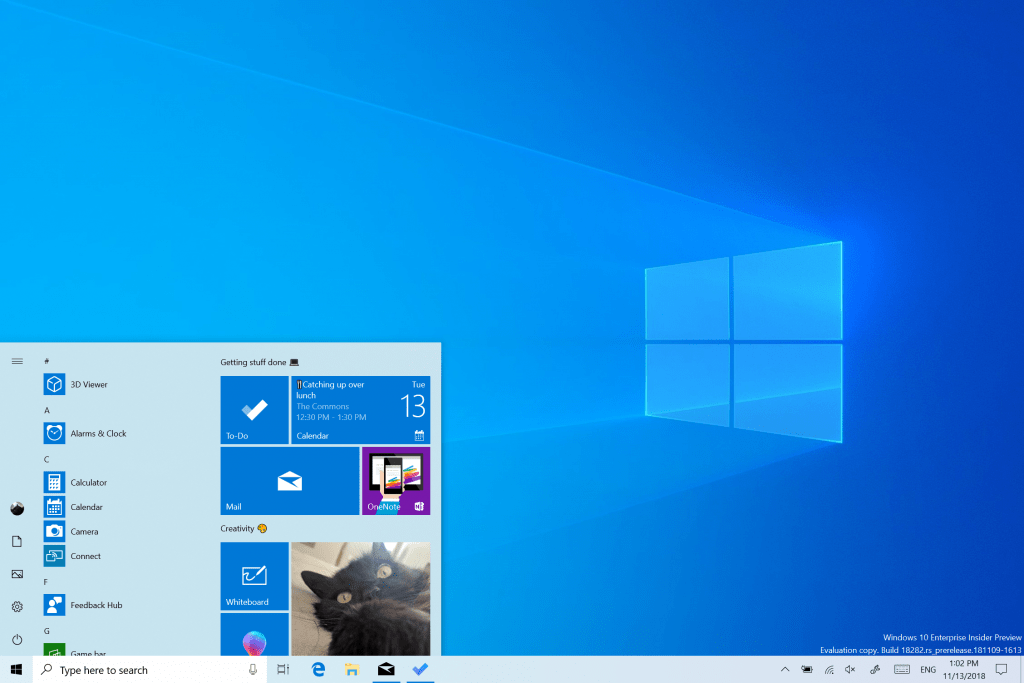
Microsoft has just released the Windows 10 19H1 preview build 18282 for Windows Insiders in the Fast Ring. The new build brings a host of new features and improvements, perhaps one of the biggest changes most users will notice is the introduction of a revamped Windows Light Theme. Starting with this build, Light theme will now apply to all system UI including the taskbar, Start Menu, Action Center, touch keyboard and more.

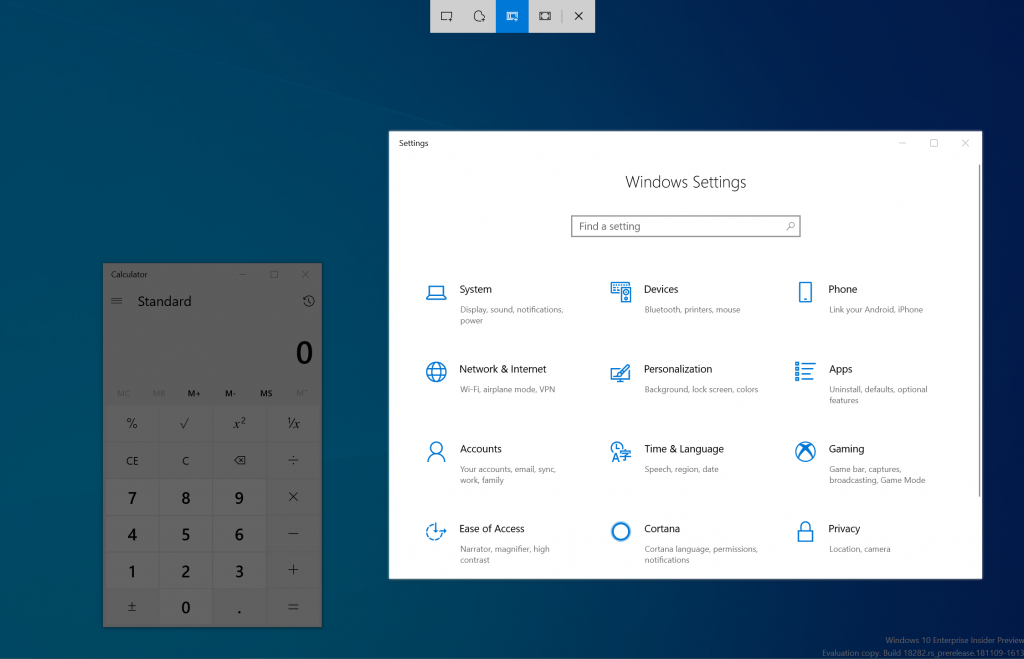
The Snip & Sketch app is also getting some love with this update, as the latest version now features window snip. The window snip option should appear at the top of the app when you start your snip, though Microsoft notes that it the windows snipping experience is currently only available for 50% of Insiders.

Showing an example of window snipping. This one happens to have Settings in focus.

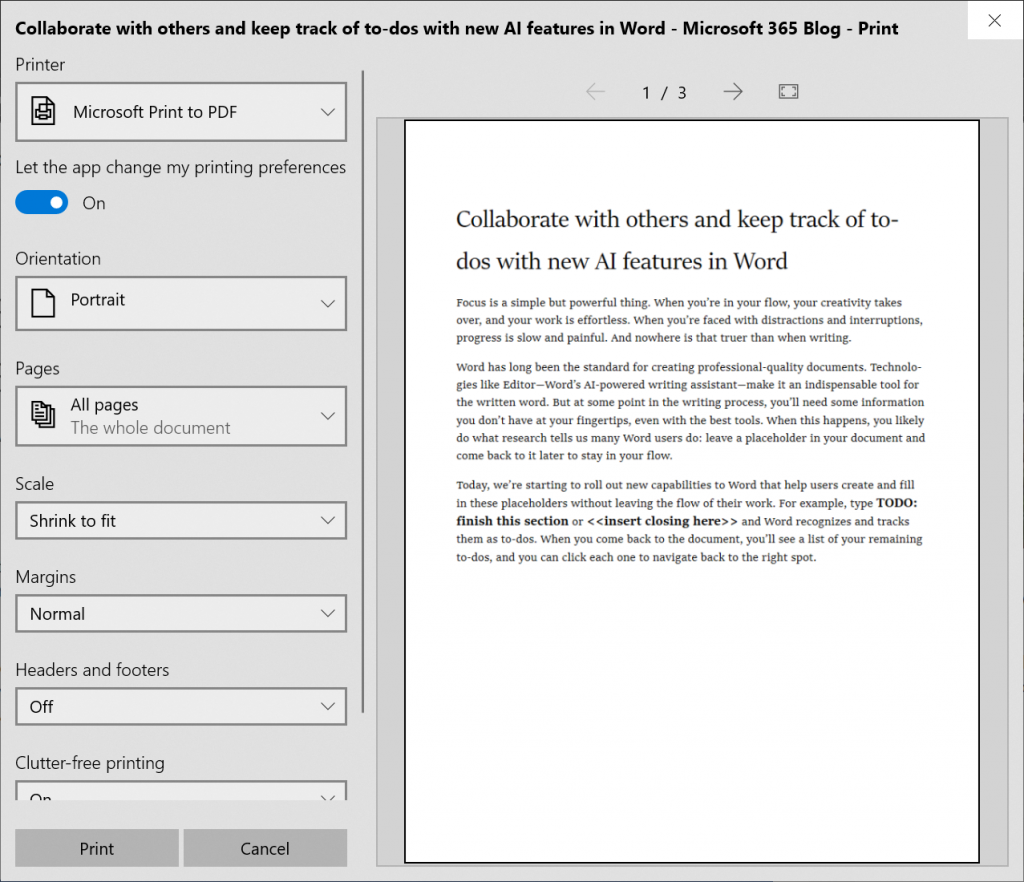
The new build also brings several improvements to the printing app, which now additionally supports light theme. New icons have been added to the printing screen to help users quickly identify options, and the app will also automatically text-wrap long printer names as opposed to cutting them off entirely.

howing the modern print dialog in light theme

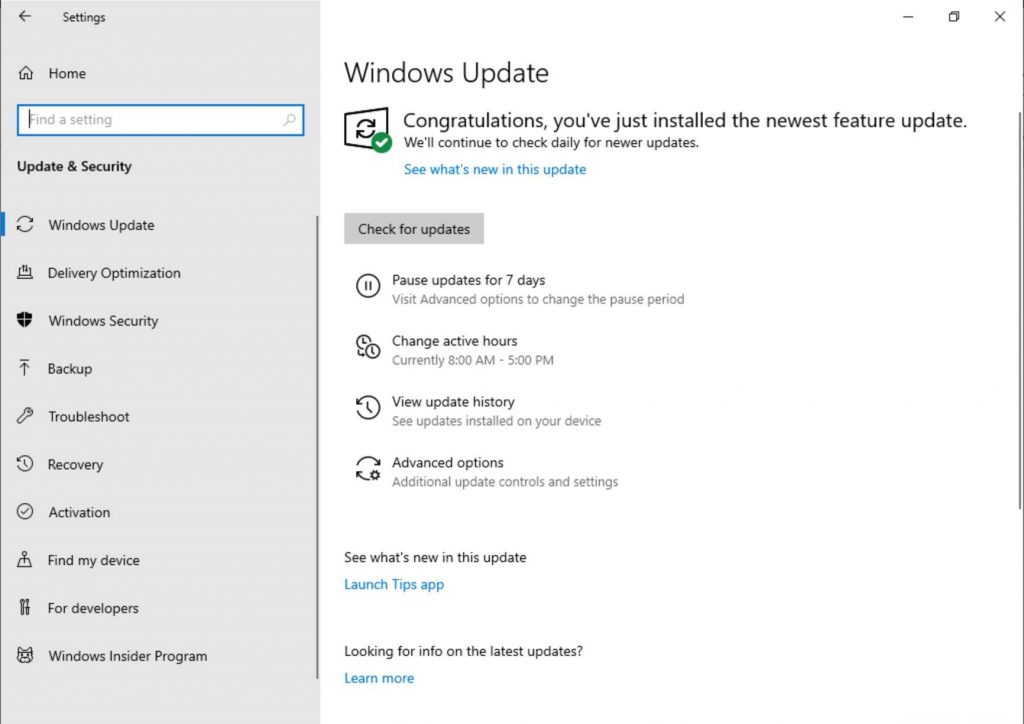
Additionally, the long awaited the option to pause Windows updates has been added to this build, and to make things better Microsoft has also added made Active Hours more intelligent by automatically changing the update schedule depending on when the PC is used most often.

Showing the updated Windows Update Settings page. The subpage links are now buttons instead of hyperlinks, and have icons next to them.

Lastly, this new build brings several Narrator improvements including Read by Sentence Braille support, and Microsoft has also changed the display brightness behavior after listening to user feedback. Going forward, Windows will now remember your preferred brightness whether you are on battery or connected to a charger, avoiding sudden brightness changes when charging your laptop.

These new changes bring us even closer to the next major release of Windows 10, which is expected to be released in the Spring of 2018. Which new feature do you find most useful? Your thoughts and ideas are welcome in the comment area down below.

Corsair offers Xbox One gamers keyboard and mouse options for streaming & playing

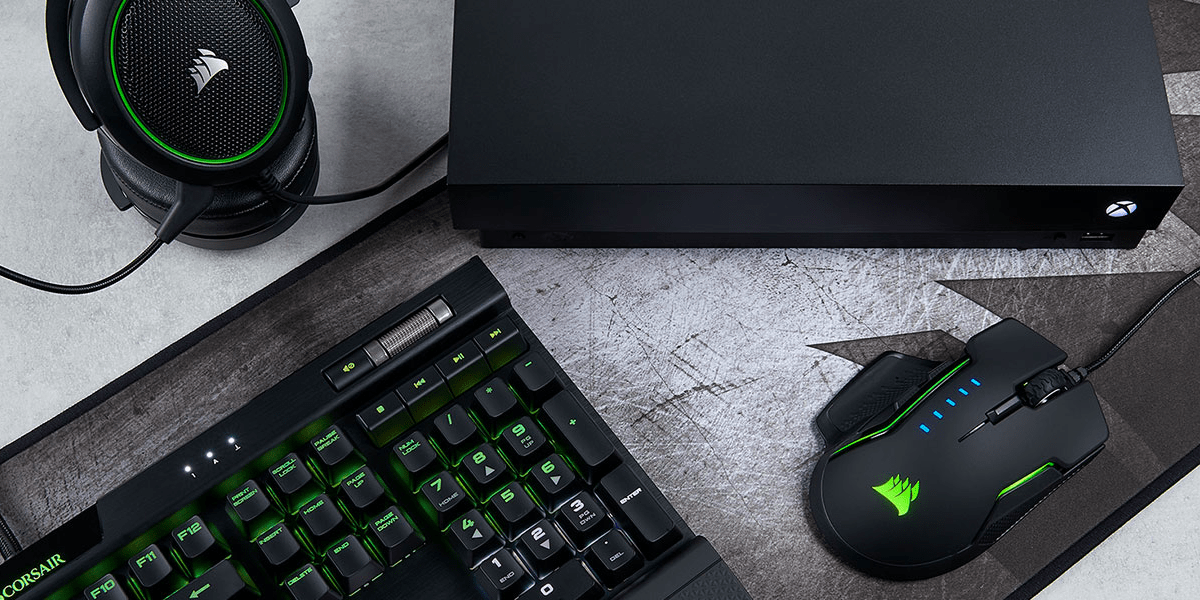
As we previously announced, 15 games will be getting keyboard and mouse support for the Xbox One, with support starting to roll out today for all Xbox One users. With the increase in support for the second type of gaming input method, it seems another company Corsair wants to be one of the first manufactures to specifically support the Xbox One. The company says that it has partnered with Microsoft to license its products for use on the Xbox One. The K63 Wireless Keyboard and Lapboard combo also has a built-in mouse pad for gaming on the sofa in the living room, which could make it work great with the Xbox One.

Of course, Corsair isn’t the first company to announced certified keyboard and mice for the Xbox One. Razer, too, has a product of their own coming soon. And the latter company’s keyboard will include a dedicated Xbox key for quick access to recent games and apps, Xbox Live, quick toggles and the home screen.

Those running preview firmware from the Xbox Insider program can test keyboard and mouse input early, and Microsoft says that most keyboard and mice will work out of the box with its latest console. We have the full list of the 15 titles that are getting support in our other post that you can check out here.

Do you find keyboard and mouse input to be more effective than traditional controller input? Your thoughts are welcome below.

Playfab releases public preview of Multiplayer Servers, game devs can use Xbox + Azure quickly and easily

PlayFab, a provider of backend services for cloud-connected games, was one of the first Microsoft acquisitions of 2018. At the time, the Seattle-based company said Microsoft’s Azure infrastructure would be the perfect complement for Playfab’s technology, making the company uniquely positioned to help game developers “focus on building great games instead of back end technology.”

Playfab has continued to expand its platform of features since the Microsoft acquisition, and today the company announced the public preview of PlayFab Multiplayer Servers. This new offering combines the cloud expertise of PlayFab and Microsoft so that game developers building multiplayer experience are free to focus on core gameplay mechanics.

“Our re-engineered multiplayer server solution simplifies cloud resource management to enable dynamic, scale-based game servers on-demand,” explained PlayFab. “We operate the service and servers, so you don’t have to manage dedicated, on-premises server hardware.”

With PlayFab Multiplayer Servers, game developers have access to the same global Azure infrastructure that powers multiplayer in AAA games like Sea of Thieves, Forza Horizon 4. or Tom Clancy’s Rainbow Six Siege. “We are hard at work building additional features for you to leverage in the coming months, including a Unity sample, portal experiences for Linux virtual machines, and more analytical tools,” the company said today.

Burger King is teasing thier own exclusive Xbox One console design

Microsoft appears to be going “All-In” this holiday season with the amount of console bundles, exclusive console designs, new Game Pass game additions, and discounts on accessories and recently released top tier games.

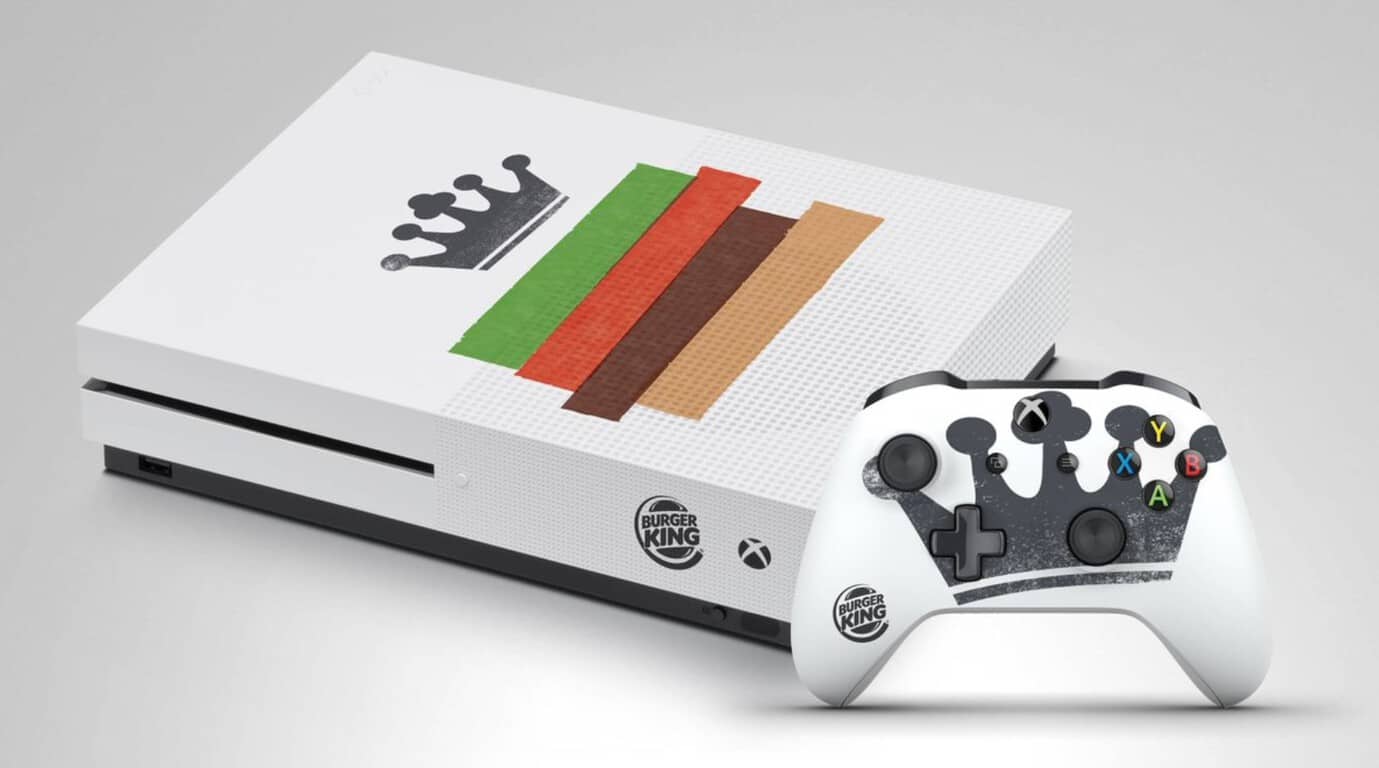
Continuing that trend, Microsoft has licensed its Xbox console for one of its more bizarre partnerships this year, with Burger King adding its iconic branding stamp on its ‘custom built’ Xbox One S.

Despite its arguably gaudy product placement, one lucky fan, frequent eater of Burger King or a collector of pop culture art may appreciate the rather subtle application of Burger King’s artwork.

For the lucky person who ends up with this console and stashes their Xbox vertically in a open face drawer or cabinet will only see the simple Burger King logo near the power button and a rather stylish crown on the controller.

As of now, it seems the offer is coming Burger King UK and there are no real details available on when and where contestants can go to enter for a chance to win this piece of fast food history. We’ll update when more information is available.

Despite Project xCloud, game streaming is years away from mass market adoption, says Xbox’s Phil Spencer

Last month, Microsoft shared some new details about its upcoming game streaming service named Project xCloud. Xbox head Phil Spencer first announced the service back in June at E3 2018. That was a couple of weeks before we learned that the next generation of Xbox consoles could include a new “cloud console” designed for game streaming.

From what Microsoft said about Project xCloud last month, the service will be available on consoles and PCs, as well as mobile devices like phones and tablets. Microsoft made it clear at the time that “scaling and building out Project xCloud is a multi-year journey for us,” and even though the project will go in public testing next year, game streaming networks are not expected to go mainstream anytime soon.

That’s what head of Xbox Phil Spencer reiterated in a recent interview with Level Up (via Wccftech). According to the exec, standard gaming consoles are clearly not going away, and they will remain the best way to play games from the couch for quite a long time (You can hear the full segment starting around 6 minutes in the video below):

There are certain scenarios where streaming a game is the best answer. On a console, the best scenario for you is to download that game and play. If you are on a PC that’s capable of downloading and playing that game, download and play that game. Not all devices are capable of playing the most great fidelity games that we see here on the show, so streaming is an option in those scenarios, and there are some scenarios of like instant start and trials where maybe streaming on a device could be interesting, but I think for years and years the best way to play a game on a console will be to download that game and play it. The same thing on PC.

I think streaming is something that’s further out in terms of it becoming a really mass market where everybody is doing it, and even way further out before it’s the best way to play that game, if it ever is. I just think it’s about giving you a choice as a player, not about replacing what you do. We love people who play on PC, we love people who play native games on console, and we’re investing in making that even better.

Phil Spencer also discussed the success of Xbox Game Pass in the same interview, saying that the service already has “millions of suscribers” a little more than a year after its launch. “I love the fact that something like Game Pass brings more people in, playing more games, and that those games see the uplift in players,” said Spencer.

Microsoft says “stay faithful,” option for more paid OneDrive storage is coming

While the other tech companies Apple, Google, and even Dropbox already have storage plans that exceed the former 1 TB limit, Microsoft’s OneDrive still doesn’t have a plan that goes higher than 1 TB. As phones get better and their cameras get upgraded, more people than ever have devices that take high-resolution photos and 4K video. This means cloud storage is also getting filled a lot more quickly, and a single terabyte no longer works for everyone.

Luckily it seems Microsoft is working on offering the option for more storage, according to Omar Shahine, who is the Microsoft’s Director of Program Management for OneDrive. While Shahine’s tweet does shed some light on increased storage limits, it’s still not clear if the current plan will be upgraded or if the upgraded storage will be a separate plan of its own.

Microsoft’s OneDrive used to have an unlimited storage option at one time, but the abuse that many user put the service though caused the company to put a 1 TB quota on all Office 365 consumer accounts. Perhaps an upgrade to the storage plans is just what the service needs to compete with the likes of iCloud and Google Drive.

Is the current 1 TB storage enough for you, or do you think Microsoft needs to upgrade the current storage plans? Feel free to tell us what you think about this in the comment section below.

Fallout 76 is now live and ready to play on Xbox One consoles

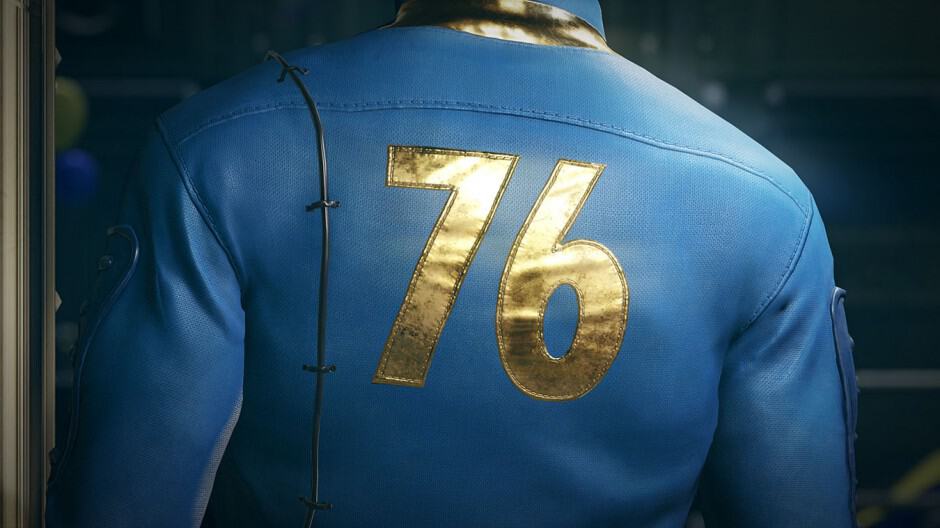
The highly-anticipated online multiplayer title, Fallout 76, is now live and ready to play on Xbox One. The game is similar to previous Fallout video games but features a significantly larger world to explore and is entirely online with a focus on encounters with other players.

Here’s the official game description for Fallout 76:

Bethesda Game Studios, the award-winning creators of Skyrim and Fallout 4, welcome you to Fallout 76, the online prequel where every surviving human is a real person. Work together, or not, to survive. Under the threat of nuclear annihilation, you’ll experience the largest, most dynamic world ever created in the legendary Fallout universe.

Reclamation Day, 2102. Twenty-five years after the bombs fall, you and your fellow Vault Dwellers—chosen from the nation’s best and brightest – emerge into post-nuclear America. Play solo or join together as you explore, quest, build, scavenge and triumph against the wasteland’s greatest threats.

Fallout 76 is available on Xbox One in a basic version for a special Tricentennial Edition. The Fallout 76 Tricentennial Edition contains the main game but also comes with the Tricentennial Pack, a collection of in-game digital items such as Tricentennial Power Armors and Weapons Customization, Spectacularly Handsome Vault Boy Mascot Head, Patriotic Uncle Sam Outfit, Celebratory Vault Boy Saluting Emote, First-Class Tricentennial Workshop Posters, and Tricentennial Commemorative Photo Frame. Buying either version of the game on Xbox One unlocks 500 bonus Atoms.

Have you played Fallout 76 yet on your Xbox One console? Share your impressions of it with the community in the comments below and then follow us on Pinterest for more Xbox gaming content.


PlayerUnknown’s Battlegrounds (PUBG) joins Xbox Game Pass subscription service

The PlayerUnknown’s Battlegrounds (PUBG) video game is now available to play for free for Xbox Game Pass subscribers on Microsoft’s Xbox One consoles.

PUBG has been available to play on the Xbox One as a traditional digital and physical game purchase since late-2017 but making it also available on Xbox Game Pass could encourage even more fans to give it a go on console, in particular the Xbox One.

In a rather strategic move, Sony chose today to announce the PlayStation 4 release date for PUBG, December 7th, with a special announcement teaser video. In addition to the launch date, the video also revealed that the PS4 version of PUBG would boast exclusive items based on Uncharted’s Nathan Drake desert outfit and The Last of Us’ Ellie’s backpack.

It should be interesting to see which platform gamers choose to play PUBG on but with many having already put in almost a year worth of playtime and grinding on Xbox One, it may prove difficult for Sony to convince them to throw away all of that progress and start again on PS4.

What do you think? Are you tempted to switch to PS4 for PUBG or will you be sticking with Xbox One? Share your thoughts with the community in the comments below and then follow us on Pinterest for more gaming content.

PUBG: BATTLEGROUNDS
PUBG: BATTLEGROUNDS
Developer:
KRAFTON, Inc.
Price:
Free

Full Fix: YouTube videos are not playing

We watch YouTube videos on daily basis, but sometimes the clips are simply not playing. Whether it’s a problem with Chrome, Firefox, or Edge, the video drivers or a local network connection glitch, we’re going to show you how to fix it.

Before trying anything else, try restarting your browser, your PC and your router. It’s also worth trying a different browser and see if it works. That will confirm if it’s an issue from the browser or your system.

What can I do if the YouTube videos are not playing?

1. Disable add-ons

  1. Click the Menu icon in the top-right corner and select More tools > Extensions.
    YouTube videos won't play on any browser
  2. Now you should see a list of your extensions. Click the little switch next to the extension’s name to disable it. Repeat this for all extensions on the list.
    YouTube videos won't load
  3. After you disable all extensions, restart Chrome and check if the issue is still there.

Now check if the problem is still there. If the issue doesn’t appear, try enabling extensions one by one until you manage to recreate the problem. Once you find the problematic extension, remove it and check if the problem is resolved.

Keep in mind that this solution might be slightly different depending on the browser you’re using, but you should be able to disable extensions by performing similar steps.

2. Reinstall your browser

If YouTube videos won’t play on your PC, it’s possible that the problem was caused by your browser. Sometimes there might be some glitches in your browser, and one way to fix the problem is to reinstall it.

There are several methods you can use to reinstall the browser and the best way to do that is to use uninstaller software. In case you’re not familiar, uninstaller software will remove the selected application from your PC, but it will also remove all files and registry entries associated with it.

As a result, it will be as if the application was never installed on your PC. Once you remove your browser, download the latest version and install it. After doing that, check if the problem is still there.

To accurately perform this solution you will need powerful uninstalling tools, and thus you can get one from the best uninstaller software.

3. Update your drivers

If YouTube videos won’t play on your PC, the problem might be your graphics card drivers. Several users reported that this issue was caused by outdated drivers, and in order to fix the problem, you just have to update them.

To do that, you just need to find a model of your graphics card and find the appropriate driver on the manufacturer’s website. After you download the driver, install it and check if the problem is still there.

Downloading drivers manually can sometimes be a tedious task, especially if you don’t know how to find and download the required drivers. However, you can always use third-party tools to download the latest drivers.

This kind of tool will automatically find the right driver versions thus keeping you safe from downloading and installing the wrong ones.

4. Disable hardware acceleration

If YouTube videos won’t play, the issue might be hardware acceleration. This is a useful feature that allows you to get better performance by using your GPU for rendering. Unfortunately, this feature can also cause various issues, but you can fix them simply by disabling this feature:

  1. Click the Menu button in the top right corner and choose Settings from the menu.
    YouTube videos won't play Chrome black screen
  2. When the Settings tab opens, scroll all the way down and click Advanced.
    YouTube videos won't start
  3. Locate the System section and uncheck Use hardware acceleration when available.
    Windows 10 YouTube videos not playing Chrome

After you disable this feature, check if the problem is still there. Keep in mind that these instructions will work only in Chrome. Other browsers also have a hardware acceleration feature available, and you should be able to turn it off by using similar methods.

5. Disable your playback device

According to users, sometimes YouTube videos won’t play due to glitches with your playback device. These glitches can occur for various reasons, but you can fix them simply by disabling your playback device. This is quite simple to do, and you can do it by following these steps:

  1. Right-click the volume icon in your Taskbar and choose Sounds from the menu.
    YouTube videos won't play but can hear sound
  2. Navigate to the Playback tab and locate your default audio devices. Right-click it and choose Disable from the menu.
    YouTube videos won't play Firefox, on laptop
  3. Wait for a few moments, right-click the default audio device once again and choose Enable from the menu.

After doing that, check if the problem is still there. Several users reported that disabling the default playback device fixed the problem for them, so be sure to try that.

6. Reinstall your audio drivers (if you can’t hear audio)

  1. Press Windows key + X to open Win + X menu. Now choose Device Manager from the list of results.
    Windows 10 YouTube videos not playing Chrome
  2. Locate your audio driver, right-click it and choose Uninstall device.
    YouTube videos won't play an error occurred
  3. When the confirmation dialog appears, check Remove driver software for this device, if available. Now click Uninstall.
    YouTube videos won't load
  4. After the driver is uninstalled, click Scan for hardware changes icon and the new driver should be automatically installed.
    Windows 10 YouTube videos not working Chrome

Once the default driver is installed, check if the problem is still there. Several users reported that this method worked for them, so be sure to try it out.

7. Check your antivirus

In some instances, this problem can appear due to your antivirus. Having a good antivirus is important, but sometimes your antivirus can interfere with your system and cause various problems. If YouTube videos won’t play on your PC, the problem might be your antivirus settings.

Several users reported issues with ESET antivirus and SSL/TLS setting, but after disabling this feature, the problem was resolved. Even if you don’t use ESET antivirus, try disabling certain features and check if that helps.

Alternatively, you might have to disable the entire antivirus or just uninstall it. If removing the antivirus solves the problem, perhaps you should consider switching to different antivirus software.

Many antivirus come with a plethora of security features. Real-time protection, VPN, optimization, multiple-layer scanning and many more will transform your computer in a real fortress.

8. Install Media Feature pack

Sometimes this problem can appear if you don’t have the necessary media components installed. In fact, several users reported that YouTube videos won’t play due to missing media components.

Here’s how you install the Media Feature pack on Windows 10 and 11:

  • On Windows 10 N: Select the Start button, then select Settings > Apps > Apps and Features > Optional features > Add a feature. Find the Media Feature Pack in the list of available optional features.
  • On Windows 11 N: Select the Start button, then select Settings > Apps > Optional features. Select View features next to Add an optional feature, and then select the Media Feature Pack in the list of available optional features.

Once the Media Feature pack is installed, check if the problem is still there.

This issue can affect apps on Android, and if that’s the case with you, head to our NewPipe not working guide to see how to fix it.

If YouTube videos won’t play on your PC, the issue might be your drivers or hardware acceleration. If this doesn’t solve your problem, feel free to try any other solution from this article.

Lenovo and NVIDIA partner to power new innovative AI and Digital Fabrication solutions

For the average observer, Lenovo has become synonyms as the ThinkPad laptop company that occasionally release a weird flippy laptop for consumers.

However, the notebook maker has developed quite a brand in the Artificial Intelligence and Digital Fabrication arena over the past decade and today, the company has released some news about upcoming projects and solutions that will further solidify its brand in those sectors.

According to a new press release, Lenovo has partnered with NVIDIA to use the latest GPUs from the company to help businesses develop the most cutting-edge tools for creating and working in the AI and digital fabrication worlds.

To date, Levono has been able to produce some machines that have helped power projects such as the MX3D project in Amsterdam. The MX3D represents the first-ever 3D printed steel bridge that’s making use of AI and a new IoT framework called “nervous system” to help “monitor the bridge’s health over its lifespan.”

“The opportunity to examine real-time data from these sensors will provide insight to inform designs for future 3Dprinted metallic structures. For something like this to succeed, you need partners who are going to help you reimagine the way things are designed and help you stay ahead,” said Gijs van der Velden, CEO of MX3D. “Lenovo workstations have been key in providing the computing power we need to run these complex AI workflows to help our team revolutionize how bridges are built.”

On the world saving front, Lenovo ThinkStations are being used at North Carolina State University to further study the effects of climate change. Using AI, researchers are able to “optimize agricultural irrigation routines and predict the performance of crops in drought-prone regions.” In real-world applications, the use of Lenovo’s ThinkStations allows researchers to plot out the health of crop before issues arise by making use of deep learning algorithms and complex spatial and temporal data.

Lenovo also partnered with Texas-based Mark III Systems to inject more AI use into manufacturing. This time around, Mark III is making use of Lenovo’s Data Center funneling AI recognition through a ThinkStation P330 Tiny to power factory verification systems. The updated validation process has helped Mark III by quickly identifying defective products prior to shipping and delivery, presumably saving the company on fuel and packaging of redelivered goods.

As 3D printing becomes more ubiquitous and digital fabrication converges manufacturing and construction sectors, Lenovo is helping companies look beyond figurines and bridges to more self-sustaining projects such as its partnership with Dutch design firm DUS. Lenovo, alongside DUS and its affiliate company Aectual, are both looking into imbuing professionals with the power to build their own 3D printed homes.

From initial design to final production, Lenovo workstations ensure DUS and Aectual never have to slow down – by powering the development of advanced 3D software and 3D printing technologies as well as the gigantic, on-site robotic printers that are creating these groundbreaking structures and floors.

As mentioned earlier, Lenovo and NVIDIA are partnering to power ThinkStation P330 and P920 Towers with Quadro RTX GPUs for next level visualizations. The new GPU card will offer “real-time ray tracing and AI-enhanced workflows” while also handling some of the most demanding rendering workloads.

With new RT and Tensor cores, Quadro RTX takes rendering from simulated to real-time. Now, instead of waiting several minutes or even hours for the creation of photoreal renders, instant viewing means designers in both the AEC and manufacturing industries can remain immersed in the creative flow and iterate faster to explore more design innovations.

Perhaps, most grateful for the NVIDIA news is none other than Epic Games and its Unreal Engine team. The new workstations powered by the latest and greatest from NVIDIA will now be able to further push the boundaries of game simulation, visualization, and photo-realism.

Windows 10 October 2018 Update will have a slower rollout to “more carefully study device health data”

Microsoft has used this month’s Patch Tuesday to re-release the Windows 10 October 2018 Update, ending a long period of silence since the company had to pause the rollout in October. John Cable, Director of Program Management, Windows Servicing and Delivery penned a new blog post today to explain that even though the company fixed the data loss issues in the October 2018 update, the major release will roll out gradually at a slower pace compared to previous Windows 10 versions.

“While the April Update had the fastest Windows 10 update rollout velocity, we are taking a more measured approach with the October Update, slowing our rollout to more carefully study device health data,” explained Cable. If Microsoft will still allow “seekers” to get the October 2018 update by checking Windows Update manually, it looks like this method won’t push the update to all users. “For those advanced users seeking to install the update early by manually using “Check for updates” in settings, know that we are slowly throttling up this availability, while we carefully monitor data and feedback,” said Cable.

It’s nice to see the company promising to be more careful about this rollout, but we’re still confused about why the company released the October 2018 update so early in the first place, entirely skipping testing with Release Preview Insiders along the way. Now that Cable finally spoke up, the company probably wants to forget this sad episode as soon as possible. Thankfully, the upcoming “19H1” update will help to do just that.
Xbox Game Pass subscribers can now pre-download Crackdown 3 on Xbox One and Windows 10

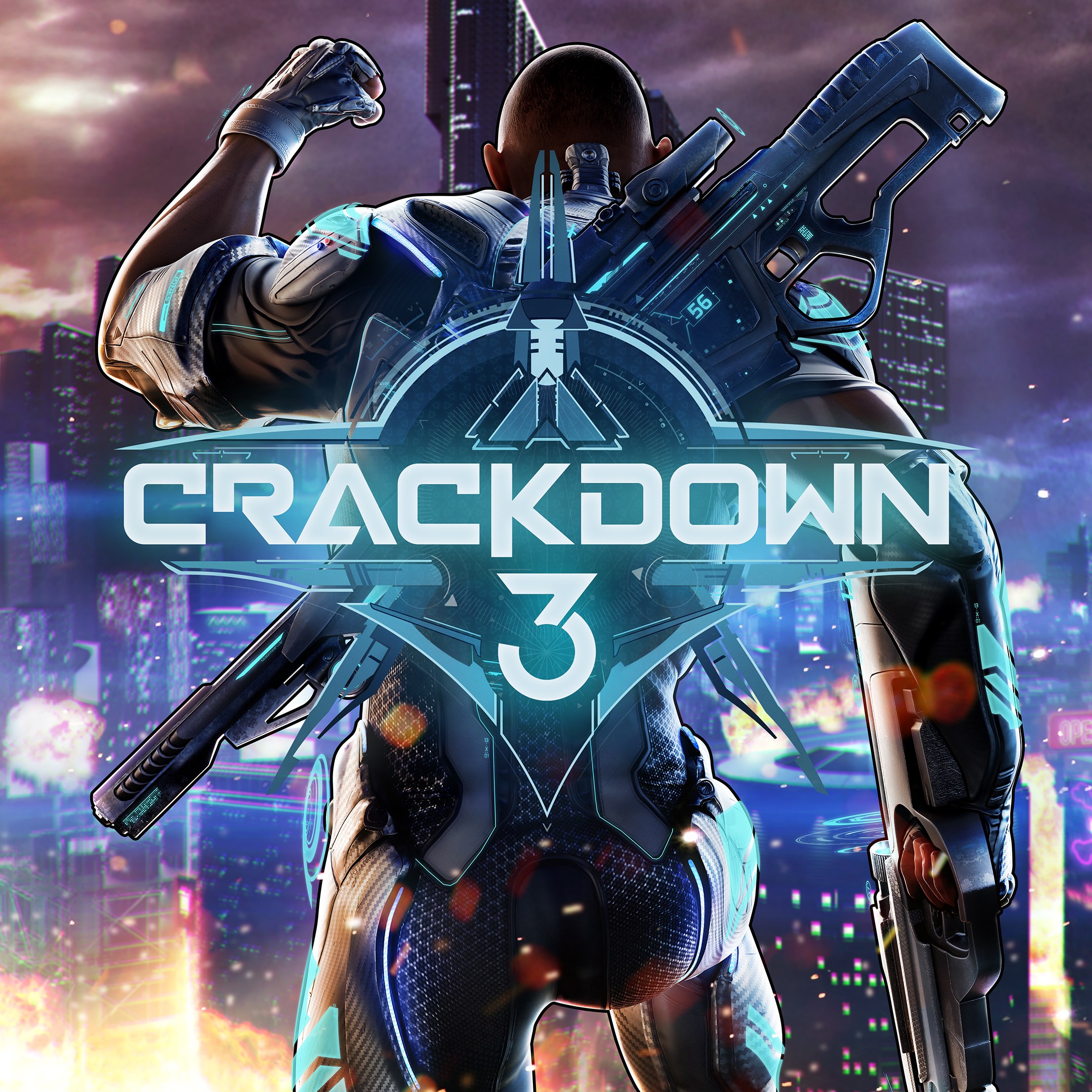
Microsoft is now allowing all Xbox Game Pass subscribers pre-download Crackdown 3 for both the Xbox One and Windows 10 (as spotted by Windows Central). This will allow gamers to install the game, so that it can be almost immediately playable when it officially launches.

The company also listed the game last week on the Microsoft Store, so anyone who has the $59.99 on hand to buy the game can pre-order it for when it officially launches. However, subscribers of Xbox Game Pass get the advantage of being able to pin the game to the home screen of either their Xbox One or Windows 10 for quick access as soon as its official release on February 15. It’ll also be an Xbox Play Anywhere title, meaning a single purchase will allow the game to be downloaded on both systems.

To pre-download the game, make sure to use the link we included below this post. You can also share your thoughts about this and the game down below in the comment box.

Crackdown 3
Crackdown 3
Developer:
Xbox Game Studios
Price:
Free

Spyro Reignited Trilogy is now live on Microsoft’s Xbox One consoles

The highly-anticipated, Spyro Reignited Trilogy, is now available to play on Microsoft’s family of Xbox One consoles.

This bundle is a re-release of the original three Spyro video games which have all been remastered with a new, higher, HD resolution upgrade and a fresh revamp of all of the graphics.

Here’s the official game description and trailer:

The original roast master is back! Same sick burns, same smoldering attitude, now all scaled up in stunning HD. Spyro is bringing the heat like never before in the Spyro Reignited Trilogy game collection. Rekindle the fire with the original three games, Spyro the Dragon, Spyro 2: Ripto’s Rage! and Spyro: Year of the Dragon. Explore the expansive realms, re-encounter the fiery personalities and relive the adventure in fully remastered glory. Because when there’s a realm that needs saving, there’s only one dragon to call.

While Spyro has been pretty quiet in recent years, the character is incredibly recognizable for an entire generation of gamers who grew up playing his games. The character was also the springboard for the immensely successful, though now dead, Skylanders toys-to-life games.

Have you played Spyro Reignited Trilogy yet on your Xbox One console? Let us know if you’re enjoying it (or not) in the comments below and then follow us on Pinterest for more Xbox gaming content.

Spyro™ Reignited Trilogy
Developer:
Activision
Price:
$13.99


Take Two: Is Windows 10 October Update finally coming in November?

Good news for everyone waiting for the Windows 10 October Update aka Windows 10 v1809, although I am not sure if anyone really waits for the updates, let’s be honest.

Tomorrow is the second Tuesday of the month, which means it’s security update time. And it looks like the October Windows Update may well be included in the November patch.

Microsoft Re-Releases Windows 10 October Update in November?

The release of the Windows 10 October update 1809 was problematic to say the least. A couple of days after it had been released, the reports started appearing online of files being deleted by a bug, including people’s documents.

windows 10 delete file bug


What has annoyed many people in this round of updates is that things have been done so poorly. The Windows 10 October update 1809 affected many but Microsoft only released the fix to Windows Insiders in the Slow and Release Review rings. Microsoft didn’t think it was worth releasing it to everyone else who may have lost folders, files, and documents.

  • READ ALSO: Windows 10 October Update install fails for many users

Also, Windows has made almost no pronouncements about this. Really, in this day and age of instant communication, customers expect more. Why companies don’t admit they screwed up, and tell people they are working on a fix (preferably with daily updates), continues to astound me.

It Isn’t Difficult to keep People Happy

It really isn’t that difficult to keep most people happy. Tell them what went wrong with the Windows 10 October Update, apologize that it happened, tell them what you are doing to fix it, and then fix it. I am sure that is how companies behaved in the past. Not sure why it can’t be like that now.

I am a great fan of Windows. In fact, I have a brilliant story concerning Bill Gates, a schooner in Guernsey, and a missed opportunity to travel the world teaching two young kids, but I won’t go into that now. However, sometimes being a fan of Windows is quite tiring!

What I will say is that many people remember companies that led by a long way, only to come crashing to earth. Let’s hope that Microsoft doesn’t forget that, with its shambolic Windows 10 October update , customers still have value. And that what happened to Perrier Water in 1992, for example, could happen to any company.

Anyway, enough ranting. Here is the updates page where you can check out what’s what. As always, let us know when you update, or re-update (is that a word?) your Windows 10 machine, and whether you have any problems or not. We are always very happy to hear from you.

RELATED POSTS TO CHECK OUT:

Upcoming Office 365 “migration experience” from Google G Suite looks to recapture lost productivity marketshare

The battle for productivity software supremacy is heating up as both Microsoft and Google converge on overlapping audiences.

For sometime now, small to medium sized business and start ups relied on the flexible pricing of Google’s G suite to power their offices and boost their employee productivity. Aiming for the smaller fish allowed Microsoft to keep entrenched larger businesses while simultaneously serving the needs of individual consumers who might be in education. The entire pool was a seemingly copesetic relationship for both Google and Microsoft.

However, there are rumblings as of last week that point to Microsoft coming up with a new “migration experience” for Google G suite customers.

ZDNet’s Mary Jo Foley recently wrote about an internal roadmap that points to a Q2 release of a new Office 365 migration experience for former Google G suite customers.

“We’ve heard the feedback and we’re excited to announce the new G Suite migration experience which will allow you to directly migrate email, calendar and contacts from Google G Suite to Office 365! Our highly secure solution ensures your data is directly migrated to Office 365, with no resting points along the way. We’re also adding support for migrating mailbox in batches.”

As of now, it seems Google is drawing first blood with its own Exchange migration tool and has been for some time, however, based on this leak it seems Microsoft is aware that its own limited IMAP mailbox transfer solution is in need of some bolstering to regain lost productivity marketshare.

Microsoft has yet to confirm the leak and may never publically announce it, as it servers as more of a tool for its sales team and partner solutions.

Latest Insider update for Microsoft To-Do brings some Smart List improvements

Microsoft keeps iterating fast on its new cross-platform To-Do app, and the team has recently released a new version of the app for Windows Insiders which brings some improvements to Smart Lists (via Aggiornamenti Lumia). First of all, you can now customise your Planned Smart List with a selection of themes, like you can already do in your different lists and “My Day” section. For now, the “Important” Smart List still doesn’t support Themes, but this may well be coming in a future update

The “Planned” Smart List now supports themes.

Next, there is a new option in Settings for automatically hiding the “Planned” and “Important” Smart Lists in the left panel when they’re empty. You could already disable these two Smart Lists in settings if you have no use for these features.

Lastly, this update brings the usual performance and sync improvements, which are always welcome. We now have the version 1.43.1811.9001 on our Insider machine, which should be coming to non-Insiders in the coming weeks.

Windows 10 news recap: Alexa for PC now available on the Microsoft Store, Microsoft may separate Cortana from Windows Search and more

Welcome back to our Windows 10 news recap, where we go over the top stories of the past week in the world of Microsoft’s flagship operating system.

Some new Windows devices are shipping with unsupported software

PC manufacturers are apparently feeling nervous over the pulled and delayed Windows 10 October 2018 update. The update has experienced numerous issues, leading Microsoft to pull it. However, for PC manufacturers, they are now having to release hardware on an operating system that the hardware has not been tested with, potentially causing compatibility issues.

man beginning a fight

Microsoft might be separating Windows Search from Cortana in Windows 10 19H1

In Windows 10 19H1, it appears that Microsoft is working on, or at the very least testing, separating Cortana from Windows Search. A new “Conversation Canvas” could house Cortana, similar to how other assistants work, like Google Assistant.

The Alexa for PC app is now generally available on the Microsoft Store

Users who have opted for Alexa as their virtual assistant of choice will be happy to hear that the Alexa app is now available in the Microsoft Store.

Microsoft brings dark theme support to the OneDrive Windows 10 desktop client

The trend of adding a dark theme to everything continues to expand. Microsoft has now added a dark theme option to the OneDrive desktop client on Windows 10.

That’s it for this week. We’ll be back next week with more Windows 10 news!

Ori and the Blind Forest, Ori and the Will of the Wisps are both coming to Xbox Game Pass

Ori fans will be delighted to hear that the next game in the Ori series, Ori and the Will of the Wisps, is coming to Microsoft’s Xbox Game Pass subscription service. In addition, Ori and the Blind Forest is also on the way.

Ori and The Blind Forest Xbox Game Pass

Ori and the Blind Forest will be available to Xbox Game Pass members on December 20.

Ori and The Will of The Wisps Xbox Game Pass

Likewise, for those wanting the next instalment to the series, Ori and the Will of the Wisps will be available on launch day to Xbox Game Pass members. The expected release date is sometime in 2019.

Are you excited to delve into the new Ori game through Xbox Game Pass? Let us know in the comments!

Hellblade: Senua’s Sacrifice is coming to Xbox Game Pass next month

At its XO18 event, Microsoft is bolstering its Xbox Game Pass library, adding titles such as PUBG, to entice more users to subscribe to the service.

Yet another new addition to the library is Hellblade: Senua’s Sacrifice from Ninja Theory. Normally available for $29.99 from the Xbox Store, the game will be available to all Xbox Game Pass subscribers for free.

From the developers of well-known games such as Devil May Cry, Hellblade will take you back into the Viking age. Here’s an excerpt from the official game description:

Set in the Viking age, a broken Celtic warrior embarks on a haunting vision quest into Viking Hell to fight for the soul of her dead lover.

Created in collaboration with neuroscientists and people who experience psychosis, Hellblade: Senua’s Sacrifice will pull you deep into Senua’s mind.

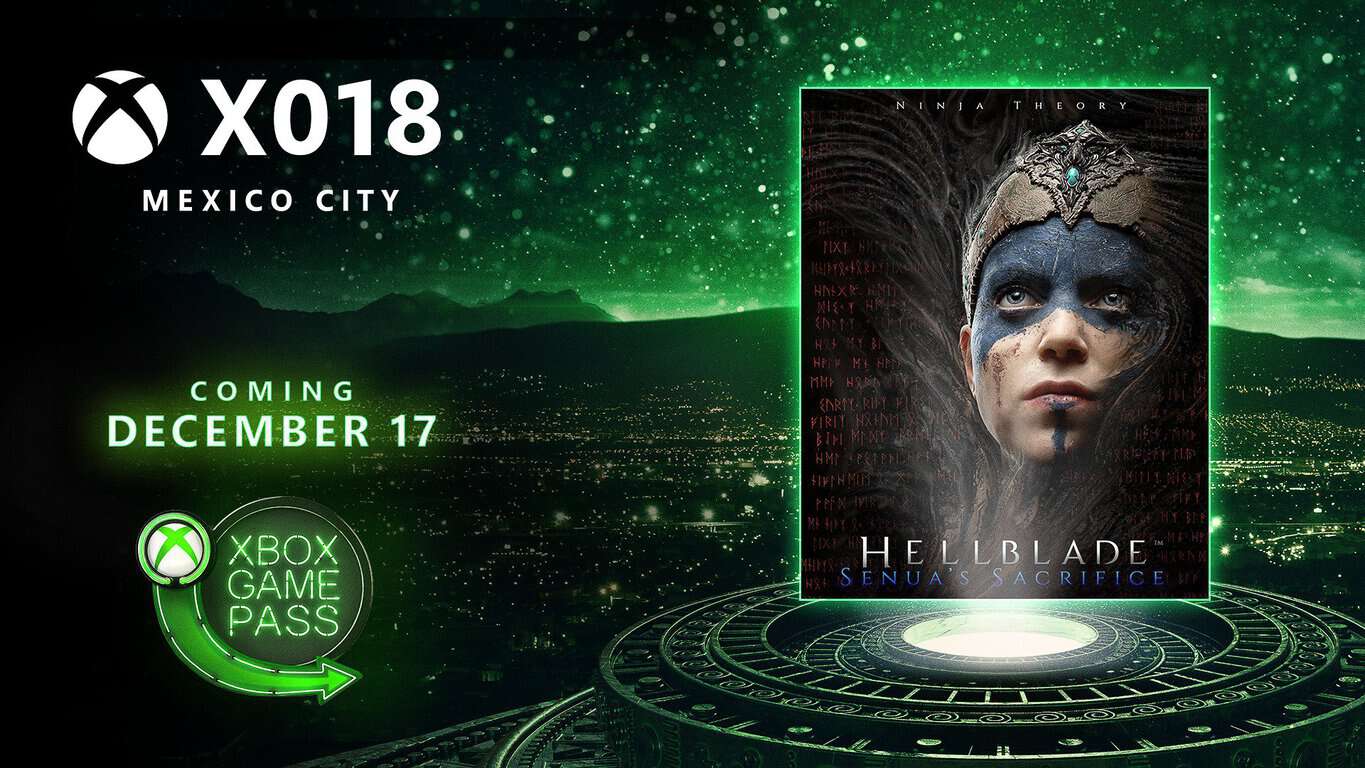
Hellblade: Senua’s Sacrifice will be available to Xbox Game Pass members on December 17.

Microsoft acknowledges major SSD encryption security issue

Microsoft recently issued a Security Advisory (ADV180028) warning for users of self-encrypted solid state drives (SSDs) using Bitlocker encryption systems.

This security advisory came after two security researchers from the Netherlands, Carlo Meijer and Bernard van Gastel, issued a draft paper outlining vulnerabilities they discovered. Here is the abstract summarising the problem:

We have analyzed the hardware full-disk encryption of several SSDs by reverse engineering their firmware. In theory, the security guarantees offered by hardware encryption are similar to or better than software implementations. In reality, we found that many hardware implementations have critical security weaknesses, for many models allowing for complete recovery of the data without knowledge of any secret.

If you have seen the paper, you can read about all the different vulnerabilities. I will concentrate on the two main ones.

SSD Hardware Encryption Security

Microsoft knew there was a problem with SSDs. So in cases of self-encrypted SSDs, Bitlocker would allow the encryption used by the SSDs to take over. Unfortunately, for Microsoft, this didn’t solve the problem. More from Meijer and van Gastel:

BitLocker, the encryption software built into Microsoft Windows will rely exclusively on hardware full-disk encryption if the SSD advertises supported for it. Thus, for these drives, data protected by BitLocker is also compromised.

security advisory on SSD

The vulnerability means that any attacker who can read the SEDs user manual, can access the master password. By getting access to the master password, attackers can bypass the user-generated password and access the data.

Fix Master Password Vulnerabilities

In reality, this vulnerability would seem to be quite easy to fix. Firstly, the user can set their own master password, replacing the one generated by the SED vendor. This user-generated password would not then be accessible to an attacker.

The other option would seem to be to set the Master Password Capability to ‘maximum’, thus disabling the master password altogether.

Of course, the security advisory comes from the assumption that the average user believes that an SED would be safe from attackers, so why would anyone do either of these things.

User Passwords and Disc Encryption Keys

Another vulnerability is that there is no cryptographic binding between the user password and the disc encryption key (DEK) used to encrypt the password.

In other words, someone could look inside the SED chip to find the values of the DEK and then use those values to steal the local data. In this case, the attacker would not require the user password to get access to the data.

Not All SSDs May Be Affected

However, I would like to point out two things. Firstly, Meijer and van Gastel only tested a fraction of all SSDs. Do the research of your SSD and see if it may have a problem. Here are the SSDs the two researchers did test:

security advisory on SSD

Attackers Need Local Access

Also note that this needs local access to the SSD as attackers need to access and manipulate the firmware. This means that your SSD and the data it holds is, theoretically, safe.

Having said that, I don’t mean that this situation should be treated lightly. I will leave the last word to Meijer and van Gastel,

This [report] challenges the view that hardware encryption is preferable over software encryption. We conclude that one should not rely solely on hardware encryption offered by SSDs.

Wise words indeed.

Have you discovered an unlisted SSD that has the same security issue? Let us know in the comments below.

RELATED POSTS TO CHECK OUT:

“I Hate Santa” is a great game that brings snowball fight to VR

Winter is a wonderful season! Starting snowball fights is one of the funniest winter activities for many people. Now you can start your own snowball fights from the comfort of your house. I hate Santa is a funny Christmas game that lets you shoot, dodge, and level up to defeat crazy kids in epic snowball fights.

You can even battle fireworks and a monster house. When you finish this game, you’ll find out Santa’s dark secret.

Move your head to dodge incoming attacks, and counter their snowballs with yours. Don’t be shy, show off your excellent snowball fighting skills. Compete with other players and see who can score the highest. Do your best to rank yourself as high as possible on the leader board.

I hate Santa is a game designed for VR and supports both HTC Vive and Oculus Rift. You don’t need any keyboard or controllers, and you’ll quickly get the hang of it. I hate Santa is a fun and entertaining game for the whole family.

I Hate Santa system requirements:

  • OS: Windows 7, Windows 10
  • Processor: Intel i3-6100 / AMD Fx4350 or greater
  • Memory: 2000 MB RAM
  • Graphics: Nvidia 960 or greater
  • DirectX: Version 11
  • Storage: 500 MB available space.

I Hate Santa review

I found the game to be different in a good way, yes i know wave shooters take a lot of flak lately […].
The aiming mechanic, looking to aim at targets, I find refreshing, it has been about spot on for aiming. The Dodge feature is a nice touch also.
There seems to have been definate work put into the game, runs well ,looks good, and its stable.
Some days one needs something that isn’t a hyper reallistic shooter, dashing for cover and gunfire all around. Instead, pelt elves, with snowballs.

You can purchase I Hate Santa for only $2.99 from Steam.

Meanwhile, I hate Santa also got an update that makes the game even better and more fun to play. Here’s what’s new:

  • Achievements support
  • The game ending has been polished to make the plot less obscure following players‘ feedback.
  • The jet pack dropper has been improved. If you manage to hit them, you’ll in for a nice surprise. Several attempts may be necessary as this is not an easy task.
  • The visual glitches on game tips  and leader board have been fixed.

If you’re looking for more VR games, you can check out our list of the best Christmas VR games to play in December.

RELATED STORIES YOU NEED TO CHECK OUT:

Track Santa Claus with these cool Windows 10 apps

The season’s upon us, and the world’s favorite white beard is preparing for taking off. As you probably know, Santa always knows what you’re doing, and whether you were a good boy or girl this year. But did you know you can keep track of what Santa’s up to, as well?

Best apps to track Santa’s journey

1. Track Santa by NORAD

track santa norad

North American Aerospace Defense Command (NORAD) keeps track of Santa for years. And they’re keen to share the results of their research with people worldwide.

In that manner, NORAD has launched a unique service called Track Santa. The Santa tracker is available on NORAD’s official website, as well as all major platforms, including Windows 10.

Santa takes off December 24th, on the Christmas Eve. But NORAD allows you to keep your eye on Santa’s village way before. When you visit NORAD’s website, or download the Windows 10 app, you’ll find yourself in Santa’s village, where you can get busy doing different holiday activities.

You can watch videos about Santa Claus, read interesting stories, listen to Christmas music, and more. And when the big day finally comes, you’ll be able to watch every Santa’s move. The journey will start from the North Pole, and won’t stop until Santa delivers all the gifts.

NORAD has been tracking Santa since 1955, but it all started accidentally. It all begun when a local advertisement directed kids to call Santa directly.

However, the phone number was misprinted, and kids ended up calling the Crew Commander on duty at the Continental Air Defense Command Operations Center. And, that’s how this great idea was born.

You can download NORAD Santa Tracker from the Windows Store, it’s completely free. Or you can follow Kris Kringle directly from your web browser, by visiting NORAD’s official website.

UPDATE: The NORAD Santa Tracker app is no longer available in the Microsoft Store. However, you can still access its content by visiting NORAD’s official website.

And in case you want to bring the holiday spirit to your computer, make sure to check out the best Christmas themes for Windows 10.

2. Where is Santa – Santa Tracker

Where is Santa - Santa Tracker

Fortunately, we found another useful Windows 10 app to track Santa Claus with. With the help of this app, you can follow Santa’s every move at any time — not just near Christmas.

Simply launch a scan and you’ll receive a dynamic report of Santa’s location and activities. Moreover, based on your location, the app will also tell you when Santa should arrive at your house.

The sophisticated system will also display both locations of Santa and Yourself. On top of that, it also finds out the estimated Santa’s arrival time with a counting down timer.

Download Where is Santa – Santa Tracker

RELATED SANTA STORIES YOU NEED TO CHECK OUT:

Call Santa Claus with these apps and surprise your kids

Thousands of children send letters to Santa Claus in December. If your child doesn’t want to wait until Santa replies, you can simply let them speak to Father Christmas instead.

All you need to do is to install the Santa Calls app on your Windows 10 phone, a cool app that makes it look like you are getting a phone call from the man himself.

Call Santa Claus app

The Call Santa Claus app tells your kids if they’ve been naughty or nice.

call santa app

If you want to get an immediate call from Santa, simply pin a call to your start screen. The best part is that pinned calls have a different picture of Santa to indicate which list your children are on.

In this manner, your children will have direct confirmation that Santa is really watching them and that they’d better be good if they want presents this Christmas.

Of course, you will not actually be able to speak to Santa, but this app fakes it pretty well. You can successfully use the Santa Calls app in response to your children either being naughty or nice. You simply show them who’s calling and pretend to speak to Santa to inform him about the good or bad deeds of your children.

Parents simply love this app and their reviews confirm it:

My son was shocked when Santa called my phone! He couldn’t believe it, and his reaction was priceless. Now he’s on his best behaviour because he thinks Santa calls me to make sure he’s behaving himself. Lol. This app is awesome and worth twice the price, easily.

You can purchase the Santa Calls app for $0.99 from the Windows Store.

Video Santa Call

Video Santa Call app

UPDATE: We found another interesting app that allows you to contact Santa using your PC or HoloLens device. It’s called Video Santa Call, and as its name suggests, it allows you to send and receive video calls from Santa.

Here’s how this Santa app works:

  1. Record your video message for Santa in English or French — up to 30 seconds.
  2. Purchase a postal stamp to send your video to Santa.
  3. Santa Claus will watch your video and then reply in less than 24 hours. There are no pre-recorded messages used as the reply is based on your initial message.

Download Video Santa Call from the Microsoft Store.

Have you used other apps or software to call Santa Claus? Tell us more in the comments below.

RELATED STORIES YOU NEED TO CHECK OUT:

Xbox holiday season heats up with next week’s release of Fallout 76, Hitman 2, more

There are several new game releases coming to Xbox One next week. As noted in a post on Xbox Wire, Xbox fans will see a few big-name titles, along with some old favorites coming, including four Xbox One X Enhanced game titles. Here’s a list of all the Xbox One game titles coming next week:

These two games are not available for purchase yet through the Microsoft Store, but should be released on Xbox One on their designated release dates:

  • The Long Journey Home – November 14, 2018
  • Youtubers Life: OMG Edition – November 14, 2018

Next week will certainly be an exciting week with blockbuster titles like Fallout 76 and Battlefield V coming to Xbox One. Fallout 76 will bring online multiplayer to the newest Fallout installment, using the same game mechanics seen in previous Fallout games. Fallout 76 B.E.T.A didn’t give fans enough time to experience the game, so it will be interesting to see if Bethesda was able to fix any game issues. We will have to wait and see if any serious game bugs will plague Fallout 76 at launch.

Battlefield V will leave World War I behind and we will see if EA will see the same game success the company had with Battlefield 1. Either way, it is sure to be a fun and exciting week for Xbox One fans everywhere.

Sunset Overdrive Xbox Achievements confirm Windows 10 version is on its way

We recently reported that Sunset Overdrive was coming to Windows 10, and now the game’s Xbox achievements list published by TrueAchievements confirms this to be true. According to the source, there are a total of 80 achievements that can be earned throughout the game, allowing the player to earn Gamerscore points on Xbox Live. And in addition to its Windows 10 release, the game is also reportedly coming to Steam as well (via Wccftech), which could potentially bring the game to Windows 7 and 8 gamers.

Sunset Overdrive is a first person shooter game developed by Insomniac Games. The game has been praised for its artistic design and humor, and is currently only available for those with an Xbox One console. Its release on Windows would greatly expand the available audience, and bringing it to one of the biggest gaming platforms out there only sounds logical for the company. Unfortunately, the Windows 10 version is unlikely to be an Xbox Play Anywhere title considering its achievement list is short of the 88 total available in the Xbox One version.

The title is currently available for $19.99 on the Xbox Store, but it’s currently free with Xbox Game Pass. We’re looking forward to seeing if the PC port will be as affordable as the Xbox One version.

Sunset Overdrive
Sunset Overdrive
Developer:
Microsoft Studios
Price:
Free

Microsoft to bring broadband internet to tribal lands in Montana and Washington with Airband Initiative

Microsoft is adding to its partner’s list with a new collaboration between the company and Native Network, a telecommunications company focusing on providing solutions to the underserved rural Indian Country that resides in the United States.

As part of a joint announcement, Microsoft and Native Network revealed that the two companies are poised to deliver internet access to approximately 73,500 people in local trials communities.

“Broadband is the electricity of the 21st century and is critical for farmers, small-business owners, health-care practitioners, educators and students to thrive in today’s digital economy,” said Microsoft President Brad Smith. “The partnership with Native Network will help close the digital divide in rural Montana and Washington, bringing access to approximately 73,500 people within and around the tribal communities.”

Beyond its immediate goal of internet access to 73,500 people in rural native counties in the northwest, the Microsoft and Native Network partnership looks to extend its ultimate reach to over 2 million people in unserved portions of rural America by July 4, 2020.

To do so, Native Network is taking the utmost advantage of Microsoft’s Airband Initiative which takes investment in not only its goal of providing broadband to rural America but also digital skills training for newly connected areas.

Furthermore, according to Microsoft, proceeds from Airband connectivity projects gets funneled back into the program for even more expanded broadband to rural areas.

Using a combination of Microsoft’s Airband Initiative and Native Network technologies, the two companies will provide “hybrid, fixed wireless broadband internet access, including TV White Spaces to Tribes within the Flathead Reservation in Montana as well as the Lummi Nation and Swinomish Tribe in Washington, according to Smith.

Microsoft’s Azure gets a big win with Gap cloud services deal

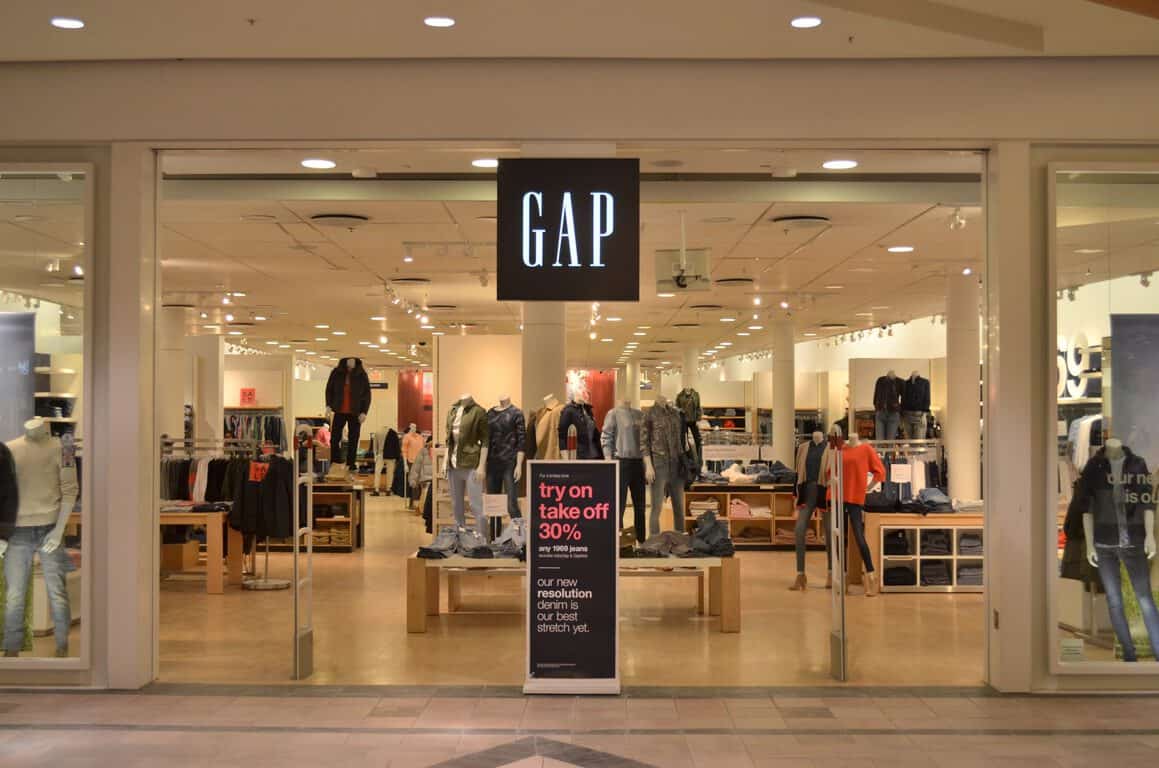
In addition to Samsung using Microsoft cloud services, Gap Inc. is another company that will start using Azure to help increase the company’s technology capabilities. Gap  intends to incorporate Microsoft Azure across all of its brands, including Old Navy, Gap, Banana Republic, Athleta, Hill City, and Intermix. As noted in a post on Microsoft Stories, the company  hopes its new partnership with Microsoft will allow it  to greatly improve customer experiences with the help of Azure and Microsoft 365.

Sally Gilligan, chief information officer at Gap Inc, sees the new Microsoft partnership will help her company do more to engage Gap customers.

“As we grow our value and active business and accelerate online and mobile, the ability to scale our technology in a secure environment to accommodate this growth is critical. The Microsoft Azure platform provides our teams the ability to deliver innovative and personalized capabilities for our customers with speed supported by a strong depth of technology expertise from the Microsoft team.”

Gap Inc. and Microsoft are working to move hundreds of applications to Azure. The company wants to focus on providing a seamless and personalized experience for their customers, both online and in-store. In the beginning stages, Gap looks to move to Azure to cut costs on the company’s on-premises data storage and services. Additionally, Gap is  also deploying Microsoft 365 solutions to help support its employees too. Microsoft 365 will help Gap Inc. employees better communicate and collaborate with each other company-wide.

Currently, stores operate in more than 90 countries with over of them 3,100 company-owned. By using Microsoft Azure, Gap Inc. can cut the time it takes to market new customer experiences and provide its customers easier ways to shop. They can utilize some of Azure’s most powerful tools, including advanced analytics and machine learning to get a better understanding of how its customers shop. Gap can then leverage that information to make more personalized shopping experiences for its customers.

Microsoft brings dark theme support to the OneDrive Windows 10 desktop client

The October 2018 update, which Microsoft has yet to re-release for all Windows 10 users will bring some improvements to the dark mode in Windows 10. The legacy File Explorer now supports dark mode, though we previously noted that the implementation was still quite inconsistent across the board.

The truth is, even with dark mode on on Windows 10, you’ll still encounter many Windows 10 components, legacy apps or UWP apps that will remain untouched. That was also the case for the OneDrive sync client on Windows 10, but Microsoft has quietly added dark mode support to this app in recent Insider builds.

We saw the sync client turn dark today on an Insider PC running the preview build 18272, so you apparently don’t need to have the latest 19H1 build to get it. The build number for the app is 18.212.1021.0007, which is as of this writing is more advanced than the latest OneDrive Insider build that Microsoft indicates on this support page.

The OneDrive sync client ships with Windows 10, but Microsoft uses three different rings of validation (Insiders, Production, and Enterprise) to push new updates. Like many other Windows 10 apps in dark mode these days, the OneDrive sync client uses different shades of dark grey, and it looks pretty good next to the dark File Explorer. It’s one of the thing that Microsoft can now remove from its Dark Mode checklist, but there is definitely still some room for more improvements in File Explorer and other parts of the OS.

Some new Windows devices are shipping with unsupported software

The delay of the Windows 10 October 2018 Update has apparently resulted in some unexpected frustrations for certain OEMs according to a report by Petri’s Brad Sams who has spoken to several company employees off the record.

The problems come as a result of hardware manufacturers building PCs on pre-release builds of 1809, the Windows 10 October 2018 Update, but are now being forced to release them with 1803, the current build of Windows 10, installed after that update was postponed.

Releasing hardware with a version of an operating system that it wasn’t tested on has the potential to cause some compatibility issues, particularly with those devices using a SnapDragon 850 processor such as Lenovo.

“The [SnapDragon] 850 is only designed to run on 1809 which is, right now, the Schrodinger’s version of Windows,” Sams states. “Which means that the devices that are being sold today, with a Snapdragon 850, are shipping with an untested iteration of Windows.”

It’s unclear how big of an issue this will be going forward but, since companies are going ahead and shipping their hardware anyway, it seems unlikely that this incompatibility will cause too many major problems for the average consumer. It will definitely be interesting to watch though.

What are your thoughts on this? Let us know in the comments below.

Original Crackdown video game is now free on Xbox One & Xbox 360 consoles

The original Xbox 360 Crackdown video is currently being given away for free in the Microsoft Store. The game can be played on both the Xbox 360 and Xbox One consoles, due to having backwards compatibility support, and is also Xbox One X Enhanced with some improved loading times and graphics when played on the Xbox One X.

No official reason has been given yet for Crackdown going free but it’s likely part of a push to promote the franchise and build hype for Crackdown 3 which is due out on the Xbox One in February 2019 and whose game page just went live on Xbox One and Windows 10 earlier today.

Crackdown 3 is expected to have a large presence at Microsoft’s XO18 Xbox event in Mexico this weekend.

Have you played the original Crackdown or will this be your first time? Share your thoughts with the community in the comments below and then follow us on Pinterest for more Xbox content.

Crackdown
Crackdown
Developer:
Microsoft
Price:
Free

Windows 10’s Twitter app gains DM and profile improvements in new update

The official Twitter app for Windows 10 PCs updated this week with some new features to improve direct messages and content discovery.

When viewing a Twitter user’s profile, the app will now display other accounts that you follow who also follow it. DMs have also been improved with drag-and-drop functionality added for media when composing a message and a new DM option for when sharing a tweet.

Here’s the full release notes for this latest update which should be live for most people already given the Progressive Web App (PWA) format of the app.

  • We added support for events that are happening on Twitter! Check this out by clicking or tapping on the search icon.
  • Direct message (DM) improvements: (1) you can now drag and drop 1 video or photo in a DM. (2) We improved the users recommended when you click on “Share via Direct Message” from the share menu on a Tweet.
  • We’ve added followers you know when you visit a profile or hover over a user’s handle or name. This gives you more context on who you might know from their followers.

Do you use the official Twitter app or do you prefer a third-party solution? Let us know in the comments below and then follow us on Twitter for more Windows app news.

Twitter
Twitter
Developer:
Twitter Inc.
Price:
Free

How to block personalized ads in Windows 10 apps

Advertising is one of the most annoying things about the internet, but when we are constantly bombarded by adverts in Windows 10, these ads are even more irritating. One way to get your revenge is by disabling personalized ads.

But first, it is quite amazing in how many places adverts can appear on your PC, and we are not talking just about your browser. As a quick reminder, adverts could be shown in any of the following places:

  • The Start menu
  • Cortana search
  • Action Centre
  • The lock screen
  • Live tiles
  • Apps showing ads
  • Microsoft Edge
  • Windows Ink

And all the ads you see in the above places will be personalised ads, meaning you have given permission for your personal information to be used by Microsoft, even if you didn’t know you had. And it’s not like we got the software for free; we paid for it.

All is not lost, though. With just a little bit of effort, we can get rid of personalised ads. In fact, it’s much easier than you may think. Just follow the steps listed below.

  • READ ALSO: Windows 10 Mail app displays annoying ads for Office 365

Steps to disable Windows 10 app ads

Case 1: Windows 10 Home Edition

  1. Open the Start menu and click on the settings cog.
  2. Search for ‘Privacy’ in the search bar.
  3. Toggle “Let apps use advertising ID…” to ‘Off’.

personalised ads

Case 2: Windows 10 Pro

If you use Windows 10 Pro, there is a different option that you can follow if you want.

  1. Hold down the Windows key, press ‘R’ and the Run command will open.
  2. Copy and paste ‘gpedit.msc‘ in the Run command and click OK to open the Local Group Policy Editor.
  3. Open the following folders till you get to User Profile:
    • Computer ConfigurationAdministrative TemplatesSystemUser Profile
  4. On the right, find and double-click the ‘Turn off the advertising ID policy’.turn off advertising ID windows 10
  5. Select ‘Disable’.
  6. Click Apply.
  7. Click OK.

Case 3: During Setup

You can also disable your ID in the final step of setting up Windows 10, but I am going to assume that it’s a bit late for that now; although, still worth remembering for the future.

Sadly, none of the above will stop ads appearing willy-nilly, but at least you have the satisfaction of knowing that you are not handing your personal info over to Microsoft.

Disabling Personalised Ads

Personally, I am not a big worrier about personalized ads. Most of us who have been using the internet since its inception were happily giving our personal info away long before we realized what the consequences were. Even later, we didn’t seem to be that bothered. After all, that’s how Facebook became so popular in the first place.

What do you think about sharing personal information? Should Microsoft be allowed to sell PCs with the default settings set the way they are?

Perhaps you think that companies should be forced to ask us to opt in to sharing our personal info rather than hiding away the option to opt out.

Let us know what you think about personalized ads in the comments below.

RELATED STORIES TO CHECK OUT:

Windows 10 doesn’t let you set certain apps as default apps

There are many age-old questions such as “How long is a piece of string?” and “Why won’t kids turn the lights off?” but one of the oldest age-old questions must be, “Why doesn’t Microsoft test it its updates before releasing them?”

Search “recent Microsoft updates screw ups”, and you get 78,000,000 results! And now file association has become the latest victim. Actually, this should come as no surprise as a recent survey confirmed that Windows updates trigger various bugs for 50% of users.

File Association No Longer Working

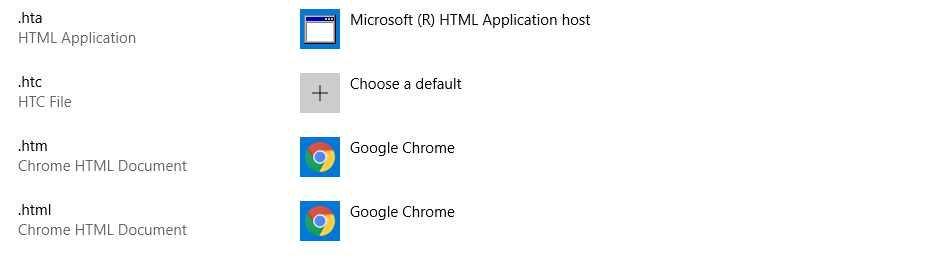
As far as I can work out, it was the boys at HTG who were the first to notice the file association bug. What they found out was that Windows 10 would allow file associations with certain apps but not others. For example, when trying to set Notepad++ as the default in the settings app, Windows 10 would completely ignore it and leave the default as Notepad.

This would also happen when selecting the ‘Open with…’ option. After right clicking on the files and choosing Notepad, and the selecting “Always Use This App”, the file would open in Notepad++.

However, when trying to open up the same file in Notepad++ again, it had reverted to Notepad. Strangely, it doesn’t seem to affect all applications. As HTG reported,

It doesn’t affect every application, but it does at least affect Photoshop and Notepad++. This bug does not appear to affect PCs running the October 2018 Update, which was pulled because of multiple data loss bugs and has not yet been re-released.

According to HTG, although they are not sure which update caused the bug, they believe it was was probably a result of the disastrous October 9 cumulative update.

I thought I would check to see if it (whichever update it was) had affected the file association on my computer and guess what..?

Google Chrome as default for .html files

file association

Firefox as default for .html files
file association
Notepad as default for .txt files (unchangeable)

file association

How to Fix the Problem. Er…

At the time of writing, there is no known way to fix the file association bug. As usual, those of you affected by this latest in a long line of Windows 10 cock-ups will just have to wait for the next update.

Maybe Microsoft should go for one more operating system release. They could repackage Windows 7 and sell it as Windows 17 (or whatever). There would probably be a lot more satisfied customers if they did.

Have you noticed the problem with file association on your machine? Why not check and leave a comment below if it no longer works.

RELATED STORIES TO CHECK OUT:

Forza Motorsport 7 players get free Hot Wheels cars on Xbox One & Windows 10

This year is the 50th anniversary of Hot Wheels, and to celebrate, Mattel and Microsoft are partnering to bring Hot Wheels themed cars to Forza Motorsport 7. Forza Horizon 3 also received a Hot Wheels expansion pack of its own, so it’s nice to see something similar come to Motorsport 7.

In addition to the new Hot Wheels Anniversary Pack DLC that is available now to owners of the game, players will also get seven additional free cars including older models like the ’69 Chevrolet Camaro as well as newer ones like the ’17 Rip Rod, all coming to Forza Motorsport 7. Additionally, five Hot Wheels driver suits are coming, and can be earned by completing various challenges throughout the game.

Microsoft says more cars based on the toys are coming to the game over the coming weeks, and a few are also coming to the latest Forza Horizon 4 series as well. Both games are also Xbox Play Anywhere titles, meaning the can be played on both Windows 10 or Xbox One as long the title is purchased digitally. What’s more is that Horizon 4 was the best selling game on Xbox last month.

Which Hot Wheels car is your favorite? And childhood favorite models you’d like to see added? Let us know in the comments down below.

Forza Motorsport 7
Forza Motorsport 7
Developer:
Microsoft Studios
Price:
Free


[Updated] Temporary issue with Microsoft’s activation servers causes Windows 10 Pro licenses to show as invalid

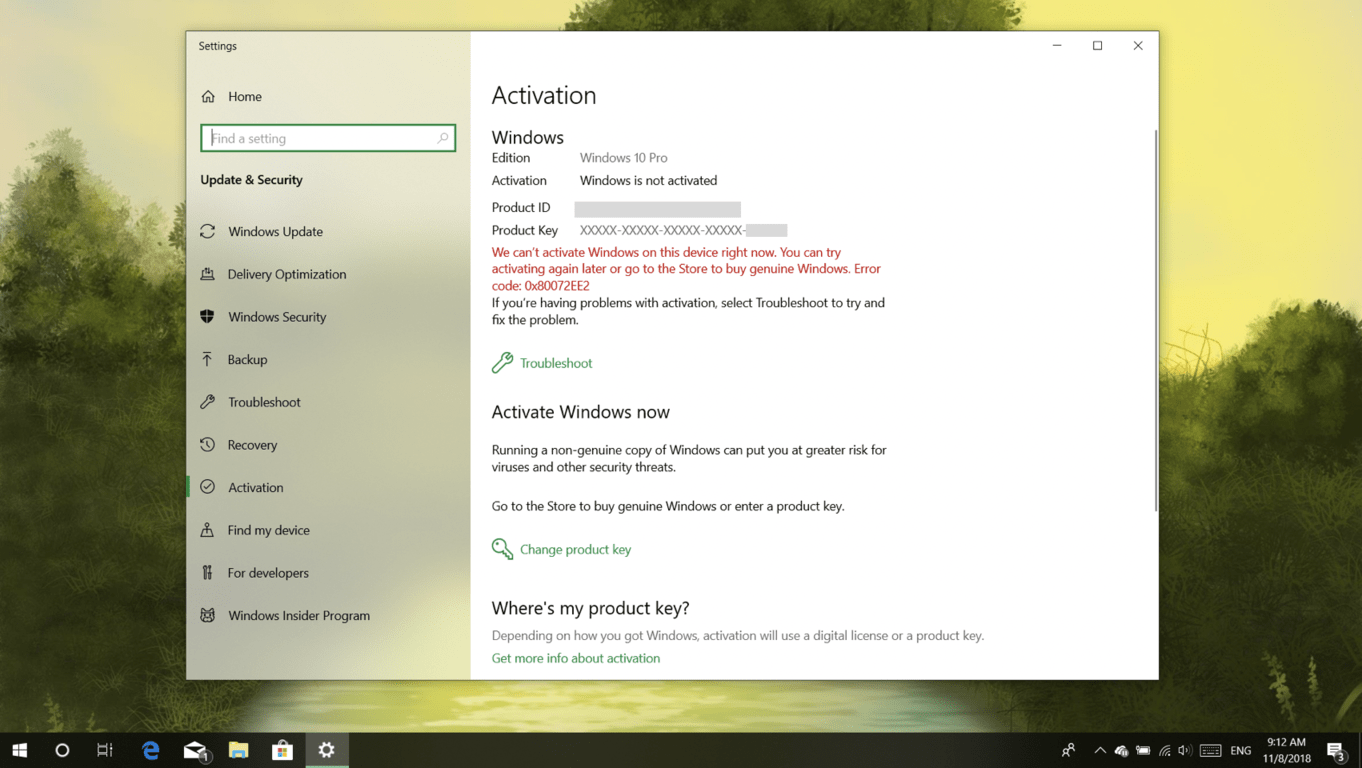
If you’ve been having issues with your Windows 10 Pro license not being recognized today, you’re not alone. A temporary issue with Microsoft’s activation server seems to be causing various problems with Windows 10 licenses today, and many users have been complaining that their Windows 10 Pro license has suddenly been downgraded to Windows 10 Home (via The Register).

The issue seems to be affecting Windows Insiders who have recently installed new builds, as well as non-Insiders running Windows 10 Pro. We saw this issue this morning on a Windows 10 Pro laptop showing an invalid license. Clicking the “Troubleshoot” button didn’t solve the problem, telling us instead that a Windows 10 Home license is associated to the laptop running on Windows 10 Pro.

While Microsoft has yet to comment on the issue, one user who contacted Microsoft’s tech support was told that the company is aware of the issue, and that it should be fixed “within one or two business days.” Here’s the full message:

Thank you for sharing, Daniel. Microsoft has just released an Emerging issue announcement about current activation issue related to Pro edition recently. This happens in Japan, Korea, American and many other countries. I am very sorry to inform you that there is a temporary issue with Microsoft’s activation server at the moment and some customers might experience this issue where Windows is displayed as not activated.
Our engineers are working tirelessly to resolve this issue and it is expected to be corrected within one to two business days, Daniel.

It’s still not clear if this activation issue is affecting a lot of Windows 10 Pro users, but it’s good to know that Microsoft is already working on a fix. Let us know in the comments if your Windows 10 Pro PCs have been hit by this activation bug today.

Update 11/9: Mary Jo Foley from ZDNet received yesterday the following statement from Jeff Jones, Senior Director, Microsoft, saying that the issue should be resolved for all affected users over the next 24 hours:

“A limited number of customers experienced an activation issue that our engineers have now addressed. Affected customers will see resolution over the next 24 hours as the solution is applied automatically. In the meantime, they can continue to use Windows 10 Pro as usual.”

You’ll soon be able to transfer Android phone calls to Windows PCs

Exciting news on the Android and PC front. Soon, you may be able to transfer your phone calls to your computer’s speakers using Your Phone app.

Your Phone App – Smartening Up Your Smartphone

For those of you who don’t know, Your Phone is an app that lets you transfer content between your Android phone and your PC.

I was going to add ‘easily’ to that last sentence but having to download the app from Microsoft Store onto your PC, and another app, called Your Phone Companion, from Google Play onto your phone, makes it a lot less easy. Still, maybe I am just being picky.

Before we move on, don’t download anything until you have checked your version of Android. If it isn’t 7.0 or later, you won’t be able to use Your Phone. Oh, and if you have an iPhone and want to link it to your computer using Your Phone, sorry but you can’t either.

Your Phone app - Linking smartphones to PC speakers

Originally reported on the Italian website Aggiornamenti Lumia, the March, 2019 update, Insider Windows 10 19H1, will include a new system app called “Windows.CallingShellApp“. There is also a screenshot of a notepad file named Microsoft.Windows.CallingShellApp with a string of phone and PC speaker references such as:

  • Transfer to PC
  • Speaker
  • Send to phone
  • Fold the device over to return to the call
  • Transfer
  • Couldn’t transfer

From this, the rumour has started to go round that a new feature of the Your Phone app will be the ability to transfer calls from your smartphone to your Windows 10 PC speakers.

Of course, as there has been no official word from Microsoft, all this is speculation. However, with the Your Phone app limited to messages and looking at photos, extending its functionality is something that Microsoft is keen on doing.

Have you been using the Your Phone app for messaging and photos? Would you use it for transferring phone calls to your computer’s speakers? Let us know what you think in the comments below.

RELATED STORIES TO CHECK OUT: