Exchange Online is optimized for person-to-person email, with protections that safeguard reliability and service health. However, these limits often make automated, high-volume internal messaging challenging. HVE addresses this by providing dedicated accounts for application-to-person messaging, keeping automated traffic separate from human communications while maintaining Exchange Online’s security, compliance, and policy protections.
The move allows critical email workflows, like payroll notifications, IT service alerts, and device-driven messages, to remain fully within Microsoft 365. Organizations can now modernize application architectures without relying on legacy email infrastructure or unsupported workarounds.
Common Use Cases and Limitations
HVE is designed for transactional and operational messages, not marketing campaigns. Typical scenarios include:
Payroll and HR notifications
IT monitoring and service alerts
Business and line-of-business application messaging
Device-driven workflows, such as printers or scanners
Security and compliance notifications
By providing a dedicated service, HVE avoids rate-limit issues and protects Exchange Online service health while supporting high-trust, high-volume messaging.
Availability and Pricing
HVE is fully available for internal recipients, with usage metered starting June 1, 2026. Pricing is set at $42 per one million recipients, aligning cost with usage to maintain fairness and reliability for high-volume automated email.
Google has released an emergency update for Chrome to fix a newly discovered zero-day vulnerability that is already being exploited in the wild. The flaw, tracked as CVE-2026-5281, marks the fourth actively exploited Chrome zero-day patched in 2026.
Use-after-free bug found in WebGPU component
The vulnerability is a use-after-free bug located in Dawn, Chromium’s WebGPU implementation. This type of flaw can lead to browser instability and open the door to more serious exploitation under certain conditions.
According to Google, the issue could cause browser crashes, data corruption, rendering problems, and other abnormal behavior. Due to active exploitation, the company has restricted technical details to reduce the risk of further attacks.
Patch rolling out across all platforms
The fix is now rolling out for Windows, macOS, and Linux under Chrome versions 146.0.7680.177 and 146.0.7680.178. While the update is available immediately, it may take time to reach all users through automatic updates.
Users can speed up the process by manually checking for updates in Chrome settings and restarting the browser after installation.
Growing wave of Chrome security threats
This latest patch highlights an ongoing trend of active threats targeting Chrome users. Google has already addressed multiple zero-day vulnerabilities this year, indicating a steady stream of high-risk exploits.
At the same time, security researchers are warning about VoidStealer malware campaigns designed to extract encryption keys from compromised systems. In parallel, attackers have also launched Google-themed phishing campaigns aimed at tricking users into revealing sensitive data.
With threats escalating, keeping Chrome updated remains one of the most effective ways to stay protected.
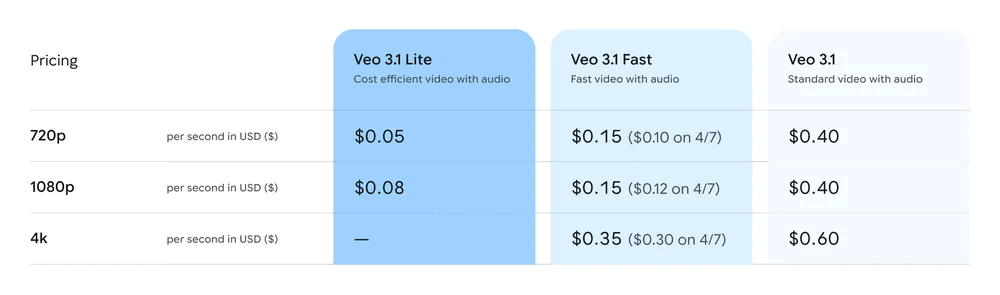
Another video generation tool from Google is here, and it’s called the Veo 3.1 Lite. The company says that this model is now rolling out via the Gemini API and Google AI Studio and makes AI video creation more accessible for developers.
The new model lowers AI video costs without slowing things down
Veo 3.1 Lite is designed for high-volume use cases, costing less than 50 percent of Veo 3.1 Fast, while maintaining similar generation speed. That balance may appeal to developers building apps that require frequent video output without driving up costs.
Image credit: Google
Speaking of features, the Veo 3.1 Lite model supports both text-to-video and image-to-video generation, along with 16:9 and 9:16 aspect ratios. It also handles 720p and 1080p resolution, with customizable durations of 4, 6, or 8 seconds depending on the use case.
Google says this release “rounds out” the Veo 3.1 family, giving developers more control over performance and pricing trade-offs. At the same time, pricing for Veo 3.1 Fast is set to drop on April 7, which could further lower the barrier to entry for video AI tools.
Speaking of AI models, let’s not forget that OpenAI is bidding goodbye to the Sora app, citing unsustainable infrastructure demands. Apparently, running AI video generation at scale reportedly came with compute costs the company couldn’t easily justify.
Teams now lets users view and manage activity across multiple accounts and organizations, combining notifications in one feed. Meanwhile, pinned accounts provide quick access, simplifying cross-tenant collaboration.
Moving on, threaded channels get a live meeting indicator, while the new Drafts quick view helps locate and send unfinished messages. The image viewer also received an upgrade, which allows users to scroll through all shared visuals and jump back to the original messages easily.
Other improvements include control over how the Enter key works in chat, a SHIFT + ESC keyboard shortcut to mark all messages as read, and Teams actions now accessible directly from Mac Spotlight. External chat sharing is now also smoother, with files and Loop components automatically shared with all participants.
AI Enhancements and Meetings
Teams meetings now support annotations on a single shared window for Windows, macOS, and mobile, allowing participants to mark up content without exposing their full desktop. Audio recap expands to seven additional languages, including Chinese, French, German, Italian, Japanese, Portuguese, and Spanish, helping global teams catch up faster. If you use Teams on the phone, Copilot will be at your rescue during live calls, offering context-aware summaries using Work IQ, integrating emails, meetings, and relevant web data for more productive conversations.
Privacy and Security
Teams now strips EXIF metadata from images shared in chats and channels, protecting location and device information by default. Presence tracking improvements ensure your status stays accurate in Teams on the web, even when switching tabs.
March 2026 is finally behind us, bringing a bunch of new features for Microsoft 365 Copilot to make your everyday work more productive and AI-powered experiences even smoother. From smarter Excel edits to global audio recaps in Teams, here’s everything Microsoft added to 365 Copilot last month.
User-centric Copilot updates released in March 2026
Video recap in Copilot Chat makes meeting summaries into short narrated highlight reels, which offers key takeaways with relevant clips. You can quickly catch up on meetings at least 10 minutes long via Copilot Chat or Microsoft Clipchamp, initially in English.
Researcher, app branding, and Notebooks improvements allow users generate improved reports in multiple formats, PowerPoint, PDF, infographic, or audio. Admins can now add branded footers to the Copilot app, reinforcing trust in organization-managed AI tools. That’s not all; Copilot Notebooks get a redesigned interface, with side-by-side Copilot chats, references, and content in Copilot Pages, along with faster artifact creation and simpler sharing.
Microsoft has further expanded Audio recap to seven new languages, including Chinese, French, German, Italian, Japanese, Portuguese, and Spanish. Teams can listen to key discussion points, decisions, and action items while commuting or multitasking.
AI in SharePoint builds on Knowledge Agent, allowing natural-language planning and creation of sites, libraries, pages, and lists. Metadata extraction, adaptive libraries, and Claude-powered AI make SharePoint more accessible and intelligent, with Public Preview rolling out in March.
Excel gets Work IQ context for multi-step edits, automatically pulling relevant info from emails, meetings, chats, and files. Copilot now edits local workbooks on Windows and Mac, removing cloud storage requirements. Moreover, Word and PowerPoint improvements include automatic citation display and standardizing formats across slides, saving users time and ensuring professional, consistent documents.
Expansion of Copilot admin controls
It is worth noting that Purview Data Loss Prevention now safeguards web searches and prompts containing sensitive information, with policies to prevent accidental data leaks. Admins can manage authoritative sources, monitor high-usage users, and define domain exclusions for web grounding.
Moving on, Copilot Dashboard adds metrics for satisfaction, intent, and usage trends across Microsoft 365 apps. Last but not least, Copilot Tuning templates let enterprises customize AI agents for tasks like drafting, validating, and editing documents, aligning them to internal standards. In case you are looking for Excel updates from last month, check our separate coverage here.
The company has since worked with Samsung to resolve the bug, and official fixes are now available. Users can apply the latest updates or follow Microsoft’s recovery steps to regain access.
Samsung Magician v9.0.0 brings new problems
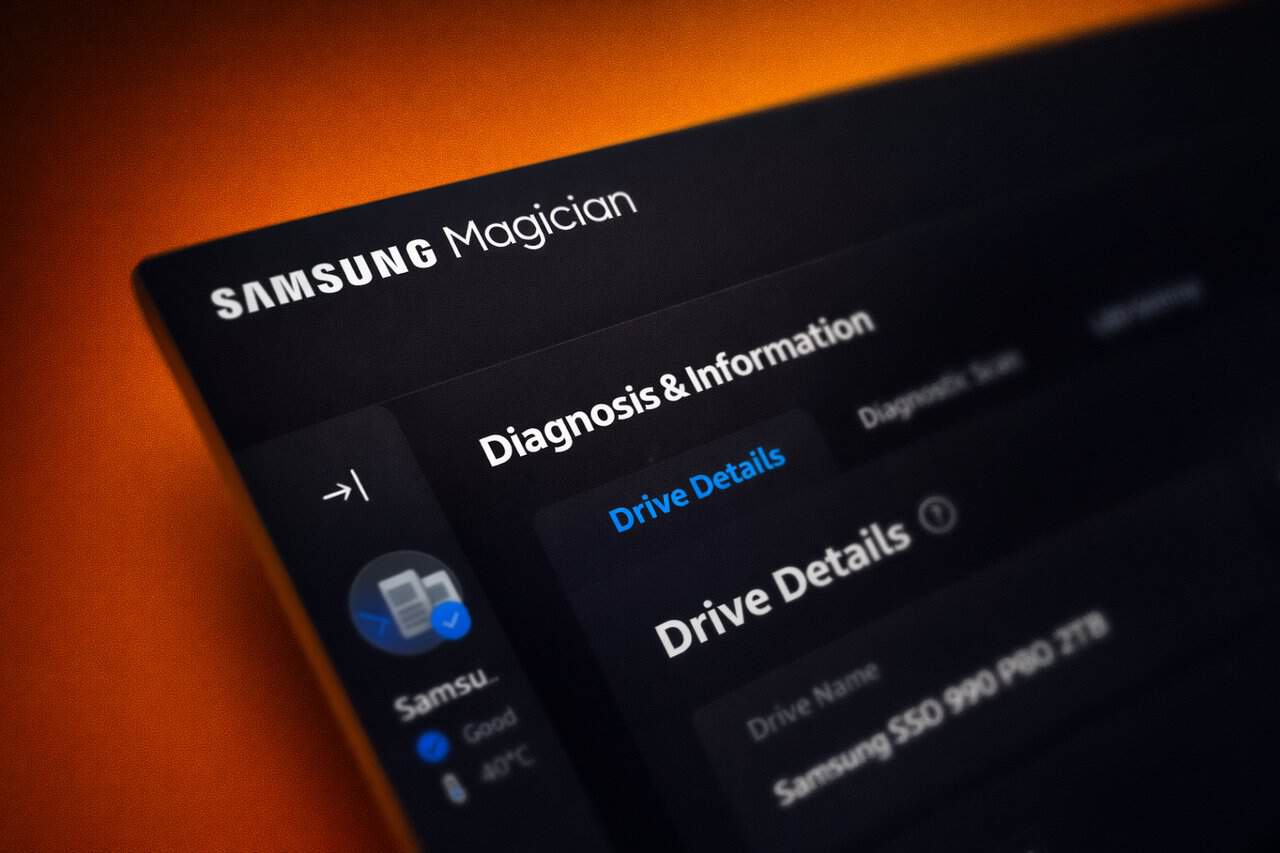
While the C drive issue is being resolved, another Samsung tool is causing trouble. According to user reports highlighted by Neowin, Samsung Magician version 9.0.0 has been failing on many systems since late 2025.
Users report that the app often refuses to launch or crashes immediately. In some cases, the interface suffers from scaling issues, making text unreadable or misaligned.
Other reports mention that SSDs are not detected properly, drive health data is missing, and overall SSD performance appears reduced after installing the update.
Security fix complicates downgrade options
Despite the problems, version 9.0.0 remains important because it patches a high-severity vulnerability tracked as CVE-2025-57836. The flaw could allow DLL hijacking through the installer, making older versions less secure.
This puts users in a difficult position, as reverting to a previous version may expose systems to security risks, while staying on 9.0.0 may result in functionality issues.
Samsung releases Magician v9.0.1.950
Samsung has released a newer update, version 9.0.1.950, which focuses on improving UI and overall user experience. However, it remains unclear whether this update fully resolves the deeper issues affecting SSD detection and performance.
With multiple Samsung-related problems surfacing on Windows 11, users may need to stay updated with both Microsoft patches and Samsung software updates to avoid disruptions.
With March 2026 behind us, it’s time to share the key updates Microsoft rolled out for Excel users. Last month, the company released three major updates. Among them, the headline feature is Edit with Copilot, which is now powered by Work IQ context.
Image credit: Microsoft
The feature allows Copilot to automatically pull relevant information from emails, meetings, chats, and files, helping it execute multi-step edits that reflect the latest work context. As of March, users with a Microsoft 365 Copilot license can take advantage of this smarter editing tool.
The update also brings expanded language support, ensuring Copilot can assist in all standard supported languages. Additionally, Claude Opus 4.6 is now available in the model selector for users with M365 Premium or enterprise Copilot licenses, offering more options for advanced AI-driven editing.
Microsoft further updated the Office Scripts interface to make automation more approachable. The redesign helps users find, create, manage, and share scripts faster, whether they are beginners or experienced in advanced automations. The new UI focuses on clarity and consistency, reducing hassle for anyone automating repetitive Excel tasks.
Last but not least, Excel Web now includes a faster way to locate files. Users can type directly into the search bar on the homepage, and matching Word, Excel, or PowerPoint files appear immediately in a drop-down list. This change eliminates the need to manually scan the homepage for documents, streamlining the workflow for those who manage many files online. You can read more about it in our separate coverage here.
As Microsoft faces increasing scrutiny from the UK’s Competition and Markets Authority (CMA) over its dominance in business software, Proton is stepping in with a privacy-first alternative aimed at organizations looking to move away from Big Tech ecosystems.
Proton has officially launched Proton Workspace, a bundled office suite that combines its existing services into a single subscription. The offering directly targets businesses that rely on Microsoft 365 or Google Workspace, but want stronger privacy guarantees and more control over their data.
Proton Workspace combines email, storage, docs, and more
Proton Workspace brings together a full range of productivity tools under one platform, positioning itself as a complete replacement for traditional office ecosystems.
The Workspace Standard plan includes Proton Mail, Calendar with scheduling tools, Drive for storage, Docs and Sheets for collaboration, Meet for video calls, VPN for secure browsing, and Pass as a password manager.
For businesses with more advanced needs, Workspace Premium adds increased storage, email retention policies, higher participant limits for meetings, and access to Proton’s Lumo AI assistant.
Proton also confirmed that existing Business Suite customers will automatically receive the Standard plan at no additional cost, making the transition seamless for current users.
Privacy and independence are at the core
Proton is heavily emphasizing privacy as its main differentiator. All services in Proton Workspace use end-to-end encryption by default, ensuring that only users can access their data.
The company also highlights its open-source components and strict policy of not using user data for AI training. This stands in contrast to concerns around how larger tech companies handle enterprise data, especially as AI becomes more deeply integrated into productivity tools.
Operating under the Switzerland-based Proton Foundation, the company positions itself outside US jurisdiction, which it claims offers stronger data protection and compliance guarantees for businesses worldwide.
Pricing aims to stay competitive
Proton Workspace is priced to compete directly with established platforms.
Workspace Standard starts at $12.99 per month with annual billing or $14.99 monthly, while Workspace Premium costs $19.99 per month annually or $24.99 monthly.
Proton says the bundled approach delivers better overall value by combining multiple services into a single subscription, reducing the need for third-party tools.
Growing demand for alternatives to Big Tech
The launch comes at a time when the enterprise software market is seeing increased fragmentation and competition. Regulatory pressure on companies like Microsoft, along with ongoing debates around cloud licensing and AI integration, is pushing businesses to explore alternatives.
Tensions in the European market have also intensified following the recent Euro-Office initiative, which sparked a public dispute between ONLYOFFICE and Nextcloud over licensing and open-source compliance.
Proton appears to be capitalizing on this shift, offering a unified, privacy-first platform designed to appeal to organizations concerned about vendor lock-in, data sovereignty, and long-term compliance.
With regulators watching closely and new challengers entering the space, the battle for business productivity platforms is clearly entering a new phase.
Microsoft is simplifying game development across Windows devices with its new Xbox PC Remote Tools. The company has now confirmed that these tools have entered Public Preview, offering developers a faster way to deploy, test, and debug games on remote Windows desktops and handhelds.
In the announcement blog post, Xbox Senior Technical Program Manager Meg Shea notes that the “Xbox PC Remote tools are designed to streamline your development for Windows games, regardless of which storefront you ship on, and do not have any required dependencies on the Microsoft Game Development Kit (GDK) or the Xbox PC App.”
The Xbox PC Remote Tools include the following:
Xbox PC Toolbox: a user-friendly app to set up and pair remote Windows devices
Xbox PC Remote Debugger: a Visual Studio extension for incremental deployment and debugging over a secure communication channel
Xbox PC Remote Iteration Command Line Tools: for deploying and launching game builds via scripts or CI pipelines
Xbox PC Remote Iteration APIs: for integrating remote workflows into your engine or tools (Note – the APIs are currently in preview, and we will share more details on them in the near future. Please reach out to your Microsoft representative if you want more details on the Xbox PC Remote Iteration APIs and their availability.)
Microsoft has shared a detailed breakdown for game developers looking to integrate the Xbox PC Remote Tools into their workflow:
Workflow Step
Before
With Xbox PC Remote Tools
Device Setup & Pairing
Manual installs, firewall tweaks, inconsistent setup across devices
Secure provisioning and device pairing in minutes via the Xbox PC Toolbox
Deploying Builds
Full builds copied over network, slow and error-prone
Consistent incremental deployment sends only the changed files, dramatically speeding up iteration
Debugging on Remote Devices
Manual, multi-step download, installation, and configuration required. Secure connection not available in all scenarios
Easily acquire the Xbox PC Remote Debugger in the Visual Studio marketplace. Press F5 in Visual Studio to deploy, launch, and attach debugger
Managing and Iterating with Multiple Remote Devices
No centralized view, hard to track paired devices or manage connections
The Xbox PC Remote Tools provide an easy way to view and iterate on paired devices
Automation & CI/CD Integration
No consistent tooling or APIs for scripting remote workflows
Xbox PC Remote Iteration command-line tools and APIs enable integrations in your tool chains and engine workflows
Here’s how to try it out. First, install and launch the Xbox PC Toolbox to configure your development PC and pair it with your target Windows devices. Once paired, add the Xbox PC Remote Debugger extension to Visual Studio 2022 or 2026, then press F5 to build your game, deploy it to the remote device, and start debugging.
Next, make changes on your dev PC and redeploy only the modified files to speed up iteration. You can also integrate remote workflows into your studio’s toolchain using the wdRemote and wdEndpoint command-line tools or the Visual Studio extension, all built on a public API available via NuGet. Moreover, Microsoft encourages developers to provide feedback through Feedback Hub or by contacting their representative to help refine the tools.
The UK’s Competition and Markets Authority (CMA) is preparing to launch a formal investigation into Microsoft in May 2026, targeting the company’s business software ecosystem and its growing influence across cloud and AI-powered tools.
The probe will assess whether Microsoft should receive a Strategic Market Status (SMS) designation, a classification that would grant regulators stronger powers to intervene in how the company operates within the market.
Focus on Windows, Office, Teams, and Copilot
The investigation will cover Microsoft’s core enterprise products, including Windows, Microsoft Word, Microsoft Excel, Microsoft Teams, and Microsoft Copilot. According to the CMA, hundreds of thousands of organizations across the UK rely heavily on these tools for daily operations.
Regulators are particularly concerned about Microsoft’s software licensing practices, which may give the company an advantage over competitors in the cloud space. The CMA believes certain licensing terms could make it harder for rival providers to compete fairly, especially when businesses attempt to integrate alternative cloud services.
Cloud Competition and Licensing Under Scrutiny
A major part of the investigation will focus on how Microsoft structures its licensing across cloud and software offerings. The CMA is evaluating whether these practices restrict competition or discourage customers from using competing platforms.
If the CMA determines that Microsoft holds Strategic Market Status, it could impose rules designed to ensure fairer access and interoperability. This may include forcing changes to licensing terms or requiring Microsoft to open up parts of its ecosystem to competitors.
AI Integration Raises New Regulatory Questions
Artificial intelligence is expected to play a central role in the investigation. The CMA sees Microsoft’s rapid integration of AI, especially through Copilot features across its software stack, as a transformative shift in the business software landscape.
Regulators aim to ensure that competing AI providers can integrate with widely used Microsoft products. The goal is to allow businesses to combine different AI solutions rather than being locked into a single ecosystem.
Builds on Previous CMA Cloud Scrutiny
This move follows earlier scrutiny of Microsoft’s cloud business in 2025, where concerns around competition and licensing were already raised. The upcoming investigation signals a deeper regulatory push into how Microsoft’s ecosystem operates as a whole, particularly as AI becomes more embedded in enterprise tools.
OpenAI has closed its latest funding round with $122 billion in committed capital, giving the company a post-money valuation of $852 billion. The capital will support expansion across consumer, enterprise, and developer AI platforms, reinforcing OpenAI’s position as a core infrastructure provider for intelligent systems.
SoftBank and a16z lead a $122 billion funding round
The round was led by SoftBank and a16z, with participation from strategic partners Amazon, NVIDIA, and Microsoft. Other investors include D.E. Shaw Ventures, TPG, ARK Invest, BlackRock, Sequoia Capital, and over $3 billion raised from individual investors via bank channels. OpenAI will also be added to several ARK Invest exchange-traded funds, widening global access to the company’s growth.
OpenAI highlighted that consumer adoption of ChatGPT has now reached more than 900 million weekly active users and 50 million subscribers. Enterprise adoption is growing rapidly, currently accounting for over 40% of revenue, and GPT-5.4 is powering record engagement across agentic workflows. Codex usage has surged fivefold in three months, with APIs processing over 15 billion tokens per minute.
The company says the funding will support compute infrastructure expansion, with partnerships spanning NVIDIA, AMD, Microsoft, AWS, Oracle, Google Cloud, and SoftBank. This infrastructure underpins the next-generation models that will feed OpenAI’s unified “AI superapp,” combining ChatGPT, Codex, browsing, and agentic capabilities into a single system for consumers and enterprises alike.
With revenue currently at $2 billion per month, OpenAI claims it is growing faster than the tech giants of the Internet and mobile eras, including Alphabet and Meta. The company sees this round as a way to scale intelligence globally and drive the next wave of productivity, innovation, and economic impact.
Google is rolling out a long-requested feature that finally allows users to change their Gmail address without creating a new account. The update is currently limited to users in the United States and is gradually becoming available through account settings.
Gmail address changes arrive after years of user requests
For years, Gmail users have been stuck with the email address they chose when creating their account, even if it became outdated or unprofessional. With this new feature, Google is addressing that limitation by allowing users to switch to a new primary Gmail address while keeping their existing account intact.
Once changed, the old email address doesn’t disappear. Instead, it becomes an alternate address linked to the same account. Users can still sign in using either email, and messages sent to both addresses will continue to arrive in the same inbox.
Importantly, Google confirms that no data is lost during the transition. All emails, files, settings, and connected services remain unchanged, making the process seamless compared to creating a brand-new account.
You asked, we delivered. If you’re a U.S. Google user, you can now change your account username for tools like Gmail, Photos, Drive and more — while keeping your emails, data and account history. Here’s what to know:
1️⃣ You can choose any available @gmail.com username.
Despite its flexibility, the feature comes with a few restrictions. Users can only change their Gmail address once every 12 months, which prevents frequent switching.
Additionally, the newly selected address cannot be deleted once it’s set. However, users do have the option to revert back to their old email if needed.
The feature is currently limited to accounts ending in @gmail.com, meaning it won’t apply to custom domain emails managed through Google Workspace.
Gradual rollout with limited availability
The option to change your Gmail address appears directly within Google Account settings, but it’s not yet available to everyone. Google is rolling out the feature gradually, so some users may need to wait before they see it.
This update solves a long-standing frustration for Gmail users and gives them more control over their digital identity, especially for those who created accounts years ago with usernames that no longer reflect their personal or professional image.
The change affects Windows 11 versions 23H2, 24H2, and 25H2, along with Windows 10 22H2 and supported Windows Server releases. As of updates released on or after March 10, 2026, the SaRA command-line utility has been removed entirely from the operating system.
SaRA quietly phased out after reliability issues
SaRA has long served as a go-to diagnostic and repair tool for Microsoft 365, Office, Outlook, and various Windows-related issues. It allowed users and IT admins to automatically detect and fix problems such as installation failures, activation errors, and connectivity issues.
The tool also offered guided troubleshooting, detailed diagnostics, and recommended fixes, making it especially useful in enterprise environments.
However, users had already begun noticing issues with SaRA prior to its official removal. Reports indicated that the tool failed to launch in some cases, suggesting Microsoft had already started phasing it out behind the scenes.
Security and modernization drive the change
Microsoft states that the removal is part of a broader effort to improve security and harden the operating system. Legacy tools like SaRA can introduce potential vulnerabilities, especially when they rely on older scripting environments or elevated permissions.
To replace SaRA, Microsoft is directing users to the Get Help app, which now includes expanded troubleshooting capabilities.
Get Help gains a command-line replacement for SaRA
The new approach consolidates troubleshooting into the Get Help platform, which now supports command-line operations similar to SaRA.
Microsoft has introduced a new environment called GetHelpCmdLine, effectively replacing the older SaRACmdLine interface. Existing SaRA scripts will no longer function, but equivalent troubleshooting scenarios remain supported through the new tool.
This shift aims to provide a more secure and unified troubleshooting experience while maintaining automation capabilities for advanced users and administrators.
Part of broader Windows changes
The deprecation of SaRA comes alongside other ongoing changes in the Windows ecosystem. Microsoft is currently building a new engineering team focused on improving Windows 11 performance and user experience, with a strong emphasis on developing 100% native applications instead of web-based components.
Additionally, the company recently released the emergency update KB5086672, addressing the 0x80073712 installation error that affected some users during updates.
With SaRA now removed, users and IT professionals will need to transition to the Get Help platform as Microsoft continues to modernize its support tools and tighten system security.
Late last month, Microsoft released KB5079391 preview for Windows 11 version 24H2 and 25H2 with Smart App Control, Narrator, and File Explorer improvements. However, many users reported that after installing this non-security update, they were hit by installation error 0x80073712.
After a few days, the company confirmed the issue and pulled the update, noting that “Some devices might encounter the following error while installing this update: Some update files are missing or have problems. We’ll try to download the update again later. Error code: (0x80073712).”
KB5086672 hotfix resolves the 0x80073712 installation error caused by the March 2026 non-security update
If you are among the ones affected by the installation error when trying to install the KB5079391 update, the good news is that the issue has finally been resolved. Microsoft has released an out-of-band update, KB5086672, to fix installation issues caused by the March 2026 optional update for Windows 11 version 24H2 and 25H2.
According to Microsoft, affected users can now install the update successfully by checking for updates in Windows Update. If you want to manually install the update, you can do so by downloading it from the Microsoft Update Catalog.
It’s worth noting that this hotfix includes all features and improvements from KB5079391. However, some features are rolling out gradually and may not appear immediately after installation.
If you have been playing Fortnite for quite some time, you are probably familiar with the server downtime routine. Well, Epic Games will be rolling out update 40.10 across PS5, PlayStation 4, Xbox Series X|S, Xbox One, PC, Nintendo Switch, Switch 2, and Android. That also means Fortnite servers will be down for the time being. If you have been wondering when the Fortnite servers will go down, here’s an update.
Fortnite server will go down in a few hours as Epic readies to roll out update 40.10 across all platforms
Over on X, Epic Games took to the Fortnite Status handle to announce the downtime. The company notes, “Downtime for v40.10 begins at 4 AM ET (8 AM UTC) [April 1] with matchmaking ending shortly beforehand.”
As usual, we can expect the downtime to last around 90 minutes. This means servers should return by approximately 5:30 AM ET, or 10:30 AM BST for UK players, although timings may vary if issues arise during the update rollout.
Wondering what’s coming with Fortnite update 40.10? Well, the April 1 update introduces Fortnite OG Season 8, bringing the game back to Chapter 1, Season 8 from 2019. The update includes map changes, with the return of the volcano and refreshed points of interest following recent in-game earthquakes.
Epic is also preparing the return of the Avengers limited-time mode. The mode will once again feature Avengers versus Chitauri gameplay, with updated loot mechanics compared to its original release. That’s not all, the latest patch is also expected to reveal new Super Styles in the Battle Pass. There are also early signs pointing to changes for Save the World, which may move closer to a free-to-play model.
In separate Fortnite news, Epic Games has also confirmed that it has “resolved an issue with players being unable to log in to Fortnite servers.” The company is monitoring the issue to “ensure logins and matchmaking have returned to normal.”
European companies, including Nextcloud, have launched Euro-Office, a new open-source alternative to Microsoft Office, but the move has already triggered conflict with a longtime partner.
Euro-Office launch sparks immediate backlash
Euro-Office is positioned as a European-built productivity suite aimed at reducing reliance on major U.S. tech platforms like Microsoft Office. The initiative aligns with broader efforts across Europe to strengthen digital sovereignty and keep data and infrastructure within the region.
However, the launch quickly created friction with ONLYOFFICE, a major contributor to the Nextcloud ecosystem for nearly a decade.
ONLYOFFICE announced it is suspending its 8-year partnership with Nextcloud. The integration previously allowed users to edit and collaborate on documents directly within the Nextcloud platform using ONLYOFFICE’s tools.
Licensing dispute and partnership breakdown
ONLYOFFICE claims that Euro-Office violates the terms of the AGPL v3 license. According to the company, the new project allegedly uses its code without proper attribution and fails to preserve required branding, logos, and licensing notices.
The company also stated that the project was launched without any prior discussion, despite the long-standing collaboration between the two sides.
Beyond licensing concerns, ONLYOFFICE pointed to earlier tensions, including allegations of employee poaching and attempts to influence shared customers. These issues appear to have contributed to the sudden breakdown in relations.
Despite the dispute, ONLYOFFICE confirmed that existing customers and partners will not be affected by the decision.
Nextcloud cites trust and transparency concerns
Nextcloud defended the creation of Euro-Office by raising concerns about ONLYOFFICE’s origins and development process. The company cited issues related to transparency, claiming that contributions were sometimes ignored and that development lacked openness.
It also referenced geopolitical concerns tied to ONLYOFFICE’s Russian roots as a factor in the decision to fork and build an independent alternative.
Euro-Office aims to provide a fully European-controlled solution, reducing reliance on external vendors while maintaining compatibility with widely used office formats.
Broader implications for the open-source ecosystem
ONLYOFFICE remains known for its strong compatibility with formats such as DOCX, XLSX, and PPTX, and it is often preferred over alternatives like LibreOffice in browser-based editing environments.
The dispute highlights a recurring challenge in open-source development: balancing licensing compliance with collaboration and innovation.
It also reflects a growing shift in Europe toward technological independence, especially in critical software infrastructure.
Conflicts like this are not new in the industry. LibreOffice previously criticized Microsoft’s Ribbon interface, showing how disagreements over direction and standards continue to shape the productivity software space.
Helldivers 2 appears to be experiencing a server outage, leaving many players unable to access the game. Reports started surfacing across Reddit, where users described getting stuck during the opening cinematic or encountering connection errors.
Players report Helldivers 2 is down
According to multiple player reports on Reddit, the issue occurs right after launching the game. Users can watch the opening cinematic, but once it ends, they receive an “unable to connect to servers” error message.
Some players report an even worse scenario, where they cannot skip the cinematic at all, effectively locking them out before reaching the main menu.
DownDetector Confirms Widespread Outage
Data from DownDetector suggests that the problem is not isolated. Reports have spiked, indicating a broader outage affecting a large portion of the player base.
At the time of writing, there is no official statement from the developers regarding the issue or its cause.
Since there is no communication from the development team yet, the exact reason behind the outage remains unclear. Server instability, backend issues, or maintenance problems could be possible causes, but nothing has been confirmed.
For now, affected players can only wait for an official fix or update from the developers.
In a recent tweet, as spotted by Windows Central, Rudy Huyn confirmed that his team will focus on building apps that are fully native, avoiding WebView or other web-based UI layers.
This move directly targets one of the biggest long-standing issues in Windows 11, its fragmented UI stack.
Currently, Windows relies on a mix of frameworks, including Win32, UWP, WinUI, WebView, and even React Native. This combination often leads to inconsistent design, uneven performance, and slower responsiveness across different parts of the OS.
I’m building a new team to work on Windows apps! You don’t need prior experience with the platform, what matters most is strong product thinking and a deep focus on the customer.⁰⁰If you’ve built great apps on any platform and care about crafting meaningful user experiences,…
Microsoft has leaned into frameworks like Electron in recent years due to faster development cycles and cross-platform flexibility. However, this approach has drawn criticism for negatively impacting performance and system responsiveness.
Microsoft aims to fix the inconsistent Windows experience
Huyn’s new team appears to signal a course correction.
By prioritizing native frameworks like WinUI, Microsoft could deliver faster, more responsive applications with a more cohesive design language across Windows 11.
Native apps typically reduce latency, improve system integration, and avoid the overhead associated with web-based rendering layers. This could address common complaints about sluggish UI elements and inconsistent behavior between system apps.
The shift also suggests Microsoft wants tighter control over the Windows experience, rather than relying on hybrid or web-driven solutions that can dilute overall performance.
While no timeline or specific features have been announced yet, this initiative could represent a long-term investment in making Windows 11 feel more unified, faster, and polished.
If executed properly, the move back to native development may become one of the most important changes to the Windows ecosystem in recent years.
Cyberpunk 2077 is officially getting a VR experience, but it won’t be what most players expect. Instead of a full VR port, CD Projekt RED has partnered with Zero Latency VR to create a separate, custom-built experience designed specifically for location-based venues.
The project will roll out to more than 150 locations across 30 countries, bringing players into Night City through free-roam VR environments rather than home setups.
Built For Free-Roam VR With Full-Body Movement And Multiplayer
The experience uses Zero Latency’s free-roam VR technology, allowing players to physically walk through real-world spaces while exploring virtual environments. It supports wireless headsets and full-body tracking, creating a more immersive and social gameplay format.
Multiplayer is a key focus, with shared sessions designed to let groups experience Night City together. The concept aligns with previous Zero Latency titles, such as Far Cry VR, which emphasize cooperative gameplay and physical interaction.
Not A Full Game Port, But A Social VR Experience
This version of Cyberpunk 2077 is not a direct adaptation of the original game. Instead, it offers a condensed, purpose-built experience focused on exploration and immersion rather than replicating the full RPG.
Players can expect a new way to interact with Night City, built around movement, presence, and group gameplay rather than traditional controls.
Release Details Still Unknown
CD Projekt RED and Zero Latency have not revealed gameplay specifics or a release date yet. More details are expected as the rollout approaches.
The announcement comes amid broader shifts in the VR and gaming space. Meta recently laid off hundreds of employees, including teams within Reality Labs, signaling ongoing challenges in the VR sector.
When Adobe pulled the plug on Flash Player at the end of 2020, millions of browser games went dark overnight. For years, Flash had been the backbone of browser gaming. Its shutdown felt like an extinction event.
But something unexpected happened. Browser gaming didn’t collapse. It evolved.
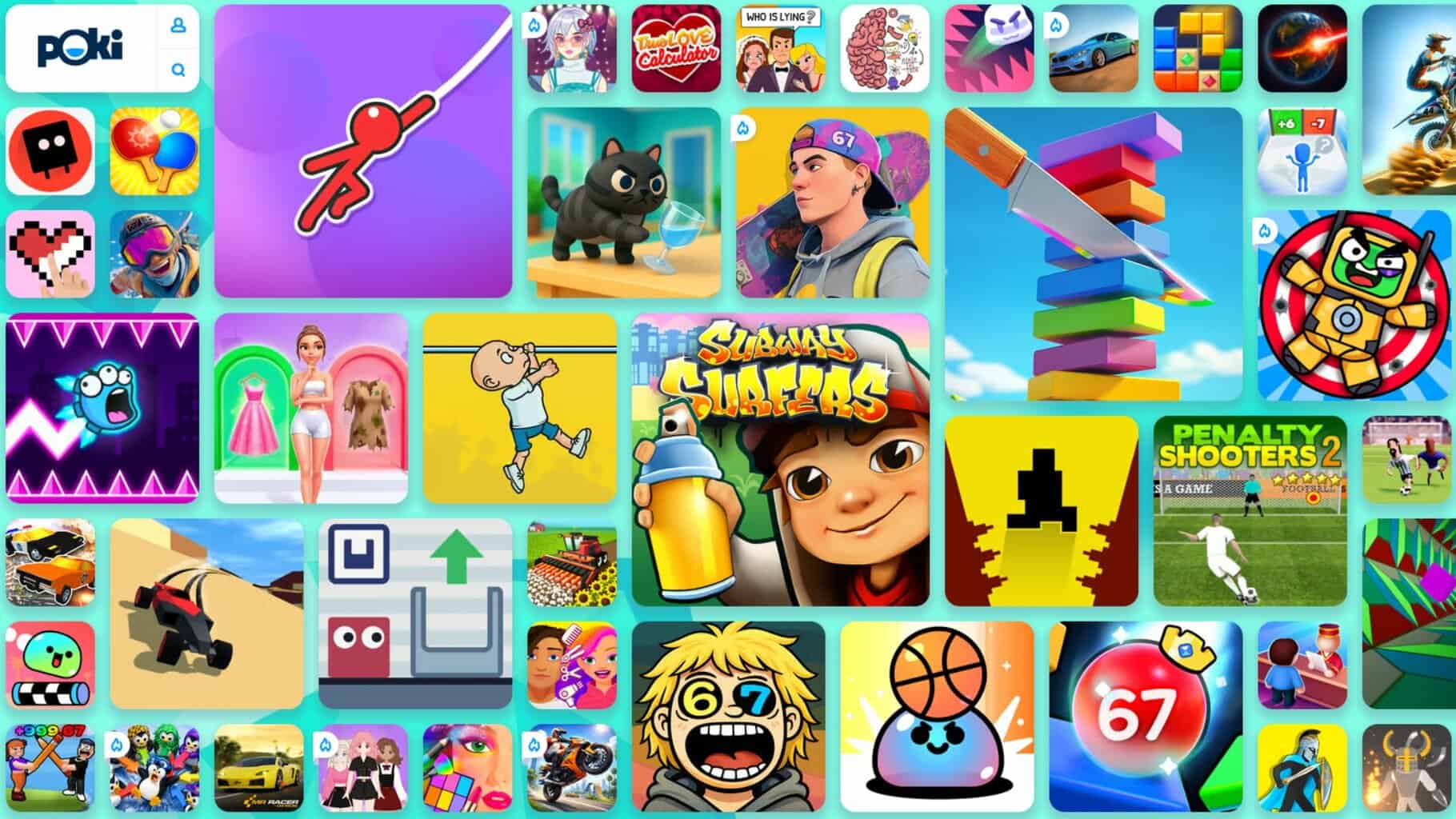
Today, platforms like Poki serve over 100 million monthly players, with 625 million total players recorded in 2025. The technology that was supposed to kill browser gaming actually made it stronger.
In a recent interview with Mobidictum, Poki co-founder Michiel van Amerongen shared insights into how the platform navigated Flash’s collapse and grew into one of the world’s largest web gaming platforms. The company’s journey offers a window into how browser gaming survived and thrived.
The flash player collapse
Flash Player officially ended support on December 31, 2020. Chrome, Firefox, Edge, and all major browsers stopped supporting the technology immediately.
Adobe cited security vulnerabilities as the primary reason for the shutdown. Flash had become a favorite target for cyberattacks, with frequent exploits appearing faster than Adobe could patch them. Microsoft announced it would remove Flash support from Edge and Internet Explorer by the end of 2020, giving developers time to transition.
For players accustomed to quick browser games during lunch breaks, the loss was immediate. Popular titles vanished. Entire gaming sites went offline. But developers had been preparing for this moment longer than most players realized.
HTML5 had been gaining ground since the mid-2010s. Unlike Flash, which required a separate plugin, HTML5 runs natively in browsers. Players can start games instantly without installing anything. The technology offered something Flash never could: true cross-platform compatibility. Games built with HTML5 work identically on desktop, mobile, and tablet without modification. By the time Flash shut down, the transition was largely complete.
Platform consolidation around quality
Flash’s death forced consolidation around quality platforms. During Flash’s dominance, browser games were scattered across thousands of small websites riddled with ads. Quality control was nonexistent. Finding a good game meant wading through dozens of broken links.
Post-Flash, platforms that invested in curation took over. Poki, founded in Amsterdam in 2014, built its model around quality over quantity. Every game is tested. Performance matters. The catalog is deliberately selective.
This approach worked. As van Amerongen explained to Mobidictum, Poki now hosts over 1,500 games from 600+ developer partners. The platform features everything from skill-based platformers like Level Devil to racing games like Drive Mad, casual puzzle games like 2048, and mobile hits like Subway Surfers that found a second life on browsers.
Internet speeds increased dramatically. In 2015, the average US download speed was 12.6 Mbps. By 2025, it hit 242 Mbps. Faster connections meant games could load complex assets without frustrating wait times.
Browsers themselves got significantly faster and more powerful. They can now handle graphics-intensive 3D games that would have struggled to run just a few years ago.
Mobile devices became powerful enough to run browser games smoothly. Players could jump into graphically intensive titles on their phones without downloads or storage concerns. If browser games are running slow on your PC, check out how to make browser games run faster.
The new browser gaming ecosystem
Platforms like Poki changed how developers reach players. Instead of scrambling for visibility across dozens of portals, developers could partner with established platforms that handled distribution and player acquisition.
Partnerships with established studios followed. SYBO Games, creators of Subway Surfers, launched browser versions through Poki. The mobile game that had been downloaded over 4.5 billion times found a second life on the web.
Drive Mad has been played over 300 million times. Retro Bowl accumulated nearly 1 million upvotes from players. Smash Karts delivers competitive multiplayer racing that rivals dedicated apps. The gap between browser games and downloaded games has narrowed dramatically.
The technical improvements keep coming. Browsers are getting better at handling high-quality graphics. Game engines like Unity and Unreal now make it easy for developers to create browser versions of their games.
Flash Player’s death didn’t end browser gaming. It forced an evolution that made browser gaming better than it ever was with Flash. The 100 million monthly players aren’t nostalgia traffic. They’re proof the model works.
Now that AI has advanced, text to speech platforms are much more reliable. If you’re looking for the best AI voice generators, we narrowed down 8 that have perfected the art of turning your text into realistic human speech, cloning voices, and more.
8 Best AI Voice Generators
Let’s take a closer look at how the top AI voice platforms compare:
Typecast currently leads the pack when it comes to fast text-to-speech, varied voices for any project, and the freedom to tweak voices yourself.
Its output is of a professional standard, so you no longer have to spend the time and money hiring voice talent.
The process starts by submitting a basic script, which it then turns into expressive, voice actor quality audio. Its Smart Emotion feature can capture tone, pacing, and emotion remarkably well with just one click of a button. These aspects can then be fine-tuned manually with sliders.
Typecast’s text-to-speech tool offers 700+ authentic sounding voices. These can be sorted by style, personality, age, gender, and other characteristics, so you can find the perfect fit for any project. Moreover, you can use voice cloning to create custom voices for consistent branding or storytelling.
The platform is built around an intuitive script-based editor, where you simply type or paste text and assign a voice, allowing you to create voiceovers in minutes, not days.
For developers, its API adds flexibility, making it possible to integrate voice and avatar generation into apps or workflows.
Typecast can be used for free, with a 5-minute download limit a month, and select voices.
It also offers affordable Basic, Pro, and Business Plans for unlocking a commercial license, all voices, and download lengths starting from 60 minutes. Voice generation within the platform is unlimited.
Overall, Typecast is a well-rounded, highly creative tool that goes far beyond basic voice generation. It’s easy enough to pick up quickly, but with enough depth to create polished, expressive content once you explore its features.
Whether you’re a podcast or Youtuber, ad agency or larger enterprise, Typecast gives you the speed, variety, and control to find the perfect AI voice for your workload.
2. Murf AI – Best Voice Generator API and Integrations
Murf AI is an AI voice generator designed for fast, professional voiceovers. It converts text into natural-sounding speech with minimal effort.
The platform offers over 200 voices across multiple languages and accents. This variety helps users match the right voice to each project.
Murf AI provides strong customization features. You can adjust pitch, speed, tone, and emphasis with simple controls. It also allows you to add pauses and fine-tune pronunciation.
Voice cloning is available for consistent branding across content. This lets teams reuse a specific voice without recording again.
Another feature is the voice changer. This lets you transform raw recordings into polished AI-generated speech.
It also offers AI dubbing for multilingual projects, where you can translate and generate voiceovers in different languages. This is useful for global content distribution.
Murf AI stands out with its powerful API and a wide range of ready-to-use integrations. These include popular creative and productivity tools like Canva, Google Slides, and Adobe Audition.
These integrations let users add voiceovers directly inside their existing workflows. You can create presentations, videos, or audio projects without switching platforms. This saves time and reduces production friction.
The API extends this flexibility even further. Developers can automate voice generation at scale, triggering voiceovers from scripts, apps, or content systems. This is especially useful for teams producing large volumes of content.
Murf AI offers 10 minutes of voice generation for free and scalable premium plans starting from $29 per month.
Speechify is an impressive text-to-speech tool designed for accessibility, productivity, and content consumption. It converts text from documents, webpages, PDFs, and even images into natural-sounding audio across mobile and desktop devices.
The platform offers hundreds of voices in dozens of languages, giving users flexibility in how content is heard. You can adjust playback speed, switch between voices, and tailor the listening experience to match your preferences. It also includes OCR scanning, which allows it to read printed text aloud instantly, making it especially useful for students and professionals.
It supports cross-device syncing, so users can start listening on one device and continue on another without interruption. This makes it ideal for on-the-go use.
Where Speechify truly stands out is its celebrity voice library. It features officially licensed voices from well-known figures like Snoop Dogg and Gwyneth Paltrow, rather than generic imitations. These voices add personality and familiarity, making listening more engaging.
Because of this, Speechify is the best option for celebrity voices. It combines authenticity with entertainment, turning everyday content into a more immersive experience.
You can try Speechify for free before committing to one of its premium plans. Depending on your requirements, it also offers voice cloning and other common AI voice tools.
ElevenLabs is a powerful AI voice platform known for its variety of different tools. It offers text-to-speech, voice cloning, dubbing, and multilingual support across dozens of languages.
Most of its voices sound natural, expressive, and emotionally aware. However, it also provides cartoony and other entertaining voices for fun or creative projects. You can also clone voices or design custom ones for branding purposes.
The platform includes low-latency generation, making it suitable for real-time use cases. It also provides a robust API. Developers can integrate voice generation into apps, products, and workflows at scale.
A major difference is its Agents service. ElevenLabs Agents lets you build conversational voice AI that can speak, listen, and respond like a human. It combines speech-to-text, language models, and text-to-speech into one system.
These agents can handle real-time conversations, automate support, and complete tasks. They can connect to tools, access knowledge bases, and take actions during conversations.
They also support interruption handling, natural turn-taking, and emotional responses. This makes interactions feel fluid and human-like.
You can try either service for free and scale up to a monthly or credits-based plan when ready. The API is also available via dedicated plans.
Overall, ElevenLabs stands out for realism and conversational AI. Its Agents service pushes it beyond voice generation into full voice-powered automation.
NaturalReader is a simple AI text-to-speech tool designed for reading and basic voice generation. It focuses on turning written content into natural audio for both personal and light commercial use.
One of its key features is broad file support, including PDFs, Word documents, webpages, and even images through OCR scanning. This makes it easy to listen to almost any type of content. It also offers 200+ voices in 50+ languages, with adjustable speed, pauses, and pronunciation controls.
NaturalReader includes useful reading aids like highlighting, auto-scrolling, bookmarks, and annotations. These features help users follow along and retain information. It can also convert text into MP3 files for offline listening.
For more advanced use, the commercial version adds a studio editor, voice cloning, and AI script assistance for creating voiceovers.
This supports writing, editing, and organizing scripts directly in the platform. You can also assign different voices to different sections, adjust speed, and control pauses between paragraphs for better pacing.
NaturalReader works well across several use cases. Students use it for reading and studying. Professionals use it to review documents on the go. Creators use it for simple voiceovers and narration. Overall, it prioritizes ease of use, accessibility, and flexibility.
You get access to basic voice for free, with personal, commercial, and business plans depending on your requirements.
Async is aimed at creators, developers, and businesses who need scalable voice content for videos, apps, podcasts, or accessibility features.
One of its main features is high-quality text-to-speech synthesis, producing lifelike voices with adjustable tone, speed, and emotion. This allows users to tailor narration for different contexts, from professional presentations to conversational dialogue.
Another key capability is voice cloning or custom voice creation, enabling users to generate a consistent voice identity for branding or character work.
The Studio area functions as a unified creation workspace. Here, users can record, edit, and generate both audio and video content in one place. It includes AI-powered editing tools such as transcript-based editing (editing audio by changing text), automatic subtitles, AI dubbing, and clip generation for short-form content.
The Hosting Hub is focused on publishing and distribution. It allows users to host podcasts on a dedicated Async page and publish episodes directly to major podcast platforms. This turns Async into not just a creation tool, but also a delivery system for finished content, helping creators manage their full pipeline from production to publication.
Async has a different pricing structure depending on whether you’re a creator or developer. Creators can try it for free, but it’s worth upgrading to access all features.
If you are already a Canva user, you can access its AI voice tools. While the variety and features aren’t as comprehensive as other picks, it’s a natural choice if you’re already paying for the platform.
It lets you instantly convert written text into speech using a selection of AI voices with different accents, tones, and genders. You can simply type a script, choose a voice, and generate audio in seconds, making it useful for videos, presentations, social media content, and marketing materials.
A key advantage is its tight integration with Canva’s editing workspace. The generated voice can be added directly to timelines, synced with visuals, and combined with animations, subtitles, and music without leaving the platform.
It also supports multiple languages and accents, helping creators localize content for different audiences.
Currently the platform only supports scripts up to 1,000 characters, but you can create multiple if your project is longer.
Canva’s AI voice generator can be used for free with a limited number of voices before you must upgrade to a paid plan.
Honorable mention goes to voice-generator.com, which provides a completely free text-to-speech tool for unlimited usage and full commercial rights.
All you have to do is visit the site and you get immediate access to an area to type your script and 20 voices.
The voices are of moderate quality and while you cannot do any advanced edits, you can change the speed. It also lets you produce separate audio files for each designated speaker.
Alongside text-to-speech, it has separate tools for converting the text of a PDF or EPUB file into audio.
Although there isn’t much here for anyone beyond a casual creator, it’s free and is a good place to get accustomed to using AI voice tools.
Verdict – Best AI Voice Generators
Users are almost spoilt for choice when it comes to best AI voice generators. However, in 2026, Typecast provides the best all-round package. Its one-click voice intelligence already succeeds at emotive and realistic narration, yet you also get the freedom to tweak it yourself. That’s without mentioning its huge voice library and voice cloning features.
Murf or ElevenLabs might be better options for those looking to integrate text-to-speech and AI voices into existing workflows, while Speechify and NaturalReader are better for AI reading than creating.
What’s your favorite AI voice generator? Let us know in the comments below!
At the time, users reported repeated crashes and prompts to start Outlook in Safe Mode. The problem was first reported earlier this month, affecting older builds of Outlook running the latest Teams Meeting Add-in (version 1.26.02603). Well, the issue has now been resolved.
In an official document, first spotted by Bleeping Computer, Microsoft noted that “a fix to correct the issue… will be included in Microsoft Teams version 26058.712.4527.9297.”
The company has further encouraged affected users to update their Outlook client to the latest build to prevent further crashes. For those who can’t update immediately, Microsoft recommends performing an Online Repair for click-to-run installations, which reinstalls all Office apps.
Another temporary workaround is disabling the Teams Meeting Add-in by opening Outlook in Safe Mode. Then, go to File > Options > Add-ins > Go. Next, make sure to uncheck the Microsoft Teams Meeting Add-in for Microsoft Office in the COM Add-ins dialog and click OK. Finally, restart Outlook, and you should be good to go.
NVIDIA has started rolling out DLSS 4.5, introducing Dynamic Multi Frame Generation and a new 6X frame generation mode. The update is arriving quietly through the NVIDIA app beta and appears to be staged ahead of a broader release later today.
Early signs of the rollout were first spotted by users, suggesting the update is already being distributed over the air, even if it is not fully accessible yet.
Early Rollout Detected Through NVIDIA App Beta
The DLSS 4.5 update is currently limited to GeForce RTX 50 series GPUs and requires users to opt into the NVIDIA app beta. Reports indicate that key components are already being pushed, including Streamline 2.11 files and DLSSG version 310.6.0.
The update appears through NVIDIA’s OTA delivery system, but it does not activate automatically for all users. It becomes visible when DLSS Override is enabled, which suggests NVIDIA is gradually enabling features before the official launch.
Some Reddit users have managed to access the new functionality manually using tools like Profile Inspector, confirming that the core components are already present.
Dynamic Multi Frame Generation Introduces Real-Time Scaling
The standout feature in DLSS 4.5 is Dynamic Multi Frame Generation, which changes how frame generation behaves.
Instead of using a fixed multiplier, the system now adjusts frame generation dynamically based on workload and performance conditions. This approach allows the GPU to scale frame output in real time, improving smoothness without relying on a static preset.
This marks a shift from previous DLSS implementations, where users had to choose between fixed modes like 2X or 4X frame generation.
New 6X Mode Pushes Frame Generation Further
DLSS 4.5 also introduces a new 6X Multi Frame Generation mode, expanding beyond the previous 4X limit.
With 6X enabled, the system can generate up to five AI frames for every traditionally rendered frame. This significantly increases perceived frame rates, especially in demanding scenarios like path-traced games.
Early performance estimates suggest up to 35% higher 4K performance compared to the previous 4X mode, although real-world results will likely vary depending on the title and hardware configuration.
Staged Release Suggests Imminent Full Launch
The current rollout behavior indicates that NVIDIA is staging the release carefully. Features exist within the software but remain partially hidden until the full update goes live.
This approach allows NVIDIA to validate stability and compatibility before enabling the features globally.
The official rollout is expected to expand later today, making DLSS 4.5 and its new capabilities more widely available to supported GPUs.
Forza Horizon 6 is shaping up to be the first major Xbox first-party release of 2026, and Microsoft has officially kicked off the final preview cycle ahead of launch. As Pure Xbox writes, early access builds have already been distributed to selected content creators, with first impressions beginning to surface across social media.
The preview embargo is set to lift on April 8 at 6 am PT / 9 am ET / 2 pm BST, at which point a full wave of detailed previews and gameplay breakdowns is expected. Not all outlets have received access yet, but a broader media roundup will likely follow once restrictions are lifted.
Early Access Rollout Signals Near-Final Build Confidence
The timing of this early access distribution suggests that Forza Horizon 6 is already in a near-final state. Providing builds more than a month ahead of release typically indicates strong internal confidence in performance, stability, and overall polish.
While early impressions remain limited due to the embargo, expectations point toward a refined version of the established Horizon formula rather than a major gameplay overhaul. The focus appears to be on iteration, performance, and content scale rather than radical changes.
Microsoft’s decision to push builds this early also reflects a well-structured marketing timeline, with the preview phase now entering its final stretch before launch.
Launch Timeline and Pre-Order Incentives
Forza Horizon 6 will launch in early access on May 15, followed by a full global release on May 19. Ahead of release, Microsoft has introduced additional incentives for pre-orders, including gift cards and bonus content aimed at boosting early adoption.
The company has also shared PC system requirements and confirmed save sharing functionality, allowing players to move progress seamlessly across platforms within the Xbox ecosystem.
As the embargo lifts and previews go live, Forza Horizon 6 will enter its most critical pre-launch phase, offering the clearest look yet at what Xbox’s biggest racing title of the year has to offer.
Speaking of the latest update, the MCP connectors allow AI tools to work inside the browser instead of working in isolated environments.
This cuts the hassle of constantly copying content, re-explaining tasks, or restarting workflows when switching between tools. MCP Connector keeps AI in the same context where the work already happens. Speaking about the update, Monika Kurczyńska, Director of R&D for browser AI at Opera, says, “Last year, we launched Browser Operator as a first step toward an agentic browser. Now we are opening those capabilities to external AI clients through MCP, so they can act directly inside the browser, not outside it.”
As part of this update, AI clients can now access open tabs, page content, and authenticated sessions. They can also perform tasks such as navigating websites, capturing screenshots, filling out forms, opening new tabs, and running searches.
Popular AI tools, including Claude, ChatGPT, Lovable, OpenClaw, and n8n, can connect immediately. Opera says this creates an open ecosystem for AI developers and users alike.
“This is the next step in making browsers truly agentic. AI can now operate where users work, without needing to recreate context,” Kurczyńska further adds. In the blog post, Opera says that use cases range from application testing and prototyping to automation and workflow management. For instance, developers can test apps in a real browser environment, while prototyping tools can generate designs directly on live interfaces.
Opera has made sure that security remains a priority. Connections are authenticated via a secure MCP server URL, and a persistent proxy ensures stable sessions and notifies users if the browser becomes unavailable. MCP Connector is available now for Opera Neon subscribers. Opera also plans to introduce a simplified version of the connector for its flagship Opera One and gaming-focused Opera GX browsers, expanding AI integration across its portfolio.
New rumors suggest that NVIDIA’s upcoming GeForce RTX 6000 series may introduce a brand-new GPU architecture called Rubin. While the company has not confirmed any details, early reports indicate that Rubin could follow NVIDIA’s typical approach of first appearing in data center hardware before making its way to consumer gaming GPUs.
This strategy aligns with previous architectures, where enterprise-grade innovations later shaped gaming performance and features.
TSMC 3nm Process and Efficiency Gains Rumored
According to Guru 3D, NVIDIA may manufacture the RTX 6000 series using TSMC’s advanced 3nm process. This shift could significantly improve transistor density and power efficiency, allowing for more complex designs without excessive energy consumption.
Such a move would position the next generation as a notable leap over current RTX 5000 series hardware.
RTX 6090 Rumored Specs Suggest Massive Power Increase
Leaks surrounding a potential flagship RTX 6090 point to a substantial hardware upgrade. Early estimates suggest up to 192 streaming multiprocessors, paired with a 512-bit memory bus and 32GB of GDDR7 VRAM.
Mid-range models are also expected to receive a boost, with configurations ranging between 16GB and 20GB of GDDR7 memory, maintaining NVIDIA’s typical segmentation across the lineup.
Performance Gains and AI Capabilities in Focus
Performance improvements for the RTX 6000 series could reach around 30 to 35 percent over previous generations, although these figures remain unconfirmed. Beyond raw performance, NVIDIA appears to be doubling down on AI capabilities.
The GPUs may feature stronger AI acceleration, potentially working alongside the next iteration of DLSS technology.
DLSS 5 Could Arrive Before Hardware Launch
One of the more interesting rumors suggests that DLSS 5 might launch ahead of the RTX 6000 series itself. Reports indicate that it could function as a driver-level feature, making it accessible even before new hardware becomes available.
If true, this would mark a shift in how NVIDIA rolls out its AI-powered features, decoupling them from strict hardware release cycles.
Delayed Timeline Now Points to 2028
Initial expectations placed the RTX 6000 series launch in late 2027, but newer rumors suggest a possible delay into 2028. Factors such as memory supply constraints and manufacturing challenges may be contributing to the extended timeline.
In a notable strategic shift, NVIDIA may have canceled plans for an RTX 5000 refresh. Instead, the company appears to be focusing on delivering a larger generational leap with the RTX 6000 lineup.
Reality Check: Most Details Remain Unconfirmed
Despite the growing number of leaks, nearly all information about the RTX 6000 series remains speculative. No official confirmation has been provided by NVIDIA, and final specifications could differ significantly from current expectations.
While next-generation GPUs remain distant, NVIDIA continues to push updates across its current ecosystem. The company is expected to introduce its N1 platform during Computex 2026.
Recent driver updates have also expanded DLSS 4 support, including integration with Forza Horizon 6, signaling ongoing investment in AI-driven gaming enhancements.
Microsoft is bringing automation directly into conversations with a new update for Teams, allowing users to create workflows without leaving the chat window. The feature, listed under Microsoft 365 Roadmap ID 558544 and Admin Center Message ID MC1254553, focuses on simplifying how users build automations inside the app.
Workflow creation now lives inside Teams chats
Microsoft is introducing a new way to build workflows directly from the message composer in Teams. Users will no longer need to open separate menus or navigate to the Workflows app, as everything can be triggered from within a conversation.
The feature will be available on Windows desktop, Mac desktop, and the web version of Teams. It targets everyday users who want faster access to automation tools while chatting with colleagues.
How the createworkflow command works
The update adds a slash command that users can type while composing a message. By entering /createworkflow, Teams instantly opens the workflow creation experience inside the chat.
This removes several steps from the current process and makes automation more accessible, especially for users who do not actively search for advanced features. The command acts as a shortcut that keeps users focused on their conversation while setting up automations.
What Teams workflows can do
Workflows in Teams allow users to automate repetitive tasks that would otherwise require manual input. They can send notifications, create tasks, trigger approval processes, and respond to specific events.
Microsoft is positioning this feature as a way to reduce friction in daily collaboration. Instead of switching between tools, users can build simple automations at the moment they need them.
Admin details and limitations
Microsoft confirmed that the feature will be enabled by default, so organizations will not need to configure anything for it to appear. This should help drive adoption across teams without additional setup.
There is one limitation to be aware of. If the Workflows app is blocked by an organization’s policy, the slash command will still appear in the interface but it will not function. This ensures that administrative restrictions remain in place.
Rollout timeline
Microsoft plans to begin rolling out the feature in late April 2026 for users in the Targeted Release program. A broader rollout to all users is expected in mid-May 2026.
This change arrives alongside other improvements planned for Microsoft Teams. The company is working on a Catch up feature for mobile that will help users quickly review missed messages.
With workflow creation now embedded directly into chats, Microsoft continues to streamline Teams and make automation easier to access during everyday conversations.
Google has announced that ransomware detection and file restoration in Google Drive are now generally available. In the announcement post, the company says that this update helps users and organizations reduce the impact of malware attacks on their files.
To catch you up, the company first introduced these features in beta back in September 2025. With this release, Google says detection has improved significantly, with faster response times and wider coverage.
As the update is now generally available, Google Drive now detects more types of ransomware encryption using its latest AI model. The company says the system can identify up to 14x more infections compared to the beta phase.
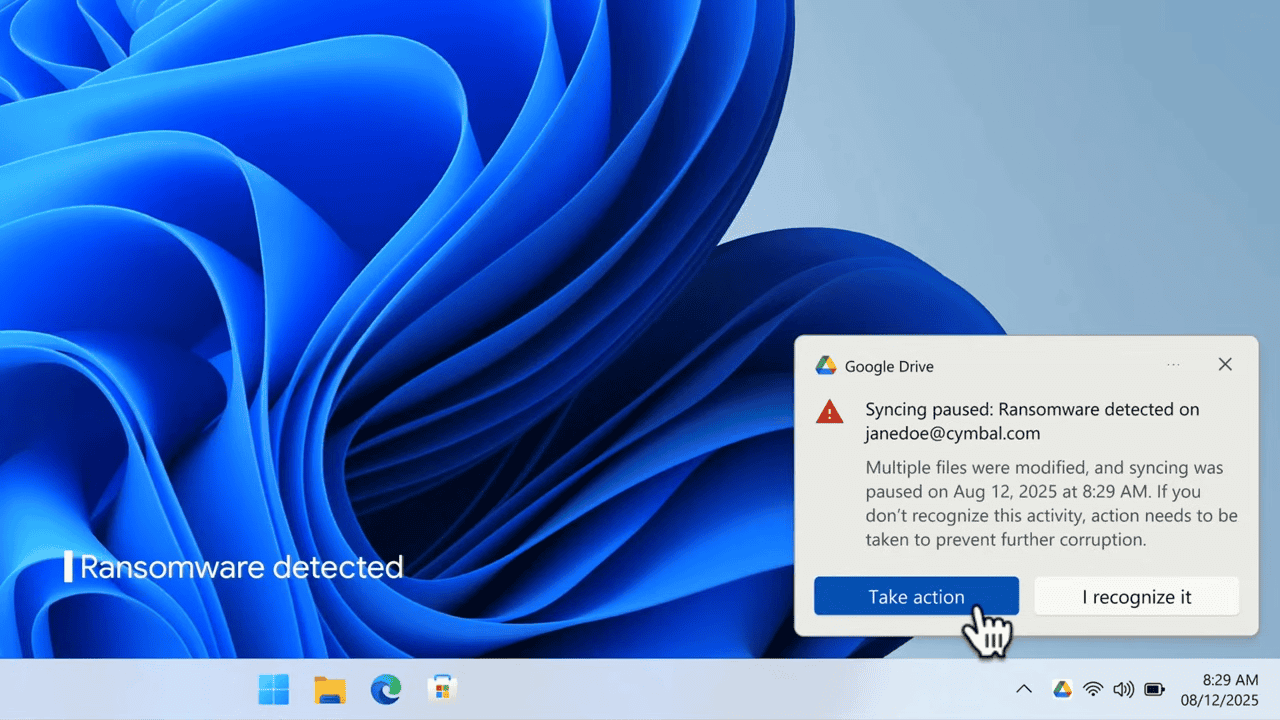
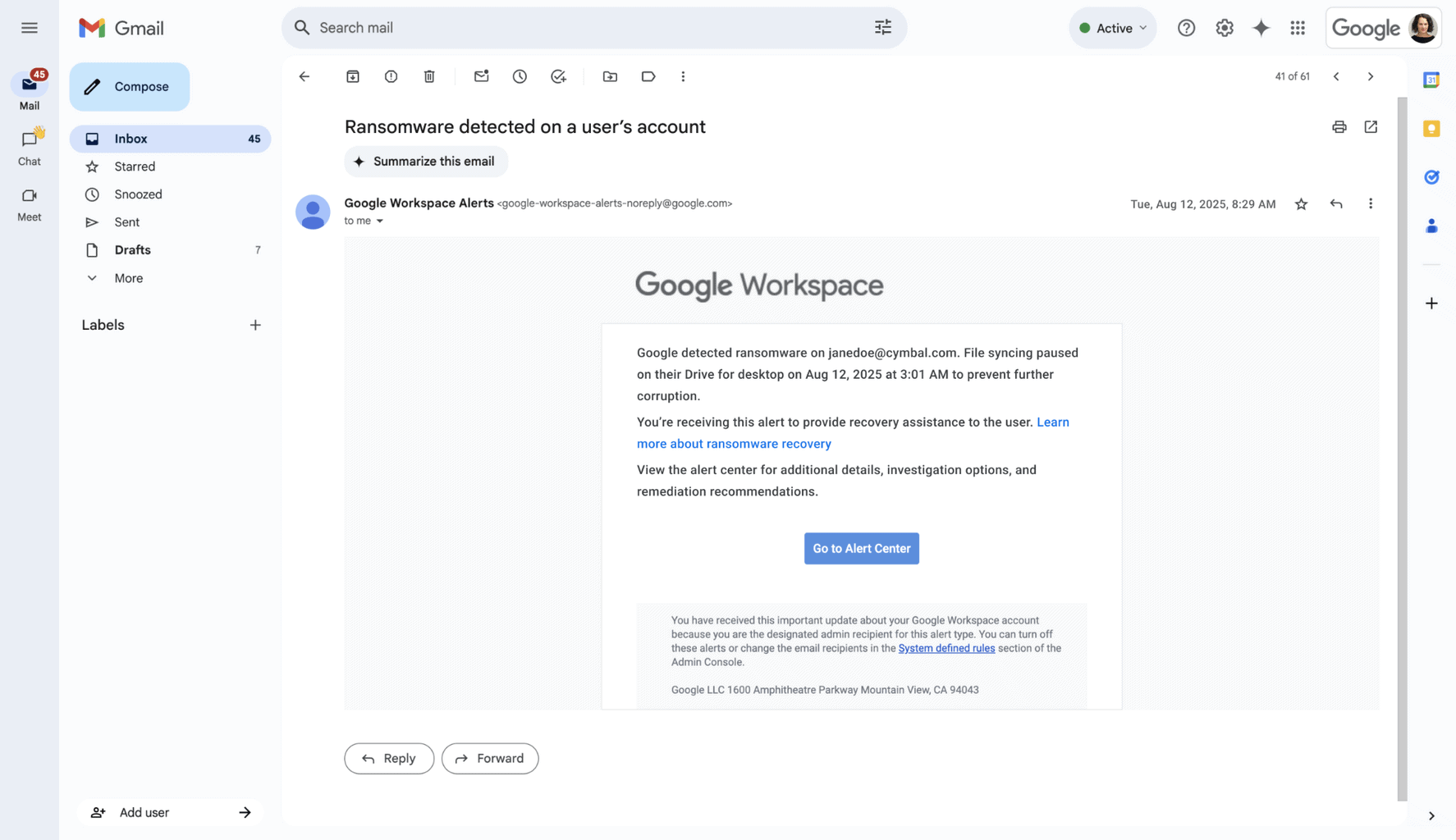
When ransomware is detected on a device with Drive for desktop, file syncing is paused automatically. Users receive a notification on their computer, while admins get alerts in the Admin console security center along with email notifications.
Image credit: Google
Besides ransomware detection, Google Drive now also allows users to restore files in bulk to a previous version before the attack occurred. This helps recover inaccessible files without paying a ransom. Users can select multiple files and roll them back to a safe state. This makes recovery faster and more efficient. Google says that early testing shows the feature is scalable and reliable across different environments.
Ransomware detection is enabled by default for organizations, with controls available in the Admin console under Drive and Docs settings. File restoration is also turned on by default and can be managed similarly. Users need the latest version of Google Drive for desktop, version 114 or later, to receive detection alerts. Older versions will still pause syncing but may not show notifications.
Speaking of availability, file restoration is available to all Google Workspace users, individual subscribers, and personal accounts. Meanwhile, ransomware detection is supported on select Business, Enterprise, Education, and Frontline plans.
Meta has started testing paid Instagram Plus subscription in different regions
The new plan, reportedly called Instagram Plus, focuses on small but meaningful upgrades. One standout feature lets users view Stories anonymously, a shift that could change how people engage with posts. Subscribers can also track how many times their own Stories are rewatched. That adds a new layer of insight, especially for users who care about engagement trends.
There is also more control over Story sharing. Instead of relying only on Close Friends, users can create multiple custom audience lists. That means more control over who sees what, without overthinking each post. Meanwhile, other perks focuses on visibility and interaction. Stories can be extended for an extra 24 hours, while a weekly “spotlight” option pushes posts to the front.
Pricing and availability
Moving on, features like animated Superlikes and searchable viewer lists are also there. Pricing appears to vary by region, with user-shared screenshots suggesting a monthly cost of MX$39 in Mexico (about $2.20), ¥319 in Japan (around $2), and PHP 65 in the Philippines (roughly $1.07).
That being said, early reactions seem mixed. Some users have already pushed back online, questioning whether these features justify another monthly fee. It’s unclear how far Instagram Plus will expand, but Meta says testing will continue.
Microsoft is officially phasing out its legacy Remote Desktop app, replacing it with the newer Windows App as part of a broader modernization effort. The move introduces improved reliability, stronger security protections, and a more consistent experience across devices.
End-of-support timeline confirmed
Microsoft has outlined a staged retirement for Remote Desktop across platforms.
Support for the Remote Desktop app on Windows and the web client is expected to end on May 27, 2026. Environments tied to Azure Government and 21Vianet clouds will receive extended support until September 28, 2026.
After these deadlines, users will need to transition to the Windows App to continue accessing remote systems and services.
Windows App focuses on reliability and performance
The Windows App introduces a redesigned connection layer built to improve stability across varying network conditions.
Microsoft added support for RDP Multipath, allowing sessions to maintain performance even on unstable connections. The app also improves how it handles reconnections and session continuity, reducing disruptions during remote work.
These changes aim to address long-standing complaints about inconsistent Remote Desktop performance, especially on mobile or fluctuating networks.
Productivity upgrades improve workflow
Microsoft is also positioning Windows App as a productivity-focused upgrade.
Users can launch sessions faster through native entry points like the Start menu on Windows or Spotlight search on macOS. Switching between remote apps is more seamless, and split-screen support on Windows allows better multitasking.
File transfers have also been improved, particularly in the web client, making it easier to move data between local and remote environments.
Platform-specific enhancements expand usability
The new app includes tailored features depending on the device.
On iOS, users can connect to external monitors and use accessories like a Surface mouse. Windows users gain auto logoff functionality, helping enforce session security. Microsoft also added URI-based links, allowing users to quickly resume remote sessions from shortcuts or integrations.
Windows App delivers a unified experience across Windows, macOS, iOS, Android, and web clients. This marks a shift away from fragmented Remote Desktop implementations that often behaved differently depending on the device.
Security improvements address growing threats
Microsoft added Data Loss Prevention controls through Intune Mobile Application Management, helping organizations prevent sensitive data leaks. The app also includes protections against keystroke-based attacks, a growing concern in remote access environments.
The timing of the transition aligns with increased reports of attackers exploiting Remote Desktop services. With RDP exploits actively traded in cybercriminal markets, Microsoft’s move to retire the older app reflects a push toward more secure remote access tools.
The Remote Desktop retirement comes alongside other ongoing Microsoft updates.
The popular JavaScript HTTP client Axios has been compromised in a supply chain attack, exposing projects to malware through malicious npm releases. Security researchers from StepSecurity identified the issue, warning that the impact could be widespread given that Axios exceeds 80 million weekly downloads.
The attack centers on two specific versions of the library that were published with hidden malicious code.
Compromised Versions and Attack Method
The affected releases are [email protected] and [email protected]. Researchers believe attackers gained access to a maintainer’s npm credentials, changed account details, and pushed altered packages directly to the registry.
Because the attacker operated through a legitimate account, the malicious versions bypassed typical safeguards, including GitHub Actions pipelines and signing protections. This made the packages appear trustworthy and allowed them to propagate quickly across projects.
Malware Hidden Inside a Fake Dependency
The compromised packages introduced a dependency called [email protected], which does not belong to the official Axios codebase. Its sole purpose was to deliver malware.
Once installed, the dependency triggers a postinstall script that runs automatically. It acts as a cross-platform Remote Access Trojan dropper, capable of connecting to a command-and-control server and executing instructions remotely. The payload targets Windows, macOS, and Linux systems and attempts to remove traces after execution to avoid detection.
Researchers also noted that the malicious code uses obfuscation techniques, including encoded strings that are decoded at runtime using an XOR-based method.
How to Check If You Are Affected
Developers can verify exposure by checking the installed Axios version and looking for signs of the injected dependency.
npm list axios 2>/dev/null | grep -E "1\.14\.1|0\.30\.4"
If the project includes one of the compromised versions, the next step involves checking whether the malicious package exists:
ls node_modules/plain-crypto-js 2>/dev/null && echo "POTENTIALLY AFFECTED"
On Linux systems, an additional indicator of compromise may appear as a suspicious file:
ls -la /tmp/ld.py 2>/dev/null && echo "COMPROMISED"
Mitigation and Cleanup
Developers should immediately downgrade Axios to a safe version, such as 1.14.0 or 0.30.3, depending on the branch in use.
To prevent the compromised versions from being installed again, npm supports an overrides feature that forces a specific version across all dependencies. Adding this to package.json ensures that even indirect dependencies cannot pull in a malicious release:
"overrides": {
  "axios": "1.14.0"
}
After locking the version, cleaning the environment remains critical. Removing the malicious dependency and reinstalling packages with scripts disabled reduces the risk of executing hidden payloads:
npm install --ignore-scripts
Any system that has installed the compromised versions should be treated as potentially breached. That means rotating all sensitive credentials, including npm tokens, cloud keys, SSH keys, and environment secrets.
For CI/CD pipelines, switching to commands that ignore install scripts adds an extra layer of protection against similar attacks in the future.
By targeting widely used packages like Axios, attackers maximize reach with minimal effort. The event reinforces the need for stricter dependency controls and continuous monitoring across development environments.
The Axios compromise shows how a single breached maintainer account can cascade into a large-scale supply chain attack. Affected versions should be removed immediately, environments should be cleaned, and all credentials should be rotated.
Using npm overrides to lock safe versions adds an important safeguard against accidental reinstallation of compromised packages.
Epic Games, the studio behind Fortnite, recently announced that it has laid off over 1,000 employees as a cost-cutting measure and has, over time, seen declining engagement with its franchise globally. The studio also stressed that the recent layoffs aren’t linked to AI, and it confirmed that it is shutting down three Fortnite modes, including Rocket Racing, Ballistic, and Festival.
Just to be clear, the company isn’t shutting down anytime soon. That said, if Epic Games were ever to sell in the future, a potential buyer is already showing interest. Here, we are talking about Disney. In Matthew Belloni’s podcast, The Town, spotted by GameSpot, tech reporter Alex Heath claimed that Disney executives have long considered Epic a strategic acquisition.
“I think if Epic ever sold, if it ever decided to call it quits on being an independent company, Disney would be the most natural home for it for a lot of reasons,” Heath said. Not every executive reportedly shares this view, with some opposing the move.
That’s not all; in an interview with CNBC earlier this month, Kevin Mayer, a former Disney executive, said that Disney acquiring Epic would strengthen its media portfolio. “I think Epic or some other video game asset would be a great addition to The Walt Disney Company’s asset base,” he said.
To catch you up, Disney’s current CEO, Josh D’Amaro, is also a video game fan himself. He reportedly played a major role in Disney’s $1.5 billion investment in Epic Games and Fortnite. Some reports also point out that he plans to prioritize gaming and interactivity under his leadership (via The Gamer). That suggests that Epic Games may not be the only target for Disney’s next big move in interactive entertainment.
Microsoft has introduced a major upgrade to its AI productivity suite with the launch of Copilot Cowork, a new agentic feature inside Microsoft 365 Copilot that signals a shift toward collaborative “AI teams” rather than a single assistant.
The feature is currently available through the Microsoft 365 Frontier program, which gives early access to experimental tools. Copilot Cowork blends Microsoft’s own AI systems with technology inspired by Anthropic’s Claude Cowork, marking a multi-model approach to enterprise AI.
Copilot Cowork introduces background AI task execution
Copilot Cowork allows users to assign tasks that run independently in the background, without requiring constant interaction.
Users can launch multiple AI-driven workflows at the same time and monitor them through a dedicated dashboard. This setup moves away from prompt-by-prompt interaction and toward persistent AI agents that handle ongoing work.
The system focuses on productivity scenarios such as research, content generation, and data synthesis, all handled asynchronously.
Research agent and structured output improvements
Microsoft also upgraded its researcher agent, which now leverages models from both OpenAI and Anthropic.
The agent generates structured, well-cited reports and can combine insights from multiple sources into a single output. This aims to improve reliability and reduce hallucinations in long-form responses.
To further enhance quality, Microsoft introduced a new Critique feature that separates content generation from evaluation. Two different models work together, one produces the answer while the other reviews and refines it.
Model Council compares AI outputs side-by-side
A new Model Council feature takes this concept further by running multiple AI models in parallel on the same query.
The system compares outputs side-by-side and uses a dedicated “judge” model to summarize key similarities and differences. This approach gives users more transparency into how different models interpret the same task.
Microsoft says this method helps users make more informed decisions and improves trust in AI-generated content.
Performance gains and competitive positioning
According to Microsoft, these upgrades deliver measurable improvements.
Copilot Cowork achieved a 13.8% higher score on the DRACO benchmark, which evaluates accuracy, completeness, and objectivity. The company claims the system now outperforms competing tools such as Gemini, Claude, ChatGPT, and Perplexity in this evaluation.
Availability and future rollout
The Critique and Model Council features are already live within the Frontier program. A broader rollout is expected at a later date, though Microsoft has not shared a specific timeline.
With Copilot Cowork, Microsoft is clearly shifting toward a model where multiple AI systems collaborate rather than relying on a single assistant.
This direction aligns with broader industry trends focused on orchestration, verification, and parallel reasoning across models.
Embark Studios is rolling out a new Arc Raiders content update today, introducing the Flashpoint update as part of the ongoing Escalation cycle for 2026. Unlike the recent balance patch, this release adds new systems, enemies, and progression mechanics that significantly deepen gameplay.
Flashpoint update pushes difficulty and combat depth
The Flashpoint update continues the Escalation theme by increasing overall challenge and adding more layered combat systems. Players will notice tougher encounters, more dynamic enemy behavior, and new tools designed to counter evolving Arc threats.
Weapon additions play a major role in this shift. The Canto SMG stands out by using Medium Ammo instead of the typical Light Ammo, suggesting stronger performance against Arc enemies. Meanwhile, the Dolabra shotgun introduces an Energy Ammo system with a variable focus mechanic, allowing players to switch between wide electric bursts and tighter, more concentrated shots for close-range fights.
Combat utility also expands with the Surge Coil, an area denial tool that periodically shocks enemies. It is expected to play a key role in defensive setups and PvP choke points.
New Vaporizer enemy and evolving ecosystem
Flashpoint introduces a new flying Arc enemy called the Vaporizer, equipped with laser-based attacks and unpredictable movement patterns. Unlike standard aerial units, this enemy behaves in less predictable ways, forcing players to adapt quickly during encounters.
Enemy distribution is also changing. Shredders, which were previously limited to specific areas, can now appear across multiple maps. Their presence may depend on dynamic conditions, making each raid less predictable and more dangerous.
ARC Operations introduces high-risk zones
A major system addition in this update is ARC Operations, designed to reshape how players approach loot and risk. The first operation, called Close Scrutiny, reduces general loot availability while introducing high-risk, high-reward zones known as ARC Assessor areas.
These zones are expected to become PvP hotspots, encouraging player conflict over valuable resources and adding tension to each run.
Companion and crafting systems receive upgrades
The companion system sees deeper integration with gameplay. Feeding Scrappy now directly affects loot generation, creating a light resource management loop where players must gather specific items to optimize rewards.
Crafting has also been overhauled in a major quality-of-life update. Previously spread across multiple menus, the system is now unified into a single interface. Players can see missing materials, recycle and refine resources instantly, and even purchase needed components without navigating separate menus.
Cosmetics and roadmap tease future content
New cosmetic sets are rolling out gradually throughout April, including skins, backpacks, tools, and currency bundles as part of a drip-feed approach to monetization.
Looking ahead, Embark Studios hinted at the final Escalation update titled Riven Tides, which is expected to introduce a brand-new map and larger Arc enemies, possibly expanding into boss-tier encounters.
Expected release time based on previous updates
While Embark has not confirmed the exact release time, previous updates suggest a consistent rollout window. Based on past patterns, players can expect the update around:
1:30 a.m. PST
4:30 a.m. EST
6:30 a.m. BRT
9:30 a.m. GMT
10:30 a.m. CET
6:30 p.m. JST
8:30 p.m. AEDT
The Flashpoint update arrives shortly after Embark replaced AI-generated dialogue in the game following community backlash, signaling ongoing adjustments not just to gameplay systems but also to presentation and player experience.
With deeper systems, new enemies, and high-risk gameplay loops, Flashpoint marks one of the most substantial updates for Arc Raiders so far.
Meanwhile, another Insider Build 28020.1797 (under KB5079490) lands for other Canary testers out there. Well, this one doesn’t come with much of the changes, as Microsoft only notes that this update “includes a small set of general improvements and fixes that improve the overall experience for Insiders.”
Canary Preview Build 29558.1000 comes with plenty of Command Line improvements
Microsoft says that most of the updates outlined below have come from Windows Insiders and community contributors.
Optional new Atlas/Direct3D rendering path (UseDx): available behind a registry key (HKCU\Console, DWORD UseDx=1).
Regular Expression search: the Find dialog now supports regular expressions.
Bold font rendering: the original rendering engine now supports bold fonts.
Paste reliability improvement: resolves a longstanding issue where some pasted characters could be dropped when the output code page couldn’t represent them.
Accessibility improvements: rewritten legacy MSAA integration and parts of UI Automation support.
Snap-on-input behavior: now only enabled by default when VT processing is enabled. More reliable snap on input/output in WSL and PowerShell.
Clipboard enhancements: supports OSC 52 (Manipulate Selection Data) for writing selection data to the clipboard.
Graphical content: adds support for Sixel-based images. Alt + Numpad + clipboard text fix: avoids mistranslating Codepage 936 text when generating Alt + Numpad events for clipboard content.
Performance: scrolling text performance improvements (up to ~10x in some scenarios).
Rectangular selection: fixes rectangular copy via Edit > Mark.
Microsoft futher says that the Windows Console can now display inline images, allowing tools like WinGet, for example, to display application icons. In addition, the company has also changed how the pop-up dialogs look inside the console to improve their compatibility with screen readers, assistive technologies, and other terminal emulators. This includes the F7 history window as well as the F2 and F4 line editing windows.
Image credit: Microsoft
es to Azure Virtual Desktop impacting Insiders in the latest Canary flights. The co.pany has also improved performance of configuring power options in Settings > System > Power & Battery.
Last but not least, this Canary build also updates chkdsk, which now support specifying volumes with spaces if you have the path encased in quotes (for example, chkdsk “C:\My Volume\SD Card”). Moreover, Microsoft has also removed an “unexpected error message when opening Group Policy Editor in the previous two flights.”
Microsoft has released two new builds, one each, for Windows 11 Dev and Beta channel Insiders. The latest update for Dev channel, KB5079492, bumps system to Build 26300.8142. Meanwhile, those on Beta channel are getting KB5079491 that bumps the system to Build 26220.8138.
First, Microsoft is updating Task Manager to provide better insight into NPU usage for PCs that include NPU. After installing one of the aforementioned updates, Insiders see new optional NPU and NPU Engine columns on the Processes, Users, and Details pages.
Next, the Details page also adds NPU Dedicated Memory and NPU Shared Memory optional columns to give you deeper visibility into how workloads are using NPU resources. Additionally, if there are neural engines that are part of a GPU, they will now appear on the Performance page. This will offer a more complete view of AI‑related system activity.
Last but not least, Task Manager is also getting a new optional Isolation column to the Processes and Details pages, which allows you to see which apps are running in an AppContainer. Microsoft further notes that once these changes are available to you, you can add any of the new columns by right‑clicking a column header in Task Manager and selecting them from the menu.