Windows GUI Development Called “Chaotic” by Former Microsoft Executive

Windows development has always been complex, but new insights from a former Microsoft executive shed light on just how fragmented it became. Jeffrey Snover, speaking about the platform’s history, described decades of shifting strategies that left developers confused and frustrated.

According to Neowin, Snover explained that early Windows development during the Win16 and Win32 era offered a relatively consistent model. However, things quickly grew more complicated in the 1990s as Microsoft introduced technologies like MFC, COM, OLE, and ActiveX, without a clear long-term strategy to unify them.

Decades of shifting frameworks created confusion

The situation worsened during the Longhorn era, when Microsoft introduced Windows Presentation Foundation (WPF), a modern XAML-based, GPU-accelerated UI framework. Despite its potential, internal conflicts between Windows and .NET teams prevented full adoption, ultimately leading to stagnation.

Over time, Microsoft repeatedly changed direction. The company moved from WPF to Silverlight, then to HTML5-based approaches, followed by WinRT, UWP, and later WinUI and MAUI. These rapid pivots often overlapped, with Microsoft simultaneously promoting multiple development paths such as C++, .NET, HTML/JavaScript, and WinRT.

Snover described this approach as chaotic and unfocused, noting that developers frequently received conflicting guidance. This lack of consistency made it difficult for developers to commit to any single framework.

UWP struggles and the rise of third-party frameworks

The Universal Windows Platform (UWP) was intended to unify development, but it failed to gain traction. Its sandboxed nature and lack of full Win32 API access limited its appeal, especially for enterprise developers, who largely rejected it.

Since 2015, Microsoft has continued to experiment with multiple frameworks, including WPF, WinUI, and MAUI. Today, Windows reportedly supports more than 17 GUI technologies across native, web-based, and hybrid approaches.

This fragmentation opened the door for third-party frameworks like Electron, which have become widely adopted despite performance drawbacks such as high memory usage. Ironically, Microsoft itself is pushing for wider adoption of Electron across its own apps.

Snover ultimately attributed the situation to internal politics, shifting priorities, and a lack of long-term strategic alignment. He argued that talented teams were often undermined by inconsistent direction, leading to a loss of trust among developers.

Windows 11 may reflect past decisions, but changes are coming

Many of these long-standing issues continue to impact Windows 11 today, particularly in areas like performance and resource usage. However, Microsoft has recently signaled plans to address some of these concerns.

The company is reportedly working on improvements for Windows 11 in 2026, including better RAM optimization and performance enhancements. There are also indications that Microsoft may scale back the presence of Copilot within the operating system.

While it remains to be seen whether these efforts will restore developer confidence, they could mark the beginning of a more focused and stable direction for Windows going forward.

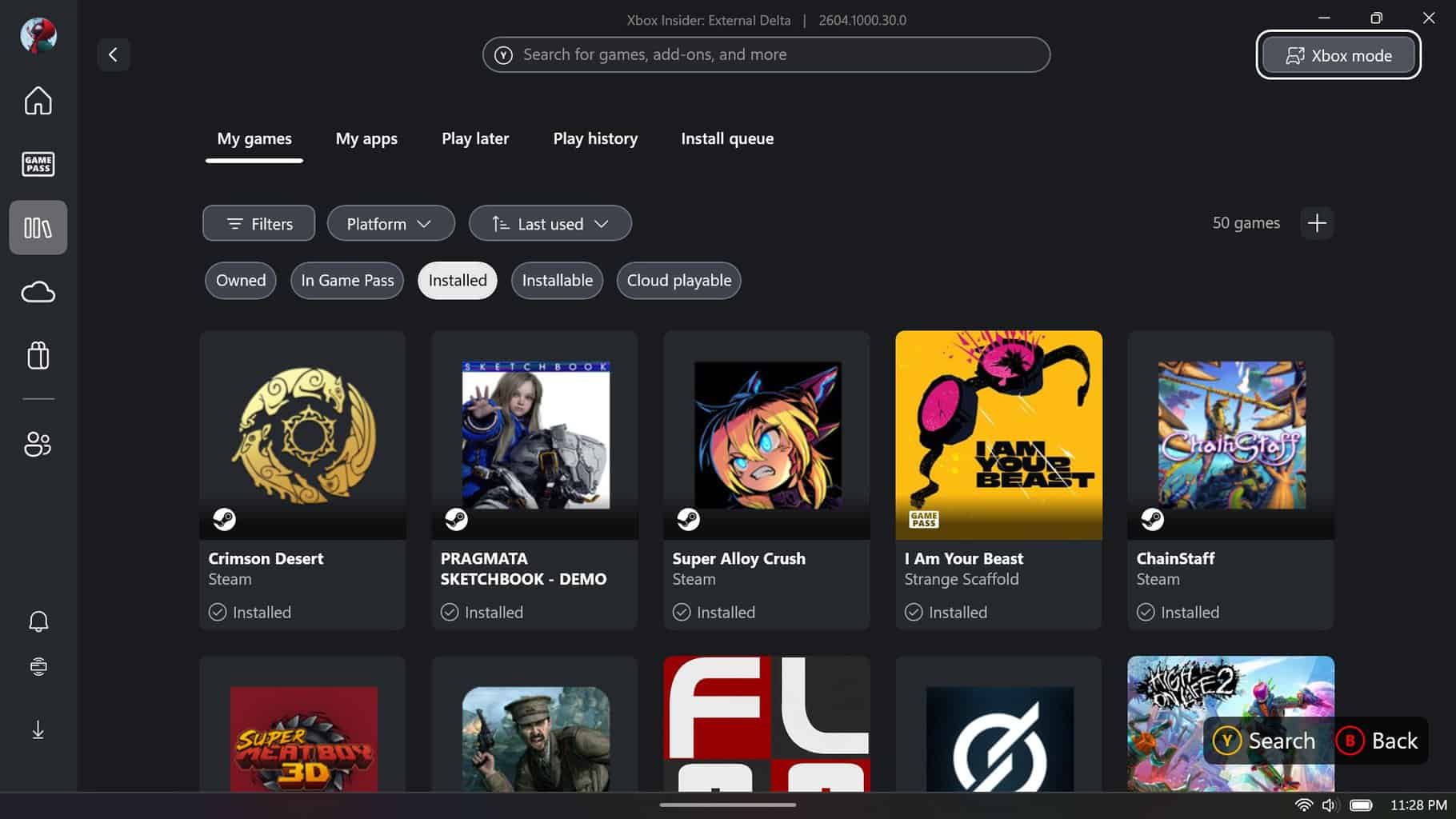
Microsoft Reportedly Starts Rebranding “Xbox Full Screen Experience” to “Xbox mode”

At this year’s GDC, Microsoft, alongside confirming Project Helix, also announced that the “Xbox mode” will roll out on Windows 11 in April in select markets.

At the time, the company noted that the feature would give players a familiar full-screen and controller-optimized Xbox experience while embracing the openness of Windows. In simpler words, it meant that you can switch effortlessly between productivity tasks and gaming on your Windows PCs.

Ahead of the rollout next month, Microsoft has reportedly started replacing the “Xbox Full Screen Experience” label with “Xbox Mode” inside the Xbox app. The news comes via Videocardz, which spotted a post on X by user @ROGAllyLife, who posted a screenshot of the Xbox app featuring the Xbox mode label at the top right. You can check the image below:

Image credit: X/@ROGAllyLife

To catch you up, with Xbox mode, players can access all the titles across devices, whether through purchases, subscriptions like Xbox Game Pass, or from other leading storefronts. Microsoft then said that the integration would work with Xbox Play Anywhere.

That also means progress, saves, and purchases carry over seamlessly between PC and console. Therefore, players no longer need to repurchase games or worry about losing hours of gameplay. The idea here is to deliver a console-like experience while still allowing players to jump back into Windows when needed.

Microsoft Expands Copilot Team With Key Hire, Focuses on AI Models and Superintelligence

Microsoft continues reshaping its AI strategy, and the latest moves show a deeper push into in-house model development and long-term AI leadership. Following Mustafa Suleyman’s appointment as head of the Copilot team, the company has now brought in another major name to strengthen its efforts.

According to Business Insider, Microsoft has hired Ali Farhadi as Corporate Vice President. Farhadi, formerly the CEO of the Allen Institute for AI (Ai2) and co-founder of Xnor.ai, will work directly under Suleyman as part of the company’s expanding AI leadership structure.

Microsoft doubles down on AI talent and structure

Farhadi’s appointment comes alongside a broader internal reorganization of the Copilot division. Microsoft has split its AI efforts into four core pillars, covering Copilot experience, Copilot platform, Microsoft 365 apps, and AI models.

As part of this shift, Ryan Roslansky, Perry Clarke, and Charles Lamanna will oversee Microsoft 365 apps and the Copilot platform. All three executives will report directly to CEO Satya Nadella, signaling the importance of these divisions within Microsoft’s overall strategy.

The restructuring also aims to give Suleyman more room to focus on advancing AI models. Nadella highlighted that Suleyman will lead efforts in model science while ensuring human oversight and positive economic impact remain central to development.

Superintelligence becomes a long-term goal

Suleyman has made it clear that building advanced AI systems sits at the core of Microsoft’s future plans. He described superintelligence as a key long-term objective, with a focus on developing world-class AI models over the next five years.

This direction aligns with Microsoft’s growing emphasis on owning more of its AI stack rather than relying heavily on external partners. The hiring of Farhadi and the integration of teams like Cove AI further reinforce this approach.

At the same time, Microsoft appears to be refining how Copilot integrates into its products. Recent reports suggest the company may reduce Copilot’s presence across Windows 11, keeping it only where it delivers clear value.

Overall, these changes reflect a broader shift toward tighter control over AI development, stronger internal expertise, and a clearer long-term vision for the role of artificial intelligence across Microsoft’s ecosystem.

Via Windows Central

Minecraft “Tiny Takeover” Update Adds 39 Baby Mobs and New Crafting Features

Minecraft continues to stay in the spotlight following the recent Minecraft LIVE event and the announcement of Minecraft Dungeons II, and now players have even more content to explore. A brand-new update, titled “Tiny Takeover,” is launching today, bringing a wave of smaller but notable improvements to the game.

According to True Achievements, the update focuses heavily on enhancing baby mobs, introducing 39 reworked variants with improved visuals. Animals such as pigs, kittens, and bunnies now appear noticeably cuter and more detailed, giving the game a refreshed and more expressive look.

Baby mobs get a visual and gameplay upgrade

Beyond visual upgrades, the update introduces new gameplay elements designed to improve interaction with mobs. Players can now craft name tags using a metal nugget and a piece of paper, making it easier to name pets while displaying floating text above them. This change simplifies a previously more limited feature and adds convenience for players who enjoy customizing their worlds.

Another standout addition is the Golden Dandelion, a new item that allows players to keep baby mobs permanently in their youthful form. This feature adds a unique layer of creativity, especially for players who prefer building themed environments or maintaining specific mob aesthetics.

New items, sounds, and building improvements added

The update also brings several smaller features and tweaks that expand gameplay variety. Players can now craft trumpet sound blocks, while baby versions of piglins and zombies receive unique armor styles. New sound effects have been added for animals like pigs and kittens, further enhancing immersion.

In addition, the stonecutter has been improved, allowing players to convert stone and slate into cobbled variants more efficiently. While not a major overhaul, this change improves building workflows and resource management.

Although “Tiny Takeover” is considered a smaller update compared to recent major content drops, it delivers a range of meaningful improvements that refine both visuals and gameplay systems.

The update is coming for both Bedrock Edition and Java Edition across all supported platforms, ensuring that players everywhere can experience the latest changes.

Anthropic Supercharges Claude AI With Computer Control Feature

Anthropic has announced a major upgrade to its Claude assistant, which allows it to directly control your computer to complete tasks. The feature is rolling out in research preview for Claude Pro and Max subscribers, hinting at its next approach, which appears to be toward more autonomous AI workflows. To catch you up, the announcement comes in the same month Anthropic upgraded Claude to create interactive charts, diagrams & visualizations in chat.

Claude moves beyond chat with computer control

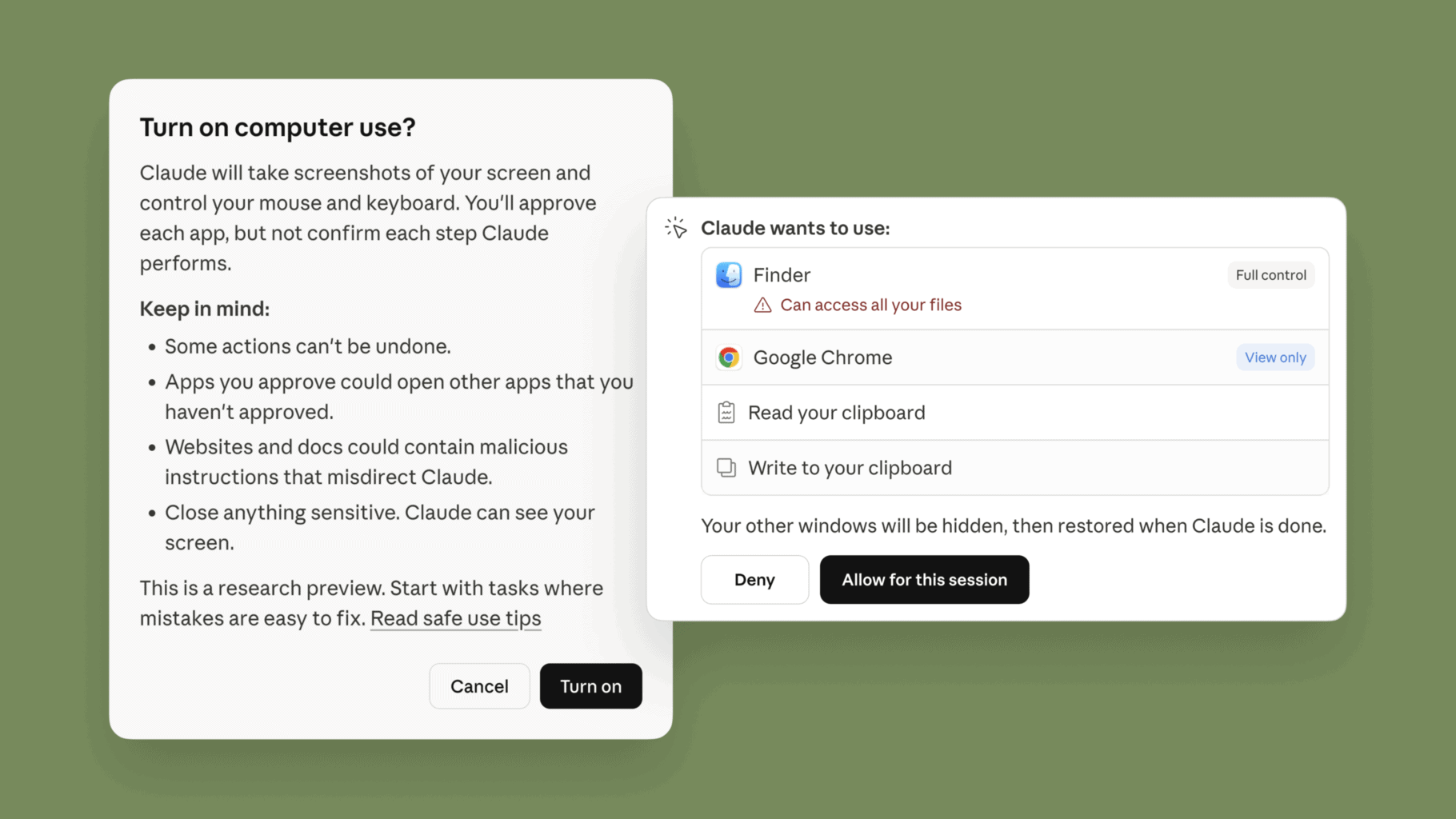
With the latest update, Claude can point, click, scroll, and navigate apps on your system when it doesn’t have direct integrations available. It can open files, use a browser, and even run developer tools, all without requiring manual setup. If Claude cannot access a tool directly, it will use your screen just like a human would.

That being said, the system still prioritizes native integrations first, such as Slack or Google Calendar. Only when those are unavailable does it take over the screen. Every action requires user permission, and you can stop it at any point.

The feature also builds on Dispatch, which lets users assign tasks to Claude from their phone and continue them on a desktop. With computer control now added, Claude can actively complete those tasks in the background, whether that’s checking emails, generating reports, or handling development workflows.

Anthropic notes that this feature is still evolving, so it may struggle with complex tasks, and working through the screen is slower than direct integrations. The company has added safeguards like activity monitoring and prompt injection detection, while restricting access to sensitive apps by default.

For now, the feature is limited to macOS and requires the desktop app to stay active. However, support for more platforms is expected later, though timelines remain unclear. In related company news, Anthropic recently made a 1M token context standard for Claude 4.6.

OpenAI Reportedly Hires Meta Ad Veteran Dave Dugan to Lead Its Ads Business

It’s been two years since OpenAI CEO Sam Altman expressed hesitation about combining ads with AI, warning it could affect user trust. Well, in business, plans do evolve, and it has clearly evolved for the Altman-led AI company. Earlier this year, the company confirmed that it’s testing ads inside ChatGPT for free and Go-tier plans in the US.

OpenAI appears to be focusing on ad revenue despite Altman initially being hesitant about it

Although the company recently debunked rumors about a global ad rollout expansion, it appears to be stepping deeper into the advertising business. According to an exclusive report by The Wall Street Journal (WSJ), OpenAI has appointed industry veteran Dave Dugan from Meta. The company has reportedly hired him to head global ad solutions.

Per the WSJ, Dugan will report to Brad Lightcap and is expected to build relationships with major advertisers while scaling the company’s ad business. OpenAI, with this move, is clearly targeting Meta. To catch you up, the ad market is currently dominated by players like Meta Platforms, which reportedly generated close to $200 billion in ad revenue in 2025.

Yes, competing in that market will not be easy, especially as OpenAI is still early in testing ads within ChatGPT. If you don’t want to participate in ad testing, you can opt out with certain limitations. Speaking of user trust that we mentioned earlier in this report, OpenAI has made it clear that ads will not impact answers, and user conversations will not be sold to advertisers.

OpenAI’s relation with Microsoft appears to be shifting behind closed doors

In related company news, OpenAI’s partnership with Microsoft is facing tensions amid the former’s IPO plans later this year. Although both companies recently shared a public statement about their partnership still being strong despite the OpenAI-AWS deal, things don’t look alright behind closed doors, as a report from earlier this month hinted that Microsoft is considering legal action against OpenAI and Amazon over their $50 billion deal. It will be interesting to see how this partnership pans out in the next few years.

Microsoft and OpenAI Partnership Faces Tensions Amid IPO Plans

Microsoft and OpenAI’s long-standing partnership is reportedly facing growing tensions, even as both companies continue to rely heavily on each other.

As previously reported, Microsoft has been exploring ways to reduce its dependence on OpenAI, signaling a potential shift in strategy. Now, according to Windows Central, disagreements between the two companies center on funding, access to computing resources, and broader strategic direction.

Revised agreement aims to stabilize the partnership

Both companies are currently working on a revised “definitive agreement” designed to preserve their collaboration while addressing internal friction. OpenAI acknowledged that Microsoft still provides a substantial share of its funding and compute infrastructure, making the relationship critical to its operations.

At the same time, OpenAI warned that any significant changes to the partnership could negatively affect its business and financial condition. The company later clarified that such language reflects standard risk disclosures rather than signals tied to a potential IPO filing.

Despite the tensions, OpenAI emphasized that Microsoft remains a key long-term partner.

Microsoft’s absence raises questions amid a massive funding round

One notable development is Microsoft’s absence from OpenAI’s recent $110 billion funding round. This raised eyebrows across the industry, especially given Microsoft’s central role in supporting OpenAI’s infrastructure through Azure.

The move has fueled speculation that both companies are reevaluating their relationship as the AI market becomes more competitive.

IPO ambitions add pressure to the relationship

OpenAI is reportedly preparing for a potential IPO as early as the second half of 2026, in what could become one of the largest public offerings in tech history. However, analysts caution that reaching a $1 trillion valuation would require extraordinary growth and sustained dominance in the AI sector.

Microsoft’s deep involvement with OpenAI may complicate these plans, particularly around control, revenue sharing, and infrastructure dependencies.

Cloud exclusivity dispute with Amazon adds another layer

Reports also suggest that Microsoft considered legal action over a $50 billion deal involving OpenAI and Amazon. At the center of the dispute is Microsoft’s exclusive cloud provider status via Azure, which could be challenged by any large-scale collaboration with competing cloud platforms.

While tensions have reportedly escalated, both sides appear committed to resolving disagreements without resorting to litigation.

Even as disagreements surface, the Microsoft–OpenAI relationship remains one of the most important alliances in the AI industry. OpenAI continues to push forward with its IPO ambitions, but its reliance on Microsoft’s infrastructure and investment ensures that the partnership will remain closely intertwined, for now.

ASUS Reportedly Eyes Up to 30% Hike in PC Prices Amid Global Memory Crunch

ASUS appears to be getting ready to make a significant shift in its pricing strategy, with new reports now suggesting the company could increase PC prices by as much as 30%. That’s according to UDN, which in its latest report suggests that ASUS is planning price hikes in Taiwan first (via Wccftech).

Rising DRAM costs push vendors toward major price increases

The move is reportedly driven by worsening DRAM shortages, which are now starting to hit manufacturers harder than before. At a time when memory supply has become increasingly difficult to secure, vendors like ASUS have been relying on existing stockpiles to keep prices stable. That advantage now seems to be running out.

However, if the situation continues as it is now, the price hike will likely affect users in other regions too. Just to be clear, ASUS isn’t the only company facing the adverse effects of the global memory crunch. Companies such as Acer and Dell are also facing similar pressure, as multiple supply chain issues continue to grow. Not to forget, a TrendForce report from earlier this month also hinted that laptop prices could jump as high as 40% if the memory and CPU costs continue to rise.

In recent quarters, PC makers managed to avoid major price increases thanks to earlier inventory buildup. But with costs rising across the board, it appears that the strategy is no longer sustainable. Price hikes are now being seen as a necessary step to offset rising bill of materials costs. Alongside DRAM shortages, rising SSD prices, and ongoing CPU and GPU constraints are making it harder for vendors to maintain margins.

Recent speculations about the ongoing memory crunch

Speaking of the memory shortage, it’s worth noting that the GTA 6 boss recently said that the situation wouldn’t affect the original launch timeline of the PS6 and next-gen Xbox console (aka Project Helix). That said, it is important to note that the SK Group Chairman also recently said that the global memory shortage could last until 2030.

AMD FSR 4.1 Goes Official With Latest SDK and RDNA 4 Focus

AMD has officially rolled out its latest FidelityFX Super Resolution update following weeks of speculation. After introducing FSR 4.1 through a recent Adrenalin driver update, the company has now released FSR SDK 2.2 via GPUOpen, bringing a broader set of rendering improvements and developer tools.

The new SDK expands AMD’s upscaling and frame generation stack while pushing further into machine learning-based rendering technologies.

FSR SDK 2.2 introduces upgraded rendering technologies

FSR SDK 2.2 includes multiple key components:

  • FSR Upscaling 4.1 (updated from 4.0)
  • FSR Ray Regeneration 1.1
  • FSR Frame Generation 4.0
  • FSR Radiance Caching 0.9 (technical preview)

FSR Upscaling 4.1 improves image quality in motion by using updated inference models. AMD highlights sharper visuals, improved ultra-performance mode, and more stable dynamic resolution scaling.

Ray Regeneration 1.1 enhances ray-traced visuals while lowering memory usage. It also introduces new debug view modes, allowing developers to better analyze rendering behavior during development.

New features require RDNA 4 GPUs

AMD has made it clear that its latest machine learning-driven features target newer hardware. Technologies like Frame Generation 4.0, Ray Regeneration 1.1, and Radiance Caching require RDNA 4 GPUs, meaning users will need Radeon RX 9000 series or newer hardware to access them.

These features also depend on Shader Model 6.6 and are designed exclusively for DirectX 12 environments, reinforcing AMD’s shift toward modern graphics pipelines.

Legacy hardware still supported

Despite the push toward newer GPUs, AMD continues to support older hardware through previous FSR versions. Older Radeon GPUs can still use earlier implementations of upscaling and frame generation, ensuring broad compatibility across multiple generations.

The company also notes that some machine learning-based improvements may arrive through future Adrenalin driver updates without requiring developers to update their games.

Unreal Engine 5 support not yet updated

Although FSR 4.1 is now available through the SDK, the Unreal Engine 5 plugin still relies on version 4.0.3. AMD has confirmed that an update is planned, but it has not provided a release window.

FSR SDK 2.2 is available now via GPUOpen, with binaries and partial source code hosted on GitHub. However, the SDK is not fully open-source, which may slow adoption among developers.

Support for FSR Redstone features also remains limited, with only a small number of major titles currently implementing the latest technologies.

AMD is also working on a new CPPC feature that could improve performance on upcoming Zen 6 processors.

Via VideoCardz

Minecraft Dungeons II Releases Day One on Xbox Game Pass This Fall

Microsoft has officially announced Minecraft Dungeons II, confirming that the dungeon-crawling spin-off is getting a sequel set to launch in fall 2026. Notably, the game will also release day one on Xbox Game Pass, making it instantly accessible to subscribers at launch. The reveal comes years after the original quietly built a solid player base, especially among co-op fans.

Here’s how Microsoft describes the game:

The next chapter of Minecraft Dungeons begins in the fall of 2026! A new threat stirs, ready to descend upon the land and its inhabitants to cause unspeakable mayhem. Become a hero and take on foes unlike anything you’ve faced before, journey through long‑forgotten locations, and clash with the forces of evil once more!

It’s unclear how much the gameplay will evolve beyond the original’s hack-and-slash combat, which was fun but often described as simple. Back in 2020, the first game was heavy on co-op play, and it looks like that approach may continue with the sequel this year as well.

Notably, Minecraft Dungeons II is also confirmed to launch on Nintendo Switch and Switch 2, suggesting Microsoft is continuing its support for Nintendo platforms. That’s notable, especially as cross-platform releases remain a key part of the company’s broader gaming strategy.

You can wishlist today to get the latest Minecraft Dungeons II news on the official site. Just in case you can’t wait for the sequel, you can also start playing Minecraft Dungeons now. You can simply return to where it all began with Minecraft Dungeons, and dive back into its action-packed, loot-filled adventure. Speaking of games, let’s not forget that Microsoft yesterday confirmed the next Xbox Partner Preview showcase is happening this week. You can check our guide for more details.

EA to Remove Battlefield Hardline From PS4 and Xbox One Stores, Servers Closing Soon

Electronic Arts has confirmed that Battlefield Hardline will soon be removed from digital stores and lose its online features, marking the end of its multiplayer lifecycle more than a decade after release.

Battlefield Hardline delisting and shutdown timeline

As Pure Xbox reports, the 2015 spin-off will be delisted from digital storefronts on May 22, 2026. After that date, players will no longer be able to purchase the game or download additional content.

The shutdown primarily impacts the Xbox One and PlayStation 4 versions, while older Xbox 360 and PS3 editions had already been removed in prior years. The PC version remains unaffected, at least for now.

Servers are going offline in June

Electronic Arts will officially shut down online multiplayer servers on June 22, 2026. This means all online modes and services will become inaccessible.

However, the single-player campaign will remain fully playable, allowing players to revisit the story even after online support ends.

EA Play and Game Pass impact

Currently, Battlefield Hardline is still available through EA Play, which is included with Xbox Game Pass Ultimate and PC Game Pass.

Once delisted, access may depend on subscription availability, but new players will no longer be able to purchase the game outright after May.

The move reflects a broader industry pattern where publishers gradually retire older multiplayer titles. Maintaining servers for aging games often becomes unsustainable, especially as player populations decline.

Elsewhere in the gaming world, Crimson Desert has seen its Steam reviews shift to mostly positive following a major patch. Meanwhile, Call of Duty: Black Ops 7 continues to perform strongly despite ongoing player criticism.

Sony has also taken action against low-quality content, reportedly removing hundreds of AI-generated shovelware titles from the PlayStation Store.

Nintendo to Reportedly Scale Back Switch 2 Production By Over 30% After Weak U.S. Sales

Yesterday, reports came in suggesting that Nintendo is preparing a revised Switch 2 model with a replaceable battery for Europe. The company is reportedly mulling over that decision to stay in line with upcoming EU regulations, which will officially take effect by 2027.

Nintendo is reportedly adjusting Switch 2 production after weaker demand in the US during holiday sales

Well, that development comes alongside a report by Bloomberg that suggests Nintendo is also being cautious about its production strategy (via GameIndustry.biz). Per the report, the company is scaling back the production of Switch 2 after holiday sales reportedly fell short of expectations, especially in the US.

Sources cited in the report suggest Nintendo now plans to produce four million units this quarter, down from an earlier target of six million. This production cut is expected to continue into April, hinting at a more measured supply approach.

The current-gen console appears to have weaker demand in the US, even as a lower-priced domestic variant performed well in Japan. That imbalance may have influenced the company’s decision to adjust production volumes rather than risk oversupply.

The company is reportedly still confident about the handheld’s future

That being said, Nintendo is reportedly confident in the Switch 2’s long-term outlook, hinting that the production cut could be a short-term correction measure rather than a deeper issue. Notably, factors like rising component costs or memory shortages, which were linked to Switch 2’s production cost last year, haven’t reportedly influenced the decision. All that said, there’s no official word from Nintendo at this point.

With production dialing back and a hardware revision possibly on the way, it’ll be interesting to see how Nintendo plans to balance demand, pricing, and compliance across regions.

Microsoft Confirms Exchange Server Support Until 2035 Despite Cloud Shift

Microsoft has reaffirmed its long-term commitment to Exchange Server, even as cloud adoption continues to grow. In a new blog post, the company outlined why on-premises email infrastructure still matters and how it plans to support it for years to come.

Exchange Server is approaching its 30-year milestone, making it one of Microsoft’s oldest enterprise products. The company describes it as its first truly successful enterprise server platform, laying the foundation for many of its modern business services.

Enterprises still rely on on-premises Exchange

Despite the rise of Exchange Online, Microsoft acknowledges that many organizations still rely on self-hosted Exchange Server. Enterprises prefer it for greater control over infrastructure, compliance, and data handling, especially in regulated industries.

To address this demand, Microsoft confirmed that Exchange Server will remain supported until at least 2035 through the Exchange Subscription Edition (SE). This version represents the company’s long-term direction for on-premises deployments, even as it continues promoting a cloud-first strategy.

At the same time, Microsoft emphasized that enterprise infrastructure does not need to be cloud-only. Hybrid and on-premises environments will continue to play a key role, offering flexibility for different business needs.

Microsoft pushes standardization and stronger security

Maintaining backward compatibility has become increasingly difficult. Microsoft has historically supported the coexistence of up to three Exchange versions in one environment, but this approach has slowed development and limited architectural improvements.

To streamline updates, Microsoft is encouraging customers to standardize on Exchange SE. With Exchange SE CU2, coexistence with older versions is no longer supported, signaling a shift toward a single-version ecosystem.

Security remains a major focus moving forward. Microsoft warned that IT administrators may need to take additional steps to secure deployments, highlighting email as critical infrastructure and a frequent cyberattack target.

The company reiterated that email remains essential for businesses, justifying continued investment in both cloud and on-premises solutions.

In related developments, Microsoft is investigating ongoing Exchange Online issues affecting email access. The company is also working on features like Priority Cleanup V2 to improve mailbox management, while recent updates have made Outlook contacts easier to search and organize.

Via Neowin

OpenAI Adds ‘Library’ to ChatGPT for Easy File Access and Reuse

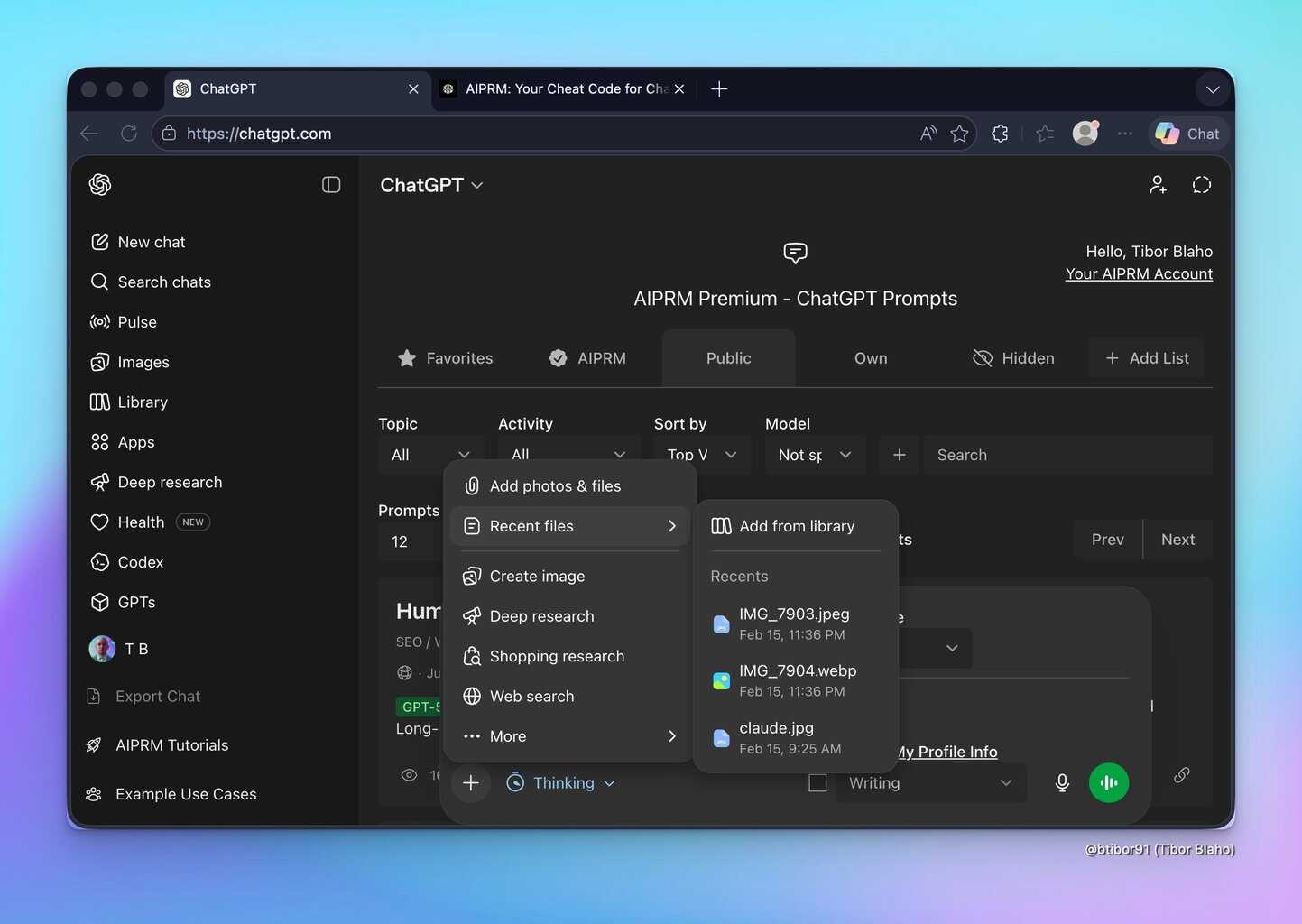
OpenAI has rolled out a new Library feature inside ChatGPT that gives users a dedicated space to store, find, and reuse files across conversations. Per the official documentation, first spotted by @bitbor91 on X, the feature is initially rolling out on the web. However, access is currently limited to users subscribed to ChatGPT Plus, Pro, and Business plans.

ChatGPT Library ensures easy file access and reuse across conversations

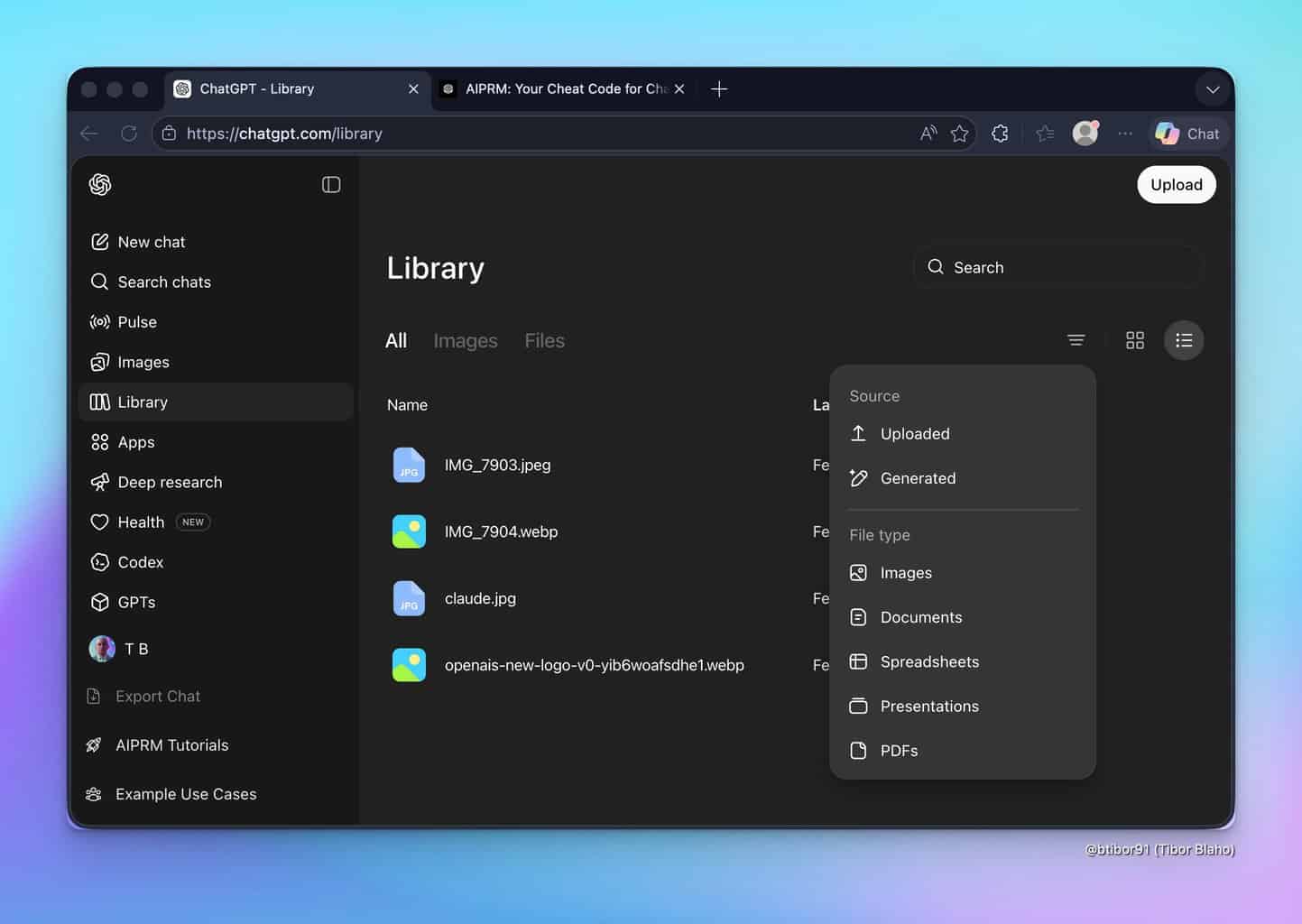
The Library feature inside ChatGPT is available to users outside of the European Economic Area, Switzerland, and the UK. With Library, ChatGPT now automatically saves files you upload or create during chats. This includes documents, spreadsheets, presentations, PDFs, and images, all stored in a secure location linked to your account. As a result, you can now access everything in one place, without losing track of files across conversations.

Image credit: X/@bitbor91

Do note that you can also add saved files directly into new chats by selecting them from the Library. This makes it easier to reuse content without re-uploading or searching through old threads. Generated images, however, will continue to appear in the separate Images tab.

The Library includes a search bar with filters, allowing you to quickly find files by type or whether they were uploaded or generated. File management is pretty straightforward, too. You can delete files anytime, with permanent removal scheduled within 30 days in most cases.

There are some limits to keep in mind. Files can be up to 512MB, while images are capped at 20MB. Spreadsheets and CSV files usually have smaller limits, while document uploads come with 2M token caps for processing.

In an official announcement on X, OpenAI has confirmed that the feature is only available for eligible users on the web. The company hasn’t announced wider availability for now. But we hope it’ll come to the mobile app as well. Speaking of company news, let’s not forget that OpenAI is reportedly also working on a unified desktop “super app” that combines ChatGPT, Atlas, and Codex into one platform.

NVIDIA Responds to DLSS 5 Backlash as Gamers Criticize AI-Enhanced Visuals

NVIDIA is pushing back against growing criticism of its newly revealed DLSS 5 technology, after early demos sparked backlash across the gaming community.

The controversy centers on DLSS 5’s use of generative AI to enhance in-game visuals, including lighting, detail, and overall image quality. While NVIDIA positioned it as a major leap forward, many players reacted negatively to early footage, saying characters appeared unnatural or overly “AI-generated.”

Some comparisons even triggered what gamers described as an “uncanny valley” effect, where visuals look close to realistic but still feel off. Reports also suggest that some developers were caught off guard by how the technology appeared in initial demos, raising concerns about how much control creators actually have.

Jensen Huang Responds to DLSS 5 Criticism

According to Windows Central, NVIDIA CEO Jensen Huang addressed the backlash directly, aiming to clarify how DLSS 5 actually works.

Huang stated that DLSS 5 does not alter a game’s geometry or core artistic design. Instead, he emphasized that the technology enhances existing visuals while preserving the original assets created by developers.

He also clarified that DLSS 5 is not a simple post-processing layer applied after a game is finished. Instead, it requires direct integration by developers, giving them full control over how the system is implemented.

NVIDIA reiterated that DLSS 5 is designed as a creative tool rather than a forced visual upgrade. Developers can choose whether to use it at all, and they can tweak or train the system to better match their artistic vision.

NVIDIA Clarifies How DLSS 5 Works

To address confusion, NVIDIA also provided additional technical clarification. The company noted that DLSS 5 operates using 2D frames, rather than fundamentally altering 3D assets or game geometry.

This distinction is important, as much of the backlash stemmed from fears that AI was actively reshaping how games look at a core level.

However, NVIDIA maintains that DLSS 5 focuses on enhancing what is already there, not replacing or redesigning it.

A Debate That Won’t Go Away

Despite NVIDIA’s response, the reaction to DLSS 5 highlights a broader concern within the gaming industry.

As AI-driven graphics technologies become more advanced, players and developers alike are questioning how far is too far when it comes to altering visual presentation.

For now, DLSS 5’s future will largely depend on how developers choose to implement it and whether players accept the results once it appears in real-world games.

The situation also suggests that clearer communication will be crucial as AI continues to reshape how games are built and experienced.

Microsoft Launches TypeScript 6.0, Prepares for Go-Based Compiler Rewrite

Microsoft has officially released TypeScript 6.0, marking a major transition for the widely used JavaScript superset. While the update introduces new features and breaking changes, its main purpose is to prepare developers for TypeScript 7.0, which is being rewritten in Go.

TypeScript 6.0 is the final version built on the current JavaScript-based compiler. Microsoft is now shifting focus to TypeScript 7.0, a native rewrite expected to deliver up to 10x faster performance.

A Transition Release With Key Improvements

TypeScript 6.0 focuses on cleanup and modernization, but it still brings several useful updates.

One of the key changes is reduced context sensitivity for this–less functions, making type inference more predictable. Developers also get support for subpath imports using #/, which improves module structure flexibility.

The update allows combining –moduleResolution bundler with –module commonjs, helping modern build setups. A new –stableTypeOrdering flag ensures consistent type ordering across builds.

TypeScript 6.0 also introduces new types for Temporal APIs and getOrInsert methods. It adds support for RegExp.escape and updates the DOM library with iterable and async iterable support.

New Defaults and Breaking Changes

The release changes several default compiler settings. It now uses:

  • strict: true
  • types: []
  • module: esnext
  • target: es2025

At the same time, Microsoft is removing legacy options. Deprecated features include target: es5, –outFile, –baseUrl, and older module resolution strategies like –moduleResolution node. Support for AMD, UMD, and SystemJS modules has also been dropped.

Because of these changes, developers may need to adjust their configs. Adding “types”: [“node”] can fix missing identifier errors, while setting “rootDir”: “./src” ensures correct output paths.

Preparing for TypeScript 7.0

With version 6.0 now released, Microsoft is fully focused on TypeScript 7.0. The next version will be rebuilt in Go, aiming to significantly improve speed and scalability.

A native preview of TypeScript 7.0 is already available, and the stable release is expected in the coming months.

Developers can install the latest version or update TypeScript to 6.0 by running npm install -D typescript.

While TypeScript 6.0 is not a massive feature release, it sets the stage for a major shift in performance and architecture.

In other news, Visual Studio Code recently gained end-to-end web debugging, while Microsoft added GPT-5.4 mini and nano models to Foundry. Meanwhile, OpenAI is reportedly working on a unified “super app” combining ChatGPT, Atlas, and Codex.

Via Neowin

Microsoft Releases KB5085518 Emergency Update to Fix Windows 11 Enterprise Sign-In Issues

Microsoft has released a new emergency update to address lingering sign-in problems affecting enterprise users on Windows 11, following issues introduced after the March Patch Tuesday.

Microsoft rolls out KB5085518 to fix enterprise sign-in issues

After the release of KB5079473, many users reported problems signing into Microsoft account-based services. While Microsoft quickly addressed the issue for consumer devices with KB5085516, enterprise environments continued to experience disruptions.

Now, Microsoft has pushed out KB5085518, an out-of-band (OOB) hotpatch update designed specifically for Windows 11 24H2 and 25H2 enterprise systems.

The issue prevented users from accessing key services tied to Microsoft accounts, including Teams Free and OneDrive, despite having a working Internet connection. This created significant friction for organizations relying on these tools for daily operations.

Hotpatch update installs without a restart

KB5085518 focuses on restoring proper authentication for affected services in enterprise environments, including Windows 11 Enterprise and Enterprise LTSC 2024.

As a hotpatch update, it installs automatically and does not require a system restart, allowing IT admins to deploy the fix with minimal disruption.

Microsoft has not listed any known issues with this update so far. Enterprise users and administrators are advised to ensure the update is applied as soon as possible to restore normal functionality.

This marks yet another emergency response from Microsoft related to the March Patch Tuesday update, highlighting the broader impact of the original sign-in bug across both consumer and enterprise systems.

Via Neowin

OpenAI Offers Huge Returns to Private Equity to Beat Anthropic

The makers of ChatGPT are trying to win over major investment firms with a very tempting offer. OpenAI is reportedly promising a guaranteed return of 17.5 percent to private equity groups that agree to partner up. This move is part of a growing battle against their main rival, Anthropic.

According to Reuters, both artificial intelligence companies want these investors to help push their tech into hundreds of established businesses.

OpenAI and Anthropic want to create joint ventures with big firms

OpenAI and Anthropic are currently fighting for the exact same goal. They want to create joint ventures with big buyout firms like TPG and Advent. If a private equity firm signs on, it will encourage all the different companies it owns to use that specific software.

This is a massive shortcut for the AI creators. Instead of selling to one company at a time, they get access to an entire portfolio of businesses at once. Getting these companies locked into their system now guarantees steady money later.

Both OpenAI and Anthropic are pushing hard for these deals as they prepare to take their companies public later this year.

The AI companies want to share the massive cost of setting up AI with equity firms

Bringing artificial intelligence into a large company is not cheap or easy. It requires a lot of highly paid engineers to customize the software for each specific client. By forming these joint partnerships, OpenAI and Anthropic can share those heavy setup costs with the investment firms. This makes their own financial books look much better right before they ask everyday investors to buy their stock.

To make sure they win the most partners, OpenAI is sweetening the pot. Along with that 17.5 percent minimum return, they are also giving these firms early access to their newest AI models. Sources say Anthropic has not offered the same financial guarantees.

Even with the big promises, some investment groups are passing on the offer. Thoma Bravo is one of the largest software buyout firms in the world, and they recently decided to walk away from talks with both AI companies. It had doubts about how profitable these joint ventures would actually be in the long run. 

It also noted that many of the businesses they own are already figuring out how to use AI on their own without needing a special partnership.

Mark Zuckerberg Is Building an AI Assistant to Help Him Run Meta

Running a massive company like Meta takes a lot of time and energy. To make his job a bit easier, Mark Zuckerberg is currently developing a custom AI agent designed to help him handle his daily duties as CEO. Instead of completely handing over the wheel, he wants this new digital assistant to step in for routine tasks and answer common questions from his staff.

This way, he can focus his attention on the bigger picture and major company decisions.

How this AI agent actually works

The AI is being trained on a massive amount of his personal data. This includes past emails, recorded meetings, and internal messages. By feeding the system all this information, the goal is to teach the software how Zuckerberg thinks and communicates.

When an employee asks a question, the AI can then respond in a way that sounds just like Zuckerberg. It acts as a stand-in for conversations that do not necessarily need his direct input.

A chief executive only has so many hours in the day. It is physically impossible to meet every single team or review every minor project. Having an AI that knows his preferences allows the company to keep moving forward without waiting for his official approval on smaller items. It basically clones his decision-making process for everyday operations.

Zuckerberg will rely on the AI agent for simple tasks

This project at Meta points to a clear trend where leaders are using software to multiply their own time. We are seeing more executives explore ways to offload repetitive management duties. While the AI will not be making huge strategic moves or signing major deals anytime soon, it shows how automation is shifting from simple writing tasks right into the executive office.

Via Futurism

Firefox 149 Brings Split View, Better Multitasking, and UI Tweaks

Firefox 149 is now rolling out, and this update puts a clear focus on how people actually use their browser day to day. Instead of big headline-grabbing features, Mozilla is refining multitasking, improving layout control, and polishing the interface. The result feels more practical than flashy, with changes that aim to make working across tabs and windows less messy and more efficient.

The split view feature is finally here

One of the biggest additions in Firefox 149 is split view. You can now place two tabs side by side in the same window, making it easier to compare content, read while writing, or keep a reference open.

The feature works in a simple way. You pick two tabs and snap them into a shared layout. There is no complicated setup, and resizing is smooth enough for regular use. It brings Firefox closer to what some other browsers have offered for a while, but it is still a welcome addition here.

Mozilla is giving the built-in vpn more control

Mozilla is also expanding its built-in VPN features. The update introduces better control over how the VPN behaves, including split tunneling in supported setups.

This means you can choose which traffic goes through the VPN and which does not. For example, you might keep your browser protected while letting other apps use your normal connection. It adds flexibility without changing how the core VPN works.

Small visual changes across the browser

Firefox 149 includes a handful of visual updates that are easy to miss at first but add up over time. Menus feel cleaner, spacing is more consistent, and some icons have been adjusted.

These are not major redesigns. Instead, they smooth out rough edges and make the interface feel a bit more modern without forcing users to relearn anything.

There are performance and background improvements

As expected, this release also includes general performance work and bug fixes. Tab handling is slightly more efficient, and there are improvements to stability in longer browsing sessions.

These changes do not stand out on their own, but they support the main goal of the update, which is to make everyday browsing feel more reliable and less cluttered.

It’s a practical update, not a flashy one

Firefox 149 is not trying to reinvent the browser. It focuses on things people actually do, like juggling tabs, comparing information, and managing privacy tools.

The new split view alone makes a noticeable difference for multitasking. Add in the VPN controls and small UI tweaks, and this update feels grounded and useful rather than experimental.

Via Neowin

Crimson Desert Steam Reviews Hit Mostly Positive After Big Patch

Things are looking up for Crimson Desert on PC. The ambitious open-world action game had a pretty rough start when it first launched on Steam. Players dealt with a lot of annoying bugs and performance issues that made it hard to enjoy the adventure. But the developers just dropped a massive new patch that fixes a huge chunk of those early problems.

Fans are already noticing the difference, and the overall mood is finally shifting.

The patches have fixed major issues with Crimson Desert

The recent update directly targets the most common complaints from the community. Frame rates are much more stable now, especially during crowded combat scenes. The development team also removed several game-breaking glitches that previously forced players to restart their missions.

Combat feels much better, and the menus load faster. Because the game actually runs well now, players are finally able to appreciate the story and the massive world Pearl Abyss built.

The updates have improved the game’s rating on Steam

All of these technical fixes have completely changed the game’s reputation on Steam. When it first came out, user reviews were stuck at a disappointing “Mixed” rating. Now, thousands of players have updated their scores, pushing the game up to a “Mostly Positive” status. It is rare to see a game recover its review score this quickly.

The company listened to the feedback, put in the work, and the PC gaming community is rewarding it for the effort.

Via Windows Report

Square Enix Brings Google Gen AI To Dragon Quest 10 For A Chatty Slime

Square Enix is adding some new tech to Dragon Quest 10. The video game publisher plans to bring Google’s generative AI into the popular online role-playing game. This means players will soon get to interact with a brand new chatbot character named Oshaberi Slimey. 

Instead of giving you the usual scripted responses, this digital slime will use Google Gemini to chat with you in real time.

Google’s AI-backed character can respond to players in real time

Oshaberi Slimey roughly translates to Chatty Slime. This little monster will act as a companion while you play. Because it runs on generative AI, it actually notices what you do. It can look at your character’s clothes and give you an honest opinion. For example, the slime might flat-out tell you that your current outfit looks ugly. It is a big shift from normal game characters who just repeat the exact same three lines forever.

Right now, this feels like an experiment. Square Enix likely wants to see how fans handle a character that talks back in unpredictable ways. Some people might find the custom comments funny. Others might miss the charm of dialogue written strictly by human game developers.

Either way, dropping a smart slime into Dragon Quest 10 gives us a clear look at how studios plan to use AI in upcoming games.

Via Games Radar

Sony Removes Hundreds of AI Shovelware Games from the PlayStation Store

Sony just wiped out hundreds of low-quality games from the PlayStation Store. The sudden cleanup targets two main publishers, Nostra Games and CGI Lab, resulting in an estimated total of over one thousand specific listings being completely removed from the platform.

Most of these deleted games relied heavily on generative AI and offered players quick, easy trophies with almost zero actual gameplay value or real effort.

Sony has a problem with trophy hunting games

For a while now, the PlayStation Store has struggled with developers flooding the market. Companies like Nostra Games would publish basic games and then release multiple regional versions of the same title. This tactic is known as stacking. It allows trophy hunters to buy the same simple game several times to quickly farm platinum trophies. Players get easy rewards, and the developers make a quick profit.

Sony did not give any official warning before removing the titles. Nostra Games posted on Discord to confirm the removals, stating they have no idea why their games were targeted. 

While the PlayStation Store does not have strict written rules against using artificial intelligence, it is clear that Sony is finally pushing back against cheap knockoffs. The company previously banned around 1,200 similar games back in January.

Even though Sony is cracking down, these publishers are not giving up. Nostra Games mentioned they will keep selling their titles on Steam, Xbox, and the Nintendo Switch. For now, regular PlayStation users can enjoy a storefront that is much easier to browse without tripping over hundreds of generated clones.

Via Wcctech

Sony Confirms PS5 Pro PSSR Enhance Toggle Will Not Get Updates

If you recently picked up a PlayStation 5 Pro and turned on the new image enhancement option, you might expect the system to automatically upgrade that feature over time. It turns out that it will not happen. Mark Cerny, the lead system architect for PlayStation, recently confirmed that the console’s special upscaling toggle is locked to its current version and will not receive rolling system updates in the background.

Here’s why the PS5 Pro PSSR upscaler toggle will stay the same

During a recent interview with Digital Foundry, Cerny explained the logic behind this decision. He stated that the development team wants to set a fixed standard for the community. If Sony constantly updated the background parameters for the PlayStation Spectral Super Resolution feature, it would become extremely difficult for players and testers to give reliable advice on when to actually use it. By keeping the toggle exactly as it is, players know what they are getting every time they switch it on.

This means if a game only supports the very first version of the upscaler, it will only benefit from the current system level improvements. If a brand new version, like a hypothetical 3.0, is ever released, the system toggle will not magically apply it to older games. To get those newer improvements, game developers will need to step in and release a manual patch for their specific titles.

For now, this fixed approach is not a major issue. The second version of the upscaler just launched and has already shown massive visual improvements in several major games. Players can still enjoy a better-looking game today, even if the system toggle itself stays the same tomorrow.

Via Wcctech

High On Life 2 For Nintendo Switch 2 Officially Delayed To July 1

Fans waiting to play the next big comedy shooter on their new Nintendo console will have to wait just a little bit longer. Squanch Games just announced that the Switch 2 version of High On Life 2 is no longer coming out this spring. The studio decided to push the launch back by a few months to make sure everything runs perfectly on the new hardware.

It was supposed to launch in late April earlier

Originally, the developers planned to drop the game on April 20. That date is an obvious joke that fits the weird humor of the series perfectly. Sadly, the team realized they needed more time to finish development. They shared an official update on their website confirming the new launch date is now set for July 1, 2026.

This extra time allows the studio to clean up any lingering technical issues. Making games for brand new hardware is difficult, and the team wants to ensure everything works exactly right on the first day.

What this extra development time means

Game delays are never good, but they usually result in a much better experience at launch. Nintendo fans are incredibly eager to see how the Switch 2 handles heavier games like this one. Taking a little extra time helps prevent the game from releasing with broken textures or bad frame rates. You can still expect all the loud, talking guns and strange alien worlds when the game finally arrives this summer.

Hopefully, the short wait means players will get a finished game that does not need a massive patch on release day.

Call of Duty: Black Ops 7 Keeps Selling Strong Despite Player Backlash

If you listen to the loud voices on the internet right now, you might think the latest Call of Duty is a total ghost town. People love to complain and call Black Ops 7 a dead game, but the actual sales numbers tell a completely different story. Even with all the heavy criticism and negative chatter online, gamers are still spending plenty of money to buy it.

Black Ops 7 was the third-best-selling game across platforms last month

Recent data from Circana shows exactly what people are actually buying in the United States. For February 2026, Black Ops 7 grabbed the number three spot for premium game sales across all major platforms like Xbox, PlayStation, PC, and Switch. It did drop down a bit from its number one rank in January, since Resident Evil: Requiem took over the top position.

But holding third place shows it has serious staying power. The bad reviews are clearly not stopping regular players from picking up a copy and jumping into multiplayer matches.

There were a few other big surprises in February

The February charts brought a few other interesting details, too. Helldivers 2 had a massive month, and it actually sold the most copies on Xbox compared to PlayStation and PC. Microsoft only had one other game in the top twenty, which was Forza Horizon 5, sitting at number sixteen.

Another huge jump came from Diablo 2: Resurrected. A recent update and a fresh release on Steam pushed it from way down at spot 195 straight up to number 13. So while the internet debates what games are good or bad, the actual spending habits always reveal the truth. Notably, 2019’s Call of Duty: Modern Warfare is also blowing up on Steam, thanks to a huge sale and positive word of mouth.

Via Windows Central

Microsoft Blocks A Popular Performance Hack for SSDs in Windows 11 24H2 and 25H2

Windows 11 users recently found a clever way to make their solid-state drives run much faster. By tweaking a few registry files, people figured out how to unlock a speed-boosting feature originally designed for Windows Server systems. This trick drastically improved random read and write speeds for many users.

Now, Microsoft has stepped in and quietly shut down the popular registry workaround. If you applied this change over the last few months, your system might soon revert to its default settings.

Here’s how the storage boost actually worked

Late last year, Microsoft announced native NVMe support for Windows Server 2025. This change stopped Windows from treating modern high-speed drives like older, slower-spinning hard disks. Microsoft claimed this update could improve input and output operations by up to 80 percent.

Curious tech fans quickly realized they could force this same feature onto regular Windows 11 computers running the 24H2 and 25H2 versions. Users simply added four specific lines to their system registry. After a quick reboot, the system recognized the drives correctly under Device Manager. Benchmark tests showed a massive jump in random write speeds.

Slower processors and cheaper drives actually saw the most noticeable benefits from this tweak, because the new storage driver handles data requests much more efficiently. It was a free performance upgrade that took two minutes to apply.

There’s still a new workaround for dedicated users

Recent reports from the My Digital Life forums confirm that Microsoft disabled the original registry trick in the latest Windows 11 Insider test builds. If you try to add those exact registry keys today, your operating system will just ignore them completely. Microsoft has not officially explained why it removed access to the feature, though it might be saving it for a future official release.

However, determined users have already found another path forward. You can still force the native NVMe driver to turn on by using a third-party app called ViVeTool. By opening the command prompt as an administrator and entering a specific feature ID code, you can bypass the registry block entirely.

This keeps those faster storage speeds active while we wait to see if Microsoft ever officially flips the switch for regular Windows 11 users.

Via Neowin

Copilot Notebooks Will Soon Let You Create Word Documents & PowerPoint Presentations

After announcing major redesign earlier this month, Microsoft appears to be working on expanding Copilot Notebooks’ features. According to multiple official Microsoft 365 Roadmap entry spotted by Windows Report, it seems Microsoft 365 Copilot Notebooks will soon be able to fully structure Word documents and PowerPoint presentations. The feature, which will enter preview sometime this month, is currently scheduled for global rollout in May 2026.

Create Word Documents from Your Copilot Notebook

Per the Roadmap entry (Feature ID 558934), you will be able to generate Word documents directly from Copilot Notebooks. According to Microsoft, Copilot will be able to take the content and references in a notebook, drafts a structured document, and opens it in Word, which will be ready for editing.

The company suggests that this feature will help “users move from ideas and source material to a ready‑to‑use document with fewer manual steps.”

Turn Notebook Insights into PowerPoint Presentations

Another official Roadmap entry (Feature ID 558938) suggests that Copilot Notebooks can help generated PowerPoint slides. It will be able to do so using curated notebook content. Copilot, then creates an editable, structured slide deck that can be opened in PowerPoint. You can quickly convert research, insights, and notes into shareable presentations, which helps you save the time spent on formatting and organization.

Both aforementioned features are designed to work across desktop and web, and are part of Microsoft 365’s global multi-tenant rollout. Speaking of new features, let’s not forget that you can now generate richer alt text in Word and PowerPoint for Mac, and perform faster file search across Excel and both apps on the web.

OneDrive Gets ‘AI Restyle’ Feature to Give Your Photos an Artistic Makeover

Microsoft is rolling out AI Restyle in OneDrive, a new feature that reimagines everyday photos in creative, expressive styles. The new feature allows you to convert your memories into cinematic posters, hand-painted art, pencil sketches, anime-inspired visuals, and more; all while keeping the original photo recognizable.

With AI Restyle, you just need one tap to generate a fresh AI version of any photo. You can further select from a rotating set of styles that match the content of the image.

That’s not all; you also have the option to enter prompts so you can personalize the image the way you want. It’s worth notimg that multiple restyles can be tried until the desired look is achieved. The changes you nake can be undone or redone instantly, making experimentation around the AI image easy.

Sharing is just as seamless, as you can go from viewing to restyling to sharing within a few taps, without leaving OneDrive Photos. Microsoft notes that the people, places, and memories in photos remain intact, simply reimagined in a fresh new style.

AI Restyle in OneDrive is currently available to Microsoft 365 Premium subscribers. The rollout of feature will vary depending on the region. In the announcement post, Microsoft says it plans to expand the feature to additional platforms and is investing in new editing capabilities that combine AI creativity with control and authenticity.

If the feature is available to you, all you have to do is open OneDrive on iOS, Android, or web. Then, select a photo, and tap AI Restyle to start creating your personalized, artistic AI-powered images.

Microsoft Makes Outlook Contacts Easier to Search and Manage

Microsoft has rolled out a major update to Outlook’s People experience, which makes it faster and smarter to find, organize, and connect with your contacts. The redesign is meant to cut through clutter and reduce the time it takes to reach colleagues or key clients.

Outlook gets an intelligent contact search with the latest update

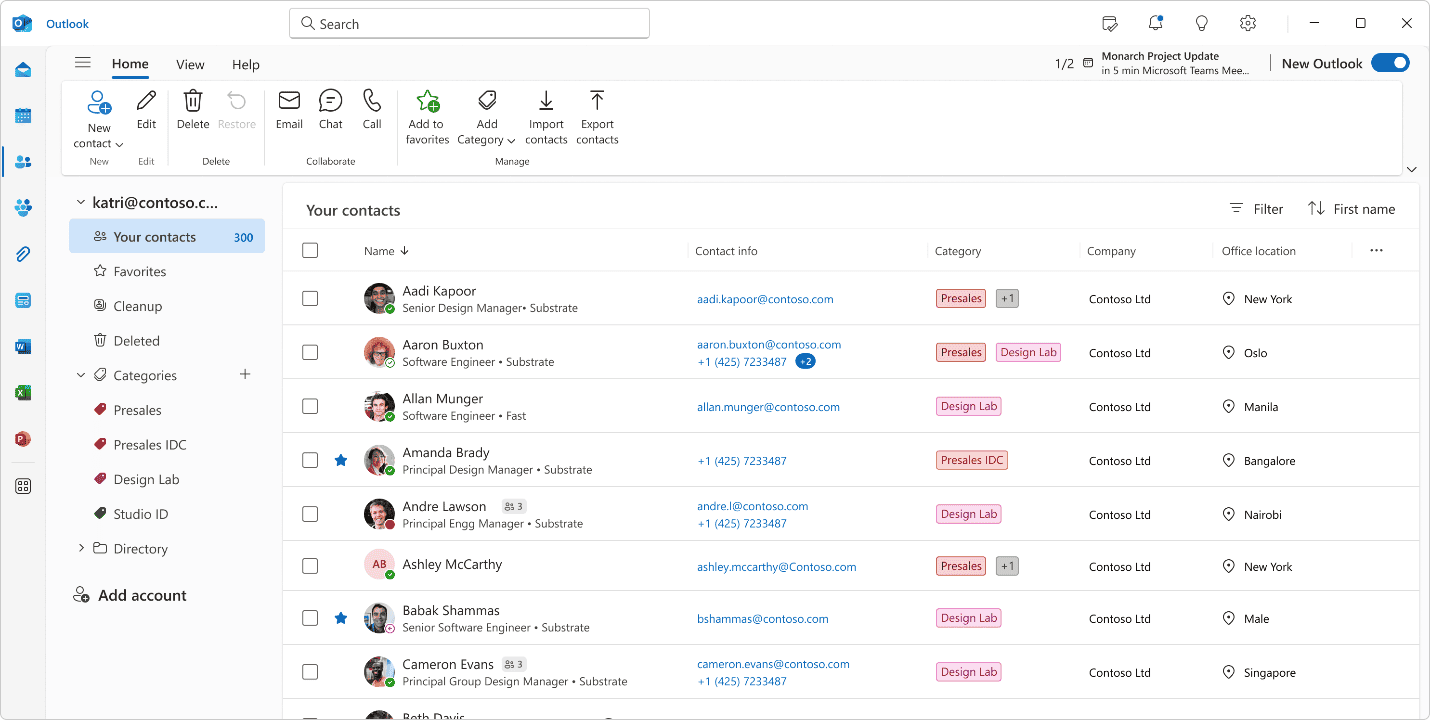
The reimagined People experience in Outlook introduces a powerful, intelligent search that surfaces the right contact immediately. You can search by name, title, department, location, or even personal notes. So, you don’t need to dig through nested directories or long alphabetical lists.

As you type, Outlook offers smart suggestions based on communication patterns and organizational context. Results unify personal contacts, organizational directories, and linked accounts in one view, letting you email, call, or Teams chat directly from search results.

Image: Microsoft

Besides search, Outlook now features a tabular multi-column layout for contacts. You can sort, filter, and scan quickly, with quick actions built in for messaging or calling. Multi-select and bulk actions simplify workflows, while color-coded categories make organization intuitive. Importing and exporting contacts is easier, and the experience is consistent across desktop, web, and Teams.

A modern, unified contact experience

Microsoft further adds that the update is fast, stable, and reliable, even for large contact lists. Every interaction is designed to feel instant, helping you spend less time managing contacts and more time collaborating.

Image: Microsoft

The new People experience is available now in the New Outlook for Desktop, and rolling out for Outlook on the web for all Microsoft 365 users. Here’s how you can get started:

  • Open Outlook and click the People icon on the left navigation rail.
  • Start searching for anyone by name, title, location, or any keyword.
  • Explore your contacts in the new table view and try out quick actions.

Do you find this new feature useful? Do let us know in the comments below.

Microsoft Is Cutting Copilot Clutter in Windows 11, Promises to Integrate AI Where It Matters

Windows 11 users have been furious with Microsoft given how the company handled the OS in the past few years. Ever since AI became mainstream, Microsoft has started forcing AI features in Windows 11. Last year, in June, when Pavan Davuluri announced that the company had envisioned turning Windows into an agentic OS, thousands of users criticized Microsoft for its AI-everywhere strategy.

However, things suddenly took a positive turn early this year, when Microsoft promised that it would move away from its AI-everywhere strategy this year and would start refocusing on fixing the pain points of Windows 11.

Copilot won’t appear everywhere in Windows 11, finally

Windows 11 users were pleased to learn that their feedback is finally being taken seriously within Microsoft. That commitment from the company has recently been reaffirmed by Windows chief Pavan Davuluri. In a big announcement post, Davuluri outlined how Microsoft will try to win Windows users back.

Among the efforts is “Integrating AI where it’s most meaningful.” Davuluri explains that Microsoft will now be “more intentional about how and where Copilot integrates across Windows.” The company will now be “focusing on experiences that are genuinely useful and well‑crafted.”

As part of the plan, Microsoft will be “reducing unnecessary Copilot entry points, starting with apps like Snipping Tool, Photos, Widgets, and Notepad.” For those unaware, last year, Copilot buttons began appearing across core apps like File Explorer, Notepad, and Paint, often without clear utility. Users felt most of those as being clutter rather than innovation.

The company further noted that it is “being thoughtful about how and where it brings AI into Windows.” All of that while ensuring “transparency, choice, and control, so that new capabilities enhance the experience rather than complicate it.”

Don’t expect all AI features to suddenly vanish, though

Given that AI is one of Microsoft’s biggest revenue drivers, the company is unlikely to scale back its AI features broadly. However, it does appear committed to removing them from areas where users do not find them useful. From what’s been shared by Microsoft, we expect the OS to look cleaner, with Copilot existing inside the dedicated Copilot app or the Ask Copilot search box.

So, what AI features do you want Microsoft to keep in Windows 11, and which ones should it remove completely? Share your thoughts in the comments below.

Microsoft Investigates Exchange Online Outage Disrupting Mailbox Access

Microsoft is investigating a critical Exchange Online issue that is disrupting mailbox access for some users. The incident, tracked as EX1256020, has been intermittently affecting services since Thursday, with no confirmed resolution timeline yet.

Issue impacts Outlook mobile and Mac users

According to reports, the outage primarily affects Outlook mobile apps and the new Outlook for Mac. Users have experienced intermittent problems accessing their mailboxes, suggesting a backend service disruption rather than a client-side issue.

Microsoft has not disclosed how many users are impacted or which regions are affected. However, the classification of the issue as a critical incident indicates a noticeable and widespread service impact.

Root cause linked to virtual account change

Microsoft identified the root cause as a newly introduced virtual account within its infrastructure. Initial attempts to resolve the issue by restarting affected systems did not succeed, pointing to a deeper configuration problem.

As a result, the company has started rolling back the change across affected environments. This rollback is currently the primary mitigation strategy aimed at restoring normal service functionality.

No clear timeline for full recovery

While Microsoft continues to disable the problematic virtual account change, the company has not provided an estimated timeline for full resolution. Users may continue to experience intermittent access issues until the rollback process is fully completed.

Ongoing concerns across Microsoft services

This incident adds to a series of recent Microsoft-related concerns. Azure Monitor was recently exploited in phishing campaigns, while a critical SharePoint vulnerability is reportedly under active attack.

In parallel, Microsoft is also working on new improvements, including Priority Cleanup V2, a feature designed to enable faster online deletions across its services.

Microsoft says it will continue monitoring the situation and provide updates as mitigation efforts progress.

Via Bleeping Computer

Ryzen 9000 Issues Continue on ASRock Boards Even After BIOS Update

[UPDATE 2026/3/24 | 11:20 AM GMT+1] Two more failures reported on BIOS 4.10. One case on ASRock X870 Riptide WiFi saw a system crash without overclocking, followed by a solid red CPU LED. Swapping in a new Ryzen 7 9800X3D restored POST.

Another report on ASRock B850 Riptide WiFi also involved a failed Ryzen 7 9800X3D on BIOS 4.10, reportedly the second chip to fail on that board. A visible mark was noted on the CPU, and BIOS flashback plus memory changes did not fix the issue.

[ORIGINAL ARTICLE] AMD Ryzen 9000 CPU failures on ASRock motherboards are still being reported, even after BIOS updates aimed at fixing the issue. A recent case shared on Reddit suggests that the problem may not be fully resolved.

BIOS 4.10 aims to fix stability and boot issues

ASRock recently released BIOS version 4.10 for its 600 and 800-series AM5 motherboards. The update targets boot failures and system instability affecting Ryzen 9000 processors.

In some reported cases, the BIOS update even managed to restore previously non-functional CPUs. This led many users to believe the issue had been largely addressed.

However, results appear inconsistent. Not all systems benefit from the update, and new failures continue to surface.

New failure reported after BIOS update

A Reddit user recently shared a case involving a Ryzen 7 9800X3D paired with an ASRock X870 Pro RS WiFi motherboard.

According to the report, the system had been running without issues for nearly a year. Problems began shortly after updating to BIOS 4.10.

The system froze during use and failed to boot afterward. Diagnostic LEDs for both CPU and DRAM remained lit, suggesting a potential CPU-related failure.

No overclocking, limited configuration changes

The user stated that no manual overclocking had been applied. The only performance-related setting enabled was the EXPO memory profile.
Despite multiple troubleshooting attempts, the system could not be revived. Both the CPU and motherboard were eventually sent for RMA.

At this point, it remains unclear whether the failure was caused by the BIOS update, a hardware defect, or possible physical degradation.

Ongoing concerns for Ryzen 9000 platform stability

This case highlights a broader concern: BIOS updates are not a guaranteed fix for Ryzen 9000-related issues on all systems.

While some users report improvements, others continue to experience failures even after applying the latest firmware. The inconsistency suggests that multiple factors may be involved.

AMD and motherboard partners may need further updates or investigations to fully resolve these reports.

Despite these issues, AMD continues to push forward with new technologies. Ryzen Z1 Extreme support remains active, and the company is developing a new CPPC feature that could improve Zen 6 performance.

In addition, AMD recently rolled out FSR 4.1 through its latest Adrenalin driver update, signaling continued progress on the software side.

Via Wccftech

RPCS3 Update Brings ARM64 Optimizations for Better PS3 Emulation

RPCS3 has been in the spotlight recently after introducing Steam library integration, and the emulator continues to evolve with new performance-focused updates. The latest development targets ARM64 systems, bringing meaningful improvements to how PlayStation 3 games run on modern ARM hardware.

ARM64 optimizations aim to boost PS3 emulation

According to VideoCardz, the newest RPCS3 update introduces optimizations specifically for ARM64 architecture. This includes support for Armv8 SDOT and UDOT instructions, which are designed to accelerate certain types of CPU calculations.

ARM64 is widely used in Apple Silicon Macs and Windows on ARM devices, including Snapdragon X-powered laptops. With these changes, RPCS3 improves how it handles PS3 CPU emulation workloads on such systems, which have historically struggled compared to traditional x86 hardware.

While the improvements are promising, the developers have not shared any benchmark results yet. As of now, ARM-based performance still trails behind x86 platforms, and further optimizations will be necessary to close the gap.

No plans for mobile platforms

Despite the focus on ARM architecture, RPCS3 clarified that this work does not signal a move toward mobile platforms. The team confirmed there are no plans to support Android or iOS.

Instead, the goal remains clear: refine native ARM support for desktop-class devices such as Macs and Windows on ARM laptops, where performance gains can be more impactful.

Steady progress for PS3 emulation

Even without benchmark data, the addition of Armv8 instruction optimizations marks another step forward for RPCS3. The emulator continues to expand its capabilities across different architectures while maintaining a focus on accuracy and performance.

In related news, the PlayStation 3 recently received a new firmware update, showing that the platform still sees occasional official support. Meanwhile, rumors around frame generation for newer PlayStation consoles have surfaced, although such features are unlikely to arrive anytime soon.

Capcom Says It Won’t Use AI Directly in Games, But Will Embrace the Tech in Development

In the last year or so, multiple reports of AI use in games have circulated online, especially as game development costs and timelines have continued to rise. Capcom, one of the biggest game publishers, has once again clarified how it plans to approach generative AI, following fresh comments from its latest investor briefing (via My Nintendo News).

Capcom draws a line on AI use in game content

Today, a Japanese gaming news outlet, Game Spark, spotted a Q&A summary (in Japanese) released today, in which Capcom made it clear (via machine translation) that it will not use generative AI-created materials directly in its game content. The comments come at a time when AI adoption in creative industries has become a sensitive topic.

Artists and developers are concerned about originality and quality due to AI use. Whereas players have reportedly complained about the use of such technology in games. Crimson Desert is one of the latest examples. Players reportedly spotted AI-generated assets in the game, which led to backlash on social media. Now, the developer of the game has apologized to players in a post on X and confirmed that it is “currently conducting a comprehensive audit of all in-game assets and is taking steps to replace any affected content. Updated assets will be rolled out in upcoming patches.”

Speaking of Capcom, it isn’t avoiding AI entirely. Capcom noted that it plans to actively use generative AI as a tool to improve efficiency and productivity during the development process. This includes areas like graphics, sound, and programming, where internal workflows could benefit from automation and faster iteration.

Last year, around the same time, Capcom had already hinted at using AI for “idea generation,” as mentioned in a post on the Google Cloud Japan blog. Kazuki Abe, a Technical Director at Capcom, had highlighted how advanced technologies could streamline development and reduce workload pressures, which have now become a growing concern across the industry.

At a time when game production is becoming more resource-intensive, Capcom is looking to strike a balance. The company is exploring AI behind the scenes to speed things up, while keeping final creative output in human hands.

Article feature image source: Capcom

Windows 11 Optimization Plans Echo Microsoft’s Unfinished 20/20 Project

Microsoft has confirmed new efforts to optimize Windows 11 and reduce RAM usage, but this is not the first time the company has pursued such a goal. A previously abandoned internal initiative, known as the “20/20 project,” aimed to significantly improve efficiency but never reached completion.

A look back at Microsoft’s unfinished 20/20 project

According to Windows Latest, the initiative was recently referenced by former Windows chief Mikhail Parakhin. In a public comment, Parakhin praised current Windows + Devices head Pavan Davuluri for pushing forward similar performance-focused improvements.

The original 20/20 project aimed to reduce both idle memory usage and disk footprint by 20 percent. Despite its ambitious goals, the plan was never fully realized.

It is speculated that the effort likely stalled due to difficult trade-offs. Lowering RAM usage often requires cutting features, simplifying system components, or limiting modern web-based technologies. At the same time, Microsoft continued expanding Windows with new features, cloud services, and AI integrations, making optimization more complex.

Why Windows 11 still struggles with RAM usage

Windows 11’s high memory usage stems from a combination of background services and modern app frameworks. Microsoft has increasingly adopted Electron and WebView2-based applications, which tend to consume more resources than traditional native apps.

Each Electron-based app can spawn multiple processes, often using hundreds of megabytes of RAM. This issue affects both third-party software and Microsoft’s own apps. For example, features such as Agenda View rely on web technologies, while Copilot is transitioning back toward a web-based experience.

Another contributing factor is Windows 11’s fragmented user interface stack. The operating system blends several frameworks, including Win32, UWP, WinUI, and web technologies such as React and WebView2. This hybrid approach increases overhead, as multiple rendering systems run simultaneously.

Microsoft has started transitioning toward WinUI 3 to streamline performance, but progress remains gradual.

A renewed push for efficiency in 2026

Microsoft’s latest commitment signals a renewed focus on making Windows 11 faster and more efficient. The company has acknowledged user concerns around performance, especially as modern apps and services continue to demand more system resources.

While the new optimization efforts resemble the earlier 20/20 project, the broader challenge remains the same. Microsoft must balance performance improvements with its ongoing push toward feature-rich, cloud-connected, and AI-driven experiences.

For now, the company’s roadmap suggests steady improvements throughout the year. Whether Microsoft can finally deliver meaningful reductions in RAM usage will depend on how it handles the same trade-offs that stalled its earlier efforts.