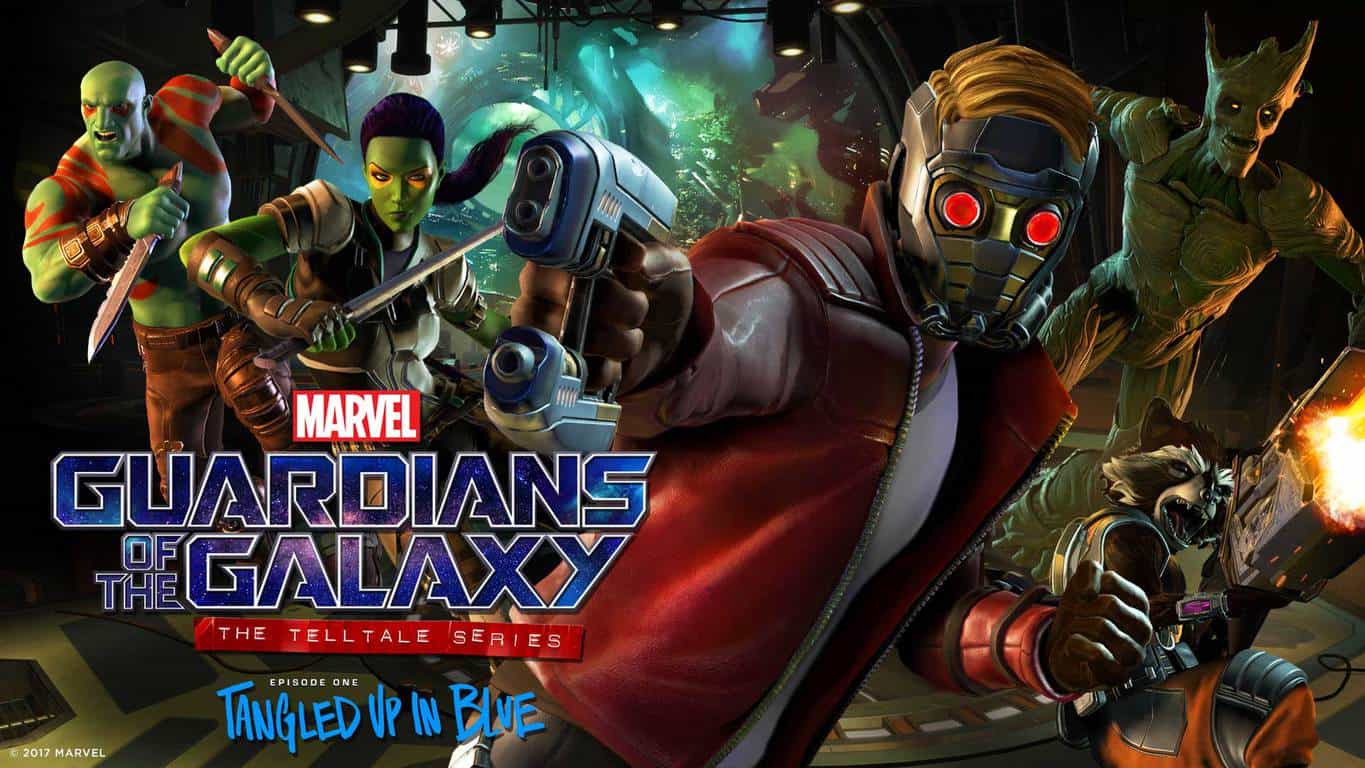
Marvel’s Guardians of the Galaxy, the latest episodic game from Telltale Games, will launch on the Xbox One next month. The first episode of the series called “Tangled Up In Blue” will be available to download on the console on April 18, with a $4.99 launch price.
The company also announced in a blog post that special season pass discs will be available to purchase in North America on May 2 (on May 5 in other countries), but pricing details are still unknown. In the meantime, the developer plans to release a new game trailer tomorrow, March 30. If you missed it, you can watch the first trailer below:
If you’re wondering, Marvel’s Guardians of the Galaxy will also launch on Windows, Playstation 4 as well as iOS and Android devices next month. However, the episodic game won’t be released on the Xbox 360, continuing a trend that started last year with the release of The Walking Dead: A New Frontier. Sound off in the comments if you’re looking forward to play the first episode next month.
Snake Pass is now available to play on Xbox One consoles and Windows 10 devices. As part of Microsoft’s Xbox Play Anywhere initiative, those who purchase it on the Xbox One will also get the game for free on Windows 10 and visa versa. The game is a puzzle-platformer and features 15 levels to complete. Here’s the official description:
THINK LIKE A SNAKE! When the tranquillity of Haven Tor is interrupted by a mysterious interloper only the unlikeliest of heroes can save the day! Meet Noodle the Snake and his hyperactive best friend, Doodle the Hummingbird, who together must re-unite the missing Keystones with the magical gates that give Haven Tor its mythical power. A unique, physics based puzzle platform game, Snake Pass challenges players to ‘think like a snake’ as they tackle precarious puzzles as only a snake can. Slither through long grass, coil around bamboo and climb out of trouble in the latest game from award winning independent studio Sumo Digital!
Air Guitar Warrior is now available to play on the Xbox One. This new game by the creators of Boom Ball and Kung Fu For Kinect mixes the sidescrolling platforming and music genres into something that is pretty unique. Air Guitar Warrior scans players into the game with the console’s Kinect camera which allows gamers to essentially play as themselves. Players can then progress through the levels by triggering a variety of special moves through striking specific poses in front of the Kinect. Here’s the official game description:
Air Guitar Warrior is part scrolling shooter, part music game and full of rock attitude – and you control the music! Includes 19 custom-made tracks from Mr. Fastfinger and Samppa Siurala. Shoot bullets, lasers and lightning from your air guitar! Ride dinosaurs, sharks and jet-powered crocodiles! Smash Vikings, aliens, demons and flying skulls! Find the legendary sword-guitar and challenge Heavy Metal Zeus for the top spot in the temple of the rock gods!
Rain World is a game that brings forth an interesting concept: you are a nomadic slugcat, both predator and prey in a broken ecosystem. Surviving in this hostile environment is not an easy task, as you must brave the industrial wastes, hunt enough food to survive, while keeping an eye on predators. You know what they say: predators can become prey.
As it often happens with newly launched games, Rain World is affected by a few technical issues.
Rain World reported bugs
Graphics issues
Players report that Rain World is affected by a strange shadow issue. More specifically, gamers can’t see the characters, but only their shadows.
I just installed the game and booted it up. I’m psyched that steam released it a bit earlier than expected but unfortunetly it’s unplayable on my pc at the moment. There seems to be an odd bug that is affecting the characters in the game, you can only see their shadows. Is anyone else experiencing this?
Area transition issues
When the slugcat walks into another area, somehow the screen does not always follow it. As a result, gamers are stuck looking at the old area.
I’m having an issue where once the slugcat walks to another area (not using a pipe) the screen does not always follow slugcat […] You can still move about but the only way to remedy this is to press Back and then wait for the screen to come up and then resume the game. Poor slugcat has met his end a few time due to this error.
The controller always pushes left
Other players have encountered various controller-related issues. They report that the Xbox controller always pushes them to the left, preventing them from properly controlling the slugcat.
I’m using a wired Xbox controller that works on multiple other games, but it immediately tries to push left at all times. It’s impossible to do anything but go left (the opposite direction/flow of the game). In settings, it’s impossible to solve this by moving to keyboard and mouse, as all of the settings are on the right side, thus rendering the entire game unplayable no matter what I do.
Launch issues
Many players also report that Rain World often loads in a loop and then suddently freezes. As a result, they can’t actually launch the game. Running the title in windowed mode doesn’t fix this problem.
The game loads extremely slow (Several minutes from ‘new game’ to the intro video. Either freezes or takes even longer to load after the intro video). During the several minute long loading, the game “srops responding”. I have not been able to progress further than the “grey cloud” screen that appears after the intro video.
The bad news is that there aren’t any specific workarounds to fix the issues listed above. Most likely, these bugs will get fixed with the next game update.
If you’re looking for a simple, fun game to play, then Snake Pass is the perfect game for you. In it, you control a happy snake and guide it to slither, coil and climb its way to the top of Haven Tor. As such, Snake Pass is a puzzle platform adventure game that can be played by the whole family.
Noodle the Snake and his hyperactive best friend, Doodle the Hummingbird must complete a very important mission: reunite the missing Keystones with the magical gates that give Haven Tor its mythical power. The game challenges you to actually think like a snake as you tackle precarious puzzles as only a snake can.
Unfortunately, Snake Pass is affected by a few technical issues that sometimes limit the gaming experience.
Snake Pass bugs
Camera issues
Many players report they’ve experienced many deaths due to an unstable camera since it behaves like a physical object and can get stuck in walls. This is extremely annoying especially considering players must guide the snake through tight spaces.
This camera is giving me dark souls vibe, and not the good one. There are many tight spaces that you have to go through in this game, and i’ve experience many deaths because the camera was freaking out because it hit a wall or a monkey bar. […]
I wish there’s an option so instead the camera being a “phyical” thing that bumps into walls it can go through them and give the objects that hide your view from noodle to be semi-transparent.
Players can’t change the game’s language
Players also report that sometimes the game starts in a different language. Unfortunately, it appears that there’s no in-game option to change it. This is most likely because Snake Pass is one of those games that chooses the main language based on Windows’ settings.
Game starts in Spanish for some reason, when I really wanna play it in English so I can Let’s Play it on my channel, feels super weird to have to translate everything. I have the game on English on Steam Properties, my Steam is set on English yet the game’s somehow decided Spanish is what I want and there seems to be no in-game option to change it.
The game feels laggy
Despite having a solid 60 FPS rate, some players experience lag when playing Snake Pass.
was so excited for this game and i just tried it out and it is soooo laggy. wondering if it’s happening for everyone else because it’s a new game or if my computer just isn’t taking it? 🙁
Black screen issues
Snake Pass is also affected by black screen issues. When players enable full-screen, the computer screen actually goes black.
When I am in fullscreen, the screen is black. I guess it is a bug.
So I press Alt+Enter to go in windowed mode. It works fine, and it looks like borderless windowed mode at 1920×1080.
However, in the settings, If I select Windowed Mode, there is no 1920×1080. Too bad because I could force borderless windowed mode using “Borderless Gaming” if this setting was available. So please either fix fullscreen, or allow 1080p in windowed mode in the settings.
These are the most common Snake Pass bugs reported by players. If you’ve come across various workarounds to fix them, list the troubleshooting steps in the comment section below.
Another day, another app leaves the older versions of Windows and Windows Phones behind. This time, it’s Facebook Messenger. The popular instant messaging app will depart smartphones running Microsoft’s Windows 8.1 and earlier operating systems, which account for 76% of the Windows ecosystem.
Facebook Messenger is the latest app to depart Windows Phones as the platform continues to struggle in a market dominated by Apple and Android devices. Users of the app received an advisory email informing them the app would stop supporting their devices at the end of March, meaning they will no longer be able to send and receive messages.
The Messenger team said in a blog post:
With over 1B people using Messenger every month, our team spends countless hours making it the best way to message your friends and family. One of the ways we continue to improve is by consistently introducing rich features, like voice and video calling, games, and bots for Messenger. Using older versions of apps means that experiences won’t work well or sometimes not at all. As a result, we are asking people who are using older versions to upgrade so they can enjoy more of the delightful features of Messenger.
We will be ending support for messaging in some older mobile app versions of Messenger and Facebook. We have proactively reached out to those affected and have also offered suggestions right in Messenger. These include updating your app to the latest version, loading an OS update for your device or migrating to Facebook Lite. If your devices do not support the newest versions of Facebook, we recommend going to Facebook.com through your mobile browser.
The Microsoft Lumia 640, 640 XL and the Lumia 535 are among the devices affected by the app’s leave. The withdrawal comes a month after Skype pulled the plug on its app for older versions of Windows. Microsoft’s latest move also applies to Facebook for Windows Phone, Messenger for Windows Phone 8 and 8.1, and Facebook for Windows 8 and 8.1 desktop app.
Final Fantasy XV recently received an important update that brings a series of new elements to the game as well as many useful bug fixes. FFXV update 1.07 adds new areas and cutscenes to Chapter 13 of the game and makes Gladiolus playable for this new segment. Players can access Chapter 13 through a special menu on the title screen or through an existing Chapter 13 save file and can choose to play as Noctis, Ignis or Gladiolus.
FFXV March Update new features and improvements:
New areas & cutscenes are added to chapter 13 of the game + Gladiolus becomes playable for this new segment.
1. Chapter 13 verse 2 is acceasible either by selecting the “special” option in the main menu or during chapter 13 of the game where you are given the choice of either play as Noctis or Gladiolus when the party slips. 2. Ring of the Lucii’ spells are buffed
Temporary conclusion of the Timed Quest, will resume at a layer date.
Announcement of the winning snapshots from first photo contest (viewable at Takka’s Pits Stop at Hammerhead)
Adition of two pieces from Episode Gladiolus to music player tracklist.
Adition of compatibility with Episode Gladiolis.
Various Gameplay enhancements.
Various bugs fixes.
Players report that the March Update also brings issues of its own. Frequent bugs include stuck loading screens, graphics issues, and more.
Common Final Fantasy 15 March Update bugs
The loading screen gets stuck in Episode Gladiolus
Anyone else had any problems with this? I can’t get past a loading screen once I’ve clicked on the episode. I’ve left it ‘loading’ for a couple of hours, I’ve tried off and on a few times, no joy.
Black screen before the boss fight
Gamers report that at the end of Chapter 13, the screen goes black after they get on the elevator and hit the “Operate” button. While the music keeps playing and gamers can pause the game, the screen remains black.
[…] at the end of chapter 13, right before a boss fight I believe, you have to ride an elevator. This is after the party has been reunited. So I got on the elevator, hit the “operate” button…and then the screen went black. […] I’ve tried reloading, traveling to the past and then coming back, almost everything I can think of but to no avail…anyone else getting this bug? Any ideas for how to fix it?
Judging by the description above, it appears that FFXV is having trouble autosaving. If you’re experiencing this issue, wait for a few minutes for the game to autosave. Also, try saving the game manually before reaching the elevator. If these two solutions didn’t help, delete and reinstall the game.
Music is louder than character voices
In Chapter 13 Verse 2, players can’t hear character voices due to a sound mixing problem after fighting Leodolas.
Right after you fight leodolas and he dissappears the sound mixing is almost identical to the scene where noctis is getting trapped into the crystal. The music is louder than the dialouge and you can barely hear. Did anyone else have this issue?
Overall, Final Fantasy XV’s March Update is pretty stable and reliable. As you can see, we identified only three recurrent issues.
Have you encountered other issues that we didn’t list in this article? Use the comment section below to tell us more about your experience.
Microsoft president and chief legal officer Brad Smith has been on the warpath against cyber crime. Over a month ago, Smith made the public call for a Digital Geneva Convention, and he hasn’t let up even as he traveled through European countries this last week. Similar to the Fourth Geneva Convention, Smith wants to see governments work together to build a battle plan for cyberspace.
In the last seven days, Brad Smith has stopped in Germany, Denmark, Poland and the UK speaking to organizations, law firms, and conventions about Microsoft’s stance. The penultimate finish to his week was an event in Brussels where Smith live-streamed the keynote address at The German Marshall Fund’s Brussels Forum on Saturday.
Throughout his trip through Europe, Smith has diligently shared that he truly believes that liberty can be maintained through the digital era. But the catch is, governments need to be transparent about their access and able to keep private information secure. According to the article, Smith made it clear that Microsoft hasn’t any intention to aid governments or organizations in their attacks to citizens.
Those tired of the regular ways they undergo drive tests have something to look forward to as a new drive testing software has been made available called CCSIO Benchmark that brings innovation to the process. What’s even more interesting is its tiny 210KB size!
How it works
CCSIO Benchmark works by testing a multitude of scenarios to detect the best possible combination, perfect for those looking to find the most efficient configuration. The great thing here is that users don’t have to really test anything as the software will tell them exactly what the best combinations are for achieving top speeds in both writing and reading.
Those worried about potential compatibility issues shouldn’t be afraid because this software works for any storage device, making it the perfect tool to seamlessly carry around and use whenever necessary.
What it offers
There are many elements that go into configuring its various options. Whether users tinker with buffer size options or the IO mode, everything leads to different outcomes in performance and efficiency. All of them are covered by CCSIO Benchmark, however, making the user’s job easy and practically nonexistent. When it comes to buffer sizes, there are many options to choose from, including 8K, 16K, 32K, and so on, all the way up to 16M. That is quite a range of options that is provided to get the best results.
There are three ways in which tests can be overseen with this software. The ways in which tests can be done are with buffed sequential modes for IO, or unbuffered, either simple or unsequential.
A tweet from Microsoft employee Brad Rossetti has revealed that Xbox One Ring 4 Insiders will get the latest Creators Update build today. Ring 4 is the slowest Ring on the Xbox Insider program, so it would seem these gamers have been left eagerly waiting for new features which have already graced Insiders in the other Preview Rings.
Xbox One Insiders – Prepping the expansion of Ring 4 today with the latest build.
Though patch notes are not yet available, Insiders in Ring 4 should be expected to receive performance-enhancing features such as improvements to the Activity Feed and Profile, Looking for Group (LFG,) and changes to My Games and Apps, and Settings. Availability of these features to Ring 4 also means that Microsoft could be done with the development of the Xbox version of Creators Update, but it’s best to keep tunes for more information.
Recently, the Pwn2Own competition took place and Microsoft Edge took first place as the most hacked web browser in the wild. Eyebrows were raised as Microsoft Edge fell victim to straightforward hacks that relied on heap overflowing to conduct perfect virtual machine escapes courtesy of 360 Security as part of the competition. The event left Microsoft to reconsider its security practices.
New vulnerabilities discovered
Hackers can use RCE (Remote Code Execution) flaws to establish a foothold in the main system’s depths.So, by utilizing CPU coding they can assume control of an entire system. This bypasses web code such as HTML and goes directly to the heart of the system. While there are other browser security measures put in place, RCE is considered to be the most important as losing control of it will result in losing control of others as well. Microsoft Edge operates within a sandbox. Every time a new address is accessed, it is run through an app container which separates that instance of Edge from the rest of the system to assure that breaching one security checkpoint doesn’t automatically mean the others are lost as well.
With the new Creators Update, users can expect to see more important processes being put into app containers to strengthen it inside the Edge sandbox. There have been several improvements brought to the system by the Edge team, so here are some of the most important ones that users should familiarize themselves with them quickly.
Reassuring users seems like a good idea
Microsoft is clearly showing interest in making the Microsoft Edge browser one of the most appreciated in the world. The browser follows Internet Explorer, a browser with a tricky and controversial history. With these changes, Microsoft is showing that Microsoft Edge is very important to the company.
By providing extra security, Microsoft is reassuring users about the great privacy it offers and looks to raise the total number of market shares that Edge has against other competing browsers, among which is also Internet Explorer with a higher market share than Chrome.
RELATED STORIES TO CHECK OUT:
Windows 10 pushes Microsoft Edge ads to the Start Menu
Every Tuesdays, Xbox Live Gold subscribers wait for Microsoft to announce the latest Deals with Gold and we’re happy to report that Xbox’s Major Nelson has just delivered the list. The announcement comes a little later than usual today, and at the time of our writing the Xbox 360 deals are not live yet (you can already check them on Xbox.com though).
On the Xbox One, highlights include recent titles such as Mafia III and WWE 2K17, but you may also check the tactical shooter Zombie Army Trilogy and the indie adventure game Albedo: Eyes from Outer Space. For Forza Horizon 3 fans, it’s also worth mentioning that the Blizzard Mountain DLC and the VIP pass also get a 50% discount this week. Moreover, several DLCs for Dead or Alive 5: Last Round are being discounted during this week’s Spotlight Sale.
As for Xbox 360 owners, they can take advantage of a 50% discount on the Call of Duty: Modern Warfare bundle or save 60% off WWE 2K17. Other interesting deals include shoot ’em up titles Akai Katana and Under Defeat HD: Deluxe Edition. As usual, you can find more details about our favorite deals below.
It’s 1968 and after years of combat in Vietnam, Lincoln Clay knows this truth: family isn’t who you’re born with, it’s who you die for. Now back home in New Bordeaux, Lincoln is set on escaping a criminal past. But when his surrogate family, the black mob, is betrayed and wiped out by the Italian Mafia, Lincoln builds a new family on the ashes of the old and blazes a path of military-grade revenge through those responsible. Intense gun fights, visceral hand-to-hand combat, white knuckle driving and street smarts will all be needed. But with the right crew, tough decisions and some dirty hands, it’s possible to make it to the top of the city’s underworld.
Welcome to Suplex City, courtesy of cover Superstar Brock Lesnar! WWE 2K17 arrives as the reigning and defending flagship WWE video game franchise champion! With the most authentic WWE gameplay ever, thousands of new moves, upgraded Creation Suite, all-new backstage brawling and the largest roster ever assembled for a WWE video game, it’s no wonder IGN said “2K17 delivers the goods.”
Experience gut-wrenching third-person horror and intense co-op action from the creators of Sniper Elite 3.In the dying flames of World War Two, Hitler has unleashed one final, unholy gamble – a legion of undead super soldiers that threatens to overwhelm the whole of Europe. Fight alone or team up to save humanity from the zombie menace in this apocalyptic third-person shooter!
Unleash the power of the Blood Katana… The Empire’s war has ravaged the world and the people are suffering in its relentless pursuit of domination using the feared Blood Katanas. The sacrifices have been great, their deaths giving power to these blades. Do you have the strength to lead a small band of rebels to victory in the face of overwhelming odds?
Highly revered shoot’em up Under Defeat pushed the Dreamcast graphics engine to the limit when it was released in 2006, offering gamers an exhilarating shooter set in a visually stunning and detail-oriented environment. The new port is the game’s rebirth in HD-quality and offers a new widescreen mode.
All discounts will be valid through April 3 and you can check them on your Xbox One or Xbox 360 dashboard. Let us know what do you think of these latest discounts in the comments.
In a Tweet today, Microsoft highlighted that registration is now open for Microsoft Ignite in Orlando. The upcoming September event is the perfect place to meet innovators and explore tomorrow’s tech, as well as access deep technical training, discover new tools for innovation, and connect with the tech community.
Microsoft Ignite will run from September 25-29. Microsoft CEO Satya Nadella is expected to keynote at the event and will discuss the next generation of innovations that will shape the future of IT. Harry Shum, Microsoft’s resident visionary, who pioneered the company’s strategic efforts towards Artificial Intelligence and R&D, is also expected to speak.
Today is a busy day for Minecraft. As we reported yesterday, 4J Studios and Mojang have updated Minecraft on console with its newest mini-game. Glide lets players fly through updrafts and speeds boosts through large maps. But players wouldn’t look quite as cool using Elytra without changing up their appearance.
Today, Minecraft has released two new skin packs. The first is the Mini Game Masters Skin Pack, letting you choose which team you want to represent with themes such as Team Creeper, Team Guardian, Team Wolf, Team Zombie with Chicken Hat, and more. The silly costumes can be accessed through the in-game store.
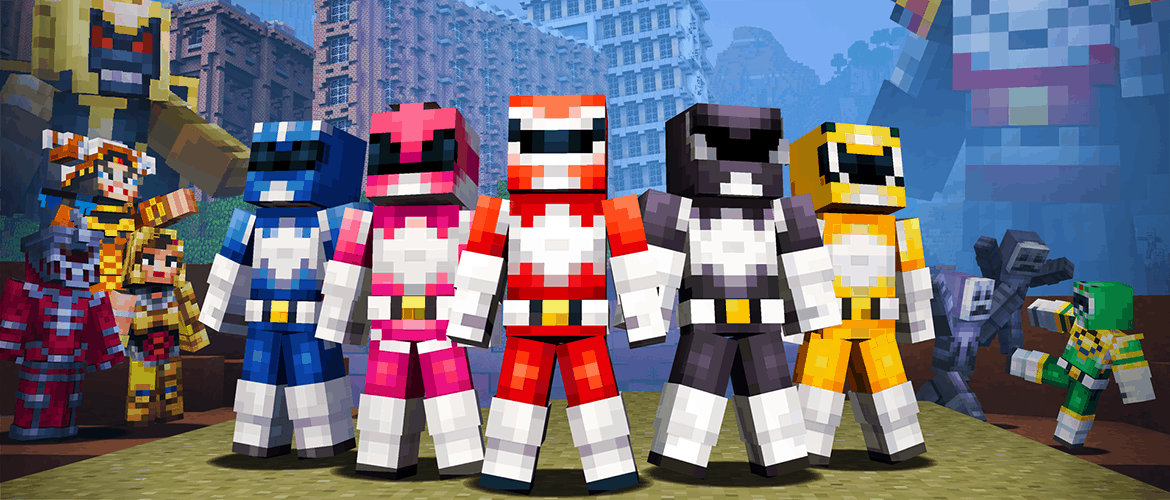
Furthermore, Windows 10 and Pocket Edition received an update to version 1.0.5 today. Besides adding a new pack to the in-game store to play with some Mighty Morphin’ Power Rangers skins, the game added Xbox Live/Realms support to Apple TV, some more commands, game rules, and bug fixes.
New Features:
Power Rangers skin pack
Xbox Live and Realms support on Apple TV
More commands: /title, /stopsound, /playsound, /clear, /difficulty, /effect, /me, /replaceitem, /spreadplayers, /testfor and /gamerule!
Game rules: commandblockoutput, sendcommandfeedback, drowningdamage, falldamage, firedamage and pvp!
Command blocks
Minecart with command block
Tweaks:
Magnifying glass no longer appears over entered text in the Storage manager
Jump range of magma cubes fixed to correct value (No bug ID)
Lapis lazuli icon now in enchanting tables
Accuracy of fireball shots from ghasts is now correct
Bug fixes:
Accuracy of ghast fireball shots is now correct
You will no longer get trapped & suffocate when reloading a world
The beacon’s position is now correct when held in your hand
Endermen once again have idle sounds
Villagers no longer pick up your stuff when you die
But if fighting crime is your passion, the Might Morphin’ Power Rangers skins can also be purchased for console versions as well. You can unlock all twenty of them for the $2.99 via the in-game store.
Almost every gamer has been there. You have a long term game going that you’re excited about, the story is unfolding, and you’re so close to reaching that goal. Unfortunately, your power went out, your hard drive fried, and now you’re stuck wondering why, oh why, (insert third-party) cloud doesn’t save your game’s data in full.
For me, it was The Sims 4. Electronic Arts has published many wonderful games that take advantage of cloud storage. But when it comes to one of my favorites, Origin doesn’t support it. After losing a three-year ongoing game save of my own, I picked up the pieces, wiped up the tears, and declared never to let this be an issue again. The answer was clear: If Origin wasn’t going to let me cloud save for my multitude of Sims, I’d make my own instead!
After some trial and error, mostly with test saves because I learned my lesson, I’ve settled on the following method.
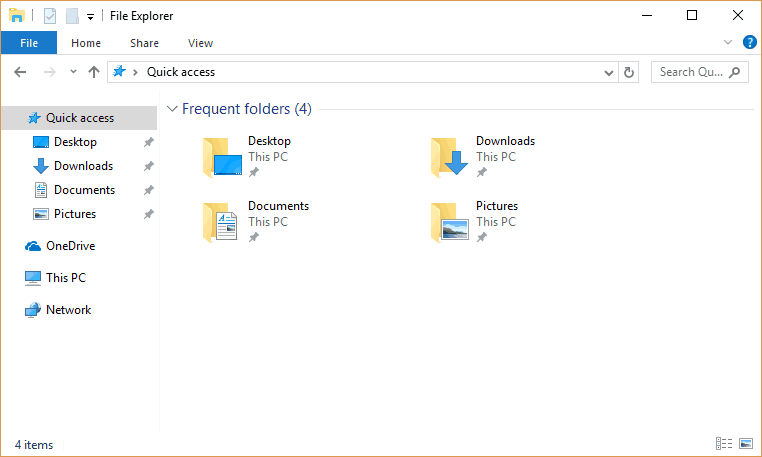
Step 1: Set up OneDrive
If you’re already running a Windows 10 device, then this is going to be the easiest step for you. Unfortunately, not everyone is on Windows 10 quite yet. For those clinging to their former OS, you will need to download and install OneDrive onto your computer.
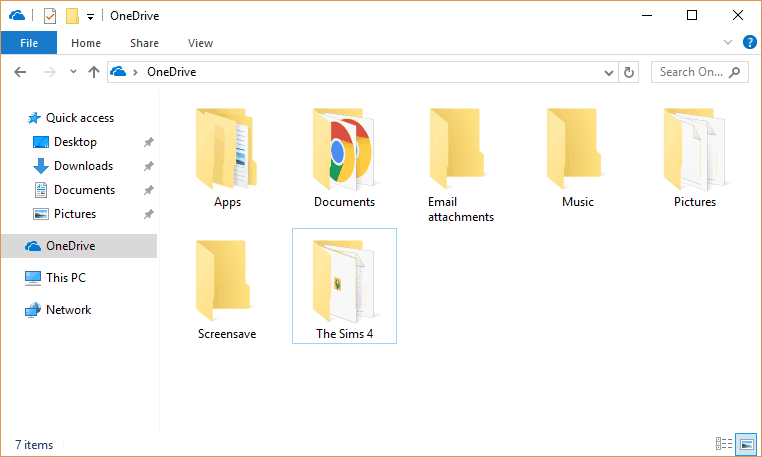
Once finished, you will see your cloud drive in the explorer.exe.
OneDrive should begin running immediately in your system tray and ready to sync to the cloud automatically by default.
Step 2: Copy The Files Over to the Cloud
It is important to recognize exactly what you’re hoping to backup onto the cloud first. You could choose to simply backup the saved games, the tray, mods, or you could be like me and save the whole game’s document file. It’s worth noting that these documents files are not the game files found in Programs, but are simply the local user content.
Right click on the folder you decide to backup to the cloud, select copy, then paste them into your cloud folder. This will create a mirror of your game’s content in the OneDrive local folder which will begin syncing to the cloud online. But because you copy it over doesn’t mean the game is linked to the cloud just yet.
If you open your game currently, it will save to the documents file, leaving the backup as a former version of your game. This is handy in case you have a specific save state you want to keep, but not if you want to run from the cloud itself. For that, you will need an automatic symbolic link between the game files and the local OneDrive folder.
Step 3: Enabling a Symbolic Link
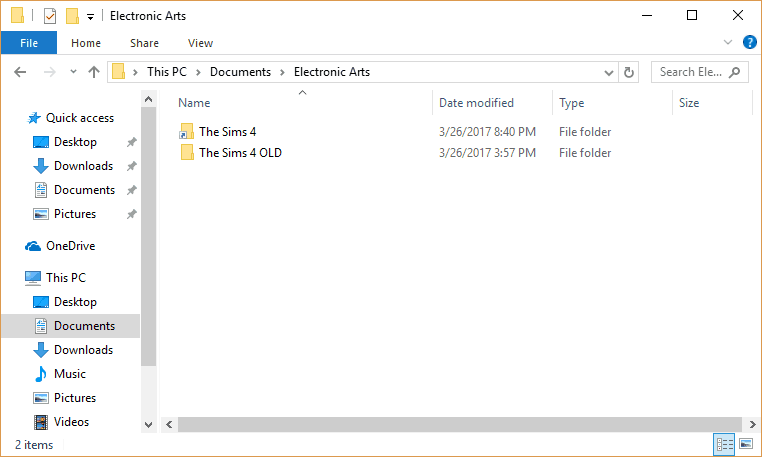
Return to your original file location. You’ll need to either delete or rename the game’s folder. I suggest the latter, just in case you’re paranoid like me and don’t want to lose all of your progress.
Now that the file no longer ‘exists’, you’ll be able to create a symbolic link. Put basically, this is similar to a desktop shortcut that will redirect the game to use another file path instead of this local one.
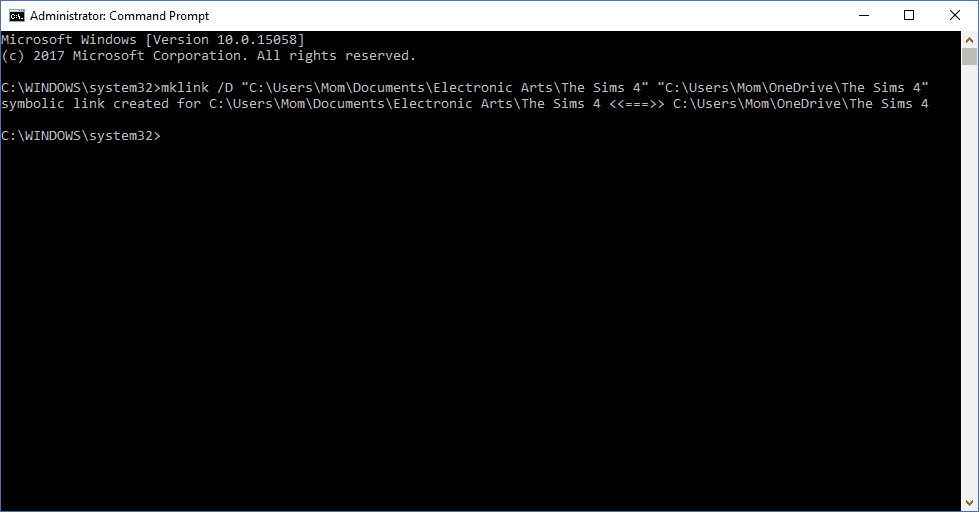
Search and run cmd.exe as administrator. This is an important step since you’ll likely receive an error and not be able to proceed further. Note the file paths of the game file in Documents and OneDrive, then input them into cmd replacing the paths with your own:
A confirmation will let you know that a symbolic link was created.
Just in case you want to make sure that it worked correctly, all you have to do is go back to the original Documents folder. Click on the folder with the link on it. If it redirects you to the OneDrive folder, then you are all set.
That’s it! Anytime that your game accesses that file, it will automatically pull from your local OneDrive version instead. Likewise, anytime it saves, it will drop the files into the cloud, creating an instant backup that you can access online at any time. The only downfall of this system is that your OneDrive will need to sync after playing, so I only recommend it for single player games and for those that have unlimited internet access. However, games can still be accessed while syncing without hangup and can be used while offline too.
Now you won’t have to worry about your hard drive being fried! Game to your heart’s content, and next time that tornado comes through, you’ll know that your games and other various files are safely stored on OneDrive. So you should probably take cover.
If you’ve been wanting to play NHL 17 on your console without paying full price for the game, while also having the confidence of knowing you can enjoy other Electronic Arts titles, then now is your chance to enjoy! The ice hockey simulation video game is now available as part of the EA Access Program.
NHL 17 was originally released back on September 13, 2016. The title features all-new game modes, new and deeper experiences in fan-favorite modes, and the best on-ice gameplay ever, making NHL 17 the most exciting EA SPORTS NHL game to date. You can feel the thrill of fantasy draft night with a star power team in Draft Champions, or play for national pride in the World Cup of Hockey. Serious hockey fans can also own Every Zone with more end-to-end control with authentic goalies featuring positional awareness and Reactionary Save Intelligence, all-new Net Battles for offensive and defensive zone play, and dozens of thrilling new goal celebrations.
With EA Access, you can download and play an instant collection of EA games, and enjoy hits from franchises like Battlefield, FIFA, Need for Speed, Mass Effect, and many more. More games are also added over time, as is the case with today’s addition of NHL 17. And, as an added bonus, you can play exclusive trials of new EA games before launch day with no purchase necessary, or save 10% on the purchase of EA digital purchases on Xbox One. The service costs $4.99 a month or $29.99 a year.
Shiv Kumar Bhasin, the Chief Technology Officer at State Bank of India (SBI) group has written a post on LinkedIn – Digital Transformation of the Bank needs Digital Workforce – where he talks about SBI’s digital transformation aided by Office 365 adoption.
According to Shiv, digital transformation first requires digital transformation of the workforce. SBI group has introduced BYOD (Bring Your Own Device) by launching enterprise mobility management solution for its entire staff and have adopted Office 365 cloud staff productivity and collaboration solutions.
He states that a digital aware workforce can contribute and accelerate the digital transformation of the customer service touch-points.
The need for data, combined with today’s world’s hyperconnectivity, leads us to a new era, where Peter Drucker’s “knowledge worker” has given way to the “digital worker.”
The traditional premise of the knowledge worker who gathers, processes, and moves data around while spending valuable time creating reports is clearly ending as increases in computing power and data analysis speed force companies to move to predictive- and scenario-based decision making.
The digital worker is defined by the ability to have actionable, live data available at anytime and anywhere, which enables live reactions and decisions.
His post mentions that these initiatives are one of the key foundation step for making the largest bank of India as leading digital bank of India, where every employee has to convert themselves into engaged, productive, innovative, and digital worker.
Following the release of ISOs for Windows 10 build 15063 today, another sign points to this build being the Creators Update RTM build. The clue comes from a leaked version of the Windows 10 Update Assistant, which was recently discovered by Microsoft watcher WalkingCat (via Windows Central).
Using this tool on a PC running the Windows 10 Anniversary Update will allow you to install “the latest version of Windows 10,” which is the build 15063 as seen in the screenshot below. Please note that “Creators Update” or “Windows 10 version 1703” are not mentioned anywhere though:
The Windows 10 Update Assistant lets you install the Windows 10 build 15063.
As you can see, this update assistant is just another way to get the Windows 10 Creators Update right away without having to join the Windows Insider program. However, it’s probably better to use the latest ISOs files if you want to do a clean install on your PC.
Before proceeding, it’s worth reminding that this build still has some known issues which you can check here. There is nothing major though, and we’ll see if the company address them with cumulative updates in the coming days. Let us know in the comments if you successfully installed the Creators Update on your PC with this update assistant.
Cube Mix Plus is the latest Windows 10 2-in-1 from a little known Chinese OEM – Shenzhen Alldo Cube. The company is quite popular on Chinese online retailers, but unlike Chuwi, hasn’t made a mark outside the country as yet.
I ordered the Cube Mix Plus from GearBest.com and these are my thoughts on using it for a couple of weeks – both as a tablet as well as a laptop, along with the inking experience.
Cube Mix Plus Specifications
Operating System: Windows 10 Home 64-bit
Display: 10.6-inch Full HD (1920 × 1080) 16:9 IPS | 10-point multi-touch | Stylus support
Processor: Intel Core M3-7Y30 | Intel HD graphics 615 GPU
RAM: 4GB
Internal Storage: 128 GB SSD; expandable up to 128GB via a microSD card
Camera: 5MP rear camera with AF | 2MP front camera
Battery: 4300mAh
Ports: USB Type-C, microUSB 3.0, microSD, 3.5mm audio port
Dimensions: 273 x 172 x 9.6 mm
Weight: 700 g (Tablet only)
Design
The Cube Mix Plus sports a white chassis in a silver frame. It’s a pleasing color combination and overall the tablet and the keyboard look slick. The corners are rounded and the edges are chamfered for a nice first impression, and the ergonomics of the tablet is quite good as well.
However, the large bezels around the display look dated. I know it’s a budget tablet, but a heavy tablet (it’s 700 grams without the keyboard dock and over 1.3kgs with it) with large bezels looks out of sorts in 2017. The company though has focused on offering performance on a budget than making it thinner and lighter to compromise on performance. More on that later.
Once you attach the keyboard, it looks like a solid Windows laptop – and that extra weight gives it more balance so it doesn’t wobble and the two parts don’t look flimsy when in use. The build quality is excellent and the buttons on the edges look like they could take some rough use.
Cube hasn’t yet got mainstream globally, and the company continues to go with Chinese branding on its devices which is a little awkward, however, it’s not a showstopper.
Display
Cube Mix Plus offers a fantastic display for a tablet it in this price range. It’s a Full HD panel in aspect 16:9 ratio that offers nice color reproduction and a decent saturation. It’s not exceptionally bright or vivid, but the contrast is pretty good and the viewing angles are great.
Of course, the highlight of the Cube Mix Plus is the digitizer layer with 1024 pressure levels that offers stylus support using the Wacom EMR (electro-magnetic resonance) technology. It was nice that the device was calibrated just fine out of the box with excellent edge accuracy. The Wacom drivers are pre-installed too.
The display has a pre-installed screen protector. It’s a little unsettling using the stylus with a plastic nib on a plastic film but not something a lot of people will notice. Of course, you can remove the screen protector or opt for a stylus with hard nib. The display also shines better once you remove the screen protector.
Hardware
Powered by the latest generation Intel Core M3-7Y30 Kaby Lake processor, the Cube Mix Plus is a performance workhorse. The seventh-generation processor is a nice departure from Intel Atom processors that one finds on most budget laptops and tablets. The SoC is paired with Intel HD Graphics 615 GPU and boasts of 4GB of RAM and 128GB of SSD. The SSD provides faster data transfer than eMMC storage found on most similar tablets.
Overall, all the innards work in cohesion to offer surprisingly terrific performance. From startup time to multitasking to benchmarks, the Cube Mix Plus impresses, and dare I say, performs better than a Surface Pro 4 with Core M processor (which is a generation old in terms of hardware). While web browsing and usual productivity apps are a breeze, playing graphic-intensive games and running apps like Adobe Photoshop is all okay too for a casual user.
The Cube Mix Plus sports a fan-less design, and is absolutely silent, although it does gets hot, and that too, not uniformly. The left side of the tablet gets quite warm when you’re stretching it but it doesn’t get uncomfortable to hold.
The device packs in a 4300mAh battery and you can get a battery life of about 6 hours. It’s not extraordinary, but suffices for most users. The Core M3 is a power-hungry processor and battery-life is the trade-off for the performance goodness. Unfortunately, the Cube Mix Plus doesn’t use USB Type-C for charging which is very handy on a few other budget tablets I’ve tried in recent times. In this case, I have to carry a separate charger else I could use the same one as my phone.
While the keyboard includes two full-sized USB ports, the tablet only sports USB Type-C and microUSB 3.0 ports. However, the company does include an OTG cable in the box in case you want to attach a USB peripheral or quickly transfer some data from a pen drive if you’re using just the tablet.
Software
The Cube Mix Plus runs clean Windows 10 Home with no pre-installed apps. Out of the box, there’s a Cube user account already set up. Like I always do, I did a reset to start from scratch and signed in with my Microsoft account. I recommend you do that as well.
The tablet packs in Windows 10 version 1607 which includes the Windows Ink enhancements that were introduced in the Anniversary Update. Since inking is a highlight of this device, it is nice to have that going out of the box.
Keyboard
Available as a separate purchase, the Cube CDK09 keyboard converts the Cube Mix Plus tablet into a full-blown laptop. The keyboard also includes two full-sized USB ports. The tablet can be docked on the keyboard in either direction to offer both the laptop mode as well as the presentation mode.
The full-featured keyboard is fantastic and nicely done. It offers nice travel while typing and the trackpad is decent enough too. If you’re not used to small keyboards, you might take a while to adjust to the cramped interface, but it’s very functional and one of the better ones out there.
Stylus
The highlight of Cube Mix Plus is inking support which has also gained prominence amongst developers and users alike with Microsoft’s efforts in the direction. The tablet offers excellent palm rejection, and therefore, the inking experience is very seamless and natural.
The Wacom stylus doesn’t require battery, which is useful and works quite well. It sports a button on the side which can be configured for any operation (I use it to fire the Windows Ink Workspace) and an eraser tip on the butt.
Summary
You can buy the tablet here and the keyboard here, and at less than $400, the Cube Mix Plus is one of the cheapest devices with Intel Core M3 Kaby Lake processor.
With a solid chassis and powerful internals, you can’t go wrong with it if you’re looking for a portable Windows 2-in-1 or just a performance-oriented tablet. If you just need a decent Windows tablet for web browsing and media consumption, you’re better off with cheaper alternatives out there.
R.B.I. Baseball 17 is now available to play on Microsoft’s Xbox One gaming console. The game is the latest in the R.B.I. Baseball franchise and supports local multiplayer for two players and 30 official MLB teams to choose from. Here’s the official game description:
R.B.I. Baseball 2017 returns with fast paced, high-octane, pick-up-and-play baseball action. Take control of your game with reactive pitching and batting for in-the-moment decisions. R.B.I. 2017 is packed with 30 authentic ballparks, advanced stat tracking, season game sims and roster updates throughout the season. Your breakout MLB season is here, you better come ready to play!
When Microsoft first unveiled the Xbox One, many diehard fans were let down with what the Redmond giant had to offer. For one, the console had to always be connected to the internet to play even offline, single-player games. Additionally, the console used region locking to lock down games geographically, and even dropped support for the long present family sharing feature.
With features such as Kinect 2.0, the focus on the original Xbox One launch was clearly more about multimedia instead of the gamers, and Microsoft was in for a few lessons as time progressed. Fortunately, the Corporate Vice President of Xbox, Yusuf Mehdi is one who has learned a bit from this past, and recently pushed a post to LinkedIn which explained that doing the right thing for customers is a good idea.
Overall, Mehdi highlights how the work of Phil Spencer, Mike Nichols, Aaron Greenberg and Major Nelson has built an incredible base of engaged fans. The Corporate Vice President admires their work, and how they keep the gamer as the center. According to Mehdi, “you can not create fans, but you rather have to earn them,” so there are four key areas which can make difference moving forward: “Do right,” “Make exceptional products,” “Create connection,” and “Surprise and delight customers” He writes,
As our team has embarked on the journey to build a fan-centric culture at Microsoft, I have learned so much about how to focus our efforts. There are four things things, that while simple and maybe obvious, make all the difference…. While the majority of my career has been focused on understanding our customers – building products that they will need and love, telling the story of their creation, and courting their engagement and usage – it was really the Xbox One launch that reinforced for me the power of fans.
A slide about the original Xbox One launch
When it comes to doing right, Mehdi believes that “if you really focus on doing the right thing for your customers, you’re on the path.” He addresses that doing the right thing is not always the easiest thing, and mentions the initial launch of the Xbox One.
With our initial announcement of Xbox One and our desire to deliver breakthroughs in gaming and entertainment, the team made a few key decisions regarding connectivity requirements and how games would be purchased that didn’t land well with fans. While the intent was good – we imagined a new set of benefits such as easier roaming, family sharing and new ways to try and buy games, we didn’t deliver what our fans wanted. We heard their feedback, and while it required great technical work, we changed Xbox One to work the same way as Xbox 360.
On a much different note, Mehdi also highlights that the core of an exceptional product is what creates fan energy of a company. He mentions mistakes in the industry which don’t enable customers to achieve, such as rushing a product and building tech that is incredible but that does not work in service of a basic human need.
The mistakes I see range from rushing a product to market for timing or competitive reasons, trying to do so much that the product is a mile wide but an inch deep in value, or building tech that is incredible but that does not work in service of a basic human need…. In today’s crowded market, it really is simple – it’s intuitive products that stand out and become integral parts of people’s lives that earn fans.
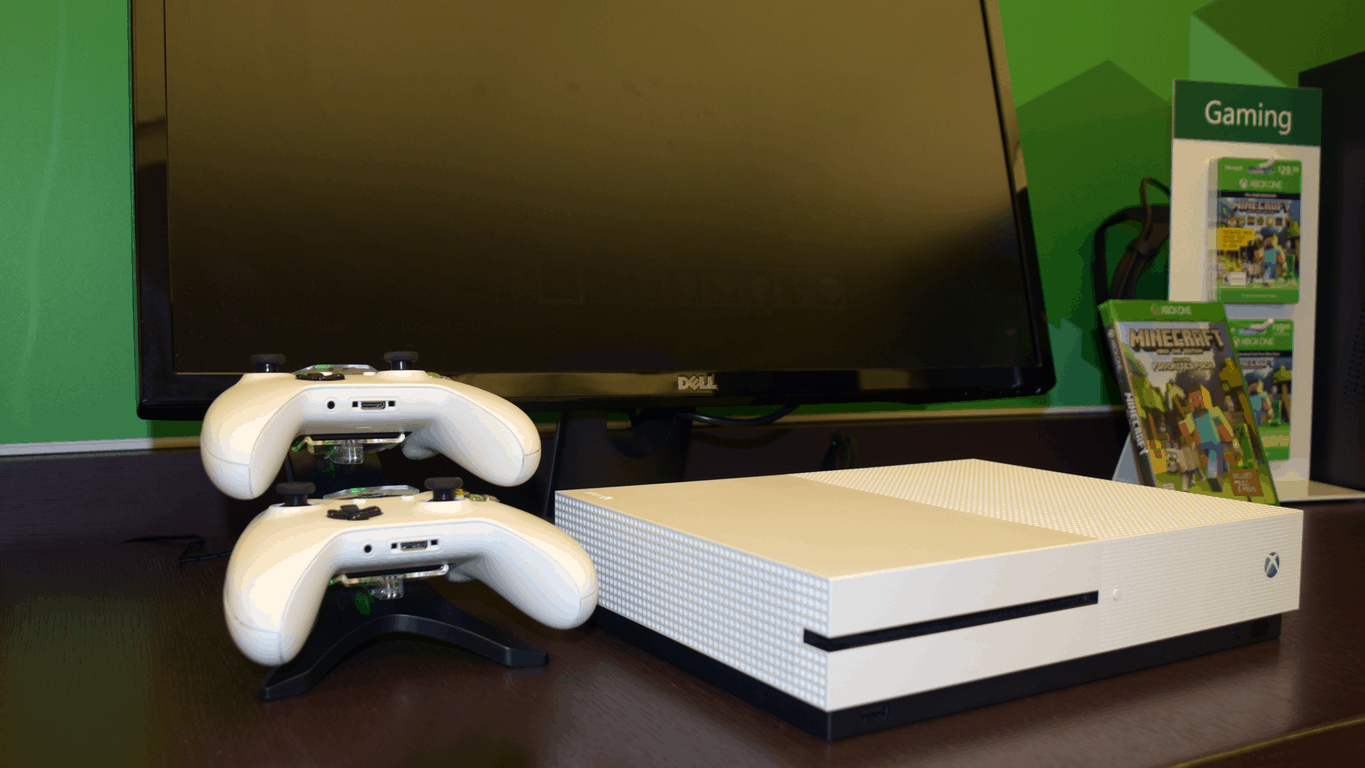
An original Xbox One with Controllers
As noted earlier, Phil Spencer, Mike Nichols, Aaron Greenberg and Major Nelson all have become faces of Xbox in the eyes of the fans. Mehdi believes that this is exactly what customers need when forming a connection with a company. Citing the over 10 million Windows Insiders as an example, he explains that every interaction with the customer is important and builds a deeper relationship.
Customers should feel like they have joined a community – a family. Don’t be a faceless company. Enable your fans to interact with real people at your company, people who are fans themselves. This requires real commitment, time and effort. A fan is not only going to tell you what they think, but they are going to expect to hear back, to see you take action on their feedback.
In a similar note, Mehdi also believes that the best “fan building” moment happens when thought is put into going the extra mile, and delightful thing shows up unexpectedly. The Corporate Vice President highlights the launch of the Xbox Backwards Compatibility and Xbox Play Anywhere features as part of this, and even touches on how Microsoft did the unexpected by creating the Surface Pro.
In our own experience with Xbox, it was the E3 2015 announcement of Xbox Backwards Compatibility and Xbox Play Anywhere features that elicited some of the biggest cheers from our fans…. In this case it wasn’t a great new game that we wanted to sell, rather it was recognizing the value and investment our fans had made in their game library on the Xbox 360 and enabling them to bring it forward that was the delight.
With our Surface products, our focus has always been on delighting customers by not just shipping beautiful products, but by doing the unexpected and creating new categories of computing like the 2-in-1 computer with Surface Pro. But it doesn’t have to always be so hard or just about the technology invention. Sometimes it’s just how you tell the story on the introduction to the fans that have come along on the journey with your brand.
Xbox One
Microsoft has steadily updated the original Xbox One, and recently launched the Xbox Insider program, so it’s very apparent that the company cares about the fans. With the company’s E3 2017 briefing right around the corner, it will be very interesting to see what Microsoft has up its sleeves with Project Scorpio. Will the most powerful console ever be one for the fans, or will it flop? Where do you think Microsoft went wrong with the original Xbox One? Let us know your thoughts below.
It’s been nearly a year since Microsoft ended its free Windows 10 updade offer for Windows 7 and 8 users, but the company’s aggressive upgrade prompts could once again get it in hot waters. According to a new report from The Register, three people in Illinois are suing Microsoft over forced Windows 10 updates that ” destroyed their data and damaged their computers” (via Neowin). And this time, lawyers representing the three complainants will seek to have the case certified as a class action suit that includes every US consumer that encoutered data loss or damage within 30 days after upgrading.
As a reminder, Microsoft made headlines last summer after a Californian woman sued the company (and won) for $10,000 over a “forced” Windows 10 upgrade that made her PC unusable. This time, the attorneys want to demonstrate that the Redmond giant didn’t do enough to warn users that the upgrade could damage their PCs. “Microsoft failed to exercise reasonable care in designing, formulating, and manufacturing the Windows 10 upgrade and placing it into the stream of commerce,” says the complaint. “As a result of its failure to exercise reasonable care, [the company] distributed an operating system that was liable to cause loss of data or damage to hardware.”
In an email to The Register, Microsoft pretty much dismissed these claims, explaining that Windows 7 and 8 users had the choice to refuse the update and even roll back to their old OS within 31 days of installation:
“The Windows 10 free upgrade program was a choice designed to help people take advantage of the most secure, and most productive Windows. Customers had the option not to upgrade to Windows 10. If a customer who upgraded during the one year program needed help with the upgrade experience, we had numerous options including free customer support and 31-days to roll back to their old operating system. We believe the plaintiffs’ claims are without merit.”
Having lost a previous lawsuit about a similar case, this new complaint is obviously bad news for the company especially if it turns into a class-action in the US. Back in December, Microsoft’s Chief Marketing Office Chris Capossela acknowledged that the company’s aggressive push with Windows 10 updates was “clearly a lowlight for us.” Unfortunately, the company will still have to deal with the consequences this year.
Welcome back to our Windows 10 news recap. We are continuing the trend of our weekly “Windows 10 news recap” series where we go over the top stories of the past week in the world of Microsoft’s flagship operating system.
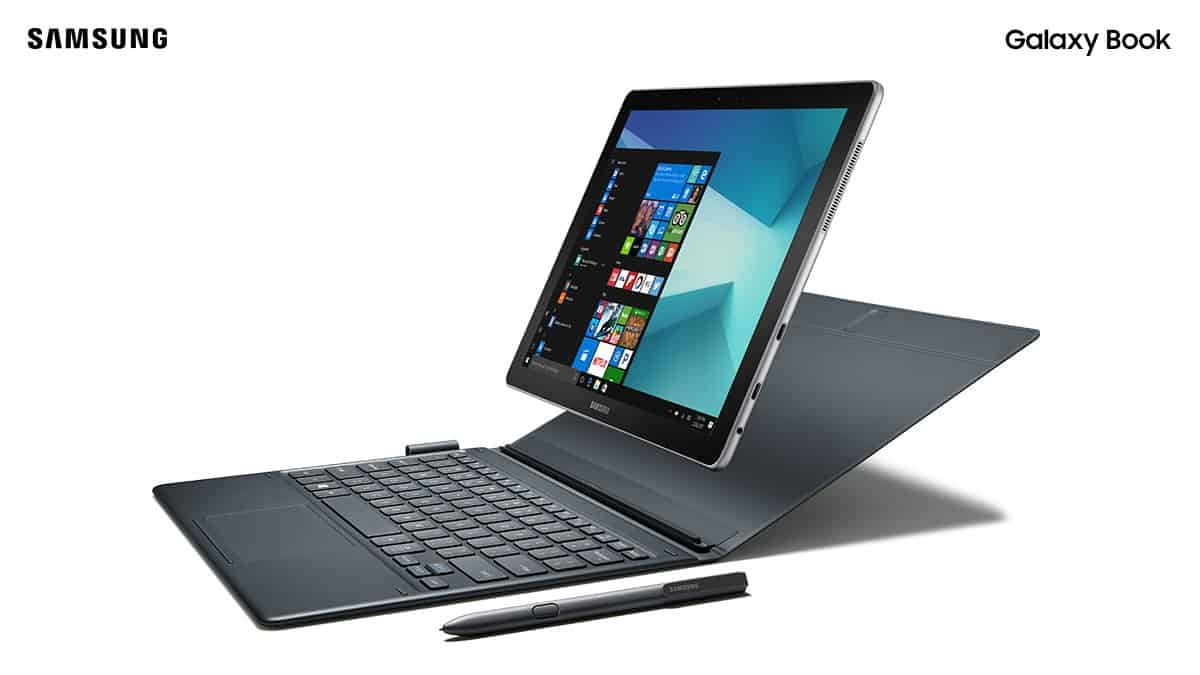
Samsung shows off its Windows 10 Galaxy Book in Launch Film
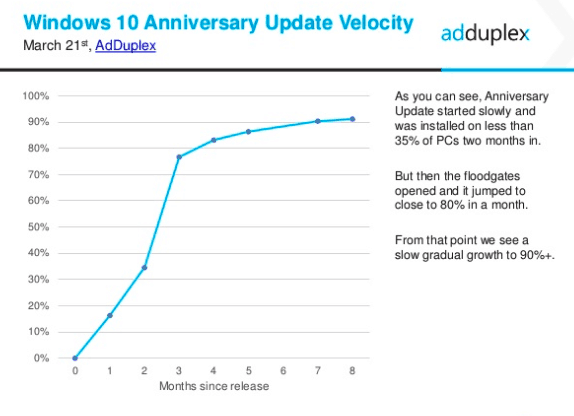
Windows 10 Anniversary Update climbs to over 90% share
When the Anniversary Update released, it didn’t start becoming mainstream until 2 months after the launch, at which point it hit 80% share. Now, the latest stats by AdDuplex have it at over 90% share.
Disqus releases Universal Windows 10 app with lots of new features
Microsoft (MSFT) news recap is a weekly feature highlighting the top Microsoft news stories of the past week. Sit back, grab some coffee, and enjoy the read!
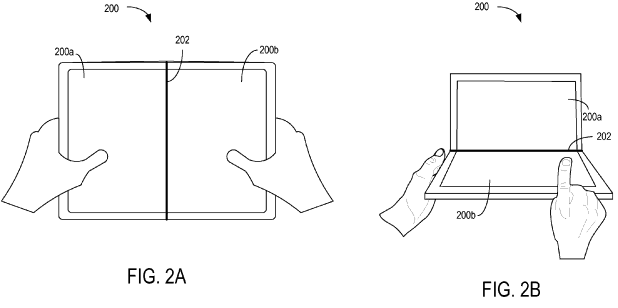
Your next Microsoft device may well have a foldable screen
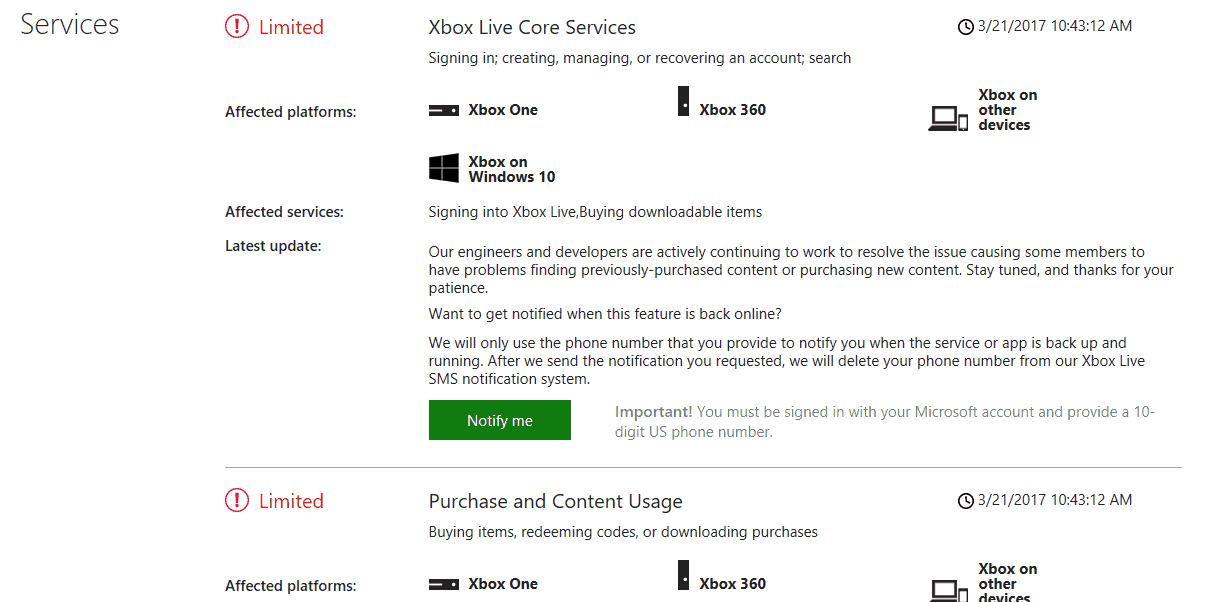
Xbox Live, Microsoft account login services apparently down
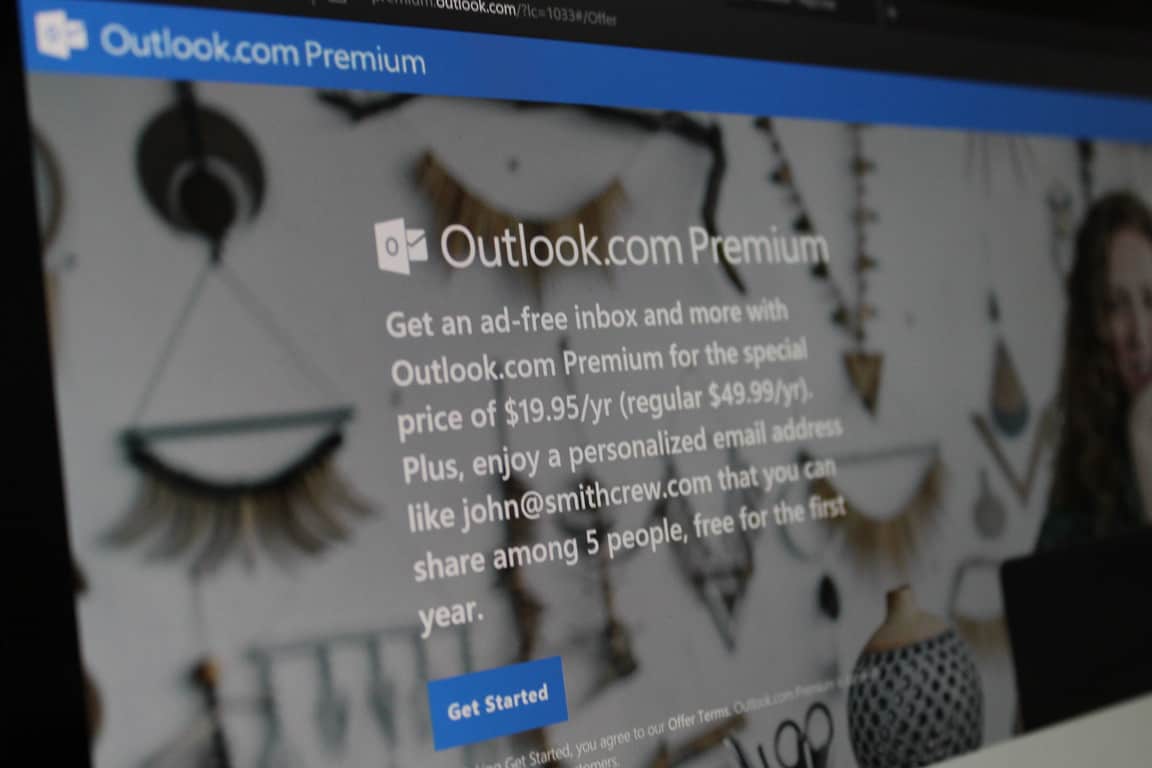
This week was a troublesome one for users’ of Microsoft’s online services, including Xbox Live, Outlook.com and OneDrive, with outages affecting customers’ signing-in and accessing the services. Luckily, Microsoft was able to resolve the situation and began investigating the cause.
That’s it for Microsoft news this week – we’ll be back next week with more.
Dark Souls III will soon receive new DLC titled The Ringed City and will be the final piece of content for Dark Souls III. In it, you’ll journey to the world’s end to search for the Ringed City and explore new lands, defeat new bosses and new enemies with new armor and skills.
The DLC allows you to experience the epic final chapter of a dark world that will forever mark your gaming experience. FromSoftware has already published a series of screenshots of the game as well as an impressive trailer depicting fierce battles.
For more information, check out the trailer below:
Dark Souls III The Ringed City minimum system requirements:
OS: Windows 7 SP1 64bit, Windows 8.1 64bit Windows 10 64bit
Processor: Intel Core i3-2100 / AMD® FX-6300
Graphics: NVIDIA® GeForce GTX 750 Ti / ATI Radeon HD 7950
DirectX: Version 11
Storage: 25 GB available space
Sound Card: DirectX 11 sound device
Additional Notes: Internet connection required for online play and product activation
Dark Souls III The Ringed City recommended system requirements:
OS: Windows 7 SP1 64bit, Windows 8.1 64bit Windows 10 64bit
Processor: Intel Core i7-3770 / AMD® FX-8350
Graphics: NVIDIA® GeForce GTX 970 / ATI Radeon R9 series
DirectX: Version 11
Storage: 25 GB available space
Sound Card: DirectX 11 sound device
Additional Notes: Internet connection required for online play and product activation
Before The Ringed City is released, FromSoftware will also roll out an important patch that will improve the game’s compatibility with the DLC. Dark Souls III Patch 1.12 arrives on March 27 and features the following improvements:
Added system compatibility to the DLC, “The Ringed City.”
Fixed issue where an item could be used simultaneously with the Dragon Head Stone if the player performed a quick turn while changing the item display.
Fixed issue where a currently equipped item would be replaced with an item taken out from the character’s inventory box if the items had the same name.
Mass Effect: Andromeda is a game that challenges players to explore the universe in order to find a new habitable planet for mankind. However, this is not an easy task as you have to defeat waves of hostile alien forces in order to reach your goal. Unfortunately, you also have to deal with the various technical issues that can occur from time to time, too. The good news is that there’s already a list of workarounds available for them, allowing you to fix some of the most common bugs.
In particular, many players have complained about the game’s strange camera behavior, reporting that the camera doesn’t stay still and wobbles around as soon as they release the controller. Here’s how one player describes this issue:
Playing on XBox One, I’m just standing on the Nexus not touching anything and it feels like I’m in a ship on the ocean. It’s a constant back and forth movement that is highly irritating after even just a few seconds. and it’s not like it’s just side to side or forwards and back, it’s diagonal from the upper right to the lower left.
How to fix camera bugs in Mass Effect: Andromeda
Solution — Save the game manually and exit
1. Save the game manually > exit the game entirely
2. Load the manual save. The camera shaking should not persist after closing the game.
Both Xbox One and Windows PC players confirm that camera shaking disappears after performing a full restart of the game. If you’ve come across other solutions to this bug, you can list the troubleshooting steps in the comment section below.
Colony Reborn is the upcoming free DLC for Titanfall 2. Respawn Entertainment recently revealed more information about the content of this free update, which launches on March 30.
Colony Reborn DLC content
A new map: Colony
The DLC includes a classic map most Titanfall fans should be familiar with. Colony is set among a sleepy settler town with narrow streets.
The R-101 platform
The R-101 platform has been a mainstay of human conflict since the first settlers arrived from the Core Systems. Colony Reborn features a new version of this platform outfitted witha ACOG scope.
New execution: The Curb Check
You can now deliver the final blow to your enemies in a more spectacular way. Punch your enemies to throw them into the air and then smash their skulls.
Cosmetic improvements
Colony Reborn also features a series of cosmetic improvements that include a new outfit for your pilot, weapons, Titans, banners, and more.
Bug fixes
Colony Reborn includes a long list of bug fixes and game improvements that will make the game more stable and reliable.
A Featured Playlist from March 31st to April 2nd
Titanfall 2 will offer fans the chance to discover Colony Reborn in the weekend following the DLC’s release. The Featured Playlist for that weekend will be Colony 24/7 and will support a variety of modes.
Double XP
From 3/30 to 4/3 Respawn Entertainment will be running Double XP for all modes in Titanfall 2.
For more information about Titanfall 2’s free Colony Reborn DLC, check out the trailer below:
The end of a dynasty! Blizzard Entertainment has removed the Battle.net branding from its popular game launcher. The new version of the launcher is called Blizzard Launcher, and from now on, players will use this one for launching popular titles like World of Warcraft, Starcraft, Overwatch, and Hearthstone.
Blizzard announced this change in September last year, and the latest launcher update finally brought the plan into effect. Users who installed the new update were prompted to log in to their “Blizzard” accounts, without any traces of the Battle.net branding.
“Over time, though, we’ve seen that there’s been occasional confusion and inefficiencies related to having two separate identities under which everything falls — Blizzard and Battle.net,” the company said on its blog.
The launcher only received the branding change with the latest update, as all the features remained identical as before.
However, despite the fact that Blizzard launcher has identical features as its ‘predecessor’, players aren’t so happy with the change, as many of them have already started missing the old launcher. There’s a big thread on Reddit, where players talk about the former launcher in a nostalgic manner.
“It’s such a minor thing, and sort of funny that it bothers me so much, but it’s going to take awhile to get used to the new icon on my system tray”, said one Redditor.
What do you think about this radical change? Will you be missing the Battle.net launcher, or you think the Blizzard launcher is a more appropriate name? Let us know in the comments below.
A month ago, at MWC, Samsung unveiled its Samsung Galaxy Book running Windows 10. Coming in as a premium, Surface-like device, it showed Samsung’s continued commitment to the Windows 10 platform.
Now, Samsung is showing off its Windows 10-powered Galaxy Book in a Launch Film posted on the company’s YouTube channel:
The Galaxy Book comes in as a 2-in-1 with support for the S Pen, which brings compatibility for the inking capabilities that Microsoft had added to Windows 10. Additionally, there are 2 variants, the 10.6-inch model and the 12-inch model.
Those on the Alpha ring of the Xbox Insider program are today receiving a wealth of new features, due to Microsoft pushing the first 1704 build to its gaming console. This build contains many of the previously announced features, such as custom gamerpics.
While the below list of features is on its way, not all of them will be available immediately, as they will be rolling out in stages to Insiders.
Arena on Xbox Live
World of Tanks fans will be able to participate in new tournaments on their Xbox One, created by ESL and powered by Arena on Xbox Live.
Discover tournaments from your Xbox One or Xbox app on Windows 10, get notifications when your match is ready, jump directly into your match on the Xbox One, enjoy automatic results reporting, and show off the results on your activity feed.
Profile and Activity Feed
Custom gamerpics are finally here! From your console, Windows 10 PC, or mobile phone, update your gamerpic with a custom image. We’re excited to bring this top fan-requested feature to Xbox Live and expect it to be in preview longer than other features to ensure it’s great for everyone when released.
New ‘Join broadcast’ button in your profile, one of the many ways to access the game stream of someone broadcasting their gameplay.
Your profile will display your Arena tournament history and upcoming tournaments.
In your Activity Feed, we’re adding the ability to hide individual posts, pin posts to the top of your feed, and filter posts by friends, games or Clubs.
Clubs and Looking for Group (LFG)
When you create an LFG post, as the owner you will be able to see new vetting cards that include hero stats from gamers interested in joining your party. Hero stats are contextual to the game you’re playing, showing you relevant stats like kill/death ratio, rank, or score.
Achievement hunters, this one is for you! You will be able to search LFG posts from the Achievements tab, related to the Achievement you’re trying to finish.
We’re adding the number of open LFG posts to the Game Hub and Club Hub headers.
Have you made a successful LFG post that you want to create again? Now you can see previous LFG posts that you have created, participated or shown interest in, and can copy them to create new posts.
When creating an LFG post, see all the recent tags you’ve used and easily select them.
Club owners can upload custom images for their Club logo and Club background. Just like custom gamerpics, we expect this to be in preview longer than other features to ensure it’s great for everyone when released.
Club owners and admins will be identified and labeled in their text posts to better help them stand out and manage their community.
Club owners and admins can pin a post at the top of their Club feed.
My Games and Apps, and Settings
In ‘My Games and Apps,’ we’re adding the ability to filter your game library by platform – Xbox One and Xbox 360.
Captive Portal support for wireless internet is coming to Xbox One, which allows for Wi-Fi authentication through a browser. Great for colleges, hotels, or public Wi-Fi locations.
In the Settings, we’re adding the ability to select Kinect auto-zoom for Beam and Twitch broadcasts, as well as for the Skype app.
On the Xbox app for Windows 10, we’re adding the option to select the audio input and output sources for Party chat.
If you’re worried about the amount of known issues as a result of the new features – it appears there’s few, with only two being reported as known:
Settings – Display & sound
The Audio output page is under construction and some of the new settings are not yet functional. New support is planned for Dolby Atmos for home theater, Dolby Atmos for headphones, and more in upcoming builds. An announcement will be made when these new features are ready to try out; enabling these settings now will have no effect.
Wireless Display
The Wireless Display app fails to launch and immediately crashes to Home.
Let us know what new features you’re seeing and what you think of them in the comments below!
Mass Effect: Andromeda is a great space exploration game, but unfortunately, many fans are still struggling to even launch the game. When they hit the play button, Mass Effect Andromeda immediately crashes with a DirectX error.
Two DirectX errors appear on the screen, DirectX is unable to create buffer or Direct3D couldn’t allocate enough memory. If you’re experiencing the same or similar issues, follow the troubleshooting steps below.
How do I fix Mass Effect: Andromeda DirectX errors?
Before we head to the slightly complex solutions, here are a few quick ones to try:
Make sure you are running the latest version of Origin and the game.
Disable any overclocking software configured on the PC and verify whether the Mass Effect Andromeda DirectX error is fixed.
Change the Post-Processing Quality setting to medium or low from your GPU driver settings.
If none work, move to the fixes listed next.
1. Repair the game
Open Origin, and navigate to the games library.
Right-click on Mass Effect Andromeda, and select Repair.
Wait for the process to complete and then relaunch the game.
Often a quick fix when Mass Effect Andromeda crashes with DirectX errors is to repair the game files.
2. Install the latest Windows updates
Press Windows + I to open Settings, and click on Update & Security.
Now, click on Check for updates towards the right.
Download any pending updates, if available.
Windows updates introduce a lot of patches and are now the only source to download newer versions of DirectX, and could help fix errors in Mass Effect Andromeda. Besides, you could install the latest graphics driver as well.
3. Run an SFC scan
Press Windows + R to open Run, type cmd, and hit Ctrl + Shift + Enter.
Click Yes in the UAC prompt.
Paste the following command and hit Enter after it:sfc /scannow
4. Change performance settings
Press Windows + I to open Settings, and click on Display in the System tab.
Now, scroll down to the bottom and click Graphics.
Select Mass Effect Andromeda from the list, and click Options.
Choose the High performance option and click Save.
Watch Dogs 2 has recently received a new DLC. The Human Conditions DLC is now available on both the Xbox One and Windows PC and introduces three new stories, new elite co-op challenges, and a new enemy type.
Human Conditions DLC missions
You will unlock the 3 new DedSec operations individually as you progress in the main game. More specifically, here are the events that will trigger the operations:
Caustic Progress will unlock when you have completed the Hacker Wars mission
Bad Medicine will unlock once the W4Tched, Eye for an Eye and Hacker Wars missions have all been completed
Automata will unlock when the Limp Nudle mission has been completed.
Also, all missions are available as soon as you have downloaded Human Conditions if you have already completed the main game. However, some players report that they can’t access the DLC content due to various issues.
Watch Dogs 2: Human Conditions DLC bugs
Players report that they can’t start the DLC due to the fact that the game asks them to enter the CD key. On the other hand, other players complain that the missions are nowhere to be seen.
Thought i’d load up the game to see an icon on the map for new DLC, nope. Go to app to see missions, can’t start them. Get told to start them from main menu, nope nothing there except premium content list that asks for cdkey, yet its installed but wont start from there. Start new game thinking there’d be an option to start a new dlc game like WD1, nope.
Where in hell do you start the DLC and why is it so damn hard to do so>?
Fortunately, there’s a quick workaround that you can use to launch the missions if they are visible, but won’t launch. Turn off Ulay while the game is running, ignore all the warnings and the missions should appear in the game.
The latest Star Wars movie title has finally been released on Windows Store. Rogue One: A Star Wars Story hit the big screen last December 2016 as a standalone film set before the events of the original Star Wars trilogy.
Along with its debut on the app, the movie can be purchased alongside its predecessors on discount. Buying the Digital Six Film Collection by April 10 will result in a $5 gift card added to your account. Furthermore, if you’ve already been keeping up with the movies so far, there’s a deal for just buying the title individually. Purchasing Rogue One: A Star Wars Story before April 30 will result in 3000 credits being added to your Xbox Live Rewards account.
If you aren’t familiar with the movie, make sure to check it out today on the Movies & TV section of the Windows Store. Here is the description:
From Lucasfilm comes an epic adventure – Rogue One: A Star Wars Story. In a time of conflict, a group of unlikely heroes band together on a mission to steal the plans to the Death Star, the Empire’s ultimate weapon of destruction.
The Xbox team rolled out yesterday a new preview build for Preview Alpha ring participants, which brings another wave of fixes ahead of the release of the Creators Update. This time, the new bits bring a fix for an issue that prevented users from signing in on Xbox Live, and the changelog also mentions some “miscellaneous fixes and improvements.”
Be aware that this new preview build still has some known issues with audio settings and the Wireless Display app, but these are not new. You can find the full changelog below:
DETAILS:
OS version released: rs2_release_xbox_1703.170321-1800
Available: 6:00PM PDT 3/23 (1:00AM GMT 24/3)
FIXES:
In-Game Purchases: Fixed an issue which prevented users from purchasing in-game content in certain games (including Overwatch and Destiny). NOTE: This fix was applied on 3/22/17 and should now be resolved for all affected users (you do not need to download the latest system update to resolve this).
Skate 3: Skate 3 should no longer crash to Home after attempting to join a Quick Match.
Sign-In: Fixed an issue which could sometimes prevent users from signing-in.
Miscellaneous: Miscellaneous fixes and improvements.
KNOWN ISSUES:
Settings – Display & sound The Audio output page is under construction and some of the new settings are not yet functional. New support is planned for Dolby Atmos for home theater, Dolby Atmos for headphones, and more in upcoming builds. An announcement will be made when these new features are ready to try out; enabling these settings now will have no effect.
Wireless Display: The Wireless Display app fails to launch and immediately crashes to Home.
Microsoft’s Brad Rossetti added that the Xbox team plans to push this new build to the Beta ring today. “We are working on a full Ring 3 expansion as well,” he added, which means that many more Xbox Insiders will soon get their first taste of the Creators Update.
Every Windows user has used Task Manager at least once. It’s an essential, built-in utility that gathers important information about active processes and high RAM consumption. But when it doesn’t work, users need to open Process Explorer in Windows 10.
Simply put, where Task Manager’s capabilities end, Process Explorer shines. The freeware advanced task manager and system monitor are powered by Microsoft and created by one of the most famous Windows enthusiasts, Mark Russinovich.
Keep reading to find out about downloading Process Explorer in Windows 10!
How do I open Process Explorer in Windows 10?
First, Sysinternals, the developer behind Process Explorer, has a whole suite for various system tasks. You can either download the whole suite or download certain tools individually. The same goes for Process Explorer, the most-used tool in the bundle.
You can download an archived file for both system architectures or directly download the .exe file to open Process Explorer in Windows 10.
You can also explore our Sysinternals Sysmon guide to learn how to capture detailed system events for deeper monitoring.
How do I use Process Explorer?
User Interface
Compared to Windows 10’s Task Manager, Process Explorer’s interface is a bit confusing and not as user-friendly.
While simple tasks shouldn’t present a problem, you’ll need to understand the program’s layout to perform more complex tasks, which shouldn’t take more than a few minutes.
On the left side of the main window, you’ll see active processes with a detailed subprocess list in a tree view. On the opposite side, you may see standard Task Manager-like columns of distinctive processes.
Of course, you can customize columns to meet your needs or use them to track certain consumption. The special emphasis goes on the Company name column. It’s the best way to round up trusted services and terminate ( later remove) the ones that may be malware.
Above the right side of the main window, you’ll see the monitoring features of Process Explorer. There’s real-time system information with CPU and RAM usage and HDD and GPU activities.
On the left side, above the process tree, you’ll see options mostly similar to a standard Task Manager.
If you want to examine a certain process, pause the updates with the Spacebar and press Ctrl + H for the Handle View panel.
Features in Process Explorer
For now, you may conclude this is just a poorly designed Task Manager, but you’d be wrong. Feature-wise, this tool is much better for advanced tasks, especially when it comes to malware hunting.
First, with Process Explorer, you can terminate an entire process tree instead of a single process. You’ve probably encountered Chrome/Firefox crashes and navigated to Task Manager to stop those shenanigans, and there, instead of one process, you saw 5-10 processes running.
With Process Explorer, you just kill a process tree, and that’s it! You can use this function by right-clicking on the wanted process and selecting Kill Process, or you can use the Shift + Delete keys combination for the same.
You’ve also probably tried to delete, move, or rename certain processes, but the system prompted you with a This file is open in another program message. And sometimes, you’ll know which program is preventing you from taking further action, but occasionally you won’t.
Process Explorer comes in handy here, allowing you to determine the process that blocked your file. Just open Process Explorer, press Ctrl + F, and type the name of the file. Kill the process and continue with previous actions.
In addition, this tool may be used as an antimalware solution. But, instead of scans, you select suspicious processes and check them with Virus Total.
Virus Total is a virus search engine comprised of a combined database contributed to by all major antivirus developers. You can single out one process (right-click and select Check VirusTotal) or check all active processes in by going to Options, and then selecting Check VirusTotal.com.
Once you toggle the Check VirusTotal, any new process will be automatically checked. The first number stands for virus confirmation, and the other for the number of antivirus companies. If you, for example, get 50/57, it means that 50 out of 57 companies flagged the process as malware.
Process Explorer as a replacement for the Task Manager
Although Process Manager is a third-party tool, you can set it as your default task manager. Yes, you heard right: Process Explorer can completely replace your built-in Task Manager.
You can start it with Ctrl + Alt + Delete or Ctrl + Shift + Esc, just the same way as the native Task Manager before.
But there are both positive and negative sides to that.
Positive: Superior features, better insight into all-around system performance, and customization possibilities.
Negative: You won’t be able to organize startup and manage services on Windows 10 and old-fashioned design.
How do I replace Task Manager with Process Explorer in Windows 10?
Launch Process Explorer, and click on Options, and then choose Replace Task Manager.
That should wrap it up! If you want to improve your overall control, download, and open Process Explorer in Windows 10. And with the information presented here, you should be able to significantly boost PC performance and eliminate any threats.
The Elder Scrolls: Legends is a collectible card video game that revolves around the creatures, characters and lore available in The Elder Scrolls series. The game challenges two players to confront each other in turn-based matches. The goal is to reduce the competitor’s health to zero.
Strategy and careful planning are the secrets to winning this game. As a player, you can adopt various strategies, from overpowering your opponent with brute force to defeating your foes with speed and cunning.
At the same time, you’ll also need a good dose of patience from time to time. Players report that The Elder Scrolls: Legends can sometimes be affected by a few technical issues that limit the gaming experience.
The Elder Scrolls: Legends bugs
Game progress won’t show
I’m lvl 24, i finish the history mode but i don’t have the titles…
or progress of something. what can i do for fix the problem?
The Store doesn’t work and players can’t buy anything
How I can buy something in non-working store? This circle I seen like 3 hours – and loading don’t ending.
Ru support working like that store – no answer even after 3 days.
Game won’t load
Players report that the loading process fails with an error message. Troubleshooting actions such as reinstalling or validating files didn’t help.
Act 2 quest stuck
Players report that they can’t complete Act2 and can’t even delete or change the quest. After having defeated all the enemies, the game won’t confirm player progress.
When I played the campaign I had a client crash while playing Act2. Now my quest to complete Act2 can’t be finished, even though I beat all Act2 enemies serveral times afterwards. I can’t even delete/exchange the quest. Oh, and one win reward should be missing as well because of it.
These are the most common Elder Scrolls: Legends issues reported by gamers. If you’ve come across other bugs, you can go to The Elder Scrolls: Legends’ support page and provide the devs with more details about the problems that you’ve encountered.
RELATED STORIES YOU NEED TO CHECK OUT:
Bethesda Pinball versions of Doom, Fallout and Elder Scrolls out now














 The Cube Mix Plus sports a white chassis in a silver frame. It’s a pleasing color combination and overall the tablet and the keyboard look slick. The corners are rounded and the edges are chamfered for a nice first impression, and the ergonomics of the tablet is quite good as well.


 Available as a separate purchase, the Cube CDK09 keyboard converts the Cube Mix Plus tablet into a full-blown laptop. The keyboard also includes two full-sized USB ports. The tablet can be docked on the keyboard in either direction to offer both the laptop mode as well as the presentation mode.