Xbox Update Preview was recently released, and the version was upgraded to 2404.240314-2000 for Xbox Insiders enrolled in Skip Ahead, Alpha, Beta, and Delta channels. The update introduced two new features and made several improvements.
Here are the features introduced mentioned:
New Features and Experiences
We have exciting news! Beta users can expect something new coming to their Xbox Update Preview.
Discord Voice – Soundboard Audio
Xbox players who have joined Discord Voice will now be able to hear soundboard audio from others in the channel or call. A mute button for soundboard audio can be found in the Discord Voice options in the Guide. At this time, you cannot trigger soundboard audio from the console.
Microsoft Store – Improved Search
Today, a new search experience enhanced by AI is available to a random selection of players. This experience provides improved results and greater flexibility, allowing you to search for any feature or criteria you can imagine, including concepts like “cozy games” or “arcade racers.” To get started, launch the Microsoft Store, and try searching for something new!
We want your feedback on this new experience! If you notice anything unexpected or see results that are not quite what you were looking for, please let us know by filing feedback with Report a Problem.
Note: In the new experience, you’ll see a “New” tip just below the search bar.
Settings – Access Restrictions
We have added two new access restrictions options for installing and uninstalling games and apps. To find them, navigate to Settings > System > Access restrictions.
Here are the fixes mentioned in the changelog:
Fixes Included
Thanks to all the great feedback Xbox Insiders provide and the hard work of Xbox engineers, we are happy to announce the following fixes have been implemented with this build:
System
Various updates to properly reflect local languages across the console.
The release notes also mentioned the known issues previously mentioned with the update released on March 14, 2024, including audio and networking issues. They said that Xbox engineers are working on them, and it might take some more time to fix these problems.
The guide also mentioned reporting the issue or providing feedback using the Report a Problem option. For more support, visit the community subreddit.
All the changes will eventually be released to the Stable channel. We can expect to use them in a month or so.
But if you want to experience all the new features before general availability and become a part of the Xbox Insider program, visit the official Insider program page on Microsoft.
Are you part of the Xbox Insider Program? If so, please share your experience with our readers in the comments below.
Updating your firmware comes with certain risks, and if you don’t perform it properly you can cause damage to your PC or even file loss.
This is exactly what some users experienced with their Razer Blade 14, so let’s take a closer look at this case and see what went wrong.
Do the following to avoid bricking your Razer Blade 14 during a firmware update
Updating your firmware is important, but if it goes wrong, you might find yourself in trouble, and this is exactly what happened to one unlucky Reddit user. Here’s how he described his issue:
I wanted to update the firmware so went to razer’s official website and downloaded the latest firmware updater.
I installed it alongside synapse and proceeded with the update. It said that the update was successful but after the restart the second attached image appeared saying new CPU is installed and that fTPM is corrupted. I hit N but the system restarted and gave me the same screen so l hit Y and it boot windows but my windows hello was gone.
Luckily for him, this was expected because when you update the laptop firmware, the fTPM that is inside the firmware sometimes gets changed as well, and it needs to be reset to work.
When you updated your laptop’s firmware the fTPM changed so the fTPM needs to be reset to generate a new TPM key.
You’ll need to sign in with your password and reset the PIN. Before you do that make sure that you have pressed “Y” during that warning screen in the second picture to reset the TPM key, otherwise, you might have trouble resetting the PIN.
This can fix the problem with the PIN, but as users write, updating firmware can also affect BitLocker:
Security features that rely on the TPM key like BitLocker will stop working because they were set up with the old key and you’ll have a new key now.
When fTPM changes, you won’t be able to bypass BitLocker, and you’ll likely have to use your recovery key to get access, so maybe disabling BitLocker before the firmware update can help you.
It’s important to mention that some updates will affect TPM while others won’t, so always read the release notes and prepare yourself properly.
It depends on the bios update. Some clear your TPM and others don’t. It’ll usually mention it in the release notes if it will.
Some users are blaming Razer for this problem, saying that this is a common glitch with Razer software and devices:
Just don’t use razer software, I stopped when they rolled out the update which disabled razers’ 7.1 spatial sound drivers on headsets that were marketed to support them
Speaking of firmware new Alienware AW3225QF firmware was just released, and it fixes various issues, so be sure to get it.
Good news for Overwatch 2 heroes fans: In the first Overwatch 2 developer update 2024, Aaron Keller, the game director, said that starting with the upcoming hero Venture, Overwatch 2 heroes will no longer need a Battle Pass at launch, and this includes all previous Overwatch 2 heroes. Moreover, the new heroes will be available for all gamers to play simultaneously.
With this, the company also introduced a new method to unlock and upgrade Mythic skins in Overwatch, intending to empower players to choose which Mythic skin to work towards.
In addition, with season 10, you will get a Mythic Shop, enabling you to acquire Mythic skins even from previous seasons you missed.
Furthermore, various new maps are under development, with some scheduled to launch with the upcoming seasons of the game, like a new Push map, Runasapi (Peru), coming in Season 11
Blizzard Entertainment is taking feedback on current maps like Havana so that they can improve them for the upcoming seasons.
Most game enthusiasts have asked developers to devote time to live maps while they focus on making new ones, and Aaron Keller promised to work on this.
He also mentioned that the developers would be working on Colosseo in Season 11, and after Season 12, we can expect them to be focused on reworks on the existing maps, like Dorado, Havana, Circuit Royal, and Numbani.
In the update, Overwatch also mentioned a new game mode, Clash, and informed us that we can expect two new maps to be released later this year.
Aaron Keller said they will run a limited-time Clash playtest on Hanaoka at the beginning of Season 10.
With all the information about the upcoming seasons and changes we can expect, the game director mentioned that the Overwatch community is on track to cross 100 million players by next season.
He mentioned that we, the gamers, are the main focus. The developers at Overwatch create the game around us, and feedback is used to improve the game with every season.
If you want to learn more about it in detail, check this video:
With this promise and dedication, Overwatch 2 seems to have won hearts, and its ability to reach 25 million players just after its launch in 2022 is proof of this.
These new changes are probably targeted at the regular players, but possibly for the ones who have yet to try the game or get the old players on board again.
What are your thoughts on the matter? Share your opinions with our readers in the comments section below.
The world has yet to see an official announcement on the upcoming Halo 7 video game, which at this point everyone is wondering about. While we reported about a potential Halo 7 release date for 2025, back in January, 343 is dropping other hints that the game could actually be in development already.
How so? Well, on X (formerly known as Twitter), Brian Jarrard, Community Director at 343 Industries, announced that the studio is looking for talented people to work on the next Halo titles. While Jarrard doesn’t explicitly mention Halo 7, the future of the Halo franchise automatically includes the title, so it is mostly likely that the studio is already working on it.
It's been a difficult and heartbreaking stretch for the game industry. If it can be of any help to anyone, please note there are currently open roles here at 343 Industries working on the future of the Halo Franchise (including a few just added today).
It’s been a difficult and heartbreaking stretch for the game industry. If it can be of any help to anyone, please note there are currently open roles here at 343 Industries working on the future of the Halo Franchise (including a few just added today).
Back in January, several 343 Industries employees revealed on LinkedIn that they were working on a future Halo title, although other details weren’t revealed. However, with this announcement coming from a 343 Industries exec, it’s clear that the future of Halo is in the works.
A possible release date for Halo 7? Well, 2025 seems most likely, and it would be about time, as the last Halo title was released back in 2021.
As we all know, Halo Infinite was released almost 2 years ago, in 2021, 20 years after the first Halo game. The video game was well received, with some even calling it a return to the form for the series. Commercially, it had a lot of success, and by January 2022, a month after its release, Halo Infinite crossed the 20 million players mark.
However, if the team is already working on Halo 7, we should expect some first teasers later this year. Maybe some images, or even a teaser trailer.
Google has been hit with a €250 million ($271 million) fine in France due to the way it conducted negotiations with publishers. It was also found to have used news content to train the native chatbot, Gemini, without informing the publisher or authority!
The same French Competition Authority had previously fined Google $500 million for similar violations. France has stringent copyright laws to prevent big corporations from exploiting small publishers.
Google’s response to the fine
In the official blog post, Google confirmed that it would accept the changes recommended by the French competition authority to put an end to the ongoing matter.
The ADLC also demanded changes in the way we negotiate, which we accepted as part of an agreement reached to finally close this file which has been open for too long. We have compromised because it is time to turn the page and, as our numerous agreements with publishers prove, we want to focus on sustainable approaches in order to connect Internet users with quality content and work constructively with publishers.
Later in its response, Google called the fine disproportionate and highlighted the effort it put into the hearing and the negotiations.
But it is also important to note that we consider that the amount of the fine is disproportionate in view of the breaches noted by the ADLC. It does not take sufficient account of the efforts we have made to respond to the various comments – in an environment where it is very complicated to define a course of action when we cannot anticipate a precise direction.
Google also shared the enforced negotiation methodology, which it calls non-discriminatory and transparent.
Lately, tech giants have been cautious about their operations in the EU, especially after the Digital Markets Act (DMA) came into force. Microsoft allowed users to uninstall Edge, and Apple let them change the default browser on iOS.
Do you believe the €250 million fine imposed on Google is justified? Share with our readers in the comments section.
If you’re looking to play some Forza Horizon games, then you should know that the fifth title of the series, Forza Horizon 5, currently has a 50% discount on Steam.
The purchase costs around $40 and will get you the Forza Horizon 5 Deluxe version of the game, which includes a car pass, 42 new cars (one car will be introduced each week), and 8 Formula Drift Cars available right from the start.
The Deluxe edition also comes with an expanding garage that will see users customize their cars while driving the vast Mexican roads.
You’ll want to try this game if you haven’t done so far: it has the biggest map of the entire Horizon series, and its open-world approach to the racing genre has made it a gem of the franchise. You’ll be able to drive through jungles, hills, and mountains, to desserts, modern cities, and ancient places.
Plus, gamers have the freedom to explore the game as they wish: from multiplayer races to single-player exploration or completion of the campaigns, there is a lot to do in this game.
Forza Horizon 5 Deluxe can be played on Xbox One, Xbox Series S, and X, as well as Windows devices, for half the price, for a limited time. On Steam, for instance, gamers can still get the game at $39.99 price for the next 29 hours, at the time this article is released.
The game was available at this price on Amazon, as well, earlier this week, but that deal is gone. Steam has shortly followed up with an identical deal that also sees major discounts for the other editions of the game.
For example, you can also get the Premium edition at a 50% discount, or you can get the Ultimate Driving Bundle at a 62% discount, as well.
As spotted by PhantomOcean3 on Twitter, you now have additional cards on your lock screen.
Additional lock screen cards such as finance and sports are rolling out for Windows 10 in KB5035941 (19045.4235), the feature can be enabled by running:
According to Microsoft, this feature is slowly rolling out and it might not be available to everyone just yet. However, you can enable it with vivetool if you’re eager to try it.
As for available information, you’ll see current weather, traffic, market information, and sports news.
Unfortunately, it’s not possible to customize which cards you want to show, since all four of them are available as Weather and more.
It seems like your options are either all of the cards (including weather) or none of them. It would be nice if a way to choose what you want to see was present. pic.twitter.com/97Ir0vgebY
While it’s great that Windows 10 is still getting some new features, this feature in its current form doesn’t feel too useful since it doesn’t allow you to customize or hide the cards.
Hopefully, that will be changed before it’s released to the public. We also have to mention that this update will show a nag screen asking you to upgrade to Windows 11, so be prepared for some shameless promotion if you choose to install it.
Microsoft Teams has evolved but even so, there are times you may need to roll back to a previous version. This may be occasioned by the instability of the app or frequent app glitches.
If you’re looking for a particular version with specific features, you’ll need the version history so that you can download that specific version.
How do I access Microsoft Teams version history?
1. Access the release notes
Microsoft keeps a database of release notes for each version of Teams released. The notes contain changes, updates, and new features from the previous version. After examining the release notes, you can now proceed to note down the version number.
Microsoft also has a dedicated site with the version history complete with the release date and version number to make it easier to download previous versions.
Once you’ve settled on the version you wish to download, you can proceed. Unfortunately, Microsoft does not keep older versions of Teams on their website. You can only access the preceding version but for any other older version, you’ll need to download from third-party sites.
2. Download the desired version
NOTE
WindowsReport is not affiliated with the Uptodown.com site. Do your due diligence and ensure you have an antivirus before downloading any files from this site.
Launch your web browser and navigate to the Uptodown site.
Scroll down and click on Older versions.
With the version number you noted down in the version history, CTRL + F then paste it to locate it faster.
Wait for the download to complete then follow the on-screen prompts to install Teams.
Pros and cons of reverting to older Teams version
Pros
Stability: Most updated versions have stability issues because they come with new features that are yet to be tested by the general public. Reverting to an earlier version restores stability.
Compatibility: Newer updates sometimes upset the status quo and birth compatibility issues with devices especially older hardware. Downgrading ensures continued usage.
Retain functionality: Upgrades aren’t always welcome as some users may prefer to retain the older UI, features, or functionalities of an older version. Rolling back allows you to keep using these preferred functionalities.
Cons
High-risk exposure: Newer versions are patched with security updates so downgrading exposes your device to potential vulnerabilities.
Compatibility and support: Older versions may lack support or be incompatible with your hardware. You may also be unable to communicate effectively when using different versions.
Data loss: You risk data corruption and loss when downgrading especially since the version is not from Microsoft.
Ultimately, viewing the Microsoft Teams version history should be for information purposes and not to downgrade. Microsoft Teams not working or any other issues you may be experiencing with the latest version can usually be resolved by a restart, repair or reinstallation.
For advanced troubleshooting, consider reaching out to Microsoft directly before opting to downgrade. However, if you must roll back, ensure you back up any critical information to minimize the risk of data loss or security vulnerabilities then upgrade as soon as possible.
Alternatively, you can install two Microsoft Teams apps to avoid losing data. Hopefully, you’re now in a better position to assess the changes within Teams and make an informed decision.
Have you downgraded your Teams app before? Would you say it helped enhance your communication? Let us know in the comment section below.
Microsoft announced the release of Garnet, a new cache-store system that effectively makes every platform and service it integrates with run faster, by deploying new cache-store methods to deal with cache-related issues and algorithms.
Garnet addresses a series of limitations of the current methods, and it is capable of further optimizing the processes that deal with storing cache data resulting in a faster performance overall.
We’re not talking about a specific platform, but a variety of them, and the Redmond-based tech giant says Garnet can be integrated into Windows, and its Web Experiences Platform, such as Copilot, or Microsoft Edge, but it can also make software developing-oriented platforms, such as Azure Resource Manager, and Azure Resource Graph, run faster.
The Redmond-based tech giant made Garet open-source (Microsoft also made Retina, another Azure service, open-source, as well) and it is available to download and integrated with applications on GitHub.
According to Microsoft, Garnet offers multiple benefits compared to the legacy cache-store methods, including, but not limited to:
Orders-of-magnitude better server throughput (ops/sec) with small batches and many client sessions, relative to comparable open-source cache-stores.
Extremely low single operation latency (often less than 300 microseconds at the 99.9th percentile) on commodity cloud (Azure) machines with accelerated TCP enabled, on both Windows and Linux.
Better scalability as we increase the number of clients, with or without client-side batching.
The ability to use all CPU/memory resources of a server machine with a single shared-memory server instance (no intra-node cluster needed).
Support for larger-than-memory datasets, spilling to local and cloud storage devices.
Database features such as fast checkpointing and recovery, and publish/subscribe.
Support for multi-node sharded hash partitioning (Redis “cluster” mode), state migration, and replication.
Well-tested with a comprehensive test suite (thousands of unit tests across Garnet and its storage layer Tsavorite).
A C# codebase that is easy to evolve and extend.
In a blog post, Microsoft details the struggles of coming up with an innovative way of dealing with cache-store, including the possibility of developing a method that offers faster optimization and would consume fewer resources.
The Redmond-based tech giant says it has been working on Garnet since 2021, and based on their previous work, the open-source FASTER embedded key-value library, they managed to come up with a new remote cache store that had all the necessary features to replace existing cache stores.
Most of the current technology, and Windows devices should be able to make use of Garnet to provide a faster experience to users, but Microsoft is also hoping that the open-source community will contribute to making Garnet even better than it is now.
Microsoft has told European antitrust regulators that Google has vast data collection capabilities and possesses AI-optimized chips, which gives the search engine company a competitive edge.
The Redmond tech giant also mentioned that tools like ChatGPT and Gemini can produce human-like content in response to prompts; however, there is a huge concern about misinformation and copyright violations.
In its report to the commission, Microsoft said:
Today, only one company – Google – is vertically integrated in a manner that provides it with strength and independence at every AI layer from chips to a thriving mobile app store. Everyone must rely on partnerships to innovate and compete.
The Redmond tech giant mentioned that Google’s investments in AI semiconductors will keep it ahead of the game for the foreseeable future.
Moreover, with the vast reserves of data sourced from its search engine and YouTube, the video platform, the company can train large language models to empower Gemini.
Microsoft wrote:
YouTube provides an unparalleled set of video content; it hosts an estimated 14 billion videos. Google has access to such content; but other AI developers do not.
The report also said with Google Assistant and Apple’s Siri, Google and Apple have the edge over the AI companies, and they are
well-positioned to evolve and leverage their respective existing voice assistants into leadership positions in generative AI. New entrants and competitors of Google and Apple will not enjoy the same advantages.
On these claims, Google also said:
“We hope the Commission’s study will shine a light on companies that don’t offer the openness of Google Cloud or have a long history of locking-in customers – and who are bringing that same approach to AI services.
Antitrust regulators in the European Union have inspected Microsoft’s investment of over $10 billion in OpenAI, which they believe could lead to market dominance and anticompetitive behavior.
In response, Microsoft is addressing these concerns about the new partnerships made between tech companies like itself and startups like OpenAI. It further explained that their motive is not to kill the competition but to foster innovation within the tech industry.
Microsoft said:
All of these startups relied on different forms of investments and partnerships that enabled them to enter and expand in the space.
Encouraging pro-competitive partnerships in the AI space is an effective way to prevent companies from becoming vertically integrated in a manner that would result in an anti-competitive advantage.
Well, Microsoft is trying to make the EU regulators believe that the investments made by the tech giant are for innovation, collaboration, and consumer welfare, but at the same time, pointed its finger toward Google as it has a trove of data as its call. Doesn’t seem fair?
What are your thoughts on the matter? Share your opinions with our readers in the comments section below.
Mustafa Suleyman, a pioneer in the field of artificial intelligence, has joined Microsoft as the CEO of Microsoft AI.
Suleyman took to X(previously Twitter) to share the update. His work at Microsoft will focus on consumer AI products and research, primarily Copilot, Edge, and Bing. These three were Microsoft’s first foray into AI.
I’m excited to announce that today I’m joining @Microsoft as CEO of Microsoft AI. I’ll be leading all consumer AI products and research, including Copilot, Bing and Edge. My friend and longtime collaborator Karén Simonyan will be Chief Scientist, and several of our amazing…
Suleyman confirmed that Karén Simonyan and a few other teammates from InflectionAI, his latest venture, will also be joining the team at Microsoft. InflectionAI will now be headed by another CEO, who will be appointed soon. For the unversed, InflectionAI is the lab behind Pi, a highly personalized chatbot.
Satya Nadella initially wanted Sam Altman to head Microsoft AI
As per reports in Business Insider, Suleyman wasn’t Microsoft’s first choice. Nadella instead wanted Sam Altman, CEO of OpenAI, to be at the helm of the company’s AI push.
This was reportedly when Sam Altman was ousted from OpenAI for a brief period. Nadella even hired Altman to lead a new advanced AI research team, but that, too, never really took shape.
We remain committed to our partnership with OpenAI and have confidence in our product roadmap, our ability to continue to innovate with everything we announced at Microsoft Ignite, and in continuing to support our customers and partners. We look forward to getting to know Emmett…
Given Microsoft’s deep interest in OpenAI, it didn’t matter much where Sam Altman worked as long as he was onboard. At the time, Satya Nadella, in an interview with Bloomberg, said,
We really want to partner with OpenAI, and we want to partner with Sam, and so irrespective of where Sam is, he’s working with Microsoft.
The sequence of events does highlight Microsoft’s intent to get someone popular to lead the AI team. And hiring Mustafa Suleyman, the brains behind DeepMind and InflectionAI, suits that purpose!
Besides, Microsoft now has both OpenAI and Mustafa Suleyman. Its multi-billion dollar partnership with OpenAI allows it to leverage the latter’s technology. And with Suleyman leading the AI division, it could compete with long-time rivals like Google.
Soon after Suleyman and Karén joined Microsoft, Satya Nadella sent out a memo to employees.
I’m very excited to announce that Mustafa Suleyman and Karén Simonyan are joining Microsoft to form a new organization called Microsoft AI, focused on advancing Copilot and our other consumer AI products and research.
What do you think of Mustafa Suleyman joining Microsoft and its effects on the AI space? Share with our readers in the comments section.
Meta Quest has been present for years on the market, and while it is a solid device, its web browser has been uneventful, just like any other VR browser.
The company is determined to change that, and it’s going to do that by adding extension support to Meta Quest Browser.
Extension support is in beta, but we might see it available soon
Browser extensions are an essential part of a web browser since they allow users to customize their browser and enhance it with additional functionality.
While VR browsers might be lacking in this regard, the Meta Quest Browser is looking to change that according to Mixed Reality News.
With the beta version 32.1 users can now finally install browser extensions to Quest Browser. While this sounds great, currently only the LastPass extension is available.
However, if this feature takes off, we expect to see other extensions available as well. This feature is available only to selected users, but hopefully, we should see it available someday in the future.
When sending and receiving emails on Outlook, not every message requires a written response. Sometimes a quick reaction will do and here’s the rundown on how to use Microsoft Outlook reactions.
How do I use reactions in Outlook?
Launch your Outlook desktop app or on the web.
Click and open an existing email message.
On top of the floating button of the message, you shall see a reaction button and once you click on it, several reactions will appear.
Select a reaction to respond to the message and it will appear next to your message at the right end.
You can change your reaction by clicking on it again to deselect then respond with another.
You’re also at liberty to choose a skin colour for your thumbs-up reaction. Simply click on your reaction and the various options will appear.
Uncheck the Notify me when someone reacts to my message box and hit Save.
If you don’t want to get notified every time someone reacts to your message, quieting the notifications may do you some good. Reactions are mostly used as an acknowledgement for situations like when you receive and play a video on Outlook Microsoft Stream. They don’t need a reply.
However, if you’re looking to add a little bit of liveliness to your emails, perhaps using emojis on Outlook is what you need. Reactions are limited but with emojis, there’s an array of choices that can add that extraness you’re looking for.
For the over-the-top users, GIFs in Outlook may be your thing just use them in moderation as too many and frequent use can be misinterpreted in a corporate setting.
That’s all we had to using reactions in your Microsoft Outlook email. Have you used them before? Would you say they’re effective in communication? Let us know in the comment section below.
Google announced the development of the Personal Health LLM in collaboration with fitness tech company, Fitbit. The two companies are working on the AI model and it will be released in the following months.
According to the tech giant, Personal Health LLM is an advanced AI model capable of coming up with personalized health and wellness profiles for each user. The model can be easily accessed through the existing Fitbit app and will act similar to a digital fitness trainer.
Fitbit and Google Research are working together to build a Personal Health Large Language Model that can power personalized health and wellness features in the Fitbit mobile app, helping people get even more insights and recommendations from the data from their Fitbit and Pixel devices.
Google
Google envisions the Personal Health LLM as a model that can fit each user’s needs and fitness goals: it will offer highly personalized training sessions, and it will also be able to analyze sleep schedules and sleep patterns to come up with recommendations regarding working out.
For example, this model may be able to analyze variations in your sleep patterns and sleep quality, and then suggest recommendations on how you might change the intensity of your workout based on those insights.
Google
The tech giant incorporated the Gemini AI into the model and it was fine-tuned in a diverse set of health signals from high-quality research case studies, all of them approved by health experts and accredited coaches.
Google also says that the companies are testing the performance of the Personal Health LLM using sleep medicine certification exam-like practice tests, and the models show promising results.
With Personal Health LLM, Google plans to take on Microsoft’s Copilot GPT Fitness trainer, a similar AI model, but with less advanced capabilities. In fact, even though Microsoft Copilot can end up being your fitness trainer, the model won’t be capable of analyzing sleep patterns, and it won’t be able to offer you more than just regular workout suggestions.
However, Microsoft might end up updating its fitness-oriented Copilot to do that. Until then, however, Google’s Personal Health LLM sounds quite promising.
Microsoft recently rolled out Build 19045.4233 in the Release Preview Channel for Windows 10. The update both introduces new features and functionality to the OS as well fix existing issues.
Window Spotlight and more information on the lock screen were the key highlights of the latest build. But what caught our attention was this note in Microsoft’s official blog:
When you sign in, you might see a message that invites you to upgrade to Windows 11. This message only appears if your device is eligible for an upgrade. Note this feature might not be available to all users because it will roll out gradually.
It’s evident that Microsoft is leaving no stone unturned to increase Windows 11 adoption. In recent months, countless AI-powered features have been introduced on the latest iteration of the OS. But the Windows 11 market share isn’t picking up as quickly as it should!
As per Statcounter, Windows 11’s market share currently stands at 28.18%, while that of Windows 10 is 67.23%. Surprisingly, last month, Windows 10 onboarded more users than the latest iteration. The rise was 0.79% for the former compared to a feeble 0.33% for Windows 11.
Many aren’t too happy with the limited customization features in Windows 11, and this is why they are flocking to third-party solutions that let them customize their OS.
The best options for a while have been tools from the Stardock, and if you’re looking to give them a try, you can do that during the spring sale.
If you’re a fan of Stardock software, you should know that the company is having a 25% off sale for the spring, as Windows Central writes.
Currently, there are five tools on sale including WindowBlinds 11, Groupy 2, Multiplicity, CursorFX, and SoundPackager. Here’s a quick overview of all of these apps:
WindowBlinds 11 allows you to apply various skins and change how your Taskbar and window frames look.
Groupy 2 is a great choice for multitasking that allows you to combine multiple applications in a single window, similar to the abandoned Windows Sets feature.
Multiplicity works as a virtual KVM that allows you to easily control multiple PCs with a single mouse and keyboard.
CursorFX and SoundPackager allow you to quickly install new sound or mouse packs and use them to customize your PC.
Keen-eyed users will notice that Start11 is not on sale, and while that’s true, you can still get Start11 as part of the Object Desktop bundle that includes all of Stardock’s tools.
Overall, these are great applications, and if you’re looking to customize your PC, be sure to get them during the spring sale.
January was the biggest month in the history of Xbox, when it comes to total play time, Xbox Wire announced, but it didn’t reveal any actual numbers.
Instead, the Microsoft gaming department revealed that Palworld played a big role in achieving this record: the game already has over 10.000.000 players on Xbox, just less than two months after its January release.
It’s also worth mentioning that Palworld was released on January 19, so the game didn’t even have a full month at its disposal to turn January into the most-played month in Xbox’s history.
2024 got off to a fast start with players this year — Xbox had its biggest month ever on console this past January, measured by play time (including ID@Xbox program member Pocket Pair, whose Xbox Game Preview title, Palworld, has more than 10,000,000 players on Xbox so far!).
Xbox Wire
The game has quickly become a sensation, and it took the gaming industry by storm, while players were delighted by the fun and engaging nature of it. Touted as Pokemons with guns (yes, it sounds hilarious, but it bears a bit of truth), Palworld is a Microsoft-exclusive game, meaning it can only be played on Xbox consoles and Windows devices.
However, PocketPair, the company behind the game is thinking about bringing the game to more consoles in the upcoming months; the company also has no intention of working on AAA games or expanding itself as a studio, explaining that it will be better if they keep making smaller games.
Microsoft has turned Palworld into an important point in their gaming business strategy, and the tech giant even hosted an internal conference with Palworld being displayed everywhere.
To capitalize on its success, Xbox also released several Palworld-themed controllers that can be designed and customized in the Xbox Design Lab.
Xbox Wire also mentions that there are currently over 3500 video games in development all around the world, and it’s also working with independent developers to reach more players worldwide.
With more than 3500 titles from independent developers in more than 100 countries in active development for Xbox and Windows via the ID@Xbox program, we’re always working to help independent developers reach more players, and for players to find the best new games.
Xbox
With so many potential hit games at their hands, it’s safe to say that the record could again be surpassed in the future.
Meta Quest 2, the all-in-one virtual reality headset, has been a hit among the masses. Its fair pricing, safety features, data protection, and optimal head and body tracking are just a few highlights. Besides, you can connect the Meta Quest 2 to an Xbox controller.
Although Meta Quest 2 can be used as a standalone VR headset, plugging it into another device enhances the experience. For example, with an Xbox controller, you could switch between menus, perform navigational functions, or even play games on Quest 2.
Before we proceed, it’s important to clarify that Oculus Quest 2 and Meta Quest 2 are the same products. Oculus was acquired by Facebook in 2014, and when the company changed its name to Meta, Oculus Quest 2 became Meta Quest 2. Specifications-wise, they are the same!
How can I connect an Xbox controller to Quest 2?
1. Wired connection
In our opinion, the easiest option is to use a wired connection. Connect one end of the USB-C cable to the controller and the other to Meta Quest 2, and it should start working immediately.
Depending on the ports, you will most likely need a USB-C to USB-C cable. If you don’t have the exact same cable, get the relevant USB-C adapter to establish a connection.
Once done, open Settings on your Quest 2 > go to Devices > head to the Gamepad tab > disable the toggle for Use the gaze cursor while gamepad is paired.
Gamepad settings
2. Wireless (Bluetooth) connection via Quest’s mobile app
Press the dedicated button on the Xbox controller to put it in pairing mode. Once in pairing mode, you will see white linking blinking on the controller.
Now, open the Quest app on your phone and go to Settings.
Scroll down and select the Controllers option.
Choose Pair New Controller.
Select Pair Gamepad from the available options.
Let it scan for available controllers, then choose yours from the list, and follow the on-screen instructions from the list.
If the Xbox controller is not found on the first attempt, tap on Scan again.
Once connected, the blinking white light will turn solid.
The Meta Quest app is available on the Apple App Store and the Google Play Store. Download it on your phone and connect the Xbox controller to Quest 2 easily.
3. Wireless (Bluetooth) connection via Quest’s home environment
Press and hold the dedicated button on your Xbox controller for 3 seconds to turn on the pairing mode.
Now, get into the Quest’s home environment and open Quick Settings from the bottom left.
Choose Bluetooth and then select Pair new device.
When your Xbox controller appears, select it and follow the on-screen instructions to complete the process.
Instead, you can also go to Devices settings and add the controller. It just takes a few more steps.
For some readers, scanning for the Xbox controller took more than one attempt, or a particular method didn’t work. We recommend trying all three.
Once you’ve done this, you can start playing games on your Meta Quest 2 with the Xbox controller, whether it’s wired or wireless. We prefer a wired connection, which is much more stable and reliable but lacks the mobility of wireless connections!
Also, with Xbox Cloud Gaming coming to Quest 2, there couldn’t be a better time to pair your controller with the all-in-one VR headset. The Apple Vision Pro connected to your Xbox controller is also a good option.
This is a small quality-of-life improvement that most users won’t even notice, but if you’re a web developer and you tend to use DevTools, you’ll see that it’s more colorful.
Overall, it’s a small but welcome improvement, and it should be already available in your browser, so feel free to try it out.
If you’re looking to upgrade one of your devices with Windows 11, then you should opt to purchase this Windows 11 Pro lifetime license for just $30, now, from StackSocial. The platform is offering a discount of 84%, lowering the initial price of $199 to just $29.97.
However, the deal has an expiration date, and it will expire soon, and hurry up and purchase it now. You will also have several options to choose from, in case you don’t want the Windows 11 Pro version. StackSocial also has the following deals:
The Windows 11 Pro lifetime license means you’ll have access to the operating system for as long as Microsoft supports it. And it will be supported for at least 5 years from now on.
You’ll also have access to powerful capabilities, such as Auto Super Resolution – which is an AI-based feature that greatly enhances gaming experiences. Speaking of AI, Windows also comes with Copilot, and although the AI model already exists on Windows 10, it performs better on Windows 11.
What else can you expect? Well, an upgraded File Explorer, native RAR support, and many more, but for a complete breakdown, you should read our article on the best settings for Windows 11.
And, if you’re curious just how Windows 11 performs against Windows 10, for instance, we also checked that out, and you’d be surprised about the difference.
Either way, upgrading to Windows 11 should be every Windows 10 user’s mind, as the latter is slowly but surely approaching its EOS deadline, in October 2025. Sure, Microsoft will extend it for 3 more years, but you’ll have to pay for it, so switching to Windows 11 is the best solution.
You can purchase the Windows 11 Pro lifetime license here.
Retina, a platform that allows devs to visualize, observe, debug, and analyze Kubernetes’ workload traffic, offering them a way to monitor applications, as well as the network’s overall health and security, is now being open-sourced by Microsoft, according to the latest announcements.
With it, the Redmond-based tech giant will allow devs to innovate the platform in a way that would suit their needs and their workflows.
We are excited to release Retina as an open-source repository that helps with DevOps and SecOps related networking cases for your Kubernetes clusters and we invite the open-source community to innovate along with us.
Microsoft
Microsoft also hopes veteran software developers will actively seek to add their contributions to the platform, and the company will even provide them with tools such as troubleshooting to scan their applications on Retina without worrying about the underlying network infrastructure and transformations.
For this, the Redmond-based tech giant will extend the capability of the Berkley Packet Filter (eBPF) to offer additional actionable network insights, including the ways containerized micro-services interact, and the methods to do so in non-intrusive ways.
Microsoft believes that turning Retina into an open-source platform will only expand its capabilities further:
We believe that by opening Retina to the community, we can benefit from informed feedback, innovative ideas, and collaborative efforts that will help enhance and expand Retina’s capabilities.
Microsoft
The company also says that the future of the platform will be focused on extensibility, and devs will be able to use Retina to perform complex processes of data collection, by allowing users to add new metrics and insights.
The extensibility will also make sure Retina will stay flexible and it will be able to adapt to any situation, organization, or workflow, even if they all use different sets of metrics.
The upcoming version will block HTTP downloads entirely. Currently, Firefox blocks HTTP downloads on pages that use HTTPS, as well as downloads in sandboxed frames.
In the current version, you’ll get a warning asking if you want to download the file or remove it, but that won’t be the case anymore.
HTTPS protocol is more secure since it offers connection encryption and the ability to verify the identity of the download source, therefore Firefox will block all HTTP downloads starting from version 125.
This change was found on the Bugzilla website with one of the developers stating the following:
We are expanding our download protection. Previously we blocked mixed content downloads. More precisely we blocked http downloads in https pages. Now we are expanding our download protection to block all downloads that do not rely on a potentially trustworthy URI. In practice and in most cases this translates to http downloads. FWIW, we initially block the load though offer the end user an option to overrule the decision of Firefox and allow the download to proceed.
This is great news since it will boost the security of your device by preventing you from downloading files from unverified sources. This feature is scheduled to be released on April 16th.
In a world of handheld gaming consoles, the operating system is somehow of scarcity: there is the Steam OS, for the Steam Deck console, there is the Nintendo Switch, there is the Android OS for mobile phones, and then there is Windows for handhelds such as Rog Ally, or Legion Go.
However, this particular world is soon to witness the rise of Playtron, a new gaming OS that is based on Linux, tied to no particular store, company, or platform, while offering users a stripped, straight-to-the-point UI experience.
According to an interview with Kirt McMaster, CEO of Playtron for The Verge, the company already managed to amass $10 million in funding, it has 18 employees, and a big plan to compete with giants such as Microsoft, Valve, or Apple, and establish itself as the next big thing in the gaming industry.
The company also plans to take over the handheld console industry, by releasing its native Playtron-based device in 2025, with the ambition to capture 1 billion ‘core gamers’, as McMaster describes those who aren’t hardcore gamers but will game on any device whenever they have the opportunity.
McMaster also told The Verge that Playtron will be a cheaper and more effective option for all the tech companies designing the future gaming console, stating that while the current prices OEMs spend for operating systems such as Windows are around $80, Playtron will only cost around $10.
The OS is also capable of powerful anti-cheat solutions, as per McMaster, who says that Playtron’s Fedora Silverblue has an immutable file system. The entrepreneur envisions Playtron as an operating system capable of running on every device: from mobile phones to tablets, laptops, and desktop devices, but also TVs, and even cars. Gaming while driving? That’s not a very wise idea.
The OS is designed with many plans in mind, as McMaster unveils that it won’t have its own store, as the operating system will function more as a distribution platform, allowing gamers to access only the top games. Currently, it doesn’t even allow users to purchase games directly on it, as stores need to be integrated first.
However, given McMaster’s entrepreneurial history, it seems that Playtron is doomed to fail before it even starts: he was the former head of Cyanogen Inc. a project launched in 2013, which also has a great $7 million start that sought up to turn CyanogenMod, a free and open-source Android ROM community into a for-profit operating system, and app vendor and distribution platform.
Despite Google trying to buy the project a year later, Cyanogen Inc. was closed by 2016, with many saying that McMaster’s ambitions were fueled by his desire to compete and possibly even surpass Google. CyanogenMod was, of course, running on Android code, which is Google’s open-source project.
We can’t help but notice the similarities between Playtron and Cyanogen Inc.: the funding, the ambitions to compete with operating systems that are already established on the market, and the illusion of being able to capture 1 billion ‘core casual’ gamers.
While Playtron might not end the same way Cyanogen Inc., it will have stiff competition: Microsoft, for instance, might be looking up to releasing handheld gaming PCs that would run on Windows, and Nintendo Switch 2, which is slated for a 2025 release will take on full-fledged consoles, such as PlayStation 5, and Xbox Series X, despite being a handheld.
Is a new player joining the console wars? We love to see it. We can only hope it can deliver.
At the NVIDIA GTC 2024 event which took place earlier this week, NVIDIA CEO Jensen Huang had a lot to say about the future of AI.
His keynote presentation might have revealed (although by accident) that the largest AI model has a size of a staggering 1.8T (trillion) parameters. It is a GPT-MoE, which many believe might actually be GPT-4.
The MoE (Mixture of Experts) models are known for their capacity to solve intricate, yet varied tasks because they employ a mixture of experts in the form of specific neural networks specialized in solving a certain kind of task (think of mathematics or linguistics).
Such an AI model would be formed of all of these different expert neural networks capable of solving a different array of tasks with formidable expertise. Think of it as an amalgam of different AI models into one. Obviously, the MoE models are quite large. For instance, the recent Mixtral 8x7B leverages up to 45 billion parameters.
However, it pales compared to the GPT-MoE model which is arguably the biggest in the world with a staggering number of 1.8T parameters, or about 1800 billion parameters, to put into perspective.
Huang talked about AI models and mentioned the 1.8 T GPT-MoE in his presentation, placing it at the top of the scale, as you can see in the feature image above. Of course, following the presentation, many started to guess which model is the 1.8 T GPT-MoE, and many believe that it might actually be GPT-4.
Back in 2023, a report from Semyanalysis leaked information about GPT-4 saying that the model is capable of leveraging around 1.8T parameters, across 120 layers, with 16 experts within the model, each leveraging with ~111B parameters. However, OpenAI never confirmed it, but it didn’t deny it either.
But someone else might have confirmed that the 1.8T parameters GPT-MoE is indeed GPT-4, and it is none other than OpenAI’s first intern, Jim Fan, Research Manager, and Lead of Embodied AI. In an X post (formerly known as Twitter) Fan said:
Blackwell, the new beast in town.
> DGX Grace-Blackwell GB200: exceeding 1 Exaflop compute in a single rack.
> Put numbers in perspective: the first DGX that Jensen delivered to OpenAI was 0.17 Petaflops.
> GPT-4-1.8T parameters can finish training in 90 days on 2000 Blackwells.
> New Moore’s law is born.
Jim Fan
Blackwell, the new beast in town. > DGX Grace-Blackwell GB200: exceeding 1 Exaflop compute in a single rack. > Put numbers in perspective: the first DGX that Jensen delivered to OpenAI was 0.17 Petaflops. > GPT-4-1.8T parameters can finish training in 90 days on 2000 Blackwells.… pic.twitter.com/3sccGRsVmM
However, it might also be the next GPT. Maybe GPT-5? GPT-4 is already 1 year old, so for some users, the model is already old news, even though GPT-4 Turbo has only recently been made available to Copilot.
What do you think?
The 2 hours keynote presentation can be watched in its entirety below:
In a weird turn of events, it seems that installing Microsoft Edge Beta on a Windows device, regardless if the user is on Windows 10, or Windows 11, will automatically install Microsoft Copilot on that device.
Susan Bradly discovered this apparent issue and posted it on X (formerly known as Twitter), but we decided to try it on our own, and we confirm it’s happening.
Even more, we tried it on a Windows 11 device, located in Europe (where Microsoft Copilot is not available), and it works: by installing Edge Beta on your device, Microsoft Copilot will also be installed, as you can see in the image below. (For clarification, I installed Edge Beta on March 7, but I repeated the installation today, and Copilot was already there.)
However, the app appears to be non-functional, and if a Windows device already has Copilot enabled, installing Edge Beta won’t install it once again (at least, this is what I’ve managed to notice, so far, although it might not be the general case).
The AI tool won’t appear in the Windows taskbar either. I tried it on a Windows 10 device, and it didn’t show up. It is also very small in size: Windows 11’s Apps measures it at a mere 16KB.
However, uninstalling Microsoft Edge Beta won’t uninstall Microsoft Copilot, and although it can be uninstalled, you’ll have to do it manually. Ultimately, the app doesn’t do anything, and Copilot will not appear in the Windows taskbar; but it appears as an installed app in Windows’ Settings, even on devices where Copilot is not yet available (such as the EEA region).
It’s worth mentioning that you don’t have to be an Insider, and your device doesn’t need to be enlisted in the Windows Insider Program for this to happen – it’s known that devices enlisted in the program can access special features not yet available in the stable channel.
Regular Windows users can have Microsoft Copilot installed on their devices by simply installing Edge Beta. The app doesn’t seem to affect performance, and in our case, it didn’t even show in Task Manager.
We don’t know yet if the installation is general, or not, but we tried it on two devices, one with Windows 11, and one with Windows 10, and when we installed Microsoft Edge Beta, Copilot appeared, as well.
As the X user said: What is this and what does it do? We don’t know just yet. Have you experienced it?
A popular third-party file explorer, Files, received an update recently, and the new version, 3.3, is available for download. With this update, Files has now refreshed layout picker, reliable thumbnails, additional spacing options for the layouts, and more.
Revamped layout picker
With the new intuitive layout picker design, it has become more functional. Here are the changes:
The layout options are available in a single row with a large button.
Once you select the layout, it is highlighted using the system accent color.
A slider is added to control the size of items in the various views, including Columns, Tiles, Grids, Lists, and Details.
Thumbnail related changes
More reliable experience when handling thumbnails.
If a thumbnail takes time to load, you will get a shimmer animation indicating the content is loading
Added DPI support for icons on the tabs, home page, and left-hand sidebar.
Layout preferences:
A new settings page has been added to help you manage layout preferences easily.
The Folder sub-menu name has changed to Files & Folders.
The Continue where you left off when restarting Windows feature also works even if you haven’t closed Files before rebooting your device.
Here are the changes and improvements introduced to Files with the new version, as mentioned in the official changelog:
Updated the project to WinAppSdk 1.5
Renamed the “Favorites” section on the sidebar to “Pinned”
Added a header to the home page
Replaced the string ‘Layout mode’ with the simplified term ‘Layout’
Added a link to our Discord server on the about page
A prompt for credentials will now be displayed when access is denied to a network share
Added support for opening and extracting mrpack files
Removed the icon placeholder for web shortcuts in favor of the new shimmer animation
Removed the transition when loading items in the Grid View and List View layouts
Fixed issue where item selection wasn’t working properly the List View layout
Fixed issue where the “Open with” and “Send to” submenus didn’t appear properly in Widgets
Fixed issue where copying an item from an archive didn’t work
Fixed issue where hashes weren’t able to calculate
Fixed issue where some files failed to load properties
Fixed icon overlay alignment in the Details View layout
Fixed issue where items couldn’t be dropped from 7-zip
Fixed issue where drag and drop from Edge didn’t work
Fixed issue where video bitrate was displayed in plain text
Fixed issue where the window wasn’t always brought to the foreground
Fixed issue where focus would incorrectly switch to new tab
Fixed issue with drag and dropping items onto .ahk files
Fixed SocketException in GitHelpers.RequireGitAuthenticationAsync
Fixed NullReferenceException in Item_Opening
Fixed NullReferenceException in CloseTab
Fixed NullReferenceException in ShareItemsAsync
Fixed NullReferenceException in DuplicateSelectedTabAction.ExecuteAsync
If you are already using Files, you will receive a notification on the toolbar to install the update. However, in case, you don’t have Files installed, you can get it from the Files’ official page or the Microsoft Store.
With third-party apps getting better, File Explorer, the native app, has to be the best. Soon, it will have Copilot integrated into it, making it more useful than ever.
Are you using Files on your computer? If yes, share your thoughts about the app and why it is better than File Explorer in the comments section below.
Recently, a phishing campaign targeted United States organizations with the intention of deploying NetSupport RAT, a remote access trojan.
Perception Point, an Israeli cybersecurity company, has been tracking the activity under the name Operation PhantomBlu.
A security researcher, Ariel Davidpur, said:
The PhantomBlu operation introduces a nuanced exploitation method, diverging from NetSupport RAT’s typical delivery mechanism by leveraging OLE (Object Linking and Embedding) template manipulation, exploiting Microsoft Office document templates to execute malicious code while evading detection.
What is NetSupport RAT & how does it work?
NetSupport RAT is a malicious variant derived from the legit remote desktop tool NetSupport Manager. It allows cybercriminals to execute a wide range of data-gathering activities on a compromised endpoint.
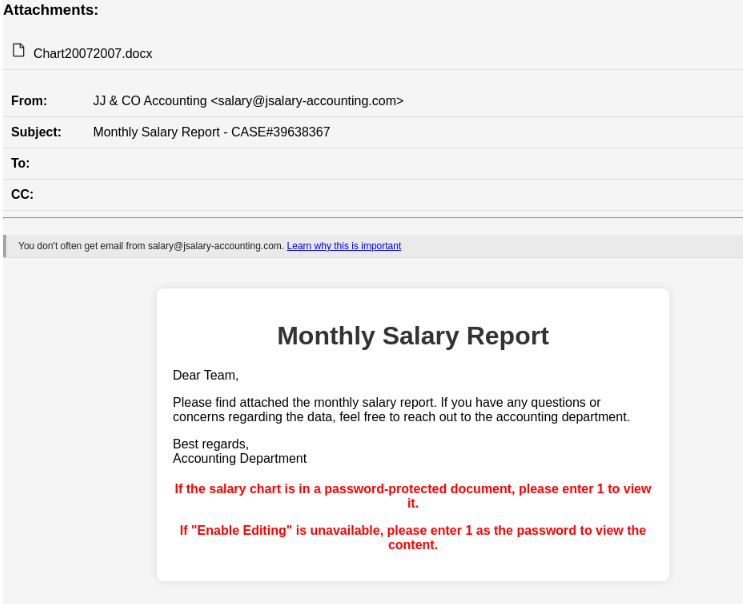
The starting point is a salary-themed phishing email that looks like it has been sent by the accounting team. It asks the recipients to open the attached Microsoft Word document to view the monthly salary report.
Upon inspecting the email message headers, mainly the Return-Path and Message-ID fields, it was revealed that the hackers used a valid email marketing platform called Brevo (previously called Sendinblue) to send the emails.
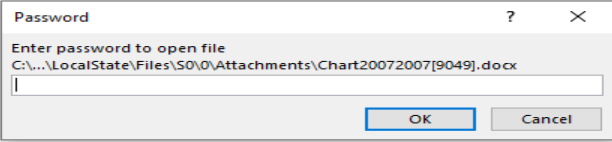
When the victim opens the Word document, it asks them to enter a password mentioned in the email body and enable editing. Then, they double-click the printer icon embedded in the document to view the salary graph.
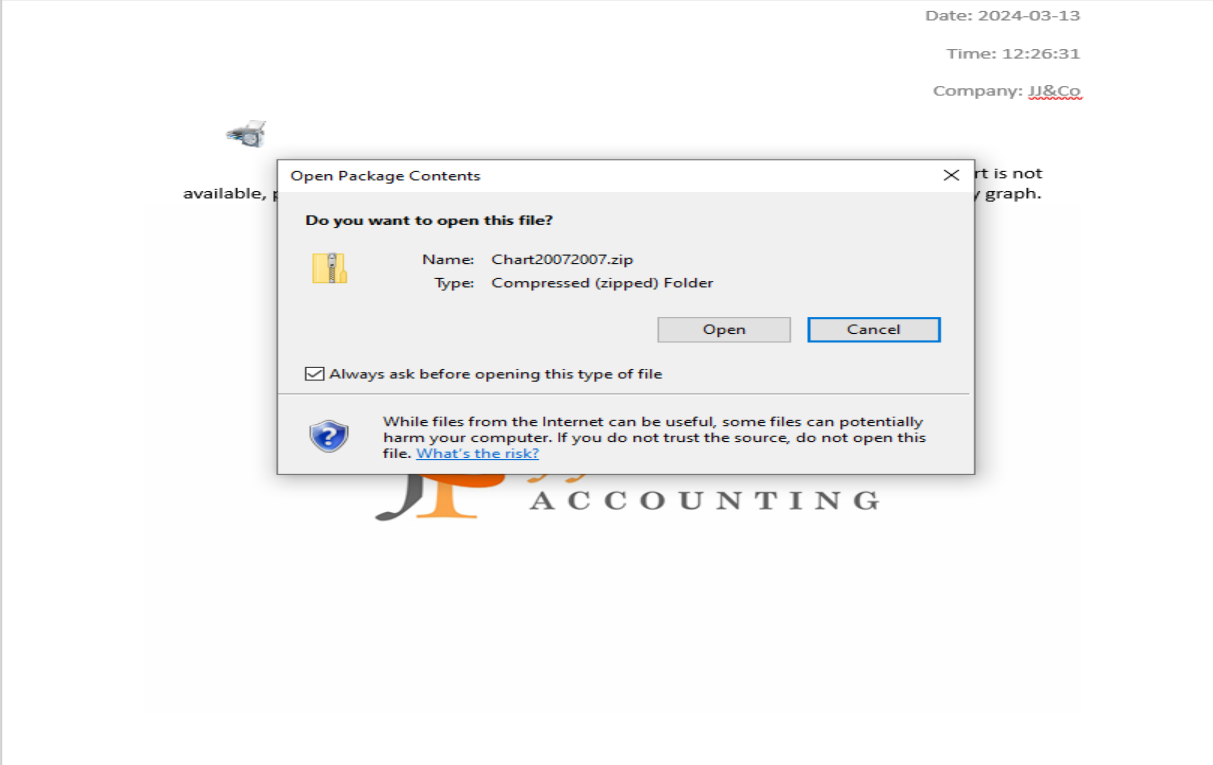
It will then open a ZIP archive file named Chart20072007.zip, which contains a Windows shortcut file that works as a PowerShell dropper that retrieves and executes a NetSupport RAT binary from a remote server.
Davidpur also mentioned:
By using encrypted .docs to deliver the NetSupport RAT via OLE template and template injection, PhantomBlu marks a departure from the conventional TTPs commonly associated with NetSupport RAT deployments, adding the updated technique showcases PhantomBlu’s innovation in blending sophisticated evasion tactics with social engineering.
This is another instance where threat actors abuse cloud services, such as IBM Cloud, Dropbox, Oracle Cloud Storage, GitHub, and Web 3.0 data-hosting platforms built on the InterPlanetary File System protocol, to generate FUD (fully undetectable) URLs using phishing kits.
These FUD links are easily available on Telegram by vendors like FUDLINKSHOP, XPLOITRVERIFIER, BulletProofLink, and more for a price of around $200 per month for a subscription.
The links are secured behind antibot barriers to filter incoming traffic and make them undetectable. There are tools like HeartSender that make it possible to spread these FUD links on a larger scale.
The phishing campaigns built by hackers could look legit, so it is important to scale through an unknown email before opening attachments to ensure your security.
What are your thoughts on the matter? Share your opinions with readers in the comments section below.
Satya Nadella introduces Microsoft AI, a new department that will bring together Bing, Edge, and Copilot, with Mustafa Suleyman, DeepMind, and Inflection founder leading it.
I’m very excited to announce that Mustafa Suleyman and Karén Simonyan are joining Microsoft to form a new organization called Microsoft AI, focused on advancing Copilot and our other consumer AI products and research.
Satya Nadella
According to the message he left, Nadella will appoint Mustafa Suleyman as the new department’s EVP and CEO, while Karén Simonyan is joining this group as Chief Scientist, reporting to Mustafa, directly.
Mustafa will be EVP and CEO, Microsoft AI, and joins the senior leadership team (SLT), reporting to me. Karén is joining this group as Chief Scientist, reporting to Mustafa. I’ve known Mustafa for several years and have greatly admired him as a founder of both DeepMind and Inflection, and as a visionary, product maker, and builder of pioneering teams that go after bold missions. Karén, a Co-founder and Chief Scientist of Inflection, is a renowned AI researcher and thought leader, who has led the development of some of the biggest AI breakthroughs over the past decade including AlphaZero.
Satya Nadella
Mikhail Parakhin, the current leader of the Windows and Web Experiences Team, and the one leading the development of Copilot, Edge, and Bing, will also report to Mustafa Suleyman, and Nadella says the move will help Microsoft double down on innovation when it comes to these products.
As part of this transition, Mikhail Parakhin and his entire team, including Copilot, Bing, and Edge; and Misha Bilenko and the GenAI team will move to report to Mustafa. These teams are at the vanguard of innovation at Microsoft, bringing a new entrant energy and ethos, to a changing consumer product landscape driven by the AI platform shift. These organizational changes will help us double down on this innovation.
Satya Nadella
The new Microsoft AI department will focus on innovating Copilot, Bing, and Edge with advanced AI capabilities that will suit both commercial customers and standard Windows users.
It’s worth noting that Microsoft will release the Windows 11 2024 Update later this year, and the version will have many AI capabilities. The Redmond-based tech giant also announced the release of the Copilot Key, its first new keyboard key in decades, which will allow users to access the AI model with just a tap.
The company is placing a lot of its bets on AI, from Windows to its productivity platform, Microsoft 365, its browser, Microsoft Edge, and its software and security platforms, as well. The company’s partnership with OpenAI will also be one of the main focus of the new Microsoft AI department, as Satya Nadella states:
At our core, we have always been a platform and partner-led company, and we’ll continue to bring that sensibility to all we do. Our AI innovation continues to build on our most strategic and important partnership with OpenAI. We will continue to build AI infrastructure inclusive of custom systems and silicon work in support of OpenAI’s foundation model roadmap, and also innovate and build products on top of their foundation models. And today’s announcement further reinforces our partnership construct and principles.
Chromebooks are widely used in schools and workplaces, so installing Microsoft Teams on these devices is a no-brainer since it’s one of the most commonly used collaboration tools.
How can I download Microsoft Teams on my Chromebook?
1. By using the Google Play Store
Launch the Google Play Store app on your Chromebook.
Search for Microsoft Teams and click the app.
Now, click the Install button and wait for the process to complete.
2. By using a web browser
Open your preferred web browser on your Chromebook. (We’ll be using Chrome for this step).
Go to the Teams website by typing teams.microsoft.com in the address bar and pressing Enter.
If prompted, sign in to your Teams account. You’ll need to create an account if you don’t have one.
Click on the download icon and hit Install when prompted. You should now have access to Teams through the web version.
To make accessing Teams more convenient, a shortcut will be automatically created on your PC’s desktop or taskbar.
If it doesn’t, with the Teams website open in your web browser, click on the three-dot menu icon located in the upper-right corner of the browser window.
From the dropdown menu, hover over More tools>Create shortcut (the wording may vary depending on the browser you’re using).
A dialog box will appear, asking you to confirm the creation of the shortcut. Check the box to Open as a window and click Create.
The Teams shortcut should now appear on your desktop or taskbar. You can simply click on it to access it quickly.
Scroll down the page and click the Linux (.deb) link.
Now, click the Accept and download button and wait for the download process to complete.
Next, double-click the downloaded file to launch it.
Finally, click the Install button, followed by OK to complete the process.
Some Chromebook models may support Linux apps. If your device supports such configurations, this may be an alternative way to install Teams on your Chromebook.
However, if Teams is not working on your Chromebook, there may be a server outage or compatibility issues. You can clear your browser cache and cookies, check for browser updates or switch to another browser.
What are the pros and cons of using Microsoft Teams on a Chromebook?
Pros
Chromebooks offer an inexpensive communication method without the strict hardware requirements for other OSes and devices.
Microsoft Teams can be downloaded as a Progressive Web App (PWA) with a native app experience, eliminating the need for additional standalone apps that consume storage space.
Chromebooks have the Google Play Store as a native app, hence no need to sideload Android apps.
Cons
Whereas the PWA app has some beneficial functionalities, some features are only available in the native app.
Chromebooks are typically lower-end models, so their performance is not that great. Running resource-intensive apps with limited bandwidth can downgrade the quality of your communication on Teams.
Older Chromebooks may have limited functionality as they may not support newer versions of Microsoft Teams. You can always upgrade your Chromebook if need be.
Still, to ensure you’re getting the most out of your Teams app on your Chromebook, use a strong and stable internet connection, keep browser tabs to a minimum, and use the extensions sparingly. Also, regularly clear your browser cache to free up memory and storage.
Hopefully, you’ve managed to install Teams with our instructions. If you did, why not check our guide on how to put apps on a desktop on Chromebook for quick and easy access?
That’s a wrap from us, but we’d love your feedback. Which method do you find easier to install Teams on your Chromebook? Let us know in the comment section below.
Ever since Microsoft released the native RAR support app for Windows, the Redmond-based tech giant has been updating it regularly, and now the app is performant enough for Windows users not to choose third-party apps anymore.
For instance, Microsoft added support for 7z, and TAR to its native RAR app, back in November 2023, and earlier this year, the Redmond-based tech giant added even more options to the app, allowing users several new ways to compress files.
The continued support for the native Windows RAR application means users won’t have to resort to third-party apps anymore, which is making some of them struggle to keep up. 7-Zip is one of them.
The app recently got some updates that made it support ZSTD archives, 7-Zip is performing slower than Windows RAR application, and it requires more time to complete some tasks. The app is also just now supporting formats that the native Windows app already has been supporting for months.
We’re talking about the Zst, and Tzst formats, as well as the entire Zstandard library, something 7-Zip has only implemented with the latest 24.01 version.
So, is it worth keeping third-party RAR support apps installed on your Windows 11? Well, if you’re dealing with a lot of compressing and archived files, it would be better to have a third-party app installed on your device, for now.
Microsoft’s native RAR support app has been around for less than a year, and while it’s quickly catching up and even surpassing some of the other apps around, it might not be able to support all formats. For that, it’s always better to have another app that can do the job.
However, with how the updating goes for now, in a year, you most likely won’t need to keep any third-party apps around when it comes to file compression and file archiving, as the native Windows app will be more than enough for it.
Microsoft Ireland has announced the initiative to teach individuals from rural Irish areas all about AI with the help of in-person Skill-Up-A-Thons workshops.
In the following weeks, enthusiasts from Irish counties such as Cavan, Galway, Kilkenny, Mayo, and Tipperary will have the opportunity to educate themselves in AI skills, in a series of offline and online masterclasses aimed at teaching people, and potential local business owners all about the benefits of this technology.
AI has the potential to empower people and organisations across the country but it’s critical that everyone, everywhere has the skills to harness its benefits. One of our key ambitions as part of the programme is to bring AI skilling directly to people, communities and businesses in rural Ireland and ensure they are given equal opportunity to engage in AI. That’s why today we’re rolling out the first-ever AI Skill-Up-A-Thons across rural Ireland. Through these new AI learning pathways, we want to empower people of all ages, backgrounds and experience with the skills and knowledge to succeed in an AI-enabled economy.
Microsoft
The AI masterclasses will start this month and will last until September, and each masterclass will last for about 4 hours. Upon completion, participants will be rewarded a Career Essentials Certificate in Generative AI that will be recognized by the industry and could allow for further opportunities. Those who participate will also gain access to LinkedIn Premium, which could emphasize their chances and opportunities even further.
Aside from the Skill-Up-A-Thons masterclasses, Microsoft will also offer AI courses to local business owners, so they can learn to foster and use AI to boost their businesses. These courses will focus on different aspects of AI-powered business, from business management to the understanding of AI tools, and so on.
This is not the first time Microsoft Ireland launched such initiatives. Not long ago, the company also held online masterclasses focused on AI, which proved to be a success, and now the Skill-Up-A-Thons courses are a continuation of those.
Microsoft is taking it almost by itself to make European countries more aware and AI inclusive: for instance, the Redmond-based tech giant announced an AI partnership with several European countries, such as Germany, France, and Spain that will see the company integrate AI technologies in government infrastructures.
While this might have to deal with the European Union limiting Microsoft’s power over the region (Windows Copilot is not yet available in the EU, for instance), the deals are worth billions of dollars.
Microsoft Teams has been available as a desktop app for Linux but Microsoft sunset it in favor of the progressive web app. Since you can no longer get it from the official Teams site, here are a few ways to still use it.
Before you download the Teams app, you need to ensure your device meets the system requirements. Linux is available on different distributions so if there are compatibility issues, it is probably because that version is unsupported.
How do I use Microsoft Teams on Linux?
1. Using a web browser
Launch your select web browser and go to the Teams website.
Sign in with your credentials.
On the address bar, click on the download icon and hit the install button.
Once you install it, a shortcut will automatically be created and you can launch Microsoft Teams as a PWA directly from your desktop. Most developers are pushing PWAs instead of native apps because of their cross-platform compatibility and seamless integration.
It also makes much more sense when using Teams on Chromebook because it doesn’t take up too much space for a low-end device.
Although not a native app, it mimics its functionalities and comes with additional benefits such as automatic updates without taking up storage space on your device.
2. Using Ubuntu software store
Open the Ubuntu Software Store.
Search for Microsoft Teams then click on teams-for-Linux and hit the Install button.
Troubleshoot common issues that may arise when using Teams on Linux
If your video is lagging or has issues, ensure your graphic and sound card drivers are up-to-date.
Ensure you have enough system resources such as sufficient storage and memory. This will ensure you’re able to save and even record videos.
Verify that you’re using the latest available version of Teams as well as your Ubuntu distribution. This will address any compatibility issues.
Ensure you’re running Teams on a stable connection and allow the app through your firewall in case there are restrictions.
Having successfully installed Teams on Linux, we’re sure you’ll also find that recordings of meetings come in handy when you want to go back and clarify something. As such, we show you how to record your Teams meetings.
However, just before you start recording, we recommend that you test your Teams call. the last thing you want is to record a meeting only to discover later that no audio was recorded.
And if you’re managing a large team, the Network Assessment Tool will ensure your connectivity is always stable with no downtime.
That’s all we had for this article but we’re curious. Have you used Microsoft Teams on Linux and other OSes say Windows 11? Is there a difference? Let us know in the comment section below.
Windows users are now given the option to transition from the old Mail app to the new Outlook, but before even choosing the option to say no, for now, Windows closes the Mail app and automatically upgrades it to the new Outlook, according to Windows Latest.
The Redmond-based tech giant started to warn Windows users of the change earlier this year, when it added a pesky prompt to Mail & Calendar, pushing users to switch to Outlook. Microsoft announced that it would delist the UWP mail & calendar apps, last year, and many Windows users were not happy about it.
I tried Outlook a few times because they allow easy switching, but I did not like it for two reasons. It was very glitchy/laggy and I did not get notified about new emails. Also, I noticed that I often received emails very late, so I switched back to “Mail”.
Windows user
However, none of the complaints mattered, as the Redmond-based tech giant is now automatically switching to the new Outlook. Fortunately, users will be given an option to go back to the old Mail app, but not for long, though. The pop-up reads:
The next time you launch Mail or Calendar, you will be redirected to Outlook. You can switch back to Mail and Calendar by clicking the toggle on the top right of your screen.
Microsoft
That’s good to know, and it is good users have the option to go back, but unfortunately, the Mail and Calendar apps will come to their end later this year. They will still be available to use and download in the Microsoft Store, up until the end of 2024.
The Redmond-based tech giant is trying this option to somehow force users to get their hands on Outlook, so that users will know what to expect when the transition will ultimately happen, for the last time, later this year.
So, no. You won’t be able to escape transitioning to Outlook, but now would be the perfect time to give it a try, and test the waters. Indeed, Windows users are somehow forced to like Outlook, but ultimately the platform comes with its own set of benefits, including access to Copilot.
However, it seems that this has been a rash decision, and according to the latest news, it seems that the two companies will continue their collaboration after all.
Microsoft will use Nvidia Grace Blackwell superchips on Azure
The company has announced a with 208 billion transistors and 192GB of HBM3E memory.
This GPU will use a TSMC 4NP process that will allow real-time generative AI on trillion-parameter large language models. The new GPU will also have 25 times lower cost and energy consumption than its predecessor.
Lastly, there’s also a 1.8TB/s bidirectional throughput per GPU, that will ensure outstanding performance.
Blackwell is certainly an amazing chip, so it’s no surprise that Microsoft decided to use these superchips on Microsoft Azure.
NVIDIA Grace Blackwell superchips will be used by Microsoft 365, while NVIDIA Triton Inference Server will power Copilot for Microsoft 365.
Microsoft’s Satya Nadella said the following:
From bringing the GB200 Grace Blackwell processor to Azure to new integrations between DGX Cloud and Microsoft Fabric, the announcements we are making today will ensure customers have the most comprehensive platforms and tools across every layer of the Copilot stack, from silicon to software, to build their breakthrough AI capability.
Microsoft is one of the first companies to bring NVIDIA Grace Blackwell GB200 and NVIDIA Quantum-X800 InfiniBand to its cloud-based platform, and we’re certain that others will follow suit.
This is amazing news, and we’re positive that this collaboration will make Azure and other Microsoft services better than ever before.
Yes, we know how it sounds, but Microsoft might actually come up with a handheld gaming PC in the future. Even though there are Rog Ally, and Legion Pro allowing users to install Windows 11 to play their favorite video games, the Redmond-based tech giant could release a handheld of its own to address the limitations of these consoles.
In an interview for The Verge, Phil Spencer said that while he’s a big fan of the Legion Go and Rog Ally consoles, he admitted that the way these consoles are running Windows 11 is somehow not desirable:
We do have real work. One of the weak points in the experience on a ROG or the Lenovo [Legion Go] is Windows. How Windows works on controller input only on that kind of DPI, on a smaller eight- or seven-inch screen. That’s a real design point that our platform team is working with Windows to make sure that the experience is even better.
Phil Spencer
In the same interview, he also said that there is nothing to announce when it comes to Xbox handhelds, even though he is a big fan of these types of consoles. However, Xbox currently has the Game Pass subscription model which recently passed 34 million users, and the future of an Xbox handheld might revolve around it.
Game Pass is structured in such a way subscribers have access to a wide catalog of video games for both Xbox consoles and Windows PCs. The model allows for cross-play, cloud-play, and cross-progression, and it has widely become known as the Netflix for games.
Well, as we mentioned earlier, a handheld from Microsoft will definitely revolve around this model, while also being capable of handling the limitations that the current Windows-based handhelds have. With this being said, the idea of a handheld gaming PC could be plausible.
Even though Game Pass already has a cloud-based service, allowing users to play games from literally any supported device, running video games natively is a much better option, especially for those gamers who like a lag-free, no-stress gaming experience.
A Microsoft handheld gaming PC could address many of the limitations by coming with a larger screen, and keypads and controllers specifically made to suit the device. It would be bigger, yes, and it wouldn’t fit in a pocket.
But it would have a bigger battery, which means gamers could spend exponentially more time on it. It would be entirely possible? Why? Because we have the tablets going on for more than a decade now, and people are used to carrying bigger handheld devices with them.
Plus, Microsoft is currently developing the Surface Pro devices, which are portable devices, capable of very powerful performances.
There have been many requests over the years for an Xbox handheld, and users have come up with mockups of them. On the other hand, a lot of other users have tried and managed to install Windows 11 on portable devices, such as mobile phones, so there is a desire for a Microsoft handheld gaming PC.
Crunchyroll is one of the most-used anime websites in the world, but it seems that the service is down for many.
The users have been having issues with the service in the last few days, but it seems that it’s down for many, so let’s see what’s going on.
Crunchyroll is down for many, and the cause remains unknown
Over the past week, many users had issues with Crunchyroll according to its Downdetector page. It seems all platforms, including PC, Android, Roku, Fire TV, and more, have been affected according to Times Now News.
However, there’s more trouble for Crunchyroll, and looking at the info from Downdetector, the number of reported outages spiked today with over 439 reports at the time of writing.
The cause of the outage remains unknown, and there hasn’t been any announcement from Crunchyroll regarding this issue.