If you’re familiar with Linux, you’ve most likely used a sudo command at least once to temporarily gain full access to the system.
It seems that Microsoft is planning to add the sudo command to Windows since it was spotted in a leaked Windows Server preview build.
The sudo command is coming to Windows, here’s what you should know
Over the weekend a new server preview build was published to the Windows Update servers by accident.
Keen users have noticed a new option in the For developers section that says Enable sudo. Of course, to access this feature, you need to enable Developer mode on the preview build.
This feature offers some configuration and it allows you to configure how sudo runs applications. The list of options includes a new window, with input disabled, and inline.
We still don’t know how these settings work since sudo still doesn’t work in the leaked build. Since this is a developer feature, it comes with a security warning, so it might pose a security risk if your PC is compromised.
Overall, the addition of sudo is great news for administrators and advanced users who tend to rely on the command line a lot.
Microsoft OneDrive was already revamped last year when if got the Fluent design treatment to match Windows 11. Now, they announced a more functional upgrade that will be delivered to all the users at the end of February.
It’s both a visual and functional upgrade designed to help you get to your files quickly and keep your content organized in multiple ways – without you having to do any organizing.
OneDrive becomes cleaner and more functional
With the new Microsoft OneDrive design, the interface is focused on your content and it’s cleaner, so you can find everything on your cloud easier.
With the updated OneDrive, your content takes center stage. The improved visual design reduces clutter and distractions, allowing you to focus on what’s important – your content. Spend less time finding files and more time doing what you need with the improved OneDrive. These changes are consistent throughout the app, providing a seamless and consistent experience.
We outline below all the new features and improvements:
People view
When you’re a hardcore OneDrive user, you send or share files all the time to your friends or colleagues, but many times you can’t remember what you send to whom.
The new People view is a new browsing criteria that will show you a list of people and to their right, you will see all the files you’ve sent to each one.
It’s a helpful feature to reach a certain user contact or the files shared with them with a single click.
File type filtering
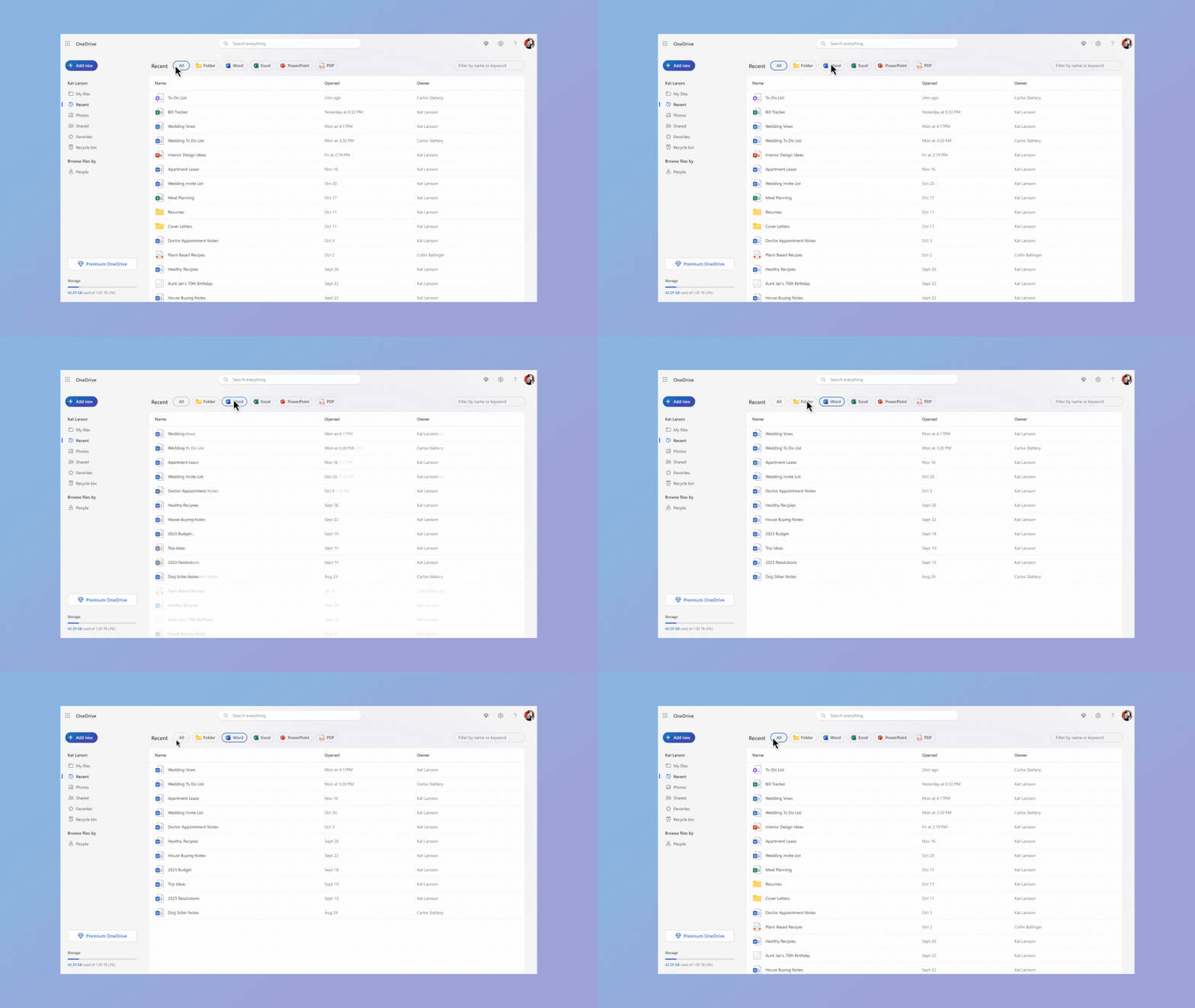
OneDrive now has a new one-click file type filtering function. In the Recent files menu, you can simply click on the Word, Excel, PowerPoint, or PDF to narrow your search and get to the files you need a lot faster.
Add new button for commands
Lastly, there is a new button in OneDrive called Add new, that allows you to create specific content, upload files and folders, or organize your existing data.
Another notable change is that Microsoft removed the accent color from the title bar, and that doesn’t appeal to everyone because it highlights the focused app.
The upgrade looks like a welcome change to OneDrive and the new features are certainly helpful additions. Microsoft it obviously trying to attract more users to OneDrive, but we’re already used to such marketing moves, right?
What do you think about the new OneDrive features and design? Leave your thoughts in the comments section below.
WhatsApp is releasing a new update (version 2.2403.3) for the Windows native app via the official beta channel on the Microsoft Store, introducing a sticker creation converter tool.
While this feature was initially exclusive to WhatsApp Desktop and mobile app users, it now extend to the native WhatsApp app, ensuring users across all platforms can make the most of it.
However, if you don’t see it, try updating the WhatsApp app from Microsoft Store. If it still doesn’t come up, you need to wait for a future update.
To use this feature on your WhatsApp app, go to the sticker panel, click the + icon, and create stickers from images.
Furthermore, you get a basic editing tool, allowing you to crop the image before sharing it in your conversations.
From our point of view, creating customized stickers from images lets you add a personal touch to the conversations, and the feature can be beneficial for those who primarily use WhatsApp on a desktop.
After this update, you won’t have to send images to their mobile devices for creating stickers, eliminating the hassle and saving time in the meantime.
Do you think adding this feature to the Windows native app will enhance the user experience? Share your thoughts in the comments section below.
Microsoft accidentally leaked the Internal build 26047 to public Windows Update servers. And as with any other leaks, Windows enthusiasts everywhere managed to get their hands on it before it was pulled out. However, it was enough time to let them discover some important features coming to Windows soon.
One of these features is none other than the Semantic Indexing option, as spotted by Windows Insider @PhantomOfEarth. Semantic Indexing is already present as a feature in Copilot, but it seems Windows is integrating it locally, and it has to be enabled for it to work (although, for the moment, enabling it doesn’t make it work).
Semantic Indexing is currently integrated into Copilot for Microsoft 365, and the feature allows for comprehensive file management inside the platform. It makes it possible to find certain files not just for their name, but for their relevance to a certain task, the persons responsible for the files, and so on.
In other words, the feature allows for a more human searching option, and it strives to emulate human thinking when searching for files.
How to enable Semantic Indexing in Windows 11?
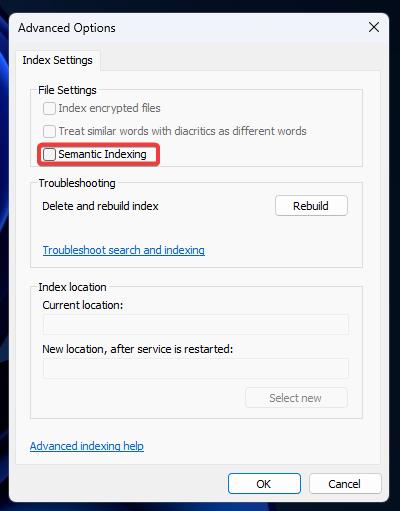
In the Search bar, type in Indexing Options.
Click on Advanced with Admin rights.
Check the Semantic Indexing box, and then hit OK.
For now, the option doesn’t work, which means Microsoft didn’t intend to release it just yet. But once it gets released, you can easily enable it from here.
How will it work? We don’t know for now, but we can assume Windows will be capable of in-depth file management, and could potentially show results based on multiple criteria, such as relevancy, owners, and so on.
The Internal build 26047 also came with several other new features to Windows 11, as the same Windows Insider discovered a new energy saver icon, a non-functional Windows-protected print mode setting, and a new Color Management control panel.
These features will probably be unveiled in the next few days.
You can change the font in Outlook on Windows, macOS, and the web app through the settings. You can customize the font type, style and color.
The process is similar across the platforms, with an option to change it for outgoing, incoming, or replying to emails. Here’s how:
How to Change Fonts in Outlook on Windows, macOS, and web?
NOTE
You can change the font of a single message while drafting an email. The font changes back to the default you have set from the settings.
Change fonts in Outlook 2019, 2016, 2013, 2010, and Outlook for Microsoft 365.
1. Open Outlook on your computer and head to File.
2. Then, go to Optionsfrom the File menu.
3. Now, head to the Mail section and go to Stationary and Fonts.
4. Click Fonts from either of the sections.
Here, you can change fonts on Outlook for three different segments.
New mail messages – This changes the default font for your composed emails.
Replying or forwarding messages – It changes the font for emails you reply to or forward to others.
Composing and reading plain text messages – The message sent to other people will be in plain text, but you can choose to use a different font, which appears only to you while composing or reading.
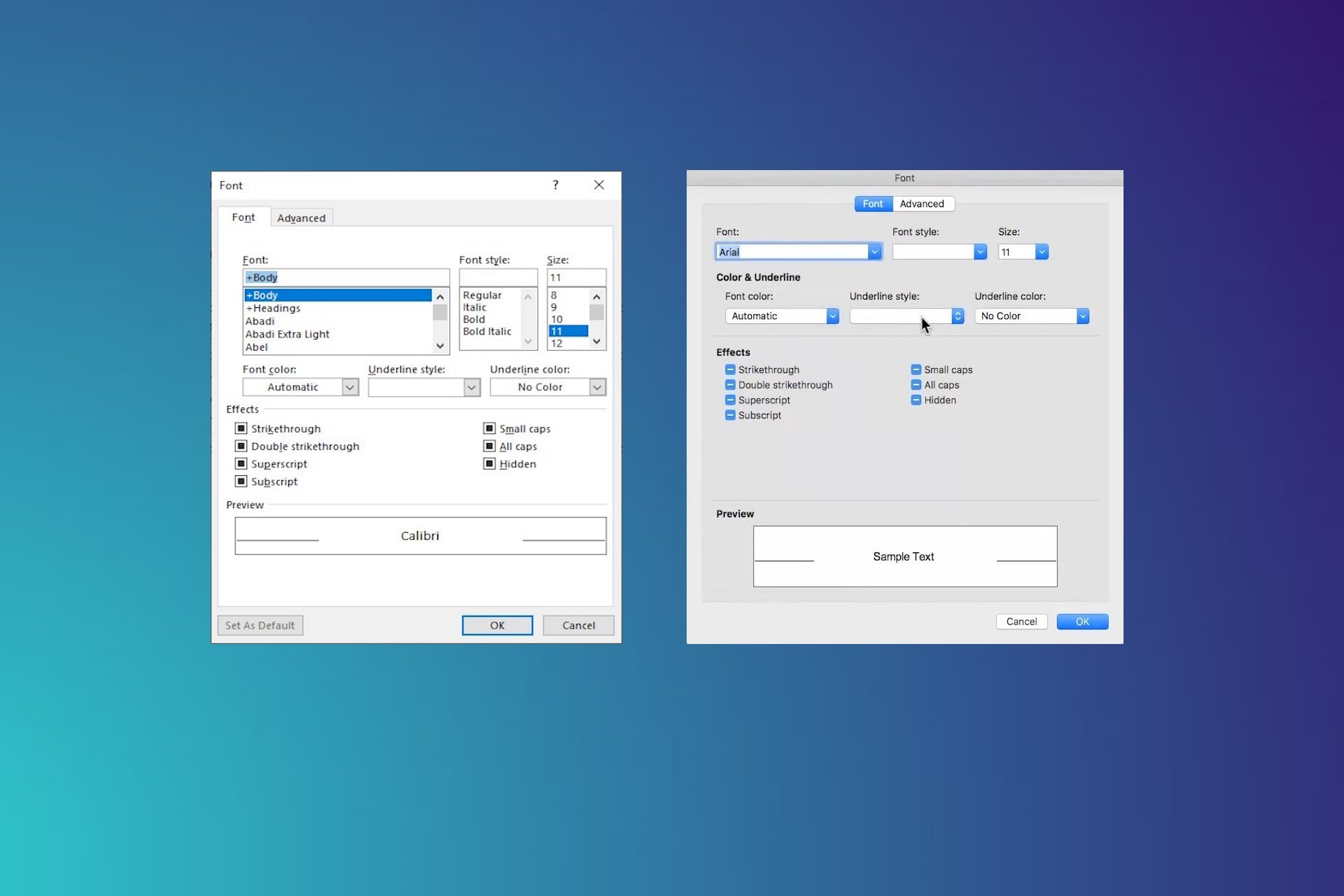
5. Make changes to font, style, size, color, and effect, and then click OK to save changes.
Change font in Outlook 2007 and 2003
1. Head to Options from the Tools menu.
2. Then, go to Stationary and Fonts from the Mail tab.
3. Click on Fontson one of them – New mail messages, Replying or forwarding messages, and Composing and reading plain text messages.
4. Now you can change font, style, size, color, and effect. After that, click OK to apply the changes.
Change font in Outlook on macOS
1. Go to Preferences from the Outlook menu at the top.
2. Then select fonts from the popup menu.
3. Here, choose one or go all three – New mail, Reply or forward, and Plain Text.
4. Now, make changes to the font, style, size, and color, including underlying parts. Once done, select OK to save changes.
Change font in Outlook.com
NOTE
On the Outlook for web, you can only change the font of the outgoing mails. The font style of all messages will depend on your browser and operating system settings.
1. Go to Outlook.com and head to Settings through the gear icon at the top.
2. Head to Compose and reply under the Mail section.
3. Scroll down to Message Format and change font, color, and style before clicking Save to apply the changes.
Now, you can draft emails in the font of your choice without changing them every time. The method is similar across the platforms and versions. And if you don’t like the changes, you can also reset to default.
So, this is how you can change the font in Outlook on Windows, MacOS, and the web version.
While some speculate that this is due to censorship of a sensitive subject matter that the game tackles, the answer is much simpler than that.
The licenses associated with the game have expired and this is the reason for the removal. However, if you already have the game in your library, you can still play or download it without issues according to the 2K director:
Spec Ops: The Line will no longer be available on online storefronts, as several partnership licenses related to the game are expiring. Players who have purchased the game can still download and play the game uninterrupted.
So, what are these licensing issues? Many speculate that the culprit is the game’s music, but this hasn’t been confirmed.
The game is gone from Steam, GOG, Xbox Store and we assume from all other gaming platforms and it most likely won’t make a return.
While you’re here, why not check Xbox Lunar New Year sale, and get some new games at a discount?
Palworld was released on January 19, 2024, and has since been a topic of controversy. Besides its close resemblance to Pokemon, the game has performance issues, including a black screen on launch and low FPS.
The FPS problem is commonly seen on Xbox, with Series S performing slightly better than Series X, in our tests. The forums are filled with such reports, with many complaining of getting, at the maximum, 30 FPS, even when they remove the FPS cap by choosing No Limit in the settings.
The Early Access of Palworld isn’t yet polished
If you haven’t set the Max FPS to 30 in the game’s settings, the only plausible reason why you cannot play Palworld at 60 FPS is the in-game bugs.
If history tells us anything, the early releases of games usually have performance issues, and these are fixed in later patches. Take the case of Project Zomboid, which, too, had such bugs in the initial releases, but the later versions ran just fine.
Settings Max FPS to No Limit on Palworld
Until now, Palworld has released a few patches, and the last two, v0.1.4.0 and v0.1.1.3, have significantly enhanced the experience.
Based on the few hours we spent playing Palworld, some of the aspects that need improvements are sound quality, FPS (Frame Rate per Second), network connectivity, and a fix for the incessant crashes. Besides that, the game runs perfectly fine and is captivating!
As per the information provided on Palworld’s official Steam page, the Early Access is expected to last at least a year. So, for now, all you can do is send honest feedback to the developers, highlighting all the issues, and wait for these to be addressed in the later patches.
Do share any FPS or other issues you faced with Palworld in the comments section below.
Microsoft is debuting a new look for OneDrive for personal users, and it’s set to roll out in February. The new look comes with a lot of perks for users, including a more intuitive UI, a revamped and enhanced Add new button, and filtering options.
However, according to the latest entry in the Microsoft 365 Roadmap, OneDrive will also debut a new empty state in the platform, that will look like real images you would upload, but they’re just placeholders for the images you’re going to upload.
Makes sense? Well, in better words: Microsoft wants to encourage users to upload images to OneDrive by showing them how these images are going to look on the platform’s homepage once they’re uploaded.
I mean, who doesn’t want to customize their OneDrive homepage, but this feature could end up being confusing for a lot of users. Here’s how Microsoft describes it:
You will see new and improved images and text in various views on OneDrive for Web when there are no files associated with those views. These images will appear in new OneDrive accounts that have no stored files, and they may appear in existing OneDrive accounts that have no recent, favorited, shared, or recycled files. As an example, if you have no favorited files, you will see an image of a star with text that reads “Items you favorite will show up here.”
Microsoft
Why would this feature be confusing? Well, many users could end up thinking someone messed up with their OneDrive accounts, or their account has been hacked, due to placeholder images showing up in the homepage.
Yes, it might be a possibility, and we’ll have to wait until this feature properly rolls out to see exactly how these images will look, but it does sound a bit confusing.
Outlook will allow users to drag and drop attachments and emails from the platform to their desktops or preferred folders to download them, according to the latest entry in the Microsoft 365 Roadmap.
The feature will be available on the new Outlook for Windows, starting March 2024, as Microsoft states:
Users can drag and drop attachments and emails from the new Outlook for Windows to their desktops or local folders to download them directly to that location.
Microsoft
Outlook doesn’t currently support this ability, which is by all means very intuitive to use. Microsoft allowed Windows users to drag and drop files decades ago, so why hasn’t the Redmond-based tech giant enabled it on Outlook?
This capability should have been implemented on the platform ages ago, as it would have made Outlook more intuitive to use, and would have saved time for a lot of users.
It’s good that Microsoft is finally releasing it to Outlook: maybe it will turn out to be one of the most appreciated features on the platform.
The Redmond-based tech giant is set to release multiple quality features for Outlook, including support for legacy formats, that will enable users to open old Outlook emails. And speaking of features that should have been implemented ages ago, Outlook will soon support Newsletters.
Yes, newsletters. In 2024. Very groundbreaking, but necessary.
Microsoft released a new update for Windows Update for Business that will make the platform perform pre-flight checks to make sure corporate devices meet the needed requirements for quality updates.
The update comes just in time, as we reported many older devices have issues supporting the new updates for Windows 10, and Windows 11, with many users claiming the new updates are ruining their businesses.
The checks are called device readiness tests, and they existed so far in post-deployment summaries, for when quality updates were already installed. However, Microsoft is changing them, making them available in pre-deployment phases, where admins can see which devices are ready for quality updates.
Expedited Windows quality updates are a feature that fast-tracks installation of security updates. Up until now, you’ve been getting post-deployment report summaries for devices that couldn’t be expedited. That’s old news now, but if you’ve missed it, read about different types of alerts and remediation guidance at Get the most out of expedited Windows quality updates. The better news is that now, you can get your hands on this report before expediting the updates.
Microsoft
In a blog post, the Redmond-based tech giant explained how these tests work: they do not provide any form of content, but instead, they will scan each device, and they will generate alerts if any prerequisites are missing.
Admins will then be able to resolve those alerts so that the deployment can successfully take place.
These checks are proactively enabled, meaning IT admins will have to initiate them through special commands in Microsoft Graph.
The guide on how to initiate this process can be found on the official blog, and it’s rather simple, requiring admins to follow 3 steps. However, some of the steps require waiting between 2-3 days to complete, to provide correct data.
After it’s done, the process will issue a report that looks like this:
Microsoft hasn’t specified why these tests aren’t automated, but the Redmond-based tech giant will most likely clarify or provide more details about this in the following weeks.
Microsoft has bestowed OneDrive with a brand-new design, and personal users should be able to see it when they open the platform next time, according to the official blog post.
The Redmond-based tech giant promises the new design is intuitive and easy to use, and users will get accustomed to it in no time. Plus, it comes with some extra features that Microsoft talked about last year, at the OneDrive special event.
It’s both a visual and functional upgrade designed to help you get to your files quickly and keep your content organized in multiple ways – without you having to do any organizing. The new features and upgraded design make it faster to get to all your personal and shared files in OneDrive so you can focus your time on things that matter most to you.
Microsoft
The new design comes with a lot of perks, including:
A fast, organized, and personalized experience that focuses on users’ content, by reducing unnecessary visual cues of the old design.
People View: this new section will allow users to see who sent them certain files, and have a better understanding of their activities.
Filtering by file type: the new design will let users find files faster by filtering them through certain criteria, say Word or Excel files, as you can see in the image below.
Plus, the new design also brings a revamped Add new button that lets you upload files to OneDrive, but also create new files, such as Word, Excel, PowerPoint, and so on, without opening up those apps. Microsoft promises this enhancement will greatly streamline work and encourage inspiration.
We’ve streamlined creation for both uploading to OneDrive and starting a new document. The “add new” button has been upgraded to include both options, and it persists across all views. So, when you are inspired to create something new, you can get into your flow faster.
Microsoft
The new design will be gradually rolled out to OneDrive personal users everywhere, and it should be generally available to all users by the of February.
Microsoft Teams will be released on Apple Vision Pro later this week, on February 2, according to the Redmond-based tech giant’s latest blog post.
Apple Vision Pro is the newest AR/VR device from Apple, announced last year much to the dismay and excitement of the tech lovers everywhere. In the teaser for the product, Microsoft services, such as Word, and other 365 apps could be seen.
Now, later this week, they are going to become a reality for many Apple Vision Pro users out there.
We are excited to announce that Microsoft Teams will be available on the new Apple Vision Pro when it launches on February 2. Microsoft Teams will bring engaging spatial computing experiences to your fingertips with the smart place to work on Apple Vision Pro.
Microsoft
Users will be able to do any of the activities they were already doing on the regular Teams, on Apple Vision Pro, but with a dash of interactivity.
With the Microsoft Teams app on Apple Vision Pro, you can use all your communication and collaboration capabilities of Microsoft Teams. Meet, chat, call, collaborate, and engage with your business processes – be a part of all Teams has to offer in the smart place to connect, communicate, and work together.
Microsoft
This is not all, though: along with Microsoft Teams, on February 2, Apple Vision Pro users will be able to download and use Microsoft Copilot, Word, Excel, PowerPoint, Outlook, OneNote, and Loop inside the device, as well.
They will be available to download from the App Store, and then, once installed, they can be used to engage in multiple activities on the device, as Microsoft states:
Microsoft Teams is a hub for communication and collaboration with content – and you often need multiple windows open in Teams at the same time to have the information you need at your fingertips. Teams on Apple Vision Pro uses the infinite canvas – you can open apps like Word, Excel, and PowerPoint, scale them to any size, and place them anywhere to access content seamlessly during your Teams meetings and chats. You can also easily collaborate with 3D content in Teams – effortlessly sharing and previewing 3D content in Teams chats and channels.
Microsoft
What do you think about it? Would you see yourself using Microsoft Teams on Apple Vision Pro?
Skype just got the first Insider build of the year, and the platform received an important update: the ability to automatically preview PDF documents inside Skype chats.
However, the build also brought some exciting new features to Skype’s Media Composer, that will effectively make it easier and faster to chat on the platform.
These features will only be supported on Skype for Android, for now, and there are no mentions of the other platforms, but will most likely be released to other devices, as well.
Users will now be able to add GIFs/Stickers with just a tap, and seamlessly copy/paste images and videos in the composer, but also drag&drop media into the composer.
? Instant GIF/Sticker Fun: No more tedious media-sharing dialogues—now, add GIFs and stickers to your chats directly from your keyboard with a single tap!
? Effortless Media Copy/Paste: Seamlessly copy and paste images and videos right into the composer. Perfect for quickly sharing content from the web.
? Drag & Drop Delight: Enjoy a desktop-like experience on your device by dragging and dropping media into the composer, ideal for multitaskers and power users on tablets and foldables.
Skype
The build brought several other features as well. Users will now be able to get an adjustable video preview on one-on-one Skype calls.
? Drag & Drop Positioning: Effortlessly move your video preview to any corner of the call screen.
? Pinch-to-Zoom: Get up close and personal by scaling your video preview with a simple pinch.
? Auto-Remember: Skype now remembers your preferred video position for your next call.
? Instant Camera Swap: A quick tap on your video preview switches between the front and back camera.
Skype
Skype Insider build 8.112: All the changes and improvements coming with the build
Audio Message Accessibility: Improved the drag functionality of the progress bar for short audio messages, ensuring easier navigation on Desktop.
Android Stability: Fixed crashes related to the display of certain GIF images within the app.
Background Reliability on Android: Addressed a sign-out bug that occurred when the app was running in the background.
iOS Chat Interaction: Corrected a freeze issue where users couldn’t interact with the chat after saving a draft reply and the conversation continued on another platform. Users can now scroll, access the composer, and manage drafts without disruption.
It’s the end of January, and Skype Insider just got the first build of 2024: Build 8.112, which brings a ton of exciting new features to the platform, including the much-needed PDF preview feature.
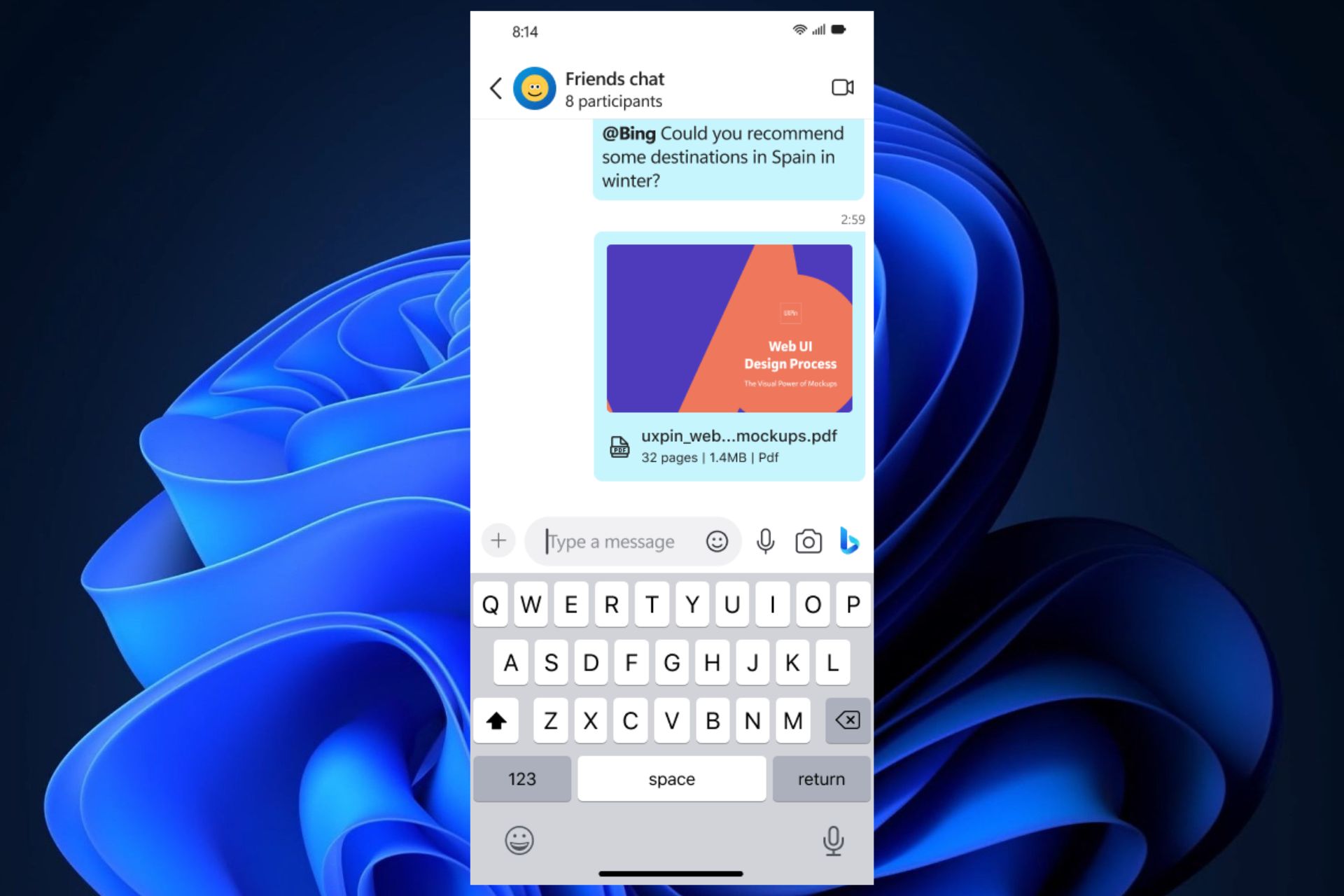
This useful feature will allow Skype users to preview a PDF file directly in the chat, without having to open it. They won’t have to do anything, because Skype will automatically show a thumbnail preview of the PDF file to those engaged in the chat.
Back in December, Microsoft debuted some interesting features for Skype mobile, but other features, such as this one, were lacking, and many users were asking for them.
However, with the new build, Skype takes a step closer when it comes to competing with the other platforms. In fact, this new feature can be accessed from every platform, including mobile users.
Skype’s latest update enriches your chat with the introduction of PDF thumbnail previews on all platforms. Now, you can get a glimpse of your document before you dive in!
Skype
Skype PDF preview: Why does it matter?
The feature is quite important, as it can be used to outline the points of discussions in Skype chats. Many organizations use Skype as the de facto communication platform, instead of Slack or Teams, so now users will be able to have a starting point in a document-based conversation without having to spend time reading the documents as a whole.
Skype also says the feature is flexible, and the platform will automatically preview a thumbnail of the document on all platforms, so those using Skype on Android devices, for instance, won’t have to worry about running into issues.
Here are the reasons behind releasing this feature:
? Quick Preview: No need to open to know. Get a sneak peek at the first page of PDFs directly in your chat stream, especially when you have auto-download enabled.
? Efficient Workflow: Identify and differentiate your documents at a glance, streamlining your conversation and collaboration.
? Clarity in Context: PDF previews provide a visual reference point within your chat, keeping you in sync with the discussion.
? Seamless Sharing: Sharing PDFs is as easy as ever, but now with the added context of a thumbnail, your chats are more informative and engaging.
?️ A Heads-Up: Spotting a quirky preview? A fix is already in the works and will be polished to perfection in our next update!
Skype
Remember, this feature is currently available in the Skype Insider Program, but it will be rolled out to the general public in the following days.
Microsoft just announced the new Dream Vapor Xbox Wireless Controller, and for those of you who are Xbox controller collectors (we also have some recommendations, here, and here), this one can be personalized down to the most detailed level, according to Xbox.
The Vapor series with Xbox Design Lab brings some of the most unique controller designs available for your customization, offering six top case options with swirling color patterns.
Xbox
The new Dream Vapor Xbox Wireless Controller comes with sic top case options sporting a variety of different colors, including:
Velocity Green
Dark Green
Grey
Fiery Red
Orange
Sleek Blue
Pink
Purple
Soft Pink
Soft Purple
Microsoft allows Xbox users to personalize the Dream Vapor Xbox Wireless Controller with dozens of button and thumbstick styles, such as:
Metallic Triggers
D-pads
Rubberized Sides
Back Grips
Engravings
Thumbstick
Bumpers
ABXY buttons
Once you’ve selected one of these unique Vapor top cases, it’s time to personalize further by choosing from a variety of button and thumbstick styles. You can even enhance your design with metallic triggers and D-pads, rubberized side and back grips, and add a personalized engraving for the finishing touch.
Xbox
The Dream Vapor Xbox Wireless Controller will be compatible with Xbox Series X|S, Xbox One, PC, iOS, and Android devices. It also sports a 40-hour battery life, and it can be connected to devices via Bluetooth or Xbox Wireless Connection.
It is available to order now, and users are encouraged to customize their own Dream Vapor Xbox Wireless Controller mode via Xbox Design Lab, all for $69.
And, if you want some extra goodies to come with the brand new Xbox Wireless controller, Microsoft is selling three new Vapor Hoodies, as part of the Xbox Icon Collection. They come in 3 versions, each sporting a unique design, and you can order them at the Xbox Gear Shop.
Even though Xbox has a numerical advantage, PlayStation is not the one to back down either and continues to deliver quality gaming experiences.
With renowned titles like Horizon Forbidden West and Demon’s Souls, PSN has managed to keep a large number of gamers engaged.
Reception of games
When it comes to gameplay, quality, and overall appeal of a game, PlayStation has managed to edge out Xbox with an average score of 77.8/100 on Opencritic compared to Xbox’s average of 74.8/100. Though the competition is close but it also depicts the premium quality of games available on both platforms.
Consoles have a different approach
With 130 exclusive titles released on both consoles so far and more than 80 exclusives lined up for this year, it looks like gamers are in for a treat.
However, the report highlights that both platforms have a different approach. PlayStation focuses on individual game titles to allure gamers, whilst Xbox emphasizes more on its subscription service, GamePass, offering an inclusive gaming experience.
Gamers are in luck
With such exclusive titles and year-on-year better gaming experiences, choosing between Xbox and PlayStation is really just your choice.
Whether you choose Xbox or decide to go for PS, it doesn’t matter; there are so many games to play, and it is highly unlikely to have a dull moment.
Xbox future plans and major releases
With the launch of note-worthing titles like Starfields, Hi-Fi Rush, Redfall, and Forza Motorsport, Xbox had a good year. It is getting ready for more sensational releases in 2024, with the majority of first-party titles.
So far, Xbox has released 109 exclusive titles in the current generation, and PlayStation is at 105 with the existing generation.
With Xbox leading in the number of titles and PlayStation in all-time sales, for players, it doesn’t matter who wins, as they both are worthy opponents and offer rich gaming ecosystems.
The future appears bright, with Xbox and PlayStation leading the way; gamers can expect continuous evolution of immersive experiences and inclusive, innovative titles to redefine the gaming industry.
What do you think about this generation of gaming consoles? Share your thoughts in the comments section below.
Nuvei, one of the largest Canadian fintech corporations, announced the release of the ERP integration, in partnership with Microsoft Dynamics 365, according to the company’s latest post.
The ERP integration will allow SMBs (small and medium-sized businesses) to add an array of payment methods to their infrastructure, otherwise known as enterprise resource planning (ERP) modules. These methods could effectively transform the way many SMBs operate.
It would not only streamline operational workflows, but it would greatly improve back-end processes for many businesses operating in industries such as construction, distribution, transportation, manufacturing, or sales.
Integrating our payments technology to the market leader in ERP directly connects us to thousands of businesses and millions of users across the globe in a market with substantial total addressable market (TAM).
However, the integration doesn’t just stop here. It offers an array of other perks to SMBs.
How can the Nuvei-Microsoft Dynamics 365 partnership help SMBs?
The ERP integration will allow SMBs access to features such as invoice matching and proprietary cash acceleration.
These will effectively let businesses have greater control over finances. The integration will also come with near-real-time payment information, giving SMBs the tools they need to avoid critical errors and making sure the payments are all accounted for.
Nuvei is well known for its various payment processes, and with this integration, Microsoft promises automatic payments, including features such as recurring billing, but also access to many other options, such as benefits from card issuing, banking, risk, and fraud management services, according to the press release.
Payments, including AR automation, is a critical component of the user experience for ERP.
Basically, the integration can cover up significant parts of a SMB’s infrastructure, at a minimal cost for the company. If we take into account that both Nuvei and Microsoft will offer support to customers dealing with any issues the ERP integration could cause, companies employing the integration within their infrastructure could potentially overcome harsher economic situations.
Plus. Microsoft Dynamics 365 is quite an easy platform to use, according to our review. So SMBs can easily implement the integration, learn to use it quickly, and reap the benefits of it.
If you’re a Microsoft Edge user on Android, we have amazing news! It seems that browser extensions are coming to the Android version.
This is great since no other major Chromium browser on Android supports this feature. So how do extensions work? Keep on reading to find out!
Edge will get extensions on Android, here’s what you should know
As flagged by Leopeva64 user on Reddit, in the latest Canary version of Edge, there’s an option to add extensions. With it, you can install some of the available extensions on your phone.
Since this feature is in beta, the choice is limited, but you can pick from the list of recommended options.
Once you install an extension, you can enable/disable it or view its details, just like on a PC.
If you’re a developer, or you want to install other extensions, you should know that the sideloading option isn’t available.
This is amazing news for all users who use Edge on their phones, and we can’t wait to see this feature available to the public. Unfortunately, we don’t know when will this feature be available to regular users.
After recent privacy concerns in Edge, this is more than welcome news. Are you as excited about this feature as we are? Let us know in the comments!
Fans of sports video games everywhere, we have good news: the latest installation from the MLB series, MLB The Show 24, is coming to Xbox One and Xbox Series S, and X, in March. What’s better? The title will be available on Xbox Game Pass right from the beginning, so you can play it on day one.
MLB announced that the game will be released on March 19, 2024, for a variety of consoles, including Xbox One, Xbox Series S, and X.
If you already have an Xbox Game Pass subscription, you’ll be able to play it starting that day, but if not, the Xbox One version of the game will cost $60, and the Xbox Series S and X versions of the game will cost $70.
MLB The Show 24: available on Xbox, but not Windows PCs
The MLB franchise used to be a PlayStation exclusive from 1997 to 2020, but following an agreement made by the studio behind the game in 2019, it crossed over to other platforms, such as Nintendo, and Xbox.
A couple of MLB games have been released on Xbox since then, however, the franchise is not available on Windows PCs, and there are no signs it could happen anytime soon. The latest entry, MLB The Show 24, will not be available on PC either, so those PC gamers waiting for an MLB title to be released to the platform, should consider their hopes dead for now.
There have been some PlayStation games, such as the critically acclaimed The Last of Us, that were released to Windows PCs, so there could potentially be a future where a MLB title on PC could happen, but not now.
What do you think about the new title? Are you going to play it?
A new security flaw was found by security researchers that affects Azure Pipelines which can affect up to 70,000 open-source projects.
What do we know about this security flaw and how dangerous it is? Keep on reading if you want to learn more.
A new security flaw lets hackers run code in a live environment
According to researchers at Legit Security, there’s a flaw in Azure Pipelines. Using this flaw, the hackers can inject malicious code into source code and other projects that are hosted in a testing environment.
According to the reports, the vulnerability is triggered after submitting a contribution or editing a build system project that resides on Azure Pipelines.
The code that is tested in Azure Pipelines usually runs in a safe environment, but hackers have found a way to run the test code in the live environment, allowing it to access sensitive information and data.
According to research, the most vulnerable are the repositories that are using a trigger in Azure Pipelines.
With this exploit hackers can obtain elevated access to the organization’s network; however, this doesn’t make them able to execute an attack, according to Microsoft.
Microsoft released a patch in October and all customers that are up to date should be protected from this exploit. The company is vigilant when it comes to security, and they also patched CVE-2024-0519 vulnerability in Edge recently.
While this exploit is dangerous, as long as you’re up to date, you should be safe since Microsoft has acknowledged and fixed the problem. In case you don’t have automatic updates enabled, go ahead and download the update manually.
If you are a Microsoft Teams (free) user, you are in for a treat! Now, Microsoft is rolling out a bunch of new community engagement and accessibility features to level up your overall meeting experience throughout platforms.
For the last couple of months, the Redmond-based tech giant has been working on four new features for Teams free. Here are the details:
Personalized nicknames – Now, you can set customized nicknames specific to a particular community, which will allow you to maintain a unique identity within the group.
Community banner images – If you are a community owner, you can now change the banner image right from your mobile devices, adding a personal touch to community spaces.
Enhanced connectivity – You can now create new Teams chats by just typing the contact’s email address directly in the search box, streamlining communication for Windows users and making it more efficient.
Easier access to channels – If you use Teams on an Android or iOS device, accessing channels within the community just got quicker. With the Expand/Collapse view option, you can keep the home screen organized, especially when dealing with three or more channels.
You can set personalized nicknames from all popular platforms, including Windows, iOS, and Android. However, other features are platform-specific. As of now, starting a chat by simply typing the email address is only available on Windows 11. However, the Expand/Collapse view function is only limited to Android and iOS.
Another good news is that there’s more coming to Teams in the following months, and Microsoft wants your say in it.
So, if you have suggestions for a new function or want to deliver feedback for a current feature, you can go to the Microsoft Teams (free) feedback webpage.
Which feature do you like the most? Feel free to tell us in the comments section below.
Up until now, Dell Premier Collaboration Keyboard (KB 900) was a cool tool for anyone using Google Meet and Zoom because it comes with touch control keys to control calls.
Well, now, if you’re one of the millions who use Teams, get your cash out because this awesome keyboard is now compatible with Microsoft’s collaboration app.
Why should I get the Dell Premier Collaboration Keyboard?
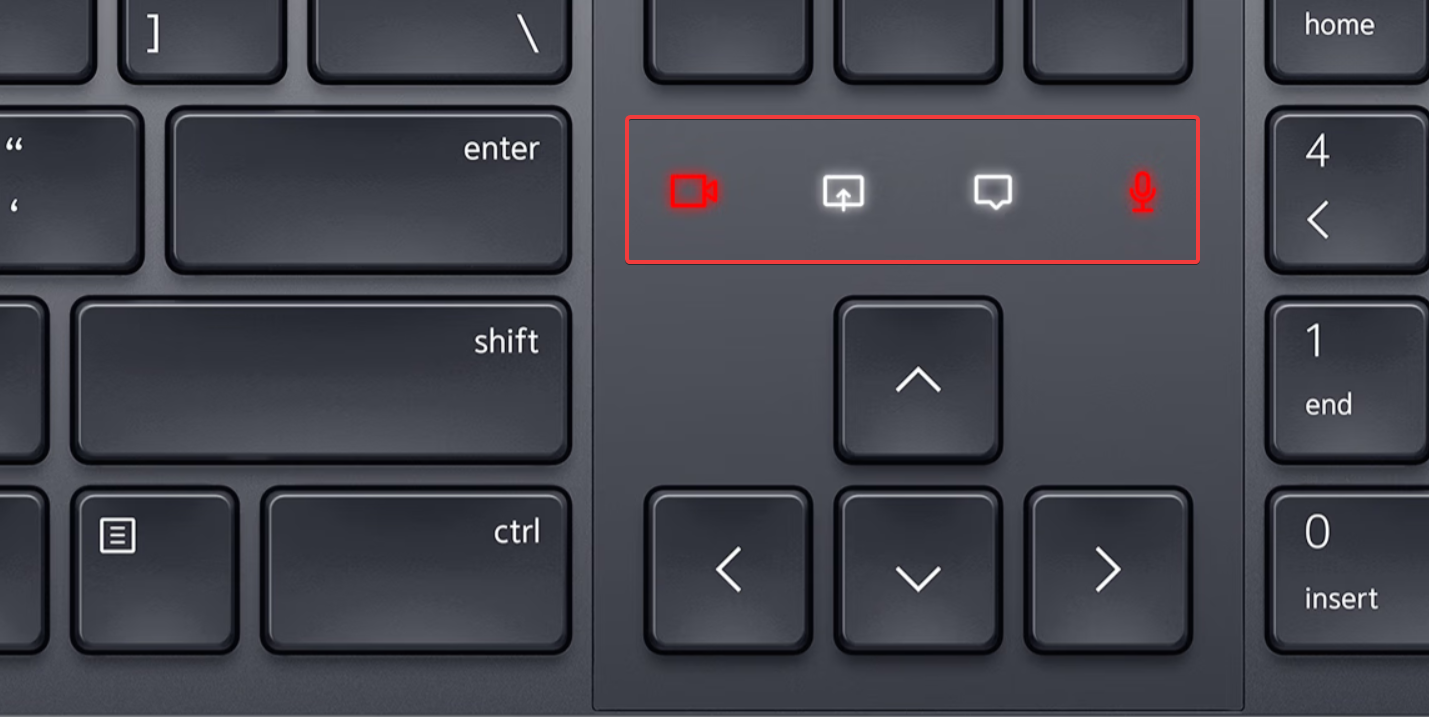
The neat thing about the Dell Premier Collaboration Keyboard is that the keyboard features four programmable touch buttons to control calls and meetings.
They were compatible only with Google Meet and Zoom but a software update righted the wrong and now they can also be used in Microsoft Teams.
Once you configure the buttons, they light up when you have a call and you may easily mute your microphone. You may also use them to enable or disable the video feed, open a new chat window, or share your screen using its dedicated app, Dell Peripheral Manager.
The keyboard comes with a dongle and it has the options for Bluetooth or 2.4 GHz RF to connect it to up to three devices. And if you pair it to more than one PC, you can switch between them using a button from the top-right corner of the keyboard.
How much is the Dell Premier Collaboration Keyboard?
Well, you’re in luck, because Dell has a 20% discount on this keyboard so you can now get it for $109.99 in their store.
The visual aids are pretty helpful during calls so if you’re using Microsoft Teams a lot for your work, this keyboard has all you need.
What do you think about Dell’s keyboard and Teams compatibility? Let us know in the comments section below.
Many are waiting for Suicide Squad: Kill the Justice League, but it seems that developers had a rocky early release launch and reviewers aren’t pleased.
From server issues to missing review copies, and game-braking bugs, the launch of this game has been plagued by issues. So, what happened?
Suicide Squad: Kill the Justice League early access launched plagued with various issues
No review copies were given to the press
Many reviewers didn’t get their review copies ahead of launch and they were unable to review the game before the early access release.
According to the developer, Rocksteady, the game is always online, and the servers weren’t going to be online before the release of the game, thus making early reviews impossible.
However, the press wasn’t informed about that, and many were left waiting for the review copy of the game. As a result, there are no day-one reviews for the game since nobody was able to play it before the early release.
Game-breaking bug that lets you skip the entire game
To make matters worse, due to a server bug, users were able to skip most of the game story after logging in for the first time.
This affected only users in New Zealand who were the first to access the game, but Rocksteady was informed of this bug and they took down the servers to fix it.
We’re aware that a number of players are currently experiencing an issue whereby upon logging into the game for the first time, they have full story completion.
To resolve this issue, we will be performing maintenance on the game servers.
During this time the game will be…
— Suicide Squad: Kill The Justice League (@suicidesquadRS) January 29, 2024
The early Suicide Squad: Kill the Justice League was surrounded by controversy which left many speculating why this happened.
This doesn’t bode well for the game, and we’re still expecting to see the reaction from the gamers after the game launches for everybody on February 2.
If you’re disappointed with this game, why not use the Xbox Lunar New Year sale to get something different instead?
What are your thoughts on the Suicide Squad: Kill the Justice League? Let us know in the comments!
Released on September 6, 2023, after several delays, Starfield gained tremendous popularity, but reports of game crashes were common. With Starfield’s biggest-to-date patch released, you can finally enjoy the game as it was initially intended!
The patch was earlier deployed in the Steam Beta version, and after testing, it is finally available to all players, both Xbox and PC. The patch notes remain the same as Beta except for two instances.
What should you look out for in the latest Starfield patch?
Fixes:
Fixed crashes occurring when changing from Fullscreen to Windowed mode.
Rectified the issue where Windows users couldn’t save usernames if they included certain special characters.
Fixed game save file corruption.
Fixed an issue where game saves wouldn’t resume after shutdown in Energy Save mode on Xbox.
Eliminated issues preventing access to the main menu and removed unintended text from the shipbuilder’s UI.
Graphics:
Better full-screen support (32:9, 21:9 & 16:10) on all devices.
Added the shadow visual effect to planet rings
Improved reflection on water
Better lighting
Fixes loading delays and flickers after resuming the game.
Other improvements:
No more missing terrain if you fast-travel to an outpost near New Atlantis.
Solar Flare Power counts as a critical hit
Fixed zoom issues with weapon scopes
Rectified an issue where weapon sound effects continue to play even after killing the enemy
The Redmond-based tech giant is busy working on the latest update code name Hudson Valley, which is speculatedly called Windows 12 or Windows 11 24H2, and it looks like we will get our hands on it by the end of 2024.
Most of the tech enthusiasts earlier leaned on the possibility of it being a Windows 12 release, but now, after the code name Germanium started making circulations, people started thinking it might be the Windows 11 24H2 update.
Last year’s release, Windows 23H2, brought substantial changes, including the introduction of an AI assistant, Microsoft Copilot.
This year’s update is not expected to be any different, and most of the features introduced are rumored to be centered around artificial intelligence.
Microsoft has yet to comment on new feature updates for Windows 11, revised system requirements, and other improvements.
However, that’s not stopping Windows enthusiasts from adding up the clues to speculate about the upcoming Windows version.
A recent post on X (formerly known as Twitter) by XenoPanther, popularly known for tracking Windows developments, bugs and builds, stated:
There has been a build jump for internal canary! 26047 > 27547
The big jump from 26047 to 27545 points towards the possibility of a new version or a brand new release in the wraps. And, if we check the previous release pattern, the drastic jump in build numbers indicated a brand new release, so is this what we think is happening?
Following Xeno’s post, a lot of people showed a great deal of enthusiasm and are excited about the release of Windows 12.
As of now, we don’t have any official confirmations; all we can do is speculate about the reasons for the jump.
Speaking of new releases, we can expect the Moment 5 update to be released as an optional update in the last week of February 2024. This implies Devs and Beta channels can take on Windows 11 24H2, leaving Canary free for the next version of Windows, or so we hope!
What are you expecting from the new release of Windows? Tell us in the comments section below.
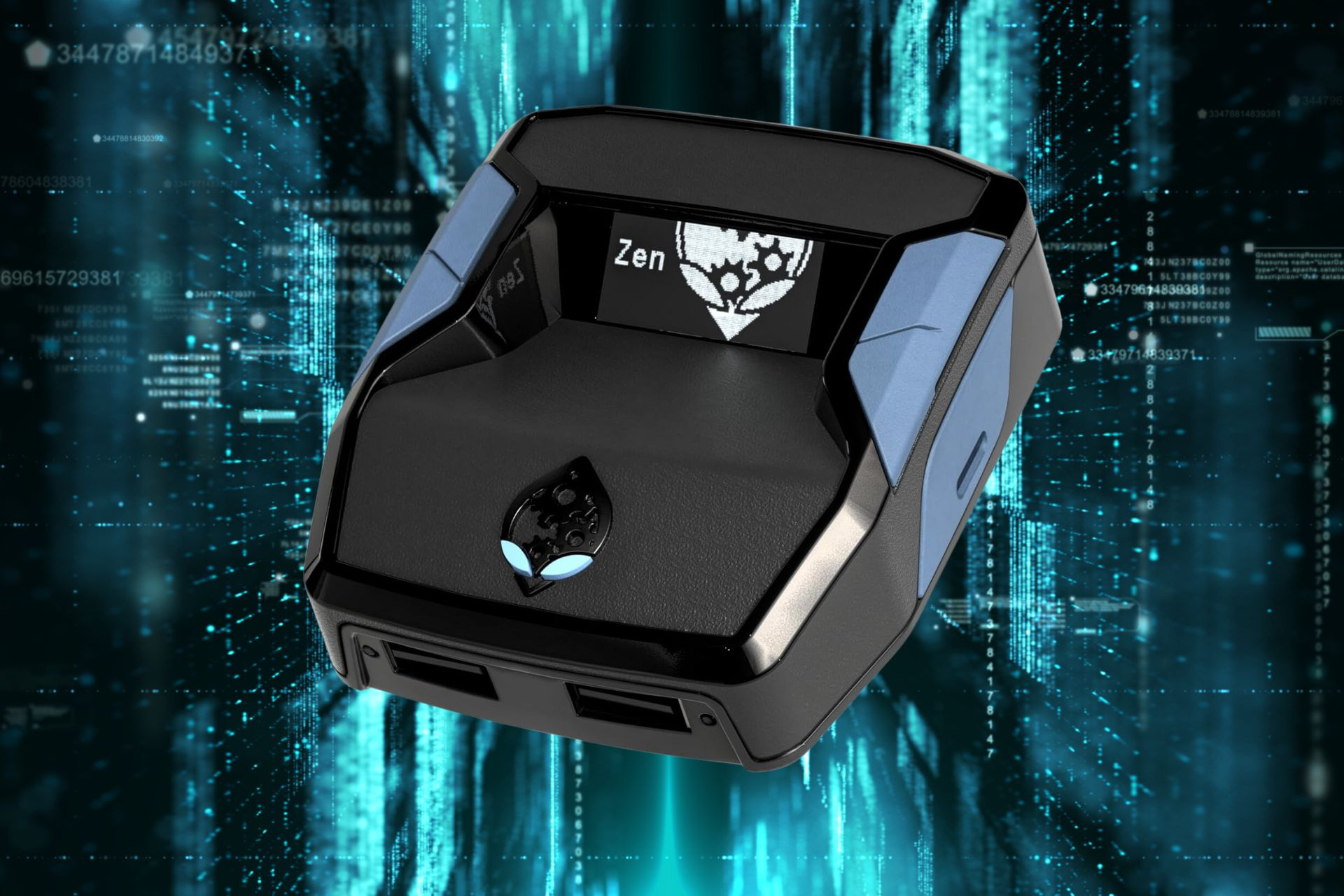
Cronus Zen might be considered a cheating alternative because it reduces coil, supports macros, and allows you to remap controller buttons to different functions. Supposedly, it gives you an unfair advantage over others. However, companies like Sony and Microsoft didn’t ban it officially.
Will Cronus Zen get you banned?
You might get banned or restricted because theoretically, Cronus Zen violates the Xbox Community Standards. After all, the hardware gives an unfair advantage unrelated to your specifications whether you are playing on a PC or console.
Sony has already taken a step forward, with the latest PlayStation 5 update blocking Cronus Zen. In response, Cronus stated that you should not update your console versions if they begin with 23 because versions with 24 require PS Remote Play for games.
In addition, some anti cheat software can detect Cronus Zen users on PC and consoles. Thus, if you are using it, you might get a notification asking you to close it and restart the game. If you don’t respect the rules, you could get some restrictions.
Tips for spotting cheaters
If you believe that another player is using this hardware check for:
Unusual movements
Rapid weapon switches
Consistent Accuracy
Macros (Complex Movement or Skill Combinations)
These are the most noticeable aspects of someone using cheating hardware. Also, once you suspect a player, you can report their odd behavior. Afterward, someone will analyze their recent games.
All in all, Cronus Zen is not banned is just restricted. However, using it will lead to consequences such as restrictions or an account ban. Moreover, now you know some ways to spot a cheater.
If you are looking for a way to gain advantage in gaming on Xbox and PS, make sure that you don’t have any controller drift issues.
What are your thoughts on Cronus Zen? Do you consider it a cheating alternative? Let us know in the comments section below.
Your mouse is probably not working so you’ll have to make do with your keyboard if you want to restart your Windows 11 laptop.
How do I restart my laptop with keyboard keys?
1. By using keyboard shortcuts
1.1 Alt + F4
Hit the Alt + F4 keys simultaneously.
Using the down arrow button, scroll to the Restart option.
Hit Enter and your laptop will reboot.
1.2 Windows + X
If you have any open programs, press Alt + F4 to close before restarting.
On your keyboard, press the Windows + X keys simultaneously to open the Power User Menu.
Using the down arrow, scroll to shut down or sign out>restart.
Hit the Enter key and your laptop will restart.
2. By using the Run command
Hit the Windows + R keys simultaneously to open the Run command.
Type cmd in the dialog box and hit Enter to open the Command Prompt.
In the Command Prompt window, type the following command and hit Enter:shutdown /r
You can add a numerical value in seconds if you wish to delay the restart. For instance, if you want it to restart after 30 minutes, simply replace the command with shutdown /r /t 1800.
Hit the Windows + S keys to open search, type PowerShell, and hit Enter.
Using the arrow buttons, navigate to the Run as administrator option.
Next, type in the following command and hit Enter: Restart-Computer
4. By using the security options
Hit the Ctrl + Alt + Del keys to open the security options screen.
Using the down arrow, scroll to the power icon at the bottom right.
Press Enter and select Restart.
5. Hard reboot
Most laptops have a power button on the keyboard. If for some reason you’re unable to restart your laptop using the above methods, hold and press this button until your laptop powers off. Wait a few seconds then hold and press it again to restart.
We do not recommend this method unless you absolutely have to because it can lead to data loss or corrupt system files. In more severe cases, your PC may fail to restart.
Alternatively, you can schedule your PC restarts for better efficiency. That’s a wrap from us but do let us know what method you found easier to restart your laptop in the comment section below.
Already, Xbox content shattered any expectations thanks to the recent activision deal. However, Microsoft’s investment in Cloud services and AI paid off handsomely as well.
The Redmond giant’s Q2 figures for FY24 are through the roof thanks to their Cloud and AI investments throughout the last years.
What drove the Microsoft’s revenue boost?
Q2 2023
Q2 2024
Year-over-year change
Revenue
$52.7 billion
$62 billion
17.5%
Earnings Per Share
$2.20
$2.93
33%
Net Income
$16.4 billion
$21.9 billion
33%
Microsoft’s revenue has gone up 18% from the same quarter last year, totaling $62 billion, while analysts anticipated a $61 billion mark.
Except Xbox content and services, Microsoft Cloud, Azure and other cloud services had the best year over year growth. Microsoft Cloud alone rose 24% and Azure and its cloud services grew by a whopping 30%.
If we add here the Dynamics products and cloud services that also climbed 22%, we have a clear picture of Microsoft’s success.
Data provided by Microsoft in the Q2 2024 financial report
However, Microsoft’s CEO, Satya Nadella had another interesting statement regarding the company’s favorable outcome:
By infusing AI across every layer of our tech stack, we’re winning new customers and helping drive new benefits and productivity gains across every sector.
Therefore, the real actor that shines in this successful picture was the AI and the fact that Microsoft infused all their products and services with AI engines and technology.
Another notable mention is the 19% climb for the personal computing revenue and the 13% revenue increase in the productivity and business processes area.
So, unsurprisingly, Microsoft’s solid investments in Cloud products and services and their engagement in new technologies such as AI really paid off.
While AI is still in early deployment in every single IT area you can imagine, we can expect further growth and automation in the industry.
Microsoft is constantly improving its services, and we recently wrote about an attention-tracking feature in Teams that will keep track of you during meetings.
The company is working on another set of features that will deliver easier deployment and better language options, so let’s take a closer at them.
Microsoft Teams to get better language support and easier deployment starting from April
According to the Microsoft 356 roadmap, it appears Microsoft is developing a feature that lets users change the language on Microsoft Teams Rooms on Windows.
The feature will allow users to change the default language by going to the More section and choosing Language on the room console.
It’s worth mentioning that admins will be able to select up to three languages that users can choose from in the room.
With this feature, you will be able to deploy Microsoft Teams Rooms on Windows completely remotely. This is achieved by utilizing Windows Autopilot and auto-login technologies to automate the process.
The feature also uses credentials from Microsoft Teams Rooms Pro Management to reduce deployment time, and costs and to improve overall security.
These are some interesting features, and according to Microsoft’s roadmap, the rollout should start in April. This isn’t all from Microsoft, and the recent Microsoft, Cisco, and Samsung collaboration will bring easier management and deployment of meetings.
In recently released Q2 figures for FY24, Microsoft disclosed that Xbox had a 49% YoY (Year over Year) increase in revenue. Microsoft’s total revenue during the period stood at $62.0 billion (18% increase), while net income was $21.9 billion (33% increase).
While financial analysts and experts predicted an increase, given the recent figures and market trends, not many would have pegged it at 49%.
Acquisition of Activision Blizzard plays a vital role
The rise in revenue comes on the heels of Microsoft’s acquisition of Activision Blizzard, which was a massive $69 billion deal. It was one of Microsoft’s biggest investments and indicated that gaming would be a critical part of its future plans.
The Xbox content and services posted a 61% increase in revenue, driven by 55 points of net impact from the acquisition. Xbox hardware figures were also up 3%, though they were expected to be slightly higher given the festive season and promotions offered by Microsoft.
This also makes gaming the third-largest contributor at Microsoft, with a total revenue of $7.11 billion during Q2. It has surpassed Windows ($5.26 billion) and is now only behind Office/cloud services ($13.47 billion) and Microsoft server products ($23.95 billion).
So, it appears that Microsoft may be planning to make Xbox an all-digital console, given that 90% of the sales last year were digital copies. It may not be an immediate plan of action, but somewhere down the line, you could see it becoming a reality.
In all, Q2, FY24, has been a great period for Microsoft, with profits across most products and services. A few days ago, Microsoft hit the $3 trillion market cap for the first time, becoming only the second company to do so after Apple.
Don’t want the messy room setup to embarrass you in the next Teams meeting; don’t worry, Microsoft has got your back!
Microsoft has made Decorate your background available in Microsoft Teams Premium following its introduction at Ignite 2023.
With a hybrid work culture, maintaining a work-life balance amid back-to-back virtual meetings has been challenging. Virtual backgrounds have been a blessing for all those who are not comfortable displaying a personal work environment or have a less-than-ideal setting.
With Decorate your background, Microsoft takes it up a notch, leveraging the latest advancements in generative AI to create amore professional version of your actual webcam background.
To use this feature, you can go to the Video effects option and then navigate to Backgrounds. Here, click the Decorate button to get five different options, like Clean up (Tidy up surroundings), Fancy (gives your background an elegant appearance), Greenhouse (Adds plants & greenery to your space), Celebration (Adds festive decorations for special moments) and Suprise me.
Once you select a theme, click Generate backgrounds, and it will give two images per theme, select any or click Generate backgrounds to get more options.
Microsoft is revolutionizing the way we use its products and is adding AI to help enhance user experience. Following the introduction of Copilot to Teams in November 2023, the company has now released the Decorate your background feature, and soon, it will make the Voice Isolation feature available. The Redmond tech giant is certainly on a roll!
While this feature is exciting, it is only exclusively available for Teams Premium members. Do you think this feature could help you? Tell us your thoughts in the comments section below.
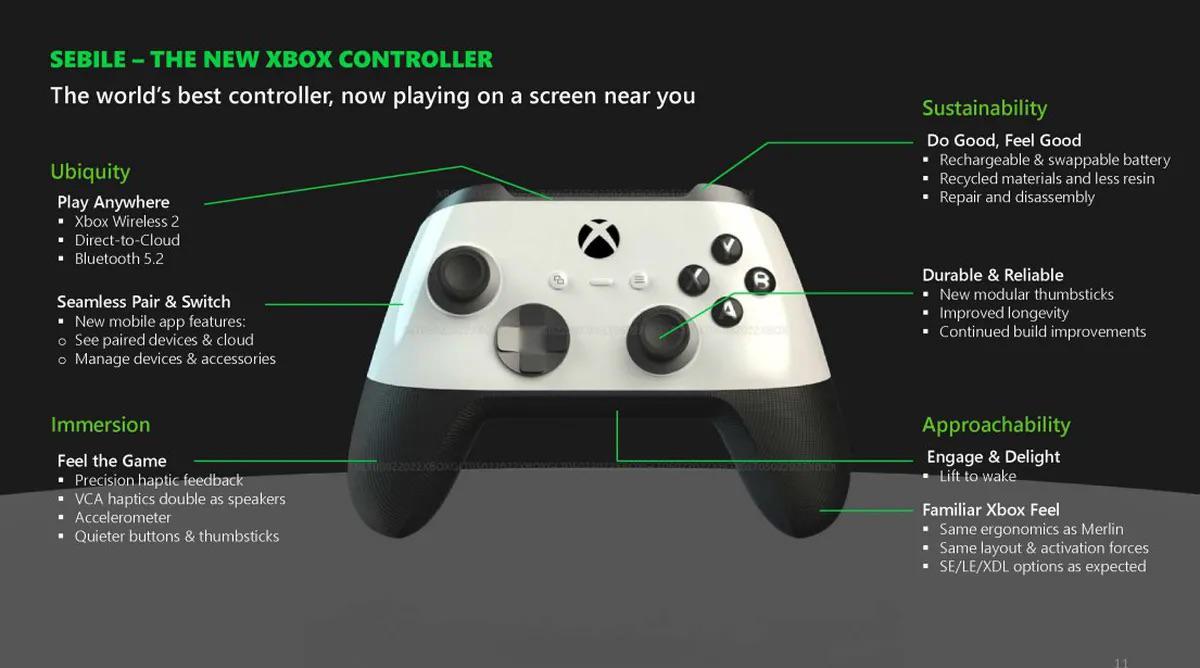
According to the latest leaks, the new Xbox controller is coming soon, and it’s rumored that we’ll see it on February 20th.
After a revamped classic Xbox Controller S, many are excited about the new controller, but should you get one? Keep on reading to find out!
A new Xbox controller might be coming soon, but should you get one?
Not everyone is on board with the new design
According to the rumors, it seems that the new controller will be in two colors, compared to the regular Xbox controllers that were in a solid color. This didn’t sit right with many and they had to voice their concerns:
The elite series 2 is much better looking.
Judging by the design, it seems that the top of the controller is glossy white while the bottom is black with a grip texture.
Are those rubber grips again? I want one without those grips.
Durability and ergonomics are what gamers want
Others aren’t bothered too much with the new color, since comfortability and reliability are their main concerns, especially during longer gaming sessions:
I don’t particularly care what it looks like. I’m not looking g at the pad when gaming.
I want it to be comfortable and reliable.
Many aren’t too pleased with the new shape and are worried about the ergonomics:
Looks less ergonomic than previous iterations. Why not add this to the existing lineup without changing the shape?
The main concern for many is durability and many are skeptical about the controller’s durability.
I hope it actually is more durable.
Speaking of durability, the biggest flaw in the controllers is the quality of thumbsticks, since they are the first to break down.
I’m sick of barely having a controller for 6 months and having to get it fixed or replafes because the thumbsticks get jammed, extreme stick drift, etc.
Gamers want paddles, Hall Effect sticks, and gyroscope
The lack of paddles is another big concern for users since they can provide an advantage in some games:
Wish it had paddles. All controllers should tbh
For some, tension adjustable sticks are the selling point and without this feature, they probably won’t consider buying this controller.
Looks dope but I want the elite 3 with tension adjustable hall effect sticks.
The gyroscope is another feature that many want to see on this model:
Under the immersion, it says the controller has an accelerometer for the lift to wake, but I really hope they also also add a gyroscope to the new controller, so Xbox controllers can finally be able to use gyro aiming.
Precision haptic feedback and direct connection to the cloud are the way to go
While the new design has sparked some criticism, some of the upcoming features are well received by the users, most notably direct connection to the cloud that should reduce input latency while streaming games.
Precision haptic feedback and rechargeable and swappable batteries are also some features that users are eager to see. Lastly, many are hoping that the new controller will be quieter.
Gamers are skeptical about the new controller, especially regarding the new design. The durability and ergonomics are the main concerns, and hopefully, Microsoft won’t drop the ball on this one.
So, should you get one? There’s no announcement from Microsoft, so it’s too early to tell, and the final design might be different than the rumored version. So for now, sit tight and keep an eye out for the official announcement.
Hopefully, the announcement will come before the Xbox Series S Ellewood. What are your thoughts on the upcoming controller? Let us know!
According to a cybersecurity threat report from AT&T, the Microsoft Teams app chats are used to spread the DarkGate malware using phishing techniques.
The experts detected over 1.000 phishing messages from a single attacker in their investigation. This was possible because Microsoft enabled External Access to company chats by default and that allows anyone in the organization to add any users in chats, even if they are outsiders.
How does the Microsoft Teams DarkGate phishing attack work?
You’re one of the users in an organization when you suddenly get a message from someone you don’t know, asking you to install a file with a double extension such as filename.pdf.msi. So, you might be tempted to think that it’s a PDF document from one of your colleagues, but in fact, it’s a known tactique for the DarkGate malware attack.
Although Microsoft Teams will alert you that the person is outside your org, the attacker seems a seemingly legitimate origin, coming from the .onmicrosoft.com domain name.
An important detail to note here is the “.onmicrosoft.com” domain name. This domain, by all appearances, is authentic and most users would probably assume that it is legitimate. OSINT research on the domain also shows no reports for suspicious activity, leading the MDR SOC team to believe the username (and possibly the entire domain) was likely compromised by the attackers prior to being used to launch the phishing attack.
Cites the AT&T report
Once you click on the file and install the .msi file, the malware will connect the infected system to its command-and-control server from hgfdytrywq[.]com, which, according to PaloAlto Networks, is a confirmed component of the DarkGate malware infrastructure.
How can I avoid getting infected with DarkGate in Microsoft Teams?
The External Access feature shouldn’t be enabled by default in Microsoft Teams and if it does, the system admins should configure the clients to ban the access of outside users from their organization chats.
Furthermore, as with any other phishing threats, the users in the organization have to be advised on how to react when this kind of events occur, whether it’s about Microsoft Teams or other company channels of communication.
Don’t accept any files from untrusted users, don’t open them and, most of all, don’t install them.
Many users have reported getting an Error in Moderation on ChatGPT while seeking an answer for a prompt, leaving them perplexed. The moderation feature on ChatGPT aims to keep the conversation in the chatbot safe. This error may occur due to overly long input text, invalid characters, model domain mismatch, or network/browser issues.
If you think this is not the case, you can click on Regenerate response, press F5 to refresh the page & enter the query again, check the OpenAI server status, verify if you have a stable internet connection, or use a different browser.
How can I fix the Error in Moderation on ChatGPT?
1. Review & adjust the prompt
As the chatbot is trained to detect inappropriate content, if it thinks that there is a violation of the moderation policy, it will flag your input. To learn more, check out the guide on Moderation on the OpenAI website.
Then, carefully check the prompt for offensive or hateful language, adjust its length or rephrase it, and provide additional context to ensure the intent is clear. If this doesn’t help, click New chat and enter the prompt again to see if it goes through.
Launch your preferred browser; here we are taking an example of Google Chrome. From the top-right corner, click the three dots icon and select Settings from the context menu.
Now go to the Privacy and security option and click Clear browsing data.
On the following window, select All time for Time range. Place a checkmark next to Cookies and other site data, & Cache images and files.
Click Clear data, then relaunch the browser.
Clearing cookies and disabling extensions on your browser can also help you fix similar issues like ChatGPT not working; read this guide to learn more.
To conclude, using correct, clear, and simple prompts without any offensive language can help you avoid the Error in Moderation message on ChatGPT.
However, if you think it is a false positive and there is nothing wrong with your query, click Regenerate response, refresh your browser, check the OpenAI server status, clear browsing data, or start a new chat to handle it.
If nothing worked for you, first wait for an hour before attempting again. If the issue persists, contact OpenAI support via email and explain the issue for further guidance.
As a last resort, you may also sign up for a new account to start from scratch. However, you won’t be able to access your chat history from the former one on this account.
Creating an account can also help if you encounter the Error in body stream message on ChatGPT; read this guide to learn more.
If you need help with a prompt or have another question for us, feel free to mention them in the comments section below.
Microsoft has enabled the Windows 11 graphics style in its Edge browser’s Dev version by default, bringing the Mica effect to the Edge title bar and toolbar.
Windows 11 introduced a design language called Fluent Design, defined by rounded corners, soft shadows, and transparency effects. These visual elements create a more immersive and visually appealing experience. Now, Microsoft is extending this look to Edge, integrating some key Windows 11 visual effects.
One of the most notable additions is Mica, a dynamic material that reflects your desktop wallpaper behind translucent app windows. In Edge, Mica will be applied to the title bar and toolbar, subtly blending the browser with your desktop for unified aesthetics.
Another welcome change is the introduction of rounded corners. Previously, Edge had sharp edges that contrasted with the softer curves of Windows 11. Now, the browser window adopts the rounded corner design.
Microsoft Edge gets Windows 11 Visual effects in Dev Version
To see the Mica effect and rounded corners in action,
Make sure you’re running the latest Dev version of Edge (version 122 and above).
Open Edge browser, click on Menu and select Settings.
Visit Appearance.
Ensure that the Show Windows 11 visual effects in browser setting is enabled. Enjoy the dynamic title bar in Edge that adapts to your desktop wallpaper using the Mica effect.
Important notes:
You should be running Edge with the default theme.
The Mica effect visibility depends on the device and Windows 11 settings applied.
Overall, the Windows 11 visual effects are a welcome addition to the Edge browser, creating a more immersive and visually appealing experience. Edge now feels and looks more like a natural part of your Windows 11 desktop, rather than a separate application.
Furthermore, Mica brings a touch of dynamism to the browser, with the subtle reflections of your desktop wallpaper adding depth and personality.
For users, this translates to a more enjoyable and visually consistent browsing experience.
We recently reported that Microsoft has redesigned the Windows setup experience. As it turns out, the UI has been available for 10 years. It’s just not enabled by default!
As pointed out by X (formerly Twitter) user XenoPanther, the supposedly new setup can be enabled on early versions of Windows 10 as well, including build 9780, the earliest publicly available build.
21996 is the earliest build I have on my PC. But by running "setuphost /install /boot" you can bring up the modern Windows setup UI. I've heard this may work in early Windows 10 builds (Pre-WIP) pic.twitter.com/bw1DKhyf1O
All you have to do is run the following two commands: setuphostsetuphost /install /boot
In the official blog post highlighting Windows 11 Insider Preview Build 26040, Microsoft called this change refreshing and claimed the Windows OS Media Setup is much cleaner and has a modern design. While it could be refreshing and cleaner, the new setup is certainly not modern!
Ever since the announcement, experts pointed out that the setup’s design is more in line with Windows 8 and Vista and doesn’t fit well into the modern Windows 11 UI. Atleast, we now know the answer to it.
What do you think of Microsoft releasing years-old UI as new? Do share in the comments section below.