YouTube Shorts Gets Clear Screen, Heart (Like) Button, 2x Playback Speed & More

YouTube is giving Shorts one of its biggest overhauls since the format launched. Google-owned video platform is redesigning how millions of people actually watch short-form videos. Announced on YouTube’s official blog, the update started rolling out yesterday and introduces several changes that makes Shorts cleaner and easier to navigate.

YouTube Shorts gets revamped video playing experience

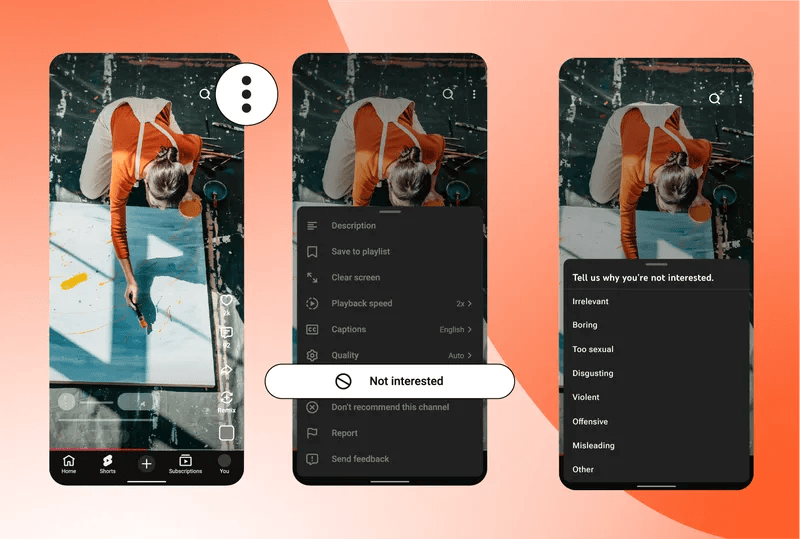
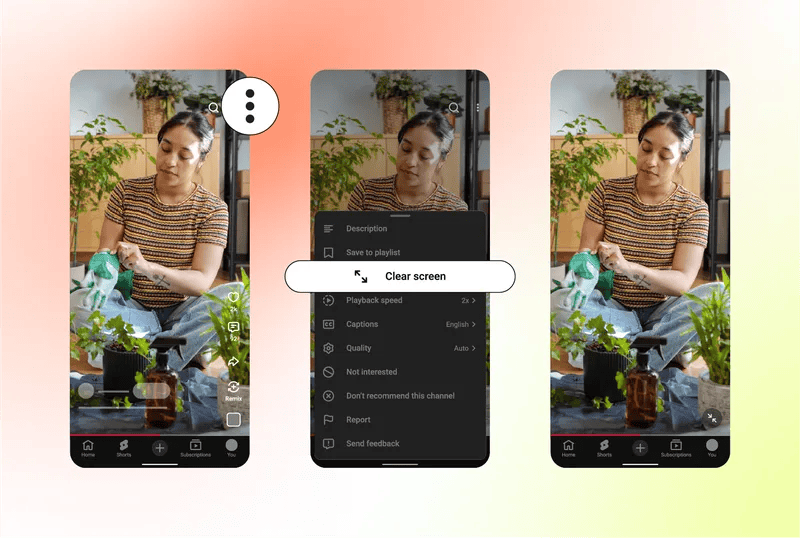
Rather than completely redesigning the experience, YouTube is tweaking the player itself, with new viewing controls and interaction options arriving gradually over the coming weeks. One of the highlights is Clear Screen, a new mode that temporarily hides on-screen buttons, captions, usernames, and other interface elements.

If you just want to watch the video without distractions covering the screen, one tap gives you a much cleaner viewing experience. The feature closely resembles TikTok’s own Clear Mode, although YouTube says it’s designed around feedback from Shorts users.

Image credit: YouTube

YouTube is also finally delivering one of the community’s most requested features. Shorts now supports 2x playback, which allows viewers to speed through videos or quickly revisit certain moments. The update also introduces easier audio controls, including the ability to mute Shorts directly during playback, alongside expanded timer options for people who want more control over how they consume short-form content.

The most interesting change is the removal of the familiar thumbs-up icon. Going forward, YouTube will replace it with a Heart button, bringing Shorts more in line with other short-video platforms. At the same time, the company is retiring the Dislike button from the Shorts player altogether. Instead of relying on dislikes, users will now be encouraged to shape recommendations using Not Interested and Don’t recommend this channel, which YouTube believes provide much clearer signals for improving individual feeds.

Microsoft Azure and AWS Face EU Gatekeeper Designation Under DMA

Last year, the European Commission opened an investigation into Amazon Web Services (AWS) and Microsoft Azure over concerns that their dominance in the cloud computing market could qualify them as “gatekeepers” under the Digital Markets Act (DMA). Now, the first conclusions are in, with regulators signaling that both cloud giants are likely to fall under the EU’s strictest competition rules.

According to the Commission’s preliminary assessment, AWS and Microsoft Azure meet the criteria for designation as DMA gatekeepers. If the decision becomes final, both companies will have six months to comply with a new set of obligations designed to prevent anti-competitive practices and make it easier for businesses to switch cloud providers.

EU says AWS and Azure dominate Europe’s cloud market

Under the Digital Markets Act, companies can be designated as gatekeepers if they meet certain financial and user thresholds or if their services play a critical role in connecting businesses with customers.

The European Commission said AWS and Azure are currently the largest and second-largest cloud computing providers operating in the European Union. Regulators believe both services serve as key gateways for businesses that rely on cloud infrastructure to deliver products and services across Europe.

The Commission also highlighted several factors supporting its preliminary findings, including large annual turnover within the EU, extensive customer bases across multiple industries, strong and entrenched market positions, high switching costs for customers, significant customer lock-in, and operational scale and investment levels that exceed many competitors.

According to the Commission, these characteristics give both companies substantial influence over the European cloud computing market.

Customer lock-in remains a major concern

One of the Commission’s biggest concerns involves the difficulty businesses face when moving workloads from one cloud provider to another.

The preliminary findings suggest that high migration costs and technical dependencies may discourage customers from switching providers, limiting competition in the sector.

The Commission also noted that Amazon and Microsoft continue to invest heavily in expanding their cloud platforms, giving them advantages that smaller rivals may struggle to match.

Executive Vice-President Teresa Ribera said cloud computing has become increasingly important for consumers, businesses, and public administrations across Europe.

She added that the Commission wants to ensure a competitive cloud market while maintaining a level playing field for providers. Ribera also emphasized the importance of secure, sustainable, and interoperable cloud services for the European economy.

Decision is not final yet

The Commission stressed that its conclusions remain preliminary.

Amazon and Microsoft will now have the opportunity to examine the findings and submit their responses before regulators make a final decision.

If the Commission confirms its current view, AWS and Azure will officially become gatekeepers under the Digital Markets Act.

That designation would require both companies to bring their cloud platforms into compliance with the DMA within six months. Depending on the final obligations, the companies could be required to make it easier for customers to switch providers, improve interoperability, and avoid practices that unfairly disadvantage competitors.

The move would mark one of the most significant expansions of the Digital Markets Act into enterprise cloud computing, an area that has become increasingly important as businesses continue shifting critical workloads to cloud infrastructure.

The announcement also comes as the European Union considers additional measures that could restrict how foreign cloud providers handle sensitive government data, potentially introducing another layer of regulation for major cloud companies operating in Europe.

GTA 6’s New NPC AI, Social Media & Gameplay Details May Have Just Leaked

If you have been waiting for GTA 6 release, we are assuming that you have already pre-ordered the game. Rockstar is offering a month free of GTA+ subscription with the pre-order. Although Rockstar has shared pricing details, not much is known for now. But, if you are eager to learn more about GTA 6, a Brazilian retailer has reportedly leaked game details that Rockstar might be keeping under wraps deliberately.

Accordibg to folks at Notebookcheck, the details comes via Brazilian retailer KaBuM!, whose GTA 6 product listing includes expanded gameplay descriptions. Since these details haven’t appeared on Rockstar’s official website, we advise you to take the details with a grain of salt.

According to the retailer, GTA 6 will feature AI-powered NPCs with their own routines and behaviors, making the world feel more dynamic than previous entries. The description also references random events happening naturally across the map, interactive businesses, and an overall increase in environmental immersion. If accurate, Rockstar appears to be pushing its living-world technology much further than before.

Another interesting detail involves the game’s smartphone. Rather than serving as a simple utility, the listing suggests it will function as a full social media hub where players can browse viral videos, follow influencers, and keep track of events happening across Vice City. It even claims some hidden side missions can only be discovered by paying attention to posts that appear inside the in-game social network.

The retailer also highlights visual upgrades for PS5 owners, which mentioned advanced ray tracing, more realistic reflections, dynamic weather systems, and environmental effects that reportedly influence gameplay as well as physics. For PS5 Pro users, the listing points to improved image quality, smoother performance, and more consistent frame rates.

Of course, retailer listings have occasionally include placeholder or promotional information before launch. Again, take these information with a grain of salt. While players await GTA 6 Trailer 3, we expect more details slippiling through Rockstar cracks. If we come across any of them, we’ll let you know.

Lenovo Says Sky-High RAM Prices Are Here to Stay, Warns DRAM and SSD Costs May Never Recover

The global memory crisis isn’t showing any signs of slowing down, and Lenovo now believes consumers shouldn’t expect things to improve anytime soon. In fact, the PC maker says today’s expensive DRAM and NAND pricing could become the industry’s “new normal,” with costs potentially staying well above early-2025 levels even beyond 2030.

The warning comes from Lenovo’s presentation during ISC 2026, first highlighted by ComputerBase. During the session, the company shared updated DRAM and NAND pricing charts, suggesting that even massive manufacturing expansions over the next several years may not be enough to push prices back to where they once were. While Lenovo presented the comments with a touch of humor, its broader message was clear. Memory pricing has fundamentally changed.

Image source: ComputerBase

According to Lenovo, memory manufacturers are already investing heavily in new production capacity, but growing AI infrastructure demand continues to consume much of that output. The company expects additional fabs to come online later this decade, yet believes those investments are unlikely to restore the low pricing consumers enjoyed throughout 2024 and early 2025. Rather, higher DRAM and NAND prices could become the baseline moving into the 2030s.

Lenovo even joked about surviving the ongoing “RAMageddon,” outlining a five-step guide for customers forced to adapt to the current market reality. The effect of higher memory prices and increasing component cost has already forced Microsoft to increase the price of XBOX console. The company even discontinued the 2TB model. In the past, multiple reports and industry insiders have predicted that memory crunch is here to stay.

Windows 11 26H2 Is Just 174KB for Some PCs but 6.5GB for Others

Windows 11 26H2 will be one of Microsoft’s smallest feature updates ever for users already running Windows 11 24H2 or 25H2. Instead of downloading gigabytes of installation files, eligible PCs will only need a tiny 174KB enablement package to unlock features that are already installed but remain dormant, according to WindowsLatest.

However, that tiny download only applies to systems on Microsoft’s latest servicing branch. PCs still running Windows 11 23H2 will need to download nearly 6.5GB and complete a full operating system upgrade before they can install Windows 11 26H2.

Why Windows 11 26H2 Is Just 174KB for Some PCs but 6.5GB for Others

The difference comes down to Microsoft’s servicing strategy introduced with Windows 11 24H2.

When Microsoft released Windows 11 24H2, it moved the operating system to a new source code branch known as Germanium. Unlike previous cumulative updates, upgrading from Windows 11 23H2 to 24H2 required a complete operating system replacement, often referred to as an “OS swap.”

That process downloaded an entirely new Windows image and installed it similarly to a traditional feature update.

Since then, Microsoft has kept Windows 11 24H2, 25H2, and the upcoming 26H2 on the same Germanium servicing branch. This allows the company to quietly distribute new features through monthly cumulative updates long before they’re officially announced.

Instead of downloading new operating system files at launch, the Windows 11 26H2 enablement package simply activates features that are already present on updated systems.

For users already running Windows 11 24H2 or 25H2, installing 26H2 will work much like installing a regular monthly cumulative update.

Windows 11 23H2 users still face a full upgrade

The small enablement package does not apply to Windows 11 23H2.

That version belongs to Microsoft’s older servicing branch, meaning there is no shared code base with Windows 11 26H2. As a result, users must complete another full OS swap to move onto the Germanium branch.

The larger download is especially relevant because Windows 11 23H2 Home and Pro editions already reached end of support in November 2025. Users who remain on that release will eventually need to upgrade to continue receiving security updates.

Hardware requirements stay the same

Microsoft has already confirmed that Windows 11 26H2 will not introduce new hardware requirements.

Any PC capable of running Windows 11 24H2 or Windows 11 25H2 should also support Windows 11 26H2 without additional hardware changes.

Although Microsoft has not announced an official launch date, the company is widely expected to release Windows 11 26H2 in October 2026, following its usual annual release schedule.

Once available, the update will gradually roll out through Windows Update.

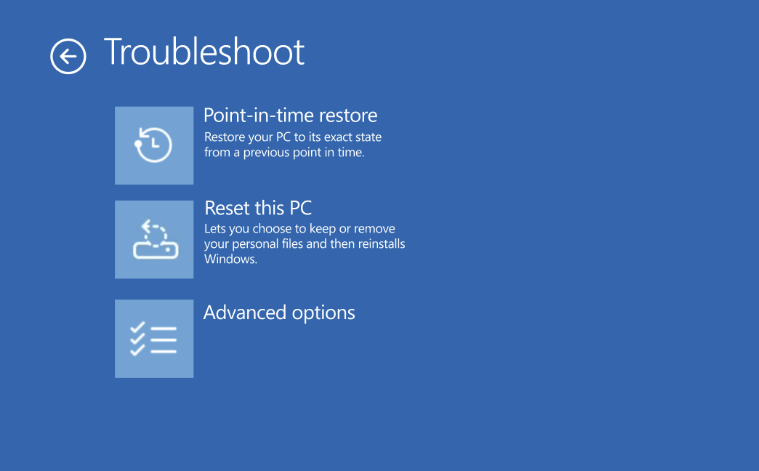
Meanwhile, Microsoft continues preparing new features for Windows 11. The latest Release Preview build recently introduced Point-in-Time Restore, Screen Tint, faster system performance, and improved Windows Search ahead of their wider rollout.

Epic Games CEO Slams Steam’s AI Disclosure Rules, Calls Valve Irresponsible

Epic Games CEO Tim Sweeney has publicly criticized Valve’s mandatory AI disclosure policy on Steam. He argues that the requirement is doing more harm than good for developers trying to publish games. Speaking in a recent interview with PC Gamer, Sweeney called Steam’s AI disclosure requirement “irresponsible,” claiming it effectively places a stigma on games that use generative AI during development.

He believes the policy encourages backlash before players even try a game. Rather than focusing on AI itself, Sweeney argued developers should be judged by the quality of their games. He explained that Epic already uses generative AI internally to remove repetitive work, such as parts of the 3D modeling and texturing process, allowing artists to spend more time on creative tasks instead of routine production work. According to him, AI is simply another productivity tool rather than a replacement for talented developers.

The Epic boss also pushed back against the idea that creating every asset manually automatically makes a better game. He suggested players ultimately care more about the overall experience, world, and storytelling than how a flowerpot or other minor object was created during development. Sweeney added that modern game development has become too expensive to ignore technologies capable of improving efficiency.

That said, his biggest criticism was reserved for Steam’s disclosure labels. Sweeney argued that because Steam remains the largest PC storefront, developers often have little choice but to publish there. In his view, being forced to display an AI disclosure creates what he described as a “Scarlet Letter,” inviting criticism from players who oppose AI-generated content before the game even launches.

His comments comes as debate around AI in gaming continues to intensify. A recent analysis found that games carrying Steam’s AI disclosure labels received around 53% fewer reviews on average, while titles from larger studios appeared to face stronger community backlash than smaller indie projects. Meanwhile, Valve has continued requiring developers to disclose AI-generated content that players directly experience, positioning the policy as part of its broader transparency efforts for Steam users.

AMD FSR 4.1 Performance Can Be Slower Than FSR 3.1 on RDNA 3, New Test Finds

Earlier this week, AMD finally released FSR 4.1 for Radeon RX 7000 GPUs, giving RDNA 3 owners access to the company’s latest AI-powered upscaling technology. While the rollout was largely welcomed, a latest testing suggests the upgrade comes with a tradeoff many gamers probably weren’t expecting.

According to a new report from ComputerBase, FSR 4.1 consistently offers lower performance than FSR 3.1 on RDNA 3 graphics cards, despite offering noticeably improved image quality.

Better visuals, lower frame rates

ComputerBase tested nine games across the Radeon RX 7900 XTX, RX 7800 XT and RX 7600, while also comparing results against the newer Radeon RX 9070 XT. The findings show that the performance penalty isn’t isolated to one GPU, but appears across AMD’s RDNA 3 lineup.

On the Radeon RX 7900 XTX, FSR 4.1 Quality mode was roughly 11% slower than FSR 3.1 Quality. Switching to Performance mode revealed shocking results, as testing showed around a 14.5% performance regression compared to FSR 3.1.

The RX 7800 XT and RX 7600 followed a similar pattern. Depending on the preset, FSR 4.1 trailed FSR 3.1 by roughly 7% to 9%, suggesting the overhead scales across multiple RDNA 3 products rather than affecting only flagship hardware.

AMD previously explained why this happens. Unlike RDNA 4 GPUs, which execute FSR 4.1 using dedicated FP8 AI accelerators, RDNA 3 relies on an INT8 version of the upscaling model because its hardware lacks native FP8 support. According to AMD, the goal was to preserve visual quality across both architectures even if older hardware had to sacrifice some performance.

That also explains why the Radeon RX 9070 XT remains more efficient when running FSR 4.1 despite producing similar native rendering performance to the RX 7900 XTX.

Support for RDNA 2 graphics cards is still planned for early 2027, although AMD has already warned that bringing FSR 4.1 to RX 6000 GPUs will be even more challenging because those cards lack dedicated AI accelerators altogether. Not to forget, AMD recently also warned Windows 10 users of FSR driver issue but later addressed it with a hotfix.

Microsoft Brings Custom Skills and Finance Data Connectors to Excel Copilot

Microsoft has announced a major update for Copilot in Excel, introducing new AI capabilities designed to help finance professionals automate repetitive work while keeping greater control over spreadsheet changes.

The latest update adds reusable Skills, new financial data connectors, planning mode, and improved change tracking. Microsoft says the additions are part of its broader effort to evolve Copilot from a simple assistant into a more capable agent that can handle complex, multi-step workflows.

Copilot Skills automate recurring Excel tasks

One of the biggest additions is Skills, which let organizations create reusable instructions for common spreadsheet workflows.

A Skill can define workbook layouts, formulas, formatting rules, calculation steps, and other task-specific requirements. Instead of rewriting detailed prompts every time, users can invoke a saved Skill whenever they need to perform the same type of analysis.

Image credit: Microsoft

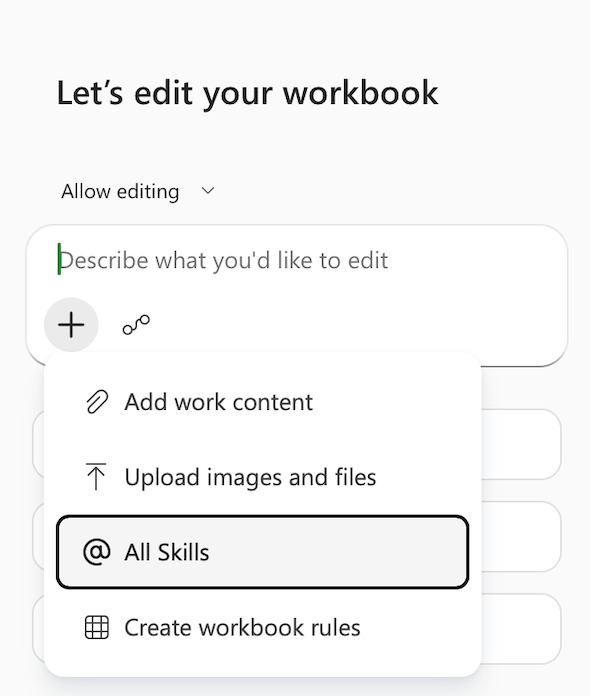
Companies can create custom Skills by saving a SKILL.md file in OneDrive. The Skill can then be selected from the Copilot pane or called directly with the @ symbol inside a prompt.

Microsoft is also introducing a library of prebuilt finance Skills, while software vendors will be able to distribute their own Skills through Microsoft Marketplace and the Microsoft 365 Admin Center later this year.

More financial data sources arrive

Excel Copilot is also expanding the number of external financial data providers it can connect to.

New connectors include CB Insights, Daloopa, FactSet, Morningstar, PitchBook, and S&P Global data through Kensho technology.

Some of these integrations require separate subscriptions with the respective data providers.

Microsoft says the FactSet connector is currently available in preview, with general availability expected in July.

Planning mode offers more transparency

Another new feature is planning mode, which gives users an opportunity to review Copilot’s intended actions before any workbook changes are made.

Instead of immediately modifying a spreadsheet, Copilot first displays which worksheets, cell ranges, formulas, and assumptions it plans to use. Users can inspect the plan before approving the operation.

Microsoft has also improved the Show Changes pane. It can now distinguish edits made by Copilot from those made by human collaborators, making it easier to review AI-generated modifications separately.

Availability

Most of the newly announced features are now generally available to Microsoft 365 Copilot customers using Excel on the web, Windows, and macOS.

Custom Skills are beginning to roll out to Microsoft 365 Insiders on Windows and Mac, with broader availability planned over the next month.

Partner-built Skills are expected to arrive during the third quarter, although availability will vary depending on licensing and region.

Microsoft has also rolled out several updates across its productivity suite, including the ability to test microphones and speakers in Teams Desktop before joining meetings, usability improvements to PowerPoint Live in Teams, and expanded Purview protections that prevent Copilot from analyzing confidential files.

Steam Summer Sale 2026 Is Now Live With Thousands of PC Game Deals Until July 9

If your Steam wishlist has been sitting idle for months, now’s the time to open it. Valve has officially kicked off the Steam Summer Sale 2026, offering some of the biggest game discounts alongside a brand-new launch trailer celebrating the annual sale.

The Steam Summer Sale 2026 is now live and will run from June 25 through July 9, giving PC gamers two full weeks to grab discounts across thousands of titles across AAA blockbusters, indie hits, early access games, DLC packs and complete franchise bundles.

Like previous seasonal events, the Summer Sale stretches across nearly every category available on Steam. Whether you’re looking for story-driven adventures, multiplayer shooters, strategy games, survival titles or smaller indie releases, the storefront is packed with limited-time offers.

The event also arrives just days after Steam Next Fest wrapped up, which allowed players to spent the past week trying hundreds of free demos to finally pick up many of the games already available on Steam while expanding their wishlists for future releases.

As always, the Steam storefront features personalized recommendations, publisher collections, franchise bundles and category hubs that make it easier to discover games based on your existing library.

The Steam Summer Sale 2026 remains live until July 9 at 10 a.m. Pacific Time, after which prices will return to normal. If you’ve been waiting for one of Steam’s biggest game discount and deal events of the year, this is likely the best opportunity to get your wallet ready.

XBOX Console Prices Are Increasing by Upto $150 Starting August 1, 2TB Model Discontinued

If you were hoping Xbox console prices had finally settled down, think again. Microsoft has announced another worldwide price increase, and this time the company isn’t sugarcoating the reason behind it. According to Xbox, soaring memory and storage costs have made another adjustment unavoidable.

Starting August 1, 2026, Xbox consoles will become significantly more expensive worldwide. Microsoft says 512GB models will increase by $100, while 1TB versions will see a $150 price hike. At the same time, the company confirmed that its 2TB Xbox console is being discontinued, bringing an end to the highest-capacity model in the lineup.

The company says console storage and memory prices have risen by more than 2.5 times, and it expects costs to double again by fall 2027. Microsoft also reminded customers that this isn’t the first increase.

Last October, Xbox hardware prices climbed by $20 to $70 in the United States. The company says it spent months working with suppliers in an effort to avoid another increase but ultimately concluded it wasn’t possible.

According to Xbox, gaming consoles remain one of the few consumer electronics products that are generally sold below manufacturing cost, unlike smartphones, PCs and many other devices that generate profit on the hardware itself.

To curb the impact, Microsoft also announced different purchasing programs. These include Buy Now, Pay Later options via Microsoft Store, 0% financing for eligible Xbox purchases via Amazon in supported regions, expanded trade-in programs for previously owned consoles, and Xbox Certified Refurbished systems that can cost up to $100 less than standard retail pricing.

Sony Confirms Bungie Layoffs, Destiny Team Takes the Biggest Hit

As previously rumored, Bungie has officially confirmed another major round of layoffs. After weeks of reports suggesting the Sony-owned studio was preparing significant workforce reductions following the end of Destiny 2’s live-service journey.

The confirmation comes via an internal email (now public) from Sony Interactive Entertainment’s Studio Business Group CEO Hermen Hulst, who revealed that Bungie is reducing its workforce by a “significant number,” with most of the Destiny team and some Marathon developers among those affected.

The layoffs also extend to several Sony Interactive Entertainment teams that directly support Bungie’s operations. According to Hulst, Sony and Bungie leadership spent months reviewing the studio’s long-term roadmap before reaching the decision. He said multiple alternatives were considered, but the companies ultimately concluded that reducing staff was necessary to better align Bungie’s resources with its current priorities and future goals.

Hulst acknowledged Destiny’s impact on the gaming industry, calling the franchise’s decade-long run “truly remarkable” while thanking everyone who helped shape the series over the years. Despite the layoffs, Sony made it clear that Marathon remains an important part of PlayStation’s portfolio:

“Marathon remains an important part of our portfolio, and we will continue to support the team as they build on the strong foundation established in Season 1 and 2, and as they work on incubation efforts for future projects.”

Sony also says its immediate priority is supporting affected employees through transition assistance while attempting to identify opportunities across PlayStation Studios wherever possible.

Microsoft Extends Windows 10 ESU Enrollment Until October 2027

Microsoft officially ended Windows 10 support last year on October 14th. However, those who chose to stay and didn’t wanted to upgrade to Windows 11 had the option to enroll into Extended Security Updates (ESU) program. That offers Windows 10 users a year of security updates to keep the system going on without worrying about newly discovered vulnerabilities.

While it may seem like Microsoft will finally kill Windows 10 this October for everyone, that doesn’t seem to be happening. If you’re still holding onto your Windows 10 PC, the company has quietly confirmed there’s still plenty of time to sign up for Extended Security Updates (ESU).

Folks over at Deskmodder spotted a support article, in which, the company simply mentioned that users can enroll in the Windows 10 Extended Security Updates (ESU) program at any point before October 12, 2027, giving both consumers and businesses a longer window to continue receiving critical security patches after mainstream support has ended.

The company also confirmed that anyone who has already enrolled in the ESU program doesn’t need to do anything else. Once registered, coverage will continue automatically until the program officially expires on the aforementioned date, eliminating the need for annual renewals or manual extensions.

The extension to ESU enrollment comes as millions of Windows 10 devices remain in use worldwide despite Microsoft’s continued push toward Windows 11. Many older PCs still fail to meet Windows 11’s hardware requirements, while others continue running Windows 10 because organizations have yet to complete their migration plans.

Extended Security Updates are designed to bridge that gap. While the program does not introduce new features or major improvements, it continues delivering important security fixes that help protect supported Windows 10 systems from newly discovered vulnerabilities.

Microsoft has repeatedly emphasized that Windows 11 remains the recommended destination for eligible devices, offering better security, AI-powered features, and continued feature development. However, the company acknowledges that not every user can upgrade immediately.

That also means as long as the ESU program remains active, enrollment stays open until October 12, 2027, allowing users to join whenever they’re ready rather than rushing to make the decision today.

Have you already enrolled into Windows ESU program or upgraded to Windows 11? Let us know in the comments below.

Insider Claims GTA 6 Physical Copy with Disc to Release in December 2026

The whole GTA 6 physical release situation might not be over just yet. Rockstar recently confirmed that retail copies launching alongside the game in November will only include a download code inside the box. However, a fresh report by VGC now suggests that may only be part of the plan.

The report cites a Polish news outlet PPE, of which, insider Graczdari claims Rockstar is preparing a proper disc version of GTA 6 for both PlayStation 5 and Xbox Series X, with the physical edition reportedly scheduled to arrive sometime in December.

GTA 6’s code-in-a-box release may only be the first wave

The claim comes from the same insider who previously reported that GTA 6 would not ship with a traditional physical disc at launch. At the time, the report was met with skepticism, especially after Take-Two denied suggestions that a physical version would arrive later. Days later, however, Rockstar officially confirmed that launch-day retail copies will indeed contain only a download code rather than a playable disc.

Now the insider says those code-in-a-box copies are only intended for the initial production run. “Generally speaking, the release with the code will be a one-shot, and the option for a disc release will follow,” Graczdari said in comments published by PPE.pl.

If accurate, that would mean players buying GTA 6 during launch could receive code-only retail boxes, while proper disc editions would begin replacing them later in December. Rockstar has not confirmed that a disc edition is planned beyond the initial November release. Until then, the claim should be taken with a grain of salt. As a reminder, Rockstar has opened pre-orders for GTA 6 and offering a month of GTA+ for free to XBOX and PS5 players.

Microsoft and OpenAI Face Lawsuit From 400 Newspaper Owners

Microsoft and OpenAI are facing another major copyright lawsuit after a coalition of publishers that collectively own nearly 400 newspapers accused the companies of using copyrighted news articles without permission to train artificial intelligence models.

According to Bloomberg, the lawsuit was filed in the U.S. District Court for the Southern District of New York by what is described as the largest coalition of local newspaper publishers to bring legal action over AI training. The publishers claim Microsoft and OpenAI copied millions of articles to develop products, including ChatGPT and Microsoft Copilot, without obtaining licenses or paying compensation.

Publishers claim AI companies profited from their reporting

The complaint alleges that Microsoft and OpenAI “systematically and secretly” crawled publisher websites, copied articles onto their own servers, and used that material to train large language models.

According to the lawsuit, the companies allegedly collected both freely accessible articles and content protected behind paywalls or other access restrictions. The publishers argue they received none of the financial benefits despite AI products generating billions of dollars in market value.

The coalition is seeking statutory damages and a court order preventing further alleged copyright infringement. It also accuses the companies of violating the Digital Millennium Copyright Act (DMCA), claiming copyright management information such as author credits and copyright notices was removed during the data collection process.

Local journalism at the center of the dispute

The publishers argue that unrestricted scraping of newspaper content threatens the long-term sustainability of local journalism.

According to the complaint, allowing AI companies to build commercial products from publisher content without compensation could become a “death knell for local journalism.” The coalition says local newspapers invest significant resources into original reporting while AI developers benefit from that work without sharing revenue.

The case adds to a growing list of lawsuits against AI companies over the data used to train generative AI models. Previous legal actions have come from authors, artists, major media organizations, and newspaper publishers, with courts expected to play a key role in determining how copyright law applies to AI training.

OpenAI defends its training practices

Responding to Bloomberg, OpenAI spokesperson Drew Pusateri said the company’s models are trained on publicly available data and that their development is grounded in fair use principles. Microsoft had not publicly commented on the lawsuit at the time of reporting.

In other AI news, OpenAI recently unveiled its custom AI chip, expanded its Daybreak initiative, and launched the Patch the Planet program aimed at improving open source software security.

You Can Get Free 1 Month of GTA+ with GTA 6 Pre-Order

After months of speculation, leaks, and rumors, GTA 6’s pre-orders have finally gone live. You can now pre-order GTA 6 for PS5 and XBOX Series X|S. If you are among the ones planning to pre-order, there’s some good news too.

Free 1 month of GTA+ with GTA 6 pre-order

Rockstar has confirmed that pre-ordering GTA 6 will get you a month of GTA+ for free. For those unaware, GTA+ is a premium subscription service for GTA Online that provides members with benefits such as monthly GTA$ deposits, exclusive vehicles and cosmetics, special bonuses on missions and businesses, discounts on properties and upgrades, and access to certain Rockstar Games titles.

Since XBOX is offering it for free with a GTA 6 pre-order, it can help you earn money faster, unlock content more quickly, access exclusive rewards, and enhance your overall GTA Online experience at no additional cost.

As of yesterday, it was claimed that GTA 6 won’t have a physical copy. Rather, players would receive a download code with the digital edition. Now, a new claim by a Polish insider suggests that GTA 6 physical copies, including a disc, will be available in December 2026. Only time will tell if these claims turn out to be true.

For those looking to pre-order GTA 6, you should know that the Standard Edition of the game is priced at $79.99. Whereas, the Ultimate Edition, with a few additional perks, will set you back $99.99 in the US.

Google Introduces New Search History and Privacy Controls for AI-Powered Features

Google is introducing new privacy settings that give users more control over how activity from its Search services is stored and used. The rollout separates history collection from personalization, allowing people to save their activity without necessarily using it to tailor recommendations.

The changes, first reported by BleepingComputer, will appear in users’ Google Accounts over the coming days. They affect several Google products, including Search, Maps, Shopping, Hotels, Flights, Translate, News, and Google Play. Google has also published support documentation explaining how the new settings work.

Search history and personalization are no longer tied together

Until now, users primarily managed Search history and personalization through the broad Web & App Activity setting. Google is now splitting those functions into two separate controls: Search Services History, and Personalized Recommendations.

Search Services History determines whether activity from supported Google services is saved to a user’s Google Account. That activity can include searches, Maps usage, Shopping queries, Flights and Hotels activity, Translate interactions, News browsing, and other Search-related activity.

Google says storing this information helps users revisit previous searches and continue newer interactive Search experiences.

Saved media is now part of Search Services History

One of the biggest additions is a new Save Media subsetting within Search Services History.

When enabled, Google may save media from Search interactions, including images, files, audio, and video.

Examples include photos used with Google Lens, voice searches, and media shared during Search Live conversations.

According to Google, saving this media makes it easier to continue AI-powered Search experiences and revisit previous Lens searches. The company also says the data may be used to develop and improve Google services, including AI models and safety systems, while applying privacy protections.

Users can disable Save Media independently or delete individual media items from their Search history at any time.

Existing settings will carry over automatically

If Web & App Activity is already enabled, Google says Search Services History will automatically be enabled after the transition. The Save Media option will also be turned on by default in that scenario.

Existing auto-delete preferences will transfer to the new Search Services History setting, allowing users to keep their current retention period. Users can still manually review or delete saved activity whenever they choose.

Personalized recommendations become an independent setting

Google is also introducing a standalone Personalized Recommendations control.

This setting determines whether Google uses saved activity to personalize Search services.

In practice, the change means users can choose to keep their search history for convenience without allowing Google to use that history for personalized recommendations.

Google says changes made to Personalized Recommendations will not affect Search Services History, and vice versa. Both settings will also operate independently from Web & App Activity after the migration.

Google Play gets similar privacy controls

Google Play is receiving the same treatment with two new settings: Play History and Personalization in Play.

The settings may appear even for users who rarely or never use Google Play. Google says the initial configuration will reflect each user’s previous Web & App Activity and Search personalization preferences.

Like Search Services History, Play History will inherit existing auto-delete settings, which users can change at any time.

Users should review the new settings

While Google says the update provides more granular privacy controls than the previous all-in-one approach, users may want to review the new settings once they become available, particularly if Web & App Activity is already enabled.

The rollout also introduces new defaults for media saved from AI-powered Search experiences, making it worth checking whether the Save Media option matches individual privacy preferences.

In other Google news, the company recently introduced new verification rules for financial advisers, confirmed it will use IP addresses for ads in Europe, and was ordered by UK regulators to make Search rankings more transparent.

XBOX’s Restructuring Reportedly Triggers Layoffs at Compulsion Games

As things stand, it seems there is no sign of Xbox slowing down its sweeping restructuring plans. Just days after reports suggested several first-party studios were fighting for their future, the latest wave of layoffs has reportedly reached another Xbox Game Studios team.

Layoffs have reportedly started at Compulsion Games

According to multiple social media posts from employees and a compilation shared by Rebs Gaming on X, Compulsion Games, the studio behind South of Midnight, has reportedly been hit by layoffs as Microsoft’s ongoing Xbox Reset continues.

While Xbox has yet to issue an official statement, several developers have publicly indicated that they are looking for new opportunities after their roles were affected.

The reported layoffs follow earlier claims made in Bloomberg report, where it was mentioned that Compulsion Games was among three Xbox Game Studios currently in discussions with Microsoft in an effort to avoid complete closure. While the studio may not see an immediate shutdown, significant job losses were still expected, and employees had already been permitted to seek work elsewhere during the process.

That context now appears to be lining up with what is unfolding publicly. Several current and former Compulsion Games employees have updated LinkedIn profiles or posted messages indicating they are available for work, suggesting the studio has begun reducing staff.

Microsoft hasn’t officially confirmed layoffs at Compulsion Games or disclosed how many employees may have been affected. Until the company comments publicly, the exact scale of the reductions remains unclear. If we come across anything, we will update this article.

XBOX Layoff Reports Spark New Workplace Retaliation Allegations

Reports suggest Microsoft is preparing another round of layoffs across its XBOX division, and former employees are urging current staff to safeguard documentation if they have raised workplace concerns.

According to Game Developer, several former XBOX employees allege that previous layoffs disproportionately affected workers who filed HR complaints, participated as witnesses in workplace investigations, or challenged management decisions. Microsoft has not commented on the allegations or announced any new layoffs.

Former employees warn staff to prepare

The latest claims come as rumors continue to circulate that Microsoft could announce another wave of job cuts affecting XBOX, with some reports also suggesting that additional studios may face closure, including speculation that additional studios may face closure.

Among those speaking publicly is former Halo Studios art director Glenn Israel, who has previously accused Halo Studios leadership of harassment and retaliation, claims that have been echoed in reports about Halo Studios leadership. In light of the reported layoffs, Israel advised current employees who have raised workplace complaints to preserve emails, chat logs, and other documentation before any cuts are announced.

He argued that if employees involved in complaints are selected for layoffs, those decisions could potentially be viewed as retaliatory depending on the circumstances. Israel also encouraged anyone affected by future layoffs to consult an attorney before signing severance agreements and specifically recommended requesting a document retention agreement to help preserve relevant evidence.

Employees describe alleged retaliation

Game Developer cited four former XBOX employees who described what they believed was a recurring pattern across XBOX-owned studios.

One anonymous former employee claimed they were laid off after serving as a witness during an internal investigation involving a studio executive who allegedly berated employees during meetings. According to the source, the executive later attempted to identify employees who participated in the investigation and subsequently influenced layoff decisions.

Another former employee alleged that a supervisor responded negatively after they challenged management during a meeting. The employee said they were later placed on a performance improvement plan for what was described as “disrespecting” management, adding that subsequent complaints to HR produced no meaningful action.

A third former employee alleged that leadership at an XBOX-owned studio retaliated against workers who questioned workplace conditions. The same source also claimed that an employee seeking disability accommodations experienced retaliation.

The allegations remain unverified, and Microsoft has not publicly responded to the claims outlined in the report. Likewise, the company has not confirmed whether another round of XBOX layoffs is imminent, despite reports that another round of XBOX layoffs is imminent.

Teams Desktop Now Lets You Test Your Mic and Speakers Before Joining Meetings

Nothing kills the momentum of an online meeting faster than spending the first few minutes asking, “Can you hear me now?” or realizing your microphone isn’t working after everyone has already joined.

Back in April, we reported that the company is working on a feature that lets you test mic and audio before you join the Teams call. Well, it’s finally here.

Microsoft Teams finally allows you to test your mic and speaker

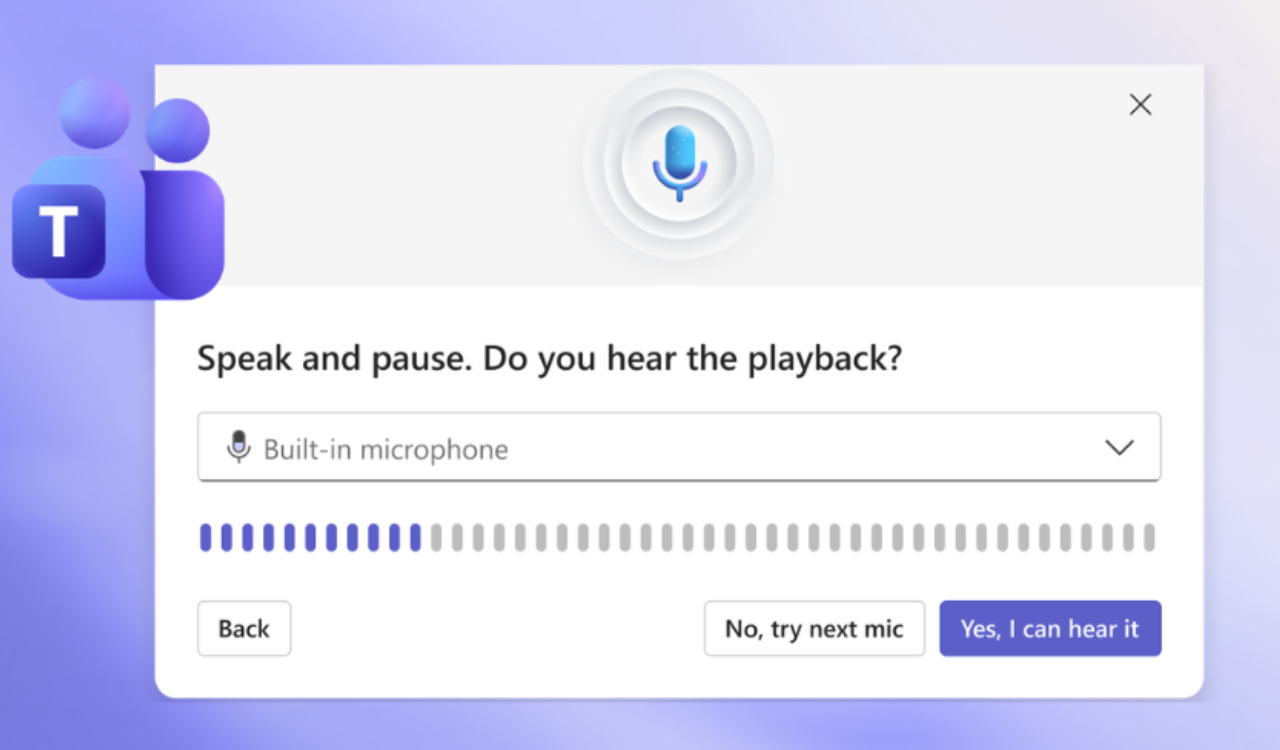
Microsoft has announced the roll out of Test mic and speaker feature in Teams that allows users to check their audio setup before entering a meeting.

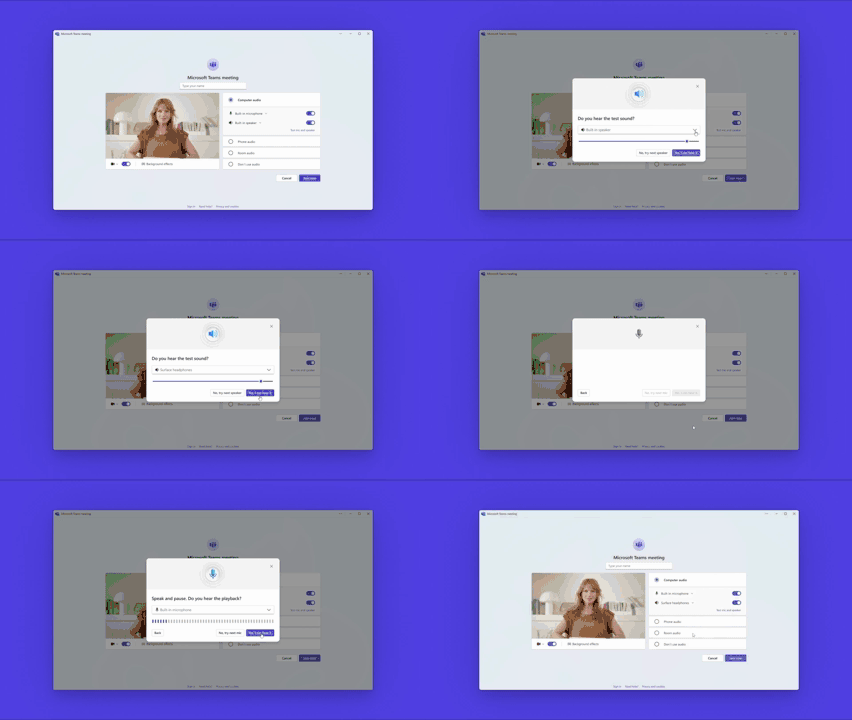
The new experience appears directly on the Teams pre-join page under the Computer audio section. With a single click, you can launch a guided audio test that walks them through both speaker and microphone checks before joining the meeting.

GIF Source: Microsoft

For speakers, Teams plays a short audio tone to confirm sound is coming through the selected output device. The microphone test records a brief voice sample and immediately plays it back, which allows you to verify that microphone is working properly and that their voice sounds clear.

Once both tests are complete, Teams displays a summary confirming whether the selected microphone and speakers are functioning correctly.

The rollout starts on desktop versions of Microsoft Teams, with additional platform support planned for a future release.

PowerPoint Live in Teams Gets Copilot Explain & Instant Refresh

Microsoft has announced two new features for PowerPoint Live in Microsoft Teams called Explain and Refresh. While neither change how presentations are created, both are designed to make live meetings feel smoother for presenters and far less confusing for attendees.

Microsoft wants meetings to stay on track

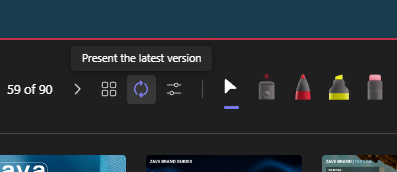
One of the biggest additions is Refresh. Rather than ending a presentation or resharing an updated PowerPoint deck, presenters can now reload the newest version of their file with a single click while remaining on the same slide.

Image credit: Microsoft

Microsoft says the feature helps in situations where a presentation changes moments before or even during a meeting. Updated figures, corrected information, or last-minute edits can now appear instantly without disrupting the session or forcing participants to reconnect to a new presentation.

Once the refresh is complete, presenters will also see a confirmation message indicating they’re already presenting the latest version of the deck.

Copilot can explain slides without interrupting anyone

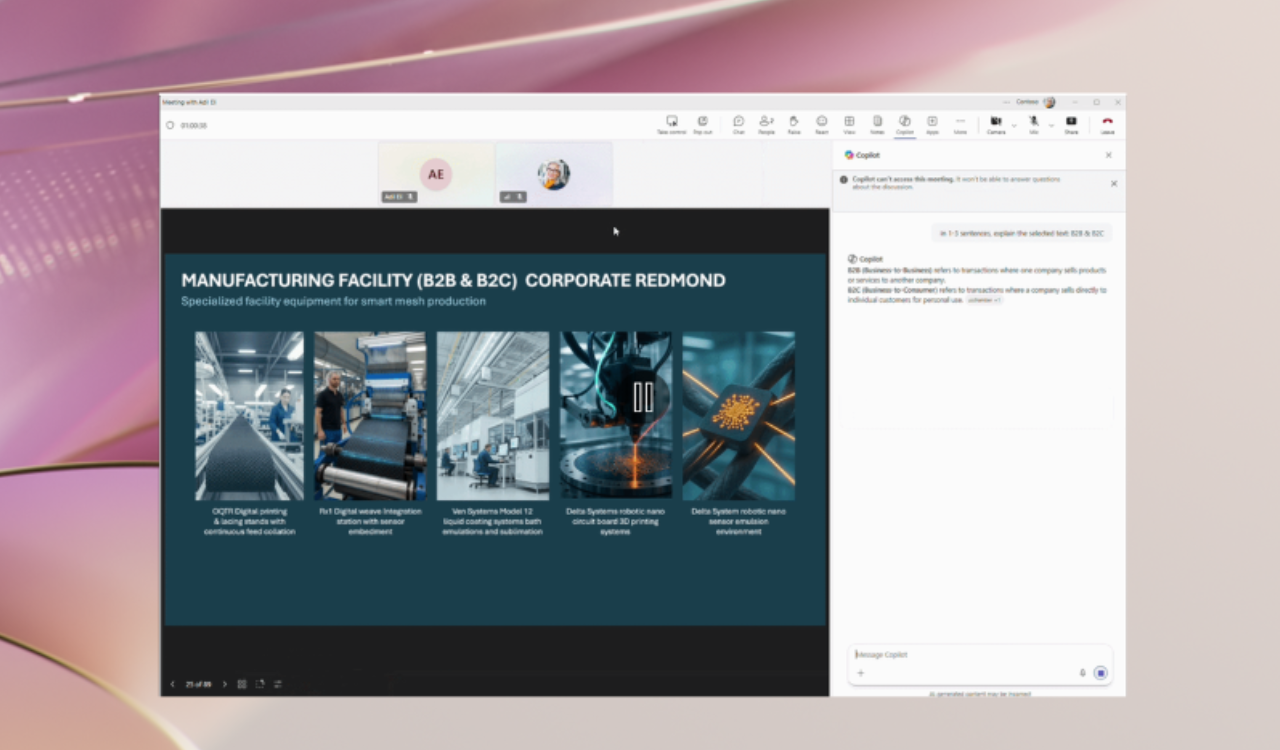
For attendees, Microsoft is introducing Explain, an AI-powered feature built into PowerPoint Live using Copilot. Rather than asking the presenter to clarify an unfamiliar term, users can simply highlight text directly on a slide and ask Copilot to explain it.

Image credit: Microsoft

The generated explanation appears inside the Copilot pane, which allows attendees to understand unfamiliar words, acronyms, or concepts without interrupting the meeting.

There are a few limitations, though. Microsoft notes that Explain currently works best with text-based content, while complex visuals such as charts and diagrams may not always be interpreted accurately.

The Explain feature requires both a Microsoft 365 subscription and a Microsoft 365 Copilot license, while Refresh only requires a Microsoft 365 subscription. Both feature are now available for PowerPoint on Windows and Mac.

Anthropic Accuses Alibaba of Using 25,000 Fake Accounts to Copy Claude AI

Anthropic has accused Alibaba of carrying out what it calls the largest known AI model distillation attack against the company, alleging that operators linked to the Chinese technology giant extracted capabilities from its Claude AI models through millions of automated interactions.

The allegations were made in a June 10 letter sent to U.S. Senators Tim Scott and Elizabeth Warren ahead of a Senate Banking Committee hearing on artificial intelligence. Reuters first reported the contents of the letter after reviewing the document.

Anthropic says the campaign generated 28.8 million Claude interactions

According to Anthropic, the alleged campaign ran between April 22 and June 5, 2026, generating more than 28.8 million exchanges with Claude through nearly 25,000 fraudulent accounts.

The company claims the operators used a technique known as AI distillation, where outputs from a more advanced model help train a smaller or less capable model.

Anthropic alleges the campaign was conducted by operators affiliated with Alibaba and its AI research division, Qwen. At the time of publication, Alibaba had not publicly responded to the allegations.

In its letter, Anthropic argued that the campaign could accelerate China’s ability to develop AI systems approaching the capabilities of its advanced Mythos Preview models.

This is not the first time Anthropic has raised similar concerns. In February, the company accused several Chinese AI developers, including DeepSeek, Moonshot AI, and MiniMax, of using Claude outputs to improve their own models. At the time, Anthropic warned that these campaigns were becoming increasingly sophisticated and coordinated.

AI security concerns continue to grow

The allegations surfaced just days before the U.S. Commerce Department imposed export restrictions on Anthropic’s latest Mythos and Fable AI models.

Government officials said the restrictions were necessary because they feared the advanced models could be diverted to military intelligence users in countries of concern. Anthropic temporarily disabled access to the affected models worldwide to comply with the order.

Recent reports have also highlighted the capabilities of Mythos during government cybersecurity testing. The model reportedly identified vulnerabilities in highly sensitive U.S. government systems within hours. However, officials clarified that finding vulnerabilities did not mean the AI successfully compromised or exploited classified systems, despite some earlier reports suggesting otherwise.

Microsoft Confirms Point-in-time Restore for Windows 11 is Now Available for Everyone

Windows PCs have become far more resilient over the years, but recovering from a broken update, faulty driver, or corrupted application can still be a frustrating experience. Microsoft now wants to change that by making system recovery far less frustrating for both everyday users and IT administrators.

The company has officially announced the general availability of Point-in-Time Restore for Windows 11, a new built-in recovery feature designed to roll a PC back to an earlier working state in minutes instead of hours. The capability is now available across Windows 11 Home, Pro, and Enterprise editions running version 24H2 and later.

Windows 11 can now roll back to an earlier state

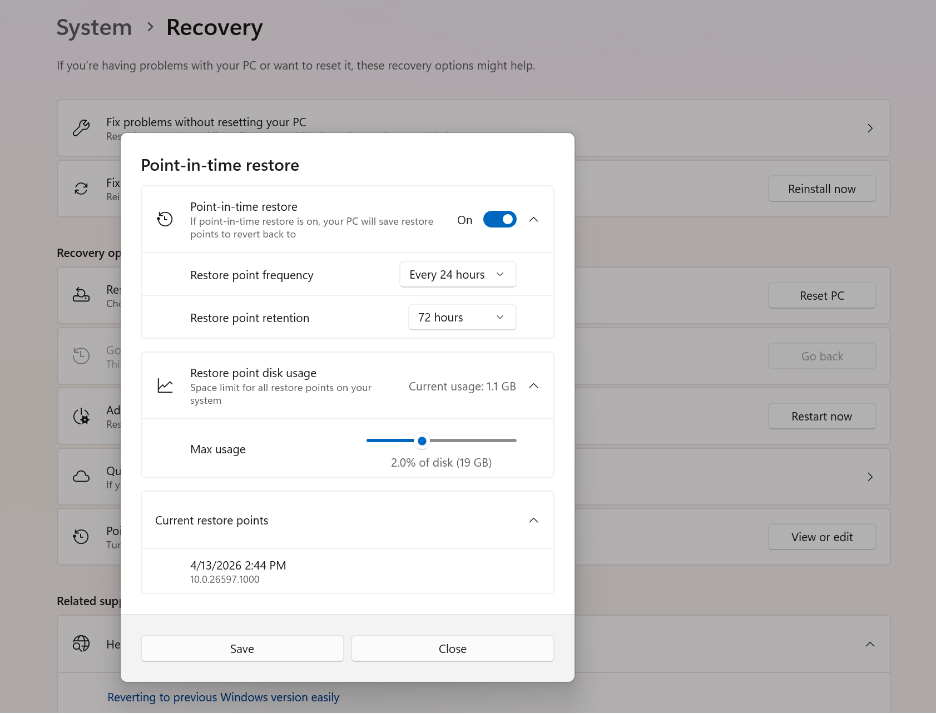
Unlike the legacy System Restore feature, Point-in-Time Restore captures complete restore points automatically on a scheduled basis, storing them locally on the device. These restore points include the Windows operating system, installed applications, system and app configurations, settings, and even local user files.

Microsoft says the feature is designed to help recover from a wide range of issues, including problematic Windows updates, driver failures, broken applications, configuration mistakes, and other changes that leave a PC unstable or unable to boot properly.

By default, Windows creates a restore point every 24 hours, although Enterprise administrators can configure restore frequency, retention periods, and storage limits through management policies.

A More Modern Recovery Experience

The new recovery system is deeply integrated into Windows 11 instead of relying on the older Control Panel-based System Restore experience. Users can configure the feature through Settings > System > Recovery, while actual restores are performed through the Windows Recovery Environment for a more secure recovery process.

Image credit: Microsoft

Microsoft also says Point-in-Time Restore is smarter about storage management by integrating with Reserved Storage to minimize disk usage. Restore points remain available for up to 72 hours by default before older snapshots are automatically removed.

There are a few important limitations to keep in mind. Any files, applications, or settings created after the selected restore point will be lost, BitLocker-protected devices require the recovery key before restoration begins, and restore points remain stored locally on the device.

Furthermore, Microsoft has also confirmed that remote restore initiation through Intune is planned for a future update, giving IT administrators another tool for recovering Windows devices at scale.

Google is starting to lock down Chrome’s memory on Windows, and it could soon be enabled by default

Starting in Chrome 151, Chrome will apply “process isolation”, a Windows security feature designed to block other apps from accessing the browser’s memory. The controls prevent outside software from reading or injecting code into Chrome’s processes.

When enabled, Chrome applies Windows security Access Control Lists to its processes, making it much harder for outside software to peek into or interfere with the browser. In other words, the setting changes how Chrome handles memory access behind the scenes.

That matters because this is both a security upgrade and a compatibility risk. For most users, the change should make Chrome significantly harder to attack. Malware like VoidStealer has already demonstrated the ability to extract encryption keys directly from Chrome’s memory. Process isolation aims to block this type of memory access.

Google will use the staged rollout to watch for compatibility issues. Because process isolation requires a restart, Chrome only applies the change after relaunch, and the visible disable option gives users a quick escape hatch if something breaks.

Process isolation isn’t new on Windows. Microsoft already uses similar protections in parts of the platform, and Chrome is adopting a security model that fits with how Windows already handles sensitive processes.

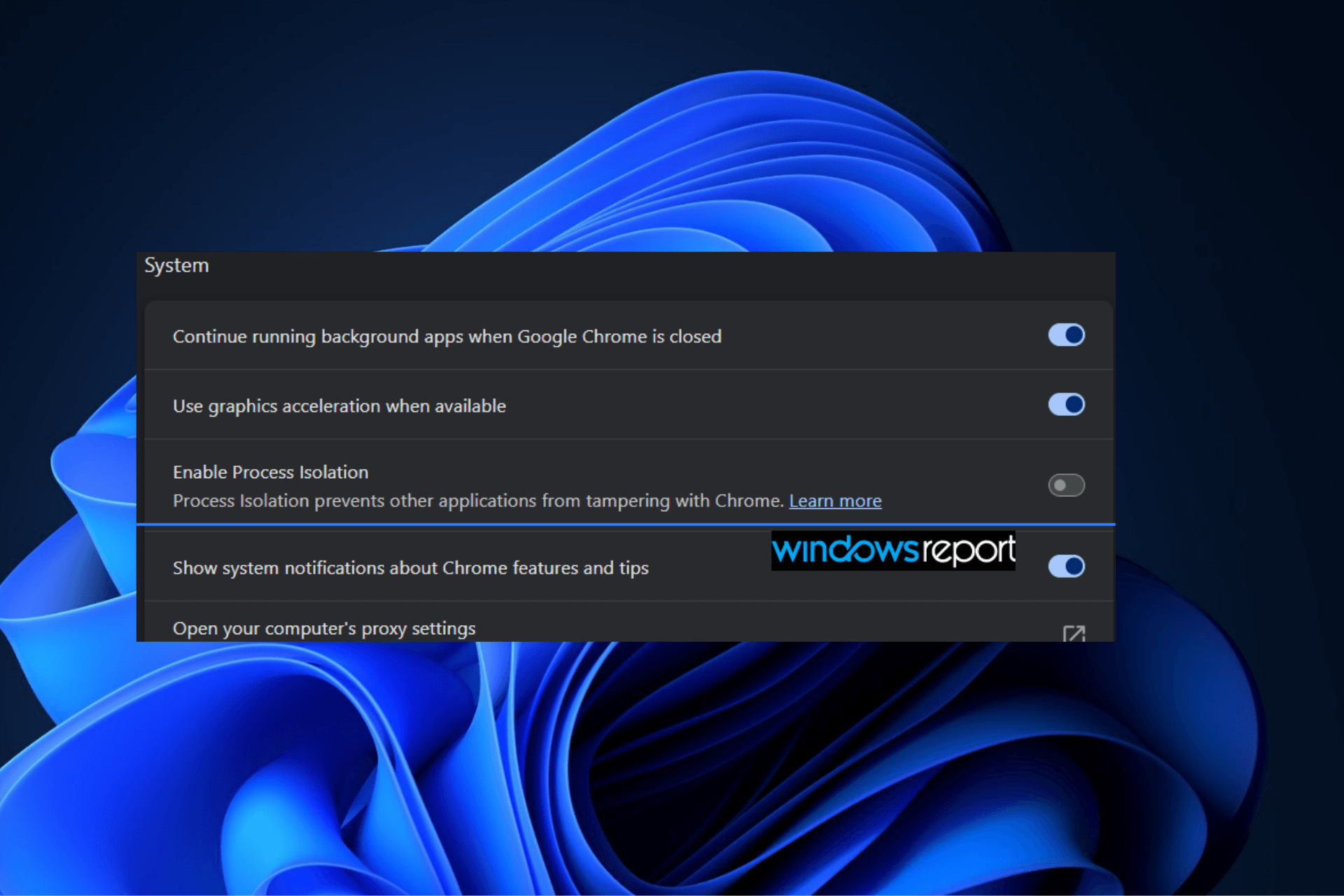
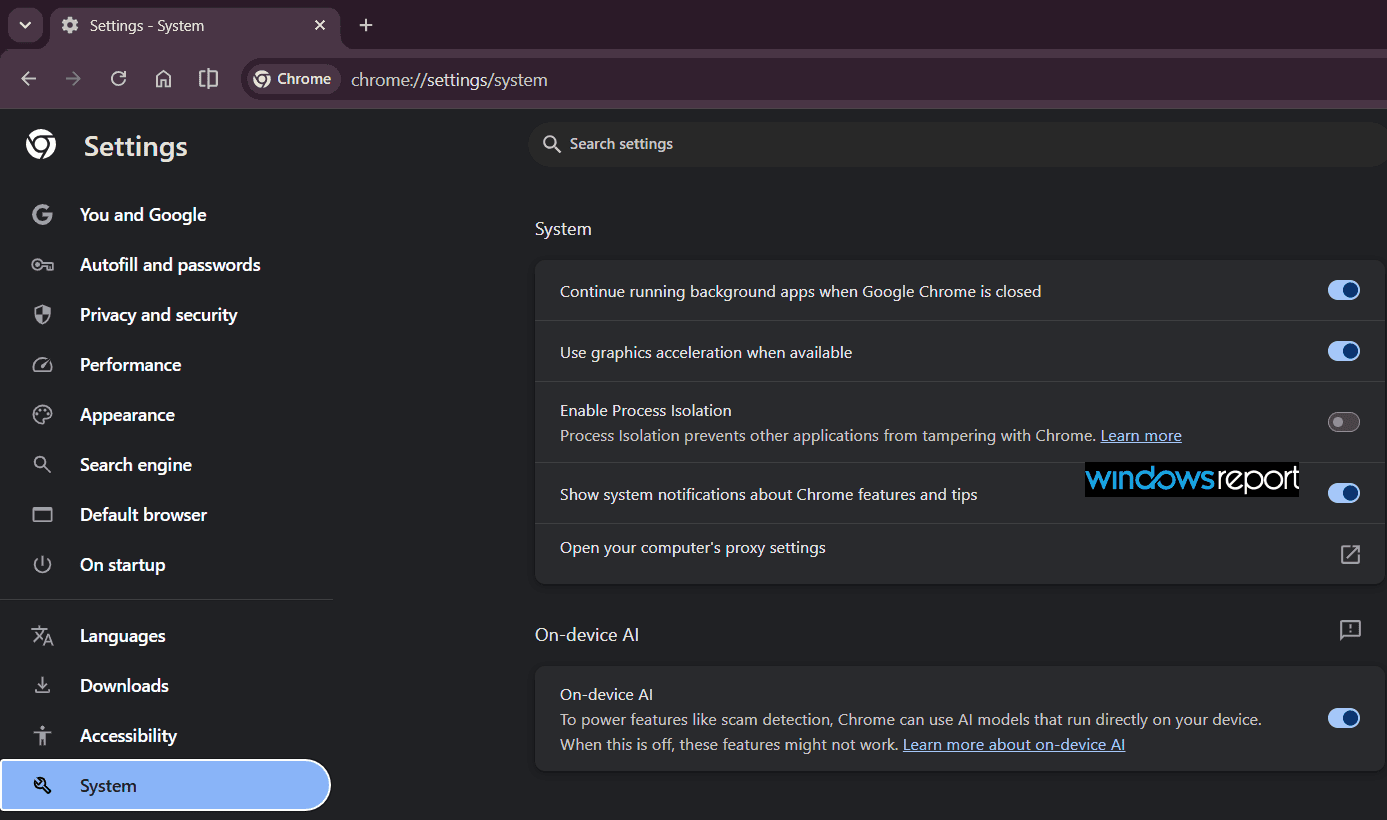
Users can turn process isolation on or off at any time by going to Chrome Settings > System and flipping the “Enable process isolation” toggle. That gives people an easy way to disable the feature if their tools break, or turn it back on later if they want the extra protection.

Image Credit: Venkat | Windows Report.

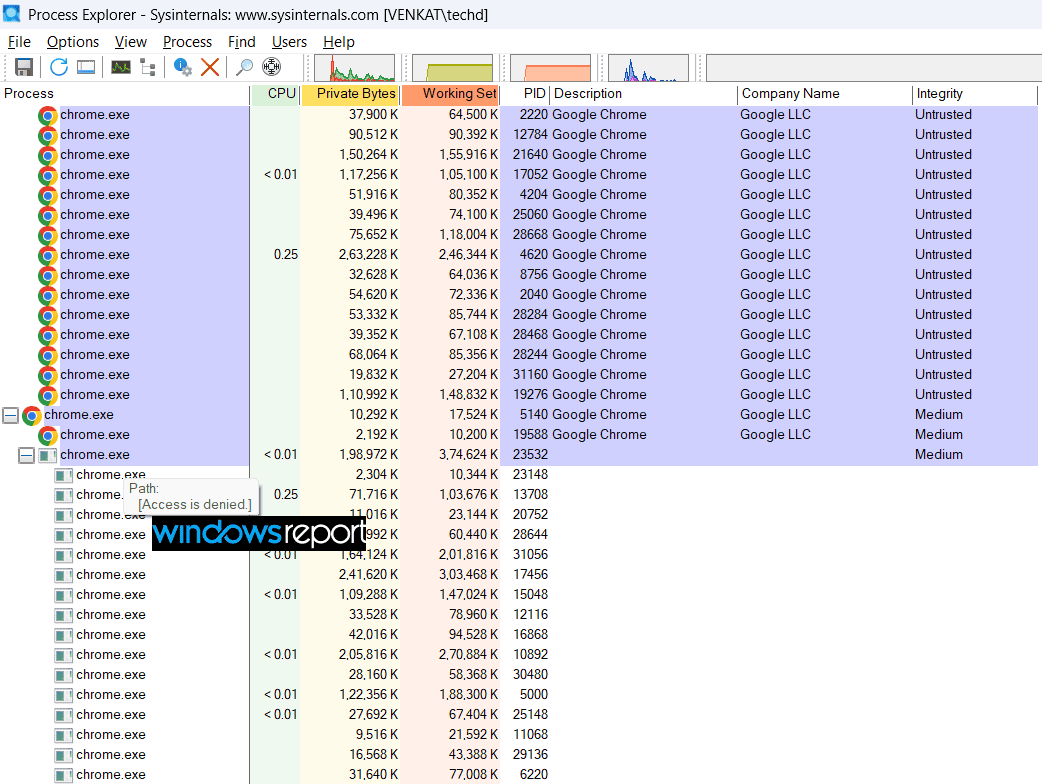
Windows Report tested the feature ourselves. After enabling process isolation, Process Explorer still shows Chrome’s processes, but it displays “Access is denied” when trying to inspect them, confirming that the isolation layer is working.

Image Credit: Venkat | Windows Report.

We first reported on this feature back in March when it appeared as a hidden toggle in a Chrome testing build. Now Google is moving it from testing to a gradual rollout, with field-trial infrastructure in place to monitor how it behaves in real-world use.

Enterprise admins also get more control through the WindowsProcessIsolation policy, letting IT departments manage the rollout across their networks.

If you want to test it early, you can enable it now by flipping the chrome://flags/#enable-process-isolation-ui flag in pre-release versions of Chrome. Everyone else will see the feature roll out gradually over the coming weeks.

Image Credit: Windows Report.

Micron Lands $22 Billion in AI Memory Supply Deals Through 2030

Micron has signed 16 long-term supply agreements worth roughly $22 billion in customer deposits and financial commitments, marking a major shift in how the memory industry is responding to the AI boom.

The agreements, announced alongside the company’s latest quarterly results, are designed to guarantee future supplies of DRAM and NAND memory while giving Micron more predictable revenue for years to come. Some of the contracts extend through 2030.

AI customers are paying upfront to secure memory

Demand for high-bandwidth memory (HBM), which powers AI accelerators from companies such as Nvidia, has grown so quickly that customers are now willing to help fund future production capacity.

Micron expects approximately $18 billion of the commitments to arrive as cash deposits, while the remaining amount will come through other financial arrangements. According to the company, the agreements could translate into roughly $100 billion in contracted future obligations.

Under the agreements, approximately 20% of Micron’s projected DRAM shipments and about one-third of its expected NAND shipments are already covered during the contract periods.

The deals extend beyond AI companies

Although AI infrastructure is driving much of today’s demand, Micron said not every agreement involves hyperscale AI customers.

The contracts also include companies from the consumer electronics and automotive industries, both of which increasingly compete with data centers for the same manufacturing capacity.

HBM4 demand continues to accelerate

Micron also revealed that its newest HBM4 products are ramping much faster than previous generations.

The company has already generated more than $1 billion in HBM4 revenue, with production increasing roughly twice as quickly as its earlier HBM3E rollout.

HBM has become one of the most valuable segments of the semiconductor market because modern AI GPUs require enormous amounts of ultra-fast memory to feed increasingly complex AI models.

Consumers could also feel the impact

The growing focus on AI memory is affecting more than cloud providers.

As manufacturers dedicate more production capacity to premium HBM chips, supplies of conventional DRAM and NAND remain tighter across the broader market. That can increase costs for laptops, desktop PCs, gaming systems, smartphones, and enterprise storage.

Industry executives have previously warned that memory shortages could persist for several years, making long-term supply agreements increasingly attractive for both suppliers and customers.

Via Neowin

Visual Studio Code Adds AI Chat Cost Tracking and Multi-Chat Copilot Sessions

Microsoft has released Visual Studio Code 1.126, just one week after shipping version 1.125. The latest update focuses on improving GitHub Copilot workflows, giving developers better visibility into AI usage costs, and making it safer to inspect unfamiliar code.

The release introduces three notable changes: session-level AI cost tracking, support for multiple chats within a single Copilot agent session, and a streamlined approach to opening untrusted folders in Restricted Mode. Microsoft says these improvements aim to make AI-assisted development more transparent, flexible, and secure.

VS Code now shows the total cost of AI chat sessions

One of the biggest additions in Visual Studio Code 1.126 is session-level chat cost tracking.

Previously, developers could mainly see the cost of individual chat turns. With the new update, VS Code displays the total cost accumulated across an entire chat session, making it easier to understand how many AI credits a conversation has consumed.

Microsoft says the feature gives users greater transparency over GitHub Copilot usage and helps identify conversations that consume more credits than expected. The change builds on Microsoft’s recent efforts to provide better visibility into AI usage and billing inside the editor.

Multiple chats can now run in the same Copilot agent session

The update also expands the capabilities of the Agents window.

A Copilot agent session can now contain multiple chat conversations simultaneously. Users can start another conversation by selecting the New Chat (+) button in the session toolbar without creating an entirely new agent session.

Each chat maintains its own conversation history, allowing developers to switch between different tasks without losing context.

For example, one chat can continue generating code while another reviews recent changes, writes unit tests, or drafts documentation.

Opening untrusted folders becomes safer

Microsoft has also updated how Visual Studio Code handles untrusted folders.

Instead of displaying a pop-up asking whether users trust a folder, VS Code now opens newly discovered folders directly in Restricted Mode.

A banner appears at the top of the editor, allowing users to change the trust status if they decide the folder is safe.

The update is available now for Windows, macOS, and Linux through the Visual Studio Code update channel.

In related Microsoft developer news, GitHub recently made Copilot Auto the default experience for Free and Student users, removing manual AI model selection. Microsoft has also introduced the GitHub Copilot desktop app, bringing AI-assisted coding workflows outside the browser.

XBOX Free Play Days Brings Assetto Corsa Competizione, Blades of Fire & More This Weekend (June 25-28)

It’s Thursday, and we are back with yet another pre-official XBOX Free Play Days lineup, courtesy of Reddit user Oliomono. This weekend, starting today, June 25, through Sunday, June 28, XBOX players will have at least three games to try for free.

First on the list is Assetto Corsa Competizione. To catch you up, last weekend XBOX had Assetto Corsa in the Free Play Days lineup, but this one is different. Back in 2019, the game originally released for PC. However, the console versions for PlayStation 4 and XBOX One launched later in June 2020. Later, the studio enhanced the game and released it for PlayStation 5 and Xbox Series X|S in February 2022.

For those unaware, it is the official video game of GT World Challenge. It is renowned for its hyper-realism. You can expect to race around meticulously laser-scanned tracks and experience manufacturer-backed physics that capture the granular details of GT3 and GT4 racing, including dynamic weather, realistic tire degradation, and true-to-life aerodynamics.

Next in this weekend’s XBOX Free Play Days lineup is Blades of Fire. It is a third-person action-adventure game from Mercury Steam that centers around a warrior named Aren de Lira, who uses an ancient forces hammer to craft weapons in a world where an evil queen has turned human steel to stone.

Last but not least, you have House Flipper 2. It is a relaxing simulator where players renovate, clean, and build homes across the town of Pinnacove. The game features an engaging story mode and a sandbox mode for building from scratch. You can expect crisp visuals, intuitive tools, and a dedicated assembly mode to build your own furniture in the game.

As usual, we expect Microsoft to add a few more games to this weekend’s XBOX Free Play Days lineup, but we will know about those when the official XBOX Wire blog post goes live later today. For now, it’s unclear whether these titles will require an XBOX Game Pass subscription or will be available to try for free for all XBOX members.

As we always do, we will update this article when the official blog post goes live later today to add more games, if there are any. Which of these games are you excited for the most? Let us know in the comments below.

Edgecution Malware Uses Microsoft Edge Extension to Deploy Python Backdoor

A newly discovered malware campaign is abusing a malicious Microsoft Edge extension to break out of the browser sandbox and gain control of infected Windows systems.

Security researchers at Zscaler ThreatLabz have uncovered the malware, dubbed Edgecution, and believe it is being deployed by an initial access broker linked to the Payouts King ransomware operation. The attack combines a browser extension with a Python-based backdoor, allowing attackers to execute commands on the host system while remaining largely hidden from victims.

Attack starts with fake Microsoft support messages

The attack begins with social engineering rather than a software vulnerability.

Threat actors reportedly impersonate IT support staff on Microsoft Teams and direct victims to a fake Microsoft-themed website. The page claims users need to install a spam filter or an Outlook update through what appears to be a legitimate “Microsoft Outlook Updates Management Console.”

Instead of downloading a genuine update, victims receive malicious files designed to install the malware.

Researchers say the attackers can use AutoHotKey scripts, Windows batch scripts, or PowerShell scripts to launch the infection. The malware is delivered inside a ZIP archive that contains an embedded Python 3.13.3 runtime along with two directories named extension and native, representing the browser and host components of the attack.

Browser extension works with a Python backdoor

The first stage of the malware is a malicious Microsoft Edge extension disguised as an Edge Monitoring Agent.
Once installed, the extension connects to an attacker-controlled command-and-control server, receives instructions, executes assigned tasks, and sends the results back. It runs inside a headless Microsoft Edge instance, making it effectively invisible during normal use.

On its own, the extension remains restricted by the browser sandbox.

To bypass those restrictions, Edgecution abuses the Chrome Native Messaging protocol, a legitimate feature that allows browser extensions to communicate with trusted desktop applications. Attackers use that channel to communicate with a Python-based backdoor running directly on the operating system.

The supporting scripts create the required native messaging manifest, allowing the malicious extension to launch and communicate with the local Python application.

Backdoor gives attackers broad control

The Python component performs the actual malicious activity on the compromised computer.

According to Zscaler, the backdoor can execute shell commands, run PowerShell commands, execute Python code, write files to disk, list running processes, and collect system information.

Because commands pass through the browser extension before reaching the Python backdoor, attackers effectively escape the browser sandbox while maintaining a relatively stealthy communication channel.

Researchers also found several unused commands inside both malware components, suggesting future versions could expand the framework’s capabilities.

Security teams urged to monitor browser extensions

The researchers warn that Edgecution highlights a growing trend among ransomware operators to abuse legitimate browser features instead of relying solely on traditional malware techniques.

Organizations should closely monitor browser extensions, restrict Native Messaging host registrations where possible, and watch for unauthorized extension installations. Zscaler’s report also provides indicators of compromise, including command-and-control servers, malicious extension hashes, and Python backdoor hashes to help defenders detect infections.

In other cybersecurity news, LastPass confirmed customer data was exposed in a supply chain attack, while researchers recently uncovered a WhatsApp malware campaign targeting businesses. Meanwhile, OpenAI launched Patch the Planet to help improve the security of open-source software projects.

Via BleepingComputer

Microsoft Launches Age of Empires Mobile: PC Edition as Free Download

Microsoft has officially released Age of Empires Mobile: PC Edition, bringing the mobile strategy game to Windows PCs nearly two years after its original mobile debut.

The free-to-play title is now available through Steam and the Microsoft Store, giving players another way to experience the mobile-focused spin-off with desktop-friendly controls. The launch follows another recent platform expansion for the franchise, with Age of Empires 2: Definitive Edition arriving on macOS last month.

Unlike the classic Age of Empires real-time strategy games, the new release remains based on Age of Empires Mobile. It keeps the same progression systems, online features, and in-game purchases while introducing a range of improvements designed specifically for PC players.

PC version adds mouse, keyboard, and enhanced visuals

Rather than being a simple mobile port, Microsoft says the PC Edition has been adapted for desktop gameplay.

The release includes full mouse controls, complete keyboard support, a redesigned interface, refreshed graphics, and enhanced 4K visuals and textures for larger displays. These changes aim to make city management, alliance coordination, and battles feel more natural with traditional PC controls.

Cross-platform support is also available, allowing players on phones, tablets, and PCs to play together on the same servers.

Players who already have an existing mobile account can continue their progress on PC after manually linking their account. Once the account is bound, signing in with the same credentials restores saved progress across supported devices.
Xbox Game Pass members receive exclusive rewards

Although the game is free to download, Microsoft is offering extra in-game content for Xbox Game Pass subscribers who play on PC.

The bonus reward pack includes:

  • 1 Monthly Pass Token
  • 1 Custom Resource Chest
  • 10 Universal 60-Minute Speed-Ups
  • 1,000 Empire Coins
  • Exclusive Player Portrait Frame

The promotion gives Game Pass members additional resources to help accelerate progression after starting the game.

In other Xbox news, the company recently said interest in adapting its gaming franchises into movies and TV shows is stronger than ever. Microsoft is currently testing new Xbox features with Insider users, including Game Hubs, wishlists, and gamertag upgrades.

GitHub Copilot Auto Becomes Default for Free and Student Users

GitHub is making another major change to Copilot as it continues to manage growing demand for its AI coding assistant. After previously introducing usage limits and token-based pricing for some plans, the company is now removing manual AI model selection for Copilot Free and Copilot Student users.

Going forward, users on those plans will no longer be able to manually choose between AI models from OpenAI, Anthropic, Google, or Microsoft. Instead, GitHub’s Copilot Auto mode will become the only available model selection option, automatically choosing which AI model handles each request. The change is part of GitHub’s broader effort to improve reliability while reducing latency and failed requests.

Copilot Auto will decide which AI model to use

According to GitHub, Copilot Auto evaluates each prompt before deciding which AI model is best suited for the task. Rather than relying on a single model, the system can select from multiple model families depending on request complexity, service health, and current availability.

For example, straightforward coding questions may be routed to faster, lower-cost models, while more demanding programming or reasoning tasks can use more capable AI models. GitHub says this dynamic routing should help deliver faster responses while lowering the chances of users encountering rate limits or unavailable models.

GitHub has not published a permanent list of models that Copilot Auto will use. Instead, the company says available models may change over time as new models become available or existing ones are updated.

Sessions will keep using the same model

Although Copilot Auto chooses the model automatically, GitHub says it generally avoids switching models during an active chat session.

The company found that changing models in the middle of a conversation increased compute costs without providing a meaningful improvement in response quality. Users will still be able to see which model generated each response, even though they can no longer choose it manually.

GitHub is also removing the “Preview” label from Microsoft-developed AI models. The company says the label is no longer necessary because Copilot Auto continuously manages model routing and background updates without requiring users to distinguish between preview and production models.

In other GitHub news, the company recently launched the GitHub Copilot desktop app, bringing its AI coding assistant to a dedicated desktop experience outside the browser.

Microsoft Rejects Claims That Python Errors Undermine Quantum Research

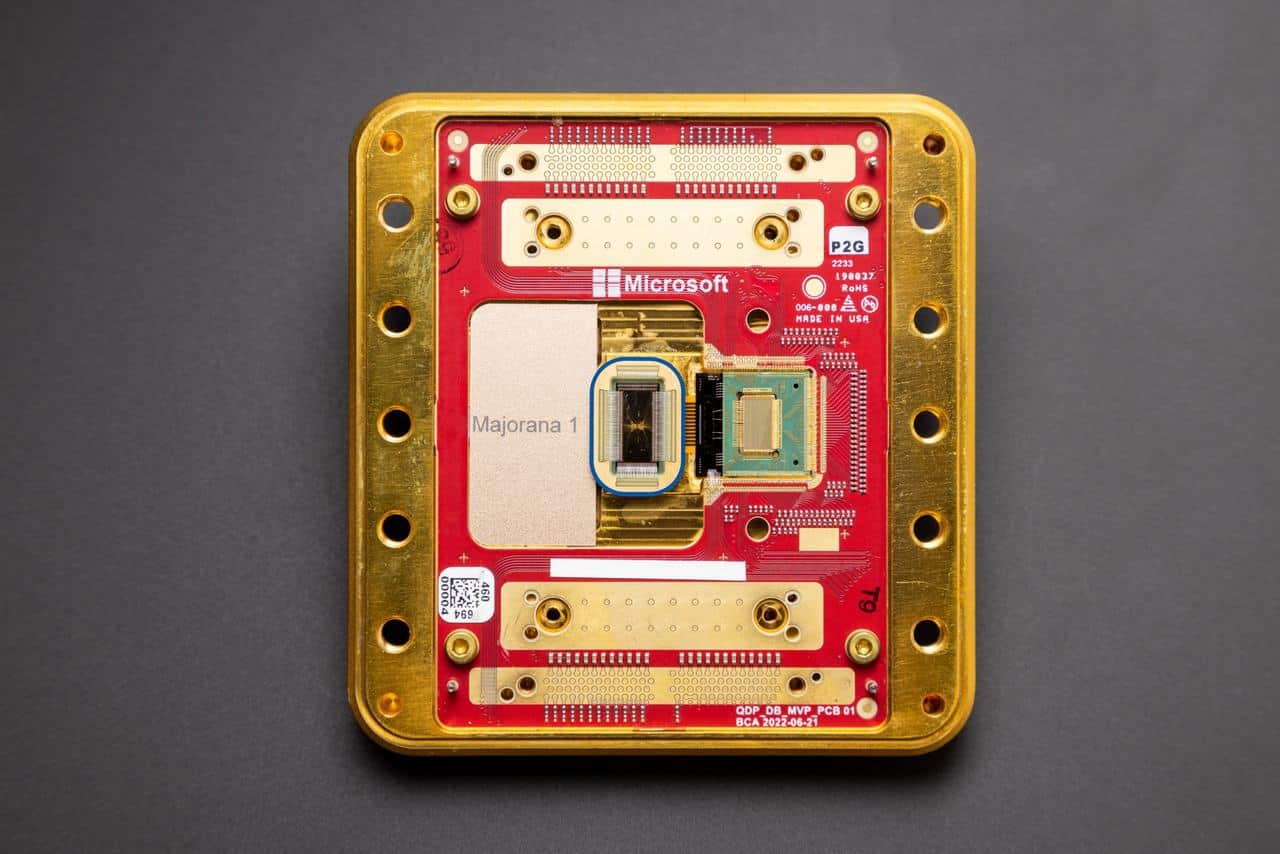
Microsoft’s ambitious plan to build a commercial quantum supercomputer by 2029 is facing renewed scientific scrutiny after a new peer-reviewed critique challenged the company’s earlier Majorana-based quantum computing claims. Microsoft recently introduced its Majorana 2 quantum chip, describing it as a major step toward scalable quantum computing.

The debate centers on Microsoft’s 2025 research, which laid the foundation for its Majorana quantum program. A critique published in Nature argues that the company’s data analysis may have contained fundamental software errors that affected how experimental results were interpreted.

The company continues to pursue an approach based on topological qubits, which rely on elusive Majorana zero modes that, in theory, could prove significantly more resistant to errors than conventional superconducting qubits.

Critique claims Python errors influenced the analysis

According to the report, Microsoft’s custom Python data-processing pipeline contained programming mistakes that may have affected how electrical conductance data was analyzed.

The paper argues that the software mishandled certain data arrays and selectively highlighted measurements supporting Microsoft’s claimed topological gap while excluding contradictory or noisy results. These issues could have produced a false positive rather than evidence of a genuine quantum breakthrough.

Among the alleged problems, the critique points to:

  • Python code that reportedly processed array indexes instead of physical measurement values.
  • Plotting scripts that displayed only selected regions of the experimental data.
  • Omitted data that allegedly showed behavior inconsistent with a topological quantum state.
  • Software logic that critics say reduced the visibility of contradictory measurements.

These issues could undermine Microsoft’s conclusions and leave insufficient evidence for the existence of the topological gap required for its Majorana-based qubits.

Microsoft rejects the conclusions

Microsoft strongly disputes the criticism and says the alleged coding issues do not invalidate its experimental results.

The company published a formal rebuttal alongside the critique in Nature, maintaining that the software served as a practical tuning tool rather than the basis for its scientific conclusions. Microsoft also argues that the critique does not provide an alternative explanation capable of accounting for all of the observed data.

Dr. Chetan Nayak, who leads Microsoft’s quantum hardware efforts, said the company continues to stand behind both its published research and its roadmap toward scalable quantum computing.

According to Nayak, Microsoft is already operating quantum hardware based on these qubits and remains confident in its long-term strategy despite the criticism.

DARPA milestone supports Microsoft’s roadmap

Microsoft also points to its recent progress under the U.S. Defense Advanced Research Projects Agency’s Quantum Benchmarking Initiative.

The company says DARPA advanced Microsoft into the program’s final phase after evaluating both public and proprietary evidence related to its technology. Microsoft argues that this independent assessment reinforces confidence in its overall approach, even as debate within the scientific community continues.

For now, the disagreement highlights the challenges of validating one of the most ambitious approaches in quantum computing. While critics question whether Microsoft’s experiments truly demonstrate the required physics, Microsoft insists its technology continues to advance toward its goal of delivering a scalable quantum computer by 2029.

In other Microsoft news, the company is also reportedly working on a new datacenter project in Texas.

Via Neowin

AMD Releases Adrenalin Hotfix After Windows 10 Users Report Yellow Bang Error

If you have been holding off on installing AMD‘s latest graphics driver after reports of strange Device Manager errors, there’s finally some good news. AMD has now released a hotfix to tackle the issue that left some Radeon users scrambling for workarounds.

The company has released AMD Software: Adrenalin Edition 26.6.3 Hotfix Preview Driver, just a day after officially acknowledging compatibility problems tied to Adrenalin 26.6.2. The issue primarily affected Windows 10 systems running Radeon RX 7000 series graphics cards.

Users noticed a yellow warning icon appearing beside their graphics card in Windows Device Manager after installing Adrenalin 26.6.2. In some cases, AMD Software refused to launch altogether, displaying an error message stating:

“Windows Update may have automatically replaced your AMD Graphics driver. Hence, the version of AMD Software you have launched is not compatible with your currently installed AMD Graphics driver.”

AMD later confirmed it was investigating the issue and temporarily advised affected users to roll back to Adrenalin 26.6.1 while engineers worked on a permanent solution.

For those unaware, Adrenalin 26.6.2 introduced support for FSR 4.1 on RDNA 3-based Radeon RX 7000 graphics cards. The feature was one of AMD’s biggest recent driver additions, bringing AI-powered upscaling improvements previously reserved for newer hardware.

According to AMD’s release notes, the new hotfix specifically addresses the intermittent installation issue affecting Windows 10 systems with Radeon RX 7000 GPUs. Once updated to 26.6.3, eligible Windows 10 64-bit systems running version 21H2 or newer should be able to use FSR 4.1 without encountering the yellow bang error that sparked widespread complaints earlier this week.

XBOX Insiders Are Getting Game Hubs, Wishlists, and Gamertags Upgrades

Starting today, XBOX Alpha Skip-Ahead Insiders can test a bunch of new features that make gaming feel a little smoother. From longer gamertags to cloud gaming shortcuts and upgraded achievement tracking, the update covers multiple parts of the XBOX experience.

XBOX is giving players more room to stand out

Among the highlights is gamertags. Microsoft is increasing the maximum length for unique gamertags from 12 characters to 15 characters, which gives XBOX players more flexibility when creating a new online identity.

The change only applies to available and unique gamertags. Names that require suffixes or use non-Latin characters will continue to have the existing 12-character limit.

XBOX is also revisiting part of its legacy library by expanding Game Hubs to XBOX 360 titles. Players can now open the game card of an installed XBOX 360 game and quickly access achievement progress, captures, and other information without digging through menus.

Image credit: Microsoft

Less waiting, more gameplay

If a Game Pass title requires an update and supports cloud streaming, players can jump into the game immediately via XBOX Cloud Gaming while the update downloads in the background. The option will also appear directly on the game’s card whenever an installation or update is underway.

Microsoft is also making wishlists easier to use. Players can now add released games and upcoming titles directly from a game’s card, eliminating extra steps when saving something for later.

Image credit: Microsoft

For now, these features are only available to Alpha Skip-Ahead Insiders. If testing goes as expected, you can expect these features to roll out across additional XBOX Insider rings in the coming weeks.

Microsoft 365 Education Gets Free AI Teaching & Learning Tools Ahead of ISTELive 2026

AI is already helping teachers with lesson plans, students with assignments, and is increasingly becoming part of daily school life. Microsoft’s latest education report makes that crystal clear, which is why the company is now rolling out AI-powered tools to help teachers and students make better use of the technology with Microsoft 365 Education at no additional cost ahead of ISTELive 2026.

Microsoft wants AI to become part of everyday learning

The report found that AI adoption across education has significantly increased over the past year. According to Microsoft, 92% of students and education leaders have already used AI for school-related tasks, while 88% of educators say the same.

To support that growrh in usage, Microsoft has introduced Unit Plans in Teach, a new feature that helps educators quickly create standards-aligned lesson plans through Microsoft 365 Copilot. The company is also rolling out Student AI Guidelines and Learning Groups in Assignments, giving teachers more control over how AI can be used inside the classroom.

Another notable addition is Learning Zone, which allows educators to run AI-enhanced live lessons while maintaining visibility into student activity and lesson progression.

New AI study tools for students

Students are getting new AI features too. Microsoft confirmed that Copilot Notebooks will now be available via Microsoft 365 Education, which allows students to turn class materials into interactive study guides and personalized learning resources.

The company is also introducing a new Study and Learn Agent inside Copilot Chat. Rather than simply providing answers, the feature is designed to walk students through concepts, provide practice opportunities, and offer feedback throughout the learning process.

That being said, Microsoft’s own research highlights a challenge still facing schools. While AI usage is climbing rapidly, 77% of students and 53% of educators report receiving no formal AI training. To address that gap, Microsoft is also expanding its Elevate for Educators program and launching additional AI literacy resources to help schools move from experimentation to practical implementation.

OpenAI Unveils Jalapeño, Its First Custom AI Chip Built With Broadcom

The AI industry is burning through compute faster than chipmakers can comfortably supply it. Memory shortages, rising component costs, and skyrocketing demand for AI infrastructure have already forced companies to rethink how they build the next generation of data centers. OpenAI now appears ready to tackle that problem itself.

Today, the company officially unveiled Jalapeño, its first custom AI chip developed in partnership with Broadcom. Rather than relying entirely on third-party hardware, the ChatGPT maker is now stepping further into the silicon business with a chip specifically built for large language model inference.

OpenAI wants more control over AI hardware, and it’s first product is here

While most people know OpenAI through ChatGPT, the company has increasingly been investing behind the scenes in the infrastructure powering those services. Jalapeño is a major part of that strategy. According to OpenAI, the chip was designed from the ground up around real-world AI workloads rather than being adapted from older chip designs.

The company says engineering samples are already running production-level machine learning tasks, including GPT-5.3-Codex-Spark workloads, while operating at target power and frequency levels.

Early testing apparently also shows performance-per-watt improvements over current state-of-the-art AI chips. OpenAI hasn’t shared final benchmark numbers yet. We expect a detailed later down the line.

As for Jalapeño, Broadcom handled silicon implementation and networking technologies, while Celestica contributed board, rack, and system-level integration.

OpenAI says Jalapeño moved from initial design to manufacturing tape-out in just nine months, a pace the company believes is among the fastest ever achieved for an advanced AI chip. OpenAI has further confirmed that Jalapeño is only the first entry in a multi-generation platform expected to power gigawatt-scale deployments with partners starting in 2026.

For a company once known solely for AI models, OpenAI is increasingly building everything underneath them too. Models, products, infrastructure, and now custom silicon are all becoming part of the same playbook.

Sony May Use AI to Make PlayStation 6 Feel Like a 4K 120 FPS Console

Sony is reportedly shaping its PlayStation 6 strategy around a difficult challenge: delivering a meaningful next-generation upgrade without allowing hardware costs to spiral out of control, according to Wccftech.

The claim comes from leaker Moore’s Law Is Dead, who recently discussed alleged details from internal Sony hardware planning meetings. While Sony has not confirmed any of the information, the report offers an early look at how the company may be approaching the next PlayStation generation.

According to the leak, rising component prices are forcing Sony to carefully balance performance, efficiency, and affordability. Rather than relying solely on significantly more powerful hardware, Sony may increasingly use AI-powered technologies to improve gaming performance and visual quality.

AI Could Play a Major Role in PlayStation 6

One of the most notable claims involves Sony’s reported research into Virtual Frame Interpolation (VFI), a technology that could generate additional frames using artificial intelligence.

The goal would be to make PlayStation 6 feel like a true 4K 120 FPS gaming machine without requiring the massive GPU performance increases that would traditionally be needed to achieve those results.

The leaked strategy reportedly highlights several key priorities:

  • Keeping console manufacturing costs under control
  • Using machine learning for super resolution and frame generation
  • Improving ray tracing performance
  • Maintaining low-power designs
  • Preparing for stricter energy-efficiency requirements, including potential future EU regulations

Sony already uses AI-assisted upscaling through PlayStation Spectral Super Resolution (PSSR) on PlayStation 5 Pro. The report suggests the company could expand on that foundation by combining PSSR, AI frame generation, and enhanced ray tracing technologies in PlayStation 6.

This approach would allow Sony to improve perceived performance and image quality while avoiding a dramatic increase in hardware costs.

New User Interface and AI Features Also Discussed

Beyond graphics improvements, the leak also points to possible software and user experience upgrades.

A redesigned PlayStation user interface is reportedly considered likely for the next-generation console. Discussions also touched on advanced AI-powered voice controls that could provide a more natural way to navigate the system, launch games, manage settings, and perform other tasks.

If PlayStation 6 includes enough system memory, some of these AI features could potentially run locally on the console. However, cloud-based processing remains another possibility, particularly for more advanced voice and assistant capabilities.

The report further suggests Sony could tie certain AI-powered features to higher PlayStation Plus subscription tiers, encouraging more users to upgrade to Extra or Premium plans.

In other news, Sony has confirmed that single-player games will be exclusive, unlike the multiplayer titles.

There is no confirmed release window for PlayStation 6, but speculations range as far as 2029. However, some reports suggest the PS6 release won’t be delayed that long. Sony has not officially announced the console or its details, though leaks suggest a strong focus on AI-driven performance improvements.

GTA 6 Retail Copies Will Include a Download Code Instead of a Disc

Earlier today, Rockstar shared the pricing of GTA 6. But, it seems the studio appears determined not to take any chances with Grand Theft Auto 6 (GTA 6), and its latest decision shows just how seriously the studio is approaching launch security. Ahead of opening pre-orders, Rockstar quietly confirmed that retail copies of GTA 6 will not include a physical game disc. Instead, players purchasing boxed versions will find a download code inside the package.

Rockstar is tightening control ahead of launch

While buyers will still be able to pick up a boxed copy, the actual game will need to be downloaded digitally. Rockstar says these retail editions will begin appearing on November 12, one week before the game’s scheduled November 19 release. The company notes that the earlier availability is intended to support pre-loading, allowing players to download the massive title before launch day.

That being said, the timing also serves another purpose. By removing physical discs from the equation, Rockstar dramatically reduces the chances of gameplay footage, story details, or major surprises leaking from copies that accidentally reach stores early.

Physical collectors may not be thrilled

For some players, the announcement will likely be disappointing. Rockstar previously shipped Red Dead Redemption 2 with multiple discs in the box, while GTA 6 is moving entirely toward a code-based retail experience.

The decision may also have implications beyond leak prevention. Disc-free physical releases naturally limit second-hand game sales and make ownership more closely tied to digital storefront ecosystems.

Interestingly, Rockstar’s latest wording may have revealed another detail. The company specifically described GTA 6 as a “single-player experience,” adding fresh fuel to long-running speculation that a future GTA Online successor could launch separately.