How to switch columns and rows in Excel [Swap / Transpose]

People interpret data differently; some insert data horizontally and others prefer to do it vertically. For flexibility, Microsoft Excel comes with the Transpose feature, which lets you switch columns and rows in Excel.

The Transpose function in Excel changes your columns and rows’ orientation. It allows you to perform this operation in two different ways – either with the paste options or by using a formula.

What is the best practice to switch the columns and rows in a range in Excel?

  1. If you have formulas on the sheet, the data on the table must be absolute references in order to switch columns and rows in Excel.
  2. To perform this operation regularly and view the data from diverse angles, you may want to create a PivotTable. It simplifies the process of pivoting your data by letting you drag and drog data between fields and columns.

If you are working with an Excel file with lots of headings stacked horizontally, it gets clumsy to read or edit.

To switch the columns and rows in Excel, you have to either use paste options in the program or go with a formula as explained in this guide.

How can I change columns to rows in Excel?

1. Use paste and Transpose

switch-columns-and-rows-in-Excel-switch-columns-and-rows-in-Excel

  1. Open the Excel sheet that you want to work on.
  2. Highlight the data range that you want to transpose, as well as the labels of the column or row.
  3. Press the CTRL + C combination to copy the selection.
  4. Navigate to the destination row or column where you wish to apply the copied values.
  5. Right-click the topmost left cell and select the Transpose icon from PASTE OPTIONS.
  6. Return to the origin cell and delete the data.

2. Use the Transpose function in a formula

transpose-formula-switch-columns-and-rows-in-Excel

  1. Open the spreadsheet.
  2. Select an empty cell to insert the converted data.
  3. Type =transpose into the selected cell.
  4. Add the range of cells that you want to transpose into a bracket after =transpose. So, it looks like this – =transpose(A1:F7).

Speaking of rows, we also have an article that explains what to do if you can’t insert a row in Excel, so don’t miss it. This isn’t the only issue, and our latest guide covers what to do if Freeze Panes is not working in Excel.

Before you leave, don’t miss our guide on how to get data from another sheet in Excel for more useful information.

Note: In the above formula, A1 is the starting cell and F7 is the ending one in the range. This technique makes use of an array and formula. Unlike the first method, switching columns and rows with this method can ruin the formatting.

Microsoft starts rolling out New Conversation button in Teams channels

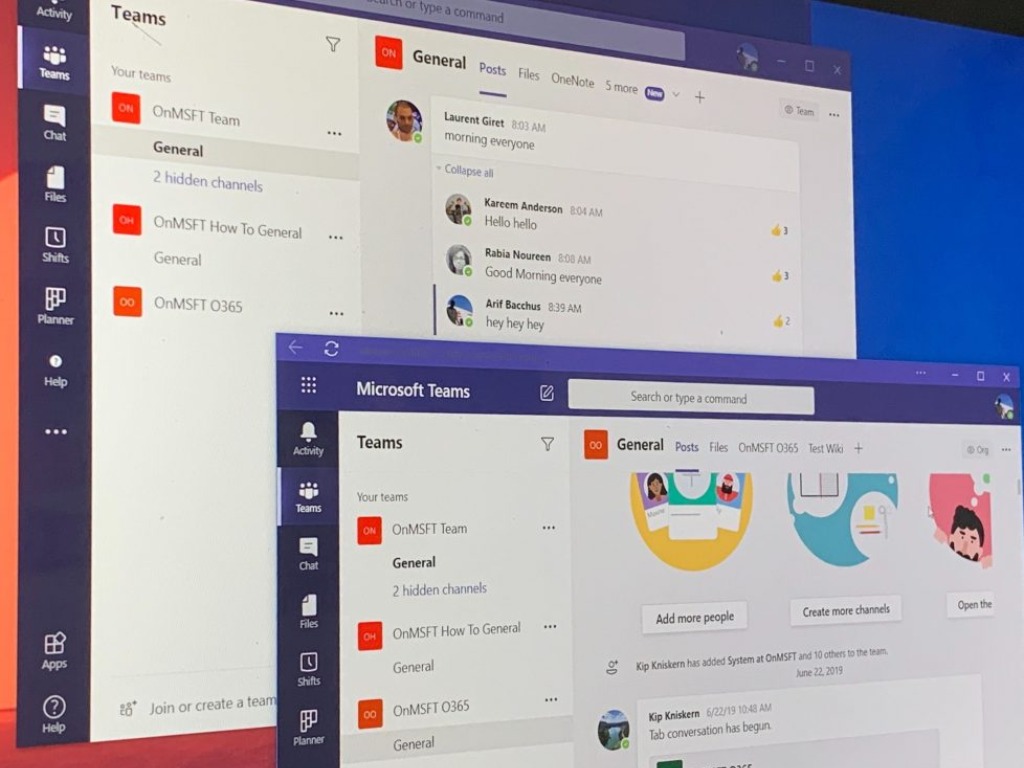
Last month, we reported that Microsoft is working on a new feature to better separate new conversations from thread replies in Teams channels. In a new post on LinkedIn, Vincent Bellet, a Principal PM Manager at Microsoft, announced that they have started rolling out a “New conversation” button into Teams Channels experience.

“Our challenge was to fix a clear usability issue without bringing any friction for content creators and people willing to engage by responding to a message. We spent a lot of energy to find the right balance between qualitative and quantitative feedback to get to today’s milestone. I am very excited to introduce this change worldwide, hope you will welcome this change too!,” Bellet explained.

Just as a reminder, the initial UserVoice request was posted on the UserVoice forums in May of 2017, and 9,457 Microsoft Teams users upvoted the suggestion since then. Many people agreed in the comments section that an updated UI would be much more valuable to prevent users from starting a new conversation when they intend to reply to an in-line thread in Teams channels.

The New conversation button, which replaces the “Start a new conversation” text field, should improve the usability of the Teams collaboration platform. To be clear, the change is gradually rolling out to a small pool of Microsoft Teams users first, and it should be live for the rest of the userbase in the coming weeks.

Xbox Series X launches on November 10 for $499, pre-orders to open on September 22

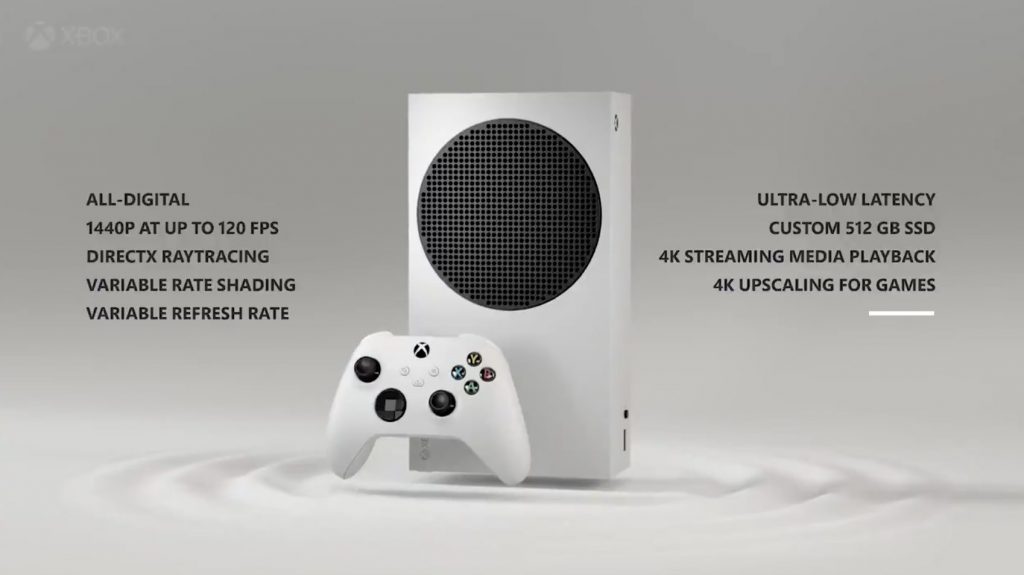
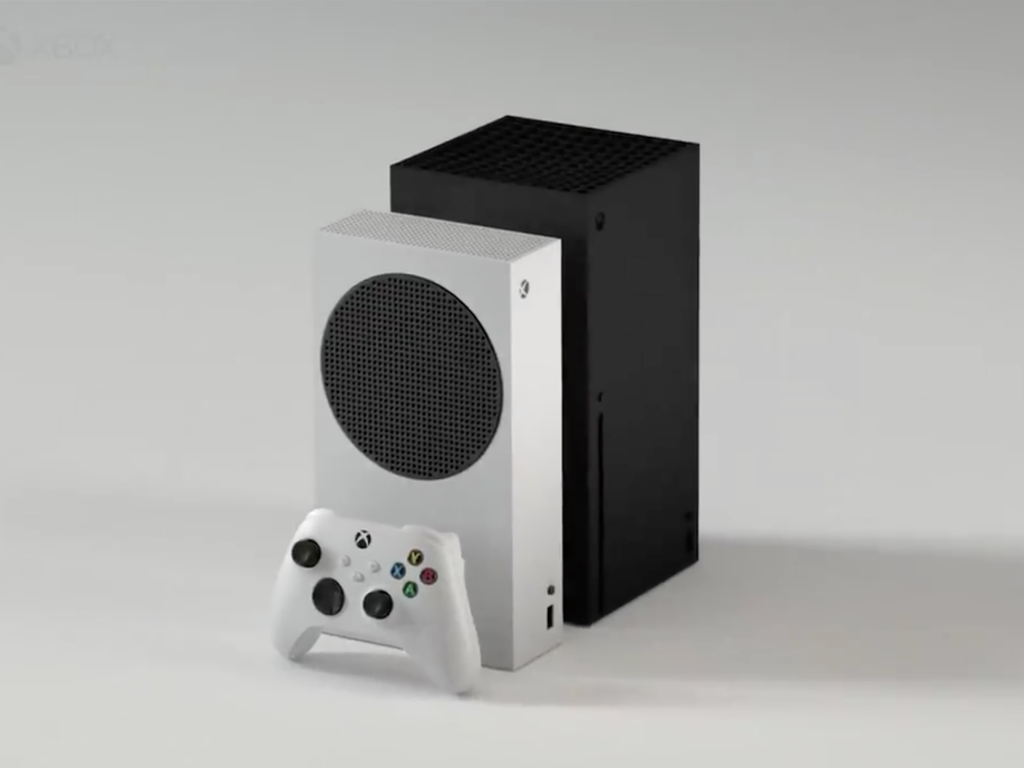
It’s finally official, Microsoft will launch both the Xbox Series S and the Xbox Series X on November 10. The company already announced the $299 pricing for the Xbox Series S yesterday, but the Xbox team has just confirmed that the Xbox Series will be priced at $499, a piece of information that also leaked yesterday, but hasn’t been confirmed until now. The Xbox One and the Xbox One X also launched at $499, but the Xbox Series X should offer a true generational leap with an ultra-fast NVMe SSD, and a 12 teraflops GPU that supports 4K at 60FPS, 120 FPS gameplay, as well as 8K.

Microsoft also announced today that both of its next-gen consoles would be available with an Xbox All Access subscription that will include an Xbox console and 24 months of Xbox Game Pass Ultimate. The $299 Xbox Series S will be available starting from $24.99/month for 24 months, and the $499 Xbox Series X will be available starting from $34.99/month for 24 months. Xbox All Access is also coming to 12 new countries this holiday, with more to come next year.

The Xbox Series X was announced back in December 2019 at The Game Awards ceremony, and Sony didn’t strike back with its PS5 announcement until early 2020. As of this writing, the Japanese company has yet to announce pricing details for the PlayStation 5 and its discless Digital Edition variant, and we expect the official prices should be revealed pretty soon. In the meantime, pre-orders for both the Xbox Series S and the Xbox Series X will open in two weeks on September 22.

With the $299 Xbox Series S and Xbox All Access subscriptions, Microsoft is making sure that the transition to next-gen console should as painless as possible for most consumers. Overall, the company seems well-positioned ahead of the beginning of a new console generation, though the company has yet to clearly explain why gamers should choose the more powerful Xbox Series X. So far, the company failed to really demonstrate the console’s power advantage over the PlayStation 5, though the good news is that the company still has 2 months left to do just that.

Microsoft’s Panos Panay discusses the origins and future of Surface Duo

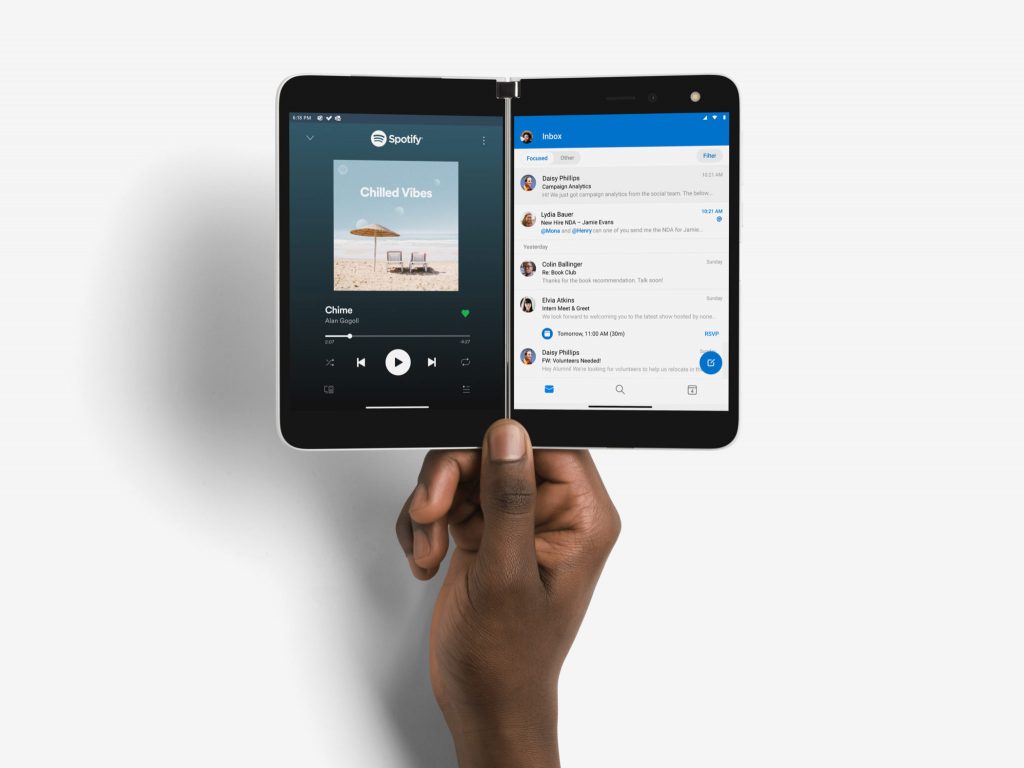
Microsoft’s dual-screen Surface Duo is launching in the US tomorrow, and the company’s first Android device has been years in the making. In a long interview with The Verge, Surface inventor and Microsoft Chief Product Officer Panos Panay revealed a lot of interesting details about the process that led to the creation of Surface Duo, with Microsoft eventually opting for Android instead of a Windows-based OS.

According to Panay, Microsoft started working on a dual-screen mobile device around 2014, after Microsoft cancelled the Surface Mini. At that point, Panay had become pretty much obsessed about creating a dual-screen device, to the point of carrying two pieces of metal connected by a hinge in his pocket for months. The exec did so to get an understanding of how durable such a device would be, and what would be the ideal dimensions for a dual-screen device that should comfortably fit in your pocket.

After Microsoft canceled the Windows RT-powered Surface Mini at the last minute, Panos Panay and his team started working on Andromeda, a Windows-powered dual-screen device which apparently looked quite different from Surface Duo. “At that time, it was different hardware, it’s not the same hardware… it’s not even remotely close,” said Panay. “We’re in so many generations later of development [with Surface Duo], we understand how thin it is, we understand reliability, we understand the robustness of the screens. It has been generationally made, it’s years in the making.”

Surface Duo prototypes
Some early Surface Duo prototypes (image credit: The Verge).

When designing the Surface Duo, Microsoft ultimately opted for a design where all the internal components would be distributed across both sides of the device, but the company experimented with having all components on one side, and another prototype had the two displays connected wirelessly. There were also some internal debates about LCD vs. OLED screens, and the latter eventually won as they allowed the device to be thinner.

Unfortunately, making the Surface Duo just 4.8mm thin led to some compromises, such as the lack of 5G connectivity, NFC, and a complex camera module. “This is the most emotional product we’ve ever created. A lot of that comes from tension. To get that diamond out, there had to be a lot of it. Microns mattered, not millimeters, microns,” said Panay. “Maybe that’s why it took years to get to this product. There were moments like those because we pushed so many boundaries.”

After Microsoft cancelled the Surface Mini due to Windows RT lacking the apps that consumer want on a tablet, choosing Android for the Surface Duo was a difficult choice, Panay explained. “Bringing Android into the fold, that wasn’t the most simple of conversations all of the time,” admits Panay. “You have to explain that and you want your team on board and people believing it.” Eventually, Microsoft did the right thing as Microsoft was able to work with Google to improve Android for dual-screen devices, and Microsoft didn’t go as far as creating an Android fork like other phone manufacturers have done in the past, some with little success (see Amazon’s Fire phone).

Microsoft Surface Duo

While Microsoft’s Surface Duo will launch tomorrow in the US, we already know that a new version is in the pipeline. The Windows 10X-powered Surface Neo is also still being worked on, though it still has no release date. “I wanted the right time to bring that product with the right experience. We believe in that concept and form factor and size. It will be a beautiful complement to Duo with Windows and I’m excited about it. It’s a product that’s near and dear to my heart.”

The Surface Duo that will start shipping tomorrow will come with two 5.6-inch screens that form a bigger 8.1-inch screen when opened, and the device comes with pretty thick bezels. In the future, Panay hinted that Microsoft could explore different sizes for its Surface Duo and Neo dual-screen devices. “The next natural evolution is different [dual-screen] sizes,” said Panay. “Whether the larger moves into Windows where it’s appropriate to use the Windows codebase and software, and the smaller form factor uses Android, I think you can safely say that’s the right path with what we’re doing right now as a team.”

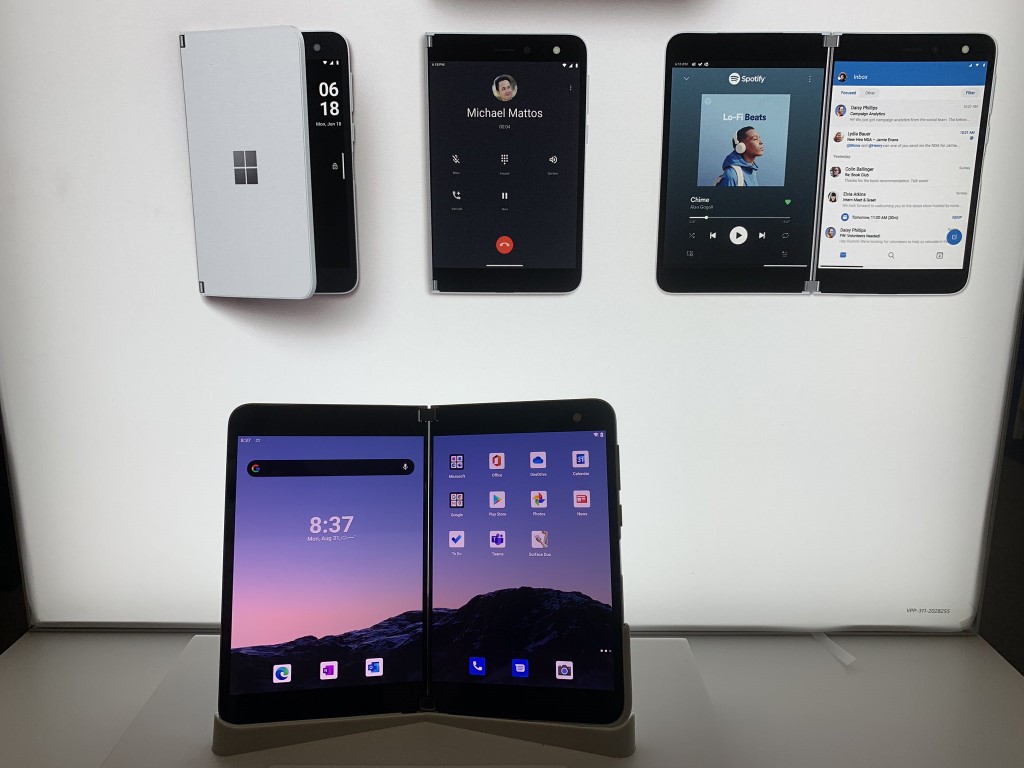
If we already got the chance to go hands-on with a Surface Duo at a Best Buy store, full reviews should be posted online pretty soon, and stay tuned to OnMSFT for our detailed review of Microsoft’s latest Surface device. In the meantime, we remind you that you can pre-order the Surface Duo from the Microsoft Store, Best Buy, and AT&T.

Rapport Management Service High CPU: 3 Fixes if It’s Slow

A few users have experienced Rapport Management service high CPU. This guide will cover causes, as well as the most effective solutions.

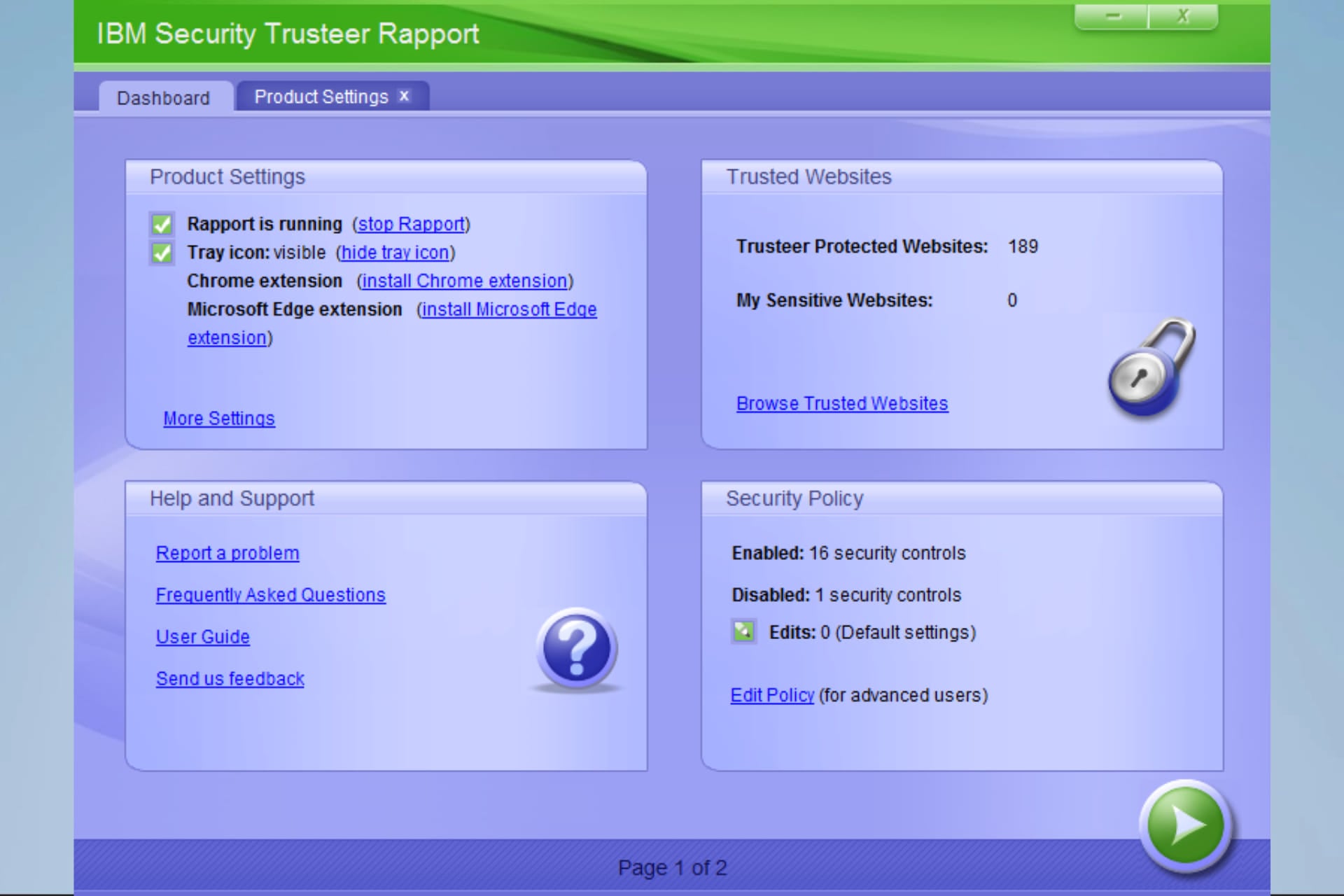
Trusteer Rapport is software that adds a layer of security to your antivirus software. The program protects confidential data, such as your bank account details, from malicious software or unauthorized personnel and is currently used by most banks.

Trustee Rapport also allows you to apply Rapport’s protection to other websites where you exchange sensitive information.

Why does Rapport Management service have high CPU usage?

From the research that we have conducted, we can ascertain that a few factors may trigger the Rapport Management service high CPU usage. The following are common factors:

  • Compatibility issues – If Rapport Management has compatibility issues with other programs, especially antivirus software, it may lead to high CPU usage.
  • Scanning – Since the service constantly scans your devices for viruses, you may expect high CPU usage.
  • System resources – The Management service may consume more resources on devices with low resources or space.
  • System updates – While your system updates for viruses, you may expect this service will use up a lot of CPU.

What is Rapport Management service?

When you connect to your online bank, Trusteer Rapport using the Rapport Management service, performs security checks in the background that make it hard for criminals to hijack your account. The service serves the following functions.

  • It verifies that you have connected to the genuine bank’s website and not to a counterfeit created for fraud.
  • Once verification is complete, it securely locks down communication between your computer and the bank’s website.
  • It protects your internet connection and computer from malware, creating a safe communication line with your bank.

Though the program does a stellar job at keeping your confidential data from fraudulent hands, it’s not without problems. Users have encountered some problems, such as conflicts with antivirus programs, slow performance, and Rapport not running.

How can I fix Rapport Management service high CPU usage?

1. Update Rapport

  1. Click on Open Console.
    rapport management service high cpu
  2. Click on the More Settings link.
    rapport management service high cpu
  3. If out of date, ensure you tick Automatic updates.
    rapport management service high cpu
  4. Wait for the updates to start and restart the application.

2. Reinstall the app

  1. Press Windows + R, type appwiz.cpl hit Enter.
    rapport management service high cpu
  2. From the list of apps, search for Trusteer Endpoint Protection. Click on it, and select Uninstall/Change.
  3. Follow the wizard to complete the uninstallation.
  4. Navigate to the official download site.
  5. Click on Download Links.
  6. Click the Download button for your OS.
  7. Select the downloaded file and follow the wizard to install it.

3. Disable your antivirus

  1. Click on the hidden access arrow in the Taskbar.
  2. Click on your antivirus icon, hover over Avast shields Control and select Disable for 10 minutes (This step varies for different antivirus software).

Many users reported problems when installing Rapport. Others reported conflict between their antivirus and Trusteer.

End users have reported problems with Rapport, slow PCs due to high CPU and RAM utilization, incompatibility with various security/antivirus products, and difficulty removing the software. This shows conflicts can occur when multiple real-time scanners run simultaneously.

On the other hand, you could also go for an antivirus alternative that has been proven to provide maximum protection within minimal system interferences, and that is TotalAV

TotalAV

Benefit from higher protection for your PC with this comprehensive anti-phishing solution.
Free Trial Visit Website

Do I need Rapport Management service?

The need for this service is a personal choice, and it will depend on specific circumstances and needs. It is usually used for online banking security and would be useful to prevent phishing or other malware attacks.

For persons who use the banking system often, it may be necessary to use the service on their devices. But there may be no need if you do not have to use banking services or systems.

This is as much as we will cover in the article. The solutions discussed should help fix the Rapport Management service’s high CPU usage.

Let us know in the comments section which solutions worked for you.

5 Best Apps to Keep Track of Watched Movies

If you watch movies frequently, it’s a good idea to have software that lets you keep track of watched movies.

Luckily, there are many great applications that will let you keep track of watched movies, and today we’re going to show you the best ones.

What are the best tools to keep track of watched movies?

Trakt

Trakt keep track of movies watched

If you’re looking for a service that lets you keep track of watched movies, Trakt might be a perfect choice for you. The service lets you track both movies and shows that you watch with ease.

Trakt works with various players including, Kodi, Plex, Netflix, MediaPortal, Emby, Infuse, MrMC, Stremio, Serviio, and VLC. As for platforms, it works on Android, iOS, macOS, and Windows.

The service also provides you with links to streaming services and major TV networks, so you can always find new content to watch. The service also works with Alexa, which is a major plus.

Just like with any other service, you can easily add movies to your watched history list, add them to your collection, or add them to the watchlist for future viewing.

Trakt is great, it’s completely free, and it’s available on a wide array of platforms and media players, so be sure to consider it.

Trakt features:

  • Completely free
  • Works with a wide array of multimedia players
  • Available on Android, iOS, Windows, and Mac
  • Alexa support
  • Ability to track watched movies and create lists

→ Visit Trakt website

Letterboxd

letterboxd keep track of movies watched

Letterboxd is described as a social network for movie lovers, and it’s available as a web application for desktop and as a mobile app for Android and iOS.

After you create your account, you can use Letterboxd to select movies that you saw and rate them. You can also add movies to the Watchlist with just a couple of clicks.

The service also allows you to write reviews of the movies you watched, so you can share your opinion with the community.

Letterboxd also supports lists, so you can make top 10 lists, lists of favorite movies from a franchise or from a specific director and share them with the world.

The service also offers detailed movie-watching stats, but this option is available only for the Pro subscription.

Overall, Letterboxd is a simple to use service, and if you’re a movie watcher, you might want to consider it.

Letterboxd features:

  • Available as a web app and iOS/Android app
  • Free to use
  • Ability to create lists, rate movies, create watchlists
  • Detailed movie-watching stats for Pro users

⇾ Visit Letterboxd website

All My Movies

All My Movies keep track of movies watched

All My Movies is a desktop application that lets you organize your movie collection and keep track of movies that you watched.

The software connects to the IMDb and other movie databases in order to get the necessary information about the movies in your collection.

All My Movies has an extensive search feature so you can search for a movie based on multiple criteria simultaneously and find what you need in a matter of moments.

If you own physical copies of your favorite movies, the software also has a Friends directory, so you can keep track of movies that you borrowed to your friends.

All My Movies is a simple application, but it comes with a wide array of skins and all the basic features that you’ll need, so there’s no reason not to try it.

All My Movies features:

  • Simple to use
  • Ability to organize movie collection
  • Keeps track of watched movies
  • Various skins and themes are available
  • Powerful search feature

→ Download All My Movies

ICheckMovies

ICheckMovies keep track of movies watched

Another great service that allows you to keep track of watched movies is ICheckMovies. Once you create an account, you just need to pick a movie that you want to watch and that’s it.

After you finish a movie, check it and that’s it. The entire service is connected to the IMDb, so you should be able to find something to watch with ease.

You can even add your own movies that aren’t on IMDb, so that’s a major plus from us. It’s worth mentioning that you can also import data from your IMDb page, which might come in handy.

ICheckMovies is a simple service with basic features, but it’s perfect for users that prefer the minimalistic movie tracking services.

ICheckMovies features:

  • Simple to use
  • Has the ability to import IMDb data
  • Allows you to add your own movies
  • Ability to track watched movies

→ Visit ICheckMovies

Criticker

Criticker keep track of movies watched

Another website that lets you keep track of movies that you watched is Criticker. The website supports both movies and shows, and it can give you great recommendations.

All that you have to do is to rate 10 movies, and Criticker will recommend the best movies and shows according to your taste.

Speaking of rankings, Criticker allows you to add unlimited rankings and write reviews, and thanks to the active community, you can easily find other users with similar tastes.

Of course, the service has the ability to keep track of movies that you’ve seen as well as the ability to rate both movies and user reviews.

Criticker is simple to use, but it offers powerful recommendations, so be sure to check it out.

Criticker features:

  • Easy to use
  • Ability to add rankings to movies and reviews
  • Can keep track of watched movies
  • Support for reviews
  • Powerful recommendation system

→ Visit Criticker

Keeping track of watched movies doesn’t have to be hard, as long as you have the proper application or service for the task.

If you need to good service or app to keep track of watched movies, be sure to try Trakt or any other entry from our list.

Each Cyberpunk 2077 can of Rockstar Energy gives gamers $1 of Xbox store credit which is insane

A special Rockstar Energy and Cyberpunk 2077 collaboration is set to begin next month and it actually sound pretty incredible.

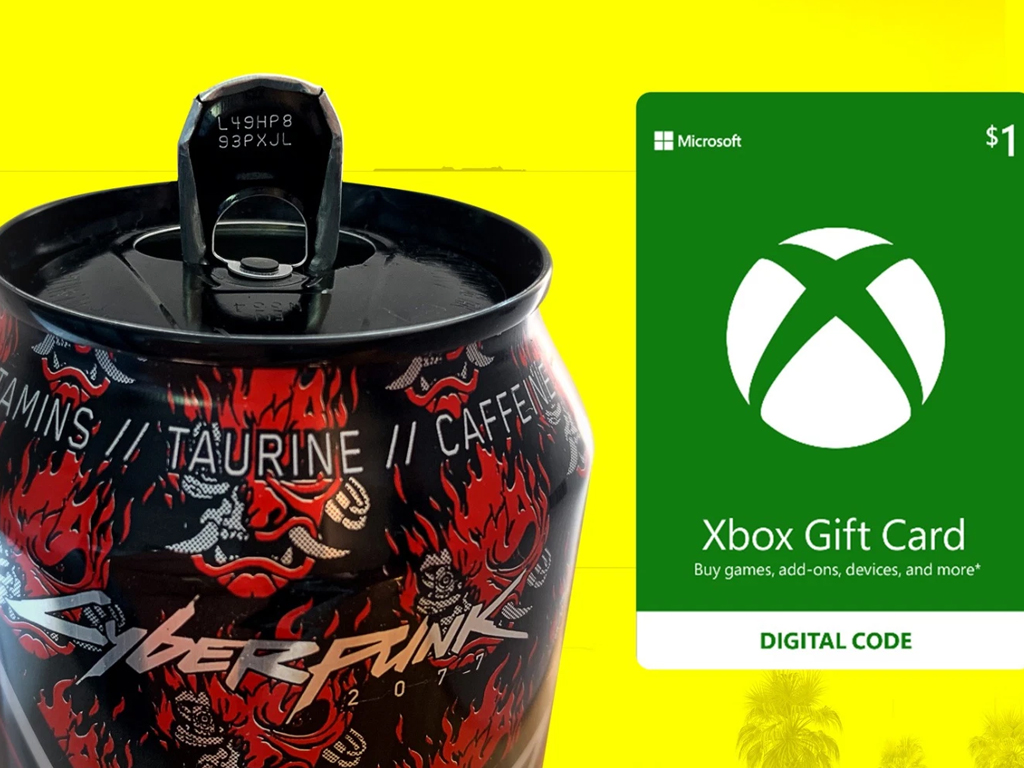
Starting on October 1st and running through to December 31st, five special Cyberpunk 2077 themed cans will begin appearing on North American store shelves. Four of the cans will simply be themed versions of regular Rockstar Energy drinks but the fifth will be a limited-edition Samurai Cola drink inspired by the in-game band headed by Keanu Reeves’ character, Johnny Silverhand. Samurai Cola will also be available in Mexico in limited edition bottles.

While the designs are cool, the real kicker is the unique codes on each can that are guaranteed to unlock a $1 Xbox gift card that can then be added to the Microsoft Store for credit. This credit can then in turn can be used to buy apps, movies and episodes, and even video games such as Cyberpunk 2077.

Rockstar Energy x Cyberpunk 2077 cans

This is essentially a $1 cashback offer on every can purchased but with the cash only being usable within the Microsoft Store digital storefront and there being a $60 limit per Microsoft account on how many $1 gift cards can be redeemed. It’s kind of unbelievable but it is in fact what this promotion is offering.

As the official announcement suggests, $60 of credit is enough to help many players buy the Cyberpunk 2077 video game but it can also be used on any other digital Xbox video game or DLC.

Redeeming three codes will unlock exclusive Cyberpunk 2077 digital comic books while every redeemed code will enter the user into a draw to win a number of real-world prizes ranging from Cyberpunk 2077 SteelSeries headsets, hoodies, and hats with the grand prize being an actual Rockstar Energy x Cyberpunk 2077 muscle car.

Rockstar Energy x Cyberpunk 2077 ca

All drink codes will need to be entered on this website here.

Rather amusingly, this isn’t the only Xbox video game having an energy drink promotion this holiday season. Just over a week ago, the Monster Energy Halo Infinite campaign was announced. Like the Cyberpunk 2077 campaign, the Halo Infinite one also runs until the end of the year but it does have a bit of a head start as it began last week. You can read more about the Halo Infinite promotion here.

Are you going to buy the Halo Infinite drinks or the Cyberpunk 2077 ones? Maybe both? Let us know in the comments below and then follow us on Twitter and Pinterest for more Xbox gaming news.

Cyberpunk 2077
Cyberpunk 2077
Developer:
CD PROJEKT RED
Price:
$29.99

iTunes doesn’t install on Windows 10

iTunes is a popular multimedia player and irreplaceable tool if you have any iOS device. Unfortunately, users reported that iTunes won’t install on Windows 10, and since that can be a big problem today we’re going to show you how to fix it.

How do I fix an iTunes that won’t install on Windows 10?

There are many problems that can prevent iTunes from installing on your Windows 10 PC. Speaking of problems, users reported the following issues with iTunes:

  • Problem with Windows installer package iTunes – This is a common error message that appears while installing iTunes. Fortunately this isn’t a big problem, and you should be able to resolve it by using one of our solutions.
  • Errors occurred during installation iTunes – According to users, sometimes certain errors can occur while trying to install iTunes. If any of these errors appear, they will prevent iTunes from installing.
  • iTunes won’t update to latest version – Few users claim that this problem occurs only when trying to update iTunes to the latest version. This can be a problem since you won’t be able to install the latest version at all.
  • iTunes won’t install Missing program – Sometimes Missing program error message can appear while trying to install iTunes. This is usually caused by corrupted installation package.
  • iTunes won’t install error 2324, 193 – There are various errors that can appear while trying to install iTunes. According to users, 2324 and 193 are the most common installation errors.
  • iTunes update won’t install Invalid signature – Another common problem while updating iTunes is Invalid signature message. This is a relatively rare problem, so you most likely won’t experience it.
  • iTunes won’t install insufficient privileges, system not modified, missing dll – There are various error messages that can prevent iTunes from installing on Windows 10. According to users, Insufficient privileges or missing DLL files are the most common causes for this problem.
  • iTunes won’t install keeps rolling back – This is another common problem with iTunes. According to users, iTunes can’t install since the installation keeps rolling back.
  • iTunes won’t work, open, launch Windows 10 – Another common problem with iTunes is the inability to open the application. According to users, iTunes won’t launch at all on Windows 10.

1. Remove Apple Software Update using specialized uninstallers

According to users, the Apple Software Update tool can sometimes cause issues with iTunes installation. To fix this problem users are advised to download and use uninstaller programs.

With this type of dedicated tool, you resolve all existent issues regarding the problematic application. Hence, an uninstaller will thoroughly scan the computer after removing the program for erasing all temporary files.

Besides, you can also clean your PC of any residual files that a typical uninstall would otherwise leave behind.

Thus, in order to uninstall the Apple Software tool, you should take advantage of efficient uninstaller software to remove it completely from your PC.

2. Extract the setup files

  1. Download and install archiving tool.
  2. Locate iTunes setup file and right click it.
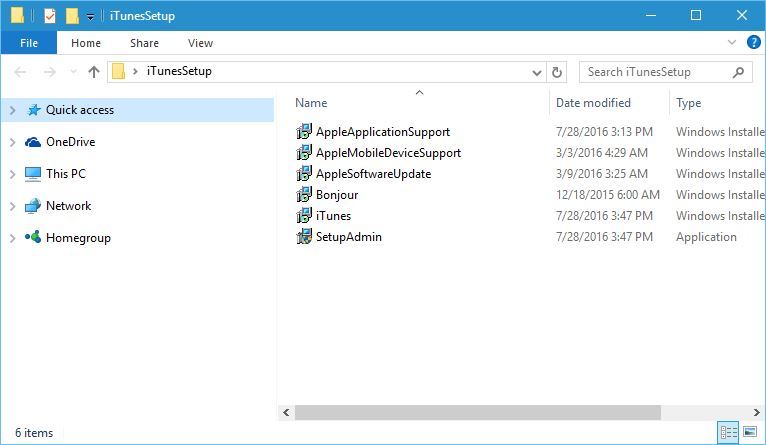
  3. Choose Extract to iTunesSetup.
  4. iTunesSetup folder should be created.
  5. Open it.
    iTunes won't install keeps rolling back
  6. Once you open iTunesSetup folder install the necessary components one by one.

On the same note, it is recommended to use specialized tools for extracting different formats of files correctly.

To perform this without any difficulties, the most efficient method is to use the best file compression software to manage infinite files effortlessly.

3. Download iTunes for older video cards

Users reported that you can fix this problem by downloading and installing iTunes for older video cards. To do that follow these steps:

  1. Download iTunes 12.2.1.for Windows.
  2. Run the setup file and install iTunes.
  3. After the installation is complete start iTunes and check for updates.
  4. Follow the instructions and download the latest version.

This is a useful workaround and many users reported that it works, therefore be sure that you try it.

4. Install Microsoft Visual C++ 2005 Service Pack 1 Redistributable

According to users, you can fix this problem by installing the Microsoft Visual C++ 2005 Service Pack 1 Redistributable Package MFC Security Update.

After downloading the necessary components install them and you should be able to install iTunes on Windows 10 without any problems.

5. Remove all iTunes related keys from the registry

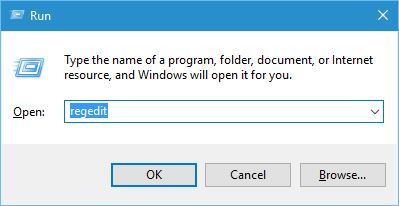
  1. Press Windows Key + R and enter regedit. Press Enter or click OK.
    Problem with Windows installer package iTunes
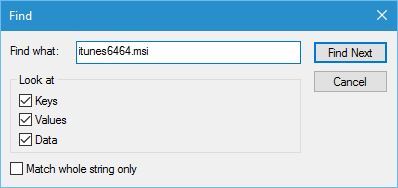
  2. Press Ctrl + F enter itunes6464.msi and click Find Next.Errors occurred during installation iTunes
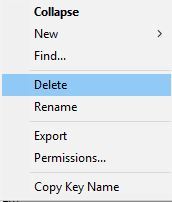
  3. You should see keys related to itunes6464.msi. Right click each key and choose Delete.
    iTunes won't update to latest version
  4. Press Ctrl+F and click Find Next to find another key related to itunes6464.msi. Delete that key. Repeat this step until you delete all keys associated with itunes6464.msi.

Users reported that related keys are usually the following:

  • HKEY_CLASSES_ROOTInstallerProducts477BAEFBCD7C23040BA5ADF5C77B3B56SourceList
  • HKEY_LOCAL_MACHINESOFTWAREClassesInstallerProducts477BAEFBCD7C23040BA5ADF5C 77B3B56SourceList

This is an advanced procedure, and by changing the registry you can cause system stability issues, therefore we advise extra caution.

In addition, it might be a good idea that you create a backup of your registry in case any problems occur.

Bear in mind that you will probably get different results on your PC, but the procedure is the same. Just right-click 477BAEFBCD7C23040BA5ADF5C77B3B56 key in the left pane, and choose Delete from the menu.

This is just our example, and you should delete the key that has an array of random numbers and letters in its name.

6. Run the setup as administrator

If iTunes won’t install on Windows 10 you need to install it as an administrator.

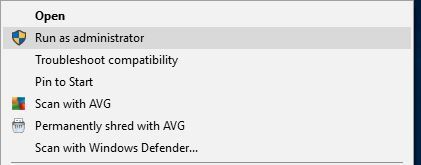
To do that simply find the setup file, right-click it and choose Run as administrator from the menu.

iTunes won't install Missing program

Alternatively, you can use Command Prompt to do that by following these steps:

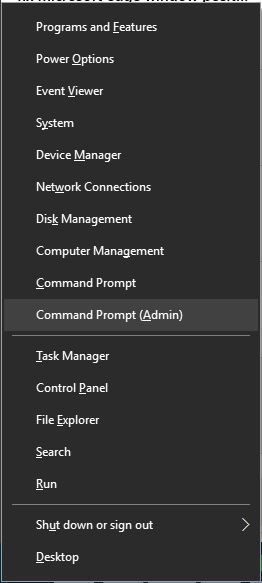
  1. Press Windows Key + X to open Power User Menu and select Command Prompt (Admin) from the list.
    iTunes won’t install error 2324
  2. When Command Prompt opens, you need to enter the location of the setup file and press Enter. We used c:usersyour_user_namedownloadsitunes6464.exe as the location of the setup file, but bear in mind that that location might be different on your PC.
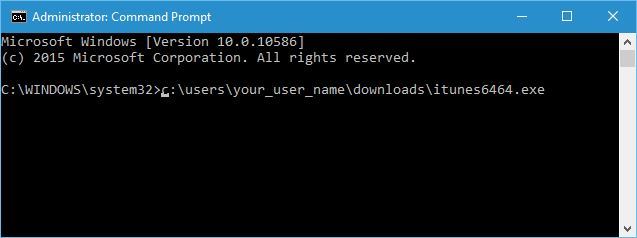
    iTunes update won't install Invalid signature

7. Uninstall your antivirus software

Sometimes antivirus programs can interfere with the iTunes installation process, therefore it’s advised that you temporarily disable or remove your antivirus program.

Users reported issues with AVG antivirus, but bear in mind that almost any antivirus software can cause this error to appear.

8. Try installing iTunes in compatibility mode

  1. Locate iTunes setup file, right click it and choose Properties from the menu.
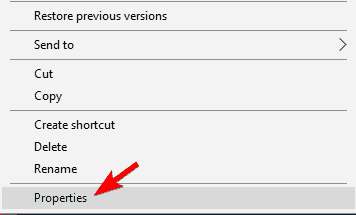
    iTunes won't work
  2. Navigate to Compatibility tab and check Run this program in compatibility mode for.
  3. Select Windows 7 or any other older version of Windows from the list. Now click on Apply and OK to save changes.
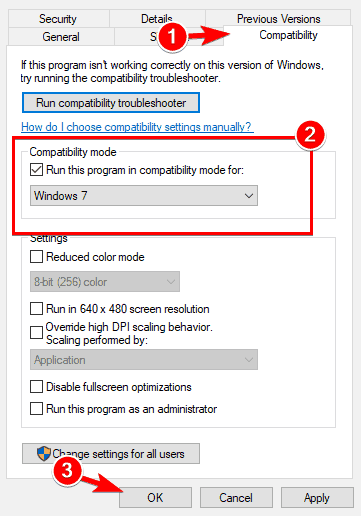
    Problem with Windows installer package iTunes

Sometimes iTunes won’t install on Windows 10 due to compatibility issues. This is a minor problem and you can easily fix it simply by running the setup file in compatibility mode.

After setting the setup file to run in compatibility mode, your issue should be resolved.

9.  Use Ninite

If iTunes won’t install on Windows 10, you might want to try using Ninite. This is a useful service that allows you to create an application bundle and install multiple applications simultaneously.

The service is completely free, and after creating an application bundle using Ninite, users were able to install iTunes on their PC. This is a simple workaround, and several users reported that it worked for them, so be sure to try it out.

10. Remove all other Apple’s applications from your PC

According to users, sometimes iTunes won’t install on Windows 10 due to other Apple’s applications. To fix this issue, it’s recommended to remove the following applications from your PC:

  • Apple Software Update
  • Apple Mobile Device Support
  • Bonjour
  • iPod for Windows
  • iTunes
  • QuickTime

Keep in mind that you might not have all these applications installed on your PC.

After you remove other Apple’s applications, you need to delete their directories from your PC. These directories are usually located in C:Program Files or C:Program Files (x86) directories.

Lastly, you need to delete temporary files from your PC. To do that, follow these steps:

  1. Press Windows Key + R and enter %temp%. Now press Enter or click OK.
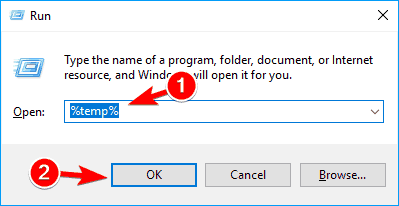
    Errors occurred during installation iTunes
  2. Once the Temp directory opens, select all files and delete them.
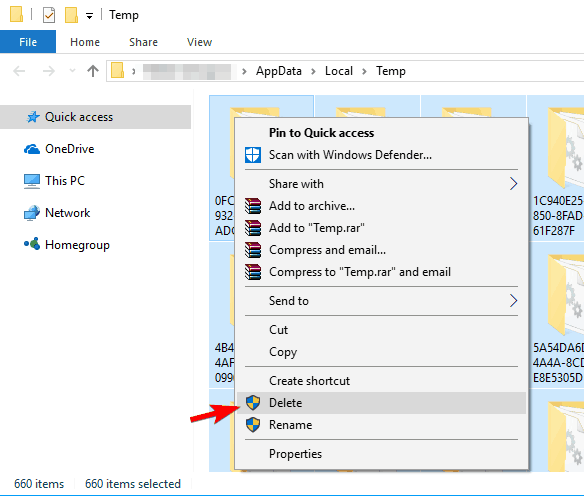
    iTunes won't update to latest version

Some users are also recommending to use Windows Installer Cleanup Utility to remove any leftover files. You can check Solution 7 and download the Cleanup Utility from there.

After removing all Apple’s applications and all files associated with them, the issue should be resolved and you’ll be able to install iTunes without any problems.

11. Remove AnyConnect

According to users, iTunes won’t install on Windows 10 due to third-party applications such as AnyConnect. Users reported that this application can prevent iTunes from installing, so if you use it, be sure to remove it from your PC.

After removing AnyConnect, the problem should be completely resolved.

12. Reregister Windows Installer service

  1. Start Command Prompt as administrator.
  2. Now enter msiexec /unreg then press Enter.
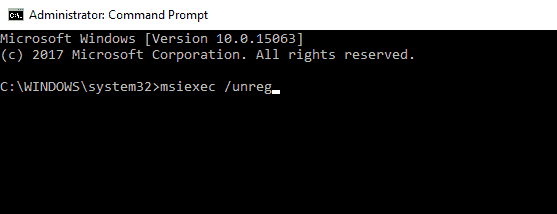
    iTunes won't install Missing program
  3. After the command is executed, enter msiexec /regserver and press Enter.
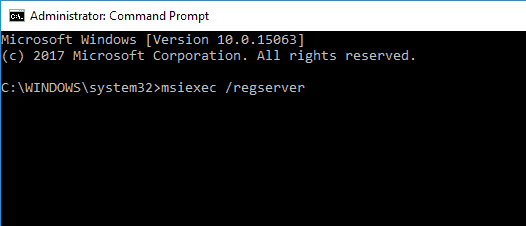
    iTunes won’t install error 193

If iTunes won’t install on Windows 10, the problem might be the Windows Installer service. To fix the issue, users are recommending to reregister this service.

After you reregister the Windows Installer service, try to install iTunes again.

Not being able to install iTunes on Windows 10 can be a big problem, especially if you own an iOS device. This problem can be serious, but we hope that you managed to fix it by using our solutions.

September Patch Tuesday fixes HTTP-based intranet servers

With the release of this month’s much-expected Patch Tuesday updates, a plethora of new fixes, enhancements, and security improvements have come to all versions of the Windows OS.

Of course, some updates stand out more than others, either because they bring a few extra features, or because applying them may subject you to some unforeseen issues.

However, the September Patch Tuesday updates all bring one major fix that concern the use of HTTP-based intranet servers.


A major networking vulnerability has been addressed

According to the official Microsoft Changelogs, one particular change has been brought to al major versions of Windows 10, ranging from Windows 10 v1507 all the way to Windows 10 v2004.

This fix reads as follows:

  • Addresses a security vulnerability issue with user proxies and HTTP-based intranet servers. After installing this update, HTTP-based intranet servers cannot leverage a user proxy by default to detect updates.
    • Scans using these servers will fail if the clients do not have a configured system proxy.
    • If you must leverage a user proxy, you must configure the behavior using the Windows Update policy “Allow user proxy to be used as a fallback if detection using system proxy fails.”
    • This change does not affect customers who secure their Windows Server Update Services (WSUS) servers with the Transport Layer Security (TLS) or Secure Sockets Layer (SSL) protocols.
    • For more information, see Ensuring clients stay secure, changes to scans against Windows Server Update Service (WSUS) servers.

Apparently, starting from an undisclosed time period, a client that didn’t have their proxies configured could still be used to access the servers and perform scans.

Thankfully enough, Microsoft came and added some explanations on how to configure your proxies to now be compatible with the latest changes.

Additionally, they went on and added that not everyone was targeted by this update, such as those using the Transport Layer Security (TLS) or Secure Sockets Layer (SSL) protocols for added protection.


That pretty much wraps it up with this major fix. If you need a summary of the September Patch Tuesday, we have written this article for you where we included all of the most important changelogs, along with direct download links so that you can get the updates right away.

Speaking of which, always remember that these monthly updates are here for a reason, as they are the result of months-long investigations and troubleshooting, so applying the patches as soon as possible is extremely important.

For more information on how to make sure that the update process goes smoothly, check out this list of steps that need to be followed, and you’ll be all find.

What’s your take on this change made during the September Patch Tuesday Updates of 2020?

Let us know whether or not you will be applying the cumulative updates immediately or not by leaving us a message in the comments section below.

[wl_navigator]

KB4577015 improves Group Policies, updating, and more

With the September Patch Tuesday updates having just arrived, many are curious to see precisely what changes have been brought to their OS.

Of course, while some core features have been applied to all versions of Windows 10, let us not forget that there are major differences between the versions, especially between the oldest, Windows 10 v1507, and the newest, Windows 10 v2004.

That being said, some version of Windows 10 may have received a little bit of extra fixing and tweaking, while others may have ended up with new issues entirely after the upgrade.

That’s precisely the face with KB4577015, this month’s cumulative update to Windows 10 v1607.

KB4577015 brings support to several core Windows features

While all cumulative updates for all other versions of Windows 10 received the same core treatment, the same cannot be said about KB4577015, which brings several other fixes no present in the other cumulative updates.

As per the official Microsoft Changelog, here are the changes specific only to KB4577015:

  • Provides the ability to set a Group Policy that displays only the domain and username when you sign in.
  • Addresses an issue that stores restricted characters in the Input Method Editor (IME) conversion list.
  • Addresses an issue with object performance counters.
  • Addresses an issue that sometimes prevents AppLocker from running an application whose publisher rule allows it to run.
  • Addresses an issue with evaluating the compatibility status of the Windows ecosystem to help ensure application and device compatibility for all updates to Windows.
  • Addresses an issue that might prevent a client from reconnecting to a previous RemoteApp session unless an administrator closes the session on the server.

The highlight of this cumulative update is a fix to common update issues that were frequent to Windows 10 v1607 whenever updates were attempted.

After applying this update, users should experience fewer update issues like freezes, update loops, the download fails, or anything else related.

That’s pretty much it for KB4577015 and the changes that it has brought to Windows 10 v1607.


It is important to know that regardless of whether a certain cumulative update brings improvements or issues, it is important to get them nonetheless for the security protection.

Of course, for the best issue-free experience applying the updates, there are a few steps that anyone should follow in order to apply these patches, otherwise they may end up needing to use the Windows Update Troubleshooter.

Those of you running this version of the OS should nevertheless get this update as soon as possible at least for the security improvements.

To do that, simply head over to this article we’ve created where you can read the changelog of all other cumulative updates, as well as get direct download links to the required updates.

However, if you want to read about the entire history of the Patch Tuesday changelogs, head over to this complete list.

What’s your take on this cumulative update? Let us know if you’ll be applying the update as soon as it becomes available in your region by leaving us a message in the comments section below.

[wl_navigator]

Windows 10 September Patch Tuesday [DIRECT DOWNLOAD LINKS]

As promised, Microsoft has finally released the monthly Patch Tuesday updates, and they are called the September Patch Tuesday Updates.

Like all previous monthly releases, your OS will now receive further enhancements, fixes, new features, and much-needed security improvements.

Speaking of security, those of you that use Microsoft or Adobe products should be aware that the monthly updates also come with CVE fixes, and this month hasn’t failed to deliver in that department, bring up a total of 147 CVEs.

Of course, this depends a lot on what version of Windows 10 you are sporting on your PC, although they are all covered more or less during this update.

Like in previous months, we’ve created this article that will not only showcase the changelog for each individual version of Windows 10, but we will also be providing you with direct download links straight from the Windows Update Catalog.

Thus, go ahead, read what Microsoft has prepared this month for your version of Windows 10, and then go ahead and get the updates.


Updates included in September Patch Tuesday Updates

Windows 10, version 2004

Windows 10 v2004 is the latest major version of Windows 10, and as such as the most experimental features on it. That being the case you should install this version as soon as possible if your hardware allows it.

Take note that Windows 10 v2004’s system requirements aren’t that high, so don’t worry about compatibility issues.

Cumulative update name:

Improvements and fixes 

  • Addresses an issue with a possible elevation of privilege in windowmanagement.dll.
  • Addresses a security vulnerability issue with user proxies and HTTP-based intranet servers. After installing this update, HTTP-based intranet servers cannot leverage a user proxy by default to detect updates.
    • Scans using these servers will fail if the clients do not have a configured system proxy. If you must leverage a user proxy, you must configure the behavior using the Windows Update policy “Allow user proxy to be used as a fallback if detection using system proxy fails.”
    • This change does not affect customers who secure their Windows Server Update Services (WSUS) servers with the Transport Layer Security (TLS) or Secure Sockets Layer (SSL) protocols.
    • For more information, see Ensuring clients stay secure, changes to scans against Windows Server Update Service (WSUS) servers.
  • Security updates to Windows App Platform and Frameworks, Microsoft Graphics Component, Windows Input and Composition, Windows Media, Windows Shell, Windows Cloud Infrastructure, Windows Fundamentals, Windows Management, Windows Kernel, Windows Virtualization, Windows Storage and Filesystems, the Microsoft Scripting Engine, and the Microsoft JET Database Engine.

Known Issues

  • Users of the Microsoft Input Method Editor (IME) for Japanese or Chinese languages might experience issues when attempting various tasks. You might have issues with input, receive unexpected results, or might not be able to enter text.

[DIRECT DOWNLOAD LINK]


Windows 10, version 1909

Windows 10 v1909 shares a core structure, core operating system, and an identical set of system files with Windows 10 v1903, therefore all cumulative updates that apply to one version are available to the other as well.

Cumulative update name:

Improvements and fixes 

  • Addresses a security vulnerability issue with user proxies and HTTP-based intranet servers. After installing this update, HTTP-based intranet servers cannot leverage a user proxy by default to detect updates.
    • Scans using these servers will fail if the clients do not have a configured system proxy. If you must leverage a user proxy, you must configure the behavior using the Windows Update policy “Allow user proxy to be used as a fallback if detection using system proxy fails.”
    • This change does not affect customers who secure their Windows Server Update Services (WSUS) servers with the Transport Layer Security (TLS) or Secure Sockets Layer (SSL) protocols.
    • For more information, see Ensuring clients stay secure, changes to scans against Windows Server Update Service (WSUS) servers.
  • Security updates to Windows App Platform and Frameworks, Microsoft Graphics Component, Windows Input and Composition, Windows Media, Windows Shell, Windows Cloud Infrastructure, Windows Fundamentals, Windows Management, Windows Kernel, Windows Virtualization, the Microsoft Scripting Engine, and the Microsoft JET Database Engine.

Known Issues

  • Microsoft is currently not aware of any issues with this update.

[DIRECT DOWNLOAD LINK]


Windows 10, version 1903

Windows 10 v1903 shares a core structure, core operating system, and an identical set of system files with Windows 10 v1909, therefore all cumulative updates that apply to one version are available to the other as well.

Cumulative update name:

Improvements and fixes

  • Same as Windows 10, version 1909

Known Issues

  • Same as Windows 10, version 1909

[DIRECT DOWNLOAD LINK]


Windows 10, version 1809

The Patch Tuesday updates have brought improvements to Windows 10 v1809 as well, bumping the version number to OS Build 17763.1457, boasting numerous improvements to many Microsoft Office products.

Cumulative update name:

Improvements and fixes

  • Addresses a security vulnerability issue with user proxies and HTTP-based intranet servers. After installing this update, HTTP-based intranet servers cannot leverage a user proxy by default to detect updates.
    • Scans using these servers will fail if the clients do not have a configured system proxy. If you must leverage a user proxy, you must configure the behavior using the Windows Update policy “Allow user proxy to be used as a fallback if detection using system proxy fails.”
    • This change does not affect customers who secure their Windows Server Update Services (WSUS) servers with the Transport Layer Security (TLS) or Secure Sockets Layer (SSL) protocols.
  • Security updates to Windows App Platform and Frameworks, Microsoft Graphics Component, Windows Input and Composition, Windows Media, Windows Shell, Windows Cloud Infrastructure, Windows Fundamentals, Windows Management, Windows Kernel, Windows Virtualization, the Microsoft Scripting Engine, and the Microsoft JET Database Engine.

Known Issues

  • After installing KB4493509, devices with some Asian language packs installed may receive the error, “0x800f0982 – PSFX_E_MATCHING_COMPONENT_NOT_FOUND.”
  • After installing KB4550969 or later, when using Microsoft Edge Legacy, you might receive the error,”0x80704006. Hmmmm…can’t reach this page” when attempting to reach websites on non-standard ports.
    • Any website that uses a port listed in the Fetch Standard specification under bad ports or port blocking might cause this issue.

[DIRECT DOWNLOAD LINK]


Windows 10, version 1803

At first, it as reported that Windows 10, version 1803 has reached the end of mainstream support, and starting with July there wouldn’t be any more optional, non-security releases for this version of Windows 10.

However, Microsoft decided to extend the support for Windows 10 v1803 up until 2021.

That being the case, this month’s Patch Tuesday updates bring the version number to OS Build 17134.1726.

Cumulative update name:

Improvements and fixes

  • Provides the ability to sync the Microsoft Edge IE Mode unidirectional session cookie when an administrator configures the session cookie.
  • Addresses an issue with unexpected notifications related to changing default applications settings.
  • Updates time zone information for the Yukon, Canada.
  • Addresses an issue that prevents the Event Viewer from properly saving filtered events.
  • Addresses an issue that causes delays during shutdown when running the Microsoft Keyboard Filter Service.
  • Addresses a security vulnerability issue with user proxies and HTTP-based intranet servers. After installing this update, HTTP-based intranet servers cannot leverage a user proxy by default to detect updates.
    • Scans using these servers will fail if the clients do not have a configured system proxy. If you must leverage a user proxy, you must configure the behavior using the Windows Update policy “Allow user proxy to be used as a fallback if detection using system proxy fails.”
    • This change does not affect customers who secure their Windows Server Update Services (WSUS) servers with the Transport Layer Security (TLS) or Secure Sockets Layer (SSL) protocols.
  • Security updates to Windows App Platform and Frameworks, the Microsoft Graphics Component, Windows Input and Composition, Windows Media, Windows Shell, the Microsoft Store, Windows Cloud Infrastructure, Windows Fundamentals, Windows Management, Windows Kernel, Windows Virtualization, the Microsoft Scripting Engine, and the Microsoft JET Database Engine.

Known Issues

  • Microsoft is currently not aware of any issues with this update.

[DIRECT DOWNLOAD LINK]


Windows 10, version 1709

Note: Windows 10, version 1709 has reached the end of service for all of its available editions. If you want to continue receiving security and quality updates, update to the latest version of Windows 10.
Cumulative update name:

Improvements and fixes

  • Addresses an issue with unexpected notifications related to changing default applications settings.
  • Updates time zone information for the Yukon, Canada.
  • Addresses an issue that causes delays during shutdown when running the Microsoft Keyboard Filter Service.
  • Addresses a security vulnerability issue with user proxies and HTTP-based intranet servers. After installing this update, HTTP-based intranet servers cannot leverage a user proxy by default to detect updates.
    • Scans using these servers will fail if the clients do not have a configured system proxy. If you must leverage a user proxy, you must configure the behavior using the Windows Update policy “Allow user proxy to be used as a fallback if detection using system proxy fails.”
    • This change does not affect customers who secure their Windows Server Update Services (WSUS) servers with the Transport Layer Security (TLS) or Secure Sockets Layer (SSL) protocols.
  • Security updates to Windows App Platform and Frameworks, Microsoft Graphics Component, Windows Input and Composition, Windows Media, Windows Shell, the Microsoft Store, Windows Cloud Infrastructure, Windows Fundamentals, Windows Management, Windows Kernel, Windows Virtualization, Windows Storage and Filesystems, the Microsoft Scripting Engine, and the Microsoft JET Database Engine.

Known Issues

  • Microsoft is currently not aware of any issues with this update.

[DIRECT DOWNLOAD LINK]


Windows 10, version 1703

Note: Windows 10, version 1703 has reached the end of service for  Home, Pro, Pro for Workstation, and IoT Core editions.

In order to continue receiving quality and security updates, Microsoft recommends that you get the latest possible version of Windows 10 installed.

Cumulative update name:

Improvements and fixes

  • Addresses a security vulnerability issue with user proxies and HTTP-based intranet servers. After installing this update, HTTP-based intranet servers cannot leverage a user proxy by default to detect updates.
    • Scans using these servers will fail if the clients do not have a configured system proxy. If you must leverage a user proxy, you must configure the behavior using the Windows Update policy “Allow user proxy to be used as a fallback if detection using system proxy fails.”
    • This change does not affect customers who secure their Windows Server Update Services (WSUS) servers with the Transport Layer Security (TLS) or Secure Sockets Layer (SSL) protocols.
  • Updates time zone information for the Yukon, Canada.
  • Security updates to Windows App Platform and Frameworks, Microsoft Graphics Component, Windows Input and Composition, Windows Media, Windows Shell, the Microsoft Store, Windows Cloud Infrastructure, Windows Fundamentals, Windows Kernel, Windows Virtualization, Windows Storage and Filesystems, the Microsoft Scripting Engine, and the Microsoft JET Database Engine.

Known Issues

  • Microsoft is currently not aware of any issues with this update.

[DIRECT DOWNLOAD LINK]


Windows 10, version 1607

Note: Windows 10, version 1607 has reached the end of service for all of its available editions. Update to the latest version of Windows 10 in order to keep your system protected

Cumulative update name:

Improvements and fixes

  • Provides the ability to set a Group Policy that displays only the domain and username when you sign in.
  • Addresses an issue that stores restricted characters in the Input Method Editor (IME) conversion list.
  • Updates time zone information for the Yukon, Canada.
  • Addresses an issue that prevents the Event Viewer from properly saving filtered events.
  • Addresses an issue with object performance counters.
  • Addresses an issue that sometimes prevents AppLocker from running an application whose publisher rule allows it to run.
  • Addresses an issue that causes delays during shutdown when running the Microsoft Keyboard Filter Service.
  • Addresses a security vulnerability issue with user proxies and HTTP-based intranet servers. After installing this update, HTTP-based intranet servers cannot leverage a user proxy by default to detect updates.
    • Scans using these servers will fail if the clients do not have a configured system proxy. If you must leverage a user proxy, you must configure the behavior using the Windows Update policy “Allow user proxy to be used as a fallback if detection using system proxy fails.”
    • This change does not affect customers who secure their Windows Server Update Services (WSUS) servers with the Transport Layer Security (TLS) or Secure Sockets Layer (SSL) protocols.
  • Addresses an issue with evaluating the compatibility status of the Windows ecosystem to help ensure application and device compatibility for all updates to Windows.
  • Addresses an issue that might prevent a client from reconnecting to a previous RemoteApp session unless an administrator closes the session on the server.
  • Security updates to Windows App Platform and Frameworks, Microsoft Graphics Component, Windows Input and Composition, Windows Media, Windows Shell, the Microsoft Store, Windows Cloud Infrastructure, Windows Fundamentals, Windows Kernel, Windows Virtualization, Windows Storage and Filesystems, the Microsoft Scripting Engine, and the Microsoft JET Database Engine.

Known Issues

  • After installing KB4467684, the cluster service may fail to start with the error “2245 (NERR_PasswordTooShort)” if the group policy “Minimum Password Length” is configured with greater than 14 characters.

[DIRECT DOWNLOAD LINK]


Windows 10, version 1507

Note: Windows 10, version 1507 is the oldest version of Windows 10 still active, and it has reached the end of service for some time now.

If your hardware allows it, update to a much newer version of Windows 10.

Cumulative update name:

Improvements and fixes

  • Updates time zone information for the Yukon, Canada.
  • Addresses a security vulnerability issue with user proxies and HTTP-based intranet servers. After installing this update, HTTP-based intranet servers cannot leverage a user proxy by default to detect updates.
    • Scans using these servers will fail if the clients do not have a configured system proxy. If you must leverage a user proxy, you must configure the behavior using the Windows Update policy “Allow user proxy to be used as a fallback if detection using system proxy fails.”
    • This change does not affect customers who secure their Windows Server Update Services (WSUS) servers with the Transport Layer Security (TLS) or Secure Sockets Layer (SSL) protocols.
  • Security updates to Windows App Platform and Frameworks, Microsoft Graphics Component, Windows Input and Composition, Windows Media, Windows Shell, Windows Cloud Infrastructure, Windows Fundamentals, Windows Kernel, Windows Storage and Filesystems, the Microsoft Scripting Engine, and the Microsoft JET Database Engine.

Known Issues

  • Microsoft is currently not aware of any issues with this update.

[DIRECT DOWNLOAD LINK]


This pretty much wraps up our list of changes for this month’s Patch Tuesday updates.

If you want a much more complete list featuring all the changelogs from the very beginning, then go and check out this comprehensive guide!


How else can I download Patch Tuesday updates?

If you prefer other methods of updating your PC, you can always try the following solutions as well:

  • The Windows Update menu
  • The Windows Update Catalog
  • The Windows Server Update Service (WSUS)
  • Group Policies set up by your Network Administrator


Editor’s Note: Patch Tuesday updates are incredibly important, so to better prepare for them and ensure an error-free update process, follow this in-depth guide.

[wl_navigator]

5 Best Asus Aura Sync compatible fans [RGB / ARGB]

ASUS Aura Sync is a great software that allows you to control your computer lighting. However, in order to use ASUS Aura, you need to have components that are compatible with it.

In today’s article, we’re going to present you with fans that will keep your computer cool while offering full support for ASUS Aura at the same time.

What are the best ASUS Aura Sync fans?

Cooler Master MasterFan MF120R ARGB 3IN1

Cooler Master MasterFan MF120R ARGB asus aura sync fans

Cooler Master MasterFan MF120R is an addressable RGB fan and it can achieve full-color customization. Regarding compatibility, the fan is compatible with Asus Aura, ASRock RGB, and MSI RGB.

The fan comes with sound-absorbing rubber pads and thanks to the noise reduction technology it will remain quiet even during intense gaming sessions.

This model has a hybrid design that combines jet engine and helicopter blade design and that helps you achieve static air pressure at all times.

Fan also has built-in sensors that will detect if your cables are being snagged by other components. Cooler Master MasterFan MF120R is a great fan, and you should definitely consider it.

  • Addressable RGB support
  • Compatible with Asus Aura, ASRock RGB, and MSI RGB
  • Noise reduction technology
  • Hybrid design
  • Built-in sensors for snag detection
  • Cables might be too short for some users

DEEP COOL CF120 3IN1

DEEP COOL CF120 3IN1 asus aura sync fans

DEEP COOL CF120 3IN1 comes with 12 pieces of programmable RGB LED lights, so it can generate all sorts of lighting effects with ease.

Regarding the control, you can control it via motherboard or using cable control. When it comes to lighting, the fan has 3 dynamic modes and 3 monochrome modes to choose from.

The fan fully supports ASUS Aura, and it can be used as a case fan or a CPU cooling fan. Keep in mind that if you have only one 5V ADD-RGB 3-pin header you can only sync this fan with other DEEP COOL fans.

In case you have multiple 5V ADD-RGB 3-pin headers, you can sync your fan with other devices and brands.

Overall DEEP COOL CF120 3IN1 is a solid fan for gamers and computer enthusiasts, so be sure to consider it.

  • 12 pieces of programmable RGB LED lights
  • 3 dynamic and 3 monochrome lighting modes
  • Support for ASUS Aura
  • Motherboard and cable control
  • Can be a bit loud for some users

anidees AI Aureola V2

anidees AI Aureola V2 asus aura sync fans

anidees AI Aureola V2 is a 120mm RGB fan, and it comes with 18 independent LEDs. The fan has 9 different lighting modes, but it also supports color cycling mode.

The fan is equipped with rubber pads and rifle bearing, so it should remain silent at all times. The device is compatible with ASUS Aura Sync, MSI Mystic Light Sync (J-Rainbow) and GIGABYTE RGB Fusion.

Keep in mind that anidees AI Aureola V2 uses a 5V 3-pin header, and it’s not compatible with a 12V 4 pin RGB header.

The fan comes with its own controller that can support 8 fans and 2 LED strips. Of course, RF remote is available, so you can adjust your fan settings remotely with ease.

  • 18 independent LEDs
  • 9 different lighting modes
  • Rubber pads and rifle bearing for noise reduction
  • Compatible with ASUS Aura Sync, MSI Mystic Light Sync, and GIGABYTE RGB Fusion
  • Comes with RF remote control
  • Few users had issues with ASUS Aura

Asiahorse Fs9002

Asiahorse Fs9002 asus aura sync fans

Asiahorse Fs9002 comes with 28 lights in total, 20 out of the frame and 8 frame lights. The fan has a unique blade design that increases wind pressure and air volume by 15% compared to similar models.

The LED bead is made from gold wire, which should make your LEDs last longer. The fan has a hydraulic bearing and self-lubrication, which ensures that your fans will remain quiet at all times.

The fan is compatible with 5V addressable motherboards and it supports ASUS Aura, Gigabyte RGB FUSION, MSI Mystic Light Sync, etc.

Asiahorse Fs9002 with its 28 lights and unique blade design is one of the more interesting models, so you might want to consider it.

  • 28 LED lights (8 internal + 20 out of frame)
  • Unique blade design that provides 15% more air volume and pressure
  • Gold wire lamp bead for increased durability
  • Compatible with ASUS Aura, Gigabyte RGB FUSION, MSI Mystic Light Sync
  • Few users had issues with PWM

darkFlash Aurora DR12 Pro

darkFlash Aurora DR12 Pro asus aura sync fans

darkFlash Aurora DR12 Pro is a 120mm fan, and it comes with rubber pads and hydraulic bearing, which greatly reduces the noise and improves your cooling.

Regarding the compatibility, the fan uses a 5V A-RGB 3-pin header, and it offers full compatibility with ASUS Aura. The fan also comes with its controller, and you can add an additional 8 fans and 2 LED strips to it.

Of course, the controller allows you to easily adjust fan speeds, lighting mode, and LED speed. The fan also comes with RF wireless remote, so you can remotely adjust the fan settings.

  • Rubber pads and hydraulic bearing for noise reduction
  • ASUS Aura compatible
  • The controller that can support 8 fans and 2 LED strips
  • RF wireless remote
  • Only work with 5V RGB headers

ASUS Aura technology is great, and if you’re looking for new fans that are compatible with it, we encourage you to consider all the models from our list.

[wl_navigator]

Best 5 free tools to recolor image online [PNG, JPEG etc]

Image editing isn’t limited to your local computer anymore, and there are many great online tools that can do a decent job when it comes to image editing. Speaking of which, in today’s article we’re going to show you the best tools to recolor images online, so let’s get started.

What are the best web tools to recolor an image online?

LunaPic

lunapic best tools to recolor image online

LunaPic is an online image editor, and it supports standard image editing features, such as cutting, scaling, cropping, adding gradients, etc.

There’s also support for drawing, and you can easily draw basic shapes and lines. You can also add shadow effects, or add all sorts of creative borders to your images.

As for recoloring, LunaPic has a Replace Color option and you can easily replace the desired color with a new one. There’s also a Color Tint option that will provide you with a similar, but more subtle effect.

Just like with any other image editor, you can easily adjust color or light levels, saturation, brightness, temperature, contrast, exposure, and other settings.

Overall, LunaPic is a solid tool, so feel free to try it out.

LunaPic features:

  • Simple to use
  • Can easily adjust colors
  • Has multiple effects and borders
  • Ability to import pictures from image hosting sites and Facebook

=> Use LunaPic

Pine Tools

pinetools best tools to recolor image online

Another online image editing tool that can recolor your images is Pine Tools. This service works with local images, and once you upload your image you can change its color.

Pine Tools also has other features and you can easily lighten or darken your image, change the brightness, contrast, saturation, exposure, vibrance, hue, or gamma.

The service also lets you perform basic image editing tasks, so you can easily blur your image, merge images, crop images, resize them, or apply various effects.

Overall, Pine Tools is a simple tool, and it’s perfect if you want to make a simple adjustment to your images.

Pine Tools features:

  • Incredibly simple to use
  • Lets you change various image options
  • Can perform basic image editing tasks

=> Use Pine Tools

IMGOnline

IMGOnline best tools to recolor image online

If you need a simple online tool to recolor your image, then IMGOnline might be what you need. To use this tool, you just need to upload an image from your PC and modify the available options.

As for available settings, you need to choose which color you want to replace and with what color. You can do that from the dropdown menu or by entering the HEX value of the color.

You can also adjust replacement intensity, smoothness of the color transition, as well as the gain of the replaced color. Lastly, you can choose the desired output format and the quality of the generated image.

Service also supports various other filters, and there are about 40 different filters available and about 25 image editing tools.

Overall, IMGOnline is a decent tool, but its interface might be slightly outdated for some users.

IMGOnline features:

  • Can easily change the color of an image
  • Supports 40 different filters
  • 25 image editing tools

=> Use IMGOnline

Pixlr

Pixlr best tools to recolor image online

Pixlr is an advanced online image editing tool, and it has all the features that other image editing tools have along with color replacement.

To replace a color, you need to use a color replacement tool, select the area that you want to replace and then paint the new color over it.

The tool should automatically detect edges, so you’ll be able to change colors easily. As for other features, you can adjust brightness, temperature, hue, color balance, levels, etc.

Pixlr is quite similar to Photoshop in terms of looks and features, and it’s one of the best online image editors on the market.

Pixlr features:

  • Sleek user interface similar to Photoshop
  • Abundance of features
  • Manual color replacement tool
  • Full-fledged image editor

=> Use Pixlr

Phixr

Phixir best tools to recolor image online

Phixr is another online image editing tool that can be used to recolor images. The tool allows you to change exposure, brightness, contrast, temperature, vibrance, saturation, and hue of the image.

You can change the opacity of the color adjustment in order to get more subtle results. You can also adjust color balance, levels, channel, and curves with ease.

These adjustments will affect the whole image, so you might have to manually select the elements that you want to colorize.

Phixr also lets you add/remove noise, apply various color and lens effects. Overall, it’s a simple tool, and there’s no reason not to try it.

Phixr features:

  • Simple to use
  • Ability to change exposure, brightness, contrast and other image settings
  • Ability to add various color and text effects

=> Phixr

There are many great tools that can help you recolor images online, and we hope that you found a perfect choice for you after reading this article.

[wl_navigator]

Microsoft’s Surface Duo support pages are now live

We’re now less than two days away from the launch of the Surface Duo, and Microsoft is now taking internal action to get ready for the September 10 launch date. In one of those steps, the company just released a new set of support pages for the Surface Duo (via Reddit.)

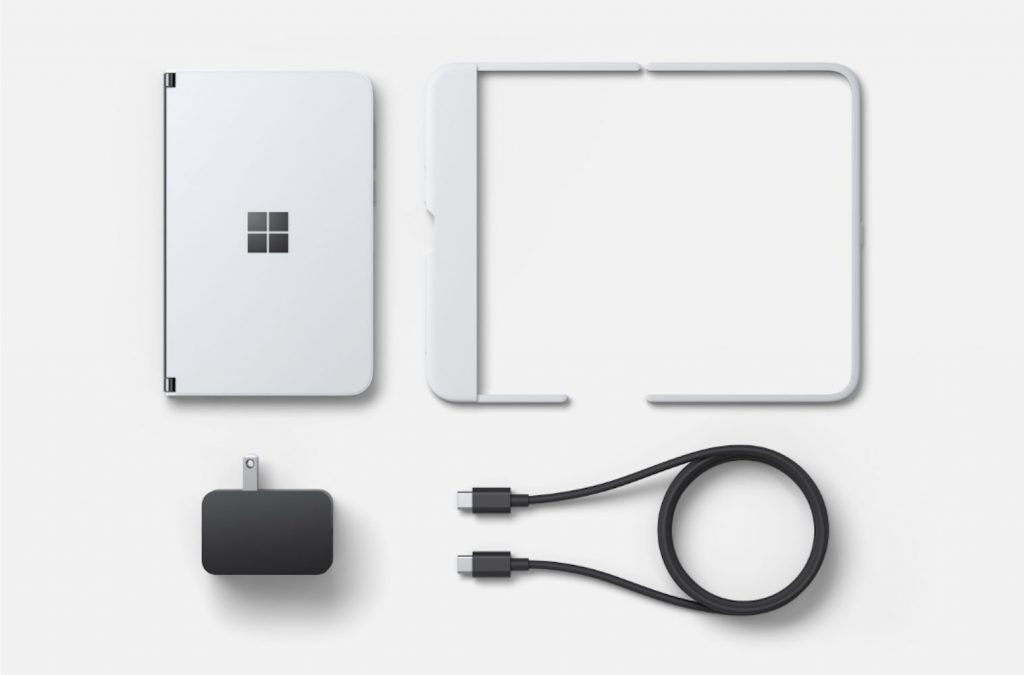
Seen here, the Surface Duo support pages cover a variety of routine topics. The is a dedicated page on how to use the Duo in different ways, how to place phone calls, as well as how to clean and care for a Surface Duo. There’s even a dedicated page on how to install the Surface Duo bumper, as well.  And, for the folks who aren’t exactly familiar with Android, there is a step by step guide on how to set up the Duo, and even a tour of the Android operating system.

More technically savvy users might also be interested in a separate support page which explains how to recover a Surface Duo if it won’t start or if it isn’t working right. The process involves downloading and installing the Android SDK Platform Tools on Windows 10, downloading a recovery image from Microsoft’s Surface website, and putting the device into recovery mode then using a command prompt on a PC to load the image onto the Duo.

Android tweakers and those interested in accessing the bootloader or “rooting” the Duo should be happy to know that this support page reveals part of how easy it will be to accomplish one of the first steps in doing so. Just like many Android phones,  on the Duo, all it takes is to press and hold the Power button and the volume down button, then release it to get into the bootloader menu.

How to Manage & Monitor IoT Devices [IT Pro Tools]

The Internet of Things has completely changed the way home appliances work. Your fridge can tell you when it’s time for grocery shopping, or you can instruct your washing machine and dryer to finish laundry on time.

And it’s only the tip of the iceberg. Even if human intervention is no longer needed to confirm small tasks, that doesn’t mean you shouldn’t manage and monitor your IoT devices.

In fact, it’s recommended to do so at the office. System admins can use IoT monitoring tools to keep track of all network assets, find out everything happening in real time, detect possible issues early on, and troubleshoot any software or hardware errors.

You can even design, create, and test IoT apps without real IoT boards by turning to IoT simulators instead. But the first step is getting equipped with the right IoT monitoring software application.

What are the best tools to monitor IoT devices?

Paessler PRTG Network Monitor – Ideal for large IT infrastructures

Paessler developed PRTG Network Monitor is an agentless network monitoring tool with enhanced IoT monitoring features. It comes with an auto-discovery option that detects all network devices.

To filter data and obtain specific information more efficiently, you can configure sensors, like asking PRTG to read the temperature of all office appliances twice a day. Besides, it has more than 200 preset sensors you can explore.

PRTG Network Monitor runs on Windows, iOS, and Android. It has a 30-day free trial, after which you can continue using it for free but with no more than 100 sensors.

More about PRTG Network Monitor:

  • Storage, bandwidth, cloud, database, server, and SNMP monitoring
  • Ideal for large IT infrastructures
  • Can be used in healthcare, education, finance, CCTV, and other industries

Paessler PRTG Network Monitor

Easily manage and monitor IoT devices with the help of this advanced network monitoring solution.
Free Trial Visit Website

ManageEngine OpManager – Network mapping

use ManageEngine OpManager

Owned by ManageEngine, OpManager delivers a 5-in-1 integrated network management solution, including support for monitoring IoT devices. You can use it to keep track of network performance, analyze the bandwidth, manage configuration and firewall settings, and control IP addresses and port switching.

There are three editions available. ManageEngine OpManager Free can be used to monitor up to 3 devices at no cost. The Standard/Professional version is dedicated to system admins who need to keep track of up to 1,000 devices from a single server.

Lastly, ManageEngine OpManager Enterprise allows you to keep an eye on up to 10,000 devices or 100,000 interfaces. You can set it up for Windows, Mac, Android, and iOS.

More about ManageEngine OpManager:

  • Router, WAN RTT, and VoIP monitoring
  • Network mapping and remote monitoring
  • Scheduled and business snapshot-based reports

ManageEngine OpManager

Effortlessly monitor IoT devices in your workplace by turning to this dependable tool.
Free Trial Visit Website

AWS IoT Device Management – Supports remote device management

use AWS IoT Device Management

Made by Amazon, AWS IoT Device Management is a web-based solution you can use to register, monitor, and manage IoT devices. In addition to using the IoT management console, uploading templates through the API is possible.

Unlike the previous tools on this list, AWS IoT Device Management doesn’t have a network discovery feature, so you can’t use it to automatically detect and map all devices. Instead, it relies on the data you provide.

More about AWS IoT Device Management:

  • Quickly and safely register devices with their attributes
  • Organize IoT devices in a simple manner
  • Supports remote device management
AWS IoT Device Management

AWS IoT Device Management

Register and monitor all your IoT devices in a single place, thanks to this trustworthy app.
Free Trial Try it now

Microsoft Azure – Monitoring logs and analytics tools

Azure website screenshot - sorry we are currently experiencing high demand in this region azure

Created by Microsoft, Azure is an elaborate cloud-based solution for building, testing, deploying, and managing your applications. It also has a Remote Monitoring accelerator that you can use to monitor IoT devices fast and easy.

With the aid of Azure, you can view all your connected IoT devices in an intuitive dashboard, filter the devices by various properties, check out telemetry in real time, receive alerts on critical events, as well as view the system KPIs. It works with Windows and Linux.

More about Azure:

  • Infrastructure, network, and application monitoring
  • Monitoring logs and analytics tools
  • Data collection and customizable alerts
Microsoft Azure

Microsoft Azure

Keep an eye on your IoT devices using a Microsoft-certified solution.
Free Trial Try it now

SolarWinds Remote Monitoring and Management – Customizable alerts

SolarWinds RMM

Designed by SolarWinds, Remote Monitoring and Management is a remote IT management solution you can use to monitor IoT devices in the workplace. It comes packed with a wide range of practical RMM features, which can be operated from a user-friendly dashboard.

SolarWinds RMM supports network discovery, remote access tools, NetPath, automation and scripting, patch management, reports, and predefined monitoring templates. It also has backup and recovery mode, web protection, and a managed antivirus solution.

SolarWinds Remote Monitoring and Management is compatible with Windows, Mac, Android, and iOS. Plus, it offers a 30-day free trial without requesting credit card information.

More about SolarWinds RMM:

  • Customizable alerts, performance checks, security monitoring
  • Background maintenance, roles, and permissions, bulk actions
  • Great for small and medium businesses, large enterprises, freelancers

⇒ Get SolarWinds Remote Monitoring and Management

To conclude, it’s possible to manage and monitor IoT devices at the office by turning to one of the reliable tools above. However, you should keep in mind that your IoT devices might have security vulnerabilities, which shouldn’t be ignored.

That’s why we suggest checking out the best IoT antivirus and antimalware solutions, which work flawlessly along with the products above.

If interested, you should check out the latest IoT statistics and get insights into how it has been impacting our economy worldwide.

Windows 10 20H2 build 19042.508 is now available in the Beta channel

Following the release of new Patch Tuesday updates for all supported versions of Windows 10 earlier today, Windows Insiders in the Beta channel can also download a new cumulative update for Windows 10 version 20H2. Microsoft is continuing to service the next version of Windows 10 ahead of its public release later this fall, and this new build includes the following improvements:

  • We fixed an issue with a possible elevation of privilege in windowmanagement.dll.
  • We fixed a security vulnerability issue with user proxies and HTTP-based intranet servers. After installing this update, HTTP-based intranet servers cannot leverage a user proxy by default to detect updates. Scans using these servers will fail if the clients do not have a configured system proxy. If you must leverage a user proxy, you must configure the behavior using the Windows Update policy “Allow user proxy to be used as a fallback if detection using system proxy fails.” This change does not affect customers who secure their Windows Server Update Services (WSUS) servers with the Transport Layer Security (TLS) or Secure Sockets Layer (SSL) protocols. For more information, see Ensuring clients stay secure, changes to scans against Windows Server Update Service (WSUS) servers.
  • Security updates to Windows App Platform and Frameworks, Microsoft Graphics Component, Windows Input and Composition, Windows Media, Windows Shell, Windows Cloud Infrastructure, Windows Fundamentals, Windows Management, Windows Kernel, Windows Virtualization, Windows Storage and Filesystems, and the Microsoft JET Database Engine.

Windows 10 version 20H2 will be a minor update for the version 2004 of the OS released back in May. The upcoming release will bring minor changes to the Start Menu, the Taskbar, toast notifications, the Alt + tab experience, and more, and Microsoft has recently invited business users to test it ahead of its public release. We still don’t know the release date for Windows 10 version 20H2, but last year’s 19H2 update wasn’t released until November.

Phishing attacks on the rise with fake Microsoft login pages

We have already seen a serious increase in malware and phishing attacks due to the fact that people are forced to work from home.

Now we need another reason for you to keep your eyes open at all times when you log in to what they seem familiar locations.

According to a report released by security experts from IRONSCALES, there are more than 9.500 Microsoft fake login pages out there, ready to steal your credentials.

What are the top companies affected by fake login pages?

The researchers spent the first half of 2020 to identify fake login pages used for support hacks and phishing campaigns.

They detected more than 50.000 fake login pages and approximately 2.500 of them were polymorphic which means that they changed to mimic the likeness of the page depending on the victim’s prerequisites.

The most commonly selected victims for these phishing attacks worked in the financial, healthcare, and technology industries but also targeted government agencies.

IRONSCALES also presented the situation with the top brands affected by this problem.

On the top of the list is PayPal followed closely by Microsoft and Facebook.

How can a fake login page affect you?

PayPal can affect millions of people and losing the credentials may result in the direct loss of your earnings stored there.

However, the more concerning risk comes from the 9.500 fake login pages that can affect not only personal accounts but also company accounts for Office 365, SharePoint, and One Drive.

That means, of course, that whole businesses can be put to danger by this sort of issue. And not long ago we signaled a new Office 365 phishing campaign.

Usually, you receive an e-mail that appears legitimate and a link guiding you to the fake login page with a purpose that also seems legitimate.

Most of these messages are very hard to be detected by spam filters or any other technical controls so the only real filter is you.

The only solution for avoiding phishing and fake login pages is to carefully analyze the e-mails you open, the purpose of the message and, if you get there, the target page that you are about to log in to.

If you’ve been a phishing or fake login page victim, tell us your story in the Comments section below.

[wl_navigator]

Get the Windows 10 September Patch Tuesday updates today

Now that the 8th of September has come, Microsoft will soon release their latest batch of Patch Tuesday updates called the September Patch Tuesday updates.

As always, users await these monthly updates to see what else has Microsoft managed to improve upon Windows 10.

As always, these updates come with OS improvements, adjustments, fixes, and much-needed security fixes, such as the long-awaited CVE reports.

Need a complete list of updates spanning all versions of Windows 10 released from the very beginning? Check out this article and you’ll find everything there.


What should users be expecting from this month’s updates?

If we were to look in retrospect at all the new features and developments from the past month, we can get a pretty clear idea of what is to follow with the latest updates.

This is especially the case with the improvements brought in the Windows Insider builds, although these particular changes could hit live in later months as well.

Here are just some of the most important developments that Windows 10 has been through the past month:

However, nothing is certain until 10 PM PST when the updates will actually hit live and hopefully put an end to many of the issues.

Who knows, maybe this month will be a bit more fulfilling than the last one, and more fixes will be brought, more improvements be implemented, and fewer issues will appear when applying the updates.

Lastly, CVEs have been on the rise, so users are also curious whether this month more or less will be discovered and fixed as well.

Are you excited about what these upcoming updates? Give us your take on the matter and what your expectancies are by leaving us a message in the comments section below.


  • How long have Patch Tuesday updates been a thing?

Officially, Microsoft formalized Patch Tuesday in October 2003, so around the time Windows XP was the main market OS.

  • Is Patch Tuesday truly necessary?

Yes, applying Patch Tuesday updates is indeed important since most exploits happen in the days that follow, namely during Exploit Wednesday and Uninstall Thursday.

  • What can I do if I have trouble installing the Patch Tuesday updates?

The go-to solution when encountering any type of Windows 10 update issues is to use the Windows Update Errors Troubleshooter.


[wl_navigator]

Microsoft confirms November 10 release date for the Xbox Series S

Microsoft has now officially confirmed that its entry-level next-gen console, the Xbox Series S, will launch on November 10 for $299. The information is visible at the end of the Xbox Series S Reveal trailer that has been published on the Xbox YouTube channel a couple of minutes ago.

Windows Central first reported that both the Xbox Series S and the Xbox Series X would be released on November 10, with the latter expected to be priced at $499. Microsoft has yet to confirm these details for the Xbox Series X, and the company may well wait for Sony to announce the PlayStation 5’s price first.

Overall, Microsoft seems to be in a great position ahead of the beginning of this new console generation: The company will have the most powerful next-gen console with the Xbox Series X, and as of this writing it will also have the most affordable console with the Xbox Series S. We still don’t know all technical details about the latter, though we learned today that it will support 1440p gaming at up to 120 FPS, 4K upscaling, and DirectX ray tracing.

5 Best DJ Software with Virtual Turntable [2026 List]

Some time ago, the skills of a DJ consisted in knowing how to mix the vinyl and manage a console. Nowadays, thanks to a simple PC, it is possible to replace numerous buttons. Nowadays, DJs should know how to manage a DJ software and use sound effects. In this guide, we’ll list some of the best DJ programs that can help you to create great party vibes. This article focuses on DJ software that does not use turntables. We have picked 5 programs that you can use if you are a beginner, intermediate, or professional DJ.  

What are the best DJ software with no turntables?

Zulu

If you are not a total beginner or a maybe a professional DJ with few pretensions, you can try Zulu. It is a nice free software that can also help beginners to “mix” their songs with a few clicks.

Zulu DJ Audio Software mixes music and live audio recordings. This means that you can play a musical base, or another kind of music and singing on it, make out a master with a lot of semi-professional effects.

As soon as you start a music track, the program scans the file and assigns beats per minute (BPM).

In this way, it offers the possibility to change the time in order to perfectly synchronize two audio tracks.

You can listen to a preview of the next music track by using headphones connected to the secondary audio output of the sound card installed on your PC.

Zulu DJ Audio Software allows you to apply effects to audio tracks (Distortion, High Pass Filter, Reverb, Phaser, Flanger, Delay).

It supports numerous audio formats including WAV (multiple codecs), MP3, VOX, GSM, Real Audio, AU, FLAC, OGG, and many more.

In short, you can record your performances, even without knowing how to play an instrument. Thus, this is a tool that you should definitely try!

Zulu

Zulu

Mix your music with this powerful DJ mixer solution that supports all the latest audio file formats. Try it now!

DEX 3

If Virtual DJ is a software that allows you to start your DJ journey, DEX 3 is a professional DJ Software for both Mac and Windows.

This software has three functions included: it enables the user to mix and manage videos, music, and to host karaoke shows.

Music and sounds have high-quality standards. You can mix manually or automatically, thanks to the Automix or Shuffle Play function.

You can play music coming from your PC, from video libraries (you can import iTunes automatically), or from over 100 DJ controllers supported.

The latter provide hands-on tactile control on DEX 3, enhancing creativity while mixing.

For what concerns the interface, you can use a 2-Deck or a 4-Deck interface. You can create all the mix you want and keep them in history, ready to be used the next time.

If you want to register your songs or videos, DEX 3 has well developed built-in recording features.

Do you want to organize a karaoke night with many people? In this case, you can create a list automatically run by the software with the song and the singer associated.

DEX 3 Party Time Karaoke counts on a wide effects grid (e.g. delay, flanger, phaser, etc) able to enhance the singer experience.

Despite its numerous functions, DEX 3 appears easy to use. Moreover, within the website, there are simple tutorial videos able to explain how the DJ mixing software works.

PCDJ

PCDJ

The ideal software for making karaoke with a library hosting over 15,300 songs, constantly upgraded. Try it now!
Free Get it now

Virtual DJ

virtual DJ

Virtual DJ is a software that allows you to emulate more turntables connected to a mixer with your PC. Atomix is the provider of this successful software.

Instead of classic discs, the software uses audio files such as MP3 and WAV or CD.

Thanks to the two sound cards or a sound card with multiple outputs, you can also hear the preview.

The program has both musical and visual effects (also available from the manufacturer’s website), useful for mixing the various pieces.

On the website, there are also various skins that change the appearance of the software. Virtual DJ can also mix music videos with separate audio and video management with numerous transition effects.

This program can represent a first approach to the world of DJing, without the cost that a traditional console involves.

Clearly, when you decide to use this type of software on a professional level, you find out that a digital console does not cost less than a traditional console.

⇒ Get Virtual DJ

Traktor

Many internationally renowned DJs trust Traktor as a very professional and stable program. It is compatible with all operating systems.

There is a basic version, useful for trying the virtual console-quality, but the complete one has a better quality.

The interface can appear a bit complex. It has professional sound effects, including the CD effect or the pins on the vinyl.

Traktor can provide you with the ability to see the music through the waveforms for each piece, which line up on grids.

Tracktor can support many controllers. Nevertheless, picking the controller that suits best for you will be important to get your audience amused by your music.

If you have an iPad, try Traktor’s iPad program. You can integrate that with your DJ setup to synchronize loops, starting points, and other effects.

⇒ Get Traktor

Audacity

Last but not least, if you are looking for an audio editing application that allows you to clean up some recordings you’ve made, Audacity is an interesting choice.

If you wish to quickly mix two music tracks but you do not intend to spend money Audacity is for you. Moreover, you can pick Audacity if you are not ready yet to try complex professional software.

If you have never heard of it, Audacity is one of the best free audio editing programs. It is compatible with Windows, MacOS, and Linux and is distributed under an open-source license.

Its interface is extremely intuitive. Therefore, you can use it without any problem even if you are a beginner with this type of software

It is worth mentioning that Audacity has the function of training beginner DJs.

You can use the tool to edit music, equalize sounds and add the main sound effects, as well as to save your compositions in numerous formats. The only flaw is that you can work only on individual tracks.

This article intended to help any user, DJs, or aspiring DJs, to navigate the jungle of software to mix music and sounds without turntables.

⇒ Get Audacity

Within this list, we explored software that can be used by beginners, intermediate-level, and also professional-level DJs, so no matter your level of expertise, this guide has you covered.

It is up to you now to pick the one that fits your needs. Let us know if this article was useful by dropping a comment below.

[wl_navigator]

Xbox S could fit inside Xbox X and it’s almost half the price

Update: A few hours after the leaked information Microsoft made the announcement official on the Xbox Twitter account. The price is $299 (ERP)

Brad Sams leaked all the shiny details about the upcoming Microsoft Xbox Series S gaming console on a couple of Twitter posts.

The real surprise is that Xbox Series S’s case is small enough to fit in half of the Microsoft Xbox Series X case.

But Xbox Series X measures only 5.94 inches wide, 5.94 inches deep, and 11.85 inches high so that makes Xbox Series S a pretty small console on its own.

What is new about Microsoft Xbox Series S?

Update 2: WalkinCat leaked the whole Xbox Series X commercial and we also got some of the technical specifications:

  • 1440p resolution at up to 120 FPS
  • DirectX Raytracing
  • Variable Rate Shading
  • Variable Refresh Rate
  • Custom 512 GB NVME SSD
  • 4K streaming media playback and 4K upscaling

First, just to see the size comparison between the two new consoles you just need to take a look at the small clip posted by WalkingCat on Twitter.

Brad Sams also leaked the price of Xbox Series S, $299, almost half the one of the Xbox Series X which is $499.

Also, there will be $25/month and $35/month Xbox All Access financing options for Series S and Series X respectively.

What are the technical specifications for Xbox Series S?

In terms of technical specifications, we expect Xbox Series S to be closer to the power of Xbox One X, still aimed at 1080p monitors.

As Xbox Series X will feature a 12TF computational power and it will be ready for 4K with 60 FPS as a standard, we can only hope that Xbox Series S should reach around half the computational power.

Also, there are rumours that the new Series S will have no internal hard drive which could be bad news for some gamers.

Of course, until the official launch of the two consoles on November 10, all these details can only be taken with a grain of salt.

[wl_navigator]

FIX: Unallocated hard drive with no data loss [Windows 10/11]

Have you ever noticed your external hard drive not appearing in the Devices and Drives section of This PC (My Computer in earlier Windows editions)?

The first thing you should do here is to reconnect the drive. If it’s still missing from the page, then troubleshooting begins.

The Device Manager can say that the connected device is working properly and healthy. However, you see that the drive is also unallocated.

Data can’t be written to unallocated space on your hard drive.

Several things can cause the unallocated hard drive issue, but before figuring out the cause, you need to learn how to fix an unallocated hard drive without losing data.

How do I fix unallocated hard drive without losing data in Windows 10?

1. Use Command Prompt

Create a new volume using commands

cmd-diskpart-how-to-fix-unallocated-hard-drive-without-losing-data-windows-10

  1. Press the Windows key and search for cmd.
  2. Click on Command Prompt from the search results.
  3. In the Command Prompt window, enter diskpart and hit Enter.
  4. Type in list volume and press Enter.
  5. Choose your drive letter using the following command: select volume z.
    NOTE: Replace z in the above command with your drive letter.
  6. Type the following commands and hit ENTER after every line:
    1. delete volume
    2. list volume

At this point, DiskPart should create a new volume.

Note: In case the above-mentioned steps fail, follow the steps described below to create the volume manually.

Create a new volume manually

  1. Enter the following commands in Command Prompt and press Enter after every line to run it:
    1. select volume z (change the z in this command to your drive letter).
    2. delete volume
    3. delete volume override
  2. Press the Windows key and search for disk management.
  3. Select Create and format hard disk partitions from the search results.
  4. Right-click on the unallocated hard drive.
  5. Select New Simple Volume and click Next.
  6. Set the Simple volume size in MB and hit the Next
  7. Select Format this volume with the following settings.
  8. Set the File system to NTFS, Allocation unit size to Default, and name the Volume label.
  9. Mark the Perform a quick format checkbox and hit Next.
  10. Click on the Finish button.

2. Use CHKDSK

chkdsk-command-how-to-fix-unallocated-hard-drive-without-losing-data-windows-10

  1. Click on the Start Menu button and search for cmd.
  2. Right-click on Command Prompt and choose to Run as an administrator.
  3. In the Command Prompt window, input chkdsk z: /f/r/x and hit ENTER.

Note: In the command above, remember to change z to the correct drive letter of the unallocated hard drive. /f repairs drive errors, /r recovers data in bad sectors, and /x unmounts the drive to begin the process.


3. Update your hard-drive driver

how-to-fix-unallocated-hard-drive-without-losing-data-windows-10-disk-management

  1. Press the Windows key + R
  2. Type diskmgmt.msc and hit OK.
  3. Expand Disk drives.
  4. Right-click on the unallocated hard drive and select Update Driver Software.
  5. Click on Search automatically for updated driver software and follow the on-screen instructions.
  6. Restart your machine.

If you still don’t see your drive after the reboot, return to these steps and start all over. In Step 4, select Uninstall instead of Update Driver Software.

After restarting this time around, your driver will be re-installed. This is another useful tip when learning how to fix an unallocated hard drive without losing data in Windows 10.

[wl_navigator]

Microsoft is reportedly readying affordable 12.5″ Surface laptop for this holiday season

Microsoft’s Surface Laptop saw its third iteration earlier this year, which was the first generation to offer a 15” variant with new AMD processors. If the Surface Laptop family has never reached the same level of popularity as Surface tablets including the new Surface Go, Microsoft may be working to fix that with a more affordable Surface laptop coming this holiday season.

According to a report from Windows Central, this new Surface Laptop, codenamed Sparti, will have a 12.5-inch screen. The base model, which could be priced between $500 and $600, will feature a 10th gen Intel Core i5 processor, 4GB of RAM, and 64GB of storage. The report also says that it will ship with Windows 10 in S mode, inviting consumers to get their apps from the Microsoft Store.

As the ongoing covid-19 pandemic is creating a lot of uncertainty for consumers, adding another affordable Surface device to the family makes sense, especially since the detachable form factor of the 10.5-inch Surface Go 2 may not be for everyone. Microsoft is also expected to launch other new Surface devices later this year, especially since the Surface Pro line hasn’t been refreshed since last year’s Surface Pro 7.

Do you think a more affordable Surface Laptop could be a big deal for Microsoft this holiday season? Let us know in the comments below.

Here’s what people are saying about the Surface Duo before this week’s release

The Surface Duo is coming on September 10, which is now less than two days away. In the leadup to the release, there’s been a lot of interest in Microsoft’s dual-screen foldable, especially on Reddit.  Just like ourselves, many people have gone hands-on with Duo Display units at either BestBuy or AT&T Stores. There have been some interesting reactions, too, with one person doing an “unauthorized review” based on some impressions from a coworker he said has used the Duo in his life.

So, here is a look at some impressions, and what people are saying about the Duo before this week’s release.

An “Unauthorized early Duo Review”

Surface Duo Inking On Phone

First up on our list is an “unauthorized” review of sorts from a Reddit user who claims to be the coworker of someone working for a research analyst firm that works with Microsoft on its mobile strategy. Of course, we can’t verify this, and the post has since been deleted, but not before it was cached on Google, as seen from the link in the heading above.

This is perhaps the most interesting of the impressions, as the author of the post claimed to know someone who used the Duo for a while in his life. Again, this person supposedly used a Duo personally, rather than just spend a few minutes with it at BestBuy or AT&T.

From this post, a couple of interesting points can be gathered. First off, there’s how the overall build quality seemed impressive, and how the person didn’t seem bothered by the bezels. Secondly, the person also finds that the two screens on the Duo changed how the device was used for him. Finally, the overall performance was also great for this person.

Then, there are the cons. According to the Redditor, his coworker told him battery life isn’t great, and the camera is bad on the Duo. There’s also the “wonky” OS too, as is the way the person tried to multitask. Sadly, though, according to this Redditor, it also seems like the person with the Duo went back to a Note 10 for now. That’s mainly due to “early software wonkiness” and “the camera can’t be saved.”

Again, take this with a fine grain of salt, though. We can’t verify the authenticity of this post, and the fact that it was deleted adds to that mix. But, the post has been popular on Reddit, which is why we’re sharing it.

Tech writer who chooses the Duo over the Galaxy Z Fold 2

Microsoft Surface Duo

Second on our list is not really an impressions post, but rather a comparison to Samsung’s foldable, the Galaxy Z Fold 2. This post has been trending on the dedicated Surface Duo Subreddit, and a lot of people believe it captures the way Microsoft fans feel when asked about how the Duo compares to Samsung’s latest phone.

Authored by Kevin C Tofel, a self-proclaimed Freelance Futurist, this blog post really dives into the reason why the Duo is better than the Z Fold 2 in his view. According to Tofel, he cares less about specs, but rather user experience. He finds that his Pixel 4 has the same specs as the Duo and can meet his expectations, so the Duo can too.

He also mentions that the way multitasking works on the Duo is better than the Fold because none of the apps when splitting on the Fold are full size. “Because the Surface Duo has two independent displays that work together with optimized apps, I will have a full-sized multi-app experience,” said Tofel.

To end his post, Tofel makes a good point on why his perspective should be trusted. Although he’s been burned with buying and reviewing other Microsoft products before, he mentions an important point. That is, although Microsoft won’t sell millions of the Duo, it is a little different and is worth taking the risk on. “Although it does run some Microsoft software. It’s built on Android and Android isn’t going away anytime soon. So I’ll take my chances” said Tofel.

Someone with issues with figuring out the “swipes”

Surface Duo Dual Screen Apps

Next on our list is an impression post is a post from someone who seemed bothered by the way the “swiping” works on the Duo. This person tried the Duo at a Best Buy and says that moving from a Note10+ he’s not a fan of the way the Duo works and with the overall UI. According to him, he’s not a fan of pages and pages of apps and is worried about using his own launcher app on the Duo.

He also finds an issue with figuring out the swipe motions, though there weren’t any stutters or weirdness in the software. Long behold, though, he did like the overall hardware, much like everyone else. “It’s wicked thin,” “The hinges move like “Buttah,” “It’s a solid piece of kit,” are just a few remarks the user had about the Duo.

Of course, this one experience doesn’t speak for everyone, but we still think it’s worth mentioning. How will third party launchers work on the Duo? Will users be able to adapt to the way you span and split apps? This Redditor brings up some really great points.

Excited for the Duo? Join the discussion

This is just a small look at what people are saying about the Surface Duo. If you’re looking to read other people’s thoughts about the Duo, you can head over to the Surface and Surface Duo Subreddits. These communities are a great forum of discussion where you’ll be able to chat with like-minded individuals and fellow Microsoft fans.

We’ve pre-ordered our own Surface Duo and will be doing our unboxing and impressions post this week. Keep tuned to OnMSFT, and let us know if you have any Surface Duo questions for us by dropping us a comment below. We’ll be doing our best to answer them for you during our next OnMSFT Podcast!

Here’s what we know (and what we still don’t) about the Xbox Series S

After images and pricing details for the Xbox Series S leaked earlier today, Microsoft had no choice but to officially announce the console, along with its $299 pricing. The tweet emphasized that the Xbox Series S would deliver “next-gen performance in the smallest Xbox ever,” and the console will indeed be smaller than both the Xbox Series X and the Xbox One X, which was already the smallest Xbox ever.

The prolific Microsoft leaker WalkingCat has leaked an official video trailer for the Xbox Series S, which includes a bit more details about its specs. First of all, the body will be nearly 60% smaller than the Xbox Series X, and Microsoft definitely deserves credit for fitting next-gen components in such a small form factor.

This leaked trailer also reveals that the Xbox Series S is targeting 1440p gaming at up to 120FPS, and 4K upscaling will be supported for games. The old Xbox One S from 2016 was the first Xbox console that could upscale games to 4K, so it’s not surprising to see that the Xbox Series S will be able to do the same. To be clear, even though the console won’t run games in native 4K like the Xbox One X can, the Xbox Series S will support 4K TVs and upscaled games should look very good on it.

Microsoft has yet to specify if the Xbox Series S will support DirectML, a next-gen component of DirectX that the company previously detailed for the Xbox Series X, though it would make sense to use it to improve the console’s upscaling technology. Just like Nvidia’s Deep Learning Super Sampling (DLSS) technology on PC, DirectML will use machine learning to upscale images in 4K. This is a big deal for developers who will be able to target sub-4K resolutions while focusing GPU power on other things such as ray tracing, and the use of machine learning to reconstruct a 4K image should greatly improve visual quality.

Xbox Series S Features

The Redmond giant also confirmed that the Xbox Series S will support DirectX Ray Tracing and Variable Rate Shading (VRS), two next-gen features that should make a real difference in games. DirectX Raytracing will allow developers to improve lighting, shadows, reflections, acoustics, and spatial audio, while VRS will increase GPU efficiency by concentrating shader work where it’s most needed. Microsoft has yet to share more details about the Xbox Series S’ GPU, but previous reports mentioned a custom AMD RDNA2-based GPU delivering 4 teraflops of computing power. In comparison, The Xbox Series X will have an RDNA2-based 12 teraflops GPU that will support 4K/60FPS, 120FPS, as well as 8K gaming.

On the storage front, the Xbox Series S will come with a custom 512GB NVMe SSD that supports Microsoft’s new Xbox Velocity Architecture. 512GB sounds a bit low for an all-digital console, though including 1TB of storage like on the Xbox Series X would probably have raised the $299 price. We have yet to see pictures of the Xbox Series S’ back ports, and we don’t know yet if the Xbox Series S will support the same proprietary 1TB expansion cards made by Seagate. However, this seems almost guaranteed: Speaking about the Xbox Series X, Microsoft previously explained that next-gen Xbox games could only be installed on the internal NVMe storage or on these external cards from Seagate, and the 512GB SSD on the Xbox Series S should be filled up pretty quickly. Gamers will also be able to use regular external hard drives and SSDs to install Xbox One games, but next-gen games will require faster NVMe storage.

We hope that Microsoft will soon share the full details about the Xbox Series S specs, but so far this cheaper next-gen console seems to deliver great value for $299. It should be a great offering for gamers interested in Xbox Game Pass, or those who only play a couple of games such as Fortnite or FIFA and don’t want to spend $500 on a new console. Microsoft only confirmed a November release date for the Xbox Series S, but Windows Central revealed earlier today that both the Xbox Series S and the Xbox Series X would launch on November 10. With Xbox All Access, Microsoft will reportedly offer the Xbox Series S for as little as $25/month for 24 months, while the $499 Xbox Series X will be available for $35/month. If true, it remains to be seen how Sony will price its PlayStation 5, which will also have a cheaper discless version.

Read Comics Online: 5 Best Sites in 2026

The comic book industry has been present for decades, and with the development of technology, many comics are available online for reading. There are many websites that host comic books, and in today’s article, we’re going to show you how to read free comics online.

Where can I read comics online?

Marvel

marvel read free comics online

If you want to read Marvel comics online for free, Marvel’s website might be the best place for it. The website allows you to purchase comics, but there are free samples as well.

Regarding the free samples, there are about 70 different titles available. Usually, this sample is just a first issue of a particular comic, but it’s a great way to determine if a comic book is to your liking.

To read a specific comic, just select it and you can navigate through it with your mouse or with a keyboard. You can also read the comic page by page or panel by panel.

Overall, Marvel offers great experience if you want to read Marvel’s comics, but free users are limited only to preselected 70 titles.

To get access to the entire library of 25,000 comics, you’ll need to subscribe.

Marvel features:

  • 70 free comics available
  • The largest host of Marvel comics
  • Over 25,000 titles available
  • Easy to use

=> Visit Marvel

Comixology

comixology read free comics online

Another popular website that lets you read free comics online is Comixology. The website offers you a free sample or about 100 titles.

As for available comics, we have to mention that Comixology lets you read DC and Marvel comics online. All that you have to do is to add your free sample to the basket and that’s it.

In addition to DC and Marvel, you can find comics from other various other publishers, so you’ll definitely find almost any comic that you need with ease.

If you’re looking to read comics from various publishers, Comixology is a perfect choice for you.

Comixology features:

  • Comics from DC, Marvel, and other publishers
  • A wide array of available titles
  • Free samples

=> Visit Comixology

DriveThruComics

DriveThruComics read free comics online

If you want to read comic books online for free, you can use DriveThruComics. This website also offers free samples from various publishers.

Keep in mind that you won’t find DC or Marvel comics available here, but titles from lesser-known publishers, which is great if you’re looking for something different.

The website offers free samples, and some comics even allow you to choose how much you want to pay for them.

To view a comic book, you just need to add it to your cart, purchase it, and it will be added to your collection.

If you’re looking to read free comic books online from lesser-known publishers, we encourage you to visit DriveThruComics.

DriveThruComics features:

  • Many free samples available
  • Pay what you want option for some comics
  • Titles from lesser-known publishers

=> Visit DriveThruComics

ReadDC

readDC read free comics online

Another great site that offers free comics is ReadDC. This website is perfect if you want to read DC comics online because it offers a while DC lineup.

You can find free samples, and the list is changing somewhat frequently, so you should always find something interesting to read.

However, if you want to get access to the full selection, you’ll need to register and purchase the desired issues.

If you’re a fan of DC Comics, ReadDC is a great way to read a few new comics and discover new titles.

ReadDC features:

  • Free samples
  • A wide array of DC titles to choose from

=> Visit ReadDC

DarkHorse

If you’re not a fan of Marvel or DC and you’re looking for something different, you might want to visit DarkHorse.

They offer about 100 free samples to choose from, and in order to read them, you just need to create an account on their website.

Keep in mind that DarkHorse only hosts their own comics, but if you’re not a fan of DC or Marvel, we suggest that you check out DarkHorse.

DarkHorse features:

  • Over 100 free sample comics
  • Has a wide range of titles exclusively from DarkHorse

=> Visit DarkHorse

Reading comics online is simpler than you think, and many publishers offer free samples of their popular titles, so it’s not hard to find them.

We hope that you found your favorite comics online after reading this guide. What is your favorite website to read comics? Let us know in the comments below.

[wl_navigator]

Minecraft Dungeons’ Creeping Winter update and DLC is now live on Xbox One and Windows 10

The Minecraft Dungeons: Creeping Winter content is now live on both Xbox One and Windows 10 versions of the main Minecraft Dungeons video game.

Rather confusingly, the Creeping Winter content is split between a free update to the main game, which will add new merchants and other fresh content for everyone to enjoy, and a paid DLC pack which costs $5.99 for owners of the regular version of Minecraft Dungeons. The DLC is also free for Hero Pass owners or those that bought the Hero Edition of Minecraft Dungeons.

The Minecraft Dungeons: Creeping Winter DLC adds a variety of new missions to tackle and foes to battle and also contains new weapons, armour, and artifacts.

Here’s the official description for the Minecraft Dungeons: Creeping Winter DLC:

A creeping winter is slowly taking over everything it touches, and the source of its chilling power is a powerful creature known as the Wretched Wraith. To stop the never-ending winter in its icy tracks, a noble hero must take on new missions in the lands trapped below zero. It won’t just be wintry winds that seek to throw the hero from their path to destroy the Wretched Wraith, but new enemies such as the Illusioner and Iceologer will join the brawl! As you hunt down the source of corruption, you’ll discover new armour, weapons, and artifacts below the snow and sleet. Stay cool and keep a steady hand, for the frost is unforgiving.

FEATURES

  • Take on 3 brand new missions.
  • Battle the Illusioner and Iceologer.
  • Face the Wretched Wraith.
  • New weapons, armour, and artifacts.
  • Slide across the ice.

Minecraft Dungeons is a spinoff from the main Minecraft video game and focuses on dungeon crawling and exploration over world creation.

Are you going to buy the new DLC or are you happy with the main game as is? Let us know in the comments and then follow us on Pinterest, Twitter, and Facebook for more Minecraft news.


All DLC for the original Super Lucky’s Tale video game is now free for Xbox One players

Both DLC packages for the Super Lucky’s Tale Xbox One video game are now free to claim (cheers, TA) and download from the Microsoft Store on the web or via the console dashboard.

The Gilly Island and Guardian Trials add-ons were both delisted along with the Super Lucky’s Tale game itself after the release of New Super Lucky’s Tale, a revamp of the game with improved gameplay and all of the content from the original game and its DLCs.

New Super Lucky’s Tale is the clear choice for new gamers but those who have the original version and don’t want to buy an entire new version of a game they already own can now enjoy this additional content for free.

Curiously, while Super Lucky’s Tale is no longer buyable, it is available to play for free via Xbox Game Pass on both Xbox One consoles and Windows 10 PCs. Even more curious is the fact that New Super Lucky’s Tale is also playable via Game Pass. Guess it’s a good time to be a Super Lucky fan.

Are you going to download these DLCs? Let us know why or why not in the comments below and then follow us on Twitter and Pinterest for more Xbox gaming news.


Guardian Trials Add On
Developer:
Xbox Game Studios
Price:
Free


Super Lucky's Tale
Super Lucky's Tale
Developer:
Xbox Game Studios
Price:
Free


New Super Lucky's Tale
Developer:
Playful Studios
Price:
Free

5 best Brother printer scanner software for PC

Brother Industries is a multinational electronics and electrical equipment company that manufactures a wide variety of products.

One of their crowning achievements is their line of extremely reliable printers. Of course, given how good they are, you need some very good software to go along with them.

For example, scanning software is compatible with all Brother printers. However, if you want to get the most out of your printer, then you better get the right scanning software for the job.

That is why we’ve compiled a list of the best scanning software that you could pair with a Brother printer.

What are the best scanning software tools for Brother printers?

Adobe Acrobat DC

Just by saying Adobe you know you’re dealing with some serious software. Adobe Acrobat DC continues this trend by being an extremely professional and versatile tool.

Not only will it let you scan files efficiently, but you will also be able to do so from a lot of platforms, even from the mobile app without any difference in quality.

More than five million organizations use Acrobat DC to handle their documents so you know that you have the safest tool out there.

You can create and edit PDFs, convert them to Office formats, and when needed, can collaborate on documents with your colleagues all over the world.

Pros:

  • An extensive range of tools
  • Frequently updated
  • Can be integrated with a lot of other programs

Cons:

  • The subscription can be a bit pricey
  • The scanning functions are basic

Adobe Acrobat DC

The scanner options are even available for the web app and that’s only a fraction of what this professional software can do.
Free trial Visit website

Abbyy FineReader

Abbyy FineReader can be considered a multi-purpose tool, as scanning documents is only one of the many things that it can do.

Not only can it scan files efficiently, it can recognize text using advanced OCR (Optical Character Recognition) and it can also be used to create and edit PDF files, making it a must-have for office work.

Actually, you can even find information from scanned PDFs, because you can use full-text keyword search and bookmarks.

And if you open a PDF document and it’s not searchable, FineReader detects that and automatically applies OCR to make them searchable.

Pros:

  • Easy to use
  • Supports batch processing
  • One-time payment
  • OCR scanning

Cons:

  • The price tag
  • The OCR scanning is not the best
Abby FineReader

Abby FineReader

Try the advanced OCR and PDF creation functions alongside the scanning tool. You will be pleasantly surprised!
Free trial Visit website

PaperScan

PaperScanPaperScan is your go-to solution when dealing with pretty much any printer, not just the ones from Brother. This is because it was made specifically to be compatible with hardware from all major manufacturers.

In fact, a common trend is to simply ignore whatever scanning program a printer usually comes with, and simply go with a third-party one like PaperScan.

Pros:

  • Affordable
  • Offers a free version with limited functionality
  • It’s a dedicated scanning solution

Cons:

  • Doesn’t go well with cloud use
  • It has pretty basic features

⇒ Download PaperScan

Readiris

Readiris has stopped working errorsWhile Readiris is a great software tool for scanning documents efficiently, what makes it so special is how it can efficiently convert scanned documents to audio files.

First, it converts the texts using the build-in OCR, then it simply reads it to you using a realistic human voice.

Pros:

  • You can convert scanned documents into audio
  • You can try it for free
  • Affordable

Cons:

  • Some limitations with the lowest subscription tiers
  • The audio quality is not so great

⇒ Download Readiris

OmniPage Standard

The key selling point of OmniPage Standard is the OCR that it comes equipped with allowing you to efficiently scan documents and convert them efficiently and fast.

Additionally, it provided great image quality even if the scanned source material isn’t all that great, allowing your printer to produce perfect copies of the original document.

Pros:

  • High-quality scans, OCR, and format conversion
  • User-friendly
  • Can be integrated into a lot of other services

Cons:

  • The price tag
  • The scanning software is limited

⇒ Download OmniPage Standard

Closing thoughts on scanning software for Brother printers

Brother creates good quality products, and this includes their line of printers as well. Thus, using a scanning program that can efficiently take advantage of all of its capabilities is mandatory.

Of course, if that program can do a whole lot more than just that on the side, then it is all for the better.

[wl_navigator]

Xbox Series X and Xbox Series S prices and launch dates have leaked

If Microsoft and Sony were not in a hurry to reveal pricing and launch dates for their next-gen consoles, it has apparently become really difficult to prevent more information from leaking. Indeed, Brad Sams first revealed the design of the Xbox Series S a couple of hours ago, which will be the low-cost discless alternative to the Xbox Series X.

The Xbox Series S will look like a much smaller version of the Xbox Series X, and a short video published earlier by WalkingCat shows that it easily fits inside the bigger Xbox Series X body. Obviously, the design also took some inspiration from the Xbox One S, and Brad Sams first came with the information of a $299 estimated retail price for the Series S.

In a separate report, Windows Central confirmed this $299 retail price for the Xbox Series S, adding that the console will also be available with Xbox All Access for just $25 per month. According to the report, the Xbox Series X will be priced at $499 or $35/month with Xbox All Access, and both consoles are expected to launch on November 10, 2020.

Now that all this information has leaked, it shouldn’t be long before Microsoft officially announces the Xbox Series S as well as prices and launch dates for its two next-gen Xbox consoles. At just $299, the Xbox Series could seriously undercut Sony’s PlayStation 5 and its discless variant, especially when you take Xbox All Access into account. Coupled with an Xbox Game Pass subscription, the Xbox Series S could be really great value for gamers who don’t have a 4K TV or don’t care about physical media.

We don’t know yet the full specs for the Xbox Series S, but according to previous reports, it will feature 4 teraflops GPU targeting 1080p gaming, while the Xbox Series X is targeting 4K and will even support 8K gaming. However, considering that 1080p TVs are still very popular, the Xbox Series S makes sense and it should provide a better gaming experience than the now-deprecated Xbox One X thanks to an ultra-fast SSD and a custom-designed AMD Zen 2-based CPU similar to the ones found in the Xbox Series X.

We can’t wait to see Microsoft finally share all the official details about the Xbox Series S, and all eyes will now be on Sony which may or may not try to undercut the Xbox Series X’s estimated $499 pricing. It seems likely that the regular PS5 could be priced at $499 while the Digital Edition could be $50 or $100 cheaper, though at $299 Microsoft’s Xbox Series S would still remain much more affordable.

Update: Microsoft has now officially announced the Xbox Series S and its $299 pricing, though the November 10 launch date has not been confirmed yet.

Microsoft FreeCell: How to Download the Original Version

In the midst of criticism of Windows 10, there’s a place for the sacrilegious approach to classic card games.

The gold classics which reached their peak on Windows 7 were removed and replaced by the subpar UWP apps. Including the fan-favorite FreeCell which was an important piece of gaming relief since Windows 95.

This injustice has a convenient fix and today we offer you the way to get your original Microsoft FreeCell on Windows 10.

Microsoft FreeCell is one of those original and timeless Microsoft Solitaire card games. The FreeCell is another variation of the solitaire concept, based on the card game which consists of a standard 52-card deck.

The game was vastly popularized in Windows 95, and, to date, is one of the most widespread card-based games on all Windows iterations.

However, Microsoft with its dubious moves struck again. They removed the original FreeCell back on Windows 8 and the same approach took place on Windows 10.

Somehow making it even worse in the process. They removed the Windows 7-like built-in FreeCell and incorporated Solitaire Collection as a UWP app.

Due to the adware/bloatware nature of this application, it’s safe to say that Windows 10 FreeCell hasn’t met the expectations.

Forcing users to use Microsoft Store apps exclusively isn’t exactly the brightest idea. Especially with the inclusion of 30-seconds-long video ads.

How can I download the original FreeCell for Windows 10?

  1. Download Windows 7 games for Windows 10 (zip file).
  2. Download WinZip free and install it on your computer.
  3. Extract the installer.download original freecell for windows 10
  4. Run the installer as an administrator.download original freecell for windows 10
  5. Follow the instructions and choose what Windows 7 classics you want to install.download original freecell for windows 10
  6. After the installation ends, open Start.
  7. Locate Games and expand this section.download original freecell for windows 10
  8. Choose FreeCell and run it.

Now, luckily, there are various alternatives to pre-installed Microsoft Solitaire Collection and the revamped FreeCell which is the part of the pack.

For starters, avoid the pre-installed game and even the UWP alternatives provided by third-party developers. Most of them are bloated.

Instead, go for installing this classic game on Windows 10, including the good old original FreeCell, by using a reliable unzip tool.

As you can see above, you can use the most popular compression utility software that you can find today and rest assured that you’ll complete the procedure in no time.

Don’t know to make yourself an Administrator in Windows 10? This quick guide will show you all the steps you need to take.


Microsoft Solitaire Collection won’t start on Windows 10? Don’t worry, we’ve got the right solution for you.


That’s it. Now you can enjoy the original FreeCell without needs to meddle with the Windows 10 iteration of the classic game.

In case you have questions or suggestions regarding the FreeCell on Windows 10, feel free to tell us in the comments section below.

[wl_navigator]

How to merge two Facebook accounts [Multiple Accounts Login]

Facebook is still a widely used social network, and many users have multiple accounts, both business and personal.

In this article, we’re going to answer whether it’s possible to log in with two accounts to Facebook and is it possible to merge two Facebook accounts into one.

Can you combine two or more Facebook accounts into one?

1. Can I merge two Facebook accounts?

No, it’s not possible to merge two Facebook accounts. In fact, Facebook Community Standards prohibit having two personal accounts.

facbook two accounts information login two accounts facebook


You can read more about it on Facebook’s Help page.

2. How can I log in to two Facebook accounts?

  1. Open your browser of choice.
  2. Open Facebook in a single tab and log in.
  3. Now click the Menu button in the top-right corner and choose New Private Window or New Incognito Window option.
    new private window login two accounts facebook
  4. A new browser window will now appear. In it, navigate to Facebook.
  5. Log in with your other account, and you’ll now be logged in to two Facebook accounts.
    facebook login login two accounts facebook

You can also do this from a different browser by following these steps:

  1. Open Microsoft Edge or any other browser that you don’t use as your default browser.
  2. Now go to Facebook and log in with your second account.

You can use any web browser for this purpose, but we recommend using Opera One. The browser has social media integration and it allows you to run both Twitter and Instagram in the sidebar.

Opera One also has an integrated Facebook Messenger, WhatsApp, Telegram, and VKontakte, so you can chat with your friends at all times.

As for other features, you should know that Opera One is based on Chromium, so it’s similar to Chrome. In fact, it can also run Chrome extensions with ease.

The browser has a built-in ad blocker, tracking protection, and a built-in free VPN for extra security. Also worth mentioning is that Opera One comes with a built-in AI.

Opera One

Manage your social media accounts quickly from your browser homepage, plus other useful messaging apps
Free Download Visit website

When it comes to having two Facebook accounts, it’s against the terms of service to have two personal Facebook accounts, and there’s no way to merge two accounts.

Since it’s not possible to merge two accounts, your best option would be to disable one account and continue using the other account exclusively.

How to forward multiple emails in Gmail [Bulk at once]

Email is one of the most used methods of communication, and it hasn’t changed much since it was first introduced, especially when it comes to forwarding emails.

Currently, you can only forward a single email message, but in today’s article, we’re going to show you how to forward multiple emails in Gmail with ease.

How can I mass forward emails in Gmail?

1. Forward emails as attachments

  1. Open your Gmail mailbox in the web browser.
  2. Now select multiple messages that you want to forward.
  3. Click the More icon and choose Forward as attachment.
    forward as attachment forward multiple emails gmail
  4. Your emails will now be converted to attachments and added to your message.
    gmail attachments forward multiple emails gmail
  5. After the messages are converted and uploaded, you can forward them to the desired recipient.

This might not be the fastest way to forward multiple emails at once, and it’s only recommended if you want to send a handful of emails.

If you need to forward tens or more emails at once, you might have to do it in batches with this method.

Few users also reported that by using this method you won’t have a copy of the email saved, so you might want to download it before sending it.


2. Use Chrome extensions

  1. Open Chrome.
  2. Now download one of the following extensions:
  3. Select multiple emails that you want to forward and click the Multi Forward icon.
    multiforawrd icon forward multiple emails gmail
  4. You’ll be asked to sign-in with your Gmail account or create an account if you’re using cloudHQ.
  5. After doing that, just enter the email address of the recipient and that’s it.

This method is more sophisticated, but it requires you to use Chrome and third-party extensions.

We also have to mention that cloudHQ comes with certain limitations in the free version, so keep that in mind.

Forwarding multiple emails in Gmail isn’t possible out of the box, but you can circumvent this limitation by forwarding emails as attachments.

To learn how forwarding works on other services, we also have a great guide on AOL Mail forwarding, so don’t miss it.

If you want a more sophisticated solution, you’ll have to rely on third-party Chrome extensions.

Fix: Google Assistant keeps popping up [Chrome, Android]

Google Assistant can be incredibly handy, but many users reported that Google Assistant keeps popping up for them.

This can get tiresome rather fast and interfere with your work, but there’s a way to fix this problem, and we’re going to show you how to do it.

How to stop Google Assistant from popping up?

1. Turn off voice access

  1. Open Google Assistant Settings.
  2. Go to the Google Assistant Voice settings.
  3. Navigate to Voice Match.
  4. Now disable Access with Voice Match.
    access with voice match google assistant popping up

After doing that, Google Assistant won’t be activated by your voice anymore and the issue should be gone.


2. Disable Google Assistant home button

  1. Navigate to the Settings > Apps > Default apps > Assistant & voice input.
  2. Select the Assist app.
    assist app google assistant popping up
  3. Now select None from the menu.
    assist app none google assistant popping up

After doing that, the Home button on your phone won’t ever start Google Assistant.


3. Remove microphone permissions

  1. Open the Google App info screen.
  2. Now go to Permissions.
  3. Locate the Microphone from the list and disable it.
    microphone permissions google assistant popping up

Once this permission is revoked, Google Assistant won’t be able to access your microphone at all.


4. Clear the cache for Google apps

  1. Locate the Google app on your phone and open its info screen.
  2. Navigate to Storage and choose Clear cache.
    clear cache google assistant popping up
  3. Optional: Restart your phone.
  4. Now check if the problem is still there.
  5. If the issue is still present, you might want to use the Clear data option instead.

5. Disable Google Assistant completely

  1. Open the Google app on your phone.
  2. Select More and then choose Settings.
  3. Pick Google Assistant and go to the Assistant tab.
    google assistant google assistant popping up
  4. Select Phone and toggle the Google Assistant off.
    google assistant disable google assistant popping up

After doing that, Google Assistant will be completely disabled and it won’t appear randomly anymore.

Google Assistant is useful, but if it keeps popping up, you might be able to fix that by disabling the voice access or the Google Assistant home button.

If everything else fails, you can always completely disable Google Assistant as a workaround.

[wl_navigator]

How to secure SQL server database [Quick Guide]

After all this time, SQL servers are still pretty popular among skilled administrators. And for good reason, too.

They’re incredibly easy to install, offer a lot of different security features, they’re quite low-cost to own and operate, and offer many data and log management features.

However, owning and operating a SQL server, whether you decide to stick with Microsoft’s version, or the free MySQL one from Oracle, comes with a series of responsibilities.

One of the most important things you must take care of is security. If your server databases are anything but airtight, you might experience attacks sooner than you think.

And if you didn’t do that in time, we have a great guide on how to repair a corrupted database on SQL Server and retrieve your data.

For this reason, we’ve compiled these quick suggestions that you can use to secure your SQL server database in no time.

How to secure the SQL server database?

1. Monitor the server closely

It’s said that prevention is better than cure. In our case, keeping a close eye on your SQL server can do wonders since it buys you some much-needed time in countering threats.

Use Paessler PRTG Network Monitor Banner

However, you can’t exactly monitor the server 24/7 unless you’re a robot and require no sleep. For this reason, third-party software solutions can be successfully used in this scenario.

We wholeheartedly recommend Paessler PRTG Network Monitor, as it provides you with several powerful features, and can be easily set up as well.

Here’s what you need to know about Paessler PRTG Network Monitor:

  • Offers multiple sensors for all popular SQL systems (MySQL, SQL Server, Oracle SQL, PostgreSQL, SAP SQL)
  • Includes overviews of monitored servers
  • Can be easily deployed on various systems
  • Has preconfigured servers for easy installation
  • Comes with extensive monitoring sensors
  • Monitors SQL logins

2. Always use strong passwords

It goes without saying that using a strong password comprising lowercase and uppercase characters, numbers, and symbols, can save you from a lot of hassle.

Granted, it’s easier to use a weak, simpler password, but that goes for the attacker as well.

Make sure you use strong passwords for both the SA account and the MySQL root user. It’s best if you use a password generator to create a combination that’s hard to remember.

Back it up in a secure location so you won’t lose it.


3. Disable the SA account

It’s very often that the SA account gets targeted by cyber threats. For that reason, it’s best to disable it and leave it that way, unless you’re using an application that requires it to be active.

Better yet, rename it to something else and then disable it. Even processes that require the SA account will still continue to work, even after renaming & disabling it.

However, applying cumulative updates or installing service packs might become a bit troublesome. In this case, simply restore the SA account to its original state, then rename it and disable it after you’re done.

Or, if you have the know-how, you can automate the process and use the installations above as triggers.


4. Keep it simple

Try to refrain from installing anything you don’t need on your SQL server to avoid exploitable vulnerabilities. During the installation of your SQL Server database installation, you’ll most likely be asked to choose which features to deploy.

Just make sure to uncheck everything that you won’t 100% need. Also, while assigning privileges to your database users, try not to grant too much unnecessary access and avoid ALL permissions at all costs whenever possible.

Also, as a side note, keep everything up to date. There’s a good reason why updates and security patches ger released so often. Several zero-day vulnerabilities get spotted by the day and updates can help patch them up.


5. Pay attention to backups

If you have proper server database management skills, then you most likely have backups. However, if you don’t secure your backups the same as your main server database, you’re prone to disaster.

A hacker doesn’t necessarily need to access the main server as long as there’s a backup that can be accessed easier. Therefore, make sure you enforce strong security policies for your backups as well.


6. Use stored procedures instead of direct SQL queries

Have you ever heard of SQL injections? If not, you should thank your lucky star, since they’re nasty pieces of code that can be used by virtually anyone to compromise your server.

Just go ahead and look it up, and you’ll understand why even a curious kid can wreak havoc to your server by using just a string of code in the right field.

Fortunately, you can eliminate the risk of SQL injections by switching to stored procedures. These procedures only work with preset parameters and can be used to perform fixed functions.

Therefore, users can’t inject bad code into your server and compromise it.

Final thoughts on securing your SQL server database

All things considered, we still advocate for prevention being better than the cure. Keeping your SQL server database secure is far easier than having to deal with the aftermath of a cyber attack.

Keeping an eye on your SQL database all the time with specialized tools such as Passler PRTG Network Monitor can take you a few steps ahead of any potential attackers.

However, you must remember that monitoring your SQL server database alone won’t do much. Thus, you must try to apply security measures for any area that might be prone to exploitation.

Speaking of databases, we recently wrote a guide on what to do if DBeaver driver download has failed, so don’t miss it for more information.

VirtualShield VPN Review | Is it Worth the Money?

What is VirtualShield VPN?

As you can tell from the name, VirtualShield VPN is a Virtual Private Network service. It is developed and maintained by VirtualShield.

The product is relatively newer on the market, but it promises enhanced protective features across a number of different platforms.

The service itself is quite affordable, and it offers several protection plans, of which the only difference seems to be the number of supported devices, ranging from 3 to 15 different devices.

What are VirtualShield VPN’s main features?

Like all Virtual Private Networks, VirtualShield has servers scattered worldwide in all major countries. In fact, it has servers in the following regions:

  • United States
  • Canada
  • Germany
  • France
  • Netherlands
  • India
  • United Kingdom
  • Australia
  • Japan
  • Singapore

Because of the abundance of servers, accessing geo-blocked content will be a thing of the past, such as YouTube videos that would otherwise be blocked in your country or if you are interested in the Netflix library of a country other than your own.

For those of you that are fans of torrenting content, you should know that you can safely do so using VirtualShield since it will block any possible trackers that may lead back to you without affecting the bandwidth, and, therefore your download and upload speeds.

Its high level of security also ensures that your incoming and outgoing traffic cannot be read by third parties, not even your Internet Service Providers (ISP).

This particular trick is especially interesting when making online purchases while connected to public networks, like the ones in airports.

However, note that this only applies to the Windows, Mac, Android, and iOS apps since the browser extensions will only cover what you do within the browser and not torrenting software.

This service will protect and encrypt your entire Internet connection, including all of the software on your devices, such as games, web browsers, e-mail, and anything else that requires a constant connection to the Internet.

How do I use VirtualShield?

  1. Download and install VirtualShield VPN
  2. Launch VirtualShield VPN
  3. Select Connect

By following these steps, you should now be connected to the VPN and benefit from all of its protective features.

However, if you wish to switch the server so that you can access another region’s content simply do the following:

  1. Launch VirtualShield VPN
  2. Select the country flag that you are currently connected to
  3. Choose a different location from the dropdown menu

Once this is done, you can minimize the program and it will remain hidden in the System Tray where it will continue to provide protection until you decide to close it.

Additionally, you can select the option to make VirtualSHield VPN launch at PC startup, so that you can enjoy its privacy features by default.

Which version of VirtualShield VPN should I choose?

Subscribing to the VirtualSHield VPN service will grant you access to all of the downloadable clients you desire, and you can even use them at the same time if you feel like it.

However, you should know that the browser extensions were mostly designed for older PCs, such as the ones that are still running Windows XP or Windows Vista.

If you’re PC can easily handle anything from Windows 7 or newer, then the desktop app is recommended.

VirtualShield VPN

VirtualShield VPN

Protect the online identity of you and your friends by subscribing to this reliable VPN service, now available at a special price for a limited time!
Free trial Visit website

That’s pretty much it for VirtualShield VPN. It is a very reliable entry-level VPN that pretty much anyone can use, and while it may be lacking in the server department compared to other VPNs, it still does a pretty solid job.

Fortunately, there are plenty of other VPN browser extensions that VirtualShield VPN may work well with.

In how many regions does VirtualShield VPN have servers?

As of now, VirtualShield VPN has servers in 10 different regions.

If you want a VPN service with more regions covered, check out the ones from this list of best VPNs for Windows 10.

Can I install VirtualShield VPN on my router?

Unfortunately, no. VirtualShield VPN does not support router integration. However, VPNs that do support this can often have problems with the router itself being incompatible.

Luckily, you can always opt to change your routers and go for ones guaranteed to support VPN services.

Can VirtualShield VPN hide my browsing history?

Yes and no. Yes, because no one can monitor your activity, not hackers or your network administrator.

No, because someone could still see your browser history if they gain access to your PC, but you can always delete it if you wish.

Does VirtualShield VPN protect me from Google?

Unfortunately, no, but you can always choose to delete your tracking history using Google’s Account settings.

Additionally, you could learn how to use your web browser’s version of Incognito Mode.

How many devices does a single VirtualShield subscription support?

Depending on your subscription, this can range between 3 and 15 devices.

Many VPN services offer similar deals, so here is a list of VPNs that support for multiple devices.