Microsoft may be exploring new AR gestures controls with wand-like patent

With HoloLens 2.0 not scheduled until sometime in 2019, Microsoft has carved out a nice chunk of time for its developers to fully explore the limits of its initial augmented reality platform and it looks like that exploration could include additional gesture controls.

Thanks to some digging by @h0x0d, aka, the WalkingCat we now know that Microsoft has filed a patent for a wand-like input device to accompany its augmented reality platform.

https://twitter.com/h0x0d/status/900174091264471040

The WalkingCat goes on to reference a stylus-like pen as a comparison for Microsoft’s latest patent functionality. The stylus-like pen was used by Google Draw which was another accompaniment to Google’s initial AR attempt with Google Glass.

While Apple and Google continue to work on more mainstream handheld applications for augmented reality, it appears that Microsoft is positioning its AR approach to be a full-scale computing replacement environment, equipped with re-envisioned input methods.

It’ll probably be a few more months before we start to really see some demos of what HoloLens 2.0 will bring to the AR game, but with onboard AI, new gesture controls and perhaps a sleeker design, it should be worth the wait.

Digital pre-orders for The Crew 2 open up on the Xbox One

The Crew 2 is now available to pre-order digitally on Microsoft’s Xbox One family of consoles. The game is a direct sequel to the first The Crew game which came out back in late-2014 but features a variety of new gameplay mechanics such as bikes, boats, and plans to help differentiate it from its predecessor. Here’s the official description, pre-order link, and trailer.

In The Crew 2, take on the American motorsports scene as you explore and dominate the land, air, and sea of the United States in one of the most exhilarating open worlds ever created. With a wide variety of exotic cars, bikes, boats, and planes to choose from, experience the unbridled thrill and adrenaline-pumping excitement of competing across the entire USA as you test your skills in a wide range of driving disciplines. Record every heart-pounding, white-knuckle, moment and share them with the simple push of a button – fame is yours to take! Play with up to 7 friends online.

Pre-order The Crew 2 on Xbox One

The Crew 2 is due for release on March 18th 2018 and all digital pre-orders made before that date will get the HARLEY-DAVIDSON IRON 883TM 2017 and Mercedes-AMG C 63 Touring Car 2016 unlocked in-game.

Are you excited for The Crew 2 and will you pre-order? Let us know in the comments below.

Pre-order the new Xbox One Minecraft wireless controllers here while stocks last

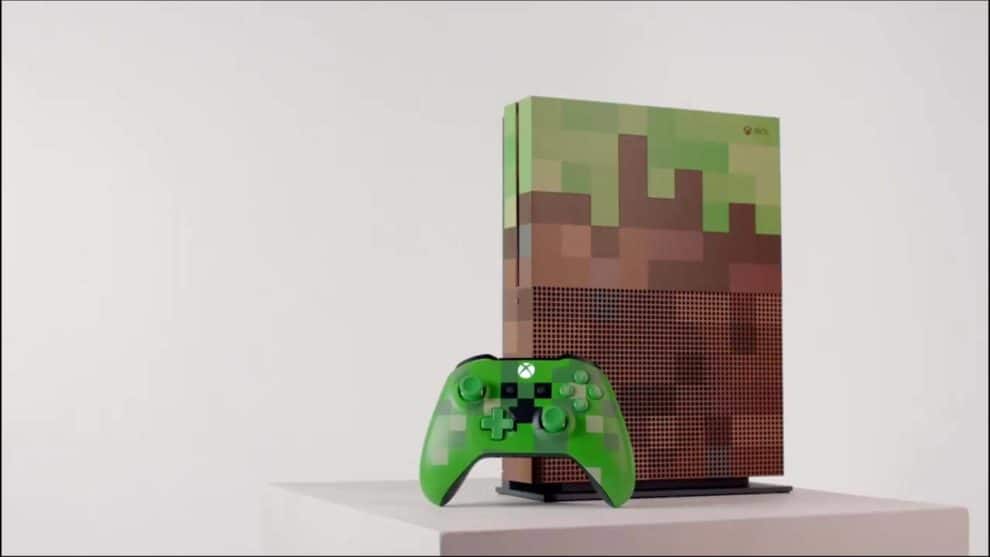
The two new Minecraft-themed Xbox controllers are now available to pre-order online. Each controller is a specially decorated version of the latest model of the Xbox One controller which works wirelessly with Xbox One consoles and Windows 10 PCs.

The green controller (Pre-order on Amazon here or Microsoft Store here) is inspired by the Creeper enemies from the Minecraft video games and features a nice little pack of TNT on the rear while the pink controller (Pre-order on Amazon here or Microsoft Store here) is based on one of the many pigs that litter the Minecraft in-game landscape.

Both of these controllers are due for release on September 12th 2017, just a few weeks away.

Are you going to grab one of these limited edition Xbox controllers? Let us know in the comments below.

4 best Feng Shui software for PC

If you’re looking for a reliable Feng Shui software, you’ve come to the right place. In this article, we’re going to list the best Feng Shui tools that you can use to harness the power of this ancient Chinese philosophical system.

Feng Shui can help you reshape your fortune, relationships, and your whole life. It is a combination of Art and Science that has been used in China and the Far East for thousands of years.

We’ll get right to the core of the matter, and we’ll offer you the best Feng Shui tools that you can use to reach inner balance and build harmony with the surrounding environment.

Feng Shui software for PC

Mark Shackelford’s Feng Shui Software

This Feng Shui Software originally came in three versions, but two of them are now obsolete. The only one available is the pro version. This is a full system with all the Feng Shui features you need as a professional consultant or if you are following an in-depth course for a pro.

This Feng Shui Pro software can calculate all the necessary values that you need to know. Just enter the birth date of your clients and the tools will offer you detailed information about them.

Key features include:

  • Garden Layout: use Feng Shui element s for an auspicious garden
  • Feng Shui Form School: you have the opportunity of learning about the 4 Celestial Animals and all the ways in which they’ll protect your home
  • Gardener’s Almanac: it’s a daily guide to all you need to know about your garden (what to do and what not to do)
  • Daily Elements: you can check the elements related to any selected day
  • I Ching Lottery: allows you to choose your lucky lottery numbers
  • Essential Oils: this teaches you how to use them as Feng Shui cures and health improvements
  • Astrological Relationships: you can check your compatibility with your friends and family by comparison various Element relationships
  • Feng Shui Tips and Information: offers you all kinds of information and tips

Other helpful features include Chinese Games, a Monthly Chinese Calendar, I Ching Divination, Numerology and more.

It’s effortless to get started with the program because it is a standard Windows system with Point and Click. After you install it, you just have to move the mouse around and click on the buttons.

Find out more and get the program from the FengShui magazine.


Feng Shui Store

The software is perfect for your home and office, and it offers you the opportunity to carry out your very own professional Feng Shui Consultation and to print more than 70 pages of personalized charts and reports.

The program promises to improve more of your life’s aspects including the following:

  • Wealth, business, and career.
  • Relationship and romance.
  • Health and well-being.
  • Family & business relationships.
  • Fame and reputation.
  • Self-confidence.
  • State of mind.
  • Personal ambitions.
  • Prevention of unseen obstacles.
  • Children’s development, academic performance, and confidence.
  • Relations with your neighbors.
  • Pet’s welfare.
  • Motivation, etc.

You don’t need to have experience in Feng Shui to use the program, but if you are already familiar with these concepts, you will find out that the software can provide valuable and little-known information. The software is perfect for every Feng Shui enthusiast but also for Masters, teachers, practitioners, interior designers, builders, architects and more.

You have three versions of this software available according to your needs: the professional version, the Master version, and the Business version.

For detailed information visit the software’s official page.


QiPlus Feng Shui

This is a professional Feng Shui and Chinese Astrology software for Feng Shui practitioners. You can register for free, login and download the demo version from your account. The software is compatible with  all Windows versions.

You can buy additional packages such as the following:

  • QIPLUS Feng Shui ($250): it includes a Feng Shui report, data selection, and Qi calendar
  • Feng Shui Report ($150): it includes modules such as the Floor Plan Editor, Feng Shui Chart, and the Feng Shui Report
  • Date Selection ($50): it includes modules such as the Annual Sha, Date Selection – Great Sun Formula, and Date Selection – Moon Formula
  • Qi Calendar ($100): it includes the modules BaZi-Four Pillars of Destiny, Nine Stars, Melodic Elements, 12 Officers on Duty


FengShuiPC


FengshuiPC is an impressive Feng Shui software perfect for professional consultants. The tool is developed on the Microsoft Excel platform, features a very user-friendly interface and integrates seamlessly into the Microsoft Office family.

The benefits of this Feng Shui software include the following:

  • It saves time: the software does the groundwork, and it invests your time and skills to find the most auspicious solution for your clients
  • It provides reliable results only a few seconds after you have introduced the necessary data
  • It offers a professional presentation: you can present your customers a polished presentation of your solutions
  • It provides deeper analysis via a fast review of alternatives as well as through a simultaneous view of all influencing factors in one-floor plan.

You can buy FengshuiPC from its official page.


These are our top choices for Feng Shui software for Windows. Visit the official website of each tool to read more about them and then select the one that suits your needs and interests best.

RELATED STORIES YOU NEED TO CHECK OUT:

Sound won’t work on PC

If there is no sound on your Windows 7, 8, 10 PC/laptop, follow the troubleshooting steps listed in this article. Sound issues on PC/laptop are very common, yet the solution is not always that obvious or easy to find.

Sound won’t come out of computer

There are many possible explanations as to why there is no audio on PC/ laptop. Generally speaking, sound is missing due to hardware of software issues. As a result, in order to fix sound problems on PC/ laptop, you need to first make sure that your hardware is working properly. If you haven’t identified any hardware problems, focus on finding and fixing the software-related issues.

Without further ado, here are the steps to follow to fix sound problems on PC.

Fix sound issues on PC/ laptop

Solution 1 — Check your cables and speakers

First things first, make sure that you plugged your cables the right way and turned on the speakers. Maybe you tripped over the cables and you unplugged them by mistakes or you forgot that you turned off the speakers five minutes ago.

Also, if there is no sound when you launch a particular program, test the sound in other apps and programs to make sure that is not a program-specific issue.

Solution 2 — Use Microsoft’s audio troubleshooter

Before you dive into troubleshooting, use Microsoft audio troubleshooter to fix the sound problems you’re experiencing on PC.

You can download it from Microsoft’s support page. You can also use the Windows built-in audio troubleshooter:

  1. Go to Start button > type Troubleshoot, and then select Troubleshoot from the list of results.
  2. Select Playing Audio > Run the troubleshooter.

Sound won't work PC

Solution 3 — Make sure that your audio device is enabled

  1. Go to Start > type ‘Device Manager’ > hit the first result.
  2. If a device appears with a down arrow, this means that the respective device is disabled. Right-click it > select Enable to re-enable it.

Solution 4 — Update your audio input/ output driver

Make sure that your audio driver is up to date. Oftentimes, if your driver is obsolete, you may experience various sound bugs.

  1. Go to Start > type ‘Device Manager’ > hit the first result.
  2. Locate your audio device > right-click on it > select Update driverno audio pc
  3. If prompted, choose to update the audio driver automatically. Windows will then search and install the latest audio driver.

audio issues PC

Solution 5 — Roll back audio drivers

Sometimes, various drivers and especially GPU drivers may override audio drivers. Try rolling back audio drivers and check if sound is available when using a previous driver version. Additionally, disable any audio enhancements and use only standard settings.

Here are the steps to follow to roll back audio drivers:

  1. Go to Start > Device Manager.
  2. Navigate to Sound, video and game controllers.
  3. Right-click your audio driver > go to Properties.audio unavailable PC
  4. In the Driver tab, click Roll Back Driver.
  5. That should bring back the previous version and possibly fix your sound issues.

If the problem persists, move down to the next solution.

Solution 6 — Update your sound card driver

If there is no sound coming out of your PC after installing the latest audio drivers, check your sound card. Here’s how you can do that:

  1. Launch Device Manager again > select Sound, video and game controllers
  2. Right-click your sound card > select Update driversound card driver no audio
  3. Wait until Windows installs the latest driver and then test sound again.

Solution 7 — Change the audio output device

Sometimes, GPU drivers change the default audio output device. Here’s who you can enable the default settings:

  1. Right-click Sound icon in the Notification area > open Playback devices.
  2. Highlight the preferred device > select Set as Default.no audio
  3. Click OK and check for changes.

Solution 8 — Change the default sound format

This is actually a very common issue that causes sound problems on speakers or headphones. If your default sound format is wrong, you can’t play any sound on your computer.

Here’s how to change the default sound format:

  1. Right-click on the speaker icon in the taskbar > select Playback Devices
  2. Your default playback device is already selected > go to Propertiesfix no audio PC
  3. Go to Advanced tab > change the default sound format from the dropdown menu.

fix no audio PC

It is worth mentioning that these settings aren’t the same for all users. Enable various sound formats, test them and select the one appropriate for your device.

Solution 9 — Download the SigmaTel Audio Driver

If you have no sound on your Dell computer, try downloading the SigmaTel Audio Driver. Many users reported that after installing this driver, sound came back.

The only problem is that there are many SigmaTel Audio Driver versions available depending on your Windows version. Second, this fix works only for older Windows versions.

For example, the Sigmatel STAC 975X AC97 Audio Driver provides the necessary audio support for the Inspiron Notebook, Latitude, Precision and XPS Notebook models running Windows XP and Windows Vista.

Search for the appropriate Sigmatel audio driver, install it and check if the issue persists.

Solution 10 — Another program is controlling your sound

If there is no sound on your PC, another program may be controlling your sound. Some apps and programs tend to seize exclusive control over your computer, turning off sound on speakers.

To fix this, you need to block apps from taking exclusive control over your audio device:

  1. Right click the speaker icon on the taskbar system tray > select Playback devices.
  2. Right click the current playback device > go to Properties.
  3. Go to the Advanced tab > uncheck the option “Allow applications to take exclusive control of this device”.
  4. Click Apply > OK > restart you PC.

If you’re running Windows 8, uninstall KB2962407. Many users reported that this old cumulative update breaks audio. Go to Windows Updates, check the Update history and simply remove this update from the list.

Solution 11 — Check  Windows Audio and Audiosrv

Make sure that the Windows Audio and Audiosrv services are running:

  1. Go to Start > type “Services” > hit Enter
  2. Locate Windows Audio > check if the service’s status is set to running. If the service is disabled, right click it and select Start.fix windows audio
  3. Now, set Windows Audio to run automatically on startup > right-click Windows Audio > select Properties.
  4. Go to the General tab > go to the startup type section and select “Automatic”no audio computer fix
  5. Click Apply > OK
  6. Repeat the steps listed above for Audiosrv.
  7. Close the services window and check to see if the issue persists.

Solution 12 — Run SFC

This action allows you to repair corrupt system files that may be causing audio issues.

  1.  Go to the Start menu > type cmd > right-click Command Prompt > run as an Admin.
  2. Type the sfc /scannow command > hit Enter.SFC no audio
  3. Wait until the scan process is complete > restart your computer.

Solution 13 — Install the latest Windows updates

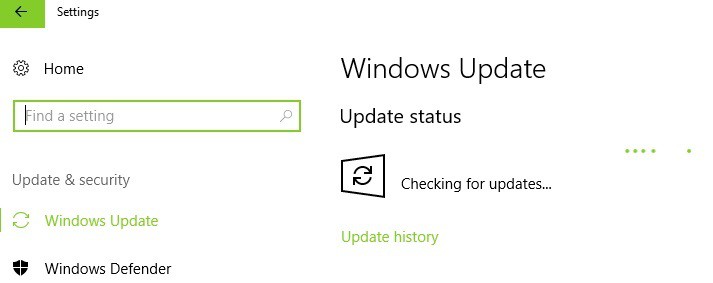
Make sure that you’re running the latest Windows OS updates on your machine. As a quick reminder, Microsoft constantly rolls out Windows updates in order to improve the system’s stability and fix various issues.

To access the Windows Update section, you can simply type “update” in the search box. This method works on all Windows versions. Then go to Windows Update, check for updates and install the available updates.
no audio fix PC

Solution 14 — Configure on-board sound in BIOS

Before you proceed, keep in mind that this solution is a complex one and the steps to follow require advanced technical skills. If you’re not comfortable with tweaking your PC’s BIOS, skip this solution.

  1. Enter BIOS > turn on your PC > hit F10 until the Setup screen appears.
  2. In the BIOS Setup screen, locate the on-board sound section. It should be located under Advanced.
  3. Select either Enabled or Disabled, depending on the current configuration > hit Enter > save and exit.
  4. After Windows starts > check if sound is available
  5. If there is no sound, shut the PC down > unplug the power cable > press the power button for 30 seconds to remove all the power from the PC.
  6. Plug the power cable in > turn on the computer.
  7. Enter BIOS > go to BIOS Setup screen > save the default BIOS settings.

You’ve reached the end of your troubleshooting guide. We hope that one of the workarounds listed above helped you fix the audio issues affecting your PC.

For more information on how to fix specific audio problems, check out the articles below:

Microsoft Company Store drops support for older browsers in September

If you access the Microsoft Company Store’s website right now, you’ll see a note saying that after a planned security update older browsers including Internet Explorer 10, won’t be able to access the store.

Microsoft Company Store ends support for older browsers

Starting with September 1 at 11 PM EST, to still be able to access the company store from a modern browser that will support the upcoming security upgrade. If you won’t update your browser, or if you don’t use a newer version, you won’t be able to access the online store anymore.

The announcement doesn’t come from the Redmond giant but Microsoft Company Store’s hosting provider eCompanyStore.

The browsers that will be supported include:

  • Microsoft Edge
  • Internet Explorer 11, released in 2013
  • Google Chrome 22, released in 2012
  • Mozilla Firefox 27, released in 2013
  • Safari 7, released in 2013
  • iOS 5, released in 2011

Protecting online shoppers and their data

The announcement also notes that the purpose of this security update is to increase the protection for online shoppers and their personal information. Upgrading to the latest browser version will result in making sure that your personal data will receive protection by the most recent standards wherever the TLS 1.2 protocol is enabled. The high security standard remains even if shoppers browse and shop other websites.

In case you weren’t familiar with it, the Microsoft Company Store is a dedicated online outlet which tends to all the needs of the company’s alumni and employees by offering them the opportunity to get merch at cut prices. In the Store, you can get various products including accessories, apparel, stationery and so on. The Store is not limited to Microsoft’s staff only, as anyone can purchase products from there.

Hulu Live TV comes to Xbox 360

Want to hear something weird? Here goes: There are still developers creating things for Xbox 360. It’s something that many of us who are in-the-know about Xbox may forget, considering how long the Xbox One has been current gen, but it’s still true. The most recent update coming to Xbox 360 is an overhaul for the Hulu app, including live TV.

The update brings a whole new look to Hulu, as well as the new functionality. For people who are still using an Xbox 360 as their main way to consume media, this is a huge win. While I wouldn’t expect anybody to count on more updates in the near future, this is a great treat for people who haven’t upgraded to Xbox One.

Microsoft will shutter Surface Support Twitter account, urges users to follow Microsoft Helps instead

Microsoft is shutting down the Surface Support Twitter account, giving followers a quick notice before they stopped supporting the page. This decision seems to primarily be part of Microsoft’s overall branding effort with their support pages, which they’re trying to consolidate into the MicrosoftHelps Twitter.

https://twitter.com/SurfaceSupport/status/900018118239682561

The Surface Support Twitter will continue to run for another 6 days, although it’s unclear if any real activity will occur during that time. At the end of the 6 days, it’s likely that the page will close altogether, although it may just stop posting.

Microsoft retires its GigJam collaboration app after public preview

Preview programs for software can be extraordinarily useful for working out the kinks – it’s the best way to get feedback early on that can shape work in a meaningful way. Such was the case with GigJam, an experimental service that offered a great way to redact information from a document quickly and collaborate on documents without worrying about showing people things they don’t need to see.

GigJam, unfortunately, didn’t get to become a big success story for preview programs. It was announced today that GigJam will no longer be developed, and all existing Gigs will expire on September 22nd, when the app is officially shuttered.

It’s unclear why the decision was made, or if the team plans to integrate GigJam’s functionality into something else. For now, all we know is that users who relied on GigJam have a month to move on to another service for their projects.

Microsoft is removing Windows 10 Pro support for next gen file system, ReFS

If the upcoming Fall Creators Update will bring a lot of new improvements to Windows 10 PC, several features will also be removed or deprecated with this new release. And after the recent confusion around Microsoft Paint made a lot of headlines, it has been recently reported that Windows 10 Pro will also lose the ability to create new volumes using Microsoft’s Resilient File System (via Ars Technica) .

The removal was first spotted by Twitter user Tero Alhonen, who saw it in a recently added note on a support page for the Fall Creators Update. Starting with the Fall Creators Update, only PCs running Windows 10 Enterprise or the recently announced Windows 10 Pro for Workstations will be able to create new ReFS volumes, but all other editions including Windows 10 Pro will still have Read and Write ability. In other words, if you already created a ReFS volume on your Windows 10 Pro PC, you will still be able to use it after updating to the Fall Creators Update.

For those unfamiliar, ReFS is a modern file system designed to be resilient to data corruption for PCs handling large data volumes. ReFS is not a real alternative to NTFS (ReFS volumes are not bootable), but it’s essentially a more efficient file system for power users. By limiting the creation of ReFS volumes to Windows 10 Pro for Workstations, Microsoft may encourage advanced users to upgrade to the new Windows 10 SKU when it becomes available later this Fall. However, the decision may be disappointing for those of you who think that there is no point to remove this feature on the “Pro” version of Windows 10.

In addition to full ReFS capabilities, the upcoming Windows 10 Pro for Workstation will also bring persistent memory, faster file sharing and expanded hardware support. Microsoft has yet to announce pricing details, but we should learn more ahead of the release of the Fall Creators Update.

Microsoft, in new partnership with Halliburton, wants to transform the oil and gas industry

Microsoft and Halliburton today detailed plans for a strategic alliance which will help drive digital transformation across the oil and gas industry. Under the relationship, Microsoft’s leading cloud and digital services will be combined with Halliburton’s science, software, and services.

According to Microsoft, one of the steps in the alliance involves both companies “leveraging and optimizing Microsoft technologies in machine learning, augmented reality (AR), user interactions and Industrial Internet of Things, as well as Azure’s high-performant infrastructure and built-in computing capabilities.” The end result will “deliver tightly integrated solutions across the energy value chain.”

Here is what Microsoft is saying about the alliance:

Areas of collaboration include applying deep learning to reservoir characterization, modeling and simulation, building domain-specific visualization for mixed reality, creating highly interactive applications, and fueling the digitalization of E&P assets. As a first step in the alliance, Halliburton has made DecisionSpace 365 available on Azure, enabling real-time data streaming from IoT edge devices in oilfields and the ability to apply deep-learning models to optimize drilling and production to lower costs for customers.

Azure will also become Halliburton’s preferred public cloud provider for iEnergy as part of the partnership. Microsoft is also saying that with this partnership, both companies will be allowed to apply voice and image recognition, video processing and AR/Virtual Reality to create a digital representation of a physical asset using Microsoft’s HoloLens and Surface devices.

Microsoft expands partnership with Red Hat with new container support for both platforms

When Red Hat and Microsoft joined forces in 2015, companies were already using both technologies and today’s press release reveals that the two are taking new strides in their alliance. Today, Microsoft announced that they are adding Windows support in OpenShift, OpenShift Dedicated on Azure, and SQL Server support in OpenShift and Red Hat Linux.

Adding these goals onto the joint roadmap is being said to ‘simplify container technologies and drive digital transformation for enterprise customers into using hybrid cloud technology. As previewed earlier this year at the Red Hat Summit, Windows Server containers will be natively supported on Red Hat OpenShift, the open sourced container being the first Kubernetes project to support both Linux and Windows Server.

On top of that, Red Hat OpenShift Dedicated on Azure will now be an available option.

With today’s announcement, it is planned for availability on Azure, Microsoft’s enterprise-grade cloud platform with availability announced across 42 regions globally — more than any other public cloud provider. Microsoft and Red Hat engineers are working closely to optimize OpenShift while running on Azure, ensuring enterprise performance standards and matching integrated support.

In addition, Red Hat OpenShift Dedicated on Microsoft Azure allows enterprise IT teams to focus on delivering business value and fostering innovation rather than keeping the lights on and micro-managing resources. Red Hat OpenShift Dedicated on Microsoft Azure is expected to be available in early 2018.

As a cherry on top, Red Hat announced that the now generally released .NET Core 2.0 is available as a container in OpenShift.


Save 50% on certain apps with the Back to School collection in the Windows Store

Back to school season is almost here, and Microsoft is helping you save money as you prepare for the new school year. Indeed, you can now save up to 50% off on certain Windows 10 apps by checking out the new Back to school collection in the Windows Store. We’ve given the collection a look and have included a few of our favorites below, and we invite you to check out the full collection by clicking here.

Drawboard PDF: $9.99 now $4.99

Need to mark up and annotate your local PDF documents? Replace pen and paper with an app that feels like pen and paper! Drawboard PDF is the top standalone PDF app on the Windows Store. Avoid printing documents for markup ever again with Drawboard PDF’s uniquely intuitive user interface and experience, smooth and natural pen inking, stylus and touch input separation and an impressive array of annotation tools. All our annotations comply with globally PDF specification standards.

Drawboard PDF
Drawboard PDF
Developer:
Drawboard
Price:
Free

Grapholite – Diagrams, Flow Charts and Floor Plans Designer: $39.99 now $9.99

Draw flow charts, floor plans, network layouts, uml, sketches & illustrations. Grapholite is an all-in-one diagrams designer aimed to create all types of business graphics and technical drawings from simple drafts and sketches to complex professional looking documents.

Grapholite Diagram
Grapholite Diagram
Developer:
Aphalina
Price:
$49.99

Algebra Touch: $2.99 now FREE

See why people enjoy math! Have you forgotten most of your algebra? Algebra Touch will refresh your skills using touch-based techniques built from the ground up for your Windows 8 tablet or PC. Enjoy the wonderful conceptual leaps of algebra, without getting bogged down by the tedium of traditional methods.

Algebra Touch
Algebra Touch
Price:
Free

In addition to the Collection in the Windows Store, Microsoft is also highlighting its STEM Saturday Initiative. With the free STEM Saturday program at the Microsoft Store, teachers, students, and parents can get hands on with technology. Do you plan on downloading any of these apps, or checking out STEM Saturday? Let us know your thoughts below.

Rise of the Tomb Raider will offer three different visual modes on the Xbox One X

Rise of the Tomb Raider is joining the list of games to be enhanced for the Xbox One X when the console launches in November, and the graphics update will be free for players who already purchased the game. According to a blog post on the official Tomb Raider blog, the upcoming Xbox One X update has been developed by Nixxes Software, the same company that previously ported the action/adventure game to the Xbox 360. On the Xbox One X, the game support for 4K graphics, HDR, spatial audio (including Dolby Atmos) and many other visual enhancements such as improved reflections, volumetric lights and more.

Interestingly, Xbox One X owners will be able to choose between the following three visual modes:

  • Native 4K: (full 3840 by 2160) for highest fidelity resolution
  • Enriched Visuals for stunning graphic upgrades
  • High Frame Rate for the smoothest possible gameplay

Rise of the Tomb Raider currently runs at 30 FPS in 1920×1080 resolution on the Xbox One, so it seems that the first option will make the game run in true 4K at 30 FPS. With the second option, the game will likely look much better (but not in native 4K) while maintaining a 30 FPS lock. As for the third option, it will supposedly make the game reach that 60 FPS sweet spot, which many gamers may prefer.

It remains to be seens if more game developers will follow that path and offer different visual modes for their Xbox One X enhanced games. Do you care more about your game having beautiful 4K graphics, or is it more important for you to play your games at a rock-solid 60 FPS? Sound of in the comments if you think game developers should give this choice to Xbox One X owners.

Exclamation Mark on Wi-Fi? 7 Ways to Fix it

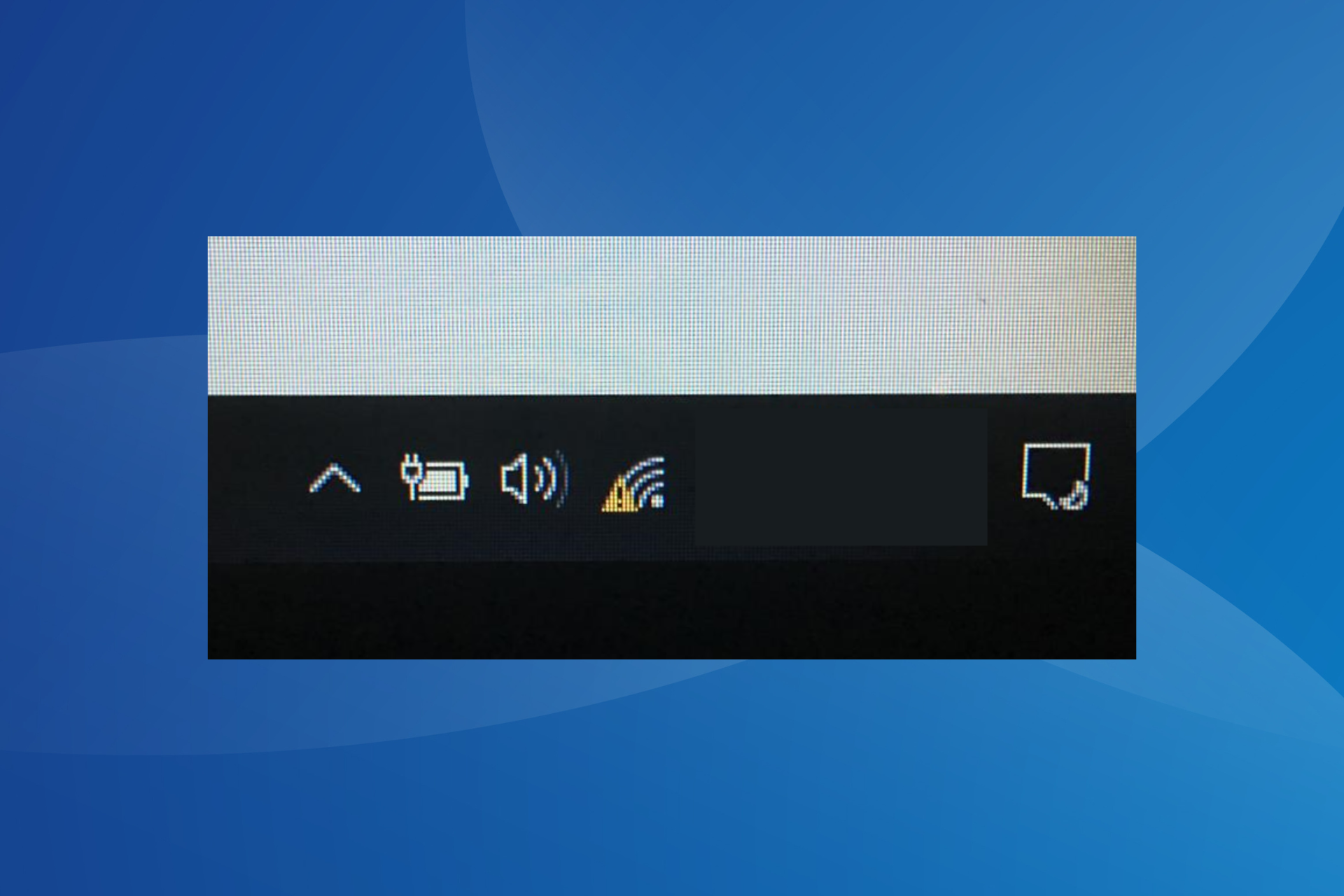
When the Wi-Fi icon on the desktop’s main menu has an exclamation mark, you are bound to face network-related issues.

There are several reasons why users face issues with network connectivity and, as a result, can’t connect to the Internet. Even when they can, the Internet speed is slow, or the connection is limited. So, keep reading to find out all about it!

Why is there an exclamation mark on my Wi-Fi?

Here are a few reasons users encounter the issue in Windows:

  • Poor network connectivity: A common reason behind the problem is poor signal strength, and it’s often easily fixable by changing the position of the device or the router.
  • Incorrect password: Often, when you enter an incorrect password, an exclamation mark may appear on the Wi-Fi icon in the system tray.
  • Misconfigured network settings: For some users, it was the misconfigured network settings to blame for the problems.
  • Issues with the driver: When talking about network issues, we can’t ignore the possibility of a driver-related problem, be it incompatible or outdated drivers.

How do I fix Wi-Fi with an exclamation mark?

Before we proceed, try these quick solutions first:

  1. Make sure the password entered is correct.
  2. Check all of your wires to ensure they are connected properly.
  3. Unplug the Modem for 30 seconds.
  4. Retry the connection.
  5. Reset your modem by using the reset button at the back of the modem, which is usually a pinhole button.                                                                                                  
  6. Restart the computer and check whether the exclamation mark on Wi-Fi disappears.

If none work, move to the fixes listed next.

1. Delete the Network Profile

  1. Open the Command Prompt as an administrator.
  2. Type the following command and hit Enter, while replacing the last part with the actual profile name: netsh wlan delete profile name=type-wireless-profile-name
  3. Now, open the Control Panel.                           
  4. Choose Network and Internet.
  5. Click on Connect to a Network.
  6. Follow the on-screen prompts.

In most cases, deleting the network profile and reconnecting to the network does the trick when you have an exclamation mark on the Wi-Fi icon.

2. Reset Winsock

  1. Open the Command Prompt as an administrator.
  2. Execute the following command: netsh winsock reset
  3. Restart the modem/router.

Winsock is a technical element that allows the computer to connect to a TCP/IP. If this element is corrupt, it can interrupt the connection. Before resetting Winsock, we recommend creating a system restore point.

3. Run an IP Config

  1. Open the Command Prompt as an administrator.
  2. Release the previous IP Address by typing the following command: ipconfig /release
  3. Renew the IP Address by typing the following command: ipconfig /renew

Every time a system is connected to the Internet, a new IP address is generated. Sometimes renewing your IP address can solve connectivity issues.

4. Reset TCP/IP

  1. Open the Command Prompt as an administrator.
  2. Reset the TCP/IP by executing the following command: netsh int ip reset resettcpip.txt

The connectivity issue often remains with the Internet Protocol or TCP/IP. If this is the issue, the TCP/IP must be reset to eliminate the exclamation mark on Wi-Fi in the laptop.

5. Troubleshoot Network Connections

  1. Open the Control Panel.
  2. Click on Network and Internet.control panel PC
  3. Now, select Network and Sharing Center.
  4. Click on Troubleshoot problems.troubleshoot to fix exclamation mark on wifi
  5. Follow the onscreen instructions

6. Use the network reset tool

  1. Click on the Start Menu, and open Settings.
  2. Click on Network and Internet.
  3. Under the Status Menu, look for Network Troubleshooter.
  4. Click on Network reset.
     

Once done resetting the network, you shouldn’t find the exclamation mark on the Wi-Fi signal.

7. Reinstall Network Adapter

  1. Open the Control Panel.                                                                          
  2. Click in the Search Box and type Device Manager
  3. Click on Network Adapters
  4. Right-click on the adapter you would like to uninstall and select Uninstall device.uninstall device to fix exclamation mark on wifi
  5. Confirm the removal of the driver and proceed.
  6. Restart your computer and follow the on-screen commands

If the network adapter encounters an error, the best solution to fix things is to uninstall the driver and let the computer auto-detect and reinstall it. This should, in all likelihood, remove the exclamation mark on Wi-Fi in Windows 10.

When all else fails, you can always buy a new WiFi Network Adapter. These gadgets aren’t very costly and plug into the USB port.

Once done fixing the error, check some quick tips to make Windows run faster than ever.

Tell us which fix worked for you in the comments section below.

Sling TV is now available in Google Chrome on Windows PCs

Sling TV is now available on Chrome and it also supports both on-demand and live content.

Sling TV before Chrome support

The streaming service has been available for PC before it got the Chrome support but this used to be possible only via a dedicated application. By dropping this requirement, the platform can now compete better against more dominant players such as Netflix which have had browser support for a longer time.

Attracting more customers

Extending the streaming service’s availability on more platforms is the key to attracting more clients, and this is why Sling TV is opening its doors to people who use Google Chrome.

Sling TV on Google Chrome is fast, intuitive and very easy to use. Customers will be able to start live and on-demand TV with a simple click seamlessly. They’ll also be able to stream their favorite content on Sling.com without the hassle of logging in to another device or downloading plug-ins. “Sling customers can stream their favorite can’t-miss content, like live NFL games or the next episode of ‘Game of Thrones’ on Sling.com.

Sling TV’s browser player is available for the latest version of Chrome, and it includes features such as Continue Watching or My TV. Users also have access to their settings and parental controls via the player. In the near future, we will see more features rolling out.

You can provide feedback about your viewing experience on Google Chrome to the Sling TV product team by emailing [email protected].

RELATED STORIES TO CHECK OUT:

Lukitus, a new version of Locky ransomware is on the loose via spam emails

Locky ransomware strikes again with its new variant called Lukitus which is a part of a new campaign. Before all this, the ransomware was using a new file extension called “diablo6”. Now, this new .lukitus extension was spotted.

Lukitus lurks in spam emails

As expected, the malware is being distributed via spam emails, so you’d better be extremely cautious. The spam message will come with an attached Microsoft Office file or with a ZIP attachment, which both come packed with malicious scripts. Once a trustful user downloads and executes the file, it will start to encrypt the host computer’s files and data. The malware will also manage to scramble file names, so the users will get confused and not know which file is which anymore.

In the end, the extension ‘lukitus’ will appear next to all infected files, and the downloaded software will disappear. But this is not all as things don’t end here. The program will be replaced by a file which contains the ransom note and users will see that Locky will demand 0.49 Bitcoins which translates into $2,000.

The sad thing is that there is no known way to decrypt the files that have been infected by this variant of the nasty software.

Protect your file against ransomware attacks

What you can do for more protection is to have an offline backup of all of your files. You can also try to restore the encrypted files from Shadow Volume Copies.

As you can see, there’s not much you can to fix the issue, but you can prevent it from happening by being careful when opening email attachments. You should be cautious especially when the emails seem to be random and none of your concern. Another essential thing you have to consider is keeping your antivirus software updated because this will also help block these aggressive cyberattacks.

RELATED STORIES TO CHECK OUT:

Intel may have shown off Microsoft’s follow up to the Surface Book

With the Surface Pro and Surface Laptop not only hitting shelves but bringing along some timely discounts for back to school shoppers as of late, it is no wonder Microsoft’s powerhouse 2-in-1 Surface Book has been shoved to the back of line during conversations.

That was, until today.

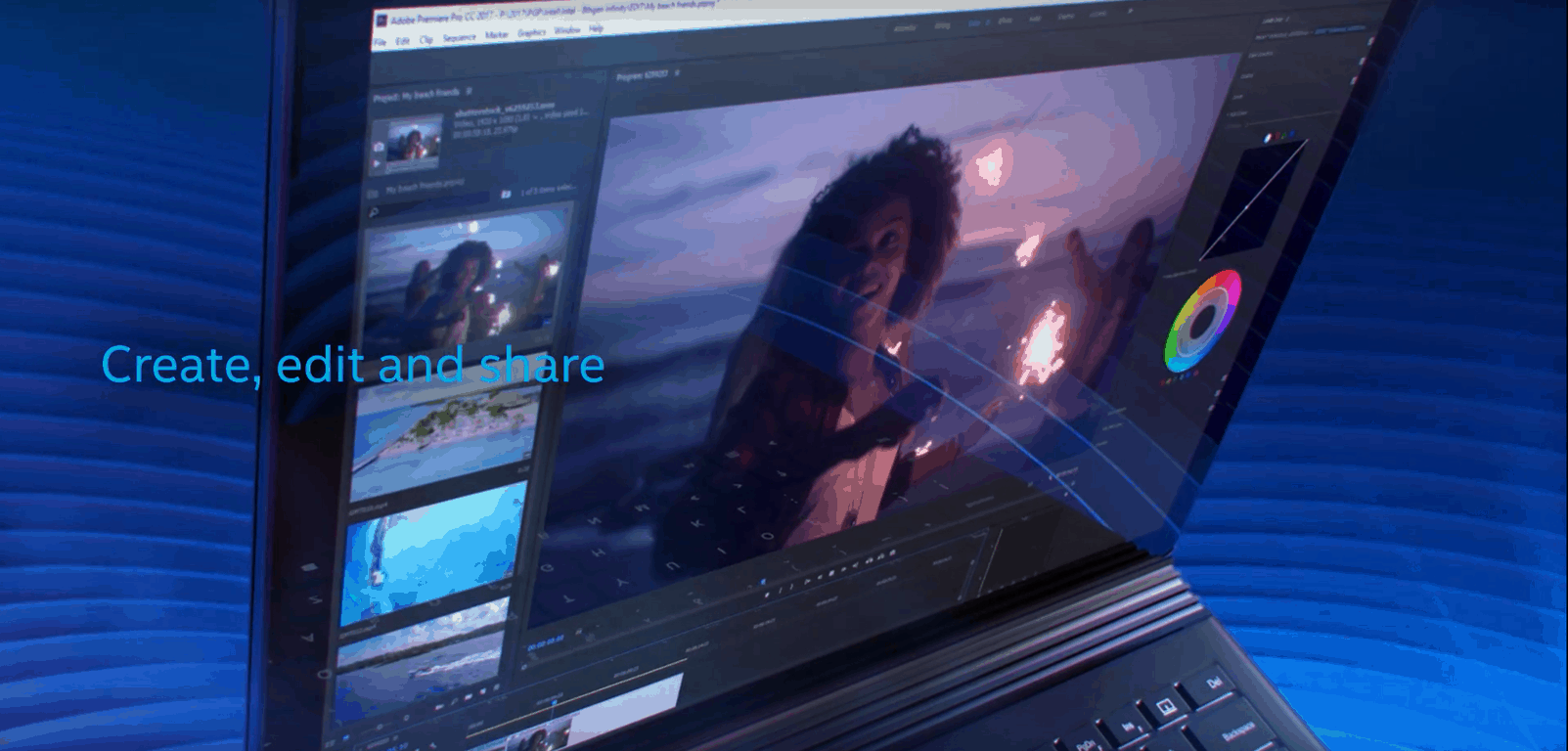
As Intel unveiled its 8th generation Core processor and revised Kaby Lake architecture it did so alongside a curious video ad that was picked up by MSPoweruser early on, which appeared to be showcasing the features of the new chip on a black version of Microsoft’s Surface Book.

Understandably, the internet went into an uproar over what appeared to be a poorly concealed implication as to what Microsoft might be working on for its follow-up to its polarizing 2015 2-in-1 hit.

The industry chatter comes at a time where many are looking longingly at Microsoft to refresh the Surface Book with more than just a boosted base. Some critics of the Surface Book are looking for Microsoft to address the Fulcrum hinge that creates a gap between the lid and keyboard while others are hoping the company brings it new ink and display tech over from the Surface Pro to the Surface Book for boosted productivity.

The new black Surface Book in Intel’s ad could just be meant as a reference device with no ties to Microsoft’s production, however, the level of detail given in the video is hard to brush aside. From the revamped tablet/eject button to the now prominently displayed black finish on the device, Intel’s black Surface Book may be a hint at what’s to come from Microsoft and a Surface Book 2.

Over the past few years, Microsoft has held an annual event some time in October to either showcase a new version of Windows 10 or new hardware from the Surface division. If there is another event being held this October, it seems to reason that Microsoft might have a Surface Book and Surface Studio refresh for customers now that the Surface Laptop and Surface Pro are known commodities.

We’ll keep an eye out for any more accidental reveals of what might be Microsoft’s Surface Book sequel.

You can now use Netflix in Continuum mode in Microsoft Edge

One of the features that Windows Mobile has over other phones is the ability to use Continuum, a stream from the device to a monitor to use it as a desktop. When docked, users can run Windows from their phone, controlled with keyboard and mouse on an alternative monitor. But even as it is a highlight, Continuum still has issues with some applications.

Netflix was one of those until recently. WindowsUnited.de reports (via Windows Central) that users are now able to use the video streaming service through its Microsoft Edge counterpart.

Unfortunately, the Netflix app is still having issues playing nicely with Continuum. So if you’re running a Continuum compatible phone, you can at least watch videos through the browser now. Hopefully, a fix is in the works for the app down the line.

Microsoft celebrates 20 years of Age of Empires with “exciting news”

Gamescom is kicking off the week with plenty of announcements and first looks to keep gamers at the edge of their seats. One such is the hands-on preview of the recently announced Age of Empires: Definitive Edition where attendees will get to play the revamped classic.

Further than that though, there will be major news for the Age of Empires franchise later today. At 12:00 pm PDT, Age of Empires will take the spotlight for some “exciting news” says Xbox Wire.

The Age of Empires: Definity Edition, which is going to be exclusive to Windows 10, has already accepted its first wave for the closed beta. Those interested in the beta can still register now. What we know so far about the release is that the title should be available by the end of this year. Maybe we’ll see more details during today’s announcement.  We’ll have to wait and tune into the livestream on Mixer later today at 12:00 pm PDT.

Here’s Major Nelson’s list of Xbox One X Enhanced game titles, with more to come

Yesterday, Microsoft announced at Gamescom that over 100 Xbox One games will be enhanced for the Xbox One X when the new console launches in November. Many upcoming games such as Forza Motorsports 7, Assassin’s Creed Origins and PlayerUnknown’s Battleground will be ready for the new console at launch, but many developers will also release free updates for existing titles such as Quantum Break, Dishonored 2, Halo 5: Guardians and more.

As a reminder, “Xbox One X Enhanced” doesn’t mean that a game will run in native 4K and support HDR: Microsoft has created two other logos for these specifications, which will be visible on both retail Xbox games and in the Xbox Store.

According to Microsoft, the “Xbox One X enhanced” label means that “a developer had done special work to take advantage of 6 teraflops of power in Xbox One X. Enhanced features will vary by game.” In other words, this means better graphics and performance, though please note that it doesn’t mean that a game that used to run at 30FPS will now run at 60FPS. Actually, we wish Microsoft and developers were more transparent about which games run at 60FPS, as this is probably much more important than 4K graphics for many gamers.

Anyway, here is the full list of games that will be enhanced for the Xbox One X at launch:

  • A Plague Tale: Innocence
  • Anthem
  • ARK: Survival Evolved
  • Ashen
  • Assassin’s Creed: Origins
  • Astroneer
  • Battlerite
  • Below
  • Black Desert
  • Brawlout
  • Chess Ultra
  • Code Vein
  • Conan Exiles
  • Crackdown 3
  • Danger Zone
  • Dark and Light
  • Darksiders III
  • Dead Rising 4
  • Deep Rock Galactic
  • Dishonored 2
  • Dishonored: Death of the Outsider
  • Disneyland Adventures
  • Dovetail Games Euro Fishing
  • Dragon Ball FighterZ
  • Dynasty Warriors 9
  • EA SPORTS FIFA 18
  • Elex
  • Elite Dangerous
  • Everspace
  • F1 2017
  • Fable Fortune
  • Fallout 4
  • Farming Simulator 17
  • Final Fantasy XV
  • Firewatch
  • For Honor
  • Forza Horizon 3
  • Forza Motorsport 7
  • Gears of War 4
  • Ghost Recon: Wildlands
  • Gravel
  • Halo 5: Guardians
  • Halo Wars 2
  • Hand of Fate 2
  • Hello Neighbor
  • HITMAN
  • Homefront: The Revolution
  • Injustice 2
  • Jurassic Park
  • Killer Instinct
  • Killing Floor 2
  • Kingdom Come: Deliverance
  • Life is Strange: Before the Storm
  • Madden NFL 18
  • Mafia III
  • Mantis Burn Racing
  • METAL GEAR SURVIVE
  • Metro: Exodus
  • Middle-earth: Shadow of War
  • Minecraft: Xbox One Edition
  • Minion Masters
  • Monster Hunter: World
  • NBA 2K18
  • Need For Speed: Payback
  • Ooblets
  • Ori and the Will of the Wisps
  • Outcast – Second Contact
  • Outlast 2
  • Paladins
  • Path of Exile
  • PlayerUnknown’s Battlegrounds
  • Portal Knights
  • Pro Evolution Soccer 2018
  • Project Cars 2
  • Quantum Break
  • Raiders of the Broken Planet
  • Railway Empire
  • Real Farm Simulator 2017
  • ReCore 
  • Resident Evil 7: Biohazard
  • RiME
  • ROBLOX
  • Robocraft Infinity
  • Rocket League 
  • Rush: A Disney Pixar Adventure
  • Sea of Thieves 
  • Slime Rancher 
  • SMITE 
  • Sonic Forces
  • Star Wars Battlefront II
  • State of Decay 2 
  • STEEP
  • Strange Brigade 
  • Super Lucky’s Tale 
  • SUPERHOT
  • Surviving Mars
  • Tennis World Tour
  • The Artful Escape
  • The Crew 2
  • The Darwin Project 
  • The Elder Scrolls Online: Morrowind
  • The Elder Scrolls V: Skyrim – Special Edition 
  • The Last Night 
  • The Long Dark
  • The Surge 
  • The Witcher 3: Wild Hunt
  • Titanfall 2
  • Tom Clancy’s Ghost Recon Wildlands
  • Tom Clancy’s The Division
  • Train Sim World
  • TT Isle of Man – Ride on the Edge
  • Warframe
  • Warhammer: End Times – Vermintide 
  • We Happy Few 
  • Wolfenstein II: The New Colossus 
  • World of Tanks 
  • WRC 7 FIA World Rally Championship
  • Zoo Tycoon

That’s a pretty nice selection of games to start with, and we hope more developers will update their existing games going forward. You may note that some of Microsoft Studios titles such as Halo: The Master Chief Collection, Sunset Overdrive or Ryse: Son of Rome are not included in the list for now, in addition to other super popular titles like Grand Theft Auto V or Battlefield 1. Let us know in the comments which are the games you would like to see enhanced for the Xbox One X.

Trending on the Windows Store: pirated TV and movies apps

Since Microsoft launched its Windows Store with Windows 8 back in 2012, the integrated digital distribution platform has been regularly criticized for its lack of quality apps. These days, the curated app store seems to suffer from another issue, the rise of questionable apps providing illegal access to pirated movies.

The recent emergence of these apps has been discovered by Torrent Freak, which found out that many of them are currently promoted in the “New and rising” section of the Windows Store (via The Verge). The most popular apps of this type all use the same kind of names and logos, and they’re are also all available on the Xbox One in addition to Windows 10 PCs (some of them are also available on Windows 10 Mobile and HoloLens, interestingly).

We tried some of these apps and saw that they have a lot of recent movies such as Detroit, Dunkirk, Despicable Me 3, etc. These apps actually give you a choice of different pirate sites for each movie, so they actually do not contain illegal content. That’s probably why it’s difficult for Microsoft’s automated algorithms to see why they’re problematic.

Anyway, this clearly shows that Microsoft must really find a way to improve how it validates apps on the Windows Store, as it’s apparently quite easy for developers to trick the system. To be fair, this is probably not an issue that exclusively affects the Windows Store these days, but this is obviously not the type of apps that Microsoft and Hollywood studios wants to see trending on the platform.

Microsoft achieves a new industry milestone with speech recognition system

Over the weekend, Microsoft achieved a new industry milestone with their speech recognition system. The company’s research team reached a 5.1 percent error rate in their speech recognition system, reaching human-level accuracy, and passing the 5.9 percent word error rate set last year.

According to Microsoft, the company’s researchers were able to reduce the error rate by about 12 percent by using a series of improvements to neural net-based acoustic and language models. Researchers also combined predictions for multiple acoustic models. Of course, the researchers benefited most from using the Microsoft Cognitive Toolkit 2,1, and Azure GPUs, which allowed them to explore model architectures, and optimize hyper-parameters, as well as improve the speed as which models could be tested.

A detailed report on the technicalities of the speech recognition system is available here. Although there is a lot of work left to do, and more challenges to address, Microsoft has long had the goal of reaching accuracy on par with humans. So, you can expect for this research to pay off in the long-term, and help improve Microsoft consumer services such as Cortana, Presentation Translator, and more.

Watch Major Nelson unbox the gorgeous Xbox One X Project Scorpio Edition

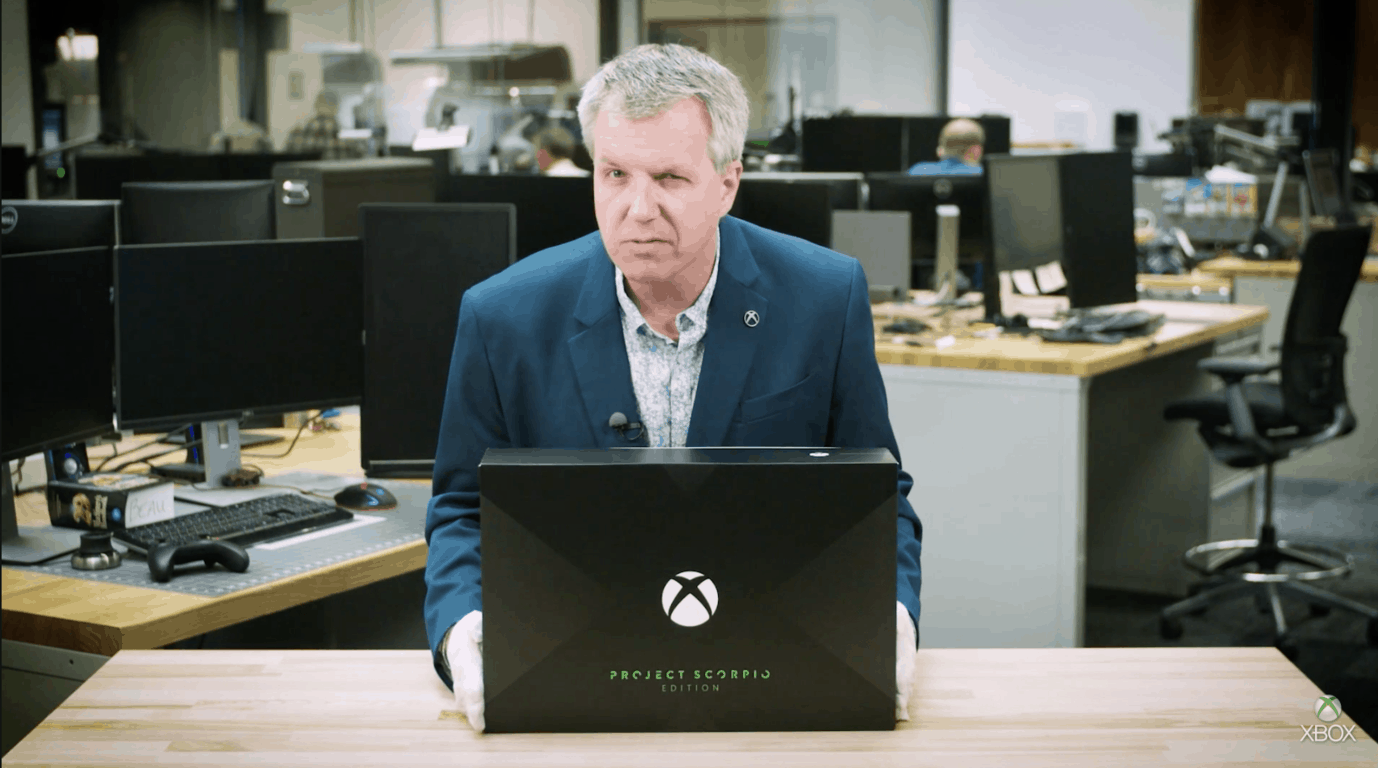
Microsoft finally opened Xbox One X pre-orders at Gamescom yesterday, taking the wraps off the beautiful Xbox One X Project Scorpio Edition on this same occasion. If you’re still not sure about pre-ordering this limited edition console or if you’re still waiting for the standard Xbox One X model in November, maybe Major Nelson’s exclusive unboxing can help you make up your mind.

First of all, Xbox One X Project Scorpio Edition comes with a special packaging featuring a giant X on the front, which is kind of an homage to the original Xbox console. In addition to the special edition console and controller (with included batteries), you’ll find in the box a stand for the console, a trial for Xbox Game Pass with Xbox Live Gold included, and a 4K capable HDMI capable.

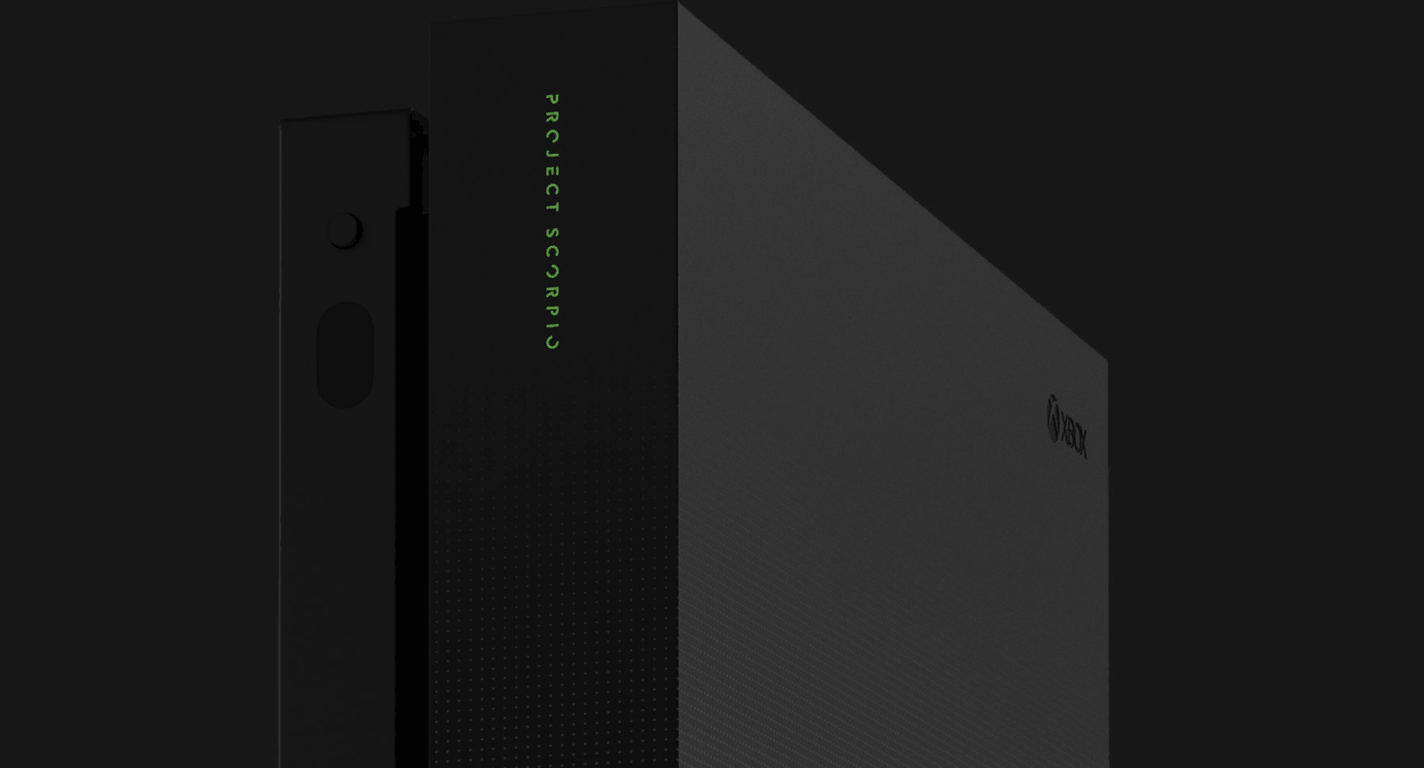
The Limited Edition console and controllers both feature the the Project Scorpio logo in Xbox green color, but the console also has a beautiful graphic design on the front with very small dots that look like a gradient that goes all the way down. The effect is very subtle and you can see how it looks in the image below.

Can you spot the very small dots on the front?

Back in 2013, Microsoft also launched the Xbox One Day One Edition to celebrate the launch of the original Xbox One console, but the Xbox One S didn’t receive the same treatment last year. Except for the exclusive packaging and design, there are no hardware differences between the Xbox One X Project Scorpio Edition and the standard Xbox One X console to be released in November. It would have been very nice to see an option with a 2TB hard drive (like Microsoft did last year for the launch of the Xbox One S), but it seems all Xbox One X consoles will ship with a standard 1TB hard drive for now.

Did you already pre-order the Xbox One X Project Scorpio Edition, or are you still waiting to read the first reviews in November? It seems that the limited edition console is already out of stock at several retailers, so you’d better hurry up if you want one.

Here’s why you should set your PC on Automatic Update

Setting your Windows computer on automatic update is supposed to save time that you can use on actually putting the computer to work. And, for the most part, it does.

Nobody enjoys staring at their computer, literally counting up from 1 to 100%, while it kicks those updates into effect.

If you know your way around your Windows computer, it may be best to take back control of Windows updates.

This way you can choose which updates are important, which aren’t, and which could inconvenience you or actually harm your computer.

As scary as it may sound, Microsoft has had a few howlers where their botched updates have released bugs that unintentionally exposed people to hackers. 


Which is the latest version of Windows 10? Find out from our constantly updated article!


Now, you may want to rush to the settings page to turn off the auto update.

But before you take that drastic action, you want to be sure you can consistently monitor developments around Windows for the really important security updates.

Also, make sure you have the technical skills to properly install the said updates as soon as they are released.

Enable automatic updates to block cyber attacks

We say this because, as risky as Microsoft’s own accidental bug releases are, the threat of hackers exploiting your systems due to bad Windows patches is far more serious and a lot costlier.

And even though these accidental bugs set on you by Microsoft will disturb the normal functioning of your computer, and, in some cases, break some important features, the software company always follows up with a fix.

Microsoft’s cyber security specialists also have their pulses on the goings-on in cyber security and are in a better position to foretell malware and ransomware attacks and release security patches, in the nick of time.

Even when they are unable to stop these attacks from happening, Microsoft engineers can fortify the Windows OS to minimize the effect of such attacks.

For this reason, it may be better to let the folks at Microsoft keep patching your computer without you even knowing about it.

Rolling the dice back, managing the updates yourself could be a good idea if, as we said earlier, you can keep up with the updates.

Yes, Microsoft themselves haven’t quite figured out how to release patching files without setting off bug tripwires that may have slipped through the cracks.

But they may also have sneakier reasons for preferring that you keep your Windows computer on auto update.


Block cyber attacks more efficiently by installing the best antivirus tool from our fresh list!


There was quite some backlash when, in 2016, Microsoft released patches that prompted users’ computers to automatically upgrade from Windows 7 and 8 to Windows 10 without seeking their permission.

The problem is that such updates don’t always come in at the most convenient times for the user. Some users even lost their work as a result of the forced upgrade.

The company eventually addressed the issue, but there is nothing to suggest this won’t happen again.

Windows 10 has suffered some rather unexpected competition from its supposedly inferior forerunners. And the software giant may be forgiven for trying to give one of their biggest ever product releases some leg-up.

But doing that while alienating your products’ loyal users isn’t a smart strategy.

You get a sense of the frustration people feel when Windows 10 is literally forced on them when they take the drastic action of stopping their Windows computers from auto updating altogether.

But the truth is software engineering can be challenging and is fraught with challenges, some of which sneak up on, and flummox, even the most skilled engineers.

In the end, it is the responsibility of every computer user to actively secure their own systems and have proper contingency measures to abate the effect of software bugs, whether they are malicious, or accidental.

Microsoft will not always get it right and we should, perhaps, learn to cut them some slack.

RELATED STORIES YOU NEED TO CHECK OUT

How to Dual-boot Endless OS and Windows 10

Endless OS happens to be the newest sensation in the world of computer operating systems. Built on the Linux kernel, Endless is also projected to be the safest around, one that is going to save you a lot in the long run.

Another strong plank that the makers of the Endless OS have based their entire marketing strategy on is the ability of the OS to operate even when there is no Internet connection. The California-based start-up said they worked around this by ensuring the OS comes with all it might ever need to function. That includes hundreds of apps that come bundled with the OS, saving you from downloading those later.

So, if all of the above sounds tempting enough, but you want to keep Windows 10 installed on your PC, you can always dual-boot both operating systems. And it’s mighty simple, too, as we’ll walk you through the entire process.

Install Endless OS on your Windows 10 PC

Hardware requirements

The prerequisites for using the OS have also been kept to just the bare minimum. That includes a 64-bit Intel or any similar processor like AMD or VIA. Further, it is at least 2 gigs of RAM that would be needed while the minimum storage required is 16 GB. However, that applies to the base version, while the full version will eat up 32 gigs of your hard drive. Sure, these are just the minimum requirements.

Download Endless OS

The first step for you will be of course to download the OS. For this, head over to the official site and click on the ‘Free Download’ tab.

Once you do that, you will be redirected to the download page relevant for Windows users. Make sure you download the version that applies to Windows. This will download the installer file in your system.

Next, double-click on the installer to allow it to download the actual OS files. Doing so will launch the familiar alert box asking your permission if the app is allowed to make changes to your hard drive. Of course, you need to click on the ‘Yes’ option for the entire process to start.

Customize your installation

The installer program then starts and acts to confirm your preferred language. Make your choice from the drop down box though the options here are limited to English, Spanish, Portuguese, French, Arabic, Chinese and Bahasa languages. Bengali, Thai, and Vietnamese are slated to be included later on.

Click on ‘Install Endless‘ next, which will lead to the next screen where you need to make your choice from installing either the ‘Basic’ or the ‘Full’ versions. The Basic weighs just $1.9 GB, while the full blown version will require 13.5 GB of your hard disk space.

The Basic version again comes with just the bare minimum of files and should suffice if you have access to a reliable internet connection. That way, you can always download any additional files you need.

The Full version, on the other hand, comes with all the bells and whistles and is the one to go for if you wish to have a really in-depth feel of the OS. In other words, it comes with the entire set of apps that you will require for the OS to perform to its optimum at all times, thus negating the need to download any other app again.

So, if all you need is just a feel of the OS without getting too intimate with it, the basic version is the one to go for. Available space on your hard disk can also be another consideration for opting for either option. The minimum recommended space to install the Basic version is 16 GB, while the Full version should be allocated at least 32 GB.

Those figures are however the bare minimum, and I would recommend allocating a few more gigs to allow for hassle-free storage of all your photos, videos, media files, and other documents. The installer also acts to partition your hard drive and space once allocated to Endless OS can’t be changed later. As such, be generous with your allocation here considering the available space in your hard drive.

The installation process

Once you have selected, click ‘Next’ at the top right corner. This initiates the actual downloading of the Endless OS files, followed by verification and then the actual installation in the hard drive of your computer. The process can last anywhere between a few minutes to even several hours, depending on your choice of OS version (Basic/Full) as well as the speed of your internet connection.

You can switch to a wired connection for a slight uptick in internet speed, thereby shortening the download and installation times. Fortunately, the OS is robust enough to survive crappy connection or other interruptions. So if the process gets interrupted for some reason, like the internet breaking down or a power failure, fret not, as the OS will begin downloading from exactly the same spot where the interruption occurred when conditions resume.

All set!

Once the installation is complete, there will be a message flashed on the display saying the OS has been installed successfully. Restart your PC to see the changes taking shape; you will now be greeted with a display where you must choose between the Windows or Endless OS to boot on your PC. Also, after you boot Endless OS for the first time, you must go through a one-time set-up process.

So, that’s it. You now have the Endless OS installed on your hard drive alongside Windows 10. As is the case with all dual booting PCs, each of the OS is held within its own partition. None of the OS can access the files or data that apply to the other OS. If you need to switch to the other OS, you must restart your PC.

In case you’re not happy with Endless OS, we have a great guide on how to change from Endless OS to Windows 11 that can help you make the switch.

This Surface phone concept video offers some ideas about Microsoft’s plans

Microsoft fanatics have been waiting for what seems like forever to get their hands on the Surface phone. But the launch has been delayed and there is no set release date yet. For now, fans are going off of concept images and videos that combine possible features and make imagining the new device a little easier.

Most of the concept images and videos are based on the fact that CEO Satya Nadella once said the phone will look nothing like what we’ve been using to date. This comment has mobile device users beyond Microsoft fans, wondering what more could a mobile device do or look like to surpass the ever-popular iPhone and Android devices that have become a staple in the market.

Surface phone concept video

One new concept video that’s received recently  some attention was posted to YouTube by Amir Estefad and Mohammad Reza Alidoost UI/ UX designers, includes just about every feature the Microsoft community has been requesting and speculating about the new Surface phone.

As you can see in the video, the screen is large and wraps around the device, there’s tons of easy functionality on the screen and its slim and sleek. Requests to include these options in the upcoming phone have been made across forums and user communities.

This new design is both exciting and hopeful since it’s not too far fetched (previous rumors included foldable phones). This concept represents something that could actually work to increase productivity and ease of use. That of course remains to be seen by the tech features and performance of the phone, but for now, we can hope Microsoft is listening.

Read Also:

Xbox news recap: Xbox One X: Project Scorpio Edition now available for pre order, Light Mode UI coming and more

Welcome to our weekly Xbox news recap series, where we go over the top stories of the past week in the world of Xbox. Let’s get started.

Xbox One X: Project Scorpio Edition now available for pre-order

The Xbox One X is finally available for pre-order, for those among you who are chomping at the bit to get yours on day one. The initial wave is being called the Xbox One X: Project Scorpio Edition, and its surprise announcement was shown off at the tail end of an amazing Gamescom showing, just a couple of days before the convention proper.

Light Mode coming to the Xbox One

The Xbox One is getting a brand new UI along with the Xbox One X, and it’s also getting a new tint. The Xbox One X’s new UI design is being accompanied by an option for “Light Mode” – a toggled option which makes the UI’s dark default tint into a classic white, which some Xbox 360 users may be familiar with. The feature will be available on preview in the near future.

New Kickstarter working on adapter for the Xbox One X controller on PS4 and Switch

Near a PS4 or Nintendo Switch, but only have access to an Xbox One controller? That’s something of a specific predicament, but the world of crowdfunding is here to make sure you can be accommodated. Brook Design on Kickstarter is looking to raise $5,000 towards its project to make an adapter that will fit the Xbox One X to either of the other current-gen consoles, and it’s already surpassed it. If you want to contribute to the surplus, go ahead and check out the page.

Xbox Live Sessions launching next week with DJ Khaled

Xbox Live Sessions is a new series coming to Mixer which will feature some prominent pop-culture celebrities streaming games live. The series will kick off on August 25th, and the first show will feature DJ Khaled playing Madden NFL 18. He’ll be answering questions, talking about his new projects, and helping the Microsoft team give out prizes to stream-goers all while playing.

Crackdown 3 delayed once again, to 2018

Crackdown 3 has been in development hell for many years now, and it’s just gotten delayed.. Again. The news broke earlier this week, and it’s a bit heartbreaking for those who have been fans of the franchise since the first game, which came out quite a long time ago. When it finally releases, Crackdown 3 promises to be a fun romp through a destructible city, showing off some exceptionally arcade-like gameplay – and the talents of Terry Crews, to boot.

Thanks for joining us. To keep up to date with all the latest Xbox news, keep a close eye on our Xbox One tag.

Xbox Design Lab coming to over 20 additional European countries tomorrow

The Xbox Design Lab is one of the less appreciated new things that came out in recent years, but it’s truly a fantastic feature for dedicated Xbox gamers. Users can pay a small additional fee to completely personalize a custom controller, changing the color of every individual piece of the peripheral to suit their aesthetic. The service is now spreading its reach out a bit, going out to 24 new European countries.

The service will be available tomorrow in the new supported countries, and accompanies the introduction of a new rubberized grip and metallic finish, for those gamers who want to go the extra mile. This seems to signal that the service has been a success – and you may even see it expand some more.

Feel free to show off your new designs to me on Twitter, @MiCottuli. Mine’s hot pink, and I’m convinced it’s the best controller ever conceived.

Rise of Nations coming to Windows 10, cross-network play with Xbox and Steam

Rise of Nations, a beloved RTS game from days gone by, is getting support for Windows 10. While many people may have moved on to more modern RTS experiences like Starcraft 2, those who are interested in a return to the genre’s roots can find home here.

This is just part of the news, however. It was also showed off at Gamescom that Rise of Nations is getting cross-play support between Windows 10 and Steam users, giving a little bit of extra juice to the re-release’s introduction to the online community. Here’s hoping that it ends up getting the love that it deserves, as one of the big RTS grand-daddies.

Windows 10 news recap: Asus launches first Windows 10 S laptop, Bitcoin Miner for Windows 10 updated and more

Welcome back to our Windows 10 news recap. We are continuing the trend of our weekly “Windows 10 news recap” series where we go over the top stories of the past week in the world of Microsoft’s flagship operating system.

Microsoft is testing renaming the Windows 10 Photos app to Story Remix

In a move that has so far not impressed Windows 10 Insiders, Microsoft has begun testing renaming the built-in Photos app to Story Remix.

Independent rendering brings big speed improvements to Edge in Windows 10 Fall Creators Update

The Windows 10 Fall Creators Update is set to bring speed improvements to the way Microsoft Edge renders webpages, as Microsoft incorporates independent rendering into its default browser.

microsoft, edge

Asus releases the VivoBook W202, its first Windows 10 S laptop

As Windows 10 S begins its journey to stores, Asus has released its first Windows 10 S-based laptop, the VivoBook W202.

Free Bitcoin Miner app updates on Windows 10 Mobile and PC, coming to Xbox One soon

For both Windows 10 and Windows 10 Mobile, the free Bitcoin Miner app has received an update that delivers improved system memory management.

Microsoft, Bitcoin

That’s it for this week, we’ll be back next week with more Windows 10 news!

Microsoft appears to have accidentally leaked an upcoming Minecraft-themed Xbox One S Limited Edition bundle

In what appears to be an accidental leak, Microsoft briefly (for about 30 minutes) published a video promoting a Minecraft-themed Xbox One S Limited Edition bundle on its Minecraft Facebook page. The video was removed after half an hour, but not before it was spotted by those at Surface Phone Italia.

Within the promotional material, there was a link that is expected to be the pre-order page on the Minecraft website, but isn’t available yet, as expected. It’s likely that Microsoft will officially unveil the new limited edition console at its Gamescom conference later today.

We’ll be keeping you up to date on all the latest from Microsoft and Xbox at Gamescom during the live event.

ARK: Survival Evolved can support cross-play between PS4 and Xbox One, but “Sony won’t allow it”

It’s not been too long since the Minecraft debacle, where Microsoft announced cross-play with Minecraft across different platforms, with one exception – Sony’s PS4, as Sony publicly admitted its refusal to allow cross-platform play.

Now, it seems Sony is at it again. The studio behind early-access game ARK: Survival Evolved, Studio Wildcard, has said that they have an internal build of ARK: Survival Evolved that has cross-play working between PS4 and Xbox One, but that it isn’t available as “Sony won’t allow it”.

Studio Wildcard’s co-founder, Jeremy Stieglitz, sent out a tweet in response to a question posed to him with playing with friends on other consoles (via Neowin), to which it was said that Sony isn’t allowing cross-platform play:

While Sony’s decision isn’t set in stone, it seems that for now at least, Xbox One and PS4 players will continue to remain on their separate sides (unless, of course, you’re lucky enough to own both consoles).

Intel’s upcoming CPUs feature 10 nm technology

Intel has revealed that they plan to launch both an 8th generation Cannon Lake and 9th generation Ice Lake processor in the near future. These two powerful Core processors will feature the Industry leading 10 nm technology.

On August 21, Intel will officially announce the specifics of the ‘Coffee Lake’. This is the codename for the 8th-gen Intel Core processor. This new family of processors is expected to provide performances that are 15 to 30 percent better than the previous generation. 

Intel Core Processors with the 10 nm technology

Cannon Lake is another 8th-gen Core processor. It will be the successor to the Kaby Lake, which is the processor currently used in MacBook devices. The Cannon Lake series will be the first series to use the 10 nm technology.

Furthermore, Intel  is already giving glimpses of their 9th generation Core Processor, which is codenamed ‘Ice Lake’. The 9th generation Core intel processors will utilize a new architecture, which will feature state of the art 10nm+ processing technology.

Currently, it is not completely clear as how the 10 nm+ in ‘Ice Lake’ will differ from the technology in the Cannon Lake processor. However, more information is expected to be revealed soon.

AMD, has recently been producing numerous top of the line processors that are set to rival Intel. Therefore, Intel is determined to produce a highly functional processor with the 10nm technology. The 8th generation ‘Cannon Lake’ and ‘Coffee Lake’ processors as well as the 9th generation ‘Ice Lake’ are Intel’s response to AMD’s Threadripper and Ryzen series.

Read Also:

Brook wants to enable players to use the Xbox One controller on PS4 and Nintendo Switch with its new Kickstarter for the “X One Adapter”

Each console has its own set of controller(s) – Xbox comes with a controller for each console, such as the Xbox One controller, or the Xbox Elite controller if you’re after a little more control. Then comes along the PlayStation 4 with its DUALSHOCK controllers, and then the Nintendo Switch with its Nintendo Switch Pro Controller and Joy-Con controllers.

But, what happens when you’ve only got an Xbox One controller but would like to play on another console? Well, you’ll either be relying on having a spare controller for the other console lying around somewhere, or having to buy a new controller. What if, instead, you could pick up the Xbox One controller, place an adapter on it, and begin playing on a console of your choice? That’s what Brook Design, LLC, is aiming to do with its latest Kickstarter. Called the “X One Adapter”, it allows users to place an adapter on the back of their Xbox One controller and enables the ability to use it with other consoles.

Brook, having previously released a number of gaming accessories for a variety of consoles, aims to raise $5,000 by 15th October. At the time of writing, the Kickstarter had raised nearly $3,000 with 40 backers.

The adapter is said to support both the Xbox One and Xbox Elite Controller, be able to read Xbox Elite custom mappings, connect wirelessly to the Switch and more. The battery will not be replaceable, instead requiring charging via a USB cable.

What do you think to Brook’s idea of an adapter enabling an Xbox One controller to work across a variety of consoles? Let us know in the comments below!

What’s happening with Windows phones? Is Lumia 735 gone for good?

Something strange is going on with Microsoft and its first-party Windows phone offerings. Or is it? Many speculations as to what exactly is happening are already crowding news headlines.

We may know why

With the much anticipated Surface Phone concepts already being released and earlier reports that another Microsoft phone could be in the works, this might mean we may get something new soon.

It all started when reports were released stating Verizon had become the only first-party seller still offering an activated Windows phone – the Lumia 735, to wireless customers.

While Windows mobile devices can still be purchased from the Windows storefront from other manufacturers like Acer and Alcatel, questioning around the move to gradually take the Lumia out of its offerings is on the rise.

As the industry monitors Window phone offerings from the company’s online store, they noticed earlier this week that the company had also removed its listing for the Lumia 735 handset from its online store.

With the removal of the Lumia 735, that would leave the last company (Verizon) offering an Windows handset to buyers soon to also be crossed off the list. You might still find remaining stock in physical locations.

Microsoft phone revenues crumbling

The move shouldn’t come as a total shock. Microsoft did tell investors during its earnings call back in April, that revenue for the phones were crumbling and that it would be discontinuing all first party phone hardware this summer.

What’s causing everyone to wonder what might be happening is the fact that listings for the  Lumia 735 went from an “out of stock” message one day, to “not available” and at the time of this post, completely gone from its products page.

New concepts of the much anticipated Windows Surface phone are being released and it’s only a matter of time before Microsoft starts giving us clues as to how this phone will look and when it will be available. Removing the Lumia from its online listings might be the first step.

Read Also: