How to fix Windows 10 KB3201845 mouse and keyboard issues

The latest Windows 10 update is causing more issues than it fixes. Update KB3201845 is causing a bevy of severe issues that literally make Windows 10 computers unusable.

The unlucky users who installed KB3201845 on their machines report that the update sends their computers into endless reboot loops, the System Restore option won’t work, computers won’t start up, peripherals are unresponsive and more.

Speaking of peripherals, thousands of users complain that KB3201845 breaks mouse and keyboard. Moreover, gamers are also affected since this update breaks joysticks as well.

Windows 10 KB3201845 kills mouse and keyboard

I have just rebooted from a windows update not sure but I think it was KB3201845.
The computer tries to restart but come to a screen  preparing Automatic Repair after this come a screen asking you to choose a keyboard layout .. problem is the keyboard and the mouse will not work, so I can’t go any further. Anyone have a way to get past this ?

Other users report that KB3201845  is limiting their keyboard and touchpad usage. More specifically, features such as scrolling with two fingers or using three finger options are now unavailable:

After the last windows 10 update […] KB3201845) now I can only use it with one finger. I can no longer scroll with two fingers or use Three fingers. As you can understand this is really frustrating.

Fix: mouse and keyboard issues after updating Windows 10

  1. Go to Power Options
  2. Select Choose what the power buttons do
  3. Click Change settings that are currently unavailable
  4. Uncheck Turn on fast startup

From now on, Windows 10 will initialize all drivers on startup. This will take longer, but at least you’ll be able to use your mouse and keyboad.

If your keyboard is completely unresponsive, use a USB keyboard to perform the troubleshooting steps listed above. For more information on how to fix keyboard and mouse issues on Windows 10, check out the links below:

Also, if you’ve come across other workarounds, you can help the Windows 10 community by listing the troubleshooting steps in the comment section below.

READ ALSO: Windows 10 KB3200970 issues: install fails, high CPU usage, battery drain and more

12 Days of Deals day 8: lots of savings on Xbox

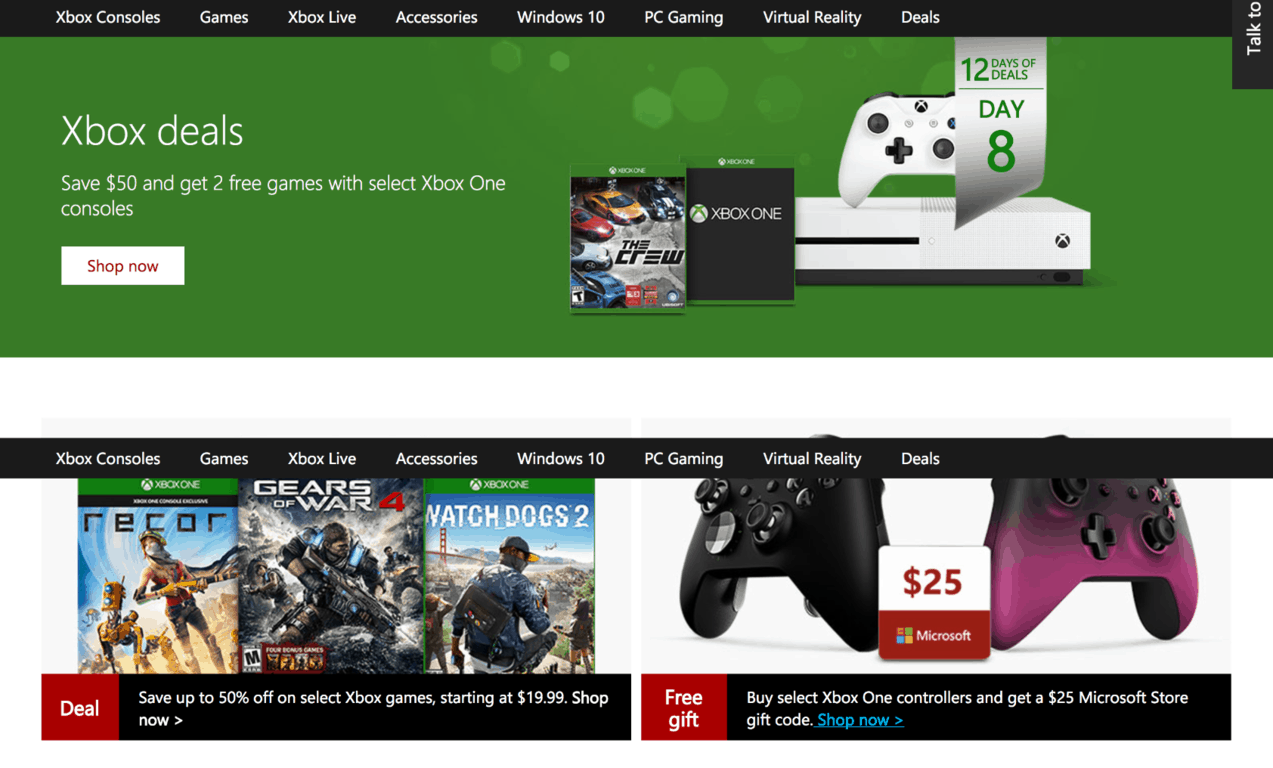
Today is Day 8 of Microsoft’s 12 Days of Deals series of discounts, and you can now take advantage of several cool deals on Xbox One S bundles, AAA games, accessories and more. If you have yet to purchase Microsoft’s latest gaming console, you can now enjoy a $50 discount on select bundles and get 2 free games along your purchase including Including Forza Horizon 3, Gears of War 4, Recore, Mirror’s Edge Analyst and more. As usual, we’ve highlighted the most interesting deals below and we invite you to check the dedicated page to see the full list of deals.

Save $50 and get 2 free games with select Xbox One consoles

Save up to 50% of on select Xbox games, starting at $19.99

Buy select Xbox One controllers and get a $25 Microsoft Store gift code

Lastly, Microsoft Stores in the US are also offering today an exclusive in-store doorbuster deal: those of you who will be one of the first customers in line will be offered a $25 Microsoft Store gift card, which is a pretty good reason to visit your local Microsoft Store today. Let us know what you think of these latest deals in the comments below.

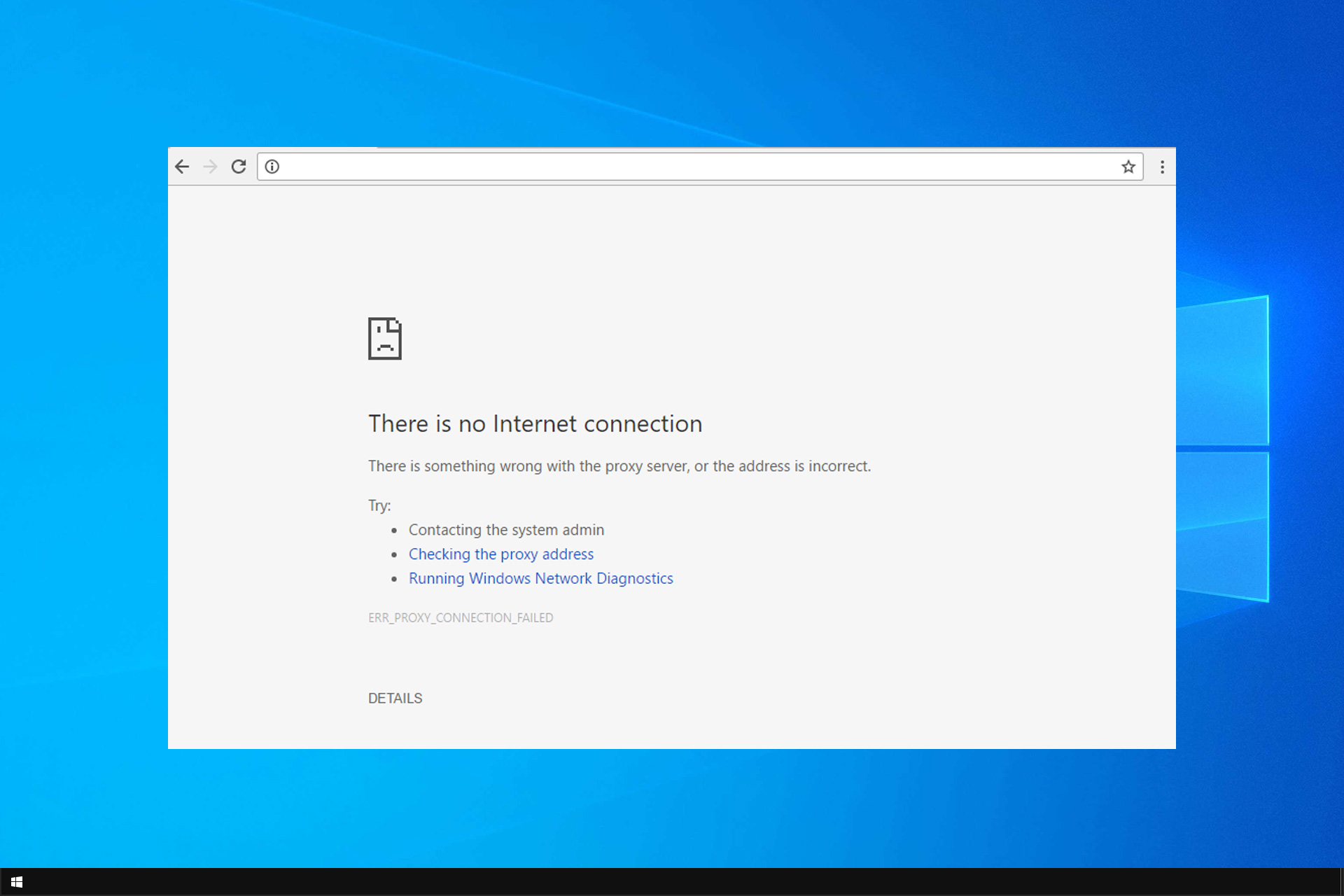
No Internet Connection in Windows 10: How to Fix it

Many Windows 10 users can’t connect to this network even after installing the latest. In addition, many are greeted by No Internet connection message on Windows 10.

This can be a problem and prevent you from accessing the Internet, so it’s crucial to fix it as soon as possible. If this error sounds familiar, it’s because it’s quite similar to No Internet, no connections are available message.

Before we fix this issue, let’s see what causes it.

Why does my computer say no Internet connection when I am connected?

  • Network issues – Your network hardware may be encountering some glitches, and that’s causing this issue.
  • DHCP – Sometimes, there are DHCP bugs that can prevent you from connecting to the Internet.

What can I do if there’s no Internet connection in Windows 10?

Use netsh command

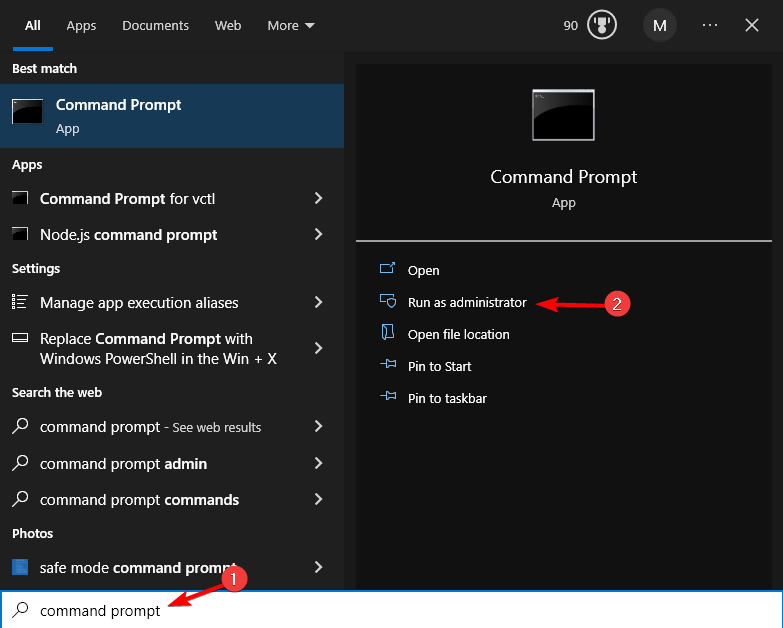
  1. Go to the Search menu, type cmd and choose Run as administrator.
  2. Type the following commands and trigger them one after another:
    netsh winsock reset catalog
    netsh int ipv4 reset reset.log
    ipconfig /renew

  3. Test your Internet connection.

This simple solution will help if you’re connected but have no Internet access in Windows 10.

In case you’re having issues with Wi-Fi, our WiFi doesn’t have a valid IP configuration article should be able to help you.

If your Wi-Fi can’t access the Internet, then be sure to check one of our other guides for additional solutions.

What method did you use to fix this problem? Let us know in the comments below.

Skype to get integrated translation support

While various voice chat apps and instant communications solutions are emerging and making waves, Microsoft’s trusty Skype service remains one of the most utilized and appreciated voice communication tools available. In many enterprise level scenarios, Skype remains the industry standard and is used for efficiency demanding tasks. That doesn’t stop Microsoft for looking at new ways in which Skype could be improved, though. The recent Skype Preview stands proof of that, bringing some new features to the software.

One of the upcoming features coming to Microsoft’s Skype is represented by a very promising tool. We’re talking about integrated translation support for Skype voice calls. This feature will supposedly be available for both mobile calls as well as landline connections. Versatility is key and with this feature, more people will be able to connect through Skype’s services.

Socially active people often find themselves having loads of conversations open and it can get a bit confusing. A new Skype function will allow users to manage their conversations with marks such as “read/unread” making it way easier to keep track of everyone.

A reoccurring issue with Skype a technology is that it is harder to include older generations into the equation, especially when talking about a communication app where people interact with each other digitally.

That being said, it is not unheard of entire families gathering around a laptop to stay in touch with a relative studying abroad or similar scenarios where parents and grandparents are introduced to the benefits of modern day technology. For this reason, Skype is coming with new and improved ways to keep the family connected regardless of age gaps, such as more connectivity between Skype users and carrier users.

Windows 10 KB3201845 brings a lot of issues, makes computers unusable

It appears that the latest Windows 10 update, KB3201845 causes more issues than it fixes. This update includes quality improvements for Windows 10 Version 1607, but doesn’t bring any new operating system features.

More specifically, KB3201845 brings 11 bug fixes, ranging from excessive battery drain issues to Windows Explorer bugs. However, judging by the users’ reports, this update is causing a bevy of issues.

Windows 10 KB3201845 reported bugs

1. First of all, many users can’t install KB3201845 on their computers. Taking into account all the issues caused by this update, this may actually be a blessing in disguise.

I have tried to install the Cumulative Update KB3201845 (Windows 10 – 64Bit), three times now because after each successive Restart, it starts to install the updates but then fails with a message about not being able to complete and is undoing (probably what it did manage to install), before booting into Windows as normal.

2.  Users also report that KB3201845 causes unending restarts loops, preventing them from actually using their computers. Users tried to solve this problem using Windows 10 USB boot drives, but to no avail. The System Restore option won’t work.

After the update, which downloaded and apparently installed, and the computer was restarted, it did not restart correctly at all. It has gone into a seemingly unending loop, with alternating BSOD screens of INACCESSIBLE BOOT DEVICE and WDF VIOLATION. Before the update, my computer was working normally, with no problems.

3. Apparently, KB3201845 also breaks all the Google products installed on users’ computers. Google Chrome won’t work, Google Calendar is unresponsive and uninstalling the update doesn’t help.

Installed KB3201845.  Now nothing “Google” works.  Not Chrome. Not Google Calendar. I uninstalled the update, but still have the same problem. HELP!

Moreover, some Windows 10 apps and programs are also affected by these issues. Microsoft Edge and the Settings page cannot be opened. Also, the process “Service Host: DCOM Server Process Launcher” causes high CPU usage.

4. Unfortunately, the list of KB3201845-caused issues doesn’t end here. Windows 10 users also report that the Bluetooth controls are missing and Bluetooth stopped working, there is no Bluetooth adaptor in Device Manager, and they can no longer turn Airplane Mode on or off.

Some voices say that KB3201845 is the culprit for all the recent Internet connection problems in Windows 10. Actually, users started complaining about Internet connection bugs a couple of days before Microsoft pushed KB3201845 to all Windows 10 users.

As you can see, KB3201845 is causing quite a significant number of issues, and uninstalling the update doesn’t solve the problem. If you’ve encountered other issues than the ones listed above, use the comments section below to tell us more about your experience.

RELATED STORIES YOU NEED TO CHECK OUT:

Delicious: Emily’s Christmas Carol is a fun cooking game for Windows PCs

What is the best part of Christmas? It’s most definitely, the presents and delicious treats. Although it is a little too early to get cooking, you can always have a little fun. Developed by Blue Giraffe and Gamehouse, Delicious – Emily’s Christmas Carol is a time management game in which you prepare food and serve it to customers.

There is an elaborate tutorial at the beginning of the very first level to get you a acquainted with its gameplay. If you are a pro player of Delicious’ games, you can always choose to skip it. To keep players on track, the game also frequently offers hints  and tips. You can always turn them off from the settings pane if they break your rhythm by popping up.

The plot of Delicious: Emily’s Christmas Carol

The core plot of the game doesn’t stray far from the previous games in the series: Emily is a young entrepreneur who wants to make the festive occasion even jollier. With the assistance of her friends and family, she sets up a small business to sell all sorts of winter goodies.

Everything else is pretty basic: there are paying customers who place orders. The better the customer service, the greater the tip. Satisfaction level can be determined by their facial expressions and number of hearts shown next to them. So, the flow is quite natural.

The game is divided into chapters and levels. There are 7 chapters and a total of 61 levels in the game – at least for now.

There are several rewards and trophies that gamers can earn throughout the game, either by completing challenges or scoring points.

Find the game interesting? Grab it from Steam now for $13.00. If you purchase the bundle with the Christmas Carol soundtrack, you’ll get 10% off. Don’t forget to check for the minimum system requirements before purchasing the game.

Delicious: Emily’s Christmas Carol system requirements

  • OS: Windows 7, 8, 10
  • Processor: 1.6 GHZ
  • Memory: 512 MB RAM
  • DirectX: Version 9.0
  • Storage: 541 MB available space

RELATED STORIES YOU NEED TO CHECK OUT:

Windows 10 users can’t connect to the Internet, Microsoft is investigating the issue

Tens of thousands of Windows 10 users haven’t been able to connect to the Internet for the past three days. Microsoft has officially acknowledged this issue and is working on a fix.

The Redmond giant hasn’t offered too many details about this problem. The company’s forum moderators offered only general workarounds, leaving the impression that they don’t actually know what the root-cause of this problem is, let alone the solution.

Windows 10 Internet connection issues

We are looking into reports that some customers are experiencing difficulty connecting to the Internet. We recommend customers restart their PCs, and if needed, visit [this support page]. To restart, select the Start button from the taskbar, click the Power button and choose Restart (not Shut down).

Many people believe that the culprit for these issues is the latest Windows 10 update, KB3201845. However, users began reporting these bugs before Microsoft rolled out the recent update. For example, this user complained about Wi-Fi issues on December 8, one day before Microsoft pushed KB3201845: “I have a new computer and after working perfectly for 2 months it is now telling me I do not have a valid IP configuration“.

Moreover, these annoying Wi-Fi connection issues are also affecting Windows 7 and 8.1 users. However, the latest Windows 7 update was released on November 15. For the time being, there is no clear information as to what exactly is causing these Internet connectivity problems.

Some users suggest that their computers are unable to retrieve IP addresses and DNS servers from their routers.

How to fix Windows 10 IP configuration issues

The good news is that you can quickly fix these Internet connection issues. For more information, check out our dedicated article on how to fix the “Wi-Fi doesn’t have valid IP configuration” error message.

This was so very useful after 2 hour struggling with a non- valid IP address, and a mobile phone for internet access, following a million rabbit warrens. Thank you so very much.

Follow the troubleshooting steps listed in that article and tell us which solution worked for you.

RELATED STORIES YOU NEED TO CHECK OUT:

Gears of War 4 removes the Relic and Gridlock maps on December 13

The Coalition just released the long-awaited Gears of War 4 Title Update 2. The new update brings some fresh content to the game but also raises a few questions among gamers not so satisfied by some of the company’s decisions.

Along with other changes, the Title Update 2 brings two new maps: Glory and Speyer. The introduction of the new maps also means that two older maps — Relic and Gridlock — will be removed. Glory and Spreyer are now available in the Versus and Horde Developer Playlist for Season Pass owners and will be available to everyone else starting from December 13th.

As for Relic and Gridlock, these maps will be only available as individual purchases after December 13th. This means players will have to pay if they want to play these maps again.

While this is a standard procedure for maps in Gears of War 4, the community feels like this system is wrong and doesn’t want The Coalition to constantly remove maps from the public playlist. In a thread on the Gears of War forums, a few unsatisfied users have a few words to say to the company.

Fans criticize the Gears of War 4 map removal strategy

What is the purpose of removing maps from the rotation? So we don’t get to play on gridlock or relic again. So dumb.

I saw that their explanation for this was because it would be too “overwhelming” for players. What does that even mean? How on earth are more maps overwhelming to players. I don’t understand that. I don’t know if any game that has done this type of map rotation. I’ve seen it for different game modes, but this in gears doesn’t make sense as different maps aren’t designed for different game modes. So why? To make money off the season pass? That’s the only real true reason I can think of. So they can have the whole player base have access to the maps and still make money off a season pass.

Removing maps is a another terrible idea from TC. I swear they aim to kill their own game with their nonsensical ideas in an effort to make as much money as possible. Season pass owners should atleast have some sort of playlist where all maps in the game or ever will be in the game are present and available to play.

The Relic hasn’t addressed these complaints yet and it seems unlikely it will do it at all. So basically, all that unsatisfied players can do is accept the situation or abandon the game.

What do you think about the constant removal of Gears of War 4 maps from the public playlist? Do you think it’s unfair or a good move? Let us know in the comments below.

RELATED STORIES YOU NEED TO CHECK OUT:

Windows 10 VR minimum system requirements revealed

Microsoft wouldn’t be the tech giant that it is if it didn’t jump at the opportunity of seizing a newly emerged market. Virtual reality is becoming more and more mainstream and VR headset manufacturers are competing to bring the best possible experience to users. With a handful of competent options already available, Microsoft is also jumping into the ring to brings users Windows 10 VR.

Microsoft is betting on their VR technology, Windows Holographic, to propel them into a new age of technological innovation. By partnering with different OEMs, Microsoft will be able to come up with competent VR solutions designed to run on their proprietary operating system, Windows 10. With the help of high-end brands such as Lenovo, Dell, HP, Acer or ASUS, Microsoft will provide top notch VR solutions.

This isn’t exactly news as Microsoft came out with information about their Windows 10 VR initiative some time ago. But up until now, there was a lack of important details about the project. Now, thanks to the unveiling from WinHEC 2016, we are able to bring you the minimum system requirements for Windows 10 VR. If you want to experience VR through Microsoft’s upcoming platform, you will need a decent setup but nothing too pretentious. As the VR industry evolves, the specifications required to run certain applications will likely increase but for the time being, the specifications below should allow you to experience VR in its current state.

 Will your rig handle Windows 10 VR? Here’s what you need

  • Core i5 processor (Intel Mobile) or other hyperthreading capable CPU;
  • DX12 capable Intel HD Graphics 620;
  • 8 GB RAM;
  • HDMI compatibility and USB 3.0;
  • At least 100 GB of free space.

RELATED STORIES TO CHECK OUT:

Cortana now controls music playback in Windows 10

Microsoft’s virtual assistant, Cortana, is already compatible with many built-in and third-party apps for Windows 10. Even though Cortana boasts a respectable number of possibilities, there’s always more that can be added.

The latest Windows 10 Preview build introduces a lot of new features for Cortana. But it looks like the biggest focus has been put on Cortana‘s integration with music apps and the way Cortana controls playback in Windows 10.

For example, Cortana now features full natural language compatibility with iHeartRadio and TuneIn Radio. This means you can control playback in these apps with Cortana using your voice. More precisely, you can give Cortana instructions which song or radio station to play via which app.

Here are some examples:

“Play <Artist/Track/Title/Genre> on <AppName>
Play Drake on iHeartRadio
Play Christmas music on iHeartRadio
Play NPR Hourly News on TuneIn
Play jazz music on TuneIn

Play <Frequency/Call Letters> on <AppName>
Play 90.3 on iHeartRadio
Play KUOW on TuneIn”

Cortana plays music playback

There are also some additional options for even more advanced playback control. Cortana will remember the last used music app and will use it to play a song/radio station automatically next time. So, if you’ve last used iHeartRadio to play jazz music, all you’ll need to say next time is “Hey Cortana, play some smooth jazz” and it will open the iHeartRadio app.

And finally, Cortana now gives you the ability to control the music volume, both in-app or with Windows’ general volume. Just say “Hey Cortana, decrease/increase the volume” and she will automatically change it.

All these awesome music playback features are for now available only to Windows 10 Insiders running at least build 14986. Everyone else will get these additions with the Creators Update, scheduled for Spring 2017.

RELATED STORIES YOU NEED TO CHECK OUT:

Microsoft highlights Remix3D creations

Microsoft made a rather large pitch for the validity of 3D technologies and software in the future during its Windows event this past October. From 3D capturing of images using specialized software and smartphone camera tech to engineering 3D features directly into the Windows 10 core functionality of many the operating systems programs, Microsoft is gearing up for a 3-Dimensional creative landscape.

While the idea of 3D creation and manipulation may seem like a code-heavy endeavor, Microsoft is highlighting how easy the process can be for the casual Windows 10 user by showcasing some early Remix3D Preview designs.

“With just a few simple pieces and the drawing tool, our remixers can take to the skies, literally and figuratively. This easy-to-create little plane promises a safe and enjoyable trip, and is customized with drawn-on windows. The happy clouds and sun provide the right backdrop, with just a sky-blue square and stickers.

remix3d-plane

The 3D Remix plane model is just one of hundreds that have already been created and Microsoft is encouraging those interested, to join the Remix3D and Paint 3D preview communities now.

Let us know in the comments below as to whether or not you believe Microsoft can make 3D a thing in the next couple of years, and why?

You can now shut down your PC just by asking Cortana

Cortana is a powerful virtual assistant. With it, you can perform many actions in Windows 10, just by saying a few words. But Microsoft is never fully satisfied with its products, therefore the company keeps updating Cortana by introducing new features every now and then.

With the latest Preview build for Windows 10, Microsoft introduces a handful of new features and improvements for Cortana. One of the additions is a new option that allows you to turn off your computer simply by telling Cortana to do so.

So, in case you hands are busy at the moment, you don’t need to stop what you’re doing to turn off your computer. Instead, say “Hey Cortana, turn off my computer” and she’ll take care of everything. This command doesn’t only work for turning off a computer but for other power options, as well. You can use Cortana to restart your computer and put it to sleep, for example.

The ability to turn off and restart your computer with Cortana is only available for Windows Insiders running at least Preview build 14986 for now. Microsoft will make this command, along with other new features and improvements, available to the public with the Creators Update. According to the company, the Creators Update for Windows 10 should arrive in spring 2017.

Besides the ability to turn off your computer with Cortana, the latest build also introduces music playback with Cortana in Windows 10.

What do you think about the idea of turning off your computer with your voice? And what’s the next command you’d like Microsoft to introduce to Cortana soon? Let us know in the comments below.

RELATED STORIES YOU NEED TO CHECK OUT:

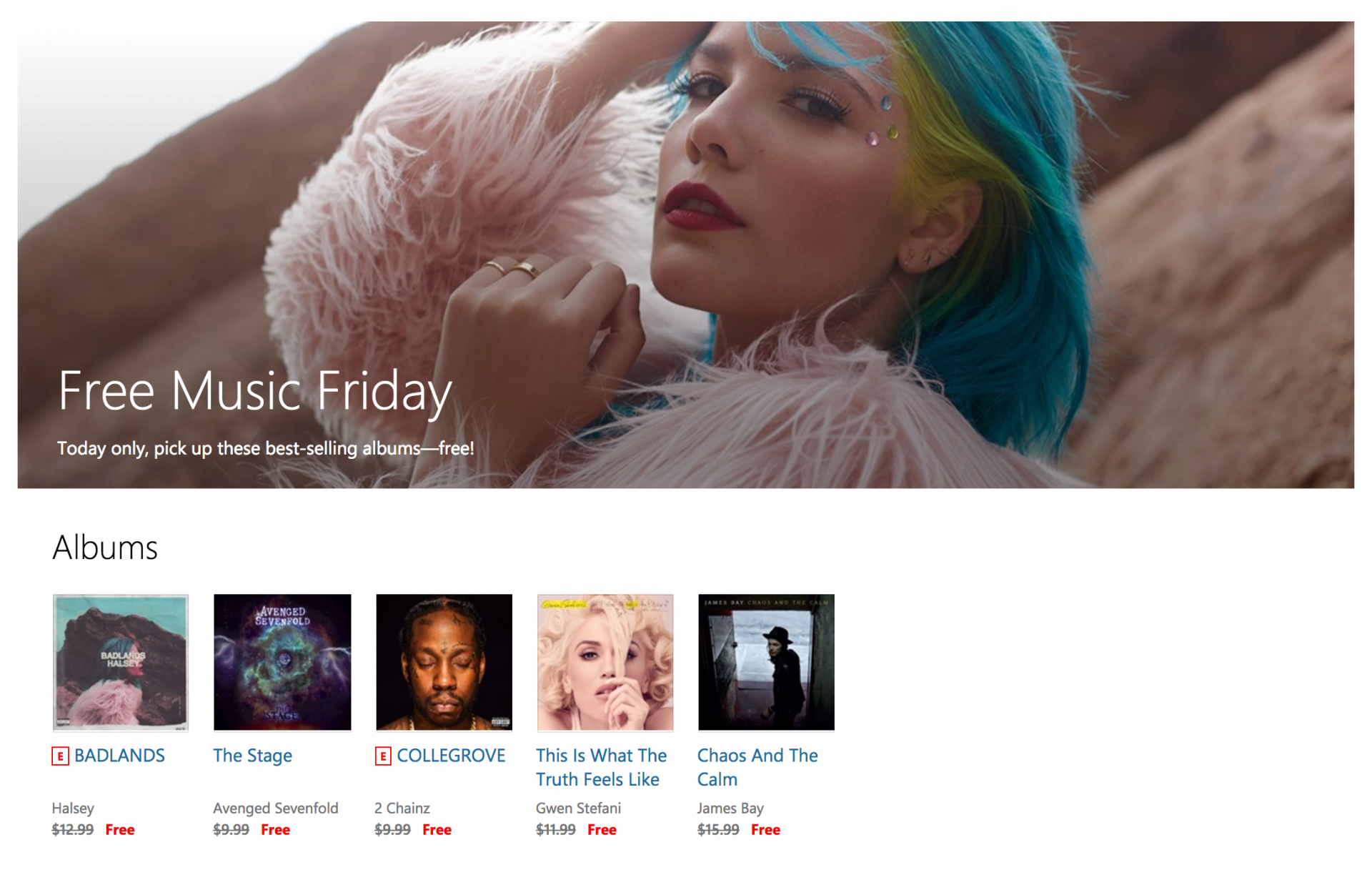
Today only in the US, get 5 albums free from the Windows Store

Just a week after Microsoft offered nine popular holiday albums on the Windows Store for a limited time, the company is doing it again today with five popular albums that you can get for free until 11:59 p.m. PT. This selection of popular pop, hip hop and rock albums from the last two years should hopefully please the musical tastes of the majority out there:

Additionally, Microsoft is also discounting today the following nine holiday albums that you can get for only 99 cents each on the Windows Store:

Microsoft says that this offer is only available to consumers in the US, though in our own it seems possible to get those free albums by simply browsing the US Windows Store. If you’re outside of the US, let us know in the comments if you also managed to grab these free albums.

Seven Microsoft Research researchers named ACM 2016 Fellows

Seven researchers from Microsoft Research are among the 53 computing professionals named 2016 Fellows of the Association for Computing Machinery (ACM). Initiated in 1993, the ACM Fellows Program celebrates the exceptional contributions of the leading members in the computing field.

As nearly 100,000 computing professionals are members of our association, to be selected to join the top one percent is truly an honor.

– Vicki L. Hanson, President, ACM

The award, from the world’s leading computing society, recognizes computing scientists for fueling advances that are transforming science and society. The awarded fellows are selected by their peers from leading universities, corporations, and research labs.

  • Ricardo Bianchini: For contributions to power, energy and thermal management of servers and datacenters
  • K. Rustan M. Leino: For contributions to making program verification accessible and practical
  • Abigail Sellen: For contributions to human-computer interaction and the design of human-centered technology
  • Sudipta Sengupta: For contributions to cloud networking, storage, and data management
  • Ravi Kannan: For contributions to the field of theoretical computer science
  • Venkata N. Padmanabhan: For research contributions and professional leadership in networked and mobile computing systems
  • Ganesan Ramalingam: For contributions to static program analysis

ACM, the Association for Computing Machinery, is the world’s largest educational and scientific computing society, uniting educators, researchers and professionals to inspire dialogue, share resources and address the field’s challenges.

NBC discontinuing its Breaking News service and all of its Windows 10 apps

NBC News has just announced that it will not only be discontinuing support for its Breaking News apps but also the entire service as a whole. The reason for the closure appears to be due to its inability to earn enough revenue to justify its running costs.

The head of the NBC News Digital Network, Nick Ascheim, said of the decision, “Unfortunately, despite its consumer appeal, Breaking News has not been able to generate enough revenue to sustain itself.” The site’s general manager, Cory Bergman, echoed his statements in a series of tweets on Twitter. “We’re true believers of news that isn’t designed for clicks, but a service that helps people and companies make smarter, safer decisions,” he said. “As we discovered, such a model doesn’t fit with advertising, and despite a surge of interest in our premium data, the money has run out.”

Breaking News will shut down completely at the end of December 2016 and its Windows apps will naturally cease to function properly. Are you disappointed to see this service go? Let us know in the comments below.

Just Eat food delivery service is looking for Xbox One app beta testers

The product research team of Just Eat in the U.K. has reached out to fans on Reddit in an attempt to recruit beta testers for its upcoming Xbox One app.

“Here in Product Research, we do things slightly differently to a traditional app development team – everything we design and build is done in constant feedback with people who would actually be using the app. We use a user-centred iterative process called ‘Lean Startup’ that pushes a product around a ‘Build – Measure – Learn’ loop, getting closer and closer to a perfect product with each cycle,” said Just Eat’s Ben Paul in the Reddit post. “We start by trying to understand what Xbox gamers want when they’re ordering food through their TVs, quickly build a concept we think might hit those needs (we do this with paper prototypes, mock-ups in tools like Marvel or Sketch, or very lightweight throw-away code), give it to people to try, update our designs based on the feedback and go around the Build-Measure-Learn cycle again.”

Interested users are encourage to download the beta app by entering the code ‘GXRR9-XWYPV-9D2CF-YCPMD-WRY9Z’ on their Xbox One console and order some food as they normally would on the other Just Eat apps. As an extra incentive, five random beta testers who fill in the post-test survey (which will be emailed to them) will be given £20 vouchers as thanks.

Are you a Just Eat fan and would you use an Xbox One app for ordering food? Let us know in the comments below.

Hitman receives a Christmas mission along with related season attractions

December is finally here and it seems  the developers of certain video games are prepared to bring the holiday season into their games. Today, we will talk about Hitman and the surprise that the IO Interactive has for the fans of this title.

According to reports, a new mission is set in a “Christmassy” Paris in which you will be able to dress your character as a murderous Saint Nick. This update will be released for the game next week, on December 13, 2016 and below you can watch the trailer:

Your character will be in Paris, a location where you will find lots of decorations and presents along with snow. However, it seems that not everyone from fashion show is there to enjoy the holidays as two thieves that have managed to get inside the building are now stealing the presents.

You will need to stop them — when we say “stop” them, we mean “kill” them. If you manage to get to the presents first, you will be able to open them and use whatever you find inside in order to eliminate the two bandits.

According to IO Interactive and Square Enix, this mission has made in order to support the “World Cancer Research Fund” and this is the reason why they ask players to voluntary donate to the charity.

Keep in mind that the “Holiday Hoarders” mission is not the only thing that will be released for Hitman during this festive period, as there will be a new addition added every week until the end of the year.

“Thing The First” will be added to the game first, which brings five new Sapienza challenges. Next week, the mentioned “Holiday Hoarders” mission will be added, along with a game update and a new elusive target. In the third week of December, the game will receive an escalation contract in Sapienza and there will also be a new Bangkok elusive target sometime during Christmas time.

RELATED STORIES TO CHECK OUT:

Microsoft accepting loyal fans into the “First League” program, inviting them to a special event

The Microsoft First League program is a project by Microsoft to support their most hardcore fans. The announcement was made a few months ago together with the release of the accompanying website and it appears that fans residing in Czech Republic, Slovakia, Serbia, Poland, Hungary, and Greece are eligible to participate. No word yet if this program will be expanded to other countries.

The program is supposed to bring some exclusivities and luxurious privileges to the most extreme Microsoft fans out there as a thank you from the company for their efforts and loyalty. Some of the privileges include:

  • Direct Connection: Microsoft’s First League is a fan program created for you. It’s managed directly by Microsoft employees. This means you will have first-hand information regarding latest product news and exclusive Skype Calls with our Microsoft team.
  • Exclusive Device Preview and Testing: You will be amongst the first to test and review the latest Windows devices, including high-end PCs from Asus, HP, Lenovo, and Microsoft.
  • Free Software: You will get a free Office 365 license for the duration of the Microsoft First League program.
  • Exclusive events: You will be invited to join exclusive fan event throughout the year, previewing all the latest Microsoft products and technologies in your home market.
  • Publicity + Status: You will get the appreciation you deserve. Because we will share your opinion and stories with other Microsoft fans. That’s why you will receive our official Facebook badge, showing everyone that you belong to Microsoft’s First League.
  • Professional Profit: You will be able to accelerate your career. Just like many participants of past programs that went on to build a career in IT or directly at Microsoft. We will provide you with all the support you need to get an even better understanding of Microsoft products.

People who submitted their applications around two months ago have now started to receive their confirmations and congratulations for getting accepted into the program. I tweeted about the event and about getting accepted a short while ago, showing a part of the email that Microsoft’s Jakub Rzany has sent out to the lucky winners residing in Poland meanwhile members from other supported countries received their emails from the corresponding Microsoft employees.

As you can see in the tweet above there is a date that says 17.12.2016. Assuming you don’t understand Polish, the email is not only a confirmation of getting accepted into the program but an invite to an event in Warsaw on the 17th of December 2016.

The email continues with the schedule, address and time for the event which I, unfortunately, cannot show because of privacy concerns but I can reveal the content of the event itself:

  • Introduction: The guests will be welcomed and some tea and coffee will be served
  • Product Presentation: Part one
  • Break: Lunch
  • Product Presentation: Part two
  • Transport: Preparation and the trip for Wind Tunnel activities
  • Briefing: Preparation, equipment and a small course for the Wind Tunnel activities
  • Activity: Wind Tunnel Activities
  • Summarise: Summarising of the event
  • Transport: Transport back to the Microsoft Poland headquarters
  • End: Closure of the event

As you see, Microsoft has prepared an awesome day, free of charge, for their beloved fans. They even pay for the transport to and from the event and for the parking fee.

This is a very unusual schedule as the Product Presentations include no information or details other than they will happen. Keeping in mind that the Microsoft First League (MFL) has a “Loan Program” which will allow the members to test out different hardware before everyone else, this event may include some secret reveal which we don’t know about yet, or it could simply include products like the Surface Studio, HoloLens, Windows 10 Creators Update and other recently announced Microsoft products.

The aerodynamic Wind Tunnel activities are actually a huge surprise. This part of the event isn’t related to Microsoft’s technology and is included purely for entertainment purposes which are very welcome but also very unexpected.

I will be there to attend the event, proudly representing our brand and will make sure that everything even remotely interesting will be reported on.

Dead Rising 4 Disappoints Gamers, Many Reviews are Negative

Capcom launched Dead Rising 4 recently. Thousands of players already bought the first copies, recorded the first hours of gameplay, and soon after, the first reviews poured in. Many more or less accredited websites have reviewed Dead Rising 4 during the last few days.

We’ve found an interesting thread on Reddit where one user gathered the most interesting reviews of the game. These reviews come from respectable sites, so we can say that the people who wrote them know what they’re talking about.

Reading these reviews could be a deal breaker for those still thinking about buying Dead Rising 4. So, read them carefully and let us know what you think about all these Dead Rising 4 reviews from all over the internet.

What others have said about Dead Rising 4

At first look, Dear Rising 4 reviews don’t look great in general. Some sites gave the game an exceptional, or an above-average grade, while some went hard on Capcom, calling Dead Rising 4 the worst game of the series. So, let’s finally see what others have said about the game:

AngryCentaurGaming – Jeremy Penter – Wait For Sale:

In much the way an MMO needs to be balanced, at times especially with updates, so to does Dead Rising 4. Frank’s faster. Frank’s more deadly. Frank works better overall and does more damage to enemies, and yet it doesn’t feel like the entire game world at all has been upgraded with him, even with the new types of enemy AI. It has some issues with difficulty and they absolutely need to be fixed. I did find myself, at times, unengaged, because the game didn’t require it. […]  Is this a bad game? No, but it is one that’s less connected overall structurally, to the Dead Rising series, and more connected because the creators just sorta tell you it is.

CGMagazine – Elias Blondeau – 4 / 10 (XB1):

An unfunny and unfun mess of a game, Dead Rising 4 is a shambling corpse of a once-great franchise. Capcom would be wise to put it out of its misery.

COGconnected – Alex Everatt – 80 / 100 (XB1):

Dead Rising 4 took everything that was great about Dead Rising 3, removed the timer, and brought back the franchises most prominent protagonist in a big way. The game isn’t without it’s faults. You’re more than likely going to encounter the occasional glitch, some of which may require reloading a previous checkpoint. The lack of co-op in the main campaign is a huge disappointment, but the separate co-op campaign is an okay compromise (but why not include co-op in both modes?!). Dead Rising 4 is an absolute must for fans of Dead Rising, but if you’ve never played a Dead Rising game before, I would strongly suggest playing the first three Dead Rising games before, otherwise the story might be lost on you.
GameSpot – Scott Butterworth – 7 / 10 (XB1):

Dead Rising’s core combat remains simplistic, but the expanded open world, compelling central mystery, and added combo weapons refresh the formula enough for some light, bloody fun.

Polygon – Arthur Gies – 8 / 10 (XB1):

Dead Rising 4 isn’t always smart, but it’s rarely boring

IGN – Brandin Tyrrel – 8.1 / 10 (XB1, PC):

Dead Rising 4 has the best core gameplay the series has ever seen. Its inventive and humorous ways to put down the dead are something I still haven’t tired of, and its surprisingly interesting plot is more than just a zombie-killing delivery system. Despite the technical blemishes that come with the series, its lack of co-op story mode play, and the fun-yet-unreliable multiplayer, Frank West’s return brings the series some fresh ideas, a ton of bloody mayhem, and a whole lot of cracking wise. Here’s hoping he sticks around for a while.

Worth Playing – Brian Dumlao – 8 / 10 (XB1):

In the end, Dead Rising 4 is a solid game that is an enjoyable experience for series fans and newcomers. The “use anything, make anything” mechanics that have made zombie-smashing so fun are still intact, and some changes only amplify the experience when dealing with the expansive world. While the story is good on its own, Frank’s presence provides a nice balance between silly and serious, and the multiplayer also finds a sweet spot. The title has some issues, but they aren’t enough to dampen the sheer fun this game provides. DR4 is a worthy pick-up this holiday season.

It is worth mentioning that Dead Rising 4 received mostly unfavorable reviews on Metacritic. The game has a 4.6 Metacritic score.

If you want to read even more reviews from online sources, visit the Reddit thread from the link posted above.

As we usually don’t review games but focus on their problems and issues instead, we hope reading these reviews help you decide whether Dead Rising 4 is worth playing or not. Let us know what you think about the game in the comments below.

Microsoft to bring 4K support for Movies & TV app on Windows 10, Xbox One

Windows 10 and Xbox One users will soon be able to buy and play 4K Ultra HD videos from the Windows Store thanks to an upcoming update for Microsoft’s Movies & TV app. As usual, Windows Insiders running the latest version of the Movies & TV app can now view 4K content.

There are other new features as well along with the new 4K support. Microsoft also unveiled the video cloud collection, enabling users to streamline the viewing experience between Windows 10 and Xbox One devices. Although this feature is possible with the restore purchases button before, the new update will make the process a bit easier.

Keep in mind, however, that not all videos currently support 4K viewing. Still, the Movies & TV app update will prompt consumers when an Ultra HD version of a video is available in its catalog. It’s also possible now to buy and rent 4K videos inside the app itself as part of the update.

Xbox One users will also be able to view from the homepage the percentage of a movie they have watched instead of making several clicks to do so.

The update will arrive on Windows 10 and Xbox One devices in general over the coming weeks. Although Microsoft’s Store previously supported HD and Full HD content, the latest update marks the first time that the online shop and the Movies & TV app offer 4K videos.

However, some users worry about the hefty cost that might come with replacing a massive library of videos with 4K content. It’s unclear whether Microsoft plans to offer some sort of deal to address this concern.

While we wait for the full release of the latest Movies & TV app, let us know in the comment section how you feel about the upcoming update. What else do you want to see in future updates to the app?

Read also:

Get Microsoft’s Windows Server and SQL Server Premium Assurance for long-term confidence

Microsoft is looking to ease the life of IT administrators suffering through the slog of a company transition to the cloud and worrying about support by introducing the company’s new Windows Server Premium Assurance and SQL Server Premium Assurance.

The new offerings not only offer extended support for Windows Server and SQL Server by six years but greater flexibility when purchasing server solutions as IT Pros can nab either separately or together starting in early 2017.

According to Microsoft, early buyers could save up to 60% on the cost of Premium Assurance as the rates will increase over time. Premium Assurance pricing begins at 5% of the product license and will go as high as 12% over time.

The first batch of supported Servers includes Server 2008 and 2008 R2 Extended Support is scheduled to end in July 2019 however.

  • To help modernize applications, Software Assurance gives you access to the latest Windows Server and SQL Server innovation at no additional cost. The next version of Windows Server is currently in planning, and will further advance the Windows Server 2016 capabilities around hybrid cloud, multi-layered security, containers, Nano Server, and software-defined datacenter technology. The next version of SQL Server, already available in preview, brings the performance and security of SQL Server to Linux.
  • For applications moving to the cloud, Software Assurance provides unique flexibility and savings benefits. The Azure Hybrid Use Benefit provides up to 40-50% savings on Windows Server virtual machines in Azure. Similarly, License Mobility provides the flexibility to deploy existing SQL Server licenses in the cloud without additional fees.

Premium Assurance

Once again, Windows Server Premium Assurance and SQL Premium Assurance will be available sometime early time in 2017. Until the release of the new products, Microsoft is encouraging customers to continue to renew their Software Assurance on all Windows and SQL Servers.

Gigantic comes to Windows 10 and Xbox One

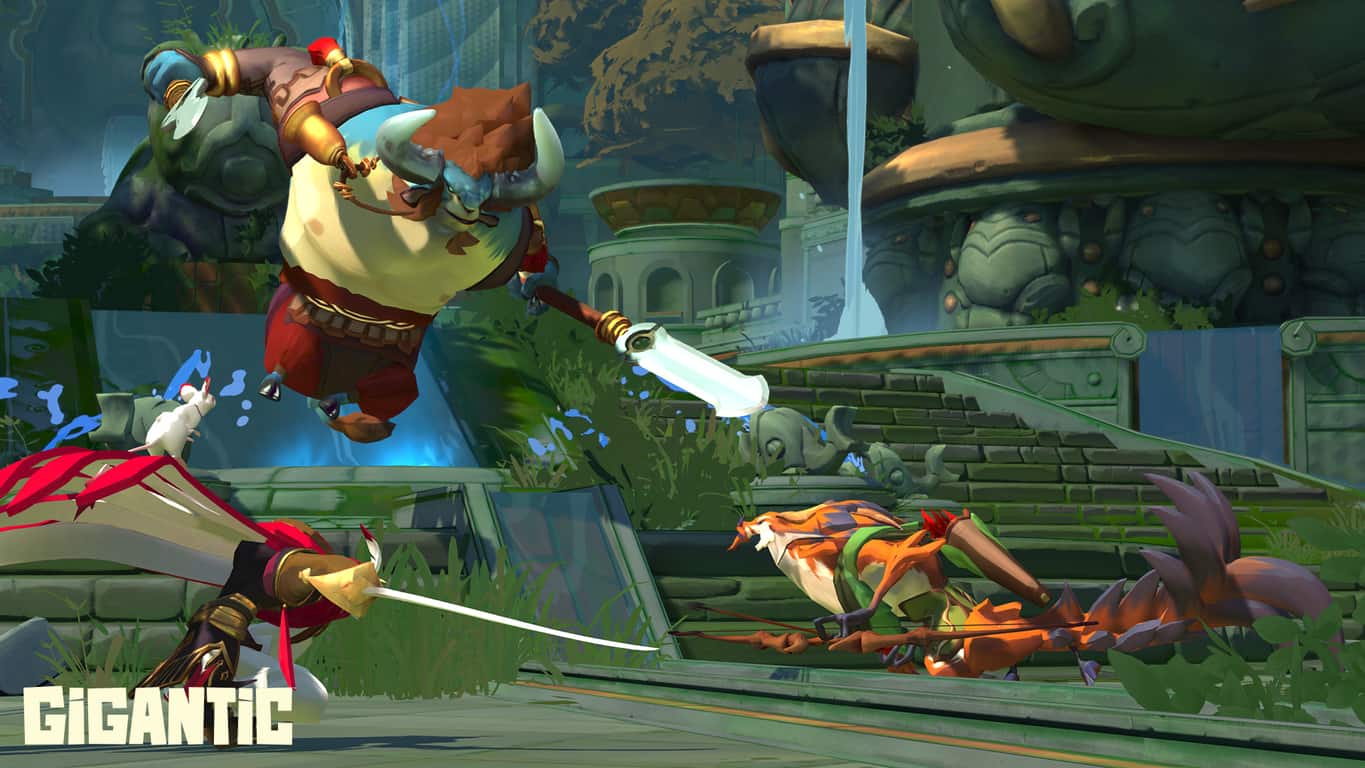
If you didn’t get the chance to try Gigantic during previous beta weekends, Xbox Wire has just announced today that the free-to-play game is now available in open beta in North America and Europe. For those unfamiliar, Gigantic is a third-person MOBA game being developed by indie developer Motiga on both the Xbox One and Windows 10, and the game also supports cross-platform multiplayer gameplay.

The game pits two teams of five players against each other that have to fight alongside a massive guardian, with each player being able to choose between 16 different heroes. “Each hero can be built in a variety of ways, allowing them to focus on a different aspect of their arsenal. As you play and learn about a hero, make sure to experiment with the different upgrades to see which one best fits your style,” noted the Xbox team.

Gigantic has been in development for quite some time though the game has not gotten an official release date yet. You can download the game on your Xbox One or Windows 10 PC from the download links below, let us know in the comments if you’re interested in this free-to-play game.

Gigantic
Gigantic
Developer:
Motiga, Inc
Price:
Free


Gigantic
Gigantic
Developer:
Motiga
Price:
Free

Microsoft’s list of Backward Compatible games tops 300, a new milestone

Microsoft has just added three more games to the Xbox One Backward Compatibility catalog, and that means that a new Xbox milestone has arrived. With the addition of Shadowrun, Shotest Shogi, and Space Ark, there are now 300 total Backward Compatible games on the Xbox one. As always, we have given these games a look and have included download links, trailers, and descriptions for you below.

Shadowrun: $14.99

FASA Studio, the creative minds behind MechWarrior and Crimson Skies, are back with Shadowrun, the new multiplayer first-person shooter (FPS) based on the much-beloved role-playing game (RPG) franchise. Shadowrun propels team-based combat into a new dimension with a revolutionary blend of modern weaponry and ancient magic. Up to 16 players can battle for control of this new world through Xbox 360-to-Windows Vista online compatibility. In Shadowrun players vie for supremacy in a constantly evolving battlefield where advanced technology and ancient magic provide an unprecedented and high-velocity tactical action experience.

Shotest Shogi: $9.99

Now that you understand why Japan is so fascinated with Shogi, upgrade to the full version of Shotest Shogi and try your hand at the intermediate and advanced tutorials, 16 different AI opponents with a wide range of skill levels, and multiplayer challenge via Xbox LIVE. Make your way up the leaderboards, earn achievements, and develop your tactical skills in this magnificent strategy board game!

screenlg1
Shotest Shogi

Space Ark: $9.99

Bounce your animals and bag some combos and all the fruit you can catch to terraform planets and rack up some awesome high scores! Discover 24 unlockable characters and a range of essential powerups and help bring life back to 4 rich and colourful game worlds. Compete for high scores in 3 game modes and start your journey up the global leader boards. Learn the secrets of Space Ark and prove you have the right stuff to become an Arkonaut

Which of the total 300 backward compatible games do  you own? As always, let us know what you think by dropping us a comment below!

Microsoft’s LinkedIn acquisition officially closes after EU approval

It’s been a long and grueling purchase, but Microsoft can finally claim that it owns LinkedIn officially after EU approved the deal earlier this week. Today, both companies announced the big news that Microsoft’s acquisition has finally closed on the most popular professional network.

Satya Nadella is anxious to get started with LinkedIn. The CEO of Microsoft says that combining the world’s leading professional cloud and the world’s leading professional network will “deliver more connected, productive, and intelligent experiences for our members and customers.”

Jeff Weiner assured LinkedIn members that the service can only get better with the use of Microsoft’s technology and resources.

As we build for the future, our commitment to our mission, vision, values and your experience remain unchanged. Our members still come first and creating economic opportunity for every member of the global workforce has never been more important.

It looks like Weiner might be right. Nadella has already released new details about the integration with Microsoft and LinkedIn, laying out the roadmap for the immediate future to add in professional networking to the Outlook and Office suites and supporting resume building through Microsoft Word.

More about Microsoft’s roadmap for LinkedIn now that the deal is done can be read on our earlier coverage.

Microsoft releases a Windows 10 3D Preview app, lets you see your 3D models

Back at the Microsoft Event in NYC, Microsoft made announcements in regards to the future of 3D creation on Windows 10.  A little while after, (though still in an Alpha stage) some details emerged that 3D would also be heading to Windows 10 Mobile via the Paint 3D app. Now thanks to a tip from our reader Amir, we have discovered a new 3D Preview app which lets Windows 10 users see their 3D creations (via winphone.ir)

According to the Windows Store listing, with the View 3D Preview app, you can easily open and interact with 3D models on your PC and Windows 10 Mobile device. You also can use simple controls to see to see your 3MF, PLY, OBJ, FBX, and STL files from all angles. The listing also mentions that the app is available to Windows 10 Insiders who are on the preview of the Windows 10 Creators Update (Build 14800 or greater,) but after clicking the direct link we managed to get the app running on our standard non-insider Windows 10 Pro machine which is running Build 14393.447 Version 1607.

If you’re curious as to what this app is, you can access it via the link below. Once you’ve checked it out, please do let us know what you think by dropping us a comment below.

3D Viewer
3D Viewer
Price:
Free

Microsoft announced Windows on ARM, Project Evo last night, watch the full WinHEC keynote here

A couple of hours ago, Microsoft kicked off its Windows Windows Hardware Engineering Community event (WinHEC) in Shenzhen, China where it announced pretty big news to close an already busy year for the company. First of all, Redmond has partnered with Qualcomm to get Windows 10 running on ARM chips, which will allow third-party OEMs to build a new range of ‘always connected’ cellular-enabled devices that can run legacy Win32 apps through emulation.

Additionally, Microsoft also announced Project Evo, a new collaboration with Intel that will deliver a new wave of modern PCs and experiences with “all-new ways for devices to light up with the latest in advanced security, artificial intelligence and Cortana, mixed reality, and gaming.” Lastly, the Redmond giant finally delivered on the previous announcements it made about third-party mixed reality headsets during its Windows 10 event in late October: next year, Microsoft intends to make mixed reality mainstream by providing “inside-out tracking for HMDs, a single platform and standardized inputs for developers, and a consistent interface with a single store for customers.”

For those of you who want to watch the full keynote, Microsoft has just published the video on its Channel 9 website and you can watch it below:

Stay tuned on OnMSFT as we’ll continue to analyze Microsoft’s WinHEC announcements today.

Microsoft’s Project Scorpio officially isn’t competing with gaming PCs, will have a console price

The price of Microsoft’s upcoming Xbox One console, codenamed, Project Scorpio, for the time being, has been a point of discussion ever since the device was first announced. Scorpio has to have high enough specs to make it worth investing in for its hardcore gamer target audience, but it also needs to hit a price point that will make it a realistic purchase for them and make it a profitable venture for Microsoft.

Microsoft’s Phil Spencer recently spoke with AusGamers about the company’s plans for Project Scorpio and the conflict they’re encountering when trying to balance power with price. “You want a platform that is balanced between memory bandwidth, GPU power, you know, your ability to move memory and [an] amount of memory around in many ways is more inhibiting to the performance of your game than absolute teraflops on any one of the individual pieces, and when we designed Scorpio we really thought about this balanced rig that could come together at a price-point,” Spencer reveals. “Like, I want Scorpio to be at a console price-point, I’m not trying to go and compete with a high-end rig. And because we’re building one spec, we’re able to look at the balance between all the components and make sure that it’s something we really hit that matters to consumers and gamers.”

While no final specs for Project Scorpio have been announced yet, this statement does make it clear that whenever the console is released, there will still be some PCs on the market that can outperform it. Given the speed at which technology is advancing though, even if Scorpio did launch with tech that placed it above all of the gaming PCs, it wouldn’t be long before a new device overtook it anyway. What is known is that Scorpio will be significantly more powerful than the existing Xbox One and Xbox One S consoles and that’s what most console gamers are interested in. Scorpio doesn’t have to be the most powerful device on the market, it just needs to move console gamers into the same ballpark as gaming PC users.

Let us know what you think. Is power or price more important to you? What do you want in Project Scorpio? Share your thoughts with the community in the comments below.

Microsoft announces Project Evo, a new wave of modern PCs and experiences

During today’s Windows Hardware Engineering Community event (WinHEC) in Shenzhen, China, Microsoft announced a new collaboration with Intel called, Project Evo.

“With Project Evo, Microsoft and Intel will deliver all-new ways for devices to light up with the latest in advanced security, artificial intelligence and Cortana, mixed reality, and gaming. Through this collaboration, devices of the future will leverage Microsoft and Intel innovations,” Microsoft’s Windows and Devices Group executive vice president, Terry Myerson said of the partnership. “Together, our work will extend these experiences to hundreds of millions of PC and HMD customers and raise the bar for what’s possible with Windows PCs.”

Some of the innovations planned for the immediate future include incorporating far-field speech communication in Cortana to allow for interaction at a greater distance, increasing Windows Hello’s security with improved biometric authentication, incorporating insights from Microsoft’s Intelligent Security Graph, increased overall security intelligence, and using unspecified analytics from Intel.

Microsoft and Intel's Project Evo

Project Evo will also aim to produce more affordable head mounted displays (HMDs) to allow for broader adoption of virtual and augmented reality technology and a range of advances relating to gaming on Windows 10 devices and Microsoft’s Xbox One consoles relating to, “eSports, game broadcasting and support for 4K, High Dynamic Range (HDR), Wide Color Gamut (WCG), spatial audio, and Xbox controllers with native Bluetooth.”

Also announced at WinHEC were additional plans for bringing virtual reality to mainstream audiences and a new range of Windows 10 devices incorporating Qualcomm Snapdragon cellular technology.

Are you excited by any of these announcements? Let us know in the comments below.

Windows 10 PC go ‘Always Connected’ as PC partners look to build Qualcomm Snapdragon powered devices

A lot was dished out at Microsoft’s WinHEC conference in Shenzen, China this evening. Several Microsoft executives took the stage to lay out the foundation of the company’s partnering strategies for next year as well as delight the audience with a few teasers of technology coming to devices via software additions.

Terry Myerson, the executive vice president of the Windows and Devices Group, was joined on stage by executives from both Intel and Qualcomm to make the announcement of a new wave of modern devices planned for 2017.

“I feel energized to be among this community of hardware engineering creators at WinHEC, who are building the next generation of modern, secure PCs that support innovative mixed-reality, gaming and mobile experiences,” Myerson said. “With the Windows 10 Creators Update and our partnerships with Qualcomm and Intel, we can build technology that serves all of us by ensuring there are devices for the creator in each of us.”

Perhaps one of the biggest announcements coming out of WinHEC 2016 is the long awaited news of full Windows 10 working on an ARM processor.

As we’ve learned via various Twitter responses from those in attendance, Microsoft and Qualcomm provided a rather impressive demonstration of Windows 10 running (smoothly) on a Snapdragon processor. The addition of ARM to Microsoft’s arsenal will help the company as well as its partners provide a new wave of ‘Always Connected’ cellular-enabled devices.

Furthermore,

“In future Windows 10 updates, Microsoft will enable connectivity that is always within reach. Customers will be able to easily buy data directly from the Windows Store and be in control of how they use Wi-Fi and cellular networks, consume data, and manage costs. Partners will be able to build always-connected devices without hindering form-factor design.  Specifically, partners can take advantage of eSIM technology to build devices without an exposed SIM slot, making it easier for people to activate a data plan right on their device.”

It seems Microsoft is developing Windows 10 into a one-stop-shop for its customers. In addition to the promise of buying data straight from the Microsoft Store, these new Snapdragon-powered devices could lead the way for the company’s planned return to mobile now. With Windows 10 running on ARM, it shouldn’t be too much time before the famed Surface Phone makes its great awaited appearance.

The upcoming Endless Space 2 patch will fix the game’s performance bugs

A promising turn-based, 4X space-strategy game, Endless Space 2 has been available in Early Access for about two months. The game’s developer, AMPLITUDE Studios, recently released the first update for the game. Yet, the update turned out to be quite troublesome for early adopters of Endless Space 2.

Some of the problems involve lags during space battles, invisible ships, loading problems, and more. This left players unsatisfied, because the update should solve the existing issues, not cause more problems.

Developers are working to fix the ES2 performance bugs

AMPLITUDE Studios recently reached players on Steam, where they said they’re aware of the issues. Reportedly, the development team is working on a solution for these problems. So, as soon as the issues are addressed, we should expect another update.

The devs are currently aware of the performance issues since Update 1. They have isolated the issue and are investigating fixes.

Please be patient while they address the issue

As soon as developers release the fixing update, we’re going to let you know about it. Until then, you can continue testing the game in Early Access. A decent number of bugs in the Early Access version of the game shouldn’t surprise anyone. The developer itself stated that it needs help from experienced strategy players. So, if you want to help the devs improve Endless Space 2, you should definitely buy the Early Access version.

How has your experience been in testing Endless Space 2 during Early Access? And if you haven’t bought the game yet, will you wait for the full release, or buy it during Early Access? Let us know in the comments below.

RELATED STORIES YOU NEED TO CHECK OUT:

WhatsApp drops Windows Phone 7 support, spares BlackBerry and Nokia

The end of the year is fast approaching, which means WhatsApp’s promise to drop support for older phones will come to fruition soon. WhatsApp’s kill-list includes devices that run Windows Phone 7, iOS 6, and Android versions earlier than Gingerbread. However, the company extended support for older BlackBerry and Nokia devices to June 30, 2017.

WhatsApp announced earlier this year that it would pull the plug on its app for those legacy phones by the end of 2016 in a move to focus on more popular devices. More to the point, WhatsApp wants to concentrate its investment on mobile platforms that it deems can help grow the app’s features in the future.

WhatsApp’s change of heart

But in a last hour decision, WhatsApp has had a change of heart and spared BlackBerry OS, BlackBerry 10, Nokia Series 40, and Symbian Series 60 from the list of devices soon to lose life support. If you own any of those doomed devices and wish to continue using WhatsApp, the company is telling you now to upgrade to a newer handset. More specifically, devices slated to lose WhatsApp support are those running Windows Phone 7.x.

WhatsApp sees the move as a necessary measure to improve the features available to users of the latest phones, even if this means leaving the older handsets out in the cold. Otherwise, the app will lose the competition to other messaging apps that focus on the new generation of mobile devices.

WhatsApp is just one of the many services that are forced to end life support for outdated platforms in keeping with modernization. If this move affects your current handset but you don’t want to break the bank on a new phone, you might as well look for another messaging app to replace WhatsApp. It will be a tough decision, though.

Read also:

Windows 10 Insider preview build 14986 fixes Taskbar settings among others

Along with a hefty helping of new Cortana additions and enterprise cloud printing, Windows 10 Insider preview also brought with it a sizeable amount of fixes and improvements.

Here are the highlighted items the Windows team sought to improve in this build.

Other changes, improvements, and fixes for PC

  • We have improved the Windows Hello face which may require you to “Improve Recognition” to get recognized again. To do this – go to Settings > Accounts > Sign-in Options and under “Windows Hello” and “Face Recognition”, select “Improve Recognition” to go through the Improve Recognition wizard.
  • We updated the Taskbar’s context menu settings entry to now explicitly be called “Taskbar settings”, as that is where it pointed.
  • We fixed an issue where the Virtual Touchpad’s left and right buttons might not work on some devices. We also fixed an issue where the Virtual Touchpad wouldn’t launch if the primary monitor was non-touch, and added the Virtual Touchpad icon to the Taskbar settings where you can Turn system icons on or off.
  • We fixed the issue where apps such as Store, Photos, and People might launch on their own after your PC had been inactive for a period of time.
  • We fixed the issue where navigating to Settings > System > Battery would crash the Settings app.
  • We’ve changed the default state of the Handwriting Panel to be floating next to the text field, rather than docked at the bottom of the screen. If you prefer docked-mode, you can still select it by tapping the icon in the top right corner of the Handwriting Panel.
  • We fixed an issue where using ~ to switch languages using the Thai keyboard when typing in Office apps, such as Outlook or Word 2016, might sometimes result in a hang.
  • We’ve updated our migration logic, so that going forward from 14986 the default user’s numlock setting will now be preserved across upgrades.
  • We fixed an issue where double-clicking on an Excel document to open it from File Explorer would crash Microsoft Excel.
  • We fixed an issue where Windows Hello might get stuck “Looking for you”.
  • We fixed an issue Insiders with Surface Dial may have experienced recently where rotating the Dial could result in unexpected beeps.
  • We’re moving some things around in Storage Settings – stay tuned for future updates. For this flight, you’ll notice that the settings to change save locations has moved to its own page. We also fixed an issue where Storage Usage for the Other category might show an unexpectedly high number.
  • We fixed an issue where the PowerShell entry in File Explorer’s File menu would sometimes be unexpectedly greyed out.
  • We fixed an issue where the Clock and Calendar flyout in the taskbar wouldn’t launch when the display language was set to Chinese (Traditional) and the system was using the phonetic sorting method.
  • We’ve updated the full screen Settings search results to now use smaller icons – we feel this delivers an overall more polished feel, as well as enables more search results to display on the page at a time.
  • We fixed an issue where some notifications might draw too high or too low, and then be seen moving itself to the correct position.
  • We fixed an issue where the outline incoming notification toasts could still be seen if notification banners as a whole for that particular app had been turned off.
  • We fixed an issue Insiders may have experienced where the Favorites bar on desktop might appear empty, despite having items in the Favorites folder.
  • We fixed an issue that could result in CPU throttling when idling on certain webpages with many gifs or looping videos in Microsoft Edge.
  • We fixed an issue that could result in Alt + D sometimes not being able to set focus to the address bar in Microsoft Edge.
  • For Insiders with PCs that upgraded to builds 14926-14959, some default power settings may have been lost and not recovered on subsequent upgrades. The effect of this causes devices to potentially use more power, change the power button behavior on tablets, etc. Starting with 14986, an attempt to detect this issue and re-apply the power settings will be made during upgrade. This attempt is a temporary process to help address this issue for Insiders, and will be removed once we’re closer to the Creators Update release.
  • We’ve heard your feedback, and updated our Windows Error Reporting logic so that uploading crash data should no longer interfere with online game play, video streaming, Skype calls, or other network-intensive activity. Please keep an eye out for this if you experience any crashes and let us know how it goes.
  • We fixed an issue resulting in Microsoft Studios games like Microsoft Sudoku, Jigsaw, Minesweeper, Taptiles, and Treasure Hunt potentially freezing at the splash screen on launch.
  • We fixed an issue where, if the taskbar location was set to be on top, it was visible on the Welcome screens after upgrading.
  • Well, that certainly is an eye full of improvements sure to appease a large dose of Fast Ring Insiders for the remainder of the week. If you’re testing out Windows 10 in a Fast Ring Insider capacity, head over to the Update Setting page to get started.

    Let us know what you think.

    Happy downloading, Insiders!

    Narrator and keyboard brightness problems among ‘Known Issues’ for Windows 10 preview build 14986

    The latest build of Windows 10 to hit the Fast Ring brought along an absolute ton of new features, giving Windows fans a whole lot to be excited about. While that’s all well and good, though, this is still an Insider build – and with all those features comes just as many bugs to squash.

    Here are the issues in build 14986 that Microsoft is already well aware of:

    • Using keyboard monitor hotkeys to adjust brightness won’t work as expected. Desired brightness change could be done via the Action Center or by going to Settings > System > Display.
    • You may see a popup “Catastrophic Error” dialog when opening OneDrive folders. If you do, the workaround is to open an elevated Command Prompt or PowerShell window and enter “attrib -O ”.
    • We’re currently investigating reports that DirectAccess isn’t working for some Windows Insiders.
      When using Microsoft Edge with Narrator, you may hear “no item in view or silence when tabbing or using other navigation commands. You can use Alt + Tab when this happens to move focus away from and back to the Edge browser and then Narrator will read as expected.
    • Hey Cortana, play on doesn’t work immediately after installing the app. Wait 5 minutes for indexer to kick in and try again.
    • Currently, the Windows Defender dashboard is primarily aimed at providing some minimal read-only status for Antivirus/Firewall, with some very limited functionality for interacting with the app. Here are some of the known issues with the dashboard to be aware of (not a comprehensive list):
      • Doesn’t accurately roll up status of Pillars
      • Doesn’t accurately show status when a 3P AV is on the machine.
      • History is not yet available in the new app
      • Advanced/Custom scans are not yet available in the new app
      • Settings are not configurable through the new app
      • Firewall control panel not launchable from new app
      • Firewall settings are not configurable through the new app

    If these issues sound like things that might disrupt you in any meaningful way, you might want to wait until they’ve been ironed out before you go updating. If you end up finding bugs in build 14986 that aren’t listed here, just contact Microsoft through the Feedback app and make sure they’re aware of it.

    Microsoft empowers SMBs in India with cloud solutions from its partners

    In a press release, Microsoft India announced the introduction of business solutions from its partner ecosystem to meet the needs of Small and Medium Businesses (SMBs) across India.

    Built by the company’s ISV partners, these solutions address key areas like Customer Relationship Management, Finance & Accounting, as well as enhancing organizational efficiency. These solutions will run on Microsoft cloud and will be available at a very low cost.

    The SMB sector in India has strong potential for driving growth through technology adoption and Microsoft is committed to providing them with the right set of solutions to achieve it. SMBs understand the business dynamics and realize the need for a robust IT infrastructure to grow and scale up their business. We are excited to provide the set of software solutions and help them enhance their business growth.

    – Sudhir Nayar, Director – Partner Sales, Microsoft India

    Smarter Biz is the next generation mobile CRM tool for SMBs that only requires Excel and Voice and its intuitiveness enables the sales person make effective calls, a virtual sales assistant, and a 360 degree view of each opportunity generated from any of the marketing activities. IDOS is a simple to use Accounting and Compliance software fully integrated into Microsoft Office 365 that empowers every business to increase their efficiency and profits.

    According to Sudhir, cloud acts as an enabler for SMBs helping them adopt enterprise-grade technology solutions on a pay-as-you-use basis.

    Microsoft also announced special pricing and deployment offers on Office 365. The pricing for Office 365 will start at ₹250 ($3.75) per user per month and for organizations with more than 50 users, Microsoft will take the responsibility for deploying the suite.

    Microsoft Azure gets pass-through authentication and seamless single sign-on

    Due to overwhelming user feedback, the Azure team is now announcing the introduction of Azure AD Pass-Through Authentication and Seamless Single Sign-on for public consumption.

    Prior to today’s announcement, the Azure team had been running a preview version of the service but according to Alex Simons of Microsoft, the wait for this item to go public is over.

    Azure AD pass-through authentication provides a simple, secure, and scalable model for validation of passwords against your on-premises Active Directory via a simple connector deployed in the on-premises environment. This connector uses only secure outbound communications, so no DMZ is required, nor are there any unauthenticated end points on the Internet.

    That’s right. User passwords are validated against your on-premises Active Directory, without needing to deploy ADFS servers!”

    Azure AD Pass-Through Authentication wasn’t the only news coming out of the Azure department today, also announced was the addition of “Seamless single sign-on for all.” Azure AD Connect IT Pros can now enable a single sign-on for their employees without requiring any additional on-premises infrastructure investments.

    To get started with Azure AD-Pass Through Authentication and Seamless Single Sign-on, Microsoft is encouraging customers to download the latest version of Azure AD Connect. The new options can be found in the custom install for new deployments after changing sign-in methods.

    Simmons notes in his announcement that today’s release is limited to a short list of supported systems for now. There is documentation the Azure team is providing to ensure that the rollout goes smoothly for those under its support umbrella.