Microsoft’s decision to enter the laptop-tablet market with its Surface devices turned out to be an excellent choice. Both the Surface Book and Surface Pro 4 bring in a lot of cash to the tech company, unlike the forlorn Windows phones.
The Redmond giant released the Surface Book in October 2015 and rumors suggest its successor, the Surface Book 2, could see an early 2017 release. (Unsurprisingly, a series of rumors are circulating about Surface Book 2‘s design and specs.) Since many users complained about the gap between the keyboard and the screen when they close the notebook, it is quite possible that Microsoft will improve the design of its Surface Book 2 so as to reduce that space.
The Surface Book 2 will be powered by Intel’s latest generation of i5 and i7 processors for better performance. These will provide the necessary computing power to allow users to multi-task without worrying about lag. Since the Surface Book has a 2,000 x 3,000 resolution, the Surface Book 2 will most likely be equipped with a 4K resolution display for crystal-clear images.
Good battery life is another important feature users expect to see. Both the Surface Book and Surface Pro 4 had battery issues and Microsoft had to roll out huge updates to solve this. The best laptops in terms of battery life boast even 11 hours of battery autonomy, and as such Microsoft should also offer its users a decent battery life capacity.
If Microsoft decides to equip its Surface Book 2 with the aforementioned processor and 4K display, it will be hard to maintain realistic prices. Such a powerful configuration should come with a high price-tag. Considering this, the lowest price tag for Surface Book 2 could be around $1,500. If Microsoft wants indeed to compete against Apple’s MacBook Pro 2016, this is the right configuration to choose.
What other features and specs would you like to see in the upcoming Surface Book 2?
Windows Azure Pack has received a much-needed update for nine issues that have been fixed in the latest version. The list of improvements include:
Issue 1: Windows Server 2016 only: Support for Encryption Supported VMs. Windows Server 2016, Virtual Machine Manager and Service Provider Foundation provide support for Encrypted Supported VMs, now WAP provides support for the three type of VMs in Windows Server 2016: regular VMs, Shielded VMs, and Encryption Supported VMs.
Issue 2: Windows Server 2016 only: Fix to incorrect Format of volume Signature in PDK File downloaded through WAP.
Issue 3: When a tenant updates a VM Size, the Hardware Profile ID is passed along to the SPF/VMM Virtual Machine Update event, allowing custom runbooks to change other properties as necessary.
Issue 4: Fix to Virtual Network property labels in the Quota page. The quotas for “Site-to-Site VPN” and “External IP addresses” labels in the Admin Portal VM Resource Provider are misleading because they read “per network.” They actually are “per subscription.”
Issue 5: Fix: When you update the VM Cloud Resource Provider, a duplicate Port setting is added leading ManagementOData to fail and return an error message that reads, “An item with the same key has already been added.”
Issue 6: Ability for the tenant user to add a network adapter to a VM while the VM is running. In UR 9.1 and previous versions, new NICs could be added only after the VM was stopped.
Issue 7: Ability for the WAP Admin to include a SQL Server into multiple availability groups for HA configurations.
Issue 8: Ability for the WAP Admin to include a server that’s running Microsoft SQL Server into multiple availability groups for HA configurations.
Issue 9: Ability for the WAP user to enable the “Always On” feature of WAP websites.
The new version of Windows Azure Pack should be available via the Microsoft Update or it can be updated manually. For more instructions on how to download and install this version, visit the Microsoft Support page.
The eagerly awaited Surface Phone is Microsoft’s last hope to finally hit it big on the phone market. After the absolute failures from recent years and the wise decision to sell the Nokia brand, Microsoft is now betting everything it has on the upcoming Surface Phone.
The tech giant has not yet provided any information about the release date of its Surface Phone. However, rumors suggest that the phone could be released in July 2017, after the Redstone 2 update. This update is expected to bring some long awaited features and improvements to the platform. This is not a long time to wait, which means that the Surface Phone design phase is already in its advanced stages.
Leaked documents also suggest that Microsoft’s last beacon of hope could be powered by a Qualcomm Snapdragon 830 processor, the latest in the Snapdragon line. This processor supports up to 8GB of RAM. As Microsoft is pushing to get Continuum accepted by the masses and is planning to have a 64-bit version of Windows 10 Mobile in the near future, this processor could be an important element in its plan.
The team currently working on the Surface Phone is the same team that built the successful Surface devices. It appears that three Surface Phone models will be available next year, not just one. The consumer edition phones could be equipped with a display of about 5 inches in dimension while the pro version could offer a 6-inch or even 7-inch display.
Taking into account the team’s experience and design tendencies, it is possible that the Surface Phone will bring a strong, solid metallic design. Users expect Microsoft to incorporate a large battery in its Surface Phone to avoid the battery issues that plague other Surface devices. This is one legacy users don’t want to hear about.
[irp posts=”34778″ name=”Report reveals Lumia 520 and Lumia 535 as the most popular Windows phones”]
The camera should be HD compatible which is a very useful feature, especially for the Pro versions. The Surface phone will definitely come with Windows 10 installed, with possible productivity apps for the Pro version.
As far as the price tag is concerned, it should be pretty high since Microsoft is aiming to create a powerhouse. Since the Lumia 950 XL now costs $649.00, Surface Phone’s price tag could range from $700 to $1000 or more.
Two more weeks until Mirror’s Edge Catalyst launches! Fans are counting down the days in anticipation for the next installment of Mirror’s Edge, the unique running parkour adventure that burst onto the scene eight years ago. Today, Electronic Arts released a new launch trailer titled “Why We Run” starring the protagonist Faith Connors.
Mirror’s Edge Catalyst will be giving insight to Connor’s origins, painting a picture of her rise against the city of Glass’s powers-that-be. The people won’t rise against the Conglomerate and the evil Gabriel Kruger without someone to open their eyes.
So don’t wait! As we reported a week ago, Mirror’s Edge Catalyst is already available for pre-order on XBox One, PLaystation 4, and PC. Pre-download the game and be able to play as soon as it goes live at 12:01 AM EST on July 7, 2016.
Learn more about the story and mechanics of the game on the Mirrors Edge Catalyst official website.
Microsoft wants you to use its OneDrive service to share all your extra-large files, which is probably why the company decided to end the practice of allowing Skype users to share content over 100MB. Funnily enough, there’s a good chance many Skype users have yet to realize this new feature is even in place.
One of the great reasons for using Skype’s file transfer service was its ease of operation, getting files to whoever was on the other end. Since both parties are front and center, files could be easily dragged and dropped right into the user interface. With a click of the mouse, the receiving party can then proceed to download the file. It’s so easy that it comes as a surprise to know Microsoft is doing away with the transfer of large files.
We’re also surprised knowing that these files are never uploaded to Microsoft servers. Each file that is sent over Skype relies on a peer-to-peer connection, meaning that Skype users are using their own bandwidth to upload files to the recipient’s computer.
Outside of limiting file size to 100MB, Microsoft also added something else that should instead get fans excited. In the past, whenever a user lost his or her Internet connection while downloading a file, they would have to re-download the whole thing whenever the network was up and running again. This time around, the software giant is making it possible for the file download to be paused until everything is connected again.
Finally, there’s now a 30-day limit to how long a file will be available for download. Once this time has passed, the download button will gray out.
We’re glad for the new Skype update, but not so much when it comes down to the file sharing limit. Since we are using our own bandwidth to upload files, it follows that Microsoft shouldn’t place artificial limits on its functionality.
Microsoft has published a new post about the company’s partnership with the Estonian Government in digitalizing the country’s systems, the latest effort of which involves building “digital resilience.”
In recent years, Estonia has risen to become the hub of innovation not just in Europe but the world over, with new transformative ideas being embraced readily and thoughtfully to drive positive changes away from legacy processes, into the future. The country especially has been at the forefront of digitalizing governmental procedures, with projects like e-Residency and digital “data embassy”.
The sensitive and important nature of the information involved in these projects, should they come to fruition, means data and digital services must be able to withstand interferences – the concept behind “digital resilience,” also referred to as “digital continuity.” This area is where Microsoft is working with the Estonian government on with its Azure cloud services. Using the cloud, data like digital land ownership records can be migrated to the cloud in case of disruptions. Microsoft has also provided a Summary Report detailing their findings.
Of course, there are still many technical and policy issues to consider before such a system can be implemented; nevertheless, it is an important part of the digitalization process, and hints at a bright future for not just Estonians, but countries the world over, as we fully enter the digital age.
Earlier we reported on rumors put forward about a new Xbox One hardware announcement at this years June’s E3 convention. Now it looks like more details are making its way around the web not just about Xbox’s new hardware this year, but Microsoft’s approach towards the Xbox platform going forward.
A report by Kotaku, citing unnamed sources, also points towards a new compact Xbox One being announced at E3 and launched sometime before the end of 2016. It will be slimmer but will also include a 2TB hard drive, which doubles the amount of storage over the current largest version.
The Kotaku report also includes rumors regarding the next major step in Xbox hardware and the Xbox One console. Apparently, the Xbox team is working on a new Xbox for 2017, codenamed Scorpio. It will have a more powerful GPU which is “technically capable” of supporting the Oculus Rift. Kotaku says that Microsoft is pursuing a partnership with Oculus, which would mean the next iteration of the Xbox One could be VR enabled and possibly compatible with the current consumer version of the Oculus Rift.
Oculus Rift with Xbox controller
This makes sense as Sony has committed to launching PlayStation VR later this year and is rumored to be releasing a PlayStation 4.5 to support PlayStation VR. It would also be a huge boost for the emerging VR industry if VR is accessible through your living room with a standard game console instead of being tethered to an expensive PC gaming tower. Given the advances recently in GPU cards, such as NVIDIA’s new 1080 cards using the new Pascal architecture, it seems increasingly feasible for console manufacturers to deliver VR capable hardware at a reasonable price point short of buying a $1000 gaming console on top of a $600 headset.
The report by Kotaku also suggests that Microsoft will be changing its business model for Xbox, which was also hinted at in Sam’s podcast. Sams said that going forward Microsoft will approach Xbox as a platform. The Kotaku report states that Microsoft will move towards an “an iterative approach for their consoles, not unlike Apple.” Hardware will be refreshed on a more frequent basis than the current model of a new generation emerging approximately every five years.
Xbox One
What’s more is that this new approach to Xbox as a Platform will be part of Microsoft’s wider strategy to merge gaming on Xbox and Windows, a strategy codenamed Project Helix. This includes a mandate from Microsoft to have flagship series like Halo to be launched on both platforms; something we have begun to see already this year. And as part of this model to release new Xbox hardware incrementally, there will be a strategy to make sure games are both forwards and backward compatible across both Windows 10 and future Xbox models.
The last part of Kotaku’s report says that designs of Scorpio are not finalized, and it remains to be seen if it will support 4K resolution gaming. Currently, the new GPU design for Scorpio is capable of supporting 4K resolutions. However, the console’s ability to transfer data from storage devices like the hard drive or blue-ray disks to the processors’ memory needs to be upgraded in order for Scorpio to be capable fo 4K gaming. As with most decisions in life and tech, there is a trade-off to the greater graphics of having longer load times because of, the larger amounts of data involved in 4k gaming.
Again it is important to keep in mind that all of the reports emerging this morning are rumors, and accordingly take them only with a healthy dose of salt. With E3 fast approaching, it is likely we will only hear more and more making their way around the internet. Given Sony’s commitment to VR, and Microsoft’s previous commitments with making the Xbox a Windows 10 device, both of the rumors from Kotaku fit in line with bigger trends. But we will have to wait until June at the E3 Xbox briefing to official know anything about the next steps in Xbox hardware, VR gaming in the living room, and PC-Console gaming convergence.
Yesterday, we reported that game publisher Game Troopers was currently enjoying great success on Windows 10 with its broad range of free-to-play games such as ”Make It Rain”, “Panzer Geekz,” or “Overkill 3.” If you’re a fan of these casual games, then you’ll be happy to learn that Game Troopers have just released “LUDO Blitz!,” a new game from developer Imperia Online which is available on all Windows devices (including Windows 8.1 and Windows Phone 8.1) starting today.
If you didn’t get the chance to play the game on other mobile platforms yet, it’s a straightforward turn-based board game that you can play with other players online. Please find the official game description below along with a video:
The good and classic LUDO gets more fun than ever: It’s still simple and elegant , but also incredibly more dynamic and unpredictable.
With all these new and compelling features you will never get bored:
Shorter and casual games – ideal for your coffee breaks, or subway travels
Get ready for a completely new and challenging game every time you start playing.
Watch your Pawns come to life – Enjoy the hi-res 3D movements and actions
6 boosters to take the fun in LUDO to a new level
2 special fields to enhance the wonderful chaos of LUDO
“LUDO Blitz!” is a free to play with in-game purchases (from $3.99 to $64.99), and like all games published by Game Troopers it seems to deliver a lot of fun in an overall nice package. You can get the game from the download link below, try it and let us know in the comments what you think of it!
With E3 2016 just a few weeks away, Xbox One rumors are floating around now than more over. Brad Sams, though, went live on his Sams Report podcast this morning and cited a “pile of documents” that has allegedly revealed some more new information about what to expect from Microsoft at E3.
Sams has been reliable with Xbox news in the past, for example regarding the existence of an Xbox One Elite controller. While his information is not official, this might be as close to a real announcement as we’re likely to see prior to E3. Nevertheless, take everything here with the obligatory massive nugget of salt.
Sams believes that Microsoft has plans for releasing more than one new piece of hardware at E3 2016. He also believes that Microsoft is planning to release two new streaming devices, a compact device about the size of a Chromecast and another one that is somewhat larger. In terms of pricing, he thinks the larger device may be $175-150 dollars, and believes that it may be able to run apps and play games. The smaller one, meanwhile, will be priced at around $100.
In terms of the Xbox One, Sams reports that a new Xbox One will also be released. This new Xbox One, he claims, will allow for 4K video playback but not 4K gaming. Additionally, according to Sams, the long-rumored Xbox Mini is also real.
More generally, Sams reports that Microsoft will look at the Xbox as a platform moving forward rather than simply a gaming console. New hardware infrastructure for the Xbox One, built-in virtual reality, and a long-rumored new Xbox One standard controller wrap up Sams Xbox rumors roundabout.
No matter what, E3 is looking to be an exciting event for Microsoft and Xbox this year. Let us know in the comments what you think about these or any other rumors.
Microsoft is giving Xbox One owners the chance to play the full version of NBA 2K16 for free this weekend and a few more days next week.
The promotional period will run from 12 PM PT Thursday, May 26 through to 11:59 PM PT Monday, May 30 to allow gamers in all regions to have a chance to play. Once the promotional period starts, Xbox Live Gold members simply need to find the game in the store and download it. Participants won’t be charged but after the campaign period ends, the game will have to be purchased to continue playing.
Thankfully with Xbox One’s cloud saves, whenever a player continues their game, they can pick up right where they left off. NBA 2K16 will also be discounted next week for those that are tempted to buy it after playing.
Here’s the game’s official description: The NBA 2K franchise is back with the most true-to-life NBA experience to date with NBA 2K16. Featuring an all-new MyCAREER experience written, directed and produced by acclaimed filmmaker Spike Lee. Guide your MyPLAYER through the complete NBA journey, take control of an entire NBA franchise, or hone your skills online competing against gamers from around the world. With animations that provide smoother movement and more realistic articulation, and a unique cover design featuring NBA stars Stephen Curry, Anthony Davis and James Harden, it’s certain to be the most authentic NBA gaming experience yet.
After learning that Halo 5’s Forge Mode would come to Windows 10, many believed the full game itself, Halo 5: Guardians, would soon find its way to the PC. As it stands right now, that’s not the case at all.
The developer of the game, 343 Industries, said the release of Forge tools is just the latest push to get Halo 5 to play well with Windows 10. Many believed that meant a full-fledged Halo 5: Guardians game on the platform, but that is not happening — and probably not for a very long time.
PC gamers have long wanted Microsoft to release Halo games on their preferred platform of choice but the company hasn’t done so due to the company’s high success with its console hardware, especially the Xbox 360.
“As we’ve stated previously, we have no plans to release Halo 5: Guardians on Windows 10,” 343 said in a recent blog post. “We are focused on building Halo Wars 2 for Windows 10 and Xbox One. Releasing Forge for Windows 10 for free will open up endless opportunities to the PC community to build and play Halo 5 multiplayer content, while also allowing them to share their creations with gamers on Xbox One as well. Windows 10 remains an important focus for the Halo franchise moving forward.”
We do believe a Halo game will hit Windows 10 in the future seeing as several top Xbox games have been released on the platform over the past year. The most notable right now is Quantum Break and Gears of War: Ultimate. Another interesting Microsoft-made game, Sea of Thieves, is also set to launch on Windows 10 when it is released before the end of 2016.
It should also be noted that Halo Wars: 2 is set to release this fall. It’s a real-time strategy game, and these type of titles shine on the PC platform so there’s a good chance the Windows Store could have a spot saved for it.
The Microsoft OneDrive Windows desktop client has updated to Build 17.3.6390.0509, which offers a long-promised feature. Nearly a year ago at Microsoft Ignite, a plan was set forward to integrate OneDrive and OneDrive for Business together. As Windows ITPro has pointed out, the new version has merged the business and personal clients seamlessly into one useful tool.
Visiting the Account Settings, the user will be able to add both their work and personal files by clicking on the respective buttons. Don’t have the ‘Add a Business Account’ button? Then make sure that you have installed the latest update from their website.
Account Settings for syncing accounts in OneDrive (source: Windows IT Pro)
The step-by-step prompts should ask for credentials, validation, and help set up the file syncing through a simple setup process similar to that of creating a personal account. Afterward, File Explorer should show two entries: one for the work account and one for personal use.
Go check out the client on your Windows PC, and let us know in the comments if this new functionality is useful for you.
Developers of the popular news reading app Flipboard have just released an update to their Windows app that brings some new features on Windows 10 devices along the usual bug fixes. If you’re not familiar with it, Flipboard is a news curation app that allows users to build their “personal magazine” by picking up the topics and sources you care about. Furthermore, it’s also a powerful social media client that let users connect 12 social networks (including Twitter, Facebook, Instagram, Google+ and more) and streamline all their social media activity in one place.
Please read the full changelog below:
Now use Google+ SSO to sign into your Flipboard account on Windows 10 devices—we’ll log you in with all your preferences so you have everything you’ve already saved ready for you to enjoy.
Get the latest stories right on your home screen with Flipboard’s Live Tile now compatible with Windows 10.
Never miss the day’s stories from Flipboard with push notifications now available.
Bug fixes and performance improvements.
You can download the update from the download link below. If you use Flipboard on your Windows 10 devices, let us know in the comments what do you think of these new features.
One of the great reasons for participating in the Windows 10 Insider Preview is the exclusive chance to leave feedback on all everything Microsoft is working using the Feedback Hub app. We’ve left several since the app was introduced in the hopes Microsoft will listen and transform Windows 10 into an operating system we will all come to love.
As it stands right now, Insiders are no longer the only ones who will get that chance: apparently, Microsoft is making moves to bring the app to users outside the Preview program. This is interesting because the Feedback Hub app is not only for feedback on features already available. With it, it’s possible to request new features. If a request receives enough upvotes from the community, Microsoft looks into it, with a good chance the company might task its developers with bringing it to life.
It should be noted that Insiders and regular users of Windows 10 will see different things when using the app. For example, Insiders will be the only ones to see insider-related content, while regular users will see their own content.
Overall, this app is solid and rarely manages to fail. It gives the community a voice to help shape Windows 10 and Mobile into operating systems that could change the way we do things on the web and how we conduct our daily lives.
We hope every Windows 10 user downloads Feedback Hub and proceeds to help out in any way possible. For those who interested in downloading Feedback Hub, it can be acquired directly from the Windows Store.
Summer is fast approaching, and while it’s a great time for students and teachers to relax, it’s also the best time for IT administrators to upgrade devices and make changes to a school’s technology infrastructure. Today, Microsoft has published a guide for such folks, showing educational institutions how to upgrade to Windows 10 to best prepare students for the Fall academic term.
Overall, the guide has a four step process: Assembling an upgrade toolkit, getting the upgrade started, finishing the upgrade, and what comes next. Without getting into the technical details seen in the full guide, the overall upgrade process in the Microsoft guide very similar to the consumer process of upgrading to Windows 10.
The first step involves downloading the Windows 10 Media creation tool, running it and carefully selecting the right settings and the option for creating installation media for another PC via the USB Drive. The second step is also similar and involves running the setup file created on the USB Drive, and carefully reading and running through the wizard to select what you would like to keep. Thirdly, as expected, the third step is all about watching the upgrade process and then choosing the proper settings for the user account.
Once the installation is complete, Microsoft notes to verify that all hardware, software and network connections are working properly. Microsoft also notes to install the latest updates, check security settings, verify that Windows 10 is activated, and add in Microsoft Office.
Windows 10 is already being used in education all around the world, including the Kent School District in Washington, so there is no real reason to hold back an upgrade! In fact, Windows 10 is set to become better with the Windows 10 Anniversary Update, which promises to bring many exciting great innovations to the classroom.
Last month one of the largest data leaks in history occurred when 2.6 TBs of emails and data from law firm Mossack Fonseca made the headlines. Dubbed the Panama Papers, the leak revealed the law firm’s work setting up shell corporations for hundreds of world leaders, celebrities, and the global elite to hide funds from the tax-man. Since the leak, there has been political fallout, backlash, and even the prime minister of Iceland tendering his resignation. But politics aside, the leak also reveals a glaring fact that successful firms, which are supposed to place high values on customer data and privacy, still make fundamental errors with IT security.
In light of the headlines, Microsoft took an opportunity today to remind IT pros of some lessons from the Panama Papers leaks. The Office Team stresses “Whether you believe the Panama Papers leak was a good or bad thing, a more important question remains: What can IT security professionals learn from this?” They then go on to make three important recommendations for companies to be more careful with their data, specifically with emails, which was the source of the Panama Papers leak.
Their three tips are:
Encrypt important emails—When email encryption is not part of a business’s security measures, hackers can easily intercept emails and read them. Any information contained in these emails or attachments can help hackers gain further access into a company’s network.
Create a business culture of security—Be sure that all employees are aware of the risks of lax data security and help them recognize suspicious requests and phishing schemes. Hacks often occur because a hacker finds just one “in” that leaves the network vulnerable. This “in” can be as simple as a stolen email or portal password. Hackers can then send emails from an internal account and make IT requests that sound legitimate. From there, they can potentially breach the email server and obtain access to all incoming and outgoing attachments, burrowing deeper into the network until they’ve reached the information they want to find.
Choose a secure email service with impressive security features—This means selecting a service that promotes business communication while actively protecting sensitive information. It should have built-in defenses against viruses, spam and phishing attacks. Deep content analysis should identify
y, monitor and protect data, thereby preventing data loss.
Data leaks and whistleblowers can lead to substantial social policy reform. So on the one hand, you might now want to read about how to prevent them. But if a law firm specializing in international secrecy and privileged client information can’t even get email encryption right, just think about how many reputable and noble businesses of every size are also not paying attention to these basic security concerns. The Panama Papers certainly won’t be the last substantial leak, and personal information will continue to be exposed by either companies’ or individuals’ neglect of best practices. Hopefully, taking the time to learn lessons from each data breach will encourage more attention on the matter and creative solutions in the future.
Yesterday, we reported that Microsoft would soon change the hardware requirements for both Windows 10 and Windows 10 Mobile with the soon to be released Anniversary update. According to the new information, hardware OEMs will soon be able to produce Windows 10 devices with screens as low as 7-inches (compared to 8-inches or greater before) and Windows 10 Mobile devices with screens up to 9 inches (previously up to 7.9 inches).
However, what do these new hardware requirements mean for Windows 10 OEM pricing? As a reminder, Microsoft made the announcement during Build 2014 that going forward, Windows would be free for all devices under 9 inches (including phones and IoT devices). As we wanted to know if the price of the Windows license would still be free for all devices with screen under 9 inches following the release of the Anniversary update, we asked asked Microsoft for clarification. A Microsoft spokesperson just gave us the following answer:
“I can confirm that Windows 10 on less than 9” consumer tablets continues to be available at $0 (no change).”
While this statement could be slightly ambiguous as it only mentions “consumer tablets”, the “no change” part is the real deal. In other words, Windows 10 will stay free for all devices under 9 inches (including phones), and we’re not sure it would make sense to change anything, to be honest. Let us know in the comments if you think Microsoft is right to make Windows 10 free for all smaller devices.
After a month which delivered free games, and a preview of upcoming titles, the ID@Xbox Games Fest is entering its final week. There is no reason to be sad, though, because this week’s festivities include some great deals on some of the best ID@Xbox games and bundles.
So, for this week only, you can save up to 75% on the best ID@Xbox game bundles, including Rocket League, The Banner Saga, and so much more. We’ve given a few of the titles a look and have included Microsoft’s download links and descriptions below.
Soccer meets driving once again in the award-winning, physics-based multiplayer-focused sequel to Supersonic Acrobatic Rocket-Powered Battle-Cars! Choose a variety of high-flying vehicles equipped with huge rocket boosters to score amazing aerial goals and pull off incredible, game-changing saves!
Live through an epic role-playing Viking saga where your strategic choices directly affect your personal journey. Make allies as you travel with your caravan across this stunning yet harsh landscape. Carefully choose those who will help fight a new threat that jeopardizes an entire civilization. Every decision you make in travel, conversation and combat has a meaningful effect on the outcome as your story unfolds. Not everyone will survive, but they will be remembered.
Starting with only a small starship and a few credits, do whatever it takes to earn the skill, knowledge, wealth and power to survive in a cutthroat galaxy and stand among the ranks of the iconic Elite. In an age of galactic superpowers and interstellar war, every player’s story influences the connected galaxy and evolving narrative. Governments fall, battles are lost and won, and humanity’s frontier is reshaped, all by players’ actions. Explore, trade, fight and survive in Elite Dangerous’ massively multiplayer galaxy, and challenge the world in CQC: Close Quarter Combat. Become Elite in the interstellar PVP arenas of the ultimate 34th century gladiatorial contest.
Stranded on the shores of a mysterious island, you must learn to survive. Use your cunning to kill or tame the primeval creatures roaming the land, and encounter other players to survive, dominate… and escape!
Dare you help paint a true Masterpiece of Fear? Layers of Fear is a first-person psychedelic horror game with a heavy focus on story and exploration. Delve deep into the mind of an insane painter and discover the secret of his madness, as you walk through a vast and constantly changing Victorian-era mansion. Uncover the visions, fears and horrors that entwine the painter and finish the masterpiece he has strived so long to create.
These are just a few of the great independent titles which you can save on this week. Other great titles which are part of the saving include Sheltered,Solus Project, and The Long Dark. However, as great as these savings are, they will only last until May 30th! So if you’re interested in any of these titles, be sure to fire up your Xbox One and download as soon as possible!
Deus Ex: Mankind Divided is available for digital pre-order and pre-download on the Xbox One starting today. While the game won’t be playable until August 23, 2016, Xbox Live’s Major Nelson added that for a limited time, people who pre-order the game will also be able to get the previous opus Deus Ex: Human Revolution as well as the Missing Link DLC (which are playable on both the Xbox 360 and Xbox One via backward compatibility). According to Major Nelson, “the codes will be delivered to your Xbox message center in 7-10 days”.
Furthermore, people interested in the next installment of the Deus Ex Franchise can pre-order right now two different versions of the game:
The Digital Standard Edition bundle($59.99) which includes the game and the “Desperate Measures” DLC.
The Digital Deluxe Edition bundle($89.99) which includes the game as well as the “Desperate Measures” DLC and the game’s season pass.
This announcement comes just three weeks after Square Enix and developer Eidos Montreal revealed an impressive new trailer for the cyberpunk-themed action role-playing game. If you didn’t have the chance to see it, please find it embedded below along the official description of the game:
In 2029, mechanically augmented humans have been deemed outcasts and segregated from the rest of society. Adam Jensen, an experienced covert agent, must take advantage of state-of-the-art weapons and augmentations, and choose the right approach, along with who to trust, in order to unravel a vast worldwide conspiracy.
As a reminder, PC gamers can also pre-order a digital copy of the game right now from various online merchants (including Steam), please visit the official Deus Ex website to know more. Are you excited by Deus Ex: Mankind Divided? Let us know in the comments below.
Word on the street is that the next Destiny expansion pack is called Rise of Iron, information courtesy of Reddit. There, a user uploaded a poster that features Lord Saladin along with the alleged name of the expansion. The expansion is expected to arrive in September this year.
The new expansion pack for Destiny is indeed in works, but we still don’t know anything official about it. According to some reports, Bungie will unveil the new Destiny expansion at this year’s E3, where we should find out some more details.
Authenticity of the poster was eventually confirmed by Kotaku through sources close to Bungie. They said the DLC will feature a new raid, but didn’t reveal the exact release date of the DLC. Further reports claim the new raid won’t be centered around any previous story as Bungie will start from scratch. However, the new DLC should be larger than all three previous expansions for Destiny.
As we said, we expect Bungie to reveal more details about the alleged expansion next month. As soon as we have more information about it from Bungie, or any other source related to the developer, we’re going to get you updated.
What do you expect from the new DLC? Tell us your thoughts in the comments below!
Re-releases of video games on the Xbox One being remarketed as special editions isn’t something new but today sees the arrival of an almost ridiculous number of titles getting a push with new content and a cool new title. Funnily enough, there are no ‘Ultimate Editions’ (the usual branding for re-releases) in this batch of games. Instead Microsoft and the publishers have been a bit more… creative.
First up, we have #IDARB: Tightwad Edition. This re-release contains the regular version of the game as well as the Walking Dead / Invincible and Masters of the Universe Expansion Packs. Here’s the official description: You can now battle everything from Moustache Cops and Breakfast to the Heroes of Eternia and the Walking Dead, all for a super low price that even Skeletor would consider paying. You too can now hold your own #IDARB couch parties with 7 of your closest friends or play up to 4 vs 4 over two consoles in head-to-head online matches. This bundle has everything you’d ever want from an eSport jumping future arena ball game, so get it today!
The #IDARB: Tightwad Edition is currently selling with a 50% discount for a limited time, which is probably what inspired the new title.
The next re-release is The BunnyLord Pro Hater Pack which contains two full games, Olli Olli 2: XL Edition and Not A Hero: Super Snazzy Edition (a re-release within a re-release). Here’s the official description of OlliOlli 2: Olli Olli2: XL Edition: the definitive edition of the acclaimed skating game. It introduces the brand-new Free-Skate mode; extended, chilled levels to learn the ropes and nail those expert tricks, or simply cruise and flow like never before. The sequel boasts all new ramps and epic hills allowing for monster air and multi-route levels plus an expanded combo system, giving you more control than ever.
And here’s the description of Not A Hero: Super Snazzy Edition: Not A Hero: Super Snazzy Edition: join the Campaign trail in a funstoppable 2.25D pixelated action opus from Roll7. Shoot, slide and execute your way through 28 levels of incredibly British action and humour as you persuade the world to ‘Vote BunnyLord’.
The BunnyLord Pro Hater Pack is currently selling with a 15% discount. While Olli Olli 2: XL Edition and Not A Hero: Super Snazzy Edition can also be bought separately with their own discounts.
Also out today is Tropico 5 – Penultimate Edition which includes the regular version of Tropico 5 but also comes with The Big Cheese and Hostile Takeover add-ons and several maps that are exclusive to the Xbox One version.
The final Xbox One video game with a new sparkly edition is, Overwatch: Origins Edition. Here’s the official description: Clash on the battlefields of tomorrow and choose your hero from a diverse cast of soldiers, scientists, adventurers, and oddities. Bend time, defy physics, and unleash a dizzying array of extraordinary powers and weapons. Engage your enemies in iconic locations from around the globe in the ultimate team-based shooter. Take your place in Overwatch…the world needs heroes.
This Origins Edition comes with the main Overwatch video game as well as special character skins, the Baby Winston Pet for World of Warcraft, Tracer Hero for Heroes of the Storm, and a variety of other exclusives.
Are you a fan of all of these special edition video games or do you usually just buy the regular, barebones editions? Let us know in the comments below.
Bluetooth File Transfer, or BlueFTP, is a tool that allows you to browse, explore, transfer and manage the files of any Bluetooth ready device using File Transfer Profile (FTP), Object Push Profile (OPP) and Phone Book Access Profile (PBAP). Thanks to these protocols, you can receive files, send applications, and share contacts from a Bluetooth ready device.
BlueFTP supports double screen file management and a drag and drop feature between managers. File manangement features include file transfer, file explorer, file browser, file management, and file handler.
The app recently received important updates:
Additional file systems: removable devices, contacts, images, music and video.
Improved Bluetooth device selection screen
File drop from system desktop;
Fixed Drag&Drop menu bugs for better accuracy
Fixes for minor bugs.
Users who already used the app on other platforms are satisfied with the way BlueFTP works on Windows 10:
Very good app. Was on my java phone, symbian and now on my windows. You never disappoint. Keep up the good work!
Was one of the few apps I missed, as usual better than on other platforms.
This is a great addition seeing as Microsoft will upgrade its Bluetooth performance in the upcoming Windows 10 Anniversary Update. Users in the past have reported issues in the Bluetooth stack, especially Microsoft Band users who complained that this feature wasn’t working properly.
Thanks to the upcoming improvements, companies will be able to pre-pair Bluetooth styluses when they are shipped. This update will be very useful for Surface owners as Bluetooth devices such as pens will easily pair with supported machines before shipping.
When it comes to using Bluetooth devices, the most frequent error encountered is not being able to find the requested Bluetooth device. Should you encounter this issue on your Windows 10 PC, check out our fix article.
Windows 10 builds are rough versions of the OS rolled out for testing purposes only, meaning you should never expect a build to run smoothly or that security issues won’t ever arise.
For the time being, Windows 10 builds are only protected by Windows Defender as antivirus developers have yet to offer support for Windows 10 builds because these OS versions are far too unstable. As a result, Insiders take serious risks when enrolling in this testing program, risks ranging from installation issues and Cortana-related problems as reported in the current build, to more malicious security risks.
So far, Kaspersky is the only antivirus developer to have explained why it does not support Windows 10 builds, citing that it cannot guarantee the stability of its antivirus program on Windows 10 builds.
Kaspersky has never supported beta builds or preview versions of any operating system and it’s very unlikely that this will change, as we cannot guarantee the stability of our product on such builds. As a result, the chances of our product supporting such builds in the future is to be honest extremely low.
We absolutely respect your decision to continue using the Insider preview build and uninstall Kaspersky instead but in such a case there is not unfortunately anything further that we can do.
When Insiders enroll in this program, the first thing they notice is that their antivirus won’t install or load. The Windows 10 code in builds is constantly undergoing major restructuring, and will often break old apps. It is very unlikely that Kaspersky and other antivirus developers can work on a fix because of the rapid release of updated builds. In other words, the antivirus compatibility fix for build 14342 will no longer be relevant for the next build.
Being an Insider is a great opportunity to be the first to test out newly developed apps and features and, at the same time, help Microsoft to improve its OS before mainstream release. However, make sure you are running Windows 10 builds on your home computer only and not in production environments.
If you are an animal lover, but you don’t have the time or the space to actually take care of a pet, try out Pet Island. This amazing game allows you to breed and take care or tens of animals, while spoiling them in luxurious locations.
You can create your own personalized shelter for all kinds of animals and bring in your favorite pets. Bring that cute little doggie, a lovely kitten or maybe even a fluffy hamster. Your aim is to make the animals feel good and turn your shelter more into a hotel. Raise hundreds of friendly and playful pets so that your island becomes a world-class pet destination.
Advance to the next level and unlock new cute pets. As you convert your shelter into a nice warm hotel, you can earn daily bonuses. Don’t forget to invite your friends to play along because they can help you with your in-game tasks:
Once you established your hotel, be sure to find friends to play with. This way, you can breed more doggie. Your friends can send you a kitten if you need one for one of the many tasks in the game, or if you want a puppy, yes – of course: they can send you a puppy too!
This UWP update also brings new features:
New monument available
The mini game reward issue has been fixed.
A feedback button is now available. You can send all your suggestions directly to the game developer.
Pet Island is an amazing game and players love it:
I love how it’s user friendly. Quest take a while to complete but it is also addicting. Love how it’s kid friendly, can let my kids play without any problems! Great Game to kill time.
Pet Island is now a UWP game, which will allow developers to roll out content updates much faster:
Bringing our game to the Universal Windows Platform helped us simplify our deployment process for desktop and mobile device families. We can now deliver content updates much faster, and our players love that.
You can download Pet Island for free from the Microsoft Store. In-app purchases are also available, ranging from $7.99 to $79.99. The game’s UI is available in two languages: English and German.
Another blog that’s aimed at helping developers has been written by the Windows App Team. The Dev Center Tip blog series was initiated to give some insight and tricks on how to customize and develop for Windows 10. With their push to encourage developers to convert from alternatives to using Universal Windows Platform, the blog series has released a fifth installment today.
The series already covered how to publish or update publicly made available applications, but today’s post focuses on the opposite. Some developers choose to have their applications limited to a specific audience whether for beta or privacy reasons. They can do this by one of two ways:
Deep Link – These links make it possible to give specific users a way to download the app without being too restrictive. Publishing an app as hidden and providing a deep link limits the users that will be able to access the app, but not by much. If a developer chooses to provide the deep links, others can share and spread the link giving more users access to the application privately.
Prevent Acquisition – To avoid any sort of sharing of the app, developers can hand out individual promo codes that will be useful for only one user at a time. Although, providing the promo codes can come at a cost. Users with the code will have access to the app without it being able to be removed by the developer themselves. Also, the codes will not have access to the app submission until it’s publishing status is changed to ‘In The Store’.
Both of these methods can be accessed via the “Distribution and Visibility” section of the application submission menu. Each has their pros and cons, so it’s suggested by the Windows App Team to take into consideration the application’s publishing needs.
If you’d like to catch up on the other Dev Center Tips published in the series, visit the Windows App Team blog.
The Forge – Halo 5: Guardians edition is due to be released for Windows 10 sometime in the near future. While we agree that its name is confusing, the important thing is that — in a way — we’ll be able to finally play Halo 5 on the PC. If you are not a Halo 5 fan, then you should know that Forge is a very powerful map making tool that was introduced back in Halo 3. Now, it’s finally back on PC.
Features of Forge – Halo 5: Guardians:
– Mouse and Keyboard support: For the first time the “Forgers” will be able to use the mouse and keyboard, which will offer a better precision than ever before;
– High Resolution: The tool will support high resolution (including 4K);
– Test and Play with your friends: ability to test the maps that you create with your friends on Windows 10;
– Build the map on Windows 10 and publish it on Xbox One: The maps that you will create on Windows 10 can be played on Xbox One.
Tom French, UGC director of 343 Industries, said that many fans have been expecting for this for quite a while and that the company is happy it can finally bring it to players. Thanks to mouse and keyboard support, it will be easier to create maps. Players should know that this is a tool and it is *NOT* the full game.
However, while it isn’t the campaign, you are still able to test out and explore the maps that you will create on Windows 1S. We are pretty sure that the Halo 5 fans will be pretty happy about this upcoming edition, even if it is quite limited.
What are your thoughts about Forge — Halo 5: Guardians edition?
IP address is a key component of every network device, and we briefly mentioned IP address in our guide on how to change MAC address. Today we’re going to explain you what is an IP address and how does it work.
What is IP address and what does it do?
Internet Protocol, or IP, address is a numerical value assigned to every network device so that device can be identified in local network or Internet. IP address is a 32-bit number and it consists out of four numbers that are divided by dots. Standard IP address looks like this 12.116.154.87, and each segment of an IP address is represented by a number ranging from 0 to 255. Each segment is using 8 bits thus making the maximum value for each segment 255. This is how a standard IPv4 address works, but there’s also IPv6 available.
IPv6 addresses use a different format, and they are not represented by decimal numbers, instead they are represented by hexadecimal values. Each IPv6 address comes with eight sets of four hexadecimal values, and each set is separated by a colon. For example, an IPv6 address might look like this fdce:ddf3:9279:ffff::.
If you’re wondering why there are two versions of IP addresses, the answer is rather simple. IPv4 can support a certain number of unique addresses, and since there are millions of devices accessing the Internet, and with more network devices being created each day, we might run out of IPv4 addresses that we can assign in near future. In order to deal with this issue IPv6 standard was invented, and unlike IPv4, IPv6 standard can support up to 340 undecillion addresses. In comparison, IPv4 standard can support only approximately 4.3 billion addresses.
In addition to IPv4 and IPv6 addresses there are also static and dynamic IP addresses. Your IP address is assigned to you by your Internet Service Provider, and you can have static IP address that doesn’t change, or you can have a dynamic IP address that changes automatically after certain period of time. Most users don’t require a static IP address, and most Internet users have a dynamic IP address. Having a static IP address usually costs more, and using a static IP address comes with a certain security risk.
Now when you know what are IP addresses, let’s see how can you change the IP address of a PC in your network. By doing this you’ll change your IP address in your network to a static one, but your IP address assigned to you by your ISP will remain unchanged. To change your IP address, you need to do the following:
Press Windows Key + X and select Network Connections from the menu.
Window with available network connections will open. Locate your connection and double click it.
Optional: Click on Details if you want to find more information regarding your network, such as your current network IP address for example. It’s worth mentioning that this is just a local IP address for your network, and not the IP address assigned to you by your ISP.
Click the Properties button.
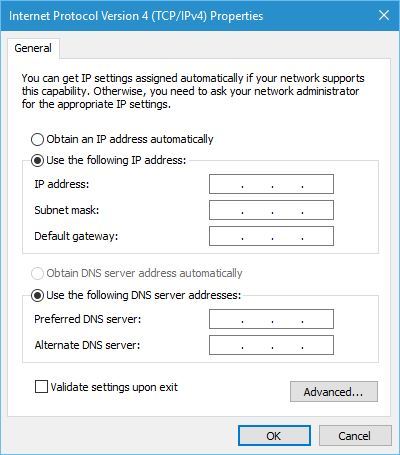
Select Internet Protocol Version 4 (TCP/IPv4) and click on the Properties button.
Select the Use the following IP address option and enter the required data. In most cases for Subnet mask you can enter 255.255.255.0 and 192.168.1.1 as the Default gateway. In addition, you might have to enter 192.168.1.1 as the preferred DNS server.
Check Validate settings upon exit and click on OK.
Changing your local IP address to a static one is sometimes required, for example, if your wireless network is configured to allow only devices with certain address to access it. In addition, sometimes it’s easier to manage computers in a small network if each computer has its own static IP address.
This is some basic information regarding IP addresses, and we hope that now you understand a bit better how IP addresses work and how you can use them.
Microsoft will reportedly drop one key feature from Skype for Windows Phone 8.x. Recent Skype documentation says that video messaging feature will be removed from Windows Phone, but will still remain available on all other Skype-compatible platforms.
Windows Phone is going to be the only platform that won’t support Skype video messaging, leaving everything else — from Windows 10 and Windows 10 Mobile to Android and iOS — still in the mix.
“You can still view but will no longer be able to send video messages. If you want to send a message, sign into Skype on video message supported platforms or devices (Windows desktop, Mac, Android, or IOS),” says Skype documentation.
Microsoft didn’t specify its reason for this decision, which is weird because the majority of Microsoft’s phones users still use Windows Phone 8.1. Despite this, we can deduce some hidden intentions on the part of Microsoft’s explanation.
Microsoft forcing people to upgrade to Windows 10 Mobile?
Before we start firing shots at Microsoft, let’s first understand that Microsoft hasn’t specified if this decision applies to all versions of Windows Phone 8 (Windows Phone 8, and Windows Phone 8.1). If it only applies to Windows Phone 8, this would make more sense as this version is not used by the majority of users. But if this applies to Windows Phone 8.1, then users of this platform have all the rights to feel under pressure to upgrade to newer devices.
Skype is very popular service on Windows Phone devices, and some users can’t imagine using their phones without it. So, with this change, they’ll have to choose whether they want to continue using Windows Phone without Skype video messaging, or if they’re going to upgrade.
If we analyze the situation further, pushing users to upgrade to Windows 10 Mobile devices might not be such smart decision for Microsoft. The market share of Windows Phone is currently at just 0.7% and dropping fast. Forcing some people to abandon their current devices certainly won’t improve those numbers.
What do you think about Microsoft’s decision to exclude Skype video messaging from Windows Phone devices? Will it force you to buy a new device, or totally abandon the Windows Phone platform? Tell us your opinion in the comments.
The Office team has just announced several new features for the desktop Excel app that will be available to users through the Get & Transform section of the Data ribbon. These new features are leveraging the Power Query technology which “provides fast, easy data gathering and shaping capabilities” according to the blog post. Among the goodies, users will get access to eight new data transformation features as well as two new data connectivity features, please read all the details below.
Remove blanks via Column Filter menu
Via the Column Filter menu drop-down, users will now be able to access a new data filtering option that will allow them to remove all rows where the value for the current column is null or empty.
Remove blanks via Column Filter menu.
Convert Duration values to Years
This new transformation option will allow users to calculate total years based on a Duration type column (Excel will divide the total number of days by 365). To access it, users should look for the ‘Total years” entry under the Transform or Add columns tabs
Convert duration values to years.
Keep Duplicates
On the Ribbon, the Home > Remove Duplicates split button will now feature a new “Keep duplicates” command under the previously available “Remove duplicates”. This new transformation option will allow users to keep only the rows with duplicated values on the select column(s)
The new “Keep duplicates” command.
Hints for “sample input values” in the “Change Type with Locale” dialog
This new transformation option will let users change the type of a column taking into account the Locale or regional settings/formats in which the data is being represented. To use it, users will have to sett the Locale value for the entire workbook (under Data >New Query > Query Options > Current Workbook > Data Load). By doing a right-click on a column header in the Query Editor preview and then selecting Change Type > Using Locale, the “Change Type with Locale” dialog box will allow users to get a few “sample values” for the expected input format when selecting a specific data type and locale.
The “Change Type with Locale” dialog box.
Support for whitespace and line feeds in the Query Editor preview
The Query Editor preview will now let users visualizing any whitespace characters (including line feeds) in data cells. While the default behaviour is now set as “show whitespace”, users will still be able to un-toggle it from the View tab on the Query Editor ribbon.
In the Query Editor preview, the default behaviour is now set as “Show whitespace”.
Ability to disable previews from the Navigator window
Under the “Display options” menu, a new option will allow users to disable preview in the Navigator dialog.
The new option to disable previews in the Navigator dialog.
Technical name support in the Navigator window
This new transformation option will allow users to switch between “physical name” and “technical name” on the Navigator dialog, with “Technical names” being “a more meaningful name for the end user connecting to the data source than the “physical name” for the object.”
Rename queries directly from the Queries pane in the Query Editor
Inside the Query Editor, users can now quickly rename queries by either doing a right-click on them, double-clicking them or selecting them and then pressing F2.
Rename queries directly from the Queries pane inside the Query Editor.
Support for Command Timeout in the UX
This new Command Timeout option (available under the “Advanced options” section in data source dialogs) will let users specify a Command Timeout value (in minutes) when connecting to database sources.
The new Command Timeout option.
Set to disable Privacy Level prompts at machine level (including Registry Key)
As Power Query allows users to combine data from multiple data sources into a single workbook, a feature called “Privacy Levels.” will allow users to specify the Privacy Level (Public, Organizational or Private) for each data source that they connect to when trying to combine data from multiple sources.
However, as these different privacy levels can prevent users from using data combinations that bypass this Privacy feature, the Office team will allow users and enterprises to choose one of the following behaviours under the Query Options dialog:
Always combine data according to your Privacy Level settings for each source — This new option allows a user to “enforce” that Privacy Levels are taken into account for every .XLSX file on their machine, regardless of whether the “Current Workbook” Privacy Level setting is enabled or disabled.
Combine data according to each file’s Privacy Level settings — This is the default behavior and matches the Power Query behavior in previous releases.
Always ignore Privacy Level settings — This new option allows a user to always bypass Privacy Level settings for every .XLSX file in their machine, regardless of the Current Workbook setting.
The Query Options dialog includes three different behaviours.
All these updates will first roll out to Office 365 subscribers that have enrolled into the Office Insider program. For those of you who are still using Excel 2010 or Excel 2013, it’s still possible to get all these new features by downloading the latest Power Query for Excel add-in over there. Please let us know in the comments what do you think of all these new Excel features.
As seen above, the product will be available in Microsoft Stores in California, Florida, Illinois, New Jersey, New York, Oklahoma, Texas, Virginia, and of course, Washington. The $239 Wiser Air smart thermostat is also available online at the Microsoft Store, by clicking here.
The Wiser Air smart thermostat is a complete home energy management solution built with state-of-the-art technology that gives you control of comfort and savings. A competitor to the similar Nest smart thermostat, Wiser Air leverages powerful algorithms and lets you set rules for your home that help maintain an optimal environment for you and your family.
Wiser Air also works across devices, and on Windows Phone, to allow you to quickly program or modify thermostat settings from your computer, tablet, or smartphone. With this thermostat, you no doubt will take command and enjoy maximum comfort and convenience right in your own home.
Microsoft has continually pitched the Surface Pro line of devices as full PCs and comparable desktop and laptop replacements. For the most part, people have taken Microsoft’s marketing at face value and attributed their slogan to references about the software. Most owners preach about the ability to “run full desktop applications” or their love of multi-windowed, split screen navigation and access to a file system.
While the Surface Pro devices do offer the ever essential software extensibility that is Windows, in a lightweight package, Surface engineers also had the wherewithal to build a similar hardware extensible experience into the device.
Enter the Surface Dock.
Microsoft’s multi-port Swiss Army knife peripheral turns the tablet-esque Surface Pro into a robust workstation capable of powering multiple monitors, hardwired printers, scanners, keyboards, mice or projectors, among other items.
With four USB 3.0 ports, two mini display ports, one Gigabit Ethernet port, one audio out port, and a side security lock slot, owners of the Surface Dock are finding a plethora of ways to create their ideal workstation. The Surface team is also offering up some suggestion on how to maximize the extensibility of the Surface Dock.
Surface Dock ports
Surface Dock makes you a multi-tasking hero. With two miniDisplayPorts (mDP), you can now have three screens of real estate to be a productivity master. Crunch your numbers in Excel, check your emails in Outlook, take notes in OneNote, and Skype into a conference call – all without having to switch screens.
Surface Dock makes your life simpler. No more needing to plug and unplug a crazy number of cables every single time you sit down at your desk. We think your time is way more valuable than that. Just plug in all your cables – miniDisplayPort (x2), Ethernet, USB (x4), power, and audio in your Surface Dock – and never deal with them again. Transform your Surface into a desktop just by connecting the single, flexible SurfaceConnect cable into the SurfaceConnect port. Boom! You’re good to go.
Surface Dock brings out your creativity. Just because you’re “docked” doesn’t mean you can’t continue to take advantage of some of the best features of Surface – the touchscreen and Surface Pen. The Surface Dock allows you to use your Surface at the perfect angle by adjusting the multi-position kickstand. Use your Surface Pen to markup webpages on Microsoft Edge, draw on OneNote, and create beautiful things on Creative Cloud (and other partner apps).
Surface Dock lets you maximize productivity. For developers, the Surface Dock is an elegant solution for turning your Surface into a powerful development workstation. You can use one external monitor to keep the focus on your code and use the other monitor to handle any open documentation, emulator or apps you’re testing. You can still use the great PixelSense display on the Surface itself as a third screen for team communications, e-mail, web browsing, etc. With the four available USB 3.0 ports, you can connect that favorite keyboard and mouse, a headset, maybe an Xbox controller and any other essential accessory to get your work done. And when you need to take your work to a meeting, on a trip, or just head home for the day, all it takes is a simple tug of the magnetic SurfaceConnect cable, and you’re free to go.
Surface Dock multi-monitor support
Surface Dock empowers you to get more done. We know you have a lot of meetings. Sometimes back-to-back. Don’t worry, though; your Surface Dock will charge your device while you use it – so you don’t lose power in the middle of that important presentation you were making.
A new and improved Surface Dock also works with the Surface Book, in addition to the Surface Pro 3 and Surface Pro 4. For anyone looking to replace a more traditional workstation setup with a more mobile and versatile option, it would seem the Surface Dock is the perfect accessory to a Surface Device.
With E3 2016 just two weeks away, and the Windows 10 Anniversary Update on the horizon, the excitement for Xbox’s E3 2016 briefing is no doubt at an all-time high. Just like last year, though, Microsoft is continuing with the Xbox FanFest, and is giving 500 lucky fans a one-of-a-kind and up-close and personal experience to participate in the gaming industry’s biggest showcase.
On the Xbox Wire, Microsoft notes that to take part in the Xbox FanFest you will need to be over the age of 21 and have a Xbox Live gamertag. Additionally, Microsoft notes that you will need a ticket from the Microsoft store at Westfield Century City in Los Angeles in order to participate. To obtain the ticket, you can line up starting on Saturday, June 11 at 10:00 p.m. PDT. Credentials will then be distributed to the first 500 fans in line, and FanFest tickets will be distributed to credential holders the following morning, Sunday, June 12 at 11:00 a.m. PDT. More details and all of the fine print is available for this event is available on the official Xbox FanFest E3 2016 page.
Xbox FanFest Logo
If you are lucky enough to attend you will be able to invited to the Xbox E3 2016 Briefing on Monday, June 13th, 9:30 am PDT, in downtown Los Angeles. You will also be able to play all-new exclusives and the biggest blockbuster games while meeting some of the industry’s top developers, leaders, and influencers. Additionally, you will be a guest at the special Forza Motorsport event at the Petersen Automotive Museum on Monday, June 13th and the “Fan Celebration” event at the Premiere House at Regal L.A. LIVE: A Barco Innovation Center on Tuesday, June 14th. Perhaps more importantly, though, you will also get a custom backpack filled with gaming swag!
So, what do you think? Will you try your luck and line up to get the credentials? Or would you rather just stay home and watch from the comfort of your couch? Let us know your thoughts by dropping us a comment below!
If you’re the creative kind, you probably know Minecraft as the best game to go to create your own universes from the bottom up (literally!) Today, though, we’ve come across another great Windows 10 app in the Windows Store which gives you another way to create your own 3D virtual worlds.
The app, Roblox, is the ultimate virtual universe powered by imagination. It is the largest user-generated gaming community with over 20 million visitors each month who all explore amazing 3D virtual worlds with friends. The free to download Roblox features a massive multi-player gaming platform, thousands of games to choose from, customizable avatars, and even chat and message features.
Exploring in Roblox
In a few instances in Roblox, you can play paintball with your friends, run a pizza shop, explore other galaxies, outmaneuver enemy jets, hang out with friends in a virtual club, and so much more. Roblox, though, is free to download, but features some in-game items which can be purchased with real money.
If you like how Roblox sounds, we’ve included a download link for you to obtain the app below. Once you do download, please let us know how it is going by dropping us a comment below!
Grand Theft Auto V is one of the highest grossing, most popular games in history. This is not just hyperbole: Rockstar’s recent report states that GTA V has sold over 65 million copies since its release in 2013 — a monumental accomplishment. According to Take Two’s financial report, GTA V reached the new shipping milestone with five million copies sold during the last fiscal quarter, increasing the number of total copies sold from 60 million to 65 million.
These numbers are fascinating if we take into consideration that the game is around three years old. This means that a game released for the previous generation of video game consoles still ships 1.67 million copies a month, something unheard of. To make this even more impressive, GTA V managed to reach these numbers without a single story-related DLC release.
GTA V was released by Rockstar Games in 2013 for Xbox 360 and PlayStation 3 before being launched for Xbox One and PlayStation 4 in 2014, and for PC in 2015. A specific timetable of releasing the game on various platforms certainly plays a big role in its continued success. Of course, an even bigger role is the unquestionable quality of the game.
Take-Two also teased a new exciting project to arrive later this year:
“Looking ahead, we expect to grow Non-GAAP revenues and earnings in fiscal 2018, based on our robust development plan that extends well beyond the current fiscal year. Rockstar Games is of course hard at work on some exciting future projects that will be revealed soon.”
We still have no information about what that project might be. There’s a possibility that Take-Two will confirm another highly anticipated game in the GTA franchise like Grand Theft Auto V, but it could also announce the revival of another franchise like Red Dead Redemption.
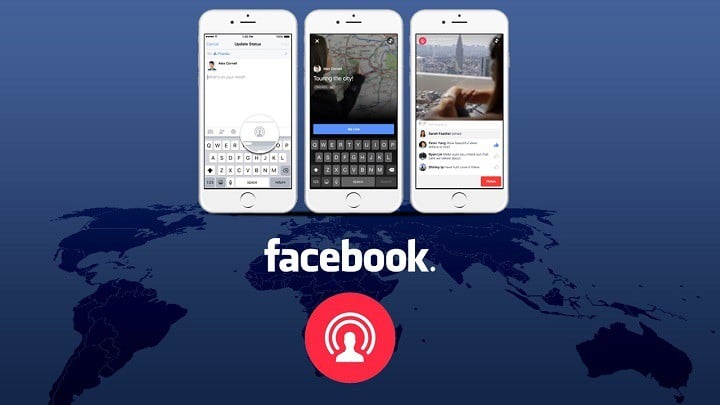
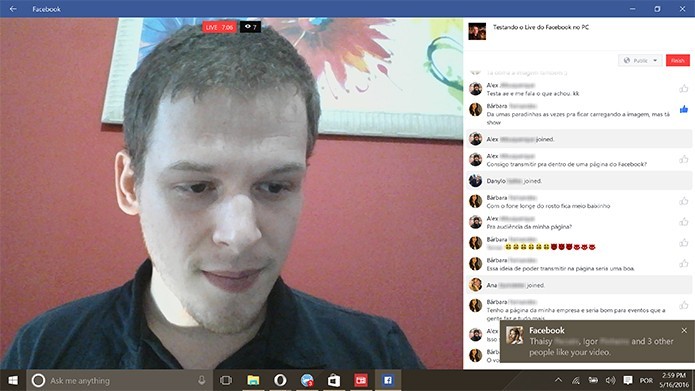
There’s a chance that Facebook’s new live streaming service, Facebook Live, might be headed to its Windows 10 Universal app due to a few screenshots showing how Facebook Live function appearing online.
The screenshots were originally posted by Techtudo’s Elson de Souza, who claims that Windows 10 users of the Facebook app are now able to host live streams right from the app. However, we weren’t able to access the feature yet, but assume this feature will be available to the general public very soon.
We still don’t know how Elson managed to get this feature before others. Maybe it is some kind of beta testing but more likely Facebook is rolling out the feature gradually. If you somehow managed to get this feature on your Windows 10 device, we’re going to show you how to use it (also courtesy of Elson de Souza).
How to start Facebook Live in Windows 10
To be able to start live streams using Facebook Live on your Windows 10 device, you need a version of Facebook app for Windows 10 that supports this feature. When you make sure you have that version installed on your Windows 10, do the following:
Open Facebook app for Windows 10
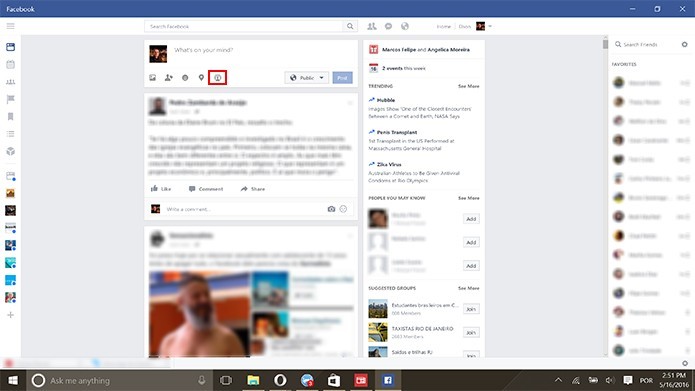
Click on the ‘Go Live’ button, under your status box
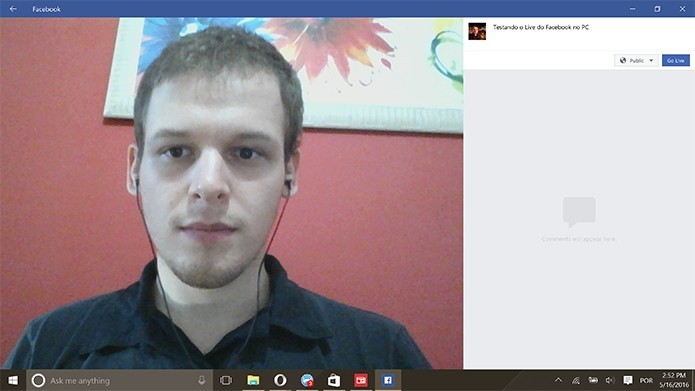
Facebook will now show a preview of your webcam. Update your status, and click ‘Go Live’
Once you hit ‘Go Live,’ your Facebook friends will be notified about your live stream, and your streaming will begin. You can also observe comments on your stream while still streaming live
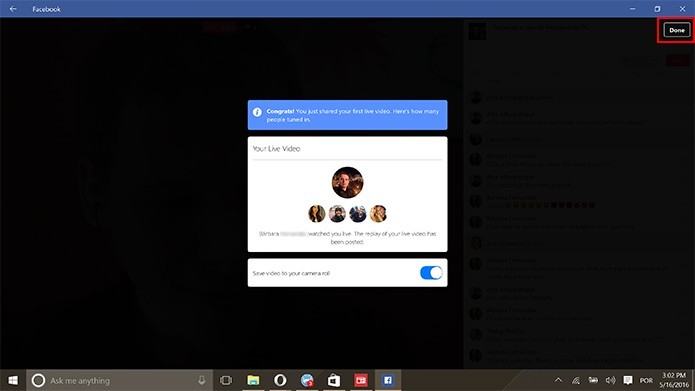
Once you’re done with streaming, just click ‘Finish’
Your stream will end, and Facebook will give you an option to keep the stream as a video in your Gallery, or delete it permanently
Don’t hesitate to share your impressions about live streaming on Facebook from your Windows 10 device in the comments below!
AdDuplex published its Windows phone statistics for May, revealing changes in the behavior of Windows phone owners. The May report is based on data collected from 5,000 devices, starting from May 16.
In it, the report confirms an interesting trend: the most popular Windows phones are not the latest models. Actually, Lumia 520 and Lumia 535 are the most popular Windows smartphones despite the fact they were launched in 2013 and 2014, respectively.
Microsoft made numerous, significant efforts to convince its customers to buy newer phone models without much success over the year, but it seems Windows phone owners do not follow the same pattern as iPhone owners who immediately upgrade to the next phone model as soon as it is available.
Unfortunately, not even the most appealing discounts, from allowing you to get a free Lumia 950 if you bought the Lumia 950 XL to enticing trade-in offers could convince buyers to say yes.
In the Windows phone world, the Lumia 520 holds a 12.2% market share, up from 12.1% in March, while the Lumia 535 has a 11.7% market share, down from 12% last month. The Lumia 630, 640 and Lumia 635 round out the top five most popular Windows phones, with a market share under the 10% threshold.
The Lumia 520 is actually the best selling Windows phone ever, with more than 12 million devices sold worldwide. However, with Microsoft no longer updating the phone and delaying the Windows 10 upgrade for Lumia 520 owners, that seems likely to end soon.
As far as Windows phone manufacturer statistics are concerned, there are no significant changes, with Microsoft-Nokia on the first place and HTC second. The top could change a bit in the following months given the series of Windows 10 phones released by the other manufacturers: the Acer Liquid M330 has a very appealing price tag of only $99.99, HP’s Elite X3 is expected to land in July, while Coship’s Moly PCPhone W6 impresses through its design.