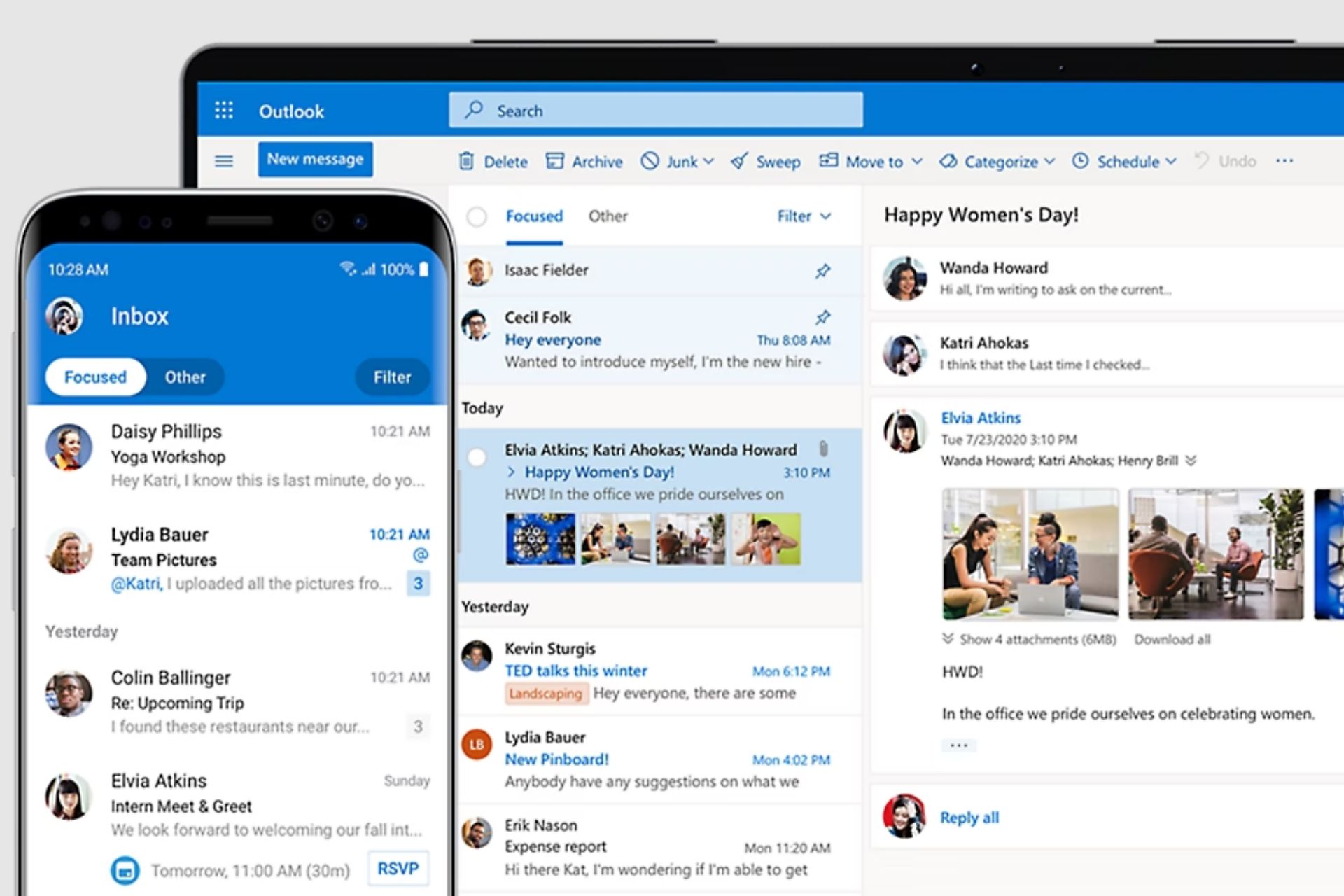
After announcing that it would make the meeting time suggestions optional in Outlook, Microsoft has updated the 365 Roadmap with an entry describing major changes coming to the platform’s schedule assistant.
According to the entry, Outlook’s schedule assistant will be enhanced to provide better readability to users, by changing the grid lines, and availability view and adding new elements, such as a combined availability bar to the assistant’s design.
However, these changes will only be released on the new Outlook for Windows and Web. The Redmond-based tech giant hasn’t mentioned anything about bringing these updates to classic Outlook.
We are updating the scheduling assistant view to help users have better readability. Some of these changes are in alignment to customer the feedback. These changes will also improve the grid lines, availability view, adding combined availability bar and much more. These updates will be available in the new Outlook for Windows and web. #newoutlookforwindows
Microsoft
What does this mean for you? Well, you’ll most probably be able to access the schedule assistant more easily from now on. Using it is not complicated, but it’s not done in a straight line either, and several steps have to be followed, as you can see in our guide here.
So, with Microsoft bringing these updates to the schedule assistant, the Redmond-based tech giant is effectively making it easier to use for all.
You’ll be able to schedule important meetings, conferences, webinars, and other corporate events much more intuitively from now on, without wasting time.
The roadmap says these new updates will be implemented in July, and their rollout is expected to take the whole month. As we mentioned earlier, this is only for the new Outlook for Windows and Web users, and I have a feeling this might be Microsoft’s way to encourage users to migrate to the new version of the platform.
We saw some outstanding devices from Samsung over the years, and if you were looking to get them, you’d be pleased to hear that the company is having massive discounts.
The discount includes various devices, including laptops, monitors, and TVs, so let’s see what you can get during this sale.
Samsung is having a major sale through Memorial Day
As PCWorld writes, Samsung is having a sale on most of its items, and you can get the following laptops for great prices:
Galaxy Book4
15.6-inch display
Core 7 120U processor
16GB RAM
512GB storage
Galaxy Book4 Pro 360
Core 7 155H CPU
16-inch fold-back AMOLED screen
16GB RAM
1TB storage
Galaxy Book4 Ultra
Core 7 155H CPU
16-inch fold-back AMOLED screen
16GB RAM
1TB storage
Nvidia RTX 4050 graphics
You can get these models for the following prices:
The sale will last until May 26th, so be quick and don’t miss out on these amazing discounts. In other news, Galaxy Book 4 Edge laptops specs have leaked, so you might want to check them out.
Recently, Microsoft announced that Windows 11’s latest version will allow you to create and extract 7-Zip and TAR files. This is good news for those who don’t need the feature that often. However, if you extract and create ZIP files frequently, you may have to rely on pioneer apps like NanaZip and 7-Zip.
Coincidentally, days after Microsoft added the feature, NanaZip also received an update, upgrading the version to a 3.0 version. The new version comes with a slew of new features, including dark mode support for all GUI components, Mica support, a Windows 11-like UI, and more.
With this version, NanaZip will come in two variants, NanaZip and NanaZip Classic. The difference between the two is that the regular one doesn’t support the 32-bit. Also, NanaZip Classic works for older Windows versions until Vista, but NanaZip works on Windows 10 version 2004 and later.
NanaZip 3.0 and onwards will have two distribution flavors called NanaZip and NanaZip Classic. But NanaZip 3.0 does not have the Classic flavor yet because it’s not ready.
The 32-bit x86 support for NanaZip packaged version is removed because supported 32-bit x86 Windows versions don’t support running on 32-bit only x86 processors.
NanaZip 3.0 and onwards will have NanaZip Sponsor Edition.
NanaZip has introduced the Preinstall Support.
Features
Introducing dark mode support for all GUI components.
Introducing the Mica support. You will enjoy the full window immersive Mica support for all GUI components if you are using dark mode with HDR disabled.
Synchronize the 7-Zip mainline implementations to 24.05.
Make NanaZip Self Extracting Executable stubs use 7-Zip mainline Zstandard decoder instead of Zstandard official’s for reducing the size for binaries.
Use 7-Zip mainline Zstandard decoder instead of Zstandard official decoder for NanaZip.Core project.
Remove 7-Zip mainline XXH64 Hash handler for NanaZip.Core because we have the xxHash-based implementation in NanaZip.Codecs. It will have much better performance, especially for non-x86 targets.
Implement the new toolbar and use it to replace the old menubar and old toolbar.
Refresh the UI layout for About Dialog via following other Nana series project design.
Add the SM3 HASH algorithm from GmSSL.
Improvements
Rewrite and split the implementation of the Core Library and the Self Extracting Executable to the separate NanaZip.Codecs and NanaZip.Core projects.
Ensure the implementation of Core Library and the Self Extracting Executable supports Windows Vista RTM (Build 6000.16386).
Reduce the binary size for the Self Extracting Executables.
Synchronize the 7-Zip ZS implementations to the latest master branch.
Synchronize Zstandard and builtin xxHash implementations to v1.5.6.
Synchronize Brotli implementations to v1.1.0.
Synchronize the RHash implementation to the latest master branch which is after v1.4.4.
Synchronize the BLAKE3 implementation to latest master which is after 1.5.1.
Update to Git submodule version of Mile.Project.Windows.
Update Mile.Windows.Helpers to 1.0.558.
Update Mile.Xaml to 2.2.944.
Use Mile.Windows.Internal package.
Use Mile.Detours package.
Use modern IFileDialog for folder picker dialog.
Launch directly to the settings page of association for NanaZip.
Show NanaZip in Drives’ ContextMenu.
Sync file extension support from https://github.com/mcmilk/7-Zip-zstd.
Add other methods to compression dialog.
Reorder initialization in constructor matching to member declaration order.
Add mitigation policy of disabling child process creation for command line version of NanaZip.
Add Explorer Patcher DLL blocking for NanaZip File Manager for reenabling mitigation policy of blocking loading unexpected libraries from remote sources at runtime for the main thread of NanaZip File Manager without the stability issues.
Fix issue in IEnumExplorerCommand::Next for shell extension.
In a bid to provide high-quality, accurate, and up-to-date cloud and precipitation forecasts and maps globally, Microsoft has announced its new AI weather model.
The new model, 4x bigger than the one previously employed, relies on data from both available satellites and radars. Detailing the changes in the new model, Microsoft’s official blog post reads,
The new model jointly predicts both satellite and simulated radar reflectivity, enabling its predictions to fill data availability gaps. Since the precipitation task is more important than the satellite prediction task, the radar channel was given 6X more weight in the training loss function than satellite channels.
Microsoft explained that precipitation nowcasting models previously relied on data from the radar to verify places receiving precipitation and then extrapolate it to identify how things would evolve. Microsoft’s new Satellite + Radar weather model is better in this aspect!
The new model shows great promise and has been found to deliver enhanced performance when evaluated using available base metrics, even during satellite outages, making it a more reliable option.
Against the prior baseline of radar-only predictions, Microsoft Start’s new model presents a marked improvement in F1-score. Additionally, it was observed that predicted satellite images score better than a persistence forecast after 15 minutes, meaning these predictions can be used when satellite outages last longer than 15 minutes.
The new model, also the latest addition to Weather from Microsoft Start inventory, is now fully integrated and more accurate information should be available to Windows 11, Windows 10, Microsoft Edge, and Bing users. Besides, its integration into Bing and the Microsoft Start mobile app is also complete.
As we have guessed, it seems that Copilot in all Microsoft 365 apps is to be enhanced with the newer and more versatile GPT-4o, as Copilot in Excel will soon feature a chat helper that will accept a wider and less restricted variety of prompts.
According to the latest entry in the Microsoft 365 Roadmap, this chat helper will turn Copilot into a more conversational AI model within Excel, providing users with more ways to get their point across.
That means it will accept natural language, and will use natural language to explain complex Excel formulas, and it will even come out with comprehensive guides on how to use them.
Customers can get more conversational answers to a broader range of Excel-related questions and prompts from Copilot. For example, the customer can ask how to accomplish a task and Copilot will respond with helpful steps that may include formulas to copy and use. In some cases, Copilot may explain a formula error and supply the corrected formula plus additional guidance to ensure the formula works properly.
Microsoft
It’s not entirely fair to assume this could be the GPT-4o-based Copilot, but Microsoft did mention that it will update Copilot with the newer model, eventually, so we’re inclined to believe the new chat helper in Excel is exactly that.
However, we’ll see if this is true in June when the new enhancement is set to be released. Either way, having a more conversational AI is nothing but beneficial for adopting Copilot at work.
Microsoft seems to know it too: the Redmond-based tech giant announced it will release the Curated by Microsoft section within its Viva platform, which is a place where users learn how to talk to Copilot. The new panel will offer courses, webinars, and prompts for users to help them interact with the AI model better.
But if Microsoft enhances Copilot in Microsoft 365, including Excel, with GPT-4o, such a platform might not even be needed, as the AI will be capable of understanding and processing prompts made using natural language.
The other one is a security update for Windows Server 2019, KB5037765. It brought the version to OS Build 17763.5820, but some users complained that when they tried to install the KB5037765 update, it failed with the error code 0x800f0982.
Microsoft acknowledged the issue and said it is happening in France, Germany, Spain, and other countries when trying to install language packs other than English.
The Redmond tech giant released the KB5039705 out-of-band (OOB) update and fixed this issue. The release notes also say that it is only meant to resolve the installation failure issue and doesn’t include security fixes or improvements.
Here is what is mentioned in the release notes:
Important: This update does not contain more security updates than what was available in KB5037765, dated May 14, 2024. After you install this OOB, you must restart your device.
This issue was resolved in the out-of-band (OOB) update KB5039705, which is available via the usual channels. Since this is a cumulative update, you do not need to apply any previous update before installing KB5039705, as it supersedes all previous updates for affected versions. This update does not contain any additional security updates from those available in the 5B update. Installation of this OOB will require a device restart. If your organization uses the affected platforms and hasn’t yet deployed the May 2024 security update yet, we recommend you apply this OOB update instead. To install this update, follow the steps under How to get this update in KB5039705.
This update addresses a known issue that is related to the English (United States) language pack.
Improvements
This security update includes improvements. When you install this KB:
This update addresses a known issue that is related to the English (United States) language pack. If your device does not have it, installing KB5037765 might fail. The error code is 0x800f0982. However, this issue might affect devices that have that language pack. In that case, the error code is 0x80004005.
Known issues in this update
Microsoft is not currently aware of any issues with this update.
Have you encountered the same installation error while updating to KB5037765? If so, install the KB5039705 update and let our readers know if it helped in the comments section below.
Microsoft released Microsoft Edge version 126.0.2592.13 to the Beta Channel for Edge Insiders. This version includes feature updates such as an AI theme generator, which generates images for browser themes.
IT admins can now manage the security of their browsers with ease. In addition to this, you get a copilot summarization notification in Reading mode. You will also see policy updates, bug fixes, and performance enhancement.
AI theme generator. Microsoft Edge will include an AI theme generator, that allows users to input a text prompt and generate a series of images to preview as browser themes. Applying the theme includes setting the generated image on the Edge new tab page and applying the image’s dominant color to the browser frame. Admins can control availability to this feature using the AIGenThemesEnabled policy. Note: This feature is a controlled feature rollout. If you don’t see this feature, check back as we continue our rollout.
Security protection controls in the Microsoft Edge management service. The Microsoft Edge management service will provide admins with a dedicated experience to manage specific settings that help improve the security posture of their managed browser instances. Note: This experience is in public preview and can be accessed by opting in to targeted release in the Microsoft 365 admin center.
Copilot summarization notification. The feature displays an Omnibox notification when users enter into a reading mode eligible page in Edge and offers them the option to open Copilot in the sidebar to generate a summary of the content. Note: This feature is a controlled feature rollout. If you don’t see this feature, check back as we continue our rollout.
Policy updates
Obsoleted policies
MathSolverEnabled – Let users snip a Math problem and get the solution with a step-by-step explanation in Microsoft Edge (obsolete)
You can download Microsoft Edge Beta from the official Edge Insider website. Version 126 is expected to be released publicly in June.
If you encounter any problems while using the new version, you can report them through the Feedback Hub app, which you can open by pressing Windows + F.
In case you want to try the new features before they are released to the general public, you will have to join the Edge Insider Program.
Have you installed the latest version yet? If so, share your experiences with us in the comments section below.
If your Realtek Audio Console cannot connect to RPC, it may be a software incompatibility or a network error issue.
The Realtek Audio Console is a crucial app especially if you want to take your audio to the next level. You can configure your sound settings or even add effects for an immersive sound experience.
Since the program interacts with other apps, ensure you’ve enabled requisite permissions or access rights that may be blocking the RPC connection.
How do I fix Realtek Audio Console cannot connect to RPC?
1. Restart related services
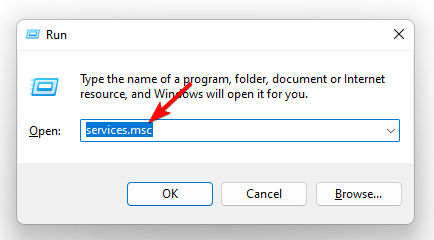
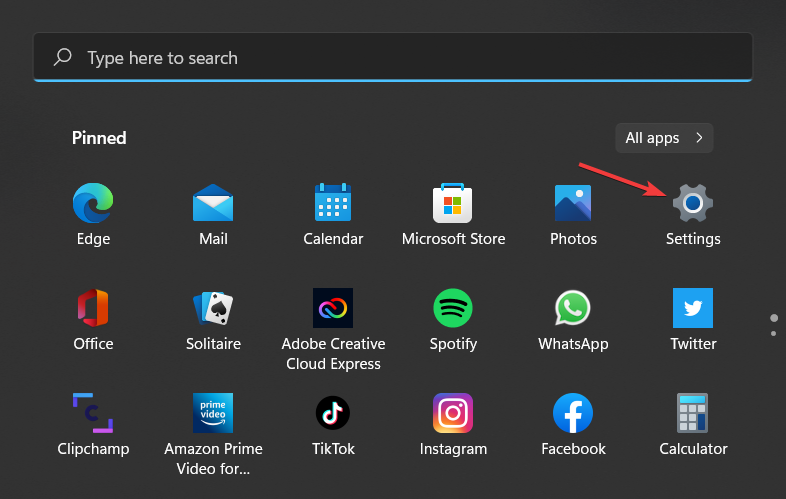
Hit the Windows + R keys to open the Run command.
Type services.msc and hit Enter.
Locate the Realtek HD Audio Universal Service service, right-click on it, and select Properties.
Navigate to the General tab, under Startup type, select Automatic from the drop-down options, and click on the Start button.
Next, click Apply and then OK.
Repeat the same steps for DCOM server process launcher and RPC Endpoint manager then restart your PC.
While these services are running, it is important to note that the RPC is notoriously known for high CPU usage. Your PC may experience frequent crashes and freeze randomly. However, we have a few recommendations to minimize the CPU footprint it causes.
2. Uninstall and reinstall the audio drivers
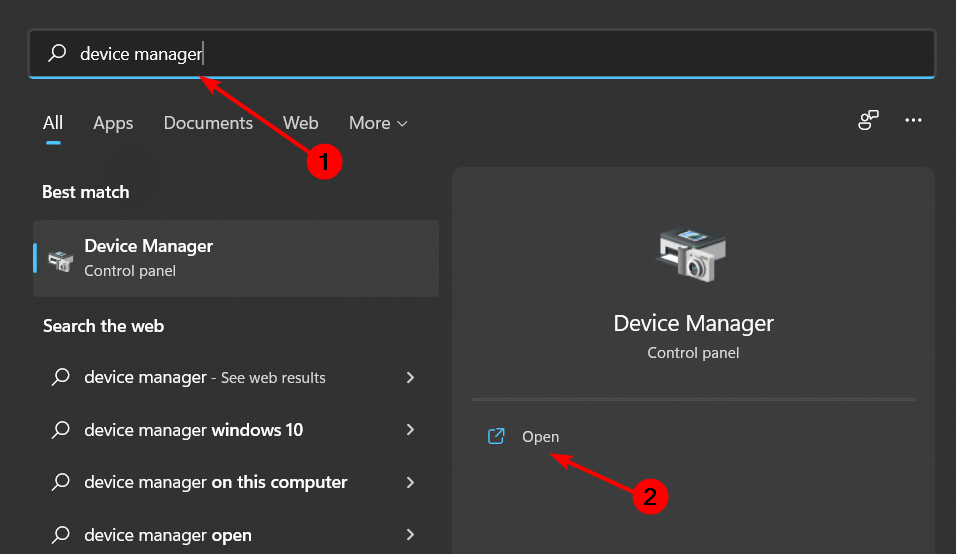
Hit the Windows key, type Device Manager in the search bar, and click Open.
Navigate to Sound, video, and game controllers to expand, right-click on Realtek High Definition Audio and select Uninstall device.
Repeat the same for any Realtek device under Audio inputs and outputs, Software components.
Restart your device and the drivers will automatically reinstall themselves.
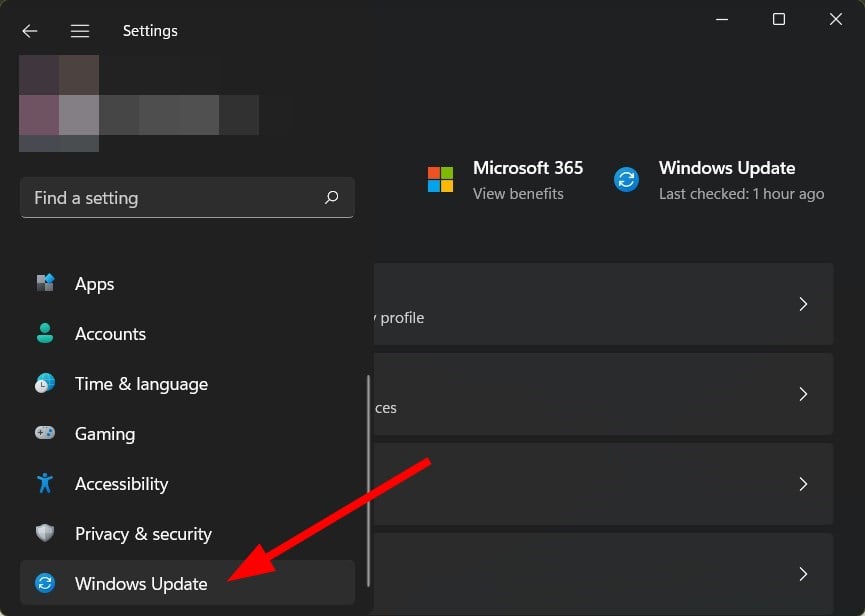
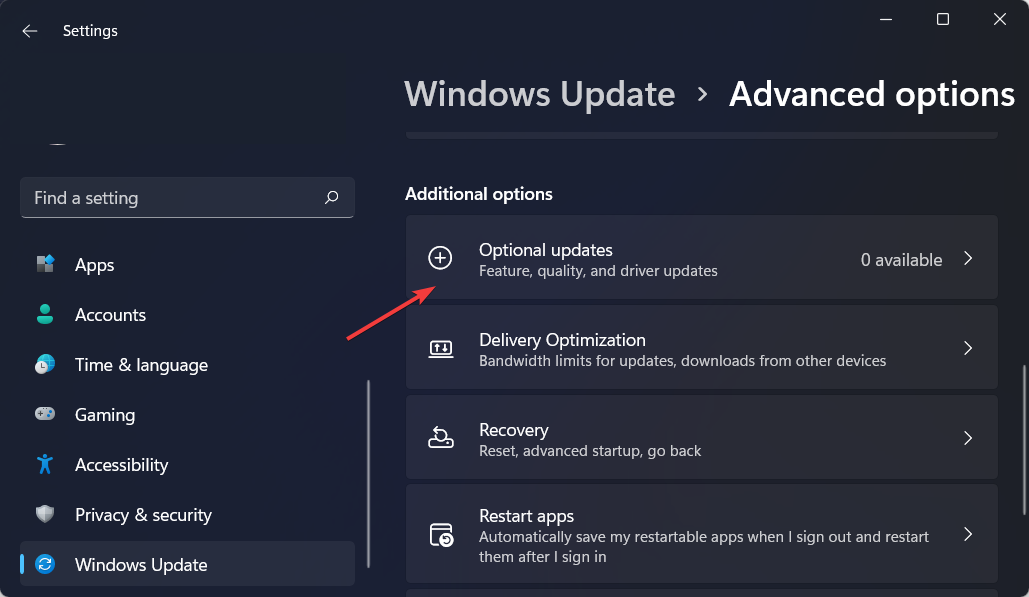
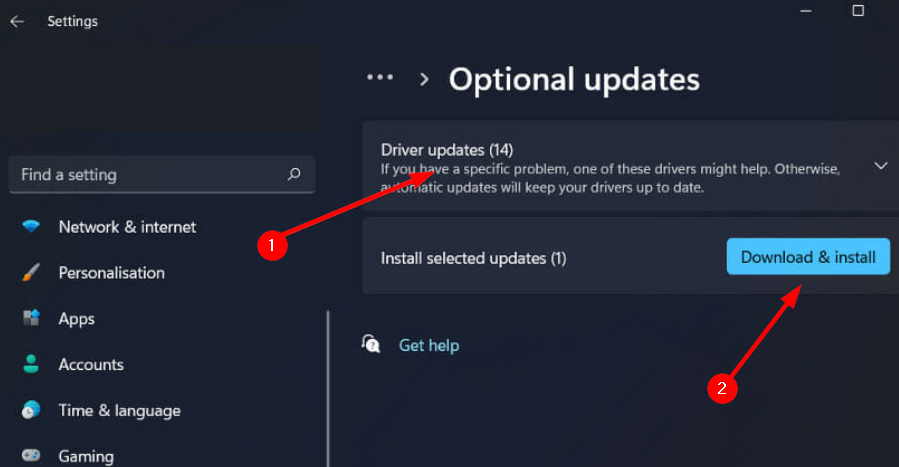
Click on Driver updates and check if there are any from Realtek Semiconductor Corp. MEDIA. If there are any new updates, click Download & install.
Driver updates are usually delivered quietly and hard to notice if you don’t look specifically for them. A specialized tool such as Fortect Driver Updater can make your job much easier, as it will automatically scan for and download any drivers that might have gone out of date in just a few minutes.
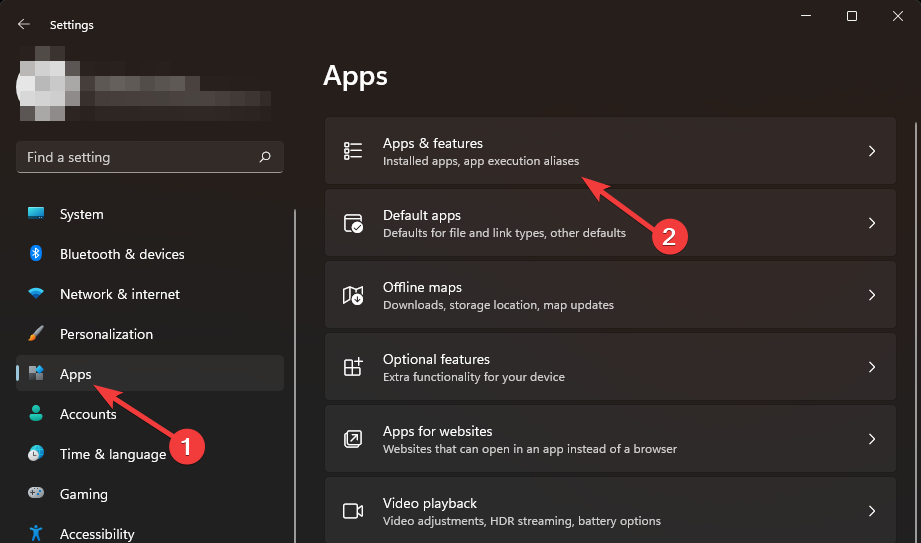
Click on Apps on the left pane then Apps & features on the right pane.
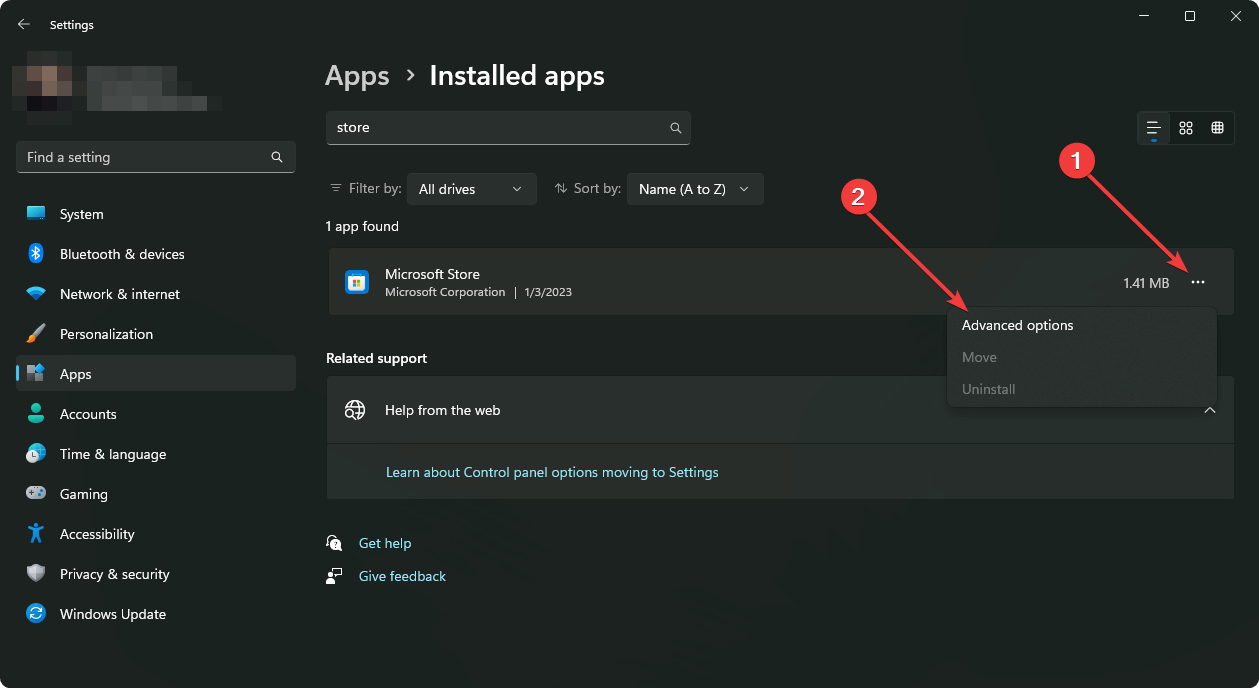
Locate the RAC app, click on the three vertical ellipses, and select Advanced options.
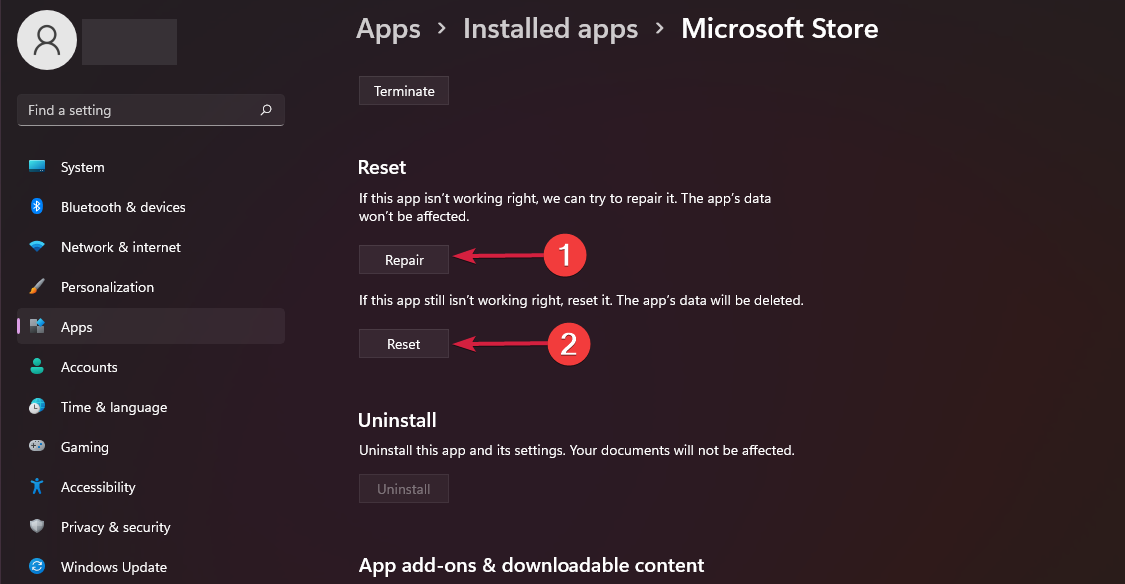
Click on Repair.
Go back and click on Reset if the repair option failed.
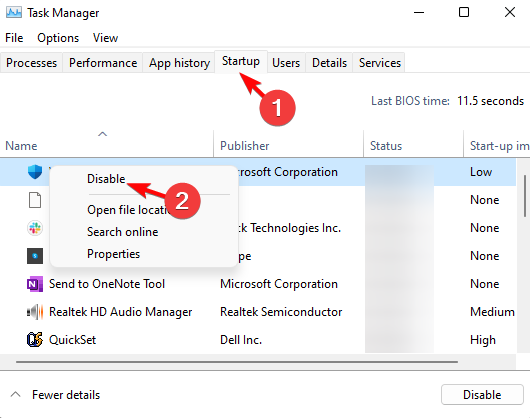
5. Disable Realtek audio on Startup
Right-click the Start menu and select Task Manager.
Next, select the Startup tab.
Then right-click Realtek HD Audio Manager and select Disable if it’s enabled.
Close the Task Manager, and restart Windows.
Additional troubleshooting tips
Download the Realtek Audio Console from the official site or the Microsoft Store. Unofficial apps tend to have compatibility issues or missing important features.
Always check your network connectivity and ensure it is stable. Random connection drops can hinder the Realtek Audio Console from establishing a connection.
Verify that your firewall settings or security software does not flag off the Realtek Audio Console as a malicious app and quarantine it. This may end up blocking the RPC communication.
Keep all your drivers and the Realtek Audio Console software up to date. Most updates come with bug fixes and may resolve such issues.
Ensure that the Realtek Audio Console app has the necessary permissions to establish a connection.
While we’re still here, we’d like to point out that Realtek Audio Console is not the only audio manager that allows you to configure your sound settings. You can explore our rich list of other audio enhancers.
I have been a long-time Windows user, always enthusiastic about the new features and upgrades. But there are some changes I don’t agree with. This time around, it is Microsoft pushing PC Manager alongside the KB5037858 update for Windows 11, although the change is currently limited to China.
The problem with PC Manager is that most of its features are already available in Windows. It just redirects you there. For instance, the app runs malware scans using Windows Security or clears space on the disk using Storage Sense. Our detailed review of PC Manager highlights several such aspects!
Not to forget, the PC Manager recently recommended Bing Search as a repair tip for users who didn’t set it as default. When it comes to search engines, Bing is no match for Google. If we look at the data from StatCounter, Google commands a 90.91% market share compared to Bing’s feeble 3.64%. It seems like Microsoft is just promoting native services via the app.
For an optimization tool, PC Manager should do a better job. Besides, there are several more capable third-party PC optimization software already available!
Personally, I feel that PC Manager is better off as an optional app, available for download from the Microsoft Store, as is the case right now. For some, the app may be of utility, but for the rest of us, it’s no more than a bloatware, which, if shipped alongside Windows, would necessitate several uninstall guides. That’s the only way I see it!
I hope that Microsoft doesn’t push PC Manager for Windows 11 in other regions.
In case you, too, are bothered by pre-installed, non-useful software, discover 50+ bloatware in Windows 11 that you should remove today!
What do you think about Microsoft’s native PC optimization tool? Share with our readers in the comments section.
Gaming PCs aren’t always the most affordable, but often a nice discount comes along that allows you to experience gaming in all its glory without breaking the bank.
If you’re looking for a new PC, then you mustn’t miss Lenovo Tower 5 Gen 8 with this special discount.
You can save $700 on a Lenovo Tower 5 gaming desktop with this discount
We saw some amazing devices from Lenovo, and if you need a gaming PC then this is the right model for you. As IGN writes, it’s currently available at a discount, and the PC comes with the following specs:
Finding the best Firestick IPTV Player can greatly enhance your streaming experience. Many IPTV players are available online, but not all of them are compatible with Firesticks. Luckily, this piece will highlight the ones that work reliably.
TiviMate stands out as one of the top IPTV players that works with different platforms, including Firestick. Its integration with Firestick ensures that you can enjoy a smooth and hassle-free streaming experience. Its user-friendly interface makes it easy to browse channels and find your favorite shows.
It also supports EPG (Electronic Program Guide) allowing you to see channel schedules and program details without lag. Moreover, you can add and manage multiple IPTV playlists effortlessly on your Firestick, making it easier to switch between different services.
For those who don’t want to miss their favorite shows, TiviMate provides catch-up and recording options that integrate with Firestick’s storage and playback capabilities (with the premium version).
Pros:
Easy to navigate and browse channels.
Offers in-depth channel schedules and program details without lag.
Allows effortless switching between different IPTV services.
It has Catch-Up and Recording Options (premium version).
Works seamlessly with Firestick.
Cons:
Some features, like recording and advanced EPG, require a premium subscription.
IPTV Smarters Pro is a free IPTV player that allows access to channel playlists from various subscriptions. It also has a paid version with extra features but it doesn’t host channels or playlists. You’ll need login credentials from an existing IPTV service provider to use it.
Furthermore, its Multi-Screen feature lets you watch several channels simultaneously on your Firestick. It’s a great option for sports fans who want to keep track of several games at once.
The app also includes robust parental control options. This ensures your Firestick remains a safe viewing environment for all family members.
Pros:
Offers a free version with essential features.
It allows you to watch multiple channels simultaneously.
Televizo is a free app that’s compatible with Firestick, Fire TV, Android TV/Google TV Box, and mobile devices. The tool allows you to enjoy a smooth, lag-free performance across nearly all devices through its free version.
However, some features are only accessible with the premium version.
With its premium version, you can enjoy watching your favorite content on Firestick without worrying about ads. It also has automatic full-screen viewing, backup/restore options, Parental Controls, and more.
Pros:
It has an adequate free version.
Premium features offer an ad-free experience, automatic full-screen, and backup/restore options.
Keeps content safe for children.
Offer lag-free streaming on most devices.
Cons:
Ads in the free version.
Most advanced features are locked behind a paywall.
GSE Smart IPTV is another top player that works well with Firestick thanks to its cross-platform compatibility. You can download the playlist and EPG to your device, load them locally, or access them via a URL link. Additionally, you can import playlists from an FTP server.
The app includes comprehensive parental control options, so your Firestick remains a safe viewing platform for all ages. In addition, GSE Smart IPTV also works with Chromecast, allowing you to switch devices at any time.
Pros:
Works with Firestick, Chromecast, and more.
Supports multiple formats including local and URL links.
Has detailed parental control features.
You can import playlists directly from an FTP server.
Cons:
Contains ads unless you upgrade to a premium version.
5. Flix IPTV – Highly Compatible With Various Devices
Flix IPTV is available across several platforms, including Android, iOS, Windows, Mac, FireStick, and Android TV. It’s accessible to virtually all users regardless of their device preference.
Furthermore, this app includes parental controls, allowing you to restrict content for younger viewers. It also includes customizable themes to personalize the app’s appearance.
Additionally, it supports M3U links for easy access to several IPTV playlists. Its video player also has subtitles for multi-language support and a sleep timer that automatically stops playback after a set time.
Pros:
Available on FireStick, Android, iOS, Windows, Mac, and Android TV.
While doing my research, I considered the following factors:
Compatibility – I ensured each app worked with Firestick.
Ease of use – I assessed the ease of navigation and user-friendliness for each option.
Functionalities – I compared features like EPG, multi-screen support, and parental controls.
Performance – I tested for smooth, lag-free streaming.
Cost – I evaluated the value of free vs premium versions.
Choosing the best Firestick IPTV player can enhance your streaming experience. The above apps offer smooth performance, user-friendly interfaces, and a range of features to suit your viewing preferences.
It’s understandable why so many users are concerned regarding the new AI-based Recall feature in Windows 11: the capability, slated to be introduced on Copilot+ PCs only, this summer, can record everything you do on Windows 11, to help you find something specific at a later date, should you ever need it.
In many ways, Recall acts like a PC historian, keeping track of your activity, but the capability’s ways of doing so have left many Windows users worried and scared for their privacy and security.
From Reddit users promising to migrate from Windows 11 to Linux, to Windows forums (here and here) being overwhelmed with concerns, everyone in the Windows universe seems to be losing their minds over it.
Their concern is valid, but ultimately Microsoft developed Recall to be an optional AI capability in Windows 11, and the Redmond-based tech giant hasn’t mentioned anywhere that it would make it a mandatory experience in future Windows versions.
Plus, you have to remember that:
Recall will only be available to Copilot+ PCs, and only there. You’ll only have access to it if you get yourself such a PC.
The tool is entirely optional, and it can be easily disabled. You can follow our comprehensive guide on how to do it, to make sure Recall is not on in your device and put your worries at rest.
It doesn’t record anything, and it won’t record private browsing sessions done in Incognito Mode.
Other users won’t have access to your Recall history.
It records everything locally, so your Recall history won’t be sent to Microsoft or any other affiliate companies. However, it also takes up a lot of space in your storage drives, and that makes it instantly unattractive.
Ultimately, it’s up to you to use Recall or not, even though in certain situations, such as developing software, the tool can be a game changer.
However, for now, you shouldn’t worry: Microsoft has not stated anything about making it a mandatory feature or even releasing it as an essential part of the future Windows.
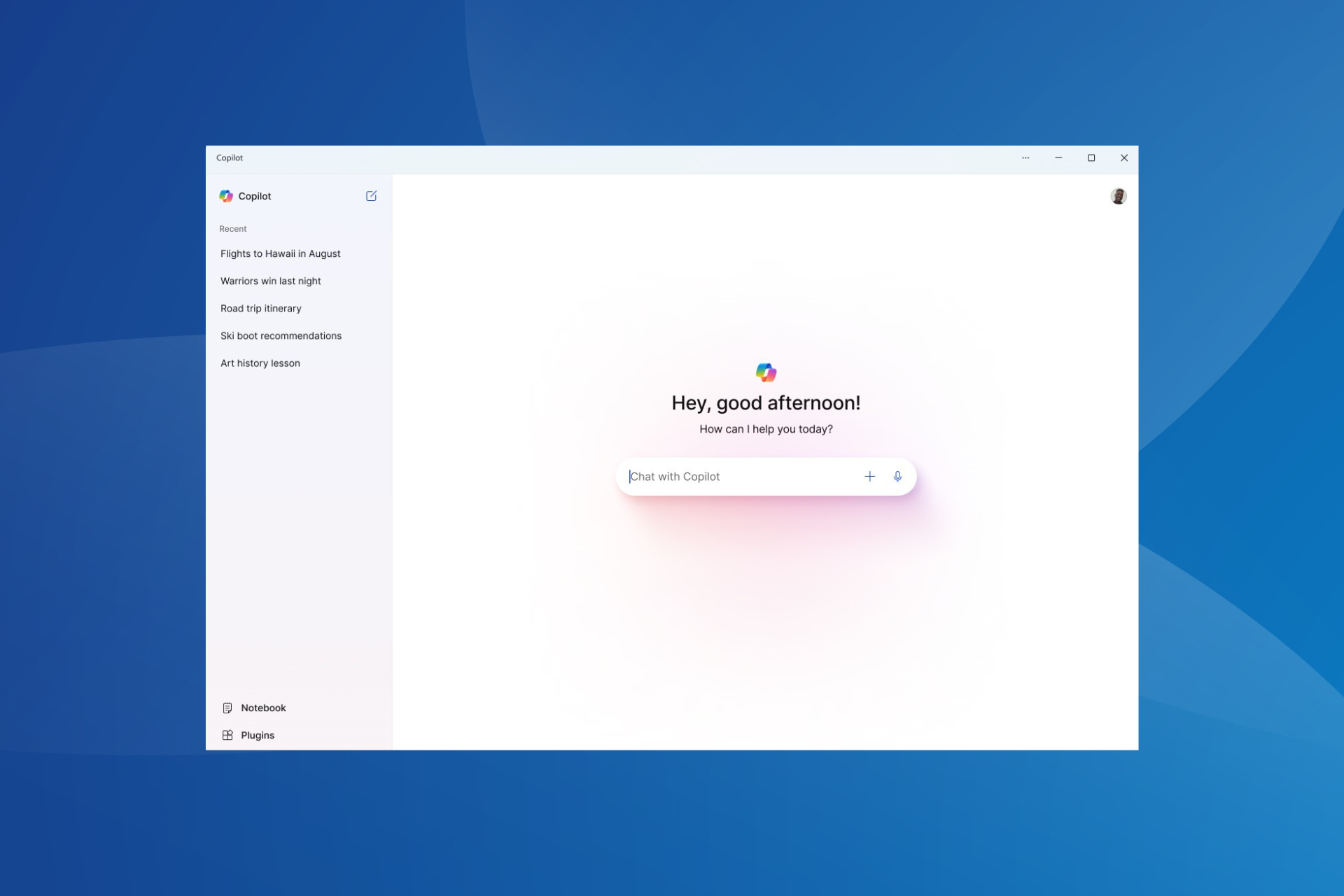
Microsoft showcased the redesigned Copilot app for Windows 11 24H2 during the Microsoft Build 2024 event. The changes are currently limited to Windows 11 Insiders, and many of them have reported that the Copilot app UI closely resembles ChatGPT.
First, about the new app: Copilot is now available as a standalone app, pinned to the center of the taskbar by default, instead of a flyout menu kind of UI, as was the case earlier. You can resize or reposition the window, just like any other app.
You will find a text box in the center, which is where the conversations will take place. Then, the recent conversations are listed in the left navigation pane, with the Notebook and Plugins options listed at the bottom-left corner.
Copilot app in Windows 11 (Image source: Microsoft)
If you have used OpenAI’s AI-powered assistant, the resemblance between the Copilot app in Windows 11 and ChatGPT should be evident right away.
This begs the question, is this a well-thought-out strategy or a random coincidence?
Our research highlights two critical aspects indicating that Microsoft designed the UI on purpose and for all the right reasons. Here’s why:
A familiar interface goes a long way: Imagine users suddenly discovering the new Copilot app on Windows 11. A familiar interface would help them quickly navigate through the various sections, while a new UI would throw them off track, at least in the initial days. So, for Copilot to witness mass adoption, Microsoft went with an interface that resembles ChatGPT.
OpenAI released a ChatGPT app for macOS but not for Windows: Earlier this month, OpenAI released a standalone ChatGPT app for macOS but delayed the Windows release. OpenAI, at the time, attributed this to the fact that its user base lies with macOS, but it’s becoming clearer now. The release of the ChatGPT app for Windows might have been deferred because Microsoft planned to unveil something similar.
It seems that the war between Apple and Microsoft will reach new heights, as Dell unveiled that its Copillot+ PC, the new XPS 13, will be the first among Windows PCs to have a Tandem OLED display, something that Apple devices, especially MacBooks have been shipped with for quite some time.
Dell has confirmed to me that the new ARM-powered XPS 13 has a tandem pOLED display. It's the first to market with this new LG Display panel inside a laptop. I saw many claim Apple had invented tandem OLED, but of course they didn't pic.twitter.com/UQ72738MXn
Either way, the new laptop is expected to come out this summer, but it can be pre-ordered now, and if it’s shipped with the new Tandem OLED, this will be a new era of Windows-based laptops.
What is Tandem OLED?
Basically, Tandem OLED is a unique and specific display technology that stacks two OLED panels on top of each other, resulting in higher image quality, higher brightness, and vivid colors.
The two panels combine light, and together they can achieve between 1000 – 1600 nits of brightness for SDR and HDR content. The system also distributes brightness across the two panels, thus reducing the workload and ensuring the display lasts longer.
The precise nature of the technology, aka controlling each pixel to display accurate colors, not only makes it perfect when watching films, videos, images, or content in general, but it also adapts itself to various circumstances, providing quality experiences no matter the lighting conditions.
They’re considered better than regular OLED displays, due to their efficient workload, burn-resistant quality, and vivid brightness. Apple announced it was going to integrate Tandem OLED into its new iPad Pro devices, earlier this month, under the name of Ultra Retina XDR display.
Tandem OLED coming to Windows PCs would definitely make the new Copilot+ PCs more attractive to users. After Dell, many other OEMs could follow, including Lenovo, Asus, Acer, and even Microsoft itself, on its new Copilot+ Surface laptops.
After all, they should do it: these new devices, announced by Microsoft at its Build conference earlier this week, are already tarnished with a negative reputation: their new AI-based Recall capability is playing the main character – many see it as a useless feature that could be potentially harmful, and it occupies a lot of space for nothing.
— Kayla Cinnamon ☕ @ #MSBuild (@cinnamon_msft) May 23, 2024
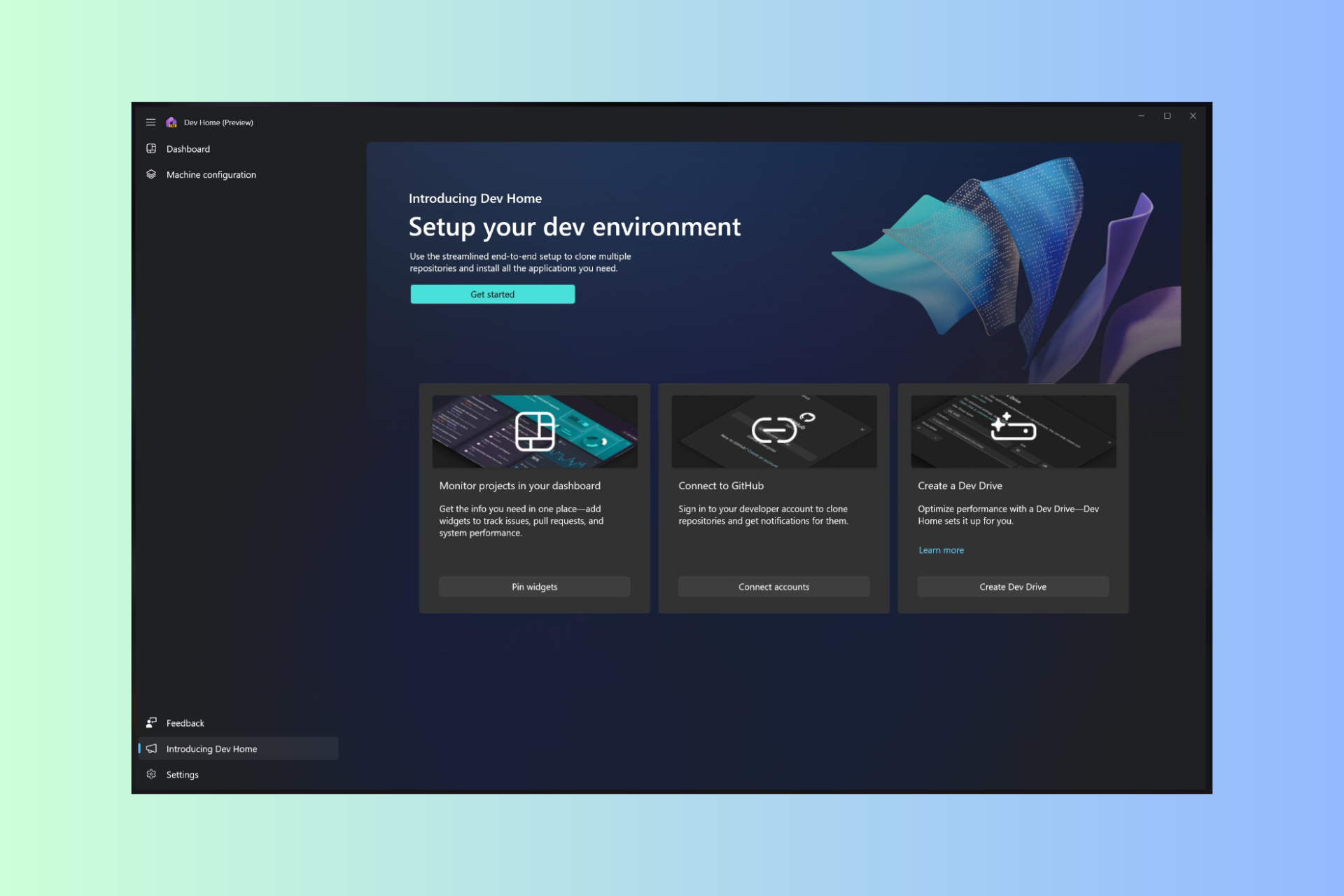
This includes the dedicated settings app, the ability to manage distros through the Dev Home app, as well the ability to install WSL through winget which will make deploying easier.
These are welcome additions, and having a dedicated settings application will make the management of distros easier for first-time users without having to use the command line.
Overall, these are some great improvements, and we can’t wait to see them in action.
Microsoft is finally updating Skype to allow users to log in with different accounts and switch between them with just a tap. The new enhancements were added with the release of the Skype Insider build 812, and according to the official changelog, both Android and iOS Skype users have access to it.
The best thing? Switching between your accounts won’t make you lose context or even miss notifications. You’ll still be able to see notifications across all your accounts, regardless of which account received them.
Unified Experience: Enjoy a smooth transition between accounts without losing context or missing notifications. This update ensures you stay connected with a consistent, unified interface.
Skyoe
Skype says the new enhancement will allow users to switch between accounts very easily, without having to log in repeatedly. Think about navigating different Instagram accounts. Well, this is very similar. The current account will appear at the top of the page, and users can easily add or remove other accounts from there, as well.
Simplified Account Management: Effortlessly switch between multiple accounts directly from the Me Control menu. No more signing out and signing in repeatedly.
Enhanced Flexibility: The account selection window now displays the currently logged-in account at the top, separated from other available accounts. Easily add new accounts or remove existing ones.
Skype
The new enhancements will be gradually rolled out to users with Skype 812, so if you haven’t gotten them yet, check it back in a few days.
The platform has been greatly updated to suit mobile users, lately, which leads us to believe Microsoft wants to turn Skype into a dominant mobile communication app in the market, and if it continues this way, then it might just manage that.
A few months ago, Skype started to support Channels, a feature very similar to Telegram and WhatsApp Channels and Communities, where users can subscribe to, and receive specific information about certain topics. The platform also made significant changes to its camera settings, allowing users to quickly open it, and customize it for video calls.
The adoption of AI in the workplace is no secret, with several organizations integrating generative AI into critical processes and tasks. But amidst all this, the importance of Microsoft Office (or Microsoft 365, as it’s now called) remains as high as ever in the workspace!
According to a recent report by IDC titled, Thriving in an AI-driven Future: Defining Critical Skills and Tools as Jobs Evolve, Microsoft Office was picked by 65% of the LOB (Line of Business) managers as the most important tool for the professional success of their teams.
IDC also conducted a survey on key technical skills, and the results are honestly surprising. Amongst the respondents, 50% in IT roles and 66% in LOB roles rated Microsoft Office as the top technical skill over Data Management and Project Management.
Again, Microsoft Teams and Microsoft Office find a place in the top 3 tools to know for work in IT and LOB roles, highlighting how the two streamline tasks in workplaces and facilitate seamless collaboration.
These trends are not just a result of the feature-rich functionality of Microsoft Office but have more to do with how the productivity suite has evolved with time, incorporating workplace-oriented changes. For instance, the availability of Copilot in Microsoft Office!
The report in no way negates the role played by generative AI but explains how a proper understanding of Microsoft Office augments the AI push. Employers are looking for workers with both Microsoft Office and AI skills. According to the report, 44% of employers reported considering generative AI as a critical skill during hiring.
On the flip side, 42% don’t plan to conduct AI-related training for employees in the near future. Remember, it also has to do with the industry. For instance, many sectors haven’t yet witnessed any significant AI integration, and subsequently, there’s no need for training.
The importance of certifications (even if unrelated to Microsoft Office) also finds a mention in the report. According to the report, 74% believe that certificates are important for entry-level and new career applicants, while 45% say that certificates help land more engaging roles with higher pay.
The IDC report, sponsored by Microsoft, sheds light on the changing trends in the workplace and how employees and organizations must realign their strategies to focus on communication, collaboration and productivity in order to thrive. Those are the three aspects where you should aim for improvement!
For the unversed, Microsoft Office 2024, the latest version of the productivity software, will soon be released, but you can try it now!
What do you think about the importance of Microsoft Office? Share with our readers in the comments section.
It’s obvious that Microsoft wants to challenge Apple with this new series of devices, and The Verge made an interesting comparison between the two devices. Both devices offer similar designs with several key differences:
Surface Laptop 13.8/15 inch
M3 MacBook Air 13/15 inch
Thickness:
0.69/72 inches
0.44/0.45 inches
Weight:
2.96/3.67 pounds
2.7/3.3 pounds
Resolution:
2304 x 1536/ 2496 x 1664
2560 x 1664/ 2880 x 1864
Touchscreen:
Yes
No
Screen ratio:
3:2
16:10
Refresh rate:
120Hz
60Hz
Authentication:
Windows Hello face authentication
Touch ID fingerprint scanning
Connectivity:
Two USB 4 Type-C ports, 3.5 headphone jack, USB-A port, microSD card reader (only on the 15-inch model)
Two USB 4 Type-C ports, 3.5 headphone jack
When looking at physical specs, the MacBook Air is lighter and thinner, and it offers better resolution, but it doesn’t have the same refresh rate, touchscreen, or connectivity options as Surface.
As for hardware, here’s a quick rundown:
Surface Laptop 13.8/15 inch
M3 MacBook Air 13/15 inch
Battery capacity:
54Wh/66Wh
52.6Wh/66.5Wh
Battery life:
20/22h of 1080p video playback 13/15h of web browsing
18h of 1080p video playback 15h of video playback
Memory:
16GB (models with up to 64GB available)
8GB (models up to 24GB available)
CPU:
Snapdragon X Elite
M3
NPU:
45 TOPS
18 TOPS
Right off the bat, we can see that the Surface has better battery life than the MacBook Air, but keep in mind that this is according to internal testing, and real-life results might differ.
Memory is also better on the Surface, but Apple is better when it comes to memory optimization. As for NPU, Surface offers better performance, and it even outshines NPU on M4 processors.
The biggest question is the CPU performance, and Microsoft has been boasting that the CPUs they use are more efficient than Apple’s, as reported by 9to5Mac. Executive VP Yusuf Mehdi said the following:
It’s going to outperform any device out there, including a MacBook Air with an M3 processor, by over 50 percent on sustained performance.
It’s also worth mentioning that Surface devices have fans, unlike the MacBook Air, so expect some noise, and perhaps a slight advantage due to it. Some say it’s unfair to compare the two devices, because Surface has fans, unlike MacBook Air.
Tom Warren, an editor at Verge commented on benchmark results:
Except, this time around, the Surface pulled ahead on the first test. Then it won another test and another after that. The results of these tests are why Microsoft believes it’s now in position to conquer the laptop market.
It seems that Microsoft plans to give Apple a run for its money, and these results do look impressive.
It’s safe to say that Surface is a better device in terms of battery life, AI performance, refresh rate, and connectivity. Lastly, Windows on ARM devices support gaming at 30FPS, which is another plus.
Early benchmark results seem to sway in Microsoft’s favor, but we still have to wait and see the real-life performance.
Microsoft released a new version of the Dev Home app, a set of developer-focused facilities for Windows 10 and 11 users.
Dev Home 0.14 includes Hosts File Editor, Quickstart playground, Registry Preview, and Environment Variables Editor from PowerToys, some of which were discussed At the Build 2024 conference. In addition, a few bug fixes were introduced.
Welcome to version 0.14 of Dev Home! In this release, we focused on quality improvements and adding new features!
Accessibility features:
Text on widgets should no longer get cut off when scaling changes.
Dev Home should no longer crash when in high contrast on the Introducing Dev Home page.
The add widget dialog now has tooltips.
Changes
Utilities are now in Dev Home, including Hosts File Editor, Registry Preview, and Environment Variables editor from PowerToys.
Environments is no longer marked as an experimental feature.
Quickstart playground is now available as an experimental feature, providing a containerized way of creating development projects using AI.
Hyper-V VMs in environments are not currently available on ARM.
Bug fixes
Links within Dev Drive insights should now work properly.
Deleting a running Hyper-V VM should no longer cause a crash.
You should now be able to pin widgets after unpinning all of your widgets.
Dev Home should no longer crash when updating environments page.
The preview of Dev Home 0.14 is available in its GitHub repository. You can also download the app from the Microsoft Store. Alternatively, you can launch Windows Terminal and use winget install –id Microsoft.DevHome -e command to install the app.
Have you downloaded the new version of Dev Home yet? If so, share your experience with our readers in the comments section below.
Microsoft released Windows 11 Insider Preview Build 22635.3646 (KB5037858) to the Beta Channel. The update included general fixes and improvements to enhance users’ overall experience.
The update also brought PC manager to devices in China and fixed issues affecting File Explorer, TWAIN drivers, folder context menu, Antimalware Scan Interface (AMSI), Unified Write Filter (UWF), out-of-box experience (OOBE), and more.
New! This update adds PC Manager to devices in China.
This update addresses an issue that affects File Explorer. It takes up to two minutes to start when you pin a folder that is on a network share to Quick Access. This occurs when you upgrade from Windows 11, version 21H2 to Windows 11, version 22H2.
This update addresses an issue that affects TWAIN drivers. They might stop responding when you use them in a virtual environment.
This update addresses an issue that affects File Explorer. It stops responding when you swipe from a screen edge. This issue occurs after you turn off edge swiping.
This update addresses an issue that affects the display of a smart card icon. It does not appear when you sign in. This occurs when there are multiple certificates on the smart card.
This update addresses an issue that affects a folder context menu. When you choose the command that removes items, the command adds items instead. This occurs when a third-party service implements a sync feature.
This update addresses an issue that affects a server after you remove it from a domain. The Get-LocalGroupMember cmdlet returns an exception. This occurs if the local groups contain domain members.
This update affects the Antimalware Scan Interface (AMSI) AmsiUtil It helps to detect the bypass of the AMSI scan. This update also addresses some long-term issues that expose your device to threats.
This update addresses an issue that affects printers. They do not work as you expect when you use AppContainer or use them in a restricted environment.
This update addresses an issue that affects the out-of-box experience (OOBE). It fails to complete. This occurs when you turn on the “Prevent the use of security questions for local accounts” policy.
This update addresses an issue that affects the Host Networking Service (HNS). When the service restarts, load balancer policies are not brought back in the right way.
This update addresses an issue that affects Enhanced Fast Reconnect. It fails. This occurs when you use it with third-party remote desktop protocol (RDP) providers.
This update addresses an issue that affects Bluetooth Low Energy (LE) Audio They do not show the option to connect or disconnect.
This update addresses an issue that affects an IPP-over-USB printer. After you delete it, it still appears as not available in Control Panel.
This update addresses an issue that affects Unified Write Filter (UWF) Windows Management Instrumentation (WMI) API calls. Calls to shut down or restart the system throw an access denied exception.
This update addresses an issue that distorts parts of the screen. This occurs when you use a Chromium-based browser to play a video.
This update brings Country and Operator Settings Asset (COSA) profiles up to date for certain mobile operators.
This update addresses an issue that affects the Share button on USB controllers. It might not work with Game Bar.
This update addresses an issue that displays a hidden window. Its title bar has no content and no client area. This occurs when you share your screen using certain apps.
This update addresses an issue that affects handwriting panels and touch keyboards. They do not appear when you use a pen.
This update addresses an issue that affects an app that supports encrypted email. The app asks you to enter your credentials each time you open an encrypted email. This occurs even after you have entered your PIN at least once.
Known issues
[General]
We are investigating an issue where Internet Information Services (IIS) and Windows Communication Foundation (WCF) may not work after installing this update.
[NEW] We’re investigating an issue where Settings is crashing when trying to look at wi-fi properties.
[Widgets]
Windows Insiders in the Beta Channel who have the new position for the Widgets entry-point on left-aligned taskbars may see the following known issues:
Swipe invocation for Widgets may not work if taskbar is center-aligned instead of left-aligned.
Unpinning Widgets from the taskbar may not work if taskbar is center-aligned instead of left-aligned.
The Widgets board is incorrectly positioned when Copilot is in side-by-side mode.
Turning on/off Widgets in taskbar settings may refresh the taskbar.
First, ensure your device has Windows 11 version 23H2, then head to Settings>Windows Update to install the latest version in the Beta Channel.
If you haven’t joined the Windows Insider Program yet, you can sign up here and get access to all new features before general availability.
What are your thoughts on the new build of Windows 11? Share your views with our readers in the comments section below.
If you have been waiting for Windows 11 IoT Enterprise LTSC, it’s finally here. Microsoft is currently offering a free 90-day evaluation of the OS!
Touted as the next evolution in Microsoft’s innovative IoT platform, the edition brings a wide array of improvements, including expanded hardware support and OS-related customizations.
We are bringing more flexibility to device makers with updated IoT hardware requirements, enabling more device types that allow us to light up a broader market. Windows 11 IoT Enterprise LTSC 2024 expands the number of removable packages to 36, further empowering device makers to customize the OS to create the perfect platform for even resource constrained devices.
There are also a host of enhancements to accessibility and user experience. Quoting from Microsoft’s blog,
Windows 11 IoT Enterprise LTSC 2024 brings new components like the taskbar overflow menu and File Explorer tabs to streamline tasks and maximize productivity. It also improves accessibility by introducing system-wide live captions and voice access. In addition, braille displays now work seamlessly across multiple screen readers, and Narrator supports new braille input and output languages to simplify the end user experience.
Besides, Microsoft’s Arm-focused approach is visible in the latest edition. It allows you to run x64 applications on Arm processors without any modifications, saving both effort and time.
As for the security and privacy aspects, the edition comes with built-in Microsoft Defender Antivirus, Windows Security, smart app control, phishing protection, malicious and vulnerable driver blocking, and a passwordless Windows experience.
For the complete list of new features and changes, visit Microsoft’s website.
You can download the Windows 11 IoT Enterprise LTSC’s ISO from the official download page. Both x64 and ARM64 editions are available.
Tip
The LTSC (Long-term Servicing Channel) edition of Windows isn’t for regular users but for organizations where devices are to be used for specific tasks, and minimal changes are required over time. The LTSC edition doesn’t receive as many updates or new features as its Home or Pro counterpart.
For those planning to try out the Windows 11 LTSC edition, make sure you perform a clean install and format any data on the hard disk. Also, upon non-activation of the evaluation copy after the 90-day period, the desktop background will turn black, there will be frequent pop-ups, and the PC will automatically shut down every hour, according to Microsoft.
Cemex developed the Technical Xpert, the first AI-powered sales assistant in the building material industry. It provides real-time support for customers. The tool uses Microsoft’s AI and information about Cemex’s products and expertise in construction regulations. The assistant is handy because it provides solutions for various project requirements.
Cemex used Microsoft Teams to deploy the AI assistant
The Cemex Data Science team developed the AI assistant with Microsoft’s help and named it Technical Xpert. It can handle multiple customers because it uses the scale of the Azure OpenAI Service, a cloud-based platform. The team deployed it through Microsoft Teams to ensure that other Cemex teams could use it. After all, their sales agents are in the field.
In addition, Cemex can use the AI assistant in any of its divisions because they use the same IT systems and structures. Also, the science team and Microsoft used hundreds of documents and manuals about the Cemex products to train the Technical Xpert AI, and the process took four months.
The AI assistant keeps track of the company’s products
Technical Xpert is a game changer for Cemex because it helps the company gather data more easily. In addition, the AI-based tool gives sales agents details about the technical characteristics of products, especially since they keep introducing new products periodically. Also, users can use prompts to check which materials suit their projects best.
Cemex’s AI assistant is a great tool for training new employees. After all, they can use the software to access information when needed. Additionally, Technical Xpert can help new collaborators deal with technical issues instead of calling their supervisors.
The company considers that generative AI can improve the quality of services and products and help their customers make sustainable, safer, and more efficient construction projects. In addition, the AI-powered sales assistant gives Cemex competitive advantages over competitors because it gives customers a memorable experience.
In a nutshell, Cemex is the first company to create an AI-powered sales assistant in the building material industry. Their AI is a great help for the employees and customers because it makes it easier to check out products. Also, because it was deployed on Microsoft Teams, Cemex divisions can access it faster.
Do you think that more companies should follow Cemex’s example? Let us know in the comments.
At the Build 2024 conference, Microsoft announced a lot of new innovative features and enhancements for Microsoft Teams, including chat and collaboration, meetings, places, platform and more.
What were the announcements made regarding Microsoft Teams at Build 2024?
Chat and Collaboration
Feature name
Description
Rolling out
Slash commands
Provides a quick and streamlined way to execute tasks, like contextual actions, compose, navigate, and complete frequent tasks. Simply type slash in the compose box, choose a command & complete your task quickly
June 2024
Co-edit code blocks
You can upload your custom emojis or reactions to personalize the conversation. Use them to share status or share a lighthearted emoji efficiently. Once you upload custom emojis, they are restricted to usage within the user’s tenant, but once sent, these emojis are visible to all chat members. Admins are still in control, they can permit an individual to create, disable or delete the feature.
June 2024
Custom emojis and reactions
To share a code with your team a chat, you can paste a permalink that displays a rich preview from Azure DevOps All receivers can view the code in Azure DevOps
Coming to public preview in June
Code previews
Allows you to initiate an ad-hoc call in real-time for quick discussions and brainstorming sessions with your team, eliminating the need to schedule a meeting. It is seamlessly integrated into existing group chat threads.
Available now
Meet now in group chat
Allows you to initiate an ad-hoc call in real-time for quick discussions and brainstorming sessions with your team, eliminating the need to schedule a meeting. It is seamlessly integrated into existing group chat threads.
June 2024
Generate images with Microsoft Designer within chat
Microsoft Designer integration in Teams chat will allow you to create images directly from conversations. All you need to do is type @Designer in the chat box and describe the image you want to start the process. Each group member can view the suggestions and help refine the final results with additional prompts.
This summer
Apart from these, here is what else will be added to Teams in May 2024 in terms of chat and collaboration:
Share contact information – Allows you to share the contact details of an individual not part of an existing chat conversation, helping you collaborate with new people.
Choose domains for Teams email service – Admins can designate a distinct domain for sending Teams notification emails and configure the no-reply prefix to monitor user responses.
Default file service for uploading – IT admins can specify which file service will be used when users upload files from their devices by dragging and dropping the file in a chat or channel.
Improved copy link experience – You now have a streamlined experience when copying file links within Teams, similar to the one-click copy link feature in OneDrive and SharePoint.
Meetings
Feature
Description
Rolling out
Intelligent recap
Support extended to meetings with only transcription enabled. Teams Premium and Copilot for Microsoft 365 licensed users can use AI-generated notes, tasks, and name mentions even for meetings without recordings. You also get timeline markers for join/leave, screen sharing, speaker timeline markers, topics, and chapters, but only for recorded videos
June 2024
Record and transcribe permissions
Meeting organizers with valid licenses can control the Who can record and transcribe in the meeting options. The options are: (1) organizers and co-organizers, or (2) organizers, co-organizers, and presenters, or (3) No one This will help organizers manage which roles can initiate recording and transcription for a meeting
June 2024 for Teams Premium and Copilot for M365 licensed users
Restrict content sharing in external meetings
IT admins can control content sharing in externally hosted meetings. Can use No other orgs to prevent content sharing to meetings hosted by users within the same organization. They can set Trusted orgs and guests policy to to allow content sharing in meetings hosted by trusted organizations or guests.
Available now to Teams Premium users
Apart from these, here is what else will be added to Teams in May 2024 in terms of Meetings:
Access Copilot within Teams—You can use Copilot for post-meeting queries and insights. All you need to do is tap a Teams calendar item to access Copilot in the meeting, Details, or Recap view. This feature is available for meetings with transcription turned on for organizations with a Copilot for Microsoft 365 license.
Extended language support for Intelligent Meeting Recap – Supports 15 more languages, including Arabic, Czech, Dutch, Danish, Finnish, Hungarian, Hebrew, Korean, Norwegian (Bokmal), Portuguese (Portugal), Polish, Russian, Swedish, Turkish, and Thai, making it easier for people to take meetings in their preferred language.
Automatic sharing of meeting recap – Get meeting summaries, including recordings, transcripts, notes, shared files, and other details after a meeting ends.
Disable screen share – It admins can set content sharing permissions for external meetings, eliminating the risk of data leaks.
You will also see New avatar wardrobe, ability to save meeting content with collaborative annotations as a Whiteboard, trim meeting video using Microsoft Stream, and ability to interact with background content when collaborative annotation enabled features.
Places
Microsoft Places is now in public preview and can be used to facilitate coordination of in-office time and connection with coworkers. You can sign up for the Microsoft Places public preview by clicking Get Started.
Features
Description
Location plan
Enables you to coordinate with coworkers regarding their in-person work locations and schedules You can set and share your location schedules with peers. You can update the location plans anytime, directly in Outlook for Microsoft Places platform
Peek cards
Can act as quick reference guides facilitating in-person meetings with coworkers. Shows your closest work collaborators who plan to be in the same office. Allows you to reserve spaces suitable for both you and the colleagues you are meeting with.
Expanded presence
Enhances the ability to know which coworkers are nearby. You can check participant locations in the Teams group chats, or type @nearby to notify people around them about a meeting room change or activity
Platform integration
To foster a more seamless and integrated communication experience, Microsoft announced enhancements to custom calling experiences connected to Teams with features like PowerPoint Live, live reactions, real-time transcription vis Azure AI Speech, file sharing during meetings, closed captions, Noise suppression during a video call, and stream live audio using the Audio Streaming API.
Apart from these, here are the things that were made available in terms of platform this month:
Programmatic desktop sharing – Developers can now create Teams apps for meetings and share specific app content on screen, providing collaborative experiences.
Live Share support – Teams apps using Live Share for real-time collaboration can now operate across various types of tabs, promoting teamwork and productivity.
Multi-window stageview– Developers can build Teams apps with multi-window experiences, allowing users to interact with content and conversations simultaneously.
Furthermore, as part of Frontline worker solutions, Microsoft has added enhanced Shifts app features, including Excel schedules with import history tracking and usage tracking in Teams Admin Center. These features provide insights into productivity, and task publishing now supports mandatory approval for completed tasks.
These new features show Microsoft’s commitment to innovation and sternness to meet the changing needs of modern workplaces.
What do you think about the new features coming to Microsoft Teams? Share your views with our readers in the comments section below.
The upcoming Windows 11 feature, Recall, which virtually records everything to let users access a timeline of their activity in the operating system, was arguably one of the biggest announcements of this year’s Build conference.
However, in the days following the announcement, many questioned its privacy and security issues, prompting Microsoft to release a guide about them quickly.
You should know that Recall is available on Windows 11, but only on Copilot+ PC. That means the capability won’t be released to regular PCs. Then, the feature is optional, and you can disable it entirely if you’re not a fan of it. This, of course, assumes you’ll get a Copilot+ PC.
And then, Recall will be limited in the recording: it will need a lot of space on your device (and to be honest, this should be the main concern), as it stores everything locally – so none of your data is sent to Microsoft.
Plus, the Recall won’t record everything in Windows 11: for instance, incognito browsing won’t be recorded. Down the line, I have a feeling the Redmond-based tech giant will update it to support customizable recording, as well.
In other words, aside from a few points, Recall seems to be quite safe. What are those points? Well, Recall won’t moderate content for you, and it won’t hide sensitive information either, meaning if someone (a hacker) accesses your device, somehow, it can potentially find your credentials by going through your Recall recordings. So, that is indeed a major cause of concern.
And it seems that for many Windows 11 users, it is also the reason they might entirely quit this operating system. On Reddit, many Windows 11 users are angry at the new Recall feature, calling it an official spyware.
I think I’m done. After 20 years of using Windows. This is ridiculous. What in the world are Microsoft executives thinking with this extreme spyware? Just imagine: By 2025, the only PC people will be able to buy is this Copliot+ nonsense. Most people won’t know about it or change their settings. And the security risk and attack surface of this thing is INSANE. And it won’t censor sensitive information? This is a hacker’s, law enforcement’s, oppressive government’s wet dream. I’ve been thinking about switching to Linux, but now I want to switch as soon as possible.
Reddit user
Others in threads think Microsoft is only going to make the whole Windows experience worse, by adding such as feature.
But this opens the door to another issue, probably M$ will force Windows 12 to run only on CPUs that meets the minimum requirements to run Recall, now just imagine pretty much every PC on the planet becoming obsolete because they cannot run a spyware and everyone will need to upgrade their PCs to run this spyware, it’s just absurd.
Reddit user
However, before making such drastic decisions, we need to talk about it a bit. Recall is currently only available on Copilot+ PCs because these devices have the NPU-based Snapdragon Elite X processor, which is specifically made to handle AI-based processes.
It’s true, AMD and Intel will release similar processors, later this year, as Microsoft stated, and the new devices will be made to support AI capabilities, easily, but the era of regular PCs is far from over, even if Microsoft keeps on talking about AI PCs.
Then, you also have to consider another thing: the general public doesn’t really care about AI that much. Copilot in Windows is not reaching the numbers Microsoft expected. For instance, at the beginning of the year, only 11% of users used Copilot in professional settings, while the 50% claiming to use it personally, did it out of curiosity, mostly, according to our survey.
Then, Recall requires a lot of space to function. We won’t spoil it for you now, as you can read all about it in our story, but we’ll give you a not-so-good-looking clue. For a device that has 256 GB, Recall will need 50 GB of those to work properly, and 25 GB will be worth 3 months of recording.
So, the whole situation seems like a failure from the very beginning, among users, at least. And there is no doubt, Microsoft will take these reactions into account.
The best virtual machine for Windows Server 2016 lets you smoothly run multiple servers and sandboxed virtual desktops for IT, OT, and security operations.
I’ve tested over 30 Type 1 and Type 2 hypervisors for Windows Server 2106 for a few days. After carefully considering various virtualization technologies, common use cases, functionalities, and costs, I singled out 11 apps.
These virtual machines cover high-level requirements for hypervisors in many niches, like software development, internet security research, cloud computing, virtual desktop infrastructure (VDI), and more. So, let’s get started!
VMware Workstation Pro is the best virtual machine for Windows Server 2016 for medium to large-scale businesses. It’s one of the most powerful premium solutions in the market. It stands out for its ultra-modern user interface, modular approach to VM configuration, and granular customization options.
Additionally, it comes with out-of-the-box and preconfigured support for all Windows Server 2016 editions. So, as soon as you choose this server operating system, the VM engine automatically selects the best virtual hardware, software, and driver configurations.
It also allows you to create multiple files for a single VM. If you experience any issues in the guest OS, you can audit small and individual files to troubleshoot the issue. Moreover, if you’re copying a large VM from one drive to another, it’s easier with multiple files. The task also becomes less prone to data corruption.
Find below some major features of VMware Workstation Pro:
Network customization options for creating custom virtual environments.
Support for high-performance graphics and 3D applications for Windows guest VMs.
Secure virtualization platform with encryption and secure boot features.
It supports TPM required by modern Windows OSs, like Windows 11.
You can create a full-screen mode on top of the host OS to experience seamless OS swapping and distractionless multi-tasking.
It allows you to open a compatible virtual machine file from third-party or native sources into the VMware Workstation interface.
You can remotely connect to VM guests that are compatible with VMware ESX and VMWare vCenter Server protocols.
For backup purposes, you can take snapshots and restore that same configuration in the event of VM startup issues.
Pricing: You must contact sales to get a custom quote. Some resellers are offering subscriptions starting at $120 per year for one device.
Pros
Cons
Modern and high-quality visual interface.
It’s pretty costly and only suitable for large business projects.
You can create a VM in a few clicks with the VM configuration wizard.
You can’t use GPU and 3D acceleration available in the host OS to a macOS VM guest.
It allows you to connect removable UDB devices to the guest VM from the host OS.
Although it translates the host GPU capabilities to the Windows guest VM, the graphics rendering performance isn’t PC game-worthy.
VMware offers OS-specific tools that improve the performance of the VMs.
Swapping the mouse and keyboard accessibilities between the host and guest VMs may freeze.
You can use the Virtual Network editor tool to optimize and secure the network interface between the guest VMs and host OS.
Due to its premium GUI nature, it requires more system resources than open-source alternatives.
VMware ESXi is a bare-metal hypervisor (Type-1) that allows you to create and manage virtual machines directly on the host hardware. It’s a free minimal version of vSphere, VMware’s enterprise-grade virtualization platform.
With its efficient resource utilization, ESXi is a popular choice if your business project is looking for a reliable virtual machine solution for the long run.
Moreover, it offers next-generation VM features like vMotion, so you can migrate virtual machines between hosts without any downtime. You can also move a running Windows Server VM from one machine to the other while others are still using the server.
Here are the best features of VMware ESXi:
It can efficiently partition system resources for different apps and databases so you can run multiple projects on the same physical server.
For ad hoc requirements, like sudden spikes in mobile app traffic, it consolidates system resources to cater to the additional user load for a short period of time.
Centralized VM instance management tool for enforcing enterprise security policies and best practices across your VM fleets.
All the VM instances running on a VMware ESXi bare metal hardware are independent. Malware, ransomware, or OS bugs crashing one VM won’t impact the others.
During hardware failure incidents, VMware ESXi activates features like DRS and vMotion to ensure uptime for crucial apps in the server.
Pricing: VMware ESXi’s pricing is on a case-to-case basis. You can contact its sales team for a personalized quote.
Pros
Cons
Consolidation and resource optimization.
The freeware version is pretty basic. Advanced features are behind a paywall.
It offers a limited or basic free trial edition.
Setting up and managing ESXi requires advanced technical expertise in VMware virtualization technology.
Each VM runs in its own isolated environment, for better security and conflict prevention.
ESXi depends heavily on the robustness of the physical server’s hardware resources to deliver fast VMs.
You can easily add new VMs or scale existing ones up or down based on the changing needs.
It’s a proprietary VM solution and the source code isn’t public. You can’t custom-develop features in ESXi.
Features like VM migration and snapshots enable high availability for your Windows Server 2016 VMs.
If you need to set up a Windows Server 2016 guest VM on a Mac, check out Parallels Desktop right now. It has a super-easy user interface for setting up and managing Windows VMs on Mac with little to no effort.
Best of all, you can use the powerful CPU, GPU, and neural engine resources of the latest Apple M1 and M2 Chips to host a powerful Windows Server virtually. Such robust hardware will allow you to speed up your Windows development projects on Mac without any additional investments.
Here are some outstanding features of this VM solution:
Coherence Mode allows you to use Mac and Windows Server interfaces side-by-side. You can also use this feature to hide the Mac desktop completely.
You can enable remote collaboration on Mac files and documents through your Windows Server VM instance. Parallels Desktop supports dragging and dropping of files between Mac Finder and Windows Explorer file management tools.
You can rely on all the Mac hardware resources, like keyboard, camera, trackpad, mic, etc., within the Windows Server VM instance.
It allows downloading and hot-swapping of a pre-configured VM with the same Parallels Desktop tool.
Parallels Desktop supports complete deployment of the Microsoft 365 Suite, configuring SharePoint sites, etc.
Pricing: Its subscriptions start at $99.99/ year for one device with a 30-day money-back guarantee.
Pros
Cons
Highly intuitive and flexible user interface.
Granular resource allocation might not be possible on a Mac environment for your Windows Server guest VM.
It takes only a few clicks to set up a Windows Server 2016 on Mac.
It’s a costly VM solution and might not be cost-effective if you only use Windows Server VMs on a Mac occasionally.
You can utilize the CPU and GPU capabilities of Apple M1 or M2 chips for running Windows apps and games.
It doesn’t offer integrated support for Windows Active Directory and Windows Group Policy management.
Easy file transferring between the host and guest VM.
It’s a Type-2 hypervisor, hence the host system might get affected due to considerable resource allocation to the Windows Server VM.
You can open compatible files from Mac Finder using apps on the Windows VM.
You can set the Windows Server guest VM in full-screen mode hiding the entire macOS user interface.
Microsoft Hyper-V is the leading VM solution that’s included in the Windows Server 2016. Although the Hyper-V management interface isn’t available out of the box, you can install the tool as a role once you’ve set up the primary server.
It operates as a bare-metal hypervisor, allowing you to create and manage virtual machines directly on the host server. Therefore, you can utilize the complete hardware resources and experience maximum performance for VDIs or virtual servers.
Hyper-V is especially beneficial for your organization if you heavily rely on Windows Server 2016 for integrations with other Microsoft products such as Active Directory and Domain Controller.
Here are some of the key features:
Support for a wide range of operating systems, including Windows, Linux, and others.
Live migration capabilities for moving virtual machines between hosts without downtime.
Integration with Microsoft Azure for hybrid cloud deployments.
Dynamic Memory for optimizing memory usage and performance.
Virtual machine replication for disaster recovery purposes.
Secure Boot functionality to protect against malware and other security threats.
Resource Metering for monitoring and managing resource usage.
Network virtualization for creating virtual networks within the environment.
Support for Nested Virtualization for running virtual machines within virtual machines.
Integration with Windows Admin Center for simplified management and monitoring tasks.
Pricing: Microsoft Hyper-V is free for personal and commercial usage. Your Windows Server 2016 purchase price already includes its cost. Also, you don’t need to pay any monthly or yearly fee if you’ve bought the server OS once.
Pros
Cons
Hyper-V is free and hence highly affordable even after considering setup costs.
Certain Windows Server 2016 and Hyper-V interactions are cumbersome compared to its third-party alternatives.
It offers a user-friendly interface and management tools.
If you use this VM solution to run Linux desktops or servers on Windows Server, you can face various technical limitations.
You can easily add or remove virtual machines as needed.
You might face VM downtimes if you need to apply security and major updates to the host Windows Server.
It integrates with all related Microsoft tools, like Active Directory.
It offers a basic GUI for VM management. Some users might find it outdated compared to premium options, like VM Ware.
It offers strong security features like Secure Boot and Shielded VMs.
You’ll need separate OS licenses for guest systems installed using Hyper-V. Owning a host server’s license won’t grant automatic activation of guest OSs.
Oracle VM VirtualBox is an open-source project introducing cross-platform support in your Windows Server 2016 workstation. You can use it to run Oracle Solaris, Linux, macOS, Windows, Windows Server, and other operating systems on the host server hardware. It’s also actively developed by Oracle and is one of the most trusted hypervisors for personal and business needs.
Moreover, it’s primarily a Type-2 hypervisor tool. It’ll need an existing host operating system on which you can install the VM solution. It’s also known as a hosted hypervisor.
Find below some major features of VirtualBox:
It supports hardware virtualization extensions provided by modern CPUs, such as Intel VT-x and AMD AMD-V. This functionality significantly improves the performance and responsiveness of your VM systems.
You can take snapshots of your VMs at any point in time. It’s a quick backup method of VM instances. Additionally, you can quickly revert the VM to a snapshot of choice to undo major unwanted changes or system errors.
It can run an application of the guest VM on the host operating system screen without showing the VM engine borders. It’s known as the Seamless Windows feature.
The Shared Folders feature lets you easily transfer files from guest to host and vice versa.
IMultiscreen Resolutions let you create a larger display size for the guest VM irrespective of the screen dimension of the host server. So, you can create gigantic multiscreen displays, signage, event video walls, and more using a VM instance.
The VirtualBox Remote Desktop Extension (VRDE) option makes your VM instances accessible from various remote desktop and third-party hypervisor tools.
A virtual USB controller feature ensures you can transfer the control and authority of a USB device connected to the host to a VM desktop.
Furthermore, you can get the publicly available source code of Oracle VM VirtualBox and modify its codebase to add unique features and remove redundant functionalities. Then, you can package and market your VM as your own product with a GPLv3 license.
Pricing: It’s a free open-source VM solution. Both personal, educational, and commercial usage are allowed without any attribution.
Pros
Cons
Freeware VM solution.
Its software-based virtualization feature reduces the system performance of the host and guest when used in a large-scale operation.
Source code available for public access.
Since it’s an open-source tool, you mostly get assistance by posting your issues in the forums. Professional support from Oracle is limited.
The hypervisor software is transparent in terms of security considering the open-source nature.
It might not be the best choice for high-security deployment cases of VMs on Windows Server 2016 because of the open-source nature. You must customize the code before utilizing it in sensitive projects.
It can integrate with the Windows Server 2016.
You can hot-swap multiple VMs from one Oracle VM VirtualBox to another.
Azure Virtual Machines is a cloud-based VM solution offered by Microsoft Azure. It allows you to create and manage virtual machines on the Azure cloud platform. It’s the best virtual machine for Windows Server 2016 if you’re looking for scalable and flexible virtualization options without investing in a computer hardware infrastructure.
With Azure VMs, you can easily deploy Windows Server 2016 virtual machines and run applications like SQL Servers, file servers, app servers, etc. It also provides a wide range of virtual machine sizes and configurations to meet your specific personal or professional needs.
Here are the major features of Azure Virtual Machines:
You can easily scale up or down based on the business needs.
Its built-in security features can protect your data and applications. These security measures are supervised by Microsoft.
Your VMs on Azure cloud will seamlessly integrate with other Azure services.
You pay only for what you use with flexible pricing options.
You’ll also ensure your applications are always up and running with built-in redundancy.
There are complementary Azure cloud management tools to manage your VM instances alongside other Microsoft cloud properties.
You can use paid VM instance backup services for business continuation planning (BCP) and disaster management.
Its hybrid hypervisor feature enables you to connect on-premise server infrastructure with Azure VMs.
Pricing: Its subscription starts from $6.1320/ month for a B2pts v2 VM engine with 2 vCPU(s) and 1 GB of RAM. However, this package doesn’t include any cloud storage quota. You must buy storage from Azure separately.
Pros
Cons
Set up a Windows Server 2016 VM on the cloud without any hardware or software requirements.
Suitable for small-scale workloads. When you want to scale up, the cost of ownership will also increase.
You can run a complete app, file, or database server on the cloud using Azure VM and link that with a website or mobile app interface.
It comes with a moderate-level learning curve.
VM configuration is based on a low and no-code approach with semi-visual assistance.
As your use of Azure VMs grows, managing a large number of virtual machines can become complex
You can choose hardware resources at the granular levels to save money.
There’s always a possibility of long downtime if Azure data centers get affected by unforeseen events.
It allows instant uploading and running of a Windows Server VM compatible with Azure sourced from third-party destinations.
Non-payment might prevent you from accessing your year-long projects created on Azure VM instances.
If you’re already heavily invested in AWS cloud resources, you can use Amazon Lightsail to launch and maintain Windows Server 2016 instances on Amazon Web Services.
AWS takes care of everything, from resourcing Windows Server images to hardware configuration. All you need to do is subscribe to AWS Lightsail, launch the Lightsail console, and configure your Windows Server in less than 15 minutes.
You can also choose the CPU, Memory (RAM), SSD, and GPU capacities, depending on the project you’re planning to run on your server. Therefore, for low-resource incentive projects like SQL database hosting and blog site hosting, you can choose an average AWS EC2 server instance to save on monthly costs.
Alternatively, if you want to run high-performance web apps using Microsoft Web Platform for gaming, trading, image processing, and more, you can choose more CPU, GPU, and RAM.
Moreover, Amazon Lightsail comes with preactivated Windows Server operating systems. You don’t need to pay for the Windows activation costs.
Now, here’s what makes this service the best virtual machine for Windows Server 2016 and AWS projects:
AWS Lightsail offers virtual private servers known as instances. These are high-performance virtual computing solutions with built-in security.
You can choose the exact location of your web server required by geologically restricted projects. For example, if your business project only allows an SQL database to be hosted in the US, you can comply with this restriction with AWS cloud VMs.
It offers load balancers that optimize and manage your Windows Server’s availability in peak and off-peak periods.
You can choose from efficient internal storage options like object and block storage. So, if your project needs object storage, you can quickly switch to that from a block storage plan.
If your Windows Server serves a global client base, you can use Amazon CloudFront as a secure CDN. You can set up proxy servers throughout the world so your users can quickly access server content from the closest locations.
Pricing: The pricing for a Windows Server instance on AWS Lightsail varies with the geography as well as the instance you choose. At the lowest, you’ll need to pay $0.064/ hour for a 64-bit Amazon Machine Image with the t2.medium subscription plan. The VM will include 4 GB RAM, 2 virtual CPU cores, EBS storage, and low to moderate networking bandwidth.
Pros
Cons
You can launch a Windows Server in a few minutes.
It has limited options for preconfigured Windows Server instances.
Setting up your VM server will take less than 10 clicks.
Lightsail is suitable for basic to medium workloads. When you scale up your instance capacities, pricing increases drastically.
You’ll benefit from state-of-the-art computing engines like multi-core CPUs, SSD storage, GPU, etc.
It’s prone to unexpected downtimes if AWS’s infrastructure gets impacted by unanticipated events.
Data security and privacy are built-in with Amazon Lightsail.
You can run production-level Windows Servers at low cost on AWS.
Do you already useGoogle Cloud for web and mobile app development purposes? If so, this is the best virtual machine for Windows Server 2016. You can easily set up a VM on the cloud to host file servers, mobile apps, and web apps.
Moreover, the Windows Server VM instances of GCP are preconfigured for conventional and modern workloads. You can use this solution for AI/ML projects, containerized software development, e-commerce website hosting, mobile app database server hosting, and more.
These VM server instances also come with preloaded tools and prebuilt project samples, or Jump Start Solutions. You’ll find professional templates for load-balanced VMs, dynamic websites, three-tier web apps, Java applications, e-commerce marketplaces, etc.
Here are some of its standout features:
Compute Engine offers the best uptime SLAs of 99.9% for general VM families and 99.95% SLA for memory-optimized VMs.
If a VM goes down, Compute Engine migrates the recent snapshot of your VM to another data center closest to your preferred location.
GCP offers highly transparent pricing structures. You won’t be surprised by hidden fees often charged by substandard cloud platforms. You could also save a lot on VM instance costs by using the committed use discount (CUD) of up to 70%. For example, subscriptions of 1 and 3 years come with CUDs.
You can opt for data encryption, rootkit & bootkit defense, stringent data compliance standards, etc., with specialized VM packages like Confidential VMs, Shielded VMs, and Assured Workloads.
Dedicated cloud-based VM Manager tool to manage your fleet of VMs on GCP.
For AI and ML projects, you can get Cloud TPUs for your Windows Server VMs.
Pricing: A single Google Compute Engine-based Windows Server 2016 VM would cost you a minimum of $132.00/ month for the following VM instance configurations:
Instance-time of 730 hours per month.
Paid Windows Server OS choices.
General purpose N1 machine.
vCPUs 2 cores.
RAM or memory 4 GB.
SSD persistent boot disk of 20 GB.
Hosted in Iowa, US-Central region data center.
Pros
Cons
You can scale up and down your requirements for VM instances and hardware configurations based on workloads.
It’s way more costly compared to other cloud alternatives for VMs.
GCP uses top-notch hardware and the latest editions. You get the maximum SLA for cloud VMs.
Active Directory integration for Google Compute Engine VMs requires manual setup.
It comes with GCP’s high-tech data and infrastructure security.
Google’s proprietary virtualization technology for Windows Server VMs could put you in a vendor lock-in scenario.
GCP infrastructure is compliant with the most stringent data privacy regulations, like CCPA, COPPA (U.S.), CJIS, EAR, FedRAMP, FERPA (U.S.), HIPAA, IRS 1075, and more.
Running Windows Server VMs continuously on Google Compute Engine might be more expensive than affordable cloud computing platforms.
GCP’s Windows Servers are preconfigured so you can set up and run a server in less than 10 minutes.
Proxmox Virtual Environment (Proxmox VE) is an open-source VM solution that allows you to manage virtual machines and containers on a single platform. It supports Windows Server 2016 exclusively.
Furthermore, it integrates KVM (Kernel-based Virtual Machine) for desktop and server virtualization and LXC (Linux Containers) for container-based virtualization. Therefore, if your Windows Server VM is for software development and delivery purposes based on containers, you should check out Proxmox as well.
Proxmox VE also includes built-in tools and functionalities for high-availability clustering, software-defined storage, virtual networking, and disaster recovery. Its source code is free and released under the GNU Affero General Public License. That means you can use it for free, modify it, and contribute to the project.
Find below the best features of Proxmox VE:
KVM for complete virtualization at the hardware level with Intel VT-x or AMD-V CPU virtualization technologies.
Container-based virtualization through LXC enables you to set up and manage application or system software containers with native tools or API access.
It’s compatible with various Windows Server types like file, app, database, and data center servers.
It offers a central management tool to supervise your fleet of server VMs. You can operate the tool as a cloud web app, Proxmox VE mobile app compatible with HTML5 and Android, Unix shell, Windows PowerShell, and REST API access using a JSON Schema.
You can install a specific VM configuration file across multiple VMs or a VM cluster through the Proxmox Cluster File System or pmxcfs.
It also offers real-time migration from one cluster to the other.
For VM instances, storages, nodes, apps, databases, and more, you can set up a role-based access system for people and client PCs.
Proxmox VE offers advanced VM backup systems, like Single-file restore, Live-restore, Scheduled backup, Backup storage, and so on.
Pricing: Its starter package will cost you €110 or $120 (approx.)/ year/ CPU socket. However, this plan doesn’t include human-based technical and billing support.
Pros
Cons
It’s an open-source bare metal virtual machine solution.
Since it’s a Type-1 hypervisor, the tool will use the entire storage and other resources of the physical server or workstation.
It offers a freeware edition for learning, development, and production purposes.
If you’re installing it for the first time, be mindful that all the HDD and SSD racks will be wiped out. So, backup existing data before installing Proxmox VE.
Proxmox VE comes with a minimal and easy-to-use central VM management tool.
Human-based personalized technical support is only available if you subscribe to the Basic or better subscription packages.
Since the VM solution is installed directly on the hardware, it can optimize resources efficiently.
Proxmox VE saves on CPU, RAM, GPU, and Storage by not requiring an OS or Type-2 VM engine.
Nutanix AHV – Best for Affordable Type-1 Virtualization
Nutanix AHV is a bare metal VM solution that virtualizes servers/ desktops and containers. Also, it includes enterprise support features in an open-source environment. It’s the best virtual machine for Windows Server 2016 for medium to large business projects that need a robust Type-1 hypervisor.
Furthermore, it integrates all these features into a hyper-converged infrastructure framework to deliver all solutions under one super VM solution. It also includes Nutanix native network and storage control systems.
Alongside the hardware hypervisor functionalities, you can also use your cloud-based VMs directly from the AHV VM management user interface, Prism.
Some of its best features are as outlined below:
The Prism tool allows you to install, upgrade, and manage VMs across all VM clusters and stacks.
AHV is highly resilient thanks to advanced features like Live Migration, Workload Balancing, Dynamic Scheduling, Metro Clustering, Storage Snapshots, and more.
Nutanix Kubernetes Engine is built into the AHV for cloud storage, cloud database, and virtual private cloud integration.
It supports both AMD and Intel CPU virtualization technologies.
You can launch VM server instances from Nutanix VM templates, without manual configuration.
It also includes micro-features like role-based access, flexible disaster recovery, and integration support for third-party automation tools.
Pricing: It comes for free with physical servers meant for VM solutions.
Pros
Cons
It’s a freeware Type-1 VM solution.
You need a business email to test drive the AHV VM engine.
It comes built-in with the nodes or physical servers you buy from partner server manufacturers.
It’ll remove existing data from your server or workstation HDDs or SSDs since this is a bare metal hypervisor.
AHV helps you to save money on VMware licensing costs.
It comes with a steep learning curve.
It offers a hybrid VM model suitable for synchronizing on-premise and cloud VMs under one control panel.
Nutanix Life Cycle Manager software automatically updates or installs firmware, software, and drivers.
Virtuozzo Hypervisor is an optimal choice for running Windows Server 2016 VMs on a physical server. It packs all the necessary tools for setting up a high-performance KVM, like network assembly, storage control, hardware fine-tuning, security settings, VM high availability, and backups. Therefore, the physical server OS only consumes a tiny fraction of your entire hardware resources.
Furthermore, its management tools simplify the deployment, monitoring, and scaling of virtual machines. You can easily manage, enforce security policies, and approve new VMs in a large fleet.
It’s also suitable for mission-critical Windows Server-based VM projects thanks to built-in disaster recovery and high availability functionalities.
Find below some of the top features of Virtuozzo:
It includes KVM-based virtual machines, system container virtualization, and software-defined storage for VMs.
Its memory management function converts your server memory modules into truly elastic RAM.
It offers a minimal overhead for network and disk I/O operations.
The VMs and containers are always available in their peak performance states.
Automated, fast, and consistent snapshots of VMs on remote and local servers.
All QEMU updates come with plug-and-play support. No need to reboot your VM instances after the update.
Different user interface tools for clients and admin users.
It includes AES-256 HDD and SSD encryption for maximum security of server content.
Pricing: Partner and supported physical server manufacturers sell hardware along with Virtuozzo Hypervisor. So, you don’t need to buy the VM engine separately.
How I Chose the Best Virtual Machine for Windows Server 2016
I prioritized the following factors while doing my research:
1. Exclusive Windows Server 2016 Compatibility
I selected only those virtual machines that are fully compatible with Windows Server 2016. This also helps avoid any software conflicts or issues during usage.
2. Ownership Costs
I considered both the initial purchase price and the long-term operational costs of the hypervisor tools. By evaluating these expenses, I ensured that these solutions would be cost-effective and provide optimal value over time.
3. Host Operating System Compatibility
It’s essential that the VM works well with the host operating system, whether it’s Windows, Linux, or macOS. Multi-OS compatibility guarantees that the VM can integrate into your existing computing infrastructure.
4. Hardware Requirements
I’ve chosen only those VM solutions that require minimal hardware resources for optimal performance.
5. Advanced Features
I looked for advanced features such as live migration, automated backups, and high availability. They’re crucial for maintaining uptime and protecting data.
6. Ease of Installation and Setup
You can quickly get started with any of the above hypervisors provided you’ve already downloaded the ISO images of the respective OS or server you want to install. All the tools come with enough visual and document-based instructions to configure virtual desktops, servers, etc.
I’ve also listed a few low-code VM tools. You only need to run short and simple commands to set up hypervisors using a CLI.
7. Ease of Use and Management
All the hypervisors mentioned come with GUIs so you can follow on-screen instructions to manage the VMs. You won’t have to waste time understanding and remembering complex processes to operate them.
8. Billing and Technical Support
I considered the availability of reliable technical support and transparent billing options to avoid unexpected costs. Good support ensures you’ll get enough assistance in solving subscription and technical issues without facing any downtimes.
9. Security Features
Strong security features, such as encryption, access controls, and regular updates, are crucial for protecting the server and its data. These measures help safeguard against threats and vulnerabilities.
10. Network Configuration
The best virtual machine for Windows Server 2016 should offer flexible network configuration options to fit into any existing network setup.
11. Multi-Tenant Support
I looked for virtual machines that supported multiple tenants to efficiently manage different users and their resources on the same server. This feature is essential for organizations with multiple departments or clients.
12. Type 1 and Type 2 Choices
I evaluated the benefits of Type 1 hypervisors, which run directly on the hardware, and Type 2 ones, which run on an existing operating system. Choosing the right type depends on your specific needs and existing infrastructure.
Summary
So, now you can easily find the best virtual machine for Windows Server 2016 for your project. I’ve included comprehensive descriptions of 11 VM engines to help you with your search. Also, if you’re looking for a VPN or an antivirus for Windows Server 2016, I’ve got you covered.
If you’ve used any of the above hypervisor solutions or have a better suggestion, comment below about your experience!
North Atlantic Industries (NAI) is a small company that builds rugged embedded computing solutions and power supplies for customers from Commercial Aerospace, Defense, and Industrial backgrounds. The company culture pushes employees to try new technologies to make better products and improve their work efficiency. That’s how NAI started using Azure OpenAI and various AI models.
NAI uses AI to automatize work
Initially, NAI engineers used AI to make their daily tasks more efficient. An opportunity came when they had to clean up a code base of over 100,000 lines written in C#. This process would take a lot of time and effort, but the employees found a way to use AI. NAI developed a program with the help of Azure OpenAI, which reads the code and writes comments for each function.
According to NAI’s Director of Workplace Technology, Tim Campbell, the company used Azure OpenAI because they were familiar with OpenAI. Another factor that influenced their decision is Microsoft’s determination to advance AI at a fast rate.
Azure OpenAI helped NAI to improve their practices and products, and they started a regular session with other companies in which they shared practices and ideas to improve other departments. The meetings brought together people from different business groups, such as sales, purchasing, program management, and manufacturing.
How did Azure OpenAI help NAI’s departments?
The engineering department needs to test its software thoroughly. This process takes time because the company develops products with 500 distinct functionalities, and manually testing them was inefficient. So, NAI engineers started using Azure OpenAI to identify missing unit test cases, and it reduced their manual work significantly. As a result, the team started using Copilot because it can write parts of the test code automatically.
Program managers from the sales department had to locate and reference past statements of work and client inquiries. They did this manually, and this was inefficient in the long run. So, now they use Azure OpenAI to perform that process in a shorter time.
NAI introduced a new experimental AI system to help employees deal with returned products (RMAs). It uses OpenAI to automate the categorizing process of RMAs. Soon, service technicians could start using this system to reduce the time and do less manual effort.
The NAI company plans to implement further AI systems using Azure OpenAI. For example, they want to create an AI-driven Microsoft Teams site with details and manuals about their products to answer questions about their tolerances and tests from the Microsoft Teams app. On top of that, the marketing team wants to add a customer-facing AI bot to their website to answer queries.
Ultimately, NAI keeps finding ways to successfully use Azure OpenAI to make work processes more efficient and less time-consuming. According to John Turk, the company gains 60-70% in time and efficiency and millions in cost savings. So, the company will most likely try the new Windows on Arm PCs from Microsoft.
Is your company using AI to help you work more efficiently? Let us know in the comments.
It’s safe to say that AI technology is the future and many industry leaders agree with this.
Mozilla has recently published a report on AI and its benefits in the technical revolution, so here’s what you should know.
Mozilla published a new report on the importance of the openness of AI
Mozilla has been known to be a supporter of open-source software, and in a recent report on artificial intelligence, the company focused heavily on the openness of AI foundational models.
As Windows Central reports, the company is aware that this isn’t an easy task, and it’s extremely hard to see the benefits.
In addition, lack of clarity also contributed to developers being unable to enhance openness and explore its benefits.
A major hindrance in the progression of AI is the lack of openness, and lawmakers have often questioned the safety and privacy of models with open access.
According to Mozilla, some of these claims are often without concrete or rigorous evidence. Proponents of AI cite various benefits including reducing the cost of implication, improved handling of bugs and security issues, promotion of accountability via audits, and more.
The report provides an in-depth analysis of how we can unlock the additional benefits, so if you’re using AI as a developer, we suggest you check it out.
As a Windows user, your system needs regular maintenance and CHKDSK is one utility that helps you achieve this. Unfortunately, it may encounter compatibility issues if you’ve installed Vanguard and the two may not work simultaneously.
If you play Valorant then you must also have installed Vanguard to maintain integrity during the game. Both Vanguard and the CHKDSK command interact with system files as Vanguard scans for malicious files while CHKDSK scans for corrupt files in your drives and attempts to repair them.
Vanguard is constantly scanning your files so when you run CHKDSK, and both operations attempt to access files simultaneously, conflicts may arise preventing CHKDSK from working.
What can I do if CHKDSK is not working with Vanguard?
1. Uninstall Vanguard
1.0 Uninstall the Riot client application
Press the Windows key + I to open Settings.
Click on Apps and select Installed apps.
Locate Riot, click the Options button, and select Uninstall.
1.1 Manually delete the Riot folder
Press the Windows key + E to open File Explorer.
Navigate to the following path: C:\Users\User_Name\AppData\Local\Riot Games
Right-click on Riot Games and press the Shift + Delete keys on your keyboard.
Press OK to confirm the deletion and close the File Explorer.
Press the Windows key, type Control Panel and click on Open.
Next, click on Uninstall a program under Programs.
Locate Riot Vanguard from the list of available options and select Uninstall.
Click OK on the prompt to confirm uninstallation then follow the prompts till you remove the app.
For good measure, ensure you also remove any software leftovers that may remain behind and continue blocking the CHKDSK command from running.
Why is Vanguard incompatible with CHKDSK?
Vanguard is a security software so as it scans files, it may quarantine or delete those found to be malicious. On the other hand, CHKDSK also scans the same files and attempts to repair the corrupted files. This can cause confusion as it is unclear whether this is a file that needs to be deleted or repaired.
As Vanguard scans files, some may be locked to secure them from viruses. At the same time, CHKDSK may be trying to access these locked files and the operation needs unrestricted access to perform its functions effectively. This ultimately ends up causing a conflict.
Vanguard uses different algorithms to single out suspicious files as opposed to CHKDSK’s mechanism. Its advanced security features may conflict with Windows’s built-in simple utility.
Unfortunately, you cannot do away with Vanguard if you want to keep playing Valorant. On the bright side, CHKDSK is not the only utility that can help you repair corrupted files. It has been known to have issues of its own like taking too long to load or gets stuck at times.
This way, you don’t have to keep uninstalling and reinstalling Vanguard whenever you want to run the CHKDSK command.
Hopefully, you now know what approach to use when CHKDSK is not working with Vanguard installed. Have you encountered this issue before? What approach would you say is the most efficient? Let us know in the comment section below.
Microsoft announced that the MSIX Packaging Tool (v1.2024.405.0) is now generally available. The new version includes enhancements in the Package Support Framework (PST)-MSIX Packaging Tool (MPT) Integration, making conversion easier for IT professionals and developers.
Also, the Redmond tech giant released version 1.2024.508.0, which is available to Windows Insiders. If you are not part of the Windows Insiders Program, you can sign up here. Let’s discuss the improvements in the general availability version.
PSF-MPT fixup enhancements
Based on customer feedback, Microsoft has improved the PSF fixups supported through the MSIX Packaging Tool user interface.
To make MSIX conversions more simple, the tool now supports additional PSF fixups including:
Also, the tool has now been enhanced to provide more guidance and heuristics, which can help IT pros choose appropriate PSF fixups for their applications.
Sparse package improvements
Earlier, when you used to launch an app from the share sheet, invoking a sparse package would often result in the display of a splash screen. For example, you might have seen this when you chose the Snipping Tool after sharing an image by right-clicking. The splash screen appears though it is for a fleeting moment; it could disrupt your workflow.
Therefore, Microsoft has changed the share sheet behavior to eliminate this and maintain a seamless user experience. From now on, the share sheet will honor the splash screen settings for sparse packages, enhancing user interaction and resulting in a smooth app experience.
Here is the list of features available in the public preview:
One of the most exciting features in the most recent version of the MSIX Packaging Tool is the integration of Trusted Signing, which enables remote signing of apps without requiring a local certificate on the packaging machine. A primary benefit is that it simplifies the app signing process and reduces the risk of exposing the certificate. This feature is now in public preview and can be accessed by joining the MSIX Packaging Tool Insider Program.
Before you start, ensure that you create three Trusted Signing resources:
A Trusted Signing account
An identity validation
A certificate profile
If you are in public preview but can’t find these resources, here are steps to set it up:
In the application package wizard, navigate to Create package flow> Select installer. Locate Signing Preference, and choose Sign with Azure Trusted Signing from the drop-down menu.
Now configure the attributes with your Trusted Signing Account name and the Certificate Profile name. Next, choose the Azure Region name from the drop-down where your Trusted Signing resource is available. Follow the on-screen instructions to complete the process.
Have you used the MSIX Packaging Tool (v1.2024.405.0) yet? Share your experience with our readers in the comments section below.
When it comes to browsers, most in the Windows ecosystem use Google Chrome, not Microsoft Edge. But there’s no option to remove the latter, an aspect that has been debated for years. But it looks like you can uninstall Microsoft Edge on the Windows 11 Enterprise LTSC edition!
The information was shared by a tech enthusiast who goes by the name Bob Pony on X (formerly Twitter). In a post on X, the enthusiast shared two screenshots where you can see the option to uninstall Microsoft Edge in the Start menu.
Did you know that it's possible to uninstall Microsoft Edge in Windows 11 Enterprise LTSC? pic.twitter.com/TFKS5EGoPm
To uninstall Microsoft Edge on Windows 11 Enterprise LTSC, open the Start menu, right-click on Microsoft Edge > select Uninstall from the context menu> then again click Uninstall in the confirmation prompt.
For the unversed, LTSC (Long-term Servicing Channel) editions of Windows are the ones that deliver extended reliability and stability. However, you won’t receive as many updates or new features as the Home or Pro editions. These are primarily used for systems that are task-centric and require minimal changes over time.
Currently, the Windows 11 Enterprise LTSC is available for 90-day evaluation. Bob Pony shared the download links in another post on X.
Microsoft has officially released its evaluation ISOs of Windows 11 Enterprise 24H2 (and it's LTSC counterpart) and Windows Server 2025, including Azure Stack HCI!
Here's the list of the official download links (in en-US) from Microsoft's servers.
Should you switch to Windows 11 Enterprise LTSC to uninstall Microsoft Edge?
While you may want to uninstall Microsoft Edge, it doesn’t make sense to get the Windows 11 Enterprise LTSC edition. It’s too much trouble over a simple problem!
Also, Microsoft Edge is now used by Outlook, so uninstalling the former will result in the latter throwing errors. It’s better to have Edge and not use it than to uninstall the browser and run into multiple errors on Windows.
Not to forget, Microsoft already allowed uninstalling Edge in the EU after the DMA (Digital Markets Act) came into effect. The tech giant may make a similar change in your region if forced by the lawmakers. Perhaps wait for that.
But don’t go around switching Windows editions because the Enterprise LTSC edition is not for regular users!
Do you want a direct uninstall option for Microsoft Edge in Windows? Share with our readers in the comments section.
Even X added a note stating that this hasn’t been confirmed officially in any way and xDiorCS provided zero evidence to this claim. Lastly, $16 billion is too low for such a major company as Valve.
As for the origin of this rumor, there were leaked documents during the FTC and Microsoft trial that state that the Microsoft board is supportive of buying Valve or Nintendo.
In Aug. 2020 Phil Spencer mulled prospects of buying Nintendo (or Valve), said Microsoft's board "are fully supportive on either if opportunity arises"
Thought outside investment in N might create more opportunity for MS, but "I don't think a hostile action would be a good move" pic.twitter.com/nHqQ5mxHbn
These rumors caught the eye of Tom Warren, an industry insider who confirmed that there’s no substance to these claims and that Microsoft has no plans to purchase Valve.
I can’t believe I have to say this but of course Microsoft isn’t “preparing an offer of $16 billion for Valve.” Giving blue ticks to everyone was bad idea ?
So there you have it, Valve isn’t going anywhere, so you can rest assured that Steam will remain free from Microsoft’s influence.
If you’re looking for more rumors, the Xbox Game Pass price might go up soon, and this is already being discussed at Microsoft, so stay tuned for more information.
Copilot experienced a major outage recently on Microsoft Bing, and the Redmond-based tech giant released a statement saying the AI model is experiencing some issues.
We're investigating an issue where users may be unable to access the Microsoft Copilot service. We're working to isolate the cause of the issue. More information can be found in the admin center under CP795190.
— Microsoft 365 Status (@MSFT365Status) May 23, 2024
We’re investigating an issue where users may be unable to access the Microsoft Copilot service. We’re working to isolate the cause of the issue. More information can be found in the admin center under CP795190.
Microsoft
When trying to access Copilot in Microsoft Edge, the following page popped up, and the AI was unresponsive for hours.
The issue affected Bing entirely, as some of its capabilities, such as Maps, were also down. Copilot was entirely unavailable and had been as such for almost 5 hours. ChatGPT and DuckGoGo were also affected by this outage. Users reported they were not able to search properly on Bing, so the engine’s searching capabilities were affected.
Ecosia, the green browser we have recently written about, was also affected by the issue, as it uses Bing as its main search engine.
The trees are silent. Some of you may not be able to get search results right now, but we will be back up and running soon!
The Redmond-based tech giant said it was working to isolate the issue. Interestingly enough, the company’s service health platform said everything was ok.
Microsoft was still working to find the root of the issue, but the company said it was transitioning requests to alternative components to provide temporary solutions. Copilot was still not working, however.
While we isolate the root cause, we're transitioning requests to alternate service components to expedite service recovery. More information can be found in the admin center under CP795190.
— Microsoft 365 Status (@MSFT365Status) May 23, 2024
Users were not happy with Microsoft. Many were left confused by the tweets released by the company, saying the tech giant is not transparent enough.
Cool. Locking info down to paying users. Now you have to pay to know why the software doesn’t work.
What does that even mean?
I would have expected the AI to fix itself. You mean it’s not omniscient? The horror!!!
Meanwhile, the platform was unresponsive all this time. Ultimately, Copilot alongside other platforms regained functionality, but the Redmond-based tech giant says on X (formerly known as Twitter) it was not able to identify the root of the problem, yet.
Our efforts to understand the root cause of the issue are ongoing. In tandem, we have applied various mitigations and are monitoring their efficacy; however, some Copilot functionalities remain affected. More information can be found in the admin center under CP795190.
— Microsoft 365 Status (@MSFT365Status) May 24, 2024
So, if you’re using Copilot, just know it might not be working properly in the next few days.
At the Build 2024 conference, Microsoft introduced a new kind of computer called Copilot + PCs. These newly announced Surface PCs will be sleek and light, have stunning looks, and come with the most powerful processors ever in Windows PCs.
Redmond tech giant has also mentioned that these devices will start shipping from June 18, and the starting price will be $999.
However, if you pre-order these devices, you can get a discount of up to $200. This is not the case; you can also avail yourself of other exclusive offers and deals when you pre-order them from the Microsoft Store. Let’s have a look at the offers:
Surface Laptop 7th Edition – Two exclusive configurations for the new Surface Laptop 7th Edition (13 inches and 15 inches) are available exclusively on the Microsoft Store.
You can opt-in for the Microsoft Store Online Trade-in program to trade your used laptop, tablet, or phone and get cashback up to June 30, 2024.
With all-new Microsoft Surface Copilot+ PCs, you can get the Microsoft Complete Protection Plan (two, three, or four-year plans) for 50% off in the U.S. and 30% in all other Surface markets. The protection plan covers your new purchase in case of a mishap.
While purchasing the device from the Microsoft Store, you can get flexible payment options at checkout, like Citizens Pay Line of Credit and PayPal Pay Later
So, if you are looking forward to buying a surface device, hurry and prebook your order to get cashback and discounts.
Have you ever placed an order through the Microsoft Store? If so, share your experience with our readers in the comments section below.
Outlook’s Time Suggestion option is quite useful in its own right. Ever since Microsoft added it to the platform, 5 years ago, Outlook has been automatically suggesting users appropriate time and location options whenever they would open emails mentioning meetings.
And, as we mentioned, the feature is quite useful: not only does it save a lot of time, but it also looks at your Calendar and finds suitable periods for you to choose from. And yes, Outlook is giving you multiple options.
However, things can’t be perfect right from the start, and Microsoft made the Time Suggestions automatic. So, whenever you open an email mentioning meetings, Outlook will come up with a prompt of suggestions.
But, after 5 years, the Redmond-based tech giant is finally making these suggestions optional. According to the latest entry in the Microsoft 365 Roadmap, the company is turning the automatic nature of the feature into an optional one, and Outlook users will need to enable it to see these suggestions again.
There will be a button called Find a time, and users will only need to switch it the way you toggle from the Classic Outlook to the new Outlook, and that’s it. However, we don’t know where this button will be, but we’ll find out soon enough, as Microsoft is updating this feature in July.
Speaking of new Outlook, the new updates to the Time Suggestions option will only be available on this version, as well as Outlook for Web, for now, but given just how popular the classic Outlook still is, Microsoft might bring the option there, as well.
We are improving how suggested times are shown when scheduling a meeting. We are removing the automatically shown suggested times and instead you will need to enable a switch – Find a time – if you want to see suggested times. If you enable the toggle, the new availability view on time suggestion tiles will make it easier to find a suitable time with more clarity on everyone’s availability. This update will be available in the new Outlook for Windows and web. #newoutlookforwindows
Microsoft
It’s good the Redmond-based tech giant is giving users the option to disable this feature. Even though it’s quite useful (and it is), it’s also annoying to have to close that prompt every time it shows up. Plus, there are people out there who enjoy taking their sweet time to schedule meetings. Not me, but you know who you are!
Microsoft introduced Copilot+ PC during the Build 2024 conference. This is a new name for the AI PCs that can run Copilot locally and have a 40 TOPs NPU. Such a device could help employees achieve new performances and work faster. However, enterprises might initially not want the Copilot+ PC due to its price and compatibility challenges.
Enterprises fear that Copilot+ PCs could have compatibility issues
The new Copilot+ PCs have a Snapdragon X Elite Arm processor, and because they are Arm-based, some tools and applications won’t work. Microsoft developed the Prism Windows Emulator to support x86-64-based software, but it doesn’t work for all programs. In addition, the new Copilot+ PCs should work well with other hardware, such as printers, monitors, and network adapters.
The upcoming Copilot+ PCs for enterprises will most likely use the new Lunar Lake 86x chip from Intel. Yet, they will be available from the third quarter of this year.
Acer, Asus, Dell, HP, Lenovo, Microsoft, and Samsung are taking pre-orders for Arm-based Copilot+ PCs. Also, a few enterprise software makers like Adobe and Zoom are making their apps Arm-compatible. Future this year, Salesforce will bring Slack to the Arm-based AI PCs.
The current pricing is too high
Even if enterprises showed interest in the new Copilot+ PCs, they are way too expensive to have a high sales volume. To fix this problem, Microsoft should sell them for under $1000, but the price is way too low compared to their current pricing, which ranges between $1000 and $1800.
According to TechTarget, enterprises will buy a few Copilot+ PCs to test how they work with their software and if they are better than Apple’s MacBooks. Besides, the sales of the new AI PC from Windows might increase once it starts using Intel’s Lunar Lake chip, which will most likely be better than Qualcomm’s Snap Dragon X.
Another issue with the Copilot+ PCs is that they can find and remember everything their users see with the Recall feature. So, companies might be redundant to have an integrated app capable of recording data.
Ultimately, enterprise customers want their Copilot+ PCs to last longer than Apple’s MacBooks, work with their applications and hardware without experiencing compatibility conflicts, and be performant. Also, the future of Microsoft’s Windows on Arm PCs lies in the hands of software developers. After all, employees spend most of their time on applications.
Do you think most enterprises will wait for Intel’s Lunar Lake PCs? Let us know in the comments.
We can’t stress enough the importance of data and analytics in today’s business world. They help organizations make informed decisions, facilitate new innovations, and increase efficiency. However, you might struggle if you don’t have the right tools to manage and analyze your data.
That’s where Microsoft Fabric comes in. It is an AI-powered data analytics platform that can simplify and future-proof data estate.
The platform promises to change the way businesses connect and analyze data by seamlessly integrating cutting-edge capabilities while keeping up with the latest trends in data and analytics. Learn more about Microsoft Fabric.
Makes data management easy
Microsoft Fabric is a comprehensive data platform that allows organizations to unify, analyze, transform, and unlock value from their data within a single software-as-a-service (SaaS) experience.
It provides a range of workloads and tools to meet each organization’s unique needs, which makes data management efficient and accessible. These are stand-out features mentioned in the official blog post:
A completely redesigned workload, Real-Time Intelligence, that brings together and enhances Synapse Real-Time Analytics and Data Activator to help you analyze and act on high-volume, high-granular event streaming data and even explore your organization’s real-time data in the new Real-time hub.
New tools like the Fabric Workload Development Kit, Application Programming Interface (API) for GraphQL™, and “user data functions” can help developers build powerful solutions on the Fabric platform.
A new feature in the Microsoft Azure Data Factory experience called Data workflow, powered by Apache Airflow runtime, that can help you author, schedule, and monitor workflows or data pipelines using Python.
All of these can help in streamlining data, which simplifies the process of data discovery, management and utilization.
Empowering insights with AI integration
Microsoft Fabric comes with AI capabilties which elevates its value, as it allows businesses to use the benefits of generative AI across their data workflows.
Fabric has generative AI in every layer which empowers data professional to use its benefits in the right context and scenario to get more done, faster.
The integration of Copilot in Fabric will help organizations unlock the full potential of their data as it will assist you in code generation, data visualization and machine leanring model building.
With Copilot, you can create report, summarize insights into narrative summaries, and explore real-time data with ease, to improve productivity and make decision faster.
In addition to this, Fabric’s AI skills feature also comes with a conversation Q&A experience, which will allow you interact with data intuitively and get insights via natural language.
Seamless integration and partnerships
As Microsoft Fabric has collaboarted with Snowflake and Adobe, it shows its commitment to open data formats, and interoperabiltiy.
The integration with Snowflake allows you to anaylze data across both platforms seamlessly, the partnership with Abode will allow Adobe Experience Platform (AEP) and Adobe Campaign to federate enterprise data from Fabric. These types of collaboration will empower customers to create and enrich audiences for engagement without transfering data.
Furthermore, integration with Azure Databricks allows users to get a unified experience across both products, which allows them to leverage correct tools for any given scenario.
With access to Azure Databricks Unity Catalog tables directly within Fabric and and federating OneLake as a Remote Catalog in Azure Databricks, companies can streamline data management and analysis, thereby making the entire data and AI lifecycle efficient.
Microsoft also mentioned comments from existing Fabric users, here is what Tammy Wigg, Chief Data Analytics Officer at Aurizon, Australia’s largest rail freight operator has to say:
With Microsoft Fabric, we’ve answered many of our questions about navigating future growth, to remove legacy systems, and to streamline and simplify our architecture. A trusted data platform sets us up to undertake complex predictive analytics and optimizations that will give greater surety for our business and drive commercial benefits for Aurizon and our customers in the very near future.
Jimmy Grewal, Managing Director of Elcome said:
Microsoft Fabric Real-Time Intelligence has been the essential building block that’s enabled us to monitor, manage, and enhance the services we provide. With the help of the Real-time hub for centrally managing data in motion from our diverse sources and Data Activator for event-based triggers, Fabric’s end-to-end cloud solution has empowered us to easily understand and act on high-volume, high-granularity events in real-time with fewer resources.
To conclude, Microsoft Fabric, a sign of paradigm shift in data management and analytics, is a platform which fosters innovation, simplify data complexities, and empower organizations to harness the potential of their data.
What are your views on this new data analytics platform? Share your views with our readers in the comments setion below.