Microsoft Confirms Windows Server 2016 Bug After KB5087537 Update

Microsoft has confirmed a new issue affecting systems running Windows Server 2016 after the May 2026 security updates.

The problem appears after installing the KB5087537 update and can prevent affected servers from locating domain controllers correctly. Microsoft says the issue only affects systems using hostnames that are exactly 15 characters long.

Domain controller discovery can fail

According to Microsoft, affected systems may fail DCLocator requests and return ERROR_INVALID_PARAMETER during domain controller discovery operations.

One example Microsoft provided is:

nltest /dsgetdc:<domain> /pdc

The issue can stop applications, scripts, and administrative tools from finding an available domain controller.

Only specific hostname lengths appear affected

Microsoft says the bug currently affects Windows Server 2016 devices with hostnames containing exactly 15 characters.

The company did not mention shorter or longer hostnames as affected by the issue.

That makes the bug unusually specific, but it could still impact enterprise environments where naming policies use fixed-length hostnames across server deployments.

Administrative tools may stop working

Microsoft warned that tools and services relying on domain controller discovery can fail on affected systems.

One example specifically mentioned by the company is DFS Namespace management, which may stop functioning correctly when the server cannot complete domain controller lookup requests.

Admins could also see failures in automation tasks, scripts, or applications that depend on Active Directory discovery mechanisms.

No fix timeline yet

Microsoft says it is currently investigating the issue. The company has not announced a workaround or estimated timeline for a permanent fix.

The problem arrives during a busy time for Windows Server administrators. Microsoft recently released emergency updates to fix Windows Server crashes, while Windows Server 2025 feature upgrades also started rolling out through Windows Update.

Via BleepingComputer

EU is Reportedly Planning to Slam Google with Brutal Fine Over Abusing Market Dominance

Google may soon get hit with another massive regulatory blow in Europe, and this one reportedly could land in the high triple-digit millions of euros. According to a new report from German newspaper Handelsblatt, European Union regulators are now nearing a final decision in their ongoing antitrust investigation into Google’s search business (via Reuters).

If things move forward before the summer break as expected, this could reportedly become the largest penalty issued under the EU’s newer Digital Markets Act rules.

EU still thinks Google favors its own services

The investigation itself has been running since March 2025 and mainly focuses on claims that Google gives preferential treatment to its own services inside Search results. In simple words, regulators believe Google may still be steering users toward its own shopping tools, products, or platforms instead of treating competitors equally.

That is exactly what the Digital Markets Act was designed to target. The EU has been aggressively tightening control over major tech platforms lately, especially companies considered “gatekeepers” with massive influence over online ecosystems.

Interestingly, regulators reportedly are still prioritizing compliance over punishment for now. European Commission spokesperson Thomas Regnier said the Commission wants solutions first, although officials also warned they are fully prepared to escalate things quickly if needed.

Google says EU rules are hurting Search itself

Google, meanwhile, is not exactly hiding its frustration anymore. The company claims the changes already forced onto Search under DMA rules have seriously damaged the product experience for European users.

In a statement to Reuters, a Google spokesperson said, “The changes we’ve already made to Search under the DMA represent the ​biggest downgrade in the product’s history, creating a ​second-rate experience ⁠for Europeans to the benefit of a few self-interested complainants.”

For those who don’t know, EU and U.S.-based Big Tech have been colliding constantly over AI, advertising, app stores, search dominance, and platform control lately. And with Google sitting directly in the middle of most of those fights, this likely will not be the company’s last major battle with EU regulators either.

DriftGuard’s XBOX Stick Drift Fix Works on Nearly Every XBOX Controller

Stick drift remains one of the most frustrating problems for XBOX controller owners, often forcing users to replace otherwise functional gamepads. A new update from DriftGuard could offer another way to reduce or fix the issue without buying a new controller.

The DriftGuard team has added advanced joystick calibration support for XBOX controllers. The tool previously focused mainly on PlayStation controllers, but the latest update expands support to multiple XBOX generations.

Drift can happen for different reasons

Stick drift may appear because of dust or dirt collecting around the analog stick base. In some cases, incorrect calibration causes the problem. More severe drift issues usually come from worn internal hardware components.

Microsoft already provides recalibration tools through the Xbox Accessories app. However, support is limited to XBOX Wireless Controllers and XBOX Elite Wireless Series 2 controllers. Some users also report inconsistent calibration results through Microsoft’s official utility.

DriftGuard aims to provide deeper manual and automatic calibration options directly for XBOX controllers. According to the developers, the calibration data saves directly into the controller’s memory, and the changes reportedly remain permanent even after official firmware updates.

The update reportedly works with wired and wireless XBOX controllers, including XBOX 360, XBOX One, XBOX Series X|S, XBOX Elite V1, XBOX Elite V2, and XBOX Elite Core models. DriftGuard says the browser-based version already works for free, while the Steam release with XBOX calibration support could arrive within about a week.

It may not fix damaged hardware

DriftGuard may still struggle with controllers that have physically damaged or heavily worn internal components. However, software-based recalibration could still help users avoid unnecessary controller replacements when the issue mainly comes from calibration problems instead of hardware failure.

The timing is notable because the XBOX controller hardware has recently attracted more attention. Reports recently suggested that the next-generation XBOX Elite Series 3 controller may have leaked, while Microsoft also appears to be removing the expansion port from newer XBOX controllers.

Via Windows Central

Microsoft Calls Windows 11 an AI OS in New Enterprise Strategy Push

Microsoft is pushing a new message around Windows 11 and artificial intelligence. In a newly published 14-page e-book, the company describes Windows 11 as an “AI OS” designed to integrate AI directly into enterprise workflows instead of relying on separate standalone tools.

The document argues that businesses often create unnecessary complexity by adding more AI apps and services on top of existing workflows. Microsoft says the better approach involves embedding AI into the operating system itself so users can access intelligent features naturally while working.

Microsoft Wants AI Built Into Windows

According to Microsoft, simply deploying more AI tools does not always improve productivity. The company says additional AI software can increase training requirements, management overhead, and workflow fragmentation inside organizations.

Instead, Microsoft frames Windows 11 as an “intelligent canvas” where AI becomes part of familiar experiences already used daily by employees. The company believes this approach reduces friction and helps enterprises adopt AI more effectively.

Microsoft also argues that the operating system itself is evolving into a strategic enterprise asset rather than just a platform for launching applications.

Windows 11 Positioned as the Center of AI Work

The e-book repeatedly presents Windows 11 as the environment where AI-powered work should happen. Microsoft says AI integration inside the operating system allows users to access intelligent assistance without constantly switching between apps or services.

The company claims this makes AI feel more practical and less disruptive to existing workflows. While Microsoft has reduced some of the more aggressive Copilot integrations compared to earlier Windows 11 experiments, AI remains central to the company’s long-term Windows strategy.

Microsoft points to natural language interactions, voice-driven workflows, and AI agents as examples of how Windows 11 can support enterprise productivity.

Ask Copilot on the Taskbar Highlighted

One example highlighted in the e-book involves Ask Copilot directly from the Windows 11 taskbar. Microsoft says the feature can help Microsoft 365 Copilot users quickly surface relevant information without manually searching across apps.

According to the company, Ask Copilot can retrieve deep research, company policies, important documents, and meeting highlights directly through the taskbar interface.

Microsoft presents this as a way to reduce context switching and make AI assistance available inside the workflow rather than through a separate destination app.

AI Agents and Built-In Experiences

The company also highlights built-in Windows AI experiences and autonomous agents capable of helping users complete tasks across applications.

Microsoft suggests these AI-powered workflows could eventually handle repetitive actions, streamline navigation, and simplify enterprise processes without requiring users to learn entirely new tools.

The broader message throughout the e-book remains consistent: Microsoft wants enterprises to view Windows 11 as the foundation for AI adoption instead of treating AI as an additional software layer.

Microsoft’s Broader Windows 11 AI Push Continues

The new e-book arrives as Microsoft continues expanding Copilot and AI features across Windows 11. The company is currently testing a new Copilot docking mode that keeps the assistant pinned to the side of the desktop while automatically resizing app windows around it.

Microsoft is also preparing support for remapping the dedicated Copilot key found on newer Windows laptops, giving users more flexibility over how the AI shortcut behaves.

The latest messaging suggests Microsoft wants to shift the conversation away from AI being intrusive or experimental and toward AI being a practical part of everyday Windows usage.

Via Windows Latest

Anthropic’s Mythos AI Appears in Public Claude Tools Ahead of Possible Launch

Anthropic appears to be moving closer to a public rollout of Mythos, a highly restricted AI model designed for advanced computer security tasks, as first spotted by BleepingComputer.

The company previously described Mythos as a frontier AI system with unusually strong cyber capabilities. According to Anthropic, the model significantly outperforms Claude Opus 4.7 in code reasoning and autonomous security-related work.

However, the project has already attracted controversy after reports suggested unauthorized third parties briefly gained access to the model or its references through public-facing Anthropic services.

Mythos raises security concerns

Anthropic’s concerns about Mythos go beyond ordinary coding assistance. The company reportedly believes the model can help develop functional cyberattacks and accelerate vulnerability exploitation in ways existing public AI systems cannot.

Because of those risks, Anthropic previously delayed any broad public release of Mythos until stronger safeguards and monitoring systems became available.

The company warned that unrestricted access could allow malicious actors to target unpatched vulnerabilities in widely used software and infrastructure.

Signs of a wider rollout emerge

Despite the earlier restrictions, references to Mythos recently appeared inside public Anthropic products.

Some users reportedly noticed a temporary Mythos toggle inside Claude Code, while others found references inside Claude Security. The preview model reportedly appeared under the name “claude-mythos-1-preview.”

Those sightings strongly suggest Anthropic is preparing some form of broader availability, even if the rollout remains limited.

At the moment, Anthropic has not confirmed whether Mythos will become available to all Claude subscribers or remain restricted to enterprise, research, or security-focused customers.

Glasswing project uses Mythos preview

Anthropic is also developing a separate security initiative known as Glasswing.

The project reportedly uses the unreleased Claude Mythos Preview model to help organizations identify and patch AI-driven security threats before attackers can exploit them.

Anthropic says the initiative focuses on working directly with companies to uncover vulnerabilities and strengthen defenses against increasingly automated cyberattacks.

For now, Mythos remains in preview status, but recent appearances inside public Anthropic tools suggest a wider rollout may not be far away.

Discord Quietly Releases Native ARM64 App for Windows

Recently, XBOX Game Pass Edition for Discord Nitro users was revealed, but Discord has more news for Windows users. The platform has now quietly launched a native Windows on ARM app, bringing better performance and efficiency to Snapdragon-powered laptops, as Neowin writes.

The new ARM64 version is now available through Discord’s official website. Discord has not made a formal announcement yet, but the download page now lets users choose between x86 and ARM64 after selecting Download for Windows.

Discord adds ARM64 download option

The release follows Discord’s earlier confirmation that a Windows on ARM client was in development. That confirmation came about a year ago, and the native app has now quietly appeared for users who want to install it manually.

The change matters because many Windows on ARM apps still run through emulation. A native Discord client should deliver smoother performance, faster startup times, and better battery efficiency on supported devices.

Why this matters for Snapdragon laptops

The biggest benefits should appear on laptops powered by Qualcomm Snapdragon chips. These devices rely on ARM architecture, so native apps usually perform better than x86 versions running through compatibility layers.

Discord also matters beyond gaming. Many users rely on it for work groups, school communities, developer chats, and online events, so native ARM support makes Windows on ARM machines more practical for daily use.

Microsoft Store version still looks unchanged

Discord remains available through the Microsoft Store, but the current Store listing does not mention ARM64 support in its requirements.

For now, users who want the native version should use Discord’s official website and choose the ARM64 installer from the Windows download options.

Windows on ARM gets another useful app

The launch comes at a notable time for Microsoft’s ARM push. More Snapdragon-powered Windows laptops are expected, and Microsoft is also preparing new Surface devices with Snapdragon X2 chips.

A native Discord app will not change the platform alone, but it removes one more compatibility issue for users considering Windows on ARM hardware.

In other gaming news, 007 First Light will be available to preload only on PS5. Sony is also exploring picture-in-picture video feeds to make wait times less frustrating, while Summer Game Fest 2026 remains one of the next major events to watch for more gaming announcements.

007 First Light to Skip Pre-Load on XBOX & Steam, PS5 Only Eligible

Just days after leaked copies of 007 First Light started spreading online ahead of launch, IO Interactive appears to be taking drastic measures behind the scenes. And now, PC and XBOX players are the ones paying the price for it.

PlayStation 5 gets 007 First Light pre-load while Steam and XBOXare left waiting

Per Arti_IOI’s comment on a Reddit post from 007FirstLight subreddit, it seems the studio has officially confirmed that 007 First Light will not support pre-loading on Steam or XBOX at all. Rather players on those platforms will only be allowed to start downloading the game once it officially launches. While the developer never directly blamed piracy for the missing pre-load option, the timing feels difficult to ignore.

Here’s the full comment (via Wccftech):

Hey there.

I unfortunately have to confirm that 007 First Light will not have a pre-load on Steam or XBOX. The earliest point to download the game on Steam and XBOX will be tied to the official release time. PlayStation will be the only platform with pre-load, as it is mandatory on the platform.

I know some of you were hoping to download the game ahead of launch, and I am sorry for the inconclusive communication on that.

According to IO Interactive, PS5 will be the only platform offering pre-load support because the feature is mandatory there. Meanwhile, Steam and XBOX users reportedly will have to wait until release time before even beginning the download process. Considering the game sits around 80GB in size, the reaction honestly has not been great.

Many players who purchased the Deluxe Edition specifically for early access are now arguing the bonus loses value entirely if they still need to spend hours downloading the game first. So, unless something shifts before launch, Steam and XBOX players should probably prepare for launch-day downloads instead of midnight gameplay.

Sony is Exploring PiP Video Feeds for PlayStation to Kill Boring Wait Times During Matchmaking

Staring at “Waiting for players…” screens on PS5 might not stay boring for much longer. That’s because Sony is reportedly exploring a new feature that could completely change how loading screens and matchmaking lobbies work across future PlayStation games. On paper, it seems the company wants dead time inside games to become another content feed entirely.

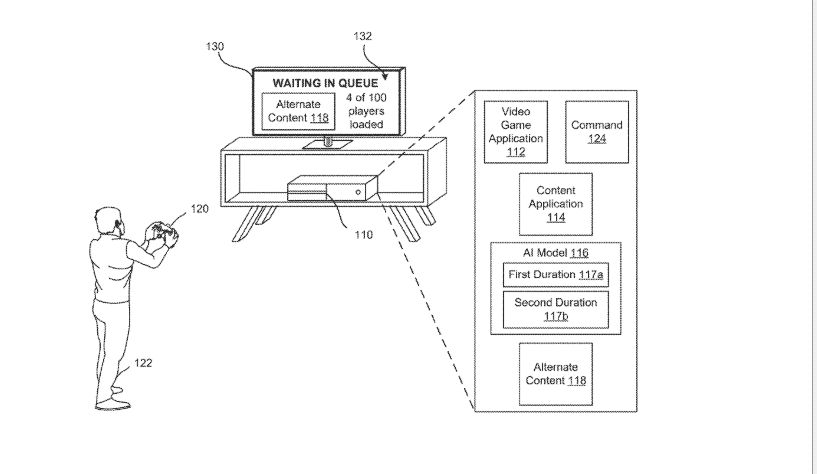
Sony patent hints at new PS feature that can display alternate content during matchmaking

Folks over at MP1st first discovered a new Sony patent that describes a system that would automatically fill loading times and multiplayer queues with short-form content using picture-in-picture overlays. Rather than sitting through static loading screens, players could reportedly see gameplay clips, tips, AI-generated match reports, social media-style videos, esports-style scouting summaries, or even personalized highlights while waiting for matches to start.

Image source: Sony | Via: MP1st

The interesting part here is the AI timing system behind it. According to the patent, the console would predict how long matchmaking or loading should take, then intelligently pick content that fits inside that window. For example, if the system estimates a 60-second wait, it may play a 45-second clip so gameplay can begin smoothly without awkward interruptions.

If the match loads faster than expected, the content can reportedly fade out early or instantly stop.

Sony may also use AI to scout players before matches

Some of the more interesting ideas inside the patent actually focus less on entertainment and more on competitive analysis. The system could reportedly analyze multiplayer lobbies before matches begin and generate instant summaries covering player rankings, preferred loadouts, win-loss history, weapon usage, or general playstyles.

Basically, imagine getting a mini esports desk breakdown before every online match. The patent also mentions controller interaction, locally cached clips, resizable overlays, linked apps, and AI-generated gameplay reels.

That being said, there is one obvious concern here: ads. Sony lists promotional content as one possible use case, which means these loading windows could easily become advertising space if this feature ever becomes real.

As of now, this is only a patent, so none of this is confirmed for an actual PlayStation release yet.

FBI Warns Kali365 Can Bypass Microsoft 365 MFA Using OAuth Tokens

The FBI is warning organizations about Kali365, a phishing-as-a-service platform that hijacks Microsoft 365 accounts by abusing OAuth device code authentication, as Bleeping Computer writes. The platform reportedly bypasses MFA protections by stealing authenticated session tokens instead of passwords.
According to the report, Kali365 first appeared in April 2026 and is actively promoted through Telegram cybercrime channels. The service lowers the barrier for cybercriminals by offering ready-made phishing infrastructure and automated attack tools.

Kali365 Uses Microsoft Device Login Flow Against Victims

The attacks rely on Microsoft’s legitimate device authorization process. Attackers initiate the device login flow, which generates a short authentication code from Microsoft’s servers.

Victims then receive phishing emails instructing them to enter the code at Microsoft’s official device login page. After the victim signs in and completes MFA, Microsoft issues an OAuth access token directly to the attacker.

Because the process uses Microsoft’s real authentication systems, attackers never need to steal passwords or one-time MFA codes.

OAuth Token Theft Lets Attackers Bypass MFA

Once attackers obtain the OAuth token, they can access the victim’s Microsoft 365 environment immediately. This may include Outlook mailboxes, OneDrive files, Teams data, and connected SaaS applications tied through single sign-on integrations.

Researchers say attackers also created malicious inbox rules to hide suspicious activity and, in some incidents, registered unauthorized devices inside compromised Microsoft environments.

The FBI warns that attackers can maintain persistent access even after victims change their passwords if token sessions remain active.

Kali365 Targets Low-Skilled Cybercriminals

Kali365 follows the growing phishing-as-a-service business model. Platform administrators handle development while affiliates launch phishing campaigns using prebuilt tools.

The service reportedly includes:

  • AI-generated phishing lures
  • Automated phishing templates
  • Victim management dashboards
  • Token-capture tools
  • Session hijacking features

Kali365 also supports an adversary-in-the-middle mode known as “Cookie Link.” This feature captures authenticated browser sessions, cookies, and login tokens after victims complete MFA verification.

FBI Recommends Blocking Device Code Authentication

The FBI advises organizations to restrict or fully block device code authentication where possible through Conditional Access policies.

Security teams should also:

  • Audit existing device code usage
  • Monitor suspicious device registrations
  • Block authentication transfer policies
  • Preserve phishing emails and login logs for investigations
  • Report incidents to the FBI Internet Crime Complaint Center

MFA Bypass Attacks Continue to Grow

This is not the first large-scale attack designed to bypass MFA protections. Threat groups previously used platforms like Tycoon2FA to steal authenticated sessions through adversary-in-the-middle phishing techniques.

Researchers also recently warned about malware such as CloudZ RAT, which abuses Microsoft Phone Link to intercept one-time passwords and authentication messages.

Google researchers additionally demonstrated AI-assisted phishing methods capable of helping attackers bypass traditional 2FA protections more efficiently.

PS6 Could Finally Fix One of PlayStation’s Biggest Problems That PS5 Apparently Still Can’t

Sony still hasn’t officially confirmed the existence of the PlayStation 6, but leaks and rumors around the next-gen console have been floating for a while. Most reports currently point toward a possible 2027 launch window, although discussions around hardware upgrades and next-gen capabilities are already heating up online.

Now, a fresh round of testing from Digital Foundry may have revealed one major thing the PS6 could finally solve: proper PlayStation 3 emulation (via Wccftech).

PS5 reportedly struggles badly with heavier PS3 games

Using Linux on PS5 and the popular RPCS3 emulator, Digital Foundry has tested multiple PlayStation 3 games directly on the PlayStation 5 to see how far Sony’s current hardware could realistically go with native PS3 emulation.

The results were honestly mixed. Some lighter PS3 titles like Ridge Racer 7, Resistance: Fall of Man, and Heavenly Sword reportedly ran surprisingly well with improved resolutions and smoother performance.

But things apparently fell apart once games started heavily relying on the PS3’s notoriously complicated Cell processor architecture.

Titles like Grand Theft Auto IV, Metal Gear Solid 4: Guns of the Patriots, Killzone 2, Killzone 3, and God of War: Ascension suffered from major performance problems tied directly to CPU bottlenecks.

However, increasing resolution barely impacted frame rates in many cases, which strongly suggests the GPU was not the issue here at all.

PS6’s rumored Zen 6 CPU could finally unlock full PS3 emulation

According to the testing, the main problem comes down to the PS5’s CPU simply lacking enough horsepower to properly emulate the PS3’s SPU-heavy workloads at full speed.

Some games reportedly improved immediately once certain SPU-driven effects were disabled, including advanced anti-aliasing and post-processing systems.

That is exactly why Digital Foundry believes the rumored Zen 6-based CPU expected inside the PlayStation 6 could finally provide enough performance headroom for proper native PS3 emulation. This isn’t the first test Digital Foundry did, and recently, they ran Cyberpunk 2077 with Path Tracing on PS5.

For years, PlayStation fans have been asking Sony to move beyond cloud streaming for classic PS3 games. And honestly, this testing may explain why Sony still has not fully delivered that yet.

If these findings are accurate, the PS6 could quietly become the first PlayStation console powerful enough to properly emulate nearly every previous PlayStation generation locally from day one.

A Petition By Fans Demanding Destiny 3 Now Has Over 177k Signatures

Last week, Bungie announced an update that made many Destiny fans said, and understandably so. Believe it or not, Destiny 2 is approaching its final major update, with some reports also pointing out towards layoffs. That also means Destiny 3 suddenly looks more uncertain than ever, and fans clearly are not taking that quietly and making their voice heard.

Destiny fans are rallying hard after Bungie’s recent direction

A petition asking Sony to greenlight Destiny 3 has now exploded past 177,000 signatures at the time of writing. Weirdly enough, that number has smashed the estimated peak player count for Marathon itself.

For many longtime Destiny fans, the situation feels like Bungie is walking away from one of gaming’s biggest live-service franchises while betting heavily on a new extraction shooter that still is struggling to connect with players.

Over on social media, especially Reddit, fans are now trying to organize a massive return-to-play event around June 9, which is when Destiny 2: Monument of Triumph launches. The goal appears to be flooding the servers, spike engagement numbers, and show Sony there is still massive demand for the franchise. However, the bigger issue still comes down to money.

Although The Final Shape expansion performed well critically and commercially, Bungie still ended up facing layoffs afterward. With the studio reportedly losing value internally, many fans fear Sony may not want to spend billions more on a full Destiny 3 production anytime soon. All that said, the community clearly is not ready to let the franchise fade away quietly.

Do you want Sony to greenlight Destiny 3? If yes, did you sign the petition, too? Let us know in the comments below.

XBOX Store Expands Handheld Support With 38 New Compatible Games

Microsoft continues expanding handheld support across the XBOX ecosystem. After confirming that more than 30 games are arriving on XBOX this week, the company has now added handheld support labels to 38 more titles on the XBOX Store, according to True Achivements.

The latest batch includes two new Handheld Optimized games and 36 Handheld Compatible titles. Major additions include Final Fantasy VII Rebirth, Mixtape, Riven, and Bubsy 4D.

XBOB keeps building handheld support

Microsoft has gradually expanded XBOX handheld support labels as rumors continue surrounding future XBOX portable hardware and third-party gaming handhelds.

The new labels help players understand how games may perform on handheld gaming devices connected to the XBOX ecosystem.

Handheld Optimized titles should work well immediately on supported handheld systems. Handheld Compatible games should still run, although players may need to adjust graphics settings or controls for the best experience.

New Handheld Optimized games

This update adds two games under the Handheld Optimized category:

  • Final Fantasy VII Rebirth
  • Nocturne for Cyl-Hestia

The addition of Final Fantasy VII Rebirth stands out as one of the biggest updates in this rollout, especially for players interested in portable RPG experiences.

New Handheld Compatible games

Akuma RiseAphelionArida: Backland’s Awakening
Bandits On West (Windows)Black JacketBubsy 4D
Call of the Elder GodsCozy Valley LifeCyberBlocker Complete Edition
Dentist BlingDungeonloopFroggy Hates Snow
Hidden Memory – Neko’s LifeinKONBINI: One Store. Many StoriesInvincible VS
Little ThingsMenace from the Deep: Complete EditionMixtape
MotorsliceMy Little Pony: Magic Princess (Windows)Nitro Gen Omega
Old Market SimulatorPawbayPixel into the Galaxy
RivenSaccharine EchoSledding Game
Slime JumperSlots & DaggersSudoku Champions
SummerhouseTerraTech LegionThe Tag-Along Obsession
Tri6: Infinite 2Wax HeadsWorld War II City Rebirth Tycoon

More XBOX Game Pass games gain handheld support

Several of the newly tagged games are also coming to XBOX Game Pass with handheld support enabled.

The latest additions include:

  • Aphelion
  • Black Jacket
  • Call of the Elder Gods
  • inKONBINI: One Store. Many Stories
  • Mixtape
  • Sledding Game
  • TerraTech Legion

This should make portable play more attractive for Game Pass subscribers using handheld PCs and future XBOX-focused portable devices.

Microsoft has recently increased its focus on handheld gaming experiences. XBOX also started making playtime statistics easier to read after community feedback requested total hours instead of day-based tracking.

At the same time, rumors continue surrounding new handheld hardware. ASUS is reportedly preparing to reveal a next-generation ROG Ally device during Computex 2026, although the company has not officially confirmed those plans yet.

Intel Reportedly Developing Nova Lake AI Chip With No Performance Cores

Intel may be developing a specialized Nova Lake processor focused on edge AI and local inference workloads, according to a new rumor. The leak suggests Intel is experimenting with an unusual CPU layout that drops traditional performance cores entirely in favor of efficiency cores and a large integrated Xe GPU.

The claim comes from hardware leaker GoldenPigUpgradePack and was highlighted by Guru3D. Intel has not officially confirmed the processor or its specifications.

Rumored Nova Lake design focuses on GPU acceleration

The leaked configuration reportedly uses an 8E+12Xe setup. That would give the processor eight efficiency cores paired with a large Xe graphics engine, while completely removing performance cores from the design.

This approach would make the chip very different from Intel’s usual hybrid processors, which combine performance and efficiency cores for desktop and laptop workloads.

The large Xe graphics block suggests Intel may prioritize GPU acceleration and parallel compute performance over raw single-threaded CPU power. The integrated graphics configuration could reportedly match the largest Xe setup planned for the broader Nova Lake family.

Built for edge AI instead of gaming PCs

The rumored processor does not appear designed for mainstream desktops or gaming systems. Instead, it may target edge computing and embedded AI deployments.

Possible workloads could include running small language models locally, industrial automation systems, robotics, surveillance processing, and machine-learning inference tasks that benefit from GPU acceleration.

For these scenarios, power efficiency and parallel processing can matter more than high clock speeds or strong single-threaded performance.

Why removing performance cores matters

Intel normally relies on performance cores to handle demanding foreground tasks and gaming workloads. Removing them entirely would signal a major shift toward specialized AI-focused hardware.

For edge AI systems, integrated GPU compute may provide more practical benefits than traditional CPU benchmarks. A GPU-heavy processor could also reduce the need for separate accelerators or discrete graphics hardware.

That may help lower system costs, reduce power consumption, and simplify compact deployments where thermal limits and physical size matter.

Intel already builds specialized industrial chips

Intel has previously released processors aimed at industrial and embedded markets instead of traditional consumer desktops. The rumored Nova Lake design would fit into that broader strategy.

Bartlett Lake has already shown Intel’s willingness to create niche products outside standard desktop lineups. This new AI-focused design could push even further into dedicated inference and edge workloads.

AI hardware priorities may be changing

If the rumor proves accurate, Intel may be signaling a wider industry shift toward processors designed around AI acceleration instead of classic desktop performance metrics.

As local AI workloads continue growing, future chips could increasingly prioritize GPU throughput, efficiency, and inference performance over gaming and single-threaded benchmarks.

In other news, Rocket League is reportedly moving to Unreal Engine 6, while ASUS may reveal a next-generation ROG Ally handheld during Computex 2026.

Valve Investigating Steam Controller Puck Short-Circuit Report

Valve’s new Steam Controller Puck reportedly caused a short circuit after a metallic smartwatch band touched its exposed charging contacts. The accessory ships with the new Steam Controller and acts as both a magnetic charging dock and a 2.4 GHz wireless receiver.

The incident surfaced after a Reddit user claimed they were charging a Pixel Watch 4 near the puck. According to the post, the metal watch band accidentally bridged the exposed contacts on the dock, causing the band to start “sizzling.”

User says the damage was limited

The user reportedly separated the devices before the situation escalated into a fire hazard. They said the damage appeared visual and affected both the puck and the watch band.

Despite the incident, the user reportedly said they did not blame Valve and considered it their own mistake.

The Steam Controller Puck uses exposed charging contacts on the magnetic dock surface. If conductive metal touches both contacts while the puck is powered, it can create a direct electrical bridge.

Valve already warns about metal contact risks

Valve includes a warning about magnets and metallic objects in the Steam Controller safety documentation. The manual states that the wireless adapter, charging puck, and controller contain magnets that may attract metal items.

The warning also notes that metallic objects can potentially cause sparks, injury, or property damage if they contact powered components.

However, the notice appears inside the product guide rather than directly on the accessory itself. In everyday desk setups, the puck may sit close to watches, keys, phones, MagSafe accessories, chargers, or other metallic objects.

Valve is reportedly investigating the incident

The Reddit user claimed Valve’s Steam Hardware team contacted them after the report surfaced online. They reportedly plan to send the damaged puck and watch band to Valve so the company can reproduce and investigate the issue further.

Valve will also reportedly send the user a replacement puck.

At the moment, there is no indication of a recall or wider hardware defect. The reported problem appears tied to metal bridging the exposed charging contacts while the puck is powered.

Recently, the Steam Controller also drew criticism over limited native support outside Steam, leading to projects like HID Remapper that allow the controller to function on additional platforms and devices.

In other news, Valve’s upcoming Steam Machine recently appeared in the Vulkan conformance database, hinting at ongoing hardware development efforts from the company.

Via VideoCardz

Google May Soon Nudge Chrome Users on Windows to “Bring Google Search to Edge”

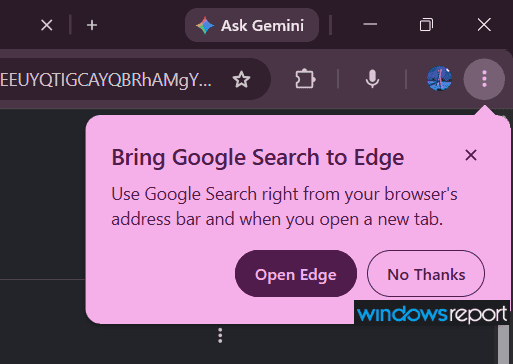
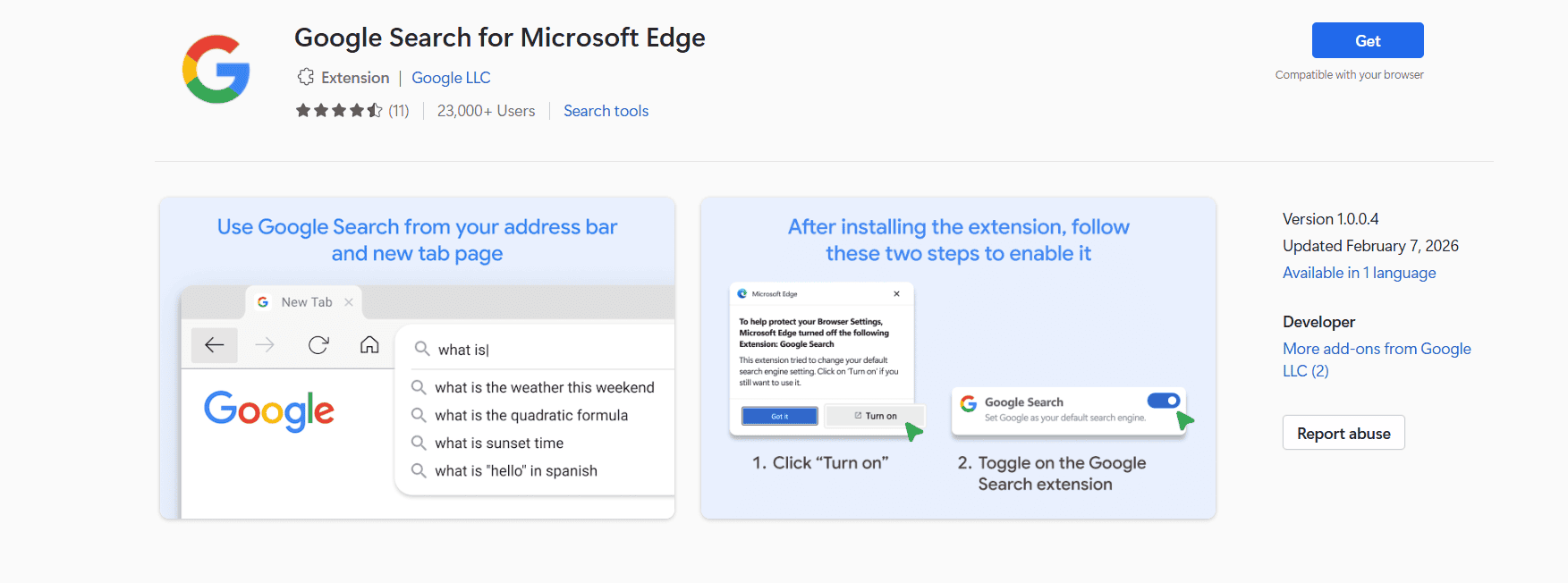
Google may soon prompt Chrome users to “Open Edge” through a “Bring Google Search to Edge” popup spotted in Chrome Canary. The prompt says users can use Google Search right from the browser’s address bar, and when they open a new tab.

Image credit: Google

Microsoft still contributes to Chromium, while Microsoft and Google continue competing through Edge and Chrome, and Bing and Google Search are still fighting for market share. Statcounter puts Google Search at 90.02% and Chrome at 68.02% worldwide, followed by Bing at 5.14% and Edge at 5.53%.

Those numbers show Google and Chrome are still way ahead. But the interesting part here is Google targeting Edge, which ships with Bing as the default search engine on Windows. In simple terms, Google seems to want Edge users to switch from Bing to Google.

Google Search Promotion in Edge

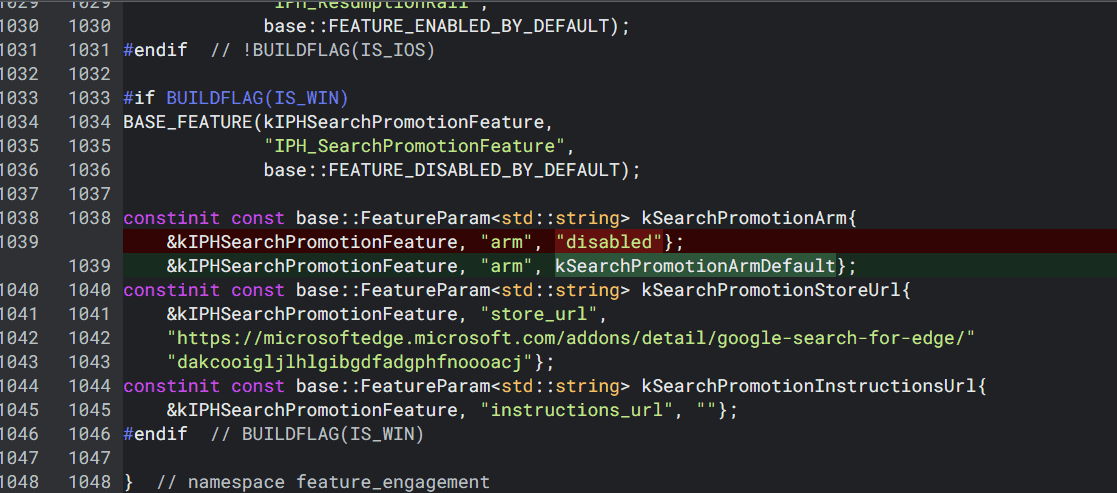
According to Chromium Gerrit, which we spotted, Google may also be testing two ways to do that. One flow could open Edge and show a search engine dialog to set Google as the default, while another could take users to the official Google Search extension page in the Microsoft Edge Add-ons store.

Google already offers a Google Search extension there, so users who do not want to change the default search engine manually may be able to install that instead.

Image Credit: Venkat.

On our device, clicking “Open Edge” does nothing, which suggests Google may still be working on it.

It is an unusual move, but not a new one. Google and Bing have both targeted Edge and Chrome users before; this looks like another attempt from Google to pull Edge users toward its Search.

What do you think of Google promoting its Search in Edge despite its dominant position in search and browsers? Let us know your thoughts in the comments below.

Nintendo Drops the 50-Hour Playtime Rule for Switch 2 Purchases in Japan

If you have been struggling to grab a Nintendo Switch 2 preorder in Japan, the good news is that things just got a little easier. Over on X, Nintendo today confirmed that it has updated the purchase requirements for the console on the My Nintendo Store, scrapping one major restriction.

Up until now, Switch 2 buyers needed at least 50 hours of Nintendo Switch gameplay linked to their Nintendo Account before even becoming eligible to purchase the system. Notably, demo games and free-to-play titles did not count toward that requirement either.

The ease in restriction comes after Switch 2 price hike announcement

As part of this change, starting May 25, Nintendo is officially removing that playtime restriction from both the “Nintendo Switch 2 Japanese/Domestic Version” and the “Nintendo Switch 2 Multilingual Version.” In simple words, users no longer need proof they actively played on Switch before trying to buy the new console.

That said, Nintendo is still keeping purchase quantity limits in place. Each Nintendo Account can only buy one Japanese version and one multilingual version of the system. Interestingly, Nintendo also clarified that previous lottery sales and invitation-based purchases still count toward those limits.

Nintendo still warns restrictions could change again

The timing here is interesting because demand for Switch 2 continues looking absolutely massive in Japan. Nintendo does not exactly say why it removed the playtime requirement, but it likely helps open sales to newer users who never heavily used the original Switch ecosystem. Not to mention, the company also wants players to easily purchase the Switch 2 even at its hiked price.

Nintendo has specifically warned that purchase conditions and buying limits may still change depending on future sales conditions. Users will still need to sign into a Nintendo Account before purchasing through the My Nintendo Store.

Overall, this feels like Nintendo slowly relaxing its anti-scalping measures as Switch 2 availability improves, although actually securing one still probably will not be easy anytime soon.

Riot Sparks Legal Debate After Vanguard Bricks Expensive DMA Cheat Cards

Riot Games has escalated its war against hardware-based cheating in Valorant. The company’s latest Vanguard anti-cheat update reportedly detects and blocks external DMA PCIe cheat cards, including the expensive Heino 2.0 hardware used by some cheat sellers and players.

Riot openly mocked affected cheat users, describing the Heino 2.0 as a “$6k paperweight” after the update rolled out. The company also shared an image of PCIe spoofing hardware as part of its public anti-cheat callout.

Riot Targets DMA Hardware Cheats

DMA, short for Direct Memory Access, cheating hardware works differently from traditional cheat software. Instead of running directly on the gaming PC, the PCIe hardware intercepts and reads system memory externally.

This approach allowed cheat developers to create advanced tools such as wallhacks, trigger bots, macros, and pixel-based aiming systems while avoiding many standard anti-cheat checks. Because the hardware operates outside normal software paths, DMA cheating became one of the most difficult forms of cheating to stop.

The Heino 2.0 DMA card reportedly costs around $5,900, making it one of the more expensive cheating solutions on the market.

How Vanguard Blocks the Hardware

According to Riot, Vanguard now uses IOMMU restrictions to interfere with DMA-based cheating methods. IOMMU technology controls how hardware devices interact with system memory.

The new restrictions reportedly stop cheat firmware from properly reading or writing memory, effectively preventing the DMA hardware from functioning as intended while Valorant is running.

Riot has spent months strengthening its anti-cheat protections against hardware-level exploits. Back in December 2025, the company worked with motherboard vendors including ASUS, MSI, and ASRock to close firmware loopholes that DMA devices could abuse before the operating system fully loaded.

Controversy Around the Update

The update has already sparked debate in gaming and anti-cheat communities. Some users claim the Vanguard changes can leave DMA firmware unusable even after Valorant or Vanguard closes.

Anti-cheat reporter ogisdaDMA claimed some affected users may even need to reinstall Windows after using the blocked hardware.

Critics argue that intentionally “bricking” hardware, even if it is designed for cheating, could raise legal and ethical questions. Others believe Riot remains within legal boundaries because the hardware should still function normally on systems without Vanguard protections enabled.

Software engineer Daax argued that legitimate PC hardware should continue working as expected and claimed the blocked DMA devices should operate again if installed in another unrestricted PC.

Riot Continues Expanding Vanguard

Riot has steadily expanded Vanguard’s hardware-level protections as cheat developers move beyond traditional software exploits. Hardware DMA cheating has become increasingly popular in competitive shooters because it is harder to detect and often marketed as “undetectable.”

The latest Valorant update shows Riot is willing to aggressively target even expensive external hardware solutions in its ongoing anti-cheat push.

In other gaming news, Rocket League is preparing for its move to Unreal Engine 6, XBOX is getting more than 30 new games this week, and Microsoft recently updated XBOX playtime tracking to show total hours instead of days.

Via Notebook Check

007 First Light’s Opening Mission Footage Officially Released After Leaks Surface Online

If you are waiting for 007 First Light, chances are that you already saw clips floating around online this weekend. For those unaware, 007 First Light officially launches on May 27 for PC, PS5, and Xbox Series X/S. However, some players reportedly managed to get physical copies of the game early, which quickly led to gameplay footage leaking across social media and YouTube. At the time of writing this, the leaked video has been taken down after a copyright claim by IO Interactive A/S.

IO Interactive uploads official opening mission after leaks spread online

Rather than pretending it never happened, IO Interactive decided to flip the situation completely. The studio has now officially uploaded the opening 13 minutes of the game itself, basically telling fans that if spoilers are already out there, you might as well watch the official version.

The newly official footage shows Bond surviving a helicopter crash before sinking deep into the ocean. From there, the sequence shifts into underwater escape sections followed by stealth-heavy gameplay that honestly gives strong Metal Gear Solid vibes.

Players sneak through enemy patrols, crawl across hostile areas, and slowly work through what appears to be the game’s opening infiltration mission. IO Interactive also warned fans to stay away if they want to experience everything fresh on launch day. That being said, the studio clearly wanted to regain control of the conversation after leaked clips started spreading online.

In addition to leaks, 007 First Light has already sparked discussion because of its version of James Bond. Unlike the older and more polished Bond many fans are used to, this game focuses on a younger version of the character played by Irish actor Patrick Gibson. The story reportedly follows his rise from military recruit to full 007 agent.

Steam Controller Gets Full HID Remapper Support for Switch 2 and Android

Valve’s controller originally sold out shortly after launch, forcing the company to introduce reservation queues during restocks. Even with strong demand and a loyal fanbase, the controller faced criticism because compatibility outside Steam is limited. Many users had to depend on third-party workarounds to make the hardware function properly on unsupported devices.

HID Remapper Now Supports Steam Controller Features

Developer Jacek Fedoryński confirmed that HID Remapper now works with the Steam Controller and supports all controller inputs.

The latest update added support for both standard and advanced controls, including trackpads, touch sensors, grip sensors, gyro functionality, accelerometer data, and additional rear buttons. The update also supports orientation quaternion values, giving users access to nearly the entire feature set of Valve’s controller.

HID Remapper Uses Hardware Instead of Software

Unlike regular remapping applications, HID Remapper works as a configurable USB hardware dongle placed between the controller and the target device.

Because the remapping happens directly through hardware, users do not need to run additional software on a PC or console. This approach can improve compatibility across platforms that normally do not fully support the Steam Controller.

Steam Controller Could Work on Switch 2 and PS5

Fedoryński said the setup can already work with Android devices and the Nintendo Switch 2.

The controller may also function on the PlayStation 5 through adapters such as Brook FGC2, although direct console compatibility may still depend on future adapter support.

This gives Steam Controller owners another option for using Valve’s hardware outside the Steam ecosystem. The update could make the controller far more useful on consoles, handhelds, and mobile devices where support has traditionally been limited.

In other news, Valve’s rumored Steam Machine recently appeared in the Vulkan conformance database, hinting at possible future hardware plans.

Via VideoCardz

Microsoft & EY Go All-In on Enterprise AI With Over $1 Billion Joint Investment

Microsoft & EY have officially announced a new initiative, under which both companies will jointly invest more than $1 billion over the next five years, with the goal of helping businesses rapidly deploy AI across core operations. Interestingly, this is not just another AI partnership announcement with vague promises. Both companies are promising a full-scale effort focused on real deployment, real automation, and actual business workflows.

Microsoft & EY to jointly invest $1 billion for agentic AI push into businesses

As part of the new initiative, Microsoft’s Forward Deployed Engineers will now work directly alongside EY consultants and industry specialists. Together, the companies say they will help organizations scale AI inside finance, HR, tax, risk management, supply chain operations, healthcare, retail, government, and energy sectors.

One of the highlights of this partnership is what both companies call as “agentic AI transformation.” In simple words, businesses are being pushed next level, towards AI systems capable of handling multi-step tasks, workflows, and operational processes with far less human involvement.

EY also revealed it has already been acting as what it calls “Client Zero” for Microsoft’s AI rollout. According to the company, it initially deployed Copilot to 150,000 employees and reportedly saw a 15% productivity increase. EY is now expanding Microsoft 365 E7: The Frontier Suite across more than 400,000 workers globally.

EY has been internally using Microsoft’s AI tools for a while now

In addition to Copilot, EY says it already uses Microsoft AI tools across finance operations, tax systems, audit workflows, and document processing. One example mentioned in the announcement claims Microsoft Power Platform and Copilot Studio helped reduce lead times by 95% while cutting operational costs by more than 37%. Meanwhile, Microsoft Azure AI Document Intelligence reportedly reduced manual tax-related document workloads by up to 90%.

Speaking of Microsoft, partnerships like this are becoming a huge part of its broader AI strategy, especially as Copilot, Azure AI, and enterprise AI tools continue to integrate deeper into corporate infrastructure globally.

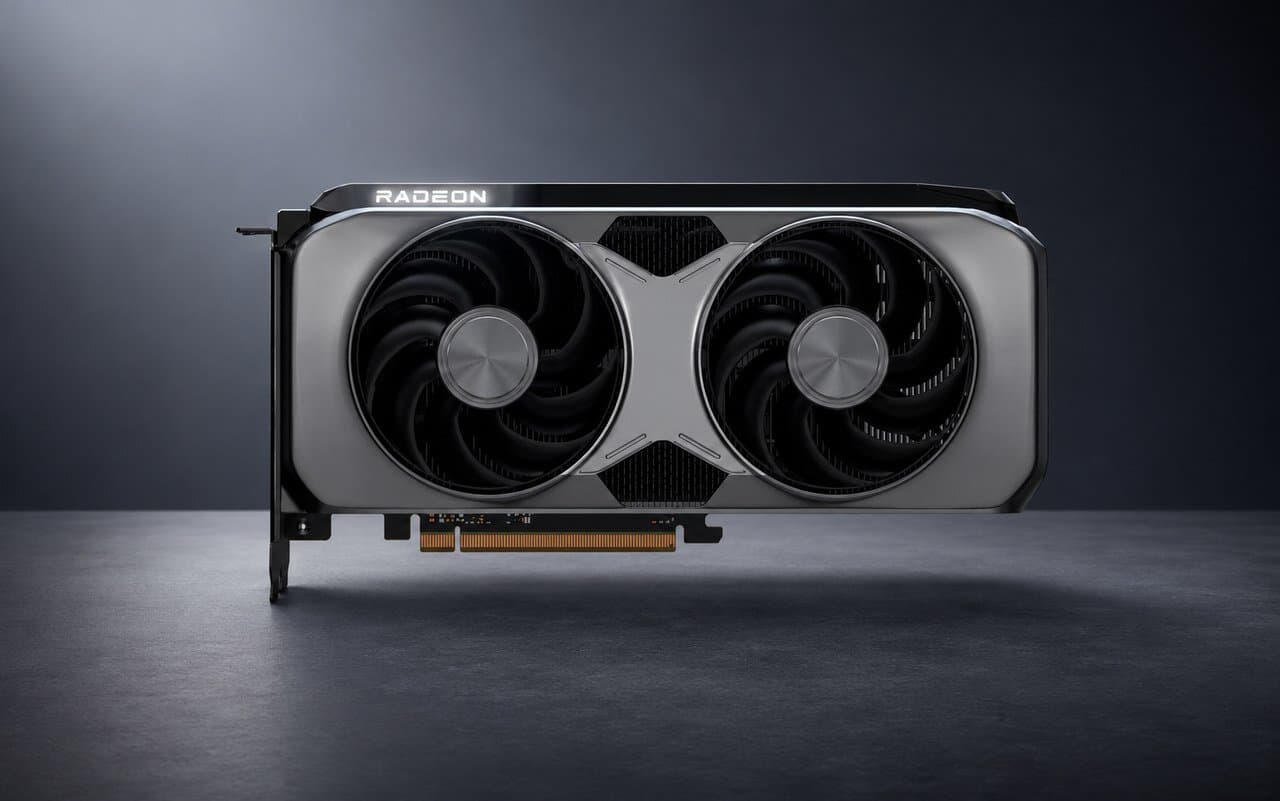
AMD Radeon RX 9070 GRE May Finally Launch Globally

AMD’s Radeon RX 9070 GRE could soon expand beyond China and nearby markets. A newly surfaced Sapphire retail box suggests the graphics card may be preparing for a wider international launch, even though AMD has not officially confirmed global availability yet.

According to reports from VideoCardz, Sapphire packaging for the RX 9070 GRE appeared with full English branding instead of the Chinese-only naming used on regional product pages. The box features the Sapphire PULSE branding alongside AMD Radeon RX 9070 GRE labeling, which points toward possible global retail plans.

Sapphire packaging hints at a wider launch

The retail packaging reportedly differs from Sapphire’s China-focused RX 9070 GRE branding. Previous GRE launches mainly targeted the Chinese market, but the use of international branding suggests Sapphire may already be preparing inventory for other regions.

AMD has used a similar strategy before. Earlier GRE graphics cards launched in China first before later appearing in wider global markets.

RX 9070 GRE already spotted on U.S. storefronts

The graphics card has already shown up on several U.S. retail platforms. Listings on Newegg mention Sapphire PULSE and PURE RX 9070 GRE variants.

However, the listings currently appear tied to a China-based third-party marketplace seller rather than official U.S. distribution channels. That means the card is not necessarily part of AMD’s official North American rollout yet.

Another appearance came through a Walmart marketplace listing for a MOGPC gaming desktop. The system description mentioned a Radeon RX 9070 GRE 12GB GPU, although the listing also included unrelated typos, raising the possibility that it was placeholder or early database information.

Radeon RX 9070 GRE specifications

The RX 9070 GRE uses AMD’s Navi 48 GPU architecture and ships with 12GB of GDDR6 memory.

Here are the currently known specifications:

SpecificationDetails
GPUNavi 48
Stream processors3072
Memory12GB GDDR6
Memory bus192-bit
Memory speed18Gbps
Board power220W

Sapphire PULSE model details

Sapphire’s China-listed PULSE RX 9070 GRE carries the product code 11354-05-78.

The card reportedly features:

  • Up to 2790 MHz boost clock
  • 2220 MHz game clock
  • 18Gbps memory speed
  • 220W board power rating

The specifications position the RX 9070 GRE between AMD’s mainstream and higher-end Radeon offerings, potentially giving buyers another mid-to-upper-range RDNA option if the card launches globally.

In other AMD news, the company recently introduced new Ryzen PRO X3D processors, including the Ryzen 9 PRO 9965X3D and Ryzen 7 PRO 9755X3D. Those launches followed reports surrounding the Ryzen 9 9950X3D2.

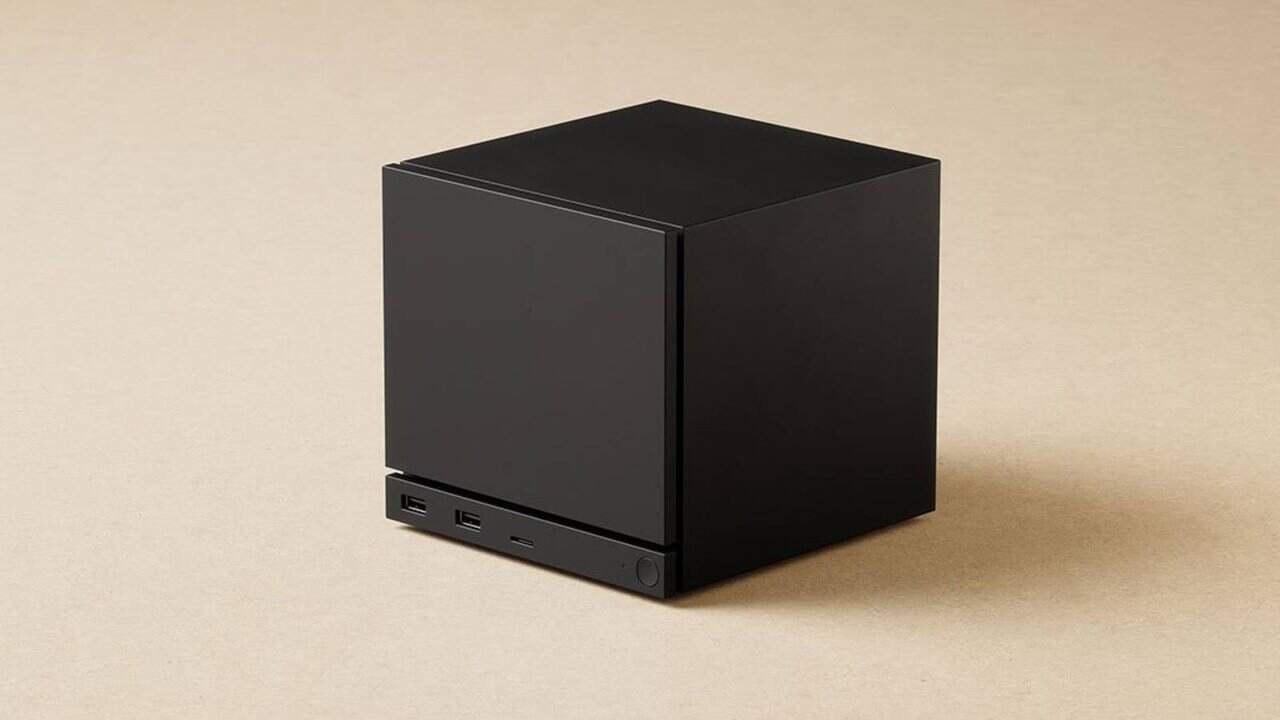
Valve Steam Machine Listed in Official Vulkan Conformance Database

Valve’s upcoming Steam Machine has appeared in the official Khronos Vulkan conformant products database, adding more evidence that the hardware may be getting closer to launch.

The entry lists the device as “AMD Steam Machine” and confirms support for Vulkan 1.4 through the open-source Mesa/RADV driver stack. The listing was added on May 23, 2026, and appears under the Software Freedom Conservancy organization.

The database entry also references Vulkan CTS version 1.4.5.3, which is the official conformance test suite required for Vulkan certification.

Valve’s Linux Gaming Stack Appears Again

One of the more interesting details comes from the operating system field. The tested configuration uses: “Linux 6.16.12-valve6-1-neptune-616-g37101e112292 x86_64”

That confirms the device runs Valve’s Neptune Linux branch, which already powers the Steam Deck software environment.

The GPU family is listed as RADV_NAVI33, pointing to AMD’s Navi 33 graphics architecture. Meanwhile, the processor appears as “AMD Custom CPU 1772,” suggesting Valve is once again using a semi-custom AMD platform for its gaming hardware.

Why Vulkan Conformance Matters

Khronos maintains the official Vulkan conformant products database, and passing the Vulkan CTS is mandatory before companies can officially market Vulkan support.

In practical terms, this means the Steam Machine’s Mesa/RADV implementation successfully passed the required Vulkan compatibility tests.

While Vulkan conformance listings do not confirm a launch date, they often appear relatively late in hardware preparation cycles. That has naturally fueled speculation that Valve may already be approaching final testing stages.

Software Freedom Conservancy Listing Explained

The appearance of Software Freedom Conservancy in the database does not mean it created the hardware itself.

Mesa driver developers and open-source contributors can submit Vulkan conformance results tied to specific hardware and Linux configurations. In this case, the listing likely reflects testing performed through Valve’s Linux and Mesa ecosystem.

In related Valve news, Steam Controller is confirmed to use a reservation system when restocked, similar to the early Steam Deck rollout.

Reports also suggest the Steam Machine may follow the same approach due to expected demand and limited early availability.

The new Steam Controller is reportedly still facing compatibility issues with games launched outside Steam, which Valve will likely address in the future.

Via VideoCardz

Rocket League Unexpectedly Reveals Unreal Engine 6 During RLCS Major

Rocket League is getting one of its biggest technical upgrades yet. During the Rocket League Championship Series Paris Major, Psyonix confirmed that the game is moving to Unreal Engine 6 instead of Unreal Engine 5.

The announcement also served as the first public reveal of Unreal Engine 6 itself, which Epic Games had not officially announced before the event.

Rocket League Is Finally Leaving Unreal Engine 3

Rocket League first launched in 2015 and has continued running on Unreal Engine 3 for more than a decade. Fans have speculated about a major engine migration for years, especially after Epic Games acquired Psyonix in 2019.

Many expected Rocket League to eventually move to Unreal Engine 5. Instead, Psyonix confirmed it is skipping directly to Unreal Engine 6.

Teaser Showed Major Visual Improvements

The short teaser featured a far more realistic Rocket League arena with upgraded lighting and surface detail. Car and ball models also appeared more detailed than the current version of the game.

The iconic Octane appeared with upgraded boost effects, while the final shot hinted at a redesigned customization system for vehicles.

The visual leap looked significantly larger than previous seasonal updates or graphical refreshes.

Unreal Engine 6 Was Quietly Revealed

The event marked the first official appearance of Unreal Engine 6. Epic Games did not provide technical details or discuss new engine features during the reveal.

No release date was announced for Unreal Engine 6, and Psyonix also avoided confirming when Rocket League’s upgraded version will launch.

Fortnite Could Receive UE6 First

Epic previously used Fortnite as an early testing ground for Unreal Engine 5 technology before rolling it out more broadly to developers.

A similar strategy could happen again with Unreal Engine 6. Rocket League and Fortnite may receive early support before the engine becomes widely available across the gaming industry.

What Happens Next

Psyonix still has not confirmed whether the upgrade will replace the current Rocket League client or launch as a separate version. Cross-platform support, esports compatibility, and performance requirements also remain unknown.

The teaser suggests Epic wants Rocket League to become one of the flagship showcases for Unreal Engine 6 technology moving forward.

In other gaming news, Xbox is getting more than 30 new games this week, while Microsoft is also making Xbox playtime statistics easier to read for players.

Via Insider Gaming

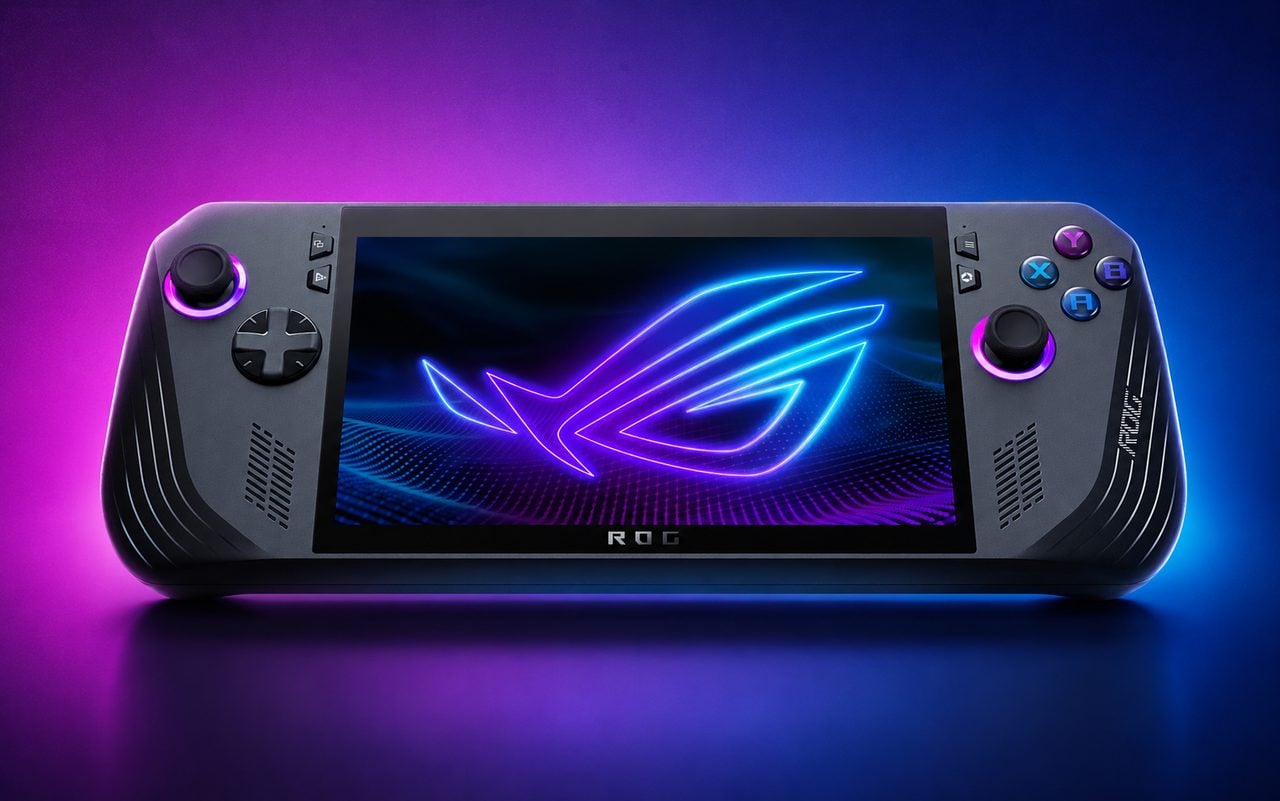
ASUS Rumored to Announce Next-Gen ROG Ally at Computex 2026

A new rumor suggests ASUS could unveil a next-generation gaming handheld during Computex 2026, as VideoCardz writes. The claim comes from German handheld-focused YouTuber Steam Dad, who recently hinted that viewers should keep an eye on the event for possible ASUS hardware news.

The report is still unofficial, and ASUS has not confirmed any new handheld products yet. Even so, the timing has attracted attention because Computex 2026 takes place in Taipei from June 2 to June 5, matching the timeframe Steam Dad referenced in his comments.

Rumors point to a possible Computex reveal

Steam Dad said he could not share details yet, but strongly hinted that ASUS may present a new handheld during the show. He also suggested more information could likely be discussed in around two weeks, which lines up closely with Computex.

His wording led many viewers to speculate that he may know early information under embargo. However, he did not confirm any technical details or product names.

At this stage, there is still no information about the chipset, display size, battery, pricing, or release window. It also remains unclear whether ASUS is preparing a completely new ROG Ally, an XBOX-branded version, or a smaller refresh of the current hardware.

Intel’s handheld plans add more questions

Part of the speculation comes from Intel’s expected handheld announcements at Computex. The company is reportedly preparing to showcase Arc G3 handheld chips after recently acknowledging the platform publicly.

However, ASUS was not listed among the official launch partners connected to those chips. That has created uncertainty around what hardware ASUS may actually use if a new handheld appears at the event.

Some observers believe the device could end up being more of a mid-generation refresh instead of a full successor.

ASUS continues updating the ROG Ally ecosystem

Even without new hardware announcements, ASUS has continued improving its handheld ecosystem. More games recently joined the default profile list for the ROG XBOX Ally experience, while a newer update also introduced docking improvements and additional fixes.

Those continued updates make the Computex rumor feel more believable as competition in the handheld gaming market keeps growing.

For now, though, ASUS has not officially announced anything. Computex 2026 should clarify whether the company is preparing a major handheld upgrade or a smaller refresh.

Microsoft Tests New Copilot Docking Mode in Windows 11

Microsoft is testing a new docking experience for Copilot in Windows 11, as Windows Latest writes. The feature changes how Copilot behaves on the desktop by letting users pin it to either side of the screen instead of keeping it as a floating app window.

When docked, Copilot no longer floats above other apps. Windows 11 automatically resizes and shifts open windows to make room for the assistant. The feature was recently spotted in testing builds and appears to be part of Microsoft’s effort to make Copilot feel more integrated into the operating system again.

Copilot can now dock beside apps

Copilot still opens as a regular app by default, but Microsoft has added a new drop-down menu inside the title bar. Hovering over the menu reveals several layout options for the assistant.

Users can continue using Copilot as a standard window or switch to picture-in-picture mode. Microsoft is also testing the ability to dock Copilot to the left or right side of the screen.

Once docked, Copilot stays pinned to the desktop while Windows automatically adjusts the remaining workspace. Apps like File Explorer resize and shift instead of being covered by the assistant window.

Microsoft revisits the old sidebar concept

The feature feels similar to the original Windows 11 Copilot sidebar Microsoft introduced before moving Copilot into a standalone app.

That earlier version allowed Copilot to sit alongside apps instead of behaving like a separate floating window. Microsoft later removed the sidebar and replaced it with the current standalone experience.

The new implementation gives users more flexibility than before. Users can dock Copilot, keep it as a normal app window, or switch to a smaller always-on-top layout depending on how they work.

Copilot changes continue across Windows

The docking feature arrives during a busy period for Copilot changes across Microsoft products.

Microsoft is reportedly preparing to let users remap the dedicated Copilot keyboard key. The company is also rolling back the floating Copilot button in Office apps after some users criticized the feature.

At the same time, a former Microsoft executive recently claimed Copilot adoption remains lower than expected despite Microsoft heavily promoting AI features across Windows and Microsoft 365.

The new docking mode could make Copilot more practical for multitasking because it becomes part of the desktop layout instead of sitting above applications.

It also suggests Microsoft may once again push toward deeper Windows integration for Copilot after previously separating the assistant into its own app.

XBOX Makes Playtime Stats Easier to Read After Fan Feedback

Microsoft has already implemented one of the most requested changes from the new XBOX Player Voice feedback program. One of the biggest requests from players focused on bringing back more exclusives, while another popular request asked XBOX to change playtime tracking from days to total hours.

That second request has now become a reality less than a week after the XBOX Player Voice program launched, according to Pure Xbox.

XBOX playtime will now show total hours

XBOX is changing how playtime statistics appear across profiles and games. Instead of showing total time played in days, the platform will now display total hours.

The update should make stats easier to understand at a glance. It also gives players a more accurate way to compare time spent across different games.

The feature is currently rolling out to select XBOX Insider Alpha users on console first. Microsoft also plans to expand availability to more XBOX Insiders over time.

PC support is already in development and should arrive soon.

XBOX Player Voice is already influencing features

This marks the first shipped feature tied directly to the XBOX Player Voice initiative. The speed of the rollout stands out because Microsoft introduced the feature request system only days ago.

The fast implementation suggests XBOX is paying close attention to highly upvoted community feedback. It could also motivate more players to participate in the program by submitting ideas and voting on requests.

While the playtime change itself is relatively small, it addresses a long-running community complaint that many players felt should have been updated years ago.

Wider rollout expected later

Microsoft has not confirmed an exact release date for all XBOX users yet, but a broader public rollout is expected after Insider testing finishes.

If testing goes smoothly, the feature should eventually appear across both Xbox consoles and PC.

In other news, XBOX is also preparing to add more than 30 new titles to the platform next week.

XBOX Adds 30+ Games From May 25-29 With 007 First Light Leading the Lineup

XBOX players are getting a massive batch of new games between May 25 and May 29, as Pure Xbox writes. The lineup includes major releases, indie titles, family-friendly games, horror experiences, racing games, and several XBOX Game Pass additions.

The biggest launch of the week is 007 First Light, while other major releases include Mina The Hollower, Poppy Playtime: Chapter 5, and Story of Seasons: Grand Bazaar.

The release schedule also comes at a busy time for Microsoft’s gaming division. Xbox continues preparing a broader platform transformation, while rumors suggest the company may revive several dormant franchises in the future.

Every new XBOX game releasing from May 25 to May 29 

XBOX Game Pass additions

  • Escape Simulator — May 26
  • Echo Generation 2 — May 27
  • The Outer Worlds: Spacer’s Choice Edition — May 27
  • Crashout Crew — May 28
  • Kabuto Park — May 28

Microsoft also confirmed that five games will leave XBOX Game Pass at the end of May.

May 25 releases

  • Cottonville

May 26 releases

  • Escape Simulator
  • Realm of Ink
  • Yerba Buena

May 27 releases

  • 007 First Light
  • Echo Generation 2
  • Nitro City Racing
  • Nocturne for Cyl-Hestia
  • Poppy Playtime: Chapter 5
May 28 releases

  • Crashout Crew
  • Kabuto Park
  • Story of Seasons: Grand Bazaar
  • Bluey’s Quest for the Gold Pen
  • Nickelodeon Extreme Tennis: Next!
  • Beat the Champions
  • Blueberry
  • Cat Lines
  • Do You Even Forklift?
  • Jelly Math
  • Mel The Pyramid Cat
  • Necrophosis: Full Consciousness
  • One Move Away
  • Save My Scrap

May 29 releases

  • Mina The Hollower
  • Mashina
  • A Frog’s Job 2: Froggina
  • Into the Slimy Mines
  • Cat Girl Survivor
  • Immunuzzle
  • Kiko’s Apple Adventure
  • Midnight Swamp
  • NERD
  • Portrait of a Torn

The upcoming release wave shows how aggressive XBOX remains with weekly content drops across both premium releases and Game Pass. At the same time, subscribers should keep an eye on the service’s rotating catalog, as five games are also scheduled to leave XBOX Game Pass at the end of May.

Microsoft Changes Modern Standby Audio Behavior in Windows 11

Microsoft recently introduced more changes tied to Modern Standby, and one of them affects how audio works during sleep mode on Windows 11.

Users running Windows 11 24H2 and 25H2 noticed that music and other audio no longer continue playing after manually putting a laptop into sleep mode. If you close the lid, press the power button, or choose Sleep from the Start menu, Windows now stops audio playback completely.

Microsoft says this behavior is intentional and tied to Modern Standby functionality.

Windows 11 Changes Audio Behavior During Manual Sleep

Older Windows laptops could often continue playing music even after the lid closed. Many users used this feature for streaming audio to Bluetooth speakers or listening to music while the laptop remained closed.

That behavior no longer works in newer Windows 11 builds.

Once the system enters standby through a manual action, audio playback stops immediately. Playback resumes automatically after the PC wakes up again.

The change affects both internal laptop speakers and Bluetooth audio devices.

Microsoft Says This Is Expected Behavior

Microsoft updated its documentation to clarify that audio playback is not supported when standby starts manually.

According to the company, the restriction applies when users intentionally trigger sleep by closing the lid, pressing the power button, or selecting Sleep from the Start menu. The limitation also applies on both battery power and AC power.

Audio Can Still Work During Automatic Screen-Off

The restriction only affects explicit standby actions.

If Windows automatically turns the screen off after inactivity, audio playback can still continue in the background. In that situation, the device remains active enough to keep music or other audio streams running.

The difference comes from how Windows enters standby. Automatic idle screen-off still allows playback, while manual sleep mode now disables it.

Microsoft May Be Focusing on Battery Life and Reliability

The change appears connected to Microsoft’s broader Modern Standby improvements in Windows 11.

Modern Standby has received criticism over battery drain, overheating, and laptops unexpectedly waking while inside bags or sleeves. By limiting background activity during manual standby, Microsoft may be trying to improve battery life and overall reliability.

Microsoft recently released additional Experimental and Beta builds for Windows Insiders as it continues testing more Windows 11 changes.

Possible Workaround Still Exists

Users who still want music playback after closing the lid can change the laptop lid behavior in Windows power settings.

Setting the laptop to “Do nothing” when the lid closes allows music playback to continue normally, although it may increase battery usage while the device stays active.

In other news, the company has also released new Experimental and Beta builds to Windows Insiders, bringing additional platform changes and early testing features for upcoming Windows updates.

Via Windows Latest

Microsoft Teams Is Getting a Major Meetings Redesign With a Cleaner Interface

Microsoft is preparing a major redesign for meetings in Microsoft Teams, with a cleaner toolbar, a revamped sharing experience, and more customization options. The company says Teams meetings have become too crowded as more collaboration and AI features were added over time, according to the Admin Center message MC1317197.

The update focuses on reducing clutter and making key controls easier to access during calls. Microsoft also wants to cut down on accidental actions, especially users mistakenly leaving meetings while trying to click nearby buttons.

One of the biggest changes is the meeting toolbar itself. Controls will now sit in the center of the screen, while the Leave button moves to the far right side. Microsoft says this layout should help prevent accidental meeting exits.

The microphone, camera, and sharing buttons will also stay grouped together for faster access. Meanwhile, secondary features like recording, captions, polls, and reactions will move under a consolidated More menu.

Teams users will be able to customize the meeting toolbar

Microsoft is also adding toolbar customization options to Teams meetings. Users will be able to drag, drop, and pin controls based on personal preference.

Existing app pinning policies will continue to work, although Microsoft plans to limit the number of pinned apps to two. Additional pinned apps will automatically move into the More menu to avoid overcrowding the toolbar again.

The company says customization settings will initially stay device-specific. Cross-device syncing is planned for a later release.

The share panel is getting a major overhaul

Microsoft is redesigning the share experience with a new two-column layout. Live previews of screens and application windows will appear on the right side, helping users confirm exactly what they are about to share.

The left side of the panel will organize sharing options into separate tabs for screens and apps, interactive files, and additional options.

The company is also introducing a two-step confirmation process before screen sharing starts. Microsoft says this should reduce accidental sharing of sensitive windows or the wrong monitor during meetings.

Rollout starts in July

Microsoft plans to begin rolling out the redesigned Teams meeting experience to Targeted Release users between early and late July 2026.

Worldwide general availability should follow between early and late August 2026. GCC, GCC High, and DoD customers will receive the update later in the year.

Users who try the redesign during preview testing will temporarily have the option to switch back to the old interface. Once the rollout finishes, however, the new experience will become the default, and admins will not be able to disable it organization-wide.

The redesign is coming to Teams on Windows, Mac, and the web. Linux, mobile, and consumer Teams users are not included for now.

The redesign arrives during a busy period for Teams. Recently, some macOS users reported unexpected location permission prompts from the app, while security researchers warned about attackers abusing Teams chats to spread ModeloRAT malware through social engineering campaigns. Microsoft is also working on new brand impersonation protections for Teams as phishing attacks continue to increase.

Via Neowin

Windows 11 Experimental (Canary) Build 29595 Rolls Out With Platform Changes

Microsoft has released Windows Insider build 29595.1000 for the Canary channel, but the larger story is the ongoing transition toward the new Experimental (Future Platforms) branding.

The release comes shortly after the rollout of Build 28020.2149 under the Experimental label, signaling Microsoft’s broader effort to reorganize its earliest Windows development channels.

Build 29595.1000 focuses on backend platform work

Unlike some recent Insider releases, build 29595.1000 does not introduce major new features for users. Microsoft says the update mainly contains platform-level changes tied to a newer active development branch.

The company also reminded testers that these builds can be unstable and may ship with limited documentation. Microsoft stressed that Experimental builds are not connected to any specific future Windows release, meaning some tested features may never become public.

Microsoft also noted that some features inside these builds could change significantly, disappear entirely, or return later in a different form depending on testing feedback.

Controlled rollout remains part of the Insider strategy

Microsoft continues using Controlled Feature Rollout for many new features inside Insider builds. This allows the company to release changes gradually to smaller groups of testers before expanding availability more broadly.

Users who want access to features sooner can enable the latest updates toggle inside Windows Update settings. Those who leave the toggle disabled will still receive new features later once Microsoft considers them ready for broader testing.

The company also warned that some features may launch without complete localization support at first. Microsoft says language support improves over time as features move closer to release readiness.

While build 29595.1000 mainly focuses on backend platform work, Microsoft recently released other Insider updates with more noticeable additions.

Dev build 26300.8497 introduces features such as screen tilt improvements and expanded braille support, while Beta build 26220.8491 targets users looking for a more stable preview experience.

New Windows 11 Experimental (Canary) Build Improves File Explorer Reliability & More

Microsoft is rolling out another small but a useful Windows 11 Insider update in the Experimental (26H1) channel. Worth noting that all the changes and improvements rolling out with Experimental (26H1) Preview Build 28020.2149 also applies to Canary 28000 series Channel Insiders, too.

Windows 11 now handles Dev Drive sizing in GB

One of the most useful improvements lands inside Windows 11’s Dev Drive setup experience. Microsoft has finally updated the volume creation dialog to support storage size input in gigabytes instead of only megabytes. In simple words, users no longer need to type absurdly large MB numbers when creating or resizing Dev Drives under Settings > System > Storage. The same improvement also applies when adjusting volume sizes later inside Windows Settings.

Microsoft is also improving overall explorer.exe reliability in this build. According to the changelog, the company fixed stability issues linked to closing the input switcher and switching between multiple desktops. For some users, these bugs previously caused explorer.exe crashes or unstable desktop behavior.

Microsoft is also improving one of Windows’ oldest and most recognizable fonts. The company says the Times New Roman font family now delivers improved rendering for combining diacritical marks across Greek and Cyrillic scripts. The update reportedly improves positioning accuracy, reduces rendering inconsistencies, and makes text easier to read for users working in those languages.

Microsoft has also warned Insiders about one lingering issue linked to “Reset this PC.” The company says resets may still get stuck unless users choose the cloud download option instead of local reinstall. In addition, Microsoft has also released Beta channel Build 26220.8491 and Experimental (Dev) channel Build 26300.8497.

Windows 11 Gets Screen Tint Setting & More With New Experimental (Dev) Build

In addition to Beta Build 26220.8491, Microsoft has also released the Build 26300.8497 for Windows 11 Insiders in the new Experimental channel. To remind you, all the changes and improvement in this build applies to Dev channel insiders too.

Windows 11 gets new screen tint, braille, and voice features

One of the standout additions here is a brand-new accessibility feature called Screen Tint. Unlike Night Light, which mainly reduces blue light, Screen Tint adds a customizable color overlay across the display to reduce eye strain and soften bright visuals during long sessions.

Image: Microsoft

Users can pick preset colors, create custom tints, and adjust intensity levels directly from Accessibility settings. Microsoft is also improving Narrator support for refreshable braille displays. Windows 11 now supports HID-standard braille displays with simple plug-and-play functionality over USB or Bluetooth, removing the need for complicated setup processes. More importantly, these displays now work during the initial Windows setup process itself.

Voice Access is also getting a surprisingly useful upgrade called Voice Isolation. The feature helps Windows focus specifically on your voice even when multiple people are speaking nearby or background noise is present. Everything happens locally on device without sending voice data anywhere else.

Microsoft has additionally tweaked Magnifier behavior inside this preview build. Touch panning bars are now disabled by default, giving touchscreen users a cleaner and less distracting magnified view. Users can still manually turn the bars back on later through Accessibility settings if needed.

Image: Microsoft

The company is also expanding its newer Windows Ready Print platform. Windows 11 now includes a dedicated toggle allowing users to decide whether compatible printers should automatically install using IPP by default. Microsoft says the goal is to simplify setup while improving printing reliability across devices.

Image: Microsoft

Microsoft also fixes several annoying Windows 11 bugs

Not to forget, the Build 26220.8491 patches multiple issues reported in recent Insider flights. Microsoft fixed the explorer.exe crashing bug that caused taskbars and screens to repeatedly blink or refresh for some users. The company also resolved duplicated Energy Saver toggles, broken Win + X functionality, muted audio issues, and reliability problems tied to SSDP notifications and DISM restore commands.

As with Beta build, one issue remains in this build too. Microsoft confirms that Resetting a PC locally through “Reset this PC” may still get stuck unless users choose the cloud download option instead.

Latest Windows 11 Beta Build Brings Voice Isolation Feature & More

Microsoft has wrapped up this week with four new builds. As for Windows 11 Insiders in Beta channel, the company has released Build 26220.8491. This one focuses on improving the overall experience while also adding a new accessibility feature called Voice Isolation.

Windows 11 now gets Voice Isolation inside Voice Access

The biggest highlight of the Beta channel Build 26220.8491 is Voice Isolation. As the name suggests, the feature helps Voice Access focus specifically on your voice even when other people are speaking nearby. In simple words, if you are sitting inside a noisy office, shared room, or even around family members talking in the background, Windows should now better isolate your voice commands while filtering surrounding conversations and unwanted sounds.

Microsoft says all processing happens directly on-device, meaning voice data never leaves the PC. Interestingly, the company is now offering three different speech recognition modes under Voice Access settings:

  • Voice Isolation
  • Remove background noise only
  • No filtering

Voice Isolation itself requires a short setup process where users read a paragraph aloud so Windows can learn their voice pattern.

Microsoft also fixes taskbar crashes and muted audio issues

Besides adding Voice Isolation, the build also fixes several annoying bugs reported by testers in previous flights. One major fix addresses the cyclical explorer.exe crashing issue that caused taskbars and screens to repeatedly refresh or flicker for some users.

Microsoft additionally patched a bug where the Energy Saver quick setting appeared twice, alongside another issue that unexpectedly muted audio on certain devices. That being said, there is still one notable known issue in this build. Microsoft says “Reset this PC” may still get stuck unless users select the cloud download option instead of local reset.

ChatGPT Now Works Directly Inside Microsoft PowerPoint, Thanks to New Add-In

After announcing ChatGPT add-on for Google Sheets and Microsoft Excel, OpenAI has now launched a similar integration for Microsoft PowerPoint. Thanks to the latest integration, you can create, edit, rewrite, and polish presentations directly inside Microsoft PowerPoint using ChatGPT.

The new “ChatGPT for PowerPoint” add-in is currently rolling out in beta globally. Interestingly, OpenAI is not limiting it only to enterprise customers either. The feature is also becoming available for Free, Go, Plus, and Pro users alongside Business, Enterprise, Edu, Teachers, and K-12 accounts.

ChatGPT now works directly inside PowerPoint

You can now open ChatGPT directly from PowerPoint’s ribbon menu after installing the add-in through Home > Add-ins. Once connected, the AI assistant can create entirely new slide decks from prompts, notes, spreadsheets, uploaded documents, or even existing presentations.

You can also ask ChatGPT to rewrite slides, tighten content for executives, add new sections, summarize long presentations, or clean up dense layouts while keeping everything editable inside PowerPoint itself.

Image: OpenAI

One of the most interesting additions is deck analysis. ChatGPT can now review presentations and point out weak narrative flow, missing information, or potential questions executives might ask during meetings. OpenAI also says the assistant preserves editable PowerPoint structure rather than flattening everything into static content.

In practical use, OpenAI showcased examples like turning raw KPIs into a 10-slide board presentation, customizing QBR decks for clients using uploaded account data, reducing text-heavy slides for executive meetings, and even generating charts with automatic takeaways as slide titles. Not to forget, the feature remains in beta. Speaking of the company news, a new report recently claimed that OpenAI is preparing to confidentially file for IPO as soon as today.

Mozilla Fixes Firefox Crashes Linked to Intel Raptor Lake CPUs

Mozilla has released Firefox 151.0.1 on the stable Release channel, just days after Firefox 151 rolled out. The emergency update fixes a long-running crash issue affecting some systems powered by Intel Raptor Lake CPUs.

The issue mostly impacted desktop PCs and had reportedly been under investigation for nearly a year. Mozilla engineers first spotted the crashes in older Firefox Nightly builds before tracing the problem to a zlib-rs compression routine.

Firefox crash linked to Raptor Lake CPU instability

According to Mozilla, the crashes involved an incorrect 16-bit dist value that triggered index out-of-bounds failures inside the browser’s compression handling code.

While Mozilla fixed the browser-side issue in Firefox 151.0.1, the company suspects the root cause comes from known Intel Raptor Lake CPU problems tracked as RPL050 and RPL060.

RPL050 may cause one CPU core to miss the latest data written by another core. Meanwhile, RPL060 can reportedly return incorrect data during certain split-load memory operations across cache lines.

Mozilla said newer Intel 0x12c microcode updates significantly reduced the number of crashes before the browser-side fix arrived for stable users.

Heat reportedly made Firefox crashes worse

Raptor Lake processors already faced criticism over instability and overheating concerns in recent years. Mozilla engineer Gabriel Svelto previously noted that Firefox crash reports appeared to spike during summer heat waves and in warmer regions.

The comments added more attention to ongoing discussions around Raptor Lake reliability, especially for high-performance desktop systems.

Firefox 151.0.1 also fixes WebSerial problems on Windows

The update also resolves a separate Windows issue involving WebSerial.

Some websites using WebSerial to flash firmware onto devices could unexpectedly fail before the fix. Mozilla says Firefox 151.0.1 addresses the problem for affected users.

Mozilla confirms Firefox Nova redesign for 2026

Alongside the stability fixes, Mozilla officially confirmed its upcoming Firefox Nova redesign planned for 2026.

Nova is not available in the stable version of Firefox yet, but users can already test parts of the redesign in newer Firefox Nightly builds.

Firefox 151.0.1 shows how browser vendors increasingly need to work around hardware-level reliability problems, not just software bugs. The update also highlights how widespread Intel Raptor Lake instability concerns have become across gaming PCs and desktop workstations.

Via Neowin

Bungie Reportedly Preparing for Major Layoffs as Destiny 2’s Roadmap Coming to an End

It seems things are not looking great inside Bungie right now as a new report suggest that the studio behind Marathon is preparing for another wave of major layoffs once Destiny 2 reaches the end of its current content roadmap next month.

According to Bloomberg’s Jason Schreier, Bungie currently has no major project ready for large portions of the Destiny 2 team after the game’s final planned update arrives on June 9. The report claims Bungie is now focusing heavily on Marathon, the studio’s extraction shooter that launched earlier this year. However, despite massive marketing and years of hype, the game reportedly failed to meet internal sales expectations after release.

Unlike Destiny 2, Bungie still appears committed to supporting Marathon long-term in hopes the player base eventually grows over time. In recent months, multiple developers working on Destiny were also reportedly moved over to support the newer title. That being said, the bigger issue seems to be what comes after Destiny 2. Schreier reports that Bungie currently is not entering full production on a Destiny 3 project anytime soon.

Unfortunately, this also arrives during one of the roughest periods gaming has seen in years. Layoffs, game cancellations, and studio restructuring continue hitting major publishers across the industry throughout 2026.