Leaker Claims PS6 Could Cost $760 to Make, $699 Launch Price Hinted

A new leak suggests Sony’s next console could be expensive to manufacture, but still competitively priced for consumers. The report points to familiar industry tactics, where hardware launches at a loss to drive long-term revenue.

PS6 BOM leak hints at aggressive pricing strategy

New information from NeoGAF forums, shared by known hardware insider KeplerL2, claims that the PlayStation 6 has an estimated bill of materials (BOM) of around $760. Despite that, Sony could launch the console at roughly $699, continuing a long-standing strategy of subsidizing hardware.

Selling consoles at a loss is nothing new for Sony. Both the PlayStation 3 and PlayStation 5 launched below manufacturing cost, with the company recovering margins through game sales, PlayStation Store revenue cuts, and subscription services like PlayStation Plus.

Launch window and rising costs could impact the final price

The same leak points to a potential holiday 2027 release window for the PlayStation 6. However, both pricing and timing remain uncertain due to increasing hardware costs and growing demand for AI-related components, which are putting pressure on supply chains.

If component prices continue to rise, Sony may have to adjust its pricing strategy or absorb even larger losses at launch.

Performance expectations and upgrade concerns

On the performance side, early speculation suggests that PlayStation 6 may not be significantly behind Project Helix, raising concerns about how big a generational leap the console will offer.

That could impact adoption rates, as some players may delay upgrading if improvements are not substantial enough compared to existing hardware.

Meanwhile, Sony has already confirmed price increases for PlayStation 5 hardware, signaling broader cost challenges across its gaming division. That move could also influence how aggressively Sony prices its next-generation console.

As always with leaks, details should be taken with caution, but the report offers an early look at the potential economics behind Sony’s next console launch.

Xbox Games Showcase 2026 Kicks Off June 7, Gears of War: E-Day Direct to Follow

Xbox is gearing up for a major gaming event this summer. Xbox Games Showcase 2026 will air on Sunday, June 7, starting at 10am PDT / 1pm EDT / 6pm BST, followed immediately by a deep dive into the next chapter of one of Xbox’s flagship franchises with Gears of War: E-Day Direct.

First look at upcoming games

The Showcase promises first gameplay reveal and big news from Xbox’s first-party studios, along with updates from third-party partners worldwide. Expect coverage across the biggest franchises and some surprise indie titles. It’s shaping up to be a full look at the Xbox lineup for the year, giving fans a taste of what’s coming across consoles and PC.

Gears of War: E-Day Direct

Right after the Showcase, The Coalition Studio will spotlight Gears of War: E-Day Direct, focusing on the origins of Emergence Day. Fans can look forward to new gameplay, story insights, and details on the much-anticipated origin story of the Gears saga. It’s a deep-dive experience designed for players who want more than a teaser, as this is the start of the Gears story from the ground up.

Xbox FanFest Returns

To celebrate 25 years of Xbox, FanFest will return alongside the Showcase. Attendees can explore a retrospective of Xbox history and have a glimpse at the future of gaming. Fans can enter for free tickets here. The June 7 double feature will stream across multiple platforms, including YouTube, Twitch, and Facebook, in over 40 languages, with ASL, BSL, and English audio descriptions available.

PlayStation Plus April 2026 Lineup Leaked With Sword Art Online: Fractured Daydream

Sony is preparing its next PlayStation Plus refresh, and April 2026 is shaping up to bring a mix of anime action and dark fantasy to subscribers.

Sword Art Online: Fractured Daydream joins April lineup

According to reliable Dealabs insider billbil-kun, Sword Art Online: Fractured Daydream will be part of the PlayStation Plus April 2026 lineup. The title joins the previously leaked headliner Lords of the Fallen, giving the month a strong mix of styles.

An official announcement is expected on April 1, with games becoming available for download starting April 7 for PlayStation Plus Essential members.

Anime focus expands PS Plus variety

Sword Art Online: Fractured Daydream leans heavily into fan-favorite elements from the SAO universe, offering both single-player and multiplayer experiences.

The game features an original story that brings together characters from across different timelines, with a roster of 21 playable characters. On the multiplayer side, it includes large-scale boss raids with up to 20 players split into teams, cooperative quests with progressive encounters, and free-roam areas filled with bosses and loot.

This addition signals a broader push to diversify the PlayStation Plus catalog, especially for anime fans.

One more game is still unconfirmed

While two titles have now surfaced, the third PlayStation Plus Essential game for April 2026 remains unknown. Sony typically includes three monthly games, so another reveal is expected alongside the official announcement.

At the same time, Sony has confirmed that six games will leave the PlayStation Plus Extra catalog in April. This ongoing rotation continues to reshape the service’s library, balancing new additions with outgoing titles.

The update comes during a busy period for Sony, as the company also confirmed upcoming PlayStation 5 price increases despite earlier messaging suggesting stability.

With new games arriving and others leaving, April looks set to be another transitional month for PlayStation Plus subscribers.

Via Insider Gaming

Xbox Store finally gets much-requested payment methods

Microsoft has quietly updated the Xbox Store with two new payment methods, giving players more flexibility when buying games and DLCs.

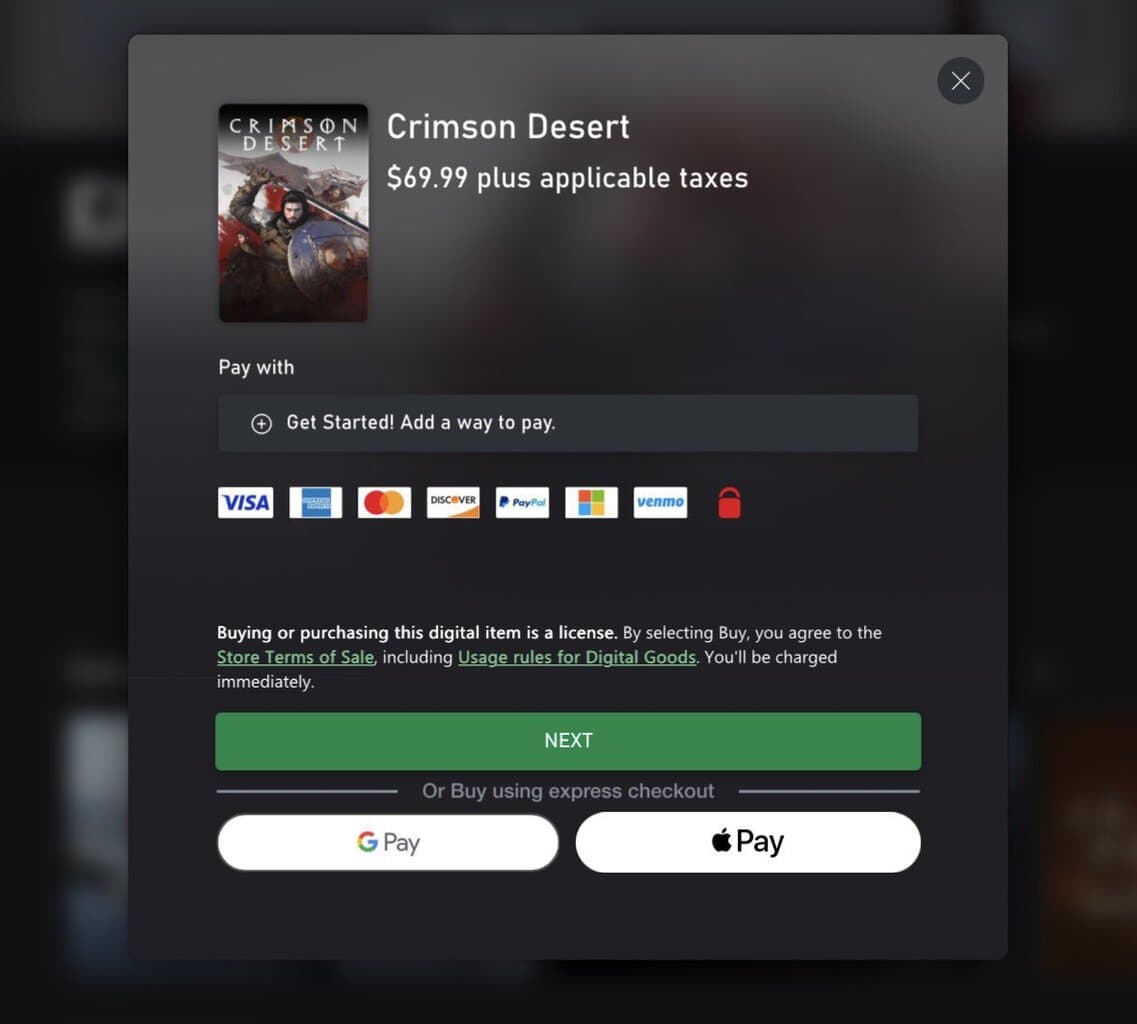
As part of the latest update, players can pay using Google Pay and Apple Pay. The move appears to streamline purchases, especially on mobile and PC. To catch you up, Microsoft recently also updated the Xbox Store with much-requested sorting options.

New payment options roll out selectively

According to folks at TrueAchievements, Apple Pay seems restricted to mobile devices. Meanwhile, Google Pay is accessible on mobile as well as PCs. Keep in mind that the availability of new payment methods varies by region.

It’s worth noting that initial testing reveals both options working in the US and UK. That said, these payment options weren’t present when the news outlet tested the Xbox Store on an Xbox Series X, suggesting the rollout is still limited.

The new methods appear as express checkout options, which allow purchases with just a few clicks. The screenshots shared by X user @IdleSloth84_ show the new payment options during the buying process, potentially saving players several steps compared to traditional payment methods.

Image credit: X/@IdleSloth84_

Players welcome the update

All this time, Xbox fans have been asking for Google Pay and Apple Pay support. As of now, Microsoft hasn’t confirmed a full global rollout, leaving many players hoping the payment options will expand to more regions and devices in the near future. The update is part of Microsoft’s ongoing effort to make the Xbox Store more user-friendly and accessible, especially as digital game sales continue to rise.

Speaking of games, let’s not forget that Microsoft is also expanding the Xbox Ally handheld game library and releasing over 20 games across Xbox consoles and PC this week.

Lenovo Confirms Legion Go 2 Drivers but Offers No Timeline, Users Frustrated

Lenovo has confirmed that new graphics drivers for the Legion Go 2 are currently in development, but the announcement has done little to reassure users. According to VideoCardz, the company failed to provide a release timeline, roadmap, or any concrete details, leaving the community frustrated and uncertain about future support.

Vague Lenovo Support Response Adds to Confusion

The situation worsened after Lenovo support directed users to Lenovo Vantage for updates, while official documentation states that Legion Space should handle driver updates for Legion Go devices. This inconsistency has created confusion among users trying to keep their systems up to date.

Many see this as a repeat of past issues with the original Legion Go, marked by slow driver updates and limited communication. Adding to concerns, there has been speculation that AMD Ryzen Z1 Extreme support could be dropped. Despite Lenovo confirming support for the first-generation device until October 28, 2029, confidence in long-term support remains shaky.

Outdated Drivers Raise Concerns

Current Legion Go 2 drivers appear to be based on a late 2025 branch, with some components dating back to early October. For a gaming handheld, such delays are seen as unacceptable, especially when performance improvements and bug fixes depend heavily on frequent GPU driver updates.

Unlike desktop GPUs, AMD does not offer universal drivers for handheld devices. This forces users to rely entirely on Lenovo’s OEM-specific driver releases, increasing pressure on the company to deliver timely updates.

Users Turn to Risky Workarounds

In the absence of official updates, some users have started installing standard AMD Adrenalin drivers manually. While this workaround works for some, others report broken features or instability, making it an unreliable solution.

The issue highlights a broader weakness in the Windows handheld ecosystem. Devices depend heavily on manufacturers for driver updates, and slow rollout cycles directly affect performance, compatibility, and overall user experience.

For a premium-priced device like the Legion Go 2, users expect consistent software support to match the hardware investment. The lack of transparency and delayed updates are now starting to erode trust.

Meanwhile, Microsoft continues to expand handheld gaming support on its platform, recently adding compatibility for 49 additional titles, signaling a growing push in the segment.

[UPDATE] GitHub Copilot Reportedly Injects Promotional Content Into Pull Requests

[UPDATE 7:35 AM GMT+1 | 31/3/2026] According to Windows Central, the Vice President of Developer Relations at GitHub has confirmed that product tips were being injected, but the feature was disabled after user backlash.


[ORIGINAL STORY] GitHub has been in the spotlight recently over changes to how Copilot handles user data, but a new controversy is now emerging around how the AI tool behaves inside development workflows.

Promotional Messages Quietly Embedded Across Thousands of Repositories

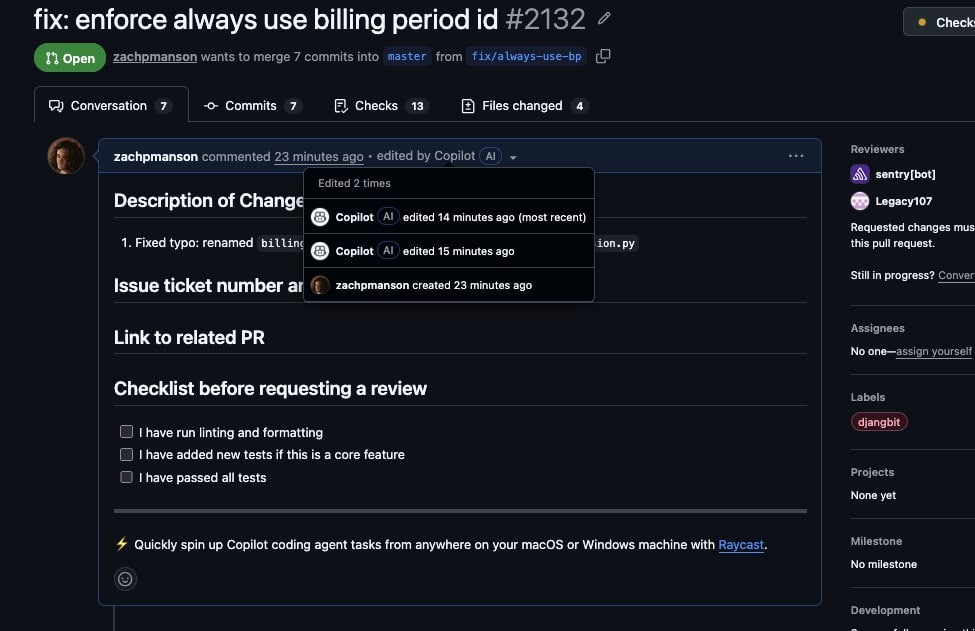
According to findings shared by Zach Manson, GitHub Copilot is allegedly inserting promotional content directly into pull requests. These messages do not appear as traditional ads, but instead show up as subtle “tips” embedded within generated content.

Source: Zach Manson

The promotional snippets reference tools such as Raycast integrations, suggesting a possible push toward ecosystem-driven recommendations. What makes the situation more concerning is the scale, as identical messages have reportedly appeared in more than 11,000 pull requests across multiple repositories.

Hidden HTML Comments Used to Deliver Copilot “Ad-Like” Suggestions

The mechanism behind this behavior appears to rely on hidden HTML comments, specifically tagged with “START COPILOT CODING AGENT TIPS.” These comments allow Copilot to inject messages into code-related outputs without making them immediately obvious as advertising.

Similar activity has also been observed on GitLab, indicating that this may not be limited to a single platform or isolated test. While Microsoft has not officially confirmed the intent behind these insertions, the consistency of the messaging suggests some level of centralized control.

This development comes at a time when AI companies are actively exploring monetization strategies. While OpenAI has acknowledged testing ads in the United States, it has denied any broader rollout. However, recent hiring decisions, including bringing in advertising talent from Meta, have fueled speculation about the future direction of AI products.

The situation also highlights a broader shift in the AI industry, where revenue pressures are beginning to influence how tools generate and present output. As AI becomes more deeply integrated into professional environments, these changes may redefine expectations around neutrality and reliability.

In other GitHub-related developments, the platform has also been linked to a large-scale malware campaign that used fake Visual Studio Code alerts to target developers.

Via Neowin

Six Games Reportedly Confirmed to Exit PlayStation Plus Extra in April 2026

Sony’s PS Plus April 2026 lineup hasn’t been announced just yet. We expect Sony to drop that list tomorrow. However, two of the games allegedly part of that lineup have already leaked over the weekend.

These games are leaving the PlayStation Plus Extra lineup on April 21

Just in case you have been waiting to know which titles are scheduled to leave PS Plus Extra in April, here are some details. As Microsoft does with Xbox Game Pass titles, Sony also makes way for new titles by pulling some of the existing ones every month for PS Plus Extra tier subscribers.

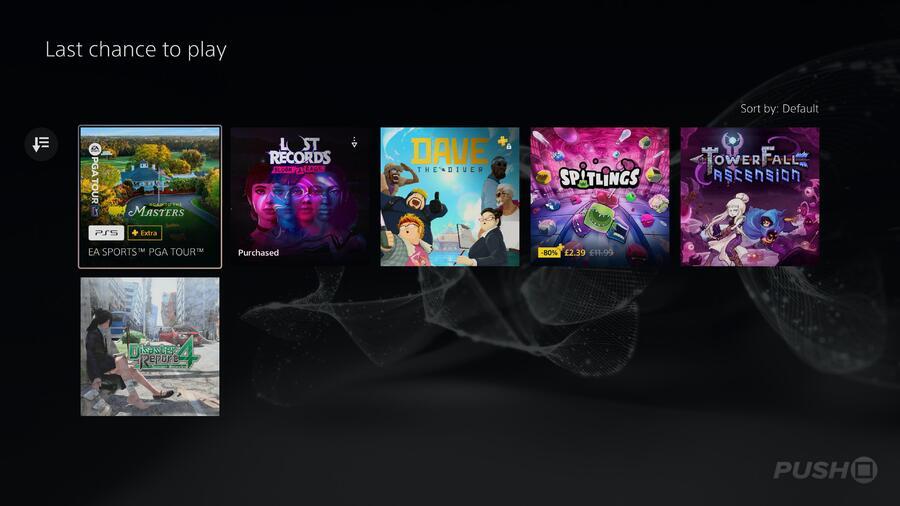
The news comes via PushSquare, which reports that PS Plus Extra is confirmed to lose the following six games on April 21st:

  • EA Sports PGA Tour (PS5)
  • Lost Records: Bloom & Rage (PS5)
  • Dave the Diver (PS5, PS4)
  • Spitlings (PS4)
  • TowerFall Ascension (PS4)
  • Disaster Report 4: Summer Memories (PS4)

The removals were reportedly listed on the membership’s Last Chance to Play section, as Sony does every month.

Image credit: PushSquare

That being said, even if you want to play the aforementioned games, you can always purchase them to continue playing after the removal deadline. Just in case you don’t want to buy those games, you have at least three weeks from now to complete your progress.

For those unaware, the PS Plus Extra tier offers access to titles until they are playable within the service. However, if you happen to be subscribed to the PS Plus Essential tier, you get unlimited access to the games as long as you’re subscribed to the plan. So, that’s a big plus of being subscribed to the “Essential” plan.

Which of the aforementioned games are you playing right now? If there are any, are you planning to keep playing them after the removal deadline? Let us know in the comments below.

AMD Drops Anti-Lag Branding in Favor of FSR Latency Reduction 2.0

AMD is continuing to reshape its graphics ecosystem, and this time the focus is on branding. After releasing FSR 4.1 and its latest SDK, the company is now consolidating multiple technologies under a single FSR identity.

According to VideoCardz, AMD has quietly started renaming key FidelityFX features to align with its broader vision of FSR as a complete graphics pipeline.

Anti-Lag 2 renamed to FSR Latency Reduction 2.0

One of the most notable changes involves FidelityFX Super Resolution, which is now being referred to as FSR Upscaling. While the functionality remains the same, the naming shift signals AMD’s intent to make FSR the central branding across its graphics stack.

Another significant rename affects Anti-Lag 2, which now appears as FSR Latency Reduction 2.0. This change has already sparked criticism, as Anti-Lag was a well-established feature name with strong recognition among gamers.

Frequent renaming could create confusion, especially for users trying to track feature improvements across versions.

A unified FSR ecosystem takes shape

Despite criticism, the move clearly aligns latency reduction with the FSR ecosystem. It reinforces AMD’s plan to position FSR as more than just an upscaling solution.

Instead, the company is building an all-in-one suite that could include frame generation, latency optimization, and potentially ray tracing-related features.

Changes not yet fully official

Interestingly, these new names have not yet been fully reflected on AMD’s official website. This suggests that the transition is still in progress and will likely become formalized in a future SDK update.

So far, the changes appear to be largely branding-focused rather than tied to new technical improvements.

Adoption concerns remain

While AMD is clearly aiming to compete more directly with NVIDIA’s integrated ecosystem, the rollout and adoption of FSR features have been slower than many expected.

This raises questions about whether the rebranding alone will be enough to accelerate adoption across games and platforms.

PS5 Pro PSSR may share FSR foundations

In related developments, reports suggest that Sony’s PS5 Pro PSSR technology may share underlying concepts with AMD’s FSR. This hints at deeper connections between console and PC graphics pipelines.

If AMD delivers on this unified approach, FSR could become a central pillar of its graphics strategy. For now, the rebranding effort may raise as many questions as it answers.

Windows 11’s Inconsistent Dark Mode Problem May Finally Get Fixed This Year

Earlier this month, Microsoft promised some big plans to fix Windows 11 from scratch and roll out some of the most-demanded features, like a customizable Taskbar. However, there is one area of Windows 11 that many users wish would get consistent as they would have liked. Here, we are talking about dark mode across Windows 11.

No doubt, Microsoft is doing its part and updating elements of Windows 11 with dark mode. However, its consistency across the OS is one that requires immediate attention from the company.

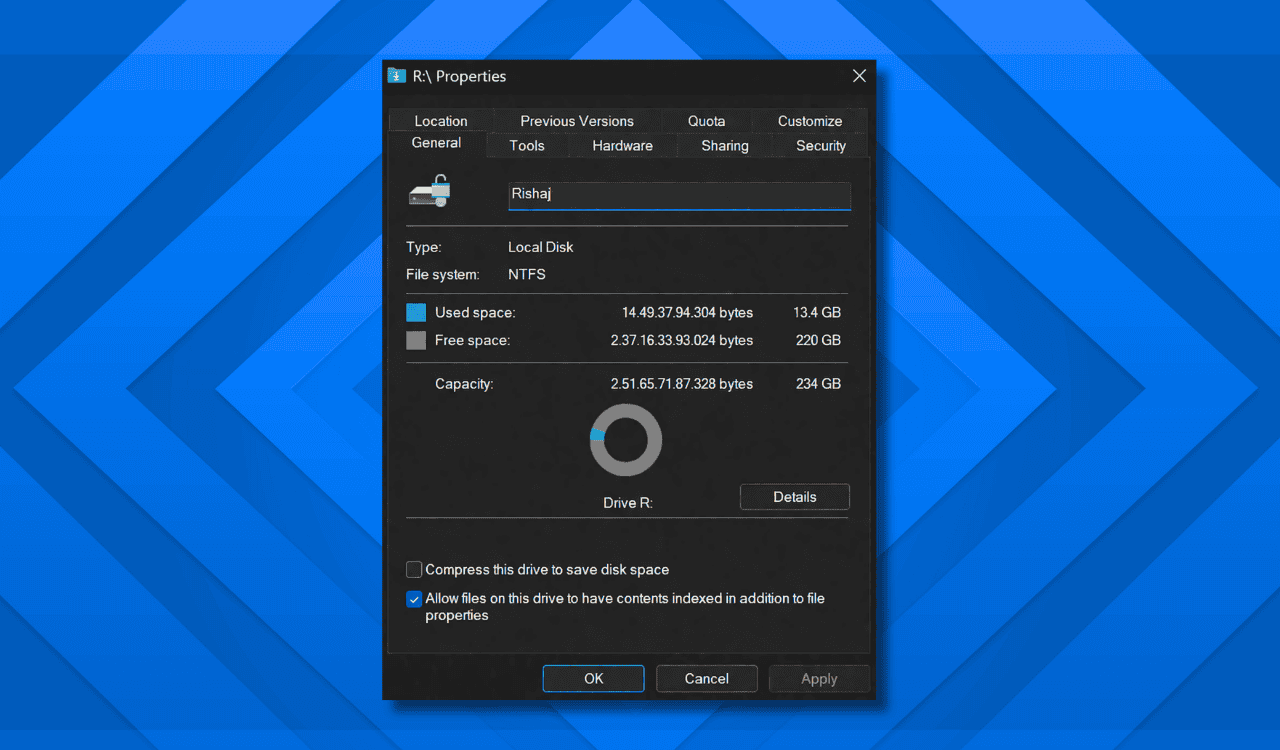
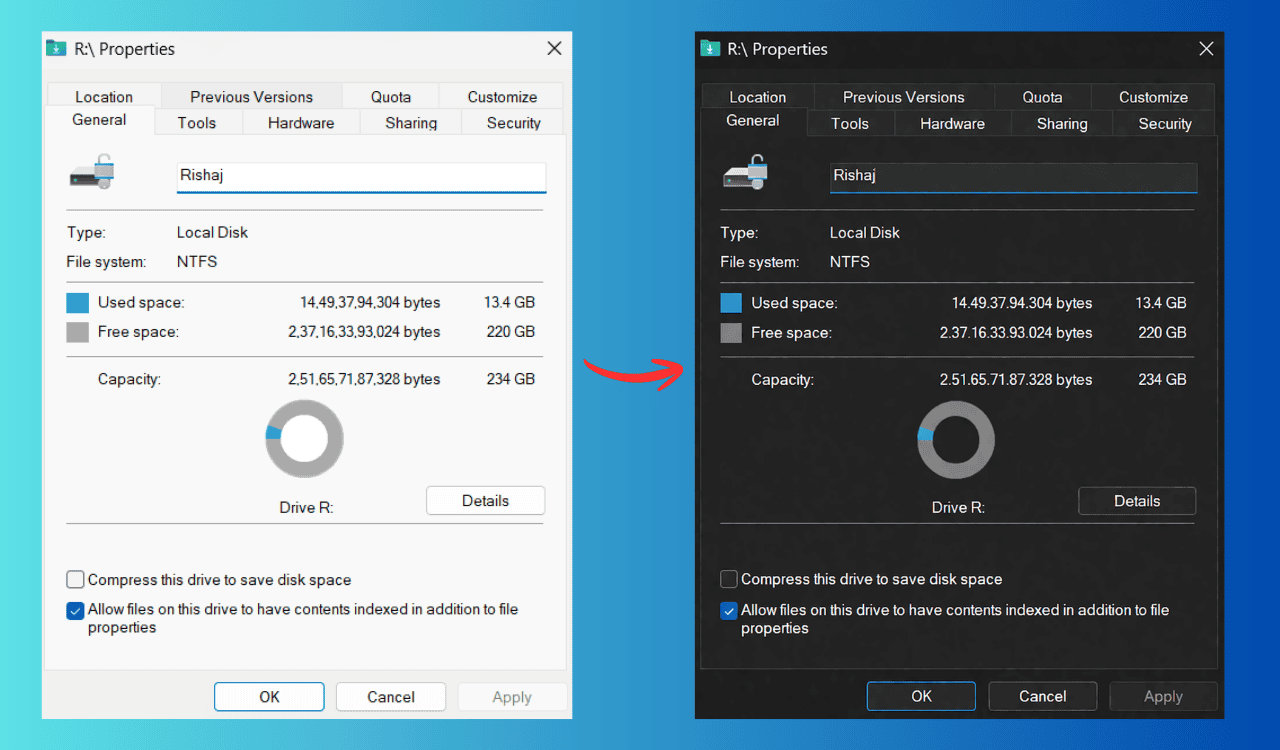
One of the prime examples of this is legacy pop-ups like the Properties tab. Microsoft seems well aware of that and is reportedly working on updating the Properties tab with dark mode soon.

Image credit: Windows Report | By Rishaj Upadhyay

Windows 11 dark mode expansion could cover Registry Editor, Properties tab, and other legacy elements

The news comes via Windows Latest, which spotted a reply on X by Marcus Ash, CVP Design and Research for Windows + Devices. Ash, in reply to a developer, Albacore, and Zac Bowden from Windows Central, said the company is developing tools to bring dark mode to other areas of Windows 11.

There’s no official announcement on which elements of Windows 11 would get the treatment first. However, Ash says that Registry Editor is among the areas Microsoft is looking to update with dark mode. Here’s exactly what Marcus Ash said in his reply:

We are pushing to get our tools/techniques to the point where we can get dark theme into more areas across Windows. No timelines to commit to yet for Regedit. As we make progress in various legacy system panels/dialogs, we will keep improving consistency.

Third-party apps still lag behind in dark mode adoption

That being said, Ash also notes that third-party tabs have yet to adopt dark theme support. So, it’s best not to expect every area of Windows 11 to adopt a dark theme just yet. As for third-party tabs, the implementation of dark theme is entirely the developer’s choice. Microsoft doesn’t have any plans to force them to support dark themes.

Third-party tabs that haven’t adopted dark theme support will render in light. We’re focused on improving platform support to make dark mode easier for developers to adopt across their tabs. Send me examples of any third-party tabs, and we’ll follow up.

Other improvements planned across Windows 11

Speaking of Windows 11, let’s not forget that Microsoft plans a major Windows 11 update overhaul with more user control. We have a separate coverage on this topic; you can check it here. As of now, Microsoft hasn’t detailed when these improvements will be rolled out.

Notably, most of these improvements are expected later this year. Moreover, the company is also working to improve the performance of Windows 11 and lower RAM usage down the line. All that said, good days for Windows 11 users are seemingly on the way.

As for other improvements, Microsoft plans to enhance Search with more accurate and relevant results.

Microsoft to Fix Windows 11 Search With Better Ranking and Local-First Results

Microsoft is doubling down on improving Windows 11 quality, and a major focus now shifts to fixing Windows Search. Following ongoing criticism from users, the company has assembled a dedicated team to address core usability issues, with search performance and relevance at the top of the list.

According to Windows Latest, Microsoft plans to deliver a faster, cleaner, and more predictable Windows Search experience, responding directly to long-standing complaints about inconsistent results and cluttered interfaces.

Microsoft responds to user feedback on Windows Search

Users recently asked OS Shell Product Head Tali Roth about upcoming changes, and she confirmed that improvements are already in progress. The goal is simple: make Windows Search reliable again.

Microsoft will focus on delivering faster results, reducing distractions, and simplifying the interface. The company aims to eliminate unnecessary clutter while making search behavior more intuitive.

Ranking system gets a major overhaul

A key part of the update involves changes to the internal ranking system that determines how results appear. Microsoft plans to prioritize relevance and local content over web-based suggestions.

Installed apps will show up more consistently, while essential system tools like the Recycle Bin will become easier to locate. Local files will take priority, addressing one of the biggest frustrations users have reported.

These changes should reduce irrelevant results and improve overall accuracy when searching for files, apps, or system features.

Cleaner UI and less web integration

Microsoft also plans to redesign the search interface. The new approach reduces emphasis on web content and recommendations, which many users found distracting or unnecessary.

Instead, Windows Search will focus on delivering a simpler and more predictable experience. The interface should feel cleaner, with fewer elements competing for attention.

Faster performance with native frameworks

Performance improvements play a major role in this overhaul. Microsoft is optimizing search interactions to feel faster and more responsive, especially while typing.

The company will rely more on native frameworks like WinUI 3, which should improve responsiveness and reduce delays in displaying results.

Part of a broader Windows 11 overhaul

Microsoft acknowledges that Windows Search has contributed to user frustration and a decline in trust. This update represents a shift toward restoring confidence by focusing on core functionality.

The search overhaul is part of a greater effort that also includes improvements to Windows Update and long-requested Taskbar customization features.

If Microsoft executes these changes successfully, Windows 11 could see a significant boost in usability heading into 2026.

Microsoft Plans Major Windows 11 Update Overhaul With More User Control

Microsoft is stepping up efforts to fix long-standing Windows 11 quality issues, and this time the focus shifts toward giving users more control over how updates roll out.

According to Windows Latest, the company is actively working on improving its feature delivery system, which has often left users confused about when they will receive new features after installing updates.

Controlled Feature Rollout system under scrutiny

At the center of this change is Microsoft’s Controlled Feature Rollout (CFR) system. This system gradually pushes new features to devices based on compatibility and stability signals. It typically starts with optional preview updates, expands after validation, and eventually becomes standard in later releases.

While this approach helps reduce bugs at scale, it has created a frustrating experience for many users. In practice, people install updates expecting new features, only to find that those features are missing.

Users frustrated by lack of transparency

In some cases, even bug fixes roll out slowly, leaving users unsure when issues will actually get resolved on their devices. The lack of transparency has been a key complaint.

Users currently have no clear way to track rollout status or predict when a feature will reach their system. Some updates can take weeks or even months to fully deploy across all eligible devices.

Microsoft aims to give users more control

Microsoft appears to recognize these concerns. Marcus Ash, who leads Design and Research for Windows + Devices, confirmed on X that the company is working toward giving users more control over feature rollouts.

One notable change involves bringing enterprise-grade tools closer to everyday users. The Aria team, known for managing update controls in enterprise environments, is now contributing to the consumer Windows experience.

Enterprise-style controls may reach regular users

This could introduce more advanced options, similar to Group Policy or Long-Term Servicing Channel (LTSC) concepts, but tailored for regular users.

The broader goal is to improve transparency and allow users to decide how and when they receive new features, rather than relying entirely on automated rollout logic.

Part of a broader Windows 11 overhaul

This effort also ties into Microsoft’s wider push to improve Windows 11 performance and reliability. The company previously explored similar goals under the now-canceled Project 20/20 initiative, and this new direction suggests those ambitions are returning in a more practical form.

If successful, these changes could address one of the most common frustrations with Windows 11 updates and make the overall experience more predictable for users.

GTA 6 Could Be the Most Expensive Game in History In Terms of Development Costs

Grand Theft Auto VI (aka GTA 6 in short) is one of the most anticipated games of this year. Last year, Rockstar Games officially confirmed that the game will release across major platforms, including Xbox and PlayStation, on November 19, 2026. That said, if you have ever wondered how much Rockstar may have spent on GTA 6 development till now, this might be the news worth reading.

Alleged Rockstar UK data suggests GTA 6’s development cost may reach $3 billion

Earlier rumors suggested that GTA 6’s development could go up to $2 billion. However, the latest calculations hint that the figure may be even higher. A GTA 6 fan analyzed public filings from Rockstar Games UK Limited in the British Companies Register, focusing on employee salaries from March 2019 to March 2025. The data shows payments alone in the UK division totaled roughly £1.6 billion, approximately $2.1 billion.

Notably, these figures only cover the UK studio and don’t include Rockstar’s other global offices. Fans now speculate that the total development budget, once all studios are considered, could approach a whopping $3 billion. That would make GTA 6 the most expensive game in terms of development costs.

Just to be clear, production is only a part of the whole picture. Marketing campaigns for a franchise of this scale are expected to be massive, potentially adding hundreds of millions to the overall spend. Rockstar and Take-Two have historically invested heavily in promotion, so it could make the final price tag of GTA 6 even more staggering.

Rumors about GTA 6’s price

In the recent past, rumors around GTA 6 pricing have been at their peak, especially after Take-Two CEO’s comments in a recent interview. In an interview with The Game Business, CEO Strauss Zelnick not only shared his thoughts about the ongoing memory crunch but also talked about promotions in video games. Speaking on the matter, Zelnick said that it would be unfair to forcefully ask players to watch pop-up ads in a game after they already paid 70 or 80 dollars.

Given that GTA 6’s launch is on the horizon, fans were quick to connect his words with GTA 6 pricing. Although the CEO didn’t mention GTA 6 while talking about that pricing, many believe it could be a hint of the pricing the company is internally considering. All that said, whatever the final price may be, the initial demand for the game is likely to be very high once it launches.

Microsoft Confirms 12 New Xbox One Games and 2 DLCs for April

Microsoft has confirmed a fresh batch of titles heading to Xbox Game Pass in April, while also spotlighting additional games during its recent Partner Preview showcase. Alongside new arrivals for Game Pass subscribers, the company continues to support older hardware with a wave of new releases for Xbox One.

According to True Achievements, a total of 12 new games and two DLC expansions are set to launch on Xbox One throughout April, showing that Microsoft is not abandoning last-generation players just yet.

New Xbox One games arrive throughout April

April kicks off with a steady stream of indie and niche titles landing across the platform. Early in the month, players can jump into Juufuutei Raden’s Guide for Pixel Museum on April 1, followed by Go! Go! Mister Chickums and Logiart Grimoire on April 2. Mini Trains arrives shortly after on April 3, while PEPPERED: An Existential Platformer and ChainStaff continue the rollout on April 7 and April 8.

Mid-month releases include Before I Go and Decollate Decoration on April 13, alongside the long-awaited Replaced on April 14. ZPF joins the lineup on April 16, keeping the momentum going with a consistent cadence of new content.

Toward the end of the month, players can expect inKONBINI and He-Man and the Masters of the Universe: Dragon Pearl of Destruction, both launching on April 28.

Major DLC expansions also on the way

In addition to full game releases, two notable expansions are arriving for existing titles. Atomic Heart: Blood on Crystal launches on April 17, while Diablo IV: Lord of Hatred follows on April 28, adding more content for players already invested in those worlds.

That’s not all from Xbox, as Microsoft has also expanded handheld gaming support with 49 additional titles, further pushing its cross-device ecosystem. Meanwhile, PlayStation users may want to keep an eye on recent leaks surrounding the April PlayStation Plus lineup, which could reveal competing offerings in the subscription space.

With consistent Game Pass additions, ongoing support for Xbox One, and broader ecosystem updates, Microsoft continues to strengthen its gaming platform across multiple fronts.

Xbox is getting 20+ games this week, including ‘Super Meat Boy 3D’

Microsoft is expanding the Xbox handhelds’ gaming library with support for over 40 games and releasing some games this week for Xbox One players. If you play your favorite games on newer Xbox consoles and Windows PC, you’ll have plenty of games coming your way this week, too.

At least 21 new games are scheduled to release across Xbox Series X|S, Xbox One, and PC. According to Xbox Wire post, this week’s Xbox lineup will include a wide range of titles, a new day-one addition to Xbox Game Pass (via TrueAchievements).

List of games coming to Xbox this week

Among the ones landing on Xbox consoles is Super Meat Boy 3D. According to the game description on Steam, the game is a “tough as nails platformer where you play as an animated cube of meat who’s trying to save his girlfriend from an evil fetus in a jar wearing a tux – IN 3D!”

Next, you’ve the Legacy of Kain: Ascendance, viral co-op horror game Content Warning, and Konami’s quirky adventure Darwin’s Paradox. If you are looking for all Xbox additions for this week, check the table below with their release dates.

Game TitleRelease DatePlatform
Clean Up EarthApril 2Xbox Series X|S, Windows
Content WarningApril 1Xbox Series X|S, Xbox One
Darwin’s Paradox!April 2Xbox Series X|S, Windows
Go! Go! Mister ChickumsApril 2Xbox Series X|S, Xbox One
Grab 50 CoinsApril 3Xbox Series X|S, Xbox One, Windows
Grime IIMarch 31Xbox Series X|S
Inkling Cats: Beneath the DreamsApril 3Xbox Series X|S
JokerJackMarch 31Xbox Series X|S, Xbox One
Juufuutei Raden’s Guide for Pixel MuseumApril 1Xbox Series X|S, Xbox One, Windows
Legacy of Kain: AscendanceMarch 31Xbox Series X|S, Windows
Logiart GrimoireApril 1Xbox Series X|S, Xbox One, Windows
ManafinderApril 3Xbox Series X|S, Xbox One
Mini TrainsApril 3Xbox Series X|S, Xbox One, Windows
Morkull Ascend to the GodsApril 2Xbox Series X|S
NubiaPhobiaApril 1Xbox Series X|S, Xbox One
Owlen and the Whispering WoodsApril 3Xbox Series X|S
PULMOApril 3Xbox Series X|S, Xbox One
Sunset MotelApril 2Xbox Series X|S, Xbox One
Super Meat Boy 3DMarch 31Xbox Series X|S, Windows
To Farm Lands: Sowing FieldsApril 3Xbox Series X|S
Zoo OrbsApril 1Xbox Series X|S, Xbox One, Windows

So, which of these games will you jump into first? Let us know in the comments below!

Microsoft Expands Xbox Handheld Gaming With 49 New Supported Games

Microsoft continues to expand Xbox Game Pass and its broader ecosystem, and after recently announcing seven new titles for next month, the company is now pushing further into handheld gaming.

According to True Achievements, Microsoft has added support for 49 additional games on handheld devices via the Xbox Store, marking another step toward making Xbox gaming more portable across devices.

Microsoft expands Xbox handheld gaming support

The latest update introduces compatibility for devices like the Asus ROG Xbox Ally and Ally X, alongside other Windows-based handhelds. This move aligns with Microsoft’s growing focus on enabling players to access their libraries anywhere without sacrificing playability.

A major highlight is the inclusion of several high-profile titles. Games like Assassin’s Creed Shadows, Star Wars Outlaws, and Prince of Persia: The Lost Crown now support handheld play, with Ubisoft contributing a significant portion of the newly compatible catalog.

Two-tier system for handheld compatibility

Microsoft is also introducing a clearer labeling system to help users understand how well each game performs on handheld devices.

The “Handheld Optimized” tag indicates that a game runs smoothly out of the box with no adjustments required. Meanwhile, “Handheld Compatible” means the game is playable but may need manual tweaks such as adjusting graphics settings or controls.

Out of the 49 newly supported titles, 26 are fully optimized for handheld play, while 23 fall under the compatible category.

Notably, STALKER 2: Heart of Chornobyl joins the list as a handheld-compatible title, alongside other additions like Screamer.

Full list of supported titles

Microsoft has published the complete list of handheld-optimized and compatible games, showcasing the growing scale of its portable gaming efforts.

Here’s the list of all handheld-optimized titles:

ACA NEOGEO SENGOKUAirplane Flight Simulator: Combat ZoneAround The World in 80 Days: Hidden Objects
Assassin’s Creed MirageAssassin’s Creed OdysseyAssassin’s Creed Shadows
Assassin’s Creed ValhallaBubbleMonstersDate Everything!
Every Day We Fight (Game Preview)Fennec Fox is Hungry (Windows)Hidden Memory – Neko’s Life
Machine Gun FuryMagic Sheep (Windows)Musical Memory: Cats Matching Band
Only Up RushPrince of Persia: The Lost CrownRail Rescue: Puzzle Lines
Silver BulletSouth Park: The Fractured but WholeSpace Warlord Baby Trading Simulator
Star Wars OutlawsThe Crew MotorfestThe Rogue Prince of Persia
Trepang2Watch Dogs: Legion

List of all handheld compatible titles:

A Clareira (Windows)ACA NEOGEO METAL SLUGACA NEOGEO METAL SLUG 2
ACA NEOGEO METAL SLUG 3ACA NEOGEO METAL SLUG 5ACA NEOGEO METAL SLUG X
ACA NEOGEO THE KING OF FIGHTERS ’97ACA NEOGEO THE KING OF FIGHTERS ’98ACA NEOGEO THE KING OF FIGHTERS 2002
Basketball ClassicsCar Dealer SimulatorClaim the Forest: Shape of Wolves (Windows)
Cowboy KartDefending Camelot – Tower Defense ActionDinosaurs Bodycam
Legends Aligned: Land of Order (Windows)Never Grave: The Witch and The CurseScreamer
Shalnor: Silverwind Saga 2Space Kitten (Windows)S.T.A.L.K.E.R. 2: Heart of Chornobyl
Thomas & Friends: Wonders of SodorVoidwrought

Xbox ecosystem continues to expand

This update builds on Microsoft’s broader strategy to unify gaming across console, PC, and portable devices. By expanding handheld support, the company is positioning Xbox as a flexible platform that adapts to different play styles.

Alongside this update, Microsoft also kicked off the Xbox Spring Sale Preview, offering discounts on a wide range of titles. At the same time, reports suggest that Netflix integration could eventually arrive on Game Pass, hinting at even more changes to the subscription service in the future.

PlayStation users may also want to check out the leaked PlayStation Plus April lineup and see what’s in store for them.

With more games becoming handheld-friendly and new titles regularly joining Game Pass, Microsoft continues to push toward a more accessible and portable gaming experience.

PS Plus April 2026 Games Lineup Could Include Lords of the Fallen & Flight Simulator 2024

If you have been waiting to know which monthly games will be added to Sony’s PlayStation Plus lineup in April 2026, this news is for you. According to a prominent Dealabs tipster, billbil-kun, Lords of the Fallen is set to headline the PS Plus Essential lineup (March).

The 2023 Souls-like title will reportedly be available to subscribers across all tiers from April 7 to May 5. For those unaware, the game recently received a major update and has a sequel lined up later this year.

Timing-wise, it fits Sony’s usual pattern of boosting engagement around ongoing franchises. But, that’s not the only game coming for PS Plus Essential.

In what appears to be a leak from Sony’s side, a Reddit user (u/BeardyGeoffles) reportedly spotted Microsoft Flight Simulator 2024 listed at £0 on the PlayStation Store. Interstingly, the listing (emedded below) was quickly pulled, hinting that it was a possible mistake.

Image credit: Reddit/u/BeardyGeoffles

If the rumor around Microsoft Flight Simulator is true, it will be a historic Xbox and PlayStation crossover moment. All that said, Sony hasn’t officially confirmed the games for next month, but we expect the official announcement tomorrow. As usual with every leak, we recommend taking these details with a grain of salt.

Speaking of games, let’s not forget Microsoft has also confirmed 49 more games are now compatible with ROG Xbox Ally handhelds. You can read more about them in our separate coverage here. Also, Xbox One is getting 12 new titles in April, along with 2 DLCs.

Microsoft Releases Windows 11 Dynamic Updates to Improve WinRE and Setup Reliability

Microsoft continues to refine the Windows 11 update experience, and this time, the focus is on improving upgrade reliability and recovery tools across multiple versions.

As Neowin reports, the company has released a new set of dynamic updates designed to enhance both the Windows Recovery Environment (WinRE) and the setup process used during feature updates.

These dynamic updates are applied before a Windows image installs, helping ensure a smoother upgrade process while preserving key components like Language Packs and Features on Demand.

New dynamic updates target setup and recovery improvements

The latest rollout includes several updates across different Windows 11 versions. For version 26H1, Microsoft released KB5083990 as a setup update and KB5081151 for the WinRE Safe OS environment.

For Windows 11 versions 24H2 and 25H2, the company pushed KB5081494 as a setup update alongside KB5083482, which focuses on improvements to the recovery environment.

These updates aim to strengthen how Windows handles upgrades, especially in enterprise and multi-language environments where preserving configurations is critical.

Key fix improves ARM64 compatibility in recovery mode

One of the more notable fixes arrives with KB5083482. Microsoft addressed an issue that prevented x64 applications from running under emulation on ARM64 systems within the Windows Recovery Environment.

This fix improves compatibility during troubleshooting and recovery scenarios, particularly for devices running on ARM-based hardware where emulation plays a key role.

Focus remains on reliability and stability

Overall, the new dynamic updates focus on improving upgrade reliability, enhancing recovery environment stability, and ensuring compatibility across different system architectures.

Because these updates are delivered automatically through Windows Update, most users and organizations will receive them without needing manual intervention.

Alongside these improvements, Microsoft also released KB5079391, which was expected to address issues with WUSA network installations.

However, the rollout has been temporarily paused after users encountered installation error 0x80073712. Microsoft has not yet provided a timeline for when the update will resume distribution.

The pause highlights ongoing challenges in balancing rapid update delivery with stability, even as Microsoft continues to invest in improving the Windows 11 update ecosystem.

Windows 11 KB5079391 Pulled After 0x80073712 Installation Error Disrupts Rollout

Microsoft has paused the rollout of the Windows 11 update KB5079391 for versions 24H2 and 25H2 after users began encountering installation issues. The update, which introduced several improvements and fixes, is no longer being distributed through Windows Update.

KB5079391 originally aimed to deliver new features alongside fixes for known issues, including problems affecting WUSA network installations. However, the rollout did not go as planned, forcing Microsoft to take action shortly after release.

Installation Error 0x80073712 Forces Microsoft to Halt Update

The company halted the rollout due to widespread reports of installation error 0x80073712. This error typically points to missing or corrupted system files, which can prevent updates from completing successfully.

Microsoft has not confirmed the exact root cause of the issue or specified which devices are affected. Still, the scale of the problem appears significant enough to justify pulling the update entirely from distribution channels.

KB5079391 Replaced by Out-of-Band Update KB5085516

Users checking for updates will no longer see KB5079391 listed. Instead, Microsoft is now offering KB5085516, an out-of-band update designed to address Microsoft account-related issues.

This replacement suggests that Microsoft is prioritizing stability fixes while it works on resolving the installation problems tied to KB5079391.

No Timeline Yet, But Fix Expected Soon

Microsoft has not shared a timeline for when KB5079391 will return. However, the update is expected to be re-released before the April 2026 Patch Tuesday cycle, likely with fixes that address the installation failures.

Given that this update is intended for broader rollout, the company will need to ensure stability before pushing it again to all eligible devices.

In other news, Microsoft has also warned users about upcoming Kerberos authentication changes that could impact enterprise environments and login workflows.

Via Neowin

Hackers Spread Malware on GitHub Using Fake VS Code Alerts

A large-scale malware campaign is targeting developers on GitHub, using fake Visual Studio Code security alerts to trick users into downloading malicious payloads and exposing system data.

According to a report from Socket, attackers are abusing GitHub Discussions to post fabricated vulnerability warnings that closely resemble legitimate advisories. These posts use fake CVE identifiers and urgent wording to pressure developers into acting quickly without proper verification.

The campaign is highly automated and coordinated, with thousands of nearly identical posts appearing across repositories within minutes. Attackers often impersonate repository maintainers or trusted security researchers, making the alerts appear credible. Because GitHub Discussions trigger email notifications, these messages reach developers directly in their inboxes, increasing the chances of engagement.

Fake advisories used as entry point

The malicious posts typically claim that a critical vulnerability has been discovered and provide a supposed fix in the form of a patched Visual Studio Code extension. However, these extensions are hosted on external platforms such as Google Drive, which are not official distribution channels.

This detail alone should raise suspicion, but the urgency and formatting of the messages often convince users to proceed anyway.

Redirection chain leads to data harvesting

When a user clicks the provided link, they are sent through a series of redirects before landing on a page that executes a JavaScript reconnaissance script. This script collects information such as timezone, locale, user agent, operating system details, and signals that help determine whether the visitor is a real user or an automated system.

The collected data is then transmitted to an attacker-controlled infrastructure, where it is likely used to filter targets and avoid detection from researchers or security tools.

Payload delivery appears selective

Researchers were unable to capture the second-stage malware, suggesting that it is only delivered to carefully selected victims. This selective approach allows attackers to remain under the radar while focusing on high-value targets.

Developers urged to verify before acting

Security experts stress that developers should treat unsolicited security alerts with caution. Any reported vulnerability should be verified through trusted sources such as official CVE databases and government-backed advisories before taking action.

The campaign highlights how attackers are increasingly targeting developers through platforms they trust, using social engineering combined with automation to scale their operations.

This is part of a broader wave of threats affecting the ecosystem. Attackers have recently abused OAuth mechanisms for phishing campaigns, while CISA has warned about actively exploited SharePoint vulnerabilities. At the same time, malware such as VoidStealer is targeting Google Chrome by extracting encrypted data directly from memory.

As these tactics evolve, developers remain a key target, making awareness and verification essential to avoiding compromise.

Via Bleeping Computer

Microsoft Warns of Kerberos Changes That Could Break Enterprise Logins

Microsoft is continuing its push to modernize Windows security, and this time the focus is on strengthening Kerberos authentication across the platform.

The company is preparing a major Kerberos hardening change that will begin rolling out with the April 2026 Windows update. This isn’t the only change, as Microsoft has recently released the KB5079391 update to the public.

Windows to Enforce Stronger Kerberos Encryption by Default

With this update, Windows will enforce stronger encryption standards for Kerberos authentication. Accounts that do not have explicitly defined encryption types will now default to AES-SHA1 instead of the older RC4 algorithm.

Microsoft is also removing RC4 fallback entirely, as the encryption method is now considered outdated and insecure. This marks a significant shift in how authentication is handled across enterprise and domain environments.

Potential Impact on Enterprise and Virtual Environments

While the change improves security, it may also introduce compatibility issues in certain setups. Systems that do not support AES-SHA1 encryption could fail authentication entirely once enforcement is enabled.

This is particularly relevant for environments using FSLogix or relying on SMB shares with Active Directory authentication. In such cases, failed Kerberos authentication could prevent user profiles from loading properly, especially in virtualized or enterprise deployments.

Impacted scenarios include Kerberos-based SMB access and Active Directory objects configured with either null or RC4-only encryption settings.

Admins Urged to Prepare Before Enforcement Deadline

Microsoft is advising IT administrators to review their environments ahead of the rollout. This includes identifying any use of RC4 within Active Directory, updating configurations to support AES-SHA1, and validating authentication workflows to avoid disruptions.

The rollout will follow a phased timeline. In April 2026, enforcement mode will be enabled by default, though audit mode will still be available as a fallback option. By July 2026, audit mode will be removed entirely, making enforcement mandatory across all environments.

Part of Broader Windows Security Overhaul

This Kerberos update is part of a wider effort by Microsoft to improve security across Windows. The company has been gradually moving away from legacy protocols like NTLM while strengthening modern authentication methods such as Kerberos.

It’s worth noting that this is a platform-level change affecting Windows broadly, and is not limited to services like Azure Virtual Desktop.

In other news, Microsoft has also addressed a WUSA network installation issue in the recent KB5079391 update.

Via Neowin

Microsoft Will Delete SwiftKey Accounts Soon: How to Save Data

If you rely on the SwiftKey keyboard app for your phone, you have a short window left to save your typing history and custom dictionaries. Microsoft is officially shutting down the original SwiftKey account system on March 31. The company wants to move all users over to its own login system. Anyone currently signing in with an Apple or Google account will lose cloud access very soon unless action is taken.

Microsoft sent out notices warning users that failure to migrate will result in permanently deleted cloud backups.

Here’s what happens to your data, and how to keep it

To protect your typing models, you just need to link a Microsoft account to your SwiftKey app. Once you finish this step, Microsoft will automatically back up your keyboard data into a specific folder in its OneDrive storage service. The company states this move will bring better security and easier access across all your devices. It is even giving out 1,000 Microsoft Reward points as a small bonus to users who make the switch before the deadline hits.

You can safely ignore this update if you only use the keyboard on one phone and do not care about cloud backups. The app will continue working normally, and your saved words will stay stored locally on that specific device. Just keep in mind that you will lose the ability to sync your custom dictionary across multiple phones or tablets.

If you prefer to walk away but want to download a copy of your old cloud data, you have until May 31 to grab it. You just need to visit the SwiftKey data portal to request your files before the system wipes them completely.

Microsoft bought SwiftKey ten years ago, back in 2016. The app has had a slightly strange journey since then. The company actually tried to kill off the iOS version of the keyboard in 2022 before bringing it back a few months later due to heavy user demand. Since that brief disappearance, the app has not seen many big feature updates.

Now, Microsoft is making this mandatory account migration its main focus, requiring anyone who wants cross-device syncing to officially join its software ecosystem.

Via @XenoPanther

NVIDIA DLSS 5 May Work As A Driver-Level Toggle

NVIDIA recently revealed DLSS 5, and the gaming community has plenty of opinions about it. Many gamers are pushing back against the new neural rendering technology, calling it an artificial intelligence filter that ruins the original art direction of their favorite games. Despite the heavy criticism, new reports suggest NVIDIA might push the technology even further by making it a global setting.

If this happens, you could potentially force DLSS 5 on across your entire library directly through the graphics driver, entirely bypassing developer intent.

Here’s what a driver-level toggle could change things for gamers

According to recent reports from Wccftech and eTeknix, NVIDIA may allow users to force DLSS 5 through its driver settings. This approach mirrors how gamers used to force anti-aliasing or texture filtering from the NVIDIA Control Panel back in the day. Instead of waiting for a game studio to officially patch the feature into a specific title, you would just flip a switch on your end.

If a developer decides to skip DLSS 5 because it changes the lighting or textures too much, the driver toggle would override that choice. This is a massive shift for older games or indie titles that rarely get modern updates. The downside is that forcing an artificial intelligence model onto an unsupported game will likely cause weird visual bugs.

Since the game was not built with the upscaler in mind, the software has to guess how certain shadows and reflections should look.

The gaming community has mixed reactions to DLSS5

The backlash to the initial DLSS 5 reveal was loud. A large chunk of the community called the neural rendering approach “AI slop.” Players feel the software ignores the actual geometry and hand-painted textures created by artists. NVIDIA has defended its technology by stating that the model scans each frame and respects the original game assets, but many gamers remain highly skeptical.

If DLSS 5 becomes a global driver option, the debate over artistic intent will only grow more intense. Modders are already looking at using the Streamline framework to inject the upscaler into older DirectX games.

By putting the switch directly in the driver menu, NVIDIA removes the training wheels entirely. It gives the player total control to decide if massive frame rate gains are worth the risk of some distorted visuals.

Via Wcctech

Intel Drops Plans For Ultra 9 290K Plus CPU Launch

If you were holding out for a new flagship desktop processor from Intel, you might need to rethink your next computer build. The company just confirmed that it officially scrapped its plans to release the rumored Core Ultra 9 290K Plus. Instead of launching a new top-tier chip for the Arrow Lake refresh, the brand is keeping its focus on the hardware it already has on the market.

Intel is skipping the minor upgrades

As reported by PC Games Hardware, Intel decided not to move forward with the 290K Plus because it simply did not make sense for the current market. Leaks suggested the canceled processor would have featured the exact same core count as the new Core Ultra 7 270K Plus, with only a tiny bump in clock speed. Since the performance difference was so small, releasing a more expensive flagship would have offered terrible value to buyers.

The company also confirmed it will not release a special edition version of its current flagship, which normally launches with a “KS” label. This means the existing Core Ultra 9 285K and the newly released 270K Plus will remain the absolute best options for this specific motherboard socket until the next massive platform update arrives.

The chip maker is now focusing on the middle tier

Instead of pushing a slightly faster chip to the top of the stack, Intel is placing all its bets on the middle tier. The company recently launched the Core Ultra 7 270K Plus and the Core Ultra 5 250K Plus. It claims these two processors have already hit their goals for gaming performance and provide better overall value against the competition.

By skipping the 290K Plus entirely, the chipmaker avoids overcrowding its own product lineup with hardware that performs almost identically. If you really want a massive leap in power from the blue team, you will just have to wait for the next generation of processors to finally drop.

Via Wcctech

Jensen Huang to Headline Computex 2026 With NVIDIA N1 Launch

Computex 2026 is shaping up to be a massive event for PC and artificial intelligence fans. While the official schedule is still filling out, multiple reports out of Taiwan indicate that NVIDIA CEO Jensen Huang will deliver a major keynote right before the show kicks off in Taipei this June, according to recent reports. If the rumors hold, he will likely use the massive stage to reveal the highly anticipated NVIDIA N1 laptop processor.

NVIDIA is preparing for a massive showcase

NVIDIA has reportedly booked the Taipei International Convention Center for four straight days starting June 1. The company plans to use this space as a central hub for media events and business meetings during the wider Computex trade show. While event organizers have not officially added Huang to the public calendar just yet, the CEO previously mentioned in February that he planned to attend and make several big announcements.

Other major tech leaders are already confirmed for the event. Intel CEO Lip-Bu Tan, Qualcomm CEO Cristiano Amon, and Marvell CEO Matt Murphy are all scheduled to speak. With so many top executives in town, the focus will clearly center on the next generation of computing hardware and artificial intelligence tools.

It’s NVIDIA’s push into the laptop market

The biggest expectation for Huang’s upcoming presentation is the official debut of the NVIDIA N1 system on a chip. This new processor is a big deal because it marks the push by NVIDIA into the Windows on Arm laptop market. The company is reportedly working closely with PC makers like Dell and Lenovo to get these new chips into consumer hands.

Alongside the new laptop processors, hardware fans also expect updates on the company’s server technologies. NVIDIA might share new details on its Rubin architecture and discuss how its supply chain partners in Taiwan are building the next wave of AI infrastructure.

Via Wcctech

Windows 11 KB5079391 Update Fixes Longstanding WUSA Network Install Issue

If you manage a large group of computers for a business, you might have spent the last year dealing with a very specific and annoying software glitch. Microsoft just released a new update, known as KB5079391, designed to fix a long-running problem with the Windows Update Standalone Installer. The bug caused network installations to fail, but this latest patch officially resolves the headache for IT administrators everywhere.

The issue first arrived in May last year

The issue first popped up back in May 2025 after a previous system update for Windows 11. When network administrators tried to install an update package from a shared folder that contained multiple files, the process would crash. The system threw an error code reading ERROR_BAD_PATHNAME and stopped working.

To get around the glitch, IT workers had to manually copy the update files directly to a local hard drive before running the installation. Microsoft eventually rolled out a temporary fix for regular home users late last year. 

However, businesses with managed networks were left waiting for a permanent solution. The company notes that its new update, released in late March 2026, finally corrects the pathing error. Regular users with a personal laptop at home probably never noticed this bug. The standalone installer is primarily a tool used by professionals to manage dozens or hundreds of machines at once.

If a computer has already downloaded the patches released on or after March 24, it is fully protected and no longer needs any special workarounds. Microsoft did mention a small quirk with the new fix. After finishing an installation, the computer settings menu might still say a restart is required.

The company says this glitch will clear up on its own, so users do not need to worry about restarting multiple times.

Via Notebookcheck

PS5 Prices Surge Again as Sony Confirms April 2026 Hike

Sony has confirmed that PlayStation hardware prices will increase starting April 2, 2026, reversing earlier expectations that pricing would remain unchanged. The company attributes the decision to ongoing global economic pressures, signaling a broader shift in how console pricing evolves this generation.

The price adjustments affect multiple devices across the PlayStation lineup, including both consoles and accessories.

Sony raises PlayStation 5 prices again

The updated pricing applies to the following models:

  • PS5 Slim Digital: $599.99 (+$100)
  • PS5 Slim Disc: $649.99 (+$100)
  • PS5 Pro: $899.99 (+$100)
  • PlayStation Portal: $249.99 (+$30)

These increases represent a notable jump, with some devices seeing up to a 20% rise compared to previous pricing.

Third price hike highlights unusual console cycle

This marks the third price increase during the PS5 generation, following earlier adjustments in August 2022 and April 2025. Unlike previous console cycles, where hardware becomes more affordable over time, Sony continues to move in the opposite direction.

This trend reflects rising costs tied to production, supply chains, and global economic instability, all of which appear to be reshaping long-standing pricing strategies in the gaming industry.

Higher entry cost may impact adoption

With the new pricing in place, the entry-level PlayStation experience now starts at $599.99, while the PS5 Pro approaches $900. For many consumers, a full setup that includes games and accessories could now exceed $1,000, making it a significantly larger investment than in past generations.

Such pricing may influence buying decisions, especially as players consider alternatives like cloud gaming, subscriptions, or competing platforms.

Broader concerns around Sony’s strategy

The price increase comes amid other controversial moves, including the introduction of dynamic pricing for PlayStation games in the United States, which has already received community backlash. At the same time, questions remain about the future PlayStation 6, particularly whether it will deliver enough innovation to justify potentially even higher costs.

For now, Sony’s latest move reinforces a clear shift in the console market, where rising prices are becoming the norm rather than the exception.

Via Wccftech

New Xbox Game Pass Codename “TRITON” Could Bring Back Classic Titles

Microsoft is continuing to evolve Xbox Game Pass amid ongoing rumors of pricing changes and potential partnerships, but a newly spotted codename is now drawing attention from the community.

According to Pure Xbox, keen-eyed users have discovered a possible new Xbox Game Pass codename, “TRITON,” which was spotted by the Better xCloud account on X. While details remain limited, the discovery has already sparked speculation about a new direction for the service.

“TRITON” Codename Spotted in the Wild

The codename was initially linked to a small batch of titles, including DOOM 64, Psychonauts, and other retro-style classics. However, recent findings suggest that the list has expanded to include at least 12 additional games.

All of the titles associated with TRITON so far appear to be older first-party or Xbox Game Studios releases. This has led many to believe that Microsoft could be preparing a new Game Pass tier focused specifically on legacy content.

A Retro-Focused Game Pass Tier?

The idea of a classic or retro-focused subscription aligns with Microsoft’s previously stated interest in expanding backward compatibility. If that initiative continues, a dedicated tier for older titles would make strategic sense.

Some early theories suggest that TRITON could represent:

  • A lower-cost Game Pass subscription
  • A catalog built around classic Xbox titles
  • A new backward compatibility-focused program

Adding to the speculation, titles like DOOM 64 and Psychonauts were recently made free on the Xbox Store for a limited time. While Microsoft has not confirmed any connection, the timing has raised questions about whether these promotions tie into the TRITON initiative.

Still Unconfirmed, But Worth Watching

Despite the growing buzz, Microsoft has not officially acknowledged the TRITON codename. It’s also possible that the label refers to an internal testing phase or a completely different project.

Until Microsoft provides confirmation, the true nature of TRITON remains uncertain. Still, the discovery hints that the company may be exploring new ways to expand Game Pass beyond its current model.

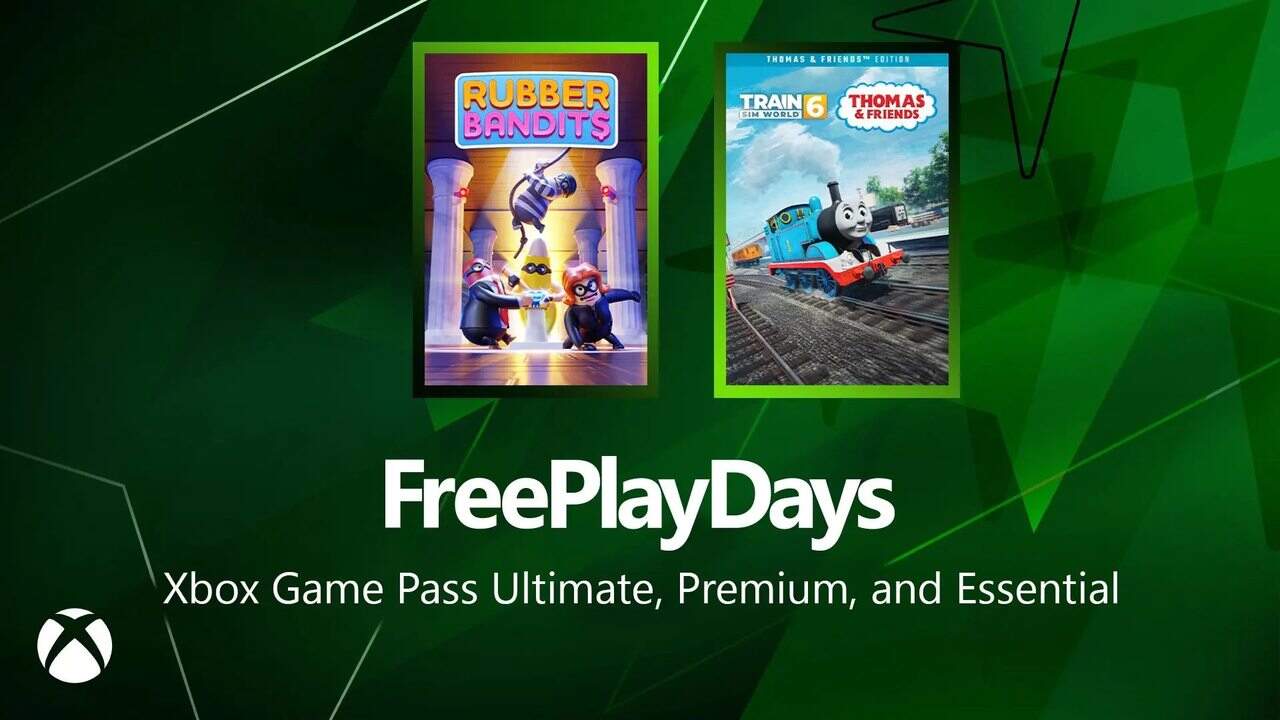
In the meantime, Xbox continues to push forward with new content, including recently announced Free Play Days titles and additional Game Pass games revealed during the latest Partner Preview event.

Microsoft Teams Will Remove CAPTCHA for Meeting Joins and Add Bot Detection

We recently saw Microsoft roll out new Teams features like Catch Up on mobile and live meeting transcriptions, and now the company is introducing another quality-of-life improvement focused on meeting access and security.

Microsoft is continuing to refine Teams with usability and security improvements, this time simplifying how users join meetings without compromising protection.

According to the Microsoft 365 Admin Center (Message ID: MC1262588), the company will retire CAPTCHA challenges for Microsoft Teams meeting joins starting August 2026. The change replaces traditional CAPTCHA checks with a built-in bot detection system designed to streamline access while maintaining security.

CAPTCHA removal in Teams moves toward smarter security

Instead of requiring users to complete CAPTCHA challenges, Teams will rely on a default-on bot detection mechanism. When the system identifies suspicious activity, those participants will not join automatically and will instead require approval from the meeting organizer.

This approach removes friction for legitimate users while still giving organizers control over potentially harmful participants. Microsoft positions this as a more modern and accessible alternative to CAPTCHA, which can often slow down or block legitimate meeting access.

Rollout timeline and key milestones

Microsoft has outlined a phased removal process to ensure a smooth transition:

Early May 2026 marks the point when the CAPTCHA setting becomes locked and can no longer be enabled.

By late July 2026, Microsoft will remove CAPTCHA-related controls from PowerShell.
In late August 2026, the feature will disappear entirely from the Teams Admin Center interface.

The company notes that these dates may shift depending on how quickly the bot detection system rolls out across tenants.

No security gaps expected during transition

Microsoft plans to deploy the bot detection feature ahead of CAPTCHA removal. This ensures continuous protection during the transition period and avoids exposing meetings to new risks.

The new system focuses on identifying automated or suspicious join attempts and placing them behind an approval layer, rather than challenging every user with verification steps.

Microsoft says no immediate action is required from administrators. However, IT teams should prepare for the upcoming changes by reviewing meeting policies once the new settings become available.

Admins should also keep the default configuration that requires organizer approval for detected bots and update any internal documentation or support materials to reflect the new behavior.

The update highlights Microsoft’s broader effort to improve Teams usability while modernizing its approach to meeting security.

Via Neowin

OpenAI Expands Codex With Shareable Plugins and Team Workflow Tools

OpenAI continues to expand its developer ecosystem after bringing the Codex app to Windows, and now the company is rolling out plugin support aimed at making workflows more powerful and collaborative.

According to Neowin, OpenAI has introduced a new plugin system for Codex, alongside broader incentives such as offering ChatGPT Pro access to open-source developers who actively use the platform.

Codex plugins bring reusable workflows and integrations

The newly announced plugins act as installable bundles that package reusable workflows and integrations into a single unit. These plugins can include tools such as predefined skills, app connections, and MCP server configurations, allowing developers to quickly extend Codex functionality.

OpenAI is making plugins available across its entire Codex ecosystem, including the Codex app, Codex CLI, and IDE extensions. All available plugins are organized inside a centralized Codex Plugin Directory, giving developers a single place to discover and install new capabilities.

Plugins vs skills: what’s the difference?

OpenAI is also clarifying the distinction between skills and plugins, which serve different purposes within Codex.

Skills remain personal or project-specific workflows that are not designed for sharing. Plugins, on the other hand, are versioned, reusable, and built to be shared across teams or even published publicly.

This separation allows teams to standardize tooling and workflows across multiple projects, improving consistency and collaboration in development environments.

Early integrations include Slack, Figma, and Notion

The first wave of plugin integrations already connects Codex with widely used tools such as Slack, Figma, Notion, Gmail, and Cloudflare. These integrations enable developers to automate tasks, pull data, and interact with external services directly from within Codex.

OpenAI also confirmed that self-serve plugin publishing and management features are on the way. Developers will soon be able to submit their own plugins to the official directory, further expanding the ecosystem.

Focus on extensibility and secure development

This update highlights OpenAI’s push to make Codex more extensible and collaborative, positioning it as a central hub for modern developer workflows.

Alongside plugin support, the company recently introduced a Codex Security AI Agent designed to help ensure code safety and reduce potential vulnerabilities during development.

With these additions, OpenAI is doubling down on making Codex not just a coding assistant, but a full platform for building, managing, and securing software projects.

Federal Judge Blocks U.S. Attempt to Blacklist Anthropic After Pentagon Dispute

Anthropic’s ongoing clash with the U.S. government has taken a dramatic turn, as a federal judge has temporarily blocked efforts to blacklist the AI company over national security concerns, after Anthropic sued the Pentagon over the decision.

The ruling follows a tense dispute between Anthropic and the Pentagon, which escalated after the company was labeled a potential supply chain risk and faced restrictions across federal agencies.

Court Calls Government Action Likely Unconstitutional

According to TechCrunch, U.S. District Judge Rita F. Lin ruled that the government’s actions were likely unconstitutional and lacked proper legal justification.

The judge described the move as “illegal First Amendment retaliation,” stating that there was no valid basis to classify a U.S.-based company as an adversary. The decision effectively halts enforcement of the blacklist, at least temporarily.

This gives Anthropic a window to continue its legal challenge, while the U.S. government has seven days to file an appeal.

Dispute Stemmed From Failed $200 Million Pentagon Deal

The conflict traces back to a collapsed $200 million Pentagon contract, where Anthropic refused to allow unrestricted military use of its AI models.

The company pushed for safeguards that would limit applications tied to autonomous weapons and large-scale surveillance. That stance reportedly led to tensions with defense officials, including Defense Secretary Pete Hegseth, who later labeled Anthropic a national risk.

Despite the fallout, Anthropic’s Claude AI models are still believed to be used in certain defense-related workflows through Palantir systems.

OpenAI Moves In as Pentagon Secures Alternative Partner

Following the breakdown in negotiations, OpenAI secured its own Pentagon deal, stepping into a role that Anthropic declined to fill.

Its AI models are now being deployed in classified environments, reportedly for what officials describe as lawful and controlled use cases. The move has sparked mixed reactions, particularly among users concerned about military applications of AI technology.

A Defining Case for AI and Government Contracts

The case could set a major precedent for how AI companies engage with government agencies, especially when ethical boundaries conflict with national security interests.

If the court ultimately sides with Anthropic, it may limit how far the government can go in penalizing companies that refuse certain types of contracts or impose restrictions on AI usage.

At the same time, the outcome could shape future defense partnerships and redefine expectations for AI providers working in sensitive sectors.

Via Neowin

Microsoft Builds Dedicated Team to Overhaul Windows 11 Quality

Microsoft is ramping up efforts to improve Windows 11 following sustained user criticism around performance, design, and overall consistency. The company has now outlined a broader initiative aimed at refining the experience and restoring trust among users.

According to Windows Central, the effort is being led by Pavan Davuluri, with several key figures across Microsoft contributing to the initiative. Scott Hanselman is helping drive improvements in Windows quality, while Clint Rutkas is actively engaging with developers to gather feedback and ideas for future updates.

New Team Focuses on Windows Apps and Experience

A major part of this push involves strengthening the Windows app ecosystem. Rudy Huyn is forming a new team dedicated to improving Windows apps, with a strong emphasis on product thinking and user experience rather than platform-specific limitations.

Huyn brings extensive experience in Windows app development and previously worked at Dropbox. Microsoft is also actively recruiting developers to support this initiative, encouraging candidates from all platforms to apply and share their portfolios.

Performance and Feature Changes Planned

Alongside internal restructuring, Microsoft is planning several changes aimed at improving how Windows 11 performs and feels in daily use.

The company is reportedly looking to optimize performance in a way similar to its past “Project 20/20” efforts. At the same time, it may scale back certain Copilot integrations that users have found unnecessary, while also introducing more flexibility for Taskbar customization.

Focus Shifts Toward Rebuilding Trust

The broader goal behind these changes is to address ongoing concerns and deliver a more consistent, polished Windows experience. Over time, criticism around Windows 11 has grown, particularly regarding responsiveness, UI decisions, and system cohesion.

Microsoft’s renewed focus suggests a shift toward listening more closely to user feedback while prioritizing meaningful improvements. However, the success of this effort will largely depend on how effectively the company can execute these plans and assemble the right talent to support them.

Microsoft Rolls Out PowerToys Update With Stability Fixes and Improvements

Microsoft has released PowerToys version 0.98.1, a follow-up update that focuses entirely on stability and refinements after the recent 0.98 release. While it doesn’t introduce new features, it brings a range of fixes and improvements, so let’s see what’s new in this update.

PowerToys 0.98.1 Overview

PowerToys 0.98.1 is a maintenance release that focuses on polishing the overall experience. It includes several behind-the-scenes improvements, along with fixes targeting stability and usability across key tools.

Always On Top Gets Better Control

The update brings improvements to the Always On Top utility, which now supports separate hotkeys for adjusting window opacity independently from the main pin shortcut. This allows users to fine-tune transparency without affecting pinned window behavior.

Command Palette Fixes Crashes and Missing Features

Command Palette receives multiple fixes aimed at restoring functionality and preventing crashes. Microsoft resolved issues where context menu actions were missing in app search results and fixed problems with primary commands failing to load after delayed extension initialization.

The company also addressed crashes related to negative array sizes and pop-up handling. Scrolling issues have been fixed, UI elements refined, and visual flickering during settings changes has been significantly reduced.

Improved Stability and Performance

Microsoft improved resource cleanup processes across the app. These changes should lead to better performance, fewer slowdowns, and a more stable overall experience during extended use.

Keyboard Shortcut Manager Adjustments

The Keyboard Shortcut Manager has been updated with stability in mind. Microsoft temporarily removed the separate toggle for the Keyboard Manager Service to prevent issues.

The update also adds support for whitespace-only shortcuts, expanding customization options for advanced users.

Settings Issues Resolved

Several bugs affecting the Settings experience have been fixed. Microsoft resolved a crash caused by a missing PowerDisplay.Lib.dll dependency and fixed an issue where clicking the Settings button would open a blank page instead of the Home screen.

No New Features, Just Refinement

PowerToys 0.98.1 is focused entirely on polishing the experience after the major 0.98 update. The release prioritizes bug fixes, stability improvements, and usability refinements rather than introducing new functionality.

Users can install the update directly through the app or download it from the official GitHub repository.

In other news, Microsoft has also pushed a recent Windows 11 KB5079391 update to the public while tightening policies around legacy driver support.

Via Neowin

KB5079391 Lands for Windows 11 With Smart App Control, Narrator, and File Explorer Improvements

Microsoft has been steadily rolling out its latest Windows update, and after appearing earlier as KB5074105 in the Release Preview channel, it is now officially available to the public.

The update, released as KB5079391 for both Windows 11 25H2 and 24H2, brings build numbers up to 26200.8116 and 26100.8116, respectively.

In its earlier preview phase, the update introduced several notable improvements, including enhancements to Cross-Device Resume, Smart App Control, and MIDI support. It also refined how information is displayed in Storage Cleanup, while addressing multiple usability issues such as Start Menu glitches, black screen problems, and File Explorer freezes.

However, the rollout hasn’t been entirely smooth. During testing, users reported issues related to camera functionality and lock screen behavior.

KB5079391 Is Finally Out of Testing and Live for Users

With the public release now underway, users can expect the same set of changes and fixes as the preview build, alongside the updated build numbers across supported versions. Here’s what the update brings:

Features rolling out gradually

Narrator

  • Offers richer image descriptions and integrates with Copilot on all Windows 11 devices.
  • Use Narrator key + Ctrl + D for a focused image or Ctrl + S for the full screen.
  • Copilot opens with the image so you can enter a custom prompt.
  • On Copilot+ PCs, descriptions are generated instantly on-device, with an option to ask Copilot for more detail.

Smart App Control

  • Can now be turned on or off without requiring a clean install.
  • Available via Settings > Windows Security > App & Browser Control.
  • Helps block untrusted or potentially harmful apps when enabled.

Account Settings

  • Microsoft 365 Family users can upgrade plans directly from Settings > Accounts.
  • Suggested upgrade prompts can be disabled.
  • Dialog boxes in Other users have been redesigned with a modern look and dark mode support.
  • Availability depends on whether the device is joined to a work or school account.

Input

  • The Pen settings page has been refined.
  • A new “Same as Copilot key” option allows the pen tail button to open the same app as the Copilot key.

Settings

  • The About page now has a clearer layout with easier navigation and quick access to components like Storage.
  • The device info card on the Home page is more structured and easier to scan.
  • Improved reliability when opening Settings Home and downloading updates from System > Advanced.

File Explorer

  • More reliable file unblocking for previews.
  • Voice Typing (Win + H) is now supported when renaming files.
  • Permissions in Advanced Security Settings can be sorted by Principal.

Display

  • Support for monitors reporting refresh rates above 1000 Hz.
  • USB4 monitors can enter a lower power state during sleep.
  • Improved auto-rotation after sleep.
  • Better HDR reliability for certain displays.
  • More accurate monitor size reporting via WMI APIs.

System Improvements

  • Updated printer support baseline (Windows 10 version 1607 and Windows Server 2016).
  • Improved Safe Mode taskbar reliability.
  • Better Voice Access number recognition.
  • More reliable Start menu layout application via Group Policy.
  • Added support for DisableSeamlessLanguageBar in Remote Desktop PowerShell.
  • Improved handling of short MIDI messages.
  • Removed an unnecessary sfc /scannow error message.
  • Improved Windows Hello fingerprint reliability.

Features available to all users after installing the update

Application Control for Business (Improved)

  • More accurate and reliable Application ID tagging in policies.

Narrator

  • Improved Natural Voices experience and setup reliability.

Performance & Reliability

  • Better stability in Windows Recovery Environment when running x64 apps on ARM64 devices.

Windows Update Deployment (Known issue fixed)

  • Fixed an issue where .msu updates could fail with ERROR_BAD_PATHNAME when run from certain network locations.

The update brings a wide array of improvements, and you can download it from the Windows Update section or from the Microsoft Update Catalog.

Microsoft Blocks Legacy Drivers in Windows 11 With New Kernel Security Policy

Microsoft is rolling out a major security upgrade for Windows 11 by tightening how kernel-level drivers are trusted and loaded. The change targets outdated signing methods that have remained in the system for decades, aiming to reduce attack surfaces and improve platform stability.

Legacy Driver Trust Model Phased Out

The company will no longer allow legacy cross-signed root drivers by default across:

  • Windows 11 versions 24H2, 25H2, and 26H1
  • Windows Server 2025
  • Future Windows client and server releases

This legacy trust model dates back to the early 2000s and was officially retired in 2021. However, some drivers signed with expired certificates have continued to function, creating potential security risks.

WHCP Becomes the New Standard

Starting in April 2026, Windows will only accept drivers signed through the Windows Hardware Compatibility Program (WHCP) by default. This ensures that all kernel drivers meet modern security and compatibility standards before being allowed to run.

Microsoft will maintain a compatibility allow list for trusted legacy drivers, allowing older but verified drivers to continue working without disruption.

Gradual Rollout With Evaluation Mode

The rollout will begin in evaluation mode. During this phase:

  • The system monitors driver behavior across reboots and usage
  • Enforcement remains inactive initially
  • Microsoft gathers telemetry before enabling strict enforcement

This approach allows Microsoft to identify potential compatibility issues while minimizing disruptions for users and organizations.

Enterprise Flexibility With WDAC

Organizations that rely on custom or internal drivers can override the new policies using Application Control for Business, previously known as Windows Defender Application Control (WDAC). This ensures enterprise environments retain flexibility while adopting the new security model.

Microsoft says the policy is based on telemetry collected from billions of devices. The company will continue refining enforcement based on real-world feedback to balance security with compatibility.

Broader Windows 11 Changes Ahead

Alongside this security shift, Microsoft is also working on broader Windows 11 improvements. Reports suggest upcoming updates may deliver significant performance gains, similar to the unfinished Project 20/20 initiative.

The company is also exploring changes to reduce unnecessary Copilot integrations and expand Taskbar customization options, signaling a broader effort to improve usability alongside security.

Via Neowin

Google Launches Gemini Switching Tools to Pull Users Away From ChatGPT

ChatGPT remains the most widely used AI assistant, and many users find it difficult to switch platforms even when alternatives offer competitive features. Now, Google is taking direct aim at that challenge with new tools designed to make migrating to Gemini significantly easier.

Google is rolling out a set of switching features for Gemini over the next few weeks, focusing heavily on reducing friction for users coming from ChatGPT.

Gemini Introduces Memory Import and Chat History Transfer

One of the biggest advantages ChatGPT has maintained is its ability to retain context across conversations. Gemini, on the other hand, previously required users to start fresh with each interaction, limiting long-term personalization.

That is now changing. Google is introducing a memory import feature that allows users to transfer preferences, relationships, and personal context directly from ChatGPT. The process involves copying a generated response or prompt between platforms, effectively recreating user context inside Gemini.

Source: Google

In addition, Gemini now supports full chat history import. Users can download their ChatGPT data and upload it as a ZIP file into Gemini, where conversations become searchable and can be continued seamlessly. This marks a major shift toward persistent, personalized AI experiences within Google’s ecosystem.

Source: Google

Google is also rebranding “past chats” as “memory” in Gemini, signaling a broader focus on long-term context and personalization. The move clearly targets one of ChatGPT’s strongest differentiators.

Google Aims to Reduce Switching Friction

The goal behind these updates is straightforward: make it easier for users to leave ChatGPT without losing their data or experience. By offering both memory transfer and chat history import, Google removes one of the biggest barriers to adoption.

This strategy highlights how competition in the AI space is shifting from raw capability to user retention and ecosystem lock-in. Instead of simply building better models, companies are now focusing on portability and continuity.

OpenAI Expands ChatGPT Features Despite Strategic Cuts

While Google is improving Gemini’s onboarding experience, OpenAI continues to evolve ChatGPT with new features and strategic changes.

The company recently canceled both the Adult Mode and the Sora AI app, signaling a shift in priorities. At the same time, it introduced several new capabilities aimed at enhancing everyday usability.

These include a shopping feature integrated directly into ChatGPT, allowing users to browse and discover products within conversations. OpenAI also launched a Library feature that makes it easier to access uploaded files and images in one place.

In addition, the company introduced an AI Safety Bug Bounty program focused on preventing misuse of AI agents. The initiative encourages researchers and security experts to identify vulnerabilities related to prompt injection, data exposure, and harmful automated actions.

AI Competition Moves Toward Ecosystem Lock-In

Google’s latest move underscores a growing trend in the AI market: retaining users is becoming just as important as attracting them. With ChatGPT setting the standard for personalized AI experiences, competitors like Gemini are now racing to close that gap.

By enabling memory and chat history transfers, Google is betting that reducing friction will convince users to try, and potentially stay with, its AI platform.

Via Neowin

Xbox Free Play Days Adds Rubber Bandits and Train Sim World 6 This Weekend

Microsoft continues to expand its Xbox ecosystem, and following a recent Partner Preview broadcast highlighting upcoming Game Pass titles, the company is now giving players a chance to try new games for free.

Xbox Free Play Days adds new games this weekend

According to Neowin, Microsoft has launched a new Free Play Days promotion featuring two titles that players can jump into right now.

The current lineup includes Rubber Bandits and Train Sim World 6, offering two very different gameplay experiences for Xbox users.

Rubber Bandits is a chaotic multiplayer party game built around heists, physics-based combat, and fast-paced matches. However, access to this title requires an active Xbox Game Pass subscription, including Ultimate, Premium, or Essential tiers.

On the other hand, Train Sim World 6 is available to all players without any subscription. The game focuses on realistic train simulation, featuring multiple routes, detailed controls, and various gameplay modes. It also includes themed content such as a crossover with Thomas & Friends, adding a more casual and nostalgic twist.

Available across console and PC

Both games are accessible on Xbox Series X|S, Xbox One, and PC, ensuring broad availability across Microsoft’s gaming ecosystem.

As with previous Free Play Days events, any progress made during the trial period will carry over if players decide to purchase the full game later. This allows users to continue their experience without losing progress.

The promotion is available for a limited time and will run through Sunday, March 29 at 11:59 PM PT. After that, access will be restricted unless the games are purchased or available through Game Pass.

More Game Pass updates expected soon

This promotion arrives alongside other Game Pass developments. Microsoft has already confirmed several titles coming to the service in April, and reports suggest the company may be considering pricing adjustments in the future.

With regular content drops and free trial events like this, Microsoft continues to position Game Pass as a central part of its gaming strategy.