Valve Releases SteamOS Preview with Major Performance and Compatibility Upgrades

Valve has confirmed that its long-awaited Steam Machine hardware will launch later this year, putting an end to speculation about potential delays.

Alongside the announcement, the company rolled out SteamOS 3.8.0 Preview, a major update designed to prepare its Linux-based platform for a broader range of gaming devices.

SteamOS 3.8 Prepares for New Hardware

SteamOS 3.8.0 Preview introduces early support for upcoming Steam Machine devices, signaling that Valve is actively aligning its software with new hardware launches. The company is also improving compatibility across a wider range of systems, including handheld PCs and traditional desktops.

Valve continues to focus on creating a unified gaming experience that works across multiple device types, from dedicated consoles to portable gaming PCs.

Performance and Stability Improvements

The update delivers several performance-focused upgrades aimed at improving gameplay smoothness and system reliability. Enhanced variable refresh rate (VRR) frame pacing helps reduce stuttering, while updated graphics drivers bring better performance and stability across supported titles.

Valve also addressed crashes in specific games, including Starfield, and resolved interface issues such as missing dropdown menus in certain titles. Controller responsiveness has also improved significantly, with latency reduced from milliseconds to microseconds.

Expanded Hardware and Platform Support

SteamOS 3.8 broadens its reach beyond Valve’s own hardware. The update improves compatibility with Intel and AMD platforms and introduces better GPU memory management for discrete graphics cards.

Support has also expanded for popular handheld gaming PCs like the Lenovo Legion Go and ASUS ROG Ally, reinforcing Valve’s strategy to turn SteamOS into a universal gaming operating system rather than a Steam Deck-exclusive platform.

Audio, Bluetooth, and Accessibility Updates

The update brings multiple improvements to audio and connectivity. HDMI audio handling and surround sound detection have been refined, while Bluetooth Wake functionality returns for Steam Deck LCD devices.

Users can now enable Bluetooth headset microphones, although this comes with reduced playback quality. Accessibility also gets attention with the addition of a mono audio output option.

Desktop Mode and System Upgrades

SteamOS Desktop Mode sees a significant overhaul with KDE Plasma updated to version 6.4.3 and Wayland now set as the default display server. These changes improve performance, scaling, HDR support, and VRR compatibility.

Firmware updates include new BIOS versions for both Steam Deck LCD and OLED models, along with early hibernation support and improved power management options.

Developer-Focused Enhancements

Valve is also catering to developers with this release. SteamOS now runs on Linux kernel 6.16 and defaults to Wayland, while still allowing X11 as an option.

New virtualization features and developer tools aim to make the platform more flexible for testing and development, further strengthening its ecosystem.

Known Issues and Ongoing Work

Valve acknowledged a current issue where users opting into Preview updates may be mistakenly placed in the Beta channel. A fix is expected in a future Steam Client update.

In other news, the Steam Spring Sale 2026 is now live, offering discounts across thousands of titles. Meanwhile, Valve is also facing legal pressure from a New York loot box lawsuit, as the FBI investigates reports of malware-infected games on the platform.

Via Neowin

Report: Samsung Locks Exclusive HBM4 Supply Deal With OpenAI to Power Its First AI Chip

The high demand for high-bandwidth memory across the AI industry has been a headache for the hardware market in general. However, it appears to be a favorable situation for Samsung. According to a new report emerging from South Korea, Samsung Electronics has secured a deal to exclusively supply next-generation HBM4 memory to OpenAI.

Samsung’s HBM4 memory to reportedly power OpenAI’s in-house ‘Titan’ chip

The details come from The Korean Economic Daily, which reports that Samsung will start supplying its 12-layer HBM4 memory to OpenAI in the second half of 2026 (via Reuters). This memory is expected to power OpenAI’s first in-house AI chip, reportedly called Titan.

The report further notes that the said chip is being developed in collaboration with Broadcom. TSMC is likely to handle production starting in the third quarter of this year, with a launch expected by the end of 2026.

Samsung’s involvement in the supply of HBM4 memory appears substantial. The company is reportedly allocating more than 5.5 billion GB of HBM4 to OpenAI, which could make it one of its largest customers after NVIDIA and AMD. If the details are accurate, this would mark a significant turnaround for Samsung, especially after earlier struggles with HBM3 and HBM3E validation.

To catch you up, OpenAI has long relied on NVIDIA so far. But developing its own chip could help OpenAI improve inference performance and reduce dependency on general-purpose GPUs. HBM4, with its stacked memory design, is expected to play a key role here by offering faster data transfer and higher efficiency for large AI models.

All that said, the deal remains unconfirmed at this point, and details are still limited. Let’s not forget that Samsung has also signed a deal with AMD to develop next-generation memory solutions, designed for AI apps.

OpenAI Super App Could Merge ChatGPT, Atlas, and Codex Into One Platform

OpenAI is reportedly working on a unified desktop “super app” that combines several of its core products into a single experience. According to CNBC, the initiative will be led by Fidji Simo, who will collaborate closely with OpenAI co-founder Greg Brockman.

The move signals a shift in strategy as OpenAI looks to simplify its growing ecosystem and reduce fragmentation across its tools.

A Push Toward a Unified AI Experience

The planned super app will merge ChatGPT, Atlas, and Codex into one desktop platform. Each of these tools currently serves different purposes, ranging from conversational AI to coding and AI-powered browsing.

OpenAI reportedly acknowledged that maintaining separate applications slowed development cycles and impacted overall product quality. By consolidating them, the company aims to streamline updates, improve performance, and deliver a more cohesive user experience.

The unified approach could also make it easier for users to discover and use lesser-known tools like Atlas and Codex, which have seen more limited adoption compared to ChatGPT.

What Atlas and Codex Bring to the Table

Atlas, launched in October, is an AI-powered browser designed to integrate intelligent assistance directly into web navigation. However, its availability remains limited to macOS, which has constrained its reach.

Codex, on the other hand, focuses on coding tasks, helping developers generate, debug, and understand code using natural language prompts.

Bringing these tools together with ChatGPT could create a centralized workspace where users can browse, code, and interact with AI without switching between apps.

Why This Move Matters

A successful super app could significantly strengthen OpenAI’s position in the AI space. It would allow the company to iterate faster, reduce redundancy, and compete more effectively with rivals offering integrated AI ecosystems.

It also reflects a broader trend in the industry, where companies are moving toward all-in-one platforms that centralize multiple digital experiences.

The report comes amid several other major developments involving OpenAI. The company recently struck a deal with Amazon Web Services tied to U.S. defense initiatives, a move that could deepen its presence in government-related AI infrastructure.

At the same time, tensions appear to be rising with Microsoft, with reports suggesting the tech giant may consider legal action if the AWS partnership moves forward.

OpenAI has also introduced GPT-5.4 Mini and Nano, smaller AI models designed to deliver near-flagship performance with improved efficiency.

If OpenAI successfully delivers its desktop super app, it could redefine how users interact with AI tools across different domains. By unifying browsing, coding, and conversational AI, the company aims to create a seamless, all-in-one productivity environment.

Via Neowin

Microsoft Launches MAI-Image-2 With Major Boost to AI Image Realism

Microsoft has introduced MAI-Image-2, its second-generation image generation model aimed at improving realism and usability. The new model focuses on delivering more natural visuals while reducing the need for manual edits.

MAI-Image-2 brings improved realism and visual quality

MAI-Image-2 delivers major upgrades in image quality, especially in lighting and environmental detail. Images generated with the model feature more natural lighting conditions and more consistent, realistic scenes.

Microsoft also improved skin tone accuracy, addressing a common limitation in earlier AI image models. These changes make outputs more lifelike and suitable for professional use without heavy post-processing.

Stronger text rendering for practical use

One of the biggest upgrades comes in text generation. MAI-Image-2 can render readable and accurate text, making it useful for real-world content such as infographics, slides, and diagrams.

This improvement positions the model beyond creative visuals and into productivity-focused use cases where embedded text matters.

Better handling of complex and creative prompts

The model performs well with cinematic scenes, hyper-detailed visuals, and surreal compositions. It can interpret complex prompts more accurately and generate cohesive outputs even in challenging scenarios.

This makes it suitable for both artistic projects and advanced design workflows.

Availability across Microsoft platforms

Microsoft has made MAI-Image-2 widely accessible across its ecosystem. Users can try the model through the MAI Playground, while broader rollout is underway for Bing Image Creator and Copilot.

Developers can also access the model via Microsoft Foundry, enabling integration into apps and services.

Competitive positioning in AI image generation

MAI-Image-2 is currently ranked third on LMArena, placing it behind leading models from Google and OpenAI. Despite trailing the top two, the model signals Microsoft’s intent to compete more aggressively in the AI image generation space.

In related developments, OpenAI recently announced GPT-5.4 Mini and Nano, while also denying reports of a global ChatGPT ads rollout. At the same time, tensions between Microsoft and OpenAI appear to be rising, with reports suggesting potential legal disputes involving both OpenAI and Amazon.

Via Neowin

Teams Optimizations for Windows App on iOS & Android is Now Generally Available

Microsoft is rolling out an update that it says will improve its virtual desktop experience. The company has officially announced the general availability of Teams optimizations (WebRTC Redirector Service) for the Windows App on iOS and Android.

In the announcement post, the company notes that the latest update focuses on improving calls and meetings while accessing Windows 365 and Azure Virtual Desktop on mobile devices.

Microsoft says the WebRTC Redirector Service is designed to change how audio and video are handled during Teams calls. “By leveraging media redirection techniques, audio and video processing can occur on the local device rather than entirely within the virtual session, which is intended to support more responsive interactions during meetings,” notes the company.

Microsoft further adds that Teams optimizations are designed to support the following:

  • Improved audio and video handling during Teams calls and meetings
  • More consistent media experiences across a range of network conditions
  • A familiar Teams experience when joining meetings from mobile devices using the Windows App

Back in the preview phase, these optimizations were tested in real-world scenarios, and they now appear ready for a wider rollout. If you’re using the Windows App on iOS or Android, you can start using Teams optimizations today. The Windows App is available on the Apple App Store and Google Play Store.

Moreover, it’s worth noting that the company has also delayed native screen sharing for Teams on macOS until mid-May. That said, the company is also preparing some practical upgrades for Teams, including a DND setting directly on Windows, smarter meetings and video summaries, and more.

KB5079473 Breaks Sign-In for Teams, OneDrive, Edge, Excel, Word & Copilot on Windows 11

Every now and then, we come across reports of Patch Tuesday updates breaking some features or triggering new issues for Windows 11 users. To catch you up, last week, Microsoft released the March 2026 Patch Tuesday update, KB5079473, for Windows 11, and it already seems to be causing some issues. In our previous report, we talked about the same update triggering system crashes and installation errors. Unfortunately, the list of issues linked to KB5079473 is growing.

Microsoft confirms KB5079473 causes sign-in failures across free Windows 11 apps

Yesterday, Microsoft confirmed a new issue linked to the recent Patch Tuesday update. In the Windows 11 release health dashboard, the company confirmed that after installing KB5079473, Windows 11 users attempting to sign in with Microsoft accounts may find that apps like Microsoft Teams Free or OneDrive fail to authenticate properly (via Neowin).

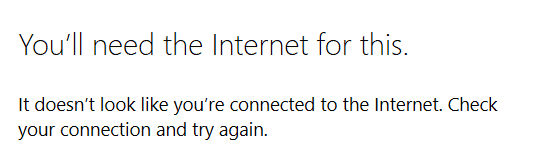
The company further adds that users may encounter error messages such as “You’ll need the Internet for this. It doesn’t look like you’re connected to the Internet” appear even when the device is online. According to Microsoft, the issue is limited to Microsoft account sign-ins, so business users who rely on Entra ID (formerly Azure Active Directory) remain unaffected.

Other apps impacted include Microsoft Edge, Excel, Word, and Microsoft 365 Copilot whenever a feature requires account authentication. While explaining the root cause, Microsoft notes that the error occurs due to a specific network connectivity state. In many cases, restarting the device while keeping it connected to the Internet resolves the problem. However, restarting without an active connection may return the device to the faulty state, triggering the issue again.

The company says a permanent fix is in the works, which we expect will roll out in the coming days. Until then, you can follow the recommended workaround to regain access to affected apps. Microsoft has further promised to update guidance once the resolution is available.

As of now, it’s unclear how widespread the problem is or if future updates might introduce additional sign-in issues. Moreover, you can continue to monitor official Microsoft channels for updates and avoid restarting devices offline to minimize the risk of encountering the error.

Other issues faced by users in the recent past

Earlier this week, Microsoft also confirmed a widespread outage affecting Office.com and Exchange Online. At the time, the outage left many users unable to access their mailboxes, calendars, and other essential productivity tools through various connection protocols. In a separate issue, confirmed by the company earlier this week, the Teams Meeting add-in prevents some users from accessing Outlook Classic.

Microsoft Prepares Priority Cleanup V2 for Faster Exchange Online Deletions

Microsoft is preparing a major update for Exchange Online with the introduction of Priority Cleanup V2, a new feature under Microsoft Purview designed to streamline how IT administrators permanently delete mailbox content.

Priority Cleanup already allows organizations to remove mailbox data even when preservation holds are in place, but the current version has been criticized for slow performance and complex workflows. With V2, Microsoft aims to significantly improve speed, simplify processes, and reduce administrative overhead.

Priority Cleanup V2 to bring faster deletions and simpler workflows

One of the biggest changes in Priority Cleanup V2 is performance. The current version can take more than six days to process even small mailboxes, while the updated version aims to reduce that to hours or even instant execution in some cases, particularly when no holds are involved.

Microsoft also plans to simplify the approval process. The workflow will drop from three steps to two, while the number of required administrators will be reduced from four to two. This change should make it easier for organizations to execute cleanup tasks without unnecessary delays.

Another key improvement is conditional review. eDiscovery approval will only be required for mailboxes that are under hold, removing extra steps for standard deletion scenarios.

New tools for large-scale cleanup and auditing

Priority Cleanup V2 introduces several new features aimed at enterprise environments managing large volumes of data. IT admins will be able to perform batch deletions, making it easier to handle large-scale mailbox cleanup operations.

Policy management will also become more straightforward, with improvements designed to reduce complexity and increase usability. The review interface will include enhanced metadata, giving administrators more context before approving deletion actions.

Microsoft is also adding a Cleanup ID system, which creates a complete audit trail for every deletion. This improves transparency and helps organizations meet compliance requirements.

Microsoft seeks feedback ahead of rollout

The feature remains in the planning stage, and Microsoft is actively collecting feedback from customers through support channels and customer success teams. The company is focusing on refining performance, usability, and compliance features before release.

Priority Cleanup V2 is expected to roll out later this year, although Microsoft has not provided a specific timeline.

The planned update comes shortly after a recent Exchange Online outage, which Microsoft has since resolved. At the same time, the company continues to evolve its broader Microsoft 365 ecosystem.

SharePoint recently introduced an AI-powered template gallery to replace blank pages, while security concerns remain in focus. The Cybersecurity and Infrastructure Security Agency (CISA) has warned that a critical SharePoint vulnerability is actively being exploited, urging organizations to apply updates as soon as possible.

With Priority Cleanup V2, Microsoft appears to be doubling down on administrative efficiency and compliance, while continuing to modernize its enterprise services.

Via Neowin

Fan-Made Zelda: Twilight Princess Port is Coming to PC

Fans of The Legend of Zelda series have a reason to celebrate. While Nintendo hasn’t announced any new Zelda titles for 2026, a fan-made port is bringing the beloved 2006 game Twilight Princess to PC.

Originally released on the GameCube and Wii, Twilight Princess is known as one of the darkest Zelda games ever. It took everything players loved about Ocarina of Time and amplified it with a more serious tone, new characters, and a story set directly after the N64 classic.

Just to be clear, this new PC version isn’t official. Over on YouTube, Video Game Esoterica has reverse-engineered the game’s machine code and translated it into C++, making it playable on modern PCs for the first time. Early gameplay footage shows the familiar environments, combat, and exploration intact, now running outside Nintendo’s consoles.

The port is part of a larger effort to bring other GameCube classics to PC. The Wind Waker, Zelda’s cartoonish predecessor, and Animal Crossing are also getting similar fan-made treatments, highlighting the growing community effort to preserve and modernize these games.

Notably, the creators urge players to own the original titles to respect Nintendo’s IP. While a Zelda movie is reportedly in the works, this fan-made PC port might just be the best way to celebrate the franchise’s 40th anniversary.

All that said, fans can stay updated through the linifadomra Discord group, which already has nearly 1,000 members. It’s a hub for those following PC ports of classic GameCube titles, sharing progress, tips, and excitement over the new ways to experience these legendary games.

Adobe Firefly Now Learns Your Art Style with Custom AI Training

Adobe is updating its Firefly AI image generator with a feature that lets users train the system on their own artwork. The change marks a shift from generic image generation toward something more personal, where outputs can reflect a creator’s distinct style.

It also responds to ongoing concerns around ownership, giving users more control over how AI interprets and produces visual content.

You can teach Firefly your visual language

The new feature allows users to upload their own images and use them as reference material for Firefly. Over time, the system learns patterns in composition, color, and detail, then applies those traits when generating new images.

This approach changes how creators interact with AI tools. Instead of adjusting prompts repeatedly to get closer to a desired look, users can guide the system more directly. The result is a workflow that feels less like trial and error and more like extending an existing creative process.

Adobe is also emphasizing that this training is tied to user-provided content, which helps avoid some of the uncertainty around how AI models are trained.

Adobe Firefly is moving beyond generic AI outputs

One of the common criticisms of AI-generated art is that it often lacks a distinct identity. By letting users define the style, Firefly moves closer to producing work that feels intentional rather than generic.

This could be particularly useful for designers, illustrators, and content creators who want consistency across projects. Instead of manually recreating a style each time, they can rely on the system to maintain a coherent visual direction.

At the same time, the feature does not replace traditional creative work. It acts as a tool that can speed up ideation or production, depending on how it is used.

Its a step toward more controlled AI tools

Adobe’s update reflects a broader shift in how AI tools are being developed. The focus is moving toward customization and user control, rather than one-size-fits-all models. There are still open questions around how far this approach can go, especially in professional workflows.

Even so, the ability to train AI on personal work is a meaningful step. It suggests a future where AI adapts to creators, not the other way around.

Via The Verge

Switch 2 Handheld Boost Improves Graphics but Drains Battery

Nintendo recently released a surprise firmware update for the Switch 2 console. It adds a new Handheld Mode Boost for backwards-compatible games. This lets older titles run at docked performance levels while playing on the go. Players are quickly realizing the immediate cost of this feature.

Pushing portable hardware for graphical upgrades takes significantly more power. This results in a steep reduction in your overall battery life, reports Mynintendo News and many users on Reddit.

The new mode drops the portable playtime by 25 percent

Processing higher resolutions natively requires substantially more electricity from the device. Extensive community testing reveals a clear and consistent pattern regarding power drain. Activating the new boost mode reduces battery life by roughly 25 percent. Exact figures will naturally fluctuate depending on the specific software running. One player carefully tracked their portable playtime in Doom to measure differences. They recorded a steep drop from just over five hours originally.

The total playtime fell to exactly three hours and 43 minutes. Losing over an hour of battery is a major factor for daily commuters. It heavily impacts anyone taking a long flight without reliable USB charging ports. Users must weigh this cost before leaving home without a power bank.

The mode can upgrade older games to TV mode performance

Despite the heavy battery drain, the visual improvements are undeniably impressive using Nintendo Switch 2’s handheld boost. Handheld Mode Boost forces compatible games to reach up to 1080p. It uses the built-in display instead of defaulting to lower portable limits. Titles with notoriously blurry visuals, like Xenoblade Chronicles 2, look significantly cleaner.

The increased resolution strips away heavy and unwanted over-sharpening filters. It also applies proper anti-aliasing directly to the character models and environments. Everything simply looks much sharper and far more natural in motion. Fortunately, the feature remains entirely optional in the system settings menu. Owners can toggle it on or off based on wall outlet proximity. Players now have a direct choice between maximum visual fidelity and extended battery.

This represents a highly requested shift in Nintendo hardware performance options. It gives users much more control over their personal gaming experience.

Amazon Launches Its Generative AI Assistant Alexa+ in the UK

Amazon has officially launched its upgraded voice assistant, Alexa+, in the United Kingdom. The rollout marks the first European expansion for the generative AI product, which previously debuted in North America. Starting this week, customers can test the smarter, more conversational assistant through an invite-only Early Access program.

The updated service brings new capabilities designed to handle complex queries and complete multistep tasks autonomously.

Alexa+ brings upgraded conversational skills trained to understand local British accents

The new architecture abandons the rigid commands users previously needed to operate their smart speakers. Built on Amazon’s latest large language models, the software understands natural speech patterns and remembers context from earlier parts of a conversation.

A major focus for the UK release involved localizing the language model. Engineering teams based in Cambridge trained the system to understand regional British accents and local slang, ensuring it recognizes phrases without confusion.

It can execute complex multistep actions with localized third-party partners

Instead of just answering simple trivia questions or setting kitchen timers, the system can now execute actions across multiple third-party services from a single voice prompt. If a user asks to plan a dinner out, the assistant can secure a table via OpenTable and add the reservation directly to a connected calendar.

Amazon has also partnered with companies like JustEat to enable voice ordering for local takeaways, while Treatwell integration allows users to book salon appointments. The technology operates across multiple platforms, meaning users can access these new features on recent Echo smart speakers, smart displays, and Fire TV devices.

Early access availability and future subscription pricing details

Users who purchase a newly released Echo device will automatically bypass the waitlist for the Early Access program. Existing hardware owners can sign up online to receive an invitation over the coming weeks. Amazon is offering the service at no cost while it remains in the testing phase.

Once the early access period concludes, the company will charge £19.99 per month for a standalone subscription. People who already subscribe to Amazon Prime will receive the updated assistant at no additional cost as part of their existing membership benefits.

NVIDIA drops Rubin CPX for Groq LPUs with a planned 2028 return

NVIDIA has officially removed the Rubin CPX accelerator from its upcoming hardware roadmap. According to German publication Computerbase, the company is stepping back from this specific design to let Groq and its specialized Language Processing Units handle dedicated inference workloads instead. This adjustment highlights how rapidly the artificial intelligence hardware market is shifting right now.

Major chipmakers are constantly reassessing their product strategies to manage production costs and maintain an advantage over highly specialized competitors.

The shift toward Groq hardware

Groq has built a strong reputation around its custom Language Processing Units. These chips are designed specifically for inference tasks, which involve actively running AI models rather than training them from scratch. Inference requires incredibly fast processing speeds and exceptionally low latency to function well. Groq delivers on these specific metrics highly efficiently.

NVIDIA currently dominates the global market for complex training hardware. However, the inference sector is becoming much more competitive every single quarter. Removing the Rubin CPX allows NVIDIA to allocate its highly limited fabrication resources at TSMC toward its most profitable compute products. The company can now focus heavily on producing the upcoming Blackwell GPUs and the standard Rubin architecture without splitting its attention across too many different chip variations.

Letting Groq take center stage for inference provides a very practical solution for enterprise customers who need immediate and specialized performance today.

NVIDIA is looking ahead to Feynman in 2028

This roadmap change does not mean NVIDIA is abandoning the CPX concept entirely. Industry reports indicate the architecture will likely make a full return when NVIDIA launches its Feynman generation of chips in 2028. Pushing the release schedule back gives the engineering teams several years to refine the underlying design and improve its overall efficiency.

By the time Feynman arrives on the market, the technical requirements for AI inference will have evolved significantly. Delaying the CPX launch ensures NVIDIA can build a finalized product that matches future market demands rather than releasing a potentially compromised version right now.

For the time being, the global hardware industry is watching closely as Groq steps up to fill the immediate gap left by the abruptly canceled Rubin CPX.

Via Wcctech

Ubisoft Cuts Red Storm Staff as Tom Clancy Studio Scales Back

Ubisoft has significantly downsized Red Storm Entertainment, the veteran North Carolina development studio best known for its foundational work on the Tom Clancy video game universe. Following an internal company announcement, the publisher shifted the studio entirely away from active game development and into a global tech support role.

As a direct result of this restructuring, 105 developers at the company have lost their jobs, as per Video Games Chronicle.

Red Storm is shifting from game design to tech support

Red Storm Entertainment originally opened its doors in 1996 and became part of the Ubisoft family in 2000. Over the years, the talented team adapted Tom Clancy novels into incredibly successful military gaming franchises. Their early portfolio includes the original Rainbow Six and Ghost Recon titles, which helped define tactical shooters for a generation of players. 

More recently, the studio assisted other global teams on various Far Cry projects and spearheaded notable virtual reality titles. These included games like Star Trek Bridge Crew, Werewolves Within, and the 2023 release Assassin’s Creed Nexus VR. Following the cancellation of its standalone survival action game Tom Clancy’s The Division Heartland in 2024, the studio struggled to secure a new flagship project.

Now, Red Storm will strictly handle global IT infrastructure and provide technical assistance for the company’s proprietary Snowdrop engine.

There are broader changes across the publisher

These latest job cuts arrive amidst a larger wave of organizational changes happening at Ubisoft. The French publisher recently canceled multiple projects to manage costs. This includes the cancellation of the Prince of Persia: Sands of Time remake earlier this year. Management has also completely closed development centers in locations like Stockholm and Halifax.

Meanwhile, other established teams in Abu Dhabi and at Massive Entertainment experienced significant restructuring and their own rounds of layoffs. Company leadership cited a highly competitive shooter market and an increasingly selective consumer base as the primary drivers behind this continuous portfolio reset. 

Major intellectual properties are currently being consolidated under a few core creative studios, leaving smaller teams vulnerable. The transition at Red Storm marks the end of a notable era for one of the industry’s longest-running studios.

Via Eurogamer

Ex-Xbox Chief Don Mattrick Appointed CEO of Quantum Firm Photonic

Don Mattrick is stepping back into the executive spotlight. Best known in the gaming industry for leading the Xbox brand through its highly successful 360 era and the controversial launch of the Xbox One, he has just been named the new Chief Executive Officer of Photonic. This Vancouver-based quantum computing company marks his first CEO role since he departed Zynga in 2015.

Mattrick’s shift to quantum technology

Mattrick is no stranger to Photonic. Before accepting the top job this March, he spent several years actively involved with the company’s strategic direction. He initially joined the board of directors and later served as vice chair, gaining deep insight into their unique technological approach. Now, he steps into the executive role with a clear mandate.

He is tasked with leading the Vancouver-based firm as it transitions from theoretical research toward building commercial-scale, fault-tolerant quantum computers for practical applications.

Tackling complex global problems

Quantum computing aims to solve problems that traditional computers cannot handle. The team at Photonic expects its hardware to accelerate drug discovery, improve financial modeling, and enable significant breakthroughs in materials science and climate simulations. 

The company says its foundational architecture is built entirely to scale, offering a fresh approach to standard quantum solutions.

He’s leaving the gaming world behind

Since exiting the gaming space, Mattrick has kept a relatively low profile. He briefly broke his silence in 2021 to discuss the decisions surrounding the Xbox One reveal during the brand’s 20th anniversary. At the time, he noted he originally wanted to stay and execute his vision for the platform. Today, his focus is firmly locked on a very different kind of hardware.

By appointing a CEO with experience managing large teams and global operations, Photonic is signaling that it is preparing for the next phase. That likely includes moving closer to real-world deployment and commercial partnerships.

Via PureXbox

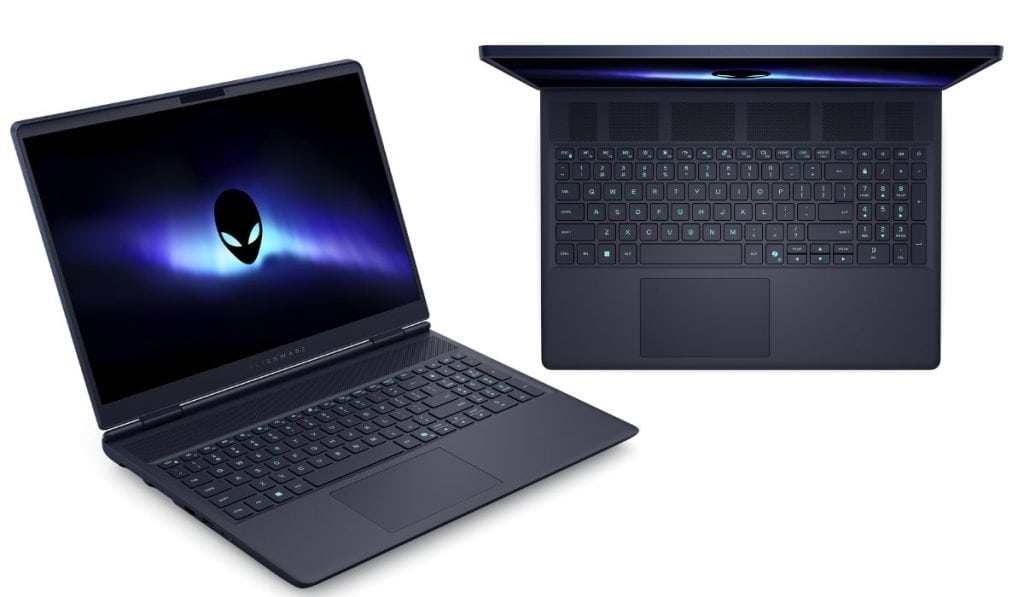
Dell Updates Alienware Lineup With New Area-51 and 16X Aurora Laptops

Dell has officially expanded its gaming portfolio by introducing the latest Alienware laptops. The company recently released the flagship Area-51 and the highly portable 16X Aurora, bringing serious hardware upgrades to the consumer market. Both machines feature Intel’s new Core Ultra 9 290HX Plus processors and Nvidia GeForce RTX 50-series graphics, offering buyers configuration options that scale up to a powerful RTX 5090.

Alienware area-51 features and performance

The Area-51 is built for maximum power, available in both 16-inch and 18-inch sizes. It introduces a new Cryo-Chamber thermal architecture that supports up to 280W of power on the larger model. The cooling system utilizes vapor chambers and large fans to manage high temperatures during intense sessions.

Buyers can equip these systems with up to 64GB of DDR5 RAM, 12TB of RAID storage, and graphics cards up to the Nvidia GeForce RTX 5090. Display options include anti-glare OLED panels with 240Hz refresh rates on the 16-inch version and 300Hz LCD screens on the 18-inch model. Pricing for the base 16-inch Area-51 starts at $3,569.99, but fully loaded versions can reach around $8,500.

Alienware 16x aurora focuses on mobility

The 16X Aurora targets users who want high performance in a more compact form factor. Weighing just 2.66kg and measuring 19.2mm at its front edge, it occupies nearly half the volume of the 16-inch Area-51.

Despite its slimmer profile, it retains an anti-glare 16-inch OLED display running at 240Hz. Configurations start at $2,119, offering an Intel Core Ultra processor paired with an Nvidia GeForce RTX 5060, and can be upgraded to an RTX 5070 Ti.

It is designed to balance gaming capabilities with creative work, giving users a lighter device to carry without sacrificing frame rates or visual quality.

Via Notebookcheck

Modder turns the Asus ROG Ally X into a portable 3D scanning rig

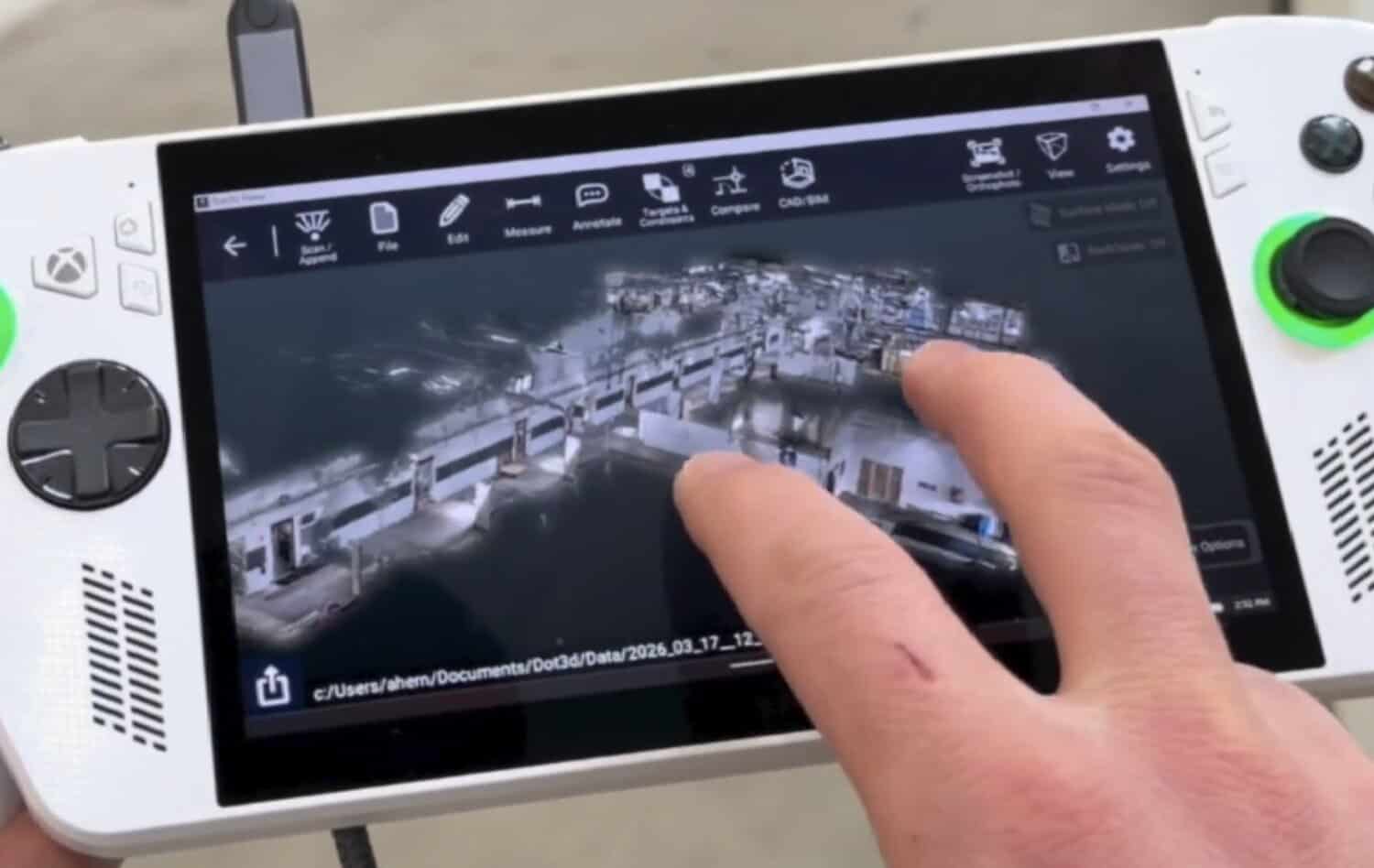
A creative hardware combination is proving that modern gaming handhelds have enough raw processing power to handle demanding professional tasks. A recent demonstration posted online showed a user successfully transforming the Asus ROG Xbox Ally X into a fully mobile 3D scanning rig.

This completely self-contained setup allows users to securely capture and map entire indoor environments in real time without needing to carry a bulky laptop or a stationary tripod.

There’s a mix of hardware and software in the 3D scanning rig

The custom build relies on a few specific components working together. The creator mounted an Orbbec Gemini 336L depth sensor to the back of the Asus handheld and connected the two devices using a standard USB cable. Because the Asus system functions as a full Windows computer, it can run the desktop version of the Dot3D scanning software natively.

The onboard Ryzen Z1 series processor easily handles the incoming depth data visualization, mesh reconstruction, and file processing entirely on the fly. This means the operator can monitor the live scanning interface directly on the touch screen while walking down hallways and mapping small rooms.

There are some tradeoffs of a handheld scanner

While the demonstration video shows a fully navigable layout complete with pinch-to-zoom controls, this configuration does have some noticeable limitations. The generated 3D meshes occasionally display visual noise and incomplete structural details, particularly near room ceilings and sharp wall edges.

The setup also carries a steep financial requirement. The Orbbec camera alone costs around $379, and the required Dot3D professional scanning software typically charges an annual subscription fee of roughly $1,000, placing this well outside the budget of casual hobbyists.

Can be used for practical applications

Despite the minor visual artifacts and high software costs, the project highlights a highly practical alternative for real estate mapping and basic indoor construction planning. Using a portable gaming console is drastically lighter than hauling traditional professional scanning gear.

For professionals who already pay for the required mapping software, swapping a standard work laptop for this handheld could make their daily workflow much more mobile and physically comfortable.

Via Notebookcheck

Microsoft adds 30 new titles to Xbox Play Anywhere for March 2026

Microsoft has expanded its Xbox Play Anywhere lineup by adding 30 new games in the latest March 2026 store update. This feature lets you buy a digital game once and play it on both your Xbox console and Windows PC without paying extra. It also syncs your saved data, allowing you to pick up exactly where you left off, regardless of the platform you choose to play on.

This batch includes a solid mix of anticipated indie releases and classic remasters.

Standout titles in the new wave

Square Enix is continuing its support for the program by bringing the Bravely Default Flying Fairy HD Remaster to the service, marking its sixth title on the platform this year. Other notable inclusions are the retro-style shooter Mouse: P.I. For Hire, the fantasy beat ’em up Absolum, and the arcade racer Screamer.

Full list of new supported games

  • Absolum – Xbox Series X|S, Xbox PC
  • Adorable Adventures – Xbox Series X|S, Xbox One, Xbox PC
  • Basketball Classics – Xbox Series X|S, Xbox One, Xbox PC, Xbox Handheld
  • Bravely Default Flying Fairy HD Remaster – Xbox Series X|S, Xbox One, Xbox PC
  • Bubsy 4D – Xbox Series X|S, Xbox One, Xbox PC, Xbox Handheld
  • CALX – Xbox Series X|S, Xbox One, Xbox PC
  • Car Dealer Simulator – Xbox Series X|S, Xbox PC, Xbox Handheld
  • CyberBlocker Complete Edition – Xbox Series X|S, Xbox One, Xbox PC, Xbox Handheld
  • Decollate Decoration – Xbox Series X|S, Xbox One, Xbox PC, Xbox Handheld
  • Delphinium – Xbox Series X|S, Xbox One, Xbox PC
  • Dinobreak – Xbox Series X|S, Xbox One, Xbox PC
  • Dosa Divas – Xbox Series X|S, Xbox PC, Xbox Handheld
  • Dead Reset – Xbox Series X|S, Xbox One, Xbox PC, Xbox Handheld, Xbox Cloud
  • GluMe – Xbox Edition – Xbox Series X|S, Xbox One, Xbox PC
  • Mouse: P.I. For Hire – Xbox Series X|S, Xbox PC, Xbox Handheld
  • Musical Vibes RX – Xbox Series X|S, Xbox One, Xbox PC, Xbox Handheld, Xbox Cloud
  • Only Up Rush – Xbox Series X|S, Xbox PC, Xbox Handheld
  • Öoo – Xbox Series X|S, Xbox PC
  • Outbreak: Shades of Horror – Xbox Series X|S, Xbox One, Xbox PC
  • Outbreak: Shades of Horror Chromatic Split – Xbox Series X|S, Xbox One, Xbox PC
  • PBA Pro Bowling 2026 – Xbox Series X|S, Xbox PC
  • Rhythm Towers – Xbox Series X|S, Xbox One, Xbox PC
  • Rover’s Tale – Xbox Series X|S, Xbox PC
  • Screamer – Xbox Series X|S, Xbox PC
  • The Isle Tide Hotel – Xbox Series X|S, Xbox One, Xbox PC, Xbox Handheld, Xbox Cloud
  • The Legacy of Griselda – Xbox Series X|S, Xbox PC
  • The Shapeshifting Detective – Xbox Series X|S, Xbox One, Xbox PC, Xbox Handheld, Xbox Cloud
  • The Wellmonts Case – Xbox Series X|S, Xbox PC
  • Thomas & Friends: Wonders of Sodor – Xbox Series X|S, Xbox One, Xbox PC, Xbox Handheld
  • Trash Goblin – Xbox Series X|S, Xbox PC, Xbox Handheld

More additions on the horizon

This latest wave of games adds massive value to the Xbox ecosystem, bringing the total number of supported titles even higher for 2026. Microsoft is clearly committed to bridging the gap between console and PC, meaning players can expect even more Play Anywhere announcements in the coming months.

Via True Achievements

Copilot Blunder Shows Two Start Menus in an Official Windows Guide

Microsoft recently published official instructional guides in its Windows Learning Center using AI-generated images instead of standard product screenshots. While the visuals look fairly polished at a glance, they contain some very obvious technical mistakes.

As per the folks over at Windows Latest, the images generated by the company’s own Copilot chatbot display a Windows 11 taskbar with two separate Start menus, creating a confusing situation for users seeking accurate help.

A confusing experience for users

The inclusion of these flawed images could easily mislead people who visit the Windows Learning Center for troubleshooting. If someone sees an official Microsoft guide showing two Start buttons, they might assume something is broken on their own computer. The company clearly labeled the visuals as AI art created by Copilot.

Still, placing them in basic support documentation remains a questionable choice when real screenshots are so readily available.

AI reliability remains a challenge

This incident highlights the ongoing reliability issues surrounding generative AI tools. Microsoft regularly warns users that Copilot can make factual and visual mistakes, yet the tech giant still relies on the chatbot for its own technical materials. The blunder comes just as Microsoft is trying to improve overall user sentiment around Windows 11.

Recent efforts include acting on community feedback and scaling back plans to force AI features into core system menus.

Via Windows Central

Windows 11 version 26H1 lifecycle dates confirmed for new Arm PCs

Microsoft has officially outlined the support lifecycle for Windows 11 version 26H1. This specific release is an offshoot built entirely for next generation Arm processors like the upcoming Snapdragon X2 and NVIDIA N1X chips.

If you plan to buy one of these new machines, you will want to know exactly how long Microsoft intends to provide software updates and security patches before forcing a larger system upgrade.

These are the support timeline details

For everyday users running the Home or Pro editions of Windows 11, support for version 26H1 began on February 10, 2026, and will officially end on March 14, 2028. This provides a standard two-year window for consumer devices. Those using Enterprise and Education editions get an extra year.

Their support lifecycle extends until March 13, 2029. Microsoft also confirmed that it will not release an IoT Enterprise edition for this specific version.

Hardware requirements and future upgrades

You cannot simply download version 26H1 as a standard update for your current computer. Microsoft designed this release specifically for the new ARMv9 architecture. The only official way to get it is by purchasing a device with the software preinstalled. The first wave of Snapdragon X2 laptops will launch with 26H1 out of the box starting next month. Eventually, Microsoft plans to bring all users back onto the same software track.

The company expects to merge these specific devices into the mainstream release when version 27H2 launches toward the end of 2027.

Via Windows Central

How OpenClaw and API-Driven Workflows Are Redefining Windows Productivity

Windows users have always had a taste for automation. From the earliest batch scripts and scheduled tasks to PowerShell pipelines and, more recently, Power Automate, the OS has long rewarded those willing to push past the graphical interface. That tradition is now colliding head-on with the autonomous AI agent era — and the results are genuinely exciting.

Microsoft Copilot introduced millions of users to conversational AI inside Windows. But useful as it is, Copilot still operates in a fundamentally reactive mode: you ask, it answers. The moment you close the chat window, the workflow stops.

Enter OpenClaw — an open-source autonomous AI agent that runs persistently on your local machine and actually does things while you’re away from the keyboard. Since its launch in late 2025, OpenClaw surpassed 250,000 GitHub stars by February 2026, growing faster than Docker, Kubernetes, or React ever did. It’s a sign that developers are hungry for something more than another chatbot.

The Prompt Fatigue Problem

There’s a quiet crisis in knowledge worker productivity, and it has nothing to do with motivation.

According to Asana’s State of Work Innovation research, 60% of work time is now spent on “work about work” — activities like searching for information, switching between applications, managing communications, and attending status updates. Only 40% of the day is left for the skilled, strategic output employees were actually hired to deliver.

For AI users, a new version of this problem has emerged: prompt fatigue. Every day, millions of people are copying text into browser tabs, uploading files manually, waiting for outputs, then downloading and re-filing results. The interface has changed; the drudgery hasn’t.

Research shows that knowledge workers spend an average of 209 hours per year on redundant tasks — and the copy-paste loop between AI tools is rapidly becoming one of the biggest contributors.

The logical fix isn’t a better prompt. It’s eliminating the human from the loop entirely for tasks that don’t require human judgment.

From Chat to Orchestration: The API-Driven Shift

This is where architectural thinking gets interesting.

OpenClaw runs locally and is designed to integrate with external large language models like Claude, DeepSeek, or GPT. It can read and write files, run shell commands, execute scripts, and browse the web — with full access or in a sandboxed environment, your choice.

On Windows, this means OpenClaw can sit as a background service, watch folders, respond to file system events, and trigger cloud API calls without you lifting a finger. The local machine handles orchestration and file management. The heavy computational lifting — transcription, clipping, summarization, translation — gets offloaded to purpose-built cloud services.

The result is a background automation pipeline: your Windows PC becomes the conductor, and specialized APIs become the orchestra.

This model matters for a practical reason. Video processing, for example, is brutally resource-intensive on consumer hardware. Rendering a 4K clip, running speech-to-text across a two-hour recording, or analyzing hundreds of timestamps for viral moments will peg your CPU for minutes or hours. Offloading that to cloud infrastructure frees your machine for everything else — and typically gets the result back faster.

Three Media Workflows You Can Build Today

Video and media are among the most time-consuming categories of Windows work. Here’s how an OpenClaw + cloud API setup can transform three common scenarios.

Scenario A: Autonomous Clip Generation from OBS Recordings

Content creators recording with OBS or any other capture tool know the post-session grind: scrubbing through an hour of footage to find the five moments worth sharing.

With an automated pipeline, OpenClaw monitors a designated Windows folder. The moment a new recording lands there, it triggers a call to the WayinVideo API, a cloud-based video intelligence platform.

WayinVideo’s API can automatically generate hundreds of clips from long videos, add animated captions in 100+ languages, and adapt content to different platform aspect ratios — all through a simple RESTful interface accessible via straightforward HTTP calls from any programming language or automation platform.

OpenClaw then receives the resulting clips and sorts them into labeled subfolders by platform format — vertical for TikTok and Reels, horizontal for YouTube. No manual scrubbing, no upload/download cycle. The creator comes back to a fully processed content library.

Scenario B: Automatic Subtitle Extraction for Cross-Language Teams

For global teams or multilingual creators, subtitle generation is a persistent bottleneck. Professional subtitling services are expensive; manual timecoding is tedious; browser-based tools require constant babysitting.

An OpenClaw-driven pipeline changes the calculus entirely. As new video files arrive — whether from a shared drive sync or a local recording — OpenClaw queues them for processing via the WayinVideo API.

The API delivers real-time subtitles, speaker-labeled transcripts, and instant translations across more than 100 languages, supporting all kinds of video and audio content.

Completed subtitle files can be exported in SRT or TXT format, with optional timestamps. OpenClaw writes these files directly alongside the source video, keeping your directory structure clean. For a localization team processing dozens of assets weekly, this alone can reclaim several hours every month.

Scenario C: Batch Meeting Summarization to Obsidian or Word

The average employee now spends 11.3 hours per week in meetings — and most Teams or Zoom recordings sit unwatched in cloud storage, their insights permanently buried.

An OpenClaw pipeline running overnight can change that. Point it at your local recordings folder, and it submits each video to the WayinVideo API for summarization.

WayinVideo generates summaries with timestamped citations, speaker labels, and searchable transcripts — designed to be guesswork-free, with every key point grounded in the source video.

OpenClaw then takes the output and writes structured Markdown files — complete with timestamps, topic headers, and key action items — directly into your Obsidian vault or a designated Word document folder. By the time you start your day, every meeting from the previous 24 hours has a clean, searchable summary waiting for you.

A Note on Security: Don’t Skip This Part

Granting an AI agent access to local files and API credentials is a meaningful security decision, and it deserves honest treatment.

OpenClaw can access email accounts, calendars, messaging platforms, and other sensitive services, which means misconfigured or exposed instances present real security and privacy risks. The agent is also susceptible to prompt injection attacks, where harmful instructions embedded in data can be interpreted as legitimate commands.

For Windows users building these pipelines, a few practical guardrails are worth adopting from the start:

Use WSL for isolation. Running OpenClaw inside Windows Subsystem for Linux creates a natural boundary between the agent’s file system access and your main Windows environment.

Store API keys in environment variables, not plaintext files. Any API key stored in a script or config file is one directory listing away from being exposed.

Scope folder permissions explicitly. Configure OpenClaw to watch only the specific folders relevant to each workflow. Blanket access to your entire user directory is unnecessary and risky.

Cybersecurity researchers have noted that OpenClaw requires broad permissions to function effectively, and Cisco’s AI security team found that third-party skills can perform data exfiltration without user awareness. Sticking to well-audited, community-reviewed skills significantly reduces that surface area.

The Bigger Picture: Windows as an Orchestration Layer

What’s taking shape here is a fundamental repositioning of what a Windows desktop is for.

The PC doesn’t need to be the processor anymore. It needs to be the orchestrator — the system that knows your files, understands your workflows, monitors for the right triggers, and dispatches work to best-in-class cloud services at the right moment.

OpenClaw supplies the local intelligence and execution layer. Specialized APIs like WayinVideo supply the domain-specific heavy lifting — video clipping, multilingual transcription, content summarization — that no local model can match at speed and scale.

About 75% of knowledge workers say AI helps them save time, focus better, and feel more creative — but that stat is largely based on using AI tools interactively. The next wave of productivity gains will come from AI that runs without interaction at all.

The power users who build these pipelines now won’t just be more productive. They’ll be operating on a fundamentally different workflow architecture than everyone still copy-pasting into browser tabs.

This Weekend’s Free Play Days Lets All Xbox Players Try Trailmakers, Sea of Thieves & More For Free

It’s Thursday again, which means we’ve got yet another Xbox Free Play Days lineup. This, weekend, from March 19 to March 22, Xbox Game Pass Ultimate, Premium, and Essential members can play Totally Reliable Delivery Service and Hell Let Loose. Meanwhile, Sea of Thieves, Trailmakers, and Firefighting Simulator: Ignite are open to all Xbox players.

Totally Reliable Delivery Service is a physics-driven chaos fest for up to four players. Fire up your delivery truck, team up with friends, and navigate wacky gadgets and obstacles to get packages safely to their destinations. You can also grab it during this weekend for just $2.99. Meanwhile, Hell Let Loose ramps up the action with 50v50 World War II battles. Infantry, tanks, artillery, and shifting frontlines demand teamwork and strategy to survive and win.

Trailmakers, is where you build vehicles, aircraft, or contraptions, then test them in a dynamic open world. Multiplayer lets you improve designs and compete with friends in high-speed challenges. If you are eyeing to play it past the free weekend, don’t forget to grab it at discounted price of $23.99.

Firefighting Simulator: Ignite, which is also available at discounted price of $23.99, puts you on the front lines, battling unpredictable blazes with up to three friends or NPC teammates. Last but not least, Sea of Thieves: 2025 Edition celebrates its eighth anniversary. From March 19 to 24, players can set sail for free, whether it’s your first Maiden Voyage or you’re recruiting new crewmates for adventures across the seas. It’s also discounted for Free Play Days, grab it now for $19.99.

Speaking of games, it should be noted that March Wave 2 lineup for Xbox Game Pass members is out with some blockbusters additions like Disco Elysium, Resident Evil 7, Final Fantasy IV, and more.

Microsoft Plans Xbox Japan Expansion With New Regional Lead Hiring

Microsoft continues to push Xbox growth in Japan, a market where the brand has historically struggled to gain strong traction.

According to Windows Central, the company is now hiring an ID@Xbox Regional Lead for Japan, a move that highlights a renewed focus on improving relationships with local developers and strengthening its presence in the region.

Microsoft reinforces its Japan strategy

Japan remains a difficult market for Xbox despite steady global expansion. While Microsoft has made progress in recent years, it still faces strong competition from platforms with deeper regional ties.

The company has managed to secure support from major Japanese franchises such as Final Fantasy, Yakuza, Dragon Quest, and Persona, signaling improved cooperation with large publishers. Even so, several notable developers, including Nihon Falcom and Cygames, continue to bypass Xbox entirely.

At the same time, some publishers still prioritize PlayStation through exclusivity deals. Konami, for example, continues to align key releases with Sony, and upcoming Silent Hill titles are expected to remain PlayStation-exclusive.

New role aims to strengthen developer ties

To address these gaps, Microsoft is hiring a dedicated ID@Xbox Regional Lead focused on Japan. The role centers on building stronger relationships with indie and digital-first developers while improving the overall onboarding experience.

The position involves managing partnerships, supporting publishing efforts, and promoting the Xbox platform across Japan’s development ecosystem. It also requires deep knowledge of the local market and the ability to communicate effectively with Japanese studios.

Addressing past criticism and platform friction

Microsoft has already paid out billions through the ID@Xbox program, but the initiative has faced criticism from developers who point to slow processes and inconsistent communication.

By investing in a local leadership role, Microsoft aims to resolve these concerns and present Xbox as a more reliable and developer-friendly platform. The company is also working to reduce friction and simplify how developers bring games to its ecosystem.

As part of that effort, Microsoft recently introduced PlayFab Foundation Mode, designed to better explain its cross-platform services and make integration easier for developers.

Broader Xbox ambitions remain unchanged

The hiring effort reflects Microsoft’s wider strategy to expand the Xbox ecosystem globally while improving regional relevance.

Strengthening its position in Japan could help the company secure more local content and better compete with PlayStation in one of the most influential gaming markets. At the same time, Microsoft continues to invest in future technologies and services, including upcoming Copilot integration for Xbox and advancements like Neural Rendering and DirectX Raytracing 2.0.

Crimson Desert Launches Today, Release Time Confirmed for All Time Zones

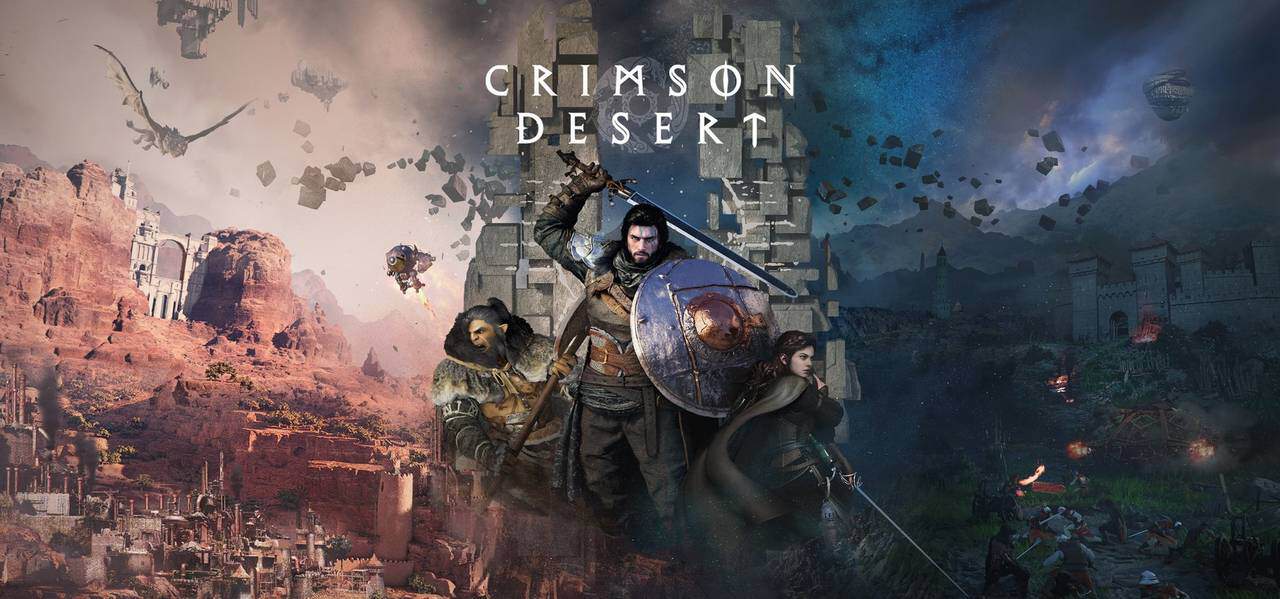
Crimson Desert officially launches worldwide on March 19, 2026, with preload access having gone live earlier on March 17 across PC, PlayStation 5, and Xbox Series X|S. According to IGN, players who already downloaded the game can jump in as soon as servers unlock globally.

The release follows strong anticipation, with the title already surpassing 400,000 pre-orders on Steam ahead of launch.

Day-One Setup Requires Internet Connection

Players will need an internet connection during the initial setup phase to download and apply the mandatory day-one patch. After completing installation and updates, the game supports offline play, allowing users to continue without a constant connection.

This approach aligns with modern AAA releases, where large patches refine performance and stability at launch.

Advanced Graphics Features Highlight PC Version

The PC version of Crimson Desert introduces a range of advanced visual technologies aimed at maximizing performance and image quality.

Support includes AMD FSR 3 and 4, alongside Nvidia DLSS 4 and 4.5. The game also integrates ray tracing enhancements such as Ray Regeneration for FSR and Ray Reconstruction for DLSS. Frame generation is available as well, though limited to PC and Mac platforms.

Console Versions Offer Multiple Graphics Modes

On consoles, Crimson Desert delivers optimized performance through platform-specific technologies. PlayStation 5 Pro benefits from an upgraded PSSR implementation, while standard PS5 and Xbox Series X|S rely on FSR 3.

Players can choose between performance, balanced, and quality modes depending on their preferences. However, the Xbox Series S version does not include a balanced mode option.

What Time Does Crimson Desert Release

The game launches simultaneously worldwide, ensuring a synchronized rollout across all regions. Players can access the game at 3 PM PT / 6 PM ET / 10 PM UK time on March 19. You can find global launch dates below:

  • Los Angeles: 3 PM, March 19
  • Dallas: 5 PM, March 19
  • New York: 6 PM, March 19
  • Sao Paulo: 7 PM, March 19
  • London: 10 PM, March 19
  • Berlin: 11 PM, March 19
  • Paris: 11 PM, March 19
  • Cape Town: 12 AM, March 19
  • Istanbul: 1 AM, March 20
  • Dubai: 2 AM, March 20
  • Singapore: 6 AM, March 20
  • Beijing: 6 AM, March 20
  • Seoul: 7 AM, March 20
  • Tokyo: 7 AM, March 20
  • Sydney: 9 AM, March 20

Strong Preorders, But Mixed Early Reception Impacts Stock

Despite strong preorder numbers, early reactions to Crimson Desert appear mixed. Following initial impressions and reviews, Pearl Abyss has reportedly seen its stock drop by around 30%.

The market reaction suggests uncertainty around the game’s long-term performance, even as player interest remains high heading into launch.

Fortnite Showdown Chapter 7 Season 2: Everything You Need to Know

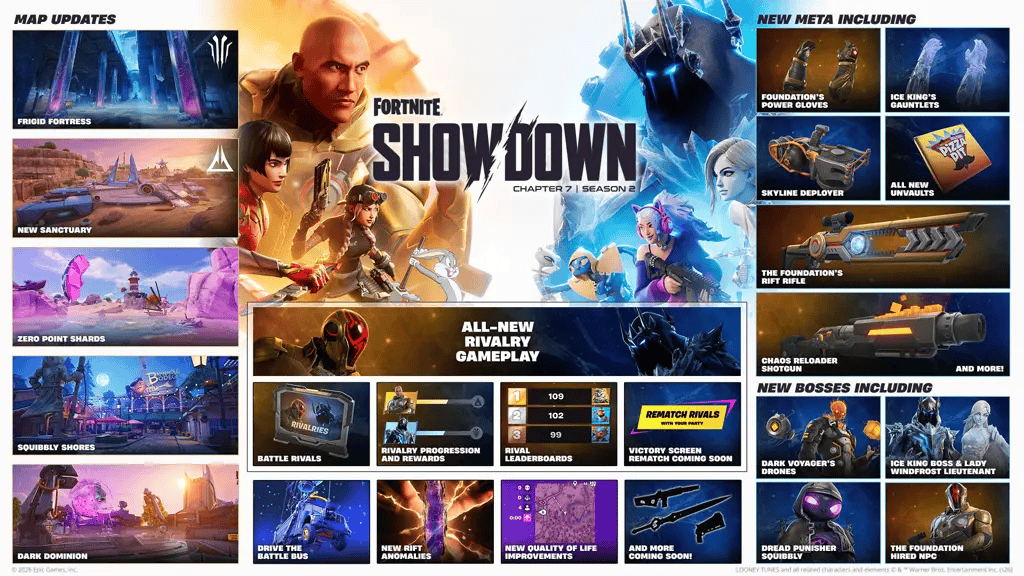
Fortnite has officially kicked off a new Battle Royale season, and this one feels a lot more layered than usual. Epic Games is calling it Fortnite Showdown, and it introduces a season-long team rivalry system that directly impacts gameplay, rewards, and progression. As of now, the moment you log in, you are forced to pick a side: Team Foundation or Team Ice King.

Fortnite Showdown adds team choice, rivalries, and new mechanics

The update comes from Epic Games, which confirms that your team selection will influence the weapons added throughout the season. At the end, the winning side unlocks exclusive outfit styles for Battle Pass owners, giving the whole season a competitive direction beyond just matches.

The biggest gameplay shift is the Rivalry system. You can now challenge players mid-match, earn Rival Credits, and spend them on perks like Exotic weapons, infinite Slap, or XP bundles. These credits carry across matches, and the more rivalries you win, the higher you climb across 20 ranks with better rewards.

Epic has also added a Global Leaderboard Challenge, where players can earn cosmetics and even compete for rewards like an NVIDIA GeForce RTX 5080, a PS5, and Fortnite merch.

On the gameplay side, the loot pool has been heavily refreshed. New weapons like the Vector 7 DMR, Chaos Reloader Shotgun, and Skyline Deployer are now live, alongside returning weapons like Combat AR and Twin Mag SMG. Special mythics tied to each team, including Ice King’s Gauntlets and Foundation’s Rift Rifle, are also part of the mix. The map gets new POIs as well, including Sanctuary, Frigid Fortress, Dark Dominion, and Squibbly Shores.

Image credit: Epic Games

New modes, Battle Pass perks, and seasonal twists

Epic is also adding Arenas on April 9, a new ranked, build-only mode featuring 1v1 fights and 16-player competitions. There’s also a new Battle Bus mechanic where one player drives each match, earning XP for everyone.

Image credit: Epic Games

Rift anomalies now dynamically change matches, while a Returning Player Modifier helps ease players back into the game. On top of that, a new Battle Pass is live, offering rewards like Ice King cosmetics, Elite Jules, and more, with early bonuses available for those who unlock it before March 26.

All that said, this season feels like a clear attempt to push Fortnite into a more competitive and evolving experience. Whether the permanent team choice and rivalry system pays off long-term is something we’ll have to see over the coming weeks.

Fixes and improvements

Apart from everything announced for the new season, here are some changes and improvements made to the game.

PC IMPROVEMENTS & FIXES

  • Addressed several high-profile crashes, especially affecting competitive play and asset streaming.
  • Improved Intel GPU stability for most modern GPUs.
  • Fixed an issue where players would crash on launching the game, particularly players on Intel CPUs.
  • We’ve deployed a set of changes that will allow us to address a wide variety of PC crashes immediately, without waiting for a patch or hotfix.

GENERAL IMPROVEMENTS & FIXES

  • Teammates’ icons are now anchored to the edge of the minimap when far away, showing where they are even if not nearby. 
  • Added the ability to keymap a second ping button when viewing the map in fullscreen.
  • You can now open Chests more reliably while moving.
  • You can now hurdle through windows more reliably while strafing or looking up.
  • Fixed an issue that blocked players from passing through windows broken with certain assault rifles and snipers.
  • You can now bash into open doors to close them. No more being blocked by wide open doors getting in the way.
  • You can now initiate conversations with Characters from farther away.
  • Items on the ground no longer appear invisible.
  • Pickup interactions will more reliably filter out items you can’t use.
  • We’ve added a little extra time between a Victory Royale and the post-match screen so you can celebrate that W longer.
  • Your Emotes, Jam Tracks, and car items will now shuffle correctly when using randomized presets or loadouts.
  • You can now cancel location pings more easily by re-pinging the location rather than having to target the ping icon. 
  • Custom build binds assigned to “R” now work when you’re not building.
  • On keyboard + mouse, pressing Esc with the inventory screen open will now close the menu instead of opening the Escape menu.
  • (Reload) Fixed an issue with Morphite weapons not reliably firing or reloading.

If you wish to learn everything about the Fortnite Showdown Chapter 7 Season 2, make sure to check this release note.

Take-Two CEO Confident PS6 & Next-Gen Xbox Won’t Face Delays Despite Memory Crunch

If you have been following the next-gen console cycle, we believe you have gone through multiple reports hinting at delays for both Sony and Microsoft’s upcoming gaming consoles.

Almost every report that talked about PS6 or next-gen Xbox linked the delay to the ongoing situation of memory and storage issues. Some news outlets even went on to claim that Sony is reportedly considering a delay to 2028 or even 2029.

Take-Two CEO isn’t worried about PS6 and next-gen Xbox delays

However, a fresh statement from Take-Two’s CEO is now pushing back against the delay concerns. Despite what online reports suggest, CEO Strauss Zelnick doesn’t seem worried.

In a recent interview with The Game Business, he stated that the current component pricing and supply situation is not expected to affect the delivery of next-generation consoles to the market (via Wccftech).

Yes, it’s a brief statement, but given Take-Two’s position in the gaming industry as one of the biggest publishers, it carries weight. It’s not just the Take-Two CEO who is confident about PS6 and the next-gen Xbox console (Project Helix). Earlier this month, a well-known tipster, KeplerL2, also claimed that PS6 is still “on track” for a Holiday 2027 launch.

While Sony’s timeline appears uncertain, Microsoft hasn’t faced the same level of scrutiny so far. That said, reports from GDC suggesting next-gen Xbox “Project Helix” developer kits could arrive in 2027 have led to speculation that the console itself might launch later in the year.

At a time when hardware timelines are closely tied to major game releases, comments like this suggest that publishers may still be planning around a fairly stable launch window. While exact dates remain unclear, it appears that not everyone in the industry is convinced that delays are inevitable.

Asha Sharma Kicks Off Xbox Leadership With Rapid Update Rollout

Microsoft is moving quickly under new leadership, and early changes are already reaching Xbox users. Following Phil Spencer’s recent retirement, new Xbox CEO Asha Sharma is signaling a renewed focus on the console experience, starting with a fresh Insider update.

New Xbox Insider Update Brings Long-Requested Features

According to reports from TrueAchievements, Microsoft has rolled out a new Xbox update for Insiders that introduces meaningful customization options and quality-of-life improvements.

The highlight features include the ability to disable Quick Resume and greater control over the console’s user interface. These changes address long-standing requests from the Xbox community, particularly from players who prefer manual session management over automatic game suspension.

Rapid Development Signals New Direction

Asha Sharma described the update as an early win in her tenure, noting that the features were developed in just two weeks. That rapid turnaround suggests a more agile and feedback-driven approach compared to previous update cycles.

Sharma also encouraged players to continue sharing feedback, reinforcing a strategy centered on community input and faster iteration.

Console Experience Back in Focus

The quick rollout aligns with Microsoft’s renewed emphasis on console gaming, a shift that leadership has recently reaffirmed. For years, Xbox strategy leaned heavily toward services like Game Pass and cross-platform integration, sometimes at the expense of core console features.

This update indicates a rebalancing effort, with more attention now given to improving the day-to-day console experience.

At the same time, Microsoft appears to be quietly moving away from its earlier “This is an Xbox” campaign. The company is now focusing on a new direction tied to Project Helix, signaling broader changes in branding and strategy.

While it remains early in Sharma’s tenure, this update suggests a more responsive Xbox ecosystem, one that prioritizes user feedback and delivers improvements at a faster pace.

Modder Gets Windows 98 Working on Legacy Internet Appliance

A retrocomputing experiment has successfully brought Windows 98 to an unlikely device: an old internet appliance. As reported by Windows Central, the project highlights how legacy hardware can still run classic operating systems with the right workarounds.

Running Windows 98 on the Compaq iPAQ IA-2

The project was carried out by Dave Luna, known for his “Dad’s Computer Lab” YouTube channel. He managed to get Windows 98 running on the Compaq iPAQ IA-2, a device originally designed for basic internet access.

The IA-2 shipped with Windows CE and relied on MSN dial-up services, making it far from a typical Windows 98 machine. Its hardware and firmware imposed strict limitations, preventing standard installation methods.

Overcoming Hardware and BIOS Limitations

To make the project possible, Luna had to bypass several key restrictions. The device was not designed to boot from external drives or alternative media, which required creative solutions.

He wrote MS-DOS directly to the device’s 16MB flash storage, then used a chain-boot method to load Windows 98. He also modified how the system detected storage, tricking it into recognizing an IDE drive as an ATAPI device to bypass BIOS limitations.

These steps allowed the system to boot into Windows 98 despite its original constraints.

Performance and Hardware Constraints

The Compaq iPAQ IA-2 runs on a 266 MHz Geode GX1 processor with up to 256MB of SDRAM. While modest even by late 1990s standards, the hardware proved capable of running Windows 98 in a limited capacity.

Performance remains constrained, but the system can handle lightweight applications. Notably, it can run classic software like DOOM, demonstrating the success of the experiment.

A Proof of Concept, Not a Practical Setup

This project serves as a proof of concept rather than a practical solution. It shows what is technically possible when working around firmware and hardware limitations in legacy systems.

While the setup is not suitable for everyday use, it offers valuable insight into low-level system behavior and creative problem-solving in retrocomputing.

In more recent news, Microsoft has reportedly paused the automatic rollout of Copilot for Microsoft 365 and scaled back plans to integrate Copilot into notifications and system settings.

Separately, reports suggest Microsoft could pursue legal action involving OpenAI and Amazon over a new AWS-related deal, signaling rising tensions in the AI and cloud space.

Opera GX Finally Lands on Linux with Built-in VPN & Ad Blocker

If you have been waiting for Opera GX to land on Linux, the wait is finally over. Today, Opera officially announced that its gaming-focused browser is now available on Linux. The company says it is committing long-term support with a dedicated team focused on bug fixes, updates, and improvements tailored for the Linux community.

Opera GX arrives on Linux with gaming-focused and privacy features

Opera GX for Linux includes GX Control, which allows users to limit RAM and network usage so games can run smoothly in the background. There’s also a Hot Tabs Killer feature that helps shut down resource-heavy tabs instantly. Besides performance, Opera GX also integrates platforms like Discord and Twitch directly into the sidebar. It means that you can chat or watch streams without constantly switching tabs, which should make multitasking a lot smoother.

On the customization front, Opera GX continues to lean heavily into personalization. You can tweak themes, sounds, shaders, and even core UI elements. Meanwhile, the GX Store offers thousands of mods, many created by the community, ranging from game-inspired themes to more experimental designs.

Privacy is another area Opera is highlighting for Linux users. The browser includes built-in ad and tracker blockers, along with a zero-log VPN. Opera also claims that it does not track browsing history, location data, or search queries, aligning with what many Linux users expect.

As for availability, Opera GX supports major Linux distributions like Ubuntu, Debian, Fedora, and OpenSUSE. Installation can be done using .deb or .rpm packages, making it fairly straightforward for most users. Moreover, it’s worth noting that Opera has also pushed version 129 to the stable channel, updating it to Chromium 145 while introducing deeper AI integration via Google’s Gemini.

Steam Spring Sale 2026: Start Time, Date & Games Likely to Get Discounts

If you have been waiting for the Steam Spring Sale 2026, well, it’s finally here. It’s a week-long sale event that brings one of the biggest discounts for PC gamers out there. It’s worth noting that Valve recently teased the sale, and as of now, it’s officially underway with deals across hundreds of titles. If you’ve been holding off on buying games, this is easily one of the best times to jump in.

When does the Steam Spring Sale 2026 start and end

Valve has confirmed that the Steam Spring Sale 2026 began on March 19 at 10 AM PT. The sale will run until March 26, giving you a full week to grab deals before prices return to normal. Here’s the start time for the Steam Spring Sale 2026 for different time zones:

  • New York: 1 PM ET (March 19)
  • Los Angeles: 10 AM PT (March 19)
  • Tokyo: 3 AM JST (March 20)
  • Mumbai: 11:30 PM IST (March 19)
  • London: 6 PM GMT (March 19)
  • Berlin: 7 PM CET (March 19)
  • Sydney: 5 AM AEDT (March 20)
  • Auckland: 7 AM NZDT (March 20)

Once the sale goes live, discounts are applied instantly and remain consistent throughout the event. So, there’s no need to worry about missing out on flash deals or limited-time price changes.

Which games are getting discounts in the Steam Spring Sale 2026

According to Valve’s teaser, the sale includes a mix of popular multiplayer titles and big-name releases:

  • Satisfactory
  • RV There Yet?
  • Manor Lords
  • Dave the Diver
  • No Man’s Sky
  • Pathologic 3
  • The Outlast Trials
  • YAPYAP
  • ROUTINE
  • Strange Antiquities
  • A Little to the Left
  • Euro Truck Simulator 2
  • Avatar: Frontiers of Pandora
  • Terraria
  • Raft
  • The Forest
  • Ready or Not
  • MENACE
  • UNBEATABLE
  • Sons of The Forest
  • Demeo x Dungeons & Dragons: Battlemarked
  • BeamNG.Drive

Besides the aforementioned ones, Polygon reports that the deep section cut will include some blockbuster titles mentioned below:

  • Resident Evil 3 Remake
  • Fallout: New Vegas
  • Cyberpunk 2077
  • Red Dead Redemption 2
  • Star Wars: Jedi: Survivor
  • Vampyr
  • Metro: Last Light Redux
  • Danganronpa 2: Goodbye Despair

Not to forget, some studios already have discounts lined up across their games, DLCs, and bundles. But they aren’t available as of now; you can grab them once the sale is live later today. These are some of the

  • Hotel Architect
  • KARMA
  • Kingdom Rush Vengeance
  • Kingdom Rush Alliance
  • Kingdom Rush Frontiers
  • Kingdom Rush Origins
  • Pirate Kings
  • Jusant
  • Koira
  • Banishers: Ghosts of New Eden
  • Harmony: The Fall of Reverie
  • Gerda: A Flame in Winter

All that said, don’t expect major discounts on newly released 2026 titles like Crimson Desert. These usually see smaller price drops or none at all. Still, if you’ve been waiting to pick up older or trending games, this Steam Spring 2026 sale is likely the best time to do it.

Critical SharePoint Flaw Under Active Attack, CISA Warns

As Bleeping Computer writes, CISA has issued an urgent warning about a critical Microsoft SharePoint vulnerability that is now being actively exploited in the wild. The flaw, tracked as CVE-2026-20963, was originally patched during the January 2026 Patch Tuesday update cycle.

Although Microsoft has not officially confirmed active exploitation, CISA has added the vulnerability to its Known Exploited Vulnerabilities (KEV) catalog, signaling credible evidence of real-world attacks.

Affected SharePoint versions

The vulnerability impacts several widely used SharePoint deployments, including:

  • SharePoint Enterprise Server 2016
  • SharePoint Server 2019
  • SharePoint Server Subscription Edition

Older versions such as SharePoint 2007, 2010, and 2013 are also vulnerable, but they no longer receive security updates, increasing risk exposure for organizations still running them.

Remote code execution with no authentication

CVE-2026-20963 is a high-severity flaw that allows unauthenticated remote code execution. The issue stems from improper deserialization of untrusted data, enabling attackers to run arbitrary code on affected servers.

The attack requires low complexity and no prior authentication, making it particularly dangerous for internet-facing SharePoint environments.

CISA sets March 21 deadline for federal agencies

CISA has ordered U.S. federal civilian agencies to secure affected systems by March 21, 2026. This directive applies to major departments such as the Department of Homeland Security, the Department of Justice, the Department of Energy, and the State Department.

Organizations must apply available patches, follow Microsoft’s mitigation guidance, or discontinue use of vulnerable systems if they cannot secure them.

Urgent guidance for all organizations

While the directive targets federal agencies, CISA strongly urges all organizations to act immediately. The agency emphasized that vulnerabilities like this are frequently exploited by threat actors and often serve as entry points for larger attacks.

There are currently no confirmed links between this flaw and ransomware campaigns, but the risk remains high given the nature of remote code execution vulnerabilities.

Additional security developments

In related cybersecurity news, CISA recently warned about increased endpoint attacks following the Stryker breach. At the same time, Microsoft has started phase two of its Deployment Services Security Hardening initiative.

Microsoft has also released an emergency update, KB5084597, addressing remote code execution flaws in RRAS, further highlighting ongoing security concerns across enterprise infrastructure.

Visual Studio Code Update Brings End-to-End Web Debugging and AI Control

Microsoft has released Visual Studio Code 1.112, shortly after announcing a faster release cadence for the popular editor. Despite the quicker update cycle, this release introduces several notable features aimed at improving developer workflows and AI-assisted coding.

Integrated browser enables full web app debugging

One of the biggest additions is the integrated browser with full end-to-end web app debugging. Developers can now open web applications directly inside VS Code, set breakpoints, step through code, and inspect variables without leaving the editor. This removes the need to switch between external browsers and the IDE during debugging sessions.

GitHub Copilot gains autonomous agent modes

GitHub Copilot CLI sessions also receive a major upgrade with increased autonomy. Users can now define how much control the AI agent has through different permission levels. The Default mode follows a standard approval flow, while Bypass Approvals allows automatic execution of actions and retries on errors.

For fully hands-off workflows, the new Autopilot mode enables the agent to operate independently until task completion. This feature can be enabled through the chat.autopilot.enabled setting.

Security and collaboration improvements

The update also introduces several under-the-hood improvements. Developers can now run local MCP servers in a sandboxed environment, improving security when working with external tools. Agent image support has been added, allowing users to work with screenshots, diagrams, and other binary files directly within AI workflows.

In addition, teams working in monorepos can now share agent instructions and reusable skills more easily across projects.

Availability and what’s next

Visual Studio Code 1.112 is available through in-app updates or as a direct download from the official website. With Microsoft shifting to a faster release schedule, users can expect more frequent updates and feature rollouts going forward.

In other news, following the recent introduction of GPT-5.4 Mini and Nano, Microsoft has also integrated these models into its AI Foundry platform.

Via Neowin

Microsoft Releases Windows 11 Canary Update KB5084491 to Improve Pipeline Stability

Microsoft continues its steady rollout of preview updates for Windows 11. Recently, the company pushed a Canary update, KB5079452, alongside another release that introduced new emojis, improved camera features, and several quality-of-life enhancements. This time, however, the focus shifts away from user-facing changes and toward internal infrastructure testing.

Canary build focuses on backend testing

Microsoft has released Build 28020.1738 (KB5084491) for the Canary Channel, and it does not include any new features, fixes, or visible improvements. Instead, the update serves as a standalone release designed specifically to test the servicing pipeline that delivers updates to Canary devices.

The company uses these types of updates to validate how builds install, update, and behave across different system configurations. A system restart is required after installation, but notably, the overall device build version remains unchanged once the update completes.

No changes for users, but important for future updates

Although this update does not bring anything new for users to explore, it plays a crucial role behind the scenes. By testing the servicing pipeline, Microsoft ensures that future updates arrive more reliably and with fewer deployment issues.

These backend-focused updates help identify potential problems early, reducing the chances of failed installations or update-related bugs in upcoming Canary builds. While most users will not notice any difference, the process helps maintain stability across one of Windows 11’s most experimental channels.

In related news, Microsoft recently released an emergency update, KB5084597, to address RRAS remote code execution vulnerabilities, highlighting the company’s continued focus on both security and system reliability.

[UPDATE: Just Not Yet] Meta to Discontinue Horizon Worlds VR on Quest, Goes All-In on Mobile

[UPDATE: 19th March 2026, 22:19 IST] Meta has partially reversed its plan to shut down the VR version of Horizon Worlds. Originally, the VR app was set to close on June 15, with focus shifting entirely to mobile. In a Wednesday AMA, CTO Andrew Bosworth said existing VR worlds will remain available “for the foreseeable future” (via The Verge). He added that this decision is to support “the fans who reached out, like yourself, who really care about that.” Bosworth further says that Meta isn’t planning new VR Horizon Worlds games and remains focused on mobile “because that’s where most of the consumer and creator energy already was, and so we’re kind of leaning into that.”


[ORIGINAL STORY] Earlier this year, Meta reduced its Reality Labs workforce by around 10% and shut down multiple VR studios. Now, the company is making a major shift with its metaverse plans, and this time, it directly impacts its VR goals. Meta has officially announced that the VR version of Horizon Worlds is being discontinued, marking a clear pivot away from Quest-based experiences.

Meta shifts Horizon Worlds from VR to mobile

The update comes from Meta’s latest announcement, where the company revealed that Horizon Worlds will be removed from the Quest VR store by March 31, 2026 (via GameIndustry.biz). Following that, the platform will be fully inaccessible in VR starting June 15, 2026. Popular worlds like Horizon Central, Events Arena, Kaiju, and Bobber Bay will no longer be available on Quest devices.

As of now, Meta says users will still be able to access “mobile-optimised” versions of these experiences through the Meta Horizon mobile app. This aligns with the company’s broader strategy, which is reportedly focused on reaching a much larger audience beyond VR hardware.

Besides that, Meta is also shutting down Horizon Capture on March 24. Subscription perks related to Horizon Plus, including Meta Credits, digital clothing, avatars, and in-world purchases, will be removed by March 31. Speaking of core gaming benefits, Meta notes, “Your core MH+ gaming benefits and monthly games will not be affected.”

Not to forget, earlier this year, Meta also officially confirmed that it will discontinue workplace-focused metaverse platform, Horizon Workrooms, which is another clear step away from its earlier virtual office ambitions.

Article feature image source: Meta

Samsung Doubles Down on AI Chips With Record $73 Billion Investment

Samsung Electronics plans a major increase in semiconductor spending as it moves to strengthen its position in the AI market.

According to Yahoo Finance, the company will invest over 110 trillion won, or about $73.3 billion, in chips and research and development in 2026. This represents a 22% increase compared to last year and signals a stronger focus on AI-driven technologies.

Samsung targets AI memory leadership

Samsung’s planned investment surpasses the roughly $50 billion capital expenditure expected from TSMC, showing how aggressively the company wants to compete in the semiconductor space.

The main objective is to regain leadership from SK Hynix, which currently dominates the high-bandwidth memory market used in Nvidia AI accelerators. This type of memory has become essential for modern AI workloads, making it a key battleground for chipmakers.

Samsung is shifting its efforts toward AI-focused products, including high-bandwidth memory, server-grade storage, advanced foundry processes, and next-generation AI chips. The company has already showcased more power-efficient HBM4E memory, indicating progress in next-generation solutions.

AI demand reshapes production priorities

Co-CEO Jun Young-hyun highlighted that demand driven by agentic AI is accelerating the need for more advanced semiconductor technologies. As AI systems expand, they require faster and more efficient memory, pushing companies like Samsung to adapt quickly.

This shift toward AI production is also affecting supply across the industry. As more manufacturing capacity goes toward AI chips, traditional memory products are becoming harder to produce in sufficient quantities.

Industry expectations suggest that these shortages may continue for years. SK Group’s chairman has indicated that structural limits in semiconductor production could keep supply tight until 2030.

Broader impact across the chip industry

Samsung’s strategy reflects a wider trend across the semiconductor sector. Companies such as Micron Technology are also benefiting from increased demand for AI-related memory products.

At the same time, collaboration is becoming more important. Samsung and AMD have already partnered to develop next-generation AI memory technologies, aiming to strengthen their competitive position in the evolving market.

With this large-scale investment, Samsung is positioning itself to play a leading role in the AI hardware race while intensifying competition with major players across the industry.

Pearl Abyss Stock Drops Nearly 30% as Crimson Desert’s Early Reviews Miss Expectations

Crimson Desert officially launches today, March 19, across Xbox Series X|S, PS5, PC, and Mac (Steam, Epic Games). However, the early reviews aren’t something the developer Pearl Abyss will cherish. As a result, the developer’s share price is taking a hit; it’s reportedly down by nearly 30%.

Crimson Desert’s early reviews hit the developer’s stock hard

Insider Gaming, citing a financial report from South Korea, reported that Pearl Abyss was trading at around 46,000 KRW, down 29.88% from the previous session. The share price reportedly went down after the release of early critic scores, which appear to have missed internal and investor expectations.

As of now, Crimson Desert is sitting at a Metacritic score of around 78, a score noticeably lower than the 90+ range that shareholders were reportedly anticipating. The noticeable difference between expected and actual scores seems to be driving the current market sentiment.

Looking at the reviews, the game appears to be fairly divisive. Early review scores are different across critics. Some even gave the game a perfect 10/10, while some scored the title as low as 4/10, which suggests an overall mixed reception. Some reports also indicate that investors have started selling off stock following what they view as disappointing early impressions.

All that said, this situation could still change in the coming days. Player feedback post-launch may change the narrative if reception improves. Speaking of players’ interest, let’s not forget that the title has reportedly already sold nearly 400,000 copies through Steam pre-orders alone. That said, it still appears that Crimson Desert is entering the market under pressure, with expectations proving difficult to meet.

If you are planning to try Crimson Desert on Xbox consoles and Xbox Ally handhelds, don’t forget to check the game’s system requirements.

Vivaldi Update Brings Auto-Hide UI, Better Multitasking, and Mail Enhancements

Vivaldi Technologies has released Vivaldi 7.9, bringing a set of usability-focused updates across desktop and mobile platforms. The latest version introduces improvements to full-screen browsing, multitasking, and the built-in Mail client.

The update is now available on Windows, macOS, Linux, iOS, and Android.

Customizable full-screen mode arrives

Vivaldi 7.9 introduces a new Auto-hide feature designed to improve immersion while browsing. The browser interface can now disappear automatically, giving users more screen space when needed.

Users can choose which elements to hide, including the address bar and tab bar. Moving the cursor near the edges of the screen reveals the interface again, allowing quick access without disrupting the experience.

Split view gets smarter with Follower Tabs

The browser also enhances its split view functionality with a new feature called Follower Tab. This addition makes multitasking more efficient by allowing users to keep their main tab unchanged while opening links in a secondary panel.

Source: Vivaldi

Once enabled, any subsequent links automatically open in the split view. Users can access this feature through right-click options, keyboard shortcuts, or mouse gestures, making it flexible for different workflows.

Mail client improvements focus on performance

Vivaldi’s built-in Mail client also receives several updates aimed at usability and efficiency. The composer window is now movable, offering more flexibility when drafting messages.

Source: Vivaldi

The update also reduces memory usage, especially for users managing large inboxes. In addition, switching between rich text and plain text modes is now possible with a single click.

Vivaldi isn’t the only browser evolving its feature set. Opera 129 recently launched with its own updates, while Firefox is preparing to introduce split-view functionality and a built-in VPN in an upcoming release.

Meanwhile, Google has faced scrutiny after reportedly promoting a malicious Chrome extension by mistake, highlighting ongoing security concerns in the browser ecosystem.

Via Neowin