Modder transforms his Framework 13 laptop into an AIO PC perfect for flights

Some people mod PCs just for fun, like Rees, who bought a desk PC to run Doom, but others, like NoisyCarlos, do that to make their lives more comfortable.

It all started with this guy being frustrated that there’s not enough space on the plane to use his regular laptop. Which is completely true, at least if you’re not flying in business class, right?

So, he decided to mod his Framework 13 to build an all in one PC for his needs. He decided to make to sit comfortably on the food tray from an airplane, hooked on a rack board or stand on a desk like any other PC.

He used Framework components because the manufacturer already has a module-oriented build and can be easily dismantled and put together.

Here’s the short story directly from the YouTube clip description written by NoisyCarlos:

In this video, I will go over why I felt the need to create my custom portable all-in-one computer. Thanks to #framework I was able to put together something that’s super easy to assemble and reproduce. I generally use my #dygma Defy split keyboard, but working around my Macbook Pro’s keyboard was always a pain, especially on flights and other places with limited space. One of the options I considered was a Lenovo Yoga, but I wanted something more repairable. My wife thought of the name Flying Lotus, which I really like, but like I said in the video is not for everyone.

NoisyCarlos

The Flying Lotus, as his wife called the PC, has an AMD Ryzen 7 7840U CPU clocking at 5.1 GHz with 8 cores and 16 threads. The 32 GB of RAM are plenty enough for everyday tasks. However, the combo, as the modder pointed out, is more powerful than a Intel Core i9-9900K desktop PC, or than a 15-inch Macbook Pro 2016.

You will get more detail about the tech specs in the clip above, but what is more important, a lot of people liked it. Therefore, NoisyCarlos decided to create a conversion kit for Framework 13 laptops which is available online for $299. Carlos also used some 3D printed parts that he supplies and he says that it doesn’t take more than 20 minutes to put all together is the Flying Lotus configuration.

The AIO PC has also has a few trade-offs. First, you can’t use it on your lap, obviously, and it’s a bit bulkier than most other laptops. Another important point is the price. A Framework 13 laptop with 13 gen Intel Core CPU is $1.049 to which you add the price of the conversion kit. However, the whole story is based on the fact that you already own the Framework 13 laptop and want to mod it.

Other than that, we could have never imagined that an AIO PC could be better than a laptop on a flight, but the Flying Lotus clearly is. We’ve learned about this story from Tom’s Hardware.

Would you consider modding your Framework laptop? Let’s talk about this in the comments section below.

Greylock McKinnon Associates falls victim to cyberattack, 341,650 Social Security numbers stolen

Greylock McKinnon Associates (GMA), a Boston consulting firm, became the latest reported victim of a sophisticated cyberattack affecting 341,650 users.

As per reports, the breach occurred on May 30, 2023, and GMA soon informed law enforcement and DOJ. Details pertaining to the breach are available with the Office of the Maine Attorney General and can be accessed from its official website.

In the meantime, GMA hired cybersecurity experts to mitigate the threat and identify the extent of damage. By February 7, 2024, the consulting firm had discovered the extent of the data breach, what information was stolen, and the details of the affected users.

Greylock McKinnon Associates notifies users of the breach

As more details emerged of the cyber breach, Greylock McKinnon Associates got into the process of notifying users on April 4, 2024. It sent out a notice to affected parties on April 8, 2024, roughly a year after the data breach.

As for the information breached in the cyber attack, GMA confirmed that it included the Social Security number.

Your personal and Medicare information was likely affected in this incident. This information may have included your name, date of birth, address, Medicare Health Insurance Claim Number (which contains a Social Security number associated with a member) and some medical information and/or health insurance information.

The good news at the moment is that there has been no reported misuse of the breached information, and GMA has confirmed the same in its notice to affected users.

At this time, GMA is not aware of any reports of identity fraud or improper use of your information as a result of this incident. We have been informed by the DOJ that the Centers for Medicare and Medicaid Services will begin to monitor for any improper use of your Medicare information.

Now, Greylock McKinnon Associates is offering 24-month complimentary access to Single Bureau Credit Monitoring/Single Bureau Credit Report/Single Bureau Credit Score services to the affected parties. This will help notify you of any changes to the credit file the same day.

Cyber attack statistics for 2024 hint towards a worrying future if the necessary steps are not taken right away. Recent cyber attacks were fueled by AI, which increased their scale and made them difficult to detect. As per Microsoft, 87% of companies in the UK are at risk of an AI cyberattack.

What’s your take on the GMA data breach and increasing cyberattacks in general? Share with our readers in the comments section.

Windows 11 VMs are incredibly slow on Xeon processors, compared to the Core ones, according to user

The Intel Xeon processors are lauded as being the right choice for servers and workstations due to their huge processing capabilities, while the Intel Core processors are more suitable for gaming PCs and productivity (the latest Surface laptops are sporting some performant Intel Core Ultra processors), and they’re perfect for devices such as desktops, or laptops.

However, this Reddit user found a hard truth: running Windows 11 VMs on Xeon processor-based servers turned out to be way slower compared to running the same Windows 11 VMs on Core processors.

I have been running Windows 11 VMs on proxmox running on a Dell desktop PC with no issues for a few years. I access them over RDP and they are just as responsive as if they were running on bare metal. Desktop specs:

– Dell XPS 8940 Core i7-10700 (16 cores); 64GB RAM; Proxmox installed on nvmE; VMs installed on SATA SSD; Proxmox 8.1.4; all EXT4 partitions.

I have now obtained an HP tower server, installed proxmox on it, and have migrated some of the VMs over to it. However, with the same configuration, it is noticeably laggier. Mouse movements are fine, but opening applications is slower, it takes longer for context menus to appear after right click, scrolling within applications is laggier, etc. It’s borderline unusable. The specs of the server are:

– HP ML350 G9; 2x Xeon E5-2699 v3 (36 cores each, 72 total); >200 GB RAM DDR4; HBA card with Enterprise SATA SSDs; proxmox installed on one SSD and VMs installed on another; Proxmox 8.1.4; All EXT4 partitions.

Reddit user

The user tried everything before realizing that the lag might be caused by the Xeon processors themselves:

I have tried changing the following with no improvement:

– CPU type (Host, kvm64, x86-64-v2-AES). All perform flawlesly on the desktop but are laggy on the server.

– Increased the RAM allocated to the VMs.

– Tried a different HBA card

– Tried a different SSD (including the same one from the desktop)

– Increased RAM allocated to each VM.

– Increased cores allocated

– Decreased cores allocated (in case it was a CPU scheduling issue)

I’m starting to wonder whether it has something to do with the processor. The desktop i7 has a built in GPU and the Xeon doesn’t. I haven’t passed through GPUs to the VMs, but I’m wondering if the i7 GPU is somehow helping for GUI-based VMs like Windows which the Xeon cannot do.

Reddit user

At quick research, it would be quite unfair to discredit the whole Intel Xeon series. Why? Well, in this case, it’s good to know that the Xeon E5-2699V3 processor was released in 2014, so 10 years ago. The other one, the Intel Core i7-10700 was released in 2020, 4 years ago.

With 6 years apart, the two processors cannot compete, even if in theory, the Xeon E5-2699V3 could be capable of running Windows 11: the processor has 18 cores, 36 threads, and a Max Turbo Frequency of 3.60 GHz.

A server of the scale presented by the user would be quite suitable for Windows 10 VMs, but to run Windows 11 VMs as proper parameters, newer Xeon processors, such as the ones from the 5th generation, would be preferable.

Otherwise, it’s not a fair comparison by any means, and other Reddit users agree:

Your Xeon is a 2014 CPU with a max core clock of 3.6GHz. The i7 is from 2020 and has a max clock of 4.8GHz. On top of the clock speed difference, there are also IPC improvements that come from the multi-generational gap.

Sure the Xeon has more cores, but each core is considerably slower. You’re noticing this difference in single-core performance.

Reddit user

Yeah, that Xeon was launched 10 years ago, and it is clocked slower because it has to many cores. It is not a fair a comparison by any means.

Reddit user

What do you think of this comparison?

Make searches faster with Chrome’s Search video frame with Google feature

Over the years, we saw all sorts of new and interesting features added to Chrome, and it seems that a new feature has been found and is available for testing.

With this new feature, you’ll be able to use videos for performing searches, so let’s take a closer look at it and see how it works.

You can now use video frames to perform Google searches in Chrome Canary

As you know, Chrome has been testing the ability to save frames from videos in the past, but it seems that Google has more plans for video frames, according to Leopeva64 on X:

As you can see, in addition to the option to save video frames, now there’s an option available to search video frames with Google whenever you right-click a video.

That video frame will be used to perform an image search on Google allowing you to find more information about the content of the video.

The feature is now available by default in Chrome Canary, and we have no information on when will it land in the stable version.

As for other improvements, Google is also testing the tab groups menu in Chrome and its tracking protection for Chrome is also ready for rollout, so many great features are coming our way.

The US Government doesn’t sanction Microsoft for its security failures

Even though Microsoft allowed Chinese cybercriminals to steal data from the US government, they continue paying for its services. However, the company also focuses on AI more than security features and services. On top of that, researchers train Copilot on stolen data. Yet, none of it seems to be a problem. After all, Microsoft said a year ago that they would focus more on security.

Since then, Microsoft laid off multiple departments in favor of AI features and development. But, there are some improvements to their Azure security systems. Yet, they are using Copilot for Security. Unfortunately, this is not the first time Microsoft has failed to protect customer’s data.

Russian cybercriminals targeted Microsoft’s weak MFA authentication to steal the source code from the emails of its executives.

Did the us officials sanction Microsoft?

Microsoft didn’t receive any sanctions for its security vulnerabilities. On the contrary, the US government keeps working with the company for hefty sums. For example, according to the USASpending, the government paid $498.5 million to Microsoft in 2023.

Based on multiple sources, Microsoft is a major tech provider for the US government. Thus, they heavily rely on the company. So, they might introduce some rules and regulations for all tech vendors to enhance their security systems.

US Senator Ron Wyden wants tech companies that don’t respect the rules to be held accountable for security vulnerabilities. After all, the US government’s reliance on Microsoft could lead to additional security threats.

Furthermore, according to Jon Clay, the VP of threat intelligence at Trend Micro, Microsoft has to bring evidence of its security improvements. Also, the Redmont giant has to provide more information about the breach. Clay hopes to see quick answers from the tech giant. Additionally, he says that a stern warning could work in this situation.

Unfortunately, the US government continues facilitating Microsoft’s errors through their contracts. For example, they have a non-competitive procurement agreement. So, they don’t solicit bids from other companies. Also, the government uses limited source deals and makes Microsoft the only vendor allowed to bid. Thus, there is a lack of choice and security risks.

In a nutshell, even if Microsoft has security vulnerabilities, US authorities overlook them and continue to provide unfair support to the company. Thus, its competitors don’t have a say in the matter. So, the US government might face more security threats in the future.

What are your thoughts? Should the government search for alternative providers? Let us know in the comments.

EURUS will revolutionize the way AI handles complex reasoning tasks

Large language models are crucial for the development of AI. They can handle various tasks like solving math problems and content creation. However, LLMs sometimes struggle with complex queries. After all, scientists lack adequate training data to teach them proper reasoning. Thus, some researchers created EURUS, a collection of large models for reasoning tasks.

Besides EURUS, researchers use DPO and KTO, two techniques that help LLMs understand human preferences. DPO stands for Direct Preference Optimization. This technique uses a dataset of human preferences to train LLMs to understand preferable answers. It is a simple and efficient approach. However, it requires a lot of data. Thus, DPO is time-consuming and expensive.

On the other hand, the Kahneman-Tversky Optimization (KTO) is the cheaper alternative to DKO. It uses labeled examples of good and bad answers. Yet, it is not as effective as DPO or EURUS.

Why do we need EURUS?

Researchers from various backgrounds made EURUS specifically for reasoning tasks. Thus, it should have improved decision-making capabilities compared to other LLMs. So, it should be better at dealing with complex problems.

On top of that, it has a unique dataset known as Ultra Interact. This feature incorporates preference learning capabilities, intricate interaction models, and reasoning chains with multi-turn interactions.

EURUS is based on Mistral-7B and CodeLlama-70B and uses the Ultra Interact dataset to fine-tune their capabilities. In addition, they assessed the reasoning capabilities of EURUS by using LeetCode and TheoremQA. So, the LLM collection should be able to deal with complex theorems and mathematical problems.

Researchers tested the performance of EURUS-70B, a specific LLM from the collection, using LeetCode and TheoremQA. As a result, according to the research paper, the LLM scored 33.3% in LeetCode and 32.6% in TheoremQA.

As a result, they consider that EURUS-70B has strong algorithm problem-solving skills. On top of that, it is proficient at explaining scientific concepts and mathematical statements.

Surprisingly, EURUS-70B surpasses existing LLMs by 13.3%. Additionally, the model performs well in multiple benchmarks. So, EURUS has a broad reasoning ability. As a result, it became a new standard for LLM performance.

Ultimately, the EURUS collection will improve other LLM models as well. Thus, with its enhanced reasoning capabilities, researchers could hit a breakthrough in AI problem-solving techniques. Furthermore, it might be more accurate and efficient than DPO and KTO.

What are your thoughts? Are you eager to see how EURUS will change AI? Let us know in the comments.

In case you forgot the passwords to your Microsoft accounts, you can now log into them with the Outlook app

Yes, you read that right. Microsoft now allows users to access all Microsoft products and services, including Microsoft 365, OneDrive, Teams, and even Windows through the Outlook for Android app.

In the official blog post, Microsoft admitted that sometimes it is a hassle to manage dozens of passwords, so the Redmond-based tech giant updated the Outlook app to support easy sign-in to all Microsoft accounts, from one point.

We know how much of a hassle it is to use and manage passwords for your personal accounts. In addition, passwords and even easy to use sign-in methods like SMS messaging leave accounts vulnerable to attack. That’s why we are excited to announce that now you can use the Outlook app to sign in to your Microsoft services, such as Microsoft 365, OneDrive, Teams, and Windows, in a secure and convenient way.  

Microsoft

Users won’t need to remember or type any passwords or use a one-time SMS code. Instead, opening up the Outlook app and providing a biometric or PIN will be enough to approve the sign-in to all of the aforementioned Microsoft services and products. outlook sign in microsoft

Outlook for Android must be updated to the latest version, and the capability will be automatically enabled.

Meanwhile, despite this new and easy way to access all the Microsoft services, people still lash out at the New Outlook, asking the Redmond-based tech giant to bring the old version back. As you might know, Microsoft is planning to retire the classic Outlook entirely by 2025, and users are not happy.

Many of them don’t like the new capabilities and feel that the new version of Outlook is not running fast at all, and it’s always laggy. While this might be true, depending on the system, the new Outlook has indeed some exciting features, such as Copilot.

The new integration with the rest of the Microsoft 365 Suite is always welcomed, but users don’t seem to be excited about it.

Microsoft plans to release Qualcomm-based Windows on Arm Surface laptops, as it’s building a Copilot for every person

Microsoft will reportedly release Qualcomm-based Windows on Arm Surface devices equipped with the upcoming Snapdragon X Elite processors, that will beat Apple’s M3 MacBook Air, and will be capable of running highly advanced AI capabilities, as the Redmond-based tech giant is planning to have a Copilot for every person, according to The Verge.

Even though Microsoft recently unveiled that its new Surface devices will be equipped with the Intel Core Ultra processors, and will be shipped later this week, the Redmond-based tech giant will release an Arm version of these devices, later this year.

The new Snapdragon X Elite processor-powered Arm devices from Microsoft will outperform the M3 MacBook Air on almost every capability including CPU tasks, AI acceleration, and even app emulation. They will also have faster app-emulation than Apple’s Rosetta 2, translating apps made for Intel processors to Apple’s M processors.

According to the publication, Microsoft will show the new Windows on Arm devices in a series of demos that will take place on May 20, before the annual Build conference. The devices will also show some of the new AI capabilities of the Windows 11 24H2, which will be initially available only on these devices.

We’re talking about the AI Explorer, advanced video streaming capabilities, access to Windows Studio Effects, as well as a series of improvements to Windows Copilot.

The leaks also stated that these Windows on Arm devices are perfectly capable of running demanding video games, which could be a big plus, considering this Windows version was deemed as not very suitable for gaming, but more for office-oriented tasks.

Ultimately, the most interesting aspect about the new age of AI computing is Microsoft’s ambition to build a ‘Copilot for every person’, in the same way, as The Verge noted, the company did with the ‘PC in every home’ vision, decades ago.

While we don’t know what it means, we have a pretty good guess: some months ago, we theorized that Microsoft might be working to bring Windows to life based on some job listings and patented technology we discovered back then. What we meant by this is that Microsoft was working to develop a highly personalized Windows experience suited to every user particularly. This Windows experience might be supervised by Copilot, hence Copilot for every person.

However, we’ll see if that is true or not, in a month.

Microsoft Edge might stop the Rewards extension, but here’s what you need to do

Microsoft Rewards is an excellent program that allows Microsoft users to complete various quests, quizzes, and games to earn points that can be spent on gift cards, Xbox games, Game Pass subscriptions, Xbox consoles, and so on.

The program has daily quests for users, and all of them can be completed in 15 to 30 minutes (if you’re interested in it, we have a guide on how to earn the maximum number of points).

For those who don’t want to log into the program’s website every day, Microsoft has released an extension for it, the Rewards extension that can be installed in any browser. However, as this Reddit user found out, Edge might block the Rewards extension entirely.

The browser will show the following message:

To help protect your browser settings, Microsoft Edge has turned off the ‘Microsoft Rewards’ extension. This extension will change your search settings.

Microsoft

You might be wondering why Microsoft Edge stops the Rewards extension from functioning, even though both platforms are made by the same company. Well, as Microsoft puts it, the Rewards extension will change your preferred settings.

So, if you set up your Edge to search for things on the Internet using Google, the Rewards extension will change to Bing, instead, and the browser won’t allow that, as it means bypassing your preferences. And, you know, Microsoft Edge takes its job very seriously.

If you want to use the Rewards extension on Microsoft Edge, you’ll need to change your search settings to Bing, implicitly.

  1. Go to Microsoft Edge’s Settings > Privacy, search, and services.
  2. Scroll down until you find the Address bar and search, and click on it.microsoft edge rewards extension
  3. Make sure the Search engine used in the address bar is set up to Bing.

Make sure to reboot your Microsoft Edge, for this to fully take effect, and then start using the Microsoft Rewards extension again. It should work.

The Windows 11 24H2 Update won’t get rid of this decades-old feature

Microsoft recently released the build 26100, which is allegedly the base for the Windows 11 24H2 Update, also known as the 2024 Update, coming later this year. Build 26100 addresses many bugs and issues, and speeds up the Microsoft Store, among other capabilities.

It’s safe to say that the 24H2 patch will update Windows 11, down the road, with many capabilities that will replace the old ones, but at least this decades-old feature will still be present, for now.

We’re talking about the old Volume Mixer, which the earlier Windows 11 patches kept around, and according to Windows enthusiast, @XenoPanther, it will still be around in the 24H2 update, as well.

Back in Windows XP, and Windows 7, this Volume Mixer could be accessed in the taskbar and allowed for more detailed control over the device’s audio inputs and outputs. However, now, when clicking the volume icon in Windows 11’s taskbar, the Quick Settings panel will show up, allowing you to control the volume of your device.

But the old Volume Mixer can still be accessed in Windows 11, by using following these steps:

  1. Open the Run application, by typing Run in the Search bar.
  2. In the Run application, type in: sndvol.exe > OK.windows 11 24h2 update

It will then automatically open the Volume Mixer, and you can control the volume of each application currently open. The mixer will also allow you to equalize the volume, and it generally makes it easier to manage the audio outputs of Windows 11.

The latest version of Windows 11 is keeping this decades-old Volume Mixer; one wondered if, with so many upcoming AI features coming to the operating system, Microsoft would get rid of it, but it seems that users can still access it without any issue.

Do you think Microsoft will deprecate this feature in the following years? Do you want it to?

Skype’s new privacy policy won’t allow the platform to retain credential data anymore

Just days after updating Skype to support Channels 2.0, Microsoft released another build of the platform, Skype Insider build 8.117, and, although small, it brings with it two of the most important enhancements the video-call platform has gotten recently.

According to the official changelog, which can be read here, Skype’s new privacy policy states that the platform will no longer retain credential data anymore, giving the power back to users. The platform had been plagued with a bug that would retain credential information even though users stated in the preferences that they would prefer not to.

The latest build changed that and fixed the issue effectively, stating:

Login Credentials Handling: Your login credentials are now yours to control. We’ve fixed the issue where Skype was retaining information despite preferences. Upon account sign-out, your ‘automatic login’ setting respects your choices across all Skype versions.

Skype

The Redmond-based tech giant also updated the platform to not show blank screens during audio calls on Windows devices. It will show a variety of visual elements, instead.

Windows Browser Fix: No more blank screens during audio calls. We’ve brought back your visual elements!

Skype

The new privacy policy on Skype is welcomed, but it does speak volumes about the way Microsoft handles these issues. Despite users explicitly disabling settings that would allow Skype to retain credentials, the platform did anyway because of a bug.

It took a patch for Microsoft to address the issue, even though it must have been there for a while now.

Skype will get these enhancements gradually, so you might need to wait a few days until the platform makes the necessary changes. However, you can check out if it retains your credentials by logging out and logging back in.

The automatic login should now respect your preferred settings.

What do you think about these new enhancements?

Microsoft Teams’ upcoming Bookable Desks feature will allow users to reserve their desks right upon login

The days of getting to work only to have no available desk to work on are over, as Microsoft Teams, arguably the world’s most popular work-oriented platform, is set to debut a new Bookable Desks feature in May 2024, according to the latest entry in the Microsoft 365 Roadmap.

Employees will now be able to book their desks right upon arriving and log into Microsoft Teams, as the new feature will show all the available desks they can book.

The capability doesn’t just stop here, though: IT managers can also have a look at all the booked desks, through the new Bookable Desks feature, which allows them to collect valuable insights and come up with plans of action according to this data.

They can do so easily by accessing the shared space section within Microsoft Teams, to gain an insight on which desks are already booked, and which aren’t.

With the bookable desks feature in Teams, users can reserve desks upon arrival by plugging in to shared desks. IT admins can discover bookable desks in shared spaces in the Microsoft Teams Rooms Pro Management portal and collect utilization data from these desks for proactive management and planning.

Microsoft Teams

The new capability will improve Microsoft Teams to support an expanded list of requests. Microsoft recently announced that the platform will also offer managers ways to ensure new employees are welcomed properly by introducing the new curated list of Teams channels.

With this upcoming capability, the new employees can also make sure they won’t have to wait until management books the desks for them, as they can do it themselves.

On the other hand, managers can also gain insights on which desks are available, or booked, and which ones the new employees prefer.

With this capability, Teams also becomes an even more comprehensive platform, allowing for productivity and streamlined work, without social interaction.

Microsoft updates SharePoint’s reporting mode to support a 180-day history of all changes

Remember when we told you that Microsoft is updating SharePoint to support AI-powered data analysis tools later this month?

Well, it seems that the Redmond-based tech giant is not stopping here, and it is about to make IT managers’ lives easier, by allowing them to create custom reports with all the actions made in their organizations in the last 180 days.

According to the latest entry in the Microsoft 365 Roadmap, this new enhancement will be introduced to SharePoint in May 2024.

Create custom reports to monitor changes made to the SharePoint configuration across various levels of your organization. Review CSV reports of site actions or organization setting changes made within the last 180 days.

Microsoft

If the AI-powered data analysis tools will generate insights on cyber-threats that will allow managers to come up with plans of actions to combat them, the new enhancements to the SharePoint reporting mode allows managers to see a complete list with all the changes and actions made on SharePoint in the last 180 days.

The roadmap specifies that these new reports are custom made and can be done to focus on certain levels of the organization, which effectively allows managers to have a comprehensive look at the state of the infrastructure.

In the long run these custom reports might be used to improve the security of the organizations using SharePoint, not to mention enhance productivity, as well.

However, the most important aspect of this enhancement is that it will allow managers to have a detailed view on every part of the organization: what is functioning, and what is not, and what can be improved, and so on.

Microsoft announces new Microsoft AI Hub in London

Microsoft announced a new company, Microsoft AI, on April 7, 2024, aiming to advance consumers’ AI products and conduct research, including Microsoft Copilot.

Mustafa Suleyman, EVP and CEO of Microsoft AI mentioned in the blog post:

I’m thrilled to share that Microsoft AI is opening a new AI hub in the heart of London. Microsoft AI London will drive pioneering work to advance state-of-the-art language models and their supporting infrastructure, and to create world-class tooling for foundation models, collaborating closely with our AI teams across Microsoft and with our partners, including OpenAI. 

This new AI hub will be headed by Jordan Hoffmann, who is an AI scientist and engineer, and he will join the London Paddington office.

As mentioned in the blog post, the Redmond tech giant is considering a long-term investment in the region and will, therefore, be scouting for the best AI scientists and engineers for the new AI hub in the coming weeks and months.

So, this news is exciting for people who want to try out new AI-powered products by Microsoft and could be a great opportunity for people in the UK with experience in AI.

This new company, Microsoft AI London hub, is an addition to Microsoft’s existing presence in the UK, which includes the Microsoft Research Cambridge lab. Along with this, Microsoft disclosed its £2.5 billion investment to enhance U.K. workforce skills for the AI era and establish the essential infrastructure to support the rapidly growing AI economy.

The plan also includes bringing 20,000 of the most advanced GPUs to the country by 2026. What do you think about this new development? Share your opinions with our readers in the comments section below.

Microsoft Edge’s built-in PDF reader now correctly resizes fillable forms

Microsoft just updated the stable version of Edge with a patch that solves an annoying bug that would allow its built-in PDF reader powered by Adobe Acrobat to cause fillable forms to not resize correctly when entering large text strings.

The update, which is now available to download, reads:

Resolved an issue when using the Microsoft Edge built-in PDF reader powered by Adobe Acrobat caused fillable PDF form fields to not auto resize correctly when entering large text strings.

Microsoft Edge

The Redmond-based tech giant titled it Version 123.0.2420.81, according to the official changelog, and the stable channel is still far behind its Dev counterpart, as that channel was already updated to the 125.0.2492.1 version, which introduced Site Pinning campaigns.

The updates currently present in the Dev Channel will be released to the Stable Channel in a matter of weeks, or a couple of months, most likely, as these new features are tested. As always, some of them may not be released to the stable channel, while others will make it.

It’s worth mentioning that with this update, Microsoft is making the Edge’s PDF reader even better than before. Edge’s PDF reader is currently one of the best PDF readers out there, and its useful features, such as the live translation capability, make it a valuable tool for students, researchers, and those who deal with a lot of information.

With the Redmond-based tech giant finally fixing this annoying bug in Microsoft Edge’s PDF reader, users can make use of the tool at its full performance. Before, if you typed a lot of text into a fillable form, the text size didn’t adjust properly. Now it does.

To make sure you can use it, download the latest Microsoft Edge updates if the browser didn’t download them already. Restart the browser, and open your PDF reader. Now it should correctly auto-resize form fields.

New Microsoft Entra Recommendations will help you enhance security and boost productivity

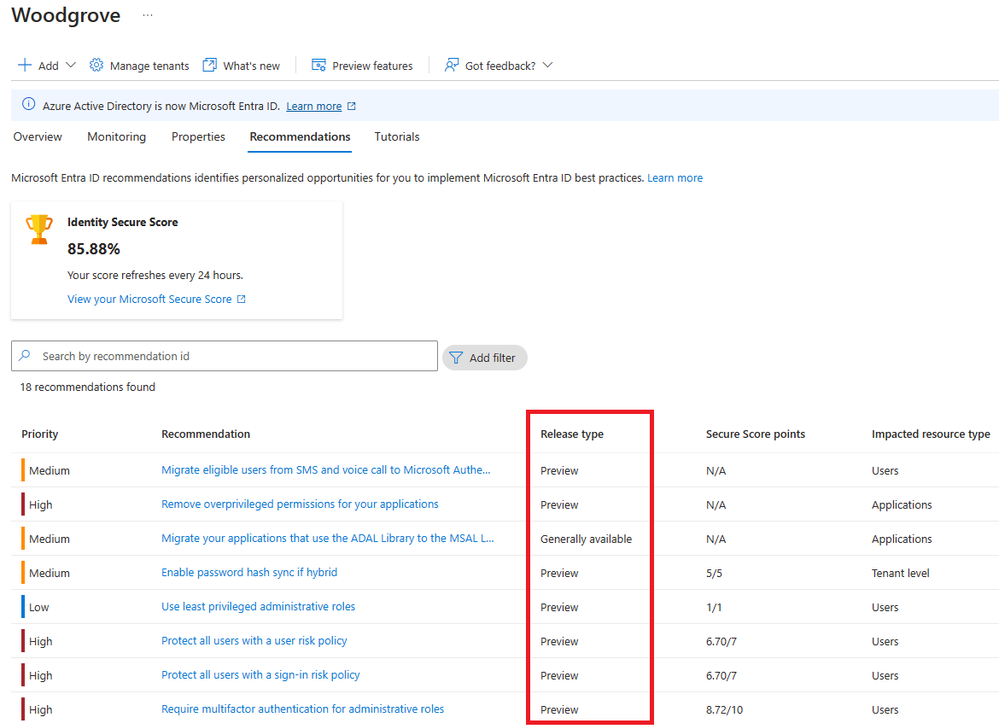
Microsoft recently announced the general availability of four recommendations in Microsoft Entra and another three recommendations in public preview.

Here are the new and upcoming recommendations that ensure the security of your apps mentioned in the blog post:

  • Remove unused credentials from applications: An application credential is used to get a token that grants access to a resource or another service. If an application credential is compromised, it could be used to access sensitive resources or allow a bad actor to move latterly, depending on the access granted to the application. Removing credentials not actively used by applications improves security posture and promotes application hygiene. It reduces the risk of application compromise and improves the security posture of the application by reducing the attack surface for credential misuse by discovery. 
  • Renew expiring service principal credentials: Renewing the service principal credential(s) before expiration ensures the application continues to function and reduces the possibility of downtime due to an expired credential. 
  • Renew expiring application credentials: Renewing the app credential(s) before its expiration ensures the application continues to function and reduces the possibility of downtime due to an expired credential. 
  • Remove unused applications: Removing unused applications improves the security posture and promotes good application hygiene. It reduces the risk of application compromise by someone discovering an unused application and misusing it. Depending on the permissions granted to the application and the resources that it exposes, an application compromise could expose sensitive data in an organization.  
  • Migrate applications from the retiring Azure AD Graph APIs to Microsoft Graph: The Azure AD Graph service (graph.windows.net) was announced as deprecated in 2020 and is in a retirement cycle. It’ is important that applications in your tenant, and applications supplied by vendors that are consented in your tenant (service principals), are updated to use Microsoft Graph APIs as soon as possible. This recommendation reports applications that have recently used Azure AD Graph APIs, along with more details about which Azure AD Graph APIs the applications are using. 
  • Migrate Service Principals from the retiring Azure AD Graph APIs to Microsoft Graph: The Azure AD Graph service (graph.windows.net) was announced as deprecated in 2020 and is in a retirement cycle. It’ is important that service principals in your tenant, and service principals for applications supplied by vendors that are consented in your tenant, are updated to use Microsoft Graph APIs as soon as possible. This recommendation reports service principals that have recently used Azure AD Graph APIs, along with more details about which Azure AD Graph APIs the service principals are using. 

To find these recommendations in general availability, go to the Microsoft Entra portal, go to Recommendations, click on the Release Type column, and look for Generally Available.

icrosoft Entra recommendations portal

Microsoft also mentioned some new developments in the Identity Secure Score within Entra; these improvements are customized as per your configuration. With this feature, organizations can get a percentage score showing how well their company’s posture aligns with Microsoft’s recommendations.

The Secure Score recommendation, which is in the public preview, will help you protect your organization from insider risk. Soon, it will also be available to the general public.

This feature stresses the importance of protecting tenants with Insider Risk policies, which shows Microsoft’s focus on ensuring that organizations can identify and eliminate potential internal security risks.

In addition to all of these recommendations, as mentioned in the blog post, Microsoft plans to introduce new capabilities, such as email notifications to inform users of new recommendations and delegation of capabilities to other roles, to ensure better security.

What are your thoughts on the matter? Share your opinions with our readers in the comments section below.

Manage tabs like a pro in Chrome with the upcoming tab groups menu

Chrome is constantly getting new features and improvements, and this is one of the reasons why it’s the best browser on the market.

Speaking of improvements, it seems that Chrome will get another feature that will help users with tab management.

The tab groups pane has been spotted in the desktop version of Chrome

Google added a tab groups pane in the Android version, but it seems that the desktop version is also getting this feature.

This was first spotted by Twitter user Leopeva64:

As you can see, this feature will be accessible from the bookmarks bar. Google has a plan to make tab groups in Chrome for Android and the desktop version as similar as possible leading up to syncing between the two.

This feature looks interesting, and hopefully, it should help users better organize their tabs in the future. Unfortunately, we have no information regarding the release date of this feature.

As for other features, Chrome got V8 Sandbox for improved security, and Google says that tracking protection in Chrome is ready for rollout.

Xbox emerges as the top platform for Diablo 4, confirms Xbox president

When Microsoft acquired Activision Blizzard, everyone knew games from the latter would feature in the Xbox Game Pass. It took a while, but things got into motion, and soon, Diablo 4 came to the Xbox Game Pass on March 28, 2024.

Now, Xbox President Sarah Bond has confirmed that Xbox is the best platform for Diablo 4. In an interview with Windows Central, Sarah said,

We are integrating Activision Blizzard King titles into our services — we launched Diablo IV into Game Pass, and Xbox has quickly become the #1 platform for Diablo 4 players.

The game’s PC release was also a success, but users had to install Battle.net to play Diablo 4.

In the future, we will see more Activision Blizzard titles coming to the Xbox Game Pass, and expect similar results for each. As per reports, this year’s Xbox Showcase will witness exciting titles being announced.

We will have to wait and see if Xbox losing the console war will affect Microsoft’s future plans!

What’s your review of Diablo 4? Share with our readers in the comments section.

Apple’s ReALM performs better than GPT-4 and enhances Siri

Apple is developing Reference Resolution As Language Modeling (ReALM), an AI model capable of outperforming OpenAI GPT-4. In addition, it should help Siri understand the context of a conversation better and process onscreen content. However, we don’t know if Apple will add its new AI with the iOS 18 update or wait for its upcoming phone lineup. Yet, they might reveal the large language model (LLM) during the Worldwide Developers Conference.

Everything we know so far about Apple’s ReALM

Up until recently, Apple kept its silence about its ReALM AI developments. However, there were rumors that the company was working on an LLM. Yet, they joined the AI race quite late, and Microsoft is already leading the market, especially since it keeps investing in various projects.

According to a research paper, the ReALM AI from Apple has four models: ReALM-80M, ReALM-250M, ReALM-1B, and ReALM-3B. On top of that, the M and B mean millions and billions of parameters. Also, the LLM can convert data into a text format that other models can understand easily.

The smallest model of Apple’s ReALM can compete in performance with GPT-4, while the larger models substantially outperform it. With this new AI technology, the company might be able to reclaim its lost territory from some of its competitors.

Even if the results of Apple’s ReALM are outstanding, it might not be able to keep up with the upcoming OpenAI model. Yet, AI technology development happens fast. So, Apple might need to focus on its characteristics rather than benchmarks.

The Apple AI has distinctive features

According to Business Insider, ReALM will not compromise the performance of your device. On top of that, with its help, Siri will understand your queries better. In addition, Apple’s LLM has an image recognition system that allows it to gather text information such as phone numbers, addresses, names, and more.

Apple researchers consider it important to train LLMs on screenshots and not only on images. This method could be handy in real-life situations.

In a nutshell, ReALM is a promising LLM and shows the progress made by the company in a short period. Additionally, its capabilities show that Apple is ready to join the AI race. Also, with it, Apple might be able to reclaim its market share from its competitors.

What are your thoughts? Are you eager to try the new Apple AI? Let us know in the comments.

Have you played Doom on office equipment? Apparently you can!

There’s no secret for anyone that even GPT-4 AI can play Doom, but have you tried playing on an office equipment? The Ctrl Alt Rees, a British guy famous for trying the weirdest devices that can play the shareware version of Doom has demonstrated the same feat on the biggest rig that ever played Doom: a desk PC.

Apparently, a British manufacturer called Time was producing PCs that were built into office desks in the early 2000s and Rees found one in perfect condition running Windows 2000 Professional.

He bought the machine with $38 from a community center on eBay. Unfortunately, the PC was password protected so he had to install Windows 98 instead and outfit it for Doom.

The PC came in with one of the earliest CTX LCD monitors, a fax machine, a 64k modem, a sturdy keyboard (which apparently survived unharmed and a ball mouse (do you remember those?).

Rees discovered in the desk a Gigabyte Micro ATX GA-7VKMP motherboard, an AMD Duron 1100 Single-Core CPU running at up to 1.1 GHz and an 1 GB RAM module. Not only that Doom ran incredibly smooth, but the British also succeeded in installing the Windows’ MIDI driver to get the audio from the game.

We can’t say we’re not impressed but playing Tetris in Microsoft Excel seems a bit more outrageous. We’ve learned about this from Tom’s Hardware.

What is the craziest device you’ve seen Doom running on? Tell us all about it in the comments section below.

Microsoft still sends alerts about Windows XP’s End of Support, but does it help anyone

Windows XP, released on October 25, 2001, has been out of support for a decade, i.e., from April 8, 2014. When Microsoft dropped support for XP, most upgraded to Vista (released in 2007) or Windows 7 ((released in 2009) after a few years. But, some haven’t done so to date!

It now appears that Microsoft recently sent them another reminder about Windows XP’s End Of Support on April 8, 2024, exactly ten years after the iteration went out of support.

In a post on Reddit, a user shared a screengrab of the alert received on the Windows XP computer.

Soon, a few theories started doing rounds. A user pointed out that Microsoft still sends EoS alerts on the 8th of every month, while some others blamed it on the KB2934207 update.

While we couldn’t verify if there exists a periodic EoS alert schedule, uninstalling the KB2934207 update should help when the reminders are persistent!

Will End of Support alerts make Windows XP users upgrade?

Frankly, these reminders won’t help. Everyone running Windows XP at this point knows about the reduced security and increased vulnerability. And they are just so used to the UI that upgrading doesn’t seem like a viable option. Besides, their computer runs fine and can connect to the Internet.

Windows XP in 2024 is still doable, and that’s what matters the most!

Even if they were to upgrade, which iteration would they go with, Windows 10 or Windows 11? The former, i.e., Windows 10, will soon reach the end of support, and Windows 11 requires high-end configurations, which a 15-year-old PC is unlikely to have.

So, as long as Windows XP users are not considering getting a new PC, they won’t upgrade, no matter how many End of Support reminders Microsoft sends!

If you are still running the unsupported iteration, discover our tips for Windows XP to improve the performance.

What do you think will get Windows XP users to upgrade? Share with our readers in the comments section.

Sea of Thieves success on PS5 will determine the future of upcoming ports, rumors say

As you know, Microsoft is moving some of its exclusives to PlayStation, and the company has plans to bring all Xbox games to PlayStation.

This sounds like a major investment, and the future of the PS5 and Switch ports lies in the success of Sea of Thieves.

Sea of Thieves’ success might determine Microsoft’s policy on future ports

As you know, Sea of Thieves is coming to PlayStation soon, and a few weeks ago, Xbox ports were dominating PlayStation pre-order charts.

This is good news since the success of Sea of Thieves will influence Microsoft’s course of action when it comes to future ports, as GoNintendo writes.

As you know, Microsoft is bringing Pentiment and Grounded to Switch, while Sea of Thieves is coming to PS5.

It seems that the Sea of Thieves and its success on PS5 will determine the future of other ports on both PS5 and Switch, as undisclosed sources say.

We hope that Sea of Thieves will be successful on PS5 as we hope to see many other ports on both PS5 and Switch in the future.

Buckshot Roulette is now available on Steam with a new version and exciting features

Buckshot Roulette, the short indie tabletop horror video game introduced in 2023, was released on Steam on April 4, 2024.

The game is developed by Mike Klubnika. It makes you reimagine the deadly game of chance Russian roulette and involves a 12-gauge pump action shotgun.

The Steam version of the game includes achievements, new gameplay items, and a leaderboard. In the coming months, a multiplayer mode will also allow you to play it with friends.

The game originally came out on itch.io in 2023 and used to cost $1.20; however, on Steam, you need to pay $2.99 to purchase the game, and from April 18, 2024, the price of the itch edition will also be $2.99.

If want it at a cheaper price, get it now on itch.io while the price is $1.20. However, if you want to get it from Steam at a low cost, you can grab the game at a 10% discount till April 11. This was done to celebrate its launch on the Steam platform. So, you will be able to get it for $2.69.

The Steam version of the game will have a 1.2 version, but the same will not be launched for the players using the itch.io version until April 18; here is what the official blog post says:

The reason for a 2-week delay on itch is that some of the new features are created with Steam tools, and because of this I’m not able to push the update on itch.io immediately. I want to take 2 weeks to make sure that all the early itch.io supporters get a fun and bug-free experience.

Following Steam’s rules and requirements, once the v1.2 update is released on itch.io, the price of the game will be changed from 1.20$ to 2.99$.

The blog post also mentioned that there will be differences between the itch and Steam versions, as certain features in future updates will depend on Steam tools. As of this update, the online leaderboard and achievements features will not be included in the itch version.

So, if you don’t care about these features and multiplayer mode coming in the future, you should go with the one available on itch.io before April 18, as it is cheap.

The game developers are also working on the console release as well so that the game can be available on Xbox, PlayStation, and other consoles.

Well, it is a little disappointing as the players who trusted the developers and brought on the popularity of the game will not be able to enjoy all the features coming to the game in the future.

Have you tried Buckshot Roulette yet? If so, share your experiences in the comments section below.

Twitch will stream Minecraft and Fortnite eclipse-themed games alongside NASA’s live broadcast

The 2017 eclipse from the U.S. was a record-breaking event and the one from 8 April 2024 (today!) has all the chances to surpass it. NASA will broadcast the event live, but now it has also teamed up with Twitch, Microsoft, and Epic for a first-time meta broadcast matching gaming with sighting the event.

The event is called Look Up! and it will feature streamers playing eclipsed-themed games in Minecraft and Fortnite, as spotted by PCGamer.

If you do not like epic total eclipses, you might still enjoy the Minecraft and Fortnite special events. The Look Up! game mode from Minecraft will feature solar eclipse puzzles and questions to fill out missions and escape the moon to get to the Earth in time before the start of the eclipse.

When playing Fortnite, you will get some missions that are accessible by moving on the path of the eclipse that will traverse Mexico, the U.S. and Canada. All this gaming event will be streamed alongside NASA’s live footage of the eclipse.

NASA has posted all the details about the April 8, 2024 solar eclipse including the areas that will benefit from the full spectacle of the totality. It’s a pretty narrow band on the map so check it out if you want to know whether to buy the special glasses or not. Actually, if you don’t have those, don’t Look up! because you risk permanent damage to your retina.

Xbow Showcase just got more exciting: Gears of War to be announced, release dates for Microsoft Flight Simulator 2026 and Indiana Jones revealed

Xbox Showcase gives you a dose of what’s next for the console, future game announcements, sharing release dates, and more. This time around, Microsoft is expected to announce a new Gears of War game during Xbox Showcase.

According to The Verge, Gears of War 6 will be a highlight of the June’24 event. The last game in the franchise, Gears of War 5, was released in June’19, almost five years ago.

The report goes on to state that a new Call of Duty will hit the console later this year. Besides, Microsoft will share the release dates for Microsoft Flight Simulator 2024, Indiana Jones and the Great Circle, and Avowed.

Xbox players are excited about this year’s Showcase event, and it’s perfectly summed up in this comment on Reddit.

I know that this sounds familiar but this year’s Showcase could be huge banger.

New COD, Gears 6, Perfect Dark, State of Decay 3, id’s new game, release dates for Indiana Jones, Avowed, MSFS2024 etc.

We had previously reported that Gears of War would come out sooner after The Coalition went on a hiring spree. Besides, there are rumours of Gears of War coming to PlayStation, but Microsoft hasn’t officially confirmed the news yet!

What do you think about the new Gears of War announcement during the Xbox Showcase? Share with us in the comments section.

New Lunar Lake Intel CPU Ultra 5 234V spotted: 8 cores, 2.1 GHz

Everybody is waiting for the new Lunar Lake CPUs from Intel because they will power the next laptops such as the Galaxy Book5 Pro that was recently spotted in the SiSoft Sandra database.

Now, we have some new information about a Lunar Lake Intel CPU that was leaked by a user on X, according to Tech Radar.

The information comes from 01.org, Team Blue’s Open Source Technology Center. The Lunar Lake CPU is called Intel Core Ultra 5 234V and it comes with 8 cores and 8 threads per package.

Although the name touts it as a 2.1 GHz processor, the boot sequence from the source writes that the system detected a 3100 MHz (3.1 GHz) CPU. However, the chip is still in development so that might change at any moment.

Allegedly, the Intel Core Ultra 5 234V is part of the Core Ultra 200 CPUs, where Ultra is the top tier tech from Intel. We remind you that Intel also has the Raptor Lake Refresh H CPUs which will be part of the lower tier from the Core 200 class.

The new Core 200 and Core Ultra 200 will replace the Meteor Lake and Raptor Lake Refresh chips.

We can’t wait to see what will be the performance of the laptops boosting the new Intel CPUs but we hopefully won’t have to wait that long.

How to Play YouTube Music on Desktop With No Ads

YouTube Music has become a popular way of listening to music due to its variety, but for an enjoyable experience on your desktop, seamless listening with no ads is the way to go.

YouTube ads can interrupt playback from 15 seconds up to 90 seconds, and since they appear at close range between intervals, it can be annoying to listen to a playlist that frequently disrupts.

How do I play YouTube Music on my desktop with no ads?

1. Subscribe to YouTube Premium

  1. Open your preferred web browser on your PC. (We’ll be using Chrome for this step).
  2. Go to the YouTube Music website by typing music.youtube.com in the address bar and pressing Enter.
  3. If prompted, sign in to your Google account. If you don’t have an account, you’ll need to create one.
  4. Navigate to the left-hand pane and select Upgrade.
  5. Select one plan and follow the on-screen prompts to complete the subscription.

The individual plan might be too expensive, so consider subscribing to the Family or student plans to get your money’s worth.

Another hack to get more out of your premium subscription is downloading your music playlists offline. If you reconnect to the internet before 30 days, you can keep your downloads intact and save on data.

2. Install adblocker extensions

  1. Launch your Chrome browser, and in a new tab, go to the following location:chrome.google.com/webstore/category/extensions
  2. In the search bar at the top left, type Jadskip and hit Enter then click on Add to Chrome.
  3. Confirm by clicking Add extension.

The good thing about JadSkip is it works for both video and audio so it’s a two-in-one adblock solution. If you’ve installed an adblocker but it is not working, try refreshing your browser or try another one. It’s also possible that YouTube Music is yet to be available in your country.

Also, ensure you’ve not installed two adblockers, as they could be conflicting.

Unfortunately, Google is making it harder for adblockers to thrive. You might install it, but YouTube may flag it. Worse still, you might get locked out of your account or denied access until you uninstall it. YouTube may also fail to load captions with adblockers installed.

The best response to such is to make your adblocker undetectable.

3. Switch to unofficial apps

We’ve already discussed ways to download the YouTube Music app to your desktop and one of them involves downloading the unofficial app. If you get YouTube Music from GitHub, you don’t have to worry about ads because it comes built-in with an adblocker.

However, if you’re going for any other unofficial version, you can also download the Revanced app for an ad-free experience.

Note icon NOTE
WindowsReport is not affiliated with GitHub, so you must do your due diligence if you decide to download unofficial apps.

Potential issues that may arise from blocking ads on YouTube Music

  • Blocking ads is a direct violation of YouTube Music’s terms of service. If your account is flagged for violating these terms, you risk getting your account suspended.
  • Most of the content creators on YouTube Music depend on the platform for income, and running ads is one major way they do this. Blocking these ads means they can’t get paid, limiting their ability to produce future projects.
  • Adblockers or extensions in general tend to slow down your browser and may negatively affect the functionality or performance of YouTube Music. YouTube may start slowing down your browser because of such add-ons.

While blocking YouTube Music ads promises an enjoyable listening experience, you need to consider the bigger picture and the ripple effect it has on all involved parties.

If you can’t afford a premium subscription, it’s best to check out other music player apps that offer free listening with no ads, or their premium service is a little bit affordable.

That’s a wrap from us, but we’d love to hear about any other tricks you use to play YouTube Music on your desktop with no ads. Drop us a comment below.

ASUS ROG Iceblade X, a compact gaming powerhouse has been announced

ASUS devices have been known for their quality, especially the ROG series with its gaming hardware.

Speaking of which, today we have the latest member of the ROG family, Iceblade X, so let’s see what it can do.

ROG Iceblade X gaming PC has just been announced

As NotebookCheck writes, ASUS has announced the ROG Iceblade X series. Unlike regular PCs, this one uses water cooling to address the waste hear issues.

As for the specs, they are the following:

  • Intel Core i7-14700KF or Core i9-14900KF CPU
  • RTX 4070 Super GPU
  • 32GB RAM
  • Aura Sync-compatible lighting
  • 2x USB 3.2 Gen 1 Type-A ports and  2x USB 2.0 ports on the back
  • 3x DisplayPort 1.4a ports and a HDMI 2.1 port
  • Ethernet port that offers up to 2.5 Gbit/s
  • WiFi 6E

The device measures 11.5 x 32.3 x 28.69 cm, and its volume is just 10 liters. Currently, it seems that this device is available only in the Chinese market.

As for the price, the Core i7 model costs $2075 while the Core i9 will cost around $2350. In other gaming news, AMD Zen 5 will dramatically improve your gaming performance, so stay tuned for more news.

Limited time deal: Acer Nitro 17 gaming laptop available for just $980 on Amazon

If you are planning to get a new Windows 11 gaming laptop, consider Acer Nitro 17, a power-packed device with great reviews. The Acer Nitro 17 is presently available for just $980, $219 off its regular price of $1199, in a limited-period Amazon deal.

It’s a value-for-money purchase!

RTX AI in Nitro 17 will boost the laptop’s performance, improve the gaming experience, and find extensive applications in different programs. The keyboard and other components are more than decent for the price range.

The gaming laptop comes with dual-fan cooling, quad intake, and a quad-exhaust port design to ensure optimal temperature. Though when the fans run at full speed, it may get a bit loud!

Speaking of sounds, Acer Nitro 7 features the AI-powered Purified Voice 2.0 technology. It uses AI to filter out background noises and enhances clarity.

Acer Nitro 17’s specifications

ProcessorAMD Ryzen 7 7840HS Octa-Core
GraphicsNVIDIA GeForce RTX 4050
Storage1 TB SSD (Solid State Drive)
RAM16 GB DDR5, ‎4800 MHz
Operating SystemWindows 11 Home
Display Size17.3″
Display Resolution‎1920 x 1080 px

You can’t expect Acer Nitro 17 to match the performance of premium gaming laptops, but it’s unbeatable in the price range. Some have raised concerns about the build quality, but with proper use, the gaming laptop should last a few years without a repair or replacement.

Hurry up and get Acer Nitro 17 from Amazon at just $980 during the limited-period deal!

If you are looking for cost-effective options, check out our top picks for gaming laptops under $800.

What do you think of the Acer Nitro 17 Amazon deal? Share with us in the comments section.

Hackers promote fake AI pages via Facebook ads to trick you

Wrongdoers discovered a new way to trick you into downloading their malware. This time, they use fake AI pages via Facebook ads to trick you into accessing their malicious link. Yet, you might see other fake AI accounts, such as DALL-E, Sora, MidJurney, and ChatGPT-5.

It is not the first attempt by threat actors to exploit Facebook ads services. A while ago, they tried to trick people with fake job offerings. Thus, carefully analyze the URLs and their sources before accessing them.

How are threat actors using fake AI pages to inflict malware?

Cybercriminals promote fake AI pages and attract users by offering limited-time access to upcoming products. Sometimes, they showcase a desktop application that doesn’t exist. Additionally, they might promote an NFT-related opportunity, such as generation and monetization.

Threat actors will try all sorts of tricks to gain your trust. Then, by accessing their malicious links, they will send you to a fake AI website similar to the real one. However, this one will most likely feature download buttons and irresistible offers.

After they infect your device, threat actors can use the malware to steal credentials, cryptocurrency, cookies, credit card information, and more. Afterward, they sell your information on the dark web. Then, other wrongdoers use your information to commit fraud or conduct scams.

One of the most recent cases of hackers using fake AI pages happened with MidJourney. According to Bitdefender specialists, the fake Midjourney page had 1.2 million followers. Additionally, wrongdoers used it in a Facebook ads campaign targeting users aged between 25 and 55. On top of that, the ad reached 500,000 Europeans.

Unfortunately, cybercriminals created dozens of fake AI pages, most of which seem legitimate. They regularly post updates and features about the AI service they mimic to enhance their credibility. Also, to spread malware, they used a GoFile link. Even if Facebook is removing fake accounts, hackers create more.

Ultimately, unmoderated communities and unchecked pages lead to the propagation of data-stealing malware. Thus, threat actors can freely exploit tools like Facebook ads to increase the follower count for their fake AI pages and trick us. So, the best way to defend yourself is to avoid opening links.

What are your thoughts? Did you encounter suspicious Facebook ads or fake AI pages? Let us know in the comments.

After the EU, a South African agency is investigating Microsoft for alleged anti-competitive practices

Recently, Microsoft was in the news after Slack complained to the EU Commission about unfair competitive practices related to Microsoft Teams. This led to an announcement that Microsoft will sell Teams separately at $5.25. However, the Redmond tech giant is still not in the clear.

Microsoft is in trouble again as another antitrust case has been registered for alleged anti-competitive practices. This time, a South African agency has filed a case against its cloud computing business practices.

According to Reuters, the South African company is investigating Microsoft over its cloud computing licensing practices. The basis of this case is the same as the European Union antitrust one.

When Reuters reached the tech giant for a comment, they said the company is not aware of any complaint filed by the South African competition authority.

The South African agency didn’t respond to Reuters’ request for comment. The other details about the case file are not known as of now, but it is not the first time Microsoft has faced issues like these in the cloud computing arena.

These complaints underscore the growing global scrutiny on the big tech companies and their business practices, and Microsoft’s denial that it was aware of this latest complaint shows that there will be a legal battle ahead.

What do you think about the matter? Share your opinions with our readers in the comments section below.

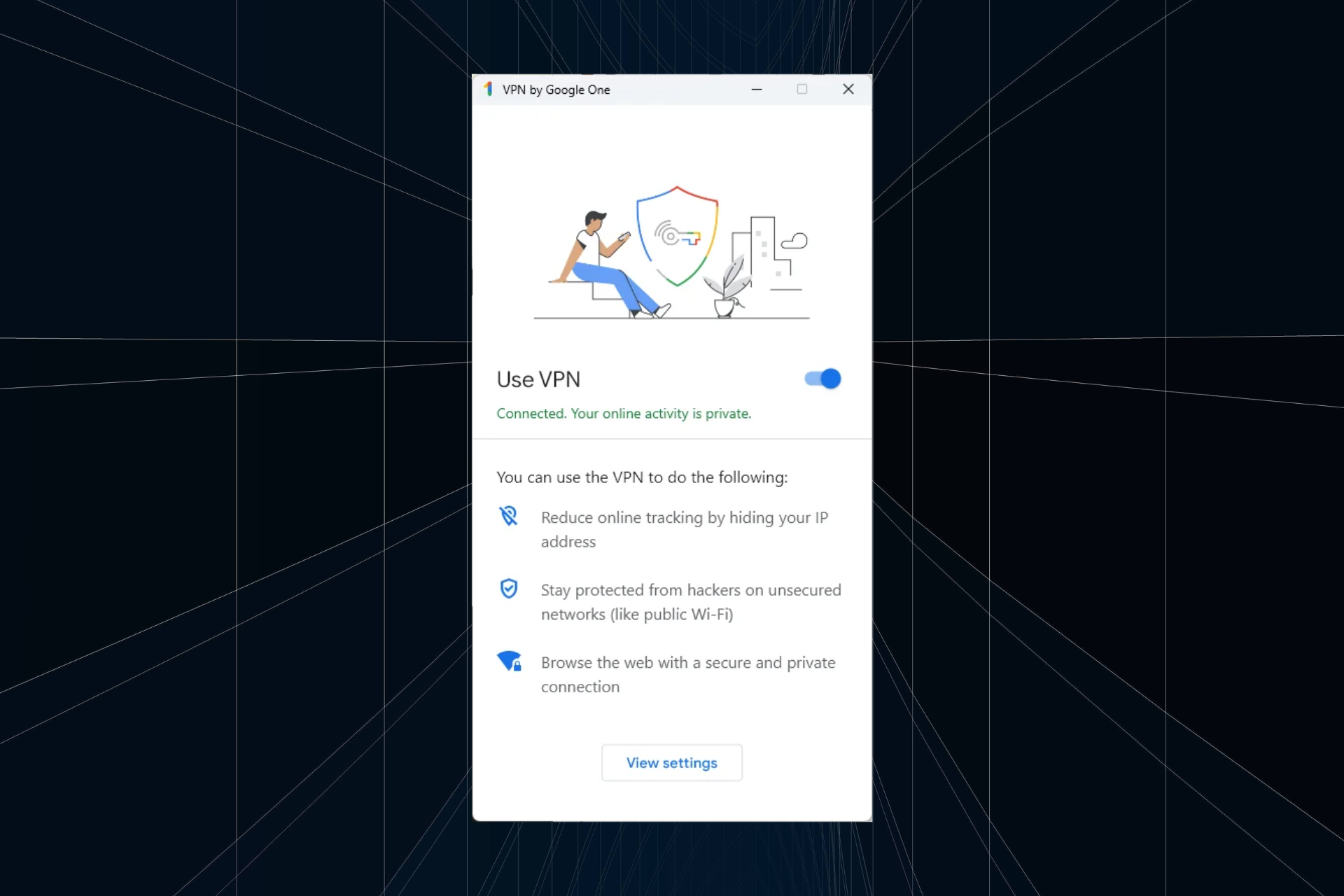
Google One VPN changes the Windows DNS, affecting security and Internet speed

Google One’s bundle package comprises a VPN, often used by subscribers on Windows, Mac, Android and iOS. A few months ago, users highlighted a problem wherein the VPN automatically changed the device’s DNS to Google’s DNS server.

First reported on GitHub, the problem’s description reads,

This VPN BREAKS DNS functionality in windows 11, it locks the system DNS to google DNS servers under the network settings.

1. Settings -> Network & Internet -> Ethernet
Leave this open, and set on Automatic DHCP.
2. Connect to Google VPN, it will change your DNS setting to manual google DNS servers.
3. Disconnect, and keep an eye on the settings window we left opened, it will stay stuck to the google DNS settings, not the automatic DHCP, breaking ANY dns functionality of your computer.

Even after a restart, closing the google VPN app, or disconnecting the DNS settings are stuck on a manual assignment. This is unacceptable. In order to use the google one vpn, one needs to manually go into network settings and toggle back on the auto assignment.

Based on available reports, this seems to be the case with only Windows devices. The DNS server is not automatically changed on MacOS, Android, or iOS!

A few days later, Google’s Ryan Lothian acknowledged this and confirmed that it’s an intended privacy-oriented feature and not a bug, as many initially believed.

Hey folks, thank you for reporting this behaviour.

To protect users privacy, the Google One VPN deliberately sets DNS to use Google’s DNS servers. This prevents a nefarious DNS server (that might be set by DHCP) compromising your privacy. Visit https://developers.google.com/speed/public-dns/privacy to learn about the limited logging performed by Google DNS.

We think this is a good default for most users. However, we do recognize that some users might want to have their own DNS, or have the DNS revert when VPN disconnects. We’ll consider adding this to a future release of the app.

Every time you want to change the DNS, you will have to do so from within the network adapter’s settings. Even if you uninstall the Google One VPN, Google’s DNS will still be in place unless manually removed. Ideally, after uninstall, DNS should revert to the previous configuration!

Why is the DNS server vital?

DNS (Domain Name System) is critical both to the security and how quickly a website loads up. It doesn’t directly affect the Internet speed but reduces the time taken to convert the domain name to the corresponding IP address, giving the impression of a faster Internet. But that’s just as good!

Also, a reliable DNS server doesn’t throw any errors or have issues accessing specific websites, and prevents different types of attacks. Google’s DNS is undoubtedly good, but often faster DNS servers near you may be a better choice.

No other VPNs have shown this behaviour, at least not the popular ones. While Google is known for data collection through different means, which most of us have gotten used to over time, changing the DNS is a step in the wrong direction!

We expect newer versions of Google One’s VPN to not change the DNS server.

What’s your take on the feature in Google VPN? Share with our readers in the comments section.

A new Edge extension adds a Chrome-like Link Preview feature to the browser

This Extension adds a Chrome-like Link Preview feature to Microsoft Edge. You can open the Link Previews with the Alt + Click shortcut or by long pressing, just like in Chrome.

We recently reported that Chrome has added a feature to preview links before you navigate. It is currently available behind a flag that you need to enable manually in the Chrome prerelease versions. The option is available in the right-click menu and Chrome also offers an Alt + click shortcut to trigger it. Furthermore, Until now, this was a Chrome-only feature, not available in Edge even in flag form.

We now have an extension available in the Edge add-ons Store that replicates or mimics Chrome behavior and offers the same Alt + Click shortcut or Long Press to preview a link.

When you hover over preview content, the Preview dialog page content appears in the window. We tested this extension in Edge Stable, and it works beautifully, as you can see in the clip below.

Note: The extension is pretty new and has no reviews. Please be careful before installing this extension and proceed at your own risk.

The developer advertised its new Link Preview extension on Reddit and the post already has a lot of favorable comments and upvotes. That’s a clear sign that Edge users really expected this feature. If it gains more traction, Microsoft might think of adding it to the browser directly.

Did you install the Link Preview extension? Tell us about your experience in the comments section below.

Microsoft creates an Xbox game preservation team to ensure backwards compatibility

Since Microsoft bought Activision-Blizzard, Xbox has become a huge gaming powerhouse, despite console unrests. The Redmond giant wants to bring Xbox on every screen and it’s even working on a handheld console to complete the circle.

There’s possibly a bright future ahead, but how about the past? Would we be able to play those old games we love on a new Xbox console? Will we be able to play some new titles on older devices?

According to Windows Central, Sarah Bond, Xbox’s President made a pretty bold commitment to answer these questions:

We have formed a new team dedicated to game preservation, important to all of us at Xbox and the industry itself. We are building on our strong history of delivering backwards compatibility to our players, and we remain committed to bringing forward the amazing library of Xbox games for future generations of players to enjoy.

Xbox President Sarah Bond

Why does Xbox needs a game preservation team?

Allegedly, the next Xbox console won’t have any disk drive and other rumors imply that the new handheld console will solely rely on cloud storage. We’re living the age to complete digital shift where everything is online. And when everything is on the cloud, digital stores can remove games as if there weren’t there in the first place.

Google, Apple, and Nintendo have been known to do that and Microsoft is closing the Xbox 360 store in July this year. However, there are still hundreds of backwards-compatible games which still survived to be played on newer Xbox consoles.

That’s why it’s important that this game preservation team to future proof our titles, to be able to play them for a longer time. However, the real issue is not how they make the old games play on new consoles but the other way around.

Creating a less resource-demanding version of the latest games for an older console such as Xbox One is hard. And if they do, would you downgrade your gaming experience just to be able to play it? We’ll see how this will work out.

What are the best old titles you would like to keep playing on a new console? Let’s talk about that in the comments section below.

How to Connect Your Xbox Controller to Apple Vision Pro

To add more versatility to your Xbox controller, you can connect it to your Apple Vision Pro and explore endless possibilities for an enhanced gaming experience.

How do I connect my Xbox controller to my Apple Vision Pro

1. Check for compatibility and support

  • Xbox Wireless Controller with Bluetooth (Model 1708)
  • Xbox Wireless Controller Series S
  • Xbox Wireless Controller Series X
  • Xbox Elite Wireless Controller Series 2
  • Xbox Adaptive Controller

While Xbox can pair with Apple Vision Pro, it needs to be one of the above supported controllers.

2. Pair the two devices

  1. Power on your Xbox controller by pressing and holding the Xbox button until it turns on.
  2. Press the connect button to put it in pairing mode.
  3. Go to your Apple Vision Pro and turn on the Bluetooth option.
  4. Here, you should see your Xbox controller among the listed available devices. Select it and pair it.

3. Customize controller

  1. On your Apple Vision Pro, go to Settings  > General > Game Controller.
  2. Here, you can tailor controls to your preferences by selecting an option for buttons and change it to the function you want it to perform. You can also create custom controls for easier navigations.

The cap with customized controllers is it only applies to supported games from the Apple Arcade or the App Store on Xbox.

Additional tips to enhance the gaming experience

  • For uninterrupted gameplay, invest in a charging dock or rechargeable batteries. Some batteries give you up to 40 hours per charge. We have an interesting article on what Xbox users use.
  • Explore additional peripherals such as headphones or controller grips for an immersive gaming experience.
  • Ensure your controller and Apple Vision Pro firmware are up-to-date for smooth pairing and to avoid frequent disconnections.
  • Switch off other devices that may cause interference with the Bluetooth connection and keep both devices in close range.

And that’s a wrap from us but don’t just stop here when it comes to exploring all the different devices you can pair your Apple Vision Pro with. We have already explored how you can connect your Xbox to the Apple Vision Pro as well as how to connect it to your PC.

Whether you’re a die-hard fan or just a casual gamer, it’s worth a try to pair these absolutely revolutionary devices and unlock new possibilities and new adventures in the world of gaming.

You can also connect your Xbox controller to Quest 2 if you’re all about virtual reality headsets.

Have you tried pairing your Xbox controllers with your Apple Vision Pro headset? What was the experience like? Let us know in the comment section below.

This is the complete list of apps that may prevent installing Windows 11 24H2, could trigger Safeguard holds

If you were planning to upgrade to Windows 11 24H2 at release, it’s time to get things in order. To start with, make sure no apps and drivers on your PC prevent the installation of the Windows 11 24H2 update due to a Safeguard Hold.

Microsoft often enforces Safeguard Holds after assessing the quality and compatibility data from individual PCs when it identifies that a particular update could cause issues. Safeguard Holds are automatically lifted when the issue is fixed and the same is verified!

With Windows 11 24H2 being a significant update in terms of new features and changes, Microsoft is much more careful with the rollout than it was previously. PCs running incompatible apps or drivers will be automatically blocked from installing the update!

Apps and drivers that may conflict with Windows 11 24H2 installation

1. ConisioAdmin.exe (Solidworks PDM)
2. EaseUS Disk Copy.exe (EaseUS Disk Copy Application)
3. ep_dwm.exe (ExplorerPatcher) Included since 22H2
4. iCloudServices.exe (iCloud files shared in Explorer via WhatsApp) from 23H2
5. RadeonSoftware.exe (AMD GPU perf settings) From 23H2
6. StartAllBackCfg.exe (StartAllBack) Included since 22H2
7. Multi-mon + Copilot (Microsoft)
8. MergeSdb (Microsoft)
9. Intel IntcOED.sys (Intel)
10. Intel IntcAudioBus.sys (Intel) (%WinDir%\System32\drivers\IntcAudioBus.sys)
11. Realtek 8192su Wireless USB 2.0 Adapter (Realtek) (%WinDir%\System32\drivers\RTL8192su.sys)

This list of apps, shared by Deskmodder and sourced from a decrypted appraiser.sdb file, has a few popular names. But it is usually an older version of these apps that prevents updating to Windows 11 24H2. For instance, the Windows 7 version of VLC will trigger Safeguard Holds during the update and not the latest one.

Now, all that’s left is to uninstall these apps!

There’s also a long list of hardware IDs as well on the on Deskmodder’s official blog.

Besides, with Microsoft adding SSE4.2 to the list of compatibility blocks, CPUs without POPCNT won’t be able to run Windows 11. In case you are still unsure, there’s a quick way to find out if your PC can run Windows 11 24H2.

As for the changes in Windows 11 24H2, you can expect features to move from Control Panel to Settings, the removal of WordPad, and more!

Do you have any apps that might prevent updating to Windows 11 24H2? Share with us in the comments section.