YouTube Premium Gets Auto Speed And On-The-Go Playback Boost

YouTube is testing a pair of helpful new tools to make watching videos easier when you are busy or just trying to save some time. The platform is currently offering its Premium subscribers a chance to try out two experimental settings called On-the-go and Auto speed. 

These additions are designed to give users more control over playback and help prevent accidental screen taps while you are moving.

What on-the-go mode does

On-the-go replaces the older Premium controls menu with a simple layout meant for walking or exercising. The goal is to stop you from pressing the wrong button when your phone is in your pocket. The YouTube app now detects movement. If you keep moving for a full minute, it will ask if you want to turn this mode on.

You can also activate it yourself in the settings. Once active, the most useful buttons sit right at the front. You can easily skip video parts, save content for later, or switch between audio and video. This specific feature is only being tested on Android.

How auto speed changes pacing

Auto speed alters how fast a video plays without you needing to adjust anything. When someone speaks slowly, the app speeds up the playback. When the video reaches sections packed with information, it slows back down. This keeps you from missing details while helping you finish videos faster. You can pick a baseline speed from normal up to four times as fast, and the app adjusts from there.

This setting only stays active while the app remains open. If you close YouTube completely, you will need to turn it back on. It works for English videos on iPhone and Android but is disabled for music, live streams, and shorts.

YouTube is running this test for its paying members until April 27th. After that date, the company will decide if it wants to roll these tools out to all users. If you have a Premium account, you can try them now and see if they improve your daily routine.

Via Android Authority

Logitech G HUB Is Finally Supported On Windows On Snapdragon PCs

If you own a Windows PC powered by a Snapdragon chip, you can now customize your gaming gear. Logitech recently updated its G HUB software so it runs on ARM-based processors. This change means you can finally map keyboard buttons, change mouse sensitivity, and tweak headset settings without running into software errors.

The update opens up a lot of options for people who want to game or simply sync their lighting effects on newer devices. Qualcomm’s Senior Product Marketing Manager for Snapdragon X Series recently highlighted the change (via Windows Central) in the r/snapdragon subreddit.

What you can do with the app

The G HUB app acts as a central control panel for Logitech accessories. Once you download it, you can set custom macros for specific games and manage your different profiles. While the software runs through emulation instead of a native version, it still gives you full control over supported devices.

Qualcomm highlighted that gaming hardware is getting better support on its platforms. Some tested devices include the Logitech G603 and G304 mice, along with the G430 headset. Since that list is short, you will likely find that other Logitech gear works too.

Snapdragon laptops now deliver better gaming

These computers were not originally built just for gaming. However, new Snapdragon chips handle games much better than older models. Qualcomm recently improved its support for anti-cheat software, which lets popular titles like Fortnite run properly. Being able to use Logitech gear adds another layer of usefulness to these machines.

If you want to try the software, you can download the standard Windows installer directly from the Logitech website. It will handle the emulation automatically.

Steam Workshop Beta Update Makes Browsing Mods Easier and Faster

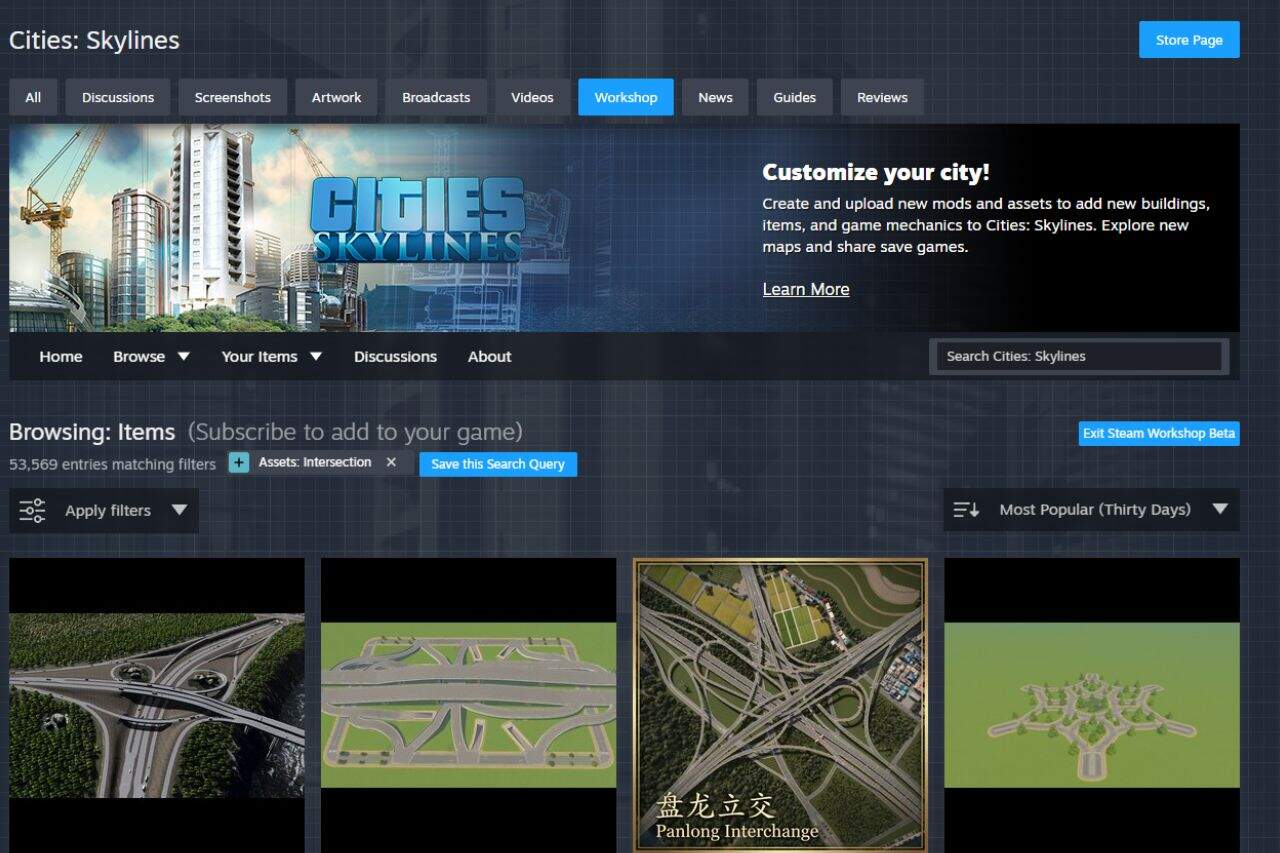
Valve has finally updated the Steam Workshop to make finding your favorite mods and items a lot less confusing. The company recently launched its opt-in beta that completely overhauls the browsing experience. Instead of dealing with slow page reloads every time you tweak a filter, you can now sift through millions of user-created items with speed and ease.

The interface is wider, the preview images are bigger, and the whole system responds instantly to your clicks.

Here’s what the new beta brings

The biggest change in the latest Steam Workshop beta is how fast the page updates. Previously, applying a filter meant waiting for the entire page to reload. The new version skips that step entirely. You get immediate results when you search or sort. Developers can also set up custom filters for specific sections, so you only see relevant tags for maps versus character models.

You will also notice the layout takes up more space on your screen. This allows for larger thumbnail images and more items visible at once. To save even more time, a new quick view feature lets you preview an item easily. You click a small magnifying glass icon to see screenshots, favorite the mod, or subscribe without ever leaving the main list.

The new design also adapts better to smaller screens, working well on mobile phones and the Steam Deck.

How to try the new features

You can try these changes right now by clicking the button to enter the beta on any Steam Workshop page. Valve plans to run this test for a few weeks or months. It wants to gather feedback and fix bugs before making the change permanent. 

Other pages on the Workshop will eventually get similar updates once the team wraps up this initial phase.

Via Neowin

Microsoft Confirms It Will Not Fix Windows Lock Screen Clock Glitch

Microsoft has confirmed that it will not release a fix for a known clock bug affecting the Windows 11 and Windows 10 operating systems. The software maker detailed its decision in a recently published support document, explaining that the issue is entirely intentional. Rather than treating it as a problem to be solved, the company stated that this visual quirk is operating exactly as intended.

Why is the clock running late?

When you press the required keys to open the Secure Lock Screen, you might notice the clock displaying the wrong time. This specific screen provides security options to lock your desktop, change a password, or open the task manager. The clock on this screen refreshes on a rigid thirty-second cycle. That means the numbers will update up to thirty seconds after the actual minute changes.

As Neowin notes, the company clarified that this secure desktop environment runs on its own unique refresh schedule. This stands in contrast to the standard user lock screen, which accurately updates the exact moment a minute passes.

While it can look confusing to users, the company considers this a simple visual detail. The underlying system time remains perfectly precise. All critical background tasks, event logs, and synchronization functions pull their data directly from the system kernel clock.

Because those core functions are completely unaffected, the development team feels no need to change the current display behavior.

Free Graveyard Keeper Game up for Grabs Before the New Sequel Drops

Lazy Bear Games is letting everyone jump into its popular cemetery management game, Graveyard Keeper, for free right now. If you have been waiting to try out this quirky title, the developer has made it available at no cost across PC, Xbox, and PlayStation. The studio launched this massive giveaway to build up excitement for a good reason, as it just announced a brand new sequel arriving later this year.

The original Graveyard Keeper, which first came out in 2018, takes heavy inspiration from farming games like Stardew Valley. But instead of growing crops, you manage a medieval graveyard. You have to handle weird ethical choices and complete quests for the local villagers. You can claim your free copy on Steam, Xbox, and PlayStation stores until April 13.

What to expect from the Graveyard Keeper 2

As for the future, Graveyard Keeper 2 is officially in the works and is scheduled for a 2026 release. It plans to launch on PC, Xbox Series X and S, PlayStation 5, and Nintendo Switch systems. The sequel changes things up significantly by putting you in the shoes of the Grand Inquisitor. Your new job involves saving the entire kingdom from an approaching zombie apocalypse.

The new game leans heavily into fantasy elements. You will build an army of the undead, automate production using zombies, and fight to protect the town. While the graveyard management aspect is still there, your main goal is to rebuild the town and make a profit out of the locals and their daily problems.

Via Neowin

Anthropic and OpenAI Models Now Available Inside Microsoft 365

You no longer have to switch between different AI websites to use top models for your daily work. Microsoft 365 Copilot now lets you access both Anthropic Claude and OpenAI GPT models straight from its own interface. This update gives people the ability to handle big tasks and compare different model results without leaving the familiar environment that its users already rely on. This just makes testing and using these tools much simpler.

Now you can handle big tasks with Copilot Cowork

Copilot Cowork is a new feature designed to handle jobs that require multiple steps. You can write a single prompt and ask it to create a text document, a presentation, and a spreadsheet all at once. If you remember something else you need while it is already working, you can add new instructions. It will fold those requests, like scheduling a meeting or drafting an email, right into the active process.

Microsoft designed it to connect directly to your calendar, emails, and files using a system called Work IQ. This means you do not have to copy and paste sensitive data into outside tools.

Teaming models up for better research

The Researcher tool now uses a two-step process called Critique. Instead of relying on just one model, it splits the work. One model acts as the writer, drafting the initial report and pulling in information. The second model steps in as a dedicated reviewer.

This reviewer double-checks the generated text against your files to make sure the claims are accurate and linked to reliable sources. It improves the final quality of the output before you even see the draft.

It also compares results side by side

There is also a new feature named Model Council. If you are unsure which model will give the best answer, you can test them together. You submit your prompt once, and the system sends it to both Claude and GPT at the exact same time. It then shows you a split screen with both answers right next to each other.

You can read how each model reasoned through your request and decide which approach fits your project best. Microsoft requires its Frontier program to be active to try these tools.

Crimson Desert Finally Runs on Intel Arc GPUs With New Driver

Intel Arc graphics card owners can finally launch and play Crimson Desert, thanks to a new driver update. When the game originally came out, it refused to boot on Intel hardware, throwing up an error message that said the graphics device was not supported. The game developer, Pearl Abyss, even told players to get a refund initially. Now, things are slowly changing for the better.

How the latest update changes things

The new Intel graphics driver quietly brings the game to life, according to several Reddit reports (via Wcctech). There is no official mention of the game in the patch notes, but users quickly noticed that it now boots. The Intel team previously reached out to Pearl Abyss to help test the hardware, and it seems those efforts are working.

Players are managing to get into the game, especially on the Arc B580 card. You might have to clear your configuration folder first if it still refuses to load. The game currently supports NVIDIA and AMD upscaling, but enabling the AMD option might cause sudden crashes. Intel XeSS is missing for now, though it might arrive later.

Expect a bumpy visual ride for now

While the game technically works, the experience is far from perfect. Many players report severe visual bugs. In some cases, the main character’s face or limbs are completely missing. You will likely see strange graphical glitches stretching across the screen, and the terrain can look quite odd.

Pearl Abyss recently confirmed that it is actively working on proper compatibility and optimization for Intel Arc systems. It wants to provide a stable experience and asks players for patience. Until that official patch arrives, you can at least test the game. It is a really big step up from not playing the game at all.

Xbox App Adds Gamepad Cursor Toggle to Make Your Left Stick Work Like Mouse

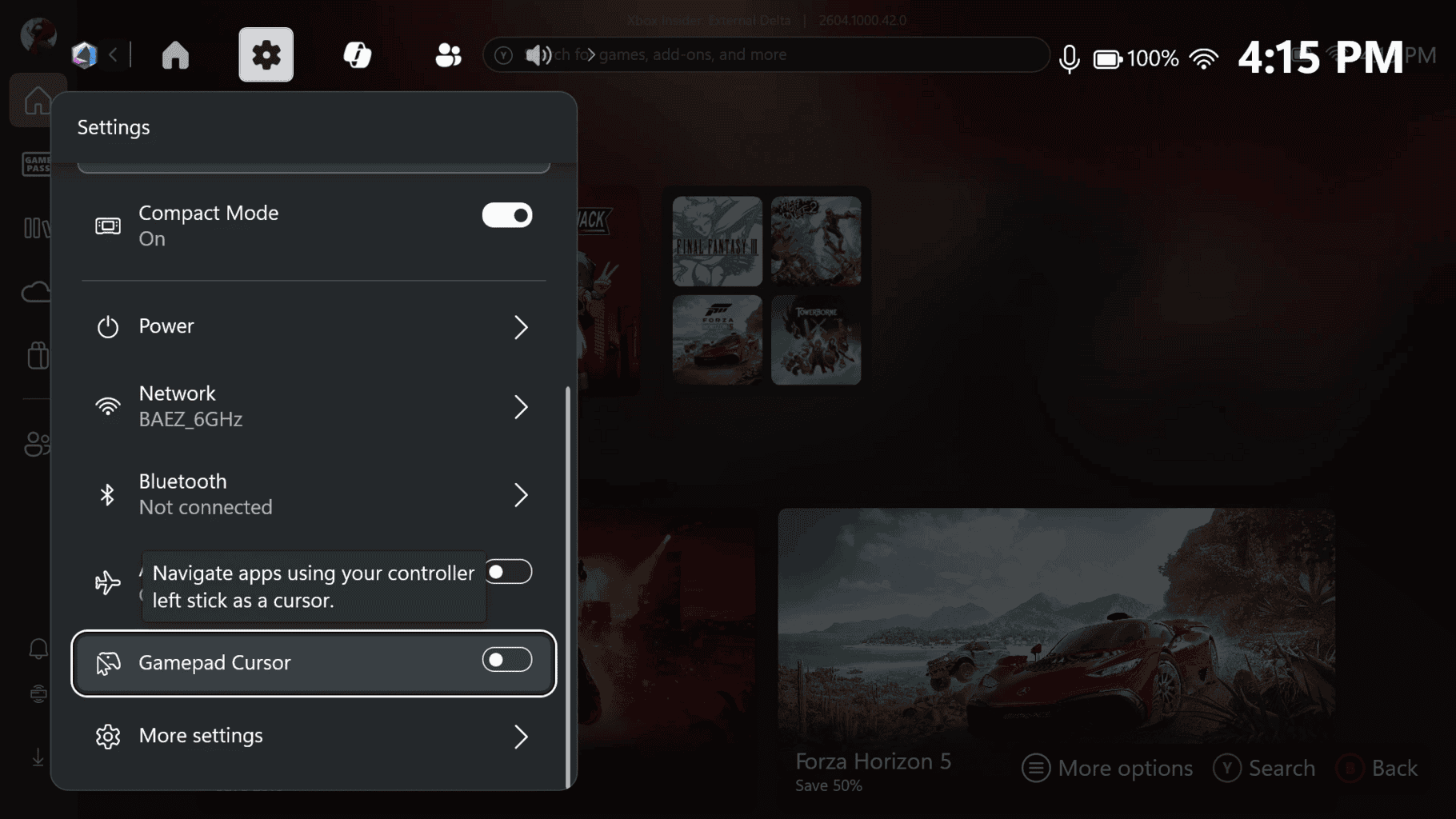
Microsoft is reportedly rolling out a new Gamepad Cursor feature inside the Xbox App for Xbox Insider Program and Game Bar insiders. Folks over at ROGAllyLife first reported about this feature and note that by simply flipping a toggle, your left analog stick acts like a mouse pointer (via Windows Central). This apparently allows you to control apps that weren’t built with controllers in mind.

How Gamepad Cursor actually works

Once enabled, the left stick moves a cursor across the screen while the right stick scrolls up and down. The “A” button remains the click input, keeping most functions familiar. Microsoft says it’s a way to navigate apps with precision, without relying on focus-based controller navigation. For handheld Xbox Mode users, the difference is immediate apps that assume a mouse suddenly become fully usable.

Devices like the ROG Ally, ROG Ally X, ROG Xbox Ally, and ROG Xbox Ally X running Xbox Mode have long relied on Armoury Crate for desktop-style input. Armoury Crate works, but it isn’t ideal for Xbox Mode menus. Gamepad Cursor solves that gap, offering mouse-like control directly inside the Xbox App. Anywhere the app runs on these devices, the experience is consistent.

How to enable Gamepad Cursor

Right now, you need to be an Xbox Insider and also join the Game Bar Insider program:

  1. Open the Xbox App in Xbox Mode and launch the Game Bar
  2. Go to Settings
  3. Scroll to Gamepad Cursor
  4. Flip the toggle on
Image credit: ROGAllyLife

Next, you’ll see a “Try out Gamepad Cursor” card appears in the What’s New section if you want a shortcut to the setting. As of now, Microsoft hasn’t shared a public release date of the feature, but Insider features usually reach stable builds after testing across multiple devices. If you want it now, enrolling in the Xbox Insider Program and the Game Bar insider program is the best way to get early access on ROG handhelds.

Article feature image source: ROGAllyLife

This Weekend’s Xbox Free Play Days Lineup Brings Subnautica, Graveyard Keeper & More

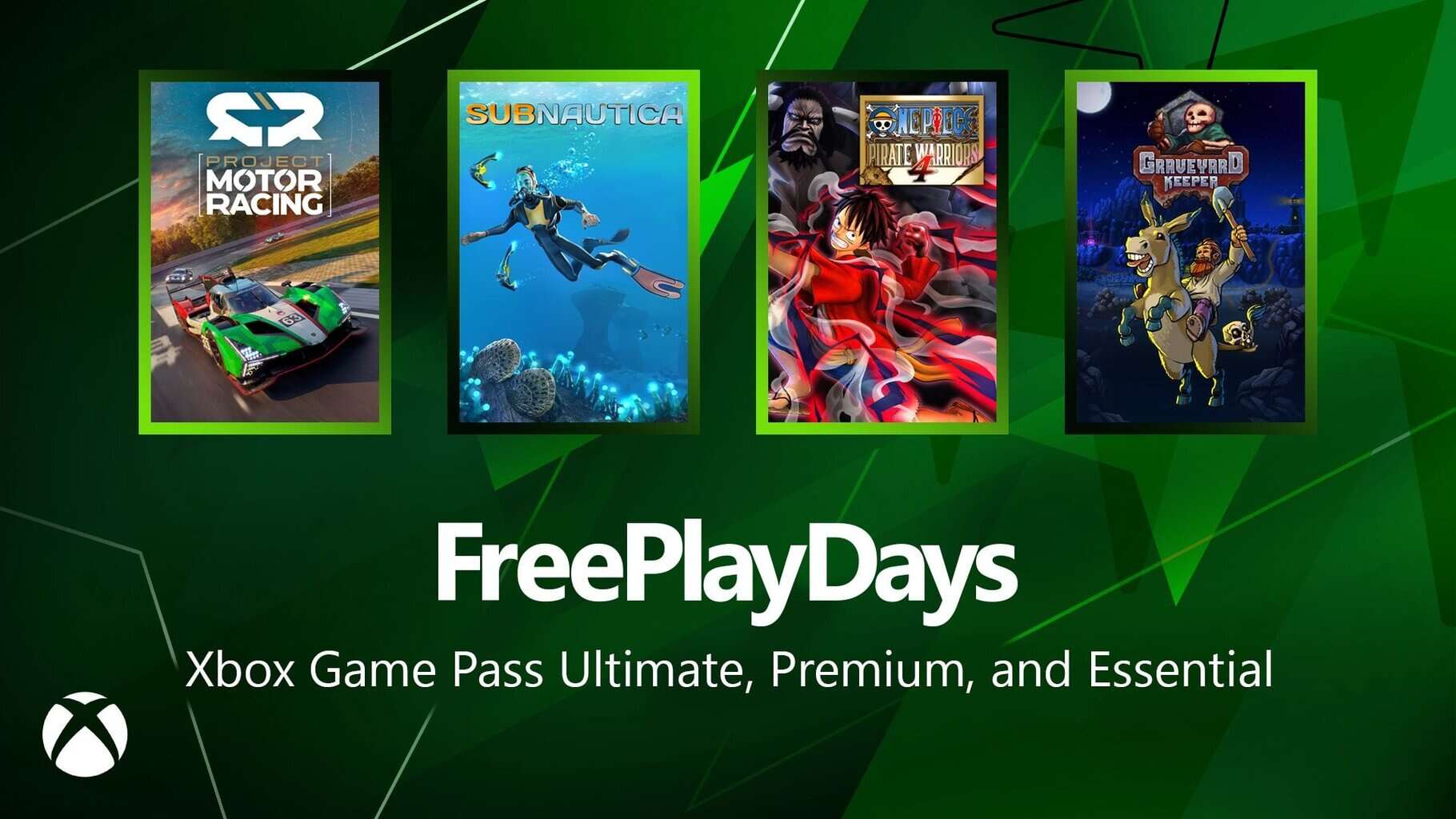
It’s Thursday again, which means we have yet another Xbox Free Play Days lineup. From Thursday, April 9, through Sunday, April 12, Xbox Game Pass Ultimate, Premium, and Essential members can jump into Subnautica, while all Xbox users can try Project Motor Racing and One Piece: Pirate Warriors 4.

Subnautica lets you explore a mysterious underwater world after crash-landing on an alien ocean planet. The game is optimized for Xbox Series X|S and is available at a discounted price of $14.99 during this weekend. The game description reads, “Explore an alien underwater world filled with wonder and danger in Subnautica during Free Play Days. After crash-landing on an ocean planet, you’ll collect resources, craft equipment, build underwater bases, and uncover the mysteries lurking beneath the surface. From vibrant coral reefs to dark and treacherous depths, every dive is a chance to discover something new… all while trying to survive.”

Next up is One Piece: Pirate Warriors 4, which is discounted to $9.99 for this Free Play Days weekend. Even if you don’t have Xbox Game Pass, it’s free for all Xbox users to try alongside Project Motor Racing 2.0 from today until Sunday, April 12.

Meanwhile, Graveyard Keeper is also free for all Xbox users from today at 9 AM PT until April 13 at 10 AM PT. The quirky cemetery management simulator allows players to expand into medieval entertainment, cut costs creatively, and even scare villagers into attending church.

Remember, discounts on full editions and DLC are available for a limited time, letting your Gamerscore and achievements carry over.

Microsoft Starts Removing Copilot Clutter from Notepad, More Apps to Get Same Treatment

Microsoft appears to be living up to its promise of moving away from its AI everywhere strategy and cutting the Copilot clutter across Windows 11. For those unaware, Microsoft has added Copilot features to nearly every Windows 11 app. Among them is Notepad, which is known for its minimalist user interface. Now, according to a new report by Windows Central, Microsoft appears to be trimming the Copilot clutter from Notepad. That said, AI still lives inside the app.

Microsoft quietly removes Copilot branding and wording from Notepad

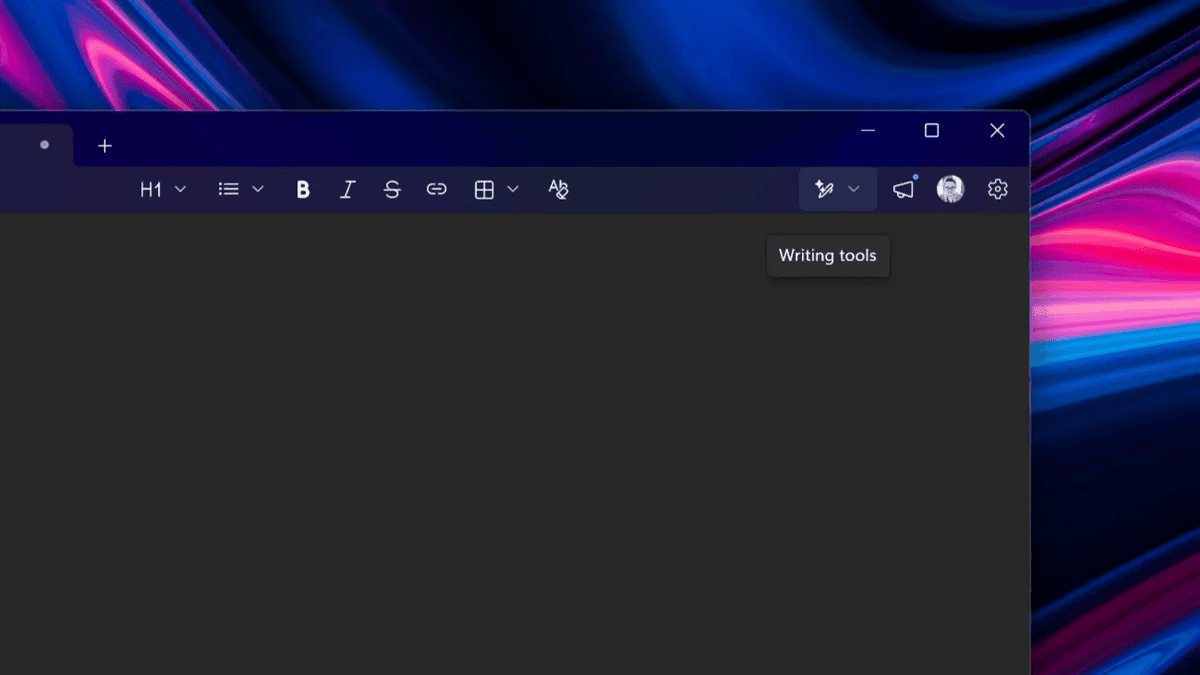
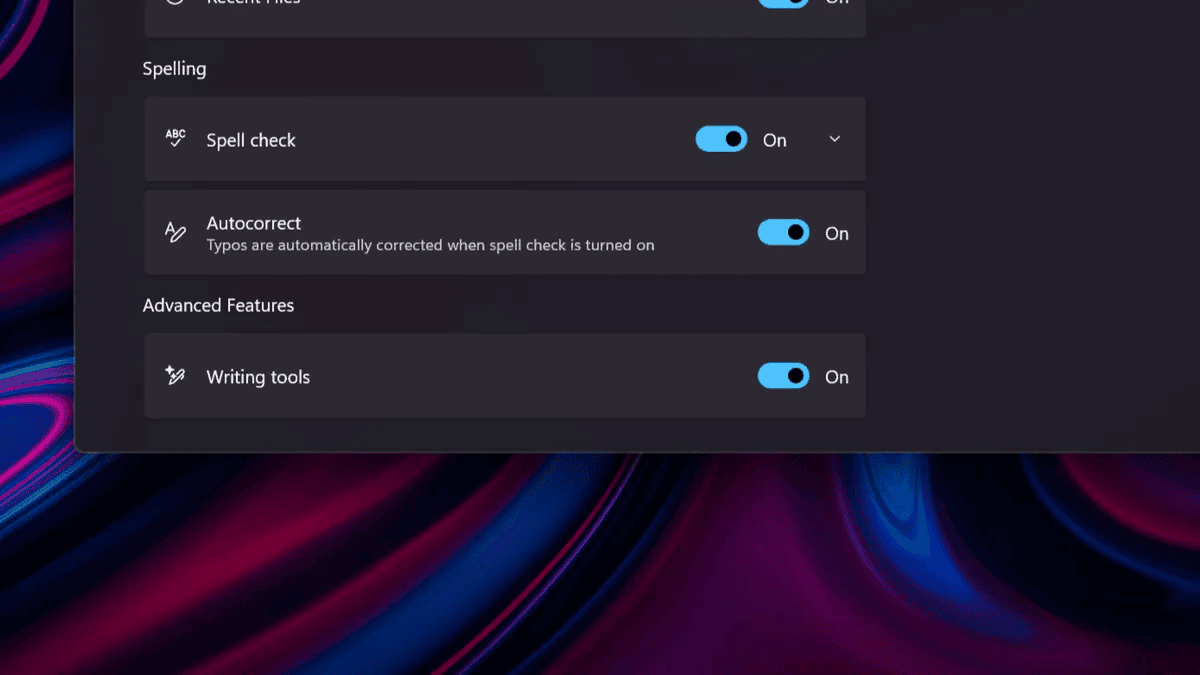
Per the report, in the new Insider build (version 11.2512.28.0), the Copilot menu inside Notepad is now called “Writing tools.” Interestingly, the functionality remains unchanged, but the Copilot branding and phrasing are gone. The Copilot icon has also been replaced with a simple pen icon, making the feature feel more like a native editing tool rather than a separate AI add-on.

Image credit: Windows Central

The best part about this change is that you now have full control over AI features. In Notepad, AI features can reportedly be turned off entirely, keeping the app’s minimalist experience intact. As seen in the screenshot shared by news outlet, when you click Settings option, you will come across a toggle that lets you disable “Writing tools” feature.

Image credit: Windows Central

Apparently, similar changes have been made to the Settings app as well. The company has removed AI references, with the toggle for these features now sitting under “Advanced features.” To catch you up, last month, when Pavan Davuluri announced Microsoft’s big plan to fix Windows 11, he mentioned “we are reducing unnecessary Copilot entry points, starting with apps like Snipping Tool, Photos, Widgets and Notepad.” Well, those changes now seem underway.

Paint and File Explorer are also in line to get similar treatment

Well, changes in Notepad are just the start. Microsoft is reportedly also exploring similar changes in other apps like Paint and even File Explorer, where Copilot integrations have been more visible. The company is now looking to integrate “AI where it’s most meaningful, with craft and focus.”

Being a longtime Windows user myself, it’s good to see Microsoft finally delivering what it has promised. That said, don’t expect the company to trim all the AI features entirely across Windows 11. That’s mostly because Microsoft has poured billions of dollars into AI, and it wouldn’t want to have nothing related to it in its core product.

Spotify Now Allows You to Turn Off All Videos, Including Music & Podcast Clips

Spotify has been adding new features lately, with SongDNA being the latest one. Spotify is rolling out a way to cut all the all video content clutter across music and podcasts, which gives users more control over their listening experience. Canvas clips, music videos, and podcast videos will be optional and would be a big relief for anyone who finds the visuals distracting or data-heavy.

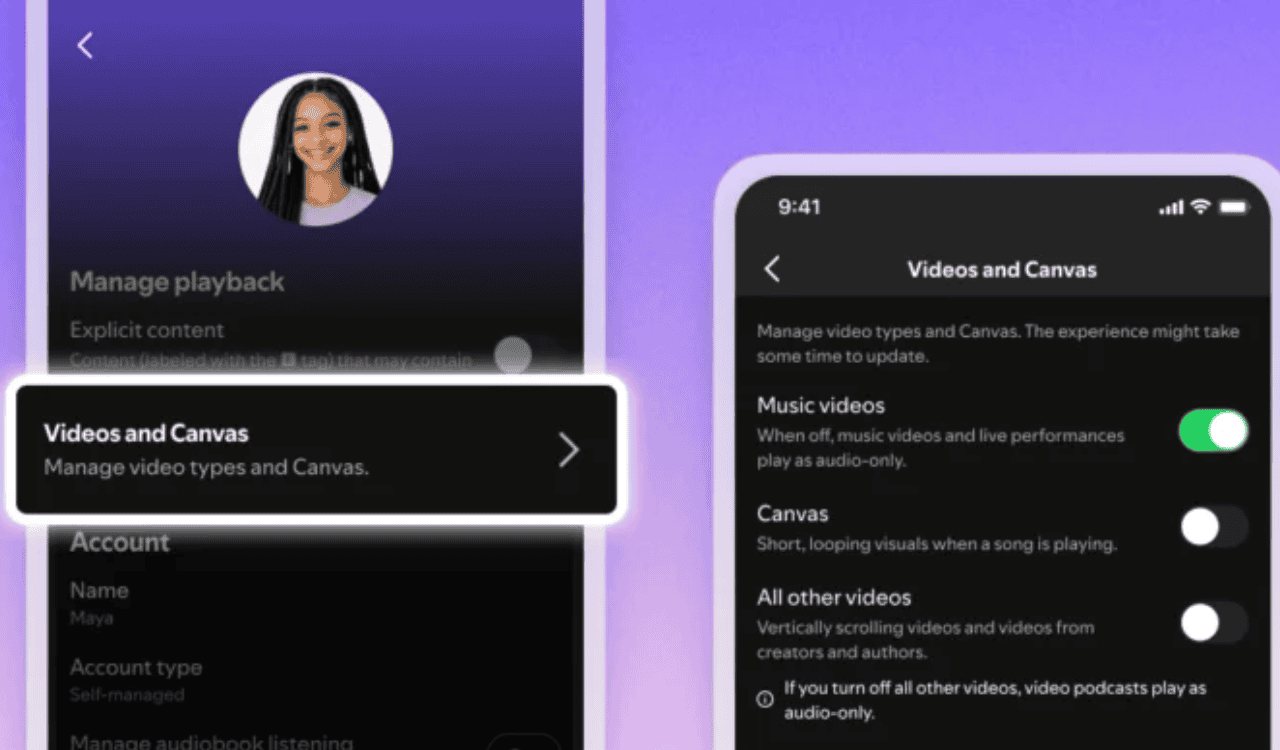
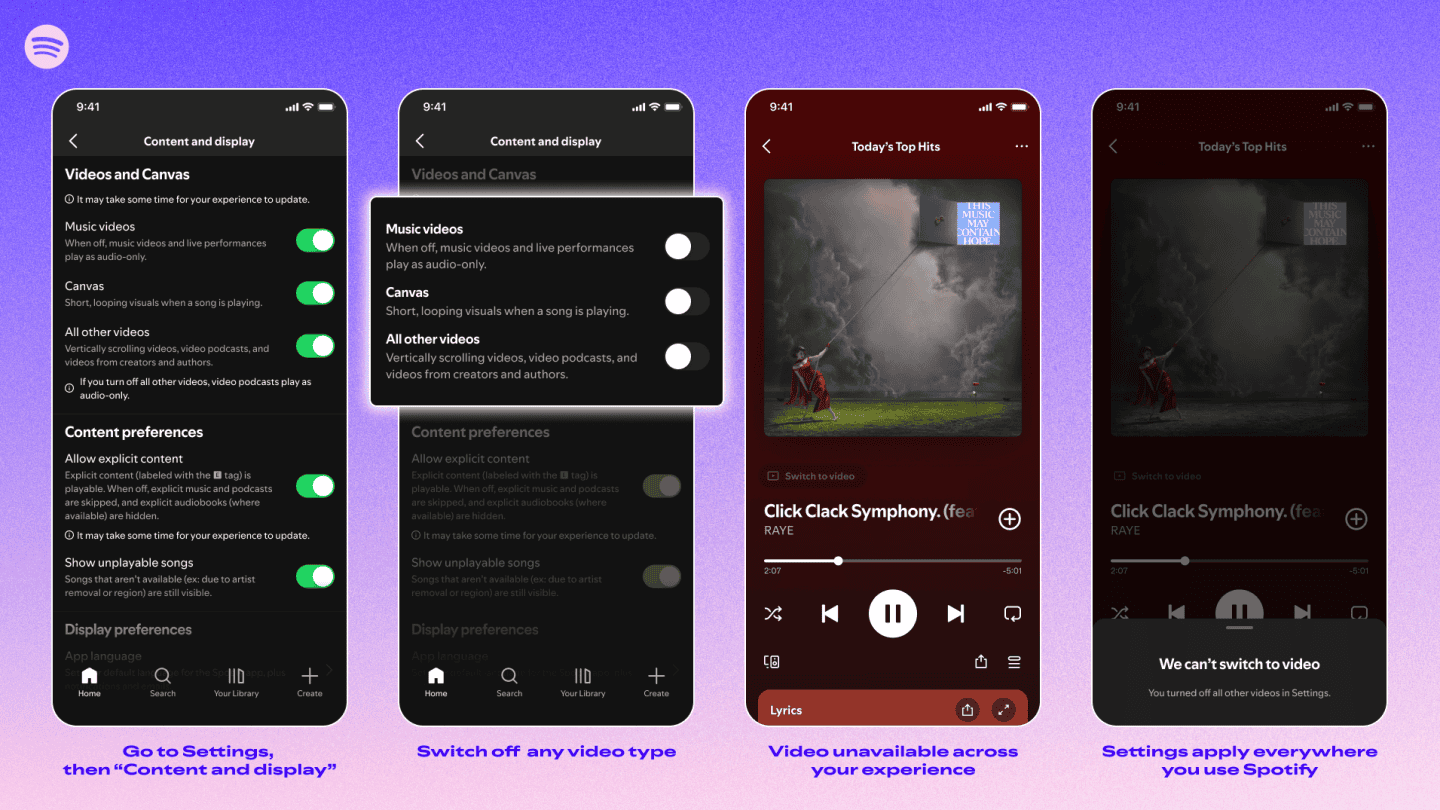
The official announcement came earlier today, while The Verge reported about it first. Per the announced changes, the new toggles will live in the app’s settings, under “Content and display” on mobile and “Display” on desktop. There will be three separate controls: one for Canvas clips, one for music videos, and one for all other video content, including podcasts.

To manage video settings, head to Settings > Content and display, where you can toggle Canvas visuals, music videos, or podcast videos on or off. Once set, your preferences carry across mobile, desktop, web, and TV. Video ads will still appear, along with some visual elements in audio ads.

All the aforementioned toggles make sure that you get to personalize your choices, so you can decide exactly how much video appears while you listen. Interestingly, Spotify is expanding these controls to Family Plan subscribers. That means admins will be able to enforce audio-only listening for specific members, preventing them from switching back to video.

Image credit: Spotify

The audio streaming giant has also announced that it will also be introducing new settings so all Premium and Basic users, whether on Individual, Duo, Family, or Student plans, and all users on our free service can control how video appears in their app. Speaking of rollout, Spotify says that the settings update will be out for all users globally this month.

Windows Terminal Settings UI May Soon Get Major Revamp; Check Mockups Here

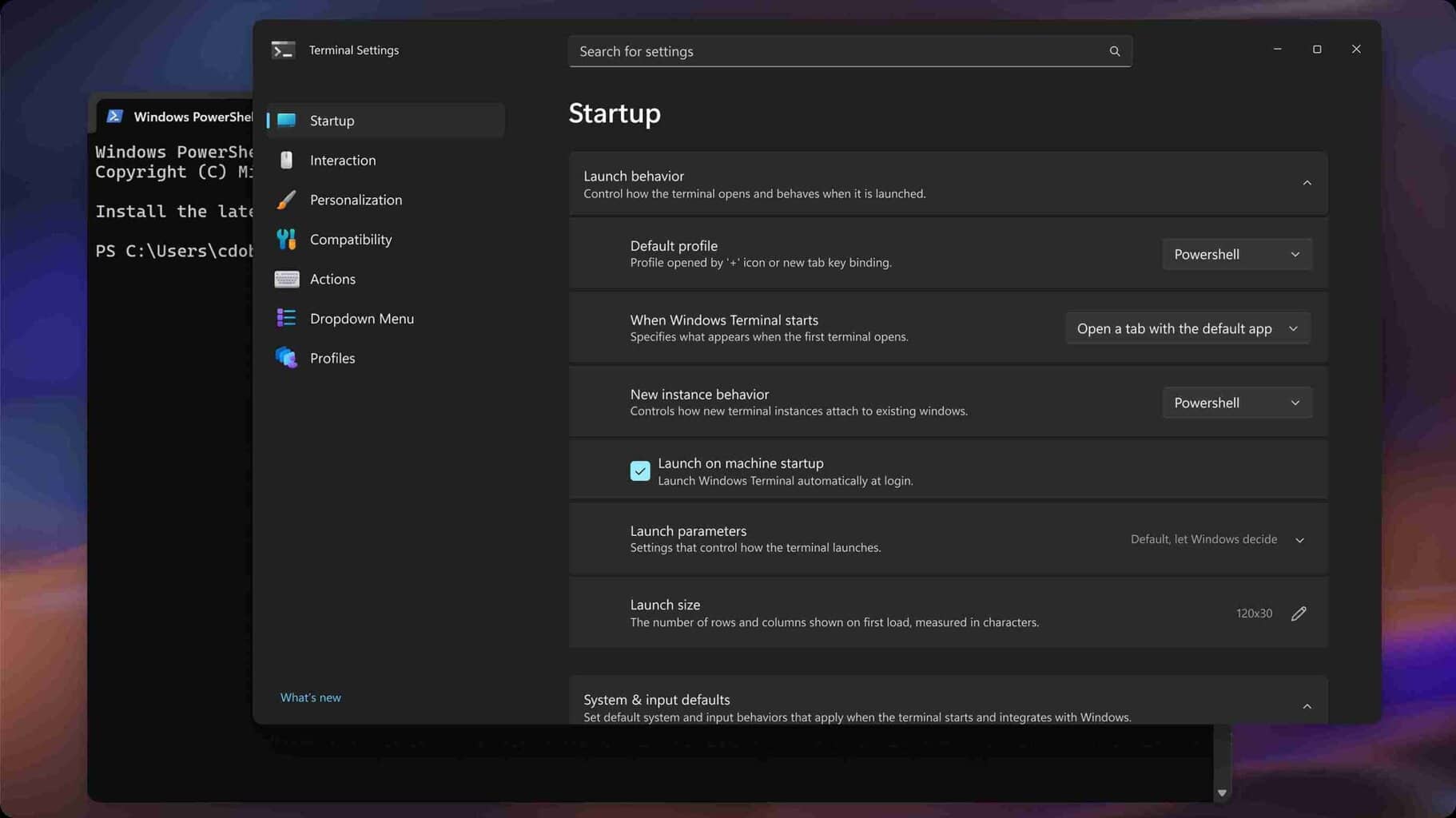
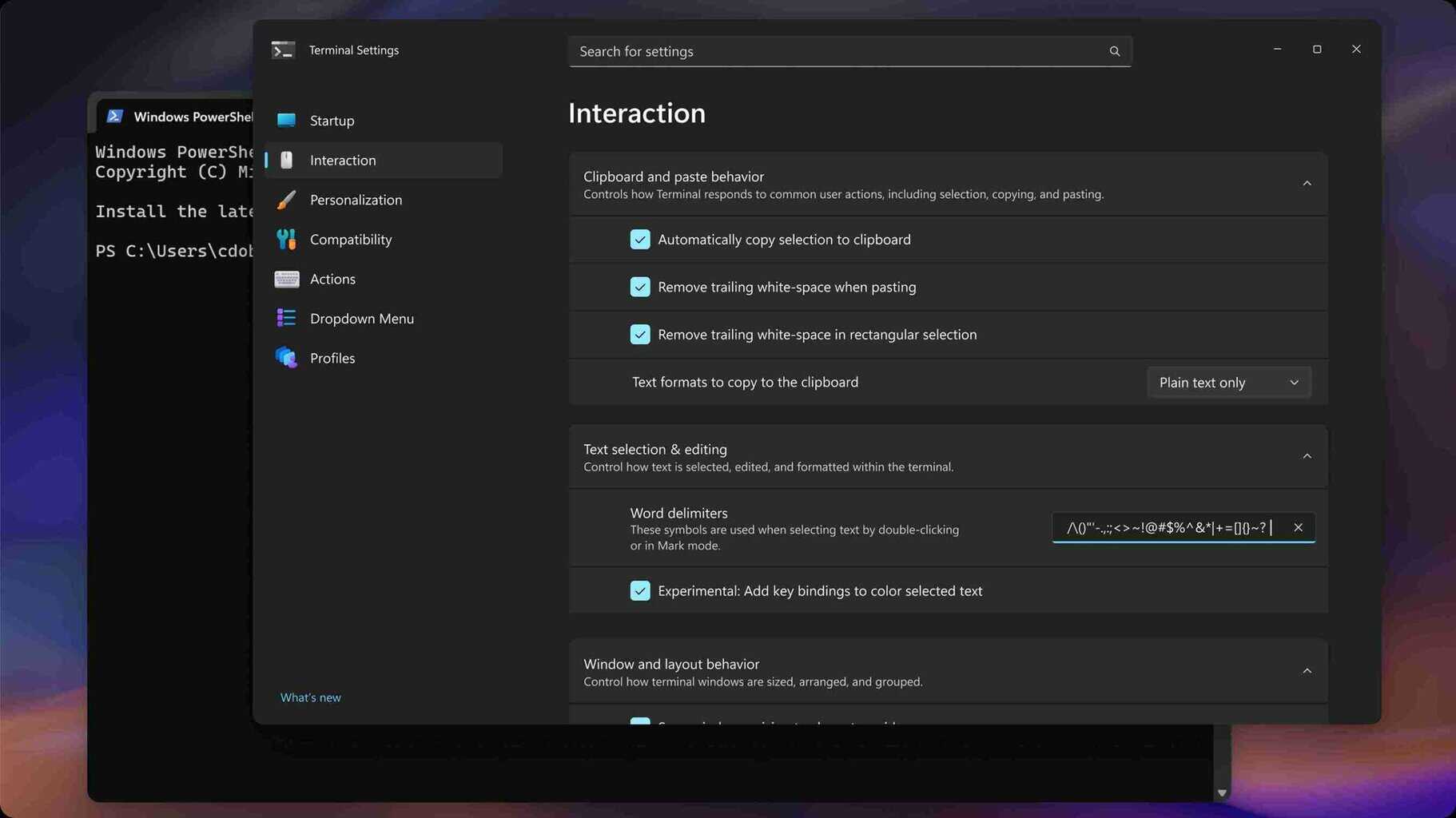
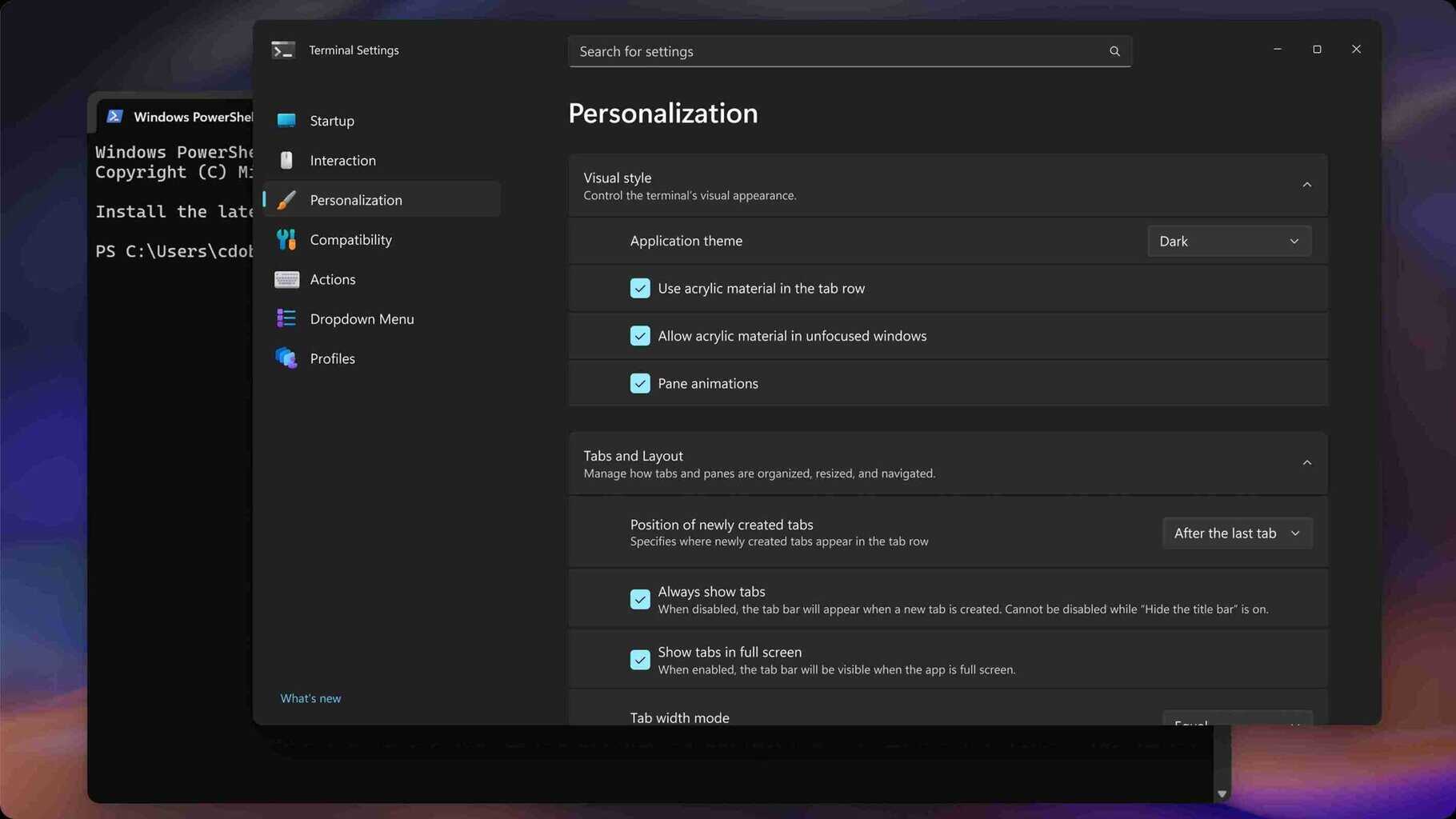
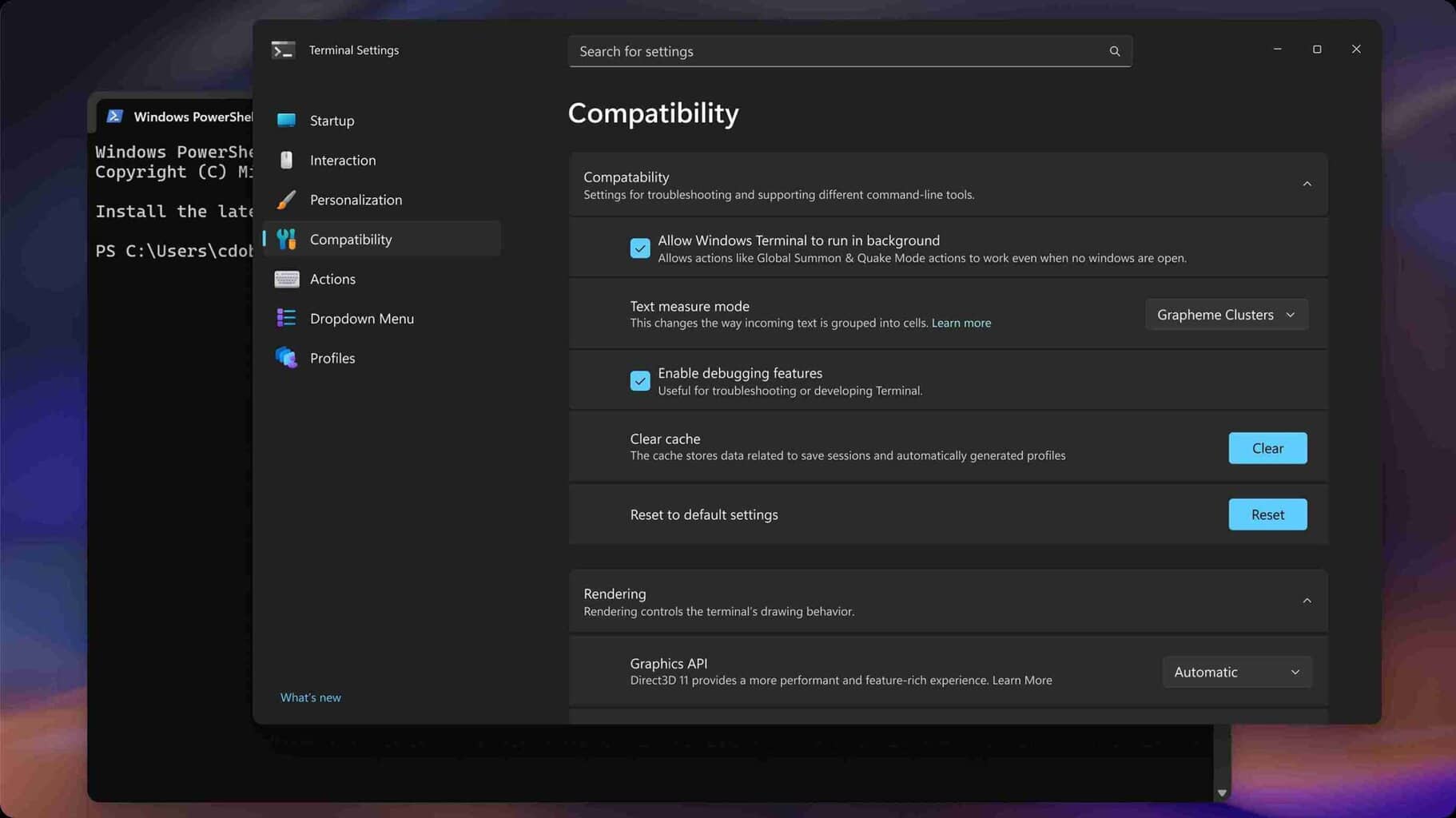
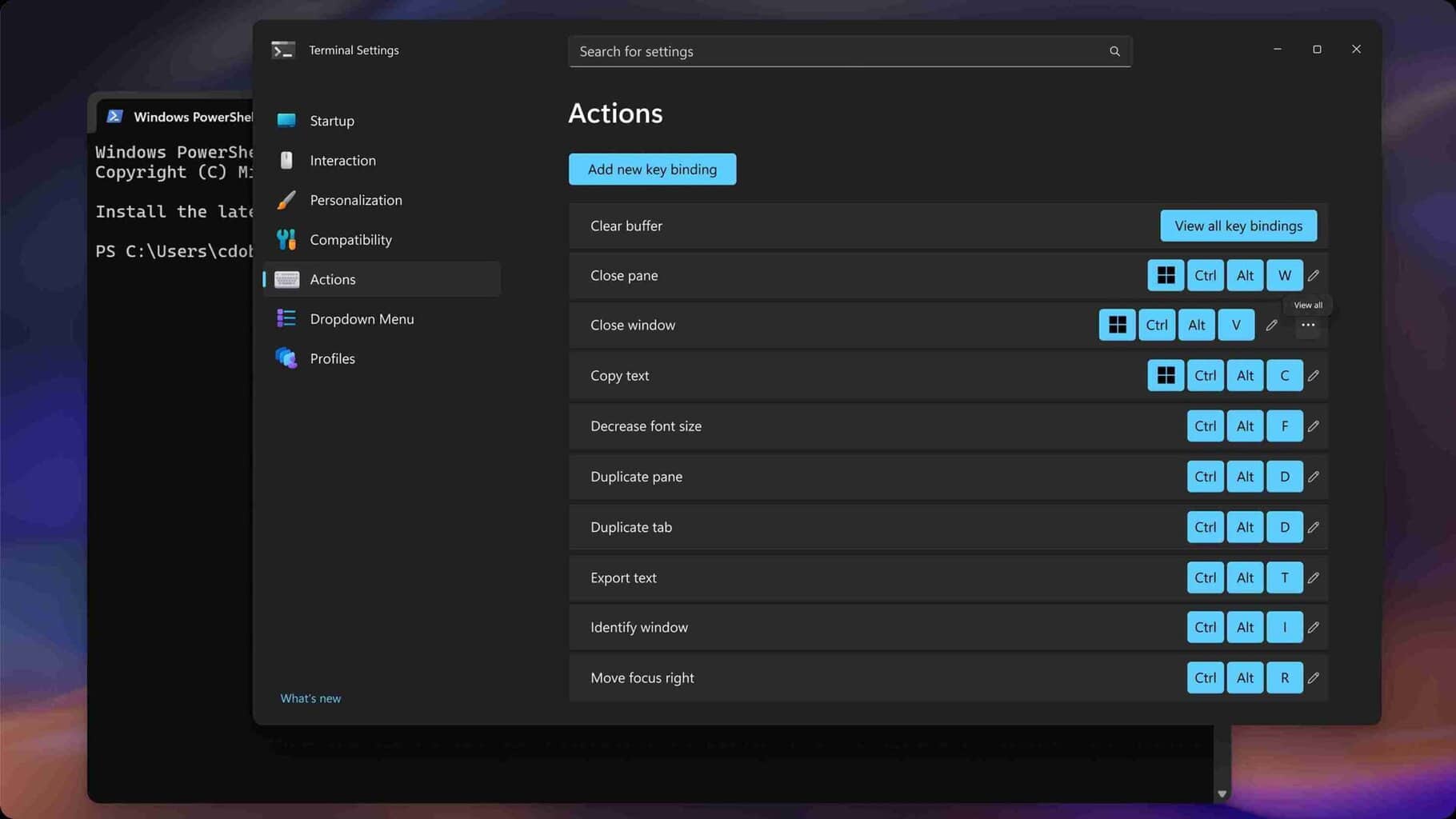
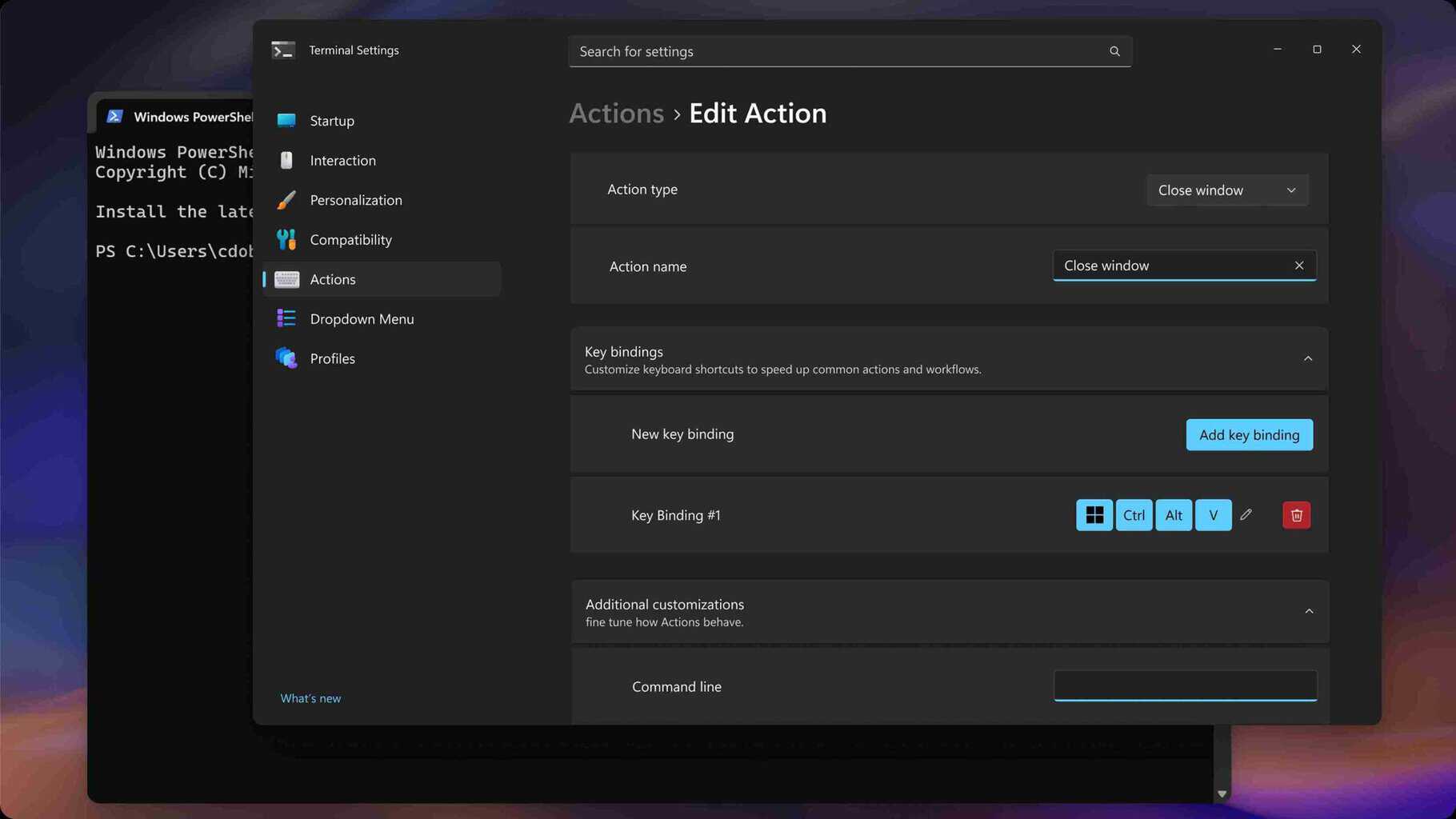
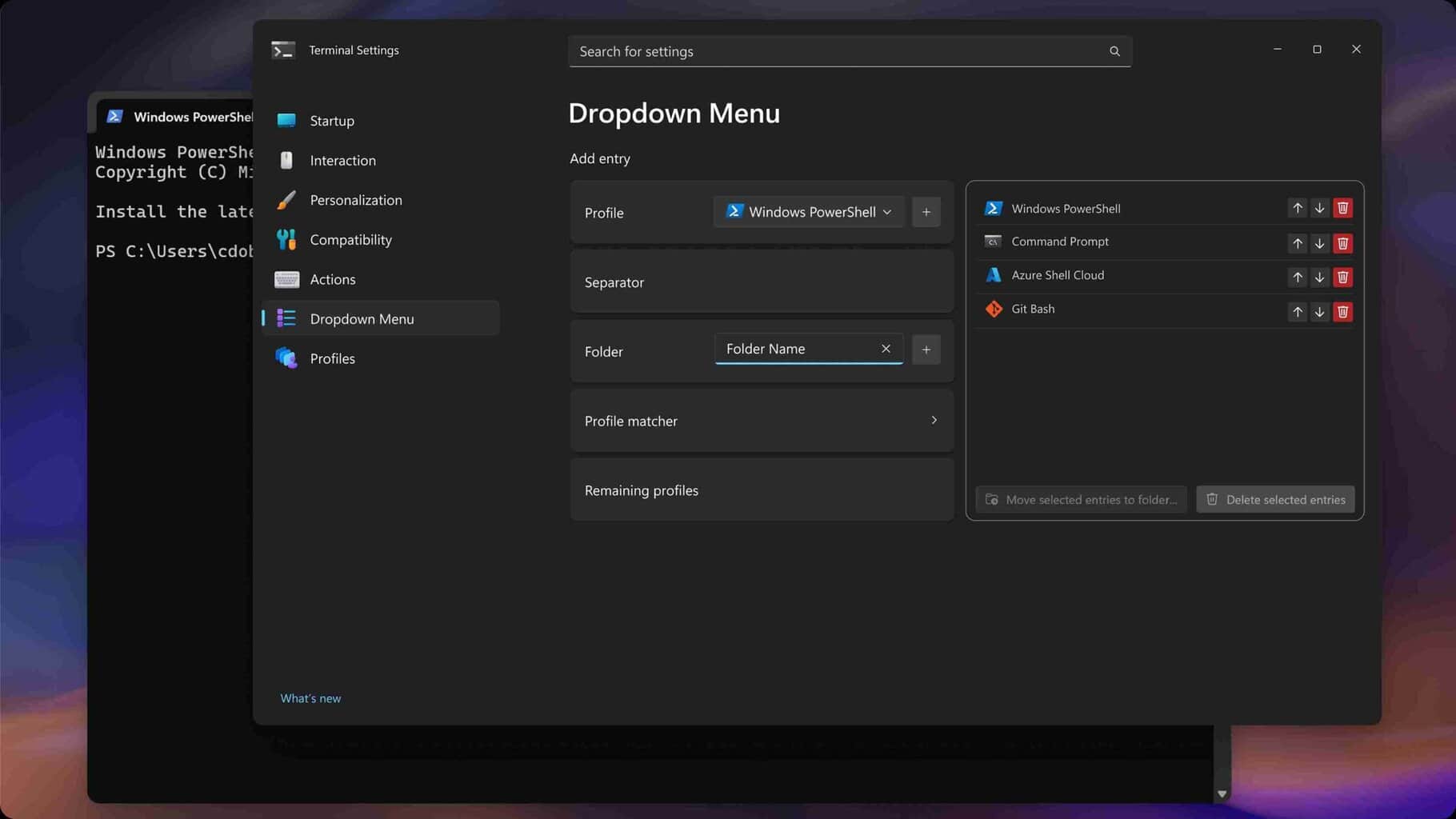
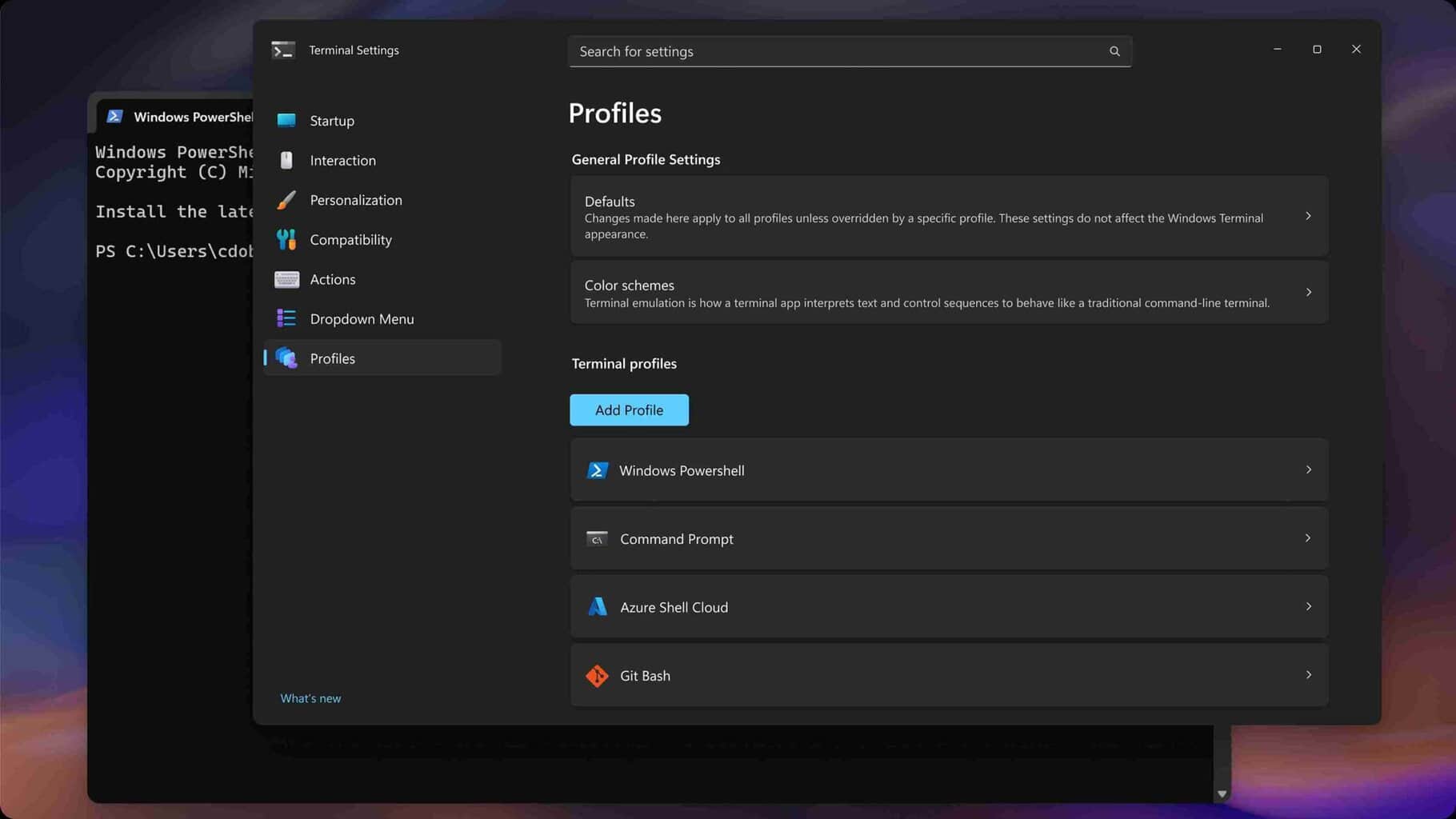
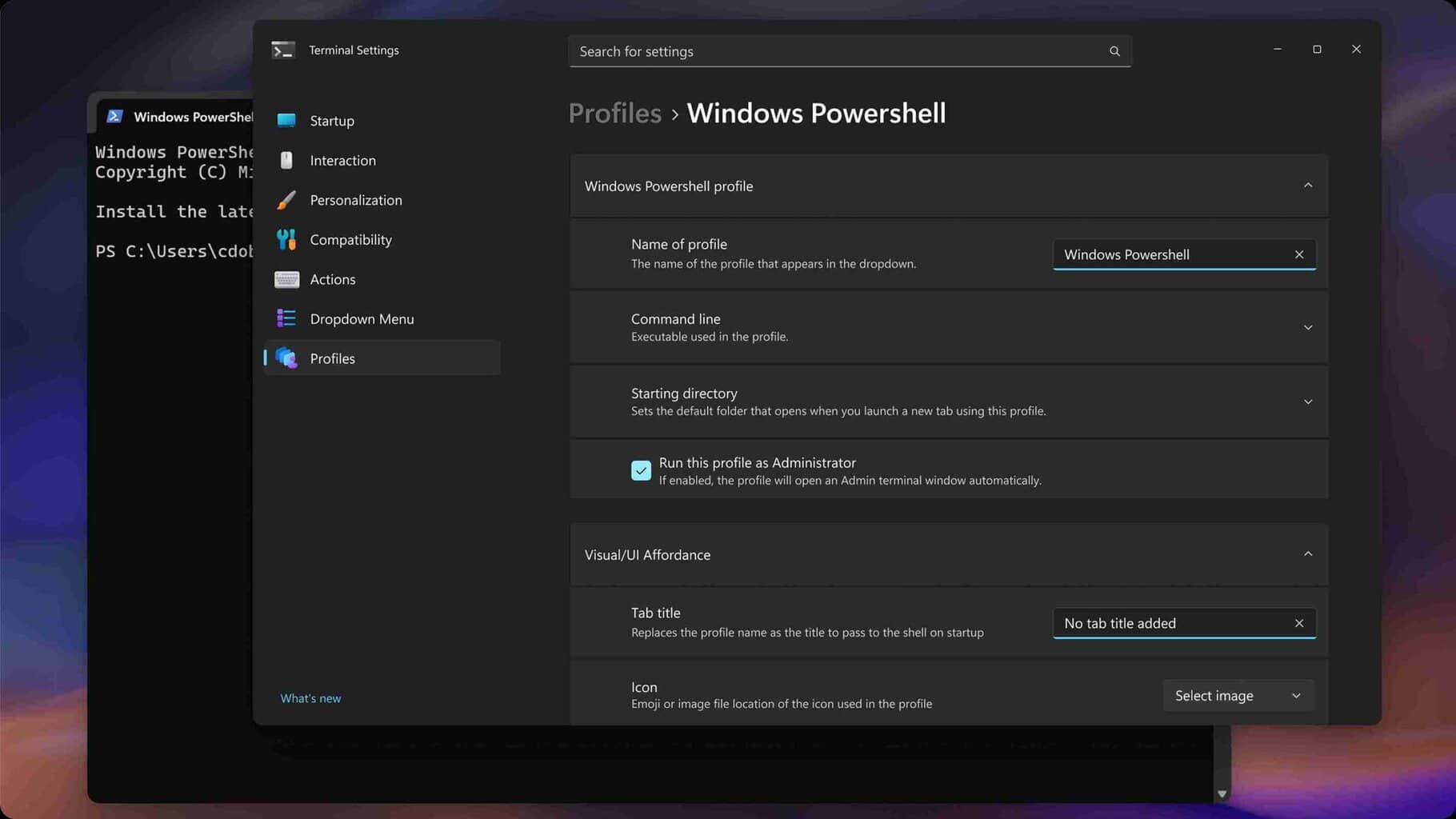
Microsoft is looking to revamp the Windows Terminal settings’ UI, with mockups shared on GitHub hints at a cleaner, more intuitive experience for both new and power users. The company has shared images from user research sessions, showing redesigned layouts, smarter groupings, and tweaks aimed at reducing clutter while keeping options accessible.

As seen in the mockups, settings are moving to a dedicated window by replacing the in-app panel, giving users a clearer view of categories like Startup, Interaction, Personalization, and Compatibility (via Neowin). In addition, toggle switches are being swapped for checkboxes, and explanatory text under each setting remains for newcomers who appreciate extra guidance.

The startup section is getting grouped controls for launch behavior and system defaults, while interactions now include clipboard, text selection, and layout options. Additionally, personalization tweaks promise more visual clarity, though some elements, like profile appearance, still have open questions. Moving on, compatibility and rendering sections are being consolidated, with “reset to defaults” retained as a safety net for cautious users. Here are some of the mockups the team has shared:

Image credit: Microsoft

Apart from those, key bindings and actions are getting attention too. Users can preview shortcuts more clearly, with options for single key display or a “…” menu to see all bindings. The dropdown menu replaces the old “new tab menu,” and previews are now moved to the right side, following positive feedback. Profiles pages are also being cleaned up, with defaults, color schemes, and individual profiles easier to navigate, while dynamic profiles and customization remain a focus.

Microsoft is still testing some ideas and asking for feedback. The mockups hint at a careful consideration of both novice and experienced users, keeping auto-save as the default while adding indicators for confidence. From the looks of it, Windows Terminal looks to simplify the settings experience without stripping power away from advanced users. If Microsoft manages to push these changes, it would complement the recent update for Windows Terminal which added extensions page, and faster performance.

How RPGs Pushed PC Gaming Technology Forward for 30 Years

In 1996, I tried to run Daggerfall on my family’s Pentium 133. It didn’t go well. The game demanded more RAM than we had, more disk space than seemed reasonable, and a graphics card that could handle texture-mapped 3D environments in real time. My father, who used the computer for spreadsheets, asked why a video game needed more processing power than his accounting software. I didn’t have a good answer then. I do now.

RPGs have been pushing PC hardware requirements for three decades. Not because developers are inefficient — because the genre’s ambitions consistently outpace available technology. Open worlds that need rendering. Thousands of NPCs with unique dialogue. Real-time lighting across hundreds of dungeons. Physics simulations for combat. RPGs demand everything a computer can give, and then they ask for more.

This is the story of how a single genre drove GPU sales, standardized modding tools, pioneered AI systems, and shaped the PC gaming hardware market into what it is today.

The Ultima Era — When RPGs Defined PC Gaming

Before GPUs existed, before Steam existed, before the concept of “pc gaming” was a marketing category, there were RPGs. Ultima, Wizardry, Might and Magic. These games WERE PC gaming in the 1980s. Consoles had Mario and Sonic. PCs had sprawling role-playing experiences that required a keyboard, a manual the size of a phone book, and the patience to type commands like “ATTACK ORC WITH SWORD.”

Ultima VII, released in 1992, was a milestone not just for RPGs but for PC technology. It required 4MB of RAM at a time when most PCs shipped with 2MB. It used a custom memory manager that bypassed DOS limitations. It rendered an entire interactive world with day/night cycles, NPC schedules, and a physics system that let you bake bread by combining flour and water near an oven. In 1992. The technical ambition was so far ahead of consumer hardware that Origin Systems literally shipped a custom boot disk with the game to free up enough memory to run it.

This pattern — RPGs demanding more than hardware can comfortably deliver — would repeat every five years for the next three decades.

The 3D Revolution — RPGs Drive GPU Adoption

The mid-1990s brought 3D graphics cards to consumer PCs, and RPGs were among the first genres to demand them. Daggerfall’s procedurally generated world — 62,000 square miles of terrain with over 15,000 towns — pushed the boundaries of what was technically possible in 1996. It ran poorly on almost everything.

Then came the real turning point: Baldur’s Gate in 1998. BioWare’s Infinity Engine required hardware acceleration for its pre-rendered backgrounds and real-time combat. The game sold over two million copies and demonstrated something important to the PC hardware industry: RPG players would upgrade their systems to play the games they wanted.

This was the beginning of a relationship between RPG developers and GPU manufacturers that continues today. Every major RPG release drives a measurable spike in graphics card sales. NVIDIA’s internal data from 2023 confirmed that RPG launches generated the second-highest upgrade rates after first-person shooters. The genre doesn’t just USE GPUs — it SELLS them.

The Modding Revolution — How RPGs Built PC Gaming Culture

Bethesda didn’t invent modding. But Morrowind, released in 2002, turned modding from a niche hobby into a defining feature of PC gaming. The game shipped with the same Construction Set that developers used internally. Players could modify everything: textures, models, quests, entire landmasses. Twenty-four years later, Morrowind has over 10,000 mods on Nexus Mods.

Skyrim took this further. The modding community for Skyrim is so large and productive that it effectively functions as a free development studio. Total conversion mods like Enderal are standalone games built on Skyrim’s engine. Graphics mods push the visual quality beyond what any 2011 game should look like. The unofficial patch project has fixed more bugs than Bethesda’s official patches combined.

The economic impact is real. Nexus Mods, the largest modding platform, exists primarily because of Bethesda RPGs. Mod managers like Vortex and Mod Organizer were built for RPG players. The entire infrastructure of PC game modding — the tools, the communities, the platforms — was built by RPG fans for RPG fans. And that infrastructure now serves every genre on PC.

Ray Tracing, DLSS, and the Modern RPG Arms Race

In 2024, Final Fantasy VII Rebirth arrived on PC with hardware requirements that made veteran PC gamers wince. The recommended specs listed an RTX 4070 — a $600 graphics card. Path-traced global illumination, volumetric fog, subsurface scattering on character skin — the game used every rendering technique in the modern GPU handbook.

Elden Ring’s PC port, despite its initial optimization issues, demonstrated the value of DLSS and FSR for RPG players. Frame generation technology meant the difference between a smooth 60fps experience and a stuttering mess during dragon fights. The game sold over 25 million copies across all platforms, with the PC version accounting for a significant portion — and GPU manufacturers used it as a showcase for their upscaling technology.

The JRPG podcast and review site Icicle Disaster has compiled a definitive ranking of the greatest RPGs across three decades of hardware evolution — a timeline that mirrors PC gaming’s own technological journey from CGA monitors to ray-traced reflections.

AI in RPGs — The Next Frontier

The relationship between RPGs and artificial intelligence predates the current AI boom by decades. RPG developers have been building NPC behavior systems, dialogue trees, and procedural content generators since the 1980s. What’s changed is the sophistication. Modern RPGs use machine learning for pathfinding, difficulty adjustment, and procedural quest generation. The next generation will use large language models for dynamic NPC dialogue.

This matters for PC hardware because AI workloads are GPU-intensive. NVIDIA’s investment in AI acceleration — tensor cores, DLSS, AI-powered NPC demos — is directly motivated by gaming use cases that RPGs pioneered. When NVIDIA demonstrates an AI-powered NPC having a natural conversation at a press event, they’re showing a technology that RPG developers have been approximating with scripted systems for thirty years. The hardware is finally catching up to the genre’s ambitions.

Why RPGs Will Keep Pushing Hardware

The pattern won’t stop. RPGs will always demand more because the genre’s core promise — a living, reactive world that responds to the player — is technologically insatiable. More detailed worlds need more VRAM. More NPCs need more CPU threads. More dynamic lighting needs more shader cores. More procedural content needs more computation.

For PC builders and hardware enthusiasts, this is good news. RPGs ensure that there will always be a reason to upgrade. Not because the games are poorly optimized — because they’re ambitious. The same ambition that made Ultima VII ship with a custom boot disk in 1992 drives Final Fantasy VII Rebirth to recommend an RTX 4070 in 2024. Technology changes. The relationship between RPGs and bleeding-edge hardware remains constant.

Thirty years of pushing boundaries. Thirty years of GPU upgrades justified by one more dungeon, one more open world, one more dragon fight rendered in real-time ray tracing. RPGs didn’t just benefit from PC technology’s evolution. They drove it.

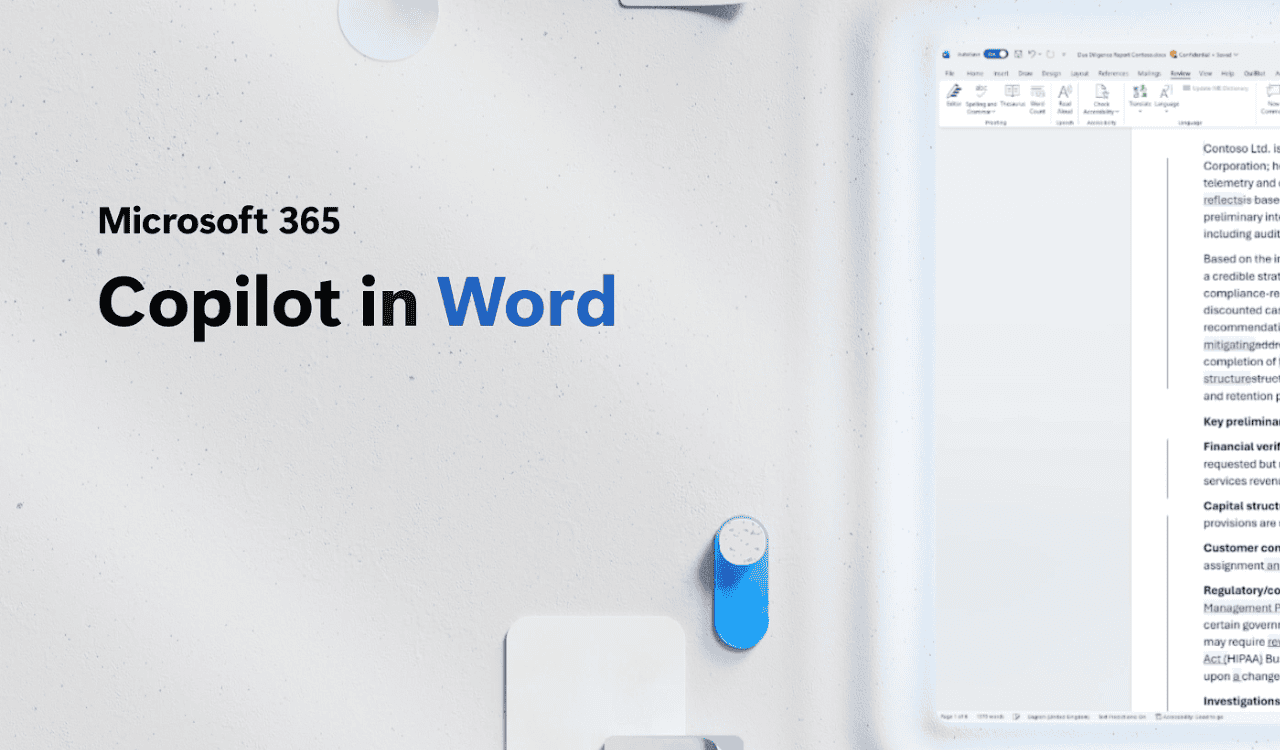
Copilot in Word Just Got Better at Handling Complex Documents

Although Microsoft is moving away from AI everywhere strategy and promised to cut the Copilot clutter across Windows 11, it continues to add new features inside its standalone productivity apps. This time, Microsoft is rolling out new Copilot features in Word that will help professionals handling complex documents.

From contract review to policy finalization, Copilot can now track changes with precision, ensuring audit trails remain intact. As Microsoft puts it, the new features are grounded in Work IQ, Microsoft 365’s intelligence layer, to provide context-aware responses while keeping sensitive data secure within organizational boundaries.

Precision and transparency at every step

Copilot now operates right inside Word, where you and your team already collaborate. All new features are native, keep your formatting intact, and preserve collaboration history. The latest update brings several tools designed to make editing, commenting, and organizing documents faster and more reliable. You can check the new features below:

  • Track Changes with word-level precision: With Copilot in Word, changes are visible by default, and now it is easy to turn track changes on from Copilot, so edits are always transparent, auditable, and granular. 
  • Contextual comments: Add, read, reply to, and manage comment threads anchored to the correct text with Copilot, keeping collaboration context intact. 
  • Table of Contents: Insert and update tables of content using Word’s built-in heading types. Structure stays accurate as the document evolves. 
  • Dynamic page features: Insert and manage headers, footers, columns, margins and dynamic fields like page numbers and dates that automatically refresh with edits. 
  • Progress messages: For multi-step edits, Copilot shows what it’s working on in real time, building trust and transparency. 

How you can use it

Examples given by Microsoft in the blog post include asking Copilot to tighten executive summaries, flag unclear items in risk sections for Finance or Legal review, and auto-generate tables of content with headers, footers, and page numbers. Copilot can also summarize pending changes, providing a review overview that highlights proposed edits and unresolved comments for quick decision-making.

The update is available today on Windows through the Frontier program and Office Insiders Beta Channel, with web and Mac support coming soon.

Microsoft Tests Faster Quick Settings in Windows 11 Amid Performance Push

Microsoft is pushing ahead with improvements to Windows 11 Settings, but fully replacing Control Panel remains a complex challenge. At the same time, the company is now testing a faster version of Quick Settings, aiming to eliminate delays and improve responsiveness across the system.

Quick Settings performance issues under scrutiny

As reported by Windows Latest, the current Quick Settings panel in Windows 11 can feel sluggish. It often takes a few seconds to open, while certain elements load with noticeable delay after users click on Wi-Fi, sound, or battery icons.

The issue becomes more apparent when switching Wi-Fi networks or disconnecting Bluetooth devices. In some cases, the interface does not immediately reflect these changes, creating a laggy and inconsistent experience.

Microsoft targets an instant loading experience

Microsoft is actively testing internal fixes designed to make Quick Settings load instantly. The goal is to ensure that buttons, toggles, and sub-action pages appear without delay, aligning with a broader push toward faster UI interactions across Windows 11.

These improvements are part of a wider effort to modernize core system components and remove friction from everyday tasks.

New Quick Settings features in testing

Alongside performance upgrades, Microsoft is experimenting with new functionality for Quick Settings. Users may soon be able to rearrange items using drag-and-drop, making customization more flexible.

A new Energy Saver sub-page is also in development, bringing additional controls such as dark mode toggle, eco brightness, screen contrast adjustments, and power mode settings into one place.

Part of a broader Windows 11 performance push

The Quick Settings overhaul fits into Microsoft’s larger 2026 initiative focused on improving speed and responsiveness across Windows 11. The company is working toward near-instant loading for key UI areas, including the Start menu, Taskbar, and Quick Settings panel.

The notifications center is also receiving attention, with faster load times and quicker dismissal animations expected.

More changes coming to Windows 11

Beyond Quick Settings, Microsoft continues to refine other parts of the operating system. Windows 11 search is set to become faster and more accurate, while early previews have also teased a movable Taskbar.

Despite these updates, the transition away from Control Panel remains ongoing, largely due to the complexity of supporting legacy hardware and system configurations.

Opera 130 Hits Stable Channel with Chromium 146, Twitch Support, UI Improvements & Fixes

After releasing Opera for Linux users and Opera 129 a few weeks back, the company has now pushed Opera 130 to the stable channel with a new Chromium version and fixes for crashes and interface issues. The update mostly focuses on improving the browsing experience by making tabs, settings, and sidebars behave more reliably for everyday browsing.

Opera 130 stable focuses on UI improvements and bunch of fixes

Based on Chromium 146.0.7680.178, Opera 130 has also fixed lingering issues in tab interactions, hover previews, and UI rendering, which keeps the browser more stable under heavy use. If you use split-screen mode, you’ll notice the download popup now appearing correctly, and tab controls, including the “+” button, respond more predictably.

The latest stable update has also improved Settings and UI. For example, layout issues in Easy Setup have been addressed. Meanwhile, miniplayer text now displays correctly, and cursor visibility in dark mode history search has been improved. Other improvements include tweaks to extension notification popups and smoother rendering across multiple tabs.

Across the browser, minor but meaningful improvements related to apps have also been made. YouTube push notifications are now more reliable, onboarding flows and tab imports behave consistently, and adblock custom lists display correctly. Windows users benefit from fixes to downloads, extensions, and the new tab experience, keeping the workflow uninterrupted.

Moving on, Early Bird users now get access to Threads and Twitch in the sidebar, which offers a more integrated way to stay on top of social and streaming content without leaving the browser. If you wish to check all the changes, head over to the changelog here.

Speaking of new features, Opera Neon recently introduced the MCP Connector lets AI tools work directly inside the browser. Meanwhile, Opera One brings Gemini and Google Translate straight into the sidebar, so you can get answers, translate text, or tap AI insights while browsing.

You can download the latest version of Opera One for Windows, macOS, and Linux (deb, REM, snap).

Microsoft is Offering Free Rechargable Batteries to Buyers Hit by Xbox Controller Shipping Hiccup

Microsoft is now offering free rechargeable battery packs to Xbox users after a recent controller packaging issue left some without the usual AA batteries. The issue came in light over the past few months, with reports suggesting some Xbox Wireless Controllers shipped without any batteries included in the box.

Now, Microsoft appears to be stepping in to resolve the issue. If you have purchased Xbox controllers starting December 2025 but didn’t receive AA batteries, you may be eligible to claim a free Xbox Rechargeable Battery and USB-C cable (via PureXbox).

In a support article, Microsoft has noted the process of claiming rechargable battery packs, which we have mentioned below.

How to request an Xbox Rechargeable Battery

To check eligibility, you’ll need to register the serial number of the controller through the devices page on Microsoft Account website and follow the instructions:

  • Go to account.microsoft.com/devices.
  • Select Register device > Register a new device.
  • Complete the registration flow.
  • Select the controller you registered, then select Start order, and follow the onscreen instructions.
  • For Category, select Accessory and for Issue Type, select Charge Kit.
  • If your controller is eligible, you’ll see an offer for Xbox Rechargeable Battery + USB-C Cable – Send Immediately – One-Time Offer. Select this and continue with the steps to complete the order.

Note: If there are no service options available, then your controller is not eligible for this offer.

Once your request is submitted, you’ll receive an Xbox Rechargeable Battery + USB-C Cable. Limit of one rechargeable battery per eligible controller.

Things to keep in mind:

  • A retailer receipt isn’t required.
  • You’ll need to register your controller using its serial number.
  • This process applies to select new Xbox Wireless Controllers and Xbox Design Lab controllers that did not include AA batteries in the packaging.

Last but not least, make sure you’re signed in with the Microsoft account you want associated with the controller

Do note that the rechargeable kit being offered isn’t a small freebie either. It typically retails for around $24.99, making this a fairly direct response to the issue rather than a gesture.

For those unaware, Microsoft has historically stuck with removable AA batteries for its controllers, although its competitors have moved to built-in rechargeable solutions. For affected users, it arguably ends up being a better deal than the standard AA batteries that would have originally shipped with the controller.

Nintendo Adds Three More Classic Titles to Switch Online Service

As reported by Nintendo Life, the Switch Online “Nintendo Classics” catalog has expanded with three new NES titles, bringing more retro content to subscribers. The update includes iconic releases from Namco and a lesser-known title developed by Game Freak, all now available through the service.

Three NES classics join the Nintendo Classics lineup

The newly added games include Pac-Man (1988), Mendel Palace (1989), and The Tower of Druaga (1984). These titles were also released simultaneously in Japan, keeping the libraries aligned across regions.

Pac-Man remains one of the most recognizable arcade experiences, challenging players to clear mazes while avoiding ghosts. Mendel Palace offers a unique action-puzzle experience, where players control Bon-Bon to rescue Candy from a dream world. Meanwhile, The Tower of Druaga blends action and exploration, tasking players with climbing a tower, collecting keys, and ultimately defeating Druaga to rescue Ki.

All three games require an active Nintendo Switch Online subscription, as they are part of the NES library included in the service.

The update comes at a time when Nintendo is reportedly adjusting its broader strategy. Recent reports suggest the company plans to scale back production by over 30% following weaker-than-expected sales in the United States.

At the same time, expectations are growing around the upcoming Switch 2, with rumors pointing to a potential price increase. That could make current bundles, including discounted offers featuring Super Mario Galaxy, more appealing to buyers considering a purchase soon.

The New ‘Notebooks’ Feature Turns Gemini Into a Project Hub

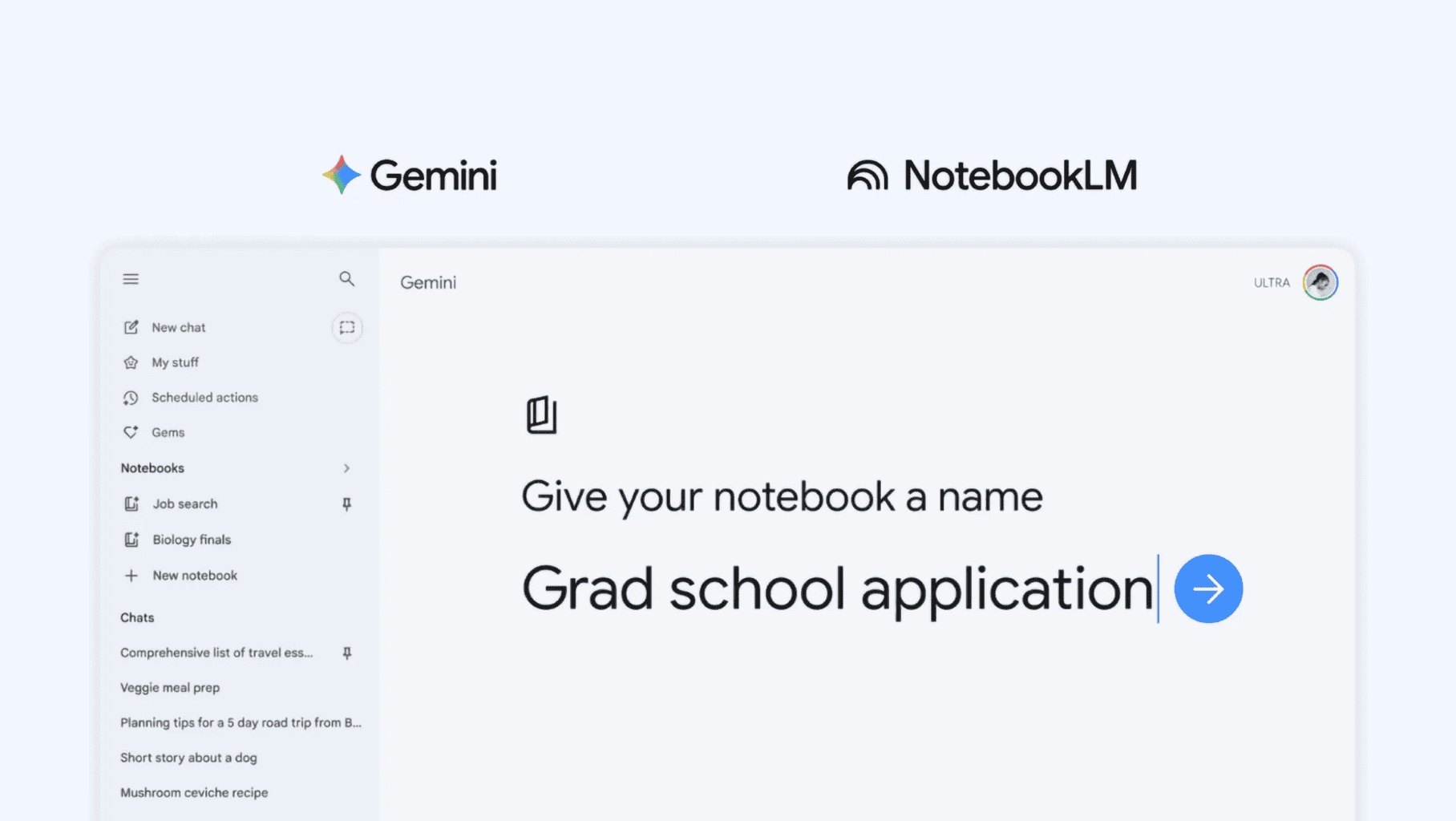
Google is rolling out a new feature in Gemini that could change how users manage ongoing AI projects. The company has introduced “notebooks,” a system designed to organize chats, files, and research in one place. The update builds on last year’s integration with NotebookLM, but this time, Google is pushing for a more structured workflow inside Gemini itself.

Gemini notebooks bring structure to AI workflows

Notebooks act like personal knowledge hubs inside the Gemini app. Users can group chats around a topic, add documents or PDFs, and even move older conversations into a dedicated space. Gemini then uses these selected sources, along with web search, to generate more context-aware responses.

Rather than scattered prompts and chats, everything now sits in one organized environment. Users can also add custom instructions, giving Gemini better direction when working on long-running projects like study material or research tasks.
One of the standout feature is the sync with NotebookLM. Any notebook created in Gemini carries over, allowing access to features like video overviews and infographics. For example, users could upload notes in NotebookLM, then switch to Gemini to generate summaries or outlines using the same material.

For now, notebooks in Gemini is rolling out to Google AI Ultra, Pro, and Plus users on the web. Moreover, Google says that mobile and wider availability expected in the coming weeks.

Microsoft Almost Canceled Xbox Before Launch, New Details Reveal

Microsoft almost scrapped the original Xbox before it ever launched, according to a new report highlighted by Windows Central. Former Xbox VP Ed Fries revealed that top leadership, including Bill Gates and Steve Ballmer, strongly opposed the project in its early stages.

The decisive meeting reportedly took place in February 2000, where Gates criticized the Xbox proposal for hours. At the time, Microsoft expected the console to lose at least $1 billion, making it a risky bet with no guarantee of success.

A strategic move against Sony, not a passion for gaming

Xbox did not move forward because of enthusiasm for gaming. Microsoft approved the project as a defensive strategy against Sony and its dominance in the console market.

The concern went beyond gaming. Microsoft feared Japan’s growing influence across technology and the global economy, with companies like Sony seen as symbols of that dominance. At the time, Japan appeared positioned to rival or even surpass the United States economically.

Sony, alongside Nintendo, controlled the console space. Most major game developers also came from Japan, which further strengthened the country’s position in the industry.

A high-risk gamble that shaped the industry

Despite internal resistance, Microsoft pushed forward with Xbox as a long-term strategic play. The company accepted potential losses in exchange for securing a foothold in a rapidly expanding market.

That gamble paid off in shaping the modern gaming landscape, even though Xbox still trails behind its main competitors today.

Xbox today and what’s next

The gaming industry now spans globally, with strong competition across regions rather than dominance from a single country. Xbox remains a major player, though it continues to sit behind PlayStation and Nintendo in overall market position.

In other Xbox news, 23 new titles are arriving on the platform this week, while five games are set to leave the Xbox Store. Microsoft is also expanding its handheld support program, adding compatibility for 13 additional games.

Microsoft Expands Windows 10 ESU to 2016 LTSB With New Pricing Model

Microsoft has officially expanded its Extended Security Updates (ESU) program to cover additional Windows 10 versions, including long-term servicing releases. The move gives organizations more time to secure legacy systems that cannot transition immediately.

ESU rollout now includes Windows 10 Enterprise 2016 LTSB

Microsoft confirmed earlier this year that ESU coverage would extend to Long-Term Servicing Branch editions, specifically Windows 10 Enterprise 2016 LTSB. The program went live on April 1, 2026, offering continued access to critical security updates beyond the standard lifecycle.

Support for this version officially ends on October 13, 2026, making ESUs a temporary bridge for businesses still relying on older infrastructure.

Pricing model increases year over year

Microsoft has set the first-year ESU cost at $61 per device annually. Organizations that manage devices through Intune or Autopatch can reduce that cost to $45 per device.

The pricing model escalates quickly, with costs doubling each year. Companies entering the program in later years must also pay retroactively for missed coverage, which increases the total cost of delay.

ESUs available through multiple channels

Organizations can purchase ESUs through Volume Licensing or via the Microsoft Cloud Solution Provider (CSP) program. This approach allows flexibility depending on how companies manage licensing and deployments.

The program ensures continued delivery of critical security updates, even after official support ends.

Other affected products nearing the end of support

Windows 10 IoT Enterprise 2016 LTSB follows a similar timeline, with support ending in October 2026. Microsoft advises customers to contact OEM partners directly for ESU pricing in this segment.

Windows Server 2016 will reach the end of support in January 2027. Microsoft recommends upgrading to Windows Server 2025, although ESUs remain available as a fallback for organizations that need more time.

Microsoft pushes modern management tools

Alongside the ESU rollout, Microsoft continues to steer organizations toward modern management solutions. Systems enrolled in Autopatch will receive security updates automatically, reducing manual overhead.

At the same time, Microsoft increasingly positions Intune as the preferred management platform, gradually shifting focus away from traditional tools like SCCM.

Via Neowin

VeraCrypt and WireGuard Developer Accounts Banned by Microsoft, Updates Halted

Microsoft has reportedly terminated the developer account behind VeraCrypt, a widely used encryption tool, with no prior warning or explanation. The move immediately disrupts the project’s ability to deliver updates to Windows users.

According to reports, the account played a critical role in signing bootloaders and drivers, both required for distributing secure updates on Windows systems.

Account terminated without warning

The developer says the suspension happened abruptly, with no advance notice or communication from Microsoft. Attempts to resolve the issue have so far resulted only in automated responses, with no clear reasoning provided.

Without access to code signing, the developer cannot push updates that Windows will accept as trusted.

VeraCrypt updates are blocked on Windows

The impact is significant. While VeraCrypt can still update on other platforms, Windows updates remain effectively blocked.

Most users rely on Windows, which turns this into a major disruption. The project cannot deliver new features, bug fixes, or security patches through official channels, raising concerns about long-term stability and protection.

A similar situation is affecting WireGuard

The issue does not appear isolated. The developer of WireGuard is reportedly facing the same problem.

Their Microsoft account was also suspended without warning, and they are now going through a 60-day appeals process. During this period, their ability to maintain Windows updates remains restricted.

Security concerns growing

These actions raise broader concerns about how critical security tools depend on platform-controlled infrastructure such as code signing.

If developers cannot access signing systems, urgent patches may get delayed and vulnerabilities may remain unaddressed. This situation could expose users to increased security risks over time.

No clear resolution yet

Microsoft has not provided a public explanation for either case. Both VeraCrypt and WireGuard remain unable to deliver updates on Windows, and any resolution depends on Microsoft clarifying or reversing the decision.

In other news, it has been reported that GitHub has been injecting promotional content into pull requests. At the same time, threat actors are targeting developers through fake Visual Studio Code alerts, while a recent breach involving Axios npm highlights ongoing risks tied to social engineering campaigns.

Via Neowin

New Arc Raiders Update Brings Major Gameplay Fixes, Vanguard Set, and More

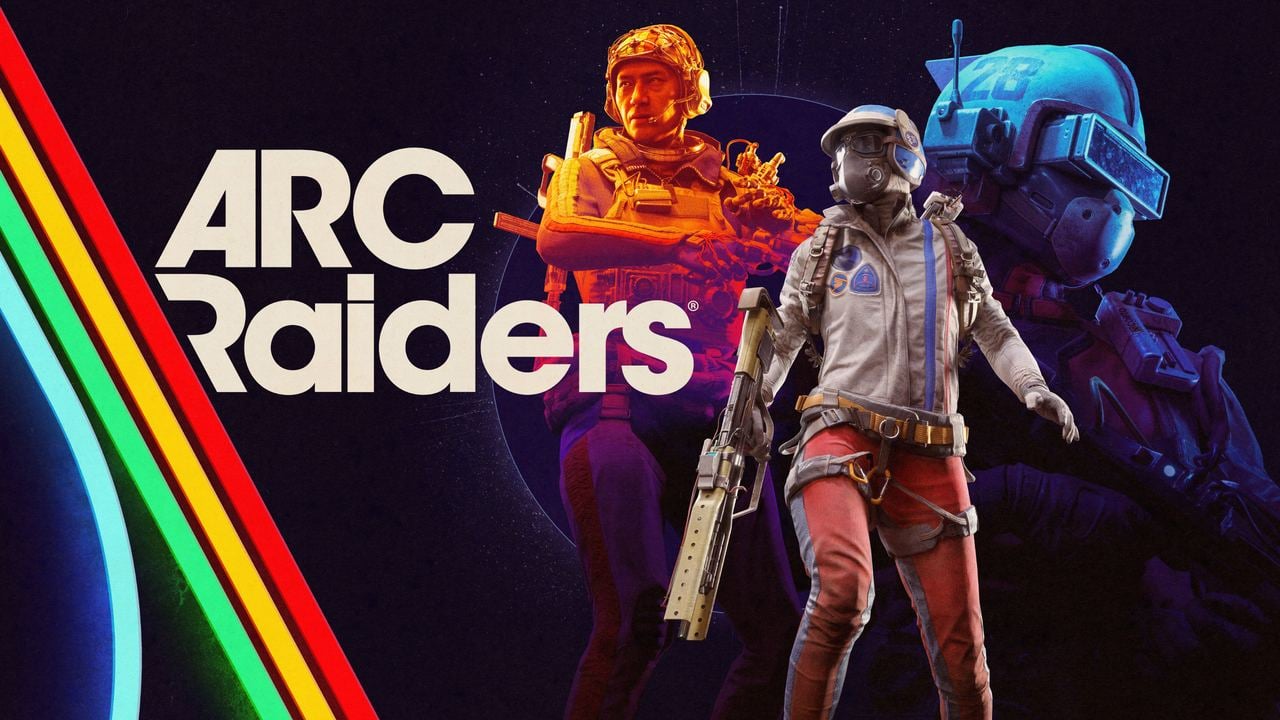
The latest Arc Raiders update is officially live, and it addresses some of the most problematic bugs players have dealt with since the Flashpoint drop. Embark Studios delayed its patch 1.23.0 by a single day, but the update is now rolling out across all platforms. This patch tackles major combat glitches, fixes map exploits, and finally adds the highly anticipated Vanguard armor set to the store.

The update fixes a handful of gameplay bugs

If you kept firing your weapon by accident while switching items in the game, you will be glad to know that the glitch is gone. The patch also stops a bug where placing two Trigger ‘Nades next to each other caused them to deal triple damage. Camera locking during shoulder swaps is resolved, and players can no longer cheat the dispersion penalty on the Anvil Splitter.

You also cannot place barricades on ziplines anymore. Additionally, Rocketeer enemies will now play their correct combat alert sound instead of the wrong audio cue.

A few glaring map issues are patched out. Over in Stella Montis, players will no longer catch on fire outside the Medical Research locked room. The developers also closed a loophole there where you could get shot through the floor. Missing staircases in Buried City are back, and code printers during the Locked Gate objective will respond as intended.

This update also cleans up the Close Scrutiny map condition. Assessor platforms no longer break if you spam prompts, and summoned enemies will actually leave the area if they stay idle for too long.

The much-awaited Vanguard set is finally here

The heavily armored Vanguard set is finally available to buy. It features a tactical ballistic helmet and face shield to give your raider a heavy survivalist look. The base cosmetic costs 1,300 coins by itself. If you want the full bundle, it will cost you 1,600 coins in total.

This armor set also comes with three different color options, so you can change up your style on the fly. You can check the complete changelog of the Arc Raiders Update 1.23.0 here.

Via Vice

Microsoft Officially Claims Windows 11 Has Zero Known Issues

Microsoft just made a surprising update to its official software health dashboard. According to the company, Windows 11 currently has no known issues. This means its engineering team officially considers the operating system completely bug-free right now. For anyone who uses a computer every day, this bold claim probably sounds a bit hard to believe. However, the official tracker currently shows a completely clean slate.

An empty bug tracker surprises computer users

The Windows release health page is where Microsoft publicly tracks major software problems. Usually, this page is full of notes about broken updates, printer failures, audio glitches, or random software crashes. Tech outlet Neowin first noticed that the list for the current versions of Windows 11 is empty.

Right now, checking the status for the newest versions of the operating system shows nothing but green checkmarks. It cleared out all the old, resolved bugs and has not added any new ones. Users expect to see at least one or two lingering problems, especially after a recent security update.

Seeing a completely blank page is definitely out of the ordinary. Reaching a point where the official list hits zero is a rare milestone for a piece of software this massive.

There’s a difference between official status and reality

Of course, an empty bug tracker does not mean the operating system is actually flawless. It just means Microsoft does not have any widespread, confirmed problems that it wants to publicly acknowledge at this exact moment. A bug only makes the list when the company confirms the issue and starts working on a dedicated patch.

If you browse any technical forum online, you will still find plenty of people complaining about frozen menus, weird driver errors, and missing taskbar icons. The company is likely working on fixes for those smaller problems behind closed doors.

Until those smaller glitches become massive roadblocks, it can technically claim a perfect health record on its public dashboard. For now, users will just have to handle any undocumented glitches on their own while the public status page stays clear.

Windows 11 Is Not Microsoft’s Worst OS in One Important Way

It is no secret that Windows 11 gets a lot of hate online. Users regularly complain about bugs, random menu changes, and strict hardware limits. Microsoft even admitted recently that an update broke the Start menu for many people. However, looking back at the history of computer operating systems shows that things could be much worse.

As Neowin reports, at least in one specific area, Windows 11 handles things better than the older software we used to rely on.

Looking back at the massive computer upgrade problems

A veteran Microsoft engineer named Raymond Chen recently took a trip down memory lane. He looked back at the messy jump from Windows 3.1 to Windows 95. Back then, making the switch caused huge headaches for users.

Old programs simply refused to run on the new system. Developers had written their software to skip official rules and mess with internal data directly.

When Windows 95 arrived with a new architecture, those older apps crashed hard. Some programs checked the system version so poorly that they just shut down by design. It was a total disaster for anyone trying to carry their favorite tools to a new machine.

Why is software compatibility much better today

Compared to those older days, the jump to Windows 11 has been incredibly smooth. Aside from the heavy hardware limits that left some old computers behind, actual software compatibility remains very strong. If a program ran on Windows 10, it almost certainly runs perfectly right now. You do not have to worry about your essential apps breaking just because you installed a new system update.

While it is easy to focus on current glitches, it helps to remember how bad things used to be. Users claiming the current system is the absolute worst might just be looking at the past through nostalgic glasses. Things are far from perfect, but at least your software still works without a fight.

Valve Is Reportedly Building SteamGPT To Help Customer Support

Valve might be working on a brand new artificial intelligence tool to handle its massive load of user help tickets. Valve content creator Gabe Follower suggests that the company is currently developing something called SteamGPT. This unannounced project seems entirely focused on improving the backend customer service experience.

It could eventually change how millions of players interact with the platform when things go wrong with a purchase or a game installation.

Data miner uncovers hidden code for the new helper tool

The rumors started making the rounds after data miner Gabe Follower dug into the latest beta update for the desktop client. They found multiple lines of code directly referencing SteamGPT and integrating it into the existing help desk architecture. Valve has not officially announced any plans to replace human workers with a chatbot, but the code suggests the company is at least testing the waters.

The system appears to use machine learning to process user requests faster. If you submit a ticket because a game will not boot, this new tool might scan your system specs and provide a fix before a human even sees the message. It is a logical step for a storefront that manages thousands of different games and hardware configurations every single day.

It could speed up the refund process and general account fixes

Customer service on the platform is already fairly automated, especially when it comes to returning games. However, SteamGPT could take that automation a step further. Instead of waiting hours or days for a manual review on complicated account issues, players might get instant answers from the artificial intelligence system.

It wants to make sure users spend less time waiting and more time playing. While some players might worry about dealing with a machine instead of a real person, a well-designed assistant could handle basic password resets and billing errors in a matter of seconds.

Right now, the community just has to wait until Valve decides to officially reveal the project and explain exactly how it works.

Via Videocardz

AMD Sets $899 Price for Ryzen 9 9950X3D2 Flagship Chip

AMD has finally put an official price tag on its upcoming flagship processor. The company confirmed today that the new Ryzen 9 9950X3D2 desktop chip will set buyers back $899. This makes it the most expensive consumer processor with 3D V-Cache that it has ever released to the public.

PC builders have been waiting for this exact announcement for several months, and now the sticker shock is finally sinking in across the hardware community.

Launch details and the steep $899 price tag

Spending nearly $900 on a single computer part is a massive investment for most people. AMD plans to put the Ryzen 9 9950X3D2 on store shelves starting next month, giving buyers a little time to save up. It knows this high cost will push some builders toward cheaper alternative options in the market.

However, it is aiming this specific hardware directly at enthusiasts who want maximum frame rates and do not mind paying a huge premium to get them. Retailers are preparing for a wave of initial demand. Finding one in stock during the first few weeks might be a difficult task, even with the steep price barrier.

Stacked cache memory and fast speeds for gaming

This processor packs some very interesting technology to justify that high price point. It uses a second-generation 3D V-Cache design to stack extra memory right on top of the actual processor cores. This extra pool of memory helps modern games run much faster by keeping important game data right where the processor needs it at all times.

AMD designed the Ryzen 9 9950X3D2 with sixteen distinct cores. That massive core count makes the chip extremely useful for intense productivity workloads like video editing and 3D rendering alongside everyday gaming.

It also features higher boost clock speeds than previous models. By tweaking the internal physical layout, it managed to keep the chip running cool enough to avoid major overheating issues during heavy, sustained use.

That said, AMD will launch the Ryzen 9 9950X3D2 flagship chipset on April 22. It’s worth mentioning that AMD has indicated that the $899 figure is a suggested retail price. So, there’s a possibility that partner sellers could sell it for even higher.

Via Tom’s Hardware

Next Sony State Of Play Rumored For April 16

Rumors suggest Sony is getting ready to host its next major gaming presentation. A reliable industry insider claims a new PlayStation State of Play event is scheduled to air on April 16. Fans have waited patiently for updates on the upcoming game lineup. It seems the company is finally preparing to share fresh announcements soon. It has been a quiet few months, making this digital showcase all the more anticipated.

Next Sony State of Play is happening very soon

According to the prominent industry leaker NateTheHate2 on X, the event is penciled in for April 16. The insider shared this date online, pointing to a standard digital broadcast happening next week. This timing aligns with the company’s usual schedule for spring updates.

Sony has kept completely quiet about its exact plans. The company usually waits until just a few days before an event to make an official announcement. If the date shared by NateTheHate2 is accurate, expect a formal confirmation from it very soon.

Expected games and rumors for the spring digital event

While a new PlayStation showcase is exciting, players should keep expectations in check regarding massive exclusives. Some reports indicate that this broadcast may not feature heavy hitters like Marvel’s Wolverine. Instead, the presentation will likely focus heavily on titles from third-party developers.

One of the biggest rumors points to Ubisoft. The publisher is heavily rumored to announce Assassin’s Creed Black Flag Resynced on that same day. Because the dates match up, many expect the open-world remake to be a major part of the presentation.

The showcase might also feature updates for titles like the sci-fi shooter Saros, which ships later this month. Even without massive blockbuster reveals, the event should still give console owners a solid look at what to play next.

Via Notebookcheck

Xbox Achievements Update Brings Fresh Look and Better Tracking Tools

Microsoft is finally giving some attention to its achievement system. The company just started testing a wave of long-awaited updates for Xbox players. This rollout brings fresh visuals and much-needed organization tools to the dashboard. The company wants to give you better ways to manage your gaming history and highlight your biggest wins.

Right now, these changes are only available to players in the Insider program, but the updates point to a better setup coming soon for everyone else.

New animations and custom colors refresh how notifications look

First up, the actual pop-ups are getting a makeover. When you unlock an achievement, the notification will look a bit different on screen. It includes updated icons and new animations for both classic and rare unlocks. The notifications will also match the custom color you picked for your profile. It is a small visual change, but it helps make the dashboard feel more personal to your specific account.

Hiding unwanted games from your profile without losing points

This is arguably the most requested feature from the community. Later this month, Xbox will let you hide specific games from your achievement history. If you started a game, earned two points, and never played it again, you can finally scrub it from your public list.

Hiding a game does not delete your progress. The points still count toward your total Gamerscore, and the console continues to track your background activity. It just cleans up the public-facing profile so you only show off the titles you actually care about.

Highlighting the games where you unlocked every single point

If you put in the time to earn every single point in a game, Microsoft wants to make that effort visible. Games with full 100 percent completion will now be highlighted in your list. You do not have to dig around to see your best work anymore. The company also added new filters to this menu. You can easily sort through your fully completed games and manage the titles you decided to hide.

Testing with insiders first before releasing to everyone else

Right now, this is just a test for select Xbox Insiders. Microsoft says this is only the first step in a larger plan to improve the achievement system. The company plans to add more features over time to recognize player milestones.

If you want to try these tools early, you can join the Insider program through the console hub. Otherwise, expect the final version to roll out to all users in the coming months.

Microsoft Announces Global Return of Windows Insider Meetups

Microsoft has officially announced the return of its highly anticipated Windows Insider meetups, signaling a renewed push to connect directly with its most dedicated users. The announcement, spearheaded by Marcus Ash, Head of Design and Research across Windows & Devices, confirms that the tech giant is taking its community engagement on the road to five major cities across the globe.

Following a successful kickoff event in Seattle last month, Microsoft aims to foster closer ties between its product development teams and the Insider community. Ash emphasized that the core goal of these events is to listen closely to user feedback, provide hands-on experiences with new software developments, and candidly discuss areas where the Windows operating system can improve.

“Throughout my career, the best products have come from a real connection with the community where both sides want to build something we’re proud of,” Ash noted.

A five-city global tour commences this Spring

The initial global tour includes the following stops:

  • New York City, USA: April 21
  • Hyderabad, India: May 7
  • Taipei, Taiwan: May 13
  • San Francisco, USA: June 4
  • London, UK: June 23

The tech corporation indicated that it expects to add more cities to the roster in the future. Members of the Windows Insider Program are encouraged to register their interest online for a chance to interact directly with the engineers and designers behind the software.

Focus on Feedback and Product Improvement

In addition to the live meetups, Microsoft teased that it will unveil specific changes to the Windows Insider Program later this week. These updates, which are driven by recent community feedback, are expected to bring clearer communication channels and give users more control over the features they test.

By prioritizing face-to-face interaction and actionable feedback, Microsoft is reinforcing its commitment to the Insider community, aiming to continuously refine the Windows experience for its billion-plus users worldwide.

Microsoft Unveils Harrier, a New Open-Source Embeddings Model for the Agentic Web

Microsoft Bing team has announced an open-sourced a new embedding model, Harrier, designed to improve grounding for AI systems as they move from answering questions to taking action. The announcement comes just days after Microsoft released new models, including MAI-Image-2 and MAI-Transcribe-1, which offers industry leading speech-to-text accuracy.

Speaking of Harrier, the Bing team notes that the model addresses one of the toughest challenges for AI: grounding. By connecting information across diverse sources into coherent, meaningful responses, embeddings like Harrier help agents deliver accurate answers faster and with fewer errors. Microsoft says better embeddings translate into higher factual accuracy, lower latency, and more consistent agent behavior over multi-step tasks.

Designed for the “agent era,” Harrier supports over 100 languages, offers a 32k token context window, and produces fixed-size embeddings for seamless integration with vector search systems. According to Microsoft, it ranks first on the multilingual MTEB-v2 benchmark as of April 6, 2026, outperforming both open-source and proprietary alternatives.

Image credit: Microsoft

Harrier was created by Microsoft using GPT-5, as it helped henerate synthetic multilingual data, resulting in over 2 billion weakly-supervised examples and 10 million high-quality fine-tuning samples. The company also applied knowledge distillation from larger teacher models to boost performance of smaller models, ensuring deployment flexibility on a range of devices. Worth noting that Harrier-OSS-v1-27B leads the benchmark, while smaller versions like Harrier-OSS-v1-0.6b and Harrier-OSS-v1-270M target low-end devices without sacrificing accuracy.

Do note that Harrier is part of a broader effort to improve AI grounding at scale, with plans to integrate the technology into Bing and future agentic services. Microsoft emphasizes that grounding, knowing what to use, when, and in what context, remains the foundation for user trust in AI agents.

Microsoft and Publicis Groupe Expand Partnership to Power Agentic Marketing

Microsoft and Publicis Groupe are going one step further in AI marketing, as they announced an expanded partnership to build a full-stack solution that unifies legacy systems, AI agents, and identity-based data. The goal of this partnership is to accelerate marketing outcomes in what they call the era of agentic AI, which allows marketers focus on strategy, creativity, and original ideas.

Unifying AI, cloud, and data for marketers

The partnership builds on Marcel, the AI platform Microsoft and Publicis co-created ten years ago. Microsoft provides Azure, Copilot Studio, Microsoft 365 Copilot, Microsoft Agent 365, and Microsoft IQ, while Publicis contributes Sapient’s Slingshot framework and the Epsilon identity platform. Both are aiming to embed AI agents into workflows that will help marketers automate campaigns, optimize spend, and target high-value audiences.

Publicis is rolling out Microsoft 365 Copilot to over 114,000 employees worldwide and standardizing on Azure. AI agents are expected to handle customer identification, personalized content generation, and real-time campaign optimization across operations, commerce, and marketing. Integration at this scale remains challenging, and success will depend on how well the systems actually work together in live environments.

The Bodhi platform allows organizations to deploy enterprise-grade AI agents at scale, connecting data, workflows, and decision-making. Epsilon provides identity-based data so AI agents can reason, decide, and act on trusted, proprietary signals. In practice, this could change marketing operations, but execution will determine if it delivers measurable impact or remains theoretical.

This expansion arrives as AI becomes central to enterprise marketing strategy. Microsoft is positioning itself to compete against other large AI platforms by offering end-to-end solutions that link strategy, execution, and measurable outcomes. Not to forget, Publicis becoming Microsoft’s global media agency of record further strengthens that integration, giving both companies more control over campaigns and performance data.

RPCS3 Introduces New Tier-Based System for PC Requirements

RPCS3 has been evolving rapidly in recent updates, bringing features like Steam library integration and improved ARM64 optimization. Now, the PlayStation 3 emulator is making another major change, this time focusing on how users understand hardware requirements.

New tier-based system simplifies hardware expectations

RPCS3 has officially replaced its old requirements page with a new tier-based system that’s much easier to follow. Previously, requirements were split across CPU architectures, graphics APIs, and general hardware categories, which often made it harder for users to gauge real-world performance.

The new system groups hardware into four clear performance tiers, giving players a better idea of what kind of experience to expect depending on their setup.

Minimum tier targets basic compatibility

The “Minimum Experience” tier focuses on basic compatibility rather than performance. Systems in this category include older CPUs like the Intel Core 2 Duo and AMD Athlon 64 X2, paired with 8 GB of RAM and legacy GPUs such as the Radeon HD 5000 or GeForce GTX 400 series.

While many games can boot, performance will vary significantly depending on the title.

The “Recommended” tier represents a practical setup for most users. It includes modern mid-range CPUs such as the Ryzen 5 5600 or Core i5-10400, along with 16 GB of RAM and GPUs like the RTX 2060 or RX 5600 XT.

An SSD is also part of this tier, ensuring smoother loading and overall gameplay. This setup should provide a stable and enjoyable PS3 emulation experience across a wide range of titles.

Optimal tier shifts focus to CPU power

Interestingly, RPCS3 highlights CPU performance as the key upgrade path in its “Optimal” tier. Systems here feature newer processors like the Ryzen 5 9600X or Core i5-13600K, while keeping the same GPU requirements as the Recommended tier.

The only other upgrade is switching to an NVMe SSD, reinforcing the idea that CPU strength matters more than GPU power for accurate emulation.

Max tier aims for 4K gameplay

At the top end, the “Max Performance” tier targets 4K gameplay. This includes high-end CPUs such as the Ryzen 7 9800X3D, paired with GPUs like the RTX 4070 or Radeon RX 7800 XT, and 16 GB of RAM.

This configuration is designed for users who want the best possible visuals and performance from RPCS3.

Overall, the new tier system makes it much easier to understand what hardware is needed for different levels of performance, especially for newcomers to PS3 emulation.

In other Sony-related news, more games have recently gained support for PSSR 2.0.

Via VideoCardz

Halo Campaign Evolved Early Access & Release Date Tipped by Popular Dataminer

If you have been eagerly waiting for Halo Campaign Evolved, we’ve got some fresh details about the game’s early access and official release date. Just to be clear nothing has been officially confirmed, as the following details are part of a fresh leak stemmed from X.

Cryptic math post from Halo dataminer sparks release date speculation

Grunt.api, a Halo dataminer with a solid track record, posted a puzzling tweet on X (via Insider Gaming). The post included two equations: “EA: (18 × 7 × (MMXX + VI) mod 31) + 1” and “OR: (8 × 7 × (MMXX + VI) mod 31) + 1).” Fans quickly speculated that “EA” stands for Early Access and “OR” for official release, with the equations pointing to potential dates.

Well, some even managed to solve the math, concluding that early access could arrive on Thursday, July 23, and the official release might land on Tuesday, July 28. These details are in line with earlier reports which hinted that Microsoft is looking to release big games early this year to avoid GTA 6 launch window.

That said, as previously mentioned, this information remains unverified and should be taken with caution, as no official confirmation has been provided.

If the leak holds, fans may see an official announcement during the Xbox Game Showcase on June 7. Pre-orders could also go live at that time, offering players a chance to secure early access. That said, everything hinges on confirmation from Halo’s developers.

With early access and release dates potentially just months away, speculation is running high. Will Halo Campaign Evolved live up to expectations, or will the cryptic leak end up being just another false alarm for fans?

Ubisoft May Reveal Black Flag Remake on April 16, Insider Suggests

Ubisoft may finally be ready to reveal the long-rumored remake of Assassin’s Creed Black Flag, according to a new report. While the company has only hinted at the project so far, insiders now suggest an official announcement could arrive very soon.

Assassin’s Creed Black Flag Remake Could Be Revealed in Mid-April

A ResetERA user known as BlackBate claims the announcement is planned for April 16, aligning with earlier expectations of a “mid-April” reveal window. Ubisoft has not confirmed the date, but multiple hints in recent months have fueled speculation that a remake is in development.

Possible Summer Release, But Uncertain

Internal documentation referenced in the report suggests that if the game isn’t announced publicly soon, its release is scheduled for fiscal year 2027 Q2. That timeframe points to a launch window between June and August, with some sources specifically mentioning July.

However, the exact release timing remains unclear. Ubisoft has a history of delays and cancellations, which could still impact the project’s schedule.

The report also comes amid ongoing changes within Ubisoft, as the company has recently made cuts to its Red Storm studio. It’s unclear whether these internal shifts have any direct impact on the rumored remake.

Still Unconfirmed for Now

As with all leaks and insider claims, this information remains unconfirmed and should be treated cautiously until Ubisoft makes an official announcement.

In other news, Assassin’s Creed Shadows recently received PSSR 2 support, bringing improved visuals and performance enhancements.

Via Insider Gaming

Forza Horizon 6 Shows Off Massive Japan Map in Summer Season Reveal

Playground Games has officially revealed the full Summer Japan map for Forza Horizon 6, giving players their first complete look at the game’s world ahead of release. As Pure Xbox reports, select content creators have already received early access, offering a closer preview of what to expect.

A dense and vertical take on Japan

The full map appeared on the official Forza Horizon X (Twitter) account, showcasing a wide range of environments across Japan. The Summer Season version highlights everything from snow-covered Alpine hills to Tokyo’s dense urban streets, alongside quieter countryside roads.

Developers describe this as the most dense and vertical map in the series so far. The layout places heavy emphasis on elevation changes, tighter road networks, and varied terrain that shifts depending on the region.

Seasonal changes will reshape the map

The revealed version focuses on the Summer Season, but seasonal changes will likely transform key areas and points of interest. This means locations could look and play differently across the year, affecting races, exploration routes, and events.

The setting also leans heavily into Japanese car culture, which plays a central role in the overall experience. Players can expect a large roster of vehicles, with over 550 real-world cars confirmed.

Early access previews already underway

While the full release is set for May 16, 2026, early access previews have already started circulating from creators. These previews follow earlier announcements from Playground Games, including detailed PC system requirements ranging from minimum to extreme configurations.

That’s not all, as fans will also be able to get new Forza Horizon 6-inspired Xbox accessories starting May 19.

With the full map now revealed, players have a clearer picture of how Forza Horizon 6 aims to evolve the open-world racing formula.