One thing could derail Microsoft’s Project Scorpio console: Its price

Microsoft’s upcoming Xbox One successor, currently going by the codename Project Scorpio, has a lot of hype surrounding it where both consumers and the press are concerned. It’s going to be significantly more powerful than the original Xbox One and Xbox One S, will support all Xbox One games, and will also run the exciting future VR titles that have only now been demoed. By all accounts, it’s expected to do rather well when it launches but one thing could hold it back; it’s price.

The director of digital media strategies at Strategy Analytics, Michael Goodman, recently spoke about Project Scorpio’s launch and how Sony’s rival console, the PlayStation 4 Pro, if priced cheaper, could affect it.

“When they release [Project Scorpio], I’m sure there will be some warts you can pick on. Right now they have this specter of a console coming out, where we only know a small piece of what Microsoft has told us, but that piece is darn good. If they told us the system was going to cost $700, then Sony could do something to market against that. There’s a lower cost alternative, but that’s not the case,” Goodman states. “The only thing I can see [Microsoft] doing wrong is the price point. I don’t see them going down the DRM route. They usually don’t make the same mistake twice. They find new ones to make, they’re good at that, but they don’t make the same mistake twice. Whatever potholes they stepped into the first time, I don’t think they’re going to do that again. The only thing they could do is price themselves out of the market. [Microsoft] doesn’t have to announce that for quite some time.”

Do you think Project Scorpio end up being cheaper than the PlayStation 4 Pro? Does price even matter to you? Let us know in the comments below.

Forest app for Windows 10 helps you beat phone addiction

Whether you have been using Forest on a Windows Phone 8 powered device or are just now finding out about it, it’s a good opportunity to learn about the recent update for the app making it available for Windows 10.

Forest is a unique app that works in a unique way: Plant a seed with the app and it will start to grow into a fully mature tree.  The catch, however, is that you must remain within the app for it to continue prospering. If for any reason you leave the app, whether it is to play a game, check some funny posts on 9GAG or anything else that involves you not being in the app, the tree begins to decay and will ultimately die. The purpose of the app is to reinstate a sense of responsibility into the user and help them control phone addiction by rewarding them for not being on it. Phone addiction often leads to serious work performance issues, and people find themselves not being able to get their jobs done due to always being on their mobile devices.

Forest users may share their achievements with friends and see how they have grown their forests in return. The app provides an impressive motivational boost and in the grand scheme of things, not only will users get their work done more efficiently, but also rehabilitate and learn to function without a permanent connection to a mobile device — a trait newer generations that grow up with these devices most certainly have.

RELATED STORIES TO CHECK OUT:

Call of Duty: Modern Warfare and Infinite Warfare spotted on the Windows Store

The stars may not be aligning appropriately for Windows phones, but they definitely are for Windows game listings. After the introduction of major AAA titles on Windows Store, including Rise of the Tomb Raider, Gears of War 4, Forza Horizon 3, Quantum Break, Activision’s Call of Duty: Infinite Warfare and Modern Warfare Remastered join the party as well.

Fans have been wishing for the Remastered version of Modern Warfare Remastered ever since Activision announced that the Digital Deluxe Edition of Call of Duty: Infinite Warfare would feature the critically acclaimed 2007 hit with dynamic 4K graphics, detailed textures, HD range lighting and lots more.

The sudden appearance of the much-awaited titles in the Windows store is a surprise element of surprise, but let’s not forget here that the listings are only meant for PCs and would most likely not work on the Xbox Play Anywhere program. That is a definite let down for users who were longing to enjoy the gaming experience to its fullest by playing on their PCs as well as consoles.

Although there hasn’t been any official news for the game’s possible inclusion in the Windows Store, given the extent of details in the title specification that is mentioned on the listing, it does look quite convincing. But nothing is concrete at the moment and Activision may end up leaving the grayed out purchase button of the title as is on the Windows Store.

Complete with a VR experience, Call Of Duty: Infinite Warfare is scheduled to launch on November 4, 2016 for PC, Xbox One and PlayStation 4. Of course, we will be featuring any new update that pops up regarding Call of Duty’s possible release on Windows Store, so stay tuned.

Hitman Episode 6: Hokkaido issues: Low FPS rate, audio bugs and poor graphics quality

Hitman Episode 6: Hokkaido is now out, taking Agent 47 to Japan where he must locate two important targets. As is his habit, Agent 47 once again becomes the messenger of death, hunting down his targets mercilessly.

Episode 6: Hokkaido also brings a series of fixes and improvements aimed at making the gaming experience smoother. However, this Hitman Hokkaido also brings issues of its own as many gamers already report.

Hitman Episode 6: Hokkaido bugs on Windows PC and Xbox One


Buggy cutscenes

Gamers complain that cutscenes are always buggy and affected by audio issues.

The cutscenes were almost always buggy. While the audio actually worked for me on the last one. The voice actors sounded like they were talking in a box (the one where they are riding a train at the end). But looks wise, I liked them


Game won’t start

Some gamers report they can’t launch Hitman Episode 6: Hokkaido without offering any details about this bug. Since players didn’t describe the problem, it’s likely the game window simply closes without any error message.


FPS rate drops

Gamers also complain that the game’s FPS rate drops to as low as 28, only to spike back to 60 a few minutes later. Unfortunately, the FPS rate doesn’t remain stable as the same drop-spike process frequently repeats itself.

FPS drops from 60 to 50, 40, 30 or even 28, then returns to 60 or around that. It can around 45 FPS average. Only in some places at location fps =60 , it is place with minimum people and details. I dont believe that my pc specs is not enough for that game. My system: i7 3770k, gtx 1070, 16gb ram


Poor graphics quality

Xbox One gamers feel that Hitman Hokkaido was launched in a hurry and its overall graphics quality leaves much to be desired.

The overall game play is okay. The graphics are not good except for the cinematic videos. The terrain is glitchy and the distant environment looks like xbox 360 graphics. These episodes were rushed on development which reflects in the quality. Also I HATE the confusing main menu, needs to be simplified. And I just installed the last episode update and I cant load my game.


As you can see, the list of Hitman Episode 6: Hokkaido issues is quite short. As a result, the majority of gamers will be able to enjoy a smooth gaming experience while playing the last episode of the first series.

If you’ve encountered other issues that we didn’t list in this article, you can tell us more about your experience in the comment section below.

RELATED STORIES YOU NEED TO CHECK OUT:

Some additional details revealed about crowdsourced Eve V Windows 10 2-in-1

The Surface Pro 4 comes with its fair share of mobile benefits such as a lightweight tablet form factor, a detachable keyboard that doubles as a screen cover and full Windows 10 functionality on the go, but the device also comes with a steep price tag for some.

Fortunately, other PC OEMs have taken up the budget friendly mantle, and 2-in-1 fans can now look forward to the Eve V Windows 10 device. PC manufacturer Eve has taken to the crowdsourced method of not only drumming up interest in its Eve V 2-in-1 but funding development.

Unfortunately, crowdsourcing development funds tends to lead to uncertain schedules and the Eve V has suffered a couple of release setbacks.

However, according to a newly released spec sheet, the wait may be worth it for customers wanting more options than just the Microsoft Surface Pro 4.

The Eve V reportedly will release with a 12.3-inch display with a 3:2 aspect ratio packing 2735 x 1824 resolution. Adding to the impressive screen specs is a special anti-reflective coating for what Eve is calling a panel with great color reproduction.

Eve V specs
Eve V specs

In addition to the great screen, the Eve V will also include a pen that Eve claims is on par with Surface Pen by obeying the N-TRIG protocol of the Surface Pen and work with the Eve 5 as well.

The Pen

We wanted to make sure Eve V supports the latest Windows 10 features (including, of course, the ink)

The V’s pen will support windows INK and will be equipped with 1024 pressure levels. The pen will be sold separately (affordably too). It will have two buttons that can be configured in windows.

With Windows Ink being updated, more and more features for the pen will be coming along!

Because of the integrated solution the Touch Panel It will be also optimized for our Pen. According to our recent calculations, we could even surpass the Surface Pro 4 in our pen accuracy (that remains as our goal).

Our pen will obey the N-TRIG protocol, same as Surface 3, Pro 3 and Pro 4.

That also means a Surface Pen will work with the Eve V right out off the box, however, it may not be as optimized for Eve V in terms of precision, as ours.

As far as security goes, the Eve V will also pack a fingerprint sensor on the home button for better Windows Hello integration.

Lastly, the Eve V looks to come in two variants that include one with LTE antennas.

The Eve V is scheduled to hit Indiegogo later this November with coming weeks revealing, even more, details about this new 2-in-1

Introducing Surface Studio video was shot using a robotic arm and an Xbox Elite Controller

Taking a cursory glance at the new Surface Studio and MacBook Pro videos, it’s easy to see a similar design focus in the production for both but behind the scenes lay a bit more nuanced story as to how Apple and Microsoft put together their new product reveals.

Fortunately, Sean Brown, the president of Motorized Precision was more than happy to share its collaborative production process with Microsoft, and it’s pretty creative one at that. Thanks to an in-depth report from TheBeat, Microsoft enthusiast find out that the company used a robot and Xbox controller to bring the Surface Studio to life.

Similar to the big budget Marvel comic movies, Microsoft utilized a mesh of CG renders and practical effects to present a larger than life vision of the Surface Studio. While the names of many motion and visual designers get a tertiary mention at the end of the report, the Motorized Precision KIRA arm stole the show.

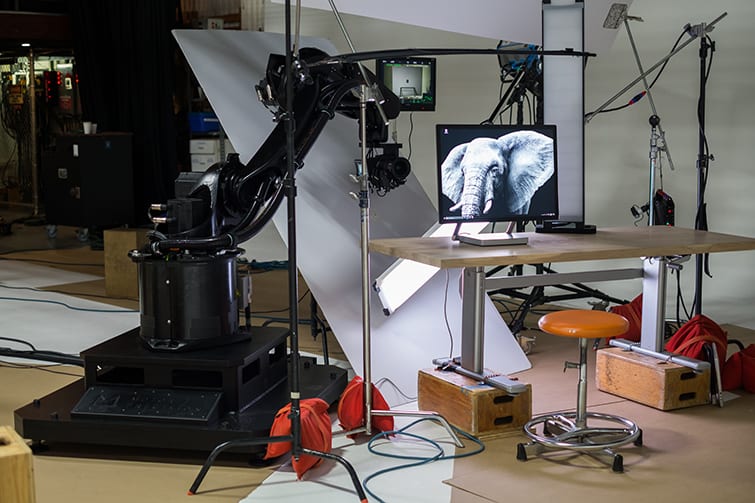
KIRA is one of the latest in robotic camera arms. We first covered KIRA after its big splash at NAB 2016. The rig has a maximum height of 9 ft and can extend to 5.63 ft, weighing 570 lb — and the baseplate alone weighs in at a whopping 3400 lb. The KIRA has a maximum camera payload of 40 lbs and can move 3.2 ft in 0.5 seconds.

According to Michael Maher who reached out to Brown about the Surface Studio production video, Microsoft reached out to Motorized Precision to create rig the shots for its launch video. The Surface Studio video was filmed at Cinerent West in Portland, Oregon by a KIRA loaded with a Red Epic Dragon and Canon 15.5-47 mm lens.

Image via Microsoft / Motorized Precision

To get precise movement and tracking, “the Microsoft Surface team had a series of pre-viz shots created in Cinema4D and Maya — which helped guide and program the KIRA’s motion control movements.”

Adding further merit to the viability of Microsoft’s hardware and software in the creative sphere, Motorized Precision also used its MP Studio app on the Surface Studio in conjunction with an Xbox One Elite controller to manipulate the KIRA.

When we push left on the left joystick the robot moves left and when we push left on the right joystick it pans left etc. We made it so simple and intuitive to control that we were able to focus on the creative and not worry about the technology.

Image via Microsoft / Motorized Precision

When Maher asked Brown point blank what he thought of the Surface Studio, his answered mirrored what Microsoft hoped would be the case for its new All-in-One device.

I love the Microsoft Surface Studio from a KIRA control standpoint. We developed MP Studio originally as a touch app. On the Surface Studio I was finally able to see that app come to life with Touch Control that made sense! So I was very impressed by the product.  The Dial on set was controlling some amazing color wheels inside some of the apps used in the launch video and it was very impressive to see all the different functionality they were able to get from such a simple device.

Beyond delivering a stunning reveal video, Microsoft managed to test drive its Surface Studio with the exact creative culture it’s designed to entice, and it’s proving to be a viable option.

Microsoft Translator for group chats coming “by the end of the year,” will support up to nine languages

Microsoft Translator, the company’s automatic translation technology, has become ubiquitous today. The service is available as a dedicated app on iOS, Android, and Windows 10 devices (there is also an Edge extension for Windows 10 PCs), but it also powers translations in other apps and services including Office, Bing, and Skype.

On mobile devices, one of the most impressive features of the Microsoft Translator app is its ability to translate conversations involving two speakers in real-time. However, according to a new report from ZDNet the company is currently working on a new mobile app that will offer live translation of multi-lingual conversations between a group of speakers.

The company demoed a prototype of this app today at the Microsoft Future Decoded event in London. The demo featured three people speaking a different language (French, English, and German) and getting real-time translations of what the others were saying in written text through the app running on a phone. According to the report, the speech recognition wasn’t 100% accurate during the demo but that is too be expected in such environments.

The company said during the event that it is currently working to support translations between nine spoken languages as well as text translations for 60 languages. A preview of the service is expected to be available on mobile devices and web browsers by the end of the year, we’ll let you know as soon as we learn more about it.

Blue Dragon comes to Xbox One Backward Compatibility

Xbox’s Major Nelson just tweeted out some news which many Xbox fans have been waiting for. Blue Dragon has finally been added to the Xbox One Backward Compatibility catalog.

Blue Dragon is currently supported via Backward Compatibility as disc only, but as per a tweet from Aaron Greenberg, the title has long been requested to enter the catalog by Xbox fans. The game itself is is a role-playing title developed by Mistwalker and Artoon and published by Microsoft Game Studios.

Blue Dragon is loosely based on a design by Final Fantasy series creator Hironobu Sakaguchi, who also supervised development and wrote the plot of the game.

Are you looking forward to playing this game on your Xbox One? Let us know what you think by dropping us your thoughts in the comments section below!

Microsoft’s sales of Windows 7 and 8.1 licenses to OEMs has ended

Just a few months after Microsoft celebrated the first anniversary of its latest operating system with the Windows 10 Anniversary Update, the company has finally stopped selling Windows 7 Professional and Windows 8.1 licenses to PC OEMs as of yesterday, October 31 (via VentureBeat). While some retailers may still have stock of these old machines, Windows 10 has now become the only way to go for PC manufacturers.

As a reminder, Microsoft already stopped selling Windows 7 and Windows 8.1 licenses to consumers back in October 2013 and September 2015, respectively:

Microsoft's Windows lifecycle fact sheet.
Microsoft’s Windows lifecycle fact sheet.

For consumers, this doesn’t change much as Windows 10 has been adopted pretty quickly by most PC OEMs since its initial release in July 2015. Actually, PC OEMs had good incentives to do so as old versions of Windows have limited support when running on newer processors and chipsets from Intel, AMD, NVidia and more. For the most part, PC OEMs seem to be happy with the versatility of Windows 10, with Dell sharing earlier this year that Windows 10 2-in-1 devices were the future of computing.

If you’re still running Windows 7 or Windows 8.1 on your PC though, you should be aware that mainstream support for the former already ended in on January 13, 2015. Now in Extended Support, Windows 7 is only receiving security updates and will continue to do so until January 14, 2020. For Windows 8.1 users, Mainstream support will end on January 9, 2018.

Microsoft's Windows lifecycle fact sheet, part 2.
Microsoft’s Windows lifecycle fact sheet, part 2.

According to Microsoft, there are already 400 million devices running Windows 10 in 192 countries across the world. As PC sales have been decreasing over the last few years, the company couldn’t have achieved this momentum without its year-long free upgrade offer to Windows 10 for Windows 7 and Windows 8.1 PCs. However, the company did acknowledge earlier this year that it wouldn’t meet its ambitious goal to have 1 billion devices running Windows 10 by 2018.

Surface 3 stocks diminish, sold out in Microsoft Stores, no word on a successor

Back in March 2015, Microsoft’s Surface 3 was the second third-generation Surface device to be released by the company after the well-received Surface Pro 3 in summer 2014. At the time, both devices had successfully iterated on the hybrid Windows device concept that Microsoft pioneered back in 2012, with the Surface 3 moving away from the Windows RT operating system that prevented previous versions to run full Win32 apps.

While the Surface 3 remains the most affordable Surface model as of today, the product is clearly on its way out as Microsoft warned earlier in June that it would cease production by the end of December 2016. And now it looks that Microsoft won’t release a successor to the 10-inch 2-in-1 device as the company only announced new Surface Book models and a new Surface Studio all-in-one PC during its Windows 10 event in New York last week.

The Surface 3.
With its 10-inch screen, the Surface 3 is really usable as a tablet.

In the meantime, you may wonder if the Surface 3 is still widely available just a few weeks before Microsoft finally stops manufacturing them. According to a new report from Neowin, it turns out that stocks are already dwindling fast in most markets:

  • In the US, all Surface 3 models are currently out of stock on the Microsoft Store, though you can still find some on Amazon (some refurbished) and Best Buy.
  • In the UK, the Microsoft Store is also completely out of stock while Amazon is still selling a model with 64GB of storage, 2 gigs of RAM and 4G connectivity for £519.99 (two other models are available through third-party retailers).
  • In Australia, the Microsoft Store still has stock of one model with 64GB of storage, 4 gigs of RAM and 4G connectivity for AUS$929 while Amazon doesn’t sell Surface devices in the country.

Considering that many PC manufacturers are now selling affordable 2-in-1 devices, it probably makes sense for Microsoft to focus on its more premium offerings. Indeed, while the company doesn’t disclose it Surface sales, we previously noted that Microsoft has been consistently hinting during its quarterly earning statements that sales of the Surface line have been actually driven by the Surface Pro and the Surface book.

If you’re currently in the market for a good 10-inch Windows tablet, the Surface 3 is still highly recommended, though we definitely recommend you to get the version with 4 gigs of RAM. However, you better hurry up to get one before it finally becomes out of stock.

Minecraft: Education Edition is officially released, sets price at $5 per user per year

Minecraft: Education Edition is finally available to everyone. The school use of the popular sandbox has become increasing more popular, now more than ever as the educational version finally releases to the general public. In this version, educators can download lesson plans and tools through a Minecraft Mentors program. The gallery has subjects such as geometry, geography, history, and more to peruse with clearly identifiable tags for age group and topic.

Until now, the preview version of Minecraft: Education Edition had most of the features, but the full version includes the anticipated Classroom Mode. This lets the teacher edit world settings, communicate with students easier, give items, and teleport. Basically, it’s an easy to use admin console that displays a map view, lists the students and users, and provides multiple management settings that educators will find useful.

Over 50,000 students and administrators assisted in creating the M:EE and it’s now culminated with an impressive reach of 11 languages and 50 countries globally.Minecraft: Education Edition is available for purchase for only $5 per user annually. Schools that have an education volume licensing discount can also access the edition.

If you’re an educator, administrator, or student directed to download M:EE then you can get started by visiting their web page.

Minecraft Education
Minecraft Education
Developer:
Microsoft Studios
Price:
Free


Microsoft says Google “put customers at risk” by disclosing Windows vulnerability

Yesterday, Google published a new blog post on its Security blog to warn Windows users about a critical vulnerability in Windows that hasn’t been addressed by Microsoft seven days after having reported it to the company. According to the Alphabet subsidiary, the 0-day vulnerability is “particularly serious because we know it is being actively exploited.” The company provided the following technical details below:

The Windows vulnerability is a local privilege escalation in the Windows kernel that can be used as a security sandbox escape. It can be triggered via the win32k.sys system call NtSetWindowLongPtr() for the index GWLP_ID on a window handle with GWL_STYLE set to WS_CHILD. Chrome’s sandbox blocks win32k.sys system calls using the Win32k lockdown mitigation on Windows 10, which prevents exploitation of this sandbox escape vulnerability.

In the same blog post, Google also mentioned another 0-day vulnerability in Adobe Flash Player that has already been addressed by the company through new updates via Adobe’s updater and Chrome auto-update. Since Google published its new policy for actively exploited critical vulnerabilities three years ago, the company’s new security stance is to disclose unpatched vulnerabilities if affected vendors don’t provide a fix seven days after being notified about them by Google security researchers.

It’s actually not the first time that Google publicizes a flaw in Windows, as the company did so in January 2015 for an exploit that allowed attackers to run arbitrary code with elevated privileges (Microsoft patched it a few days later when Patch Tuesday arrived). But nearly two years after this event, it seems that Microsoft is still not a fan of Google’s security practices, according to this statement released to VentureBeat yesterday:

We believe in coordinated vulnerability disclosure, and today’s disclosure by Google puts customers at potential risk. Windows is the only platform with a customer commitment to investigate reported security issues and proactively update impacted devices as soon as possible. We recommend customers use Windows 10 and the Microsoft Edge browser for the best protection.

As Microsoft didn’t really acknowledge the security flaw in this statement, it’s not clear if the company is already working on a fix though we hope it is. Recommending users to use Windows 10 and Microsoft Edge for best protection also doesn’t really cut it if this flaw is already being exploited. Instead, Google is recommending Windows 10 users use Chrome on Windows 10 which according to Google “prevents exploitation of this sandbox escape vulnerability.”

With Patch Tuesday only a week a way, we’ll see if Microsoft address this security issue as soon as possible or stick to its usual schedule. While Google may legitimately think that 0-day vulnerabilities should be addressed by companies in seven days, pushing companies to rush these sort security fixes could also in some cases do more harm than good. Sound off in the comments if you think Google did the good thing by disclosing details about this new security flaw in Windows.

Microsoft’s Xbox One outsells Sony’s PS4 in the UK

Microsoft’s Xbox One console has outsold Sony’s PlayStation 4 during the month of October in the U.K.. According to a report on Gamesindustry.biz, the Xbox One outsold the PlayStation 4 in September by only 1,500 units but in October the gap had widened to 25,000. Overall, the Xbox One accounted for 54% of video game console sales in the U.K. in October compared to PlayStation 4’s 42% and Nintendo’s WiiU with just 2%.

Xbox UK marketing director Harvey Eagle was grateful for the success and thanked customers in a statement which said, “Thanks to our fans, Xbox One was the best-selling console in October, the second month in a row in the UK, according to GfK Entertainment. It’s great to see such enthusiasm for the new Xbox One S range of consoles including FIFA 17, Gears of War 4, Battlefield 1 and now – for the first time – Minecraft. All of which are available to purchase now.”

One of the reasons for the continued growth in Xbox One sales is partially due to the release of the newer Xbox One S model which sports a 4K Blu-ray drive, making it one of the cheapest options on the market for shoppers after a 4K media player. “It’s great to see how popular both the Xbox One S and the FIFA 17 Xbox One S consoles are with fans, not just over the last week but since the Xbox One S was released in August,” Eagle said back in September. “4K video streaming and 4K UHD Blu-ray have been extremely well received and we believe there is no better value right now for those looking to upgrade their console.”

Do you think the Xbox One will continue to see success in the following months? Share your predictions with the community in the comments below.

Fitbit launches official app for Microsoft’s Xbox One console

The official Windows 10 Fitbit app has just updated with added support for Microsoft’s Xbox One video game console. The app has been released in the Universal Windows Platform app format for a while now but has been restricted to functionality on Windows 10 devices, such as the Surface Pro, and smartphones running Windows 10 Mobile. This Xbox One app is essentially the same app on Windows 10 and Windows 10 Mobile and runs on the same code. Due to this, the app’s appearance on the console looks identical to that seen on Windows 10 PCs with the only difference being its inability to sync to Fitbit devices, most likely due to the hardware limitations of the Xbox One hardware.

With the inability to sync to Fitbit devices, the Xbox One Fitbit app’s main purpose is to check data and leaderboards after a device has synced to the cloud via another connected device. Users with the app already installed on other devices should find it in the Ready to Install section of their Xbox One while everyone else can grab it in the Apps section of the Store on the console.

Do you have the Fitbit app installed on your Xbox One? Let us know what you think about it in the comments below.

Fitbit
Fitbit
Developer:
Fitbit
Price:
Free

Windows 10 KB3190507 fixes KB3194496 install issues, download it now

Microsoft recently pushed out three Windows 10 updates, further improving the Windows experience. Windows 10 cumulative update KB3197954 brings a list of 12 fixes and improvements, KB3199986 improves the servicing stack, while KB3190507 still remains a mysterious update.

The support page for KB3190507 is not available yet but it appears this update’s role is to fix KB3194496’s install issues. As a quick reminder, KB3194496 was rolled out on September 29 but was plagued by install issues. As a result, the majority of Windows 10 users weren’t able to install it on their machines.

At the beginning of October, Microsoft pushed out the KB3194496 fix script hoping to solve installation bugs. Unfortunately, this fix script didn’t prove to be very helpful since many Windows 10 users reported they still couldn’t install the update. Now, it appears that Microsoft is giving KB3194496 another chance by rolling out KB3190507.

KB3190507 removes the task Microsoft\XblGameSave\XblGameSaveTask, the same task that prevented users from installing KB3194496 in the first place. At the same time, KB3190507 restores the key HKLM\SYSTEM\CurrentControlSet\Control\Lsa\OSConfig\Security Packages.

Third time’s the charm for Microsoft. For the time being, Windows 10 users haven’t reported any issues caused by KB3190507. It appears that this time, Microsoft finally found the right formula to fix the annoying KB3194496 install issues.

For more information about the recent Windows 10 updates, you can check out the Windows 10 update history page. To install the updates manually, go to Settings > Update and security > Check for updates.

Have you already downloaded the three Windows 10 updates? Tell us more about your experience in the comment section below.

RELATED STORIES YOU NEED TO CHECK OUT:

Windows 10 Creators Update will bring new themes

The Windows 10 Creators Update or the RedStone 2 update, is already the topic of discussion on many renowned news sites, and Microsoft is pleased to announce another new addition coming out with the update, that is the new Windows 10 themes.

The plethora of changes are hitting us like a whirlwind and the company is still testing new features to add in existing builds. The newly designed themes are to bring fresh and striking visual styles to the Windows Store, that Microsoft is also considering to put up for purchase. Feels like a disappointment, as users were expecting some refreshing additions to the OS as a gift, but a screenshot that recently appeared on the internet shows that some themes are indeed available with a more than reasonable fee. However, nothing is official yet and who knows Microsft may change their minds before any public announcement.

Diving a little deep into the design characteristics of the latest themes, which were previously offered on Microsoft’s website as a theme repository and ere delivered as MSStyle files, but changed some minor aspects of the system. Hopefully, the new additions may modify a bit more (like the Action Centre and the Taskbar), and feature advanced functionalities to give a more uplifting look and feel. Besides nobody would be thrilled by the idea of paying a sum of money just for a few new fonts, colors, and wallpapers.

But we would advise our readers not to get too carried away, as Microsoft still hasn’t confirmed any features  and specifications yet and the product is still under testing phases, which would apparently take months to be launched publicly. If you want to know more about the Windows 10 Creators update, see the video below:

https://youtu.be/zdJBurRbT4o

How to Disable Keyboard Keys in Windows 10 Quickly

Is there a key on the keyboard you don’t need? For example, Caps Lock capitalizes all text when you enter login details.

So, if you don’t need that key or any other, this is how you can switch off keys in Windows 10.

How do I disable a key on my keyboard on Windows 10?

Use AutoHotkey

  1. Visit the official website to download AutoHotkey and install it on your PC.
    download disable key keyboard windows
  2. Check this AutoHotkey guide website to see if the key you want to disable is supported.
  3. If it is, press the Windows key, type Notepad, and select the corresponding option.
  4. Now, type the reference of the key you want to disable and add ::return to it. An example is capslock::return.
    type
  5. Next, save the file with .ahk extension.
    save
  6. Finally, double-click the newly created file, and the key will be disabled.

So that’s how to disable a keyboard key on Windows 10 with AutoHotkey. If you want to enable the key again, just right-click the AutoHotKey icon on your Taskbar and choose Suspend Hotkeys.

If you need a list of excellent keyboard mapping software for complete control of your keys, check our detailed guide.

Feel free to let us know if you were able to deactivate your keys in the comments below.

Office 365 gets its October 2016 security and compliance update roundup

As the end of October ticks away, the Office 365 security and compliance team have thoughtfully rounded up all the security related updates that landed for the software suite in the past thirty-one days.

For those in the IT field looking to push out updates to networks but wondering what’s ben included, Microsoft’s month-end summaries come as  a godsend for many.

New updates security and compliance updates for October include:

Applying intelligence to security and compliance in Office 365—To stay ahead of the evolving threat landscape, companies need the ability to analyze and learn from that data to identify, intercept and respond to threats. Office 365 provides unmatched security intelligence to help customers protect, detect and respond to threats. Read about the new security and compliance capabilities of Office 365 that were announced at the Microsoft Ignite conference.

Security engineering evolution in Office 2016 for Mac—Security is a critical component in all our products at Microsoft. To help you get a better idea of how we build security into Office 2016 for Mac, the engineering team discusses how we think about it from a development and testing perspective, including the latest updates.

Get updates on Office 365 Security & Compliance Center—The Microsoft Office 365 Security & Compliance Center is the central place to view and manage your data. Find out how the experience is improved by centralized security controls, including the ability to view and manage security and compliance for your cloud services.

Accelerate your eDiscovery analysis workflow with one click—Does your legal department often complain about how long it takes to run an analysis for eDiscovery investigations? We released two new features for Office 365 Advanced eDiscovery—Express Analysis and Export with analytics to Excel—to make it easier and faster for organizations to quickly find, analyze and review relevant information related to investigations, legal matters and regulatory requests.

The Office team is also providing a quick four-minute video to help go over what organizations can do to achieve better compliance standards.

To read up on methods to keep your company compliant sing Office 365, visit the Microsoft Office Blogs today.

Office 365 now offers enhanced control over third-party apps

The Office Team has announced today that it’s introducing enhanced control over Office 365 third-party apps to help companies better manage what kind of apps employees are allowed to use. This new feature will be a part of Office 365 Advanced Security Management, providing IT admins the ability to approve or revoke apps’ access to Office 365.

As the company explains in the blog post, many companies using Office 365 today allow employees to install any third-party Office 365 app without any IT intervention, which can be problematic if these users don’t make sure that the apps they use comply with their organization policies.

However, app permissions will now “provide information to IT about which applications in their network have access to Office 365 data, what permissions they have and which users granted these apps access to their Office 365 accounts,” explains the blog post.

App permissions can be managed in Office 365 Advanced Security Management.
App permissions can be managed from Office 365 Advanced Security Management.

Following an examination, IT admins will be able to revoke permissions to non-compliant apps which will prevent them from accessing employees’ data in Office 365. Additionally, the new feature allows IT admins to notify users that the Office 365 third-party apps they have installed will be banned. To get more information on this new feature, we invite you to watch this Ignite 2016 session below:

If your company uses Office 365, let us know in the comments what do you think of this new app permissions system.

Final Fantasy XV release date approaching, mass production starts

There is good news on the horizon for those excited to play the newest installment of the popular video game franchise Final Fantasy. The next game in the series, Final Fantasy XV, experienced a slew of delays, pushing its release date to November 29th. Its original release date would have meant the game receiving a day one patch which user would have had to install, and the Square Enix didn’t want that.

The good news: Final Fantasy XV achieved gold status, which means the game is ready and can finally enter the next step in the process that ends with the game in the hands of customers worldwide.

While the main game is ready for the distribution process, the creative team behind Final Fantasy XV now has the opportunity to focus on extra content, specifically the three additional levels specifically designed for players who buy the premium version of the game. The premium version contains the Season Pass, which in turn contains the three extra episodes. In this extended version, players get to experience new stories through the eyes of another member of the team.

Each of the three new characters players will be able to control, Gladiolus, Ignis and Prompto, will have their own unique gameplay which you will be able to use against new enemies added to the game. Their three stories will be released in that same order.

Later on, we will also get a DLC for the game called Comrades, which will bring multiplayer action to Final Fantasy XV.

There is also a brand new four-minute trailer called Omen released for the game, which shows the prophecy as seen by Noctis’ father, King Regis.

RELATED STORIES TO CHECK OUT:

Did you know you could buy Xbox games through these mobile operators?

Microsoft is always looking to offer gamers new ways of buying their favorite Xbox game titles. Available through select carriers, Microsoft offers mobile Operator Billing (OB) on Xbox to make buying your favorite Xbox game easier than ever.

OB is fast becoming one of the most popular and preferred payment methods worldwide because you don’t need a credit card to pay, all you need is your phone number. By using OB, Xbox gamers use their phone number to pay for games, movies, TV shows, and much more on Xbox Live and have the charges added to their monthly phone bill. Adding your cell phone number to your Microsoft account can add a new convenient way to pay for all things Xbox.

Microsoft, Xbox One, Operator Billing, OB
Operator Billing

Xbox gamers can access OB via the Xbox App on Windows 10 devices, Android, and iOS smartphones, depending on location. Xbox gamers on the following mobile operators can use OB today in the Xbox Store on Xbox One:

  • Beeline Russia
  • DNA Finland
  • Elisa Finland
  • O2 Germany
  • O2 UK
  • Swisscom Switzerland
  • Telenor Hungary
  • Telenor Norway
  • Telenor Sweden

If you don’t see your OB service provider listed, don’t worry – Microsoft is adding more OB partners soon. If you are already a customer of one of the above-mentioned mobile operators, Microsoft adds a new simple way set up OB:

“Just find a game you’d like to purchase, select “Buy,” choose “Add a new payment method’ on the payment screen, and select “Mobile phone.” Next, pick your mobile operator and enter your phone number to receive a verification code. When you receive the code, simply enter it on your Xbox and you’re done!”

Currently, OB is not yet available in the US, but may be an option sometime in the future. Would you like to be able to purchase Xbox games, movies, and more using your cell phone number? Let us know in the comments.

Microsoft continues to push Azure Government, releases new documentation

Microsoft Azure Government is continuing to expand and now has documentation support on the official site. According to an Azure blog post released today, users can now go onto the Azure web page and search through topics of solutions and information that are readily accessible. Furthermore, it gives quite an interesting look into how the Department of Defense could use Azure to regulate safety.

Azure Government is the cloud solution specific to satisfying government regulations. The company boasts that it has unmatched security and that the cloud service has recently obtained higher clearance to the Department of Defense data than any other commercial cloud provider. “Not all clouds are created equal,” the Redmond giant declared two weeks ago in their Azure Government highlight blog.

The new documentation is also a surefire way to stay up to date with all of the preview releases and future features. There are over twenty-three documentations for you to peruse. Take a look over on the Azure webpage and just click the Documentation tabs to select Azure Government from the list.

Microsoft to announce Project Olympus, the next generation of open source cloud hardware

In a blog post on Microsoft Azure, Kushagra Vaid, GM of Azure Hardware Infrastructure, announced he would be speaking at Zettastructure: The European Digital Infrastructure Summit hosted by Datacenter Dynamics in London.

Tomorrow, Vaid will announce Project Olympus, Microsoft’s next generation hyperscale cloud hardware design in collaboration with the Open Compute Project (OCP). Project Olympus will offer a new model for open source hardware development with the OCP community.

In 2014, Microsoft joined OCP in an effort to reimagine its Azure cloud hardware through the open source community. Initially, Microsoft shared Azure server and datacenter designs and offered Azure’s software-defined networking (SDN) principles. Microsoft learned a number of important things through its collaboration with OCP and the open source community.

One such important thing is that open source hardware development is not being developed at the same pace as open source software. With the current process for open hardware development, the designs that are offered are almost 100% complete and ready for production. This process limits interactive community engagement and adoption and slows down cloud hardware deployment.

In order to address these issues, Microsoft collaborated with OCP to introduce a new hardware development protocol allowing for more community-based open collaboration. Project Olympus offers this new open source collaboration approach that is used for software development and applies it to developing cloud hardware.

Project Olympus introduces cloud hardware designs to the OCP community that are about 50% complete. By sharing designs that are in the early stages of development, Project Olympus allows  the community to contribute by downloading and modifying the hardware design just like open source software. Bill Carter, Chief Technology Officer, Open Compute Project Foundation commends Microsoft for Project Olympus, saying:

“Microsoft is opening the door to a new era of open source hardware development. Project Olympus, the re-imagined collaboration model and the way they’re bringing it to market, is unprecedented in the history of OCP and open source datacenter hardware.”

Here’s a look at what Microsoft’s Project Olympus will contribute; a new universal motherboard, high-availability power supply with included batteries, 1U/2U server chassis, high-density storage expansion, a new universal rack power distribution unit (PDU) for global datacenter interoperability, and a standards-compliant rack management card.

Microsoft, Project Olympus, Cloud, Azure
Project Olympus
Microsoft, Azure, Project Olympus
Project Olympus Rack system

Head over to the OCP GitHub branch to check out the Project Olympus’ mechanical and power server chassis interfaces, the universal motherboard, and PDU (protocol data unit) specifications. Microsoft will open source the entire rack system in the next few weeks.

At the Zettastructure: The European Digital Infrastructure Summit in London, Microsoft will share more information on Project Olympus in a detailed keynote presentation, an OCP workshop session, and will have other Project Olympus hardware on display in the Microsoft booth. In addition to the OCP GitHub branch, there are other OCP resources available regarding Project Olympus, including the OCP Server Project Wiki, OCP Events and Meeting Calendar, and the OCP Server Project Mailing list.

Windows President Terry Myerson talks “democratizing VR” and more in new interview

Last week, Microsoft announced during its Windows 10 event in New York an upcoming portfolio of third-party VR headsets leveraging the built-in Windows Holographic shell in the Windows 10 Creators Update. Unlike Microsoft’s HoloLens mixed reality headset which is standalone device, this first wave of third-party VR headsets will need to be tethered to a Windows 10 PCs but with a starting price of $299, Microsoft’s partners are expected to give some good competition to rival solutions from Facebook and HTC.

As we reported last week, Microsoft is expected to provide more information on these third-party VR headsets at WinHEC in Shenzhen, China on December 8-9, which the company’s Executive Vice President of Windows and Devices Terry Myerson confirmed today in a new interview with ZDNet reporter Mary Jo Foley:

When we go to WinHEC, we’re really thinking how are we going to democratize this technology, how are we going to work with these partners to build devices that can reach all price points, that can reach everyone on the planet.

In the lengthy interview, Myerson goes on to explain that the purpose of Microsoft’s partnership with PC manufacturers HP, Dell, Lenovo, Acer and ASUS is not about “filling the ecosystem” with low cost VR solutions. According to him, Microsoft does expect from its partners premium VR products as well:

I don’t see it necessarily as filling in below. By building HoloLens, we were able to push ourselves as hard as we can to see, to go create, really we call it Windows Holographic, to go create that expression. That allows us now to then partner with HP, Dell, Lenovo, Acer, ASUS on how can we create expression of that for your gaming PCs, and that’s the accessories we showed today.

But I think if we hadn’t done HoloLens first, we wouldn’t have been able to do those partnerships as well. And I’m not ruling out the fact that one of those guys builds a $3,000 accessory, because I think we’ll see all kinds of creative expression in what they do. But by building Surface Studio we’re going to be able to have some really well-rounded partnerships and other people will express ideas.

First wave of third-party VR headsets.

While Myerson didn’t provide more details about the specs of these upcoming VR headsets, he did share that he expects them to “work super-well on most laptops.” However, the exec added that using these third-party headsets, which will have an opaque lens, should be quite different from the augmented reality experience provided by the company’s HoloLens headset (which has a translucent lens). To explain it, Myerson used an external monitor analogy:

One way you can think about these VR accessories is as an external monitor. It’s not technically accurate, but conceptually I think it works quite well. You put on the headset and you’re looking at another monitor. So it’s not a perfect technical analogy, because it lives now in the Holographic shell, so a shell from the desktop. But now I’ll be able to tap at this, so you get the shell and it’s the same shell we have in HoloLens. That comes up and HoloLens has a transparent or translucent lens, while these accessories we talked about today will have often opaque lens.

We use this term mixed reality to represent this spectrum of augmented reality to virtual reality and everything in-between. And in some ways the transparency of the lenses is the difference between augmented and virtual reality, but it’s the same volumetrics compute.

Overall, it seems that Microsoft will have some work to do to explain to consumers the differences between mixed reality and virtual reality. If the third-party VR headset market becomes fragmented between translucent lenses and opaque lenses, it looks that this still young market could become confusing pretty quickly. To add a bit more confusion, Microsoft patented earlier this year a new dimming module that could enable switching from a mixed-reality experience to a fully immersive VR experience, providing a “best of both worlds” solution. While WinHEC is only a few weeks away, we can’t wait to see how Microsoft and its partners will make their VR efforts more consumer-friendly.

Windows Store age rating rules kill some 90,000 apps

A little more than a week ago, we reported that Microsoft had started removing apps and games that did not comply with the Windows Store’s new age rating policy. While it wasn’t yet clear how many non-compliant apps disappeared from the Store following this first wave of cleaning, a new report from Windows Blog Italia reveals that 90,291 apps have been removed from the Italian Windows Store between September 26th and October 19th (via Neowin).

According to the report, the number of Windows Phone apps available on the Italian Windows Store has gone from 329,507 to 239,216 following the purge which represents a 27% decrease. As a reminder, Microsoft still claims on this page that there are 669,000 available on its Windows Store though that number has not seen an update since at least a year (not all these apps are available in all markets).

For now, it’s still unclear how this new age rating policy is affecting the Windows Store globally and we have yet to learn about the removal of popular Windows Phone besides high profile voluntary departures from the likes of eBay or even Skype for Windows Phone 8.1 phones. However, the apps that have now been removed from the Windows Store should remain usable for consumers that have downloaded them prior to the cleaning. Additionally, developers can still resubmit their apps to Microsoft after completing an age rating questionnaire on the Dev Center though we doubt they’ll do it now after missing the September 30th deadline in the first place.

Join us LIVE for “Talk Microsoft”, our new podcast, today at 11am PDT

With all of the Surface and Windows 10 news swirling around, it’s too much for just written posts. Tonight we’ll have the first episode of our new podcast “Talk Microsoft.” We’ll be discussing all the biggest news from the recent Microsoft event and even chat some about the Apple event that followed it.

Hosting will be yours truly (Sean Michael), and a new but familiar co-host, popular YouTube celebrity and developer Sean Ong. Both of us will bring our personality and Microsoft related experience to the biggest tech news out of Redmond.

The show will be live on our YouTube channel at 11am PDT. We’ll base our podcast times on Pacific (Redmond) Time so make sure you know what time it’s on in your area. Daylight savings time starts at different times in the UK and US so make sure not to miss us. We’ll then post the podcast on the website in case you can’t tune in live or want to rewatch the show.

Editor’s note:  OnMSFT’s new website launches in one week, get hyped!

How to Read And View Registry Files Without Regedit

Using registry files and the Registry Editor is not a piece of cake for everyone. Therefore, it’s important to know how to read registry files without regedit.

Editing the registry via .reg files is the simplest way to change it, but sometimes you need to check what changes the file will perform to your system.

In case you’re not familiar with this tool, we have a great guide on how to use Registry Editor on Windows, so we encourage you to check it out.

Why should I view the registry file without importing?

It’s possible that .reg file that you want to import comes from a malicious source. Therefore, it’s advised to view it before running it and ensure that it doesn’t make many unwanted changes to your PC.

Another reason is compatibility issues. Certain .reg files will make changes that won’t work or aren’t compatible with your system. Therefore, it’s always good to check the reg file and see what it does, before running it.

Do keep in mind that to understand what a reg file does, you need to have advanced PC knowledge and be familiar with the registry and its commands.

How can I read registry files without regedit?

Open the file in Notepad

  1. Right-click the Registry file you want to access.
  2. Choose Open with from the context menu.
  3. If you’re doing this for the first time, a text editor won’t show up as one of the first options, so just click on More apps.
  4. Now, find Notepad, and check it. registry file windows 10
  5. After doing that, you’ll see the contents of the reg file.

After doing this, your Registry file will appear in Notepad, and you’ll be able to see what it contains and edit it.

Remember that your registry is sensitive, and you can cause issues if you don’t modify it properly. However, you can always undo registry changes.

It’s worth mentioning that modifying the registry might require a reboot, but you can reload the registry without reboot as well.

That should be all for our article about accessing Registry files in Windows 10. If you have any comments, questions, or suggestions, feel free to let us know in the comments below.

How to track folder changes in Windows

Do you need to keep track of file and subfolder modifications in folders? If so, there are a few software packages available that will highlight folder changes. FolderChangesView is software that shows you what files have been altered and how they have been modified. This is how you can track folder changes with FolderChangesView.

  • First, download FolderChangesView, which is compatible with most Windows platforms. Open this page and click Download Folder Changes Viewer to save its ZIP.
  • Then open the ZIP and click Extract all in File Explorer to decompress the file.
  • Open the software’s window below from the extracted FolderChangesView folder.

folder track

  • The Choose Folder window in the snapshot below also opens. Enter a folder path to track in the Base folders to monitor text box.

folder track2

  • To exclude folders, select the Exclude the following folders check box and enter their paths into text box.
  • Alternatively, you could click the selected Monitor all subfolders under the specified folders check box to exclude subfolders.
  • You can select the Folder Summary Mode option to show modifications to just the folders instead of specific files.
  • Press OK to close the Choose Folder window.
  • Now try FolderChangesView out by opening the folder you selected to track in File Explorer.
  • Then right-click a file in the folder and select Rename. Enter an alternative title for the file.
  • The FolderChangesView window will now highlight that file modification in the folder as shown in the snapshot below. However, the window doesn’t include the files if you selected Folder Summary Mode.

folder track3

  • If you were to right-click a file and select Delete, the window would highlight the deleted file as below. The file’s Deleted Count column includes 1.

folder track4

  • Add a new subfolder to the folder by right-clicking an empty space in File Explorer and selecting New > Folder. Then the FolderChangesView window will show that new folder as in the snapshot below.

folder track5

  • The FolderChangesView Properties window also includes file details. Select a file on the program’s window and click the Properties button to open it as below.

folder track6

  • You can halt folder tracking by pressing the Stop Monitoring Folder Changes button on the toolbar. Then you can resume it by clicking Start Monitoring Folder Changes.
  • To clear all listed items on the window, press the Ctrl + X hotkey.
  • To save items on the list, press the Ctrl key and then select files and subfolders.
  • Press the Save Selected Items button to save them. The txt document includes all the saved items on the list as shown below.

folder track7

Overall, FolderChangesView is great software to track folder changes with. It has an effective UI, good variety of configuration options and clearly displays folder modifications. It’s also a portable tool that you can add to USB flash drives.

Farming Simulator 17 bugs: FPS rate drops, tractors stutter, and more

Farming Simulator 17 recently received one major update, aimed at fixing a long list of issues. However, this update doesn’t fix all the game bugs, as there are plenty of potential issues gamers may encounter while playing Farming Simulator 17.

Farming Simulator 17 reported bugs


Random game crashes

Many gamers report that Farming Simulator 17 randomly crashes after hours of play, deleting their progress. Unfortunately, the auto-save option is only available when playing in multiplayer mode.

Game just crashed after hours of play. During this session I had collected all 100 golden nuggets, completed a handful of missions, done a full harvest, and purchased a bunch of new equipment. -_-


Silo won’t empty completely

Some gamers complain they can’t empty their silos completely: “anybody else having a problem emptying silo completly at the bga tried convayor and the bucket can’t get it to empty so it is useless any solutions thanks”.

Fortunately, one user found the solution to fix this bug. Follow the steps listed below to fix the silo bug:

  1. Go to C:\Users\YOURUSERNAME\Documents\My Games\FarmingSimulator2017\savegame1
  2. You are going to edit the Vehicles .xml file
  3. Scroll down the list until you find the silo you wish to edit.
  4. Then edit the amount to zero.

Machinery get old too quickly

Many gamers complain that their machinery gets worn-out too quickly, forcing them to buy new equipment. Unfortunately, there is no option to turn off this feature, and prevent machinery from getting obsolete. Also, gamers believe that the machinery’s lifespan is calculated on real time hours, not in game hours. For the time being, this idea remains a simple hypothesis, but there are many players who are waiting for a clear answer to this question.

As we all know there is a weird system in the game that make machinery get old quick which mean extremely expensive to keep. Any ideas how to disable this? I see no setting for it ingame?


Tractor stutters

This bug is not caused by any FPS rate drop, it appears that the culprit is actually the latest patch: Farming Simulator 17 Update 1.2.1.  And this is not the only bug caused by this update. Xbox One players complain the update has completely messed up their controller settings.

What was fixed in the update… everything feels worse. […] What was actaully fixed?
For me now when manualy doing jobs and missions the tractors stutter it’s not a frame rate thing the tracter actually slows down 10km/h then speeds up again and repeats for almost the whole field …

Graphics glitches

Again, this problem appears to be caused by the latest update. Gamers report that vehicle frames can hardly be seen, and there is no sky texture.

I’ve seen a few posts where people are saying that graphically, vehicle frames only can be seen, and there is no sky texture (i.e. it’s black).
I have experienced this also, but only since the latest update.
The solution that worked for me is to remain on a “very high” overall graphic settings with the following alterations.
Max Shadow Lights: 3 (Down from 5)
Shader Quality: High (Down from very high)
Max Tire Tracks: 200 (Down from 400).


Other common bugs include the following:

  • Trees fall through the map (particularily the bigger ones)
  • The crane at the train station breaks, so the lifting mechanism is upside down
  • Stumpgrinder won’t grind certain stumps.

These are the most frequent Farming Simulator 17 issues reported by gamers. Hopefully, the game developers will release a new update in a few days’ time.

RELATED STORIES YOU NEED TO CHECK OUT:

Iobit Advanced SystemCare 10 is available, here’s what’s new

ASC 10, or Advanced SystemCare 10, is an optimization toolkit that excels with its high adaptability and responsiveness. With the release of the newest version of the software, new features were added that improve the overall quality of the product, which will please the developer’s customer base. Let’s take a look at the kind of features that were implemented in this new version of Advanced SystemCare.

  • Better management of resources

This new version is able to more efficiently keep track of processes and detect when one of them is putting too big of a strain on your components, such as the hard drive, CPU or RAM.

  • Take care of junk files more efficiently

There is a lot of software or even drivers that leave behind junk files which are no use to your system and end up as leftovers from the operations were performed by said software. Advanced SystemCare 10 takes care of these files faster than any other version and ensures your PC only deals with files it actually needs and uses.

  • IObit Uninstaller 6

If you are looking to remove anything other than junk files on your PC, Advanced SystemCare 10 allows you to remove further files such as toolbars or even apps through its Iobit Uninstaller 6, which comes included with the performance booster toolkit.

  • FaceID

This new tool allows users to lock their PC’s with a unique authentication tool: their face.  Set a facial recognition password and ensure the security of system.

These new features on top of what preview versions of the software have to offer make Advanced SystemCare 10 a complete service bound to take care of any performance hindering issues your system runs into.

RELATED STORIES TO CHECK OUT:

How to fix common Titanfall 2 issues

Although it was just launched, Titanfall 2 is already one of the most popular games of 2016. The game offers a revamped single player campaign that further explores the unique bond between Pilot and Titan, as well as a robust multiplayer experience that includes six new Titans.

Unfortunately, the gaming experience is severely limited for some players due to various issues. Respawn Entertainment has opened a forum thread where the company is going to regularly post various workarounds for the Titanfall 2 issues reported by players.

Our team is working to outline any troubleshooting issues we have been alerted on that helped other users. We will be adding to this list through launch.
Data Center Searching….
Having multiple enabled network adapters might leave you in a state where you will not be able to get the proper data center list. Disable all adapters outside of the one you’re using, and this should resolve the issue.

AMD GPU Drivers
Make sure you have the latest AMD Game Ready driver before hitting the Frontier. Get the 16.10.3. drivers here: 16.10.3 Driver (Live 10/27 after 6PM PT)

Network Invites
Currently selecting ‘Invite network’ and jumping into a match with network players and the match ends, you will get put back into your network lobby. That is intended functionality for Network invited games.

Unfortunately, for the majority of Titanfall 2 issues reported by gamers, there is no workaround available yet. The number of bugs that affect players will definitely be reduced in the coming weeks thanks to all the updates that Respawn Entertainment will roll out.

If you experience any issues when playing Titanfall 2, you can report the bugs on this forum thread. In this manner, you can inform Respawn Entertainment about the problems gamers encounter and help the company develop fixes faster.

RELATED STORIES YOU NEED TO CHECK OUT:

Posted in Fix

Microsoft’s HoloTour allows you to virtually visit the world’s biggest cities

Microsoft showcased a handful of innovations at today’s Microsoft Event conference in New York. Besides announcing a new major update for Windows 10 that introduces new features along with new devices, the event’s keynote speakers also spent a solid amount of time telling us about Microsoft’s plans for augmented reality and virtual reality for the future.

Microsoft’s general manager Megan Saunders explained how Microsoft’s HoloLens and VR devices from other manufacturers can function together to create a brand new virtual experience for Windows 10 users. Saunders also showed how apps originally developed for HoloLens would work on third-party VR devices.

One of the showcased apps was Microsoft’s HoloTour, an app that allows you to take virtual tours through various cities and locations around the world using VR. Although the app is designed for HoloLens, it seems that it works flawlessly on VR devices as well.

“Holotour is a special experience that allows you to explore and interact with new places. It was made for Microsoft HoloLens, but here it is in virtual reality running on Windows 10,” Saunders said.

The first trace of the HoloTour date back to March this year, when Walking Cat shared on Twitter that he found it in the Store. This app takes you on realistic VR trips to some of the world’s most famous places. According to Microsoft, users will have the feeling they’re really present while using HoloTour.

Microsoft today announced many other manufacturers are currently working on their set of VR devices for Windows 10. This will allow all Windows 10 users to run VR and AR apps on their computers without having to spend a big amount of money for HoloLens.

RELATED STORIES YOU NEED TO CHECK OUT:

Satya Nadella to keynote next week’s Office Event, on “empowering teams to achieve more”

On November 2, 2016, Microsoft CEO Satya Nadella and Office CVP Kirk Koenigsbauer will announce the new and big changes in the spirit of collaboration and on “empowering teams to achieve more” with Office 365. Right on the heels of the recent Microsoft Event in New York City, Microsoft will have another live stream event, this time discussing big changes coming to Office 365.

Set your calendars in Windows 10 for this big event, with an anticipated announcement on Microsoft Teams and more coming to Office 365 with the Windows 10 Creators Update.

We will be there to bring you all the news as it happens, so stay tuned.

Next Windows 10 build will include Windows 10 Creators Update features

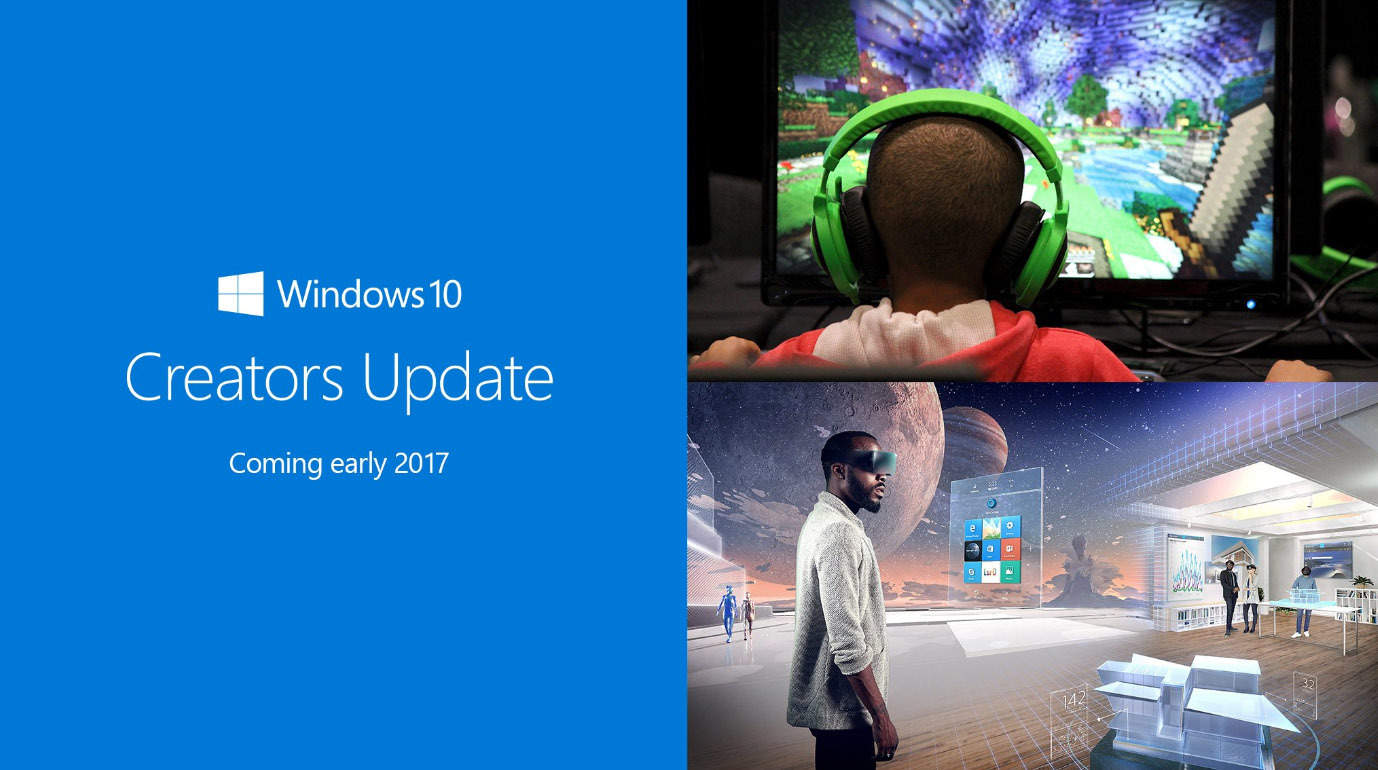
This year’s Microsoft Event is behind us. At the event, one of the main topics at the conference was the next major update for Windows 10, which Microsoft finally announced: The Creators Update will be released in early 2017.

At the event, Microsoft showcased the most important features of the update. As its name implies, the Creators Update will be focused on creative professionals by aiming to enhance both creativity and productivity while using Windows 10. The biggest highlight of the update will be 3D support for Windows 10 and its features.

Now that we know what Microsoft is up to with the new major update, it’s time to actually see them in action. We are clear that regular users will get 3D support once the update gets released — but what about Windows Insiders?

We expect Microsoft to finally start shipping new features to Insiders soon so they can test the new tools. In fact, Microsoft released a new build for Windows Insiders just before the event with no new features or improvements —  and we think that’s just calm before the storm.

If you’re a Windows Insider, you probably know that previous Redstone 2 builds weren’t so feature-rich. But now that we know what to expect, Microsoft should finally make these features available to testers. Of course, new features will be released gradually — probably one or two features a build — but it will be enough for things to become more interesting in Windows 10 Insider Program.

What’s the feature you’re looking for in Windows 10 Creators Update? Tell us in the comments.

RELATED STORIES YOU NEED TO CHECK OUT:

Best online Halloween games to play on your Windows PC

While the Halloween games we list in this article are not complex, they will certainly give you a spook — all while being a lot fun to play.

Halloween Mountain: The best website to play Halloween games online

halloween games

This website offers a collection of six addictive Halloween games. As simple as these games may first look, they’ll quickly have you glued to the screen. We played all six of them and we guarantee you won’t get bored. Also, the music accompanying these game has the potential of becoming an ear worm. Another advantage of this website is that it’s ad-free.

  • Skeleton Cannon: This little Halloween game gives you the chance to shoot a skeleton out of a cannon just to see how far you can make it fly. Various objects like trampolines and springboards can help your skeleton fly a greater distance, while spikes will stop its trip.
  • Halloween Hangman: This is classic hangman featuring a wisecracking skeleton that almost makes you want to lose just to see him hang. This game boasts over 15 million visits. Try it and you’ll see why it’s so popular.
  • Graveyard Golf: This is a great miniature golf game set in a spooky graveyard. Practice your aim while avoiding spiders, sand traps, and various obstacles.
  • Spooky Block-Out: This is a spooky Halloween twist on a classic game. You control a paddle that is used to hit a ball into breakable blocks. Bounce a ball into the blocks to break them. Eliminate all of the blocks on the screen to advance to the next level.
  • Pumpkin Toss: You can test your aim as you throw as many pumpkins as you can into moving holes before time runs out. This task is not as simple as you may think. Even if you try to aim only the 25 point holes, you won’t be able to score enough points before the time runs out. Try aiming for the 100 point holes.
  • Halloween Matching: Memorize the cards quickly before they flip over and then try to find all of the matching pairs before time runs out. The game starts out pretty easy but will get challenging quickly as more cards are added and the time limit shrinks.

Check out these games and tell us what you think about them in the comment section below. If you’ve found other websites where you can play online Halloween games, list them in the comments.


RELATED STORIES YOU NEED TO CHECK OUT:

Microsoft introduces 3D features coming with Windows 10 Creators Update in this video

A couple of days ago, a video was released with the Creators Update announcement that showed off the innovations of putting 3D at people’s fingertips.

The new announcement video follows the story of a young girl learning to cultivate at a young age to leading an urban farming reclamation initiative. But wait, we’ve heard about this before: the acting call for Microsoft’s top secret video we wrote about earlier this month. Well-known enthusiast WalkingCat had revealed on Twitter some of the scenes behind the video called Beihei Announcement Video.

During Microsoft’s New York event yesterday, all was revealed. With the use of Capture 3D app and the exciting Paint 3D that’s already available for Insiders, Microsoft is expecting to bring 3D capability across Office and even into reality.

Furthermore, towards the end of the video we see what is described in the script as a “large magic-windows type of device” that shows holographic augmented reality on the screen.

Walking Cat felt the need to point these out to us in another follow-up tweet.

https://twitter.com/h0x0d/status/792015528667688960

The ‘magic-window’ doesn’t seem to be recognizable at this time of anything Microsoft has released so far. Perhaps we’ll be seeing more about it after the Windows 10 Creators Update is released in Spring 2017.