The Academy of Interactive Arts & Sciences has officially announced the nominees for the 29th annual DICE Awards. Ghost of Yōtei and Clair Obscur: Expedition 33grabbed eight nominations, including Game of the Year, featuring the most-nominated titles of the year.
Arc Raiders and Dispatch secured six nominations each, while Blue Prince was featured in five. Unlike the Game Awards, which are voted on by critics and the public, the DICE Awards are decided by industry professionals. That being said, the choices often overlap; eight of the last eleven Game of the Year winners matched between the two events.
Notably, Hollow Knight: Silksong, despite its fan-favorite status and five nominations at The Game Awards 2025, only picked up a single nomination here, for Adventure Game of the Year.
The DICE Awards ceremony is scheduled for February 12 at 8 p.m. PST and will be livestreamed by IGN. Greg Miller, founder of Kinda Funny Games, and media personality Stella Chung will return as co-hosts.
The event will cover 23 categories, honoring games that professional developers loved in 2025. Expect to see everything from action and adventure to RPGs, indie, mobile, and immersive reality titles.
Microsoft is taking AI shopping to the next level with a new Copilot Checkout feature, which the company is now testing for US users. The feature allows customers to buy products directly within the AI chat, without leaving the conversation. It’s powered by the Agentic Commerce Protocol, an open standard built by OpenAI and Stripe, which also drives ChatGPT’s Instant Checkout feature.
The feature is currently being tested with major brands like Urban Outfitters, Anthropologie, Ashley Furniture, and select Etsy sellers. Shopify merchants are automatically eligible, while other merchants can join via a simple onboarding process using PayPal or Stripe. Microsoft has also opened a merchant application form for additional access.
Copilot Checkout is initially available on Copilot.com and will expand across Bing, MSN, and Microsoft Edge. Users can search for items and complete purchases right in chat, while businesses retain all customer and transaction data.
Besides checkouts, Microsoft is experimenting with brand AI agents for Shopify stores. These AI assistants can help customers discover the right products, complete purchases, and even suggest complementary items. Businesses can integrate these agents directly into their websites to offer a smoother shopping experience.
Copilot Checkout aims to meet users where they are, making it easier to browse, buy, and interact with brands in one seamless chat experience. For merchants, it’s a great chance to engage customers more effectively while leveraging AI-powered shopping tools.
If you’re buying Microsoft Office for the first time or are looking to upgrade from an old version, purchasing Microsoft Office 2024 lifetime is a solid choice.
It includes many of the improvements that were introduced to Microsoft 365 subscribers over recent years, including a modern interface and accessibility features.
But, when you buy Microsoft Office 2024, how do you get the best price?
Buy Microsoft Office 2024: Price and New Features
If you’re considering upgrading to Microsoft Office 2024, this new release offers a noticeably more polished experience, especially if you’ve been using Office 2021 or an earlier version. The apps feel faster, cleaner, and more intelligent across the board.
Word features a refreshed modern interface, automatic document recovery, improved collaboration tools for managing comments, and a suite of AI-powered enhancements that support grammar, writing style, predictive typing, and even full-document summarization.
Excel introduces dynamic charts and the new IMAGE function for pulling visuals directly from the web, while its upgraded dynamic arrays and improved engine deliver smoother, more efficient data processing.
Outlook becomes more practical and user-friendly with enhanced search, built-in meeting buffer options, and a redesigned accessibility ribbon.
Meanwhile, PowerPoint expands creative capabilities with built-in presentation recording, camera feed overlays, and automatic closed captions for audio and video—features that are especially valuable for online training, hybrid work, and modern content creation.
In terms of cost, Microsoft Office 2024 remains a one-time purchase, making it ideal for users who prefer to avoid ongoing subscriptions. However, buying directly from Microsoft is also the most expensive route, with Office 2024 Home priced at $149.99 and Home & Business at $249.99. Major retailers like Amazon typically mirror these prices, offering little opportunity to save. The real advantage comes from vetted third-party sellers, where you can buy Microsoft Office 2024 product keys and BIND licenses at discounts of 40% or more, while still benefiting from lifetime activation and full legitimacy. For many users—students, professionals, and small businesses alike—this makes Office 2024 far more affordable without compromising on reliability, authenticity, or long-term usability.
Where to Buy Microsoft Office 2024 Lifetime License?
If you want to purchase a Microsoft Office 2024 key online, it’s important to find a legitimate seller with a good track record. Our current pick is Mr Key Shop, which offers genuine MS Office 2024 licenses and other software keys at huge discounts.
It offers two types of licenses across Office 2024 editions – the standard product key and what is known as a Bind license.
1. What is a Product Key?
A product key is the traditional way to activate Office, where you enter a unique 25-character code to verify your purchase and unlock the software. This can only be used once on the system it’s first activated on and isn’t linked to your Microsoft account.
Because of this, it can be harder to re-activate Office if something goes wrong with your device, or you change computers, hard drive, or operating system.
This is the cheapest option and suitable for the average user.
2. What is a Bind License?
On the other hand, a Bind or Bound license is tied to your Microsoft account and the software is activated when you sign into that account from your device. You can reinstall or transfer the license to a new computer simply by signing in again, eliminating the need to manage separate keys.
A Bind license is slightly more expensive because of these benefits.
Why Mr Key Shop?
We like Mr Key Shop because it is a Certified Microsoft Seller and boasts 4.78 out of 5 rating on Trusted Shops and a 4.7 on Trustpilot.
It stocks all popular versions of Office 2024, including Home, Home & Business, Standard, and Professional. The savings speak for themselves!
As of writing, pricing is more than 40% off the Microsoft Store for the Home edition and even more for others:
$85.99 –Microsoft Office 2024 Home for Windows (Product Key).
$95.99 –Microsoft Office Home and Business 2024 (Product Key).
$117.99 – Microsoft Office 2024 Standard (Product Key).
$154.99 – Microsoft Office 2024 Home for PC and Mac (BIND License).
$181.99 –Microsoft Office 2024 Professional Plus (Product Key).
$287.99 – Microsoft Office Home and Business 2024 for PC and Mac (BIND License).
Simply add the version you want to the cart and you can pay using card, PayPal, Google Pay, Apple Pay, Amazon Payments, and even Klarna.
Straight after payment, you get an email with the key or license details, with all the instructions you need to make the Microsoft Office 2024 download and installation process easy.
All purchases are subject to a money-back guarantee and free technical support from real human support staff.
As well as Office 2024, the site stocks a wide range of software keys for popular antiviruses, VPNs, Autodesk software, Adobe products, and the Windows OS itself. All these perks make Mr Key Shop one of the best websites to buy software keys.
Microsoft Office 2024 Editions Explained
Still wondering which version of Office 2024 you should buy? Office 2024 Home includes the core apps: Word, Excel and PowerPoint. It can be activated on one computer and is intended for regular home users. Mr Key Shop offers this on Windows-only or a BIND license for Windows and Mac.
Office Home and Business 2024 also includes the Outlook and it is permitted for commercial business use on one computer. Mr Key Shop offers this as a regular software key or a BIND license for Windows and Mac.
Meanwhile, the Office 2024 Standard edition includes 5 apps (with OneNote), but it is intended for individuals. Again, this license can be activated on one computer.
Microsoft Office 2024 Professional Plus brings the total to 7 apps, with the addition of Teams and Access. Mr Key Shop provides this as a single one-computer, product key. If you want to get the most out of the latest Office versions, we recommend you to buy a Windows 11 Product Key as well.
Whichever version you choose, it comes as a one-time purchase for lifetime use.
Why Choose a Microsoft Office Lifetime License Over a Subscription?
The obvious benefit of choosing a Microsoft Office 2024 one time purchase (lifetime license) over a Microsoft 365 subscription, is the cost. With a lifetime license, you pay a single upfront fee and own the software outright. This can save you money over time compared to a subscription, which requires ongoing payments.
A lifetime license also means it’s yours forever. You won’t lose access to Office if you forget to renew your subscription or if you decide to stop paying for it.
Another benefit to choosing a lifetime license is offline usage. In some cases, if you are logged out of your Microsoft Office 365 account, the software becomes restricted and pops up warning messages. The standalone Office 2024 version functions fully offline on the device it was activated on.
How to Download Microsoft Office 2024 and Install it
Downloading and installing Microsoft Office 2024 is a simple process, but activation works differently depending on the type of license you choose. Mr Key Shop offers both Product Key licenses and Bind licenses, and it’s important to understand the difference so you know exactly what you’re buying.
A Product Key license provides you with a 25-character activation code. You enter this code during installation (or afterward through your Microsoft Account), and it activates Office 2024 on your device. This license does not bind your activation to a Microsoft account unless you choose to add it manually. It’s ideal if you prefer a direct, key-based activation or want flexibility in how you manage your software.
A Bind license, on the other hand, is linked directly to your Microsoft Account from the moment of activation. Instead of entering a product key, you simply sign in to your Microsoft account—you can use an existing account or create a new one during the process—and Office 2024 becomes permanently associated with that profile. This makes future reinstalls extremely convenient because the license is stored in your Microsoft account, with no activation code to keep track of.
Regardless of the license type, the download process remains the same. If you purchase from Mr Key Shop, you’ll receive an email immediately with the official download link and clear, step-by-step installation instructions.
If you purchase from Microsoft’s website, you’ll be prompted to sign in or create an account before receiving access to the download. You can also download Office 2024 directly from Microsoft at any time and then activate it using either your Product Key or Bind license, depending on what you purchased.
How to Activate Microsoft Office 2024 After Purchase
Depending on the type of license purchased, the activation process varies. If you choose a regular product key, follow these steps:
1. After installation, launch one of the individual applications, such as Word, Excel, or PowerPoint.
2. Look immediately for a window or warning bar prompting you to activate the product with a key. Enter it exactly, the hyphens included.
3. Alternatively, click File in the top left and open Account.
4. Next, click on the option to activate license (key) or change license (key) and enter your key. Then follow any additional instructions.
5. Once activated, close the app and reopen it to double-check activation was successful.
To activate a Bind license, follow these steps:
1. Go to office.com/setupand click the Get Started link. Log in with your Microsoft account or create a new one.
2. When prompted, enter your 25-character product key. This links your Microsoft account with your Office 2024 license and activates it.
3. If you haven’t already, click through to download and install Office 2024.
4. Launch one of the apps and follow the Get Started wizard or manually go to File > Account and sign in with your Microsoft account. Once signed in, it is automatically activated.
Is Microsoft Office 2024 Lifetime Legal and Safe? How to Spot Fake Microsoft Office Deals
Lifetime Microsoft Office 2024 licenses are completely legal and safe. They are available on the official Microsoft site and from reputable third-party sellers like Mr Key Shop.
Wherever you purchase a license, a good way to know if it’s legitimate is to check the price. Between 40% to 70% off is within a reasonable range for discount Office 2024 product keys and licenses. Barring a special day like Black Friday, anything below this could be fake or stolen, and may be revoked after activating.
It’s always wise to check the online store’s reviews, especially via third parties like Trust Pilot or Trusted Shops. For example, Mr Key Shop’s Buyer Protection guarantee from Trusted Shops means it is independently verified for supplier legitimacy and after-sales support.
The site should also be transparent about where the business is based and legally regulated.
Another strong indicator is the accepted payment methods and guarantees. If the site only accepts crypto and has no refund policy, it may be a scam. However, if it accepts credit cards and PayPal, and has a money-back guarantee, it demonstrates they are happy to be subject to refund requests, chargebacks, and disputes.
Microsoft Office 2024 vs Microsoft 365: Which One Should You Choose?
Your decision between Microsoft Office 2024 and Office 365 will depend on your budget and feature requirements.
A lifetime standalone license will always be cheaper in the long run. As of 2025/2026, there is not a major difference between the functionality of the core Office apps in the Office 2024 standalone suite and 365.
However, 365 does come with the benefit of regular updates, giving you access to new features whenever they are released. There is also more flexibility when it comes to multiple devices and extra features, such as OneDrive cloud storage, Skype minutes etc.
The good news? Mr Key Shop also sells Microsoft 365 subscription licenses on offer.
Microsoft Office 2021 vs Office 2024: What changes?
The upgrades from Microsoft Office 2021 vs 2024, while modest, do provide several benefits, especially for those that like using AI. In Word, AI offers improved style suggestions and grammar checking, more accurate speech to text, and completely new features like summarizing documents.
As mentioned at the start, PowerPoint has also been modernized with AI, and the ability to embed live camera feeds (Cameo), add closed captions, and an enhanced recording studio.
Advanced Excel users will appreciate the new functions, Dynamic charts, and Python integration.
However, for the core features, you can still buy Microsoft Office 2021 and enjoy a price difference.
Overall, Microsoft Office 2024 for a one-off purchase provides good improvements on previous versions, with the benefit of not committing to the ongoing subscription of 365.
If you use a legitimate third party like Mr Key Shop, you can make substantial savings on all versions.
Google has announced the biggest AI updates for Gmail yet. The company is officially adding Gemini directly into your inbox as a proactive assistant. With over 3 billion daily users, Gmail is the world’s most used email service, and overflowing inboxes have made managing emails harder than ever. Google looks to change that with Gemini.
As part of the update, Gmail is getting AI Overviews. Like Google Search, Gemini can now summarize long email threads automatically, by summarizing replies into a quick snapshot of key points, decisions, and context. You can even ask their inbox questions using natural language, such as, “Who quoted me for the bathroom renovation last year?” In response, Gemini scans your emails and delivers direct answers.
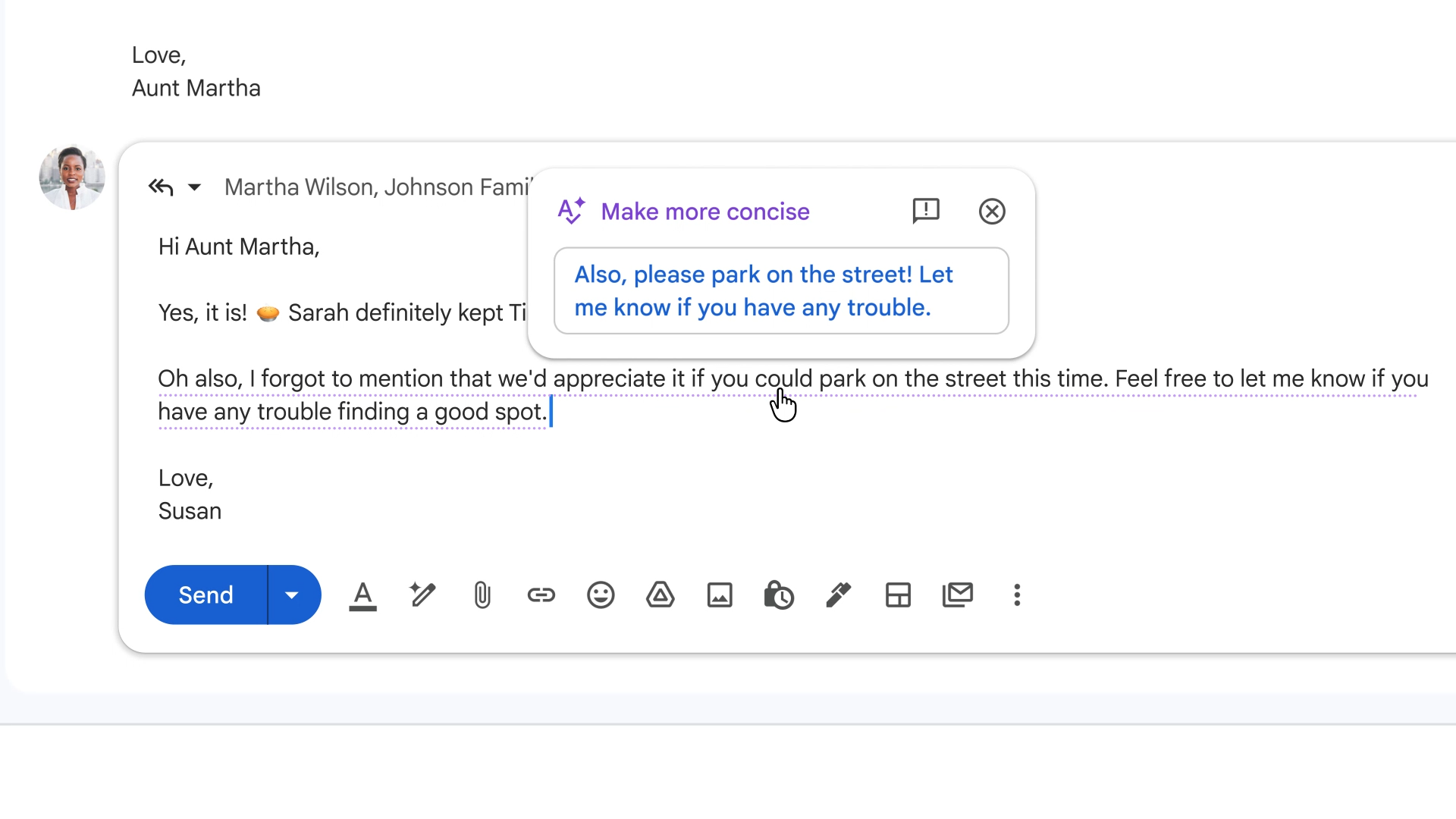
Do note that AI Overviews are rolling out today for everyone, while the inbox Q&A is available for Google AI Pro and Ultra plan users. Besides AI summaries, AI writing tools also receive a major boost. Help Me Write is now available to all users, allowing you to get AI assistance for drafting and polishing emails.
Suggested Replies have been upgraded beyond Smart Replies, as the feature can now generate responses that match your tone and conversation context. Proofreading adds grammar, tone, and clarity checks, and is only available for AI Pro and Ultra subscribers. Next month, Help Me Write will add even deeper personalization by drawing context from other Google apps as well.
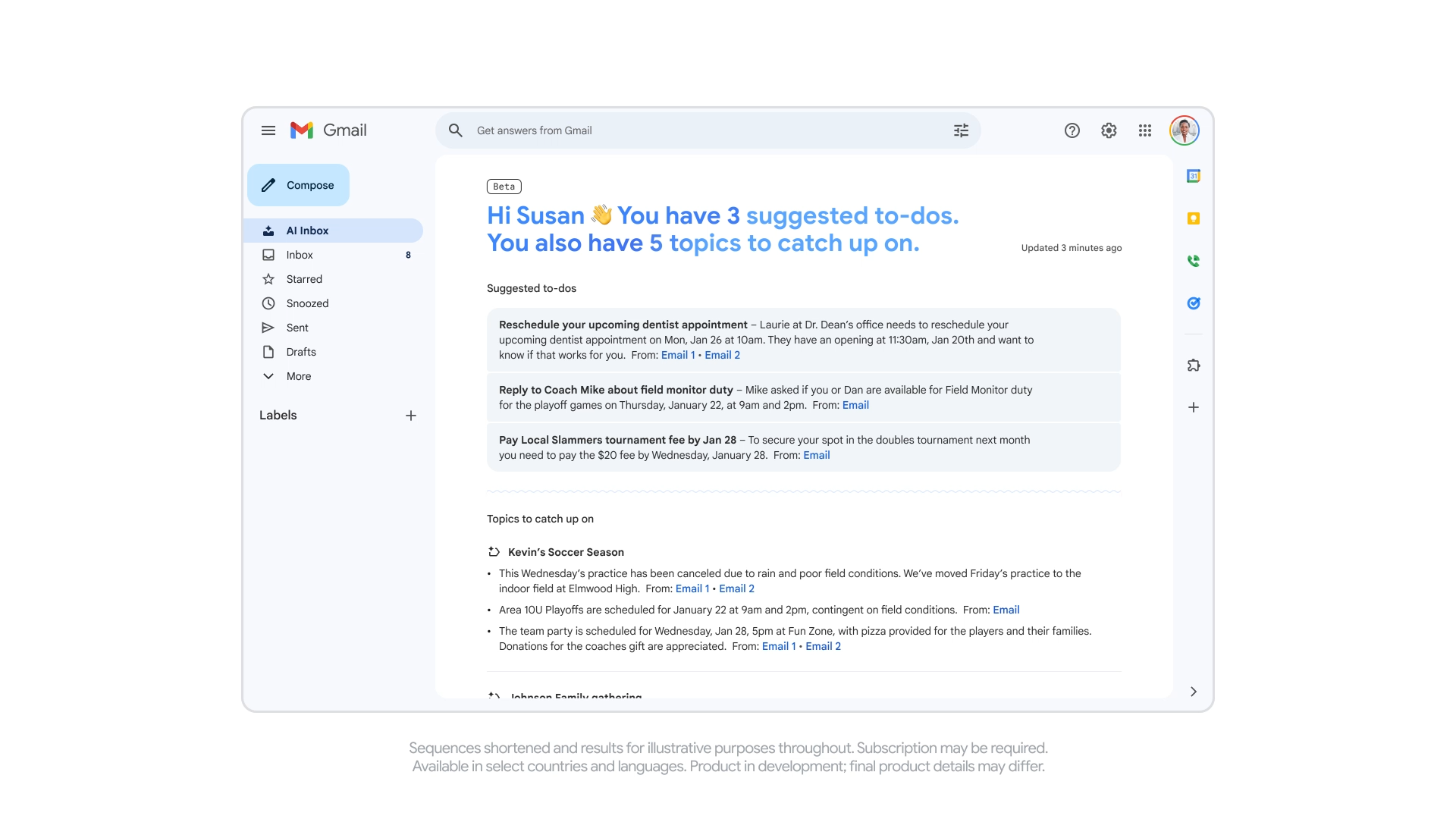
One of the biggest changes you’ll see this year in Gmail is AI Inbox. The feature, as Google says, will prioritize what actually matters to you: bills, reminders, and messages from frequent contacts. All of that will now be visible at the top, while the low-priority emails stay in the background. Google has made it clear that all analysis happens securely and privately.
Google adds that all these features are powered by Gemini 3 and start rolling out in the U.S. today in English, with more languages and regions coming soon.
Microsoft has confirmed the date and time for its next Xbox Developer Direct showcase. According to the company’s latest blog post, the event will air on January 22, 2026, starting at 10 a.m. PT / 1 p.m. ET / 6 p.m. UK time.
This marks the fourth Developer Direct broadcast produced by Xbox and continues Microsoft’s recent strategy of highlighting upcoming games through developer-led presentations.
What to expect from the January showcase
The January Xbox Developer Direct will feature new gameplay footage, announcements, and in-depth insights shared directly by development teams. Microsoft positions the event as a closer look at major releases planned for its 2026 lineup.
Several high-profile titles already stand out.
Fable gets its first extended gameplay reveal
The long-awaited Fable will finally receive an extended gameplay showcase. Developers from Playground Games plan to share fresh details on combat, world design, and the overall tone of the reboot, giving fans their clearest look yet at the new entry in the franchise.
Forza Horizon 6 shows off Japan setting
Microsoft will also debut the first gameplay footage of Forza Horizon 6. The presentation will include a deep dive into new features and content, with a strong focus on the game’s Japan-based open world, a setting long requested by fans of the series.
Game Freak reveals Beast of Reincarnation
Another highlight includes the first in-depth look at Beast of Reincarnation, a new project from Game Freak. The showcase will explore gameplay systems such as plant manipulation mechanics and interactions with the protagonist’s dog companion, offering insight into how exploration and combat work.
Microsoft ties this Developer Direct to its broader 2026 Xbox lineup, which aligns with the brand’s 25th anniversary year. The company continues to use these showcases to set expectations early while keeping players informed through direct developer communication.
Fans can watch the Xbox Developer Direct livestream on platforms such as Twitch and YouTube, with on-demand replays available shortly after the broadcast ends.
As reported by BleepingComputer, Microsoft Exchange Online is currently experiencing a service outage that intermittently blocks mailbox access over IMAP4 (Internet Mailbox Access Protocol 4).
Microsoft confirmed the issue under incident EX1215307, which the company first acknowledged on January 7, 2026, at 23:35 UTC. According to Microsoft, the problem affects IMAP connections only, while other access methods, such as Outlook on the web and alternative protocols, continue to work normally.
What’s causing the IMAP outage
Microsoft traced the issue to a code conflict introduced during a recent IMAP deployment. That change triggered an authentication misconfiguration, which now prevents some users from connecting to their mailboxes through IMAP-based email clients.
Microsoft has already deployed an initial fix and is actively rolling out a configuration update to fully resolve the problem. In the meantime, the company says retrying the connection may temporarily restore access for some users.
Impact and current status
Microsoft has not disclosed which regions are affected or how many users experience the issue. However, the company has classified the outage as a critical incident in the Microsoft 365 admin center, which signals a high-impact service disruption.
Other Exchange Online services remain operational, and Microsoft continues to monitor the rollout of the corrective changes.
Microsoft announced that it will enforce multi-factor authentication (MFA) for all Microsoft 365 admin center sign-ins beginning February 9, 2026. After that date, admins who do not have MFA enabled will lose access to Microsoft 365 administrative portals.
The requirement applies to key admin center URLs, including portal.office.com/adminportal/home, admin.cloud.microsoft, and admin.microsoft.com. According to Microsoft, the move strengthens account security by adding a critical protection layer beyond passwords.
Why Microsoft Is Making MFA Mandatory
Microsoft says MFA dramatically reduces the risk of account compromise. By requiring an additional verification step, MFA helps stop:
Phishing-based account takeovers
Credential stuffing attacks
Brute-force password attempts
Password reuse exploits across services
With MFA in place, attackers cannot access admin accounts using stolen credentials alone.
What Admins Need to Do Now
Microsoft urges administrators to enable MFA as soon as possible to avoid disruptions to administrative access and daily operations.
Global administrators can set up MFA using Microsoft’s built-in setup wizard or follow the official Microsoft documentation. Individual users can also review and manage their security settings through the Microsoft MFA setup portal.
Part of a Broader Security Push
This change does not come out of nowhere. Microsoft has already enforced MFA on the Azure Portal for all tenants since March 2025. The company also extended MFA requirements to tools such as Azure CLI and PowerShell as part of its wider security strategy.
With its in-scope by default approach, Microsoft aims to eliminate common vulnerabilities and reduce exposure to large-scale exploits targeting admin accounts.
Are you already using MFA for your admin accounts? Let us know in the comments.
[UPDATE: December 10, 01:50 AM IST]Preorders are now live for Nitendo Switch 2 Joy-Con 2 controllers (Light Purple and Light Green) on BestBuy, GameStop, and Nintendo Store for $99.99 (via IGN). As far as Amazon is concerned, the product has been listed, but there is no pre-order option as of now.
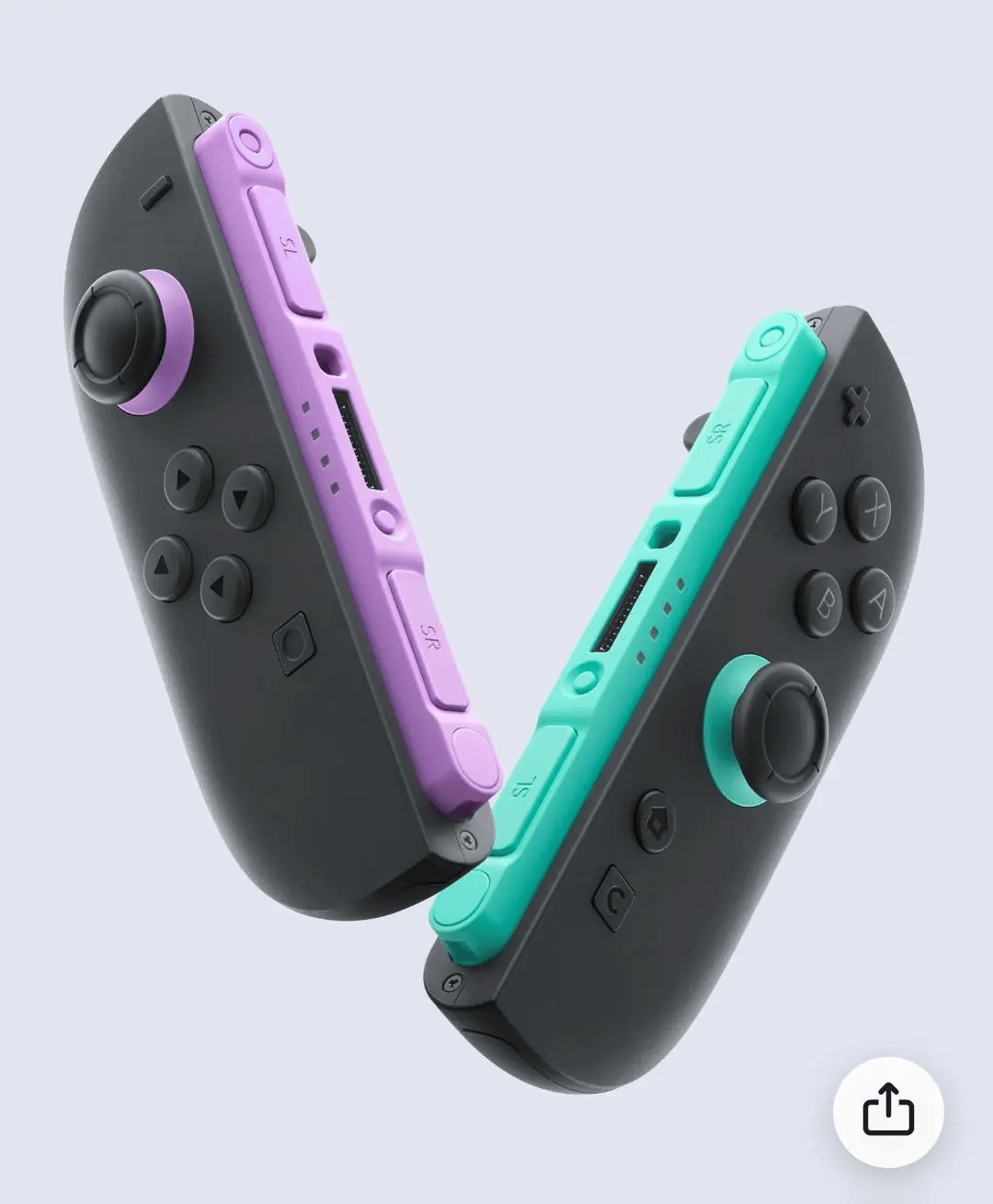
[ORIGINAL STORY] If you own a Nintendo Switch 2, there’s a small, yet exciting news for you. The company has announced Light Purple and Light Green Joy-Con 2 controllers for the Switch 2. These will be released next month.
This is the first color variation for the portable-home console successor’s controllers since it launched last June. According to My Nintendo News, the company announced the news via its Nintendo Today! app, confirming a global release date of 12 February 2026.
Image credit: Nintendo | via My Nintendo News
Surprisingly, the announcement comes at a time when Nintendo may be struggling to push new units to the market due to higher production costs, with the blame coming down to rising memory prices and supply shortages.
The Switch 2 is apparently taking the biggest hit from that. The device packs 12 GB of RAM under the hood, which reportedly saw a 41% price hike in Q4 alone. The global RAM crunch, driven by data centers gulping up available chips, is hitting next-gen hardware across the industry, and Nintendo is no exception. The sharp rise in price has also reportedly forced Xbox and Sony to delay their next-gen consoles.
With Switch 2 production costs rising, the new colorways feel like a quick way to keep players hooked to the platform, all while the hardware itself remains expensive to manufacture.
Xbox Game Pass has quietly landed the very first Final Fantasy remaster, the Final Fantasy I Pixel Remaster, today. While the visual updates appear nice, they’re honestly not the main reason this version finally makes sense to play in 2026.
It’s not hidden that the original Final Fantasy hasn’t aged gracefully. It’s slow, grind-heavy, and packed with random encounters that test patience more than skill. Fortunately, the Pixel Remaster fixes that problem.
New under-the-hood settings now allow players to curb encounter rates, boost EXP gains, and move faster across the map. Those small changes completely revamp the experience, making a historically important but exhausting RPG into something that is finally intriguing to play.
With the new quality-of-life options enabled, the game can be completed in roughly 12 hours, including all Xbox achievements. That makes it a rare Xbox Game Pass RPG you can realistically finish over a weekend.
For longtime fans, it’s a chance to revisit where the series began without the frustration. For newcomers, it’s the best way to understand why Final Fantasy became a giant in the first place. If Final Fantasy I can arrive on Game Pass, it’s not hard to imagine Square Enix slowly rolling out the remaining Pixel Remaster titles next. That’s a big if, if you ask me. But the door might have finally been opened.
Do you plan to get on with the Final Fantasy I Pixel Remaster? Drop your thoughts in the comments below.
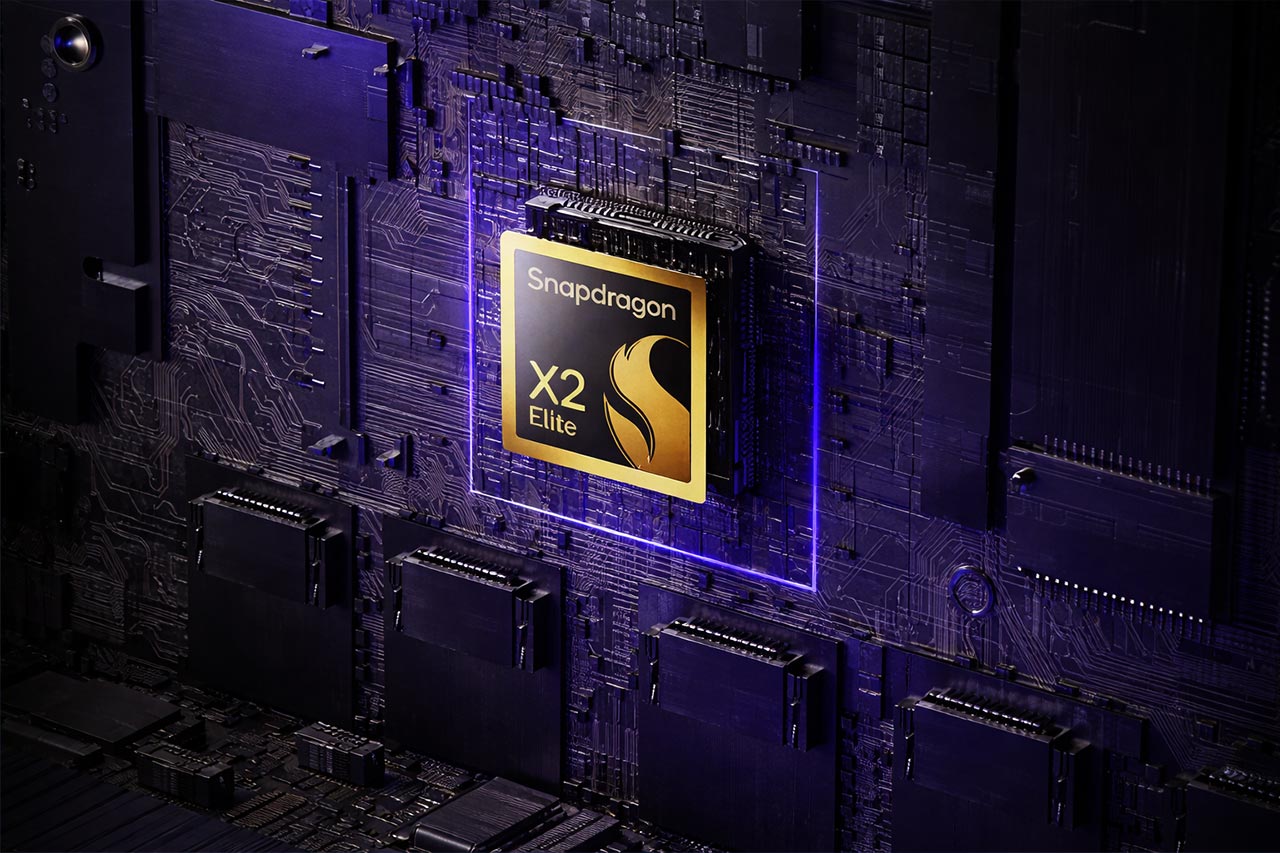
A new powerful Windows-on-Arm chip is taking shape, and it could reshape expectations for Arm-based PCs. Qualcomm’s Snapdragon X2 Elite Extreme is emerging as the most powerful Arm CPU yet designed for Windows 11 devices.
Snapdragon X2 Elite Extreme is Ready To Take on Apple M Series
Early benchmark data paints a striking picture. The chip reportedly scored around 4,072 in single-core and 23,611 in multi-core performance on Geekbench, placing it well above previous Windows-on-Arm processors. These “monster” results suggest Qualcomm has made a major leap in raw CPU performance.
Closing the gap with Apple Silicon
Those scores bring Windows-on-Arm significantly closer to Apple’s high-end silicon. For years, Apple’s M-series chips dominated Arm-based laptop performance, but Snapdragon X2 Elite Extreme appears to narrow that gap considerably. While it may still trail the very top-end parts like the rumored Apple M5 in certain workloads, the difference looks smaller than ever.
Inside the Snapdragon X2 Elite lineup
The Snapdragon X2 family includes multiple SKUs with different core counts and power envelopes. At the top sits the X2E-96-100 “Elite Extreme”, which packs 18 CPU cores and boosts up to 5.0 GHz. Earlier Snapdragon X2 Elite variants already showed strong benchmarks, and this flagship model pushes performance even further, highlighting Qualcomm’s rapid progress in Arm-based PC silicon.
Early data, real-world impact still to come
It’s important to note that current numbers come from reference designs, not final retail laptops. Real-world performance could shift once shipping devices arrive, with factors like cooling, sustained power limits, and firmware optimizations all playing a role. WindowsLatest has obtained the benchmark information, so we can see how this chip compares to Apple’s CPUs.
With Snapdragon X2 Elite Extreme, Windows-on-Arm no longer looks like a niche experiment. Instead, it’s shaping up as a serious contender in the premium PC performance race.
Microsoft has moved to shut down rumors claiming it plans to rename its core Office apps under the “Copilot” brand, following growing confusion fueled by its expanding AI strategy.
It’s no secret that Microsoft is rolling out Copilot across its ecosystem. The company has already confirmed that Copilot is coming to Classic Outlook, and it’s also testing a Copilot-first New Tab Page experience in Edge. With Copilot appearing more prominently across apps and services, speculation around a broader rebrand intensified.
Office Is Not Rebranding to Copilot Despite What Rumors Might Say
The rumors gained traction after users spotted updated wording on the Office website stating:
“The Microsoft 365 Copilot app (formerly Office) lets you create, share, and collaborate all in one place with your favorite apps now including Copilot.”
Many interpreted this as confirmation that Word, Excel, and PowerPoint had been renamed.
Microsoft has now clarified that this is not the case. The company says it has not rebranded its classic Office applications and has no plans to change their names. Word, Excel, PowerPoint, and other Office apps retain their existing branding.
Social media amplified the confusion, with users assuming that Copilot branding would replace Office entirely. Microsoft says the misunderstanding stems from its broader AI push rather than any renaming of individual apps.
The company previously rebranded the Microsoft 365 app itself as the Microsoft 365 Copilot app, positioning it as a central productivity hub enhanced by AI. That move, combined with Copilot’s expansion into Outlook and Edge, appears to have blurred the lines for some users.
Microsoft emphasized that Copilot acts as an AI feature layer across its products, not a replacement brand for the Office suite. While Copilot continues to spread across Microsoft’s apps, the familiar Office names remain unchanged.
Thanks to multiple Xbox execs and insider reports, we knew that Microsoft’s gaming division had some big plans for 2026. Well, Jez Corden from Windows Central suggests that new Xbox hardware is in the pipeline for this year. But before you get too excited, let me break it to you: it’s not the next-gen Xbox console.
Per Corden, Xbox appears to be ready to launch a next-gen Xbox controller that we’ve been hearing about throughout the last year. The controller in question here is the Xbox Elite Series 3 Controller. That being said, nothing is confirmed as of now.
Corden adds that he “suspects” Microsoft will refresh its controller lineup in 2026, potentially alongside other upgrades. That lines up with earlier reporting from April, where the same news outlet suggested Microsoft was actively testing multiple controller prototypes, including the Elite Series 3.
Interestingly, he also talks about connectivity related to the rumored controller. His sources claim that Microsoft’s next-gen Xbox controllers will support direct-to-WiFi connectivity. In other words, Microsoft is looking beyond Bluetooth latency entirely. If that’s true, it would be a handy upgrade for players who love Xbox Cloud Gaming, which Microsoft recently also announced for select Hisense TVs.
Corden, in his report for Windows Central, notes that, “I’m told Microsoft’s next-generation Xbox controllers all support direct-to-WiFi connectivity, eliminating Bluetooth latency from cloud gaming scenarios.”
The report also mentions that additional Xbox-branded OEM devices might be on the way this year. However, there’s no word on what they could be yet. There’s even mention of credible rumors surrounding an Xbox-branded PC launching in 2026, although Corden notes that it is far from guaranteed.
Minecraft has rolled out one of its cutest updates so far, and it’s all about the babies. In the latest Java snapshot and Bedrock beta, Mojang has introduced eight newly redesigned baby farm mobs, giving long-standing creatures a fresh identity instead of simply shrinking down adult models.
“Until now, the baby mobs have been scaled-down versions of the adult mobs, but with big heads, but now our artists have given them unique textures and models that give each baby mob their own adorable look and identity!” said game director Agnes Larsson.
Minecraft’s latest update gives a visual refresh to Baby Mobs
The update applies to nearly every farm companion. Wolf pups, kittens, piglets, calves, lambs, baby chickens, rabbits, and baby ocelots now look chunkier, softer, and far more expressive. More importantly, the update brings one major change. Baby mobs now have one-pixel eyes instead of two, giving them an instantly cuter vibe. As Larsson puts it, “Typically, mobs in Minecraft have two-pixel eyes, but now baby mobs have just one, which creates a new vibe for them, which is just adorable.”
Well, every mob brings its own personality after the update. Wolf pups span all nine variants, kittens cover eleven styles, and baby chickens hatch in three climate-specific designs. Rabbits, both adult and baby, received a visual refresh too, including the beloved “toast” variant. Piglets, lambs, and calves now reflect their native biomes, adding more visual storytelling to the world.
Notably, Piglets, wolf pups, and kittens now have custom baby sounds, recorded from real animals. “Instead of the up-pitched versions of the adult sounds, I wanted to capture the uniqueness of a kitten meow and a puppy yapping,” said audio designer Sandra Karlsson.
Last but not least, the name tags can be personalized using paper and any metal nugget, which makes it far easier to label your growing mob family. These features are live in testing now, with Mojang actively asking players for feedback before final release.
Microsoft Sway has long been a popular option for creating presentations, newsletters, and interactive reports without the complexity of full Office tools. However, Microsoft is preparing to retire the dedicated Sway Windows desktop app, continuing its steady shift toward web-based experiences.
Microsoft Plans To Retire The Desktop Version of Sway, Here’s What You Should Know
Microsoft has confirmed that it will retire the Sway Windows desktop application (Win32 client) on June 1, 2026. After that date, users will need to access Sway exclusively through the web version available as part of Office online. The company positions this move as another step in its cloud-first strategy, which favors browser-based tools over locally installed apps.
This decision does not come out of nowhere. Microsoft already discontinued Sway on iOS back in 2018, signaling early on that the app’s future would center on the web. The Windows app retirement now completes that transition, leaving the browser version as the only supported way to use Sway.
On the bright side, Microsoft says users will not lose any data or functionality. All existing Sway projects will remain available, and users will continue to access their content online without changes to features or editing capabilities. In practice, Microsoft expects the transition to feel seamless, especially for users already accustomed to working in the browser.
The change also reflects a broader direction across Microsoft’s product lineup. By focusing development on web apps, Microsoft can deliver updates faster, reduce platform-specific maintenance, and encourage consistent experiences across devices.
This news arrives alongside other Windows app issues, including a recent Outlook Classic bug that broke encrypted emails, although Microsoft and the community have already shared workarounds.
As Microsoft continues to streamline its app ecosystem, reactions remain mixed. Some users welcome the simplicity of web apps, while others still prefer dedicated desktop software.
Microsoft has confirmed a new issue in Classic Outlook that prevents recipients from opening some encrypted emails after a recent update. The bug shows up after updating to Current Channel Version 2511 (Build 19426.20218) and affects messages protected with “Encrypt Only” permissions.
Classic Outlook Can’t Open Encrypted Emails, But Workarounds Are Available
On impacted systems, recipients may see the email arrive as an attachment named message_v2.rpmsg instead of readable message content. Outlook’s Reading Pane may also display a prompt that asks users to verify credentials, but the encrypted message still won’t render. :contentReference[oaicite:1]{index=1}
BleepingComputer highlighted practical workarounds for both senders and recipients while Microsoft works on a permanent fix. Microsoft says its Outlook team is working on a resolution, but it has not shared a timeline.
Sender workaround: Use Options > Encrypt instead of File > Encrypt
Open a new email in Classic Outlook.
Click Options on the ribbon.
Click Encrypt.
Select Encrypt or Do Not Forward.
Save the message after you apply encryption.
Send the email.
This approach avoids the File > Encrypt flow that triggers the “message_v2.rpmsg” behavior for some recipients.
Recipient workaround: Roll back to the last known good build
Save your work and close Outlook (and other Office apps).
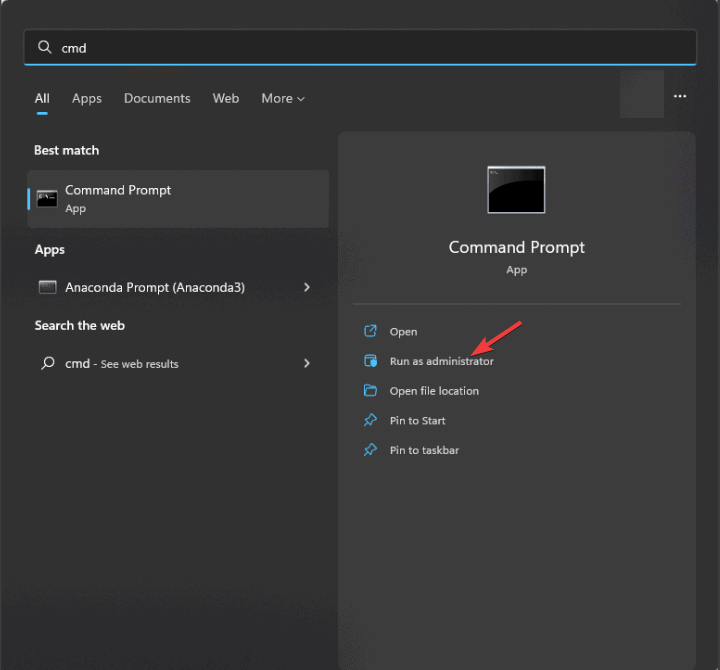
Open Command Prompt as an administrator.
Run the rollback command below. "%programfiles%\Common Files\Microsoft Shared\ClickToRun\officec2rclient.exe" /update user updatetoversion=16.0.19426.20186
Reopen Outlook and try the encrypted email again.
Microsoft says Build 19426.20186 works as the next prior build before the issue started.
Roblox has begun a global rollout of its facial age check requirement for chat access, turning a previously announced plan into a live feature. The launch starts in the United States and expands to all regions where chat is available over the next week.
Roblox Age Verification For Chat is Now Rolling Out
The move positions Roblox as the first major online gaming platform to require facial age estimation before allowing users to chat. The company says the goal centers on promoting age-appropriate communication and reducing interactions between adults and children under 16.
In pilot regions such as Australia, New Zealand, and the Netherlands, tens of millions of users completed an age check. More than half of daily active users in those markets participated during testing.
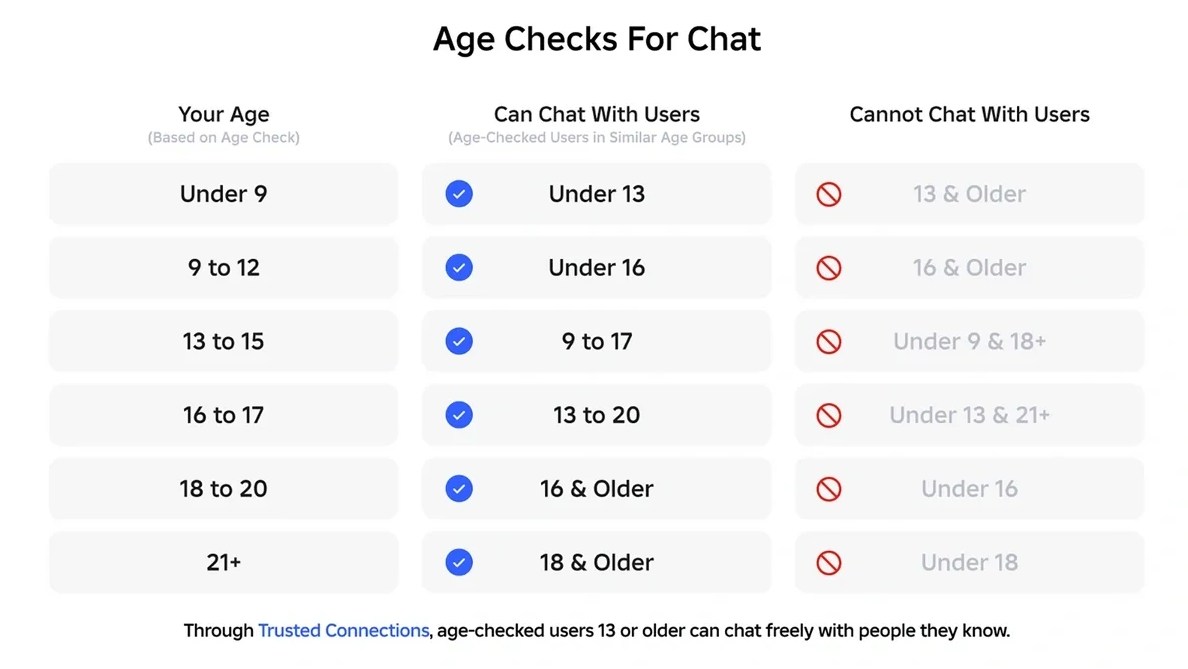
Once users complete the check, Roblox assigns them to age-based chat groups, such as under 9, 9–12, and 13–15, etc. Chat typically stays limited to the same or adjacent age groups. Children under 9 need parental consent, while users aged 13 and older can expand conversations beyond their group through Trusted Connections.
Roblox emphasizes privacy safeguards alongside the rollout. The system deletes all photos and videos used for facial analysis immediately after processing. Age checks also sit within a broader safety framework that includes content filters, proactive moderation, and tools designed to block the sharing of personal information.
If users disagree with their estimated age, they can appeal or verify through alternative methods like ID checks or parental controls. Roblox also plans to extend age verification to features such as Studio collaboration tools. For more information, visit the official Roblox blog post.
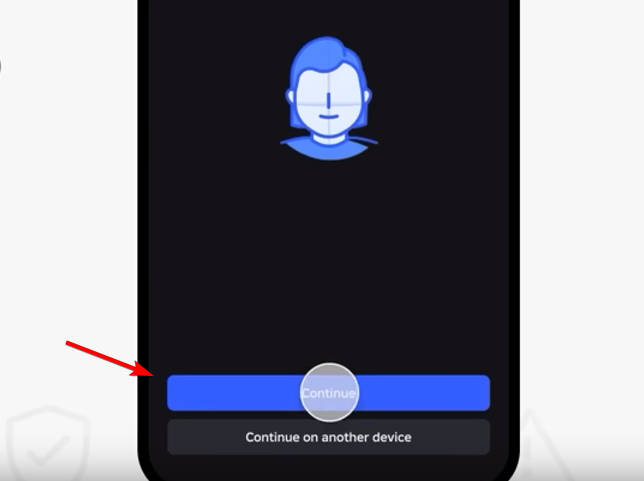
To verify your age, do the following:
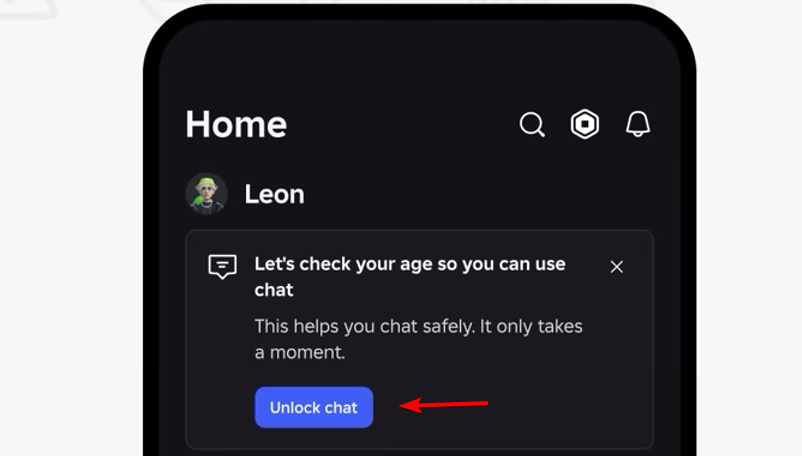
Open the Roblox app on your phone and choose Unlock chat.
Tap Continue.
Tap on Continue again.
Allow Roblox to access your camera.
Move your head and let the phone scan your face.
Once you get your age estimate, tap OK.
Do you see facial age checks as a necessary step to protect younger players, or do they cross a line on user privacy?
Microsoft appears to be testing a deeper Copilot-focused redesign in Microsoft Edge Canary. The changes affect the New Tab page layout, sidebar behavior, and parts of the Settings interface.
The update introduces an unusual layout where two different sidebars can appear on the New Tab page at the same time.
Copilot now dominates the New Tab page. The New Tab page opens directly into a large Copilot prompt that asks users what they want to do. Search and feed content no longer take center stage.
Copilot now acts as the main interaction surface. This places it at the starting point for browsing.
A new Copilot sidebar appears on the left
Edge now shows a Copilot-specific sidebar on the left side of the New Tab page.
The New Tab page in Microsoft Edge opens directly into a Copilot prompt. This places Copilot at the center of the browsing experience. Image Credit: Venkat | WindowsReport.
When expanded, this sidebar displays sections such as Discover, Imagine, Labs, Pages, and Conversations. The layout closely mirrors the Copilot experience on copilot.microsoft.com rather than a traditional browser sidebar.
A “Close sidebar” control collapses this interface back to a minimal Copilot button.
Edge shows a new Copilot sidebar on the left side of the New Tab page, with sections such as Discover, Imagine, Labs, Pages, and Conversations. Image Credit: Venkat | WindowsReport.
In the collapsed state, hovering over the Copilot icon shows a tooltip that reads “Go to Copilot home page.” The hover action does not open anything yet. Clicking just below the icon restores the expanded sidebar instead.
The traditional Edge sidebar remains on the right
Edge continues to show its existing sidebar on the right side of the New Tab page.
This right-side sidebar behaves as it did before and remains separate from the Copilot sidebar on the left. As a result, the New Tab page can display two sidebars at once.
The two sidebars do not interact with each other. Edge treats them as separate UI systems.
Settings pages also follow a new layout
Microsoft is also testing a visual change in Edge Settings.
The main Settings content now appears in the center of the page, while the navigation menu stays on the left. This layout appears across sections such as Profiles and Privacy, search, and services.
The change affects presentation rather than controls. As a result, Settings feels more balanced and less left-heavy.
Taken together, these changes show Edge moving toward a Copilot-first layout. Copilot now acts as a dedicated workspace rather than a feature layered on top of the browser.
Microsoft has not announced these changes publicly, and the design may still change before it reaches stable versions.
[UPDATE | 12:05 PM GMT+1, January 8]According to WindowsCentral, Activision has confirmed that the preload size on Battle.net is incorrect due to a bug. As a result, preloading has been disabled. The update size should be 20-30GB, depending on the parts of the game that you have installed.
[ORIGINAL STORY] Call of Duty was the second most-played game on Xbox in 2025, and now Treyarch is kicking off 2026 in a grand fashion. Season 01 Reloaded for Black Ops 7 and Warzone lands today, January 8, and it’s easily one of the massive mid-season updates the franchise has rolled out in years.
As part of the update, Fallout is officially coming to Call of Duty. The crossover brings Wasteland-themed modes, maps, events, Operators, and rewards across Multiplayer, Zombies, Endgame, and Warzone. Yes, there is a bunch of stuff that comes with this update.
Endgame players get two new World Events, including Wraith Wing, a high-level VTOL encounter, and Deathclaw Hunt, which turns parts of Avalon into an irradiated Fallout-style nightmare. There’s also a new Phantom Skill Track, focused on stealth, ambush damage, trap avoidance, and evasive movement.
Multiplayer mode also sees some meaningful updates, with four maps joining the rotation. The notable one is Yakei, a brand-new rooftop map set in neon-lit Japan. Fan favorites Meltdown and Fringe return, alongside Vault Town, a Nuketown variant drenched in Fallout vibes.
New modes include Takeover, plus Fallout LTMs like S.P.E.C.I.A.L. Mayhem and The Ghouls. This time, Zombies gets some love too. Astra Malorum receives a Directed Mode, a new Survival map arrives with Zarya Cosmodrome, and the Project RADS LTM brings radiation management, Feral Ghouls, and Deathclaws into the mix.
Over in Warzone, you can expect High Octane to push faster circles and bumper loot, while Power Armor Royale drops Fallout-style suits into Verdansk. Win Streaks also debut alongside that, rewarding consistent victories with exclusive weapon camos.
New weapons, attachments, Fallout events, and store bundles round out the update. Season 01 Reloaded doesn’t just add content, it’s somewhat an overhaul to regain players’ trust at a time when Black Ops 7 has been criticized for being underwhelming. You can find out all the details about Call of Duty Black Ops 7 Season 01 Reloaded here.
Businesses are moving more and more of their work to the cloud. Companies now keep their data and run their software online instead of on local computers or office servers. This helps them get things done faster, save money, and get to their files from anywhere. Cloud systems are helpful, adaptable, and easy to expand.
But moving to the cloud isn’t just about moving data from one place to another. It also has new security problems. Ransomware is one of the most dangerous things. A lot of businesses don’t think about this risk soon enough. If you don’t protect your cloud migration from ransomware, it can cause a lot of damage.
Strong security planning should always be a part of moving to the cloud. A business can lose data, time, money, and customer trust without it.
What Does “Ransomware” Mean in Simple Terms?
Ransomware is a type of cyberattack in which hackers lock up your files or systems. You can’t open or use them once they’re locked. The attacker then demands money to get the data back. There is no guarantee that the files will be returned even if the money is paid.
Ransomware usually gets into Windows computers through email, fake links, unsafe downloads, or stolen passwords. The attack can start with just one wrong click. After that, the ransomware can quickly spread to other systems and cloud storage that are connected.
This problem gets worse in cloud computing environments because many systems are linked together.
Why Hackers Like to Break into Cloud Systems
A lot of people believe that cloud systems are always safe. This isn’t true. Cloud providers keep their hardware safe, but users are responsible for keeping their data and access safe. Hackers go after cloud systems because:
Cloud services are always available.
There is one main place where data is stored.
A lot of people log in from afar
Settings for security are often wrong.
Backups are linked to systems that are live.
Ransomware can lock both the main data and the backups at the same time if it gets into a cloud setup. This makes it very hard to get back on track.
Moving to The Cloud Without Planning for Ransomware is Risky
When moving to the cloud, systems are often open and changing. Things are being moved, settings are being changed, and new access is being given. This leaves holes in security. Some common mistakes people make when moving are:
Using passwords that are easy to guess
Allowing users too much access
Moving data before making rules
Keeping test systems open
Not keeping an eye on system activity
During this time, both old and new systems could be affected by ransomware. It can take weeks or even months to fix the damage.
Ransomware Often Targets Windows Systems
A lot of businesses and offices use Windows systems. This makes them more likely to be targeted by attackers. Some common weak points are:
Windows updates that haven’t been fixed
Allow access to Remote Desktop
Bad control over user permissions
Antivirus protection that isn’t very strong
Unsafe tools and scripts
These risks go with Windows systems when they move to the cloud. Ransomware can spread very quickly if it isn’t fixed right away.
Why Ransomware Prevention Should Come First
A lot of companies only think about security after they move. This is a huge mistake. The first step in planning should include ways to stop ransomware. Planning ahead helps with:
Making sure users can access safely
Keeping important files safe
Picking the right tools for security
Training employees before moving
Lowering the chances of downtime
When you plan ahead for prevention, the move to the cloud goes more smoothly and safely.
How Anti-Ransomware Tools Work
One of the best ways to stay safe is to use the right anti-ransomware tools. These tools keep an eye on how systems work and stop bad actions before files are locked. Good tools for protecting against ransomware can:
Watch files as they happen
Keep cloud virtual machines safe
Stop things that look suspicious
Stop attacks on their own
Put alerts in one place on the dashboard
These tools work in the background and keep systems safe even when things go wrong.
You Can’t be Completely Safe With Just Backups
A lot of businesses think that backups will protect them from ransomware. Backups are important, but they aren’t the only thing you need.
In cloud systems, backups are often linked to the main network. This means that backups can also be attacked by ransomware. Here are some ways to better protect your backups:
Backups that are offline or locked
Separate access for backups
Testing backups on a regular basis
More than one place to back up
Keeping an eye on backup activity
Real safety comes from prevention and strong backups.
It’s Very Important To Control Who Can Access The Cloud
User logins are very important for cloud systems. If a hacker gets a username and password, they can get into the system without any malware. Some things that are part of good access control are:
Two-step login security
Few admin accounts
Permissions based on role
Checks for regular access
Monitoring of login activity
It’s very important to protect logins because Windows cloud systems often connect to shared user systems.
Monitoring helps stop ransomware before it gets too far
Ransomware does more damage if it isn’t caught right away. A lot of attacks run quietly before locking files.
From the start, cloud migration plans should include monitoring. This includes
Keeping track of file activity.
Alerts when you log in
Monitoring the network
Checks on how the system works
Logs for security
Early warnings help stop attacks before they get worse.
Employees Are a Big Part of Prevention
Ransomware can’t be stopped by technology alone. People still mess up. People who work for you might click on fake links or download files that aren’t safe. Before moving to the cloud, people should get some basic training on:
Recognizing fake emails
Using passwords that are hard to guess
Staying away from unsafe downloads
Telling someone about strange behavior
Following the rules of the company
Small amounts of training can stop big problems from happening.
Risks of Ransomware in Business and The Law
Ransomware attacks can also let data out. This could get you in trouble with the law and make customers lose trust in you. Ransomware prevention that works well can help with:
Following the rules for protecting data
Getting through security checks
Keeping customer information safe
Keeping the company’s good name
Not getting fined or punished
If you ignore the risks of ransomware, you could hurt yourself in the long run.
Last thoughts
It’s a good idea to move to the cloud, but only if you take security seriously. Ransomware is a real danger, and cloud systems are a big target. Putting stopping ransomware at the top of your list of things to do protects people, systems, and data. It helps businesses use the cloud without worrying.
Planning security ahead of time is no longer an option for Windows users and tech-savvy teams. It is a necessary step for a safe and successful cloud future.
Spotify has just introduced two new social listening features in Messages: Listening activity and Request to Jam. These features make it easier for users to see what their friends are playing in real time and quickly turn shared music moments into live listening sessions.
Listening activity is an opt-in feature that shows your current song or your most recently played track to friends and family you’re connected with on Messages. You can see others’ activity even if you haven’t turned your own on, as long as they’ve opted in.
You always have the control of who sees your activity and turn it off anytime, by the way. You can also add your friends’ track to your library by just tapping on it. But, that’s not all; tapping also lets you start playback, open the track menu, or react with one of six emojis.
Request to Jam complements the above feature by making it easy to invite friends into a live Jam session. For now, Spotify Premium users can only send a Jam request from a chat, and if accepted, the recipient becomes the host. Both participants can add tracks to a shared queue and listen together, while also messaging in sync.
What’s interesting is that Spotify even suggests songs based on combined taste profiles. You can leave a Jam at any time, and pending invitations time out after a few minutes.
These features are rolling out now to users in Messages-enabled markets on iOS and Android and will be widely available by early February. Listening activity is available to all Messages users, while Free users can join Jams if invited by Premium friends.
OpenAI has officially launched ChatGPT Health, a dedicated experience inside ChatGPT designed to help users better understand and manage their health and wellness. The company says the feature brings personal health information and ChatGPT’s intelligence together, while keeping privacy and security front and center.
Health is already one of the most common reasons people use ChatGPT. According to OpenAI, more than 230 million users worldwide ask health and wellness questions every week. ChatGPT Health builds on that behavior by offering a separate, protected space where users can securely connect medical records and wellness apps to get more relevant, personalized responses.
The idea here isn’t to replace doctors. OpenAI is clear that ChatGPT Health is meant to support medical care, not diagnose or treat conditions. It helps users understand lab results, prepare for doctor visits, spot long-term patterns, and feel more confident navigating everyday health questions.
Privacy plays a major role. Health lives in its own isolated space within ChatGPT, with additional encryption and protections designed specifically for sensitive health data. Conversations inside Health are not used to train OpenAI’s models, and users remain fully in control of what data is connected, stored, or deleted.
Users can link services like Apple Health, MyFitnessPal, Function, and medical records through trusted partners. OpenAI says all connected apps must meet strict privacy and security requirements.
ChatGPT Health was built with input from over 260 physicians across 60 countries, shaping how the system communicates, prioritizes safety, and encourages follow-ups with clinicians when needed.
The feature is rolling out gradually, with a waitlist now open. Access will expand over the coming weeks on web and iOS, starting outside select regions.
[UPDATE | 12:45 AM IST, January 8]Turns out the report claiming massive layoff in this month is fake. Folks at Windows Central have spotted a reply of Frank Shaw, Chief Communications Office at Microsoft, on a post on X that mentioned layoff rumors. He states that the rumors are “100 percent made up / speculative / wrong.” Just to be clear, the title you see now has been updated to reflect the latest information.
[ORGINIAL STORY] Last year, Microsoft created havoc across its global workforce with several rounds of job cuts, despite posting strong revenue and profits. The company slashed over 6,000 roles in May, followed by another 9,000 in July, although its net income was around $75 billion. The company was clearly trimming headcount, focusing towards efficiency and strategic growth with AI in back of its mind.
Now, according to TipRanks, Microsoft is planning another round of layoffs in January 2026. The report suggests that between 11,000 and 22,000 roles could be affected worldwide. If the numbers are accurate, it converts to roughly 5–10% of its 220,000-strong global workforce.
Teams in Azure cloud, Xbox gaming, and global sales division are most likely to be hit by this massive layoffs. As of now, Microsoft hasn’t confirmed these plans, but insiders suggest the decision has to do with long-term AI investments.
To catch you up, Microsoft obsession with AI has led it to pour in billions of dollars in AI spending. In Q1 FY26 alone, the company’s capital expenditure shot up to $34.9 billion, with the company expecting total AI-related costs to exceed $80 billion this year. Most of this money has been spent on data centers, chips, and AI tools. The report also mentions that employees working around AI inside Microsoft are relatively immune from the rumored layoffs than those working in a different department.
Adding to the job scare, a mandatory office policy requiring employees within 50 miles of an office to be on-site at least three days a week is another headache to deal with. Some employees even say that Microsoft is indirectly encouraging voluntary exits without formal layoffs.
Whatever may be the case, we are yet to hear officially from Microsoft. But, given the rampant layoffs from last year, this rumor could indeed be true.
At CES 2026, Lenovo took the wraps off a wide range of new Windows laptops and PCs, including a handful of eye-popping concept devices. Besides all that, the company has also introduced two new All-in-One Copilot+ PCs, out of which one is dedicated to consumers, while the other is aimed at enterprise users who want a smarter, more flexible desktop setup.
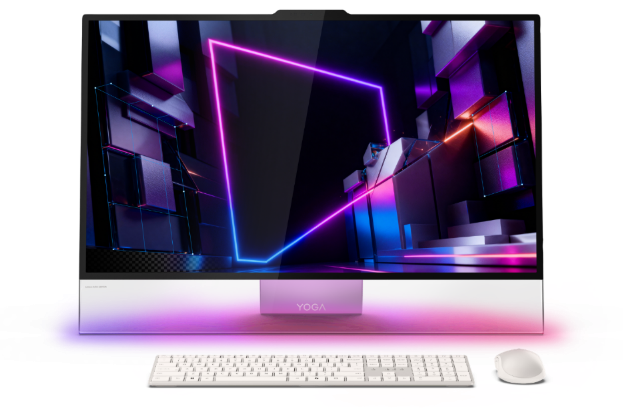
Lenovo Yoga AIO i Aura Edition targets premium home users
The Yoga AIO i Aura Edition (32″, 11) is Lenovo’s new flagship consumer All-in-One PC. The device features a large 32-inch 4K OLED display, featuring a 165Hz refresh rate. That combined makes the device ideal for creative work and media consumption. The laptop packs the Intel Core Ultra X7 Series 3 processors under the hood, bringing Copilot+ capabilities to the desktop form factor.
Audio is another standout department of this PC. It is handled by Harman Kardon speakers with Dolby Atmos, while a 16MP front-facing camera supports face recognition and includes an electronic privacy shutter. Lenovo has also added an Adaptive Lighting system that syncs with on-screen content and system notifications, with customizable colors and behaviors.
As far as connectivity is concerned, the Lenovo Yoga AIO i Aura Edition comes with Thunderbolt 4 and HDMI 2.1, along with a hidden USB dongle for the bundled wireless keyboard and mouse. Moreover, Lenovo has confirmed that this PC is planned for a Q2 2026 launch, at an expected price of $2,399.
Image credit: Lenovo
ThinkCentre X AIO Aura Edition focuses on enterprise workflows
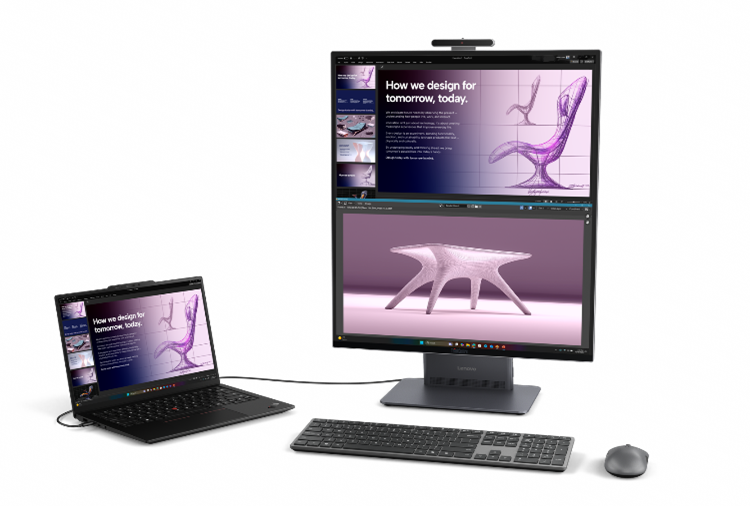
As far as enterprise consumers are concerned, Lenovo has also introduced the ThinkCentre X AIO Aura Edition. It comes with a 27.6-inch QHD display with a unique 16:18 aspect ratio. The near-square layout is designed for document-heavy, coding, and data-centric workflows.
The said device runs on Intel Core Ultra Series 3 processors, paired with an integrated 12Xe Intel Arc GPU and up to 64GB of LPDDR5x RAM. An optional AI camera enables Lenovo DeskView, which allows users to digitize physical documents placed in front of the display. The AIO also includes four Harman Kardon speakers, a quad-microphone array, and Lenovo Share Zone, which lets the screen function as both a PC and an external monitor at the same time.
To catch you up, reports from late October 2025 also hinted at the same. But, back then, we didn’t know which devices would host it. But now we know. In other words, this means that the version 26H1 will be the first Windows 11 version tied to a single architecture at launch.
According to Bowden, ASUS has confirmed that its upcoming ZenBook A14 and A16 models with Snapdragon X2 will ship with 26H1 pre-installed. Meanwhile, ZenBook S14 and S16 models running Intel or AMD chips will feature Windows 11 version 25H2.
Microsoft previously said that the feature parity will remain between 25H2 and 26H1, with the newer version bringing under-the-hood improvements thanks to a platform refresh codenamed Bromine. As a user of Windows 11 26H1, you can expect improved performance and stability, even if the interface and day-to-day experience feel similar.
Bowden notes that Snapdragon X2 needed low-level system changes that didn’t line up with Microsoft’s usual H2 release schedule. As a result, Windows 11 version 26H1 is gearing up for spring release, built for Arm-based PCs. To catch you up, Microsoft has done this before. Windows 11 version 24H2 followed a similar path in 2024, launching first on Snapdragon X devices before rolling out more broadly later in the year.
Do note that Windows 11 26H1 is already available to test for Insiders, meaning you can run it on Intel, AMD, or Snapdragon PCs today. However, the changes are mostly under the hood, so don’t expect any visual differences. Moreover, it’s worth noting that Windows 11 version 26H2 is expected to be released in the fall for all other devices.
We are officially in 2026 now, but looking back from the Xbox point of view, a lot happened last year. If we have to speak in terms of console sales, at least in the UK, Microsoft would like to forget last year. However, 2025 was good for gamers, as Xbox brought in some amazing titles to its portfolio last year. The momentum looks solid, with Forza Horizon and Fable likely to come this year.
Speaking of games, new data posted by @matpiscatella on Bluesky, cited from Circana’s Player Engagement Tracker (via Windows Central), reveals the most‑played games on PlayStation and Xbox in the United States for 2025. Interestingly, the chart looks a lot like the one we saw in 2024.
On Xbox, there was a slight reshuffle. Fortnite topped the most-played games, followed by Call of Duty. Here’s a close look at the chart:
The above rankings suggest the strong hold of the aforementioned franchises in the US. Fortnite and Call of Duty continue to appeal to the masses, while long-running titles like GTA V, Roblox, and Minecraft keep players coming back, all thanks to regular updates, live-service elements, and multiplayer features that stretched well beyond their original release windows.
It’s not just annual blockbusters or new IPs driving time played; many of these titles are years old, yet still pull in millions of active players. It’ll be interesting to see what 2026 has in store for these franchises and titles.
A complete report of Circana US video game market results for December and the full 2025 year is expected to drop on January 22, so keep an eye on it. So, which of the games did you play the most this year on Xbox or PlayStation? We’d love to hear your choices in the comments below.
Microsoft is changing how cookie settings work in Microsoft Edge. In the latest Edge Canary version, the browser no longer shows the familiar toggles that let users globally allow cookies or block third-party cookies.
What changed in Edge’s cookie settings
In the current stable version of Edge, users can still turn on “Allow sites to save and read cookie data” and separately choose to block third-party cookies. These options appear at the top of the page and control cookie behavior. In Edge Canary, both switches are gone.
In the current stable version of Edge, users can still allow cookie storage and block third-party cookies using top-level switches. Image Credit: Venkat | WindowsReport.
Instead, cookie behavior is now presented through defaults and site-specific rules. Users can still decide which sites are allowed or blocked, but Edge no longer presents cookies as something controlled by a single global switch. The settings page now focuses on per-site permissions and exceptions rather than broad cookie controls.
Edge Canary no longer shows the global options to allow cookies or block third-party cookies. Control now relies on site-specific rules. Image Credit: Venkat | WindowsReport.
For users, this changes how cookie decisions are made:
There is no longer a clear on-or-off choice for third-party cookies.
Users now manage cookies site by site instead of using one rule for everything.
Edge appears to rely more on built-in behavior rather than user-defined master settings.
This does not mean Edge disables or blocks cookies by default. Instead, it changes how cookie choices appear in settings.
Because of that pattern, the cookie changes now visible in Canary are important. They change a privacy settings page that many users regularly visit.
These changes currently appear only in Edge Canary and may still be part of testing. Microsoft has not explained the reasoning behind the new layout, and this could change before reaching stable versions.
While testing the updated cookie settings, we also noticed an issue with InPrivate browsing in Edge Canary. In our testing, new InPrivate tabs no longer showed the usual disclaimer screen, and websites failed to load.
This behavior appears limited to Canary and does not look like a confirmed change to how InPrivate browsing works.
Intel is stepping deeper into gaming hardware with a new platform designed specifically for portable gaming devices. The platform will combine both hardware and software and is centered around Intel’s latest Core Series 3 processors, known as Panther Lake. These chips, introduced last year, are now rolling out across multiple PC models.
The new platform will include a dedicated chip personalized for handheld gaming, according to folks at IGN (via TechCrunch). Built on Intel’s 18A manufacturing process, Panther Lake marks the company’s first generation of processors produced on this cutting-edge node, which entered production in 2025.
Intel has a long history in the gaming industry, developing processors for gaming PCs since the ’90s. The company refocused on gaming in 2022 with the launch of Intel Arc GPUs, and this new handheld initiative represents the next step in expanding into mobile gaming hardware.
Intel has not shared specific details about the handheld platform’s release or performance benchmarks, but as TechCrunch points out the vice president and general manager of PC products Daniel Rogers confirmed the company will provide more information later this year.
CD Projekt Red has revealed new details about the opening hours of its upcoming Cyberpunk 2077 sequel, aka Cyberpunk 2, which is often called Project Orion internally.
While the studio hasn’t shared much gameplay yet, director Igor Sarzynski has offered a glimpse into how the sequel will start (via FRVR). Well, you can expect a faster, action-focused introduction compared to the original game.
According to Sarzynski, extending the first act before the heist in Cyberpunk 2077 didn’t improve the experience, and the sequel will likely skip straight to the core of the story. The opening may include a quick action sequence or start in medias res to get players immediately engaged.
In other words, this means that the intro part of Cyberpunk 2077’s sequel will move faster, but the studio is looking to improve the impact of the narrative. The first game’s opening rushed V’s relationship with Jackie and made lifepath choices feel minor. The sequel plans to make early interactions and story beats more meaningful without slowing down gameplay.
All that said, there’s no release date yet, and details on missions or gameplay remain scarce. But CD Projekt Red is clearly focused on combining faster pacing with stronger storytelling, ensuring the opening hours feel exciting while still building the world and characters effectively.
We are witnessing some interesting announcements from the CES 2026 floor. Moments ago, ASUS announced a range of new laptops designed for creators, professionals, and everyday users. But ASUS didn’t stop there; the company also highlighted dual-screen and Snapdragon-powered devices, all part of its 2026 Copilot+ PC lineup.
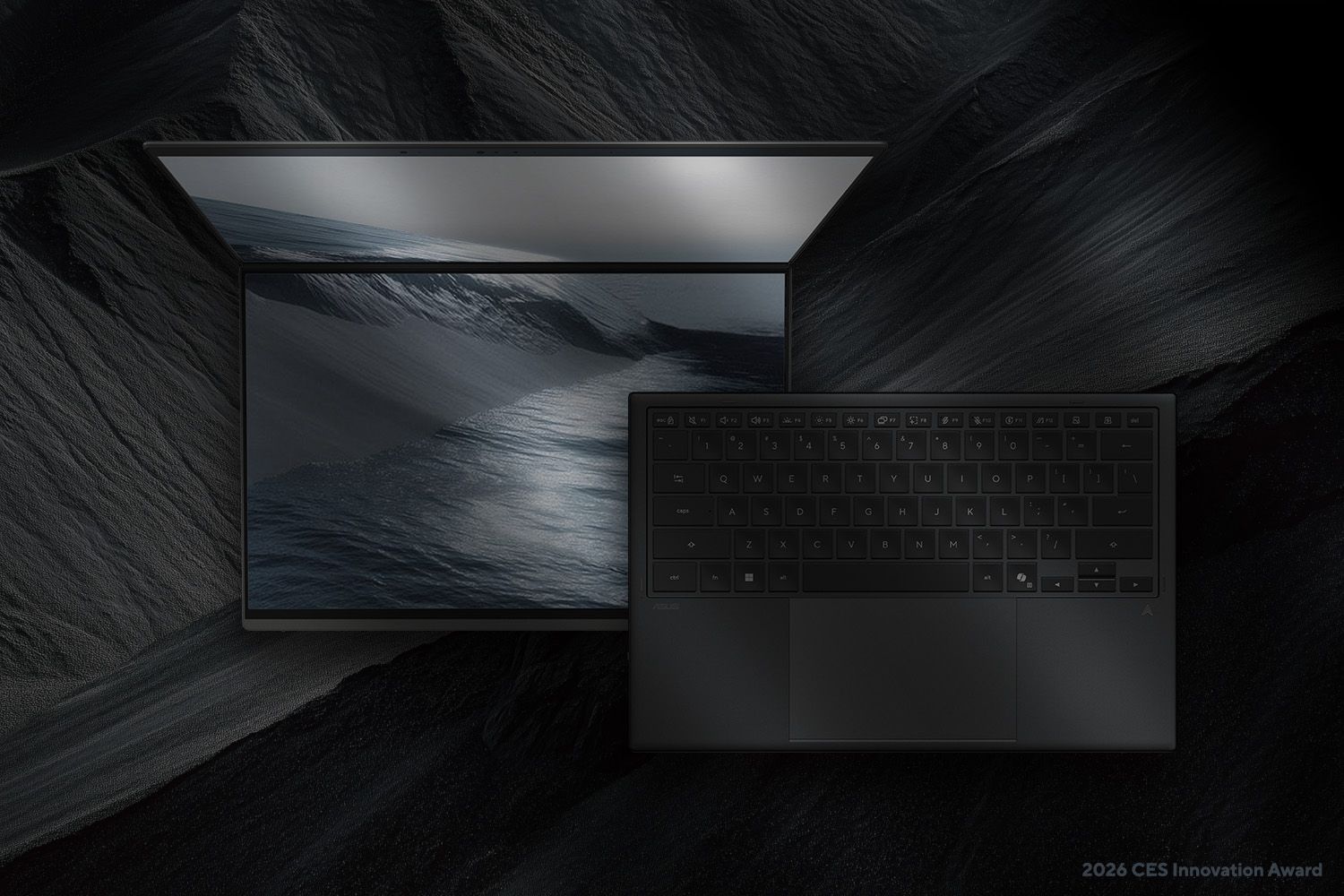
Zenbook DUO
The 2026 Zenbook DUO comes with a dual-screen design, with two 14-inch 3K ASUS Lumina Pro OLED displays. The laptop is built using a Ceraluminum chassis with Smudge-Free anti-fingerprint coating, which balances portability and durability. Under the hood, Intel Core Ultra X9 Series 3 processors do their magic for top-notch performance, whereas a 99Wh dual-battery system ensures that the Zenbook DUO delivers all-day performance. That’s not all; the hideaway hinge and MagLatch keyboard docking system make multitasking seamless, while upgraded six-speaker audio enhances the immersive experience.
Image credit: ASUS
Zenbook A16
Zenbook A16 offers a 16-inch 3K OLED display in a chassis lighter than many 14-inch laptops. The laptop packs the Snapdragon X2 Elite Extreme processor with 18 cores and 80 TOPS AI performance under the hood for superior CPU and GPU performance, while keeping temperature in check. You get over 21 hours of battery life, which ensures creators and professionals can work anywhere without compromise.
Image credit: ASUS
ProArt GoPro Edition (PX13)
Designed in collaboration with GoPro, the PX13 is a 13-inch convertible with a 3K ASUS Lumina OLED touchscreen and stylus support. It integrates GoPro Cloud via the StoryCube AI app, enabling creators to import, organize, and edit 360° video content effortlessly. The laptop is powered by the AMD Ryzen AI Max+ 395 with a 50 TOPS NPU, which handles large AI models for on-device frame interpolation, upscaling, and stabilization.
Image credit: ASUS
ProArt PZ14
The ProArt PZ14 is an ultralight 14-inch Snapdragon X2 Elite tablet with a detachable keyboard, ASUS Pen 3.0, and Bluetooth connectivity. Its 18-core CPU and 80 TOPS NPU deliver all-day performance for mobile creativity, while the 14-inch OLED display ensures accurate, HDR visuals. Integrated AI apps like MuseTree and StoryCube streamline content creation from start to finish.
Image credit: ASUS
From dual-screen Zenbooks to creator-focused ProArt devices, ASUS’s CES 2026 lineup focuses on AI-powered performance, portability, and productivity. These new laptops are built to handle everything from creative workflows to high-performance multitasking, putting the latest Copilot+ AI experiences in the hands of every user. For all the announced products, check this press release.
Microsoft has announced the acquisition of Osmos, which is an agentic AI data engineering platform built to simplify complex, time-consuming data workflows. The decision comes as the Redmond giant looks to accelerate Microsoft Fabric’s vision of a unified, AI-ready data platform.
As you may know, data is everywhere, but turning it into actionable insights remains a challenge. Teams often spend more time preparing data than analyzing it. Osmos solves this by applying agentic AI to transform raw data into analytics-ready and AI-ready assets within OneLake, the central data lake powering Fabric.
This acquisition represents a step toward a future where autonomous AI agents work alongside humans. Microsoft says that the goal is to reduce operational overhead and make it easier for organizations to connect, prepare, analyze, and share data.
The Osmos team will join Microsoft’s Fabric engineering group, contributing to the development of simpler, more intuitive AI-powered experiences. With Osmos integrated, customers can unlock value from their data faster, while keeping operations secure and streamlined.
“Data is everywhere, but making it actionable is often manual, slow, and expensive,” Microsoft says. With this platform, AI can handle repetitive tasks, letting teams focus on insight and analysis. The company has further noted that updates on how Osmos will be integrated into Fabric will be shared in the coming months.
The studio is also teaming up with NVIDIA to ensure the PC experience meets the high standards of the Bond franchise. According to IO Interactive CTO Ulas Karademir, “Performance, responsiveness, and visual fidelity, it all needs to feel effortless for the player, and NVIDIA GeForce RTX technologies, including DLSS 4, enable us to deliver exactly that.”
007 First Light: Minimum and Recommended System Requirements
These specs currently focus on 1080p performance, and IO Interactive hasn’t shared details for higher resolutions yet. But with RTX support, DLSS 4, and optimized CPU/GPU requirements, players can expect responsive, cinematic action that lives up to the Bond name.
If you’ve been waiting for Microsoft to announce Xbox Game Pass drops for January 2026, the good news is that it’s finally here. The first game in the list, which is also available today on Game Pass, is Brews & Bastards. It’s a twin-stick shooter full of action, bosses, and chaotic fun. That’s not all; Little Nightmares Enhanced Edition also lands on Xbox Game Pass today, allowing players to explore The Maw in 4K at 60 FPS.
Microsoft has also listed some of the upcoming games to be added to Xbox Game Pass in January 20266; check the table below.
Game Title
Release Date
Platforms
Atomfall
January 7, 2026
Cloud, Console, Handheld, PC
Lost in Random: The Eternal Die
January 7, 2026
Cloud, Xbox Series X
Rematch
January 7, 2026
Cloud, PC, Xbox Series X
Warhammer 40,000: Space Marine – Master Crafted Edition
January 7, 2026
Cloud, PC, Xbox Series X
Final Fantasy
January 8, 2026
Cloud, Xbox Series X
Star Wars Outlaws
January 13, 2026
Cloud, PC, Xbox Series X
My Little Pony: A Zephyr Heights Mystery
January 15, 2026
Cloud, Console, Handheld, PC
Resident Evil Village
January 20, 2026
Cloud, Console, PC
MIO: Memories in Orbit
January 20, 2026
Cloud, Handheld, PC, Xbox Series X
Games Leaving Xbox Game Pass on January 15
As the fresh games arrive, Xbox Game Pass will bid goodbye to the following games soon. Make sure to try them before they leave. Not to forget, you can save up to 20 percent on the following games too.
CES 2026 is in full swing, with major tech companies unveiling the latest and best they have to offer. Speaking of the latest products, Acer has unveiled new Copilot+ PCs at CES 2026, which are powered by AMD’s new Ryzen AI 400 Series processors. The new chip is built on Zen 5 architecture and enables Windows 11 Copilot+ PC experiences across thin-and-light, mainstream, and gaming laptops.
Speaking of new Copilot+ PCs, Acer’s Swift Go 16 AI leads the thin-and-light segment, which comes with up to Ryzen AI 9 465. The laptop uses Radeon 880M graphics and sports a WUXGA+ OLED display, paired with up to 32GB LPDDR5x RAM with 1TB PCIe Gen 4 SSD.
Image credit: Acer
You also get a 5MP IR camera with HDR and Human Presence Detection, Wi-Fi 7, Bluetooth 5.4, HDMI 2.1, USB-C, USB-A, and MicroSD support. For regular users, Acer has introduced the Aspire 14 AI and Aspire 16 AI, both offering Ryzen AI 9 465 processors. Both laptops feature 16:10 WUXGA displays, with a refresh rate of up to 120Hz and up to 32GB RAM with 1TB SSD.
Image credit: Acer
You also get to choose these laptops from touch and OLED options and enjoy multi-day battery life. Connectivity options include Wi-Fi 6E, HDMI 2.1, USB-C, and USB-A, making them ideal for students and young professionals.
Last but not least, you’ve the Acer Nitro V 16 AI, which handles gaming with ease, thanks to Ryzen AI 9 465 and NVIDIA GeForce RTX 5070 Laptop GPU. The laptop comes with a 180Hz WUXGA display and comes with up to 32GB DDR5 RAM and 2TB SSD. That’s not all; the laptop comes with DLSS 4 support, enhanced AI gaming features, DTS:X Ultra audio, and an FHD IR webcam with shutter.
Acer has noted that all the aforementioned devices come with Acer Intelligent Space, an on-device AI hub that focuses on smarter task management and AI-powered tools. Speaking of availability, the Swift Go 16 AI launches in North America in Q1 2026 and in EMEA in March 2026. The Aspire 14 AI and 16 AI will land in North America in Q2 2026 and in EMEA in March 2026, while the Nitro V 16 AI lands in North America in Q3 2026 and in EMEA in Q2 2026.
We have already entered 2026, but it seems Microsoft’s aggressive Copilot push into its apps and services from last year is extending to this year, too. This time, Otlook Classic is on the receiving end. As spotted by folks at Neowin, Microsoft has updated its official M365 roadmap with a new Copilot-powered scheduling experience coming to classic Outlook for Windows.
The feature in question is the “Schedule with Copilot,” which allows users to set up meetings directly from Copilot chat, without jumping through calendars or email threads.
Outlook’s new Copilot scheduling keeps everything inside chat
Once the update rolls out, you can simply ask Copilot to schedule a meeting with colleagues. Copilot will then check participant availability, find suitable time slots, book meeting rooms, draft an agenda, and send out invitations automatically. All of this happens within the chat experience or through a dedicated “Schedule with Copilot” button in the Outlook UI.
In other words, Microsoft is cutting the hassle of the manual back-and-forth that comes with coordinating meetings. As of now, the feature is currently marked as In Development, with a Preview available in January 2026. Microsoft has further noted that the wider rollout might begin sometime in March 2026.
It’s worth noting that the new “Schedule with Copilot” feature will be available to users with a Microsoft 365 Copilot license and will roll out worldwide on desktop systems under the standard multi-tenant cloud environment.
What do you think about this feature? Will it be useful to you? Do let us know in the comments below.
As the new year kicks off, Xbox is making it easier to play without a console. The company has announced partnership with V (formerly VIDAA) that will bring Xbox Cloud Gaming to select Hisense and V homeOS-powered Smart TVs starting this year. In simple words, you wouldn’t require a console; jump straight into your favorite games on a compatible TV alongside a compatible controller. Yes, that’s it.
Xbox Cloud Gaming heads to Hisense and V homeOS TVs
Worth noting that Xbox Game Pass subscribers will be able to stream hundreds of games directly on supported Hisense and V homeOS Smart TVs. This includes Xbox Game Pass Ultimate, Premium, and Essential subscribers, all of whom will gain access to cloud gaming via the app.
The experience is powered by Xbox Cloud Gaming, allowing players to stream titles instantly without downloads or installations. According to Xbox, the idea is to give players more freedom to play how and where they want.
Not to forget, Xbox Game Pass subscribers will also get unlimited cloud gaming, along with the ability to stream select games they already own. That flexibility extends Xbox’s ecosystem beyond consoles, PCs, and mobile devices.
According to Xbox, this partnership with Hisense and V is part of its larger vision to keep games, achievements, and communities accessible across more devices. More details about supported TV models and the full Xbox Cloud Gaming experience on Hisense sets are expected to be shared in the coming months. For now, Xbox says this is just the beginning of a cloud expansion in 2026.
If you are looking for limitless gaming performance, AMD has a surprise in the form of the Ryzen 7 9850X3D. AMD says that the top-tier chip pushes the desktop gaming limits by top-notch performance in the latest and fastest addition to its 9000X3D processor lineup.
The newest processor is built on the advanced Zen 5 architecture and features second-generation 3D V-Cache technology. It is designed to offer smoother, faster, and more responsive gaming experiences.
The Ryzen 7 9850X3D comes with eight high-performance cores and 16 threads, optimized for modern-day gaming workloads. It supports a boost frequency of up to 5.6 GHz and offers 104MB of total cache, allowing gamers to run demanding titles while multitasking with streaming or background applications without compromise.
Image credit: AMD
AMD says the new processor delivers up to 27% better gaming performance compared with Intel’s Core Ultra 9 285K, underlining its push for leadership in enthusiast PC gaming. The large cache, combined with high clock speeds and low latency, will supposedly provide consistently smooth frame rates across a longer gaming session.
The 9000X3D Series continues AMD’s focus on performance-optimized gaming hardware, catering to enthusiasts seeking both speed and efficiency. With improvements in cache and core design, AMD aims to solidify its position in the high-end gaming CPU market.
The company has also noted that systems featuring the Ryzen 7 9850X3D will be available from major OEMs, system integrators, and retail partners starting Q1 2026. The processor carries a 120W TDP, making it compatible with a wide range of desktop configurations for gaming enthusiasts. Besides the aforementioned, AMD has also announced its Ryzen AI 400 Series processors and Ryzen AI Max+ 392 and 388 at the ongoing CES 2026 event.