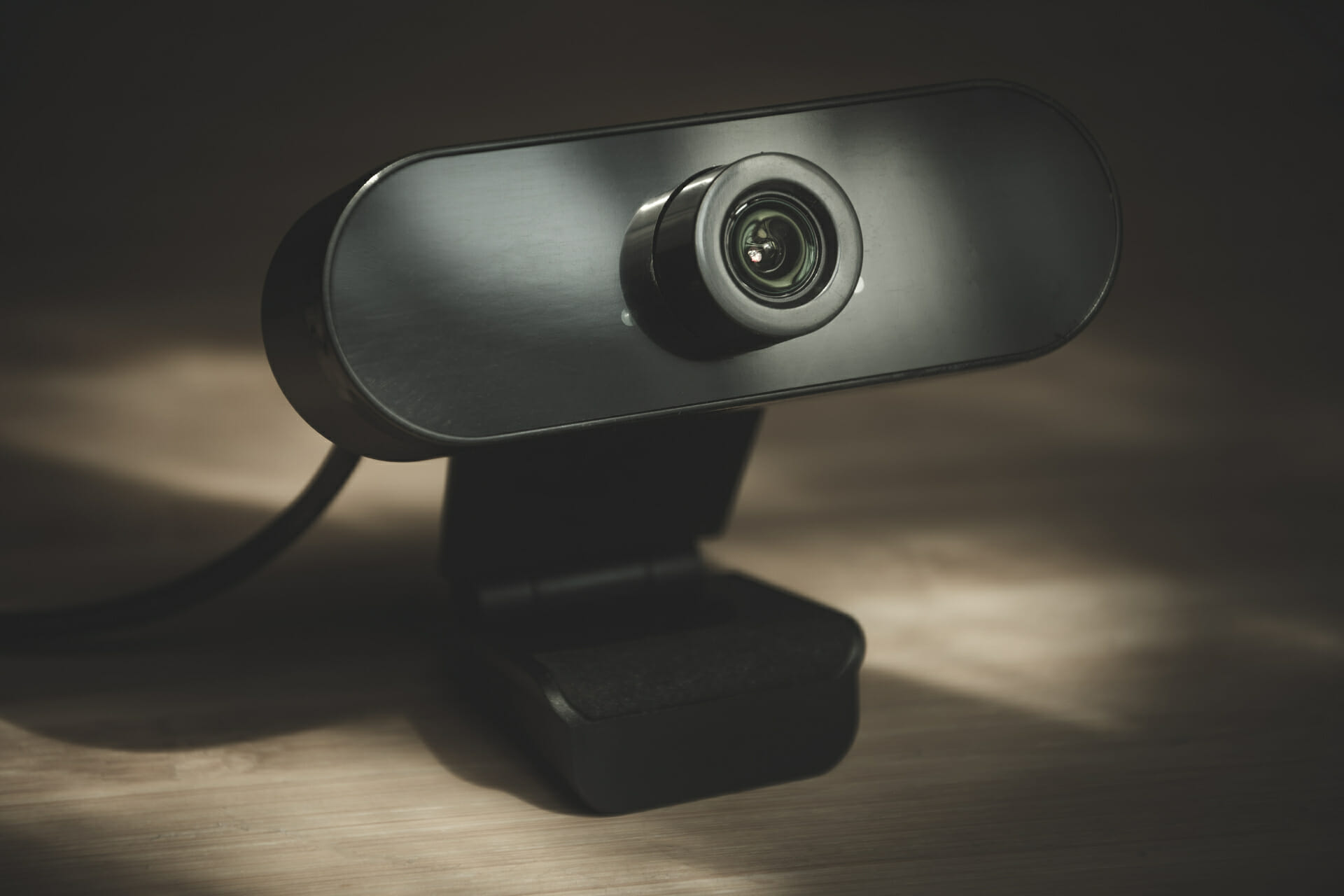
5+ best webcams with microphone for PC

Choosing the right webcam for your needs can be a tricky endeavor, especially with thousands of options to look at and compare.

This task gets even more complex if you’re interested in webcams that have a powerful built-in microphone included. The reasons for choosing this type of webcam are obvious, simplifying the process of video-calling and even multi-player gaming.

Even though for gaming it would be recommended that you use a great headphone set to ensure that you have an advantage over your online adversaries, when it comes to video calls, a good integrated webcam mic will do the trick.

No matter what category you find yourself in, this guide will ensure that you can pick cameras for both streaming and conferences, which offer amazing audio and video quality

How we chose the best webcams with microphone for PC

Our team of expert testers, with a combined experience of 15 years, has tackled a variety of testing tasks for any device you could imagine.

Their experience comes into play as a very important element when choosing the products we described in this guide, and a large variety of factors have been taken into consideration.

The options that have been chosen offer great quality and cover the entire spectrum of price ranges, thus enabling everybody to find something that fits their needs both financially and otherwise.

Logitech BRIO Ultra HD

  • 4K image quality
  • Great microphone clarity
  • 3x digital zoom
  • Image and sound quality fully customizable by using the Logitech app
  • Camera doesn't swivel

The Brio webcam from Logitech is our top pick when it comes to the best webcam with a microphone, offering amazing sound and video quality.

This great device doesn’t have issues when used for conferencing, local recording, or even streaming, making it good for almost any person.

Even though this webcam doesn’t swivel, which could be problematic for some users, the high-quality 4K video and audio it is capable of. makes it one of the best webcams with incorporated microphones on the market.

Besides the amazing quality, this device also features 5x digital zoom, and also the RightLight 3 feature with HDR, which ensures that your video stream is looking crisp no matter what lighting there is in the room.

The included Logitech software ensures that you can tweak and optimize any aspect of your video or audio settings for this device, and works especially well for streaming.


Razer Seiren X & Kiyo Streaming Webcam

  • Super Cardoid Pickup Pattern for amazing sound quality
  • Audio and video recording at 720p 60FPS/ 1080p 30 FPS
  • Streamlabs certified
  • Built-in lighting
  • The microphone and camera are separated

Even though the microphone is not built into the webcam, the extra space allows for more qualitative components, and thus, the Razer Seiren X & Kiyo Streaming Webcam make an amazing choice for those who want professional-lo0king results.

The microphone uses a Super Cardioid Pickup Patter, which ensures that you can make recordings at a tight angle without affecting the quality, while also reducing the background noise.

This package was designed specifically for streaming, the camera offering video and audio recording in 720p 60 FPS / 1080p 30 FPS. They are both Streamlabs certified and fully compatible with platforms like OBS and XSplit.

To ensure optimal lighting, the camera has a built-in light system, with 5600K power, ensuring that your image is perfectly lit no matter the environment.

Furthermore, to ensure that no movement will cause your audio to be affected, the Razer Seiren microphone comes with a built-in shock mount that absorbs any vibrations.


Enther & MAXHUB 4K Webcam

  • Full HD 4k Image quality
  • USB-C connection
  • Dual-microphone
  • 2D and 3D NDR tech
  • Swivels to the right and left
  • Some users reported horizontal lines appearing on screen after some usage

The Enther & MAXHUB 4K Webcam is an amazing webcam option that provides you with Full HD 4k image quality and has 13Mp, making it suitable for absolutely any activity, whether it is video-conferencing, chatting on social media, professional live streams, or anything in between.

Because it uses an echo cancellation technology and a specific noise reduction algorithm, this webcam uses the dual microphones incorporated in it to pick up your voice perfectly and make it sound clear by removing any surrounding noises automatically.

The advanced autofocus feature that is built into this great camera works both for audio and for video, ensuring that it identifies how many people are in the frame and thus optimizing the image quality to focus on those areas.

Besides the fact that it is very easy to set up and get ready, the 2D and 3D DNR tech ensures that both visual and audio are perfectly balanced and offer the listener a great experience overall. The USB Type-C connection ensures efficient speeds and works perfectly for any environment and compatible devices.


eMeet C980 Pro

  • 1080p quality
  • 4 microphones
  • Active noice cancelling
  • Built-in speaker
  • Wide angle
  • Not 4k quality, but still provides great video

The eMeet C980 Pro is a Full HD camera with a 1080p quality, offering you great overall performance at an affordable price. This device works perfectly for normal video calls, video conferences with many people, or even live game streaming.

This device uses 4 microphones to capture every last bit of sound from the environment, while also having 2 built-in speakers, making it one of the best webcams with a microphone and speaker for desktop.

The active noise canceling and auto echo cancelation features use 4 built-in microphones to reduce any ambient noise, thus ensuring better quality for any sort of audio or audio+video streaming. Each of the microphones built into this device work omnidirectionally, thus ensuring that no matter how much noise there is around you, your voice will be clear.

The wide 90° angle of this device ensures that it is practical both when using it by yourself, and when encompassing a larger number of people like you would in a video conference at work. Besides this, the automatic low-light correction feature ensures that your stream will be perfectly optimized no matter how much light you have in the room.


Logitech C922

  • 1080p quality at 30FPS
  • 2 microphones
  • Auto-focus and instant light correction
  • Logitech Capture software with instant YouTube streaming
  • 3 months Premium XSplit license
  • Not good for Mac

The Logitech C922 is another very good example of what a compact and nicely designed webcam can do, and even though it doesn’t offer the same quality as some options from this list, it is still a very good option.

It allows Full HD streaming with two quality options available, either at 1080p with 30FPS, or 720p at 60FPS.

The 78-degrees view allows the frame to capture the image quite wide, making it useful for videoconference which includes more people, and even online presentations.

What makes it stand out from the crowd is the fact that it can be clipped at the top of your PC monitor, or to be used with the bundled tripod, which ensures a stable and secure customizable position.

The auto-focus and instant light correction features contribute to the clarity and definition of the images presented to your viewers and ensure optimal clarity even in bad lighting.

The two omnidirectional microphones ensure that sound can be captured clearly, thus making it a very good option for all types of streaming.

The Logitech Capture application allows you to customize the way your recordings come out, camera settings, and even allows you to instantly stream to YouTube.


Bottom runners

Even though the following cameras didn’t make the top 5 list, this doesn’t imply that these devices are useless. The following 3 options still provide great quality but have been separated from the main list simply because when compared with them, they lack some important features.

The start of this shortlist includes a very qualitative webcam, and the next two offer more accessible options that don’t force you to spend too much of your hard-earned money.

➡ Logitech C920x HD Pro

➡ TookMag HD Webcam

➡ Angetube 1080P Computer Camera


As you can see, there are a variety of differently-priced options to choose from, and considering all the information presented in this guide will ensure you can make an informed decision.

No matter if you’re interested in video-conferencing or planning on using the webcam for streaming, the options presented in this list will surely be of help.

We chose webcams that start at a higher price, that offer a better video quality and great FPS levels, and gradually we worked our way down to cameras that still offer great quality, but at a more affordable price.

Feel free to share your choice with us by using the comment section below this guide.
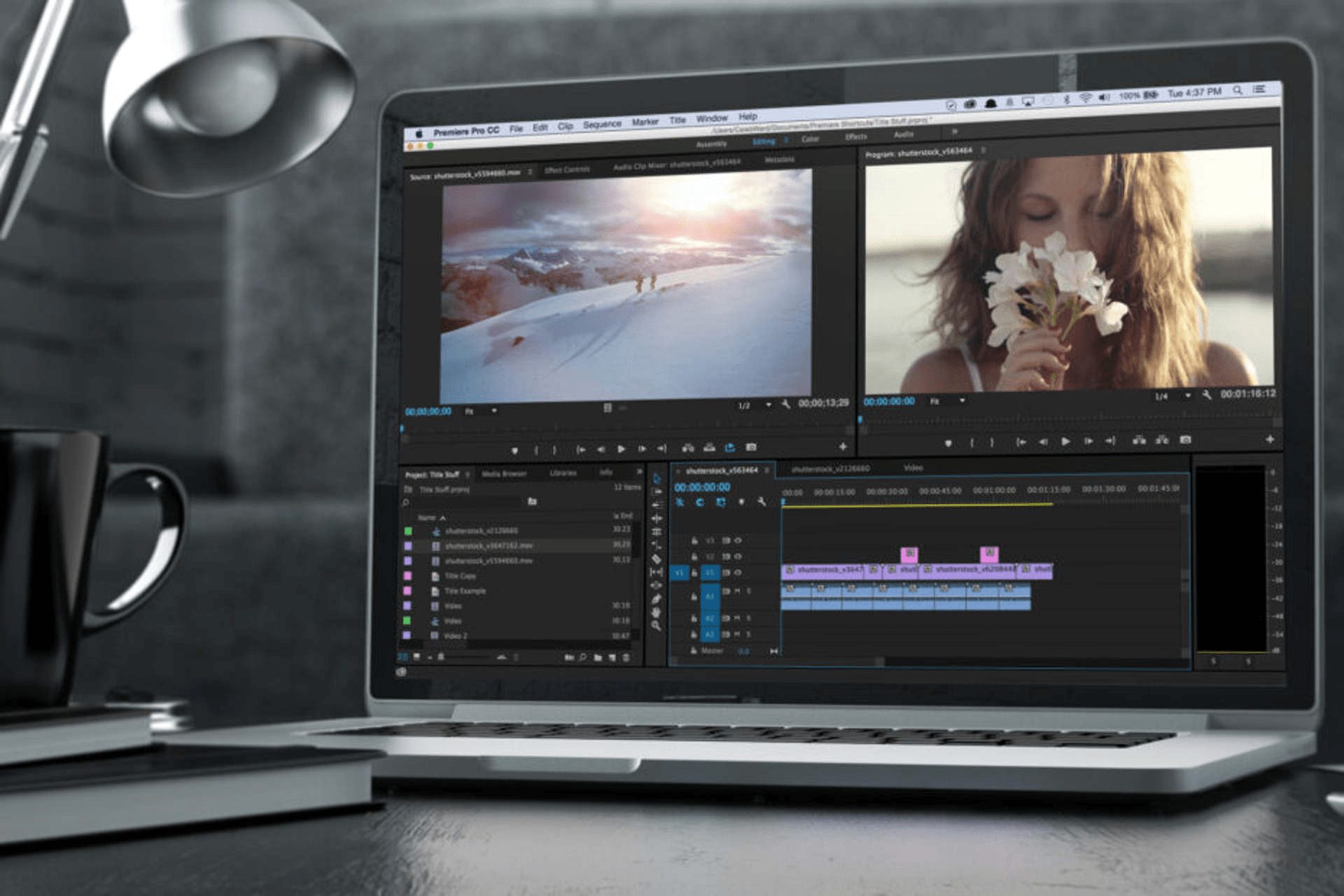
FIX: Video driver not supported in Premiere Pro

Some users have told us about an unsupported video driver issue that arises for Adobe Premiere Pro. This happens immediately after they update the software.

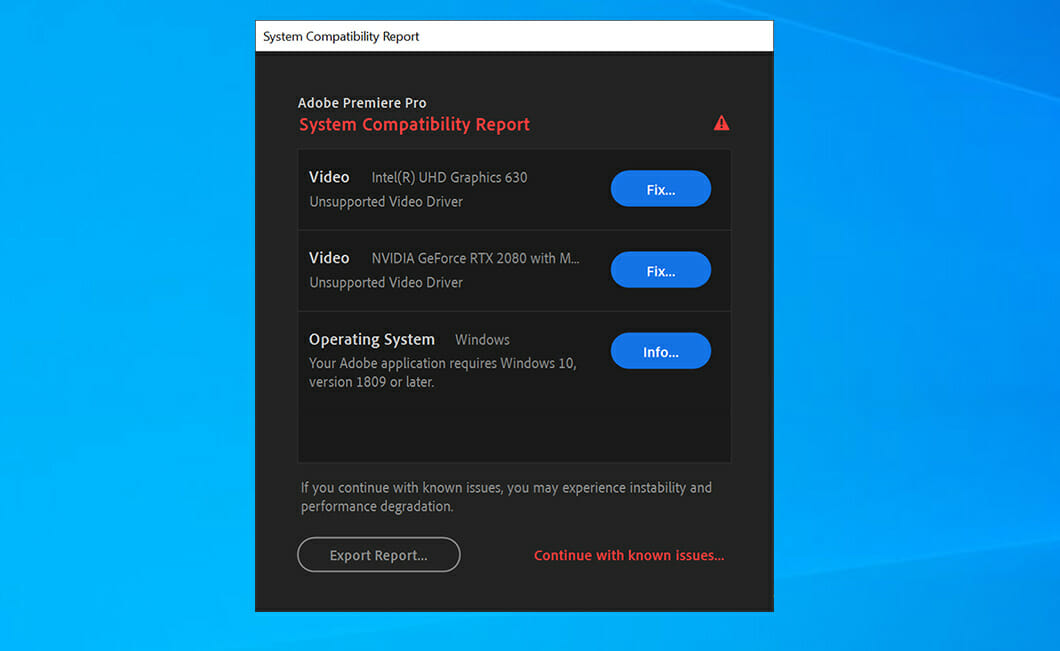
Premiere Pro displays the System Compatibility Report window when the issue occurs, stating that this version doesn’t support your drivers.

Although the window includes a Fix button, clicking it will only open a webpage that tells you how to update your PC’s GPU drivers.

This problem typically arises on PCs with dual graphics cards, and in today’s guide, we’re going to show you how to solve it once and for all.

Why does the Video driver not supported error appear?

This message appears when trying to run Adobe Premiere Pro on a PC with a dedicated and integrated GPU. The issue is caused by a driver conflict, but it can be easily fixed.

Keep in mind that this problem won’t prevent the application from running, since it just serves as a warning message, so you can choose to ignore it. However, if you do so, additional issues may occur down the line.

Should I use my dedicated or integrated graphics for Adobe Premire?

Video editing is a resource-intensive task, and you’ll need as much hardware power as you can get. While this process uses your CPU, certain aspects are performed by the GPU.

Therefore, it’s always better to use a discrete graphics card since it offers more power and better performance than the integrated one.

How can I fix Premiere’s Pro unsupported video driver error?

1. Update your PC’s graphics card driver

  1. Visit your graphics card manufacturer’s website.
  2. Navigate to the Drivers or Download section.
  3. Locate your model on the list and click on Search.
  4. Click on Download.
  5. Once the driver software is downloaded, double-click the setup file to run it.
  6. Follow the instructions on the screen to complete the process.

Downloading drivers manually can be a tedious process, but you can automate it with specialized software such as Outbyte Driver Updater.

2. Run Adobe Premiere Pro with your dedicated GPU

  1. Press Windows Key + I to open the Settings app.
  2. Select System in Settings to open the tab that you can see below:
  3. Select Display from the left pane. Navigate to the Graphics settings in the right pane.
  4. Select Desktop app on the drop-down menu.
  5. If you can’t see Adobe Premiere Pro listed, click the Browse button. Then find the software on your PC to add it.
  6. Then select Adobe Premiere Pro in the Graphics settings window, and click the Options button.
  7. Select the High-performance option for your dedicated NVIDIA or AMD graphics card. Now click the Save button.

In case you can’t find your dedicated graphics, be sure to visit our second GPU not detected guide for quick and easy solutions.

3. Disable your PC’s onboard (integrated) GPU

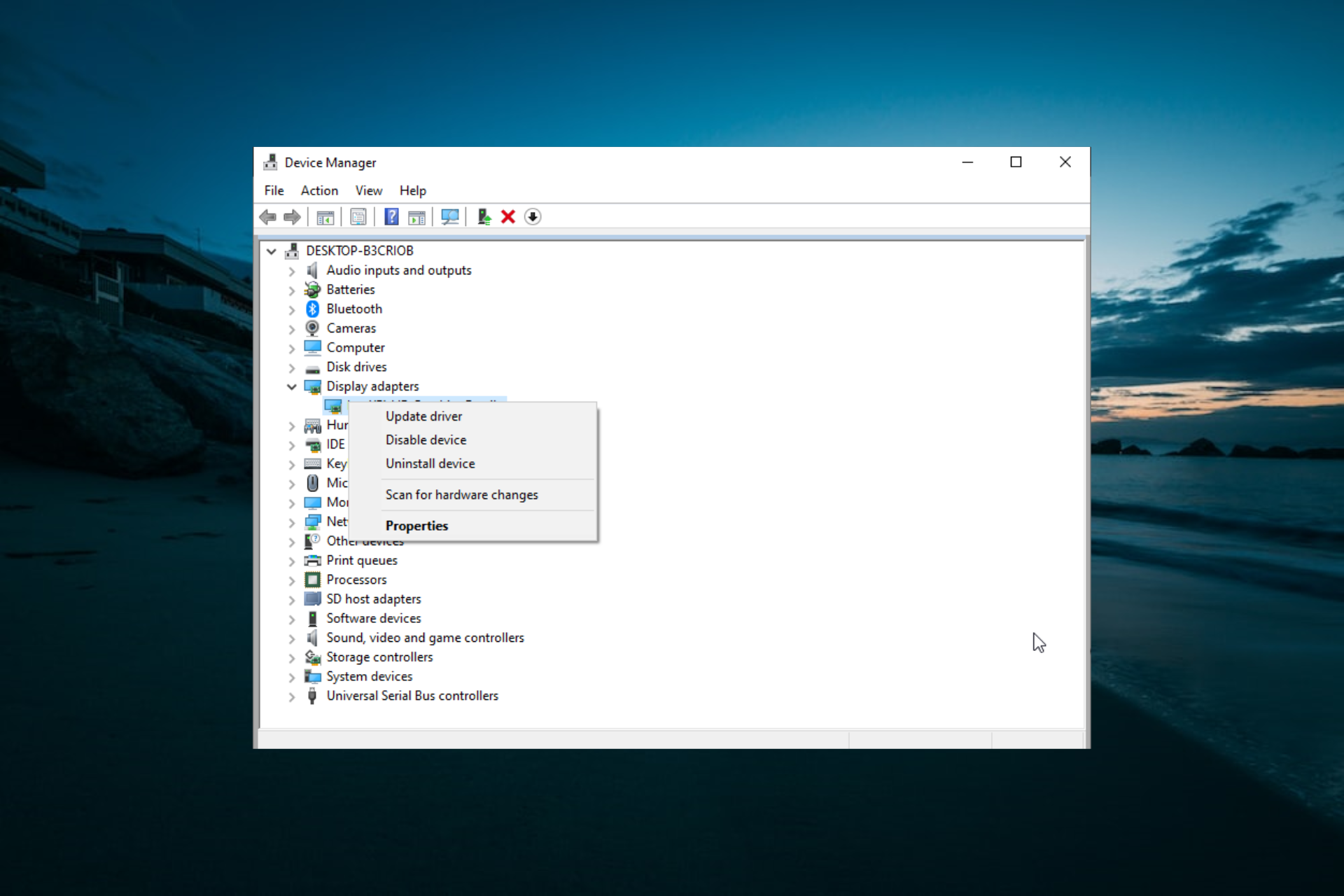
  1. Press Windows Key + X and select Device Manager from the list.
  2. Double-click the Display adapters category.
  3. Right-click your PC’s onboard GPU (probably an Intel one) and select the Disable device option.
  4. Click Yes to confirm.

If your graphics card isn’t detected in Device Manager, make sure that you disable all hidden devices, and then repeat the steps from this guide.

4. Disable the Unsupported Video Driver message

  1. Open Adobe Premiere Pro.
  2. Click the Edit menu.
  3. Select Preferences and navigate to the General section.
  4. Then deselect the Show system compatibility issues at startup checkbox.
  5. Click the OK button.

What are Adobe’s Premiere Pro requirements?

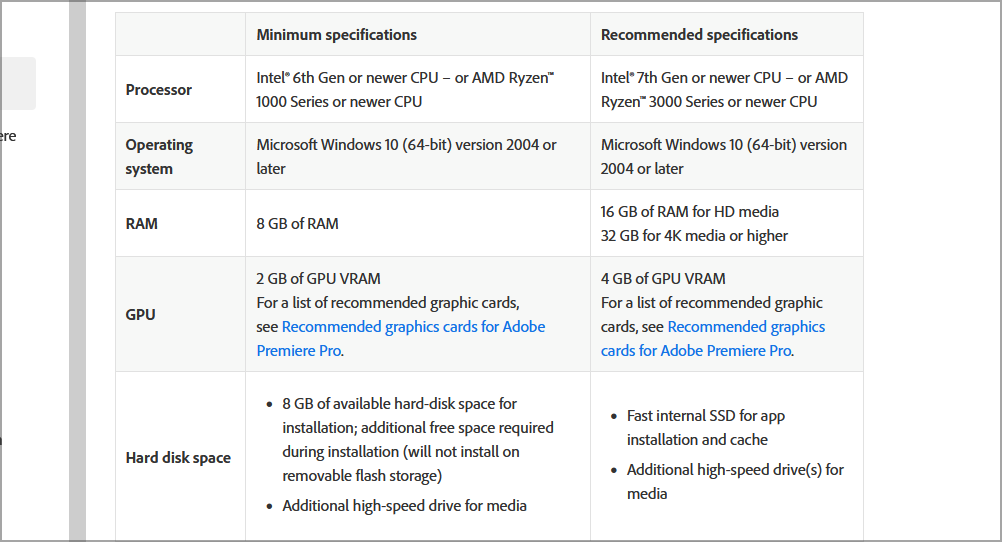
The software has relatively humble hardware requirements, and it should be able to run on any modern PC without too much trouble.

Here’s a quick overview:

  • CPU: Intel 6th Gen, Ryzen 1000
  • RAM: 8GB
  • VRAM: 2GB
  • Storage: 8GB hard drive space

Keep in mind that these are the minimum requirements and they won’t be enough for any advanced tasks or larger projects.

Is Adobe Premiere available for free?

No, the software isn’t available for free, and it comes with a yearly or monthly subscription. However, you can download the trial version without any cost.

This will allow you to test the application and all of its features for 7 days. After that, you’ll have to purchase a subscription to continue using it.

This resolution stops the System Compatibility Report window opening but doesn’t necessarily resolve the unsupported driver issue.

So, that’s how you can fix the unsupported video driver error. Overall, it’s quite an easy problem to fix, so you should be able to have it sorted in a matter of minutes.

In case the issue is still there after trying all of our solutions, you can contact customer support via Adobe’s Customer Care page. If you have any other video problems, we suggest visiting our Adobe Premiere not exporting video guide too.

Did you find a way to fix this problem on your own? Feel free to share the solution with us in the comments section below.

Huion Tablet Driver not Opening: 6 Ways to get it Working

Some users, especially artists, and designers, utilize Huion graphics tablets with Windows 10 PCs. However, the Huion tablet driver installation process can get stuck, as some users complain that it is not opening.

This can be a big problem since it will make you unable to use the tablet. Luckily, there are ways you can fix this problem and get back to drawing.

Why is my Huion tablet driver not working?

Several factors can cause your Huion tablet driver to stop working, as reported by users. Below are some of them:

  • Issues with other tablet drivers: If Huion drivers are not installed, it might be because of a copy driver on your PC or other tablet drivers. You must remove these drivers, including the Huion one, to solve the problem.
  • Antivirus interference: Sometimes, this issue might occur if your antivirus software is blocking the drivers. The solution is to temporarily disable your security software and probably switch to a reliable antivirus.
  • Outdated driver: At times, this problem might occur if the Huion tablet driver is outdated. Updating the driver to the latest version should solve the problem.

How can I fix the Huion tablet driver if it’s not opening?

1. Update Huion device drivers

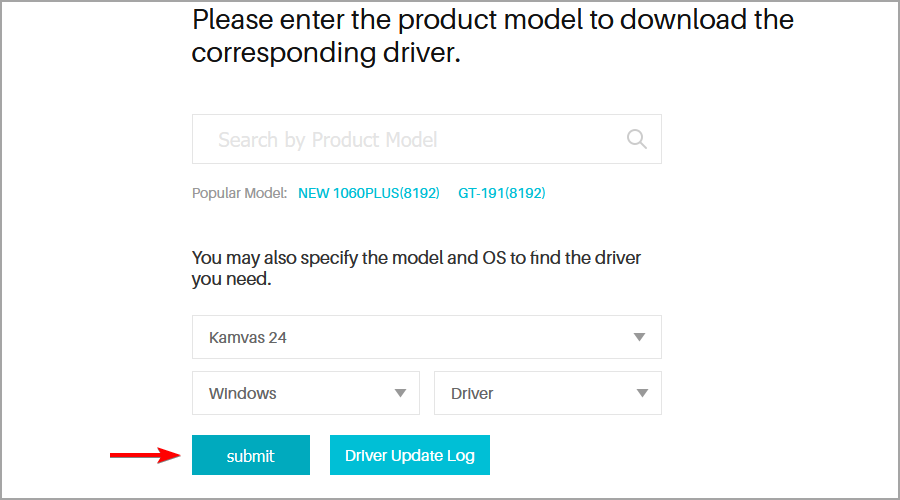
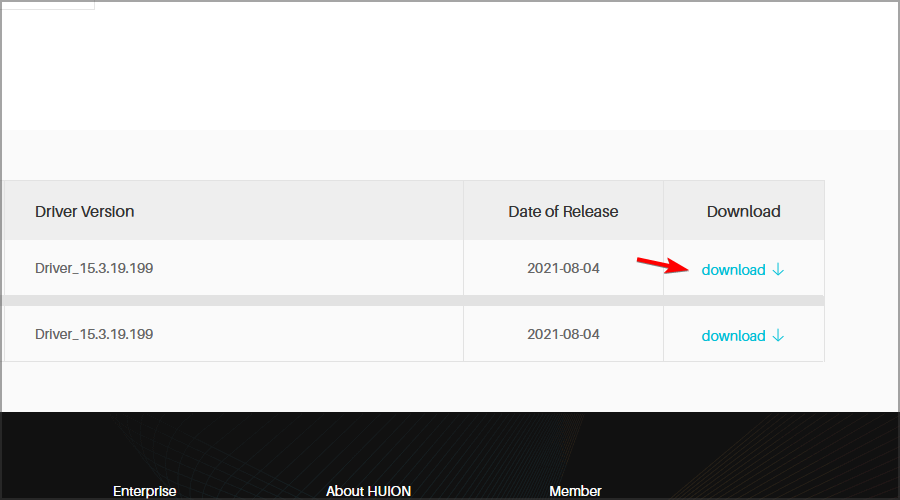
  1. Visit the Huion driver download page.
  2. Select your model on the list, as well as your operating system. Now click Submit.
  3. Click the Download button to download the driver.
  4. Once the driver is downloaded, try to install it again.

If the Huion driver takes forever to install, try using an older version of the driver. Alternatively, you can use specialized driver update software such as Outbyte Driver Updater to update your drivers quickly.

2. Uninstall the graphics tablet drivers installed on your PC

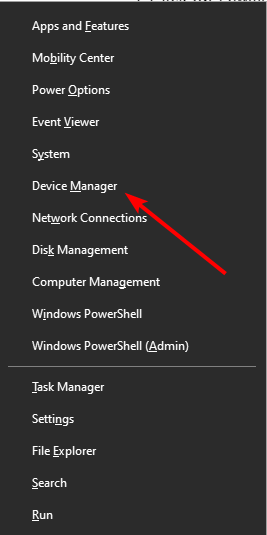
  1. Press the Windows key + X and select Device Manager.
    device manager Huion Tablet Driver not Opening
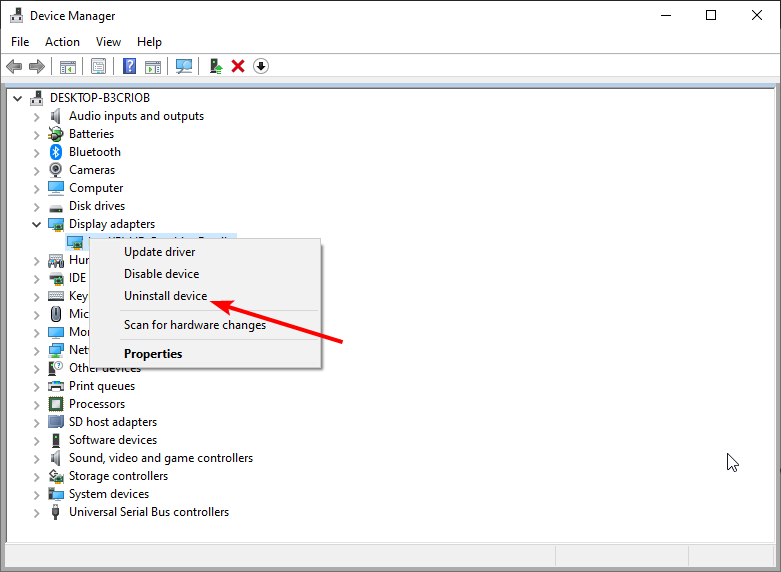
  2. Double-click the Display adapters option to expand it, and right-click each device there.
  3. Now, select the Uninstall device option.
    uninstall deviceHuion Tablet Driver not Opening
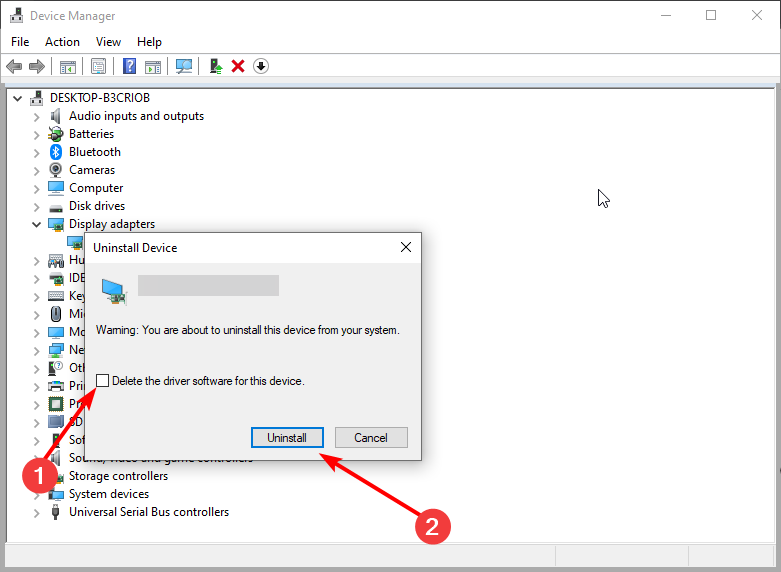
  4. Check the Delete the driver software for this device box and click the Uninstall button.
    uninstall button
  5. Next, unplug your Huion tablet and restart your PC.
  6. Visit the official page to download the latest driver, as shown in solution 1.
  7. Now, unzip the downloaded file and open the unzipped folder.
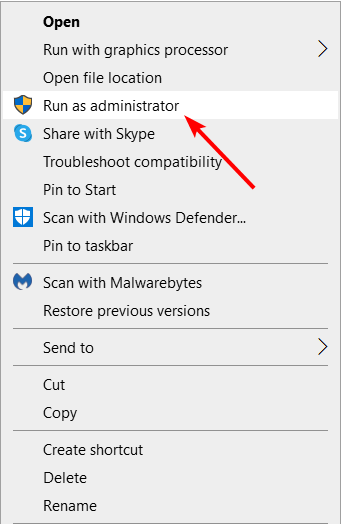
  8. From here, right-click the driver application and select Run as administrator.
    run as
  9. Finally, follow the onscreen instructions to complete the process.

If the Huion driver is not installed, you can also use uninstaller software to remove the drivers.

3. Disable antivirus software before installing a Huion driver

  1. Press the Windows key + I to open the Settings app.
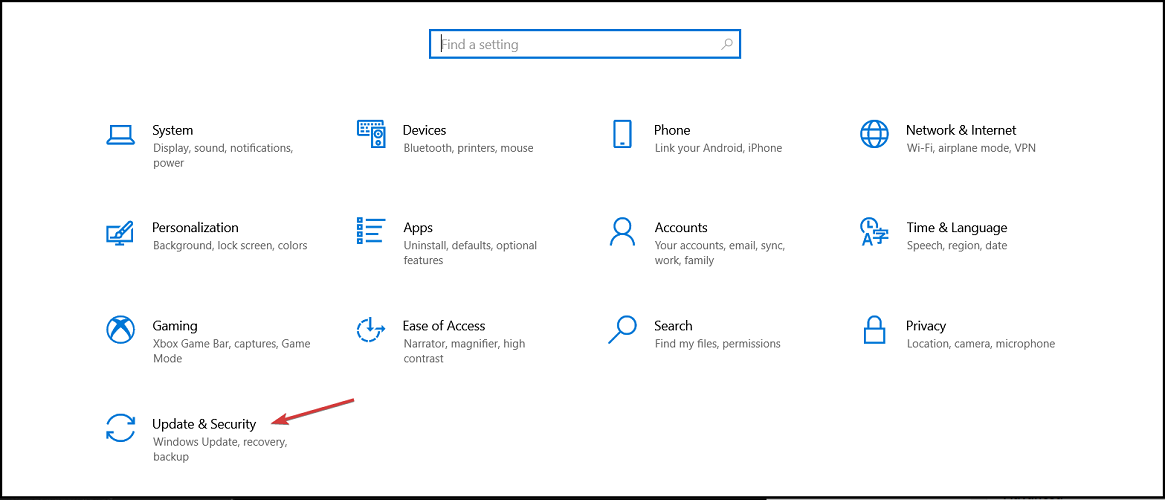
  2. Navigate to the Update & Security section.
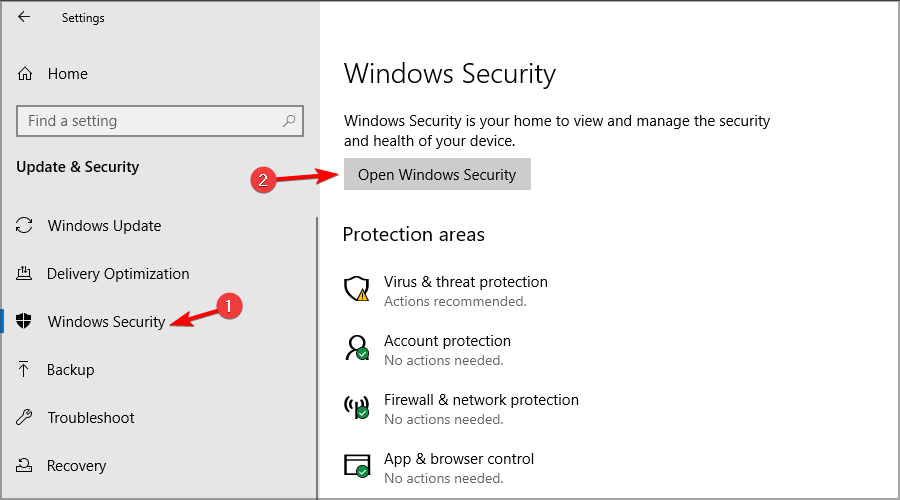
  3. In the left pane, select Windows Security. In the right pane, click on Open Windows Security.
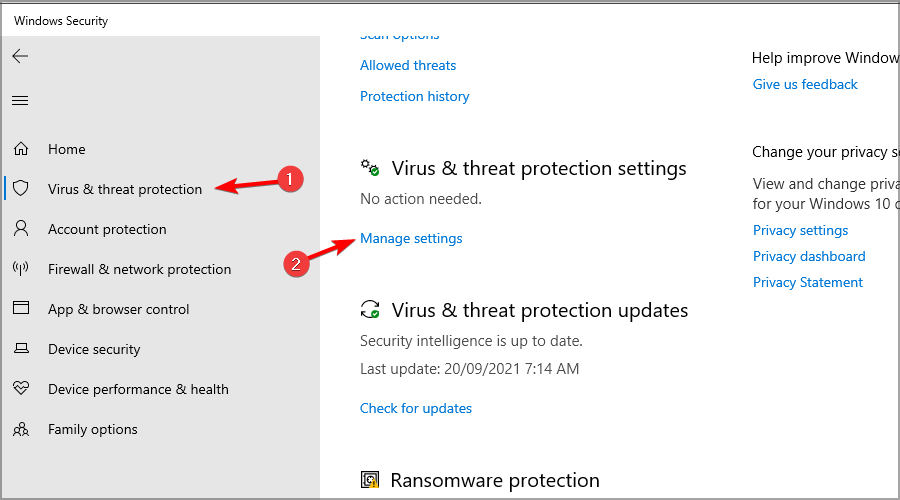
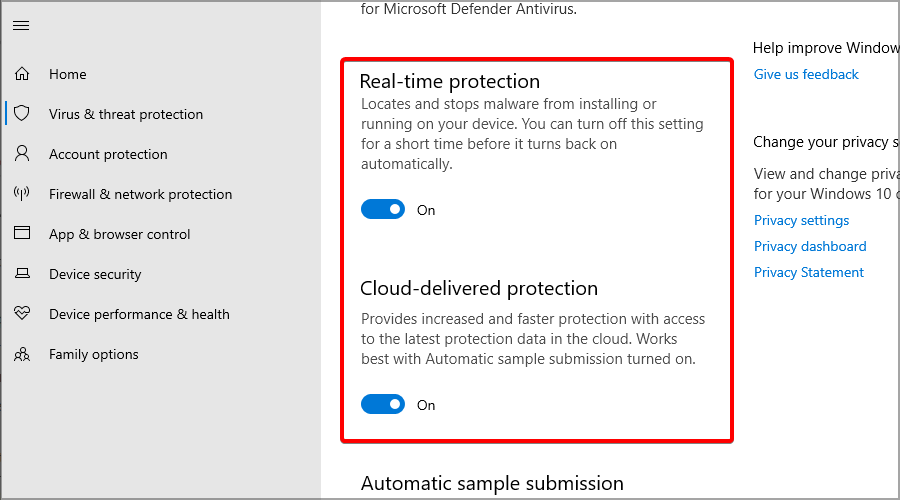
  4. Next, select Virus & threat protection in the left pane. Then, in the right pane, click on Manage settings.
  5. Toggle off the Real-time protection option.
  6. Also, click the Cloud delivered protection option to turn off that feature.
  7. After that, try installing the Huion driver package.
Note icon NOTE
Remember to turn your PC’s antivirus shield back on after installing the Huion driver.

4. Clean boot Windows 10

  1. Press Windows Key + R and enter msconfig. Press Enter.
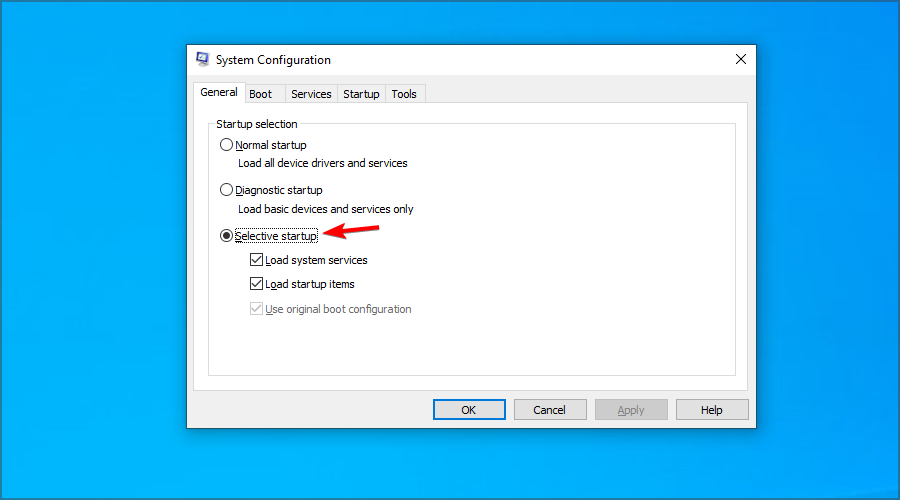
  2. Click the Selective startup radio button, and deselect the Load startup items checkbox.
  3. Select the Load system services and Use original boot configuration checkboxes if they’re not already selected.
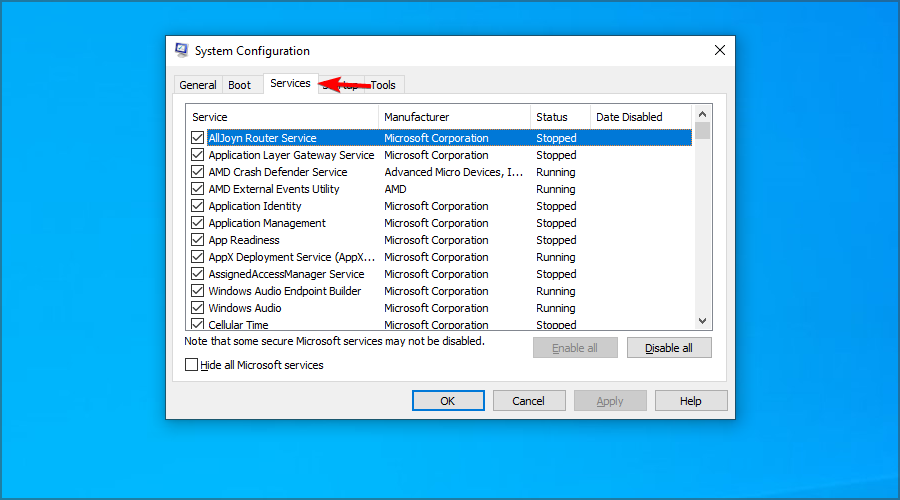
  4. Next, select the Services tab in the snapshot directly below.
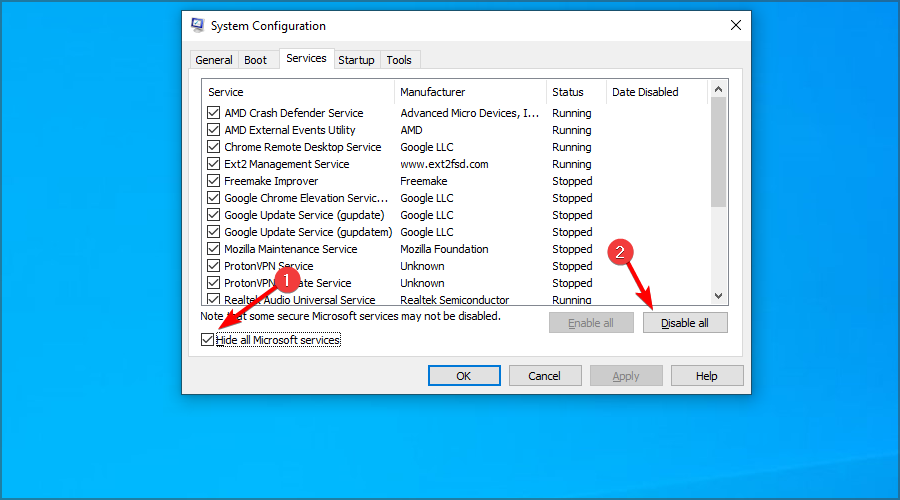
  5. Check the Hide all Microsoft services and click on Disable all.
  6. Press the Apply and OK to save the new boot configuration settings.
  7. Click the Restart option on the dialog box prompt that pops up to clean boot your PC.
  8. Then try installing a Huion driver package after clean-booting Windows 10.

After doing that, you can try to update the Huion tablet driver again. If the process is successful, enable all the startup applications you previously disabled.

5. End the Windows Command Processor process

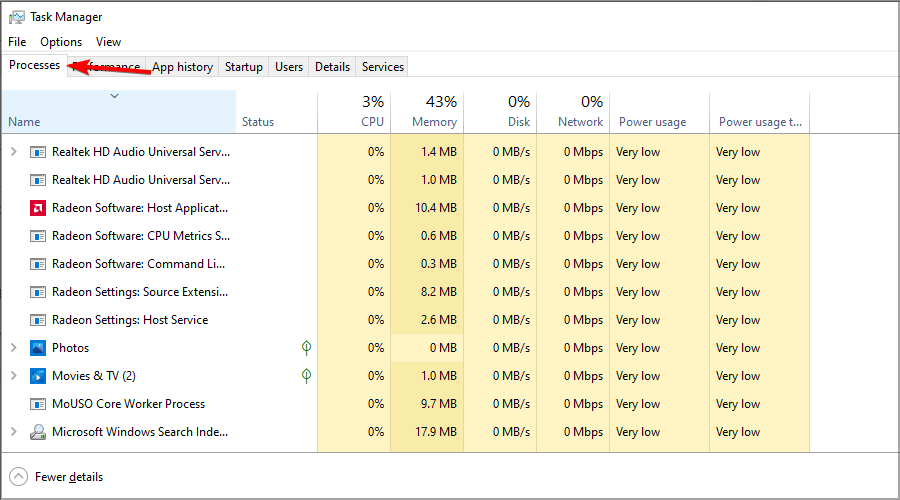
  1. Press Ctrl + Shift + Esc to start Task Manager.
  2. Click Processes if that tab isn’t already selected.
  3. Double-click Setup/Uninstall (32-bit) to expand it.
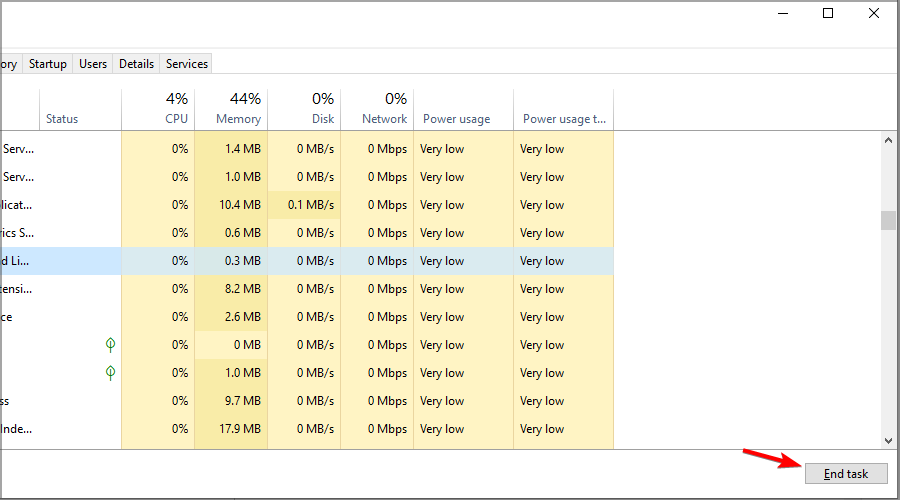
  4. Select the Windows Command Processor process for the Huion Setup/Uninstall app.
  5. Press the End task button to terminate the process. After that, the Huion driver installation might proceed and finish.

6. Extract the Huion ZIP archive before installing the driver

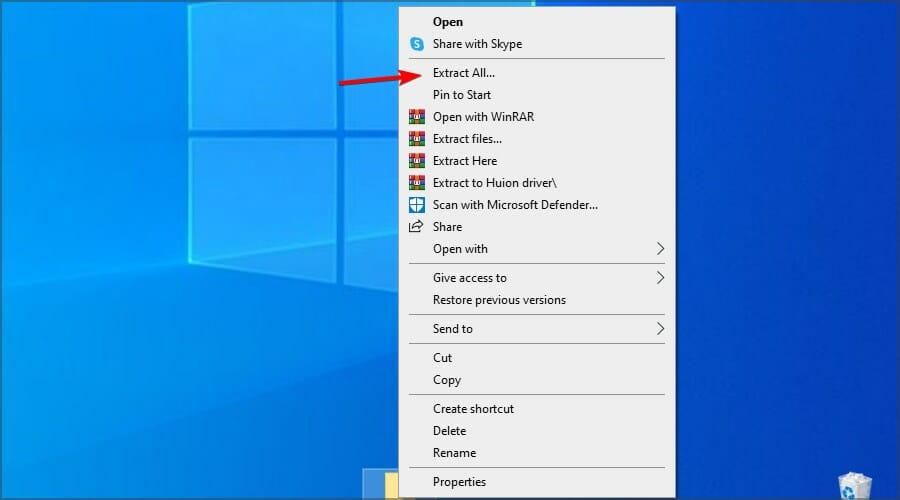
  1. Right-click the driver ZIP file and choose Extract all.
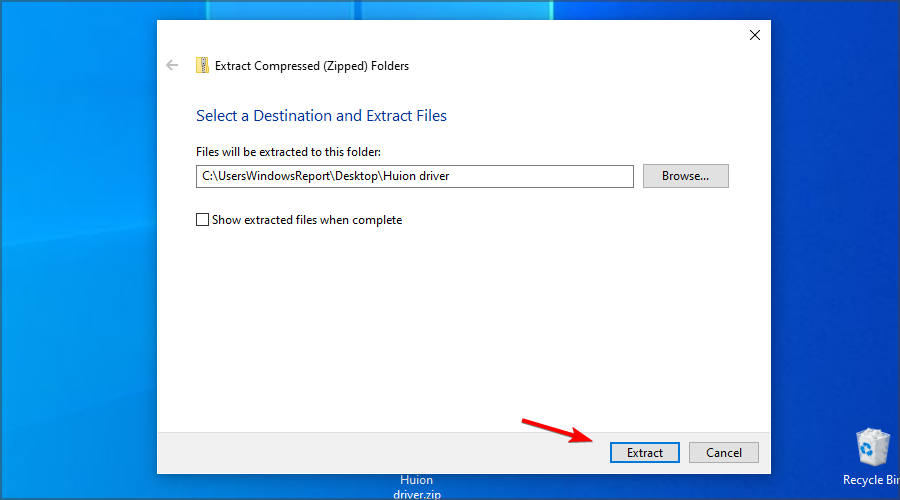
  2. Click Browse to choose a path for the extracted folder.
  3. Select the Show extracted files when complete checkbox.
  4. Press the Extract button.
  5. Go to the extraction directory and run the setup file.

Note that some users reported issues when trying to install the driver outside of the default installation path, so be sure not to change it.

If Huion tablet drivers won’t install or open, download the older version directly from the manufacturer’s website. In addition, remove any applications that might interfere with it.

Your antivirus can also prevent you from installing new devices, so be sure to disable it temporarily while trying to install these drivers.

Users reported issues when trying to install the driver outside of the default installation path, so be sure not to change it.

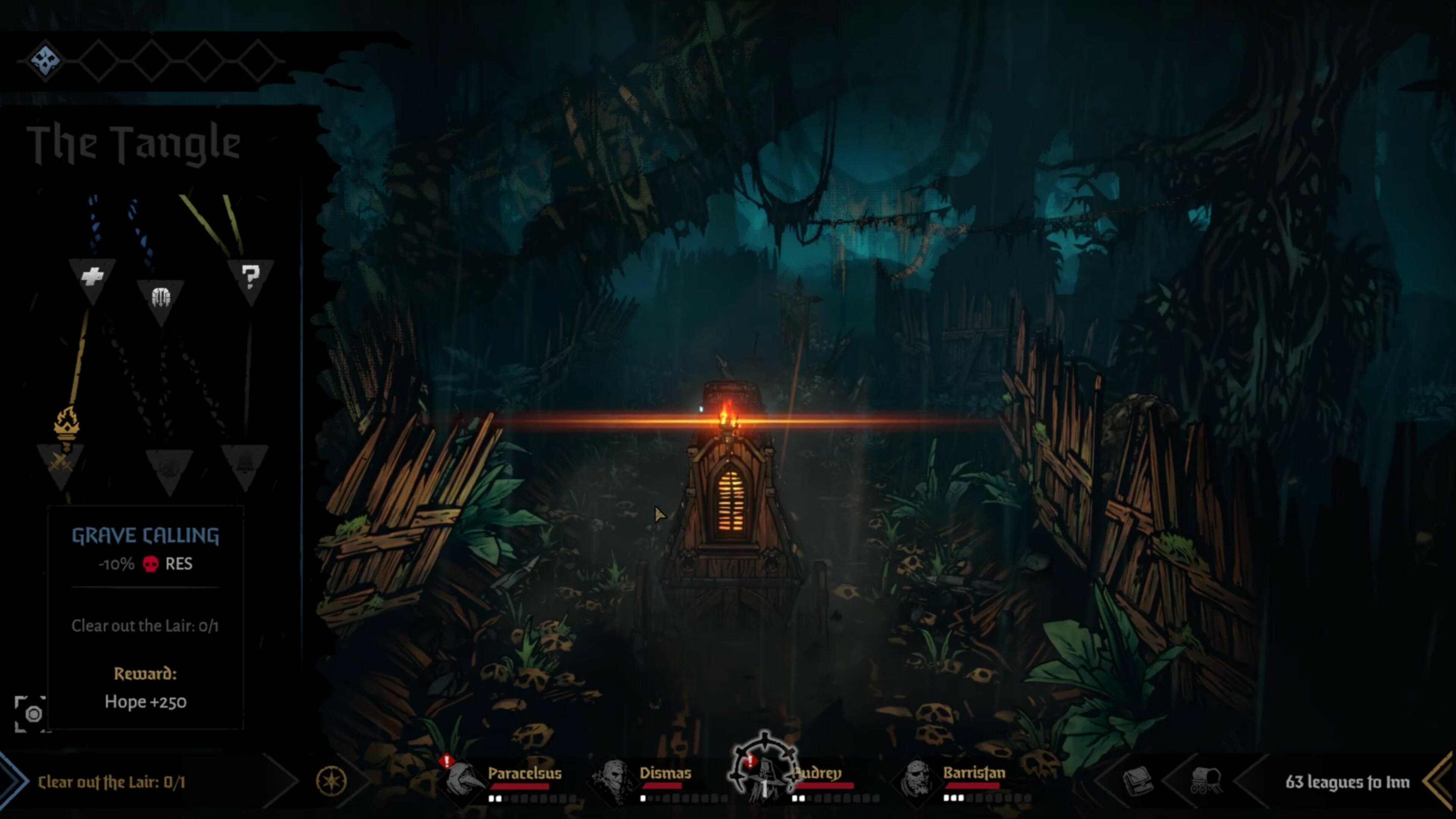
Darkest Dungeon II review: All aboard the murder-coach

One thing you rarely see in fantasy tales, be it literature or movie, is the emotional and mental toll adventuring must take on the adventurer. You almost never see the dark side of fighting an endless horde of zombies or cannibalistic orcs, or actual dragons. Heroes die, sometimes in quite horrific ways if you stop to think about it, but the main group or protagonist battles on, fighting the never-ending good fight.

Darkest Dungeon, from Red Hook Studios, turned the entire genre on its head when it introduced the concept of PTSD to the standard dungeon crawler template. The heroes (for want of a better word) in that game were presented as more down-to-Earth, normal(ish) people than you usually see.

Afraid of the dark

Yes, okay, one of them is a professional poisoner, and there’s a highwayman, and they all have special skills and, in some cases, magic. But ultimately they were meant to be ordinary adventurers.

Of course, it doesn’t help matters that the world they live in is so relentless bleak. The term grimdark doesn’t do it justice. This is a world where you either starve to death, get eaten by something, catch the plague, or strap on an eye patch, grab a sword, and go dungeoneering. During grand adventures you may also starve to death, get eaten by something, or catch the plague.

Darkest Dungeon II takes that core concept and runs with it. Actually, it takes that concept and hops on a stagecoach with it, since that’s your primary mode of transport in the sequel. Instead of languishing in an inn between delves, your ragtag band of miserable hatemongers languishes in a rickety old stagecoach instead.

All aboard the murder-bus

It traverses the shadow-haunted land, sticking to old roads through gnarled, thorny woodland and ancient pathways, breaking through barricades and illuminating the gloom with its single flickering flame. This flame represents your Hope, and if it goes out (which it will, now and then), it’s Game Over. As long as it flourishes, you’ll receive buffs to morale and combat prowess.

You need to keep the flame burning, and you do that by winning fights and helping the needy. Unfortunately, winning fights is an incredibly difficult affair. See, Darkest Dungeon II continues its predecessor’s penchant for punishing you even in victory. You may win a desperate fight against a band of zombies or deranged cultists, but even if you, you may emerge somewhat changed.

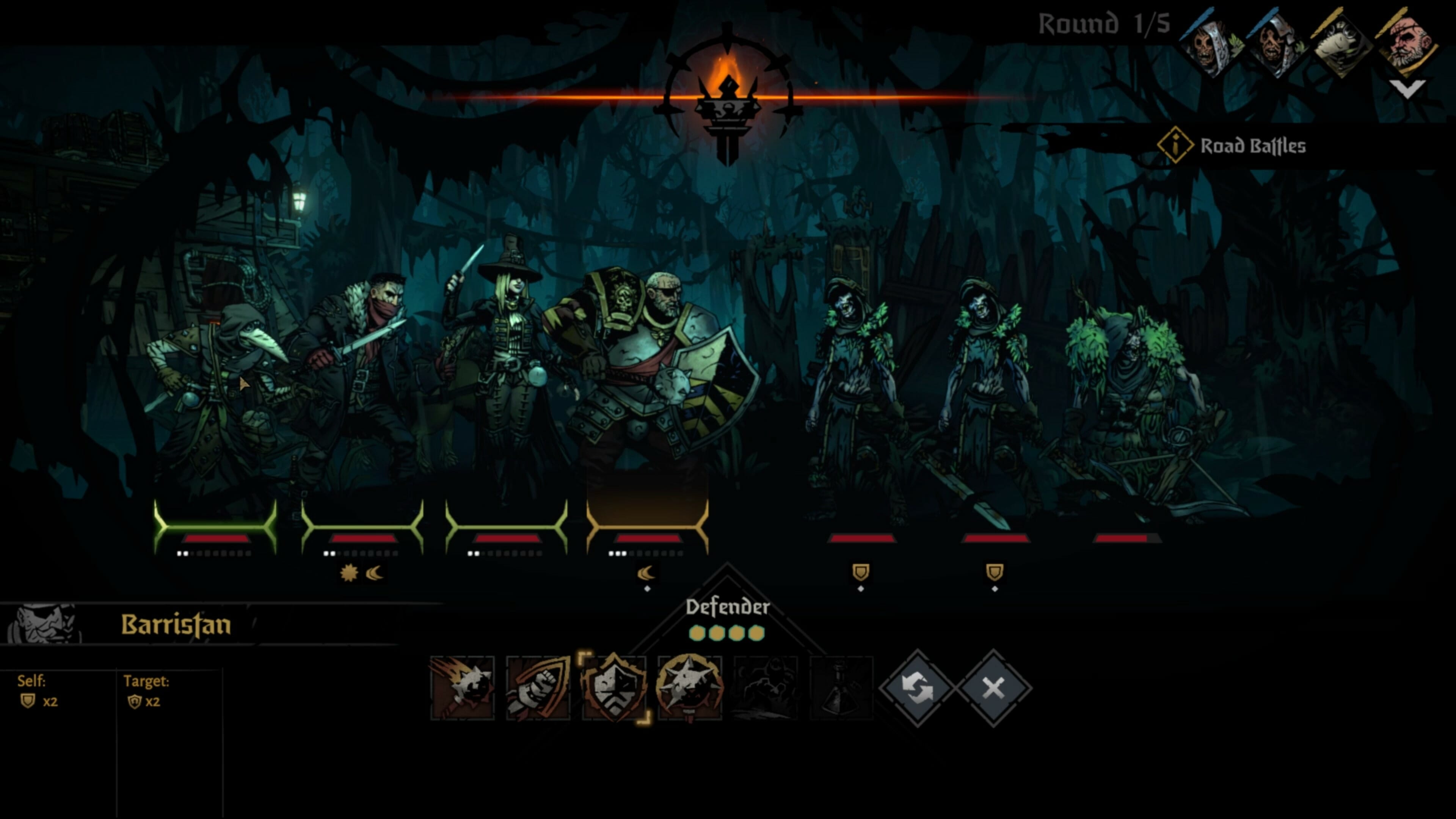
Taking hits, missing blows, and seeing their allies die has devastating effects on your party members. You begin with just four, a decent enough crew comprised of a tank, a couple of DPS types, and a plague doctor who doubles as a healer, sort of. The thing is, the enemies in Darkest Dungeon II are just as strong, if not stronger. You will trade blow for blow based on an initiative system, but the odds always seem stacked against you.

Bonds of battle

As a result, you will lose people. When anything negative happens, your heroes will gain a little point against their mental health. Fill the gauge (actually a little row of dots under their name), and they’ll have a breakdown. This can have a multitude of effects, as can other negative consequences. You can lose the ability to hit your target, or you can suffer reduced damage or defence. Certain characters lose access to their moves.

What’s even more worrying is that you won’t know what your heroes will be afflicted with until it happens. Surviving encounters requires a lot of skill and even more luck. It’s not just a case of staying alive; it’s what you have to live with afterwards.

In order to take this concept to the next level, Red Hook Studios have deepened the systems at play in a pretty extraordinary way. Character actions can now directly affect the other characters. They’ll accuse each other of kill-stealing, or of favouring other party members if you heal one of them first. Just as they can build relationships during brief moments of respite, so too can they fall out.

Love in a time of plague

Sometimes they’ll form bonds – not always romantically, although it can happen. They can become respectful of one another, in which case they’ll sometimes attack in tandem. They can grow fond of one another, in which case they’ll often step in front of their beau to take damage for them. It’s an intricate system, though perhaps a little too intricate.

See, it’s almost impossible to identify which actions will cause a rift between characters, and it all seems pretty random. Also, certain actions can instantly shatter previously built bonds, which is annoying as much as anything. My Highwayman, Dismas, ended up going so mad at the Plague Doctor that it affected his ability to shoot straight. A literal blind rage.

And yet despite this, it remains eminently playable. You’re intended to die, you see? It’s supposed to happen. Although, Darkest Dungeon II is much more of a roguelike than its predecessor. Now you’ll permanently unlock gear and trinkets on each run – or at least, the possibility of them. Everything you find will be added to the loot pool in subsequent attempts, while you can unlock permanent skills for each character by using special shrines.

Tragic heroes

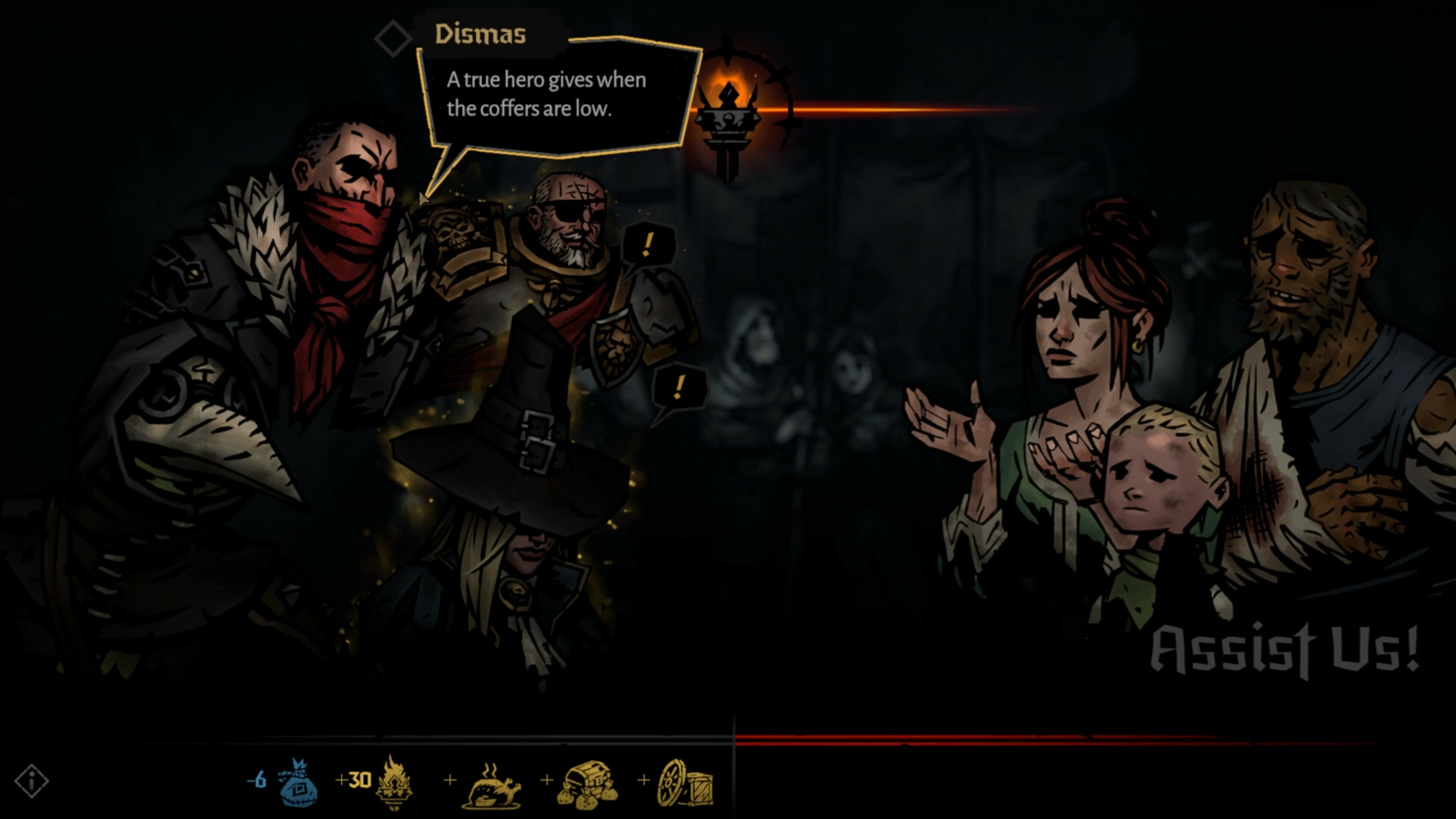
Now and then you’ll meet people out on the road who will need your help. There’s no actual transaction here, and you can’t really say no to them, but it’s still a way to build or break relationships. Not that you’ve any real control, mind. You can pick what you like, but if your Plague Doctor gives your Defender the last After Eight instead of the Highwayman, all hell will break loose.

Despite the inherent difficulty and the unpredictable relationship system, the combat is what makes Darkest Dungeon II so damn good. It’s so impactful, visceral, even, if you’ll permit the use of the word. The battle music is incredibly atmospheric, and watching your heroes dive in front of one another to take damage, or deliver punchy, violent blows to the enemy is an absolute joy.

It’s a shame, then, that it veers away from this at times, attempting to shoe-horn in what can only be described as mini-games. And you have to indulge, too, if you want to unlock extra skills. The Shrines are a bit too hit and miss, requiring you to faff around with new mechanics, none of which we’ll spoil other than to say that they’re not as fun as just fighting for your life against the enemy.

It looks weirdly beautiful though, with more detail in the world, more colour (all dark shades, obviously), and more intricate attention to the characters than in the previous entry.

Achievements & Completion

Although Darkest Dungeon II looks finished (it really does look stunning), it’s actually an early access game. All that’s available right now is the first of five chapters, though you can unlock extra characters and skills, and its roguelike nature means there’s lots of replayability.

Completing a run straight through may only take a few hours, but it will take several hours of trying and failing and swearing and crying before you get there.

Final thoughts on Darkest Dungeon II

Pros
Relationship system has massive potential
Looks and sounds amazing
Combat is brutal and addictive
Cons
Negative effects are too unpredictable
New mechanics are hit and miss
So, so grim

Final score: 3/5

It’s easy to see why Red Hook has opted for the early access approach here. This is more than just a continuation or copy of the first game. It introduces a host of new mechanics and gameplay elements, not all of which work as intended. It also feels bigger, maybe grander, despite being technically unfinished in terms of the campaign.

What’s here right now though is absolutely worth your time. That said, it really is incredibly dark and deliberately grim, so some people may be put off. If you’re a fan of the world and its systems, though, you won’t be disappointed by what’s on offer.

Darkest Dungeon II is available for around $19.99 on the Epic Games Store. You can find the details and recommended specs here.

*Disclaimer: Reviewed on PC. Review copy provided by publisher.

Star Wars: The Old Republic video game celebrates 10 years with 4K cinematic re-releases

As part of the 10th anniversary celebration of Star Wars: The Old Republic (SWTOR), BioWare and EA have begun re-releasing the cinematic trailers from the massively multiplayer online role-playing game title in 4K Ultra HD.

According to the official Star Wars: The Old Republic YouTube channel, there are plans to re-release all of the title’s cinematic trailers though currently only two are available.

The first two SWTOR cinematic trailers to get the 4K Ultra HD treatment are Deceived and Return, originally released back in 2009 and 2011 respectively. Each were genuinely impressive upon their original releases and look pretty damn good now that they’re in 4K. To be honest, they look a lot better than some trailers for some 2021 video games.

For those new to Star Wars: The Old Republic, the trailers for the game aren’t just teasers for the gameplay but are actual CGI short films that introduce various plot elements, characters, and locations. Each features impressive animation and voice-acting and many even manage to pack some genuine emotional weight into the limited five minutes or so of storytelling.

Star Wars: The Old Republic is a sprawling online multiplayer game that allows players to create their own character and explore the galaxy generations before the events of the Star Wars films and TV series.

The events in Star Wars: The Old Republic aren’t official Star Wars canon anymore but the game has continue to receive content updates due to its passionate community and loyal playerbase.

It’s unclear if Star Wars: The Old Republic will ever get a massive upgrade to bring it up to modern gameplay and visual standards (fingers crossed for an Xbox console port) but a modern remake of the single-player Knights of the Old Republic game, whose story precedes that of Star Wars: The Old Republic, is currently in development. Rumors of an Old Republic movie also began circulating online this week so it’s possible that this spin-off Star Wars franchise could be getting increased attention in the very near future.

After more Star Wars? Check out the Boba Fett content that’s coming to the Disney Magic Kingdoms video game this week.

Are you a fan of Star Wars: The Old Republic? Where would you like to see the game go in the future? Share your thoughts with us in the comments below and then follow us on Pinterest and Twitter for more gaming news.

New scanning tool to counter cyber attacks and fix API vulnerabilities

If your organization has been having trouble with the cyberattacks that are constantly finding new ways to transform, Veracode has good news for you. The company is launching a new scanning tool that will enable organizations to locate and fix API vulnerabilities.

Over the past year, businesses have undergone an immense digital transformation that has necessitated the creation of modern applications. Still, phishing campaigns are on the rise necessitating organizations to beef up their security.

Because they allow easy data transmission, they make information readily available. The downside is that they also expose them to attack by cybercriminals that result in data breaches.

The launch

Veracode has stepped in to address this critical issue by launching a scanning tool that will enable organizations to address the vulnerabilities in APIs.

According to Veracode,

“The explosion of APIs means that application development is becoming more fragmented and decentralized in nature, so the attack surface is growing exponentially, As such, API scanning has become the most-requested feature by our customers as they look for a solution that saves time, frees up resources, and provides peace of mind.”

Enhanced security

The scanning tool uses the powerful Dynamic Analysis (DAST) scanning engine from Veracode to provide security insights. Afterward, the APIs are guided to assist security managers in analyzing APIs early in advance before they are incorporated into bigger networks.

Since API scans are grouped in order of severity, security teams will have an easier time accessing details because they will be guided. They will only be required to fix insecure code, which makes collaboration easier between security and the development team.

Organizations are quickly leaning on API security, and very soon, it will become a cornerstone for any software security strategy.

What do you think of the move by Veracode to launch the new scanning tool? Do you think there will be reduced cyberattacks? Let us know in the comment section below.

Posted in Fix

Mozilla Firefox now available on Windows 11 Microsoft Store

Today, Mozilla Firefox browser surpassed a major milestone. You can now find the web browser on Microsoft Store. It is available to both the Windows 11 and Windows 10 operating systems. 

Mozilla has been in a long-term push and shove situation with Microsoft. This is quite evident, especially when it comes to the default browser settings in Windows 11. However, this is now a thing of the past based on the move that they just pulled. 

Policy update

Before, users had to go through a tedious process just to have Firefox on their devices. Before July 2021, it was next to impossible for one to install browsers using independent engines because Microsoft did not accommodate them on the Microsoft Store. 

Thanks to the July update, both Chromium and Gecko are now available in the Microsoft Store. You can now install Mozilla Firefox on your laptop without going through the long processes. 

It is also worth noting that Chromium underpins the dominant Chrome browser. Although Google has not availed the application on the Microsoft Store. 

You can now easily set Mozilla Firefox as your default web browser thanks to the update on Microsoft’s Store policies. It also comes fitted with the latest features to ensure that the user experience is smooth and seamless.

Benefits 

Windows users that install Mozilla Firefox from the Microsoft Store will have access to the following features and advantages: 

  • Fast site loading and display using both Quantum CSS and WebRender. 
  • Allowance of Multi Picture-In-Picture, revolutionizing your entertainment experience. 
  • Personalized user experience thanks to the seasonal colorways incorporated in Mozilla Firefox.
  • Quick discoveries on the web thanks to Firefox Suggest. 
  • Provision of strong and reliable protections. Total protection from Cookies and enhanced tracking protection and DNS over HTTPS. 

Mozilla Firefox’s debut in Microsoft Store comes two months after it countered Microsoft’s one-click method for allowing users to use it as the default browser. 

Previously, Microsoft only signed off on allowing the Edge browser the chance to take on the default status using a single-click. 

However, users with third-party browsers have to go through a long and tedious process via the Settings and changing the individual file associations such as SVG, XHT, XHTML, FTP, HTTP, HTTPS, HTM, HTML, SHTML or PDF.

This move aims to provide users with an easy way to set the default browser. Operating systems should ensure that they provide official developers with support for default status.

Windows 11 and Windows 10 are yet to apply this change, thus, Firefox relies on other aspects of the Windows to provide users with a similar experience. The aim is to replicate the same relationship between Windows and Microsoft Edge. 

Are you able to set Mozilla Firefox as your default web browser on Windows 11 or Windows 10? Share your views with us in the comment section below. 

Microsoft releases fixes for 55 bugs on the November 2021 Patch Tuesday

Yes, it’s that time of the month again, and Microsoft has released 55 security fixes, including patches that tackle zero-day vulnerabilities actively exploited in the wild.

The tech giant’s latest round of patches has fixes for six critical vulnerabilities, 15 remote code execution (RCE) bugs, information leaks, and elevation of privilege security flaws, as well as issues that could lead to spoofing and tampering. 

Microsoft Azure, the Chromium-based Edge browser, Microsoft Office, and its associated products, Visual Studio, Exchange Server, Windows Kernel, and Windows Defender are some of the products targetted by the patches.

Fifteen remote code execution bugs were fixed

Another busy month for Redmond programmers and developers, as they keep fighting old and constantly emerging issues.

While some matters only needed minor tweaks, others were of paramount importance and were treated as such by the tech company

Some of the most interesting vulnerabilities resolved in this update, all deemed as important, are: 

  • CVE-2021-42321: (CVSS:3.1 8.8 / 7.7). Under active exploit, this vulnerability impacts Microsoft Exchange Server and due to improper validation of cmdlet arguments, can lead to RCE. However, attackers must be authenticated.
  • CVE-2021-42292: (CVSS:3.1 7.8 / 7.0). Also detected as exploited in the wild, this vulnerability was found in Microsoft Excel and can be used to circumvent security controls. Microsoft says that the Preview Pane is not an attack vector. No patch is currently available for Microsoft Office 2019 for Mac or Microsoft Office LTSC for Mac 2021.
  • CVE-2021-43209: (CVSS:3.1 7.8 / 6.8). A 3D Viewer vulnerability made public, this bug can be exploited locally to trigger RCE. 
  • CVE-2021-43208: (CVSS:3.1 7.8 / 6.8). Another known issue, this 3D Viewer security flaw can also be weaponized by a local attacker for code execution purposes. 
  • CVE-2021-38631: (CVSS:3.0 4.4 / 3.9). Also made public, this security flaw, found in the Windows Remote Desktop Protocol (RDP), can be used for information disclosure.
  • CVE-2021-41371: (CVSS:3.1 4.4 / 3.9). Finally, this RDP vulnerability, known before patching was available, can also be exploited locally to force an information leak.

This is a relatively low number of vulnerabilities resolved during the month of November, comparing this release with those of previous years.

Last month, Microsoft resolved 71 bugs, so we can consider this quite a quiet period. Of particular note are patches for a total of four zero-day flaws, one of which was being actively exploited in the wild, whereas three were made public. 

If we go back in time a bit more, Microsoft tackled over 60 vulnerabilities during the September Patch Tuesday. Among the patches was a fix for an RCE in MSHTML.

And let’s not forget that alongside Microsoft’s Patch Tuesday software release, there are other companies that have published security updates too, such as:


Have you been struggling with any of the errors and bugs listed in this article? Let us know in the comments section below.

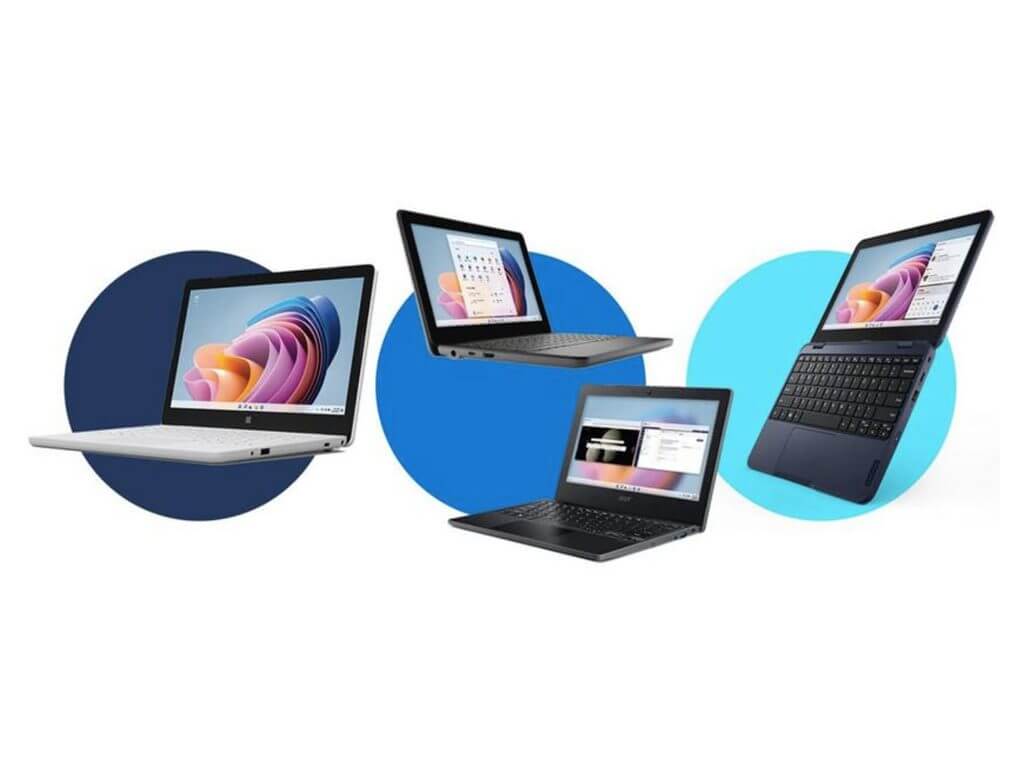
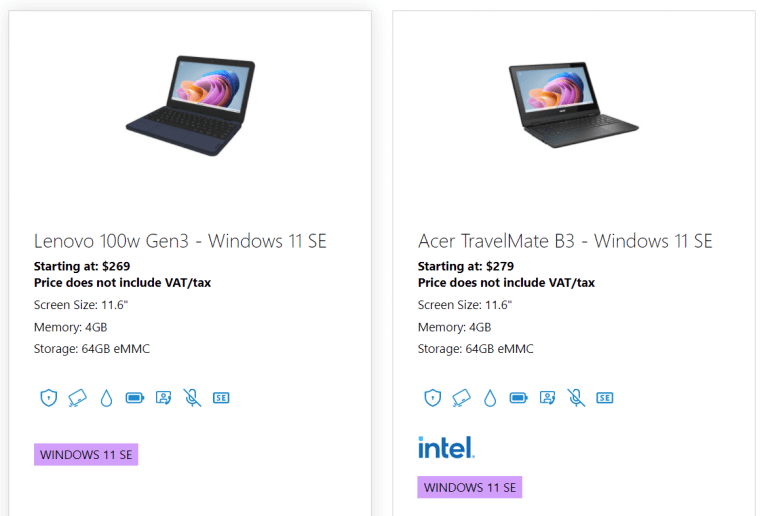
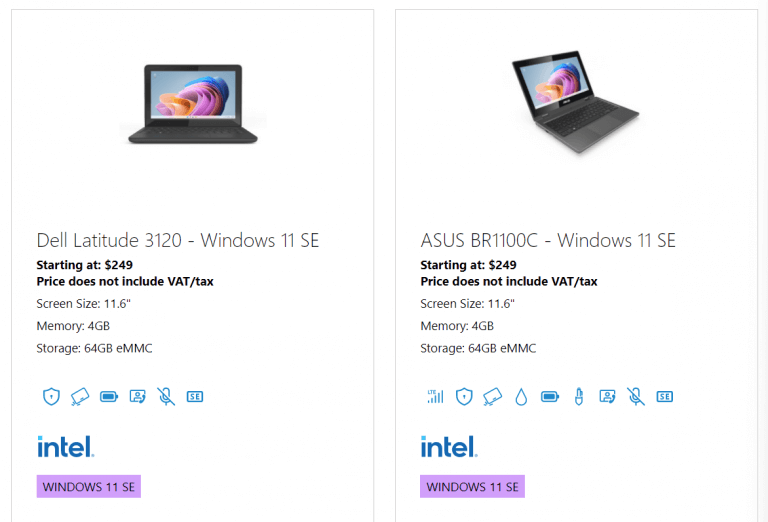
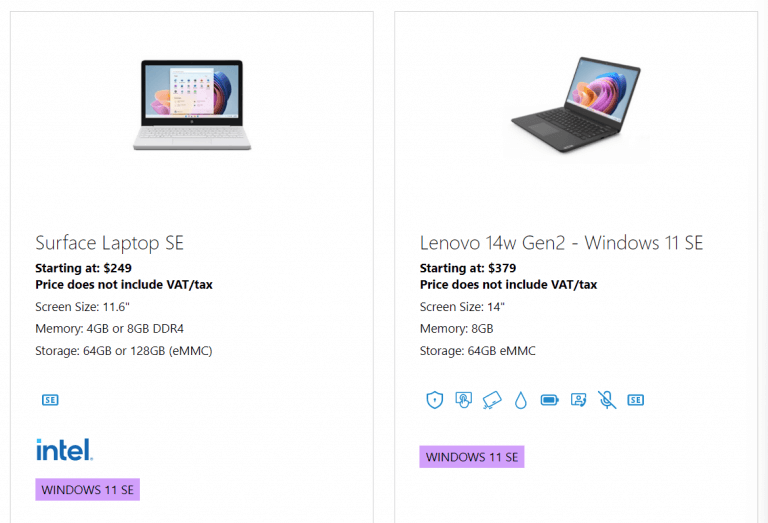
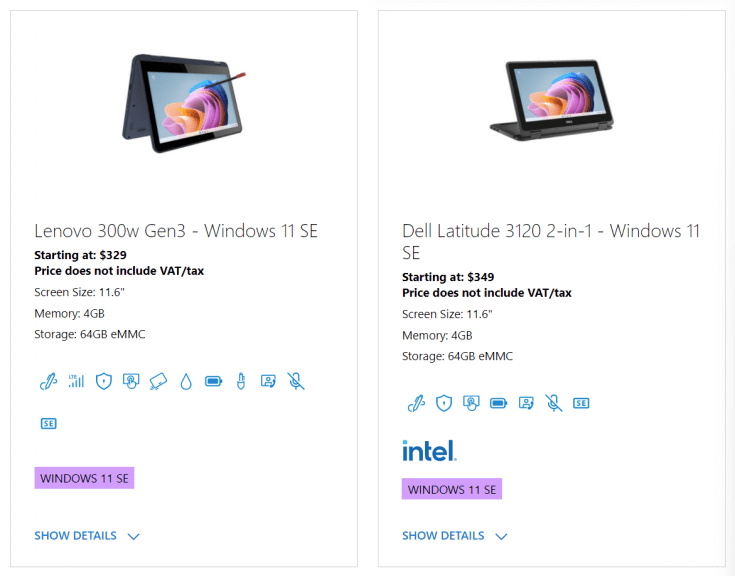
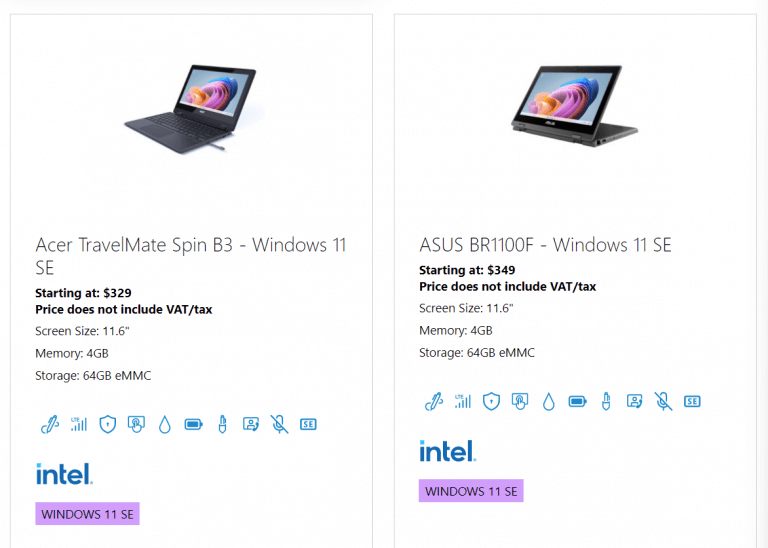
Acer, ASUS, Dell, HP and more join the Windows 11 SE push with sub $350 laptops

Aside from Microsoft’s Intune for Education setting a new stage for the company’s revitalized efforts in K-8 classrooms, it’s OEM partners will provide the most integral piece for Window 11 SE, the hardware.

Following Microsoft’s announcement of Windows 11 SE, OEM partners have all lined up devices to help the company re-enter the education segment with more viable products.

Windows 11 SE will be backed with devices by the likes of Acer, ASUS, Dell, Dynabook, Fujitsu, HP, JP-IK, Lenovo and Positivo, powered by Intel and AMD.

“We have heard from educators that they need options that are simpler, secure and work on more affordable devices,” says Paige Johnson, vice president of Education Marketing, in a blog post. “This expanded portfolio complements our current Windows 11 devices for learning, providing even more choices for schools to have the tools, insights and controls they need to deliver optimal learning experiences, at a price that broadens access to Microsoft performance, security and reliability.”

The list of early Windows 11 SE devices will include:

The list of devices is expected to grow in 2022 as more educational institutions and IT Admins get access to Windows 11 SE, Microsoft Intune for Education and Windows Autopilot.

Forza Horizon 5 is now available on Steam and with Xbox Game Pass

Now here’s a game release that had millions of players lining up to be among the first ones to jump into the latest title from Playground Games.

And now that this highly-popular game is out, we know that many of you are wondering if it’s available on Steam or Game Pass.

To quickly and correctly answer your question, the answer is yes, it is. Fans who have been now waiting for quite some time for this sequel can now download and play the game from Steam or through the Xbox Game Pass.

As you might remember, we’ve recently been discussing how creators wanted accessibility to be a core piece of this beloved game and added a bunch of helpful new features.

Start playing Forza Horizon 5 on Steam or via Game Pass

Forza Horizon 5’s early access already began on November 5th, 2021, and those that pre-ordered the premium edition of the game got to take it for a test drive a bit earlier. 

This sequel is an absolutely massive game, featuring hundreds of cars in a beautifully rendered world and an endless number of events and challenges for players to complete.

Horizon 5 takes up a considerable amount of space on practically any gaming device, so be prepared for a hefty chunk of software to be downloaded and installed.

On Xbox Series X|S it takes up to 103GB, it’s 116GB for the Xbox One, and 103GB for PCs, so we hope you have some free space for this new experience.

Players who are conscious of storage space can use Xbox Cloud Gaming, which uses streaming and doesn’t need to download anything to play Forza Horizon 5.

As much as system requirements go, if you want to simply enjoy the game as a casual gamer, the situation isn’t that alarming, However, if you want the full HD experience, you will need some serious gear.

Forza Horizon 5 minimum PC requirements

  • Processor: AMD Ryzen 3 1200/ Intel Core i5-4460
  • GPU: AMD Radeon RX470/ Nvidia GTX 970
  • RAM: 8GB
  • VRAM: 4GB

Forza Horizon 5 recommended PC requirements

  • Processor: AMD Ryzen 1500X/ Intel Core i5-8400
  • GPU: AMD Radeon RX 590/ Nvidia GTX 1070
  • RAM: 16GB
  • VRAM: 8GB

Forza Horizon 5 optimal PC requirements

  • Processor: AMD Ryzen 7 3800XT/ Intel Core 17- 10700K
  • GPU: AMD Radeon RX6800XT/ Nvidia RTX 3080
  • RAM: 16GB
  • VRAM: 16GB (AMD)/ 10GB (Intel)

If, however, you are still enjoying Forza Horizon 4 and are in need of some help with fixing bugs you encounter, we got you covered.

Issues such as the controller not working on PC while playing Horizon 4 can be easily fixed, if you know how to.

How to Enable Touch Keyboard With Shortcut on Windows 11

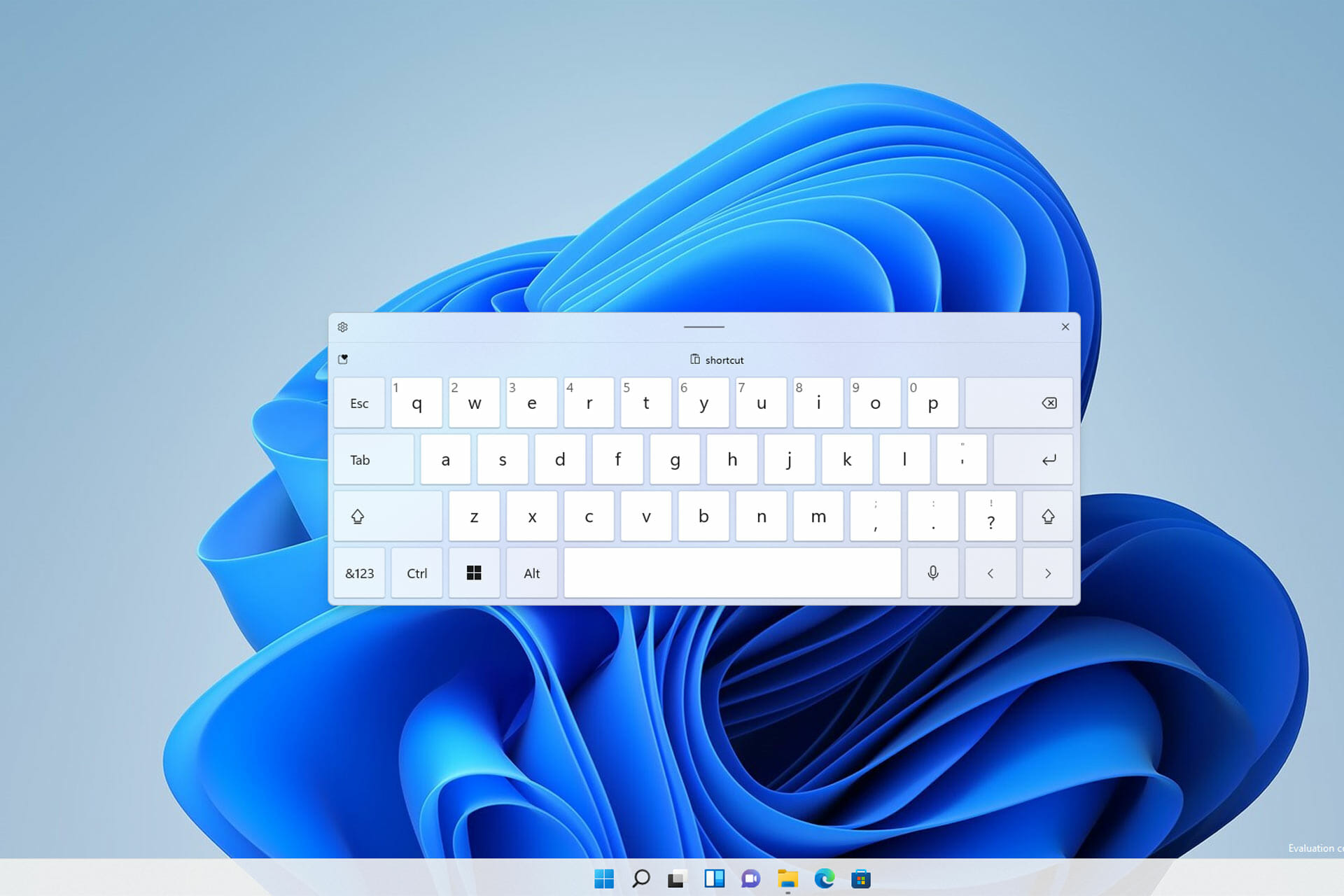
If you have a touchscreen PC running Windows 11, using a touch keyboard can be helpful if you want to take advantage of it as a tablet.

But, rest assured, this feature can help you even if the device you are using is not touch screen friendly. Let’s say your keyboard broke or is just out of battery.

The only way to input text is to use the virtual keyboard, and sometimes starting it isn’t as simple, especially if you don’t use it that often.

Did you know you can enable an icon on your Taskbar to bring the on-screen keyboard up anytime you want? We’re about to show you how to bring up this handy too with a simple click.

How does virtual keyboard work on Windows?

The virtual keyboard has been a part of Windows for years, and in the past, it has been used as an accessibility feature.

However, with the introduction of touchscreen devices, such as tablets are laptops, the virtual keyboard has become an essential component for text input.

Does virtual keyboard work on non-touchscreen devices?

Yes, a virtual keyboard works perfectly on devices that don’t have touchscreen functionality. However, the only way to input text is to use your mouse.

Using this feature on a device that doesn’t support touch input can be a bit cumbersome, but it can still be used as an accessibility tool.

How do I enable the touchscreen keyboard on Windows 11?

Change the Taskbar settings

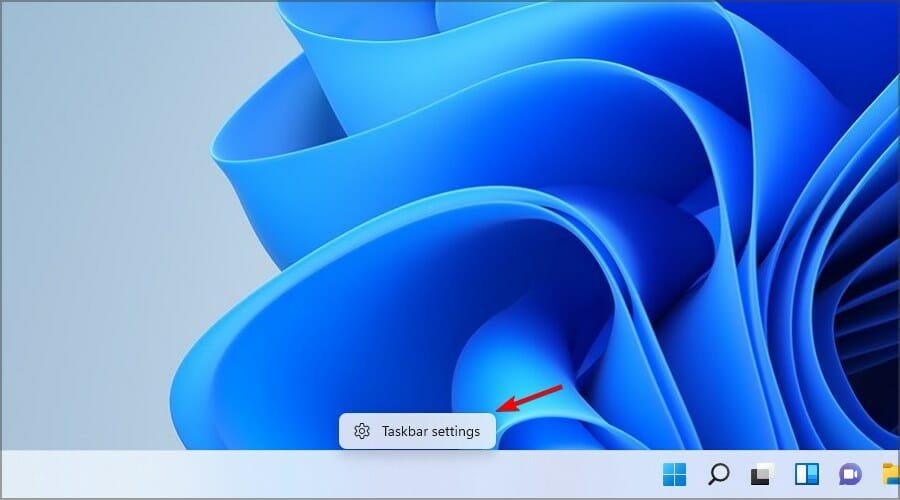
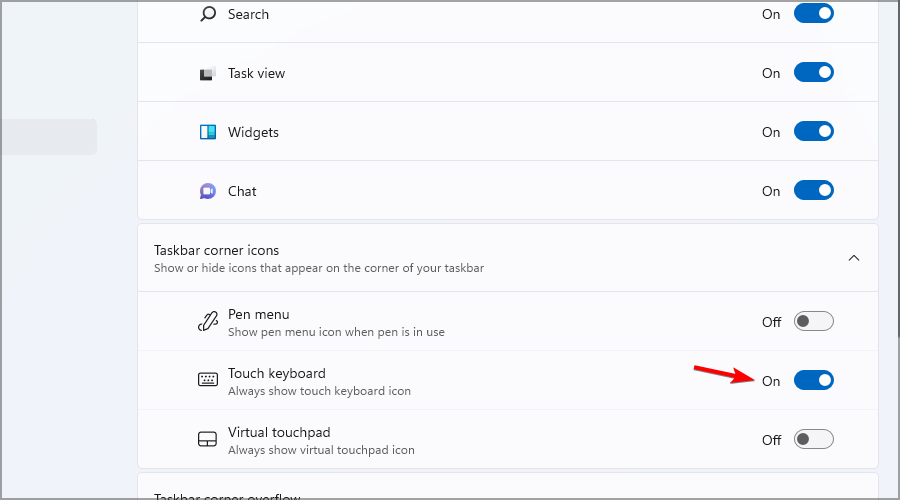
  1. Right-click the Taskbar and click on the Taskbar settings.
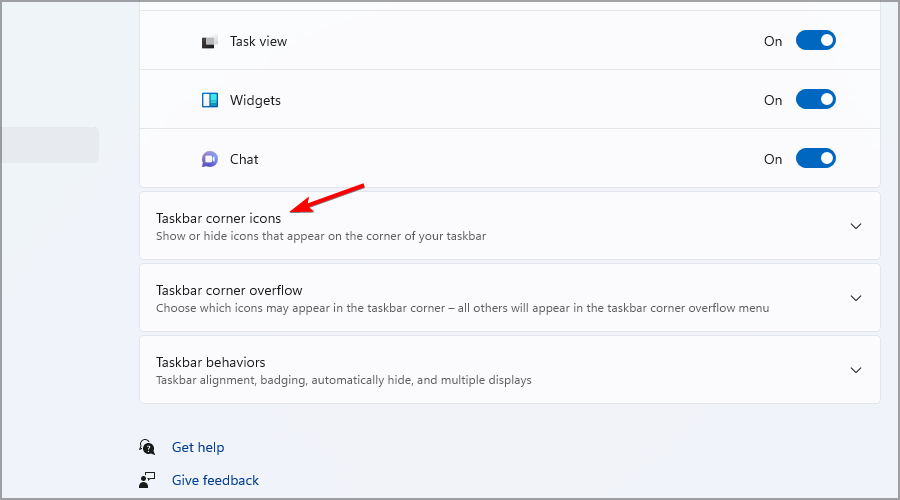
  2. Click the Taskbar corner icons option to expand the menu.
  3. Switch the Touch keyboard option to On.
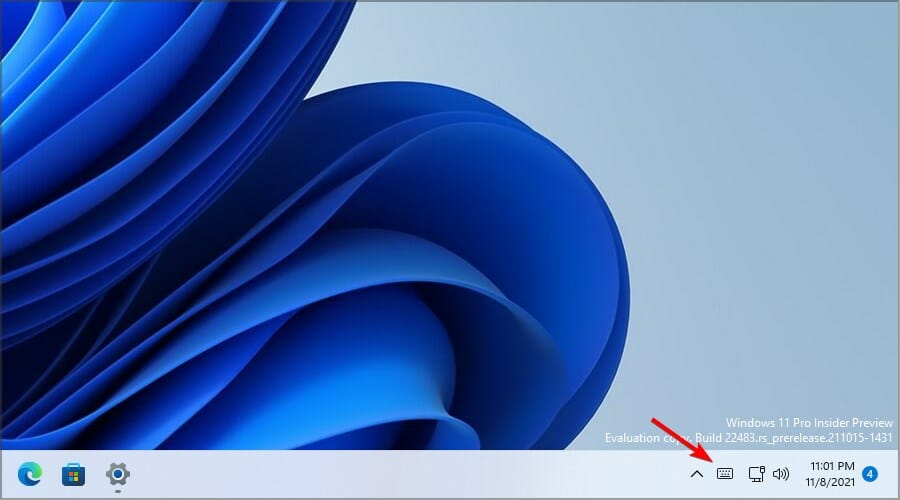
  4. Click the new Touch keyboard icon in the Taskbar to start the virtual keyboard.

How can I customize the virtual keyboard?

1. Change the keyboard size and theme

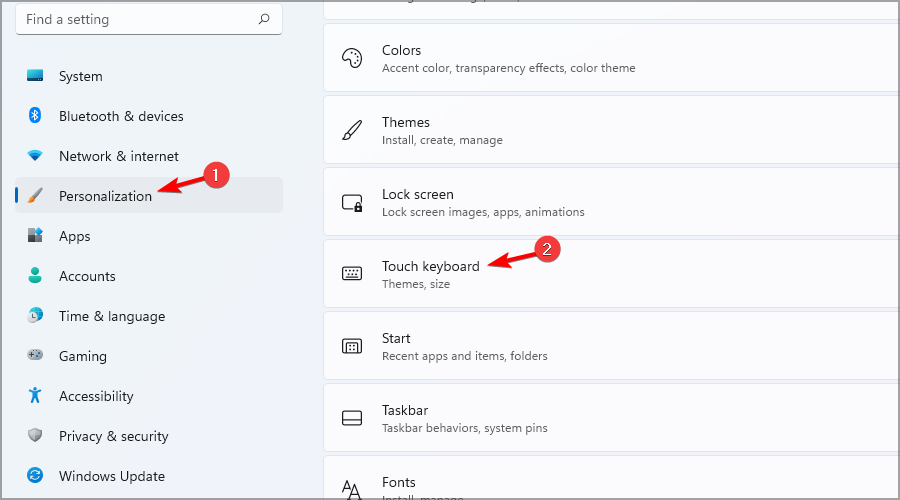
  1. Press Windows key + I to open the Settings app.
  2. Navigate to Personalization and select Touch keyboard.
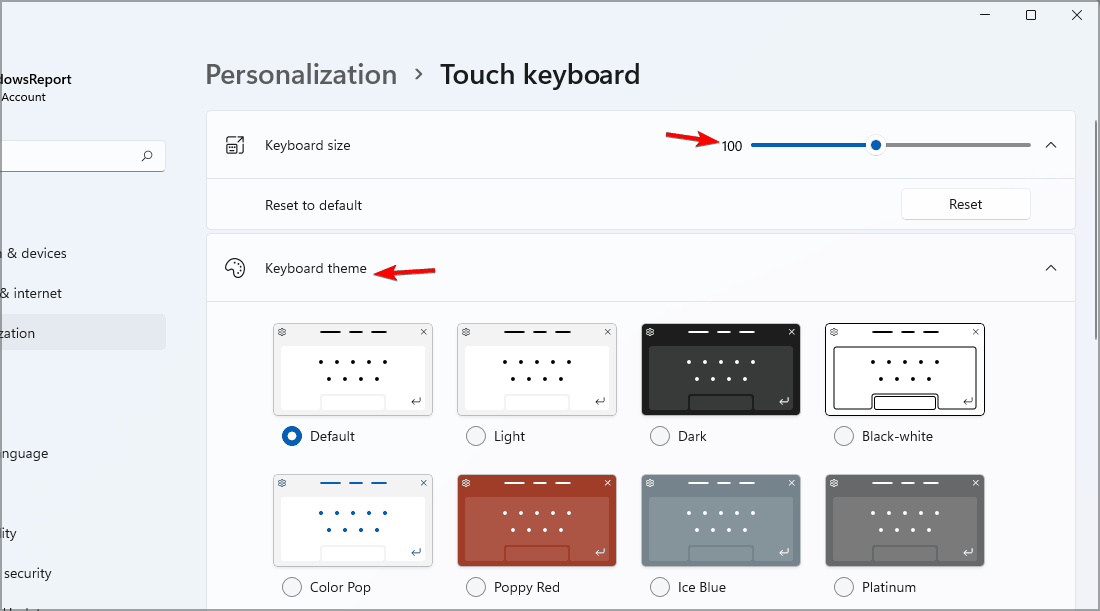
  3. From here you can adjust the keyboard size and its theme.
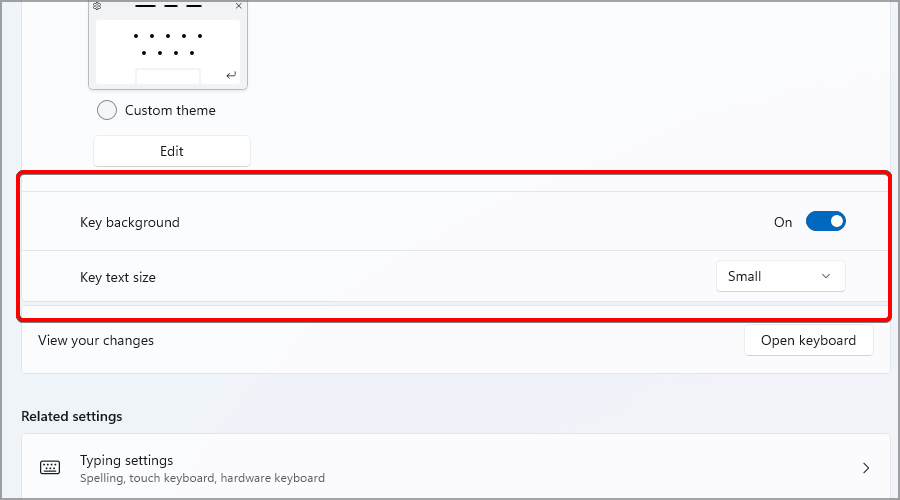
  4. You can also change the size of the keys or enable background for them.

2. Change the layout

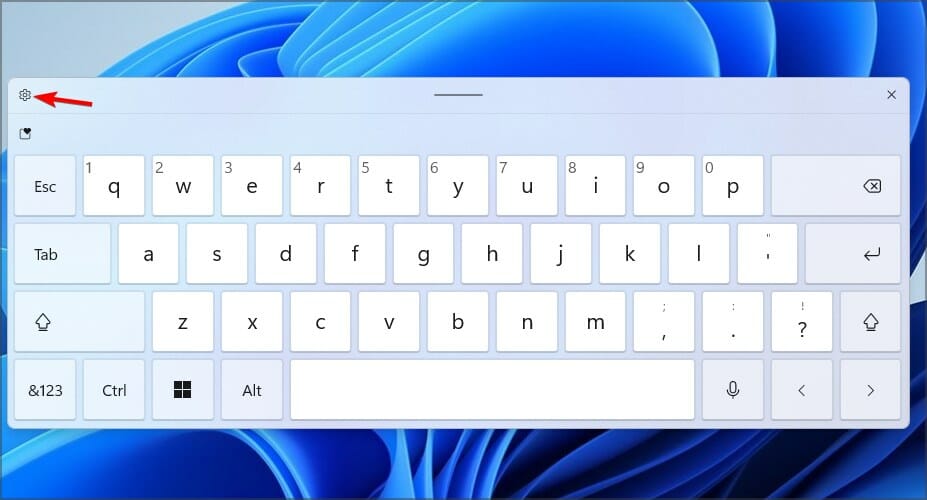
  1. Start the virtual keyboard by clicking its Taskbar icon.
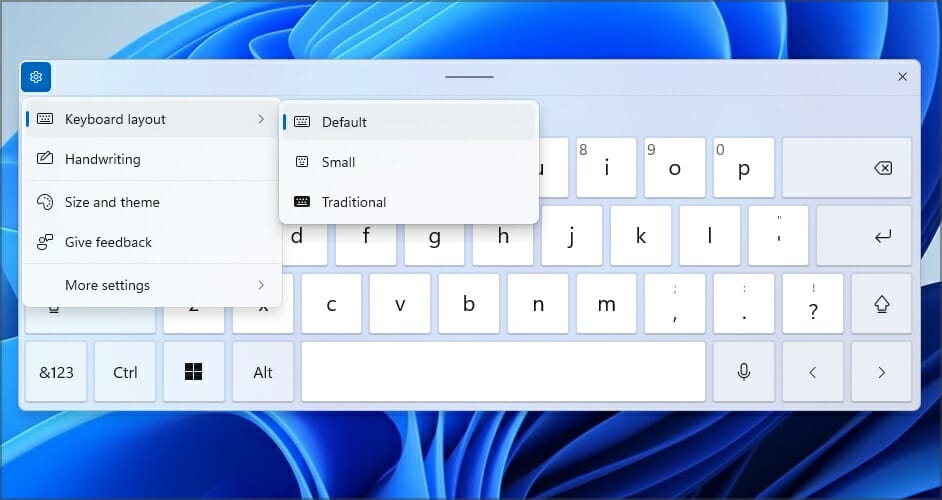
  2. Click the gear icon in the top right corner.
  3. Expand the Keyboard layout section and pick the desired layout.

How can I create custom virtual keyboard themes?

  1. Press Windows key + I. This will open the Settings app.
  2. Go to the Personalization. Now select Touch keyboard.
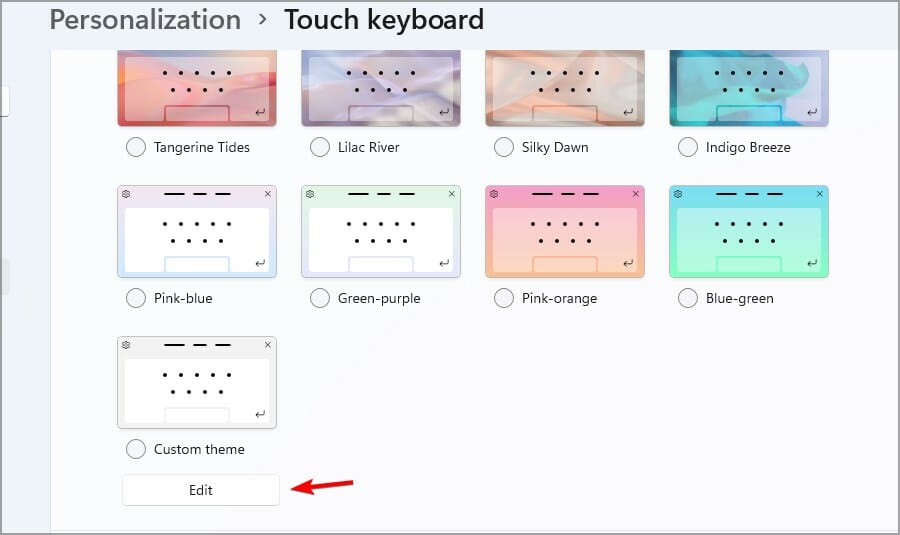
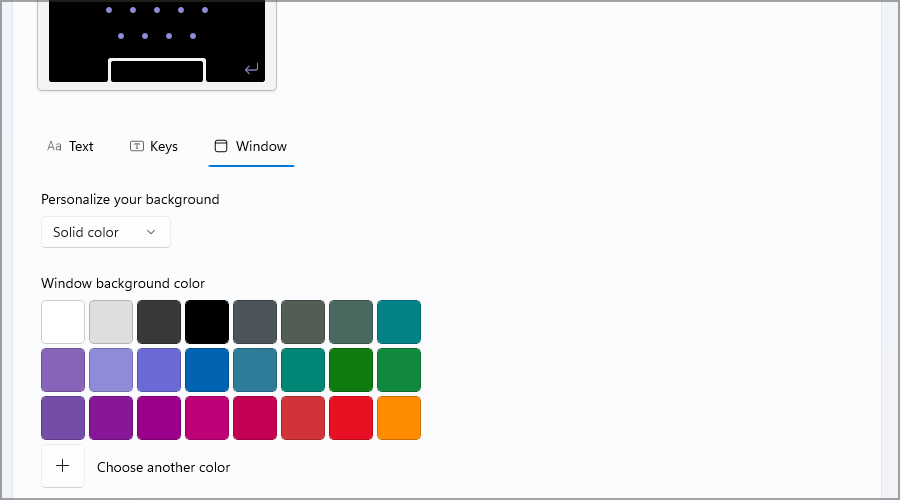
  3. Expand the Keyboard theme section and click on Edit.
  4. From there you can change the color of the keys, text, and the window, or add various backgrounds.

What’s the difference between an on-screen keyboard and a touch keyboard?

The on-screen keyboard is the first iteration of a virtual keyboard on Windows, and it’s used primarily as an accessibility tool.

This version allows you to input text by scanning over keys or by hovering over the desired key, which makes it a great tool for people with disabilities.

On the other hand, the touch keyboard doesn’t have any of these options since it’s designed to work with touchscreen devices.

So, if you ever find yourself in a tight spot and are in need of quickly accessing Windows 11’s touch keyboard, look no further than your Taskbar.

With Windows 11 you won’t ever have to rely on virtual keyboard software, since the built-in solution is more than capable of handling all your needs. You can explore more ways to access Windows typing tools by checking this guide on the different methods to open the Onscreen Keyboard.

Have you tried the new virtual keyboard on Windows 11? Let us know in the comments below.

Dell 27 Video Conferencing Monitor S2722DZ Review: A solid video conferencing monitor

The external webcam, as well as the monitor, have become of the most important parts of many people’s lives during the COVID pandemic. The two go hand in hand and help make video conferencing and productivity easy for both those in home offices as well as hybrid workforces.

With the right webcam and monitor, you can fit more on your screen, get more work done, and look better when on video calls.  Accordingly, we’ve already reviewed the Teams certified Dell 27 Video Conferencing Monitor. We found that it’s the do it all monitor for Teams thanks to its pop-up webcam and integrated speakers. Yet, that monitor is more for conference rooms, and there’s still more from Dell.

Now available for purchase is the Dell 27 Video Conferencing Monitor S2722DZ. This new monitor takes a lot of the basics from the Teams certified monitor, but makes it more mainstream for everyday people or even businesses. We were sent one for review by Dell, and think it is a monitor that raises the bar for conferencing productivity. Here’s more on why.

Specs & Price

The Dell 27 Video Conferencing Monitor (S2722DZ) retails for $600 on Dell.com, but you can find it on sale for $450 on most days. For that price, you’re getting QHD resolution (2560 x 1440) with a 75 Hz refresh rate. The panel onboard the display features IPS technology as well as AMD Freesync technology. As for input options, you’re getting 1 USB-C port, 1 Display Port, 1 HDMI port, a USB 3.2 Gen 1 downstream port, a USB 3.2 Gen 2 downstream port, and a 3.5 mm audio line out.  Note that the monitor also sports an anti-glare coating, and has a 4ms response time. As for the pop-up webcam and integrated speakers, the webcam comes in at 5 megapixels and supports Windows Hello. The speakers come in at 5 watts, and there are two, along the left and right front of the monitor.

Design

Dell’s monitors have always been sleek and clean and at the top of the industry when it comes to design. The new Dell 27 Video Conferencing Monitor (S2722DZ) is no exception. Setup is simple and easy. All I needed to do is attach the included riser to the base by turning a handle, and then slide some tabs to the back of the display. No tools are required.

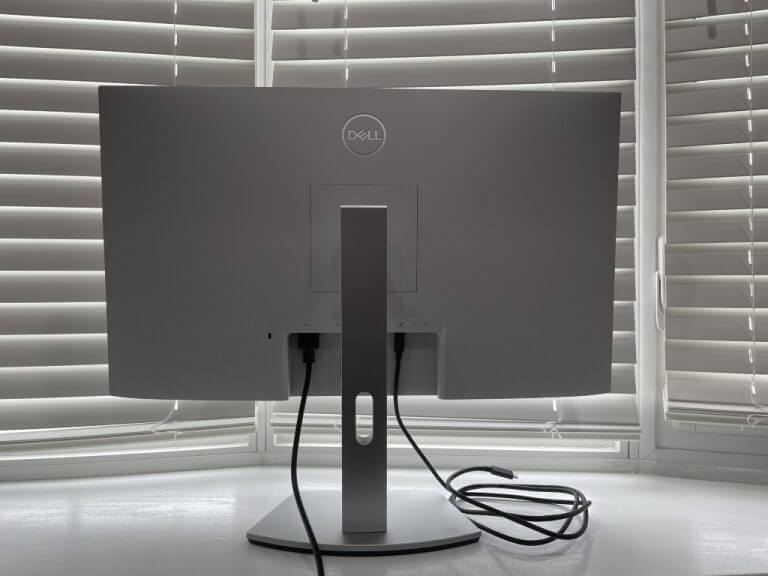
Once I set the monitor up, I could not help but enjoy its aesthetics. Most monitors might be black, bulky, and ugly, but this one fits right in with my desk and my setup. The white-silver-colored back sports a textured finish that blends in with the looks of the sleek stand. The stand, meanwhile, has a cable management slot to slide cables through.

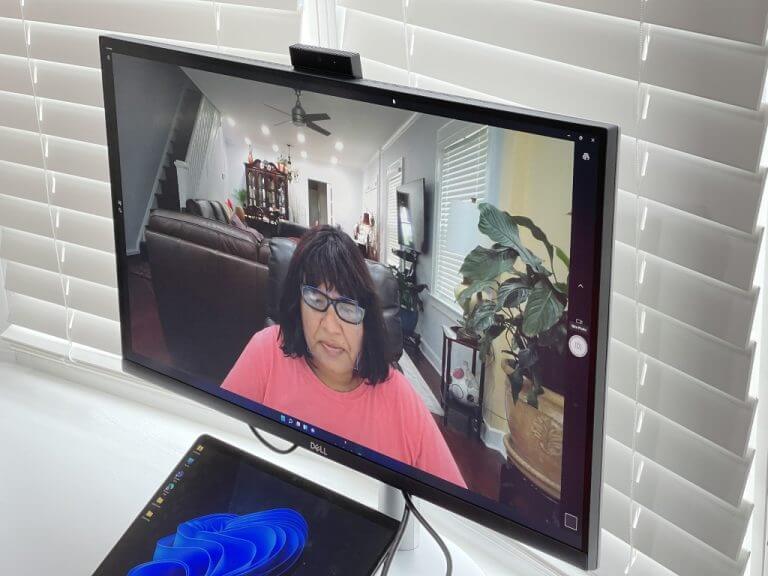
As for the front of the display, it still has a bottom “chin” with the Dell logo, but the bezels on the top, left, and right are quite slim and on par with that from the XPS lineup. The top of the display, meanwhile, has a textured black finish. It’s where the pop-up webcam lives. Tap the center, and the webcam appears. It’s even curved a bit and angled downwards, so it better captures your face.


In terms of movement and adjustability, you can tilt it from -5 degrees to 21 degrees. Swivels can happen from -30 degrees to 30 degrees. Pivots are rated for -90 degrees to 90 degrees, and the height can be adjusted up to 110 mm. These are relatively standard numbers for all Dell monitors.

Ports & buttons

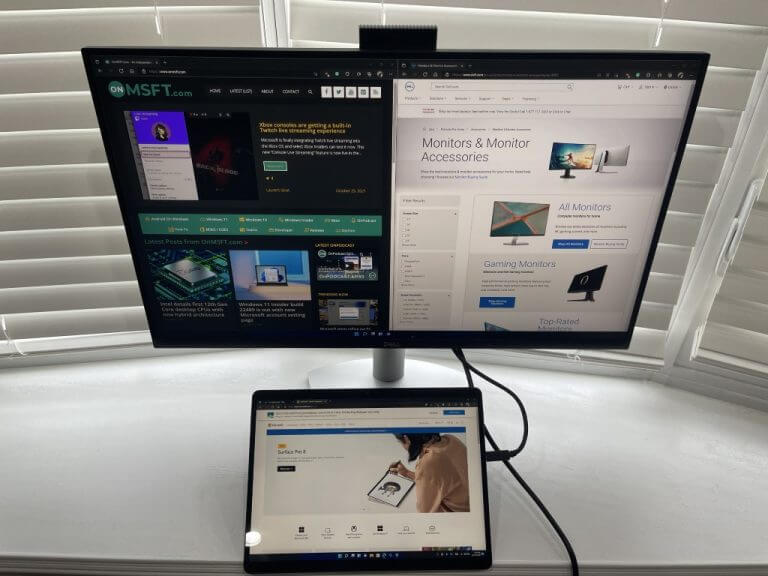
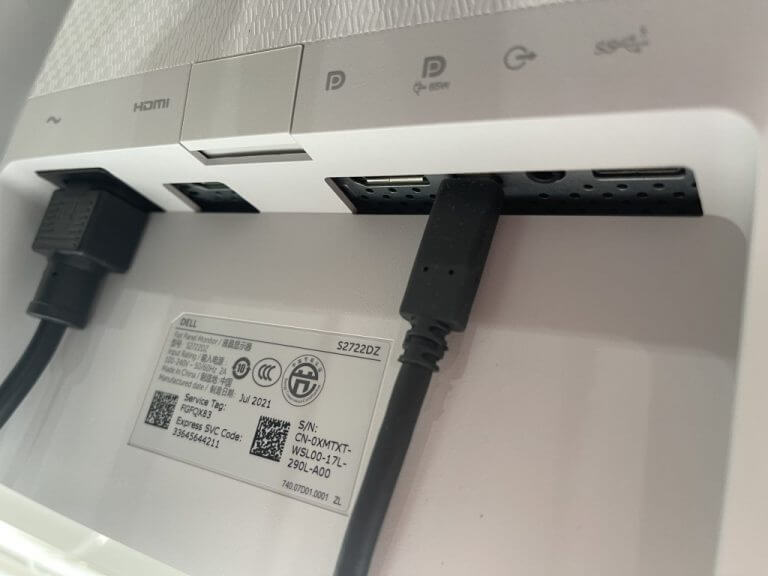
We touched on the ports at the top of this review. The selection includes 1 USB-C port, 1 DisplayPort, 1 HDMI port, a USB 3.2 Gen 1 downstream port, a USB 3.2 Gen 2 downstream port, and a 3.5 mm audio line out. Note that the USB-C port supports power delivery of up to 65 watts, and it’s how the pop-up webcam gets power. If you opt to connect your PC via HDMI or DisplayPort, you’ll need to use the USB-C end to use the camera.

Anyway, the port selection is quite nice here. USB-C allows you to use one cable for everything, so you have less of a mess on your desk. HDMI and DisplayPort are also appreciated, as not every device has made the move to USB-C, especially on gaming PCs or laptops. I used USB-C to connect my Surface Pro 8 to the monitor, and also my Surface Duo phone. As for HDMI, it’s how I connected my PS4 to the monitor for gaming.

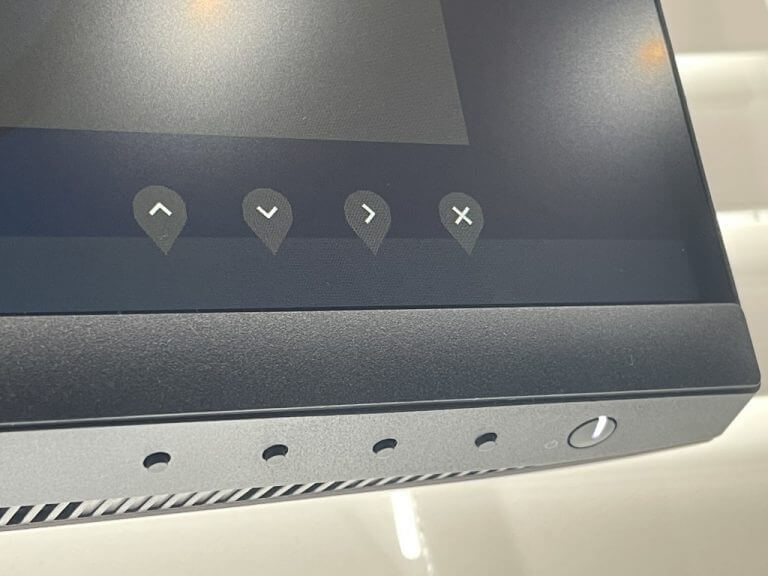
The buttons, meanwhile, are found on the bottom right side of the screen. The power button is let up in white when the monitor is on. Four other buttons are for menu controls. I do wish that Dell had included a joystick controls-like it had on the Teams monitor, as it makes menu navigation easier. However, seeing as though this monitor is cheaper, I can see the reasoning behind the omission. Mute and unmute buttons, though, are appreciated. The shortcuts keys can be used to mute the microphone when not wanted.

Webcam & sound quality

The webcam and speakers are the signature feature on this monitor, and both do not disappoint. The 5-megapixel webcam has a wide-angle, so it can fit more in the frame and more people in the shot. There are also noise-canceling microphones built-in, too. I tested the webcam on a Teams call with my mom, and I was pleased to see all the details in her face, from her freshly colored hair, to the nail polish on her hands. Note that the webcam has a 60-degree vertical field of view and a forward tilt of 13 degrees. I found that this is ideal for keeping your face and body in the frame when looking at the webcam itself.

As far as sound quality goes, this monitor falls in line with the many others in Dell’s lineup with integrated speakers. You won’t exactly be grooving out to the latest tunes on this monitor, as the speakers aren’t the strongest. I’ve found the speakers handle voice better than music. Integrated speakers are a nice feature to have, though, which means you can spare yourself the AUX jack if you plan on using this monitor for just video conferencing.

Display quality

The Dell 27 Video Conferencing Monitor S2722DZ is a 1440p monitor. It’s better than FHD as it gives you a bit more pixels. That means that image quality is better than most other monitors, including the sister monitor, the Dell 24 Video Conferencing Monitor the S2422HZ.

To test image quality, I watched episodes of National Geographic’s Chasing Ice. In this show, where brightness and contrast are important for showcasing the spectacular colors of glaciers and the arctic skies, everything looked alive and vibrant. It’s no surprise, either. When our colorimeter measured brightness, color gamut, and contrast ratio, the monitor performed well. It netted 350 nits of brightness, 99% of Adobe sRGB, and a 1,000:1 contrast ratio.

As far as AMD Freesync support, I hooked up an AMD laptop to the monitor and played Fortnite. I’m not the best at those games, but when Freesync, I did notice that I was able to stay in the action a bit more, with less lag and faster response times. The 75Hz refresh rate is an amazing bonus for a productivity monitor.

Extras

I’ll end this review by touching on extras. The monitor has support for Dell EasyArrange. With the technology, you can keep your windows organized between applications and windows. This is controlled via drivers and software on Windows. It’s a lot like Fancy Zones on Windows 10 and Windows 11.

A solid monitor for productivity

The Dell 27 Video Conferencing Monitor S2722DZ is a solid monitor for productivity. From its built-in webcam microphone, and speakers, as well as its good image quality, it is a monitor that impresses especially if you’re always on Skype, Zoom, and Teams calls.

Dynabook joins Windows 11 SE push with its E-10 S laptop

Microsoft just held a quick unveiling of its newest new attempt to stem the surge of Chromebook usage in education with Windows 11 SE and longtime OEM partner Dynabook has answered the company’s rallying call with a new affordable laptop.

According to Microsoft, Windows 11 SE is a new take on Windows 11 that is optimized for K-8 students to deliver a simplified cloud-based computing experience and while the company showcased its own Surface Laptop SE as a reference laptop, OEM partner Dynabook is shifting is professional grade tooling processes to produce its own take on a Windows 11 SE powered notebook.

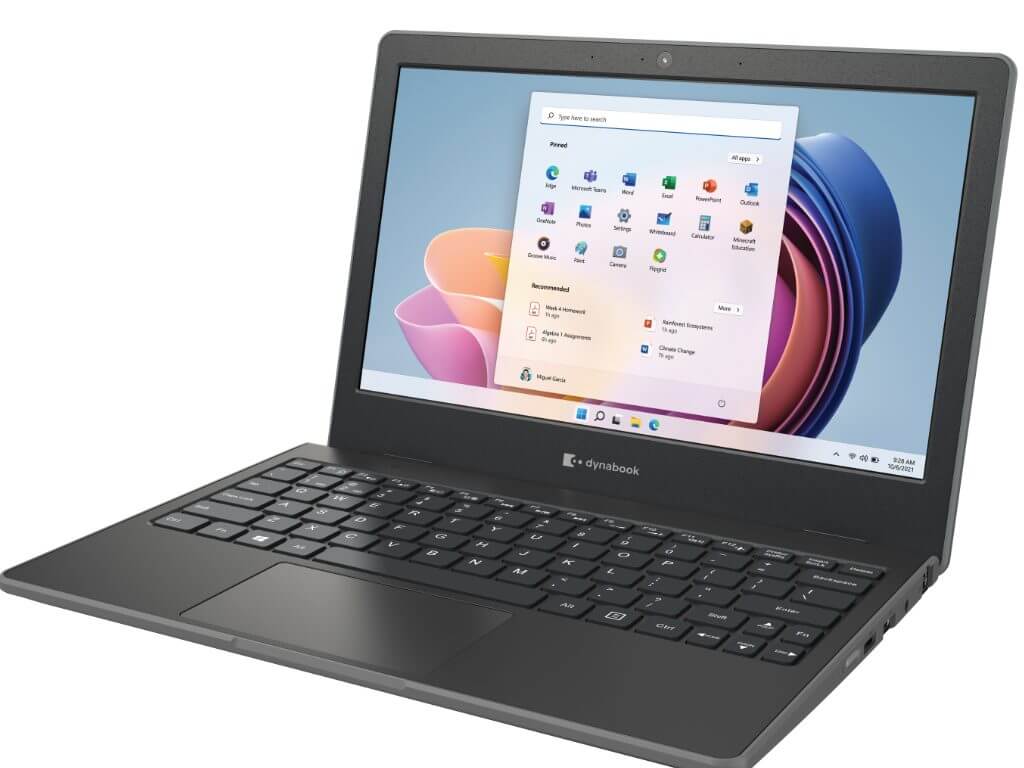
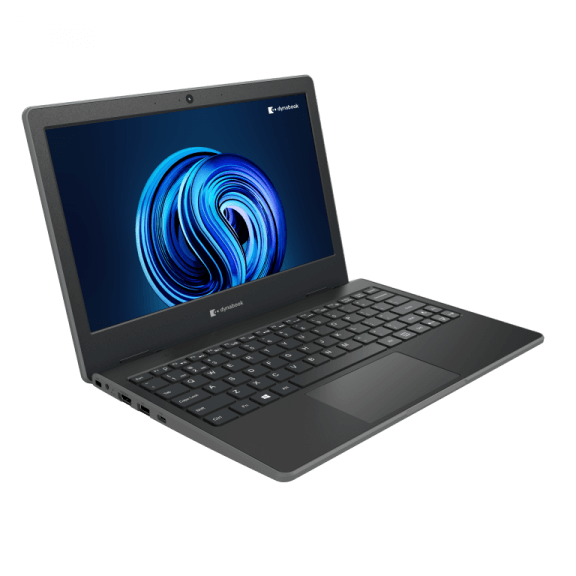
Introducing the Dynabook E10-S which comes in at 11.6-inches, weighs 2.5 pounds (1.15kg) and is just 0.78 inches (19.9mm) thin. For all of the talk of the fit and finish of Microsoft’s Surface line, Dynabook’s E10-S arguably outshines its Redmond counterpart. The E10-S is both lightweight and compact while also providing slip resistant design elements, fan-less construction and seamlessly blends rubber bumpers to encase the entire laptop to protect from accidental drops and impacts that occur in the classroom.

In addition to its child-friendly outer construction, the E10-S also houses an 11.6-inch anti-glare HD display, spill-resistant keyboard, mechanically anchored keys, multi-touch trackpad, 802.11 ac WiFi connectivity, HD webcam, stereo speakers, dual beam-forming microphones with noise suppression, full HDMI, USB-A, USB-C, and LAN ports.

We have more than thirty years of experience in the education sector and are proud that Microsoft has recognized the Dynabook E10-S as a launch device for Windows 11 SE, further underlining the strong education credentials of this unique laptop and throughout our product portfolio,” said James Robbins, General Manager, Dynabook Americas, Inc. “The Dynabook E10-S has been carefully engineered with the challenges of today’s classroom in mind, so that teachers and students alike know they can rely on it to support successful, uninterrupted learning. Like our other Education focused devices, the Dynabook E10-S is also available with Windows 11 Pro Education preloaded – so our education customers can choose a device that best fits their device management strategy.

Perhaps the most important part is that the Dynabook can be configured via Microsoft’s Intune for Education, which appears to be an integral part of Microsoft’s new competitive feature against ChromeOS and Chromebooks.

Windows 11 SE mostly looks and feels like Windows proper but leveraging Microsoft Intune for Education is where the company will attempt to address the pain-points of Windows use in schools for IT Admins by including Windows Autopilot management. Including Windows Autopilot will allow “IT education administrators to preconfigure, maintain, and even retire student and teacher laptops with little to no infrastructure.”

The Dynabook E10-S will be available globally in the first quarter of 2022 via its website or network of resellers starting at $289.99. While slightly more than the Surface Laptop SE, the Dynabook price tag also includes a year of Dynabook’s +Care Service Warranty With On-Site.

Forza Horizon 5 is now live on Xbox and Windows while Australia did something crazy again

Forza Horizon 5, the latest entry in the popular open-world Forza spin-off video game series, is now live on Xbox One, Xbox Series X, and Windows PCs.

The racing game features cross-buy between Xbox consoles and Windows PC which means that buying Forza Horizon 5 on one platform will unlock it on the others. Forza Horizon 5 also supports cross-play between platforms, is playable for free for all Xbox Game Pass subscribers, and is fully available to via Xbox Cloud Gaming, Microsoft’s game streaming service which is now available in a growing number of markets.

Forza Horizon 5 is one of the biggest Xbox video game releases of 2021 and, as expected, is generating a lot of buzz from players and the media this week. The Xbox social media channels have also been pushing Forza Horizon 5’s release quite a bit with the Xbox Australia marketing team once again being a standout by literally tossing a Forza Horizon 5-themed car out of a helicopter.

You can check out the wild promo video below.

Our Laurent Giret conducted a full review of Forza Horizon 5 earlier this week and described it as “the best game in the series and another essential release from PlayGround Games.” Make sure to give his full review a read here.

Want more Xbox news? Follow us on Pinterest, Twitter, and Facebook.


Forza Horizon 5 Deluxe Edition


New bug: Windows 11 users can charge their devices past 100%

Thanks to the recently released bug in the new Windows 11 build, users can now charge their laptop’s battery beyond the 100% mark. Microsoft has confirmed that the bug does exist and has actually been in place even in the past Dev channel builds. 

Users have reported that their laptops are now able to charge beyond the 100% mark. However, the real charging level cannot surpass the actual 100%, it feels weird as the battery levels seem to be exaggerated and unnatural.

Dev channel builds

Microsoft has stepped up and acknowledged the complaints, the issue is predominantly experienced by users using the dev channel builds. 

According to Microsoft, there’s no information suggesting that the bug is also present in Windows 11 public build releases that have been made so far. It is important to note that builds in the Dev channel come from a different release channel than the public release one. 

It is a bug and not a feature, the users lodging the complaints against the bug did not disclose the model they are using. However, one of the users happened to mention that  they were using the OS build 22483. 1000.

The bug is quite different in comparison to the complaints that have been made before, especially when it comes to the gadget’s battery life. 

Cons of the bug

The complaints revolve around the inability of the laptop’s battery to charge to a certain level, some users are also unable to see how much battery they have used up. The problem emerged ever since they made the upgrade to Windows 11.

Clean ISO install

As such, there are recommendations coming in from users suggesting that one should try out a clean ISO install for all those experiencing these bugs. The issues and bugs come from using the upgrade option rather than initiating a clean ISO install.

Have you experienced any of these bugs? Share your thoughts and experiences with us in the comment section below.

The official workaround: Microsoft fixes Windows 11 snipping tool issues

Windows 11 is Microsoft’s latest OS, the first stable version was actually released in October. That being said, there are a couple of users lodging complaints indicating that some of the key features are not working efficiently. 

The snipping tool specifically needs to be fixed. In the latest version, users are able to take screenshots and make annotations in real time. 

Once the users made the update to Windows 11, they were not able to make use of the snipping tool properly. 

What’s new 

There were many tools integrated into the new Windows update. Users can now be able to make use of the snipping tool in two ways, the first one is using the icon or by pressing a combination of specific keys that help launch the snipping tool. 

Despite these efforts, users are yet to access the application. All these efforts have been rendered futile. Users indicate that when they try launching the app using the icon, the app crashes. 

Users have not been successful using the key combination to launch the application, the tool refuses to open yet again. 

Identified setbacks 

Therefore, users that made the Windows 11 update are not able to capture any screenshots using the tool. This issue hinders people from running their daily activities both at school and work. 

Microsoft has identified the issues facing the users who made the update to Windows 11, specifically when it comes to the snipping tool. 

According to Microsoft, there is an issue with the Microsoft digital certificate. As such, Microsoft has plans underway to ensure that they are able to remedy the situation. However, they have not placed a timestamp on when they intend to make this release. 

Plausible alternatives 

But in the meantime, Microsoft has recommended a workaround to ensure that the users are fully accommodated. The hack is to make use of the Print Screen Key on the keyboard and paste the screenshot on the document.

Users can also paste it into the Paint to select and copy the item to the desired section. Users are urged to wait on the new developments by Microsoft. 

The workaround

On November 8, Microsoft confirmed that the issue is now a thing of the past thanks to the out-of-band KB5008295 update. Update to this version to be able to bypass this issue!

Have you experienced this issue before? Let us know how it has affected you in the comment section below. 

Microsoft announces the general availability of Visual Studio 2022

Visual Studio 2022 has finally reached general availability. This latest release comes with a ton of new features and improvements, including .NET 6. There is lots to talk about, so let’s jump right in!

Performance

One the most important changes is that Visual Studio is finally 64-bit. This means you can now take advantage of modern hardware and more memory to load even the most demanding projects in seconds instead of minutes while effortlessly navigating your projects and solutions with greater ease.

Productivity

Visual Studio 2022 comes with huge improvements to tried and true developer aids like IntelliCode. This AI-powered developer co-pilot enables you to focus on the solution and not so much on the syntax or implementation. It catches mistakes and even helps you write more efficient and performant code.

Debugging

Hot Reload has gotten a lot of love in this release as well, it works more often and greatly cuts down on the need to redeploy your applications while you edit code on the fly.

Git

Git integration has been in the works for quite some time, however its not until Visual Studio 2022 where its finally presented as a seamless and streamlined experience. It has never been easier to create, clone, and open your Git repositories. Everything from committing, pulling and pushing changes to your code has been improved as well.

The improvements are vast, and they all come together to help developers make the most of their time.

Watch the Launch Event

There are a ton of features being shipped with Visual Studio 2022. To see what the fuss is all about, check out the launch event stream.

Ready to build something great?

If you are ready to get your hands on Visual Studio 2022 head over to the official page. Happy coding!

Microsoft’s Channel 9 content moves to ‘Microsoft Learn’

Microsoft’s famous developer video platform Channel 9 will be ending soon, and its spiritual successor will join the Microsoft Learn brand.

According to a blog post on the Docs Team blog from corporate vp of developer relations Jeff Sandquist at Microsoft, Channel 9’s last appearance was last week during the company’s cloud developer conference Ignite 2021.

Later this month, you’ll find thousands of hours of current technical knowledge that you’ve come to expect from Channel 9 in its new home alongside our hugely popular documentation and Microsoft Learn content.

As for Channel 9 content and its new home, Sandquist assures fans that Microsoft Lean will remain committed to providing free learning content in the same spiritual fashion as did Channel 9.

Moreover, similar content should be found on Microsoft Learn such as:

  • Azure Fridays. Scott Hanselman, Donovan Brown, and Lara Rubbelke host the engineers who build Azure, demo it, answer questions, and share insights.
  • Ask the Expert. Here’s your chance to ask Microsoft experts your questions—live.
  • Learn Live. These episodes deep dive into a Microsoft Learn module, complete with guest experts. Join for behind-the-scenes info and live Q&A.
  • Code Stories. This series showcases local Cloud Advocates, Most Valuable Professionals, Product Managers, and Community Leaders from around the world.
  • Hello World. Every Wednesday and Thursday, Hello World broadcasts 60-minute live shows made up of special guests, quick demos, and live Q&A. Hello World is fun and educational for those who are interested in Microsoft products and our events.

image

  • Inside Azure for IT. Keep up to date with the latest Azure tips, demos, and technical skill-building resources and stay on the forefront of key insights, tools, and best practices for optimizing your infrastructure for performance, cost efficiency, security, and reliability on Azure.
  • On .NET. This show looks at the ever-expanding .NET universe, including APIs, tooling, and interesting projects being created in the .NET ecosystem.
  • Tabs vs Spaces. If you develop on a Windows machine to create for Windows, iOS, Android, the Web, or to manage containers and services in the cloud, tune into Tabs vs Spaces to stay current.
  • New: MS Archives. Some things just never age, like videos of Bill Gates talking about the future, or Jason Zander when he was a product unit manager talking about the .NET CLR —and other classics you’ve come to love over the years. You’ll find them in the MS Archives.

Fans can join Learn TV starting today, alongside the release of Visual Studio 2022 at VS 2022 or tomorrow November 9, 2021, during Microsoft’s .NET Conference 2021.

As for the full migration picture, Mary Jo Foley over at ZDNet spoke with officials who assured that production teams from Channel 9 will remain in place for the time being and that, “content published on or after November 1, 2017, will be automatically migrated to the new platform.”

Fix Broken Registry Items & Keys in Windows 11

Broken registry items in Windows 11 can slow down your PC, cause errors, and affect overall performance. These entries often remain after uninstalling software or due to system crashes and malware. While newer systems may not need fixing, older laptops and desktops should regularly clean or repair the registry. You can use built-in Windows tools or manually edit the registry with the Registry Editor to remove broken entries and improve stability.

How do I fix a corrupt registry in Windows 11?

1. Run deployment image and system file scans

    The detailed guide below can help you run effective Command Prompt commands in order to identify the issues with your Registry files.

  1. 1. First, click the Search utility’s taskbar button.

    broken-registry-items-windows-11
  2. 2. Type cmd in the search text box to find the Command Prompt.

  3. 3. Click the Run as administrator option for the Command Prompt.

    broken-registry-items-windows-11/
  4. 4. Now input this command within the Prompt’s window and hit Enter: DISM.exe /Online /Cleanup-image /Restorehealth

  5. 5. When the first scan has finished, input this system file command and press Enter: sfc /scannow

  6. 6. Wait for the system file scan to reach 100 percent and display an outcome message. Then you can close the Command Prompt’s window.

2. Run the Disk Cleanup tool

  1. Right-click the Start button on the taskbar to bring up the menu below.
    Win + X menu broken registry items windows 11
  2. Select Run on that menu.
  3. Type the following command in Run’s Open box: cleanmgr.exe
  4. Click OK to open the Disk Clean-up window.
  5. Press the Clean up system files button on that window.
    Clean up system files button broken registry items windows 11
  6. Select all the file checkboxes in Disk Clean-up.
  7. Click the OK button to open the dialog box.
    Disk Clean-up dialog box broken registry items windows 11
  8. Press the Delete Files button on that dialog box.

3. Use Startup Repair

  1. Click Start on the taskbar.
  2. Then click the Power button on the Start menu.
  3. Press and hold the Shift key and click Restart.
    Restart option broken registry items windows 11
  4. Next, select Troubleshoot on the Choose an option menu that opens.
    Choose an option menu broken registry items windows 11
  5. Click the Advanced options button.
    Advanced options button broken registry items windows 11
  6. Select Startup Repair on the Advanced options menu.
    Start-up Repair button broken registry items windows 11
  7. Choose an account to apply the startup repair to, and then enter the password for it.
  8. Press the Continue button.

4. Roll back Windows with System Restore

  1. Right-click Start on the taskbar to select the Run shortcut.
  2. Now type this text in Run’s window and click OK: rstrui
  3. Select the Choose a different restore point radio button if the System Restore utility displays it.
  4. Press the Next option to open the window that you can see below.
    System Restore window broken registry items windows 11
  5. If the Show more restore points option is available, select that checkbox.
  6. Then choose the restore point that goes the furthest back, which will fix the most broken registry items.
  7. Click Next to proceed to the confirmation step.
  8. Select the Finish option to confirm your chosen restore point.

Rolling Windows back to a restore point will remove software installed after its specified date. You’ll probably have to reinstall some software if you implement this method. Click Scan for affected changes in System Restore to check what software a restore point removes.

This will restore a snapshot of your PC’s registry for a chosen restore point date. By doing so, it will remove broken registry items that emerged after the specified date.

5. Reset your PC

Note icon NOTE
Keep in mind that you’ll need to reinstall the software that didn’t come preinstalled after applying the below procedure, therefore a backup is recommended.
  1. First, click Start and Settings to bring up the tab that you can see below.
    System tab broken registry items windows 11
  2. Then select Recovery on that tab.
  3. Press the Reset PC button.
    Reset PC broken registry items windows 11
  4. Select the Keep my files option in the Reset this PC window.
  5. Next, select either Cloud download or Local reinstall according to your preference.
  6. Click Reset to confirm.

How can I back up the registry?

Backing up the registry won’t fix any broken items that already exist. However, restoring a backup copy of it can resolve registry issues that might arise from corrupted entries in the future.

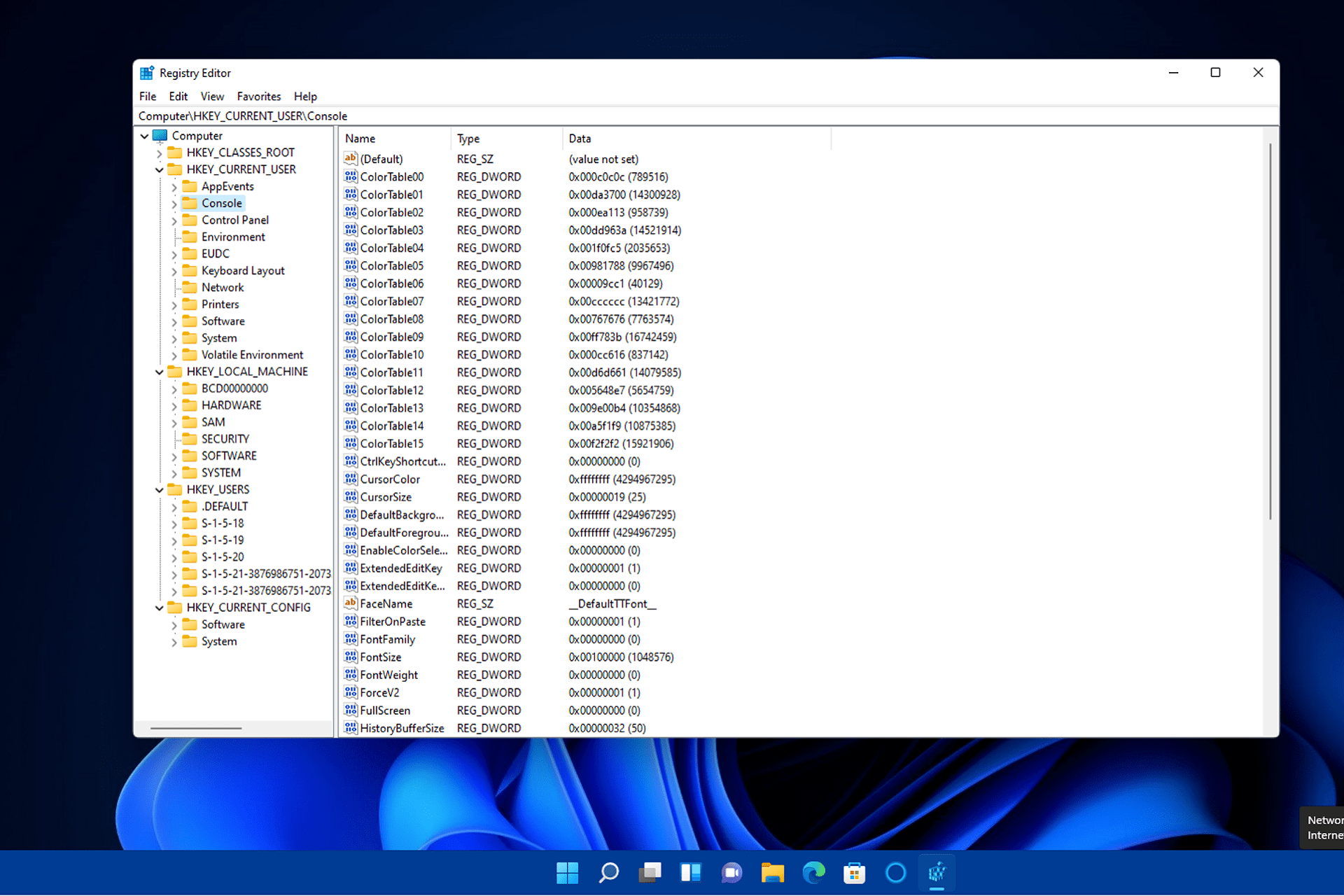
You can manually back up the registry via Registry Editor as follows:

  1. Bring up the search box by clicking the magnifying glass taskbar icon in Windows 11.
  2. Type regedit within the search box.
  3. Click Registry Editor in the search results to open its window.
    The Registry Editor broken registry items windows 11
  4. Right-click the Computer icon at the top of the registry hierarchy to select Export.
    Export option broken registry items windows 11
  5. Type Registry Backup in the File name box.
  6. Choose a folder to save the Registry Backup file in.
  7. Click the Save button.
Export Registry File window broken registry items windows 11

Thereafter, you can restore the registry backup by clicking File, then Import in the Registry Editor. Select your backup file in the window that opens. Then click Open to restore it.

Short Video Explainer ▶️

Just Dance 2022: Daddy’s Little Gamer Review

Put on your sweatpants and clear out the living room, because Just Dance 2022 is here and it’s time to get groovy! The arrival of a new Just Dance game is always an event to look forward to in our household as we always take the time to explore the game together.

I’m hands down the biggest gamer in the family but Just Dance succeeds where other games fail and draws my wife and kids to the TV set so we can take turns shaking to the beat.

My daughter Fé is probably the biggest fan though. She’ll be joining me for this review and weighing in with her opinions, giving a unique child’s eye perspective on things. It’s become somewhat of a yearly tradition.

New to Just Dance?

If you’re not yet familiar with the series, Just Dance is a game where you mirror the dance moves of the on-screen character(s) and you try to get as high a score as possible. It usually offers a mix of popular and lesser-known songs to shake your extremities to.

Just Dance 2022 | Ubisoft (NL)
Shake it!

A new version launches every year and introduces new songs that come with the game, as well as some alternative choreographies, and I’m happy to report that this year’s tracklist is a lot better than what we got in Just Dance 2021. Though I’m fully aware musical tastes are very personal.


Fé: I actually thought last year had more fun songs, like Dance Monkey and there was even a song from K3.
Daddy’s Note: K3 is a local Belgian girls band that is very popular, it’s great that they include local songs like this!


Like I said, it’s very much up to personal preference. I’ll share the 40 new official tracks here, so you can make up your own mind:

My personal favourite is by far Believer by Imagine Dragons, there is a raw power that comes from dancing to this song and the visual backdrop they’ve added only adds more weight to it.


Fé: My favourite is Good 4 U. It’s really fun to dance to and has a lot of jumping! (Olivia Rodrigo)


Just Dance Unlimited

While the above 40 songs come with the game, arguably the best reason to get Just Dance is when you also have access to…

BUY JUST DANCE UNLIMITED!

I’m sorry. Seems like a Just Dance Unlimited advertisement snuck into the review, I promise it won’t happen ag…

BUY NOW!

Yeah, that’s not a very pleasant experience, is it? The thing is, the game does this as well. In a game you pay for, you’re getting advertisements in image and video form to subscribe to their subscription.

You can’t skip the video when it appears and it defaults to the “buy now” option so you should be extra careful when trying to spam a button to exit it.


Fé: When I have the main controller, daddy makes sure to take it from me when the pop-up happens so I don’t accidentally activate it.


The good news: You get a free month alongside the game so you can try it out.
The bad news: It feels extremely limiting to go back to your selection of 40 songs when you’ve had access to 700+.

Boombayah!

So how much does it cost for a 1-year subscription to Just Dance Unlimited? We’ll, surprisingly little at $24.99. If you already own a previous version of Just Dance, I’d actually wager it’s a better deal to buy a year’s worth of Just Dance Unlimited instead of buying the new edition. Heck, since the new version usually costs around $49.99, you’ll usually be better off finding an older version to combine with the subscription, as the actual game does not differ that much year after year.


Fé: But I always look forward to the new songs! and I heard there is a new K3 song on the way!


That is true and with the holidays coming up soon, I expect a lot of gift-wrapped Just Dance 2022 copies ending up under Christmas trees all over the world.

Amazing collaborations

Speaking of Christmas, there were a few songs in Just Dance 2022 that really popped. Even more than usual. And I bring this up now because one of them has a Christmas theme and even though we’re still at the start of November, it already got me in the holiday spirit.


Fé: Does that mean we’ll put up our Christmas tree already?
Me: NO. Not until December!


There were a lot of fantastic collaborations this year, one of which was for Daði Freyr‘s Think About Things. The band has become well-known thanks to their participation in the Eurovision song festival (and if the 2020 edition hadn’t been cancelled, I’m sure they would have won) and Neels Studio made a wonderful 3D animation to accompany the song in Just Dance 2022.


Fé: Stop telling them about it and just show the video, dad!

And this wasn’t even the only such collaboration between a visually creative team, Ubisoft’s programmers and well-known artists. Trizz Studio made a great-looking video for Sia‘s Chandelier and one of my absolute favourites this year is the claymation version of Mr Blue Sky:

Year after year, these animations get better and better and it gives me high hopes for the series’ longevity. But that’s not to say it’s all sunshine and rainbows…


Fé: Oh oh...


Stripped down

In Just Dance 2020 there was a single-player campaign to celebrate the 10-year existence of the Just Dance series and I’ve missed a similar feature ever since. Even though it was nothing more than a linear list of songs to play, the fact they were laid out and presented through a coherent theme added some extra value.

Now in this year’s version, they also removed another mainstay: the sticker album. While you can still collect avatars, backgrounds and taglines from the lottery machine (which is ever addictive), they removed the sticker sheets that you could fill out through playing songs over and over again for points.

Gotta get them addicted to gambling young!

It doesn’t sound like much, but small things like these can give players motivation to go the extra mile.

Also of note was that the Kids Playlist had only received 3 new songs, while Just Dance 2021 had an entire list of new tracks for the youngest players. My 3-year-old son Lio was especially disappointed by this.


Lio: Yeah. I wanna play new songs!
Fé: Don’t worry, daddy will activate the 3 months Just Dance Unlimited that came with his review copy soon!


A positive change though: some of the songs have bleeped out curse words for the youngest ears. I found it annoying in Just Dance 2021 that it was removed by a scratch sound or by plain muting the entire song (even the instruments) and this time they’ve correctly solved it by only muting the vocals.

Lingering technical issues

One thing that has plagued the series for some time now, is that at the start of each song, the visuals are often blurry. Now, I’d understand this if we’re playing the streamed versions of online songs, but for the ones included with the game, you’d expect the videos to be pre-rendered


Fé: Yeah, it takes a while before the picture is sharp every time.

Pretend this is a song by Blur, as that would fit perfectly…

Another frequent issue is the tracking of the controllers. While the Joycons on the Nintendo Switch are usually pretty accurate, you can also use your smartphone but it often tends to lose the connection or doesn’t register your movements. (+ it also adds the risk of tossing your phone halfway through the living room)

Time to wrap this up

Just Dance 2022 is a great way to introduce some physical activity in your gaming lineup and it’s so easy to pick up that even your youngest family members can join in on the fun.

As per usual I’m asking the kids for feedback. I’d personally give this three and a half stars, mostly because it’s a lot of fun but the new editions don’t add any new features and instead only seem to strip things every year.


Fé: I’d give it 5 stars. It’s fun and it lets us have dance parties in the living room.
Lio: Uhhh. Four? Is four more than five?


Let’s split things down the middle and set it at four then, but that’s mostly keeping in mind that you’ll probably end up paying for the Just Dance Unlimited offer at some point and that opens up A LOT of content.

Final thoughts on Just Dance 2022

Pros
Amazing tracklist this year with 40 new songs and variations
Some of the new tracks have fantastic animations thanks to collaborations with other studios
Accessible to even the youngest gamers
Cons
Blurry videos at the start of a song
Just Dance Unlimited advertisements

FINAL SCORE: 4/5

Just Dance 2022 is a fantastic game to play with the entire family. I’d mostly recommend picking this up if you don’t already own a previous version. It’s one of the most accessible titles imaginable and you’re sure to have a blast. Just keep in mind that the included songs will quickly outstay their welcome and you’ll kind of be forced to check out the Just Dance Unlimited subscription to keep the party going.

Just Dance 2022 costs around $49.99 and is available on Windows PC, Xbox One and Xbox Series consoles, Playstation 4 and Playstation 5 consoles and also on Google Stadia. Keep in mind that all platforms except the Nintendo Switch will require you to have a compatible smartphone with motion sensors (gyroscope).

*Disclaimer: Reviewed on Nintendo Switch. Review copy provided by Ubisoft.

Diablo 2 Resurrected doesn’t allow crossplay, only cross-progression

Everyone has been eagerly waiting for this remastered version of Diablo 2 to come out, and now that it has, it’s easy to see why.

We can relive all of our favorite adventures but in a much more pleasant and eye-catching HD environment. However, impatient die-hard fans of the game never stopped playing it in the first place.

But now that we have this enhanced version of the game, another important question seems to be on everybody’s minds. Can we actually crossplay Diablo 2 Resurrected?

There is no cross platform multiplayer in Diablo 2 Resurrected

Obviously, the way we traditionally view crossplay, or cross-platform play, in games these days is the ability to play with people on other platforms.

As much as we hate to be the bearers of ad news, we have to inform you that there is no chance for you to get together with your online buddies in Diablo 2 Resurrected if they play on different platforms.

This highly requested feature is not a part of Diablo 2 Resurrected at this time and we’re not sure if there ever will be one.

Developers said it wasn’t possible to implement because there are different UIs and control schemes between Nintendo Switch and PC compared to PlayStation and Xbox.

So if you have a friend you want to party up with but they are on the PlayStation and you are on your PC, well there is no party to be had which is a bit of a shame.

But, if we think about it, other massive games such as Apex Legends, for example, didn’t have crossplay at launch and it actually took a couple of years to implement.

And while we can’t rule the possibility out completely, don’t make it your life goal to wait for it, because you might be disappointed.

Diablo 2 Resurrected does have cross-progression.

Since we already shared the bad news, let us sweeten the pot with some news you will actually enjoy. Although you can’t team up with buddies playing on other devices, you can cross-progress in Diablo 2 Resurrected.

This is a huge success for Blizzard, as everyone will surely love to continue their progression in the game in whatever format they have handy.

That means that if you enjoyed playing Diablo 2 Resurrected until late last night on your PC, you can still play it on the go the next day, on your Nintendo Switch, for example.

Yes, you’ve heard correctly. And all you need in order to achieve this is your BattleNet account and also the version of the game for the specific gadget you are planning to use it on.

Thus, if you bought this title for PlayStation 4 or 5, Xbox One, or Series X/S/One, Nintendo Switch, and PC, you can continue your progression across all these devices, provided you have access to the BattleNet account.

This is still amazing news, considering that this versatility will ensure that people will be able to enjoy their favorite game, no matter where or on what they play it.

We’ll still keep an eye out for any news regarding crossplay, but as we said, don’t get your hopes up just yet.

Blizzard is currently working on many games, including Diablo IV since we were on this topic, so don’t expect this to become available anytime soon if it will at all.

What’s your take on this whole cross-platform situation? Share your opinion with us in the comments section below.

How to Fix Common WordPress Hosting Issues

If you ask yourself how to fix the most common WordPress hosting issues, you are in luck today. In this article, we will explore exactly that.

Even though using WordPress is very intuitive, from time to time, you will encounter different errors that can make you feel that you don’t understand how to use it properly.

The developer teams that deal with WordPress fix any issues you might encounter, so you shouldn’t worry too much.

In this article, we will discuss the solutions to some of the most common problems found in WordPress. Please read on to find out more about this subject.

What are the main WordPress hosting issues that can occur?

Unfortunately, even if WordPress grew a lot in security, tools, and features, the hosting service can turn things into the worst scenario in seconds.

Here are the main reasons for issues spawn from hosting problems that can occur:

➡ Low-quality server – Sharing services and resources with other clients can be a bad omen for everyone involved, so it’s better to find a decent deal for a dedicated web server.

➡ Slow loading pages – Even if you have a dedicated server, if it’s a low-end machine running on HDDs and not SSDs can affect the loading times a lot.

➡ Security breaches – Try to find a hosting service that focuses on security and backup. At least if your website gets hacked, you can put it back together with a fast response in no time.

Now that you know what you’re facing, let’s see how we can help you fix the most common WordPress hosting problems.

How can I fix common WordPress errors in no time?

1. The White Screen of Death error

  1. Navigate to the Administration Screens and go to the Plugins section.
  2. Deactivate each of the plugins and reactivate them one by one to see which of them is faulty.
  3. Use an FTP client like FileZilla and locate the wp-content/plugins folder.
  4. Rename the folder to plugins_old.

The WSOD error can be caused both by a database, and also a PHP error so disabling your plugins can sort this problem out.

If this solution was not comprehensive enough, read the WordPress guide on how to deactivate the plugins when you don’t have access to the Administrative menus.

Sometimes these issues can be caused by your web browser, so in order to troubleshoot them, it’s advised to switch to a different browser.

2. Error establishing a database connection

  1. Open your FTP client, then open up wp-config.php.
  2. Check to see if the following information is correct – Database name, Username, Password, and Host.
  3. In case you’re not sure if the data is correct, try resetting your MySQL password manually.
  4. This issue can also be caused by your database meeting its quota or if the server is down. To check this, you will need to contact your hosting provider.
  5. If your database has the correct information and is not shut down, the issue might be caused by your site being compromised, so you should scan your site with Sucuri SiteCheck and if the results are bad, learn what to do if your site was hacked.

Seeing this error means that there is an issue with your site’s connection to the database. This may have a lot of causes, and the most unpleasant one is that your site was hacked.

If this actually happened, you should seriously consider a different hosting service like Bluehost that provides extensive security features.

3. Failed auto-upgrade

If your WordPress auto-upgrade features have failed, you might see a blank white screen, a warning telling you the update failed, or a PHP error message.

This error happens because of a glitch in the server connection with the main WordPress files, a problem with your Internet connection during an upgrade, or incorrect File Permissions.

You can also check out how to manually update your WordPress site as that may fix this issue too.

4. Maintenance Mode after upgrade

As WordPress updates, it will install a .maintenance file. If the file is not removed after the process is completed, this error will appear.

  1. Log into your website by using a FTP program of your choice.
  2. Delete the .maintenance file from your website root folder.

We hope this How-to article offered you useful information about some of the most common WordPress hosting issues.

There can be a lot of dangers lurking out there, and without proper security measures, your website can fall into the wrong hands.

This may compromise your credibility and ranking, so you should treat this matter very seriously.

You should also check our list including WordPress hosting to make lightning-fast websites and maintain them securely.

Another annoying WordPress issue is cURL error 28, to learn the probable causes and solutions to fix it, read this guide.
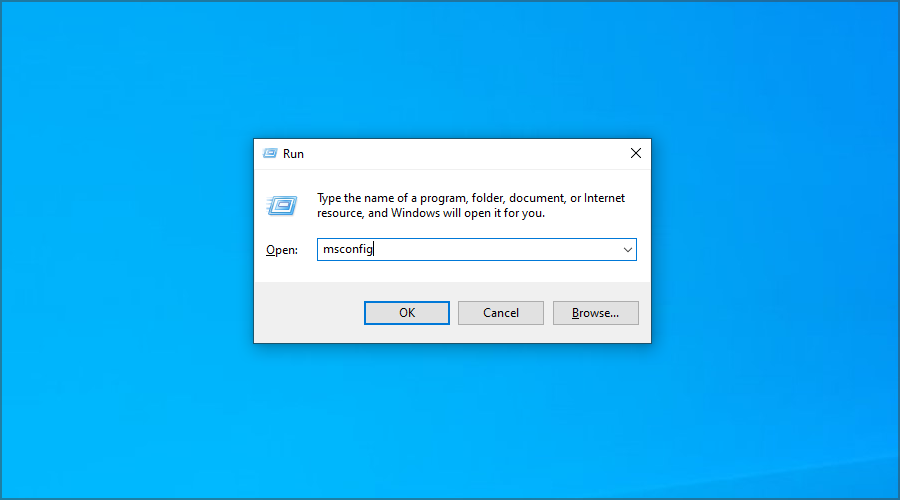
Please let us know how the procedure went for you by using the comments section below.

Windows 11 Snap Groups will be improved with Alt+Tab and Task view integrations

Although this built-in OS feature is pretty good already, even though it has the occasional fail, as all software do, the tech giant decided its time for some improvements.

We all know that Windows 11’s flagship multitasking feature is support for Snap Groups which is based on the windows snap capability of the operating system.

Snap Groups is arguably the biggest change to Snap since Windows 8.1, and its a really trustworthy and useful feature.

New integration coming to the Windows 11 Snap Groups

Creating a snap layout is done by launching two or more apps on the desktop, and theb choosing the window you want to snap to one half of the screen, and then drag it to the edge.

Or you can also hover your mouse over the maximize button and snap your open windows. Pretty easy, right?

Microsoft really listened to the feedback it received and its working on a series of improvements based upon Snap groups.

Starting with Windows 11 Build 22494, Redmond developers are now testing snap groups integration in the Alt + Tab and Task View.

Its all going to get wasier and even more practical, as snap groups are simply displayed in the Alt + Tab UI, similar to how these apps appear when hovering over the taskbar.

Thanks to this new change, you can now directly switch to app groups instead of opening these apps one by one, which makes multitasking difficult.

But, of course, no one is forcing you to use it, it just comes activated by default. If you don’t want the Snap groups to appear in Alt + Tab or when hovering over taskbar icons, you can always turn off the integration from Settings.

It is worth noting that Microsoft is testing snap groups in ALT + TAB and Task View with some Windows Insiders.

This isn’t available to everyone and Microsoft could make more changes to the feature before pushing it out to everyone.

What’s your opinion on this new integration for snap groups in Windows 11? Share your thoughts with us in the comments section below.

Email Hosting Services for Business: Best to Use in 2026

Email still is one of the most frequently used mediums for businesses and consumers as well having more than one billion users throughout the whole world.

Because email is such a useful tool for communication, the demand for email hosting has constantly increased.

There are lots of email hosting services for Windows, and we chose five of the best along with their sets of features just to make your choice much more manageable.

Why do I need email hosting?

First of all, emails are the number one source of data leakage for businesses so you definitely make sure that your messages are properly encrypted and their contents are safe.

An email hosting service does just that. Even more, some of the offers include dedicated clients and extra security features.

It’s up to you and your needs on what features you go for but don’t treat this task lightly if you need to host the accounts of your customers or clients.

Which is the best business email hosting service?

Bluehost

Bluehost is an excellent email hosting service that provides an email size of at least 100 MB per each account and at least five email accounts.

When you want to build a website, you can start at Bluehost because the shared service delivers quite a robust platform that will turn out to be ideal for hosting your websites.

Bluehost automatically creates daily, weekly, and monthly backups of the entire account so that you will be able to easily restore your complete data with the single click of a mouse.

Best of all, this service can be controlled from one cPannel that is extremely friendly to use without any training or prior knowledge.

It’s good to know that each server is custom-built and that allows you to upgrade performance over time if your requirements grow in time.

Bluehost offers three plans according to users’ needs: Basic, Plus, and Prime. All are very competitive and offer great benefits.

You can check out the whole set of features that are packed in Bluehost and start using the service from its official website.

Check out the best features provided by this service:

  • The Basic plan offers five email accounts with 100 MB per each account
  • Both the Plus plan and the Prime plan provide an unlimited number of email accounts with unlimited email storage
  • The domain manager makes it easy to track, update and transfer, purchase, and administer all of your domains in a single place
  • You will be able to create and manage unlimited email accounts, and the advanced features include forwarding rules and account filters
  • You can also benefit from third-party compatibility, spam protection, and unique user account controls.

Bluehost

Profession and affordable email hosting service, with domain registration, site builder, and security included.
Free trial Visit website

SiteGround

SiteGround is an email hosting service for Windows that comes with a limited email size and unlimited email accounts. This web hosting service is crafted for a high-quality experience.

With SiteGround, the unique email hosting solution can be used to create and manage an unlimited number of personalized email accounts based on your website.

The service makes sure that both your website and email run smoothly on the servers and that your website will be safer than anywhere else.

SiteGround offers users three plans for their needs: StartUp which is created for a great web start, GrowBig that is ideal for users’ web growth, and GoGeek, a plan that is crafted for real web geeks.

The service also provides free website migration and the experts from SiteGround can migrate one existing website effortlessly and quickly at no cost.

Check out the best features of SiteGround:

  • This service has the fastest setup, and with just three clicks you can set up a new site
  • With the simple drag and drop website builder, you will be able to create the coolest website real quick
  • The StartUp Plan offers all the essential hosting features that you need to accommodate a beginner’s website, and this works great for smaller online shops
  • For more resources and premium features, besides the basic ones, the perfect choice is the GrowBig plan which is ideal for a heavily-trafficked website
  • The GoGeek Plan is best suited for an extremely heavily-trafficked website

SiteGround

All-in-one web, cloud, and WordPress hosting, with a built-in antispam efficient solution.
Check price Get it now

HostGator

HostGator is a great email hosting service for Windows that offers a limited email size and unlimited email accounts. Using this service, you will be able to enjoy robust web hosting at affordable prices.

HostGator also provides cloud hosting, WordPress hosting, reseller hosting, VPS hosting, dedicated hosting, application hosting, and all its services come with their own plans.

You will have webmail access, not to mention that you will be able to receive your emails on your phone via IMAP Support.

HostGator provides three hosting plans: the Hatchling Plan, the Baby Plan, and the Business Plan.

Check out the best features the HostGator offers its users:

  • All HostGator’s plans include email marketing services
  • The email features included in Windows hosting provide unlimited POP3 email accounts with SMTP
  • You will be able to prevent spam with SpamAssassin
  • Access the emails directly on your phone
  • You will get unlimited autoresponders, email aliases, mail forwards, 25 mailing lists, and more

HostGator

Get one of the best webmail and WordPress hosting at competitive pricing with HostGator.
Check price Get it now

iPage

Hosting your website with iPage will go beyond unlimited disk space, unlimited email addresses, and a free domain name. The service’s tools and training help users launch the entire web presence above the competitors.

The advanced email solutions provided by iPage include email, calendar, contacts, and task management, virus and spam protection.

The recommended email services are the Premium Spam Filter with more control over the spam filters and the Larger Mailbox Storage with increased storage and mail count limits.

It also includes a security suite that comes with business verification, malware scanning, a highly secure data center, and network scanning.

The experts from iPage are available by chat and phone anytime you need them, and they will assist you with any questions or issues that you might have.

Check out the best features of iPage below:

  • Sturdy website builder and a large selection of templates
  • Marketing tools and dedicated support
  • Secure webmail access
  • Chat and phone assistance
  • The SiteLock security software will keep your website and your customers safe

iPage

Get unlimited email addresses at your own domain and many more with this great tool.
Check price Get it now

Verio

Verio provides Windows hosting with a few email features. For instance, using Verio, you will be able to create unlimited email accounts.

The hosting plans include website creation tools, Google Webmaster tools, disk space, bandwidth and email, and more.

Besides email, you will also get commerce features, marketing, and promotion, hosting utilities and settings, multimedia options, website reports and statistics, and more.

Customer support includes an extensive help center, tutorials, and 24/7 support. You can check out the complete set of features and plans of the Verio service on the official website.

Check out the best functionalities included in Verio below:

  • Forwarding accounts and Autoresponder
  • Spam email filtering and browser-based email or webmail
  • Unlimited number of email accounts
  • Extensive help center with 24/7 support
  • Website creation tools included

⇒ Get Verio

Email hosting provides a great way to create addresses that are connected to your own domain, and this will definitely add credibility to your services and communications.

Using email hosting services, you will also get additional resources and enhanced availability for your customers.

Having the ability to access your inbox and the related features anytime will offer users peace of mind.

These email hosting services for Windows come with great sets of features so make sure to check them all out and choose the ideal software for your needs.

We recommend that you visit these services’ official websites where you can also see their available plans and pricing.

And while we’re on the subject, take a look at the best Windows hosting services with unlimited domains and find other great offers.

Tell us about your experience with these services in our comments section below.

Just Dance 2022 video game is now live on Xbox One and Xbox Series X consoles

Just Dance 2022, the latest entry in the long-running Just Dance video game franchise, is now live on Microsoft’s Xbox Series X and Xbox One console families.

Just Dance 2022 supports Xbox’s Smart Delivery feature which essentially means that the same version of the game will play the same across both current and last-gen Xbox consoles and that buying it on one platform will unlock it for free on the other.

It should be noted that, while the Just Dance 2022 video game has been confirmed to support the Kinect sensor on Xbox One consoles, this functionality won’t work on the Xbox Series X or Xbox Series S as both of these newer consoles lack Kinect functionality.

All players on Xbox One and Xbox Series X consoles are able to use the free Just Dance smartphone app to turn their iPhone or Android smartphone into a motion tracking tool.

Just Dance 2022 supports local multiplayer for up to six players though appears to lack any form of online multiplayer which will likely disappoint fans of the various online modes introduced in previous releases.

Here’s the official game description:

Just Dance® 2022, the ultimate dance game, is back with new universes and 40 hot new tracks from chart-topping hits like “Believer” by Imagine Dragons, “Level Up” by Ciara, and more!

  • Looking for the perfect game to dance to the latest hits and share some fun with friends and family? Just Dance 2022 is for you!
  • Exercise while having fun and start your own routine with Sweat mode. Keep yourself motivated, track the calories burnt and your time spent dancing.
  • Team up with your friends and rule the dance floor in Co-op mode.
  • Join more than 138 million players around the world and Just Dance It Out!
  • This game leverages Smart Delivery allowing access to both the Xbox One title and the Xbox Series X|S title

Just Dance 2022 is available in both a Standard Edition that includes the base game and a Deluxe Edition that comes with the game and four free months of the Just Dance Unlimited subscription service which unlocks more songs and routines.

Want more Xbox news? Follow us on Twitter, Pinterest, and Facebook.

Just Dance® 2022
Just Dance® 2022
Developer:
UBISOFT
Price:
Free


Just Dance® 2022 Deluxe Edition
Developer:
UBISOFT
Price:
Free

Ghost Recon, Warhammer, and Street Power Soccer Xbox video games are free this weekend

The Tom Clancy’s Ghost Recon Breakpoint, Warhammer: Vermintide 2, and Street Power Soccer video games are now free to play on both Xbox One and Xbox Series X console generations for all players with an active Xbox Live Gold subscription.

The free play promotion will run until Sunday, November 7 at 11:59 p.m. PST and, like previous Free Play Days, will allow participants to download each game and play them fully as if they own them outright.

Also like previous Free Play Days, each title has also had their digital price reduced for several days to encourage Xbox console owners to pick them up after playing them for free.

Tom Clancy’s Ghost Recon Breakpoint has been given an 80 to 85% discount for its various editions and a 70% discount for its 1 Year Pass. The base game of Warhammer: Vermintide 2 is now 75% cheaper than usual while its various DLC packages have also had their prices slashed.

Finally, Street Power Soccer has been given a 70% discount which brings the cost of the entire game down to just $9.

Are you going to play any of these games this weekend? Let us know which ones in the comments below and then follow us on Pinterest, Twitter, and Facebook for more Xbox gaming news.


Warhammer: Vermintide 2
Developer:
Fatshark
Price:
$29.99+


Street Power Soccer
Street Power Soccer
Price:
$29.99

Top 5+ best headphones for the Sound Blaster Z soundcard

The Sound Blaster Z soundcard from Creative is one of the most powerful and qualitative sound cards available on the market, and people appreciate it for a variety of reasons.

The fact that this soundcard can reach 116 dB when it comes to signal-to-noise ratio implies that it can reproduce sounds with a 99.99% clarity, making any normal cards sound faulty in comparison.

The Sound Blaster Z soundcard has some other amazing features which are worth mentioning:

  • SBX Pro Studio technologies – ensure amazing 3D sorround sound
  • CrystalVoice – perfect for online gaming and videocalls – optimizes your voice to be heard clearely
  • Microphone extension – using a beamforming technology, it captures your voice perfectly and cancels any other noises in your surroundings
  • Sound Core3D audio processor – built with a quad-core CPU capable of processing all features optimally

Even though this soundcard was not designed specifically with gaming in mind, pairing this with a powerful gaming PC will ensure an amazingly-immersive experience.

The features included in this amazing soundcard from Creative were tested in games like Call of Duty: Black Ops 2, and other similar shooters, and the results were impressive. Besides having a good gaming PC, it is also very important to invest in a great mousepad for FPS games.

You can easily and identify the direction of your opponents just by the sound of their steps, and this technology is helped even more by using high-quality headphones.

Even though this soundcard is an amazing option for both headphones and speaker systems, today we will focus on the best headphone options to explore immersive virtual worlds from the comfort of your PC.

How we chose the best headphones for a Sound Blaster Z card

Our team of expert testers, with a combined experience of 15 years, has tackled a variety of testing tasks for any device you could imagine.

Their experience comes into play as a very important element when choosing the products we described in this guide, and a large variety of factors have been taken into consideration.

The options that have been chosen offer great quality and cover the entire spectrum of price ranges, thus enabling everybody to find something that fits their needs both financially and otherwise.

Sony WH-1000XM4

  • Dual Noise Sensor
  • Edge-AI sound optimizations
  • 30 hour playback time with one charge
  • Great comfort
  • Touch sensor for music control and answering calls
  • Automatically pauses playback when removed
  • Price can be too much for some users

The Sony WH-1000XM4 headphones are our top pick for the best headphones to match with the powerful Sound Blaster Z card from Creative.

This amazingly-comfortable device uses a powerful Dual Noise Sensor technology to reduce ambient sound no matter how intense it is, and the great built-in pads also physically isolate your ears from any exterior disturbances.

The combination of these two elements ensures that you won’t be distracted by any sounds while playing games or listening to your favorite music.

When it comes to music-related optimization, the Sony WH-1000XM4 uses Edge-AI, which is a feature developed with the help of Sony Music Studios Tokyo. This ensures that the full sound spectrum produced by your powerful soundcard will be hitting your eardrum in exactly the right way.

Being wireless headphones, the battery life is another important aspect, and these headphones pass the test with flying colors, enabling you to use to for up to 30 hours with one charge. To ensure that you can always use them, they also come with a feature that allows 5 hours of playback with just a 10-minute charge.


Sony WH1000XM2

  • Comes with removable cable
  • Bluetooth and NFC connection
  • 30 hours wireless playback / 40 hours wired
  • Noise canceling technology
  • DSEE HX, S-Master HX, and LDAC
  • Doesn't have sound optimizations

The Sony WH1000XM2 is the previous model of the first option in this list, making them some amazing headphones for the Sound Blaster Z soundcard as well.

Coming at a more affordable price than the previously-mentioned model, this device also uses digital noise-canceling which will protect your listening experience from any exterior disturbances, with some great customization options for atmospheric pressure.

These headphones are extremely portable, and allow freedom of movement with the use of a wireless connection through Bluetooth, and also NFC.

Even more, the headphones can automatically detect the level and pitch of the ambient sound, and then optimize the noise-canceling process to deal with the sounds effectively, giving you an immersive experience no matter if you’re listening to music or playing your favorite games.

Using some high-quality audio codecs like DSEE HX, S-Master HX, and LDAC ensures that the quality of the sound emitted by your Creative Sound Blaster Z soundcard can be appreciated in full effect.


Bose QuietComfort 35 II

  • 3-levels of noise cancelling
  • Comes with a useful carry-case
  • 20 hours battery life on one charge
  • Alexa-enabled
  • Bose AR enabled - audio augumented reality
  • No touch controls

No top 5 headphones list would be complete without having a Bose headphone set included, and in this case, we chose the QuietComfort 35 II model.

As the name suggests, this set of headphones is one of the most comfortable we tried for this list, and the number of features included makes it a very good fit for the Sound Blaster Z soundcard from Creative.

This amazing device comes with great noise cancellation features, allowing 3 different levels which will fit almost any environment you find yourself in. No matter if you’re listening to your favorite music next to a construction site, or you’re simply at home with family playing games, you will not be bothered by anything happening around you.

As these headphones are Alexa-enabled, you can use voice commands to control any other connected devices, and the dual-microphone system ensures that all the commands and even your voice during calls come in clear and crisp.

Even though it comes with a 12-inch USB cable for charging, these headphones work easily with Bluetooth pairing, and the settings for all these elements can be controlled by using the Bose Connect application.


Sennheiser HD 280 Pro

  • Constant sound pressure of 113 dB
  • Nominal impedance 64 Ohm
  • Long audio cable to easy movement
  • Replaceble ear pads, headband, and audio cord
  • No noise cancelation
  • Cable connection

The Sennheiser HD 280 Pro is another amazing headphone set that will be able to maximize the quality and crispness of the sound produced by the Sound Blaster Z, while also ensuring an acceptable price and great comfort.

With a constant sound pressure of 113 dB, and a nominal impedance of 64 Ohm, this model offers you an unbelievable sound reproduction capability, producing warm and natural sounds with great overall clarity.

As opposed to the other models we presented in this guide, this set of headphones has a cable, which, even though limits movement at some level, ensures enough space to move by being 3.3 to 9.8 feet, because of its coils.

The around the ear padded cups offer dynamic sounds and provide a reduction of outside noise of up to 32 dB. Even though it doesn’t use any sort of noise-canceling technology, the design is what makes it feel like it does.

Even more, the HD 280 Pro ear pads and headband, and the audio cord can be easily replaced, thus ensuring a long-lasting Sennheiser experience.


Sony WHCH710N

  • 2 x 30mm driver units
  • NFC streaming
  • Hands-free capability
  • 35 hours of playback on one charge
  • Adjustable metal sliders for comfort
  • The quality of the material could be better

The WHCH710N from Sony is our top pick for an affordable set of headphones that work perfectly with the Sound Blaster Z, and besides the good price, they also come with a wide range of very useful features.

To start with, this wireless headphone model uses noise cancellation to remove any outside perturbance when listening to music or playing games, and uses a Dual Noise Sensor technology to identify what sort of environment you are in, and thus automatically adapt the features.

One charge can last up to 35 hours, and also supports quick charging, to ensure that no matter how much time you want to use them, they are ready to provide you with a qualitative sound experience.

Besides this, the WHCH710N also offers NFC streaming and offers the full hands-free capability to take calls or use your device’s voice assistant. To top it off, these headphones come with two 30 mm driver units, which will be more than enough volume power even for the most demanding users.


Bottom runners

Even though our top 5 list includes some of the best options on the market, during our tests some other products stood out from the crowd, which are worth mentioning:

➡ Skullcandy Crusher Evo

➡ Anker Soundcore Life Q20


As you can see, our list includes a variety of headphones with which make a good companion for the powerful Sound Blaster Z soundcard, as we included both wireless and wired devices with a variety of prices.

Choosing the right fit both when it comes to your feature preferences and the money you’re willing to spend just got much easier.

Feel free to share your thoughts with us by using the comment section below.

We will soon be able to join Teams meetings as 3D avatars

The tech giant is bringing a lot of new changes, besides the plethora already added, to their flagship communications app.

Even more, since the Redmond company decided to bundle Teams with their latest operating system. During this year’s Ignite conference, a new awesome, futuristic feature was announced.

Mesh for Microsoft Teams will create new options for digital meetups with personalized avatars and 3-D environments.

Mesh for Microsoft Teams introduces a new generation of 2D and 3D meeting experiences with personalized avatars and immersive spaces to bridge the gap between physical and digital worlds. With personalized avatars, you can feel presence in meetings without turning on cameras.

This is pretty exciting so let’s cut to the chase and see exactly what the future has in store for us.

Microsoft aims to enhance the Teams virtual meeting spaces

According to Microsoft, users will have more options to join meeting rooms and virtual collaboration spaces using redesigned avatars that will move and react based on your speech without needing a camera or virtual headset.

This latest announcement comes just days after Facebook unveiled its similar virtual avatar technology that will be available in its Meta social media platform relaunch.

The tech giant stated that users will not only be able to come together in new virtual reality rooms but will be able to collaborate and share documents stored in Microsoft 365.

Furthermore, users can join a Mesh room from their PC, smartphone, or mixed reality device, which is pretty accessible.

The new feature came about through a multiyear collaboration between Microsoft and mega-partner Accenture, an Ireland-based IT services firm that is known for virtual conference and meeting technologies.

Mesh for Microsoft Teams will start its rollout process in 2022, as a preview, and will initially launch with a set of prebuilt immersive spaces.

Organizations will have options to create their own custom spaces to be added as time goes on. Pretty neat, right?

Lots of other new features coming to Teams

Besides the Mesh announcement, the company unveiled a lot more features currently rolling out to its collaboration and communication platform.

The inclusion of a virtual green room to enhance webinars and large meetings is another feature worth mentioning.

This will allow organizers and guest speakers to interact in a second virtual space to collaborate on presentation content, monitor chat, and socialize. Redmond officials said this feature will be available in preview in early 2022.

Microsoft is also looking to help IT keep a handle on securing shared documents with a new feature planned for 2022 called Teams Connect.

It will allow for Teams channels to be shared with outside individuals and organizations, with IT retaining control on how and what documents can be shared.

Teams Chat is getting upgraded over the coming months. One new enhancement will permit individuals in a Teams organization to use their personal Teams account to chat and collaborate.

Another is the ability to chat with yourself, which Microsoft said will be useful for personal organization and keeping memos stored in one place.

And let’s not forget about the other improvements brought to the popular communications app lately, among which are enhanced phishing protection, as well as the walkie-talkie function.

Excited about all the goodies being brought to your favorite conference application? Let us know in the comments section below.

Microsoft Authenticator app gets new logo and enterprise features

Microsoft has updated its Authenticator app for iOS and Android today, and the new bits bring a refreshed icon and new account management features for enterprise users. The old app icon used a white lockpick over a blue background, and the new logo reverses the color palette with a blue lockpick over a white background.

The Microsoft Authenticator already lets users manage MSA accounts within the app, and with this latest update users with Azure AD school accounts will get the same capabilities. The account management options include changing passwords, updating your work or school account’s authentication methods, and reviewing your recent activity.

thumbnail image 2 of blog post titled Microsoft Authenticator app – easier ways to add or manage enterprise accounts, and a cool new icon

For users who have yet to add their work or school accounts in Microsoft Authenticator, this latest update also makes this experience more seamless. Now, users can sign in with their credentials in Microsoft Authenticator without needing to scan a QR Code from another screen.

If you’re not seeing the new app icon on your iOS and Android devices yet, Microsoft says that it will roll out gradually throughout the month. Microsoft Authenticator is a very useful app for consumers and enterprise users living in the Microsoft ecosystem, and you can get it from the download links below.


Microsoft Authenticator

Excel on the web introduces Office Scripts buttons in preview

Microsoft has announced a new Script buttons feature that is coming soon to Excel on the web. This has been a top-requested feature from users, who will be able to create and add script buttons to a workbook and easily share their Office Scripts with colleagues.

For those unfamiliar, Office scripts allow users to automate their repetitive day-to-day tasks or workflows. Scripts lets Excel users record their actions within a workbook and save them to be used later or shared with others.

To add a new script button to a workbook, you will need to navigate to the Automate tab and choose your desired script. Click the More options (…) menu available in the All Scripts pane, and choose the Add button option. Once done, you will see a button in the workbook that runs the associated script.

Microsoft says the Script buttons feature is currently rolling out in preview to all Microsoft 365 commercial or educational subscribers on the web. To get started with Office scripts, we invite you to check out the samples and scenarios Microsoft shared on this support page.

Microsoft Teams to add support for muting notifications during meetings

Microsoft Teams is adding a new option to disable all in-app notifications during meetings. This new feature should help meeting participants pay attention to the speaker rather than being distracted by private messages and mentions.

Once the feature rolls out, users will be able to enable an option to turn off notifications before starting a meeting. Microsoft notes that those who find notifications distracting will also have the option to completely disable them for all meetings.

Currently, Microsoft Teams users who want to disable notifications can either turn them off in settings, change their status to “Do not Disturb,” or use system-level features such as Focus Assist on Windows. Microsoft Teams is about to finally simplify this, and the ability to mute notification during meetings is coming to the desktop and web apps later this month, according to the Microsoft 365 roadmap.

15 Best PDF Encryption Software [Windows & Mac]

Encrypting PDF files enables you to keep them protected against unauthorized access. Electronic documents can be accessed by hackers when vital information is at risk.

Taking into consideration the fact that they can be easily hacked, you need to act fast. One of the ways to avoid this is by using PDF encryption software that better suits your needs.

There are plenty of options to choose from, so make sure to check out our recommendations.

How can PDF encryption help you?

Nowadays, most important documents are created, stored, and delivered in PDF format because they have many options to encrypt and limit access to their different options.

For instance, you can block the user from opening the file altogether with a password or you can restrict him from performing modifications on the file.

The document is protected with a password

Some of the tools in our list can prevent users from editing it in any way or even copying or printing it. So there is a lot of flexibility on the limitations.

That’s why, PDF encryption not only safeguards your documents but can also give you a range of options when it comes to file management.

That being said, let’s see what are the best PDF encryption software for your device and pick the one that suits your needs best:

  1. Soda PDF – OCR feature
  2. Adobe Acrobat Pro DC – Password-control
  3. Locklizard – Stops screen grabbers
  4. PDFelement – Conversation bubbles
  5. WinZip – Advanced compression tools
  6. Icecream PDF Editor – Great annotation features
  7. PDF Converter Pro for Windows – Outstanding file conversion features
  8. PDF Suite – Good search function
  9. Foxit PDF Security Suite – Suitable for corporate organizations
  10. PDF24 PDF Creator – Free usage
  11. PDF Creator – Low resource
  12. PDF Creator Pro – Easy to use
  13. PDF Studio – Intuitive interface
  14. PDF Encrypt and Decrypt – Basic features
  15. Smart PDF Creator– Reliable batch-conversion

What are the best PDF encryption software tools to download?

Soda PDF – OCR feature

Soda PDF is a full-featured PDF solution and among the most secure software that allows you to easily edit PDFs.

This software lets you encrypt files with password protection, thus preventing unauthorized access.

You just have to choose a PDF, enter the password to confirm the encryption, and make sure that this password is the one you want to be set.

It is as simple as that! Password protection prevents anyone without that key from opening your PDF file.

With Soda PDF you can have control of permissions that include editing, copying, and printing your files.

So, you can prevent people from making further modifications or any unwanted changes to your PDF with the advanced security tools of Soda PDF.

If you are unsure about using the password, you can only remove it by using the original password that was used the first time.

Soda PDF is the perfect alternative to Adobe Acrobat due to its easy-to-use PDF tools that help you create, convert, split, annotate, merge, fill forms, set file permissions, and even E-Sign your PDFs by adding your legally electronic signature.

Key features you are about to enjoy:

  • Create or convert multiple PDFs at once
  • Add page watermarks
  • Bates numbering & secure permissions to multiple folders
  • OCR Edit to search, recognize, and modify text
  • You may add page numbers

Soda PDF

That’s your chance to keep your information safe and secure and all with just a few clicks!
Check price Visit Website

Adobe Acrobat Pro DC – Password-control

People who work with sensitive information can effectively use this software. This tool enables you to create and edit PDFs.

The software has an interface adapted for a desktop display as for a smartphone one, so reviewing, sharing, and adding comments to documents is easier than ever.

Adobe Acrobat Pro can restrict access to your documents, so another user won’t be able to print or edit the document.

The restrictions can be set at the opening of the document or when a person wants to copy, edit, scan or print the information from the PDF, so you have to be sure that your file is secured.

However, the PDF file can be copied to the laptop of another user or on an external drive without any problems.

Besides keeping the confidentiality of your information, Adobe Acrobat Pro DC has a lot more outstanding features to take into consideration.

Main Adobe Acrobat Pro DC key features you are about to enjoy:

  • Access to your data can be controlled by using passwords
  • Team protection which makes it suitable for personal use and organizations alike
  • Unmatched document security
  • Compatible with Windows 10

Adobe Acrobat Pro DC

Looking for the best PDF encryption software? Install Adobe Acrobat Pro DC and you won’t regret your decision.
Free trial Visit Website

Locklizard – Stops screen grabbers

Forget about passwords, certificates, JavaScript, or plugins. Protect PDF documents, and stop leakage, unauthorized sharing, and theft using Locklizard.

Locklizard Safeguard PDF Security software takes PDF file protection to the next level, stopping users from sharing or pirating PDF files.

Unlike passwords and restrictions that can be easily removed, Safeguard uses a transparent key licensing system with encryption and DRM controls for persistent protection.

In other words, after creating a secure PDF file, you issue users with a license that controls access to files. The DRM controls applied to the PDF restrict the user from copying, editing, printing, or sharing the file.

You can even set PDF files to expire automatically, or instantly revoke them so they can no longer be accessed.

Although it’s a comprehensive solution that perfectly safeguards your documents, Locklizard is simple to use and doesn’t require a complicated setup to work.

You can create secure PDFs manually or batch-protect them using command-line encryption.

Locklizard provides a web-based administration system where you create user accounts, change expiry dates, and revoke secure PDF documents.

Let’s see what are its best features:

  • Stops PDF editing and modifying (including form fields)
  • Prevents copy and paste
  • Stops screen grabbers
  • Locks PDF files to devices to prevent sharing
  • Locks PDF files to IP and country locations
  • Disables printing or you can limit prints
  • Expire PDF files on a set date, after a number of days, opens or prints
  • Revoke PDF access
  • Add dynamic watermarks that cannot be removed
  • Track PDF use – log views and prints

Locklizard

Seamlessly protect your documents with DRM and encryption and prevent any unauthorized intervention.
Check price Visit Website

PDFelement – Conversation bubbles

PDFelement is an ideal software for securing PDF files. All you need to do is click on the Protect tab and select the option that best suits your needs.

This software makes use of passwords in order to prevent unauthorized users from accessing or changing sensitive PDFs.

Another great feature is its PDF convertor to a lot of other possible formats like Word, Powerpoint, or Excel among others.

You will be able to create excellent documents using a pretty big library of free templates that will enhance your work.

PDFelement will be great for personal use but you can also create bulk tasks so it will fit for higher productivity office jobs.

Its familiar-looking interface will certainly help you get the hang out of all the features really easily if you’ve used other document processing software.

The tool allows you to easily edit, organize, and transform PDFs and it has a competitive price.

Take a look at its most important features:

  • It can convert PDF to Word/PowerPoint/Excel/HTML/RTF/EPUB
  • Edit and fill out PDF forms
  • Advanced annotation; Conversation bubbles, highlighters, shapes, Sticky notes, etc.
  • It has a lot of templates and many great features
  • You can add watermarks easily

PDFelement

Edit your PDF files and secure them with this reliable tool.
Free Trial Visit Website

WinZip – Advanced compression tools

WinZip isn’t only one of the best compression software tools, but also one that allows password protecting your PDFs with ease.

Adding a password to your files in WinZip is extremely intuitive, and it takes mere seconds. And be sure of the fact that encrypting your Zip files isn’t the last thing that you can do.

All you need to do is to turn the Encrypt option on from the right pane and drag your PDF file in the center window.

You will be prompted to enter the desired password and repeat it for protection. Just remember to also communicate the password when you send the file to someone.

The file will be encrypted so without that key, the recipient won’t be able to access its contents.

Of course, another great feature is that you can manage or send your PDFs straight from WinZip right away.

Probably you already know that but we remind you that this tool can also be used for backing up your data securely and freeing some space on your drive in the process.

Great key features that WinZip brings to the table:

  • Easy to install
  • Intuitive interface
  • Advanced compression tools
  • Repair Zip File features
  • Banking-level encryption

WinZip

If you want advanced PDF encryption software, WinZip is clearly up for the task! Ready to enjoy it?
Check price Visit Website

Icecream PDF Editor – Great annotation features

If you are looking for a tool that will make your life easier when it comes to editing, then we recommend that you try the Icecream PDF Editor.

This software can be installed on your Windows device easily, and it’s also compatible with Mac so you can pretty much use it on any machine.

If you want to create a PDF document from scratch or add a stamp, it can be easily done with the Icecream PDF Editor.

Splitting and merging PDF files is another great function this software comes with, and it will save you a lot of time searching for other ways to do that.

And yes, it also does a great job protecting your documents with a password or limiting the editing and copying rights of the users.

You can search for words in your PDF, make annotations, edit and rotate objects, or simply draw, all to personalize your work in style.

The interface is lighter, intuitive, and it has amazing features that you can use to get professional results.

Let’s review its best features:

  • Edit text and manage pages with ease
  • Password protects your documents and limits their editing and copying rights
  • Complete built-in forms within PDF documents
  • Search and annotation features
  • Combine or extract pages from a document

Icecream PDF Editor

Icecream PDF Editor is an all-in-one software that allows you to efficiently encrypt your PDFs. Ready to try it?
Check price Visit Website

PDF Converter Pro for Windows – Outstanding file conversion features

PDF Converter Pro for Windows by Wondershare allows you to use passwords to enable restrictions in functions.

This software is among the most advanced version of Wondershare products; it comes with improved security and features that suit every user’s needs.

It’s also great that the tool is fully compatible with Excel, Word, PowerPoint, HTML, and image formats so you can export your documents conveniently.

If you’ve scanned some important PDF documents, you can easily turn them back to their digital form by using the Wondershare PDF Converter Pro OCR feature.

With the latest technology, the solution will detect all elements from the image to create perfectly editable documents in a lot of possible formats.

Do you have any PDF forms to fill out? No problem, not only you can use this tool but you can also make your own forms in seconds.

Let’s go through its best features:

  • It uses password protection to generate encryption
  • Without the password, documents will not open which makes modifying your content impossible to achieve
  • Advanced file conversion features
  • Compatible with Windows 10/ Vista/ XP
  • It can successfully compete with any other software that supports bulk conversions

PDF Converter Pro for Windows

With this excellent app, your PDFs will not open without your password.
Free Trial Visit Website

PDF Suite – Good search function

PDF Suite enables you to read, create, edit, change, or convert, and review secure PDFs easily.

With this software, documents can be easily secured through applicable 256-bit passwords and restrictions for editing and copying your files.

The tool can be a great asset for your business because it’s capable of bulk PDF conversion to a lot of popular formats like Office, or HTML, and TXT.

It has an intuitive interface which makes it very easy to manage electronic documents anywhere at any time.

Moreover, it is only 3MB in size so it definitely has an extremely small footprint on your system and it’s pretty fast too.

This software has a free trial product, so they offer you the opportunity to evaluate the product and see its functionality before making payments.

Take a look at some of its best features:

  • Convert printable files to PDF
  • Export PDF into Word or Image
  • Convert several PDF files at the same time to Word, Excel, HTML, PPT, TXT, and RTF
  • Good search function
  • Compatible with Windows 10

⇒ Get PDF Suite

Foxit PDF Security Suite – Suitable for corporate organizations

Foxit PDF Security Suite is very important; it integrates Microsoft Rights Management Services environments. With this software, you can reliably share confidential documents.

It enables you to do more than open and edit a document. It has a lot of mechanisms and security systems installed, which suits enterprise needs.

This tool is supported on Windows, macOS, Online, iOS, and Android so it basically works on every platform you want to use.

That means that you can edit and manage all your documents whenever and wherever you have an Internet connection on your device.

Not only that, but being based on a Cloud platform, you can also collaborate with your teammates on the documents and initiate shared reviews for feedback.

You can merge and split documents, drag and drop pages within a file or from a document to another, add stamps, watermarks, headers, footers, and a lot more content.

Let’s see some of its most important features:

  • It offers the necessary features users need to print, copy, view, and annotate PDF files
  • Audit logs, screenshot prevention, and printer restriction
  • For the encryption of PDF files, it makes use Foxit add-ins
  • It is very effective for businesses and corporate organizations
  • Trial Version and Premium Version

⇒ Get Foxit PDF Security Suite

PDF24 PDF Creator – Free usage

PDF24 PDF Creator can be used to create, edit, encrypt, and decrypt PDF files with just a few clicks.

What is amazing about this tool is that it has an impressive array of features for a free software solution that doesn’t even bother you with ads.

And it also can export your documents in professional image files like EPS, PS, TIFF, and PCX, just to name some of them.

Another great feature is the PDF compression feature which allows you to reduce the size of your documents even in bulk.

It means that if you work with big files that can hardly be attached to an e-mail recipient, you can greatly reduce their size to fit.

And if you work with a huge library of PDF files, that can save a lot of space on your storage drive and allow easier backup.

Although it doesn’t excel in protection features, you can still password-protect your document and limit access to editing.

Take a closer look at this tool’s best features:

  • It is free and easy to use
  • Create and edit PDF files
  • Watermarks, digital paper, or signatures can be added
  • Export to PDF, EPS, PS, PCL, JPEG, PNG, TIFF, PCX, etc.
  • Compatible with Windows 10, Vista/ XP

⇒ Get PDF24 PDF Creator

PDF Creator – Low resource

PDF Creator is a very good software for securing electronic documents so you should definitely give it a try.

This tool can be used in the encryption of PDF files, decryption of PDF files, and the installation of a virtual PDF printer.

It helps you convert any printable document to PDF, either within the application or by printing directly from the original document.

At the same time, you can convert PDF files to images in many popular formats like JPG, PNG, and TIFF.

Let’s review a few of its best features:

  • Virtual PDF printer can enable the creation of PDF documents from a lot of programs
  • PDF Creator has a free version and it’s easy to use
  • Very small footprint on your system
  • Compatible with Windows 10
  • Password encryption capability

⇒ Get PDF Creator

PDF Creator Pro – Easy to use

GIRDAC PDF Converter Pro is a software utility that you can use to convert PDF to Word, and PDF to any Office files.

And it also can convert scanned PDFs through OCR technology but only in English. It can do a great job of creating PDFs from any printable file.

It’s also very easy to secure your documents by password-protecting them and thus limiting access.

The tool has a rather outdated user interface with 90s design but it’s very small and it gets the job done so you can give it a try nevertheless.

Take a glance at its best features:

  • Create PDF files easily
  • PDF Creator Pro can be used for reading, editing, encrypting and decrypting PDF files
  • Free Trial and Full version available
  • 12 MB
  • Compatible with Windows 10

⇒ Get PDF Creator Pro

PDF Studio – Intuitive interface

PDF Studio is a PDF editing application worthy of your attention. Not only because you can protect and encrypt your documents, but also because it’s great for filling forms.

This tool comes with a Free Trial version but there are also Standard and Pro versions that unlock many features. For instance, only the Pro version comes with OCR scanning.

Even so, the software comes with pretty competitive pricing compared to other software with the same features.

And it’s compatible with Windows, Mac, and Linux so you can install it on pretty much any machine you’re working on.

Take a look at some of its most interesting features:

  • PDF Studio can be used for converting PDF files, editing PDF files, encrypting PDF files, decrypting PDF files and opening of DOC and DOCX files
  • Free Trial and Full version available
  • Only 500MB in full version with all features
  • Compatible with Windows 10

⇒ Get PDF Studio

PDF Encrypt and Decrypt – Basic features

The PDF Encrypt and Decrypt software does exactly and only what it says on the box: encrypt and decrypt PDF files using a password.

This way, you can prevent PDF files from being printed, changed, copied, extracted, signed, filled, assembled, and/or merged.

Its user interface looks outdated but the app is so small and effective that you might just give it a chance.

Get a glimpse at its best features:

  • PDF Encrypt and Decrypt can encrypt and decrypt PDF files
  • Full version
  • Only 11 MB
  • Compatible with Windows 10
  • Very easy to use

⇒ Get PDF Encrypt and Decrypt

Smart PDF Creator – Reliable batch-conversion

Smart PDF Creator enables you to easily secure any document and it also comes with a simple PDF convertor.

In fact, it can actually perform batch conversion of DOC, HTML, XLS, JPEG, TIFF, and RTF from and to the PDF format.

This tool is pretty clever because it embeds in the Word toolbar and with one click you can convert the document you were working on in PDF.

Let’s see a few of its best features:

  • Batch conversion of DOC, HTML, XLS, JPEG, TIFF, and RTF from and to PDF format
  • Smart PDF Creator can perform the following: converting PDF files, encrypting PDF files, decrypting PDF files, and opening of DOC and DOCX files
  • Free trial and Full versions available
  • Compatible with Windows 10

⇒ Get Smart PDF Creator

It is very important to secure your PDF files; this will prevent hackers from accessing your files. Aside from that, you can create documents, edit them, organize your files, etc.

We hope that you found the best PDF encryption software for your needs and now you can keep your documents safe.

You might also be interested in how to lock a PDF so it cannot be edited. It’s a practical guide that will further help you secure your documents.

Even more, this is how you change the security settings of a PDF file. That’s extremely important when dealing with sensitive data.

Individuals, small businesses, and organizations cannot do without this software. Do share with us your experience in using any of the programs we mentioned above.

Forza Horizon 5 review: Xbox Series X gets its must play racer

Forza Horizon 5, one of the most anticipated games of the holiday season will be released next week on November 9, and it marks the comeback of one of Microsoft’s most popular game franchises. This is the first new Forza game since the release of the critically-acclaimed Forza Horizon 4 back in 2018, and it’s also the first Forza Horizon game to be released since Microsoft acquired UK-based developer PlayGround Games back in 2018.

Until the release of Forza Horizon 4 three years ago, Playground Games and Turn 10 Studios used to alternate with a new Forza Motorsport and a new Forza Horizon game every year. However, the transition to a new console generation has affected this well-oiled release cycle. As a result, Microsoft’s next-gen Xbox Series X and Series S consoles only had two “next-gen” racing games at launch, an updated version of Forza Horizon 4 and Codemasters’ Dirt 5, which I personally found quite disappointing.

Just like Forza Horizon 4, Forza Horizon 5 is a cross-gen game that is also being released on Xbox One consoles, but it’s still a big leap forward for the open-world racing franchise. It’s definitely one of the best-looking games you can play on Xbox Series X|S consoles today, featuring the largest open world ever seen in a Forza game. It’s also an excellent casual game for players who aren’t really into racing games, and it remains far more accessible than the pretty demanding Forza Motorsport series.

Every Forza Horizon game is set in a brand new location, and Forza Horizon 5 moves the action from Great Britain to sunny Mexico. This destination is a great choice and a nice homage to one of the rare markets outside of the US where the Xbox brand is very popular. Forza Horizon 5 will launch day one on Xbox Game Pass for Console and PC on November 9, and it will be the last blockbuster Xbox exclusive of 2021 until the release of Halo Infinite on December 8.

Welcome to Mexico

If Forza Horizon 4’s Great Britain was quite a departure from Forza Horizon 3’s sunny Australia, Forza Horizon 5 marks the return to a more exotic location. Playground Games’ fictional representation of Mexico features 11 different biomes including deserts, jungles, a mountain with a volcano, as well as beautifully-recreated historic cities. Once again, the Forza Horizon developer really deserves credit for its attention to detail, and the 3 years gap between Forza Horizon 4 and Horizon 5 clearly wasn’t for nothing.

The large open world in Forza Horizon 5 uses a dynamic weather system with a night and day cycle, and the different seasons introduced in Forza Horizon 4 are also coming back. I only got to see the Summer season during the review period, but seasons changes will once again kick off every Thursdays alongside some new limited-time challenges. Seasons will affect the different Mexican biomes in various ways, though again, I can’t wait to see what’s going to happen with the first season change happening later today.

Playground Games has already announced two DLCs for Forza Horizon 5, though there are no details yet. Forza Horizon 3 and 4 had excellent Hot Wheels and Lego-themed DLCs, and I hope that PlayGround Games will once again surprise us with new adventures all types of gamers can enjoy. In the meantime, the Forza Horizon 5 campaign already offers a lot of content, and I feel like I only scratched after playing the game for 20+ hours.

True next-gen graphics on Xbox Series X

Microsoft’s Xbox Series X and Series S consoles launched without killer exclusive games last year, and I feel like the company has finally started to deliver this year. The updated version of Forza Horizon 4 was a very nice upgrade with a 4K at 60FPS performance target on Xbox Series X, but Forza Horizon 5 has once again showcased PlayGround Games’ real talent for creating immersive and photorealistic open worlds.

I played Forza Horizon 5 on both my Xbox Series X and Series S consoles over the past week, and I’m happy to report that performance is excellent on both consoles. Players get to choose between Quality and Performance modes, and I think that Forza Horizon 5 is one of the rare racing games that don’t feel too uncomfortable playing at 30FPS.

On Xbox Series X, both the Quality and Performance modes target a 4K resolution, but you get 30FPS experience in Quality Mode and a smoother 60FPS in Performance mode. Xbox Series S offers the same performance targets choices at a reduced 1080p resolution, though Quality mode will bump the resolution to 1440p at launch on November 9.

I didn’t get the chance the play Forza Horizon 5 on Xbox One consoles, but the game targets 1080p at 30FPS on Xbox One S and 4K at 30FPS on Xbox One X. Unfortunately, there’s no 1080p/60FPS option on the latter even though Forza Horizon 4 had that. We’re probably going to see fewer and fewer games being truly optimized for the Xbox One X going forward, and this is probably going to make the Xbox Series S an increasingly interesting upgrade for gamers still on last-gen Xbox consoles.

So far, Forza Horizon 5 is one of the current-gen Xbox games that impressed me the most alongside Microsoft Flight Simulator. You do lose some details and clarity when moving from the Xbox Series X to the Series S, but the latter still impresses for a $300 machine. This is quite anecdotal, but both the Series X and the Series S also support ray-tracing in the game’s “Forzavista” vehicle viewer mode, which you can access at the different Festival sites or homes you can purchase in the game.

A refined open-world experience

If you’ve played previous Forza Horizon games before, Forza Horizon 5 will feel instantly familiar. Following a blockbuster introduction sequence, you’ll reach the first Horizon Festival site and you’ll be able to freely explore the game’s open-world soon after. The progression system in Forza Horizon 5 is based on Accolade points, which you can earn by doing literally everything in the game including discovering new locations, smashing objects in the environment, participating in races, and obtaining new cars.

Speaking of cars, Forza Horizon 5 offers over 500 cars at launch, and the game uses the Mercedes-AMG One and 2021 Ford Bronco Badlands as its cover cars. You can also earn exclusive vehicles such as the iconic DeLorean DMC-12 by completing weekly challenges, and you may also want to look for the 14 cars hidden in barns in the Mexican open world. Some of these “Barn finds” have a unique vintage charm such as the old Ford F-100 pickup truck from 1956, or the  first-gen Chevrolet Corvette from 1953.

Every car in Forza Horizon 5 can be customized with body kits, wheels, paint options, and more. There’s some good fan service for Halo fans as well with the classic Warthog armored fighting vehicle being available for purchase in the game. By default, damage in Forza Horizon 5 is only cosmetic and it’s really fun to smash your vehicle into various things or jump off from massive cliffs without completely destroying your car. Driving in Forza Horizon 5 is pretty easy, and you can still hit the rewind button anytime when you want to avoid an obstacle or improve your trajectory.

On Xbox Series X and Series S consoles, loading times are almost instantaneous, which is really convenient when you want to use the map to teleport yourself to another location. Compared to Forza Horizon 4, the game’s menus have also been simplified and it’s now easier to browse your car collection or check your progression in the game. It’s also easier to see the other online players on your server, though you can still opt for the “Horizon Solo” experience and play the game offline.

As you’ll gain more Accolade points in Forza Horizon 5, you’ll unlock new Horizon outposts and activities, and I have yet to complete everything the game has to offer: Between all the different types of races, seasonal events, showcases, and expeditions, there’s really a lot to do in the open world, and you can also use the game’s Eventlab to create custom races, challenges, and stunts. The matchmaking mode also offers pretty much the same options as Forza Horizon 4, and the Battle Royale Eliminator mode has made its comeback. However, the competitive ranked races are gone, which will probably be disappointing for hardcore gamers.

A bigger focus on storytelling

Forza Horizon 5 is PlayGround Games’ most ambitious Forza game, and it’s pretty clear that the studio spent a lot of time crafting a faithful recreation of Mexico. In many ways, Forza Horizon 5 also puts a bigger emphasis on storytelling, with more dialogues and secondary characters. For the first time in the series, your character gets its own voice and dialogue lines, though I still find it hard to care about this fictional Horizon festival and what its participants have to say.

Some of the missions in Forza Horizon 5 do a pretty good job at showcasing the Mexican culture, giving players the opportunity to explore Mexican ruins and other landmarks. Just like on Forza Horizon 4, there are also some “Stories” missions with different chapters involving secondary characters. Some of them are really good, but I’ve often found the interactions with secondary characters quite forgettable, with the dialogues sometimes being not far from being cringeworthy.

If there’s one area where I think PlayGround Games still has some room for improvement, this is probably storytelling. You can safely ignore all the dialogues in Forza Horizon 5 if you want to, though I can’t help but think that this beautiful open-world is missing something that would make it feel more real. I definitely enjoyed my time with Forza Horizon 5 so far, but I’d like to see the studio take a bit more narrative risks in future episodes.

Another blockbuster release from Xbox Game Studios

Microsoft’s Xbox Game Studios division has been on a roll these past couple of months and the company’s game roadmap has never looked better. We recently had critically-acclaimed exclusives with Microsoft Flight Simulator and Psychonauts 2, and I expect Forza Horizon 5 to be in a lot of GOTY conversations this holiday season. Forza Horizon 5 is the best game in the series and another essential release from PlayGround Games, and it sets a pretty high bar for the upcoming Forza Motorsport 8 from Turn 10 Studios.

In many ways, Forza Horizon 5 can feel like more of the same, but the graphics are truly stunning on Xbox Series X and the gameplay is still just as addictive as ever. Playground Games has definitely cemented its place as one of the best studios Microsoft acquired in recent years, though I’d love to see the studio try something a bit different with its future games.

As you may know, the British studio is currently working on a reboot of Fable, the cult-classic RPG series created by the defunct Lionhead Studios. The reboot was announced last year with a short cinematic trailer, and it will be interesting to see what a studio with no prior RPG experience can do to revive this franchise. I haven’t been impressed by Playground Games’ attempts at storytelling in Forza Horizon 5, though the excellent gameplay ultimately makes that pretty easy to forgive.

Forza Horizon 5 will be released on November 9 on Xbox consoles, PC, and Xbox Game Pass, and the game is already available for pre-loading on the Microsoft Store. If you don’t want to wait, early access starts tomorrow for those of you who purchase the game’s Premium Add-ons bundle. The $49.99 package ($45 for Xbox Game Pass members) includes the Welcome Pack, Car Pass, VIP Membership, and access to the game’s two DLCs when they become available.

Microsoft to hold “Reimagine” education event on November 9, promises “innovative technology”

Microsoft has posted on its education blog about an upcoming event. Set for November 9 at 9:00 AM PST, and titled “Reimagine” Microsoft is planning to use this as a moment to discuss what’s next in education from the company.

Microsoft says this 45-minute event should “address gaps widened by the pandemic.” More interestingly, it also mentions that the event will talk about “ways to tackle challenges with innovative technology, and share best practices to support inclusive learning.” The webpage for the event suggests that IT, School leaders, and educators should attend.

According to the blog post, other topics Microsoft expects to discuss at this event include “new and existing solutions from Microsoft Education.” As usual with Microsoft events, there also will be industry influencers, educators, and special guests speaking. Even Grammy and Academy Award-winning artist, actor, author, and activist Common will be in attendance.

When it comes to Microsoft employees speaking at the event, you can expect to see Paige Johnson, VP of Education Marketing at Microsoft, as well as Deirdre Quarnstrom, Vice President, Education Experiences at Microsoft. Mike Tholfsen, Joe Cicero, Corey Lee, and Rachel Williams are other Microsoft employees mentioned as speakers for the event.

It will be interesting to see if Microsoft could use this event to reveal the rumored 11-inch low-cost laptop for education customers. A new Windows 11 SE version, as reported by Windows Central, could also be something Microsoft might possibly announce at the event, too.

We’ll be following the news closely next week so be sure to stay tuned to OnMSFT for more. In the meantime, you can add the event to your calendar.

Lenovo Yoga 6 review: AMD helps bring performance and price to the masses

Starting at $619.99

The Lenovo Yoga line has grown into the consumer facing product offering that mirrors the company’s flagship ThinkPad computers in many ways but at more accessible price points generally.

Where a ThinkPad X1 Carbon could run at $1,500 for a base model the same feature for feature Yoga would normally start at $699, and the Yoga 6 continues that gracious trend this year.

With a starting price of $619 (or $949.99 for the review model), the folding 2-in-1 is the ideal computer for 90 percent of computer users.

Spoiler Alert: I have a lot of wonderful things to say about the Yoga 6, but it does suffer from a poorly lit screen, subpar speakers, 720 potato webcam and fan noise. If any of those are deal breakers, I hope I saved you some time.

Lenovo Yoga 6 Ryzen 7
Processor AMD Ryzen™ 7 5700U Processor (1.80 GHz, up to 4.30 GHz Max Boost, 8 Cores, 16 Threads, 8 MB Cache)

AMD Ryzen™ 5 5500U Processor (2.10 GHz, up to 4.00 GHz Max Boost, 6 Cores, 12 Threads, 8 MB Cache)

AMD Ryzen™ 5 4500U Processor (2.30 GHz, up to 4.00 GHz Max Boost, 6 Cores, 6 Threads, 8 MB Cache)

Graphics Integrated AMD Radeon™ Graphics
Operating System Windows 10 Home

Windows 11 Home

Display 13.3″ FHD (1920 x 1080) IPS, touchscreen, 300 nits
Storage Up to 1 TB SSD PCIe
Camera 720p HD
Memory Up to 16 GB DDR4 3200MHz
Dimensions Starting at 206.4mm x 308mm x 17 – 18.2mm / 8.12″ x 12.13″ x .67″ – 0.72 ”
Starting at 1.32 kg / 2.91lbs
Audio Stereo speakers with Dolby Atmos®
Battery Up to 18 hours*

60Wh Lithium-ion polymer

*All battery life claims are approximate and based on 1080p video playback on the latest update of Windows 10 (with 150 nits brightness and default volume level). Actual battery life will vary and depends on many factors such as product configuration and usage, software use, wireless functionality, power management settings, and screen brightness. The maximum capacity of the battery will decrease with time and use.

Color Abyss Blue
Ports/Slots 2 x USB-A 3.2 Gen 11 x USB-C 3.2 Gen 1 (DisplayPort™ & power delivery)

1 x USB-C 3.2 Gen 1 (DisplayPort™)

Headphone / mic combo

** The actual transfer speed of the USB 3.2 [Gen 1] will vary and, depending on many factors, such as the processing capability of host and peripheral devices, file attributes and other factors related to system configuration and your operating environments, will be slower than a speed of [5 Gbit/s].

What’s in the box
Yoga 6 13″
4 Cell 60Whr Internal Battery
45W AC Adapter
Quick start guide

Look and Feel

I won’t spend too much time on the look and feel of the Yoga 6 but to say that the model I tested came with a fabric incased lid. The feel of a woven 13.3-inch 16:9 lid is surprisingly nice and became preferred to the cold and seemingly lifeless touch of aluminum or even carbon fiber.

The touch of fabric on the lid is reminiscent of the Alcantar keyboard Microsoft tries to push with its Surface Laptops and 2-in-1’s. While I’ve gotten used to the feel under my palm rest, I may argue for durability purposes, incorporating the woven fabric on the lid of Surface device might be a new direction the company would want to follow.

Moving beyond the lid, the device itself feels and looks very much like its predecessors. The tapered bottom, 2.9lbs and polycarbonate bottom cover are all there and just as reassuring as they have been for this line of PCs over the past four years.

As for the screen, it’s a 13.3-inch FHD (1920 x 1080) IPS panel with touch and pen support, nothing too spectacular at this point in hardware offerings. Colors are punchy but the brightness leaves something to be desired at 320 nits and automatic diming can be frustrating when outdoors.

Lenovo Yoga 6 screen

Lenovo has seemingly moved away from its jeweled watch hinge design and settled on the dual 360 metal hinge design for all of its convertible 2-in-1’s and the Yoga 6 is no different.

As for your flex peepers, there is little found in the lid or keyboard deck.

As for the more functional look of the Yoga 6, Lenovo is sticking with a remarkably familiar port layout that includes a headphone and mic combo, 2 USB-A, USB-C and USB-C enabled power connector.

The U-Shaped chicklet keys on the keyboard feel every bit as comfortable as any other Lenovo computer. The key travel is nice, and the press is clicky and centered, there is no wobble to the edges of the keys which can be found on other devices such as an Acer or Asus, and often lead to accidental brushed keystrokes for users with larger fingers or who slam the keys.

Lemovo Yoga 6 keyboards

Performance

I was gifted the AMD Ryzen 7 5700U (1.8 Ghz) and AMD Radeon RX Vega 8 graphics paired with 16GB of RAM and 512GB of SSD storage.

To put things in perspective, other devices in similar price and feature ranges include the Dell XPS 13, Acer Spin 3, IdeaPad Flex 5, and HP Envy x360.

The Yoga 6 isn’t a super powerful machine designed for creators but does offer some of the lower hanging fruit for novice looking to begin on their first machine in high school or college.

For Adobe Photoshop users, the screen will cover about 72 percent of the color gamut and 99 percent of the standard sRGB.

With that said, you’ll need a CPU and GPU combo equipped enough to handle performance for the suite of Adobe programs and the Yoga 6 with AMD can handle midrange projects such as limited layers of effects in Photoshop and moderate number of clips in Premiere with its 8-core Ryzen 7 5700U Zen 2 chipset.

Lenovo Yoga 6 cinebench

However, it may be the Lenovo Vantage software or some other monitoring program that limits the Ryzen 7 performance on this laptop as it performs a few ticks behind a Lenovo Yoga Slim 7 or other laptops equipped with the same chip.

Even more disappointing is that despite the advances in GPU performance AMD has made this particular model still trails Intel’s Iris Xe supported devices which leaves the Dell XPS the better choice for more “creative” tasks.

When it comes to simple, real world use cases though the configured Western Digital SN730 SSD combined with the Realtek Wi-Fi 6 module made surfing and downloading content a breeze. I rarely had to wait to engage with documents, videos, or images from either the storage or from the web.

Lenovo Yoga 6 Ryzen 7

I should hope this is understood, that the Yoga 6 or most laptops that don’t specifically have gaming or NVIDIA listed in their spec sheets, are not gaming devices. While it can play some causal RPG’s, simulation and low-res FPS titles, the Yoga 6 does not perform well for the majority of gaming desires.

During a test of Far Cry 5 (it’s what I could afford at the time of this test), it managed to maintain about 30 fps which puts it in the 80th percentile of devices that can play the game at 1280×720 resolution. The fps drops again at the higher 1920×1080 resolution, to 11 fps.

Speaking of stressing the system with gaming, the Yoga 6 can get hot on occasion reaching temps of up to 89 C however, for the most part the system stayed within the 35-45 C during most operations.

Lenovo Yoga 6 buttons

Last up is the battery life. The Ryzen 7 version runs about an hour shorter than its 5-series cousin but still outputs about 7 hours of steady use and can get up to 12 hours in moderate use. I define moderate as triaging email, checking some websites and watching YouTube videos off and on for 30 mins to an hour at a time, anything beyond that will start to significantly eat into that number. Things like streaming music, watching videos from unoptimized media players, or even turning the brightness up beyond 60 percent will cut into about one-half of the power consumption per minute.

Summary

Since getting the Yoga 6 for review the number of satisfied customers on the Best Buy review page has only increased. It would seem the Yoga 6 offers a lot for its price point and sits comfortably at the new mid-range point for PCs.

While many of the readers here covet the $1,000 and up devices for their power, brand association and hard to get specs, there is a much larger market that sits just below.

Customers are mostly content with a vivid touchscreen, enough power to do averagely well in most categories and a piece of hardware light enough to carry from the class, office, or the coffee shop and back home.

The Lenovo Yoga 6 does all the above and with a unique style the blends premium with a novel design that stands out against the sea of aluminum clad casings.

In short, the Lenovo Yoga 6 isn’t a power device, it isn’t necessarily the cheapest, but the AMD model does offer customers a taste of both at a reasonable asking price.

Internet connection is limited in Windows 10/11 [Full Guide]

Network problems are common in Windows 10, and in this article, we’re going to show you how to solve one strange network problem, a problem with a limited internet connection in Windows 10.

So, if you’re facing this issue, I hope these solutions will help you.

Limited Internet connection messages can cause problems and prevent you from accessing certain websites. Speaking of this message, users reported the following problems as well:

  • Limited access WiFi (Windows 10) – This message can occur if you’re using a wireless connection. If that happens, make sure that your drivers are up to date.
  • Limited internet connection on laptop, WiFi, unidentified network, getting disconnected frequently, keeps dropping – There are various problems that can occur due to this message, and if you’re having any of them, be sure to try some of our solutions.
  • Limited internet access Ethernet, VPN – Sometimes this problem can occur while using an Ethernet connection or VPN. If this happens, be sure to check your network settings.
  • Limited internet access yellow triangle, LAN – This is a relatively common problem on many PCs, but in order to fix it, you need to run a network troubleshooter.

How do I fix problems with limited connection in Windows 10?

1. Restart your modem or WiFi adapter

  1. Press Windows Key + X and select Device Manager from the list.
  2. Find your networking device, right-click on it, and click Disable.limited internet connection windows 10
  3. Restart your computer.
  4. Go to Device Manager again, and enable the networking device the same way you disabled it.

2. Update your drivers

If you’re getting Limited Internet connection message on your PC, the problem might be your drivers. Outdated drivers can cause this problem to appear, and in order to fix it, it’s advised to update your drivers.

There are several ways to do it, but the easiest possible way is to use a dedicated professional solution like Outbyte Driver Updater.

It’s so easy to update your drivers automatically using this awesome solution that it only takes 3 steps:

  1. Download and install Outbyte Driver Updater.
  2. As soon as you start the software it will start scanning your computer for bad or old drivers.
  3. It will only take a little while, but after that, you only need to select the drivers that you want to install.

⇒ Get Outbyte Driver Updater

3. Check your antivirus settings

An antivirus is important, but sometimes certain issues can occur due to your antivirus. Many users reported that the Limited Internet connection message can be caused by your antivirus and in order to fix that you need to change your settings.

Several users reported that their antivirus was the cause, and after adjusting a couple of settings the issue was resolved. If you can’t find the settings causing this issue, we advise you to disable your antivirus and check if that helps temporarily.

If the issue still persists, you’ll need to uninstall your antivirus completely and check if that solves the issue. If removing the antivirus solves the problem, you should consider switching to a different antivirus solution.

Before starting to tweak your old antivirus, we recommend switching to a security solution that doesn’t interfere with your system, and it has a very low impact on its resources.

4. Reset the TCP connection

  1. Right-click on the Start Menu button and open Command Prompt (Admin)
    Limited internet access yellow triangle
  2. Enter the following lines and press Enter after entering each one:
    • netsh int tcp set heuristics disabled connection limited windows 10
    • netsh int tcp set global autotuninglevel=disabled
    • netsh int tcp set global rss=enabled
  3. Now enter this command to verify that the previous functions were disabled:
    • netsh int tcp show global
  4. Close the Command Prompt window.

5. Run the Windows Networking Troubleshooter

  1. Go to Search and type troubleshoot.
  2. Choose Troubleshoot from the menu.
    Limited internet connection on laptop
  3. Select Network Adapter and click Run the troubleshooter.
    Limited internet access Ethernet
  4. Follow the on-screen instructions.

If your troubleshooter doesn’t load or you encounter an error, check out this useful guide that will help you solve the problem.

6. Assign a manual IP address

  1. Click the network icon in your Taskba and choose your network from the menu.
    Limited access WiFi Windows 10
  2. Now click on Change adapter options.
    Limited internet connection WiFi
  3. Locate your network connection, right-click it and choose Properties from the menu.
    Limited internet access VPN
  4. Select Internet Protocol Version 4 (TCP/IPv4) and click on Properties.
    Limited internet access LAN
  5. Select Use the following IP address and set the following data:
  • IP address: 192.168.1.25
  • Subnet mask: 255.255.255.0
  • Default gateway: 192.168.1.1
    Limited access WiFi Windows 10
    Click OK to save changes.

Note: Keep in mind that these numbers might not work for you, so you’ll need to change your IP address according to the format of your Default gateway.

To find out what is the Default gateway on your PC, just check the network properties on your PC or on any other device that has Internet access.

If your IP address is set manually, select the Obtain IP address automatically option and check if that solves your problem.

7. Change your DNS

  1. Follow steps 1-4 from the previous solution.
  2. Select Use the following DNS server addresses and set these values:
    Limited access WiFi Windows 10

    • Preferred DNS server: 8.8.8.8
    • Alternate DNS server: 8.8.4.4
  3. Click OK to save changes.

Note: If you prefer OpenDNS you can use it instead of Google DNS. After switching your DNS, check if the problem is resolved. Keep in mind that this solution might slow down your network connection a bit.

If you are already using a custom DNS, select Obtain DNS server automatically option and save changes.

8. Reset your router

According to some users, the Limited Internet connection message can sometimes appear due to your router’s configuration.

Several users reported that they fixed this problem simply by resetting their router to default, so you might want to try that.

To reset your router, you need to access your router’s configuration page and choose the reset options from there. However, you can also reset your router by pressing the hidden reset button on your router.

For detailed instructions on how to reset your router, we advise you to check your router’s instruction manual. Remember that resetting your router will make your Wi-Fi network disabled, so you’ll have to set it up again.

9. Reset BIOS to default

Few users claim that they fixed this problem simply by resetting their BIOS to default. If you have a built-in network adapter, you might be able to configure it from BIOS.

Sometimes your BIOS settings might interfere with your network configuration, and in order to fix the problem, you need to reset your BIOS to default.

This is rather simple, and to see how to do it properly on your PC, we advise you to check your motherboard manual for detailed instructions. This is an unlikely solution, but few users claim that it works, so be sure to try it out.

If you don’t know how to access your BIOS, here’s an excellent guide to help you with that.

10. Rollback your network driver

  1. Open Device Manager, locate your network adapter, and double click it to open its properties.
    Limited internet connection unidentified network
  2. Go to the Driver tab and click the Roll Back Driver button. If this button isn’t available, click on Uninstall Device to remove the driver.
    Limited internet access Ethernet

Once you uninstall the network driver, restart your PC, and Windows will install the missing driver automatically.

If you successfully rolled back your driver and want to avoid similar issues in the future, you can block Windows 10 from auto-updating a certain driver with the help of this step-by-step guide.
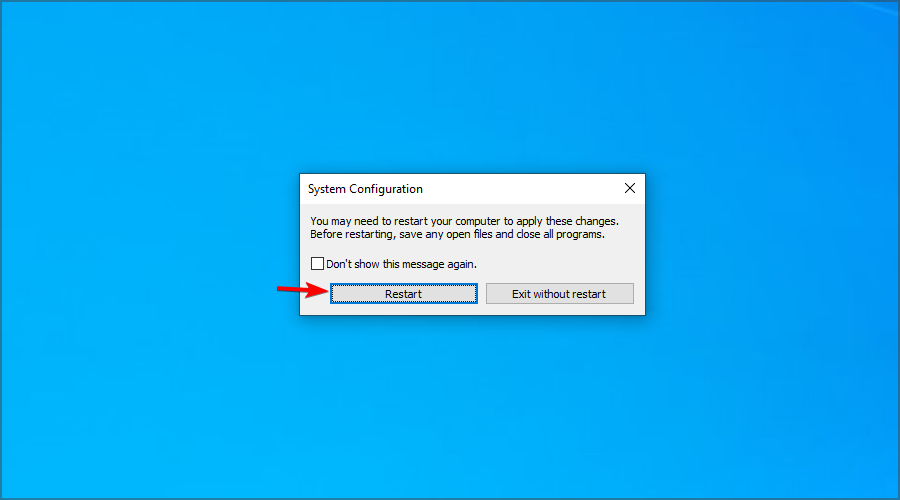
That would be all, I hope some of these solutions helped you with the limited internet connection problem. And before you leave, do check some quick tips to get back the cellular option in Windows 11.

If you have any comments, suggestions, or maybe some other solutions for this problem, reach out in the comment section below.

Our Tech Troubleshooting section will provide solutions for any other problems with your PC. For any online solutions or information, visit our Web & Cloud Hub.