4 best audio software tools to split songs

Do you need to cut a part of the song saved on your computer to create a ringtone for your phone?

Have you made an audio recording during the concert of your favorite singer and would you like to edit it to get rid of the unwanted parts?

In the following article, you can find the best software tools to cut songs. You just have to choose what you think can do most for you, follow the instructions for use and the game will be done.

What is the best software to split songs?

Adobe Audition

adobe audition audio recording tool
  1. Import the audio file.
  2. Click on Window > Marker List > open the Markers Panel.
  3. Select the section of the audio file you want to export.
  4. Click on the Add Marker button in the Markers Panel to separate that section.
  5. Go to the Markers Panel and label each marker.
  6. Select the marker or markers you want to export.
  7. Click on the Batch Export Marker Regions.
  8. Hit the Save to files button and choose the file name and export destination.
  9. Hit Enter or OK to export the files.

You can find above the steps you have to follow in order to split songs into separate files in Adobe Audition.

Adobe Audition is an excellent audio editing software packed with plenty of features and options.

If you need a reliable tool to split songs and other audio files quickly without losing audio quality, Audition is the right tool for you.

There another interesting feature that may come in handy when splitting songs.

The Frequency band splitter allows you to make up to 8 copies of a single audio file and each copy will have a different frequency range identified in the source-file.

Other key features of Adobe Audition include:

  • Automatically remove reverb and background noise
  • Multitrack UI that supports the playback of over 128 audio tracks or record of over 32 tracks
  • Album art support
Adobe Audition

Adobe Audition

Split your songs into multiple tracks or edit them as you need with one of the best tool for audio editing.
Free trialVisit website

WavePad Audio Editor

WavePad Audio Editor is a simple yet powerful audio editing software. It offers various effects such as equalization, normalization, and also the ability to amplify sounds or remove background noise.

As for the interface, the application is quite simple to use and you can perform standard editing functions such as cutting, paste, inserting, etc.

Regarding the supported audio formats, the program supports mp3, wma, gsm, flac, real audio, and almost all other major formats.

You can also enhance the application with various Virtual Studio Technology DLL (VST) plugins, which is perfect for audio professionals.

Another feature is the batch processing, meaning that you can edit multiple files automatically. The application also supports bookmarks allowing you to easily navigate to a specific segment.

If you’re in need of a powerful audio editing software that can be used to split and cut songs, WavePad Audio Editor is a perfect choice.

⇒ Get WavePad Audio Editor

Audacity

Audacity is considered one of the best software for free audio editing. It allows you to edit audio tracks in MP3, WAV and various other formats in an extremely easy and fast way.

This is possible thanks to a very intuitive and well-done user interface. It’s worth mentioning that Audacity supports LADSPA, LV2, Nyquist, VST, and Audio Unit so you can easily expand its functionality.

Regarding the editing, all standard editing options such as cutting, copying and deleting. It’s also worth mentioning that you can have unlimited undo and redo steps, which is perfect for complex projects.

As for mixing, the software can work with multiple tracks and each track can have multiple clips allowing you to create advanced projects.

There’s also an ability to label tracks which makes it perfect if you working on complex projects with dozens of tracks and clips. If needed, you can also change the pitch or tempo separately.

Effects such as audio adjustments and Equalization, Bass and Treble, High Pass, Low Pass, and Notch Filter are also available.

Overall, Audacity is a powerful and completely free audio editor, and it’s perfect for all your audio editing needs.

⇒ Get Audacity

mp3DirectCut

mp3directcut software to split songs

Another great application for cutting songs and editing audio files is mp3DirectCut. The application is completely free to use, and it allows you to easily copy, paste, cut, or crop parts of any song.

It allows you to recompress files without file loss, which can be incredibly useful to some users. Regarding the interface, it’s quite simple to use, and even first-time users won’t have problems with it.

mp3DirectCut supports batch operations so you can edit multiple files relatively easily. Regarding the size, the application is rather small, and it can even run in a portable mode which is a plus.

The application also supports MP3 recording using the LAME or ACM encoders.

Visualizations are also available, and you can also normalize audio and detect pauses. There’s even support for ID3v1 tags which can be useful if you’re working with MP3 files.

Overall, mp3DirectCut is a simple yet powerful audio editing tool, and due to its small size, it’s perfect for almost any user.

⇒ Get mp3DirectCut

There you go, these are the best tools that you can use to split songs, so feel free to try any of them.

If you have any suggestions that you consider we should add to this list, please write us a comment below.


VFX Software for PC: 6 Best to Use in 2026

Thanks to the latest advancements in the area of computer graphics and the evolution of computer processing power, any user can start creating 3D artwork today.

This type of creation process, for 3D presentations, or modeling creation, has become a very important niche of our society. We can see 3D animations and render almost anywhere online.

It is mostly used in marketing and design, but the popularity of this domain is fueled by the need of users to experience immersive 3D worlds in games, movies, etc.

In this article, we will explore some of the best software on the market that gives you the power to create realistic-looking animations with just a bit of training.

Your creative desires will surely be satisfied with the wide range of features supported by these 5 software options.


What is the best visual effects software for PC?

Adobe After Effects

Topping out our list is a software tool that is well-deserving of 1st place: Adobe After Effects.

Of all of the apps included in the Adobe Creative Suite, After Effects acts as the de facto tool that you go to when your videos are in the post-production phase and could use a bit of cinema magic, of VFX.

The UI is simplistic enough to allow veteran video editor users to get accustomed to easily, but the toolset is in no way lacking, allowing for a professional-level of creativeness and control.

More so, this program works best with Adobe Premiere Pro which can be used to produce the video from the ground up, while After Effects just adds the finishing touches.

Normally a program of this caliber would be hidden behind a paywall, but you can now test Adobe After Effects for a full 7 days for free.

Here are some of the main features of Adobe After Effects:

  • Data-Based Animation
  • Lifelike Virtual Reality Videos
  • Virtual Reality Video Composition Editor
  • Full compatibility with other products from the Adobe family
  • Can be tested freely for 7 days
Adobe After Effects

Adobe After Effects

Add amazing visual effects to your videos and animations with the industry-leading software for VFX.
Free trialVisit website

Autodesk Maya

Autodesk Maya - VFX software

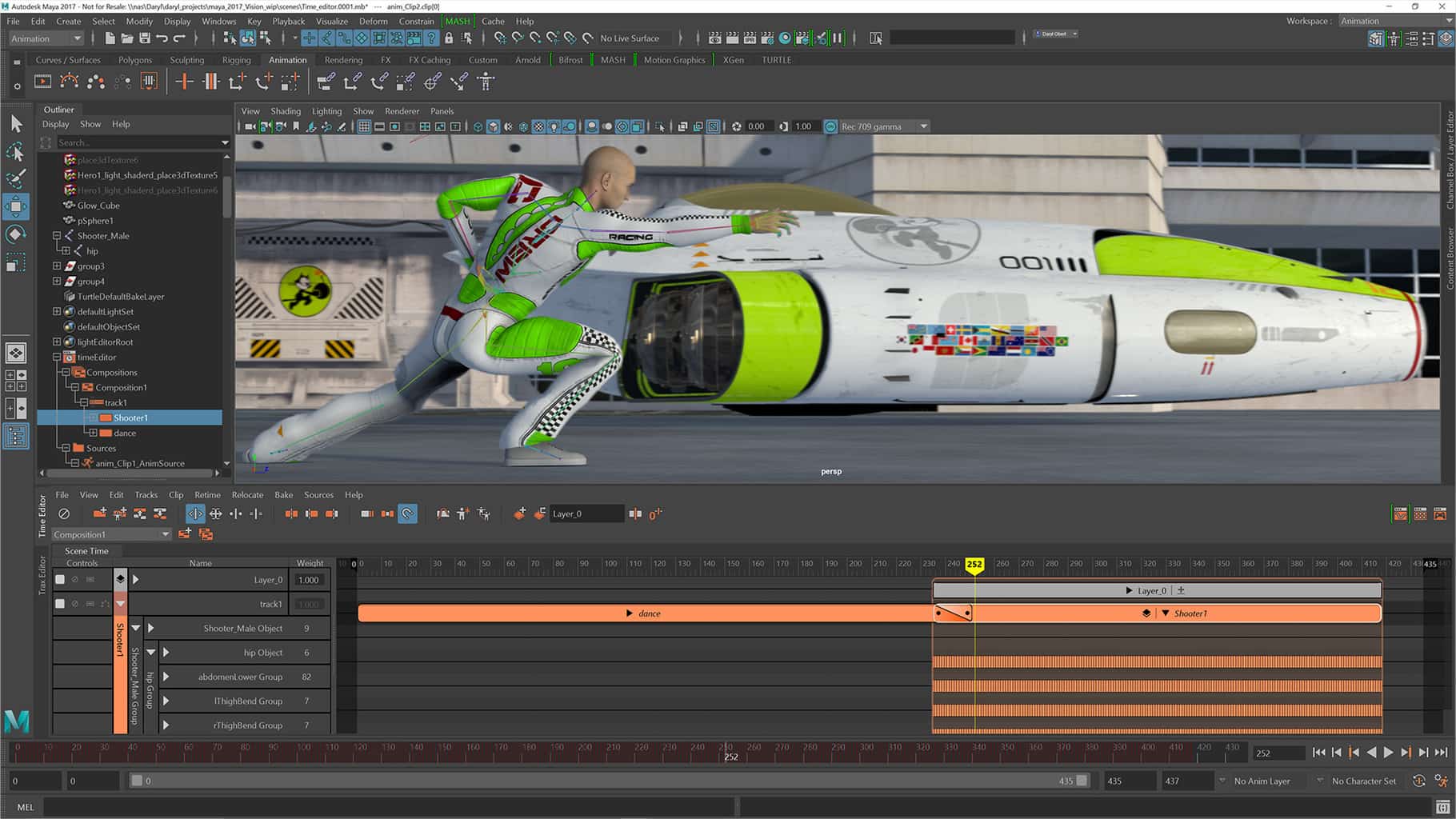
Maya from Autodesk is a great and complete tool that allows you to create 3D animations, simulations, and rendering software, create characters from scratch or edit your projects like a professional.

One of the most useful features of Maya is the fact that it has an integrated programming language called MEL.

By using this feature you can create custom scripts or search and find already created scripts to use in your own projects.

The 2018 edition of Maya has an integrated renderer called Arnold that can be used to observe the scenes you created, and be influenced by the effects you apply in real time.

If you want to see the full list of features in Autodesk Maya, check the official product page.

Some other notable features of Autodesk Maya include:

  • Quickly create complex effects and animations
  • A new user interface that enables better control over your workspace
  • Brush-based grooming tools – XGen
  • Create realistic hair by using the clump modifier tool
  • MASH nodes — curve, world, placer, etc.
  • Geodesic voxel binding – a tool that allows you to create characters of high quality fast
  • 3D symmetry modeling
Autodesk Maya

Autodesk Maya

Quickly create complex effects and animations with one of the best software you can find.
Free trialVisit website

Autodesk 3DS Max

Autodesk 3DS Max - VFX software

3DS Max from Autodesk is another great tool that can be used to apply various visual effects to your project.

Compared to Maya, 3DS Max is better at creating complex 3D models. One of the greatest advantages is the fact that its user interface is easier to understand, even for beginners.

Both Maya and 3DS MAX have great rendering capabilities, but the most notable difference is the fact that 3DS Max has a wider range of modeling tools.

This feature allows you to create, apply and modify your project at any level, no matter the complexity of the model.

3DS Max can also be used for architectural visualization because of its integration with CAD software. This feature can be a greatly useful tool for those of you who create projects in this domain.

Best features include:

  • Create realistic liquid behavior
  • You can control animations by direct feedback and real-time adjustments
  • Create procedural animation and character rigging using CAT
  • Keyframe and procedural animation tools
  • Particle flow effects — create 3d water, fire, spray, and snow
  • Animate simulation data in CFD, CSV or OpenVDB
  • 3D rendering — the ability to create VR visualizations
  • MAXtoA plug-in — integrated Arnold renderer
  • Raytracer renderer (ART) – used for architectural scenes
  • Create custom workspaces
Autodesk 3DS Max

Autodesk 3DS Max

Apply great visual effects to your project or create realistic animation with one of the best tools.
Free trialVisit website

Blender 2.79b

Blender - VFX software

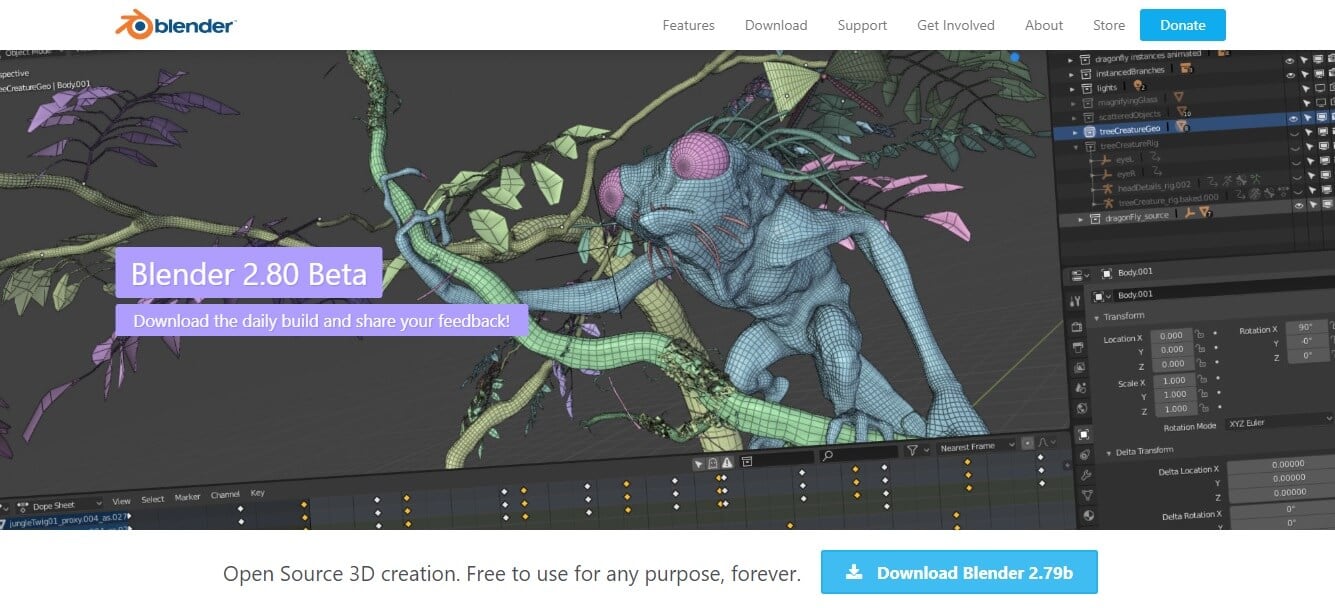
Blender is a great tool to use for applying visual effects to your projects and it is completely free to use. With Blender, you can create 3D pipeline-models, animations, simulations, rendering, etc.

This program supports NURBS surfaces and polygon meshes making it a strong contender for 3DS Max.

Even though this powerful software can help you create professional looking 3D projects with animations, it requires you to have some experience in using it.

Fortunately, Blender has a very big community that offers a wide range of tutorials and courses.

Key features include:

  • Cycle Render Engine – ultra-realistic rendering, real-time viewport preview, etc.
  • 3D painting with textured brushes and masking
  • Python scripting
  • VFX – it allows you to import raw footage, track it and mask areas
  • Envelope, skeleton and automated skinning
  • Customize its interface by using Python language
  • Can seamesly combine 2D with 3D
  • Modeling, sculpting and UV features — used for creating and transforming your models
  • Denoiser, PBR Shader, Shadow Catcher, Filmic Color Management, AMD OpenCL, etc.

⇒ Download Blender


Houdini 17 – SideFX

Houdini Side FX - VFX software

Houdini is another powerful tool that allows you to create and apply visual effects with ease. This software is a node-based software.

This feature is useful because of the fact that with every action, a node is created. More nodes can form a network and this feature allows you easily apply changes either to specific nodes or networks.

Houdini was created to be an easy to use software that offers artists a wide range of features under a user-friendly user interface.

Its node-powered infrastructure gives you the opportunity to branch off from your initial design with customized effects and actions.

One of the best features of Houdini is the ability to create sophisticated particle and dynamic simulations, such as realistic fire and smoke with Pyro FX, and different water effects.

Houdini comes in 4 different versions that cater to your specific needs:

  • Houdini Apprentice version is free and designed for hobbyists and students
  • Houdini Indie has all the animations and VFX tools and is available under an indie license for animator and game developers
  • Houdini Core is designed for modelers, character riggers and animators
  • Houdini FX offers a full 3D experience with tools for simulating fluids, pyro fx, etc.

If you want to get more information regarding how to use Houdini, go to the tool’s support page.

⇒ Download Houdini 17


RealFlow 10.1

RealFlow is designed to be a professional fluid simulation software. This software is a direct competitor to Houdini and also has an impressive range of features.

One of the most important features of RealFlow is the ability to edit relationships between nodes and the ability to simulate graphs with the data provided.

You can easily create emitters, containers, ocean surfaces, and also solid bodies for your project with just a few clicks. Using Next Limit’s Maxwell Renderer is also a very useful feature.

You can render any preview before applying it to your project, giving you a clearer image without needing to worry about the calibration details.

Regarding liquids rendering, RealFlow can create both particle-based liquids and also hybrid-based liquids that are suitable for bigger scenes.

The Dyverso technology that powers RealFlow is GPU accelerated and can process secondary elements like splashes, foam, mist, bubbles, etc. in real-time.

If you want to see a complete list of features, you can download this PDF file.

⇒ Download RealFlow 10.1


In this article, we explored some of the best options on the market that allow you to add visual effects to your projects.

The software options presented here cover the needs of both users with little to no experience and professional users alike.

Depending on how experienced you are, you can jump right into creating your project or you can check out the tutorials. Let us know what you chose from this list in the comment section below.


  • What is the best video editing software?

There are multiple options, paid or free, depending on your needs. Check our guide including the best video-editing software for Windows 10 and choose the one you like.

PlayStation 4 error codes CE-35694-7, CE-42555-1 [Full Fix]

When something goes wrong with your PlayStation 4 while you’re gaming or streaming, it will show some specific error codes.

For instance, error codes CE-35694-7 or CE-42555-1 are two of the possibilities. Each of them refers to a particular issue with your console.

In this article, we’ll explain each error in turn together with the right steps to fix it.


How to fix An error has occurred CE-35694-7 & CE-42555-1 on PS4?

Error code CE-35694-7 – Not enough space

1. Free enough space

Error code CE-35694-7 usually appears when you’re trying to install a new game on your console.

Therefore, it is most often related to insufficient space on the system for the operation to be completed.

So the sensible solution would be to free space. Note that many users mentioned that they freed some space (usually up to 50GB) and it still was not enough. However, when they proceeded to free more space, the error disappeared.

So the recommendation is that you clear more than 50GB and allow enough space for the new games to be installed.


2. Force a system storage status check

  1. Plug the Dual Shock 4 controller into your PS4 system using a physical cable. Then, turn your PS4 system on.
  2. Hold the power button for a couple of seconds until you see the LED light flashing and hear a short beep. After that, your PS4 should power down entirely.
  3. Hit the power button again. The system storage status check process should begin.
  4. Once this procedure completes, the PS4 will automatically restart.

Try installing the game now and see if the error has cleared away. If not, go on to the next step.


3. Restore to factory settings

reset ps4
  1. Make sure to create a back up of your saved data in an external hard drive.
  2. Next, go to Settings.
  3. Select Initialization.
  4. Choose Initialize PS4.
  5. Follow on-screen instructions to restore your PS4 to factory default.

On rare occasions, the fault also laid with some corrupt files in the system. 

In this situation, the solution was to resent the console to factory settings, which not only clear the system of any corrupt files but will also restore the database and will also clear anything you have saved up until that point.


Error code CE-42555-1 – Can’t upload videos to Facebook

A lot of users reported getting the error code CE-42555-1 when trying to upload videos from various games to Facebook.

It appears that Facebook marked those as spam and un-marking them or contesting the procedure did not help.

Also, the only solution that did work for them was to edit the recorded video in ShareFactory. Namely, not only did they edit the intro and the ending of the video, which the app add automatically, but they also edited the video name (shortening it).


That’s it! We hope our solutions help you fix either of the errors. If something else worked for you, please share it with us in the comments section below.


Getting started with LinkedIn Part One – for small business owners

LinkedIn is the marketing hub of many social selling executives and solopreneurs. What about small businesses using LinkedIn to reach their goals?

For small business owners, let’s explore five simple ways to use LinkedIn that can build credibility and also increase relationship with your networks with key contacts.

Create a LinkedIn company page

In order to play to win on LinkedIn, in addition to maintaining an all-star personal page, you must have a LinkedIn company page to amplify your brand to distributors, association members, customers and others. A LinkedIn company page also lets you highlight your services, thought leadership and your employees to build your external credibility and community. Best of all, a LinkedIn company page is free.

Run your personal and small business Company Page as a PPC or SEO campaign

If your small business marketing strategy does not include a search engine optimization component, then it should, ensuring you are there when your customers are Googling your profile. By running your personal and LinkedIn company page and personal profile as a pay-per-click (PPC) campaign, you can increase your company’s and content ‘findability’. Include keywords in your headline, summary, anchored text, job descriptions and endorsements to be found on Google and LinkedIn searches.

Find and participate in a LinkedIn group with local ties

LinkedIn reports the average user joins 7 LinkedIn groups, so your customers, influencers and competitors are using this LinkedIn community. Over 70% of customers use groups to research, network and vet buying decisions. So, join all 50 of your potential LinkedIn groups to be as accessible as possible by other group members. And, regularly participate, in a non-promotional way, in 3-5 groups to network with other business owners, distributors and press.

Begin to blog on LinkedIn

It makes sense for every small business to post articles on their blog, website and on LinkedIn to reach and connect with their audience. It could be the same content on each platform since you will be connecting with different audiences on each site. Blogging is a new content networking tool and will help build your credibility and increase your business’ message’s reach when others share it to their network.

Leverage each employee within your small business

Train and leverage your small business employees as brand ambassadors to build your small business brand; telling your company story and accessing their incremental network.

Summary

You can’t be using the same Facebook and Twitter content and techniques with LinkedIn, even though it has the same customers. So, embrace your Linkedin channel to distribute your thought leadership to impact your small business, then you will be successful. Every social media platform, liked LinkedIn, has a separate social contract with the same customer.

Do you have a LinkedIn success story to share for your small business? if so please share below.

This Viozon Tablet Stand Holder can turn your Surface Pro or Go into a Surface Studio of sorts

You can find plenty of cool accessories for a Surface anywhere you look. There are USB-C hubs or docks, skins, covers, sleeves, pens, and so much more. But in this day and age, you might be sporting your Surface more for actual work scenarios. That might mean you would need something to fit your Surface in with your monitor or your desk setup.

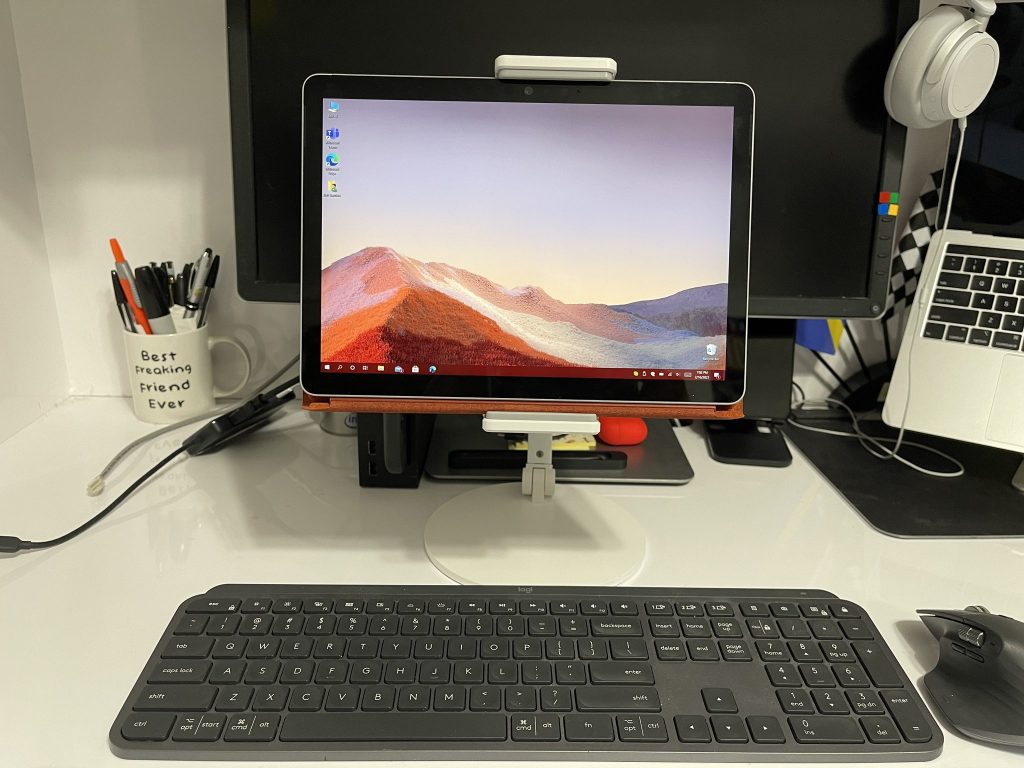
That’s how I happened upon a tablet holder for my Surface Go 2 on Amazon. Sold by Viozon, this tablet holder fits any Surface Pro or Surface Go and can help turn your device into a Surface Studio (or an old school iMac.) It raises your Surface off your desk and helps increase usability for work, especially when paired with a monitor.

Design

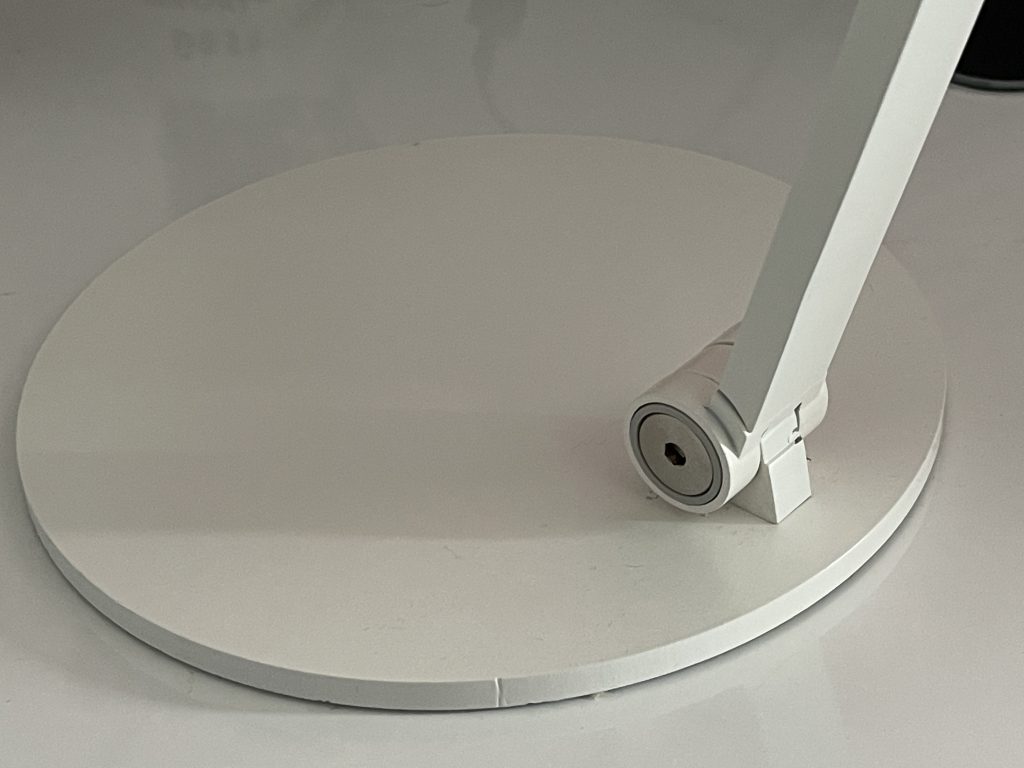
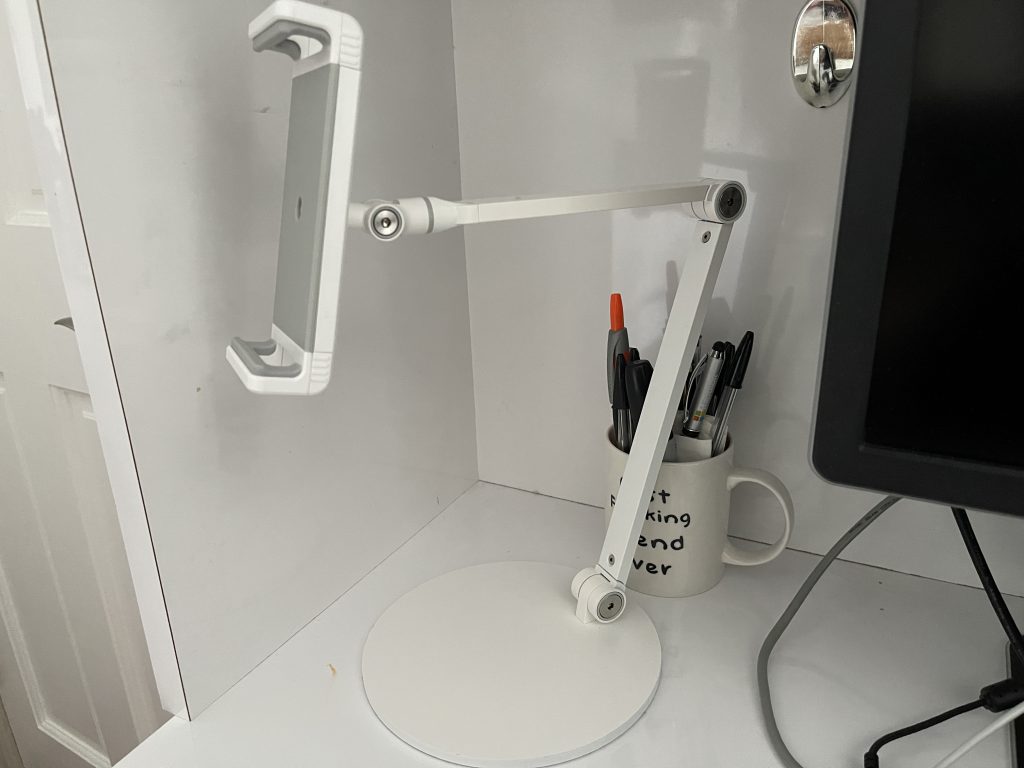
This Viozon Tablet Stand Holder is constructed out of aluminum alloy and comes in either a white color or a more fancy black. It’s plenty strong and stable, and won’t bend or break like your typical plastic stand. The overall weight of the product is about 3.3 pounds, which means it can support a tablet without toppling over. A circular aluminum alloy base is the support mechanism for everything, reminiscent of the looks of an old-school iMac Power PC G4.

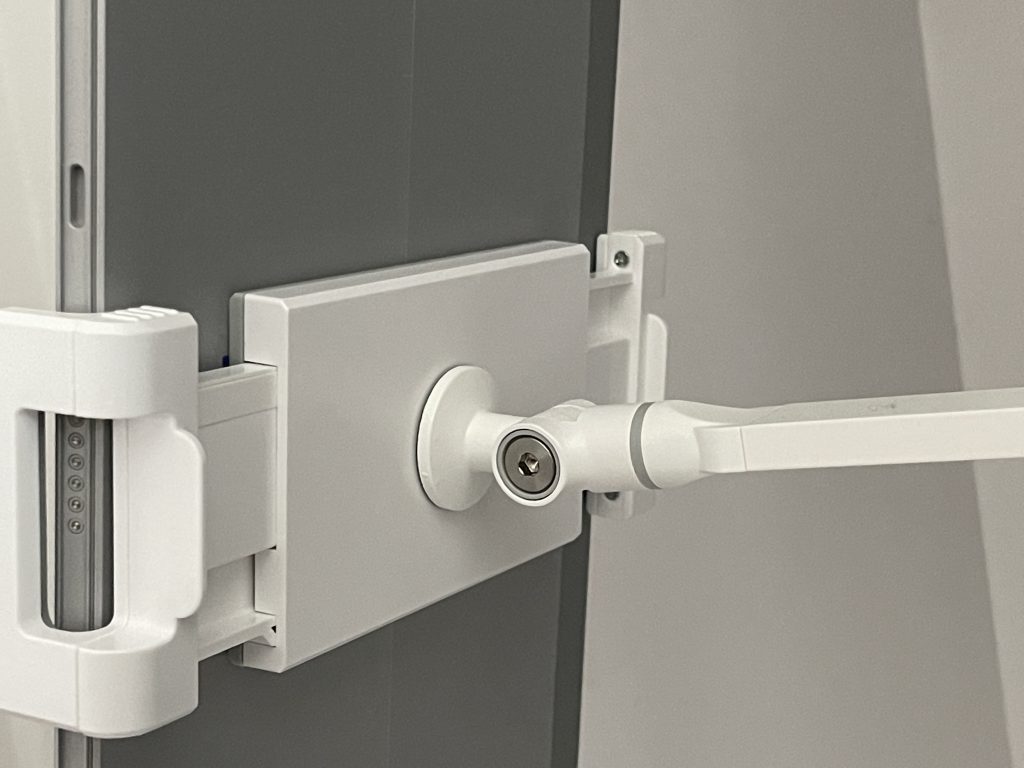
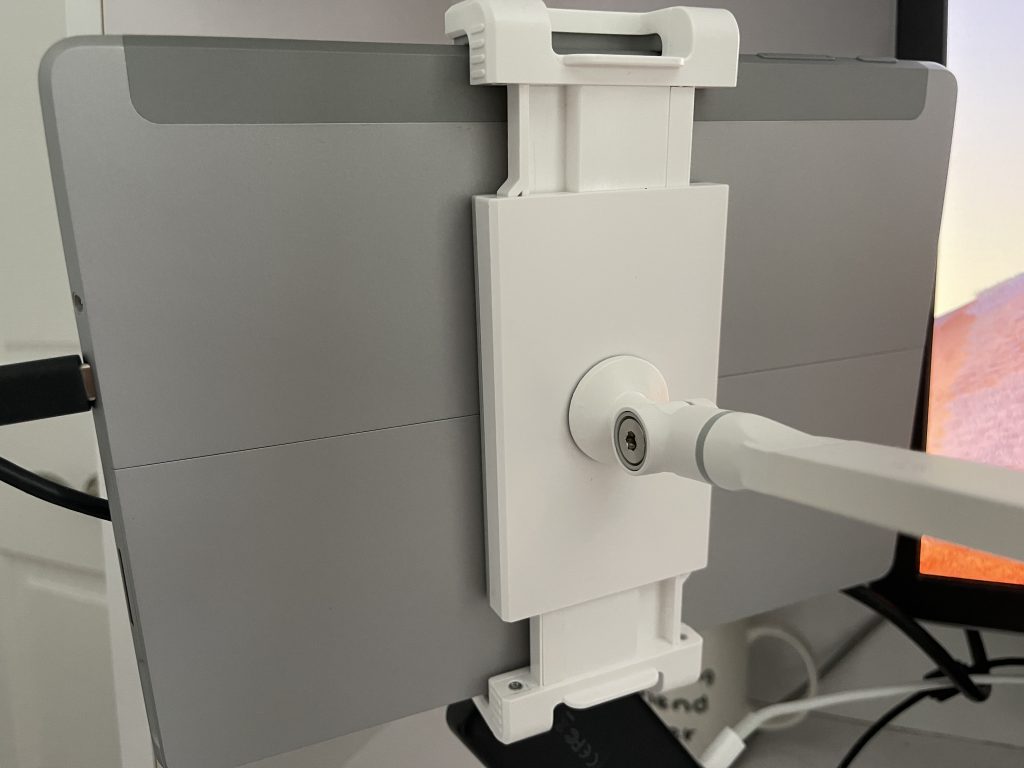
The most unique feature of the tablet, though, is its height adjustability. Thanks to its arms, you can move your Surface up or down 18 inches off your desk and into the air to suit your setup alongside a monitor. That’s because the front arm features a padded mount for holding your device, with the mount opening up to a total of 12 inches and allowing for a total rotation of 360 degrees.

Img 5053

The arms are also held in place to the base with a screw, and you can adjust the tension to make it more secure to hold heavier tablets like an iPad Pro. Overall, though, the design is reminiscent of the Surface Studio, which “floats” up in the air or can down on your desk.

It’s important to note that you’ll have to adjust the tension on the stand with the included Allen key so you can move the Surface up and down easily, or keep it tight (whichever you want) I prefer the stand to be tight so that the Surface is secure, but this is not exactly like a real Surface Studio. You can’t really move the screen easily with one hand. With this stand, you’ll need to move it with more two hands, in most cases.

Usability

Vizon Tablet Holder

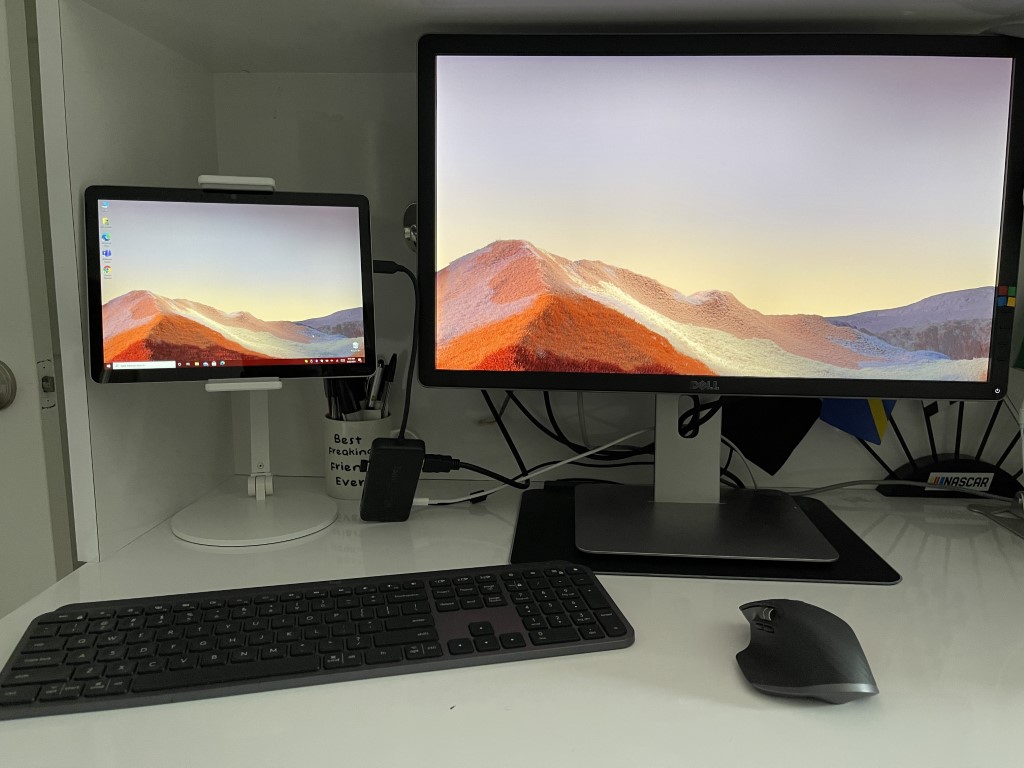
So how about usability? I’ve had this Viozon stand on my desk for the past few days, and It’s been a godsend for me. Typically, I keep my Surface flat on my desk, next to my monitor. Thanks to this stand, I am able to elevate it off my desk, and right next to my monitor — at eye level.

All it takes is snapping off the Type Cover from my Surface, rotating the arm of the mount, and placing my Surface inside. It’s an easy process to place and remove the Surface when I need it on the go, and the added pads ensure the Surface won’t get scratched.

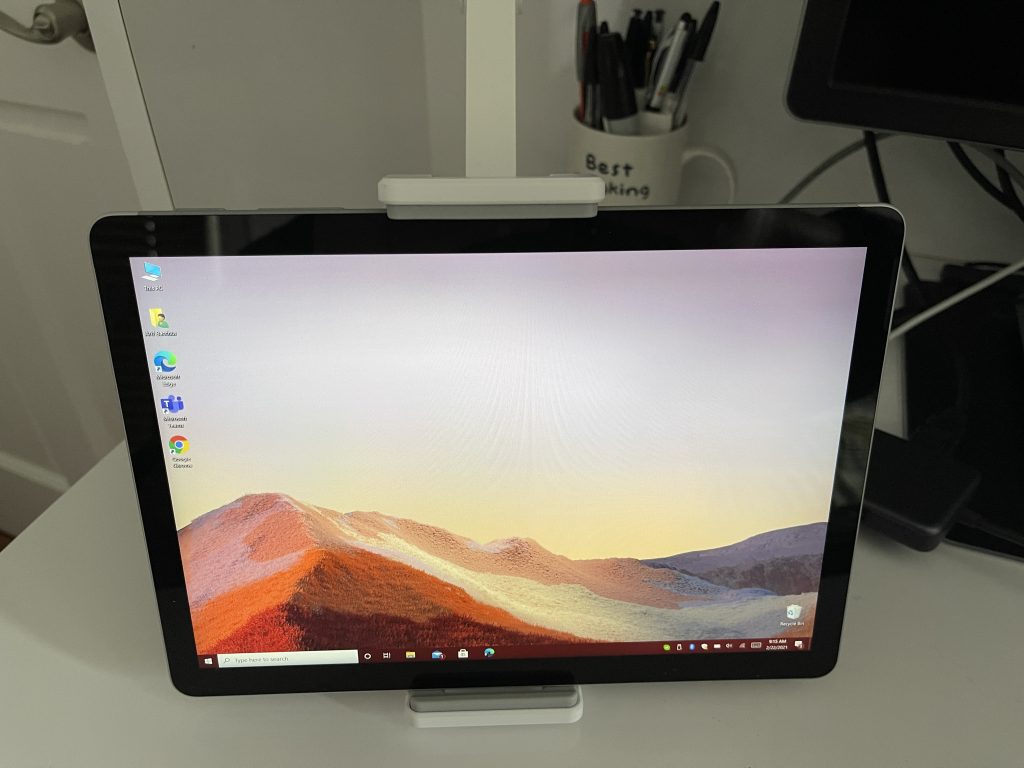
I can even rotate my Surface 360 degrees while it’s mounted in the stand, so I can view Twitter feeds and my RSS feeds vertically. It’s been great to help reduce eye strain and keep my head level when typing posts, and also glancing over at a second screen for Teams messages. There’s even a tilt function, which lets me tilt the Surface down between 45 degrees and 180 degrees, so it fits the perfect angle.

Img 5062

Interestingly enough, the stand is secure enough that when it’s tilted or moved to different angles, the screen won’t “bounce” or “shake.” This makes it a great companion for inking or drawing, too. It’s not something that I’ve tried, but the stability is great so that I can see artists using this as a tool for drawing in a studio.

A great product, for the low price of $40

Overall, this Viozon stand is great. You can find plenty of alternatives out there for it, but this one feels quite unique thanks to its design and usability. Of course, it’s not a full-on “dock” that comes with ports for your Surface, it’s just something to help you boost your setup. For a true Surface Studio-like experience, you can try the $400 Kensington SD7000 Surface Pro Dock. It has power, USB-C, and more built-into the base.

How To add a custom domain name to your Microsoft 365 account

You as a business owner, want your company name for your custom Microsoft 365 domain? Your Microsoft/Office 365 account comes with  a generic domain name, ie: company.onmicrosoft.com where “company” is your account name. You can use email addresses like [email protected] for Office Apps and Exchange services. But if you have your own domain name, you can also add it to your Microsoft 365 account, for example mycompany.com,  and then set up users like [email protected]

Let’s start the process of adding your own domain name to Microsoft 365!

To add your own domain to Microsoft 365

21970 1

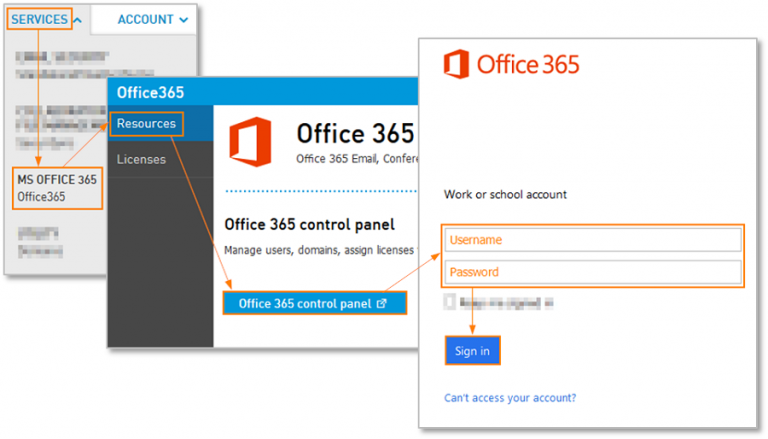
Sign in to Office 365 with your admin credentials.

21970 2

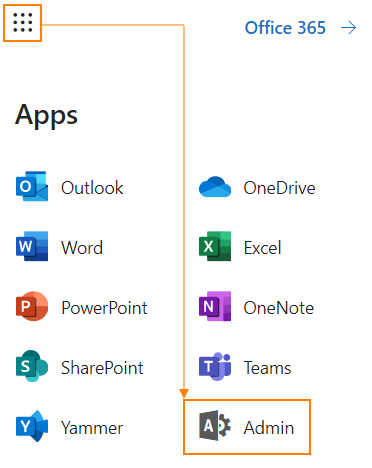
Then navigate to the Admin center.

21970 3

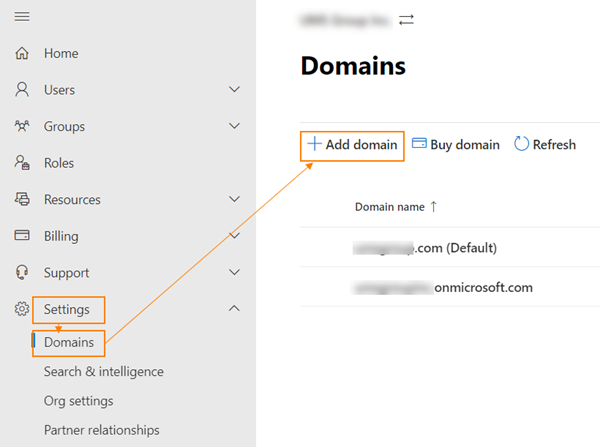
Click on Settings, domains and then Add domain.

21970 4


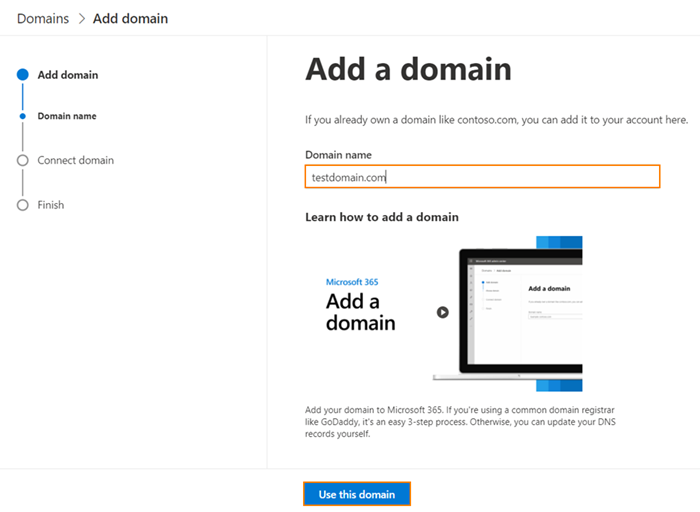
Type in the domain name and click Use this domain button.

21970 5

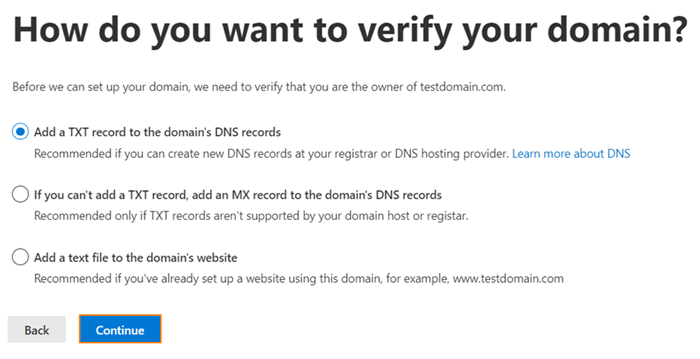
Choose the preferable domain verification methods

21970 6

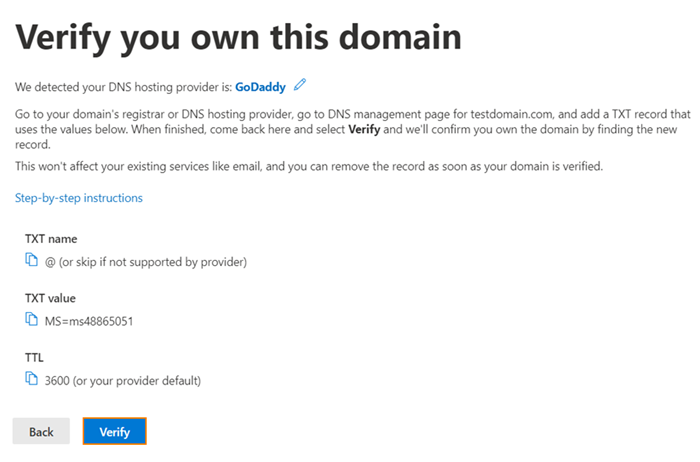
If TXT option is selected, you need to setup a TXT-record listed on the page. Click step-by-step instructions link to get instructions for your DNS hosting provider. Click verify, once you have setup on the record.

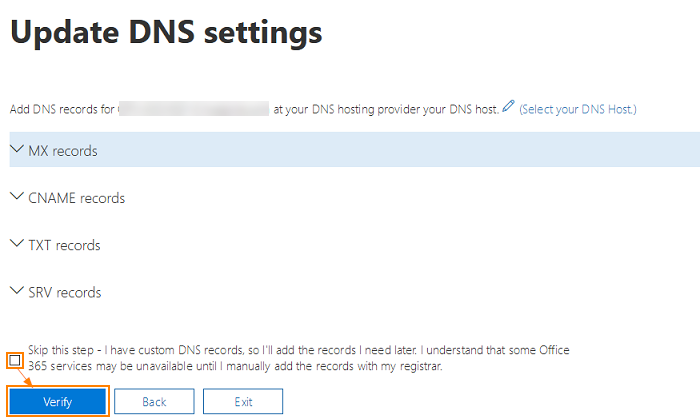
21970 7

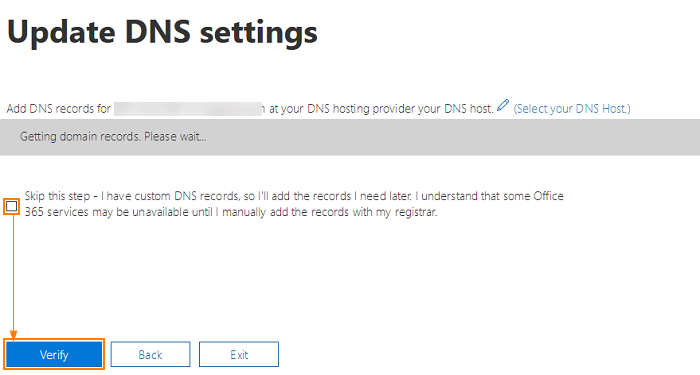
When validation of TXT record happens correctly you should see Update DNS settings screen. Select Skip this step checkbox and click Verify button to proceed.

21970 8

The next screen will display the DNS records that you need to setup for your domain in order to start using Office 365 for email. You need to create MX record, 2 CNAME records and a TXT record. Use Select your DNS host link to see instructions for adding DNS records for your DNS hosting provider. Select Skip this test if you use custom DNS setup and click Verify button.

Once the records are verified you will see the confirmation window saying You’re all set up. Now you can setup users with your domain name.

Summary

All small business tenants should have access to the Exchange Admin Center, but if you don’t you can log into the Exchange control panel to edit the account and add additional addresses to a mailbox.

Secondary addresses are great for alternate spellings of your alias, or when you are changing domains or addresses as both the old address and the new address can be delivered to one mailbox and all replies will use the new email address.

Using a unique custom domain like “[email protected]” with Microsoft 365 can help build credibility and recognition for your brand and can boost your business as a small business owner.

Learn more here about adding custom domains to your Microsoft 365 account for your small businesses. Let us know your experience working with Microsoft 365 domains in the comments below!

Registration for Microsoft’s Game Stack Live event is now open

Microsoft has announced that registration for its next Game Stack Live developer event is now open. The event is set to run from April 21 to April 22 with Microsoft calling it the biggest “Game Stack Live yet,” promising dozens of talks from developers and more.

In addition to developer talks, the event features opportunities for attendees to network with the game development industry, and updates and education about the platforms, tools, and services from Microsoft. A total of 40 talks are promised, covering topics like graphics, system and tools, production and publishing, multiplayer, accessibility, and audio. A full schedule is available here.

Last Year’s Game Stack event presentations dived deeper with insights about topics such as Xbox Series X, Project xCloud, and more. You can expect more of the same this year, but it’s important to note that this isn’t a consumer-focused event. There likely won’t be any consumer news shared, but if you’re a developer interested in what goes on behind the scenes making games, then this is for you.

Microsoft prepares for a new Power Platform low-code language, Power Fx

Microsoft is proceeding to attempt to make its Power Platform assortment of low-code apparatuses simpler for non-developers to utilize, according to a report from All About Microsoft. The latest expansion to the Power Platform stable appears to be an extraordinary new low code language called Power Fx.

The Walking Cat dropped a clue recently about something many refer to as “Force Fx.” Power Fx is expected to be revealed at Microsoft’s Ignite virtual conference in March.


From the sources we have gathered, Power Fx will focus on a key Power Platform crowd: Microsoft Excel clients. The language is tied in with utilizing recipes. By using Power Fx, clients will actually want to redo rationale across the Power Platform. Microsoft’s objective with Power Fx is to produce in Power Platform genuinely something for individuals with minimal coding experience.

Similar to the case with different components of the Power Platform like Power Apps and Power Automate, clients will actually want to add normal code to equations utilizing customary engineer instruments when required. I’m hearing there likewise will be some sort of connect to Dataverse, Microsoft’s Common Data Service (CDS), which empowers clients to store and oversee information utilized by business applications.

While almost no word about this undertaking presently from Microsoft, the strategy conforms to Microsoft’s new methodology towards low-code devices which permits people inside organizations to assemble undeniable efficiency arrangements without being too well informed. We will probably get familiar with ‘Power Fx’ nearer to the language’s delivery, given that it gets official.

For those interested, learn more here about Microsoft plans with ‘Power Fx’ for Power Platform.

Fuji RAW Software: 4 Best Viewers & Converters in 2026

In case you are an avid photographer, be it professional or just an enthusiast, chances are you’ve run into the Fuji RAW format. And that’s when you need a good converter or effects-editing application for RAW.

For that reason, we created this short list of the best programs that should fit all your needs. Check them out below.


What is the best Fuji film RAW viewer tool for Windows 10?

Adobe Photoshop

Photoshop CC 2020 - best Fuji RAW viewer and converter software

Adobe Photoshop is one of the most well-known photo editor and design creator software on the market, and there is a good reason for that.

No matter what field you work in, if there is any photo manipulation involved, Photoshop is a true powerhouse of features and options. The variety of tools that are compiled in this software is unprecedented on the market.

When it comes to viewing Fuji RAW files and the capability to convert the images to any format, Photoshop performs incredibly in this department as well.

Here are some of the most useful  features found in PhotoShop:

  • Wide range of capability to transform files because of its acceptance of almost any file format
  • Fast processing speeds for RAW images
  • Customizable user-interface that allows you to streamline the editing process
  • Tool section is clean and only shows variations of tools once it is selected
  • Very wide range of accepted plugins and templates
  • A great number of  tutorials available
  • Trial version available completely free of charge for 7 days
Adobe Photoshop

Adobe Photoshop

Edit your Fuji RAW files only with a professional program such as Photoshop and never compromise on image quality.
Free trialVisit website

Luminar AI

Luminar offers complex tools but with easy pre-set: ideal for those who work with color and creativity at an incredible price

The product is an excellent tool for anyone who wants to broaden their creativity in the photographic field, especially in terms of effects and color.

The idea behind Luminar is to remain fairly faithful in the approach to bitmap editing, be it on rasterized documents (Jpeg, Tiff, Png or PSD) or on more raw formats (Raw or DNG), but proposing a change of very important paradigm.

The adjustment levels are no longer individual by level, but each level can contain one or more levels of regulation, merging one with the other totally or partially.

The App can work both in stand-alone mode and as a plug-in for Photoshop, Lightroom, and Aperture.

The tools and presets are grouped into Workspace and Categories, but you can still customize the interface with your choices, recalling the standard ones only when needed.

For what we could evaluate, in our opinion the use of presets is the right way to operate if you do not know the software well, but also the best way to start a demanding photo editing.

Like Lightroom, retouching is not destructive, but Luminar does not work with XML sidecar files, opting for a proprietary format that can include, if necessary, the original image.

We have particularly loved the filter that makes use of artificial intelligence, able to offer remarkable three-dimensionality especially in images outside (although perhaps it should be slightly contained in the skies) and Sunrays.

⇒ Download Luminar


Aurora HDR

fuji film raw editor

Aurora HDR 2019 is the new version of Skylum’s photo post-production software, a brand that has become famous for products like Aurora HDR but also Luminar.

The apps can work alone, as we will see very well, but if necessary they integrate perfectly with the sacred monsters like Photoshop and Lightroom.

Aurora HDR 2019, we anticipate it, is a small name that does this and much, much more than we expected before this review, with a way that gives a new benchmark to the term “speed”.

Technically speaking Aurora HDR 2019 is software that allows obtaining different results: the development of frames in RAW, but also in Jpeg, Tiff, and Png, single or multiple, offering all the features that are typical of some famous plug-ins like Camera Raw, for example.

In the workflow is integrated a function of HDR (High dynamic range imaging) that allows expanding the dynamic range of light so that it is wider than normal.

The App is obviously compatible with the most common bitmap graphics formats but also with RAW, which is treated on a par with the rasterized files in the workflow, although obviously, the rendering engine is certainly different.

Aurora HDR 2019 allows you to save processed images in a proprietary format, which is useful for later retouching, and also contains the original files.

It is the only way for progressive retouching since Aurora does not write data inside the standard XMP in RAW files.

The final export can be carried out in the most common formats, including oddly sparse formats like PDF and Jpeg2000.

There is the possibility of using overtones, curves, HSL adjustments and even the vignetting are missing, even if there are no more accurate controls for direct selection within the image.

With regard to these extremely powerful controls, we underline that the impression is that they exist for the purpose of retouching on the initial image and not as an option to make Aurora HDR 2019 a graphics editor because in that it seems at least out of place.

Finally, there are masking systems by brush, gradient, and radial.

⇒ Get Aurora HDR


Corel AfterShot Pro 3

Corel AfterShot Pro 3

The customization, in addition to the competitive price, is one of the distinguishing features of this eternal rival of Adobe Lightroom, which is now closer to Photoshop.

And in this sense, one of the original novelties of AfterShot Pro 3 is the creation of Lens Profile, which can be created by following a series of instructions and then saving the profile of your lens and insert it into the program.

Other personalization concerns the presets for frequent corrections, which can be used as a starting point to create their own, save, and share with the community.

Corrections not necessarily of errors, but in the sense of typical aspects to give to the images, a little – let’s imagine – like the Picture Styles of the Canon cameras or the Picture Control of Nikon.

Another distinctive feature of AfterShot Pro 3 is that to have compatibility with the raw files of a new camera it is not necessary to wait for the release of a new software release. As soon as it’s available, just download it from the Corel website and add it to the app.

There is also a new Plugin Manager that quickly finds the new plugins available for AfterShot Pro 3 (for example GrandFilter Pro), and also a toolkit and an API for developers that can create plugins compatible with the Corel software.

There are also a few more traditional features, such as an algorithm to recover details in the highlights, which presides over the Highlight Recovery Range function, controlled by an adjustment slider.

Or a new tool to insert the watermark and protect your images; watermarks can also be applied in batches, and is a useful solution for presenting your work online.

Finally, with Blemish Removal & Correction it is now possible to correct multiple photo defects directly from the program without exporting the images to other software and then reimporting them.

⇒ Download Corel AfterShot Pro 3

We’ll end our list here. Let us know which tool you installed on your computer.


Crowd Simulation Software with Free Download

We all love watching movies that involve large armies fighting epic battles, with great special effects and stories.

We can appreciate the effort that goes into some of our favorite movies, but have you ever wondered how those effects are created? If you have, then you came to the right place.

These amazing battle scenes are created using specialized design software that contains all the tools required to create armies, environments, etc.

Of course, behind the scenes, a large number of designers work around the clock to offer you the best and most realistic visual effects. These applications are called crowd simulation software.

In this article, we will discuss the best crowd simulation software options on the market that allow you to create epic battle scenes with thousands of warriors, and add multiple realistic effects on your PC.


What are the best crowd simulation tools for PCs?

Adobe After Effects

Adobe After Effects is a feature-rich digital visual effects software used in the production of movies and games. Chances the special effects in the movies you watched last week were created using After Effects.

If you’re looking for a 3D crowd simulation, you’ll definitely love Adobe After Effects.

There are plenty of built-in tools you can use to duplicate crowds and get the effects you want without spending too much money on extras and background actors.

Thanks to the Duplicate feature, you can multiple the people in the initial crowd as many times as you want and place them in different areas of the footage to create the illusion of a large crowd.

Other key After Effects features include:

  • Fast and responsive shapes
  • Content-aware fill
  • Advanced pins and bend pins for extra precision
  • Plenty of color curve adjustment tools for stunning visuals
Adobe After Effects

Adobe After Effects

Create the most outstanding visuals with an industry standard tool that comes with versatile features.
Free trialVisit website

Golaem Crowd

Golaem software - best crowd simulation software

Golaem Crowd is one of the best Autodesk Maya plugins that allows you to create incredibly life-like renderings of crowd dynamics.

You can use this software to change, and create behaviors for groups of virtual characters that are based on real-life physics, and also set shading and behavior values for the elements found in the scene.

The latest version of Golaem gives you all the tools required in order to create particle-based crowds of virtual characters that can interact with the environment they are in.

Golaem 6 was modified based on the feedback received from users. One of the best features found in Golaem 6 is the new Layout tool.

This free crowd simulation software allows you to modify the way a scene is played out even after the components of the scene have been saved.

This feature allows you to focus on other important tasks and saves you important processing time. Here are some other features found in Golaem 6:

  • Trigger Editor – allows you to easily modify the behavior by using presets
  • Blind data – allows you to import items like muscle or morph deformers
  • Can create bipedal, quadrupeds, flocks, swarms, etc.
  • Full integration with Maya
  • Very powerful motion re-targeting and motion mixing

⇒ Download Goalem 6


Massive

Massive is another incredibly powerful software that uses the autonomous AI Agest system that works as a plug-in for Maya.

For this reason, this software uses Maya particles that can be connected to animated characters, allowing you to create beautiful and complex war scenes easily.

What makes Massive stand out from the crowd is its ability to use AI to make the characters you create interact with each other freely.

Compared to Golaem (which only works by setting specific rules and characteristics for your characters), Massive can create fluent movements and interactions automatically.

Here are some other notable Massive features:

  • Perfectly integrated into Maya
  • Can preview scenes in both single and batch render
  • Can create characters with the capability of reacting to the environment using artificial intelligence capabilities

⇒ Try Massive


Miarmy

Miarmy - best crowd simulation software

Miarmy is another very powerful plug-in for Autodesk Maya that gives you the power to create incredibly realistic batches of characters to populate your virtual army.

If you want a crowd simulation software for free, then this tool is perfect because it provides AI behavioral animations, and can help you create physical renderings.

Even though this app is on the 3rd place in this list, that doesn’t mean Miarmy is any less capable than the previously mentioned software options.

Here are some of the most notable features found in Miarmy:

  • Can build character logic networks without the need to use any programming or node connecting
  • Perfectly integrated with PhysX – force field, cloth, RBD emitters, wind, etc.
  • Creates crowd VFX using Maya particles, field, fluid, and transform capabilities
  • Completely free to use – allows access to tutorials, samples, and presets

⇒ Download Miarmy


In this article, we explored some of the best crowd simulation software options on the market that allow you to easily create life-like renderings of crowds.

The tools mentioned above will surely offer you all the tools you require in order to create incredible battle scenes, with an incredibly wide range of realistic SFX effects.

You can also create complex pattern behaviors of characters by using the included artificial intelligence features.

Please feel free to share which software option you chose from this list in the comment section below.


How to fix Camtasia errors [Setup Failed, Recording, Video]

In this guide, you’ll learn how to fix the main Camtasia System Audio Setup Failed errors, that most users may encounter.

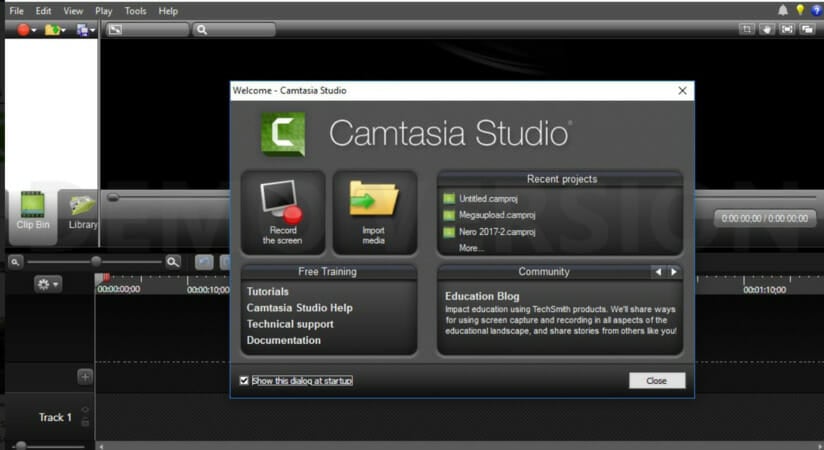
Camtasia Studio is among the most highly rated screencast software for Windows 10. Yet, like any software, it still throws out some error messages now and again.

The Camtasia System Audio Setup Failed error message can pop up for users when installing (or uninstalling) the software, recording video, or editing output.

In this article, we’re going to look at some of the most efficient fixes for Camtasia Studio’s more notable error messages that users have discussed on the support forum.


How to fix Camtasia System Audio Setup Failed errors?

1. Download Adobe Captivate

adobe captivate

If you don’t want to go through the grief of fixing Camtasia errors on Windows, you can bypass the entire list below by using a different solution: Adobe Captivate.

Designed for creators of high-quality learning materials, Adobe Captivate allows you to engage with your audience and ensure maximum retention of the materials presented.

Adobe Captivate is a powerful tool that helps you create jaw-dropping eLearning materials, interactive videos, quizzes and many more.

You can even spruce up those dusty PowerPoint presentations and bring them to the 21st century in glorious VR.

Let’s take a look at some of the key features Adobe Captivate offers:

  • Rapid Authoring
  • A vast collection of professional templates
  • Interactive videos
  • Import CVS files to create quizzes
  • Import PowerPoint presentations
  • VR support
Adobe Captivate

Adobe Captivate

Create the most professional learning materials and engaging videos with this versatile tool!
Free trialVisit website

2. Fix Error Code: (5) Setup Error

Error Code: (5) is a Camtasia installation error. The full error message states, Error Code: (5) Access is denied when users try to install the software. There are a few potential fixes for that error message.

First, try installing the software as an administrator. To do that, right-click Camtasia’s installer and select the Run as administrator option. Make sure that you install Camtasia with an admin account.

The Error Code: (5) error can also pop up for users who need to update the .NET Framework. NET Framework 4.6 or higher is a system requirement for Camtasia Studio 8 and 9.

Camtasia users can download the latest NET Framework version by clicking .NET Framework 4.7.2 on the official Microsoft download site. Then open the NET Framework setup wizard to install it.

Error Code: (5) might also be due to third-party antivirus software. So temporarily disable third-party software before installing Camtasia Studios.

To do that, right-click the antivirus software’s system tray icon to open a context menu that might include a disable or turn off the option.

If you can’t find a disable option there, open the settings tab or menu within the utility’s primary window, which will probably include an option to temporarily turn off the antivirus software.


3. Fix Error 1720, 1721, or 1723

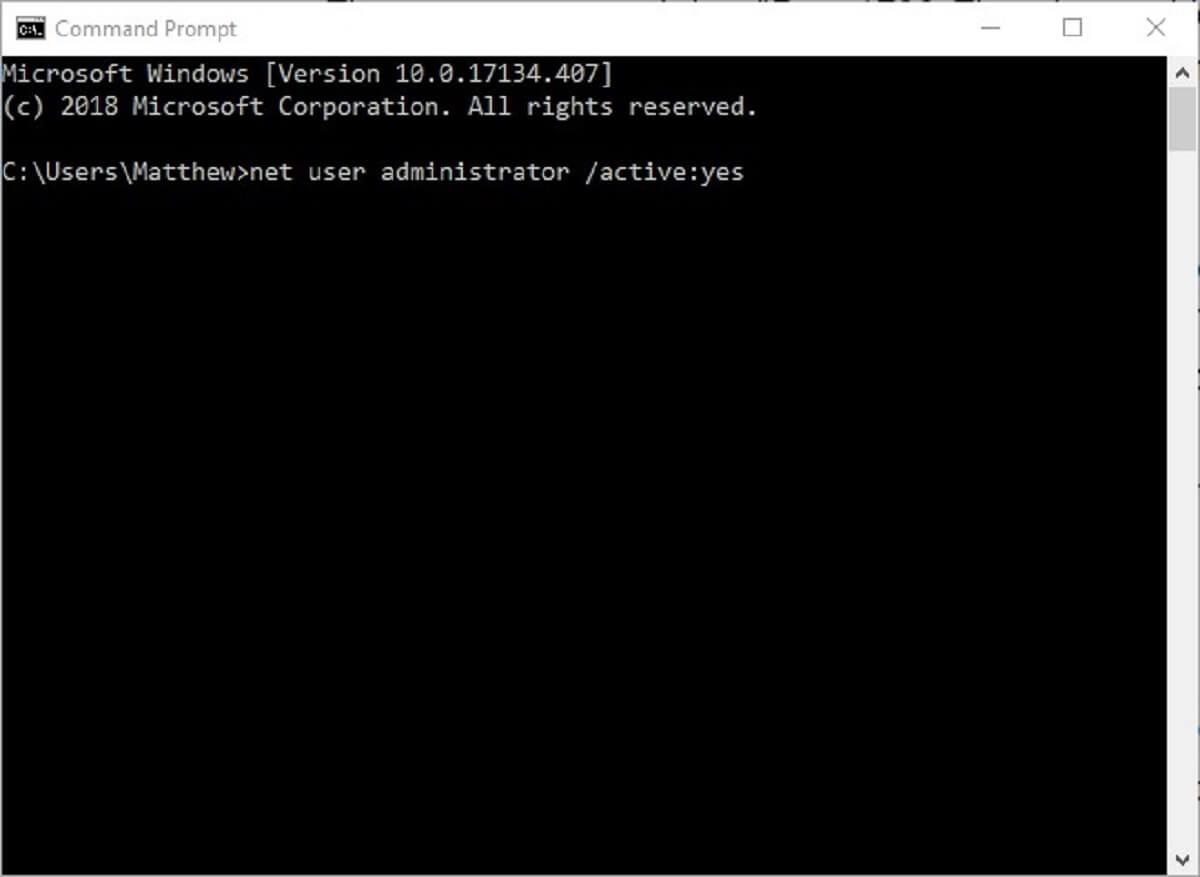
  1. First, activate the built-in Windows admin account to ensure you’re installing Camtasia within an admin account. To do that, right-click the Start button and select Command Prompt (Admin).
  2. In the Command Prompt enter the code below and press the Return key: net user administrator /active:yes
  3. Close the Command Prompt, and then restart Windows.
  4. Thereafter, select to log in with the new Administrator account.

Error 1720, 1721, and 1723 are installation error messages that can pop up for Camtasia and other Windows software. The error message states, Error 1720: There is a problem with this Windows installer package. 

That error message might be due to a corrupted installer, User Account Control, or a non-admin user account.

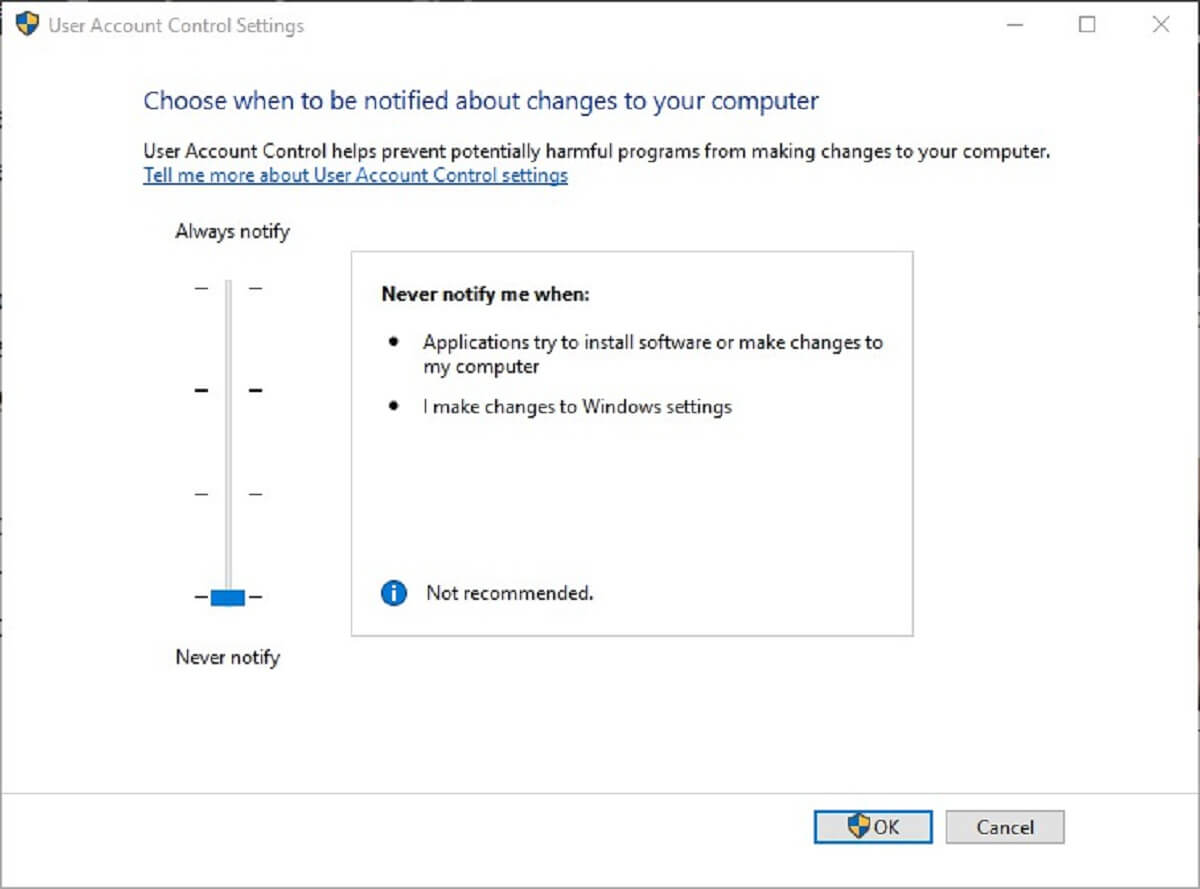
User Account Control (UAC) can also block the Windows installer. Thus, turning the UAC off might fix the installer error message. Users can turn off UAC as follows.

  1. Click the Type here to search button on Windows 10’s taskbar to open Cortana.
  2. Enter the keyword User Account Control in Cortana’s search box, and select Change User Account settings.
  3. Then slide the slider to Never notify.
  4. Click the OK button.

If, however, the installer is corrupted, users will need to get a fresh Camtasia setup wizard, so if this is the case it’s recommended that users download a new installer for the software.


4. Fix the problem with your Recording File error

  1. First, check that Camtasia isn’t running by right-clicking the taskbar and selecting Task Manager. Select CamRecorder.exe or CamtasiaStudio.exe on the Processes tab and click End task to close them.
  2. Press the Windows key + X hotkey. Then select Run to open that accessory.
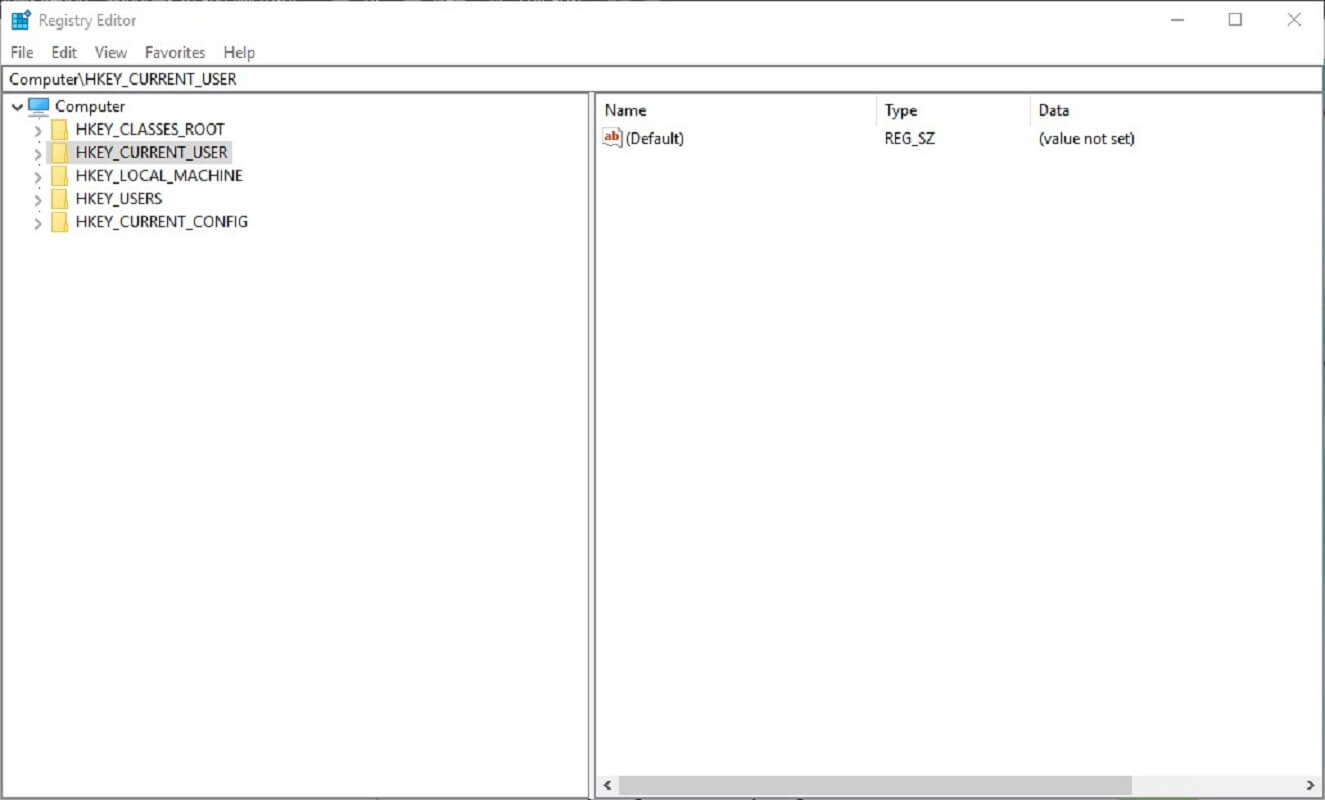
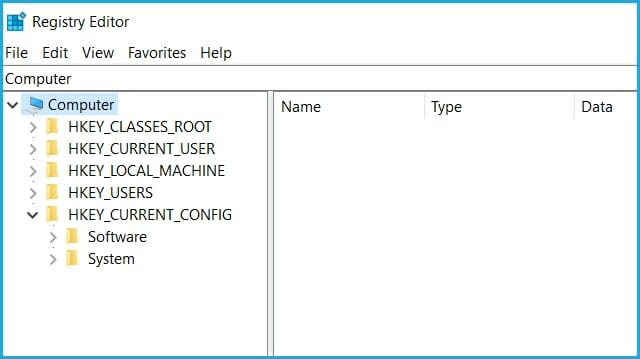
  3. Enter regedit in Run’s Open box, and click the OK button. That will open the Registry Editor window.
  4. Then Camtasia users should open one of three registry paths in the Registry Editor depending on their software version. The registry paths are: HKEY_CURRENT_USERSoftwareTechSmithCamtasia Studio18.0 (for Camtasia 2018 users, it’ll have different values for different versions).
  5. When you’ve opened the required Camtasia Studio registry path, right-click the 18.0, 9.0 or 8.0 folder (or key) on the left of the window and select Delete.

This is a recording error message that might pop up for some Camtasia users. The error message states, We’re sorry! There was a problem with your recording file. 


5. Fix Error Code 0x88880001: Unknown Error

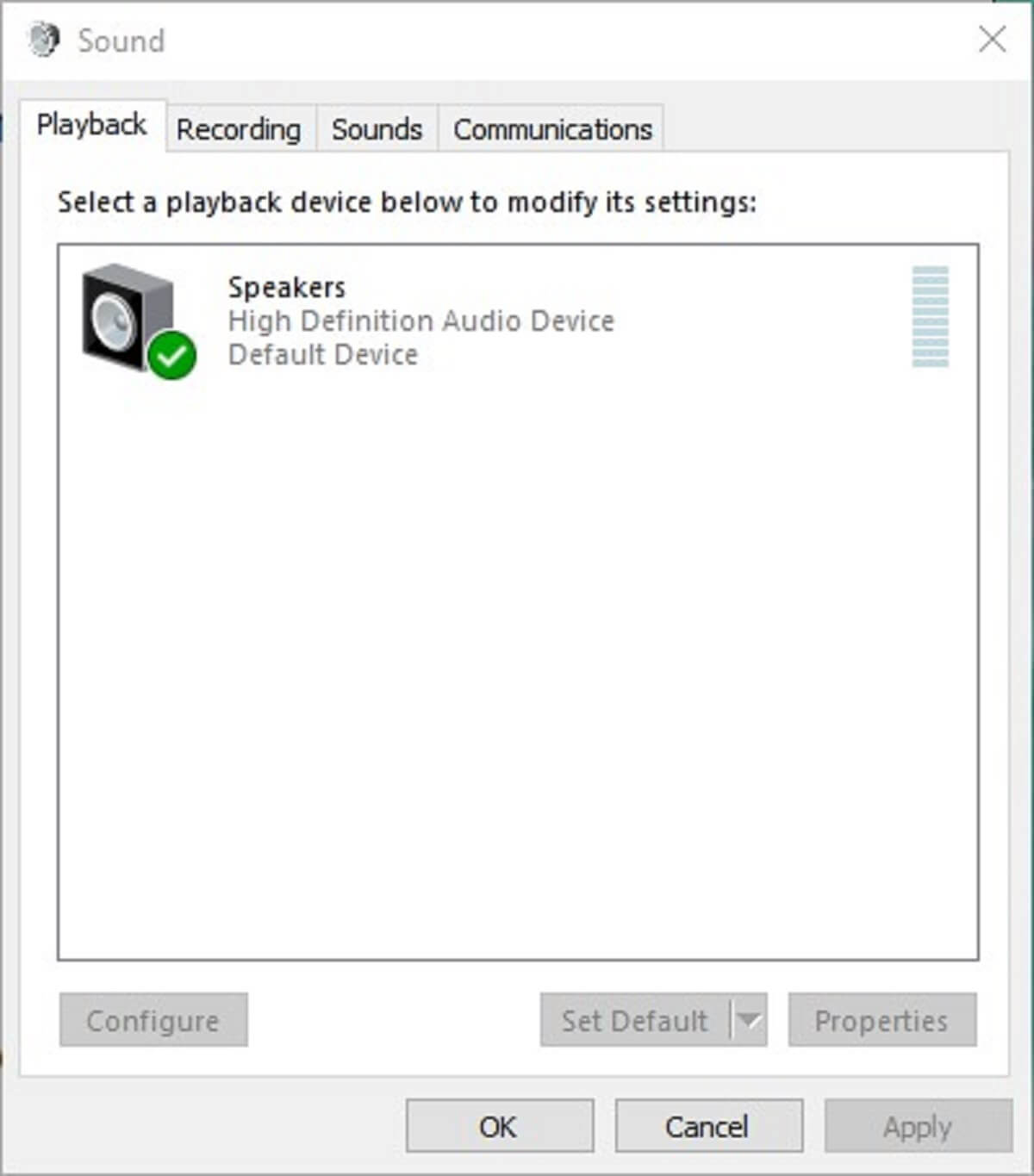
  1. Right-click the speaker icon on Windows’ system tray and select Sounds.
  2. Click the Playback tab shown in the snapshot directly below.
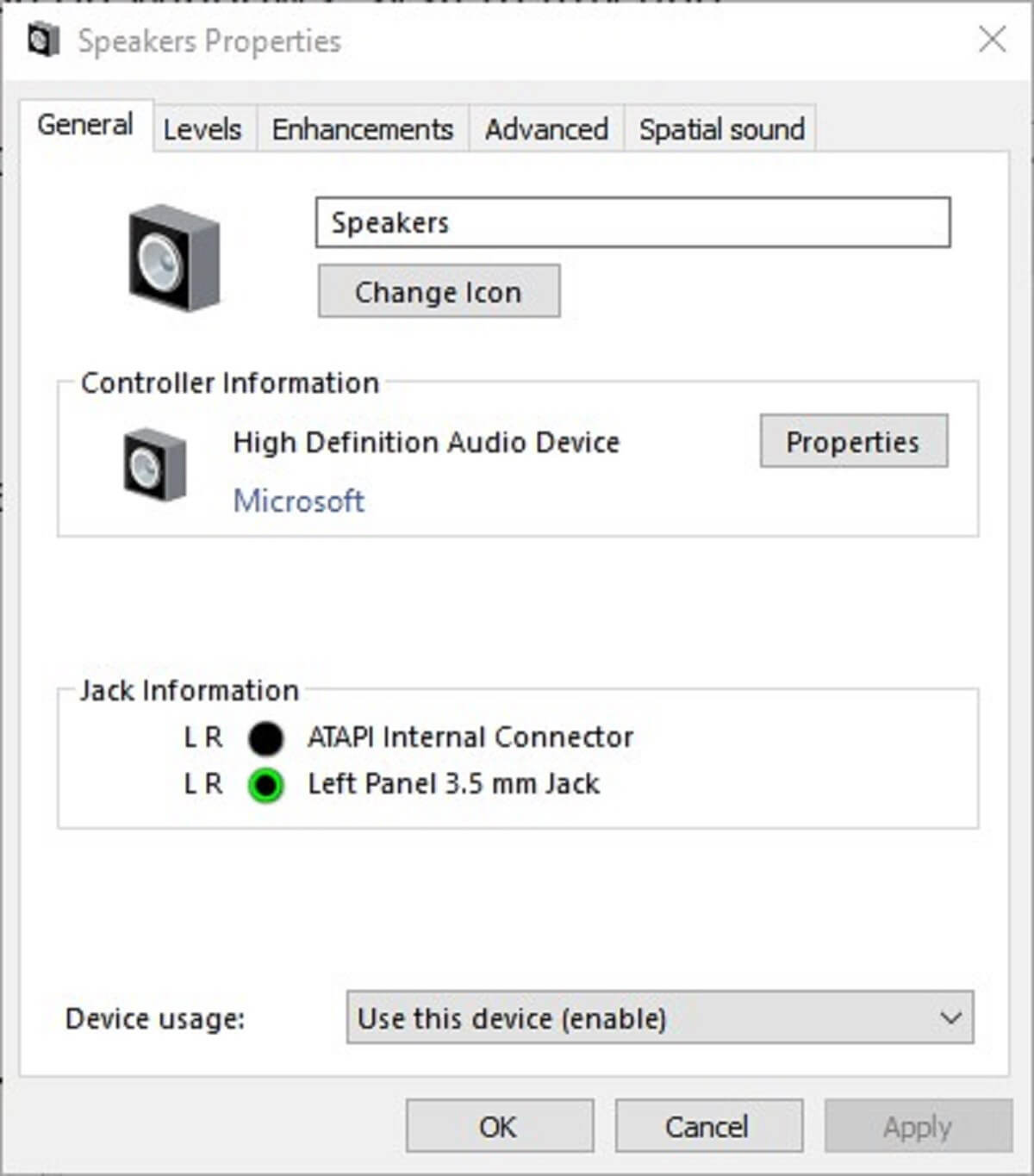
  3. Then double-click the default audio device to open the window below.
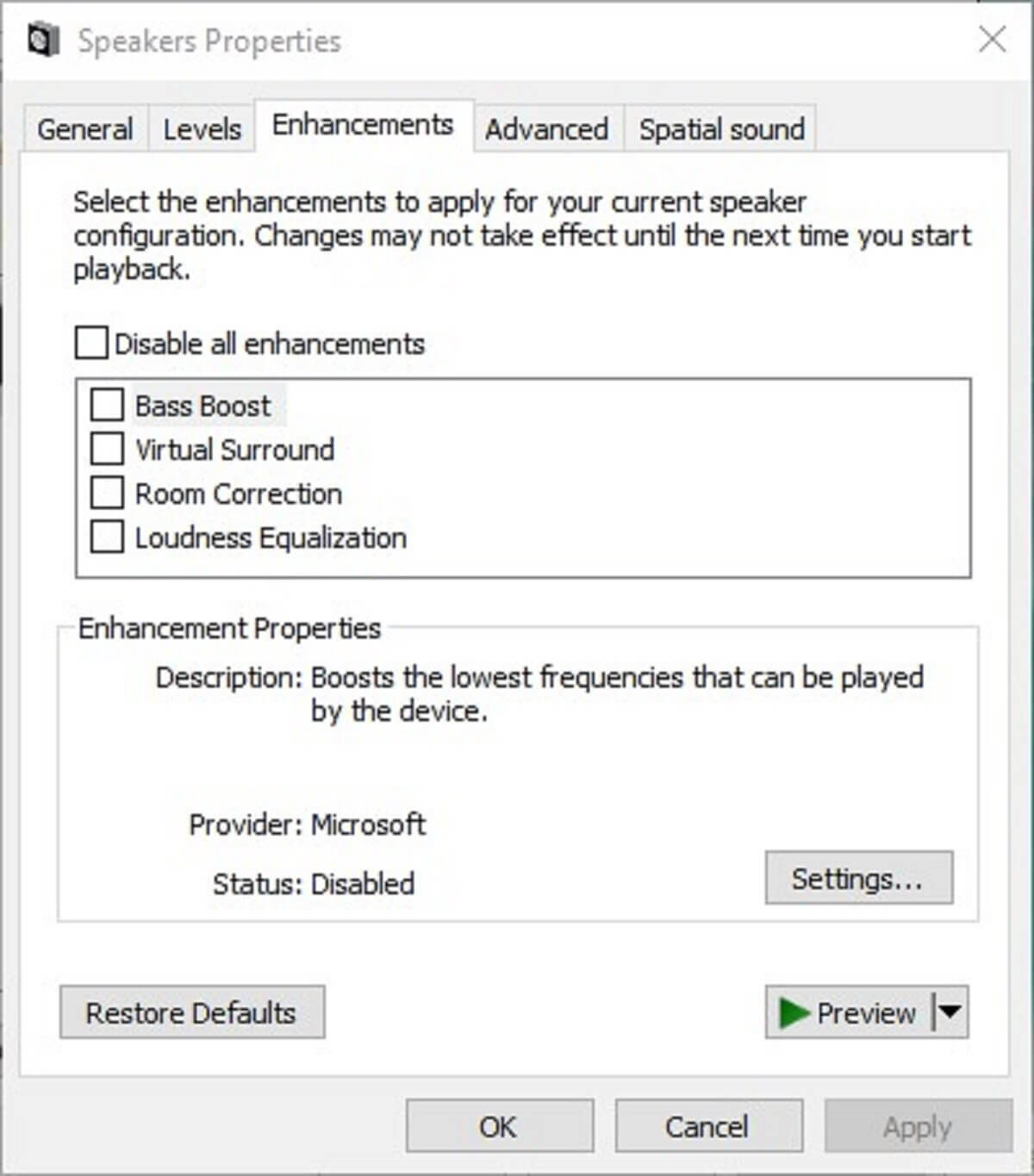
  4. Select the Enhancements tab.
  5. Click the Disable all enhancements box.
  6. Press the Apply button.

Error Code 0x88880001 is an audio error message that pops up in Camtasia. The error message states, We’re sorry! Camtasia could not playback the audio from the recording.

Save your recording and try restarting Camtasia. As such, the recorded output doesn’t include any audio.

Updating sound card drivers is another resolution that will usually fix Error Code 0x88880001. The quickest way to do that is probably to add driver updater software Windows.

Then users can scan for and update antiquated drivers with that software. Download now Driver Booster 6 to add that software to Windows. Driver Booster 6 automatically scans when you open it.

Then it will list outmoded drivers on your desktop or laptop. Click the Update All button to update the devices listed with the latest drivers.


6. Fix: Unknown Error

  1. First, open Run in Windows.
  2. Enter regedit in Run and click OK to open the Registry Editor.
  3. Go to the registry path below: HKEY_CURRENT_USERSoftwareTechSmithCamtasia Studio9.0.
  4. Right-click the 9.0 key and select Delete to erase it.

Some Camtasia users have stated that an Unknown Error message pops up when they try to start recording a video. Thus, the users can’t record the video. This is how Camtasia 9 users can fix Unknown Error.


7. Fix the WMVcore.DLL is Missing Error

Windows Media Player is a system requirement for Camtasia Studio. A WMVcore.DLL is missing error message pops up when users try to run Camtasia on Windows KN and N versions that don’t include WMP.

Thus, installing the Windows Media Feature Pack, which also installs WMP, will probably fix the WMVcore.DLL is missing error for KN and N users at least.

Camtasia users can download that pack at the Windows 10 Media Feature Pack page.

Various users also reported that Camtasia displayed the Invalid Configuration State error and in this case, you should try changing the audio source from Microphone to Stereo mix.


8. Fix An Error Occurred While Initializing the Camera for Capture

  1. Reinstalling the camera (or webcam) driver is one resolution that might fix the Camtasia camera error. To do that, press the Windows key + X hotkey.
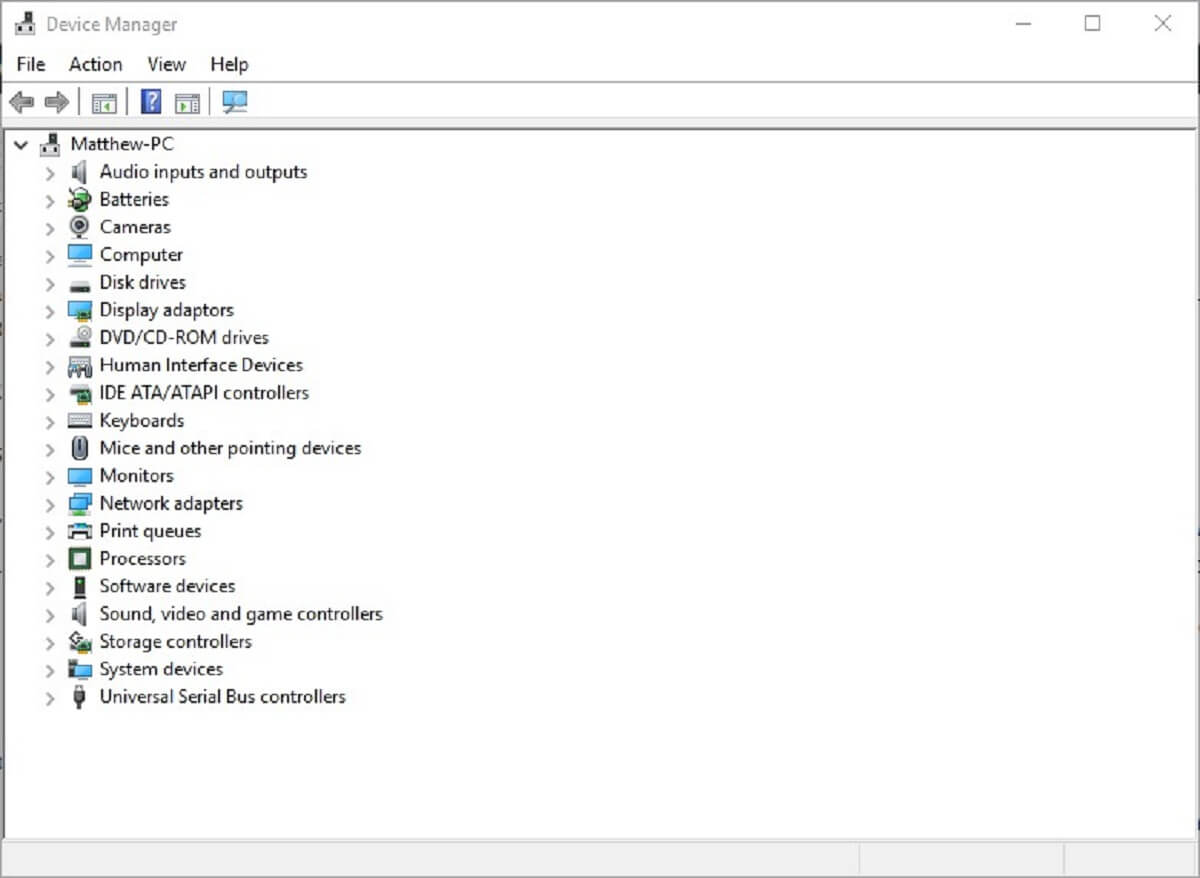
  2. Click Device Manager to open the window directly below.
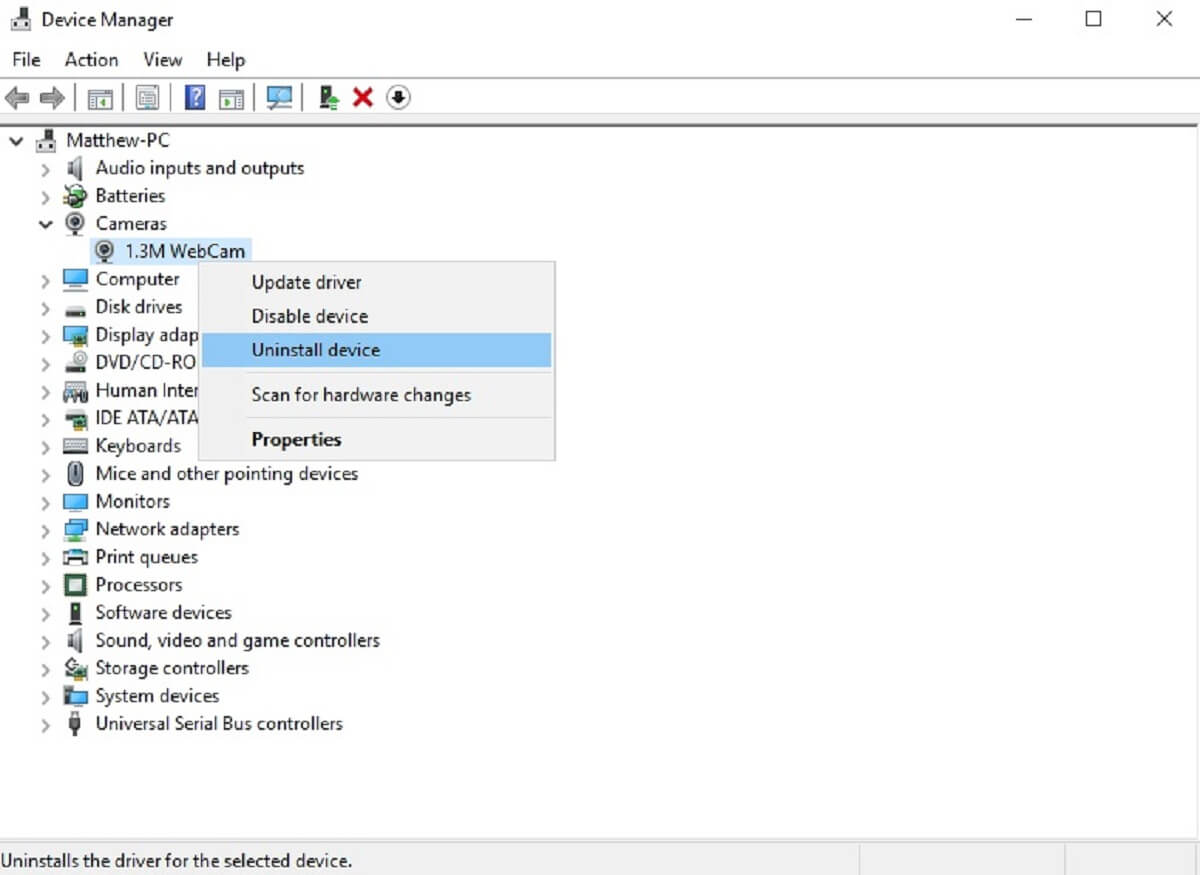
  3. Then double-click Cameras to expand that device category. Note that Device Manager might also list a camera under Image devices or Other devices.
  4. Right-click the camera and select the Uninstall device.
  5. Thereafter, restart Windows, which will then automatically reinstall the camera driver.

This is an error message that can pop up during Camtasia’s camera initialization.

The full error message states: An error occurred while initializing the camera for capture. Camera video will not be recorded. Thus, the software doesn’t record any camera video.


9. Fix Camtasia Studio 8 cannot connect to YouTube

  1. Check that Camtasia isn’t running before you edit the registry.
  2. Open the Run accessory.
  3. Input regedit in the Open text box, and press the OK button.
  4. Next, browse to this registry key: HKEY_CURRENT_USERSoftwareTechSmithCamtasia Studio8.0.
  5. Select the 8.0 key, and click Edit, then Delete.

The Camtasia Studio 8 cannot connect to YouTube error message might pop up for some users trying to add recorded videos to YouTube.

Some users have confirmed that editing the registry fixes the issue. This is how users can fix Camtasia 8’s YouTube error.


10. Fix Unable to Register Record/Pause or Marker Hotkey

The Unable to Register Record/Pause or Marker Hotkey error pops up when alternative software is running that has some of the same hotkeys as Camtasia’s Recorder.

Consequently, this is a hotkey conflict. In order to fix the Unable to Register error, users should stop the other software that has matching keyboard shortcuts.

Alternatively, users can modify Camtasia’s hotkeys by clicking Tools then go to Options and choose Hotkeys. Change the hotkeys to keyboard shortcuts that won’t conflict with any other third-party software.


11. Fix the System Audio Setup Failed Error

  1. Open the Run program.
  2. Enter the line below in Run and click the OK button: appwiz.cpl
  3. Then select ASUS software to uninstall.
  4. Click the Uninstall button.
  5. Then select Yes to confirm.

So that’s what you should do when Camtasia displays a message that says that an error occurred in the Recorder: System Audio Setup Failed.

For further resolutions, Camtasia users can submit TechSmith support tickets at the official developer’s page.

This error message pops up when some Camtasia users try to record video. The full error message states, An error occurred in the Recorder: System Audio Setup Failed.

TechSmith has confirmed that the error message is primarily due to conflicting ASUS software. Thus, uninstalling ASUS Sonic Suite, ASUS Sonic Studio and ASUS Sonic Radar may solve the error.

Removing the Nahimic Audio can also fix the issue, so follow the guidelines above to remove that program. You can also use the best uninstaller software, in that regard.


As you can see although Camtasia is not the perfect software and it may have some bugs popping-up, there are solutions to fixing them efficiently.

In this guide we covered the most common Camtasia System Audio Setup Failed errors and we hope that it got you out of your predicament.

We’d like to hear more from you on this issue so please drop us a comment in the dedicated section below.


3 best white noise generator software [+Online tools]

For those of you that haven’t heard of white noise, it’s basically a sound that unites all frequencies a human ear can detect, and it is, as scientifically proven, one thing that everyone needs after a long day.

When trying to relax, some folks enjoy ambient music, others like sounds of nature (rain sound is pure gold) or zen meditation bells. But, nothing is as relaxing as this indistinctive noise, or soothing, for that matter.

There are not so many dedicated applications that use white noise, but we singled out three that are, in our opinion, best suited for the job, no matter how simple the task.

Therefore, make sure to check them out below and prepare for a comforting experience.


White noise generators to get your daily dose of calm

Adobe Audition

White noise may seem by definition to be extremely simplistic, but there is a fine line between white noise that is relaxing and white noise that is annoying.

That being said, you can’t just use any old tool to generate it, so might as well go for the best.

Adobe Audition is a digital audio workstation that can do pretty much anything as long as the sound is involved. To sum it up, Adobe Audition is to sound what Adobe Photoshop is to photographs.

Among the many tools it has at its disposal, sound generation is one of them. Use it to create anything from your typical white noise, or even use Adobe Audition as a nature sound generator.

Here are some of the perks of using Adobe Audition:

  • Can be used for white noise generation
  • Great for audio mixing
  • Capable of non-destructive editing
  • Excellent if you are interested in a waveform editing view
  • Great plug-in support with both official and user-created content
Adobe Audition

Adobe Audition

Create and edit music, videos, and any type of sounds by using the feature-rich Adobe Audition.
Free trialVisit website

White Noise Generator

white noise generator software

The White Noise generator is a third-party freemium tool that looks like it was created prior to Windows 95. Our initial thought was that its interface is lackluster and an annoying Ad prompt hasn’t exactly worked in its favor.

However, it does it job and that’s the only important thing. It was created back in 2010 and it provides users with 20 + sounds including White Noise.

The program also features a simple Timer that enables you to choose when the playback starts and when it ends.

You can download a White Noise Generator for free by following this link.

⇒ Download White Noise Generator


White Noise from Windows Store

white noise generator software

Now, there’s an ever-present question about the overall usability of Windows Store apps.

There’s a lot of apps that aren’t exactly useful in comparison to standard programs, but that doesn’t seem to be the case for White Noise app.

A lot of similar applications offer paid options and they’re fairly cheap. However, the majority also locks white noise behind a paywall which isn’t what we’re looking for.

Luckily, White Noise comes without a charge and provides users with great interface, dozens of different sounds (including White, Brown, Pink, Blue, Violet, and Gray noises).

Also, you have a timer at your disposal that enables you to configure the playback time. In addition, there are mixes for various occasions that are customizable.

That’s it. What’s your favorite way to relax in your leisure time? Do tell us in the comments section below.

⇒ Download White Noise for free


These were some great software choices that can create white noise for you to fall asleeep to. Make sure to tell us your experience with them in the comment section below.


5 Best Software For Joomla Templates [2026 Guide]

Creating Joomla templates is not always the easiest task, especially if you are a design and coding newbie. Don’t despair because there’s also some good news for you.

You will finally be able to create amazing Joomla templates without having to know any web design language.

Joomla template software helps you create professional templates whether you are new to all this or you’re a more advanced user. All you have to do is set some features, choose a bunch of options, and you will be good to go.

Below, you can see a collection of six of the best tools for creating Joomla templates so make sure to check out their sets of features.


What are the best tools to create Joomla templates?

Adobe Dreamweaver

Topping out our list is a leader in web-development tools, Adobe Dreamweaver. This tool has all the tools that you may ever need in order to create professional-looking web pages.

The best part is that you don’t need to know coding at all, since everything is handled internally and automatically.

Just drag and drop elements, set their interactions, import files from other Adobe products such as Photoshop, Audition or After Effects, and let everything blend by itself.

The abundance of tools together with the intuitive interface is what makes Adobe Dreamweaver a borderline product for both professionals and amateurs alike.

And the best part is that you can try it for free during a 7-day trial, and then decide on whether to buy it or not.

Here are some of Adobe Dreamweaver’s best features:

  • Code Completion
  • Developer Workspace
  • Real-Time Browser Preview
  • Code Introspection
  • Code Themes
  • Starter Templates
Adobe Dreamweaver

Adobe Dreamweaver

Create intricate and and unique templates with the help of Adobe Dreamweaver’s abundance of tools!
Free trialVisit website

Artisteer – Automated Web Designer

Artisteer claims to be the first and only Web design automation product that is able to instantly create a fantastic looking and unique website templates and blog these as well.

Check out the most important features that you’ll get the chance to try out if you decide to use this tool:

  • You will be able to design some pretty awesome blogs and cool web templates in just a few minutes.
  • Using this tool will turn out fun and easy.
  • You will be able to export the final result to Blogger, Joomla, WordPress and more CMS products.
  • There’s no need to learn Photoshop, HTML CSS or other languages.
  • You can preview, download and edit online websites and template samples as well.
  • Using Artisteer, you can instantly become a web-design expert, with coding, editing graphics and creating Joomla templates abilities.

⇒ Download Artisteer


Themler – Visual Template Designer

Using Themler, you will be able to create amazing CMS themes and templates and as well.

The program has lots of customization options and a large set of functionalities, while also being versatile because it works on multiple platforms.

There’s more to this software so check out other exciting features that are packed in it below:

  • You can also create content for websites, Landing pages, and eCommers pages as well.
  • In order to be able to use this software, you have to install the CMS template or run it on the desktop.
  • Add the sections included in the library or use the suggested ones.
  • The software’s interface is a drag-and-drop one, and you’ll enjoy some vibrant components.
  • You will get the chance to edit texts, images, buttons, and components.
  • You can also edit pages, layouts, templates, and styles.
  • After you’re done, you can publish the finished result Live, or you can export it as a .zip with content.

⇒ Download Themler


Template Creator

Template Creator lets you easily create amazing Joomla templates in under 10 minutes. The software is great for beginners and professionals alike, and it has a comprehensive interface.

It’s really worth taking a look at some of its best features:

  • You will be able to use various layout with editable columns, widgets, and color schemes as well.
  • Most customization is based on point-and-click.
  • You will also get the chance to use a CSS custom code section in order to style your favorite template if you’re a web designer.
  • This tool is ideal for users who don’t have any web development experience, but who also have a strong desire to create Joomla templates for professional and personal use as well.

⇒ Download Template Creator


Linelabox

If you want to easily create a Joomla template, perhaps you might be interested in this online tool.

This tool allows you to create a completely responsive layout and add use unlimited grid layouts. In addition to layouts, you can choose from an abundance of menu styles, colors, headers, and footer styles.

Another great feature is the unlimited number of undo steps that you can take, so you won’t cause any irreversible changes to your projects.

In addition, this tool offers advanced typography features so you can easily customize your text any way you want. Speaking of typography, you can choose between 850+ available fonts.

Linelabox also has many pre-built blocks and templates to choose from, and you can also pick between many module styles and variations.

We also have to mention that there are over 1,000,000 images available that you can use as your background.

The service also has a mobile editor as well, so you can ensure that your Joomla template will work perfectly on mobile devices. There’s also live editing feature available, so you can easily adjust your CSS or HTML.

We also have to mention that every module is fully customizable and thanks to the drag and drop interface you should be able to create Joomla templates with ease.

Linelabox is a great tool, and thanks to the drag and drop interface and abundance of modules, you should be able to create Joomla templates with ease.

Here you can find some of it’s key features:

  • Simple to use drag and drop interface
  • Over 1,000,000 images available to use
  • Responsive layout
  • Unlimited grid layouts, menu styles, and colors
  • Advanced typography with over 850 fonts available
  • CSS3 animations
  • Live editing

⇒ Try Linelabox now


These were our top five picks for tools that allow you to create Joomla templates effortlessly. Make sure to check out their sets of features in order to make the most informed decision for your skills and needs.


Here’s How to Open RW2 Files in Windows

An RW2 file is a raw image file format, specifically a camera RAW file created by a Panasonic digital camera like the LX3 or LX5. If you’re wondering how to open an RW2 file, continue reading.

This type of file has a RAW raster image just as the camera’s sensor captured it, and you can edit it to adjust color, exposure, and other properties by using an image or photo editor.

The RW2 file stores uncompressed image data from the sensor and is ready for print and view. Photographers can decide how to use and/or develop the images via a special program, but access to the raw data also gives them the flexibility to process them or completely alter them.

To open RW2 files, you will need a program that can help you open it, whether it is free software or a paid-for program. Using a dedicated app is also recommended when looking for convenient methods to open SDR Files on Windows.

How to open RW2 files in Windows 10?

Adobe Photoshop – Best RW2 file opener

Photoshop CC 2020 - best Fuji RAW viewer and converter software

Adobe Photoshop is the undisputed king of photo editors, known and used by so many that its name has become a verb.

There’s no need for an introduction to Adobe Photoshop because we all know what it’s capable of and how many features it offers.

While it does have a bit of a learning curve, you will find a plethora of training materials online, thanks to its widespread use in the photo industry.

From professional photographers to hobbyists, Photoshop caters to all, and the satisfaction you get when you master it is enormous.

Once more, when you’re working with RAW files, like the RW2 format, you can use the power of Adobe Lightroom to change highlights, shadows, focus, and more.

One can even make an entire career out of Photoshop, so you should jump on board and get Photoshop and start learning its powerful tools:

  • State of the art content-aware fill
  • GPU-based effects (blur, bokeh, highlights, etc.)
  • Cross-platform support
  • 3D support
  • Intelligent selection and masks

Adobe Photoshop

Explore the vast library of features and customization options with Adobe Photoshop!
Free trial Visit Website

2. FileViewer Plus – Universal file viewer

file viewer plus 2 - recommended software

Raw files are well supported with this program; you can open photos from 600 camera models. The Panasonic RAW image RW2 is on the list of over 300 file types supported by File Viewer Plus.

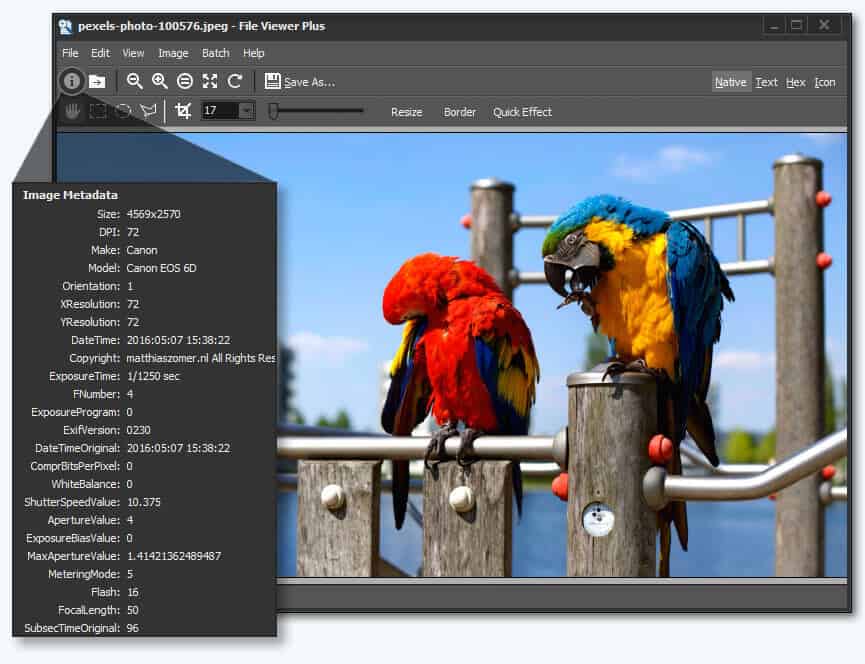
One feature of this software is the ability to view EXIF data for digital photos and camera raw files.

File Viewer Plus 5 is a universal file viewer for Windows that can open and display over 300 different file types.

The new version brings extra features and focuses on support for viewing and converting over 50 new file formats, including over 25 additional image, audio, and video formats.

The new batch conversion feature works very quickly, and you can save settings to use it again for different jobs.

The application has a simple, smart layout and is as easy as drag-and-drop files. We happily recommend this program to open RW2 files and almost all file types without hassle.

A fully functional free trial is available for download, so you can try it straight away, or you can buy it at an affordable price.

File Viewer Plus

Open and convert any raw image files with this complete file-viewing software.
Free Trial Visit Website

3. RawTherapee – Instantly preview changes

This is a cross-platform program for processing RAW images or photos and comes with tools that deliver high-quality and efficient development of the images.

The program is free and open-source software written in C++ and uses a patched version of dcraw to read the RAW files.

This tool gives you advanced control over the demosaicing and developing process, with a subset of image editing features focused on improving your workflow by handling volumes of images.

It uses a non-destructive editing concept for the post-production of photos, and the edits or adjustments are reflected in the preview image instantly.

However, they are not applied to the opened image in the actual sense, as this happens during the export process.

This software supports most raw formats and non-RAW image formats like PNG, TIFF and JPEG, plus raw DNG images.

You can tweak photos, use the color histogram, make adjustments, and revert changes at any time, as well as use its many photo opening and processing features.

⇒ Get RawTherapee

4. FastStone Image Viewer – Stable and user friendly

This tool is fast, stable, and user friendly, and comes with an advanced editor and converter. It is an intuitive software with a full-screen mode and a thumbnail browser.

It also has other options available through hidden toolbars that display when your mouse touches your computer screen.

It supports major graphic formats such as BMP, JPEG, TIFF, PNG, WMF, TGA, NEF, and DNG. It also has a high-quality magnifier, image annotation, scanner support, drop shadow effects, and more.

⇒ Get FastStone Image viewer

5. IrfanView – Feature-packed editor

Irfanview windows 7 photo viewer

This free software for opening RW2 files in Windows 10 lets you view and open images, manage multiple media, and edit them.

Its editor is feature-packed, with a fast converter for batch images and easy photo or image organization and tagging.

It is an excellent image viewer. You can watch your images via slideshow or browse through them quickly, and you can expand it via plugins.

Despite being dated, it is easy to master, and the interface is practical. its tiny size makes it blazingly fast for viewing your RW2 files.

⇒ Get IrfanView

6. XNView – Highly customizable

This free tool acts as both an image organizer and a file manager. You can view, convert, organize, or edit your RW2 raster images and manage the files, too.

Features include batch renaming and screen capturing tools. It’s licensed for private, educational, and not-for-profit use; otherwise, there’s one for commercial use.

It is customizable and multi-lingual, supports over 500 image file formats (including audio and video), and can write 50 image file formats.

It is fast, easy to use, and free! You can apply filters and effects, adjust brightness or contrast, and use its vast array of editing features to modify your RW2 files and open them for viewing.

You can also open RW2 files in Windows 10 using paid programs, including FastRawViewer and Canvas X by ACD Systems Canvas.

⇒ Get XNView

If you’d like to convert an RW2 file before opening it in Windows 10, you can use programs such as Adobe DNG converter. This program works with many RAW image file formats besides DNG. You can also convert your RW2 file to DNG and open it via this program.

What to do when you cannot open RW2 files in Windows 10?

One of the reasons you may not be able to open RW2 files in Windows 10 is that the file extension is misread and is opening in the wrong program.

While extensions may look the same, they don’t necessarily open with the same programs, and they cannot be used or converted using similar programs or software. Ensure you download and install the appropriate program or app to open RW2 files in Windows 10.

Are there other ways, not mentioned here, that you use to open RW2 files in Windows 10? Please share what tools or methods you use by leaving a comment in the section below.

Windows 10 news recap: 21H1 arrives for “seekers” in Beta, Outlook for Windows gains “Meet Now” button, and more

Welcome back to our Windows 10 news recap, where we go over the top stories of the past week in the world of Microsoft’s flagship operating system.

New optional patches are available for Windows 10 versions 1909 and 1809

Windows 10 versions 1909 and 1809 have received some optional updates this week that focus on resolving some bugs. If you’re running either of those versions of Windows 10, it’s recommended that you update.

Windows 10 Hero Image

Outlook for Windows adds “Meet Now” button to start Teams meeting even faster

To make it easier to start a meeting in Microsoft Teams, Outlook for Windows has a new “Meet Now” button to make it faster to start a meeting.

Windows 10 version 21H1 is now available for “seekers” in the Beta Channel

For those on the Beta Channel of the Windows 10 Insider program, Windows 10 version 21H1 is now available to ‘seekers’. It’s a small update, but if you’re part of the Beta Channel, head over to Windows Update within Settings in order to download and install the update.

Windows 10 2 In 1 Pc

That’s it for this week. We will be back next week with more Windows 10 news.

Microsoft news recap: Xbox gains FPS Boost feature for backwards compatible games, Microsoft Flight Simulator gets UK & Ireland update, and more

Microsoft news recap is a weekly feature highlighting the top Microsoft news stories of the past week. Sit back, grab some coffee, and enjoy the read!

New FPS Boost feature on Xbox Series X|S brings frame rate improvements to select backwards compatible games

Backwards compatible games on Xbox Series X|S are getting some additional enhancements, thanks to a new feature called FPS Boost. Whilst only a small selection of games will support the feature at first, games that do benefit will often see their framerate doubled, in some cases to 120 FPS.

Xbox Series X|s Fps Boost

Microsoft Garage announces Journal, a new ink first note-taker with AI super powers

A new app has been introduced through the Microsoft Garage. Called Journal, it’s a note-taking app that provides an ink-first experience, whilst utilising AI to supercharge your note taking. It’s ideal for Surface device owners.

Microsoft Garage Journal

Microsoft Flight Simulator World Update III: United Kingdom & Ireland is now available

The latest world update for Microsoft Flight Simulator has been released, focusing on the United Kingdom and Ireland, providing enhanced visuals and more detail to the world. Included within the update is hand-crafted airports, such as Barra, Liverpool, and others.

Microsoft’s new $99 Xbox Wireless headset to launch on March 16, pre-order it now

Out of the middle of nowhere, Microsoft has announced its latest Xbox accessory, the Xbox Wireless Headset. Launching on March 16 for $99, the new headset packs a punch, with a range of features, including multiple surround sound audio formats including Dolby Atmos, as well as mic indicator lighting, and more. It will use the same wireless connectivity as Xbox wireless controllers, to provide low-latency audio, whilst also having support for Bluetooth to connect to non-Xbox devices.

New Xbox Wireless Headset

That’s it for this week. We’ll be back next week with more Microsoft news.

Getting started with LinkedIn Part 4 – content sharing for employees

Need more visibility on LinkedIn for your business? As a business owner, wondering how to get your employees involved with your business LinkedIn content strategy?

Discover five ways to help your employees share more company content with their networks on LinkedIn.

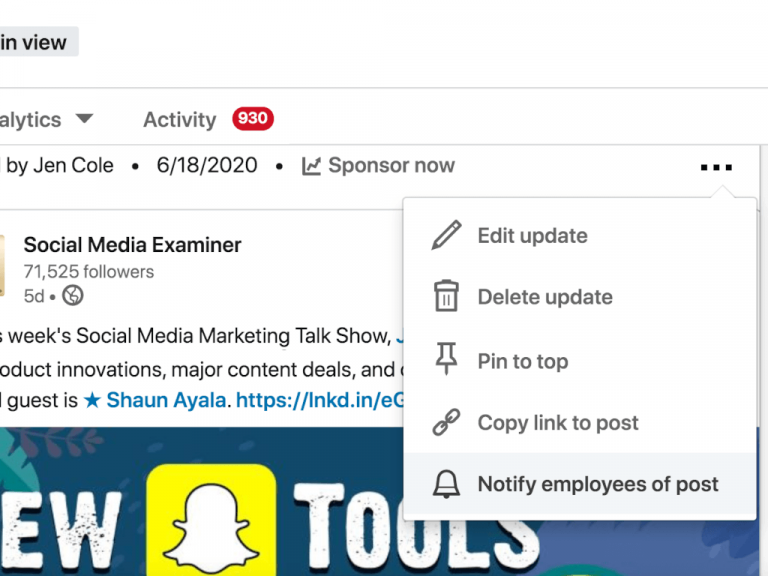
Apply the LinkedIn Employee Notifications feature to Company Page posts

As a LinkedIn page admin, you can let your colleagues know when you’ve posted an update to your company page using the LinkedIn Employee Notifications feature. All employees need to do is react such as like, add a comment, or share it within their own network.

Linkedin1

Note that page admins can only notify employees once a day. Some employees, including admins, won’t receive a notification if the relevance model determines the update isn’t content they’re likely to engage with based on their history with the page.

Within your LinkedIn company page analytics, updates will be labelled with “Employees Notified” so you can gauge the reach and engagement generated by notifying your colleagues about page updates.

Help employees optimize their LinkedIn profiles

Linkedin2

Provide a list of applicable skills that relate to your industry and business. LinkedIn members can add up to 50 keywords on their profile to help their profile show up in search results. You can also provide sources of rich media for individuals to include in the Experience section such as web pages to link to and provide PDFs, presentations and video etc.

Use LinkedIn Teammates feature to prioritize content from Company Contacts in the LinkedIn Feed

Encourage employees to use the Teammates feature for further intenral collaboration in the organisation. This feature ensure that employees see LinkedIn updates from their current team such as their manager, teammates reporting to their manager, other teammmates, and direct reports.

Linkedin3

To use the LinkedIn Teammates feature, click the My Network icon at the top of your LinkedIn homepage and click Teammates on the left.

Linkedin4

In the Add Teammates field, type the name of a teammate you’d like to add and then click Add next to your teammate’s name. If you’re not connected to your teammate on LinkedIn, you’ll have to click Connect next to their name before you can add them to your team.

Solicit employee content for your LinkedIn Company Page

As a marketer, you need to collect relevant news from within your company to share on LinkedIn. You’ll want to keep tabs on what employees are working on and solicit content that reflects your company culture. And if you’re not a subject matter expert, you may need assistance from employees to create some of your content for LinkedIn.

These challenges aren’t unique to social media, but with the requirement to produce regular and timely content, you need to setup internal processes to garner support from employees.

Linkedin5

Guide and support employees in posting their own LinkedIn profile updates

While having employees share content from your LinkedIn page is great support, you may also wish to support your non-marketing colleagues in creating their own content for LinkedIn posts that can be shared by teammates and other network connections

Some employees will be able to dive right in, knowing what they want to post on their profiles, but others may need a few suggestions.

Linkedin6

In addition to sharing these ideas, consider providing technical how-to support from employees who lack the condidence to post on LinkedIn. Include best practices such as the best LinkedIn hashtags to use. Offering training and ongoing guidance can help ensure consistency across the business.

It’s also important to share some do’s and don’ts for posting on LinkedIn such as don’t violate client confidentiality. You could provide a detailed social media policy or an internal document with examples.

The easier you make it for non-marketers to support your LinkedIn marketing, the better. You can also encourage them to measure their individual success by analysing their LinkedIn profile using the LinkedIn dashboard.

Summary

Asking for help from colleagues and peers is never easy, but when it comes to getting results from your LinkedIn marketing efforts, it’s hugely valuable to get them involved. Marketers might have all of the technical skills for social media management and lots of content ideas; however, they might not always be the subject matter expert within the business. And they may not have the largest network of clients and prospects among their own connection lists.

That’s why you should consider getting employees involved in your LinkedIn marketing. Show them how their profile can be a tool that can support your wider business strategy.

If you’re just getting started with LinkedIn, check out our Part One, Part Two and Part Three of our series, and learn more about LinkedIn from Microsoft. Which of these tactics will you try to get your colleagues involved in your LinkedIn content marketing? Please share your business strategy with LinkedIn as an employer, as a business owner in the comments below!

Getting started with LinkedIn Part 3 – for workers/employees

Your company, or any company on LinkedIn for that matter, will have the most of its interactions with users through employee profiles. This means your organisation is already getting lots of clicks on LinkedIn, even though these clicks goes to employee profiles. How you as an employee and your organisation can capitalize on these impressions.

Here are some benefits of having strong employee profiles on the world’s largest professional network.

Employee advocacy

LinkedIn profile can be seen as the platform where the employee share the latest news, happenings, and achievements of your company and show how much they care. This will not only show what a dedicated employee they are, but it will actively advocate  for the employer brand and culture in the process.

Showcase credibility

One of the greatest benefits of LinkedIn is that it is seen as one of the most, if not the most credible professional business websites. If a user’s previous companies, clients, suppliers etc. acknowledge the fact that they worked together and even gives the user a recommendation, this adds to your entire company’s credibility.

People want to know people, and not necessarily just a ‘position’. You as an employee, your profile will showcase your career path and what led to work for the organisation you are in. It will also show what type of work you are hired to do and the standards you set for the company as a whole. The same skills that are typically transferable from one job to another will help showcase the experience of your work and ultimately reflect well on the company brand.

Trust

Employees promoting themselves and discussing the company brand online shows their employers fully trust them. Having LinkedIn, gives employees opportunity to represent themselves online and show that they trust the ‘company message’ they are conveying to the world via the platform. Good communication between employees and employers will lead to a boost of morale and employees would gain confidence in their voice and skills.

Strengthening of online presence

Employees list themselves as working for an organisation, then employers create a link from their profiles to the organisation. Their profile will then drive traffic to the company’s page which in effect will draw attention to the website and its services or products, and ultimately the brand.

This is a clever way in which LinkedIn can be used as a marketing tool for the company you work for. Employees who are brand ambassadors would create more opinion, content and influence within the industry and will definitely benefit the organisation as a whole.

Summary

LinkedIn is more than just a career-focused platform, and if used strategically, efficient employee profiles are in effect free online advertising space for the brand, the organisation. Like building up an online army, with every employee are on the same page in the organisation, ready to take the world by storm. Having a strong employee profiles on the world’s largest professional network brings benefits for long career path prospect for your future as a employee.

If you’re just getting started with LinkedIn, check out our Part One and Part Two of our series, and learn more about LinkedIn from Microsoft. Please share your work experience working with LinkedIn as an employee for an organisation in the comments below!

Microsoft suggest companies “adopt a zero trust mindset” as it closes SolarWinds internal investigation

Microsoft is closing the book on its internal investigation of the now infamous SolarWinds phishing attack that’s affected hundreds of US companies. While early on it had been identified that the nation-state attack first wormed its way through the use of Microsoft’s Outlook service as a well-planned phishing attack, the company defended the use of its products by reassuring its customers that none of its services were used to directly attack others.

Not only has Microsoft’s internal investigation reaffirmed the claim but it also allows the company to boast that “there was also no evidence of access to our production services of customer data.”

After a figurative pat on the back, Microsoft does advise that going forward its clients and customers adhere to a few fundamental changes to their approach to security.

First, “Adopt a Zero Trust mindset,” which Microsoft describes as “all activity–even by trusted users–could be an attempt to breach systems.” Secondly, is to embrace the cloud. Perhaps, initially counter-intuitive given the way the SolarWinds attack spread, but Microsoft believes by embracing the cloud, companies can “layer up” on security leveraging real-time advancements in threat protection from cloud service providers such as themselves.

The not-so-subtle plug for Azure by Microsoft does have its merits by dovetailing into the company’s last suggested approach to security which is to “strengthen the community of defenders.” Embracing the cloud also helps a business more quickly crowdsource security solutions and Microsoft would like it if more companies would soften to the idea.

Ultimately, the approach to security comes down to businesses’ own core competency with the latest threat analysis. Obviously, Microsoft would love for companies to double upon security by making use of Azure and Microsoft 365 Defender, but it’s a big unsecured world out there and it seems at this point the company would simply settle on its clients being more proactive to potential online threats.

How to install and use Recipe Browser in Terraria

Terraria is a great game, but it lacks certain features such as a recipe browser. Luckily, there’s an active community that tries to bring this and other missing features.

In today’s guide, we’re going to show you how to use the recipe browser in Terraria and how to fix any potential issues that you might experience with it.


How can I use the Recipe Browser in Terraria?

Use Recipe Browser mod

recepie mod download recipe browser terraria
  1. Download Recipe Browser mod.
  2. Install the mod.
  3. Once the mod is installed, you need to assign a hotkey to it to access it.

With this mod you can do the following:

  • Filter items by placing them in a slot
  • Click on recipes to see details
  • Search for any recipe by its name
  • Double-click on ingredients for further filtering
  • Highlighting for craftable items
  • Easily craft complex recipes
  • Check NPC item drops
  • Pin favorite recipes
  • Filter recipes by owned ingredients
  • Highlight recipes for recently obtained items

The mod is great, but it also suffers from certain issues, and we’ll list the most common ones:

Stuck on Rebuilding Loot Cache

rebuild loot cache Recipe Browser Terraria
  1. Close the game.
  2. Start it again and hold the Shift key until you see the main menu.
  3. Go to the Mods menu and disable all mods except Recipe Browser.
  4. Restart the game again.
  5. Enable mods one by one until you find the mod that is causing the issue.

After following these steps, the issue with the Recipe Browser in Terraria will be resolved.


Error message with Could not convert

JSON file Recipe Browser Terraria
  1. Navigate to the following directory: \Documents\My Games\Terraria\ModLoader\Mods\Cache\
  2. Delete the LootCache.json file.
  3. Now check if the problem is resolved.

This issue is caused by a corrupted json file, but once you delete it, the mod should start working again.


OutOfMemoryException

memory RAM Recipe Browser Terraria
  1. Increase the amount of RAM or disable certain mods.
  2. Alternatively, switch to unofficial 64-bit Tmodloader.

This error message appears if you have a lack of RAM. If adding more RAM isn’t an option, using a 64-bit Tmodloader should be a decent workaround.


Mod not working at all

keyboard shortcut Recipe Browser Terraria
  1. Check your keyboard controls and make sure that you have a key assigned to Recipe Browser.
  2. Alternatively, reload all your mods.

Note: For the Recipe Browser to work in Terraria, you need to assign a key to open the Recipe Browser.

Alternatively, check if other mods are interfering with this mod.


There you go, there’s everything you need to know about Recipe Browser in Terraria. Have you tried this mod? Let us know in the comments section below.

FIX: Try refreshing the Soundsource browser

Soundsource browser is a file browser in Omnisphere 2 software. However, many users reported Try refreshing the Soundsource browser message while using the Omnisphere 2.

This can be a big problem for some users, and in today’s article, we’re going to show you how to fix this.


How do I fix try refreshing the Soundsource browser error?

1. Reinstall the soundset or the STEAM folder

reinstall soundset try refreshing the soundsource browser

If you’re getting Try refreshing the Soundsource browser error, you might be able to fix that by reinstalling the soundset.

This problem is somewhat common with third-party soundsets, and reinstalling the soundset usually helps. If that doesn’t help, you’ll have to reinstall your STEAM folder.


2. Verify structure and updates

verify structure try refreshing the soundsource browser

Another way to fix this problem is to verify the structure of the STEAM folder. In addition, be sure to verify the latest Omnisphere updates.

You can try refreshing patches, multis, and soundsources in their respective browser. To do that, just click the circular arrow button next to the Play button.

Keep in mind that there are 3 browsers that you need to use, one for each of the aforementioned categories. Few users reported that the issue was resolved after downloading the Library Soundsource update.


3. Delete zmap.index

zmap index try refreshing the soundsource browser
  1. Navigate to C:\ProgramData\Spectrasonics\STEAM\Omnisphere\Soundsources\Factory\Core Library
  2. Delete zmap.index.
  3. Apply the soundsource update.
  4. Start Omnisphere and Keyscape and the zmap.index will be recreated.

Some users are also suggesting to delete zmap.index from the following subfolders in the STEAM folder:

  • Keyscape
  • Soundsources
  • Factory
  • Keyscape library
  • Keyscape>Soundsources>User

4. Make sure that STEAM folder isn’t set to read-only

  1. Go to C:\ProgramData\Spectrasonics
  2. Right-click STEAM directory and choose Properties.
  3. Uncheck Read-only option and click on Apply and OK to save changes.

Try refreshing the Soundsource browser message can be a problem while working with Omnisphere 2, but we hope that you fixed the issue using our solutions.

Paint by Numbers Software: 5 Best Picks for 2026

Based on numbers, anyone can create amazing works of art by simply following the number and color indication.

With using software that allows you to use it you can emerge in the amazing world of art creation and grow your skills in the area.

There is software to create paint-by-number in Windows 10 and Mac and in this article we will present you the best of them, so make sure to keep on reading.

What are the best software to create paint-by-number in Windows 10 and Mac?

Adobe Illustrator Draw – 3D effects and objects

Adobe Illustrator Draw is one of the most used and appreciated software by anyone that is interested in the art field.

Thanks to the Image Trace function you can turn an image into paths and add a corresponding number for each color.

Adobe Illustrator Draw is a versatile tool that has many great features that you can count on to make your drawing stand out.

Also, since Adobe Illustrator Draw is part of the Adobe Creative Cloud subscription model you will find it easier to integrate it with other Adobe programs.

Adobe Illustrator Draw

Create amazing paint-by-number masterpieces thanks to the image trace function this software offers.
Free trial Visit website

CorelDRAW Graphics Suite – Vector illustration tools

Another powerful software that allows you to create paint-by-number is CorelDRAW Graphics Suite.

This software comes with pretty much all the tools needed to image editing, illustration, logos, and many more.

You can share your work in the Cloud which will ensure a neat collaboration between you and other members of the team.

The software also offers some pretty amazing variable fonts and an easy-to-use workflow between the web and desktop.

The CorelDRAW Graphics Suite is perfect for creating all sorts of art projects and will definitely help you make an awesome paint-by-number product.

CorelDRAW Graphics Suite

Create paint-by-number art projects with this fantastic and easy-to-use software. Get the best deal now!
Free trial Visit website

Paint by Numbers – Dinosaurs – Interactive coloring designs

Paint by Numbers – Dinosaurs is an interactive coloring software, designed especially for kids.

Since many of them are passionate about dinosaurs and their existence is no wonder that this paint0by-number software is also one of their favorite choices.

The coloring is not difficult, since it has been specially created for younger children. Moreover, the program will help develop their memory, attention, imagination, and logical abilities.

If you want to make the coloring process different, then you can easily change the preset colors, kids will love the diversity and you’ll avoid having them feel bored.

⇒ Get Paint by Color Dinosaurs

Diamond Art – Shimmering diamond paintings

Diamond Art is the perfect software for games and relaxation at the same time that allows you to create different categories by following the displayed numbers.

This software is extremely easy to use, and it is intuitive as well which makes it the perfect choice. And at the end, you will have created a work of art with mosaic paint.

With Diamond Art, you can connect many pictures from the ones it contains, be it animals, vehicles, or jewelry.

The software will easily help you enhance your creativity and imagination while allowing you to take a break from daily stress.

⇒ Get Diamond Art

Candy Art – Intuitive drawing indications

Our last recommendation goes to the Candy Art software and it will definitely help you make interesting art.

This software is perfect to paint by colors, comes with easy-to-follow indications, and in the end, you will see amazing results.

It is a playful and relaxing app, and you will have to paint based on the indicated numbers but using different candies and jellies.

Of course, you can choose the palette of colors since they contain multiple variants of shades and tints.

⇒ Get Candy Art

Hopefully, the information we offered in this list will help you make an informed decision about which is the best software to create paint-by-number in Windows 10 and Mac.

If you have additional recommendations or if you have used any of the above software, please let us know in the comments section below.

Windows 10 Insider build 21318 adds “Paste as plain text” option to Clipboard History

Microsoft has just released the Windows 10 build 21318 for Insiders in the Dev channel, which comes with a single new feature related to Clipboard History. After installing this build, a subset of Dev Channel Insiders will be see a new “Paste as plain text” option in Clipboard History, alongside the pin and delete options.

What this new action does is pasting text in the clipboard without its original formatting, so the text won’t appear with a weird font, color or size when pasted in the destination document. This is a welcome addition, and the Windows Insider team will ship it to the rest of Dev Channel Insiders once potential issues have been addressed.

Displaying the new Paste as Text option in clipboard history.

The build 21318 also introduces minor improvements for Magnifier and the notification that appears when pairing Bluetooth supported devices. Additionally, the touch keyboard improvements that previously shipped to select Insiders with the build 21301 will now be available for all Dev Channel Insiders who install today’s build 21318.

You can find the full list of changes, bug fixes, and known issues for this build below:

Changes and Improvements

  • Insiders using x64 apps on ARM64 will no longer need to download and install a separate preview version of the ARM64 C++ redistributable package.
  • We’re making a change so that the notification when pairing supported Bluetooth devices will now stay on the screen a little longer, given you the chance to interact with it before it goes away. If you’d like to dismiss it before then, you can still do so at any point by clicking the X in the notification, middle clicking the notification, or sliding the notification off the screen.
  • Touch keyboard improvements as mentioned in Build 21301 such as updates to the default keyboard layout on 12” or larger screens and the candidate bar are now rolling out to all Insiders in the Dev Channel.
  • We’ve improved the smoothness of motion while using Magnifier – for the scenario where you are transitioning between mouse and keyboard focus.

Fixes

  • [News and interests] Thank you for your feedback about the space used by news and interests on the taskbar. We’ve been hard at work on a solution that allows you to make the most of the space available. This build adds functionality that dynamically changes the size of the button, depending on the space available on your taskbar.
  • [News and interests] We fixed an issue where updating the Windows accent color would not immediately update in the flyout.
  • [News and interests] We fixed an issue where if you attempt to share news via email from the flyout would dismiss the flyout without opening the Mail app.
  • [News and interests] We fixed an issue where the flyout was appearing quicker than other elements on the taskbar when hovering.
  • [News and interests] We fixed multiple issues impacting explorer.exe performance and reliability, as well as impacting the sign in experience.
  • We fixed an issue where the right side of the quick actions area of the Action Center was truncated.
  • We fixed an issue where Netflix and other apps on ARM64 were unable to play DRM content.
  • We fixed an issue where x64 apps like OBS Studio were unable to activate the camera on ARM64.
  • We fixed an issue that was preventing Azure Data Studio, and by extension, SQL Server Management Studio, from installing on ARM64.
  • We fixed several PowerShell cmdlets running in x64 PowerShell on ARM64. Examples of some PowerShell cmdlets that now work: Enable-PSRemoting, Enable-WindowsOptionalFeature, Get-VpnConnection.
  • We fixed an issue where your active keyboard layout would be reset to the default after connecting to the PC via Remote Desktop.
  • We fixed an issue with the Quick and Changjie IMEs where pressing CTRL + / while the IME was in Off mode would unexpectedly insert an ellipsis.
  • We fixed an issue where it wasn’t possible to find the Pinyin IME Settings with search. With this update, if you are a Pinyin IME user, typing Pinyin into search will now return these Settings pages.
  • We fixed an issue where the touch keyboard could become unexpectedly large after disconnecting an external monitor.
  • We fixed an issue where the tooltips in the emoji panel displayed an unexpectedly thick border when using Windows in high contrast.
  • We fixed an issue where choosing Reset my PC with the Keep my files option was failing.
  • We fixed an issue that could result in elements of the Open dialog being unexpectedly small when invoked from certain apps and moved across monitors with different scaling.
  • We fixed an issue that could result in Narrator unexpectedly saying “No item in view” as you used the arrow keys to move through the apps list in the Start menu.
  • We fixed an issue where it was not possible to unpin apps from the Start menu in the previous flight.
  • We fixed and issue where, in previous builds, Domain networks would appear with the wrong firewall profile resulting in some local network services being blocked.
  • Some Insiders reported seeing an issue with the text “Don’t turn off your computer” when upgrading to the previous flight. This will no longer be an issue with this flight, as we have changed the text to “Please keep your computer on and plugged in”.

Known issues

  • We’re investigating an issue where if you access an Azure Active Directory (AAD) joined device via Remote Desktop (RDP), it will fail after updating to Build 21313. To resolve the issue, please add the following registry key:

Key: [HKEY_LOCAL_MACHINESOFTWAREMicrosoftIdentityStoreLoadParameters{B16898C6-A148-4967-9171-64D755DA8520}]

Value: “Enabled”=dword:00000001

  • We’re looking into reports of the update process hanging for extended periods of time when attempting to install a new build.
  • We’re investigating an issue impacting the reliability of Start and other modern apps, which started in recent Dev Channel flights. If you are impacted, you may experience the Start menu layout resetting.
  • Live previews for pinned sites aren’t enabled for all Insiders yet, so you may see a grey window when hovering over the thumbnail in the taskbar. We’re continuing to work on polishing this experience.
  • We’re working on enabling the new taskbar experience for existing pinned sites. In the meantime, you can unpin the site from the taskbar, remove it from the edge://apps page, and then re-pin the site.
  • [News and interests] We’re investigating an issue where the taskbar button might show no content after the primary monitor is changed.
  • [News and interests] We’re addressing an issue where news and interests may not be available when signing into Windows without internet access.
  • [News and interests] Sometimes the news and interests flyout cannot be dismissed with pen.
  • [ARM64] Insiders who installed the preview version of the Qualcomm Adreno graphics driver on the Surface Pro X may experience reduced brightness of the display. This will be addressed in a future update. If you are experiencing this issue, please see the feedback collection for more information.
  • We’re investigating reports from Insiders that the Chinese text for the lunar calendar in the clock and calendar flyout is no longer displaying properly as of the previous flight.

That’s for the Dev Channel this week, and in case you missed it, we remind you that Microsoft released the first 21H1 build for “seekers” in the Beta Channel on Wednesday. As expected, 21H1 is a minor update that brings multi-camera support for Windows Hello, as well as performance improvements for Windows Defender Application Guard. The update will be generally available later this Spring, and we hope the Windows Insider team will soon have its hands free to share more details about the 21H2 update coming in the second half of 2021.

Apisetschema.dll Missing From Windows 10 [Complete Fix]

Apisetschema.dll is one of Windows 10’s many Dynamic Link Library files. That’s a DLL needed to run ApiSet Schema DLL-based software.

When the apisetschema.dll has been removed or corrupted, software that needs that DLL won’t operate properly and display an error message like this one:

The program can’t start because apisetschema.dll is missing from your computer. Try reinstalling the program to fix this problem.

There are numerous apisetschema.dll missing error message variations. However, they all mean the apisetschema.dll file is not accessible for software.

The required DLL might be deleted, corrupted, or have an incorrect location (a called path might not match the real DLL path).

How can I fix an apisetschema.dll missing error?

1. Use third-party repairing DLL files software

A dedicated tool is one of the most surefire resolutions for fixing the apisetschema.dll missing error.

A system repair utility tool can detect and fix Windows, BSOD, freezing, and missing/damaged DLL issues. It restores missing or damaged DLL system files with fresh new ones and purges malware.

Although there are other ways you can fix an apisetschema.dll missing error, this kind of software undoubtedly provides the quickest and most straightforward resolution.

2. Scan system files

  1. Click the magnifying glass button nestled between Cortana and the Start menu to open Windows 10’s search box.
  2. Enter the search keyword Command Prompt in the text box.
  3. Click the Run as administrator option on the right side of Windows 10’s search utility.
    Run as administrator option apisetschema dll
  4. Press the Enter key after typing in this command: DISM.exe /Online /Cleanup-image /Restorehealth
  5. Wait for the Deployment Image Servicing scan to finish, and then input this command: sfc /scannow
    The sfc command apisetschema dll
  6. Don’t forget to press the Enter key to start the SFC scan.
  7. Thereafter, wait for the System File Scan to display its outcome within the Command Prompt.
  8. Restart your laptop or desktop if the scan reports it repaired files.

3. Register the apisetschema.dll

  1. Right-click the Start button to open the Win + X menu.
  2. Select Run on the menu.
  3. Type this command in Run’s Open box: cmd
  4. Press the Ctrl, Shift, and Enter keys simultaneously to open an elevated Command Prompt.
  5. Then enter this command and press Return to register the DLL: regsvr32 apisetschema.dll
    The regsver32 command apisetschema.dll
  6. Restart your desktop or laptop after registering the DLL.

4. Reinstall software you need to fix the apisetschema.dll error for

  1. Open the search utility in Windows 10.
  2. Enter apps in the search box.
  3. Click Apps & features to open Settings as shown directly below.
     apisetschema.dll
  4. Now select the program that the apisetschema.dll missing error occurs for.
  5. Click Uninstall (and Uninstall again) to remove the selected software.
  6. Reboot your PC before reinstalling the software.
  7. Then reinstall the software you just uninstalled with its installation DVD or downloaded setup wizard. Make sure you install the latest software version.

5. Roll back Windows 10 with System Restore

  1. Press the Windows (left of Alt) and R keyboard keys simultaneously to open Run.
  2. You can open System Restore by entering this command and pressing Enter: rstrui
  3. Click the Choose a different restore point option if System Restore recommends a restoration point.
    System Restore apisetschema dll
  4. Click Next to open the restore point list.
  5. If System Restore doesn’t show you a full list, click the Show more restore points checkbox.
    The Show more restore points option apisetschema dll
  6. Now choose to restore Windows to a date that predates the apisetschema.dll error on your PC. Alternatively, just select the oldest restore point available.
  7. Select the Next option to proceed.
  8. Then you’ll need to click Finish to confirm your restore point and start the Windows rollback.

Note: Selected system restore points delete software installed after their dates. To check what software you’ll need to reinstall for a chosen restore point, click the Scan for affected programs button on the System Restore window.

6. Reset Windows 10 with Reset this PC

  1. Open Windows 10’s search tool.
  2. Type the keyword reset in the search utility’s text box.
  3. Click Reset this PC to open recovery options.
    Get started button apisetschema dll
  4. Press the Get started button to open the Reset this PC window in the snapshot directly below.
    The Reset this PC utility apisetschema dll
  5. Select the Keep my files option.
  6. Press the Next and Reset buttons to confirm.

Note: Although your user files will be retained, resetting Windows 10 as outlined above will remove all third-party software installed on your PC.

The resolutions above will usually fix the apisetschema.dll missing error.

You can also try manually downloading a new apisetschema.dll from a DLL file website. However, make sure you obtain the file from a reputable DLL site and scan it with antivirus software.

Microsoft Teams add keyboard shortcut for “Raise Hand” feature during Meetings

A couple of weeks ago, we reported that Microsoft is planning to introduce a new feature in Teams that would allow users to raise their hand with a keyboard shortcut during meetings. The feature has begun rolling out for users running the desktop app of Teams on Windows and was spotted by Twitter user Selena Caamano.

The “Raise your hand” option was introduced to the Teams desktop client back in May 2020. It allows a participant to quickly get the attention of the presenter or organizer during a meeting. When a user clicks this icon, a notification lets the meeting presenters know that the participant wants to unmute in order to contribute to the conversation.

The option can be accessed by hovering over the “Reactions and Raise hand” flyout. However, some users have complained that this feature isn’t particularly accessible, especially for people with disabilities. With this update, the company has now made it easier for users to use this functionality in the app.

Microsoft Teams users can now use the keyboard shortcut (Ctrl + Shift + K) to trigger the raise hand command quickly. The same combination can be used for lowering the raised hand. The keyboard shortcut support is available in version 1.4.00.2879.

Unfortunately, this update isn’t yet available for the Teams Mac client, but this should change soon. The company is also planning to bring this capability to the Web app, too. In case you missed it, Microsoft Teams has recently added meeting reactions, allowing users to choose from four live reactions to express themselves during a meeting.

How to watch Netflix Japan & Best Netflix VPN for Japan

Netflix Japan is one of the biggest Netflix libraries in the world, with over 500 exclusive Japanese movies and TV series. If you are living or traveling outside of Japan and wish to watch Netflix Japan, you need a reliable VPN service.

On the other hand, if you’re in Japan, you’re missing out of Netflix content, too. We all know that the United States has the biggest Netflix library (+1200 TV shows and +4600 movies). But Netflix Japan users can only access a small part of the US library.

So, if you’re currently in Japan and want unrestricted access to Netflix, including the US and UK libraries, you need the best Netflix VPN for Japan. For example, you can watch Star Trek: Discovery on Netflix with a VPN by connecting to VPN server in Japan.

How do I watch Netflix Japan with a VPN?

  1. Download Private Internet Access
  2. Install PIA on your PC and launch it afterward
  3. In the main window, click VPN ServerThe main window of Private Internet Access
  4. Type Japan in the Search box and select JapanSearch for Japan in the PIA server list
  5. Click the large power button to connect to the Japan VPN serverPIA is connected to a Japan server
  6. Open your browser and go to Netflix (see the best quality browsers for Netflix)
  7. You can now access the Netflix Japan libraryNetflix shows the top 3 titles in Japan
  8.  

What’s the best Netflix VPN for Japan?

PIA is the best Netflix VPN for Japan users

Created by Kape Technologies, Private Internet Access (PIA) is the best VPN to watch Netflix if you’re in Japan. It’s wrapped in a user-friendly interface and includes over 3,200 servers across 45 countries.

Furthermore, PIA can block ads, trackers, and malware. It features exclusive DNS servers, together with OpenVPN, L2TP/IPSec, P2TP, and SOCKS5 proxy. The VPN service doesn’t capture traffic or request logs.

Here are the best Netflix libraries you can watch in Japan using Private Internet Access:

PIA unlocks Netflix US in Japan
  • Netflix US: +1,500 servers (14 locations)
  • Netflix UK: +180 servers (3 locations)
  • Netflix Canada: +240 servers (3 locations)
  • Netflix Australia: +55 servers (3 locations)

Check out the PIA network whenever you need an accurate VPN server account.

Private Internet Access doesn’t offer a free trial, but all license plans come with a 30-day money-back guarantee.

Private Internet Access

Private Internet Access

Watch exclusive Neflix Japan shows and unlock all Netflix libraries for Japan.
Check priceVisit website

Netflix Japan has some of the coolest Netflix originals made in Japan, such as Good Morning Call, Switched, Erased, Terrace House, and Miss Sherlock.

If you can’t access Japanese titles because your VPN is not working with Netflix, use a more powerful VPN to circumvent this block.

Unfortunately, free VPN apps for Netflix rarely do the trick since they use public VPN servers that are quickly identified and blocked by Netflix. An example is AVG VPN for Netflix, whose servers fail to unlock the streaming service. But it’s not so easy to block VPN traffic with premium apps.

We picked Private Internet Access because it’s the best premium VPN to unblock Netflix, whether you live inside or outside Japan. It has numerous servers and exclusive DNS, an ideal combination to help you unlock any Netflix library.

[wl_navigator]

How to use Hola VPN for Netflix: Does it work?

Hola VPN is popular for Netflix users since it promises to help them access Netflix content that’s normally unavailable. In fact, Hola VPN is specially made to unblock Netflix. However, that doesn’t automatically mean it works.

If you’re interested in using Hola VPN for Netflix, we prepared everything you need to know about it: how to use Hola VPN for Netflix, if it actually works, how safe it is, and what our recommendation is.

What you must know about Hola VPN for Netflix

Hola VPN helps you unblock any website


Hola VPN offers a free and premium plan called Hola VPN PLUS. It has a desktop version that installs a Chromium-based modded browser, which means that it shares the same core features as Google Chrome. But it also has browser extensions for Chrome, Firefox, and Opera.

Since Hola VPN is optimized for Netflix, it enables you to quickly select the preferred Netflix region before you sign into your Netflix account. It makes it equally simple to switch Netflix libraries by region whenever you get bored and want to see what other countries are watching on Netflix.

How to use Hola VPN for Netflix

  1. Install the Hola VPN browser extensionSet up the Hola VPN addon for your web browser
  2. Visit Netflix and select a Netflix region provided by HolaSelect one of the Netflix servers provided by Hola VPN
  3. Sign in with your Netflix account. Enjoy!

Does Hola VPN work with Netflix?

Yes, Hola VPN worked with Netflix in our tests. It successfully unblocked Netflix US and other libraries.

However, it logs you out of Netflix every time you change the region. On top of that, the free version limits Netflix streaming to 1-hour sessions. Also, Hola VPN gets blocked frequently.

Furthermore, you shouldn’t use the desktop version. The modded browser of Hola didn’t work with Netflix because it was outdated. And, unfortunately, you can’t manually update it.

Netflix shows an error in the Hold VPN desktop version


What does this mean? You have to wait until Hola pushes a Chromium update. But if Hola’s browser is always a step behind with the updates, you will always stumble upon this problem.

Is Hola VPN safe?

The free version of Hola VPN hides your IP address and unblocks websites, but it doesn’t encrypt your traffic. It means that Hola Free VPN is not safe for browsing, torrenting, or defeating censorship.

Moreover, Hola Free VPN shares your computer’s idle resources with premium members. It also caps your Netflix streaming to 1-hour sessions. To lift these limitations, you have to purchase Hola VPN PLUS.

How can I unblock Netflix and stay safe?

Private Internet Access helps you unblock Netflix


To unblock Netflix and protect your online identity, we suggest using Private Internet Access (PIA). Made by Kape Technologies, PIA is the best VPN app. You can use it to hide your IP address, encrypt your traffic, as well as unblock streaming services like Netflix.

While Hola VPN PLUS supports 200 locations, PIA gives you access to over 3,200 servers in 45 countries. Private Internet Access doesn’t offer a free version like Hola VPN, but it comes with a 30-day money-back guarantee. It’s also cheaper than Hola VPN PLUS.

What else you need to know about PIA:

  • Works with Netflix, including Netflix US
  • Up to 10 devices can simultaneously connect
  • Compatible with Windows, Mac, Linux, Android, and iOS
  • Browser add-ons for Chrome, Firefox, Opera

PIA

It’s more secure and more affordable than Hola VPN PLUS. Use PIA to unblock Netflix and other streaming services.
Check price Visit website

You can achieve great things with a virtual private network solution, like hiding your IP address, protecting your device from identity theft, and connecting two PCs using a VPN. But few VPN apps work with Netflix, since the company is always looking for ways to block VPN traffic.

Hola VPN works with Netflix, but the free version is very limited and doesn’t keep you safe. Generally, free VPN tools or VPN apps without registration can’t keep you safe on the Internet.

Although you can upgrade to Hola VPN PLUS for better features, we recommend using Private Internet Access because it’s more secure and more affordable. And it works with Netflix, too.

[Solved] Dbgmodel.dll error: dll File Missing / Not Found

A missing DLL file on your Windows 10 device can happen due to various reasons that include accidental deletion of the file or deleted by malware infection.

Anytime you receive a dbgmodel.dll error this is a strong indication that the file is corrupted in some way and some actions are needed immediately in order to fix it.

Also, if you were wondering why Dauntless keeps crashing, as many users have, know that it can also be related to a faulty or missing dbgmodel.dll file.

What is the the dbgmodel.dll file?

A dbgmodel.dll file is associated with Windows Debugger Data Model. The file is used in order to run Windows Debugger Data Model-based applications.

Moreover, video games and or software applications also use the dbgmodel.dll file in order to get access to certain API functionalities.

If you are wondering how to solve dbgmodel.dll not found errors, in this article we will present you all the steps you need to take for a quick and reliable fix of the problem.

How can I solve the dbgmodel.dll file is missing/ not found errors?

1. Restore the dbgmodel.dll file

Before performing any other actions, we would recommend you simply restore the dbgmodel.dll file.

You can do this manually or use a dedicated tool that will perform all the necessary actions without any effort from you.

2. Reinstall the program

One of the easiest approaches to solve the dbgmodel.dll error: DLL file missing / not found is to simply reinstall the associated program.

If you are running a specific software and this is when you see the issue appears, simply reinstall it.

When you perform this action what happens is that you substitute the program’s file, registry entries, and also the dbgmodel.dll file that is required in order to make the program run properly.

3. Scan your device

Is not uncommon for dbgmodel.dll error to happen if there is a virus or malware on your device that can potentially create damage to the file.

Running a simple scan on your device will help you see if this is the cause of the error and will also solve the problem quickly.

We would recommend that you use a dedicated tool in that matter, as this will not only solve the issue quickly but will also avoid causing even more harm to your device.

Malwarebytes is one of the best software you can use to execute the work perfectly. It will scan your device and will also protect it from future harm that can cause other dbgmodel.dll errors.

Malwarebytes

Solve all the dbgmodel.dll issues with this reliable tool and prevent it from causing even more harm to your device in the future.
Free trial Visit Website

4. Perform a system rollback

  1. Type System Restore in the search bar and select the Create a restore point option.
  2. Next, click on the System Restore button.
  3. Select Choose a different restore point and click Next.
  4. Make sure to enter a date for the restore point then click on Next.
  5. If asked enter your password and follow the required steps to choose a restore location.
  6. Finally, reset your device.

5. Update Windows

As Windows 10 updates are prone to happen a few times a month even, this can create dbgmodel.dll errors.

Is possible that some changes in the operating system are not compatible with the old version of the dbgmodel.dll file.

In this case, when you will install the latest Windows 10 this action will also deliver the updated dll file which will solve the existing issue.

Although the dbgmodel.dll is missing error and does not offer many indications on what to do next, as you could see in this article solving the error is actually quite simple.

Please let us know in the comments section below which solution worked best for you or if you have additional recommendations or suggestions.

5 best stereo image viewers & processing software

When trying to create or add 3D effects to photos and videos, one of the methods used is stereo image processing.

However, this isn’t something anyone can achieve easily since you will need two or more cameras and a software tool good enough to handle and then compose the images the right way.

Since stereo image processing is something that is very commonly implemented, we decided to create a list of the best software that you can use in order to pull it off in a high-quality manner.

We chose our entries based on multiple criteria, ranging from how widely spread the software is, to how easy it is to use it for the task of stereo image processing.


What are the best software tools for stereo image processing?

Adobe Photoshop

There isn’t a person alive that does image or video editing that doesn’t know about Adobe Photoshop.

This software tool is perfectly created for handling all manner of photo editings, and the layer and powerful mask support also makes it an ideal tool for stereo image processing.

The wide assortment of tools makes it perfectly capable of performing this task, although there isn’t a dedicated tool for this unless you use plug-ins.

Nonetheless, if you do decide on purchasing Adobe Photoshop, you can make use of its tools and features for all manner of different projects, not just stereo image processing.

The program is raster-based, so if you want to work with very large projects, you better make sure the image is scaled appropriately, or else pixelations will appear.

More so, you can try it before you buy it, and a Trial account will give you access to all Adobe products for a period of 7 days.

Here are some of Adobe Photoshop’s main features:

  • Full compatibility with other Adobe products
  • Its popularity means that guides and tutorials can be easily found
  • You can benefit from a free 7-day trial’
  • Extensive plug-in support
  • Great for stereo image processing, and other great image manipulation tools.
Adobe Photoshop

Adobe Photoshop

The industry-leading software for photo editing, is an ideal tool to use for stereo image processing.
Free trialVisit website

Adobe Illustrator

Adobe Illustrator is just like Adobe Photoshop in many ways, the main difference being that it is vector-based, and not raster-based.

This means that images that are used and created through it can be enlarged and expanded indefinitely without any loss in image quality

This will allow you to not only handle stereoscopic image processing, but you can also make it so that your projects can be printed in sizes no other image editors could handle.

Just like Photoshop, if you do decide on going with Adobe Illustrator, you can first try it for a period of 7 days before you buy it.

Here are some of Adobe Illustrator’s main features:

  • High-quality vector-based image support
  • Fully compatible with all other Adobe products
  • Popularity makes finding online guides easy
  • You can try it for 7 days before you buy it
  • Used world-wide
Adobe Illustrator

Adobe Illustrator

Yet another great software from Adobe that allows you to successfully handle stereoscopic image processing.
Free trialVisit website

Inkscape

Inkscape is yet another vector-based image editing tool, and you can use it to perform stereo image processing easily.

Admittedly, this will require a bit of improvisation, since its toolset does not contain anything specific for this task.

Nonetheless, if you follow a few online tutorials, you’ll realize that the program is very good at manipulating stereo images nonetheless.

Besides, Inkscape is completely free and open-source, so you can download it any time you want, and you can modify it to your heart’s content if you feel like it.

Here are some of  Inkscape’s main features:

  • Free to download and use
  • Completely open-source
  • Quite popular despite not being a premium product
  • Toolset comparable to that of premium-class tools
  • Very light on your system’s resources

⇒ Download Inkscape


StereoPhoto Maker

If you find the entire concept of stereo image processing to be a bit too complicated, then a tool that is dedicated mainly for this purpose is probably what you need the most.

StereoPhoto Maker is the epitome of what it means to be a simplistic program, and the process of handling stereo photography is incredibly easy.

The program is free, and it is frequently updated. More so, it is also available for the macOS, so cross-platform support is a bonus feature.

Despite its lesser popularity compared to other entries on our list, this tool does feature plenty of online tutorials, so getting around it will be easy.

Here are some of StereoPhoto Maker’s main features:

  • Free to download and use
  • Get frequent updates
  • Popular enough that video guides are easy to find
  • Can automatically batch-align hundreds of images
  • Extremely lightweight from a PC resource point of view

⇒ Download StereoPhoto Maker


3D Anaglyph Maker

The name says it all about this tool, as 3D Anaglyph Maker is a lightweight software application specifically designed toa dd a 3D anaglyph effect to any photo you own.

The program is completely free and can be used to create stereo images, featuring several configuration tools to generate anaglyph using BMP and JPEG images.

Performing this task is quite easy, as all you need to do is load the image into the program, select a few adjustments, and then you’re done.

Besides the anaglyph effect, you can also adjust minor image settings, such as color, contrast, and luminosity.

Here are some of 3D Anaglyph Maker’s main features:

  • Completely free
  • Easy-to-use
  • Allows minor image editing
  • Lightweight
  • Can handle both BMP and JPEG images

⇒ Download 3D Anaglyph Maker


Creating stereoscopic images is a great way of making old-fashioned 3D effects, and they are still quite popular today.

While some of the entries son our list are not specifically designed for stereo image processing, their expanded toolset allows you to do the job nonetheless, sometimes with even greater effect.


[Solved] intellaptopgaming.dll missing System Error

A corrupted application or even the existence of malware or virus on your device can cause the intellaptopgaming.dll missing system error.

The intellaptopgaming.dll is an essential file of your Windows 10 operating system, which makes it crucial for it to work properly in order to not affect other important applications.

What happens when dll files are missing?

The intellaptopgaming.dll and all DLL files for that matter are essential components and they ensure that all Windows programs operate properly.

Whenever there is an issue with the intellaptopgaming.dll you will surely see how it will impact the associated software to stop working.

We will guide you in this article through the exact steps you need to follow in order to fix the intellaptopgaming.dll, so make sure to keep on reading

How can I fix the intellaptopgaming.dll missing system error?

1. Restore the intellaptopgaming.dll missing file

Before proceeding with trying anything else, our first recommendation is to restore the missing intellaptopgaming.dll file.

In doing this, the best action is to use a dedicated tool that will ensure you won’t perform any other damage to your device.

By using repairing software, you will also be able to detect missing or broken software files. These tools will then automatically find the missing file you need and install it from its verified database with thousands of new system files.

That being said, you can always count on this technology for different PC issues out there regarding system errors, Windows issues, and many more.

2. Update Windows

  1. Open Settings by pressing the Windows + I hotkey.
  2. Click Update & Security to open the options page.
  3. Now, press the Check for updates button to download and install all available patch updates.
  4. Finally, click the Download and Install option for an available feature update.

3. Roll Windows back to a restore point

  1. Press the Windows and X keys at the same time.
  2. Next, select Run on the Win + X menu.
  3. Press the OK button after entering the command: rstrui
  4. Next, click the Choose a different restore point button on the System Restore window that opens.
  5. Click Next to open the list of restore points.
  6. Select the Show more restore points setting.
  7. Next, choose a restore point that is previous to the appearance of the intellaptopgaming.dll error.
  8. Click Next and hit the Finish button to initiate the Windows rollback.

4. Update drivers

Outdated or faulty drivers can be the cause of an intellaptopgaming.dll missing system error.

As with restoring the file, you can update the drivers manually or, you can use a dedicated tool that will allow you to do this automatically.

In using third-party software, such as Outbyte Driver Updater, you will ensure a clean and error-free update of the drivers, thanks to the built-in library of the software available.

Moreover, this way you have the certainty of installing the right driver version and avoid system problems caused by the wrong drivers.

You can as well add extra security and backup your drivers to benefit from a restore point in case something unexpected happens with any driver.

The presented solutions are among the quickest and easiest ways to fix the intellaptopgaming.dll missing system error message.

Please share with us in the comments section below which one worked best for you and if you have additional comments and recommendations.

Matte Painting Software: 5 Best to use in 2026

Matte painting also referred to as glass painting is traditionally made with paints or pastels on large sheets of glass. The purpose? Film-making, of course.

Representing landscapes, cityscapes, and complex environments, a matte painting integrates into live-action footage allowing film-makers to create the illusion of seamless locations.

Although traditional matte paintings are still in use, it is no longer a common practice to photograph and scan paintings into a PC

Thanks to the advancements in graphics design, matte painters have gradually moved their skills and artwork in the digital realm and the effects have never been more astonishing.

Matte painting software allows the artists to express their creativity blending digitally matte-painted textures with computer-generated 3D models and environments, and design visualization effects.

We thought you might want to see what is available on the market in terms of software for matte painting. Without further ado, here are five of our favorite painting programs that you can rely on.


What is the best matte painting software?

Adobe After Effects

Adobe After Effects

When it comes to graphics and visual effects software, there aren’t many tools that can match Adobe After Effects’ remarkable capacities.

One original way in which you can use this incredibly versatile tool is for matte paintings.

Offering features like color grading, image separation, and extensions in 3D space and a camera tracker to emulate realistic motion, you can achieve stunning matte paintings.

Besides the features mentioned above, Adobe After Effects also helps you not get lost in a variety of tools and options by organizing everything smoothly.

Let’s quickly go through its key features:

  • Graphics enhancements (new dropdown menu expression controls, templates that are easier to update in Premiere Pro, etc.)
  • Seamless work with Adobe apps
  • Pixel-perfect selections
  • Easily remove objects from videos (up to 25 percent faster with a third of the memory)
  • Stunning effects (for videos and images with explosive effects, VR videos to drop your audience right into the action)
Adobe After Effects

Adobe After Effects

Easily create astonishing matte art with an incredible amount of tools on offer.
Free trialVisit website

Adobe Photoshop

Adobe-Photoshop

Adobe Photoshop is the pinnacle when it comes to digital painting thanks to its numerous brushes and special effects, not to mention the fact that it gives you complete control over your artwork.

The world’s best imaging and graphic design software boasts an impressive collection of brushes to take your matte painting even further with dazzling effects.

Some of the great effects that you can apply include spray paint or ink wash effect, precise linework shading with pencil, ink, and charcoal brushes, watercolor brushes to splatter effects.

Let’s quickly go through its key features:

  • Play with color and effects using custom or Photoshop preset brushes
  • Your work is automatically saved to the cloud for quick access, no matter where you are
  • Lens Blur to offer a more natural and realistic look when blurring an object in the foreground
  • Improved Content-Aware Fill
  • Object Selection tool (create fast and precise selections by drawing a simple rectangle)
  • Enhanced Transform Warp
Adobe Photoshop

Adobe Photoshop

Use the industry-leading software for image editing, to create astonishing matte works.
Free trialVisit website

Adobe Illustrator

adobe-illustrator

When it comes to the state of the art of painting, Adobe Illustrator is the best software that money can buy.

Matte painting is as easy as a breeze thanks to Illustrator’s user-friendly brush widely appreciated for its accurate results.

Besides ease of use, this software also encompasses all the tools required by professionals to create state-of-the-art works with just a few clicks of your mouse.

The results of using this software will astonish you at every step, being designed specifically to never limit your imagination.

Faster rendering of Drop Shadows, and Feather Effects in preview mode and freeform gradients help you create rich color blends that give your matte artwork that breath-taking effect you were seeking.

Let’s quickly go through its key features:

  • Sketch-based development (you can either draw by hand in Illustrator or import art from Adobe Photoshop)
  • Image Trace (transform your imported sketch into an easily edited vector graphic to refine your work)
  • Real-time drawing and editing
  • Enhanced free distort (modify shapes freely through a bounding box)
  • Improved effects (Drop Shadows, Gaussian Blurs, and Feather effects in preview mode)
  • Freeform gradients (create rich color blends that give your objects and artwork a more natural look and feel.
Adobe Illustrator

Adobe Illustrator

Take your matte art creation process to the next level with Illustrator today!
Free trialVisit website

CorelDRAW

pixel painting software

Part of the CorelDRAW Graphics Suite, CorelDRAW is the natural choice for matte painting.

Draw, color, and fill using patterns, textures, color palettes, and color mixers or apply brushstrokes that replicate watercolors, felt markers, and more.

Beyond the effects and options you would normally expect from a powerful software like Corel, what amazes about this software is its capability to adapt to any workflow, indifferent of your expertise level.

Powerful retouching and restoration tools allow you to paint, draw, apply special effects with adjustment filters for greater control, sharpen, blend and blur as well as correct color and tone.

Let’s quickly go through its key features:

  • AI-powered image improvements (AI-powered upsampling and artifact removal features)
  • AI-based effects (experiment with new Art Style effects that leverage artificial intelligence)
  • Effect lens (apply any bitmap effect as a lens to change the appearance of objects beneath it)
  • User-inspired feature improvements (the new Smart Selection tool bring faster, smoother brushes)
CorelDRAW

CorelDRAW

CorelDRAW enables efficient and professional-level matte art to be created from the comfort of your own home.
Free trialVisit website

Graphic Design Studio by Summitsoft

Graphic Design Studio offers an impressive graphic editor perfectly adapted to matte painting.

You can draw or design your very own creations with easy to use pen and pencil tools or add special effects that can take any matte artwork from average to one-of-a-kind.

You can also upload your drawings into the program for further editing and export your work to any platform once you’re done.

Besides having access to a variety of useful options and features, this software ensures that you won’t get lost in the user interface, by neatly categorizing all options into accessible menus and sub-menus.

Let’s quickly go through its key features:

  • Advanced editing tools (to create eye-catching graphics, retouched to the finest detail)
  • Export your graphics to any program, print, or website
  • Enhanced pen and pencil tools (to draw custom shapes and designs)
  • Unique vector manipulation
Graphic Design Studio

Graphic Design Studio

With Graphic Design Studio you can create matte works of art easily, so try it out today.
Free trialVisit website

Matte painting is a widely known VFX technique. It has found a way into the digital world and thanks to dedicated matte painting software it generates even more spectacular results, faster and easier.

This guide provides you with a quick and efficient way for you to make an informed decision, both based on software capabilities and prices.

These recommendations will surely take your creativity to the next level, finding new ground to explore as you go.

Why shouldn’t your artwork benefit from the perks of digitalization? Have you already tried one of the tools from our list? If so, let us know your thoughts in the comments section below.


Fashion Design Software: 5 Best to use in 2026

If you’re into fashion design, it is essential to utilize fashion design software in order to turn your ideas into tangible results.

Nostalgics might find that the digital era has taken its toll on creativity, but as far as we see it, they could not be more wrong. Using a tool instead of pens does not take the charm out of your sketches.

If anything, it helps to create promotable models faster and easier by automating fashion design, markers, patterns, and production planning.

Integrating drawing, vector graphics, CAD software, and even ERP software, these solutions are meant to streamline the processes and take a weight off fashion designers’ shoulders.

The tools allow them to focus on what is really important, the product itself instead of wrapping their heads around productivity or manufacturing related issues.

Taking your samples into the digital space means accurate processes, error-proof garment manufacturing and rapid decision making across the organization.

That being said, how to pick your weapon of choice or in this case, fashion design software? We have highlighted the top picks for you below.


What is the best fashion and apparel design software?

Adobe Illustrator

Adobe Illustrator_best fashion and apparel design software

Adobe Illustrator enables you to create stunning clothing designs with easy access to amazing tools, including images, colors, filters, textures and much more.

Get any effect you want by applying layers and filters to your textile designs and create unique patterns seamlessly with tile, rotating and scaling graphics as needed.

Save your artwork to the Creative Cloud Library to have it at hand whenever and apply your textiles to a fashion sketch or croquis that you can make yourself or pick one from the pattern library.

Let’s quickly go through its key features:

  • Fashion Design (professional tools that allow you to obtain any effect)
  • CAD Tools
  • Fashion Illustrations
  • Pattern Layout / Print / Cut (create unique patterns seamlessly)
  • Presentation Tools
  • Color Matching (with enhanced functionalities)
  • Creative Cloud Library (to keep all your precious artwork at hand at all times)
Adobe Illustrator

Adobe Illustrator

Create amazing clothing design with the industry-leading software for fashion design, Adobe Illustrator.
Free trialVisit website

CorelDRAW

CorelDRAW Graphics Suite 2020

From manufacturing to engineering, CorelDRAW Graphics Suite is enjoyed by diverse designers, industries, and businesses worldwide and the apparel and textile industry makes no exception.

CorelDRAW is the most popular vector design software in the professional fashion design industry, with many fashion designers using it to create their designs.

Whether you’re into embroidery, direct-to-garment printing or apparel, CorelDRAW has all the tools you need to produce and output designs for the fashion industry.

Let’s quickly go through its key features:

  • Shape drawing tools and shaping options ( ellipse, polygon, rectangle, weld, trim, etc.)
  • Vector illustration and layout
  • Image editing and pixel-based design program
  • CorelDRAW app (online vector illustration and graphic design in the web browser)
  • PowerTRACE (AI-powered bitmap-to-vector tracing included in the CorelDRAW app)
CorelDRAW

CorelDRAW

Create amazing fashion design with an AI-powered software with shape drawing tools and shaping options.
Free trialVisit website

C-DESIGN Fashion

C-DESIGN Fashion accompanies you throughout the clothing creation process. It not only allows you to create fashion, but also takes care of the development lifecycle from design to production.

With a complete and intuitive user interface, professional features and enhancements, it is definitely one of the most advanced fashion design software on the market.

C-DESIGN takes on the complete development process using clear and specific technical files to include materials information, measurement chart, color matching, labeling and much more.

Let’s quickly go through its key features:

  • Fashion Illustrations
  • Color Matching (advanced features and enhancements)
  • Fabric Matching (advanced features and enhancements)
  • Technical files creation (to include materials information, measurement chart and many others)
  • Design Tools (latest generation design tools available)
  • Technical drawing tools
  • Import your drawings

⇒ Get C-DESIGN


PatternSmith

PatternSmith is an award-winning software for textile pattern creation and management that provides apparel businesses with templates, 2D or 3D drafting, editing, and nesting solutions.

Intuitive and easy to use, PatternSmith features industry-leading capabilities making it simple to execute patterns of all types thanks to embedded help files tutorials.

Specifically built for textile patterns,  the tool enables you to create, manage, and nest patterns, import files from other systems and export files to your cutting machine.

Let’s quickly go through its key features:

  • Full 2D CAD pattern drafting and editing (geometric creation tools, textile-specific entities like notches, seams, anchors and editing tools with previews)
  • Automated pattern clean-up
  • Custom add-ons
  • Keep all patterns in an organized project file
  • File Import / Export
  • Streamlined Order Processing
  • Material Library

⇒ Get PatternSmith


TUKATECH

TUKATECH covers the digital fashion design industry with two amazing products TUKAcad and TUKA3D that fit manufacturers and designers of any size.

The best part is that it includes audio and video tutorials for every tool in its portfolio, thus ensuring easy usage and maximizing results.

TUKAcad is an innovative apparel design software with which you can create advanced patterns, grading, and markers to streamline your production process.

Let’s quickly go through its key features:

  • Pattern-making and grading (multiple-size and angle grading for curved contours)
  • Integration of artwork and logos
  • Block libraries with master grading
  • Automatic grading update with pattern changes
  • Marker making (manual or automatic)
  • Edit or alter patterns while making markers

If that did not cover it, take a look at TUKA3D.

As the manufacturer puts it, this software is meant to design, develop and deliver and it allows you to create life-like digital collections, eliminating the need for physical samples.

Let’s quickly go through its key features:

  • Real-life virtual fit sessions
  • 3D virtual sampling in 5 visual ways (stretch, warp, weft, pressure, and x-ray)
  • Channels for fabric color, transparency, shine, and texture
  • Integration with graphic design applications
  • Fabric and trims library

⇒ Get TUKATECH


Each one of the products above has the potential to bring your fashion design skills to the next level by eliminating fastidious aspects of your work like production planning or manufacturing.

The advantage of using such software is that you can focus your efforts and your creativity on what matters the most: astonishing fashion collections.

Plus, you can do so, without ever touching a pencil. Let us know what best suits your pattern creation needs via the comments section below.


3D Animation Software for PC: 7 Best Apps in 2026

Computer animation is the process of generating animated images by using computer graphics. The concept of computer animation is the digital successor of the stop motion techniques using 3D models and frame to frame animation of 2D illustrations.

In order to create an animated movie, the illusion of movement is developed, and an image is displayed on the computer screen and repeatedly replaced by the new image that is similar to it and so on.

This same technique is achieved by television and also by motion pictures.

The computer animation can be developed with a computer and with the help of animation software. The animation will make everything alive by showing its movement and 3D animation will create an image that looks real to anyone who is viewing it.

It is not an easy task to make artificial objects look real by their motion. The motion of an object is a very difficult and very complex task. Fortunately, animation software can make it much easier.

All that being said, we present you with some of the coolest animation programs for your Windows PC.

What is the best 3D animation software for Windows 10?

 RatingFree/Paid2D&3D supportedKeyframe timelineMotion CaptureBeginner’s support
Adobe Creative Cloud4.7Paid(has trial)YesYesYesYes
Blender4FreeYesYesYesYes
Cinema 4D Studio4.5Paid(has trial)YesYesYesNo
Aurora 3D Animation maker4.5PaidYesYesNoYes
Autodesk Maya4Paid(has trial)YesYesYesYes
Mixamo3.5Paid (free sign up)YesYesNoYes

Adobe Creative Cloud

3d animation software

Adobe Creative Cloud is a whole packaged solution for your 3D creation needs. Although the full suite might seem hard to handle, at first sight, Adobe made sure that the learning process gets aided by tons of tutorials along with a simple to use and flexible interface.

To create a high-quality 3D animation you will need a couple of products from Adobe, such as Adobe Animate CC, Adobe Illustrator and, Adobe Character Animator. 

That’s why it makes sense to subscribe to Creative Cloud – with a single subscription, you get access to other apps that can handle anything involved in video editing as well as static graphic design.

Adobe Animate lets you create depth in animation by setting up the distance between layers across frames and also by rotating the object across the plane of the screen.

With Adobe Character Animator you can define facial features, body parts, and joint motions that contribute to a more lifelike visual effect.

You can also link the above-mentioned characteristics to your keyboard, mouse, or camera for a faster work process.

Adobe Illustrator will make the base of your project by designing stunning 3d characters based on perspective grids and layer grouping. You can also group parts for a smooth synchronization process.

Adobe Creative Cloud

Adobe Creative Cloud

After trying Creative Cloud you won’t even think about alternative tools. Your 3D animations will just look stunning!
Free trialVisit website

Daz3D Studio

daz3d studio scene window

Daz3D is a powerful tool to create animations and scenes by manipulating model presets. It allows you to use human, vehicle, animal, and object models.

You only have to choose your models, choose the accessories you want, and start creating digital animation scenes.

You have to know from the start that you cannot create your own models but there are so many features in morphing and detailing models that you won’t even feel the difference between Daz3D and 3D modeling software.

Even if the models are ‘lifeless’ at a first glance, just put into the scene the right details and it will be an artistic masterpiece.

While Daz3D is not the best software for newbies, it is not hard to assimilate and to get used to its features and possibilities.

Besides, you can find a bunch of tutorials on Youtube that will assist you in getting familiar with this 3D animation generator. After a few days of tutorials and you will become a future 3D professional animator!

For more advanced users we have good news: you can use the models from Daz3D in Photoshop and ZBrush to customize 3D figures. You can use this feature for free by downloading free plugins like GoZ.

⇒ Get Daz3D Studio

Autodesk Maya

Autodesk Maya is one of the best 3D animation software out there. Using this software, you will be able to create and develop 3D scenes, games, people, and movies.

The software has some cool features that are not complicated and that makes the program perfect for modeling, animating, and coloring.

You can use Arnold RenderView to view scene changes in real-time, including lighting, materials, and camera.

You can also create complex procedural effects and animations with instanced objects, and you will be able to make high-level animation edits with a nondestructive, nonlinear, clip-based editor.

The intuitive brush-based grooming tools give you greater control and accuracy for styling and posing hair and fur.

The developers have recently added a bunch of new features to the software. The speed enhancements will make your scenes work much faster, and now you can create ocean surfaces with waves.

You can also quickly render and manage complex scenes and generate templates for the setup of a shot for easy re-use. You are now able to fine-tune your characters and the animation more easily and quickly.

With the software, you can create branding, title sequences, flying logos, and more projects that require text. You can also import and or copy/paste SVG files into the program.

The mirror enhancements and the tool symmetry improvements will make symmetrical modeling much easier, and the sculpt and shape models are now more artistic and intuitive.

Users can accelerate their performance with the interactive workflow.

Maya allows you to work in a higher-fidelity, and higher-performance environment to edit assets and images in a short time.

You can buy the Autodesk Maya animation software from Autodesk. There is also a 30-day free trial available.

⇒ Get Autodesk Maya

Blender

Blender is an open-source 3D creation suite. It supports the entirety of the 3D pipeline including rigging, modeling, simulation, animation, composition and motion tracking, video editing, and game creation.

This is a public project, and it is made by hundreds of people from all over the world, by professionals and hobbyists, studios and individual artists, students, scientists, animators, VFX experts, game artists, and so on.

Blender features a built-in powerful straight path tracer engine called Cycles that offers fantastic realistic rendering: CPU and GPU rendering, real-time viewport preview, VR rendering support, PBR shaders, and HDR lighting support.

Blender features a vast array of modeling tools that make transforming, creating, and editing your models very easy.

Blender includes also a production-ready camera and object tracking that will allow you to import footage, track it, mask areas, and see the camera movements live in your 3D scene.

Due to its various qualities, Blender is used for various short films, advertisements, feature movies, and TV series.

With the help of the software, you can now draw 2D in 3D, and drawing straight in a 3D viewport makes lots of sense and it opens unsurpassed workflow freedom for storyboarders and 2D artists.

Blender has a flexible Python-controlled interface, and the layout, size, fonts, and colors can be adjusted very easily. You can use hundreds of add-ons by the community, or you can create your very own by using Blender’s Python API.

You can also subscribe to Blender Cloud for a monthly fee and you will get 100+ hours of high-quality training, all the tutorials and the open movies, and exclusive production insight and walkthroughs.

⇒ Get Blender

Cinema 4D Studio

Cinema 4D Studio is another top animation software that you can use to easily create character rigs and advanced character animation with numerous tools.

Cinema 4D is very easy to learn, and it’s also compelling. It really is the perfect package for all 3D artists out there who want to achieve breathtaking results as fast as possible and hassle-free.

All beginners and seasoned professionals will be able to take advantage of the program’s vast range of tools and features to achieve amazing results.

The software’s reliability will make the perfect app for demanding fast-paced 3D production and a range of attractively priced software packages is available to fit every need an artist has.

You can get started with the software straightforward and quickly to create cool results. The software’s intuitive and simple interface makes it very easy for beginners to jump right into the middle of the software and take control.

It never stops to amaze professional users as well, and the many tutorials and the global community are essential for bringing beginners to a pro-level of use.

All the program’s new functions work intuitively, and they are exactly what users need. The Cinema 4D’s layout can also be easily customized to precisely fit a user’s needs.

The program’s stability is great, and all the new features and functions are tested before they are released.

The developers release free service packs on a regular basis, and these will optimize the software and let the creators respond to changes in drivers and operating systems as quickly as possible.

Staying flexible for last-minute changes is important no matter which project you’re working on.

Cinema 4D offers numerous options for working non-destructively: parametric modeling, procedural shaders, textures, and more.

And the Cinema 4D Take System lets you save and manage multiple versions of a scene in a single file!

⇒ Get Cinema 4D

Aurora 3D Animation Maker

Aurora 3D Animation Maker is among the best animation software, and it features an extensive range of functions.

The software will allow users to create eye-catching 3D animations that will transform your logos or your text into original and awesome creations.

You will get the opportunity to control all aspects of your animation, including the speed of playback, the animation’s length, and more.

You can create your own movie title animations for the web and your movies in minutes. You don’t even need mastery over the basics of 3D Design.

Aurora offers 3000+ symbols, 60+ additional TrueType fonts, 80+ object style, 200+ 3D object templates, among others.

Using Aurora 3D animation software you can get the best results. You should know that web design is more than just choosing the right layout and graphics.

You will need eye-popping visuals that will capture and hold your audience’s attention. And Aurora 3D Animation Maker allows you to create awesome 3D animations that will take your logos and your texts as well to the very next level.

The software will allow you to create limitless special animation effects and you will be able to go as far as your creativity allows you to work.

Just imagine how it would be to apply particle effects to simulate fireworks, smoke, snow, flame, or the emptiness of space.

Or use motion effects like Linear, Quad, Cubic, and Quit to add choreography like bounce and twists.

When you are absolutely pleased with your final result, Aurora 3D Animation Maker makes it easy to incorporate your animation into your website, giving you the options to export as Video, Flash, animated GIF, or as a sequence of images.

Aurora 3D Animation Maker is one of the best cool 3D text, logo animation, 3D video title maker tools.

⇒ Get Aurora 3D Animation Maker

Mixamo

mixamo 3D animation

You may not have heard of Mixamo up until now, but we’re sure that ‘Adobe’ rings a bell for you. Mixamo is a niche 3D animation software that’s part of the Adobe family.

If you’re looking for a reliable tool to create animated 3D characters, then Mixamo is the right choice for you. The best part is that there is no 3D knowledge required to use this software.

Mixamo offers a huge animation library that you can choose from. There is no need to animate each and every step that your character takes, for instance. Simply go to Mixamo’s store and get the right animation for your needs.

If we were to use just two words to describe Mixamo, those would be ‘time efficiency’.

Simply use a few markers and the tool will instantly calculate skinning weights, adjust bones, and other visual characteristics.

⇒ Get Mixamo

While the first tools are really powerful and extremely versatile, the last one on your list, Mixamo is a great niche animation tool that you can use to create 3D character animation.

If you have any other questions about these products, or maybe you’re aware of another good alternative to them, feel free to share in the comments section below.

How to easily play AIFF files on Windows [Guide]

If you are trying to play an AIFF file on Windows Media Player and get an error message saying that says the file is not compatible.

Media Files that end with AIFF file extension is an Audio Interchangeable File Format files and known to cause this error on Windows computers.

But there are ways to play them and you can learn how to do it here.

What are the AIFF media files?

The audio files with AIFF extension are different from your common MP3 audio format as these files are uncompressed.

While the AIFF format helps in retaining high-quality audio, the file size tends to go over 10 MB for every minute of audio.

Your Windows Media Player is capable of running the AIFF Files. Other media players that are capable of running the AIFF files are Apple iTunes, VLC, Media Player Classic, etc.

To play any .aiff files on Windows 10, you only need to double-click on the audio file and Windows Media Player should be able to play it without any issues.


How to Play AIFF files on Windows 10?

1. Adobe Audition (recommended)

adobe audition

Adobe Audition is a professional tool for video and audio creators who want to take their recordings to the next level.

It seamlessly integrates with other Creative Cloud apps, and it is regarded as the industry’s leading audio cleanup and restoration tool.

It also goes without saying that it supports all audio formats and will allow you to easily play AIFF files on Windows 10. If you’re serious about the audio quality of your content, Adobe Audition is the place to start.

You can easily record, edit and apply effects to your audio clips and then import them into other software such as Premiere Pro.

Some features you can use with Adobe Audition are Waveform or Multitrack view; you can add audio effects to recordings, or presets for easy edits. Also, the batch processing and the non-destructive effects are available.

Adobe Audition

Adobe Audition

Adobe Audition helps you to easily play AIFF files on Windows, so be sure to give it a try!
Free trialVisit website

2. VLC Media Player

Play Aiff Files with VLC Player
  1. To make sure the problem is not due to Windows Media Player, download VLC Player from the official website if you don’t have it already. Install VLC media player.
  2. After the installation is over, right-click on the .aiff audio file and select Open with.
  3. From the list of apps select VLC Player.
  4. VLC Player should be able to play AIFF files in Windows 10 without any issues.

How to Convert AIFF Files to MP3?

Conver Aiff File using iTunes
  1. Launch iTunes on your computer.
  2. Drag and drop the file onto iTunes.
  3. Right-click on the File and select Convert > Create MP3 Version.
  4. Apart from MP3, you can convert the file to better formats like FLAC, AAC,  AC3, M4R, etc using a free file converter like DVDVideoSoft Free Studio.
  5. Once the file is converted, try to open it in Windows Media Player to check if it is not corrupted.

We hope that these recommendations from our list were helpful. For more suggestions, please access the comments section below.

6 Best Compositing Software to Use in 2026

Building a career as a content creator is no longer an impossible goal nowadays. The software you use to create videos can make the difference between a newbie content creator that will not last long and one that will gain traction and popularity.

Visual effects are a decisive factor when it comes to videos, especially those posted on social media. Even a simple filter can change the game.

For example, imagine what kind of content a fully-fledged video editing software with motion-tracking can provide you. The quality of the recorded software will be perfect for editing.

If you want to make your videos more dynamic and surprise viewers, we are here to help you out. Well, getting your hands on some great compositing software isn’t optional.

Professionals use compositing in film production to combine images from multiple sources in a single frame. The results speak for themselves.

As always, we are focusing on well-developed programs that provide many tools ready to assist you in making engaging HD videos. Don’t hesitate to check out the list below.

What is compositing?

Source: Compozitive

The process referred to as compositing is a technique that combines visual elements from separate sources into single images.

Such techniques are often used when creating scenes in live-action movies or TV shows and are called chroma keys, blue screen, green screen, and many other names.

The chroma key effect can be achieved by using physical green/blue screens in the background, then processing those with special green screen software.

Nowadays, most compositing is done through digital image manipulation, but things used to be different. Pre-digital compositing goes back to the late 19th century, while some are still in use today.

What’s the best compositing software to try out?

Adobe After Effects

This is a top-end digital visual effect, motion graphics, and one of the best compositing software solutions aimed at professionals.

If your wish is to create and refine immersive videos, you may as well stop your searches here.

Adobe After Effects has a special ever-growing effects pack giving you access to more transitions, motion graphics, and visual effects than most other services do.

Among the positive things about this program is that it lets you edit virtual reality or 360 videos using the VR Comp Editor and its amazing compositing tools.

Moreover, you may create virtual reality environments using the app’s tool aptly named Create VR Environment.

Through this feature, setting up the composition, cinematography, and other essential aspects of making a great 360/VR video is easier than you’ve imagined.

You also get rotoscoping features to open up endless possibilities for adding impressive visual effects to your videos and that’s not all.

Professional-level list of key features:

  • Helpful start screen
  • Intuitive VR Comp Editor and explosive effects in VR videos
  • Auto-saved work in Adobe Team Projects for a continuous workflow even while on the go
  • Set anything in motion with keyframes or expressions that will intensify the sensation of movement in your footage
  • Can be used on both Mac and Windows computers
Adobe After Effects

Adobe After Effects

Create immersive outstanding visuals with a professional tool that provides tons of features.
Free trialVisit website

Wondershare FilmoraPro

Wondershare FilmoraPro provides an extended suite of video editing and it is considered a perfect option for those who are specialists in the domain.

If you’re just starting out with video editing, or perhaps you need a simple program to slightly edit videos, this software has everything you need.

Having full access to the entire functionality of this tool once you purchase a license is a joy! You will be greeted by tutorials and descriptive text that will teach everything about the tools.

Just imagine that you have more than 300 stunning effects for different niches and you may transfer your final videos directly to any popular portable device, upload them to YouTube or burn them to DVD in no time.

That’s your chance to transform boring and dull everyday videos into unrecognizable pieces of art and raise the bar.

Windershare FilmoraPro will accelerate the editing process to help tell a story in your own way.

The software doesn’t limit itself only to editing videos. It can also sync the audio, compress it, reduce background noise levels, apply audio transitions, and much more.

You can adjust light levels thanks to the light leaks, lens flares, and glows. More so, mask unwanted parts of the video with preset or custom shapes.

With this multi-purpose editing tool, you won’t need another third-party software. What are you waiting for? Express your cinematic flair.

Besides developing FilmoraPro, Wondershire created other awesome software and even took their time to create browser-based tools.

Key features you may enjoy from Wondershare FilmoraPro:

  • Extremely intuitive user interface
  • Basic features such as trim, crop and rotate are all included for your videos
  • You may export and share to a huge selection of formats and social media sites
  • Audio ducking fades your music so your dialogue stands out
  • Apply color correction to multiple clips at once to save time
Wondershare FilmoraPro

Wondershare FilmoraPro

Get your hands on an impressive video editor that comes with hundreds of effects and other great features.
Try it nowVisit website

Nuke

Nuke is an interactive solution for video compositing. The software lets you create more content faster than ever before and enjoy enhanced flexibility in all your creative tasks.

To be more precise, both 2D and 3D compositing are included, along with some amazing Editorial options.

Nuke has a fundamental ecosystem of tools that impacts the industry at an international level, reaching studios large and small.

Additionally, to Nuke, the company also created NukeX, Nuke Studio, Nuke Indie, Hiero, and HieroPlayer.

All of these formidable tools tackle high-end compositing, offering VFX coverage through tutorials. Since HieroPlayer is freely included with Nuke, you also can review your work on the desktop.

2D compositing features include a Nodal toolset, Rotoscoping, and Deep image compositing so that the viewers can always feel immersed in what they’re watching.

Nuke was also used to create blockbuster tv shows thanks to its flexibility and hefty toolset that helps entire teams create the best quality content.

The software underwent a thorough evaluation by the Netflix Technology Alliance to ensure it met the technical requirements needed for the post-production and delivery of the Netflix Originals series.

Precisely, Nuke is responsible for the awesome CGI in the popular TV show, Game of Thrones. That’s right. The dragons, the Night King, and all the other special effects were created only by using Nuke.

The incredible list of key features delivering film-grade results includes:

  • User-friendly, stable UI
  • 3D compositing options enable you to work in an intuitive 3D environment
  • Access to technical support
  • 3D camera tracker included

⇒ Get Nuke

Nuke Non-commercial

Next is in the list is a free version of Nuke that runs outside the regular licensing model. This software is meant for personal, educational, and other non-commercial use.

In spite of that, it offers most of the features of the commercial version of Nuke, which makes it a video compositing software that is great for beginners who are eager to learn more about editing.

It is free software available for non-commercial, great for compositing, editing, or adding finishing touches to a product.

This version of the original program doesn’t place watermarks on the videos either, which is a big plus.

We don’t recommend Nuke non-commercial to professionals who are looking for fully-fledged compositing software, since this version is beneficial for those who wish to learn to edit.

Instead, professionals should check out Nuke, which was also mentioned in the article. Output resolution is though limited to HD (1920 x 1080) and the 2D format support is disabled for MPEG4 and h264.

Unfortunately, there is no support for third-party plug-ins. Only those who ship with Nuke are supported by the software.

Additionally, the Data storage is encrypted so you won’t be able to access commercial-use Nuke files from the non-commercial version.

Although the tool is a bit limited, it’s your own chance to explore it and its industry-leading editing tools.

Nuke Non-commercial key features:

  • A choice of different VFX tools is at your disposal
  • You may manage color grading with ease
  • Nuke StudioTimeline environment lets you create Nuke Comps, add soft effects, and export your project
  • In-application help from the Support team
  • Special forum dedicated to Nuke Non-commercial users

⇒ Get Nuke Non-commercial

Helius Composite

try out Helius Composite

Helius Composite is another great choice when looking for an application based on compositing and visual effects tools.

Even if it is a 32-bit application, be sure that it will install and run in a 64-bit environment as well.

Do note from the start that if other tools are recommended to high-end artists, this one is ideal for students and teachers. Only applications that use a valid school domain address are accepted.

Having an expansive database of composite materials, the tool will simulate material behavior or compound components.

The built-in solvers make it so u don’t need to have secondary finite element analysis to analyze the characteristics of the materials faster.

Compute strength margins for components through specific laminates that will help create bolt pattern designs.

You can also build custom woven fabric materials. All you need to compute lamina properties is to select a fabric type and base.

The different broad good-type materials that can be built are Random Continuous Mat, Woven Fabric, and Stiched Fabric.

Laminate layer compositions can also be used to calculate first-play strength failure, stiffness, and the progressive failure of a structure.

Some Helius Composite key features you’ll most likely appreciate:

  • It features a full High Dynamic Range pipeline
  • Easy-to-use graphical interface
  • Next-generation 3D compositing
  • High-performance interaction at extremely high resolutions and advanced rendering

⇒ Get Helius Composite

AVS Video Editor

AVS4YOU offers the ultimate multimedia pack covering a video converter, editor, and remaker in one single bundle.

Produce audio, videos, and other spectacular content without having any limitations or restraints to your creativity!

The software is compatible with all key video formats and supports any file size, so uploading 4K or even 8K videos or clips shouldn’t be a problem.

Since AVS Video Editor supports a variety of formats and HD videos, you can save your work in MP4, DVD, AVI, MOV, VOB, WMV, MKV, WEBM, etc.

The video and audio editing processes are sped up by the hardware acceleration feature that utilizes your GPU’s video cache to yield the best results.

More so, AVS Video Editor lets beginners and professionals turn basic recorded videos into pieces of art. Users have access to basic editing options such as trim, crop, join, etc.

Additionally, the editor gives you access to more professional-oriented features such as transitions, image effects, filters, edit chroma key, slow motion, and PC screen capturing.

Since AVS Video Editor is part of a bundle, let’s talk briefly about some of the other apps you will be getting alongside it.

The Video ReMaker can transfer video from camcorders and video cameras or create DVD and Blu-ray menus and discs.

Preview your edited videos or simply watch movies/TV shows or listen to your favorite music in your free time with the AVS4YOU media player, which supports all popular file formats.

You can also view images as a slideshow, create personal playlists, or take screenshots of important moments while watching videos.

Let’s take a look at the product’s main features:

  • Cut, split, and join as many videos as you want
  • Fix shaky footage with video stabilisation
  • Chroma key will change your background
  • Make vivid slideshows
  • Process HD video resolutions
  • Edit and save videos in all major formats
  • Hardware acceleration for faster editing

AVS Video

AVS Video Editor is part of the multimedia family bundle, putting together all the necessary tools to create, edit, and share content.
Check price Visit website

Compositing software and live-action movies

The most common usage of compositing software is adding CGI to TV shows or movies. Generally, people use these apps to create scenery that wouldn’t normally be in the recording.

In order to take advantage of compositing software, you need some special requirements. First of all, a green screen, blue screen, or something similar is necessary when you record unedited videos.

Obviously, the second step is to download or buy the actual tool with its assets. Lastly, you need patience and inspiration.

Preparing the subject for a green screen

When recording footage using a green screen, you should take into consideration some important aspects.

The screen needs to be lit first, followed by the other objects in the frame. One of the common mistakes made by people who use chroma keys is lighting the subject and the green screen as one.

Additionally, any object that is green will be considered part of the green screen by the software, so make sure you take all objects with that color out of the frame.

Why are we telling you all of these? Because, although compositing software is revolutionary and can make wonders, the raw, unedited footage also plays a crucial role in the making of a video.

Keep in mind that some videos require certain codecs in order to view them. If you want to see the finished product or even preview it, we suggest checking out this article about video codec packs for Windows 10.

If you were looking for high-quality compositing software, you came to the right place. These tools should be perfect for you. Don’t hesitate to let us know what you chose in the comments section below.

Video Optimizer Software: 8 Best We Tested in 2026

Video optimizers are software that enable users to optimize video playback for specific devices, social media websites, video-sharing apps, and YouTube.

Some users might call them video converters, while others might say that they’re media file compression software. A video optimizer is both, as it enables users to compress videos by converting them to other formats.

For example, you might need to utilize video optimization software to add a few videos to your own website or YouTube. Large video files can slow down webpages considerably, which has an impact on search engine optimization.

Larger files take longer to upload and might also eclipse max file sizes for instant-messaging apps such as WhatsApp.

Thus, we need to compress video files to optimize them for playback on websites and share them via instant messaging and social media channels.

Furthermore, large video files hog storage space on most devices, but all the more so on phones and tablets.

So a video optimizer will provide you with the tools and settings required to convert and compress videos. They’ll usually include conversion settings for things like frame rate, bitrate, and resolution to configure the output file with.

The best video optimization software also provide a variety of preset device formats for users to select. These are some of the best video optimizer software for Windows.


What’s the best video optimizer for a Windows 10 PC?

Adobe Premiere Pro

Adobe Premiere Pro is the best video editing software that you can use to create amazing videos and optimize them for YouTube, websites, and other video platforms.

This powerful tool lets you edit any type of footage, from standard video format to 8K videos and even VR videos. Premiere Pro can handle anything you’ll throw at it.

Adobe Premiere Pro packs a series of handy features that optimize your videos for different web platforms. For example, the Auto Reframe feature automatically optimizes your videos for social media so as to always keep the content in frame irrespective of the size or format used.

There’s also HDR10 metadata support that optimizes HDR content so as to look perfect on HDR displays.

Key Premiere Pro features include:

  • Seamless integration with other Adobe products such as Photoshop, After Effects, Adobe Audition, and Adobe Stock, and other third-party extensions.
  • Built-in Premiere Rush integration to film, edit and share your videos on whatever device you want.
  • Project locking when editing to prevent other users from editing content and avoid conflicts.
  • A flexible production panel to divide complex workflows into smaller chunks for improved productivity and efficiency.
Adobe Premiere Pro

Adobe Premiere Pro

Optimize your videos with the industry-leading video editing software for social sharing, TV, and film.
Free trialVisit website

Any Video Converter

Any Video Converter (AVC) is a video optimization software that’s compatible with a wide variety of video formats and packs in more multimedia tools than most alternatives. You can convert and compress videos with either AVC Ultimate or AVC Free, which is the freeware version.

The Ultimate version includes extra tools for DVD conversion and video recording along with DVD menu templates.

Both versions are compatible with Windows XP to Windows 10 and Mac platforms. They enable users to convert clips to a good number of output video formats, such as MPG, WMV, AVI, 3GP, FLV, DivX, F4V, and others.

AVC users can select numerous preset device profiles to optimize videos for playback on iPhones, iPads, Samsung Galaxies, Sony Xperias, Windows mobiles, Blackberry phones, and other mobile devices.

Unlike some of the alternatives, AVG includes editing options with which users can adjust contrast and saturation, crop clips, extract audio and add special effects to videos.

The Ultimate version also boasts super quick conversion speeds and includes some handy additional tools for downloading online clips and burning videos to blank DVDs. AVC even provides video and DVD playback options on its Video Player tab.

Any Video Converter

Any Video Converter

Convert and optimize any video format you have on your disk. This amazing software will help you out.
Check priceVisit website

Ashampoo Video Optimizer Pro

The first optimizer software that we want to show you is Ashampoo Video Optimizer Pro. This tool allows you to adjust standard video settings including video quality, colors, and contrast.

Of course, you can also change other video settings such as white balance, brightness, saturation, and shadows.

This tool is also great if you’re working with shaky videos that are recorded without a tripod because it has an advanced video stabilization feature available.

Noise removal feature is also present, and it will automatically detect and fix noise in your videos while providing you with crisp and clear videos.

The application also supports standard video editing features such as cropping and rotation, but you can also apply slow motion effects to your videos.

You can even speed up your clips and make impressive time-lapse videos with ease. The application supports various text and visual effects, and if you want, you can also add various metadata to your videos.

Regarding compatibility, this tool supports all common codecs, so you should be able to open any type of video file.

As for the supported resolutions, the application can handle any resolution and it fully supports HD, 2K, and 4K videos.

Overall, Ashampoo Video Optimizer Pro offers great features, and it’s quite simple to use due to its friendly interface.

Beneath the sleek interface, there’s a powerful video optimizer software that will be perfect for both amateur and professional users alike.

Overview:

  • Ability to adjust video quality, contrast, brightness, saturation, and shadows
  • Support for video stabilization and noise removal
  • Ability to create slow-motion and time-lapse videos
  • Support for all major video formats and 4K resolution
  • Batch processing
  • A sleek and simple user interface
Ashampoo Optimizer

Ashampoo Optimizer

The effective solution to enhance the quality of your videos. Stabilize shaky footage, optimize contrasts and colors of your clips.
Check priceVisit website

Prism Video Converter

The Prism Video Converter Software is a lightweight and reliable video optimizer. The software needs just 859 KB of hard drive space, but it still packs in all the essential tools and options for optimizing videos.

This is certainly among the best freeware video optimization packages. You can run the program on Windows platforms from XP to 10 and Mac OS X 10.5 or higher.

Prism Video Converter can convert any video with a DirectShow codec to alternative formats. There are 28 output file formats to select from along with additional preset mobile device and console profiles.

The software includes an encoder and video options with which users can adjust the bitrate, resize, and reduce the frame rate for the output file. PVC users can adjust the video color settings, add subtitles to clips, and enable watermarks.

Add DVD is another handy option the software includes that enables you to directly convert DVD to a video file format. In addition, PVC also includes a Share button users can press to upload files directly to video websites, cloud storage, and social media sites.

⇒ Download Prism


Pavtube Video DVD Converter Ultimate

Pavtube Video DVD Converter Ultimate is both video optimizer and DVD ripper software. The software works with a paid subscription, but there’s also an unregistered version you can try out.

Note, however, that the trial version adds a watermark to videos. You can run the software on Windows platforms from XP up.

Pavtube Video DVD Converter Ultimate is a straightforward video optimizer to utilize with an intuitive UI design. The software converts clips to the vast majority of common and high-definition video formats.

Pavtube Video DVD Converter enables users to optimize videos for various tablets, phones, game consoles, and digital media players by selecting preset device profiles. Users can adjust the resolution, frame rate, bitrate, and codec settings for each device profile.

The software includes an editor with which you can crop, trim out frames, add watermarks to clips, and add effects to videos.

The software’s DVD ripper tool also comes in handy when you need to rip video content from the disc to optimize it for playback on other devices.

⇒ Download Pavtube


HandBrake

HandBrake is another of the best open-source video optimization utilities for Windows platforms from Windows 7 to Windows 10, Linux Ubuntu, and Mac OS X.

The software is a decent choice for video encoding as it includes lots of advanced settings to configure the output with.

HandBrake supports the vast majority of input video file formats, but the software restricts you to convert to either MP4 or MKV.

Thus, it doesn’t provide the widest choice of output file formats; but HandBrake still includes more output settings than most alternatives.

HandBrake users can configure output files’ picture resolution, display size, frame rate, video codecs, video filters, audio bitrate, and more besides.

The software makes up for its limited file output choice with a plethora of preset device profiles to choose from, and they include Gmail presets so that you can share compressed videos via email.

Furthermore, HandBrake users can also batch convert multiple videos to alternative formats and rip their own video content from Blu-ray Disc and DVD.

⇒ Download HandBrake


Format Factory

If you need to convert video to file formats other than MP4 or MKV, Format Factory is a good freeware alternative to HandBrake. Format Factory enables users to convert videos, audio, and image files to various formats.

Format Factory users can convert their videos to the MP4, 3GP, AVI, WMV, FLV, SWF, and MPG file formats.

The software’s users can also select to convert files to numerous mobile presets optimized for playback on Apple, Android, Microsoft, Nokia, and Sony devices. To compress videos, you can adjust the video and audio stream settings included in Format Factory.

Aside from its video optimizer utility, Format Factory also includes few other handy multimedia tools that you might not find in other alternatives.

For example, the software includes joining options with which you can merge media files together. Users can also utilize FF to convert video DVDs and music CDs to file formats.

⇒ Download Format Factory


Freemake Video Converter

The Freemake website boasts that Freemake Video Converter has been the #1 online video converter for eight years. A counter on the site highlights that the software has about 93 million users to date.

FVC is freeware software that you can run on Windows platforms from Vista to 10. However, the unregistered version adds a Freemake logo to the output video.

Freemake Video Converter includes all the tools you’ll need for video optimization. It enables you to convert most video files to MP4, AVI, MPEG, WMV, 3GP, FLV, Blu-ray, and DVD formats.

The software provides device presets for various phones, tablets, and consoles. Users can configure those presets, or set up their own, with the preset editor and select to size up or down the output files’ display resolutions.

Freemake includes editing options with which you can cut, merge, and rotate clips before conversion. FVC users can download online clips from YouTube and other video and social media sites and upload their videos, photos, and MP3s directly to YouTube. You can also rip video content from unprotected DVDs with the software.

⇒ Download Freemake Video Converter


So those are some of the best video optimizer software for converting and compressing multimedia files. They’ll certainly come in handy if you need to optimize videos for playback on mobile devices or websites.

Even if you don’t, converting video files to more compressed formats with those software can save quite a bit of hard drive space.