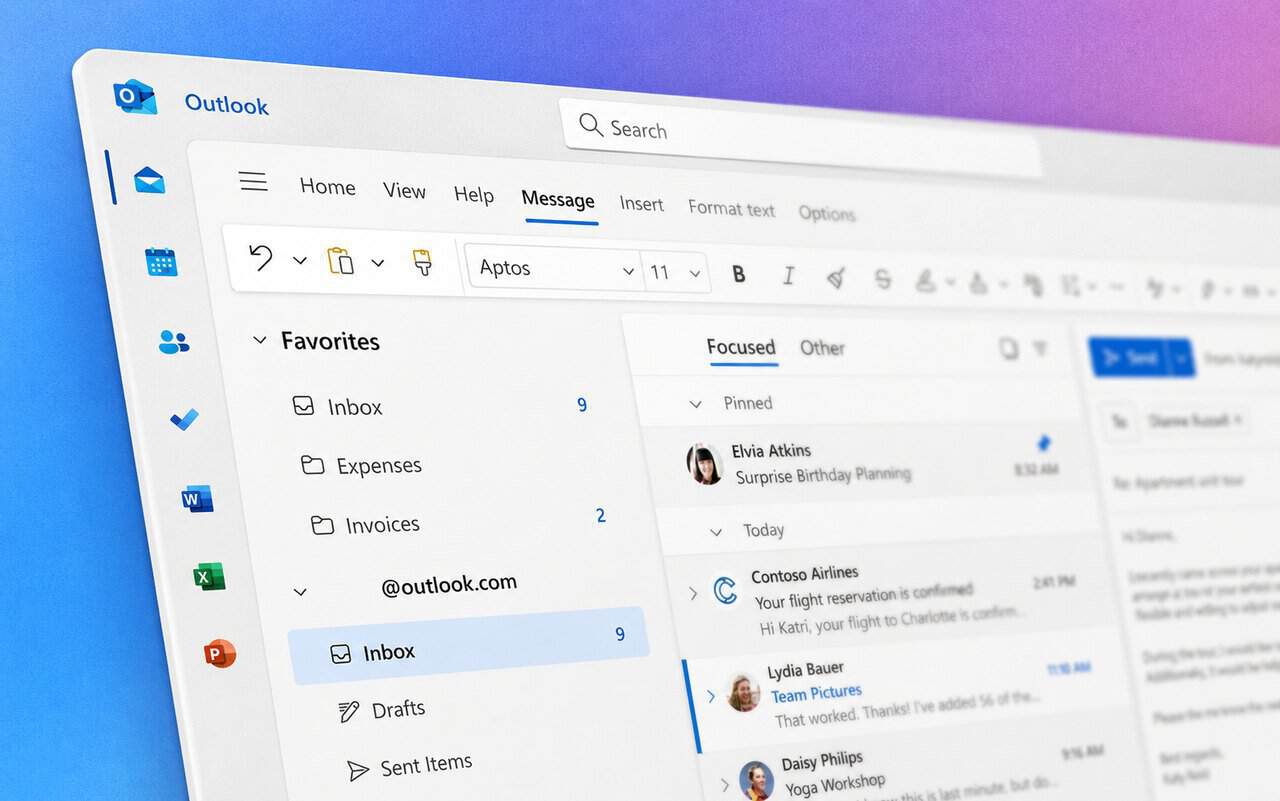
Microsoft is rolling out a new Efficiency Mode for Microsoft Teams that aims to improve performance on devices with limited CPU and RAM resources. The feature appeared in the Microsoft 365 Admin Center message MC1287373 after an earlier rollout delay.
Microsoft originally planned to launch the feature in early May, but the company pushed the release back. The updated timeline says the rollout started in late May and should be finished by the end of May.
Teams efficiency mode focuses on lighter resource usage
The new mode does not completely redesign Teams. Instead, Microsoft is making smaller performance-focused adjustments designed to reduce sluggishness on weaker hardware.
One of the biggest changes affects startup behavior. Instead of waiting for a chat conversation to fully load, users will first see a static placeholder image in the messages pane. They can then select the conversation they want to open.
Microsoft says this should make Teams feel more responsive during startup, especially on PCs with lower memory and slower processors.
Meeting video quality changes automatically
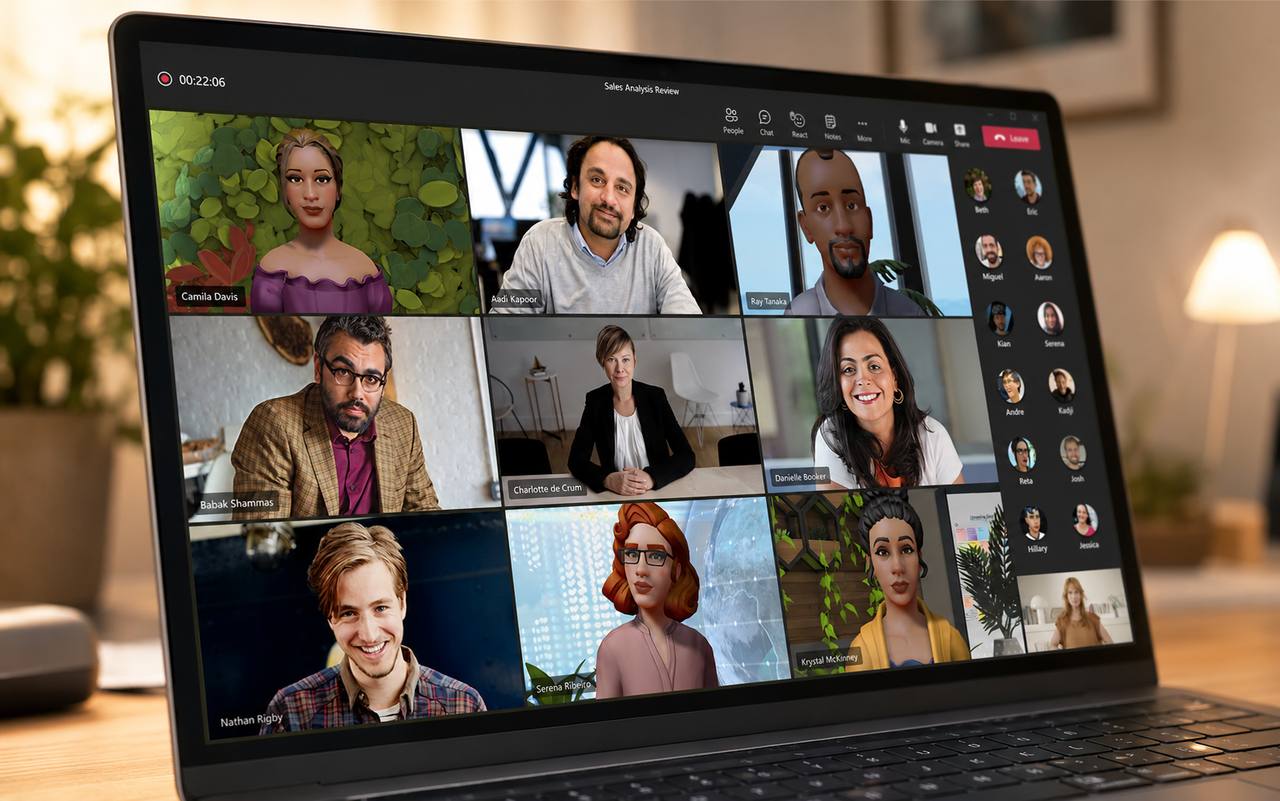
Efficiency Mode will also adjust meeting video quality based on the device’s available resources.
If the system is under heavy load, Teams can reduce participant video quality to lower CPU and RAM usage. This should help meetings run more smoothly on older laptops and entry-level business PCs.
The feature appears to target devices with limited processing power, although Microsoft has not shared the exact hardware requirements yet.
Efficiency Mode turns on automatically
Microsoft says Efficiency Mode will be enabled by default on eligible devices.
When the mode is active, Teams will display a leaf icon in the title bar so users know the feature is running.
Users who do not want the optimization can disable it manually by going to:
A quieter update with practical benefits
The changes are subtle, but they could improve the overall Teams experience on lower-end hardware. Faster startup behavior and automatic video adjustments may help reduce lag during daily meetings and chats.
For over 20 years Malwarebytes has provided a high level of protection against malware and other security threats. However, in 2026, is it still the best solution on Windows?
To answer that question, I got hands on with dozens of Malwarebytes alternatives, narrowing down 8 of the best. These tools excel in malware detection, use less system resources, or offer extra features that aren’t available with Malwarebytes.
8 Best Malwarebytes Alternatives in 2026
Let’s take a closer look at what makes these Malwarebytes alternatives stand out:
1. MalwareFox – Best Overall Malwarebytes Alternative
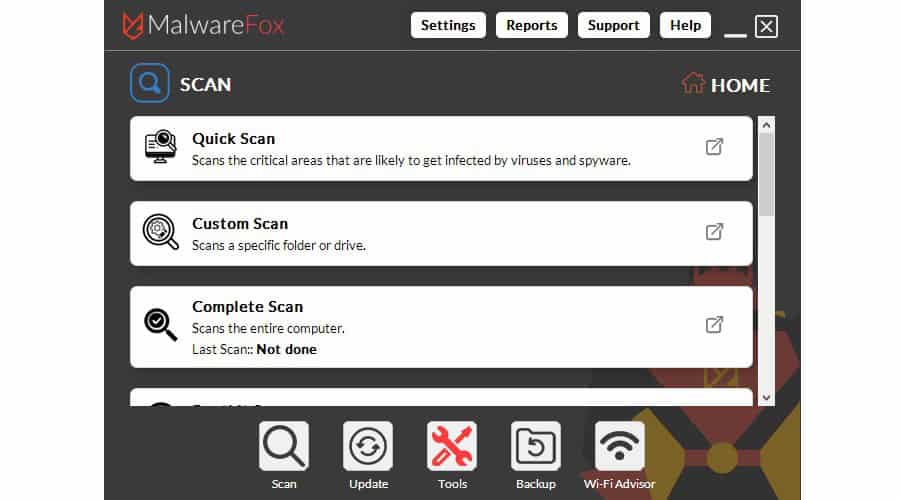
MalwareFox has quickly become my go-to Malwarebytes alternative, especially on my aging Windows laptop. Unlike Malwarebytes, which uses 150-300MB of RAM when idle, MalwareFox rarely exceeds 50MB of RAM or 1% of the CPU. In that sense, it’s truly a program that you can let run in the background without impacting other activities.
It also has a strong privacy profile, never storing or selling personal data, such as browsing logs or personal files.
Despite its lightweight design, MalwareFox includes a comprehensive set of security features. The ongoing free version lets you scan your system whenever you want and provides full malware removal capabilities.
The full suite, which can be used for 15 days for free, offers Real-Time Protection that continuously monitors your system for suspicious behavior. It blocks malware, spyware, trojans, zero-day attacks, and ransomware, before they can execute.
This is bolstered by the ability to backup and restore important files that might be targeted by ransomware and other malware.
Another standout feature is Browser Cleaning, which can remove intrusive browser extensions, malicious toolbars, adware, and browser hijackers. This is particularly useful for users who frequently download freeware or have dealt with aggressive popups and redirect issues. It also offers a quick way to clear your browsing history and cookies to prevent web tracking.
I found the Windows interface to be simple and uncluttered, making it easy for less technical users while still offering scheduled scans, exclusions, and custom scan options.
If, like me, you work with a lot of sensitive files, MalwareFox’s Secure Delete feature is a valuable addition. This ensures that once you delete files, they cannot be retrieved by forensic recovery software.
Other Notable Tools:
Protect your USB devices from Autorun malware.
Safely clean the Windows registry.
Duplicate file finder.
RAM optimizer.
Virtual Keyboard to safely type without your keyboard.
WiFi Advisor to detect if your internet connection is vulnerable.
In conclusion, if you want something lighter and more privacy-conscious than Malwarebytes, while still retaining essential real-time security features, it’s one of the best alternatives currently available.
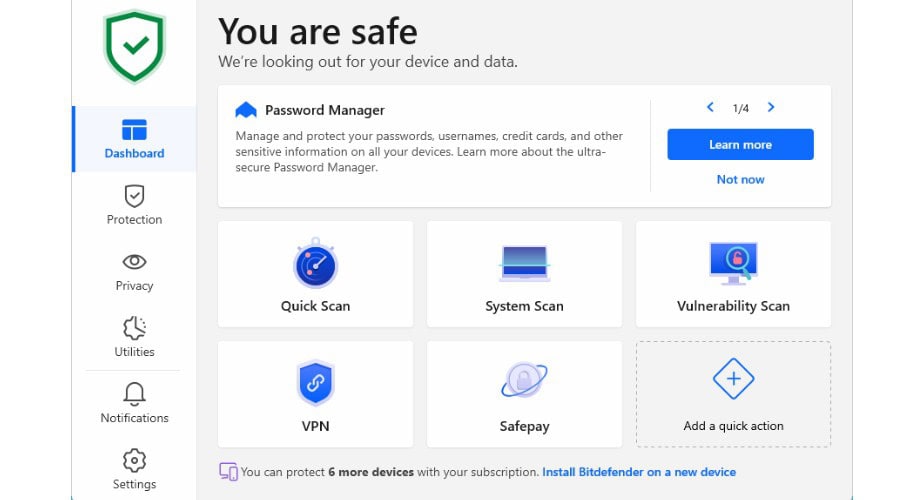
Bitdefender has long been regarded as one of the strongest antivirus engines available, consistently achieving excellent results in independent malware testing. While it offers a comprehensive security suite, what impressed me most was how little impact it had on overall system performance.
The software combines traditional signature-based detection with advanced behavioral monitoring, machine learning, and cloud-assisted threat analysis. This allows it to identify both known and emerging threats, including ransomware, spyware, trojans, rootkits, and phishing attacks.
One feature that stands out is Advanced Threat Defense. Rather than simply scanning files, it continuously monitors application behavior and can stop suspicious activity before malware has a chance to compromise the system. During testing, this worked quietly in the background without generating excessive alerts.
Bitdefender also includes a dedicated anti-phishing module that blocks fraudulent websites before personal information can be stolen. Additional protections include web attack prevention, vulnerability scanning, ransomware remediation, and a secure browser for online banking.
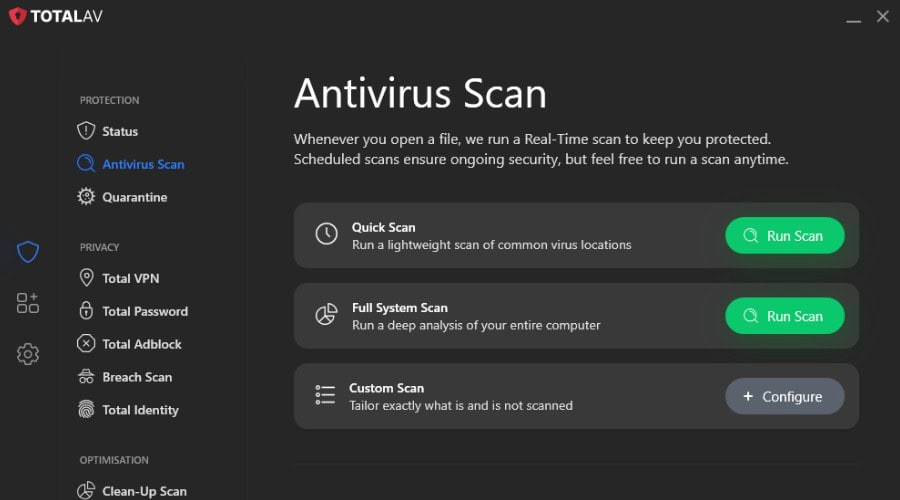
TotalAV has become increasingly popular thanks to its simple interface and generous free scanning capabilities. For users who primarily want an easy way to check their system for malware without dealing with complicated settings, it offers an accessible alternative to Malwarebytes.
The free version allows users to perform on-demand malware scans that can detect viruses, trojans, spyware, ransomware, and potentially unwanted programs. Scan results are presented clearly, making it easy for less experienced users to understand what threats have been found.
Upgrading unlocks real-time protection that continuously monitors your system and blocks threats before they can execute. The premium version also adds web protection, phishing detection, ransomware defense, and scheduled scanning.
The dashboard is clean and modern, avoiding the clutter found in some competing antivirus suites. Most features are accessible within a few clicks, making it particularly suitable for home users.
Norton 360 is far more than a traditional antivirus solution. While Malwarebytes focuses heavily on malware detection, Norton attempts to provide an entire security ecosystem covering privacy, identity protection, and device security.
Its malware detection rates consistently rank among the best in the industry, with strong protection against ransomware, spyware, trojans, phishing attempts, and zero-day threats. Real-time protection operates continuously in the background and rarely requires user intervention.
Where Norton really distinguishes itself is through its additional features. Depending on the plan selected, users gain access to a VPN, password manager, dark web monitoring, cloud backup, parental controls, and identity theft monitoring.
The included cloud backup feature is particularly useful for ransomware protection. If important files become encrypted by malware, clean copies remain available in secure cloud storage.
Norton also includes Smart Firewall technology that helps monitor incoming and outgoing network activity, adding an additional layer of protection beyond Windows Defender.
Despite offering such a large collection of features, Norton remains surprisingly easy to use.
Avira combines strong malware protection with an impressive collection of system optimization tools, making it a particularly good choice for users looking to improve both security and performance.
Its antivirus engine uses cloud-assisted detection and machine learning to identify malware, ransomware, spyware, and phishing attacks. Scans are fast and generally have a minimal impact on everyday system performance.
The suite includes a startup optimizer, driver updater, duplicate file finder, privacy cleaner, battery management tools, and storage optimization features. Together, these tools can help older systems remain responsive without requiring manual maintenance.
The built-in Software Updater is particularly useful, automatically identifying outdated applications that may contain security vulnerabilities. Keeping third-party software updated is an often-overlooked aspect of cybersecurity, and Avira simplifies the process considerably. If your goal is to improve both security and overall PC performance, Avira provides a well-rounded package that extends beyond traditional malware protection.
Most people know Surfshark for its VPN service, but its antivirus component has become increasingly capable in recent years. For users who value both privacy and malware protection, the combination is particularly appealing.
The antivirus engine provides real-time protection against malware, ransomware, trojans, spyware, and other common threats. Scheduled scans and on-demand scanning are both available, while malicious files are automatically quarantined before they can cause damage.
The major advantage is the integration with Surfshark’s VPN network. Users can protect their devices from malware while simultaneously encrypting internet traffic and masking their IP address. This provides a broader level of protection than traditional antivirus software alone.
Additional features include webcam protection, breach monitoring, alternative identity generation, and private search tools. These privacy-focused features make Surfshark especially attractive to users concerned about online tracking and data collection.
The interface is streamlined and avoids unnecessary complexity. Security, VPN, and privacy tools are all managed from a single dashboard.
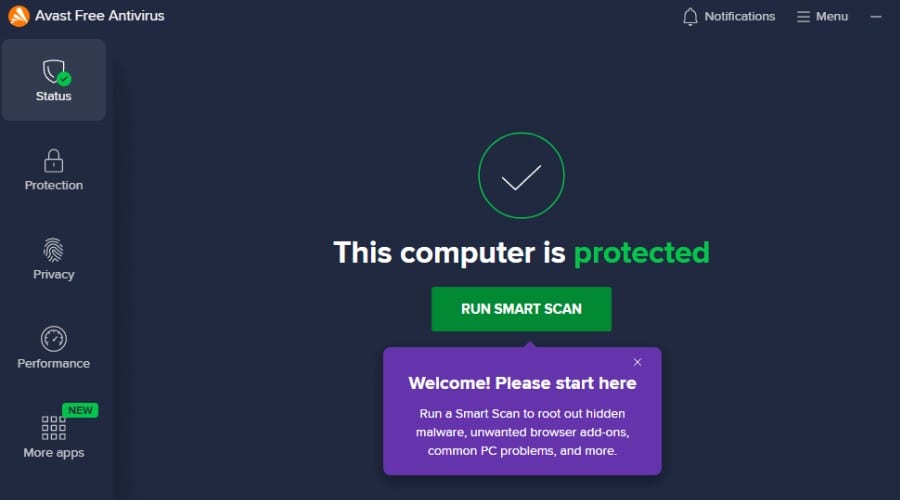
Avast remains one of the most widely used security solutions in the world, and one of its biggest strengths is support across multiple platforms. Whether you use Windows, macOS, Android, or iOS, Avast offers protection across all major devices.
Its antivirus engine provides real-time protection against malware, ransomware, spyware, phishing attacks, and malicious websites. Smart scanning can also identify outdated software, weak passwords, and common security vulnerabilities.
The free version remains one of the most feature-rich free antivirus products available. Users receive malware scanning, web protection, and threat detection without requiring a paid subscription.
ZoneAlarm has built its reputation around network security and firewall technology, but its modern security suite also offers strong malware and ransomware protection.
The software combines antivirus scanning with behavioral monitoring to identify suspicious activity before threats can execute. Its anti-ransomware module continuously monitors sensitive files and can block unauthorized encryption attempts in real time.
ZoneAlarm’s firewall remains one of its strongest features. It provides detailed control over inbound and outbound network traffic, helping prevent malware from communicating with external servers or exfiltrating sensitive data.
While the interface is slightly more technical than some competitors, most users can rely on the default settings without needing to understand the underlying security concepts.
For users particularly concerned about ransomware, data theft, or network-based attacks, ZoneAlarm offers a powerful security package that goes beyond traditional malware scanning.
While Malwarebytes remains a capable anti-malware solution, it is no longer the only lightweight and effective option available. As this list demonstrates, there are now several excellent alternatives that either provide stronger malware detection, better performance, additional privacy tools, or more comprehensive security suites.
For most users, MalwareFox stands out as the best overall Malwarebytes alternative thanks to its low resource usage, privacy-focused approach, and strong real-time protection. However, each of the other solutions excels in its own area, whether that’s Bitdefender’s lightweight protection, Norton’s all-in-one security suite, Surfshark’s VPN integration, or ZoneAlarm’s ransomware defences.
Ultimately, the best choice depends on your priorities, but any of these alternatives can provide a strong layer of protection for your Windows PC in 2026.
NVIDIA’s upcoming Windows on Arm processors have appeared in new retailer listings, giving an early look at possible product names, laptop configurations, and pricing. According to listings spotted by WinFuture, NVIDIA may launch at least two versions of its first consumer Arm-based PC chip: the N1X 650 and N1X 675.
The leaked listings suggest NVIDIA is preparing multiple performance tiers for its upcoming Windows laptops, with Lenovo expected to be among the first partners.
The leaked listings reference the Lenovo Yoga Pro 7 15.3, which appears in several different configurations powered by NVIDIA’s new Arm chips.
One listed model uses the NVIDIA N1X 650 processor alongside 32GB of memory and a 1TB PCIe SSD. That version reportedly carries a price tag of around €3,199.
A higher-end configuration with the NVIDIA N1X 675 includes 64GB of memory and the same 1TB SSD storage. That model is listed at roughly €4,049, placing it firmly in premium laptop territory.
The retailer pages also mention Windows 11 Home as the operating system.
Cheaper NVIDIA N1 model also listed
Another Lenovo Yoga Pro 7 configuration reportedly uses a standard NVIDIA N1 chip instead of the N1X variants.
This matches earlier Lenovo naming leaks tied to models such as the Yoga Pro 7 15N1V11 and Yoga Pro 7 15N1X11. The listings suggest NVIDIA may release several tiers ranging from mainstream Arm laptops to higher-performance creator-focused systems.
Current leaks also suggest the Lenovo Yoga Pro 9 may not use NVIDIA’s upcoming Arm processors.
Display specs and hardware details
The listed Yoga Pro 7 systems feature a 15.3-inch WQXGA OLED display with a 165Hz refresh rate. While the retailer pages reveal memory and storage configurations, they do not confirm detailed CPU or GPU specifications for the N1X chips.
NVIDIA has not officially announced core counts, graphics performance, power targets, or AI hardware details yet.
The early pricing also points toward premium positioning, especially for the higher-memory Yoga Pro 7 variants. If accurate, NVIDIA’s first Windows on Arm systems could target creators, developers, and high-end productivity users rather than budget buyers.
More official details could arrive during upcoming industry events such as Computex or Microsoft Build.
ASUS appears to have another handheld gaming in its pipeline, and it might be unvieled at Computex 2026. A fresh certification listing has surfaced online, pointing towards yet another ROG Ally model. The leak comes from a newly spotted regulatory filing shared by known hardware leaker Huang514613 (via VideoCardz).
While the listing doesn’t reveal much, the tipster says that the device uses AMD’s Ryzen Z2 Extreme processor. That alone suggests ASUS isn’t preparing a completely new platform, but rather a refresh of its existing handheld.
ASUS appears to be tweaking the ROG Ally again
The certification confirms the presence of the Ryzen Z2 Extreme chip, though most other specifications remain under wraps. As of now, there is no mention of display size, battery capacity, storage options, memory configuration, or other major hardware details.
It looks like, the device is more of a mid-generation update than a true successor. The leaked documentation also references multiple SSD options from Micron, Samsung, and SanDisk, which may indicate ASUS is testing several storage configurations before launch..
The OLED question refuses to go away
Ever since devices like the Steam Deck OLED and Legion Go started pushing OLED displays into the handheld space, many players have been waiting for ASUS to follow suit. The newly surfaced information doesn’t mention an OLED panel, but it also doesn’t rule one out.
For now, it seems another ROG Ally is coming. Only time will tell whether ASUS is bringing a simple refresh or a big upgrade. Whatever maybe the case, we’ll be sharing details as they come in the coming days.
NVIDIA’s upcoming laptop chips may have just leaked out ahead of schedule. Freshly leaked specifications are giving us the best look yet at the company’s upcoming N1 and N1X processors.
According to details shared by VideoCardz, the flagship N1X reportedly uses the same configuration as the GB10 chip found inside NVIDIA’s DGX Spark system. If accurate, that means NVIDIA is preparing a laptop-focused chip with a hefty 20-core CPU setup and up to 6,144 CUDA cores under the hood.
NVIDIA’s laptop plans are starting to take shape
The leaked information points to two N1X variants. The top model is said to feature a 20-core (10+10) CPU design built around Cortex-X925 and Cortex-A725 cores, paired with 48 streaming multiprocessors. A second version reportedly drops to an 18-core (9+9) configuration with 5,120 CUDA cores.
Both variants are said to operate within a 45W to 80W power envelope and support up to 128GB of LPDDR5X memory. The PCIe configuration also looks surprisingly generous, with support for both PCIe 5.0 and PCIe 4.0 lanes.
That being said, the more interesting story may be the standard N1 lineup. Leaked specifications suggest NVIDIA is preparing lower-power versions featuring up to 12 CPU cores, 2,560 CUDA cores, and support for up to 64GB of memory. These chips reportedly target the 18W to 45W range, which could make them suitable for thinner and more affordable laptops.
The source claims these details come from internal documents and notes that an embargo is expected to lift soon. It remains unclear whether NVIDIA will announce every listed variant or if some are reserved for future products.
However, if these specifications hold up, NVIDIA may be preparing one of its most aggressive pushes into the laptop processor market yet. The bigger question now is whether these chips can deliver enough real-world performance to challenge the increasingly crowded AI PC landscape.
Valve may be preparing another step toward the rumored Steam Machine launch. New backend changes spotted on Steam suggest the company is now working on the device’s first-run setup experience.
According to known Valve dataminer and insider Brad Lynch, Valve recently added a “Steam Machine Welcome Tour” to the Steam backend. The backend reportedly also includes related setup assets and onboarding files.
Steam Machine welcome assets appear online
The newly discovered assets reportedly contain welcome images and setup-related files that users may see when turning on the Steam Machine for the first time.
A Welcome Tour usually appears during the initial device setup process. Because of that, many users believe these files are more than simple placeholders or internal tests.
The update does not confirm a launch date, hardware specifications, or pricing. Valve also has not officially announced the device yet.
Still, backend additions tied to onboarding and setup often appear late in the development process, making this discovery more interesting for Steam hardware fans.
Similar pattern appeared before the new Steam Controller
Some users also pointed out that Valve followed a similar pattern with the recently leaked Steam Controller refresh.
Backend assets for the controller reportedly appeared several weeks before Valve officially confirmed pricing and release details. That history makes the latest Steam Machine discovery feel more significant.
Valve has not commented publicly on the backend changes.
Pricing may worry some buyers
Even if Steam Machine launches soon, pricing could become a major talking point.
NVIDIA could finally be preparing to enter the Windows PC processor market.
According to a new report from Axios, the company may unveil its first PC-focused processor as early as next week during the busy Computex and Microsoft Build event period. The chips were reportedly developed in collaboration with Microsoft and could power a new generation of Windows laptops.
NVIDIA may challenge Qualcomm and Intel in Windows laptops
The rumored launch comes after weeks of hints from both NVIDIA and Microsoft about a “new era of PC.” NVIDIA recently posted teaser coordinates pointing to Taiwan, where Computex 2026 takes place, while Microsoft’s Windows chief Pavan Davuluri also teased upcoming developer-focused announcements for Build 2026.
If the reports are accurate, NVIDIA’s new processors would serve as the main CPU inside Windows laptops instead of relying on Intel or AMD chips.
The report claims that the first devices powered by NVIDIA silicon could appear immediately after the announcement. Some Microsoft Surface devices are reportedly being tested with NVIDIA processors, while other OEM partners may include Dell and Lenovo.
One leak specifically mentions a new Dell XPS laptop using the rumored NVIDIA N1X processor.
Lenovo is also said to be preparing a Yoga Pro 7 powered by the same chip. NVIDIA has not officially confirmed the processor yet.
Despite N1 and N1x leaks, device specifications, battery life, AI performance, pricing, release dates, and availability remain unclear for now. It is also unknown whether the first generation of devices will target premium laptops only or expand into mainstream PCs later.
More information could arrive during Computex 2026 in Taiwan or Microsoft Build 2026 in San Francisco next week. Microsoft recently confirmed there will be no Windows 12 reveal at Build 2026, with the company instead focusing on AI experiences and developer announcements.
If you are an XBOX player and have been waiting Microsoft to announce the games coming this week across XBOX Series X|S, XBOX One, XBOX on PC, and Game Pass, the official list is finally here. From Monday, June 1 to Friday, June 5, you’ll have over 30 games to play, including some popular titles like FINAL FANTASY VII REBIRTH and more.
Here is the games coming this week on XBOX (June 1 – 5)
Which of the games are you excited for the most? Let us know in the comments below. As a reminder, the latest XBOX Insider update has addes custom colors, service outage alerts, and more.
Microsoft is rolling out a new XBOX Insider update for Alpha Skip-Ahead users, bringing several quality-of-life improvements focused on personalization, controller management, and system transparency.
The update introduces more detailed controller identification, expanded console color customization, built-in release notes access, and a new service outage indicator directly on the XBOX dashboard.
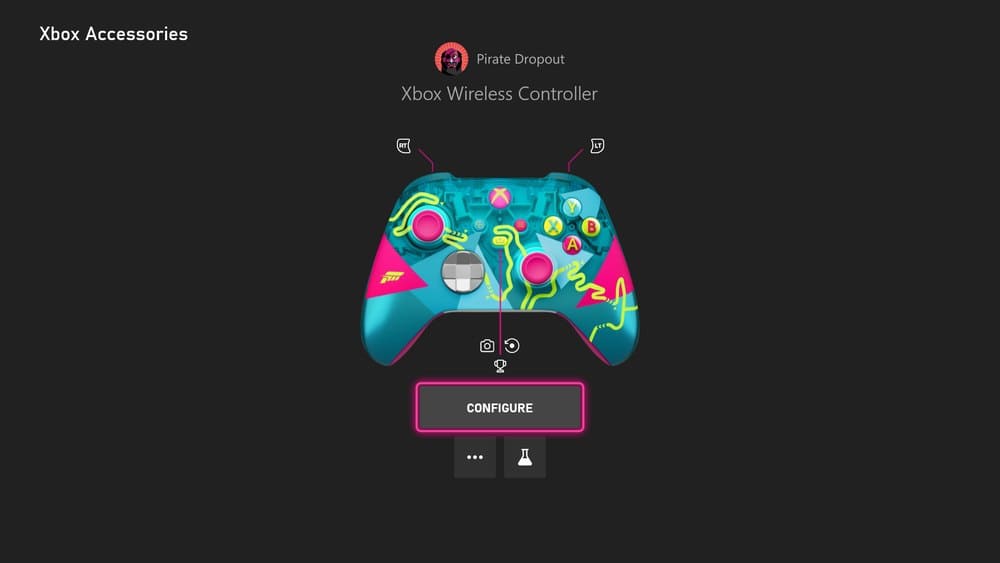
XBOX Accessories app now identifies exact controller models
One of the more practical changes arrives in the XBOX Accessories app. XBOX consoles can now display the exact controller model connected to the system.
This includes standard controllers, special edition variants, and Elite Series controllers. The feature should make it easier for players to confirm which controller they are editing before changing button mappings, profiles, or other settings.
Image Credit: Xbox
For users with multiple controllers connected at once, this removes some of the guesswork from controller management.
XBOX users can now enter custom hex color codes
Microsoft is also expanding XBOX personalization with more precise color controls.
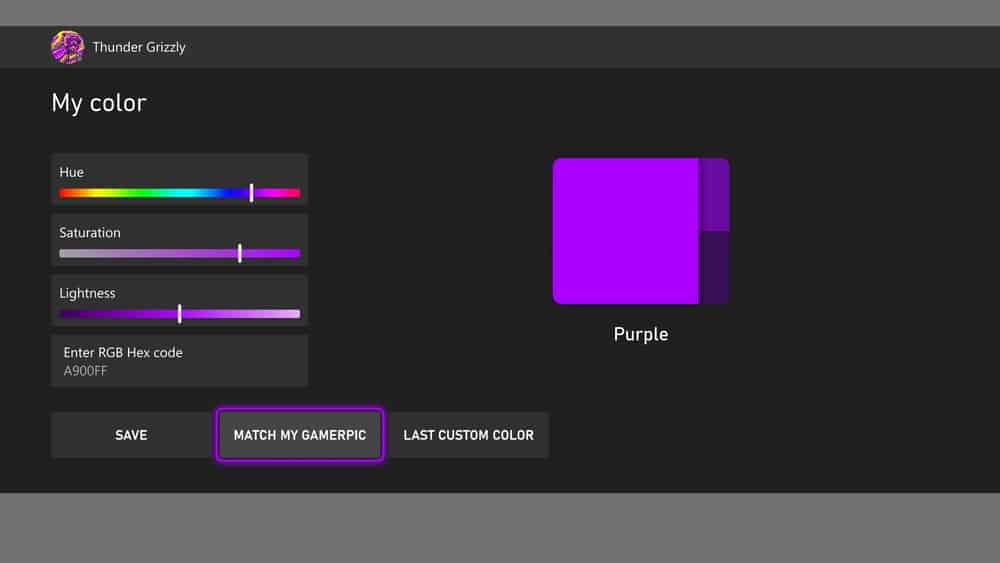
Players will now be able to enter a specific hex color code instead of relying only on preset color options. This should help users better match their XBOX dashboard colors with gaming setups, RGB lighting themes, or favorite custom shades.
Image Credit: Xbox
A new “match my gamerpic” option can also automatically pull colors from the user’s XBOX profile picture.
The feature adds another layer of personalization as Microsoft continues pushing more customizable XBOX dashboard options.
XBOX release notes become easier to access
Another new feature adds direct access to XBOX update release notes from the Home menu after a console update is installed.
Instead of searching online for patch notes or Insider changes, users can now open release notes directly from the console interface.
XBOX Insiders will see release notes tailored specifically to their preview branch and build version, making it easier to track fixes, new features, and known issues.
New XBOX service outage indicator appears on the dashboard
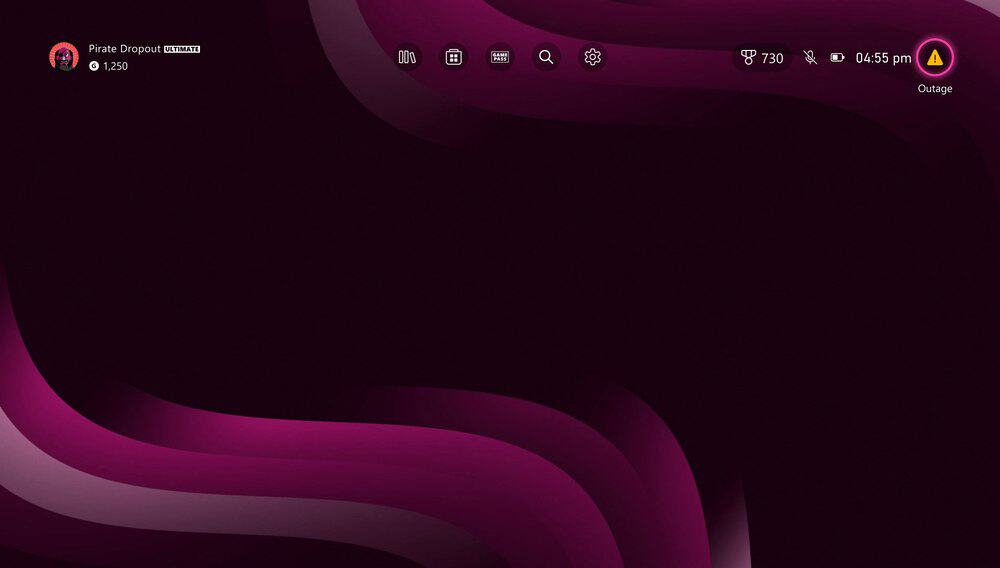
Microsoft is also adding a built-in XBOX service outage indicator.
Image Credit: Xbox
When XBOX services experience a confirmed issue, an alert icon will appear in the upper-right corner of the dashboard. Users can open a dedicated status page directly from the console to check affected services and monitor estimated recovery progress.
The addition should help reduce confusion during multiplayer outages, sign-in problems, cloud gaming interruptions, or store-related issues.
Microsoft has delayed Fable once again. The upcoming reboot from Playground Games is now scheduled to launch in February 2027 instead of its previously planned autumn 2026 release window.
The company says the delay is meant to give the game more breathing room and avoid launching during an already crowded holiday season for major game releases.
Microsoft wants Fable to have its own launch moment
According to Microsoft, moving Fable into early 2027 should help the game stand out instead of competing directly with several huge releases expected later in 2026.
This is year is packed with incredible games for XBOX players to enjoy, from Halo: Campaign Evolved, Gears of War: E-Day and Call of Duty Modern Warfare 4 to Control Resonant, Star Wars: Galactic Racer and Grand Theft Auto VI. In order to plan our game launches through the… pic.twitter.com/eNXiA9ebn4
The company specifically referenced the busy release calendar that includes titles such as Grand Theft Auto 6, Halo: Campaign Evolved, and Call of Duty: Modern Warfare 4.
Microsoft said Fable deserves “the dedicated launch moment” that a February 2027 release can provide.
The delay also gives Playground Games more development time as the studio continues work on the long-awaited reboot of the fantasy RPG franchise.
More Fable gameplay expected soon
Despite the delay, fans will not need to wait long for another look at the game.
Microsoft confirmed that Fable will appear during the upcoming XBOX Games Showcase 2026, where the company plans to share more footage and updates.
The XBOX Games Showcase 2026 is scheduled for June 7 and is expected to feature several first-party XBOX titles alongside third-party announcements.
Busy summer for XBOX and gaming showcases
The delay news arrives during a packed period for XBOX-related announcements.
Recent leaks have suggested that several upcoming XBOX Game Pass titles may appear during the showcase event, although Microsoft has not officially confirmed the rumored lineup yet.
Summer Game Fest 2026 is also taking place around the same time, meaning gaming fans can expect multiple announcements, trailers, and release reveals across the industry over the next few weeks.
Fable remains one of XBOX’s biggest upcoming exclusives, and Microsoft appears focused on making sure the reboot launches during a less crowded period where it can receive more attention.
Microsoft appears to have quietly expanded access to Copilot Health in the United States, giving more eligible Microsoft 365 subscribers access to the company’s new AI-powered health experience inside Copilot.
The feature was first announced in March as part of a phased rollout with limited availability through a waitlist. More users now appear able to access the experience directly from the Copilot Health page.
Copilot Health brings wearable and medical data into one place
Copilot Health is designed as a separate experience from the standard Copilot assistant. Microsoft says it can combine wearable data, medical records, and lab test results to provide more personalized health insights.
The Copilot Health page currently includes actions such as “Try now” and “Find a doctor,” suggesting Microsoft wants the platform to work both as an information hub and as a healthcare assistant.
Microsoft says the feature supports more than 50 wearable devices and health services. Supported platforms include Apple Health, Fitbit, and Oura.
The company also partnered with HealthEx to allow users to connect records from over 50,000 hospitals and healthcare providers across the United States. Lab test data from Function is also supported.
Copilot Health can explain lab results and help prepare for appointments
Microsoft says Copilot Health can help users identify trends in their health information, explain lab results in simpler language, and prepare questions before doctor appointments.
The assistant can also help users search for healthcare providers based on specialty, location, accepted insurance, and spoken languages.
According to Microsoft, Copilot Health pulls information from trusted healthcare organizations across more than 50 countries. Some responses may include direct links to source material, while certain topics can display expert-written cards from Harvard Health.
Microsoft highlights privacy protections
Microsoft says Copilot Health data remains separate from regular Copilot conversations.
The company also says health-related information will not be used for advertising purposes and will not train AI models. This separation could help Microsoft address growing concerns around privacy and AI-powered healthcare services.
For now, Copilot Health remains limited to users in the United States. The feature currently supports English only and requires a Microsoft 365 subscription. Users must also be at least 18 years old.
Microsoft has not announced when Copilot Health could expand to additional countries or languages.
Microsoft continues expanding the Copilot ecosystem
The company is also redesigning Copilot for Microsoft 365 with a stronger focus on simplicity, cleaner layouts, and reduced interface clutter as Microsoft continues refining its AI strategy across Windows and Microsoft 365.
Microsoft has fixed the Windows 11 KB5089549 installation issue that prevented some users from installing May’s Patch Tuesday update on Windows 11 24H2 and 25H2 systems.
The issue caused update failures during the reboot phase and affected devices with very limited free space on the EFI System Partition (ESP). Users typically saw error code 0x800f0922, followed by the message: “Something didn’t go as planned. Undoing changes.”
Microsoft Releases Simpler Fix for KB5089549
Microsoft says the issue is now resolved through KB5089573, which is a non-security preview update for Windows 11.
After installing KB5089573, users should not need any additional workaround or manual fix. Microsoft confirmed that the update addresses the installation problem directly.
The company also noted that the original failure mostly affected devices with 10MB or less free space available on the EFI System Partition. Since the update could not complete the required boot-related changes, Windows rolled back the installation during reboot.
Error Appeared Around 35% During Installation
Most affected users reported that the update failed around 35–36% during the reboot process.
Windows then displayed the rollback message before undoing the installation attempt. Error code 0x800f0922 appeared in Windows Update history afterward.
Microsoft previously suggested more advanced fixes, including Windows Registry edits and Known Issue Rollback methods. Those workarounds were not ideal for less experienced users because incorrect registry changes can cause additional system problems.
Installing KB5089573 now provides a simpler and safer fix for the issue. However, because KB5089573 is still an optional preview update, some users may choose to wait for the wider public rollout.
Wider Rollout Expected During June Patch Tuesday
Microsoft will likely include the fix in a future cumulative update that becomes generally available during the June 9 Patch Tuesday rollout.
That means users who do not install preview updates manually should still receive the fix automatically in the near future.
In other news, Microsoft has also released a new Windows 11 Beta build and recently confirmed that Windows 12 will not be revealed during Build 2026.
Microsoft is trying to manage expectations ahead of Build 2026 and Computex, confirming that users should not expect a Windows 12 announcement next week.
Microsoft Focuses on AI PCs and Developers
Rumors about a possible new Windows version started circulating after Microsoft and PC makers heavily teased AI PCs and next-generation hardware.
However, Windows and Devices chief Pavan Davuluri recently clarified that Build 2026 will focus on developers, AI experiences, and new hardware instead of a brand-new operating system.
Something new is coming for developers. And no, it’s not a new OS version 😅. See you at Build next week! pic.twitter.com/gfY90ZyjZl
The official Windows account also teased “a new era of PC” and shared coordinates pointing to the Taipei Music Center in Taiwan, fueling speculation around Computex announcements. The teaser now appears to be tied to upcoming hardware reveals rather than Windows 12.
Instead of replacing Windows 11, Microsoft seems more focused on refining the current operating system. The company has recently rolled out several new Insider builds, including experimental releases for Windows 26H1, a version featuring a smaller Start menu and better Search, a new Canary build that fixes Microsoft account sign-in issues, and an updated Windows 11 Beta build with new loading animations and improved Search.
Microsoft has also continued working on Windows 11 performance, Start menu customization, taskbar improvements, Search upgrades, and AI-powered features.
For now, Build 2026 is expected to focus on AI PCs, developer tools, and Windows 11 improvements rather than a next-generation Windows release.
Microsoft is preparing another wave of Windows improvements focused on performance, personalization, reliability, and usability. The company says it wants Windows to feel faster, cleaner, and more responsive across daily workflows.
Marcus Ash from Microsoft recently outlined several priorities for the platform, including File Explorer speed, taskbar customization, Start menu flexibility, and better driver reliability.
Microsoft Says Windows Momentum Is Centered Around Performance and Polish
Microsoft says the current Windows focus revolves around four major areas: performance, polish, personalization, and reliability.
The company is continuing work on core Windows responsiveness, especially in areas users interact with daily. File Explorer, Windows Search, and overall system responsiveness remain major priorities. According to Microsoft, architectural changes inside Windows are beginning to deliver more consistent performance improvements rather than isolated gains.
Windows Taskbar Is Getting Major Personalization Upgrades
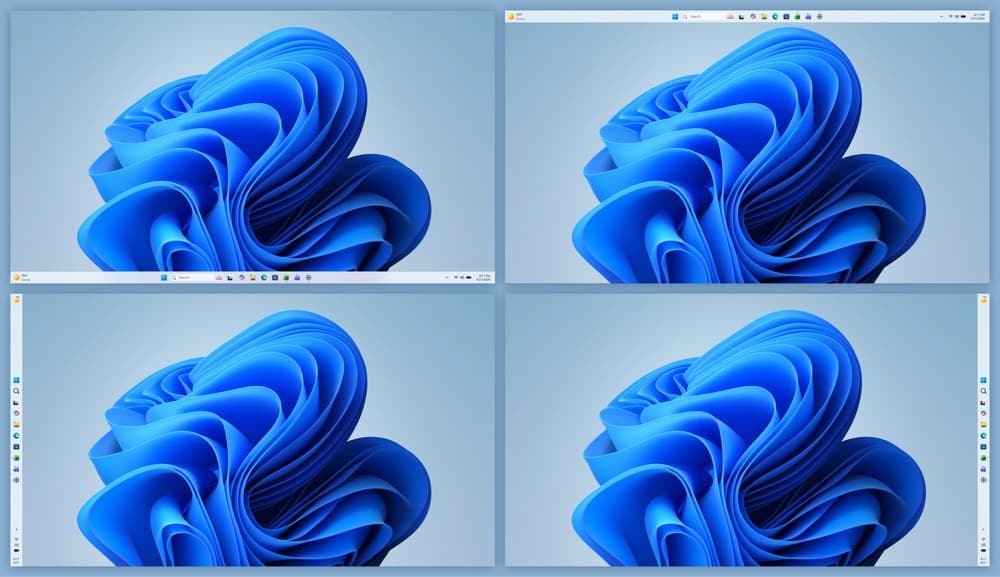
One of the biggest upcoming changes involves the Windows taskbar. Microsoft confirmed that users will soon have more freedom over taskbar positioning, allowing it to move to any edge of the screen instead of remaining locked to the bottom.
Image credit: Microsoft
The company is also improving how icons and labels adapt depending on where the taskbar is placed. Additional updates include better icon alignment, support for app labels in every taskbar position, and a smaller taskbar mode.
Start Menu Customization Is Expanding
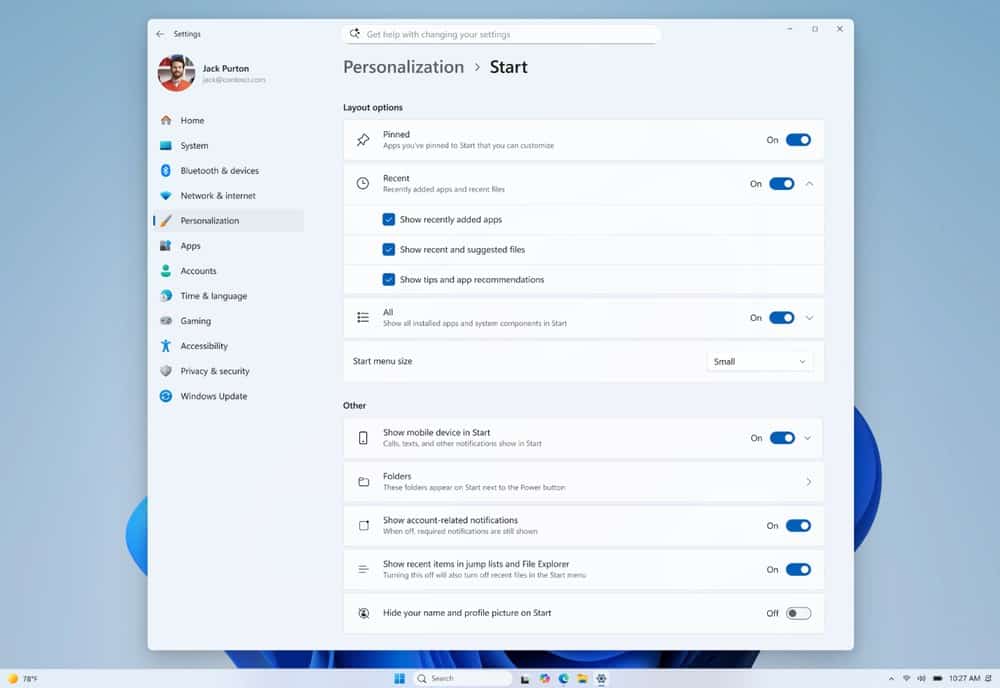
Microsoft is also redesigning parts of the Start menu experience to provide users with greater control. Individual sections inside Start will be able to be shown or hidden separately, including Pinned, Recent, and All apps.
The company is also adding support for resizing the Start menu. Microsoft says the Recommended section will be renamed to Recent and should provide more relevant file suggestions.
Privacy improvements are included as well, allowing users to hide their name and profile picture from Start, which could be useful during presentations, recordings, or screenshots.
File Explorer Improvements Target Usability Frustrations
Microsoft highlighted several File Explorer improvements already being tested. The File Explorer address bar now handles double backslashes and quotation marks more reliably, while suggestion popups should close more consistently after selecting an item.
Additional File Explorer updates include clearer file size labels for KB, MB, and GB measurements, improved keyboard navigation in context menus, multiple reliability fixes for file renaming, and better path handling in the address bar.
Microsoft continues to prioritize File Explorer because it remains one of the most frequently used components of Windows.
Microsoft Wants Better Driver Reliability and Safer Recovery
Driver stability remains another major focus for Windows. Microsoft says the Driver Quality Initiative is designed to improve driver quality, security, and overall reliability.
The company is also advancing Cloud Initiated Driver Recovery, a system intended to validate drivers more safely, deliver updates with fewer issues, and automatically recover systems when driver failures occur.
Accessibility and Touchpad Improvements Are Also Coming
Microsoft is preparing several accessibility updates across Windows. Voice Access is receiving improved Voice Isolation support to reduce background noise during speech recognition sessions. Magnifier improvements are also on the way, including easier zoom level controls.
New screen tint settings will allow users to adjust color and opacity for improved visibility and comfort. Precision touchpad improvements are expanding as well, with upcoming additions including automatic scrolling, gesture speed controls, accelerated scrolling, and optional single-finger scrolling.
Microsoft says these changes should provide users with greater flexibility across laptops and hybrid devices.
More Windows Developer Announcements Expected at Build
Microsoft says additional Windows developer news will arrive during next week’s Microsoft Build 2026 conference.
The company has recently increased its focus on Windows platform improvements, developer tooling, and native Windows experiences as it continues refining the future of Windows 11 and upcoming platform releases.
Microsoft has published new release notes for the Canary 29500 Series Channel as the company continues transitioning Windows Insider channels toward the new Experimental (Future Platforms) branding.
The latest update focuses mostly on platform-level changes, bug fixes, and infrastructure improvements tied to Microsoft’s active Windows development branches. These builds are considered very early preview releases and are not connected to any specific upcoming Windows version.
Microsoft Fixes Incorrect Internet Connection Error
One of the main fixes in this release addresses a confusing Microsoft account sign-in issue affecting some Insiders.
Microsoft says certain users saw an incorrect warning claiming the device was not connected to the internet while signing into Microsoft accounts inside some apps. The problem appeared even though the PC had an active internet connection.
The company has now resolved the issue in the latest Experimental build.
Affected users could encounter fake offline connection warnings, failed sign-in attempts, Microsoft account authentication issues in apps, and incorrect network detection messages. The issue mainly affected account-related experiences inside Windows apps.
Task Manager CPU Speed Reporting Improved
Microsoft also fixed a virtualization-related Task Manager issue.
The company says Task Manager could incorrectly display unusually high CPU speeds for virtual machines after resuming from hibernation. The bug affected the CPU Performance page inside Task Manager.
The latest Experimental build now reports CPU speed more accurately for affected virtual machine environments.
Microsoft Blocks Some AMD Systems From Receiving the Build
Microsoft also acknowledged a new known issue involving certain AMD-powered systems.
According to the company, some AMD devices that support System Guard may crash after installing the latest Experimental build. Because of the issue, Microsoft is temporarily blocking affected systems from receiving this week’s release.
The company has not yet shared which exact AMD processors or configurations are impacted.
Microsoft has released new update notes for the Windows 11 Experimental (26H1) channel, continuing its transition away from the older Canary 28000 series branding. The company says the latest release mainly focuses on minor bug fixes and general system improvements rather than major new features.
No Major New Features in This Build
Unlike recent Beta and Channel releases, this Experimental update does not introduce any major user-facing features.
Microsoft says the build mainly improves stability and addresses smaller issues behind the scenes. Exact fixes were not revealed in the release notes.
This approach is common for Experimental channel builds, which often focus on testing platform-level changes before broader rollout stages begin.
Controlled Feature Rollout Still Applies
Microsoft also confirmed that many features in the Experimental channel continue to use Controlled Feature Rollout technology.
This means only a portion of Insiders receive certain features initially, while Microsoft gradually expands availability over time based on feedback and telemetry that influence broader rollout decisions.
The system allows Microsoft to detect bugs and compatibility issues before features reach larger groups of testers.
The update focuses heavily on personalization. Users can now resize the Start menu, hide specific sections, and remove profile information from the interface. Microsoft also continues improving Windows Search with better substring matching for files and content.
One of the biggest changes in Build 26300.8553 is the redesigned Start menu experience.
Microsoft has renamed the Recommended section to Recent. The same naming change now appears inside the Start settings page.
Users can now independently enable or disable major Start menu sections, including Pinned, Recent, and All apps.
This gives users more control over how crowded or minimal the Start menu looks.
Microsoft is also adding Start menu size controls for the first time in this experimental branch. Users can now choose between small, large, or automatic sizing options.
Automatic remains the default setting and adjusts dynamically based on layout behavior.
Profile visibility controls added
Build 26300.8553 also introduces a privacy-focused option that lets users hide their name and profile picture from Start.
The option should make it easier to keep personal account information out of screenshots, screen recordings, and other captured content.
Start settings page redesigned
To support the growing number of customization controls, Microsoft redesigned the Start settings page.
The new layout better organizes section toggles, visibility controls, and Start menu size options in a single interface.
Image credit: Microsoft
Microsoft continues pushing toward a more modular Start menu experience after years of criticism around limited customization in Windows 11.
Windows Search now finds compound file names more easily
Microsoft is also improving Windows Search behavior in this build.
Search now supports better substring matching for files with compound names or combined words.
For example, typing “april” can now find files such as MeetingNotesApril.
This improvement applies to both file names and searchable content.
The feature should help reduce failed searches caused by exact-match limitations.
Taskbar fixes for alternate positions
The build also fixes several issues affecting taskbars placed in alternate positions.
Microsoft says users can now use touch swipe gestures to open the taskbar properly when it is not positioned at the bottom of the screen.
The company also fixed smaller visual glitches related to alternate taskbar placement.
Microsoft has released Windows 11 Insider Preview Build 26220.8544 for Beta Channel testers. The update introduces redesigned loading animations, improved Windows Search behavior, and new Windows Ready Print controls aimed at modernizing printer setup.
Windows gets new spinner animations
One of the most visible changes in the update is the introduction of new solid donut-style loading spinners across Windows.
The refreshed animations now appear during several major system flows, including boot, logon, restart, shutdown, and Windows Update.
Microsoft is replacing older legacy spinner designs with a more unified visual style. As previously reported, legacy spinner animations are being phased out in favor of a cleaner and more modern Windows experience.
Status text will also appear more consistently during these flows. Messages such as “Restarting,” “Working on updates,” and “Welcome” should now display in a more standardized way across the operating system.
Windows Search now finds partial matches better
The update also improves Windows Search behavior, especially for files with long or compound names.
Windows can now better detect substring matches inside filenames and document content. This means users no longer need to type exact file names to locate documents.
Microsoft shared several examples:
Typing “april” can now surface files like MeetingNotesApril
Typing “status” can find ProjectStatusReport
The improvement should make Search feel more flexible, especially for users with large document libraries or complex naming structures.
New printer installations will now use IPP, or Internet Printing Protocol, by default whenever supported by the printer hardware.
Microsoft says the change should simplify printer setup while improving reliability and consistency across devices.
Microsoft also added a new toggle under Printers & scanners called “Default install printers using Windows Ready Print,” which lets Windows automatically install compatible printers using IPP-based setup.
The company has been steadily replacing printer drivers with a more secure and standards-based printing system in Windows 11.
The latest Beta build shows Microsoft continuing that transition while also refining core Windows experiences like Search and system visuals.
The update is currently available for Windows Insiders in the Beta Channel.
Microsoft has announced Visual Studio Code 1.122, just one week after the release of VS Code 1.121. The new update focuses on agent improvements, Bring Your Own Key flexibility, web app testing features, and a redesigned issue reporting experience.
One of the biggest additions in this release is expanded Bring Your Own Key support without requiring users to sign in with a GitHub account. Microsoft says developers can now access chat features, tools, and MCP servers entirely through configured models without authentication prompts.
The change targets enterprise, restricted, and air-gapped environments where external sign-ins may not be allowed. It also enables fully offline AI workflows using local models such as Ollama.
VS Code 1.122 removes GitHub sign-in requirement for BYOK
With the new update, developers can configure their own AI providers directly inside VS Code and start using chat features immediately after setup.
To enable the feature, users simply need to open the Command Palette, run the Manage Language Models option, add a provider, and configure at least one BYOK model.
Once configured, the Chat view becomes available automatically and VS Code suppresses sign-in prompts.
Microsoft says the feature is designed for developers and organizations that require isolated or offline development environments.
Integrated browser now supports device emulation
VS Code 1.122 also improves web application testing through new device emulation support inside the integrated browser.
Developers can now test different screen sizes, mobile layouts, touch input, and custom user agents directly from VS Code.
The feature can be accessed from the browser tab through Show Emulation Toolbar.
Microsoft also says agents can trigger device emulation automatically through Playwright code. This can help developers catch mobile responsiveness problems during automated testing workflows.
New issue reporting wizard improves bug submissions
Another major addition in VS Code 1.122 is the redesigned issue reporting flow.
Microsoft has added a new issue reporting wizard directly inside the editor. The wizard helps users create more complete bug reports by automatically collecting useful diagnostic information.
The reporting process can also include screenshots and video recordings, making it easier for developers to demonstrate bugs and UI issues without manually attaching files.
Microsoft says the improved reporting flow should help maintainers reproduce issues faster and improve the quality of submitted bug reports.
Update rollout now underway
Microsoft says VS Code users should receive update notifications automatically inside the editor once the release becomes available for their installation channel.
Users can install the update directly through the built-in update prompt.
The release arrives shortly after GitHub confirmed a security breach linked to a malicious Visual Studio Code extension that reportedly exposed thousands of repositories, putting additional focus on VS Code ecosystem security and extension safety.
Microsoft is preparing a visual improvement for Windows 11 that should make WinUI 3 apps resize much more smoothly. The change aims to remove the black tearing effects and harsh borders that users can currently see when resizing some modern Windows apps.
The improvement was first highlighted by Windows Latest and later confirmed by Microsoft’s Partner Director of Design, March Rogers.
WinUI 3 apps currently resize poorly
WinUI 3 is Microsoft’s modern native app framework for Windows 11, but resizing behavior has remained one of its biggest visual weaknesses.
Some WinUI 3 apps can visibly tear or flash black borders when users drag the edge of a window. The issue becomes especially noticeable on larger displays or high refresh rate monitors.
Older UWP apps already handle resizing much better. Apps like Clock resize smoothly without obvious flickering or tearing effects. Meanwhile, newer WinUI 3 apps such as Photos can still look rough during the same action.
Microsoft now appears ready to address that inconsistency.
Microsoft confirms smoother resizing is coming
March Rogers confirmed that Microsoft is actively developing smoother resizing behavior for WinUI 3 apps.
The company is currently testing the improvements internally on built-in Windows inbox apps before expanding the feature further.
Once testing is complete, Microsoft plans to ship the improvement through the Windows App SDK, allowing more developers to benefit from the updated behavior.
Microsoft says the rollout should begin sometime this summer.
Why the change matters for Windows 11
The fix may seem small, but it targets a major quality issue that affects how polished Windows 11 feels.
Microsoft has spent years trying to modernize Windows app development while encouraging developers to move toward WinUI 3. The framework powers many newer Windows experiences and represents Microsoft’s long-term native UI strategy.
However, visual glitches during basic actions like resizing windows make those apps feel unfinished compared to older Windows technologies.
Improving resizing behavior could help WinUI 3 apps feel more premium, responsive, and consistent across the operating system.
Microsoft continues improving WinUI 3
Microsoft has already made several performance and visual improvements to WinUI 3 recently, and the company is also targeting sluggish Windows 11 UI behavior with another new WinUI 3 improvement.
The company recently modernized parts of the Windows 11 interface, including updates to the Run dialog. Reports also suggest Microsoft may revamp the classic Properties window in a future release.
At the same time, Microsoft continues shifting parts of Windows 11 away from web-based frameworks and back toward native experiences.
That broader effort makes fixes like smoother resizing increasingly important as Microsoft pushes WinUI 3 deeper into the Windows ecosystem.
Last week, Google enhanced the Gemini app with a wide array of new features, and the newest update adds secure sharing capabilities that allow users to share AI chats, canvases, and generated media through Google Drive integration.
The feature focuses on collaboration for Google Workspace users and brings Gemini closer to Google Docs-style team workflows.
The new sharing system uses the same underlying technology already powering Google Drive sharing. Google says the interface should feel familiar to Workspace users because it closely resembles the sharing controls already found in Docs, Sheets, and Slides.
Gemini chats can now be shared like Google Docs
With the new feature, users can share Gemini conversations, generated images, videos, and collaborative canvases directly through Drive permissions.
Google says shared Gemini chats behave as snapshots. Recipients receive a copy of the conversation up to the moment it was shared rather than access to the live original thread.
This approach prevents collaborators from accidentally changing the owner’s original AI conversation while still allowing them to continue the discussion independently.
If someone expands on a shared chat, their edits and prompts remain separate from the original owner’s Gemini session. The feature effectively creates a branching workflow for AI collaboration.
Workspace admins get granular sharing controls
Google Workspace administrators will have full control over how Gemini sharing works inside their organizations.
The feature comes enabled by default for Workspace customers, but admins can limit sharing permissions using existing organizational policies.
Administrators can decide whether users may:
Share Gemini content internally only
Share content outside the organization
Use public link sharing
Share through Google Drive integrations
Google says admins can configure settings separately for organizational units and configuration groups through the Admin Console.
Public link sharing and Drive-based sharing can also be managed independently.
Rollout starts this week
Google says admin controls started rolling out on May 28, 2026.
End users on both Rapid Release and Scheduled Release domains will begin seeing the feature starting June 3. The company expects the rollout to finish by June 8.
The remastered version originally launched in 2019 for Windows PCs before expanding to Xbox and PlayStation consoles. Now, Mac users can finally play the modern version of the iconic strategy title natively on Apple hardware.
This marks the first major Age of Empires release on Mac in a long time. Microsoft previously skipped macOS support for newer remasters and recent entries in the franchise, making this release a notable return for Apple users.
Definitive Edition features visual upgrades and expansions
Age of Empires 2: Definitive Edition includes major graphical improvements over the original game, along with updated controls, multiplayer support, and a large collection of historical campaigns.
The macOS version also ships with several included expansions:
Lords of the West
Dynasties of India
Dawn of the Dukes
Each expansion introduces additional civilizations, unique units, and new campaigns based on historical events and leaders.
Players can also purchase extra DLC packs separately, including Chronicles: Alexander the Great, which adds additional story-driven content and civilizations.
Native Apple Silicon support
Microsoft optimized the macOS version for Apple Silicon hardware instead of relying on translation layers.
Minimum system requirements include:
Requirement
Details
Operating system
macOS 15.7 or newer
Processor
Apple M1 or A18 Pro
Graphics
Built-in Apple GPU
Memory
8GB RAM
Storage
16GB available space
Native Apple Silicon support should help improve performance and efficiency on newer Mac devices.
Crossplay support still unclear
Microsoft has not yet confirmed whether the macOS version supports full crossplay functionality.
Xbox, PlayStation, and Windows players already support cross-platform multiplayer, but the company has not clarified whether Mac players will join the same matchmaking ecosystem.
Microsoft has now introduced the first update to its Copilot Design System, an effort focused on making the AI assistant more practical, easier to navigate, and less disruptive during everyday work. The company detailed the redesign in a recent Copilot blog post.
The update introduces a redesigned Copilot interface, faster response times, and smarter ways of surfacing tools only when users actually need them.
Copilot Gets a Larger Prompt Box and Cleaner Layout
One of the biggest visual changes is the new Copilot prompt area. Microsoft has expanded the prompt box and moved controls and tools beneath it instead of crowding the main interface.
According to Microsoft, the new layout should help users focus more on conversations and spend less time searching through menus and options.
The redesign also adds inline formatting tools directly inside the prompt area. Users can now perform more actions without leaving the main input field.
Microsoft Uses “Progressive Disclosure” to Reduce Clutter
Microsoft says the redesign follows a design principle called progressive disclosure.
Instead of displaying every feature, integration, or control at all times, Copilot now reveals options only when they become relevant to the current task.
Microsoft wants Copilot to feel less overwhelming and more approachable because the company believes a simpler experience will help more users adopt the AI assistant while still keeping advanced tools available when needed.
Work IQ Intelligence Layer Powers Smarter Responses
The updated experience also relies on Microsoft’s Work IQ intelligence layer.
Work IQ helps Copilot ground responses using work-related context and organizational data. Microsoft says this should improve how Copilot understands tasks and generates more relevant answers.
The redesign also introduces an expandable left-side pane for additional content and navigation items.
Users Can Now Choose Between AI Models
Microsoft is also adding model selection support inside Copilot.
Users will be able to choose between different AI models depending on the task they want to complete. Microsoft says this flexibility should help Copilot better handle both lightweight requests and more complex reasoning tasks.
Microsoft Claims Major Performance Improvements
Microsoft says the updated Copilot app now runs twice as fast as before.
The company also claims response times for more complex questions improved by roughly 10%. These improvements appear to focus on both interface responsiveness and AI-generated answers.
Microsoft additionally reported increased usage of new Copilot experiences across Office applications following rollout. However, the company only referenced early post-launch data, so it remains unclear whether adoption growth will continue long term.
The redesign arrives as Microsoft expands Copilot deeper across Windows 11 and Microsoft 365. The company is also testing a new Copilot docking mode in Windows 11, while Microsoft 365 Copilot recently passed another external security audit.
Microsoft has quietly removed a blog post that promoted Windows 11’s built-in security protections as a complete antivirus solution for users.
The article, titled “Best antivirus software for 2026: The built-in Windows protection you need,” argued that Windows 11 already offers strong native protections through Windows Security and related Microsoft Defender technologies.
The post originally appeared on the Microsoft Learning Center on April 9. However, by May 24, the article had been removed and now redirects visitors to the Microsoft Learning Center homepage instead, as spotted by AV-Comparatives.
Microsoft promoted Windows 11 native security tools
The removed article focused heavily on Windows 11’s built-in security stack and suggested many users may not need third-party antivirus software anymore.
Microsoft highlighted several security features included with Windows 11, such as:
Microsoft Defender Antivirus
Microsoft Defender SmartScreen
Smart App Control
Native ransomware protection
Additional Windows Security protections
The article described Windows Security as a capable, integrated solution designed to protect modern PCs against malware, phishing, ransomware, and malicious apps without requiring additional software.
Why the article caused controversy
The blog appears to have triggered criticism because of how strongly it promoted Microsoft’s own security tools over third-party antivirus vendors.
While Microsoft has long advertised Defender as a strong built-in option, the wording of this particular article reportedly came across as dismissive toward external security products and antivirus companies.
That may have created friction with Microsoft’s security ecosystem partners, many of which still rely heavily on Windows users purchasing third-party protection software.
Microsoft has not publicly explained why the article disappeared, but the removal appears intentional because the page now redirects instead of showing a standard error page.
Other Microsoft Learning Center articles with similar messaging also appear difficult to find.
Microsoft has not provided clarification
At the time of writing, Microsoft has not issued a statement explaining the removal.
The original article no longer exists on Microsoft’s official website, and no replacement version has appeared so far.
Anthropic has raised $65 billion in a new Series H funding round, giving the Claude maker a post-money valuation of $965 billion. The deal comes shortly after the company announced Claude Opus 4.8, its latest flagship AI model for coding, agentic work, reasoning, and enterprise productivity.
Anthropic’s new funding round nears $1 trillion valuation
The Series H round was led by Altimeter Capital, Dragoneer, Greenoaks, and Sequoia Capital. Anthropic detailed the financing in its official Series H funding announcement, which also included co-leads Capital Group, Coatue, D1 Capital Partners, GIC, ICONIQ, and XN.
Other major investors include Blackstone, Fidelity Management & Research Company, General Catalyst, Lightspeed Venture Partners, MGX, Temasek, T. Rowe Price, and several other institutional backers.
Anthropic said the round includes $15 billion in previously committed investments from hyperscalers, including $5 billion from Amazon. The company is also bringing in Micron, Samsung, and SK hynix as strategic infrastructure partners.
Those partnerships matter because AI companies now depend heavily on memory, storage, chips, and large-scale compute capacity.
Claude demand is driving Anthropic’s rapid growth
Anthropic said the funding will support research and development, safety work, compute expansion, and product growth.
The company also plans to scale partnerships used by enterprise customers that rely on Claude for coding, analysis, customer support, and other workplace tasks.
Anthropic’s $965 billion valuation now places it ahead of OpenAI on that measure, even though OpenAI raised a larger amount of capital in its own round. The comparison shows how quickly investor expectations have shifted toward Claude’s enterprise growth and Anthropic’s infrastructure strategy.
Revenue has also become a major focus. Anthropic says its run-rate revenue crossed $47 billion earlier this month, helped by strong enterprise adoption.
The new model focuses on better coding, stronger reasoning, more reliable agentic work, and improved knowledge tasks. Anthropic says Opus 4.8 should feel more dependable during long, complex workflows, especially when users ask it to write code, inspect its own work, or coordinate multi-step tasks.
Claude Opus 4.8 is available now across Claude endpoints. Developers can access it through the Claude API using the model name claude-opus-4-8.
Anthropic keeps Opus 4.8 pricing unchanged
Anthropic is keeping standard Opus 4.8 pricing at the same level as Opus 4.7. The model costs $5 per million input tokens and $25 per million output tokens.
The bigger pricing change affects fast mode. Opus 4.8 fast mode now costs $10 per million input tokens and $50 per million output tokens. Anthropic says this makes fast mode three times cheaper than previous fast-mode models, while still allowing the model to run up to 2.5 times faster.
Opus 4.8 aims to fix agentic reliability problems
One of the biggest upgrades is reliability during agentic work. Anthropic says Opus 4.8 is around four times less likely than Opus 4.7 to ignore flaws in code it has written.
Anthropic is positioning Opus 4.8 as a more careful collaborator, not just a stronger benchmark model. The company says early testers found it better at flagging uncertainty, questioning weak plans, and avoiding unsupported claims.
Claude Code gets dynamic workflows
Alongside Opus 4.8, Anthropic introduced dynamic workflows in Claude Code. The feature is launching as a research preview and targets large engineering tasks that are too broad for a normal one-agent session.
With dynamic workflows, Claude can plan a large task and run hundreds of parallel subagents in one session. These subagents can inspect different parts of a codebase, test possible fixes, and verify results before Claude reports back to the user.
Dynamic workflows are available for Claude Code Enterprise, Claude Code Team, and Claude Code Max users.
Effort controls come to Claude
Anthropic is also adding effort controls to claude.ai and Cowork. Users can now choose how much effort Claude should spend on a response.
Opus 4.8 defaults to high effort, which Anthropic says offers the best balance between quality and user experience. Users can also choose extra or max effort when they want deeper reasoning, especially for difficult coding tasks or long-running workflows.
Lower effort settings should produce faster responses and use fewer rate-limit resources. Higher effort settings can improve answer quality, but they may consume more tokens.
API changes for developers
Claude Opus 4.8 also brings a developer-focused Messages API update. The API now supports system entries inside the messages array, allowing developers to update instructions mid-task without routing those changes through a user message.
This should help agent developers adjust permissions, token budgets, and environment context while a task runs.
Mythos-class models are coming soon
Anthropic also confirmed that Mythos-class models will come to all customers in the coming weeks. Mythos AI recently appeared in public Claude tools ahead of launch, suggesting Anthropic is preparing a broader rollout of its next higher-intelligence model class.
For Anthropic, Opus 4.8 looks like a targeted upgrade rather than a complete model overhaul. It keeps pricing steady, lowers fast-mode costs, improves agentic reliability, and gives Claude Code a more ambitious workflow system for large engineering projects.
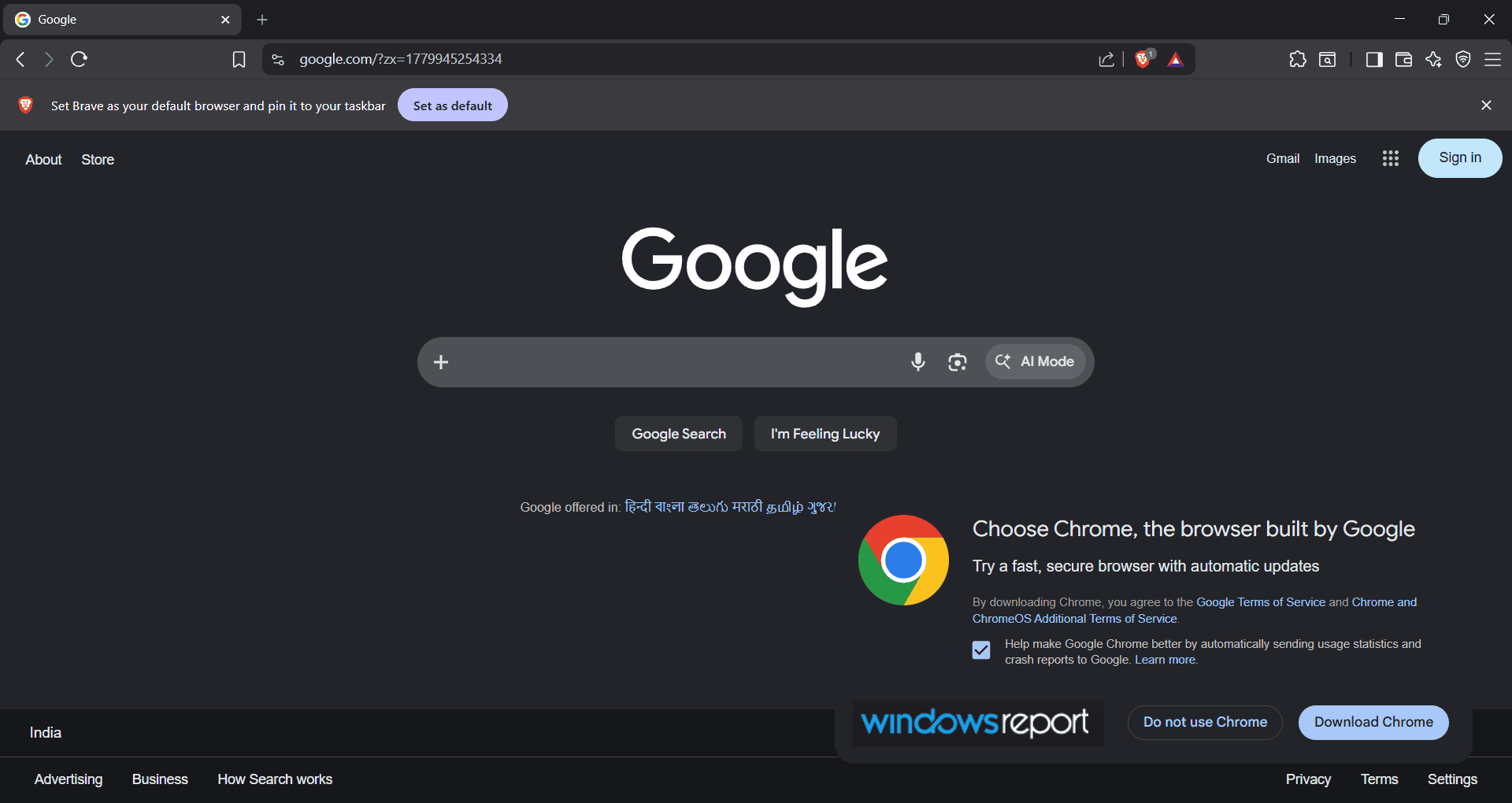
Google Search is now showing Chrome download prompts right on its homepage when you visit through rival Chromium browsers like Brave, Vivaldi, and Comet.
The prompt shows up as a large floating card in the bottom-right corner with the message “Choose Chrome, the browser built by Google,” plus a “Download Chrome” button. Clicking the button opens the Chrome download page in a new tab and starts the download. When you try to dismiss the prompt, you get a second option that says “Do not use Chrome.”
Image credit: Google
In our testing, this banner popped up in Brave, Vivaldi, and Comet browsers on Windows. Since these browsers run on Chromium, the same open-source engine Chrome uses, the recommendation is less about compatibility and more about getting users back onto Google’s own browser.
Image credit: Google
Here is how it works. Google checks your browser’s User-Agent string. Even though these browsers use Chromium under the hood, they have their own identifiers, so Google Search knows you are not on Chrome and serves the download prompt.
Image credit: Google
The placement is especially noticeable in Brave. The browser already shows its own banner at the top asking you to set Brave as your default and pin it to the taskbar. Meanwhile, Google is pushing Chrome from within the Search page itself. You end up with both companies fighting for attention in the same window.
Google has promoted Chrome across its properties for years, including Gemini, but past prompts were much more passive. They usually showed up as thin notification bars at the top of the page or subtle text links under the search box. Google changed the design. It is now a heavy, floating card anchored in the lower right, with a large full-color Chrome logo that stands out against dark mode.
The wording also stands out. Instead of a simple “X” or “Not now” option, the dismissal text reads “Do not use Chrome.” That keeps Chrome’s name front and center, even when you are rejecting it.
For privacy-focused browsers like Brave, this creates an added headache. Brave blocks trackers and ads, yet this prompt is first-party content on Google’s own site. That makes it much harder to block without breaking parts of the page.
Chrome dominates with 68% market share worldwide, while Brave has roughly 1-1.8% with over 100 million monthly active users. Vivaldi has about 4 million active users and less than 1% market share. Comet is even newer, having only gone public in 2025.
Despite Brave, Vivaldi, and Comet combined holding less than 3% of the browser market, what we can confirm is that all three displayed the Chrome download prompt during our testing. The prompt appears even on browsers built from the same Chromium codebase as Chrome. We do not yet know how widely this has rolled out or if it is limited to certain browsers, signed-out sessions, or specific platforms.
Infinity Ward and Activision have finally announced the Call of Duty: Modern Warfare 4. The new game officially launches on October 23, 2026, across Xbox Series X|S, PC, Steam, Battle.net, PlayStation 5, and even Nintendo Switch 2. Yes, Modern Warfare 4 is the first Call of Duty game to launch on Switch 2.
But the bigger story here is the setting of the game. In an interview with XBOX, Associate Design Director Alex Norris and Narrative Director Jeff Negus share new details on the next Call of Duty campaign.
Modern Warfare 4 is taking Call of Duty into Korea
Rather than another Middle East conflict or generic global terrorist plot, Modern Warfare 4 reportedly throws players directly into a massive war surrounding North and South Korea. And from what Infinity Ward has shared so far, the studio wants this campaign feeling grounded, tense, and ripped straight from current geopolitical headlines.
The story picks up shortly after the events of Modern Warfare III (2023), with Captain Price apparently becoming a far more dangerous and unpredictable version of himself after going rogue during the previous game. Infinity Ward says the campaign stretches across multiple locations including Korea, Paris, and New York City. However, Korea clearly is the main focus.
The studio repeatedly emphasized authenticity during its deep-dive reveal, including Korean voice performances, cultural consultants, dialect coaching, and even tiny environmental details inside convenience stores and military zones.
Infinity Ward wants massive cinematic battles again
On paper, Call of Duty: Modern Warfare 4 is doubling down on large-scale blockbuster missions. Infinity Ward says players can expect amphibious assaults, armored warfare, air support, city-wide combat, and heavily scripted cinematic sequences across the campaign. One mission even features large vehicle chases through Paris rendered with near one-to-one realism.
That being said, the developers also stressed they still want missions feeling personal through squad interactions and character-driven storytelling rather than just nonstop action and explosions. That’s why Call of Duty: Modern Warfare 4 brings several new Korean and American squad members alongside returning Task Force 141 characters.
Image credit: Activision | Infinity Ward
The Call of Duty: Modern Warfare 4 launches day one as an XBOX Play Anywhere title while finally bringing the franchise officially onto Nintendo hardware again through Switch 2.
Acer is preparing to enter the next generation of Windows gaming handhelds with the upcoming Predator Atlas 8. The device will be among the first handheld gaming PCs powered by Intel’s newly announced Arc G3 platform.
The Predator Atlas 8 is expected to launch in October, although Acer has not confirmed pricing yet. Acer officially introduced the device as part of its expanded gaming lineup during its latest hardware announcements.
Two Intel Arc G3 Configurations
Acer is reportedly preparing at least two versions of the Predator Atlas 8.
The higher-end model uses Intel Arc G3 Extreme graphics paired with Arc B390 GPU hardware. A second configuration uses the standard Intel Arc G3 platform with Arc B370 graphics.
The Arc G3 Extreme variant includes 12 Xe3 GPU cores, while the standard Arc G3 model includes 10 Xe3 GPU cores. Both systems use Intel’s latest Xe3 graphics architecture designed for gaming handhelds and portable Windows devices.
24GB LPDDR5X Memory Across Both Models
Both Predator Atlas 8 configurations are listed with 24GB of LPDDR5X-7467 memory.
That places the handheld above many current gaming handhelds that still ship with 16GB RAM configurations. Faster memory should also help Intel’s integrated Arc graphics performance, especially at higher resolutions.
8-Inch 120Hz VRR Display
Predator Atlas 8 features an 8-inch IPS display with a 1920×1200 resolution and a 16:10 aspect ratio.
The screen supports variable refresh rates from 48Hz to 120Hz. Acer is also using a panel rated for 500 nits brightness with full 100% sRGB color coverage.
For durability and visibility, the display includes Gorilla Glass Victus protection alongside Corning DXC anti-glare coating.
Battery and Cooling Differences
The Arc G3 Extreme version includes a larger 80Wh battery and weighs 810 grams.
Meanwhile, the standard Arc G3 model uses a 60Wh battery and weighs slightly less at 770 grams.
Acer has not shared official battery life estimates yet.
Cooling appears to be another major focus. Acer says the handheld uses a new metal cooling fan with 89 blades. According to Acer, the design delivers roughly 10% more airflow compared to competing handheld gaming systems.
Storage, Ports, and Windows 11 Features
Predator Atlas 8 supports up to a 1TB PCIe 4.0 SSD through a full-size M.2 2280 slot.
Connectivity options include two Thunderbolt 4 ports, 65W USB-C charging, Wi-Fi 7, Bluetooth, a UHS-II microSD card reader, and a 3.5mm headphone jack. The handheld runs Windows 11 and supports Microsoft’s Xbox Mode interface, the controller-focused Windows experience designed for handheld gaming PCs.
Intel Pushes Deeper Into Gaming Handhelds
Intel officially announced the Arc G3 handheld platform today, with Acer’s Predator Atlas 8 positioned as one of the flagship launch devices for the new platform.
The company joins other early Intel handheld partners, including MSI and OneXPlayer.
In related handheld gaming news, rumors continue suggesting ASUS could unveil a next-generation ROG Ally device during Computex 2026.
The new handheld processors are based on Intel Core Ultra Series 3, also known as Panther Lake. Intel says the chips are designed specifically for next-generation portable gaming devices running Windows 11.
First handhelds arrive in June
Intel confirmed that the first Arc G-Series handhelds will come from partners including Acer, MSI, and OneXPlayer. The first announced devices include the Acer Predator Atlas 8, MSI Claw 8 EX AI+, and upcoming OneXPlayer systems.
Availability for the first wave of devices is expected to begin in June 2026, with additional handheld models planned later this year.
The announcement puts Intel in a more direct battle against AMD in the growing Windows handheld market, which continues expanding after the success of devices like the ROG Ally and Steam Deck.
Xe3 graphics power handheld gaming
The Arc G-Series uses Intel’s new Xe3 graphics architecture. Intel says the platform supports up to Arc B390 graphics alongside real-time ray tracing support.
XeSS 3 also arrives as a major gaming feature for the new handheld platform. Intel says XeSS 3 combines Super Resolution, Multi-Frame Generation, and Xe Low Latency technologies.
According to Intel, the combination should improve gaming performance while reducing input lag during gameplay.
Intel confirms 14-core CPU design
Intel also confirmed the CPU configuration for the Arc G-Series chips. The processors feature a 14-core hybrid design built on Intel 18A.
The layout includes 2 P-Cores, 8 E-Cores, and 4 LP E-Cores.
The company says the design balances gaming performance with handheld battery efficiency.
Handheld-focused Windows features
Intel is also introducing several software features tailored for portable gaming PCs.
One of the biggest additions is Xbox mode, a controller-friendly full-screen Windows 11 experience designed for handheld devices. The feature aims to improve navigation and usability compared to the traditional Windows desktop interface.
Intel also announced Intel Precompiled Shaders. This system downloads prebuilt shader files from Intel’s cloud servers for supported games.
The goal is to reduce shader compilation stutter and shorten loading times, which remain common problems on PC handhelds.
Connectivity upgrades included
The Arc G-Series platform includes modern connectivity features such as Intel Wi-Fi 7 R2, dual Bluetooth 6 support, and Thunderbolt 4 with up to 40Gbps bandwidth.
These additions should help manufacturers build more premium handheld systems with faster wireless connectivity and external GPU or docking support.
Intel’s new handheld push arrives as competition in the category continues heating up. In other recent rumors, ASUS is also expected to announce a next-generation ROG Ally during Computex 2026.
Microsoft continues to face growing debate over the future of the Halo franchise as rumors about Halo remakes and a new creative direction keep circulating. Now, former Bungie designer Niles Sankey believes Microsoft is overlooking what could be Halo’s biggest opportunity.
Sankey, who worked at Bungie between 2006 and 2015 and served as Lead Mission Designer on Halo: Reach, criticized Microsoft’s current handling of the series during an interview with Halo creator Mint Blitz.
Former Bungie developer wants a return to Halo 3-era design
According to Sankey, Microsoft should create a separate internal team dedicated to building new Halo games inspired by the Halo 3 era rather than focusing entirely on modern reinterpretations of the franchise.
He clarified that he is not necessarily calling for direct remakes of older games. Instead, he believes Microsoft should produce entirely new Halo titles that preserve the gameplay feel, visual identity, and tone associated with Halo during its 2007 peak.
Sankey argued that a smaller studio or secondary team could focus on this classic formula without interfering with the direction of modern mainline Halo projects.
Halo fans still prefer classic gameplay and visuals
The former Bungie developer suggested many longtime Halo fans still prefer the slower, cleaner gameplay style of older entries compared to the more modern mechanics introduced later in the franchise.
He pointed to ongoing community debates around sprint mechanics, visual redesigns, and changes to Forerunner architecture as examples of how modernizing Halo can divide players.
Sankey also warned that large-scale modern game development often creates problems for long-running franchises. He said studios can lose the culture and design philosophy that originally made their games successful as teams become larger and projects become more expensive.
“Roll back” Halo to preserve its identity
Sankey’s proposed solution is relatively simple. He believes Microsoft should “roll back” to Halo 3-era visuals and gameplay for a dedicated side project instead of trying to modernize every aspect of the series.
The goal would be to preserve the atmosphere and identity many fans associate with classic Halo while allowing newer games to continue evolving separately.
The idea could appeal strongly to older Halo players, especially as rumors continue surrounding potential Halo 2 and Halo 3 remake projects. Still, it remains unlikely Microsoft would take such a large creative risk in today’s AAA gaming market.
The U.S. Department of Defense has announced a major long-term agreement involving Microsoft and Dell aimed at simplifying software licensing across the U.S. military and intelligence systems, as reported by CNBC.
The deal covers Microsoft products and services used by the Department of Defense, intelligence agencies, and the U.S. Coast Guard. Officials say the agreement should reduce complexity, modernize procurement, and cut long-term operational costs tied to decades of fragmented software contracts.
Pentagon Wants to Reduce Licensing Complexity
Large government IT environments often struggle with overlapping contracts, outdated systems, and inconsistent procurement practices. Over the years, different military branches and agencies signed separate Microsoft agreements, creating a complicated licensing structure across the federal system.
The Pentagon says the new agreement centralizes Microsoft software purchasing under one framework. The goal is to replace scattered procurement processes with a more unified and manageable structure.
The agreement reportedly covers Microsoft cloud and enterprise services, including Azure, Office, and Active Directory.
Dell Will Lead Consolidation Effort
Even though Microsoft software sits at the center of the deal, Dell will handle the consolidation and implementation work over the next five years.
Dell already maintains a long-standing relationship with Microsoft as both a hardware partner and enterprise services provider. Under the agreement, Dell will help streamline licensing management and reduce duplication across military systems.
The Pentagon believes the unified structure will improve operational efficiency while simplifying software management for agencies spread across different departments.
$422 Million in Estimated Annual Savings
The contract reportedly carries an upfront cost of around $9.7 billion. However, the Department of Defense says the agreement could save taxpayers roughly $422 million every year through reduced licensing overlap and improved purchasing efficiency.
Officials noted that the funding already exists within current Microsoft software budgets. The agreement mainly restructures how the government purchases and manages those services.
The move reflects broader efforts inside federal agencies to modernize aging IT infrastructure while reducing long-term maintenance costs tied to technical debt.
Microsoft Strengthens Its Government Presence
Although Dell secured the implementation role, the agreement further strengthens Microsoft’s position inside the U.S. government.
Microsoft already provides cloud infrastructure, productivity software, identity management systems, and cybersecurity services across multiple federal agencies. The Pentagon continues relying heavily on Microsoft technologies as it expands cloud and AI-focused initiatives.
Investors reacted positively to the Pentagon agreement. Dell stock reportedly reached an all-time high during after-hours trading following the announcement.
Shares climbed to around $305 as markets responded to the scale and long-term nature of the federal contract.
The new subscriptions are sold separately. WhatsApp Plus costs $2.99 per month, while Instagram Plus and Facebook Plus each cost $3.99 per month.
Meta launches Plus plans for its biggest apps
WhatsApp Plus focuses mostly on personalization. Subscribers get custom app themes, ringtones, premium sticker packs, more pinned chats, and extra customization options.
Instagram Plus goes further than cosmetics. It includes story rewatch counts, unlimited audience lists, longer story duration, extra profile customization, more bio font options, and additional profile pins.
Subscribers can also extend stories beyond the standard 24-hour window, preview a story without appearing as a viewer, and spotlight one story per week for additional visibility.
Facebook Plus adds similar paid extras
Facebook Plus appears to follow the same direction as Instagram Plus, with extra customization and audience-focused tools.
Meta is positioning these plans as optional add-ons, not replacements for the free versions of its apps. Users can still use WhatsApp, Instagram, and Facebook without paying.
The plans are also separate from Meta Verified, which remains focused on account verification, impersonation protection, and creator or business identity features.
Meta One is coming next
The new Plus plans are part of a wider subscription push called Meta One.
Meta plans to test AI subscriptions next month in Singapore, Guatemala, and Bolivia. Meta One Plus will cost $7.99 per month and offer more access to Meta AI features than the free tier.
Meta One Premium will cost $19.99 per month and add deeper reasoning, plus more image and video generation.
Creator and business plans are also planned
Meta will also test creator and business subscriptions in Saudi Arabia, Morocco, Thailand, and Bangladesh.
Meta One Essential will cost $14.99 per month and include a Verified badge, impersonation protection, and an enhanced link sheet.
Meta One Advanced will cost $49.99 per month and add reach-focused tools. These include placement opportunities in the Facebook feed, higher ranking in Facebook and Instagram search, a bold Follow button on Reels, and automatic follow invitations for people who engage with a creator’s content.
The subscriptions mark another step in Meta’s effort to build revenue beyond ads, especially as it spends heavily on AI infrastructure.
Microsoft is finally bringing a long-requested unified inbox experience to Outlook for Windows. According to Microsoft 365 Roadmap entry 564609, the feature, officially called “All Accounts view,” is scheduled to roll out in August.
The update will let users manage emails from multiple accounts in one combined inbox without constantly switching between separate mailboxes. The feature is expected to arrive across Outlook on the web and the new Outlook for Windows as part of a worldwide general availability rollout.
Outlook Will Combine Multiple Inboxes Into One View
The new All Accounts view aims to simplify email management for people who use several Outlook, Microsoft 365, Gmail, or other connected accounts inside Outlook.
Instead of opening each mailbox separately, users will see emails from all connected inboxes together in a unified feed. Microsoft says the accounts themselves will remain separate behind the scenes, but daily email handling should become much faster.
The update should especially help users juggling work, personal, and secondary email accounts throughout the day.
Supported Actions in the Unified Inbox
Microsoft says users will be able to perform several standard email actions directly from the combined inbox view, including reading emails, deleting messages, moving emails, archiving emails, and marking messages across multiple accounts.
This means users will not need to switch between inboxes for basic email management tasks.
Some Limitations Will Still Exist at Launch
While the feature adds major convenience, the first version will still have some restrictions.
Microsoft says search functionality will initially work only within the primary account. Cross-account search support will not be available at launch, which could frustrate users who rely heavily on searching older emails across multiple mailboxes.
Shared mailbox support is also planned for a later update instead of the initial release.
Copilot Support Included From Day One
Microsoft also confirmed Copilot integration for the unified inbox experience from the start.
This continues Microsoft’s broader push to integrate Copilot into nearly every part of Outlook and Microsoft 365.
The unified inbox arrives during a period of ongoing Outlook complaints and bugs.
Despite those problems, the unified inbox feature could become one of the most appreciated Outlook changes in years for users managing multiple accounts daily.
[UPDATE: 28 May, 2026 | 16:30 UTC] In addition to the following games, Microsoft has also announced that Gears of War Reloaded is free for all XBOX members to try during Free Play Days. Whereas, High on Life 2 is free for all Xbox members to try with a 5-hour timed trial. For Dying Light and Formula Legends, players will need XBOX Game Pass membership.
[ORIGINAL ARTICLE] It’s another Thursday, which means that Free Play Days is back, giving XBOX users the chance to try out popular titles for free.
Dying Light and Formula Legends Lead the XBOX Free Play Days Lineup
While Microsoft hasn’t revealed the official list yet, keen-eyed users spotted two games that will be available as part of this weekend’s Free Play Days.
One of them is Dying Light, a popular first-person survival action game with parkour elements.
If you’re looking for something lighter, the other game, Formula Legends, might be right up your alley. It’s a formula racing game with arcade-style elements, making it perfect for casual racing fans.
These two games are already available, and this Free Play Days event will last until June 1. Keep in mind that Microsoft hasn’t announced the official lineup yet, so additional titles might be added.
Overall, this Free Play Days event looks promising, so don’t miss your chance to try these titles.
Valve’s rumored Steam Machine may launch at a much higher price than many users initially expected, according to new comments from industry insider Brad Lynch. While Valve has not officially confirmed the hardware, pricing, or release plans, the latest rumors suggest the company is targeting a premium gaming PC segment rather than a budget console replacement.
Insider Suggests Premium Pricing
Lynch recently said that pricing information he heard roughly two months ago placed the rumored Steam Machine above current Steam Deck pricing. That comment immediately sparked speculation because Steam Deck prices have already increased in several markets.
Take this with a grain of salt, because it was just whispers in my ear
But back when I was told a figure for what Valve’s estimated price they’d have to set the starting price of Steam Machine, it was still higher than today’s Steam Deck prices..
If the comparison refers to the top-end Steam Deck OLED configuration, the upcoming device could potentially cost more than $949. Even if Lynch meant the lower Steam Deck OLED model, which starts around $789 in some regions, the rumored Steam Machine would still enter a premium pricing category.
The higher rumored price does not appear to surprise many hardware watchers. Premium pricing has long been expected for Valve’s rumored Steam Machine, especially as reports continue describing Microsoft’s Project Helix as a competing high-end gaming platform aimed at enthusiasts.
Industry speculation suggests Valve is preparing hardware designed to rival premium gaming PCs rather than traditional consoles, which could explain the expected higher launch price.
Valve May Target High-End PC Gamers
That positioning could explain why Valve may avoid the aggressive pricing strategy it used for the original Steam Deck. Rather than serving as a low-cost handheld alternative, the Steam Machine could become a compact performance-focused desktop system for couch gaming and large-screen setups.
Market conditions may also influence the final retail price. Industry-wide memory shortages and rising component costs continue affecting PC hardware manufacturers. Graphics cards, high-speed memory modules, and storage prices have all experienced pressure during the past year.
Some analysts believe those supply issues could significantly increase production costs for a premium SteamOS machine. The device would likely require stronger cooling, desktop-grade hardware, and faster memory compared to handheld hardware like the Steam Deck.
Vulkan Database Listing Fuels Speculation
The rumors also gained traction after references to the Steam Machine reportedly appeared in the official Vulkan Conformance database. While database listings do not confirm a launch, they often indicate active internal testing or software certification work.
Valve remains silent on the project for now. There is still no official launch date, confirmed hardware specification list, or retail pricing information available publicly.
If the rumors prove accurate, Valve’s next SteamOS device may compete less with traditional consoles and more with compact gaming PCs from manufacturers like ASUS, MSI, and Zotac.