Microsoft Says Xbox Game Pass Is Too Expensive, Plans Major Changes

Microsoft is rethinking its Xbox Game Pass strategy after years of steady expansion and recent pricing backlash. The company now admits the service may have become too expensive for players.

According to a report from The Verge, Microsoft Gaming CEO Asha Sharma shared concerns in an internal memo, describing the current Game Pass pricing model as unsustainable and not final.

Pricing Backlash and Internal Concerns

Game Pass has evolved significantly since its launch nearly a decade ago, but its biggest shift came with the introduction of tier restructuring. This change, combined with a roughly 50% increase in the price of Xbox Game Pass Ultimate, sparked criticism from players who felt the service no longer offered the same value.

Sharma’s memo suggests Microsoft is already working on adjustments. In the short term, the company plans to improve the perceived value of Game Pass, while long-term efforts will focus on building a more flexible subscription system.

New Tiers and Possible Feature Changes

One of the potential changes includes introducing new subscription tiers. A lower-cost option focused only on first-party titles has reportedly been discussed, which could reduce the overall price for users who do not need access to third-party releases.

There are also ongoing rumors that Microsoft could reconsider its day-one release strategy for major titles such as Call of Duty. Removing or limiting these releases from Game Pass could significantly reduce costs tied to licensing and distribution.

At the same time, reports suggest that Xbox Game Pass Ultimate might receive an expansion in features. However, this could be balanced by removing certain benefits to offset rising costs and maintain profitability.

Overall, Microsoft appears to be aiming for a reset. The goal is to strike a better balance between pricing, content offerings, and long-term sustainability, while also addressing growing concerns from its player base.

Despite the uncertainty around Game Pass, Xbox continues to push forward with content. More than 20 new titles are expected to arrive on the platform this week, signaling that the company is still heavily investing in its gaming ecosystem.

Via Neowin

Massive Leak Exposes 007: First Light Spoilers & Unreleased Game Footage Online

If you have been waiting for 007: First Light for long and hate spoilers, it might be time to stay away from the internet for now. That’s because a major leak has just surfaced, and it is not the usual small clip or screenshot.

Indonesia ratings leak exposes major game footage

Over the weekend, Indonesia’s ratings board, the Indonesian Game Rating System, appears to have accidentally leaked private footage submitted by developers for classification. According to VGC, a security flaw left internal materials publicly accessible, and things escalated quickly.

Among the biggest hits is 007: First Light, where over an hour of gameplay has reportedly surfaced online. This includes major story moments and what appears to be the ending, which is now circulating across forums and social platforms. Notably, the game is still weeks away from its May 27 launch, yet key narrative beats are already out in the wild.

Well, the bad news doesn’t stop there. Reportedly, footage from Echoes of Aincrad has also appeared in the massive leak, alongside references to projects like Assassin’s Creed IV: Black Flag and Castlevania: Belmont’s Curse. However, clips of these games have not widely surfaced yet.

For IO Interactive, this is likely a frustrating moment. The studio has been positioning First Light as a fresh take on James Bond, especially focusing on a younger version of the character and a more grounded origin story.

Additionally, the VGC report also mentions that the leak has also exposed thousands of developer emails, which is a separate concern. All that said, if you don’t want to come across the leaked footage, it’s time to set filters on your social accounts.

Windows 11 Finally Allows Skipping Forced Updates During Initial Setup

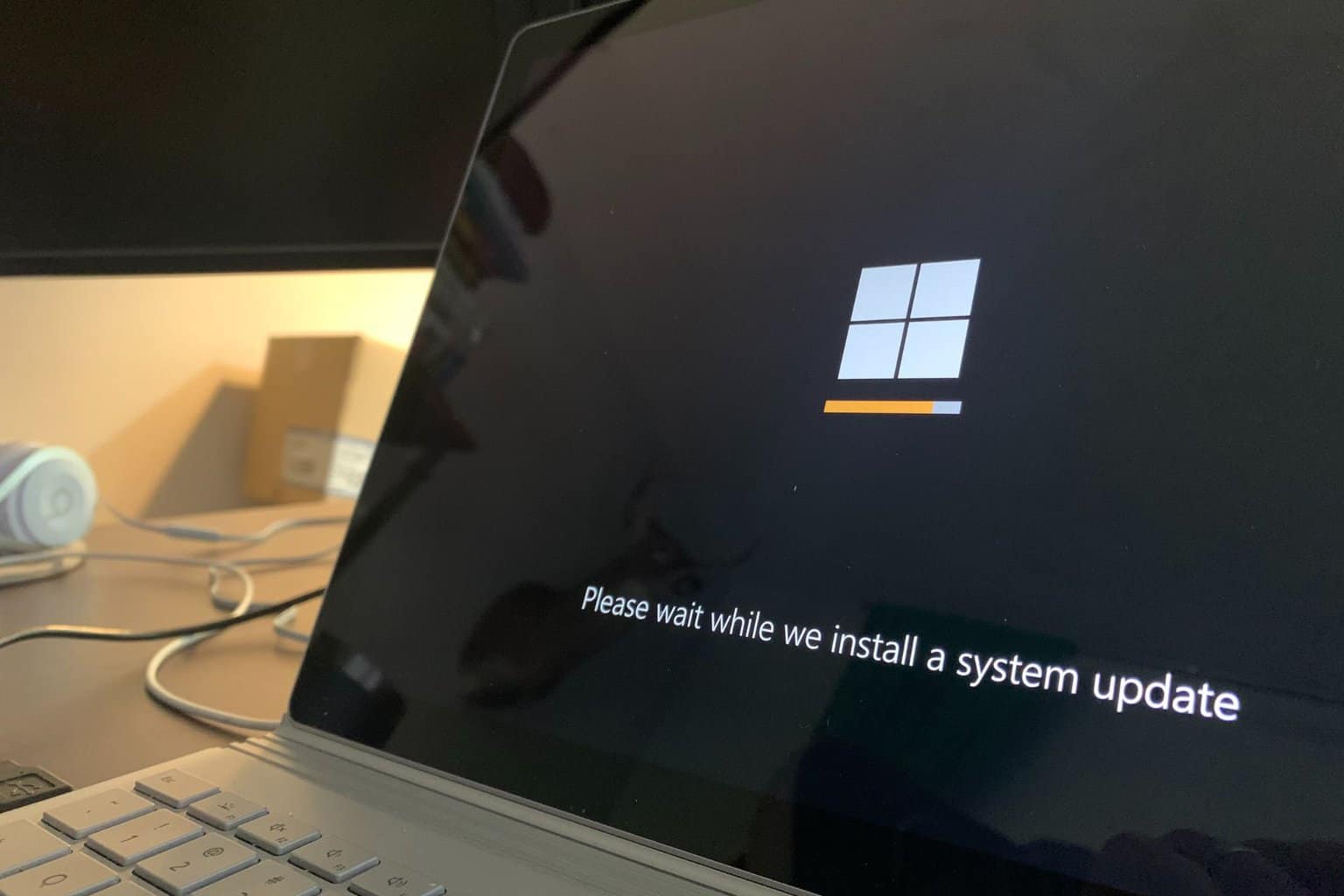
Microsoft is finally getting rid of one of the most annoying parts of the Windows 11 out-of-box setup experience (aka OOBE). Here, I am talking about the update section that takes away a noticeable chunk of time right out of the box, depending on how many updates need to be installed.

Windows 11 setup just got faster with optional updates at first boot

The news comes via Windows Central, which spotted a tweet by Aria (@ariaupdated on X), a Microsoft engineer who works on Windows Update. Per Aria’s post on X, Windows 11 will no longer force updates during the initial setup, a step that has frustrated users for years.

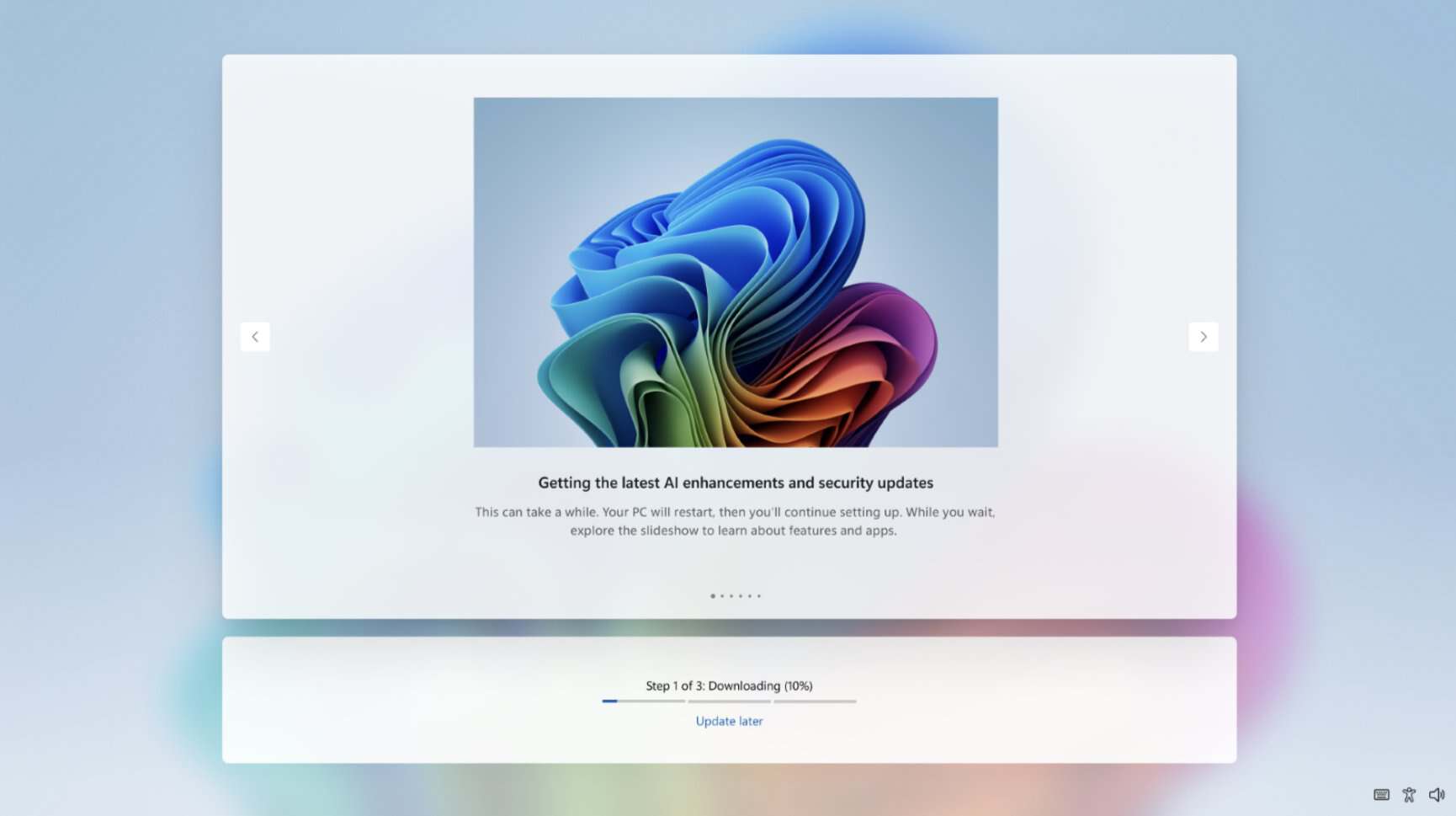
With the latest rollout, users will now see an “Update later” option during setup. That means you can jump straight into using your PC and install updates afterward, rather than being forced to sit through them upfront.

Image credit: Microsoft

That being said, there is a trade-off involved in that process. Skipping updates means missing out on the latest security patches and features until you install them manually. It’s a choice between speed and immediate protection, and it’s unclear how many users will consistently follow up later.

The new option is “now default for everyone”

As Aria explains in a reply, Microsoft has been testing different approaches over the past few months, including a 10-minute opt-out, auto-skip, and no opt-out at all. Now, the company has now made the immediate choice option “based on user feedback and data.”

All that said, it appears to be part of a broader effort to make Windows updates less intrusive overall, including fewer restarts and more flexible scheduling. If you have been stuck at the OOBE screen, you must be aware that mandatory updates could stretch the process to 30 or even 40 minutes before reaching the desktop. Now that this feature is available for everyone, it gives a breather from those long waits before you hit the desktop.

Back in earlier versions of Windows, setup was quicker but often less secure. Now, it appears Microsoft is trying to strike a better balance between convenience and safety.

Fable Still Aiming for Autumn 2026 Release Despite GTA 6-Fueled Delay Rumors

Over the weekend, there were plenty of reports suggesting that Playground Games has internally delayed Fable due to GTA 6. The rumor originally stemmed from a post by journalist Jeff Grubb, who said that the studio is “worried” about GTA 6’s launch window. That raised concerns among fans that Fable could slip into late 2026, or even 2027, to avoid clash with the most anticipated game of the year.

Playground Games appears to have pushed back on Fable delay rumors linked to GTA 6

Now, it seems the studio has just shot down those rumors around Fable and has confirmed the game is still on track for an Autumn 2026 release. Replying to a fan post on X, the official Fable account wrote, “Excited to welcome you back to Albion in Autumn 2026!”

Remember, a report from earlier this year hinted that Microsoft is moving the release of Halo and other big games to avoid the GTA 6 craze. However, the post from the studio earlier today appears to firmly push back against delay speculation.

Speaking of timing, that confirmation feels deliberate, too. It suggests confidence not just in a 2026 launch, but specifically the autumn window, rather than a late-year shift. To catch you up, the Fall/Autumn release window for Fable was announced at the January Xbox Developer Direct, where the studio confirmed that it’ll be packed with classic fantasy elements with a more modern open-world approach.

That said, it’s unclear how firm this window remains if GTA 6 lands close by. Studios have changed plans late in the cycle before, even after public reassurances. For now, it seems Fable is still coming this autumn. But if GTA 6 locks in a similar window, will Microsoft hold its ground or quietly shift strategy later?

Speaking of games, let’s not forget that Microsoft has announced yet another Xbox showcase on April 16 for the first look at Metro 2039.

20+ Games, Including Pragmata & Hades II, Join Xbox This Week (April 13 to 17)

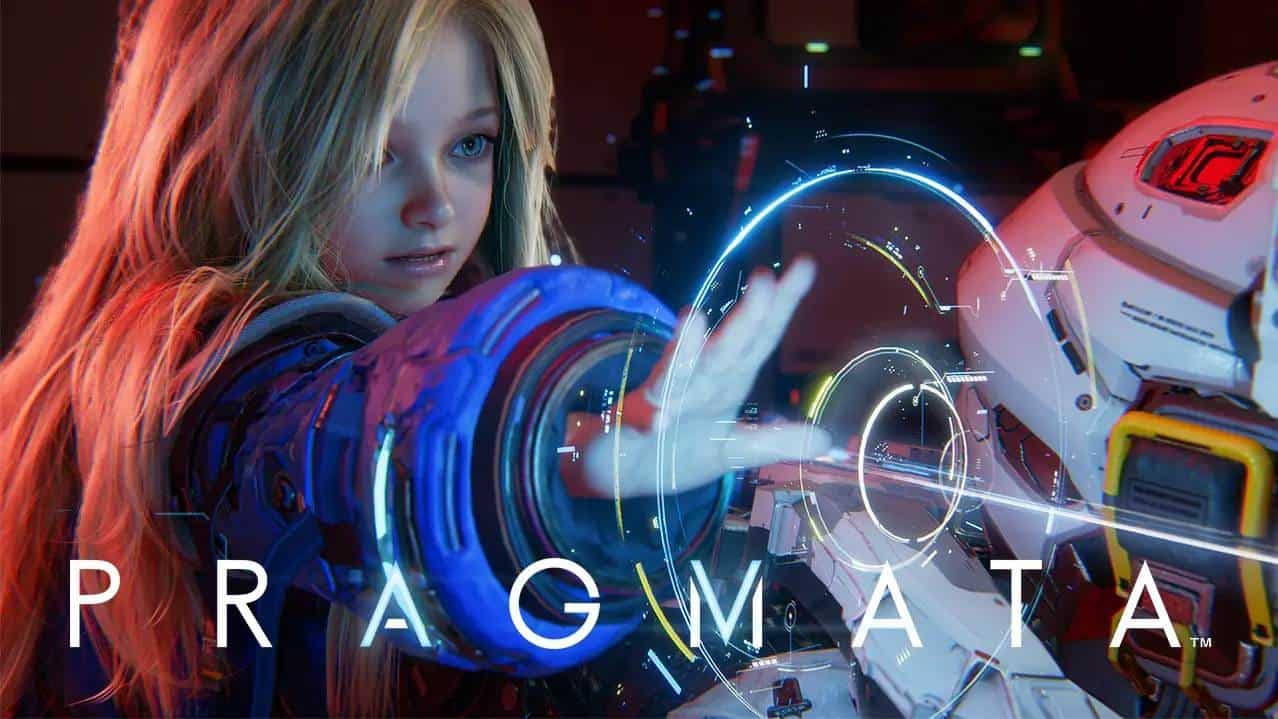
Last week, we detailed the Xbox Game Pass Wave 1 lineup for April 2026. Now, we have a full list of games that are landing across Xbox Series X|S, Xbox One, Xbox on PC, and Game Pass starting today through April 17th. Among the 29 games coming this week on Xbox, Pragmata, Hades II, and Replaced are some of the popular additions.

The official Xbox Wire post describes Hades II as “The first-ever sequel from Supergiant Games builds on the best aspects of the original god-like rogue-like dungeon crawler in an all-new, action-packed, endlessly replayable experience rooted in the Underworld of Greek myth and its deep connections to the dawn of witchcraft.” Meanwhile, Pragmata is “an all-new science fiction action-adventure with its own unique hacking twist!”

All the games joining Xbox this week alongside their release date

Game TitleRelease Date
Before I Go (Pre-order)April 13
Spire BlastApril 13
Dosa DivasApril 14
Hades II (Pre-order)April 14
ReplacedApril 14
City Transport Simulator 2026April 14
Claim the Forest: Settling PeaceApril 14
Find My FrogsApril 15
PengiloApril 15
Mouse: P.I. For Hire (Pre-order)April 16
Cthulhu: The Cosmic Abyss (Pre-order)April 16
Death By ScrollingApril 16
Ereban: Shadow Legacy (Pre-order)April 16
Ground ZeroApril 16
Magic SheepApril 16
Nullstar: SolusApril 16
Smash It Wild: Tactical Volleyball RoguelikeApril 16
StarwardApril 16
Under Par Golf ArchitectApril 16
Without a DawnApril 16
ZPFApril 16
Pragmata (Pre-order)April 17
Curious Copy CatsApril 17
Decollate Decoration (Pre-order)April 17
The Empty Desk (Pre-order)April 17
Inhuman Resources: A Literary MachinationApril 17
Rail Rescue: Puzzle LinesApril 17
Void BlastersApril 17
Word Quest FantasyApril 17

With these games now lined up for this week across Xbox Series X|S, Xbox One, Xbox on PC, and Game Pass, which one are you most excited for? Let us know in the comments below.

Legion Go 2’s 2TB Model Now Sees a Price Hike, Hits $2,849.99 on Lenovo Official Website

Earlier this month, some reports pointed to the Lenovo Legion Go 2’s listing on Best Buy with a whopping price tag of $1,999.99. That’s roughly a $650 increase, or close to 48 percent higher than what Lenovo initially charged for it. The model we are talking about here comes with 32GB of RAM and 1TB of storage.

After the 1TB model, it’s the 2TB Legion Go 2 that’s getting a price hike

Well, the Legion Go 2 gaming handheld is once again in the spotlight. This time, it’s the 2TB storage model that’s getting a price hike. Yes, you read that correctly. Unlike the 1TB model, this time the price hike has been reflected directly on Lenovo’s official website. In fact, it’s out of stock at the moment.

Image credit: Lenovo

At the time of writing this, the Lenovo Legion Go 2 with 2TB of storage is now listed at $2,849.99. It’s a $1,369 increase over its original MSRP of $1,480. That marks another significant jump in price for a device that has already seen multiple increases since launch.

Earlier pricing placed it much lower, making the current trajectory one of the most aggressive upward shifts in the handheld gaming segment. Compared with its original positioning, the 2TB model has now moved well beyond typical handheld pricing.

Some retailers are still offering the handheld at previous pricing

Some retailers like B&H still have the handheld listed at a previous price tag (via Notebookcheck). However, that is likely tied to remaining stock rather than updated pricing structures. As of now, Lenovo hasn’t officially explained the repeated price hikes, but supply chain pressures may be playing a role. One of the biggest factors behind this hike is likely the ongoing global memory crunch, which many industry experts suggest could last until 2030.

Contrary to the upward pricing trend with the Legion Go 2 handheld, the ROG Xbox Ally recently dropped to $499.99, a $100 discount on Amazon US from its original launch price. No wonder, both handhelds are different in terms of performance and gaming experience. But with Lenovo’s handheld getting sharp increases, discounts on Xbox handhelds feel more like a targeted offer.

Xbox Metro 2039 Reveal Showcase Is Now Official: Check Date, Time & How to Watch

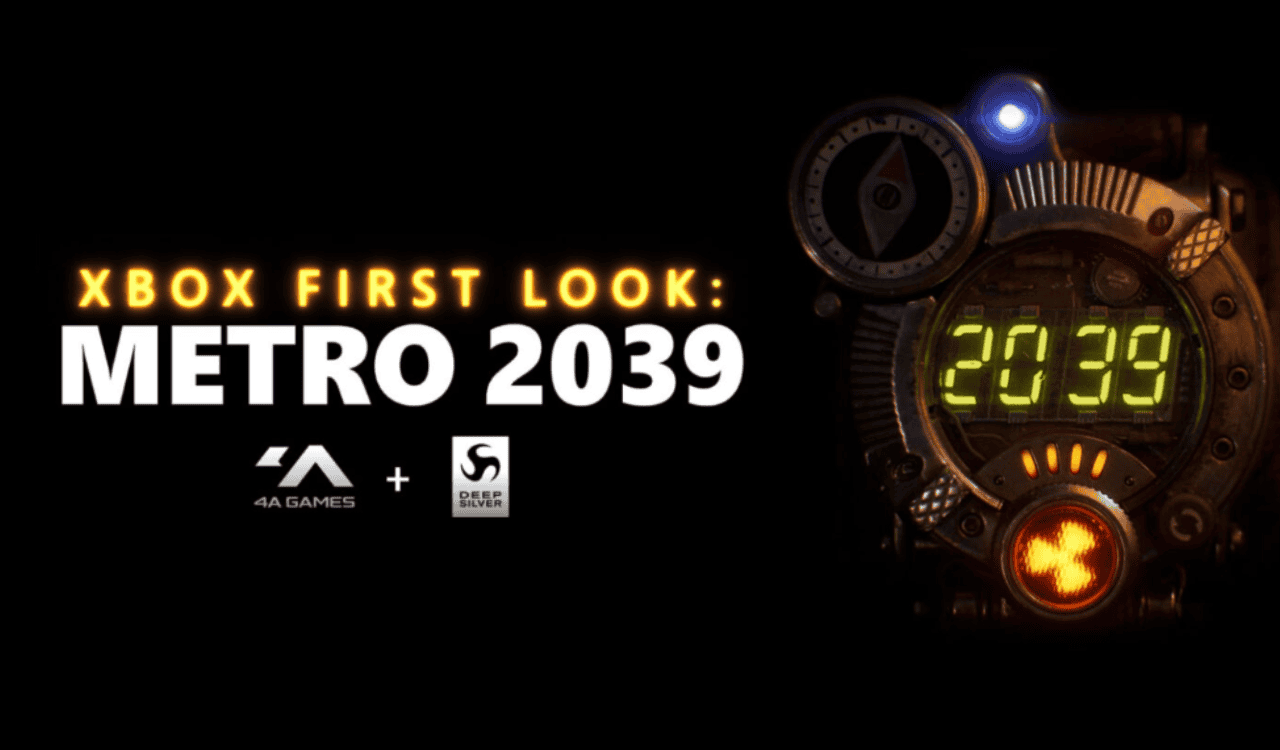
Xbox has officially confirmed a new digital showcase focused on the Metro franchise, setting the stage for a fresh look at the next mainline entry in the long-running post-apocalyptic series. The broadcast, titled Xbox First Look: Metro 2039, is scheduled for Thursday, April 16, and will feature 4A Games alongside Deep Silver. Notably, rumors around this Xbox showcase have been making rounds online lately.

Xbox confirms Metro 2039 reveal showcase

The event will serve as a world premiere presentation for Metro 2039, marking the fourth mainline entry in the franchise. The series, based on Dmitry Glukhovsky’s novels, has long been a key part of Xbox’s shooter lineup, and this showcase continues that partnership.

The new game follows Metro 2033, Metro: Last Light, and Metro Exodus, which built a reputation around survival-driven gameplay set in a post-nuclear world centered on Moscow’s underground tunnels and the surface beyond.

Xbox Metro 2039 showcase time & how to watch

Xbox says the broadcast will be digital-only and will air via YouTube Premiere (embedded below). The show is set for 10am Pacific, 1pm Eastern, and 6pm UK time, making it accessible across major regions on the same day.

Alongside the main reveal, Xbox has confirmed accessibility support, including subtitles across multiple languages and additional formats such as audio descriptions and ASL support. A full recap will also be published after the event, ensuring fans who miss the livestream can catch all major announcements.

Content creators will also be able to co-stream the event, although Xbox notes that technical interruptions from automated systems may still occur, something that has become increasingly common with major online broadcasts. Not to forget, a PlayStation State of Play is also rumored to go live on April 16th.

Roblox Announces Age-Based Accounts with Expanded Parental Controls for Users Under 16

After announcing facial age verification for chat worldwide in January, Roblox has now announced a major update that changes how younger users access games. The company today detailed the new age-based accounts and expanded parental controls set to roll out in early June. The decision comes at a time Roblox is facing scrutiny for child safety on its platform.

Roblox splits younger users into Kids and Select tiers

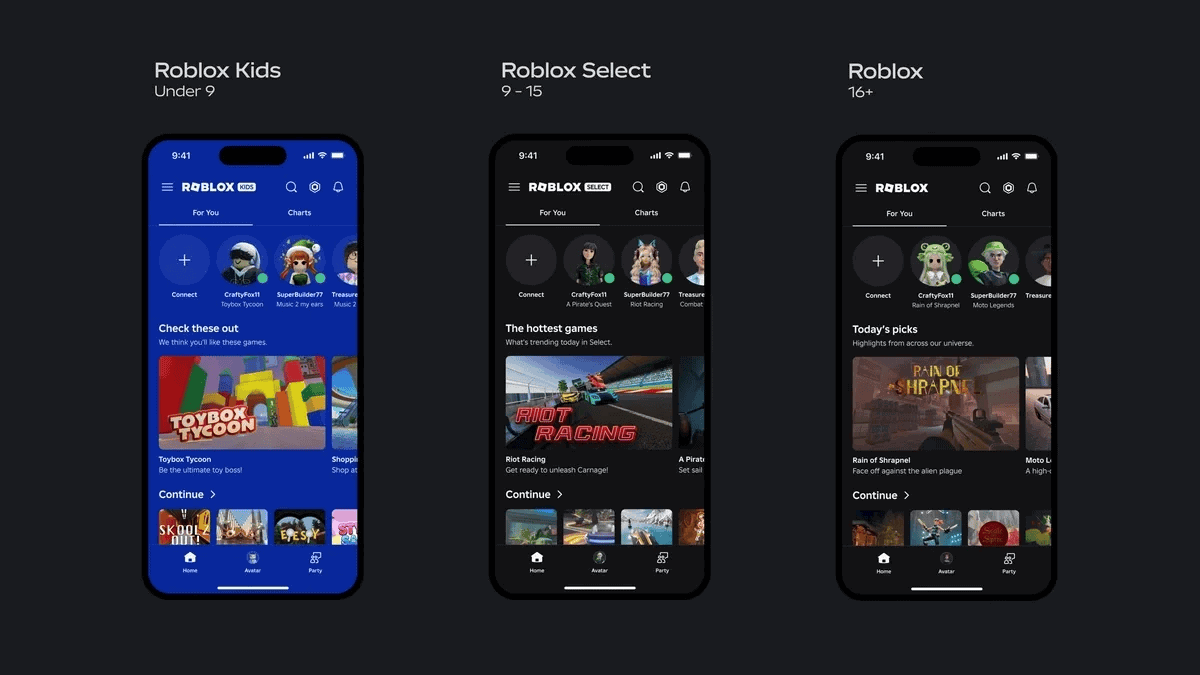
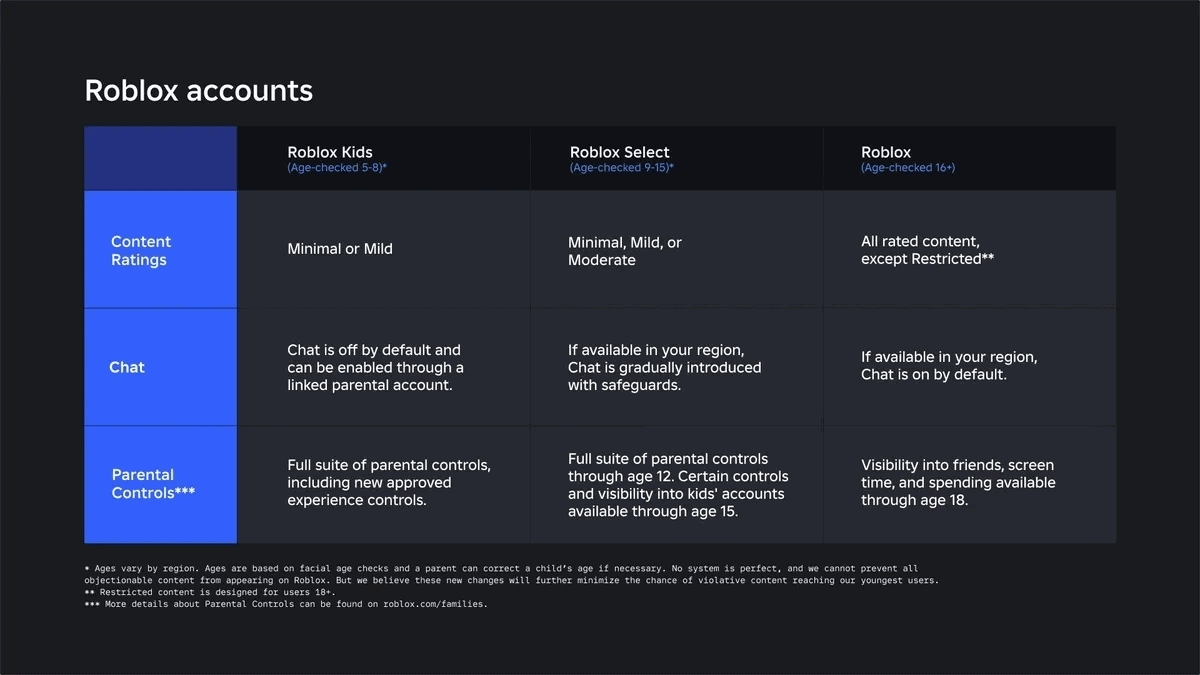
As part of the latest overhaul, the platform is adding two new account types, Roblox Kids and Roblox Select. Kids will cover ages five to eight, while Select will apply to users aged nine to 15, based on age checks or parental verification.

Image credit: Roblox

Notably, each tier comes with its own limits. “Kids” accounts will only see games rated Minimal or Mild, while Select accounts will allow access up to Moderate content. Roblox says this setup is meant to better match what users see with where they are developmentally. Communication within the platform is also getting a major change, with chat now turned off by default for younger Kids accounts. Whereas the “Select” users will have more access, though still under safety controls.

Image credit: Roblox

Users will move between tiers automatically as they grow older, shifting from Kids to Select at age nine, and then into standard accounts at 16. Anyone who skips age verification will still be placed into the most restricted group.

Developers face stricter rules as controls expand

Roblox is also limiting how games qualify for younger audiences. Developers will need verification, stronger security settings, and additional checks before their games can appear in Kids or Select libraries. On top of that, the company is adding continuous review systems that track reports, moderation signals, and real-time safety checks to decide what stays available for younger players.

Moving on, parents are also getting more control. They will be able to block specific games, manage chat access, and approve experiences that would otherwise be restricted until age 16. Last but not least, Roblox is also moving toward global rating systems like ESRB and PEGI later this year.

Attention! This Fake Windows 11 Update Download Site Spreads Password-Stealing Malware

Every now and then Windows 11 users come across different issues triggered by official updates, or at least what looks like one. Although most users are cautious about online scams and fraudulent sites, Malwarebytes is now warning about a fake Windows support website, which is reportedly spreading malware disguised as a routine system update (via Neowin).

Fake Windows update website spreads infostealer malware

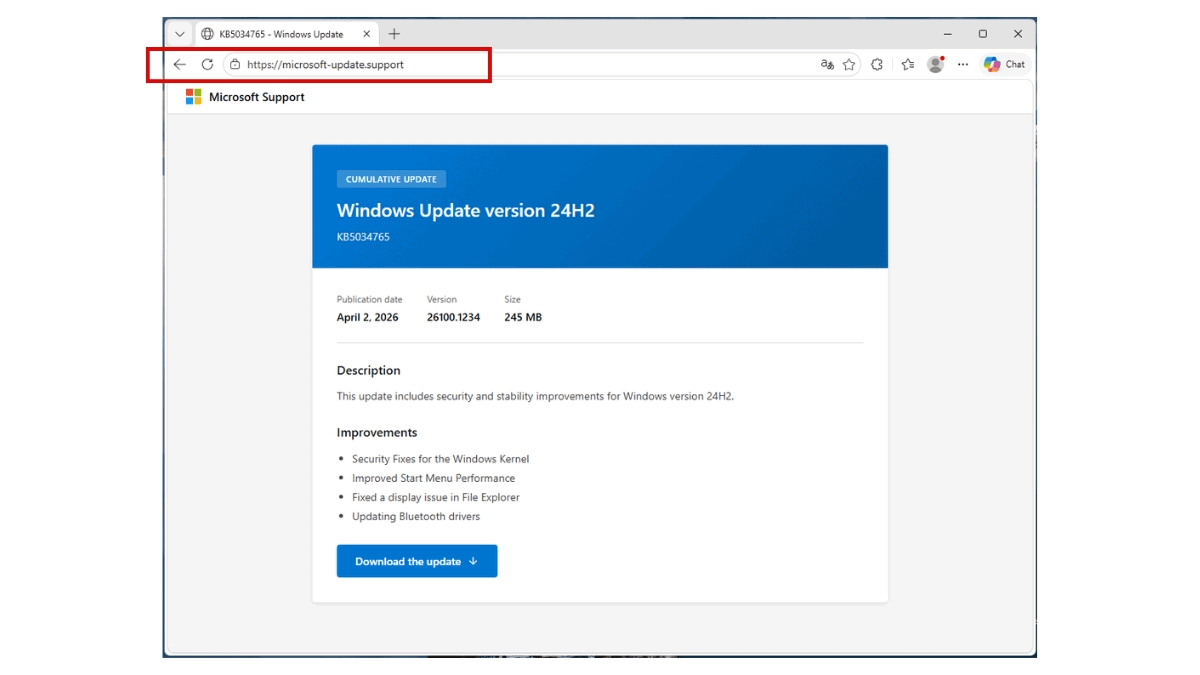
Per the cybersecurity company, security researchers have flagged a campaign using a typosquatted domain that closely mimics an official Microsoft support page. The site reportedly presents a fake cumulative Windows 11 version 24H2 update, complete with a believable KB-style reference and a large download button that encourages users to install it. Here’s what the site and domain look like:

Image credit: Malwarebytes

Once downloaded, the file appears as a standard Windows update package, but it actually installs malware designed to steal passwords, payment details, and account access. What makes it more dangerous is how legitimate it looks on the surface, with Microsoft-like branding and file properties that can easily mislead users.

The report further details that the installer is built using an authentic packaging tool, which helps it avoid immediate detection by security software. That gives scammers an advantage in slipping past both automated scanners and unsuspecting users. Interestingly, the attack chain doesn’t stop there.

Once executed, it reportedly deploys an Electron-based application along with scripts that launch additional payloads in the background. These components are designed to blend into normal system processes, which eventually makes the infection harder to notice in real time.

Hidden persistence and data theft tactics raise concerns

What stands out is how the malware maintains persistence. It reportedly modifies startup entries and places disguised shortcuts in system folders, ensuring it runs again after reboot. In parallel, it also connects to external servers to gather system details and send stolen data. The campaign appears highly targeted, with researchers noting a focus on French-speaking users. This is likely related to previous large-scale data leaks, which give attackers enough personal information to craft convincing lures.

The fact that early analysis reportedly showed zero detections across multiple antivirus engines is concerning, largely because the malicious logic is hidden inside obfuscated scripts and legitimate software layers.

All that said, we always recommend uses to use the official Windows Update settings or legitimate Microsoft domains like Microsoft Update Catalog to download and install updates. Never download any updates or apps from unfamiliar or suspicious sites. This little move of yours can save you from being scammed online or getting hacked.

[UPDATE: Confirmed] A “Little” Xbox Showcase with Metro 2039 Reveal Rumored for April 16

[UPDATE: April 13, 19:00 IST] Xbox has officially confirmed a new digital showcase focused on Metro 2039. You can read all about it in our separate coverage here.


[ORIGINAL STORY] Earlier today, citing multiple reports, we reported that Sony is considering some big announcements in multiple State of Play showcases. If reports are true, one of those State of Play showcases might be held on April 16th, focusing on AAA third-party titles. Meanwhile, another State of Play showcase is reportedly planned for late May or early June.

Next “little” Xbox showcase reportedly planned for April 16th

Well, if you are an Xbox fan, there is some news for you too. According to multiple reports online, an Xbox showcase is reportedly scheduled for later this week, where you can expect a Metro 2039 reveal. Notably, the show won’t be big, rather a small, focused presentation.

In a recent live session on YouTube channel Septic Sauce (timestamped below), Windows Central executive editor and gaming insider Jez Corden said that “There might be something Xbox fans might want to tune into as well, maybe. […] But Xbox might have a little something next week as well. […] A little show.” Replying to that claim, popular tipster NateTheHate2 on X replied, “The Microsoft show will broadcast on April 16th & is the venue of choice for the Metro 2039 reveal. I don’t know the branding of the show.”

As mentioned above, the next Xbox showcase will reveal Metro 2039, the next entry in the long-running post-apocalyptic shooter series from 4A Games. As of now, there is no official word from Microsoft regarding the rumored Xbox showcase. However, a tweet from The Verge’s Tom Warren (now deleted) spotted by TrueAchievements suggest that it might be ID@Xbox-focused, which fits the profile of third-party and partner announcements.

If both Xbox and PlayStation do go live this week, which showcase will actually deliver the bigger surprise? Share your thoughts in the comments below.

Starfield’s PS5 Performance Issues Spark Refund Wave Among Players

Bethesda’s Starfield appears to be facing a rough reception on PS5 after its recent launch. That’s because players have been reporting serious performance issues, with some even requesting refunds from PlayStation. Per affected players, Starfield is struggling to maintain stability on Sony’s gaming console, with frequent crashes being highlighted as the main problem.

Starfield PS5 performance issues trigger refund requests right after launch

Folks over at Eurogamer first spotted a Reddit thread full of complaints, where Starfield players describe crashes hampering the experience every few minutes (via The Gamer). The reported issues reportedly didn’t get fixed even after multiple attempts to resolve them.

Players say standard troubleshooting steps have not helped. These include switching between performance modes, deleting and reinstalling the game, and even wiping save data entirely. Despite these efforts, the problems reportedly continue.

What makes the situation worse is that the issues are not limited to base PS5 hardware. Some PS5 Pro users are also reporting similar crashes, suggesting the problem may not be limited to performance tiers alone. No wonder players are frustrated. Some are now even turning to PlayStation Support to request refunds. In some cases, users claim they are unable to progress at all due to constant crashes.

At the time of writing this, Starfield remains available on the PlayStation Store and has not been delisted like Cyberpunk 2077. User ratings also show a mixed but not overwhelmingly negative sentiment, suggesting experiences vary widely. In other words, some players appear satisfied with the experience, while others are dealing with repeated crashes that break gameplay entirely.

As reports continue to surface, it remains to be seen whether Bethesda will address the stability issues quickly, or if frustration among PS5 players will continue to grow. All that said, if you are eyeing a refund for a bad experience, it’s not that easy, to say the least. Speaking of Starfield, let’s not forget that the game has also received “Free Lanes” update last week that adds seamless planet travel and a major overhaul.

PlayStation Reportedly Planning Several Big Announcements in the Coming Months

In the past few months, there have been plenty of developments across the Xbox ecosystem. But that can’t be said about Sony’s PlayStation. However, if rumors are accurate, the next few months will be big for PlayStation. According to multiple reports and rumors online, Sony could be preparing multiple State of Play events ahead of its usual summer window.

PlayStation State of Play rumors point to a packed schedule

Per the online rumors, Sony could host a State of Play as early as mid-April (April 16), with additional showcases expected in late May or early June (via Screen Rant). Although the details are unclear at this point, the timing lines up with Sony’s usual summer presentation cycle. The rumored April showcase is said to focus more on third-party AAA titles.

In other words, you could expect updates on games that have already been announced but have not received major gameplay reveals yet. At the same time, expectations around Marvel’s Wolverine have been at an all-time high, especially after Insomanic Games hinted that more details would be released in Spring 2026.

If that rumor holds true, a dedicated deep dive for Wolverine may happen separately or as part of a larger event. Other titles that are being linked to upcoming showcases include projects like Judas, Control follow-ups, and even older rumors like an Assassin’s Creed Black Flag remake are resurfacing again after Ubisoft recently confirmed it.

Notably, some rumors also point at surprise releases. Recent showcases have included shadow drops, and that trend may continue if multiple events are planned. While nothing is confirmed, the idea of smaller or mid-sized titles launching right after announcements is reportedly on the cards.

With PS5 prices going up again, Sony is likely to make a bunch of big announcements that can keep players hooked to the ecosystem even after paying an increased price.

Meta Reportedly Developing AI Version of Mark Zuckerberg to Interact with Employees

Last month, we reported about Mark Zuckerberg developing a custom AI agent to help him handle his daily duties as CEO. Now, some extra details about the project have been reported online. According to the Financial Times, the company is building a photorealistic AI avatar of Mark Zuckerberg that could interact directly with employees (via Econotimes).

Meta reportedly building AI version of Zuckerberg

According to sources cited in FT’s report, the AI version of Mark Zuckerberg is being developed using advanced 3D modeling and real-time interaction systems. The idea here is to allow Zuckerberg’s avatar to communicate with employees in a way that feels close to the real person.

Mark Zuckerberg is reportedly also involved in developing the system. The AI is said to be trained on his speaking style, behavior patterns, and past public statements. It may also reflect his current thinking on Meta’s strategy, which could allow it to respond to internal queries with relevant context.

With Meta pouring billions of dollars into AI, the company wants to lead the charge starting from inside its company’s walls. Rather than relying only on traditional communication channels, Meta could be trying to replicate executive presence at scale. For a company with a global workforce, that could change how information is channeled across teams.

Earlier this year, Zuckerberg, in its earnings call, hinted that Meta is going all in with its AI efforts. That includes release of multiple AI models, including Avocado, which has reportedly been delayed due to performance issues. Apart from that, the company is also working on multiple AI tools that it plans to launch this year.

All that said, there are still questions about how employees would respond to an AI version of leadership, or how closely it could mirror real decision-making.

What do you think about this move by Meta? Share your thoughts in the comments below.

Here’s Why Microsoft Ditched Phone-Based Windows Activation for an Internet-First System

If you relied on the official phone-based method to activate Windows 10/11 and Office, you may be aware of an earlier report where we mentioned that the company had already deprecated that method.

The news first came to light after The Verge’s senior editor Tom Warren posted an exclusive report about it in his newsletter “Notepad.” At the time, it was reported that as of December 3, 2025, Microsoft had quietly retired the traditional phone-based activation for perpetual Windows licenses, replacing it with a fully online process.

The company had previously mentioned that all “customers will instead use the Product Activation Portal.” Now, Microsoft has published an official guide explaining why it killed the phone-based activation in favor of online activation and has detailed a step-by-step guide to activate Microsoft products using the Product Activation Portal.

Microsoft thinks online Windows activation prevents fraud

The guide also reiterates the things we mentioned above and adds a few extra details that are worth noting. Per the company, the new online-based activation method offers “a more secure, reliable, and user-friendly activation experience and helps prevent fraud.”

The company continues, “While the process has been updated, offline activation capabilities remain supported. Customers who rely on traditional offline activation can continue using it without changes to their environment. The Product Activation Portal enables activation for a wide range of perpetual Microsoft products and supports both connected and non-connected devices. This evolution ensures activation remains simple, flexible, and dependable while offering a modern, streamlined interface for all users.”

Microsoft further notes that to access the Product Activation Portal, you need to complete a CAPTCHA and sign in using a supported account. The supported account types include personal Microsoft accounts, work or school accounts, Microsoft Entra ID accounts, and Azure Government tenant accounts. That’s not all; the account you use to sign in is not linked to your product license. It is only used to verify secure access to the portal.

If you want to go through the complete process, you can head over to the support article here, which was first spotted by folks at Neowin.

Fable Reportedly Faces Another Delay, Could Be Pushed to 2027 If It Clashes With GTA 6

Playground Games’ long-awaited Fable may not release at a time it has been expected, with fresh rumor hinting that another delay could be on the table. To catch you up, Fable locked in a Fall 2026 release at the January Xbox Developer Direct, where Forza Horizon 6 was also confirmed.

Fable release likely to get delayed… again

According to industry insider Jeff Grubb, Fable may have already been internally delayed, though the situation is still fluid. Here it is worth noting that nothing is confirmed yet, and the delay may not necessarily push the game into 2027.

That said, timing appears to be the real issue here. As mentioned earlier, Fable is currently expected to launch in Fall 2026, but that window puts it close to GTA 6, which is targeting November 19 release.

That creates a problem most studios try to avoid. Rockstar releases tend to dominate attention and sales, often overshadowing nearly everything else in the market. Launching close to GTA 6 could significantly impact Fable’s performance, even if the game itself is strong. Speaking of which, a report from earlier this year also hinted that Microsoft is considering to release Halo and other big games ahead of GTA 6 release schedule.

For Fable, one possible workaround is a short delay into late 2026. However, if development needs more time or if publishers want more distance from GTA 6, a move into 2027 becomes more likely.

Not to forget, Fable has already seen a long road. First announced in 2020, it took years to show gameplay, and delays have followed since. Another shift would extend that wait even further. As things stand, the release window remains unchanged on paper, but the pressure around it is clearly building, thanks to GTA 6.

Call of Duty Might Be Removed From Day One on Xbox Game Pass, Insider Claims

Microsoft may be reconsidering one of Xbox Game Pass’ biggest selling points, and it revolves around Call of Duty. A recent claim from Windows Central’s Jez Corden suggests the franchise might not stay a guaranteed day one release on the service.

Call of Duty day one on Game Pass could change

In a recent episode of podcast XB2+1 Show, Corden was heard saying that Microsoft is internally exploring the idea of not bringing Call of Duty to Game Pass on day one. Just to be clear, this is not confirmed, but it is reportedly being considered. In fact, he also added that Call of Duty being on Game Pass is equally harmful for the game and the service. Here is the exact words from Corden from the podcast:

“It’d be interesting to see if they take Call of Duty out of Game Pass this year, which is a possibility from what I’ve heard. I think it’ll kind of reveal some of the cracks in the strategy, possibly… Game Pass has disrupted Call of Duty’s business model in a pretty negative way. Microsoft has a formula, it’s called a member weighted something or other, with which they charge back Game Pass revenue to the studio. So if a big game like Call of Duty goes in, it is going to vacuum up a lot of that revenue, which kind of eats into how much money you’ve got month over month to actually get new content. And you need new content to prevent churn. So CoD is so big that it sort of harms Game Pass. But at the same time, the idea that you don’t have to buy Call of Duty and get it for cheaper kind of also hurts Call of Duty in reverse.”

To catch you up, Microsoft has been pushing Game Pass heavily around major day one launches. After the Activision Blizzard deal, Call of Duty was expected to be a long-term pillar for the service. With Corden’s claim, that assumption now appears less certain.

The concern reportedly comes down to money. Call of Duty is a massive seller every year, and putting it straight into Game Pass may be affecting direct sales more than expected. That’s not all; big titles like Call of Duty can dominate attention and resources inside a subscription model, which may limit how other games perform within the same ecosystem.

That does not mean Call of Duty disappears from Game Pass entirely. It may release later, or be tied to higher pricing tiers. As of now, nothing is finalized. All that said, if the rumor turns out to be true, it will be interesting to see whether pulling Call of Duty from day one weakens Xbox Game Pass, or make the business model more realistic going forward?

Nintendo’s Switch 2 Mario Galaxy Bundle is Now Live for a Limited Time

Nintendo recently announcend a new limited-time Switch 2 bundle as a promotional push linked to the the Super Mario Galaxy movie. If you have been thinking of grabbing the same, the good news is that the bundle is now live across retailers like Amazon, BestBuy, and more.

Switch 2 Mario Galaxy bundle now available for $499

In case you missed the official announcement, the bundle includes the standard Nintendo Switch 2 console along with Super Mario Galaxy and Super Mario Galaxy 2. It will set you back by $499.99. That’s about $20 less than buying the console and games separately.

No wonder, it’s not a massive discount. The Galaxy games have been seen around $50 on sale before. Still, the bundle matters because the Switch 2 itself has not seen official price cuts so far. That said, availability of this bundle is limited.

The stock is limited, so you might want to grab it soon

Nintendo says the bundle will be sold through May 9, 2026, or until stock runs out. That suggests this is a timed promotion rather than a permanent option. Nintendo appears to be using this bundle to ride the momentum of the Super Mario Galaxy movie release.

All that said, the value is clearly targeted for new buyers. That means, existing Switch users are unlikely to find much here unless they want the full package. With console pricing staying firm, with some even seeing an increase, bundles like this may become more common instead of direct discounts.

Outlook Lite Shutdown Confirmed as Microsoft Pushes Users to Outlook Mobile

Microsoft has confirmed the retirement of Outlook Lite, according to a Microsoft 365 Admin Center message MC1276508. The phase-out is already underway, as the app has not been available for download since October 6, 2025.

Outlook Lite retirement timeline and impact

Outlook Lite will officially reach end of life on May 25, 2026. After this date, the app will still launch, but it will no longer function as expected.

Users will not be able to access their mailbox, and core features such as navigation and email functionality will stop working entirely. Microsoft clarified that this change affects only the app experience, not user accounts or stored data.

All emails, contacts, and account data will remain safe and accessible through supported alternatives.

Users must move to Outlook Mobile

Microsoft is directing all Outlook Lite users to transition to Outlook Mobile as the primary replacement.

Users can switch by downloading Outlook Mobile from the Google Play Store or by using the built-in Upgrade option inside the Outlook Lite app, which redirects to the store page.

The transition ensures continued access to email services without data loss or account changes.

No required admin action, but migration recommended

Microsoft does not require any immediate administrative action for this change. However, the company recommends that organizations take proactive steps to avoid disruption.

Admins should notify users about the retirement, guide them through the migration process, and update internal documentation and helpdesk resources accordingly.

While Outlook Lite is being retired, Microsoft continues to maintain other Outlook versions. The company recently resolved an issue affecting the Teams add-in in Classic Outlook, along with a bug that prevented some users from sending emails.

Via Neowin

France Plans to Replace Windows With Linux in Push for Digital Sovereignty

France is planning to reduce its reliance on Microsoft technologies, signaling a broader shift toward European-controlled digital infrastructure. The move follows similar efforts across the EU to limit dependence on foreign tech providers.

Government pushes for EU-based alternatives

According to a report from Neowin, several French government bodies agreed to move away from what they describe as “extra-European” technologies. The goal is to strengthen digital sovereignty and ensure greater control over data, infrastructure, and long-term costs.

Officials want to prioritize solutions developed within the European Union, especially for sensitive systems used across public institutions.

Windows and Microsoft Office replacements planned

As part of the transition, France plans to replace Windows with Linux-based operating systems on government PCs. Authorities have not confirmed a specific Linux distribution yet.

The shift also includes moving away from Microsoft Office toward alternative productivity tools. This aligns with earlier decisions in cities like Lyon, which already adopted open-source solutions in public administration.

Health data platform to migrate this year

France is also preparing to move its national health data platform to a “trusted solution” by the end of the year. Officials have not disclosed the provider, but the platform will likely rely on European infrastructure.

This change reflects growing concerns about data privacy and foreign access to sensitive health records.

Ministries must deliver migration plans by fall

Each government ministry must create its own transition roadmap by the fall. These plans will outline how agencies will replace or upgrade key systems, including:

  • Workstations and operating systems
  • Collaboration and communication tools
  • Antivirus and cybersecurity solutions
  • Databases and cloud services
  • AI systems and network infrastructure

The decentralized approach allows each department to tailor the migration based on its operational needs.

France cites independence and control as key goals

French lawmaker David Amiel stressed that reducing reliance on U.S. technologies will help the country regain control over pricing, rules, and risk exposure.

He described digital sovereignty as essential for national security and long-term stability, especially as governments rely more on cloud computing and AI.

Part of a wider European trend

France is not alone in this effort. Denmark made a similar move last year, exploring alternatives to U.S.-based software and cloud platforms.

Across the EU, institutions have already adopted standards like OpenDocument instead of proprietary formats such as XLSX. However, attempts to build a unified European alternative, like Euro-Office, have faced internal challenges, including disagreements between platforms such as ONLYOFFICE and Nextcloud.

Microsoft faces increasing scrutiny in Europe

The shift comes as Microsoft faces regulatory pressure in Europe. The UK’s Competition and Markets Authority is currently investigating the company over potential monopolistic practices in cloud and AI markets.

As scrutiny increases, European governments appear more willing to invest in local alternatives to reduce long-term dependence on major U.S. tech firms.

Windows 11 Update Overhaul Spotted With New Pause Options

Microsoft is preparing a set of improvements for Windows 11, with a strong focus on giving users more control over updates. One of the biggest changes could remove long-standing limits on how long updates can be paused.

New Windows 11 update controls spotted in testing

According to reports highlighted by Neowin and findings from phantomofearth on X, Microsoft is testing a redesigned update pause system in preview builds of Windows 11.

Instead of the current drop-down menu, users will get a calendar-style interface. This allows them to pick an exact date for updates to resume, making the process more flexible and easier to manage.

More importantly, early indications suggest users might be able to pause updates for much longer than before, potentially without a strict limit. At the moment, Windows 11 only allows updates to be paused for up to five weeks.

Microsoft yet to confirm key details

Despite the early preview, Microsoft has not confirmed how far this change will go. It remains unclear whether there will still be a maximum pause duration or if users will truly gain indefinite control.

Another open question is how this system will behave once a device reaches end of support. In previous versions of Windows, Microsoft has pushed updates automatically on unsupported systems, sometimes causing unexpected issues for users.

The update changes are part of a wider effort to improve the overall experience in Windows 11. Microsoft is also working on refining the Settings app and speeding up Quick Settings, aiming for faster access and better responsiveness across the system.

These changes signal a shift toward giving users more control, while still maintaining system security and reliability.

Rockstar Data Breach Tied to External Service, Ransom Demand Issued

Rockstar Games has confirmed a new data breach incident after initial reports surfaced online, stating that unauthorized access occurred through a third-party tool.

According to Cybersec Guru, the company clarified that only a limited amount of non-material data was accessed and emphasized that the incident does not affect its operations or player data.

Breach Linked to External Services and Dark Web Claims

According to early reports, the attackers claimed they gained access through Snowflake infrastructure, with the breach allegedly tied to a third-party service, Anodot.com.

The first signs of the incident appeared on dark web forums, where a hacker group claimed responsibility and attempted to leverage the situation for financial gain.

The attackers issued a ransom demand, threatening to release the stolen data publicly if Rockstar does not comply by April 14, 2026.

Rockstar Downplays Impact, Withholds Technical Details

Rockstar confirmed the breach in an official statement but did not provide specific details about what data may have been accessed.

The company maintained that the exposed data is limited and non-sensitive, and reiterated that neither players nor core systems were impacted.

So far, Rockstar has not indicated any intention to engage with the attackers or pay the ransom demand.

GTA 6 Launch Remains on Track

Despite the security incident, Rockstar confirmed that development and release plans remain unchanged.

Grand Theft Auto 6 is still scheduled to launch on November 19, 2026, for Xbox Series X/S and PlayStation 5.

Recent rumors suggesting another delay have been dismissed by insiders, reinforcing confidence in the current timeline.

As anticipation builds, some PC players are already considering switching to consoles to access the game at launch.

Via Neowin

Microsoft Edge Update Brings Copilot to Reader and 60+ Security Fixes

Microsoft has released a new Stable Channel update for its browser, bringing Microsoft Edge version 147.0.3912.60 to users on a four-week release cycle. The update introduces several user-facing improvements, enterprise-focused tools, and important security fixes.

Copilot Expands Into Immersive Reader

One of the headline additions in this release is deeper integration of Microsoft’s AI assistant.

Microsoft has added Copilot directly into Immersive Reader, allowing users to interact with content in new ways. The feature can summarize entire pages, explain complex sections, and answer questions based on the text currently being viewed.

At the moment, this functionality is limited to Windows devices and is rolling out gradually.

Privacy Settings Get Clearer Controls

Microsoft is also refining how users manage cookies inside the browser.

The updated Settings interface now provides clearer descriptions under Privacy and Cookies, with a stronger focus on helping users understand third-party tracking. These changes aim to simplify cookie management without requiring advanced technical knowledge.

This improvement is being introduced in stages, so not all users will see it immediately.

Profile Management Becomes More Flexible

Edge 147 adds better control over browser profiles.

Users can now create or remove desktop shortcuts tied to specific profiles, making it easier to switch between work, personal, or shared environments. Like other features in this release, this is part of a controlled rollout.

Enterprise Features Target IT Control and Visibility

Microsoft continues to expand Edge’s enterprise capabilities with this release.

Organizations using Intune Mobile Application Management (MAM) can now take advantage of cross-tenant support. This allows more flexibility for companies managing multiple environments or identities.

The Edge management service also introduces extension monitoring, giving IT administrators visibility into installed browser extensions across devices. Admins can also choose to opt out of preview releases more easily.

Additionally, Microsoft has expanded Microsoft Purview Information Protection support for Microsoft 365 Online environments, strengthening data protection capabilities.

Fixes Address Deployment and Stability Issues

This update resolves a known issue affecting Edge and WebView2 deployments.

Some installations failed when distributed via WSUS or MSI in environments where auto-update policies were disabled. Microsoft has now addressed this problem, ensuring smoother deployment for enterprise setups.

Security Updates and Chromium Fixes

As expected, Edge 147 includes multiple security improvements.

Microsoft has patched two Edge-specific vulnerabilities and incorporated around 60 fixes from the Chromium project, further improving browser stability and safety.

Update Availability and Upgrade Path

Users running Edge 146 can upgrade to version 147 at any time through standard update channels.

The rollout follows Microsoft’s usual staged deployment approach, meaning some features may appear later depending on the device and region.

While this release focuses on useful additions, Microsoft is also exploring features that may not appeal to everyone.

Reports suggest the company is testing options to automatically start Edge with Windows 11, a move that could raise concerns among users who prefer manual control over startup applications.

Via Neowin
Fake Microsoft 365 Pages Used in Payroll Theft Campaign

Microsoft has confirmed that a financially motivated threat actor known as Storm-2755 is actively targeting employees in Canada using payroll redirection scams. The campaign focuses on hijacking employee accounts to reroute salary payments into attacker-controlled bank accounts.

Fake Microsoft 365 pages used to capture credentials

The attacks rely on fake Microsoft 365 login pages that closely mimic legitimate sign-in portals. Victims land on these pages through malvertising campaigns, SEO poisoning, or malicious domains designed to appear trustworthy and authentic.

Microsoft says the group uses adversary-in-the-middle (AiTM) techniques to intercept authentication sessions. This method allows attackers to steal session cookies and authentication tokens, bypassing multi-factor authentication by replaying valid session data without requiring users to log in again.

Attackers hide activity and target HR departments

Once inside an account, attackers create inbox rules that automatically hide emails containing keywords like “direct deposit” or “bank.” This prevents victims from spotting suspicious activity and delays detection.

The attackers then impersonate employees and send phishing messages to HR teams, often using subjects like “Question about direct deposit.” These emails aim to trick HR into updating payroll banking details.

If social engineering fails, attackers escalate access by logging into HR platforms such as Workday and manually changing direct deposit information using stolen sessions.

Microsoft shares mitigation steps for organizations

Microsoft advises organizations to block legacy authentication protocols and deploy phishing-resistant MFA solutions. If a compromise occurs, administrators should revoke active sessions, remove malicious inbox rules, and reset authentication methods and credentials immediately.

This campaign reflects a broader trend of financially motivated cyberattacks relying on social engineering. Similar techniques appeared in the Axios breach, where attackers exploited human behavior instead of technical flaws.

The warning comes as the industry faces ongoing security threats. Researchers recently flagged a BlueHammer zero-day vulnerability capable of granting system-level access, while Google patched an actively exploited Chrome zero-day vulnerability.

Via Bleeping Computer

Windows 11 Enterprise LTSC 2024 Hit by Reset Issues After KB5077212 and KB5079420 Updates

Microsoft has confirmed a new issue affecting Windows 11 Enterprise LTSC 2024 systems, tied to recent hotpatch updates based on 24H2 and 25H2 builds. The bug appears on enterprise-managed devices and disrupts the built-in reset functionality, raising concerns for IT administrators relying on automated recovery tools.

The reset feature fails on affected enterprise devices

The issue impacts systems that use Windows Autopatch with hotpatch enabled, particularly when monthly security updates install without requiring a restart. Microsoft identified the problem in support documentation, linking it to updates KB5077212 released in February 2026 and KB5079420 from March 2026.

When triggered, the “Reset this PC” feature fails regardless of the selected option. Both “Keep my files” and “Remove everything” lead to the same result, preventing a successful system reset.

Users attempting a reset may encounter a black screen during the process, followed by an incomplete reset cycle. The system eventually reboots back to the desktop and displays an error message stating that no changes were made.

No data loss, but enterprise workflows affected

Microsoft clarified that the bug does not result in data loss, which limits the risk for affected organizations. However, the failure of the reset feature can disrupt IT workflows, especially in managed environments where device reimaging and recovery depend on this functionality.

The company also confirmed that consumer systems remain unaffected, as the issue only appears under specific enterprise configurations involving Autopatch and hotpatch deployment.

Microsoft provides a workaround with the Safe OS update

To address the issue, Microsoft released a workaround through the March Safe OS Dynamic Update, KB5079471. Installing this update resolves the reset failure and restores normal functionality.

The fix requires a one-time installation and targets IT administrators managing enterprise fleets. Microsoft continues to work on a broader resolution, which may arrive in a future update.

Alongside this issue, Microsoft recently released several new builds across Insider channels. Updates KB5083635 and KB5083632 are now available in the Beta and Dev channels, while KB5083824 and Build 29565 have been pushed to the Canary channel, continuing the company’s development cycle for upcoming Windows 11 features.

Via Neowin

Microsoft Preparing to Roll Out Privacy-First Copilot Recaps in Teams

Microsoft continues to expand Microsoft Teams with a new compliance-focused feature that allows organizations to generate AI meeting recaps without storing recordings or transcripts. The update arrives as part of a broader wave of features introduced over the past month, with a clear focus on enterprise control and data governance.

AI Recaps Built for Compliance-Sensitive Environments

Microsoft confirmed the update in Message Center (MC1275312), introducing a capability designed for organizations that must limit data retention. With this change, companies can generate AI-powered meeting summaries using Microsoft Copilot without relying on stored recordings or saved transcripts.

This allows teams to benefit from automated insights while maintaining stricter compliance standards, especially in regulated industries where storing meeting data can pose legal or security risks.

Gradual Rollout Across All Platforms

The feature will roll out in phases across Windows, Mac, web, and mobile. Microsoft plans to begin targeted rollout in the middle of next month, with completion expected by the end of that period. General availability is scheduled to begin in mid-June 2026 and will expand gradually through the rest of the month, depending on region and deployment pace.

Admin and Organizer Controls Remain Central

Recordings and transcripts remain enabled by default, but Microsoft gives both administrators and meeting organizers direct control over these settings. IT admins can disable recordings and transcripts entirely at the tenant level, aligning Teams usage with internal compliance policies.

At the same time, meeting organizers can turn off these features during scheduling or live meetings through the AI Mode settings, offering flexibility without requiring global changes.

Microsoft recommends that organizations review existing compliance policies, update internal documentation, and prepare helpdesk teams ahead of the rollout. These steps will help ensure a smooth transition as users begin interacting with the new AI recap capabilities.

Copilot Licensing Still Required

Access to this feature depends on a commercial Microsoft 365 Copilot license, which costs $30 per user per month. The requirement limits availability to enterprise customers already invested in Microsoft’s AI ecosystem, meaning not all Teams users will gain access immediately.

This update forms part of a broader effort to modernize Teams. Microsoft is also working on improving chat organization and removing legacy meeting controls, signaling a shift toward a cleaner and more AI-integrated collaboration experience.

Via Neowin

Teams to Soon Add Pre-Join Mic Test to Fix the Universal “Can You Hear Me?” Problem

Once in a while, in Teams meetings, you may have asked your colleague whether you are audible or not. Well, that very awkward moment is likely to be reduced soon, all thanks to Microsoft. According to an official Microsoft 365 roadmap entry, the company is developing a feature to test audio before you even join a call (via Neowin).

The upcoming Teams feature (Roadmap ID 560074) will allow you to check your microphone and speaker directly from the pre-join screen. Per the roadmap entry, the feature is expected to start rolling out in May 2026 across desktop and Mac platforms.

So, how exactly would the feature work, you may ask, right? Well, you can select a “Test mic and speaker” option, then record a short audio clip and play it back instantly. You should be able to confirm that the correct devices are selected and working properly before entering the meeting. That might sound like a minor change, but it addresses a common frustration.

The roadmap entry hints that the feature will be available across multiple cloud environments, including standard worldwide deployments as well as GCC High and DoD setups. Microsoft has tagged it for general availability, which means it will be available for everyone down the line.

Let’s not forget that Microsoft will soon retire legacy Teams meeting controls on Windows and macOS, along with a new voice and face enrollment dashboard for admins. That’s not all; Teams received a bunch of features in March. You can read more about it in our separate roundup here.

PowerShell 7.7 Will Drop MSI Installer as Microsoft Pushes MSIX for Future Releases

Microsoft is changing how PowerShell is installed on Windows, starting with upcoming preview builds. Starting with PowerShell 7.7-preview.1, Microsoft will make MSIX the primary installation format on Windows (via Neowin). In other words, it means that new releases will no longer include an MSI installer, effectively ending its role for future versions.

That being said, support for MSI is not disappearing overnight, as existing releases like PowerShell 7.6 will continue to offer MSI packages. Microsoft has further confirmed that upcoming versions, including PowerShell 7.7 GA and newer, will not ship with MSI at all.

The reasoning for this change centers on consistency and maintainability. MSIX uses a more predictable, declarative installation model, which avoids the scripts and custom actions often linked to MSI. It also supports built-in update mechanisms, including smaller differential updates rather than full reinstalls.

The company also adds that MSI does not fully meet modern accessibility standards, especially in screen reader scenarios. MSIX is being positioned as a more compliant and future-ready alternative. Just to be clear, MSIX currently lacks support for some scenarios that MSI handled, including remoting and execution through system-level services like Task Scheduler.

Speaking of which, Microsoft says it is actively working to close these gaps. Moreover, the focus for now is on improving enterprise deployment support, which expands system-level compatibility and offer clearer guidance for large-scale environments. Talking of recent changes, Microsoft also replaced Dev and Canary in favor of a new Experimental channel.

Mozilla Criticizes Microsoft Over Copilot Push and Lack of User Choice

Microsoft appears to be scaling back its aggressive Copilot push, starting with its removal from Notepad, while broader criticism from Mozilla highlights ongoing concerns about user choice and control.

The move follows Microsoft’s earlier promise to reduce Copilot clutter across Windows, and it may signal a wider rollback of AI features across built-in apps.

Mozilla criticizes Microsoft’s AI strategy

In a recent blog post, Mozilla criticized Microsoft’s broader approach to AI and platform control, arguing that the company has consistently limited user choice.

The criticism goes beyond Copilot and highlights long-standing issues in Windows, including how Microsoft handles default apps and system behavior.

According to Mozilla, Windows Search still forces links to open in Microsoft Edge, while apps like Outlook and Teams often ignore the user’s preferred browser settings.

The organization also pointed out that switching default browsers requires multiple steps, making it harder for competitors to gain traction.

Copilot seen as part of a larger pattern

Mozilla argues that Copilot follows the same pattern seen in other Microsoft products. The concern is that AI features are pushed into the user experience without clear consent or control.

Examples cited include the rollout of Microsoft 365 Copilot, which has reportedly been paused, as well as the introduction of a dedicated Copilot key on Copilot+ PCs.

There are also plans to integrate Copilot deeper into Windows, including notifications, raising concerns about how much data the system collects and how often users are exposed to AI prompts.

Growing pressure may reshape Microsoft’s approach

Mozilla’s broader argument is that Microsoft prioritizes business interests over user experience, often reversing decisions only after public backlash.

This pattern, according to the organization, affects user expectations and creates barriers for competition in the browser and software markets.

With Copilot already expanding across dozens of Microsoft services, the recent removal from Notepad could mark the beginning of a shift toward a more restrained AI strategy.

Whether Microsoft continues to scale back Copilot or pushes forward with deeper integration will likely depend on user feedback and ongoing industry pressure.

Via Neowin

Windows 11 KB5083635 & KB5083632 Beta & Dev Updates Bring Many Changes

Microsoft just released a pair of matching updates for testers running early software builds. The newest releases hit the Beta and Dev channels at the same time, bringing the same set of improvements to both groups. If you are in the Beta tier, you will see Build 26220.8165 through the KB5083635 update. Meanwhile, Dev testers are getting Build 26300.8170 via KB5083632.
Instead of focusing on massive visual overhauls, these updates fix an annoying network data tracking bug and drastically expand storage formatting limits.

Expanding the storage formatting limit and improving settings navigation

One of the biggest practical changes in this release is how the operating system handles older storage formats. Microsoft is finally increasing the size limit for formatting FAT32 volumes through the command line. For a very long time, you were stuck at a 32GB cap, but the system now supports formatting up to a massive 2TB.

Navigating your storage settings should also feel much faster now. The developers improved how quickly the storage menu loads when you have large hard drives connected to your computer.

It also tweaked the security prompts inside the settings menu. You will no longer see a User Account Control prompt the second you open the storage page. It will now only ask for permission when you actively try to view your temporary files.

The updates are fixing network data bugs and updating the device security application

If you rely on your settings menu to track how much internet data you consume, you might have noticed some completely unrealistic numbers recently. This update permanently fixes that display issue in the network and internet section, so your data usage meter will finally show accurate information again.

On the security side, the update introduces clearer visual cues for your device certificates. The secure boot menu now uses simple green, yellow, and red badges to instantly show you if your system is protected. This matches the new touchpad and security tweaks that recently shipped to other testing rings.

Testers will also notice a few practical fixes for the bug reporting application. The system now remembers your previous window size and lets you use a mouse button to navigate backward. These are the same big feedback hub fixes that Microsoft recently introduced to the Canary tier.

As Microsoft prepares to completely shake up how it handles testing rings, matching updates like these might become less common. A recent Windows Insider Program revamp adds a new experimental channel that is expected to replace the traditional Dev and Canary setups soon.

Windows 11 Canary Build 29565 Brings Big Feedback Hub Fixes

Microsoft is rolling out a new update for the Windows 11 Canary Channel that directly addresses how testers report bugs and share suggestions. Build 29565 focuses on making the Feedback Hub significantly easier to navigate and use daily. Instead of introducing massive new features, this early release targets practical design refinements that save time and solve several annoying interface issues testers have actively reported.

The update fixes the feedback app interface

The main highlight of this release is version 2.2604.101.0 of the Feedback Hub. Microsoft completely updated how its application handles window sizes. The app will now remember the exact dimensions you set during your last session. You no longer have to manually resize it every time you open a new window to read reports.

Navigation is also getting a practical upgrade. You can finally use the physical back button on your computer mouse to move between different pages inside the app. This simple addition makes browsing through various bug reports much faster and feels more natural.

The company also fixed a confusing bug that was hiding posts from the wider community. If you noticed fewer reports than usual recently, this update restores full visibility. Finally, users relying on the Chinese display language will see upvote buttons formatted correctly, resolving a visual glitch that made the app harder to navigate.

Beyond the feedback improvements, Build 29565 includes a few minor adjustments across the operating system. Testers will notice a smoother Bubbles screensaver on monitors with higher refresh rates, along with smaller peek views in the sharing menu to prevent accidental clicks.

This release also builds on the new touchpad and security tweaks that rolled out to the testing channel recently. Don’t forget, the company is also revamping its Windows 11 Insider program.

New Windows 11 Canary Update KB5083824 Adds New Touchpad and Security Tweaks

Microsoft is rolling out a new update for the Windows 11 Canary Channel that focuses on making everyday tasks a bit easier. Build 28020.1812, also known as KB5083824, brings several practical changes rather than massive new tools. The update includes a handy new way to customize your touchpad clicks, a less problematic drag-and-drop sharing menu, and clearer status icons for the device security app.

Testers downloading this early release will notice these small but helpful adjustments immediately.

Now you can adjust the right-click zone on your physical touchpad

Microsoft is giving users more control over how their trackpads behave. If you open the Bluetooth and devices section in your settings, you will find a new option dedicated to the touchpad. This lets you decide exactly how large the right-click zone should be at the bottom right corner of the pad.

You can choose between default, small, medium, or large zones. If you have already used a different application from your device manufacturer to customize this area, the operating system will recognize it and display a custom label, so your previous settings are not erased. This change only works on touchpads that physically press down. The company also improved some of the touchpad controls in an earlier update last month.

The update is fixing the drag tray for a better sharing process

The update also tackles a common frustration with the sharing interface. Microsoft changed the drag tray to feature a smaller preview window. This prevents the tray from popping up by accident when you are just trying to move items near the top edge of your screen.

Along with being less intrusive, the tray is now much easier to close if you open it by mistake. It is a minor tweak that makes moving files and links around your desktop a lot less irritating.

It is adding clearer security alerts and improving the feedback app

The device security section is getting a visual update to make it easier to read at a glance. Microsoft added simple green, yellow, and red badges to its secure boot menu. These icons quickly tell you if your device certificates are up to date and safe.

Finally, the feedback application is seeing some practical fixes. It will now remember the exact size you left the window when you last closed it. You can also use the back button on your mouse to navigate through pages, and a bug hiding community posts has been resolved.

Before releasing the new Canary update KB5083824, Microsoft revamped its Windows Insider program by adding a new “Experimental” channel, which replaces the usual Dev and Canary channels.

Windows Insider Program Revamp Adds New “Experimental” Channel, Replacing Dev & Canary

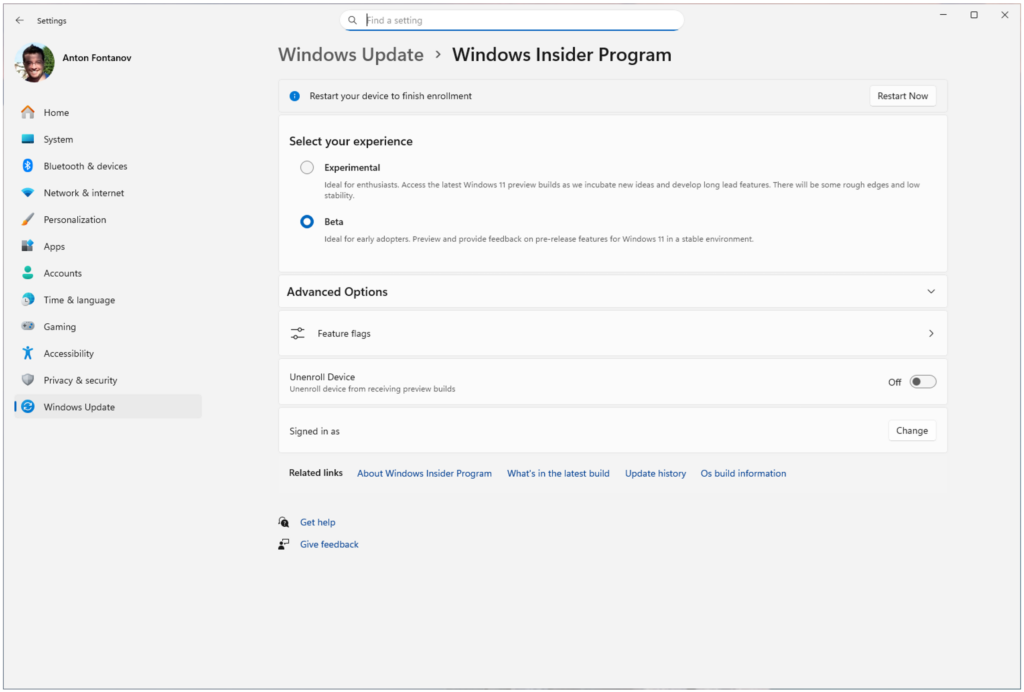
After promising to fix Windows 11 from scratch, Microsoft has now shared an update on the Windows Insider Program. In a blog post from earlier today, the company outlined changes that will eventually improve performance, reliability, and overall usability. The announcement builds on earlier commitments and focuses on simplifying how Insiders interact with Windows preview builds.

Windows Insider channels won’t be confusing anymore

The company says feedback from the community highlighted two major issues. The channel structure had become confusing, and features announced in updates were not always visible due to gradual rollouts. Both problems are now being addressed.

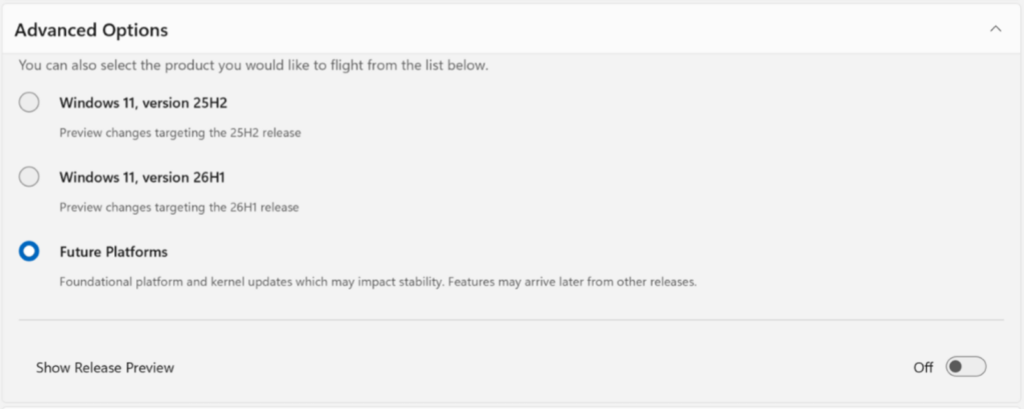
To fix this, Microsoft is moving to two primary channels: Experimental and Beta. Experimental replaces the older Dev and Canary channels and will offer early access to features still under development. These features may change, get delayed, or not ship at all.

Image credit: Microsoft

Beta continues as a preview of features expected to arrive soon, but with one major change, as gradual feature rollouts are ending in the Beta channel.

Remember that if a feature is announced and you install the update, it will be available on your device. Small variations may still exist, but the feature itself will not be missing. Besides that, Microsoft is also introducing an advanced option to select Windows core versions such as 25H2 or 26H1. Within Experimental, a Future Platforms option will provide the earliest preview builds, though these are not tied to a specific retail version.

Image credit: Microsoft

More control and easier movement between builds

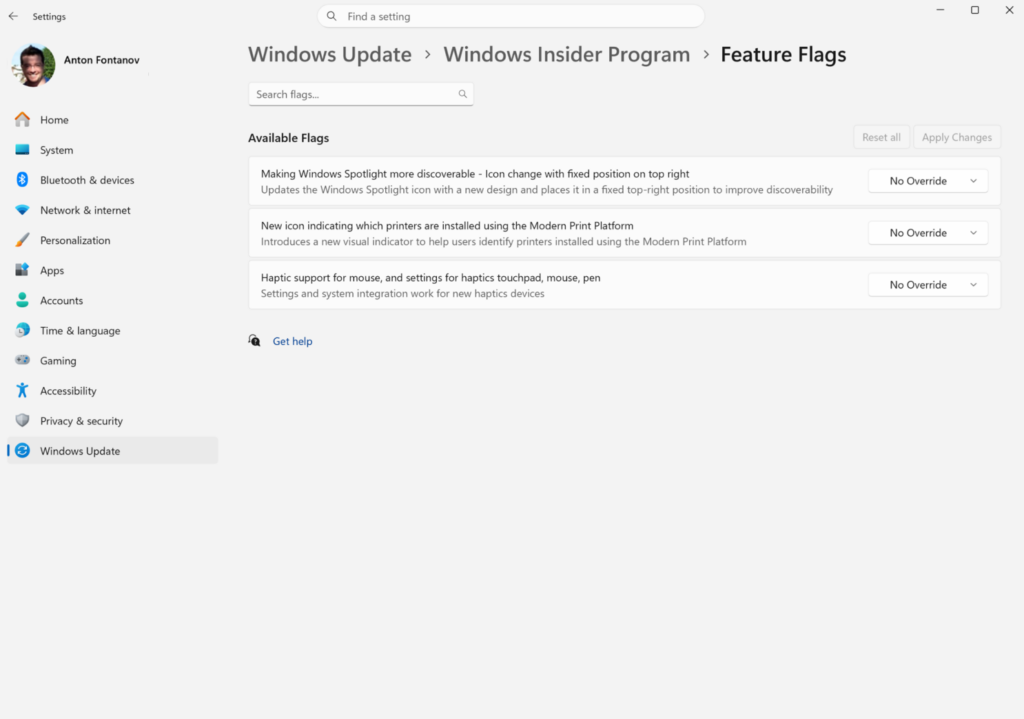
To address unpredictability, Experimental users will get access to a new Feature flags page. This allows enabling or disabling certain features manually, giving users more control over what they test.

Image credit: Microsoft

Meanwhile, switching between channels or leaving the program is also becoming easier. Microsoft is enabling in-place upgrades in many cases, allowing users to move between builds without wiping their device.

As these changes roll out in the coming weeks, most Insiders will be automatically moved to either Beta or Experimental without changing their current Windows version. Speaking of changes, let’s not forget that Microsoft also recently announced the global return of Windows Insiders meetup.

OpenAI Launches New $100 ‘ChatGPT Pro’ Plan For Codex Users

OpenAI has quietly introduced a new $100 ChatGPT Pro tier, and it’s clearly aimed at users who push AI tools to their limits daily. The update was shared on X, alongside changes to Codex usage, hinting at a bigger shift in how the company is structuring access and performance across plans.

The new ChatGPT Pro plan is dedicated to power users

The new Pro plan delivers up to 5x more Codex usage than Plus, with a limited-time boost going up to 10x through May 31. It’s designed for longer, high-effort sessions, especially for coding and complex workflows that demand sustained performance.

Besides that, the Pro tier bundles a long list of upgrades. Users get access to GPT-5.4 Pro for advanced reasoning, maximum Codex task limits, and expanded memory and context handling. OpenAI is also offering unlimited GPT-5.3 usage, faster and unlimited image generation, and support for deep research and agent mode.

Well, there’s more. The plan includes expanded projects, tasks, and custom GPTs, along with early access to upcoming features. In short, it’s less about casual use and more about giving power users fewer restrictions across the board.

Plus plan remains, but usage is being rebalanced

At the same time, OpenAI is adjusting the Plus plan. The Codex promotion has now ended, and usage is being spread across the week instead of allowing long, single-day sessions. The $20 plan still exists, but it’s now positioned more for steady, everyday use.

Intel Foundry Unveils The Thinnest GaN Chiplet For Power And Logic

Intel Foundry has created the thinnest gallium nitride chiplet in the world. The new hardware measures just 19 micrometers thick, which is roughly a fifth of the width of a human hair. This tiny component represents a major shift in how computer parts are made. The manufacturer announced (via Wcctech) that it has found a way to successfully combine traditional silicon logic circuits directly onto the same power-focused material.

Usually, these two elements sit on completely separate chips. By putting them together, its design aims to save physical space and reduce wasted energy in a variety of future applications.

Bringing power and computing together

Gallium nitride, commonly called GaN, is excellent at handling high voltages and running at high temperatures. It performs much better than standard silicon when it comes to raw power delivery. However, regular silicon is still needed for digital processing and basic logic. In the past, companies had to use two different chips to get the best of both worlds.

Now, Intel has printed both materials on a single 300-millimeter wafer using a 30-nanometer process. Because the power hardware and the logic controllers are merged, the chip can manage its own electrical flow without waiting for instructions from an outside source. The company achieved this by thinning down the silicon base to an incredible degree.

It managed to integrate digital blocks like inverters and ring oscillators right alongside the power components. This removes the need for a separate controller chip, keeping the entire footprint small and highly responsive.

Why this matters for future hardware

This new design leads to incredible speed and efficiency. Testing shows the circuits can switch on and off in just 33 trillionths of a second. The layout also successfully blocks high voltages up to 78 volts without any electrical leakage. Its single-chip approach dramatically lowers the amount of power lost when signals travel between separate components.

Since the new hardware runs smoothly even at 150 degrees Celsius, it is a perfect match for crowded servers. These chips will likely show up in future electric vehicles, radio systems, and artificial intelligence data centers where space is limited and reliable power is a priority. By proving that this method works consistently across a full wafer, Intel showed that it can actually mass-produce these parts.

The tech industry requires high-volume manufacturing to make new ideas stick, and this combination chip seems ready for the task.

Google Gemini AI Now Answers Complex Questions With 3D Models

Google is changing how its Gemini app responds to your prompts. Instead of just giving you blocks of text or flat pictures, the AI tool can now build interactive 3D models and functional simulations right inside your chat window. This update aims to make complicated concepts much easier to grasp by letting you actually see and play with the answers rather than just reading about them.

The new feature is currently rolling out to users across the globe. You can try it out by going to the Gemini website and picking the Pro model from the prompt bar. From there, you simply tell the AI to “show me” or “help me visualize” a specific topic. The system will then piece together a custom visual response based entirely on your exact question.

This built-in option skips the need to hunt down external videos or educational tools when you want to learn something new.

Gemini’s 3D visuals aim to make answers easier to understand

These new visual responses are meant to be touched and tested. If you ask about how a certain molecule is put together, you can drag the resulting model around on your screen to view it from any angle. If you want to understand the orbit of the moon around the Earth, the app provides a working simulation complete with manual sliders.

You can type in new numbers for gravity and initial speed to see exactly how those tweaks alter the orbital path in real time. Google says the tool also handles complex subjects like fractals, the double pendulum, and the famous double-slit physics experiment.

This change marks a major shift away from basic flat answers. Letting people adjust variables on the fly turns a standard web search into an active learning session. You get to test your own ideas and watch the results play out instantly. Right now, this update is only available for standard personal accounts.

Google noted that the 3D models and charts are not yet active for Workspace or Education accounts. The company has not given a specific date for when those types of accounts will finally get access to the new visual tools.

Via The Verge

Framework Preps Major Linux Focus For April 21 Hardware Event

Framework is gearing up for a major announcement on April 21, and the hardware maker is dropping heavy hints that Linux will play a central role. The upcoming live stream in San Francisco marks a critical moment for the company as it pushes back against industry trends that favor subscription models and locked-down ecosystems.

Instead of following the crowd toward mandatory cloud computing, the laptop builder is doubling down on giving users total control over the devices in their hands.

Fighting for local hardware

Framework sees a massive shift happening in the tech world right now. Other brands are racing toward an artificial intelligence model where most computing happens in the cloud. In that setup, users essentially just rent access to processing power. Framework notes that silicon costs are rising while actual device ownership is dropping. The company is actively rejecting this path.

In a recent blog post, CEO Nirav Patel made the stance of the company very clear:

You might be reading all of this and thinking, is this a farewell letter to personal computing? Is this the end of Framework? No, this is a manifesto. No matter how inevitable the AI-takes-all scenario may sound, as long as there is a person in the world who still wants to own their means of computation, we will be here to build the hardware that enables it.

The company wants to make sure people can choose their operating system and keep their personal data local. That brings the conversation right back to Linux. Framework has always supported open source systems, but the latest teasers for this next-generation event suggest a much deeper integration is on the way. It is expected to reveal new products or components specifically tuned for the Linux community.

The event kicks off at 10:30 am Pacific Time. The company is inviting local fans in the USA to attend the showcase in person. Framework is also expanding its shipping footprint to a few more countries right before the big day.

Via The Verge