Win tickets to Xbox FanFest at E3 starting today

The Xbox team has shared more details about Microsoft’s E3 2018 presence today, including the Xbox FanFest that will kick off on June 10 in L.A. This year, Microsoft has shifted the ticketing process to an online random drawing, and those of you who want a chance to win tickets will have to visit the Xbox E3 Fan Event Submission site that will launch today at 12 p.m. PDT.

By entering the random drawing, you can either win one of the 400 FanFest tickets ($45) or one of the 1,000 free Xbox Briefing-only tickets. Here’s what the lucky winners of the Xbox FanFest tickets can expect:

  • Early Check-in: Private check-in and admission to a Fan Rally prior to the Xbox E3 Briefing on Sunday morning.
  • Briefing Access: Experience the Xbox E3 Briefing in-person.
  • Epic Moments: A “can’t miss” Xbox community event Sunday afternoon.
  • Exclusivity: Early access to Xbox’s hottest exclusives and biggest blockbuster games.
  • Meet Xbox: Meet and talk with some of gaming’s top developers, leaders and influencers.
  • Our Secret Gear Backpack: Full of amazing surprises.
  • A Custom Jersey: Since Xbox fans deserve the best apparel to show off their fandom!

In addition to the Xbox FanFest activities, the Xbox team announced today that Microsoft’s E3 briefing on June 10 will be live-streamed on the official Xbox Mixer channel as well as other streaming services that have yet to be announced. Microsoft is also planning an Inside Xbox live stream with “exclusive announcements” on June 11 at 3PM PDT.

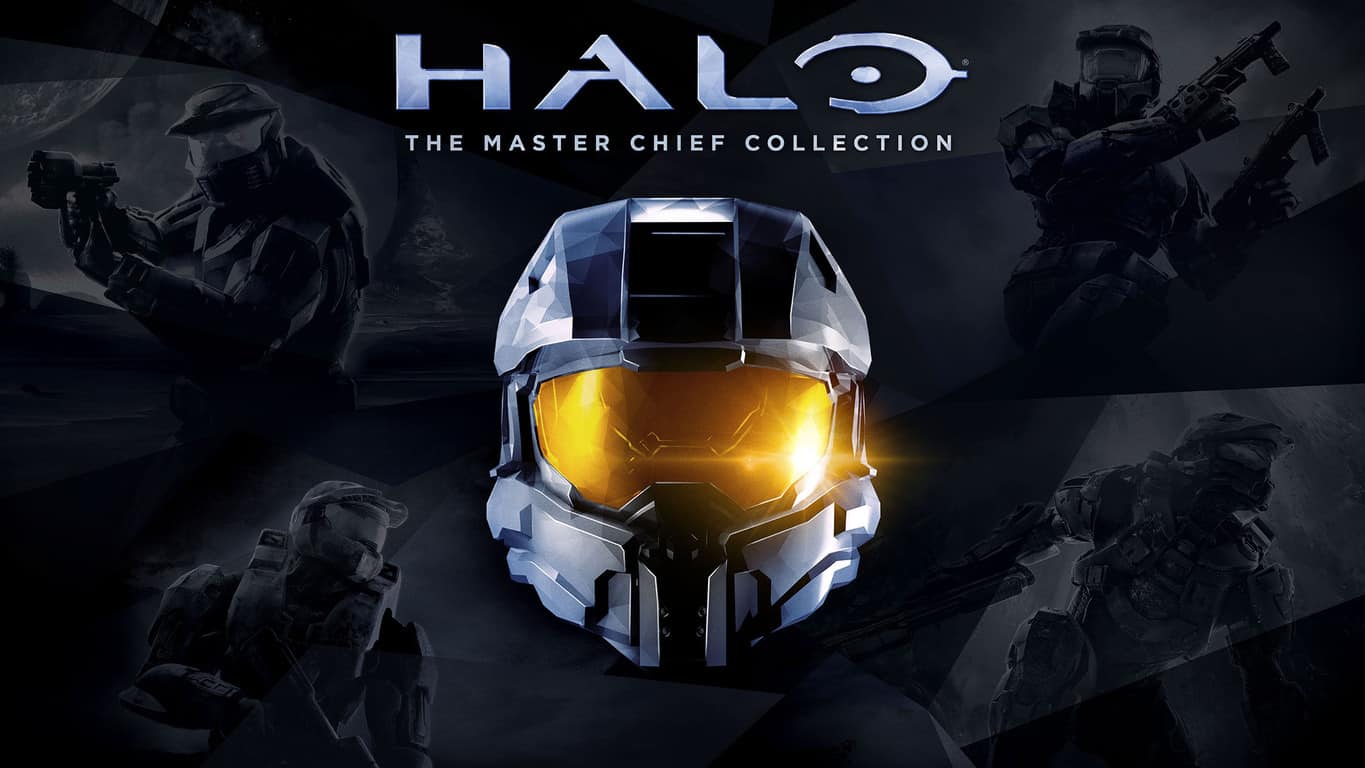
Halo: The Master Chief Collection to get Xbox One X enhancements and more this summer

343 Industries recently opened the doors to the Halo: The Master Chief Collection Insiders Program, promising fans to ship the first beta update this Spring. The developer is currently working on several updates for the Xbox One anthology including visual enhancements for the Xbox One X, UI and UX improvements and more.

In the latest MCC development update published yesterday, 343 Industries said that the first beta build should be available for select Insiders “within the next few weeks.” Moreover, the first retail update should roll out to everyone this summer with the following improvements:

  • Intelligent Install
  • Xbox One X Visual Enhancements
  • HDR/SDR Calibration Settings
  • Networking and Matchmaking Improvements (Continuous Matchmaking, Network/Multiplayer API updates)
  • Bug Fixes
  • LAN Support
  • UI & UX Updates (Main Menu, Title Screen Video, Button States/Highlight States)
343 Industries will tweak the main menu of Halo: MCC.

If you’re interested in helping 343 Industries fix the Xbox One Anthology, you can still sign up for the MCC Insider Program. For the first public flight, the team said that it will select a small pool of Insiders who’ve played at least 20 MCC multiplayer sessions in the last six months, so check your inbox in the coming weeks to see if you’ve been selected.

Star Wars Battlefront II’s Ewok update is rolling out now to Xbox One consoles

The highly anticipated Night on Endor update for Star Wars Battlefront II is finally rolling out to all Xbox One players in the next hour or so.

This latest update brings a new game mode called, Ewok Hunt, to Star Wars Battlefront II that pits Stormtroopers against Ewoks on the Forest Moon of Endor. As Stormtroopers are defeated, they respawn as Ewoks and assist in taking out the remainder of their former allies. The play style itself is rather unique to Battlefront II but the chance to play as an Ewok also has many players excited on social media.

Also in this update is the long overdue addition of Appearances for troops and heroes. This will allow players to customize the look of playable characters in-game. These character skins can be purchased with credits, which can be earned by playing the game, or crystals which can be bought with real-world money.

Star Wars Battlefront II had a similar micro transaction system before that involved buying randomly generated loot boxes. After a lot of negative feedback from players and press that accused the system of making the game pay-to-win (i.e. it would allow for players to pay money to become stronger), the developers removed it just before launch. The option to pay for visual customizations is a fair compromise on the issue as it allows for those involved in the game’s creation to earn additional revenue from players post-launch while not giving players an unfair advantage over one another by throwing money at their TV screen.

In addition to the Appearances and Night on Endor mode, this update also comes with a huge list of fixes and adjustments both to the game itself and the numerous playable characters. You can read the full, detailed notes here.

Are you more excited to play as an Ewok or customize your troops and heroes? Share your thoughts with the community in the comments below and make sure to like us on Twitter for more Xbox One news.

Images of new Xbox Avatars leaked online, UI revealed

An ex-Microsoft contractor, who had been hired to work on the company’s new Xbox Avatar system, apparently published video and screenshots of his work on his own resume giving the public a fresh look at how the new digital avatars will work and also what the character creator/editor program will look like.

The video and images were quickly removed, presumably after he realized he had leaked information that wasn’t yet made public, but several websites and forum users saved copies of the images for everyone to enjoy.

Xbox Avatars on Xbox One and Windows 10

These images provide a good look at the variety of hair styles and clothes available and while many of the options appear to be heavily inspired by the current Xbox Avatar system, the end results here look significantly more detailed than what’s on offer right now.

The Xbox Avatar creation app is shown running on a computer, as can be seen by the mouse pointer, and is using the new Windows 10 design aesthetic that’s becoming more and more common with Windows 10 app updates (i.e. the font, color, and button styles). Also of note is the apparent mixing of gendered clothing which will allow male Xbox Avatars to wear traditionally female clothing and vice versa.

Xbox Avatars on Xbox One and Windows 10

The new Avatar system was initially expected to launch in 2017 but was delayed for unknown reasons. It’s expected to arrive very soon though as some Microsoft employees such as Mike Ybarra have recently been shown experimenting with it on their Xbox profiles.

Are you looking forward to the new Xbox Avatars or do you prefer the current system? Let us know in the comments below and make sure to follow us on Pinterest for more Xbox One and Windows 10 content.

Windows 10 has a new name scheme: Meet the April 2018 Update

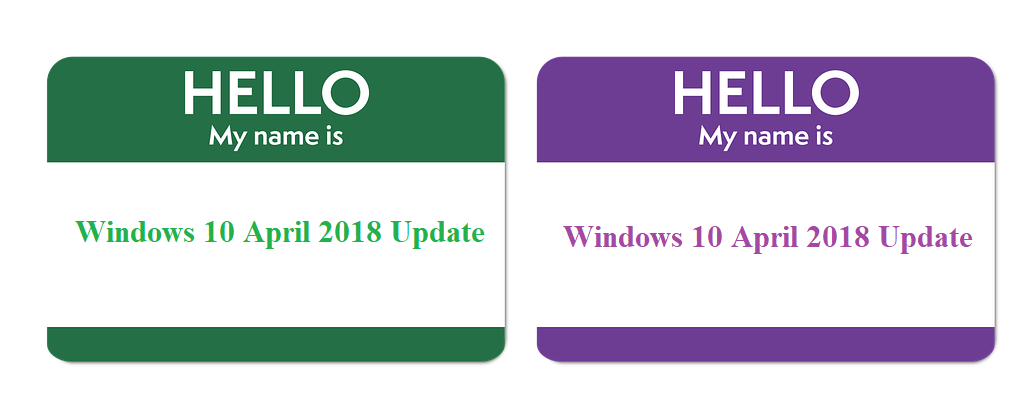
Earlier this week we asked ‘How will Microsoft name the next big Windows 10 update?‘ Well, we didn’t have to wait for too long to get an answer. Reliable reports suggest that the upcoming Spring Creators Update, aka Windows 10 v1803, aka Redstone 4 just got a brand-new name — Windows 10 April 2018 Update.

It seems that Microsoft finally realized its Windows 10 naming scheme is a bit awkward and confusing and decided to change it. Windows 10 is now a service instead of a series of major updates and the Redmond giant deploys new general updates twice a year: one in April, and the other in September. Using ambiguous names such as ‘Creators Update‘, ‘Fall Creators Update‘ and other similar names makes it pretty difficult for system administrators to actually keep track of all the updates they installed.

On the other hand, using more specific names such as ‘Windows 10 April 2018 Update’ or ‘Windows 10 September 2018 Update’ allows administrators to quickly identify the updates that need to be installed and makes patching less chaotic.

windows 10 april 2018 update

Keep in mind that in some parts of the world, such as Australia, autumn is defined as grouping the months of March, April and May. So, what Microsoft calls the Spring Creators Update should actually be called the Fall Creators Update in other parts of the world.

The Windows 10 April 2018 Update is expected to land sometime next week or in two weeks’ time — in the worst case scenario. Microsoft is currently testing a hotfix to patch the BSOD errors that initially delayed the release. So, hopefully, if everything goes according to plan, the general public should be able to test the new Windows 10 version in a few days’ time.

RELATED STORIES TO CHECK OUT:

Microsoft officially acknowledges KB4093112 pen issues

If you run the Windows 10 Fall Creators Update on your computer and you use the pen on a daily basis, you should actually refrain from installing KB4093112. As we reported in a previous post, many Windows 10 users said that the latest patch caused various pen issues especially on Surface devices running Photoshop. More specifically, when users work in Photoshop, instead of drawing, the pen drags the screen up and down, and only occasionally draws.

Following numerous user complaints, the Redmond giant finally acknowledged this problem. Microsoft updated KB4093112’s official support page adding a new known issue on the list:

After applying KB4093112, some users may experience unexpected panning or scrolling in certain apps while using the pen.

At the same time, the company also offered users a quick workaround to use until a hotfix is deployed. Here are the steps to follow to fix various pen issues on Windows 10 version 1709:

  1. Go to  Start > cmd > right-click on Command Prompt in the search results > select Run as administrator
  2. Copy/paste the following command:
    reg add HKEY_CURRENT_USER\Software\Microsoft\Windows\CurrentVersion\Pen /v LegacyPenInteractionModel /t REG_DWORD /d 1 /f
  3. Hit Enter > check your pen. The issue with panning and scrolling should no longer occur.

The good news is that Microsoft is working on a permanent fix which will probably be deployed on Patch Tuesday. So, until then, you can follow the troubleshooting steps listed above.

Unfortunately, this is not the only bug affecting the latest Windows 10 Fall Creators Update patch. KB4093112 is also affected by install issues, unresponsive USB ports, high CPU usage, restart loops and more.

For more information on how to fix some of the issues listed above, check out the following troubleshooting guides:

Microsoft Edge Beta on iOS updated to support Windows Timeline

Microsoft has just released a new beta update for their Edge browser on iOS, and with it comes one significant new feature. After installing this latest version 41.14 update, users should see that their mobile browsing history will now populate Windows Timeline on any PCs running Redstone 4 or higher.

To get this feature working, one needs to head into the Microsoft Edge on iOS settings and tinker with a few options. We initially had some trouble getting our browsing history to sync from our iPhone to Windows Timeline, but Marc Wautier, Principal PM Lead for the Microsoft Edge browser on iOS and Android explained to me how one can get the feature working. You’ll actually need to head to Settings > Privacy, and then toggle the “Share your browsing history” to upload your history to Timeline to get it to work.

How to toggle Windows Timeline Sync On

Also new with this update is the ability to rename and move favorites via a new “edit” button when left swiping on a bookmark. Microsoft has definitely picked up the pace of development of Edge on iOS and Android, as it last received iPad and Android tablet support just a few weeks ago. As usual, we’re hoping these same features will get to Android soon, but for now, only Beta testers on iOS can try out the Windows Timeline support. Everyone else will have to wait a few weeks for a more general rollout.

Chrome enhances browsing privacy via new cookies handling process

Google is currently working on higher protection for Chrome’s users against cyber attacks. It looks like Google Chrome fans will be able to enjoy increased security and privacy and here’s how Google plans to materialize the idea. The company is planning to reduce the lifespan of cookies that are delivered via HTTP connections.

The move seems to be targeted mostly at website developers and advertisers, and Google hopes that they will send cookies via HTTPS because this step would offer increased confidentiality protection against cyber attacks. Mozilla also experienced with this feature, but it never reached Firefox.

Sending cookies via plaintext HTTPs is a major privacy and security risk

The cookies might be intercepted and even modified by an attacker. The ban over sending cookies via HTTP is not a viable option for the moment, and Chrome engineers are hoping that by limiting cookies’ lifespan, they would also prevent massive troves of user data from collecting inside cookies. This would also prevent advertisers using the same cookie to track users across various sites.

HTTP cookie lifespan capping is targeted at Chrome 70

Chrome engineers plan to limit HTTP cookies lifetime to an initial maximum value of a single year, and this duration is set to reach a few days only in the future.

The capping process is scheduled for Chrome 70 which will be released in October. For the moment, a large number of HTTP-transmitted cookies have a lifespan that goes past one year.

The process won’t affect you in an obvious way

Mike West, Google engineer stated that cookie are fragile and they can get evicted all the time for various reasons outside the limits of developers’ control. There won’t be involved a high compatibility cost, and users won’t even fell the difference.

But, the ones who will feel the difference are services that use non-secure cookies, and this is a good thing. Sending cookies over non-secure channels especially when it’s done at a higher scale as part of an advertising network triggers specific risks.

Google’s decision will not stop user tracking online, but the move will increase security and prevent third-parties without authorization from getting access to the data by observing cookie flow via the network’s traffic.

Speaking of stopping third-parties from tracking your online activities, here are some suggestions on how to do that:

Windows Hello adds FIDO2 security key authentication

Windows Hello is an excellent and secure way to log into your Windows 10 PC, and it is about to get more secure for some newer scenarios. The reason why? Microsoft just announced that they have added support for FIDO2 security key authentication to Windows Hello.

The Redmond giant now says they’re “working to enable” the FIDO2 authentication keys with Windows Hello to allow for easy and secure authentication on shared devices. This is particularly useful in helpdesk scenarios, where a user can log in using the Windows Hello FIDO2 key, instead of a username and password. According to Microsoft:

Security keys allow you to carry your credential with you and safely authenticate to an Azure AD joined Windows 10 PC. A user can walk up to any device belonging to the organization and authenticate in a secure way – no need to enter a username and password or set-up Windows Hello beforehand. Unlike traditional passwords, these keys rely on high-security, public-key cryptography to provide strong authentication. These keys have all the benefits of a Trusted Platform Module (TPM) while also being portable enabling the increasing number of mobile workers.

There are a variety of security key form factors, including USB Security keys, and NFC enabled smart cards and examples include the Yubico security key, and HID security key. Windows Hello FIDO2 Security Key is currently in limited preview, and you can sign up here to join the waitlist.

Second Xbox One 1805 build is now available for Preview Alpha Insiders

Even though the Xbox One Spring update (1804) has yet to roll out all Xbox One owners, the Xbox team has already started to release the first 1805 builds to Preview Alpha Insiders. A first preview build was made available last Friday, and the second one (1805.180413-1509) was released just yesterday.

This latest preview build brings no new features, but the Xbox team notes that it should improve system reliability. It also bring some fixes for Game Hubs, Mixer, the Settings app, as well as the Spotify and Twitch apps. The full release notes can be found below:

Fixes:

  • Game Hubs: Fixed a problem in which some users receives a black screen when launching full screen Game Hubs.
  • Mixer: Fixed a problem in which some users would lose Interactive channels lose functionality.
  • Settings: Fixed a problem in which some users were unable to enter a user name or credit card number using the virtual keyboard when adding a new payment option.
  • Spotify: The Spotify app search function has been updated in the app and in the console platform.
  • System Reliability: Resolved a system stability issue that could result in the console crashing when the console was in Instant on mode.
  • Twitch: Fixed an issue in which users when Selecting the (B) button within settings will unsnap the app instead of displaying the Broadcast and chat section.

Known Issues:

  • Audio: Some users may experience intermittent loss of Audio with certain configurations of AV receivers with ATMOS or with changing audio configurations during console use.
  • Pi-hole: Pi-hole users may encounter issues signing in, creating, or recovering accounts upon downloading the 1804 update. This is due to a new configuration file which is downloaded from a URL Pi-hole blocks by default.
  • Workaround: Add clientconfig.passport.net to the Pi-hole allowed IP address list.
  • Profile Color: Sometimes users may encounter an incorrect Profile color when powering on the console.

The Xbox team said that it will announce “great new features” over the coming weeks, and hopefully this includes the redesigned Xbox Live avatars that we first saw last year at E3 2017. If you want to join the Preview Alpha ring and get these 1805 builds before everyone else, be aware that this ring is still invite-only and reserved for Insiders that provide the best feedback.

US Supreme Court dismisses Microsoft email privacy lawsuit

For the past few years, Microsoft has been in a lengthy battle with the US Government over emails held on an overseas server in Ireland from someone who was believed to be part of the Silk Road. There have been many high points and low points in the entire saga, but today the case is officially over. Indeed, Reuters is reporting that the US Supreme court has dismissed Microsoft’s email privacy lawsuit.

The dismissal primarily comes because Congress passed the CLOUD Act a few weeks ago, which states that the US Government can only access data or use warrants on content stored foreign foresign servers if acting through mutual legal assitance between two countries involved in any disputes. This legislation was signed by US President Donald Trump on March 22 and made Microsoft’s case pointless, since the CLOUD act addressed most privacy concerns Microsoft originally raised.

Microsoft President Brad Smith also issued the following statement today about the dismissal.

“We welcome the Supreme Court’s ruling ending our case in light of the CLOUD Act being signed into to law. Our goal has always been a new law and international agreements with strong privacy protections that govern how law enforcement gathers digital evidence across borders. As the governments of the UK and Australia have recognized, the CLOUD Act encourages these types of agreements, and we urge the US government to move quickly to negotiate them.”

The final decision in the case can be read here in full detail.

Update: We’ve updated this article with a statement from Microsoft President Brad Smith.

Intel’s Accelerated Memory Scanning will use GPUs to make virus scans more efficient on Windows PCs

Virus scanning, especially with third-party programs, is a processor-intensive task and can sometimes take a toll on the proficiency on a Windows PC. Well, Intel is now saying it has plans to allow anti-virus programs to use integrated graphics systems (instead of the CPU) for increased battery life and performance when running scans for viruses and other malicious content (via The Verge).

Known as Accelerated Memory Scanning, the chip maker says its new tech leverages the power of the GPU to reduce CPU utilization from 20 percent to as little as 2 percent during virus scans. “Current scanning technologies can detect system memory-based cyberattacks, but at the cost of CPU performance. With Accelerated Memory Scanning, the scanning is handled by Intel’s integrated graphics processor, enabling more scanning, while reducing the impact on performance,” explained Rick Echevarria, VP of Intel’s platform security division.

Intel mentioned it will be partnering with Microsoft to support Accelerated Memory Scanning, with it coming to the Windows Defender Advanced Threat Protection later this month. However, it only will be available on modern chipsets, including the  6th, 7th, and 8th generation Intel processors. Intel also noted that they will also work with other third-party vendors to support the new type of scans.

Intel has faced heavy scrutiny in the tech media following the fallout from the Spectre vulnerability found in the company’s chipsets. The chipmaker, though now says its 8th gen chips have built-in protections against Meltdown and Spectre thanks to Intel’s Security Essentials technology. “Intel Security Essentials will ensure a consistent set of critical root-of-trust hardware security capabilities across Intel Core, Intel Xeon and Intel Atom processors,” explained Echevarria.

Microsoft announces new Windows Community Standup on April 18

Microsoft has announced a new Windows Community Standup for 10 AM PST on April 18, which is tomorrow. The webcast will feature the head of the Windows Developer Platform Kevin Gallo, and also Tara Raj, who works on the Windows System for Linux team at Microsoft. The two are expected to discuss the latest improvements for Web and Backend developers in the next Windows 10 update, as well as the Windows Subsystem for Linux, and Virtualization on Windows with Hyper-V.

As usual, you will be able to watch this latest webcast on Microsoft’s Channel 9, and you’ll also have the chance to ask both Kevin Gallo and Tara Raj questions. Microsoft uses the Windows Community Standup as a monthly online broadcast to provide transparency on what the company is building, and why they are excited about it. All previous Community Standup events are available on demand here, so feel free to catch up before the next one starts tomorrow.

Third-party Uber and YouTube PWA apps pulled from Microsoft Store

Easy come, easy go. Last week saw the release of new, unofficial YouTube and Uber apps in the Microsoft Store that had been developed in the new Progressive Web App (PWA) format. Both apps now appear to have been taken offline.

Because these apps were made by a third-party, it’s possible that Google/YouTube and Uber may have requested that they be removed but they were also mostly wrappers of the YouTube and Uber mobile websites as well so Microsoft simply could have removed them as some sort of quality control initiative. There doesn’t appear to be an official reason why.

PWA is a relatively new style of app that kind of work like mobile-optimized websites but have app functionality such as notifications and access to a device’s hardware. If designed well, a PWA can have just as much functionality as a traditional app.

Microsoft, Apple, and Google are all exploring PWA apps on their devices and numerous companies are already developing them due to the fact that one app will technically function on a variety of devices and in many operating systems. Making one PWA is cheaper than building multiple apps.

One example of a new PWA is the new Twitter app which is currently being tested with Windows Insiders.

Are you excited for more Progressive Web Apps? Let us know in the comments and then follow us on Twitter for more Windows 10 news.

Halo Master Chief Collection seemingly confirmed for Xbox Game Pass

While it’s pretty much a given that the Halo Master Chief Collection (MCC) would be coming to Xbox Game Pass given that Halo Wars 1 and 2 and Halo 5: Guardians are already listed, the HD remaster bundle has yet to be added and fans of the Halo franchise have been left to speculate as to when or even if it would arrive.

Microsoft and the Halo MCC developers have also been deliberately ambiguous when it comes to even confirming the game’s addition to Xbox Game Pass. Just last month, the Halo MCC developers posted on the official Halo website that, “Right now we’re focused squarely on delivering an awesome game update and decisions on when/where/how MCC is released and made available to players will be made by other groups at Microsoft. We have nothing to announce today but it’s something we’re definitely thinking about.”

Someone at Microsoft seems to have thrown caution to the wind and decided that the Halo MCC is coming to Xbox Game Pass because a new Twitter video ad for the service showcased it as one of the main titles today. You can see the ad in the embedded tweet below.

This ad was originally tweeted by the American Xbox Twitter account but was quickly deleted soon after. It’s still live on the Canadian Xbox account however

Halo MCC is a bundle that features HD remasters of Halo 2: Anniversary, Halo: Combat Evolved Anniversary, Halo 3, and Halo 4. It’s still being updated with bug fixes and changes so it’s possible Microsoft may be waiting for a major update before adding it to Xbox Game Pass to help encourage more gamers to check it out after the changes have been made. This is purely speculation though.

Have you been waiting for the Halo Master Chief Collection to come to Xbox Game Pass? When do you think it will arrive? Let us know in the comments below and make sure to follow us on Twitter for more Xbox One news.

KB4093118 hits again, causes reboot loops and crashes

Microsoft released KB4093118 once again to all Windows 7 users. The company initially rolled out this update on April Patch Tuesday and has now added a few additional fixes and improvements to the table.

Despite Microsoft’s good intentions, many users complained that this patch broke their computers. They reported that KB4093118 triggers install reboot loops. It seems that this problem is prevalent for 32bit Windows 7 computers.

I cannot install monthly rollup security update KB4093118 on computers with 32bit windows 7. Installation always ends up with computers restarting right after boot. PC starts till ‘Wait Please’ message is displayed and then after few seconds it reboots. […] First I thought it’s and isolated incident, but this happens the same way on all computers with 32bit windows 7. I have 7 of them.

Other users experienced PC crashes immediately after downloading and installing the update. Again, this problem affects only 32bit Windows 10 computers.

It’s installing then when a PC boots, the pc logs in then insta crashes.Windows 7 machines, I5-3330, 4GB ram, 32bit

How to fix KB4093118 bugs

The quickest solution to fix these issues is to simply uninstall the update. Once you’ve removed this patch, you should no longer experience any issues.

Keep in mind that apart from the two issues listed above, there are two additional known bugs affecting this patch. You may encounter memory leaks on some SMB servers when the requested path traverses a symbolic link, mount point, or directory junction. Also, stop errors may occur on PCs that don’t support Streaming Single Instructions Multiple Data Extensions 2 (SSE2).

Hopefully, Microsoft will soon roll out a new version of this update and fix all the bugs mentioned above.

RELATED STORIES TO CHECK OUT:

Play PUBG for free with Xbox Live Gold between April 19 and 22

PlayerUnknown’s Battlegrounds fans are hit with great news as they’ll get the chance to play the game for free with Xbox Live Gold starting April 19 at 12:01 a.m. PDT until Sunday, April 22 at 11:59 p.m. P

UBG crossed 5 million players on Xbox One just recently. The early access version of PUBG is priced at $29.99, and there isn’t any free trial. The fact that during the period that we mentioned above you’ll get the play the game for free is really great, and it will definitely come as a surprise for fans.

The Xbox team made the announcement on the official website and said that:

Once the event begins, download the game by clicking on the Gold Member feature area on the Xbox Live home dashboard, or search for the game on the Microsoft Store via the Xbox Dashboard.

Here’s what you can do during Free Play Days

The Xbox team says that during the Free Play Days, gamers will be able to download and play the full Xbox Game Preview version of PUBG.

This will also include all multiplayer modes. Any battle points players earn during the Free Play Days will be transferred to the game if you purchase it when this period is over.

A new PUBG5 Pack is announced

Besides the Free Play Days, the Xbox team announced gamers that there’s an all-new DLC for PUBG available for $6.99. “The PUBG5 Pack includes an exclusive cap, long sleeved shirt, cuffed jeans and hi-top sneakers to customize your character in style’,  theXbox team said.

The pack will only be available for a limited amount of time, starting April 19 until May 19 so gamers should pick it up as soon as it becomes ready for purchase. You can read the entire announcement on Xbox’s official website.

RELATED STORIES TO CHECK OUT:

Fluent Design touches on Microsoft account’s homepage

Managing your account from the Microsoft Account page is easy and helpful as it allows you to set up your privacy settings and much more. You can also keep track of your reward points from shopping online. Users recently reported some issues with signing in to their Microsoft account. We have published an article on this topic. If you are unable to sign in to your Microsoft account for any reason, feel free to read our article and fix it.

Your Microsoft account dashboard has a new design

The Microsoft account online dashboard has been redesigned with some Fluent Design touches. A new animated card-style design has been introduced and looks attractive. It allows direct access to your personal settings, connecting devices, subscriptions, as well as Microsoft Rewards points right on the home page.

The light animation and shadow effects are activated when you hover your mouse across the cards. This Fluent Design looks more lively and does not affect the loading time of the page. You can see how it looks like on the GIF here:Fluent design touches on Microsoft account dashboard

This new design should already be available to everyone so you can check it out by signing in to your Microsoft account. If you encounter any issues whatsoever, let us know in the comments below. Enjoy!

RELATED STORIES TO CHECK OUT:

How will Microsoft name the next big Windows 10 update?

Microsoft took many Windows 10 fans by surprise when it decided to delay the Spring Creator Update release due to a severe bug. Most likely, the company will soon roll out a new Windows 10 build in order to test the hotfix for the respective bug. It is still unclear whether Microsoft will push a new RTM build or keep the one it already sent to OEMs — although the first variant seems more plausible.

Speaking of which, the name of the upcoming Windows 10 version in still shrouded in mystery. Leaked screenshots suggest it’s called ‘Spring Creators Update‘ although Microsoft has never confirmed this information. On the other hand, many use the code name ‘Redstone 4‘.

windows 10 update name

To make things even more difficult to grasp, Microsoft refers to the first Spring Creators Update patch (KB41003750) as ‘Cumulative Update for Windows 10 Version Next‘. So, how will Microsoft name the next big Windows 10 update after all?

Microsoft needs to change its Windows 10 codename strategy

Let’s suppose that Microsoft will indeed use the ‘Spring Creators Update’ name for the upcoming OS version. The next question is: How will Microsoft name the update it’s going to release this one?

If the company continues to focus on the creative part, it really needs to find something better than Windows 10 Fall Creators Update since this name is already taken. Perhaps the company will introduce a different Windows 10 approach this fall and will give up the ‘Creators Update’ part. If it decides to focus on, let’s say Mixed Reality, then we’ll have the Windows 10 Mixed Reality Update.

How about the Redstone code name? How relevant is the Redstone code to users? Can you quickly associate a particular Redstone release with a specific Windows 10 version, launch date or a specific set of features?

Back in the good ol’ days of Windows XP or Windows 7, the upgrade to a new OS version represented an important revamp and added a plethora of new features. Nowadays, Microsoft has moved Windows 10 to a servicing model which means that updates are deployed more frequently but the difference between two consecutive OS versions are no longer that important.

Maybe this explains why Microsoft decided to use similar names for its Windows 10 versions. The difference between various OS versions is not that big anymore, so there’s no need to use a completely different name.

On the other hand, there are some rumors that suggest Microsoft is going to  ditch codename Redstone in favor of a new format. The new codename includes the year when the update was released and code H1 or H2, depending if the version was released in the first or second half of the year. In other words, the Windows 10 version that Microsoft will release next spring could well be called Windows 10 19H1.

  • RELATED: Windows 10 SCU lets you delete the data collected from your device

Focusing on two main codenames

Obviously, Microosft creates all these codenames for internal testing purposes only. They help Insiders differentiate between the various build versions they test.

As far as regular users are concerned, we believe that new OS versions will share a common name: ‘the next Windows 10 update’. Regular users really don’t need complicated technical code-like names. After all, most Windows 10 updates are rather cosmetic improvements, so as stated above, there’s no need for Microsoft to use completely different names. Basically, they’re rolling out the same OS skeleton adding a few new features and many visual improvements.

So, if there’s not a major difference between Windows 10 versions, ‘the next Windows 10 update’ codename perfectly sums up the update. In other words: Microsoft is going to launch a new Windows 10 update, one of many to come.

So, what’s your take on Microsoft’s Windows 10 codenaming strategy? Do you think that a Windows 10.1, Windows 10.2, Windows 10.3 version would have been better? Let us know in the comments below.

RELATED STORIES TO CHECK OUT:

If you’re a Windows Insider, you shouldn’t be upset that Redstone 4 is delayed

While Microsoft has never made a public announcement about the release of Windows 10 1803/Redstone 4/Spring Creators Update/??, tech pundits with inside the company connections were expecting an announcement and rollout beginning on April 10th, last week. Indeed, there were a number of indications that we were close: a few last minute changes via Fast Ring updates, then a release of build 17133 to both the Slow and Release Preview rings. Microsoft promised those RP updates would roll out over the weekend, but something happened.

After a Slow Ring update to 17133 happened on March 30th, Microsoft released that build to the Release Preview Ring on April 5th, announcing it with an update to the original 17133 Fast Ring announcement:

UPDATE 4/5: We have released Windows 10 Insider Preview Build 17133 (RS4) to Windows Insiders in the Release Preview ring. Not all Insiders in the Release Preview ring will be immediately targeted to receive this flight. We are targeting full availability to Release Preview Monday 4/9. However, if you’d like to install immediately, a manual check for updates under Settings > Update & Security > Windows Update will present the build.

(ed. note: the crossed out notation was added with the 4/9 update below, the original effort was to get 17133 out to all Release Preview Insiders by last Monday)

Then on April 9th, the post was updated again:

UPDATE 4/9: We are continuing to test our targeting and as a result, not all Windows Insiders in the Release Preview ring will see Build 17133 offered at this time. We’ll update this post when full availability is reached.

While there was some speculation that the April 10th rollout was delayed to a last minute change to the marketing name for Redstone 4 (indications had pegged the name as “Spring Creators Update,” but perhaps due to the recent upheaval to the Windows team, that name has reportedly fallen out of favor), Microsoft watchers seem to agree that this delay is based on last minute bugs found possibly in the early release of the Release Preview build of 17133.

Microsoft has since released a new build for Fast Ring Insiders, version 17133.73, with a few bug fixes, but internally the company has moved on to at least build 17134, with that build number to possibly go higher before Redstone 4 is finally rollout out to the masses.

So in a nutshell: Microsoft was ready to deploy a final version of Windows 10 1803 (or 1804, really: the 4th month of 2018), rolled out a build to Release Preview Insiders, hit a bug, and have pulled back to fix it. This is precisely what the Windows Insider system is supposed to be for, setting aside all the #Insiders4Good, A/B testing, and marketing fluff nonsense that has bloated the program.

So if you’re upset you’re not getting a finalized version of Redstone 4, don’t be, and be thankful that what appear to be some potentially nasty bugs have been caught. If you’re waiting for the Next Big Thing, that’s what the Skip Ahead program is for, and Insiders no longer need to wait until this update is out the door before getting new bits. And if you believe every pundit that “scoops” a final date that then gets canonized by every tech website in the world, then you don’t understand that it’s not that set in stone internally, and we shouldn’t expect it to be set in stone out here either.

Relax, wait for a new build (or two or three), and relish in the fact that as Insiders, we’ve done our job.


Jump lists support comes to the Twitter PWA on Windows 10

After getting support for the Windows 10 Share Dialog just a few days ago, yet another update has come to the Twitter Progressive Web App (PWA.) Indeed, the app now supports jump lists on Windows 10, allowing users to get shortcuts and app commands by just right-clicking on the Twitter icon in the taskbar or Start Menu.

The addition of jump lists is more proof that Progressive Web Apps are catching up to the features of the UWP. It also shows how quick and easy it is to push out new features, as things are automatic and users do not need to head to the Windows Store to grab this latest update.

At any rate, we’re looking forward to seeing more additions to the Twitter PWA in the months ahead. Live Tile support and the ability to upload video were promised to be added soon, and they would pretty much make the application a fully working alternative to Twitter on the Web.

You can head below to download the Twitter PWA on Windows 10. Please be aware PWAs are only supported in Redstone 4, and Redstone 5, so you’ll currently need to be a Windows Insider to try it out, or you can wait for the general Redstone 4 update in a few weeks

Twitter
Twitter
Developer:
Twitter Inc.
Price:
Free

Windows 10 news recap: Twitter implements Share Dialog support, third-party YouTube and Uber PWAs arrive, and more

Welcome back to our Windows 10 news recap, where we go over the top stories of the past week in the world of Microsoft’s flagship operating system.

Unofficial third-party YouTube & Uber “PWAs” appear in Microsoft Store

As Progressive Web Apps (PWAs) continue to make their way to Windows 10’s Microsoft Store, third-party YouTube and Uber apps have appeared, as part of a so-called “Windows Revival Project”.

Instagram is no longer available for Windows 10 Mobile in the Microsoft Store

In the latest update to Instagram, the image-based social network has removed support for Windows 10 Mobile. Users of Microsoft’s mobile platform will no longer be able to install Instagram on their device.

Latest Surface Pro 4 firmware update enables on-screen Surface Dial support

The Surface Pro 4 has received a firmware update which allows users to use the Surface Dial on the screen, adding support for contextual pop-out menus and more.

Microsoft Surface Dial

Twitter PWA adds Windows 10 Share Dialog targeting

Twitter’s new PWA has added support for the Windows 10 Share Dialog, as part of Twitter’s effort to add further integrate to Windows 10 with its app.

That’s it for this week. We’ll be back next week with more Windows 10 news!

Phil Spencer talks Xbox first-party games: high-quality, diverse first-party lineup is our goal

Since the inception of the Xbox One console in 2013, it has been met with constant attacks over its scarce, and often lacking, first-party lineup of games. When looking to the likes of Microsoft’s competitors in the gaming arena, Sony and Nintendo, it is clear that Microsoft has been lagging behind.

Microsoft’s Head of Xbox, Phil Spencer, is no stranger to this criticism. Time-and-time again he has taken to Twitter to discuss the first-party lineup. Many have applauded him for focusing on it, but the results of his words have yet to be seen. In defence, Spencer has taken to Twitter, in response to a common raised by IGN’s Ryan McCaffrey, to discuss why the first-party lineup for Xbox One is still lacking:

Spencer takes note of Microsoft’s success with its hardware (Xbox One X) and platform (Xbox Live). Both of which are arguably ahead of their competitors. As noted, Microsoft continues to work on growing its first-party lineup, but Spencer says that the reason it is taking time is that, well, because it does. Their goal isn’t to have a large range of first-party titles that don’t deliver satisfaction to customers, but instead to have a “high quality and diverse 1P” games.

Finishing, Spencer says that they can obtain results with first-party as they have done with their hardware and platform, it will just take time.

Windows 10 build 17643 brings a plethora of bugs

Microsoft rolled out Windows 10 version 1803 to the general public just a few days ago, but it looks like it was greeted by a bug that ended up holding back this long-awaited release.

The company doesn’t seem too impressed by this and keeps on doing its job – releasing yet another new Skip Ahead build.

Windows 10 build 17643 brings all kinds of improvements and new features along with a juicy list of known issues. Here are the most important ones.

Windows 10 build 17643 fixes and improvements

  • The problem where Reveal would sometimes not appear if users moved their mouse over and off an element more time has been fixed.
  • The issue that used to result in a screen flicker when the screen adjusted after rotating the device has been resolved.
  • The issue where the spellchecking menu always appears on the primary monitor on PCs with multiple monitors rather than the one with the red squiggled word was fixed as well.

Windows 10 build 17643 issues

Get ready because the list is quite long this time:

  • When you open Settings and click on any links to the Microsoft Store or the ones from tips, Settings crashes.
  • When resuming from sleep, the desktop may be visible a bit before the screen displays correctly.
  • When Movies & TV user denies access to its videos library, it will crash if you navigate to the Personal tab.
  • Tiling and cascading windows such as the View Side by Side feature in Word won’t work for inactive tabs.
  • The Office Visual Basic Editor window is tabbed.
  • When you’re opening an Office document with the same app that already has an existing document open, this may lead to an unintended switch between the two.
  • Local files from non-Microsoft cloud file won’t be automatically restored, and users won’t be alerted via an error message.
  • Sets UX for Office Win32 is not ready yet and the experience will be refined over time based on feedback.
  • The top of some Win 32 apps may appear slightly underneath the tab when maximized.
  • When you’re closing one tab, this could lead to minimizing the whole set.
  • File Explorer ribbon won’t stay pinned open across restart.
  • There’s an issue causing the Narrator to read extra text, but a fix is on its way.

You can check out the complete lengthy known issues list on Microsoft’s official notes.

RELATED STORIES TO CHECK OUT:

How to open webloc files in Windows 10/11

A webloc file is a website shortcut that the Safari browser generates when you drag a website icon from its URL field to the desktop. As such, webloc is an Apple Mac OS X file format that adds URL shortcuts for websites to the Mac desktop.

Even though webloc is a Mac file format, you can also open webloc website shortcuts within Windows.

Open webloc files on Windows PCs with these 3 tools

  1. Notepad
  2. WeblocOpener
  3. Webloc File Opener

1. Open a Webloc With Notepad

Mac OS X users can open a webloc in Chrome or Firefox much the same as a regular URL shortcut in Windows. However, on other platforms you’ll need to open a webloc file with a text editor first. Then you can copy the URL string in the webloc into a browser’s URL bar. This is how you can open a webloc with Notepad.

  • First, right-click the webloc and select the Open with option as below.

  • If Notepad is not on the Open with menu, click Choose another app to open the window below. Then you can click Choose another app on this PC to select Notepad if required.

  • Alternatively, you can convert the webloc to a txt file in File Explorer by deleting the webloc extension at the end of its file title and replacing it with txt. You’ll need to select the File name extensions check box on File Explorer’s View tab to edit the extension.
  • When you’ve opened the webloc file in Notepad, copy the website URL between the and <string> and </string> tags with the Ctrl + C hotkey.
  • Launch a browser to open the webloc’s URL in.
  • Paste the webloc’s URL into the browser’s URL bar with the Ctrl + V hotkey.

2. Open a Webloc With WeblocOpener

WeblocOpener is software that enables you to open webloc shortcuts in Windows just the same as in Mac OS X. Thus, you can open the pages in browsers without copying and pasting URLs from Notepad. Press the Download Setup button on this website page and open WeblocOpener’s setup wizard to add it to Windows.

Run the WebBloc Opener Update app. Then you can click a webloc file shortcut on the desktop to open it in browser.

WeblocOpener also enables you to add new webloc page shortcuts to the desktop. Right-click the desktop, click New and select Webloc link. That will add a webloc shortcut to the desktop which you can click to open a WeblocOpener window where you can enter a URL for the shortcut to open. Thereafter, you can click the webloc shortcut to open the webpage.

3. Open Webloc URLs With Webloc File Opener

There’s also a WEBLOC file opener web app you can open webloc files with. That app provides you with a selected file’s page link so you can open it in browser.

You can click here to open that app in browser. Press the Choose files button to select the webloc file you need a URL for. Then the web app will provide the page link for it.

There are no webloc converters that you can utilize to convert weblocs to Windows URL files. However, you don’t really need one as WeblocOpener provides full support for the file format in Windows.

RELATED STORIES TO CHECK OUT:
The Division now plays in 4K on the Xbox One X

The Division is the latest to get the Xbox One X Enhanced update, bringing 4K gaming to the Xbox One game title. In addition to a number of other game performance enhancements and bug fixes in Patch 1.8, as noted in the Ubisoft post, here’s what the 4K update includes:

Xbox One X Enhancement Patch

  • 4K rendering
  • Higher anisotropy
  • Improved reflections
  • Improved object detail
  • Improved screen-space shadows

Ubisoft plans to unveil The Division 2 at E3 2018 in June, but it’s good to see that The Division is still getting regular updates to continually fix issues. It will be interesting to see if The Division 2 keeps the storyline in New York City or if the story will continue in a different locale.

The new 1.8 Patch also added a number of new zones to The Division, wetting players’ appetites for new solo missions while they await the release of The Division 2. It will be interesting to see what Ubisoft has planned for The Division 2, premiering at E3 2018. Stay tuned.

Dona Sarkar digs into the stats: who are the Windows Insiders?

Dona Sarkar took to her Twitter account this week to highlight some interesting data from the Windows Insider program. The Windows Insider chief dug into the stats and shared more on what makes up a Windows Insider, and hinted at the diverse and technical backgrounds Insiders can come from.

In a tweet today Sarkar Sarkar said someone asked her if Windows Insiders were considered technical. She shared that in the last breakdown of Windows Insiders demographics, 40% were in IT, 35% were consumers, and 25% were developers. She went on to note that “most Insiders are in ALL the rings in some way or another (VMs or bare metal).” To say the least, this is some cool information, showing that Windows Insiders are definitely tech-savvy and enthusiastic.

Earlier in the week, Sarkar also said that the most installed builds within companies are Slow ring builds, followed by Release Preview builds, and then Fast ring builds. She later followed up in a subsequent tweet to share that there is a percentage difference within the three, with 40% of companies in the slow ring, 35% in the Release Preview ring, and 25% in the fast ring.

Just about two months ago Sarkar also shared that the Windows Insider Program for Business was growing. The program surpassed a 30,000 member milestone, and is aimed at IT Pros and allows them to test preview builds in their cooperate enviorments.

For your regular consumers, Microsoft last shared that In 2017 the standard Windows Insider program reached the 10 million member mark, and even with the recent reorg, the program remains strong. It definitely looks as though more and more people are playing with Windows Insider builds, which is excellent since it only helps make future versions of Windows 10 great.

EA Sports NHL 18 now available in EA Access on Xbox One

EA Sports NHL 18, the latest entry in the NHL video games series is now available on EA Access, EA announced yesterday. The ice hockey simulation video game was released back in September on the Xbox One, and you can now play it for free with EA’s subscription service.

NHL 18 is the third EA Sports game to join the EA Access Vault this year following the addition of Madden NFL 18 and NBA Live 18 in February. FIFA 18 isn’t probably too far away, as its predecessor FIFA 17 was added to the Vault back on April 21, 2017.

EA Access gives you access to rich catalog of EA games including shooters, sports and racing games. Subscribers can also try new EA games before launch and get 10% off EA digital purchases. For just $29.99 a year, this a nice complement to Microsoft’s Xbox Games Pass subscription service, which is currently $9.99 per month.

Xbox Achievements are coming to the Nintendo Switch

The official list of Achievements for the Nintendo Switch version of Minecraft has been discovered, seemingly confirming that players on Nintendo’s console would be able to earn Xbox Achievements when the new version of the Minecraft video game launches sometime this year.

It’s been known for a while that Nintendo Switch owners would need to use an Xbox Live/Microsoft account for online play and cloud saves but the addition of Xbox Achievements was unknown.

In an interview with Giantbomb in 2017, Microsoft’s Phil Spencer said of the inclusion of Xbox Achievements in the Nintendo Switch version of Minecraft, “I don’t know yet. I’m guessing no. And this is a collaborative relationship between Nintendo and I. They don’t have Xbox Achievements on their platform. If they want us to, I would love to be able to do it. The relationship with Nintendo is incredibly strong.”

The Nintendo Switch actually won’t be the first non-Microsoft platform to support Xbox Achievements. A variety of iPhone and Android video games such as Age of Empires: Castle Siege are already powered by Xbox Live and have enabled crossplay between devices and the unlocking of Xbox Achievements for a while now. This will be the first time Xbox Achievements have appeared on a rival gaming console though.

In 2017, the Minecraft video game updated on Windows 10, Windows phone, Xbox One, iOS, and Android to enable crossplay between players on different hardware. This update was referred to as the Better Together update. This update has been expected to come to the Nintendo Switch since it was first announced however the upgrade has taken longer than expected for unspecified reasons. With the reveal of these Achievements though, it looks like it’s almost ready.

Are you a Nintendo Switch owner and are you excited for the Better Together update? Let us know in the comments below and make sure to follow us on Pinterest for more video game content.

Minecraft for Windows
Developer:
Microsoft Studios
Price:
Free

Microsoft working to fix Bing maps and Windows Map App delays

Microsoft Maps is not always 100% correct, especially where mapping companies such as HERE’s maps data are in use. In case you forgot, Microsoft teamed up with a few mapping companies including HERE, Esri and TomTom to create a next-generation world graph.

These partnerships came at a time when location is exceptionally important for understanding the world, and it definitely has a growing potential in evolving industries, cities and transforming our lives.

Microsoft Maps should be as precise as possible

Lots of Windows applications currently use Microsoft Maps via the Maps API, and it’s a very significant feature that should be 99.99% right for the various apps across Windows 10 to work flawlessly.

Now, Microsoft is finally admitting that there are some flaws involving the maps and promised that they’re being fixed as soon as possible.

Occasional delays when bringing map data from HERE to Bing maps

fix maps windows 10

Loren E. Hillberg, Partner, Group Program Manager on the Bing Maps team, acknowledged that Microsoft encounters an occasional delay when it brings map data from HERE to Bing maps and the Windows Map App experiences.

This can sometimes result in some users seeing mapping errors but it looks like Microsoft is aware of this and it’s currently working on a fix to enhance map data and kill such delays.

A hotfix should be ready by summer 2018

Hillberg said that the company is speeding up data processing and an update should be available during the summer and it should make users forget they have ever experienced such delays with the mapping data.

Anyway, it’s great that Microsoft decided to address the issue and started working on a fix. Everyone who’s using Microsoft Maps is definitely looking forward to getting an update that patched things out.

RELATED STORIES TO CHECK OUT:

FIX: ”hosted network couldn’t be started” error in Windows 10, 7

With a mobile hotspot, you can share a Windows laptop’s or desktop’s Wi-Fi connection with phones and tablets. However, some users can’t set up a mobile hotspot when the “hosted network couldn’t be started” error occurs.

The Command Prompt returns that error message for some users who try to set up mobile hotspots in Windows with the command-line utility, as covered in this article.

That means the hosted network isn’t working, which is often a network adapter configuration or Wi-Fi driver issue. These are a few resolutions that might fix the “hosted network couldn’t be started” error in Windows 10/8.1/7.

How to fix hosted network issues in Windows 10

  1. Check Your PC Supports Sharing
  2. Open the Network Adapter Troubleshooter
  3. Update the Driver for Your Wireless Network Adapter
  4. Check the Sharing Settings
  5. Check the Power Management Settings
  6. Reset Your Wi-Fi Network
  7. Enable the Microsoft Hosted Network Virtual Adapter via Device Manager
  8. Set Up a Mobile Hotspot With Third-Party Software

1. Check Your PC Supports Sharing

You can’t set up a mobile hotspot if your PC doesn’t support hosted network sharing. To check that, open the DOS command-line utility by pressing the Windows key + X hotkey and selecting Command Prompt (Admin).

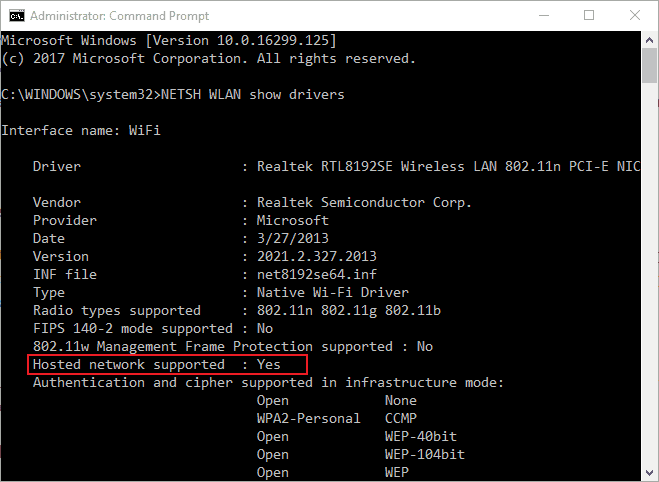
Windows 7 users can open the Prompt by entering ‘cmd‘ in Run. Input ‘NETSH WLAN show drivers’ in the Command Prompt’s window, and press the Return key. That tells you if your laptop or desktop supports sharing with the Hosted network supported detail shown directly below.

You can get a USB Wi-Fi adapter for a laptop or desktop that doesn’t support hosted networks. Those are Wi-Fi adapters that you can insert into USB slots. This post provides further details for USB Wi-Fi adapters.

2. Open the Network Adapter Troubleshooter

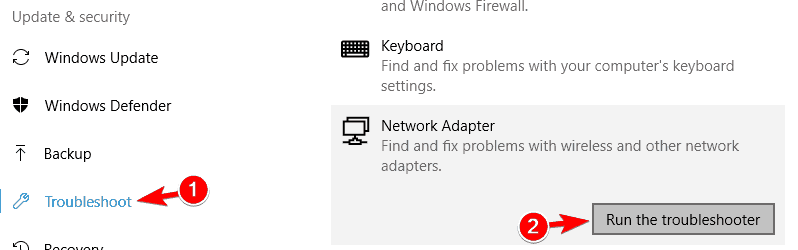
  • The Network Adapter troubleshooter might provide some resolutions for the “hosted network couldn’t be started” issue. To utilize that troubleshooter in Windows 10, press the Cortana button on the taskbar.
  • Input ‘troubleshoot’ in the search box and select troubleshoot to open the Settings app.
  • Select Network Adapter and click Run the troubleshooter to open the troubleshooter’s window.
  • The troubleshooter then presents a choice of network adapters to fix. Select either the All network adapters or WiFi option.

3. Update the Driver for Your Wireless Network Adapter

The “hosted network couldn’t be started” error might also be due to an incompatible or corrupted Wi-Fi driver. So updating a network adapter’s Wi-Fi driver is another potential resolution. You can update drivers with third-party software, Device Manager’s Search automatically for updated driver software option or manually. This is how you can manually update a network adapter driver.

  • First, open the Device Manager window from the Win + X menu or by entering ‘devmgmt.msc’ in Run.
  • Then double-click Network adapters, and note down the title of your listed Wi-Fi network adapter.
  • Now open your Wi-Fi network adapter manufacturer’s website in a browser.
  • Go to the driver download section on the manufacturer’s site.
  • Then search for your Wi-Fi network adapter’s drivers with the site’s search tools. There might be a search box for you to enter the network adapter’s title in, or you can select it from drop-down menus.
  • Select to download the most update and compatible driver for you network adapter from its download page. Make sure that you download a 32-bit driver for 32-bit system or a 64-bit one for a 64-bit Windows platform.
  • After downloading the driver, return to Device Manager, right-click your Wi-Fi network adapter and select Properties.
  • Select the Driver tab below.
  • Click the Uninstall Device button.
  • Press the OK button to provided further confirmation.
  • Double-click the new driver’s setup exe to install it.
  • If the driver is packaged in a ZIP, open the ZIP file in File Explorer, press the Extract all button and choose a folder to extract it to.
  • Open the driver’s setup wizard from the extracted folder.
  • Restart Windows after installing network adapter driver.

On the other hand, you can save a lot of time by updating the network drivers correctly using third-party update driver software suggested below.

⇒ Get Fortect Driver Updater

4. Check the Sharing Settings

  • The required sharing settings might not be selected in Windows. To check those settings, press the Windows key + R keyboard shortcut.
  • Input ‘ncpa.cpl’ in Run’s text box, and press the OK button.
  • Right-click your connection on the window directly above and select Properties.
  • Click the Sharing tab shown in the snapshot below.
  • Now select the Allow other network users to connect through this computer’s internet connection setting if that’s not checked.
  • Also select the Establish a dial-up connection whenever a computer on my network attempt to connect the internet option, which Windows 8’s Sharing tab includes.
  • Press the OK button to confirm the settings.

5. Check the Power Management Settings

  • In addition to network sharing settings, check the required options are selected on the Power Management tab. To do that, press the Windows key + X hotkey.
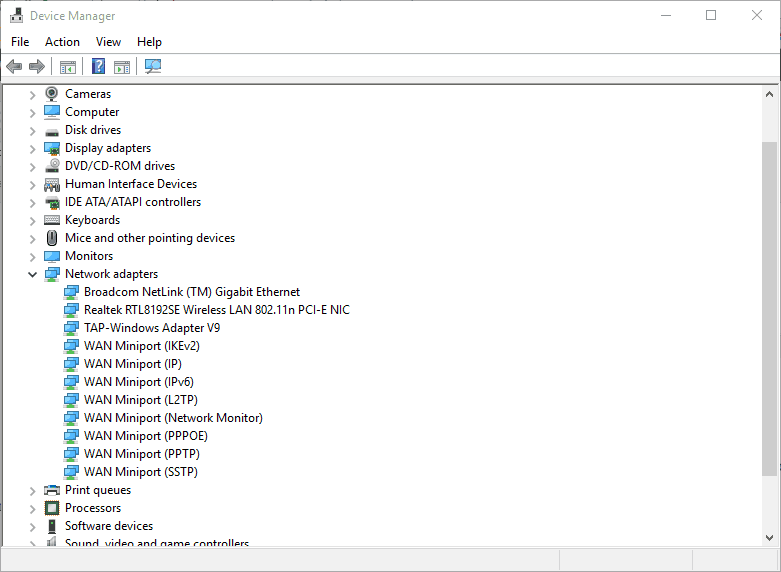
  • Select Device Manager to open the devices window shown directly below.
device manager
  • Double-click Network adapters to expand the adapter list as below.
  • Right-click your Wi-Fi network adapter and select Properties from its context menu.
  • Select the Power Management tab on the window shown directly below.
  • Select the Allow the computer to turn off this device to save power option if it’s not already selected.
  • Then click the OK button, and restart Windows.

6. Reset Your Wi-Fi Network

Resetting your Wi-Fi might fix the network adapter error. To do that, enter ‘ncpa.cpl’ in Run’s text box and click OK. Right-click your Wi-Fi connection and select Disable. Wait a minute or two, and then select the Enable option on the Wi-Fi connection’s context menu.

7. Enable the Microsoft Hosted Network Virtual Adapter via Device Manager

  • Windows has a Microsoft Hosted Network Virtual Adapter that needs to be enabled. To enable that adapter, open Run with the Windows key + R hotkey.
  • Input ‘devmgmt.msc’ in Run’s text box, and click the OK button.
  • Now click View on the Device Manager window.
  • Select the Show hidden devices option.
  • Double-click Network adapters, which will now include the Microsoft Hosted Network Virtual Adapter.
  • Right-click Microsoft Hosted Network Virtual Adapter and select the Enable device option.

8. Set Up a Mobile Hotspot With Third-Party Software

Instead of setting up a Wi-Fi hotspot via Command Prompt, you can utilize third-party software. Wi-Fi hotspot software provides all the tools required to establish mobile hotspots. Maryfi, Connectify and Free Wi-Fi Hotspot are freeware programs you can set up mobile hotspots with.

Connectify is compatible with Windows 10/8.1/8/7 and boasts a user base eclipsing 150 million. You can add that to your PC by clicking Download on this webpage. Check out this article that includes further details for utilizing Connectify.

So there are various potential fixes for the “hosted network couldn’t be started” issue. Remember that you can also set up a mobile hotspot in Windows 10 with its Mobile hotspot option in the Settings app. As such, it’s not essential to establish a hotspot in Windows 10 via the Command Prompt.

Windows 10 features a new Screen Capture API for devs

Windows 10 Spring Creators Update began rolling out to Insiders a few days ago. The update brings a series of new features that come in really handy.

For instance, the update comes with a new Screen Capture API that developers can use to record frames from a display or app window to create snapshots or video streams. The new feature will help developers create more interactive and collaborative experiences for users.

New screen capture API supports both display and window modes

Microsoft’s “Most Valuable Potato (MVP)” as he calls himself or simply Rafael Rivera made this announcement on his Twitter account. “New screen capture API in action needs “graphicsCapture” cap. Supports both display and window modes!” he posted.

So, the API invokes a secure system user interface targeting end users who can pick the display or app window that they want to capture. A yellow notification border will be drawn by the system around the actively captured item.

If there are multiple simultaneous capture sessions, a yellow border will be drawn around every one of the elements that are being captured. End users will have to provide explicit permission in order for the screen to be captured.

User feedback

After reading the announcement tweeted by Microsoft’s Rafael Rivera users seemed pleased that the Skype team’s requests had been taken into consideration. Other users also found the zoom in feature to be really useful here saying that “Sometimes turning on Magnifier at 100% zoom can help here, since it will drop the cursor back to software rendering.”

If you’re wondering whether the new feature will need recorders, or if the streaming apps need to be rewritten to UWP in order to utilize this new API, the answer is pretty straightforward. As this is a UWP API, it should go without saying.

You can read more about this new feature on the Windows Dev Center page.

RELATED STORIES TO CHECK OUT:

Nvidia discontinues support for 32-bit Windows platforms

Nvidia has supported 32-bit system architecture for its graphics cards for more than a decade. However, the company announced toward the end of last year that it intended to move away from 32-bit system support in 2018. Now Nvidia has provided clear details on how its ending support for 32-bit Windows platforms as of April 2018.

The announcement on Nvidia’s website states that the company will now launch Game Ready Driver upgrades exclusively for 64-bit Windows versions. Consequently, there will be no further upgrades for 32-bit Windows 10, 8.1 and 7. The GPU giant is also curtailing support for 32-bit Linux and FREE BSD platforms.

Nvidia has confirmed there will still be critical updates for 32-bit systems for the rest of this year. However, the company will terminate those updates in January 2019.

Nvidia has also announced that its discontinuing support for Fermi architecture. As such, the company is shelving the GeForce graphics cards based on Fermi architecture. You can check out this page for a full list of Fermi GPUs.

That Nvidia has discontinued 32-bit Windows support is not a great surprise. Perhaps the only surprise is how long the company has maintained support for 32-bit platforms. The 32-bit Windows versions are restricted to four GB RAM, which is seldom sufficient for the latest games. Furthermore, Valve’s survey data highlights that just 0.28% of Steam user base’s connected platforms are 32-bit Windows 10 versions.

If your current Windows platform is a 32-bit version, you can probably still upgrade it to ensure you get further Nvidia graphics card upgrades. It depends on whether the system architecture is 64-bit or not. A 64-bit Windows version will run on a 64-bit system. However, you cannot upgrade 32-bit Windows versions on 32-bit systems.

If you are not sure about your 64 or 32-bit system details, you can check that specification in Windows 10. Press the Cortana button, and enter the keyword ‘system’ in the search box. Then select About this PC to open the window shown below, which includes the System type specification.

Nvidia discontinuing 32-bit Windows support further highlights that 32-bit platforms are becoming increasingly obsolete. Without Nvidia Game Ready Driver upgrades, gaming on 32-bit operating systems will now decline all the more.

RELATED STORIES TO CHECK OUT:

Microsoft releases Windows 10 Build 17643 for Skip Ahead, includes Sets in Office, improvements for Edge

Late this afternoon Microsoft released Windows 10 Build 17643 for Windows Insiders who have opted to Skip Ahead. After a round of improvements last week, this build is fairly significant since it introduces the Sets functionality to Microsoft Office and brings some improvements to Microsoft Edge. Other changes in this build are some enhancements for Data Sense and Windows magnifier, so you might not want to skip out this download!

We’ll have all the details on the new Skip Ahead build in a bit, so fire up those PCs and get your download ready! We’d also like to remind you that a new Redstone 4 build might be coming soon, so there are definitely some exciting times ahead! Get downloading now via Windows Update and do feel free to let us know your experience with this build by dropping us a comment below.

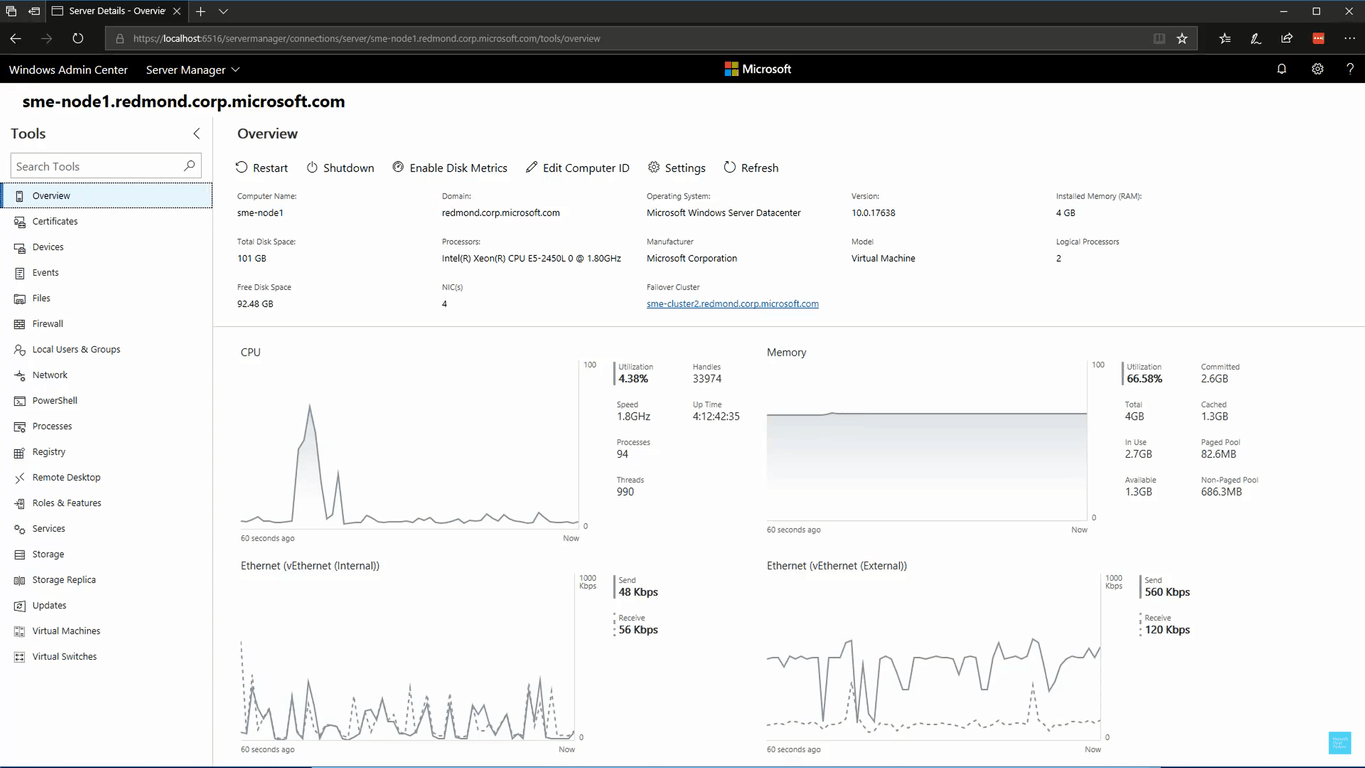
Microsoft launches Windows Admin Center (formerly Project Honolulu), a web based Windows management tool

Back at Ignite 2017, Microsoft announced a preview of Project Honolulu, which was designed to give developers and IT admins one central place to remotely manage Windows Server and Windows 10. A little over half a year later, the company followed up today to rename Project Honolulu and generally make it available it as “Windows Admin Center.”

The browser-based Windows Admin Center brings together many consoles together in one modernized, simplified, integrated, and secure remote management experience. This means IT Admins no longer have to separately open Event Viewer, Device Manager, Disk Management, Task Manager, and Server Manager. Windows Admin Center comes with the following benefits.

  • Simple and modern management experience: Windows Admin Center is a lightweight, browser-based GUI platform and toolset for IT admins to remotely manage Windows Server and Windows 10 machines.
  • Hybrid capabilities: Windows Admin Center can manage Windows Server and Windows 10 instances anywhere including physical systems, virtual machines on any hypervisor, or running in any cloud. Connect to the cloud with optional value-added features like integration with Azure Site Recovery for protecting your virtual machines, and support for Azure Active Directory to control access with multi-factor authentication.
  • Integrated toolset: Rather than switching between several different tools and contexts, with Windows Admin Center you get a holistic overview of your resources and the ability to dig into granular details. In addition to server and client machines, it allows you to manage failover clusters and hyper-converged infrastructure (HCI) deployments.
  • Designed for extensibility: We’ve been working with early-adopter partners to refine the extension development experience in a private preview of our SDK. That means soon you’ll be able to extend Windows Admin Center’s capabilities to 3rd-party solutions. For example, you’ll start to see 3rd party hardware vendors use Windows Admin Center to provide management of their own hardware.

Microsoft says Project Honolulu was downloaded a total of 50,000 times, with over 25,000 + customer deployments, and 250,000+ unique connection instances.  Windows Admin Center is now ready for use in production environments and supports both Windows Server 2019 and Windows Server 2012, at no additional cost beyond Windows licenses. You can download it by checking here.

Unofficial third-party YouTube & Uber “PWAs” appear in Microsoft Store

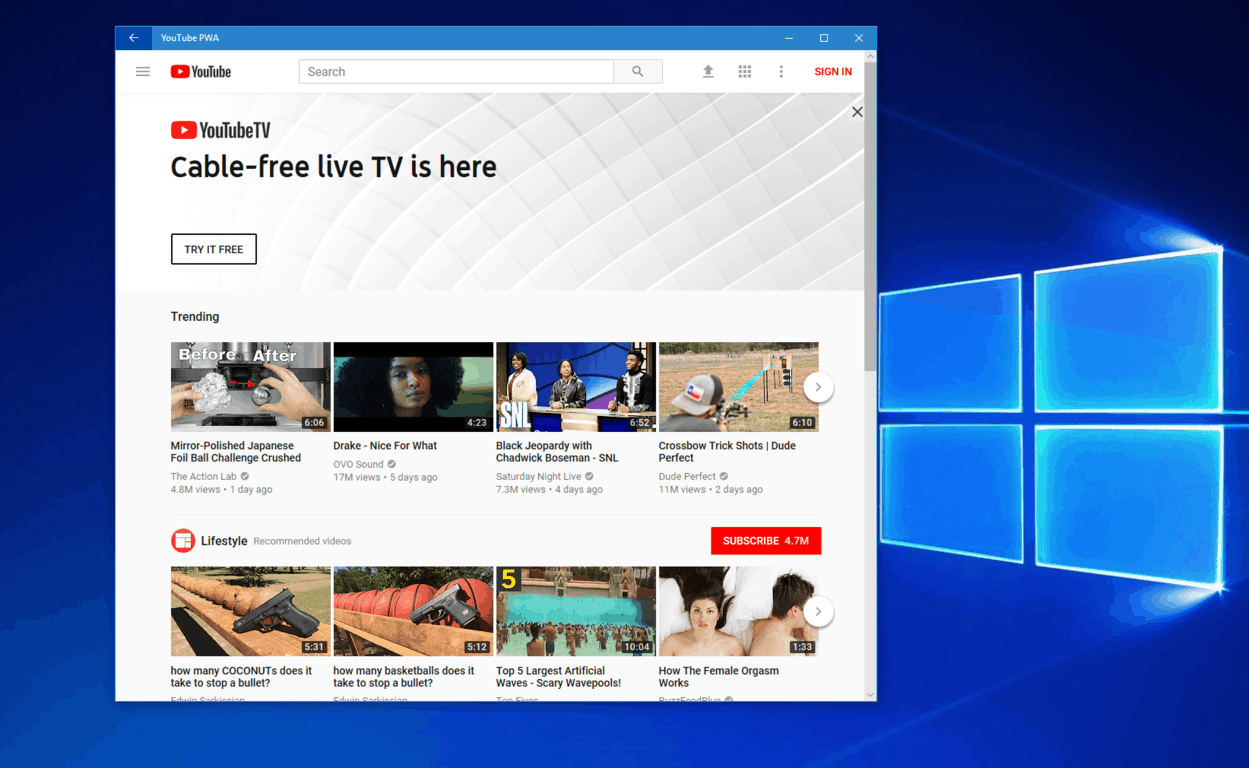
Progressive Web App may very well be the next big thing for Microsoft, and several PWAs have already been indexed and published by the company. After the appearance of official PWAs for Skyscanner, ASOS and more last week, third-party YouTube and Uber “PWAs” have recently appeared in the Microsoft Store (via Windows Central.)

The two apps are published by a developer going by the name of “Pladoo Interactive,” meaning they are definitely not officially sanctioned by either YouTube or Uber. The two also don’t seem to be high quality and they’re just web wrappers similar to what you see when you open Uber in either YouTube in Edge.

That said, the app descriptions say that they are part of a “Windows Revival Project” which is aiming to “bring apps to Windows 10 Mobile using PWA-based apps or even native apps.” This may be an undertaking from the developer, especially because Edge on Windows 10 Mobile doesn’t support service workers which push out web notifications.

Given how things have gone in the past, it will be interesting to see if we get an official YouTube or Uber PWA anytime soon. Uber actually ended support for their Windows 10 app a few months ago, and Google has never supported the Microsoft Store (except for that Chrome installer which was removed.) Anyway, there’s no telling how long these two apps will last, especially because they’re both unofficial, and Uber or Youtube may try and get them removed.

YouTube PWA
YouTube PWA
Developer:
Pladoo Interactive
Price:
Free


Uber PWA
Uber PWA
Developer:
Pladoo Interactive
Price:
Free