Microsoft makes four green tech predictions for 2017

As another year goes by with the planet still under threat of any number of environmental disasters, Microsoft is looking to the future to see just what’s in store for green technology in 2017. Rob Bernard, Microsoft’s chief environmental strategist, wrote up four predictions that we can all expect to come to fruition next year.

  • IoT and Cloud Computing will begin to transform utility energy management

As the strain on the Earth’s resources gets heavier, so too does the world’s need to manage data. Many people are embracing digital infrastructure in the Internet of Things to manage things like electric vehicles and solar panels, so Microsoft thinks that cloud computing and IoT are going to be two big influences on green energy next year.

  • Water will begin to emerge as the next critical world-scale environmental challenge

As acidification, pollution, and a warmer climate cause water scarcity, the next big environmental problem makes itself evident. If things keep going the way they are, people’s food, water, and livelihoods could all be in serious risk. Bernard notes that the Great Barrier Reef is already showing signs of what the consequences of this water problem could be.

  • Data will increasingly be used to try to better understand our planet

In typical Microsoft fashion, Bernard believes that data will be the answer to our problems in 2017. More accurately, the companies that are all putting effort into truly understanding the numbers behind their environmental impacts will be able to help move change forward. As more data becomes available, it’s more likely that we’ll see that data be put to use proactively.

  • Organizations and policy makers will start leveraging cloud-based technologies

If we’re going to protect the environment, we need to use technology to do it. The problems we’ve caused are too massive for us to handle without the assistance of cloud-based technologies that can collect and utilize the data we need. Bernard thinks that, while it will take many years to truly take hold, 2017 will have people finally start to embrace technologies like machine learning when they approach environmental issues.

The environment is in serious danger, and it’s great to see giants like Microsoft be willing to help lead the change to a more green future. We’ll have to keep a keen eye out for the goings-on in the environmental scene next year to see just how accurate Bernard’s predictions ended up being. Let’s just hope that, whatever changes next year, it’s for the better.

Microsoft, others partner with LG on foldable display technology

A new report has emerged from Etnews (via 9to5Mac) that claims LG Display has partnered with multiple businesses in the technology industry to develop foldable displays, also known as an out-foldable panel.

Some of the companies involved in the partnership include Microsoft, Apple and Google. The report also states that Microsoft, along with the other companies, are in the process of being the first buyers of the foldable displays.

It is not certain what Microsoft’s intentions with a foldable display are. We could see these displays arrive in their 2017 line-up of devices, which is rumoured to also include the Surface Phone, as many other smartphone manufacturers are jumping into the foldable display world, such as Apple and Google, making it important for future high-end phones to include foldable displays if they wish to succeed.

Let us know what you think Microsoft could use foldable displays with in the comments below!

EFF releases Privacy Badger 2.0 for Chrome, Firefox, and Opera with new features

Online tracking has been constant fodder for debate between privacy advocates and tech companies. And in its continued support of online privacy, Electronic Frontier Foundation, a non-profit group at the forefront of digital rights advocacy, has now updated its anti-tracking extension for the Chrome, Firefox and Opera browsers.

Privacy Badger detects and blocks third-party domains that could be monitoring your browsing activity. The blocking phase occurs only when the tool finds that a certain domain has been tracking you on three or more websites. It will then sever the third-party domain’s link to your computer.

The extension puts an icon in the main toolbar of a browser and shows how many trackers have been blocked on a specific website. Privacy Badger 2.0 now brings with it a number of enhancements for users and developers such as:

  • Support for incognito or private browsing
  • Import/export capabilities to export a backup of what Privacy Badger has learned about your tracker-blocking needs and import that into another browser
  • Fixes to break fewer websites, ensuring that you can both block trackers and enjoy rich content
  • Improved user interface translation for non-English-speaking users
  • Blocks WebRTC from leaking your IP address
  • Blocks HTML5 ping tracking
  • Notable speed improvements (Firefox only)
  • Multi-process compatibility (E10S) (Firefox only)
  • A single code base for both the Firefox and Chrome versions

However, Privacy Badger 2.0 does not seem to be working well on Firefox. Users have reported that the extension blocks Google Sheets even if the domain is on a white list. Other users have noticed that WebRTC is missing after installing the updated add-on. Although EFF considers Privacy Badger 2.0 a major release, it’s advisable to wait for a more stable release of the add-on.

Privacy Badger has been used to block online tracking, with the exception of online ads. EFF said in a blog post that the extension does not intend to block ads, but only to bar invasions of internet user privacy. That means Privacy Badger blocks trackers directly instead of scripts. EFF also calls on advertisers to help protect the privacy of users.

Read also:

Windows 7 loses 9% market share in one year, Windows 10 enjoys new users

Microsoft’s effort to convince users to upgrade to Windows 10, whether willingly or forcefully, have paid off. In just one year, from November 2015 to November 2016, Windows 7 lost almost 10% of its market share in favor of the company’s latest OS.

According to the data available on NetMarketShare’s website, back in November 2015 Windows 7 had a market share of 56.11%, compared to November 2016 when it had a total market share of 47.17%.

This is surprising if you consider the strong upgrade opposition that Windows 10 has encountered. Many Windows 7 users said they wouldn’t upgrade their OS because they believed Windows 10 was not stable enough. However, judging by this significant market share drop, it appears that Windows 7 users are abandoning the ship.

It seems that Microsoft manages to convince more and more users to upgrade their OS with every new Windows version it releases. It’s not too far-fetched to say that the secret weapon behind Windows 10’s success is patience. In November 2015, Windows 10 had a weak 9% market share, while in November 2016 it reached an impressive 23.72%.

windows 10 market share increasewindows 7 market share evolution

Of course, Windows 7 is not the only victim of Windows 10. Another very popular Windows OS version, Windows XP has lost a significant market share percentage over the course of the last year. Windows XP had a 10.59% market share in November 2015, compared to the 8.63% market share it reached last month.

Judging by these numbers, Windows 7 is not the new Windows XP, as we predicted a while ago. Windows 7 users are indeed more susceptible to change, while Windows XP users cling to their good old reliable OS.

Microsoft will release a new Windows 10 edition sometime in early 2017. Judging by the current Windows 10 adoption trend, it appears that the Windows 10 Creators Update will boost the popularity of Microsoft’s latest OS. After all, Microsoft said that Windows 10 is on track to beat Windows 7 within a year.

What do you think about the manner in which Windows 10’s adoption rate has evolved? Share your thoughts in the comments section below.

RELATED STORIES YOU NEED TO CHECK OUT:

Easier ways to pay coming to Microsoft Edge with the Windows 10 Creators Update

Today, Microsoft released the Payment Request API preview for Microft Edge. The Payment Request API will allow for easier checkout and payments on the web on Windows 10 and Windows 10 Mobile. Stable builds of Windows 10 will receive Payment Request API support in the Windows 10 Creators Update due out in early 2017.

Payment Request works with Microsoft Wallet on Windows 10 and Windows 10 Mobile too. The Payment Request API is available in Windows Insider Preview builds, starting with Windows Insider Preview build. End-to-end Payment request API support will be coming in later Windows Insider Preview builds.

In the blog post, Microsoft detailed the how the Payment Request API will work with Microsoft Wallet:

“In Microsoft Edge, the Payment Request API connects to Microsoft Wallet (with the user’s permission), allowing easy access to payment information associated with the user’s Microsoft Account. Because payment information is securely saved in a digital wallet, shoppers don’t have to navigate through traditional checkout flows and repeatedly enter the same payment and shipping address information repeatedly. The wallet can provide a faster and more consistent experience across websites, which saves shoppers time and effort by allowing them to securely share saved payment information. With the Payment Request API, payment information is provided by the wallet (once the user has granted consent), as opposed to being collected via a checkout form in the website. The browser mediates all the information passed between the wallet and the merchant.”

Microsoft designed the Payment Request API for Edge with other members of the W3C Web Payments Working Group. The Payment Request API was designed with the intention to provide a standard way for merchants, browsers, and payment methods to provide a better user experience.

Find all the Payment Request API details on GitHub. If you come across any issues, reach out to the Microsoft Edge team on Twitter and you can also file bugs you encounter on bugs.microsoftedge.com.

Windows 10 Cumulative Updates: How to avoid install issues

Sometimes, installing Windows 10 cumulative updates can be a nightmare. If you’ve been following the activity on Microsoft’s forum, you may have noticed that every time a new update is released, a never-ending list of bugs appear.

Windows 10 users have long complained about Windows Update bugs and have asked Microsoft to offer them more leeway in managing them. The good news is that Redmond heard you: Windows 10 users will soon be able to schedule update downloads, just like they can currently schedule restarts.

Until the company fully implements this feature, here are a few tips on how to make the Cumulative Update installs safer for your Windows 10 computer.

How to avoid Windows 10 Cumulative Update install bugs

  1. Make sure you have a recent manual restore point before Microsoft rolls out the Patch Tuesday updates.
  2. Run wushowhide.diagcab on Patch Tuesday day to see if any updates are available.
  3. Hide the new Cumulative Update. In this manner, the update won’t fail and roll back when installed through Windows Update.
  4. Check for updates with Windows Update. Install all the updates that don’t require a restart.
  5. Create a new manual restore point
  6. Download the new Cumulative Update from the Microsoft Update Catalog website
  7. Disable the Internet connection to avoid any installation interference via Internet
  8. Type msconfig > go to System Configuration > go to the Services tab > Hide all Microsoft Services > uncheck all the non-Microsoft Services > click OK > restart
  9. Run the .msu file downloaded in step 6 > select “Run anyway”> restart > install should be successful
  10. Run winver to verify if the update succeeded
  11. Type msconfig > go to System Configuration > go to the Services tab > Hide all Microsoft Services > check all the non-Microsoft Services >click OK > restart
  12. Enable the Internet connection
  13. Go to the Device Manager > update your NVIDIA driver. Get the latest driver modified by Microsoft, the driver file details should say UGLY Version 2.1 Build_223. Users report that the Windows 10 drivers downloaded from Nvidia’s website often cause BSoD issues. We also recommend a driver updater tool (100% safe and tested by us) to automatically download all the outdated drivers on your PC.
  14. Create a new restore point
  15. Sleep your computer.

And if you’d like to set priority security updates automatically, check out our article on the same.

If you’ve got other tips and tricks on how to install Windows 10 cumulative updates in a way that avoids bugs, feel free to list them in our comment section below.

RELATED STORIES YOU NEED TO CHECK OUT:

Microsoft reiterates after meeting with Donald Trump: “We oppose discrimination”

Tensions have been high since the Presidential Election 2016 in which Donald Trump won the election over Hillary Clinton. In its wake, rumors have begun circulating that data computing companies such as Microsoft might be called upon to assist in creating a ‘Muslim Registry’ based on religious beliefs that Trump spoke about during his campaign.

Today, Buzzfeed reports that Microsoft spokesperson confirmed that consumers have no reason to worry about their personal data being used for the wrong reasons.

“We’ve been clear about our values. We oppose discrimination and we wouldn’t do any work to build a registry of Muslim Americans,” said Shaw.

This comes only a day after the tech summit at Trump Tower which many of Silicon Valley’s elite leaders attended, including Microsoft CEO Satya Nadella. The meeting consisted of quite a few tech companies with employees that have previously made their stance to fight against any ‘unethical or illegal misuse of data’.

Employees from leading companies even went so far as to sign a declaration that they would rather resign than to comply with such a request should it be made.

It states:

We refuse to participate in the creation of databases of identifying information for the United States government to target individuals based on race, religion, or national origin.

We will advocate within our organizations:

  • to minimize the collection and retention of data that would facilitate ethnic or religious targeting.
  • to scale back existing datasets with unnecessary racial, ethnic, and national origin data.
  • to responsibly destroy high-risk datasets and backups.
  • to implement security and privacy best practices, in particular, for end-to-end encryption to be the default wherever possible.
  • to demand appropriate legal process should the government request that we turn over user data collected by our organization, even in small amounts.

If we discover misuse of data that we consider illegal or unethical in our organizations:

  • We will work with our colleagues and leaders to correct it.
  • If we cannot stop these practices, we will exercise our rights and responsibilities to speak out publicly and engage in responsible whistleblowing without endangering users.
  • If we have the authority to do so, we will use all available legal defenses to stop these practices.
  • If we do not have such authority, and our organizations force us to engage in such misuse, we will resign from our positions rather than comply.

Furthermore, the undersigned intend to raise awareness and ask critical questions to ensure fair use of data and algorithms beyond even their own countries.

It’s worth noting that Facebook, who also signed the pledge, told Buzzfeed that nobody has asked them to help build a Muslim registry. Nor would they if they were asked to.

Retrieve a Laptop with These Lost Laptop-Tracking Software

Lost laptop-tracking software helps you find a missing laptop or notebook that might have been nicked. A few recovery programs available for Windows will help you retrieve missing devices, such as laptops and tablets.

Such software can also disable laptops so hard drives aren’t accessible. Here are some lost laptop-tracking programs compatible with Windows and other platforms.

What’s the best lost laptop-tracking software?

1. Prey

Prey is multi-platform laptop-tracking software for Windows, iOS, Android and Linux devices. It helps retrieve laptops with its geolocation tech that you can set up by adding the software to Windows, creating a Prey account, and registering a device.

Prey has Basic, Personal, Home, and Business $5 to $15 month subscriptions. Press the For Windows button on this page to add the client software to your laptop.

This software tracks laptops by connecting to Wi-Fi access points. The program then provides reports to users, including evidence of the laptop’s whereabouts and even pictures or screenshots. Users can log in to the Prey website, mark the laptop as missing, and track it via a control panel.

In addition, Prey enables users to remotely lock laptops and devices and wipe data if they really need to. This software also includes file retrieval options.

2. Absolute LoJack

LoJack is highly rated laptop-tracking software compatible with the Windows, Android, and Mac OS X platforms. Users can install the software and log in to the LoJack site to retrieve lost laptops much the same as Prey. The program is available with a £29.96 one-year subscription.

This software can locate numerous devices with GPS or IP geolocation tech. Note that Absolute LoJack even locks into the laptop BIOS (Basic Input Output System), so the software can’t be removed.

LoJack includes a handy Device Lock; you can delete all user files. One of LoJack’s novelties is that the company promises to send out an investigator team to recover laptops within a couple of months. If the team doesn’t recover the laptop, the company pledges to reimburse you up to $1,000. The software’s web page meta tag states:

“Our promise to you. If your stolen device isn’t recovered within 60 days Absolute LoJack will reimburse you up to $1,000 for a laptop and $600 for a tablet or smartphone.”

3. LockitTight

LockitTight is a laptop tracker for Windows and Android devices with some rave reviews and plenty of handy options. It’s fairly similar to LoJack and Prey as it has a client application for the laptop and a web-based UI you can log into via a browser.

LockitTight has Free, Standard, Premium and Ultimate subscriptions ranging from $1.99 to $9.99 monthly. Click Download Windows Client on this web page to add the client program to a laptop.

laptop software3

The LockitTight client software sends reports, which can be encrypted, for registered devices to a central server. It incorporates Google Maps to highlight potential laptop whereabouts. The client software will take desktop screenshots and webcam snapshots to provide further evidence for laptop retrieval. LockitTight also lets you delete up to 500 megabytes of files or retrieve data on the laptop.

4. GadgetTrak

GadgetTrak has a range of tracking software for Windows, Mac OS X, iOS, Android, and Blackberry devices. The software has assisted in the recovery of numerous devices such as iPods, USB flash drives, and laptops. The GadgetTrack laptop software is retailing at $19.95.

When you’ve registered a user account, users can log in to a tracking dashboard at this page. The software uses Wi-Fi positioning tech to retrieve laptops with Google Maps integration and gives detailed reports.

GadgetTrak also provides 150 integrated police reports to file with 150 U.S. departments. Its webcam support captures snapshots to provide further evidence to find the laptop. However, GadgetTalk doesn’t provide file retrieval options.

5. My Laptop Tracker

My Laptop Tracker is tracking software for Windows that has plenty of handy options and a straightforward setup. It’s currently retailing at $29.95. This software is more specifically designed for Windows laptops, so you can’t use it with iOS or Mac OS X devices. However, the publisher does have separate MyMacTracker software to retrieve Apple laptops; and that has many of the same options as the Windows version.

This software has a stealth mode that excludes My Laptop Tracker Start menu, system tray, and desktop entries to conceal it. So the only way to open the program on laptops is by entering ‘mydevicetracker’ into Run. When you log in to the web account, you can instantly activate the software with one-click activation.

My Laptop Tracker utilizes IP positioning to track laptops, and the web portal includes data retrieval options. That portal also has an option that locks laptops. The software’s publisher even offers a My Laptop Tracker guarantee along the lines of:

“In case you find a anti theft software that performs better than My Device Tracker, please send us bill details of that software. We will refund the complete amount you paid for My Device Tracker – no questions asked!“

6. EXO5

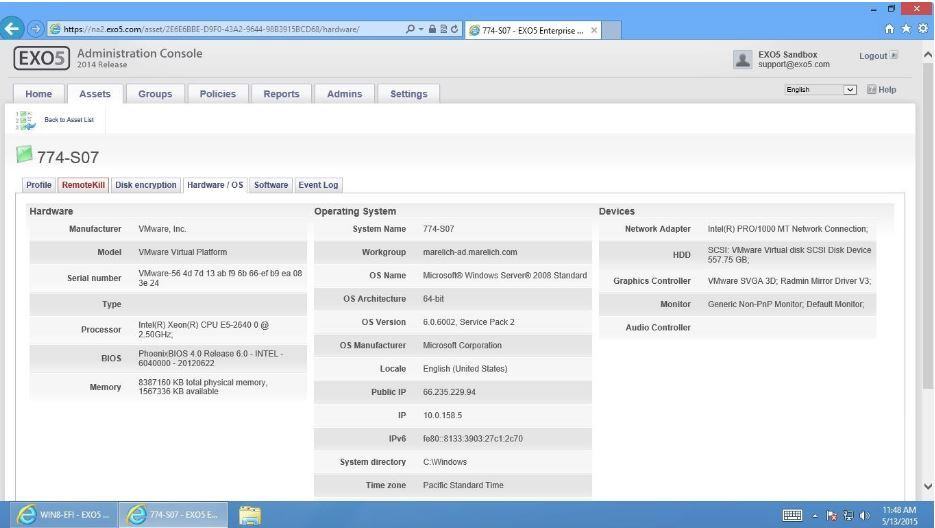
laptop software2EXO5 is business-orientated tracking software for laptops. The software has a $499 three-year subscription. That subscription fee doesn’t make much sense as you could feasibly replace a lost laptop with another, retailing at $499. Still, this program does have some more advanced options for tracking multiple devices.

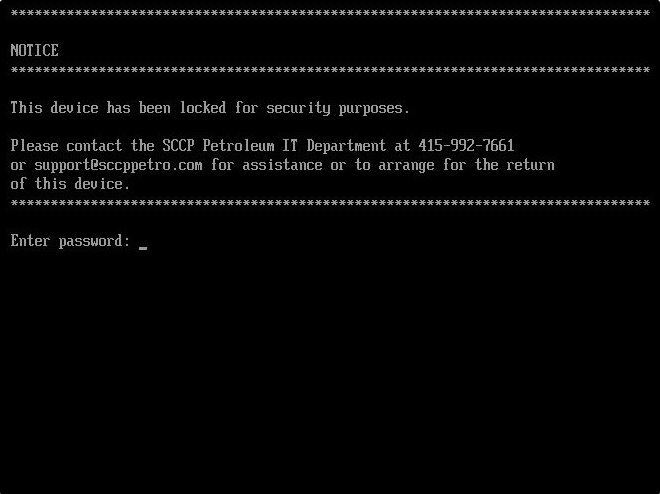
EXO5 tracks laptops with Wi-Fi triangulation tech and has a Google Maps UI. It includes handy RemoteKill options for encrypting data. With RemoteKill, users can initiate a drive lockup that locks the hard disk and prevents further OS access, as shown in the snapshot below. That lockout is still reversible if you retrieve the laptop. In addition, EXO5 provides users with software, hardware, and event log inventories on its Assets tab.

laptop software

So, if you suspect your laptop is stolen, these programs will certainly come in handy. With them, you might be able to retrieve a lost laptop or at least encrypt some files and lock up its hard disk.

Note that Windows 10 now also includes a Find My Device tracking tool. Windows 11 also has the Find My Device feature, which has fairly limited options. Sometimes, the Find My Device tool is not working, so you’re better off using third-party software.

If your device is locked by this tool, we have a great guide on how to unlock a PC locked by the Microsoft Find My Device feature, so don’t hesitate to check it out.

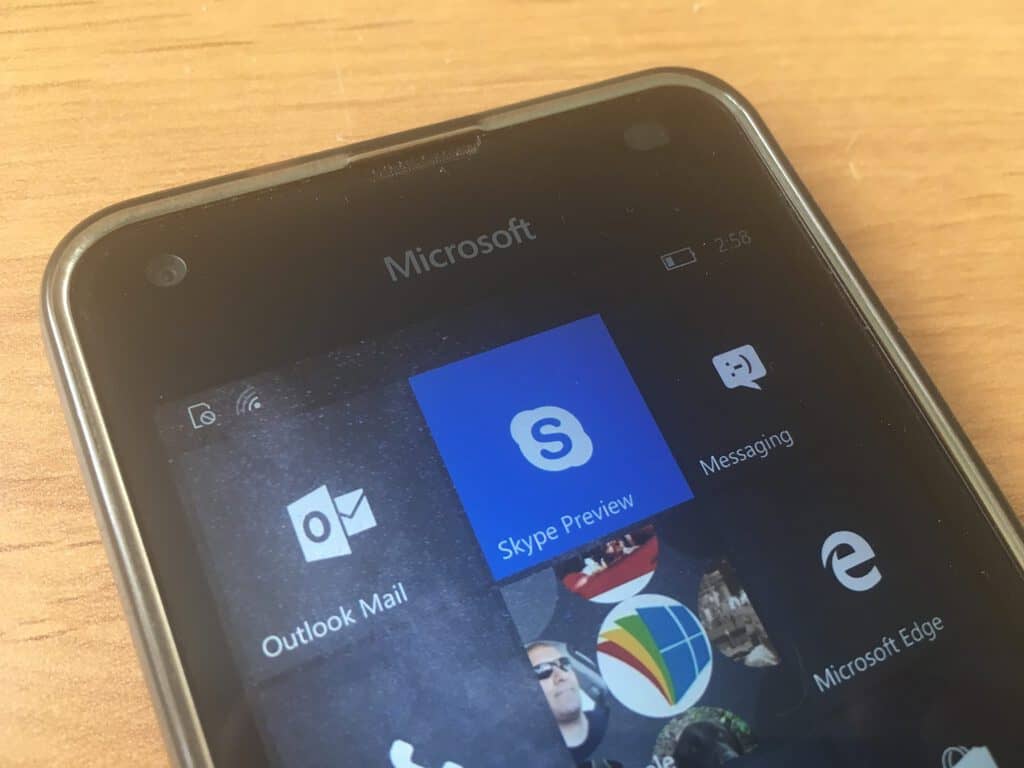
Skype Preview for Insiders updated with quick fix for startup crashes

As we reported yesterday, Skype Preview version 11.10.146.0 released to Windows Insiders was crashing upon startup for many users. As with most app breaking issues, the Skype team addressed the bug with a quick fix version 11.10.147 rolled to Fast, Slow, and Release Preview rings.

When asked why such a broken update was rolled out in the first place, Luis-Escobar of the Skype staff released this statement on the community forum:

We just published a fix in version 11.10.147 and you should be getting it shortly.

As to your question, this was only seen by users in the Windows Insider program. Although not ideal this situations can happen, we should always remember that at the end of the day there are humans building these apps
Luckily this issue was fixed fast and you and all of our users affected will be able to continue using Skype Preview.

We really appreciate your feedback and the fact that you took the time to report this issue, and we will work really hard so situations like this don’t happen again.

Hopefully, this resolved the issues that many users were having starting up Skype Preview. Windows Insiders are encouraged to download this newest update as soon as possible.

Skype
Skype
Developer:
Skype
Price:
Free

Astroneer space exploration title gets a Game Preview on Xbox and Windows Store on December 16

After over two years of development, the last one with a full-time schedule, indie game developers System Era is finally releasing Astroneer into the Game Preview program. The announcement blog post for its early access release describes the game as follows:

This is a game about discovery and mystery, as you uncover rare artifacts and the resources you need to find, on vast worlds where every cubic inch of space can be explored. It’s a game about creativity, as you use your tools to dig, build, sculpt, and shape the very ground to serve your needs, whether utilitarian or aesthetic. It’s a game about solitude, as you enjoy the beauty of your surroundings as you might on a long hike or camping trip. It’s also a game about cooperation, as you invite your friends to share the experience with you in multiplayer co-op.


Unfortunately, the multiplayer co-op will not be available on release tomorrow but is yet to come in a future update. Even so, Astroneer has some pretty ambitious goals for a small indie team. The game aims to be a sandbox of interplanetary exploration where the player can deform terrain and build their own world’s.

Still, Astroneer is in early access for a reason. System Era warns any players that are intending to buy and play the game tomorrow might be met with a less than stellar product, particularly for the Xbox. “The game is very incomplete,” noted the team in their Xbox Wire announcement post. “We’ve worked hard to ensure a stable experience without game-breaking bugs, but there definitely will be some we haven’t caught, along with many minor issues.”

Of course, with many games in early access, System Era is hoping the fans will join in the development process to pound out the bugs and work towards the successful launch of Astroneer 1.0.

Described as a game about independent space exploration, many gamers are having flashbacks to the controversy surrounding No Man’s Sky. But System Era is determined to shed any negative vibes with pure transparency. In fact, the team released a Trello roadmap with their clear intentions and progress of the game.

Astroneer will be available to play for the first time tomorrow, December 16. Eurogamer reported that it will cost $19.99 USD. As an Xbox Play Anywhere title, you’ll be able to purchase it once from console or on Windows Store and switch as you see fit. Astroneer will also be available to play on Steam.

PicsArt Windows app adds AI powered photo effects

For the past couple of years, smartphone hardware manufacturers such as Apple, Samsung, HTC and Nokia have combined their meticulous camera lens designs with advanced software manipulation to produce eye-popping images for everyday consumers.

However, as cloud computing becomes more ubiquitous and abundant, customers should begin to see a similar level of software manipulation trickling down to app developers who don’t have access to the direct hardware but can still produce incredible works of art.

One such company making use of software manipulation is PicsArt for Windows, in the form of AI-Powered Magic Effects.

“Today, we’re happy to announce a new PicsArt for Windows with AI-powered Magic photo Effects that will transform your holiday photos into amazing works of art…

LinkedIn, Tay, and Project Scorpio – a look back at 2016’s top Microsoft searches, according to Google

With the end of December just a few weeks away, 2016 is drawing to a close. For the folks at Google, who love nostalgia and publish a year in review video every year, now is the perfect time to look back on the year and discover what has captivated the interest of the world.

Being curious, we’ve visited Google’s #YearInSearchPage Trends Page, and have examined the years top Microsoft themed searches for the United States.

Top Microsoft Searches in the US

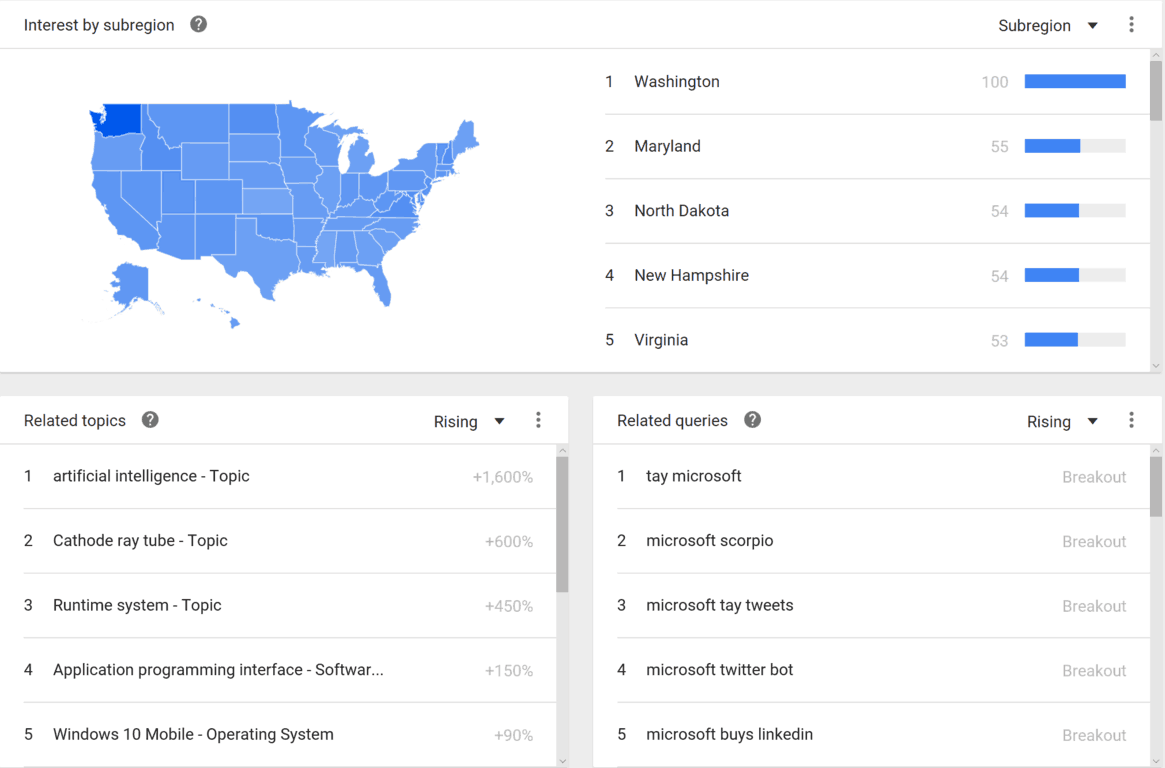
When it comes to the United States, the top five breakout searches for Microsoft include, Tay Microsoft, Microsoft Scorpio, Tay Tweets, Microsoft Twitter Bot, and Microsoft Buys Linked in. Then, when it comes down to location, searches for Microsoft were most popular in the company’s home state of Washington.

Maryland, North Dakota, New Hampshire, and Virgina, meanwhile, top out the areas that were most interested in searches for Microsoft.  Nonetheless, as you may recall, these Microsoft stories all emerged towards the middle of the year. So, please do read below as we remind you of how these stories emerged, and where they are today at the end of the year.

Everything about Tay

To begin we must remind you of Tay. Tay was a joint chatbot project by Microsoft Research and Bing, and was aimed towards 18-24-year-olds, to engage entertain people through casual and playful conversation. The project proved to be a massive failure, as users abused the chatbot and caused it to spew out racist, homophobic, and nonsensical remarks.  Microsoft was not happy with the results of Tay, and apologized for the unintended offensive behavior by the Tay bot and disbanded it.

The company, though, recently rebounded from the disaster, and quietly pushed out Zo, its latest AI project, and chatbot, on Kik Messenger.

Tay was a disaster

Project Scorpio

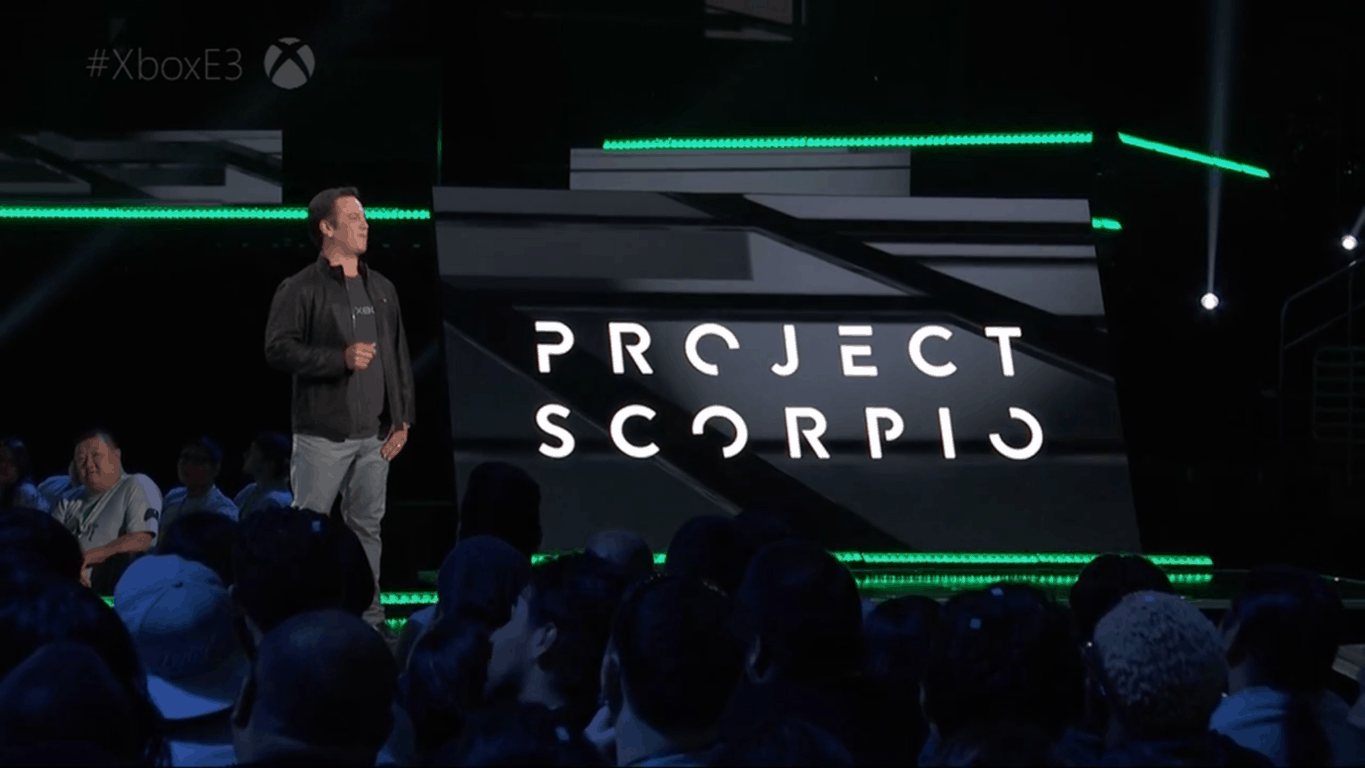
Next up (and ranking second on Google’s Microsoft breakout searches) is Project Scorpio, which is the next generation Xbox console. As you may recall, Project Scorpio took the world by storm at the E3 conference in 2016, as Microsoft called it, “most powerful console ever.”

The console will pack eight CPU cores and six teraflops of power and will have support for True 4K gaming.  Set to ship out in Holiday of 2017, it even will support high frame rate VR. In fact, all Xbox accessories will be backward compatible with the system and all Xbox One games will play on Scorpio, as well the Xbox One S. While the company has remained quiet on Project Scorpio since E3, Phil Spencer has come out and said that the company is making progress on the console, that it will have a console and not PC price, and that it “may be years” before a new Xbox is launched after Scorpio.

Project Scorpio took the world by storm in 2016

Microsoft Buys LinkedIn

Trending #5 on Google’s breakout searches in the United States is Microsoft’s purchase of the business and employment-oriented social networking service LinkedIn. As we originally reported, Microsoft acquired LinkedIn for $26.2 billion in an all-cash deal, but quickly faced regulation troubles and scrutiny from rivals such as Salesforce. In fact, the acquisition of LinkedIn only officially closed one week ago, after the European Union expressed antitrust concerns, and after the service was banned in Russia over data storage issues.

Microsoft’s LinkedIn Purchase

When it comes down to OnMSFT, we would like you to know that we appreciate every single one of our readers. According to our WordPress backend, top searches on our website this year include, WinBeta, Windows 10 Mobile, Microsoft, Product News, Pokemon Go Windows Phone, Windows 10, Windows Phone, and Snapchat for Windows Phone. Again, all of us here at OnMSFT would like to thank you for taking your time off from your busy schedules to read our website and we all wish you a happy, safe, and healthy holiday season and new year!

Check if Application is 32-bit or 64-bit [How to]

In order to achieve maximum performance, it’s you should use software that matches your architecture. This is why many users wonder how to check if the application is 32-bit or 64-bit.

Before we start, it’s important to check if Windows is 32-bit or 64-bit to know what kind of applications you can run on it.

As for the applications, keep reading to check the type of applications you’re using.

How can I check if the application is 32-bit or 64-bit?

One quick way but somewhat unreliable method you can use to check the application architecture is the following:

  • Check the installation directory – If the application is installed in the Program Files directory, it’s usually 64-bit. If installed in Program Files (x86) directory, it’s 32-bit.

1. Use Task Manager

  1. Press Ctrl + Shift + Esc to open Task Manager.
  2. Go to the Details tab. Right-click the labels and choose Select columns.
  3. Select Platform and click OK.
  4. After doing that, you’ll see the Platform column in the Task Manager with the necessary information.

If you’re wondering how to check if the application is 32-bit or 64-bit for running applications, this is the best method to use.

2. Check compatibility settings

  1. Locate the application’s exe file, right-click it, and choose Properties.
  2. Navigate to the Compatibility tab and check Run this program in compatibility mode for.
  3. Expand the menu. If Windows 95, 98, and XP are visible, it means that this is a 32-bit application. If you can’t see systems older than Vista, it means that you’re working with a 64-bit app.

These are just a couple of methods that allow you to check if an application is 32-bit or 64-bit easily.

In case you want to learn more about this topic, we have a great guide on how to run 32-bit programs on 64-bit Windows that you should check out.

If you know of other means to determine a 32-bit or 64-bit program, leave a comment below.

Skype looks back on a year of innovation

This year has been kind of busy for messaging apps, as the most popular options out there including Facebook Messenger and WhatsApp now claim 1 billion monthly active users. All these apps are now transforming into platforms, welcoming brands and bots to give users more incentives to spend time with them.

Of course, this is great competition for Skype and this year Microsoft didn’t rest on its laurels. Today, the company published a new blog post to look back at some of the things that have been accomplished by the Skype team over the last 12 months, and there are quite a lot of highlights to cover.

First of all, one of the biggest new features that rolled out this year is group video calling on mobile. Skype was not the first messaging app to bring this feature on mobile devices (Google likely did it first with Hangouts), but this is still a big deal considering that Microsoft has also increased the number of people who can have a video call from 5 to 25.

Next, Microsoft introduced Skype Bots during its Build 2016 developer conference, giving developers and brands a new way to reach consumers in the messaging app. Microsoft and other messaging apps are just getting started with bots, but the new tools look to be an interesting way to bring artificial intelligence to the mainstream. “From finding gig tickets with StubHub to planning flights to your perfect vacation with Hipmunk and Skyscanner, or simplifying shipping with UPS—you can achieve so much more, right from a chat window,” added Microsoft

Following the release of the Anniversary Update, Windows 10 users are now able to try the new Skype Preview universal app which is slowly reaching feature parity with the legacy desktop apps. Moreover, the app is currently available on Windows 10 PCs, mobile, HoloLens and will eventually release on the Xbox One. Also, some exclusive features: With SMS Relay, Windows 10 Mobile users can finally set the Skype UWP app as an all-in-one messaging app on their Windows phone and send and receive a text message on their PCs.

Skype Translator also reached new milestones this year, now supporting text-to-text translation in 50 languages as well as voice translation in 9 spoken languages. Earlier this month, the Skype team also rolled out voice translation for calls to mobiles and landlines on the Skype Preview UWP app, bringing, even more, value to Skype credit and subscriptions.

The Skype team also released a new Skype for Linux client this year, while Skype for The Web has become even more useful for those who don’t have a Skype account. While it was previously possible to invite non-Skype users to join a chat by sharing a unique link, the new “Skype as a guest” feature goes a step further. Now, everyone can visit web.skype.com, click “start a conversation,” enter a name, share the conversation link with others and start chatting right away.

Earlier this year, Skype also announced the move from its peer-to-peer infrastructure to a cloud-based one, which will improve reliability and enable new services going forward. However, this also means that older versions of Skype on iOS, Android, and Windows Phone will no longer work starting early next year.

Lastly, the Skype team has introduced new holiday themed emoticons and emojis that will be fun to use during this holiday season. iOS and Android users can also use the app to send personalized Skype holiday card videos that they can also share over on other social networks and email.

As 2016 is coming to a close, next year is expected to be another interesting year for Skype. We’re still waiting for the universal app to be officially announced on the Xbox One, while Android users can now try a new alpha app with native calling, SMS, and contacts management capabilities. Skype may still continue to struggle to get as much momentum as WhatsApp and Facebook Messenger, but Microsoft seems to be doing the right thing to make its messaging app one of the most full-featured and ubiquitous solutions on the market.

Japanese video game Valkyria Azure Revolution confirmed for Western release on Xbox One

According to a report, Valkyria: Azure Revolution is a Japanese game for PS4 that is on its way to Xbox One in North America via Sega and Europe via Deep Silver. Here’s the game trailer for Valkyria: Azure Revolution, and a quick look at some gameplay.

Valkyria Azure Revolution will come to North America and Europe as Valkyria Revolution. According to Sega, there are two reasons for the name change:

  1. The way the first Valkyria title was localized had a really nice ring to it: Senjou no Varukyuria (lit. Valkryia of the Battlefield) became Valkyria Chronicles. When faced with Aoki Kakumei no Varukyuria (lit. Valkyria of the Blue Revolution), a literal translation was unwieldy, and difficult from a graphic design standpoint as well, and adding in extra punctuation (e.g. Valkyria: Azure Revolution) didn’t help either. So we stuck to a similar cadence of the first Valkyria title and went with a two-word title.
  2. Given how vastly different the two games are (Revolution drops the turn-based gameplay, takes place in a different time period, different world, different almost everything), the new name helps to ensure the two titles stood equal but apart from each other.

Valkyria Revolution steps away from the gameplay of Valkyria Chronicles, which was a traditional turn-based RPG game on PS3. Valkyria Azure Revolution is a combination of real-time combat and tactical strategy.

Here’s a look at the game description and features:

All it takes is a single spark to start the inferno of war, and in the story of Valkyria Revolution, players will experience that firsthand. Five lifelong friends consumed by personal revenge plunge an entire continent into a terrible war, sacrificing the lives of countless innocents for a cause based on twisted half-truths and outright lies. This “Circle of Five” use their combined influence in their political and military positions to motivate their small, economically blockaded homeland to rise up and become a powerful resistance against its imperialist oppressors. Will the Circle of Five be remembered as heroic liberators, or will their selfish motives expose them as traitorous conspirators who sacrificed untold lives just to carry out a personal vendetta? Players will watch this history unfold in Valkyria Revolution and find out the truth behind the events.

Microsoft, Xbox One, Valkyria

Features

  • A Brush with Death – Turning the tide of battle in Valkyria Revolution is Brunhilde, one of the last of the ancient and powerful Valkyrur, magical beings with near limitless power. She’s bound by oath to the enemy forces and players will have to figure out how to defeat her.
  • Prepare for LeGION – Valkyria Revolution has a brand new battle system that mixes real-time combat and tactical strategy. Players can take control of the battlefield using brazen combos or cunning tactics and finding a balance between them is the key to excelling in skirmishes.
  • The Ingenuity of War – Through adversity comes great engineering, and with a besieged homeland, players will have upgrade their existing weapons through branching customization paths.
  • A New Painterly Look – Valkyria Revolution has a refined look thanks to the new Gouache rendering engine, giving the graphics a unique canvas texture.
  • Classic Composer – Valkyria Revolution has a vibrant soundtrack brought to life by the incredibly talented composer Yasunori Mitsuda (Chrono Trigger, Stella Glow).

Valkyria Revolution is not just a new chapter in the legendary Valkyria series, but a whole new entry with new characters, a new world, and new gameplay mechanics. The static, turn-based battlefield has become an action-oriented stage for devastating melee combos, lethal ranged attacks, and strategic shifts to turn the tide of battle, all while exploring the incredible history of the Circle of Five.

Microsoft, Xbox One, Valkyria

Are you familiar with the Valkyria series of games on PlayStation? Are you excited to see Valkyria: Revolution come to Xbox One? Let us know in the comments. Look for Valkyria Revolution on Xbox One arriving sometime in Q2 2017.

It’s Free Music Thursday at the Windows Store, pick up these seven albums free today only

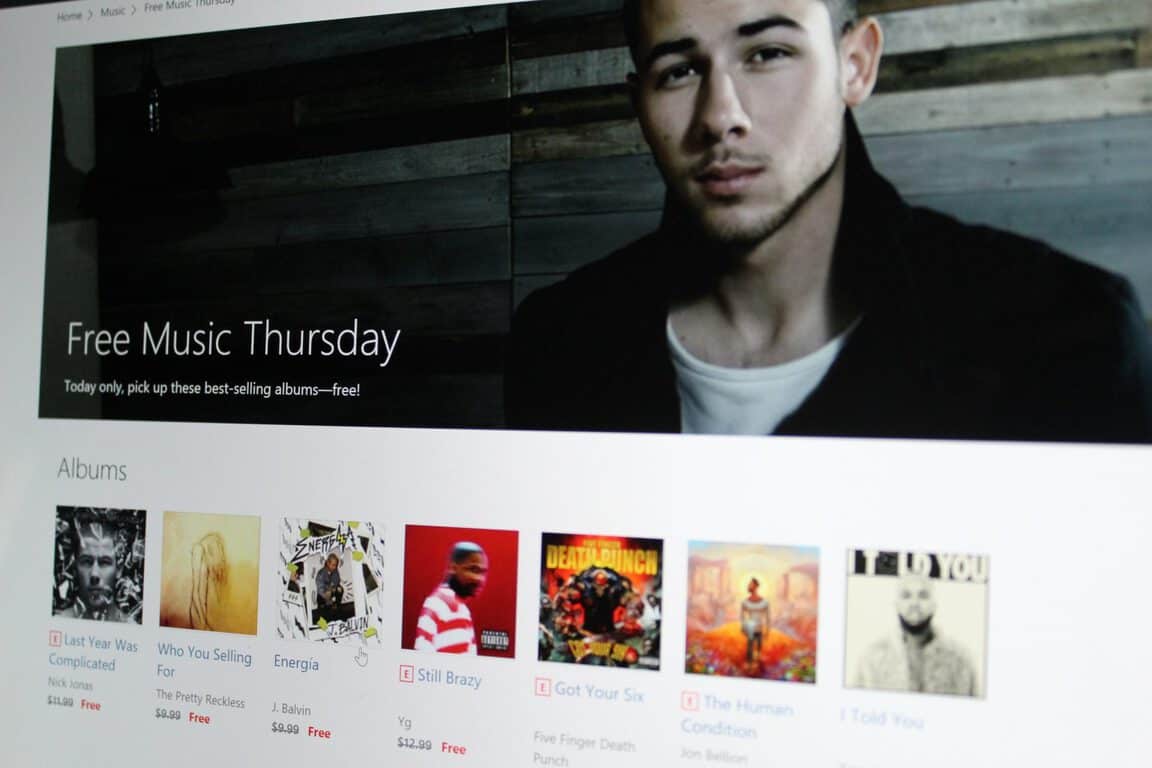
With the weather getting dangerously cold outside here in the United States, one good way to spend the evening is to sit back and enjoy some tunes in the warmth and comfort of your own home. Luckily, today is Free Music Thursday on the Windows Store, and you now can pick up seven free albums for today only, and for your listening pleasure.

Included in today’s free albums are albums which usually range in price from $7.99 to $13.99. The first album is “Last Year Was Complicated” by Nick Jonas (usually $11.99,) followed by “Who You Selling For” by The Pretty Reckless (usually $9.99.) Third on the list is “Still Brazy” (usually $12.99,) and then “I Told You” by Tory Lanez (usually $9.99). Fifth up is “Got Your Six (Deluxe)” by alt-metal favorites Five Finger Death Punch (usually $13.99.) Lastly, are “The Human Condition” by Jon Bellion (usually $7.99,) and “Energía” by J. Balvin (usually $9.99.)

Do you think you will purchase any of these albums? If you plan to do so, please do act fast, as these free albums are only available until 11:59 p.m. PT Thursday night. As always, please let us know your thoughts by dropping us a comment below! And, be sure to check out the full collection on the Windows Store!

AdDuplex adds native SDK support for apps on Xbox One

AdDuplex, the largest cross-promotion network for Windows phone and Windows Store apps and games has announced today that developers can now use the AdDuplex SDK to promote their UWP apps on the Xbox One for free. “AdDuplex SDK v.10.1 (or newer) now supports apps running on Xbox One natively – including controller support for ad selection (clicking) and interstitial dismissal,” explains AdDuplex CEO Alan Mendelevich.

To enable Xbox One support for their apps that are already using the cross-promotion network, developers will have first to make sure that their apps are running the AdDuplex SDK v10.1 or or newer. Then, it will be as simple a checking the Xbox checkbox in the app details:

To add a new Xbox app that supports the AdDuplex SDK or to separate an an Xbox One version of an app from its mobile and desktop counterparts, the process will be straightforward for developers: they’ll just need to create a new app record on AdDuplex, choose the Windows 10 platform and then select the Xbox device family.

As for ad campaigns, Mendelevich explained that “while our ad inventory on Xbox One is ramping up we will not provide a publicly accessible way for paying advertisers to advertise on Xbox One.” Still, developers who want to take advantage of the holiday season to promote their Xbox app are invited to contact AdDuplex by email to get some support from the company’s sales team.


Microsoft partners with mapping companies HERE, TomTom and Esri to create the next “world graph”

Today at the at the Microsoft Technology Center in Detroit, Microsoft announced new and expanded partnerships with HERE, Esri, and TomTom, all which are aimed at creating the next “world graph.” The partnerships also come at a time when location is ever more essential to understanding the world around us, and as it has growing potential in transforming our lives, cities, and industries.

With the TomTom partnership, which is based on TomTom’s maps, traffic, and navigation software, TomTom has plans to integrate its own services to Azure in order to make it easier and flexible for developers to build and manage enterprise, mobile, and IoT applications which depend on location.  In a statement, Peggy Johnson, the EVP of Business Development at Microsoft expressed excitement for what the partnership with TomTom means for developers:

“Making TomTom’s services available through the Microsoft Azure cloud platform will allow developers and our customers to make location a core part of their cloud-based applications.”

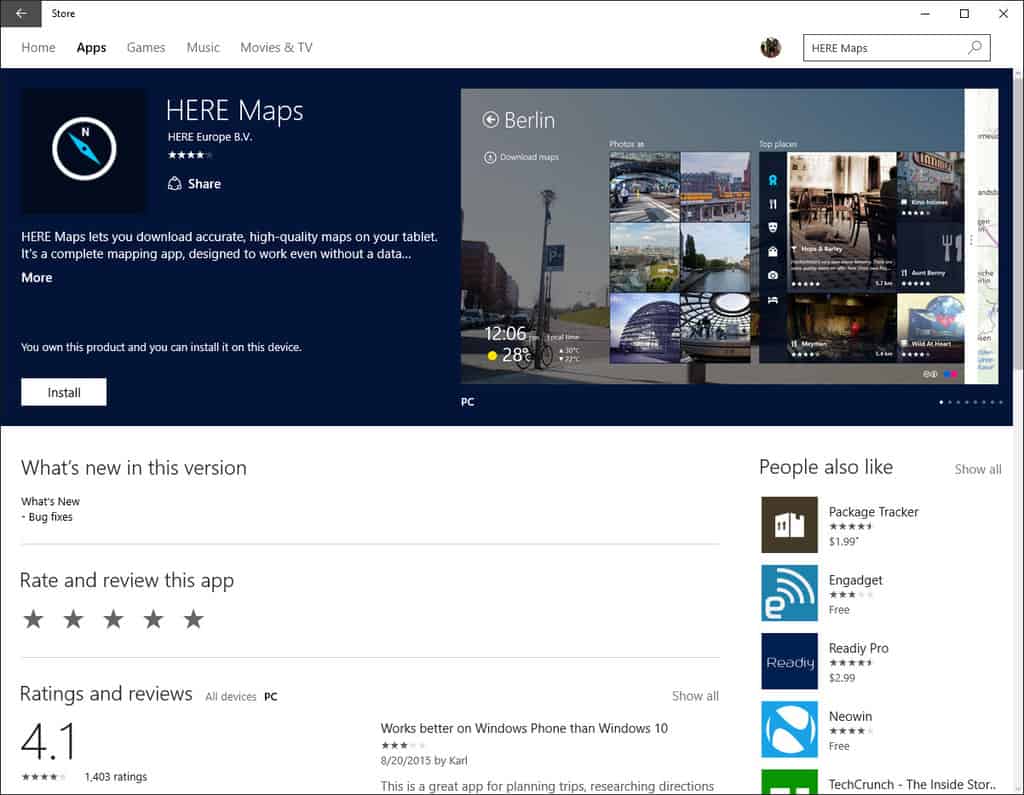
Microsoft will also be extending their ongoing partnership with HERE, which already powers many services such as Bing, Cortana, Windows, and Office. Under the new agreement, Microsoft may use HERE data and services into productivity scenarios in cars.  In a similar statement, Ashish Pandya, the director of the corporate strategy for HERE also expressed thoughts on the expanded partnership:

“We are entering a new era of services around connected cars in terms of safety, in-car productivity and making journeys more efficient…We don’t think one single entity can do this by itself. It’s going to take a collaborative effort. We’re very pleased to expand the agreement we’ve had with Microsoft.”

HERE MAPS in the Windows Store

Esri, which is a market leader in geographic information system (GIS) technology, is also another Microsoft mapping partner, and its ArcGIS products are already deeply integrated into many Microsoft applications and services. Esri’s GIS products run on Azure, and-and can ingest any real-time, location-based data,  and location services data from companies like HERE and TomTom. Microsoft has recently announced a preview of ArcGIS Maps for Power BI for compelling visualizations. Heather Blatchford, director of global alliances at Esri, reflected on the power of Microsoft Azure:

“Esri’s ArcGIS platform is turbocharged by Azure, and it’s the power and scalability of the performance of the cloud that starts to make transacting billions of observations, tens of thousands of images and millions of maps a reality.

According to Microsoft, with these three partners, the ultimate goal is to create a “World Graph,” which is a “new data index of physical places, objects and devices and their interconnectivity.”  Microsoft believes this will be the next big concept in graph technology, adding onto systems such as Bing’s knowledge graph, Facebook’s people graph and Microsoft Office’s and LinkedIn’s professional graph.

The software giant also envisions global location-based services for customers differentiated by an open platform, with large data sets and natively integrated functionality for developers, and deep integration with other data graphs for new scenarios. The company sees many uses for global-based location services and writes:

Scenarios could include connected cars that combine up-to-date mapping, traffic and weather data with a driver’s schedule, to-do lists and preferences for personalized planning and routing. Intelligent cars could re-route away from accidents, recommend nearby restaurants and find commutes with good cell coverage for work calls. To increase safety and efficiency, data from road conditions, car sensors and driver behavior can inform predictive car maintenance.

Today’s announcements are very interesting, and clearly show that Microsoft is very interested in using mapping to empower businesses, cities, and the world, to do more. Let us know your thoughts on this by dropping us a comment below!

Don Bradman Cricket 17 now available on Xbox One

Don Bradman Cricket 17, the latest entry in the Don Bradman Cricket video game series, is now available to buy, download, and play for Xbox One owners in Australia and India. The Don Bradman Cricket games are popular with cricket fans for their detailed portrayal of the sport and the improvements each entry makes over the previous ones. Don Bradman Cricket 17 features several new features, among them being the ability to use female cricket players for the first time. Here’s the official game description:

Don Bradman Cricket 17 brings a new revolutionary control system delivering the best batting, bowling and fielding experience by providing you an even greater level of variety and precision of play.Bat like a pro with the new Helicopter, Reverse Sweep and Scoop shot.Stump your opponent by mixing up your fast deliveries with Leg-cutters, Off-cutters, Cross-seam or go with spin deliveries including Doosra or Flipper.Enhanced fielding, it now includes Slides and Tap Backs inside the boundaries, plus Relay Throws.Deep Career Mode that gives you the choice between a seasoned pro or a rookie just starting out in club cricket, Captain your International team to the top of the World Rankings.Motion captured first class cricketers, including Female Cricketers for the first time in all game modes. A world first Stadium and Logo Creator that allows you to customise and share your play experience.Download and play with thousands of Community created Players, Teams, Stadia and logos.

Buy Don Bradman Cricket 17 on Xbox One

Are you a fan of Don Bradman Cricket? Let us know why in the comments below.

Anime fans can now download the AnimeLab streaming app on Xbox One

The popular Australian anime streaming service, AnimeLab, has finally announced its app for Microsoft’s Xbox One console and it can be downloaded right now for free from the app section of the store.

AnimeLab is a free anime streaming service that provides a wide range of episodes to consume from Fairy Tail and Naruto to the new Dragon Ball Super anime series. Here’s the app description:

Anime fans love AnimeLab! AnimeLab is the best way to watch anime hits and fast-tracked simulcast shows direct from Japan in HD. There are thousands episodes available to watch for free and new shows are added every week. AnimeLab supports the anime creators and is free and legal. AnimeLab is made by fans for fans.

Features: Stream in multiple bitrates and resolutions. Choose from Japanese with subtitles or English dubs (where available). Use the play queue to customise your viewing experience. Watch as much as you want, whenever you want.

Are you a fan of AnimeLab or do you prefer another service on Xbox One? Share your recommendations with us and the community in the comments below.

Unlock your AMD Radeon RX 460 to gain 12.5% of free performance

When talking about graphics cards, the Radeon RX 460 from AMD is considered a pretty good model. However, it is well known in the community that this particular graphics card is held back by its manufacturer because of parts of its physical composition locked. While this is a process that’s often used, most of the times it has beneficial results. In this instance, though, it seems Radeon might have gotten it wrong. Before we get into that, let’s take a look at what exactly Radeon did.

The issue is related to the number of texture mapping units found on the card and the number of texture mapping units actually used. Both the TMUs and stream processors are distributed with a portion locked off. This is done due to the usage of faulty pieces of hardware which could compromise the card. By locking them off, Radeon is able to sell the card at a lower market level and capitalize on the stream processors and TMUs that would otherwise become obsolete.

That being said, Roman Hartung, also known as der8auer, realized that locking off some of the components might have not been necessary and came up with a firmware update that would unlock said components. According to him, users that get the firmware are looking at 12.5% increased performance in completely safe conditions.

There is a flip side to this, however. Even though it is believed Radeon was looking to falsely brand the TMUs and stream processors as faulty with the intention of supplying a product at a lower market point, there is a chance the components are actually unstable. If this is the case, users that unlock them might be  left with a dead graphics card. Since no one wants that, you should know that flashing the edited firmware is done at your own risk.

RELATED STORIES TO CHECK OUT:

Someone made an Xbox One controller table and it’s awesome

An Xbox One fan has just created a table inspired by the video game console’s controller and it’s getting a lot of buzz online right now. The table, which can be bought on Etsy for just a little over one and a half thousand dollars, isn’t just a flat table in the shape of the Xbox One controller. This table includes indents that resemble the ones on the real thing as well as three dimensional buttons and joysticks that stick up and act as some sort of mini-tables.

Xbox One Table

As with most other fan-made products, this Xbox One controller table isn’t officially licenced and will understandable have its Etsy product page taken offline as soon as Microsoft gets wind of its existence. Still, the design shown in its creation is fairly impressive and deserves some recognition. What do you think about this table? Would you buy it? Share your thoughts with us in the comments below.

Cortana comes to IoT devices in 2017 with Windows 10 Creators Update

Microsoft introduced digital assistant Cortana to other types of devices besides the PC through Windows 10. While Cortana is already available on the Surface Hub, Xbox One, HoloLens, and Microsoft Band, it has yet to make its debut on smart home appliances.

Well, that is finally going to happen in the near future. Microsoft announced that it’s adding  Cortana support to Windows 10 IoT devices with screens next year.

Cortana on IoT device features

At WinHEC 2016, Microsoft revealed its plan to include Cortana in the upcoming Windows 10 Creators Update. Microsoft Principal Program Manager May Ji said the company intends to make PCs and other devices operate using the new Wake on Voice from Modern Standby and Far-field Voice features. Set for release in the spring of 2017, the Creators Update for Windows 10 is bringing with it those features.

Wake on Voice from Modern Standby will give Cortana the ability to power up PCs on devices using the Windows 10 Modern Standby power management tool. Far-Field Voice will make it possible for Cortana to function in settings with ambient noise that’s up to 13 feet away.

Microsoft plans to launch Cortana on Windows 10 IoT Core devices in English for the US and UK consumers initially, with additional language support set for a later rollout. Windows 10 IoT Core is a version of the operating system that works on embedded Intel and ARM-based devices. The variant can also run smaller devices like IoT gateways.

While Amazon Echo and Google Home already offer quite a similar functionality as the planned Cortana for IoT devices, Microsoft maintains that the personal assistant won’t compete with those smart home systems. Instead, the focus will be on devices with screens only.

Ji also revealed at the WinHEC event that Cortana offers more than 1,000 skills to developers, a figure that’s pretty impressive.

Read also:

Windows 10 will let users schedule update downloads

Windows 10 users have a love-hate relationship with Windows Update. When they know that an important patch is in the works, they can’t wait to get their hands on the latest updates. On the other hand, when Windows 10 updates make computers unusable, users wish Windows Update offered them more leeway.

As you already know, Windows 10 Pro users can already schedule Windows update installations. However, this feature is unavailable to Windows 10 Home users. The good news is that this will soon change.

JohnWinkMSFT recently confirmed on Reddit that Microsoft is already working on adding this feature to Windows 10 Home users. He added that Microsoft heard its fans loud and clear and some improvements are coming in the future for this.

In other words, this means that users will be able to schedule Windows 10 update downloads just like they can currently do with restarts. As a result, Windows 10 users will be able to install the updates whenever it’s suitable for them.

windows 10 schedule updates

In this manner, Microsoft finally allows users to download and install the latest Windows 10 updates when they want. This is an excellent piece of news especially because deploying updates can sometimes cause serious headache to users. Oftentimes, Windows Update gets stuck, computers freeze, the updates cause endless BSoD loops, and so on. And, as you may have already noticed, these unpleasant events always occur at the worst possible moments.

But this will soon change. Windows 10 users will be able to schedule system updates for when they are not using their computers, or are sleeping for example.

There is no clear confirmation for the time being as to when this feature will be available for Windows 10 Home users. However, we dare foretell it should come with the first Windows 10 builds of 2017. Most likely, the Windows 10 Creators Update will let users schedule updates.

RELATED STORIES YOU NEED TO CHECK OUT:

Mirror’s Edge Catalyst and Star Wars Battlefront are free to play on EA Access

There is no denying that Electronic Arts has been an exemplary provider when it comes to Xbox One games. One of the reasons to say that is because they have always been generous when it comes to giveaways. If you recall, EA recently provided exciting freebies like Plants vs. Zombies: Garden Warfare 2 and Mirror’s Edge: Catalyst. Not to forget a number of classics like the original Mirror’s Edge and SSX.

Just recently, EA Access on their official Twitter account announced that  Star Wars: Battlefront will be hitting the EA Access Vault today. So all members of the program can get their hands on DICE’s iconic first-person shooter,  based on the hit sci-fi franchise, absolutely free. Moreover, if you have Origin Access, you can play Battlefield 1 for ten hours from next week.

EA Access is currently available exclusively on Xbox One, with Origin Access acting as the PC alternative.

Star Wars Battlefront:

The well-received multiplayer shooter, Star Wars Battlefront, was first launched in November 2015.

The game earned massive recognition and was rated 8/10 by IGN. The game is also known to have revived the apprehended shooter franchise with EA’s Frostbite Engine, also bringing back all old and new characters from the sci-fi realm.

But EA was still unclear on whether the game is the regular version or the Ultimate Version of Battlefront. The difference between the variants is that the latter comes with all the respective DLC, along with the just-released Rogue One: Scarif pack.

Another note: if you have an Origin Access sub, you can enjoy  free-run of the city of Glass in Mirror’s Edge Catalyst.

Some related stories you should read:

Microsoft Edge gets Ghostery and RoboForm Password Manager extensions

For those of you who have been looking for more Edge extensions, a couple more just came up on the Windows store. Popular web plugin Ghostery has made its way to Edge as an extension, and it’s being joined by RoboForm Password Manager, another popular plugin that helps you browse the web on your own terms.

Ghostery helps you block any sort of trackers, cookies, or other unwelcome tag-alongs that come with you as you browse the web. RoboForm does what it sounds like – it helps you fill out forms by remembering passwords and other information, letting you automatically fill in important information on documents.

https://twitter.com/msedgedev/status/809129967418150912

Edge may still be lacking in add-ons when compared to browsers like Chrome and Firefox, but the addition of popular quality-of-life extensions like these two are a step in the right direction. If these sound like extensions that you wouldn’t mind having on Edge, both of them are available on the Windows Store right now.

Ghostery – Privacy Ad Blocker
Developer:
Ghostery
Price:
Free


RoboForm Password Manager

Microsoft’s Skype-a-Thon event was a smashing success

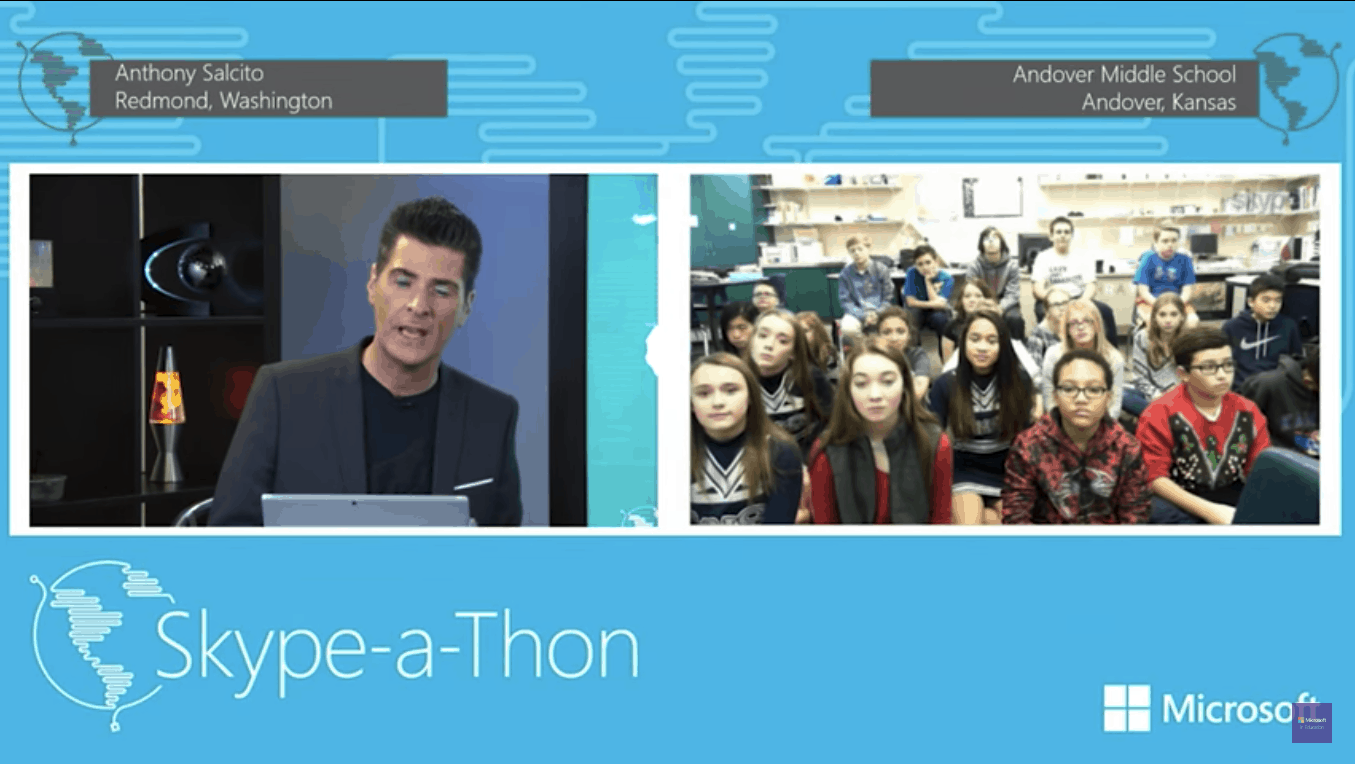
Microsoft shook up classrooms all over the world this year with its annual Skype-a-Thon, which connected teachers and students from all over the world. About 10 million virtual miles were traveled during the event – enough to circle the world 394 times. Students in the event used Skype to talk with scientists, visit zoos and aquariums, and connect with people from all sorts of different cultures.

The event brought together over 75 countries, marking the first time that many students have been able to make connections with so many different cultures. One student, Nathan E., noted that“Being able to converse so normally with someone so important was truly inspirational. It’s good to know that hard work can get you anywhere in life.”

Skype-a-Thon may be over for the year, but Skype in the Classroom is going to keep going strong. You can check out the website right here to see what programs they have to offer. If you’re only interested in the Skype-a-Thon event, another one will be going on for next year. Keep an eye out for it!

American Truck Simulator gets a major update, bringing bigger and more realistic roads

American Truck Simulator, the venerated driving and logistics game has finally got its big rescale that went into open beta last month. The rescale has apparently made the game ‘greater than ever’ and has been under development for around six months. There is now a more realistic and wider spaced network of roads added to the game environment, thanks to the update patch 1.5.

Not just that, the huge transformation has also brought in reworked cities, extra truck stops along with the hundreds of miles of open road. Developer SCS Software said that all of these efforts have been made solely to give a closer feel of the epic United States scale. To celebrate the commendable achievement, developers have released a dubstep trailer, check it out below:

The rescale changes the world scale from 1:35 to 1:20, so now there is a 1.75x larger map.  This means, longer roads and greater spaces between them to push in more features and detail.

“With the different world scale comes also a longer day-night cycle and rebalancing of the economy, so the gaming experience is changing way more than would be expected through a ‘mere patch’ of an existing game,” the studio explained.

The main features of the rescaled 1.5 patch include:

Main features

  • Map rebuilt in 1:20 scale
  • Upgrade Shop and Truck Browser Search Tool
  • New chassis options (6×2 & 6×2 Midlift)

Game

  • Adjustable interior FOV per truck
  • Weigh station UI behaviour made more real
  • Truck repair/refuel performed by hired driver cost money, included in logs
  • Added informational dialog showing when game detects upgrade or downgrade
  • Added pounds + short tonnes as weight unit option
  • Add possibility to buy driver and co-driver plate in truck dealer
  • Online job offer: Replaced refresh button with browse jobs
  • Better trailer air pressure simulation
  • Low air warning should only be active with running engine
  • Parking brake mechanical safeguard on low air added
  • Revised rolling resistance computations
  • Hired driver use same math for eco skill as player
  • Added selector modes to shift layout, correct detection of split shifts (advanced mode)
  • Adaptive shifting logic improved
  • Mod manager: Added link to load game screen in case game crashed and user has at least one mod activated
  • Mod manager: Added possibility of setting profile by name and by user profile pointer
  • Mod manager: Added DLC dependency list to mod manifest
  • Prevent to AI trucks disappearing in players view
  • Tweaked traffic spawn frequencies

Mods

  • Changed map parameters (climate_profile, map_data)
  • Moddable interior camera zoom parameters. (speed, factor)
  • 1 degree rotation on Ctrl + R, 90 degree rotation on Home
  • Merged editable sign and sign dialog
  • Refresh sign template and its model from content browser
  • Added letter-spacing to sign editor
  • Store content browser navigation history
  • Support for day/night effect switching and child hookups for lod_model_hookup_u
  • Undo of veg sphere manipulation

Office 365 has double the market share in Europe of Google’s G Suite

Data protection company Bitglass released their Cloud Adoption Report a few weeks ago revealing some interesting growth in regards to European company data reliance. Compared to other cloud suites, the two most used were Microsoft Office 365 and Google G Suite at a whopping 66% with Microsoft lording over them all. In fact, Office 365 was nearly double the G Suite’s 22% adoption (via TechRadar).

The growth towards 66% is a significant increase of cloud adoption shared between Microsoft and Google reported at 59% last year. The 44% adoption rate for Office 365 is a testament to the advancement of cloud computing in enterprises. Bitglass’ EMEA cloud report notes that the highest rates have been located in France with 82% and the Netherlands with 78%.

Even if tech companies in Europe have an 83% cloud adoption rate, Microsoft might not have EU enterprise in its pocket just yet. TechRadar speculates that the European bias towards Slack where it’s been more successful might cause some issues for the Microsoft Teams launch in the near future.

The full report can be read from Bitglass.

Best Ransomware Decrypt Tools to use to Stay Protected

Your computer files have been encrypted with the AES algorithm and you need to pay $294 to recover your data.

If this line rings a bell to you, that’s because you might have probably been a victim of ransomware before. As ransomware attacks continue, you can avoid paying for the decryption key using the following tools.

Or if you don’t want to use a third-party tool, we got other fixes for you in case you can’t decrypt files in Windows 10/11.

How to decrypt files encrypted by ransomware?

Trend Micro Ransomware Screen Unlocker Tool

Ransomware performs an attack in two different methods: lock screen and crypto. By locking the PC screen, ransomware limits a user from accessing the computer. The crypto method uses encryption algorithms such as AES to encrypt files. Trend Micro’s Ransomware Screen Unlocker Tool works to disable the lock screen types of ransomware.

The tool performs this in two different scenarios. In the first scenario, the tool could block normal mode while leaving safe mode with networking accessible. Here’s how to perform this operation:

  1. Open your PC in Safe mode with Networking.
  2. Download the Trend Micro Ransomware Screen Unlocker Tool and run the executable file.
  3. Extract the download file to install and reboot your PC in normal mode.
  4. Trigger the decryptor by pressing the following keys: Left CTRL + ALT + T + I. You may need to perform this key presses several times.
  5. If you see the Trend Micro Ransomware Screen Unlocker Tool screen, click scan to remove the ransomware files from your PC. Trend Micro Ransomware Screen Unlocker for USB

In another scenario, the tool may block both these modes.

  1. Download the Trend Micro Ransomware Screen Unlocker Tool for USB on a non-infected computer.
  2. Insert a USB drive and run the executable file.
  3. Click Yes when you see the User Account Control window and select the USB drive before clicking Create.
  4. Insert the USB drive on the infected PC and boot that PC from the external drive.
  5. Upon reboot, the following screen will show up:  Nightsaber
  6. If the infected PC fails to detect the USB drive, perform the following:
  7. Insert the drive to another USB port and reboot the PC.
  8. If the above step fails, use another drive.
  9. Open the infected PC and wait for the decryptor to remove the lock screen.
  10. Click Scan and then Fix Now.

Avast Free Ransomware Decryption Tools

Avast_decryptor

Avast’s decryption tools target many forms of ransomware. Earlier this month, the security vendor expanded the list with the addition of the decryptors for Alcatraz Locker, CrySiS, Globe, and NoobCrypt. Here’s a complete list of Avast’s decryption tools:

Kaspersky Ransomware Decryptor

Kaspersky_decrypt

Security firm Kaspersky designed a number of decryption tools for various ransomware threats, including Wildfire, Rakhni, Rannoh, and CoinVault.

Malwarebytes Anti-Ransomware Beta

Malwarebytes_anti_ransomware

Malwarebytes Anti-Ransomware Beta runs in the background to analyze the behavior of file encrypting ransomware programs. The tool terminates threads on the computer that attempt to encrypt files. The program might contain a few bugs as it is still in beta stage.

The decryptor works for some of the notorious ransomware threats including Cryptowall, TeslaCrypt, and CTB-Locker. Download Malwarebytes Anti-Ransomware Beta.

Emsisoft Decryptors

Emsisoft, one of the leading security vendors today, also offers various free decryption tools to recover encrypted files without paying the ransom.

Leostone Decryption Tool for Petya Ransomware

One of the most recent ransomware threats that hit many victims this year is Petya. The Petya Ransomware encrypts parts of a hard drive to prevent the victim from gaining access to the drive and the operating system.

Fortunately, Leostone has created a portal for Petya victims to generate the decryption key based on information that they provide from the infected drive. However, the tool works only if the Petya-affected drive is attached to another computer, from which the threat data will be extracted. It seems the tool is for advanced users only. But you can give it a try by downloading the tool from GitHub.

Final words

The number of victims is growing. Securelist’s KSN report indicates the total number of ransomware victims rose to 2,315,931 in March 2016 from 1,967,784 in April 2015. The financial implication of ransomware attacks could not be underestimated as well. According to Symantec’s Ransomware and Businesses 2016 report, the average ransom demand has now reached $679 from $294 last year. Thanks to the abovementioned free decryption tools, retrieving your files is only a few clicks away. If we missed any of the best ransomware decrypt tools, tell us about them in the comments.

Microsoft adds private internet connections to UK Azure datacenters

A few months ago, Microsoft announced that UK Azure datacenters would be receiving Office 365. Microsoft is now offering private internet connections to those Azure installations.

Microsoft’s customers can use Azure ExpressRoute and PSN/N3 Connectivity for their private internet connection needs using the UK Azure datacenters. UK businesses and governments alike are taking advantage of the UK Azure datacenters scattered throughout the region, including the UK Ministry of Defence, the London Metropolitan Police and parts of the NHS.

Other new Azure services include:

  • Azure Security Center, which helps customers prevent, detect and respond to threats, giving them full visibility and control over their secure network.
  • Service Fabric lets developers focus on building features for their applications, without needing to design and write additional code to deal with reliability, scalability or latency.
  • Azure Marketplace is an online store featuring thousands of certified and open source applications, developer service and data.
  • Power BI and Power BI embedded allow developers to place fully interactive reports and visualisations in customer-facing apps without the time and expense of having to build custom controls from the ground up.

In 2017, Microsoft plans to release more Microsoft Azure services, including:

  • Azure Site Recovery
  • Azure Backup
  • Azure Automation
  • DocumentDB
  • Azure Devtest Labs
  • Dynamics 365

Microsoft’s UK chief executive, Cindy Rose, is happy to see how fast Microsoft has developed Azure UK datacenters:

“We’re delighted to see such growing demand for our cloud services from our new data centres in the UK. We’ve been part of the UK’s tech landscape for over 30 years and we’re proud of the way this country leads the world in embracing technology and new ideas. With our trusted cloud now delivered locally, and our commitment to principles of security, privacy, transparency, compliance, and availability, we are well placed to support the digital transformation of organisations throughout the country.”

Take an interactive tour of a Microsoft Datacenter

The Overwatch Holiday update is now live on Xbox One

The Overwatch Winter Wonderland event is here to spread holiday cheer to all Overwatch fans on Xbox One. From now until Jnuary 2, 2017, Overwatch fans can take advantage of special Overwatch-themed content, including Mei’s Snowball Offensive, where you can battle your enemies in intense 6v6 matches.

Overwatch fans can also get their hands on new Winter Loot Boxes, and see all the holiday decorations in Hanamura and King’s Row.
Winter Loot Boxes can be earned or purchased in Overwatch and each Winter Loot Box will have at least one special item from the Overwatch 2016 Winter Wonderland collection, including profile icons, sprays, victory poses, emotes, highlight intros, skins, and more!

The Winter Loot Box contents are random, but you can still unlock a number of customization options in the Hero Gallery from now until January 2, 2017. Once an Winter Loot Box item is unlocked, you’ll have access to it forever; the content will not expire when the Overwatch Winter Wonderland event ends.

Overwatch, Mei's Snowball Offensive
The 2016 Overwatch Winter Wonderland event also features Mei’s Snowball Offensive, an intense 6v6 single elimination fight. Here’s a description of everything that is offered in Mei’s Snowball Offensive:

“In this brawl, Mei’s Endothermic Blaster no longer unleashes a stream of frost or shoots icicles. Instead, it’s been modified to fire a single, super-powered snowball. Taking down an enemy only takes one hit, but a miss can be costly. Once your weapon is empty, your enemies will have the advantage as you search for the nearest snow pile to reload, so don’t forget to cover your retreat with ice walls and cryo-freeze to block their attacks—and when the battle starts to heat up, you can activate Mei’s Ultimate, which turns her blaster into a semi-automatic snowball launcher, allowing you to fire continuously as your enemies scatter.”

Buy Overwatch, available on Xbox One, and start playing in the Overwatch 2016 Winter Wonderland event with your friends on Xbox Live. You’ll have to act fast; the Overwatch Winter Wonderland event ends January 2, 2017.

Overwatch® 2
Overwatch® 2
Price:
Free

Is Windows Hello ready for release? Dona Sarkar wants to know

Ever since it was announced about two years ago, Windows Hello, Microsoft’s futuristic, personal, and password-free way of having users log into their Windows 10 devices has come a long way. While the feature is included with a number of devices, such as the HP Elite x3 (fingerprint scanner), the Lumia 950 and 950 XL (iris scanner), and the Surface Book/Surface Pro 4 (facial recognition), Windows Hello is still in beta.  It is fitting then that Dona Sarkar is now asking if the feature is ready to drop it’s beta tag and head out for an official release.

As seen in the Tweet above, Dona Sarkar is calling on Windows Insiders to give feedback on the Windows Hello feature, and to set it up and try it out. Considering the positive feedback seen in some replies to her initial tweet, this would appear to suggest that the technology has come far, and Microsoft may be considering releasing the technology out of the beta stage. Other Windows Insiders, however, put a damper on things and have suggested that Windows Hello is far from perfect, pointing out that the feature is far from perfect and lags on some devices such as the Lumia 950.

Have you used Windows Hello on your Windows 10 device? If so, do you think the feature is ready to drop it’s beta tag and officially be released? Let us know what you think and how the Windows Hello experience has gone for you by dropping us a comment below!

Best music apps for Windows 10/11

If you listen music frequently on your PC, you probably have a specific music app that you use. In case you don’t have a favorite music app, today we’re going to show you some of the best music apps for Windows 10.

What are the best music apps for Windows 10?

MediaMonkey (recommended)

best-music-apps-mediamonkey-1

Unlike other applications on our list, MediaMonkey doesn’t have an attractive visual design, but it makes it up for it with its features. First thing that you’ll notice when you open MediaMonkey is its design and dark theme. We feel that the user interface is a bit cluttered with features, and the overall design seems a bit outdated. Unlike other music apps on our list, MediaMonkey allows you to open multiple tabs so you can quickly switch between different artists.

As for the user interface, you have different categories in the left pane that allow you to sort your library by folders, artists, albums, etc. This is a great feature, but it feels a bit cluttered with all the different options. Since left pane uses tree structure to show all the available options, users might feel overwhelmed with this feature. The middle pane shows all available songs according to the selected category on the left. If you want, you can also show album art along with additional information in middle pane. You can even show columns that will allow you to sort your music according to genre, artist or album. Lastly, the right pane is reserved for your current playlist.

MediaMonkey supports a wide range of audio formats, but it also allows you to add your MP3 tags with ease. If you want, you can also identify songs and get information about them such as MP3 tags, album art or lyrics right from MediaMonkey. Another option that this app offers is the ability to organize songs on your hard drive. This is useful if you tend to store your music on different locations on your PC. In addition to organizing, this tool can also rename all your songs automatically. Another feature is the ability to download audio from podcasts, but there’s also an ability to download media files from any website. This app also allows you to sync your music with other devices and share it over UPnP / DLNA.

MediaMonkey also has support for conversion, so you can easily convert any audio CD to MP3 with it. Of course, you can convert different audio formats, and even extract audio from some video files. If you want to burn your music quickly, there’s a built-in burn option that you can use. The app also comes with a Party mode that allows users to select the desired song, but they won’t have full access to your library, so they won’t be able to modify it in any way. If you’re a fan of visualizations, we’re happy to inform you that this tool completely supports visualizations. In addition to all these features, MediaMonkey supports add-ons that will enhance it even further. Of course, there’s support for additional skins, so you can easily change the look of MediaMonkey if you don’t like the default skin.

Although MediaMonkey is a free tool, some features aren’t available in the free version. If you decide to purchase MediaMonkey you’ll get multiple media collections and the ability to organize your files automatically in the background. Additional features in paid version include advanced AutoPlaylists, automatic conversion, and high-quality CD conversion. Premium version also offers automatic search for artwork and lyrics, advanced search, sleep timer, song previews and the ability to burn CDs at maximum speed.

MediaMonkey offers an extensive array of features, and with the ability to add add-ons, MediaMonkey is easily one of the most advanced music apps. Due to all these abilities, this application might seem a bit daunting to new users. As for the free version, it offers all the basic features that you need, so you probably won’t have to upgrade to premium version. We also have to mention that user interface can seem a bit cluttered and outdated, but you can somewhat fix that by using custom skins. Overall, MediaMonkey is a great app for music lovers that want to categorize and organize their music.


Dopamine

best-music-apps-dopamine-1 First on our list is Dopamine, and this music app offers sleek and simple design. Dopamine comes with both dark and light theme, so it will easily match the look of your Windows 10. In addition, this tool can also use the same color scheme that you’re using in Windows.

After you start Dopamine, you’ll be asked to choose your theme and highlight color. After that, you just need to locate your music folder and Dopamine will scan it and add all your music. When the application starts, you’ll notice that your music is neatly organized. On the left there’s a list of all artists, and in the middle there’s a list of albums. This allows you to easily search for a specific artist or an album. On the right there’s your current playlist along with the search bar that allows you to quickly search for specific song or artist. If you want, you can switch between different tabs and see your songs sorted by genre, albums, song name or playlist.

best-music-apps-dopamine-2

As for customization, this tool allows you to see notifications in the bottom right when a new song starts playing. If you want, you can even click the Taskbar icon and open the minified version of the player that allows you to use playback controls quickly. If you don’t want to use large user interface, there’s also an option for minified version that comes with playback controls and togglable playlist.

There’s also an option for Micro or Nano player, so you can make your player even more compact. Regarding supported formats, Dopamine supports WAV, MP3, OGG vorbis, FLAC, WMA and M4A/ACC formats. The list of supported formats isn’t impressive, but it should be enough for most users. Regarding requirements, this application requires Windows 7 or later and .NET Framework 4.6.1 or newer. Another thing that we have to mention is the availability of portable version, so you don’t have to install the app on your PC in order to run it.

best-music-apps-dopamine-3

Dopamine comes with sleek interface that will look amazing on every PC and match your Windows 10 theme perfectly. We have to mention that customization options are limited since there’s no support for add-ons or skins, so this could turn away some advanced users. If you’re looking for visually appealing music app that will look like a native component of Windows 10, be sure to try Dopamine.


AIMP

best-music-apps-aimp-1

AIMP is a music app that comes with relatively simple design and many customization options. We have to mention that this app supports about 32 different audio file formats, but it also supports internet radio and it even allows you to record internet radio. In addition, there’s support for various sound effects so you can easily change pitch, tempo, speed or add effects such as flanger, echo, reverb and many others. Of course, there’s support for equalizer, volume normalization and various mixing options.

As for additional options, there’s a Scheduler available that allows you to set alarm or sleep timer. Another unusual feature is the ability to repeat specific segment of the song. Simply select start point and end point and that section will repeat until you turn it off. Another option that we noticed is the support for simple visualizations which some users might like. One feature that we didn’t expect to see is the audio conversion option that allows you to convert your files from one format to another. The choice of formats is limited, but you should be able to expand it with plugins. In addition to music files, this feature also supports audio CDs. Last feature that we need to mention is the Tag editor which you can use to edit your MP3 tags easily.

As for the interface, your library is located on the left, and you can sort it by albums or by folders. The middle pane shows the selected album or folder while the pane on the right represents your playlist. Of course, there’s an ability to save your playlist, so you can keep your favorite music in one place. It might take you a bit to get used to the interface of AIMP, but after a while you should feel like at home. AIMP has a little icon in the Taskbar that reveals playback controls while the application is minimized, which is quite useful.

As you can see, AIMP is packed with all sorts of features, but if that’s not enough for you, there are many available plugins to download. In addition to plugins, you can also download many new skins or even icons for AIMP.

It’s safe to say that AIMP allows a great level of customization, so it will be perfect for advanced users. Another useful feature is the ability to install AIMP as portable application on your PC, so it won’t make any changes to your registry. One flaw of AIMP might be its complicated user interface, but most users should get used to it after a couple of minutes. Another thing that we didn’t like is the notification that appears on the top of the screen whenever a song changes. With its dark overlay it might be a bit distracting, especially because it stretches from one side of the screen to another. However, you can easily turn this option off or change it with plugins.

MusicBee

best-music-apps-musicbee-1

MusicBee is another music app for Windows 10, and just like several apps on this list, it comes with sleek user interface. The app has three panes, and the pane on the left shows you the list of artists. It’s also worth mentioning that almost every artist has a thumbnail available, which is a nice touch. Middle pane is reserved for selected artist’s songs or albums. In this pane you can display only songs, album covers or both album covers and songs. In addition, middle pane allows you to quickly navigate to a specific artist simply by selecting the letter in the menu on the top. Pane on the right is reserved for your playlist, and there’s also an album cover available. If you want, you can show lyrics instead of album cover. Lyrics will be displayed automatically, so you won’t have to search for anything manually.

best-music-apps-musicbee-2

MusicBee comes with several tabs, and by choosing Now playing tab the user interface will change and show you the big picture of the artist in the background that changes automatically. On the left you’ll see album cover and lyrics of the current song. On the right there is your playlist so you can easily switch to a different song. MusicBee supports playlists but it allows you to create multiple playlists and switch between them easily.

Music Explorer tab allows you to read the artist bio, but it will also allow you to view similar albums and artists, so it’s perfect if you want to discover new artists. When you select an artist in Music Explorer tab, you’ll see relevant statistics such as most played or best rated tracks. This allows you to easily keep an eye on your favorite songs. There’s also a Podcasts tab that allows you to listen to various podcasts on your PC. We have to mention that you can add more tabs, which is a great feature to have.

best-music-apps-musicbee-3

MusicBee also allows you to lock your player with a password so that others can’t change your playlist. There’s also support for Mini and Compact player sizes, and both of them look impressive. Taskbar icon is also available, and by clicking it you’ll open playback control options. MusicBee also supports Theater mode that will remove all unnecessary information from the screen. If you have a touchscreen device, this option will be perfect for it.

best-music-apps-musicbee-4

MusicBee also works with Groove Music and it supports syncing with other devices. There’s also a wide range of plugins and skins available that you can use to enhance MusicBee even further. MusicBee offers beautiful user interface and most features that basic users need, such as the ability to download lyrics automatically. With the support for plugins and skins, this application will also appeal to advanced users as well.


Foobar2000

best-music-apps-foobar2000-1

Foobar2000 is a simple music app that allows you to customize your player anyway you like. The default look of the player isn’t visually impressive, but you can arrange the components any way you like. There’s also a Layout Editing Mode that allows you to customize the look of your player even further.

Foobar2000 supports media library, and after your desired folder is scanned it will be added to the library. To play a certain song you need to open the Library window and there you’ll see the list of artists. You can expand the artist tree and select the desired album or you can simply search for it from the filter field. If you prefer to see available folders or albums you can do that by changing the View option. We have to mention that this method seems a little strange, but you should be able adjust to it quickly.

As for other features, this player supports a wide range of audio formats, gapless playback and advanced tagging capabilities. For advanced users there are customizable keyboard shortcuts and customizable user interface. If you want to enhance Foobar2000 even further, you can download and install one of the many available plugins. Our main complaint regarding Foobar2000 is its plain-looking user interface. However, with the advanced customization options you can customize your interface anyway you like. Unfortunately, this can be a bit complicated for basic users. You can simplify the process by installing one of many available skins. We have to say that many skins completely change the look of Foobar2000, so we highly recommend that you try some custom skins.

There’s also a Universal app available for download, but it offers humble user interface which some users might not like. Foobar2000 is a great music app, especially if you invest some time to learn how to customize it. If you don’t want to deal with customization and advanced settings, you’ll get a simple and lightweight music app for your PC. As we said, this app is perfect for advanced users that want customize their player. Foobar2000 also offers a lot to the basic users, as long as you don’t mind the humble user interface.

Resonic

best-music-apps-resonic-1

Resonic is a simple music app that comes in both free and paid version. The paid version is designed for audio professionals and it allows you to set cues and extract audio along with other options for audio experts. Paid version also allows you to change Metadata such as MP3 tags.

We have to mention that this music app is extremely fast and lightweight which is one of its stronger points. Resonic comes with a clean user interface that is simple and user-friendly. First thing you’ll notice when you open Resonic is its waveform on the top. Regarding the player, all standard options available. There’s also an option that allows you to play only specific segments of a song.

As for the user interface, it comes with two panes. Left pane works as a file browser and it allows you to navigate through folders quickly. Right pane is designed to show you available files in that folder. After you navigate to certain folder simply click the song that you want to play and it will start instantly. The best quality of Resonic is its speed and attractive design, but certain features such as playlists are missing. Resonic isn’t a multimedia player, and this is the main reason why these features are missing. However, you can still use Resonic as simple and lightweight music app. However, we have to warn you that certain features such as playlist and search are missing.


iTunes

best-music-apps-itunes-1

iTunes is probably one of the most popular music apps, especially on Mac OS. This application is available on Windows platform, and it offers amazing yet simple design. Using iTunes you can access Apple Store and purchase music and videos, but you can also play locally stored files. Simply add your files to the library and you’ll be able to access them from the pane on the left. You can quickly see available artists, albums or songs. iTunes has automatically created playlists in the left pane, but you can also create your own playlists as well.

As for the right pane, it shows you available songs as well as album covers. Music queue isn’t visible by default, but you can access it by clicking the More button next to the search bar at the top. In addition, there is also compact mode available that will hide all unnecessary information.

iTunes is one of the most popular music apps, and it offers beautiful design. Unfortunately it doesn’t allow any customization, so that might be a flaw for some users.

Winyl

best-music-apps-winyl-1

Winyl is another music app that comes with a simple design and basic features. According to its developers, this application can support more than 100,000 files in your library without affecting your performance. As for the supported formats, Winyl supports all most popular formats such as MP3, OGG, WMA, etc. There’s also a built-in tag editor as well as an ability to automatically download lyrics and album covers online.

As for the user interface, it’s simple but effective. Interface has a left pane that you can use to choose different artists or albums. In addition, you can also select artists and albums by navigating to their folders in the left pane. There is support for Internet radio and you can choose between many different radio stations. However, it seems that the ability to add new radio stations is missing.

Another feature that we have to mention is Smartlist feature. By using this feature you can play 50 random songs or 5 random albums. Of course, options such as most played or top rated tracks are also available. There’s also an option for user playlists. If you don’t like the user interface, you can always switch to Compact mode that removes unnecessary options.

Winyl is a decent music app, but it doesn’t have many customization options since there are no plugins available. If you’re looking for a regular music app with a simple user interface, Winyl might be perfect for you.

There are many great music apps for Windows 10, and it’s really hard to choose the best one. If you want an app that has the most features, then MediaMonkey is probably the best choice for you. Users that need an app with great design and functionality will probably want to try MusicBee or AIMP. If you are a basic user and you just want a simple music app, we recommend Dopamine or Winyl.

READ ALSO:

Almost half of Xbox One owners play backwards compatible Xbox 360 video games

Microsoft’s Head of Xbox, Phil Spencer, tweeted earlier today that almost half of Xbox One users play Xbox 360 video games on the console through the backwards compatibility feature that launched last year. “Now over 300 back compat titles. Nearly 50% of XB1 owners playing BC games is great to see,” his tweet read. “Thanks for supporting the program.”

The number of Xbox 360 titles that are playable on the Xbox One have gradually increased on a regular basis and the feature recently passed the 300 video games mark. There are still a large number of Xbox 360 games that have yet to be given backwards compatibility but most of the more popular titles are now available.

Are you a fan of the backwards compatibility feature? How many Xbox 360 video games have you played on the Xbox One? Let us know in the comments below.

How to keep up with the latest FIFA 17 boot updates

FIFA 17 fans love customizing their players’ appearance. Just like any football fans, FIFA 17 gamers really appreciate a good pair of football boots. The only problem is how to stay updated with the FIFA 17 boot DLCs.

Now, the good news is that you can follow this FIFA 17 forum thread and get the latest information about the new football boots available in the game’s catalog.

Fans expect EA to roll out more boots updates until around May time. The latest FIFA 17 boot updates include four new Adidas models, and one Puma and Mizuno models. The new boots were rolled out at the end of November.

Latest FIFA 17 boot updates

  1. Adidas Messi 16+ Red Limit
  2. Adidas Copa 17.1 Red Limit
  3. Adidas Ace 17+ Red Limit
  4. Adidas X 16+ Red Limit
  5. Puma evoTOUCH PRO
  6. Mizuno Morelia Neo II – Red

FIFA 17 players strongly believe that EA should release new football boots more often. Of course, this is not an essential game element, but new football boot models make the game more enjoyable. Gamers wish that EA checked the new products more often and updated the game catalog accordingly.

Haven’t checked yet today but I don’t understand how it takes EA so long to add new boots. The Nike Floodlights pack was revealed a couple of weeks ago so why couldn’t EA have made them so they could be put in the catalogue when the boots were officially released on Monday? All they have to do is update the colour scheme, they already have the template.

However, taking into account all the bugs affecting FIFA 17, it’s easy to see why EA introduces new football boots quite rarely.

RELATED STORIES YOU NEED TO CHECK OUT: