Microsoft Adds “Make Print Screen Key Yieldable” Policy to Windows 11

Microsoft recently introduced Local Group Policy support for GPP debug logging, but that’s not the only policy change. According to Windows Latest, Windows 11 Build 26300 includes a new Group Policy called “Make Print Screen key yieldable.”

The policy gives users and admins more control over how the Print Screen (PrntScr) key behaves.

New Policy Lets Apps Override the Print Screen Key

By default, pressing the Print Screen key opens the Snipping Tool or the built-in screen capture interface.

With the new policy, third-party apps can intercept and override the shortcut. If left as Not configured (the default state), apps can take control of the Print Screen key.

If you enable the policy, apps are allowed to override the default screenshot behavior. If you disable the policy, Windows forces legacy behavior and blocks apps from hijacking the key.

A full system reboot is required for any changes to apply. The new policy appears in the following path:

Computer Configuration > Administrative Templates > Windows Components > File Explorer

It requires Group Policy Editor, meaning it’s available on Windows 11 Pro and higher editions.

Replacing the Old Accessibility Toggle

Back in 2023, Microsoft added a toggle under Keyboard settings, and it was labeled “Use the Print Screen key to open Snipping Tool.”

That setting has effectively disappeared in newer Windows 11 versions, such as 24H2 and 25H2. Interestingly, Snipping Tool still directs users to Accessibility settings, even though the specific option no longer exists.

The new Group Policy provides a more direct and granular way to manage screenshot shortcut behavior, especially for enterprise environments. Microsoft is currently testing and rolling out this policy in preview builds, so we might see it available soon.

In other news, Microsoft has also released the Canary update KB5077240, alongside KB5077242 and KB5077243 for the Beta and Dev channels.

GTA 6 Title IDs Surface in PlayStation Database, Fueling Pre-Orders Speculation

Grand Theft Auto VI (aka GTA 6 in short) is the most anticatpated games of 2026. Rockstar Games, the studio behind GTA 6, is all set for November release. Although, we’re months away from the actual release date, the hype around GTA 6 shows no signs of slowing, thanks to multiple rumors and leaks that have been circulating online. Now, a new leak suggests that GTA 6 pre-orders may be closer than ever.

Backend PlayStation update sparks fresh excitement among GTA 6 fans

The news comes via data mining expert @PlayStationSize on X (formerly Twitter), which reported that title IDs for GTA 6 have been added to the PlayStation Store database. For those unaware that’s a backend change that often precedes the opening of pre-orders and full storefront listings.

Title IDs are internal identifiers used by Sony’s digital platform to organize games by region, edition, and distribution format. In other words, their presence hints that Rockstar Games is preparing infrastructure for a product page, pricing, and preorder options, even before Sony makes anything public.

Mot to mention, this news has reignited buzz around GTA 6, especially given its history of delays. The game is still scheduled for a November 19, 2026 release, after being pushed back from earlier windows. But with the backend updates now visible to database trackers, many believe the next phase, including pre-order launch and pricing details, could be imminent. Reports from multiple news outlets point out that the addition of title IDs often precedes preorder rollouts by weeks or even days, though timing is never guaranteed.

Are you excited for GTA 6? What are your expectations from the game? Let us know in the comments below.

Intel Positions Xeon 6 SoCs as the Foundation for AI-Ready 5G and the Path to 6G at MWC 2026

Intel has detailed telecom goals at the ongoing Mobile World Congress (MWC) 2026. The company is positioning its Xeon 6 processor family as the core foundation for AI-enabled 5G networks and the evolution toward 6G. Intel argues that operators can scale intelligence across existing infrastructure rather rather than major architectural overhauls.

Intel’s strategy centers around embedding AI inference directly into network environments spanning the Radio Access Network (RAN), 5G Core, and edge, while maintaining efficiency, openness, and cost control. As for the RAN, Intel is promoting Xeon 6 SoC, which integrates AI acceleration using Intel Advanced Matrix Extensions (AMX) and vRAN Boost.

In the official blog post, Intel mentions that this approach enables real-time inference inside virtualized RAN deployments without being heavily dependent on discrete GPU accelerators. Intel believes, this way operators can reduce power consumption and infrastructure complexity.

In the 5G Core, Xeon 6 with E-cores is designed to deliver higher performance per watt while integrating security technologies such as Intel Trust Domain Extensions (TDX) and QuickAssist Technology (QAT). Intel says the platform allows operators to scale AI workloads and secure sensitive data without redesigning their networks.

The company futher notes that several major telecom operators are already adopting the platform. SK Telecom, NTT DOCOMO, Rakuten Mobile, and Vodafone have announced deployments or modernization efforts built on Xeon 6 infrastructure.

Not to forget, Intel has also previewed Xeon 6+ SoC, built on the Intel 18A process node, promising higher core density and improved power efficiency. The company is further positioning it as a key step toward more intelligent, software-defined 6G networks.

Xbox Game Pass March 2026 Lineup Revealed With Final Fantasy 3 and Kingdom Come 2

Xbox Game Pass got some interesting additions last week, but now attention shifts to the next wave of titles heading to the service in March 2026.

According to PureXbox, Microsoft has started outlining the first batch of games coming this month, with several notable releases already confirmed across console, PC, and cloud.

Early March wave brings major RPG additions

The first drop lands on March 3 with Final Fantasy 3, arriving for Xbox Series X|S, PC, and Cloud. The classic RPG will be available to Ultimate, Premium, and PC tier subscribers.

On the same day, Kingdom Come: Deliverance 2 joins the service for Series X|S, PC, and Cloud. The sequel to the historical RPG will also be accessible through Ultimate, Premium, and PC memberships, making it one of the biggest additions of the month so far.

Two days later, on March 5, Planet of Lana 2 launches into Game Pass for Console, PC, and Cloud. The sequel to the atmospheric indie hit will be available to Ultimate and PC subscribers.

Later in the month, Nova Roma arrives on March 26 as a PC-only addition, included with Ultimate and PC tiers.

More announcements expected mid-month

This is only the early March lineup. Microsoft typically reveals additional Game Pass waves around the middle of the month, so more titles are likely on the way.

A small batch of games already left the service on February 28, and another round of removals is expected to be announced soon.

Separate research indicates that Xbox Game Pass can bring more than 500,000 players to major releases shortly after launch. At the same time, Microsoft appears to be exploring a significant expansion of the Game Pass Ultimate tier, signaling that the subscription model remains central to its long-term strategy.

Windows 11 Adds Local Group Policy Support for GPP Debug Logging

Microsoft has announced a handy feature improvement for IT admins with the February 2026 Patch Tuesday updates for Windows 11 24H2 and 25H2. Here, we are talking about Group Policy Preferences (GPP) debug logging, which can now be enabled directly through Local Group Policy. This eliminates the long-standing requirement to configure these settings through domain-based Group Policy Objects (GPOs).

Previously, admins troubleshooting Group Policy Preferences client-side extensions (CSEs) had to depend on domain controllers or centralized GPO management to activate verbose logging. With this update, logging and tracing can now be configured locally using the Group Policy Editor (gpedit.msc), streamlining diagnostics on standalone or domain-joined devices alike.

The new capability allows administrators to enable logging for individual preference CSEs such as Drive Maps, Files, Shortcuts, and Printers. IT pros can define event logging levels, Informational, Warnings, Errors, or All, enable trace logging, specify log file locations, and configure maximum file sizes to prevent rapid rollover.

By default, trace logs are stored in:

%COMMONAPPDATA%\GroupPolicy\Preference\Trace

This path maps physically to:

%SYSTEMDRIVE%\ProgramData\Microsoft\

If a custom folder is used, the SYSTEM account must have Full Control permissions. Since GPP CSEs run under the Local System context, missing permissions will prevent logs from being created.

Microsoft sauys that this eventually reduces dependency on domain infrastructure and simplifies troubleshooting workflows. For admins who regularly diagnose Group Policy Preferences issues, local debug logging provides faster, more flexible analysis directly on client devices.

Microsoft SharePoint Replaces Blank Pages With AI-Driven Template Gallery

SharePoint is expected to get an AI-focused upgrade, and Microsoft is now preparing a significant update that changes how users create pages, marking another step in its broader AI-driven productivity strategy.

According to the Microsoft 365 Admin Center (message ID MC1240743), SharePoint will soon open a template gallery by default when users create new content, replacing the traditional blank page experience.

The change aims to streamline content creation and encourage more polished, structured communication across organizations.

Under the upcoming update, clicking “New Page” from the Site Contents menu will no longer generate a blank canvas instantly. Instead, users will see a full template gallery featuring pre-built layouts designed for specific use cases.

Microsoft is introducing 31 new templates centered around storytelling and announcements. The update also unifies “Page” and “News” creation into a single, template-driven workflow.

This shift reflects Microsoft’s broader push toward AI-assisted and structured content creation across Microsoft 365. Rather than starting from scratch, users will choose from categorized layouts such as News and Storytelling, helping teams produce more consistent and visually engaging internal content.

Productivity boost or extra step?

Microsoft positions the change as a productivity improvement. Templates can speed up publishing for communications teams and ensure consistent branding across sites.

However, the added browsing step may frustrate power users who prefer starting from a blank page. For them, the immediate canvas has been a faster way to build highly customized layouts.

Organizations may also need to revisit training materials, since the traditional blank page entry point will effectively disappear for many users.

Impact on custom templates

It remains unclear how the new Microsoft-provided templates will interact with organization-wide custom templates. Some administrators may worry that built-in designs could overshadow corporate-approved or user-created templates.

At the same time, the gallery could help enforce stronger design governance and reduce inconsistencies across departments.

Targeted Release has already begun and is expected to complete by mid-March 2026.

General Availability for Worldwide, GCC, GCCH, and DoD tenants will start in late March and finish by early April.

The update arrives as Microsoft continues refining SharePoint and OneDrive offerings, including plans to retire certain business plans in the near future.

The update also comes at a time when SharePoint has increasingly been abused in phishing campaigns, although Microsoft has taken steps to address and mitigate these security concerns.

Via Neowin

Smart App Control Still Requires Clean Windows 11 Install After Microsoft Reversal

Microsoft has quietly reversed course on a previously announced change to Smart App Control (SAC) in Windows 11. The company had stated that SAC would no longer require a clean installation to enable, but that documentation has now been removed.

The original change appeared in KB5074105 and drew positive feedback from users who welcomed the added flexibility. However, reports from Neowin indicate that Microsoft has now backtracked, confirming that Smart App Control still requires a clean Windows 11 installation to function properly.

Microsoft confirms Smart App Control needs a fresh OS installation

Users who attempted to enable Smart App Control without reinstalling Windows likely discovered that the feature would not activate. Microsoft has since updated its support documentation to reaffirm that a clean install remains mandatory.

The previously planned toggle, which would have allowed users to turn SAC on or off without reinstalling the operating system, has been postponed. Microsoft now says the functionality will arrive in a future Windows update instead of the originally expected January 2026 rollout.

What Smart App Control does

Smart App Control is a Windows 11-exclusive security feature designed to block untrusted or potentially harmful applications before they run. Rather than relying heavily on continuous background scanning, SAC proactively prevents unknown or suspicious apps from executing.

Because of this approach, the feature reduces the need for constant file and process monitoring. Microsoft has highlighted that this lighter security model can improve system performance compared to traditional antivirus solutions that continuously scan in the background.

The company continues to position Smart App Control as both a security enhancement and a performance optimization tool, even as the toggle feature faces delays.

Alongside this clarification, Microsoft has released new preview updates across Insider channels. KB5077240 is now available in the Canary Channel, while KB5077242 and KB5077243 are rolling out to the Beta and Dev Channels.

For now, users who want full Smart App Control functionality will still need to perform a clean Windows 11 installation, with broader flexibility promised in a future release.

Microsoft Releases KB5078169, KB5079270, and KB5079271 Dynamic Updates for Windows 11

Microsoft has released the Windows 11 February KB5077241 update and KB5077240 in the Canary Channel. Alongside those builds, the company also pushed a new wave of Dynamic Updates designed to improve upgrade reliability and recovery stability.

According to Neowin, these updates target the Windows Recovery Environment and core setup components used during feature upgrades.

Dynamic Updates Focus on WinRE and Setup Stability

Dynamic Updates play a critical role during Windows installation and feature upgrades. They update key system components before deployment to reduce errors and improve compatibility.

The newly released packages include improvements to the Windows Recovery Environment, also known as WinRE or Safe OS. These updates aim to strengthen recovery tools and ensure smoother system restoration when issues occur.

Microsoft also refreshed Windows Setup binaries. These files handle the upgrade process itself, which means improvements can reduce installation failures and improve overall feature update stability.

New Dynamic Update Packages Released

Microsoft shipped multiple Dynamic Update packages targeting different Windows 11 versions.

KB5078169 delivers Safe OS improvements for Windows 11 version 26H1. This package enhances the recovery environment used during troubleshooting and system repair.

KB5079271 updates Windows Setup components for versions 24H2 and 25H2. It focuses on improving setup binaries involved in feature upgrades.

KB5079270 provides additional Safe OS improvements for Windows 11 24H2 and 25H2, strengthening WinRE reliability across those builds.

Both Setup and Safe OS Dynamic Updates install automatically through Windows Update. They integrate into existing Windows images before deployment and help preserve Language Packs and Features on Demand during upgrades.

Microsoft designed these Dynamic Updates to prevent common upgrade issues. By updating recovery and setup components in advance, the company reduces the risk of failed installations and broken recovery environments.

The broader goal centers on improving feature update stability, protecting system recovery options, and ensuring that language packs and optional features remain intact after upgrades.

These changes arrive as Windows 11 continues to expand its footprint. Recent data shows Windows 11 now dominates among Windows users, signaling that Microsoft’s transition away from older versions is accelerating.

Microsoft’s Copilot Canvas Leak Reveals AI-Powered Whiteboard Workspace

Microsoft is reportedly building a new AI-powered whiteboard experience called Copilot Canvas, internally known as “Project Firenze,” as it continues replacing Teams Designer features with Copilot across its ecosystem. The move signals a broader shift toward consolidating creative and collaborative tools under the Copilot brand.

According to Windows Latest, leaked screenshots show a web-based canvas environment that combines freeform drawing, note-taking, and AI-driven content generation within a single collaborative workspace.

A Visual Workspace Powered by AI

Copilot Canvas looks similar to Microsoft Whiteboard at first glance, offering a freeform layout where users can sketch, write notes, and organize ideas. However, AI integration appears to be the key difference.

The landing interface suggests users can create new canvases for brainstorming or documentation, with automatic saving enabled. References to both development and production Azure endpoints indicate active internal testing rather than a static prototype.

While Microsoft Whiteboard remains available, it is unclear whether Copilot Canvas will replace it or operate as a separate AI-enhanced workspace.

Real-Time AI Generation Inside the Canvas

Leaked interface elements point to advanced generative capabilities embedded directly into the canvas.

A “Create with AI Streaming” toggle suggests users could generate diagrams, layouts, or visuals in real time while typing or drawing. An Image Model Selector with multiple model options hints at built-in multimodal generation without leaving the workspace.

Copilot Canvas may also automatically name boards by analyzing their content, generating relevant titles for meetings or project sessions.

Developer Controls and Agent-Like Capabilities

Developer Mode panels reportedly reveal deeper AI controls. These include features such as Intent Detection, Meeting Summary, Solve Math, grounding options, and action delegation.

Such controls suggest Copilot Canvas could interpret context, summarize discussions, reason over written content, and trigger follow-up tasks. Toggles for Microsoft 365 data and web search imply integration with organizational files and online sources.

Export and import support for .canvas files also point to portable, shareable AI-assisted workspaces.

Expanding Copilot Beyond Chat

If released, Copilot Canvas could transform Copilot from a conversational assistant into a visual AI workspace. Potential use cases include brainstorming sessions, document drafting, diagram generation, image creation, and idea summarization within a single environment.

The presence of feature gates and developer toggles suggests the project remains in early-stage testing. Microsoft has not officially announced Copilot Canvas or provided a release timeline.

The development aligns with Microsoft’s broader push to expand Copilot across Microsoft 365. The company recently introduced Copilot Tasks, designed to turn Copilot into a more autonomous AI agent capable of handling multi-step workflows. Outlook is also gaining Copilot-powered tools to help users manage meeting conflicts more efficiently.

Copilot Canvas, if launched, would represent another step in Microsoft’s effort to embed AI deeply into productivity workflows rather than limiting it to chat-based interactions.

“Cancel ChatGPT” Trends Online As OpenAI-Pentagon Deal Triggers Massive Backlash

OpenAI is facing a massive backlash after news of its partnership with the U.S. Department of Defense began circulating online yesterday. Almost immediately, calls to cancel ChatGPT subscriptions started trending across social media platforms including Reddit and X, with some users accusing the company of crossing ethical lines (via Windows Central)

Why are people calling to cancel ChatGPT subscriptions?

At the center of the controversy is OpenAI’s agreement to provide AI capabilities for defense-related use cases, including potential deployment in classified environments. While the company has emphasized guardrails and policy boundaries, critics argue that any direct military collaboration raises red flags. Concerns range from AI being used in surveillance systems to fears around autonomous decision-making in warfare.

In response, hashtag like #CancelChatGPT is trending on X, urging existing ChatGPT users to cancel ChatGPT Plus subscriptions. Some users even posted screenshots of their cancellation confirmations as a form of protest. Others encouraged subscribers to explore alternative AI platforms instead. For these users, the issue is less about technical details and more about principle, as they don’t want their subscription amount indirectly linked to military applications.

That said, the real impact remains unclear. Online outrage doesn’t always translate into measurable financial damage. OpenAI has not released any official figures regarding subscription losses, and there is no verified data confirming how large this boycott wave actually is.

However, call for ChatGPT boycott shows how sensitive the AI-military intersection has become. As AI companies expand into government and defense contracts, public scrutiny is intensifying. Users are no longer just evaluating features and performance, they are questioning where the technology is being used and why.

Speaking of backlash, last year, Microsoft confirmed that the company had disabled certain services for a unit within the Israeli Ministry of Defense (IMOD). That came after an internal review conducted in response to The Gurdian’s allegations of mass surveillance using Microsoft cloud.

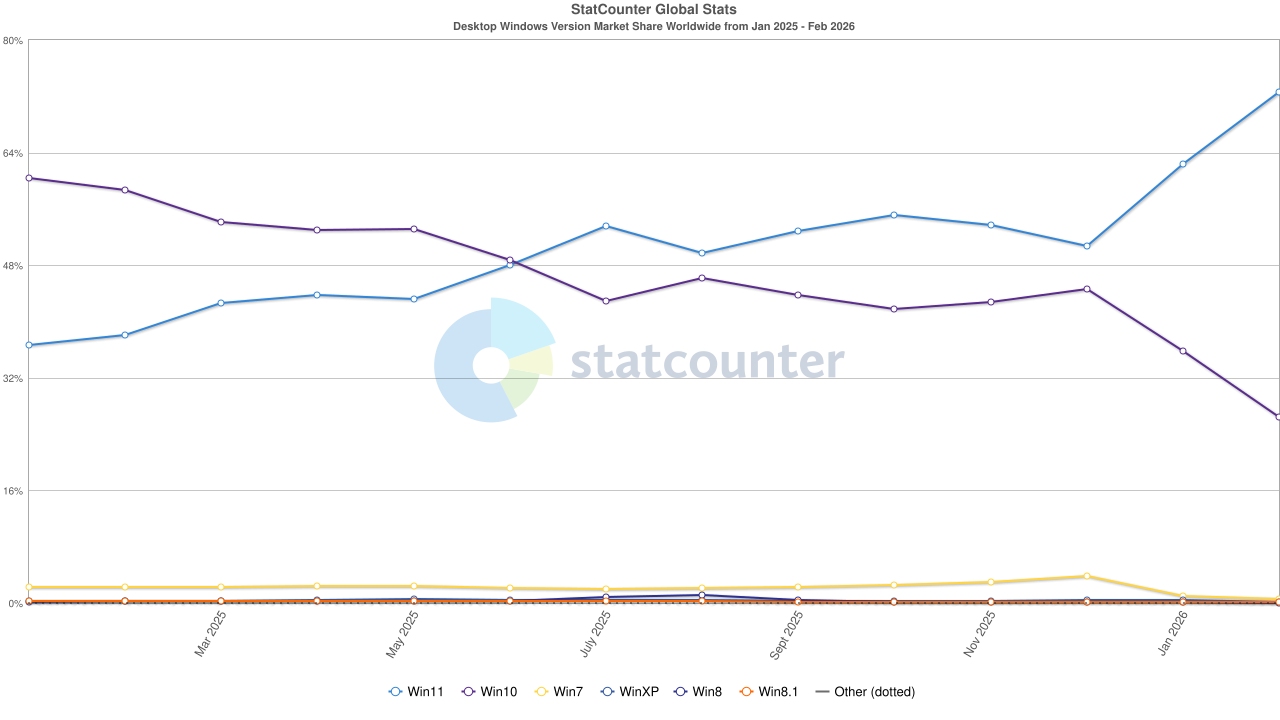
Windows 11 Market Share Explodes to 72.78% in February 2026, Leaving Windows 10 at 26.27%

Windows 11 is no longer chasing Windows 10; it has officially crushed it. After spending more than four years sitting in second place, Microsoft’s latest operating system is now firmly ahead. According to the latest StatCounter figures, Windows 11’s growth since the start of 2026 has been significant. After recording its biggest jump ever in January, the OS has followed it up with yet another massive surge in February 2026.

Windows 11 explodes past Windows 10 in February 2026

Here’s what the desktop Windows version market share worldwide looks like for February 2026:

  • Windows 11: 72.78% (+10.36%)
  • Windows 10: 26.27% (−9.50%)
  • Windows 7: 0.61%
  • Windows XP: 0.19%
  • Windows 8.1: 0.09%
  • Windows 8: 0.04%
Image credit: StatCounter

The figures above don’t just suggest gradual adoption but a clear shift in the global Windows user base. Windows 11 now powers nearly three out of four Windows PCs worldwide, while Windows 10 has fallen sharply in just two months. The double-digit jump suggests users are upgrading in large numbers rather than slowly transitioning.

Unlike previous months, where unusual regional spikes caused temporary distortions in the data, this growth appears broad and consistent across major markets. Windows 11 adoption is climbing across continents, making a statistical anomaly far less likely.

All of that comes amid Microsoft’s promise to make Windows 11 better from the very core. Last month, the company also promised its users it would move away from its “AI everywhere” strategy. Notably, the company recently stated that Windows 11 has crossed the one-billion user milestone and further surprised users by claiming that Copilot has become the top productivity app on Windows 11.

While StatCounter numbers should always be viewed as directional rather than absolute, the trend is clear: Windows 11 has hit its tipping point. After years of resistance, hesitation, and slow enterprise migration, Windows 11 is now the dominant Windows platform globally. After Microsoft officially killed support for Windows 10 in October 2025, the OS isn’t just being replaced; it’s being left behind.

Are you enjoying Windows 11? If not, what else do you think Microsoft should do to make Windows 11 a worthy update? Let us know in the comments below.

AMD Launches Ryzen 5 5500X3D in China, Bringing Budget 3D V-Cache Gaming Power

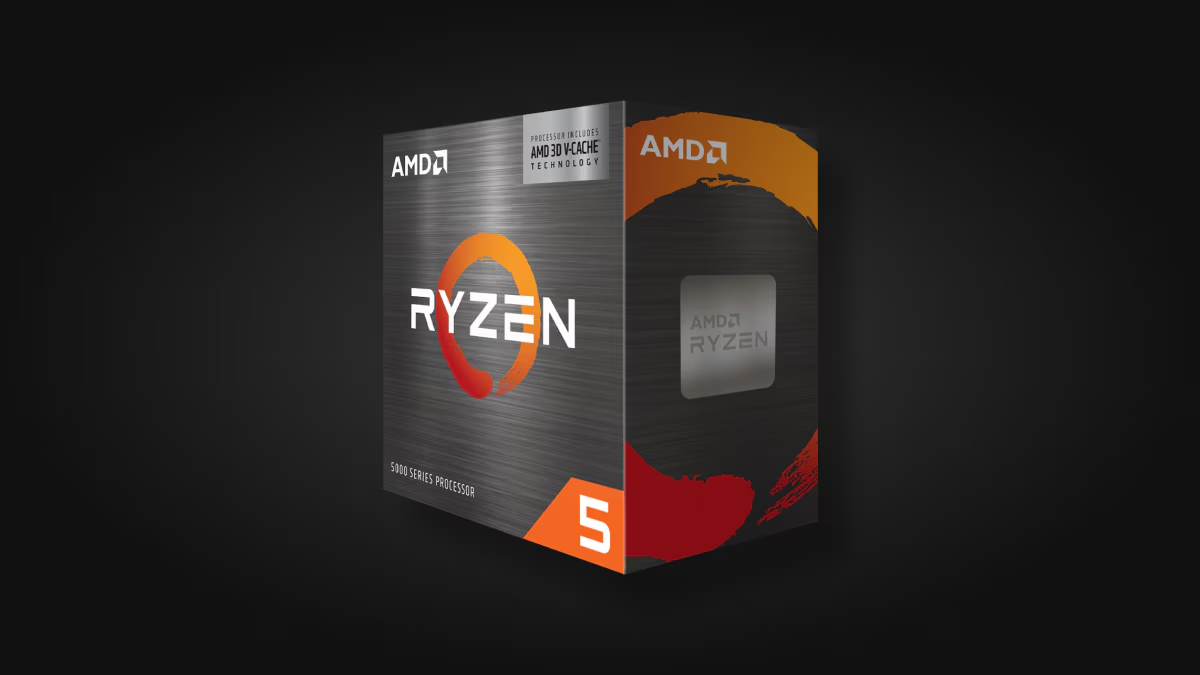
AMD is quietly breathing new life into AM4, and this time, it’s doing so in China. According to X user, @realVictor_M, the Ryzen 5 5500X3D has officially made its way to Chinese retail shelves, expanding beyond its earlier limited launch in Latin America (via Wccftech).

At its core, this is a Zen 3 processor features a 6-core, 12-thread configuration. However, what makes it stand out is AMD’s 3D V-Cache tech. The Ryzen 5 5500X3D packs a massive 96 MB of L3 cache (32 MB + 64 MB stacked), giving it a serious advantage in gaming compared to the standard Ryzen 5 5500, which only carries 16 MB of L3 cache. In total, the chip offers 99 MB of combined L2 + L3 cache.

Image credit: AMD China

Clock speeds are modest, with a 3.0 GHz base and up to 4.0 GHz boost. It also carries a 105W TDP. On paper, it sits below the Ryzen 5 5600X3D due to lower clock speed, but it keeps the same cache-heavy DNA that makes X3D chips strong in gaming workloads.

While pricing hasn’t been officially confirmed, earlier listings hinted at a sub-$200 price tag. If that holds true, the 5500X3D could compete with parts like the Ryzen 5 7600X, 9600X, and even Intel’s Core Ultra 5 series in gaming scenarios, especially in titles that love large cache.

In multi-threaded workloads, it outpaces its non-X3D sibling. In gaming, it could punch far above its weight, sometimes trading blows with newer Ryzen 7000 and even select 9000-series chips. For budget gamers still on AM4, this launch makes upgrading easier than ever, even if AMD has already retired higher-end X3D options like the 5800X3D.

Outlook’s New Copilot Feature Eliminates Meeting Conflicts

Microsoft is introducing a Copilot-powered tool that automatically handles meeting conflicts when they appear on a user’s calendar.

Instead of manually adjusting overlapping events, users can allow Copilot to step in and move flexible meetings. The feature prioritizes higher-importance meetings and shifts personal appointments or one-on-one sessions accordingly.

This functionality targets recurring check-ins and other meetings that do not require a fixed time slot.

Outlook’s New Hands-Free Rescheduling Option

Users will see a new option labeled “If conflicts arise, let Copilot reschedule this event” when creating or editing meetings.

Once enabled, Copilot continuously monitors the calendar and reacts when a conflict appears. It automatically finds a new suitable time based on user-defined preferences.

Under “Acceptable times,” users can define preferred days and time ranges to guide the AI when selecting a new slot.

The feature only applies to meetings marked as Busy or Out of Office. Tentative events remain untouched and will not trigger automatic changes.

Whenever Copilot reschedules a meeting, Outlook sends a notification through the notifications pane. Microsoft plans to introduce email alerts for these changes in a future update.

Enterprise-only rollout

The automatic rescheduling feature is rolling out to Teams, Outlook for the web, and the new Outlook for Windows.

Access requires a Microsoft 365 Copilot Enterprise license, limiting availability to enterprise customers.

This update follows other upcoming Outlook improvements, such as one-step folder access and simplified file workflows. However, some planned features, including People Hub, have been delayed.

At the same time, Microsoft continues to address known issues, including an invisible cursor bug affecting classic Outlook.

The move reflects Microsoft’s broader push to embed Copilot deeper across Microsoft 365 apps and reduce administrative overhead in enterprise environments.

Via Neowin

Department of War Drops Anthropic Over Safeguards, Turns to OpenAI Instead

Anthropic has reportedly been cut off from U.S. military contracts after refusing to allow its Claude AI models to support certain defense-related uses.

According to Neowin, the dispute escalated after Anthropic objected to potential deployments involving mass domestic surveillance and fully autonomous weapons systems. Federal agencies were then ordered to stop using Anthropic’s AI tools altogether.

Anthropic labeled a supply chain risk

The conflict intensified when Secretary of War Pete Hegseth designated Anthropic as a supply chain risk. That classification would effectively prevent the company from securing military-related contracts.

The Department of War reportedly stated it would only work with AI firms that agree to “any lawful use” of their technology and remove restrictive safeguards that limit deployment scenarios.

Anthropic strongly rejected the move, calling the designation legally unsound and a dangerous precedent for companies negotiating with the federal government. The company said it plans to challenge the decision in court and reaffirmed its opposition to domestic mass surveillance and fully autonomous weapons use.

The standoff highlights rising tension between AI developers who promote strict safety frameworks and government agencies that demand broader operational flexibility.

OpenAI reaches an agreement with the Department of War

While Anthropic faces exclusion, OpenAI has confirmed it reached an agreement with the Department of War.

CEO Sam Altman stated that OpenAI’s models will be deployed inside the department’s classified network. He emphasized that the deal preserves key principles, including prohibitions on domestic mass surveillance and maintaining human responsibility in the use of force, even when autonomous systems are involved.

OpenAI also plans to implement technical safeguards and place engineers within the Department of War environment to monitor model behavior and ensure compliance with agreed standards.

Officials suggested that the OpenAI contract still satisfies the government’s “all lawful use” requirement, referencing existing legal authorities and mutually agreed protections. However, the full terms of the agreement have not been made public.

It remains unclear why Anthropic and the Department of War failed to reach a similar compromise.

Growing divide over military AI policy

The dispute underscores broader friction between AI companies’ ethical policies and U.S. national security priorities. As defense agencies expand interest in AI-driven analytics, automation, and decision support, debates around surveillance boundaries and autonomous weapons continue to intensify.

In parallel, OpenAI recently secured major funding commitments from Amazon and NVIDIA, strengthening its position as a leading supplier of advanced AI systems across both commercial and government sectors.

The unfolding situation signals that AI policy, procurement, and national security will remain closely intertwined as governments and private companies negotiate the limits of artificial intelligence in military contexts.

Federal Agencies Ordered to Stop Using Anthropic AI Immediately

According to Neowin, President Donald Trump has reportedly directed all U.S. federal agencies to immediately stop using Anthropic’s AI models, triggering what could become one of the most significant AI procurement shifts in Washington.

The order calls for agencies to begin phasing out Anthropic technology from federal systems, with a full withdrawal expected within six months.

White House directive targets AI use across government

In a post on Truth Social, Trump criticized Anthropic as a politically biased company and argued that it should not influence how U.S. military operations are conducted.

He warned that agencies failing to comply with the directive could face civil or criminal consequences. Trump also stated that the administration would use the “full power of the Presidency” to enforce the order if necessary.

The directive reportedly affects all federal departments currently using Anthropic’s models for research, analysis, automation, or defense-related workflows.

Pentagon to label Anthropic a supply-chain risk

The Department of Defense is expected to formally designate Anthropic as a supply-chain risk, a move that would significantly limit its role in federal contracting.

U.S. Secretary of War Pete Hegseth said military contractors and strategic partners would be barred from engaging in commercial activity with Anthropic if the designation proceeds. He added that the military requires unrestricted access to advanced AI systems for lawful defense and national security purposes.

If implemented, the designation would effectively block Anthropic from participating in future defense-related AI deployments.

Dispute linked to military AI restrictions

The conflict reportedly escalated after Anthropic signaled that it would not allow its AI models to be used for certain military applications, including surveillance systems or remote weapons control.

That stance appears to have triggered concerns within defense circles about long-term reliability and access to critical AI infrastructure.

Anthropic is expected to challenge the Pentagon’s proposed supply-chain risk designation, potentially setting up a legal battle over federal procurement authority and AI policy.

Broader AI realignment underway

The move comes amid heightened geopolitical tensions surrounding AI development and intellectual property protection. Anthropic recently accused Chinese entities of attempting to copy its models, adding another layer of complexity to its federal standing.

At the same time, OpenAI has reportedly finalized major funding arrangements involving NVIDIA and Amazon, signaling continued consolidation and strategic alignment within the AI sector.

If enforced as outlined, the administration’s directive would mark a major restructuring of federal AI partnerships and could reshape how U.S. agencies select and deploy advanced AI systems going forward.

Windows 11 Canary Update KB5077240 Adds Built-In Network Speed Test and More

Microsoft is rolling out a fresh update for users in the Canary Channel. According to the release notes for Windows 11 Insider Preview Build 28020.1673 (KB5077240), the company is adding several helpful features, ranging from a native connection speed checker to an expanded dark mode experience.

Integrated Network Speed Testing and File Explorer Enhancements

Checking your internet connection usually involves opening a browser and navigating to a third-party website. With this new build, Windows 11 introduces a built-in network speed test directly accessible from the taskbar. You can open it right from the Wi-Fi or Cellular Quick Settings or by right-clicking the network icon in the system tray.

This feature measures Ethernet, Wi-Fi, and cellular connections to help you quickly check performance and troubleshoot any sudden drop-offs.

File Explorer is also getting a welcome visual tweak. Microsoft continues to refine the dark mode experience across the operating system. In this update, the Folder Options dialog now features a consistent dark mode appearance, eliminating the jarring flash of bright backgrounds when digging into your file settings.

Remote Server Tools for Arm64 and Expanded Backup Features

Let us break down a few other major additions. The update finally brings support for Remote Server Administration Tools to Windows 11 Arm64 devices. IT administrators can now install utilities like Active Directory Domain Services and Server Manager as optional features directly from the Settings menu.

The first sign-in restore experience is also expanding to become part of Windows Backup for Organizations. What this really means is that Microsoft Entra hybrid joined devices and Cloud PCs will automatically restore user settings and applications during the first sign-in, making device upgrades and migrations much smoother for enterprise environments.

These Canary additions come shortly after other recent feature drops, such as the Windows 11 beta updates that introduce independent volume controls and enhanced script security.

Microsoft Teams Finally Adds Multiple Message Forwarding

Microsoft is rolling out a highly requested functional update to its core communication platform this month. For years, sharing specific parts of a conversation required users to either take screenshots or manually send individual texts. According to the February 2026 update log posted on the Microsoft Teams Blog, individuals can now select and forward multiple messages at the exact same time.

This seemingly small but significant change is designed to help professionals share essential context without cluttering up their current chat windows or wasting time on repetitive actions.

Sharing Conversation Context in a Single Action

Here’s the thing. Until now, sharing parts of a conversation meant forwarding messages one by one or taking messy screenshots. Now, you can select up to five messages from a chat or a channel and forward them together in a single action. The platform preserves the original context and chronological order of the selected texts.

What this really means is that summarizing project updates or sharing key decisions with a different team is about to get a lot less tedious.

Other Quality of Life Updates Rolling Out This Month

Let’s break down a few other useful additions in the February rollout. Microsoft introduced a grid view for files in the search results. This visual layout makes it easier to spot the right document without having to open multiple files with similar names to check their contents.

Teams is also adding visual Trust Indicators for external collaborators. These automatic badges label outside users as familiar, unfamiliar, guest, or verified based on their organization’s relationship with yours. This visual cue aims to keep group chats and meetings more secure by clearly showing who is who.

Other updates include customizable meeting recap templates that let you shape AI-generated notes to match your specific workflow, along with the ability to resize the right and top gallery during screen sharing.

Windows 11 Beta & Dev Updates (KB5077242 & KB5077243) Introduce Independent Volume Controls and More

Microsoft is rolling out two new Windows 11 Insider Preview builds to the Dev and Beta channels under KB5077243 and KB5077242, respectively. These updates focus on improving the user experience for Bluetooth audio sharing and tightening security for system administrators handling batch files.

Better audio sharing with independent volume sliders

The shared audio preview feature originally launched last year, allowing two people to connect separate sets of Bluetooth LE Audio headphones to a single PC. With the latest update, Windows 11 now provides individual volume sliders for each listener. You can turn up your own volume without affecting the person watching a movie or listening to music with you.

You will also see a new taskbar indicator that serves as a quick reminder when you are actively sharing audio. Clicking that icon provides a fast path to adjust levels or stop sharing completely.

The list of compatible hardware for this feature is expanding as well. Support now includes newer devices like the Samsung Galaxy Buds 4, Sony WF-1000XM6, and the Xbox Wireless Headset.

Upgraded security rules for batch file processing

On the security front, Microsoft is giving administrators new tools to lock down scripts. A recent post on the Windows Insider Blog detailing Build 26300.7939 for the Dev Channel outlines a more secure mode that prevents batch files from being altered while they are actively running.

By adding a specific registry key value, the system ensures signature validation only happens once instead of checking every single statement executed in the file. This change improves both security and overall script processing performance.

The Windows Insider Blog explaining Build 26220.7934 for the Beta Channel notes that these identical security and audio improvements are rolling out there as well. The updates also include quality of life tweaks for Narrator users, who can now use a keyboard shortcut to read status bar contents in apps like Microsoft Word and Excel.

Users in the Beta channel are also getting a requested update to the Paint app that allows for freeform rotation of shapes and text.

Microsoft and OpenAI Clarify Their Partnership as Amazon Invests

OpenAI has officially announced a massive new $110 billion funding round that values the artificial intelligence company at $730 billion. As part of this latest financial push, Amazon has stepped up with a $50 billion investment of its own. This major move means OpenAI is no longer relying exclusively on Microsoft’s Azure platform for its cloud infrastructure needs.

To make sure everyone understands where their relationship currently stands, Microsoft and OpenAI released a joint statement confirming that their core agreements remain intact despite Amazon’s new level of involvement.

The financial and technical boundaries

What this really means is that the commercial revenue-sharing arrangement between Microsoft and OpenAI is not going anywhere. If OpenAI generates new revenue through its partnership with Amazon Web Services, a portion of that money will still flow back to Microsoft.

Microsoft also retains its exclusive license to access the intellectual property across OpenAI’s models and products. Azure remains the sole cloud provider for stateless OpenAI API calls. Even if a brand-new product built by Amazon and OpenAI needs to make a stateless call to an OpenAI model, that specific request will still be processed through Microsoft’s Azure servers.

OpenAI will continue hosting its own first-party products, including its new Frontier enterprise platform, directly on Azure. However, Microsoft will not have the ability to sell Frontier to outside developers. Amazon has secured the exclusive third-party distribution rights for that specific platform.

A new multi-cloud strategy

With Amazon entering the picture, OpenAI is adopting a much broader approach to its infrastructure. AWS and OpenAI are teaming up to build a Stateful Runtime Environment powered by OpenAI’s models, accessible through Amazon Bedrock.

OpenAI is also preparing to utilize AWS Trainium chips to run several of its AI workloads. The two companies even plan to develop specialized models explicitly designed for Amazon’s consumer products, like Alexa.

The partnership is clearly shifting. By pulling in major investments from companies like Amazon, Nvidia, and SoftBank, OpenAI is establishing a multi-cloud future while keeping its foundational ties to Microsoft firmly in place.

Lenovo’s New Legion Go Fold Handheld Doubles as a Folding PC

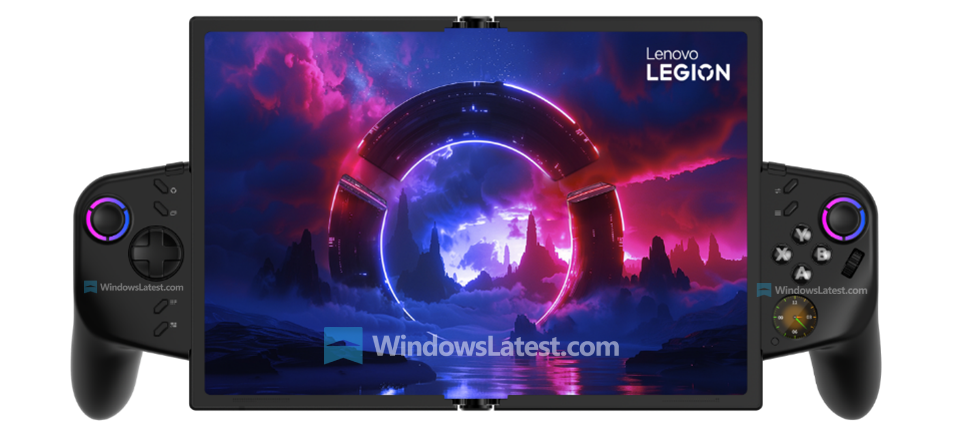
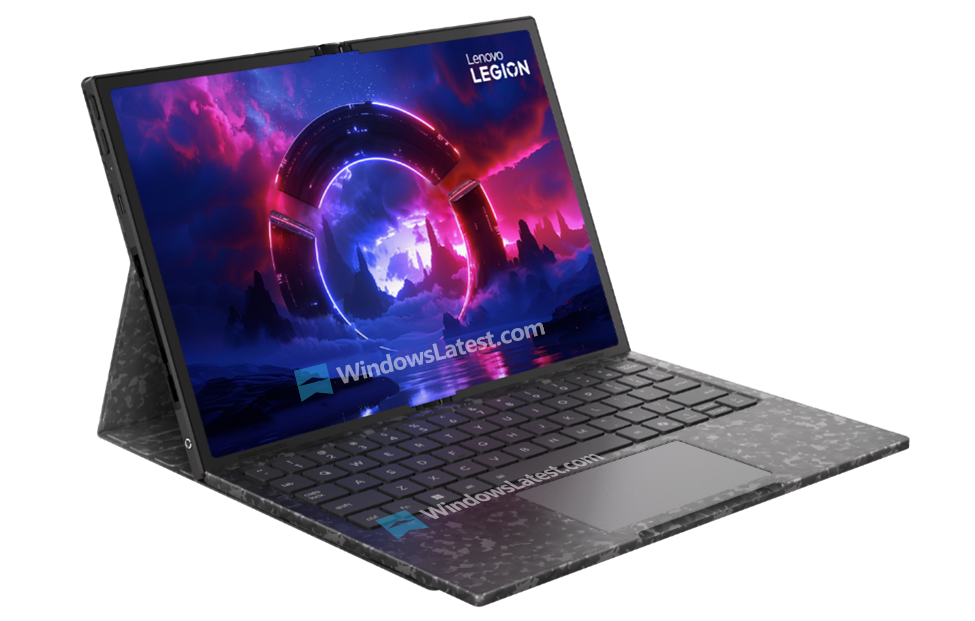
Lenovo is preparing to showcase a wild new take on portable gaming at the upcoming Mobile World Congress in Barcelona. A recent leak suggests the company developed a hybrid Windows 11 device called the Legion Go Fold Concept.

Instead of forcing you to choose between a portable gaming console and a traditional computer, this new hardware attempts to be both. According to a report from Windows Latest, the Legion Go Fold utilizes a foldable POLED display that expands from a compact 7.7-inch screen into a much larger 11.6-inch monitor.

Lenovo Legion Go Handheld leak 1

Four distinct modes for play and productivity

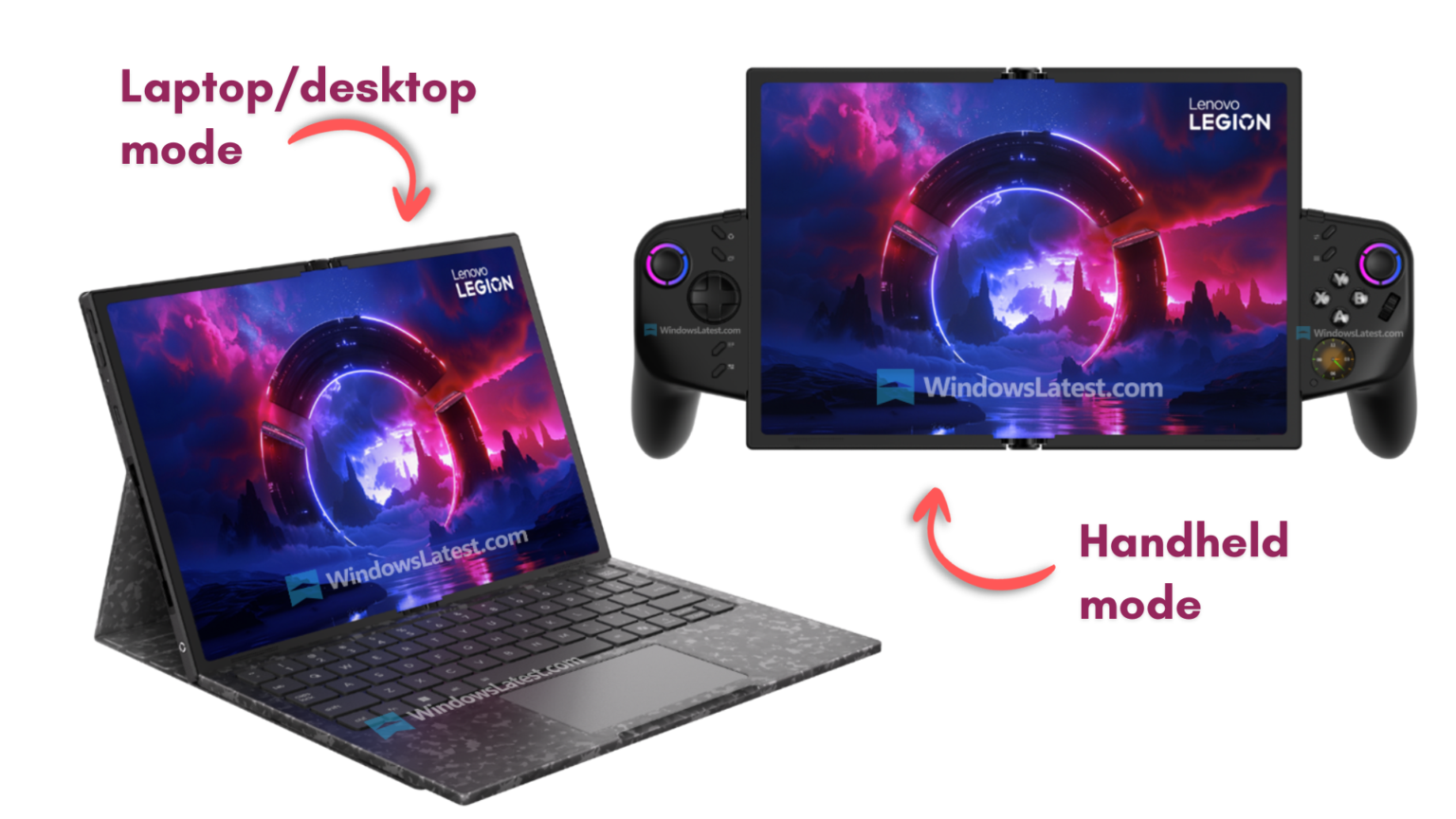
The true appeal of the device lies in its versatility. In its folded state, you can attach the wireless controllers to either side for a standard handheld experience. Unfold the screen vertically, and you get a split-screen setup where you can play a game on one half while watching a video or monitoring chat on the other.

If you want maximum immersion, you can unfold the screen horizontally, attach the controllers, and play across the full 11.6-inch display. Finally, the hardware offers an expanded desktop mode. By propping the screen up and using an included wireless keyboard with a built-in trackpad, the handheld effectively transforms into a clamshell laptop. The right controller even features a tiny built-in screen and acts as a vertical mouse.

Lenovo Legion GO Fold leak

The hardware running under the hood

An Intel Core Ultra 7 258V processor and a generous 32GB of RAM power this folding hybrid. The battery capacity sits at 48Wh, which might struggle to support extended gaming sessions without a charger nearby, given the demands of Windows 11 and a foldable OLED screen.

Lenovo is actively testing the boundaries of portable PC gaming hardware. While the Legion Go Fold remains strictly a concept device right now, the company has a history of turning ambitious prototypes into retail products within a relatively short timeframe.

We will likely learn more about its potential future when MWC kicks off on March 2.

OpenAI Closes $110 Billion Funding Round Backed by Amazon, NVIDIA, and SoftBank

OpenAI has secured one of the biggest funding rounds in AI history. The company today announced that it has closed $110 billion in new investment, with a $730 billion pre‑money valuation that could reshape the race to scale artificial intelligence globally. Notably, SoftBank, NVIDIA, and Amazon are among the major investors in the latest funding rounds.

OpenAI lands massive funding and strategic partnerships

The funding round includes $30 billion from SoftBank, $30 billion from NVIDIA, and $50 billion from Amazon, with additional investors expected to join as the round progresses. OpenAI says this capital will help address three key pillars of AI availability i.e. compute, distribution, and capital. Along with the fresh cash, the company confirmed a multi‑year strategic partnership with Amazon, and expanded collaboration with NVIDIA, securing next‑generation inference compute and vast training capacity across Blackwell and Vera Rubin systems.

OpenAI’s product usage numbers is the reason why scaling matters. Codex, its AI coding assistant, has tripled weekly users to 1.6 million, while ChatGPT now sees more than 900 million weekly active users and more than 50 million consumer subscribers. Business adoption is strong too, as over 9 million paying enterprise users are on ChatGPT and the Frontier platform to build AI coworkers and integrate intelligent workflows across engineering, support, sales, and finance.

The valuation also boosts the OpenAI Foundation’s stake in the group to more than $180 billion, which expands its ability to fund philanthropic work in areas like health breakthroughs and AI resilience. As AI moves from research labs to everyday tools at unprecedented scale, this funding round lays the groundwork for OpenAI to steer how advanced intelligence is delivered, and who gets to benefit.

Lenovo to Reportedly Showcase Yoga Book Pro 3D with “Glasses-Free, Dual Screen” at MWC 2026

Mobile World Congress (MWC) is scheduled to run from March 3–6, 2026 in Barcelona next week, where you are likely to see major brands showcase their latest innovations. Among them is Lenovo, which is reportedly planning to showcase a bold new concept device that could be more than just a prototype.

For years, MWC has long been a launchpad for cutting‑edge hardware, and this year may be no different. According to prominent tipster Evan Blass (@evleaks on X), Lenovo will showcase a next‑generation dual‑screen laptop called the Yoga Book Pro 3D. Unlike many concept devices that never make it past the show floor, this one appears to get retail release.

Lenovo has dabbled in experimental form factors before, but the Yoga Book Pro 3D seems ambitious. The notebook reportedly features a glasses‑free, dual‑screen design that builds on the company’s existing premium hybrid lineup. While traditional dual‑screen devices often depend on external accessories or require users to wear special glasses, this one will reportedly offer a 3D‑like experience without eyewear. That design alone could set it apart in a market hungry for cutting-edge product.

Lenovo has increasingly turned its prototypes into real products, suggesting that the Yoga Book Pro 3D could be more than a showpiece. If Lenovo follows through with production, this device could hint at a renewed push into niche, productivity‑focused laptops that packs all the goodies often demanded by creatives and professionals.

That being said, much of the details are under wraps at the moment. It will be interesting to learn more about the performance, specs, and other important details about the Yoga Book Pro 3D. We expect Lenovo to provide all the answers when 2026 edition of MWC kicks off in Barcelona next week.

Will Lenovo’s Yoga Book Pro 3D live up to the hype and become a retail reality, or will it remain an exciting but elusive concept? What do you think? Let us know in the comments below.

NVIDIA RTX 50 Spotted With Micron GDDR7 for the First Time

NVIDIA gaming revenue has dropped 13% quarter-over-quarter amid ongoing DRAM shortages, but new evidence suggests the company may be diversifying its memory supply to stabilize production.

According to VideoCardz, a GeForce RTX 50 series graphics card has been spotted using Micron-branded GDDR7 memory for the first time. The discovery could signal a shift in NVIDIA’s supply strategy at a critical moment for the GPU market.

Micron GDDR7 spotted on RTX 50 graphics card

Images shared on Quasar Zone reportedly show a GALAX GeForce RTX 5060 equipped with Micron GDDR7 chips. This marks the first publicly documented appearance of Micron memory on an RTX 50 board.

The memory markings correspond to Micron’s MT68A512M32DF family. The specific chip identified, MT68A512M32DF-28:A, is a 16Gb (2GB) GDDR7 module rated at 28GT/s.

Until now, RTX 50 series GPUs have largely been associated with Samsung and SK hynix GDDR7 memory. Micron’s entry introduces a third supplier into the mix.

Supply diversification amid DRAM pressure

Adding Micron as a GDDR7 supplier could help ease bottlenecks across different RTX 50 batches. Earlier industry reports suggested Micron planned to support the RTX 50 lineup with both 28Gbps and 32Gbps GDDR7 options.

The newly surfaced photos provide the first physical confirmation that Micron chips are now in circulation on at least one RTX 50 graphics card. However, it remains unclear whether Micron memory will be limited to specific models, regions, or board revisions.

Broader GPU market context

The development comes as retail prices for the GeForce RTX 5090 and RTX 5070 continue to surge in several markets. Ongoing memory shortages have pressured the broader GPU ecosystem, affecting availability and launch pacing.

At the same time, NVIDIA has reportedly begun sending out samples of its next-generation Rubin VR200 platform to select customers, signaling continued investment in AI and data center hardware despite gaming supply challenges.

For now, the Micron sighting suggests NVIDIA is actively working to strengthen its supply chain flexibility as demand for high-performance GPUs remains elevated.

Qualcomm Reportedly Delays Windows Handheld Chips, Won’t Share Updates on Snapdragon G or X at GDC 2026

Qualcomm has reportedly pulled back plans to unveil Windows‑focused gaming chip at the upcoming Game Developers Conference.

The news comes via The Verge, which quoted a statement provided by Qualcomm spokesperson Cassandra Garcia-Bacha, stating that the company won’t announce any updates to its Snapdragon G Series gaming chips at the event. That’s not all; the company also won’t offer updates on the recently announced Snapdragon X lineup.

Qualcomm reworks handheld strategy

Qualcomm had hinted earlier this year that Windows gaming handhelds powered by Snapdragon G Series or Snapdragon X chipsets might be showcased at the March event. However, it isn’t happening now. A part of statement provided by Garcia-Bacha reads, “Snapdragon X Series and Snapdragon G Series processors are pushing the PC, desktop, and handheld gaming device industries forward. Our commitment remains strong, and we can’t wait to share more information about these areas.”

This suggests at postponement, and not a total revoke of plans, even if official product news isn’t imminent. Industry analysts see this shift as a temporary pause rather than a cancellation. Supply chain challenges, especially ongoing memory crunch, and broader market timing may be behind Qualcomm’s decision to hold back until a later coordinated launch window. This also means that manufacturers and developers looking for new Arm‑based Windows handheld opportunities may now have to wait past GDC.

With no new handheld announcements this March, the next logical launch timeline could be at Computex or later 2026 tech events, where Qualcomm and partners may finally showcase what Snapdragon silicon can do in Windows‑on‑Arm devices.

Microsoft 365 Set for Big Copilot Upgrade With Agent Mode and Smart Editing

Microsoft is expanding Copilot across PowerPoint, Excel, Word, and Viva, with all newly announced features beginning rollout in March 2026. The move comes as Outlook is already expected to receive its own wave of upcoming enhancements.

The updates introduce real-time meeting assistance, conversational presentation editing, broader workbook compatibility, automatic document editing, and upgraded analytics. Together, they highlight Microsoft’s push to position Copilot as a unified AI layer across the entire Microsoft 365 ecosystem.

Copilot in PowerPoint Live to explain slides in real time

According to the Microsoft 365 roadmap, Copilot in PowerPoint Live will allow meeting attendees to select slide text and instantly receive AI-generated explanations. The feature aims to improve comprehension during presentations without interrupting the speaker.

Participants will be able to privately request clarification or additional context while a meeting is in progress, turning PowerPoint Live into a more interactive and AI-assisted experience.

Agent Mode in PowerPoint enables conversational creation

Agent Mode in PowerPoint will allow users to create, edit, and refine presentations through natural language prompts. Copilot can generate new slides, update existing content, enhance layouts, and polish designs while preserving established formatting and branding.

Microsoft is also making Agent Mode accessible to Copilot Chat users even if they do not hold a full Microsoft 365 Copilot license, expanding its reach beyond premium subscribers.

Excel Agent Mode expands beyond the cloud

Excel’s Agent Mode will gain support for locally stored modern workbooks, removing the limitation that advanced Copilot editing requires cloud-based files. Users will be able to run multi-step AI edits whether documents are saved on a local drive or online, giving more flexibility to enterprise and offline workflows.

Word Copilot to apply edits by default

Copilot in Word will soon apply edits directly inside documents by default when used in the chat experience. Instead of only suggesting changes, the AI will implement them automatically.

Users will retain full control, as every edit remains reviewable and reversible. Microsoft will also provide an option to disable automatic editing behavior for those who prefer manual approval before changes are applied.

Viva Copilot Analytics gets new insights

Microsoft Viva will receive an updated Copilot Analytics Power BI report that introduces a streamlined interface and new “Power user” insights. The enhancement is designed to help organizations track advanced Copilot adoption and usage patterns more effectively.

These updates arrive alongside Microsoft’s broader AI strategy. The company has recently introduced Copilot Tasks, turning Copilot into a more autonomous agent capable of handling multi-step workflows, and it has consolidated creative features in Teams by replacing Designer tools with Copilot-powered functionality.

With real-time slide explanations, agent-style editing across Office apps, expanded file compatibility, and enhanced analytics, Microsoft continues to position Copilot as the intelligence layer at the center of Microsoft 365.

Marathon Surpasses 143,000 Concurrent Players on Steam During Early Server Slam Test

Bungie’s extraction shooter, Marathon, has posted a surprisingly high player count during its open Server Slam test on Steam. The numbers hint at strong early interest ahead of the official launch on March 5 and give a glimpse of how busy the game may be once fully released.

Marathon shows strong early momentum on Steam

Data from SteamDB shows that Marathon reached a peak of 143,621 concurrent players on Steam on day one of the Server Slam, a number that stands out for a title still days away from launch (via The Gamer). That count places the shooter among the more engaged community tests on the platform so far this year.

To put it into context, Embark Studios’ extraction game ARC Raiders once hit roughly 189,668 concurrent players during its own Server Slam last year. While Marathon hasn’t quite matched that figure yet, its early turnout isn’t far behind, and there’s still the weekend ahead for numbers to grow.

Early feedback on the Server Slam has been mixed, with some players praising the turnout and others pointing to chat bugs and input issues that Bungie says it’s tracking for improvement before launch.

What this could mean for launch

Early Steam peaks often reflect curiosity, but Marathon’s numbers show strong interest from PC and potential console players, tapping into a growing extraction shooter audience. That said, speculation remains about how many of these testers will become paying players at launch. Sustained success will likely depend on post‑launch support, seasonal content, and how the title’s competitive features add up over time.

Sony Gets Gran Turismo 7 Working on Switch 2, Release Still Unlikely

A new report claims Sony has successfully run Gran Turismo 7 on Nintendo Switch 2 hardware, but a commercial release may never happen.

According to GameRant, insider Jeff Grubb revealed during a recent discussion that Sony managed to get Gran Turismo 7 running on the Switch 2. The test reportedly demonstrates technical feasibility, though Sony does not plan to officially launch the racing title on Nintendo’s upcoming system.

Gran Turismo 7 reportedly tested on Switch 2

Gran Turismo 7 has remained one of Sony’s flagship racing simulators since its 2022 debut on PlayStation platforms. The title continues to receive updates with new cars, tracks, and seasonal content, and it reportedly still has over 2 million active players as of December 2025.

During a platform strategy conversation, Jeff Grubb suggested Sony internally tested the game on Nintendo Switch 2 hardware. Despite the successful test, he indicated Sony likely has no intention of bringing the full game to Nintendo’s ecosystem.

The claim aligns with broader reports that Sony does not plan to expand major single-player exclusives to rival platforms. One of such exclusives is Marvel’s Wolverine, which just got an official release date.

Why test if there’s no release?

The Switch 2 has already attracted major third-party ports, including Cyberpunk 2077, Assassin’s Creed Shadows, and Street Fighter 6. Reports also indicate that Final Fantasy VII Remake performed strongly on the platform after its January launch.

However, industry watchers believe the Gran Turismo 7 test may connect to Sony’s own future hardware ambitions. Rumors continue to circulate about a potential portable-oriented PlayStation 6 concept that could feature docked performance similar to Nintendo’s hybrid design.

Testing on Switch-like hardware could allow Sony engineers to evaluate scalability, optimization strategies, and performance balancing for a future handheld PlayStation device. Running a demanding racing simulator on lower-power hardware would provide valuable insight into engine flexibility.

Sony’s evolving exclusivity strategy

Sony historically prioritized strict console exclusivity. In recent years, the company expanded into PC, bringing major titles to a broader audience after timed console windows.

Franchises such as Marvel’s Spider-Man, The Last of Us Part I, God of War, and Stellar Blade eventually launched on PC. Still, Sony has not committed to bringing first-party exclusives to competing console platforms.

Even if a Switch 2 version never materializes, the reported test suggests Sony continues exploring technical flexibility for its internal engines and flagship franchises.

In separate developments, Sony recently filed a patent for a “Soft Pause” system that could support AI-assisted gameplay. Meanwhile, rumors suggest the next full console generation may not begin until at least 2028, meaning fans waiting for PlayStation 6 could face a longer timeline.

UK Courts to Expand Microsoft Copilot Use With Additional £12M AI Funding Planned for Next Year

The UK government has decided to embed AI deeper into the court system, pledging new funding and expansion of AI tools such as Microsoft Copilot. According to a report by The Register, Justice Secretary David Lammy unveiled the plan during a Microsoft AI event in London, hinting a shift in effort to modernize England and Wales’ strained legal infrastructure.

AI expansion targets backlogs and court efficiency

The Ministry of Justice is already among the fastest-growing government users of Copilot. Now, AI will play a larger operational role, such as support for speech transcription, summarizing judgments, and assisting with case scheduling.

Courts and tribunals are testing technology first rolled out in the Probation Service, where automated transcription of offender meetings has reportedly saved more than 25,000 staff hours.

Meanwhile, immigration and asylum judges are experimenting with AI-generated notes, while magistrates’ courts are piloting transcription and judgment summaries. Meanwhile, HM Courts and Tribunals Service plans to introduce an AI-assisted listing tool to streamline scheduling.

To speed things up, the Justice AI Unit is set to receive more than £12 million in additional funding next financial year. The extra cash hints that it is not a short-term pilot, but a broader structural shift in how courts may operate going forward.

Speaking of inspiration, Lammy pointed to Canada’s Ontario Court of Justice, describing it as “digital by design” and fully paperless. He suggested the experience felt less like visiting another country and more like seeing the future of courtrooms.

Let’s not forget that Microsoft’s Copilot was recently linked to a serious real-world mistake involving law enforcement in the UK. The issue came to light after the chief constable of West Midlands Police admitted that Copilot had hallucinated a football match that never happened, and that false information ended up inside an official intelligence report

Outlook to Add One-Step Folder Access and Easier File Sending

Microsoft is rolling out several new Outlook features, including one-step folder sharing, easier local Office file sharing, updated admin controls, and tighter Copilot integration.

These updates come as the People Hub experience remains delayed on the roadmap.

Outlook to Add One-Step Folder Sharing and New Admin Controls

Microsoft is preparing several Outlook upgrades aimed at simplifying sharing and improving admin oversight. The updates appeared on the official Microsoft 365 roadmap and target both end users and IT admins.

One-step folder sharing coming to Outlook

According to the Microsoft 365 roadmap, Outlook will introduce one-step folder sharing to streamline permission management.

Users will soon share a folder with a single action instead of manually granting access to each parent folder. Outlook will automatically apply the required permissions across the entire folder hierarchy.

Before confirming, users will see a clear preview of all folders that will be shared, including parent folders. This approach reduces setup time while keeping visibility and control intact.

Preview for one-step folder sharing is scheduled for May 2026. Full rollout is expected to begin in June 2026.

The feature will be available in both Outlook Desktop and Outlook Web.

Share local Word, Excel, and PowerPoint files directly

Microsoft also plans to improve file sharing inside the new Outlook for Windows.

Users working in locally stored Word, Excel, or PowerPoint files will soon send a copy directly via email without manually attaching the file. The integration removes extra steps when sharing documents from Office apps.

This local file sharing feature is expected to roll out in May 2026 for Outlook Desktop.

New admin policy for recipient delimiters

Microsoft will introduce a new tenant-wide policy that lets admins define default delimiter settings in Mail Compose and Reply.

Admins will choose whether Outlook uses commas to separate recipients by default. This update aims to standardize email formatting across organizations.

The delimiter policy rollout is scheduled to begin in April 2026.

Additionally, Outlook will gain deeper Copilot integration, allowing Copilot to launch automatically in Microsoft Edge directly from emails. The feature aims to speed up AI-assisted workflows across Microsoft 365.

At the same time, Microsoft is addressing recent issues, including the invisible cursor bug in classic Outlook. With simplified folder sharing, improved file workflows, and new admin controls, Outlook continues to evolve for both users and IT teams.

Xbox Store Update Finally Adds Much-Requested Game Sorting Options

Earlier this month, Xbox rolled out its February 2026 firmware update, which fixed Remote Play issues related to 720p display settings. The bug had prevented some players from accessing Remote Play entirely when their console resolution was set to 720p, creating frustration for users who rely on cloud and remote features. Now, it appears there’s another Xbox update quietly making life easier; this time inside the Microsoft Store.

Xbox store update adds long-requested sorting options

Microsoft has quietly introduced new sorting tools across the Xbox Store on Xbox Series X|S, Xbox One, the Xbox PC app, and web browsers. After years of user requests, players can now sort games by “Price from low to high,” “Price from high to low,” “Discount from high to low,” and “Most Wishlisted.” The update, first spotted by Resetera users, is now live according to folks at TrueAchievements. That said, the Xbox mobile app’s newer store interface still lacks these sorting options.

Image credit: TrueAchievements

Previously, bargain hunters had to rely on price filters, which limited flexibility when browsing large sales. With the new “Price from low to high” option, finding the cheapest deals in the “Game Specials” tab becomes far more straightforward. The “Most Wishlisted” filter also offers a clearer snapshot of trending titles, replacing the less reliable “Relevance” sorting that often defaulted to alphabetical listings.

While this may seem like a small update, it is useful. Store navigation has long been a pain point, and better sorting could improve how players discover deals and popular games.

Microsoft Finally Announces ReFS Boot Support for Windows Server

After years of demand, Microsoft has finally announced ReFS boot support for Windows Server Insiders. Since server workloads now demand speed, reliability, and massive capacity, Microsoft’s latest update looks to modernize the OS boot volume like never before.

Windows Server introduces ReFS Boot for insiders

For the first time, Windows Server can be installed and booted from a Resilient File System (ReFS). For those unaware, it is a formatted drive directly through the setup UI. ReFS, designed for data integrity at scale, now protects the most critical volume on your server; the OS boot disk. Microsoft says this ensures greater resilience, scalability, and performance from startup, reducing downtime and mitigating corruption risks.

The new ReFS boot volume brings several advantages over traditional NTFS. Integrity-first, copy-on-write design allows online error handling without requiring chkdsk. Metadata checksums, integrity streams, and proactive error detection enhance reliability. Volumes can scale up to 35 petabytes, far beyond NTFS’s 256 TB limit, future-proofing servers as storage needs grow.

Performance is also improved. ReFS accelerates creation of fixed-size VHD(X) files, speeds up large file copy operations, and supports sparse provisioning to optimize I/O-heavy scenarios. Microsoft claims tasks that used to take minutes can now complete in seconds or milliseconds, independent of file size.

Getting Started With ReFS Boot

Windows Server Insiders can access ReFS boot in the latest builds (2/11/26 or later). Users need UEFI firmware and must format the system drive as ReFS during setup. After installation, simple commands like fsutil fsinfo volumeInfo C: can confirm the drive is using ReFS.

Microsoft further highlights that this launch is just the beginning. By combining resiliency, scalability, and speed, ReFS boot brings modern server capabilities to the OS volume, which will eventually keep systems stable and responsive from day one.

Moreover, the company has encouraged Insiders to try the feature and provide feedback via the the Windows Server Insiders Forum.

Hackers Could Exploit Exposed Google API Keys to Access Gemini AI

Google is facing renewed security scrutiny after researchers revealed that publicly exposed API keys can be abused to access Gemini AI services.

The issue centers on Google API keys embedded in client-side code, which were historically treated as low-risk but may now grant unintended access to the Gemini (Generative Language) API.

Exposed API keys may open the door to Gemini misuse

According to a report by Truffle Security, security researchers discovered that publicly available Google API keys could authenticate requests to Gemini AI endpoints.

These keys often appear in JavaScript for services such as Google Maps embeds, YouTube integrations, analytics tracking, and Firebase features. In the past, developers frequently exposed them in frontend code because they were not considered sensitive credentials.

However, after Google introduced Gemini and developers enabled large language model (LLM) APIs in existing projects, those same keys gained expanded capabilities.

Researchers found that attackers could extract the keys directly from a website’s source code and use them to send requests to Gemini endpoints, including the /models API route. In some cases, this could allow access to private data exposed through the Generative Language API.

Thousands of live keys discovered online

A scan of the November 2025 Common Crawl dataset uncovered more than 2,800 live Google API keys exposed across public web pages.

The keys appeared on websites belonging to a wide range of organizations, including financial institutions, recruiting firms, security companies, and even some Google-owned properties.

In one documented case, a key embedded in a Google product’s public website had reportedly remained active since at least February 2023.

Security firm Truffle Security warned that malicious actors could use these exposed keys to make unauthorized Gemini API calls. Researchers estimate that such abuse could generate thousands of dollars in API charges per day on a single compromised account.

From low-risk embeds to AI authentication credentials

Before Gemini integration, Google Cloud API keys typically supported limited use cases and often required additional restrictions, such as HTTP referrer limits.

Developers commonly left these keys visible in frontend code, assuming they posed minimal risk.

With Gemini access enabled, the same keys could function as authentication credentials for AI-powered services, creating a new attack surface.

Google reportedly received disclosure of the issue on November 21, 2025. On January 13, 2026, the company classified the problem as a “single-service privilege escalation.”

Google rolls out mitigations

Google says it has implemented new safeguards to detect and block leaked API keys attempting to access Gemini services.

New AI Studio API keys will default to a Gemini-only scope and include additional protections. Google also plans to send proactive alerts when it detects exposed keys tied to Gemini usage.

Developers are advised to audit existing projects, verify whether the Gemini API is enabled, and rotate any publicly exposed API keys immediately.

Researchers recommend scanning codebases and repositories with tools such as TruffleHog to identify hardcoded credentials.

The disclosure comes as Google continues expanding its AI ecosystem, recently launching Nano Banana 2 and Lyria 3, further increasing the importance of securing API-based access to its generative services.

In related developments, reports indicate that threat actors have also leveraged Gemini to carry out cyberattacks.

Via Bleeping Computer

Arc Raiders Name Briefly Blocked in Marathon Chat, Bug Now Fixed by Bungie

Ever since Arc Raiders released, it has been praised as one of the finest extraction shooters to exist, all thanks to fast-paced gameplay and regular content updates. However, Bungie’s upcoming Marathon is already upping the ante, taking on the rival with a mix of high-stakes competition and strict anti-cheat policies. At a time when players are comparing both games, early tests for Marathon have already stirred attention.

Marathon tests servers hit with unexpected chat bug

During a recent server slam test ahead of its March launch, Marathon experienced an interesting bug. Per the reports, Marathon players trying to type “Arc Raiders” in chat were met with automatic censorship, appearing as “*** *******” Apparently, this wasn’t intentional and a genuine bug, which is why Bungie has fixed it. Replying a post on X, the studio posted a screenshot to confirm that chat now works fine. That said, the issue briefly highlighted just how closely these two extraction shooters are being watched by their communities.

Not to forget, the rivalry between Embark Studios and Bungie goes beyond. Bungie s a zero-tolerance policy, doling out lifetime bans for cheaters. That said, the bigger test will come post-launch. Marathon is expected to draw some players from Arc Raiders, but keeping them engaged will hinge on content drops and updates. At a time when extraction shooters are defining the multiplayer landscape, early bugs and policy differences could help players decide in which title they should spend their time on.

Speaking of games, let’s not forget that Capcom has released day one patch for Resident Evil Requiem on Switch 2.

Sony May Scale Back PC Releases for Story-Driven PS5 Exclusives

Sony may rethink its PC port strategy for major single-player PlayStation exclusives, according to new comments from industry insider Jason Schreier reported by TechPowerUp.

Sony Reportedly Reassessing PC Ports for Single-Player PlayStation Exclusives

Recent insider remarks suggest that Sony could shift its approach to bringing traditional story-driven PlayStation titles to PC. Instead of continuing broad PC expansion for major single-player games, the company may prioritize console exclusivity.

Schreier indicated that Sony could be “backing away” from porting flagship single-player releases to PC. The new focus may lean more heavily toward live-service titles, which tend to benefit from larger, cross-platform player bases.

Single-Player Games Could Skip PC or Face Long Delays

If this direction holds, upcoming narrative-driven titles might either skip PC entirely or launch years after their PlayStation debut. Schreier specifically referenced Marvel’s Wolverine as an example of a project that may never reach PC, or could arrive significantly later.

He clarified that his statements stem from insider insight rather than surface-level speculation.

One reported reason behind the shift involves commercial performance. While PC ports have generated revenue, overall results may not have met Sony’s internal expectations. Interest in formerly exclusive games can decline after spending several years locked to console platforms, potentially reducing long-term PC sales impact.

A Strategy That Diverges From Xbox

This rumored move would further separate Sony’s model from Microsoft’s gaming strategy. Microsoft has embraced day-one multi-platform releases for many titles, including simultaneous launches across console and PC ecosystems.

Sony, by contrast, appears focused on reinforcing the value of the PlayStation console ecosystem. Although executives have previously acknowledged the revenue potential of PC releases, the company has not committed to a consistent cross-platform rollout model.

Sony has experimented with ecosystem-bridging features such as Cross-Buy, aiming to unify digital libraries between PS5 and PC in limited cases. However, a full multi-platform commitment similar to Xbox’s approach has not materialized.

Broader PlayStation Developments

In parallel developments, Sony has patented a “Soft Pause” feature that could introduce AI-driven assistance while players pause gameplay. The company also confirmed it has no plans to raise PlayStation 5 prices this year.

As for next-generation hardware, reports suggest a new PlayStation console may not arrive until 2028 or later.

If Sony ultimately narrows PC support for major single-player exclusives, it would signal a strategic recalibration aimed at strengthening console-first identity in an increasingly service-driven gaming industry.

Chrome tests “Google Recommended Browser Settings” Pop-Up in Windows 11

Google is preparing to show a new “Use Google recommended browser settings” pop-up in Chrome that asks users to make it the default browser in Windows 11. The dialog opens from the browser menu and takes users to Windows Settings to complete the change.

The pop-up reads as follows :

Use Google recommended browser settings

Get easy access to the features you know, love, and trust by setting Chrome as your default browser.

Click Open settings below
Click Set default in your Windows settings

      Set later
      Open settings

      Selecting “Open settings” launches the Windows Default Apps page, where Chrome can be set as the system browser. Users can also choose Set later to dismiss the prompt without making any changes.

      Image Credit: Venkat | WindowsReport.

      Google has been testing more ways to promote Chrome as the default browser. Recently, we reported that Chrome is trying to show a default prompt during the first-run experience. It is now experimenting with another method. In addition to the InfoBar, Chrome is testing a bubble-style dialog, visible in the screenshot above.

      In addition to the bubble dialog, Chrome can display a smaller infobar at the top of the browser window when it is not set as the default browser.

      The change is being tested behind the Default Browser Prompt Surfaces flag on Mac, Windows, Linux, and ChromeOS, with options such as “Enabled with infobar” and “Enabled with bubble dialog.”

      Image Credit: Venkat | WindowsReport.

      Code changes reveal that Chrome selects the type of default browser prompt based on how many times a user dismisses it. After three declines, Chrome switches to the experimental surface, such as the bubble dialog. After additional declines, it falls back to the infobar. Another update modifies the field-trial configuration and sets the bubble dialog as the active surface.

      Windows users may recognize the pop-up. Edge has long used a recommended browser settings dialog in Windows 11, and Chrome now uses a comparable format in this test.

      Google Launches Nano Banana 2 With Faster 4K AI Image Generation

      Google has introduced Nano Banana 2, officially known as Gemini 3.1 Flash Image, as its newest AI image generation model. The launch follows the company’s recent rollout of Gemini-powered feedback tools in Google Classroom, signaling broader AI expansion across its ecosystem.

      Nano Banana 2 blends the speed of Gemini Flash with the higher intelligence and visual quality associated with Nano Banana Pro. Google positions the model as a solution for fast, iterative creative workflows while preserving strong visual fidelity.

      Designed for speed and creative iteration

      Nano Banana 2 focuses on rapid image generation, quick edits, and continuous refinement. It narrows the gap between high-end quality output and fast response times, an area where earlier image models often required trade-offs.

      The model leverages Gemini’s real-time web-grounded knowledge to improve contextual accuracy. That enables more precise rendering of specific subjects, structured diagrams, infographics, and even data visualizations.

      Instruction-following capabilities have also improved. The system handles complex, multi-layered prompts with greater nuance and consistency.

      Stronger text rendering and subject consistency

      One of the key upgrades involves text rendering. Nano Banana 2 produces clearer, more legible in-image text and supports translation or localization directly within generated visuals.

      Google says the model maintains subject consistency across workflows, supporting up to five distinct characters and roughly 14 objects within a single creative session. This improves storytelling, branding work, and multi-frame design tasks.

      Visual fidelity sees enhancements in texture depth, lighting balance, and fine detail while keeping generation speed competitive.

      Production-ready output up to 4K

      Nano Banana 2 supports output resolutions from 512px up to full 4K. It also offers flexible aspect ratios suitable for professional content, advertising assets, and social media formats.

      Google positions Nano Banana Pro as the maximum-fidelity option for high-end creative needs, while Nano Banana 2 targets creators who prioritize speed, iteration, and workflow efficiency.

      Broad rollout across Google services

      Nano Banana 2 is rolling out immediately across multiple Google products. It becomes the default image generation model in the Gemini app across Fast, Thinking, and Pro modes.

      Google AI Pro and Ultra subscribers retain access to Nano Banana Pro through regeneration options.

      Integration extends across Google Search (including AI Mode and Lens), the Gemini API, AI Studio, Vertex AI, Flow, and Google Ads. Flow users will receive Nano Banana 2 as the default image generator with zero credit cost.

      The rollout expands availability to 141 new countries and adds support for eight additional languages.

      AI media verification and provenance

      Google continues strengthening AI media verification. Nano Banana 2 content includes SynthID watermarking and C2PA Content Credentials for provenance tracking.

      According to Google, SynthID verification within the Gemini app has already been used more than 20 million times to identify AI-generated media.

      The announcement comes amid heightened competition in the AI space. Anthropic recently alleged it faced attempts by Chinese AI companies to replicate its models. Meanwhile, Microsoft has introduced Copilot Tasks, aiming to transform Copilot into a more autonomous AI agent capable of executing multi-step workflows.
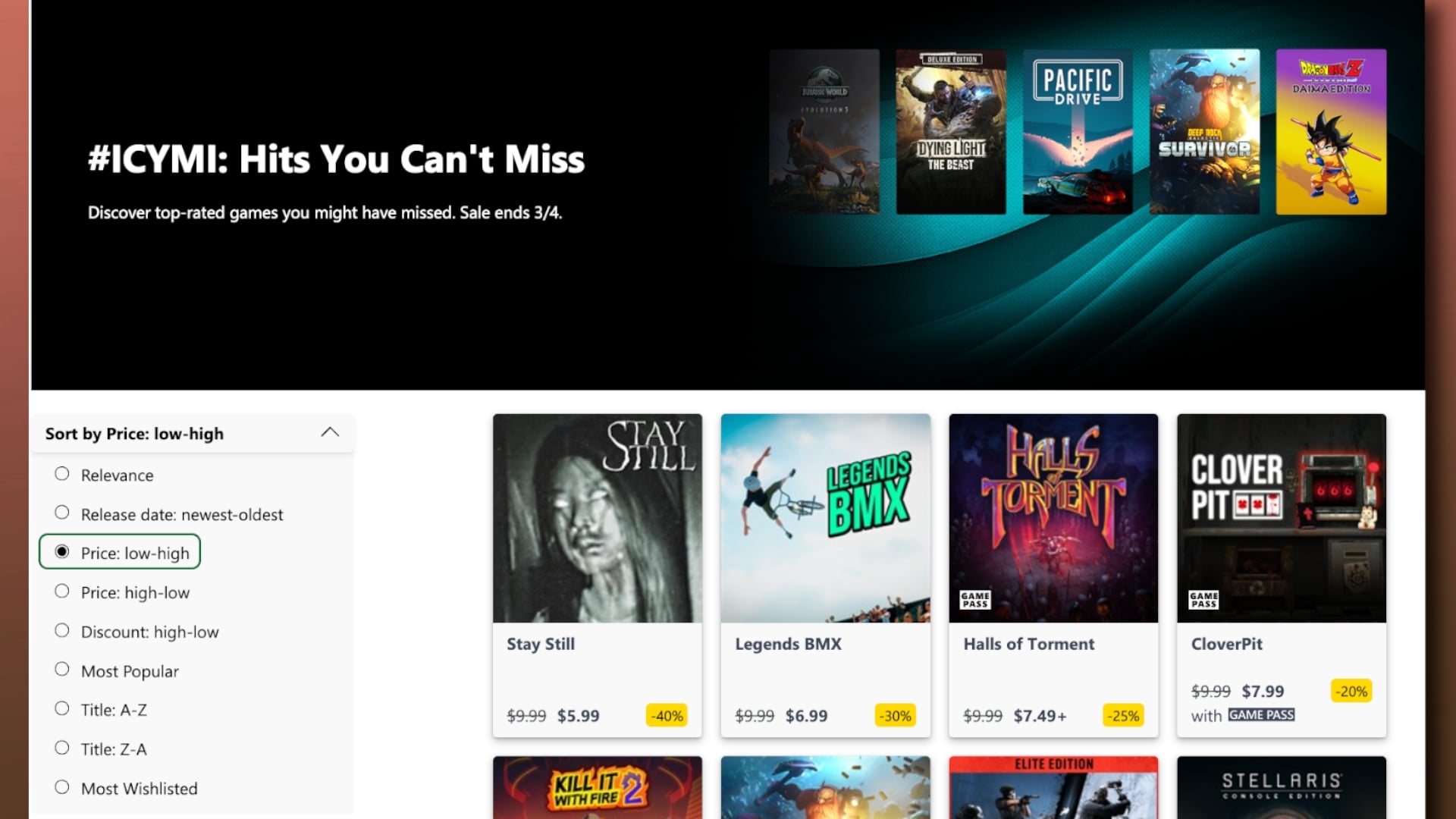
      With Nano Banana 2, Google appears focused on balancing performance, scale, and production-ready output as AI image generation becomes increasingly embedded across consumer and enterprise platforms.