Microsoft Criticizes YellowKey PoC as Researcher Fires Back

Microsoft has published mitigation guidance for a newly disclosed Windows BitLocker bypass vulnerability known as YellowKey. The flaw, tracked as CVE-2026-45585, targets the Windows Recovery Environment and could let attackers bypass BitLocker protections under certain conditions.

The issue gained attention after security researcher Nightmare-Eclipse released a public proof-of-concept exploit. Microsoft criticized the release, saying it did not follow coordinated vulnerability disclosure practices and could increase risks for users before a complete security update becomes available.

Microsoft and researcher clash again

The dispute follows earlier tensions between Microsoft and Nightmare-Eclipse around previous proof-of-concept releases, including BlueHammer. After that disagreement, the researcher also released tools and projects named RedSun, UnDefend, GreenPlasma, and MiniPlasma.

Nightmare-Eclipse rejected Microsoft’s criticism and accused the company of harming their reputation. The researcher also claimed Microsoft revoked and later wiped access to their Microsoft Security Response Center account.

Microsoft has not publicly addressed those specific allegations, but the company continues to warn against releasing exploit code before patches are widely available.

How the YellowKey attack works

According to the published details, YellowKey affects the Windows Recovery Environment and relies on physical access to a device. The attack uses a USB device together with a specially prepared FsTx folder to interfere with BitLocker protections.

The vulnerability mainly raises concerns for stolen or unattended laptops, especially devices used outside corporate environments. Organizations that rely on BitLocker to protect sensitive data could face increased risks if attackers gain direct access to affected systems.

Microsoft releases interim mitigation

Microsoft has now released an interim mitigation script designed to reduce the attack surface until a permanent fix arrives. The company recommends applying the mitigation on systems exposed to higher theft risks, particularly work laptops and mobile enterprise devices.

The guidance focuses on limiting exploitation opportunities through the Windows Recovery Environment while Microsoft prepares a broader security update.

BitLocker remains one of Windows’ most widely used encryption features for protecting business and personal data. Even vulnerabilities that require physical access can become serious concerns for enterprises managing remote workers and traveling employees.

The public release of exploit code also highlights the growing tension between independent security researchers and major vendors over disclosure timelines, proof-of-concept publication, and vulnerability handling policies.

Via Neowin

Rockstar’s Parent Company is Using AI to Create Game Ads, But GTA 6 Stays “Human-Made”

Since last year, AI has been a major talking point across the gaming industry. In fact, the Clair Obscur: Expedition 33 director had to respond publicly after AI claims cost it The Game Awards. That’s not all; eagle-eyed fans have spotted traces of AI in some big games like Battlefield 6. Well, if you are someone who is against AI, GTA parent company Take-Two’s recent admission of using AI, albeit to create game ads, might be enough to make you a little frustrated.

Take-Two says it is using AI to create game ads

As reported by TheGamer, the comments regarding the use of AI to create game ads came during Take-Two’s latest earnings call, where CEO Strauss Zelnick spoke openly about how AI is quietly becoming part of the company’s workflow. Thankfully, it’s not about generating games. Rather, the focus right now appears to be on marketing content and production efficiency.

According to Zelnick, one of Take-Two’s mobile studios recently used AI tools to produce short live-action advertisements for its games. The scripts were still written internally by employees, but the actual production process reportedly relied heavily on AI software.

Speaking about the benefits, Zelnick noted, “The entire cost of making the spot was zero. Previously, we hired third-party companies to actually create those with human beings, and those spots could cost $25,000, $50,000, $100,000.”

Zelnick further added that this move wasn’t linked to layoffs or headcount reductions. He described AI as a tool for making teams faster and more efficient rather than replacing them outright. “What AI has allowed them to do is be more efficient, make great stuff, and do it cheaper. This is all a benefit to our company,” Zelnick noted.

As for Rockstar Games, the company reportedly maintains that AI-generated content will not appear inside GTA 6 itself. As someone who is eagerly waiting for GTA 6, I am quite relieved.

XBOX’s New Strategy Chief to Focus on Reviving “Storied Franchises”

XBOX may finally be getting ready to dig deep into its old franchise vault again. Following his appointment as XBOX’s new Chief Strategy Officer, Matthew Ball has reportedly confirmed that part of his focus will revolve around reviving classic XBOX IPs while rebuilding the console side of the business.

The comments came shortly after XBOX CEO Asha Sharma announced Ball’s hiring alongside Scott Van Vliet, who is stepping in as the new CTO.

Matthew Ball says dormant XBOX franchises still matter

In a brief statement shared with Bloomberg, Ball reportedly said he wants to help bring back some of Microsoft’s “storied franchises.” While he did not name specific games, the comment alone sent fans into speculation mode. Franchises like Banjo-Kazooie, Blue Dragon, Lost Odyssey, and more have been floating around community discussions for years.

As of now, it remains unclear which franchises could actually return first. However, Ball openly talking about reviving classic XBOX series is probably the biggest hint yet that Microsoft may finally be taking those requests seriously. Previously, Ball highlighted how older franchises continue dominating player attention and engagement across the industry. That could explain why XBOX appears interested in revisiting dormant properties instead of focusing entirely on brand-new franchises.

Notably, Ball also believes the console market is still growing despite rising hardware costs and increasing pressure from subscriptions and cloud gaming. That lines up closely with his long-running industry analysis work. Ball has repeatedly argued that gaming revenue growth is becoming increasingly uneven, with publishers relying more heavily on subscriptions, platform ecosystems, and a smaller number of giant franchises.

Speaking of the business side, XBOX CEO Asha Sharma recently also hinted that the next-gen Project Helix console is not immune to the ongoing memory supply crunch. According to Sharma, that could directly impact both pricing and availability.

Chinese Hackers Target Telecom Providers With New Windows and Linux Malware

A China-linked cyber-espionage campaign is targeting telecommunications providers with newly discovered malware for both Linux and Windows systems.

The campaign has been attributed to Calypso, also tracked as Red Lamassu, and has reportedly been active since at least mid-2022.

Telecom providers targeted

The attacks focus on organizations in the Asia Pacific region and parts of the Middle East. Researchers say the operators used telecom-themed domains to impersonate target organizations and support their infrastructure.

The findings come from Lumen’s Black Lotus Labs and PwC Threat Intelligence, which described a campaign built around long-term access, internal network movement, and stealth.

Windows attacks use JFMBackdoor

On Windows systems, the attack starts with a batch script that drops payloads for DLL sideloading.

The chain uses fltMC.exe and FLTLIB.dll before loading JFMBackdoor, a malware tool that gives attackers extensive control over infected devices.

JFMBackdoor can provide reverse shell access, upload and download files, manage processes and services, alter registry keys, and capture encrypted screenshots for exfiltration.

It can also act as a TCP proxy, store encrypted configuration data, and remove itself to reduce forensic traces.

Linux malware enables long-term access

The Linux malware, called Showboat or kworker, works as a modular post-exploitation framework.

Its initial infection method remains unknown, but once deployed, it can collect host information, communicate with a command-and-control server, upload and download files, hide its process, and create services for persistence.

Showboat can also retrieve code from external sites, including Pastebin and forums, which may help the attackers hide parts of their activity.

Network pivoting is the key concern

Showboat’s most important capability is its SOCKS5 proxy and port-forwarding support.

This lets attackers use compromised telecom systems as footholds and move deeper into internal networks. For telecom providers, that raises the risk of broader espionage, data theft, and long-term network monitoring.

Shared tools across China-aligned groups

Researchers believe the infrastructure points to a partially decentralized operation. Multiple clusters appear to share tooling and certificate-generation patterns.

Lumen believes the malware ecosystem may be shared across several China-aligned threat groups, with each group using similar tools against different regions.

The telecom campaign adds to a busy period for security teams. A Chrome botnet flaw was recently revealed, while Microsoft patched two actively exploited zero-day flaws.

GitHub has also confirmed that an internal breach was linked to the TanStack supply chain attack.

Via Bleeping Computer

Microsoft’s Veteran Exec Yusuf Mehdi to Leave After the Next Fiscal Year

Another major leadership change is happening inside Microsoft. Yusuf Mehdi, one of the company’s longest-serving executives and a key figure behind Windows, XBOX, Bing, and more recently Copilot, is reportedly planning to leave after the next fiscal year.

Yusuf Mehdi says Microsoft is entering a major transition period

According to an internal memo viewed by Business Insider, Mehdi informed employees that he is preparing for his “next adventure” after spending 35 years at Microsoft. Mehdi currently leads product marketing for Microsoft AI and Copilot, while also serving as the company’s commercial chief marketing officer.

In the internal memo, Mehdi described the decision as both “exciting” and “difficult,” while reflecting on decades spent across some of Microsoft’s biggest platform shifts. In his early years at the company, Mehdi worked through the rise of Windows and the internet era. Later, he was involved with Bing, devices, gaming, and Microsoft’s broader consumer strategy. More recently, he has been working closely with CEO Satya Nadella for Copilot and AI push.

As mentioned earlier, Mehdi plans to stay through the next fiscal year to help Microsoft continue pushing its AI-focused transition. That includes helping “reimagine Windows for the agentic era,” expanding Microsoft 365 services, and growing the company’s broader “One Copilot” vision.

Other internal shakeups from earlier this year

Not to forget, Microsoft has been aggressively restructuring teams and leadership around AI over the past several months. Recently, longtime sales chief Judson Althoff received an expanded leadership role, while Microsoft AI CEO Mustafa Suleyman was reportedly moved closer to the company’s superintelligence efforts. Additionally, former LinkedIn CEO is now also leading Microsoft Teams. All that said, Mehdi’s eventual departure from the company adds another major name to that growing list.

Google Triples Gemini Limits Across Antigravity After User Backlash

Google has introduced major changes across its Gemini ecosystem, including the launch of Gemini 3.5 Flash.

The biggest controversy came from the newly introduced Gemini rate limits. Google recently added both weekly and 5-hour usage caps for Gemini users. Once users exceed those quotas, they must either wait for the limits to reset or subscribe to a higher paid plan.

Users quickly hit Gemini limits

Many users quickly pushed back against the changes after reporting they hit limits far sooner than expected. Some developers claimed they exhausted their quota after sending only three prompts, sparking criticism across social media and developer communities.

The complaints raised concerns that the new restrictions could disrupt development workflows and make Gemini less practical for heavy users.

Google responds after backlash

Google acknowledged the backlash soon after reports started spreading online. Varun Mohan responded publicly, confirming that the company would increase the rate limits significantly.

According to Mohan, Google will now triple the Gemini rate limits across all paid tiers in Antigravity. The company is also resetting every user’s weekly Gemini quota to immediately ease frustrations.

The response suggests Google recognized the original limits were too restrictive for many developers and power users.

Developers may benefit from the change

For developers using Gemini heavily inside workflows, strict prompt caps created concerns about reliability and interrupted productivity. Resetting quotas and increasing limits should reduce some of that friction.

The quick response may also reassure users that Google is paying attention to developer feedback while expanding its AI ecosystem.

More Gemini features arrive

The controversy comes during a broader expansion of Gemini services and tools.

Google recently introduced improved AI verification tools designed to help users validate AI-generated content more effectively.

The company also unveiled Gemini Omni Flash, a new model focused on video generation capabilities. In addition, Google continues rolling out various improvements for the Gemini app itself.

Meta Quietly Launches Forum App for Facebook Groups

Meta has quietly released a new app called Forum, which appeared on Apple’s App Store without an official announcement. The app focuses on Facebook Groups discussions and appears to be Meta’s latest attempt to build a more community-driven social experience.

Forum brings Group conversations into a separate app while still linking directly to Facebook accounts and activity. The move also revives an older idea after Meta shut down its standalone Facebook Groups app back in 2017.

Forum focuses on Group conversations

Meta describes Forum as a space for conversations that matter to users. The positioning sounds similar to Reddit, especially since the app emphasizes discussions, answers from communities, and topic-based feeds.

Unlike Reddit, Forum still relies on Facebook identities. Users must sign in with a Facebook account, and their Groups, activity, and profile connections carry over automatically.

The app does offer anonymized usernames similar to Facebook’s anonymous posting tools. However, Group administrators can still view a user’s real identity behind posts and comments.

Feed recommendations and Facebook integration

Forum’s main feed centers around conversations from a user’s existing Facebook Groups. The app can also recommend new Groups and discussions based on interests selected during setup.

Meta designed Forum to work alongside Facebook instead of replacing it. Posts created through Forum also appear inside the main Facebook app, while Facebook Group posts can surface inside Forum as well.

This cross-posting approach allows users to continue discussions between both apps without losing conversations or community activity.

AI tools are built into Forum

Meta also added AI-powered features to the app. One tool, called Ask, can gather answers from multiple Groups so users do not need to search discussions manually.

The app also includes an AI moderation assistant for Group admins. Meta says the assistant can help moderators manage conversations and community activity more efficiently.

The company confirmed Forum remains in testing. Meta says it regularly releases experimental products publicly to see which features users actually find useful.

The launch comes during a larger AI push at Meta. Reports recently claimed the company plans to cut around 8,000 jobs while increasing investments in AI infrastructure and products. At the same time, Meta’s broader AI ambitions could face pressure after reports that China blocked a rumored $2 billion Manus AI deal.

Meta also faces growing scrutiny around AI and data usage, with a new lawsuit reportedly forming against OpenAI over claims involving user data sharing with Meta and Google.

Via Engadget

Windows 11 KB5089549 Fixes Taskbar Freeze and Explorer Bugs After Sign-In

Microsoft has confirmed that a known Windows 11 issue could cause the taskbar to freeze after users sign in. The problem also affected desktop right-click menus, Task View, and File Explorer behavior on some systems, as Windows Latest reports.

The fixes are now rolling out through the May 2026 Windows 11 update KB5089549. Microsoft says the update improves explorer.exe reliability and reduces sluggishness after boot.

Taskbar and desktop freezes addressed

Some Windows 11 users reported seeing a blank or slow-loading desktop immediately after sign-in. In certain cases, the taskbar appeared several seconds late or stopped responding entirely.

Microsoft says KB5089549 fixes several explorer.exe reliability issues tied to startup behavior. The update also resolves cases where right-clicking the taskbar or desktop failed to respond.

Task View reliability has also improved. Some users previously experienced freezes or unresponsive behavior when switching between virtual desktops or opening Task View shortly after logging in.

File Explorer Quick Access fix included

The update also fixes a File Explorer issue where unpinning items from Quick Access sometimes did nothing.

Microsoft grouped the problem under the same broader explorer.exe reliability fixes. Users should now see more consistent behavior inside File Explorer after installing the update.

Startup apps should cause less slowdown

Microsoft says Windows 11 now handles startup apps more efficiently after boot.

The system should better balance CPU, memory, disk, and network usage so startup apps do not compete as aggressively for resources. This could reduce the sluggishness some users noticed after signing in, especially on systems with many background apps enabled.

Browser updaters, cloud sync apps, and other startup processes should now create less noticeable slowdowns during the first minutes after boot.

These fixes should make Windows 11 feel smoother immediately after sign-in, especially on systems with many startup applications running in the background.

More fixes included in KB5089549

KB5089549 also fixes incorrect BitLocker recovery prompts that appeared on some devices.

The update additionally adds a new SecureBoot folder as part of Microsoft’s ongoing Secure Boot certificate updates.

However, not every installation has gone smoothly. Some users report that KB5089549 fails to install, although Microsoft has already shared a temporary workaround for affected systems.

Microsoft Fixes Long-Standing PowerShell Problems on macOS

Microsoft is preparing a major cleanup for PowerShell on macOS by fixing several long-standing installation and security issues. The next macOS release of PowerShell will be properly notarized by Apple, which should eliminate the repeated “unidentified developer” warnings many Mac users currently see during installation.

The changes are expected to arrive in the next maintenance release of PowerShell 7.4 or later.

PowerShell will work more smoothly on macOS

Apple’s Gatekeeper security system has often blocked or warned users when installing PowerShell on Mac devices. In many cases, users needed to manually bypass security prompts or use Terminal workarounds before PowerShell could run properly.

Microsoft says future PowerShell packages and tarballs for macOS will fully meet Apple’s notarization requirements. That means macOS should recognize the software as verified and safe without extra user intervention.

The update should make PowerShell easier to deploy for both individual users and enterprise IT teams.

Microsoft is also hardening PowerShell security

Alongside notarization, Microsoft is hardening PowerShell libraries and binaries on macOS to better align with Apple’s modern software security requirements.

The company says the changes also bring PowerShell closer to Microsoft’s own internal security standards for distributed applications.

Another fix targets incorrect file permissions inside the macOS tarball package. Those permission issues could sometimes prevent PowerShell from installing or executing correctly after extraction.

Once the update ships, Mac users should no longer need to change security settings or run special commands just to install PowerShell.

Microsoft still faces several macOS software issues

PowerShell is not the only Microsoft product currently facing macOS-related complaints. Microsoft recently acknowledged that Microsoft Teams can trigger repeated permission popups on Mac systems.

The company also confirmed a new issue affecting Microsoft Outlook, where images may fail to display correctly in some cases.

Meanwhile, Microsoft recently started rolling back its floating Copilot button inside Microsoft 365 apps after users complained that the feature felt intrusive.

Microsoft Rolls Back Floating Copilot Button in Word, Excel, and PowerPoint

Microsoft is partially reversing its floating Copilot button changes in Word, Excel, and PowerPoint after users complained that the feature felt intrusive while working inside documents and presentations.

The company originally introduced the Copilot Dynamic Action Button to make AI features easier to access across Microsoft 365 apps. The button floats directly inside the workspace instead of staying in the traditional ribbon interface.

Users complained the floating Copilot button got in the way

The floating Copilot button appeared directly inside Word documents, Excel spreadsheets, and PowerPoint presentations. While Microsoft said the feature helped increase Copilot engagement, many users felt it disrupted their workflow.

Some users criticized the placement for covering content or creating distractions while editing files. The backlash pushed Microsoft to rethink how the feature behaves inside Office apps.

Microsoft adds an option to move Copilot back to the ribbon

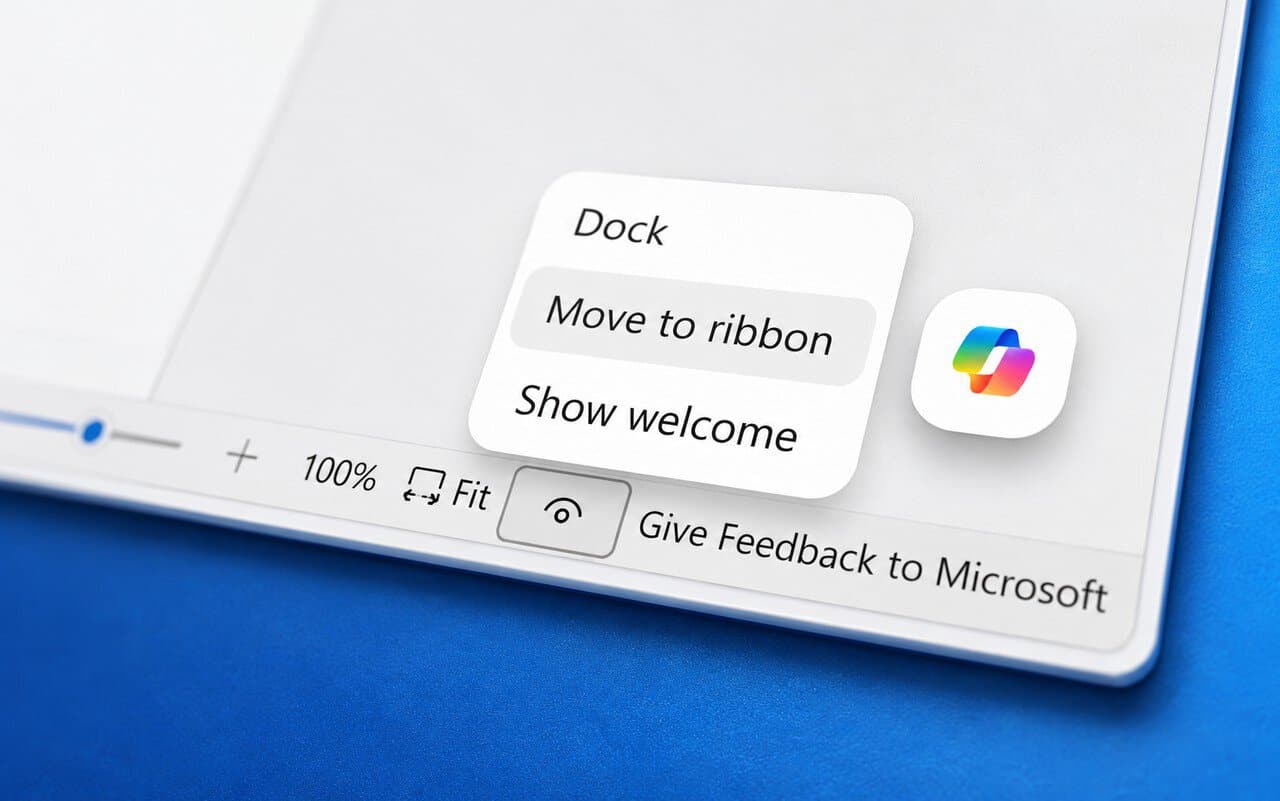
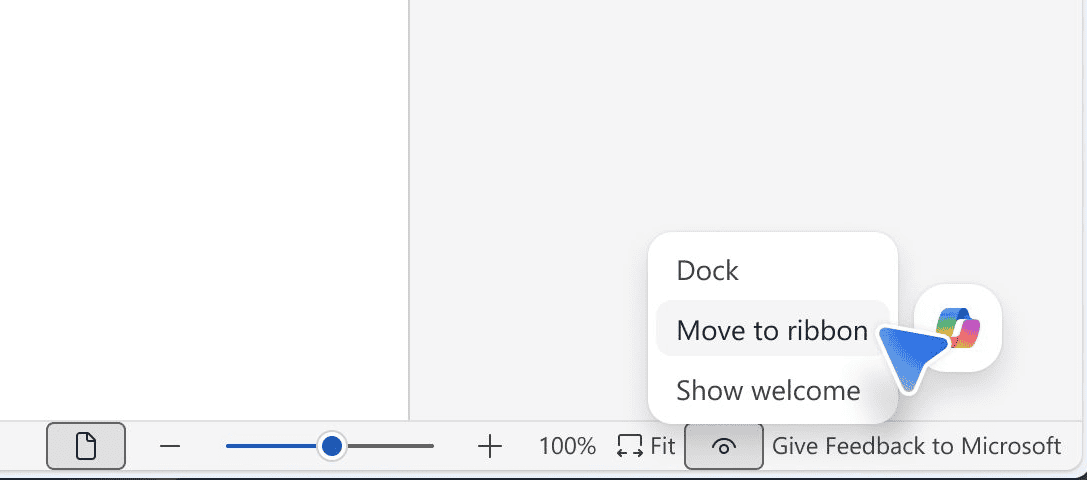
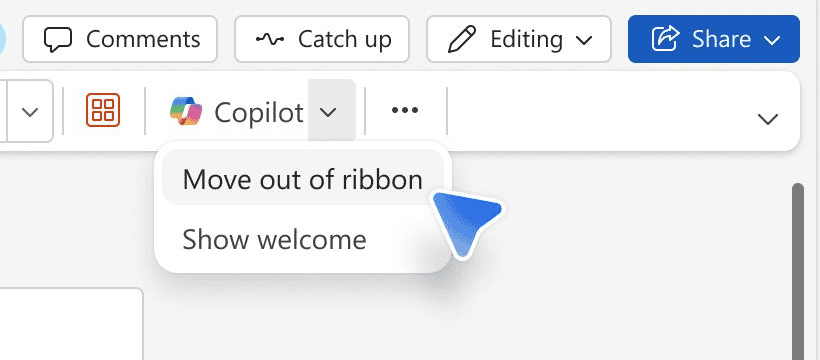
Microsoft is now giving users more control over where the Copilot button appears. Users will soon be able to right-click the floating Copilot button and move it back into the ribbon interface. This should provide a cleaner experience for people who still want quick access to Copilot without keeping a floating element on screen.

The company is also keeping the existing Dock feature, which turns the floating button into a smaller side caret. Previously, clicking the docked caret reopened the Copilot side panel and restored the floating button automatically. Microsoft is changing that behavior so the docked caret stays locked while users work in documents.

Word, Excel, and PowerPoint are affected

The changes are coming to Word, Excel, and PowerPoint. Microsoft plans to start rolling out the update to web versions of the apps next week, while desktop versions will receive the changes later.

This is not the first time Microsoft has faced criticism over interface changes tied to AI features. Recently, some Edge users also reacted negatively to the removal of Collections and Sidebar apps.

At the same time, Microsoft continues expanding AI integration across Office. The company recently introduced Copilot Agent Mode inside Microsoft 365 apps as part of its broader push toward AI-powered productivity tools.

Every Major Xbox Reveals & Updates from Warhammer Skulls 2026 Showcase

If you are an XBOX and Warhammer fan, yesterday’s Warhammer Skulls 2026 showcase was something you shouldn’t have missed. In case you didn’t manages to watch the event live, here’s a quick rundown of what was announced.

The annual event returned with massive announcements, including brand-new game reveals, surprise launches, fresh gameplay footage, DLC updates, and even some free content rolling out right now on XBOX platforms.

Hosted by Alanah Pearce, who is also voicing Nyra Veyrath in Boltgun 2, this year’s showcase celebrated the 10th anniversary of Warhammer Skulls. Needless to say, the event did not slow down for even a second.

Mechanicus 2 surprise launched while Boltgun 2 showed new gameplay

One of the biggest higglight of the event was Warhammer 40,000: Mechanicus 2, which officially launched on XBOX during the showcase itself. Interestingly, the game also marks the first appearance of the Votann faction inside a Warhammer 40K title.

Meanwhile, Warhammer 40,000: Boltgun 2 returned with extended gameplay footage alongside fresh looks at Nyra Veyrath and Malum Caedo.

Notably, Warhammer 40,000: Chaos Gate – Deathwatch also showed up during the showcase with its first reveal. This time around, the Deathwatch replaces the Grey Knights while multiple Xenos factions also enter the picture. Additionally, Warhammer Age of Sigmar: Deathmaster made its debut as a stealth-focused side-scroller starring a Skaven assassin. The game is currently planned for a 2027 XBOX release.

Space Marine 2, Darktide, and Rogue Trader also got big updates

Warhammer 40,000: Space Marine 2 officially received its free Purgation update, adding a new PvE level, Practice Mode, fresh weapons, and cosmetics.

Meanwhile, Warhammer 40,000: Darktide confirmed that the Skitarii faction from the Adeptus Mechanicus lineup is becoming a playable class on June 23.

Besides that, Rogue Trader locked June 11 for its next DLC, Infinite Museion, while Dark Heresy showcased additional gameplay footage during the presentation. The event also revealed that a Helldivers 2 x Warhammer 40K collaboration is currently in the works.

In case you missed, XBOX Free Play Days also allows Game Pass subscribers try several five Warhammer games this weekend. Not to mention, all the games included in the Free Play Days lineup are availble to buy at heavily discounted prices.

XBOX launches ‘Game Studios Shop’ with merch from its biggest franchises

Microsoft has officially launched the XBOX Game Studios Shop, a new storefront focused on merchandise from major XBOX franchises like Halo, Forza, Gears of War, Fable, and more. The store currently includes hoodies, T-shirts, hats, drinkware, and collectibles across different price ranges.

According to XBOX Consumer Products senior director, John Friend, this is only the initial rollout, with more products planned throughout the year.
XBOX expands its gaming merchandise push
Microsoft says new items will reportedly arrive alongside major XBOX game launches and events. The company also noted that player feedback will help shape future additions and improvements to the shopping experience.

That being said, this isn’t XBOX’s first merchandise storefront. The new shop joins existing stores tied to franchises and studios under the XBOX umbrella, including Blizzard, Bethesda, Call of Duty, and Minecraft.

Gaming merchandise has become a much bigger business in recent years, especially around major franchises with strong fan base. Xbox now appears to be pushing deeper into that space with a dedicated Game Studios-focused store. XBOX has also confirmed that more collections may arrive later. Recently, Microsoft also unveiled the new XBOX Player Voice feedback hub. Needless to say, players are indeed making their voices heard.

PlayStation Network (PSN) Down Right Now for Thousands of Users

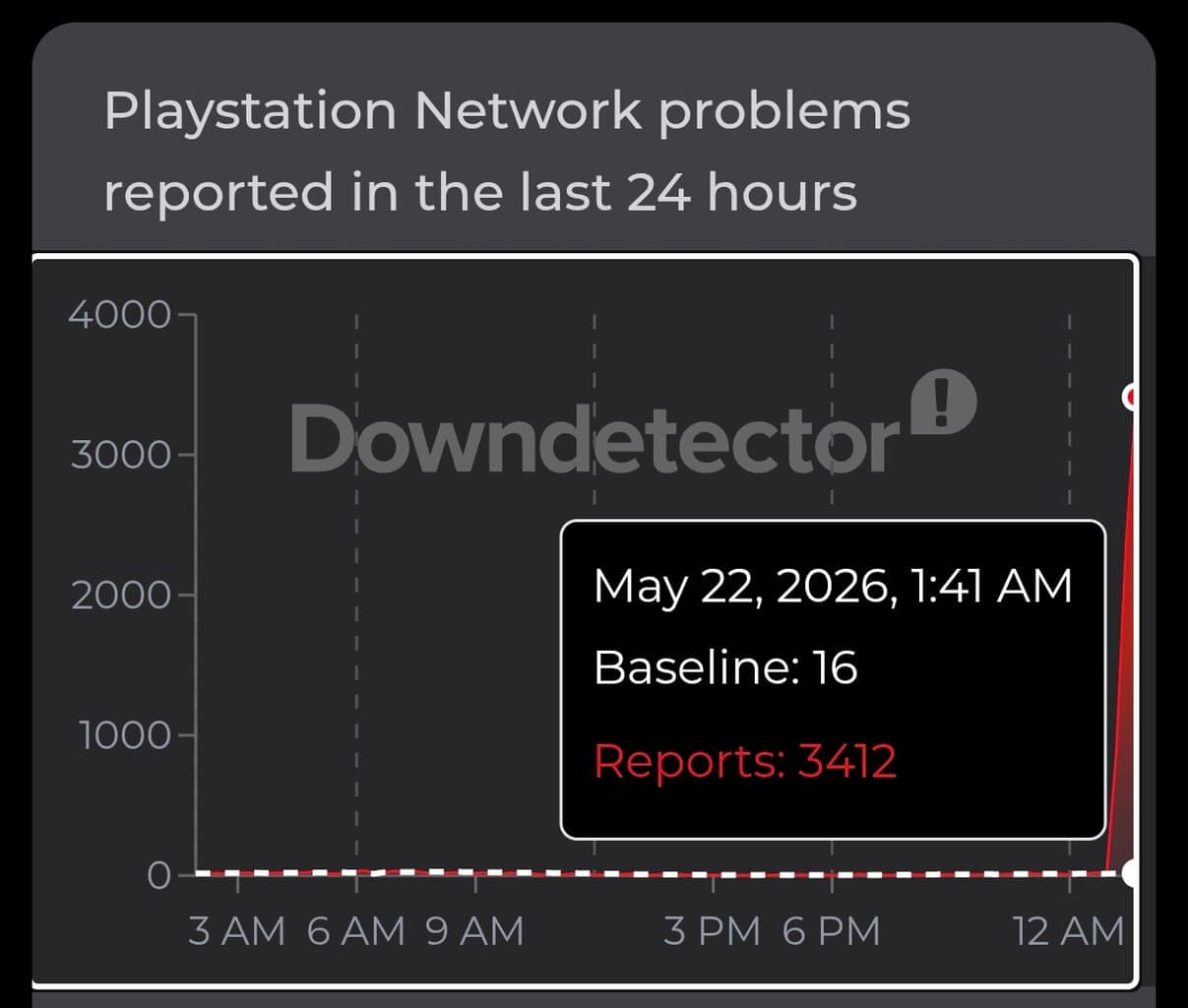
If you are wondering whether it’s just you or PlayStation Network is down right now, well, it’s indeed down right now, at least for over 2500 users right now. Over on Downdetector, we just saw a huge spike hiting, with reports of issue related to server connections, login, and more.

Image: Downdetector | Timezone shown above: IST

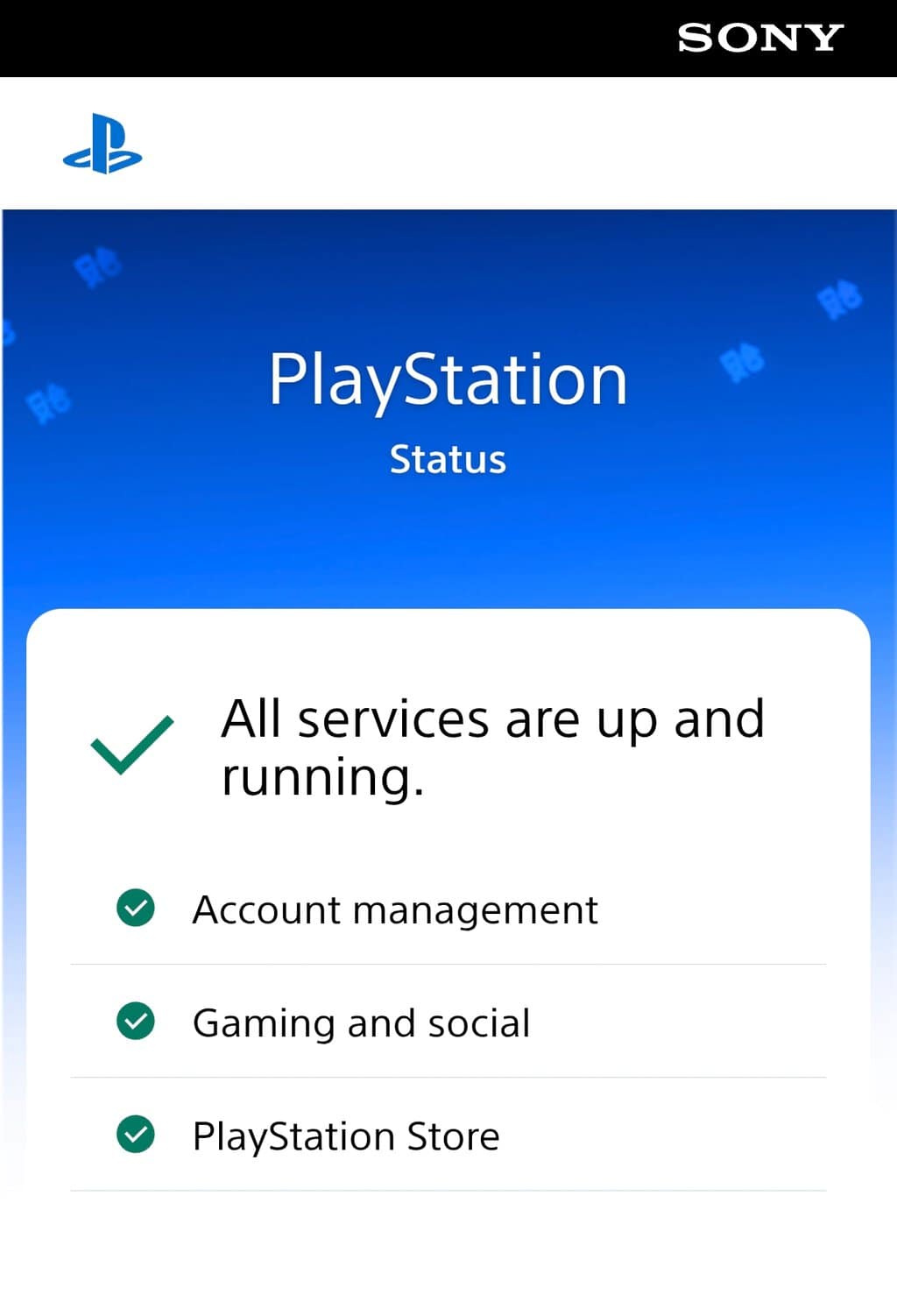
Interestingly, the official PlayStation Status page shows “all services are up and running,” at the time of writing this.

Image: Sony

As of now, Sony hasn’t confirmed the issue, but it seems many users on X are already facing issues. Check out what PlayStation users are saying on X:

Not to forget, many PSN users recently reported their account getting hacked due to some support loophole. You can check out our detailed coverage here.

If we hear or come across anything from Sony or PlayStstion social accounts we will update you.

This is a developing story…

Mozilla Officially Starts Public Testing of Firefox’s New “Nova” UI

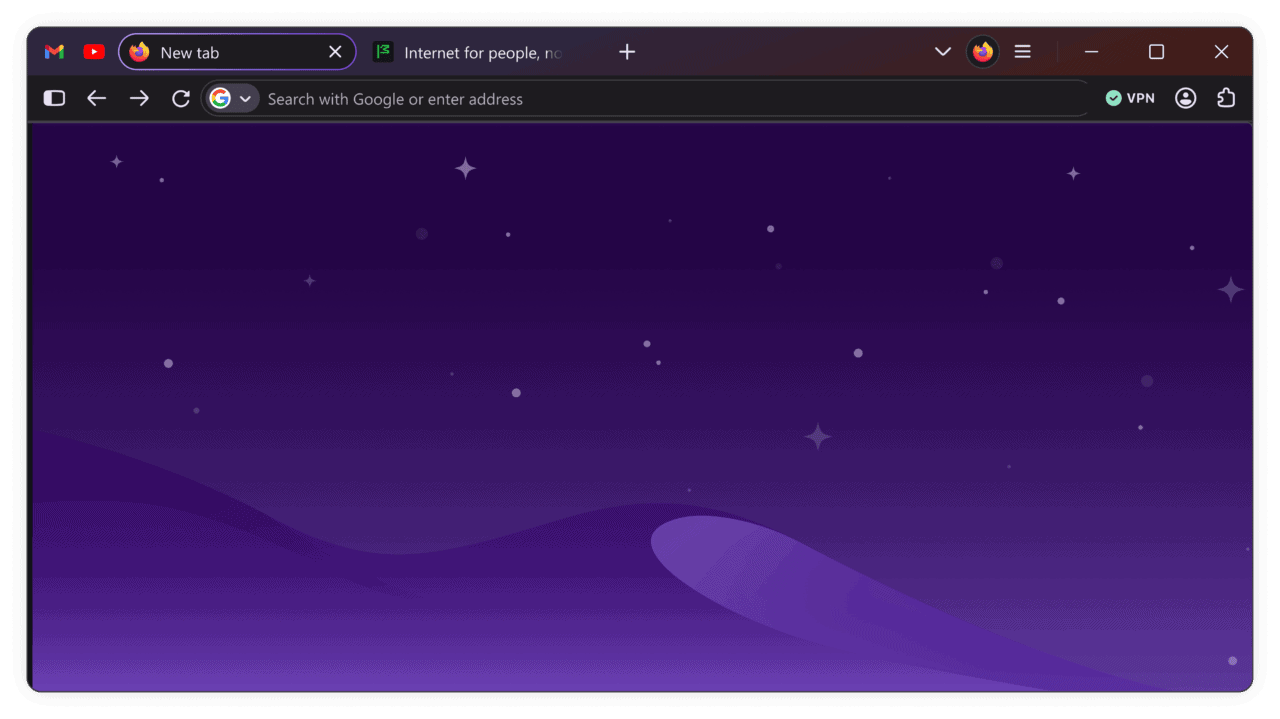
Earlier this year, a leak detailed that Mozilla was preparing a major design overhaul for Firefox internally called “Project Nova.” Well, the Firefox UX team has now officially confirmed that public testing for the Nova UI is finally happening. In the announcement blog post, Firefox UX team says the redesign isn’t about replacing Firefox entirely but rather modernizing the browser while keeping its familiar identity intact.

The company describes Nova “cleaner, warmer, faster and more adaptable version” of Firefox built for how the modern web works today.

Firefox’s rumored massive “Nova” UI redesign is real and is now open for public testing

One of the biggest highlights of Firefox’s Nova UI redesign is privacy. Mozilla says the new interface pulls privacy tools closer to the front instead of hiding them deep inside menus. That includes easier access to built-in VPN tools, private browsing controls, and clearer settings for tracking protection and AI features. Users will also get the option to completely disable AI-related features directly from Settings.

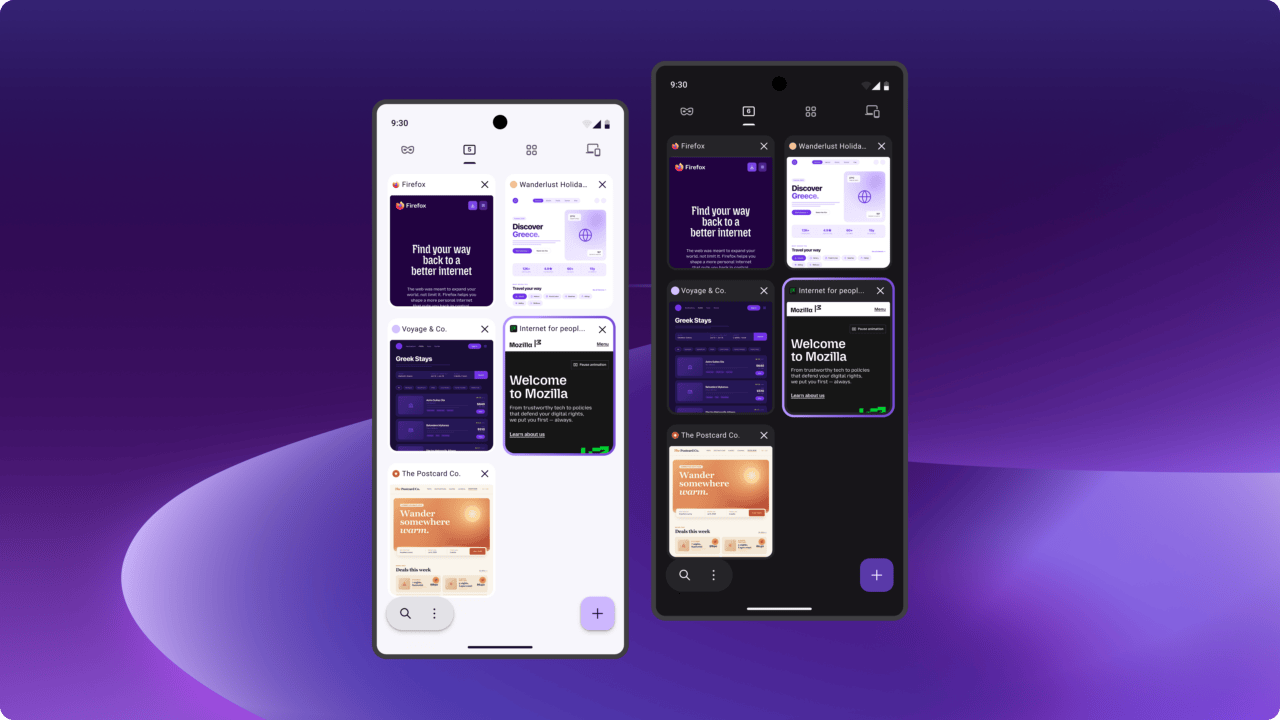
Firefox is also revamping the overall look of the browser with Nova UI. Tabs now feature softer shapes with glowing gradients, menus are becoming more rounded, icons are getting cleaned up, and spacing across the UI is being rebalanced. Mozilla says the refreshed color palette takes inspiration from fire, combining smoky purple tones with brighter highlights around active tabs.

Speaking of which, Mozilla also confirmed that compact mode is making a comeback after users repeatedly asked for it. Productivity features like vertical tabs, split view, and tab groups are also becoming easier to access without cluttering the interface.

Image: Mozilla

Performance improvements are another major part of Nova. Mozilla claims Firefox improved key page load times by around 9% over the past year while continuing to prioritize tracker blocking and privacy protections together.

The redesign will appear most noticeably on desktop first, but Mozilla says mobile versions of Firefox are also getting updated visuals and shared design elements for a more consistent experience across devices.

Starting today, the new Nova UI is open for public testing via Nightly builds of Firefox.

Xbox Free Play Days is packed with Warhammer 40K games this weekend (May 21–24)

[UPDATE: 21 May 2026 | 16:30 UTC] Microsoft has officially revealed the Xbox Free Play Days lineup for this weekend. As we mentioned in our original article, all the three games are part of this weekend’s Free Play Days lineup. Additionally, Warhammer 40,000: Rogue Trader and Warhammer 40,000: Space Marine – Master Crafted Edition are also joining alongside. Notably, all five games are free to play this weekend for XBOX Game Pass Ultimate, Premium and Essential members.

Here’s a quick look at the discounted prices of all the games during the Xbox Free Play Days window:

GameRegular PriceDiscounted Price
Warhammer 40,000: Space Marine – Master Crafted Edition$39.99$9.99
Warhammer 40,000: Chaos Gate – Daemonhunters$44.99$8.99
Warhammer 40,000: Battlesector$39.99$11.99
Warhammer 40,000: Inquisitor – Martyr Ultimate Edition$49.99No discount listed
Warhammer 40,000: Rogue Trader$49.99$19.99

[ORIGINAL STORY] It’s Thursday, which means we are back with another pre-official XBOX Free Play Days lineup. To catch you up, last weekend’s Free Play Days lineup included three games, Battlefield 6, Bassmaster Fishing, and JDM: Japanese Drift Master. Well, this weekend, it seems XBOX is going all in grab appreciation from Warhammer 40K fans.

This weekend, from today, May 21 through Sunday, May 24, you’ll have at least three Warhammer 40,000 series games to play for absolutely free. Here are the games:

Interestingly, the Warhammer packed lineup comes on the occassion of Warhammer Skulls video games festival’s 10th anniversary. As of now, it’s unclear whether the aforementioned games would require players to have Game Pass subscriptions to play free through the weekend.

Worth noting that, it goes without saying that we might see some more games added to the lineup later in the day when Microsoft officially announces this weekend’s Free Play Days lineup.

As usual, you might be able to grab these games at discount during this weekend’s Free Play Days window. As a reminder, Warhammer 40,000: Chaos Gate – Daemonhunters is available to buy now at an whopping 80% discount at XBOX Store. Meanwhile, you can save $37.50 on Warhammer 40,000: Inquisitor – Martyr Ultimate Edition if you get XBOX Game Pass Essential.

Source: Reddit/u/Oliomono

Anthropic Reportedly Paying SpaceX $15 Billion Per Year to Keep Claude Alive & Running

Anthropic may have just revealed how insanely expensive the AI race is becoming behind closed doors. The latest SpaceX SEC filing, which includes the massive compute agreement with Anthropic, has also revealed how much Anthropic is paying to access Elon Musk’s data centers (via The Verge). And the numbers are huge.

Anthropic’s massive Claude expansion is linked to SpaceX’s Colossus infrastructure

Per the document, Anthropic is paying $1.25 billion every single month through 2029 just to keep Claude scaling. Yes, monthly. That means the AI company is paying close to $15 billion per year, giving us a closer look at what frontier AI infrastructure actually costs in 2026. More importantly, it shows the AI war is no longer just about models anymore. It’s about who can lock down enough GPUs, power, and data center capacity before everyone else does.

According to the filing, Anthropic reportedly secured 300 megawatts of compute capacity linked directly to xAI’s Colossus facility near Memphis. The deal also includes access to more than 220,000 NVIDIA GPUs. Rather than relying purely on normal cloud scaling, Anthropic appears to be reserving dedicated infrastructure for Claude’s next growth phase.

That matters because products like Claude Code, enterprise APIs, and large reasoning models are chewing through compute faster than most companies can build new supply. And we are already starting to see the effects. Anthropic recently increased Claude Code usage ceilings, while enterprise users have reportedly been getting more consistent access as additional capacity comes online.

The filing also hints that the agreement is flexible despite its size. Either company can reportedly walk away with 90 days’ notice, while early discounted pricing suggests parts of the infrastructure are still ramping up.

EA May Have Played a Big Role in Xbox Game Pass Family Plan Cancellation, It’s Claimed

Back in 2022, Microsoft quietly started testing something a lot of Xbox fans instantly loved the sound of: an Xbox Game Pass Friends & Family plan. The idea was simple; one subscription would let multiple users access Xbox Game Pass for a lower combined price, somewhat similar to how streaming services handle family accounts.

Xbox Game Pass family plan may have hit publisher resistance

The feature later expanded into more regions during 2023 testing phases, and honestly, it looked like Microsoft was getting ready for a wider rollout. Then suddenly, everything went quiet.

Toward the end of 2023, Phil Spencer confirmed the plan had effectively been put on pause. At the time, he explained that Xbox still had a roadmap for the feature. However, the company needed to figure out a version that worked properly for both players and game creators.

Now, a fresh report from Windows Central’s Jez Corden has shed some light on what may have happened behind the scenes. According to Corden, the cancellation or delay reportedly “wasn’t actually Microsoft’s fault.” Rather, he claims Electronic Arts (EA) strongly pushed back against the idea internally. As per the report, EA “fully hated the idea” of a Game Pass family-sharing system.

That does not necessarily mean EA alone killed the feature. Realistically, multiple publishers may have had concerns about revenue sharing, licensing, or how family-based access could impact player spending across major titles.

Well, the demand for the feature clearly never disappeared. In the latest “XBOX Player Voice” feedback hub, one of the most-requested features from fans turned out to be a Game Pass Family Plan once again. Needless to say, the demand to bring back exclusives is still at the top. Given how XBOX is being reshaped under the leadership of new CEO Asha Sharma, it’s entirely possible that she may revisit the idea yet again.

Xbox Project Helix Could Drop Discs, and Gamers Might Be Fine With It

Microsoft’s next Xbox console, reportedly codenamed Project Helix, could push the platform further toward an all-digital future. As Windows Central reports, one of the biggest unanswered questions involves support for physical Xbox game discs.

Microsoft has not confirmed whether the next Xbox will include a built-in disc drive. However, growing speculation suggests the company may rely more heavily on digital ownership and cloud-connected systems for its future hardware strategy.

Physical disc support remains unclear

One major concern centers around backward compatibility. Microsoft has spent years promoting support for older Xbox titles across multiple console generations. Many Xbox players still own large physical game libraries dating back to the Xbox 360 and Xbox One eras.

If Project Helix launches without a disc drive, Microsoft would need another solution for those users. Otherwise, the company risks undermining one of Xbox’s strongest long-term platform features.

Some reports suggest Microsoft could support external USB disc drives instead. Sony already uses a detachable disc-drive approach for newer PlayStation hardware, showing that a modular setup could work for modern consoles.

Since Project Helix reportedly shares more similarities with a gaming PC architecture, external disc support may be technically easier to implement.

Rumored “Project Positron” could convert discs to digital licenses

Another possibility involves a rumored program called Project Positron. The idea reportedly focuses on converting physical Xbox discs into permanent digital licenses tied to a Microsoft account.

Such a system could reduce the need for built-in disc drives while still preserving access to older purchased games.

The concept would also fit changing player habits. Many Xbox users already split their gaming between consoles, PCs, handheld gaming devices, and cloud streaming platforms. A disc-to-digital system could make game libraries more flexible across devices.

Some players also view digital ownership as more convenient because it removes concerns about scratched or aging discs.

The biggest issue may be resale and license ownership

A disc-to-digital conversion system creates one major problem for Microsoft: preventing duplicate ownership.

If users convert a physical game into a digital license and then sell the original disc, one purchase could effectively create two working copies. Microsoft would likely need some form of license verification, ownership tracking, or deactivation process tied to the original disc.

How that system would work remains unknown.

The situation also highlights the wider industry shift toward digital ecosystems. Microsoft already pushes services like Xbox Game Pass, cloud gaming, PC integration, and cross-device access more aggressively than traditional console generations did.

Xbox continues shifting toward a broader gaming ecosystem

Project Helix may ultimately represent less of a traditional console and more of a Windows-powered gaming platform connected across multiple devices.

That shift continues to divide Xbox fans. Some players want Microsoft to focus more on hardware flexibility and ecosystem access. Others still want a stronger emphasis on traditional console features, including physical media and platform exclusives.

In other Xbox news, fans continue discussing Microsoft’s broader Xbox transformation plans, while others are calling for the return of stronger first-party exclusives.

Microsoft Seemingly Removing the Expansion Port from New Xbox Controllers

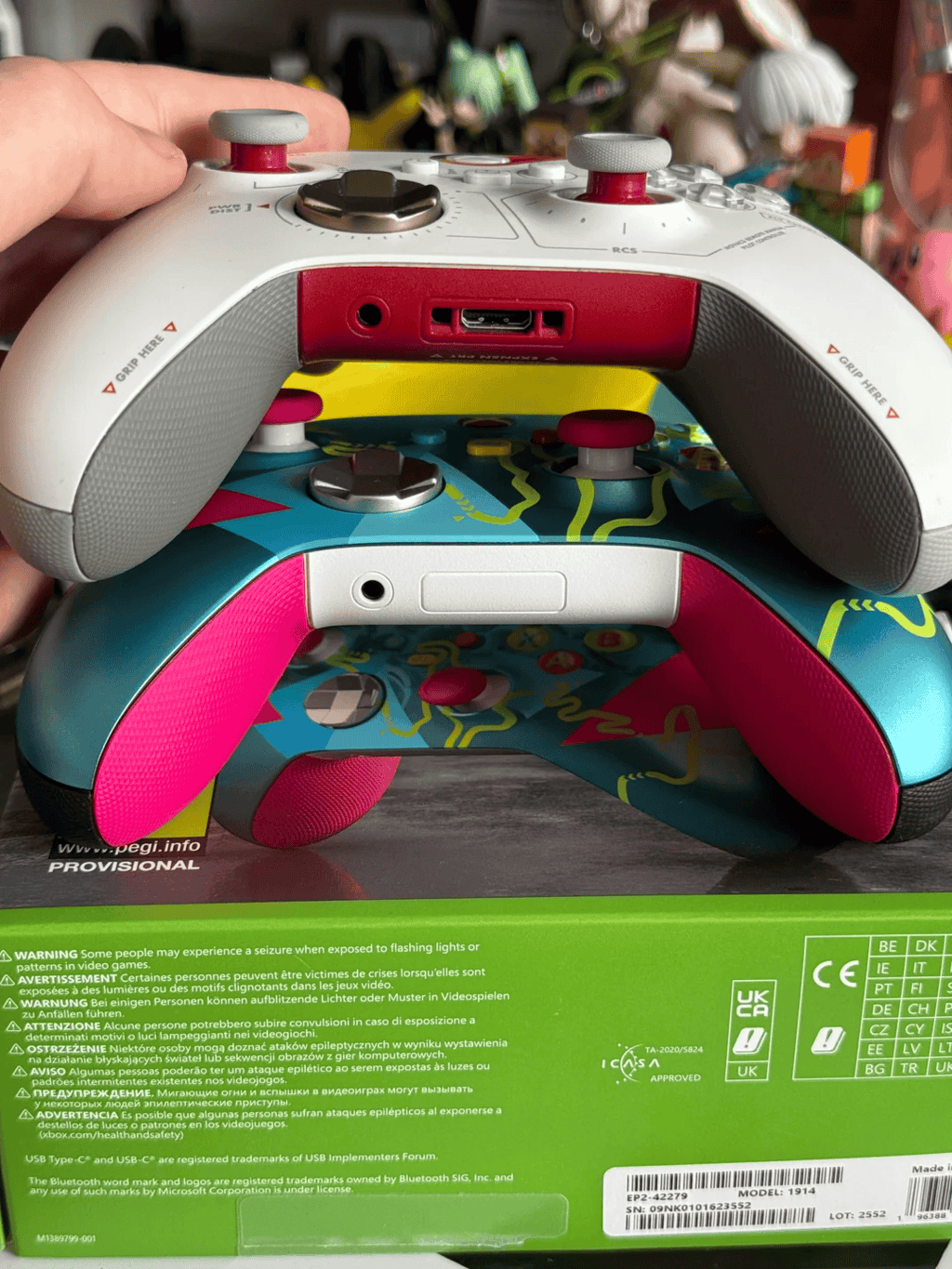
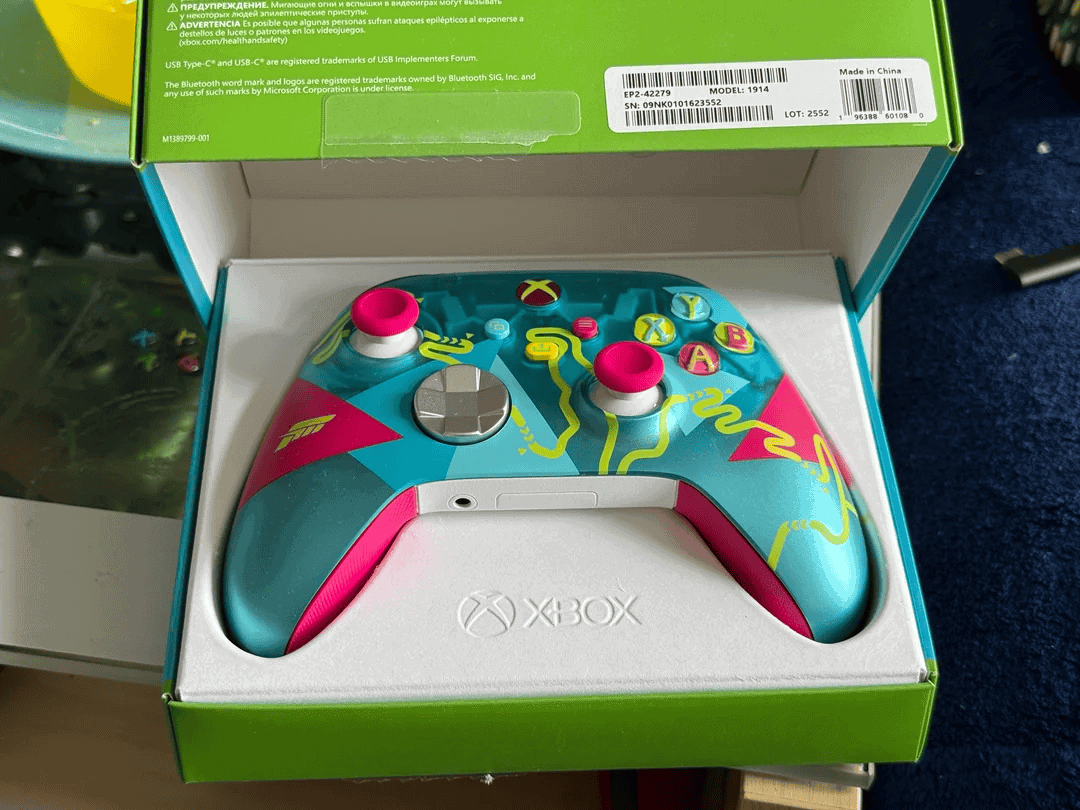
Microsoft recently unveiled a limited-edition Xbox Wireless Controller alongside a matching headset just ahead of Forza Horizon 6 launch hype. Now that the controller is finally reaching customers, one Reddit user named “SpeedKomodo” appears to have spotted something Microsoft never actually announced publicly.

Microsoft may be quietly removing a useful Xbox controller feature

According to the Reddit post, the new Forza Horizon 6 controller seemingly ships without the classic Xbox expansion port found underneath older controllers. Instead of the usual connector sitting next to the 3.5mm headphone jack, the controller reportedly has a sealed plastic cover in its place.

Image credit: Reddit/u/SpeedKomodo

For those unaware, the expansion port has existed on Xbox controllers for years. It mainly allowed accessories like chatpads, headset adapters, and certain older audio peripherals to directly connect to the controller itself.

In everyday use, most players probably will not even notice the missing port. Standard wired headsets still work through the 3.5mm jack, while wireless accessories and USB-C connectivity remain unaffected. That being said, players still using older Xbox accessories could suddenly find some hardware becoming useless on newer controller revisions.

Microsoft hasn’t officially confirmed removing the expansion port from Xbox controllers so far. However, it seems the change only affects the newer production batches or select special editions right now.

As of now, it remains unclear whether Microsoft plans to phase the expansion port out completely across future Microsoft Xbox controllers or if this is limited to specific editions only. Interestingly, some older limited-edition controllers, including the DOOM: The Dark Ages model, reportedly still include the port for now.

via: GameSpot

Microsoft Tests New Agentic AI Controls in Edge for Business

Microsoft is testing new agentic AI controls in Edge for Business, giving IT teams more ways to manage how Copilot works inside the browser.

The goal is to make Copilot’s browser-based actions safer in enterprise environments, especially as AI tools gain the ability to read tabs, interact with websites, and complete tasks on behalf of users.

Microsoft wants IT teams to control where Copilot can act

Agentic AI can perform broader tasks across a user’s workspace, but that also raises security and data protection concerns. Businesses need to know where AI can operate, what it can access, and what actions it can take.

With the new Edge for Business preview, IT admins can define which websites Copilot can use. They can also enforce data protection policies and restrict actions such as copy and paste.

These controls should help companies test Copilot’s browser automation features without giving the AI unrestricted access across the web.

Users will see what Copilot is doing

Microsoft is also adding more visibility for end users. While Copilot performs browser tasks, users will see a visual overview of its actions.

Users can pause or stop Copilot at any time. Microsoft wants this to keep people in control while AI handles page summaries, comparisons, and other browser-based work.

Copilot can work across open tabs

Copilot in Edge can work across open tabs to help users reduce manual research. It can summarize pages, compare information, and summarize videos from YouTube tabs.

The feature aims to reduce tab switching and make Edge for Business more useful as a workplace productivity tool.

Purview protections are coming to Edge for Business

Microsoft is also adding Purview data protections to Edge for Business. These protections can help audit and block sensitive prompts or uploads.

The company says this could reduce the use of unsanctioned AI tools at work, since employees may have safer AI options directly inside the managed browser.

Edge for Business is getting a Copilot-style new tab page

Microsoft is also testing a Copilot-inspired new tab page for Edge for Business. The redesigned page can show daily activity, suggest prompts, and provide an overview of work.

Microsoft wants the new tab page to act as a productivity hub, rather than just a place to open websites.

The feature is in limited preview

The new agentic AI controls are currently in limited preview. IT teams need to sign up to test them, and Microsoft has published details about what admins can configure during the preview.

The business-focused changes arrive as Microsoft continues reshaping Edge around AI. In the regular version of Edge, the removal of the Sidebar and Collections caused backlash from users.

At the same time, Microsoft is improving Edge security by preventing saved passwords from loading into memory at startup. The company is also removing Copilot Mode from Edge, making AI a more central part of the browser instead of a separate mode.

Microsoft Confirms New Outlook Bug Breaks Images in Emails, Newsletters & Signatures

If images inside your Outlook emails, newsletters, or even signatures have suddenly started disappearing, you are definitely not alone. Microsoft has now confirmed a new bug in classic Outlook that causes embedded images to completely fail loading in certain emails.

The bug reportedly started showing up after Version 2604 Build 19929.20164+, and it can leave users staring at blank image spaces, broken placeholders, or the classic red “X” error icon. In some cases, Outlook also throws an error message saying the linked image can’t be displayed because the file may have been moved, renamed, or deleted.

Image credit: Microsoft

According to Microsoft, the problem usually affects emails using specific image wrapping formatting. More specifically, images configured with “Top and Bottom” text wrapping appear to trigger the rendering issue.

What makes this even more frustrating is that the images are technically still inside the message source. Microsoft says users can actually verify the bug by opening the affected email, heading into “View Source,” and checking for image tags tied to CID references like:

cid:[email protected]

That being said, the bigger concern is what happens afterward. Microsoft warns that while original emails should display correctly once a fix arrives, replies and forwarded versions may permanently lose those missing images entirely because the content never properly attaches in the first place.

As of now, Microsoft says the Outlook team is actively investigating the issue. There is currently no permanent fix available yet. For the time being, the company recommends avoiding image layouts that use “Wrap Text: Top and Bottom” inside emails or signatures. That workaround apparently prevents the rendering issue from happening altogether. While you wait for official fix, you can also check our guide to fix the issue.

via: Neowin

Chrome Botnet Flaw Could Let Malicious Websites Hijack Browsers in the Background

A newly disclosed Chromium browser flaw could affect browsers such as Google Chrome, Microsoft Edge, and other Chromium-based browsers. According to a security researcher Rebane, the issue can reportedly be triggered just by opening a malicious website.

Users do not need to install software, approve permissions, or click suspicious pop-ups. The attack happens entirely inside the browser itself, making it harder to detect than traditional malware.

Browser Fetch feature reportedly abused

The vulnerability reportedly involves Browser Fetch, a web standard that allows browsers to fetch files in the background.

Security researchers claim attackers can abuse the feature to establish long-lasting background connections between a Chromium browser and a remote server. In some cases, these connections may continue even after users leave the malicious website.

Researchers also claim that some Chromium-based browsers may even preserve the connection after the browser closes or the PC restarts.

Proof-of-concept exploit is now public

The flaw was reportedly discovered by an independent security researcher and privately disclosed to Google in late 2022.

Despite reportedly receiving an S1 severity rating from Google engineers, the issue allegedly remained unresolved for around 29 months. A proof-of-concept exploit has now become publicly available, raising concerns that threat actors could begin experimenting with the technique more widely.

Google has not publicly confirmed when a fix may arrive.

Attackers could abuse browsers as proxy infrastructure

Researchers warn that the flaw could allow malicious websites to quietly use browsers as lightweight proxy nodes for attacker-controlled infrastructure.

The exploit reportedly does not directly steal passwords, files, or emails. However, it may expose limited browsing-related data while helping attackers route traffic through unsuspecting users.

Because everything operates inside the browser itself, traditional antivirus tools may struggle to detect the activity.

Users may barely notice the issue

One of the biggest concerns is how difficult the behavior may be for average users to spot.

On some Chromium browsers, users may briefly see a downloads-related warning or pop-up without an actual file appearing. Most users would likely dismiss the behavior as a temporary browser glitch.

Researchers say there is currently no reliable way for regular users to verify whether their browser was affected.

With no confirmed Chromium patch available yet, the newly disclosed flaw raises fresh concerns about how modern browsers handle long-running background activity.

In other Chrome news, Google is preparing to let AI Mode automatically access open browser tabs, while also removing the Emoji menu shortcut from the address bar. Meanwhile, Microsoft recently patched two actively exploited zero-day vulnerabilities affecting Microsoft Defender components.

Via Ars Technica, Android Authority

Microsoft Patches Two Actively Exploited Defender Zero-Days on Windows

Microsoft has released emergency security updates for two actively exploited zero-day vulnerabilities affecting Microsoft Defender components on Windows systems. The patches started rolling out on Wednesday, and both flaws are already under active exploitation.

The two vulnerabilities impact the Microsoft Malware Protection Engine and the Microsoft Defender Antimalware Platform. One of the flaws can allow attackers to gain SYSTEM privileges, while the other can trigger denial-of-service conditions on unpatched devices.

CVE-2026-41091 allows SYSTEM privilege escalation

The first vulnerability is tracked as CVE-2026-41091. It affects Microsoft Malware Protection Engine version 1.1.26030.3008 and earlier.

According to Microsoft, the flaw is caused by improper link resolution before file access. Attackers who successfully exploit the issue can gain SYSTEM-level privileges on affected systems.

Microsoft fixed the vulnerability in Malware Protection Engine version 1.1.26040.8.

Because Microsoft Defender runs with elevated permissions on Windows systems, successful exploitation could give attackers broad control over compromised devices.

CVE-2026-45498 can crash unpatched systems

The second vulnerability is tracked as CVE-2026-45498 and affects Microsoft Defender Antimalware Platform version 4.18.26030.3011 and earlier.

Microsoft says the flaw can let attackers trigger denial-of-service states on vulnerable Windows devices. The affected antimalware platform is also used by Microsoft Security Essentials and System Center Endpoint Protection.

The issue was fixed in Antimalware Platform version 4.18.26040.7.

While the flaw does not directly enable remote code execution, denial-of-service vulnerabilities can still disrupt enterprise systems and security operations if exploited at scale.

Microsoft says updates should install automatically

Microsoft says most consumer and enterprise systems should receive the fixes automatically through normal Defender security updates.

Users should still verify that Defender platform updates and malware definitions install correctly. Microsoft recommends checking update status through the Windows Security app under Virus & threat protection and Protection updates.

Installed Defender platform versions can also be checked from Windows Security under Settings and About.

CISA adds both flaws to exploited vulnerabilities list

The U.S. Cybersecurity and Infrastructure Security Agency has added both Defender vulnerabilities to its Known Exploited Vulnerabilities catalog.

Federal agencies must secure affected systems by June 3 under current remediation requirements.

CISA warned that attackers commonly exploit these types of security flaws in real-world attacks, especially when security software runs with elevated privileges.

The Defender zero-days arrive amid a busy week for Microsoft security news. GitHub recently confirmed that its internal repository breach was linked to the wider TanStack supply-chain attack campaign. Microsoft is also investigating the YellowKey exploit and warned that the Storm-2949 threat group is actively targeting Microsoft 365 and Azure environments to steal sensitive data.

Via Bleeping Computer

VS Code Gets Remote AI Agents, HTML Preview And Terminal Optimizations

Microsoft has released Visual Studio Code 1.121, introducing a new batch of developer-focused improvements centered around AI agents, Markdown rendering, HTML previews, and terminal performance.

The update adds experimental remote agent support, built-in Mermaid diagrams, configurable AI utility models, and several backend optimizations designed to reduce resource usage.

Remote AI agents arrive in preview

One of the biggest additions in VS Code 1.121 is a new remote agents preview inside the Agents window.

The feature allows developers to run AI agent sessions on a remote machine instead of locally. Microsoft says the system currently works over SSH and dev tunnels, making it easier to offload agent tasks to another environment or development server.

The functionality remains experimental for now.

VS Code expands AI model configurability

Microsoft also changed how chat-related background tasks work inside VS Code.

The editor now uses utility AI models for lightweight operations such as generating chat titles, summaries, commit messages, rename suggestions, prompt categorization, and intent detection.

By default, the feature uses GitHub Copilot utility models. However, developers can now select their own supported models, including Bring Your Own Key configurations.

The change gives users more flexibility over how AI features operate inside the editor.

Mermaid diagrams are now built into VS Code

Microsoft has also integrated Mermaid support directly into VS Code. The company merged Matt Bierner’s Markdown Preview Mermaid Support extension into the editor itself. The new built-in component is called Mermaid Markdown Features.

VS Code can now render Mermaid diagrams directly inside Markdown previews, notebook Markdown cells, and chat interfaces without requiring a separate extension.

HTML previews no longer need extensions

VS Code 1.121 also simplifies HTML previews. Users can now open an HTML file and click the Preview icon directly from the editor title bar. Previously, many users relied on third-party extensions for this workflow.

Microsoft says the change removes friction from a very common development task.

Terminal performance improvements

The update also includes several optimizations for terminal tools.

Microsoft improved output compression and background terminal cleanup behavior. According to the company, these changes should reduce token usage while improving overall terminal performance and responsiveness.

The release arrives alongside other recent Microsoft productivity updates, including improved Narrator behavior in Microsoft Word and new zoom controls in Microsoft Access.

Meanwhile, GitHub recently confirmed that its internal repository breach was linked to the wider TanStack supply-chain attack.

UK’s Ofcom Warns TikTok & YouTube are “Still Not Safe Enough” for Kids in New Report

It seems the UK government is slowly losing patience with social media platforms. Following growing concerns around addictive feeds, harmful recommendations, and weak age protections, Britain is now reportedly considering much stricter online safety rules for children, including a possible social media ban for users under 16.

According to the latest report by Ofcom, the situation is still far from under control (via Reuters). The regulator says 73% of children between 11 and 17 encountered harmful content during a four-week study period, with personalized recommendation feeds being one of the biggest drivers.

TikTok and YouTube are now under extreme pressure

Among the major platforms, TikTok was reportedly mentioned most often by children exposed to harmful material. YouTube, Meta’s Instagram, and Snap’s Snapchat were also cited in Ofcom’s new report.

Interestingly, both TikTok and YouTube reportedly argued that their current safety systems remain sufficient. Ofcom, however, slams both platforms’ position, saying there are enough evidence that suggests recommendation feeds are “still not safe enough” for younger users.

The report additionally highlights how weak age enforcement still appears to be across the industry. Ofcom says 84% of children aged between 8 and 12 are already using platforms that officially require users to be at least 13 years old.

Platforms are now rushing to announce new protections

Several companies are already reacting to the mounting pressure. Snap has agreed to block adult strangers from contacting children by default while expanding age verification rules in Britain. Meta is introducing additional teen account protections alongside AI-powered tools designed to detect suspicious conversations.

Meanwhile, Roblox will reportedly let parents disable direct messaging for users under 16. Even X (formerly Twitter) has reportedly agreed to bolster enforcement around illegal hate speech and terrorist content. That’s result of a separate scrutiny by Ofcom.

All that said, the regulator also says that despite all these promises, kids’ exposure to harmful content online has “seen little overall improvement” since the Online Safety Act started taking effect.

Microsoft Adds Haptic Signals To Windows 11 With Adjustable Vibration Feedback

Microsoft has introduced a new haptic feedback system for Windows 11 called Haptic Signals, as Windows Central writes. The feature adds subtle vibration effects to certain interface interactions, making supported devices feel more responsive during everyday use.

The new functionality appears as part of Microsoft’s broader effort to refine the Windows 11 experience with smaller quality-of-life improvements. Users can enable or disable Haptic Signals directly from the Settings app and adjust the feedback strength based on personal preference.

Windows 11 currently offers four intensity levels for the feature, with level 2 enabled by default.

Haptic Signals only supports limited hardware for now

At launch, Haptic Signals only works on a small number of compatible devices. Microsoft says many existing haptic-capable accessories still lack support.

Compatible hardware currently includes devices like the Surface Laptop 8 and the Logitech MX Master 4 after a firmware update.

Because of the limited hardware ecosystem, many Windows 11 users will not immediately experience the feature. Microsoft may expand compatibility over time as more manufacturers adopt the API.

Microsoft wants haptics to stay subtle

Microsoft says it does not plan to add vibration effects everywhere in Windows 11. Instead, the company wants haptics to appear only during interactions where the feedback feels useful and natural.

The goal is to reinforce user actions without making the operating system distracting or irritating during daily use.

Microsoft is also still experimenting with where haptic feedback should appear. Some effects may change or disappear entirely while the company continues testing.

Developers can add support to their own apps

Microsoft confirmed developers can integrate Haptic Signals into their own applications using the company’s API.

This could eventually allow Windows apps to deliver more tactile experiences across supported laptops, mice, and future accessories.

For now, customization options remain basic. Users can only adjust intensity levels, and there are no advanced controls for selecting which interactions trigger haptic feedback.

Small upgrade, but a polished one

Haptic Signals is not a major Windows 11 feature, but it adds another layer of polish to the operating system on supported hardware.

The feature helps Windows feel more modern and responsive, even if the current rollout remains limited by hardware compatibility and minimal customization settings.

In other Microsoft news, the company recently introduced new Surface Pro and Surface Laptop devices for businesses while also improving Narrator behavior in Word and adding new zoom controls to Access.

Report: OpenAI Prepping to Quietly File for IPO as Soon as Tomorrow

OpenAI is reportedly getting ready for what may become one of the biggest tech IPOs in history. That’s according to CNBC’s sources, who claim that OpenAI could confidentially file its IPO paperwork as early as Friday as preparations quietly move forward behind the scenes.

OpenAI appears to be accelerating its IPO plans

The report claims OpenAI is already working with major Wall Street banks, including Goldman Sachs and Morgan Stanley, to prepare the filing over the coming days or weeks.

While the company has not officially confirmed an IPO timeline, it also did not deny the growing reports. Not to forget, previous reports have claimed that OpenAI is looking for a public debut as soon as later this year.

“Our focus remains on execution,” an OpenAI spokesperson reportedly told CNBC, while adding that the company regularly evaluates “a range of strategic options.” Considering that OpenAI has exploded into one of the world’s most valuable private companies since the launch of ChatGPT back in 2022, plans to go public are not surprising.

OpenAI’s IPO plans recently got a major boost after Elon Musk lost the landmark lawsuit because he was too late to file the lawsuit. However, Musk’s attorney has confirmed that they will appeal the ruling.

Per the CNBC report, private investors currently value OpenAI at more than $850 billion. Anthropic, an immediate rival to OpenAI, is also scaling at a rapid pace, with some reports hinting that it is also seeking a valuation that could eventually surpass OpenAI itself.

If OpenAI officially files in the coming days, it would mark a huge turning point not just for the company, but for the AI industry that has been accelerating at a near-unmatched pace over the last few years.

Microsoft Access Gets New Zoom Controls For Forms, Tables, And Queries

Microsoft continues adding new features to Microsoft Access despite its plans to retire the Access Database Compare Tool.

The latest update expands zoom support across more parts of the app, allowing users to zoom in and out while working with forms, tables, and queries. The feature works in Form View and Datasheet View, making large datasets and dense layouts easier to manage.

Access now supports zoom in more views

Microsoft says the new zoom controls improve readability for users who work with complex databases or detailed forms. Zooming in makes text and controls easier to read, while zooming out helps users fit more information on screen at once.

The feature also works in Print Preview for reports. However, Microsoft notes that zoom is still unavailable in Report View and Design View.

Users can adjust zoom levels directly from the Home tab by selecting the Zoom option and choosing the preferred scaling level.

Access also gets a new zoom slider

The update introduces a zoom slider located in the lower-right corner of the Access window. Users can quickly change zoom levels without opening additional menus.

Microsoft also added several keyboard shortcuts for zooming. Users can zoom in with Ctrl + Alt + Plus, zoom out with Ctrl + Alt + Minus, and instantly return to 100% zoom with Ctrl + Alt + 0. Holding Ctrl while using the mouse wheel also adjusts zoom levels.

Default zoom settings still have limitations

Access does not remember custom zoom levels after users close and reopen forms. However, Microsoft allows users to set a default zoom level through the application options menu.

The company also says the feature only affects native Access controls. Content inside ActiveX controls, including TreeView text, will not resize with zoom adjustments. Microsoft recommends replacing older ActiveX components with native Access controls whenever possible.

The feature is available in Access for Microsoft 365 version 2605 and later.

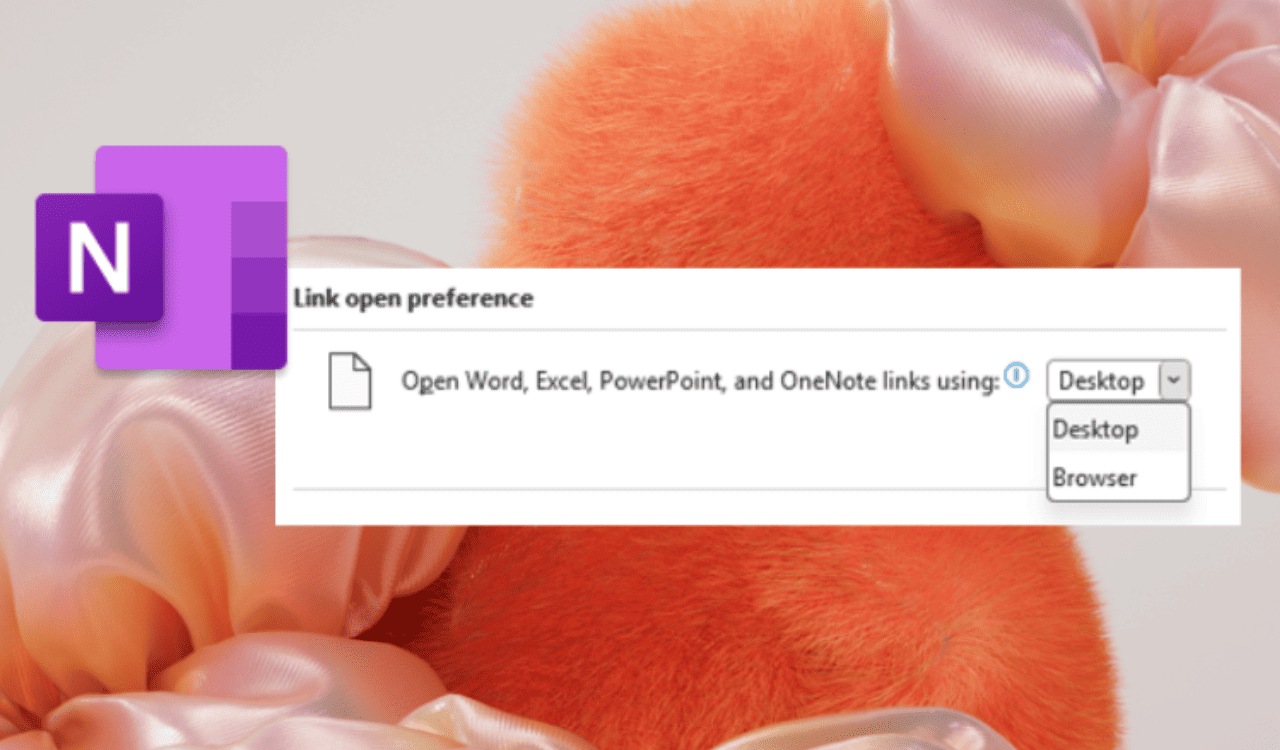
In other Office-related news, OneNote recently gained new controls for handling Microsoft 365 links, while Word received Narrator accessibility improvements. Microsoft Office also continues facing criticism from LibreOffice developers over the OOXML document standard.

GitHub Links Internal Repository Breach To TanStack Supply-Chain Attack

GitHub has confirmed that the breach involving roughly 3,800 internal repositories started through a malicious version of the official Nx Console VS Code extension. The attack links back to the wider TanStack npm supply-chain compromise that spread across several developer ecosystems.

The company says it secured the compromised employee device and rotated high-priority secrets after discovering the intrusion. GitHub also stated that it has no evidence so far that customer data outside the affected repositories was stolen.

GitHub attributed the campaign to the TeamPCP threat group, which has previously been associated with software supply-chain attacks. The group was also reportedly tied to the Mini Shai-Hulud campaign that allegedly impacted two OpenAI employees.

According to GitHub, the attackers moved through multiple projects after stealing CI/CD credentials from compromised npm packages.

The campaign reportedly began with malicious TanStack and Mistral AI npm packages before expanding into projects tied to UiPath, Guardrails AI, OpenSearch, and others.

Malicious Nx Console extension briefly appeared online

GitHub CISO Alexis Wales confirmed that the poisoned extension was Nx Console, the official VS Code extension for the Nx build system used to manage large repositories and monorepos.

A malicious release labeled Nx Console 18.95.0 briefly appeared on extension marketplaces.

Nx said one of its developers became compromised through the earlier TanStack supply-chain attack. The attacker allegedly stole GitHub credentials through the GitHub CLI, allowing workflow execution on the Nx GitHub repository with contributor-level access.

The malicious extension remained available on the Visual Studio Marketplace for around 18 minutes and on OpenVSX for roughly 36 minutes.

Microsoft and OpenVSX reported relatively low download counts, with 28 downloads on the Visual Studio Marketplace and 41 on OpenVSX.

Payload targeted developer credentials and cloud secrets

GitHub says the malicious extension focused on stealing secrets and developer credentials.

The payload reportedly targeted credentials tied to npm, AWS, Kubernetes, GitHub, Google Cloud, and Docker environments. These kinds of credentials can help attackers move laterally across software pipelines and cloud infrastructure.

GitHub says it rotated critical secrets on Monday and Tuesday, prioritizing the credentials with the highest potential impact first.

The company added that investigators are still reviewing logs, validating credential rotation, and monitoring for additional malicious activity connected to the breach.

Attackers claim access to GitHub source code

TeamPCP claimed it gained access to GitHub source code and around 4,000 private repositories. The group later advertised the allegedly stolen data on the Breached cybercrime forum.

GitHub has not confirmed the full scope of the attackers’ claims.

The incident highlights how modern supply-chain attacks increasingly target developer tooling, extensions, and CI/CD workflows instead of directly attacking end users.

In related security news, Microsoft recently warned about threat groups targeting Microsoft 365 and Azure environments to steal sensitive data. The company also acknowledged the YellowKey exploit and says it is working on mitigations.

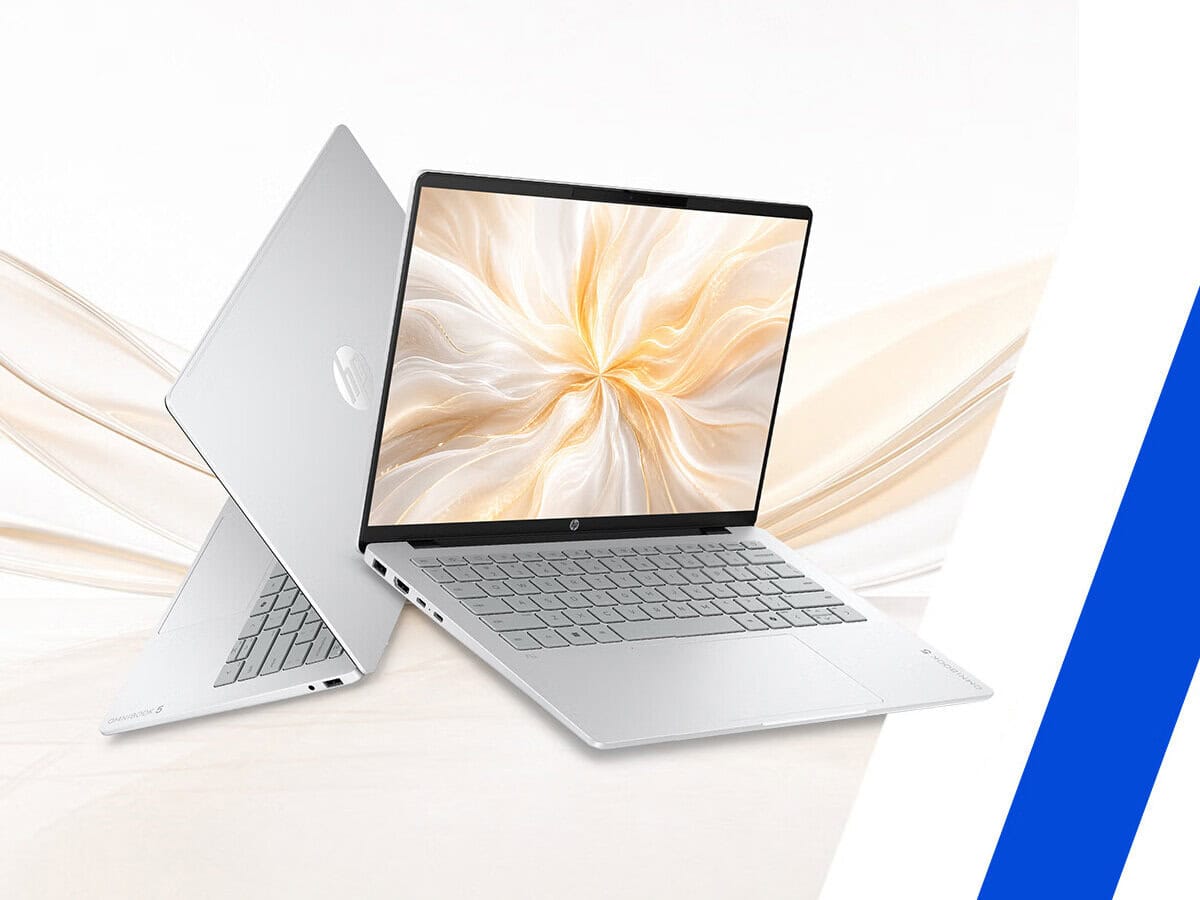
HP’s Star Book Plus 14 Rivals MacBook Neo with Intel Wildcat Lake Chip & Touch OLED Display

After Apple launched its budget-friendly MacBook Neo, many brands are now rushing to compete with it. HP is one of them, which has quietly introduced a brand-new lightweight laptop in China, and honestly, the specs look surprisingly solid for something this thin. Officially called the HP Star Book Plus 14, the new laptop caters to users who want an ultraportable notebook without giving up on OLED display or decent everyday performance.

HP is going all-in on portability with the new Star Book Plus 14

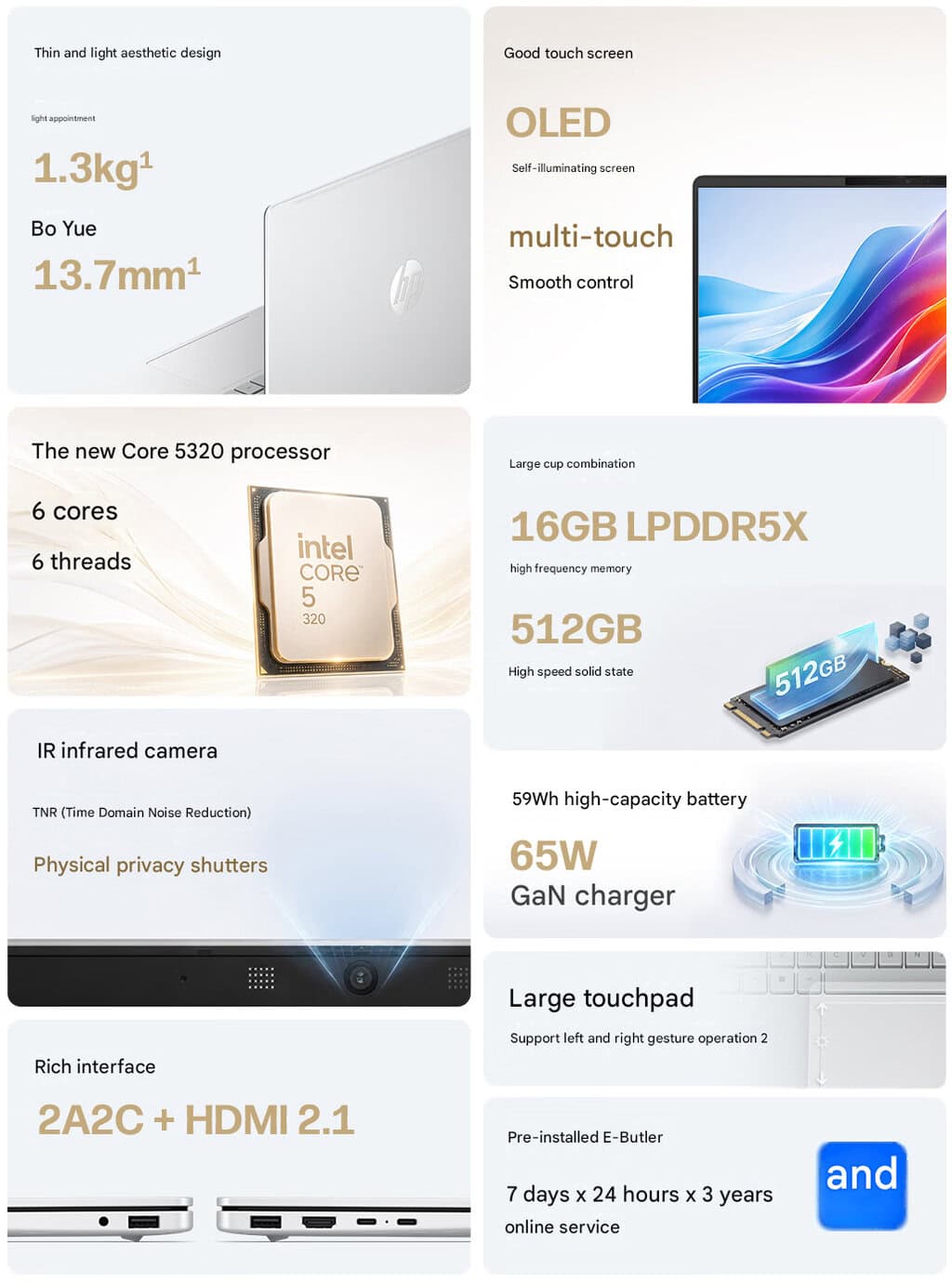
Under the hood, the new HP Star Book Plus 14 packs the Intel’s Core 5 320 processor and comes with 16GB LPDDR5X RAM and a 512GB SSD. HP is also bundling a compact 65W GaN charger inside the box, while the laptop itself packs a 59Wh battery.

One of the biggest highlights of this laptop is its design. The Star Book Plus 14 measures around 13.7mm thin and weighs roughly 1.3kg, which puts it into ultra-light laptop territory. Despite the compact body, HP still managed to include a fairly generous port setup.

You are getting two full-featured USB Type-C ports with 10Gbps transfer speeds, alongside two USB Type-A ports, HDMI, and a standard 3.5mm headphone jack. Not to forget, Wi-Fi 6 support is also included.

The OLED display may be the real selling point

The Star Book Plus 14 features a 14-inch OLED touchscreen panel with a 1920×1200 resolution and 90% screen-to-body ratio. HP says the display covers 100% of the DCI-P3 color gamut, which should make it far more appealing for content consumption and creative workloads compared to standard LCD laptops.

That being said, the refresh rate is capped to 60Hz, so this is clearly not aimed at gaming-first users. However, for productivity, streaming, office work, and general portability, the overall package looks fairly solid on paper.

Image credit: HP

The laptop is currently launching only in China with a price tag of 5,998 yuan, which roughly converts to around $882 (today’s rate). As of now, HP hasn’t detailed whether the Star Book Plus 14 will expand into global markets later this year. If you are looking for an affordable Intel Wildcat Lake laptop, CHUWI, a Chinese brand, has also launched a new laptop at just $449.

via: Notebookcheck

LibreOffice Developer Attacks Microsoft OOXML Again Over Digital Sovereignty

As The Document Foundation developer of LibreOffice, The Document Foundation has once again criticized Microsoft over its Office document formats, arguing that the company’s OOXML format remains proprietary in practice despite being presented as an open standard.

According to a recent statement highlighted by Neowin, the foundation says governments, organizations, and users seeking “digital sovereignty” should adopt ODF, or OpenDocument Format, as their default document standard instead of Microsoft’s OOXML.

LibreOffice pushes ODF as the truly open format

The foundation argues that ODF remains fully open because no single vendor controls how the format evolves. Documents created using ODF stay independent from one company’s ecosystem, which LibreOffice says protects users from vendor lock-in.

By contrast, TDF claims Microsoft’s OOXML format effectively keeps organizations tied to Microsoft Office workflows and infrastructure. The group says that while OOXML is technically documented, its complexity and Microsoft-centric implementation reduce real interoperability.

LibreOffice developers also argue that ODF should become the default native format for productivity software rather than simply being an optional compatibility feature.

TDF criticizes OOXML complexity and standards process

One of the biggest criticisms focuses on OOXML’s size and structure. TDF says the specification exceeds 7,500 pages and lacks proper transparency, independent governance, and version consistency.

The organization also repeated long-standing criticism that OOXML was initially developed behind closed doors at Microsoft before later becoming standardized.

According to TDF, Microsoft originally positioned OOXML as a transitional format that would eventually evolve into a stricter and more open standard. The foundation argues that this shift never fully happened and that Microsoft still benefits from a dominant position over user-created documents.

Excel date handling remains a major complaint

LibreOffice’s developers also highlighted Microsoft Excel’s long-criticized date handling behavior.

Excel famously treats 1900 as a leap year even though it was not one historically. Microsoft has preserved the behavior for compatibility reasons, but TDF argues the workaround reflects unnecessary legacy complexity within OOXML and Office formats.

The foundation also referenced a real-world scientific issue involving gene names. In 2020, the HUGO Gene Nomenclature Committee renamed several genes, including SEPT1 and MARCH1, because Excel frequently converted them into dates automatically.

LibreOffice says the incident demonstrates how Microsoft Office behavior can shape wider scientific and business workflows.

Microsoft and LibreOffice have clashed before

This is not the first public disagreement between LibreOffice and Microsoft. The two sides have repeatedly clashed over document standards, interoperability, and interface design over the years.

LibreOffice previously criticized Microsoft’s Ribbon interface, while supporters of ODF have also pushed governments and public institutions toward open document standards. Some European organizations and institutions have increased ODF adoption in recent years following pressure from open-source advocates.

TDF says relying on OOXML for native document storage creates what it calls “false digital sovereignty,” because users still depend heavily on Microsoft’s ecosystem for full compatibility and functionality.

The Document Foundation argues that true digital sovereignty requires organizations to adopt ODF as their primary document format instead of OOXML. LibreOffice maintains that open standards should remain vendor-neutral, transparent, and fully interoperable across platforms and software ecosystems.

Microsoft Word Makes Narrator Spelling Fixes Easier to Follow

Microsoft is improving Word’s accessibility experience with a new Narrator flow that makes spelling and grammar suggestions easier to understand for screen reader users.

The update changes how Word explains writing issues through Narrator. Instead of reading too much information at once, Word now presents errors in a clearer order, starting with the issue type, then the affected word or phrase, followed by sentence context and available corrections. Microsoft published the change through its Microsoft 365 Insider Blog on May 19.

Word’s visual error system does not work for everyone

Word has long used squiggly underlines to flag spelling, grammar, and writing problems. That system works well for users who can see the document clearly, but it does not help people who depend on Narrator or other screen readers.

Microsoft says the improved Editor experience focuses on making those spoken suggestions faster, clearer, and easier to act on.

Narrator now reads Word suggestions in a better order

Before this update, Narrator could give users a large amount of information very quickly. It would read the error, labels, context, and correction options in a way that technically included the needed details, but could feel difficult to follow.

The new flow changes that order. Narrator now starts by announcing whether the issue involves spelling, grammar, or another writing suggestion. It then reads the problematic word or phrase, gives sentence context, and finally presents the available fixes.

This should make Word’s Editor suggestions easier to process, especially for users who review long documents or work through multiple corrections in one session.

Spelling errors should sound clearer

Microsoft has also changed how Narrator handles spelling mistakes. When Word spells out an incorrect word, Narrator temporarily slows down.

By slowing down only for the incorrect word, Microsoft gives users more clarity without forcing them to change their regular Narrator speed. The company says this should reduce unnecessary repetition while still keeping the key details clear.

Keyboard shortcuts now reduce extra steps

Microsoft is also making it faster to fix writing issues from the keyboard.

Users can press number keys to choose suggestions directly. Pressing 1 selects the first suggestion, pressing 2 selects the second, and the same pattern continues for other available options.

Other shortcuts help users dismiss or manage suggestions. Pressing i ignores the issue once, pressing g ignores all instances, and pressing a adds the word to the dictionary. Microsoft says it has also refined Tab and arrow key navigation for the spelling and grammar experience.

These changes should help keyboard users move through corrections with fewer steps. They also make Word’s editing tools feel less dependent on mouse input or visual menus.

The update is available on recent Word and Windows builds

The improved Narrator spellcheck experience is available in Word for Windows for users running Version 2601, Build 19725.20126 or later. It works on Windows 11 versions 24H2, 25H2, and 26H1, according to Microsoft’s availability notes.

In other Microsoft news, Teams is getting faster Office file previews, and Microsoft has explained why some Teams recordings suddenly disappear. Microsoft has also added a new option that lets users choose how Microsoft 365 links open in OneNote.

OneNote Finally Lets You Choose How Microsoft 365 Links Open

Microsoft has quietly added a useful update to Microsoft OneNote. If you regularly jump between notes, spreadsheets, presentations, and documents, this one could save a lot of unnecessary clicks.

OneNote is getting more flexible for multitasking

The company has announced a new setting for OneNote on both Windows and Mac that finally gives users control over how Microsoft 365 file links open.

You can now decide whether Word, Excel, PowerPoint, and OneNote links should launch in a browser or directly inside desktop apps. According to Microsoft, the feature makes moving between files feel smoother depending on the kind of work users are doing. For example, opening files in a browser may be faster for quickly checking information or referencing material.

Meanwhile, users working across multiple files may prefer desktop apps for a more complete editing experience without constantly bouncing between tabs. Notably, Microsoft is still keeping browser mode as the default option for now. That being said, switching preferences appears fairly straightforward.

On Windows, users can head into File > Options > Advanced and then adjust the “Link open preference” setting between Desktop or Browser. Mac users can do the same via OneNote Preferences under the Navigation section.

Image credit: Microsoft

The feature is currently rolling out through the Microsoft 365 Insider program

For Windows users, it requires OneNote Version 2603 Build 19820.20000 or later. Meanwhile, macOS users will need Version 16.110 Build 26050124 or newer. Microsoft also notes that the rollout is happening gradually, so not everyone will see it immediately.

XBOX Reportedly Hires Matthew Ball as New CSO & Scott Van Vliet Named New CTO

It seems Asha Sharma is on spree to rebuild how XBOX operates behind the scenes. Following recent internal shakeups and leadership changes, the company has now brought in two major names to strengthen strategy and technology across the platform.

In an internal memo seen by The Game Business, Asha Sharma noted, the latest leadership changes “are about strengthening our foundation by creating more clarity and improving execution. As we head toward Showcase and beyond, we’ll continue making the changes needed to position XBOX for the future.”

XBOX reportedly hires a new Chief Strategy Officer (CSO) and Chief Technology Officer (CTO)

As part of the latest leadership change, XBOX is bringing in Matthew Ball as its new Chief Strategy Officer (CSO) (via Thurrott). If the name sounds familiar, that’s because Ball is widely known across the gaming industry for his yearly State of Video Gaming reports and broader analysis around the future of gaming, hardware, and digital ecosystems.

As the report mentions, Ball’s first major responsibility revolves around strengthening XBOX’s console business. Not to mention, that side of the market is currently facing pressure from rising component costs, especially around storage and memory. Earlier this year, Ball himself admitted he was “pretty frightened” about the current direction of the console market. As you can see below, Ball has updated his X account’s bio as “CSO @XBOX” and also announced the joining by a post that shows the new XBOX bootup animation.

The report further mentions that XBOX has also hired Scott Van Vliet as its new Chief Technology Officer (CTO). Besides new hires, XBOX has reportedly also promoted Chris Schnakenberg to Corporate Vice President for Partnerships and Business Development.

Given how aggressively Asha Sharma is reshaping XBOX lately, it feels increasingly clear the company is preparing for a very different phase of gaming ahead. Recently, the company also announced a new “XBOX Player Voice” feedback hub, in which fans have demanded to bring back exclusives and more.

PS5 Runs Cyberpunk 2077 Path Tracing In Experimental Linux Test

Digital Foundry has tested full path tracing on the Sony PlayStation 5 using a custom Linux loader that effectively turns the console into a PC-like system capable of running PC graphics workloads.

The experiment, first highlighted by Wccftech, explored whether modern path-traced games could realistically run on current PlayStation hardware. While the results proved that path tracing is technically possible on PS5, performance and image quality varied dramatically depending on the title and settings.

PS5 manages playable path tracing in Quake II RTX

Digital Foundry tested three major path-traced PC games: Quake II RTX, Portal with RTX, and Cyberpunk 2077. Among the three, Quake II RTX delivered the strongest overall results.

At native 4K resolution, the game reportedly struggled to maintain even 10 FPS. However, enabling TAAU upscaling from 1080p to 4K improved performance significantly, pushing average frame rates closer to 40 FPS.

Dynamic Resolution Scaling improved results further. With the internal resolution dropping as low as 540p, the PS5 could reportedly reach 60 FPS while still maintaining image quality that Digital Foundry described as believable for a console release.

The outlet suggested that lighter or indie-style games could realistically implement path tracing on current-generation console hardware.

Portal with RTX pushes the PS5 much harder

Portal with RTX proved far more demanding.

Even with aggressive scaling, the game barely managed around 30 FPS at 1080p output resolution using TAAU upscaling from an internal 540p render resolution.

Digital Foundry noted that image quality suffered heavily because of the extremely low internal resolution and weak denoising quality. Although technically playable, the experience reportedly fell short of what players would expect from a polished console release.

Cyberpunk 2077 RT Overdrive overwhelms current PS5 hardware

The most difficult test came from Cyberpunk 2077.

At 1080p using XeSS Performance mode, the benchmark averaged only 22.6 FPS. Lowering the output resolution to 1920×800 and reducing internal rendering resolution increased performance modestly to 26.9 FPS.

Digital Foundry also tested the PT Optimized mod, which reduces ray bounces from two to one. That adjustment boosted performance to roughly 35.5 FPS.

The team additionally experimented with FSR 3.1 frame generation, which pushed displayed frame rates close to 70 FPS. However, the generated frames reportedly looked incorrect, and gameplay did not feel genuinely smooth at that frame rate.

Image quality remains a major problem

While upscaling and aggressive optimizations improved performance, image quality took a substantial hit in more advanced games.

Cyberpunk 2077 reportedly looked rough due to extremely low internal rendering resolutions. Frametime consistency also remained unstable throughout testing, reducing overall smoothness.

The results suggest that current PS5 hardware can technically run path tracing, but major compromises remain necessary.

PS5 Pro and PS6 could change the picture

Digital Foundry suggested the experiment may better reflect what developers could achieve on the rumored PlayStation 5 Pro or future PlayStation 6 hardware.

Improved ray tracing acceleration and technologies like PSSR upscaling could make path tracing far more practical in future console games.

However, the outlet also raised concerns that next-generation path tracing ambitions could face limitations if developers must also support future handheld PlayStation hardware with lower graphics capabilities.

In other PlayStation news, Sony is reportedly exploring changes to the PlayStation Trophy system, while the next State of Play presentation is scheduled for June 2.

Forza Horizon 6 Smashes Every Xbox Game Studios Game’s Steam Concurrent Player Record

Playground Games has absolutely nailed it with Forza Horizon 6. The latest entry in the Forza Horizon franchise has been the most sought-after racing title in recent weeks. Despite multiple leaks spoiled the Playground Games’ party early, the game went on to grab one of the highest scores of 91 (at the time of writing this).

For those unaware, Forza Horizon launched globally as day one release on Xbox Game Pass yesterday. The game is also available on PC via Steam. Considering that many users play PC to play games, it’s important to talk about the Steam concurrent player count to determine the popularity of the game. Well, it seems Forza Horizon 6 is already on a roll.

The latest racing game has smashed all the records held by any other games developed by Xbox Game Studios. At one point, SteamDB data suggested that Forza Horizon 6 had a peak player count of 273,148, which beat the previous record holder Halo Infinite by 500 players (via PureXbox).

Image credit: Reddit/u/GustavoCOD

At the time of writing this, the concurrent player count stands at over 244,000 and is undoubtedly sitting at the top in the “Trending games” section.

Are you enjoying Forza Horizon 6? Let us know your thoughts about the game.