Sony’s Soft Pause Patent Introduces AI-Assisted Gameplay Instead of Full Pause

With recent reports suggesting that the PlayStation 6 could slip to 2028 or even 2029, attention remains firmly on how Sony plans to evolve the current generation. While the company reportedly won’t raise PS5 prices this year, it may adjust subscription pricing to support long-term investments.

A newly published patent now reveals that Sony is exploring a “Soft Pause” system that could redefine how players step away from games.

According to filings with the World Intellectual Property Organization, Sony has submitted patent US20260021411, describing a new gameplay state called “Soft Pause.” The concept avoids a traditional full stop and instead shifts the game into a modified, assisted mode.

What is Sony’s Soft Pause system?

The patent outlines a system where gameplay continues in an altered state when players need a short break. Instead of freezing the action entirely, the game slows down or becomes more forgiving.

Sony explains that Soft Pause helps players decide whether to fully pause or quickly return to normal gameplay. This approach reduces friction during brief distractions, such as checking a notification or answering the door.

The system appears especially relevant for VR experiences. Abrupt pauses in virtual reality can trigger discomfort, dizziness, or nausea. A gradual slowdown could deliver a smoother transition and maintain immersion.

How Soft Pause could change gameplay?

Sony describes several potential implementations. One version could slow down the entire game world, giving players extra reaction time.

Other concepts include adding temporary assist features. These may involve stronger aim assist, wider input timing windows, or clearer objective guidance.

In more advanced scenarios, a machine learning system could temporarily take over gameplay. The AI might maintain movement or prevent character death until the player resumes control.

The patent does not clarify whether such AI assistance would rely on player-specific data or generic behavior models. It also notes that different genres would require tailored implementations.

Challenges for competitive games

While Soft Pause may suit single-player or cooperative titles, competitive games present clear challenges. Brief AFK moments can impact match outcomes and player fairness.

Some multiplayer titles already deploy AI to replace disconnected players. However, integrating a dynamic Soft Pause feature into live competitive environments would require strict balancing rules.

Sony emphasizes that each genre would demand its own configuration. What fits a narrative-driven adventure may not work in an esports setting.

Part of a broader innovation push

This patent follows other recent Sony filings, including adaptive controller concepts using touch-based interfaces. The company continues to explore accessibility, immersion, and AI-assisted design.

As with all patents, there is no guarantee this feature will reach consumers. Companies frequently file experimental concepts that never enter production.

For now, Soft Pause remains a forward-looking idea. Still, it highlights how Sony may rethink even the most basic gameplay mechanics while the industry waits for the next generation of hardware.

Via TechPowerUp

Xbox’s “This Is an Xbox” Push Seen as Failing, Report Claims

A new report from The Verge sheds light on the alleged internal dynamics behind Phil Spencer’s retirement, Sarah Bond’s departure, and Asha Sharma stepping in as the new Xbox boss.

According to the report, much of the leadership turbulence centers around Xbox’s ambitious “Xbox everywhere” strategy.

“This Is an Xbox” Strategy Under Scrutiny

The initiative, branded publicly as “This is an Xbox,” reportedly aimed to redefine what Xbox means in a modern gaming landscape. Under Sarah Bond’s leadership and Phil Spencer’s direction, the strategy focused on expanding Xbox beyond traditional consoles and into mobile and cloud platforms.

The goal was clear: grow the global Xbox audience by reaching players outside the console ecosystem. Instead of concentrating solely on hardware, the company pushed Game Pass, cloud gaming, and cross-platform experiences as the future of the brand.

However, unnamed sources cited in the report claim the strategy faced internal skepticism. Some employees reportedly viewed it as underperforming and questioned whether the pivot diluted Xbox’s console-first identity.

One description in the report characterizes the shift as “chasing tomorrow’s customers by neglecting today’s.”

Internal Reaction and Marketing Backlash

The “This is an Xbox” campaign allegedly sparked frustration among certain employees. Internally, some reportedly felt the messaging undermined the value of dedicated Xbox hardware.

While the campaign emphasized accessibility and ecosystem expansion, critics within the company reportedly worried it weakened the core console narrative that had defined Xbox for decades.

Microsoft has not publicly confirmed these claims, and the sources referenced in the report remain unnamed.

Hardware Revenue Decline Adds Pressure

The Verge report also highlights declining Xbox hardware revenue. According to recent financial coverage, Microsoft’s overall revenue continues to grow, but Xbox hardware sales have dropped significantly.

Some reports suggest hardware sales fell by nearly 70% last year. Hardware revenue has reportedly declined for three consecutive financial years and could continue falling into 2026.

The downturn is cited as potential evidence that shifting focus away from console hardware may not have delivered the intended results. However, Microsoft may interpret the broader ecosystem strategy differently, especially as services and subscriptions remain key growth drivers.

Microsoft has not issued an official statement addressing the specific internal concerns outlined in The Verge report.

Via Pure Xbox

ARC Raiders Shrouded Sky Update Brings Deadly Storm to Rust Belt


ARC Raiders has already seen major improvements, including escalating anti-cheat penalties and the recent Shared Watch event, and now it’s preparing for another big shift. The Shrouded Sky update arrives on February 24, introducing extreme weather, new ARC machines, fresh rewards, and a powerful hurricane that reshapes combat and exploration across the Rust Belt.

According to the developers, Shrouded Sky focuses on dynamic environmental threats, tougher surface encounters, and expanded customization options.

ARC Raiders Shrouded Sky Update Hits With Hurricane and New Threats

The headline feature of the update is a massive storm system tearing through the Rust Belt.

Strong winds, flying debris, and reduced visibility will directly impact movement, navigation, and firefighting. Debris can strike shields and gradually weaken their protection, forcing Raiders to rethink positioning during engagements.

Flooding also threatens the Tube systems during the storm, adding another layer of environmental danger.

First Wave Raider Caches Appear

High-risk, high-reward gameplay gets a boost with the arrival of First Wave Raider Caches on the surface.

These rare loot points promise valuable rewards, but players will need to survive both hostile ARC forces and brutal weather conditions to claim them.

New Weather Monitoring Project With Shani

Shani introduces a new weather monitoring system project as part of the update.

Players must gather and contribute topside materials to help construct the system. Participation rewards players with progression bonuses and in-game incentives.

Two New ARC Enemy Machines

Shrouded Sky also expands the enemy roster with two new ARC threats.

The Firefly is a flying armored unit that attacks using a focused jet of flame, creating area denial pressure during fights.

The Comet is a spherical ARC machine that patrols aggressively and detonates after locking onto a Raider, making close-quarters encounters especially dangerous.

New Map Changes and High-Value Loot Zone

The Dam Battlegrounds map receives an update featuring a new high-value loot area called the Controlled Access Zone.

Players can identify it by the Rocketeer chandelier landmark, which marks the entrance to this contested zone.

Free Surgeon Raider Deck and Customization Updates

The update includes a free Raider Deck titled Surgeon.

Players earn Cred by completing Feats, unlocking cosmetics and rewards tied to the deck. The Surgeon cosmetic progresses as players advance through the deck.

New facial hair options expand character customization, including Stubble as a free option, Full Beard as a deck unlock, and Thick Moustache available in the store.

Additional cosmetic content arrives with The Volare Set, The Devotee Set, a new Backpack Set, and a Raider Tool Set.

Developers have also confirmed details for Expedition 2, encouraging players to sign up and prepare for the next phase of ARC Raiders content.

With dynamic weather hazards, new enemy machines, and fresh progression systems, the Shrouded Sky update looks set to significantly raise the stakes for Raiders starting February 24.

Outlook Web People Hub Update Delayed to Late March

Microsoft has acknowledged ongoing issues in Outlook, including the invisible cursor bug in classic Outlook, while also confirming a delay for a major new feature.

According to Microsoft 365 Admin Center message ID MC1199768 and Roadmap ID 537282, the new People Hub experience in Outlook Web will not arrive as originally planned. The feature was expected to reach General Availability this month, with full rollout completed by mid-March.

Microsoft has now pushed the rollout window. The updated timeline shows deployment starting in late March and completing by the end of March.

What the New Outlook People Hub Brings

The redesigned People Hub introduces a modern, multi-column contacts layout aimed at improving visibility and navigation.

Microsoft is adding faster search performance and a cleaner, streamlined interface. Contacts will automatically appear in a unified view designed to reduce clutter and improve organization.

Contact cards will also display enriched organizational profile information when available. This professional data should make it easier for users to identify colleagues and business contacts quickly.

Old Contacts Toggle Will Be Removed

One notable change involves the removal of the toggle that allowed users to disable the “New Contacts” experience. Once the update goes live, users will no longer switch back to the legacy interface.

This change could disrupt workflows for users who prefer the previous layout.

The feature will be enabled by default and requires no admin action. Microsoft states that the update does not introduce compliance concerns, but recommends preparing users in advance. Organizations may want to update internal documentation and provide training before the rollout completes.

Meanwhile, Microsoft continues expanding its Microsoft 365 ecosystem. A refreshed Planner experience is rolling out, and SharePoint is set to receive a new AI-focused upgrade next month.

Via Neowin

Anthropic Alleges Massive Claude Copying Operation by Chinese AI Labs

Anthropic claims several Chinese AI companies launched large-scale efforts to replicate its Claude model capabilities. The allegations come as the company faces increasing geopolitical scrutiny.

Anthropic says three Chinese AI labs, MiniMax, DeepSeek, and Moonshot, ran coordinated campaigns designed to extract Claude’s advanced capabilities at scale.

Alleged Large-Scale Account Network Targeted Claude Capabilities

Anthropic describes the operation as “industrial scale” distillation. The company alleges that around 24,000 fraudulent accounts generated more than 16 million interactions with Claude.

The campaigns reportedly focused on advanced capabilities such as agentic reasoning, tool use, and coding performance.

Anthropic claims the activity relied on “hydra cluster” account networks that rotated infrastructure to evade detection systems.

Breakdown of Alleged Activity

Anthropic provided a detailed breakdown of the suspected activity:

  • MiniMax reportedly generated more than 13 million exchanges targeting agentic coding and tool use capabilities.
  • Moonshot allegedly conducted around 3.4 million exchanges focused on reasoning, coding, and computer vision.
  • DeepSeek is said to have produced roughly 150,000 exchanges aimed at reasoning, grading systems, and censorship-safe responses.

Distillation: Legitimate Practice or Competitive Shortcut?

Model distillation is a common AI technique used internally to create smaller and more efficient models from larger systems. Anthropic argues the issue arises when external competitors use mass query extraction to replicate proprietary capabilities at lower cost.

The company says it identified the actors with high confidence using IP correlation, metadata tracking, infrastructure signals, and corroboration from partners.

New Countermeasures Deployed

In response, Anthropic says it has deployed new classifiers and behavioral fingerprinting systems to detect distillation-style attacks.

The company is also sharing technical indicators with other AI labs and cloud providers to limit similar activity.

Additional safeguards include stronger verification processes for education and research accounts, along with improved detection for coordinated multi-account networks.

Broader Pressure on Anthropic

The claims surfaced shortly after reports that Anthropic faced scrutiny related to supply chain concerns in U.S. defense circles.

At the same time, the company continues to push forward with product updates, recently releasing Claude Sonnet 4.6 and Claude Opus 4.6 with performance improvements across reasoning and coding tasks.

The situation highlights growing tension in the global AI race, where model capability, infrastructure access, and intellectual property protection are becoming increasingly sensitive issues.

Via Neowin

Microsoft Acknowledges Classic Outlook Invisible Cursor Issue

Microsoft has already faced issues with Exchange Online flagging legitimate emails as phishing and Microsoft 365 summarizing confidential emails despite DLP policies. Now, a new problem has surfaced in classic Outlook.

According to Bleeping Computer, Microsoft is investigating a bug that causes the mouse pointer to disappear in the classic Outlook desktop client.

Microsoft is analyzing reports across Microsoft 365 apps

The issue was officially acknowledged nearly two months after users first began reporting it online. Many affected users say Outlook becomes difficult or nearly unusable when the cursor vanishes from the screen.

Microsoft confirmed that the pointer, and in some cases the text cursor, can disappear when moving across different areas of the Outlook interface. Even though the pointer becomes invisible, interface elements still react to hover actions, such as highlighting emails in the message list.

Reports suggest the same behavior appears in OneNote and, to a lesser extent, other Microsoft 365 apps, pointing to a potentially broader issue within the Office ecosystem.

The Outlook team is currently analyzing diagnostic data and gathering more details from affected users. Microsoft advises impacted customers to contact their Microsoft 365 administrator to open a support case and submit logs for investigation.

At this time, Microsoft has not shared a timeline for a permanent fix.

Temporary workarounds available for affected users

In the meantime, the company has outlined several temporary workarounds. Clicking an email in the message list may cause the pointer to reappear. Some users report that switching to PowerPoint, selecting an editable area, and then returning to Outlook restores the cursor. Restarting the computer can also temporarily resolve the problem if other methods fail.

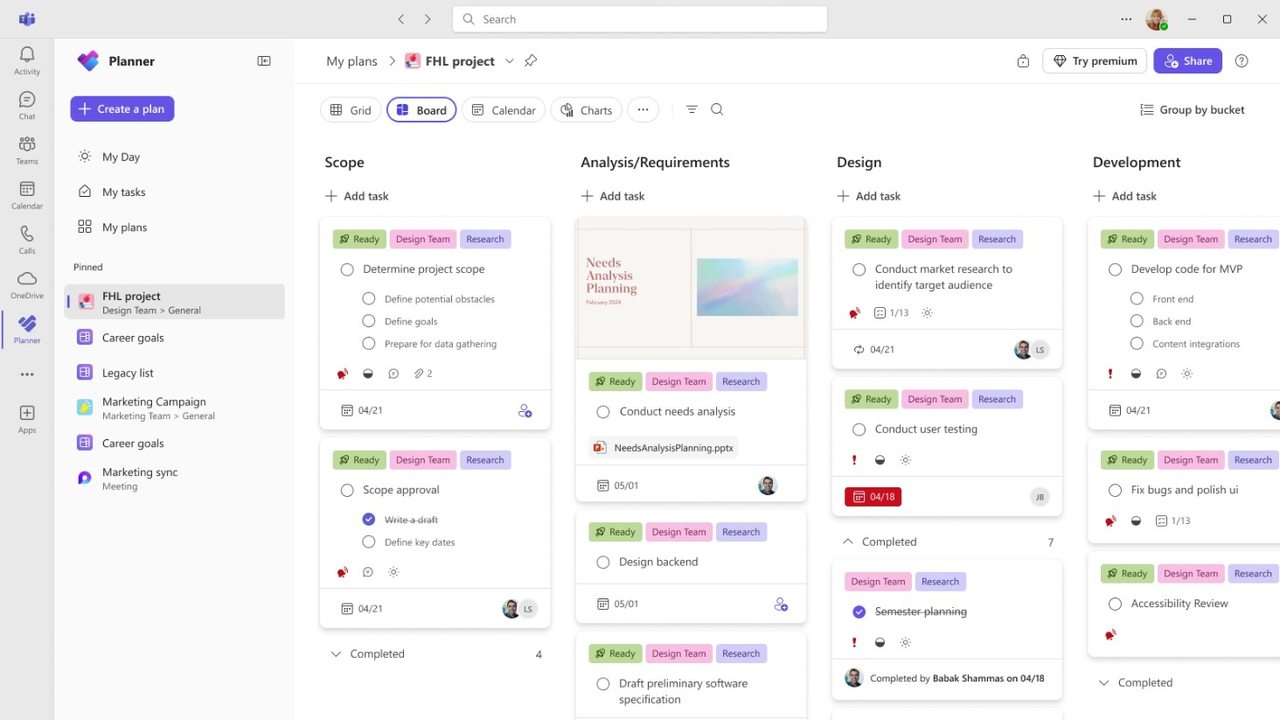
Microsoft has yet to confirm when a patch will arrive, but users hope a fix will roll out soon. In related news, a new Microsoft Planner update has started rolling out, bringing interface changes and retiring some previously available features.

Microsoft Planner Update Removes Legacy Features, Adds Task Chat

Microsoft has started rolling out a major Microsoft Planner update for Basic users in Teams and on the web. After weeks of signaling that several key features would be removed, the refresh now introduces task chat, a new Goals view, and retires legacy tools as the service shifts toward deeper AI integration.

According to a Microsoft blog post, the long-anticipated redesign has officially entered the rollout phase. The update targets Basic plan users first and will expand over the coming weeks.

Task chat replaces classic comments in Planner

One of the biggest changes is the introduction of task chat. This feature replaces the older comment system with real-time discussions directly inside tasks.

Task chat supports mentions, emojis, rich text formatting, and notifications. Microsoft says the goal is to make collaboration faster and more conversational, especially inside Microsoft Teams.

The feature is available to all users on Basic plans.

The New Goals view requires premium access

Planner now includes a Goals view that allows users to link tasks to shared objectives, set deadlines, and track goal progress. This addition aims to align teamwork with broader organizational targets.

However, access to the Goals view requires either a Planner premium license or a Microsoft 365 Copilot subscription, even for users on Basic plans.

Source: Microsoft

Cleaner interface and performance improvements

Microsoft redesigned the Planner interface with a cleaner and more modern look. The updated UI reduces clutter and improves navigation across boards and tasks.

The company also claims better overall performance with the new experience.

At the same time, several legacy features are being retired. iCalendar feeds and iCal sync are no longer supported, meaning Planner will no longer sync with Outlook or Google Calendar through those methods.

Old task comments no longer appear directly on task cards. Users must now open a separate Outlook group mailbox page to view past discussions.

Checklist character limit concerns

Early user feedback points to a potential issue involving checklist items in Power Automate flows. Some users report a new 36-character limit on checklist entries, down from the previous 100-character allowance.

Manual checklist entries inside the Planner UI still appear to support longer text. Microsoft has not confirmed whether the reduced limit is intentional or a temporary bug introduced with the redesign.

The refreshed Planner experience also sets the stage for future AI capabilities. Microsoft is currently testing the Project Manager agent in Public Preview, signaling deeper Copilot integration ahead.

Planner is not the only Microsoft service undergoing changes. SharePoint is also scheduled to receive a major AI-focused update next month, as the company continues expanding AI features across Microsoft 365.

Via Neowin

Xbox Strengthens Executive Team With Craig Cincotta in OCEO Chief of Staff Role

Xbox continues to undergo major leadership changes following Phil Spencer’s retirement and Asha Sharma’s appointment as Microsoft Gaming CEO. After Sharma recently teased a possible return of the classic Blades dashboard, another senior hire has now emerged within the company’s executive structure.

Craig Cincotta Joins the Office of the CEO

According to PureXbox, former Xbox executive Craig Cincotta has revealed on LinkedIn that he has taken on the role of “Chief of Staff, OCEO Xbox.” OCEO stands for “Office of the CEO,” placing Cincotta in close collaboration with Xbox’s top leadership.

Longstanding Ties With Asha Sharma

Cincotta shares a long professional history with new CEO Asha Sharma. The two previously worked together in Microsoft’s marketing division in 2013.

They later reunited at Porch Group, where Sharma served as COO while Cincotta held the role of SVP and Head of Communications.

Strong Background in AI and Communications

In recent years, both executives shifted toward AI-focused roles at Microsoft. Cincotta most recently worked as General Manager of Communications for Cloud and AI from September 2022 through February 2026.

His earlier time at Xbox included serving as Director of Communications between 2010 and 2013, followed by Director of Sports Marketing in 2013.

His return to Xbox leadership drew public congratulations on LinkedIn from longtime Xbox figures, including Aaron Greenberg and Larry Hryb, widely known as Major Nelson.

What Does the Chief of Staff Role Mean?

Xbox currently maintains multiple Chief of Staff positions across different divisions. Louise O’Connor has served as Chief of Staff at Xbox Game Studios since August 2025, while Amy Stillion oversees a similar role for Game Content & Studios Operations and Mojang Studios.

Microsoft has not officially detailed the exact responsibilities of the Chief of Staff, OCEO Xbox position. However, the role traditionally involves strategic coordination, executive advising, and cross-team alignment.

In Cincotta’s case, he will likely work closely with Sharma to help shape and execute her broader vision for Xbox’s future.

As Xbox continues to evolve its leadership structure, attention also turns to its subscription strategy. Reports suggest that Xbox Game Pass Ultimate could see further expansion in the future, signaling that broader changes may extend beyond executive appointments.

AMD Brings Ray Regeneration to Crimson Desert Ahead of Launch

AMD has been heavily promoting Crimson Desert, and the partnership appears to go deeper than simple branding. The upcoming RPG is expected to showcase AMD’s Ray Regeneration technology, part of the company’s broader FSR Redstone feature set, when it launches on March 19.

According to VideoCardz, Ray Regeneration is a standalone machine learning-based denoiser. It does not require FSR Upscaling or Frame Generation to function, but AMD designed it to work best within the wider Redstone ecosystem.

Crimson Desert Confirmed to Support Ray Regeneration

Ray Regeneration acts as a ray reconstruction-style solution that improves ray-traced image quality using machine learning. Unlike traditional denoisers, it operates independently from other FSR components, giving developers flexibility in implementation.

Redstone serves as AMD’s umbrella branding for its next-generation ML-powered rendering technologies. The suite includes upscaling, frame generation, radiance caching, and advanced denoising techniques. Developers can implement each feature individually, depending on optimization and support.

Currently, Ray Regeneration is only available in Call of Duty: Black Ops 7. If no additional titles adopt Redstone before Crimson Desert launches, Pearl Abyss’ title could become the second game to support the technology.

Crimson Desert Joins AMD Hardware Bundles

AMD has also added Crimson Desert to its official Ryzen and Radeon hardware bundle campaign. The promotion includes qualifying Ryzen 9000 desktop processors, Radeon RX 9070 series graphics cards, and select laptops powered by eligible AMD chips.

The company has teased a game-inspired Radeon RX 9070 XT, further highlighting its close collaboration with Pearl Abyss. Marketing lead Will Powers confirmed that Crimson Desert ranks among the first Redstone partner titles. At CES, the companies showcased a demo build rendered natively, without relying on upscaling techniques.

Beyond its gaming push, AMD reportedly faces delays with its Olympic Ridge CPUs, which may not arrive until 2027. At the same time, reports indicate that driver updates for the Ryzen Z1 Extreme have stopped, suggesting a shift in product priorities.

With Ray Regeneration positioned as a headline feature, Crimson Desert could serve as a major proving ground for AMD’s Redstone ambitions this spring.

Microsoft Reportedly Exploring Major Game Pass Ultimate Expansion

Microsoft’s Xbox Game Pass is expanding again this week, but new rumors suggest a much bigger shift could be on the horizon for subscribers.

According to TrueAchievements, Microsoft may be considering a major expansion of the Xbox Game Pass Ultimate tier by bundling additional premium subscriptions into the service.

Rumors Suggest Extra Subscriptions Could Be Added to Ultimate

Industry discussions involving Tom Warren from The Verge and further insights shared by Jez Corden indicate Microsoft may explore integrating external subscription perks directly into Xbox Game Pass Ultimate.

Reported possibilities include access to World of Warcraft, Fallout 1st, Minecraft Realms, and potentially subscription elements tied to The Elder Scrolls franchise. The idea would involve combining multiple premium services under the Ultimate umbrella.

Microsoft has not confirmed these plans, and the concept reportedly remains in early internal discussions.

A Strategy to Justify the Ultimate Price

Recent Game Pass price increases have raised expectations among subscribers for stronger value at the top tier. Adding bundled subscriptions could make the current pricing structure feel more justified, especially for players who already pay separately for those services.

Game Pass already delivers high-profile day-one titles such as The Outer Worlds 2, Clair Obscur: Expedition 33, and South of Midnight. Expanding beyond first-party launches into subscription bundling would signal a broader ecosystem strategy rather than just a content library approach.

Plans Remain Unconfirmed

For now, these reported changes remain rumors and should be treated with caution until Microsoft provides official details.

In related Xbox news, following Phil Spencer’s retirement, the new Xbox chief has sparked discussion by teasing the possible return of the classic Blades dashboard, adding another layer of intrigue to what could be a transformative period for the platform.

SharePoint Gets Major AI-Focused Upgrade Next Month

Not long ago, SharePoint made headlines after being abused in phishing attacks, though Microsoft has since addressed those issues. The company also recently confirmed the retirement of certain SharePoint Online Business plans.

Now, according to Neowin, Microsoft is shifting focus toward innovation, announcing a major “reimagined” SharePoint experience on the Microsoft 365 Roadmap, with a preview set for next month and general availability expected in April 2026.

Microsoft Announces Reimagined SharePoint Experience

Microsoft has confirmed a major overhaul of SharePoint, focusing on clarity, usability, and core collaboration features. The redesign targets knowledge discovery, content publishing, and intranet creation.

The company positions this revamp as a foundation for future AI-assisted content creation inside SharePoint.

Cleaner UX and Unified Design Language

The refreshed experience introduces a new information architecture and a more cohesive design language. Microsoft wants to deliver a cleaner, more consistent interface across all SharePoint surfaces.

This move builds on recent UX upgrades, including site modernization updates announced in August 2025 that improved branding customization and layout flexibility.

AI Foundation Built Into SharePoint

Microsoft has steadily expanded AI features across Microsoft 365. In August 2025, the company introduced AI-powered Sections within SharePoint to help users generate and organize content faster.

The new “reimagined” SharePoint experience aims to strengthen that AI foundation, paving the way for smarter content creation and knowledge surfacing.

Preview and Rollout Timeline

The new SharePoint experience will enter preview next month for Worldwide, GCC, GCC High, and DoD customers.

If deployment progresses as planned, Microsoft expects general availability in April 2026.

SharePoint is not the only Microsoft 365 service evolving. Microsoft Teams is also preparing to introduce Express Voice Enrollment in April, signaling a broader push toward AI-enhanced collaboration tools across the ecosystem.

New Xbox Chief Teases Return of Classic Blades Dashboard

Phil Spencer’s retirement has already shaken up Xbox leadership, and now fans are buzzing over a nostalgic tease from his successor.

According to TrueAchievements, newly appointed Xbox leader Asha Sharma surprised longtime players by referencing the iconic Xbox 360 “blades” dashboard in a social media reply.

Leadership Shift After Phil Spencer’s Retirement

Phil Spencer officially announced his retirement last Friday, closing a major chapter in Xbox history.

Spencer led Xbox through the launch of Game Pass, multiple console generations, and Microsoft’s aggressive expansion into cloud gaming and PC integration.

Microsoft quickly named Asha Sharma as its successor, signaling a new era for the brand.

Asha Sharma Mentions the Xbox 360 Blades

Shortly after stepping into the role, Sharma engaged directly with fans on X.

In a playful reply, she asked: “Should I bring back the blade dashboard?”

The comment immediately sparked excitement among longtime Xbox players who remember the blades UI as one of the most iconic console interfaces ever released.

Why the Blades Dashboard Is Unlikely to Return

Despite the wave of nostalgia, a full revival appears unlikely.

Former Xbox executive Larry Hryb, known as Major Nelson, said in 2022 that the blades design would not return because it does not scale well with modern platform ambitions.

Microsoft’s current strategy focuses on unifying console, PC, and cloud experiences under a cohesive ecosystem. A simplified, adaptive interface aligns better with cross-device integration.

Reports also suggest that future Xbox systems may lean further into a Windows-based foundation. Industry predictions point toward a potential next-generation Xbox launch around 2027, though Microsoft has not confirmed any timeline.

Sharma’s comment likely serves as a nostalgic nod rather than a roadmap for product changes.

The blades dashboard remains a beloved piece of Xbox history, but modern platform demands prioritize scalability, accessibility, and integration across devices.

For now, the iconic interface will probably stay in memory rather than return to modern consoles.

Xbox Game Pass Expands With Three Releases This February 24-26

After three new titles were added to Xbox Game Pass last week, the service is already preparing its next update. Another three games are set to join the lineup between February 24 and February 26, 2026, bringing a mix of simulation, roguelite action, and a first-party RPG brawler to subscribers.

According to Pure Xbox, the new additions roll out across console, PC, and cloud, depending on tier availability.

TCG Card Shop Simulator Arrives February 24

The first title to join the service this week is TCG Card Shop Simulator, launching on February 24 for Xbox Series X|S, PC, and Cloud.

Available to Ultimate, Premium, and PC Game Pass subscribers, the game puts players in charge of running their own trading card shop. Players can stock booster packs, set pricing strategies, hire staff, and host in-store events to grow their business. The management-focused gameplay blends economic strategy with collectible card culture.

Dice A Million Launches February 25

On February 25, Dice A Million joins PC Game Pass for Ultimate and PC subscribers.

This roguelite experience revolves around dice-based mechanics, allowing players to combine more than 120 unique dice effects. Each run challenges players to optimize builds and survive escalating encounters while battling bosses and navigating randomized obstacles.

Towerborne 1.0 Drops February 26

The week concludes with the arrival of Towerborne 1.0 on February 26 for Console, PC, and Cloud.

Towerborne delivers a side-scrolling action RPG brawler experience centered on co-op gameplay and exploration. Players defend humanity in a collapsing world, combining fast-paced combat with character progression and loot systems. The release marks a notable first-party addition to the February lineup.

This latest batch forms part of the broader February 2026 content wave for Xbox Game Pass. The rollout begins Tuesday and spans multiple tiers, ensuring coverage across console and PC audiences.

In related Game Pass news, four upcoming titles recently received new gameplay trailers, offering fresh looks at what’s ahead. Meanwhile, fans of classic gaming can explore five newly added Retro Classics now available in the collection.

Microsoft Begins Rolling Out Copilot Notebook Auto-Summary Feature

Microsoft has recently labeled Copilot as a top productivity app on Windows 11, but the company is not slowing down. A new AI-powered experience is now rolling out to Microsoft 365 users, bringing automated insights directly into Copilot Notebooks.

According to the Microsoft 365 Admin Center (message ID MC1182698), Microsoft is introducing a smart landing page for Copilot Notebooks that automatically generates summaries and key insights from notebook references.

AI-generated overview becomes the new default

With the update, users opening a Copilot Notebook will immediately see a high-level overview of its contents. They no longer need to manually scan documents, notes, or linked materials to understand what the notebook contains.

The system uses a fine-tuned Copilot prompt to analyze existing notebook data and extract the most relevant information. It then organizes that information into a structured summary designed to highlight key themes and insights.

The feature first appeared in public preview back in November. Although general availability was originally planned for January through February, Microsoft delayed the rollout. Deployment has now started earlier this month and is expected to be completed by mid-March.

License requirements and admin guidance

The AI-generated overview will become the default landing experience for licensed users of Microsoft 365 Copilot. Access requires an active Microsoft 365 Copilot license.

Microsoft enables the feature by default, and administrators do not need to manually activate it. The update does not change existing workflows, user permissions, or data governance policies.

Organizations that use Copilot Notebooks will automatically see the new interface once the rollout reaches their tenant. Microsoft advises admins to review Copilot license assignments to ensure eligible users receive access.

The company also recommends updating internal documentation and training materials to reflect the new landing page experience.

Mobile expansion planned

Microsoft confirmed plans to expand the AI-powered Notebook overview to Android and iOS devices in a future update. The company has not shared a specific timeline for mobile availability.

The update comes at a time when Copilot remains under scrutiny. Recent reports highlighted issues where Microsoft 365 Copilot summarized confidential emails in ways that appeared to bypass certain Data Loss Prevention (DLP) safeguards.

Meanwhile, Microsoft continues to push forward with additional AI enhancements. The company is preparing to introduce Express Voice Enrollment in Microsoft Teams, further expanding its AI-driven productivity features across Microsoft 365.

Via Neowin

Intel Hiring Hints at Unified Core Architecture Shift

Intel has confirmed its Xe3P GPU launch in 2026, while Core Ultra Series 4 processors may arrive in 2027. At the same time, new hiring activity suggests the company could eventually rethink its long-standing hybrid CPU strategy.

According to TechPowerUp, recent Intel job listings indicate that the company is exploring a return to a unified core architecture for future processors.

Intel may rethink its hybrid core strategy

Since the launch of 12th Gen Alder Lake, Intel has relied on a hybrid design that combines Performance (P) cores and Efficient (E) cores. The P-cores handle demanding workloads such as gaming and heavy productivity tasks, while E-cores focus on background operations and multitasking.

Intel’s Thread Director technology works alongside the operating system to distribute workloads dynamically between core types. This hybrid model has allowed Intel to better segment products across consumer PCs, enterprise systems, servers, and AI-focused machines.

However, the recent job listings point to the creation of a dedicated “Unified Core” design group. This suggests Intel is researching a future architecture where P-cores and E-cores are merged into a single microarchitecture.

If such a shift materializes, it would represent one of the most significant changes to Intel’s CPU design philosophy since hybrid computing debuted in the mainstream x86 lineup.

What a unified core architecture could change

A unified core design would eliminate the separation between high-performance and efficiency-focused cores. Instead of splitting roles, Intel could rely on a single scalable core architecture and differentiate products through configuration choices.

Product tiers could vary through changes in cache allocation, total core counts, clock speeds, and power envelopes rather than through different core types. This strategy would resemble AMD’s approach with Zen 5 and Zen 5c, where architectural foundations remain similar but configurations define performance tiers.

Intel already applies flexible configurations in parts of its Xeon lineup, offering P-core-only or E-core-only designs depending on workload needs. A fully unified approach would extend that flexibility into mainstream consumer processors.

Still, the unified core effort appears to remain in its early stages. The information comes from hiring patterns rather than official announcements, and CPU development cycles typically span several years.

Any potential unified core processors would likely arrive toward the end of the decade. Until then, Intel is expected to continue refining its hybrid architecture across upcoming generations.

The company also predicts that Panther Lake will push AI PC adoption beyond 50% this year, highlighting how AI acceleration remains central to its roadmap.

With GPU launches, AI ambitions, and long-term CPU experiments underway, Intel’s next architectural pivot may already be taking shape behind the scenes.

Modded RTX 5090 Left Permanently Damaged After Second 16-Pin Addition

NVIDIA’s RTX 5090 connector melting concerns are back in the spotlight, and this time, a risky dual 16-pin modification has reportedly ended in hardware failure.

According to VideoCardz, a modified RTX 5090 equipped with two 12V-2×6 power connectors stopped working only days after the change, raising fresh concerns about extreme power delivery experiments on flagship GPUs.

Dual 16-Pin RTX 5090 Mod Draws Scrutiny

The case centers on a Gigabyte Aorus Master RTX 5090 that allegedly failed shortly after a second 12V-2×6 connector was installed. The modification was carried out by Frame Chasers and later highlighted in video clips shared by UNIKO’s Hardware.

Extreme overclockers sometimes add extra power connectors to increase headroom and stabilize higher wattage targets. However, given recent RTX 5090 connector melting incidents, some enthusiasts warned that doubling the connectors could double the risk.

Certain Gigabyte RTX 5090 models reportedly use a shared PCB design that includes an unpopulated footprint for a second connector. That layout typically serves alternate variants, such as stealth-style cards with hidden power input designs.

Instability Reported Before Full Modification

Reports indicate that the GPU showed signs of instability even before the connector mod was fully completed. After the failure, the card was sent to a professional repair center for inspection.

Technicians observed visible PCB damage, including what appears to be a hole in the board and signs that a capacitor may have exploded. The repair service has not officially confirmed the exact cause of the failure.

Frame Chasers suggested that heat gun usage during the soldering process could have contributed to the damage. Applying high heat without precise control can weaken PCB layers, loosen components, or create microscopic fractures.

Power Delivery Risks Under the Spotlight

This incident arrives amid ongoing debates about the RTX 5090 connector melting and speculation around whether specific connector suppliers contribute to overheating risks.

While no official findings blame a particular manufacturer, discussions around MSI-branded connectors and cable tolerances continue within enthusiast communities.

Experts stress that dual 16-pin modifications require professional-grade soldering tools, electrical testing equipment, and advanced knowledge of GPU power circuitry. Adding another connector introduces additional solder joints and electrical paths, increasing the potential for imbalance or failure.

Improper soldering, uneven current distribution, or thermal stress can trigger catastrophic damage in high-power GPUs. The RTX 5090 already operates at extreme wattage levels, and pushing it further without validated engineering safeguards can result in permanent hardware loss.

This is not the only recent case of RTX 5090 hardware damage linked to aggressive tuning. Earlier, reports surfaced that an MSI RTX 5090 Lightning Z prototype physically cracked under extreme overclocking conditions.

As enthusiasts continue exploring the limits of next-generation GPUs, the latest dual 16-pin failure serves as a reminder that experimental mods can carry significant financial and technical risks.

Sam Altman Dismisses ChatGPT Water Usage Allegations

OpenAI CEO Sam Altman pushed back against claims that AI systems consume excessive amounts of water, calling such assertions “fake” and disconnected from reality, according to CNBC. He made the remarks during an appearance at the India AI Impact Summit, where OpenAI also secured a 100MW AI data center deal with Tata.

Sam Altman Pushes Back on AI Water Consumption Criticism

Altman specifically rejected viral claims suggesting that ChatGPT uses large volumes of water for each query. He argued that the public debate often misunderstands how AI systems operate and exaggerates the environmental impact of individual interactions.

While dismissing concerns about water consumption per query, Altman acknowledged that AI’s overall energy demand represents a legitimate and growing issue. He said that as global AI adoption accelerates, electricity needs will continue to rise sharply.

Altman stressed the importance of expanding energy production to meet that demand. He pointed to nuclear, wind, and solar power as critical sources for supporting AI-driven infrastructure.

Comparing AI to Human Energy Use

During the discussion, Altman compared AI systems to human energy consumption. He noted that training a human brain over decades requires significant resources, suggesting that AI energy use should be evaluated within a broader context.

He also argued that critics often focus too heavily on the energy required to train large AI models. In reality, he said, inference, the process of generating responses from a trained model, consumes far less energy than initial training.

That comparison sparked debate online, with some technology leaders pushing back. Zoho co-founder Sridhar Vembu criticized the idea of equating human biological processes with technological systems.

Growing Scrutiny on Data Centers

Altman’s remarks come at a time when governments and environmental groups are closely examining the rapid expansion of AI data centers. Traditional facilities rely heavily on water for cooling, though newer designs increasingly use alternative cooling technologies.

Industry forecasts suggest that water demand for cooling could more than triple over the next 25 years as computing needs grow. Meanwhile, the International Monetary Fund reported that global data center electricity consumption in 2023 matched levels seen in entire countries such as Germany or France.

Governments have started accelerating approvals for new energy infrastructure to support AI growth. At the same time, environmental groups warn that large-scale data center expansion may clash with net-zero climate goals.

Some local communities have also opposed new data center projects over concerns about grid strain and rising electricity prices. Despite those fears, OpenAI maintains that its AI facilities will not increase local power bills.

OpenAI is not alone in facing scrutiny. Microsoft has also come under criticism for the water usage tied to its AI data center operations, highlighting the broader industry debate over how to scale artificial intelligence sustainably.

Microsoft Teams to Introduce Express Voice Enrollment in April

Microsoft is continuing to expand Microsoft Teams with new AI-driven capabilities, and after recent interface changes like the unified audio/video control panel and the removal of the Quit option from the Taskbar menu, another major update is on the way.

According to the Microsoft 365 Admin Center under message ID MC1197146, the company is introducing express voice enrollment in Teams, a feature designed to simplify how users create voice profiles during meetings.

Express voice enrollment arrives in Teams

The new feature will automatically prompt users who have not yet enrolled their voice to register during an active meeting. Instead of manually navigating through settings, users will simply speak during the session to begin the enrollment process.

Microsoft classifies the update as a major change. It will be enabled by default for all enterprise tenants, excluding EDU environments.

The rollout timeline has shifted slightly. Targeted Release is now planned for early April, while General Availability is expected by the end of April.

Replacing manual voice registration

Previously, voice enrollment required manual steps, which limited adoption. With express voice enrollment, Microsoft replaces that workflow with a more automated experience directly inside meetings.

The goal is to accelerate the use of voice-based AI features in Teams. Once users complete enrollment, they unlock advanced capabilities such as voice isolation and individualized speaker recognition.

These features prove especially useful in shared meeting rooms where multiple participants speak from the same device. Personalized voice profiles help Teams distinguish between speakers more accurately.

Better transcription and Copilot insights

Voice profiles also improve the accuracy of live transcription and AI-powered meeting summaries generated by Copilot in Teams. By recognizing individual speakers, the system can attribute comments correctly and generate clearer insights.

This aligns with Microsoft’s broader push to embed AI deeper into productivity tools across Microsoft 365.

Admin controls and policy management

Administrators retain control over the feature. They can manage express voice enrollment using the PassiveVoiceEnroll setting within the csTeamsAIPolicy PowerShell cmdlets.

Organizations that previously disabled voice enrollment through policy will not see the feature automatically re-enabled. Microsoft advises admins to review compliance requirements and update internal documentation before deployment.

Admins who prefer not to enable the feature can proactively disable the PassiveVoiceEnroll setting ahead of the Targeted Release phase.

While Microsoft continues to enhance Teams with AI-focused updates, not every change has been welcomed by users. The company is also rolling out a feature that promotes Microsoft Edge when users open certain links, a move that has sparked criticism.

Via Neowin

RTX 50 Series Melting Pattern Raises MSI Connector Fears

After recent RTX 5090 12V-2×6 melting cases surfaced, keen-eyed users began noticing a pattern. According to Wccftech, several reports suggest MSI’s yellow-tipped 16-pin connector may play a role in some GPU power connector failures.

Yellow-Tipped Connector Under Investigation

Melting problems have affected multiple RTX 50 series graphics cards and even certain RX 9070 XT models using the same 12V-2×6 standard. In many documented cases, damage appears concentrated on a single row of pins rather than across the entire connector.

That pattern suggests uneven contact or partial seating instead of a full connector breakdown.

Self-Loosening Reports Raise Concerns

MSI introduced the yellow-tipped connector as a visual safety feature. The yellow section should disappear once users fully insert the cable, signaling correct installation.

Despite that design, multiple users on Reddit claim their connectors melted even though the yellow tip was no longer visible. One report states the connector gradually loosened over time and required repeated reseating.

Other owners with the same MSI cable design observed similar behavior, describing slight sliding or reduced retention strength after extended use.

Thermal cycling during heavy GPU workloads could contribute to this movement. Repeated heating and cooling may slightly shift the connector, reduce contact pressure, and increase electrical resistance.

Higher resistance at specific pins can generate localized heat, eventually leading to melting. Notably, many incidents appear to develop over months rather than causing immediate failure.

Broader 12V-2×6 Tolerance Questions

The issue may not remain exclusive to MSI hardware. However, the yellow-tipped design highlights potential seating tolerances and latch retention challenges within the 12V-2×6 ecosystem.

In one cited case, MSI reportedly attributed the failure to a defective PSU, pointing to possible hardware variability rather than a single root cause.

Still, the recurring pattern of uneven pin damage continues to raise concerns about long-term reliability.

With RTX 5090 and RTX 5070 Ti prices climbing, users expect stronger safeguards around high-power delivery systems. Manufacturers now face renewed pressure to address connector durability and long-term retention stability.

In other GPU news, an MSI RTX 5090 Lightning Z prototype reportedly cracked after extreme overclocking, adding to recent turbulence around flagship graphics hardware.

ASRock Unveils NUC Ultra 300 Powered by Core Ultra X7 358H

ASRock has recently faced scrutiny over Ryzen 9000 No-POST issues, which forced the company to roll out a second AM5 firmware update to resolve the problem. Now, however, its industrial division is drawing attention for a different reason: the quiet listing of new compact systems powered by Intel’s upcoming Panther Lake-H processors.

According to VideoCardz, ASRock Industrial has introduced its NUC Ultra 300 BOX family, built around Intel Core Ultra Series 3 processors.

Compact NUC systems powered by Panther Lake-H

The new range includes four models: NUC BOX-325, NUC BOX-358H, NUCS BOX-325, and NUCS BOX-358H.

ASRock offers two chassis designs. The standard NUC BOX models use a thicker 49 mm enclosure, while the NUCS BOX variants come in a slimmer 38 mm chassis.

The thicker versions include dual 2.5GbE LAN ports, whereas the slimmer models feature a single 2.5GbE connection. All units ship as barebones systems and support VESA mounting for flexible deployment in embedded or industrial setups.

Core Ultra 5 and Ultra X7 configurations

The entry configuration features the Core Ultra 5 325, an 8-core chip with 4 performance cores and 4 low-power efficient cores. This model integrates Intel graphics with 4 Xe-cores.

Higher-end versions use the Core Ultra X7 358H, a 16-core processor combining 4 performance cores, 8 efficient cores, and 4 low-power efficient cores. This SKU pairs with an Intel Arc B390 integrated GPU equipped with 12 Xe-cores.

Memory support reaches up to 128GB of DDR5 through two SO-DIMM slots. The Ultra X7 358H models list DDR5-7200 support, while the Ultra 5 325 variants support DDR5-6400.

PCIe Gen5 storage and USB4 connectivity

Storage options include two M.2 Key M slots for SSDs and an additional M.2 Key E slot for Wi-Fi modules. Depending on the configuration, one SSD slot supports PCIe Gen5 x4 while the other runs at PCIe Gen4 x4.

Connectivity features USB4 with Thunderbolt 4 support, multiple USB 3.2 Gen2 Type-A ports, and a USB 3.2 Gen2x2 Type-C port.

Display output supports up to four monitors through dual HDMI 2.1 ports and DisplayPort over USB-C, including DP 2.1 via USB4.

ASRock has not disclosed pricing or release dates for the NUC Ultra 300 BOX systems.

In other Intel-related news, reports suggest that Nova Lake Core Ultra Series 4 processors could arrive in 2027, signaling the next step beyond Panther Lake.

EU Begins Review of Stop Destroying Videogames Initiative

The Stop Killing Games movement is entering a new phase as it shifts from public campaigning to direct regulatory engagement in the European Union.

According to VideoCardz, campaign figurehead Ross Scott confirmed that the group will now prioritize legislative strategy and discussions with regulators over frequent public updates. The move comes as the related European Citizens’ Initiative, “Stop Destroying Videogames,” undergoes formal review by the European Commission.

Stop Killing Games Moves From Signatures to Policy Strategy

Launched in 2024, Stop Killing Games began as a global consumer rights campaign challenging publishers who render purchased titles unplayable after shutting down online servers.

The group argues that when players buy a game, they should not lose access entirely once official support ends. Instead of demanding indefinite live-service support, the campaign calls for end-of-life solutions that would allow paid games to remain playable in some form after shutdown.

Ross Scott explained that the focus has now turned to behind-the-scenes policy work, including structured engagement with regulators and lawmakers. Public updates may become less frequent as efforts concentrate on regulatory channels.

EU Review Now Underway

The European Citizens’ Initiative linked to the campaign was submitted for examination on January 26, 2026. The European Commission is expected to issue a formal response by July 27, 2026.

The process includes a meeting with Commission representatives and a public hearing in the European Parliament. Depending on the outcome, the Commission could decide whether legislative proposals or further investigations are warranted.

Earlier attempts to address game shutdown issues under the Digital Fairness Act reportedly faced industry resistance. Critics within the industry argued that stronger rules might pressure publishers into maintaining servers indefinitely.

Trade group Video Games Europe has maintained that discontinuing online services must remain a viable option for publishers. Industry stakeholders warn that overly strict requirements could limit business flexibility and innovation.

In response, the campaign stresses that it does not seek endless support obligations. Instead, it proposes reasonable consumer safeguards, such as offline patches or server release options, when feasible.

Two new non-governmental organizations are reportedly being established, one in the EU and one in the United States, to support long-term advocacy efforts. These groups aim to continue counter-lobbying even if immediate legislative efforts stall.

As a fallback strategy, the movement may attempt to enforce existing EU consumer protection laws. However, that approach would likely require country-by-country legal action, potentially extending timelines significantly.

In other gaming news, Xbox Game Pass has recently expanded its lineup, while PlayStation Plus Extra and Premium February titles are now available for download.

Additionally, four Xbox Game Pass titles have unveiled new gameplay trailers, offering a closer look at upcoming releases.

Microsoft Shocks Users as Copilot Becomes the Top Productivity App on Windows 11

Microsoft is positioning Copilot as the top productivity app on Windows 11, placing it ahead of long-standing tools like File Explorer and OneNote in a new marketing campaign.

Microsoft Pushes Copilot as Windows 11’s Top Productivity App

According to Windows Latest, the campaign forms part of a broader strategy to market AI PCs and Windows 11 as productivity-first platforms heading into 2026. This comes even as reports suggest Microsoft may be stepping back from its earlier “AI Everywhere” messaging.

The company describes Copilot as an assistant that helps users think, plan tasks, manage workflows, and analyze information directly from the desktop. Microsoft continues to integrate the AI tool deeper into the operating system, including recent additions such as Ask Copilot inside File Explorer and a tighter connection with Microsoft Edge for Business.

Copilot Ranked Above Core Windows Tools

In Microsoft’s official list of top productivity apps for Windows 11, Copilot appears at the very top. Traditional utilities that users rely on daily rank below it, which comes as a shock to many.

The full lineup includes Copilot, Microsoft To Do, Calendar, OneNote, Snipping Tool, Clock with Focus Sessions, Sticky Notes, File Explorer, and Microsoft Edge.

By placing Copilot above foundational tools like File Explorer and OneNote, Microsoft signals how central AI has become to its Windows vision. The move reinforces the idea that AI assistants now sit at the heart of everyday computing rather than acting as optional add-ons.

AI PCs and the 2026 Productivity Narrative

The marketing effort also supports Microsoft’s broader messaging around AI PCs and next-generation Windows devices. The company continues to promote features such as Copilot, Recall, and AI-powered apps as defining elements of the Windows 11 experience.

At the same time, critics argue the ranking feels more like brand positioning than a reflection of real-world productivity habits. Many users still rely primarily on traditional tools for file management, note-taking, and multitasking.

Despite ongoing criticism about aggressive AI promotion, Microsoft shows no signs of slowing its Copilot push. Instead, the company continues to embed AI deeper into Windows, framing it as the primary driver of productivity for students and professionals alike.

Privacy Researcher Warns Edge Secure Network May Not Deliver True VPN Protection

Microsoft Edge Secure Network VPN is facing fresh scrutiny after a privacy researcher questioned whether the built-in feature works like a true VPN or more like a proxy service.

The criticism comes shortly after Microsoft faced pressure in Brazil over claims that it forces OEMs to preinstall Edge. Now, attention has shifted to how Edge promotes its privacy tools.

Edge Secure Network Under Privacy Spotlight

According to Windows Latest, Microsoft markets Edge Secure Network as a free, built-in privacy layer inside Microsoft Edge. The feature requires no extra apps or subscriptions and aims to protect users, especially on public Wi-Fi networks.

Users can enable it directly from the Secure Network section in browser settings. Microsoft describes the tool as using “VPN technology” to encrypt traffic generated within Edge and obscure the user’s IP address.

The service includes a free monthly data allowance of 5GB. Users must sign in with a personal Microsoft account to activate it, primarily to enforce that cap.

VPN or Just a Proxy?

According to a privacy researcher, Edge Secure Network behaves more like an HTTP CONNECT proxy built on Cloudflare’s Privacy Proxy platform rather than a traditional VPN.

Unlike full VPN services, the feature does not create a system-wide encrypted tunnel. It only protects traffic generated inside the Edge browser. Other apps, background services, and device-wide connections remain unaffected.

The tool may activate automatically in higher-risk scenarios, such as unsecured networks, depending on its optimized mode. However, it excludes certain high-bandwidth services like streaming platforms to conserve the 5GB monthly allowance.

Users cannot manually select server locations. The system connects automatically to a nearby server. The feature also remains unavailable on managed or enterprise devices and does not operate in some regions.

Trust Model and Anonymity Concerns

The architecture relies on a two-party trust model. Microsoft manages identity verification, while Cloudflare handles traffic routing.

Critics argue that requiring a Microsoft account removes a layer of anonymity. They warn that even if identities remain separated from browsing data, users must trust both companies’ assurances.

Microsoft states that Cloudflare does not see account identities. Cloudflare says it does not inspect user traffic. However, the researcher notes that the system depends on company claims rather than an independent public audit.

Not a Replacement for Full VPN Software

Microsoft positions Edge Secure Network as a baseline safeguard, not a full VPN replacement.

Browser-based protections prioritize convenience and basic encryption. They do not offer advanced features such as system-wide routing, kill switches, or configurable server locations.

The broader issue is not unique to Microsoft. Any browser-integrated VPN or proxy solution shares similar limitations. It encrypts browser traffic only and cannot replace a dedicated, system-wide VPN.

The controversy arises as Microsoft continues reshaping Edge. The company is removing the Collections feature and expanding Edge for Business capabilities.

Edge for Business will soon gain the ability to analyze Office files and even review open tabs, further embedding Microsoft’s productivity and AI tools directly into the browser experience.

AMD Ryzen Z1 Extreme Driver Updates Reportedly Stop

Recent reports suggest that AMD may have reduced the frequency of driver updates for the Ryzen Z1 and Ryzen Z1 Extreme APUs used in popular handheld gaming PCs.

According to TechPowerUp, the issue surfaced after a Lenovo Korea update and multiple user reports from handheld owners. Some users, including owners of the ASUS ROG Ally (non-X), claim they remain on drivers dating back to around August 2025.

The Ryzen Z1 and Z1 Extreme launched in 2023 and power devices such as the ASUS ROG Ally and Lenovo Legion Go. However, several owners now believe the chips have moved into a slower or more periodic driver update cycle.

Z1 Extreme handhelds reportedly move to a slower driver cycle

The situation is not entirely straightforward. OEMs such as ASUS and Lenovo validate and distribute drivers for their specific handheld configurations.

The Ryzen Z1 Extreme supports configurable TDP ranges from 9 W to 30 W. That flexibility requires device-specific testing to ensure stability across different thermal and power limits.

Each manufacturer tunes power targets, clock speeds, and cooling profiles differently. Because of that, generic AMD drivers cannot always roll out across all devices without additional validation.

This means delays could stem from AMD’s internal driver cadence, OEM approval timelines, or a combination of both.

Users try Z2 drivers, Lenovo warns against it

Some owners have attempted to install newer drivers designed for Z2-based devices, such as the Legion Go S, in an effort to gain newer optimizations.

Lenovo has advised against cross-installing drivers. The company warns that drivers are not interchangeable and may introduce system instability.

Installing incompatible drivers could lead to performance issues, crashes, or even hardware problems on premium handheld systems.

Meanwhile, newer Ryzen Z2 Extreme handhelds released in 2025 reportedly continue to receive regular driver updates, increasing concerns among enthusiasts about long-term software support for Z1 Extreme devices.

AMD and its OEM partners have yet to provide detailed clarification on the future update cadence for the platform.

Even as questions linger around handheld driver support, AMD’s overall roadmap continues to move ahead. Zen 6 desktop CPUs are reportedly planned for 2027, pointing to a longer wait between major desktop generations.

On the data center side, AMD says the Instinct MI455X remains on schedule, with no delays. Meanwhile, Radeon RX 9000 graphics cards are starting to see price cuts due to softer demand, which could benefit gamers looking to upgrade.

Surface Pro 11 Firmware Update Fixes VPN, Teams Shutdowns, and Dolby Vision Errors

Microsoft has released a major firmware update for the eleventh-generation Surface Pro with Snapdragon processors. The update targets security, stability, and reliability across the Copilot+ PC lineup.

According to Neowin, the new firmware package introduces multiple fixes that address shutdown issues, connectivity bugs, and compatibility problems.

Surface Pro Firmware Released, Here’s What’s New

Microsoft strengthened device security by patching vulnerabilities that could trigger unexpected shutdowns or enable privilege escalation.

The company also fixed a bug that caused random shutdowns during Microsoft Teams video calls, improving reliability for business and remote users.

A separate issue affecting VPN connections has been resolved. Some users experienced sudden cellular connectivity loss when using VPN services.

Microsoft also corrected a configuration bug where cellular settings would automatically switch from eSIM to a physical SIM card, overriding user preferences.

Surface Dock 2 and Media Playback Fixes

Compatibility improvements now enhance performance when using Surface Dock 2 accessories. This should reduce connection inconsistencies and docking-related issues.

The update also resolves a Dolby Vision playback problem. Some users previously encountered a black screen paired with an unauthorized playback error when watching supported HDR content.

Firmware Update Details and Installation

The firmware package includes updated drivers alongside system-level improvements. Microsoft says users do not need to take additional steps before or after installation.

Since Surface firmware updates cannot be uninstalled, Microsoft advises backing up important data before applying the update.

Broader Windows and AI PC Developments

In related Windows news, KB5077241 recently introduced Sign-In Restore, a Taskbar speed test, and other enhancements.

Meanwhile, Intel predicts that its upcoming Panther Lake platform could push AI PC adoption beyond 50% this year, signaling continued competition in the Copilot+ PC and AI-focused hardware space.

ASUS Dual Evo RTX 5070 Graphics Cards Spotted on Product Pages

ASUS RTX 5070 Evo graphics cards have quietly appeared online, marking a new addition to the company’s Dual Evo lineup. According to TechPowerUp, the newly listed models introduce compact GeForce RTX 5070 variants aimed at smaller builds.

Their appearance comes during a period when ASUS has faced separate patent-related challenges in Germany, which resulted in two companies taking down their German support pages.

ASUS Dual Evo RTX 5070 and RTX 5070 Evo OC Surface

The newly listed GeForce RTX 5070 Evo and RTX 5070 Evo OC both feature NVIDIA’s RTX 5070 12 GB GPU. Each card measures 229 × 120 × 50 mm, making them notably compact compared to many triple-slot RTX 5070 designs.

ASUS has not issued an official announcement yet, but both models already appear on the company’s product pages. Pricing and retail availability remain undisclosed.

The standard version carries a boost clock of 2,512 MHz. The OC variant increases that figure to 2,542 MHz, while OC mode pushes it further to 2,572 MHz. Aside from the higher clocks, the two cards appear to share identical hardware and cooling solutions. The performance uplift likely comes from a vBIOS adjustment rather than a redesigned PCB or upgraded power delivery.

Compact 2.5-Slot Design for Small Form Factor Builds

Both models use a 2.5-slot cooler with dual axial fans. That makes them thicker than the 2.0-slot Dual Evo RTX 5060 cards but slimmer than many 3+ slot RTX 5070 alternatives currently on the market.

The cooling setup features a flow-through heatsink design to improve airflow and thermal efficiency. ASUS opted for an understated black shroud with angular lines and a dual-texture finish. Like other Dual Evo models, the PCIe power connector sits centrally on the side, not at the rear.

The relatively short 229 mm length and moderate thickness make these GPUs attractive for small form factor systems where space remains limited.

The quiet appearance of the RTX 5070 Evo models comes at a time when global GPU prices have climbed by around 15%. High-end models such as the RTX 5090 and RTX 5070 Ti reportedly lead the surge.

With no official launch event yet, the ASUS Dual Evo RTX 5070 and RTX 5070 Evo OC may target users who want a compact, understated design without sacrificing next-generation performance. More details on pricing and availability will likely follow soon.

Intel Nova Lake-S Core Ultra Series 4 May Launch in 2027, New Leaks Claim

Intel’s next-gen Nova Lake-S desktop CPUs may launch in early 2027 instead of late 2026, according to new leaks. The revised window could align with AMD’s delayed Zen 6 Ryzen desktop plans.

Recent reports suggest that Intel’s Core Ultra Series 4 lineup, based on the Nova Lake-S architecture, might debut at CES 2027 rather than arriving in late 2026 as previously expected. The information comes from well-known leakers HXL and Golden Pig Upgrade, who point to an early 2027 launch window.

Nova Lake-S Launch Window Potentially Moves to CES 2027

Earlier rumors indicated that Nova Lake-S would land in the second half of 2026. However, updated leak timelines now suggest that Intel could target CES 2027 for its official reveal.

If the shift proves accurate, Intel’s next desktop platform would arrive around the same time as AMD’s Zen 6 Ryzen desktop processors, which are also rumored to slip into 2027. That would position both companies for a head-to-head generational refresh in the same launch cycle.

Massive Core Counts and NPU Improvements Rumored

Leaked specifications point to significant architectural changes. Flagship Nova Lake-S models may feature up to 52 total cores, reportedly configured as 16 Performance cores, 32 Efficiency cores, and 4 Low-Power cores.

Entry-level variants could scale down to a 4 P-core, 4 E-core, and 4 LP-core layout. These figures remain unconfirmed, and Intel has not officially detailed final core counts.

Another key highlight involves major improvements to NPU performance. With AI workloads becoming central to desktop computing, Intel appears to be pushing stronger on-chip AI acceleration in its upcoming generation.

Industry Factors Could Be Impacting Timelines

Broader supply-chain challenges may also influence these extended timelines. Ongoing silicon and DRAM constraints continue to affect production planning across the semiconductor industry, potentially contributing to delays in both Intel’s Nova Lake-S and AMD’s Zen 6 desktop platforms.

If both roadmaps converge in early 2027, the desktop CPU market could see one of its most competitive launch windows in years.

In related news, Intel has reportedly canceled the Core Ultra 9 290K Plus. At the same time, the company has confirmed that its Xe3P GPU architecture will launch in 2026, signaling continued investment in discrete and integrated graphics.

For now, Nova Lake-S remains officially unannounced, and all current specifications should be treated as early leaks rather than finalized product details.

Via TechPowerUp

Microsoft Expands Windows ESU to Cover Windows 10 LTSB 2016 and Server 2016

Microsoft is expanding its Extended Security Update (ESU) program to cover additional Windows 10 and Windows Server 2016 versions approaching the end of support. Organizations that rely on long-term servicing releases now face new upgrade decisions as deadlines draw closer.

The move follows Windows 10 entering ESU after its mainstream support ended in October 2025, allowing eligible customers to continue receiving paid security updates.

More 2016 Windows Versions Added to ESU

According to Neowin, Microsoft confirmed that several older SKUs will soon qualify for Extended Security Updates.

Windows 10 Enterprise LTSB 2016 and Windows 10 IoT Enterprise 2016 LTSB will reach end of support on October 13, 2026. After that date, Microsoft will stop delivering monthly quality updates, security patches, and standard technical support.

Windows Server 2016 will follow shortly after, reaching end of support on January 12, 2027.

Without ESU coverage, these systems will no longer receive security fixes, leaving organizations exposed to vulnerabilities.

Windows 10 Enterprise 2016 LTSB ESU Pricing

Microsoft has published pricing details for Windows 10 Enterprise LTSB 2016.

The Extended Security Update program starts at $61 per device per year. Organizations that manage devices through Intune or Windows Autopatch qualify for a discounted rate of $45 per device per year.

However, ESU costs double each year over the three-year coverage window. That means businesses that delay upgrades will pay significantly more in later years.

ESUs are also cumulative. If a customer joins the program in year two or three, they must pay for previous years as well to receive current updates.

Microsoft recommends that Windows 10 Enterprise 2016 LTSB customers migrate to the latest Windows 10 LTSC release or transition directly to Windows 11.

IoT and Server Customers Advised to Upgrade

Windows 10 IoT Enterprise 2016 LTSB users should move to newer IoT LTSC releases. Microsoft also advises contacting OEM partners for ESU pricing and availability details specific to embedded devices.

For server environments, Microsoft recommends upgrading to Windows Server 2025 before support ends for Windows Server 2016.

ESU options will be available for Windows Server 2016, but Microsoft has not yet disclosed official pricing.

ESUs Offer Security Only, Not New Features

Microsoft continues to stress that Extended Security Updates only provide critical and important security patches. They do not include new features, performance improvements, or expanded support services.

The company encourages organizations to adopt modern Windows platforms instead of relying on paid legacy coverage.

Meanwhile, regular Windows 11 users continue to receive active features and quality updates. The latest KB5077230 update introduces peripheral fingerprint support and expands cross-device resume capabilities.

For users testing preview builds, Microsoft also released KB5077232 and KB5077231 in the Dev and Beta channels, offering additional refinements and stability improvements.

Microsoft Gaming Division Shakeup: Phil Spencer Retires, Sarah Bond Also Out, Asha Sharma Steps In as Xbox Lead

Microsoft Gaming is entering a new era as Phil Spencer, the long-time head of Xbox, announces his retirement after 38 years at the company. For those unaware, Spencer led Xbox for 12 years. During his tenure, Microsoft launched four main, consoles across two generations: the Xbox One S and One X (mid-gen refreshes), followed by the next-gen Xbox Series X, Series S, and last year’s ROG Xbox Ally handhelds. He also focused on Xbox Game Pass, cloud gaming, and massive acquisitions like Activision Blizzard.

Addressing staffs in an internal email seen by IGN, Spencer said:

Last fall, I shared with Satya that I was thinking about stepping back and starting the next chapter of my life. From that moment, we aligned on approaching this transition with intention, ensuring stability, and strengthening the foundation we’ve built. Xbox has always been more than a business. It’s a vibrant community of players, creators, and teams who care deeply about what we build and how we build it. And it deserves a thoughtful, deliberate plan for the road ahead. Today marks an exciting new chapter for Microsoft Gaming as Asha Sharma steps into the role of CEO, and I want to be the first to welcome her to this incredible team. Working with her over the past several months has given me tremendous confidence. She brings genuine curiosity, clarity and a deep commitment to understanding players, creators, and the decisions that shape our future. We know this is an important moment for our fans, partners, and team, and we’re committed to getting it right. I’ll remain in an advisory role through the summer to support a smooth handoff.

Alongside him, Sarah Bond, Xbox president, is also leaving Microsoft, ending speculation about her succession. Asha Sharma, previously president of Microsoft’s CoreAI division, is stepping in to fill the Microsoft Gaming CEO role. To catch you up, Sharma joined Microsoft in 2024. In her first internal email she reportedly laid out three priorities for Xbox: great games, a return to core Xbox focus, and shaping the future of play across platforms.

Sharma emphasized that while AI and monetization will influence Xbox, the company won’t chase “short-term efficiency” or flood its ecosystem with low-quality AI content. She further commited to human-made games powered by innovative technology, hinting at a balanced approach between tech and artistry.

To ensure content and studio operations stay steady, Matt Booty, head of Xbox Game Studios, has been promoted to Executive Vice President and Chief Content Officer, who will now report directly to Sharma. Spencer, in his farewell note, called his time at Microsoft “an epic ride” and promised to cheer on the next chapter as a proud Xbox fan.

KB5077232 & KB5077231 Dev & Beta Update Improves Context Menu, Adds Device Cards in Settings & More

Microsoft has released Windows 11 Insider Preview Build 26300.7877 (KB5077232) to the Dev Channel. Not to forget, another update dropped in the Canary Channel has introduced the freeform rotate feature to the Paint app, peripheral fingerprint sensors support for improved Windows Hello security, expanded functionality of the Cross-Device Resume feature, and more.

Speaking of the Dev Channel, Microsoft has updated Context Menu. When right-clicking on a .exe, .bat, or .cmd file, the menu’s “Open” verb now matches the icon of the file’s default app. Moving on, the updated Device Cards in Settings now display all key system specs in a clear, scannable layout. Graphics, storage, and hardware info are easy to find, with simple copy/paste support for sharing or troubleshooting. Enterprise users on IT-managed devices continue to get a dedicated version.

Additionally, Taskbar and System Tray get small but useful upgrades. After installing this update, hovering over app groups now feels more responsive thanks to improved animations, and icons appear more reliably when the taskbar is set to autohide. Meanwhile, Microsoft has also fixed a File Explorer issue where open windows and tabs would unexpectedly jump to Desktop or Home. Furthermore, Nearby Sharing can now handle larger files more reliably.

Last but not least, Paint version 11.2601.391.0 adds freeform rotate. Shapes, text, or any selection can now rotate to any angle. For improved precision, users can enter a custom angle via the Rotate menu.

Image: Microsoft

It’s worth noting that changes related to Context Menu, Device Cards, Taskbar and System Tray will also be visible for Beta Channel Insiders after installing KB5077231, which bumps systems to Build 26220.7872.

KB5077230 Adds Freeform Rotate in Windows 11 Paint & Updated SCOOBE Screen

Windows 11 Canary Insider Build 28020.1619 (KB5077230) has expanded functionality of Cross-Device Resume, introduced Narrator improvements, and adds support for peripheral fingerprint sensors for enchanced Windows Hello sign-in security.

That’s not all, the update also add new Voice Typing settings and feature updates to the Windows 11 Paint app and more. Speaking of which, the Paint app has received a long-requested freeform rotate feature, which alllows shapes, text, and selections to rotate freely. You can adjust objects precisely or use a custom angle for exact control. The new feature is live in Paint app version 11.2601.391.0.

Image: Microsoft

Meanwhile, on the setup side, Windows Insiders may notice a refreshed SCOOBE (Second Chance Out of Box Experience) screen. Microsoft, in the changelog for the update, mentions that “this redesigned screen is meant to be more intuitive and streamlined, allowing you to choose the recommended settings you want for your PC without having to navigate through multiple setup screens.”

Image: Microsoft

As always with new features, Microsoft has encouraged Insiders to provide feedback when they see the aforementioned screen.

KB5077230 Adds Peripheral Fingerprint Support for Enhanced Windows Hello Sign-In Security & More

A new build, 28020.1619, is available for Windows Insiders in the Canary Channel under KB5077230. While this build focuses on features like Cross-Device Resume and Narrator, voice and authentication tools have also gotten attention.

First up, Windows Hello Enhanced Sign-In Security now supports peripheral fingerprint sensors. Previously limited to built-in biometric readers, users can now plug in compatible sensors and set them up via Settings > Accounts > Sign-in Options.

Image: Microsoft

Voice Typing, meanwhile, adds a new “Wait time before acting” setting. It gives flexibility for users with varying speech speeds. Commands can now be recognized instantly or with a small delay to improve accuracy.

Image: Microsoft

Meanwhile, Voice Access introduces a streamlined setup, which helps users select the right speech model and microphone while highlighting PC capabilities. Not to forget, Microsoft has also expanded Settings Agent languages. English, French, German, Portuguese, Spanish, Korean, Japanese, Hindi, Italian, and Simplified Chinese are now supported. Moreover, the same update has also introduced freeform rotate feature to Windows 11 Paint app and updated SCOOBE screen.

Windows 11 Canary Update, KB5077230, Expands Cross-Device Resume and Introduces Narrator Control

Microsoft has rolled out Windows 11 Insider Preview Build 28020.1619 under KB5077230 to the Canary Channel. One of the highlights of this update is that it expands the functionaility of Cross-Device Resume. Now, users can pick up activities from their Android phones on a PC, including Spotify playback, Word, Excel, PowerPoint, and browsing sessions.

Vivo phone users can continue browsing seamlessly, while HONOR, OPPO, Samsung, and Xiaomi phones allow files opened in Microsoft Copilot to resume in the corresponding Microsoft 365 app on the PC. If the app isn’t installed, files open in the web browser. This makes switching between devices smoother than ever, though offline-only files remain unsupported.

On the accessibility side, Narrator now offers more control over spoken announcements. You can select which on-screen details are read aloud and adjust their order for easier navigation. These small tweaks are designed to reduce extra speech and make Narrator more intuitive.

While Cross-Device Resume and Narrator are the focus, insiders should note that KB5077230 also introduces multiple changes across features like Windows Hello and Voice Typing. Moreover, the same Canary update has also added freeform rotate feature to Windows 11 Paint app and updated SCOOBE screen.

Microsoft Stock Slips Under $400 But Analysts’ Optimism Hasn’t Faded

Microsoft’s stock (NASDAQ:MSFT) ticked lower on Friday, with shares trading around $397.45 after an early pullback in the session. That slight dip puts the stock below recent highs but doesn’t appear to have shaken Wall Street’s overall confidence in the tech giant’s future.

Microsoft drops below $400, Wall Street keeps its positive view

Although the stock price sits under $400 and has shown some softness this year, analysts remain overwhelmingly optimistic about Microsoft’s long-term trajectory. Wall Street’s consensus rating for Microsoft stock is Strong Buy, with the average 12-month price target near $600, implying nearly 50% upside potential from current levels.

That optimism isn’t limited to the average target. Top analysts at firms like Piper Sandler and Mizuho have reiterated Buy ratings with targets at or above $600, citing sustained demand for cloud services and growth in AI-related offerings as key drivers.

The strong Buy stance is based on Microsoft’s dominant position in enterprise software and expanding adoption of AI tools such as Microsoft 365 Copilot. That being said, recent industry news suggests some caution among investors. Heavy capital expenditures related to AI infrastructure have pressured free cash flow and weighed on near-term sentiment.

It’s worth noting that Microsoft’s leadership in cloud and generative AI is widely cited as a reason to buy the stock on dips. Even with short-term volatility, analysts point to robust Azure growth and the company’s entrenched enterprise ecosystem as reasons the stock could rebound toward its target range.

Acer and ASUS Take Down German Support Sites Amid HEVC Dispute, Users Left in Limbo

If you live in Germany and are looking to buy laptops from the official Acer and ASUS websites, sadly, both companies have taken their respective websites offline. That comes after a German court asked both the laptop makers to temporarily stop selling their PCs in the country, following an ongoing patent dispute involving Nokia.

Germany remains one of Europe’s largest PC markets, but the sudden shutdown of regional support pages has left customers unable to access drivers, BIOS files, firmware downloads, and even warranty information. The issue reportedly stems from a legal dispute over HEVC-related patents, which has resulted in a temporary injunction affecting how the companies operate locally.

According to user reports, visitors to Acer and ASUS Germany sites are being redirected or blocked entirely (via Videocardz). In some cases, attempts to access non-German regional pages from within Germany trigger an error page. That means existing customers, including those who simply need a routine driver update, are effectively locked out of official support channels.

Rather than limiting sales or specific products, ASUS and Acer have both disabled entire sections of their German websites. Acer’s landing page reportedly displays a service interruption notice, while ASUS references a Munich Regional Court decision as the source of the temporary measure. However, when we tried to access the German website from India, we were hit by the following message.

With no clear timeline for resolution in sight, German consumers may want to download important updates through alternative methods suggested by Computerbase.

AMD Zen 6 Desktop “Olympic Ridge” May Not Launch Until 2027

A new report claims AMD’s Zen 6 desktop Ryzen lineup, codenamed “Olympic Ridge,” may not arrive until 2027. The information comes via Benchlife, as highlighted by VideoCardz.

The report focuses specifically on desktop Ryzen timing rather than the broader Zen 6 architecture rollout.

Desktop Zen 6 Could Arrive Later Than Expected

According to Benchlife, “Olympic Ridge” will use the Zen 6 architecture and continue support for the AM5 socket. If that remains true, existing 800-series chipset motherboards could stay compatible, although AMD has not confirmed this.

The AM5 platform launched alongside Zen 4 in 2023. Extending support into the Zen 6 generation would further strengthen AMD’s long-term platform strategy, but no official compatibility guarantees exist yet.

Importantly, the reported 2027 window applies to desktop Ryzen only. Zen 6 as an architecture does not appear locked to a single product launch cycle.

Zen 6 May Debut in Server or Mobile First

AMD previously linked Zen 6 to its next-generation EPYC “Venice” processors. During 2025 updates, the company indicated that EPYC “Venice” with Zen 6 remained on track for a 2026 launch.

Financial Analyst Day roadmaps also referenced Zen 6 arriving in 2026 in some capacity. This suggests server or data center parts could lead the rollout, with desktop CPUs following later.

AMD has not announced an official launch date for Zen 6 desktop Ryzen processors. As a result, the rumored 2027 timing remains speculative.

Market Conditions May Influence Timing

If competition pressure stays moderate, AMD may choose not to rush Zen 6 desktop parts. Platform validation, supply chain readiness, and broader market conditions could also impact scheduling.

A later launch could allow AMD to refine performance, efficiency, and motherboard compatibility before releasing “Olympic Ridge” to consumers.

Other AMD Hardware Developments Continue

While desktop Zen 6 may face delays, other AMD products continue moving forward. The company recently denied any delay for its Instinct MI455X accelerator.

Meanwhile, Thermal Grizzly has started selling delidded Ryzen 7 9850X3D processors for enthusiasts, and reports indicate the Radeon RX 9060 XT has reached 4.769 GHz under extreme overclocking.

For now, Zen 6 desktop Ryzen remains officially undated. Enthusiasts waiting for “Olympic Ridge” may need to look toward 2027, unless AMD surprises with an earlier reveal.

Via VideoCardz