PlayStation Plus Monthly Games for February 2026 Revealed, Undisputed Leads the Lineup

PlayStation has officially announced the PlayStation Plus Essential free games lineup for February 2026, confirming earlier reports about the boxing title Undisputed joining the service.

According to GameSpot, all PlayStation Plus subscribers will be able to claim four free games starting February 3, 2026. The lineup includes a mix of sports, survival, action, and indie titles across PS5 and PS4.

PlayStation Plus monthly games for February 2026 announced

Leading the selection is Undisputed (PS5), a realistic boxing game that puts players in the role of a rising fighter chasing championship glory. The game focuses on authentic mechanics, licensed boxers, and a career path that takes you from underdog to elite contender.

Also included is Subnautica: Below Zero (PS5, PS4), which challenges players to survive icy alien oceans while crafting tools, building underwater bases, and uncovering secrets beneath the surface.

Indie fans can jump into Ultros (PS5, PS4), a visually striking roguelite metroidvania featuring surreal environments and artwork by El Huervo. Rounding out the lineup is Ace Combat 7: Skies Unknown (PS4), delivering cinematic aerial combat, intense dogfights, and a wide range of modern fighter jets.

Players who haven’t claimed January’s PlayStation Plus Essential games, including Need for Speed Unbound, Disney Epic Mickey: Rebrushed, and Core Keeper, should do so before February 2, 2026.

In other gaming news, the Nioh 3 demo is now available on Steam, while Final Fantasy 7 Rebirth continues to fuel speculation about a possible Nintendo Switch 2 release later this year.

Nioh 3 Launches Free PC Demo, Early Performance Exceeds Expectations

While players wait for several upcoming releases shown during Developer Direct 2026, there’s already something new to try. Nioh 3 has received a free demo on PC, giving players an early look at the next chapter in Team Ninja’s action RPG series.

As reported by PC Gamer, the Steam demo is now live and available to download at no cost. This move marks a notable change in approach for Team Ninja, which rarely offers pre-launch demos for major releases.

Nioh 3 demo PC performance looks promising

PC players had reasons to worry going in. Several previous Team Ninja PC ports launched with performance issues, including Rise of the Ronin and Wo Long: Fallen Dynasty. Early impressions of the Nioh 3 demo, however, point to a much smoother experience.

According to player feedback, the demo runs surprisingly well even on older gaming laptops. Users report stable performance at 1080p on the lowest graphical settings, with far fewer technical problems than expected. Many describe the demo as far from a disaster, especially when compared to past launches from the studio.

For players who want to check hardware compatibility, the official system requirements are listed below.

ComponentMinimum (1080p / 30fps, Very Low)Recommended (1080p / 60fps, Standard)
ProcessorIntel Core i5-10400, AMD Ryzen 5 2600 (6 cores / 12 threads or higher)Intel Core i5-10600K, AMD Ryzen 5 5600X (6 cores / 12 threads or higher)
Memory16 GB RAM16 GB RAM
GraphicsNVIDIA GeForce GTX 1060 (6GB VRAM), AMD Radeon RX 5600 XT (Rev. 2.0, 6GB VRAM)NVIDIA GeForce RTX 3060 Ti (8GB VRAM), AMD Radeon RX 6700 XT (12GB VRAM)
DirectXVersion 12Version 12
Storage125 GB available space125 GB available space
Sound card48000Hz 16bit Stereo48000Hz 16bit Stereo

The demo also represents a first for Team Ninja, since it gives players hands-on access well before launch. If you want an early feel for Nioh 3’s combat and PC optimization, the demo is worth trying.

Elsewhere in gaming, publishers continue to push toward multi-platform releases, and new reports suggest major Xbox titles may expand to additional consoles, shaping up an especially busy year for players. It has also been speculated that Final Fantasy 7 Rebirth is coming to Switch 2 later this year.

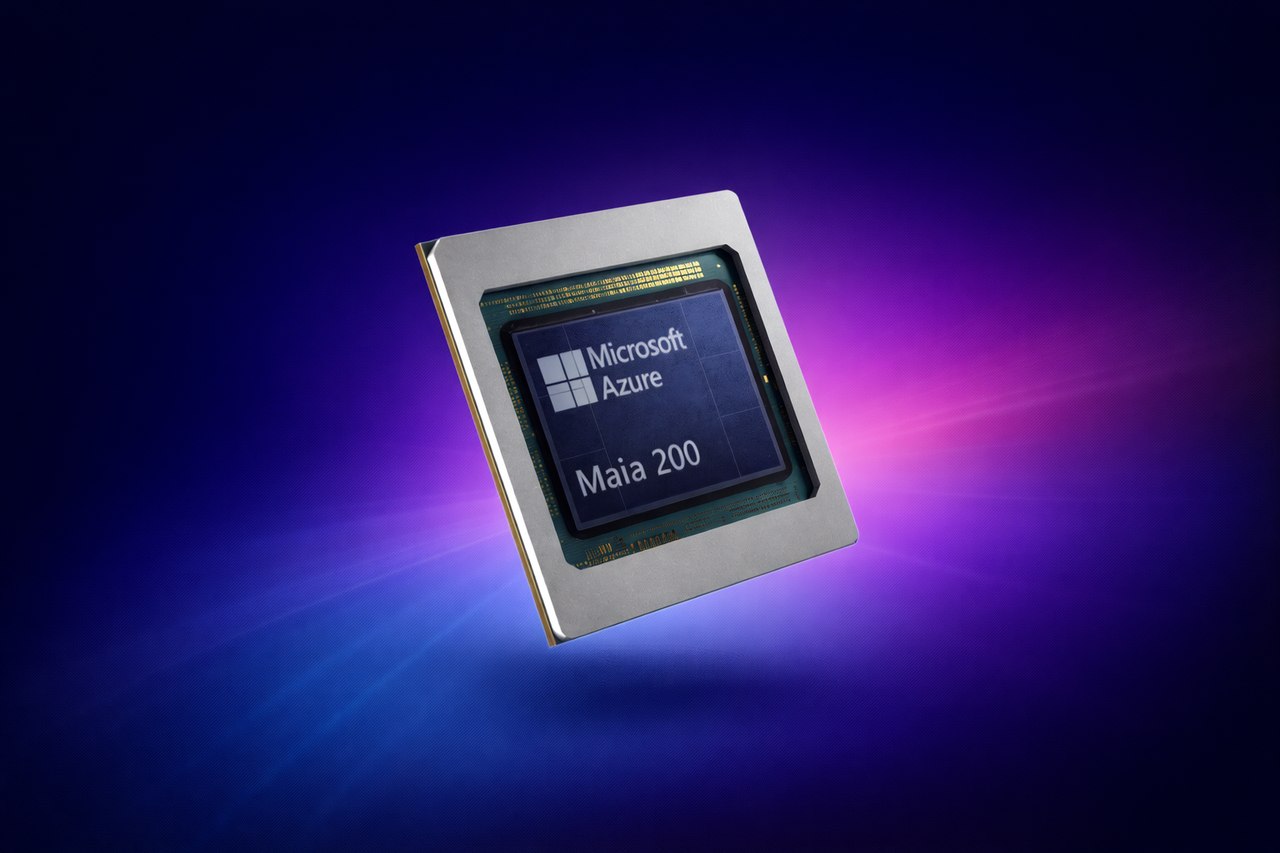
Microsoft Locks Down SK Hynix HBM3e Supply for Maia 200 AI Chip

Microsoft recently announced the Maia 200 chip, signaling a deeper push into custom AI hardware. New reporting reveals how Microsoft plans to secure the memory backbone for its next-generation accelerators.

Exclusive HBM3e supply deal with SK Hynix

According to Bloomberg, Microsoft signed an exclusive agreement with SK Hynix to supply high-bandwidth memory for the Maia 200 AI accelerator. SK Hynix will provide all HBM3e memory modules used in Microsoft’s new chip lineup.

Each Maia 200 processor integrates six HBM3e memory modules and focuses on large-scale AI training and inference inside Microsoft data centers. This configuration supports extreme memory bandwidth demands required by modern AI models.

SK Hynix controls more than 90% of the global HBM3e market, giving it a commanding role in AI-focused memory supply. This dominance positions the company as a critical partner for hyperscalers building custom AI accelerators.

The announcement immediately lifted SK Hynix shares by around 8% on the Korean Stock Exchange. The surge pushed the company’s market valuation close to $400 billion, reflecting investor confidence in AI-driven growth.

Memory manufacturers now prioritize enterprise and data center production over consumer hardware. SK Hynix has fully shut down its consumer RAM facilities to focus on AI infrastructure, increasing pressure across the memory market and driving price hikes even for DDR4.

Exclusive supply deals between major tech companies boost enterprise profits while raising costs for consumers. Analysts also expect continued shortages in high-end GPUs from NVIDIA as AI infrastructure demand accelerates.

Microsoft recently reported a 16.7% revenue increase, and the Maia 200 initiative reinforces its position as a leading force in AI technology and infrastructure.

Via Neowin

Microsoft Reaffirms Privacy Commitments as AI and Data Concerns Grow

As artificial intelligence becomes more embedded in everyday software, privacy concerns continue to mount. Scrutiny has increased following several controversies, including past reports where Microsoft was accused of tracking students through cookies in education-related environments, raising alarms among parents, schools, and privacy advocates.

Against this backdrop, Microsoft used National Data Privacy Day to publicly reaffirm its position that privacy is a fundamental human right and a core pillar of customer trust, not just a regulatory checkbox.

Microsoft reaffirms privacy stance as AI and data concerns intensify

Microsoft said its privacy strategy centers on transparency, user control, and responsible innovation, especially as AI adoption accelerates across its ecosystem.

The company stated that users retain control over their data and can access, delete, or move it at any time. Microsoft also emphasized that it does not use customer data for advertising or other unrelated purposes without explicit consent.

According to Microsoft, these principles are enforced through privacy-by-design engineering, independent audits, and internal governance frameworks designed to limit misuse and ensure accountability.

How privacy applies to Microsoft 365 Copilot for organizations

Microsoft also clarified how these principles apply to Microsoft 365 Copilot in workplace environments.

The company confirmed that prompts, responses, and organizational data are not used to train foundation AI models. All data remains within the Microsoft 365 environment and follows the same identity controls, permissions, compliance standards, and data protection policies already in place for enterprise customers.

Microsoft said the same privacy and Responsible AI principles extend to personal and home users.

Prompts, responses, and file contents generated inside Microsoft 365 apps are excluded from foundation model training. The company stressed that consumer Copilot experiences operate under the same data protection boundaries used in organizational deployments.

Despite these assurances, concerns around data access persist. Microsoft has previously acknowledged providing BitLocker recovery keys to authorities when legally required, a practice that continues to raise questions about user privacy and government access to encrypted data.

At the same time, Microsoft reported a 16.7% revenue increase, even as its stock has reportedly fallen around 10% amid heavy AI-related spending. The renewed focus on privacy comes as public debate around AI accountability and data protection grows louder.

Via Neowin

Teams Update Brings Custom Consent Messages for Meeting Recordings

Microsoft continues to refine Microsoft Teams, and the company announced that it is rolling out a new option that lets IT admins customize recording and transcription notification messages to match internal privacy policies and regional legal rules.

The update allows organizations to replace Teams’ default consent language with custom text and custom privacy links, configured per meeting policy. Once enabled, Teams shows these tailored messages to all participants whenever recording or transcription features turn on, helping companies standardize consent language across meetings.

Admins can define custom strings of up to 200 characters for both implicit notification banners and explicit consent dialogs. If a specific language or scenario lacks a custom message, Teams automatically falls back to the default notification text to avoid gaps in disclosure.

Microsoft designed the feature for organizations that work with external clients or partners and need precise legal wording before sessions can be recorded. The change aims to deliver a more professional and transparent experience, especially in regulated industries or cross-border meetings.

IT teams can apply the setting through the Teams Admin Center by uploading a formatted CSV file. Policies then govern which meetings display the customized notices, ensuring consistent behavior across departments or regions.

Microsoft started rolling out the feature earlier this month, with availability beginning in January 2026. The company expects full rollout across all standard and GCC environments by the end of the month.

Beyond recording notifications, Microsoft has also unlocked several premium Teams features for Enterprise users at no extra cost, continuing a broader push to modernize Teams alongside recent additions such as Brand Impersonation Protection and the removal of the legacy calendar.

Via Neowin

Windows 11 Canary Update KB5074168 Releases With WebP Wallpaper Support & Multiple Fixes


Microsoft has just dropped a new Windows 11 Insider update for users in the Canary Channel. The latest release, Windows 11 Insider Preview Build 28020.1495 (KB5074168), is now rolling out and brings a small but notable set of fixes and improvements directed at improving overall system stability.

Speaking of changes, Windows 11 now supports .webp images as desktop backgrounds, which is accessible via Settings > Personalization > Desktop Background. For users who prefer lightweight, modern image formats, this adds a bit more flexibility to desktop customization.

As for the fixes, Microsoft says this build includes a limited set of general fixes, but several address annoying issues reported by Insiders. First up, the Start menu now correctly displays the shutdown warning dialog when other users are still signed in, fixing a truncation issue along the edge of the menu.

Pen users should also see smoother behavior, as a bug causing a black flash while inking with the Snipping Tool has been resolved. Not to forgrt, Microsoft fixed a problem where shutdowns appeared to restart the system on some devices. Settings also received attention, with a fix for Windows Update pages hanging during load, along with a long-standing issue that prevented language features from downloading for English (Australia).

Another important fix addresses rare IRQL_NOT_LESS_OR_EQUAL bugchecks linked to certain smart card readers. Well, there are some known issues to watch out for. Microsoft notes that the desktop watermark currently shows the wrong build number. Additionally, the company is still working on a fix for a File Explorer bug that can cause open windows or tabs to unexpectedly jump back to Desktop or Home.

Report: Sony’s PS6 Controller Patent Hints at Buttonless, Adaptive Design

In the past few weeks, there have been a bunch of reports about the PS6 launch. Sony’s next-generation console is still far off, think of 2030, due to the spike in memory prices. But it seems Sony is already planning for the future. Just to be clear, it’s not about the PS6 console, but its wireless controller.

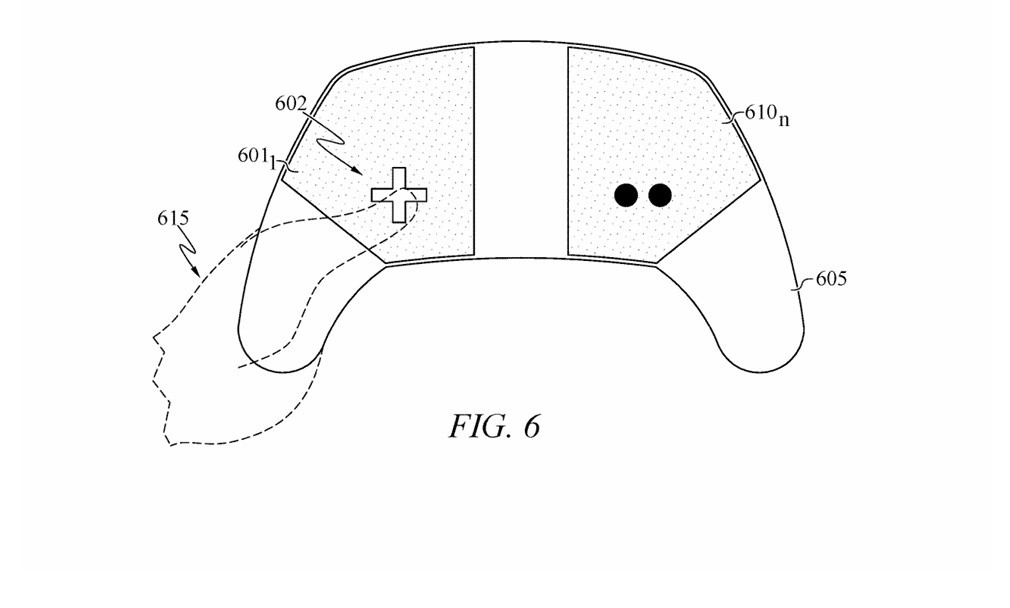
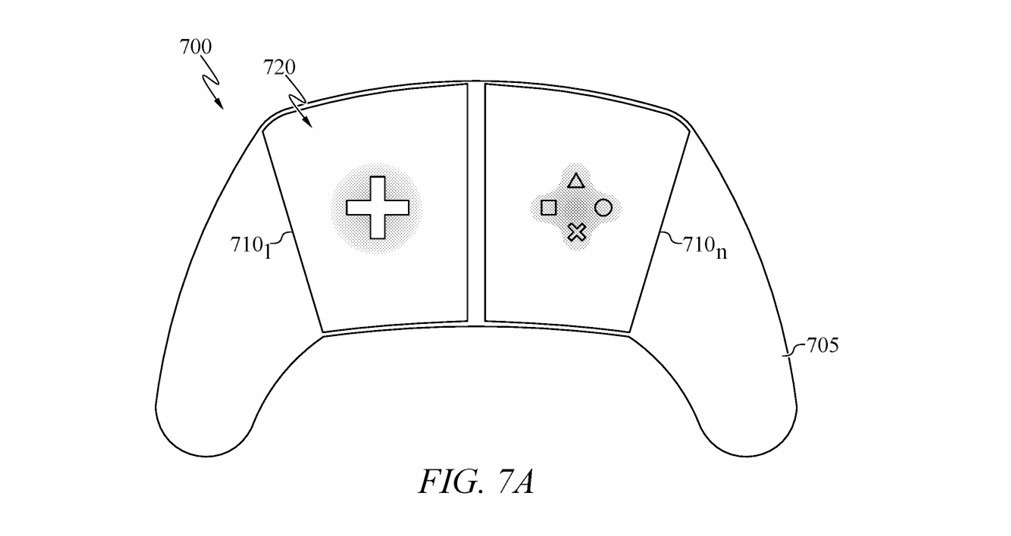
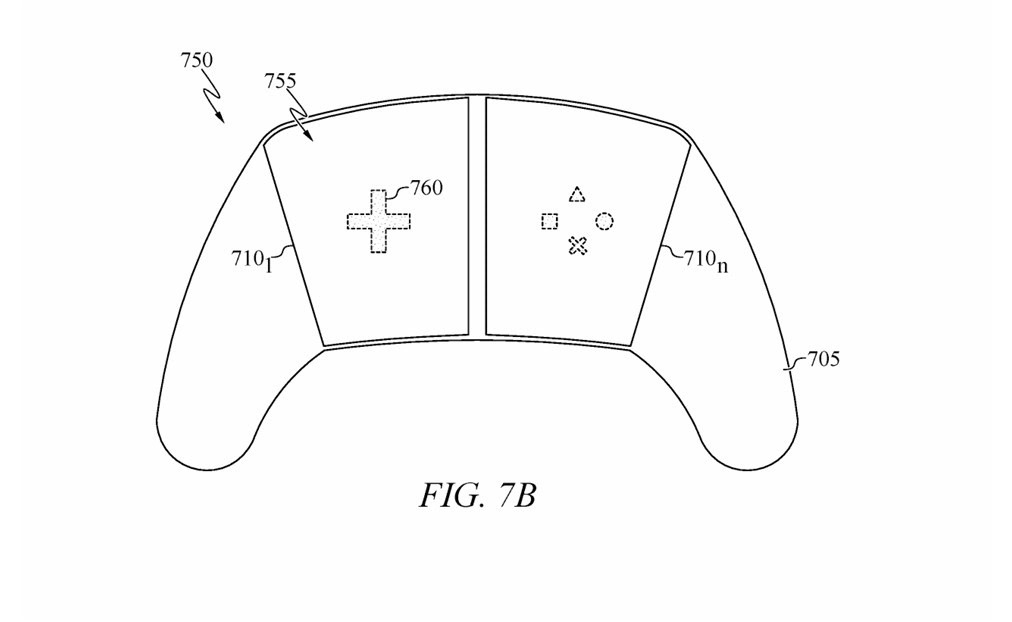
A closer look at Sony’s adaptive, buttonless PS6 controller patent

Folks over at Sudoku Online Pro, in collaboration with xLeaks7, spotted a patent filed by Sony that showcases its plans for PS6 controllers in pictures (via Android Headlines). If you are into gaming, you must be aware that most gaming controllers come with fixed layouts. But the fact is, everyone holds them differently. Hand sizes, grip styles, and thumb positions vary, and during fast gameplay, even small shifts can cause missed inputs or slow reactions.

Accessibility can also be a challenge, as standard button layouts aren’t comfortable for all players. Sony’s patent proposes a bold solution for all of the problems listed above. Sony’s patent reveals a controller with position-adjustable virtual buttons. Yes, you read it correctly, that’s one way of referring to a buttonless PS6 controller.

The patent reveals that the layout shifts to match where your fingers naturally rest, using a touch-sensitive surface that tracks location as well as presses. If you’ve guessed it, yes, I am talking about capacitive buttons. Anchors help the controller understand your touches even if your grip moves, and it can adapt dynamically as your hands shift mid-game.

The patent also mentions gesture support, including tap, press, swipe, pinch, and joystick-like inputs. It allows user profiles to save personalized settings, which is great for customization but could raise privacy questions. The adaptive system aims to balance flexibility with stability, adjusting only when needed and avoiding accidental inputs during fast action.

While the PS6 is still years away, this patent shows that Sony is thinking ahead. Adaptive virtual buttons, touch-driven controls, and customizable layouts could make the next console more intuitive, responsive, and accessible. The PS6 controller may end up redefining how players interact with their consoles.

Article feature image source: Sudoku Online Pro & xLeaks7

Microsoft’s FY26 Q2 Revenue Increases 16.7% to $81.27B, Cloud Growth Impresses Amid Rising AI Spending

Microsoft has posted a strong revenue in its fiscal second quarter, even as cloud growth showed early signs of cooling and AI investments continued to pressure margins. The company has reported $81.27 billion in revenue for the quarter ended December 31, up 16.7% year over year and ahead of expectations.

Net income jumped to $38.46 billion, compared to $24.11 billion a year earlier, with adjusted earnings reaching $4.14 per share. Microsoft noted that adjusted figures exclude the impact of its OpenAI investments. Azure and other cloud services revenue grew 39%, down slightly from 40% in the previous quarter.

While still robust, the slowdown reflects how Microsoft’s cloud business is entering a more mature phase. The Intelligent Cloud segment generated $32.91 billion, up nearly 29%, driven largely by Azure infrastructure demand and AI workloads. Meanwhile, Microsoft’s Productivity and Business Processes unit posted $34.12 billion in revenue, growing 16%, supported by Office subscriptions, Dynamics, and LinkedIn.

Additionally, More Personal Computing revenue slipped 3% to $14.25 billion, with disappointing results across Windows, Surface, and Xbox content and services.

A notable highlight this quarter was Microsoft’s commercial remaining performance obligation, which surged to $625 billion, up about 110%. The increase was largely related to OpenAI’s $250 billion cloud commitment, with Microsoft disclosing that 45% of its backlog now relates to OpenAI.

The company also reported $9.97 billion in other income, reflecting a dilution gain following OpenAI’s restructuring into a public-benefit corporation. However, profitability has been a concern, as Microsoft’s gross margin narrowed to just over 68%, its lowest level in three years. That’s mostly because the company ramped up spending on AI infrastructure.

Last but not least, capital expenditures and finance leases climbed to $37.5 billion, a 66% increase, driven by new data centers, specialized AI chips, and external capacity leases. Moreover, Microsoft has also said that it plans to raise prices for commercial Office subscriptions, while continuing to expand its AI and cloud ecosystem through large enterprise partnerships.

Google Rolls Out Gemini 3 in Chrome With Side Panel, Auto Browse, and More

Google has announced a massive Gemini update for Chrome, which could forever change how you browse. The company has rolled out Gemini 3 in Chrome. Available on Mac, Windows, and Chromebook Plus, the new features will make multitasking online faster and more seamless.

Google redefines Chrome browsing with a massive Gemini 3 update

The side panel experience is finally debuting in Chrome, as part of this update. It will allow you to keep your main tab open while handling other tasks alongside it. You can compare options across tabs, summarize product reviews, or schedule events without constantly switching windows.

Image credit: Google

On the creativity front, Chrome is also getting Nano Banana integration. Meaning, you can now generate images directly in Chrome. Gemini lets you get things done instantly, without the headache of uploads and third-party apps.

Moving on, Gemini in Chrome now also supports Connected Apps, like integrations to Gmail, Calendar, YouTube, Maps, Google Shopping, and Google Flights. Booking a flight, referencing old emails, or drafting messages can all happen in one place, saving both time and effort, thanks to Gemini.

Personal Intelligence is also coming to Chrome

Personal Intelligence, which is in the Gemini app, is also coming to Chrome soon. You will be able to opt in, connect apps, and give instructions for more personalized responses. Chrome essentially learns from past interactions to provide context-aware help.

If you have access to the AI Pro and Ultra plans and live in the US, you also get Chrome Auto Browse. With this feature in place, Gemini can now handle complex multi-step tasks. Think of booking your holiday, managing all your subscriptions, and even processing images to add items to carts with discounts applied.

Image credit: Google

Last but not least, Google is also rolling out Universal Commerce Protocol (UCP). That’s an open standard for agentic commerce, in partnership with Shopify, Etsy, Wayfair, and Target. Moreover, it will allow AI agents to perform tasks securely, with confirmations for sensitive actions.

Microsoft Flight Simulator City Update 13 Rolls Out With Improved Visuals for 18 California Cities

Microsoft Flight Simulator has just rolled out City Update 13: California, which brings improved visuals to one of the most iconic states in the United States. The new update adds handcrafted detail to 18 cities across California, stretching from Sacramento in the north to San Diego in the south, and it’s available for free to all players.

Here’s everything included in Microsoft Flight Simulator 2024’s City Update 13: California

Dubbed the “Golden State,” California gets a noticeable upgrade, thanks to improved terrain modeling and city detailing. Microsoft says each area of interest has been rebuilt using TIN surface texturing, which offers sharper skylines, more realistic terrain, and better-looking landmarks during low-altitude flights.

The update covers a wide range of locations across the state. In Northern California, Sacramento and multiple cities across the San Francisco Bay Area are included, such as San Francisco, Oakland, San Jose, Fremont, San Rafael, and Novato. Popular landmarks like the Golden Gate Bridge, Alcatraz Island, Coit Tower, and the Transamerica Pyramid are now visible quite accurately.

Visuals of Moving inland, San Joaquin Valley cities like Modesto, Fresno, and Visalia also get some refresh. For those unaware, these areas highlight California’s agricultural heartland and include landmarks such as the Modesto Arch, Old Fresno Water Tower, and historic downtown structures.

Along the Central Coast, Santa Maria and Santa Barbara join the list, showcasing coastal terrain, vineyards, and Spanish-style architecture. The Greater Los Angeles region gets one of the biggest upgrades, which includes cities like Los Angeles, Glendale, Santa Clarita, Inglewood, Long Beach, Anaheim, and Irvine, with popular spots such as Griffith Observatory, SoFi Stadium, Disneyland, and the Port of Long Beach.

Available for all players for free

Last but not least, San Diego receives updated skyline detail and landmarks, including the Coronado Bridge and USS Midway Museum. The City Update 13: California is available now in Microsoft Flight Simulator 2024 for everyone. All tou have to do is update the simulator to download it.

Microsoft Shares More Details About Windows 11 Patch Tuesday Causing Boot Failures on Business PCs

Microsoft must be hoping this month passes by as soon as possible, as nothing seems to be going right with Windows updates. If you use Windows 11, I’m sure you’re aware of what I’m talking about. For the unaware, around mid-January, Microsoft released the first Patch Tuesday update, KB5074109, for Windows 11. Unfortunately, users started reporting that the update was causing serious bugs and issues on their systems.

The issues were quite widespread, so much so that the company had to release two emergency updates (1) (2) in the span of two weeks to contain some of the problems. Among the ones troubling multiple users was boot failure. After confirming the issue last week, Microsoft has now shared some more details about it. For those unaware, the affected systems crash into a black screen of death, displaying an “unmountable boot volume” error. According to Microsoft, the issue is limited to commercial PCs, sparing consumer systems for now.

Microsoft shares more details about the boot failure bug triggered by the latest Patch Tuesday update in Windows 11

That said, the situation remains grim for enterprise users. Microsoft admits there is no simple fix for systems already affected. Neowin, without citing a source, now reports Microsoft saying that the issue occurs when devices fail to install the December 2025 security update and are left in an “improper state” after the update rollback. Apparently, installing newer Windows updates while in this state can cause the system to become completely unbootable. Here’s what the news outlet quoted Microsoft as saying about the issue:

Recent investigations have determined this issue can occur on devices that failed to install the December 2025 security update and were left in an improper state after rolling back the update. Attempting to install Windows updates while in this improper state could result in the device being unable to boot. We are working on a partial resolution that will prevent additional devices from resulting in a no-boot scenario if they try to install an update while in this improper state. However, this partial resolution will not prevent devices from getting into the improper state in the first place, nor will it repair devices that are already unable to boot. We continue to investigate why these devices are failing to install Windows updates or potentially getting into this improper state.

Microsoft says the upcoming fixes will only prevent new devices from entering a no-boot scenario. It won’t repair systems that are already stuck in this broken state. While home users are not affected by this specific bug, they are already dealing with plenty of other headaches. More recently, the news outlet also reported, citing user reports on Reddit, that the Windows Smart Control app is breaking Armory Craye on Xbox Ally series.

Are you also facing issues after installing the latest Patch Tuesday update? Let us know in the comments below.

Austria’s Privacy Watchdog Finds Microsoft Illegally Tracked Students With Cookies; Company Responds

Microsoft has found itself in hot water yet again in the EU. To catch you up, back in June 2024, European digital rights group NOYB (None of Your Business) filed two complaints with Austria’s Data Protection Authority (DSB). Back then, NOYB accused Microsoft of illegally tracking students through its Microsoft 365 Education platform.

Austrian regulator rules Microsoft unlawfully tracked students using cookies

According to the complaint, Microsoft also attempted to push responsibility for data access and tracking onto local schools. Well, the data protection agency ruled in favor of NOYB in October 2025. The regulator found that Microsoft had violated Article 15 of the GDPR, which guarantees users the right to access their personal data.

As part of the ruling, the Austrian DSB asked Microsoft to provide information about what data was being transmitted. The regulator also ordered the Redmond giant to explain vague internal terms like “internal reporting,” “business modeling,” and “improvement of core functionality.” That was about the first complaint.

Now, the ruling of the second complaint, arguably more serious, is also here (via Windows Central). The Austrian DSB has ruled that Microsoft acted unlawfully by placing tracking cookies on the device of a minor using Microsoft 365 Education.

The authority concluded that this practice violated GDPR rules, especially around the protection of children’s data. A data protection lawyer at NOYB, Felix Mikolasch, says, “Tracking minors clearly isn’t privacy-friendly,” adding that Microsoft appears to prioritize privacy only in marketing statements.

Microsoft’s response

Meanwhile, Microsoft’s spokesperson, in a statement to The Register, said that Microsoft 365 for Education meets GDPR requirements. They also assured that schools can continue using the platform legally, and confirmed that the company is currently reviewing the decision and will decide on the next steps soon.

Microsoft now has four weeks to comply with the ruling and must stop using tracking cookies on the affected minor’s device. Notably, both the school involved and the Austrian Ministry of Education stated that they were unaware of any tracking until NOYB raised the issue.

Windows Smart App Control Is Breaking Armory Crate on Xbox Ally

Microsoft and ASUS are running into early software problems with their Xbox-branded handhelds, despite strong market performance and optimistic profit projections tied to the devices’ launch success.

The ASUS ROG Xbox Ally lineup, including the higher-end Ally X model, is now facing user-reported issues linked to Windows security features, potentially impacting core system functionality.

Smart App Control is blocking Armory Crate on Xbox Ally devices

According to reports shared by users on Reddit, the ASUS Armory Crate cannot be launched on affected systems. Armory Crate acts as a core system application, handling performance profiles, system controls, and device-level settings essential to the handheld experience.

Windows Defender reportedly flags Armory Crate as unverified, blocking it from running entirely. Users also report that they cannot update or uninstall the app once the issue occurs, leaving the system in a partially locked state.

The problem appears tied directly to Smart App Control, a Windows security feature designed to block applications from unverified or untrusted publishers. Smart App Control relies on a strict zero-trust model, meaning that once the feature blocks an app, users cannot create manual exceptions to allow it.

This behavior puts affected users in a difficult position. Smart App Control can be disabled through the Windows Security settings page, but once disabled, it cannot be turned back on without performing a full Windows reset. As a result, users must choose between waiting for an official fix or permanently disabling a major security feature to restore Armory Crate functionality.

At this stage, the full scale of the issue remains unclear, but reports continue to appear from multiple users across different systems, suggesting the problem may be more widespread than initially expected.

Neither Microsoft nor ASUS has issued an official statement or provided a workaround so far.

Outside of this situation, ASUS recently introduced its Level Sense feature aimed at protecting GPUs from physical damage, while Microsoft continues its broader shift toward multiplatform Xbox releases.

Via Neowin

ASUS Introduces Level Sense Feature That Alerts Users About GPU Sag

ASUS has confirmed that hardware price increases are coming, but the company also shared news that could help users protect expensive GPUs for longer.

The New Level Sense feature will help with GPU sag

According to TechPowerUp, ASUS introduced Level Sense, a built-in feature that monitors internal IMU sensors on select premium graphics cards. The system detects GPU sag and alerts users when the card starts to tilt beyond safe limits, helping prevent long-term physical damage.

ASUS originally limited Level Sense to its ultra-premium ROG Matrix lineup. With a recent update to GPU Tuner III, the company has now expanded support to ROG Astral GPUs. Newly supported models include both ROG Astral and ROG Astral BTF graphics cards.

Level Sense remains exclusive to NVIDIA flagship-class GPUs, keeping the feature reserved for ASUS’ highest-end offerings. The functionality officially arrived for Astral cards with the January 25 update to GPU Tuner III, version 2.0.8.5, which also addressed several stability issues in the utility.

Modern enthusiast GPUs, such as heavily overclocked Astral variants, use massive cooling solutions that can weigh several kilograms. That weight often forces users to rely on support brackets, reinforced mounts, or vertical installations to avoid sag. Level Sense adds a software-based safety layer by continuously monitoring card alignment.

The feature also lets users fine-tune sensor sensitivity, allowing minor sag or uneven desk surfaces without triggering constant alerts.

This update arrives as broader market pressures continue. DDR4 memory prices have surged due to increased demand, and analysts expect a tightening supply of NVIDIA GPUs later this year, making hardware longevity more important than ever.

GeForce Game Ready Driver Brings ARC Raiders Updates and Major RTX Performance Boosts

As TechPowerUp writes, NVIDIA has rolled out GeForce Game Ready Driver 591.86 WHQL, delivering day-one support for the ARC Raiders: Headwind Update and expanding compatibility for several upcoming and existing titles.

The latest driver continues NVIDIA’s focus on launch-day optimization, performance improvements, and system stability across RTX-powered PCs.

GeForce Game Ready Driver 591.86 released, here’s what’s new

Performance updates

  • Arknights: Endfield now supports DLSS 4 Multi Frame Generation on RTX 50 series GPUs
  • NVIDIA reports up to ~3× performance gains at 4K with max settings
  • The game can also reach its 480 FPS cap at lower resolutions
  • Developer HYPERGRYPH is working on native DLSS integration in a future update

Game Ready support

  • Arc Raiders: Headwind – Day-one optimization for the latest update
  • Arknights: Endfield – Initial support added for the upcoming PvP-focused title

Fixed gaming bugs

  • Total War: Three Kingdoms
  • Resolved visual artifacts that appeared when Screen Space Reflections were enabled

Fixed general bugs

  • Fixed SDR color banding when Windows Automatic Color Management is enabled
  • Resolved ASUS G14 laptop startup freezes when ASUS Ultimate Mode is active
  • Known issues
  • Call of Duty: Modern Warfare
  • Image corruption may occur after updating to this driver

NVIDIA isn’t alone on the driver front. Intel recently pushed a new graphics driver that brings XeSS 3 support to Arc GPUs, highlighting increased competition in the upscaling and performance-boosting space.

As for NVIDIA, it’s possible that we’ll see a GPU shortage this year due to increasing hardware demands.

Memory Crisis Expands as DDR4 Prices Explode Worldwide

ASUS already confirmed upcoming price increases tied to memory shortages, and Nintendo Switch 2 prices are also expected to rise due to higher production costs. The pressure no longer affects only next-gen memory, as DDR4 prices now spike at an unprecedented rate.

DDR4 RAM prices are surging due to the DDR5 shortage

According to TechPowerUp, DDR4 RAM prices are surging worldwide, reflecting the deepening global DRAM shortage. A new analysis from Goldman Sachs, cited via Ctee, shows DDR4 spot prices running as much as 172% higher than contract prices, highlighting extreme demand and limited supply.

South Korea, the world’s largest memory exporter, has increased DRAM exports by 72% year over year, signaling intense global demand pressure. Manufacturers feel the impact as well. Nayanke reported a massive 445% annual revenue increase, driven largely by higher DDR4 pricing.

Consumers already see the consequences. A 32GB Corsair Vengeance LPX DDR4-3200 kit jumped from $71.99 to $262.99 in just six months, turning previously affordable upgrades into premium purchases.

The surge links directly to buyers shifting away from DDR5, which remains constrained by massive AI-driven memory demand. Earlier this year, ASUS confirmed increased DDR4 motherboard production, citing DDR5 shortages and inflated costs.

With memory supply tightening across the board, analysts now warn that NVIDIA GPUs could face similar shortages, adding further pressure to PC hardware and gaming markets in the months ahead.

Xbox Game Studios Signals Major Shift Toward Multiplatform Releases

Following the reveals at Xbox Developer Direct 2026, Microsoft has now clarified its broader release strategy. In a recent interview with GamesRadar, Xbox Game Studios leadership confirmed a clear move away from strict platform exclusivity.

Xbox Game Studios Will Focus on Multiplatform Push

Craig Duncan, head of Xbox Game Studios, said the company’s core goal is to get its games in front of as many players as possible. That philosophy now directly shapes how Xbox approaches new releases.

All four titles shown during Xbox Developer Direct 2026 are confirmed to be coming to PlayStation 5, in addition to Xbox and PC. This includes major first-party projects like Fable and Kiln, both of which will launch on PS5 day one alongside their Xbox and PC versions. This comes as no surprise, especially because PS5 owners are excited for Fable, at least according to the YouTube stats.

Not every title will follow the same schedule. Forza Horizon 6 will arrive on PS5 after its initial Xbox and PC launch, reflecting platform-specific development and optimization timelines. Still, Duncan noted that Xbox plans to be more consistent going forward, after years of mixed release timing.

Perhaps the most significant shift involves Halo Campaign Evolved, which will also release on PS5. The move marks a major moment for a franchise long associated exclusively with Xbox hardware.

According to Duncan, multiplatform decisions depend heavily on team size, resources, and technical requirements. Microsoft’s wider strategy focuses on meeting players wherever they are, through console, PC, cloud streaming, and services like Game Pass.

This trend signals a long-term shift toward broader reach rather than permanent exclusivity. With the success of the recent Developer Direct, there are rumors that Xbox is planning a second Developer Direct later this year.

Via Windows Central

Final Fantasy 7 Rebirth May Be Heading to Nintendo Switch 2 in Summer 2026

We previously heard reports suggesting Final Fantasy 7 Rebirth is heading to Xbox, and new details now point to a release on Nintendo’s next console as well.

Final Fantasy 7 Rebirth Is Coming to Switch 2, insiders claim

According to a report from Insider Gaming, Square Enix is currently targeting a summer 2026 launch window for Final Fantasy 7 Rebirth on the Nintendo Switch 2. The information comes from an insider source familiar with Square Enix’s plans, although the report cautions that the release window could change if development timelines shift.

The same report claims that Rebirth remains scheduled to launch on Xbox Series X/S sometime in 2026. In addition, Square Enix directors have reportedly confirmed that both Part 2 and Part 3 of the Final Fantasy 7 remake trilogy are in active development with Switch 2 in mind, signaling a broader multi-platform strategy.

Another source cited in the report suggests that the Xbox Series X/S and Switch 2 versions could arrive simultaneously. That approach would mirror Square Enix’s previous release strategy for Final Fantasy 7 Remake, which eventually expanded to additional platforms after its initial launch.

If accurate, this would be significant news for Nintendo’s next-generation console. Final Fantasy 7 Remake has already performed strongly on Switch 2, and with the console reportedly dominating hardware sales in Japan, major publishers appear eager to bring high-profile titles to the platform. For Square Enix, releasing Final Fantasy 7 Rebirth on Switch 2 could help the remake trilogy reach its widest audience yet.

Amazon Cuts 16,000 Jobs as AWS Email Exposes Layoff Plans

The tech industry continues to face turbulence, and Amazon is now the latest major company to confirm large-scale job cuts following a premature internal communication at AWS.

According to Reuters, Amazon accidentally alerted some AWS employees about planned layoffs after an internal email and a team-wide meeting invite were sent hours earlier than intended.

Amazon confirms major layoffs after internal AWS email mishap

The email was signed by Colleen Aubrey, senior vice president of Applied AI Solutions at Amazon Web Services. It incorrectly stated that affected employees in the United States, Canada, and Costa Rica had already been notified about job losses.

Reuters previously reported that Amazon planned to lay off thousands of corporate employees starting this week, although the company had not confirmed those plans at the time.

AWS employees later shared on Slack that the scheduled Wednesday meeting was quickly canceled shortly after the email circulated internally.

The internal layoffs were referred to as “Project Dawn” in the email. Aubrey acknowledged the difficulty of the situation, stating that leadership made the decisions to better position AWS and Amazon for long-term success.

Sources cited by Reuters said roles across AWS, retail, Prime Video, and human resources could be affected, though the full scope was initially unclear.

Amazon confirms 16,000 roles impacted

Amazon has since issued an official statement confirming additional organizational changes across the company. Leadership described the announcement as difficult but necessary.

The company said the changes follow a strategy outlined in October, aimed at reducing management layers, increasing ownership, and cutting internal bureaucracy.

According to Amazon, the current reductions will impact approximately 16,000 roles company-wide.

Amazon stated that U.S.-based employees affected by the layoffs will generally receive 90 days to search for internal roles within the company. Timelines for employees outside the U.S. will vary depending on local regulations.

Employees who do not secure or pursue a new internal role will receive transition support, including severance pay, outplacement services, health insurance benefits where applicable, and additional support resources.

Amazon emphasized that it will continue hiring and investing in strategic areas critical to its long-term future and clarified that these reductions do not signal the start of recurring mass layoffs.

Amazon joins a growing list of tech companies implementing workforce reductions. Earlier this year, Meta laid off around 1,000 employees in its Reality Labs division, while Microsoft has faced scrutiny over layoffs and operational costs.

In related developments, Microsoft has also drawn criticism over water usage tied to its expanding data center operations, highlighting the broader pressures facing large tech firms as they scale AI and cloud infrastructure.

Microsoft Prepares Major Platform Shift for Windows 11

Microsoft has confirmed it is working on major behind-the-scenes platform changes for Windows 11, with the updates expected to ship later this year.

A new wave of builds is now rolling out to the Windows Insider Dev Channel, introducing the 26300 series. These builds move ahead of current production releases and follow the recent KB5074170 update already seen by Insiders.

Dev Channel becomes the testing ground for core changes

According to Windows Central, Microsoft says the 26300 series will act as the foundation where core, platform-level changes are developed and validated. While these builds currently include many of the same features found in the 26220 series builds in the Beta Channel, Microsoft expects them to gradually diverge as deeper platform modifications roll out.

The current in-market Windows 11 platform carries the codename Germanium, and the 26300 series builds are still based on this release. However, Microsoft plans to use these builds to refine core system stability, reliability, and update infrastructure, even though it has not shared technical details yet.

A familiar update strategy from last year

This approach mirrors what Microsoft did with the 26200 series last year, which eventually shipped as Windows 11 version 25H2. If the same pattern continues, the 26300 series builds are widely expected to land as Windows 11 version 26H2 in fall 2026.

At the same time, Microsoft plans to ship Windows 11 version 26H1 in the spring, but only for next-generation Arm devices. That release will rely on a newer platform codenamed Bromine, creating a split platform situation between spring and fall releases.

Platform split raises long-term questions

Under the current plan, 26H2 will continue using the older Germanium platform, while 26H1 will move ahead with Bromine. This split adds complexity to Windows development and raises questions about how Microsoft will align platforms long term across device categories.

For now, the 26300 series builds remain available to testers through Windows Update in the Dev Channel. Microsoft notes that the Dev and Beta Channels still share the same features and known issues, with differences expected to appear as platform work accelerates.

Meanwhile, Windows Insiders have also recently received KB5074169 in the Beta Channel and KB5074105 in the Release Preview Channel, bringing additional fixes, including improvements for the Start Menu and black screen-related issues.

Sony Rolls Out New PS5 Firmware Update With Read Receipts & More

Earlier today, we reported that Sony is urging PS4 players to upgrade to PS5. Now, Sony has released a new firmware update for PS5, which bumps the system software version to 26.01-12.60.00. While the latest software update doesn’t bring any massive features or changes to the PlayStation 5, there are a few things that I’d want to talk about here.

New PS5 firmware update brings read receipts and Welcome Hub tweaks

First up, the latest firmware update for PS5 brings read receipts. Similar to messaging apps like WhatsApp, read receipts, when enabled, will let your friends know whether you’ve seen their messages. Not to mention, you can keep them turned off.

To turn on read receipts, go to Settings > Users and Accounts > Privacy > View and Customise Your Privacy Settings. Under Communication and multiplayer, set the Show read receipts option to “other players on PS5” and PlayStation App to “Allow.”

Sony appears to be rolling out this feature gradually. So, if you don’t see it yet, don’t worry, you’ll eventually get it. Additionally, the latest firmware update for PS5 also brings a small but useful change to a widget in the Welcome Hub. You’ll now be able to use the Friends Activity widget to directly jump into the games that your friends are playing. Well, that’s a neat change, indeed.

Sony has also improved messaging and usability on some screens with this new PS5 firmware update. Moreover, the company mentions that the update improves software performance and stability. Not to forget, the update weighs around 1.3GB and is now available to download and install. You can get it from here.

Article feature image source: Unsplash

Microsoft Criticized Over Rising Water Consumption From AI Data Centers

As artificial intelligence continues to scale, demand for energy and natural resources keeps rising. While OpenAI has said its data centers will not significantly affect consumer power bills, and Microsoft has made similar claims, attention has shifted toward water consumption, where Microsoft is now facing growing criticism.

According to Windows Central, Microsoft is under pressure as data center water use increases sharply alongside its AI expansion. The company pledged in a 2020 sustainability blog post to replenish more water than it consumes by 2030, but experts questioned the feasibility of that goal even when it was announced.

Rising water demand raises sustainability concerns

Internal projections reportedly suggest Microsoft’s water requirements could more than double by 2030, largely driven by AI-focused data centers. A report from The New York Times says it reviewed internal documents indicating Microsoft’s annual water use could more than triple this decade, reaching around 28 billion liters by 2030. By comparison, Microsoft used about 7.9 billion liters of water in 2020 and roughly 10.4 billion liters in 2024.

The broader industry trend adds to these worries. Analysts expect global data center water consumption to double by 2030, increasing pressure on water supplies, particularly in regions already facing shortages.

Microsoft responds with efficiency claims

Microsoft has pushed back against the most severe projections, saying efficiency improvements have changed its outlook since those internal estimates. The company now says it expects water use to increase by about 150% by 2030 rather than triple. It has also highlighted recent efficiency-focused efforts, including the introduction of its Maia server chip, which it says was designed with resource efficiency in mind.

Despite these assurances, environmental advocates argue that the rapid expansion of AI data centers could still disproportionately affect drought-prone areas, where water resources remain under significant strain.

The controversy has also reached financial markets. Microsoft’s stock reportedly dropped by around 10% following intensified criticism of its data center strategy and AI push, showing that environmental concerns can translate into real market consequences.

As AI infrastructure continues to expand, Microsoft’s approach to balancing growth with sustainability will likely remain under close scrutiny from investors, regulators, and communities impacted by large-scale data center projects.

Sony Quietly Urges PS4 Users to Upgrade to PS5 Ahead of Big 2026 Games

Sony is reportedly urging PlayStation 4 users to switch to PlayStation 5. That’s according to folks at Insider Gaming, who referred to a post on X claiming that users with PS4 consoles recently received a system message via PlayStation Direct, urging players to check out current PlayStation 5 deals. That’s another way of Sony saying that PS4 owners should jump before missing out on some of the biggest games coming in 2026.

The timing isn’t random, by the way. In mid-2024, the PlayStation ecosystem was still split nearly down the middle, with roughly 50 percent of players sticking with the PS4. That’s tens of millions of gamers still using a console that first launched back in 2013. Meanwhile, the PlayStation 5 has already been on the market for more than five years.

According to the message, Sony wants PS4 users to upgrade, as it wants them to catch up on recent releases and prepare for what’s next. The company has highlighted 2025 titles like Clair Obscur: Expedition 33, ARC Raiders, and Ghost of Yotei, while also pointing to 2026 titles such as SAROS, 007 First Light, and Nioh 3. The message also appears to include a QR code, which reportedly leads users to the latest PS5 console deals.

On the surface, it feels like a friendly reminder. However, there’s likely more to it. Back in October 2025, Sony confirmed that certain PlayStation Network features for some PS4 titles will be switched off in 2026. That announcement quietly marked the beginning of the end for full PS4 support. Interestingly, Sony has also pushed a minor security update for the PS4 today, as reported by MP1st.

As far as nudging is concerned, Sony hasn’t officially confirmed anything as such, nor has it acknowledged the message or confirmed whether it’s part of a wider rollout. However, for PS4 users holding out, this may be the sign that the clock is now ticking away.

Are you still gaming on a PlayStation 4, or have you upgraded already? Let us know in the comments below.

KB5074170 Update Lands in Windows 11 Dev Channel With File Explorer Fixes

Microsoft has pushed KB5074170 to the Dev Channel, raising the Windows 11 build number to 26300.7674. The update is effectively identical to KB5074169 released to the Beta Channel, with the same fixes and known issues included.

Starting with this release, the Dev Channel is moving ahead to 26300 series builds. Once build 26300.7674 is installed, Insiders can no longer switch from the Dev Channel to the Beta Channel. Microsoft has issued advance warnings about this change, which follows its standard Insider Program process.

KB5074170 brings various fixes to the Dev Channel

Gradual fixes

File Explorer

  • Fixed an issue where the Extract All option did not appear in the command bar when browsing non-ZIP archive folders.

Start menu

  • Fixed an issue where clicking hide this pane in the mobile device side panel did not lead to the setting to hide it for some Insiders.

Search

  • Fixed a bug where the Search process displayed an X icon instead of the magnifying glass.

Settings

  • Made underlying changes to improve cases where the Settings Home page loaded very slowly.

Display & Graphics

  • Fixed an issue causing secondary monitors to show black screens or not display correctly after recent updates for a small number of Insiders.

Other

  • Fixed an underlying issue that could cause unexpected sign-in failures with Azure Virtual Desktop and Windows 365.
  • Fixed an issue causing some Insiders to encounter a SYSTEM_SERVICE_EXCEPTION bug check after recent flights.

Known issues

Start menu

  • Clicking show more apps in Categories view may not work correctly.

File Explorer

  • Open File Explorer windows and tabs may unexpectedly jump to Desktop or Home.

Xbox full screen experience for PC

  • Some apps may behave unexpectedly, especially those that expect a fixed window size or launch additional windows.

Taskbar & System Tray

  • Some apps may not appear in the system tray when they should.

Click to Do

  • The Microsoft 365 Copilot prompt box on selected images may not function if the Microsoft 365 Copilot app is not running.

In related news, Microsoft has also released Preview Update KB5074105, which improves Smart App Control and fixes multiple issues, including Start Menu problems and black screen bugs.

Windows 11 KB5074105 Fixes Start Menu, Black Screen, and Activation Bugs

Microsoft has released Windows 11 KB5074105 to Insiders in the Release Preview Channel, pushing systems to builds 26100.7701 and 26200.7701.

The update expands Cross-Device Resume, improves Smart App Control flexibility, and delivers a broad set of fixes that roll out gradually and normally.

What got fixed in Windows 11 KB5074105?

Gradual rollout fixes

Start Menu

  • Fixed an issue where the shutdown warning message appeared truncated when other users were logged in.
  • Fixed the Start menu opening on the wrong side of the screen when using Arabic or Hebrew display languages with non-centered taskbar icons.

Kiosk mode

  • Removed an incorrect post-login message in multi-app kiosk mode stating:
    “This operation has been cancelled due to restrictions in effect on this computer.”

Windows Update and activation

  • Fixed Windows license migration failures during upgrades caused by activation server registration issues.
  • Fixed an issue where joining the Windows Insider Program from Settings > Windows Update could get stuck.

Lock screen and sign-in

  • Improved system behavior to reduce cases where the lock screen became unresponsive.
  • Fixed an issue where Explorer.exe hung at first login with certain startup apps, preventing the taskbar from appearing.

File Explorer and desktop icons

  • Improved performance when browsing network locations.
  • Fixed an issue where desktop icons moved unexpectedly when opening or renaming files.

Input

  • Fixed reversed labels for keyboard character repeat delay in
    Settings > Bluetooth & Devices > Keyboard.

User Account Control (UAC)

  • Fixed a system freeze that occurred when launching Windows Terminal as administrator from a non-admin account.

Normal rollout fixes

Start Menu

  • Fixed an issue where clicking “hide this pane” in the mobile device side panel did not correctly open the related setting.

Display and graphics

  • Fixed black screen issues in isolated multiuser environments, typically after Windows upgrades.

Narrator

  • Fixed an issue where Narrator failed to start during Windows installation from an ISO file.

Other fixes

  • Fixed a system crash during startup when Windows Boot Manager debugging was enabled.
  • Fixed iSCSI boot failures that caused “Inaccessible Boot Device” errors.
  • Fixed Windows SDK CRT libraries being flagged as non-compliant with Microsoft SDL by BinSkim.

Microsoft also released KB5074169 to the Beta Channel, offering another option for Insiders who want to test upcoming Windows 11 changes ahead of wider availability.

Windows 11 KB5074105 Focuses on Smart App Control Flexibility and New MIDI Services

Microsoft has released KB5074105 for Windows Insiders on the Release Preview channel, delivering builds 26100.7701 and 26200.7701 with a broad set of new features and refinements now rolling out.

While improvements to Cross-Device Resume headline the update, Microsoft is also introducing upgrades across accessibility, security, creative tools, and system setup.

KB5074105 brings MIDI, Voice Typing, and Smart App Control improvements

Major MIDI upgrades arrive on Windows

One of the most significant additions in KB5074105 targets creative workflows. Windows MIDI Services now brings enhanced support for MIDI 1.0 and MIDI 2.0, along with full WinMM and WinRT MIDI 1.0 compatibility through built-in translation.

The update enables shared MIDI ports across apps, app-to-app MIDI communication, loopback functionality, custom port naming, and multiple performance improvements aimed at lower latency and higher reliability.

Microsoft delivers the App SDK and Tools package as a separate download. It enables in-box MIDI features and includes utilities such as MIDI Console and the MIDI Settings app. Since these packages are currently unsigned, users may encounter security warnings during download or installation.

Narrator gains granular control options

Narrator now lets users control exactly how on-screen elements are announced. New settings allow users to choose which details Narrator speaks and the order in which it delivers them. We already saw this feature in KB5072043 in the Beta and Dev channels.

These preferences apply system-wide and help reduce unnecessary speech while improving clarity and usability across apps.

Settings app adds a new device overview card

Microsoft is also refreshing the Settings home page with a new Device card. The card displays key PC specifications and usage details and provides a direct shortcut to Settings > System > About for full device information.

The feature appears when users sign in with a Microsoft account. Microsoft has resumed its rollout after pausing it during the August 2025 release.

Smart App Control no longer requires a clean install

Smart App Control now offers a long-requested improvement. Users can toggle Smart App Control on or off without reinstalling Windows.

The setting lives under Windows Security > App & Browser Control > Smart App Control. When enabled, Smart App Control helps block untrusted or potentially harmful applications, marking a major usability upgrade over previous versions.

Voice Access and Voice Typing see usability improvements

Voice Access now includes a streamlined setup flow that guides users through downloading the correct speech model, selecting an input microphone, and learning core features.

Voice Typing adds a new “Wait time before acting” option. This setting lets users adjust how long the system waits before executing spoken commands, improving flexibility for different speaking speeds and boosting recognition accuracy.

Windows Hello expands fingerprint support

Windows Hello Enhanced Sign-in Security now supports peripheral fingerprint sensors, as first seen in KB5065797. This expansion allows secure biometric sign-in on desktop systems and devices without built-in fingerprint readers, including Copilot+ PCs.

Users can configure the feature through Settings > Accounts > Sign-in options using a supported ESS fingerprint reader.

Security and Secure Boot change

This version updates the Boot Manager on devices using the Windows UEFI CA 2023 certificate. This change replaces the older 2011-signed bootmgfw.efi with a new version signed in 2023, aligning Secure Boot components with updated certification standards.

Microsoft warns that resetting the DB or enabling Secure Boot after this change may trigger “Secure Boot violation” errors on some systems. In rare cases, recovery requires creating Secure Boot recovery media to restore normal boot functionality.

On the security side, Microsoft has added support for DPAPI domain backup key rotation management. This allows administrators to define automatic key rotation intervals, strengthening cryptographic protection while reducing reliance on older encryption algorithms.

It’s worth mentioning that KB5074105 fixes a wide array of issues, and we covered them all in a separate guide.

For users who want access to features even earlier in development, Microsoft also recommends checking out KB5074169 in the Beta channel, which includes additional changes still under active testing.

Windows 11 Release Preview Update KB5074105 Expands Cross-Device Resume

Windows 11 Builds 26100.7701 and 26200.7701 are rolling out under update KB5074105 for systems on version 24H2 and the upcoming 25H2. The company says the update follows a gradual rollout model, so not every feature will appear at the same time for all Insiders.

Cross-device resume expands Windows 11 PC experiences

A key change in this update is the expanded Cross-Device Resume functionality. As you might remember, this feature got WNS integration in KB5072046, and Microsoft had plans to expand it with future updates.

Cross-Device Resume allows users to continue tasks started on an Android phone directly on their Windows PC. This includes resuming Spotify playback, continuing work in Microsoft Word, Excel, or PowerPoint, and restoring active web browsing sessions.

Vivo Android phone users gain additional support, as browsing sessions from Vivo Browser can now continue seamlessly on a Windows PC. Microsoft is also extending Cross-Device Resume to more Android brands, including HONOR, OPPO, Samsung, Vivo, and Xiaomi. For these devices, files opened in the Microsoft Copilot mobile app can continue on the PC, opening in the appropriate Microsoft 365 desktop app if installed, or in the default web browser when the desktop app is unavailable. Files stored offline on the phone remain unsupported, since the feature relies on online-accessible content.

Copilot+ PCs receive settings agent improvements

Copilot+ PCs also benefit from updates in this release. The Agent in Settings now supports more languages, expanding AI-assisted system management to a wider global audience. Newly added languages include German, Portuguese, Spanish, Korean, Japanese, Hindi, Italian, and Simplified Chinese.

This change aims to make it easier for users in more regions to interact with Windows settings using natural language and AI-driven guidance.

The KB5074105 update also improves Smart App Control, and it fixes the Start Menu and black screen issues.

In parallel with the Release Preview rollout, Microsoft has also released update KB5074169 to Insiders in the Beta Channel. Together, these updates highlight an ongoing push toward stronger cross-device continuity and broader Copilot integration as Windows 11 continues to evolve.

Windows 11 KB5074169 Lands in Beta Channel With New Fixes

Microsoft has released Windows 11 KB5074169 to the Beta Channel, rolling out build 26220.7670 with a mix of fixes across File Explorer, Settings, and system stability, alongside several newly acknowledged issues.

What’s fixed in KB5074169

File Explorer, Start menu, and Search

  • Fixed an issue where the Extract All option did not appear in the command bar when browsing non-ZIP archive folders.
  • Fixed a problem where clicking hide this pane in the mobile device side panel did not correctly open the related setting for some Insiders.
  • Fixed a bug that caused the Search process to show an X icon instead of the magnifying glass.

Settings, display, and graphics

  • Improved underlying performance to address cases where the Settings Home page loaded very slowly.
  • Fixed an issue where secondary monitors showed black screens or failed to display correctly after recent updates for a small number of Insiders.

Other fixes

  • Fixed an underlying issue that could cause unexpected sign-in failures with Azure Virtual Desktop and Windows 365.
  • Fixed a bug that caused some Insiders to hit a SYSTEM_SERVICE_EXCEPTION bug check after recent flights.

Known issues in this build

Start menu, File Explorer, taskbar, and system tray

  • Clicking show more apps in Categories view may not work correctly in some cases.
  • All open File Explorer windows and tabs may unexpectedly jump to Desktop or Home.
  • Some apps may not appear in the system tray when they should.

Xbox full-screen experience for PC

  • Some apps may behave unexpectedly, especially those that expect a fixed window size or launch additional windows.

Click to Do

  • The Microsoft 365 Copilot prompt box on selected images may not work if the Microsoft 365 Copilot app is not running.

Remember, the Dev Channel is moving to 26300 series builds, which closes the window to switch from Dev to Beta once Build 26300.7674 installs. Insiders who still want to switch must pause updates, change to the Beta Channel, then resume updates before installing the build.

This isn’t anything new, as Microsoft has already warned Windows Insiders about this change.

Microsoft continues to deal with turbulence around recent Windows updates. Reports indicate that KB5074109 has caused boot failures on some systems, and the company recently pushed a second emergency update to resolve Outlook-related issues.

In parallel, Microsoft has also released Windows 11 KB5074157 to the Dev Channel, continuing its rapid update cadence across Insider branches.

Yahoo Launches Scout, an AI-Powered Answer Engine for Search

Everyone seems to be racing into AI-powered search. While Apple works on turning Siri into a chat-style assistant, Yahoo has now entered the space with its own solution.

Yahoo Scout brings AI answers across the Yahoo ecosystem

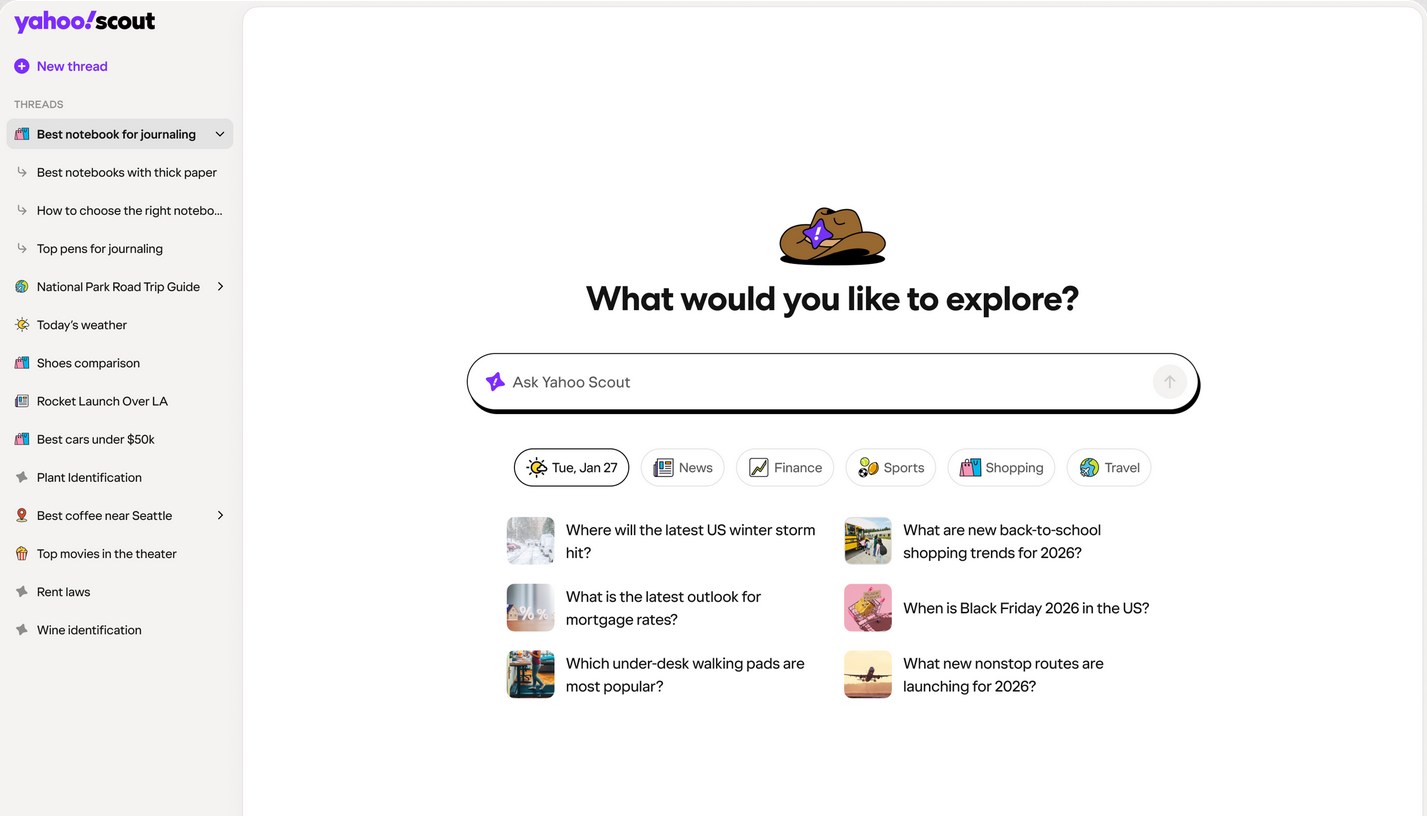
Yahoo has officially launched Yahoo Scout, a proprietary AI-powered answer engine, now available in beta across Yahoo Search and the broader Yahoo ecosystem. The company says Scout is rolling out to nearly 250 million users in the U.S. on both desktop and mobile, covering almost its entire product portfolio.

Scout shifts search away from traditional blue links and toward direct, AI-generated answers, while also moving from keyword-based queries to natural language conversations. The system synthesizes information from the open web, Yahoo’s internal datasets, and Yahoo-owned content, blending generative AI with classic search signals.

According to Yahoo, Scout runs on a massive internal data stack that includes 500 million user profiles, a knowledge graph with over one billion entities, and roughly 18 trillion consumer events per year.

Source: Yahoo

AI features expand across Mail, Finance, Sports, and Shopping

Alongside Scout, Yahoo announced the Yahoo Scout Intelligence Platform, which integrates AI features across Mail, News, Finance, Sports, and other services.

New capabilities include Yahoo Shopping, which delivers instant product research, comparisons, expert analysis, and shoppable links. In Yahoo Finance, Scout now provides real-time market insights, earnings breakdowns, analyst ratings, and stock movement explanations, refreshing every ten minutes.

Yahoo also introduced More from Yahoo Scout, which turns financial news into interactive research experiences with AI-driven follow-up questions and deeper market context. Another feature, Comment Summaries, highlights key discussion themes and public sentiment inside popular Yahoo articles.

Anthropic and Microsoft power Yahoo’s AI strategy

Yahoo confirmed a major AI partnership with Anthropic, using Claude as the primary foundational model behind Yahoo Scout. The company is also working with Microsoft, leveraging Bing’s grounding API and joining Microsoft’s Publisher Content Marketplace pilot to support trusted sourcing and publisher monetization.

Yahoo says Scout will continue to evolve with deeper personalization, expanded vertical features, and new generative AI advertising models.

Yahoo Scout is available now in beta at Scout.Yahoo.com and through the Yahoo Search app on iOS and Android.

In other AI news, Google has added Gemini Personal Intelligence to AI Search and now lets users jump from AI Overviews into AI Mode to ask follow-up questions.

Via Neowin

Terraria’s Bigger & Bolder Update Refreshes Crafting, Worlds, and Multiplayer

This has been an exciting week for gaming, with a new ARC Raiders update and the release of Highguard. But that’s not all, as Terraria has just received a major new update packed with improvements.

Terraria 1.4.5 update focuses on polish, new systems, and massive crossovers

As Nintendo Insider reports, 505 Games has rolled out a new software update for Terraria, officially updating the game to version 1.4.5 across supported platforms.

Developers say this update prioritizes polish and overall refinement, rather than focusing only on raw content additions. Still, the patch brings a huge number of changes and new features.

Here’s a brief list of the most notable improvements:

  • A brand-new crafting interface replaces the old grid system, adding tab-based categories, full search, and a Journey Mode–style layout for managing over 6,000 items.
  • Automatic crafting from nearby chests now works by default, allowing players to use stored materials without opening containers, with an optional manual toggle.
  • The new Spectator Mode lets dead players in multiplayer freely switch camera views between teammates while waiting to respawn.
  • A fully redesigned World Seed Menu allows visual selection and combination of special seeds, such as Remix and Not the Bees.
  • A new Skyblock world seed introduces a survival mode that starts players on a tiny floating island with no ground.
  • A major Dead Cells crossover adds Terraria-style weapons, furniture, vanity items, and themed gameplay content.
  • A Palworld crossover introduces functional Pals that assist with mining, gathering, and exploration.
  • Over 650 new items expand Terraria’s total item count beyond 6,000, greatly increasing progression and customization options.
  • New secret world seeds introduce extreme gameplay twists, including permanent rain, multi-team spawns, seasonal worlds, vampire effects, and dungeon-focused maps.
  • Inventory system upgrades add fully stackable identical items and a new Banner Menu that removes the need to carry banners manually.
  • Major atmosphere upgrades improve backgrounds, environmental effects, sprites, and overall visual presentation.

This update includes even more changes beyond this list, and players can find full details in the complete patch notes.

In other gaming news, Xbox may be planning a second Developer Direct later this year.

OpenAI’s Prism AI Workspace Wants to Fix Scientific Writing Once and for All

Much of our day-to-day life revolves around science, be it the medicines or systems that work behind the scenes to help us every day. Putting it simply, science touches almost every part of daily life. But despite how fast AI has moved in recent years, the way researchers actually write and collaborate on papers hasn’t changed much. That’s exactly what OpenAI is now trying to fix with a new AI-powered workspace, which it calls “Prism.”

Prism is designed to simplify how scientists and researchers write and collaborate

It is designed specifically for scientists and researchers and is free to use and available starting today for anyone with a personal ChatGPT account. The company says that support for Business, Enterprise, and Education users will follow soon. So, what’s soecial about Prism, you may ask, right?

Well, Prism brings research writing under one roof. At its core, Prism is a cloud-based, LaTeX-native writing space where drafting, editing, citations, equations, and collaboration all live in one place. Meaning, researchers can work inside a single project with everything connected. This cuts the hassle of jumping between document editors, reference managers, PDFs, and chat tools.

Notably, Prism is powered by GPT-5.2, which works directly within the document. That means it understands the structure of the paper, the equations, references, and even figures while helping with revisions or idea exploration. Researchers can draft sections, refine arguments, update citations, and rework equations, that too, without leaving the workspace.

The platform also supports real-time collaboration with unlimited collaborators. Teams can edit together, leave comments, and make changes instantly, without worrying about version conflicts or local LaTeX setups. There’s even support for turning handwritten equations or diagrams into LaTeX, along with optional voice-based editing for quick tweaks.

Prism builds on OpenAI’s earlier acquisition of Crixet, which turrns it into a more complete writing and collaboration tool tailored for scientific work. Do note that Prism is free with no project or collaborator limits, which lowers the barrier for students, independent researchers, and small teams. OpenAI says more advanced features will roll out later through paid ChatGPT plans.

[UPDATE: Working] Discord Is Down For Some Users Today With “Messages Failed to Load” Error

If you’re wondering whether it’s just you or if Discord is really down, well, my friend, the answer is yes — Discord is down. So, you’re not alone.

Popular outage tracking site, DownDetector shows spikes in user reports. At the time of writing, over 1,000 users have reported problems while accessing Discord messages. Some users have also claimed that they are having issues with video/voice calls.

There’s one section that is also reporting that Discord is crashing when trying to share screen. It’s unclear whether the issue is related to the outage or it’s a separate issue altogether. Whatever it maybe, we’ll keep you updated.

Are you also having any issues with Discord? If yes, let us know in the comments below.

This is a developing story….

Google Search Now Allows You to Jump from AI Overviews to AI Mode With Follow-Up Questions

Google Search, as you may know, used to be all about blue links and quick answers. However, with AI suddenly coming into the picture, Google has expanded the Search experience using AI Overviews. Opinions around AI Overviews in Google Search have been mixed, but they tilt more toward the negative side. Well, it seems the criticism isn’t stopping Google.

Today, Google announced two upgrades that it says will eventually reshape how AI Overviews and conversations work together. First, Google has made Gemini 3 the default model powering AI Overviews globally. That means when Search decides an AI-generated summary is helpful, it will now rely on its latest and most capable model. The idea is to provide better reasoning and clearer answers to users.

However, the biggest change is how Search handles follow-up questions. Until now, AI Overviews often felt like a stopping point. You got a summary, then had to edit your query to go deeper. Google is fixing that. Going forward, you’ll be able to jump straight from an AI Overview into AI Mode, which allows you to continue the conversation without losing context.

In a real-life scenario, this should make Search feel far more fluid. Google says internal testing shows people prefer this kind of natural back-and-forth, especially for research-heavy or multi-step tasks. More importantly, Google says that this isn’t about replacing traditional Search, as it’s positioned as a complementary experience.

The new conversational handoff from AI Overviews to AI Mode is now rolling out globally on mobile.

Agent Mode for Excel is Now Also Available on Desktop With Integrated Web Search

Microsoft has officially debuted Agent Mode in Excel for Windows, with Mac support rollout over the next few days. All this while, Agent Mode was exclusive to Excel web since its debut in December.

For those unaware, Agent Mode is part of Microsoft 365 Copilot, which is designed do much more than basic prompts. Thanks to the feature, Copilot can actively plan tasks, make changes directly inside workbooks, validate results, and iterate based on your goals. Microsoft says the feature is built for real-world Excel use, including messy datasets, unclear objectives, and multi-step workflows.

Since launching in public preview, Microsoft has introduced several improvements to Agent Mode in Excel. It now supports integrated web search, allowing users to pull in up-to-date information with source citations. The company has also added a multi-model reasoning system, which gives you the option to choose between OpenAI-powered models and Anthropic’s Claude models based on the task.

Under the hood, Microsoft claims it has significantly improved reliability and task success across common Excel scenarios, such as workbook creation, formula repair, chart generation, and PivotTable creation. There’s also a new model switcher that lets users either manually select a model or rely on Copilot’s default Auto mode to choose the best one automatically.

Agent Mode is now available across Excel for the web, Windows, with Microsoft 365 Copilot, as well as Personal, Family, and Premium subscriptions. Support for Mac, as I mentioned earlier, will roll out in the coming days. All that said, Microsoft notes that the feature is not yet available in the EU or UK, and Personal and Family plans operate on an AI credit system.

Google Issues Warning After Report Reveals 149 Million Passwords Were Exposed, Including Gmail

Over the weekend, a bombshell report from ExpressVPN sent shockwaves across the cybersecurity world. The report claimed that a massive, publicly accessible database included login credentials of users on some of the world’s most-used digital platforms. Apparently, those were left exposed online for months. Not to mention, the findings quickly gained traction and were picked up by multiple global news outlets.

An unprotected cloud database exposed 149 million login credentials

The cloud-hosted database reportedly included more than 149 million unique login records, weighing nearly 96GB. The cache included usernames, passwords, and direct login links related to platforms like Gmail, Facebook, Instagram, Netflix, TikTok, and even financial services. What makes the situation more alarming is that encryption, passwords, or access restrictions did not protect the database. In fact, anyone with the link could browse it freely.

Cybersecurity researcher Jeremiah Fowler uncovered the exposed database in late 2025 and shared his findings via ExpressVPN. According to Fowler, the data was not the result of a single breach at a major tech company. Instead, it was collected through infostealer malware. For those unaware, that’s malicious software designed to harvest login data from infected personal devices over time quietly. These malware strains often spread through phishing emails, fake browser updates, compromised plugins, or deceptive online ads.

Google issues statement

Gmail accounts made up the largest portion of the exposed records, followed by Facebook and Instagram credentials. That’s worrying, given how often Gmail accounts act as a gateway to other services. Speaking with the Daily Mail, a Google spokesperson confirmed the authenticity of the dataset but stressed that Google’s systems were not breached.

“This data represents a compilation of infostealer logs harvested from personal devices by third-party malware,” the spokesperson said. They added that Google has automated protections to lock affected accounts and trigger password resets when compromised credentials are detected.

The dataset also reportedly included email addresses linked to government domains, prompting concerns about phishing, account takeovers, and broader chain-reaction risks. While the database has since been taken offline, experts warn that password changes alone won’t help if devices remain infected.

Anthropic Partners With UK Government to Pilot AI Assistant on GOV.UK

AI is moving into real-world government use, and after OpenAI’s education initiatives and health-focused AI integrations from Claude, a new public-sector collaboration is taking shape in the UK.

In a recent blog post, Anthropic confirmed that it has been selected by the UK’s Department for Science, Innovation and Technology (DSIT) to help design and pilot a dedicated AI-powered assistant for GOV.UK.

Anthropic to help build an AI assistant for GOV.UK

The new GOV.UK assistant aims to move beyond simple question-and-answer interactions. Instead, Anthropic describes it as an agentic system that actively guides citizens through government processes with tailored, step-by-step support.

The assistant will focus first on employment-related services. Users will receive help finding jobs, accessing training opportunities, understanding available support programs, and navigating job-related government resources in a more streamlined way.

Powered by Claude with a focus on trust and safety

The GOV.UK assistant will run on Claude and represents one of the first major outcomes of the Memorandum of Understanding signed between Anthropic and the UK government in February 2025.

Anthropic and DSIT say they are prioritizing safe and responsible AI deployment. Engineers from Anthropic will work directly with civil servants and Government Digital Service developers, helping the UK build internal AI and AI safety expertise so the system can operate independently over time.

According to Anthropic, the assistant will offer personalized career advice, intelligent routing to relevant services, and contextual support that persists across sessions. Users will not need to restart each interaction from scratch.

At the same time, citizens will retain control over their data. The system will include opt-out options, transparency around what information is remembered, and full compliance with UK data protection laws.

The project follows DSIT’s “Scan, Pilot, Scale” framework, which emphasizes careful testing and iteration before any wider rollout. It also aligns with the UK’s AI Opportunities Action Plan, positioning the GOV.UK assistant as a model for public-benefit AI adoption.

Anthropic is also expanding its long-term presence in the UK. The company continues to collaborate with the UK AI Safety Institute and is growing its London office across research, applied AI, policy, and go-to-market teams.

The GOV.UK initiative fits into a wider pattern of public-sector AI deployments by Anthropic. Previous efforts include AI education pilots in Iceland, partnerships with the Rwandan government, and collaborations with UK institutions such as the London School of Economics.

Meanwhile, Claude’s influence continues to grow in the private sector as well. Recent reports suggest that even Microsoft has started using Claude Code alongside Copilot in parts of its development workflows, highlighting the growing role of multiple AI systems across industries.