As the deadline for DMA (Digital Markets Act) compliance ended on March 6, 2024, Apple rolled out a series of last-minute changes in the EU, including the ability to switch the default browser from Safari. As it turns out, many have taken the route, and Brave reported a massive increase in installs.
In a post on X (formerly Twitter), the Brave browser’s official handle shared a graph depicting the increase in the number of downloads on iPhones (iOS) in the EU.
Why did Apple and Google make it hard to switch default browsers for so many years?
Because it's a powerful way to block competitors.
Just look at what happened to Brave installs on iPhone in the EU when Apple rolled out a new default browser choice screen on March 6th: pic.twitter.com/Wefz4mCHGi
Between March 6 and March 9, the number of downloads increased by around 3,000 or approximately 37.5%. If we compare the numbers from January, the increase is as high as 57%.
It was after Apple, following the release of iOS 17.4, gave users in the EU the option to choose a default browser. This was presented when they launched Safari for the first time, and the list included the popular and most downloaded options from the App Store, including Edge, Opera, and Onion Browser.
This gives us a fair idea of how companies like Apple and Google prevent users from switching to third-party apps, creating a monopoly-like situation, a problem that the DMA was meant to address. It also highlights that, when given an option, users tend to break free of the imposed ecosystem!
In subsequent posts on X, Brave directly addressed Google and requested that similar changes be enforced on Android.
It’s time to give users an easy choice of browsers, Google. If you really care about users, you’ll allow free and open competition so they can find the browser that suits their individual needs.
A few days ago, Microsoft made similar changes to Windows in a bid to comply with DMA. This included allowing easy Edge removal, seamless setup experience, and user-oriented data handling.
What is your take on the provisions of the DMA? Share with our readers in the comments section.
Microsoft has a bombastic announcement on Skype Blogs about a new feature that will rock your media world in Skype. The new feature, called Skype Channels will bring you the relevant titles powered by Microsoft News.
Skype has partnered up with a whopping 3,500 news providers to deliver a smorgasbord of information. If that doesn’t get your heart racing, let us name-drop a few to get you excited: NBC News, CNN, The Washington Post, and the list goes on. It may soon touch 5,000 providers a month and now that’s like having a newsstand at your virtual doorstep and yes, all for FREE!
Besides the traditional channels, Skype will also feature so-called AI-powered Channels. There, you will find curated results based on your preferences, picked up from from the internet.
Skype already has a section called My feed, but Skype Channels has a different format. After tapping Explore Channels, you can pick a publisher or search for a topic. You can add more topics of interest, such as artificial intelligence, art, and politics, and you will get curated articles that match them.
The rather useful feature about Skype Channels is the fact that you can share the stories with your friends inside and outside Skype.
Although Microsoft describes Skype Channels as incredibly cool, you can do that with any browser with AI.
Would you use Skype Channels? Tell us about your experience in the comments section below.
According to a recently published US Government Accountability (GAO)Report, Discord, Reddit, Roblox, and other communication platforms helped law enforcement agencies, specifically the Federal Bureau of Investigation (FBI) and the Department of Homeland Security (DHS), in policing domestic violent extremism online.
This report was first mentioned by the Intercept. The GAO report examined several online communication platforms, focusing on how law enforcement agencies and the US government interact with them to address extreme content.
They interviewed five companies, including Roblox, Reddit and Discord, to learn more about their collaboration with the FBI and DHS. This coordination involved regular meetings wherein the DHS shared information related to online activities that promote domestic violent extremism.
How do these extremists work?
The report mentioned that these extremists use gaming and social media platforms for different purposes, such as reaching wider audiences, promoting their ideas into the mainstream, and radicalizing, recruiting, and mobilizing others. Here is an example to help you understand more about it.
Experts also mentioned that violent extremists use different platforms for various purposes based on audiences, available features and content moderation rules.
According to the information provided by social media and gaming companies interviewed by GAO, they use content moderation tools to detect and delete content which violates their platform’s policies concerning domestic violent extremism on their platforms.
However, since no two companies have the same policies, the content banned on one platform could be allowed on another; that’s what extremists check and exploit.
How does the FBI & DHS collab with the tech companies work?
The Federal Bureau of Investigation (FBI) and Department of Homeland Security (DHS) use different mechanisms to share & receive domestic violent extremism threat-related information with gaming and social media companies.
The collaboration involves meetings between companies and law enforcement agencies. Companies can share information related to online activities promoting domestic violent extremism with I&A (DHS’s intelligence office). They can also report activities that violate the company’s terms of service. The FBI then follows up on the reports.
However, law agencies need a strategy that defines how to identify and choose companies to engage with. They are also unaware of the aim and results of these engagements. Without a plan, there is no way to determine how effective their communication with companies could be and how the information-sharing mechanisms help with the agencies’ mission.
The report suggested that both agencies involved should have a strategy in place, and the DHS has agreed and given an estimated completion date of June 28, 2024.
A popular Twitch streamer, Hasan Piker said:
All I can think of is the awful track record of the FBI when it comes to identifying extremism. They’re much better at finding vulnerable teenagers with mental disabilities to take advantage of.
The report also included:
Researchers have identified user-generated re-creations of mass shootings on the gaming platform Roblox, such as the 2019 shooting in Christchurch, New Zealand, and the 2022 shooting in Buffalo, New York. Roblox officials told us their moderation team reviewed their content moderation tools and adjusted them to block these games and prevent content glorifying violent incidents from appearing on the platform.
Towards the end, the report also expressed that the government’s definition of domestic violent extremism includes anti-government, racially motivated, anti-authority, environmental, abortion-related, and animal rights extremism.
The categories defined are so broad that people may find it difficult to distinguish between responsible intervention and potential overreach. Therefore, there must be a balance to ensure Americans’ free speech rights are not violated.
What are your thoughts on the matter? Share your opinions in the comments section below.
If you’re using one of the apps from the Microsoft Office suite and spot a Microsoft Office has identified a potential security concern message, it’s possible that your system has been exposed to vulberabilities.
The Microsoft Office has identified a potential security concern message may appear on any Microsoft Office app but is commonly experienced on Outlook mail.
This is because cyber attackers use phishing links to target their victims so a suspicious link may be flagged off if it’s from an unknown sender or unverified email address.
How can I fix the Microsoft Office has identified a potential security concern error?
1. Start Outlook in Safe Mode
Hit the Windows Search icon, type outlook.exe /safe in the search bar, and click Open.
Try opening the problematic email and check whether the problem persists.
By starting your chosen Microsoft Office app in Safe Mode, you’re limiting the number of features such as add-ins and bypassing some customized settings. This can help isolate the issue as you narrow down the main pain points.
While disabling Protected View further increases the potential to risk factors, it can be used as a troubleshooting method to see if it is blocking legitimate links and files.
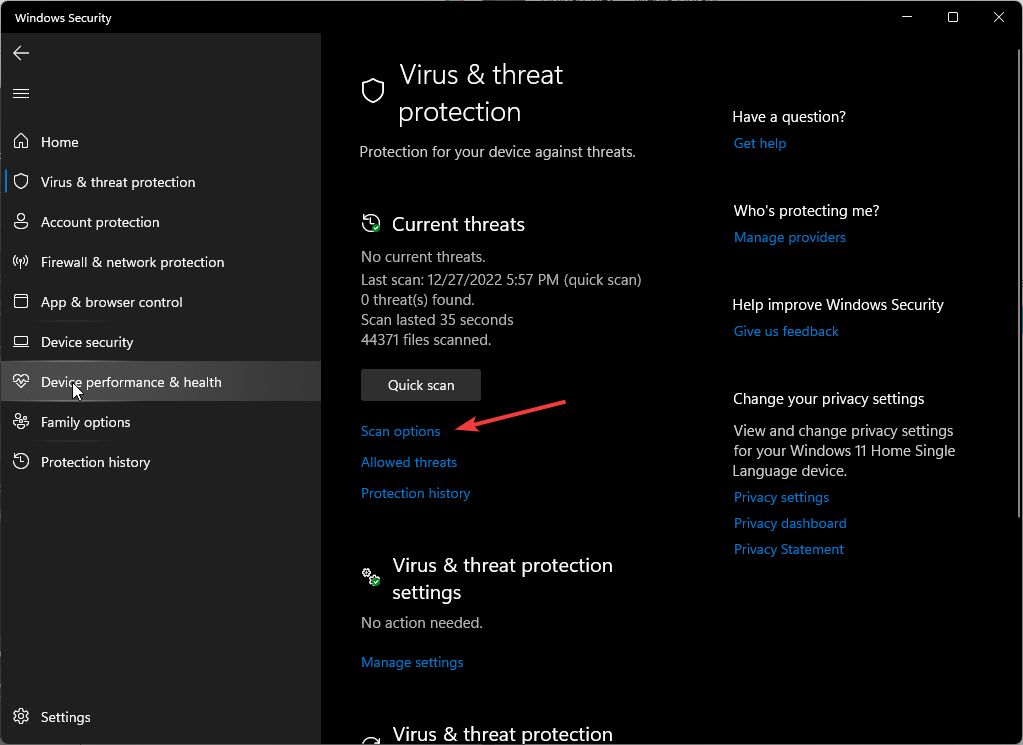
3. Scan for viruses
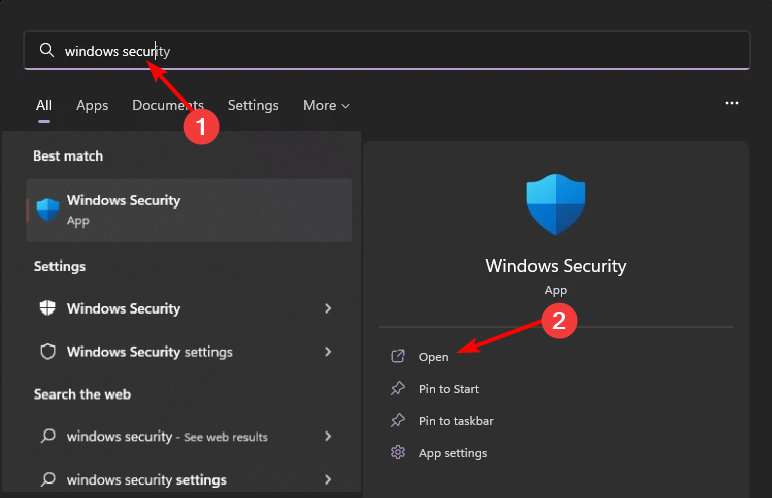
Press the Start Menu, search Windows Security, and click Open.
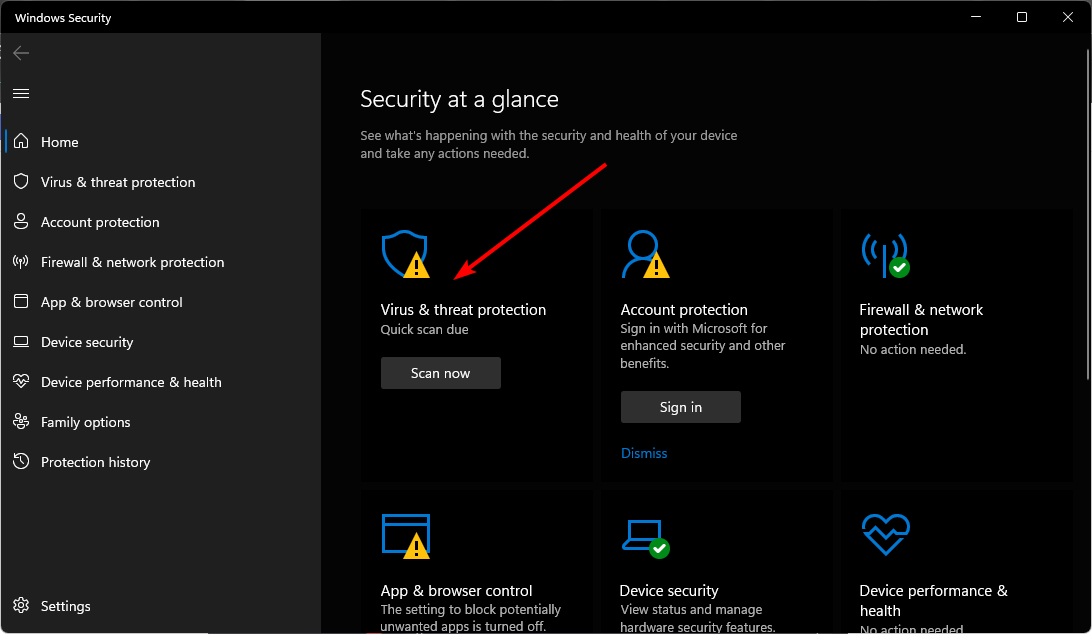
Select Virus & threat protection.
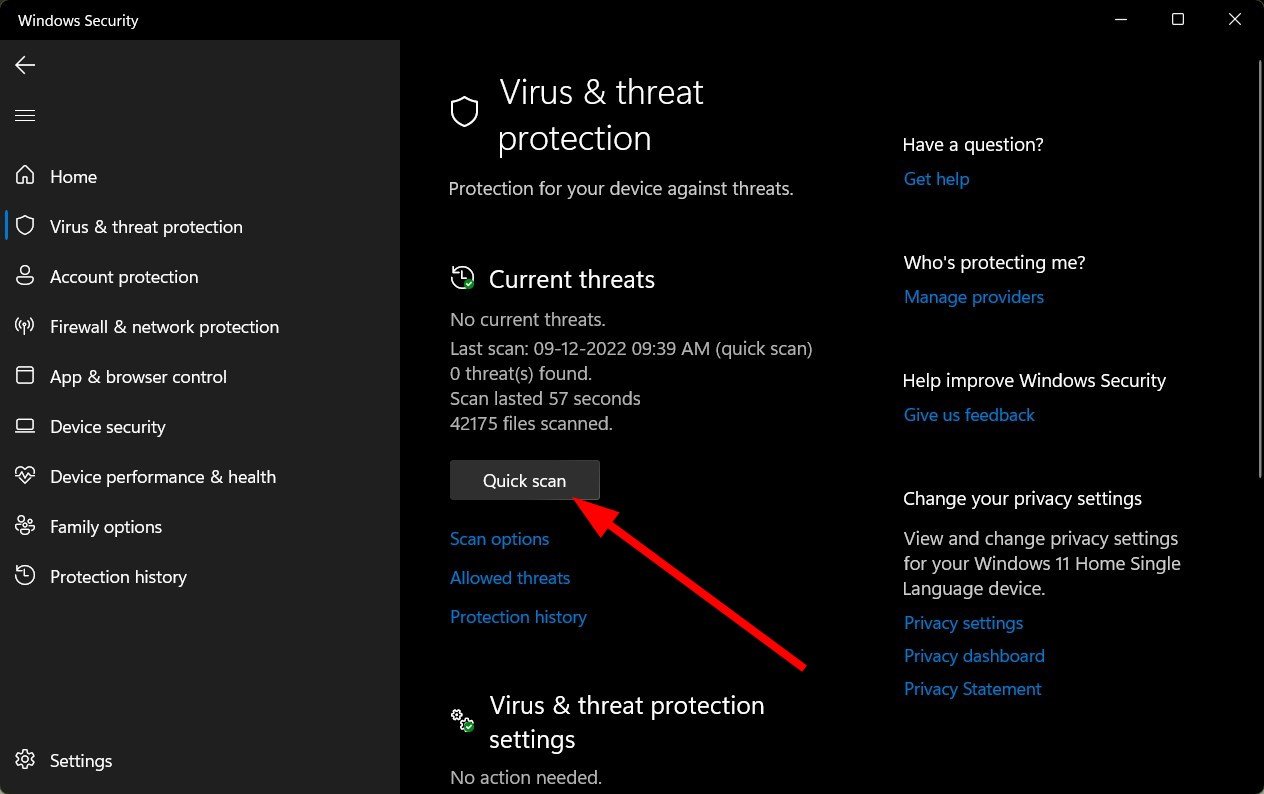
Next, press Quick scan under Current threats.
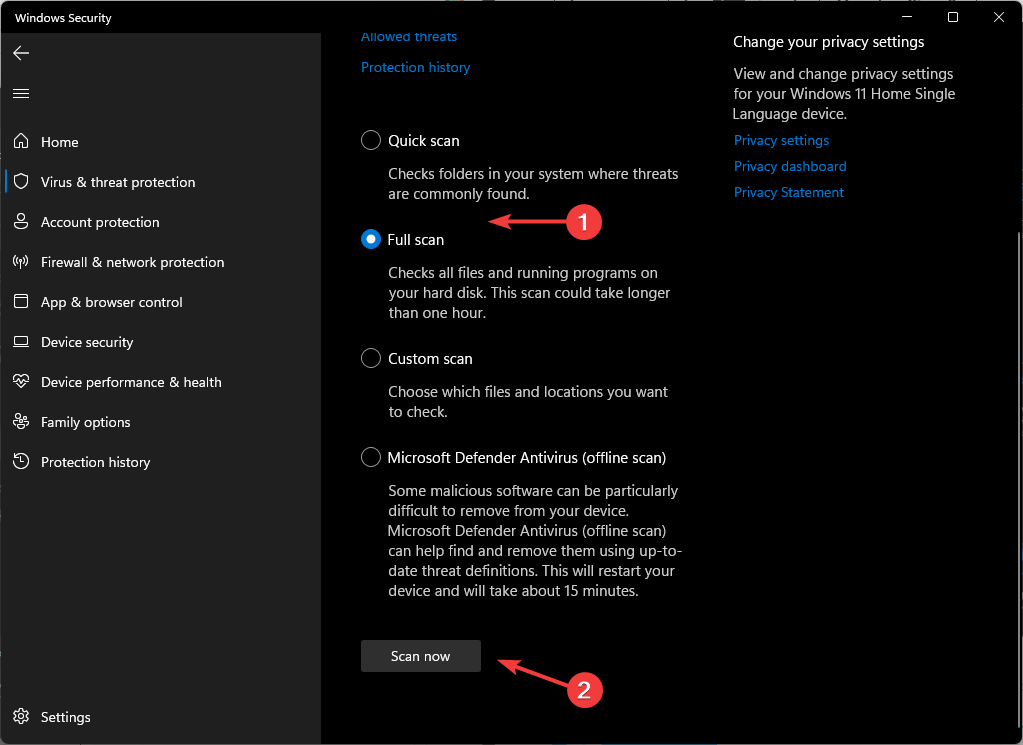
If you don’t find any threats, proceed to perform a full scan by clicking on Scan options just below Quick scan.
Click on Full scan to perform a deep scan of your PC.Full scan
Wait for the process to finish and restart your system.
When Microsoft Office identifies a potential security risk, some features may be disabled. A malicious file may have found its way to your system from a link in an email or even an add-in that is manipulating your settings.
The loophole may have opened up if your antivirus is not up-to-date so ensure you keep up with the latest security patches for your security software to work efficiently. Alternatively, you can install a Microsoft-dedicated antivirus like TotalAV to run an in-depth scan and remove all malicious threats from your device.
4. Add/change trusted location
Launch your Microsoft Office application.
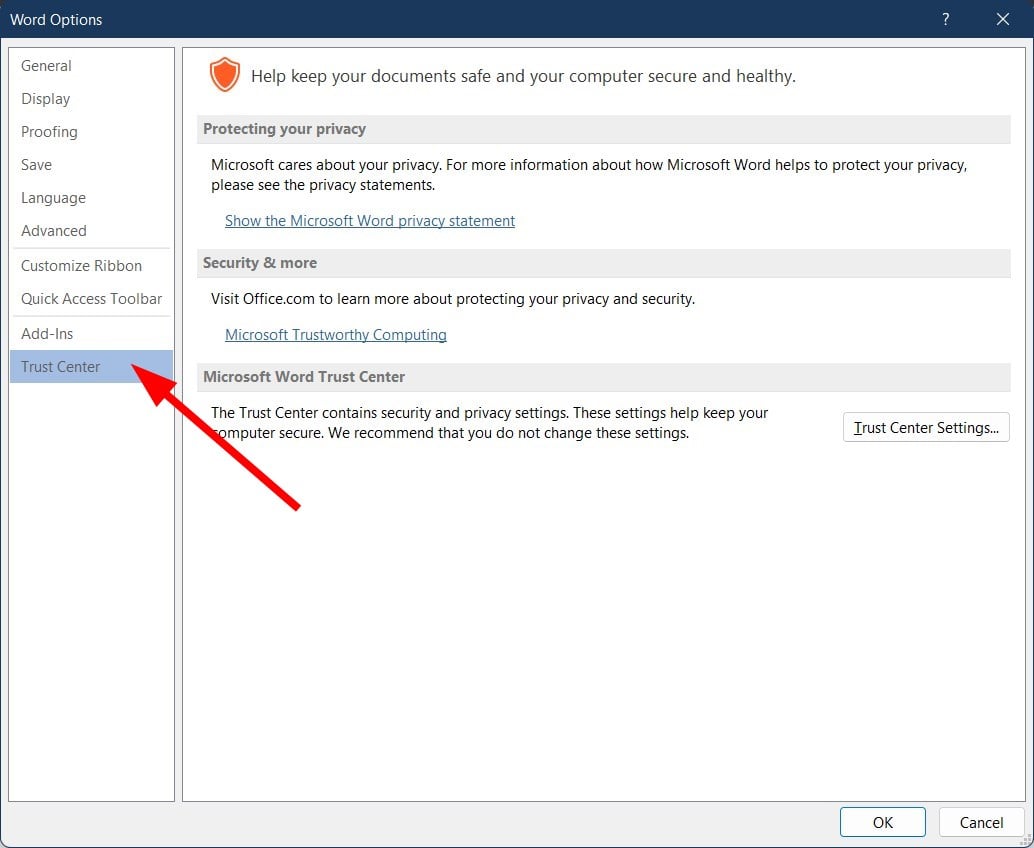
Click on File> Options.
Go to Trust Center from the left pane and hit the Trust Center Settings button on the right.
Select Trusted Locations from the left.
Here you will see your trusted locations. You can remove any suspicious-looking ones and add new ones.
Trusted locations usually contain your add-ins settings, customizations and macros for your Office apps. If you modify these trusted locations, you’re re-creating a safe storage space for these files and once downloaded to your system, Microsoft Office will consider them safe.
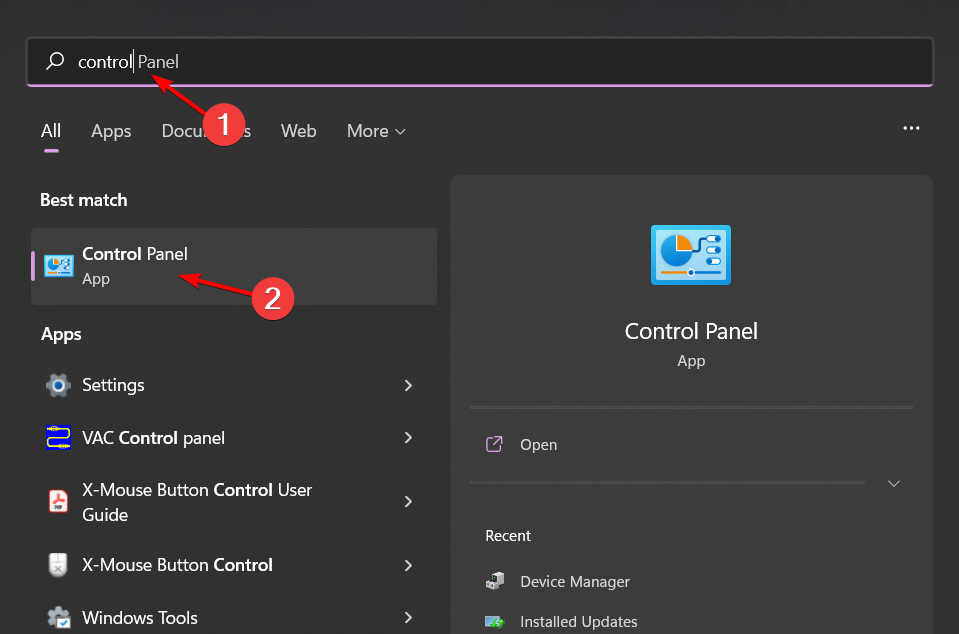
Hit the Windows key, type Control Panel in the search bar, and click Open.
Type Mail in the search bar and click to open.
Next, click on Show Profiles under Profiles in the Mail setup window that pops up.
A list of Outlook profiles registered on your PC will appear. Find the one that was having problems, click on it, then select Remove.
A confirmation dialog box will appear, so click Yes to confirm.
A new profile allows you to start on a clean slate without your downloaded add-ins and customized settings. If the new profile does not bring up the Microsoft Office has identified a potential security concern error, it’s possible your previous one was corrupted.
6. Repair Microsoft Office
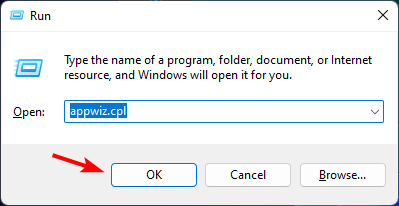
Hit the Windows + R keys to open the Run command.
Type appwiz.cpl in the dialog box and press Enter.
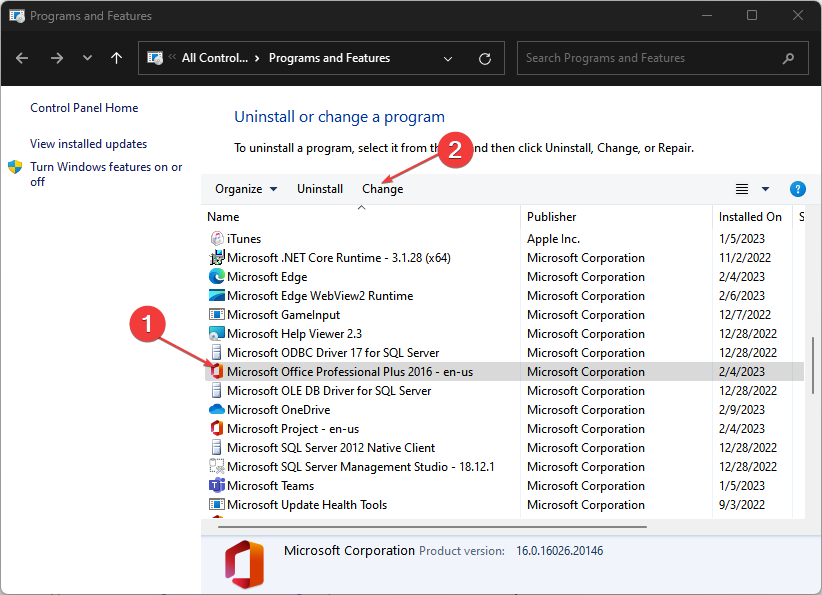
Select your Microsoft Office suite software. Then, click the Change button to open a repair utility for MS Office.
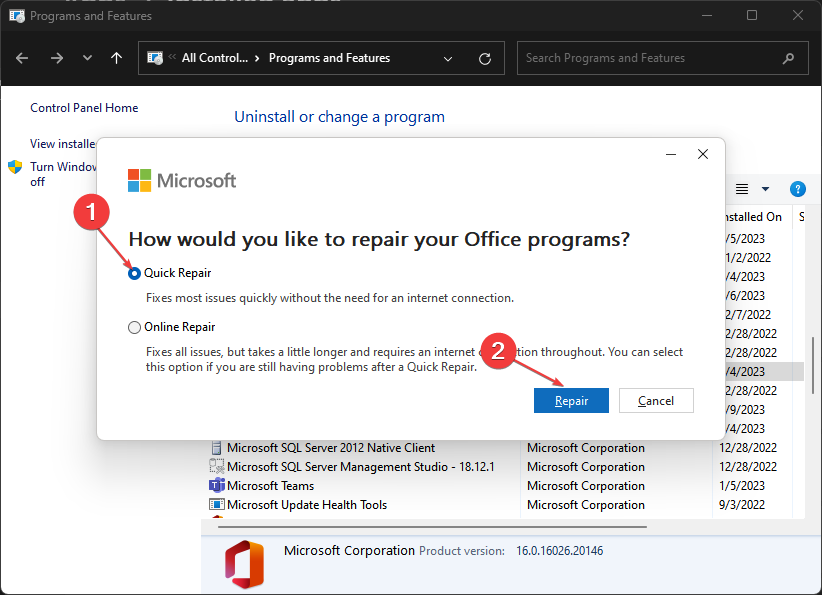
Select the Quick Repair option and click the Repair button.
If there are corrupt or missing files on your Microsoft Office, you might encounter problems accessing Office document cache. Repairing the app can help rebuild these files that may be exposing your system to potential security risks.
Best practices to avoid potential security concerns in Microsoft Office
Keep apps updated: Whether it’s your Microsoft Office apps, operating system or even antivirus software, ensure you have the latest security patches and fixes to avoid exposure.
Be cautious of phishing emails: When it comes to opening email attachments or clicking on links, avoid any you’re unsure of especially if unwarranted.
Take advantage of built-in security features: Microsoft Office has the Protected View and macros security settings for an extra layer of protection. Double-key encryption also comes in handy. Make sure you turn these features on to enhance your security coverage.
As always, we appreciate your feedback so if you have any other solution that worked for you but we’ve not mentioned it, do leave us a comment down below.
When Microsoft first released Surface Duo, it had high hopes for the unconventional yet user-friendly dual-screen screen phone. The phone never really made it to the top, and the Redmond-based tech giant had to discontinue the series after Surface Duo 2.
Even though Surface Duo wasn’t a successful venture, it managed to attract many to the idea of a dual-screen phone with a hinge in the middle. The conventional foldable phones still feature a single screen that folds along the centre.
A few days ago, Microsoft filed a patent for a foldable phone with a spine cover plate that automatically adjusts when folding/unfolding the device. This got many thrilled about the release of Surface Duo 3.
Whether or not that turns out to be the case, the discontinued Surface Duo series still has a lot to offer.
Developers run Windows 11 and Android 14 on Surface Duo
In a report published by Windows Central, two developers managed to run Windows 11 and Android 14 on a Surface Duo phone.
As for Windows 11, it was Gustave Monce who made a few tweaks to develop a Duo-compatible OS and posted it on GitHub for others to try. Monce works extensively with Surface Duo and Lumia phones.
In the exclusive interview, Monce shared how running Windows 11 on Surface Duo proved challenging, contrary to the popular opinion that it should be easy, given that the device was initially meant as a Windows phone.
Pretty much all the technical challenges were a fun learning experience for me. During the first day we quickly realised that OK, the screens are not going to work … I tried to fight against it, trying to figure out why, and when you lack all the documentation for the device, it’s complicated to figure out … It uses a Snapdragon 855, and that chip is not supported at all by Windows. So, I had to deal with many problems … we started two years ago, and we are not fully done yet. There’s still a few things to figure out. It’s not easy, but … I think in the end it’s a fun experience and something new too.
The results were exemplary, be it performance or adaptiveness to the display size. Besides, working on different apps on the two screens boosted multitasking capabilities.
Coming to the custom Android 14 for Surface Duo that aims to keep the phone up-to-date with the latest version and relevant, given the device has been out of support for a while. The credit goes to Thai Nguyen, an ex-Microsoft developer, who shared the Android 14 ROM on GitHub for others to try.
Nguyen, in the interview, highlights how difficult it is to adapt Android to Surface Duo’s dual-screen setup and the additional work that went into it, which delayed updates to the device.
I think that’s also one of the reasons Microsoft decided to make it a big virtual screen that spans the two physical displays. The approach that Microsoft took here is great because it allows for smooth animations and certain UX/UI. But the problem with this approach is that it’s a lot of effort to do window management.
Here is the Android 14 release for Duo 1/2 – AOSP base with Google apps – Hinge Gap disable for Duo 2 – Settings app icons from stock Surface Duo ROM – OTA enabled for future buildd – Please use Pixel Launcher for this build. – Expect lots of bugshttps://t.co/GbLzQpXTX0pic.twitter.com/TO9jG1zV6S
But isn’t Windows 11 on Surface Duo even better? Although the processor on Surface Duo, Snapdragon 855, doesn’t meet the minimum system requirements for Windows 11, a few tweaks, and you should be able to run the OS just fine. Everyone has had positive feedback about integrating the two, including Gustave Monce.
The same goes for custom Android 14. People like Thai Nguyen won’t let the device become obsolete in terms of app support. Also, he plans on releasing a custom Android 15 for Surface Duo this year.
Do you believe Surface Duo didn’t get its share of success? Share with our readers in the comments section.
Tech giants like Microsoft, OpenAI, and now Nvidia are facing lawsuits for various reasons, such as unapproved data harvesting and copyright infringement. Furthermore, three authors accuse the company of using their data to train large language models (LLMs) in the Megatron library.
However, there is a high possibility that the library used for the NeMo generative AI framework has unlicensed copyrighted works. On top of that, the lawsuit encompasses only the models of NeMo Megatron released in September 2022.
Why is Nvidia facing an AI lawsuit?
Nvidia is facing an AI lawsuit for knowingly using copyrighted books belonging to Brian Keene, Abdi Nazemian, and Stewart O’Nan. Additionally, the authors believe that the company indirectly admitted to their claims by taking down the AI models. However, Nvidia used a training dataset that was no longer available due to copyright infringement, containing 196,640 books.
Another issue from the lawsuit is that Nvidia made copies of the plaintiffs’ works for AI training. Furthermore, according to The Register, the company distributed NeMO Megatron models under an open license on Hugging Face. On top of that, Nvidia advertised the models as a base for the further ones. Thus, the company engaged in multiple copyright violations.
The novelists hope that the Nvidia lawsuit will urge the company to delete the copies of their work. In addition, they want remunerations for the damages. Moreover, according to the case document, the plaintiffs demand judgment in their favor. On top of that, they want a pre and post-judgment interest at the highest legal rate.
Ultimately, the Nvidia lawsuit might change how the company gathers and uses its data. Furthermore, they will need to delete their datasets containing copyrighted licenses. However, Nvidia considers that the NeMo Megatron AI model does not infringe copyright laws. Moreover, a spokesperson claimed that the company respects the rights of content creators.
What are your thoughts? Should Nvidia compensate the novelists for everything? Let us know in the comments.
Let’s face it, it’s not been easy to make animations in PowerPoint. Even Microsoft described is as quite daunting in the blog post about the new animation features in PowerPoint.
Microsoft taunts the new animations up as easier and intuitive to use.
What’s new about PowerPoint’s animations?
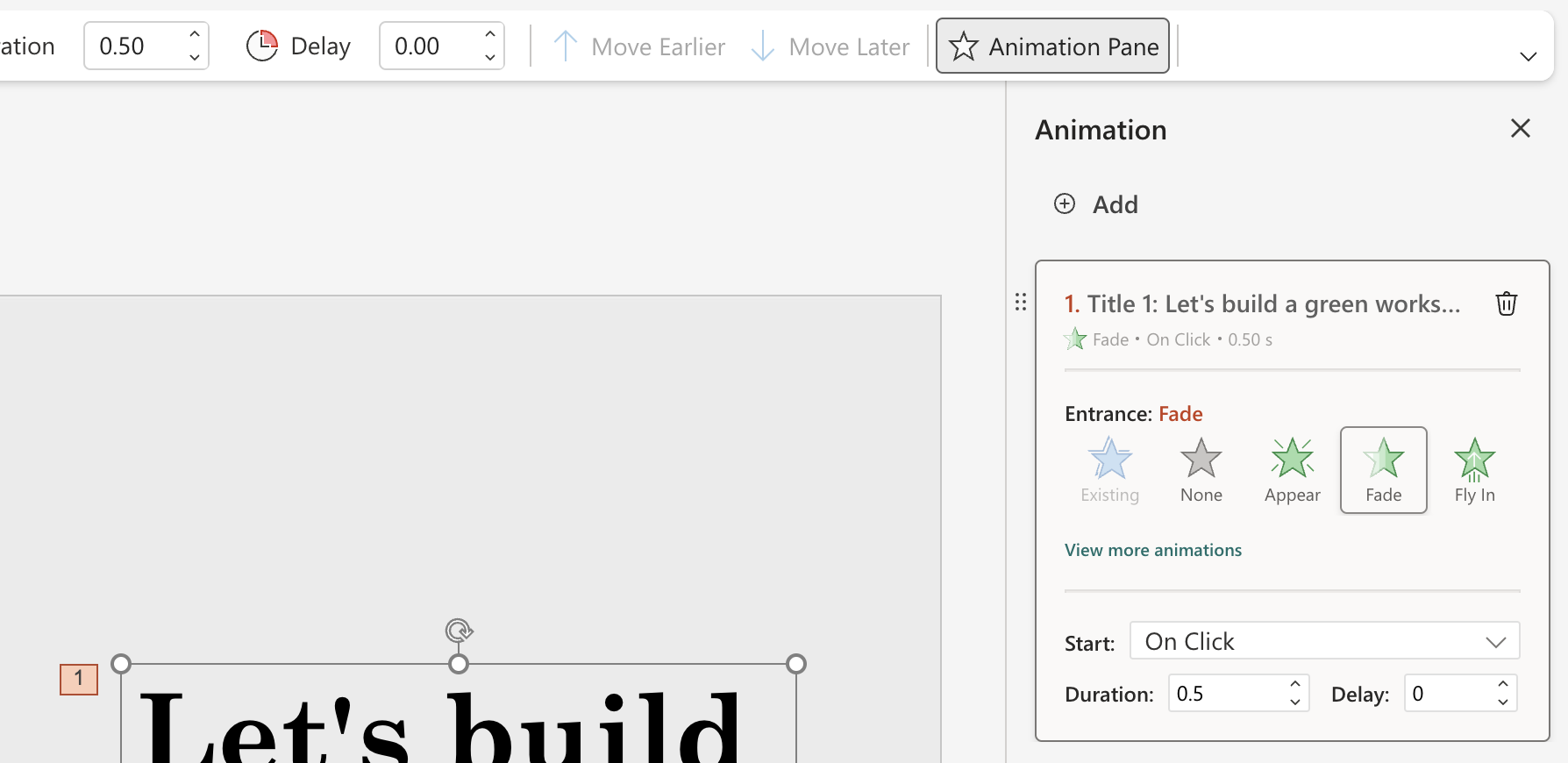
For starters, it’s a lot easier to add an animation to an object. You just select it, then click on the Animation Pane and hit the Add Animation button, as shown in the image from Microsoft above.
Then, you simply select the animation card for the object and set up its properties.
The beauty of all is that you can save these animations as separate cards and reorder them with the six-dots icon from the top-left of the card.
But Microsoft made things even easier because you may also add an animation to an object from the right-click menu on an object.
They also structured the animations into three categories: Entrance, Exit, and Emphasis. You may even add a default animation to multiple objects at once. For that, just select them and click the Add button.
Apart from these animation features, Microsoft will soon add a Preview button to get a sneak-peek at the animations you applied.
The new animations features are available to all PowerPoint for the web users right now.
What do you think about the new PowerPoint improvements? Let’s talk about them in the comments section below.
As per reports, Instagram is testing a new feature that allows you to send files to others via DM.
First reported by Alessandro Paluzzi on X (formerly Twitter), the new Files feature will be listed in a menu that will replace the existing Stickers option at the extreme right of the chat’s text bar. The latter will now be included within the same menu alongside the Add yours, Saved replies, and Avatars options.
#Instagram is working on the ability to send files in DMs ?
Initial reports suggest that the file sharing via DM feature may be limited to Business accounts on Instagram, but there has been no official confirmation so far. Also, there’s little information on the supported file size and formats, though PDF and audio clips should be available
A few have also raised concerns about the security implications of the feature. With cyberattacks on the rise, the concern is valid. Sharing of PDFs or other files embedded with malware may result in losing access to the account, corrupting data on the phone, or even financial loss.
So, Instagram should come up with a protection mechanism that’s up-to-date with the latest attack techniques and malware types in order to keep the user base safe.
No matter the case, file sharing on Instagram will improve the communication standards of the app, which has so far been limited to sharing posts and reels. And soon, you won’t have to switch from Instagram to WhatsApp or Gmail to share files with someone.
What do you think about it? Share with our readers in the comments section.
We reported about GPT-4 Turbo in November, 2023, when it was launched. However, the LLM was only available in Copilot Pro for $20. Now, Microsoft added it into the regular Copilot version and it can be used by everyone.
Microsoft’s Mikhail Parakhin announced the change in an X post and added the fact that you can still use the old LLM if you use a toggle button inside Copilot.
We have checked Copilot’s page source code and GPT-4 Turbo is indeed activated but we can’t see the toggle Parakhin mentioned. It’s probably a matter of time.
What’s new about GPT-4 Turbo?
The major change, if you observe the screenshot above is that now you can add 4000 characters/tokens to Copilot instead of 2000 as before.
Technically, from the GPT-4 Turbo release last year, we found out that the LLM is capable of handling 128,000 tokens, the equivalent of a 300 page book so now is way above its limitations.
We also know from Open AI that the maximum number of output tokens for this model is 4096.
Another interesting fact is that we cannot see the attachment clip in the query window so you no longer can add documents in Copilot.
How can I get GPT-4 Turbo in Copilot?
There’s nothing special you need to do. Just visit the Copilot webpage in your browser and sign in with your Microsoft account.
If you want to check whether GPT-4 Turbo is activated, press Ctrl + U on Windows or Cmd + U on macOS to see the page source code and search for GPT-4 Turbo or GPT4T. If it’s there, the new feature is active.
Please note that GPT-4 Turbo is still a preview release and you might get some errors or bugs during usage.
What do you think about the new addition of GPT-4 Turbo? Tell us what you think in the comments section below.
Google is constantly adding new features to Chrome, and users have been waiting for the link preview feature for a while.
While this feature is still in development, we have some exciting news regarding it.
Chrome Canary lets you preview links more intuitively
We already wrote about Chrome’s link preview feature a few months ago, and it seems that this feature just got a new quality of life improvement.
To use it, in the past, you had to right-click the link and choose the preview option. Alternatively, you could use the Alt key and left-click to quickly open a preview.
According to MSPowerUser, that has been changed, making webpage previews easily accessible. Now, you just need to hold the Alt key and hover over the link and you’ll get the preview window, without having to click anything.
The change was first spotted by Twitter user Leopeva64 and he even has a video showcasing it in action:
BBC’s iPlayer Downloads app, used by many of us for streaming our favourite shows, has been shut down on March 11, 2024. BBC had apprised users of the change in advance last month. Any existing downloads will remain viewable until April 8, 2024.
Keeping up with the announcement, BBC had already discontinued the iPlayer Downloads app and removed it from the official website. So, anyone who hadn’t already installed the app lost the offline streaming functionality a while ago. For the rest, it stopped on March 11.
Download and offline streaming have not been discontinued on tablet and mobile apps, i.e. Android and iOS. The changes are limited to PCs.
We have made the difficult decision to close the BBC iPlayer Downloads application for PC and Mac, due to the low number of people using it and the cost required to keep it going. This does not affect downloads on the BBC iPlayer mobile or tablet apps, and viewers can continue to stream programmes on BBC iPlayer on their PCs and Macs.
BBC iPlayer users are not pleased with the change
BBC iPlayer users are not happy with the discontinuation of offline streaming on PCs. A few took to the web to vent their frustration.
It is a shame. I like to download rather than watch online in order to avoid buffering at busy times, although to be fair, this has got better lately. I should imagine the closure is to save money on maintaining the desktop app but it is hard to see any savings as more than notional since it is unlikely to need a dedicated team for occasional bug-fixes in a mature product.
I have BBC iPlayer downloader on my Windows 11 laptop and use it to download programmes to watch at a later time in work. As some of you may know, the BBC, in its infinite stupidity, has announced that from 11th March 2024, the PC/Laptop version will cease to work as they are closing it down.
Offline streaming was a good option for many of us while travelling. And watching content on a 15″ display always made more sense over the mobile’s 5.5″ screen. Besides, downloaded content doesn’t buffer, which is a plus point for many of us in areas with poor network connectivity.
Workarounds to stream offline in BBC iPlayer on PC
When such changes are introduced, enthusiasts always find a way around it. Streaming errors like 02062 as well as download blocks are not new for users.
The simplest option right now is to use an effective screen mirroring software. It will allow you to cast the screen and view BBC iPlayer downloads on the PC.
Another quick workaround is to use an Android emulator on the PC. With this, the BBC iPlayer will function as if it were running on an Android device.
If none of these work out for you, maybe get a tablet with a slightly bigger display. Because, BBC iPlayer’s offline streaming on Windows and MacOS is not coming back!
What do you think of BBC’s decision to stop iPlayer downloads? Share with our readers in the comments section.
Have you digitized your collection of old home movies or have a backlog of low-resolution clips from the internet? Perhaps you’re a video editor but your last footage just wasn’t up to scratch?
AI video enhancers are becoming increasingly popular because of their ability to improve video quality and get more out of your memories and footage.
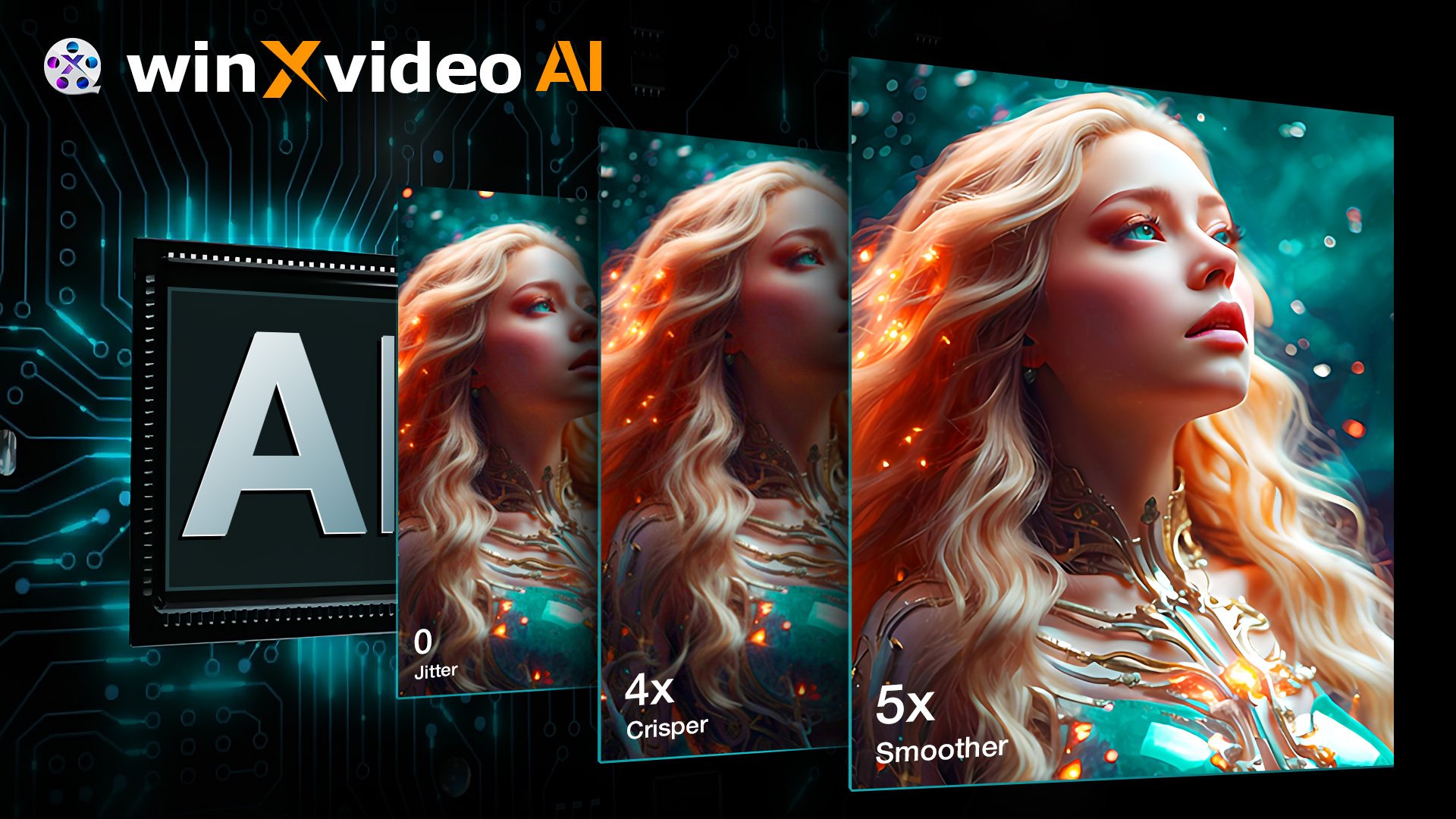
One such tool that I have been testing recently is Winxvideo AI. In this review, I explore all its key features to see exactly what can be accomplished with AI.
What is Winxvideo AI?
Winxvideo AI is a combined video and image enhancement software for Windows that can increase resolution and apply other AI tweaks to improve quality. It also includes editing, recording, and video downloader tools.
Winxvideo AI is a simple but powerful tool. It uses your computer’s GPU to speed up the video and image enhancement process. Simply drag-and-drop your files to get started. The main window shows your clips or images on a timeline, and you can preview enhancements side-by-side or by using a slider across a single frame.
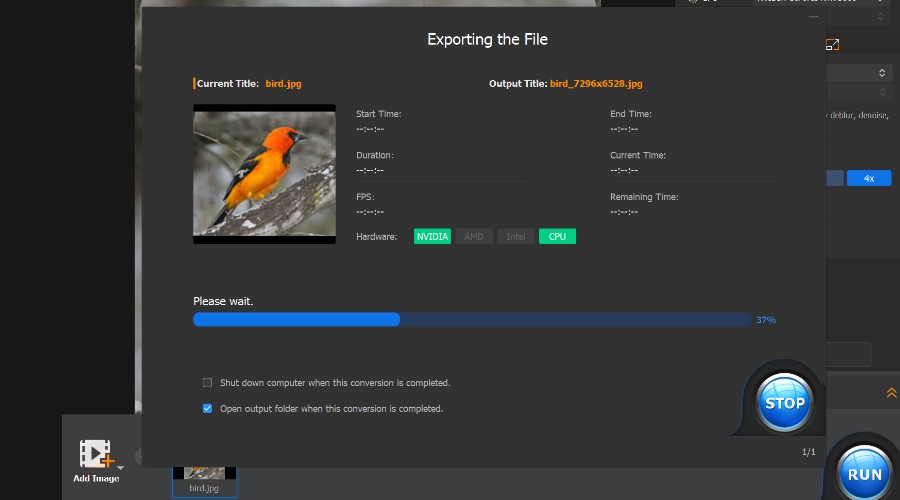
When you are happy with the results, click the big Run button to export the enhanced video or image.
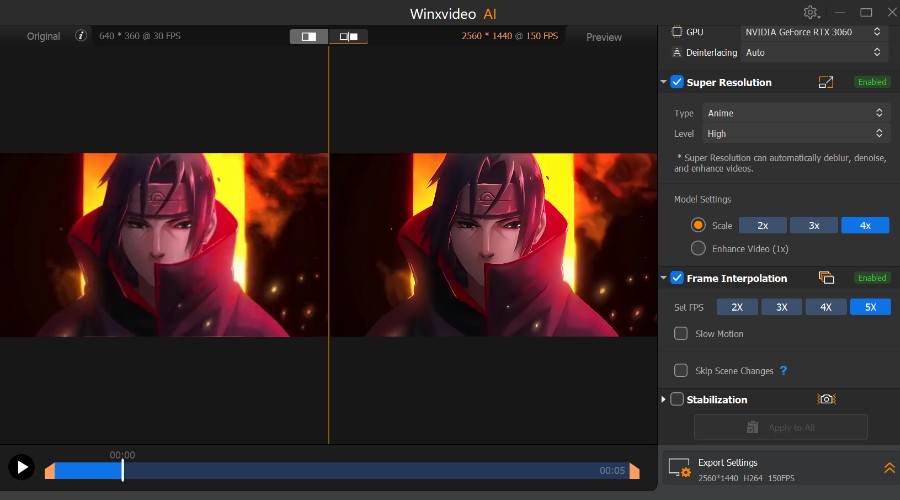
The super resolution feature uses advanced algorithms to analyze and upscale low-resolution videos to higher resolutions.
For example, I was able to quickly upscale a 360p video clip to 1440p. Moreover, it was able to detect that the clip was anime and apply an appropriate model to remove blur and noise.
Frame Rate Boost
Its frame interpolation feature can increase the frame rate of your video by up to 5 times, from 30fps to 120fps, 240fps, or even 480fps, depending on the source material and the desired output.
In my test, I was easily able to boost my clip’s frame rate from 30fps to 150fps.
By using AI to add new frames between existing frames, it’s able to reduce motion blur and stuttering, creating smoother and more natural-looking motion in the video. It also improves the overall quality of the video by reducing artifacts and enhancing details, particularly in fast-moving scenes or shots with a lot of movement.
Video Stabilization
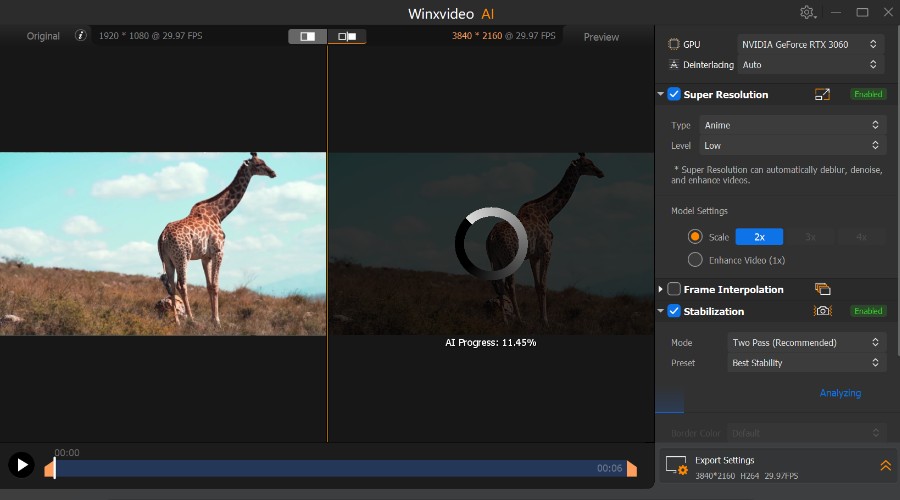
Winxvideo AI’s third key feature is stabilization. This analyzes the movement of the camera in a video, detecting and compensating for any shakes and jitters.
You can apply this to a whole video or use object-based stabilization. This focuses on stabilizing a specific object or subject within the video.
In my test video of shaky camera footage of a giraffe, movement wasn’t completely removed, but it became much smoother, without any sudden jitters.
In total, you get 2 modes, 4 presets, and 3 cropping types, so it’s worth playing around to get the best results.
Image AI
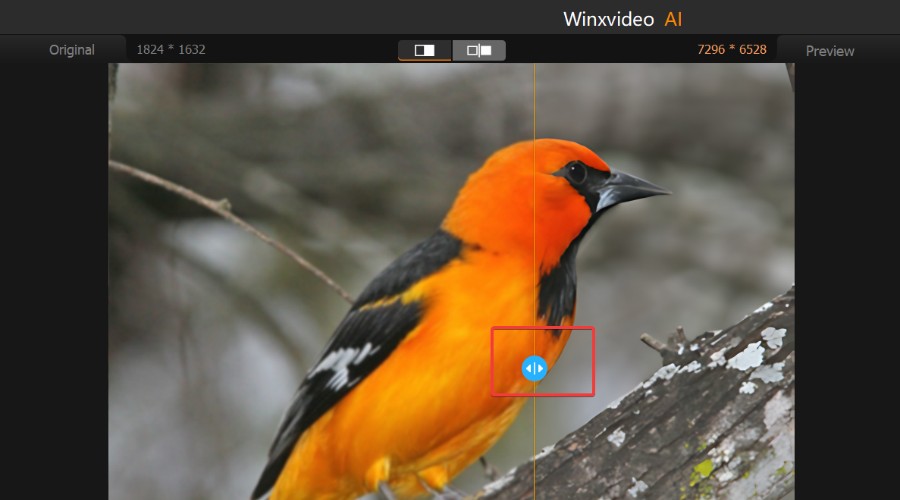
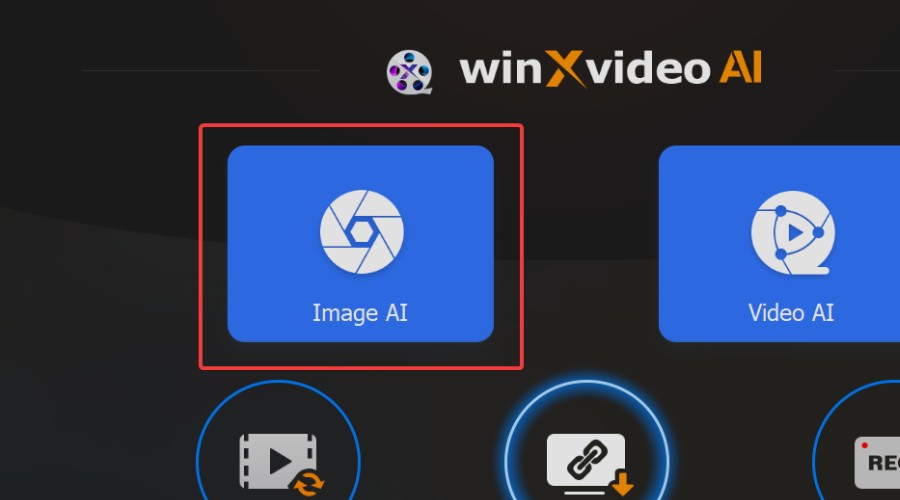
Winxvideo AI can also improve image quality. It enlarges small images, reduces noise and blur, and improves color and contrast. Simply choose Image AI from the main window, then drag-and-drop your images to get started.
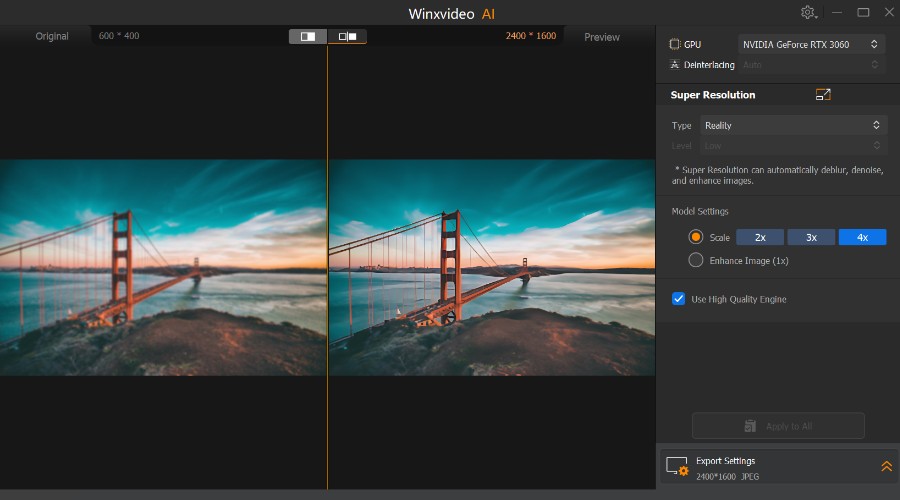
Like video, super resolution increases the resolution of images and you can choose between a reality model for photos and an anime model for cartoons and graphics. Depending on the source, this can reach 10k.
My test image of a bridge was able to scale-up by 4 times. The end result wasn’t perfect, but it was a lot sharper than the original.
Batch Processing
With Winxvideo AI, you can process multiple videos and images at once, saving you time and effort when working with large amounts of content. Drag-and-drop as many source files as desired, then click Apply to All when using one of its features.
Video Convertor
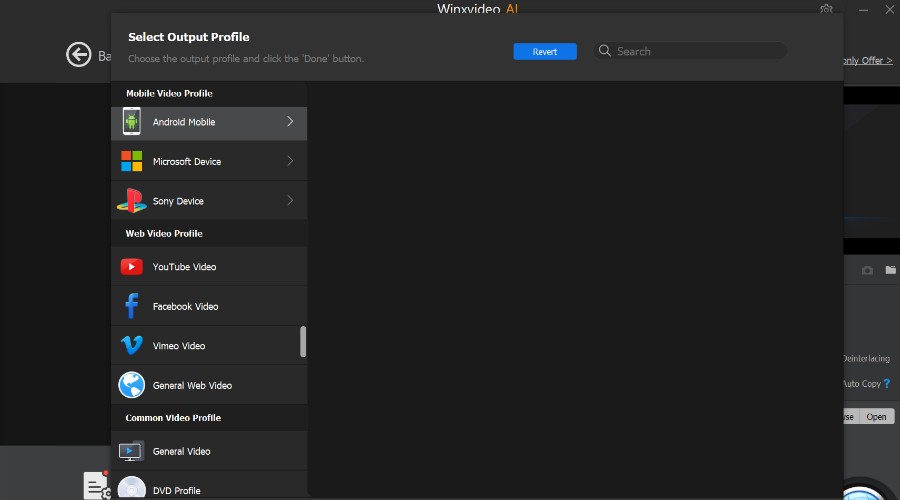
With Winxvideo AI’s video converter, you can easily convert your videos to the desired format while maintaining high-quality and fast conversion speeds. Its presets require no technical knowledge, just choose the overall quality, device, or video platform, depending on your requirements.
Alternatively, if you know the precise format you want, choose from MP4, HEVC, H.264, MKV, MOV and more than 420 others. You can also convert video to audio, with support for MP3, AAC, PCM, WMA, Flac, Ogg, and more.
Although the focus is on conversion, there is also an editing toolbox for applying basic effects and transitions, as well as trimming, splitting, and merging different videos.
Video Downloader
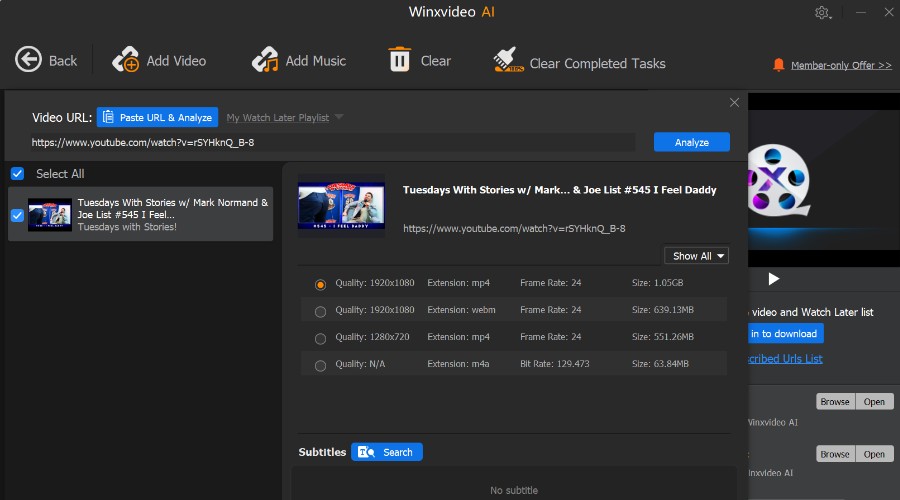
The downloader lets you download and save videos and audio files from online sources for offline viewing or listening. This includes everything from YouTube and Vimeo to Facebook and Twitter.
If you’re tired of web downloaders that are full of ads, this is an excellent alternative. Click the add video or add music buttons and paste the URL to the video or song. It will then quickly analyze the source and provide different formats and qualities to download.
Recorder
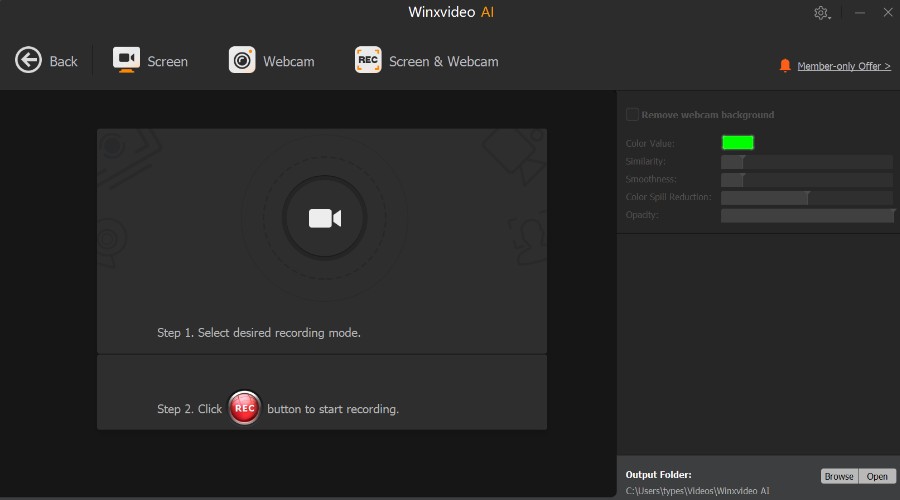
To top it off, Winxvideo AI also offers a recorder feature to capture your screen activity, webcam footage, or both simultaneously. It’s perfect for creating tutorials, recording gameplay, or capturing live streams.
You get full control over the recording mode, recording area, audio source, and quality.
While recording, you can add annotations, highlights, or draw on the screen using the built-in tools. Then, once you stop recording, you can preview and edit the captured video using the built-in video editor.
Winxvideo AI – Pricing
You can try Winxvideo AI for free or make use of one of the giveaways or discounts. Currently, it has two main pricing plans:
Overall, Winxvideo AI is one of the best AI video enhancer tools I’ve tested. It covers all the bases, including videos and images, with the ability to download and edit clips in the same suite.
Its simple enough for anyone to enhance their content in a few clicks, but has enough extra features to keep more advanced users occupied as well.
Microsoft has rolled out updates on Patch Tuesday for both Windows 10 (KB5035845) and Windows 11 (KB5035853).
We are seeing major patches in KB5035853, the update pertaining to Windows 11. In addition to quality improvements, the update addresses the 0x800f0922 error with KB5034765 on Windows 11, version 23H2. Microsoft’s official blog states,
This update addresses a known issue that might affect the February 2024 security and preview updates. They might not install, and your device might stop responding at 96%. The error code is “0x800F0922.” The error message is, “Something did not go as planned. No need to worry – undoing changes. Please keep your computer on.”
As for KB5035845, the update pertaining to Windows 10, you will find quality improvements. Nothing specific has been shared by Microsoft in the official blog.
These Patch Tuesday updates are automatically installed on the PC and, after that, require a restart. If it doesn’t appear, turn on the toggle for Get the latest updates as soon as they’re available in the Windows Update settings.
Besides, it’s recommended that you install all such cumulative updates for an error-free experience and improved security. These are usually small, including KB5035845 and KB5035853, and won’t take more than a few minutes to install!
Patch Tuesday is here, and the new update is upon us. These types of updates usually address security issues, but sometimes they can bring certain improvements.
That’s the case with this update, so let’s take a closer look and see what improvements this update offers.
The latest update lets you edit your phone photos more easily
KB5035853 update was just released, and according to Microsoft’s documentation, it doesn’t offer anything new or exciting, besides addressing various security issues.
However, XDA Developers discovered a new feature that allows users to edit phone photos with the Snipping Tool.
To use this feature, you need to connect your phone to your PC via the Phone Link feature. Once connected, all new photos from your phone will appear as notifications on your PC.
You can even click the notification to further edit the photo with the Snipping Tool. The update also renamed Phone Link in Settings app to Mobile devices, to avoid confusion with the Phone Link app.
Lastly, the update added support for USB4 version 2, which doubles the current USB speed.
Overall, this is a useful feature that might come in handy to some users, so if you already got the update, be sure to give it a try.
The last few months helped NAND manufacturers recover from the losses accrued in the post-pandemic phase when they couldn’t anticipate the market sentiments. Now, as per Digitimes, Phison CEO K. S. Pua warns that any price fluctuations at this point could potentially disrupt the market and lead to a fall in demand.
In the post-pandemic years, i.e., 2022-23, the NAND and SSD manufacturers were reeling under heavy losses. Massive price cuts were announced, which helped stabilize the weakened demand. But, after several months of favourable market conditions, manufacturers are contemplating a price rise.
Analysts at Trend Force suggest that this hike could be in the 40-50% range and will be enforced sooner than expected. A 40% rise in prices will allow companies to break even, and anything higher will deliver profits.
Phison CEO Pua believes this won’t go down well and could put a halt to the increase in demand. The reason, there’s only a certain amount consumers are willing to pay. Anything beyond that, and they will simply look for cheaper alternatives or drop the plan altogether.
Pua’s solution to the problem is rather simple. Manufacturers should meet the current demand by optimally adjusting production and not relying on price control mechanisms. This would ensure a sustainable relationship between demand and supply and, in turn, boost profits.
Again, there are risks to the approach. What if the demand falls again when the production or supply is expanded? This would lead to further losses for companies and force them to again lower the price, basically repeating the post-pandemic scenario. But this time around, recovery may take longer!
Experts predict that PC prices will rise in 2024, primarily due to two reasons: increased cost of components and the revived user interest due to modern technologies like AI. Consumers are willing to pay more. Subsequently, PC shipments are expected to increase by 8%.
Minor fluctuations in NAND prices shouldn’t have too much of an impact on the demand. But if it’s near the predicted 40-50% range, SSDs may not remain a viable storage option for many, at least as a secondary drive. So, manufacturers should pay heed to Phison CEO K. S. Pua’s advice.
What’s your take on the NAND and SSD prices and how much of an increase won’t falter the demand? Share with our readers in the comments section.
For speediness, I downloaded the .msu file to a central location and then am installing via powershell $msuFilePath = “\\PATH2KB\KB5035849\windows10.0-kb5035849.msu” wusa.exe /quiet /norestart $msuFilePath
Others have confirmed that manual download indeed works:
I get Download error 0xd0000034 Update: installs fine via catalog download
just confirmed this server 2019 update deploys just fine from on-prem ConfigMgr sources, so the issue seems to be limited to public Windows/Microsoft update sources at the moment.
(my other server 2019 test box that points to WU/MU had the same error code, but downloading from the catalog and installing manually worked fine as others have reported.)
Thirteen plaintiffs are suing Microsoft and OpenAI to end the unpaid and unapproved AI data harvesting. Furthermore, they accused Microsoft of using copyrighted data to train their AIs. However, the company didn’t deny their allegations. Microsoft considers that they can use public information at will. Also, OpenAI says it’s only possible to train AI with copyrighted content.
What does AI do with our data?
AI does harvest unapproved data. On top of that, researchers might use all resources available, especially since most data is public. Unfortunately, paywalls can’t stop them, especially since they have a lot of funding. Furthermore, Microsoft and OpenAI harvested our data for years.
According to a privacy claim from September 2023, Microsoft and OpenAI conduct unapproved AI data harvesting through their products. Some of the mentioned applications are Spotify, Snapchat, Stripe, Slack, Microsoft Teams, and MyChart.
Moreover, the plaintiffs accuse Microsoft and OpenAI of sharing, storing, tracking, and disclosing our data. In addition, according to an article from The Register, the companies also fail to protect our private information. After all, a year ago, OpenAI needed to add filters to prevent their AI from sharing phone numbers.
Microsoft tried to dismiss the lawsuits by claiming that the plaintiffs had no plausible evidence of eavesdropping, scrapping, or intercepting data. In addition, they do not have any proof that Microsoft allegedly caused them harm. In addition, OpenAI agrees with Microsoft that there shouldn’t be any legal issues for using publicly available information to train their AI. Thus, they do not care if some of us consider their method unapproved data harvesting.
Ultimately, the thirteen plaintiffs consider Microsoft and OpenAI to be data thieves. So, they should be more responsible about how they train their AI. Furthermore, if the plaintiffs win, we might receive a legal right to remove our data from AI models. However, by ending the unapproved AI data harvesting, AI might suffer setbacks.
To discover the vulnerabilities and bugs of Bard, now known as Gemini, researchers hacked the AI. However, the Gemini AI is not their only victim. After all, the team did a number on the Google Cloud Console. In addition, after presenting their discoveries, they received $50,000. Furthermore, their efforts revealed some serious security vulnerabilities that could lead to DDOS attacks, access to specific user data, and access to uploaded images.
Can an AI be hacked?
Threat actors can hack the AI by using backdoor attacks. As a result, they can steal data and harm the model. Thus, it is important to check the system thoroughly. Also, that’s why some companies like Google and Microsoft hold events and reward researchers who are willing to hack their systems to exploit their vulnerabilities.
This research team hacked the AI and discovered how to exploit one of its vulnerabilities. Afterward, they used the major flaw to access user images without authentication, verifying processes, or permission. In addition, the research team revealed that it is possible to trick Gemini into sharing user data.
According to Cyber Security News, the research team used Gemini’s optical character recognition (OCR) to disclose other information, such as emails, notes, and revenues. Furthermore, they thought of hacking into Gemini using images with embedded data. In addition, the researchers managed to find a way to bypass the Content Security Policy (CSP).
Researchers also hacked the Google Cloud Console’s AI by discovering a vulnerability in one of the API’s endpoints. Afterward, they started exploiting it with Denial-of-Service (DoS) attacks. As a result, they prevented the AI from receiving commands from other users.
In a nutshell, the team hacked into Google Cloud Console AI and Gemini AI and managed to discover some fatal vulnerabilities. Afterward, they reported the security flaws. Furthermore, Google organizes such competitions and rewards the discovery of bugs. After all, they lead to great security-related discoveries.
What are your thoughts? Should companies host hacking events frequently? Let us know in the comments.
The newest software upgrade can protect your device from the cybercrime gang Magnet Goblin. However, if you dismiss it, you are more susceptible to cyber-attacks. On top of that, the gang targets Linux and Windows users. Furthermore, they use remote access Trojans to control your device from anywhere.
Unfortunately, the locations of the threat actors are unknown. Thus, it is best to upgrade your software until researchers dismiss the alert.
Why is cybercrime increasing?
Cybercrime is increasing because it has become easier for threat actors, like Magnet Goblin, to target system vulnerabilities. After all, cyber-attacks are more frequent due to remote working, increased internet usage, and AI. Furthermore, the Magnet Goblin uses already patched software flaws, known as 1-day vulnerabilities. Thus, it is very important to keep your device up to date to counter such attacks.
Magnet Goblin used software vulnerabilities found in Ivanti Connect Secure, Magneto, Apache ActiveMQ, ConnectWise ScreenConnect, and Qlik Sense. However, they might use other applications as well. Furthermore, the malware can introduce commands, encrypt your data, and delete files. Moreover, it can adjust settings, modify connection intervals, and request more commands from the command & control server.
According to Sergey Shykevich, the Magnet Goblin doesn’t relate to any group or specific geographical location. Researchers didn’t find any state-sponsored resources. Furthermore, Magnet Goblin is looking for financial gains. They target manufacturing, energy, and healthcare organizations.
In a nutshell, you should always keep your operating system updated to avoid attacks from groups like Magnet Goblin. After all, they move very fast to implement their exploits. In addition, OS updates usually bring additional security fixes and beneficial features.
What are your thoughts? Do you keep your operating system updated? Let us know in the comments.
While Microsoft plows forward with its vision of pre-generative artificially intelligent platforms, it does so with the use of technology that leverages unsustainable bitcoin mining levels of electricity according to Dutch researcher Alex de Vries.
In a recent The New Yorker piece authored by Elizabeth Kolbert; she writes about de Vries indexing of AI energy consumption spurred by his earlier work with his own Bitcoin Energy Consumption Index posted to Digiconomist.
de Vries charted Bitcoin mining at consuming forty-five-billion-kilowatt hours of electricity per year dwarfing the use of the entire nation his home nation, the Netherlands. In addition to its draw on the electrical grid, Bitcoin mining also results in eighty-one million tons of CO2 emissions which is equivalent the North African country of Morocco.
With Bitcoin as the energy sink barometer, de Vries noticed the alarming similarities in AI energy consumption and began tracking its potential trajectory.
In the journal Joule, dedicated to research on sustainable energy, de Vries writes about the similar trajectory AI and bitcoin mining are on in terms of energy-intensive consumption. de Vries estimates that if Google gets fully up and going with Gemini incorporated into or replacing its current search services and platforms, that AI platform could account for more energy consumed by countries such as Croatia, Guatemala, and Kenya at twenty-nine billion kilowatt-hours per year.
As it pertains to Microsoft and ChatGPT, ramping up use of OpenAI’s pre-generative platform authors a similar energy sink as its estimated to be processing two hundred million requests per day that results in roughly half a million kilowatt-hours of electricity consumed.
Kolbert offers a comparison between the average household’s use of electricity in a day to that of ChatGPT with the average household peaking at twenty-nine kilowatt hours a day versus ChatGPT’s five hundred thousand.
The Verge also carried a piece that attempts to quantify AI usage following the known quantities of large language models like GPT-3, as such,
Training a large language model like GPT-3, for example, is estimated to use just under 1,300 megawatt hours (MWh) of electricity; about as much power as consumed annually by 130 US homes. To put that in context, streaming an hour of Netflix requires around 0.8 kWh (0.0008 MWh) of electricity. That means you’d have to watch 1,625,000 hours to consume the same amount of power it takes to train GPT-3.
James Vincent – The Verge
de Vries research has led him to the conclusion that mirrors that of even OpenAI’s CEO Sam Altman, which he believes “There’s a fundamental mismatch between this technology and environmental sustainability.”
The Verge also speaks with de Vries about his methods for calculating the energy consumption of LLMs such as ChatGPT.
To estimate the sector’s global energy usage. As de Vries explains in a commentary published in Joule last year, Nvidia accounts for roughly 95 percent of sales in the AI market. The company also releases energy specs for its hardware and sales projections.
By combining this data, de Vries calculates that by 2027 the AI sector could consume between 85 to 134 terawatt hours each year. That’s about the same as the annual energy demand of de Vries’ home country, the Netherlands.
“You’re talking about AI electricity consumption potentially being half a percent of global electricity consumption by 2027,” de Vries tells The Verge. “I think that’s a pretty significant number.”
Altman was a bit more diplomatic with his concerns when speaking with the press at Davos, stating that “I think we still don’t appreciate the energy needs of this technology,” and that “We need fusion or we need, like, radically cheaper solar plus storage, or something, at massive scale-like a scale that no one is really planning for.”
Independent of the language used by Altman and de Vries’, it’s clear that companies investing in massive server farms that are expelling extensive amounts of CO2 when cooled at this nascent state in AI adotpion, will come to a crossroads, soon where the questions of growth and sustainability cross paths.
Kolbert notes that US datacenters alone account for four per cent of electricity consumed gloablly with that number expected tip six percent by 2026.
Beyond being disheartened by seeing recent history sort of repeat itself between bitcoin mining and AI energy consumption lessons, de Vries also questions whether AI should be adopted at scale given the finite resource its gobbling up.
“Because considering all the limitations AI has, it’s probably not going to be the right solution in a lot of places, and we’re going to be wasting a lot of time and resources figuring that out the hard way,”
Perhaps as a society, we’ll eventually settle on the most optimized use cases for AI and put our collective resources to supporting those, the question remains on how much energy will be used between now and then with compelling examples such as bitcoin mining still running almost unadulterated.
Microsoft Edge is getting updated with new features to facilitate users and provide a better browsing experience. Now, you will soon get the ability to enable or disable the video translation feature on Edge
According to a recent post by Leopeva64 on X (formerly known as Twitter), Microsoft has added a toggle to activate and deactivate the video translation feature in Edge Canary.
You can find this setting by navigating to Settings>Language>Translation. Otherwise, you can right-click an online video and then click the gear icon to open the Translate video settings.
As mentioned in the image, the toggle says:
Offer to translate videos on supported sites. This preview feature enables you to translate the audio and subtitles of videos on supported sites. The translated subtitles and audio are AI generated and may be erroneous. User discretion is advised.
As of now, it is a beta-only feature, and you will be able to first experience the feature on Edge Canary, the browser’s experimental channel, before its global availability. So, if you want to use the feature as it comes to the channel, make sure you have Edge Canary.
Earlier, Microsoft also added other language support, including French, Spanish, English, Russian, Hindi, German, and Italian to this feature. If you want to learn how to use it, we have a detailed guide for you.
In addition to selecting the language, you can choose to translate the audio, subtitles, or both while watching videos on the browser.
Are you excited to use the video translation feature on Edge? Share your thoughts in the comments section below.
A compatibility program, Deck Verified, maintained by Valve and moderated by the community, was launched in October 2021 to showcase the best games under the two compatibility categories, Verified and Playable, on Steam Deck.
According to the latest figures on SteamDB, Valve was able to review Steam Deck compatibility of over 14000 games, including 9,416 Playable and 4,607 Verified games.
In less than 29 months, the company has tested up to 17,947 games, of which 14,023 are deemed playable or verified. The rest, 3,924 games tested, were declared unsupported.
The speed of testing is commendable, but given the huge number of Windows titles on Steam, which will continue to grow, as of now, the number is more than 146,548, and there is a long way to go.
The list can help a lot of gamers decide whether to invest in Steam Deck or not. However, reports claiming Remnant 2’s poor performance indicate that the system that tests compatibility is not perfect. Also, the list of unsupported games is inaccurate, as some of the games listed in the category can work on Steam Deck with minor changes.
With all things considered, we think that Deck Verified can be refined and become more accurate, and the increased number of games added to the compatibility list is proof of it.
If you want to learn more about Steam Deck, we have a detailed guide for you.
What are your thoughts on the matter? Share your opinions in the comments section below.
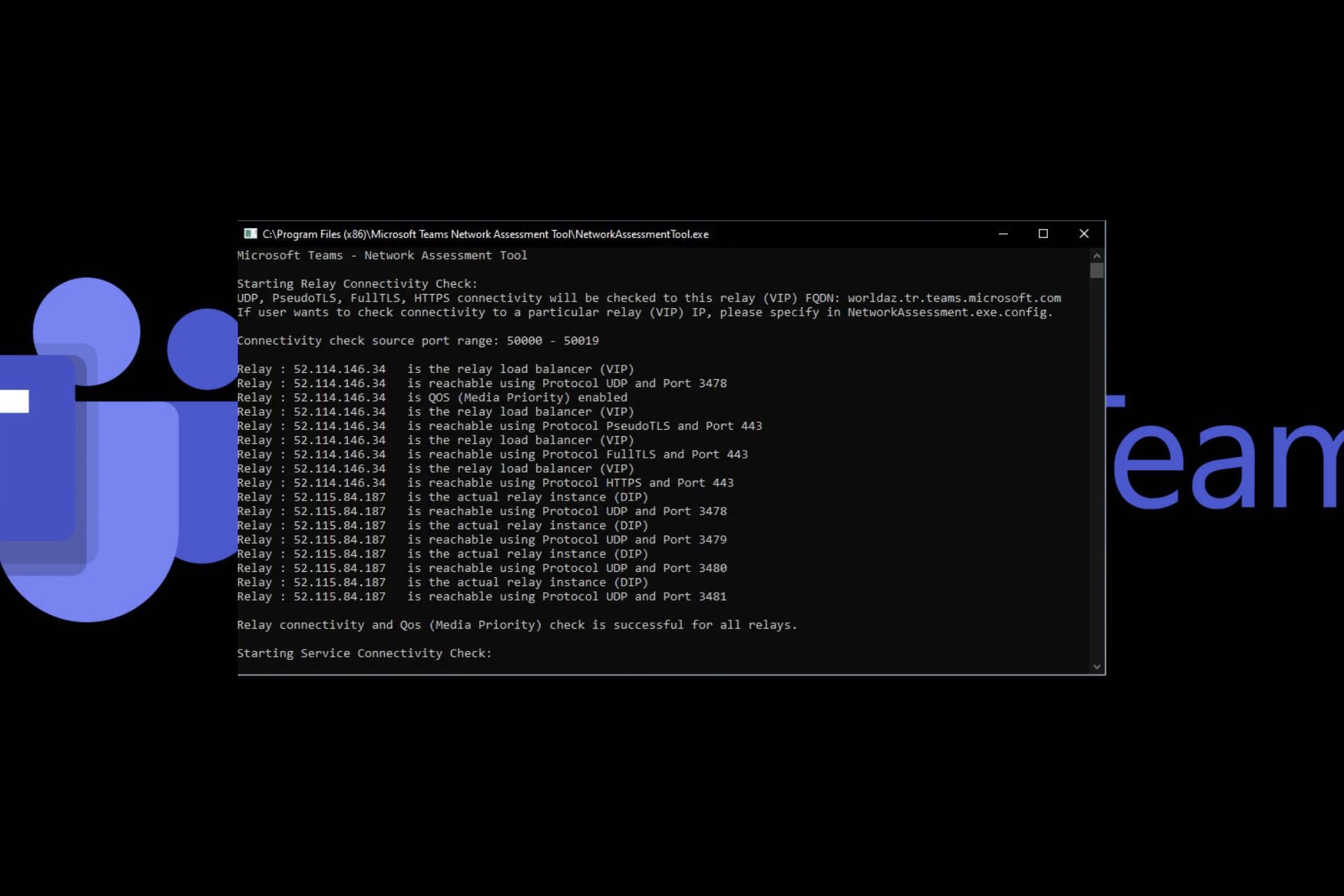
Video conferencing and collaboration tools are important, especially if you’re managing a large team. It’s crucial to ensure your network connectivity is stable, hence the need for a Microsoft Teams network assessment tool.
What is the Microsoft Teams network assessment tool?
Overview
Although there are a host of tools you can use to test your network’s speed and reliability, Microsoft has its own dedicated tool for assessing Microsoft Team’s network. A simple test call won’t cut it, as this only checks for the basics like video and microphone quality.
An established team is highly dependent on a stable and reliable network connection so, it is imperative to conduct these assessments to get insights on components like bandwidth limits, network capacity, speed and reliability.
System requirements
This information will be significant in preparation for communication and collaboration.
Supports all Windows operating systems from Windows 8 upwards. Windows Server users must enable the Desktop Experience feature while Windows N or KN versions must install the Media feature pack.
Comprehensive diagnostic reports: This is the main function of the Microsoft Teams network tool. It assesses the network environment and pinpoints pain areas that must be addressed. Network administrators can then use these reports to troubleshoot and optimize the network.
Assess network demands: In case your team grows or you wish to expand, this tool can help assess the scalability and measure whether it will be able to meet the demand. You can assess whether you’ll have to limit bandwidth on Teams but if the current capabilities cannot accommodate a stretched-out usage without affecting performance, you’ll have to upgrade your bandwidth limits.
Real-time monitoring: As you’re on your Microsoft Teams, the network assessment tool also works in the background monitoring usage. If anything changes or there are issues like lag and packet loss, you get this information for further examination and troubleshooting.
Areas of analysis
Network performance
Bandwidth: Network performance is dependent on the bandwidth available. If Teams requires more bandwidth than is available, there will be a degraded performance. If there’s enough bandwidth but still a performance issue, you might have to close superfluous apps that are hogging the bandwidth.
Latency: The time it takes for data to travel to and fro matters as it can make or break the Teams call. For instance, if there’s too much lagging when on video or delays, you might need to increase your bandwidth.
Network connectivity
This involves the reliability of the connection when using a VPN, wireless/wired connection, firewalls and DNS servers. An overzealous firewall can block critical ports required for a stable connection so the assessment tool can help pinpoint such anomalies.
All these components can positively or negatively affect the connection to a Teams call so if you notice a degraded performance, you may have to turn on or off one of the aforementioned settings.
What are the pros and cons of the Microsoft Teams network assessment tool?
Pros
Enhances productivity: The network tool gives real-time analysis and reports on the network assessment. This in turn takes away all the guesswork of figuring out the issue and going straight to troubleshooting.
Performance evaluation: The network performance helps you plan ahead whether you’ll need to scale up or increase your bandwidth to meet the demands of your organization. This way, productivity remains unaffected.
Optimizes network: By keeping tabs on your network performance, you are able to mitigate network failures before they become a problem.
Cons
Limited testing: While the network assessment tool does a great job, you can only test on one client machine at a time. If you have multiple devices, it can be time-consuming.
No scheduling: You cannot schedule a test to be performed at a later time. All tests have to be conducted manually which may not be practical especially if you have a large team.
Resource intensive: Running network assessments requires significant system resources especially, for large-scale environments. This in turn could affect the quality of the network allocated for other tasks or activities.
Best practices for network optimization
Regular firmware and software updates: The only way to ensure optimal performance is to update your network card drivers, router firmware and any other related software/firmware. This will ensure your network is adequately equipped to handle the demand.
Implement security policies: An unsecured network poses a risk to any organization hence the need to implement robust and reliable security policies. This includes up-to-date firewalls, encryption protocols, and any other measures deemed necessary to secure the network from risk factors.
Distribute load evenly: For optimal resource usage, it is important to spread out the network traffic across devices to avoid network congestion so that there’s never over-usage or under-usage.
Hopefully, you’ve learnt a thing or two about the Microsoft Teams network assessment tool and are now in a better position to decide whether to download it. You can also test it out with Teams for Linux and compare the performance.
Speaking of Microsoft tools, you may also be interested in the NetMon for Windows. And you don’t have to limit yourself just to the Microsoft suite.
There are so many open-source network monitoring tools that can help you keep tabs on your network traffic and other elements to ensure you’re using your bandwidth optimally.
We’d love to get your thoughts on this tool. Have you used it before, and would you say it has enhanced communication when using Teams? Share your thoughts with us in the comment section below.
We’re all impatiently waiting for the latest generation of Intel’s CPU, and recently we got some unpleasant news.
It seems that upcoming CPUs will be more expensive than previously expected.
Micro Center just revealed potential prices for the upcoming Intel CPUs
Tom’s Hardware reported that Micro Center has revealed its potential prices for the upcoming Intel CPUs according to the removed listing.
The new Core i9-14900KS is expected to cost $749, which is slightly more than previously expected. This price is somewhat expected and similar to the price in Canada.
As for the specs, the removed listing stated that this CPU will have 8 cores and a 3.2GHz base clock that can be boosted up to 6.2GHz.
Additional specs include 16 E-cores 32MB of L2 cache, 36MB of L3 cache, and support for DDR4-3200 and DDR5-5600.
We have to mention that this model is $200 more expensive compared to its predecessor, Core i9-14900K, so you might be better off sticking with the older model.
Keep in mind that this information might be only for Micro Center, and the actual price might differ depending on the retailer. As for the announcement date, rumors have it that we’ll see it on March 14th.
Nintendo DS and 3DS were a huge hit back in the day, and tech-savvy fans have found a way to revive it, in a way.
A few modders have managed to convert a Steam Deck into a Nintendo 3DS, and the results are impressive.
Modders have converted a Steam Deck into a working Nintendo 3DS
As reported by Retro Dodo, it seems that Reddit user TyePower managed to convert his Steam Deck into a 3DS.
This was achieved by adding a 7-inch battery-powered monitor to the Steam Deck and securing it with Clamshell detachable mounts. While the device might look a bit rough, it works pretty well.
It’s powered by a discontinued Citra emulator and it uses 1080p resolution. This isn’t the only model, Andrew from RetroHandhelds.gg also created his own 3DS.
While Andrew’s device doesn’t look too flattering, especially because it has a battery attached to the second screen, it can emulate the games perfectly.
Intel easily dominated the global CPU market, shipping over 50 million units worldwide, according to the latest statistics by Canalys, far exceeding the second AMD, and the third Apple, with 8 million units, and 6 million units sold respectively.
The tech giant had a market share of 78% in Q4 2023, and according to statistics, is showing a stable performance, with a growth of 3% as you can see in the image below.
AMD comes in second, with sales of 8 million units, and a decent market share at 13%, while Apple managed a moderate 6 million units figure. Both companies experienced a slight decrease in their performance, with AMD experiencing a -1%, and Apple -4%.
In terms of revenue, Intel managed to increase it by 2%, to $41 billion, while Apple performing much better here, with an 8% growth, and $8 billion in revenues. AMD comes in third with 7% growth, and $5 billion in revenue.
MediaTek, Qualcomm, or ARM haven’t managed to break in, however, things are about to change, as Qualcomm is set to enter the CPU market this summer, delivering its first chipsets to the future Windows AI PCs, and we have to say, it’s looking quite exciting.
So as Microsoft welcomes another player into its Windows PCs sphere, both Intel and AMD will have to keep up with the ARM-inclined CPUs, and the new NPUs, which are starting to take hold. It will be interesting to see how these three companies will evolve and ignite the competition.
Intel is still very much preferred even though AMD has great CPU options almost on every level, and the company was able to develop units that surpassed Intel CPUs in certain aspects. However, as Qualcomm is coming with a fresh new perspective, the competition is about to get tighter.
What do you think about Intel dominating the CPU market? Which one do you prefer: Intel or AMD? Let us know.
Microsoft might be releasing an Eye-Gaze typing technology that would help users type and interact with applications solely using their eyes, according to the patent, which was published recently and can be read here.
The technology employs a so-called ‘dwell-free’ typing, meaning users can type just by looking at keys on a screen. But it can also be used to interact with other applications by gazing at them: for instance, if a user looks at a button in a web browser, the system can click the button for them.
As eye movements can be jittery, and the recorded gaze might be non-uniformed, the noisy gaze will be intercepted by the dwell-free response system, which, as the paper explains, is a system that does not rely on dwell time for identifying a desired letter or word of a user.
This means users won’t have to gaze at the buttons for extended periods, as the technology would use the dwell-free system to make sense of the user’s gaze accurately and come up with solutions.
Employed in an operating system, such as Windows, this technology could let users control various settings such as audio volume, or brightness by moving their eyes. It would not be limited to just certain applications, as it can be extended to become a new way to interact with devices.
The most interesting aspect of this technology is that it also employs an AI-based model that gathers user information to make smart predictions and suggestions. If the user is looking at a certain area when navigating an application or operating system, the technology will associate these gazings with certain actions.
Microsoft is also making the Eye-Gaze technology predictive by using a so-called prediction processor, which guesses the word or action based on where they’re looking. The technology is also using smart algorithms to come up with quick responses to the user’s actions.
The Redmond-based tech giant has been experimenting with the eye-gaze technology on its HoloLens headsets, although in that case, the experience exists in a mixed-reality setting. Apple’s Vision Pro device also employs a similar technology, but users still require hand movements happening in a mixed reality setting, as well.
This technology, however, would be employed on all devices, including, but not limited to mobile phones, tablets, and personal computers, and it can be run on any application that has text-input capabilities, such as text messaging apps, email apps, or search engine apps.
Could we expect this kind of technology in Microsoft Edge or the future AI-based Windows? Microsoft has already experimented with gaze-controlled settings in Windows 11, but this is the next level, and quite frankly, it’s both exciting and terrifying.
We all know about the 1993 shooter DOOM and at that time, any hardware was tested with the question: Will it play DOOM? The Register spotted a student project that proves GPT-4’s capability to play the old game.
Adrian de Wynter, a principal applied scientist at Microsoft and a researcher at the University of York in England, developed a method to test if GPT-4’s reasoning and planning capabilities extend to the 1993 first-person shooter Doom. As it turns out, yes, the bot can run and play it, but you could beat it easily.
How can GPT-4 run DOOM?
In fact, it’s more complicated because the GPT-4 LLM can’t run DOOM’s code directly, but its variant, GPT-4V, can also work with images and play the game without any special training.
So, de Winter used GPT-4V to get the screenshots from the game, together with structure descriptions. Then, an Agent model can make decisions based on the visual input and the previous history. The commands to the game are sent back and translated into keystrokes.
That makes the model pretty slow and sluggish in playing the game, but it has other problems as well:
For example, it would be very common for the model to see a zombie on the screen, and start firing at it until it hit it (or died). What’s the issue here? Well, first that the zombie goes out of view. Worse, it is still alive and will whack you at some point. So you gotta go after it, right? After all, in Doom, it’s whack or be whacked. It turns out that GPT-4 forgets about the zombie and just keeps going. Note: the prompt explicitly tells the model what to do if it is taking damage and it can’t see an enemy. Better yet, it just goes off on its merry way, gets stuck in a corner, and dies. It did turn around a couple of times, but in nearly 50-60 runs, I observed it… twice, I wanna say.
Adrian de Wynter
So, GPT-4V just forgets about the enemies if they get out of sight, which could be a hilarious problem even for the most inexperienced human player.
But the problem here is not the bot’s poor skills in killing monsters in a game but the ethical ramifications of the programming:
On the ethics department, it is quite worrisome how easy it was for (a) me to build code to get the model to shoot something; and (b) for the model to accurately shoot something without actually second-guessing the instructions,
Adrian de Wynter
In other words, the AI was more than happy to follow the instructions for shooting targets without asking any questions. Although it can be fun to see an AI playing a game and making its own decisions to complete its programming goals, the researcher’s conclusion is that the bot has no idea what it’s doing.
After all, this programming could be used in real scenarios for automated drones that could produce real damage.
What do you think about GPT-4 playing DOOM? Let’s talk about that in the comments section below.
According to the European Data Protection Supervisor (EDPS), the European Commission didn’t abide by several important data protection rules under European Union data protection laws while using Microsoft 365 services.
The EDPS is an independent body that is responsible for conducting data protection audits within EU institutions and can issue corrective measures to rectify violations.
Wojciech Wiewiórowski, EDPS, said:
It is the responsibility of the EU institutions, bodies, offices and agencies (EUIs) to ensure that any processing of personal data outside and inside the EU/EEA, including in the context of cloud-based services, is accompanied by robust data protection safeguards and measures. This is imperative to ensure that individuals’ information is protected, as required by Regulation (EU) 2018/1725, whenever their data is processed by, or on behalf of, an EU.
The investigation’s key findings indicate that EC failed to specify in its contract with Microsoft the types of data that could be collected and mention the purpose of the same.
Furthermore, the EC didn’t implement adequate safeguards concerning the transfer of data outside the European Union area, an important aspect of ensuring the protection of individuals’ personal information.
The European Data Protection Supervisor ordered the European Commission to bring its use of Microsoft 365 services into compliance with the EU’s stringent data protection regulations. It also informed that Microsoft 365 data flows that don’t adhere to the regulations will be suspended effective December 9, 2024.
The breach occurred over a three-year period, starting on May 21, 2021, and ending with the EDPS decision on March 8, 2024.
The European Data Protection Supervisor said the EC failed to ensure proper contractual specifications with Microsoft as the EC didn’t clarify the use of data and didn’t blame Microsoft for this.
As EDPS found the EU at fault, it enforced EU regulation 2018/1725 on the processing of personal data, which shows how important robust data protection measures are, especially when working with external service providers.
This incident reminds people doing business in Europe to pay attention to all the tiny contractual details and adhere to the regulatory framework to avoid problems in the future.
What are your thoughts on the matter? Share your opinions in the comments section below.
Micorosft has been integrating its native chatbot, Copilot, into more and more products, and the Microsoft Advertising Platform is the latest in the list. In September’23, the Redmond-based tech giant confirmed their plans at the Microsoft AI event.
Finally, many on the Advertising Platform can see the Copilot button at the top-right corner. It appears to be a gradual rollout. For anyone who didn’t get the feature, wait for a few days.
The arrival of Microsoft Advertising Copilot was first reported by Thomas Eccel in a post on X(formerly Twitter).
Huge Update: Bing Ads account has now Copilot integrated!
Soon, we saw posts on several different platforms, including LinkedIn.
At present, it appears that Microsoft Advertising Copilot would offer assistance and advice and, at the same time, guide you through the platform. For instance, if you want to set up an ad campaign, Copilot would detail the entire process.
For Copilot to prove effective in the Advertising Platform, it must be accurate and user-oriented. The AI-powered integrated chatbot should assist users with ideas and be able to identify the flaws in one, if asked.
What do you think of Microsoft Advertising Copilot? Share your review in the comments section.
Legion Go is a small gaming beast that is capable of running all sorts of demanding video games, and so far there have been almost no issues with it, aside from the regular complaint that its battery life doesn’t last for long.
However, it seems that the console’s right stick can get stuck when running Sniper Elite 5, a third-person FPS, as one Reddit user claimed that the freezing of the button makes the game character rotate repeatedly.
Ok so I’m on day five with my Legion Go. After initial frustration with Windows all the bloatware and the massive configuration job you have to go through to set this thing up. Im finally happy with it, and I’ve got most of my favourite games installed. I do have a bit of a showstopper and I’m considering returning it if I can’t fix this one niggling issue. As you can see in the video the problem is the right stick every 5 to 10 minutes it will just get stuck, usually making the game character rotate repeatedly, which is pretty useless in a first-person shooter. I’m close to giving up even I love the device otherwise.
does anyone know what to do?
For the record I’m also testing an Asus Rog flow z13 which I’m using with an external controller and I’m just investigating ways to attach some joycons or something similar let me know what you guys think.
Reddit user
The user also mentioned later in the post that this Legion Go issue happens only when playing Sniper Elite 5, so if you’re running into this issue, here is what you need to do:
Check out to see if the right stick gets stuck in other games
You’ll need to make sure your Legion Go isn’t indeed malfunctioning, by opening up other games and checking to see if the right stick functions properly.
It shouldn’t, but if it does, you’ll need to recalibrate the right stick:
Press L2 + L3 (Controller L) or R2 + R3 (Controller R) for 3 seconds to enter calibration mode,
The LED flashes violet.
Rotate the rocker 3 turns, wait for 2 seconds after the rocker re-centers itself, and then the calibration is complete.
Quit to the desktop and restart Sniper Elite 5
Apparently, Sniper Elite 5 is the one having a bug, as other users have noticed issues with it on other platforms or handhelds.
So, the best solution is to quit the game, return to the desktop, and then open Sniper Elite 5, as this Reddit user explains:
Is this Sniper Elite 5? If it is. I believe it’s a bug in the game. I had the same issue playing this title on my ROG Ally. The spinning would usually start after I had the game on pause for a bit and then returned to playing. Other times it would just start randomly whilst playing.
The only fix was to quit to the desktop and restart the game. Good luck.
Reddit user
Ultimately, Legion Go is not the one at fault, but the Sniper Elite 5 game is. If the handheld console seems to malfunction only when playing this game, you might also want to uninstall and reinstall the game altogether.
Try these solutions and see if they work for you, and if they do let us know. By the way, if you have a Legion Go, check out these official skins coming for it soon.
If you’re looking to collect information from a group of people, you can create a Microsoft Word fillable from a blank document or use an online template.
How do I create a Microsoft Word fillable form?
1. Enable developer mode
Launch Microsoft Word and open a blank document.
Navigate to File>Options>Customize ribbon.
Check the Developer box and hit Save.
2. Design the form
On your blank document, create an outline for your form with the necessary items.
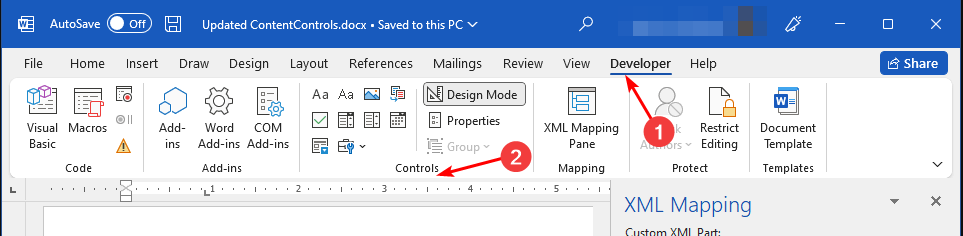
Next, click on the Developer tab on the top menu ribbon then select Controls. Here, you can select the type of information you wish to be filled ranging from check boxes, drop-down options and text boxes.
Once you’re done, click on the Design mode button to exit.
3. Limit editing
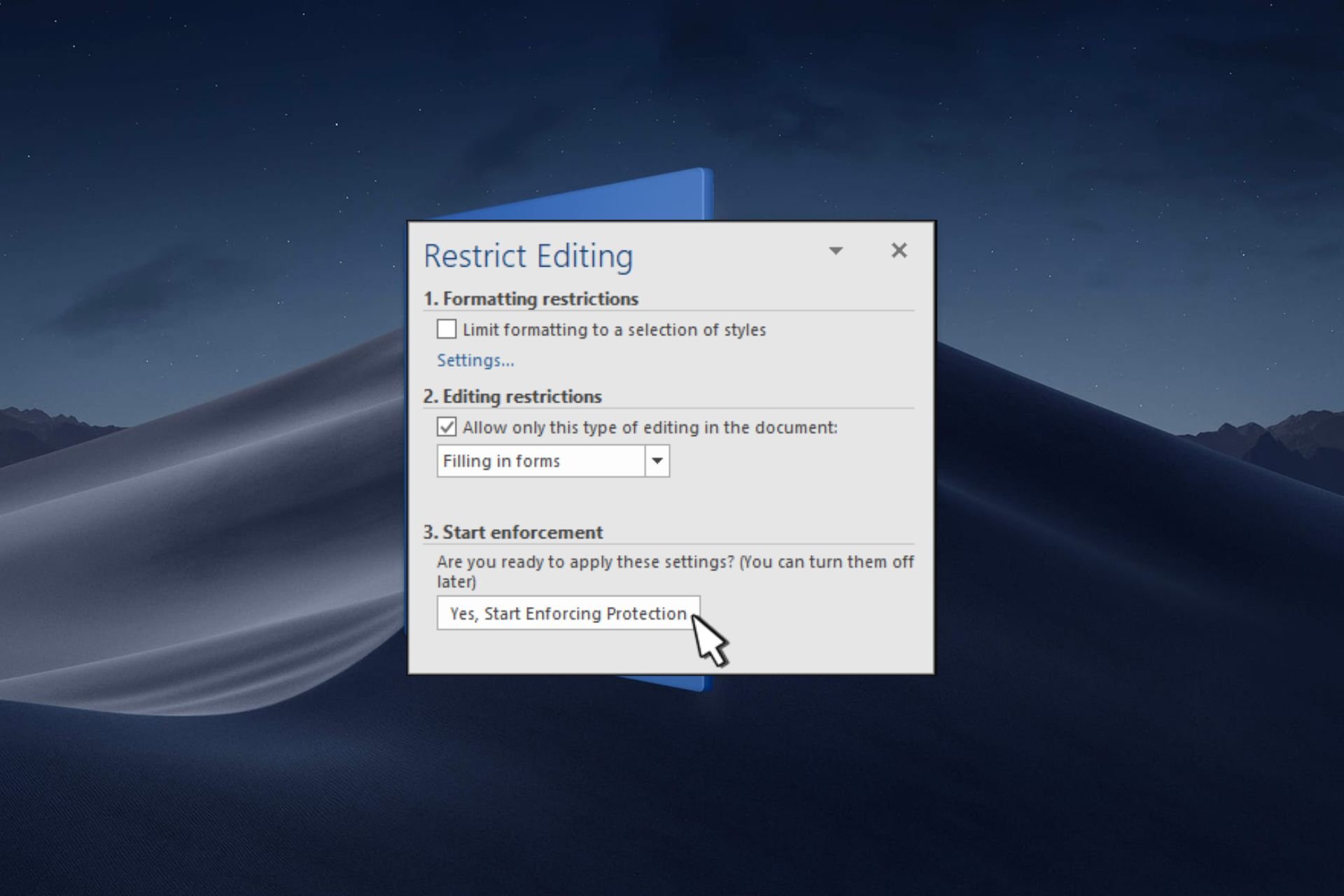
Click on the Developer tab on the top menu ribbon then select Restrict Editing.
Check the Editing restrictions check box and in the drop-down menu, select Filling in forms then hit the Yes, Start Enforcing Protection button.
You can enter a password for enhanced protection but it is not necessary.
When you send out the form, you want to protect the other fields from being edited or altered. While fillable forms on Microsoft Word come in handy, some features may prevent them from being opened on other devices or on the web. These forms are not widely compatible.
Luckily, you’re not limited to Microsoft Word. In case you prefer working with PDF documents, you can also create a fillable PDF form. And if none of these work for you, there are a host of software tools to create forms that are compatible with most browsers and devices.
That’s it! You can now create a fillable form ready to be shared and filled out by others using Microsoft Word. If the form is too long, don’t forget to create a table of contents to aid in navigation.
To take your Word knowledge to a new level, be sure to check our guide on how to create index cards in Word for more useful tips.
Have you tried creating a fillable form with Microsoft Word? How easy or hard was it? Leave your comments down below.
Researchers discovered that a misconfigured Microsoft Configuration Manager (SCCM) can lead to security vulnerabilities. Thus, a threat actor can use this opportunity for cyber attacks, such as payloads, or to become a domain controller. In addition, the SCCM works in many Active Directories. Furthermore, it helps admins manage workstations and servers on Windows networks.
During the SO-CON security conference, SpecterOps announced their repository with attacks based on faulty SCCM configurations. Also, you can check it out by visiting their GitHub Misconfiguration Manager page. Additionally, their research is a bit different from others because they include penetration testing, red team operations, and security research.
What is SCCM?
SCCM stands for System Center Configuration Manager, and you might know it as Configuration Manager or MCM. Furthermore, you can use the MCM tool to manage, secure, and deploy devices and applications. However, the SCCM is not easy to set up. On top of that, the default configurations lead to security vulnerabilities.
The attackers can gain control over your domain by exploiting your SCCM security vulnerabilities. After all, according to researchers, cybercriminals can use your network access accounts (NAA) if they use too many privileges.
Also, an unknowing or novice administrator could use the same account for all of the things. As a result, this might lead to decreased security across devices. Furthermore, some MCM sites could use domain controllers. Thus, they might lead to remote code control, especially if the hierarchy is not in order.
Depending on the environment, an attacker could use four different attacking methods. The first method can allow access to credentials (CRED). The second attack can elevate privileges (ELEVATE). The third one can perform reconnaissance and discovery (Recon), and the final one gains control over the SCCM hierarchy (TAKEOVER).
Ultimately, you should properly manage your SCCM and verify if the hierarchy is in order. Also, there are three ways in which you can defend yourself. The first method is to prevent attacks by strengthening your MCM configurations to impact the attack technique (PREVENT).
The second method is to monitor your logs for suspicious activities and to use intrusion detection systems (DETECT). Afterward, the third method is to plant fake configuration settings and embed hidden data (CANARY).
What are your thoughts? Were you aware of this security vulnerability? Let us know in the comments.
Chrome for Android is getting a new feature, one that would aid multitasking and improve the overall app experience. With it, you will be able to minimize Custom Tabs into PiP (Picture in Picture) mode, work on the active apps, and quickly jump to the former at will!
For the unversed, Custom Tabs is a feature in Chrome that lets apps open links using the browser from within the app without having to launch the browser manually. Earlier, these Customs Tabs had to be terminated before you could get back to the active apps.
Now, as spotted by Mishaal Rahman and posted on X(formerly Twitter), the feature to minimize Custom Tabs into PiP is available starting with the Chrome 122 Beta version and is enabled by default.
You'll soon be able to minimize Chrome Custom Tabs so you can interact with an underlying app without fully closing out your browser tab!
Google says this is enabled by default for Custom Tabs starting with Chrome 122 Beta. pic.twitter.com/wEo4d8cSY9
At present, the feature titled, Allow Custom Tabs to be minimized, is listed under Flags. You can access and modify it from the following Chrome address: chrome://flags/
Chrome flag
Flags are experimental features that Google tests on Chrome. Not every feature brought in as a flag makes it to the stable version of the browser. So, we will have to wait and watch if and when the Allow the Custom Tabs to be minimized flag finally makes it to the stable Chrome version!
Until then, you can keep using it. This particular flag poses no security risks and doesn’t result in crashes or errors, as reported by many.
What do you think of this upgrade to Custom Tabs in Chrome? Share with our readers in the comments section.
The new Digitial Markets Act (DMA) has come, forcing many tech companies, including Microsoft, to bring changes in their products and services to make them compliant.
Earlier, we talked about changes that gave us the ability to uninstall Edge and Bing; this time, the change was associated with Edge pop-ups.
From now on, when you change your default browser, you will not see promotional pop-ups for Edge in Windows 11 and 10.
Before the change, you see the Edge browser benefits pop-up whenever you try to switch to any other browser.
Previously, Edge’s promotional ad appeared under the Featured app section when you changed the Open with settings on a Windows 11/10 computer.
Microsoft removed the Featured app section with Windows 11’s February 29, 2024 update. When you use the Open with feature to check the available apps, Edge will no longer appear in the Featured app.
This change will be applied to your Windows 10 and 11 devices and will be available for people outside Europe.
Edge used to be a system component, which is why you can’t uninstall it from your device. Starting with the Moment update, Microsoft will now give the option to uninstall Edge and Bing in EEA.
As per Microsoft’s documentation, Edge collects diagnostic data separately. You will be able to enable or disable the optional diagnostic data sharing in the Edge browser settings.
Microsoft also introduced changes to S-mode exclusions, default sign-in settings, and feeds in the Widgets board.
Earlier, the Widget board’s feeds contained content from MSN, but now you can change the default news feed provider or disable it altogether.
Another change is that you will not be logged into your Microsoft account automatically unless you don’t give consent.
Furthermore, Windows will no longer use Edge to open links for system apps, respecting the default browser instead of in Europe.
For users outside Europe, Windows will still use Edge to open relevant links when an inbox app requests it.
Changes in S mode
Microsoft Edge and Bing are still the native apps in S mode, but you can exit the mode to install third-party apps. To do so, go to Settings and look for the Switch Out Of S Mode setting.
All the changes introduced to Windows to make it compliant with DMA are released in the Windows 10 22H2 build 19045.4123 and Windows 11 23H2 Build 22631.3235 on February 29, 2024.
Since EEA was released in March 2024, users have gained control over their devices and can customize Windows as they like.
What are your thoughts on the matter? Share your opinions in the comments section below.
Microsoft and OpenAI’s partnership is well known to the world. When Sam Altman was fired as the CEO of OpenAI, Satya Nadella played a major role in helping Altman return to the position.
As it turns out, many inside the company reportedly believe that Microsoft’s strategy is more centred toward OpenAI than the in-house products and services. This has come to light in an exclusive story by Business Insider.
Several present and former employees at Microsoft who worked on the AI team led by Eric Boyd have expressed concerns about this shift in strategy.
A former employee highlighted how Azure AI Bot Service isn’t available as a standalone service anymore. He claims that most such services, though available, have either been renamed or bundled with other products.
The former Azure AI is basically just tech support for OpenAI. Eric Boyd is effectively maintaining the OpenAI service. It’s less of an innovation engine than it once was. Now it’s more IT for OpenAI. The beating heart of innovation is elsewhere. It’s not very innovative, but it’s a good business strategy.
It’s also claimed that Microsoft and OpenAI employees, at times, work on the same project and have access to each other’s office space.
Microsoft continues to push leading native products
Microsoft’s AI push has picked up pace in recent months, and most of its new features are, in some way, backed by artificial intelligence. The Redmond-based tech giant’s native AI chatbot, Copilot, has now been built into more programs than ever. Copilot in Word and Copilot in Outlook, to name a few.
Based on these trends, we can say that Microsoft is still pushing its native tools, but this may be limited to a few, primarily to ones where Microsoft is a leading brand name, such as Copilot. For the rest, it might be employing the services of OpenAI when financially viable.
If you have more information on the story, share it with our readers in the comments section.