Meta added a few new text formatting options to WhatsApp to improve our messages. From now on, you can send lists with numbers and bullets, block quotes, and inline codes to highlight your messages. In addition, if needed, you can also break the text to make reading it easier.
How to use the new text formatting options on WhatsApp?
Fortunately, you can access the new text formatting options on WhatsApp easily by using a few symbols.
Feature
How to use?
Bulleted List
“-” + space + text
Numbered List
“digit.” or “two digits.” + space + text
Block Quotes
“>” + space + text
Inline Code
“`text`”
The bulleted and numbered lists are helpful text formatting options. After all, they make it easier for us to keep track of everything we need. On top of that, the numbered lists will simplify sharing steps with your friends and coworkers. Furthermore, you can start your numbered lists with any two digits. Yet, we hope that the function will get some improvements to add more digits in the future.
You can personalize your text further by using block quotes. With them, you can highlight important messages, and it will be easier to find them while scrolling through messages. Also, this feature becomes even more useful when you can’t use the search option.
By the way, the Inline Code feature is primarily for coders. However, if you aren’t using code, you can still highlight your text with it. Additionally, we think that it is better than the block quotes feature.
In a nutshell, the text formatting options for WhatsApp are very accessible. So, you’ll be able to teach anyone how to use them if needed. In addition, you can personalize your messages by combining the numbered and bulleted lists with the block quotes and inline code functions. As a result, you will be able to highlight the most important items.
Unfortunately, on some devices the options might not trigger while you are typing them. However, you will see them in the text.
What do you think? Are you going to try the new WhatsApp text formatting options? Let us know in the comments.
Samsung has discounts now, and the gaming TVs S95C are on their list. Moreover, if you do not opt for additional services like TV mounting or Samsung Care+, you can save up to $1000.
In addition, Samsung 295C is great because it has a powerful AI processing technology that enhances content, uses AI to save energy, and has a mesmerizing sound system. On top of that, you can connect it to your Xbox Series X console or to your PC for a seamless gaming experience.
Furthermore, the Samsung S95C is available in 3 sizes. You can get the 55″ for $1,899, the 65″ for $2,299, and the 77″ for $3,499. However, the 55″ one has only a 600$ discount.
Is Samsung S95C a good TV?
Samsung S95C is a great tv regardless of the size you chose. After all, the series uses AI to enhance the video quality. Also, Samsung S95C uses some of the latest OLED technologies. In addition, the AI also acts as an energy saver.
Now that we have gone through the basics of S95C, it’s time to talk about the gaming features. The TV can stream games in 4K at 120Hz or even 144Hz. However, if that isn’t enough to surprise you, maybe the technology will. Samsung S95C uses quantum dots to enhance the video aspects. Additionally, the TV has more than a billion shades of colors and 8.3 million self-illuminating pixels.
Furthermore, the AI technology will transform most video content into a sharp 4K resolution with high performance. Thus, if you are a fan of fast-paced environments, you will be able to enjoy every detail. In addition, the TV has 4 HDMI 2.1 ports for your Xbox Series X and supports HDR10 and HDR10+. Also, the Samsung S95C has a low latency mode. On top of that, we didn’t notice any screen tearing.
The audio system is also worth mentioning. After all, the Samsung S95C features Dolby Atmos built-in and is capable of 3D audio. On top of that, another mesmerizing feature is the Object Tracking Sound+, which uses AI to track the action on the screen.
Is S95C bright enough?
Samsung S95C is brighter than the other models. After all, the Quantum Dog OLED panel does a great job at displaying bright and vibrant colors without using too much power. Also, it was validated by Pantone, the industry-leading color experts. So, you shouldn’t worry about this aspect.
In a nutshell, the Samsung S95C is one of the best gaming TVs available. In addition, you can connect it to your Xbox Series X or PC. Furthermore, you can enjoy gaming at 4K on 144Hz. Moreover, the colors are vibrant, and the brightness is great. On top of that, the AI helps a lot by enhancing video and audio features. So, don’t let this opportunity slide.
What are your thoughts? Are you going to get a Samsung S95C? Let us know in the comments.
Adrian Campos, an ex-developer of Forza Motorsport has chosen to share his story about the time he worked for the Turn 10 Studios, between June 2022, and October 2023, in a YouTube video.
He claims that Microsoft follows an 18/6 rule, where the company hires developers to work on the Forza Horizon game for 18 months, and then take the rest of the 6 months off. Why? Because Microsoft won’t have to cover healthcare expenses this way. After those 6 months, developers can work to resume the cycle 18/6 cycle. However, those 6 months are not paid. So, you don’t have a job.
However, there would be a chance that Microsoft would offer a full-time position, and Campos accepted the offer to work under the 18/6 rule with the hope of getting that full-time position because Turn 10 Studios mentioned the position to him.
Campos’ story is somehow quite tragic: he was hired to work at Turn 10 Studio as a Senior Environment Artist in a contract from June 2022 to October 2023. A month into his new position, he found out that the other artists with whom he was working passionately to bring the new Forza Horizon game to life, had to leave the company because their contracts (that were following the 18/6 rule) were ending.
He was suddenly put in charge and had to hire more artists (under the same 18/6 rule), to continue the work. While he enjoyed what he did, and he learned a lot from it, Campos says the work was stressful and quite depressing under the rule: as he grew closer to his mentors, he had to watch them leave because their contracts would end.
In June 2023, Campos received an email from his contractor saying that his contract was almost up, and he had only 6 months left. In September, he was given a final warning from his contractor, along with an ultimatum: either spend those 6 months without a job or leave the company. The full-time position was out of the question.
Fortunately for Campos, he put in his 2 weeks’ notice and announced to the world, on Twitter (now going by X) that his contract was up. He then got offered another job at another company in a matter of days.
The 18/6 rule is not entirely new to the gaming industry, and many other gaming studios do it. Jason Schreier from Bloomberg has extensively written about it, when he investigated it happening at Activision, almost 4 years ago.
The new Call of Duty, announced this week, will gross billions of dollars. But some of its developers are treated like second-class citizens — no bonuses, no vacation, and salaries barely over minimum wage. The video game industry has a contractor problem: https://t.co/LFUweMc7wa
Back then, Microsoft was also one of the companies that would employ this kind of rule to avoid paying additional taxes. However, the rule turned out to be greatly disruptive to the development of many games, including Halo Infinite.
At Microsoft, contractors can only work for 18 months max. (They can then come back after a six-month break.) Microsoft uses so many contractors that this limit leads to a lot of attrition — and for games that take 4+ years to make, like Halo Infinite, it has been disruptive
Jason Schreier
The rule, while fitting to companies’ budgets, earnings, and overall financials, is quite detrimental to those working on these video games, including Adrian Campos, who was passionate about the work he was doing on Forza Motorsport until the end.
Besides the obvious reasons why this rule could cause mental health issues – and by this, we mean lack of access to healthcare, lack of bonuses, no vacations, or salaries just above minimum wage – it also stops real talent from actually blossoming into great projects.
Forza Motorsport was eventually released in October and Campos was proud of some of his work getting appreciated, but many more games are facing development delays (the next Halo game, for instance), because this rule might be going on: replacing talent after talent every 18 months.
Microsoft released new builds to the Windows Insider Channel earlier today, including a new build to the Canary channel that formally introduced Wi-Fi 7 to Windows 11.
On the other hand, while the Dev channel hasn’t gotten anything new, the Windows Server Insider channel received some important updates, including a new Wallpaper that comes in Light/Dark mode.
Windows enthusiast, @PhantomOfEarth, shared a post on X (formerly known as Twitter) showcasing the two versions of the wallpaper. Microsoft says the new wallpaper is part of their plan to modernize the desktop experience in Windows Server.
Server build 26063 includes a nice new default desktop wallpaper! Has light and dark versions. pic.twitter.com/siJ0YQhoYy
Microsoft introduced a variety of new features to Windows Server Preview with the latest Insider 26063 build. Some of them are available to all Windows Server insiders, while others are available only to those with the Desktop experience enabled.
Here’s what Windows Servers insiders should expect from this new build:
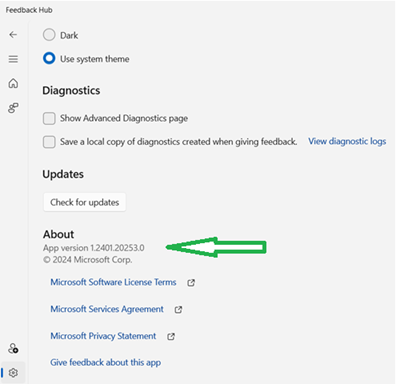
[NEW] The new Feedback Hub app is now available for Server Desktop users!
The app should automatically update with the latest version, but if it does not, simply Check for updates in the app’s settings tab.
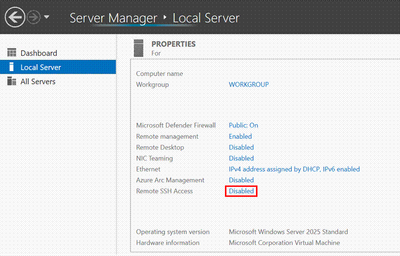
[NEW] Win32-OpenSSH server component is now installed by default.
Starting in Windows Server 2025 the Win32-OpenSSH server side component (SSHD) will ship installed by default. Previously, the Win32-OpenSSH server component shipped as an optional feature that needed to be installed. Additionally, there is a new option in the Server Manager UI to enabled/disable SSHD, as well as a new group, “OpenSSH Users”. To use SSHD, the feature only has to be enabled, not installed. When enabled, SSHD is allowed only on private networks on default port 22.
Additions to Accounts: Email & Accounts is now consistent with Windows 11. Please note, domain join will still be necessary for most scenarios.
Call to action: Please try adding Microsoft accounts and/or work accounts along with relevant apps that take advantage of this.
Increased coverage for Bluetooth devices. Many of you want to use BT to connect mice, keyboards, and audio devices at the Edge. Please try out your favorite keyboard, mouse, headphones, or other BT peripheral!
Wi-Fi present by default. Many of you want to connect servers to Wi-Fi networks at the Edge. While Wireless LAN service has been present in Windows Server, it was disabled by default. Wi-Fi support is now currently enabled by default for Edge scenarios. You will need the appropriate hardware and drivers handy. Please verify that your wireless devices work properly. When hardware and the correct drivers are present, see the corresponding Settings and Taskbar experiences. Let us know what you think!
The build also introduces dozens of fixes to Windows Server Preview, but you can read the full blog post here.
Back in December 2023, Mikhail Parakhin, leader of the Windows and Web Experiences Team, which is responsible for Copilot, teased a Notebook interface of the AI tool, which allowed users to focus on prompt creation so that they could learn to get the best of Copilot.
One more thing: we are also starting to flight the Notebook interface. Keep changing the prompt on the left, get results on the right. Easier to copy and work on the prompt. It also remembers the previous version, so you can ask to change something. pic.twitter.com/WkfIE4bQmN
One more thing: we are also starting to flight the Notebook interface. Keep changing the prompt on the left, get results on the right. Easier to copy and work on the prompt. It also remembers the previous version, so you can ask to change something.
Here’s another new feature we’re excited about: Notebook is starting to flight. This interface removes dialogue so you can focus on prompt creation, refinement, and iterating on output as it remembers the previous version. It also accepts longer prompts up to 18K characters.
Jorbi Ribah
Here’s another new feature we’re excited about: Notebook is starting to flight. This interface removes dialogue so you can focus on prompt creation, refinement, and iterating on output as it remembers the previous version. It also accepts longer prompts up to 18K characters. pic.twitter.com/lMpJYvz020
Users then were left wondering when this interface be fully available, and we have good news. Jorbi Ribah confirmed the Notebook interface is now shipped with Copilot on all platforms, mobile and desktop.
Notebook is now shipped in https://t.co/FsGnvZLtYd, on both PC and mobile browser. It’s a new interface for crafting, improving, and revising your prompts without chat dialogue. Ideal when you need to iterate on a prompt to get the best result. It supports up to 18K characters. pic.twitter.com/hf8r0O90E3
Notebook is now shipped in https://Copilot.microsoft.com, on both PC and mobile browser. It’s a new interface for crafting, improving, and revising your prompts without chat dialogue. Ideal when you need to iterate on a prompt to get the best result. It supports up to 18K characters.
Jorbi Ribah
Why should you use it?
Well, Copilot on Windows, Microsoft Edge, or Microsoft 365 might not be able to get the right answer right away, and sometimes it doesn’t give the right answer at all. With this new interface, you can experiment with Copilot, and use various versions of prompts to get the right answer.
You’ll have access to previous conversations up to 18K characters, so you’ll be able to see what went wrong and what went right and experiment with your prompts so that Copilot can give you the best solutions.
It could be quite useful. If you try it, and you discover good or interesting prompts, then be sure to let us know about them in the comments section below.
Microsoft Word for Web finally introduced checklists to the platform, according to the latest Microsoft 365 Insider blog. This useful feature was added to encourage Microsoft 365 users to create checklists on Word for various tasks, from personal ones to professional ones.
Checklists are a simple yet powerful tool that can help you stay organized, focused, and productive. They are particularly useful in situations where there is a need to ensure that necessary steps are completed, or standards and procedures are being followed correctly. They also can be used to track progress and encourage the formation of new habits. Using checklists can help free your mind from having to remember the steps you need to complete and worrying about the possibility of forgetting to do something. They can also save time by making it easy to follow specific steps and reducing the likelihood of errors. Oh, and they can provide a sense of satisfaction and accomplishment when you check off items from the list.
Microsoft
The feature is currently rolling out to all Word for web users, and it should be completely integrated into the platform by the end of the week.
To use it, users will only have to open a new Word for the web document and choose where they want to place the checklist in the document.
Then, they have two options:
Select Home > Checklist.
Or, pressing CTRL + , (comma).
To mark a task as complete, users will have to select the square icon to the left of each checklist item or press Ctrl+Alt+Enter.
The checklists can be used for a variety of tasks, as we mentioned earlier, such as daily tasks to do at work, or a grocery or shopping list.
You can open Microsoft Word for Web on your desktop devices, or mobile phones, through the Microsoft 365 app. If you don’t know how to do it, check out this guide.
Microsoft spent 2023 showing some much-needed attention to its beloved in-box Windows image graphics editing app as it showered the program with new features and UI changes.
Based on a Windows Insider build (11.2402.20.0) for Canary and Developer Channels Microsoft appears prepared to continue its feature releases for Paint in 2024 that include adding a brush size slider and a new tiling effect for its recently added layers panel.
New Paint app update for WIP Canary/Dev (11.2402.20.0) with some new features:
– A new brush size slider on the left – Layers panel update with a new tile letting you customize the background (change color/hide it) pic.twitter.com/KUJOydQH5I
Based on the accompanying GIF in PhontomOcean3‘s tweet, Windows Insiders can now test a more refined brush adjustment experience that transitions from a preselected four brush size option to a more granular slider.
If the update does roll out for wider Insider testing, the new brush adjustments and layer UI’s will joining paints new growing list of recent features that include a dark mode, background removal, image generation via Microsoft Cocreator, transparency, and layers.
Microsoft released the Canary 26063 Build to the Windows Insider Program, and with it, Windows 11 users can now get their hands (and PCs) on Wi-Fi 7, which promises incredibly fast internet connections, perfect for streaming, and gaming.
But if you want to game while being an insider in the Canary channel, though, then you need to know that the latest build hasn’t fixed the green screen errors appearing when opening up popular games. Microsoft says:
[IMPORTANT NOTE FOR GAMERS – UPDATED!] Some popular games may not work correctly and cause a bugcheck (green screen) when launched on the most recent Insider Preview builds in the Canary Channel. Please be sure to submit feedback in Feedback Hub on any issues you see with playing games on these builds.
Microsoft
If you encounter an error while trying to play a certain video game while enlisted in the Canary channel, the best solution for now is to send the feedback to Microsoft.
Devs aren’t lucky, either: the Dev Drive issues that appeared with the last build to the Dev and Canary channel, haven’t been fixed.
IMPORTANT NOTE FOR DEV DRIVE USERS: Insiders on Build 26052+ who have Dev Drives and might need to rollback will need to back up their Dev Drives BEFORE rolling back as rolling back will cause Dev Drives to break and data on them to be lost.
Microsoft
However, the build does manage to come up with dozens of fixes to a variety of Windows 11 insider issues. Here’s what you can expect:
Fixed an issue causing some Insiders to experience an issue where the network icon in the system tray showed they didn’t have an internet connection when connected to some VPNs even though the internet connection was working. Those impact may have also seen some apps think there wasn’t an internet connection when there really was.
The fix for the issue causing Build 26058 to not be listed under Settings > Windows Update > Update history like it should is making its way out. It may take another flight or two for builds to properly show up under Update History.
Fixed a high hitting DWM crash in the last couple flights.
Fixed an underlying issue with plug and play which may have impacted audio device setup in the last 2 builds. If you’re continuing to experience issues with audio not playing after this build, please file feedback under Devices and Drivers > Audio and sound in the Feedback Hub.
Fixed an issue where typing too quickly in the Settings search box could result in the results not loading completely.
Fixed an issue causing the three-finger touchpad gesture for middle mouse click (if you had enabled this in touchpad settings) to not work in some apps.
Fixed an issue where attempted to use the Move option when you pressed ALT + Space was causing a window to resize instead of move.
Fixed an issue for Insiders with multiple monitors, where opening a minimized window might result in the window appearing on the wrong monitor.
Fixed an issue which could cause the clock in the taskbar to stop updating.
Fixed an issue which could cause the taskbar icons to shift around under your mouse as you moved your mouse across the taskbar.
Fixed an issue where the “Notify when apps request location” option in Settings under Privacy & Security > Location was reset after reboot.
Fixed an issue that was causing the Windows Update page in Settings to unexpectedly flash messages sometimes (too quickly to read) in the previous flight.
Please remember that this is not coming to the Dev channel, as the previous 2 builds have. Instead, the Dev Channel with be getting two servicing builds with no new features.
[UPDATE 2/22] We are starting to roll out two servicing updates to Windows Insiders in the Dev Channel. Both these updates do not include anything new and are designed to test our servicing pipeline for Windows 11, version 24H2. Most Insiders in the Dev Channel will receive Cumulative Update Build 26058.1300 (KB5036082). However, Insiders that have Virtualization Based Security (VBS) turned on will receive Build 26058.1400 (KB5036080) and may not experience a restart upon installing the update. Arm64 devices, even with VBS turned on, will only receive Build 26058.1300 (KB5036082).
Microsoft
You can read the full blog post for the Canary 26063 build here.
Microsoft released the 26063 build to the Canary channel (the Dev won’t get the same build, as Microsoft said they’re testing servicing updates for the channel), and with this build, the Redmond-based tech giant introduces Wi-Fi 7 to Windows 11.
The new Wi-Fi 7 is incredibly fast, 4x faster than the previous Wi-Fi 6, and Windows PC users can enjoy multi-gigabit speeds, according to Microsoft.
Windows is adding support for Wi-Fi 7 for consumer access points with the current Insider Preview builds in the Canary and Dev Channels. Wi-Fi 7, also known as IEEE 802.11be Extremely High Throughput (EHT), is a revolutionary technology that offers unprecedented speed, reliability, and efficiency for your wireless devices.
Microsoft
The benefits of having a Wi-Fi 7 connection are plenty, and Microsoft highlights the most important of them:
Multi-Link operation (MLO) allows devices to use multiple bands (2.4 GHz, 5GHz, and/or 6GHz) simultaneously to avoid network congestion and maintain connectivity.
320 MHz ultra-wide bandwidth in 6GHz doubles the speed to your devices and enables new possibilities for high bandwidth applications – and scenarios using such as AR/VR.
4096-QAM modulation increases the data transmission by 20% and improves the quality of video streaming, video conferencing, and more.
Plus, according to the Redmond-based tech giant, Wi-Fi 7 is perfect for online gaming sessions, video teleconferencing, and streaming, thus making Windows 11 even better for gaming (Microsoft recently added the AI-powered Auto Super Resolution to the operating system, too).
With Wi-Fi 7, you can enjoy multi-gigabit speeds on your Windows PC and experience up to 4x faster speeds than Wi-Fi 6 and Wi-Fi 6E, and close to 6x faster than Wi-Fi 5. You can also enjoy significantly lower latency, which improves the responsiveness and performance of real-time activities like gaming and video conferencing. Please note that performance may vary by manufacturer and hardware device capabilities.
Microsoft
Users will need a Wi-Fi 7 capable consumer access point and PC, but Microsoft says many of their ecosystem partners have already launched on the market, so Wi-Fi 7 is expected to become the new standard.
If you are facing challenges with video playback, recording, and capturing on your Windows 11 PC, Microsoft’s latest cumulative update addresses these issues.
Many users with client versions of Windows 11 (22H2 and 21H2) and Windows 10 (22H2), reported these WVC1 codec issues.
The Redmond tech giant recognized the bug related to the WVC1 codec (VC-1), impacting video processing capabilities, after installing KB5027303, which was released in June 2023.
The glitch also affected the webcams that depend on the WVC1 codec by default. To fix it quickly, the company used the Known Issue Rollback feature, a temporary damage control measure. This will automatically fix issues on affected devices until a permanent fix is released. However, specific group policies may be needed for the managed systems to resolve known bugs.
Luckily, the lasting solution has been implemented in KB5034204, the optional non-security update, and also incorporated in KB5034765, the February 2024 Patch Tuesday update.
Along with the video codec bug, Microsoft also fixed another strange issue wherein desktop icons unexpectedly moved across monitors when using Copilot on multi-monitor setups.
The bug was considered severe. Therefore, the company decided to block the upgrade path from Windows 11 version 22H2 and Windows 10 to Windows 11 version 23H2. However, with the resolution implemented with the February 8 update, you can do the upgrade.
As Windows 11 23H2 is ready for widespread use, Microsoft is pushing users to upgrade their computers to the latest version. If you want to learn more about KB5034765, read this guide to learn more.
Have you upgraded your computer to Windows 11 version 23H2? If yes, share your experience in the comments section below.
Computex 2024 is set to take place in Taipei, between June 4 and June 7, 2024, and the theme of the conference is Connecting AI. The event will feature more than 1500 exhibitors, across 4500 booths, with companies such as AMD, Intel, MediaTek, NXP, Supermicro, and Delta being among the keynote speakers.
Acer, ASRock, ASUS, Delta, Gigabyte, G.Skill, Intel, MSI, Pro Gamersware, and more will also present their AI products at the conference, and Intel, Microsoft, and Qualcomm are set to unveil the first hints of the new Windows AI PC, according to DigiTimes Asia.
Qualcomm already announced that it plans to release the first products of its collaboration with Microsoft this summer when the tech company is slated to enter the CPU market with its CPU chips.
Even if the companies show the world the new Windows AI PCs, these devices won’t run on the next version of Windows, which is reportedly AI-based, as Microsoft said it’s not going to release it this year.
Instead, they will release Windows 11 24H2 later this year, now renamed to Windows 11 2024 Update, and if we are to follow the clues, it will receive several AI features and improvements.
It already received the Auto Super Resolution feature which uses AI to greatly improve the gaming experience on Windows 11. It’s currently live in the Dev and Canary channels within Windows Insider Program, but they will be released to the stable Windows version soon.
Regarding Computex 2024, we should see all kinds of AI innovations from Intel, AMD, Qualcomm, Microsoft, Gigabyte, Asus, Acer, and many more companies, this June.
For those interested in attending the event, you should check out the official website for the conference, here.
Are you excited about the idea of using a Windows AI PC? What do you think about them? Let us know.
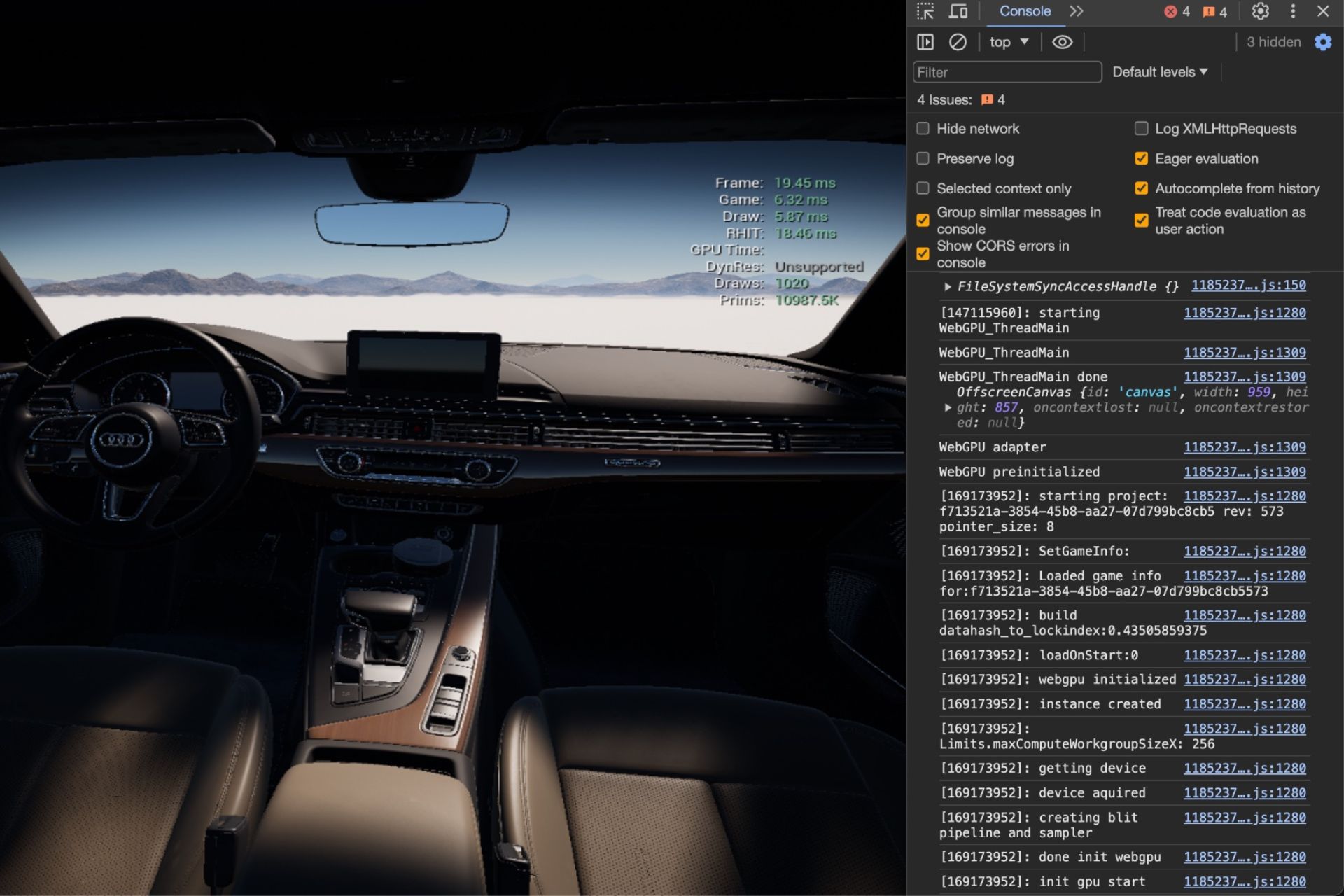
Unreal Engine 5 can now be run in a regular web browser, according to a first taste posted on X (formerly known as Twitter) by the user moon, and validated by the developers behind the project.
Very excited to share a sneak peek of Unreal Engine 5 running in WebGPU, with multi-threaded rendering, many performance optimizations, and the star of the show… an asset streaming system #ue5#webgpuhttps://t.co/65mo3GGkl3
This version of the Unreal Engine 5 runs in WebGPU, and is capable of multi-threaded rendering, according to Alex St. Louis, one of the people behind the project.
Very excited to share a sneak peek of Unreal Engine 5 running in WebGPU, with multi-threaded rendering, many performance optimizations, and the star of the show… an asset streaming system
Alex St. Louis
Not much is known regarding the release date or other info, but it’s safe to assume this version of Unreal Engine 5 capable of running on WebGPU might be coming soon.
However, the sneap peek image comes from a presentation of the company behind the project, Wonder Interactive, for Khronos, the company responsible for WebGPU, and it seems Unreal Engine is not the only engine coming to web browsers.
Wonder Interactive plans to bring other engines, such as Unity, Godot, and O3DE to web browsers, as well.
These engines might also be available to browsers at some point in the following months, but until then, you can actually get a taste of the Unreal Engine 4.27 on browsers, by checking out their demo, Spacelancers, which you can find here.
The Unreal Engine 5 sneak peek on the browser looks promising though. However, given the fact that Unreal Engine 4.27 loads quite slowly on a web browser, don’t expect the Unreal Engine 5 to load faster. You’ll probably need a good Internet connection, too.
What do you think about this? Would you see yourself using Unreal Engine 5 directly from a browser, or not? Let us know your opinion in the comments section below.
Microsoft released Windows 11 Insider Preview Build 26058 to Canary and Dev Channels on February 14, 2024, and has recently added a few improvements to Copilot.
You can now ask Copilot to turn on Narrator or Live Captions, show you available networks, turn on battery saver on your laptop, empty Recycle Bin, or delete temp files.
According to release notes, you can
Ask for available wireless networks.
Ask for system or device information.
Ask for battery information.
Ask to clean storage.
Ask to empty recycle bin.
Ask to toggle battery saver.
Ask to show startup apps.
Ask for your IP address.
Ask for system, device, or storage information.
Try accessibility features:
Ask to turn on narrator.
Ask to open voice access.
Ask to turn on magnifier.
Ask to change text size.
Ask to start live captions.
Ask to turn on high-contrast.
Ask to start voice typing.
Already live, now on the new runtime:
Ask to toggle dark/light theme.
Ask to toggle Bluetooth.
Ask to toggle do not disturb.
Ask to add a device.
Ask to take a screenshot.
Ask to cast your screen to another monitor.
Ask to change your background image.
Ask to set volume, change volume, or mute/unmute volume.
Ask to launch an application.
State that certain parts of your PC aren’t working: Audio, Windows Update, Camera, Bluetooth, Printer, Network, others.
Ask to snap a window.
Ask to start a focus session.
Along with this, you now get the Power Automate plugin integrated into Copilot on Windows, and it offers automation capabilities for tasks like PDF manipulation, & Excel operations & file management, adding a layer of efficiency to your workflow.
To use it, you need to download or update the Power Automate Desktop to the latest version from the Microsoft Store. Also, to access the plugin, you need to sign in to Copilot in Windows using a Microsoft account.
Once you install Power Automate and active the plugin in Copilot in Windows, you can ask the AI assistant to do the following things and more:
Compose an email to your team on a certain topic.
Ask it to create an Excel file with information like a list of the top 5 mountains.
Move your Word document file to another directory.
Rename PDF files in a directory.
However, given the previous experience with Copilot, inputting a command requires your permission to act, making the process a bit lengthy. We really hope Microsoft fixes this.
These changes have been rolled out, but if you can’t see them yet, you need to wait for some time for them to be available on your computer.
Along with this, you get the ability to resize Microsoft Copilot or use it side by side or in overlay mode, and Notepad introduces an Explain with Copilot option, enabling the summarization of selected text via Copilot’s advanced AI capabilities.
What do you think about this integration? Share your thoughts in the comments section below.
Like any gamer, mods are an unspoken want and Cyberpunk 2077 is no exception. It already comes with built-in character customization but if you’re looking to enhance additional aspects of the game, here’s how to mod your game.
How do I mod Cyberpunk 2077?
1. By manual installation
Launch Steam and click on Library.
Search for Cyberpunk 2077 REDmod and click on Add.
Go to Cyberpunk 2077>Manage>Browse local files.
Open the R6 folder and search for a modded folder. If not available, create a new one.
Now go to the Nexus mod site and look for a mod you’d like to install.
Click on manual download once you find your preferred mod and wait for it to finish downloading.
Unzip the folder, copy and paste the R6 and mods folders to Cyberpunk 2077 folder usually, it is located in: C:\Users\Saved Games\CD Projekt Red\Cyberpunk 2077
To verify the merge has been successful, open the mods folder and if you spot a JSON file, you’ve successfully downloaded and installed your Cyberpunk 2077 mods.
Repeat these steps for all other mods you wish to install.
Although manually installing mods for Cyberpunk 2077 offers greater flexibility and control, there’s also a higher risk of potential errors. The downside to this can be manifested in game instability and frequent crashes.
Open the installer and if you get a warning about running the program from your security software so allow it as an exception or disable your firewall temporarily.
Select a language you’d like to proceed with during the installation then hit OK and click Next.
Accept the terms and license agreement by clicking on Agree.
Click Next to select the installation folder for Nexus.
Follow the on-screen instructions and click Finish when done.
You might have to create an account and login to access some mods. Creating an account is absolutely free.
Nexus will scan your PC for compatible games but if Cyberpunk 2077 is not listed, you can add it manually by browsing the folder path.
Next, click on the green check to select Cyberpunk 2077 and select a folder where the mods will be stored.
Now go back to your browser and navigate to the Nexus mods site. Search for any mod you wish to install on Cyberpunk 2077 and click on the Mod Manager Download button.
Unfortunately, there’s no way to download mods directly from the app but once you download from your browser, the mod will be sent to your mod manager.
Using a mod manager takes away the stress of downloading and manually installing a mod only to find it’s incompatible with your game. Mod managers have built-in compatibility checks and simplify installation with fewer errors.
Additional tips to manage mods
Ensure you’re on the lookout for mod updates and patches. This will ensure your game does not suffer from frequent glitches, random crashes, and any other issues.
Create a backup of your mod files and settings. This will come in handy in case of a crash or corrupt files where you can easily restore them.
Avoid downloading mods from untrusted sources. Not all mods are good for your game so if you’re suspicious of one, it’s best to keep away. Community forums can help you debug any quality issues with a specific mod.
Once you’re done modding Cyberpunk 2077, don’t stop there. We have an extensive list of the best mods for top games we think you’ll find a no-brainer addition.
Now that you know how to mod Cyberpunk 2077? Which mods do you think are a must-have? Share your recommendations with us in the comment section below.
It’s been almost two and a half years since Windows 11 was released, and many still don’t find the File Explorer at par with the one one the previous iteration when it comes to performance.
I have a very strong PC with Samsung 970 EVO Plus NVMe, Intel i7-9700K, 32GB Memory and ASUS ROG Strix Z390-H Gaming. When my PC was on Windows 10 there was no problem with File Explorer, but after upgrading to Windows 11, I am facing a problem with file explorer slow, lagging, hangs even when just renaming a file.
Will Windows 11 23H2 improve File Explorer’s performance?
As it turns out, Windows 11 23H2 does bring a lot of improvements to File Explorer, be it the Gallery tab, new home page, a Details pane, support for archival formats, and better file sharing. But it’s not limited to that!
Users on Windows 11 23H2 have reported better performance and minimal lag in File Explorer, even when running other resource-intensive processes.
I’ve seen this complaint many times on this sub, so I know it is definitely a thing that some people are experiencing. However, I am not one of those people. Explorer opens up instantly and I can navigate with zero lag. It is super snappy for me. I have a i7-13700, RTX3080, 32GB DDR5600. I also run completely vanilla windows, fully updated on stable build(23H2).
So, it seems like you should download Windows 11 23H2 if facing performance issues or random lag in File Explorer. Or simply install the update.
To do that, press Windows + I to open Settings > go to Windows Update > click on Check for updates > click Download & install if Windows 11 23H2 is listed.
Updating Windows 11
Tips to make File Explorer run faster on Windows 11
Press F11 (or Fn + F11) to switch to full-screen mode and then again to revert to normal mode.
Microsoft will reportedly invest in more data centers and AI infrastructure in several more European countries after the Redmond-based tech giant recently announced investments of billions of dollars in AI and cloud technologies in Germany and Spain.
These investments will be the construction of data centers in countries such as the UK, Sweden, Germany, Spain, Italy, Belgium, Denmark, Greece, Finland, and Austria, with Microsoft promising investments coming to more EU countries, as well.
The billions of dollars will not only go into the construction of data centers but also into updating countries’ infrastructure and modernizing them with AI and cloud technologies.
We previously speculated Microsoft’s investments in the continent might be the reason Europe could allow Microsoft AI technologies, such as Windows Copilot, to enter the region, and it seems this is indeed the company’s strategy:
These regions are the best place for new customers to begin their cloud journey, and for existing customers to grow their cloud footprint in Europe—with some of the best cost efficiencies and most comprehensive set of services. They will play a pivotal role in our European AI strategy, while continuing to meet European data boundary requirements.
Microsoft
Microsoft intends to build the European data centers as fully sustainable, and able to support zero carbon, water negative, and zero waste environments. The company agrees that these data centers themselves will be able to help AI tackle climate change issues.
Microsoft’s datacenters are designed to be sustainable and support our goals of being carbon negative, water positive, and zero waste. We believe AI will play a key role in tackling the climate crisis, and capabilities like Microsoft Cloud for Sustainability can help customers quantify carbon impact and measure optimizations.
Microsoft
Several of these data centers, especially the ones from Spain and Italy, will be ready to function in the next months, while the other ones will be built in the next year, or two, according to Microsoft.
They will be able to provide AI-specific computing levels to their local private and public sectors, as well, as eliminating the need to rely on distant, across-the-ocean data centers.
This infrastructure investment will help a need for efficient, scalable, and sustainable AI-specific compute power and the needs of the private and public sector waiting to take advantage of the latest cloud and AI breakthroughs.
Google Chrome is undergoing a significant makeover for its desktop sign-in process. The company is developing a new sign-in UI based on the UNO model on desktop, aiming to simplify how users log in and authenticate their accounts. As part of this, the “explicit browser sign-in UI” experiment is being run on Chrome for Windows, Mac, and Linux.
But what is the UNO model? Though details are still scarce, the UNO model is a framework enabling developers to build cross-platform applications using XAML and C#.
Chrome’s Explicit Browser Sign-In UI on Desktop
The new “Explicit Browser Sign-in UI” experimental feature, linked to the UNO model, aims to provide users with a consistent and clear sign-in experience. It’s used during the initial launch of the UNO model on desktop and any subsequent phases of the experiment. When signing in to your Google account or other services within the browser, this UI offers clear prompts and seamless integration with Chrome’s interface.
Explicit Browser Signin UI on Desktop Enables the UNO model on Desktop. Used for the launch of the UNO model on Desktop, as well as for the later phases of the experiment. – Mac, Windows, Linux
Enhanced Profile Menu
Enabling the explicit browser sign-in UI on desktop flag brings two new options to your Profile menu:
Customize Your Chrome: Personalize your Chrome profile by renaming it, choosing a color scheme, and selecting an icon.
Close This Profile: Clicking this button closes the active Chrome profile, perfect for switching accounts or ending the current session without affecting other open profiles.
Chromium Gerrit, UNO-D and sign-in
From Chromium Gerrit issues related to UNO-D, we noticed the following changes to Chrome regarding sign-in, profile management, and user experience:
Remove account image in Profile Menu header for web-only state: This change likely removes the account image (such as a profile picture) from the Profile Menu header specifically when the browser is in a web-only state (i.e., not associated with a locally installed application).
Remove account image in Profile Menu header for web-only state
Enable account storage for addresses by default with explicit signin
Update buttons to add new and manage profiles in Profile Menu
Update guest profile label with titlecase on Profile Menu:
Update other Chrome profiles list title on Profile Menu
The UNO model is enabled for a test related to browsing data in extensions.
Enable uno in sync browser tests:
Update guest profile label and color on Profile Menu:
[Signin][Uno-D] Remove old cookie clearing string
and more.
UNO Desktop Enables the UNO model on Desktop. This is currently an experiment in a prototype stage in order to validate the model. – Mac, Windows, Linux
These changes may appear when you enable UNO desktop and explicit browser sign-in UI flags, but remember that this is just an experiment. Enabling changes may break unstable canary, so proceed at your own risk.
Microsoft released Microsoft Fabric last year after it was announced at Microsoft Build 2023, and it was one of the most promising announcements of the Microsoft annual conference.
Why? Not only does Microsoft Fabric bring together several important platforms used by developers everywhere, but it also comes with AI, and it promises to reduce business costs for all kinds of companies (startups, scale-ups, or well-established companies) greatly.
In less than a year, Microsoft Fabric has become one of the most popular data analytics platforms, according to the Redmond-based tech giant. So now, the company is looking to train future Fabric Analyst Engineers, as there soon will be a high demand for them.
To become a Fabric Analytics Engineer, Microsoft has forged a brand-new certificate, and the ones who receive it will be able to work as jack-of-all-trades engineers that will be essential to future software development teams:
Fabric Analytics Engineers play a crucial role in the data analysis ecosystem, acting as the bridge between raw data and actionable insights. Your primary responsibility is to prepare, transform, and deliver high-quality data from diverse Fabric components—lakehouses, data warehouses, semantic models, notebooks, and more—for data scientists, analysts, and other stakeholders to analyze and draw conclusions from.
Microsoft
Those interested in this new role can attend the exam Microsoft wants to hold in March, it will be focused on evaluating expertise in different areas, including:
Plan, implement and manage a solution for data analytics.
Prepare and serve data.
Implement and manage semantic models.
Explore and analyze data.
They can access all the courses for studying and training for this new role via Microsoft Fabric Center Hub, but you should know that there are several steps to pass before being certified as a Fabric Analytics Engineer by Microsoft.
These 5 steps are:
Fabric Analytics Engineer Cloud Skills Challenge
Learn together
Exam Cram
Practice Test
Schedule your Exam
As you can tell, you’ll learn everything you need to know about this new role from experts, before proving your skills in theoretical and practical exercises. Once you schedule your exams and pass them, you can call yourself a Fabric Analytics Engineer.
To check the prices, and start with the course, head over to the Fabric Career Hub. And if you’re interested to find out more about this new role, check out Microsoft’s latest blog post.
Microsoft Certification does play a vital role when you are applying for jobs, and having one (or more) may increase your chances of making it through!
Besides, these are curated by subject matter experts, and over the years, Microsoft has shifted from product-based to role-based certifications, making them all the more valuable. Say, if you have Microsoft Certified: Azure Developer Associate, it makes a great deal of difference.
With AI (Artificial Intelligence) emerging as the next big thing in the technological world, it’s wise to be among the first to get all the relevant certifications. For instance, when videos created by Sora AIfirst emerged, the first thought that struck us was that it would soon replace humans in advertising and video creation.
So, at this point, it’s vital to get as many certifications. Since Microsoft is currently emerging as the market leader when it comes to investment in AI, Microsoft Copilot is an important one!
Where can I get a Microsoft Copilot Certification?
Sadly, at present, the tech giant does not offer a Microsoft Copilot Certification. So, you will have to continue learning the ins and outs of the AI-based chatbot, experiment with the different aspects, get it to develop complex codes, and explore the limitless possibilities.
If you are interested, Microsoft is offering quick training to help you understand Copilot for Microsoft 365 a lot better!
Image source: Microsoft’s official website
It comprises three modules and will take roughly 2 hours of your time. The training will guide you through the basics of Copilot, its application across Microsoft products, and tips to get the most out of the AI-based tool.
Do keep checking the Microsoft Credentials webpage to be the first to discover the Microsoft Copilot Certification, if and when the tech giant releases it.
However, the company has released an open model called Gemma, that everyone should be able to use.
Google Gemma lets developers make their AI-powered apps
According to the latest Google blog post, Gemma is a lightweight open model that uses the same technology as its bigger brother Gemini.
This allows Gemma to achieve the best performance compared to other open models. This model will closely follow Google’s AI principles and the company is also releasing a new Responsible Generative AI Toolkit that will help developers to focus on building safe and responsible AI applications.
Regarding compatibility, you can use this Gemma with various frameworks including Keras 3.0, PyTorch, JAX, and Hugging Face Transformers.
As for supported hardware, you should be able to run this model on just about anything ranging from a PC and mobile to IoT and cloud. As for hardware, Google has partnered with NVIDIA for better optimization on NVIDIA GPUs.
Lastly, the Gemma is optimized for Google Cloud and thanks to Vertex AI and an MLOps toolset it allows seamless deployment.
You can start using Gemma today thanks to free access in Kaggle, and first-time Google Cloud users will get $300 in credits. Researchers can apply for Google Cloud credits and get up to $500,000 in credits for projects.
When Microsoft invested in Cruise, a self-driving car company, it aimed to expand its reach in the automotive sector. Even previously, Microsoft worked on a self-driving car.
But since then, there have been no significant developments, and neither has Microsoft shared any plans to develop a self-driving car like other tech giants, say Google and Apple. It’s more focused on the existing products and integrating AI into the available tools.
While it may still take a few more years before Microsoft’s self-driving cars hit the road, Leasing Options, the UK’s leading car leasing company, has come up with an AI-generated model, giving us a sneak peek into what it might look like.
Image source: Leasing Options
It was generated with, An electric car designed by Microsoft, as the text input.
The result is, honestly, not too surprising. When we think of electric cars, it’s usually a Sedan unless you have your mind wrapped around a Tesla Cybertruck.
The AI-generated electric car model has Microsoft’s logo on the hood, super-slim headlights with colours inspired from the logo, and a sleek design.
The car, with a seating capacity of 5, is missing rear-view mirrors, likely due to its automated nature, which adds to the appeal. The doors don’t sport a handle, indicating that these are voice or sensor-controlled.
The design, if you ask us, gets a score of 7.5 on a scale of 10. Not more!
Remember, this is just an AI-generated image, and if and when Microsoft actually develops an electric self-driving car, it would be a lot different. But this one surely got us excited about the prospects!
How would you rate the design? Let us know in the comments section.
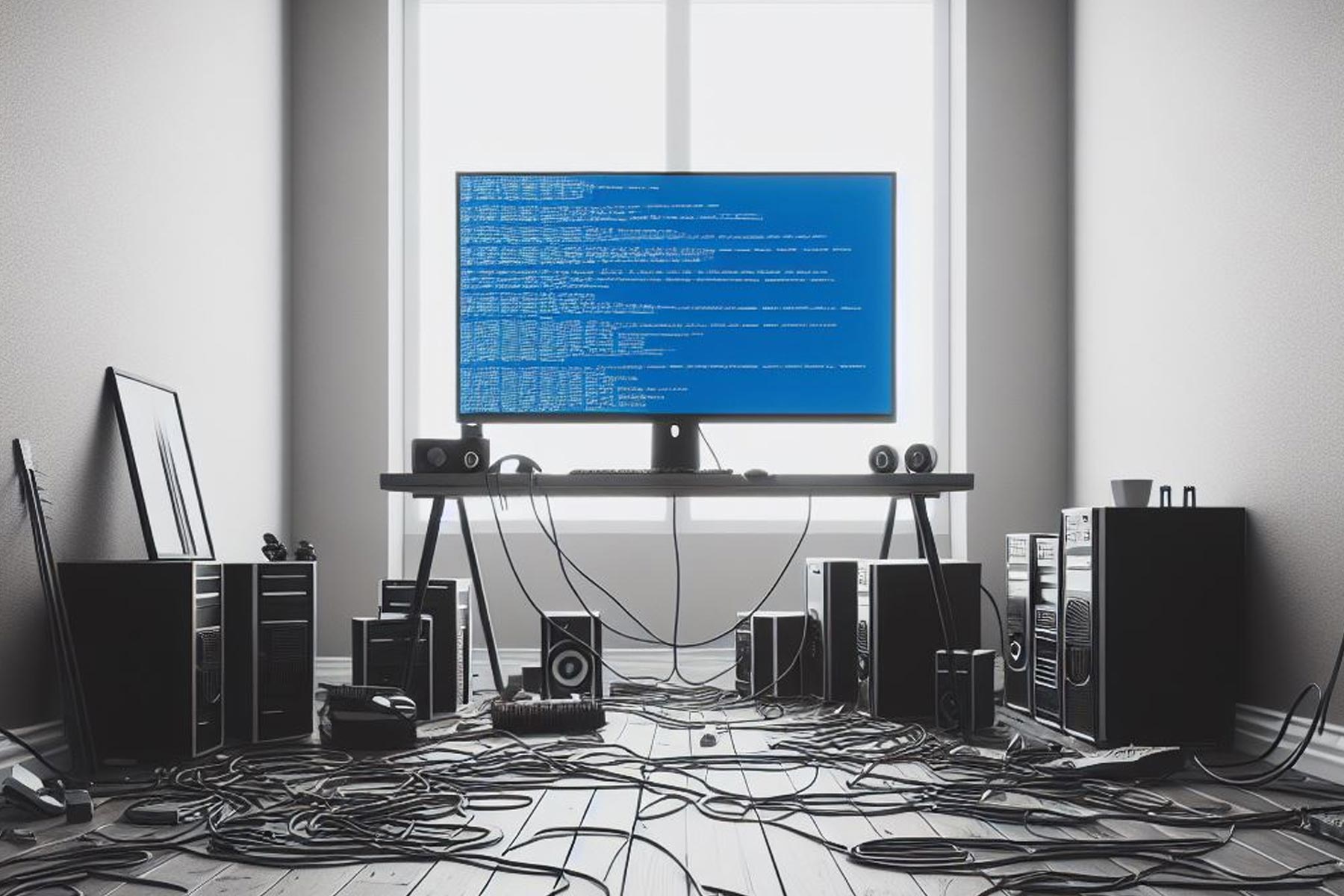
When developing software, sometimes you need to force a system crash or BSOD error, but that’s easier said than done, especially on newer PCs.
However, Microsoft experts have decided to share their secrets and show the developers how to do this properly, and if you want to learn more, keep on reading.
To force Windows to crash, use third-party software, Raymond Chen says
Crashing the system is a part of debugging, and in the past, developers on Windows were able to force a crash simply by using a keyboard shortcut.
Of course, this required a bit of registry tweaking beforehand, but for the longest time, this was a go-to method for many. However, this method no longer works since it’s not possible to automate this keystroke.
According to The Register, the trigger for the crash is located in the input stack of the keyboard driver, which requires physical keys to be pressed.
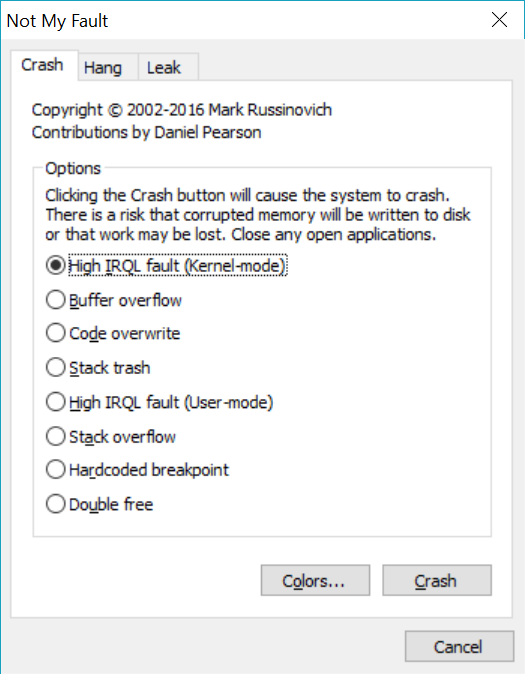
This isn’t possible with modern debugging methods that fully automate this process. However, Mircosoft’s Raymond Chen has a workaround in the form of the NotMyFault tool from Sysinternals.
In case you’re not familiar, this tool can cause the system to crash, hang, or even produce memory leaks, and this can come in handy to developers.
Chen also advises against crashing critical processes such as winlogon.exe since they are getting reported to Microsoft thus causing Microsoft teams to analyze non-existing bugs.
Speaking of bugs are crashes, the latest KB5034763 and KB5034765 updates all have their share of crashes, and we hope that Microsoft will address them soon.
Star Wars is coming back, and we have every reason to be excited!
Early in the 2000s, many of us used to play Star Wars games for hours at a stretch. When they were discontinued, it seemed like the end of an era.
Now, Aspyr Media is bringing back the good old days of Star Wars. In a recent announcement on X(formerly Twitter), Aspyr Media confirmed the release of Star Wars: Battlefront Classic Collection on March 14, 2024.
? ICYMI ?
STAR WARS™: Battlefront Classic Collection launches on all platforms March 14th! ?
The collection comprises Star Wars Battlefront, released in 2004, and Star Wars BattlefrontII, released in 2005, along with bonus maps and more.
The best part, the game supports both online and offline modes and it will be a multi-platform release. So, you can play Star Wars: Battlefront Classic Collection on Xbox, PlayStation, Nintendo, and Steam. Though there’s official confirmation if the game will support crossplay.
What’s new in Star Wars: Battlefront Classic Collection?
Star Wars Battlefront:
Includes a bonus map: Jabba’s Palace
Star Wars Battlefront II:
Bonus Heroes: Asajj Ventress and Kit Fisto
Bonus map: Rhen Var: Harbor, Bespin: Cloud City, Yavin 4: Arena, and Rhen Var: Citadel
With online support for 64 players, you can fly legendary starships, drive your all-time favourite vehicles, and enjoy the expanded Hero Assault on all ground apps. Lastly, the collection includes the 2-player split-screen mode, so you can relive those past experiences with friends!
The Star Wars: Battlefront Classic Collection is available for pre-order on the Xbox Store, Steam, the Nintendo Store, and the PlayStation Store. On pre-orders, you can avail a 10% discount and get the game at $31.49.
If you can’t hide that excitement, play the best free Star Wars games online until you can get your hands on Star Wars: Battlefront Classic Collection.
What was your favourite memory of Star Wars games? Share with our readers in the comments section.
Microsoft’s Reading Coach is an AI-powered tool for students that makes learning fun. Made free recently, the tool is aimed at engaging students and improving reading fluency. It is built on Reading Progress, which was released in Microsoft Teams.
Reading Coach was developed with the interests of students in mind. It allows parents/guardians, educators, and IT administrators to play a vital role and contribute to the student’s learning curve.
Microsoft’s Reading Coach offers the following reading modes and then analyzes your skills with AI:
Creating a story using AI
Reading a pre-set passage
Adding your own passage
This helps students both be better readers and explore the horizons of creativity. The tool assesses the progress made and accordingly adjusts the difficulty level. But is it any good? What’s the initial feedback from parents and teachers? Let’s find out!
Is Microsoft’s Reading Coach any good?
While there are a few alternatives available, we would bet on Reading Coaching because Microsoft is heavily invested in AI. Over the years, its AI-based products will be highly refined and deliver the best to you.
Even in its present state, Reading Coach is an advanced tool employing AI for educational purposes.
A major drawback, we believe, is the lack of support for languages other than US-English. Though Microsoft plans on including more languages and dialects in the coming months.
On the web, there are several reviews available. Most parents found it to be an engaging and effective tool for children.
I believe this app is perfect for allowing the person to be in control of their story.
A teacher liked the fact that it’s integrated with Microsoft Teams and wrote in the Microsoft community,
I LOVE the reading coach tool available in Microsoft Teams and all of the data that it provides.
Surprisingly, at present, it doesn’t seem like Reading Coach has had a massive adoption. The numbers are still low. But since the tool is free, we expect the user base to pick up in the coming days!
Have you tried Microsoft’s Reading Coach yet? Let us know your feedback in the comments section.
Bandai Namco and From Software finally have released an enticing trailer for the Elden Ring Shadow of the Erdtree on their official YouTube channel. The video itself shows that the expansion is set to arrive on Xbox, PS5, PS4, and Steam on June 21, 2024.
The three-minute clip gameplay of Shadow of the Erdtree provides a glimpse of what the game has to offer, showcasing new locations, new enemies, a fiery gigantic creature, the entry of a vicious villain, Mesmer, and more to excite the gamers about what is to come.
While there is no additional information on the storyline in the trailer, but the video description includes a poem:
The Land of Shadow. A place obscured by the Erdtree. Where the goddess Marika first set foot. A land purged in an unsung battle. Set ablaze by Messmer’s flame. It was to this land that Miquella departed. Divesting himself of his flesh, his strength, his lineage. Of all things Golden.
Followed by an announcement on X, (formerly known as Twitter):
In the Land of Shadow, Miquella awaits the return of his promised Lord.
Fans have been eagerly waiting for the gameplay release since the DLC’s announcement in February 2023. A popular leaker, Dealabs’ Billbil-kun, revealed that the game might be available on PS, Xbox Game Plass, Epic Games Store, and more on June 21, 2024.
However, Billbil-kun was not entirely sure about the release date and mentioned that the date aligns with the release date of various special editions of the game, including Elden Ring Shadow Of The Erdtree (DLC included) – Game of the Year edition, and Elden Ring Shadow Of The Erdtree (DLC included) – Collector’s edition on different platforms; therefore, he believes that the DLC will be released on the same date, and the trailer confirmed the same.
This expansion will cost around $40 on all the platforms and a bundle including the base game, the DLC pack will be available on Xbox at the launch of Shadow of the Erdtree.
Dell will soon reset its XPS line-up so Dell XPS 17 will be replaced by Dell XPS 16. And as it happens with older models that get out of the line-up, the laptop got a serious discount.
Now, Dell XPS 17 with the Nvidia GeForce RTX 4060 graphics is $600 OFF, and available in Dell’s store at $1,599 down from $2,199, so it’s a great deal.
Why should I get the Dell XPS 17 laptop?
Let’s see the tech specs below because the numbers don’t lie.
CPU
13th-generation Intel Core i7
GPU
Nvidia GeForce RTX 4060
RAM
16 GB
Storage
512 GB SSD
Display
17.3 inch – Full HD+
OS
Windows 11 Home
Dell XPS 17 is one of the yesterday’s best laptops but it’s still extremely competitive, even for gaming, thanks to the Full HD+ resolution of its large 17.3 inch screen and the Nvidia GeForce RTX 4060 graphics card.
It also packs great power from the 13th-generation Intel Core i7 processor and the 16GB of RAM that will handle even the most intensive processes.
Moreover, it comes preinstalled with Windows 11 Home and its 512 GB SSD has plenty of space for today’s requirements.
The bottom line is that Dell XPS 17 is worth the price and you should take advantage of this great discount until it’s out of stock.
After the cumulative update for Windows 11 KB5034765 was installed, the Copilot button shifted to the rightmost corner of the Taskbar, and the Show Desktop option was disabled by default.
However, there is good news for those who wish to reinstate this setting, and you only have to follow a few simple steps. Press Windows + I to open the Settings app, then go to Personalization, then select Taskbar.
Now click Taskbar behaviors to expand, and place a checkmark next to Select the far corner of the taskbar to show the desktop.
You can also access the Taskbar settings right from the taskbar. Right-click the taskbar and choose Taskbar settings.
Alternatively, if you don’t want to enable this setting, you can press Windows + D to get on the Desktop screen whenever you want.
Also, if you want to remove the Copilot icon from the Taskbar, you can do that from the Taskbar settings. However, if you have enabled the Show Desktop option after disabling Copilot, then you need to disable Show Desktop again and then enable Copilot to get the Copilot icon on the Taskbar.
If you toggle on the Copilot option with Show Desktop enabled, the icon will not appear. This seems to be a glitch, and hopefully, Microsoft will address this soon.
Do you miss the Show Desktop button, or the change doesn’t bother you? Share your thoughts in the comments section below.
Imagine you get a $1500 laptop and expect five years of seamless experience. Two years down the line, it breaks down.
Now, the local repair shop can’t fix it due to the unavailability of official components or because it’s designed in a way that makes repairs difficult. Subsequently, you are forced to contact the manufacturer, who shares an exorbitant estimate. Sounds like a familiar situation?
This is what the Right-to-Repair movement addresses!
What is the Right to Repair movement?
The Right-to-Repair movement advocates providing consumers (or third-party repair shops) with the necessary items and the technical know-how to repair appliances. It’s simple: if you purchase something, you should be able to repair it or go to a repair shop of your choice.
But when was the last time you were able to do that? Over the years, we have become so accustomed to getting electronic devices repaired by the official manufacturer or replacing them altogether that it doesn’t seem like a problem anymore.
And tech giants are benefiting from this lackadaisical approach of ours, minting more money!
Access to the necessary tools and parts: Companies should provide consumers and non-affiliated repair shops with the necessary tools and parts (replacement items) to perform repairs.
Access to information: The technical documents, details pertaining to the software aspect, and other vital information required during repairs should be made available.
Make repairs easier: Products should be designed to make repairs easier instead of practices like parts pairing that make it nearly impossible to replace individual components.
Allow modifications: Companies should permit modifications to their products, especially ones that allow them to be used for a longer period. Windows 10 going out of support is a recent example.
Design products for the future: Products must be future-friendly and should incorporate eco-design practices, ensuring longer life.
What do people think about the right of repair?
Right-to-Repair is the need of the hour! We have all, at some point, been informed by the manufacturer that a repair is not possible or feasible and that we should, instead, replace the product. This recently happened when my iPhone had water damage!
You will come across similar concerns raised by users on the Internet!
We recently conducted a Right-to-Repair survey that comprised 1281 respondents from 124 countries, and the results were surprising.
First, 67% of the respondents have never heard of Right-to-Repair or don’t know how it applies to them. Second, 77% of the respondents were unable to repair their PCs or found the process much too complex. Third, 83% believed there should be some government regulations concerning Right-to-Repair.
Lastly, the not-so-surprising part, 80% wanted to buy a PC from a manufacturer that supported the idea of easy repair.
In all, the awareness around the Right-to-Repair movement is growing, but advocacy groups still have a long way to go in terms of public outreach!
Besides, if companies like Framework can develop modular, easily modified and upgradable PCs, why can’t others follow suit?
Are brands supporting the right to repair?
There has been a change in their approach in recent years, but it has more to do with the laws passed by governments worldwide. For instance, last year, California became the third state in the US, after New York and Minnesota, to pass the Right-to-Repair Act.
The law states that for products between $50 and $99.99, manufacturers must provide the necessary support (documentation, repair parts, tools) for 3 years, and for products over $99.99, 7 years.
Earlier, France implemented a Repairability Index in Jan’21 for five categories of electronic devices based on 5 critical metrics. This was seen as a significant milestone for Right-to-Repair advocates. In recent years, other countries have followed suit and introduced similar measures and laws.
Yet, companies continue to remain hesitant! Because without explicit repair rights, they would lose a major share of their revenue.
Even though they have spoken in favour of Right-to-Repair, the actual implementation of the principles is yet to be seen!
For instance, Apple’s latest iPhone 15, though featuring a more repairable design, has a wide array of software locks that hinder repair and prevent replacement of components. Ultimately, you are forced to go to a certified Apple service center.
iPhone 15
Microsoft, on the other hand, has embraced Right-to-Repair in a relatively user-oriented manner. Surface Laptop 5 is a prime example. The laptop was designed with repairability in mind. Even refurbished Microsoft Surface laptops are in high demand now!
How does the right to repair concern you?
Let’s understand it with an example everyone will relate to. Earlier, both PCs and mobile phones came with an easily detachable battery, which is now built-in. Back then, if there were any issues, you just had to remove the battery, identify the model, and get a new one.
Built-in laptop battery
Now, it’s almost impossible! You will have to unscrew the back panel, which often voids the warranty. If you overcome the first hurdle, then comes the dreaded maze of connections. So, basically, companies are forcing us to contact their official repair center and buy their products.
Similarly, integrating computer chips in almost every electrical appliance is making repair all the more difficult. In the end, it’s you, the consumer, who has to shell out a larger sum!
Let’s not forget the piling of e-waste. Every time you throw away an unrepairable device, it’s a hazard to the environment. The world produced 57.4 million metric tonnes of e-waste in 2021, and it’s expected to increase to 75 million metric tonnes in 2030.
It’s time for you to act! Companies won’t bother unless forced by the laws because the Right-to-Repair movement directly affects their revenue stream.
What do you think about Right-to-Repair? Share with our readers in the comments section.
OpenAI has unveiled Sora AI, a new text-to-video LLM, and although it’s in early development, according to SCMP, a Chinese tech company called Sinodata claims that a deal with Microsoft will grant them priority access to the new model when it is available on Azure.
Moreover, the Beijing-based findata company said it already held a business seminar with Microsoft China on the potential application of Sora AI.
The Chinese joined Microsoft’s AI Cloud Partner Program and recently signed a deal with the Redmond giant to become their partner for data and AI.
Sinodata specializes in generative AI, Web3, and the digital yuan, and it provides enterprise services, including banking and data centre solutions, so it’s a good match for Microsoft’s solutions. After breaking the news with the Microsoft partnership, their shares rose 10% before the trading was suspended.
Why are Chinese interested in Sora AI?
Actual videos created with Sora AI – Source: Open AI
Chinese tech firms have invested heavily in AI and, especially in text-to-video models. According to the SCMP article, another Chinese company called ByteDance have released a text to video LLM: MagicVideo-V2.
There is also another text-to-video model from ModelScope coming from the Chinese firm Damo Vision Intelligence Lab, owned by Alibaba Group Holding, but its video output is limited to two seconds.
Ultimately, a powerful reason for the Sinodata deal with Microsoft is that OpenAI doesn’t release its services in China, due to US sanctioning. However, Microsoft’s Copilot, which is based on the OpenAI model is available in Hong Kong through its products.
An unexpected usage scenario comes from the Chinese company Zhejiang Enjoyor Electronics, a construction service provider. They want to use text-to-video generation tools to assess traffic accident situations by reproducing potential incidents.
Sora AI and text-to-video tools definitely have great potential in many areas, but we still think that its most important impact will be on the advertising industry.
What do you think about the new Microsoft deal and Sora AI? Let us know in the comments section below.
In a recent announcement, Matt Botty, the President of Game Content & Studio, finally put all the rumors to rest by officially announcing the names of the four games’ titles, Grounded, Hi-Fi Rush, Sea of Thieves, and Pentiment, that will be soon be making their way to PlayStation and Nintendo Switch on Xbox Wire.
This strategic move aligns seamlessly with Xbox’s commitment to broadening the gaming community and reaching players across various devices.
Matt Booty also emphasized that Microsoft is dedicated to creating games that inspire and connect players worldwide. These games will be available on the platform by this spring, and here’s a brief overview of what each game has in store:
Pentiment from Obsidian Entertainment, a truly unique, critically acclaimed, and award-winning narrative adventure game with a striking visual style inspired by history itself will be coming to PlayStation 4, PlayStation 5 and Nintendo Switch on February 22.
Hi-Fi RUSH, the award-winning and beloved rhythm-based action game where the world syncs to the music from Tango Gameworks/Bethesda Softworks will be coming to PlayStation 5 on March 19 at midnight UTC, with pre-purchase available on PlayStation 5 digital storefronts on February 22.
Grounded – also from Obsidian Entertainment – a co-op survival adventure phenomenon that has welcomed 20 million players into the backyard, will be coming to PlayStation 4, PlayStation 5 and Nintendo Switch on April 16. Cross play will be supported across Xbox, PlayStation, Nintendo Switch and PC.
Sea of Thieves, the shared world adventure game from Rare, will be coming to PlayStation 5 on April 30 – and will be available to wishlist by PlayStation 5 players starting tomorrow, February 22. Having built a passionate community of more than 35 million players from around the world, the support of cross play for Xbox, PlayStation and PC will allow players to experience epic pirate adventures with friends on more platforms.
These exclusives will join the ranks of franchises like Minecraft, Diablo, Call of Duty, and Overwatch, which are already available on cross-platforms.
With this announcement, Xbox again promised a flagship experience on Xbox consoles, delivering the biggest games in the world available on the console and ensuring first-party games will come to GamePass on Day One, reinforcing its commitment to delivering unmatched gaming experiences to the gaming community.
Are you excited to play these games on your device? Share your thoughts in the comments section below.
According to a recent study by Wiz, over 70% of organizations use AI-managed services. In addition, one of the most popular cloud based services is Microsoft’s Azure.
Furthermore, from June to October 2023, Azure Open AI’s instances grew by 228%. Moreover, at least half of the companies use Azure Open AI or Open AI software development kits.
Why is Azure the best AI cloud service?
Unlike its competitors, Azure integrates better with Microsoft products. As a result, it is easier to use Azure with Office 365 and Dynamics 365. In addition, it offers hybrid cloud capabilities, and companies can manage multi-cloud environments better. On top of that, Azure offers threat protection and data encryption services.
Furthermore, Microsoft invests a lot in AI. Thus, they keep improving Azure AI cloud Services as they evolve. So, companies could easily rely on the service’s machine learning and cognitive services to boost their performance. Additionally, Azure’s data centers are spread across the globe in over 60 regions.
Also, according to the research by Wiz, 53% of the cloud environments use Open AI and Azure Open AI SDK (software development kits). Also, in the future, the number might rise. After all, Microsoft keeps pushing Copilot to its services and Windows 11 compatible devices.
The future of Azure cloud service looks bright. According to Satya Nadella’s post on X, they are going to bring new capabilities to it. In addition, we already know that Microsoft is investing a lot in AI technology.
From Copilot to new data solutions in Microsoft Fabric, we are bringing new capabilities to our Cloud for Sustainability, as we help organizations across every industry move from pledges to progress. https://t.co/JNIcesqIaT
One of the rising concerns about the AI cloud systems, like Azure, is cybersecurity. However, Microsoft is already one step ahead, and you could use the Microsoft Security Copilot to increase your speed at analyzing and responding to cyber incidents.
In a nutshell, if you are looking for the best AI cloud systems, we recommend Azure. After all, Microsoft keeps improving its AI services. On top of that, Azure comes with great cybersecurity and various options.
In addition, Azure is one of the best options available because it integrates easily with devices compatible with Microsoft products. Furthermore, it is wide spread across the globe, so you could use it from different locations, especially if you want to expand your organization.
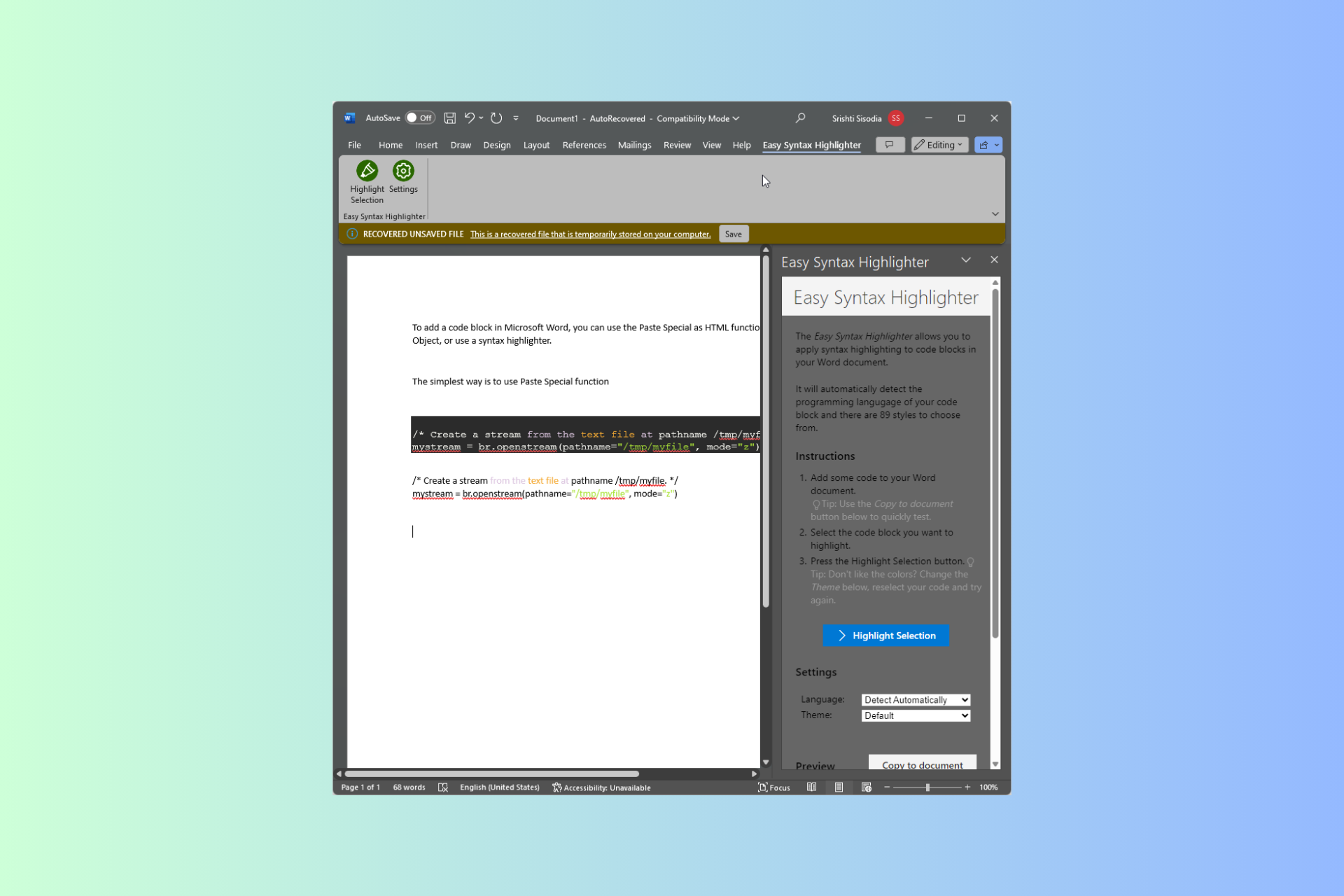
If you are looking for ways to insert code blocks in Microsoft Word, this guide can help! You can either use the Paste Special as HTML function, insert it as an Object, or use a syntax highlighter to get it done.
How can I insert code blocks in Microsoft Word?
1. Use the Paste Special as HTML function
Press Ctrl + A to select the entire code, then press Ctrl + C to copy it. However, if you want to select a certain part of the code, select it, right-click, and select Copy.
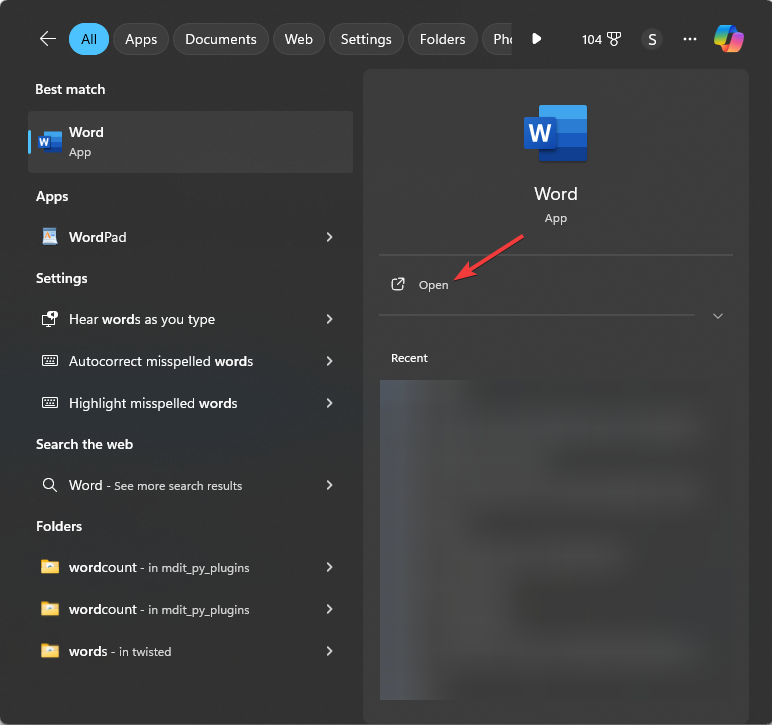
Next, press the Windows key, type word in the search bar, and click Open.
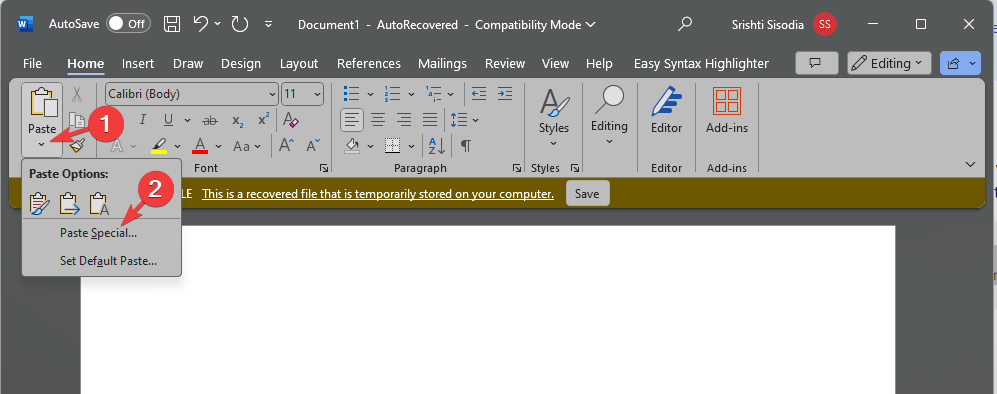
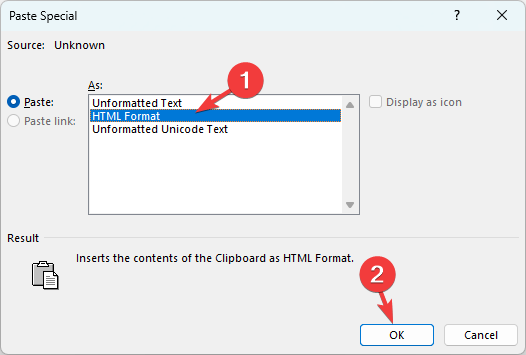
On the Word document, go to the Home tab, then click the drop-down under Paste, and choose Paste Special.
Select HTML format and click OK.
2. Insert an Object
Press the Windows key, type word in the search bar, and click Open.
On the Word document, go to the Insert tab, and select Object.
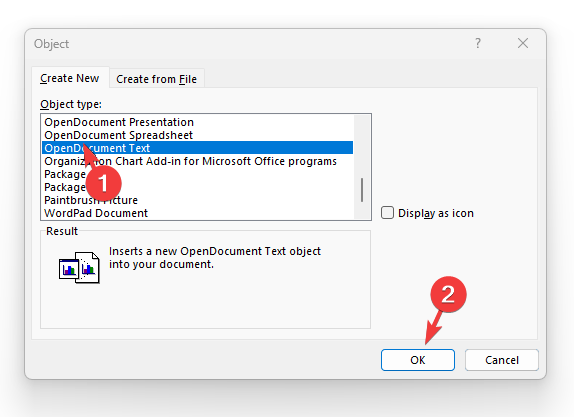
On the Object window, go to the Create New tab, then select OpenDocument Text and click OK.
You will get a new Word document in which you can insert a command or code.
Copy the code from the source, go to the Home tab, then Paste and select Paste Special. Choose HTML format and click OK.
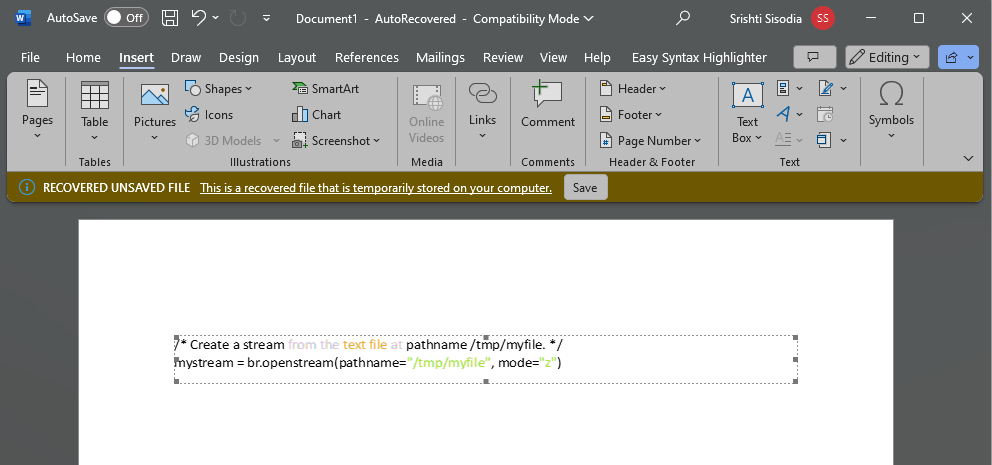
Once you have added the code, close the document. Now, the code will appear in the original document as an object. You can move, resize, and change its border if you want.
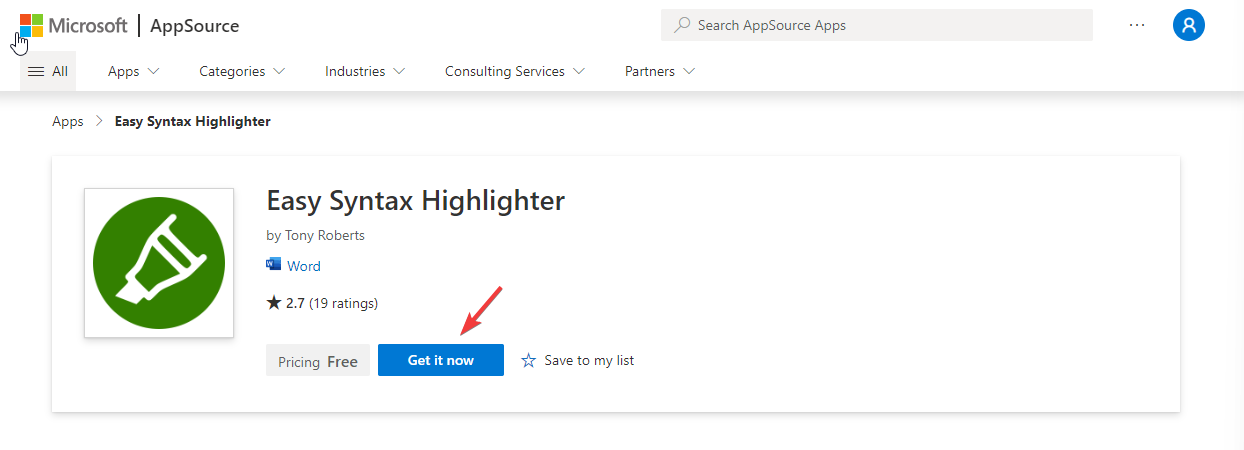
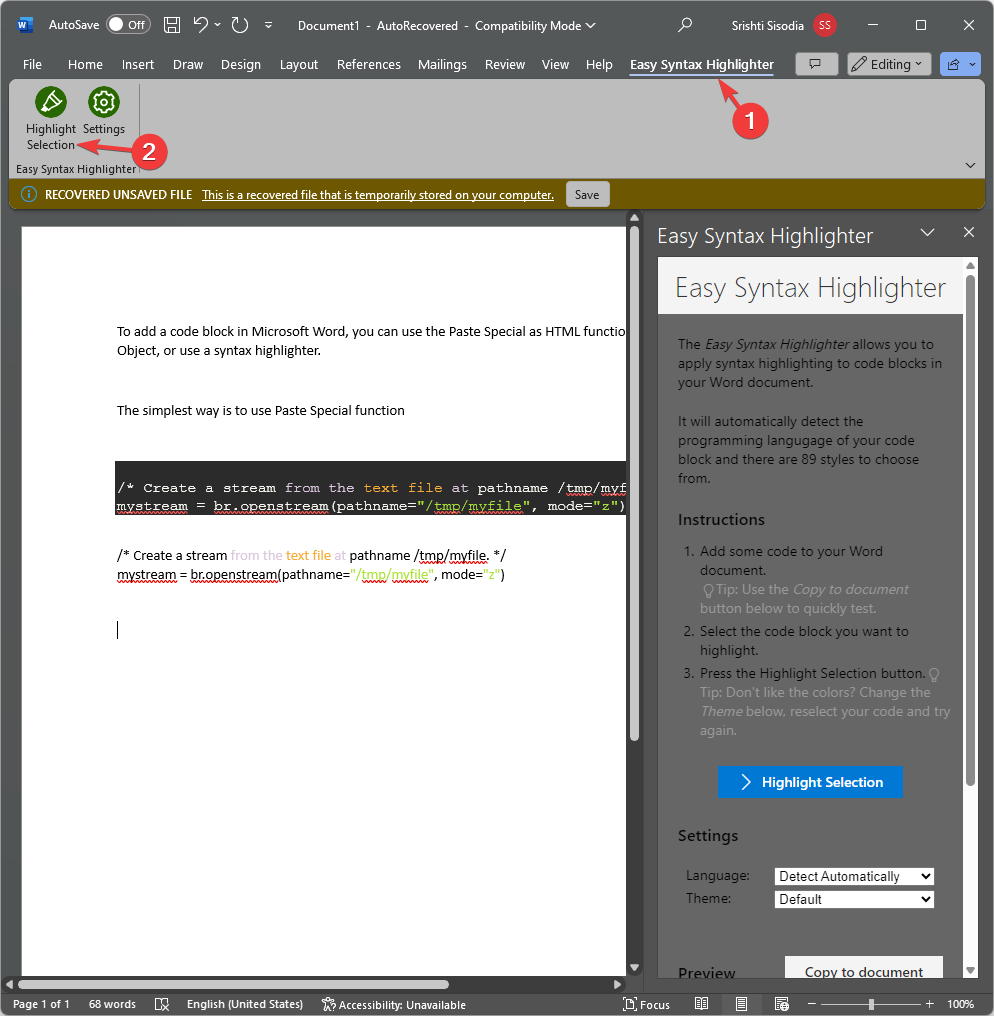
First, go to Easy Syntax Highlighter’s webpage and click Get it now to install the add-in for Microsoft Word.
Copy the code from the source and paste the code block.
Now select the code and go to the Easy Syntax Highlighter tab.
Click the Highlight selection button.
Alternatively, you can also take a screenshot of the code and paste it as an image on your Word document, however, the drawback to this method will be that you won’t be able to make any changes to the code.
To conclude, you can insert code blocks in Microsoft Word by using Paste Special as an HTML function, insert it as an object, or use a syntax highlighter add-in.
If you want to use Word in your browser, you can try Word online; read this guide to learn more about it in detail.
To give an aesthetic appeal to your Microsoft Word document, you can turn on dark mode on it; check out this quick guide to learn the steps. We also have a guide on how to add vertical text in Microsoft Word, so don’t miss it.
If you have any questions or suggestions about the subject, feel free to mention them in the comments section below.
Handheld gaming consoles have a longer history than one may think, dating back to been 1976. Surprised? Auto Race, Merlin released in 1978, ring a bell? It was Nintendo, introduced in 1989, which made the handheld console concept popular.
However, with the dominance of PlayStation and Xbox coming to the market, interest in handheld console faded away until the arrival of Steam Deck in 2022.
Since then, there are a handful of handheld consoles available, and the latest contender is Lenovo Legion Go. Let’s delve into its specs and features to understand what it has to offer.
2x USB-C 4.0 (DisplayPort 1.4, Power Delivery 3.0), 1x MicroSD card reader, 1x 3.5mm headphone jack
Battery
49.2WHr Battery
Size
1.60 x 5.16 x 11.76 inches
Weight
1.88 lbs
Price
$699.99, currently available at $649.99 on the official website
Big screen, and beautiful design
Handheld games like Steam Deck and ASUS ROG Ally are getting popular among PC gamers as well as Xbox fans. Lenovo Legion Go stands out with its expansive screen of 8 inches, and QHD + 144 Hz display, which is bigger than Steam Deck and ASUS ROG Ally, both featuring 7 inches of screen.
However, Legion Go doesn’t have a VRR FreeSync, which means you have to tone down the visual settings to medium to avoid any stuttering issue during gameplay, which is not a concern for its contenders, Steam Deck or ASUS ROG Ally.
The design of the console gives it a professional look and comes in a beautiful black color, but it is prone to smudging even if you have clean hands. So, if you like to keep your console squeaky clean, you might need a cleaning cloth every now and then.
Another thing that adds to the aesthetic appeal of the device is the mini trackpad, which addresses the issues of touch controls on Windows 11. However, it is not as smooth as the one offered on Xbox.
The next thing is the detachable joysticks, reminiscent of the Nintendo Switch, which makes it different from Steam Deck and other competitors in the market.
It also comes with a carry case that allows one joystick to dock and act as a joystick-mouse hybrid. It is ergonomic for swift movements, especially for aiming for shooters; however, the extra buttons and triggers to mimic a keyboard make it a bit complex to handle.
The addition of buttons and triggers can be great for productivity tasks if you use them on a desk. Another drawback is that the package doesn’t include a desk but compensates it with a robust kickstand, which is directly integrated into the chassis, making it a great travel companion.
The device weight is 1.88 lbs, which is quite higher than ASUS ROG Ally (1.34 lbs) and Steam Deck (1.475 lbs), which can be justified due to its larger display and powerful cooling system.
Device settings and preferences
Legion Go has a simple process to update drivers and allows you to customize various settings, including RGB preferences. However, when compared to ASUS, there is room for optimization for Lenovo devices.
The handheld device can also configure trackpad settings to enhance usability, offering flexibility while performing various tasks.
You can also adjust performance settings to balance power consumption & gameplay experience, and the cooling system makes the device suitable for prolonged gaming sessions.
Spectacular performance and long battery life
Lenovo Legion Go comes with an AMD Z1E chip for graphics processing and allows you to boost VRAM through BIOS adjustments, which can be a minor convenience for some.
Like its counterparts, Legion Go also offers 3 hours of battery life under normal circumstances. However, if you are indulging in intensive gaming, have set the resolution to maximum, and use the high-end settings, the device might only last for 30 minutes or less.
Therefore, to get the best out of this handheld device, you need to adjust its settings, including frame rate and resolution, according to your immediate needs.
To modify preferences on the go, the device comes with an overlay menu, which can be accessed using a button placed at the top-right corner of the display.
You can also carry a power bank or sit near a power outlet for extended gaming sessions. If you like to play games on a bigger screen for change, you can connect it to a TV for a better viewing experience.
To conclude, with the advent of these powerful handheld consoles, gaming enthusiasts now have the flexibility to choose a device that suits their unique gaming style.
If the speculations related to Xbox and PlayStation entering into the handheld console arena are true, we can anticipate a huge surge in the market.
Furthermore, gamers are eagerly waiting for the release of the Nintendo Switch. All of these rumors have led them to anticipate that soon, players like Dell, Razer, and other PC manufacturers will announce their products.
If you like a big screen, bulkier design don’t care about VRR FreeSync, and are looking to explore the myriad of features that Legion Go has to offer, it is definitely the compelling choice for you.
If you’ve used any of these handheld gaming consoles, we’d love to hear about your adventures in the comments section below. Share your experiences with us.
Your browser security is essential since many exploits happen during browser sessions. This can be a problem in organizations, especially when managing tens or hundreds of devices.
To make security management easier, Menlo Security is here with a new service, that should protect all employees in organizations.
A new service from Menlo Security manages browser security from the cloud
Menlo Security has unveiled a new service that makes managing security policies easier in browsers according to Security Boulevard.
Vice president of Menlo Security, Andrew Harding, stated that Secure Enterprise Browser allows administrators to manage Menlo Secure Cloud Browser and isolate and filter browser traffic in the cloud.
Thanks to the zero-trust policy, all cyberattacks that are targeting browsers will be prevented from reaching the endpoint that is using Menlo Secure Cloud Browser.
This doesn’t mean that users will have to forgo their favorite browser. Instead, Menlo Security plans to handle web access requests on the cloud. This allows the service to scan all requests for malware and phishing attacks before they reach the user’s web browser.
By doing so, security teams won’t have to manage SSL/TLS certificates for every browser, which will make the job of security administrators a bit easier.
This service will also ensure that browser settings are properly configured, and not automatically changed after an update. There’s also a data loss prevention feature that will enhance features such as data masking, watermarking, and others.
Lastly, there’s an option to apply Menlo Browser Extension to unmanaged devices. Currently, this platform has approximately eight million users in around 1000 worldwide enterprises and organizations.
With Visual effects, you can improve the Windows user interface with the help of drop shadows, font changes, and other animation options.
However, if you are using a primary PC or laptop, enabling these settings can take a toll on your device’s performance. Let’s know how to increase performance and get better graphics on any Windows 11 machine.
How to boost Windows 11 performance and get better graphics?
Press Windows + I to open the Settings app.
From the left pane, select Accessibility.
On the right pane, under Vision, locate and click Visual effects.
Look for Animation effects, and toggle off the switch to disable the feature.
Benefits of disabling the feature:
If you are facing display issues, consider disabling this setting before getting hardware upgrades to fix the problem.
In case you are not a big fan of aesthetic appeal but want improved performance, you should keep this setting off.
You also get a smoother monitor refresh rate and improved gameplay, which is beneficial if you don’t have high-end CPUs or GPUs.
If you want to enhance your Windows 11 performance, here is our guide on the best performance settings.
Did you notice any difference after turning off the Animation effects? If yes, share your experience in the comments section below.
World of Warcraft has its issues but constantly kicking you out with a wow51900328 error displayed when you make a login attempt has to be on top of the list.
Most of the time when you can’t log in to WoW, it’s a server issue, internet connection problems, or incompatibility with game mods.
How do I fix wow51900328 error?
1. Reset WoW user interface
Start by checking the WoW servers to ensure everything is up and running.
Exit World of Warcraft.
On the main home page, click on Options, then select Show in Explorer.
Within the popup menu that opens up, double-click on the WoW folder.
Find and rename the Cache, Interface, and WTF folders to CacheOld, InterfaceOld, and WTFOld.
Launch World of Warcraft again so as to enable the changes.
Uninstall add-on managers to make sure they’re not causing any unwanted game interference.
Delete specific files in the Virtual Store directory.
Set Windows to show hidden files and folders
Go to C:Users%username%AppDataLocalVirtualStoreProgram FilesWorld of Warcraft
Delete the Cache, Interface, and WTF folders >close Windows Explorer > restart your system
Launch WoW again.
Although resetting the user interface reverts all customizations to default settings, it can help troubleshoot the wow51900328 login issue.
You can later customize the WoW interface by gradually changing a feature and observing its behavior. This can help you narrow down which setting is causing conflicts with the game and do away with it.
2. Disable firewall/antivirus temporarily
Hit the Windows key and click on Settings.
Select Privacy & security.
Click on Open Windows Security.
Select Firewall & network protection.
Click on Public network.
Next, toggle Microsoft Defender Firewall off.
Try accessing the page again.
If disabling your security software resolves the wow51900328 error, you may need to configure the exceptions list and allow World of Warcraft as an exception.
3. Scan and repair your WoW client
Launch Steam, go to WoW, and click on Options
Select Find in Explorer > open the Data file
Delete the Indices file.
Open again the Battle.net app, then go to Options
Click on Scan and Repair, and then wait
Close the app and launch it again as Admin. You should now be able to play WoW on your Windows computer.
4. Flush DNS cache
Press Windows + R to open Run, type cmd, and hit Ctrl + Shift + Enter.
Click Yes in the UAC prompt.
Now, paste the following command and hit Enter:ipconfig /flushdns
Once done, restart the computer for the changes to come into effect.
On the home page, select the game you wish to uninstall, then click on the Settings icon beside the Play option.
In the pop-up menu that opens up, click on Uninstall option.
A confirmation prompt will open up; click on Yes, Uninstall.
Open up the Blizzard app again on your PC and log in to your account with your credentials.
Once you have logged into your account, select WoW and click on the Install option present at the bottom and follow the prompts to install the game.
Tips to prevent future login errors in WoW
Always connect to a stable and fast internet connection.
Keep your game client and drivers updated at all times to avoid compatibility issues.
Limit the number of mods and add-ons you use on the game. If necessary, download from a trusted source and keep them updated to avoid WoW add-on errors.
Regularly keep tabs on the server status to know when they’re scheduled for maintenance or downtime.
Clear cache files occasionally and avoid overcrowded servers by playing during off-peak hours.
Despite WoW disconnection errors being in plenty, there are certain steps you can take to ensure they occur less often. And if everything checks out on your side, feel free to contact Blizzard for further assistance.
When it comes to other aspects of the game like WoW not using the GPU, you can easily tweak your PC’s settings to address the issue.
Don’t forget to check out how to manage packet loss so that you can explore and enjoy the game to its full potential. Additionally, we have a recommendation of the best laptops to play World of Warcraft to ensure you have an immersive experience.
That’s all we had for WoW error wow51900328. If you have any other solutions not mentioned here but worked out for you, we’d love to hear about them. Drop us a line below.