Why there are so few touchscreen games on Windows? No incentive, apparently

Ten years ago, I’ve had a lot of fun with an iPad 2, with hundreds of games from the App Store. Now, I’m fiddling with a Microsoft Surface tablet and the old kid in me wants to play, but there’s literally nothing in the store to enjoy.

Yes, I know that the Surface tablets were mainly created for business and productivity, but what do I do in the few breaks I take? There are just a few touchscreen games to enjoy, and the most notable of them is Civilization. The others are just simple arcade or match games. Why aren’t there more?

Why are there so few touchscreen games for Windows?

Apparently, it all comes down to sheer numbers. First of all, Windows is installed on less than 3% of touchscreen devices. Developers wouldn’t move a muscle on that kind of market, and the result is obvious.

Furthermore, Windows gamers are much more competitive; they want something other than the touchscreen interaction. They want precision mice for that perfect shot, a high-quality display with 60 FPS and over 120 Hz refresh and mechanical keyboards with programmable keys, not unreliable capacitive contact.

Gamers have been incentivized to play in professional competitions, even televised and watched by millions. And the prizes offered in these competitions have also become huge. Touchscreen gaming is the definition of casual gaming, defined by short bursts of fun, and there’s no competition around them, except those with friends, of course.

Lastly, you can still enjoy tablet games on Microsoft Surface thanks to the Windows Subsystem for Android. And that’s what I did. I installed the app available in the Microsoft Store and played my favorite Android titles happily on my touchscreen.

So, to sum it all up, gamers don’t want tablet games, so the developers don’t create them. There is no trend for them, therefore, no one cares.

Handheld gaming consoles? That’s a different story because they combine a great screen with powerful processing and reliable gamepad controls. Microsoft is preparing a new handheld gaming console and we can’t wait to see what is like.

In the meantime, Surface tablets are for productivity. Get the gaming fun to the tablet from Android!

Would you like more touchscreen games for Windows? What games would those be? Tell us all about that in the comments section below.

Working with video? Here’s why the new Sora AI should scare you

The inevitable has happened! Open AI has unveiled Sora AI, a new model that creates video from text, and the results are stunning.

Don’t panic just yet because the new LLM is only making one minute clips, but the developer is testing it right now.

Specifically, we train text-conditional diffusion models jointly on videos and images of variable durations, resolutions and aspect ratios. We leverage a transformer architecture that operates on spacetime patches of video and image latent codes. Our largest model, Sora, is capable of generating a minute of high fidelity video. Our results suggest that scaling video generation models is a promising path towards building general purpose simulators of the physical world.

Open AI

How does Sora AI work?

The technical report from Open AI is a specialized read, but basically, Sora AI is turning visual data of all types into a unified representation that enables large-scale training of generative models.

If you see the video above, you definitely can’t tell that it’s AI-generated. All the textures, skin, and face look natural, even though the clip is flooded with detail and objects.

Open AI uses video patches instead of text tokens to train their LLM:

At a high level, we turn videos into patches by first compressing videos into a lower-dimensional latent space, and subsequently decomposing the representation into spacetime patches.

Open AI

Training an LLM with video requires large amounts of data to process. They are trying to reduce the dimensionality of the visual data while the network gets the raw video input and outputs a compressed video both temporally and spatially.

From the results, we understand that Sora AI is more than capable of delivering high-quality video. As we mentioned in the beginning, although now it’s limited to one-minute clips, in time, it will clearly be able to create commercials and, why not? whole episodes of your favorite show.

How will Sora AI change the industry?

It’s easy to see why Sora AI is met with excitement and anticipation, but many professionals working in the video industry are frowning right now, and for good reason.

As a marketing specialist, why would you spend a considerable budget to film a commercial in an exotic spot when you can create it on the computer in a couple of hours?

The advertising industry is a monster worth billions of dollars annually. Still, it feeds everyone in the video industry, including the copywriters, the filming crew, the director, the set, and many, many more specialized crews that we don’t even know are involved in the process.

The commercial/ads industry will probably change in time, but in the near future, the first who will be affected will be the royalty free video content providers.

Who will want to buy a short clip when they could create it in a few minutes with Sora AI?

Relax, the future is not that grim

Now, everyone said that AI will replace the journalists and content writers, but that turned out to be a mess. Microsoft is creating its ow news reel, but they will use AI to train the journalists and provide them with more information, not write the news directly.

Right now, search engines are trying to identify and exclude AI-generated content because many times it turned out to be inaccurate and hallucinating. You still need human journalists to discern right from wrong, to make the correct connections and write a piece like this one.

It’s the same thing with images. Meta is exposing the AI-generated images, And the search engines will probably follow suit and flag the fake photos.

That’s probably going to happen with the videos as well. But right now, text-to-video and Sora AI are in their infancy and facing some real conceptual problems.

For instance, if a generated character bites from a cookie, there is a chance that the cookie remains intact. That’s not because Sora AI doesn’t know what a bitten cookie should look like but because it doesn’t correctly understand the matter subtraction.

Sora AI has a long way to go until it delivers the right results, and Open AI hasn’t released it to everyone yet. It’s in a limited tested preview for specialists from the industry and the developer didn’t announce any date for its public release.

What do you think about Sora AI and text to video? Let’s discuss it in the comments section below.

Edge is getting better, to allow multiple search engines from the search box

Microsoft’s approach with the native browser, Edge, has been criticized over the years. Be it the push as the default browser or Edge stealing tabs from Chrome, it often made news for the wrong reasons. But this time around, it seems like Edge is become more user-oriented!

Microsoft is reportedly testing a new feature in Edge Canary (the preview version of the browser), which will allow you to manage search engines and use different ones in the same window.

Called Show additional search box in the toolbar, the feature lets you configure the preferred search engine and set different ones for the search box.

First reported by Leopeva64 in a post on X (formerly Twitter), the feature is still in the early stages and will soon be released for all. Though there’s no specified timeline.

Since the Manage search engines page is not working in Edge, as reported by Leopeva64, it’s likely that Microsoft is implementing some major changes to simplify searches.

The feature is expected to be Microsoft’s response to the Digital Market Act (DMA) in the EU, which facilitates healthy market competition. Chrome, too, recently made a similar change and allowed you to switch between search engines easily.

Whether this will affect Microsoft Edge’s user base, only time will tell. At present, Edge lags behind Chrome by a considerable margin. According to Statcounter, while Chrome commands a 64.38% market share, Edge stands at 5.35%.

To keep up with the competition, Microsoft has upgraded Edge in Windows 11, added a wide array of new features, integrated AI into the native search engine, Bing, and added AI-powered photo editing.

If you are using Edge Canary, share your thoughts on this new search upgrade in the comments section.

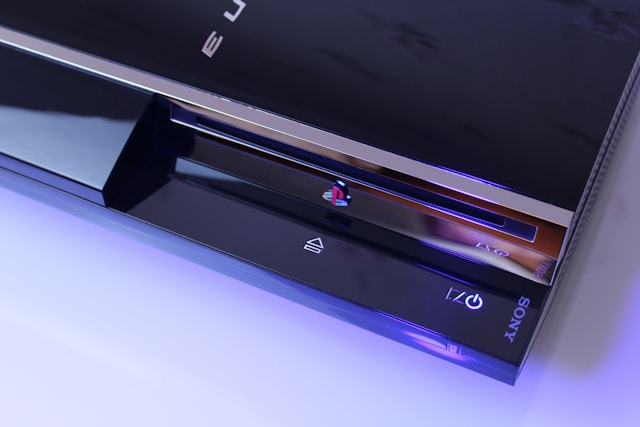
PlayStation’s Yellow Light of Death (YLoD) remains a concern. Here’s what it means

PlayStation’s Yellow Light of Death, or YLoD, has been present for years, but we still don’t know much about it, unlike issues with other similar devices. This has left many concerned about whether you can get the PlayStation to work after the problem.

Though not widespread, we have come across reports of Yellow Light of Death from over ten years ago.

We also came across more recent reports. The good news is that it’s still a rare occurrence. But Sony’s unclear response doesn’t help, and you are often forced to take the console to a certified service center. Is there something you can do to fix PlayStation’s Yellow Light of Death?

What is PlayStation’s Yellow Light of Death?

Tip icon Tip
Do not open the console or replace any components unless you are absolutely sure of the process. Also, this may void the warranty.

It basically indicates a hardware problem with one of the components, and this is, more often than not, caused by overheating. A PlayStation should be kept in a well-ventilated environment for effective heat dissipation, and the fan’s side shouldn’t be covered.

Your primary approach should be to let the console cool down, and it should automatically get things up and running. If that’s indeed the reason, replace the thermal paste and check for issues with the console fan. For the latter, replacement is the best course.

Also, clean the internal components and get rid of any dust accumulation.

Besides, there’s a high possibility of issues with BGA or problems with the solder ball connections from the motherboard to the CPU/GPU.

In some models, Sony used lead-free solders, which, though environmentally friendly, do not perform well under thermal stress and are often the reason behind YLoD.

Previously, many have used a blower to heat up the motherboard so that the loose components melt back into it. This is not the right approach, but if you have already given up on the console, heating it won’t be such a bad idea!

Experts recommend that you perform a few basic checks related to overheating, and if the Yellow Light of Death persists, contact Sony support for more help.

Tips to prevent YLoD from appearing

  • Place the PlayStation in a ventilated space and make sure it’s not covered from any side.
  • Keep the console away from dust.
  • Turn off the console when not in use.
  • If the fan makes too much noise even when not playing games, get the console inspected.

Even though your options are limited when faced with PlayStation’s Yellow Light of Death, taking good care of the console will prevent the situation from arising in the first place.

If the console is beyond repair, you can always use an effective PS3 emulator to play the same games on a PC.

Did you manage to fix PS3’s YLoD? Tell us in the comments section.

Firefox tests Native Website Translations on Android

After desktop, Mozilla is working on bringing the ability for Firefox to translate webpages on Android. The Firefox translations feature, which is currently working in the Nightly version of Android, has been spotted by us.

For Windows, Mac and Linux, Mozilla Firefox introduced native in-browser translations with version 118 released in December 2023. This means you can translate web pages directly within the browser in real-time, without needing external extensions.

Translations happen locally on your device, ensuring privacy and security. Currently supported languages include Spanish, English, German, Bulgarian, Portuguese, Italian, French, Polish, and Dutch, with more languages coming to Firefox in future versions.

Unfortunately, native translations are not yet available on the Android version of Firefox. However, Mozilla is actively functioning on adding this feature to the browser on Android platforms. Here’s our first look at it.

Firefox’s native Translation feature is coming to Android

Unlike Google Translate or the translation feature in Microsoft Edge, Firefox language packs are downloaded onto the user’s device, and translations are done locally. This means Mozilla doesn’t know or record what webpages you translate.

When you come across a page that’s not in your spoken language, similar to the desktop version, Firefox will show a translate icon in the address bar on Android. Just tap it, choose a language from and a language to translate the website into, and tap Translate. Firefox will handle the rest.

Firefox Android translate options and Settings

Firefox offers translation options that include toggles for:

  • Always offer translate option
  • Always or never translate a particular language
  • Never translate that specific site

The translation settings include:

  • Offer to translate when possible
  • Always download languages in data-saving mode

Translation Preferences:

  • Automatic translation: Select a language to manage ‘always translate’ and ‘never translate’ preferences.
  • Never translate these sites: [List of specific sites to exclude from translation]

Private translation in Firefox for Android is currently in Beta. For your privacy, translations never leave your device, according to Mozilla’s claims through the translate banner. The banner also promises support for new languages and improvements soon.

What’s your take on Firefox’s built-in webpage translation feature on Android? Let us know your thoughts in the comments below.

Mute and unmute yourself easily on Microsoft Teams with AirPods on Mac

Soon, you will be able to mute/unmute yourself from your AirPods on Microsoft Teams for Mac. This feature isn’t new. After all, it was available on iPhone XS and XR and older models since iOS 17. Thus, if you are an iPhone user, you might know how it works already.

How to mute/unmute yourself on Microsoft Teams with AirPods?

To mute or unmute yourself by using AirPods on Microsoft Teams for Mac after the update, you will need to tap the control on the stem. So, once Microsoft implements the feature, you will no longer need to mute and unmute manually.

This feature is useful, especially if you have someone causing background nosie or if you switch places during a meeting. In addition, according to the Microsoft 365 Roadmap, this option is coming to us this March. Another important thing you should know is that the feature works only on Mac models running macOS Sonoma.

Furthermore, Microsoft and Apple are starting to work together to bring users even more quality of life updates and better apps. For example, Apple split iTunes into three other applications to make it work better. However, you will still need iTunes to allow the new apps access its library.

All things considered, we are eager to see more features and applications from Apple and Microsoft. In addition, we can’t wait for the mute/unmute feature for Microsoft Teams to be available on Mac while using AirPods. After all, it will be a great help, especially when someone starts making a lot of noise in the background.

Additionally, you might want to learn how to move your content from iTunes for Windows to the other applications. However, keep in mind that the applications are still a work in progress.

What are your thoughts? Do you consider this feature useful? Let us know in the comments.

Outlook will soon tell on you if you’re working and where you are

A new feature coming to Microsoft Outlook will allow you to set your work hours and location. Thus, if you are a remote or hybrid worker, you will most likely enjoy it.

In addition, the feature might help Copilot set up your meetings better than before. Also, this work hours and location feature will be available on Windows and Mac.

When will the work hours and location feature be available on Outlook?

The new feature will arrive next month on preview builds. Yet, Microsoft could delay it if there are any issues. After all, Copilot might schedule your future meetings using this feature. On top of that, it is crucial to function properly, especially if you keep traveling while working. Otherwise, unwanted situations could happen. In addition, this location and working hours feature will be available only on desktops.

Fortunately, you will have to set the work hours and location manually. So, you don’t need to worry about security breaches or bring tracked.

To use this feature, you will need to:

  1. Open Outlook and to go to Settings or press on the Cog Wheel.
  2. Go to the Calendar tab and click on Work Hours and Location.
  3. Customize your calendar and click Save.

Ultimately, this feature is more of an upgrade to the Outlook calendar. Furthermore, we find it quite useful, and we think that it could fix some delays and some problems if it used correctly. Although, you should be careful about your location at times. After all, if something urgent comes up, you might need to switch places, and it might confuse some team members.

Unfortunately, we don’t know if the option will become available on mobile devices. Thus, if it becomes a success, Microsoft might consider it.

What do you think? Are you going to use this feature? Let us know in the comments.

The malware dropper TicTacToe is targeting Windows users

TicTacToe is a new malware dropper that targets Windows users. Moreover, it delivers final-payloads in malicious attachments like mails. Unfortunately, TicTacToe comes with different malware to steal your data. In addition, this malware is difficult to detect because it changes the final-payloads.

What does a dropper malware do?

A dropper malware installs malicious files into your computer. Furthermore, they could be used to steal your information and to damage your system. In addition, this type of malware can hide itself from antivirus programs. Moreover, you might find the TicTacToe malware dropper in phishing emails as an .iso file. Once executed, it will start adding DLL files into your memory.

Unfortunately, the malware seems to be in development because it has multiple strings. Also, researchers think that groups of threat actors use the malware. So, they alter it according to their needs. On top of that, they believe that cybercriminals trade the tool actively as a service. In addition, cybercriminals are using the TicTacToe malware dropper to deliver the following final-payloads Leonem, AgentTesla, SnakeLogger, RemLoader, Sabsik, LokiBot, Taskun, Androm, Upatre and Remcos.

The name TicTacToe comes from Kolko_i_krzyzyk, a common Polish language string encountered by researchers during earlier stages.

To protect yourself and your organization from the TicTacToe malware dropper, you will need to run hash based detections. Thus, you will need a behavior-based endpoint security application, especially since the malware keeps changing. In addition, you could consider getting the FortiEDR. After all, the tool comes from the researchers who managed to identify earlier versions of the TicTacToe dropper.

Ultimately, we recommend you don’t download any suspicious files from unknown users. In addition, keep in mind that the TicTacToe malware dropper is commonly hiding in emails. So, make sure to check the source or to verify on the internet if the file could possibly have malware.

What are your thoughts? Are you ready to deal with malware attacks? Let us know in the comments.

Skype Preview has new AR lenses powered by Snap

Skype Preview was released last week, which brings the version to  8.113.76.207, and the Skype camera got a significant upgrade. Along with the transcription of voice messages and a new reaction picker, it now has 25 new AR lenses powered by Snap, including Mad Scientist and Glossy Smile.

In an official announcement on X (formerly known as Twitter), Skype Insider announced:

In the official release notes on the Skype Insiders says:

Skype’s camera just got a major upgrade with a treasure trove of over 25 new AR lenses powered by Snap! Now, your chats can be as expressive and animated as you are.

  • ? Snap & Transform: Access the new array of lenses with a tap on the smiley icon, and pick your new virtual look.
  • ? Switch & Snap: Easily flip the camera to center stage and find your best angle.
  • ? Lenses Galore: From ‘Glossy Smile’ to ‘Mad Scientist’, choose from a variety of creative lenses that best match your mood or message.
  • ? Record with Flair: Hold down the record button to capture your personalized video message.
  • ? Share the Fun: Send your lens-enhanced videos to friends and family for an extra burst of joy in your conversations.
  • ? Avatar Makeover: Tap the smiley to sprinkle some Snap magic when updating your Skype avatar too!

Dive into Skype’s playful side with Snap lenses on mobile platforms and add a dash of flair to every call and message! ??

These AR lenses are available on Skype 8.113.76.207 for Android and iOS platforms. If you are an Android user, you can download the app from the Skype official website. However, iOS users can only access the Skype beta version if they have an invitation from Microsoft.

Have you tried the new AR lenses? If yes, then share your experience in the comments section below.

Exciting News: Skype Preview comes with voice message transcription

Microsoft has rolled out an update for Skype Preview, bringing it to version 8.113.76.207. You can download it on all compatible platforms.

With this, it now has the feature to transcribe voice messages into text. Moreover, the release includes a reaction picker with more emojis and improved sorting for a better user experience.

Voice transcription is a valuable feature when you are not able to listen to voice messages or don’t prefer to. You can tap on the Pencil button; then Skype will process and transform the message into readable text, adding convenience and flexibility. Furthermore, this feature can serve as assistive technology for people with disability.

On SkypeInsider Release Note, Microsoft introduced Skype’s Audio transcription feature and stated:

Enhance your audio messaging with Skype’s latest feature – Audio Transcription! Building on our recent UI improvements, we’re excited to unveil an addition that transforms how you interact with voice messages.

  • ?Transcribe on Tap: Discover the power of clarity with a single click. Activate the audio transcription by tapping the “A with a pencil” icon and watch your voice messages convert into text in real time.
  • ? Seamless Integration: Our transcription feature is seamlessly integrated into the refreshed audio messages UI, ensuring a harmonious and intuitive user experience.
  • ? Visual and Textual Harmony: Experience the best of both worlds as the waveform and text transcription coexist. Engage with audio messages either by listening or reading, or both!
  • ? Instant Understanding: Don’t miss a beat with immediate transcriptions that help you grasp the essence of messages faster, perfect for quick reviews or when you’re in a noisy environment.
  • ? Enhanced Accessibility: Skype’s commitment to inclusivity shines brighter with audio transcriptions, making audio messages accessible to everyone, including those with hearing impairments.

Dive into a comprehensive audio chat experience across all platforms, where every voice message is not just heard but also seen and understood. Welcome to the next level of communication on Skype!

Another significant change can be noticed in the reaction picker. Microsoft explained all the changes made:

Dive into Skype’s Enhanced Reactions Navigation! ??

Introducing a more intuitive and efficient way to express your feelings in Skype chats on mobile with our latest update to the message reactions screen!

  • ? Top Menu Selector: Elevate your chatting experience with our innovative menu selector, now positioned at the top for effortless navigation. Simply long press a message, tap the ‘+’, and glide through the new menu to explore a broader spectrum of emotions.
  • ? Easy Navigation: Say goodbye to endless scrolling! Our top menu selector allows you to swiftly jump between categories like Love, Celebrations, and Agreement, making it a breeze to find your desired reaction.
  • ? User-Friendly Design: Enjoy a seamless interaction with our refined interface. The top menu selector enhances usability, ensuring your favorite reactions are always at your fingertips.
  • ? Expanded Emoticon Library: Discover even more ways to express yourself with additional emoticons and GIFs neatly categorized for quick access.

Prepare for an upgraded, smoother, and more joyful reacting experience in your Skype chats! ??✨

The update also introduced 25 new AR lenses powered by Snap and a bug fix related to multiple missed call messages showing up in chats.

If you want to access these new features, you need to join Skype Insiders and visit the Skype Insider Program website to get it today. In case you want to learn some interesting facts about Skype, read this guide.

Have you tried this feature yet? If yes, feel free to share your experience in the comments section below.

Microsoft’s Help me create will refine content creation

Microsoft is extensively working on integrating AI into its products, and now, the tech giant is introducing Help me create to Microsoft 365 web, the online version of Word, PowerPoint, Excel, and OneNote.

According to information available on Microsoft 365 Roadmap, Help me create is powered by Copilot and is developed keeping in mind, security, privacy and compliance.

Surprisingly, it has been available since October’23 in preview and will be finally rolled out for everyone in February’24 for Microsoft 365 Web.

At present, Microsoft hasn’t shared much information about the feature set of Help me create or its primary functions. But based on the description, it will, more or less, have to do with creating content, summarizing documents, assessing the tone, or making quick modifications.

Microsoft has already worked on bringing Copilot to Word and integrating Copilot into PowerPoint, so it only makes sense that your everyday AI companion is available on the web version of these apps in one form or another.

Whether the web version will have a similar dedicated Help me create panel, as is the case with Copilot, will only be evident once the feature is rolled out in the coming days.

No matter what, we are excited, and so should you! Because, Microsoft 365 Online, the free version, is getting a Copilot-like AI integration.

What do you think Help me create? Let us know in the comments section.

Never miss another story on WhatsApp with this beta feature

WhatsApp is one of the most popular messaging services, and it seems that Meta will enhance this service with some new features.

WhatsApp is getting some improvements regarding its stories and status updates, so let’s dive into it and what we can expect from this feature.

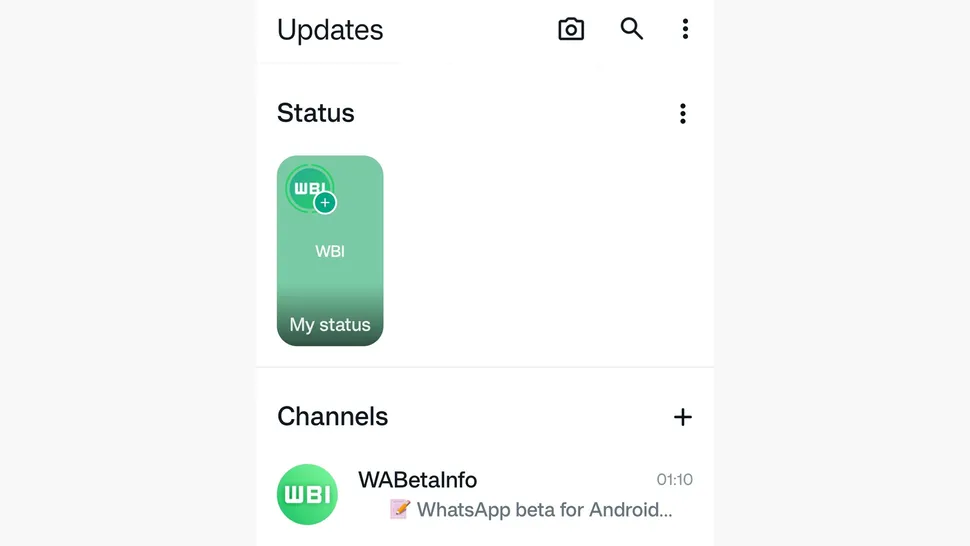
Updates tab gets redesigned on WhatsApp beta for Android

According to TechRadar, the new beta version of WhatsApp for Android has a new design for the Updates tab.

The new design allows users to view any stories that they haven’t seen already, meaning that you’ll never miss another story again.

You’ll also be able to navigate through all the stories without opening them, which is a welcome quality of life improvement.

We also have to mention that the new design will offer larger thumbnails thus allowing users to focus more on the content.

Although this feature may sound interesting to some, we have no information regarding its release date.

If you’re an Android user, don’t miss our Android 15 preview for more information.

Are you excited about this feature? Let us know in the comments below!

Why did Microsoft stop making their super useful Chatpad for Xbox? (+ alternatives)

Remember Chatpad for Xbox? That little keyboard addition to your Xbox controller that would let you chat with your Xbox friends more easily?

It seems Xbox users fondly remember the tool, and many of them are asking if it’s ever going to come back. On Reddit, there are dozens of comments on the utility and versatility of the Chatpad, with many noting that it was so useful.

Can anyone tell me why Microsoft stopped making thier OEM chat pad for their controllers?!?! This is very up setting because when I sold my Xbox one many years ago I sold my chat pad with it thinking I wouldn’t buy an xbox again. Now I have a series x and was looking to get a chatpad to go with it and they haven’t made any new ones since the xbox one days causing the old ones to inflate to well over 100$ CAD! A very unreasonable price.

The third party chat pads aren’t good and I don’t want to have to plug a keyboard into my xbox.

Am I missing something here? Why don’t they make these anymore? And am I missing a third party chatpad that is actually good? I doubt it.

Reddit user

Honestly it was a product ahead of its time. Now we are getting games that promote chat functions with mmos and even battle royales having chat windows. Honestly I think they would sell way better if they came out today. I’m also looking for one, but not at $100+

Reddit user

Well, officially, Xbox discontinued it a while ago, but if you have a Chatpad that doesn’t work, you might get help in fixing it by following these solutions here. However, if parts of it are broken, then it’s an end road, as Xbox says there are no replacements available:

Manufacturing of the Xbox One Chatpad has been discontinued. If your chatpad is not working, a replacement option might not be available through Xbox Support.

Xbox

There aren’t any official reasons why Microsoft discontinued this useful piece of gear, but many believe there wasn’t enough demand to justify manufacturing official Chatpads. The question even popped up on official Xbox forums, which is a good sign that these items are very well missed by Xbox users.

Long story short: there is a good chance the Xbox Chatpads were underperforming, from a sales perspective.

While the official Chatpad would not work with the new Xbox Series S and X (you can still use your phone as a keyboard for these consoles, if you want to chat faster with your friends), they work with Xbox One.

There are also several alternatives to the official Xbox Chatpad, including third-party items that you can easily find on Amazon, that work on Xbox Series S, and X consoles, and a simple search on the platform comes with dozens of affordable chatpads.

On GameStop, you can also find even more affordable chatpad plugins that resemble the original ones very much. However, these ones are only supported on Xbox One.

So, there are a lot of options you can choose from, even though the original ones are no longer being manufactured. Either way, you should remember that you can always use another kind of alternative, such as your phone.

Have you tried Copilot’s “What do you mean” bug? It’s weird but funny. But weird

Recently, a bunch of users noticed a quirky glitch when they initiated a Bing chat with What do you mean phrase; the Copilot responded,

I apologize if my previous response was unclear. Let me clarify:

When I mentioned that Mount Everest is approximately 29,031.7 feet high, I meant that its elevation above sea level reaches that impressive height. It’s the tallest mountain on our planet! ?️

If you have any more questions or need further clarification, feel free to ask! ?

So, I also tried to ask the same question and got this response. This doesn’t only happen when you type what you mean for the first time. Every time I typed what do you mean in Bing chat, it showed the same result, blurting information about Mount Everest.

The response is hilarious and a bit weird because I never had a conversation about Mount Everest on Bing Chat, just like the other users complaining about it on Reddit.

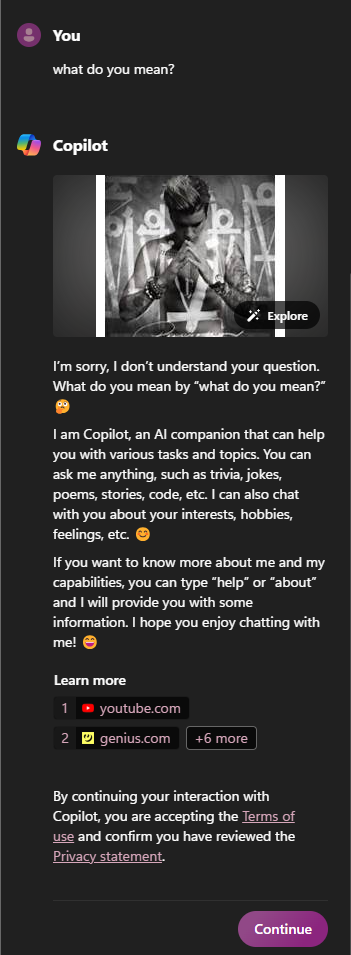
This seems to be a bug and is only limited to the chat initiated on Microsoft Edge, as when I initiated the chat on Copilot by clicking the icon from the rightmost side of my desktop screen and asked the same question, it responded:

I’m sorry, I don’t understand your question. What do you mean by “what do you mean?” ?

I am Copilot, an AI companion that can help you with various tasks and topics. You can ask me anything, such as trivia, jokes, poems, stories, code, etc. I can also chat with you about your interests, hobbies, feelings, etc. ?

If you want to know more about me and my capabilities, you can type “help” or “about” and I will provide you with some information. I hope you enjoy chatting with me! ?

Learn more

1youtube.com
2genius.com
3dictionary.cambridge.org
4dictionary.cambridge.org
5english.stackexchange.com
6smarturl.it
7smarturl.it
8music.apple.com

Some users think that it is part of an internal prompt as a sample question and answer template for Copilot to answer.

Anyway, it seems like a head-scratcher, and nobody knows what’s going on and when this will be fixed. Have you tried this on Copilot yet? If so, then share your experience in the comments section below.

AMD and Microsoft join forces to bring Task Manager support to NPUs

Microsoft is no stranger to NPUs, and we might see an NPU on the gen Xbox consoles, but what about desktops?

It seems that AMD NPUs might get better Windows support soon. Here’s what we know so far.

After Intel, AMD NPUs are finally getting Windows integration

According to Neowin, AMD is working alongside Microsoft to bring better support for NPU hardware on Windows.

Currently, only Intel NPUs work with Windows thanks to the compatibility with Microsoft’s DirectML API. That’s about the change with the upcoming support for Microsoft Compute Driver Model infrastructure.

Using this infrastructure, NPUs will get access to various features, such as scheduling, power management, memory management, and Task Manager support.

By being able to track resource usage, users will be able to prolong battery life, while developers will be able to optimize NPU-powered applications.

Currently, only the Ryzen 8040 Series is getting this feature, but that will surely change as more and more NPU devices become available on the market.

Sadly, no information on when we can expect to see these changes, but we hope we won’t have to wait too long.

If you want to learn more about AI, Microsoft has a list of AI trends that will define the current year, so don’t miss it.

Good news for Surface Laptop 5 users, latest update to address boot and battery issues

If you are using a Surface Laptop 5 and have had problems such as intermittent boot to Windows logo or battery error messages, the latest February 2024 update will fix things!

Every few months, Microsoft releases an update that resolves current issues and introduces a set of improvements. This time around, you will find three major changes as listed on Microsoft’s official page:

  • Resolves intermittent boot to Windows logo
  • Address battery error message in the Surface App
  • Improves the stability of Surface Thunderbolt 4 Dock

The latest February’24 update can only be installed on systems running Windows 10, Version 22H2 or later. To get it, you can download the update from Microsoft’s official website.

Surface 5’s update download page

The update also installs the following two additional components, depending on the device’s configuration:

  • Surface – Firmware – 15.104.139.0 – For Surface System Aggregator – Firmware
  • Surface – Firmware – 2.26.7.0 – For Microsoft Surface Thunderbolt(TM) 4 Dock Firmware Update – Firmware

Since the latest version contains firmware updates, it’s imperative to highlight that these can’t be uninstalled or rolled back to a previous version. So, we recommend you back up the files to prevent data loss.

So far, we haven’t seen any issues with the February’24 Surface Laptop 5 update. But if you come across any, share with us in the comments section.

The now-scrapped refreshed of the Xbox Series S would’ve had power-upscaling AI capabilities

Microsoft scrapped a refreshed version of the Xbox Series S that would have had power-upscaling AI capabilities, according to RedGamingTech, a vlogger known to have insights on Xbox consoles.

Xbox wanted to release a refreshed version of the Xbox Series S with many capabilities, including improved specs, more RAM, machine learning features, and even an RDNA 3-based GPU, but the project was ultimately canceled due to several reasons.

The vlogger says the system’s APU wasn’t working, and that version’s capabilities would have made it a much stronger console than initially expected, and it would have been difficult to deal with such a product, from a marketing perspective.

The now-scrapped Xbox Series S would’ve not only had AI capabilities, but the overall improvements would have brought it very close to the existing Xbox Series X, so marketing the product would have created issues for the Redmond-based tech giant.

However, it’s worth mentioning that neither Microsoft nor Xbox confirmed these rumors, so at this point, we don’t know for sure if this version of the Xbox even existed in theory. But given the fact that Microsoft is indeed releasing a new version of the Xbox Series S, most likely, AI-powered Xbox was a conceivable notion at some point.

Xbox will release the new Xbox Series S version, Ellewood, sometime later this year, but this one won’t be much of an upgrade to the existing Series S, though. It won’t have AI capabilities, but it will come out with a bigger storage of 1TB and it will cost around $299.

However, the recent Xbox Business Update event, which took place last week, announced several important news for the future of Xbox: not only the Xbox exclusives will be released to other platforms, but Microsoft is set to unveil the next-gen Xbox soon, and it promises it will be the largest technological leap ever seen in gaming consoles, so the expectations were placed.

Now we only have to wait.

What to expect from the next Xbox console?

While we don’t know any details about the next-gen Xbox, it will most likely have several AI features. Windows 11, for example, recently got the new Auto Super Resolution, which is an AI-based feature that greatly improves the gaming experience.

Windows 11 will also sport the new 24H2 patch later this year, which is going to embrace the new NPU set to be released this summer. The next Xbox console will most likely be assembled with NPU as well.

Aside from this, there is not much speculation going on, but we’ll most likely find out more in the following months.

Activate Do Not Track to secure your browsing data

If you don’t want websites to collect or share your browsing data, Windows 11 has a Do Not Track feature available, which can be enabled on all popular browsers, including Google Chrome, Microsoft Edge, Mozilla Firefox, and Brave.

Before knowing how to enable it, let us know why browsers collect data and how the feature can help.

When you open a web browser, the websites and services you visit or use track your online activities for several purposes. The tracking involves cookies, web beacons, and fingerprinting to collect data related to your preferences and browsing habits.

However, third-party tracking is used to collect information so that they can show you targeted ads. Some also use advanced techniques like Fingerprinting (gathers information about you to create a unique identifier), behavioral tracking, and IP tracking.

When the Do Not Track privacy feature is enabled, the browser notifies every website and service that you don’t want to be tracked online by sending a Do Not Track header with each web request.

However, since the websites are not legally bound to comply with your request, some of the websites respect your preference, but some choose to ignore it. Therefore, the plan is not entirely infallible.

Another important thing to remember is that the Do Not Track or DNT feature primarily targets third-party trackers and not the websites you browse directly. This means these websites can still collect your browsing history within their domain.

I understand that, at this point, you might be wondering why bother, but while it is not a foolproof solution to protect yourselves online, it provides a certain level of protection against third-party tracking. Let’s see how you can enable it on Edge, Chrome, and Firefox.

Microsoft Edge

  1. Launch Microsoft Edge, click the More button from the rightmost corner, and select Settings.
  2. Go to Privacy, search and services, then toggle on the switch for Send Do Not Track requests to enable DNT.enable DNT Edge
  3. Click Send request to confirm.

Google Chrome

  1. Launch Google Chrome, click the three dots icon, and select Settings.
  2. Go to Privacy and security, then click Third-party cookies.
  3. Toggle on the switch for Send a Do Not Track request with your browsing traffic.Do Not Track to secure your browsing data
  4. Click Confirm.

Mozilla Firefox

  1. Launch Mozilla Firefox, click the three horizontal lines and select Settings.DNT feature
  2. Go to Privacy & Security, locate Website Privacy Preferences, and place a checkmark next to Send Websites a Do Not Track request.

However, if you wish to have more robust privacy settings on a browser, you should consider checking out the browsers known for enhanced privacy features.

Which browser do you prefer the most? Share your favorite browser name in the comments section below.

New Microsoft Surface Pro 9 firmware improves machine learning stability and more

Microsoft is busy keeping its devices updated, and speaking of which, the latest firmware for Surface Pro 9 is here.

What does this update have to offer and should you install it? Keep on reading to find out!

What’s new with the latest Microsoft Surface Pro 9 firmware?

According to Neowin, Microsoft has released a new firmware update for Surface Pro 9 with Intel CPUs. The update extends the device security certificate authority and it improves Surface Thunderbolt 4 Dock stability.

The update also improves the stability of Surface Machine Learning Service on Windows 10 and it brings new drivers for Surface Touch Pen, Intel(R) Iris(R) Xe Graphics, and various other devices.

The update requires Windows 10 version 21H2 or Windows 11 version 22H2, and it’s available from Windows Update or Microsoft Surface Support page.

Overall, it’s a decent update, and you have a compatible device, be sure to download it as soon as you can. Speaking of updates, Microsoft released the final preview of the Moment 5 update, so don’t miss it.

To keep up with the latest news from Microsoft, stay tuned for the upcoming Build 2024 event.

Amidst surge in cyber attacks, Google’s home network protection is a step in the right direction

Google Chrome has constantly been working on the security infrastructure to prevent unauthorized access and deliver maximum protection to you. Now, Google is developing a feature to keep your home network devices safe from cyber attacks.

It’s still under development, but ever since the feature was put in the public domain through Chrome Platform Status, the developers and the community are excited!

What is Google Chrome’s home network protection?

Called Private Network Access (PNA), the feature will protect devices on your home network, such as a printer or home routers, against unauthorized access from unsafe websites. We often believe these devices are safe, given they are not directly connected to the Internet.

So, basically, any connection attempts from websites directed toward home network devices will be thoroughly vetted, and only if they are secure and the device permits them, will the request go through.

This will be a warning-only mode, meaning that the browser will only apprise of the threat and not take action. It’s expected that the feature will soon evolve and start taking the necessary corrective measures, such as blocking, as opposed to its initial state.

When such a request fails, Chrome will return the newly added ERR_BLOCKED_BY_PRIVATE_NETWORK_ACCESS_CHECKS error code, along with highlighting the reason for it.

Image source: Google

The feature will be first released in Google Chrome version 123 on both PC and Android devices. No deadline has been provided for iOS so far.

For technical know-how, you can check the official document.

We will have to wait until Chrome’s Private Network Access (PNA) home network protection is released to better assess its effectiveness.

Anyway, it appears Google is extensively working on Chrome. Recently, it brought IP protection and the Gemini shortcut to the browser, and we expect more to be released in the coming days!

What are your thoughts on the latest network protection feature? Let us know in the comments section.

Is this the fastest Windows installation ever recorded? Yes, all it took was 104 seconds

The fastest Windows installation was just recorded, and it took about 104 seconds to get it done. The winner is the Windows 10 installation made with a Tiny10 version of the OS, a version that is known to be a compact Windows, only having the necessary apps, and taking less space than the regular Windows.

So, while we’re not talking about the regular Windows version, this could still be considered a Windows installation. And, as the motto welcoming users who install Windows says, it literally took just a moment.

You can watch the whole thing below, from start to finish.

The installation was done by NTDev, a Windows enthusiast who experiments with a lot of Windows-related apps and software, and they reportedly used the best hardware they had to achieve the 100-second goal. We’re also talking about Tiny10, which can be downloaded and installed by everyone.

However, don’t expect the same results if you don’t have the gear. While you won’t have to wait 20 to 30 minutes (the average Windows 10 installation takes up this long), the Tiny10 version of Windows 10 will take about 5 to 10 minutes to install, which is still a lot of time.

As you can see in the video above, the installation included a system restart, and even with that, it managed to get under 2 minutes.

What would you need to equip your system to achieve this with Tiny10? Well, a good CPU, fast RAM chips, and SSDs, as they can write up data way faster than the regular HDD. Lately, the SSDs have become the norm in the tech industry, so you don’t have to worry about that. Instead, focus on getting a good CPU, and fast RAMs.

With this being said, it would be nice if, down the road, Microsoft would strike to achieve this time with a regular Windows installation, regardless of the hardware. But we can dream, right?

Windows 11 KB5034765 won’t install but there is a workaround

On February 13, KB5034765 (OS Builds 22621.3155 and 22631.3155) was released, and many users complained that after the update, their Windows File Explorer started crashing & also made the Taskbar disappear.

Some users also reported trouble installing the security update released last week. The update repeatedly failed to install, showing error codes 0x80070002, 0x800f0922 and 0x800f0982.

According to Windows Latest, they tried to roll back, but the process was stuck, resulting in a Something didn’t go as planned error message.

Then, clearing the Windows Update cache, uninstalling third-party apps, and running the Windows Update troubleshooter also didn’t work.

However, according to one of the users on Reddit, deleting the $WinREAgent folder from the system drive can do the trick. You can do that in two ways:

  • Press Windows + R to open the Run window, type cleanmgr, and press Ctrl + Shift + Enter to run it as admin. Select the system drive, select all the items in Files to delete, and click OK. This will remove all the content of the $WinREAgent folder
  • If that doesn’t work, you can press Windows + E to open File Explorer, navigate to the system drive, and type $WinREAgent in the search bar; you will get the $WinREAgent folder. Select it and click the Delete icon to remove it.

Once the folder is removed, you can try to install the Windows 11 KB5034765 security update; you will be able to update to the latest version without issues.

Issues caused after installing the Windows 11 KB5034765

Many users also reported that File Explorer crashed when they rebooted or shut down the computer. The issue first appeared after Windows 11’s January 2024 optional update.

The error message with the title explorer.exe – Application Error appears with the description – The instruction at 0x00007FFB20563ACa referenced memory at 0x0000000000000024. The memory could not be written. Click on OK to terminate the program.

The issue seems to be persistent after running an SFC scan, running memory tests on RAM and even after a clean installation of Windows 11.

Microsoft release notes mention:

This update addresses an issue that affects explorer.exe. It might stop responding. This occurs when you restart or shut down a PC that has a controller accessory attached to it.

However, the issue remains the same for the majority of users facing the issues, and they are still reporting the issue on Reddit, Microsoft Community, and other forums.

Are you facing the same issue? Share your experience in the comments section below.

How to Fix the Helldivers Error Code 10002038

The Helldivers error code 10002038 may lock you out of the game because the server is overloaded. While you can wait and play during off-peak hours, some workarounds will enable you to bypass this error.

How can I fix the Helldivers error code 10002038?

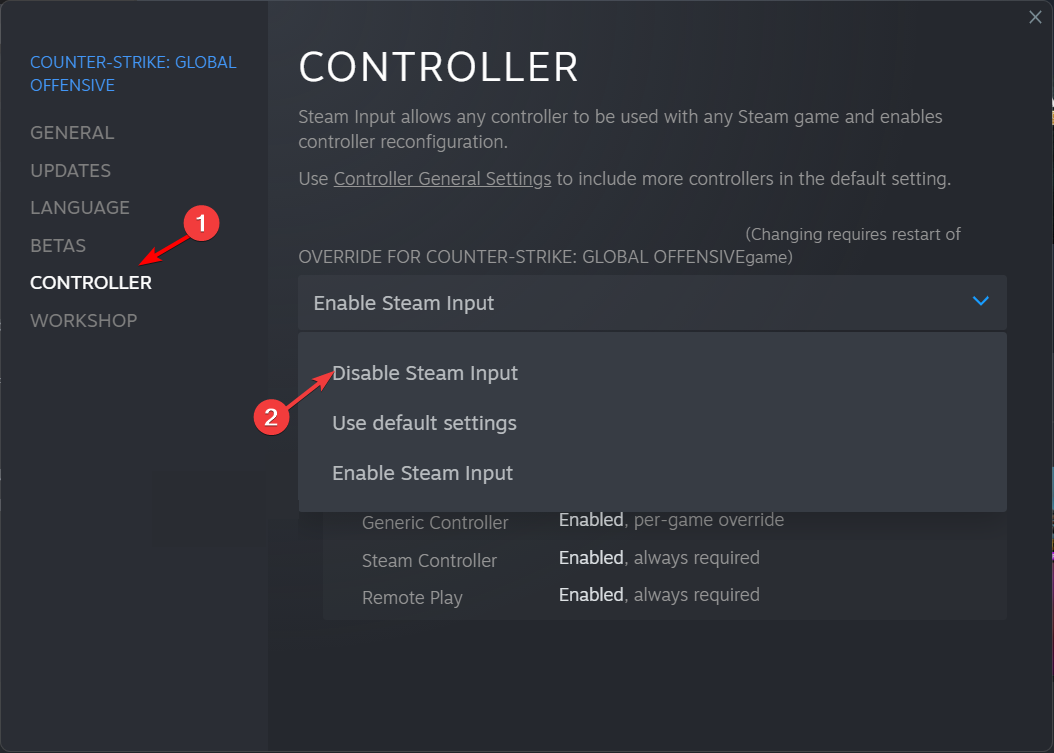
1. Disable Steam Input

  1. Press the Windows key, type steam, and click Open.Open Steam - Windows 11 Controller is Acting Like a Mouse
  2. Go to Library, locate, and right-click the game to select Properties.Select game properties
  3. On the Properties window, click the Controller tab.
  4. Select the Disable Steam Input option from the drop-down to turn off mouse emulation.Disable steam as input

Once you disable the Steam input, you’ll lose access to your customized configurations because you’ll have to use your keyboard and mouse to control the game. Do this for a while, then switch back to your controller and see if the error code 10002038 disappears.

2. Disable the crossplay feature

  1. Launch the game.
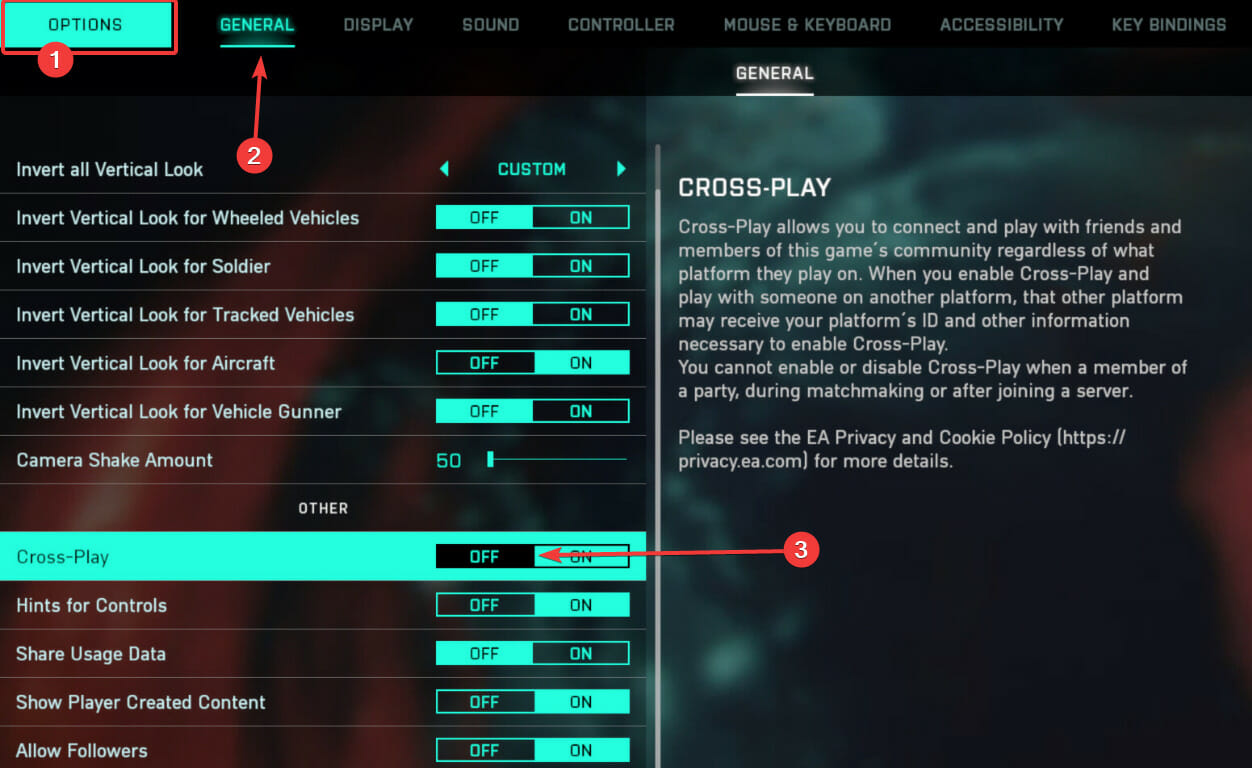
  2. Click on the Options tab and the General tab, then scroll down and toggle off Cross-Play.

While the crossplay feature widens the player diversity pool, it may also be among the factors contributing to the server overload. Disabling it may spread the server load evenly and get rid of the error code 10002038.

3. Perform a Network reset

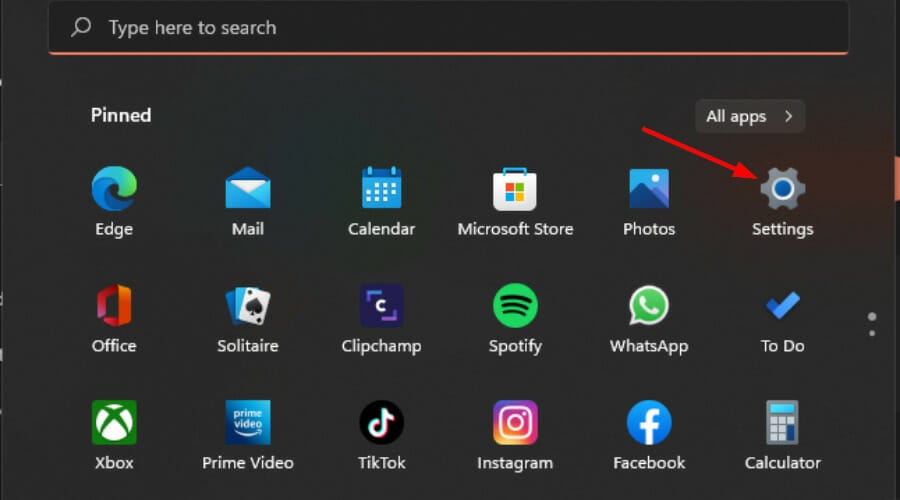
  1. Hit the Windows key and click on Settings.settings windows 11
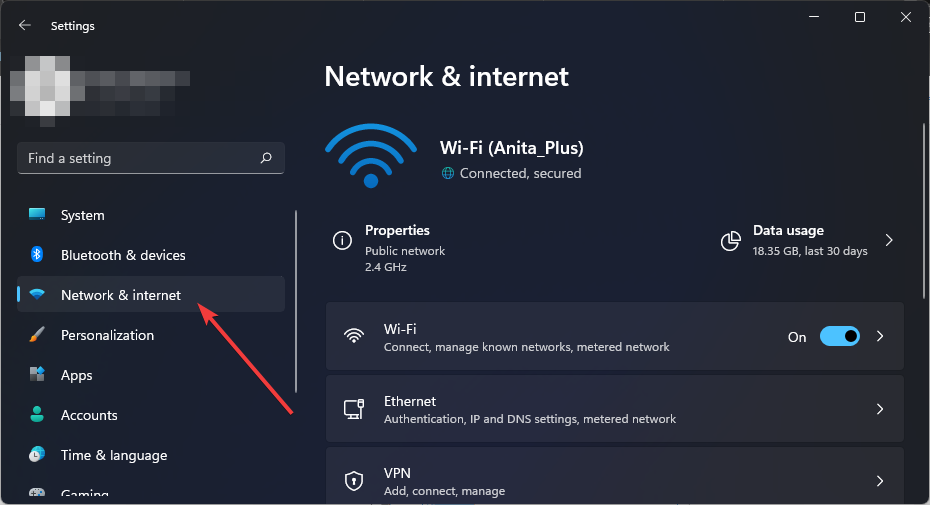
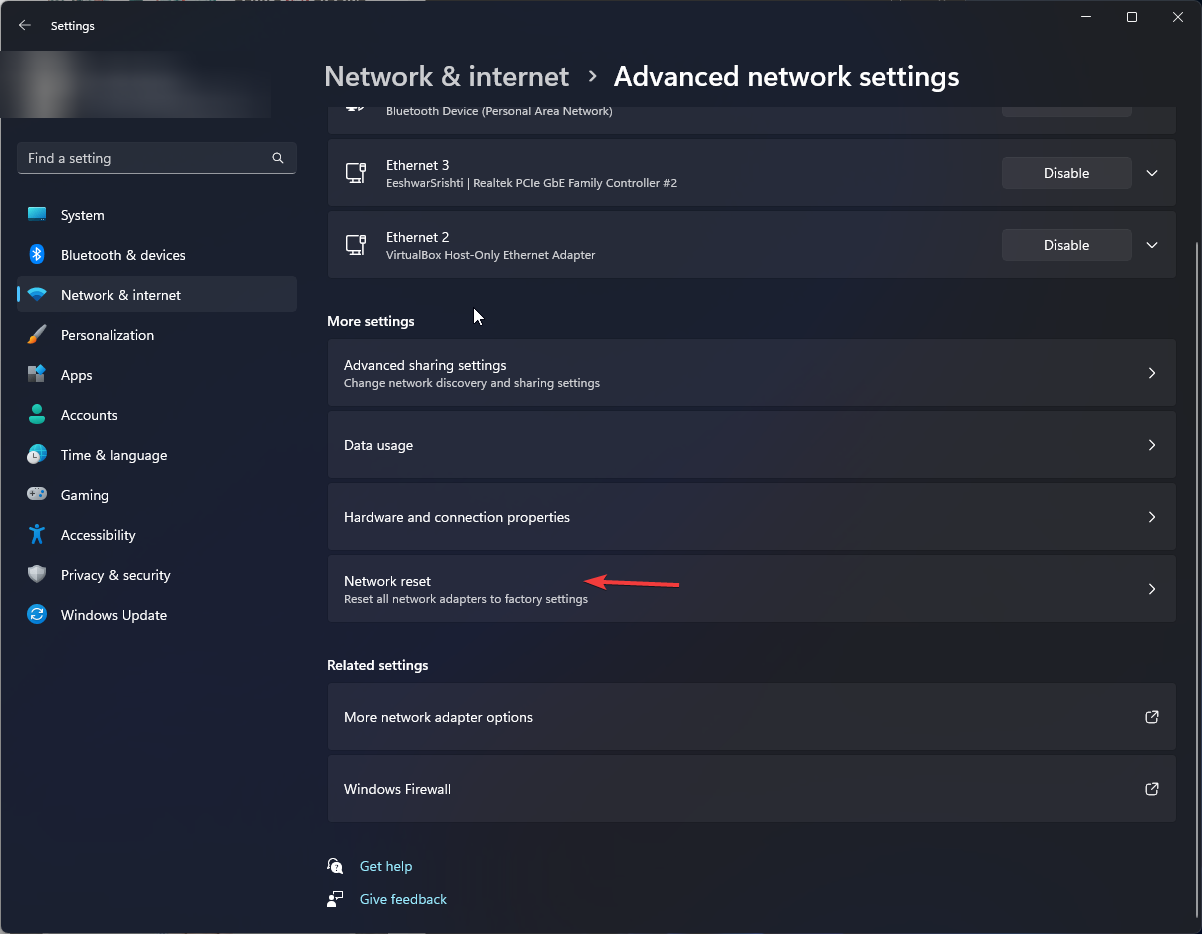
  2. Navigate to Network & internet.
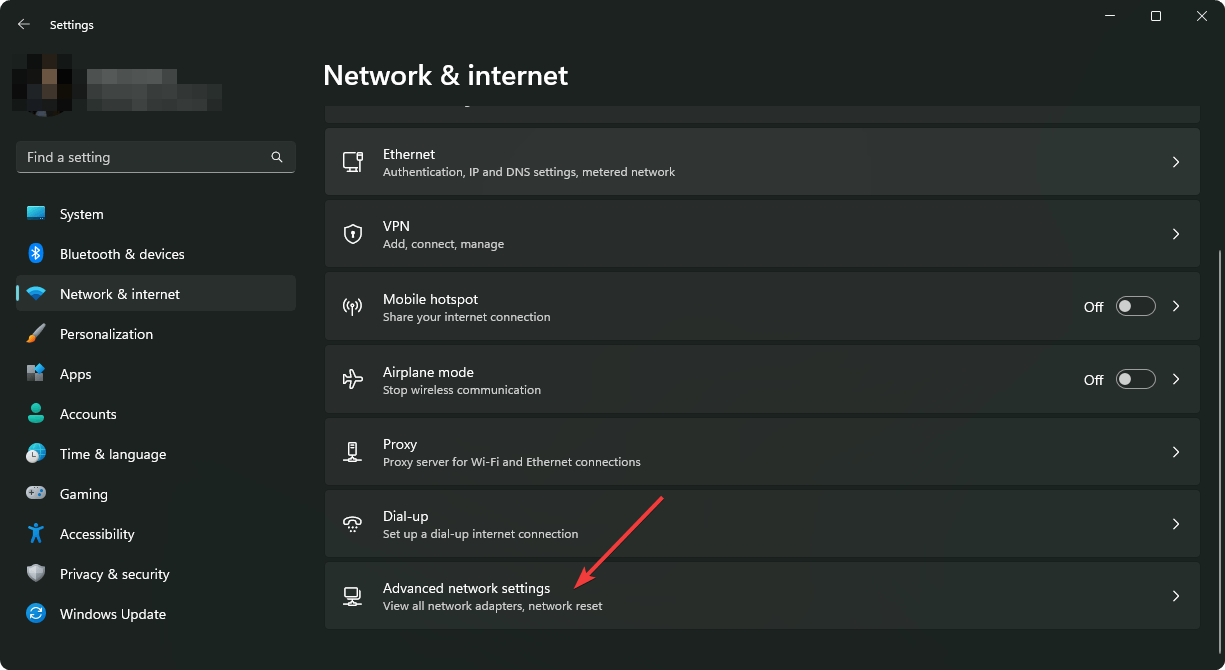
  3. Select Advanced network settings.going advanced network settings win11
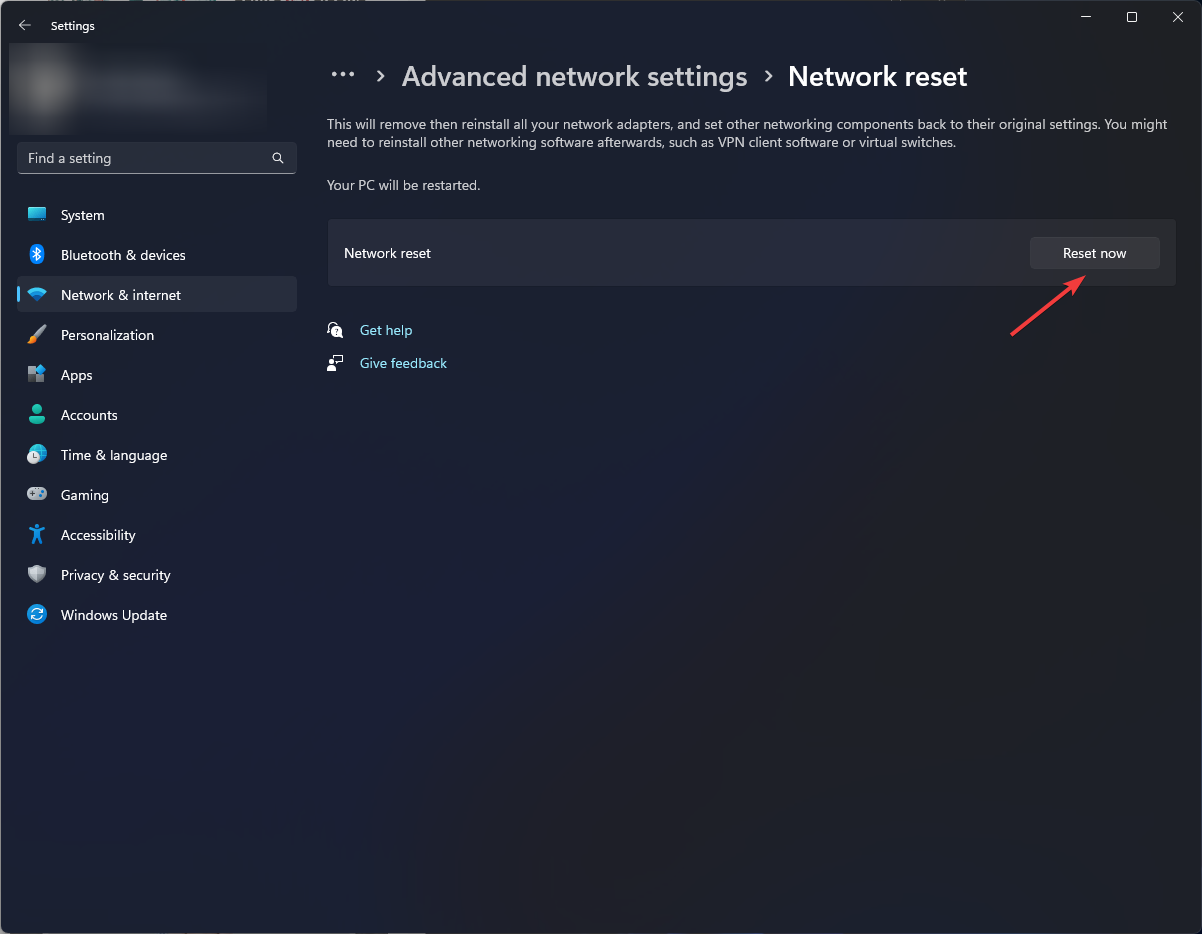
  4. Click on Network reset.Network Reset 1
  5. Next, hit the Reset now button.Network Reset now

If none of the solutions suggested above resolve the error code 10002038 on Helldivers, then it’s probably more on the server side than anything with your device. It’s the same case with the black screen on launch.

Unfortunately, in such cases, the best case scenario would be to contact support. They could offer a timeline on when the servers will be back up or any other temporary workarounds to get you playing as they fix the issue.

While you wait for this issue to be resolved, fret not. There are many other multiplayer games you can dive into that offer the same adrenaline rush, just like Helldivers.

Have you come across another solution you think would address this error code? We’d love to hear from you. Share with us in the comment section below.

You’ll be able to play owned Xbox games on Xbox Cloud Gaming later in 2026

If you bought your Xbox games on the Xbox App, and you have a library of them already, then we have some good news for you: later in 2024, you’ll be able to play them in the Xbox Cloud Gaming, effectively allowing you to port your Xbox games on your laptops, PCs, mobile phones, TVs, and so on.

This was confirmed by Phil Spencer, head of Xbox (as seen on Windows Central), and while we don’t know exactly when in 2024, Spencer said the ability to play owned Xbox games on Xcloud should be available this year.xbox cloud gaming

This is more than great news for those Xbox players always on the road, as the Xbox Cloud Gaming lets users play Xbox games without having the Xbox around. However, they do need a strong Internet connection to do so.

The platform already has a lot of games available to users to play, including the now very popular Palworld, and with a Game Pass Ultimate subscription, Xbox enthusiasts can play the game on any supported device without actually downloading the game.

This is the trick: Xbox Cloud Gaming doesn’t really lets you download the games you play on there, as it’s all based on streaming, and playing them directly in the Cloud. You can play the multiple games from the Xbox Game Pass that are available, but as soon as becomes unavailable or are leaving Game Pass, even though you bought them, they will be unavailable to play on XCloud.

But now, according to this new change, if you buy a game for Xbox, and that game would eventually leave Game Pass, you’ll still be able to play it on XCloud.

Right now, Xbox users aren’t able to that, and this is due to licensing issues, which is an understandable point. However, as Spencer confirms the availability of this feature later in 2024, the company might currently be in the process of addressing these issues, as we speak.

KB5034763: Apps & Task Manager are not opening anymore? Here’s what you can do

When Microsoft released KB5034763 for Windows 10, we were happy because it addressed several existing issues. But, as it turns out, the update is causing more problems than it resolves!

Many now report that they can’t open the Task Manager or Settings, startup apps won’t load, the PC crashes with a blue screen, the mouse randomly jumps, the Shut Down and Restart options in the Start Menu are not working, and the screen reads Preparing Windows on boot as if it’s a new OS installation.

In the Microsoft forum, a user pointed out these issues.

Computer boots up fine and I’m able to sign in, but apps that open upon startup like Discord won’t launch and all other programs like Task Manager and Settings won’t launch either, on top of the Shut Down and Restart options on the Start Menu not working.

There are several such reports now! A few even pointed out that KB5034763 won’t install on their Windows 10 PC.

How can I fix Windows 10 KB5034763 issues?

  • Uninstall the update: Press Windows + I to open Settings > go to Update & Security > choose Windows Update from the left > select View update history > click on Uninstall updates > select KB5034763 > click Uninstall.
  • Perform a system restore: Press Windows + R to open Run > type rstrui.exe > click OK > select Choose a different restore point > click Next > pick the oldest restore point > click Next > verify the details > click Finish > wait for the process to complete.
Performing a system restore

Once the problem is resolved, after either uninstalling the update or performing a restore, you should temporarily disable Windows updates at least for a few weeks. Re-enable it only after Microsoft releases a patch!

Besides, if you are getting the 0x800f0831 Windows 10 update error with KB5034763, repair the corrupt system files, check for network issues, or reset the update components.

What problems were you facing with KB5034763? Let us know in the comments section.

Solved: NBA 2K24 Error Code 6f8ce31b [PS5 & Xbox]

With every new game update, bugs are almost always a constant just like what NBA 2K24 gamers are facing with the latest 6f8ce31b error code when playing in MyCareer mode.

From the look of things, it looks like a connection error if the displayed message is anything to go by but it could also be a buggy update.

How do I fix error code 6f8ce31b on NBA 2K24?

1. Check for updates on your console

1.1 PS5

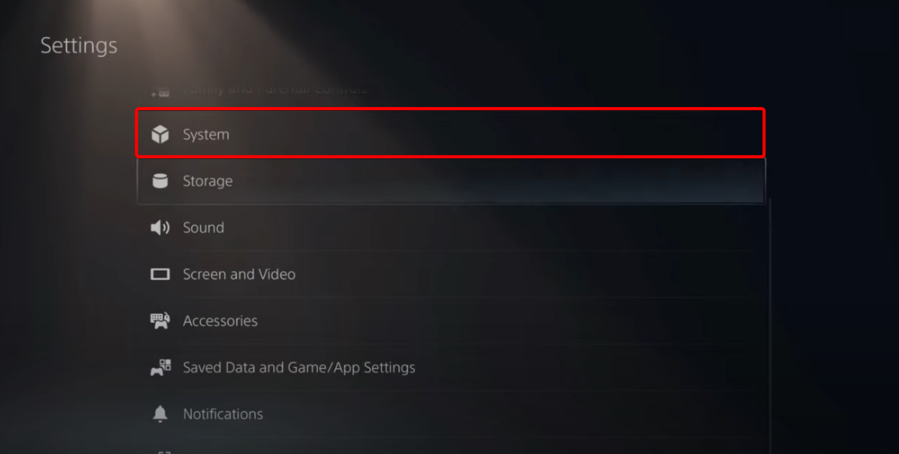
  1. Open Settings.
  2. Go to System.
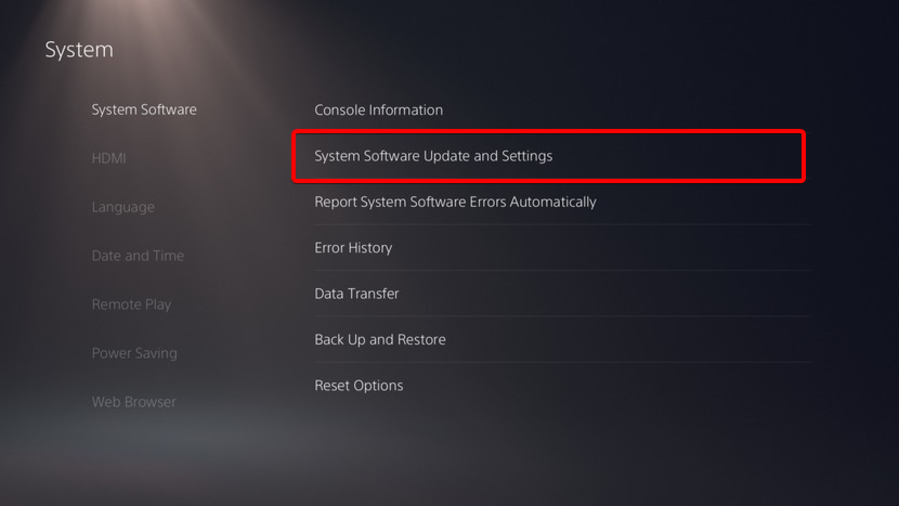
  3. In the System Software section, click on System Software Updates and Settings.
  4. Choose the type of update you want to perform.
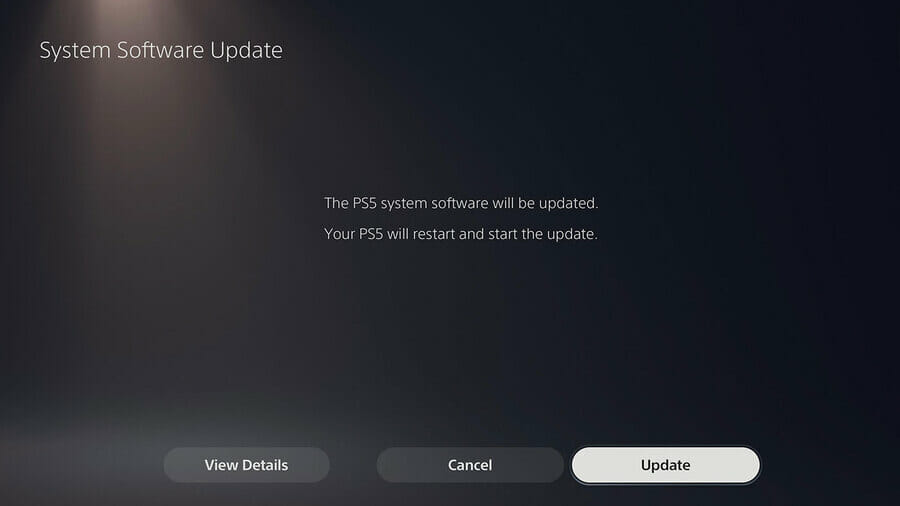
  5. Click on the Update button, then wait until your console is updated and restarted.

1.2 Xbox

  1. Press the Xbox button to open the Guide.
  2. Now, select Profile and System and click on Settings.
  3. Click on System, and finally Updates. If an update is available, you will see the Console Update Available option.
  4. Click on it to download and install the update.

2. Clear your console’s cache

2.1 PS5

  1. Completely turn off your PS4 or PS5 (Keep in mind that the Rest Mode won’t work).
  2. Wait until the indicator light stops blinking and goes black.
  3. Do not unplug your PS4 while in the Rest Mode.
  4. Disconnet the PlayStation 4 or PlayStation 5 power cord from the back of your device.
  5. Wait one minute, then plug the cord back into the PS4/PS5 and turn it on.
  6. Now, you’ve power cycled your PS4/PS5 and you should’ve cleared the cache.

2.2 Xbox

  1. 3. Use the Xbox Settings menu
  2. Press the Xbox button on your controller.
  3. Choose Settings. Settings - clear cache xbox series x
  4. Select System, and from the right pane, choose Console Info.
  5. Select Reset Console. 
  6. Now choose Reset and Keep My Games & Apps. reset

3. Reinstall the game

3.1 PS5

  1. Highlight the NBA 2K24 game and press and hold the Options button.
  2. When the menu appears, select Delete.
  3. Select OK to confirm.
  4. Now reinstall the game and see if the error code 6f8ce31b reappears.

3.2 Xbox

  1. Press the Xbox button to open the guide, then select My games & apps.
  2. Monitor the game, press the Menu button on your controller, and select Uninstall.
  3. Scroll to Ready to install, locate the game, and reinstall it.

Since the game was released, connection and server errors seem to be the tune of the day. Always check the game’s server status to verify it’s not a downtime.

The game is still relatively new so you might need to exercise some patience as the developers try to smoothen things out.

Other potential solutions you can try are changing to a different network connection or reaching directly to customer support.

You can also continue playing the older versions such as 2K23 and 2K22 until the new one stabilizes. However, if you’ve managed to bypass this error with a solution not listed above, do let us know in the comment section below.

Bring Helldivers 2 to Xbox: the petitions amassed more than 20k signatures in less than 3 days

Helldivers 2 was recently released to Microsoft Windows PCs and PlayStation 5, and the third-person shooter has already been incredibly successful: it sold more than 1 million copies in less than 3 days, and it was positively received by players, and critics alike.

Now, it seems that a big chunk of the gaming community everywhere would like Helldivers 2 on Xbox, and several gamers took the matter into their own hands, creating petitions that have managed to amass more than 20k signatures in less than 3 days.

On Reddit, gamers are begging Sony Interactive Entertainment, which is the publisher of the game, to bring Helldivers 2 to Xbox, as well.

The petitions to port the game to Xbox come in light of the Xbox executives agreeing that Xbox-exclusive will go multi-platform. After Xbox announced Pentinent and Hi-Fi Rush would be the first exclusives to go multi-platform, the studio said other games such as Starfield, and Indiana Jones will be released on PlayStation at some point, in a decision to market Xbox games on other platforms.

Naturally, the gaming community is expecting Sony to make the same move, and release PlayStation games to Xbox, with the Helldivers 2 being one of them.

It’s worth mentioning, though, that Helldivers 2 might actually be released to Xbox sooner than expected, because the game is already available to Windows PCs.

Gamers believe that with this game coming to Xbox, the exclusivity in the video game industry could reach an end, and this will only benefit gamers, with the petition saying:

The significance of Helldivers 2 extending its reach to Xbox cannot be overstated. It symbolizes a departure from the exclusivity-driven mentality that has fueled the console wars for decades. Instead, it embraces a vision of gaming that celebrates diversity and collaboration across platforms. By making Helldivers 2 available to Xbox players, PlayStation can take a bold step towards dismantling the barriers that have long divided the gaming community.

However, it’s worth mentioning that not all gamers feel the same. When the rumors of Starfield being ported to PlayStation started going around, many Xbox lovers felt betrayed by Microsoft’s decision to do so, with many stating that owning an Xbox now feels useless, especially after buying one to play this game.

So, while non-exclusivity means more gamers will be able to enjoy video games everywhere, those who are fans of a certain console don’t agree with it. For now, Xbox is bent on making its games multi platform. We’ll see about Sony.

Do not install KB5034765, you might not be able to access the taskbar

While Windows update is intended to bring new features, improve performance, and enhance security, it often introduces instability. This time, the February’24 update, KB5034765, causes the taskbar to disappear when turning on the PC.

For some, the Taskbar took longer to load at boot. Also, there were a couple of reports of Taskbar icons going missing after installing the KB5034204 update.

So, it appears that both KB5034765 and KB5034204, released recently, are causing problems. After a user pointed it out in a comment on Reddit, many others shared that they had encountered a similar problem.

Comment
byu/AutoModerator from discussion
insysadmin

In another Reddit thread, a user reported that the Taskbar is disappearing for the last 3 days, and the conventional solutions, i.e., DISM commands, SFC scan, and OS update, fail to work.

Workarounds for the issue

  • Disconnect any controller or peripheral: If you have a gaming controller or any similar peripheral plugged in, disconnect it before turning on the PC.
  • Re-run Windows Explorer: Press Ctrl + Shift + Esc to open Task Manager > select Windows Explorer > click End task > click Run new task > type explorer.exe in the text field > click OK.
  • Uninstall the buggy update: Press Windows + I to open Settings > go to Windows Update > click Update history > choose Uninstall updates at the bottom > click Uninstall next to KB5034765 and KB5034204 > confirm the change.
uninstall
Uninstalling Windows updates

As of now, there’s no permanent fix but just workarounds to temporarily resolve the problem. To completely eliminate the bug, you will have to wait for Microsoft to release another update with a patch.

Besides, KB5034765 is causing several problems on Windows 11, including performance issues and breaking the system’s UI. However, it doesn’t affect everyone the same way. A few confirmed that the update didn’t trigger any problems on the PC!

Did the KB5034765 update affect you? Let us know in the comments section.

A files download bug comes with the latest Microsoft Edge update

Microsoft Edge has a new bug that won’t allow you to downloaded files easily. Thus, you might need to spam click to open your files. Fortunately, some Redditors discovered a way to deal with the problem. However, it is not a permanent fix. Thus, it won’t help you download files if you are in a hurry.

How to fix the Microsoft Edge files download bug?

To fix the Microsoft Edge files download bug, wait until the files are available in their download folder. Afterward, you have to open them directly from there. However, this might take a while because the files might not be available right away.

On the other hand, if you try to open the files without waiting a few seconds, you might trigger the bug. In addition, if you need to download and open multiple files, make sure you only try to open some of them.

Unfortunately, if you think of downloading an older version of Microsoft Edge, it won’t fix the file download issue. After all, the browser will update automatically.

Ultimately, we must wait for a fix for the Microsoft Edge download issue. All you can do for now is wait or to access your downloads from the folder. However, it might take a while for the issue to be solved. After all, Microsoft recently fixed the Edge problem in which the browser was stealing Chrome tabs.

If you are interested, here’s a list with the best browsers in 2024. Also, did you know that iMessage, Bing and Edge remain unaffected by Eu market regulations?

What are your thoughts? Are you going to change your browser or wait? Let us know in the comments.

What is the new Microsoft handheld gaming console going to be like?

The featured image is generated using ChatGPT and DALL-E, not the actual image of the console!

Now we know that Microsoft is preparing a new handheld console and the officials tout it as the biggest generational leap for an Xbox console ever.

However, there is a tough crows out there waiting for the next big thing on a market where Nintendo Switch is still leading and Steam Deck is breathing down its neck. And then, there are also Asus ROG Ally and Lenovo Legion Go, which are already running Windows.

The game console market will reach $7.85 billion in 2024 in the U.S., according to Statista, while the number of users is expected to amount to 21.3 million by 2029.

It’s a stiff competition, but AMD, Intel and Nvidia will jump to the opportunity to help Microsoft create something groundbreaking.

Now that the Activision Blizzard deal is starting to pay off and Game Pass reached 34 million subscribers, it’s time for the next push for the Redmond giant.

What is Microsoft going to do to succeed?

Holding the Xbox on every screen promise, the new Xbox handheld will definitely have to be able to play any Xbox and PC games. You can already play Halo Infinite on your PC, Xbox, or xCloud so we know that cross-platform is doable and everyone expects it.

Imagine starting a game on the Xbox hooked to your TV, or the PC, then grabbing your handheld, loading the save on your commute and continuing to play as if nothing happen.

And yeah, if some of the games are also available on PlayStation, you can play the same title with everyone, regardless of the device they’re using. Seamless gaming, that’s what I can understand from Xbox on every screen, and that’s probably the key to Microsoft’s future success.

Microsoft had an opportunity to jump into the handheld market when Steam Deck was launched, but Sony moved quickly and cashed in. Yeah, you can make Xbox Cloud Gaming work on Steam Deck, but it’s painstaking, and you’re definitely not experiencing the same thing as you do on your Xbox or PC.

Is hybrid cloud gaming the solution?

Now, Microsoft has to build its own rig, and it has to be powerful enough to play the best AAA games in mint conditions, but also sleek and light enough not to break our arm wrists in the process.

It will all come down to a custom chip that will be powerful enough to run a slimmed-down Windows OS, but that won’t still be enough. Asus ROG Ally and Lenovo Legion Go are running Windows and have potent chips that can match the Xbox Series S or X graphics, but they still don’t cut it in terms of playability.

If Microsoft’s handheld console manages to play the games from the cloud, the device will be slimmer, lighter, and a lot more competitive on a stage where handhelds are still bulky and hard to handle.

This is the right time for Microsoft to develop a new concept and hardware to blow the market in all aspects. Nintendo pushed its Switch 2 launch to 2025, so if Microsoft manages to bring the new handheld console on the market in time for the holiday season, we will see a lot of happy gamers.

In the meantime, you can look at a Legion Go, Asus ROG Ally and Steam Deck comparison to refresh your knowledge about the handheld game consoles.

What are your thoughts about the future Microsoft handheld console? Let’s discuss in the comments below.

Microsoft says threat actors won’t be able to use official AI tools to create deep fakes anymore

Microsoft and 20 other leading tech companies, including Adobe, Amazon, Google, IBM, Meta, OpenAI, TikTok, and X, have pledged to make it harder for threat actors to use legitimate AI tools to create deep fakes.

The pledge was announced a few days ago as an intention to combat the rising popularity of deep fakes in elections. 2024 is set to be the biggest election year in history so far, with 64 countries all over the world electing leaders, and given the current political situation at the global scale, combating false information is essential, according to these companies.

As society embraces the benefits of AI, we have a responsibility to help ensure these tools don’t become weaponized in elections. AI didn’t create election deception, but we must ensure it doesn’t help deception flourish.

Brad Smith, Microsoft

The pledge, which is set to take effect immediately, can be found here, and it comes days after Microsoft and OpenAI released a report chronicling the rising popularity of AI-generated malware by global threat actors, including but not limited to Russian, Iranian, North Korean, and Chinese actors that used AI to infiltrate and compromise information.

While Microsoft is planning the use Copilot for Security to effectively detect and deal with any AI-generated malware, the pledge will also follow three important keypoints:

  1. It plans to make it more difficult for bad actors to use legitimate tools to create deep fakes.
  2. The tech sector will work together to detect and respond to deep fakes in elections globally.
  3. The accord will help advance transparency and build societal resilience to deep fakes in elections.

These steps will be managed through the release of several new platforms, including Content Credentials as a Service, that aim to aid politicians around the world with official means, the  Microsoft-2024 Elections, where politicians are highly encouraged to report any kind of deep fakes about themselves, and the Global Internet Forum to Counter Terrorism, a forum where governments and tech officials will work together to make sure elections are carried out in a just and democratic way.

Microsoft says it’s essential for companies to work together with governments so that countries and people don’t fall victim to fake news, and false information.

Among other areas, this will be essential to address the use of AI deepfakes by well-resourced nation-states. As we’ve seen across the cybersecurity and cyber-influence landscapes, a small number of sophisticated governments are putting substantial resources and expertise into new types of attacks on individuals, organizations, and even countries. Arguably, on some days, cyberspace is the space where the rule of law is most under threat. And we’ll need more collective inter-governmental leadership to address this.

Microsoft

What do you think of this? Will Microsoft be successful in combating AI deep fakes?

Genshin Error Code 4201: How to Fix it on Mobile and PC

The Genshin Impact Error code 4201, Failed to connect to the server, highlights a network or Internet connectivity problem or indicates a maintenance schedule is underway. The error is seen on mobile, PC, and PlayStation, and the solutions remain similar for all.

To start with, check Downdetector to verify if others, too, are facing the same problem. Because in this case, it could be a server issue to blame, and you will have to wait for a few hours. Do not forget to check Genshin Impact’s official X (formerly Twitter) page for any scheduled downtimes for server maintenance.

Also, you can restart the router or enable and disable the Flight Mode on the affected device. Besides, if facing the problem on a PC or PlayStation 4, use a mobile hotspot to play Genshin Impact.

How do I fix error code 4201 on Genshin?

Note icon NOTE
The solutions here work on both a Windows PC and a mobile unless clearly specified. Though we have listed the steps for the former, the equivalent procedure will just as well work for the latter.

1. Use a VPN

Your primary approach should be to use an effective VPN. For example, you can use ExpressVPN, as it re-routes your connection through a server in another region, thus bypassing any local issues or geo-blocking. Just make sure not to choose a region far away because it will affect the Internet speed and increase the in-game lag.

We recently came across an increasing number of reports of Genshin Impact Error code 4201 in Latvia due to an ISP issue, and using this VPN did the trick for all.

⇒ Get ExpressVPN

2. Update the OS

  1. Press Windows + I to open Settings, go to Windows Update from the navigation pane, and click Check for updates on the right. check for updates to fix genshin error code 4201
  2. If an update is available, click on Download & install.
  3. Finally, restart the PC for the changes to apply.

3. Set the correct date and time

  1. Press Windows + I to open Settings, navigate to Time & language, and click on Date & time.time & language
  2. Enable the toggle for both Set time zone automatically and Set time automatically, and then check whether the Genshin Error code 4201 is resolved.set automatically
  3. If not, disable the two toggles and manually select your time zone from the dropdown menu.time zone to fix genshin error code 4201
  4. Next, click on the Change button next to Set the date & time manually.
  5. Finally, set the correct date and time and click Change to confirm.change

4. Change the DNS address

  1. Press Windows + R to open Run, type ncpa.cpl in the text field, and hit Enter.ncpa.cpl
  2. Right-click on the active network adapter, and select Properties.properties
  3. Choose Internet Protocol Version 4 (TCP/IPv4) from the list, and click Properties.IPv4
  4. Select the Use the following DNS server addresses entry, and enter the following information:
    • Preferred DNS server: 8.8.8.8
    • Alternate DNS server: 8.8.4.4change DNS to fix genshin error code 4201
  5. Once done, click OK to save the changes.

Changing the DNS server also helps with Genshin Impact’s Failed to check for updates error. Remember, while we went with Google’s Public DNS, you can always use the fastest DNS server in your region.

5. Allow Genshin Impact through the firewall (for PC)

  1. Press Windows + S to open Search, type Allow an app through Windows Firewall in the text field, and click the relevant result.
  2. Click the Change settings button.change settings
  3. Click on Allow another app at the bottom.
  4. Now, click the Browse button.browse
  5. Navigate to the folder where Genshin Impact’s launcher (GenshinImpact.exe) is stored, select it, and click on Open. It’s, by default, stored in: C:\Games\Genshin Impact
  6. Click on Add.add to fix genshin error code 4201
  7. Once done, tick the checkboxes for both Private and Public next to Genshin Impact, then click OK to save the changes.allow through firewall to fix genshin error code 4201

If the firewall is blocking the program, you can always whitelist it in the firewall to get rid of Genshin Impact’s Error code 4201 on the PC.

6. Reset the network settings

  1. Press Windows + I to open Settings, go to Network & Internet from the left, and click on Advanced network settings.advanced network settings
  2. Click on Network reset under Advanced settings.
  3. Click the Reset now button.reset network to fix genshin error code 4201
  4. Finally, click Yes in the confirmation prompt.
  5. Once done, relaunch Genshin Impact and check for improvements.

Resetting the network settings also helps with Genshin Impact’s game file download error.

7. Reinstall Genshin Impact

  1. Press Windows + R to open Run, type appwiz.cpl in the text field, and click OK.
  2. Select Genshin Impact from the list of applications, and click Uninstall.uninstall to fix genshin error code 4201
  3. Follow the on-screen instructions to complete the process.
  4. Once done, restart the computer.

If a quick removal didn’t help fix Genshin Impact’s network error 4201, use an effective software uninstaller to clear any leftover files and Registry entries.

You now know all the ways to fix Genshin Impact’s Error code 4201. In case the Failed to connect to the server message still appears, it’s most certainly a server issue, and you should contact Genshin Impact support for more help.

Before you leave, discover some quick tips to optimize your PC for gaming and get the best performance!

For any queries or to share what worked for you, drop a comment below.

Developers, Microsoft wants you to back up your Dev Drive urgently

The latest build to the Dev and Canary channel, the 26058 build, keeps the tradition of releasing the same build to the two channels, for now, of course, as this rollout is only temporary.

However, it’s important to note that those developers working on Dev Drive, while being enlisted in the Windows Insider Program should back up their Dev Drive, urgently, because, according to Microsoft, the feature has some issues in the 26058 build, as well.

This build still has the issue impacting Dev Drive users. We have also added a few issues based on feedback from last week’s flight and an issue with using the ISOs being released today to do an upgrade.

The 26058 build, which introduced 2 new Widget boards to Windows 11, didn’t solve the Dev Drive known issue that appeared with the release of the previous build to the two channels, and Microsoft is advising developers to back up Dev Drive, as it will break and they will lose files upon installing the new build.

IMPORTANT NOTE FOR DEV DRIVE USERS: Insiders on Build 26052+ who have Dev Drives and might need to rollback will need to back up their Dev Drives BEFORE rolling back as rolling back will cause Dev Drives to break and data on them to be lost.

Microsoft

As the Redmond-based tech giant doesn’t have any official backup solutions for Dev Drive, developers are advised to back it up via more traditional routes such as storing it in the cloud or backing the Dev Drive to an external hard drive and then setting it up again, once the new build in installed.

Developers need to be aware of Dev Drive’s protection before backing it up, as these security capabilities can sometimes make it harder to manage files within this special drive. However, once it is dealt with, and you can read more about it here, backing the Dev Drive up shouldn’t take much.

For now, Microsoft hasn’t said anything about fixing this ongoing known issue with Dev Drive, but as Dev/Canary builds are released on a weekly basis, it should be fixed in a matter of weeks.

Windows PCs joined to a business domain no longer have access to Windows Backup

Windows Backup was recently added by Microsoft to the Windows experience, and Windows 10, and Windows 11 devices are now prompted with the new menu that lets users choose the preferred files to transfer with them when they move to a new PC.

Users need to log into their Microsoft account, and the Redmond-based tech giant will take of the rest so that the experience of having the current operating system ported to another PC can go smoothly.

However, it seems that the latest Windows updates are not also breaking the Windows taskbar and making the Start menu disappear on some PCs, but the updates are also hiding the Windows Backup app on Windows PCs joined to a business domain.

This is not entirely a bug, but rather a weird solution Microsoft implemented: Windows Backup is a system component, and it was released this way, back in 2023, which means newer Windows versions (of both Windows 11 and Windows 10) will automatically have the app installed, no matter the context.

Windows PCs joined to a business domain will have Windows Backup installed, but the app doesn’t work for obvious reasons (security & privacy of enterprise devices would be compromised).

Instead, Microsoft opted for a more subtle solution: these devices will automatically hide Windows Backup, so it app can’t be accessed, as it doesn’t show up at all.

The change was made with the release of the latest February updates, and users can’t find, nor access the app, as Windows Backup is not supported on these devices.

Microsoft failed to fix the Windows Metadata server issue

The Windows Metadata server connection issues are still bothering us even after recent Windows 10 and 11 updates. After all, the latest updates that should fix the problems didn’t work. However, there isn’t an official fix available. Moreover, you might experience various delays and problems.

What is Windows metadata?

Metadata is information about a device, such as descriptions, model names, and properties. Furthermore, the Windows Metadata and Internet Services (WMIS) downloads and tweaks it to enable various features of the system, such as drivers, updates, and device configuration settings. 

However, when the metadata doesn’t function properly, you will experience errors. Some of the most common ones are related to external devices.

Unfortunately, the Windows Metadata server connection problems aren’t new. After all, they date back to 2023. Furthermore, you might encounter it while trying to use an external device. In addition, you might run into these issues on Windows 10 and 11.
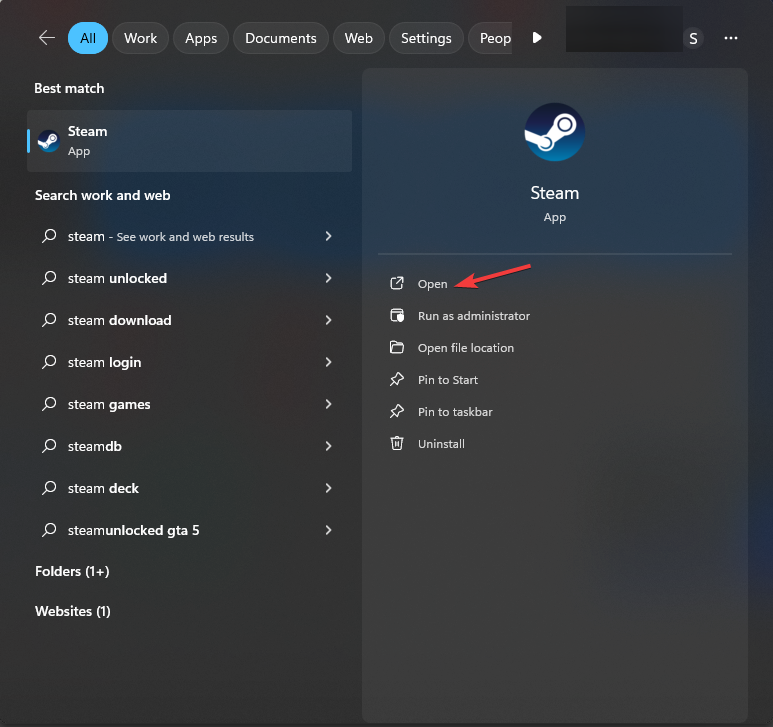
Microsoft tried to secure the WMIS downloads with HTTPS, and according to BleepingComputer, they did that. However, they did not manage to fix the Windows Metadata connection error. In addition, the Metadata servers are now closed, and we don’t know when they will come back online.

Ultimately, the only thing we can do to fix the Windows Metadata server connection issues is to wait for Microsoft to come up with a solution. Until then, we could disable the Device Installation Settings. Unfortunately, we know how stressful the situation is, especially since it creates delays.

Here are some workarounds to fix the Windows Staging Failed issue until Microsoft fixes metadata server-related problems.

What are your thoughts? Did you encounter any Windows metadata server issues at the office? Let us know in the comments.

DuckDuckGo now syncs your data across all your devices easier

DuckDuckGo, the security browser, is now allowing you to sync your data across devices. Also, this feature will work on Windows, Mac, Android and iPhone devices. In addition, you will be able to use this feature without an account. On top of that, your data will be end-to-end encrypted. Thus, nobody will be able to get to it easily.

How do I sync DuckDuckGo across devices?

With the DuckDuckGo sync feature, instead of using an account, you will have an alphanumeric code for desktops and a QR code for other devices. Moreover, you have to do this only once. Afterward, your DuckDuckGo data will always sync locally via the internet.

To use the DuckDuckGo sync feature you need to:

  1. Go to the DuckDuckGo’s Settings.
  2. Chose Sync & Backup.
  3. Select Sync with another device.
  4. Follow the given instructions, and you’re good to go.

If you are wondering what will happen to your data if you delete the browser on the go, know there is a solution. After all, you can sync your DuckDuckGo data in a single device backup. To access it, you will get another code available as a PDF file. So, we recommend you store the PDF file with the recovery code on your most trusted device.

Last but not least, this DuckDuckGo sync feature is well thought out and useful. After all, if you don’t use an account like this, your data will be safer. Also, it is great that you can access the sync option easily. Furthermore, if you are looking for a private browser, we recommend you switch to DuckDuckGo.

Get ready to learn how to use passkeys, as they might be the future of data protection for other browsers. Also, here are some facts about DuckDuckGo that might interest you.

What do you think? Are you going to give DuckDuckGo sync a try? Do you consider it useful? Let us know in the comments.