6 Best Video Editing Software on Deals & Sales

Video editors are essential if you use to record lots of footage with your camera or if you are a blogger and content creator.

After you recorded a video, you can edit and refine the final output using video-editing software, export it to numerous file formats for playback on various devices, and share it on social media platforms

We did the heavy-lifting work for you and compiled this list of the hottest video editing software deals available this year. Scroll down to check them out.

What are the best video editor deals?

Adobe Premiere
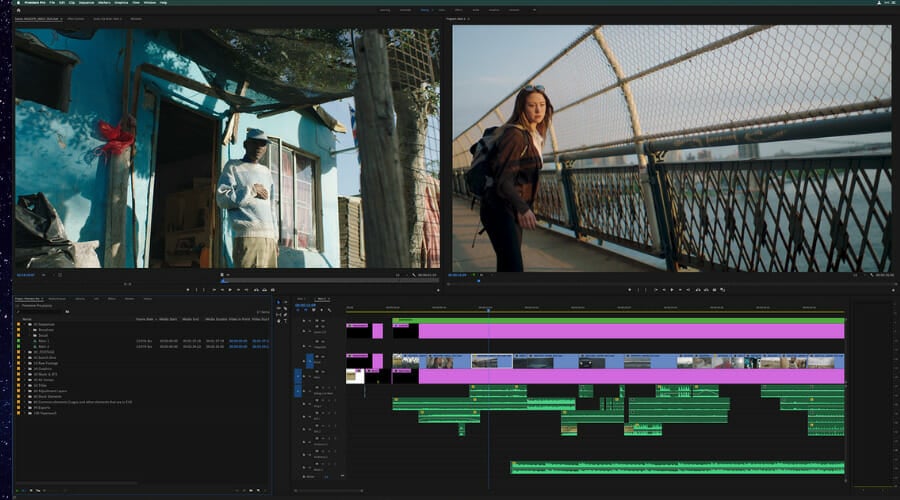
If you are looking for a software solution that aims to meet all your video editing needs, then the latest edition of Adobe Premiere may be the perfect option for you.

Adobe‘s cloud hosting capabilities make it easy for your colleagues and teammates to collaborate on all your projects.

Integration with other Adobe products is also present, allowing you to unleash your creativity to the full extent.

With Adobe Premiere you can easily make all sorts of videos, and with its extensive features, it’s perfect for both home users and professionals.

Adobe Premiere

Bring your imagination to life with the best video editing tool that will support all your developments. Get the best deal now!
Free trial Visit website

Corel VideoStudio Pro

Corel VideoStudio Pro helps you create amazing videos with its simple to use editor which makes it perfect for all skill levels, from beginners to experts

It supports multi-camera editing, but also lets you import and edit your clips and share them easily with others.

The interface fully supports drag and drop, so it’s easy to navigate, and with tens of available effects, you can achieve some incredible results.

Let’s quickly look at its key features:

  • Easy to use
  • Templates and tutorials available
  • Tens of filters and effects to choose from
  • HD, 4K & 360 video editing
  • Color and lens correction
  • Batch processing
Corel VideoStudio Pro

Corel VideoStudio Pro

Catch your favorite moments on camera and edit them the way you like with this versatile software. Try it now!
Check price Get it now

Filmora

Filmora is one of the best video editing applications, and it’s suitable for first-time users and professionals alike.

The application supports features such as Keyframing, motion tracking, green screen, color matching, split-screen and more.

Additional features include the ability to adjust the brightness and the playback speed.

The music library is also present, allowing you to easily add music to your videos. Once you’re done editing your videos, you can then share and upload the resulting video to YouTube, and Vimeo directly from the program.

Filmora

Filmora

Stylize your videos to make them look amazing with this amazing video editing tool. Try it now!
Free trial Visit website

Cyberlink PowerDirector 365

Cyberlink PowerDirector 365 offers some great features, and you can use it to create professional videos, even if you’re a first-time user.

The application offers a plethora of effects, allowing you to make amazing videos. You can even make collages with up to 7 videos, and more.

Regarding compatibility, the app supports the latest video formats, and it offers more than 3000 effects and templates to choose from.

Cyberlink PowerDirector 365 is simple to use, fast, and powerful video editing software, so why not give it a try?

⇒ Get it now


Pinnacle Studio 25

Pinnacle Studio 22 Ultimate cyber monday

With the help of this advanced video editor, you can edit your HD and 4K video much quicker.

You can choose from over 2,000 video effects and pro-caliber tools, create animations with stop motion, as well as fix shaky footage and other video problems. Screen recording is also supported.

⇒ Get it now


Sony Movie Studio 13 Platinum

If you’re looking for video editing software on the cheap end, check out Sony Movie Studio 13.

This video editor comes with a user-friendly interface, but it features a series of powerful video editing features. For example, Movie Studio 13 offers 4K XAVC S file format support as well as touch PC support.

⇒ Get it now from Amazon

So, which one of these video editors are you going to buy? Let us know in the comments below.

4 Best Seasonal Blue Yeti Microphone Deals

Blue Yeti microphones don’t need any introduction. They’re the number one choice of professional musicians and audio professionals. If you’re planning to launch your own podcast network, this is the right microphone brand to get.

Well, honestly speaking, the price tag might keep some potential customers off. Of course, there are many cheaper alternatives on the market. The question is: Do they offer the same audio quality as a Blue Yeti microphone? In most cases, the answer is ‘No’.

The price tag should no longer stop you from getting the Blue Yeti mic of your dreams. After Cyber Monday, you can now purchase a brand-new Blue Yeti microphone for less than usual. Let’s dive right in and check out the hottest deals.

What are the best Christmas Bluet Yeti deals this year?

Premium Blue Yeti Nano

  • Supports sample rates up to 24-bit/48kHz
  • Cardioid and Omni pickup patterns
  • Perfect for podcasting, game streaming
  • None

We absolutely love the color of this microphone. It will definitely help you stand out, especially if you use it in your videos.

With this mic, recording audio has never been easier. The package includes the following items: the Blue Yeti Midnight Blue microphone, MicroUSB to USB cable, removable stand, boom arm adapter, and GalliumPi Cleaning Cloth.

The mic is great for podcasting, YouTube videos, Twitch streaming, Skype calls, and voice-over work.


Blue Yeti USB Microphone with Knox Gear Boom Arm

  • 30-inch desktop arm
  • 4-Port USB 3.0 hub included
  • High-res voice level metering
  • None

Another interesting deal is this Blue Yeti USB mic that comes with a Knox desktop arm and a USB Hub.

Use the single button on the mic to conveniently adjust mic gain, mute, and headphone volume, as well as the blend of microphone signal and computer sound in your headphones.


Newest Blue Yeti USB Microphone with 4 Pickup Patterns

  • 4 pickup patterns, 3 condenser capsules
  • Mac and PC compatible
  • High signal-to-noise ratio of 100dB
  • None

Agreed, Blue microphones are known for their rather expensive price tag but fortunately, there are some exceptions to this rule. For example, this Blue Yeti mic it’s affordable considering the fact that it’s brand new.

It features Cardioid, Omni, bidirectional, and stereo pickup patterns for more flexibility when recording. The adjustable stand comes in handy to optimize the recording process in relation to the surrounding sound.

The fact that the mic is plug and play so no complicated set-up is required is a definite thumbs up.


Yeti Studio Blackout All-In-One

  • All-in-one
  • iZotope Ozone Elements mastering software
  • Perfect to record vocals
  • Not plug-and-play

If you’re looking for a Blue Yeti microphone to record vocals with, then this all-in-one mic is the right choice for you. Whether you’re a singer, you want to record podcasts, or just YouTube videos, this mic has everything you need.

It also includes the PreSonus Studio One Artist Blue Microphones Edition recording software, allowing you to stack multiple tracks of vocals and instruments and edit your tracks to get the perfect vocal performance.

So, there are the hottest Blue microphones available on Christmas? Let us know which one you picked in the comments below.

7 Ways to Fix Screen Brightness Not Working In Windows 11

Today, we’ll show you how to fix screen brightness settings if they’re not working in Windows 11.

The most common reasons why you can’t adjust brightness are faulty graphics and monitor drivers, and corrupt system files. We’ll show you how to fix these and a couple of other possible culprits below.

Let’s get your monitor brightness exactly how you want it.

How can I fix the brightness slider if it’s not working in Windows 11?

We outlined every single step in the guideline below, but if you prefer video formats, check this out:

For more details, keep reading.

1. Disable Adaptive Brightness

How to disable adaptive brightness:

  1. Press Windows + I to open Settings.
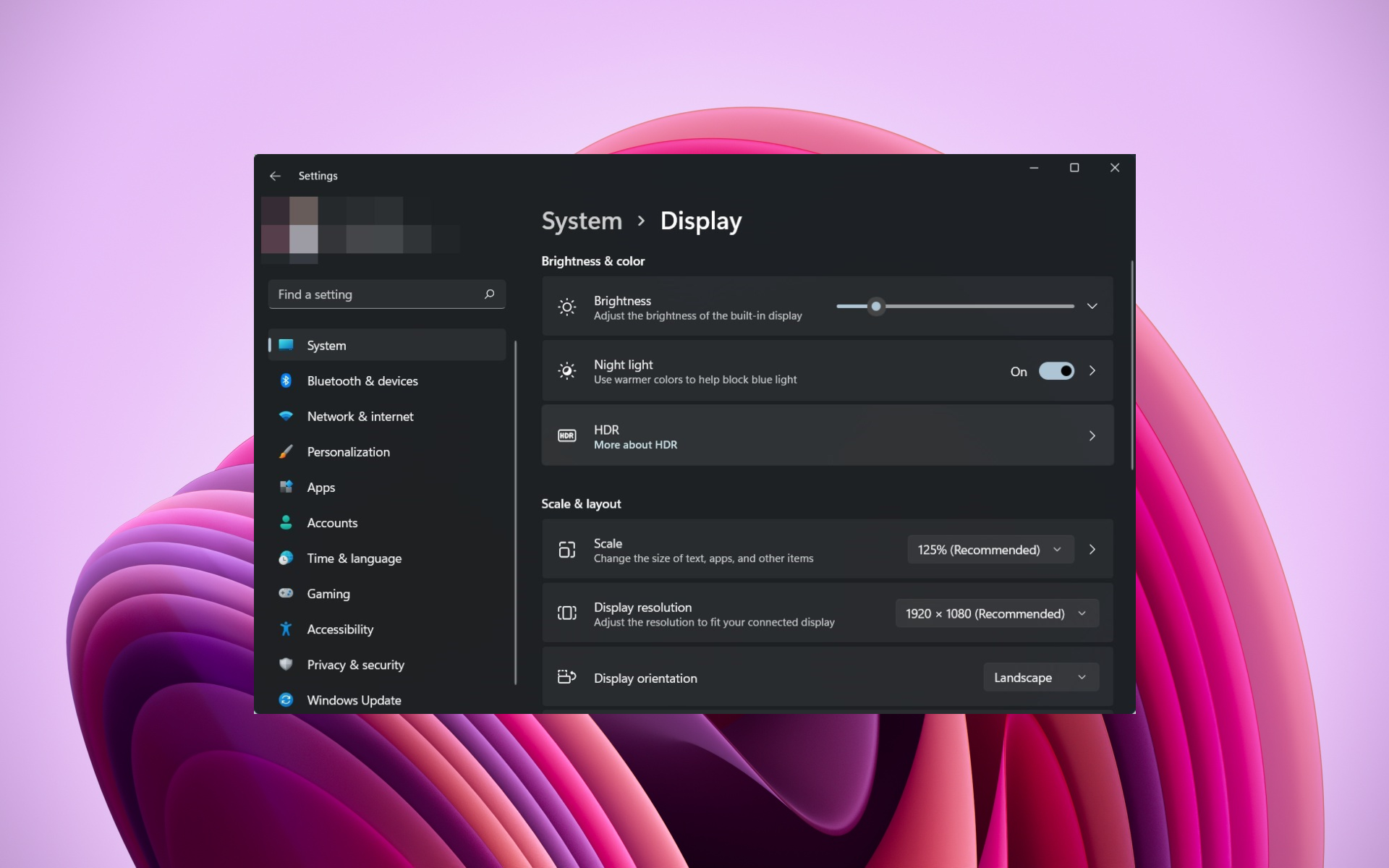
  2. Navigate to System > Display.
  3. If available, toggle “Change brightness automatically when lighting changes” to Off.disable adaptive brightness in windows 11

Alternatively:

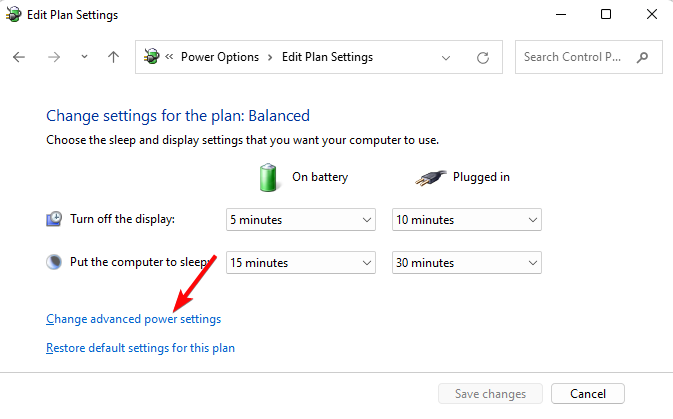
  1. Open Control Panel > Hardware and Sound > Power Options.power options control panel
  2. Click Change plan settings next to your active plan.
  3. Select Change advanced power settings.Change advanced power settings
  4. Expand the Display section.
  5. Set Enable adaptive brightness to Off for both battery and plugged-in modes.

If your brightness slider is grayed out or doesn’t respond, adaptive brightness might be enabled, especially on laptops with ambient light sensors. This feature can override manual adjustments and cause brightness issues in Windows 11.

Once disabled, restart your PC and check if brightness controls work normally.

2. Reinstall the monitor driver

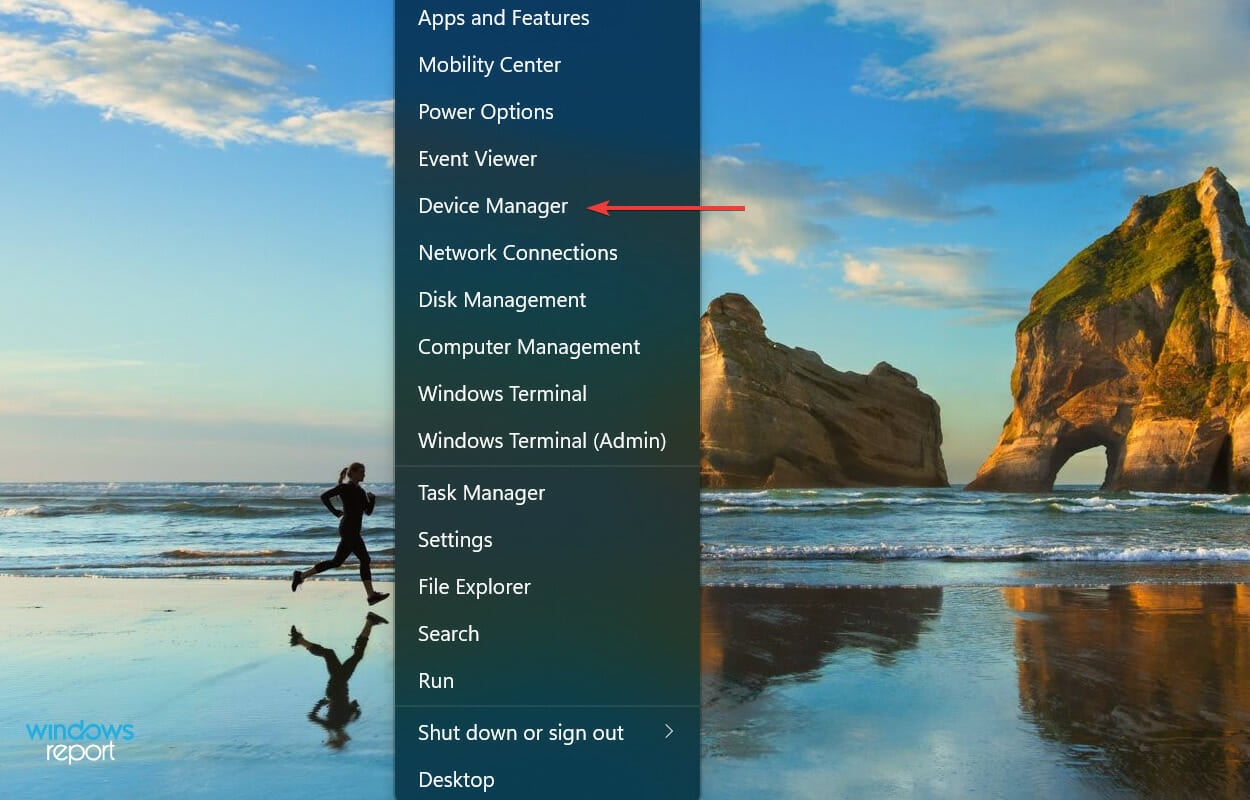
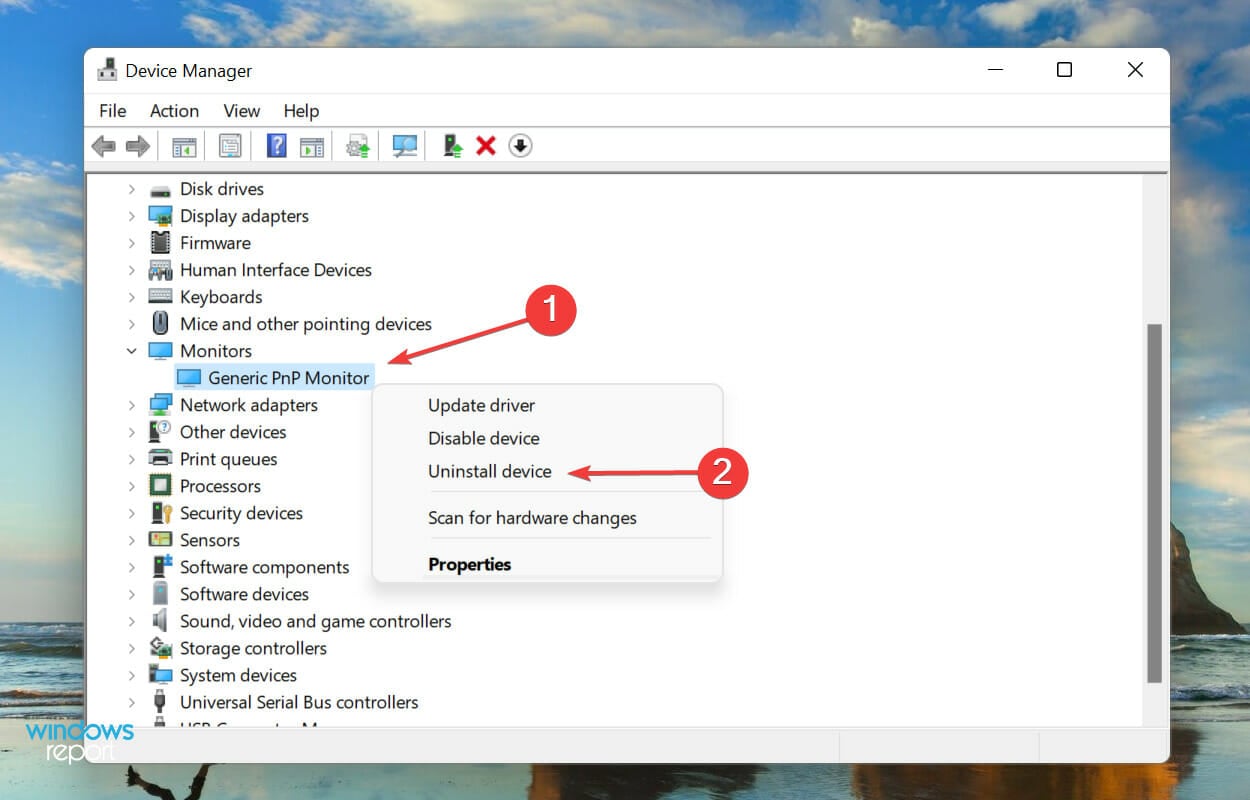
  1. Right-click on the Start icon and select Device Manager.Quick Access menu
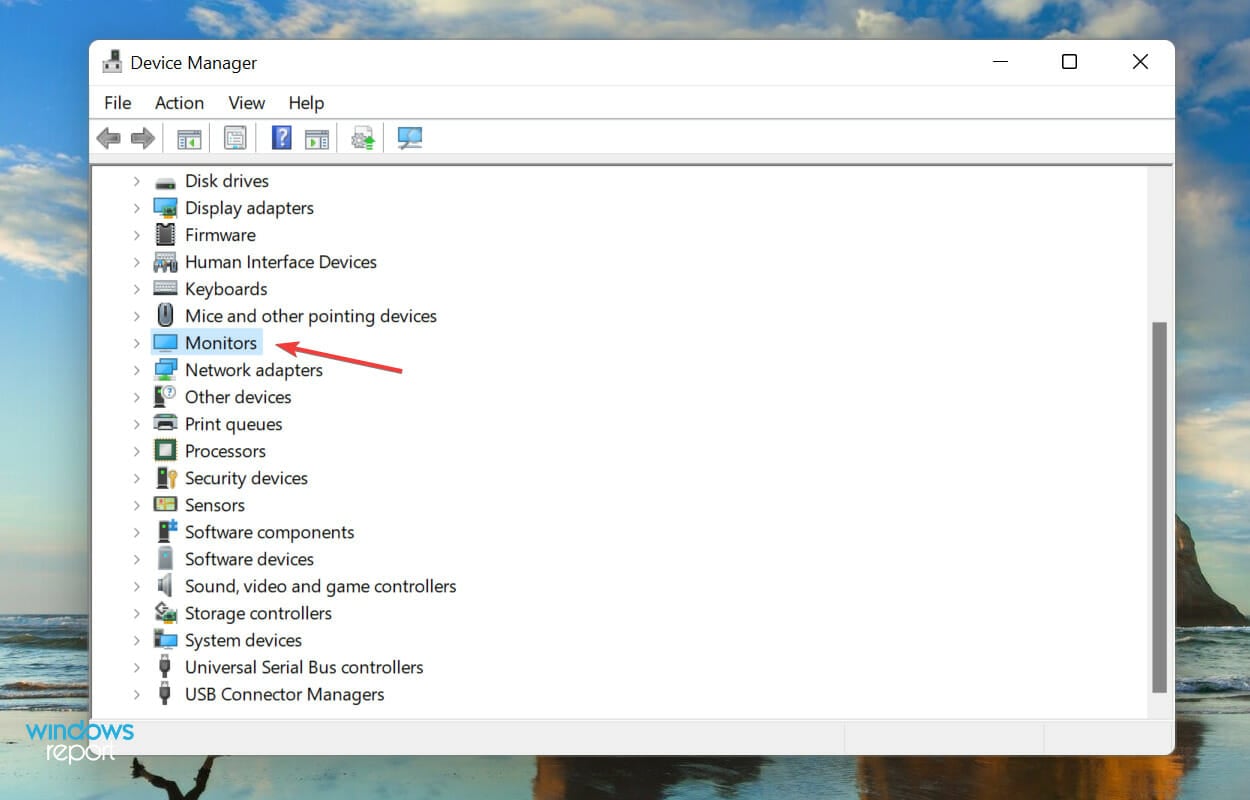
  2. Expand the Monitors section.Monitors
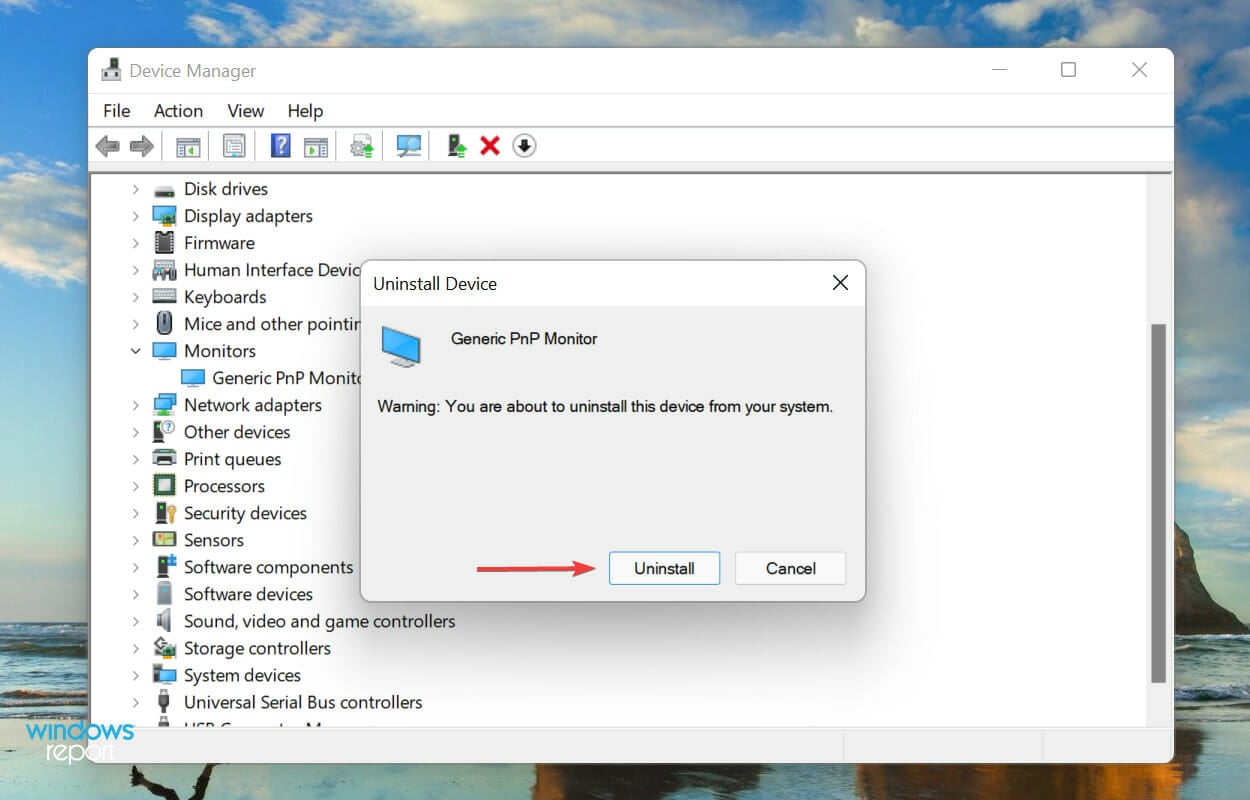
  3. Right-click on the Monitor and select Uninstall device from the context menu.Uninstall device to fix brightness not working windows 11
  4. Again, click Uninstall in the confirmation prompt that pops up.Confirm Uninstall

3. Update the graphics driver

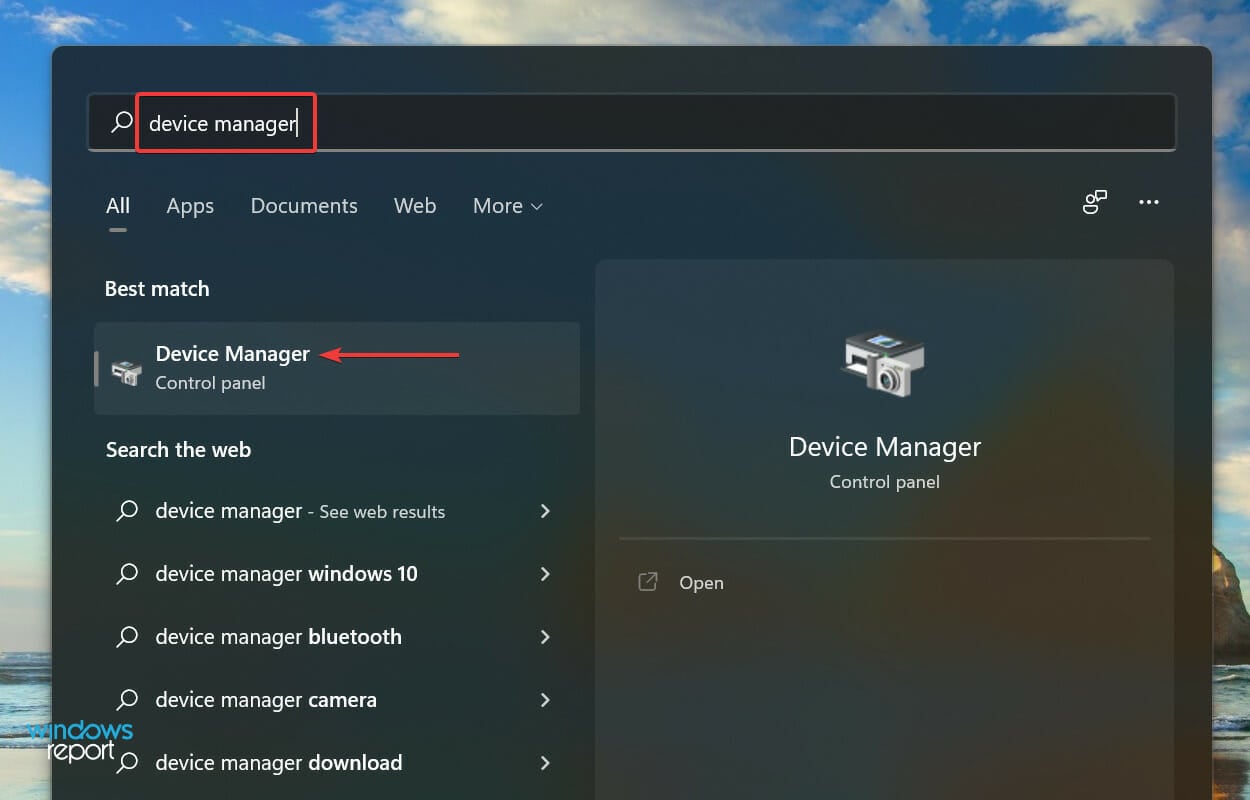
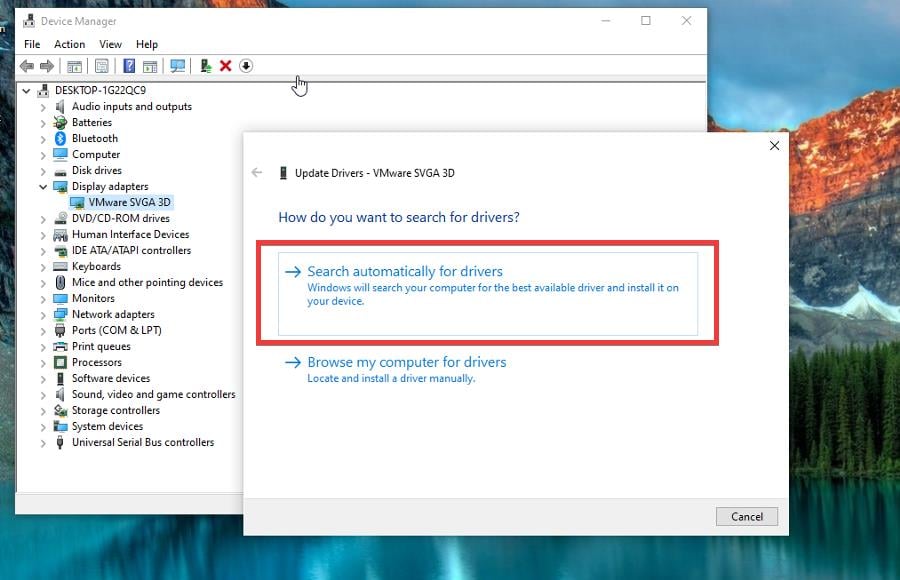
  1. Open the Start menu and open Device Manager.device manager
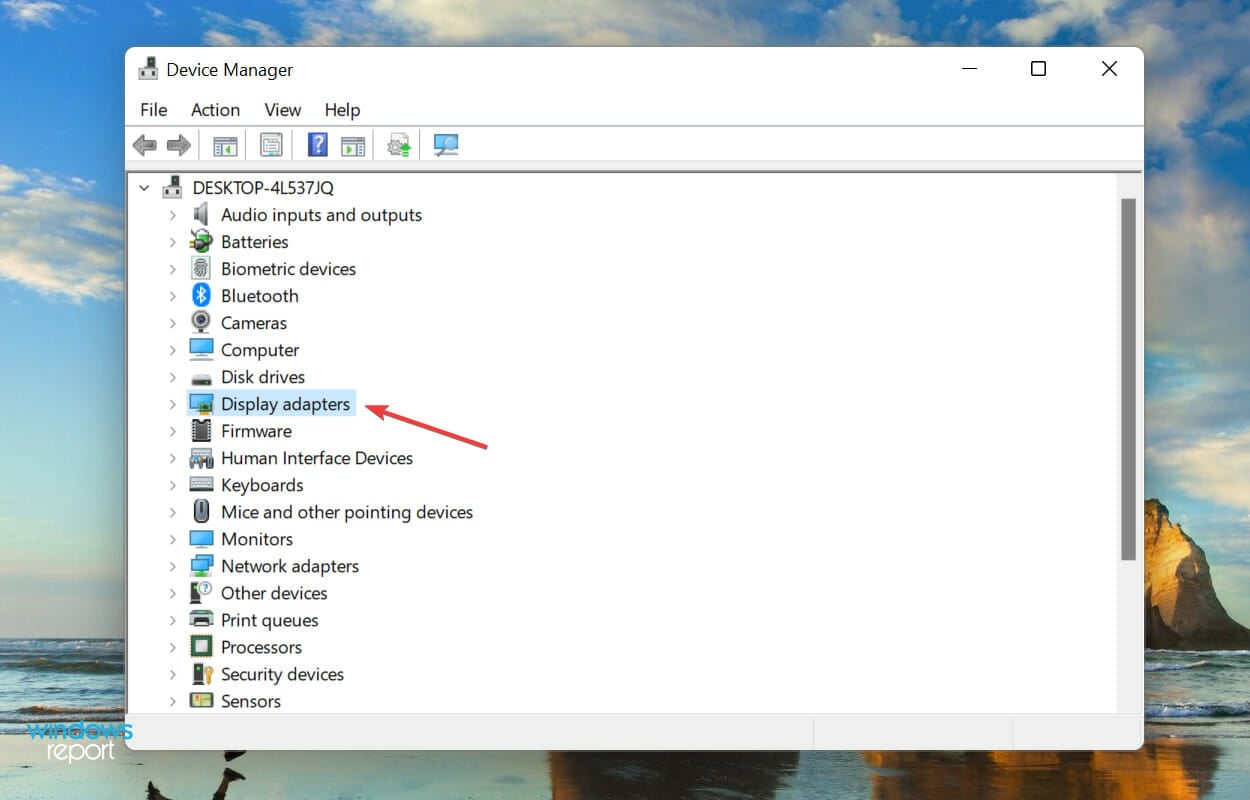
  2. Double-click on the Display adapters entry.Display adapters
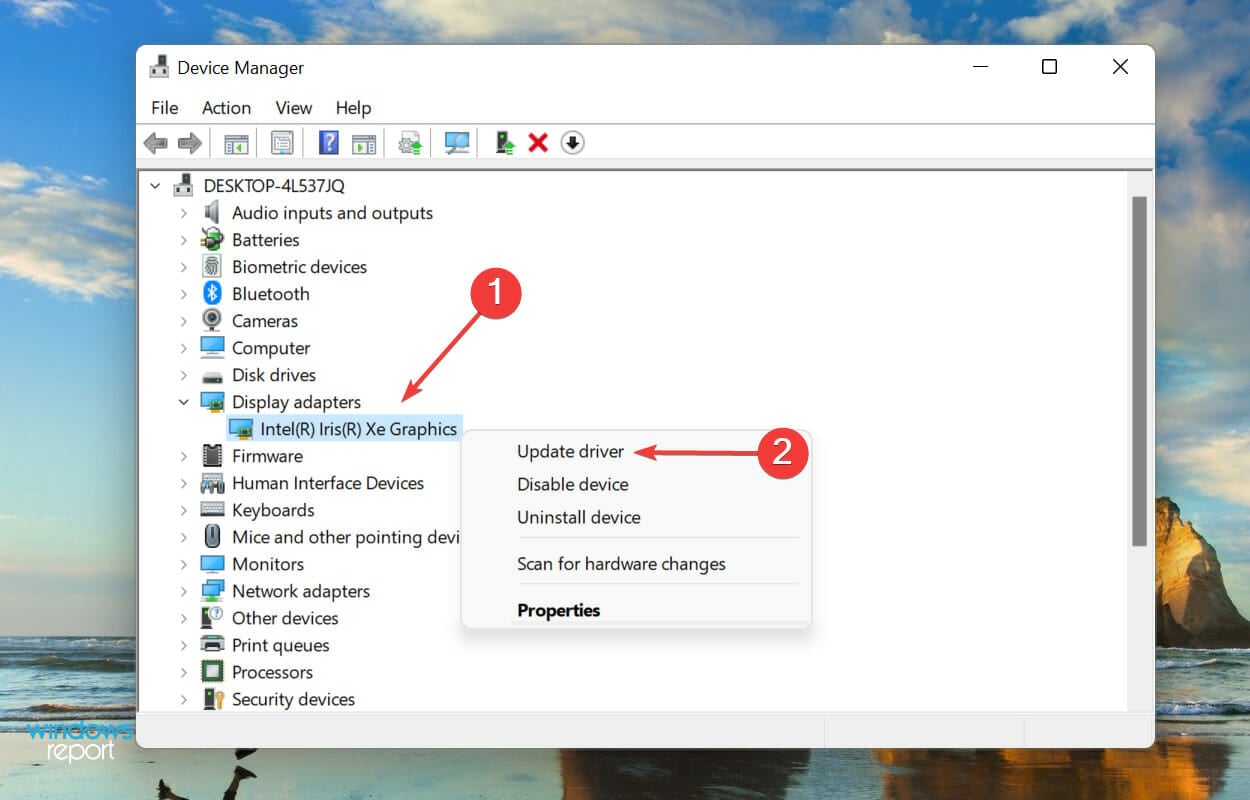
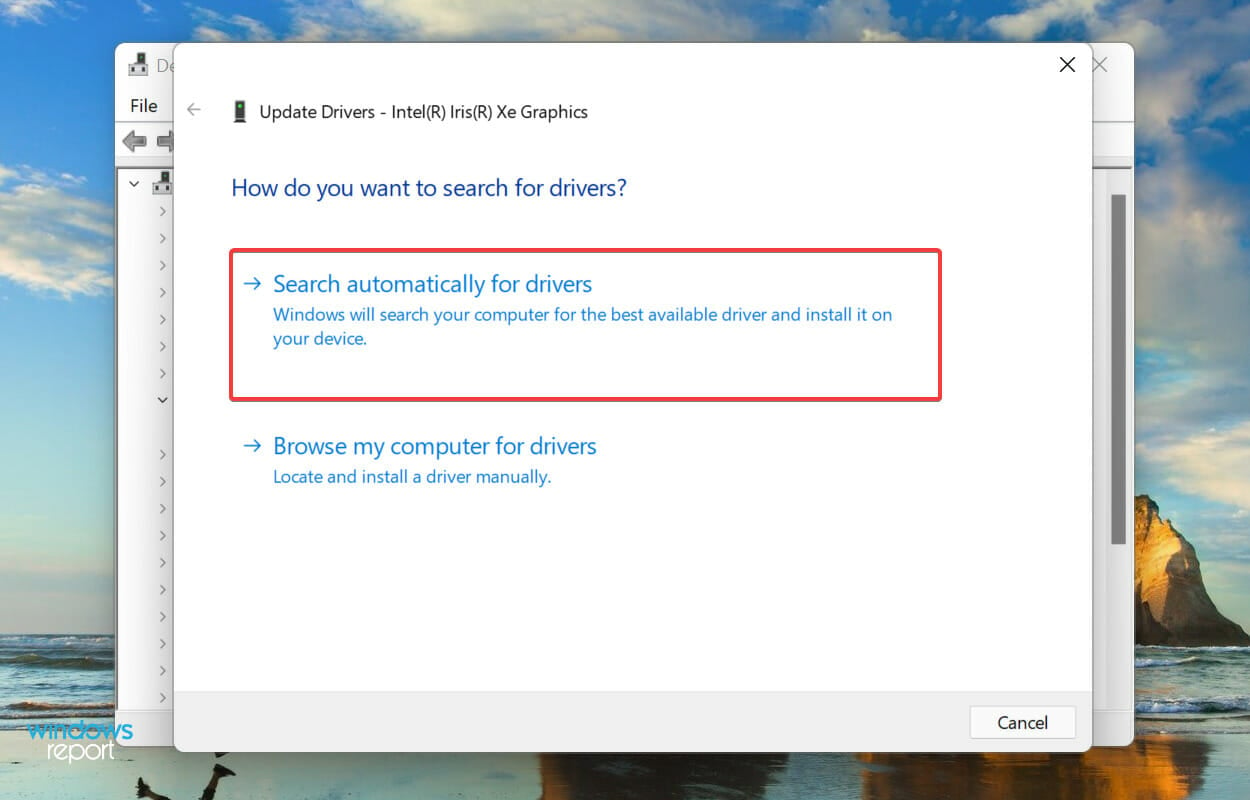
  3. Right-click on the graphics adapter and select Update driver from the context menu.Update graphics driver
  4. Select Search automatically for drivers.Search automatically for drivers
  5. Windows will now find the best available driver on the system and install it for the graphics adapter.

Alternatively, if Device Manager can’t find new drivers, you can use an automatic driver updater software like Fortect’s. This tool will automatically check for new drivers and install them onto your PC.

You can also check for the latest driver version in Windows Updates or manually download the setup from the official manufacturer’s website and install it.

4. Perform SFC and CheckDisk scan

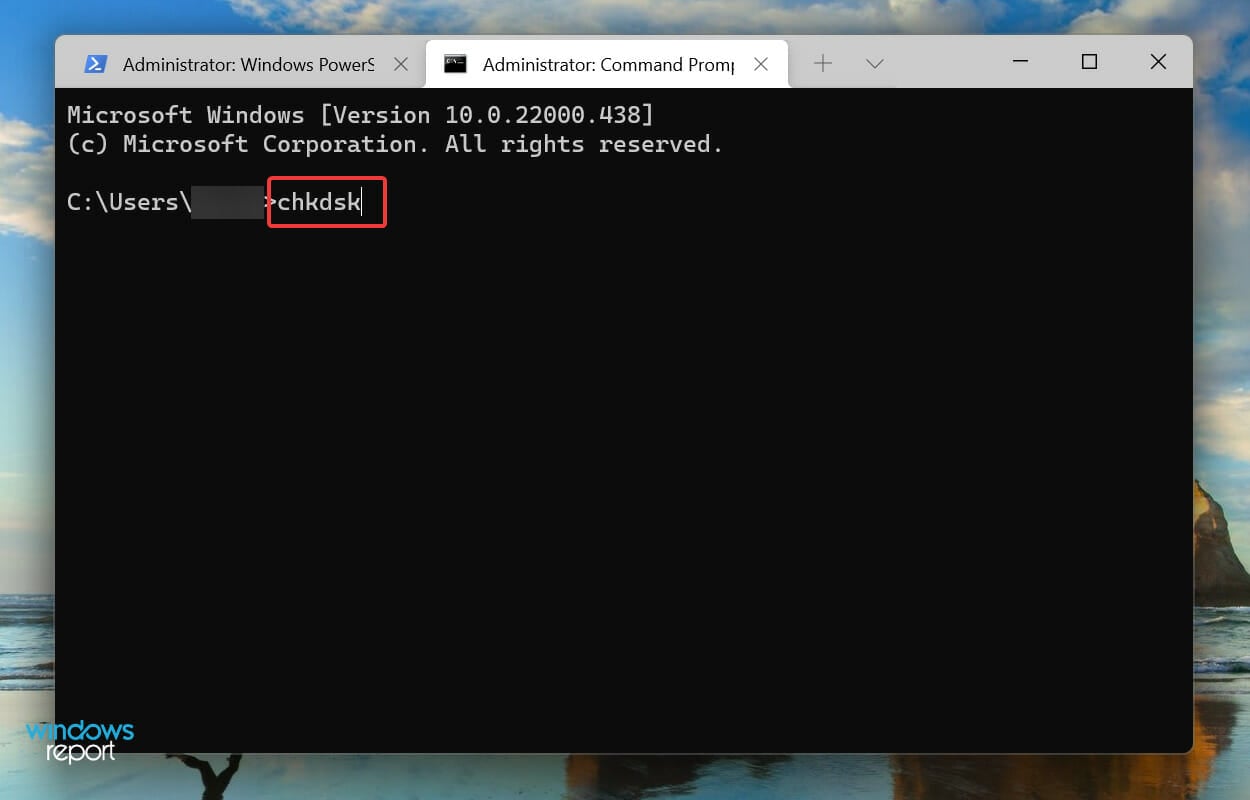
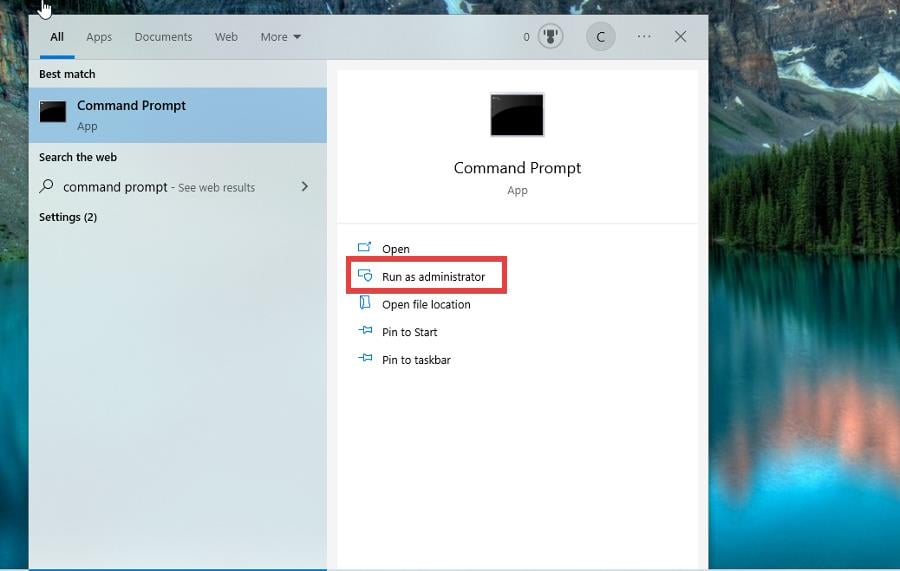
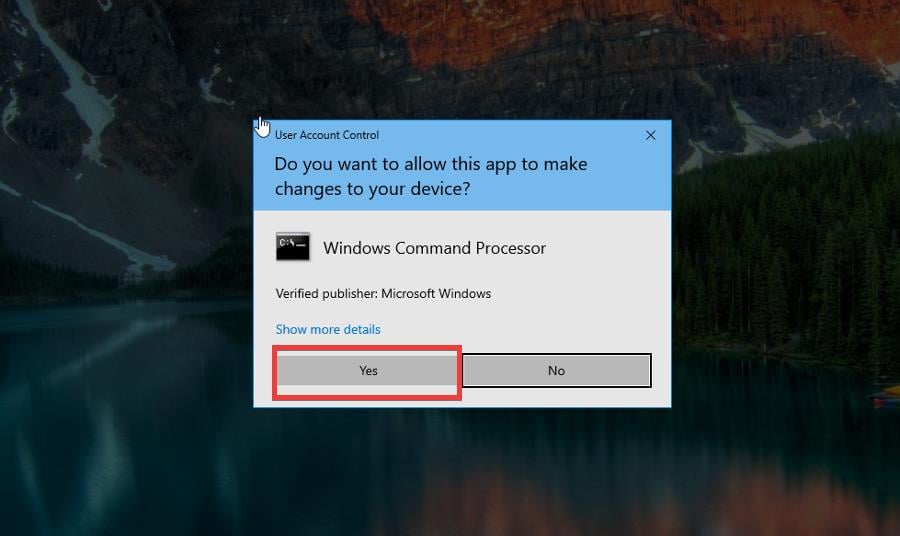
  1. Open the Search menu, type Command Prompt and select Run as administrator.
  2. Type the following command and hit Enter:chkdskRun ChecDisk to fix brightness not working windows 11
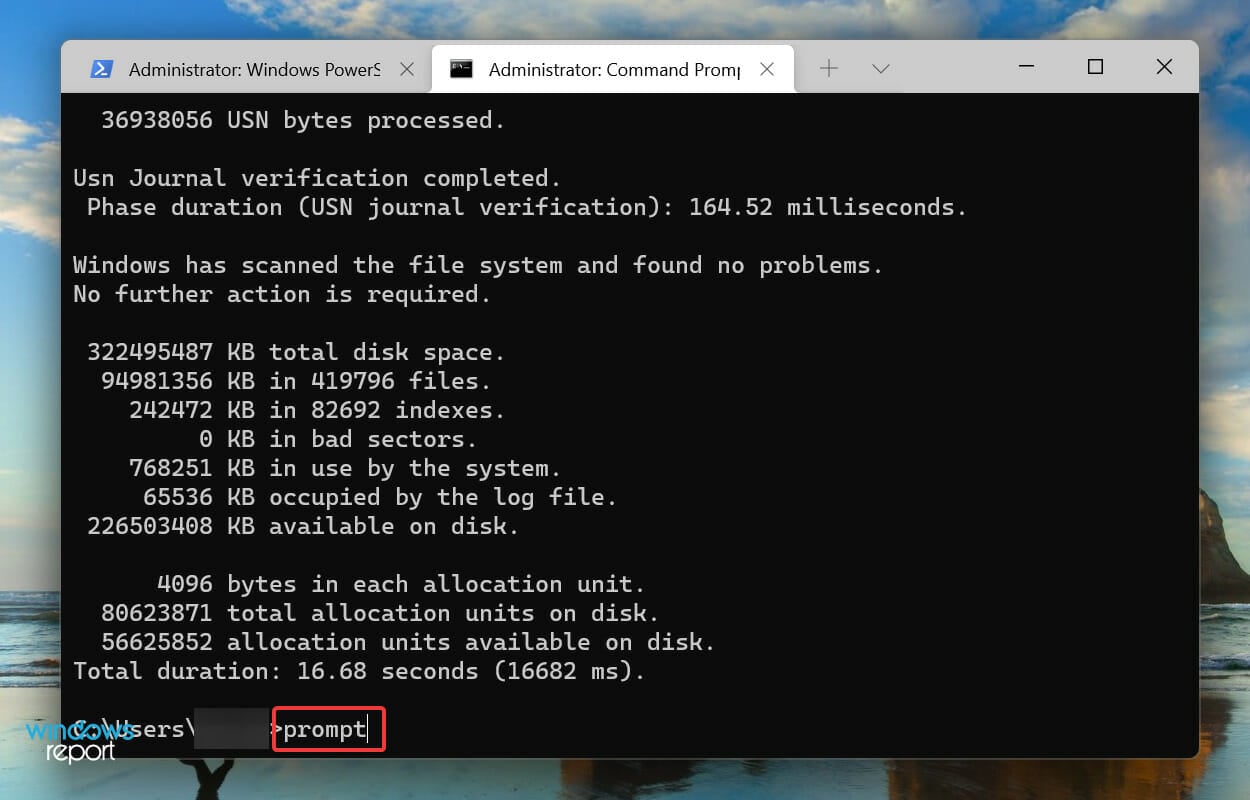
  3. Execute the following command:promptRun prompt command to fix brightness not working windows 11
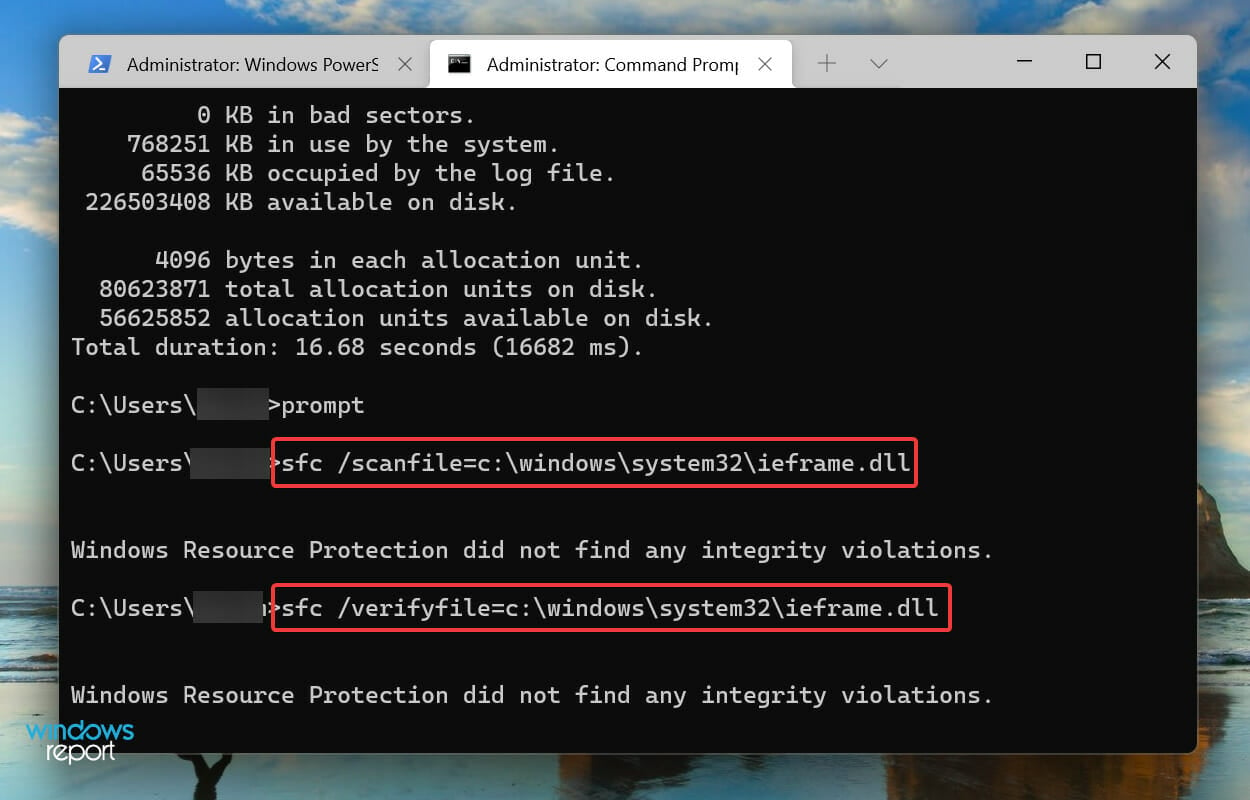
  4. Now, paste the following two commands and then hit Enter after each to scan and fix issues with the ieframe.dll file:
    • sfc /scanfile=c:\windows\system32\ieframe.dll
    • sfc /verifyfile=c:\windows\system32\ieframe.dllRun SFC for ieframe.dll to fix brightness not working windows 11
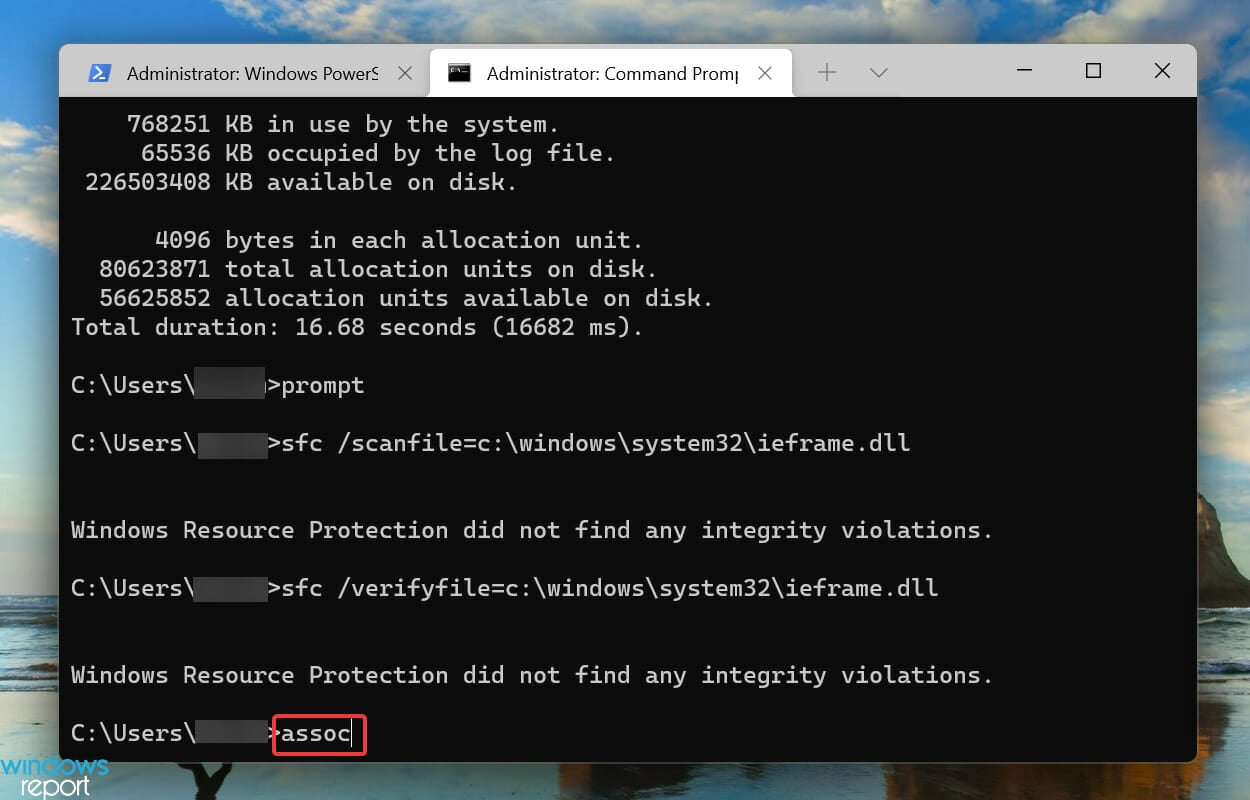
  5. Run the following command:assocRun assoc to fix brightness not working windows 11
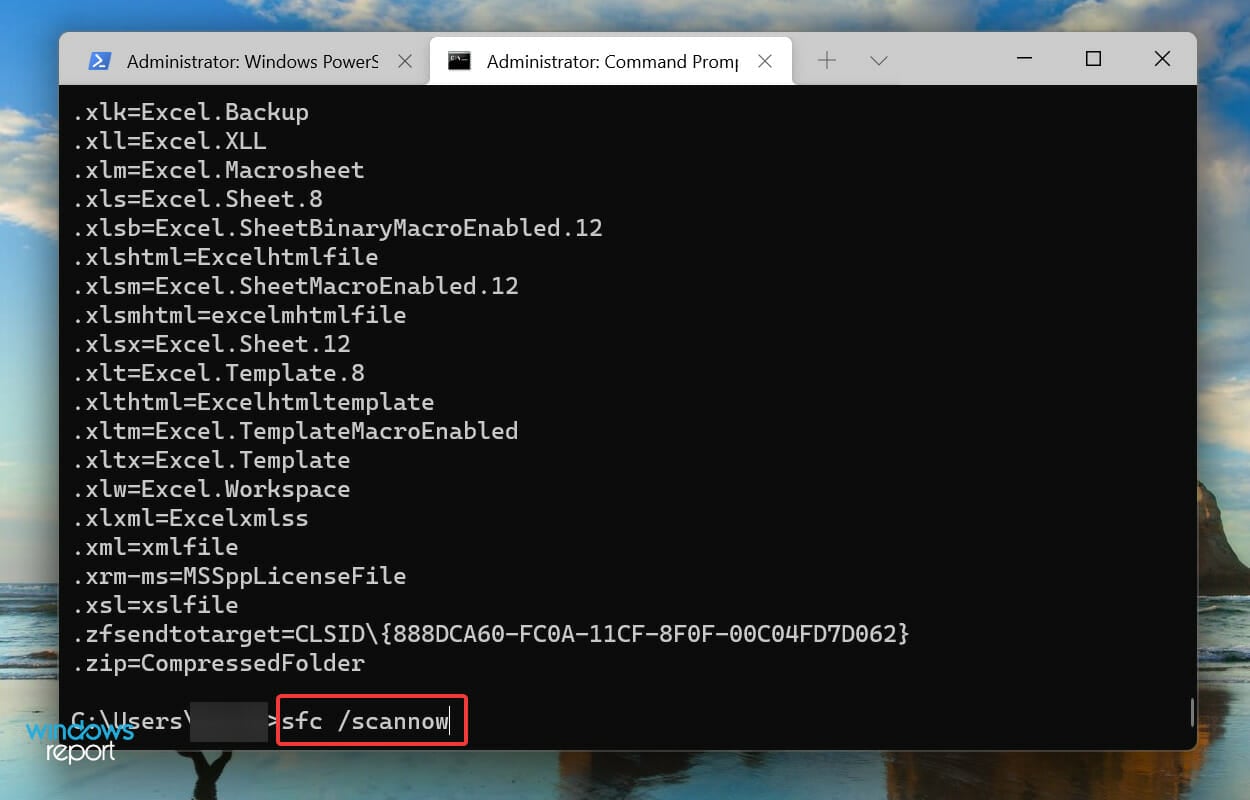
  6. Paste the following command and hit Enter:sfc /scannowRun SFC scan to fix brightness not working windows 11

The above scans will identify problems with the ieframe.dll file and the other corrupt system files and replace them with their cached copy. After running the scans, check if the brightness slider is now working in Windows 11.

5. Update Windows 11

  1. Press Windows + I to launch the Settings app.
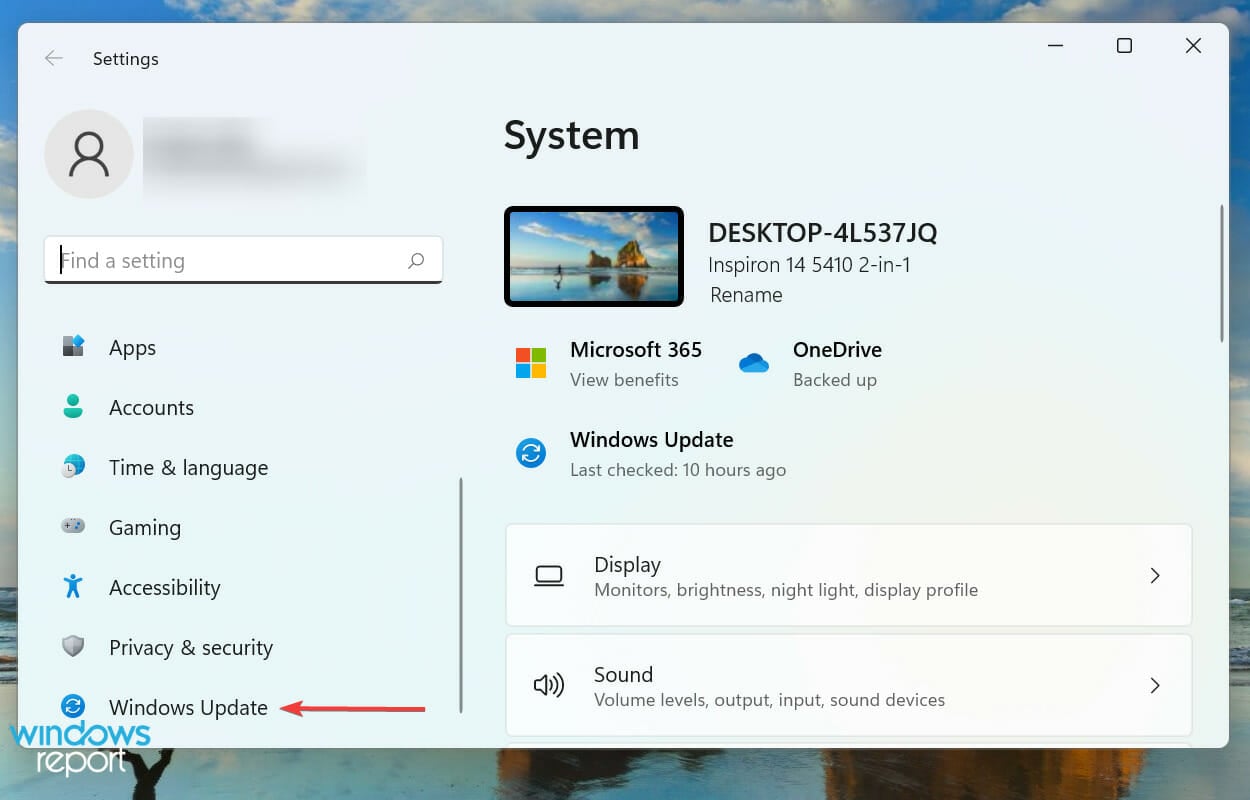
  2. Select Windows Update from the left side.Windows Update
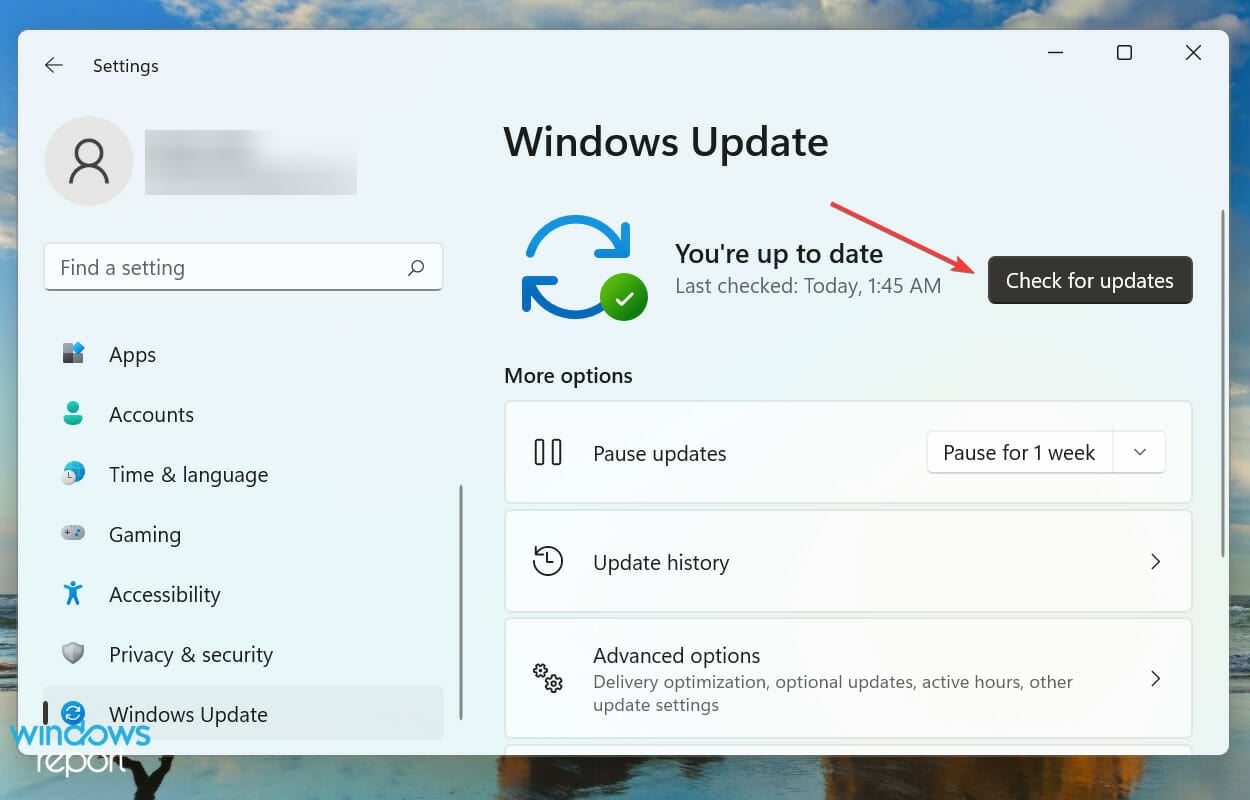
  3. Click on Check for updates.Check for updates to fix brightness not working windows 11
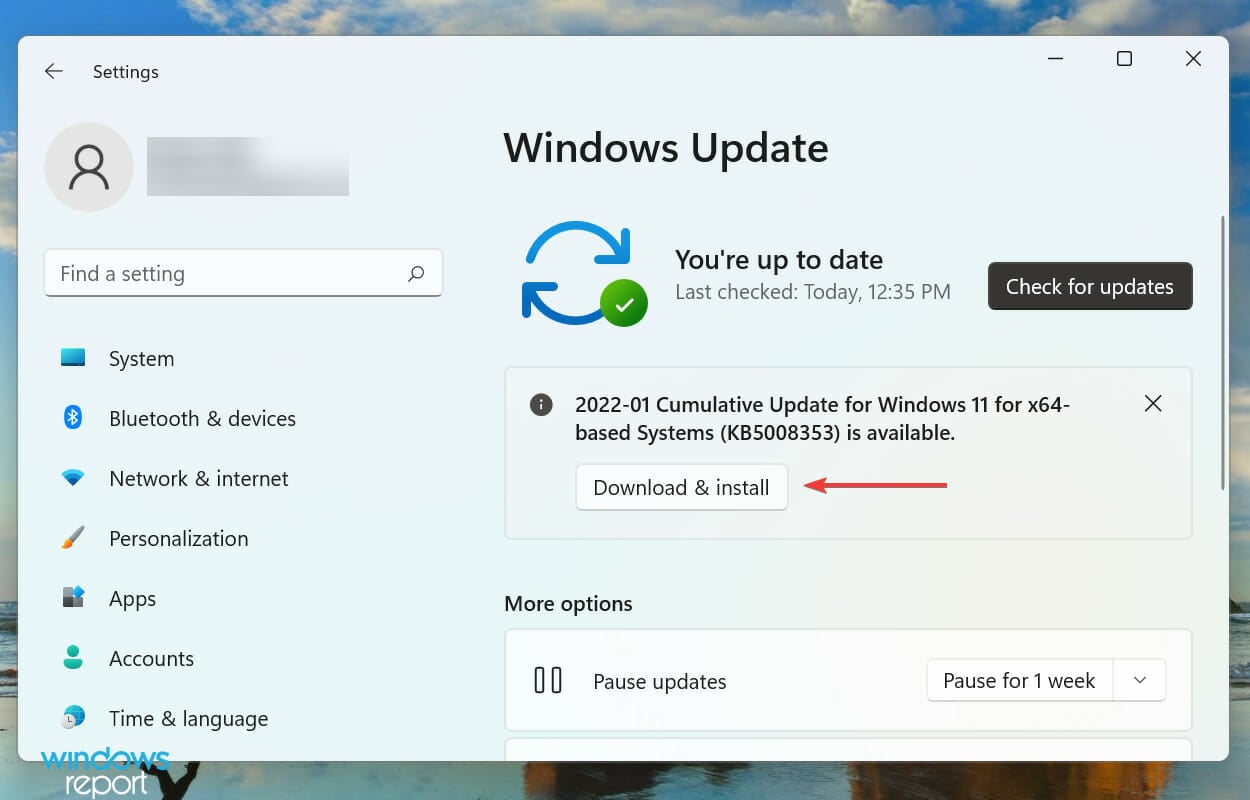
  4. Click on the Download & install option in case any are found.Download & install

6. Perform a system restore

  1. Open the Start menu.
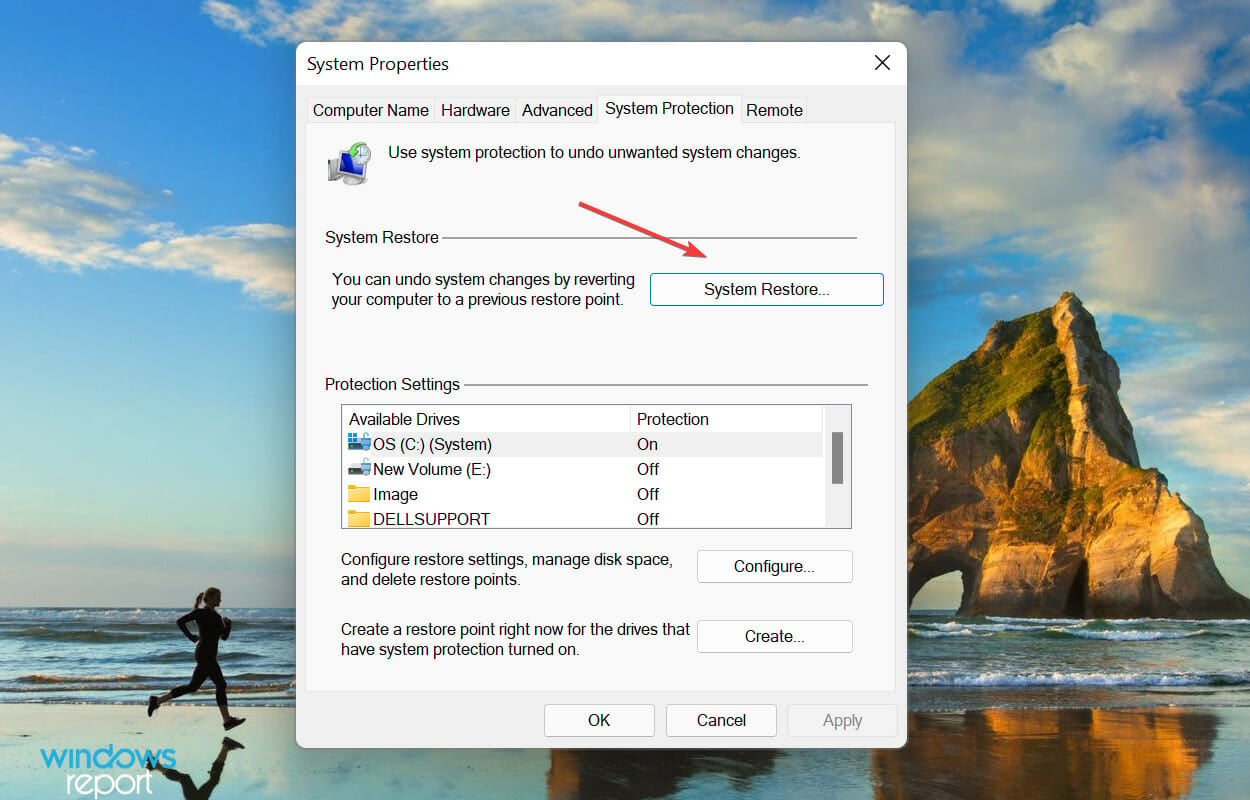
  2. Type Create a restore point and open it.Create restore point
  3. Click on the System Restore button.System restore to fix brightness not working windows 11
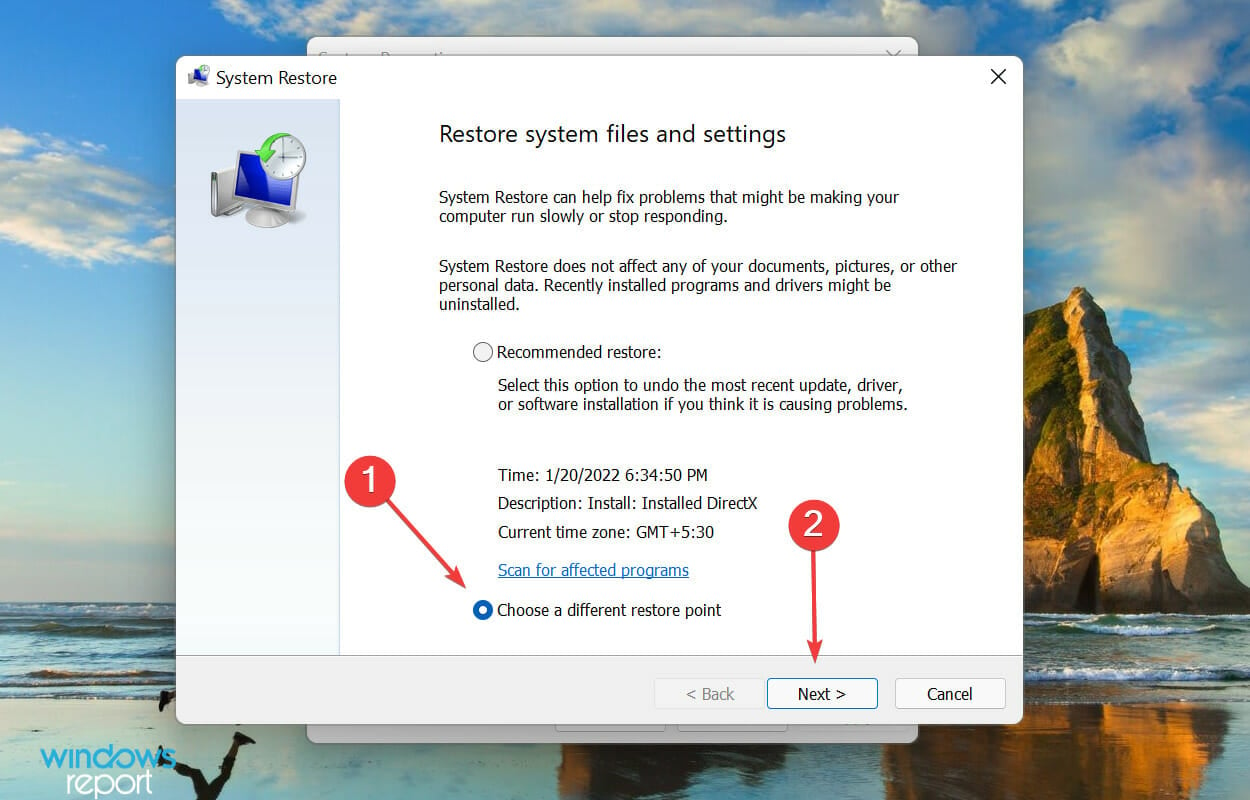
  4. Select the Choose a different restore point option and click on Next.Choose a different restore point
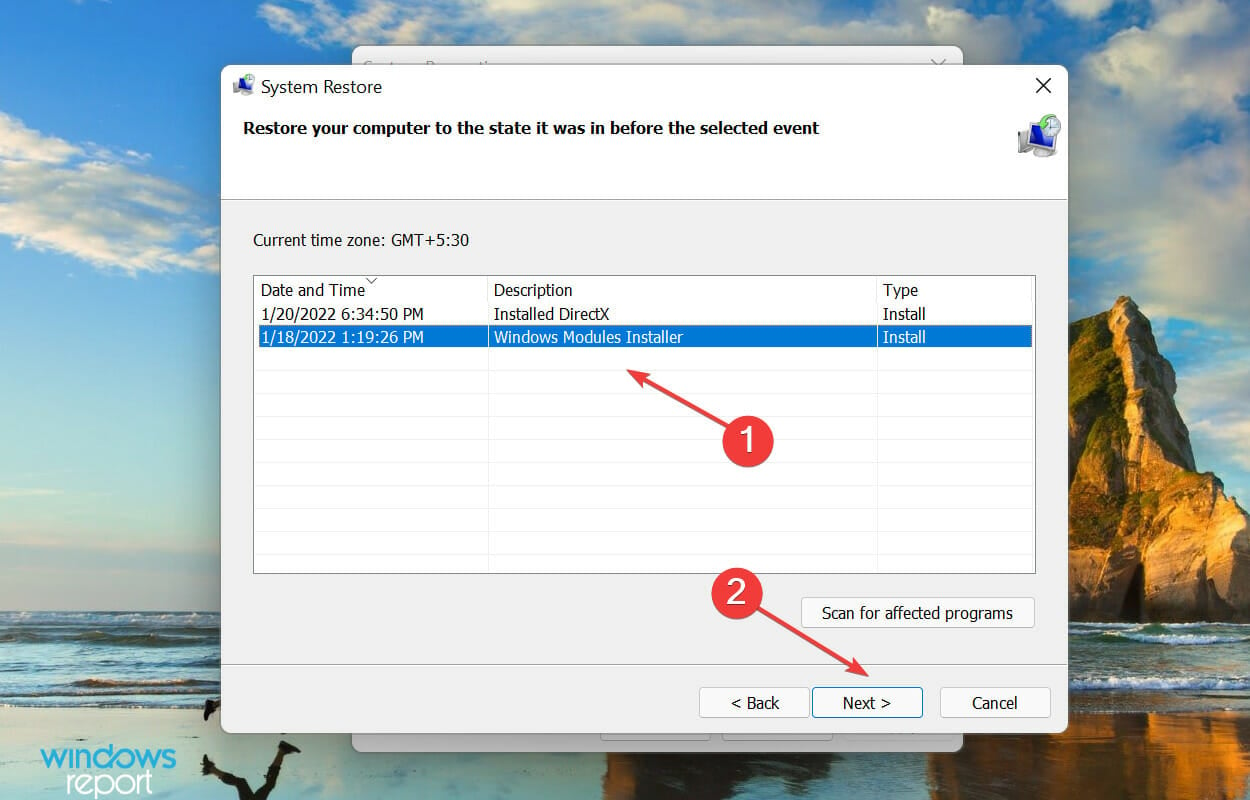
  5. Select a restore point from the list and click on Next to proceed.select Restore point to fix brightness not working windows 11
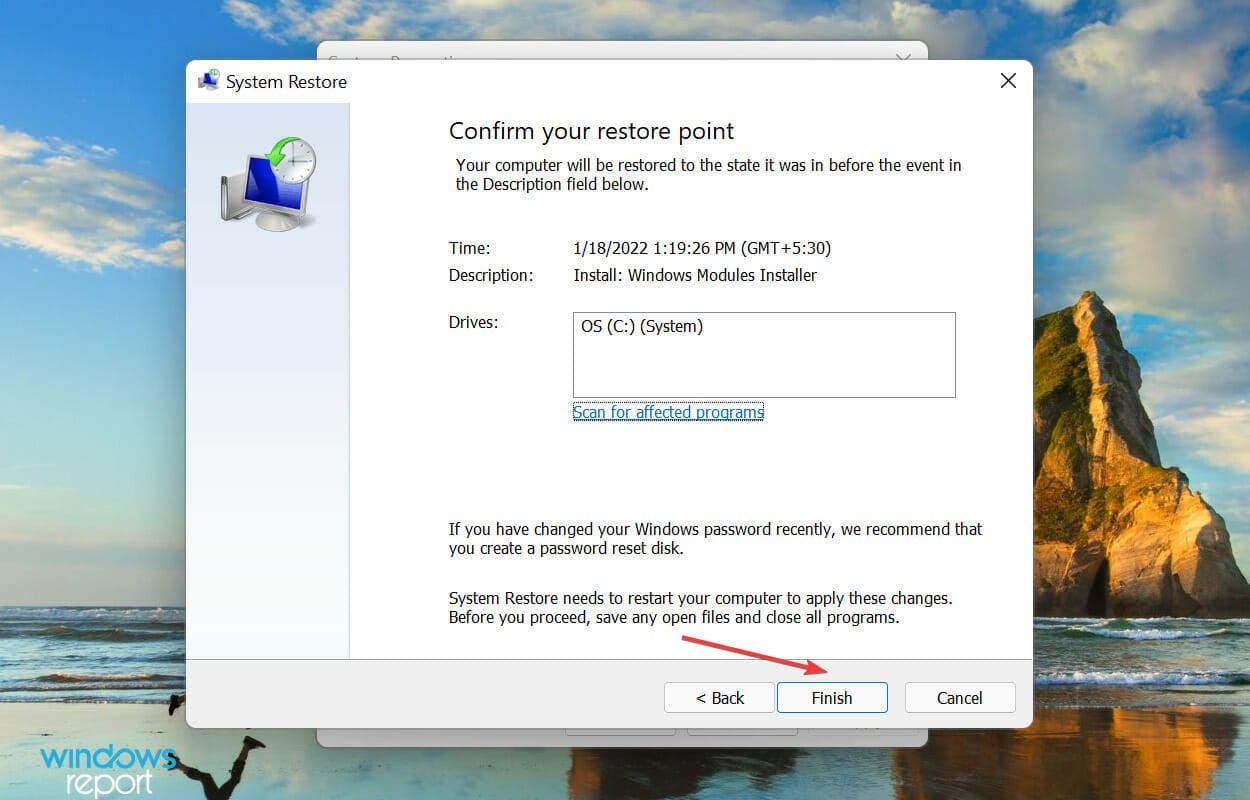
  6. Verify the restore point details, and click on Finish to start the process.Finish

The concept of System Restore is to take the system back to a state where the error didn’t exist. But you will have to choose a restore point created before you first encountered the error.

Although Windows automatically creates them whenever undergoing any significant change, you must learn how to create a restore point in Windows 11 manually.

7. Reset display settings to default

  1. Right-click on the desktop and select Display settings.display settings
  2. Scroll down to Advanced display settings.advanced display settings
  3. Click on Display adapter properties for your display.display adapter properties
  4. In the new window, click on the Color Management tab, then Color Management.color management
  5. Click Advanced and select Change system defaults. Reset to default settings here.change system defaults

How do I stop Windows 11 from lowering brightness?

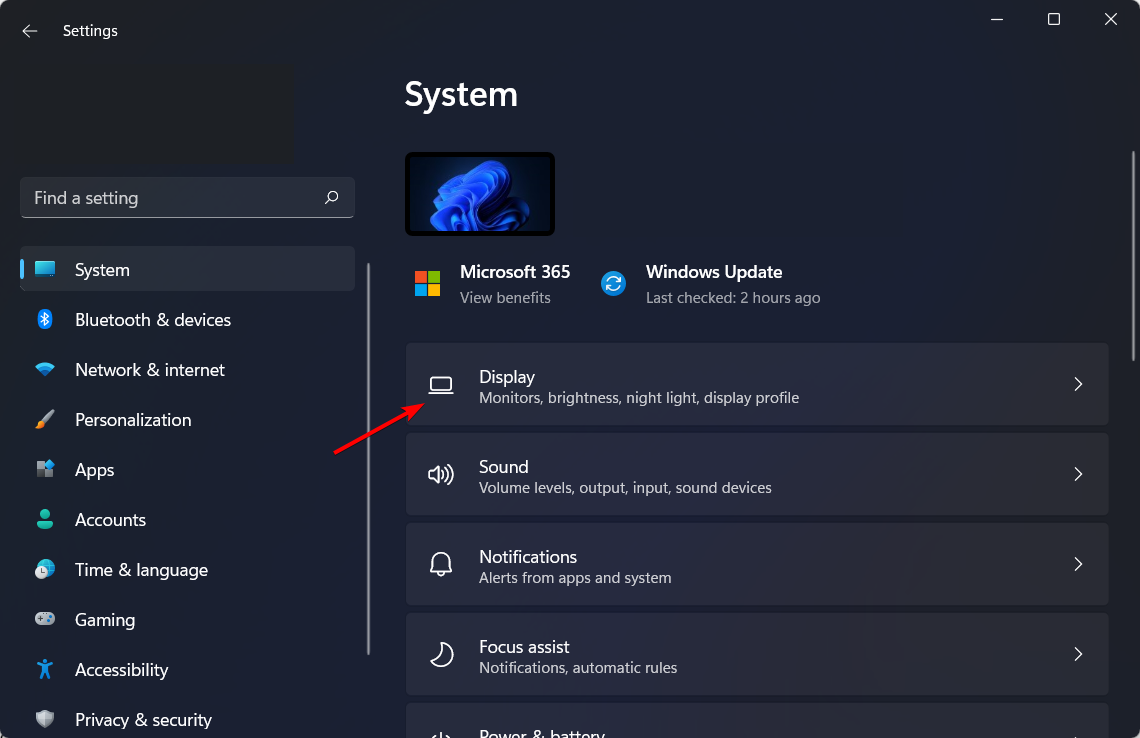
  1. Press the Win + I buttons to open the Settings menu.
  2. Select System from the left side.
  3. Click on Display.display-select auto hdr not working windows 11
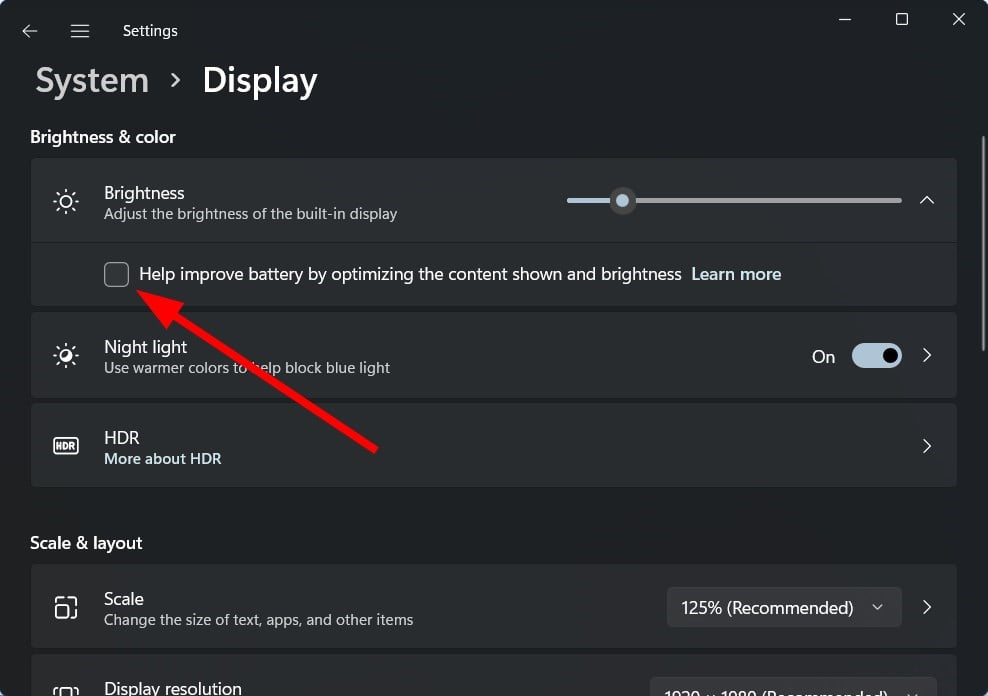
  4. Choose Brightness.
  5. Uncheck the Help improve battery by optimizing the content shown and brightness option.

Some Windows 11 PCs can automatically adjust the brightness levels of the screen based on the content being displayed.

Following the above steps, you can quickly turn this feature off and continue with your set brightness levels.

Brightness is just the top of the iceberg

Apart from being unable to change the brightness level, several users have reported that the screen dims automatically in Windows 11. The issue arises when certain features responsible for automatically adjusting the screen brightness malfunction.

Another problem some users seem to face is the flickering screen problem, which you can resolve by following this guide for the best solutions. If you are facing the black screen issue in Windows 11, we suggest you follow our guide for the most effective methods to resolve it.

Other brightness errors you may encounter include cases where the brightness option is missing entirely from Windows 10 Settings, or situations where adjusting brightness simply doesn’t work at all.

Some users also struggle with monitor brightness changing automatically, or find that the brightness control buttons on their device stop responding.

Summary

That’s all there is to the brightness slider not working problem in Windows 11. By reaching this part of the article, the error should be eliminated, and you would also know how to troubleshoot other issues with the display.

Now that the brightness settings are accessible and working learn how to change them in Windows 11. Then, tell us which fix worked for you in the comments below.

Get Hotspot Shield on Black Friday sale [40% Off]

VPNs are a great way to protect your privacy and secure your connection.

But, as you may know, not all VPN subscription plans are affordable. At least not monthly plans, which usually come without discounts.

However, certain VPN providers such as Hotspot Shield provide us with profitable deals every now and then, which could allow more users to purchase premium subscriptions.

What is the best Hotspot Shield discount?

  • Basic (free) – $0
  • Monthly plan – $12.99 per month
  • Yearly plan (save 38%) – $7.99 per month ($95.88 yearly)
  • 3-year plan (save 77%) – $2.99 per month ($107.64 every 3 years) + 45-day money-back guarantee

Hotspot Shield

Are you still waiting for the perfect deal on VPN subscriptions? Check out Hotspot Shield’s offers right now.

Although Hotspot Shield offers multiple plans, the monthly subscriptions are not discounted.

Choosing the Hotspot Shield 3-year plan would be far more profitable, especially if you’re after a long-time VPN commitment.

Why choose Hotspot Shield?

As you’d expect, there are certain differences between the different plans that Hotspot Shield offers. You can check the perks of each plan in the comprehensive table below:

FeaturesBasic
(Free)
PremiumPremium
Family
Zero-logging policyYesYesYes
EncryptionMilitary-gradeMilitary-gradeMilitary-grade
Maximum devices1 device5 devices25 devices (5 devices
for each family member)
Streaming accessLimitedNetflix, YouTube,
Disney+, Hulu
Netflix, YouTube,
Disney+, Hulu
SpeedUp to 2 MbpsUp to 1 GbpsUp to 1 Gbps
Servers/locationsOnly 1 (US)Over 3200 servers,
more than 115 locations
in over 80 countries and
35 cities
Over 3200 servers,
more than 115 locations
in over 80 countries and
35 cities
Data limit500 Mbs per dayUnlimitedUnlimited
Internet kill switchYesYesYes
Customer serviceSupport center24/7 live chat24/7 live chat
VPN protocolsHydra, OpenVPN,
WireGuard,
IPsec/IKEv2
Hydra, OpenVPN,
WireGuard,
IPsec/IKEv2
Hydra, OpenVPN,
WireGuard,
IPsec/IKEv2
Premium devicesLimitedRouters, Linux,
Smart TVs
Routers, Linux,
Smart TVs
Malware protectionNoYesYes
Smart VPNNoYesYes
Identity Guard
(id theft protection)
NoYesYes
1Password
(password management)
NoYesYes
Robo Shield
(spam call blocker)
NoYesYes

It’s safe to say that Hotspot Shield offers a wide variety of plans at accessible prices.

However, note that the differences between Premium and Premium Family are only related to the maximum number of devices you can use on the same plan.

Therefore, if you don’t plan on using Hotspot Shield on more than 5 devices, you may want to stick with the Premium plan.

5 Best Black Friday Deals on Wireless Headphones

Headphones are a great asset for every music buff, providing you with the sort of personalized listening experience that every music lover craves for.

If you missed Black Friday and Cyber Monday deals, don’t worry, flash sales can be found during the whole year, and we have already shown you some of the best Xbox wireless headsets. Speaking of which, here is a list of the best wireless earbuds deals that you can get today.

What are the best wireless headphones deals for 2022?

Bose QuietComfort 35 II

  • Three levels of world-class noise cancellation
  • Noise-rejecting dual-microphone system
  • Balanced audio performance at any volume
  • 20 hours of battery life
  • No customizable sound profiles

The Bose QuietComfort 35 (Series II) headphones are easily one of the best in the segment. It features a Noise-rejecting dual-microphone system for exceptional clarity while also allowing for a balanced audio output throughout the entire volume range.

Another highlight of the Bose QuietComfort 35 is that it comes integrated with Alexa digital assistant which means you can control your music or have your queries answered by Alexa via voice commands.

No doubt, a must-have for the holiday either for personal use or as a gift for the near and dear ones, especially when used with headphone amps with bass boost.


  • Smart noise-cancellation
  • Dual Noise Sensor Technology
  • Ultra-comfortable headphones design with adjustable metal sliders
  • 35 hours battery life
  • Can't use the Bluetooth while charging

The headphone boasts of 30 mm driver unit which Sony claims to allow for truly immersive listening pleasure.

The headphone also comes with an integrated microphone which allows for hands-free operation for answering calls or giving voice commands.

It supports Bluetooth and NFC connectivity, and it has a battery backup time of 35 hours. It also features quick charging and quickly access to your smartphone’s voice assistant. On the whole a great buy for the holiday season.


  • Apple W1 chip and Class 1 wireless Bluetooth connectivity
  • 40 hours battery life
  • Fast Fuel
  • Built-in microphone
  • May be too tight-fitting for some users

If you’re looking for Beats wireless headphones Christmas deals, then this model might be just what you need.

The Beats Solo3 is another high-performance wireless Bluetooth headphone on the market. These Beats headphones are compatible with iOS and Android devices.

The sound quality is a big plus, while the battery can provide up to 40 hours of playback from a full charge. It is also worth mentioning that the fast fuel feature for 5 minutes of charging gives you 3 hours of playback.

On the whole, an excellent product from Beats that lives up to the company’s reputation.


  • Oversized 40 mm dynamic drivers
  • Hybrid active noise canceling
  • 40 hour playtime
  • Built-in microphone
  • Can't charge and listen simultaneously

The Anker Soundcore Life Q20 headphones comes with hybrid active noise-cancelling technology, which means external distraction are a minimum.

You benefit from up to 40 hours of non-stop playtime in wireless active noise cancellation mode (at 60% volume), while in standard music mode you can have enormous 60 hours playtime.

It also features a lightweight and comfortable design, which means having it on is always comfortable, even for hours on end.


JBL Live 460NC

  • 40mm drivers
  • Premium sound
  • 50 hours battery life
  • Noise cancelation
  • Ambient Aware and TalkThru mode
  • Uncomfortable for some users
  • Built-in controls could be better

This model comes with 40mm drivers and delivers premium sound, and with the Adaptive Noise Canceling technology, you can focus on your favorite music without distractions.

Ambient Aware mode is also present, allowing you to focus on your surroundings better. A special TalkThru mode is available as well, which allows you to chat without having to pause your music.

The battery lasts up to 50 hours, and around 40 if you’re using noise cancelation, which makes JBL Live 460NC one of the best headphones that you can buy.

These are the five best wireless headphones for you to buy this Christmas. Unfortunately, our guide doesn’t include Apple wireless Earbuds Christmas deals, but we’re certain that these models will work perfectly with your iOS device.

Which wireless headphones would you buy from our list? Leave your choice in the comments section below.

5 Razer keyboard deals for all the gamers out there

Razer is one of the most recognizable gaming brand on the market and offers everything from gaming laptops to mouse and gaming keyboard and headphones.

While the Razer products offer above-average quality, the products are usually a little expensive.

If you had put your decision to buy a Razer gaming keyboard on hold just because of the price, here are the cheapest Razer keyboard deals.

What are the best Razer Gaming keyboard Black Friday deals?

Razer Huntsman Elite

  • Fastest keyboard action on the market
  • Intuitive and useful media controls
  • Top-notch quality hybrid switches
  • Custom profiles requires rigning in to the Razer app

The Razer Huntsman is, hands down, the best Razer keyboard you will find. It is equipped with on-board memory, software that gives you customization freedom, and the fastest switches.

Additionally, the keyboard utilizes the brand-new Razer Opto-mechanical switches that have a brand new design. It’s the first switch that resets at the exact same point, resulting in fast performance.

Razer BlackWidow Elite

  • Mechanical Keys
  • Full controllable individual key lighting
  • Built-in wrist rest
  • The multi-functional digital dial and Dedicated media controls
  • Magnetic wrist rest

The Razer BlackWidow Elite is the best gaming keyboard from the company yet. It comes with a multi-functional digital dial with dedicated media controls for a seamless gaming experience.

The mechanical keys are durable and offer 80 million keystrokes. Users can fully control the individual key light as well.

Razer Ornata Chroma

  • Mechanical-Rubber Dome Hybrid
  • Individual key lighting
  • Razer Synapse compatible
  • Ergonomic magnetic wrist rest
  • Keys get stuck

The Razer Ornata Chroma is a hybrid offering mechanical and rubber-dome keyboard trying to please gamers as well as casual users for typing.

Ornata is an all-black chassis packing a full-size keyboard offering individually backlight keys. The keyboard also includes a wrist rest. The keyboard can be configured with the Razer Synapse tool.

Razer Cynosa Chroma

  • Spill-resistant design
  • Razer Synapse compatible
  • Individually light keys
  • Fully programmable macros
  • Software doesn’t always load up

The Razer Cynosa is a low-cost alternative to Ornata and comes with a spill-resistant design. There is a 10-key anti-ghosting feature to execute up to 10 commands at the same time.

The keys are individually lit with 16.8 million color options and can be turned off. Customization is possible through the Razer Synapse driver tool.

Razer Turret Wireless

  • Wireless connection
  • Compatible with Xbox and PC
  • Magnetic mouse docking
  • The mousepad is a bit small

The Razer Turret Wireless keyboard is a one-in-all device designed to bring the immersive gaming experience everywhere, thanks to it’s retractable mousepad.

Additionally, the pad is magnetic in order to prevent the mouse from falling during usage. Additionally, the keyboard has up to 40 hours of battery life, which is more than enough.

Why settle for just the keyboard? Take a look at this great list of the best Razer gaming laptops and get your hands on the most powerful rigs out there.

Found what you are looking for? Do let us know your favorite Razer gaming keyboard in the comments below.

How to Fix Windows 11 Start Menu Not Working (Quick Guide)

When the Windows 11 Start menu is not working, it may refuse to open, lag, or show no response to clicks. Whether it’s due to an update, a corrupt profile, or broken system files, follow these proven solutions to fix it quickly.

Fix Start Menu Issues in Windows 11

1. Restart Windows Explorer

Refreshing the UI can instantly revive the Start menu.

  • Press Ctrl + Shift + Esc to open Task Manager
  • Scroll to Windows Explorer, right-click it, and select Restart

2. Check for Windows Updates

Some Start menu bugs were fixed in recent Windows builds.

  • Press Win + I to open Settings
  • Go to Windows Update > Check for updates
  • Install all available patches and reboot

This is especially useful if you’re affected by a recent problematic patch. If the issue started after an update, you can try rolling back Windows 11 to a previous build for a quick resolution.

3. Use System File Checker (SFC) and DISM

Corrupt system files can break essential UI functions.

  • Open Command Prompt as admin
  • Run this command:
    sfc /scannow
  • After that completes, run:
    DISM /Online /Cleanup-Image /RestoreHealth

These tools scan and restore system integrity.

4. Use PowerShell to Re-Register Start Menu

This command resets the Start menu experience app.

  • Open Task Manager > File > Run new task
  • Type powershell, check Create with admin privileges
  • Paste this command:
Get-AppxPackage -AllUsers Microsoft.Windows.StartMenuExperienceHost | Foreach {Add-AppxPackage -DisableDevelopmentMode -Register "$($_.InstallLocation)\AppXManifest.xml"}

Then press Enter and reboot.

5. Sign in with a Local Admin Account

A corrupt user profile may be blocking the Start menu.

  • Go to Settings > Accounts > Other users
  • Click Add account and follow the prompts
  • Choose I don’t have this person’s sign-in information
  • Select Add a user without a Microsoft account
  • Assign admin rights and log in

Check if the Start menu works under the new profile.

6. Create a New Local User and Delete TileDataLayer

This method has a high success rate for broken Start menus.

  • Follow the steps above to create a new admin user
  • Press Win + R, type %LocalAppData%, and hit Enter
  • Navigate to TileDataLayer folder
  • Delete it (if present) — you may need to log in with the new user first

This resets cached tile and layout data. If you’re also having taskbar alignment issues, you can move the taskbar in Windows 11 to troubleshoot UI layout bugs.

7. Uninstall Problematic Windows Updates

Specific updates (e.g., KB5030219) are known to break the Start menu.

  • Press Win + I > Windows Update > Update history
  • Click Uninstall updates
  • Select the problematic KB and uninstall it

Several users reported this instantly fixed the Start menu.

8. Perform a System Reset (Last Resort)

If all else fails, reset Windows without removing your files.

  • Open Settings > System > Recovery
  • Under Reset this PC, click Reset PC
  • Choose Keep my files and follow the steps

This reinstalls core system components without deleting personal data. You can follow a detailed walkthrough to restore Windows 11 to factory settings.

Why This Happens

Start menu failures are often caused by:

  • Corrupt user profiles or layout files
  • Broken Windows components
  • Recent faulty updates
  • UI shell conflicts (like TileDataLayer or StartMenuExperienceHost issues)

These issues aren’t exclusive to Windows 11 , many users also faced a Start menu critical error in Windows 10 that shares similar causes and fixes.

FAQs

Is there a Start Menu Troubleshooter in Windows 11?

No official one, but running SFC, DISM, or PowerShell often solves related issues.

Can a Windows update break the Start menu?

Yes. KB5030219 and others have been known to cause Start menu bugs.

Does creating a new user fix Start menu issues?

Yes, it often works if the issue is tied to your user profile.

Will a system reset delete my files?

No, if you choose Keep my files during the reset, your personal data stays intact.

Conclusion

If your Windows 11 Start menu is not working, try restarting Explorer, checking for updates, running system scans, or creating a new user profile. These tested solutions fix most Start menu issues without needing a full reinstall.

5 best budget mouse bungees to buy [Cyber Monday]

Mouse bungees have become highly important in gaming. So if you prefer wired to wireless mice, these accessories are a life savior.

While not everyone has a sharp eye for a bargain, here we are with some great budget mouse bungees for you.

Before you pick any PC accessory or plan to buy one, it is essential to frame a budget in advance. Don’t you imagine that you’ll get a decent option only when spending more money?

Lucky for us gaming fans, there are plenty of mouse bungee deals out there. Instead of making you suffer through a long-winded comparison list, we are going to tell you some of them right away. Let’s get started!

Note: All the prices and offers in this article are subject to change, so be sure to check the official product page to get the latest deal. If the product or offer you’re looking for is no longer available, you can try to find it on its official manufacturer page or get another one from our list.

What is the best budget mouse bungee?

Generic Mouse Bungee Mouse Cord

  • Compatible with any corded mouse
  • Wire clip part that can be adjusted to meet various requirements of angle
  • The rubber feet on the bottom often comes off

This mouse bungee is nothing fancy but is likely good news for your bank account. Not all of you will appreciate that is made from plastic and metal parts, yet it does exactly what it’s supposed to do.

Moreover, you get to choose how much of your cord you want on or off the holder, so you get smooth and seamless mouse movement.

IOGEAR Kaliber Gaming ELEVATR Mouse Cable Manager

  • Sleek and simple design
  • Compatible with all types of mouse cables
  • Not so effective anti-slip base

This mouse cord management device does a great job for your very first bungee and its “Scorpion Tail” allows for any direction movement and prevents cable tangling.

So, it isn’t just for gamers, but it will also provide the best possible experience when working, or surfing the Internet.

Casethrone Drag-Free Mouse Bungee

  • Anti-Slip function thanks to the Heavy-Duty Stability design
  • A low-profile base that won’t take up much space
  • Stainless steel sturdy construction
  • Users complain that the mouse cables regress by themselves from time to time

Even if you’re trying to save some cash, you can still pick up a very effective mouse bungee. With the help of this Casethrone Drag-Free bungee model, the cord is not going to interfere with the mouse movement any longer.

To top it all off, it easily wins the aesthetic battle of the day in simplicity.

Cougar Bunker CGR-XXNB-MB1 Gaming Mouse Bungee

  • Ultra-compact base that takes minimum space on your desk
  • Rubber arm of high flexibility
  • Very lightweight product easily taken with you on the go
  • Sometimes refuses to stay stuck to the desk and users have to restick it

Cougar is popular for gaming PC cases, but the company has some interesting peripherals and accessories too.

If you play games at the highest level, yet you look for simplicity, Cougar Bunker CGR-XXNB-MB1 will be an excellent choice for you.

ROCCAT Apuri Raw Mouse Bungee

  • Gives unparalleled stability
  • Solid, yet the Perfect Flex arm offers a nice amount of flex
  • Weight specifically balanced to provide a low center of gravity
  • Lock-tight rubberized feet
  • Not at all unfriendly on your wallet
  • Tripod form factor won’t suit everyone’s taste

When price remains an imperative factor that you cannot overlook, choose this mouse bungee model.

ROCCAT Apuri Raw comes with an interesting approach to the stability problem often found with these accessories by having a much broader base supported by three feet for maximum stability.

All these mouse bungees perform the task of keeping your gaming area clear by guiding your mouse cable away during play. That’s precisely what you’ve wanted, right?

They can actually serve you with all sorts of features at great affordability, so you know your next move.

Samsung Qled Tv on Offer [Sale Season]

QLED is Samsung’s latest technology and comes as a combination of LED and quantum dot technology. It produces bright colors with unprecedented precision for an improved viewing experience.

QLED TVs provide picture quality that is extremely hard to beat these days. You can watch your favorite TV shows or desired movies like in the theater.

Here are the best Samsung QLED TV Black Friday deals you can get on the market this year, so check them out.

What are the best Black Friday Samsung QLED TV offers in 2024?

  • Dual LED
  • Quantum HDR
  • Quantum processor 4K Lite
  • Alexa built-in
  • No local dimming feature

The Samsung QLED 50-inch TV features an intuitive Smart TV interface that learns what you like and suggests exciting new content. 

This amazing device delivers over a billion shades of color that stay true to life without washing out at any brightness level, thanks to its quantum dot technology.

Quantum HDR brings out the detail and contrast by expanding the range of color and detail beyond what’s possible on HDTVs.


SAMSUNG QLED 65-inch

  • Direct full array 12X
  • Ultra viewing angle with anti-glare
  • 4K resolution
  • Quantum processor 4K
  • Only one HDMI 2.1 input

The Samsung QLED 65-inch TV makes available to you a 4K resolution picture, regardless of the source. The Quantum processor 4K automatically optimizes the picture for a more immersive experience.

Thanks to its real game enhancer feature, you can now experience enhanced gaming without making other manual adjustments.

The Active Voice Amplifier feature analyzes the ambient noise and clarifies the dialogue.


SAMSUNG QLED 75-inch

  • Quantum processor 4K
  • Motion rate 240
  • Ambient mode+
  • Quantum HDR
  • No instructions

The Samsung QLED 75-inch TV has a powerful processor that uses deep learning AI to transform everything you watch into exquisite 4K.

It minimizes the motion blur on the screen, for smooth action-packed movies and sports. It also features a system of dedicated warm and cool LED backlights to enhance the contrast details.

This QLED TV comes also with a built-in Alexa for you to only ask Alexa to change the channel, or search for movies and shows, and more.


  • Quantum processor 4K
  • Quantum HDR 4X
  • Ambient mode
  • 100% color volume with Quantum Dots
  • Tiring ads on menu bar

The Samsung QN75Q60RAFXZA flat 75-inch QLED 4K Q60 Series TV is an ideal choice for many of you. Well, if you like a rich color experience, then this QLED set will not disappoint.

The best thing about QLED technology is that the color balance is unchanged in different lighting conditions.

You don’t have to worry about the picture not looking good in daylight after setting it up for viewing after dark.


SAMSUNG 32-inch

  • 4K UHD processor
  • Modern design
  • Smart TV with universal guide
  • 100% color volume with Quantum Dot
  • No pedestal for stand

The Samsung 32-inch QLED is another great 4K TV with a powerful UHD processor and amazing Quantum Dot technology that brings color into your room.

You can use the simple on-screen Guide to find streaming content and live TV shows.

This 32-inch Samsung QLED TV comes with 3 HDMI ports, 1 Ethernet port, 2 USB ports, one digital audio output, and one composite input, perfect for all your needs.


To enhance your TV experience, you’ll definitely want to choose a great QLED TV.

To learn more about the differences between various technologies, don’t miss our OLED vs QLED vs NanoCel guide.

Our list of Samsung QLED TV Black Friday deals has given you the best products currently available on the market. Just let us know your final pick in the comments section below.

2 Best Intel Nuc Deals [Special Offer]

Intel NUC is a mini-PC that packs impressive computer capabilities. Most NUC computers are only 4×4-inch and you can use them for entertainment, gaming, and productivity purposes.

They’re also customizable allowing you to add some extra memory, increase the storage capacity, install a new OS and more.

Well, Intel NUC computers are rather expensive. High specs NUC devices have a price tag that usually go beyond $1,000.

So, if you want to know what Intel NUC computers you can purchase in 2022, read this guide to learn more.

What are the best Black Friday Intel NUC deals?

Intel NUC 8 Performance-G Kit

  • 8th Gen Intel Core i7 8705G
  • Radeon RX Vega M graphics
  • Supports up to 6 displays
  • Front and rear HDMI ports
  • Poor driver support

Intel NUC 8 Performance-G Kit (NUC8i7HNK)  is equipped with the latest 8th generation Intel Core i7 8705G for top-notch performance. The Radeon RX Vega M with speeds up to 4.1 GHz graphics cards brings full VR support.

This mini PC kit fits in a messenger bag or tucks out of sight in your home or workspace. 


Intel NUC 10 Performance Kit

  • Intel Core i7 (8th Gen) 8559U/ 2.7-4.5GHz
  • Intel Iris Plus Graphics 655
  • Intel Wireless-AC 9560
  • Kensington security slot
  • Noisy fan

You can use the Intel NUC Mini PC kits with 8th generation Intel Core i7 processors to stream movies, play your favorite games online without any lag and more.

The latest generation Intel NUC kit allows you to build the exact system you want.

We want you to have the best products and recommendations available on the Internet. So, which mini PC are you going to buy? Let us do know in the comments below.

Lte 4G Router : Don’t miss out these Deals

LTE (Long Term Evolution) is a technology standard for high-speed wireless communications delivered through cellular networks that were introduced in 2008.

A large number of telecommunications firms across the world have integrated LTE into their networks by building and updating LTE equipment on cell towers and in data center data centers.

Depending on their provider and the current network traffic levels, customers using an LTE network can expect significantly different connection speeds from one another.

We’ve compiled a list of some of the greatest LTE router offers you should look into before making a purchase.

What are the best LTE routers up for sale on Black Friday?

All these items have special prices.

A growing number of organizations are utilizing 4G LTE technology, either to establish a backup network connection or to acquire internet access when other options, such as cable and DSL, are not readily available.

It is the most reliable and quickest wireless network for smartphones and other portable devices. Greater connection speeds are made possible by LTE’s increased bandwidth, which also includes improved underlying technology for voice conversations (VoIP) and multimedia streaming.

In order to use LTE, all you need is a mobile device that supports it. This information is contained inside the device’s specifications.

Furthermore, not all gadgets with LTE in their specifications are trustworthy, since this term has sadly become a marketing gimmick that frequently misleads consumers.

For gamers who rely on 4G LTE as their primary Internet connection, faster connections bring up new possibilities for playing fast-paced games such as first-person shooters, exploring complicated game modes, and interacting with other players in multiplayer situations.

The majority of the routers currently available on the market are standard routers that have been merged with a 4G LTE modem. Some are available for less than $300 and may be able to be integrated into your current networks with relative ease.

Do you have an LTE router in your wish list that you’d want to add to your order? Please share your thoughts in the comments box below.

5 Best Wi-Fi Cameras Deals To Get Now

Being able to keep an eye on what’s going on home while you’re away is very reassuring. One way you can do that is by using a WiFi camera. You can quickly connect it to your phone or computer and see what’s going on at home anytime you want.

Christmas is here and we compiled this list of the hottest wireless camerasto buy today. Buying a Wi-Fi camera is an excellent investment for your home security.

What are the best Wi-Fi camera deals in 2022?

TETHYS Wireless Security Camera 1080P

  • Cloud data storage
  • Motion detection alerts
  • MIPC app to store all controls, features, and functions
  • Glitchy seems to disconnect often

If you’re looking for a Wi-Fi camera to use indoors, then take a look at TETHYS Wireless Security Camera.

You can use this device to capture 1080p panoramic scenes that work perfectly with Alexa.

The built-in microphone and speaker with noise reduction allow you to communicate with your family members at home.

Thanks to the night vision feature, you can see what’s going on in the room even in the pitch dark. You can save and playback the footage on Windows or take advantage of the Cloud storage it comes with.

Amcrest ProHD 1080P WiFi Camera

  • Records high-quality 1080p footage
  • Comes with an Amcrest View app that sends security alerts to your PC or smartphone
  • Sends live-stream footage to your devices
  • You need to use several apps to have it function properly

This wireless camera records high-quality 1080p footage with a wide 90° angle so that you see all the details that you need.

It also sends security alerts to your PC or smartphone via the Amcrest View app. Digital zoom is also supported allowing you to get a closer look at your surroundings.

The camera sends live-stream footage to your devices and you can also play the video back to analyze particular events.

Blink Outdoor HD Security Camera

  • Easy to set up
  • Voice commands (compatible with Alexa)
  • Records audio as well
  • Wireless, with long-lasting battery life
  • Only records upon motion detection

This HD security camera is a great tool that you can use both indoors and outdoors (it’s water-resistant).

The tool is easy to set up and completely wireless, with an expected battery life of up to 2 years. The picture quality is very good and clear, making it a great option to monitor your household.

PTZ Security Camera Outdoor

  • Waterproof
  • Two-Way Audio
  • Wireless
  • Up to 30m night vision distance
  • Some report having issue with the mobile app

An easy to setup camera that you can use outdoors, the PTZ Security starts recording upon motion detection.

It’s a great tool if you want to always be in the know because you can connect it to your mobile device and check your camera’s alerts on the go. 

wansview Wireless Security Camera

  • Night vision
  • Compatible with Alexa
  • Motion detection
  • High-quality picture
  • Difficult to connect to Wi-Fi

If you’re looking for a Wi-Fi camera to use indoors only, then take a look at wansview’s security camera.

You can use this device to capture 1080p HD scenes with no zero blind spots. You can record all this high-quality footage and save it to a secure SD card or in the cloud.

The built-in microphone and speaker with noise reduction allow you to communicate with your family members at home.

These are some of the hottest Wi-Fi cameras that you can get right now. Once again, prevention is better than cure. Installing a Wi-Fi camera at home is one of the wisest decisions you can take to enhance your home security.

Xp Pen Tablets: Grab The Best Deals Now!

Users in the recent past have shown a far higher inclination towards tablets, owing to the remote learning and work setting. To tap this growing demand, XP Pen is offering its products at discounted prices this Christmas.

XP Pen includes a wide range of tablets, along with the stylus for higher precision, at reasonable prices to cater to both students and professionals. You can connect the tablet to your computer, and start working on the assignments that were long due.

With heavy competition in the market, XP Pen has come up with products that are cheaper, more durable, and offer a plethora of features, be it graphics or drawing tablets. Apart from these, it offers a pressure range higher than other products in the same price bracket, making it one of the best investments.

Does XP-pen have Black Friday deals?

Yes! If you have been planning to purchase one, we did the hard work for you and have listed the best XP Pen tablets available at discounted prices in the Black Friday sale.

Which is the best XP-Pen cheapest tablet on Black Friday deals?

All these items have special Black Friday prices.


These are the best deals you will find on XP Pen drawing and graphics tablet this Black Friday. Buy the one that caters to all your needs and falls within your budget.

Do not forget to check our curated list of the best drawing tablets, in case the ones listed above don’t meet your requirements.

Tell us which XP Pen tablet you purchased this sale season or drop in a few other recommendations, in the comments section below.

Mfplat.dll Not Found: How to Fix It If It’s Missing

The Mfplat.dll file is an integral part of the Microsoft Media Foundation. Without that piece, you will not be able to enjoy multimedia content and the apps that run them, like Windows Media Player.

These files, in general, are the critical components of Windows 10 as they control how certain software executes, for example. This guide will show you how to address this missing file.

What causes missing Mfplat.dll files on Windows 10?

There are multiple reasons why a .dll file, let alone a specific one, would be missing on your Windows 10 computer. Below is a list of the most common reasons why Mfplat.dll is missing.

  • The Mfplat.dll file is missing from your computer: This is the most common reason above the others. To find it, you may have to perform a clean boot of your computer.
  • Malware may have infected your computer: For this reason, it’s very important that you download some anti-virus or anti-malware software to protect your computer.
  • The Media Feature Pack is missing on your computer: Without this software suite, many apps on Windows 10 won’t work; however, this only applies to certain versions of the OS.
  • Your Windows 10 computer is out of date: You will need to install the latest updates, however, this process has been known to cause its own set of problems.
  • An unstable update is causing the error to appear: Fixing an unstable build will require you to roll back the update, which may be missing from your computer.

How do I fix missing Mfplat.dll files?

Before getting into the more complex solutions, it’s essential to cover some quick and easy solutions that may fix everything.

  • Run both a virus and malware scan using the appropriate computer software to clean up everything.
  • Reinstall the offending program. Doing this will replace the missing Mfplay.dll file on your computer.
  • Performing a System Restore solves the error, but do this as a last resort. This will reset everything back to a previous version of Windows 10, so you’ll first need to learn how to make restore points.

1. Run DISM command on Command Prompt

  1. Search for the Command Prompt on Windows 10 and click Run as administrator.
  2. Select Yes if a User Account Control window appears.
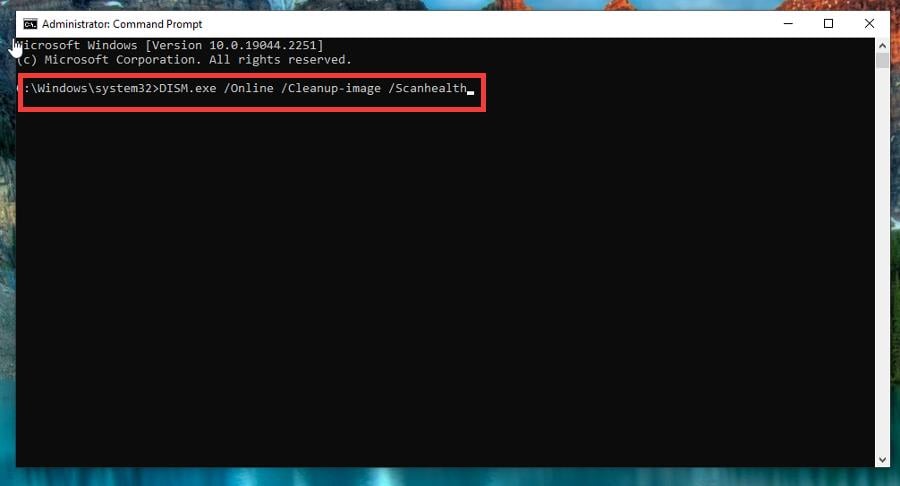
  3. Type in the following and hit Enter on your keyboard: DISM.exe /Online /Cleanup-image /Scanhealth.
  4. Give your computer enough time to complete the scan.
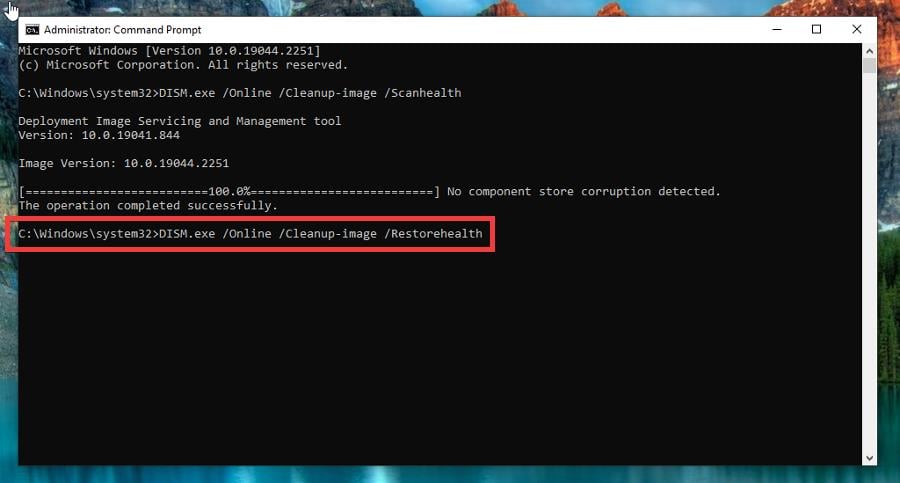
  5. Next, type in the following and hit Enter again: DISM.exe /Online /Cleanup-image /Restorehealth.
  6. Give your Windows 10 enough time to finish. Once done, close Command Prompt.

Also, if you want a thorough scan of your system files, we recommend using a specialized tool such as Fortect, which will find any issues and repair them on the spot.

⇒ Get Fortect

2. Run the system file checker on Command Prompt

  1. Like the previous solution, search for the Command Prompt on Windows 10 and click Run as administrator.
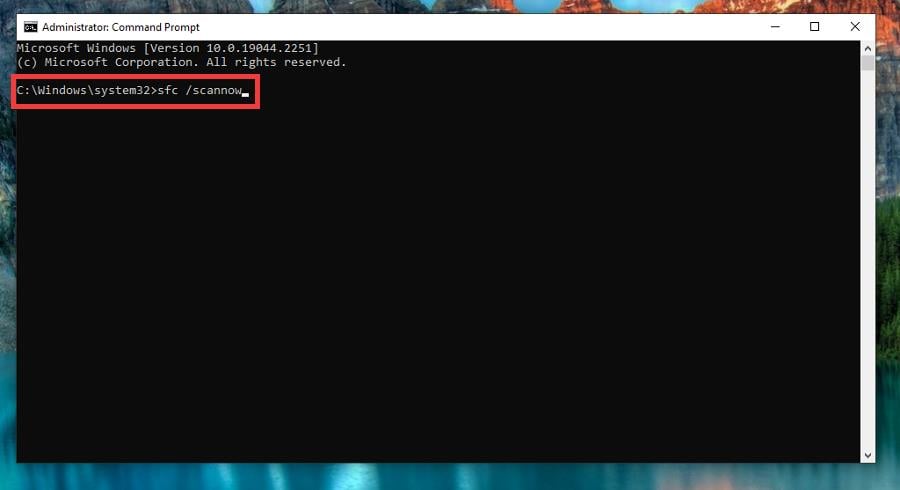
  2. Type in the following command and hit Enter on your keyboard: sfc /scannow.
  3. Give the software time to finish the scan. Once done, restart your computer.

If the Mfplat.dll file is still missing or the problem persists, you can try using PowerShell instead. But first, bring up PowerShell on the Windows 10 search bar and run it as an administrator.

3. Download Media Feature Pack

  1. First, open File Explorer.
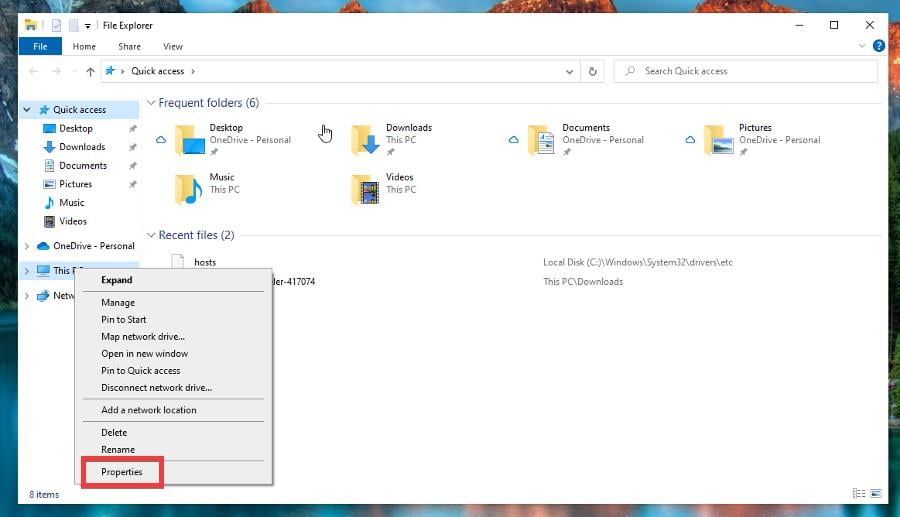
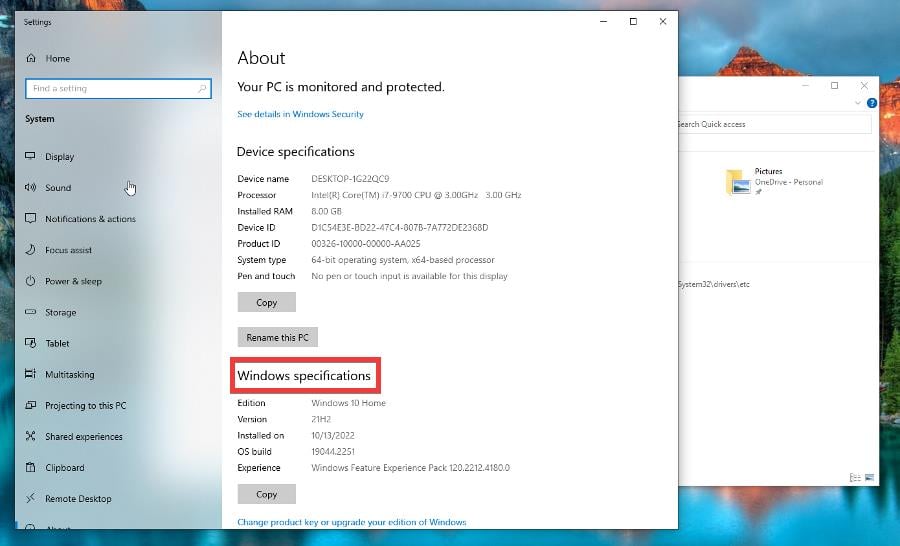
  2. Right-click This PC, and select Properties in the context window that appears.
  3. Check what edition of Windows 10 you have under Windows specifications.
  4. If the letter N is found at the end of the OS name, such as Windows 10 Home N, proceed to the next step.
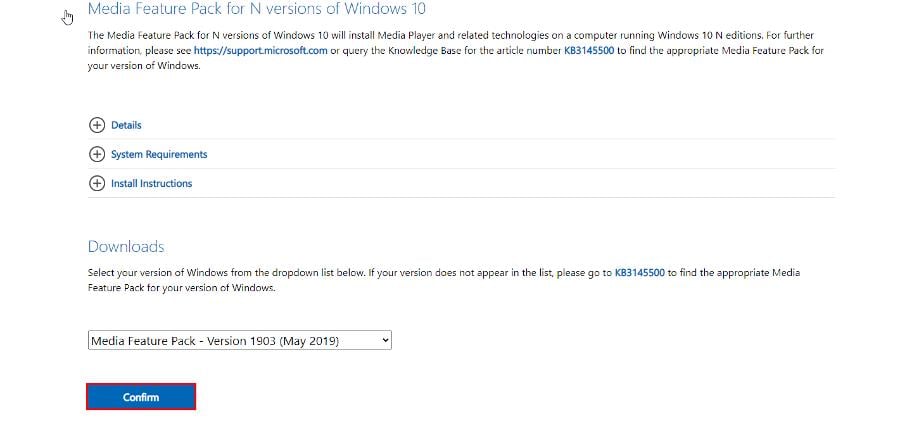
  5. Go to the Media Feature Pack page on Microsoft’s website.
  6. Choose the latest version of the Media Feature Pack and click the Confirm button.
  7. Select the 32-bit or 64-bit package, whichever fits your computer best. In this guide, 64-bit Download was chosen.
  8. Run the file you just downloaded to install it. Once done, restart your computer to complete the process.
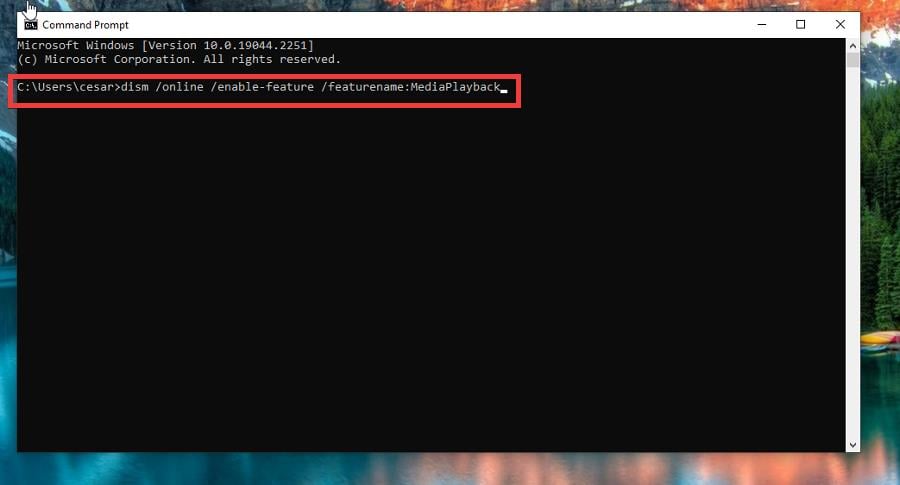
  9. Conversely, you can do the same with Command Prompt. Begin by searching for Command Prompt and run it as an administrator.
  10. Type in the following and hit Enter on your keyboard: dism /online /enable-feature /featurename:MediaPlayback

If your Windows 10 edition doesn’t have the letter N at the end, you cannot install the Media Feature Pack.

4. Enable Media Playback

  1. Search for the Command Prompt on your Windows 10 computer and run it as an administrator.
  2. Type in the following and hit Enter on your keyboard: dism /online /enable-feature /featurename:MediaPlayback
  3. Give your computer time to finish the action.

The Media Playback feature may be disabled, so you’ll need to enable it; however, this solution only works in conjunction with the Media Feature Pack. You do this in case the Media Feature Pack does not work.

5. Update drivers

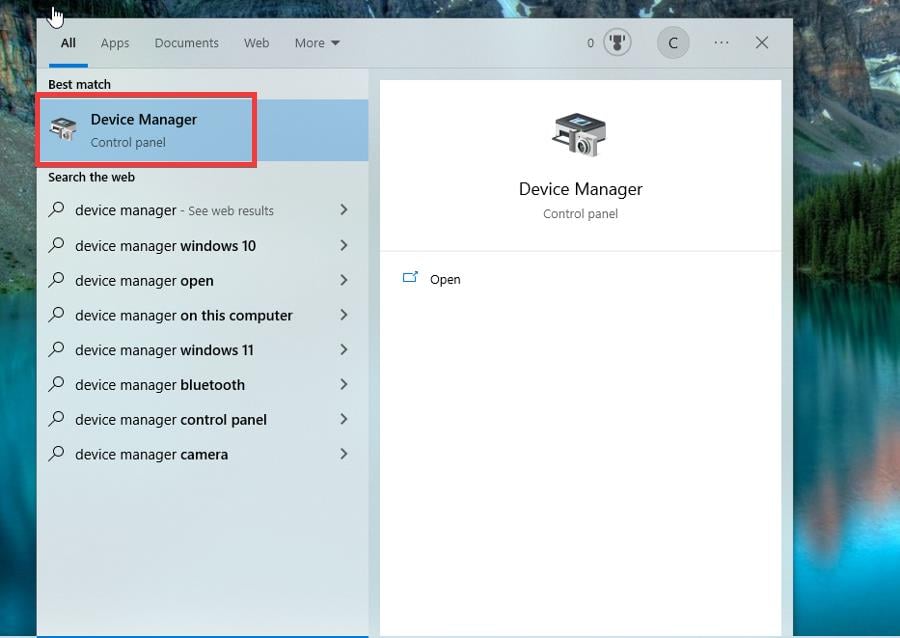
  1. Search for the Device Manager and click the entry you first see.
  2. Expand Display Adapters and right-click the entry you see.
  3. Click Update driver, and select Search automatically for drivers in the following window.
  4. The drivers will now automatically install.

Are there other essential Windows 10 fixes worth learning about?

There are two particular fixes that you should know. The first involves what to do when the Windows Security app refuses to open.

Because it’s usually a corrupt system file or malware infecting your computer, we recommend running the System File Check here. And be sure to check out our guide on fixing video streaming problems.

Playback problems result from a faulty internet connection, hardware acceleration being enabled, or a poorly optimized website. Try turning off your firewall temporarily; that should work.

Feel free to comment below if you have questions about other video game problems or bugs. And please tell us if there’s a specific guide for a game that you’d like to see.

Wacom: Grab The Best Deals On Tablets!

Graphic tablets are essential tools for visual artists. Wacom has made a name for itself as one of the most prominent manufacturers of such tools and related accessories.

There are several key points to consider when choosing a graphics tablet, and Wacom has proven to meet all these requirements. 

Good resolution is the most important requirement, followed by tracking speed, operating system, software compatibility, and pressure sensitivity.

All these considered, we picked the best Wacom tablet deals available right now, so make sure to check the listings below and get your hands on a great graphics tablet at a discount price.

What are the best Black Friday deals on Wacom tablets?

All these items have special prices.


Wacom provides a large variety of tablets, and we made sure to pick products that not only offer a good deal, but also appeal to a wide range of artists.

We covered tablets of various sizes and functionalities. Some of the listings have built-in displays, while others are dependent on your other devices.

Please read carefully the description of each product to make sure that they are compatible with the operating system of your choice.

Please let us know which of these Wacom tablets you prefer. Also, if you have any suggestions, feel free to comment below.

Hyperx Cloud: Gaming Headsets Deals

With incredible sound quality and comfortable gaming constructed, HyperX Cloud headsets are designed to provide cutting-edge sound capabilities.

These gaming headset products put a lot of effort into details, offering crystal clear sound plus very convenient traits like signature memory foam, focus on weight distribution, or clamping force.

Regarding the models, you have HyperX Cloud II Headset that brings immersive sound quality with impactful gaming sound, a detachable noise-canceling mic, and virtual 7.1 surround sound.

You can as well acquire HyperX Cloud Alpha headset that delivers valuable immersive in-game audio, dual-chamber drivers, detachable mic, and is compatible with PC, PS4 Pro, Xbox One, and more.

What are the best Black Friday HyperX Cloud headsets? offers

All these items have special prices.


You can find multiple HyperX Cloud products to offer you the most satisfying gaming sessions, with impeccable audio sound and long-life battery support.

In order to consciously pick your headphones, be sure to check the Amazon descriptions to see which one fits you.

If you already made your mind about what to choose, feel free to tell us in the comments.

Fix: Troubleshooting Wizard Can’t Continue / not Working

You must have just gotten the error message troubleshooting wizard can’t continue. Here is all you should know.

Troubleshooting wizard has been a part of the Windows operating system for years. This tool lets you quickly check if a particular component of your operating system is working correctly.

Unfortunately, some users reported Diagnostics troubleshooting wizard has stopped working with error messages on their Windows 10 PC.

Since this can be a significant problem, we’ll show you how to fix it today.

Why am I getting Troubleshooting wizard can’t continue message?

For many users, a few factors may trigger this error message. However, in most cases, these are the most common ones:

  • Corrupt files – Users sometimes experience this error because important hard disk files are corrupted.
  • Issues with .NET Framework – Almost every Windows operating system has .NET Framework installed, but sometimes this framework can cause many problems.
  • Malware – The presence of computer malware will trigger many system issues, and this error may be one of them.
  • Stopped services – For some users, this Troubleshoot interruption may occur if essential services are not running.

However, no matter the cause, the solutions we suggest should come in handy.

Here are some more examples of similar issues:

  • An unexpected error has occurred. The troubleshooting wizard cannot continue – This is another common error message people get when the troubleshooter stops working.
  • An error occurred while troubleshooting Windows 7 – If you’re experiencing the problem with Windows 7 troubleshooter, you can still use most of the workarounds presented below.
  • Windows Update troubleshooter not working – If we’re talking about a particular troubleshooter, the Update troubleshooter tends to be the most troublesome one.

The solutions we will discuss will help you even if the Troubleshooting wizard is restricted or you get the error messages an unexpected error has occurred the troubleshooting wizard cannot continue 0x80131700, 0x80004003, or 0x80004005.

How can I fix the Troubleshooting wizard can’t continue error?

  1. Repair or Reinstall the Microsoft .NET Framework
  2. Scan your PC for malware
  3. Check if the necessary services are running
  4. Create and run a batch file
  5. Run the sfc scan

1. Repair or Reinstall Microsoft .NET Framework installation

  1. Press Windows Key + S and enter control, then choose Uninstall a program.
    troubleshooting wizard can't continue
  2. Look for Microsoft .NET Framework and select it, and from the menu on the top select Change or Repair, then follow the wizard to complete the process.
    troubleshooting wizard can't continue
  3. Alternatively, click Uninstall in Step 2, download a new .Net Framework file, and install it.

.NET Framework is used for all sorts of applications on the Windows platform, ranging from system applications to video games.

According to users, this framework can be responsible for the Diagnostics troubleshooting wizard has stopped working error message.

You’ll need to repair or reinstall the .NET Framework installation to fix this problem.

2. Scan your PC for malware

  1. Type Windows Security in the Search bar, and click on the relevant search result.
  2. Now, click on Virus & threat protection here.

    troubleshooting wizard can't continue
  3. Click on Scan options.
  4. Now, select Full scan and click on the Scan now button at the bottom.

Sometimes malicious applications will interfere with core Windows 10 components, and they can also cause the Diagnostics troubleshooting wizard has stopped working error message appears.

If you see this message, perform a detailed scan of your system with your antivirus tool. In addition to your antivirus, you might want to use TotalAV or a similar tool to check for malware.

3. Check if the necessary services are running

  1. Press Windows Key + R and enter services.msc. Next, press Enter or click OK.
    troubleshooting wizard can't continue
  2. When the Services window opens, locate Diagnostic Policy Service and double-click it.
    diagnostics-troubleshooting-wizard-has-stopped-working-services-2
  3. Set the Service status to Running and the Startup type to Automatic, then click Apply and OK to save changes.
  4. Now, locate Diagnostic Service Host and Diagnostic System Host services on the Services app. Open their properties and ensure they are both running and their Startup Type is set to Manual.

Like any other Windows component, the Diagnostic Troubleshooting wizard relies on certain services to run correctly. However, if those services aren’t started or if they aren’t properly configured, you might encounter problems with the Diagnostic Troubleshooting wizard.

4. Create and run a batch file

Batch files can be handy since they allow you to run multiple commands almost instantly. Before you can run a batch file, you need to create it, and you can do that by following these steps:

  1. Open Notepad.
  2. When Notepad opens, paste the following lines:
    • @echo off
    • net stop wuauserv
    • cd %systemroot%
    • ren SoftwareDistribution SoftwareDistribution.old
    • net start wuauserv
    • net stop bits
    • net start bits
    • net stop cryptsvc
    • cd %systemroot%system32
    • ren catroot2 catroot2.old
    • net start cryptsvc
    • regsvr32 Softpub.dll
    • regsvr32 Wintrust.dll
    • regsvr32 Mssip32.dll
    • regsvr32 Initpki.dll /s
    • echo Restarting Computer
    • shutdown.exe -r -t 00
  3. Click on File, then Save as.
  4. Now set Save as type to All Files and set the File name to update.bat. Click Save to save the file.
  5. Locate the update.bat file you just created, right-click it and choose Run as administrator. After all the commands are executed, your PC will restart.

After your PC restarts, check if the problem is resolved.

5. Run the sfc scan

  1. Press Windows Key + X and choose Command Prompt (Admin).
  2. Type the script below and hit Enter:
    sfc /scannow
  3. Wait while your computer is being scanned. Then, if there are any problems with your Windows 10 installation, they should be automatically fixed.

This scan will repair any corrupted Windows 10 components and hopefully fix the Diagnostics troubleshooting wizard has stopped working error.

The troubleshooting wizard is a significant part of Windows 10, and if you’re getting Diagnostics troubleshooting wizard has stopped working error message, be sure to try repairing the .NET Framework installation.

If that doesn’t work, try any other solution from this article.

Get the Best Deals on MSI Motherboards

The appropriate motherboard, whether you’re purchasing a new one or simply constructing a new system, is critical in ensuring that the other components have all of the functionality that you require. Manufacturers such as MSI, ASUS, and Gigabyte, produce high-performance computers.

MSI manufactures more than just motherboards; we can see that they also manufacture GPUs, pre-built systems, and other goods. For motherboards, MSI offers a wide selection of models that are suitable for users of all financial backgrounds.

You can easily get the best value for your money by purchasing one of the several MSI motherboards available.

When it comes to the performance of a motherboard, the most crucial factor to consider is its stability. MSI motherboards provide excellent stability, even when overclocked, however, this is only achievable with high-end motherboards.

Allow us to begin by looking at some of the irresistible Black Friday motherboard deals that are currently on the market.

What are the MSI Black Friday motherboards for sale?

All these items have special prices.

There’s no use in purchasing the most advanced motherboard available if it won’t fit into the computer cabinet you already have. Motherboards, like gaming PC cases, are available in a variety of sizes to meet the needs of a wide range of customers.

Gamers who seek an immersive gaming experience in the latest video games prefer to have access to the most up-to-date features available.

They may not require a motherboard with as many expansion options as Enthusiast gamers, but they still expect the highest level of performance and individuality from their gaming computers.

The recommended motherboard and CPU for this category of gamers will be ideal for you if you typically use the best mid-range graphics cards (RX 580 and above/GTX 1660 and above) and want to get the most frames per second you can out of the most value-for-money hardware.

After you make your purchase, check out our article on four easy ways to install the MSI motherboard drivers.

Do you have an MSI motherboard in your shopping basket that you’d like to add to your order? Please share your thoughts in the comments box below.

Google Home Mini Prices on Black Friday Sales

Google Home Mini is an ultra-compact, small-sized speaker that can handle a lot of your smartphone’s functions using your voice. On a large scale, it is similar to Amazon Alexa or Siri.

The device is compatible with more than 5,000 smart home devices from more than 150 brands, taking you one step further to the smart home that we’re all dreaming of to some extent.

As a result, you can tell your Mini what you want to browse or stream, that you want to turn off the lights and turn on the fan, that you need more warmth, or even check if your door is locked.

For a great many, a Google Home Mini proves extremely useful when they’re on the go and need to save some time from taking care of a lot of stuff. Others say that this is Google (or technology) turning humans lazier.

Can I find any Google Home Mini deals?

Obviously, Google Mini sells on Google Store. But you can also find good deals on other online websites, such as the one included in this article, which offers you the gadget for less than $10.

Tech specs worth knowing before buying a Google Mini: it measures 1.65” (H) x 3.86” (diameter), it’s compatible with Android or iOS, offers clear all-surrounding sound via a 40mm driver, has 2 mics, and supports HE-AAC, LC-AAC, MP3, Vorbis, WAV (LPCM), Opus, FLAC audio formats.

Power on/power off and volume adjusting controls are on the sides of the device (activated by tapping).

On the other hand, the device communicates with you through the 4 LED lights on the upper side. There’s a long history of what the lights tell you, which you can consult in the user guide.

  • 360 sound
  • Partially made of recycled plastic
  • Extremely portable
  • Wide compatibility with smart devices and appliances
  • Not waterproof
  • Not AUX input

The device is comparably cheaper (even at regular price) with similar Google devices such as Nest or Nest Hub.

So, would you be interested in such a device? Tell us in the comments.

5 Nintendo Switch Accessories [Best Deals]

Nintendo Switch is one of the best selling mini gaming consoles. Although it was launched way back in 2016 it’s still a hit this year. Of course, the top-selling advantages are the low price and portability.

You can use it as it is and no one will have anything against that. However, there are so many accessories out there that can make the gaming a lot more enjoyable that it’s a pity not to give them a second look.

What are the best Nintendo Switch accessories?

Accessories Bundle for Nintendo Switch

  • 18 in 1 accessories package
  • Includes 2x Switch Joy-Con Wheel and 2x Switch Joy-Con Grip
  • Cartridge case for up to 8 games
  • Tempered glass screen protector
  • Doesn't include Joy-Cons

This would be the perfect package accessory for anyone who just bought the Nintendo Switch gaming console.

It’s an 18-in-1 package that includes a carrying case, a compact game cartridge case, a tempered glass screen protector, a 4 channel charging dock, and many more.

It even includes 2 wheels and two grips for the Joy Cons to share the games with a friend or family.


YCCTEAM Wireless Pro Controller

  • Good battery life - 10 hours of playtime
  • 40-inch Type-C cable - you can play during charging
  • Anti-slip and anti-sweat surface
  • No input lag time
  • The rumble feature is not so great

Nobody said that it’s not nice to play directly on the Nintendo Switch but a controller makes gaming sessions a lot more enjoyable.

The YCCTEAM Wireless Pro Controller works with both Switch and Switch Lite consoles and has all the buttons and features from a full-fledged controller, including the rumble feature.

It has an anti-slip texture and a 10-hour battery life. And if you still run out of battery, don’t worry because you have a long 40-inch USB-C cable for recharging and you can still play while charging.


Nintendo Joy-Con (L/R)

  • Two Joy Cons that can be used independently or together as 1 game controller
  • Each Joy Con has a full set of buttons and can perform as a standalone controller
  • Accelerometer and gyro sensor for each Joy Con
  • HD Rumble
  • Will be available from January 1st 2021

Joy Cons are the perfect accessories to Nintendo Switch. They can be either attached to the left and right of the console and act as a single controller or they can be used detached, as two separate wireless controllers.

Each one has its full set of buttons and has accelerometer and gyro sensors so they can act also as stand-alone controllers for a two-player game. This Joy-Con pack is an absolute must for game boosting.


PDP 500-162-NA-BLRD

  • Breathable, lightweight build
  • Bi-directional, noise-cancelling mic
  • Powerful 40 millimeter audio drivers
  • Flip-up mic mute feature
  • Officially Licensed by Nintendo
  • Not wireless

In the heat of the battle, you need to hear what exactly is happening, even if you’re in a remote place, where you can’t crank up the volume. That’s where the PDP 500-162-NA-BLRD headset comes perfectly in place.

The piece has powerfull 40 mm audio drivers, a noise cancelling mic and it’s licensed officially by Nintendo. The cushions are breathable and the headset is light alltogether, perfect for long gaming sessions.


SanDisk 256GB microSDXC

  • The MicroSD card is officially licensed for the Nintendo Switch and Nintendo Switch Lite systems
  • Read speeds up to 100 MB/s and write speeds of up to 90 MB/s
  • Ideal for storing your games and saves
  • Nothing noticeable

If you’re a very active gamer you will definitely need a MicroSD card for your Nintendo Switch game console.

The SanDisk 256 GB MicroSDXC card is officially licensed by Nintendo so you don’t have to worry a bit about compatibility.

As for the capacity, 256 GB is plenty of storage space for any hardcore gamer on the mini console. The card has a read speed of up to 100 MB/s and write speed of up to 90 MB/s.


This was our selection with the best accessories for the Nintendo Switch game console. If you have any additions or suggestions, don’t hesitate to leave us a note in the comments section below.

inPixio Photo Studio 12 ULTIMATE is 50% off

Photo editing software doesn’t have to be expansive and iPixio is the great proof of that.

Although their software is more affordable than many others, the company is also having a special discount that you should check out.

Save 50% on Photo Studio ULTIMATE today

Photo Studio has a lot of features that can help you enhance your photographs without great photo editing skills.

The software is incredibly simple, and it allows you to make edits with just a click of a button. With it you can remove objects from photos simply by highlighting them.

Background remover feature is also present, allowing you to remove subjects from the background and use them for future editing.

That’s not all, Sky Replacement feature is available and with it, you can remove the sky or replace it to achieve more dramatic effects.

Speaking of editing, a photo montage feature is available, allowing you to make some amazing creations by combining images, text, and stickers.

Image enhancing is present, allowing you to adjust colors quickly. Of course, you can always manually fine-tune your photos for perfect results.

And if all that was not enough, inPixio Studio 12 is now enhanced with AI-powered tools, making it even more easy to create your perfect photos.

If you’re still undecided, we have a fresh review of inPixio Photo Studio 12 where you can read about all its features and perks.

inPixio

inPixio

Make your photos look exceptional with this amazing 50% off deal on inPixio Photo Studio.
Check Price Visit Website

The offer will not last for long, so make sure you take advantage of this incredible offer as soon as possible!

Do you plan on grabbing inPixio’s deal while it’s hot? Tell us what you think of it in the comments section below:

Best Smart Switches Deals To Get This Year

Smart switches can be of great help for your smart or regular house, offering modern life advantages like adjusting the light using virtual assistants.

Let’s say you want to control your home lights remotely, without having to move every time for the switch and turn the light on. Now, this is possible with a smart switch system.

You can control all the lights in the house connecting the switch at Wi-fi, using voice-control function via Amazon Alexa or Google Assistant.

If you’re thinking about the installing process, it is incredibly easy and safe to do it by yourself with step-by-step instructions that come with the products. You can follow the guided steps and resolve fast even the wiring matter.

Note: All the prices and offers in this article are subject to change, so be sure to check the official product page to get the latest deal. If the product/offer you’re looking for is no longer available, you can try to find it on its official manufacturer page or get another one from our list.

What are the best deals for smart switches this year?

All these items have special prices.


As you can see, there are plenty of product deals you can choose from. All of them provide great quality as a smart switch for welcoming homes, plus offering cutting-edge features to make your everyday life easier.

Besides, to find the most suited solution for your house it’s advised to read the product description on Amazon.

Let us know what products worked smoothly for you in the comments below.
Best Deals Under $30 for the Sale Season

For this shopping season, many products are on discount, but even those might be out of someone’s budget. However, many devices are now more affordable than ever, and you can get them without breaking the bank by taking advantage of our Black Friday deals under $30.

We’re referring mostly to small but useful gadgets that you might use from time to time or on an everyday basis. You’ll be surprised how many devices are there that you never thought you need, and this is the perfect time to get them.

Some of these might include a Bluetooth tracker or an SD card, and with massive discounts going on, you can find some great Christmas deals under $30.

So join us while we take a look at some of the devices that are at a massive discount for this shopping season.

What are the best Black Friday deals under $30?

All these items have special Black Friday prices.


In this guide, we covered some small but useful devices that you might need but didn’t think about buying due to their price.

With these discounts, gadgets are more affordable than ever, so you might treat yourself and get one of these products.

What are your favorite gadgets for this season? Which Black Friday sale under $30 did you go for? Let us know in the comments section below.

Best Asus Motherboard Deals

Have you been eyeing a new motherboard? Do you need that extra memory and boost your PC’s performance? It seems that you may be in luck because ASUS has just dropped some of its top deals on motherboards.

If your CPU has been giving you some problems, it’s time for an upgrade, and what better time than now when you can have more for less?

A majority of the ASUS motherboards are already compatible with your CPUs such as the Ryzen Ryzen 5000, 3rd/2nd/1st Gen AMD Ryzen CPUs so you won’t have any compatibility issues to deal with.

These motherboards will come in handy especially since the release of Windows 11. A lot of games released since then may require a significant chunk of your memory.

So, if you are looking to enjoy your favorite games without having to put a cap on the number of downloads, get your hands on one of the powerful ASUS motherboards.

Note: All the prices and offers in this article are subject to change, so be sure to check the official product page to get the latest deal. If the product/offer you’re looking for is no longer available, you can try to find it on its official manufacturer page or get another one from our list.

What are some of the top ASUS motherboards available this year?

Apart from the heavily discounted prices which could make an early gift for you or your loved one, the features are mind-blowing.

You will be getting ultrafast connectivity with the various ports; USB 3.2 Gen 2×2 Type-C port, 10 and USB 3.2 Gen 2 ports.

Overheating will be a distant memory once you purchase one of these hot sale motherboards. With comprehensive cooling solutions, hybrid fan headers and fan head management capabilities, you won’t have anything to worry about having to switch off your PC when things are getting too hot.

The transmission speeds will blow your mind. With Two M.2 slots and the latest PCIe 4.0, you will experience flexibility in storage and some of the fastest data speeds available. Gaming fans will have a field day with these features.

These features are dependent on the motherboard you select but generally, you can be assured of great speeds and fast connectivity.

Be sure to visit the Amazon page for a detailed list on the features and prices as the above are just some of the top motherboards available on sale so you may want to take advantage right away. 

Is there any ASUS motherboard that has been on your wishlist and is now up for sale? Let us know in the comment section below.

Fitbit Black Friday: 5 Best Fitbit Wristbands for Your Workout

It’s never too late to pursue your new year’s resolution of getting into tip-top shape. Of course, there are some preparations to make before you dive in chief among them getting the right equipment. And whatever exercise you will be taking up, a Fitbit is likely to be one of the must-haves.

Now, we went out and looked around for some amazing Fitbit deals. Here they are.

What are the top Black Friday Fitbit deals to get right now?

Fitbit Sense Advanced Smartwatch

  • 6+ days battery life
  • Amazon Alexa Built-in
  • 6-month Fitbit Premium trial for new Premium users
  • Heart sensor might be inaccurate

Fitbit Sense Advanced smartwatch brings now more reliable stress monitoring capabilities thanks to the EDA Scan app that it incorporates. This app detects your body’s electrodermal activity so you can understand how you respond to stressful situations.

The device also comes with a compatible ECG app, or a voice assistant, and can help check your skin temperature or optimize your sleep.

Unfortunately, those under 22 years old should not use this smartwatch model, as per Fitbit regulations.


Fitbit Charge 5 Fitness and Activity Tracker

  • One size
  • Sleep & swim tracking
  • Up to 5hrs battery life when using built-in GPS
  • Occasional inaccurate measurements

This is the perfect smartwatch for outdoor runs, rides, hikes, regular workouts, that can show a workout intensity map with your heart rate and or calorie burn.

You can also use it to make secure purchases with Fitbit Pay and take calls, send texts and read app notifications.

For those who need motivation, you’ve got 20+ goal-based exercise modes, that will keep you on track.


Fitbit Versa Smart Tracker Watch

  • Allows a 300+ strong songs playlist
  • 15+ exercise modes
  • Personalized on-screen coaching
  • Might show inaccurate data

Fitbit Versa is a lightweight, swim-proof all-day companion that empowers you to chase your best life.

The usual 24/7 heart rate is prominent as are actionable insights, on-screen smart workouts, personalized guidance, and more.

The notifications are this time supplemented with custom replies to messages on Android phones.

Up your game by following the personalized on-screen coaching with useful workout tips displayed on the screen by the built-in coach.

Water-resistance for this Fitbit model is maximum 50m.


Fitbit Ionic Smart Watch, GPS One Size

  • Wide syncing range (30ft)
  • Large & small size bands included
  • Damage resistant screen
  • Poor customer service

This sleek-looking wearable is the smart hub to deliver not only stats but also to provide coaching and useful on the go nuggets as you crank up the pace.

It’s backed up by excellent essentials such as a built-in GPS, SmartTrack automatic exercise recognition, and multi-sport modes.

Just like other models, this one can also store and play hundreds of songs, plus you can download your favorite extra tunes from Pandora.

The corning gorilla glass 3 is one of the toughest and resists damage. Then, it has more pixels in addition to amplified brightness (by up to an extra 1000 nits).


Alta Fitbit Fitness Tracker, Small (US Version)

  • Up to 5 days of battery life
  • Super-bright OLED display
  • Powerful sleep tracking
  • Issues with the charging cable

This Fitbit motivates you to hit your health plus fitness goals by monitoring all the key data: your activity, workout, weight, sleep, and more.

Then you can view all the exercise summaries from its interactive app.

Use this Fitbit model to track calories burned, steps, active minutes, and distance, or sleep quality.

For more diversity, you can purchase separately interchangeable leather, metal, and classic bands.

These are the best Fitbit wristbands you can get, so be sure to consider one of the models from this article.

If you’re using another smartwatch that is worth mentioning, share it with us in the comments.

Obd2 Scanner [Limited time Offer]

Do you ardently want to save money on car maintenance and repairs? Then it’s time to invest in a good OBD2 scanner for it.

Here are some of the top OBD2 Black Friday 2022 deals that you can get your hands on this year. Hurry up before they go out of stock!

What are the best OBD2 Black Friday 2022 sale offers?

All these items have special prices.


Do I need an OBD2 scanner?

A good OBD-II scanner in your glove box or trunk can be quite useful in those situations when your car’s Check Engine light unexpectedly illuminates while you’re driving along a lonely country road or just a week away from having your vehicle inspected.

Each onboard diagnostics (OBD) scanner attaches to a connector near the driver’s seat and links to the vehicle’s computer systems to perform diagnostics.

It will tell you if your Check Engine light is triggered by a faulty gas cap that can be readily replaced or by a broken catalytic converter that would cost you $1,000 to replace or repair.

Whether you’re bringing your vehicle into the shop for a basic checkup or a significant repair, being aware of this important information will help you avoid being duped into authorizing needless repairs.

After you understand all that is going on with your wheels, you may find that you can do a lot of the lesser tasks alone in the future. The best OBD-II scanners, which range in price from $25 to $200, are able to make up for their cost in this manner.

OBD-II/EOBD scanners are compatible with almost all passenger vehicles sold in the European Union since 2004, in the United States since 1996, and in Canada since 1998.

Whichever sort of equipment you choose, there are various high-performance OBD-II scanners available for less than $200 that will meet your needs.

A couple of drinks will cost you less than $30. One of the top OBD-II scanners is no longer a luxury that can’t be afforded, but rather something that all drivers should have in their vehicles.

Do you have an OBD2 scanner on your wish list that you would like to add to your order? Let us know by sharing your thoughts in the comments section below.

Get ESET Antivirus Home for 20% Off With Multiyear License

Keeping your PC safe from online threats should be your priority, and this is why ESET products are the antivirus of choice for millions of users worldwide.

Speaking of ESET, the company offers massive discounts for Cyber Weekend, so let’s see what products you can get for this shopping season.

Improve your PC security with these amazing ESET Cyber Weekend deals

How can I get ESET Cyber Weekend deals?

ESET Cyber Weekend deals will last from November 24, 2023, until November 28, 2023, at 11:59 PM. This is a limited-time offer, and you can get 20% off on all ESET home products when you buy a two-year or three-year license.

ESET Antivirus

Experience professional protection against all types of malware with ESET Antivirus software.

ESET HOME Security Essential

  • Malware, antispyware and ransomware protection
  • Machine learning to recognize threats
  • Anti-phishing
  • UEFI, memory, and WMI scanner
  • Cloud-powered scanning
  • Exploit blocker
  • Registry scanning
  • Protection against scrip-based attacks
  • Lightweight
  • Gamer Mode

ESET HOME Security Premium

  • All features from ESET HOME Security Essential
  • Brute Force Attack protection for your passwords
  • Banking and Payment Protection for secure payments
  • Firewall
  • Parental Control
  • Antispam, webcam, network protection

ESET HOME Security Ultimate

  • All features from ESET HOME Security Premium
  • LiveGuard feature that will scan threats in the sandbox cloud environment
  • Password manager to keep all your passwords safe and unique
  • File encryption for files and removable storage

Have you tried any of the ESET products in the past? If not, use this limited offer and get 20% off for ESET Home Antivirus with every two-year or three-year license.

Best Pc Case Fan Deals With A Discount This Year

It is commonly known that your PC needs powerful fans that function properly to give you the best possible performance.

PC case fans are on sale as well for anyone that needs to improve PC speed and performance with premium magnetic low-noise fans.

If you know that your PC requires another ventilation system, and you must change the case fans now, you should take action to find the most helpful choices out there.

There are great options on the market, thus you can benefit from magnetic levitation technology for lower noise and PC high performance, plus a longer lifespan.

What are the best deals for case fans this year?

All these items have special prices.


There are various options you can choose from, as you can see. According to your needs, find valuable PC fans that offer Custom Rotor Design, 2.000 RPM control range, replaceable corners with anti-vibration rubbers, and more.

Consequently, be aware of the products description available on Amazon and choose the PC fans that suit your needs.

You already tried them? Don’t hesitate to share your experience with us in the comments below.

Best Synology Router Deals To Check Out

With a lot of people working from home during the pandemic, sharing one Wi-Fi connection may not be the ideal situation for a couple of people in the same house. 

For optimum performance, you need better connectivity to carry out your tasks. Getting the right router is not always easy but with the Synology router, you can. What’s even better, now you can get it at a much affordable price.

The main advantage of Synology routers is that they come with a core processor that guarantees you optimized, uncompromised performance with a coverage area of over 3000 square feet.

Besides the powerful processing speed, owning a router from Synology ensures amazing customer service at all times, and even guarantee in some cases, so you can rest assured that you will have the best wireless experience on the market.

If you dislike a lot of cables when setting up, this is yet another reason why one of the Synology routers should make its way to your cart. It is easy to set up and offers you the opportunity for remote management whether on the web or via the app.

What are the best Synology routers?

All these routers are up for sale at discounted prices.

Although specifications may vary for these routers, some of the key functions found in each include:

  • Fast processor
  • Dedicated Tri-band
  • Remote management
  • Wide coverage

For a detailed list of the product descriptions, visit the Amazon page and check for device support and compatibility. Be sure to get a router that suits all your needs especially if you have children, those with parental management will come in handy.

Got your eye on any of these routers? Let us know in the comment section below.

These Cool HTC Vive Vr Headsets Can Be Yours [Buying Guide]

VR is the hottest technology trend at the moment, but very few people can actually afford to buy VR devices. The price tag for VR headsets is pretty high, but if you really want to purchase one of these state-of-the-art pieces of hardware, now is the time to act.

HTC announced that fans can buy the impressive Vive VR headset for $699. The regular price tag for this device is $799, and we’re sure the $100 discount will convince many people to purchase it.

If you’re still undecided, take into account the fact that the offer is valid while supplies last.

To get your jump on Virtual Reality this season, wherever Vive is sold, purchasers can receive $100 off their Vive purchase (while supplies last) on this year’s Christmas sale.

In addition, Vive owners can build up their VR library with some of the most popular titles with big discounts through HTC’s Viveport app store, with bundle deals, in-store cashback offers, and a 50% off sale running through the weekend.

The good news doesn’t end here because HTC is offering big savings for popular VR apps, such as Soundstage, Arcade Artist, and Lumen. Viveport, HTC Vive’s VR store, is also offering 50% discounts on more than 20 VR games. To check out the full list of titles, go to this HTC blog post.

The HTC Vive is currently the most expensive VR headset, even with the $100 discount Sony’s PlayStation VR and the Oculus Rift are cheaper.

Which are the best HTC Vive deals?

HTC Vive products

If you want to buy a Vive VR headset this year, you can do that much cheaper than a few years ago. For example, back in 2016, just a few months after its official release, HTC Vive had a $699 price tag.

Now, you can grab it for only $499.00. from Vive’s official website.

If you prefer the Pro version, you should know that the HTC Pro VR can be yours for $699.00 (available on the official website).

If it’s simpler for you to get this amazing VR headset from Amazon, then follow the links listed below to purchase the HTC Vive version of your choice:

HTC Vive VR headsets

If you’re planning to get a VR headset this year, we recommend keeping an eye on these HTC devices and accessories:

Speaking of VR, Christmas is just a few weeks away. If you want to play some VR games in your new HTC Vive, here are some suggestions:

The Black Friday HTC Vive deals will be available online and in all retail locations where Vive is sold, including Microsoft Stores, Amazon, Gamestop, Newegg, and Vive.com.

Posted in VRTagged

Photo Scanner : Grab The Best Deals!

When it comes to preserving and restoring important memories, photo scanners are crucial.
Scanners, unlike traditional photo printers, can convert or revive old photographs or documents with the press of a button.

There are several picture scanners available, ranging from flatbeds to automated feeds, as well as those that can scan from prints or negatives.

It is important to seek Photo Scanners rather than multi-function printers since scanners contain drivers or firmware that allow for considerably finer scanning control. 

Moreover, specialized photo scanners handle older photos in less-than-ideal settings better than multi-functional printers, which sometimes lack built-in color correction and dust/scratch control.

What are the best photo scanners with deals?

All these items have special prices.


As you may have observed, there are several sorts of scanners available in the Amazon Black Friday Picks bargains. These scanners are certain to have the finest discounts this year, depending on your demands and the amount of money you can invest.

Check the specifics of each product available, since the various scanners have distinct features and usability.

Which option was the greatest fit for you? We’d love to hear from you in the comments section down below.

Best Revo Uninstaller Deals

Removing stubborn applications can sometimes be a real hassle. Certain programs cannot be simply uninstalled with Add/Remove utility in Windows Settings.

This is where dedicated software comes into play, and one of the best such tools on the market is Revo Uninstaller.

Revo scans your PC and displays a list of all programs you have installed. You just have to select which one you want to uninstall, and Revo will remove it completely.

Revo Uninstaller also has a positive impact on your PC’s performance because it detects and removes any files left behind, thus keeping your PC clean of unnecessary junk.

We have gathered the best deals for Revo Uninstaller, so if you were planning on getting a software removal tool, check the offers below.

What are the best Revo Uninstaller deals?

For this limited period of time, you can get Revo Uninstaller products at 70% discounts.

  • Revo Uninstaller Pro 1 year license costs $24.95 $7.49
  • Revo Uninstaller Pro Portable 1 year license costs $29.95 $8.99

The difference between these two plans is that Revo Uninstaller Pro Portable can be used on an unlimited number of devices and can be used on a USB stick.

Revo Uninstaller Pro

Remove all traces of unwanted software, clean your browser and increase your PC’s performance.

Besides the app uninstaller toolset, Revo Uninstaller Pro also includes a browser cleaner, an autorun manager (for configuring auto-run apps), and a backup manager.

Revo Uninstaller most notable features:

  • Detects lefover files and removes them from your PC
  • Easy to manage installation log
  • Free technical support
  • Forced uninstall for malicious or damaged apps that can’t be removed otherwise
  • Quick/Multiple Uninstall
  • Multi-level backup system

Both plans have a 60-day money-back guarantee, so there’s no risk in taking advantage of this limited offer.

Best Wi-Fi 6 Router Deals To Get

Fed up with the slow Internet connectivity? It’s time you upgrade your router. And, what’s better than buying the new-age Wi-Fi 6 router at the lowest prices this season?

A Wi-Fi 6 router, an upgrade over the previous ones, offers certain enhancements in terms of speed and performance. Though you may not notice any immediate changes, it will boost the overall experience.

With Wi-Fi 6, the difference between the speed in Ethernet and wireless network narrows further, thereby making it suitable who still relied on wired connections when it came to heavy gaming or downloading stuff.

Added to this element, it reduces the interference that can happen between networks, making it the best choice for living in apartment buildings or working in an office building.

To save you time and effort, we went the extra mile and compiled a list of the best router deals this year.

Which router is best for Wi-Fi 6?

All these items have special prices.

Note: All the prices and offers in this article are subject to change, so be sure to check the official product page to get the latest deal. If the product or offer you’re looking for is no longer available, you can try to find it on its official manufacturer page or get another one from our list.

These are the best Wi-Fi routers you can grab at discounted rates. Also, check out our compilation of leading tri-band wireless routers to buy.

We recommend you check the warranty, customer reviews, and compatibility before purchasing. Tell us the Wi-Fi 6 router you purchased in the comments section below.

Best Deals On Portable Ssds

Running out of storage on your PC? An external hard drive is your best bet. Why not check out the best portable SSDs available at huge discounts this Black Friday.

An SSD (Solid State Drive) is much faster than the conventional HDD (Hard Disk Drive), offers enhanced performance, and is relatively compact in size. Also, with the price gap between the two further narrowing due to advancements in technology, an SSD is no more a luxury but a necessity.

And, what’s better than a portable SSD? You can use it across devices, store and share files, and due to its compact size, keep it in the side pocket of your backpack.

This type of storage is a lot more durable than HDDs, while also providing better encryption for your data. SSDs don’t have any internal moving parts, making them less susceptible to being damaged by dropping them, or other similar shocks.

If you are planning to purchase a portable SSD this Black Friday, we have compiled a list of the best deals you can grab.

What are the best portable SSDs to purchase this Cyber Monday?

All these items have special Black Friday prices.


These are the best deals on portable SSDs exclusively this Christmas Grab them without any delay for maximum savings. Also, check out our collection of the best storage devices for more options to pick from.

Tell us which portable SSD you purchased this sale season and your experience of it in the comments section below.

5 Best Portable Printers On Sale

It’s that time of the year again where people make merry and capture memories in the form of images. While most of the people will be reaching out for their phones for such moments, you can stand out from the crowd and have a print-out of your photos.

Wouldn’t it be nice to capture a moment and instantly print it? A physical hard copy picture is a great way of savoring some of your favorite memories this holiday season and what better way than getting one of the portable printers already up for sale?

It seems this is one of the highly coveted pieces so you may want to hurry up and scoop one of them while the offer lasts.

First off, let’s have a look at some of the undeniable deals up for sale.

What are the best portable printers to get?

All these items have special prices.

Apart from the obvious reason that you can carry it with you anywhere and it’s already up for sale at a discounted price, they come with amazing features you cannot afford to let pass you by.

You can print from your social media pages and via Bluetooth. This means anyone in close proximity who also wishes to print can do so.

You don’t have to worry about cartridge and ink as the portable printers come with a zero-ink technology feature.

On-the-go printing. If you loathe the messy, lengthy printing process via the computer where you have to connect cables and press multiple buttons, you will love this wide range of portable printers. They are palm-sized so you won’t have to carry bulky items and you can print your pictures with just a click of a button.

High resolution and crisp images are yet another advantage of these portable printers. The pictures printed are glossy, vivid, colorful, and water-resistant that will last you a lifetime while maintaining spectacular quality.

The printers are also compatible with both Android and iOS phones, Windows, Linux and so many more so your printing source list is pretty much unlimited.

The battery capacity is pretty good so you can print a good number of pictures before you have to recharge.

The options are endless on these portable printers so make sure you take advantage of this annual Christmas sale before they run out of stock.

Do you see a portable printer that you would like to check out in your cart? Let us know in the comment section below.

Elegoo 3D Printer: Best Deals Now

ELEGOO has been providing cutting-edge, user-friendly, and high-quality consumer 3D printers at an industry-leading rate since 2015.

While assuring high-quality goods, selecting ELEGOO lets you experience the delight of 3D printing at the most affordable price on the market. It has always been a desire for them to make 3D printing technology more accessible to everyone.

So, this season, they’ve lined up some excellent deals for you, so you may start your journey in 3D printing with the most wanted printers on the market.

Furthermore, the discounts are only valid until November 27th, so take advantage of this offer while it is still around on Amazon.

What are the best ELEGOO Black Friday 2022 deals?

All these items have special prices.

3D printing is exciting and creative, but it must be done with caution and attention at all times. So, put on your suit, get the greatest offer, and have a good time during the holidays!

Furthermore, after purchasing, you will receive full assistance, join a community of professionals and beginners, and share your work. However, if you run into difficulties while printing, there are tutorials available on the official website.

Let us know in the comment section below what models you chose from the ELEGOO Black Friday sale, and which printer you like best!