Fix YouTube TV error 400 on smart TVs with just one trick

The YouTube TV video streaming service is available on most of the best known smart TVs out there, among them Samsung, LG, Apple, Fire, or Roku.

From time to time, when trying to stream YouTube on your smart TV, you get stuck to error 400: Your client has issued a malformed or illegal request. And that’s all they know!

Since the error message doesn’t prompt you to do anything, there are a few things that you can try.


Why isn’t YouTube TV working on my smart TV?

The one main thing to do to to get YouTube TV working on your smart TV is to clear cached data and start over with a clean app. So depending on the smart TV you’re using, scroll down and find the right solution for you.

For Apple TV you need to uninstall and reinstall the app to clear cache and data.

  1. Go to your apps > click and hold the YouTube app until it begins jiggling.
  2. Press the Play/Pause button > Delete.
  3. To re-install the app, go to the Play Store > download it on your device.

For Roku:delete cache roku

  1. Select Home in the main menu.
  2. Then, on the remote controller press Home 5 times + press Up + press Rewind 2 times + press Fast Forward 2 times.
  3. It should take a few seconds to clear the cache.

For Samsung TVs:

  1. Press the Home button on your remote > Broadcasting.
  2. Select Expert Settings.
  3. Select HbbTV Settings.
  4. Select Delete Browsing Data and follow the prompts to clear any saved data.

For LG TVs:clear cache lg tv

  1. From Home screen > Apps > Settings > Application manager.
  2. Look for YouTube TV > Storage.
  3. Tap Clear cache.

For Android TVs:

  1. Press the Home button on your remote > Settings.
  2. Under TV > Apps.
  3. Under System apps > YouTube TV.
  4. Select Clear cache > OK.

For HiSense TV, you have to restore the device to factory settings.

  1. From the Home screen > Settings.
  2. Select Suport > Reset to default > OK.

For Fire TV:

  1. Press the Home button > Settings.
  2. Select Applications > Manage Installed Applications.
  3. Select YouTube TV > Clear cache.

We hope we’ve covered all smart TV options. If you have further suggestions, please leave them in the comments section below.


[wl_navigator]

How to fix Spectrum error code RLC-1000 on Roku

You can get the Spectrum error code RLC-1000 if you attempt to watch the Spectrum change on your Roku while on a poor internet connection.

However, although the error message points out, the connection is not always the cause.

Other causes of the Spectrum error code RLC-1000 include a corrupt DNS cache and an outdated Channel app. Regardless of why the Spectrum app is not working on Roku, the solutions here will resolve the issue.


How do I fix the Spectrum error code RLC-1000?

1. Reset the network connection

reset-the-connection-spectrum-error-code-rlc-1000

When you get the Spectrum error code RLC-1000, your first course of action should be to reset your connection. Don’t just restart your router; follow these steps to reset your connection properly.

  1. First, power off your WiFi router and Roku device. Leave these off for around 15 seconds before turning them back on.
  2. If the first step fails to fix the error, unplug your Roku from the network connection, reconnect it and try again.
  3. You can now reset the entire connection if both steps above fail.
    • To do this, unplug the TV, router, and Roku from both the power source and the internet. Connect them all back after around 1 minute.

2. Fix Spectrum error code RLC-1000 by power-cycling the devices

  1. First, unplug the router, Roku, and modem from the power supply and internet service.
  2. Next, with all three devices disconnected, press, and hold the Power button of the router for around 30 seconds.
  3. After that, plug the devices back to the power source.
    • Connect them in this order: Modem first, the router next, and your Roku last.
  4. After connecting one device, allow it to boot completely before you connect the next one.
  5. Next, allow the router to get access.
  6. Check if the Spectrum error code RLC-1000 message still shows up after this.

Most times, cache building up inside your machine could be the cause of the Spectrum app not working on Roku. So, this solution repairs the issue by clearing the cache for the devices in the loop.


3. Uninstall and reinstall the Spectrum TV channel manually

reinstall-spectrum-tv-spectrum-app-not-working-on-roku

  1. On the Roku, go to My Channels.
  2. Next, locate the Spectrum TV channel from the list and then press the asterisk (*) button on the Roku remote.
  3. Go to the Remove Channel button on the options and hit OK on the remote.
  4. After that, using your Roku remote, open the Roku Channel Store.
  5. Next, click on Search, then search for spectrum TV, and click Install.
  6. Sign in to your account and agree to the terms and conditions next.
  7. Finally, launch the channel and try to recreate the Spectrum error code RLC-1000.

The Spectrum error code RLC-1000 is mainly caused by your internet connection, and the solutions above have helped loads of users resolve the problem.

However, if you try the methods and Spectrum app is not working on Roku still, then you should try reaching out to Roku‘s customer support.

They will do some remote troubleshooting, and if need be, send someone over to check out your setup.


[wl_navigator]

Microsoft Edge WebView2 gets updates for UWP and more

Microsoft Edge WebView2 is a powerful tool that lets developers embed HTML, JavaScript, and other web technologies in native applications.

During the first day of the Build 2020 event, it has emerged that the control has got new options for development in .Net and UWP (WinUI 3.0).

Microsoft Edge WebView2 updates

The Edge WebView2 preview now enables you to work with WinForms. This open-source GUI is a component of the Microsoft .Net Framwork.

Today, we’re expanding the preview with new options for .NET and UWP (WinUI 3.0) development, enabling you to embed a Chromium-based Edge WebView in WinForms, WPF, and UWP (WinUI 3.0) applications.

Also supported is the embedding of the preview in WFP and UWP applications.

The announcement is music to the ears of developers that prefer a hybrid application approach. Now, they do not necessarily have to choose between creating web and native apps.

With the Edge WebView2 control, they can reuse the bulk of their code on pretty much any platform. They will still be able to tap into the full capabilities of native applications.

Other Edge devtools updates

Microsoft announced that it is working on enhancing the accessibility of Edge extensions at its online store.

The improvement focuses on making it easier for developers to deliver Chromium-based extensions into the Microsoft store. The second objective is to streamline the in-store experience for Edge end-users.

As such, Edge adds-on site will feature new categories and better ways to look up and find extensions. Additionally, Microsoft wants to add a visually-appealing layout to the store.

Microsoft Edge began shipping earlier this year. Since launch, it has been receiving enhancements catering to the interests of both users and developers.

A recent upgrade to the browser’s devtools allows developers to create solutions in up to 10 localized languages, including Japanese and Russian.

What is your experience with Microsoft Edge WebView2? Feel free to share it or ask any question in the comments section below.

[wl_navigator]

Fix error 0x80041006 on your Windows PC

When playing online games from different websites like Yahoo or even Facebook, and you’re using Internet Explorer as your browser, you’ve probably noticed that the games may not play as they’re expected to.

When you play or attempt to play an online game, it may fail to download, not launch, not load completely, or some functionality may not work. The game may also freeze while you’re playing, the screen may go black or you may be dropped from a game or the website while playing.

One of the problems that arise is error 0x80041006, which gives the following message: A network error occurred while communicating with the game server. This is commonly caused by a missing or outdated add-on needed to play the game.

Some games are based on Silverlight, Java, or Flash and require Internet Explore add-ons to function.

Some of the troubleshooting methods you can try include restarting your computer, installing Windows updates and updating your browser. If error 0x80041006 persists, then try some of the recommended solutions in this article.

FIX: Error 0x80041006 in Windows

  1. Download and install the latest Internet Explorer/Silverlight/Java/Adobe Flash/Adobe updates
  2. Temporarily disable your security software
  3. Use Disk Cleanup
  4. Check in Safe Mode with Networking
  5. Perform a clean boot
  6. Run Memory Diagnostic Test
  7. Uninstall and reinstall the game
  8. Create new user profile
  9. Reset your Internet Protocol (TCP/IP)

Solution 1: Download and install the latest Internet Explorer/Silverlight/Java/Adobe Flash/Adobe

If you use a pre-released version of IE 9, download and install the released version and then apply relevant and applicable updates offered by Windows Update. If you’re using ActiveX filtering or tracking protection, some games or videos may be disabled.

For games that use Silverlight, update to the latest version of Silverlight and enable it in Internet Explorer. Do the same thing for games that need Java add—ons by updating the add-ons to the latest versions.

Here’s how to enable add-ons in Internet Explorer:

  • Start Internet Explorer
  • Click Tools icon
Sticky Notes crashing in Windows 10
  • Click Internet Options
error 0x80041006
  • Click Programs tab
error 0x80041006
  • Click Manage add-ons button
error 0x80041006
  • From the Show dropdown selection, select Run without Permission
error 0x80041006
  • Look for the add-ons (Microsoft Silverlight, Shockwave ActiveX Control, Shockwave Flash Object, Java Plug-in) in the displayed list and ensure the Status is listed as Enabled

Solution 2: Temporarily disable your security software

You can temporarily disable your antivirus program and see if error 0x80041006 persists or not. If nothing happens, you may need to check your firewall settings.

Enable your antivirus back on once you’re done as it is not recommended to disable these settings on your computer.

If disabling solved the issue, now would be a great time to reconsider your options for protection and security.

SSL virus detection is provided in TotalAV to assist you with a thorough check and fix the error 0x80041006 on your Windows PC. The test may cause your computer to slow down somewhat, but as soon as the scan is completed, your computer will be back up and running.

Other scanning options may need to be turned on based on your browsing patterns.

On a more serious note, do you actually need TotalAV? The fact is that you need it because it assists you in a challenging task. If you have sensitive information and need to visit unsafe internet sites for games on a frequent basis, you certainly require specialized software such as TotalAV.

Solution 3: Use Disk Cleanup

  • Search for Disk cleanup from the taskbar and select it from the list of results.
  • Under Files to delete, select the file types to get rid of. To get a description of the file type, select it.
  • Select OK.
  • If you need to free up more space, you can also delete system files. In Disk cleanup, select Clean up system files.
  • Select the file types to get rid of. To get a description of the file type, select it.
  • Select OK.

This deletes unnecessary files so you can continue with gameplay.

Solution 4: Check in Safe Mode with Networking to see if error 0x80041006 persists or not.

  • Restart your computer
  • When the sign-in screen is displayed, hold down SHIFT key while you select Power then Restart
  • After the computer restarts to Choose an option screen
  • Select Troubleshoot
error 0x80041006
  • Click Advanced options
error 0x80041006
  • Click Startup Settings
error 0x80041006
  • Click Restart
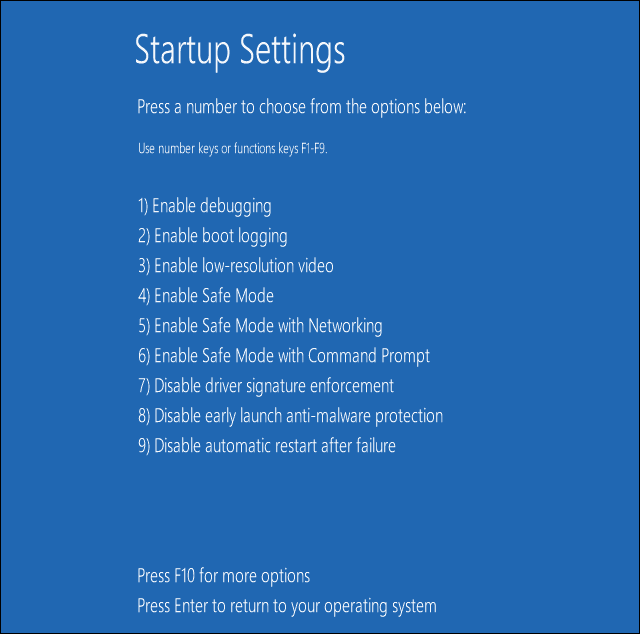
  • Once it restarts, you will see a list of options. select 5 or F5 for Safe Mode with Networking

This starts Windows in safe mode, including the network drivers and services you need to access the internet or other computers on the same network.

Once you’re in safe mode, you can perform a System File Checker (SFC) scan, which checks all protected system files, and then replaces the incorrect versions, with the genuine, correct Microsoft versions.

Here’s how to do this:

  • Click Start
  • Go to the search field box and type CMD
  • Right click Command Prompt and select Run as Administrator
typing lag/slow keyboard response in Windows 10
  • Type sfc/scannow
wifi wont connect to router
  • Press Enter
  • Restart your computer

Do the following to exit Safe Mode:

  • Right click Start button
  • Select Run
typing lag/slow keyboard response in Windows 10
  • Type msconfig
wifi wont connect to router
  • A pop up will open
  • Go to the Boot tab
error 0x80041006
  • Deselect or uncheck Safe Boot option box
error 0x80041006
  • Restart your computer

Solution 5: Perform a clean boot

  • Log on as administrator
  • Go to the search box
  • Type msconfig
error 0x80041006
  • Select System Configuration
  • Find Services tab
error 0x80041006
  • Select Hide all Microsoft services box
error 0x80041006
  • Click Disable all
error 0x80041006
  • Go to Startup tab
  • Click Open Task Manager
typing lag/slow keyboard response in Windows 10
  • Close Task manager then click Ok
  • Reboot your computer

Performing a clean boot for your computer reduces conflicts related to software that can bring up the root causes of error 0x80041006. These conflicts can be caused by apps and services that start and run in the background when Windows starts normally.

You will have a clean boot environment after all these steps are carefully followed, after which you can try and check if error 0x80041006 goes away. If not, try the next solutions.

Solution 6: Run Memory Diagnostic Test

This works with Microsoft Online Crash Analysis to detect crashes that may be caused by failing memory. It provides guided support, and prompts you to schedule a memory test the next time you restart your computer.

To run the Memory  Diagnostic Test, go to Start, type ‘memory diagnostic’ and then double click on the first result. Follow the on-screen instructions to complete memory scanning.

Solution 7: Uninstall and reinstall the game

  • Right click Start
  • Select Programs and Features
error 0x80041006
  • Click Turn Windows features on or off
error 0x80041006
  • From the list, find Games and click to expand it. Turn off Games by unchecking its box, then wait till it is disabled, click OK and restart your computer
  • Once you restart, turn on the Games using these same steps but check the Games box

You can always uninstall, then clean your system, and reinstall the game back again.

Solution 8: Create new user profile

  • Click Start
  • Select Settings
  • Select Accounts
error 0x80041006
  • Click Family and other users
error 0x80041006
  • Click Add someone else to this PC
error 0x80041006
  • Fill in the form with the user name and password. Your new user account will be created.
  • Click on Change account type
  • Click the drop down arrow and choose Administrator to set the account to administrator level
  • Restart your computer
  • Login to the new account you just created

Create a new user profile then change settings to administrator privileges, and check if the problem persists.

If the error 0x80041006 goes away, then it may mean your other user profile is corrupted, so do the following:

  • On your new account, use it to downgrade your usual account
  • Click Apply or Ok
  • Raise back your old account to its default admin level
  • Rinse and repeat a few times as this will help to remove any corruption
  • Leave your account on as Administrator

If the problem disappears, then you can either fix the old user account or migrate to the new account.

Solution 9: Reset TCP/IP

  1. Go to Start > type cmd > right-click on Command Prompt > select Run as Administratorreset tcp ip windows 10
  2. Enter the following commands and hit Enter after each one:
    • netsh int ip reset
    • netsh int ipv6 reset
    • netsh winsock reset
  3. Restart your computer and launch the problematic games again.

Check out the Browser Games section for news and guides of online games that you can play anytime.

The performance of games and websites is influenced by your browser – keep yourself informed about them by visiting our Browser Hub.

Has any of these solutions worked for you? Let us know in the comments section below.

[wl_navigator]

FIX: Xbox Live Purchase and Content usage

Many Xbox One users reported Purchase and Content Usage network error on their Xbox. Here’s how one user describes the problem on Microsoft Answers forums:

I need help. My network on my Xbox One is saying that my purchase and content usage is “experiencing issues.” However, when I go to the Xbox live status on the website, it said it has been down since June 22. This is a big issue for me since I put $40.00 USD into my account for a DLC.
If anyone knows how to fix this, please let me know.

This is a network error, and it will prevent you from downloading new content, so in today’s article, we’ll show you how to fix it once and for all.

How do I fix the Purchase and Content Usage on Xbox One?

1. Check if the Xbox services are running properly

xbox live status Purchase and content usage network error

  1. Check the Xbox Live Status.
  2. If there’s an issue with Purchase and Content Usage service, you’ll see the current status of the service.
  3. Since this is a server-side issue, there’s not much you can do, so you’ll have to wait for Microsoft to fix it.
  4. If you want to get notified as soon as the issue is fixed, click the Notify me button.

Xbox stopped working after power outage? Be sure to try these fixes!


2. Power cycle your console

power cycle xbox one Purchase and content usage xbox service not working
This is an unlikely solution, but a few users reported that it worked for them. You can power cycle the console by doing the following:

  1. Press and hold the Power button on your console for 10 seconds.
  2. Once your Xbox turns off, disconnect it from the power outlet.
  3. Leave it like that for a minute or two.
  4. Now connect the console to the power outlet and turn it back on again.

Purchase and Content Usage network error is almost always caused by server problems, and in most cases, you just have to wait for Microsoft to fix the problem.

If you’re tired of waiting, you can contact Microsoft support and let them know about the issues you’re having.


New Definitive Editions of Mafia II and Mafia III video games are now live on Xbox One consoles

The recently announced Definitive Editions for Mafia II and Mafia III are now both available for download on Microsoft’s Xbox One consoles while the Definitive Edition of the first Mafia video game can now be pre-ordered ahead of its August 28th release date.

A Mafia: Trilogy bundle, containing all three titles, also went live today and can be purchased right now though players will only gain access to the second and third Mafia games and will need to wait until the first one is released until they can to play it.

These three Mafia video games represent three generations of Xbox consoles. The first game came out on the original Xbox console back in 2004, the second on the Xbox 360 in 2010, and the third on the Xbox One in 2016.

The Mafia: Definitive Edition is a complete rebuild of the original game which is why it’s not due out for a few more months. Mafia II: Definitive Edition boasts an HD upgrade of the second title while Mafia III: Definitive Edition contains the base Mafia III Xbox One game plus all of its post-launch downloadable content. All three Definitive Editions support 4K Ultra HD when played on an Xbox One X console and Microsoft’s upcoming Xbox Series X.

The Mafia: Trilogy bundle doesn’t contain any extras but it is a cost-effective choice for those planning on playing all three games as it costs just $59.99 while Mafia: Definitive Edition on its own will set gamers back $39.99 and the second and third games are currently selling at $29.99 each.

Which Mafia video games are you planning on buying? Share your thoughts with the community in the comments below and then follow us on Pinterest and Twitter for more Xbox gaming news.

Mafia: Definitive Edition Pre-Order
Developer:
2K
Price:
Free


Mafia II: Definitive Edition
Developer:
2K
Price:
$29.99


Mafia III: Definitive Edition
Developer:
2K
Price:
$29.99


Mafia: Trilogy
Mafia: Trilogy
Developer:
2K
Price:
Free

Microsoft Project Reunion unifies the existent APIs

In March 2020, Microsoft crossed the line of 1 billion devices running Windows 10. And we’re talking about active devices.

And now, with the Coronavirus pandemy, according to Microsoft, users are spending more than 4 trillion minutes on Windows 10 a month, a 75% increase year-over-year.

It’s really easy to understand why Microsoft wants to make it easier for developers to create more apps for Windows 10.

Project Reunion unifies the Win32 and UWP

The whole big thing about Project Union is to unify access to the existing Win32 and UWP APIs and take them out from the operating system. 

We’re bringing together the combined power of Win32 and UWP, so developers no longer have to choose, because we’re unifying these existing APIs, decoupling them from the OS. And so the developers are confident that as they use these APIs, they will work across all of Windows.

And Project Reunion allows developers to not only modernize their app so it runs efficiently, locally, on a physical Windows machine, but it can also deliver a great experience when streamed from the cloud.

And so you’re now running Windows, not only on Windows, but iOS and Android and Mac and Linux from the cloud.

, explained Kevin Gallo, Vice President, Windows Developer Platform at Microsoft during Microsoft Build 2020.

Project Reunion components

Right now, Project Reunion has only two components. One is WinUI 3 Preview 1, the latest preview version of Microsoft’s user interface framework for Windows.

The other is a new preview of WebView2, which allows the developers to embed a Chromium-based WebView into Windows Forms, WPF and UWP/WinUI 3 apps. 

[wl_navigator]

Azure Synapse Link new Microsoft tool for big data analytics

According to Microsoft, 95% of the Fortune 500 companies use Microsoft Azure. Right now, Microsoft has 61 data Azure regions throughout the world while they added new regions in Israel, Mexico, Poland, and New Zeeland.

What is Azure Synapse Link?

Azure Synapse Link is a new Microsoft tool that enables data analytics on live operational data. It basically enables companies to use the same database system for analytical and transactional workloads on a single system.

Synapse Link is built on the Synaps Analytics, which Microsoft announced last year and takes it a step further.

They took out the barriers between Azure’s operational databases and Synapse Analytics, so that the companies can immediately benefit from the data in the databases without going through a data warehouse in the first place. 

If you’re saying Azure Synapse Link, you’re saying big-data management because according to Microsoft, Synapse can query data at petabyte-scale, directed by lines of SQL.

When is Synapse Link making its appearance?

Azure Synapse Link will launch in the coming weeks together with new Azure Synapse features in preview and Project Cortex.

What we are announcing with Synapse Link is the next major step in the same vision that we had around reduced the time to insight.

And in this particular case, a long-standing barrier that exists today between operational databases and analytics systems is these complex ETL (extract, transform, load) pipelines that need to be set up just so you can do basic operational reporting

,said Rohan Kumar, Microsoft’s corporate VP for Azure Data.

[wl_navigator]

Windows Package Manager aka Winget installs packages faster

Today, during Microsoft Build 2020, we got the first preview for the new Windows Package Manager.

The Windows Package Manager is a tool designed to help you quickly and easily search, show, and install packages. How easy? Using one command, winget install <tool> you can install your favorite tool.

How does Windows Package Manager works?

It all works through GitHub. The developers list their applications in a GitHub repository and the package manager gets them and installs them right away. 

It’s as simple as that.

So, while for the preview version, you can search, show, and install packages, they are planning to update the Windows Package Manager with uninstall, list, and update.

Where do I download the Windows Package Manager from?

You can download and annually install the preview for the Windows Package Manager from the GitHub releases.

However, you can also get it through automatic updates from the Microsoft Store that contain the client, but for that, you will have to install a Windows 10 Insider build and join the Preview flight ring by signing up in the insider program.

Winget commands

If you install the Windows Package Manager these are the winget commands and options for the preview:

  • install Installs the given application
  • show Shows info about an application
  • source Manage sources of applications
  • search Find and show basic info of apps
  • hash Helper to hash installer files
  • validate Validates a manifest file
  • –help Provides command line help
  • –info Provides addition data, helpful for troubleshooting
  • –version Provides the version of the client

[wl_navigator]

Windows Terminal 1.0 has GPU support, tabs and panes

During Microsoft Build 2020, the most important event of the year for Microsoft and developers, they launched the new Windows Terminal.

The Windows Terminal is a modern, fast, efficient, powerful, and productive terminal application for users of command-line tools and shells like Command Prompt, PowerShell, and WSL.

Its features include multiple tabs, panes, Unicode and UTF-8 character support, a GPU accelerated text rendering engine, and custom themes, styles, and configurations.

Windows Terminal 1.0

Microsoft finally released Windows Terminal 1.0, which was in Preview mode until now. The 1.0 version signals the fact that it’s stable enough for everybody to use.  You can download the new Windows Terminal directly from the Microsoft Store or you can go through the GitHub where you can also see some details about it.

Tabs and Panes

tabs and panes

You will be able to run any command-line application inside tabs and panes in Windows Terminal. Other improvements include creating profiles for each of your command line applications and opening them side-by-side, and each of your profiles can now be uniquely customized to your liking.

Also, the terminal will create profiles for you automatically if you have Windows Subsystem for Linux distributions or additional PowerShell versions installed on your machine.

GPU Accelerated Rendering

Windows Terminal utilizes the GPU to render its text which provides a faster experience from the command line. It also provides support for Unicode and UTF-8 characters.

You will even be able to display your emojis while using the terminal in a variety of languages.

[wl_navigator]

How to activate a Microsoft 365 product key in a few steps

Microsoft 365 is a set of productivity and collaboration tools among them Word, Excel, Skype, or Outlook. The tools can be tried individually for free, for 30 days. Afterward, subscribing to a paid plan is mandatory to further use the service.

Whether you purchased a Microsoft 365 suite from the official Microsoft store, or a third-party provider, the product comes with a 25-digit license key.

Upon installing one of the features, from the Microsoft page, at a certain point, you are also required to enter the product key.

In today’s guide, we will discuss the fastest way to activate a Microsoft 365 account. Read on for more details.


How can I activate and use Office 365?

Office 365 Activation with license key

  1. Visit the Microsoft 365 dedicated setup pages.
  2. Sign in with the Microsoft account that you used previously.Office website
  3. Enter your license key found on the purchase confirmation email or receipt, and click Next.how to sign in in microsoft 365
  4. Install the apps you need by following the on-screen instructions.

Note: The product key is necessary just for the first upgrade to the paid plan. Further upgrades for each tool are done by signing in to your Microsoft account.

Activate Microsoft 365 with a renewal key


If you have renewed your Microsoft subscription, you only have to sign-in to your Microsoft account and enter the new product key.

Alternatively, Microsoft might prompt you for a new key since it will detect that your subscription has expired. Once you enter the new key, the subscription will be automatically renewed across all tools.


We hope that this guide has proven useful for you. If you have any questions or suggestions, don’t hesitate to leave us a comment by using the section found below this article.

[wl_navigator]

How to Get the Cheapest Price for Microsoft 365

Regarding software, there’s nothing wrong with shopping around for the most affordable price. There are no surprises as long as the reseller is reliable and you get precisely what you paid for.

When it comes to Microsoft 365, it is recommended to get a paid plan straight from the developer. Microsoft subscription plans are flexible enough so that everyone can find a suitable package.

Of course, buying Microsoft 365 from a third party is possible, perhaps at a slightly different price than the official ones advertised by Microsoft. Still, you’ll undoubtedly trade off a few dollars for access to support or updates.

Which is the best deal for Microsoft 365?

Microsoft 365 comes in a few packages designed for two lines of business: personal/home and business. They also have a separate line for the Education segment.

paid plans for office 365

On this note, for home users, perhaps the Office Home & Student plan is the cheapest price since it’s a one-time payment. It allows access for lifetime use, from one PC to the most used Microsoft tools – Word, Excel, and PowerPoint.

Monthly plans are available for all packages, starting from 5.99$ in the home line for the Personal plan, and 5$ in the business line for Business Basic, for instance.

It all depends on the features you need and the number of devices or persons using the service.

Who gets the cheapest price?

Students and teachers can get Office 365 Education for free. It includes Word, Excel, PowerPoint, OneNote, Microsoft Teams, plus additional classroom tools. All that’s needed is a valid school email address to get on enrolled in the program.


When can I find the best deals?

As they say, timing is everything. Of course, Microsoft advertises a list of official prices, but depending on the time of the year and other seasonal events (Black Friday, for instance), you can easily find some good bargains.

Once you subscribe, you will always be in for special deals whenever renewal approaches. Don’t forget about annual tech events such as DeveloperWeek or Microsoft Ignite, for which Microsoft designs special deals.

As previously mentioned, the official Microsoft store displays up-to-date official prices for all packages. However, you can also look for deals with third-party resellers offering a Lifetime Microsoft 365 subscription.

If you don’t find better deals to continue the subscription, you can always cancel it using the easy steps mentioned in this post.

Before deciding to get Microsoft 365, check out this guide to understand the differences between Office 2021 and the subscription model.

The only thing you need to do now is take some time shopping.

Razer Synapse network not available? Fix it in 3 easy steps

Razer makes some of the most premium computer gaming peripherals. It also offers the Razer Synapse software to the users. However, sometimes the Razer Synapse software may generate errors like Network not available when trying to login to Razer synapse.

How do I fix the Razer synapse network not available?

1. Run the Windows troubleshooter to check network issues

Run troubleshooter
  1. Press Windows + I to open Settings.
  2. Click on Update & Security.
  3. From the left pane, click on Troubleshoot.
  4. Select Internet Connections.
  5. Click the Run the troubleshooter button.
  6. Follow on-screen instructions and apply any recommended fixes.

2. Uninstall and Reinstall all the Razer Devices

Device manager
  1. Press Windows Key + R.
  2. Type devmgmt.msc and click OK to open Device Manager.
  3. Select the Razer device you have installed and expand.
  4. Right-click on the specific driver and select Uninstall Device. Click Yes to confirm the action.
  5. Restart the computer, and Windows will reinstall the device driver.

Reinstalling the device drivers will fix any issues the Razer Synapse app may be experiencing due to a temporary glitch or driver corruption.

3. Check Razer Synapse

Check for updates

Razer Synapse not detecting keyboard
  1. Launch Razer Synapse if not already running.
  2. Expand the system tray and right-click on the Razer icon.
  3. Select Check for updates from the options menu.
  4. Razer will scan for any pending updates and install them.
  5. Re-launch Razer Synapse.

Repair Razer Synapse 

Razer Synapse not detecting keyboard
  1. Press the Windows key, type control, and open Control Panel.
  2. Click on Uninstall a program.
  3. Select Razer Synapse and click on Change.
  4. Click the Repair button.
  5. Razer Synapse will scan the app for file corruption and fix them if required.
  6. Re-launch the app and check if it works.

Reinstall Razer Synapse

Razer Synapse not detecting keyboard
  1. Press Windows Key + R to open Run.
  2. Type appwiz.cpl and click OK.
  3. In Control Panel, go to Programs > Programs and Features.
  4. From the list of installed programs, select Razer Synapse.
  5. Click Uninstall and then click Yes to confirm the action.
  6. Once uninstalled, reboot the computer.
  7. Download the latest version of Razer Synapse from the Razer website.
  8. Run the installer and install the app.
  9. Check if the issue is now fixed.

The Razer Synapse network not available issue usually occurs if you are running an outdated version of Razer Synapse. In that case, updating to the latest version of Razer Synapse should help.

However, the issue can also occur due to other reasons, such as corrupt installation or hardware failure.

We hope that this guide has helped you solve your Razer Synapse issue. If you want to get into contact with us, don’t hesitate to use the comment section found below this article

How to fix Mount and Blade runtime error

Mount and Blade is an open-world action/role-playing series of games available on Steam with both historical and fictional settings and featuring strategic and tactical medieval combat.

One of the most common crash errors that people stumble upon is the Runtime error. Most people think that this error is caused by the installation of the mod, but this is a common error that can occur for a variety of reasons. Because of this, the specific solution to this error will vary.

The most common reason for this error appearing is if you own a pirated version of the Mount and Blade game. The steps described in this guide will resolve this problem as well. Read on to find out more.

How do I fix the Mount and Blade runtime error?

1. Create a Steam account

  1. Create a new Steam account by downloading and installing the Steam application.
  2. Click the Create a New Account… button from the Steam login page and follow the on-screen instructions.Create Steam account
  3. Make sure to use a valid email to able to confirm the account and finish the setup.
  4. After completing these steps (or logging in if you already had an account), follow the next step.

2. Purchase Mount and Blade from Steam

  1. Open Steam, and search for your Mount and Blade game.
  2. Click on the purchase button of the game.
  3. Choose from the several available payment options (Credit Card, Paypal, Steam Wallet).
    purchase steam options
  4. Insert your credentials to go through with the purchasing process.
  5. You can now go to your library to start downloading your game.

3. Modify the game launcher’s settings

Runtime mount and blade error

  1. Launch the game.
  2. Click Configure to enter the settings.
  3. Go the Video tab and either disable or enable Load Textures on Demand.
  4. Head into the Advanced tab and enable or disable Force Single Threading.

This is the easiest way to fix the Runtime error. By enabling both Load Textures on Demand and Force Single Threading you will most likely resolve the Runtime error, and get back to playing your game without issues.

If you found this guide helpful, don’t hesitate to contact us by leaving a comment in the section found below this article.

[wl_navigator]

How to contact Dropbox customer service by phone and chat

The Dropbox application is available for mobiles and a multitude of operating systems and is one of the best cloud storage services on the market. Easy and intuitive to use, but sometimes can create issues like any other software app.

Most issues are easy to address via community forums and FAQ section on the Dropbox site. However, sometimes you might want an urgent response or the issue that you encounter is not covered on any forums. In this case, you would want to contact Dropbox support via phone or chat service.

In this article, we will give the steps on how to reach Dropbox customer service by phone and chat.

Note: Before contacting customer support, Dropbox is recommending to search in the Dropbox Help Center or the Community forums for an answer to your question.


How do I contact Dropbox customer service by phone or chat?

1. Chat support

Depending on what your account type is (Basic, Plus, Professional, or Business), you will have different support options. To see the support options for your account, log in and go to Dropbox Support.

Basic, Plus, and Professional will get directed to chat or community support once they log in.


2. Phone support

Phone support for DropBox

  • If you’re a Dropbox Business team admin, log in to your admin account and visit Dropbox Support to find out how to contact phone support
  • If you’re part of a Dropbox Business team, but you’re not an admin, ask your team admin to visit Dropbox Support.
    • Admins can also add additional admins to the team, so they have access to phone support

Note: Phone support is only available to Dropbox Business users during local business hours.


Here is some more information that could be of use in your case

Available languages

different languages on notes

Generally, support is available in English to all users.

Based on your account type and location, support may be available in German, French, Italian, Portuguese, Spanish, and Japanese. Log in and visit Dropbox Support to check your available options.

If you don’t see your language listed as an option on the support page send an email or chat in your language, and it will be routed to the appropriate team.


Support response times and available hours

Support on table

Plus, Professional and Business users can usually expect a reply from email support within 1 business day.

Business users on the Enterprise plan can expect a response from email support within 1 hour any day of the week.

Note: If phone and chat support are listed as options when you visit the support page, they will be available during your local business hours.


In today’s guide, we explored the best methods to get into contact with Dropbox Support.

If this article has managed to answer your question, feel free to let us know by leaving a comment in the section below.

[wl_navigator]

Leaked screenshots show how Cortana could end up looking in Microsoft Teams

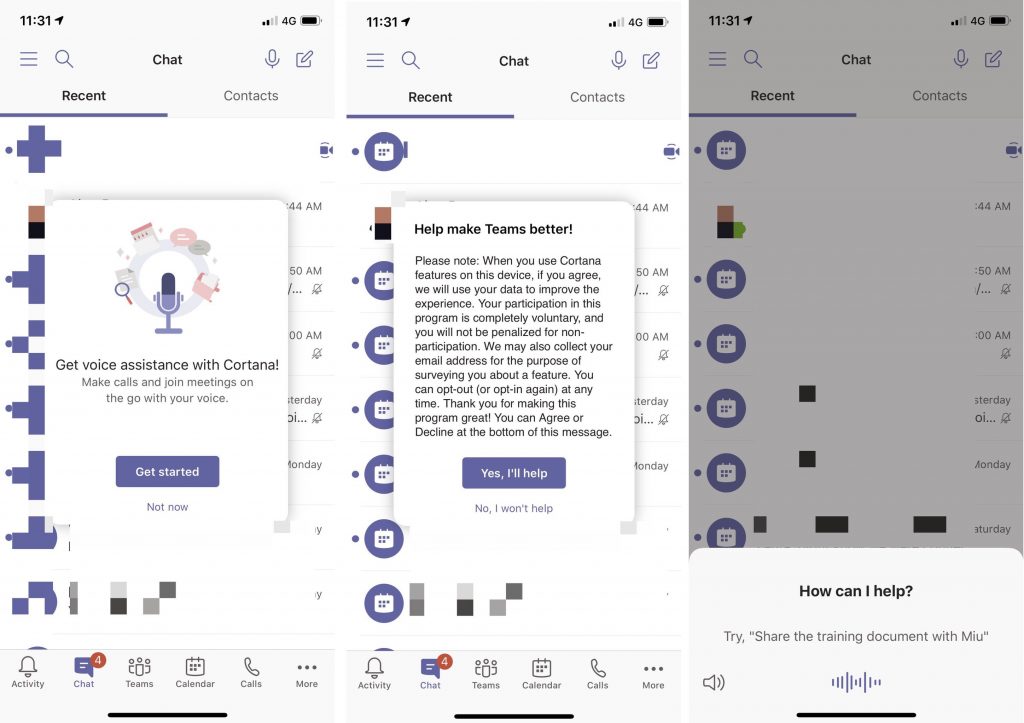
Decoupled from Windows as its own app and rebranded to more of a personal productivity assistant, Cortana hasn’t really been in the spotlight, even at Microsoft’s Build conference. Some leaked screenshots, though, are showing that the digital assistant might soon be making a new journey over to Microsoft’s Teams app on iOS.

As noted by @wbpluto on Twitter, it looks as though Cortana might become a business digital assistant for the Microsoft 365 services, which includes Teams and Outlook. From her Tweet, we get a peek at how Cortana might be integrated into Teams on Apple’s iPhones. The assistant is still referred to as “Cortana” by name, and can apparently be used to “make call and join meetings on the go with your voice.” The screenshot also shows how Cortana can be used in a scenario to share documents, too.

This would fall in line with previous rumors from Microsoft reporter Brad Sams, who suggested a Microsoft has recently been referring to Cortana as the “Microsoft 365 assistant” internally. After all, Cortana already has a place in Outlook on iOS and can be used to read aloud emails.

The news is still quite interesting, nonetheless, as in an interview with PC World, Andrew Shuman, corporate vice president of Cortana, detailed a bit more of the digital assistant’s productivity shift. Apparently, Microsoft seems to want to put Cortana where people use it for their personal productivity, especially on Windows. According to Shuman:

“And you know, Windows has its flaws. But it’ll be great at launching apps. It’ll be great at simple calculations. It will soon be great at launching web sites—we don’t have that in there yet. That’s what people do on Windows all day. So we need to meet them there. And kind of earn the right to go farther”

Shuman also tells PC World that the Coronavirus has held up some progress on Cortana and caused it to not show up at Build. Additionally, he says that the “Windows 10 May 2020 release itself was in flux” as a reason for Cortana not being at the conference. There were also other issues with the company’s testing labs being shut down, but Microsoft is still shifting the focus to developers while it can. The “end-user” stories where Cortana can show off future skills, will still come later, per Shuman.

6 best Connectify alternatives to create a WiFi Hotspot

Connectify needs no introduction, and if you are reading this article, you are most likely to have used it before. Apart from the core virtual hotspot functionality, Connectify also offers file sharing, bridge, dispatch, and ad-blocking features on the client device. Connectify is a premium virtual hotspot software that means to be able to use all the goodies offered by the software; you must purchase the license. While there is a free lite version of the same, it is severely limited in terms of features. Some people may simply want software that allows them to create a virtual hotspot and share the internet with other devices without the complexity of navigating through a cluttered interface for an affordable price tag or free if that is possible. This is where the Connectify alternative to create a WiFi hotspot comes into play. These alternatives offer a much cleaner user interface with limited features for a reasonable price. In this article, we have listed the best Connectify alternatives that will help you replace Connectify without making any major compromises.

Top Connectify alternatives to create a WiFi Hotspot

MyPublicWiFi

Connectify alternatives

MyPublicWiFi is a light-weight Windows utility that allows you to turn your computer into a WiFI access point or hotspot. It comes with additional features like firewall, URL tracking, and ad-blocker to protect the user.

MyPublicWiFi supports both the Hosted Network and WiFi Director for Windows 10, making it compatible with even older systems. The tool can be used for Internet Connection Sharing, in Router Mode with DHCP and NAT server protocol, Network Bridging Mode, and WLAN Repeater Mode. You can also configure the tool to disable internet sharing.

As discussed earlier, MyPublicWiFi comes with a built-in firewall that can be used to restrict user access to a specific server. In addition, it also features an Ad-blocker that turns your PC into an AdBlock router to save internet bandwidth as well as help you restrict user access to social media.

MyPublicWiFi is an excellent freeware for creating a WiFi hotspot on your Windows system as long as you don’t mind the legacy UI.

⇒Get MyPublicWiFi

Maryfi

Connectify alternatives

With Maryfi, you can share the internet with your family and friends and even co-workers, extend the range of your home router, and even share files without an active internet connection. Maryfi is a freeware that allows you to create a quick hotspot and share the internet from your windows computer.

Maryfi supports devices like your wireless printers and even Eye-Fi cards that are bound to a specific network without any issues and additional configuration required. Similar to MyPublicWiFi, Maryfi can also be used as a range extender or repeater for your wireless router to extend the range.

Maryfi is developed for Windows 7; however, the tool works completely fine on other versions of Windows, including Windows 10.

⇒Get Maryfi

mHotspot

Connectify alternatives

mHotspot is yet another free WiFi hotspot utility that can be installed on Windows 7, 8, and 10 running systems and turn these computers into a virtual WiFi router. The app allows the user to share the internet from LAN, Ethernet,  Data-Card, 3G/4G, and even WiFi connection.

mHotspot is lighter than Maryfi at just 400KB, but be careful of the optional bloatware that comes with the software. Make sure to select custom installation and decline the optional offer and uncheck the installation of third-party security software that the tool recommends you to install.

Using the software is easy. After the installation, you can access it from the system tray. To create a hotspot, enter a name and a password and click on Start Hotspot. You can select the internet source to share if you have multiple sources. The tool doesn’t offer any advanced features and is ideal for anyone looking for just a hotspot utility to replace Connectify.

⇒Get mHotspot

Virtual Router Plus

Connectify alternatives

Virtual Router Plus allows you to wirelessly share internet connection from multiple sources with your other WiFi-enabled devices. The devices are connected to a virtual router similar to any other access point with WPA2 security protocol.

The tool is easy to use and works with all the newer versions of Windows OS. After the installation, enter a network name (SSID) and the password. Select the shared internet connection source and click on Start Virtual Router Pulse.

⇒Get Virtual Router Plus

Thinix WiFi Hotspot

Connectify alternatives

If you are looking for an alternative that is as good as Connectify but without the hefty price tag, check out Thinix WiFi Hotspot. Thinix WiFi Hotspot makes it possible to share a computer’s internet connection with other devices by turning your system into a hotspot.

Thinix WiFi Hotspot comes with features like Auto-Start Hotspot, multi-language support, WPA2 encryption, sharing via multiple internet sources, and the ability to save multiple profiles.

While the Thinix WiFi Hotspot comes with loads of features, it is a premium utility that starts at $12.95 US for 1 PC license. However, you can try the software for 30 days before making a purchase to see if it meets your requirement.

⇒Get Thinix WiFi Hotspot

Windows 10 Mobile Hotspot

Connectify alternatives

If you don’t want to install a third-party hotspot software, your Windows 10 system comes with a built-in mobile hotspot feature as well.  While the native mobile hotspot does not offer advanced features like file sharing and creating shared libraries, it allows you to create a functional WiFi hotspot quickly.

  1. Click on Start and go to Settings.
  2. Select Network and Internet.
  3. From the left pane, open the Mobile Hotspot tab.
  4. Toggle the switch to Turn On/Off the hotspot.
  5. You can edit the network name and password by clicking the Edit button.

What is a better alternative to Connectify?

Connectify is undoubtedly one of the best WiFi hotspot utility available, and the price tag can be justified if you can make use of all the features provided by Connectify. That said, not everyone wants a WiFi hotspot tool with advanced features.


The Connectify alternatives listed in this article offer the WiFi hotspot feature along with some advanced features for less or even free most of the time.

Go through all the WiFi hotspot utilities and choose the one that meets your requirements. Do let us know which one is your favorite in the comments below.


[wl_navigator]

Fix: Windows Hello for Business will not be launched

Windows Hello for Business gives some users an alternative biometric way to log in.

However, some users have posted on Microsoft’s support forum about a Windows Hello for Business provisioning will not be launched error message that Event Viewer logs.

Some users have also reported that their PCs freeze when that issue arises.


How do I fix the Windows Hello for Business provisioning error?

1. Disable Windows Hello with Group Policy Editor

Users with Windows 10 Pro or Enterprise editions can fix the Windows Hello for Business error with Group Policy Editor.

  1. First, press the Windows key + R keyboard shortcut, which will open Run.
  2. Enter gpedit.msc in the Open box, and click the OK option. Then the Group Policy Editor window will open.
    Local Group Policy Editor windows hello for business provisioning will not be launched
  3. Expand the Computer Configuration category on the left of the window.
  4. Next, click Administrative Templates/Windows Components/Windows Hello for Business (or Microsoft Passport) on the left of the window.
    The Windows Hello for Business folder hello for business provisioning will not be launched
  5. Double-click Windows Hello for Business on the right side of Group Policy Editor to open the window shown directly below. Some users might need to double-click a Microsoft Passport policy instead.
    Windows Hello for Business setting windows hello for business provisioning will not be launched
  6. Click the Disabled radio button.
  7. Press the Apply button.
  8. Press the OK button to exit the policy window.
  9. Close the Group Policy Editor.

2. Edit the Microsoft registry key

  1. If you don’t have Group Policy Editor, try editing the registry instead. Open the Run accessory.
  2. Then type regedit and click OK to open the Registry Editor window.
  3. Next, open this registry key path: Computer/HKEY_LOCAL_MACHINE/SOFTWARE/Policies/Microsoft.Microsoft key windows hello for business provisioning will not be launched
  4. Right-click an empty space on the right of the window and select the New > DWORD (32-bit) value options.
  5. Then enter PassportForWork as the title for the DWORD.
  6. Double-click the PassportForWork DWORD to open the window shown directly below.
    The Edit DWORD window windows hello for business provisioning will not be launched
  7. Input 0 in the Value data box.
  8. Click the OK option.
  9. Restart Windows after closing the Registry Editor.

3. Alternative registry fix

Some users have also said they’ve fixed the Windows Hello for Business provisioning will not be launched error with an alternative registry edit.

  1. Open this registry path:HKEY_LOCAL_MACHINE/SYSTEM/CurrentControlSet/Control WMI/Autologger/EventLog-Application/{23b8d46b-67dd-40a3-b636-d43e50552c6d}.Enabled DWORD windows hello for business provisioning will not be launched
  2. Double-click the Enabled keyword to open its Edit window.
  3. Erase 1 from the Value data box.
  4. Input 0 as the replacement value.
  5. Select the OK option.
  6. Thereafter, close the Registry Editor.
  7. Restart Windows after editing the registry.

There aren’t many potential fixes for the Windows Hello for Business provisioning will not be launched error. However, the above resolutions are confirmed fixes for the error.


[wl_navigator]

It’s not all Xbox vs PlayStation – Sony partners with Microsoft on smart camera technologies

Sony and Microsoft announced earlier today that they would be working together to produce significant advancements in the field of smart cameras and related video analytics.

The partnership will allow for Sony to implement Microsoft’s Azure AI tools in its IMX500 intelligent vision sensor which is used to analyse images for objects and information. A smart camera app powered by Microsoft’s Azure IoT and Cognitive Services will also be produced by Sony which will support the sensor and will allow businesses to create their own custom video analytics and computer vision solutions.

“Video analytics and smart cameras can drive better business insights and outcomes across a wide range of scenarios for businesses,” Microsoft’s corporate vice president and commercial chief marketing officer, Takeshi Numoto, said of the agreement. “Through this partnership, we’re combining Microsoft’s expertise in providing trusted, enterprise-grade AI and analytics solutions with Sony’s established leadership in the imaging sensors market to help uncover new opportunities for our mutual customers and partners.”

Sony and Microsoft are also expected to begin working with partners and businesses on projects relating to computer vision and video analytics later this year as part of Microsoft’s AI & IoT Insider Labs program.

While many consider the two companies to be rivals due to their competing PlayStation and Xbox video game consoles, this isn’t the first time that Microsoft and Sony have collaborated or shared technology.

Just last year, it was revealed that Sony’s game and content-streaming services would begin using Microsoft’s Azure datacenter-based solutions. In fact, it seems that this initial agreement laid the groundwork for today’s announcement which now adds context to some of the ambiguous mentions of future AI projects between the two companies.

Fix connection errors in Power BI with 6 easy solutions

A crucial part of Power BI is an internet connection. This way, you can share data and communicate with others about the project. However, Power BI has many connection issues.

In this article, we will describe them and we will show you how to fix the connection errors in Power BI.

Many people can’t save modifications on the server and they’re getting an error message. One user reported the following on the official forum:

I had no problem loading the entities, or creating the conections. The report seems to be fully functional as well, but when trying to refresh from Power BI Desktop, the following error message pops up.

power bi cannot save to server
So, the problem appeared when the user tried to refresh from Power BI Desktop because there’s not enough memory to complete the operation.

Another issue refers to a firewall error, as one user reported on the forum:

when I try to refresh it I get the following error: Formula.Firewall: Query Est Review Effort (step Merged Queries1) references other queries or steps, so it may not directly access a data source. Please rebuild this data combination.

So, the problems are with the data combination selected, and with accessing a data source.

Quite a few users encountered an issue in Power BI Report. Simply put, the service is not available, as one user reported on the official forum:

When I run either report I see Service Unavailable. HTTP Error 503. The service is unavailable. with the loading data image.

power bi service unavailable
Also, the restart didn’t fix the error.

The invalid connection credentials is another severe issue of Power BI, as one user said on the forum:

The following occurs when I referesh the data: Something went wrong Invalid connection credentials. Please try again later or contact support.

So, the problem appears when the user refreshed the data.

Sometimes, errors can be unexpected. A user described the following issue:

Trying to save a Power BI file and getting Unexpected Network Error. Have tried doing a save as and that has failed as well. Tried to local drive as well as to the network. I can save/export to Power BI template, but that is not much use.

Therefore, trying to save a Power BI file was unsuccessful because of an unexpected network error.

Probably the most severe issue is that the program was unable to start, as a user described:

I downloaded PBI on 24th June 2018. I am unable to start the application. My system information is following listed. OS – Windows 7 Ultimate (64 Bit). RAM – 8 GB

power bi unable to start
So, the Power BI Desktop won’t start, because the program wasn’t able to connect to the model. Today we will show you how to fix these connection problems in Power BI.

How can I fix network issues in Power BI?

1. Failed to save modifications to the server error

For this, there is a very simple solution. Remove the report and publish it again. After that, you can schedule a refresh without any issue.

2. Firewall error

You can solve the problem with a few changes in Power BI.

  1. Click on File, select Options and Settings, then click on Options.power bi options
  2. Go to Global, then Privacy, and then check Always Ignore Privacy Level Settings.power bi global privacy

Alternatively, you can solve the error by following the steps below.

Open the Options menu like in the solution above.

  1. Go to Current File and select Privacy.
  2. Check Ignore the Privacy levels and potentially improve performance.power bi current file

3. The service is unavailable

This issue appears when Power BI Desktop is on one computer and the client connects to Power BI Report on another server. You should keep everything on the same server if you want to avoid this problem.

4. Invalid connection credentials

You can test the network connectivity with this PowerShell script: Test-NetConnection -ComputerName watchdog.servicebus.windows.net -Port 9350

5. Unexpected network error occurred

This problem appeared to an older version of Power BI. Remember to update your program to avoid errors such as this.


Your Power BI is outdated? Install the latest version from here!


6. We weren’t able to connect to the model error

To solve the issue, try the 32-bit version of Power BI Desktop, as the 64-bit version can cause problems for some users.

Conclusion

As you can see, the problems are not as severe as they seem. Connection errors are usually caused by some faulty option or an outdated program. Set your Power BI properly and keep the program updated for maximum performance.

Did our solutions work for you? Let us know in the comments section below!

  • Why is power bi used?
Power BI can help create charts or graphs, connect data sets from different sources, transform and clean the data into a model, and more.
  • Is Power BI better than Excel?
Power BI is a more powerful and complex tool in comparison to Microsoft Excel. However, they are pretty different. Power BI is used more for sharing data visualizations and dashboards to a large number of users. 

[wl_navigator]

How to Install Unsigned Drivers [Windows Guide]

Microsoft developed the Windows 10 OS in order to provide a more user-friendly interface and also for ensuring that each user can operate on a safe and secure platform.

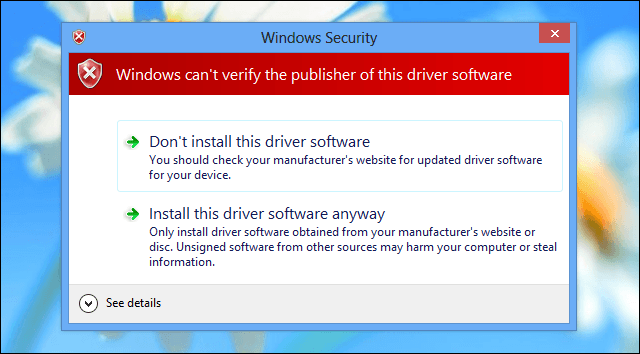
That’s why, among other security features, you won’t be able to install unsigned drivers. However, if you want or have to install a driver without a digital signature, there are solutions (as always).

unsigned driver windows 8


But first, you should know that you must be an advanced Windows user, or else you might end up damaging your laptop, computer, or tablet.

Microsoft pre-installed the digital signature feature in order to prevent users from installing malicious or just badly programmed drivers which could cause crashes and open gaping security holes.

Applying an unsigned driver is usually required when you want to flash an old or outdated driver or when you try to develop your own software.

So, be careful when dealing with these processes, and before doing anything else save all your data, programs, or processes as the computer will reboot several times while completing the steps from below.

How do I install drivers on Windows 10 without digital signature?

Long story short, the only way to install unsigned drivers on your Windows computer is by disabling driver signature enforcement.

There are two ways to do this: one allows you to temporarily turn off driver signature, while the second one permanently disables this feature.

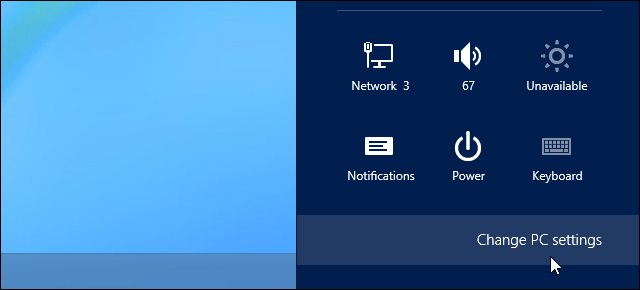
  1. On your computer open Settings charm by getting your mouse on the bottom right side of your display.pc settings windows 8
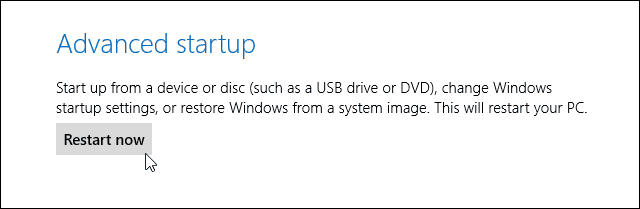
  2. From there select PC Settings and then pick the General category; finally, select restart now (press and hold Shift keyboard key while pressing on the Restart now button).advanced restart
  3. The Advanced Startup Options will be then displayed.
  4. From the Choose an Option screen appears tap on Troubleshoot.
  5. Select Advanced Options from the next window and pick Startup Settings.
  6. From there once more select the Restart option.
  7. Up next, within Startup Settings window press F7 or 7 keyboard key in order to select Disable driver signature enforcement option.startup settings
  8. Windows 10 will immediately boot to its typical lock screen. Sign in to Windows 10 as you normally would.
  9. Do note that you will have to make these changes after each reboot as the digital signature feature will be reapplied by default when you restart your device.

Another option is to use a specialized tool that can automatically install the drivers you need safe and in just a few seconds.

⇒ Get Fortect Driver Updater

For more information on how to permanently disable driver signature enforcement, check out this step-by-step guide.

Once again, keep in mind that turning off driver signature enforcement makes your computer vulnerable to threats and malware attacks, so proceed at your own risk.

So that’s how you can install unsigned drivers on your Windows 10, Windows 8, or Windows 8.1 based laptop, tablet, or desktop.

In case you have other questions related to this topic, don’t hesitate to share with us by using the comments field below.

Bootable Backup Software: 6 Best to Use in 2026

In this article, we are going to take a look at some of the best bootable backup software for Windows 10 but before we begin, let’s remind ourselves of what this software is.

We need bootable backup software when things go so spectacularly wrong that we have to start everything from the beginning.

Why you need a good bootable backup software?

At the risk of stating the obvious, the biggest reason to have bootable backup software is to backup everything you value.

Remarkably, many businesses have poor backup practices or none at all. Recent surveys show that 50% (or about 4 million UK businesses) had little to no backup protection. That means there is a 50/50 chance that your company is one of them.

If you are still sitting on the fence about whether bootable backup software is necessary, here are a few reasons to start thinking about it.

No Backup Software = Data Loss

At the risk of stating the obvious again, the clearest reason to have bootable backup software is it protects you from losing everything on your computer. The main causes of lost data are generally everyday occurrences that can happen to the best of us. They include:

  • Deleting files accidentally. Yes, this can happen to anyone.
  • Hard drive failure
  • Power failure
  • Losing computers
  • Fire and accidents
  • Malware and Viruses. Does ransomware ring a bell for you?

Prevention is better than cure in this scenario and having good bootable backup software is not just about keeping data safe. It’s also about putting in the best practices to secure your data in the first place.

Scheduling Backups

In the old days, the only way to schedule backups was to put it on your agenda and hope you remembered to do it. Now, even the most basic software solution gives you the option to schedule backups whenever you want.

This means that all you need to do is set a recurring time of day to schedule a backup and let the software do the rest. And since most computers aren’t even turned off these days, a backup can be scheduled during a lunch break or after work, lessening any impact on your work.

Saving Time and Money

With automated backups in place, companies don’t have to pay people to do the process for them. This is a huge advantage for companies that are trying to avoid the cost of a dedicated IT support department.

Additionally, if the worst happens, the process for recovering lost data has become so simple that if you can turn on a computer and click a mouse, it is likely that you will be able to reinstall everything to exactly the same specs as before the data loss.

Reduced Costs

Many companies worry that the cost of the software will be prohibitive. The main argument to that is that the cost to the company in lost data, plus the days, weeks, or even months of work to retrieve it, far outweighs the cost of the software itself.

Additionally, if your company thinks that backup software is expensive, it needs to update its research. Not only is software far cheaper than it used to be, but it can even be free.

Read on to find out about six of the best bootable backup software on the market today and which one suits your needs best.

Bootable backup tools for Windows 10 computers

Acronis True Image

Acronis True Image

Acronis True Image provides set and forget protection, which is great as the easier it is to use backup software, the more likely people are to use it.

One of the more serious features of Acronis True Image is the use of Blockchain technology to avoid unauthorized encryption. This is particularly relevant concerning the recent issues of ransomware.

Another feature is Survival Kit, which you can use it to make a bootable backup of your startup partition.

What most people will like about this software is the automation of it all. It really is a set-and-forget system. You choose what you want to backup and when, and the software does it all for you.

There is also an option to backup everything in the cloud and Acronis has its own cloud system, which is very reasonably priced.

Acronis True Image has many other options.

Let’s quickly look at its key features:

  • Supported systems: Windows, Mac, iOS, Android
  • Backup types: Full image, File and folder, Incremental, Disk cloning
  • Recovery capabilities: Restore to same or dissimilar hardware, All-in-one survival kit
  • Backup management: Online management dashboard, Visual display of activities/statistics
  • Security measures: AES-256 encryption, AI-based anti-ransomware protection (PC/Mac/external drives), Blockchain-based file certification, Electronic signatures

Acronis True Image

Back-up your data with the most efficient recovery tool and get a taste of peace of mind!
Check price Visit website

Paragon Backup & Recovery

Paragon

Paragon Backup & Recovery is certainly one of the most comprehensive tools on the market at the moment.

One thing that many fewer techie users will like is that it is not necessary to restore everything you have backed up. A very nice trick is the ability to restore a single file or folder, even if that file or folder is part of a complete hard drive image.

Backup files can be saved onto a local, external or remote drive. They can also be uploaded to a server using FTP access, or burned to disc for those who like the old-school approach.

Another useful feature is a scheduler, which is handy when you want backups to be done when the computer user is not around.

Let’s quickly look at its key features:

  • Hard drive master boot record
  • First track backup
  • Backup of Individual partitions
  • Complete drive backup
  • Backing up of files and folders
  • Documents, music, videos, music or other media files backup
  • Email backup
Paragon Backup & Recovery

Paragon Backup & Recovery

More than a backup solution, Paragon takes it to the next level with partition management, drive migration, and disk wiping.
Check priceVisit website

Stellar Data Recovery Professional

Stellar Data

This is a professional data recovery software specifically designed for the Windows infrastructure.

With a powerful toolkit, Stellar Data Recovery Ecan can easily recover files, folders, documents, photos, videos, and audio from any Windows device or storage media regardless of its condition.

Even unbootable or totally damaged systems are not beyond reach. You can match this software with pretty match anything from partitions to HDDs, SSDs, external USB drives, and optical media.

Let’s quickly look at its key features:

  • Best file recovery tools (files, emails, pictures, videos, drive formatting, disk corruption, lost or deleted partition, crashed systems, etc.)
  • Deep Scan utility to recover data from missing partitions
  • Supports file recovery from NTFS, exFAT, and FAT (FAT16/FAT32) formatted drives
  • Recovers data from hard drives, SSDs and USB drives
  • Recovers data from crashed and unbootable system (Windows PC that fails to boot, or crashes due to BSODs, boot sector corruption, etc.)
  • Preview the Files before Recovery displays a preview of all the lost or deleted files while scanning a storage media for easy categorization
  • Drive Monitor utility (track key attributes like temperature, drive health, and performance of a hard drive to help avoid any data loss due to impending disk failure.
  • Clone Disk option (to create a replica of the drive)

Stellar Data Recovery Professional

Unbootable or even totally damaged systems are no match for this stellar recovery tool.
Check price Visit website

Aomei Backupper

best backup software

Aomei Backupper is a bootable backup software that can create system backups, backup disks, schedule backups, and disk clones. It can be used to recover lost data and migrate entire operating systems and hard drives to another machine if desired.

What makes Aomei Backupper stand out from the rest of the platforms is its free Standard software. Being completely honest here, for the vast majority of regular users, whose computers are for everyday type activities, this is probably the best option.

Let’s quickly look at its key features:

  • Files and Folders Backup
  • System and Disk Backup
  • Partition and Schedule Backup
  • Incremental & Differential Backups
  • Backup Dynamic Disk Volumes
  • Backup to NAS
  • Files and Folders Restore
  • System Restore
  • Partition and Disk Restore

⇒ Get Aomei Backupper

Novastor

bootable backup software

NovaBACKUP was developed for IT people and small businesses in mind. As with most other backup software, its primary use is to do away with the hassles of backing up data.

The software comes in three different versions. The version you need will depend largely on the sort of business you are running.

NovaBACKUP PC for individual Windows system, NovaBACKUP Server for Windows servers, and NovaBACKUP Business Essentials for physical and virtual servers.

One notable feature is that with the software, you’re also entitled to free installation and setup assistance, and local technical support.

This is a pretty good extra if you feel you are going to need help setting everything up. However, expect the extra service to be reflected in the price.

Let’s quickly look at its key features:

  • PC, Server, and Virtual Machine Backups
  • Protection for SQL and Exchange
  • Full, Incremental, and Differential Backups
  • Disaster Recovery Image Backups
  • VM Replication
  • Single File Restore
  • Dissimilar Hardware Restore
  • 100% HIPAA Compliant
  • Backup Locally, Online & to File Sharing Sites

⇒ Get Novastor

CloudBerry

bootable backup software

Finally, let’s take a look at CloudBerry, which offers bootable backup software for online private, public, or hybrid cloud platforms to small and midsize businesses.

One stand out feature is the wizard that takes you through the steps. You don’t need any technical skills.

All you need to do is choose where in the cloud you want to store your backup, choose the options for compression and encryption, decide whether you want to schedule backups manually or automatically, and set notifications for post backups.

The main benefit for most businesses will be CloudBerry’s ease of use. When setting up using the wizard, it takes minutes to get everything up and running.

Included in the subscription are automatic updates, which will give you peace of mind that your data is being well protected.

Let’s quickly look at its key features:

  • CloudBerry Managed Backup
  • Remote management and monitoring and deployment
  • White-labeling and reporting
  • API and CLI integrations
  • Add and Manage Users
  • Manage and Monitor Backup Jobs
  • Manage Packages and Plans
  • End-to-End Encryption

⇒ Get CloudBerry

So these are the best bootable backup software tools for your Windows 10 computer. Which solution will you pick? Let us know in the comments section below.

Moreover, if you need trustworthy Time Machine alternatives for backup on Windows, we can help you out.

Microsoft announces availability of Surface Hub 2S in India

Microsoft has launched the Surface Hub 2S in India, first unveiled in the US in April last year.

Surface Hub 2S is an all-in-one collaboration device that offers a digital whiteboard and a meeting platform for the modern workplace. It is the second generation of the interactive whiteboard developed and marketed by Microsoft, as part of the Microsoft Surface family

The Surface Hub 2S runs a variant of Windows 10 Enterprise, dubbed as Windows 10 Team and packs in the power of Windows 10, Microsoft Teams, Office 365, Microsoft Whiteboard, and the intelligent cloud for shared, collaborative interface in a team huddle or a staff meeting.

The Hub’s welcome screen has three buttons – Call (Microsoft Teams), Whiteboard (Microsoft Whiteboard), and Connect (Miracast) to get started immediately and seamlessly.

Surface Hub 2S Specifications

  • Dimensions: 29.2×43.2×3.0 inches (741×1097×76 mm)
  • Weight: 61.6 lbs (28 kg)
  • Display: PixelSense Display | 3840 x 2560 | 3:2 aspect ratio | IPS LCD
  • Processor: Quad-core 8th Generation Intel Core i5
  • Graphics: Intel UHD Graphics 620
  • Memory: 8GB RAM
  • Storage: 128GB SSD
  • Connections: USB-A | Mini-DisplayPort Video Output | RJ45 Gigabit Ethernet | HDMI Video Input | USB-C with DisplayPort Input | 4 x USB-C

It has the flexibility to be mounted on a wall or it can be put on a roller stand. Microsoft has worked with Steelcase to design Steelcase Roam, a mobile stand and easy-to-hang wall mounting system. It can be moved easily with one hand, and its small footprint fits in all kinds of spaces. There’s also the APC Charge Mobile Battery that can be housed on the Steelcase Roam allowing the Hub 2S to work unplugged and on battery power for roughly two hours. The mobile battery will be available at a later date though.

The Surface Hub 2S is priced at ₹11,89,999 ($15,708) in India and is available via authorized sellers. It includes a Surface Hub 2 Camera and a Surface Hub 2 Pen. Additionally, the Steelcase Roam mobile stand is priced at ₹1,17,500.

How to Open VOB Files [Windows 10 & Mac]

Ever wondered what a VOB file format is, and how to open it? If the answer is yes, you’ve come to the right place – our post highlights ways to open and modify this file format.

A VOB file is a media data file usually stored in the Video_Ts folder in the root folder of the DVD disc. VOB files usually contain most of the information stored in the disc such as audio, subtitles, menus, and video.

Without further ado, let’s review some programs that can open the VOB file format and some manual ways to access this file extension.

How to play VOB files on Windows 10?

Adobe Audition (Editor’s choice) – Diagnostics panel

Adobe Audition is more than a media player, it’s a comprehensive toolset that includes multitrack, waveform, and spectral display for creating, mixing, editing, and restoring audio content.

Perfectly suited to support a plethora of file formats, including .wav, .raw, .avi, .mov, and of course, VOB files, this powerful workstation does more than just open files.

You can use it to edit, clean up, and restore, but also convert, import, and export practically any type of file extension from the most common to the rather unusual ones.

Highly compatible with the Windows 10 infrastructure, the Audition will allow you to maneuver VOB files effortlessly.

Let’s quickly look at its key features:

  • Cleanup, restoration, and precision editing tools for video and audio content
  • Step-by-step, interactive in-app tutorial guides
  • Seamless integration with Adobe Creative Cloud Suite and other third-party apps
  • Essential Sound panel and Diagnostics panel included
  • Extensive support for multiple video and audio formats

Adobe Audition

Handle VOB files more effortlessly with this omnipotent DAW.
Check price Visit Website

File Viewer Plus – User-friendly program

File Viewer Plus is a universal file viewer for Windows that can open and display over 300 different file types.

Besides .vob file types, this tool will also open dozens of other video files that regular players can have problems with.

In some rare cases, if FileViewer cannot display the native view of the file, you can use the Text and Hex views to inspect the file contents.

These views let you see inside the file, providing valuable information, especially for unknown file types. You can do this very fast as well with this user-friendly program.

Moreover, you should consider this tool if you want an uncluttered PC without too much stuffing on your desktop and system. So instead of downloading new software every time to see certain files, you only need this one.

With that being said, you can forget about complicated file viewing tools because it’s likely to manage your files easily with this particular software.

File Viewer Plus

View and convert over 300 formats in no time at all, including .VOB.
Check price Visit Website

CyberLink Power DVD – Highly rated by critics

Power DVD is a giant in the media player industry.

Used by millions and highly rated by both critics and fans, Power DVD provides a complete package of advanced tools such as search, browsing, and online sharing of media files.

The program gives a wonderful experience and allows you to upgrade files and convert them from one format to another. Power DVD is compatible with many formats which include MP4, MP3, JPEG, and VOB.

You can have a good viewing experience of VOB as the program allows you to upscale your video to better quality.

In addition, Power DVD also supports 4K DVD format which means you get the full 4K experience on your system, even though you’ll need a computer with 4K capabilities to enjoy the full benefits.

Power DVD is an excellent media player with many features and supports numerous formats while giving you a cinematic experience with the inbuilt True Theatre Stabilizer.

CyberLink PowerDVD

Open all types of video files and have a top-quality watching experience with this robust tool.
Free trial Visit Website

Gretech GOM Player – Nice interface

Gretech GOM Player is one of the most popular media players used in Asia, particularly in South Korea and Japan.

GOM player has a nice interface that can be customized to your preference with the easily downloadable from the program website GOM player skin.

In addition, the GOM player has a unique inbuilt codec finder that gives information about unsupported formats by scanning through the codec.

The media program then leads you to websites where you can download the missing codec.

Also, the Gretech GOM player supports many media formats such as the AVI, MP4, MP3, WMV, and most especially VOB formats as well as varieties of subtitles like SRT and VOBsub.

Gretech GOM Player

Open .VOB files with this powerful and handy media player.

VideoLAN VLC Media Player – Very popular app

VLC Player is a very popular app used by over 100 million people worldwide. The open-source media player has a huge customer base due to its unique features that allow you to play numerous media formats.

In addition, VLC consists of a simple interface that uses the drag-and-drop mechanism to organize and play your media files.

The VLC media player supports over 70 audio and video media file formats which include MP4, 3GP, WAV, FLV, AVI, and most especially VOB files.

The media player can play VOB files directly from the disc or in a standalone file format. Plus, you can even subscribe to podcasts and streaming websites directly from the program.

⇒ Get VLC Media Player

Microsoft Windows Media Player – Largest library of plugins

Microsoft’s Windows Media Player is the default app that comes with your Windows operating system. The program is widely used as it has many features that have been the crux of other media players.

Windows Media player supports many media formats as you can play WMV, MPEG, MPV, and most notably VOB file formats.

You can stream your music directly from your system using the Windows media player software.

Furthermore, this media player also has the largest library of plugins that can be downloaded to improve the performance of the media player.

⇒ Get Windows Media Player

Media Player Classic – Compatible with older PCs

This open-source media player is quite popular among users as it shares similar features with Windows Media Player.

Media Player Classic, on the other hand, enables you to customize the interface and offers advanced playback tools that add to your viewing experience.

Media Player Classic also has a Home Cinema feature which enables the software to create a unique cinematic experience when viewing video files.

This media player supports a wide range of media formats such as OGG, MP4, MPEG, and most notably VOB files. The program uses little system memory and is small in size and is compatible with older PCs as well.

⇒ Get Media Player Classic

All the programs we mentioned in the post can be used to open VOB files on Windows 10 computers. However, while some of the programs are free such as the VLC media player, others represent good value for money.

If you also need to find out more about different types of files and how to open them, you can check out more solutions about file extension openers

Want a streamlined guide for newer codecs as well? Learn how to play AV1 files on Windows using trusted players and the right codecs.

Have you used any of these tools to play VOB files in Windows 10? Feel free to share your experience with us by commenting below.

6 best data breach detection software [Home & Business]

Today’s world faces highly sophisticated data breaches, threats, attacks, as well as intrusions because hackers and cybercriminals are always devising new ways of gaining access to your home or business networks. This makes it an urgent necessity to have a multi-tiered approach to network security. The best privacy and data breach detection software, also known as intrusion detection systems (IDS), or sometimes called data loss prevention (DLP) software, are deployed to defend your network against high-tech attacks and threats that emerge on a daily basis. As network security tools, these privacy breach detection software detect any vulnerability exploits meant to attack your apps or PC and help monitor your network or system. The common privacy breach detection software can be:
  • based on your network (monitor inbound and outbound traffic in the network)
  • host-based (safeguard the overall network)
  • signature-based (monitor packets and compare against the database of signatures)
  • anomaly-based (monitor network traffic compared against an established baseline)
  • reactive (detect malicious activity and respond accordingly)
  • passive (detection and alerting)
The best data breach detection software uses both host and network-based strategies for stronger protection, and below are some of the top tools you can use to stay updated, and protected against any threats.

Best data breach detection software to pair with your PC

AVG Business Security

AVG_best data breach detection software

AVG delivers a top-rated data breach detection solution that is designed for business covering every single one of your protection needs from instant email alerts to remote admin tools.

Speaking about remote administration, you can install, update, and configure AVG across your PC devices from anywhere and benefit from real-time monitoring and notifications of threats.

Let’s quickly look at its key features:

  • Cloud Management Console (quick deployment on multiple endpoints, manage policies, monitor threats, schedule updates, and protect devices and network from a single location)
  • File, Email, Behaviour and Web Shield (multi-tiered protection against malware, viruses, spam, harmful downloads, and dangerous websites)
  • Link Scanner and integrated Firewall (to filter network traffic and prevent suspicious connections)
  • File Shredder (permanently delete files that you don’t want to be recovered)
  • SharePoint Protection
AVG Business Security

AVG Business Security

Protect your business with the ultimate data breach detection software powered by AVG!
$61.41 Buy it now

Varonis

best privacy breach detection software

This privacy breach detection software is the innovation of Varonis Systems, an American software company, and it lets organizations track, visualize, analyze, and protect their data.

Varonis performs user behavior analytics so as to detect and identify abnormal behavior and defend from cyberattacks, by extracting metadata from your IT infrastructure.

It then uses this information to map relationships among data objects, your employees, content, and usage, so you can get more visibility into your data, and protect it.

Let’s quickly look at its key features:

  • Non-intrusive Varonis framework implementation
  • DatAdvantage data governance software and IDU analytics engine-level (statistical analysis)
  • Monitor file servers, analyze file systems and access patterns deeply (recommendations on changes)
  • Address privacy breach detection (fast and straightforward setup)
  • Solve a number of challenges, and determine data ownership based on access frequency
  • Performs usage auditing
Varonis

Varonis

Combine visibility and context to spot and respond to cyberattacks like a pro!
Demo Try now

Stealthbits

best privacy breach detection software

This is the first data access governance solution provider that supports unstructured and structured data repositories, protecting your credentials against your most vulnerable targets.

Stealthbits is a cybersecurity software company that protects sensitive data and credentials attackers use to steal the data itself.

Let’s quickly look at its key features:

  • Stealth Intercept (detects, prevents and alerts you in real time allowing you to block threats before they turn into disasters)
  • Machine learning-based Stealth Defend (real-time threat analytics and alerting tool to defend your organization against advanced threats and attempts to exfiltrate and destroy your data)
  • Stealth Recover (allows you to roll back and recover active directory changes to maintain a secure and optimized directory and restore domains without downtime)
  • Stealthbits File activity monitor (store file access and permission changes for Windows file servers, and NAS devices without needing native logging)
Stealthbits

Stealthbits

Don't just limit access to your data. Take it to the next level by securing the Active Directory.
Demo Try now

Suricata


Suricata_data breach detection software

This is a fast, highly robust, open-source privacy breach detection software developed by the Open Information Security Foundation.

Suricata is capable of performing intrusion detection in real-time, plus it prevents inline intrusion and monitors your network’s security.

It features modules such as capturing, collection, decoding, detection, and output, following the process in that order. It first captures the traffic, then decodes it, and specifies how the flow separates in between its processors.

Let’s quickly look at its key features:

  • Multi-threaded solution (uses rules, signature language, plus Lua scripting to detect complex threats)
  • Compatible with all major operating systems including Windows
  • Network traffic processing on the seventh OSI model layer (enhanced malware detection capabilities)
  • Automatic detection and parsing of protocols and GPU acceleration

⇒ Get Suricata

OSSEC

OSSEC

OSSEC is a multi-platform, open-source host-based intrusion detection system. The tool has a powerful correlation and analysis engine, integrating log analysis, and file integrity checking.

In addition, there’s a Windows registry monitoring feature, so you’ll be able to see any unauthorized changes to the registry with ease.

There’s also centralized policy enforcement, rootkit detection, real-time alerting, and active response. As for availability, you should know that this is a multi-platform solution, and it works on Linux, OpenBSD, FreeBSD, macOS, Solaris, and Windows.

Let’s quickly look at its key features:

  • Completely free
  • Available on almost all desktop platforms
  • Correlation and analysis engine
  • Log analysis, integrity checking
  • Registry monitoring, file integrity checking
  • Rootkit detection, real-time alerts

⇒ Get OSSEC

Snort

best privacy breach detection software

This is another free and open-source privacy breach detection software created in 1998, whose main advantage is its ability to perform real-time traffic analysis and packet logging on the network.

Features include protocol analysis, content searching, and pre-processors, which make this tool widely accepted for detecting malware of all types, exploits, scanning ports, and many other security issues.

Let’s quickly look at its key features:

  • Sniffer, packet logger, and network intrusion detection modes (Sniffer mode reads packets and displays the information, Packet logger logs the packets on the disk, while the network intrusion detection mode monitors real-time traffic comparing it with the user-defined rules)
  • Detect stealth port scans, CGI attacks, SMB probes, buffer overflow, and OS fingerprinting attempts
  • Compatible with various hardware platforms and operating systems including Windows
  • Flexible and dynamic for deployment
  • Easy to write intrusion detection rules
  • Good community support base for troubleshooting

⇒ Get Snort


Is there a privacy breach detection software you use that you’d like everyone to know about? Share with us by leaving a comment in the section below.

[wl_navigator]

Laptop locking software: Best tools for theft protection

Keeping your laptop safe from unauthorized access is quite important. There are several ways to do that, but one of the best ways is to use a laptop locker software. There are many applications that can lock your laptop and keep it safe from unauthorized access, and today we’re going to show you the very best options currently available on the market.

What is the best laptop locker software for your PC?

Windows Shutdown Assistant

Windows Shutdown Assistant Apowersoft

Windows Shutdown Assistant is not your ordinary laptop security lock software. Of course, it can shut down your PC when it enters idle mode or when you set it to, but it can also turn it off in case of excessive CPU usage or low battery.

Besides, this tool is highly versatile and seamlessly works with all Windows OS from Vista or XP (a rare commodity these days!) to the latest v2004 of Windows 10.

You can use Windows Shutdown Assistant to schedule tasks, perform specified actions like opening files and URLs, and even launch programs automatically.

Speaking about tasks, you can use this robust software for more than just scheduling Windows shutdown time.

You can also set it to log off, restart, power on, or hibernate your computer and it even notifies you via a pop-up countdown window before carrying out the tasks.

Let’s quickly look at its key features:

  • Password-lock your PC to secure files and data
  • Break Reminder software (edit prompting words and sentences, use images with colors or sounds)
  • Automatically turns off your PC in different scenarios
  • Lock, restart, hibernate and log off computer at a specific time
  • Run and stop programs on schedule
  • Set reminders et generate notes
  • Full compatibility with Windows running devices, all versions
Windows Shutdown Assistant

Windows Shutdown Assistant

The Apowersoft-powered Shutdown Assistant is your trusted Windows guardian.
$19.95 Buy now

Chris PC-Lock

laptop locker software

This simple application will lock your desktop, prevent unauthorized users from accessing your PC, block all keyboard shortcuts, Task Manager, and even the Windows Key, so there’s no way to close the login screen.

The application has a built-in timer that you can configure and set your PC to lock itself after a certain time period. Of course, you can assign a keyboard shortcut and use it to instantly lock your PC if you want.

Chris PC-Lock will create an icon in your tray bar allowing you to easily lock your PC with just a couple of clicks. You can even hide the tray icon and make your PC lockable only by using the keyboard shortcut.

As for the lock screen, you can customize it with various wallpapers or slideshows, and you can even use your own pictures or make the screen wallpaper transparent.

Chris PC-Lock is a simple application, with humble features and a humble user interface. Unfortunately, the application isn’t free, but it comes with a trial period of 21 days.

Chris PC-Lock

Chris PC-Lock

Block fast the access to your PC and secure your work with Chris PC-Lock!
Trial Try now

Keep your protection on 24/7 – Here’s how to password lock .exe files.


Lock My PC 4


Lock My PC 4

Another solid laptop locker software that we want to show you is Lock My PC 4. This application is available in two versions, Free and Business, and the two share many features.

The first feature is the keyboard lock that will prevent unauthorized users from using your PC. The application also allows you to lock your PC with a hotkey, or by clicking the lock icon.

Of course, the auto-lock feature is also available if your PC has been idle for some time. The app can also lock your PC right after user login or after startup.

Let’s quickly look at its key features:

  • Lock your DVD drive (prevent users to insert any discs and try to unlock the PC)
  •  Works with multiple monitors
  • App self-protected by a password so users won’t be able to change settings or quit
  • Supports command line settings (useful to advanced users)
  • Customization options (custom lock screens, screen saving effects, slideshows, and transparency)

Overall, Lock My PC 4 is solid laptop locker software. The Free version is solid if you want to protect your PC from less tech-savvy users, but if you want full protection, you’ll have to purchase the Business version.

Lock My PC 4

Lock My PC 4

Lock your PC and unlock peace of mind with Lock My PC 4!
Free Try now

Predator


windows boot error 0xc000000f

If you’re looking for a laptop locker software that offers additional protection, then Predator might be just what you need.

Unlike previous entries on our list, this application requires a USB flash drive in order to work, and as long as the USB device is connected to your PC, your PC will be unlocked.

As soon as you remove your flash drive, the screen will go dark and your keyboard and mouse will become disabled. There are two versions available: Home and Professional.

Let’s quickly look at its key features:

  • Protects several PCs with the same USB flash drive and works with multiple user accounts
  • Detailed logs plus an alarm feature that will activate after an unsuccessful login attempt
  • Can even disable CD/DVD autorun
  • Integrated scheduler feature (to limit computer usage easily)
  • Safe Mode protection feature (to prevent users from accessing your PC in Safe Mode)

Predator is a great laptop locker software and all you need to use it is a spare USB flash drive.

The application is available for a free trial, but since the price difference between Home and Professional versions is almost negligible, we recommend you to go pro for maximum protection.

⇒ Download Predator Professional Edition

Desktop Lock

laptop locker software

Another laptop locker software that we want to show you is Desktop Lock. This application will completely lock your system and block your keyboard and mouse making unauthorized users unable to use your PC at all.

It’s worth mentioning that this application can’t be stopped in Task Manager, so there’s no way to disable it, except for entering the correct password or keyboard shortcut.

The tool allows you to lock your PC while keeping a single application open. For example, you can lock your PC with your media player open, and users won’t be able to use any other application except the media player.

Let’s quickly look at its key features:

  • Open programs and documents in read-only mode
  • Lock screen customization options (show your screensaver, your desktop, picture, or even a video or audio file)
  • Scheduling feature that allows you to lock your PC at a specific time automatically
  • Unlock your PC using a password/keyboard shortcut/sequence of mouse clicks/USB flash drive

⇒ Download Desktop Lock


Check out these best email privacy software to keep your correspondence confidential.


Laptop locker software can easily protect your PC from unauthorized access, but additional features might also help you make up your mind in one direction or another.

Which tool on this list works best for you? Do share your thoughts via the comments section below.

[wl_navigator]

What is port forwarding: is it safe? How to forward ports?

Port forwarding can be a great tool in the right hands, as it can unblock your private home network in a broad variety of ways. Using this technique, you can enable external access to your network devices.

However, it can be risky if you don’t know what you’re doing. Therefore, you’ll need to understand three things: what is port forwarding, is it safe, and how to perform this operation without jeopardizing your network. We’ll tell you all about it.

What is port forwarding?

The explanation is quite technical, but we’ll try to simplify it. If you access the Internet through a router on your network, you will need to forward ports so that external traffic could access your network.

For instance, if you want to host a public game server, you will need to open some ports on your network, so that other players (clients) that are not on your LAN (Local Area Network) can connect to it.

Since your router is configured by default not to allow any external connections, you will need to perform these operations manually. Your router acts as a firewall and only permits access to a few services.

Essentially, port forwarding is enabling external devices to connect to a certain device or service within a private LAN.

Is port forwarding safe?

The short answer is yes; port forwarding is not inherently unsafe. The safety of this procedure depends on a variety of factors. For instance, if you run a service that’s out of support and has a lot of unpatched vulnerabilities, then you’re putting your PC and network at risk.

On the other hand, if you just want to host a public game server, you should be fine. However, you should make sure that there’s no other software/service that acquires the ports you previously assigned whenever the game server is not up and running.

You can increase your security by setting up restrictions. For example, you can limit traffic by country or even by IP address (whitelisting). Additionally, it would be good practice to limit bandwidth, so that you don’t receive DDoS attacks.

The bottom line is that port forwarding is not inherently unsafe as long as you’re careful about what you run through those ports. Last, but not least, one of the safest practices would be closing the port whenever you’re not using it.

Assuming that you know what you’re doing and the risks involved, let’s see how to open ports on your router. Performing this operation is different from one router to another.

For obvious reasons, we won’t show you how to do this on every router. Instead, we’ll give you the know-how, so you can manage in any given situation, with any router.

It’s worth mentioning that we’ll be using a TP-Link router in our demonstration.

How to port forward?

  1. Log into your router by using your default gateway address
  2. Type your credentials (usually located at the bottom of your router)Login TP-Link router
  3. Click the Advanced tabAdvanced tab TP-Link router
  4. Access the Virtual Servers option from the NAT Forwarding menuVirtual servers menu TP-Link
  5. Click the Add button
  6. Customize the Service Type field (choose a name for the service)
  7. Enter the port you want to open in the External Port field
  8. Type the Internal IP and Port in the fields (for the device or service you want to access externally)
  9. Select the protocol (TCP/UDP) from the combo menu or choose ALL if you’re unsure
  10. Click the Save buttonHow to port forward TP-Link

Can’t forward ports because of a double NAT situation? Our extensive guide will teach you how to fix it quickly.


That’s it. If you want to test if you’ve done everything correctly, you can use the PortCheckTool website. Type your desired port in the field and hit the check button.

VPN port forwarding

Many users rely on VPNs to maintain their network security and online privacy. In time, users wanted a way to perform port forwarding while using a VPN, so a few providers have implemented this feature in their services.

For instance, PIA is one of the best VPN providers that has native support for dynamic port forwarding. It has passed all of our security, speed and flexibility tests with flying colors.

Private Internet Access

Private Internet Access

Your VPN doesn't allow you to forward ports? PIA supports dynamic port forwarding and is easy to set up.
$2.85/mo. Buy it now

Performing this operation through VPNs can come in very handy in some cases. For instance, it can help increase torrent download/upload speed values and multimedia streaming speeds.

Additionally, you can use it to access your PC remotely when you’re not physically around it.

Default router credentials

Router brandDefault router IP addressDefault router usernameDefault router password
3Comhttps://192.168.1.1adminAdmin
Belkinhttps://192.168.2.1admin admin
D-Linkhttps://192.168.0.1adminAdmin
Linksyshttps://192.168.1.1adminAdmin
Netgearhttps://192.168.0.1adminpassword
Netstarhttps://192.168.0.1adminpassword
Asushttps://192.168.1.1adminadmin
Synologyhttps://192.168.1.1adminAdmin
TP-Linkhttps://192.168.0.1adminadmin
TENDAhttps://192.168.0.1adminadmin

Safe and useful operation if done right

To sum it up, if you want to make a local service/device accessible from outside your network, port forwarding is usually the answer. It’s not risky as long as the service you run on that port is safe.

How to forward ports highly depends on the model and brand of your router. Some devices might use different names for this operation. For instance, TP-Link uses Virtual Servers.

You can even forward ports while using a VPN, but for that, you’ll need a port-forwarding-friendly VPN.

[wl_navigator]

Windows 10/11 64-bit closer to ARM

Originally, Windows 10 (not the mobile version) could run only on PCs that were powered by x86 and x64 processors. From 2018, Windows 10 desktop could run on machines that are powered by ARM64 processors with the Fall Creators Update or newer.

Microsoft will bring 64-bit code to ARM devices

Well, now it seems like Windows 10 is going to take another step in the ARM lore. Recently, we have been provided with evidence to suggest that Microsoft is close to enabling the execution of Windows 10 64-bit code on ARM laptops.
Right now, ARM laptops use the WoW emulator for running Win32 code on x64 computers to run Win32 code on ARM64 code. It’s a way to go around the fact that 64bit Windows applications are not supported on Windows 10 ARM laptops.

ARM64EC will emulate on ARM64 machines

M_ARM64EC

The evidence explicitly mentions support for x64 code emulation on ARM64 from a recent GitHub commit.

It seems like the architecture will be named ARM64EC, for x64_64 on ARM64 machine types. The commit was made by Kenny Kerr, Engineer on the Windows team at Microsoft.

Although the name can be changed ten times before release and we don’t have even an approximate launch date, this is great news for ARM computers, low voltage computing in general, and, why not, Windows 10 to be adopted in full swing even on low powered devices.

Drop us a line in the comments if you have any significant insights.

[wl_navigator]

Raspberry Pi audio jack not working? Try these fixes

Raspberry Pi users all over the world complain about the same problem. They cannot get the sound to come out of their device.

To be more precise, the Raspberry Pi audio jack is simply not working. Some of them run Ubuntu MATE and tried to listen to online radio stations.

The proper sound items are installed, but no sound ever comes out of the phone jack. Others have upgraded their Raspberry Pi and they can no longer play audio either.

One case or another, we’ll show you how to bypass this issue in no time.


What can I do if Raspberry Pi audio jack is not working?

1. Try out some other jack plugs

try out other jack plugs

First of all, don’t hesitate to try enjoying Raspberry Pi audio with some other jack plugs. Many users describe theirs as being a bit shorter.

Therefore, the contact isn’t always closed perfectly at the right point. After a couple of tries, they’ve managed to find one that works with no issues.


2. Run a helpful test code

Raspberry Pi audio jack is not working test code

You’ll definitely like this part if you’re tech-savvy. Plenty of Raspberry Pi users claim that they were able to solve the problem by running this quick test code:

$ cd /opt/vc/src/hello_pi/
$ ./rebuild.sh 
$ cd hello_audio
$ ./hello_audio.bin

There’s though a major downside to consider. This helps you get audio out of the 3.5mm jack, but you cannot play any WAV files from your Raspberry Pi.


3. Overwrite dtoverlay

try to overwrite dtoverlay

The Raspberry Pi audio driver most likely changed when upgrading to a different OS and that prevents playing audio through the headphone jack.

However, if you use the resin dashboard, there’s a quick tip you may apply. For that, go to the section called Device Configuration.

While there, modify the existing RESIN_HOST_CONFIG_dtoverlay variable to vc4-fkms-v3d. This should make the audio work again.


4. Update your Raspberry Pi

Raspberry Pi

Chances are the software you are running on your device contains more bugs that affect the desired functionality.

That’s why you shouldn’t postpone the inevitable. Upgrade all your Raspberry Pi installed packages to their latest versions and correct the audio jack error with ease.

Have you successfully applied the above solutions for the Raspberry Pi audio jack not working? Let us know which one worked for you in the comments area below.

[wl_navigator]

Driver updates will no longer cause compatibility issues

Unfortunately, drivers are one of the top causes of problems, even if you installed them through a Windows Update. Some number of driver issues interfered with the installation of major feature updates in 2019 but that can be expected as Microsoft needs to work with so many manufacturers and devices.

No more drivers compatibility issues in Windows 10

However, this isn’t an implacable issue, and Microsoft has been working on changes to avoid situations when a driver update causes compatibility issues.

The Optional Updates screen from to Windows Update was a big step and another idea was that hardware manufacturers would able to block updates when incompatible drivers when you try to install incompatible updates.

Analyzing cohorts might be a solution

For those who are not familiar with the term, cohorts are basically insiders and everyone who offers feedback.

Well, Microsoft says that they will evaluate better the quality and reliability of a Windows 10 driver update by analyzing the data coming from cohorts. In this case, the cohorts refer to a set of systems and devices that share the same targeting attributes including HWID, CHID, and OS version.

This way, Microsoft will be able to identify any driver that fails to meet the requirements.

In the reverse method, if a driver causes problems, they will be able to find out which are the affected devices. The final measure will be to block the problematic driver update only for the affected devices, judging by their hardware ID, revisions, and OS version of Windows 10.

Looking forward, during that period, Windows 10 will not offer the drivers to any PC with the known incompatibility, thus protecting them.

Other data sources for measures

Microsoft says that the measures will incorporate data from machines running in two distinct customer groups: Windows Insider Program (WIP) and Retail.

The reasons are somehow obvious. The WIP data comes from users who willingly want to provide this data with increased levels of detail and the retail data is collected from the general Windows ecosystem and allows Microsoft to monitor the quality issues on released drivers right away.

[wl_navigator]

FIX: Arduino was not declared in this scope error

Arduino users often face the same error – was not declared in this scope – when trying a code they’ve made.

Let us help you out if you happen to be new to Arduino coding as well. When you get this annoying error while compiling your code, there are a few quick fixes to apply.


How can I fix Arduino error was not declared in this scope?

1. Always declare a variable before assigning a value to it

remember to declare a variable

Are you seeing the number was not declared in this scope error? Then, the problem most likely resides in not declaring the number variable to begin with.

A variable in Arduino is a place to store a piece of data, with a name, a value, and a type. Most people tend to use the variable number in their loop function.

However, they need to define a variable before they use it elsewhere.


2. Make sure the loop is not missing its closing brace

was not declared in this scope

If the same error keeps coming up even after creating a variable and giving it a value, pay more attention to the little things.

Even without a simple accolade, the compiler gets mixed signals since the loop is not closed and may give you these errors in return.

Things are no different for extra semicolons or functions that are not defined properly.


3. Comment the Serial1 if you use Arduino Uno

using Arduino Uno

In case of getting the Serial1 was not declared in this scope error, chances are your Arduino has no Serial1.

Assuming that you use Arduino Uno, you need to comment the Serial1 and un-comment the SoftwareSerial part in order to solve the problem.

Have you tried to apply the above tricks? Let us know if they proved to be helpful in solving the Arduino error was not declared in this scope.

If you know any other working solutions, feel free to share them by using the comments area below.

[wl_navigator]

Hackers can now grab your personal info through PNG files

If you’re more than a vampire and you avoid even the excessive light coming from your computer screen, you’re probably using a dark theme.

The Dark Reader extension is a pretty popular dark theme extension for your browser. However, extensions can sometimes be more than you bargained for.

How can I avoid malware extensions?

The latest period was all about keeping yourself safe from a pouring onslaught of malware attacks.

In this rush storm, the developer of Dark Reader recently found out that copycat extensions made their appearance on the Microsoft Store and Mozilla AMO.

He took the matter seriously and analyzed the extensions that proved to be infected with malware.

The wrongdoers included malicious code that was hidden inside a png file. According to his own blog post:

A malicious code was hidden and encoded in a *.png file. In 5 days it downloaded and executed another code, that was collecting data from web pages using fake forms, and later sent this data to a remote server.

Of course, he solved the problem by contacting Microsoft who took down the extensions from its Extensions Store.

If you have the new Edge browser and you installed the extension prior to this fix, you should see it flagged when you try to open the list of installed extensions in the Microsoft browser.

this extension contains malware

You’re going to see a warning saying that This extension contains malware.

How can I stay away from potentially harmful extensions?

The developer also includes a list of things you should do to stay safe from malware extensions.

Using extensions made by Trusted Companies or using recommended Extensions for Firefox are among his top recommendations.

Other solutions to stay safe also include using open-source extensions or paid ones.

Of course, if you want to make sure that your personal data remains untouched, you can always check the extension’s name manually, read the reviews for each of them, and always protect your accounts.

However, to add another layer of security to your PC you can always count on anti-malware tools. Check out this handy list to find the best ones on the market right now.

If you have any questions or suggestions, make sure you write us a line in the comments section below.

[wl_navigator]

Microsoft Teams is getting suggested replies and contextual search features

Microsoft is working on suggested replies and contextual search for Microsoft Teams, two new features that should help you save a little bit of time and effort. According to the Microsoft 365 Roadmap document, the contextual search is timed for roll out beginning in June, and suggested replies to follow late in the fourth quarter.

With contextual search, Microsoft Teams will be able to anticipate what you really want to search on a channel or chat, which should eliminate the need to go through multiple pages of search results as people currently do. “Users will now have the ability to search for content in a specific channel or chat by pressing CTRL + F,” the company explained on the Microsoft 365 roadmap.

Suggested replies is the other new feature coming to Microsoft Teams later this year. With this feature, Microsoft Teams will provide three related options for select messages that can be addressed with a short response. Users will be able to quickly respond to a particular message simply by tapping on a suggested reply. In case you missed it, we remind you that Outlook on the web is also getting a similar “Suggested replies” feature, so it’s nice to see Microsoft finally adding it to its Teams collaboration app too.

Do you think that contextual search and suggested replies can be pretty handy to improve your productivity? Let us know in the comments down below.

FedEx partners with Microsoft to bring FedEx Surround shipment tracking to businesses

FedEx is partnering with Microsoft to share FedEx Surround shipment tracking with other organizations with the help of Microsoft Azure and Dynamics 365. FedEx Surround was the product of the collaboration between FedEx and Microsoft.

As noted in a press release, FedEx Surround is a new platform designed for any enterprise organization to visualize their supply chain digitally. Organizations can utilize FedEx Surround by leveraging its own inventory data to provide real-time inventory tracking and logistics management.

In this video, Microsoft CEO Satya Nadella and FedEx Chairman and CEO Frederick W. Smith explain how Microsoft and FedEx worked together to create FedEx Surround.

Microsoft and FedEx hope to be able to offer Dynamics 365 subscribers early access in the next few months and the general availability of FedEx Surround rolling out in Summer 2020. Microsoft and FedEx plan to announce additional products as part of their collaboration to help organizations offer customers more integrated ways to shop. Stay tuned.

How to get iMessage on Windows 10

Apple fans out there know by heart what iMessage is. For those that have been die-hard Windows users from the dawn of time, suffice it to know that it is an instant messaging service developed by Apple Inc.

The service has been available for years now, and it is supported by the Messages application in iOS 5 and later and OS X Mountain Lion and later.

Many users love the design of the product and the way it handles messaging, so it goes without saying that many have attempted to bring it to Windows 10 as well.

These attempts come in the form of browser extensions that access web services or using emulators. However, these came with their own share of limitations.

Zen, the iMessage client for Windows 10

Zen is the first cross-platform, amnesic-secure iMessage client and server for Windows 10 will soon be available for Windows 10 users.

The developers described the program as:

[…] the server, Zen Bridge, runs perfectly on old, outdated Apple laptops and Mac Minis collecting dust. For a more ‘cloud’ approach, we’ve also had success with visualized Macs running on genuine Apple servers (which would not break Apple’s TOS, your iCloud will happily sign into it). Some VPS providers offer this for as low as $12 a month

As you can see for yourself, the selling point of this new client and the server support that comes with it is the extremely low cost. This comes from both low-maintenance costs and the fact that you can even run it on otherwise dated hardware.

Developers were kind enough to share some screenshots of the app, and it looks extremely lean and minimalist, in keeping with iMessage’s traditional design.

zen imessage

Additionally, everyone is free to visit their website and test out the product, as well as see it developed.

Some users expect a backlash from Apple

Unfortunately, not everyone is as enthusiastic, as some Reddit users believe that Apple will soon shut down the product:

Sadly, probably going to be shut down by Apple, just like every product of similar nature.

This is mostly because Apple has a history of shutting down any project that seems derivative of Apple’s own work. Whichever the case, the idea is bold.

More so, the fact that it is available to users of all major OSes gives it great potential and availability.

If you want to know more about Zen and would like us to cover its development, leave us a message in the comments section below.

[wl_navigator]

Need background images for your Microsoft Teams meeting? Try this Nintendo collection featuring Animal Crossing and more

Nintendo has recently released a bunch of background options on its official site. The video game company is trying to add fun to your personal or professional video calls with virtual backgrounds from its iconic game series like Animal Crossing, The Legend of Zelda, Fire Emblem, Super Mario, Pokemon, Splatoon, Super Smash Bros, Xenoblade Chronicles, Fire Emblem and more. Thanks to this collection of backgrounds, you can enjoy an eternal vibe of Nintendo games even during Microsoft Teams meetings.

If your organization uses Microsoft Teams as a go-to tool for daily meetings or remote work, download these virtual backdrops to bring these popular Nintendo games to your next meeting:

Animal Crossing: New Horizons

Animal crossing Microsoft Teams backgrounds

These Animal Crossing backgrounds allow you to enjoy your favorite game even when you are chatting with colleagues. The Animal Crossing: New Horizons fans would be pretty much excited to see you delivering your weekly presentations each morning from the town square and Resident Services tent. Then there are more backdrops where some characters in Timmy and Tommy or Nook costumes will welcome your team.

ARMS

ARMS Microsoft Teams backgrounds

Similarly, the ARMS collection released by Nintendo contains both location-based and character-focused options. A character-focused background features Mechanica, Master Mummy, Ninjara, Ribbon Girl, and Spring Man. Whereas, the locations based options include two scenes from Spring Man’s Spring Stadium.

Fire Emblem: Three Houses

Fire Emblem Microsoft Teams backgrounds

With this collection of Microsoft Teams backgrounds, Nintendo has focused on the Garreg Mach along with some major characters from the game. For those unfamiliar, Garreg Mach is basically the monastery that is used as the headquarter of players. First, we have a virtual background that features Edelgard, Dimitri, Claude, along with both Byleth’s versions. There is another one with Sothis appearing on the title screen of the game.

Kirby Star Allies

Kirb Microsoft Teams

The Kirby Star Allies backdrops will likely take you to the world of his potential allies such as Taranza, Marx, and Magolor. Some other background images tend to show off the group attacking Whispy Woods.

Luigi’s Mansion 3

Luigi mansion Microsoft Teams backgrounds

The Luigi’s Mansion 3 virtual backgrounds make you land on The Last Resort during Teams meetings. The collection contains the cover art image featuring Gooigi and Luigi. In addition, you will find more showing Luigi in its lobby, Polterpup in the portable laboratory of E. Gadd, and the outside of the hotel.

The Legend of Zelda: Breath of the Wild

The Legends of Zelda Super Microsoft Teams backgrounds

This virtual Legend of Zelda: Breath of the Wild background will definitely force your colleagues to think that you just found Master Sword. Moreover, the three other options touch official art.

Mario Kart 8 Deluxe

Mario kart Microsoft Teams backgrounds

You can find different iconic tracks including Mario Kart Stadium, Mario Circuit, Rainbow Road from these Mario Kart 8 Deluxe backgrounds. Moreover, people will see you getting your self prepared before the final race in the garage area image.

Pokemon: Let’s Go, Pikachu! and Eevee

Pokémon Microsoft Teams backgrounds

Nintendo has released an array of Pokemon images that can be used when talking to your friends and colleagues online. Two of these images are specifically inspired by title characters from the Pokemon: Let’s Go, Pikachu! and Eevee! game. While others bring a glimpse of the stadium and the Wild Area.

Splatoon 2

Splatoon Microsoft Teams backgrounds

Nintendo has got a little creative with the Splatoon 2 background options. You can see an array of in-universe logos, cover art inspired image, and Off the Hook’s studio. With the last one, you can appear in your Microsoft Teams meetings right from the DJ Octavio’s booth.

Super Mario Maker 2

Super Mario Maker 2 Microsoft Teams backgrounds

The selection of Super Mario Maker 2 background images will take you and your coworkers to the world of Super Mario. Give your colleagues an announcement from the Super Mario world with this set of official wallpapers.

Super Mario Odyssey

Super Mario Microsoft Teams backgrounds

Use these Super Mario Odyssey if you want to make people think like you are visiting various kingdoms. They would love to have a conversation with someone virtually appearing from the Luncheon Kingdom, Metro Kingdom, Wooded Kingdom, or the Sand Kingdom.

Xenoblade Chronicles Definitive Edition & Xenoblade Chronicles 2

Xenoblade 2 Microsoft Teams backgrounds

For those who are missing the landscape, there are four unique backdrops from both Xenoblade Chronicles Definitive Edition and Xenoblade Chronicles 2. This collection of Microsoft Teams background images offers the scenic landscapes to bring a fresh coat of paint on the plain wall behind you.

Super Smash Bros. Ultimate

Super Smash Bros Microsoft Teams backgrounds

Finally, the collection for Super Smash Bros. Ultimate is comparatively subtle than other options on our listing. Two of them feature the Smash logo, while the rest of the backgrounds will take you to the Battlefield stage and Final Destination.

To use these virtual backgrounds in Microsoft Teams, we invite you to check out our official guides on how to upload custom Teams backgrounds on Windows and macOS.  To spice things up a bit. consider mixing things up with virtual backdrops from Michael Gillett’s Wallpaper.hub, Xbox video game backgrounds, or these from Star Wars, the Simpsons, and more.