Xbox One exclusive State of Decay 2 gets fixes and changes in 4.0 update

Microsoft’s latest Xbox One exclusive is the game that keeps on giving for early adopters. State of Decay 2, has just released its Update 4.0 to the general masses and brings another helping of new gameplay tweaks and fixes for players.

Patch 4.0 Highlights

General Issues

  • Fixed an exploit involving buying and selling stackable items with traders to earn massive amounts of Influence.
  • Removed an apparent soft-lock caused by the death of a leader.
  • Removed some locks and crashes associated with pop-up boxes.
  • Fixed a handful of buildings that were inaccessible due to collision.
  • Fixed a number of localization issues.

Characters and Communities

  • Random “resource loss” events are now dependent on morale and traits. If you recruit carefully and keep everyone happy, then random resource losses should be a thing of the past.
  • Characters who incur “resource loss” events because of low morale will now receive a temporary morale benefit for doing so. IE, they binged on a bunch of food, but at least it made them feel better.
  • Skilled characters will now sometimes provide the community with new free items in place of the “resource loss” events.
  • Exiles should now always count towards exile-related achievements.
  • Characters from other enclaves will no longer receive the large-scale death-banner treatment when they die.

Bases and Facilities

  • Fixed an issue where facilities would sometimes stop building when the main menu was opened.
  • Fixed an issue where weapons would be repaired for free.
  • Fixed collision on the Sniper Tower to allow it to be scaled.
  • Fixed a case where the old Rally Point bases could still be claimed.
  • Extended the new resource-counting prompt for depositing rucksacks in the generic Storage facility to apply to specialized Storage facilities as well.

Missions

  • Fixed an issue where some missions would provide deceptively large piles of resources.
  • Fixed many cases where critical NPCs would not show up for missions (or in one case, would attack you for no reason).
  • Fixed an issue with the Warlord: The Informantmission, which was not counting vehicle kills.
  • Fixed an issue with the Builder: The Call Is Answeredmission, in which some enclaves would flee the player’s home site.

Gameplay

  • Armored zombies are no longer killed by flames. Instead, they catch fire and become scarier, like a juggernaut;)
  • Zombie kills with vehicles should now count towards zombie-killing achievements.
  • Fixed some issues where zombies would spawn trapped in geometry.
  • Fixed an exploit that allowed some clients to easily blow up the host’s vehicles.
  • Fixed an issue with indefinitely persistent C4 charges left by dead characters.

In addition to receiving Update 4.0 this month, SoD2 players should also be on the look out for a new game mode dropping September 12, 2018 called Daybreak. According to the developers, “Daybreak is a session-based co-op game mode for State of Decay 2. It also includes a wealth of new weapons and equipment useful both in Daybreak and in your home community.” The new game mode will be available for purchase next week.

For more information or to stay up to date on the latest SoD2 news, players can sign up for a newsletter here.


Microsoft releases largest publicly available speech data for three Indian languages to aid researchers

Microsoft India has announced the availability of Microsoft Indian language Speech Corpus to help researchers and academia build Indian language speech recognition for all applications where speech is used.

Available for Telugu, Tamil, and Gujarati, this is the largest publicly available Indian language speech dataset and includes audio and corresponding transcripts.

The Speech Corpus content is provided as part of Microsoft Research Open Data initiative, a collection of free datasets from Microsoft Research to advance state-of-the-art research in areas such as natural language processing, computer vision, and domain-specific sciences.

Microsoft Indian Language Speech Corpus was launched to address the scarcity of adequate digital data for text, speech, and linguistic resources – which are imperative in building large machine learning models for many vernacular languages across the world. The development of accurate digital tools in Indian languages has been slow owing to subtle differences in enunciation, accent, diction, and slang across various regions in India.

Microsoft’s Indian Language Speech Corpus was tested at Interspeech 2018, the world’s largest and most comprehensive conference on the science and technology of spoken language processing, and was used to create high-quality speech recognition models, thus validating the efficacy of the Corpus.

It is imperative that India’s increasing digital literacy is supported by a multi-lingual digital world and initiatives like these for researchers and academia will help accelerate innovation in voice-based computing for India.

LEGO Harry Potter Collection coming to Xbox One consoles in 4K

LEGO Harry Potter Collection was announced today for Microsoft’s Xbox One consoles and the game is already available for digital pre-order.

This latest LEGO video game is a bundling of the two Xbox 360 titles; LEGO Harry Potter: Years 1-4 and LEGO Harry Potter: Years 5-7. All of the content has been remastered and will play in 4K resolution on the Xbox One X console. It’s unclear how much other reworking of the visuals has been done but the teaser trailer for LEGO Harry Potter Collection gives the impression that the remastering has more to do with resolution than actual improving of the Xbox 360 graphics.

Here’s the official game description and teaser for LEGO Harry Potter Collection:

The LEGO Harry Potter Collection brings LEGO Harry Potter: Years 1-4 and LEGO Harry Potter: Years 5-7 remastered! This compilation unites the creative prowess of LEGO and the expansive world of Harry Potter, with an exciting journey full of spell-casting, potion-making, puzzle-solving, lessons, dueling and much more for players of all ages to enjoy.

LEGO Harry Potter Collection is due for release on the Xbox One on October 30th, just over two years since its release on Sony’s PlayStation 4 console.

Are you going to pre-order LEGO Harry Potter Collection? Let us know in the comments below and then follow us on Twitter for more video game news.

Disney Fantasia: Music Evolved video game removed from Xbox One digital store

The Xbox One video game, Disney Fantasia: Music Evolved, has been removed from the digital storefront on Microsoft’s Xbox One consoles.

Disney Fantasia: Music Evolved was a music creation video game that let players compose their own mixes of modern and classical music by using their hands via the Kinect sensor. With Microsoft’s recent decision to move away from the Kinect and the newer Xbox One S and Xbox One X consoles not supporting native Kinect functionality, sales of this Kinect-only video game likely slowed and this could explain why Harmonix, the studio behind it, decided to take it down.

Digital versions of video games are occasionally removed from online storefronts, often due to the expiration of rights. This could also be a potential reason for Disney Fantasia: Music Evolved being removed. No official announcement has been made.

Those who already have Disney Fantasia: Music Evolved installed on their Xbox One consoles will still be able to play it however it will now be impossible to re-download it if it’s ever uninstalled.

Are you a fan of Disney Fantasia: Music Evolved and have you been affected by this delisting? Share your thoughts with the community in the comments below and then follow us on Pinterest for more Xbox One content.

Solve Xbox sign in error code 0x87dd0019 with these 5 steps

There are more than enough advantages of consoles over the PC when it comes to gaming. In comparison to PC, Xbox has a lot fewer problems and you don’t have to worry about drivers and optimization.

Nonetheless, some rare error pops up from time to time. The sign-in errors are rather common on Xbox, but still quite simple to resolve. The sign-in error we’ll try and address today goes by the “0x87dd0019” code.

How to fix the  sign in error code 0x87dd0019 on Xbox

  1. Power cycle the console
  2. Check Xbox Live services
  3. Inspect the connection
  4. Remove and re-establish the account again
  5. Use the Offline mode and sign in later

1: Power cycle the console

The best solutions are often the simplest ones. Xbox isn’t a PC to suffer from third-party conflicts and similar issues. However, it is a system and it can get into a minor halt occasionally. Majority of errors are easily resolved by a simple restart. A Power Cycle or Hard reset, whatever you want to call it.

Follow these steps to power cycle your console and, hopefully, resolve the error at hand:

  1. Press and hold the Power button for 10 seconds.
  2. Wait until the console shuts down.
  3. After a minute, turn on the console again and look for changes.

2: Check Xbox Live services

The sign-in problem and associated network-related errors are the most common problems Xbox users (all series) experience. However, there’s always a chance that your problem isn’t an isolated case. Maybe the dedicated Xbox Live servers are down at the moment due to maintenance or they temporarily crashed.

Because of that, we suggest checking the Xbox Live status, here. There’s also a Twitter account where all service issues are timely reported.
3: Inspect the connection

If Xbox Live is up and running globally, it means that the ball is in your yard. And what’s better to do when the connection-related problem occurs then to run the diagnostic tools. There are multiple tasks you can follow through to troubleshoot the connection on an Xbox console. Firstly, you can switch to a wired connection and run the Network Diagnostic. After that, reset your MAC address and reset the IP. The steps for all 3 procedures are below.

  • Run diagnostics
  1. Press the Xbox button to open the guide.
  2. Choose Settings.
  3. Tap All Settings.
  4. Choose Network.
  5. Select Network settings.
  6. Select “Test network connection“.
  • Reset your MAC address:
  1. Open Settings.
  2. Choose All Settings.
  3. Select Network and then Advanced Settings.
  4. Choose Alternate MAC address and then ”Clear”.
  5. Restart your console.
  • Set a static IP address
  1. Open Settings and then All Settings.
  2. Choose Network.
  3. Open Network settings > Advanced settings.
  4. Write down your IP and DNS values (IP, Subnet mask, and Gateway).
  5. Under the Advanced settings, open IP settings.
  6. Choose Manual.
  7. Now, open DNS and write down DNS input you saved just like you did it in the IP settings.
  8. Enter the values you wrote down and confirm changes in the Advanced settings.
  9. Restart Xbox

In addition, we suggest disabling the router-based firewall and, if needed, forward ports.

4: Remove and re-establish the account again

Removing and setting your account again seemingly helped to a fair number of affected users. This is a rather simple step and won’t take too much of your time. What you need to do is completely delete your account from the console and re-establish it again.

This should resolve a possible log-in bug which caused the “0x87dd0019” error. If you’re still unable to sign-in, make sure to follow through the latest step.

5: Use the Offline mode and sign in later

Finally, we suggest using the Offline mode to sign-in and later you can switch to the online mode. On the other hand, if you’re still unable to get into Xbox Live and the error keeps popping, make sure to send the ticket to Microsoft Support and ask for help. There might be a wrongfully administered ban at hand.

On that note, we can wrap it up. Make sure to tell us whether these steps helped you resolve the issue. You can do so in the comments section below.

RELATED ARTICLES YOU SHOULD CHECK OUT:

Not Able to Open or Install Apps and Games on SD Card After Windows Phone 8.1 Update [Fix]

Not only Windows 8 or Windows 8.1 users are affected by numerous glitches and bugs, but also Windows Phone users. So, starting from today, we have decided to speak about some of these common errors, as well.
windows phone 8.1 not able to install apps games sd card
Recently, on the Microsoft community support forums, one frustrated users has been saying that he is not able to install apps and games on his SD card after installing Windows Phone 8.1 update. He mentions that he has updated this Lumia 820 to Windows Phone 8.1 and right after making the update, the apps and games on SD card no longer work and it’s also impossible to reinstall. Here’s what he said:

i’ve just updated my lumia 820 to wp8.1. after updating to wp8.1, non of the apps/games are working. i tried to transfer themto sd card but not working. even i tried to uninstall an reinstall apps to sd card but still for every app/game same error comes as:
“we are having problem installing this app. If you are trying to update an app and the problem continues, you might need to uninstall the app and then install it again.” everything else on card is working fine, like music, videos and pictures.

How to solve apps, games not installing on Windows Phone 8.1 SD card?

This is a fresh issues, so there aren’t too many solutions out there. If you happen to know something, do let us know and we’ll be swift to update this article with new information. I’ll also be keeping an eye on the problem and will report once there are new replies worthy sharing. Here’s what you can do for now:

  1. Make sure the date and time are correct on the phone
  2. Check If Microsoft account is synced on: settings->email+account (tap and hold the account)
  3. Check If you can see your gamertag on the phone: in the app list click in games->flick right, then you should see an avatar with a name on the top or you will have the option to sign in

Windows Phone 8.1 SD card issues can also be solved but using a radical solution that you should ultimately use only if none of the methods work: formatting your SD card. Try to backup all your important files, apps and data saved on your Windows PC and start the process. After formatting the SD card, try to search if there are not any specific partition settings you should install. Backup all your files on your SD card and try again.

Let us know with your comment below if you too are having this problem and we’ll try to escalate it to Microsoft and will update with new info once they are available.

Read Also: Fix ‘System Restore Did not Complete Successfully’ Error in Windows 8

Windows PCs continue to gain share in the EDU market according to new Futuresource report

The PC market showed new sign of growth in Q2 2018, and this is apparently all thanks to increased demand in both the business and education markets. According to Futuresource’s new quarterly report, PC shipments in the EDU market showed a 4.6% YoY growth in 2Q18, and this benefited both Chromebooks and Windows PCs.

If the US market remains the largest K-12 Education market worldwide by a large margin, you may be aware that it has been a Chromebook territory for some time now. In the first half of 2018, Chromebooks accounted for 58% of mobile PC shipments in the country, compared to 20.4% for Windows devices. However, Futuresource noted that Windows PCs have been recently gaining share in the sub $300 market segment:

Microsoft, especially, has been working hard to close the price gap between Windows and Chromebook by promoting partner devices on the Windows platform, priced as low as $189. Globally, Windows share in sub $300 category grew by 11% year-on-year in Q2 2018, with shipments of Windows devices in the category growing 75%.

It’s a much different story outside of the US, with Windows PCs accounting for 62.2% of all mobile PC shipments in the first half of 2018 (+0.5% points YoY). Despite Chrome OS having a tiny 9.2% share in the rest of the world during the same period, Futuresource said that Chromebooks have been consistently gaining share in Europe and Latin America:

Whilst 89% of Chromebook global sales remain in the US, Chromebook international sales are steadily increasing in certain territories. In Northern Europe particularly, Chromebooks have been consistently gaining share. Shipments of Chromebooks servicing schools in the European market grew more than 50% year-on-year during Q2 2018. In addition, Chrome OS is gaining traction in the Latin American market, with Mexico and Brazil as early adopters

Microsoft is definitely taking the Chromebook threat seriously, which is why the company launched InTune for Education and the streamlined Windows 10 S last year. The Redmond giant has also been leveraging other assets such as Minecraft for Education, Microsoft Teams for Education and Learning Tools for OneNote, but Chromebooks remain very competitive as they’re very affordable, easy to manage and support. And after Google recently brought support for Android apps on Chrome OS, Chromebooks are no longer cheap laptops focused on web apps and with limited offline capabilities.

FIX: Touchpad Disabled on the Logon screen in Windows 10/11

As part of the most recent rollout of updates, we now have an offical solution for those who have a computer that is running Windows 10, Windows 8.1, Windows RT 8.1, or Windows Server 2012 R2 and the touchpad becomes disabled on the logon screen.
touchpad windows 8.1
From time to time, usually once per month, during the Patch Tuesday release, Microsoft rolls out a good number of fixes that solve annoying problems. Now, as part of its September rollout, Redmond has issued one update that takes care of the problems with the disabled touchpad on the logon screen of Windows 8.1

Touchpad problems on Windows 8.1 fixed by recent update

So, in order to resolve this issue, you will need to install the update rollup 2984006. The 2984006 update is part of the September 2014  rollup for Windows RT 8.1, Windows 8.1, and Windows Server 2012 R2. So, you just need to go ahead and perform the Windows Update function, just in case you’re not running the latest version. This should solve your touchpad problems when first logging in. This fix applies to the following operating systems:

  • Windows Server 2012 R2 Datacenter
  • Windows Server 2012 R2 Standard
  • Windows Server 2012 R2 Essentials
  • Windows Server 2012 R2 Foundation
  • Windows 8.1 Enterprise
  • Windows 8.1 Pro
  • Windows 8.1
  • Windows RT 8.1

Fix frequent touchpad issues

Those of you who are using Synaptics can easily fix the touchpad not working at the startup by trying to disable the mouse from the Device manager, perform a Clean Boot or update the drivers of your Touchpad Device in case this causes the issue. You can find more details on how to perform these steps in our ‘ Synapse touchpad not working’ fix guide.

We also created a full-fix in order to help you in case your mouse touchpad is simply not working. Try the steps from this guide and see how you can fix this issue.

Mouse touchpad issues are frequent to Windows laptop users, but using the solutions above you will arrive to fix them. Let us know in the comment section how you managed to fix this issue.

READ ALSO: Windows 8: Disable Apps to Improve Performance

This week’s Deals with Gold comes with a big sale on Xbox One Backward Compatible titles

Xbox One owners can take advantage of four different sales on the Microsoft Store this week. In addition to the usual Deals with Gold, there is also a Bandai Namco Publisher Sale featuring Dragon Ball FighterZ and Dark Souls III, a Spotlight Sale featuring Conan Exiles and The Sims 4 plus a massive sale on Xbox One Backward Compatible titles.

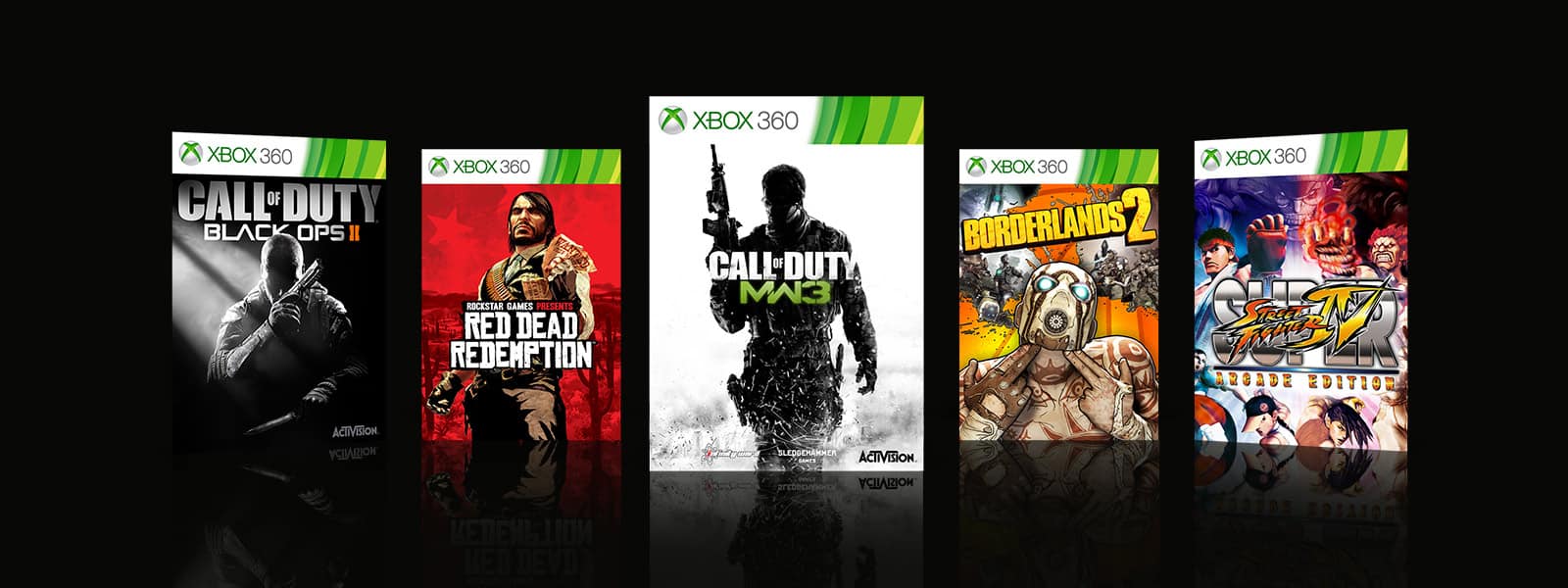
If you’re willing to scratch that old-school games itch, there are quite a lot of old gems in the list: We’re talking about Rockstar Games classics GTA IV and Red Dead Redemption, Street Fighter IV, Mirror’s Edge, Mass Effect 2 and 3, Borderlands 1 and 2, the Dead Space and BioShock trilogies, and much more. Overall, you can save up to 75% off over 100 backward compatible games, and it’s also worth mentioning that the recently-added Call of Duty: Modern Warfare 2 is also 25% off.

This big Backward Compatibility Sale doesn’t require you have an Xbox Live Gold subscription, and all discounts will be available through Monday, September 10. Let us know in the comments if found some interesting games to purchase in the list.

Destiny 2: Forsaken is now live on Xbox One consoles and ready to play

The Forsaken expansion is now live for Destiny 2 gamers on Xbox One. This new expansion for the popular Destiny 2 video game adds new story content, new regions to play in, and new weapons to use.

Existing Destiny 2 players are encouraged to purchase the Forsaken upgrade from within the Destiny 2 in-game menu while new players can purchase either the new Destiny 2: Forsaken: Complete Collection or Destiny 2: Forsaken: Legendary Collection both of which come with the full Destiny 2 game and the new Forsaken content.

Here’s the full details on each version:

  • Destiny 2: Forsaken: Complete Collection: Destiny 2, Expansion I: Curse of Osiris, Expansion II: Warmind, Destiny 2: Forsaken, Forsaken Annual Pass, The Awoken Legend Set, Wrath Majestic Legendary Bow Ornament, Dirge Paladin Emblem, Vestian Ghost Shell, and Includes 1000 Bonus Destiny 2 Silver.
  • Destiny 2: Forsaken: Legendary Collection: Destiny 2, Expansion I: Curse of Osiris, Expansion II: Warmind, and Destiny 2: Forsaken.

Do you play Destiny 2 on your Xbox One console? Share your thoughts on the new Forsaken content with the community in the comments below and then follow us on Pinterest for more Xbox One video game content.

Destiny 2: Forsaken Pack
Developer:
Bungie
Price:
$3.99


‘Error Code 80004004’ While Updating Windows Phone 8 Apps [Fix]


Many Windows Phone 8 and Windows Phone 8.1 users are allegedly being affected by an annoying error when the try to update certain apps, such as WhatsApp, Instagram, PDF Reader and others. Here are some potential fixes.
Error Code 80004004 windows phone
Recently, on the Microsoft support community forums, somebody has been complaining about a weird error code. Here’s what he said – ‘my phone says I have an update and it downloads to 13% the stops and says error 801882d2, what does this mean I need help’. After looking online for a few fixes, here’s what I was able to find. If you happen to know how to solve this, do let us know. And here’s what another one says:

This happened a few days ago on my Nokia 920 with Windows Phone 8. I have tried repeatedly to update it with the same error every time. I cannot uninstall it because the uninstall option is greyed out when I hold the app icon down and the little menu comes up. I have also tried a reinstall from my Microsoft account with no change, and reinstalling via the app store – it just directs me to the same download page on the phone which has failed already. Grateful for suggestions as to how I can either remove it and start again, or successfully update it.

How to fix errors while updating Windows Phone apps?

  1. The most immediate thing to do would be to try reinstalling your apps
  2. If this doesn’t work, try to reset the phone. Here’s how to do it:

Software method:

Press the Start (menu) Button then choose Settings from the program list.
Scroll down to About then scroll to the bottom of the page
Click on the reset your phone button to hard reset your Windows Phone 8 device

Hardware button method:

To perform a hard reset press and hold the power-, volume-down- and camera buttons until the phone vibrates. Then release the power button and keep the other two buttons pressed for another 3-5 seconds. The phone should reset to factory settings.

I’m sorry that we don’t have other solutions at the moment but will keep you updated if these appear.

2018 update: This issue still not received any solution in order to solve it on the official forums. Many users chose to change their phone and switched to other phone OS. This might be an ultimate solution that isn’t cheap, but in case you do not fix this issue, and you cannot use your phone, you might think about buying a new one. In case you arrive to fix this error, then let us know in the comments which solutions helped you.

Read Also: After Forced Update to Windows 8.1, Computer Keeps Shutting Down [Fix]

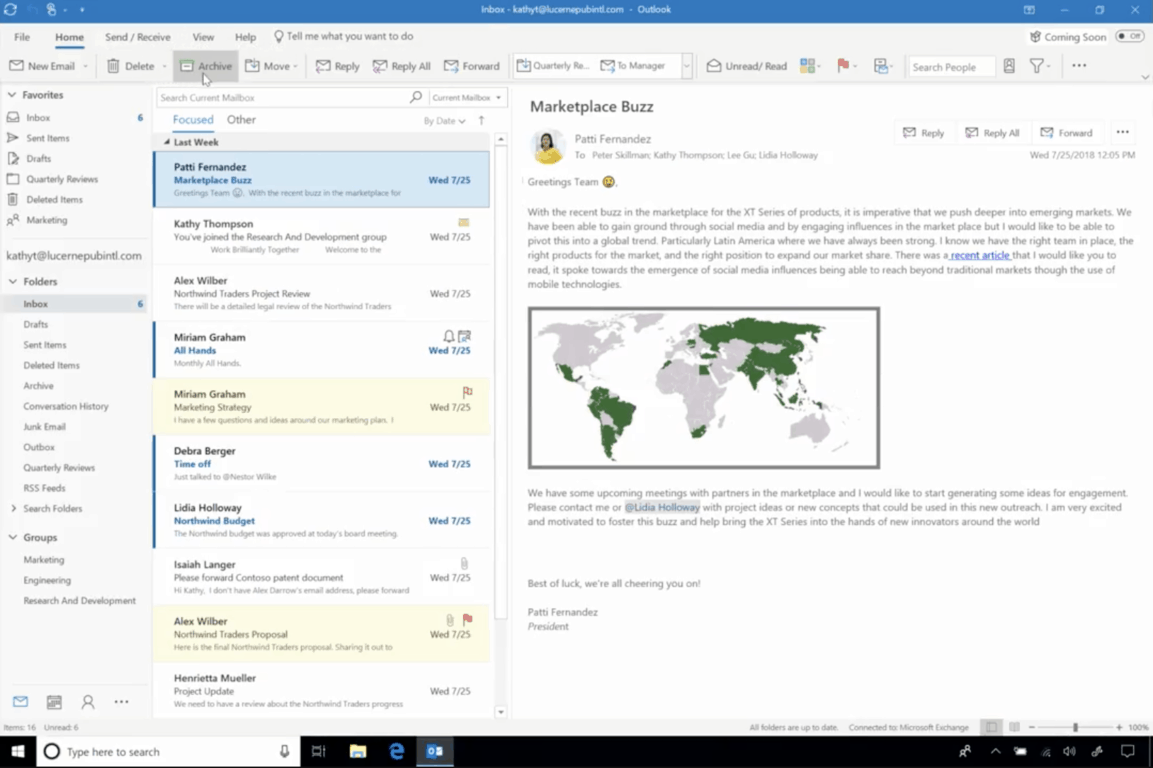
New Outlook on the Web and Outlook for Windows is being publicly rolled out today

Microsoft announced today new user experience updates for Outlook on the web and Outlook for Windows that are now rolling out to select users. First of all, Outlook on the web is getting the same facelift that Outlook.com received earlier this year, with some tweaks for Office 365 users.

In addition to intelligent search, suggested replies and simplified event creation, the new web app also makes it easier to use Office 365 Group right in your inbox. “We received a lot of valuable feedback on groups in the past and based on that we are excited to announce we have improved existing features such as faster and simpler group creation, richer group card, more efficient group email triage, and we are also introducing new features such as group Files view that focuses on the latest file activity and group management in the People module,” the company explained

Just like Microsoft did in Outlook.com, select Office 365 users will see a new “Try the new Outlook” toggle on the top right corner of Outlook on the web, making it easy to turn the new experience on and off. For now, though, only organizations in Targeted Release will be able to enable the opt-in toggle for their users.

As for Outlook for Windows, the desktop app is getting a similar “Coming Soon” toggle that will allow users to try new features and provide feedback. Microsoft is currently testing a simplified ribbon, a modern calendar view and other improvements to get things done faster.

These improvements for Outlook on Windows will be coming coming first to customers in the Monthly Channel (Targeted) and Targeted Release program in the next few weeks. You can learn more about to join the latter on this page.

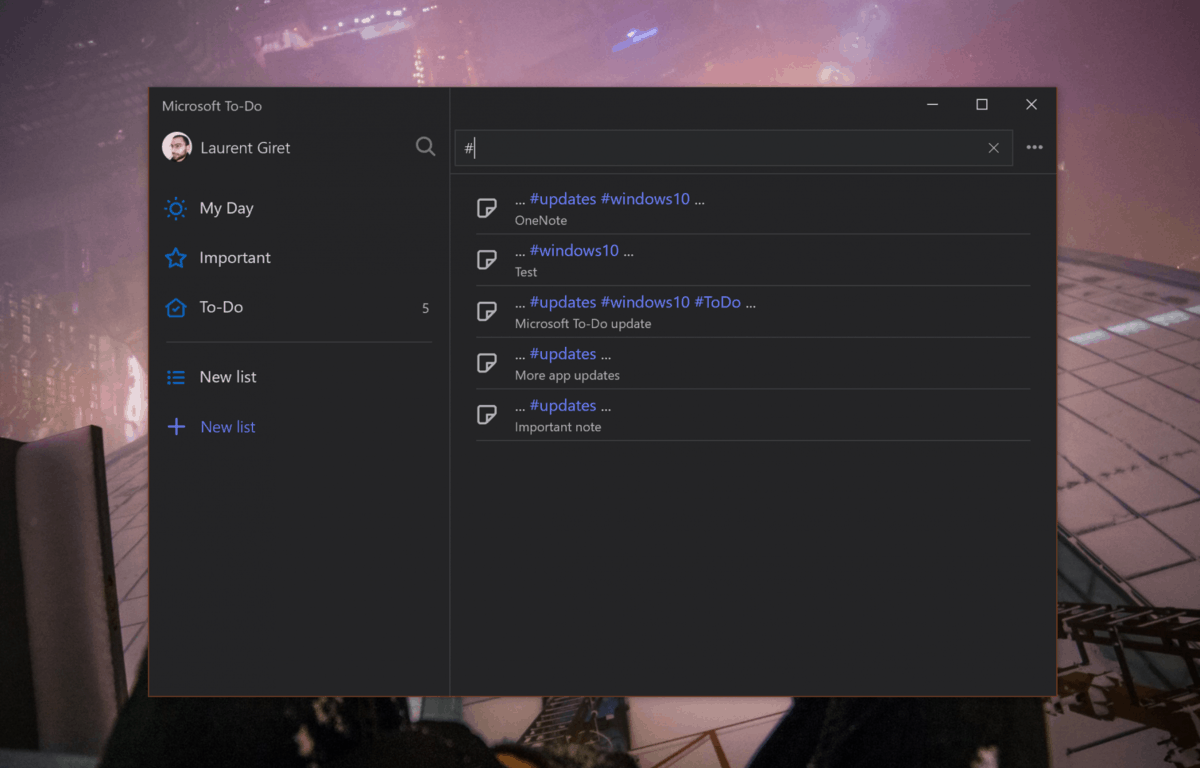
Windows Insiders can now ink their Microsoft To-Do lists on Windows 10

Noted by Thurrott.com, Microsoft To-Do on Windows 10 is picking up support for inking, now letting users write-out their lists by hand with a pen or stylus on touchscreen devices. The inking support is currently being tested with Windows Insiders and will likely roll out to everyone soon.

As you can expect, the inking support is just as natural and intuitive as it is elsewhere in Windows 10. Simply grab your pen or stylus and ink right inside of the Microsoft-To-Do app in whatever line you’d like to write out a task.

This addition of this feature makes much sense, as Microsoft really has been pushing Windows Ink into more stock Windows 10 Apps. We previously saw the addition of the ability to write emails with ink in the Mail and Calendar App, and even several new inking inspired user interface features and changes for Sticky Notes on Windows 10.

Update: We’ve clarified from an earlier version of this article, adding in a tweet from the Microsoft To-Do team.

Windows 10 Facebook app updates with design changes & fixes

While some Windows enthusiasts wait for the tidal wave of PWAs to come flowing in to the Windows Store from like-minded developers, there’s still a lot of native application development going for the platform.

The Windows 10 Facebook app just received a new update bringing the app to version 171.1861.39959.0.

While it’s not as feature heavy as some may want to bring the experience up to par with other platforms, today’s update does offer some UI parity.

Today’s changelog includes the following highlighted tweaks:

  • Renewed search bar (no more borders)
  • New notification icon (now bell-shaped)
  • All users can now send reactions to comments in the home (just hold on the comment to bring up the reactions)
  • The stickers section has been translated into all languages
  • It is now possible to add a biography from your profile
  • The profile icon in comments and groups is now spherical
  • Renewed the profiles page of their friends
  • Corrections and minor improvements

It should be noted that the update was first spotted by the Microsoft-centric Italian Aggiornamentilumia.it., and that the update may or may not have been rolled out in completion yet. Check the Microsoft Store beforehand to confirm.

Facebook
Facebook
Developer:
Meta
Price:
Free

Microsoft’s Xbox Adaptive Controller officially launches today

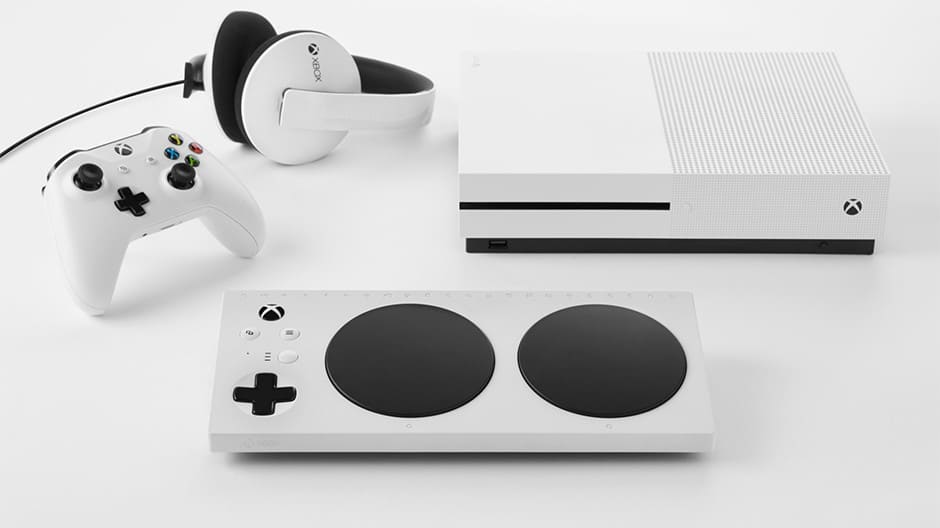
Back in May, Microsoft took the wraps off the Xbox Adaptive Controller, a new accessory to make gaming more inclusive for those with disabilities. We’ve since seen the company highlight the accessible packaging for the controller, and today, it has been announced that the Xbox Adaptive Controller is officially available for purchase.

You can find the Xbox Adaptive Controller for $99.99 at both the Microsoft Store and GameStop Online. The controller feature 19 3.5 mm jacks for plugging external switches, buttons, mounts, and joysticks. The most prominent feature, though, is its two giant programmable buttons, and symbols along the top side to help gamers with disabilities find the right ports.

Other features on the controller include USB ports on the right and left sides for thumbsticks, and USB C and DC power ports. It is those features and design which makes the controller special, as explained by Gabi Michel, Xbox Adaptive Controller Program Manager.

“The Xbox Adaptive Controller is a product that was ideated and pioneered with inclusivity at its heart. We iterated on and refined it through close partnership with gamers with limited mobility and fan feedback, as well as guidance and creativity from accessibility experts, advocates and partners…”

You can learn more about the peripherals and other hardware available for the Xbox Adaptive Controller by visiting this link here. You also can check that same link for more general information about the new controller and the story behind its creation.


Sony “isn’t listening to gamers,” says Xbox exec after Fortnite crossplay complaints dismissed

Sony’s refusal to enable crossplay with other platforms on games like Fortnite and Minecraft is continuing to receive some heavy criticism from video games industry execs. This time, it’s Mike Ybarra, Corporate Vice President of Xbox Program Management at Microsoft, who just blamed Sony today for not “listening to gamers.”

In case you missed it, Ybarra was referring to recent interview of Sony’s CEO Kenichiro Yoshida with the Press Association, where the exec explained the company’s stance on crossplay:

On cross-platform, our way of thinking is always that PlayStation is the best place to play. Fortnite, I believe, partnered with PlayStation 4 is the best experience for users, that’s our belief. But actually, we already opened some games as cross-platform with PC and some others, so we decide based on what is the best user experience. That is our way of thinking for cross-platform.”

With the Playstation 4 remaining the leading 8th gen gaming console by a wide margin, Sony has no reason not to protect its walled garden. Still, like Ybarra said, the push for crossplay multiplayer across platforms is definitely happening. Back in July, EA CEO Andrew Wilson said that the company was thinking about enabling crossplay for its own games, which include the popular FIFA and Madden series. More recently, Pete Hines, Bethesda’s senior vice president of global marketing and communications explicitely said that the publisher wouldn’t allow Sony to block crossplay on The Elder Scrolls: Legend, Bethesda’s upcoming collectible card game.

So far, it seems that Sony isn’t really suffering from its gamer-hostile policy, and to be fair the company does support crossplay with PC and mobile devices on Fortnite (just not with gamers on Xbox One and Nintendo Switch). If the voices of video games industry exec isn’t enough to make the company change its mind about crossplay, it will ultimately be up to gamers to vote with their wallets and support the most gamer-friendly platforms out there.

Sticky Notes is set to become a modern client for Outlook Notes

After Microsoft shipped a major update for its Sticky Notes app last week, it seems that this UWP app may well become a very important app for the company. Indeed, the new cloud syncing feature introduced in Sticky Notes 3.0 means that notes not only sync across Windows 10 PCs, but they now also sync with Microsoft’s Outlook desktop app.

The synergy with Outlook on the desktop was discovered by OneWindows.es (via MSPoweruser), and this pretty much makes Sticky Notes a modern, task-focused app for managing Outlook notes. There is definitely some similarity with Microsoft To-Do, which has also recently become a modern client for managing Outlook Tasks.

For those unfamiliar, the Outlook desktop app has dedicated sections for Notes and Tasks (Tasks are basically notes with optional reminders), and those can sync to the cloud if you use an Outlook.com or Office 365 account. For most users though, using Outlook on the desktop to take notes is probably overkill, and Microsoft has already has more lightweight and elegant solutions including OneNote or even the legacy Notepad app.

The truth is, some consumers love the versatility of all-in-one apps like Outlook on the desktop, while others prefer lightweigtht and task-focused apps like the ones they use on their smartphone or tablet. And compared to OneNote, Sticky Notes does have some real advantages, including the fact that you can stick notes on your desktop. It’s also worth noting that OneNote for Windows 10 dropped support for local notebooks, and you also can’t use it without a Microsoft account.

In the end, it seems that Microsoft has created new modern apps for all the core features of Outlook on desktop: To-Do and Sticky Notes now complement People, Mail and Calendar, and all of these apps except To-Do come pre-installed on Windows 10. For now, Sticky Notes 3.0 is still only available for Skip Ahead Insiders, but we expect Microsoft to get serious about promoting this app once it becomes generally available.

Fix now Windows 10 Computer Keeps Shutting Down


What to do if Windows 8.1, 10 keeps shutting down or restarting?

  1. Fix Windows 8.1 keeps shutting down
  2. Fix Windows 10 keeps shutting down

Fresh from the Microsoft Community forums is one error where the Windows 8.1, 10 computers keeps shutting down after the user was forced to make the update to 8.1 or Windows 10. We try to come up with a fix.
After Forced Update to Windows 8.1, Computer Keeps Shutting Down [Fix]
As much as Microsoft wouldn’t try, there are plenty of errors that keep piling up especially for those that have made the upgrade from Windows 8 to Windows 8.1. It’s even more annoying the fact that some of them have been forced to upgrade and after that, they have started getting errors. No wonder why some many have started to hate Windows 8. Here’s what somebody has been recently saying on the support forums with regards to his Windows 8.1 PC shutting down after Windows 8.1 update:

I want to throw this computer with its Win 8 through the window.  How on earth does Windows get so complicated that it basically forces us to install 8.1 – which we didn’t want because we HATE Win 8. And now…  the Win 8.1 install won’t finish. The computer just keeps shutting down. This has been going on for over a day.  At some point in the 8.1 update it said the computer would need to restart to finish. It didn’t say You will need to restart it OVER and OVER and OVER…>

When we start it, it sits at an HP logo for a while, then it just SHUTS down. No message, no error, no nothing.  Like I said, we’ve done this over and over and over.  I tried to research starting it in Safe Mode. Hm, found out some more interesting information about the wonderful Win 8 – i.e. you can’t just hit F8 (or shift-F8) and boot up in Safe Mode. The detailed instructions on how to get it to boot in Safe Mode from pcsupport.about.com are cumbersome and take you to several more “links”. I’m beyond frustrated.

How to fix ‘Windows 10 PC keeps shutting down’ error?

Fix Windows 8.1 keeps shutting down

I’m trying to come up with some solutions that will help out those affected. If they won’t work, then I’ll keep looking for other fixes, but for now, this is all I know.

First of all, you will have to disconnect all the unnecessary external devices connected to the computer and check if the installation proceeds further. If you still have issues during the installations, try these steps:

Step 1:  If you are using any third-party antivirus software, you may uninstall it and check if you can upgrade to Windows 8.1.
Note: Even if you disable third-party antivirus, Defender will still be running in the computer. This will guard your computer from malware and virus.
Step 2: Install all the available updates.
Step 3: Install the updated drivers for the hardware.
Step 4: Perform a clean boot and then start the upgrade. Refer to this link – https://support.microsoft.com/kb/929135

Also, after checking the functionality in clean boot, follow the suggestions under “How to reset the computer to start as usual after troubleshooting with a clean boot”.

Fix Windows 10 keep shutting down

Run Power troubleshooter:

  1. Press ‘Windows Key’ + ‘X’
  2. In the Search box, tap ‘troubleshooter‘ and press ‘Enter’
  3. Select ‘Troubleshooting’
  4. Click on ‘View All’ and select ‘Power’
  5. Follow the Troubleshooter instructions

Restore Power Options Settings:

  1. Open Control Panel on your Windows PC
  2. Select and click ‘Power Options’
  3. Select and click ‘Change Advanced Power Settings’
  4. Select and click ‘Restore default settings for this plan’

READ ALSO: How to Disable Microsoft Confidential Watermark in Windows 8, 8.1

FIX: We’re sorry the page you requested cannot be found

If you just take a look around, there are less and less physical copies of any kind of software. The distribution for Windows 10 is only digital, with do-it-yourself bootable drive creation. After purchasing the license, you should be able to follow the download link and get your digital copy. Sadly, even this super-simplistic approach was somehow broken for some users. Namely, when clicking on the link, users were met with the We’re sorry the page you requested cannot be found error.

We provided a few workarounds to get your Windows 10 copy in no time. Make sure to check them out below.

Can’t download Windows 10 installation as the page cannot be found? Use these solutions

  1. Make sure the website isn’t restricted
  2. Use the Windows Upgrade Assistant
  3. Use the Media Creation Tool to upgrade directly
  4. Create a bootable media drive with the Media Creation Tool

1: Make sure the website isn’t restricted

If you’ve tried purchasing Windows 10 from the web store and the error occurred, there are some things you can do. Firstly, make sure that you’re in a region which allows purchases. The second concern we need to eliminate is a possible restriction on the website. Make sure that your system isn’t blocking the download firstly.

Furthermore, we suggest disabling the online protection temporarily. Especially if the security tool comes with the firewall of its own. Disable browser extensions as well. You can enable them later on. After that, try accessing the link again. If the problem is persistent — don’t worry. There are alternative ways to get your hands on Windows 10 installation.

2: Use the Windows Upgrade Assistant

Let’s get to alternatives. The first Microsoft’s tool is fully automatized and it even allows you to install Windows 10 directly from your desktop. It’s a simple procedure and it even provides the compatibility check to determine your system (Windows 7 or 8) is eligible for an upgrade to Windows 10. The complete process is intuitive but can be lengthy.

Follow these steps to install Windows 10 with the Upgrade Assistant:

  1. Get the Upgrade Assistant, here. Just click on the “Update now” button.we're sorry the page you requested cannot be found
  2. Run the tool as admin and follow the steps closely.

3: Use the Media Creation Tool to upgrade directly

Microsoft’s main tool for digital distribution of Windows 10 is the Media Creation Tool. This tool allows you to upgrade to Windows 10 directly from the UI or create an external bootable drive and install Windows 10 in a standard manner.

Either way, it’s the best and the easiest way (might be the only way) to get the installation files. The product registration comes in later, so you don’t need to worry about that. If you have the license, everything is smooth and fast.

The first way to upgrade to Windows 10 with the Media Creation Tool includes direct installation. The downloaded setup files are stored in the system partition and the upgrade starts immediately. You even get to keep the files from the previous (current) system installation.

Follow these steps to install Windows 10 with just the Media Creation Tool:

  1. Back up all your essential data to the non-system partition or an external drive.
  2. Download the Media Creation Tool, here.
  3. Run the tool and accept the Terms.
  4. Toggle the “Upgrade this PC” option and click Next.
  5. The tool will firstly download the setup files (it can take some time) and the installation should commence afterward.

4: Create a bootable media drive with the Media Creation Tool

Finally, the safest and the best way to install Windows 10 is with a bootable media drive. Especially a clean installation which includes formatting your HDD completely.

Lots of issues we covered here in a last couple of years were there because users have chosen upgrade over a clean installation. On paper, both stand firm. But, in practice, the problems emerge. Especially with the third-party programs, driver, and after major updates.

For that reason, we suggest creating the installation media and installing Windows 10 cleanly. The license is directly connected to your Microsoft Account you made the purchase with. So, just a simple log-in will activate Windows 10 upon the installation is completed.

Follow these steps to create a bootable USB drive and install Windows 10 with it:

  1. Plug in a USB flash drive with at least 6 GB of free storage space. Have in mind that the following procedure will format your drive, so backup your data.
  2. Download the Media Creation Tool, here.
  3. Run the tool and accept the Terms.
  4. Toggle the “Create installation media (USB flash drive, DVD, or ISO file) for another PC” option and click Next.we're sorry the page you requested cannot be found
  5. Select the Language and Architecture and then click Next.we're sorry the page you requested cannot be found
  6. Select the USB flash drive option.we're sorry the page you requested cannot be found
  7. Wait until the drive is created and you can safely boot from it and install Windows 10.

That’s a wrap. If you’re still having issues with installing Windows 10, make sure to check out our website for the solution or, eventually, contact Microsoft Support. Either way, tell us whether this was a helpful read in the comments section below. We’ll be thankful for your effort.

RELATED STORIES YOU SHOULD CHECK OUT:

Windows 10 news recap: Amazon might be working on a UWP Alexa app, user exposes zero-day vulnerability on Twitter, and more

Welcome back to our Windows 10 news recap, where we go over the top stories of the past week in the world of Microsoft’s flagship operating system.

Amazon could be bringing an Alexa UWP app to the Windows 10 Microsoft Store

A new report claims that Amazon is currently working on creating a UWP Alexa app and may bring it to the Microsoft Store on Windows 10. While Amazon has a Win32 version of Alexa, it’s yet to release any UWP version.

Microsoft mistakenly sends notification of a new Windows 10 Insider build to non-Insiders

After releasing a new Windows 10 Insider build to Fast ring Insiders, Microsoft began mistakenly notifying non-Insiders that a new update was available for their Windows 10 devices. The issue was later resolved following user reports and it didn’t become widespread.

Windows 10 Logo Generic Featured Image Hero

Microsoft is no longer accepting new enrollments into Surface Plus financing program

Microsoft’s Surface financing program, Surface Plus, is no longer accepting enrolments. No reason was given as to why the company has chosen to end its financing program.

Disgruntled user exposes unpatched Windows zero-day exploit via Twitter

A disgruntled user has exposed a zero-day Windows exploit that is unpatched, via Twitter. The exploit is local and uses the Windows task scheduler to elevate a program’s system privileges. Microsoft has acknowledged the exploit but has not yet released a patch.

Windows 10 Sign Logo NYC

That’s it for this week. We’ll be back next week with more Windows 10 news!

Microsoft news recap: Office 365 Home and Personal to get increased device limits, US suppliers required to provide 12 weeks paid parental leave, and more

Microsoft news recap is a weekly feature highlighting the top Microsoft news stories of the past week. Sit back, grab some coffee, and enjoy the read!

Office 365 Home and Personal about to get better with new device limits

Microsoft’s Office 365 subscription service currently has limits on the number of devices and users that can make use of the software per subscription. This week Microsoft announced that it is changing the limits, allowing installation on unlimited devices but only 5 users can be using it at any one time. Prices will remain the same at this time.

Microsoft’s SharePoint app gets revamped on iOS and Android

SharePoint has seen a large design and feature revamp on iOS and Android. The main changes have taken place in the way a search is performed, adding a new Find tab that combines searching for Links, People, Sites and Search. In addition, AI is being used to improve the search results experience and provide quick results.

Microsoft SharePoint redesign

Microsoft to require US suppliers to provide 12 weeks of paid parental leave

Microsoft is setting new requirements on its US suppliers. The new requirements will make it mandatory for them to provide at least 12 weeks of paid parental leave. The requirements are there to ensure its suppliers uphold Microsoft’s ethics. Microsoft admits that this may increase its costs as a result of suppliers seeing increased costs for paying 12 weeks of parental leave.

Chinese spies are “super aggressive” trying to recruit Americans on LinkedIn, says US intel chief

Business social network LinkedIn is reportedly being used in a “super aggressive” manner by Chinese spies to recruit Americans. The spies use fake profiles on LinkedIn. This report comes from a US intelligence chief.

That’s it for this week. We’ll be back next week with more Microsoft news.

What to do if Windows cannot find wuapp.exe

Earlier Windows platforms include a wuapp.exe file that opens Windows Update settings in the Control Panel. Users can open the Windows Update settings by entering ‘wuapp.exe’ in Run. They can also open the Control Panel’s update settings by selecting Windows Update in Internet Explorer.

However, the update settings in Win 10 are a little different. Microsoft removed the ‘wuapp.exe’ file from Windows 10. So Win 10 includes update options within the Settings app instead of Control Panel. As such, a “Windows cannot find wuapp.exe” error message pops up when users enter ‘wuapp.exe’ in Run. That error message can also pop up when users click Windows Update in older versions of Internet Explorer (IE 11 no longer includes a Windows Update option).

FIX: Windows cannot find wuapp.exe

  1. Set Up a Wuapp Batch File
  2. Add a Windows Update Shortcut to the Desktop

1. Set Up a Wuapp Batch File

So you can’t open Windows Update settings in Win 10 by entering ‘wuapp.exe’ in Run. That was undoubtedly a handy shortcut for opening update options. However, you can set up a batch file that will open the Window Update options in Settings when you enter ‘wuapp’ in Run, which will effectively restore the wuapp Run command in Win 10. This is how you can set up a wuapp batch file.

  • Right-click the Start menu and select Run.
  • Enter ‘Notepad’ in the Run‘s text box, and click the OK button.
  • Copy the this batch file content with the Ctrl + C hotkey: start “” ms-settings:windowsupdate.
  • Then paste the copied text into the Notepad text editor by pressing the Ctrl + V hotkey.

  • Click File > Save As to open the window in the shot directly below.

  • Select All Files from the Save as type drop-down menu.
  • Enter ‘wuapp.bat’ in the File name text box as shown below.

  • Select to save wuapp.bat to the desktop, and click the Save button.
  • Next, close the Notepad window.
  • Click the File Explorer button on the taskbar.

  • Click Desktop on the left of File Explorer.
  • Then click the small arrow beside the C: drive to expand its folder tree.

  • Select wuapp.bat in Desktop by pressing and holding the left mouse button. Then drag that file into the Windows folder on the left of the File Explorer.
  • When you drop the file into the Windows folder, a Destination Folder Access Denied dialog box opens. Click Continue to drop the wuapp.bat file into the directory.

  • Enter ‘wuapp’ in Run, and press the OK button. Now that will open the update settings shown directly below.

Add a Windows Update Shortcut to the Desktop

Alternatively, you can add a shortcut to the desktop that opens Windows Update. That’s a better shortcut than opening update settings with Run as you can add a hotkey to it. Follow the guidelines below to set up a desktop shortcut hotkey for Windows Update options.

  • Right-click your desktop and select New > Shortcut to open the window in the image below.

  • Enter ‘control.exe /name Microsoft.WindowsUpdate’ in the text box.

  • Press the Next button.
  • Enter ‘Windows Update‘ in the Type a name for this shortcut text box.
  • Press the Finish button to add the shortcut to desktop as in the shot below.

  • Right-click the shortcut and select Properties.
  • Select the Shortcut tab.
  • Click in the Shortcut key box, and press the W key. That will add a Ctrl + Alt + W hotkey to the shortcut.

  • Then press the Apply button, and click OK to close the window.
  • Now you can press Ctrl + Alt + W to open the Windows Update options!

So that’s how you can set up two handy shortcuts with which to quickly open update settings. As the batch file restores the wuapp Run command, that effectively fixes the “Windows cannot find wuapp.exe” error message. However, the desktop shortcut hotkey provides a slightly more direct way to open Windows Update options.

The return of the tease: Microsoft hints at new Windows 10 RS5 Insider build

For a while, it was quite the game: follow @DonaSarkar on Twitter, decipher the sometimes exceedingly cryptic hints, and learn the build number for a new incoming Windows Insider build. With RS5, the Windows Insider program moved away from the shenanigans, instead choosing to just drop builds, at sometimes seemingly random hours and days.

However, it looks like at least one Windows Insider team member has some nostalgia for the old ways, as today Jason Howard certainly appears to be teasing a new build on the way:

Recently Jason has been active on Discord as well, yesterday announcing the new Slow Ring build a few minutes before the blog post went up, so the era of the big tease may be back upon us once again.

Stay tuned, we’ll be keeping a close eye on the usual channels and will have the latest on a new Insider build as soon as it happens.

It’s official, the upcoming Redstone 5 update will be the Windows 10 October 2018 update

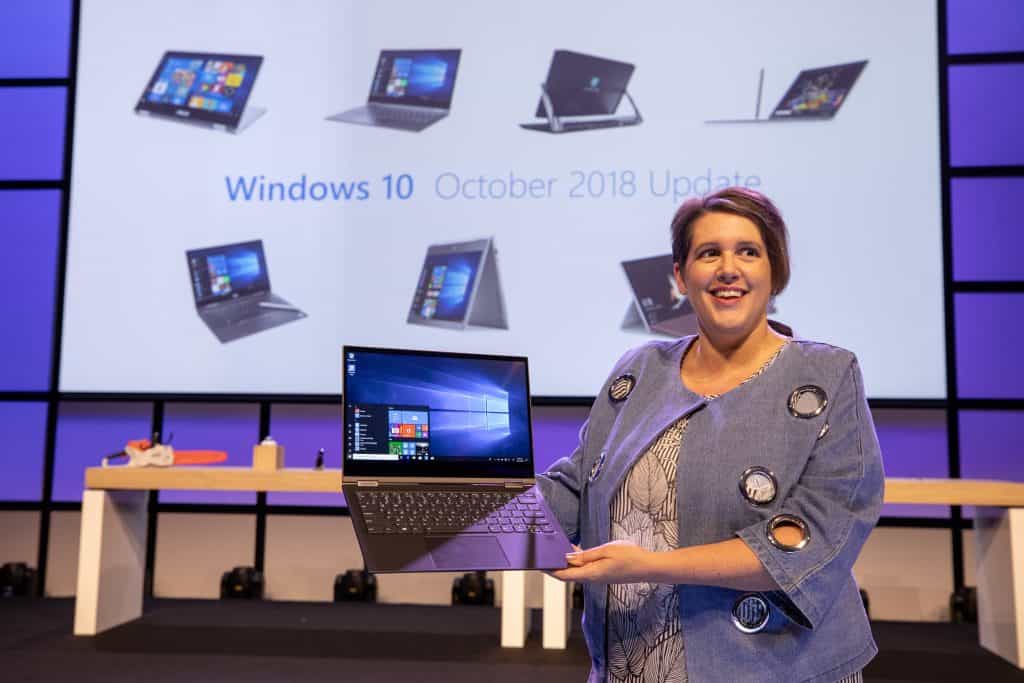
This Fall, the Windows 10 October 2018 update will succeed to the Windows 10 April 2018 update, the company announced today. “With this update, we’ll be bringing new features and enhancements to the nearly 700 million devices running Windows 10 that help people make the most of their time”, wrote Roannes Sones, Corporate Vice President leading the platforms team at Microsoft.

Microsoft has apparently abandoned for good more creative names like “Creators Update” for a simpler naming convention, and this is probably for the better. The “October 2018 update” is easy to remember for everyone, and hopefully Microsoft will stick with this formula for all major updates going forward.

The Windows 10 October 2018 (aka Redstone 5) is currently in the polishing stage, and it won’t bring a lot of new features to the table. The main highlights are probably related to Microsoft Edge (which only gets new features twice a year), including a handy option for disabling autoplay videos on the web, but there is also the new Cloud Clipboard for copy/pasting content across Windows 10 devices. Microsoft has also updated legacy components such as NotePad and the File Explorer, adding a dark theme option for the latter.

As usual, not all Windows 10 users will receive the October 2018 update at the same time, and Microsoft said earlier this year that it has started using artificial intelligence to “greatly improve the quality and reliability of the Windows 10 April 2018 Update rollout.” To avoid update fatigue, the October 2018 update will also leverage a new predictive model to avoid rebooting your PC to install updates when you’re busy.

Microsoft to require US suppliers to provide 12 weeks of paid parental leave

Microsoft is currently in a legal fight regarding a potential class action lawsuit regarding its handling of sexual harassment, discriminatory practices and handling of unpaid leave situations.

Perhaps, in a preemptive move to mitigate further outstanding employee criticism as the company navigates choppy legal waters, Microsoft is looking to build on its 2015 announcement of expanding its parental leave policies.

Announced yesterday, Microsoft will require its US suppliers to implement new paid parental leave policies.

It will require that suppliers offer their employees a minimum of 12 weeks paid parental leave, up to $1,000 per week. This change applies to all parents employed by our suppliers who take time off for the birth or adoption of a child. The new policy applies to suppliers with more than 50 employees and covers supplier employees who perform substantial work for Microsoft. This minimum threshold applies to all of our suppliers across the U.S. and is not intended to supplant a state law that is more generous. Many of our suppliers already offer strong benefits packages to their employees, and suppliers are of course welcome to offer more expansive leave benefits to their employees.

In a blog post on Microsoft On the Issues, the company goes into further detail on the importance of its suppliers following this referendum and some other statistical support for the extension of paid parental leave.

Three years ago, Microsoft made the announcement that it was expanding its campaign for paid leave to its suppliers but yesterday’s announcement now extends to the employees of those suppliers as well.

A move to umbrella paid leave for employees of suppliers is not without its costs. Microsoft is aware that requiring suppliers to abide by its new policy could be a potential strain on its working relationships and is looking for ways the company can help support the change.

Microsoft will work with our suppliers to understand the impacts of this change, and we will make these changes in a thoughtful way. We appreciate that this may ultimately result in increased costs for Microsoft, and we’ll put a process in place for addressing these issues with our suppliers. Our first step will be reaching out to our suppliers to discuss the impact of this policy change.

Ultimately, Microsoft’s new supplier-paid leave policy could become the minimum modus operandum for other tech business, and in the end, a good thing for all workers.

Testing for Dolby Vision on Xbox One begins today

Starting today, Microsoft has begun testing Dolby Vison functionality on its Xbox One S and Xbox One X video game consoles.

The testing of the feature has started with Xbox Insiders in the Alpha Skip Ahead and Alpha rings but will gradually roll out to other Insiders and, eventually, the general public in the near future.

Dolby Vision is essentially a technology that allows TVs to present media with brighter colors, darker blacks, and stronger contrast than usual. It doesn’t increase the image resolution but enhances the use of color to make what’s seen on screen more realistic and vivid.

To experience Dolby Vision content, a compatible television is needed as is media that actually supports the technology. Currently a variety of programs on Netflix support Dolby Vision such as Stranger Things and Altered Carbon.

Microsoft has provided detailed instructions for how to setup Dolby Vision on Xbox One S and Xbox One X consoles here.

Are you excited for Dolby Vison content on your TV? Let us know in the comments below and then follow us on Twitter for more Xbox news.

Prison Architect is now free on Xbox One consoles, Star Wars The Clone Wars coming soon

Prison Architect: Xbox One Edition is now free for a limited time for Xbox One console owners with Xbox Live Gold.

The game is an action strategy title that tasks the player with building and managing their own prison while making decisions that could define the prison as a place for rehabilitation or intense cruelty.

Here’s the official game description for Prison Architect: Xbox One Edition:

Take control of the building and running of a maximum security prison as the critically acclaimed lock-em-up arrives on Xbox One! Your Design, Their Fate. Will you build and manage a prison to create social order where it’s failed in the past, offering rehabilitation and peaceful coexistence amongst inmates? Will your prison disregard human rights, impose intentional harshness and be devoid of any notions of wellbeing and freedom? The choice is yours.

In Prison Architect you will see the impact of your grand design on the lives of your inmates; be it a utopic center for rehabilitation, a brutal Super Max Prison or anything in between. Even when all of your prisoners’ needs are met, remember one thing – it’s still a prison and no one really wants to be there.

The Xbox 360 video game, LEGO Star Wars III: The Clone Wars, is also expected to free for Xbox Live Gold subscribers within the next 24 hours but the discount hasn’t been activated as of the time of this writing.

The decision to give away LEGO Star Wars III: The Clone Wars could be tied to a bigger promotional strategy from Disney and Lucasfilm for The Clone Wars cartoon series which was recently given a renewal announcement. Star Wars Battlefront II has also begun promoting Clone Wars content with new Clone Trooper skins and the upcoming addition of Obi-Wan and Anakin Skywalker who will be voiced by the same actors that voiced them in The Clone Wars series.

Which video game are you most-excited to play for free this month? Share your thoughts with the community below and then follow us on Pinterest for more Xbox video game content.


LEGO Star Wars III
LEGO Star Wars III

Chrome and Firefox will display security warnings more often

Browser privacy and security warnings for internet users on web browsers will soon be on the high. Google Chrome and Mozilla Firefox users will experience an increase in the security messages they receive. Security messages such as “Your connection is not private” and “Warning; Potential Security Risk ahead” will be seen by internet users frequently on web browsers.

The web browser privacy issue

Mozilla, Google and other web browser owners have revealed plans to disregard all certificates by Symantec, issued in web browsers in 2017. In the past, several certificates were issued that did not comply with the standards of the industry.

Mozilla and Google are planning to distrust all certificates issued by Symantec starting from October 2018.

Google Chrome

When internet users of Chrome connect to websites that use Symantec certificate, they will get a display error message.

Google Chrome‘s notification reads:

Your connection is not private.
Attackers might be trying to steal your information from [SITE] (for example, messages, passwords, or credit cards).
NET::ERR_CERT_SYMANTEC_LEG

Mozilla Firefox

Plans are currently on the ground for Mozilla to distrust the Symantec Root Certificate in Firefox 63.

Different notifications will be displayed by Mozilla Firefox such as these ones:

Warning: Potential Security Risk Ahead

A potential security threat has been detected by Firefox and did not continue to [SITE]. If you visit this site, attackers could try to steal information from your passwords, emails, or credit card details.

Organizations, server administrators and websites organizations have until October to deal with the Symantec certificate issue. It is necessary for Symantec certificate to be replaced with a trusted certificate issued by a Certification Authority.

For more information on browser privacy and security, check out the guides below:

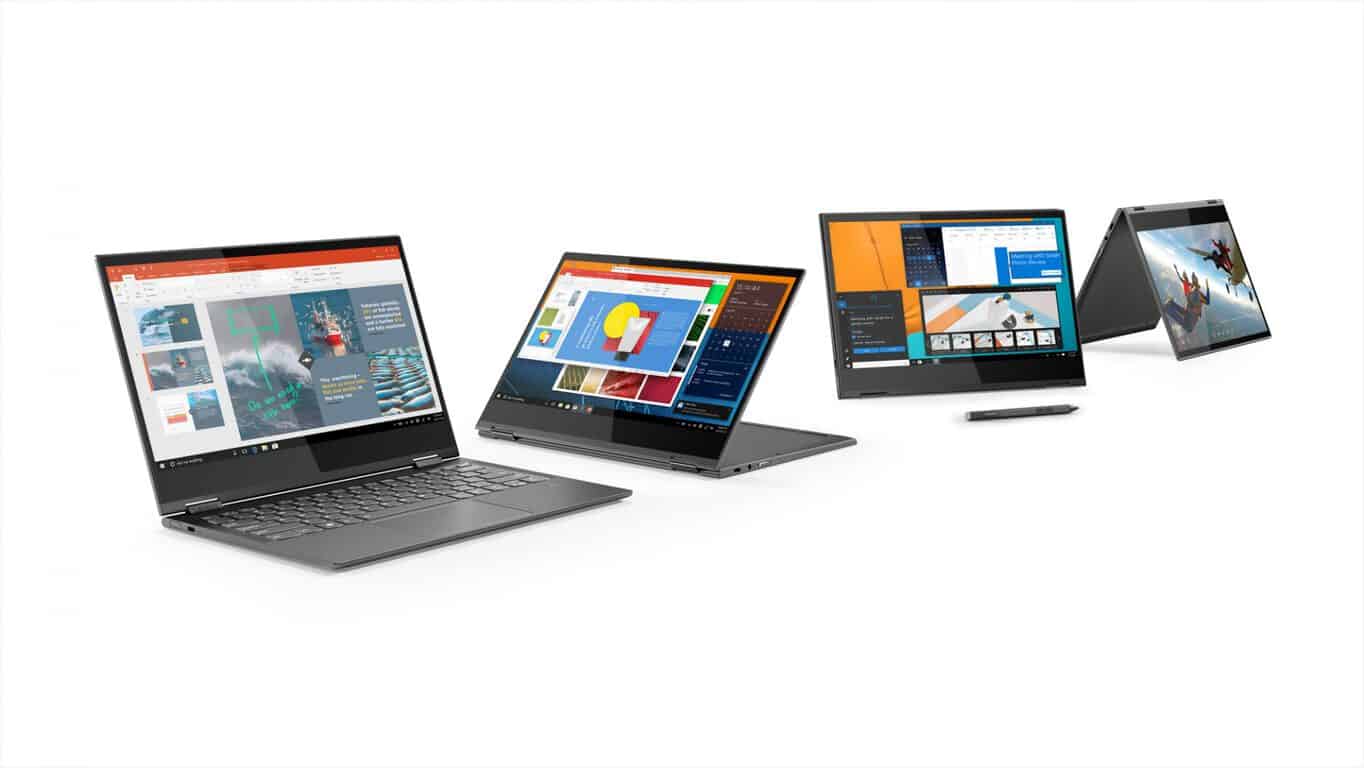
Lenovo goes all in on Windows on ARM with new Snapdragon 850 powered Yoga C630

When Microsoft announced the Always Connected PC (also known by us tech pundits as Windows 10 on ARM) Lenovo came on board the initiative with their Miix 630 convertible. That device received some mixed reviews, but many have also since complained about the overall instability and limitations of Windows 10 on ARM processors. Well, one year later, Lenovo is back at it again and is going all in on Windows 10 on ARM with the new Snapdragon 850 powered Yoga C630 all-in-one convertible.

The Snapdragon 850 was announced about three months ago at Computex in Taiwan. Compared to the last generation Snapdragon 835, this 8-core processor comes with 30 percent increase in performance, three times the AI performance, and a 20 percent increase in battery life and Gigabit LTE speed. This all will now get ported over into the Yoga C630 convertible— the industry’s first Windows 10 device to be powered by the Snapdragon 850. Specs are listed below.

  • Processor: Qualcomm Snapdragon 850
  • OS: Windows 10S
  • Dimension: 12.08” x 8.52” x 0.49” (306.8 x 216.9 x 12.5 mm)
  • Weight: Starting at 2.6lbs (1.2 kg)
  • Display: 13.3” FHD (1920 x 1080) IPS Touchscreen
  • Graphics: Qualcomm Adreno 630
  • Memory: 4 GB LPDDR4X | 8 GB LPDDR4X
  • Storage: 256 GB UFC 2.1| 128 GB UFC 2.1
  • Audio: Stereo speaker
  • Battery: Up to 25+ Hours Based on local video playback
  • IO ports: 2 x USB Type-C | Left port supports: USB 3.0/PD | Right port supports: USB 3.0/PD/DisplayPort| Audio Jack, 1 | Sim card holder
  • Features: Fanless design, Optional Lenovo Active Pen, Integrated FingerPrint Reader
Lenovo C630

All in all, this device is pretty promising, and it likely shows that Windows 10 on ARM is here to stay and give Intel a run for its money. Not only does the device look appealing with a thin and light soft touch polished metal design, but it also comes packed with plenty of power under the hood. Users should be able to enjoy the bump in processing power and battery life, and the convenience of being always connected with 4G LTE.

Office 365 Home and Personal about to get better with new device limits

If you’re an Office 365 subscriber, you’re about to get a lot more out of your subscription. Indeed, Microsoft has just announced big changes for Office 365 Home and Personal, one of which involves an increase in the device limits (via ZDNet.)

The changes were initially noted in a post to the Microsoft Tech Community Blog. Microsoft details that starting on October 2nd, Office 365 Home and Personal subscribers will be able to install Office on an unlimited number of devices. Subscribers also can be signed into their accounts on up to five of those devices at the same time.

This is a big change over the current system where Home subscribers can install only on 10 devices across five users, and Personal subscribers on one device across PC, Mac, and Tablet. There is no word yet on if this will impact Office 365 commercial subscriptions.

Microsoft is also changing up Office 365 Home, so that starting on October 2, the number of licenses will change from 5 to 6, with a Personal Office 365 subscription remaining at one license (but now across unlimited devices, signed into any 5 at a time). The price will still stay the same at $99.99 for Home and $69.99 for Personal, and you’ll get the same access to Word, Excel, PowerPoint, Outlook, and OneNote and 1 TB of OneDrive cloud storage.

To simplify account and subscription management, Microsoft is making it so that you can access your Office 365 subscription from the Microsoft Account home page. These changes will be rolling out automatically, so feel free to subscribe to Office 365 now if you’re not already up and running with the service. Office 365 Home retails for $99.99, Office 365 Personal for $69.99, and an Office Home and Student one-time purchase is $149.99.

EA delays Battlefield V launch by a month, new release date is Nov. 20

It looks like EA is pushing back the release of Battlefield V by a month to November 20, 2018. As noted by a MarketWatch post, EA is pushing some of its “net bookings” earnings from the Xbox One game to fiscal year 2020 instead of fiscal year 2019.

“Videogame companies use net bookings in lieu of net sales because it accounts for digital sales and in-store physical sales, among other things. EA is now expecting fiscal 2019 net bookings of $5.2 billion, down from prior guidance of $5.5 billion. About $115 million of that sum is driven by currency movements, which are also driving operating costs down. EA said it is backing its second-quarter operating guidance but is still evaluating the impact on fiscal year GAAP guidance. That information will be provided on the company’s next earnings call slated for Oct. 30. Shares were halted for the news, but have gained 22% in 2018, while the S&P 500 SPX, -0.23% has gained 9%.”

EA has not made an official comment on the reason why Battlefield V was delayed specifically. However, after looking at early pre-order numbers and receiving feedback from the Battlefield community, EA decided to move to the November release date. The move will help Battlefield V better compete with two other blockbuster games set to release in October 2018; Black Ops 4 and Red Dead Redemption 2.

Battlefield V is available for pre-order now, starting at $59.99 and will be released on November 20, 2018 on Xbox One.

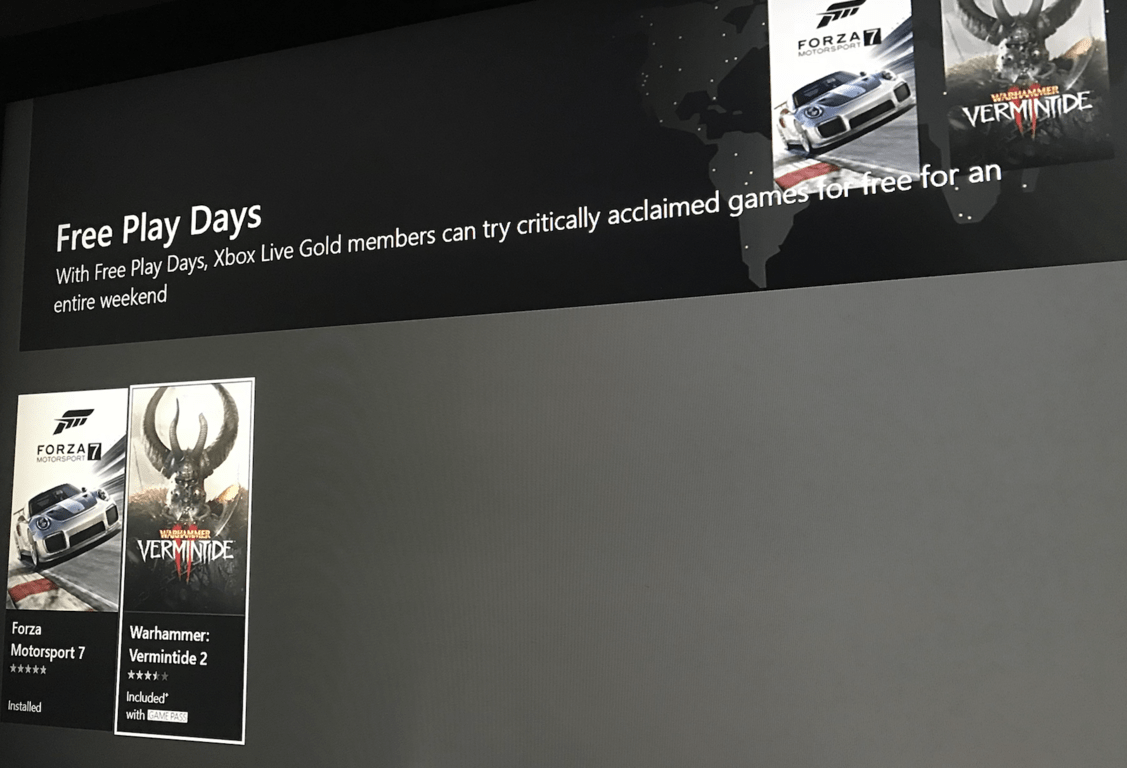
Forza Motorsport 7 and Warhammer: Vermintide II are free to play with Xbox Live Gold this weekend

Microsoft has just kicked off a new Free Play Days session for Xbox Live Gold members today, and for the first time ever Forza Motorsport 7 and Warhammer: Vermintide II will free too play through Sunday, September 2. Forza Motorsport 7 was released almost a year ago on Xbox and Windows 10, and it’s enhanced for the Xbox One X and also supports Xbox Play Anywhere.

As for Warhammer: Vermintide II, it was released on July 11 on the Xbox One and it’s currently free to play with Xbox Game Pass. Both games are currently on sale on the Microsoft Store for a limited time, with Forza Motorsport 7 Standard Edition being available for just $29.99.

In case you don’t have an active Xbox Live Gold subscription, we remind you can get 2 months of Xbox Live Gold for just $2 before the end of the month. Once you’re set up, you can start downloading both games on your Xbox One today and even try Forza Motorsport 7 on your Windows 10 PC, since that game also supports Xbox Play Anywhere.

Warhammer: Vermintide 2
Developer:
Fatshark
Price:
$29.99+


Deals With Gold, Spotlight, Publisher Sales have slashed Xbox One video game titles prices

There are three different promotional campaigns happening right now in the Microsoft Store for Xbox One and Xbox 360 video games.

The first campaign is the regular Deals With Gold sale for Xbox Live Gold Subscribers. Savings to look out for in the Deals With Gold titles are Aaero (now 60% off), Final Fantasy XV Royal Edition (60%), the Forza Horizon 3 Hot Wheels add-on (75%), Overwatch Legendary Edition (50%), and Soul Axiom (70%).

The second sale is the Spotlight Sale for all Xbox One owners. Deals to keep an eye on are Forza Motorsport 7 Standard Edition (40% off), R.B.I. Baseball 18 (30%), and FIFA 18 (80%).

The third sale is a Publisher Sale that sees a variety of titles discounted. Dead Rising 4 Deluxe Edition (40% off), Devil May Cry 4 Special Edition (70%), DmC Devil May Cry: Definitive Edition (67%), Marvel vs. Capcom: Infinite (60%), Resident Evil 6 (60%), Strider (80%), and Darksiders II on Xbox 360 (90%).

Are you planning to pick up any of these titles this month? Let us know in the comments below and then follow us on Twitter for more Xbox One news.


DmC Devil May Cry: Definitive Edition

How to Fix Surface Dial Driver Errors for Good

The Surface Dial is one of the most innovative Microsoft products in recent years. This puck-like immersive accessory is specially designed for the Surface Studio (and a handful of other eligible devices) to allow users a higher input level.

Of course, the device uses a wireless Bluetooth connection, and it’s rather simple to configure. However, the driver seems to be causing problems. Users reported various issues with the Surface Dial driver after a system update.

We enlisted some steps to overcome this hurdle, so check them out below. Hopefully, we’ll be able to fix it with some effort.

How to fix driver issues on Surface Dial?

1. Remove batteries from Surface Dial to reset it

Even though the driver error is present, physically resetting the Surface Dial is a good first troubleshooting step. After you’ve removed the batteries, you won’t need to re-pair the Surface Dial with your PC. The procedure is relatively simple and identical to that of some other consumer products that run on AAA batteries.

Follow these steps to restart your Surface Dial physically:

  1. Hold the Bluetooth button on the back of the Surface Dial until the light flashes three times.
  2. Open the battery compartment.
  3. Remove battery and wait for a few seconds. Put the battery back in but don’t put back the protective compartment.
  4. Restart your PC and make sure the Bluetooth stack is enabled.
  5. Hold the Bluetooth button again until the light flashes three times, and look for changes.

2. Delete pairing and pair Surface Dial with a PC again

Another step is to remove the pairing with your PC and pair two devices again afterward. This works for all Bluetooth-based devices, and Surface Dial is no exception. There might be a temporary stall, and re-assigning the device after unpairing should help you overcome it.

Follow these steps to unpair and pair Surface Dial with your PC:

  1. Make sure Surface Dial is On.
  2. Press Windows key + I to navigate to Settings.
  3. Choose Devices.surface dial driver error
  4. Under the Bluetooth & other devices section, enable Bluetooth.
  5. Delete Surface Dial from the list of paired devices.
  6. Now, press the Bluetooth button on the back of Surface Dial until the light flashes.
  7. On your PC, click the “Add Bluetooth or other devices” option.surface dial driver error
  8. Select Surface Dial from the list and pair the device with your PC.

3. Reinstall Surface Dial and Bluetooth drivers

Now, after we’ve dealt with the first two steps, let’s move to drivers. Even though drivers provided by Windows Update work most of the time, one update might break it all.

For that reason, we suggest reinstalling Surface Dial’s drivers, which should hopefully address the problem we’re concerned with. In addition, reinstalling Bluetooth drivers isn’t a bad idea, as well. Faulty Bluetooth drivers can impact the overall usability of Surface Dial.

Here’s how to reinstall Surface Dial and Bluetooth drivers in Windows 10:

  1. Right-click Start and open Device Manager.
  2. Navigate to Bluetooth and expand that section.
  3. Right-click on your Bluetooth stack and choose Update driver. If there are no available updates, uninstall the device.surface dial driver error
  4. Do the same for Surface Dial (it should be under the Mice and other pointing devices).
  5. Restart your PC and wait until the drivers install.

Check to see if you have the most recent versions of your Bluetooth drivers all the time when you encounter such issues. There are third-party solutions, such as Fortect Driver Updater, that can perform this automatically for you.

To begin, download and install a driver downloader on your computer. In the utility’s main menu, scan for new updates. The program identifies your Surface Dial and searches its database for essential Bluetooth driver updates.

After identifying the driver, the tool will supply your PC with the most recent version. This is the quickest and easiest method for updating your Bluetooth faulty drivers when you don’t have a thorough understanding of how to do this.

4. Update Windows 10

The majority of Surface Dial problems started after the Windows Update, which broke the device drivers. Besides the Surface Dial driver, many other devices were affected by this sudden occurrence. However, allegedly, Microsoft provided fixes via Windows Update, so some later updates cleaned up the mess their priors made.

Follow these steps to update Windows 10 manually:

  1. Open Settings.
  2. Choose Update & Security.
  3. Under the Windows Updates, click Check for updates.surface dial driver error
  4. Install all updates and restart your PC.

5. Roll back to the previous version of Windows 10

Finally, if none of the steps helped you address the driver error on Surface Dial, we suggest rolling back your system to the previous version. This recovery option is the built-in part of Windows 10 and allows you to get back to an earlier release. Until, at least, they polish the latest one.

Here’s how to roll back your Windows 10 PC to an older major update:

  1. Press Windows key + I to open the Settings app.
  2. Choose Update & Security section.
  3. Select the Recovery from the left pane.
  4. Under the “Get back to the previous version of Windows 10” option, click Get started.surface dial driver error

If that doesn’t help, we strongly advise you to contact Microsoft Support and file a complaint. Even though the problem isn’t related to hardware, they’re still responsible for providing you with a resolution.

The Surface Dial has too many uses that you need to explore, so it must work.

With that said, we can conclude this article. In case you have any further questions or possibly an alternative way to resolve the issue at hand, do tell us. The comments section is just below.

How to enable Skype end-to-end encryption on PC

Just like Telegram, WhatsApp, and other messaging apps which provide end-to-end encryption for its users, Skype is naming the new feature Private conversations. It applies to, files, messages, photos and audio/video calls, though there are some limitations.

The encryption feature is entirely opt-in, for it to work, your correspondent will have to get Skype’s latest version. Also, the accessibility of encrypted conversations is one device at a time, which is not convenient for users.

If all conversations on the devices had the end-to-end Skype encryption like Apple’s iMessage, it would have been much better. However, this new encryption development by Skype is much preferable than no encryption at all.

Peter Skillman, Skype’s Director of Design wrote this on his Twitter page:

Private conversations! Enable you Skype users to have end-to-end Encrypted chats 4 text messages, files, and photos + calls w/ high security. Private conversations can only be accessed at one device at a time. Select the new chat button and then select “New Private Conversation”

How to use end-to-end Skype encryption

To start a new Private conversation, you can either click on Skype’s “New chat” button or by opening one of your Skype contacts profile and select “Start private conversation” (for this chat to have an end-to-end encryption, your contact will need to have updated his Skype app).

In addition to end-to-end encrypted conversations, Skype has also begun testing read receipts with Insiders of Skype. This feature is also going to be an opt-in feature, and it should be available in a few weeks’ time.

For more information on Skype’s latest feature, follow Peter Skillman, Director of Design for Skype and Outlook on Twitter to get fresh news and information about the new cross-platform Skype app.

To enjoy this end-to-end encrypted chats on Skype app, download the latest Skype version.

RELATED STORIES TO CHECK OUT:

Heading to PAX West in Seattle? Here’s what Xbox has planned for you

The PAX West gaming culture festival is coming back to the Washington State Convention Center in Seattle, Washington this week, and Microsoft will be here in full force with two separate booths for Xbox and Mixer. At the Xbox booth, attendees will be able to check out a cool lineup of upcoming games including The Division 2, Shadow of the Tomb Raider, Devil May Cry 5, NBA 2k19, as well the Xbox/Windows 10 exclusive Forza Horizon 4.

The Xbox team will also hold a Tomb Raider-themed scavenger hunt, bring an Xbox Games Pass vending machine an even have some exclusive Xbox Official Gear up for sale. You may also want to check out the PUBG Bus designed by West Coast Customs, and get the chance to win it or a variety of other prizes.

On the Mixer booth, you’ll be able to meet with some of the most popular Mixer streamers and partners, and win some exclusive swag by winning Fortnite matches on the HypeZone LIVE stage. Don’t worry, all the festivities including two panels about the Xbox Adaptative Controller and Mixer community building will be live streamed on Mixer.com/HypeZoneLIVE and Mixer.com/Mixer.


Pax West will kick off on Friday, August 31 and last through September 3, and you can still get Monday Only badges on the official website. Make sure to follow Xbox and Mixer on Twitter if you don’t want miss any of the action.