While some publishers have already started hiking the price of AAA games, Microsoft has decided to take some more time. The company has announced to stick with a $70 ceiling for its first-party titles, at least through the 2025 holiday season.
That includes The Outer Worlds 2, which had originally been listed at $80 when pre-orders opened in June. Now, Microsoft says the game, and other big holiday releases, will stay at $69.99.
In a statement to Windows Central, Microsoft said, “We’re focused on bringing players incredible worlds to explore, and will keep our full priced holiday releases, including The Outer Worlds 2, at $69.99 – in line with current market conditions.“
It’s not clear what caused Microsoft to halt the price hike. Nintendo had already broken the $80 barrier earlier this year with Mario Kart World, hinting that others might follow. But for now, Xbox is holding the line.
Obsidian, the developer behind The Outer Worlds 2, confirmed the new pricing via a post on X and followed up with refund details on its official forums. Players who already pre-ordered the game will see the adjustment applied differently depending on platform.
On Steam, a balance correction will push funds back to players’ Steam Wallets. Xbox buyers will be charged the original $80 ten days before launch, but a $10 refund credit will follow.
On top of that, the same applies to pre-orders on the PlayStation Store. For Battle.net users, all pre-orders will be canceled, with a fresh pre-order option coming soon at the updated price.
Lovart is officially launching out of beta today, and with a beta community of 800,000 users who joined during its testing phase, this might shake things up.
The concept is simple. Lovart creates a full brand identity from scratch using AI. Many have tried to crack it, but Lovart has managed to fill a gap others haven’t. It gives individuals and small teams the ability to fully design a brand identity like a pro, without draining their budgets.
Think of it as Adobe, but smarter. Lovart doesn’t just execute commands; it actively thinks alongside you. Powered by a team of specialized AI agents, it can make real-time suggestions, flag design inconsistencies, and even guide creative direction just like how a seasoned Creative Director would. Only this one fits on your desktop, costs under US $90 per month, and cuts the turn-around time to just minutes.
It was inevitable with not only students having become reliant on AI in the classrooms, or video productions integrating AI like Vidu to cut costs, that the technology has made its way into not just design platforms, something we’ve already seen from companies like Adobe or Canva – but rather in an end-to-end branding workflow like Lovart.
Unlike other design agents that focus solely on one-way output, Lovart is more collaborative with the AI agents. It acts more like a Creative Director that you can actually talk to, rather than a typical AI design tool.
Through its intuitive messaging interface, which feels like chatting on Slack, users can interact with Lovart in real-time, make suggestions, ask for changes, and get thoughtful responses. It’s not just generating designs. It’s having a conversation about them.
In fact, what powers Lovart is a reasoning engine the company affectionately calls the MCoT or the “Mind Chain of Thought.” It’s not just thinking about the design requirements. It’s thinking at a higher level, about the context within which this design might impact the business.
So if it’s anything from social posts and storyboards to UI flows, packaging and Visual Identity guidelines, Lovart is capable of creating a design that not only gets the job done, but with creative flair.
“At Lovart, we don’t have product managers. We have designers who teach AI how to think, in a way that you might expect from a Creative Director,” said Melvin Chen, CEO of Lovart. “The canvas is the desk. The agent is your teammate.
Together, they recreate the most natural way design happens that captures nuance, emotion and brand essence within a single prompt, enabling anyone to bring their creative visions to life, even without a design background.”
Diving further into Lovart, the platform features a blank canvas called ChatCanvas, which under the hood is responsive to shared visuals and dialogue between the user and the AI. Powering the canvas however are multiple AI agents.
Each agent is specialized in a specific task like designing a logo or creating packaging, but congregates around a single mission. They collaborate with one another to ensure consistency between each created design asset and that the designs are all on-brand.
But what’s even more unique about Lovart is that it has Autonomous Design Intelligence, which is always learning and analyzing both the user’s workflow style and design preferences so that it can apply the emotional tones and context it learns from its users and apply them throughout the designs that it creates.
This can apply to how Lovart helps its users to plan a workflow and even source design references. In fact, Lovart even offers AI-enabled smart suggestions that can flag layout issues or recommend creative ideas.
As an end-to-end creative solution, Lovart supports cross-model generation that supports video, audio and of course images and pulls from the popular AI models including GPT Image-1, Flux Kontext, VEO3, OpenAI-o3, Gemini Imagen, Kling AI, Hailuo, Tripo AI, Recraft v3, Runway Gen-4, Ideogram 3.0, Rodin, and more.
Online gaming has become the talk of the town these days. Nowadays, millions of people are getting attracted to it and exploring the various facets of online gaming. It has also become a community-building tool where you can connect with friends and even a great platform for earning money.
However, this has also given a lot of room to hackers who would unethically want to misuse your personal data and barge in and take away your hard-earned rewards. So, it’s essential that we take cybersecurity seriously and become aware of ways by which we can secure our online gaming accounts. In this article, we will be discussing the ten best practices to protect your accounts from unwanted threats.
Before You Dive In: Secure Your Purchases Too
No, before we jump into the security tips, there is something important. I want to mention. Have you ever thought about how you’re buying your in-game stuff? I mean, yes, protecting your account is super important, but where and how you make your purchases matters just as much.
The craze for online gaming is going up right now; buying in-game currency and stuff is also at its peak. That is why making sure that your purchase is secure is super important.
Take Rainbow Six Siege, for example. If you are grabbing credits for it, it’s way safer to stick to trusted platforms like the R6 Credits Marketplace. This way, you’re not handing over your info to some sketchy third-party site.
I have seen people get scammed or accidentally download malware just because they wanted a “better deal,” so always double-check the source. It is a simple move, but it really helps keep your entire gaming setup secure.
Practices To Follow To Protect Your Accounts
Turn on multi-factor authentication
2FA is like an additional layer of security that will protect your account more diligently. With this method, even if a hacker has access to your password, they won’t be able to log in to your account until it passes through the second level of authentication. This second layer can be anything, like getting an OTP on your phone, your personal email ID, etc.
Pick a Strong Username and Password
First things first, choose an extremely strong username and password right from the start. When you do so, the chances of someone breaking into your account are lowered. While making a strong password, you must make sure that your password comprises 12 characters that are supposed to be a mix of uppercase and lowercase letters, digits, and special characters.
So instead of using weak passwords like ‘mypassword1’ ,you can use something like, ‘My#7*Pass10&Word#@is5’
Monitor Your Account Activity
It’s a great idea to keep monitoring your account activity every now and then. You must keep an eye out for any unusual or unexpected activities in your gaming account. It is crucial because hackers might be making attempts to access your account a month before they succeed in their attempts. All you have to do is go into your account settings and check if you see any devices logged in that are not yours. Another layer of check you can apply here is to keep constantly checking if there have been any alterations to your existing game items.
Avoid Using Public Wi-Fi for Gaming
Whenever we are in a public space, and we are out of mobile data, we look for any free public Wi-Fi networks, like in railway stations, cafes, airports, etc. However, doing so might turn dangerous!
There might be hackers waiting for an opportunity to get access to your data and misuse it. Hackers can perform attacks like “man-in-the-middle,” where hackers can intervene and access the communication between you and the gaming servers.
Download Games from Authentic Sources
Have you ever been so invested in a game that you just click download without thinking twice? It can be a mod, a cheat, or some free bonus content someone shared. I get that it’s tempting, but honestly, that is where things can go really wrong.
Downloading stuff from unknown websites is risky. You never really know what is in those files. It could be malware, spyware, or some virus that will mess up your system while you are busy trying to level up.
So next time you’re about to download something, take a second, and be sure that you trust the source before you click on it.
Cover Your Webcam
Whenever you are gaming, it’s a great idea to cover your webcam with a cloth or laptop cover. This is just to ensure that someone might not be spying on you over the internet.
Even webcams could be a potential entry point for hackers. There have been many situations where people have been exploited due to the remote access of a device’s camera.
Update Your Security Software
I know updating the security software seems like a useless thing, but trust me. It is the first thing you should do to protect your device from any malware that might attack.
This software is specially designed so that we can have any malicious activities in our accounts detected right before they impact us adversely.
Cybercriminals keep cooking up new ways to exploit systems to gain personal information. If we don’t keep the security software up to date, the new threats won’t be recognized in your system, and it will fail to protect your system from attacks like phishing, keylogging, etc.
When you are gaming on a public network, make sure you use a VPN(Virtual Private Network). A VPN will mask your IP address by encrypting your internet connection. This will protect your network and personal information.
Be careful what you click on or download.
Sometimes hackers might send you links to websites that are fake websites that resemble the actual websites. Once you click on these links, you will be asked to enter your credentials (email and password).
This gives hackers access to your personal information, in-game information, etc. So it’s a great idea to verify the source and check where the email has come from, and avoid clicking links from an unfamiliar source.
Avoid pirated games
Pirates games are copies or original games that are unauthorized for use. These games are hosted on unofficial channels or torrent sites.
These platforms bypass the rightful means to purchase or download the games. Now, although getting something free might sound appealing, it comes bundled with risks that might affect your system massively.
Cybercriminals know that people download free games, which is why they play their tricks and bundle these free games with viruses.
Although the game file might look normal internally, it might be carrying a virus or a Trojan. This software allows the attackers to steal your login credentials, keep track of your personal information, etc.
Keep a Backup of Your Gaming Account Data
When your account gets subjected to cyber attacks, the worst thing that can happen is that you end up losing all your progress, rewards, game items, etc.
So, having a backup of your gaming account data is something you must do before it’s too late! It is important that you keep backing up your progress from time to time. This can include both manual backups and cloud backups.
We must do that so that our data is secure in situations where our account might go through a compromise, hacking, or errors on the platform.
Conclusion
Online gaming nowadays is more than just fun. So, it’s vital that you take your game account’s security as seriously as you take the gaming experience. In this article, I have tried to cover the most important checklist, which will really be handy in keeping your gaming world safe and secure.
Google is getting ready to add Microsoft’s PlayReady DRM support to Chrome on Windows 11, helping the browser match Edge in streaming high-quality content like 4K videos.
PlayReady DRM, developed by Micrsofot, is the same technology used by platforms like Netflix and Disney+ to protect premium content, especially 4K videos. Until now, Chrome has relied solely on Google’s Widevine DRM, which has limited playback quality on certain services.
Google has been working on supporting hardware-secure PlayReady playback in Chromium since November 2024 or earlier. A tracking bug was created to oversee progress, and the feature is currently behind an experimental flag.
According to the bug report, Chrome doesn’t support PlayReady DRM on ARM64 with WOW emulation or on Windows x86 platforms. At one stage, Chromium is expected to support both hardware-secure Widevine and PlayReady side by side.
The flag became available in April. Once enabled, Chrome registers Microsoft’s PlayReady module and can play protected content using hardware-level security, required for some of the highest-quality streams.
“Enable or disable the use of hardware-secure Content Decryption Module (CDM) for protected content playback. – Windows”
This flag enables hardware-secure CDM support for protected content playback in Chrome (Image Credit: WindowsReport)
In June this year, Google made changes to Chrome 138. First, it disabled the feature to fix how Chrome checks if PlayReady should be used. Just 11 days later, development resumed to enable it again for further testing.
PlayReady hardware secure playback on Windows is implemented behind the
feature flag, `HardwareSecureDecryption` which was disabled by default.
Now, we want to enable it.
Because PlayReady may use persistent hardware identifiers to ensure secure playback, Google is also adding a new privacy indicator in the browser’s address bar (omnibox). This will let users know when a site is accessing protected content and give them the option to allow or block it—similar to how Chrome handles access to location, camera, or microphone.
With PlayReady support, Chrome users will be able to stream premium video content in higher quality. This brings Chrome closer to Edge, which already supports PlayReady on Windows.
How to Enable PlayReady DRM Support in Chrome
If you’re using a stable version of Chrome (138 or later) on Windows 11, you can try PlayReady support by enabling the experimental flag:
PlayReady DRM is shown enabled under chrome://media-internals. Image Credit: WindowsReport.
Chrome is preparing to launch PlayReady DRM support on Windows 11. The feature is working in stable version already and will include a new privacy UI, but it remains disabled by default as development continues.
Edge users have had PlayReady DRM for a while. Soon, Chrome on Windows 11 will get it too. What’s your take on this? Let us know your thoughts in the comments below.
Process Explorer for Windows 11 is a free, advanced task management tool from Microsoft Sysinternals. It lets you analyze running processes, troubleshoot performance issues, and detect hidden activity in real time.
Click Download Process Explorer to get a .zip file
Extract the file and run:
procexp.exe (32-bit)
procexp64.exe (64-bit)
✅ No installation required — it runs as a standalone executable.
1. View Process Tree
Launch Process Explorer
See the hierarchical view of all running processes
Tree lines show parent-child relationships clearly
2. Analyze CPU & RAM Usage
Top graph shows total usage
Each process displays real-time stats
Right-click any process > Properties for full details
3. Search for Open Handles or DLLs
Press Ctrl + F
Enter the name of a file, folder, or DLL
Quickly find what’s locking a file
4. Check for Malware with VirusTotal
Go to Options > VirusTotal.com > Check VirusTotal.com
Process Explorer will hash each process and compare it with VirusTotal database
5. Replace Task Manager
Go to Options > Replace Task Manager
Press Ctrl + Shift + Esc and it will now open Process Explorer
Why Use Process Explorer?
Find hidden or malicious processes
Kill frozen apps more effectively
Troubleshoot slowdowns and high CPU
Track what’s using specific files or ports
Ideal for developers, sysadmins, and advanced users
Autoruns works well alongside Process Explorer by revealing every startup item on Windows, and you can learn how it operates in the Autoruns Sysinternals guide to improve your ability to spot unwanted persistence.
Is Process Explorer compatible with Windows 11?
Yes, it runs flawlessly on all Windows 11 editions and builds.
Does Process Explorer require installation?
No. It’s portable — just download, extract, and run.
Is Process Explorer better than Task Manager?
For advanced users, yes. It offers more visibility, real-time analytics, and custom actions.
Can Process Explorer remove malware?
It doesn’t remove malware directly, but it helps you detect suspicious behavior and terminate rogue processes.
Everyone else will get the fix next month during the August Patch Tuesday rollout. Earlier this month, Microsoft told IT admins to ignore the alerts entirely and that the firewall was working fine.
Apparently, the problem stems from a new feature that was in development and wasn’t fully tied into the system yet. The issue showed up in systems running the June 2025 preview update for Windows 11 version 24H2.
After restarting, users would find repeated entries in the Event Viewer from Windows Firewall with Advanced Security. Each one flagged a failure to read the config and displayed a message that simply said “More data is available.”
That’s not all; the logs kept showing up every time the PC restarted. And for users scanning their Event Viewer, it looked like something was broken. Things got confusing on July 8, when Microsoft accidentally marked the issue as resolved. But, that wasn’t the case. They pulled the status shortly after and said a fix would be coming soon.
Recall was first introduced in May and immediately drew backlash. It quietly captured screenshots every few seconds and saved them locally in plain text. That made it easy for anyone with access to the device, including malware, to sift through someone’s digital history.
Microsoft paused the rollout, promised changes, and reintroduced the feature with more controls. But Brave isn’t waiting to see how that plays out. The browser now tells Windows to treat every tab as private. That’s enough to keep Recall from logging anything, even if you’re not using incognito mode.
Brave is the first major browser doing this by default. There’s still a toggle in the privacy settings if someone wants to re-enable Recall, but the default is off. Unlike Signal’s approach, Brave doesn’t block all screenshots. It only stops Recall.
Remember, accessibility tools keep working. Users can still take screenshots when they need to. All in all, Brave is trying to make sure your web activity isn’t stored in a searchable archive.
The company, in a recently published blog post, says the attackers exploited a zero-day vulnerability to infiltrate organizations worldwide. While Microsoft rolled out security patches quickly, the damage was already done.
Now, according to a report by Bloomberg, the U.S. Energy Department, which comes under the National Nuclear Security Administration, has also been affected by the SharePoint attack.
For the initiated, the National Nuclear Security Administration is the agency in charge of overseeing nuclear weapons and responding to radiological emergencies. While officials say no sensitive data was stolen, the idea that hostile actors got this close to nuclear-related infrastructure is enough to raise serious concerns.
The Energy Department says most of its systems were protected by Microsoft 365’s cloud protections. To catch you up, this isn’t the first time the agency’s been hit in a cyberattack. The agency’s business systems were compromised during the 2020 SolarWinds hack as well.
One thing is clear that the SharePoint attacks appear widespread, with reports of stolen credentials and remote code execution across multiple sectors. Microsoft hasn’t named all the affected organizations, but more details are expected soon in its advisory. For now, it’s best to install the important security updates released by Microsoft.
Viewfinder is finally coming to Xbox. Thunderful Publishing and Sad Owl Studios have confirmed that the award-winning puzzle adventure will hit Microsoft’s platforms on August 12, just as the game turns two.
The indie title first launched in 2023 for PS5 and PC, earning praise for its clever concept, using photos to reshape the world in real time.
It immediately became a favorite of many, thanks to its perspective-bending gameplay and surreal level design, giving players freedom to solve problems in unexpected ways.
Since then, Viewfinder has quietly built a reputation as one of the smartest puzzle games around. Xbox fans have been waiting patiently, and the August release finally brings the game to Xbox Game Pass and digital stores across Xbox Series X|S and Xbox One.
As for Nintendo Switch players, the wait isn’t quite over. A version is still in the works, though Thunderful only says it’s targeting a winter release. That could mean anything from December to early 2026.
Starting July 24, both Killing Floor 3 and WUCHANG: Fallen Feathers will launch with out-of-the-box support for DLSS 4 with Multi Frame Generation, alongside DLSS Frame Generation and Super Resolution.
Tripwire Interactive’s Killing Floor 3 returns players to a dystopian future where they team up as Nightfall specialists to take on hordes of bio-engineered creatures. DLSS 4 will help GeForce RTX players boost frame rates while maintaining high visual fidelity, with NVIDIA Reflex improving responsiveness during intense firefights.
Also launching on the same day, WUCHANG: Fallen Feathers offers a gritty, action RPG experience set in the late Ming Dynasty. Players will take on the role of a pirate warrior navigating a dark world filled with monstrous threats.
Thanks to DLSS 4 and its Multi Frame Generation capabilities, gamers using RTX 50 Series GPUs can expect up to 5.9 times the performance at 4K and max settings.
Image: NVIDIA
Image: NVIDIA
Image: NVIDIA
Meanwhile, The First Descendant will add DLSS 4 as part of its preview for Season 3 on July 24. The update includes a new area, a Field Colossus Raid, and a NieR: Automata crossover event. This adds to an already impressive list of DLSS features available in the game, including Ray Reconstruction and DLAA.
In addition, Wildgate officially launched yesterday. The PvP multiplayer shooter features DLSS Super Resolution support from day one, promising smoother gameplay and sharper visuals for GeForce RTX users.
There’s early support for “Killing Floor 3,” “Wuchang: Fallen Feathers,” and the big Unreal Engine 5 update for “Valorant.” But the real highlight is performance, especially for Arc B-series cards.
If you’re playing “Rematch” on an Arc B-series GPU, expect a decent boost. Intel says the update brings up to 12% better frame rates at 1440p and around 9% at 1080p when using Ultra settings.
The update also fixes some nagging issues. “Returnal” was crashing when ray tracing was turned on; however, it has been fixed. Additionally, “Fragpunk” had some strange black textures, and Microsoft Flight Simulator 2024 was randomly crashing in free flight mode. Those bugs are patched too.
Intel didn’t forget about integrated graphics either. Core Ultra Series 2 chips with built-in Arc iGPUs get fixes for Photoshop’s PugetBench errors and smoother performance in Topaz Video AI.
Intel has confirmed that some bugs are still lingering around. “Fortnite” may crash if you choose Performance mode with lower graphical fidelity. And both “Call of Duty: Warzone 2.0” and “Black Ops 6” still have some graphical weirdness around water.
The countdown to Battlefield 6 has begun. EA’s long-awaited game’s first trailer drops July 24. However, if a recent leak (via Game Fragger) is accurate, fans might not need to wait too long to play.
According to a datamine from the Battlefield Labs test build, shared by the known leaker group 1BF Telegram, the game could launch on October 10, 2025. Battlefield entries typically drop in October or November, and the marketing rollout is already picking up speed.
Here’s what’s fueling the speculation. The datamine includes a reference to a “Phantom Edition,” although nothing else is known about what it offers. In addition, media and content creators have reportedly been invited to preview the game between July 29 and 31.
EA is also rumored to be planning a “CoD Next” style event with gameplay, dev talks, and more reveals during that window. Adding to the buildup, fans have spotted signs of an open beta in the EA App.
It’s expected to begin August 4 and feature class-specific weapon rules along with alternate playlists for more flexible gun use. EA hasn’t confirmed this yet, but the date matches what the community has been expecting.
Thousands are already camped in the YouTube lobby for the reveal trailer premiere, and if the beta starts next month, Battlefield 6 could follow the same rapid-launch pace as other big shooters.
EA DICE has officially confirmed the next chapter in the Battlefield series, and it’s simply titled “Battlefield 6.” The reveal came on Tuesday with a dramatic teaser image that looks like it’s pulled straight from in-game footage. According to a post on the official Battlefield X account, the first full trailer will premiere on July 24.
The teaser shows four soldiers standing atop a crumbled building, staring out at what appears to be a devastated version of New York City.
There’s a wrecked skyline, an aircraft carrier floating in the East River, and a fiery explosion near the Brooklyn Bridge. Overhead, a pair of fighter jets, likely Russian Su-57s, blaze past, tailed closely by what looks like an F-16.
This all points to a modern-day setting, shifting away from the near-future chaos of Battlefield 2042 or the World War-era entries like Battlefield 1 and Battlefield V. We expect EA DICE is aiming for a more grounded combat experience this time.
As for gameplay details, DICE hasn’t confirmed whether a single-player campaign is part of the plan. That said, the studio has hinted that the new game will build on fan feedback, which could mean a stronger focus on narrative alongside the large-scale multiplayer battles the series is known for.
While the teaser didn’t mention a launch date, a fresh leak suggests that Battlefield 6 may release on October 10. You can expect more details during the trailer premiere later this month.
Microsoft has rolled out its July optional update (KB5062663) for Windows 11 version 23H2 and 22H2, and it brings some important bug fixes. If you’ve been dealing with issues tied to file backups, PDF search errors, or broken IME input, this update might be worth installing.
Let’s start with storage. Microsoft has patched a frustrating issue where backup apps using the Resilient File System (ReFS) could choke your system’s memory when handling large files. Another file system bug that returned weird errors like “No More Files” when searching shared PDFs has been fixed, too.
Typing problems with the Microsoft Changjie IME for Traditional Chinese and phonetic keyboards for Hindi and Marathi are also fixed. These bugs caused everything from broken word selection to totally unresponsive keyboards after the previous KB5062552 update.
It’s worth noting that this optional update also fixes network-related hiccups. Devices with cellular connections were sometimes slow to reconnect peripherals after waking from sleep. That’s now fixed.
Printer names should also show up more clearly when setting up using IPP Directed Discovery. Microsoft has even addressed a rare issue that caused devices to become unresponsive after the May security patch. If you noticed missing taskbar icons tied to accessibility tools, this update also restores them.
You’ll find the KB5062663 update under Settings > Windows Update. It’s optional, so skip it if nothing on the list affects you. You can also grab it directly from the Microsoft Update Catalog.
Microsoft has announced a new Surface Laptop 5G for business users, and it’ll be available soon. The new laptop device, powered by Intel’s Core Ultra Series 2 processor, starts shipping August 26 in the US.
The updated Surface Laptop joins the company’s growing lineup of Copilot+ PCs, designed to support AI-powered workflows, 5G connectivity, and enterprise-grade management.
This Surface Laptop 5G packs a 13.8-inch display, six adaptive antennas, and a 40+ TOPS NPU to handle AI tasks locally. Microsoft says the antenna system adapts in real time based on how you’re holding the device or moving through different networks.
Not to forget, a layered body structure also helps radio signals pass through while keeping things sturdy. You’ll find both NanoSIM and eSIM options here, tested with over 100 carriers in more than 50 countries.
Microsoft says the new Surface is built with business in mind. IT admins can pre-configure eSIMs remotely and use tools like Windows Autopilot for zero-touch setup.
That’s not all; the Surface Management Portal inside Intune offers full control over performance, compliance, and device health. Microsoft’s Security Copilot also plugs into this setup, helping teams detect threats and respond quickly.
While the 5G model ships in late August, Microsoft has already opened availability for the new 12-inch Surface Pro and 13-inch Surface Laptop starting yesterday. Business customers can order directly or through partners like Verizon Business, which will also begin stocking devices in select stores soon.
Microsoft is once again urging customers to move off Windows 10 before support ends on October 14, 2025, and adopt AI-ready Surface Copilot+ PCs with features like Recall, Click to Do, and natural-language search.
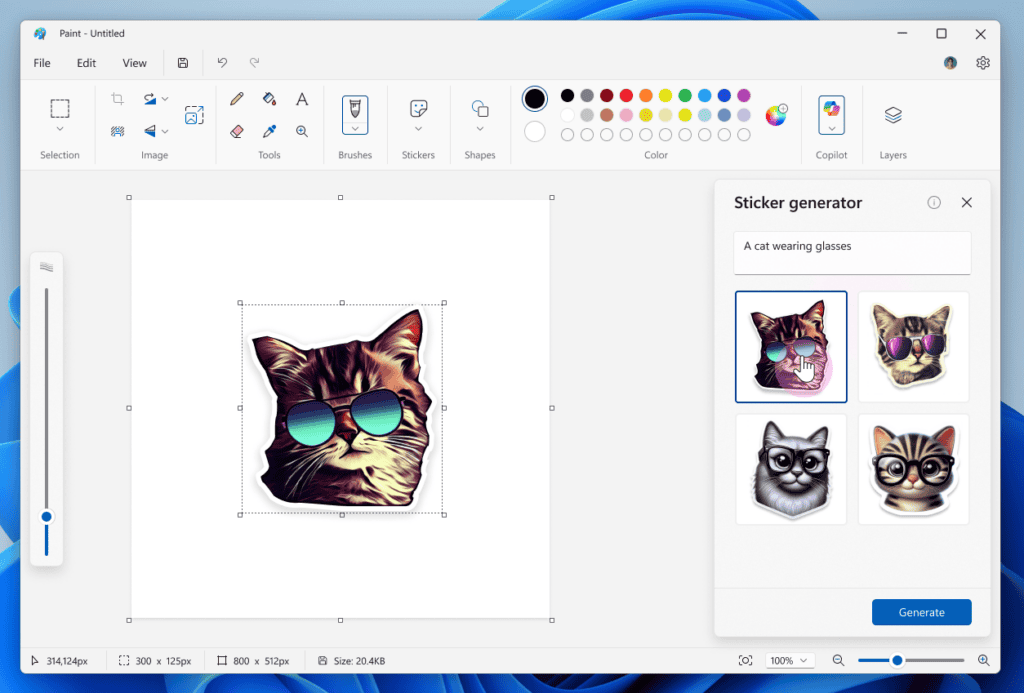
Windows 11 adds intuitive AI tools on Copilot+ PCs, including intelligent Settings search, Click to Do, Photos relight, Paint stickers, Snipping Tool upgrades, and quicker recovery. These new additions make it easier to manage settings, boost creativity, and bounce back quickly after unexpected restarts, all using AI built into everyday Windows tools.
First, the Settings app gets a built-in AI agent. Users can now type natural prompts like “turn on quiet hours” or “connect Bluetooth” to apply changes with a click or undo them, with AI handling hundreds of Windows options. This agent is live now on Snapdragon Copilot+ PCs, with Intel and AMD support on the way.
Image: Microsoft
Next up is Click to Do, a contextual toolkit that lets users highlight text or images and instantly take actions like drafting in Word, practicing pronunciation via Reading Coach, or scheduling meetings in Teams. This is especially useful for Power and productivity users.
Creative tools in Photos and Paint also get AI boosts. The new “Relight” tool adds virtual lights to photos for standout editing. Paint’s sticker generator lets users type a prompt, such as “cat in sunglasses,” and get instant custom stickers, plus smart object selection to isolate items within images.
Image: Microsoft
On top of that, Snipping Tool receives two major upgrades. “Perfect screenshot” automatically captures clean, correctly sized selections, and the new “Color picker” tool pulls HEX, RGB, or HSL values from anywhere on screen. This is ideal for designers and developers.
Under the hood, Windows 11 has also sped up recovery after crashes. A new “Quick machine recovery” mode cuts reboot time from 40 seconds to just 2 seconds while making the process user-friendly with clearer visuals.
Microsoft’s reboot of Fable might be drifting even further from its last known release window. While the company previously confirmed the game had slipped to 2026, a new update suggests fans may need to wait another year.
During a recent XboxEra podcast, insider Shpeshal Nick said that two of his sources believe Fable might not launch until 2027. The delay isn’t due to development issues, according to him, it’s just taking longer than expected.
This lines up with what Xbox Game Studios head Craig Duncan said earlier this year when he confirmed the 2025 target was being pushed to 2026. “We’re actually going to give Fable more time,” he said. “It’s definitely worth the wait.”
For the uninitiated, Fable was first announced back in 2020. If the game actually launches in 2027, that’ll be a seven-year gap between reveal and release. It’s a long wait, but it’s become a pattern in AAA development, where games often miss their original timelines. For example, GTA 6 was originally hyped for fall 2025. That’s now coming in late spring 2026.
Unlike the doomed Perfect Dark reboot, which lost its studio earlier this year, Fable still has a strong team behind it. Playground Games, best known for Forza Horizon, continues to lead the project.
So far, there’s been no official update from Microsoft about a second delay. But if Fable really is slipping to 2027, fans might be in for a much longer wait than expected.
Three Chinese-affiliated groups, Linen Typhoon, Violet Typhoon, and Storm-2603, have been linked to live exploitation. Targets include internet-exposed SharePoint servers without the latest updates.
Security teams are urged to install these updates immediately. Microsoft warns that more actors may soon weaponize the flaws. Along with patching, organizations should rotate ASP.NET machine keys and restart IIS. Microsoft also recommends enabling AMSI in Full Mode and using Defender Antivirus or similar protection.
The company said Defender for Endpoint can help detect follow-on activity tied to these exploits. While investigations continue, Microsoft is tracking more groups that may be testing or using these vulnerabilities.
So far, only on-prem SharePoint systems are affected. Cloud-based SharePoint Online remains secure. Given the rapid adoption of these exploits by multiple actors, Microsoft stresses the urgency of applying fixes. Moreover, IT admins managing on-prem environments should act quickly to avoid becoming the next target.
A pre-release prototype of what appears to be the Lenovo Legion Go 2 has surfaced online through second-hand markets in China. The footage comes from a YouTube reupload of an original BiliBili video, where the device is seen in action.
According to a Reddit user, the factory behind the Legion Go has quietly begun offloading leftover developer units after shutting down the production line.
Speaking of the prototype, not much has changed design-wise. The detachable controller setup is still here, along with a massive 8.8-inch screen. But there’s a big shift in display tech. This model reportedly swaps the older LCD for a Samsung-made OLED panel that supports HDR and VRR. The resolution is now slightly lower at 1920 x 1200, but the refresh rate jumps to 144 Hz.
Inside, the Legion Go 2 packs AMD’s new Ryzen Z2 chip, a Zen 4 CPU paired with Radeon 780M graphics on RDNA 3. Lenovo previously confirmed a Z2 Extreme version was coming. The leaked unit also boasts 32GB LPDDR5X RAM running at 7500 MHz and a 1TB PCIe Gen 4 SSD. Battery capacity hits 74Wh.
The software looks tuned for gaming, with performance controls, overlay stats, and a game library tool. There’s Windows 11 out of the box, Wi-Fi 6E, and a built-in kickstand. One of the controllers can even double as a mouse thanks to the trackpad.
It’s not official yet, but the leaker says Lenovo may launch this handheld in September, priced around $1,000. Based on what we’re seeing, this could give other Windows handhelds like the ROG Ally 2 some tough competition.
NVIDIA’s latest GeForce driver (577.00 WHQL) is now rolling out, and it brings plenty of updates for both casual and serious players. The update is Game Ready for Wuchang: Fallen Feathers, adding full support for DLSS 4 and related tech improvements.
Valorant also gets driver-level optimization, now that Riot has moved it to Unreal Engine 5 with major changes underneath. If you use the NVIDIA App, you’ll notice something new. DLSS Overrides are now available for 11 additional titles.
This gives you full control of DLSS settings. You can now pick your preferred upscaler, adjust frame generation, or switch to DLAA. Games with new DLSS Override support include Monster Hunter Wilds, 7 Days to Die, and RoboCop: Rogue City – Unfinished Business.
Two Warhammer 40,000 games also get DLSS customization, along with a few smaller titles like Stygian: Outer Gods and REMATCH. NVIDIA App’s “optimal settings” feature now supports Mecha Break, PEAK, and Broken Arrow.
As for fixes, Counter-Strike 2 should no longer show a black screen at 4:3 resolution on ASUS’s PG27AQN monitor. Bladepoint also gets a fix for map crashes when using DirectX 11 and DLSS Super Resolution on certain setups.
There are still known issues. Cyberpunk 2077 crashes in Photo Mode with path tracing. Battlefield 2042 shows light artifacts. Ray tracing in World of Warcraft can also cause odd visuals, and text may blur in Counter-Strike 2 under certain resolutions.
If you play any of these games, you’ll want to update. GeForce 577.00 WHQL is now available through NVIDIA’s official website.
OpenAI is teaming up with the UK government to expand its presence and boost AI across key public services. As part of a new memorandum of understanding (MOU), OpenAI will explore investing in AI infrastructure and hiring in the UK. The deal was signed by Technology Secretary Peter Kyle and OpenAI CEO Sam Altman earlier this week.
The UK government sees this as a step toward creating more tech jobs and cutting costs in public services. OpenAI may build new data centers and support “AI Growth Zones” across the country.
These zones aim to attract billions in tech investment. Over 200 communities have already submitted proposals to host them. The government has already committed £2 billion to this initiative. Now, OpenAI says it’s interested in exploring further support and expansion.
The partnership also covers areas like justice, education, and national security. Officials believe AI can improve services and lower expenses. Not to forget, the UK is already testing tools powered by GPT-4o. One tool, called Consult, automatically sorts public feedback on policy. Another, Humphrey, helps civil servants speed up admin tasks.
OpenAI plans to expand its London office, focusing on research and engineering roles. This move could create new high-paying tech jobs. That means more UK-based AI talent and higher tax revenues from tech workers.
Under the agreement, OpenAI will also share more data with the UK’s AI Safety Institute. This helps the government stay informed about risks and future developments. Together, both sides aim to shape AI that works for the public good.
The latest Windows Server 2019 security update is causing trouble for IT admins. After installing July’s KB5062557 patch, organizations are seeing Cluster services fail and virtual machines (VMs) restart repeatedly.
As reported by Bleeping Computer, Microsoft warned that the update can cause Cluster nodes to drop out, rejoin attempts to fail, and BitLocker errors on Cluster Shared Volumes. That’s not all; logs are reportedly showing Event ID 7031, linked to service crashes, as a common symptom.
The company hasn’t released a public patch yet. Instead, it’s asking affected businesses to reach out to Microsoft Support directly for mitigation help.
“We are working to include the resolution in a future Windows update,” Microsoft said. Once the fix goes live, companies won’t need to keep applying support’s workaround.
The impact is serious for environments relying on high availability. Cluster failures mean some workloads may experience disruption, and in some cases, quarantined nodes or frequent VM restarts.
What happens when you take one of NVIDIA’s most advanced server-grade chips and squeeze it into a desktop tower? ASUS just did that, and the result is a monster workstation built for AI development and high-end compute tasks.
The new ExpertCenter Pro ET900N G3 takes NVIDIA’s Grace Blackwell GB300 Ultra chip and gives it a home outside of traditional server racks. This isn’t your average PC. It delivers up to 20 PFLOPS of FP4 performance, which puts it well beyond even the highest-end gaming rigs or creator setups.
Inside, it has 784 GB of unified memory. That’s made up of 288 GB of HBM3E on the GPU and another 496 GB of LPDDR5X for the Grace CPU. It’s a huge pool of high-bandwidth memory, designed for workloads like large language models or scientific simulations.
Connectivity is just as wild. ASUS adds a ConnectX-8 SuperNIC for 800 Gb/s networking and preloads NVIDIA’s DGX OS, which is a customized Ubuntu build tuned for performance.
You also get serious expandability. The custom motherboard includes three PCIe x16 slots for more GPUs or accelerators, plus three M.2 SSD slots. Power isn’t a limitation either. With dedicated 12V-2×6 GPU connectors, the system can handle up to 1,800W just for graphics.
This isn’t built for casual buyers. It’s for AI labs or research teams who want a desktop that performs like a server. Pricing isn’t confirmed, but it’s expected to land well above $30,000. ASUS hasn’t just built a PC. They’ve created a desk-friendly version of NVIDIA’s DGX vision.
Looking for the Best Putlocker alternatives in 2025? This listicle explores the top streaming platforms that can fill the void left by Putlocker – covering both free & legal streaming services and widely-used user-uploaded video sites. We’ll break down each alternative by type (official or user-driven), how you can access it, what content it offers, key features, and the pros and cons to consider.
⚠️ Legality and Safety Warning:Streaming unlicensed content can be illegal and unsafe. Always be mindful of your local laws. User-uploaded sites often operate in a legal gray area and may expose you to intrusive ads or malware. If you choose to visit those, use a VPN to protect your privacy, hide your IP, and guard against tracking or geo-blocks. A VPN will not make illegal streaming legal, but it can help keep your connection secure.
In this guide, we’ll start with the best free and legal Putlocker alternatives (ad-supported platforms that are safe and legitimate), followed by popular user-driven streaming sites (which host unverified content). A quick comparison table and an FAQ on legality and VPN usage are included at the end for a summary.
Best Putlocker alternatives (Free & Legal Streaming Sites)
Official free streaming services are legal alternatives to Putlocker that offer movies and TV shows without charge (supported by ads). While their catalogs may not have the very latest blockbuster releases, they are safe, legitimate, and often available as apps on multiple devices. These services obtain content through licensing deals, so you won’t be pirating anything.
If you prefer to troubleshoot first, see our full guide on Putlocker not working for step-by-step fixes. Below are some of the top free, legal platforms to consider:
1. Tubi (Free Legal – Ad-Supported Streaming)
Tubi is a legal streaming service owned by Fox Corporation that provides on-demand movies and TV shows at no cost. It has a massive library of over 50,000 titles across all genres, from family-friendly shows to cult classics. You can access Tubi via its website or through apps on browser, mobile (Android/iOS), smart TVs, and streaming devices. No signup is required to watch, though creating a free account enables features like watchlists and syncing across devices. Tubi streams in up to 1080p HD and includes subtitles on most content. It’s supported by periodic ad breaks and is available primarily in the U.S., so a VPN may be needed to watch from other regions.
Pros:
Huge content library (50k+ movies and shows) with diverse genres
Completely free to use; no subscription or credit card needed
No login required to start watching (account optional for extra features)
Family-friendly options and parental controls available (Tubi Kids section)
Cons:
Ad interruptions during streams (as it’s the trade-off for free content)
Region-restricted – officially available in U.S. (and limited elsewhere) so VPN needed for global access
Few recent releases – content is mostly older films or past seasons (not the latest cinema hits)
2. Pluto TV (Free Legal – Live TV & On-Demand)
Pluto TV is a free, ad-supported streaming platform offering both live TV channels and on-demand movies/shows. It replicates a cable TV experience with over 250+ live channels spanning news, sports, entertainment, and more. Pluto also has a sizeable on-demand section for movies and series, organized by genres. The service is legal (owned by Paramount) and licenses content from many partners. You can watch via web browser or Pluto’s apps on smart TVs, streaming devices, game consoles, mobile, etc. No registration is needed – just launch and start channel-surfing. Pluto TV streams in HD and includes familiar channel-style schedules. It’s currently available in the U.S., Canada, parts of Europe and elsewhere, but some content is region-locked (a VPN can help bypass that).
Pros:
Live channels for free, including news, classic TV, and even niche channels (24/7 genre-based streams)
On-demand library of movies and shows in addition to live TV
No account required; easy to jump in and start watching
Wide device support (apps on most platforms) and a large user base (~78 million users)
Cons:
Mostly region-locked to U.S./North America (will need a VPN to access from unsupported countries)
No personalization – lacks watchlists or user profiles since no login
Content is not the newest; great for channel surfing and older hits, but not recent premium originals
3. Crackle (Free Legal – Movies & Originals by Sony)
Crackle is a Sony-owned free streaming service featuring a mix of movies, classic TV shows, and a few original series. It’s legal and ad-supported, backed by a major studio, which gives it a decent library of older hits and cult favorites. Crackle’s content focus is on classic movies, indie films, and some exclusive series (especially older Sony content). It’s accessible via web browser or Crackle apps on mobile devices, smart TVs, etc. While you can watch without an account, signing up (free) lets you create watchlists and save progress. Streaming quality goes up to 1080p HD on many titles, and subtitles are available on most content. Availability is mostly U.S.-only, with limited reach elsewhere.
Pros:
Legitimate free service backed by Sony, so content is licensed and safe
Good selection of classics and old TV shows, plus some originals you can’t find elsewhere
Optional signup improves user experience (watchlists, resume playback) but not required
Apps available on many platforms (phones, tablets, smart TVs, etc.)
Cons:
Limited new content – library skews older; fewer recent blockbusters
Region limited outside the U.S. (you’ll likely need a VPN or it may not be accessible internationally)
Smaller catalog compared to some competitors (you might run out of things to watch faster)
4. Plex (Free Legal – On-Demand + Live TV Hub)
Plex is a unique platform that doubles as a personal media server and a free streaming service. In its free streaming section, Plex offers a curated library of movies and TV shows on-demand, as well as live TV channels – all ad-supported and legal. The content library isn’t as large as Putlocker was, but it includes a range of genres and even some niche web shows. Plex’s on-demand content is organized by genre, popularity, etc., and it works globally (though specific titles vary by region). You can access Plex via browser, the Plex app on mobile/TV devices, or even set up a Plex Media Server to stream your own files. No login is required to watch free streaming content, but a free account lets you personalize your experience. Quality can go up to HD, and a limited selection might be available in 4K depending on the content.
Pros:
Hybrid functionality – stream free movies/shows and also manage your own media library in one app
Includes live TV channels and web shows in addition to on-demand movies
Available worldwide (not locked to U.S.), making it accessible without a VPN in most regions
Wide device support, and you can use one account/app to access both free content and your personal media
Cons:
Content varies by region – some titles only show up in certain countries due to licensing
User interface can be cluttered due to Plex’s many features (may feel overwhelming at first)
Library size is moderate – not as extensive as dedicated free services (quality over quantity approach)
Vudu is a well-known digital video store (owned by Fandango) that also offers a free, ad-supported section of movies and some TV shows. It’s a legal platform providing both paid rentals/purchases and free content, making it a versatile Putlocker alternative. In the free library (often labeled “Movies On Us”), you’ll find a rotating selection of films – including some relatively recent releases, popular classics, and family-friendly titles – available to watch with ads. Access is via the Vudu website or apps (available on smartphones, tablets, smart TVs, gaming consoles, etc.). Vudu’s interface allows easy searching and browsing by genre. An account is required (free to sign up) to watch, since Vudu may prompt you to log in. Streaming quality is often very good (lots of HD titles, some even in UHD) and subtitles are available. Note that Vudu’s services are primarily available in the US – if you’re outside the US, you’ll likely need a VPN and a valid account to use Vudu.
Pros:
Offers both free and paid content – large catalog including the latest releases (for rent/purchase) and plenty of free movies with ads
High-quality streaming (many titles in HD or better) with a professional, user-friendly interface
Available on almost any device – web, mobile apps, smart TVs, gaming consoles, etc.
Lots of content variety – from big-name films to niche titles, due to partnerships with major studios
Cons:
Account required even for free content (you need to sign in, since it’s tied to a digital storefront)
Ad breaks during free movies (frequency varies by title, but expect commercials)
US-only service – not officially available internationally without workarounds (geo-restricted)
(Other legal free streaming sites to check out include Amazon Freevee (IMDb TV), The Roku Channel, Xumo Play, Popcornflix, and Kanopy – each offers free movies and shows with some variations in content and availability. While we focus on the major ones above, these can also serve as safe Putlocker alternatives.)
Best Putlocker alternatives (User-Uploaded Streaming Sites)
The following platforms are unofficial streaming sites similar to the original Putlocker. These sites host or link to user-uploaded videos of movies and TV shows – often including the latest releases and popular series – all for free. They typically do not have legal distribution rights, meaning they exist in a copyright gray area (or outright piracy). Despite that, they are widely used by many viewers due to their vast content libraries and no-cost access.
⚠️ Important: These sites are unverified and may be illegal to use for copyrighted content in many regions. They can also be risky – expect pop-up ads, redirects, and the potential for malware if you’re not careful. Use a VPN, such as Private Internet Access (PIA), and strong antivirus/ad-blockers if you choose to visit them. We do not endorse piracy, so consider these for educational purposes and stick to public-domain content when possible. With that said, here are some of the most popular user-driven Putlocker alternative sites in 2025:
1. 123Movies (Unverified User-Uploaded Site)
123Movies is one of the most famous Putlocker-style websites, known for its extensive collection of movies, TV series, cartoons, and even anime. It has been around for years, though under constantly changing domains (clone sites abound due to shutdowns). On 123Movies, you can find almost any title – from the latest theatrical releases and trending TV episodes to classic films. The homepage is well-organized with categories and a search bar for easy navigation. When you play a video, the site automatically picks a good stream link and often provides multiple mirror links to choose from. No registration is required to watch, and the site is surprisingly usable with relatively few pop-up ads compared to similar sites. Most content is available in at least HD (1080p) and some in FHD/4K. 123Movies’s huge library and ease of use make it a top alternative, but always remember it’s an unlicensed platform.
Pros:
Enormous library – largest selection of films and shows among free sites, including new releases and international content
Well-organized interface – browse by genre, year, country, A-Z, or use search for specific titles
Minimal ads for a free site (fewer pop-ups than many competitors)
No signup needed – stream instantly without creating an account
Cons:
Illegality risk – hosts copyrighted content without permission (could get you in trouble if laws are enforced)
Domain instability – often changes domains to avoid bans, so the URL you use today may not work tomorrow
Quality varies – while many videos are HD, occasionally some streams might be lower quality or have broken links (especially for very new content)
2. FMovies (Unverified User-Uploaded Site)
FMovies is another long-standing name in the free streaming world, very similar to Putlocker in operation. It provides a vast collection of both new and classic movies, plus TV series, all uploaded by various sources. FMovies has multiple mirror sites (often with different domain extensions) and like others, it gets cloned due to takedowns. The site’s interface typically allows browsing by genre, country, release year, and even sorting by most-watched or latest added. A strong point of FMovies is its search and filter functionality – it’s excellent at quickly delivering results and lets you apply filters to find something to watch by quality, genre, etc.. Most content can stream in SD or HD, and the player often auto-adjusts quality based on your connection. No registration is needed. Do expect frequent ads and pop-ups (common on FMovies mirrors), so a robust ad-blocker is recommended. As with any user-uploaded site, the content on FMovies is unlicensed, so proceed with caution.
Pros:
Huge range of content – from the newest releases to older films and shows (one of the best sites for finding new movies for free)
Great search & filters – easy to find content by title or filter by year/genre/quality
Multiple streaming options – often provides several mirror links and quality choices (SD, HD, sometimes 4K)
No signup required – just point and click to play
Cons:
Heavy on ads – known for pop-ups and redirect ads; can be annoying or risky if you click the wrong thing
Pirated content – not legal; using it may violate copyright laws and it’s blocked by ISPs in some countries
Unreliable domains – FMovies sites can be taken down or change URLs, requiring you to find new mirrors periodically
3. YesMovies (Unverified User-Uploaded Site)
YesMovies is a popular free streaming site that offers a large catalog of movies and TV shows with a slick, user-friendly interface. It has gone through a few name changes (at one point rebranded as “Vumoo” or “Vhmovies”) but is generally known as YesMovies. The content is sorted by genre and country, and you can easily find both Hollywood hits and international films. One nice feature of YesMovies is its one-click play – when you click on a title, it starts playing immediately without the need to select a specific link or server manually. The site supports up to HD and even 4K streaming on some titles; however, to unlock 4K quality, a free sign-up is required. Otherwise, you can stream without an account in standard HD. YesMovies also offers an “autoplay next” feature for binge-watching series. Like others, it’s ad-supported and unlicensed, so be cautious.
Pros:
Extensive collection of movies and shows, well-organized by genre and country
Easy playback – no hassle in picking links; just click and watch (auto-play available)
High-quality options – HD available for most content, and 4K for some titles if you sign up
Attractive UI – neat design that’s easy to navigate, making it simple to discover popular or trending content
Cons:
Requires signup for 4K – ultra-HD streams need a (free) account, which means you have to give an email (use a throwaway email if concerned)
Legal issues – streams copyrighted content without licenses (using it is illegal in many areas)
Geo-blocks and downtime – some ISPs block YesMovies domains; the site might change domains or go down, requiring finding new links
Ad presence – you may encounter pop-ups or ads, though the site design tries to keep them minimal compared to some others
4. SolarMovie (Unverified User-Uploaded Site)
SolarMovieis a long-running free streaming site frequently recommended as a Putlocker alternative. It hosts a broad selection of the latest movies, trending TV series, and even regional content, all available to stream without sign-in. SolarMovie’s standout aspect is its well-organized interface – it features a homepage that highlights new releases and popular titles, and it categorizes content by genre, country, and IMDB rating for easy browsing. When you select something to watch, SolarMovie usually provides a clean streaming page with a large Play button and options for video quality. Many titles on SolarMovie can be viewed in HD or even 4K quality, offering some of the best resolution available in free streaming. Like others, multiple mirror links are often listed in case one doesn’t work. No account is needed. Ads are present (often as overlay or pop-up ads when clicking), so an ad-blocker helps. Because SolarMovie indexes copyrighted content, it operates in legal grey space and has faced domain seizures – you may need to search for its current domain.
Pros:
New and popular content – excellent source for recent movies and episodes shortly after release
User-friendly site design – easy to find what’s trending or filter by genre/popularity
High video quality – streams often available in HD; some content in 4K for a better viewing experience
No registration required and generally straightforward playback (just hit Play)
Cons:
Legality issues – offers unlicensed streams (using it can violate laws and the site is often on enforcement radar)
Frequent domain changes – SolarMovie mirrors can appear and disappear; need to find updated links if one goes offline
Ad pop-ups – clicking Play or navigation might trigger ads; user must be cautious to avoid fake “Download” buttons, etc.
Possible ISP blocks – many ISPs block SolarMovie URLs, so a VPN may be needed to access it in certain regions
5. FlixTor (Unverified User-Uploaded Site)
FlixTor is a slightly different kind of Putlocker alternative – it’s an automated streaming site that finds and plays video sources (often from torrents) through a sleek interface. FlixTor is highly popular among those in the know, thanks to its vast collection of movies and series (both new and classic) and a reputation for high-quality streams. Most content on FlixTor is available in HD 720p or 1080p, and the site impresses by having fewer ads than typical free streaming sites. In fact, FlixTor’s relatively low ad intrusion makes it feel more premium. The website is simple to use – browse by category or search for a title, then just click to play. FlixTor also offers VIP membership for those who want to support the project, which can grant early access to new releases and other perks; however, the free version is sufficient for most users. No sign-up is needed for free streaming. Note: Because FlixTor doesn’t officially host content (it scrapes it), it often pops up under different domains (like flixtor.to, flixtor.is, etc.). It’s unofficial and often shut down and resurrected, so ensure you’re on a safe, real FlixTor site (and not a copycat) when using it.
Pros:
Huge selection of both newly released films and older titles, plus lots of TV shows – you can find almost anything here
Limited ads – significantly fewer pop-ups compared to other free sites, making for a more pleasant viewing experience
High-quality streams – most videos are HD; streams tend to be reliable and fast given a good internet connection
No account needed; straightforward UI (feels similar to a paid streaming app in navigation)
Cons:
Not legal – streams copyrighted content without permission, so use is illegal in many countries (use a VPN to protect yourself if you choose to access it)
Domain volatility – the official site may go down; lots of imitators exist, which can be confusing or unsafe
Occasional outages – because it depends on scraping sources, sometimes certain videos might not play or the site might go offline during crackdowns
VIP model – some features or the newest content may be gated for a short period for VIP members (though eventually free users get access); plus the site will ask for donations or VIP sign-up, which not everyone may be comfortable with
Comparison Table of Putlocker Alternatives
Below is a quick comparison of the platforms discussed, highlighting their legal status, content focus, whether using a VPN is recommended, and how you can access them:
Platform
Legal Status
Content Type
VPN Recommended?
Access
Tubi
Legal (Ad-supported)
Movies & TV (On-demand)
No (Optional for geo)
Browser & Apps (TV, mobile)
Pluto TV
Legal (Ad-supported)
Live TV + On-demand
No (Optional for geo)
Browser & Apps
Crackle
Legal (Ad-supported)
Movies & Some TV
No
Browser & Apps
Plex
Legal (Ad-supported)
Movies, TV + Live Channels
No
Browser & Apps
Vudu (Free)
Legal (Ad-supported)
Movies & TV (On-demand)
No
Browser & Apps
123Movies
Unverified (Pirated)
Movies, TV, Anime (Latest)
Yes (Privacy)
Browser (Web)
FMovies
Unverified (Pirated)
Movies & TV (New & Classic)
Yes (Privacy)
Browser (Web)
YesMovies
Unverified (Pirated)
Movies & TV (Global content)
Yes (Privacy)
Browser (Web)
SolarMovie
Unverified (Pirated)
Movies & TV (Latest releases)
Yes (Privacy)
Browser (Web)
FlixTor
Unverified (Pirated)
Movies & TV (Wide range)
Yes (Privacy)
Browser & Apps (limited)
Note: “Legal (Ad-supported)” means the service has proper rights for content and uses advertisements for revenue. “Unverified (Pirated)” indicates user-uploaded content that is likely unlicensed. VPN usage is strongly recommended for the unverified sites – to protect your identity and bypass any ISP blocks or geo-restrictions. Even for legal services, a VPN can be useful if you need to access them from outside their available regions.
FAQ
Q: Are Putlocker alternatives legal to use? A: It depends on the alternative. Licensed services like Tubi, Pluto TV, Crackle, etc., are completely legal – they have distribution rights and are safe to use. In contrast, unofficial sites (e.g. 123Movies, FMovies, and similar Putlocker-style sites) are not legal in most countries, because they stream copyrighted movies and shows without permission. Using those piracy sites can potentially lead to legal consequences, and they are often blocked or taken down due to copyright enforcement. For a worry-free experience, stick to the legal, ad-supported platforms (they’re safe, legitimate, and virus-free). If you do venture onto unverified sites, understand the risks – you are responsible for any content you access.
Q: Is it safe to use a VPN when streaming, and should I use one? A: Yes, using a VPN is safe and highly recommended for streaming – especially on free streaming sites. A reputable VPN protects your privacy and security while you browse. It encrypts your internet connection and hides your IP address, which helps in several ways:
It prevents your ISP or others from monitoring your streaming activity and potentially throttling your speed.
It can block many malicious trackers or ads common on sketchy streaming sites, and reduce the risk of malware from those sites.
It lets you bypass geo-restrictions – for example, watching Pluto TV or Tubi from outside the US by connecting through a US server.
However, note that while a VPN improves safety, it does not legalize piracy. You should still exercise judgment about what you stream. Also, choose a trusted, no-log VPN service to ensure your data is truly protected. Overall, for privacy, security, and access, a VPN is a smart addition to your streaming setup when using any Putlocker alternative.
If you’re looking for secure and legal ways to stream movies online, explore verified Putlocker replacements. For more safe streaming choices, visit our complete guide on a YIFY Torrents alternative.
Meta says it’s not signing the European Union’s new code of practice for AI. The company believes the voluntary agreement creates legal risks and oversteps the upcoming AI Act.
Joel Kaplan, Meta’s global affairs chief, shared the decision on LinkedIn. He said the EU is “heading down the wrong path” and warned that the new rules could slow down the development of advanced AI models in Europe.
The code of practice was published on July 10 and is meant to help companies get a head start on complying with the AI Act. While it’s not legally binding, those who sign it could avoid extra red tape once the law kicks in this August.
Kaplan says the agreement asks too much and brings more confusion than clarity. He also raised concerns that European companies could end up at a disadvantage compared to developers in countries with more relaxed regulations.
That’s been a growing concern in the industry. In June, dozens of major European firms, including Airbus, Mercedes-Benz, and Philips, signed a letter asking the EU to delay the AI Act by two years. They said the current timeline leaves too much uncertainty.
Meta’s pushback isn’t surprising. The company has had a rocky relationship with EU regulators and has supported the US’s looser approach to tech policy. With fines and scrutiny piling up in Europe, Meta seems ready to stand its ground.
Kioxia has introduced a massive 245.76TB SSD, the highest-capacity NVMe drive available in a 2.5-inch and EDSFF E3.L form factor. It’s part of the LC9 Series lineup, designed for the high-capacity, high-efficiency needs of generative AI systems.
This isn’t just about raw storage. The drive uses Kioxia’s 32-die stack of 2Tb BiCS FLASH QLC, built with CBA (CMOS bonded to array) tech, to reach 8TB in a single 154 BGA package. That level of density is a first.
With LLM training, vector databases, and RAG-based inference on the rise, storage needs to be fast, compact, and power-efficient. The LC9 Series checks all those boxes.
It supports PCIe Gen 5, NVMe 2.0, flexible data placement, and multiple security options, including CNSA 2.0 for quantum-era cryptography.
This 245TB SSD also offers a major upgrade for data lakes. By replacing racks of HDDs, it reduces power draw, increases density, and cuts cooling costs, key factors in managing total cost of ownership. The LC9 Series is already sampling to select customers and will be featured at the Future of Memory and Storage 2025 event in Santa Clara this August.
NVIDIA just made a big move in open-source AI. Last week, the company released OpenReasoning-Nemotron. It’s a new family of compact but powerful models designed for complex reasoning across math, code, and science. You can grab them right now on Hugging Face.
These models don’t just work well. They set new performance records in their size range. The 32B version hits a pass@1 score of 89.2 on AIME24 and 70.2 on LiveCodeBench, without any fine-tuning. If you enable GenSelect, NVIDIA’s own boost mode, that same model can reach 96.7 on HMMT Feb 2025, which is absurdly high for open models.
Image: NVIDIA
Interestingly, these models are distilled from DeepSeek’s 671B R1-0528 giant, a massive Chinese AI system considered on par with O3 and Gemini 2.5 Pro. NVIDIA trained its smaller models using a curated set of five million reasoning samples produced by DeepSeek. The result is high-level reasoning in models as small as 1.5B, all the way to 32B.
Yes, it’s the same DeepSeek that got flagged by a US House Committee as a “national security threat” back in April. But geopolitical tensions aside, NVIDIA’s release underscores how globally tangled AI innovation really is.
Developers don’t need frontier-scale infrastructure anymore. These models run with fewer resources, integrate easily with tools like NeMo and TensorRT-LLM, and are licensed for commercial use. For teams building reasoning-heavy applications, this drops the barrier to entry in a big way.
Microsoft is rolling out a major evolution for Power Apps by introducing generative pages that blend AI coding agents with enterprise-grade infrastructure.
The update, now available in preview for users across North America, brings a new kind of speed and flexibility to low-code development. This will help teams build fully functional apps just by describing what they want.
Unveiled at Microsoft Build 2025, the agent-first experience rewrites how apps are designed. Instead of dragging and dropping pre-built components, Power Apps now lets developers collaborate directly with AI agents to generate pages written in React code.
Now, with AI-native capabilities, Power Apps gives users a new starting point. You can simply describe the app, upload a sketch if needed, choose your Dataverse tables, and the app is built for you, instantly. The code can be viewed, refined, or even adjusted by saying things like “add a search bar” or “make this dark mode.”
Behind the AI tools is the same enterprise infrastructure that makes Power Apps a favorite for IT teams. Here, we’re talking about Microsoft Entra ID, role-based access control, full audit trails, DLP policies, and ALM pipelines.
Apps generated via AI remain portable and extensible, free from vendor lock-in. They are also built on Microsoft’s open technology stack with full Dataverse integration. With the preview phase expanding globally soon, Microsoft Power Apps is setting the tone for AI-powered development.
Google is finally adding the much-requested Vertical Tabs feature to the Chrome browser on desktop. The company has started working on the feature. It is adding a feature flag for vertical tabs for testing, spotted over the Chromium Gerrit.
The feature, already available in Microsoft Edge, Firefox, and Brave, seems to have put some pressure on Google to bring it to Chrome as well. The Vertical Tabs feature allows open tabs to be displayed in a sidebar on the left, instead of the traditional horizontal bar at the top of the window.
Vertical tabs help manage a large number of open tabs more easily, especially on widescreens. This layout enables clearer tab titles, improved organization, and faster access, particularly for users who open multiple tabs simultaneously.
The feature also often supports improvements like tab grouping, collapsing to save space, and context menus for better tab management.
Microsoft Edge was the first major browser to implement Vertical Tabs natively in March 2021. Vivaldi, Firefox, Brave, and newer browsers like Arc also support the feature. Surprisingly, the world’s most popular browser, Google Chrome, has lacked this feature. There has been consistent demand and plenty of requests from users to add Vertical Tabs to Chrome.
Until now, Chrome users had to rely on third-party extensions to get vertical tabs, unlike browsers like Edge and Vivaldi that offer the feature natively. That’s changing now, as Google has started development. A recent Chromium Gerrit commit confirms this:
“[Vertical Tabs] Add feature flag,” it reads.
Image Credit: WindowsReport
Google is also preparing for internal tracking of the feature, as seen in this Chromium commit, which logs whether the user has vertical tabs enabled, both at startup and whenever the setting changes.
What’s next? The flag should soon appear among Chrome’s experimental features and can then be enabled for testing in Canary builds.
Since development has just begun, it’s too early to say what the final implementation will look like. For example, Chrome’s Split Screen feature is still under quiet development, and it’s unclear when it will reach the public.
When a popular browser like Edge introduces a significant feature, it often creates pressure on others. Firefox recently followed with its version, and now Google Chrome is joining the lineup of browsers offering vertical tabs.
It won’t be long before you see built-in Vertical Tabs in Chrome. If you’re an advanced user or early adopter, you’ll be able to test it in Canary soon and share feedback directly with Google.
Google experimented with vertical tabs a decade ago, shortly after Chrome’s initial release. Back in 2010, a “Side Tabs” Labs feature allowed users to move tabs to the left side of the window via the tab strip’s context menu. Google even cited the feature as useful for widescreen monitors.
Mozilla is rolling out Firefox 141 ahead of its official July 22 launch. While it’s a smaller update, it brings a few important changes. The most notable addition is AI-powered tab suggestions. Firefox can now recommend tabs and automatically name tab groups. This feature is on by default, but you can toggle it off from the General settings under the Tabs section.
Linux users will notice improved memory usage and a smoother update process. You no longer need to force a restart after updating via a package manager. On Windows 11, Firefox now uses native system font icons for window caption buttons, and WebGPU support is enabled.
The familiar gear icon on the New Tab page is also getting a refresh. It’s now labeled as a “Customize” button and comes with a subtle fade-in/fade-out animation for a cleaner look. For users in the Valencian region, Firefox now includes a Catalan (Valencian variant) spellcheck dictionary built-in.
Developers get a few upgrades too. Firefox 141 re-enables CHIPS (Cookies Having Independent Partitioned State), supports the closedby attribute, and adds the ability to clear the back/forward cache when a Clear-Site-Data: “cache” header is received. It also brings support for the webkitdirectory HTML attribute on Android.
For add-on creators, Mozilla added a new method, i18n.getPreferredSystemLanguages, which lets extensions access the operating system’s preferred language list, in addition to the browser’s accepted languages.
While Firefox 141 is already live for download on Mozilla’s FTP server, the official announcement, along with ESR updates (Firefox 140.1 ESR and 128.13 ESR), is expected tomorrow.
Xbox is quietly making cloud gaming feel a lot more natural on PC. A new update for Xbox Insiders now brings console games that are playable via the cloud directly into the Xbox PC app’s Library. That means you can now see everything available to stream, even console-only titles, from one place.
This change also comes with something players have been asking for: cross-device play history. The Xbox app will now show the games you’ve played recently, whether that was on a console, PC, or a Windows handheld.
Instead of just surfacing what you touched last on the current device, it pulls from your entire activity across the Xbox ecosystem and drops it all into a single tile. This makes it easier to jump back into whatever you were playing last, wherever that was.
The updated Library includes a new filter to show only cloud-compatible console games. If you’ve been relying on Xbox Cloud Gaming to squeeze in a few minutes of play on different screens, this finally ties it all together.
Microsoft says this is part of a larger push to make your Xbox games and preferences follow you naturally, no matter the device. For now, the features are only live for Insiders, but it’s a strong hint at what the future Xbox experience might feel like across PC, handheld, and console.
Russian state-backed hackers are reportedly targeting Microsoft 365 users. According to the UK’s National Cyber Security Centre (NCSC), a stealthy malware called Authentic Antics is being used in targeted attacks that focus on stealing login credentials and tokens from services like Outlook, SharePoint, and OneDrive.
The malware has been linked to APT28, also known as Fancy Bear or Forest Blizzard, a threat actor tied to Russia’s military intelligence agency, the GRU. While the malware was first detected in 2023, it’s now being publicly linked to this group for the first time.
How it works
NCSC explains that Authentic Antics likely spreads through phishing emails or malicious Outlook add-ins. Once installed, it quietly waits for the right moment to trick users with fake Microsoft login windows that look almost identical to the real ones.
These popups are highly selective; they’ll only appear on PCs APT28 is specifically targeting. If a victim enters their credentials, the malware sends them to the hackers via the victim’s email inbox. To avoid detection, the malware even deletes the sent messages afterward.
Who’s being targeted?
The campaign appears to focus on organizations supporting Ukraine, including:
Tech firms using Microsoft’s cloud services
NATO government agencies
Logistics and transport companies
Border infrastructure like smart cameras tracking shipments
Moreover, it’s worth noting that the UK government has responded by sanctioning 18 GRU officers and three military units involved in the operation.
A new batch of games is heading to Xbox and Game Pass this week, between July 21 and 25. The lineup blends indie charm with Souls-style action, hidden object fun, and one very intense raccoon.
Things kick off July 22 with Wheel World, a bike-based open-world adventure launching day one on Xbox Game Pass. It’s all about customization and exploration, with plenty of scenery and stunts. That same day, Monument Valley 3 lands on Xbox Series X|S for $17.99. It’s a fresh take on the award-winning puzzle series. Also dropping July 22 is Abiotic Factor, a survival-crafting horror set in a crumbling underground lab.
July 23rd brings Wuchang: Fallen Feathers, a dark RPG set in the Ming Dynasty, to Game Pass. Cubey: Blockbyte delivers fast platforming action, while Secret Paws – Cozy Offices brings cats and cluttered desks together for hidden-object lovers.
Also joining Xbox that day is Chess Battle, a cartoon-style take on the board game, and Rogue Raccoon, which is exactly what it sounds like, stealthy and chaotic.
The lineup continues July 24 with Hatsune Miku Logic Paint S+, a new puzzle pack with Vocaloid flavor. Wheel World and Wuchang also expand to new platforms. Rounding things out on July 25 is Crowd City, a mobile-style crowd control brawler coming to Xbox Series X|S and PC.
Microsoft knows Windows 11 still feels sluggish on some PCs, and it’s finally doing something more proactive about it. In a new Insider Preview (build 26200.5710), Microsoft has added a system that automatically collects performance logs when users report slowdowns.
If you’re running this test build and hit lag, stutter, or unresponsiveness, you can flag it in Feedback Hub. Microsoft will then quietly grab the system data it needs to troubleshoot.
This change was first spotted by The Verge in Microsoft’s latest Insider blog post. The idea is to eliminate the back-and-forth and help engineers fix issues faster by collecting real-world evidence automatically.
Windows 11’s speed problem isn’t new
Since the OS launched in late 2021, users have called out a variety of performance issues. From gaming quirks on hybrid CPUs to general lag compared to Windows 10, Windows 11 has given some users a hard time.
Microsoft rolled out some under-the-hood fixes in 2023 to improve the Taskbar, quick settings, and startup apps, and the 24H2 update brought smoother performance on older hardware. Now with 25H2 on the horizon, Microsoft says this log system reflects a “commitment to improving Windows performance.”
There’s more coming too. Driver developers will need to follow new static analysis rules before submitting drivers, which could cut down on buggy releases. This step might not magically fix every lag spike, but it’s clear that Microsoft is finally trying to speed things up for good.
Windows Defender (Windows Security) is Microsoft’s powerful built-in antivirus software pre-installed in Windows 11. Many users aren’t aware that, in most cases, Windows Defender is equally effective as third-party antivirus solutions – often outperforming them in ease-of-use, integration, and speed.
In this guide, you’ll learn not only how to quickly activate Windows Defender but also how to verify it’s working correctly and resolve common issues that may prevent it from activating.
Under the heading Virus & threat protection settings, select Manage settings.
Step 4: Enable Real-time Protection
Toggle Real-time protection to On. This immediately starts protecting your PC from viruses, malware, ransomware, and other threats.
You can review what each Windows Defender option does in more detail by checking Windows Defender settings explained, which covers real time protection, cloud delivered protection, and other security features in plain language.
📌 Frequently Asked Questions (Information Gain from Bing’s “People Also Ask”)
Q1. Is Windows Defender enough for Windows 11?
Yes. For most home and small business users, Windows Defender offers excellent protection, scoring consistently high in independent antivirus tests. Unless you have specialized security needs, a third-party antivirus isn’t usually necessary.
Q2. Does Windows Defender slow down Windows 11?
Generally, no. Windows Defender is deeply integrated and optimized to run efficiently. However, occasional slowdowns may occur briefly during full system scans.
Q3. Can I schedule scans with Windows Defender?
Yes, you can schedule custom scans using the Task Scheduler:
Search for Task Scheduler, open it, and navigate to: Task Scheduler Library > Microsoft > Windows > Windows Defender
Modify Windows Defender Scheduled Scan task to fit your preferred timing.
📊 Windows Defender vs Popular Antivirus Software (Quick Comparison Table – Information Gain)
Feature
Windows Defender
Avast Free
Bitdefender Free
Built-in to Windows 11
✅
❌
❌
Real-time Protection
✅
✅
✅
Resource Usage (Low)
✅
⚠️ Medium
✅
Frequent updates
✅
✅
✅
Advanced Ransomware Protection
✅
⚠️ Limited
✅
Ads or Upsells
❌
⚠️ Frequent
⚠️ Occasional
Table Conclusion: For minimal hassle and reliable protection, Windows Defender is often the best free solution for Windows 11.
Microsoft has stopped assigning its China-based engineers to any Pentagon-related work. The decision comes just days after a report revealed that Chinese engineers were working on Microsoft cloud services used by the US Department of Defense. The story sparked criticism, especially over how those foreign workers were monitored.
Microsoft’s Frank X. Shaw confirmed the change in a post on X. He noted:
In response to concerns raised earlier this week about US-supervised foreign engineers, Microsoft has made changes to our support for US Government customers to assure that no China-based engineering teams are providing technical assistance for DoD Government cloud and related services. We remain committed to providing the most secure services possible to the US government, including working with our national security partners to evaluate and adjust our security protocols as needed.
Last week, ProPublica first reported that Microsoft relied on so-called “digital escorts,” US citizens with security clearance, to supervise these China-based teams. But many of those escorts reportedly lacked the right skills to actually vet or understand the engineering work.
Secretary of Defense Pete Hegseth criticized the entire setup, saying no foreign engineer, especially not from China, should have access to DoD systems. Microsoft didn’t say whether there was a security breach or if this was purely preventative. But moving forward, it claims only US-based engineers will work on defense-related cloud infrastructure.