Wondershare EdrawMind review: Easy mind map creation

Mind mapping is a great technique to structure a topic and assess its implications across the board.

However, it’s not so easy to do it with a pen and paper while you’re brainstorming an idea because you will make a lot of changes within the process.

The solution is to use a mind map software that can help you create and edit them on the fly or highlight the most important ideas.

That’s why in this review we’re talking about Wondershare EdrawMind, a solution that comes with all the tools to create a good design with a minimum effort.

What is EdrawMind and how does it help?
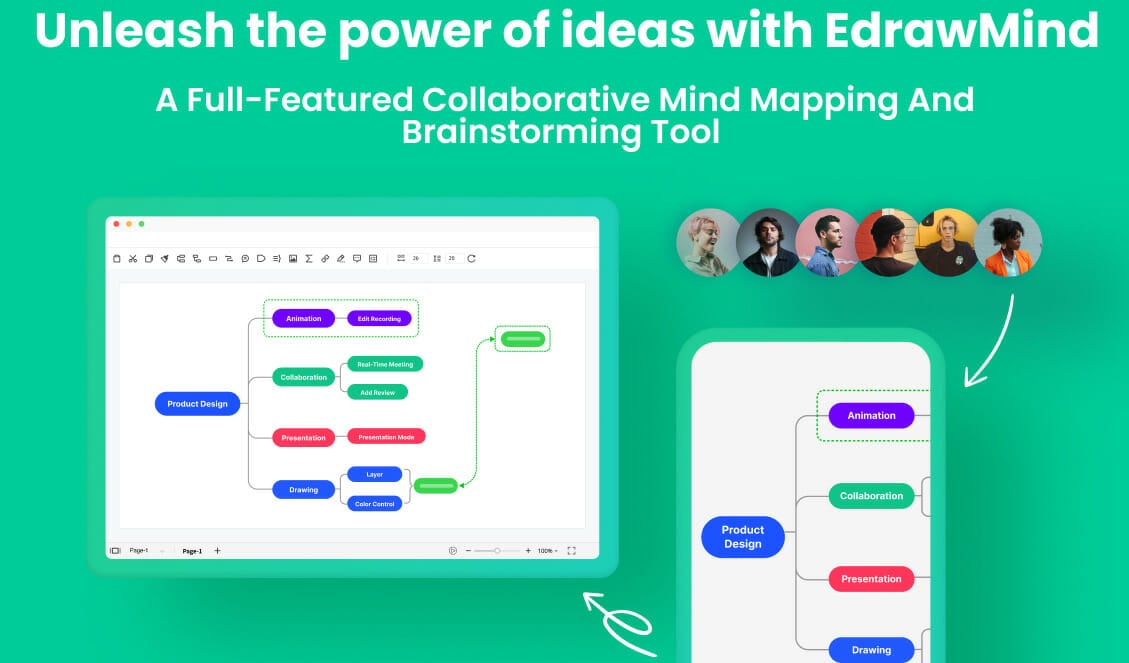
Wondershare EdrawMind is probably the best mind map software for business and education that you will find right now.

If you are not aware, a mind map is a diagram that helps you represent tasks, concepts, words, or items that revolve around a central concept.

Then, all of these are placed in a graphical layout that allows you to build an intuitive arrangement around that concept.

The goal is to turn all these items into an organized diagram that will become much easier to understand and memorize.

EdrawMind can help you achieve that with simple and intuitive tools so you can easily layout a concept or a brainstorming idea into a memorable design.

And you can also turn a mind map into a Gantt chart with one click. It’s a very popular business-type diagram but you can use it in any field of work.

What are Wondershare EdrawMind’s most important features?

1. Plenty of mind map structures
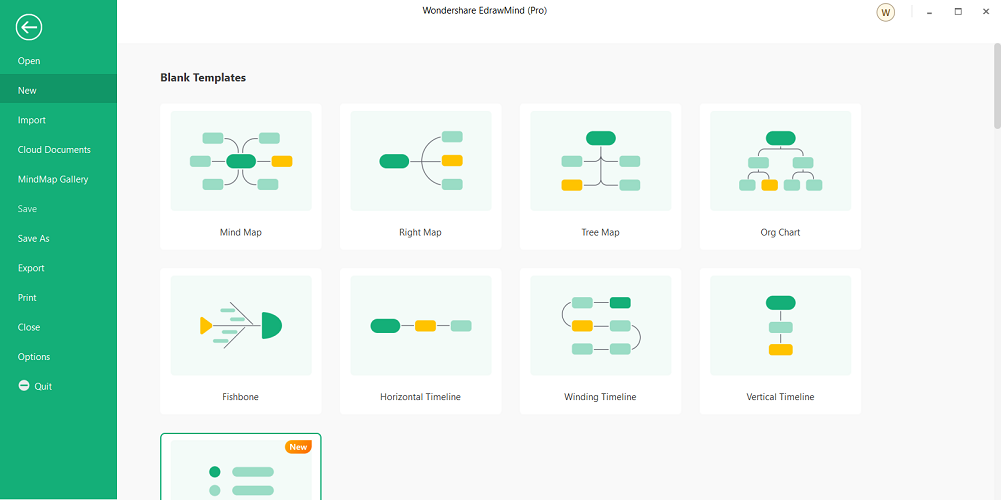
EdrawMinds comes with 12 mind map structure designs like a radial mind map, Timeline & bubble, fishbone, sector map, and more.

That basically means that you can start off with the best structure that fits the type of mind map that you want to create.

And going on with a structure, you will discover 33 themes and over 700 clipart images that will help you personalize your mind map and make it unique.

If you don’t know what structure to use from the start, you can still view plenty of templates and examples from other users and figure out what is the one for you.

Mind mapping is a growing trend and so is EdrawMind’s community so you will definitely see interesting creations and you will be able to communicate with the users within the online platform.

2. Create presentations automatically
After you finish your work, you will want to show it to others and that can be tricky because the more complicated is the mind map, the more difficult it will be to present it.

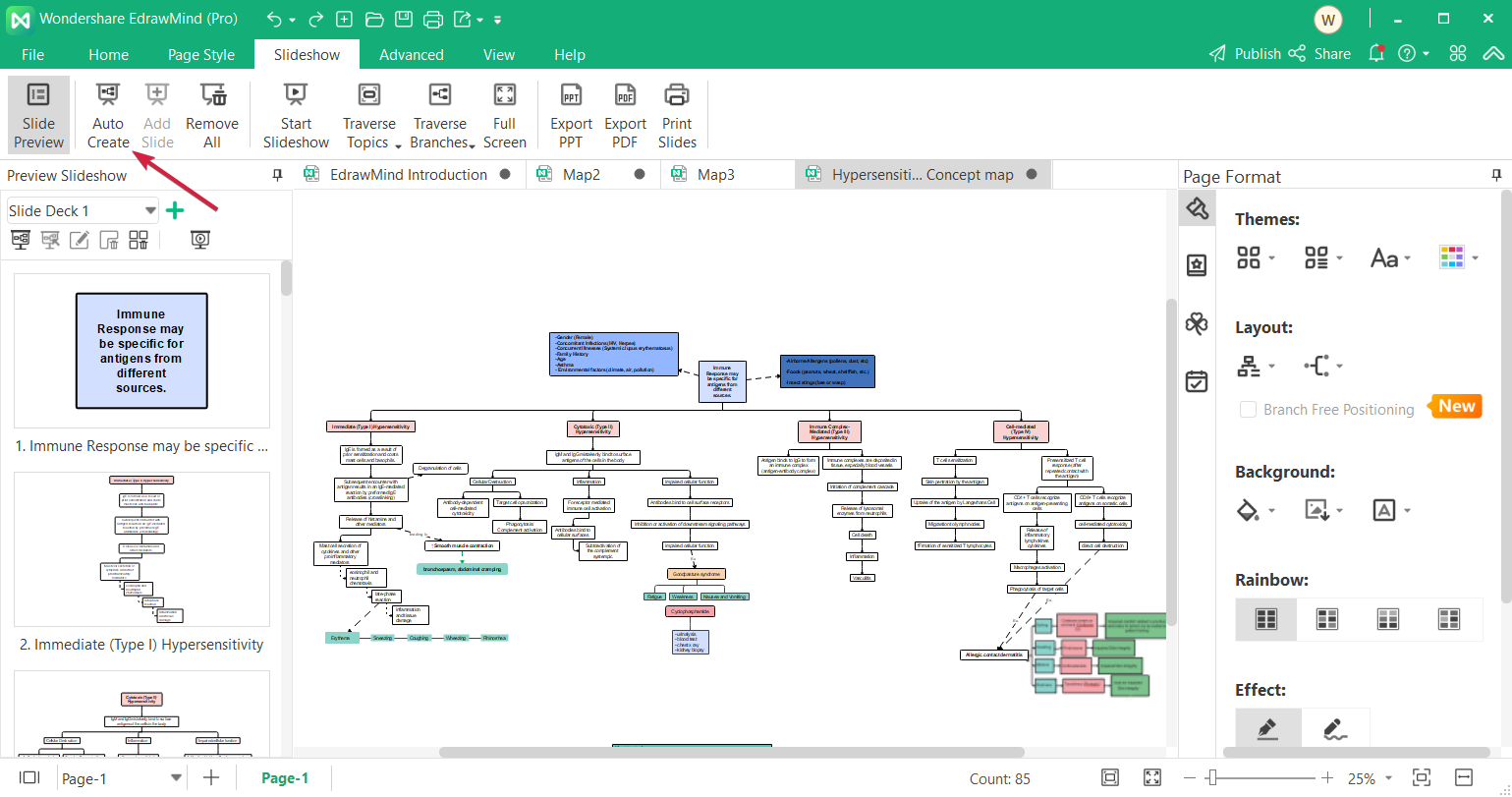
That’s where the EdrawMind magic starts because this tool comes with an automatic slideshow creator.

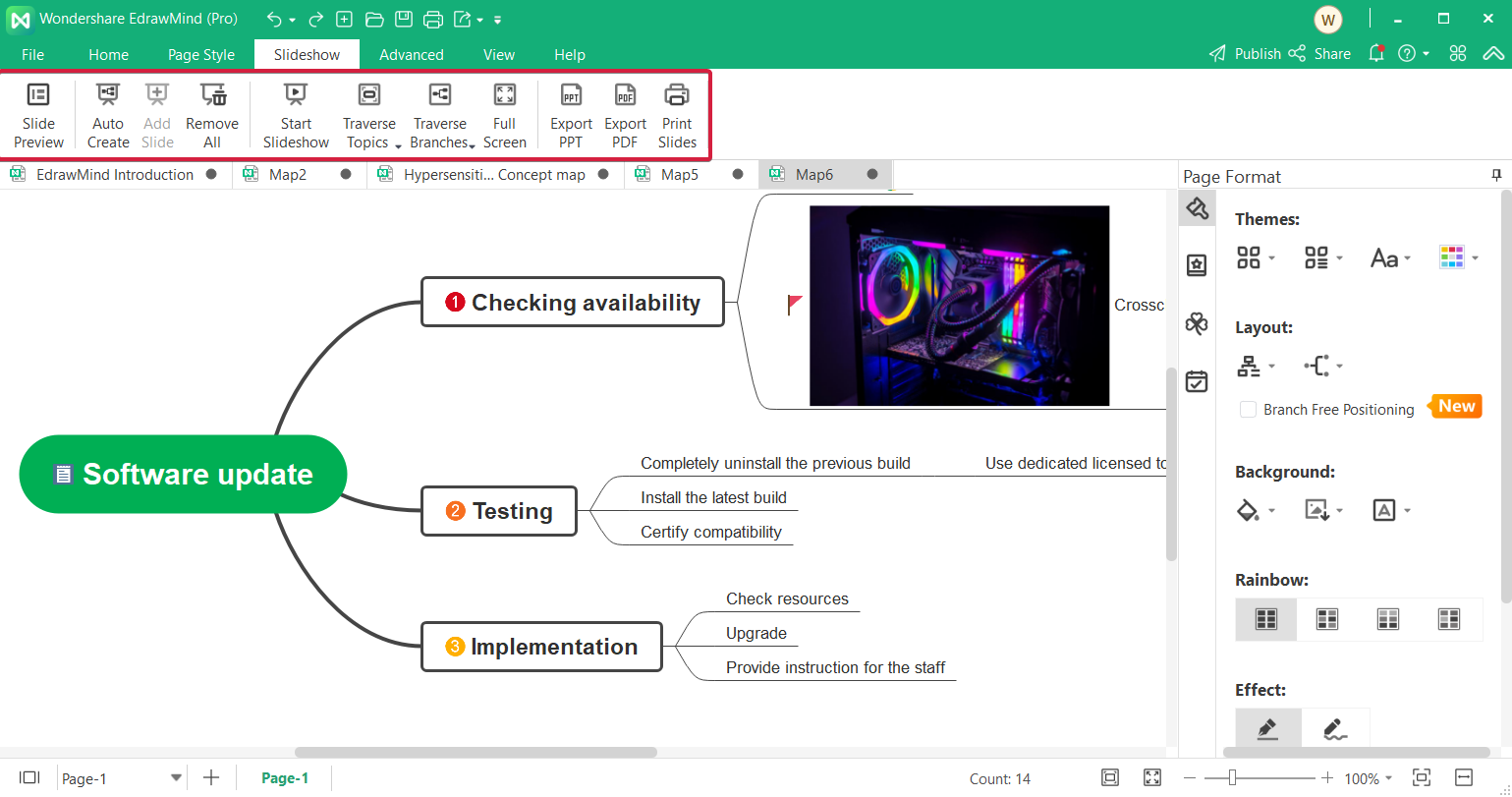
You only need to access the Slideshow tab and click the Auto Create button, then the software will automatically split the main concepts into separate slides.

Of course, you can edit the slides and their content as much as you want but you can also interact with the presentation and click on the different topics right when you show them on the big screen.

Anytime you can add more slides where you want them and restructure the content of the slide as you seem fit.

3. Use the Outline mode to add or change data quickly
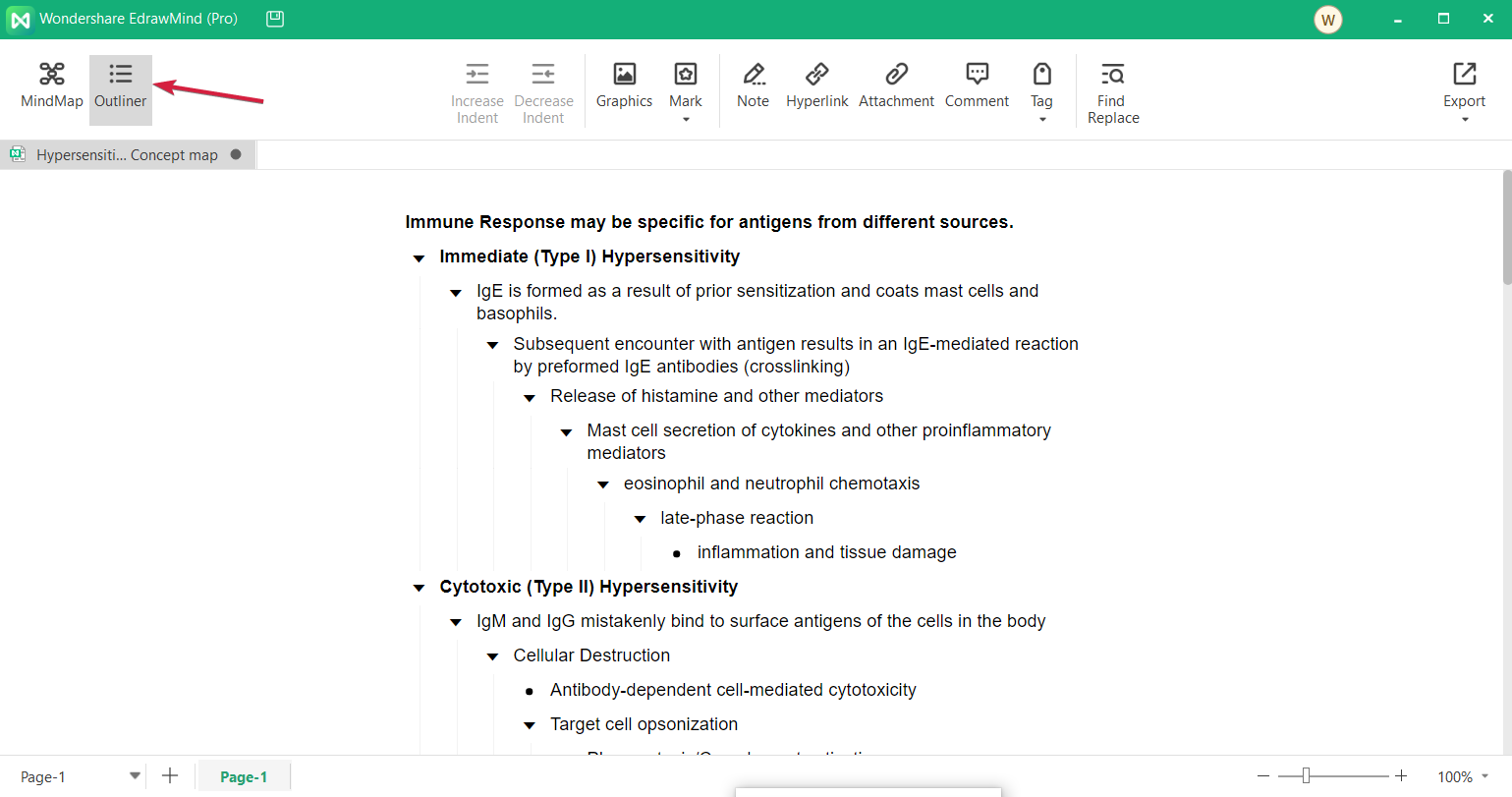
Sure, it’s simple to work directly on the mind map in its graphical representation but as your diagram grows bigger and bigger, that is going to become increasingly harder.

EdrawMind makes it a lot easier to work on your mind map by using a feature called the Outliner mode.

Just click on Outliner when you’re in your mind map and you will find the same structure but here, you will only see the text organized as a logical indented mode.

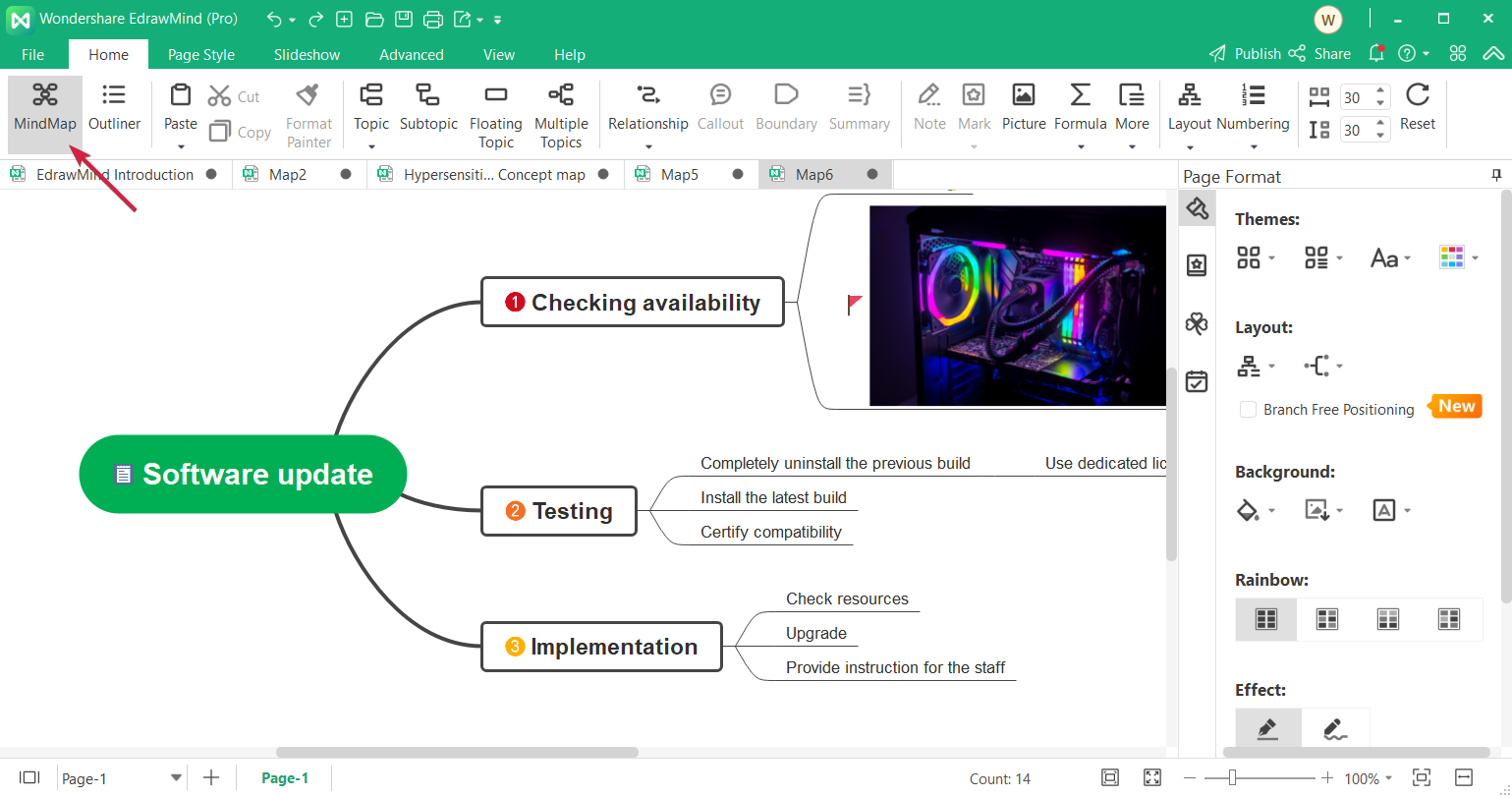
You will find it intuitive to add the content here, then switch to the MindMap mode to switch to its graphical representation.

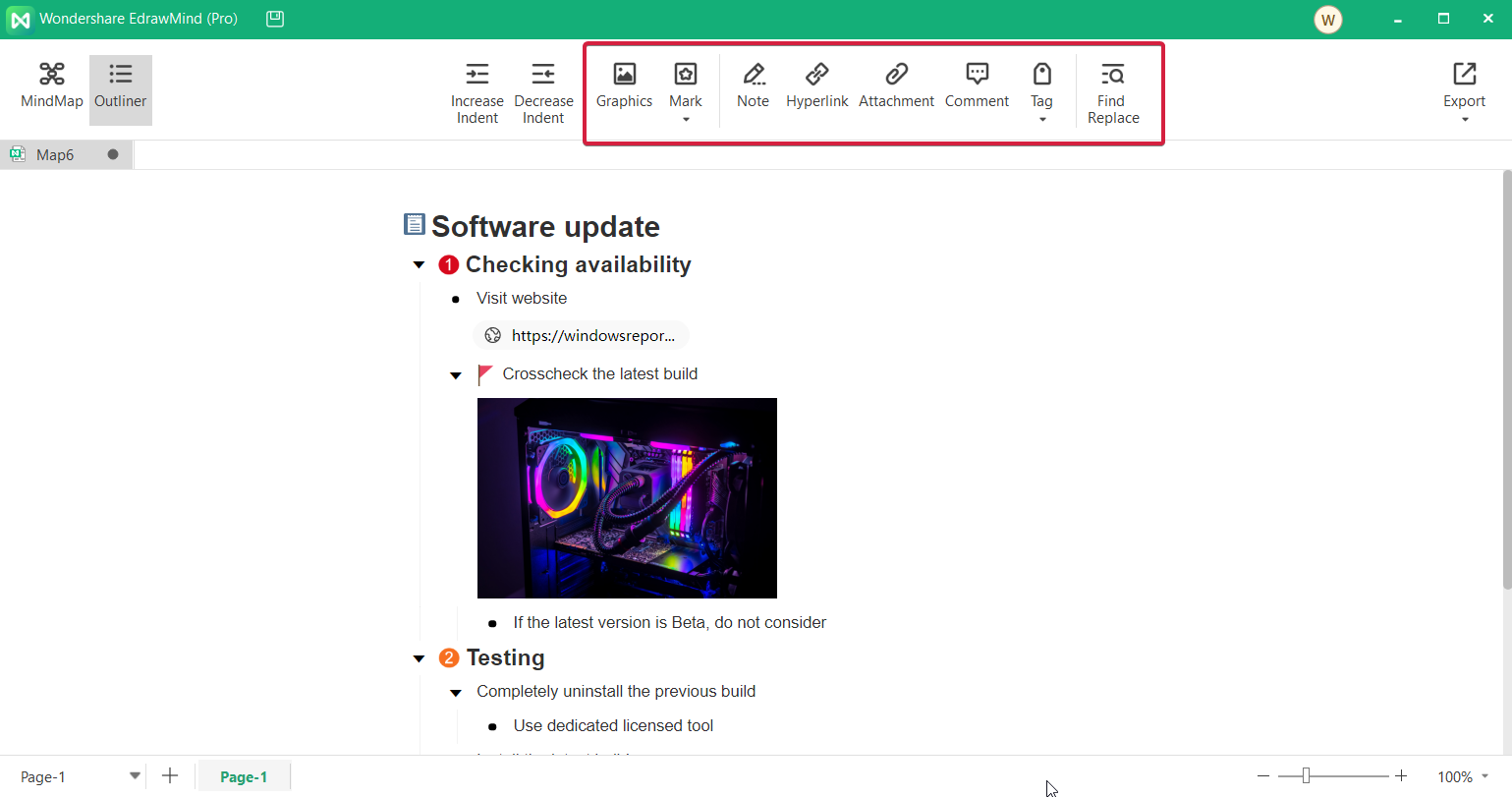
And the tools displayed on top will help you quickly change the indentations, add graphics, images, hyperlinks, tags, and even replace words in the diagram.

4. Use the Brainstorming mode for collaboration
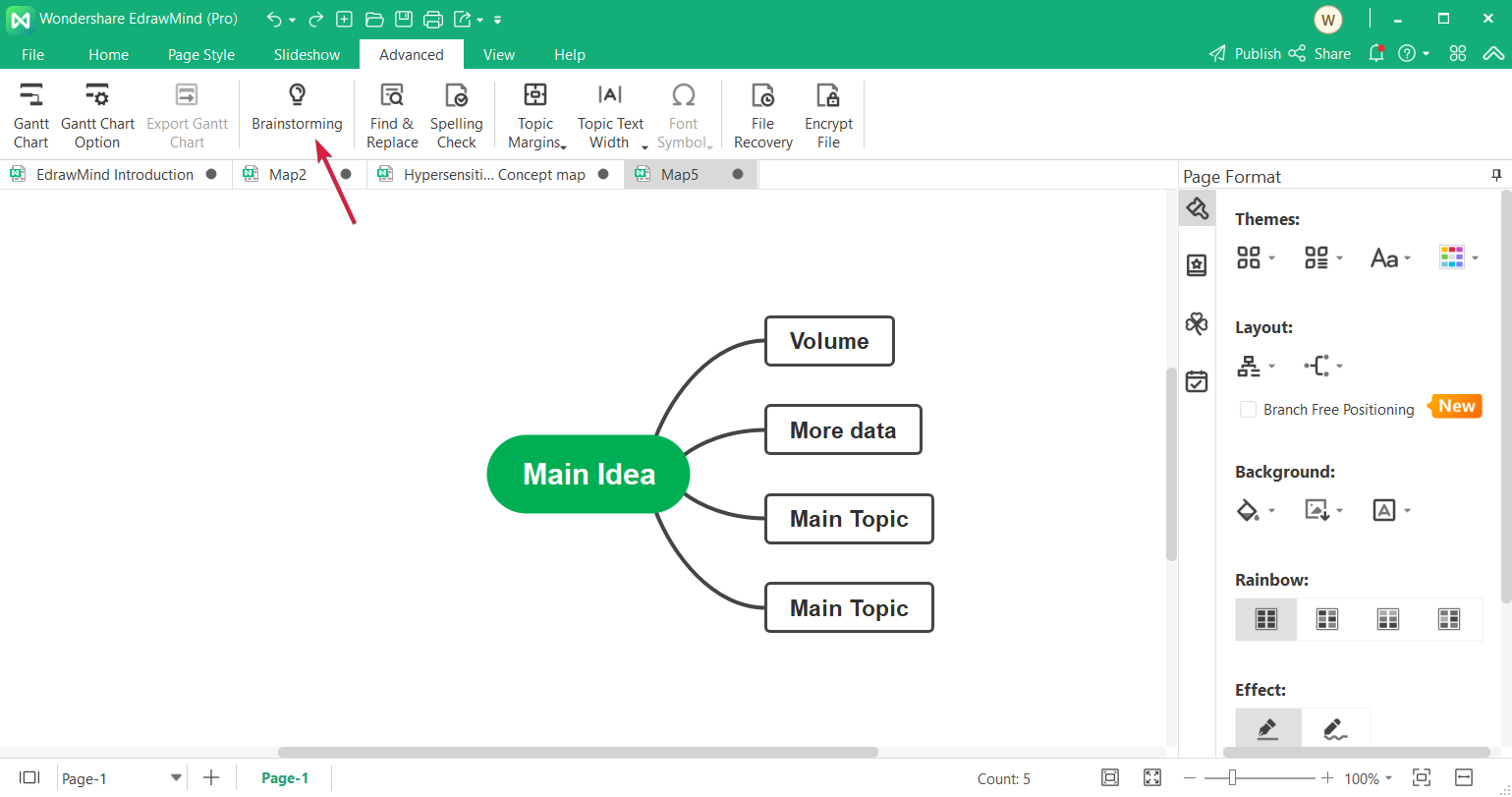
The most interesting aspect of mind mapping comes from developing and growing an idea, a concept, and although you can do it alone, collaboration is key.

That’s why Wondershare EdrawMind also comes with a Brainstorming mode that you can access whenever you’re working on a mind map.

Clicking on the Brainstorming button triggers a full-screen mode so that everybody can see the graphical representation and add concepts on the board.

You can color-code each concept and add them right into your mind map by simply dragging and dropping it onto the board, connect it to other ideas and grow the mind map.

It’s so simple to use it that you won’t need to concentrate on clicks and styling and concentrate on discussing the concept with your peers.

And within the online edition, you can also collaborate with them in real-time, wherever they are in the world if they only have an Internet connection.

5. Extensive compatibility

If you have older mind maps created with other tools or someone sends you such files, you need to know that EdrawMind will be able to convert them right away.

So, you can also import MindManager, XMind, EdrawMax, FreeMind, Markdown, HTML, and Word files but Wondershare warns you that they are not 100% compatible.

That’s because some symbols, clipart, and images may be different in other software but we didn’t have any troubles so far.

It’s also important to know that after you finish your mind map, you can export it as images, PDF, or Office documents, as HTML, and even as an SVG or MindManager file.

6. Create Gantt charts with just a click
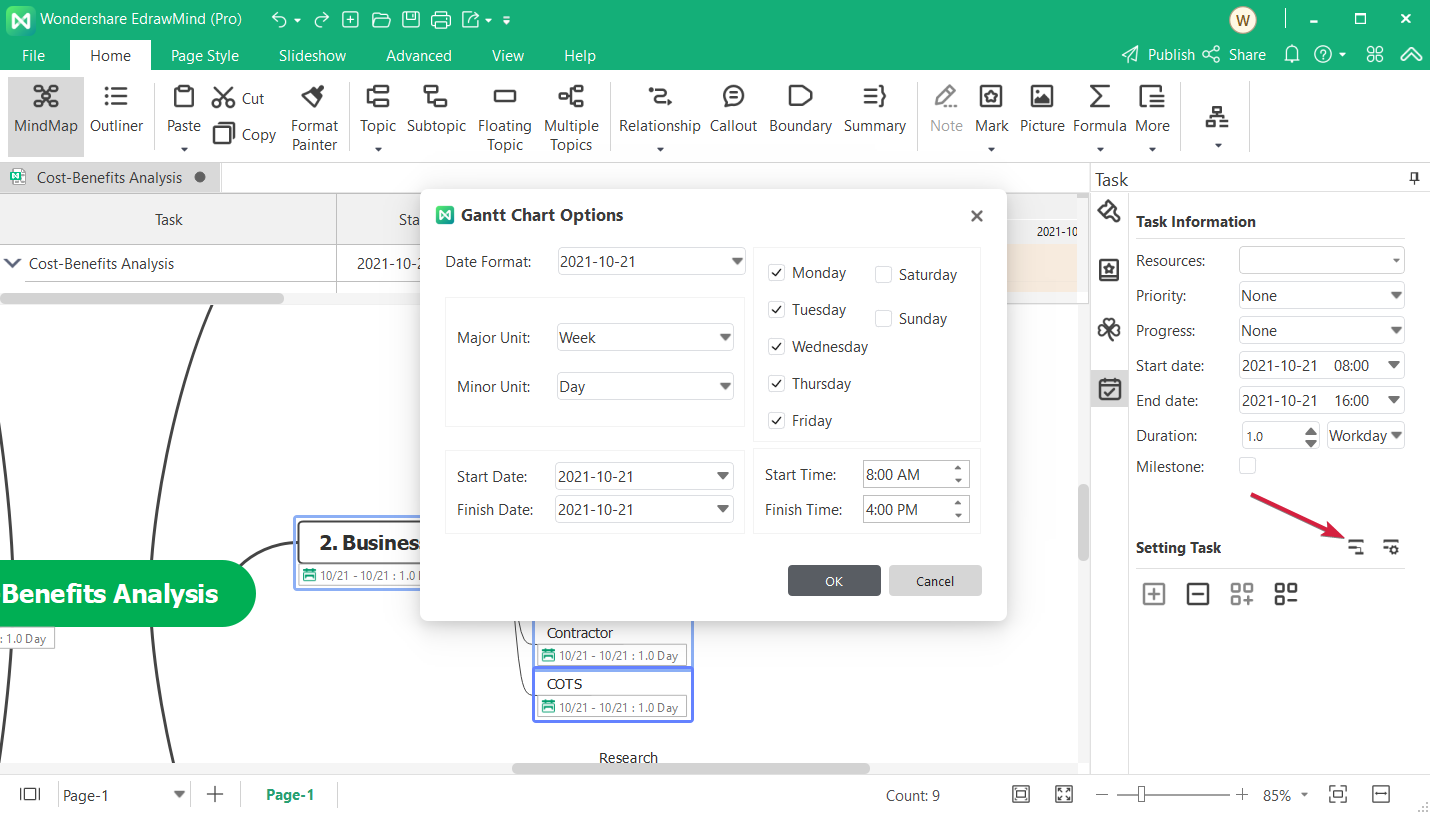
If you’re creating a business organization chart, you can always add tasks by transforming your mind map into a Gantt chart extremely easily.

In any mind map, you can go to the tasks menu and click on the dedicated button to create a Gantt chart from the mind map.

All you need now is to fill the table with the time, date, and duration for the tasks. You don’t need to transform all the mind map. You can just select the branches you need with your mouse.

This can save you a lot of time in the process and you will have all the data conveniently stored, then share it with your staff.

How can I create a mind map using Outline in EdrawMind?

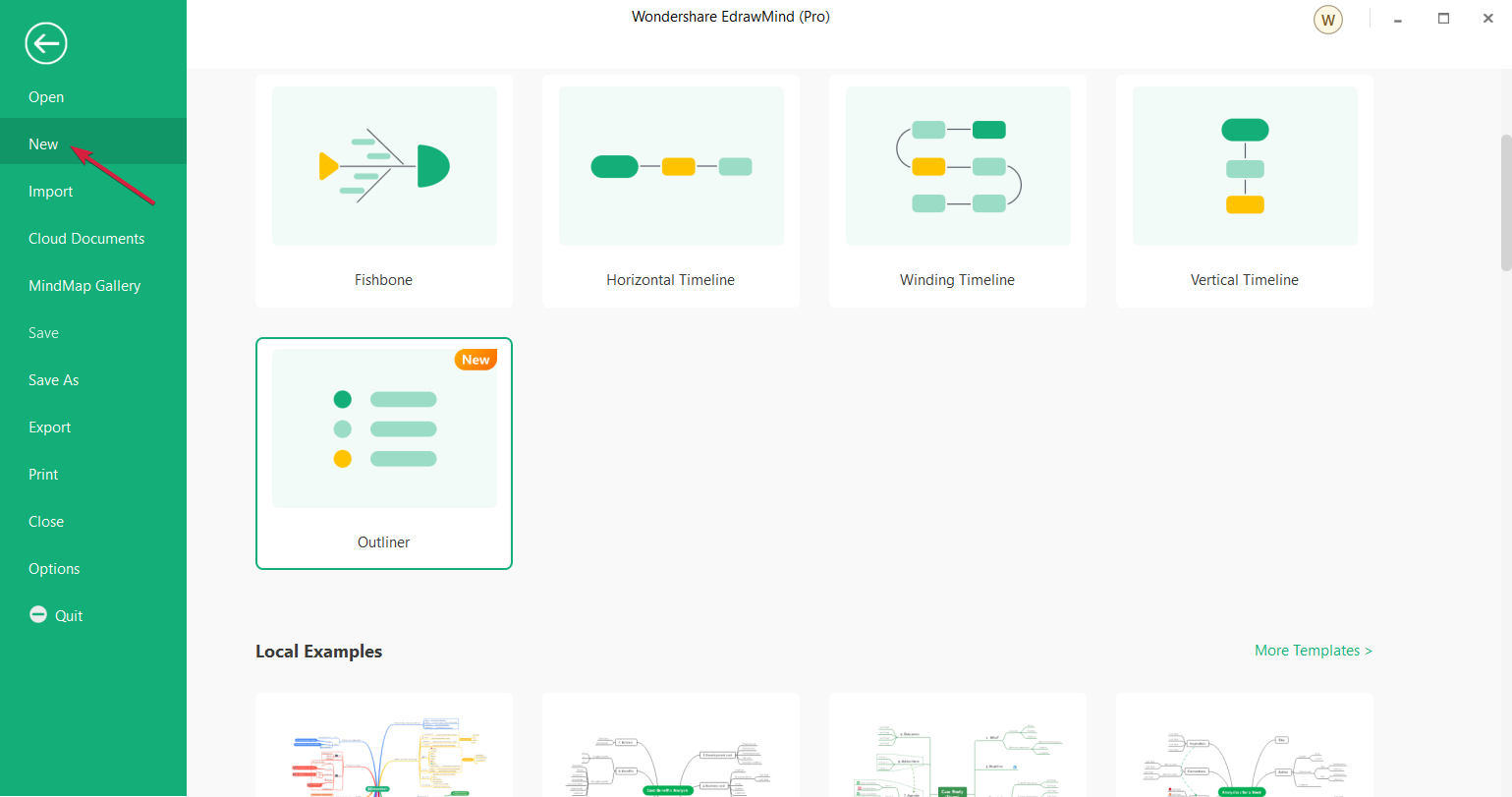
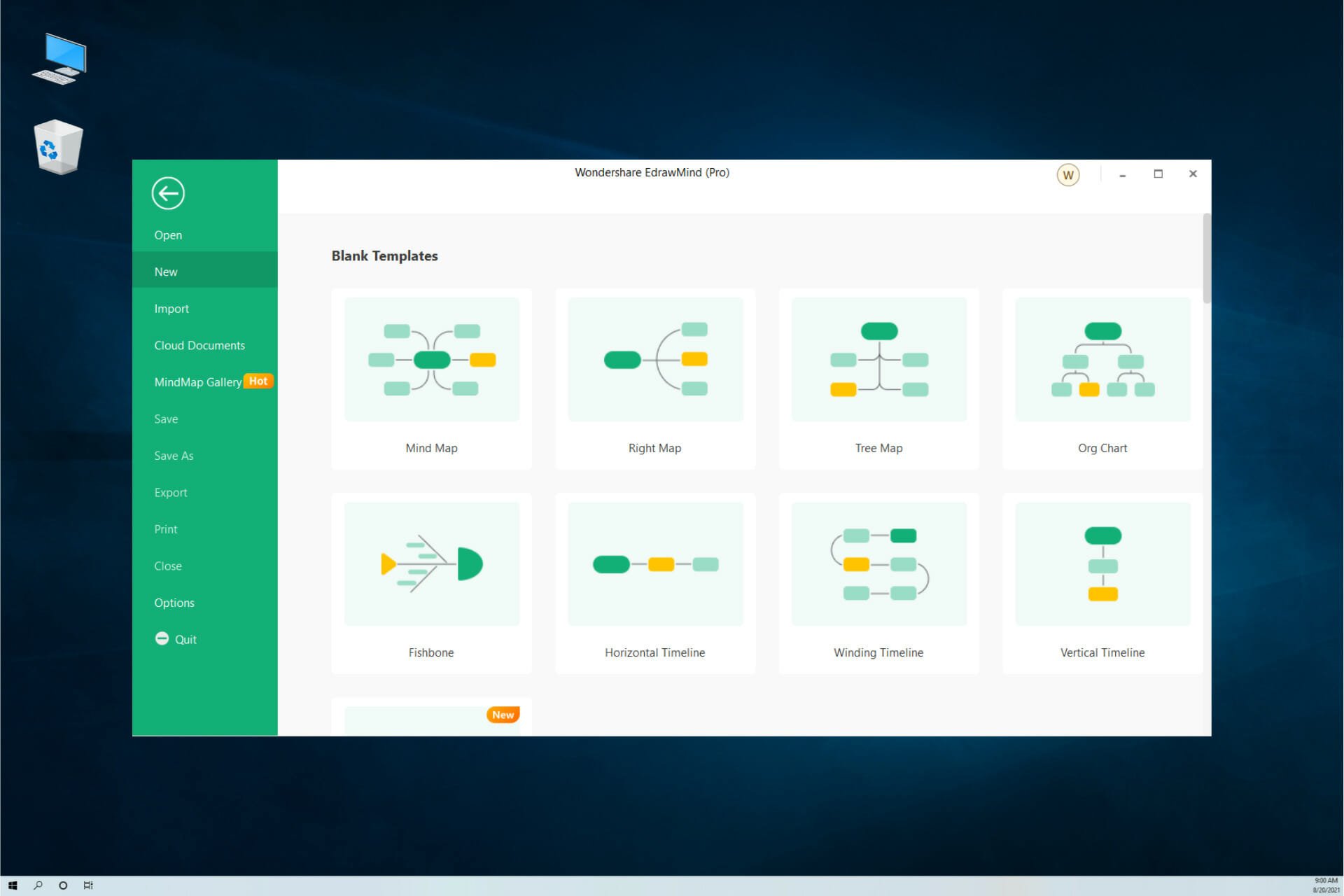
  1. Open EdrawMind and click on New.
  2. Now you can select a structure from the ones available and if you scroll down, you will see some local examples. We chose Outliner because it’s the easiest and quickest mode to get to the desired result.
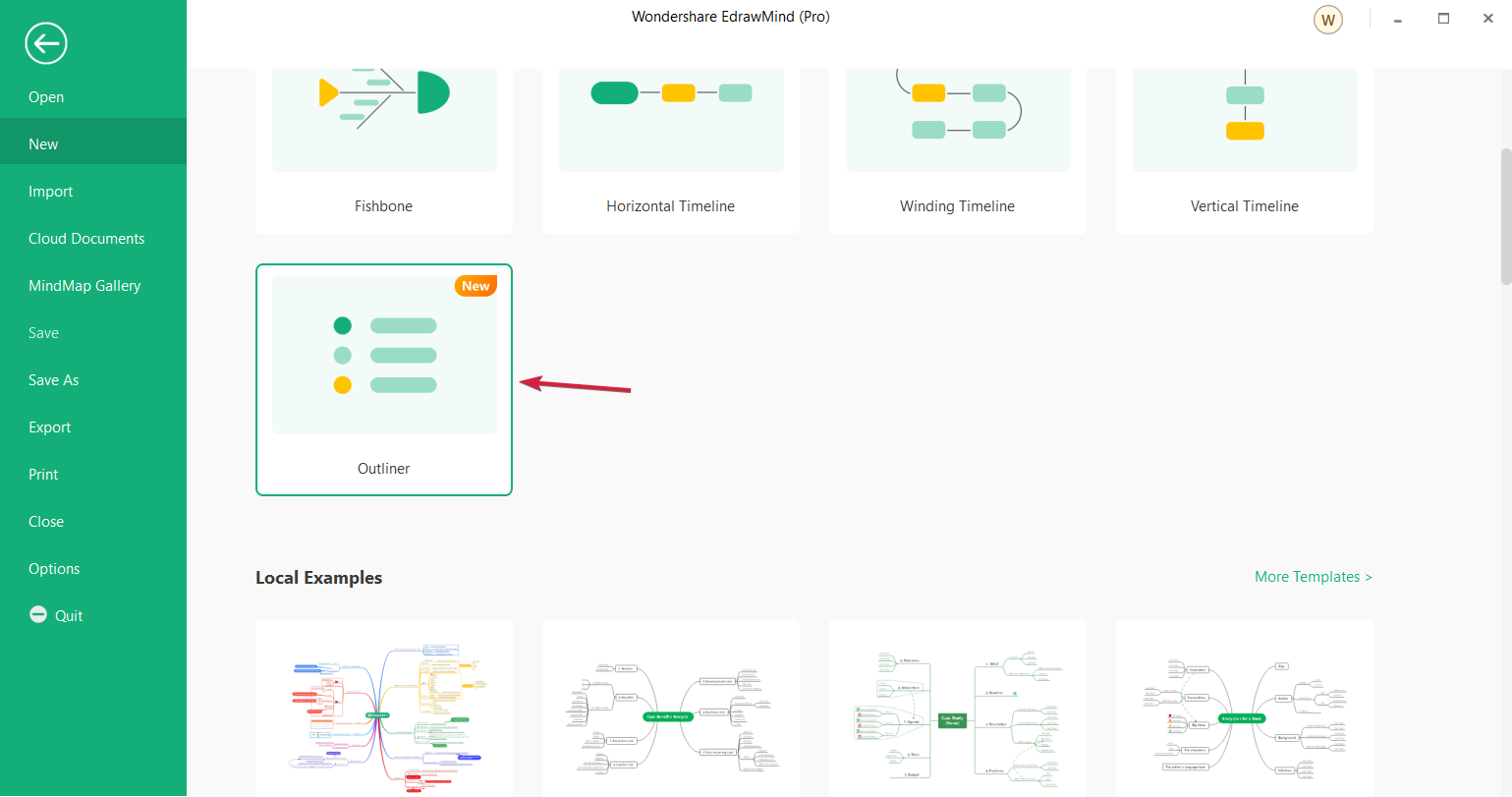
  3. Next, start working on your concept by simply developing around the main idea. In our example, we’ve outlined the basic steps to upgrade a software program in an organization.
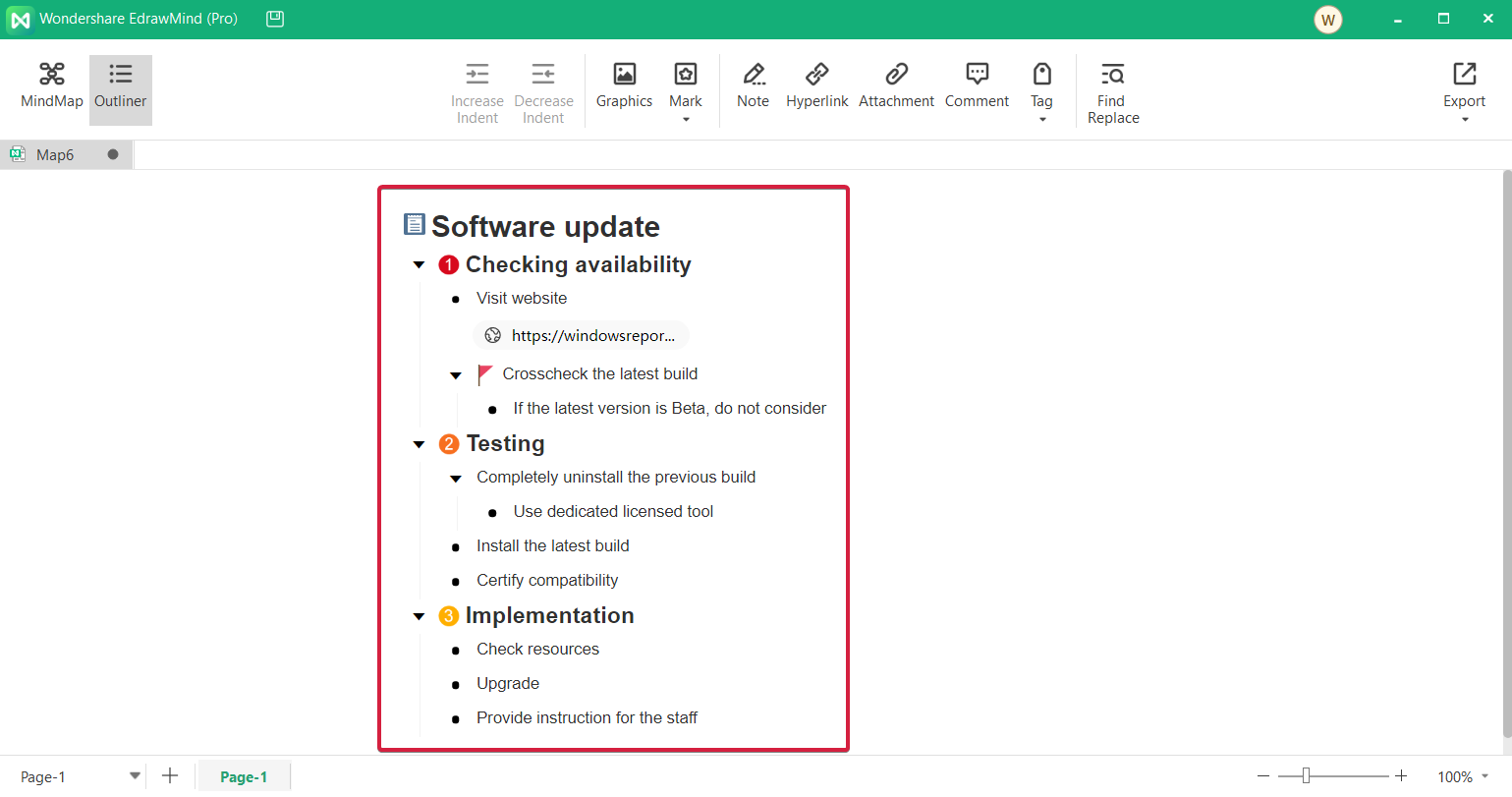
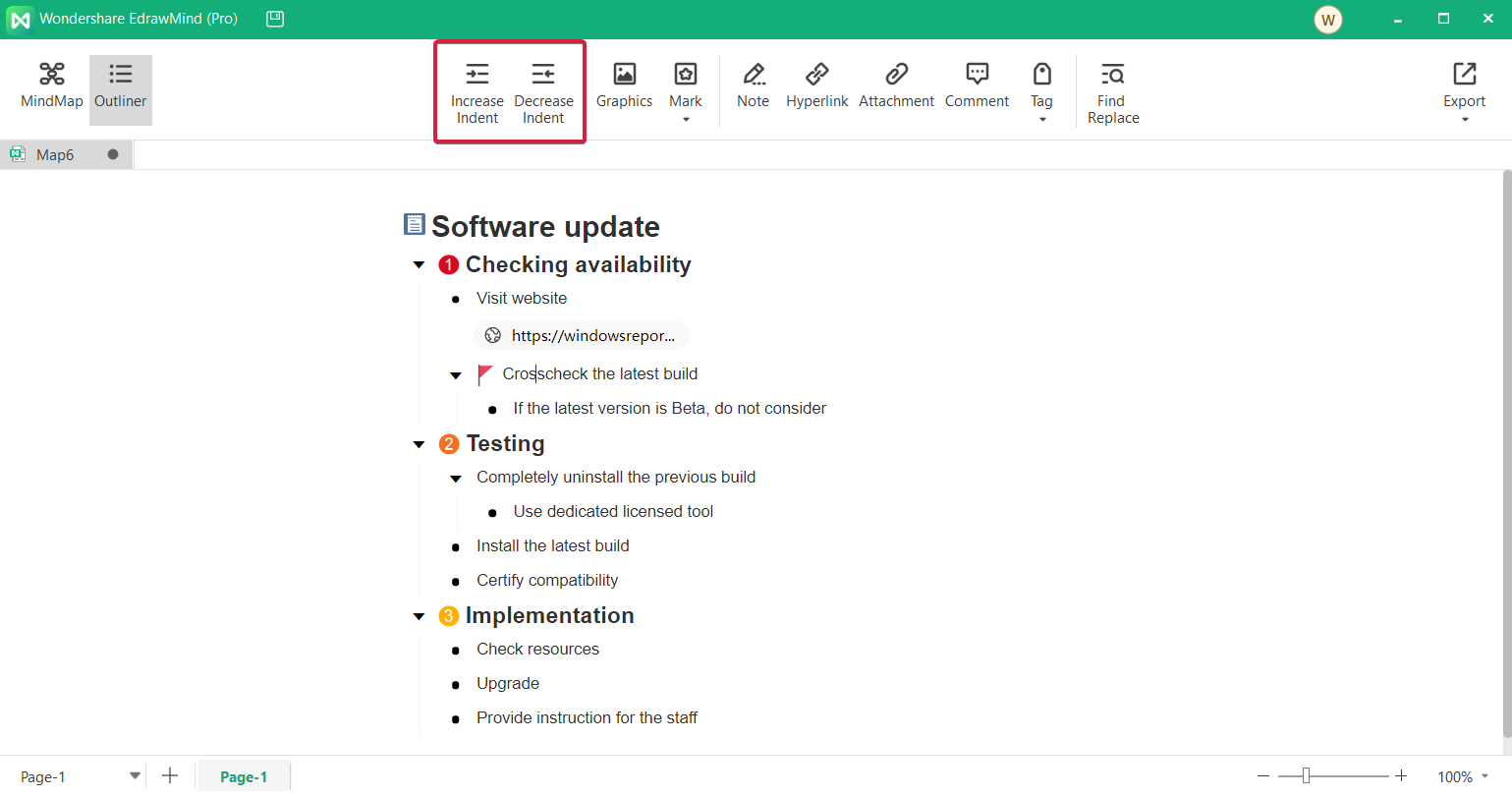
  4. The map in the Outliner mode is like a simple bulleted list so you can increase or decrease the indent of an element in the list by clicking on the dedicated buttons from the toolbar.
  5. As you can see in our screenshot, you can also add images, notes, marks and tags, hyperlinks or quickly replace one or more words.
  6. Once you’ve structured your data, you can click the MindMap button from the top left corner to see its graphical representation.
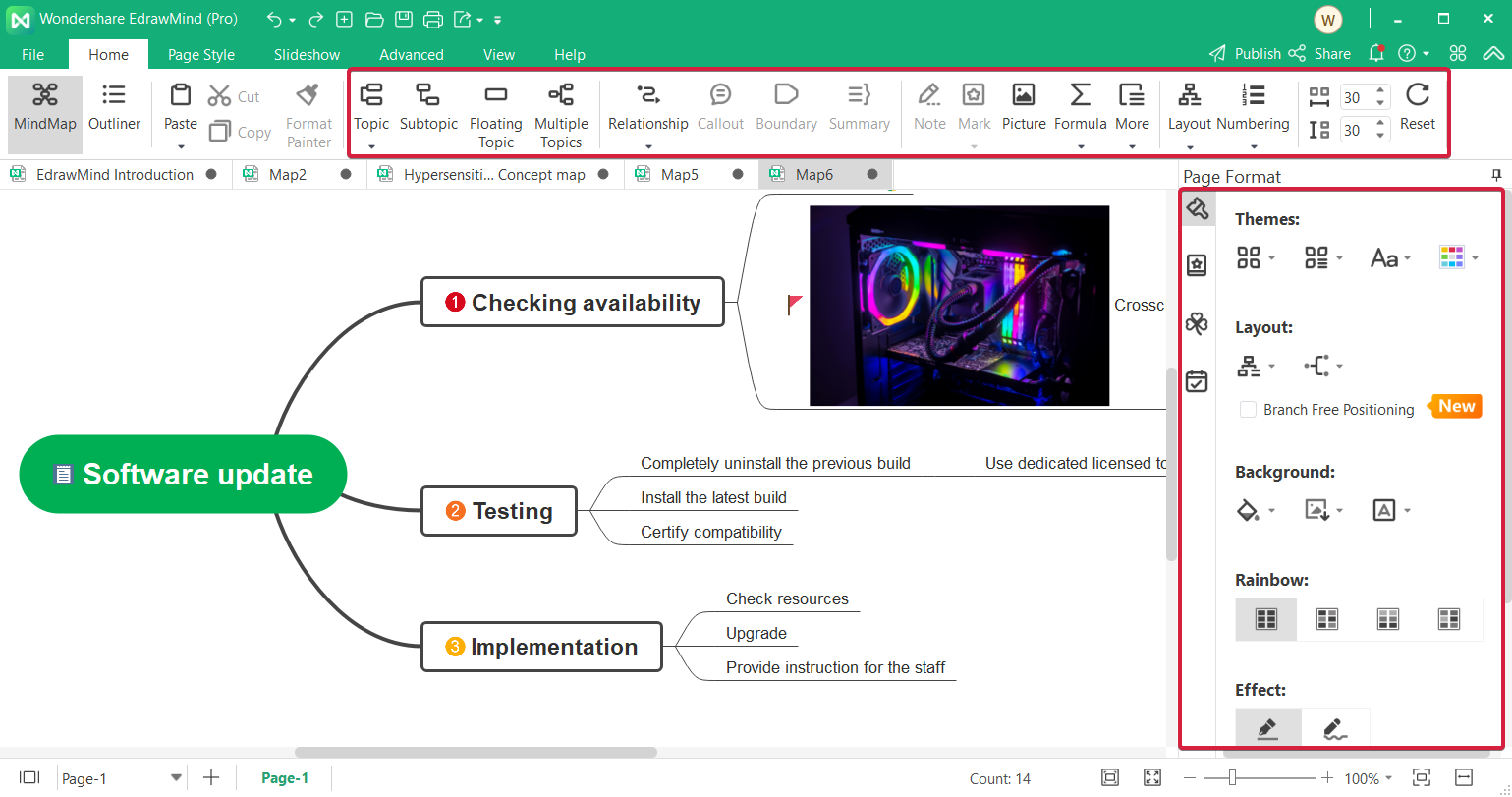
  7. Of course, you can also use the toolbar from the top or the toolbox from the right to work on the mind map design, shape and structure.
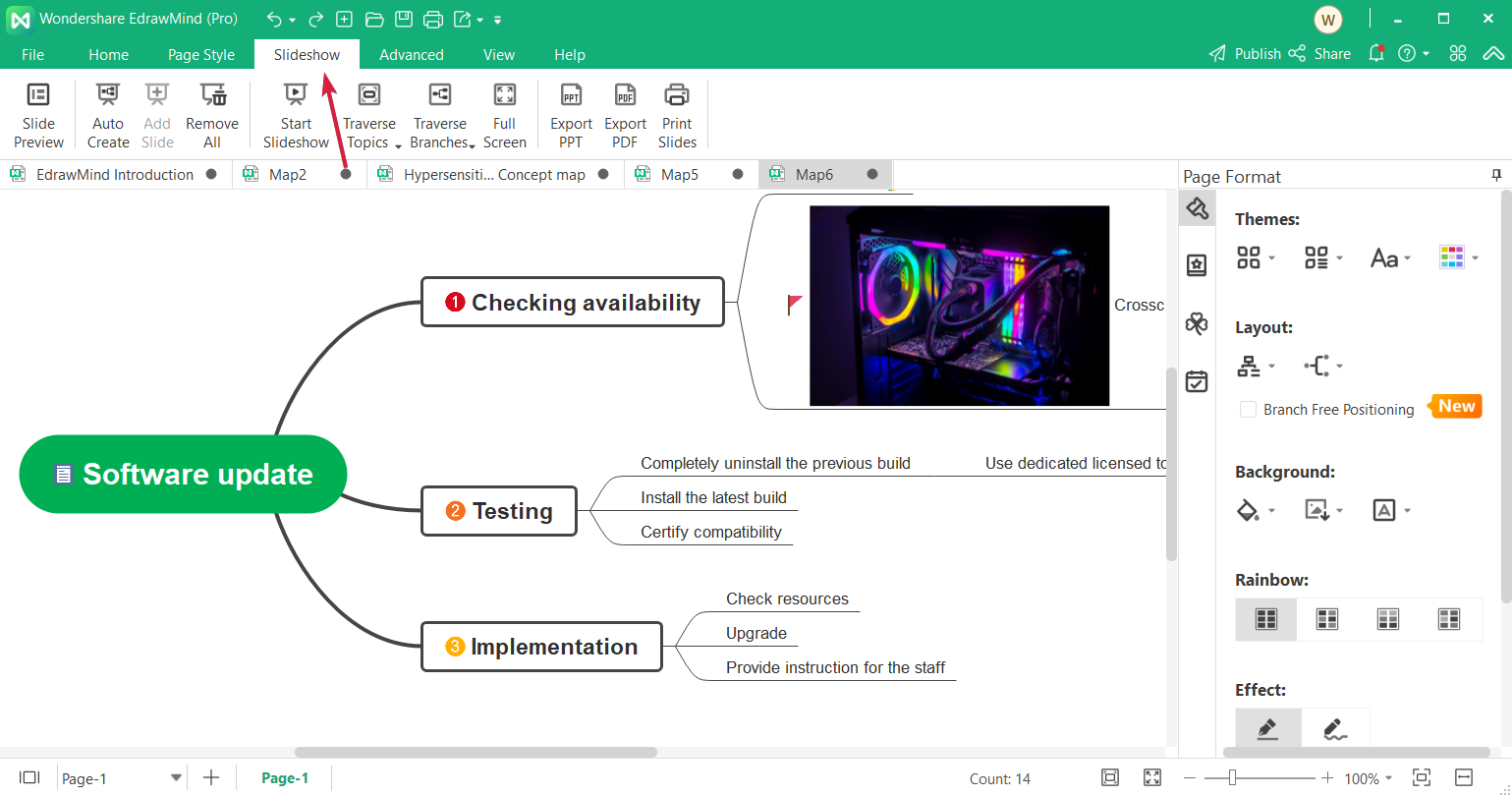
  8. But after you finish, you can also do a lot of things with it. For instance, you can create a presentation of your mind map. For that, you need to click the Slideshow option.
  9. There are a lot of functions inside but we mostly played with AutoCreate, Traverse Topics, and Traverse Branches.
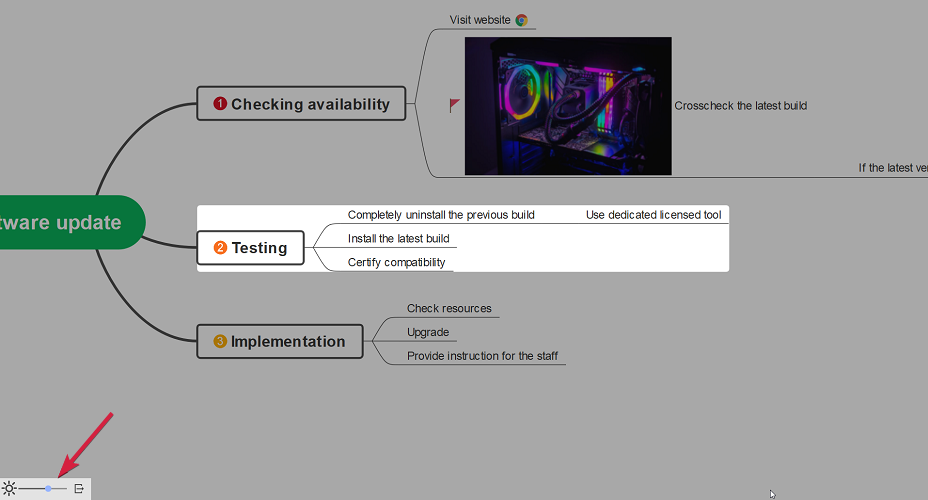
  10. We already explained AutoCreate, that helps you automatically produce a presentation. Traverse Topics and Branches will highlight the titles and branches and, in the presentation, clicking on the screen will switch to the next. You can also change the level of contrast from the lower left button.
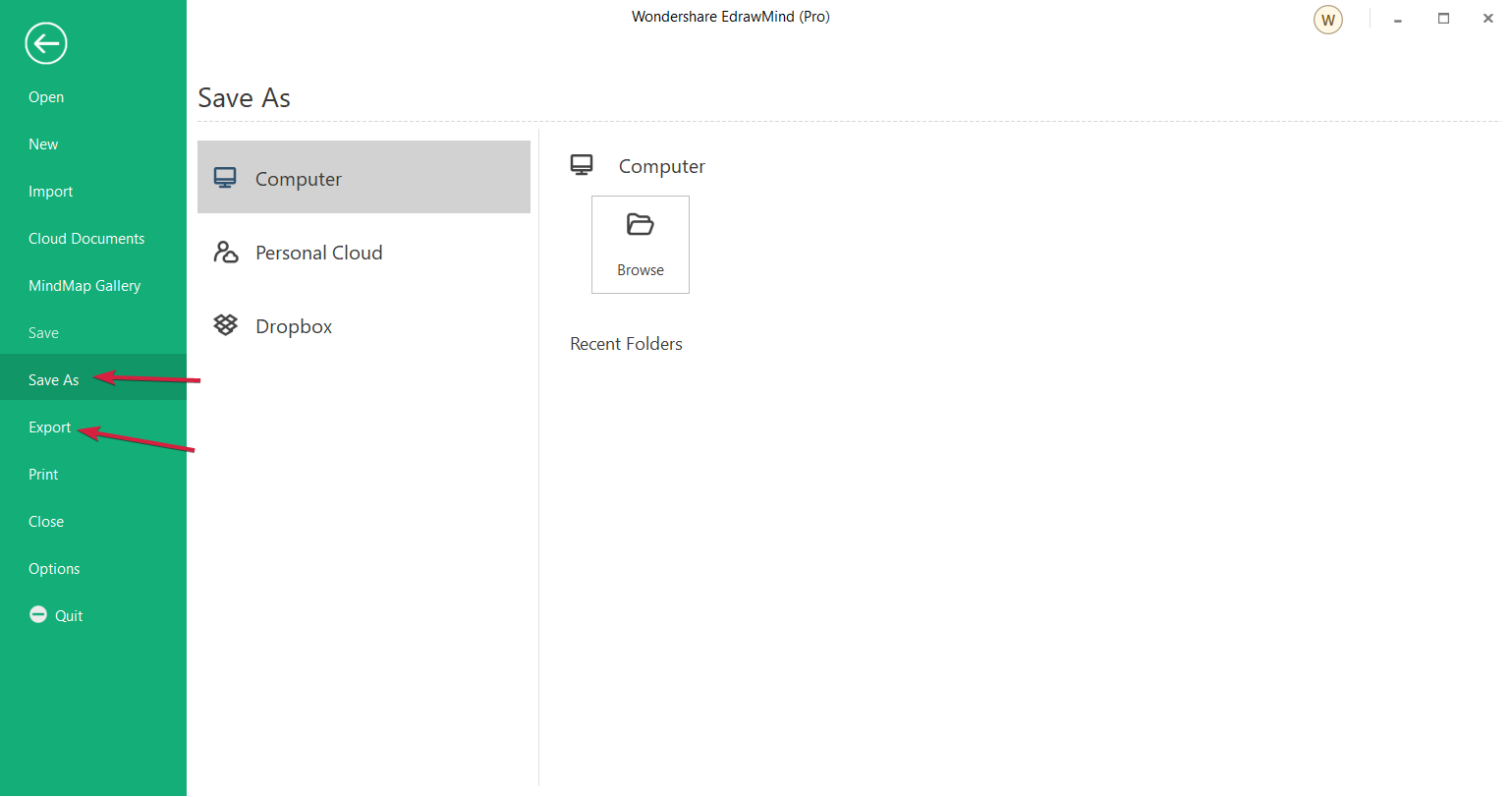
  11. Don’t forget to click the File button then select Save as or Export to save your finished project.
How to get Wondershare EdrawMind?

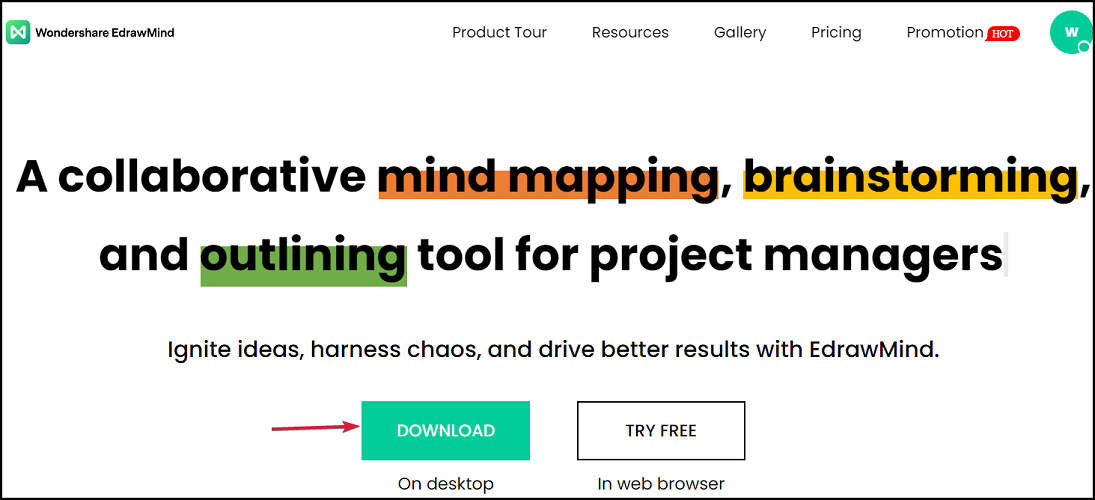
  1. Go to the EdrawMind dedicated webpage and click the Download button. As you can see in our screenshot, you can also try it in the browser.
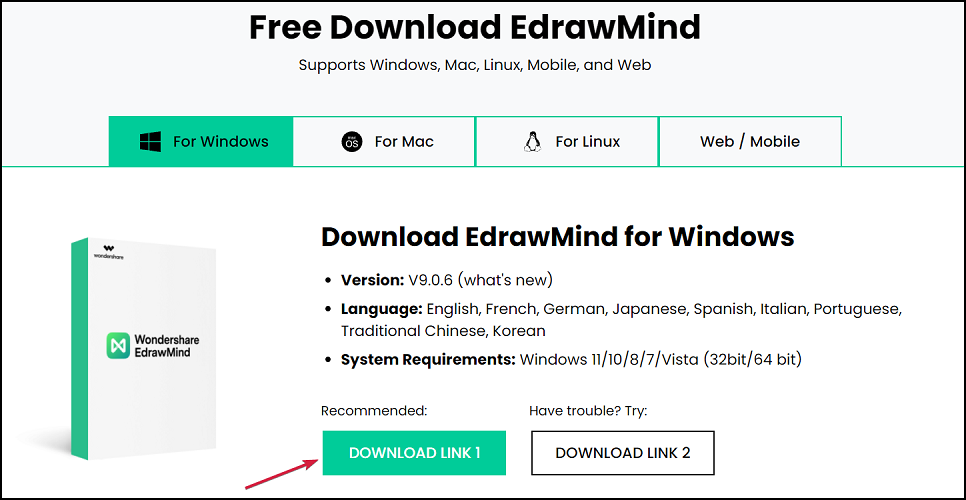
  2. Now click on Download Link 1. If that dowsn’t work, you can also click the mirror link but the first worked fine for us.
  3. The installer will download and running it right after will start installing the software on your computer.
  4. Now you only need to start the app.

You’re set to use the software now but we must remind you that you can also use the online version. You only need to create an account on the EdrawMind page.

In fact, we recommend creating an account anyway because you will be able to collaborate with your peers and save your mind maps on your cloud account and access them from everywhere in the world.

It’s very convenient because the software is available on Windows, macOS, Linux, Android, iOS, and Web so basically you can use it on any platform.
 Wondershare EdrawMind

Wondershare EdrawMind

Create your mind maps and present them with style using this premium tool!
Free trial Visit website
Pros
Simple and comprehensive user interface
Plenty of mind map structures to choose from
Compatible with Windows, macOS, Android, Linux and iOS devices
Outliner and Brainstorming modes
33 themes and over 700 clipart images to personalize your mind map
Cons
Not 100% compatible with other mind mapping software

Final notes

Usually, software tools that use the graphical interface are a bit demanding on the resources side, but EdrawMind worked seamlessly along with a lot of other tools.

Then, we discovered that the interface is really intuitive. Although we didn’t do much mind mapping before, we’ve worked our way to a great presentation in the end.

Our example is indeed pretty simple but you can go to more complex branching as the concept develops.

It’s also extremely nice that you can collaborate on ideas online and find a lot of themes that other users created so you can get inspired.

We hope that you found our Wondershare EdrawMind helpful and that you will give it a try.

And if you do, share your experience and impressions in a comment on the dedicated section below.

Microsoft finally brings Visual Studio Code to the browser

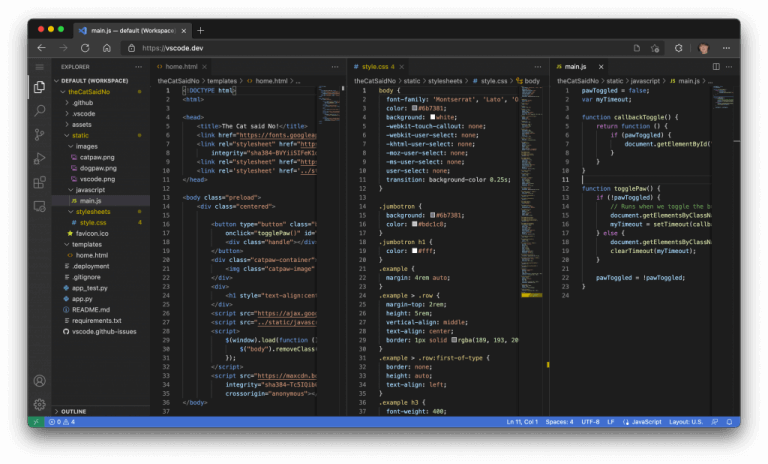
Microsoft has officially announced that Visual Studio Code, the company’s cross-platform Integrated Development Environment (IDE), is now available within a browser. vscode.dev offers a lightweight version of VS Code running fully in the browser. You can open a folder on your local machine and start coding without installing anything.

Déjà vu? Well, in August this year, an official Microsoft announcement about the same was posted by mistake and while it was deleted in quick time, a working version of vscode.dev was still available online for quite a while at the time.

VS Code on the Web works on modern browsers that support the File System Access API (Microsoft Edge and Google Chrome) that allows web pages to access the local file system. This gateway to the local machine allows for local file viewing and editing, building client-side applications, as well as editing your code on devices like Chromebooks and iPad. However, even if your browser doesn’t support local file system APIs, you’ll still be able to open individual files by uploading and downloading them via the browser.

VS Code on the Web

Since VS Code for the Web is running completely within the browser, some experiences are constrained – for example, the terminal and debugger are not available, and the code editing, navigation, and browsing too are powered by language services running fully in the browser instead of compilers that expect a file system, runtime, and compute environment.

For most programming languages, vscode.dev gives you code syntax colorization, text-based completions, and bracket pair colorization. The TypeScript, JavaScript, and Python experiences are all powered by language services that run natively in the browser and hence you also get rich single file completions, semantic highlighting, syntax errors, and more. However, for many “webby” languages, such as JSON, HTML, CSS, and LESS, the coding experience in vscode.dev is nearly identical to the desktop.

That said, most UI customization extensions such as themes, key maps, and snippets all work in vscode.dev and you can even enable roaming between the browser, the desktop, and GitHub Codespaces through Settings Sync.

VS Code on the Web is an ephemeral editor that is available to anyone with a browser and an internet connection and is the foundation of Microsoft’s vision for fully serverless development tool.

Partition Manager Software: 7 Best to Use in 2026

A drive partition is a separate region of a hard disk. By default, your hard disk is on C: drive, but you can split it up into smaller ones with partition manager software.

The advantage of partitioning a drive is that you can separate user files from the OS files. Additional partitions can be handy for multi-boot setups with alternative operating systems on separate partitions.

Although Windows 10 does include partitioning tools, third-party partition manager utilities have more extensive options.

There are plenty of benefits that come with good partition management. You get to create the best possible disk space optimization to ensure your OS and application function at full capacity.

Having multiple disk partitions allow you to run multiple operating systems on your computer.

Dedicated software usually creates a better user experience by enabling you to follow intuitive step-by-step operations. 

On top of that, partition management softwares are configured to ensure maximum safety when it comes to preventing errors and data loss. Manually managing your disks is a little bit riskier.

If created incorrectly, a hard disk partition can actually decrease the functionality of your PC and make it run slower. This often happens when you use multiple partitions for similar files and thus duplicate some essential system files.

These are some of the more notable partition manager software packages for Windows 10.

What is the best partition manager for Windows 10?

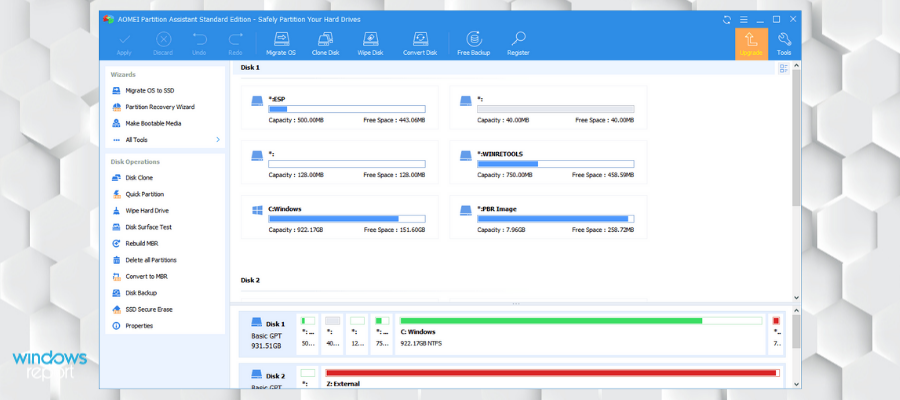
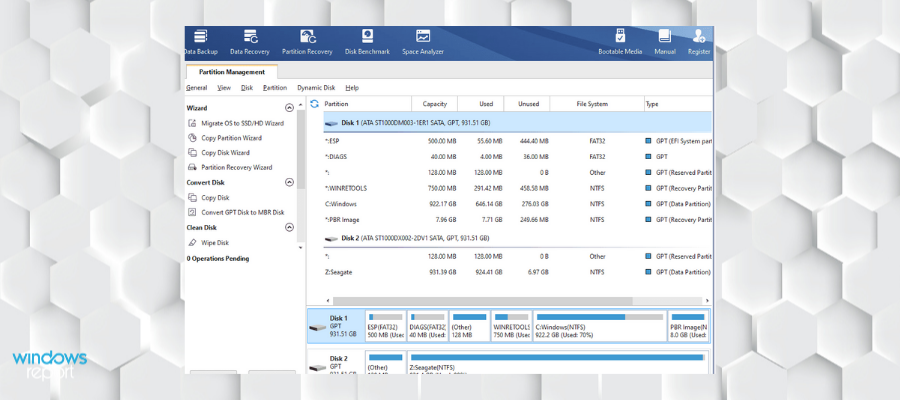
AOMEI Partition Assistant

aomei hard disk partiton manager

AOMEI Partition Assistant is another third-party package that provides a great alternative to Windows 10’s Disk Management tool.

It has a fairly extensive freeware version, but you can also upgrade to Professional, Server, Unlimited or Technician editions if required.

AOMEI Partition Assistant is chock-a-block with partition management wizards.

For example, users can select Disk Copy, Partition Copy, Partition Recovery, Migrate OS to SSD and Extend Partition wizards from the software’s sidebar.

Below those you can select a variety of options for copying, merging, creating, splitting, moving, formatting, and deleting partitions.

Its Quick Partition option is a great addition that enables users to re-partition a hard disk in just a few clicks. This software also enables users to queue multiple operations that they can then execute simultaneously.

The software also allows complete disk conversion from MBR to GPT, dynamic disk to basic disk and vice versa, and also file system conversion between NTFS and FAT32. All conversions are done without any loss of data.

Aomei Partition Assistant also comes with a recovery tool that can find lost files and partitions.

Other key features of Aomei Partition Assistant include:

  • Data protection feature
  • Permanent technical support
  • Data migration support

The software comes in different versions, starting from standard-personal use packs and ending with full-featured professional versions created for MSPs.

AOMEI Partition Assistant

Automated disk splitting and recovery that queues multiple operations that can then be executed simultaneously.
Check price Visit website

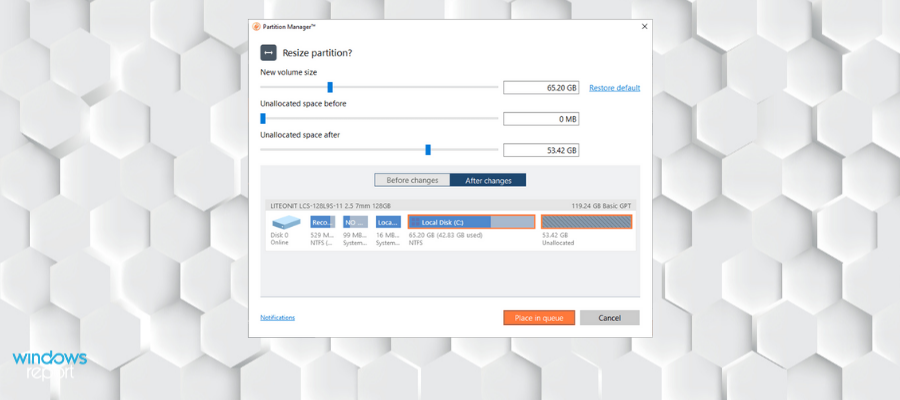
Paragon Partition Manager

Paragon Partition Manager 15 is a good all-in-one choice for partitioning hard drives.

Aside from all its partitioning options, it also includes backup and restores tools so that users can back up files and clone entire hard disks.

The software has freeware, Home and Professional version. With the freeware version users can create, format, move, resize and delete partitions.

If you upgrade to the Home edition, you can split and merge partitions and redistribute free space to increase partition storage.

The Home and Pro versions also have a handy boot manager that enables you to choose an OS to boot with and set up OS parameters.

Paragon Partition Manager also has an intuitive UI reminiscent of the Windows 10 Start screen. The Express Launcher has tiles that provide easy access to the software’s wizards and utilities.

Paragon has several conversion options including logical partition to primary partition, HFS volume to NTFS without reformatting, and MBR to GPT.

It also offers support for safe operating system migration to another HDD or SSD. You don’t need to reinstall or reboot your OS.

Other key features include:

  • Data recovery with the undelete feature
  • Expand already existing partitions
  • Identifies and fixes errors

Partitioning hard disks is a breeze with the Split Partition Wizard.

Paragon Partition Manager

Create, manage and recover partitions with intuitive tools that save you a lot of time.
Free trial Visit website

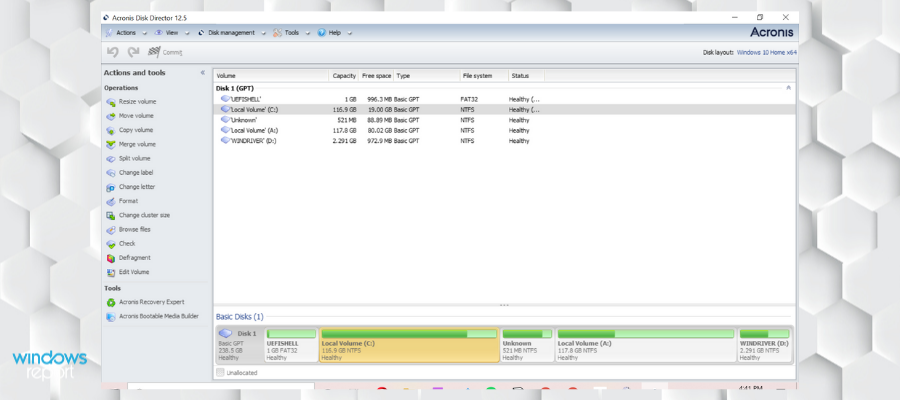
Acronis Disk Director

Acronis provides powerful disk management controls under a simple and intuitive user interface. The aim is to maximize functionality without requiring much technical knowledge.

This tool lets you create partitions and set them up to fully benefit your specific needs. You can label, format, and activate your partitions in just a few clicks. The process is completely safe and error-proof.

Acronis Disk Director offers advanced format options that let you easily adapt your drive to the correct file system. It works with FAT16, FAT32. NTFS, Ext2, EXt3, Reiser, and Linux SWAP.

Another useful feature that can improve disk performance and data storage is the disk converter. Acronis Disk Director can convert basic disks to dynamic disks without any loss of data or errors. 

On the topic of data security, this utility also provides a recovery tool. The Acronis Recovery Expert scans and recovers deleted or damaged volumes. 

This software has an easy-to-follow disk cloning wizard. This is very useful as allows you to replace old MBR disks with new ones without requiring you to reinstall the operating system and vital applications.

Other key features of Acronis Disk Director include:

  • UEFI suupport
  • Boot from CD/DVD or USB stick
  • Add, remove, or break mirrored volumes

Acronis Disk Director is compatible with Windows operating systems starting with Windows XP. It is a licensed software with a free trial version with no expiration date. 

Acronis Disk Director

Acronis Disk Director

Manage your partitions and optimize the functionality of your PC with this comprehensive tool that guarantees a seamless and secure experience.
Free trialVisit website

Tenorshare Partition Manager

Tenorshare Partition Manager is another viable option that offers assisted support for general tasks such as disk creation, disk deletion, clone, split, format, resize, and more. It is also equipped with additional, more advanced features that help users take full control of their disk settings.

The user interface is very simple with controls that are familiar to any Windows user. The design is very minimal as the main focus of this tool is its functionality.

This comprehensive tool offers an easy step-by-step partition creation process. You just have to make sure that your disk has the necessary unallocated space for a new partition.

Once you have that figured out, head to the Create tool in the main window of the software, and set your preferred parameters including name, type, file system, size, space, and more.

You can always come back and change certain parameters, as the software lets you resize your partition. If you need to allocate unused disk space elsewhere, you can easily shrink your partition. On the other hand, if you need additional space, you can easily extend it.


This tool can safely convert partitions from MBR to GPT as well as vice versa. It supports conversion for all types of file systems including FAT, NTFS, and HFS.

Moreover, when it comes to HDD interfaces, Tenorshare Partition Manager can easily work with SATA, SCSI, SSSD, IEEE, and USB 3.0.

It is also compatible with all types of removable media including CDs, DVDs, external hard drives, USB drives, and more.


As previously mentioned, this software offers advanced partition customization tools. You can set partitions as active, change volume labels as well as change driver letters and paths. This allows you to create a better-organized workspace.

Other key features include:

  • Format tool to erase all data
  • Partition deletion option
  • Disk splitting feature

Tenorshare Partition Wizard has a free version that includes all the above-mentioned features (with some limitations here and there). You can buy a license for more advanced features.

Tenorshare Partition Manager

Tenorshare Partition Manager

Create, split, resize, format, and remove your partitions in just a few intuitive steps.
Free trialVisit website

Minitool Partition Wizard

MiniTool Partition Wizard’s website boasts that this utility has had more than 16 million downloads.

Even though it provides a plethora of advanced disk management tools, the program is surprisingly straightforward to use with its Actions & Wizards sidebar and color-coded partition indicators.

The software has freeware, Pro, Server, Enterprise, and Technician editions.

The freeware version has a good variety of options for resizing, splitting, aligning, moving, creating, deleting, and formatting basic partitions.

However, you’ll need to upgrade to the Pro version to merge partitions and create, delete and format dynamic volumes.

MiniTool Partition Wizard is a comprehensive utility that comes with full partition controls that let you create, format, delete and copy your partitions.

Not only that, but you can use some customization features to set partitions as active or inactive, ad labels, change drive letters, change partition type IDs and even change the serial number.

The tool also offers a solution for users that worry about storing sensitive data. MiniTool lest you hide/unhide your partition in just a few clicks so no one can access the information without you knowing about it.

The software also offers full partition properties reports and file system checks. 

Other key features of MiniTool Partition Wizard include:

  • Copy system and non-system disk
  • Migrates OS to SSD/HDD
  • Disk cleanup

The software’s Partition Recovery Wizard works like a charm and enables users to recover all partitions. MiniTool Partition Wizard also supports all hard disks such as IDE, SCSI, and external USB disks.

Minitool Partition Wizard

Minitool Partition Wizard

Advanced disk partition and disk conversion management software to guarantee optimal hard drive configuration.
Check priceVisit website

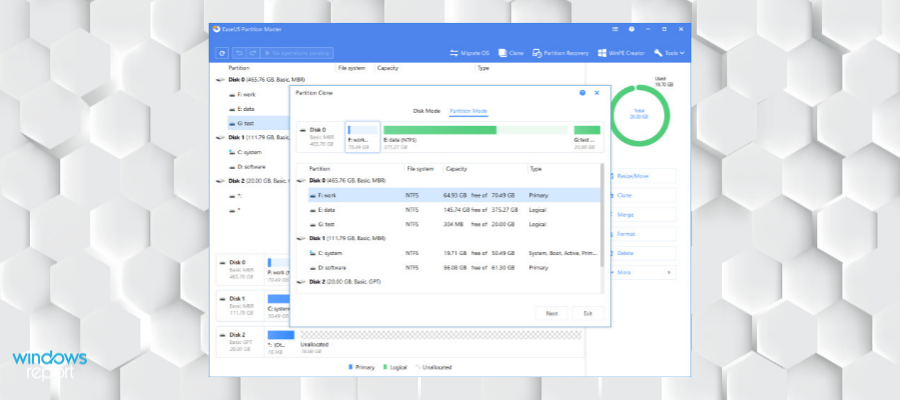
EaseUS Partition Master

ease us partition master main window banner

EaseUS Partition Master is a highly rated utility for partitioning hard disks. This also has a trial version you can add to Windows 10 by clicking the Free Trial button on this page.

However, the freeware version alone packs a lot in. With that you can resize, merge, move and split partitions. It provides you with recovery tools to restore lost partitions with.

This software provides efficient and safe disk resize settings. If you want to add more space or, on the contrary, remove some disk space, just use the resize feature.

You can slide the partition left and right until you get your optimal configuration or enter the specific size you want right away.

An additional optimization method provided by EaseUS Partition Manager is the merge partitions feature. This can solve your low disk space options by combining two small, cluttered partitions into a larger one that has the potential to run smoother.

The utility is also a safe environment for converting disks from MBR to GPT and vice versa without losing any data. It can also safely convert the file systems from FAT32 to NTFS.

EaseUS Partition Manager also lets you clone your Windows 10 system partition/ drives to a new hard drive without reinstalling or reconfiguring the operating system.


Other key features of EaseUS partition Wizard include:

  • Adjust all partition simultaneosly with the disk layout feature
  • Manage dynamic volume
  • Support for Windows Server
  • Partition recovery feature
  • Format feature

You can copy partitions to new disks with the program’s Partition Copy Wizard. EaseUS Partition Master’s defrag option is also a good system tool to include.

⇒ Get EaseUS Partition Master Professional Version

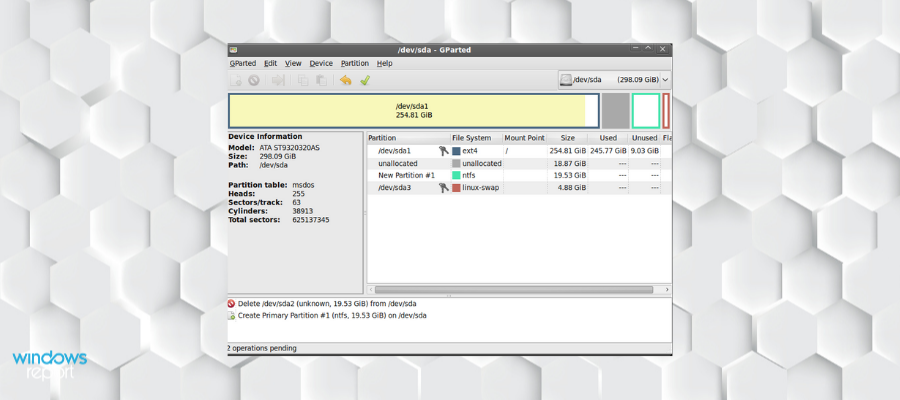
GParted

GParted is a free partition manager that enables you to resize, copy, and move partitions without data loss.

It runs from a bootable disc or USB, but it has a full user interface. GParted is easy to use and it has a very intuitive process of editing a partition.

The partition manager includes a lot of different file formats like EXT2/3/4, NTFS, FAT16/32, and XFS.

You can change anything with just one click, and because it runs on a USB drive, there’s no need for a reboot. It also lets you hide partitions and works with all versions of Windows.

Gparted is available for multiple operating systems including Windows and macOS.

It is compatible with hard disk drives such as SATA, IDE, and SCSI, as well as flash memory devices, such as USB memory sticks, SSDs, and NVMes. Gparted also supports RAID devices.

Other key features include:

  • Align partitions to MiB or traditional cylinder boundaries
  • Data recovery from lost partitions
  • Most features don’t require internet connection

GParted is around 300 MB and you can download it for free by following the link below.

⇒ Get GParted

These are the best recommended partition management utilities for Windows 10. With them, you can partition your hard disk quickly and efficiently. Some also include additional backup tools.

If you have any more suggestions or questions, don’t hesitate to leave them in the comments section below.

Solidworks Rendering Software: 8 Best of 2026

Rendering software is used to convert a user-created 3D graphic model into full 3D environments or images.

This rendering software helps graphic designers, architects, and media developers to insert objects and disparate objects from 3D modeling programs into a graphically desired environment. These rendered images are easy to scale, navigate, and are responsive.

The rendering software may have features including animation tools that can integrate with animation programs to bring life to images. These can be used for movies, games, architecture, and other uses.

SolidWorks is a professional computer program for solid modeling. It can automatize some calculations and also offer proper simulations of the project.

It is also a good proofing tool because it lets engineers thoroughly check for any errors before submitting the final project to their clients.

The software allows users to sketch in 2D or 3D with various advanced geometry features.

SolidWorks can export files of various formats which makes its products compatible with multiple other CAD software. 

You can easily open and edit SolidWorks files to other programs and also import projects created with other programs into your SolidWorks workspace.

There are numerous SolidWorks rendering programs available but we have compiled the very best below in terms of functionality.

What are the best tools to generate SolidWorks previews?

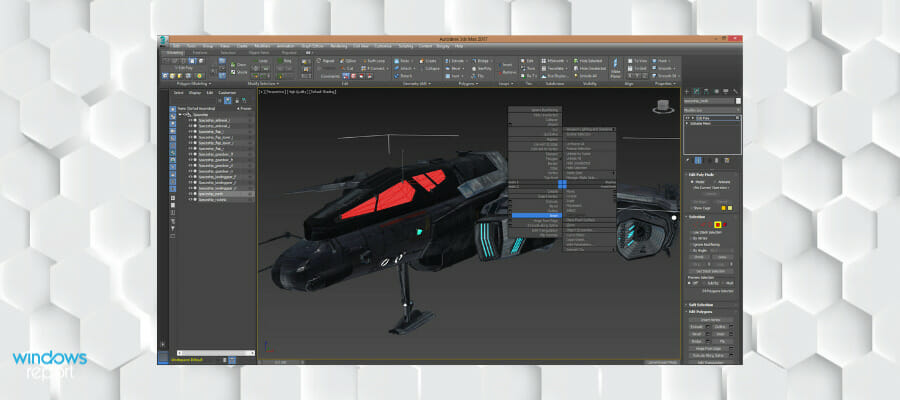
Autodesk 3ds Max – Best quality for 3D models

autodesk rendering software

3ds Max is a unique rendering software that is widely used. Its major advantage is its versatility. You can utilize this software for different types of projects from architecture to fully animated characters for video games with quality results.

This program is compatible with Autodesk software and other render software which enables more functions and features. The modifier and texturing features are quite amazing. In addition, it is easy to use its texturing tool.

3ds Max has nice inbuilt tools that can be added on through the store. The internal scripting language can be utilized by users to write their own tools.

The software is the perfect software for architectural rendering. It also brings a quality interpretation of industrial design concepts and presentations.

However, this software has a complexity of features which can be frustrating for beginners. All the features cannot be utilized on a single project.

Other key features of Autodesk 3ds Max include:

  • Extensive library of different modifiers
  • Free version for students
  • Automated retropology and mesh repair

Autodesk 3ds Max is a subscription-based service. There are multiple types of subscriptions available. It also has a free trial.

Autodesk 3ds Max

For high-quality SolidWorks renderings, 3ds Max is a must given its rich features that will render models up to the very last detail.
Free trial Visit website

Adobe Dimension – Complete modeling tool

Adobe Dimension is a modeling software equipped with the tools necessary to complete various types of projects, including illustrations, interactive content, and much more. It can import and edit Solidworks projects in STL formats.

This software has a user-friendly interface. It provides all the controls you need without being intimidating. Even though it comes with plenty of advanced features, it can be a good choice for a beginner because you can quickly adjust to it.

Adobe Dimension lets you select canvas size, units, and resolution. It also has 3D scene controls that you can use to scale objects in meters, centimeters, feet, inches, yards, and more. 

In order to allow users to create their projects as specific and precise as they can, Adobe Dimension lets you combine 3D and 2D assets, apply images, materials, and advanced lighting controls including reflection adjustments, multiple shadow options, color, contrast, and more.

Moreover, users get access to the Adobe Stock library where they can find ready-made objects and models that they can use in their projects. You can access the on the web or via the Creative Cloud Libraries in the Adobe Dimension UI.

Dimension also lets you create highly realistic illustrations that look like photographs. It is vector-based, so you never have to compromise on quality. You can use this feature to create beautiful commercial pictures for your models.

Other key features include:

  • Supports OBJ, Autodesk FBX, STL, and Sketchup file formats
  • Compatible with Windows, macOS
  • Available in multiple languages
  • Support for interactive environments

Adobe Dimension is a subscription-based software. You can use it along with the other Adobe Creative Cloud tools, or on its own. You can try it for free

Adobe Dimension

Adobe Dimension

Import and work on your SolidWorks projects with top-quality tools such as 3D and 2D assets, material settings, lightning controls, and more.
Free trialVisit website

Unity – Most efficient rendering

3d modeling software solidworks

Unity is another powerful modeling software. It can be used to create animations, virtual realities, architectural projects, video games, and many more.

This tool offers a full-featured platform that lets you create, edit, and export your projects with maximum efficiency. 
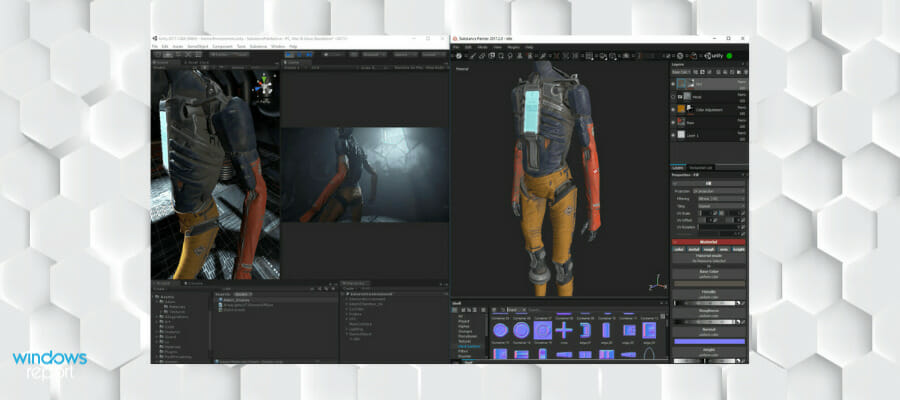
To import your SolidWorks projects into Unity, you need to convert them into an FBX file. 

Unity has both 2D and 2D modeling features. The 2D feature set includes foundations, world-building tools, animation support, graphic tools, and physics controls.

The extensive 3D toolset and the multiple controls for character creation made Unity a user favorite when it comes to game creation and animation.

Along with that, it provides the features necessary to build realistic environments. These include point-to-point cut tools, shape creators, and terrain tools.

Other key features include:

  • In-depth tutorials available on the official website
  • Kinematica character animation system
  • AR support

Unity has both a free version and some subscription plans.

Unity

Unity

Import your SolidWorks project and create animated environments, advanced models, or even virtual realities.
Free trialVisit website

Maya – Best rendering system

rendering software solidworks

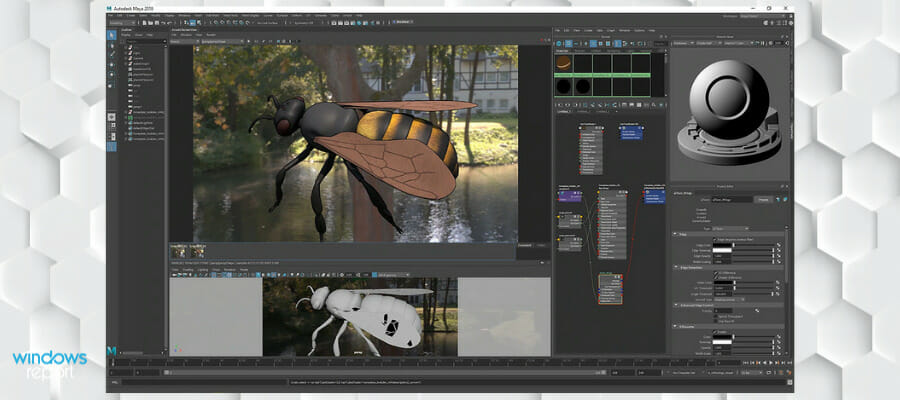
Maya is rendering software that has earned rave reviews over the years with its excellent rendering services.

This software gives users beautiful renders of 3D models with its unique tricaster system. The software allows for extensive object manipulation. The camera angles are also unique with excellent views of the model from various angles.

In addition, this program has a well-arranged workspace which gives freedom on customization, while optimizing the workspaces to suit your needs. This makes working easier in the 3D modeling environment.

One of the major cons is that the user interface is not easy to understand for beginners and could take a while to learn the rudiments of the software.

Autodesk Maya supports the SolidWorks projects in the IGES format. 

The 3D modeling toolset includes polygon modeling, NURBS modeling, UV editing and toolkit, a sculpting toolset and more.
The software has advanced animation tools that include graphics editors, a time editor, a preview playback player, and more.

Other key features of Autodesk Maya include:

  • Integrated Arnold render
  • GPU and CPU rendering
  • Standard surface shader
  • Advanced color management

Autodesk Maya is a subscription-based software with a free trial included for each plan.

Maya

Maya

Check out Maya’s artist-friendly UI that will provide high-quality renderings and allow for quick, on the spot, changes.
Free trialVisit website

Lumion – Animation features

This rendering software has been for a long time and enables the quick and fast rendering of images. Lumion allows easy animation as users can insert cover materials, weathering, aging, and transparency with ease.

Lumion is user-friendly which enables users with basic knowledge to produce awesome renders. In addition, it gives detailed light editing and users can configure 3D models as many times as needed.

The virtual reality feature is also nice as users can render models and transfer them to other devices or access the links through email.

However, this rendering software involves the graphic card, since the software is fully graphic card-based. Hence, users cannot do other things on the computer that require graphics while rendering.

Lumion supports imports DAE, FBX, MAX, 3DS, OBJ, DWG, and DXF 3D files. In order to open your SolidWorks project in Lumion, you need to first convert/save as one of these formats.

Lumion has a large library with various objects that help you create architectural designs, street maps, realistic 3D environments, and more.

Other key features of Lumion include:

  • LiveSync preview
  • Displacement mapping
  • Lights and shadows controls

Lumion is a licensed software with a free trial.

⇒ Get Lumion

Cinema 4D – Simple editing tools

Cinema 4D gives a simple straightforward way of creating renders. Users have more control over combinations with light and shadows. The rendering software is an ideal tool for newbies, as it makes rendering quite easy.

Cinema 4D has an easy User interface that is intuitive, which gives beginners the rudiments of the basics with good results. The app also incorporates online training which gives techniques and easy-to-learn tutorials.

The major con of the software is the UV system which should be improved. Although the current setup is ok, it can be improved upon which would make editing easier.

⇒ Get Cinema 4D

KeyShot – Dynamic modeling

keyshot rendering software

This is one of the most popular rendering software used globally. KeyShot allows you to create materials needed to get the required visual effect. The software allows for editing, to achieve a realistic feel of models to be showcased.

The graphical interface allows users to manipulate materials to create amazing realistic visual effects on materials like dirt on a rusty surface.

Users can also import 3D model files and update them without fear of losing quality on changes made.

One of the major cons is the presence of some imperfections in terms of transparent/cloudy materials.

This software has an advanced scene manager that is based on sene nodes. Users can create procedural geometries or even entire scenes in a hierarchy-based view. You can easily integrate objects with drag-and-drop.

The user interface is easy to navigate. Cinema 4D provides multiple assets that you can integrate into your project. The integrated asset browser is very well organized so you can easily find what you need with keywords and filters.

Other key features include:

  • Lets you work on multiple documents with tabs
  • HDR/EDR viewport
  • Dynamic palletes

This software has multiple subscription plans available. It offers a free trial.

⇒ Get KeyShot

Thea Render – Multiple projects manager

Thea Render is one of the ideal software for rendering, though it’s not too popular, it does the job well.

The major feature is the speed of rendering, this software is good to use when you are on a tight schedule.

Although it may not give you the same rendering quality as other software mentioned above, Rhea Render still gives decent rendering quality.

However, this software uses the Presto engine which provides quick network rendering services. There is also more emphasis on lightning with its impact on rendering easily adjusted to give optimal results

The major con is the lack of numerous features that exist in other major rendering software.

Other key features of Thea Render include:

  • Batch rendering
  • Relight feature
  • Multiple Integrations
  • Imports various file formats

⇒ Get Thea Render

We hope this list helped you choose what software to use in order to render SolidWorks on your Windows 10 computer.

Wondershare EdrawMax review: Complete diagram creation

Whether you work in IT or business management, in the education sector or you’re a skillful engineer, you will need good diagram software to illustrate your work.

That is why in this review we’re going to talk about Wondershare EdrawMax, a great Visio alternative and an excellent tool to boost your efficiency in designing your projects.

We’re going to show you all its most important features, show you how to get it, and, most importantly, how to use this diagram software.

What is Wondershare EdrawMax and how can it help you?

Wondershare EdrawMax is a complete solution to create all diagrams you can think of. In fact, it supports over 280 types like flowcharts, business process diagrams, p&id, genogram, electrical diagram, org chart, project management diagram, and a lot more.

And it also offers the tools to do so because it integrates 26,000 ready-made symbols and over 1500 built-in templates for creating any possible diagrams.

Moreover, many of the users share their creations and now you can access a library of more than 5000 templates produced by them.

Another great thing is that after you’re done, you can export your work in a number of formats including but not limited to editable PowerPoint, Word, Excel, and PDF.

And yes, if you’re a Visio user, you can import Visio files and stencils so you can switch any time you want.

What are Wondershare EdrawMax main features?

1. Choose the right diagram for your needs

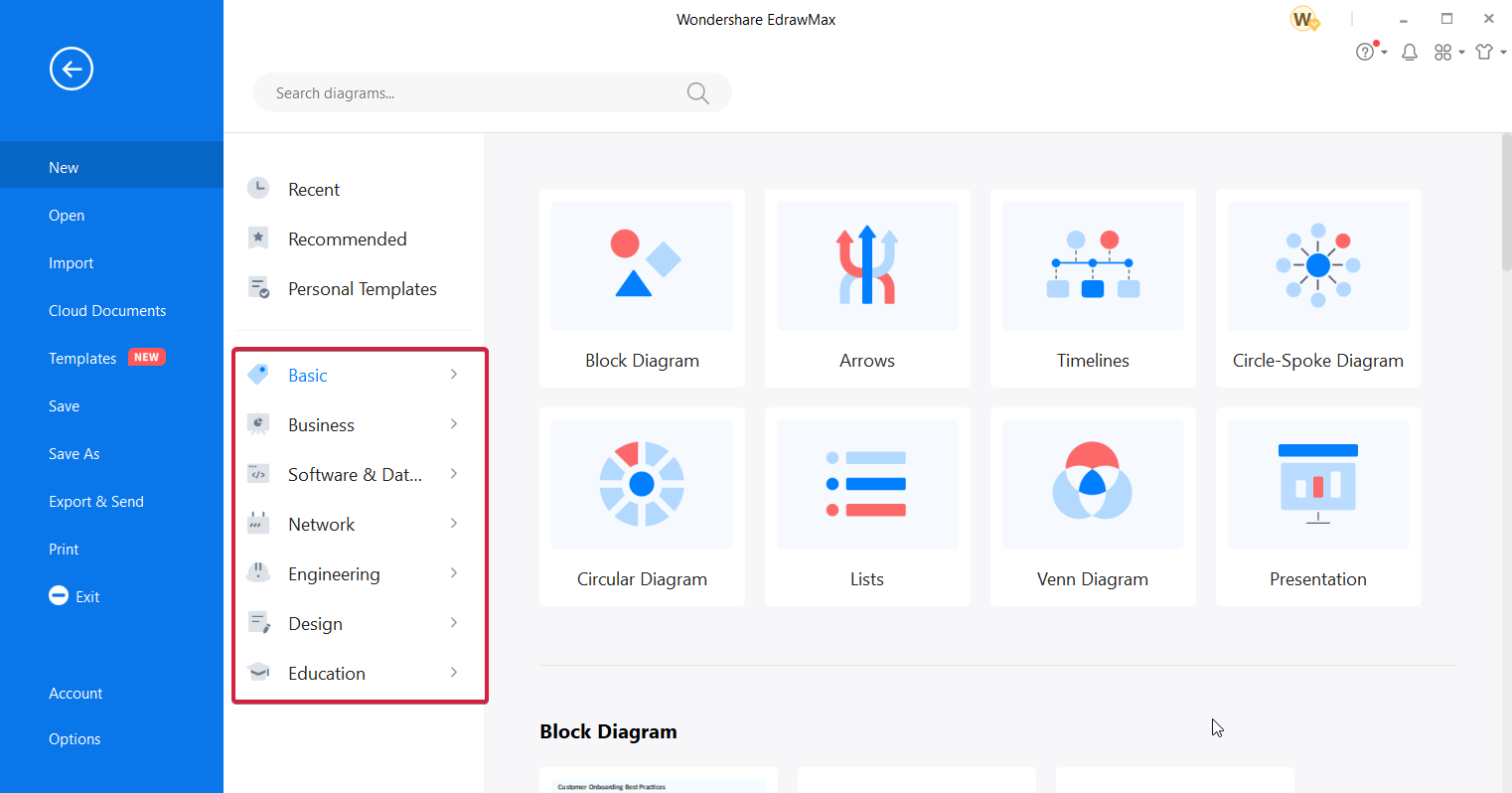
As we’ve already mentioned, this diagram software features more than 280 types of diagrams and they are structured neatly in dedicated categories so you can easily pick the right one for your field.

This flowchart software has seven big categories, Basic, Business, Software & Database, Network, Engineering, Design, and Education, but all of them have subcategories to lead you straight to the diagram you need.

And if you scroll down on each subcategory, you will find a lot of applied fields with examples for each of them.

For instance, in IT Management, you will have dedicated diagrams for UML, AWS Architecture, CISCO Architecture, Network, Rack, and LDAP.

Choosing the right one for you will make the process a lot more efficient so you can focus on making the actual diagram than starting from scratch.

2. Huge selection of templates

Another way of making your work a lot easier is to use the impressive library of templates.

With 1500 built-in templates and over 5000 online shared diagram templates from the other users, you can be sure to find something that will match your type of design.

Don’t worry because it won’t take too much looking through them because they are also organized by Roles (IT, marketing, business, etc.) and Diagram Types.

And if you don’t come across something you like, you can still get inspired by the design of other users who created something similar.

3. Visio compatibility

If you’ve worked with Visio before or you need to edit one now, you can simply do it with Wondershare EdrawMax.

We’re not going to talk about it because it’s a lot more simple to just show you how to import and export Visio files in just three simple steps.

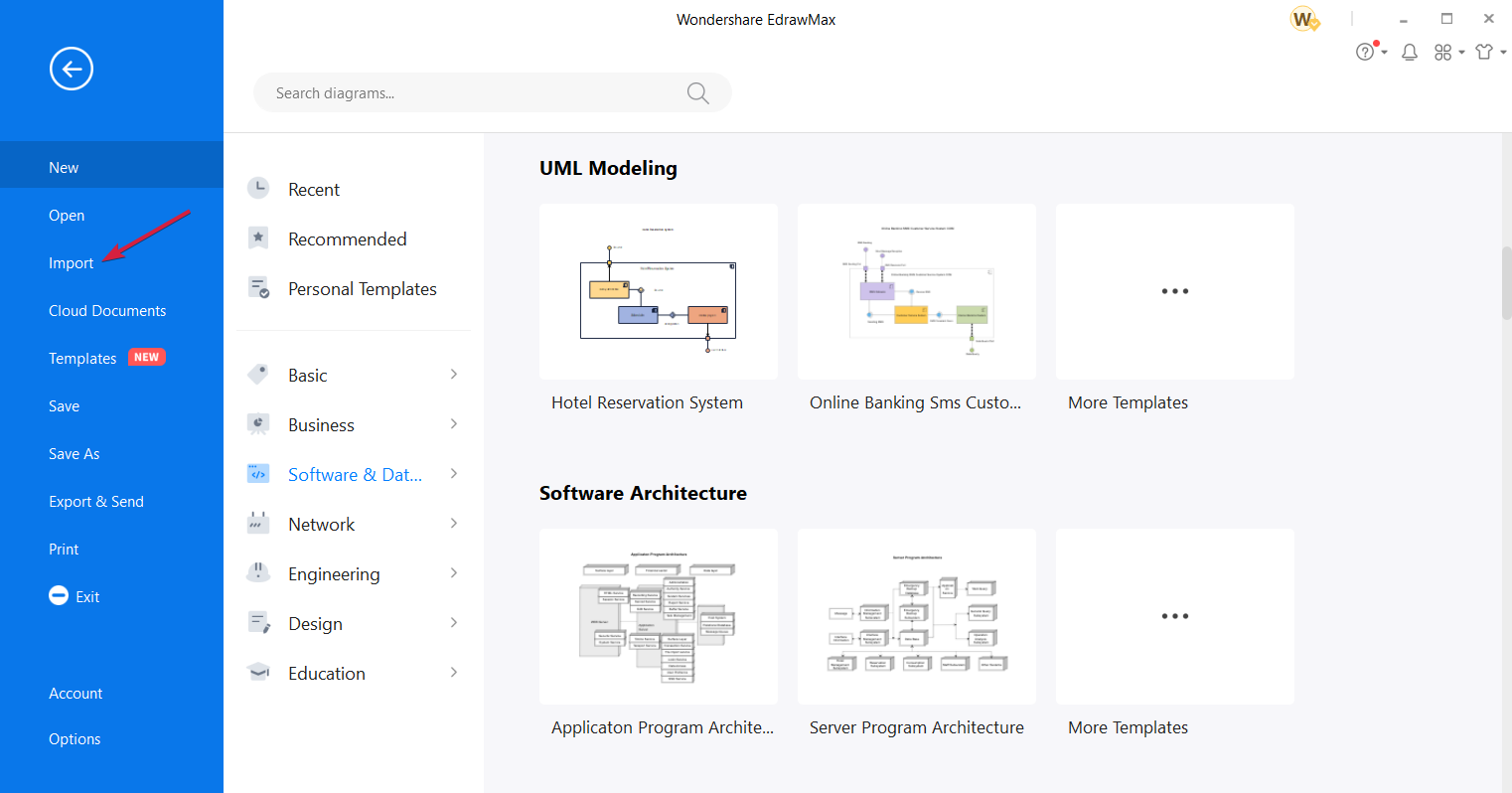
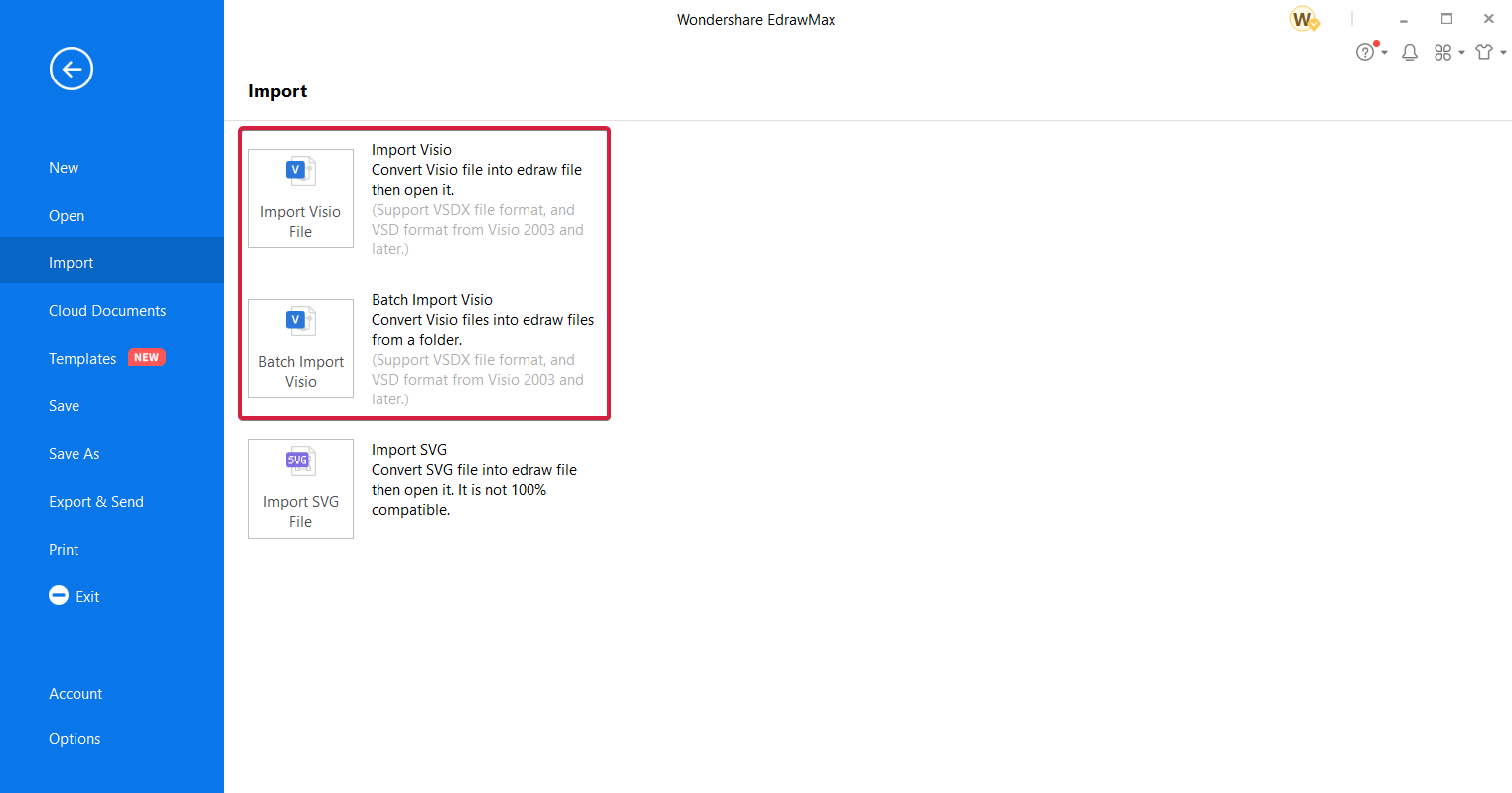
  1. In the main EdrawMax window, click on the Import option.
  2. Now you have two options, you can either convert and open a single Visio file or you can convert a whole batch of them from a folder.
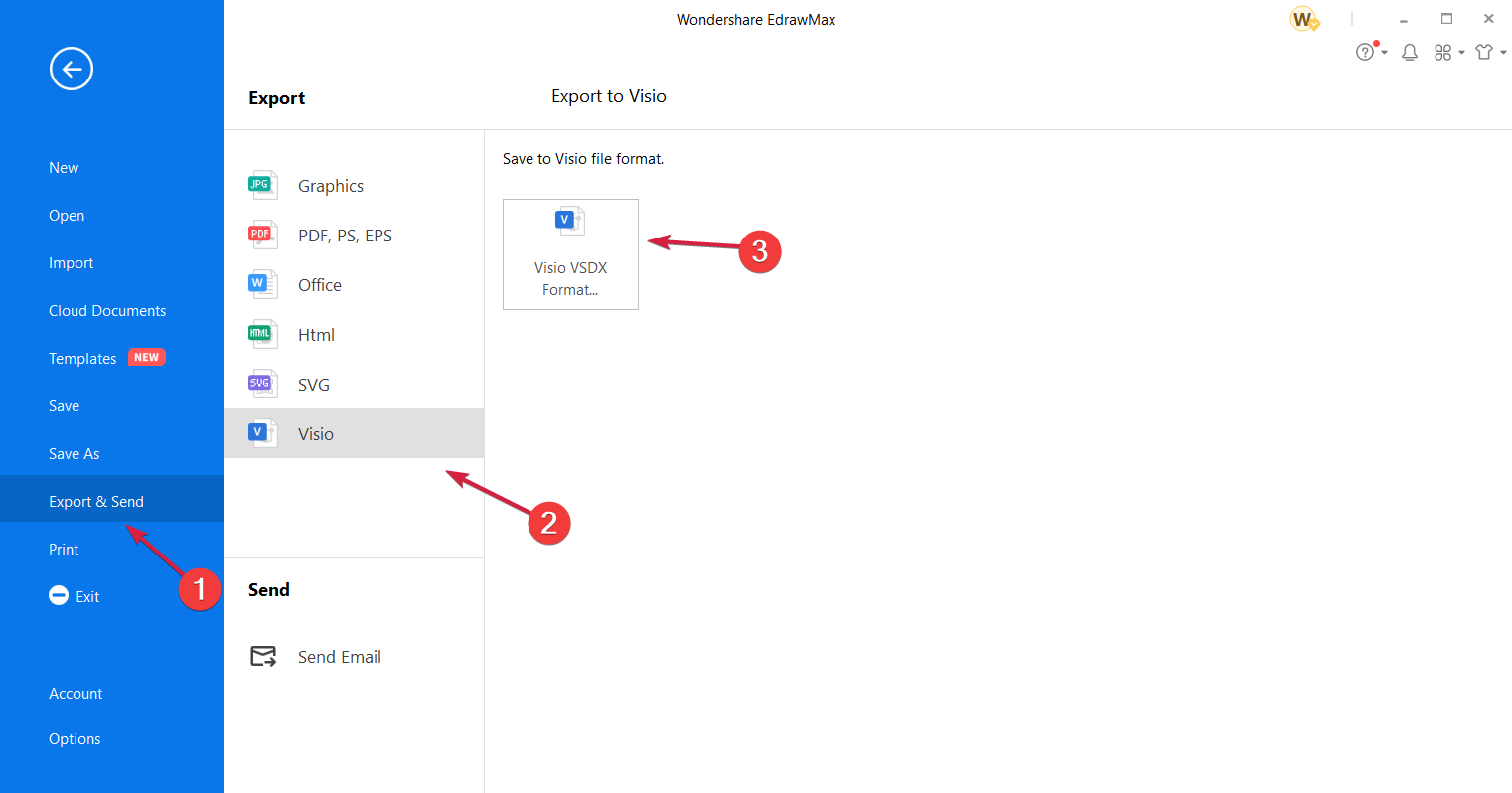
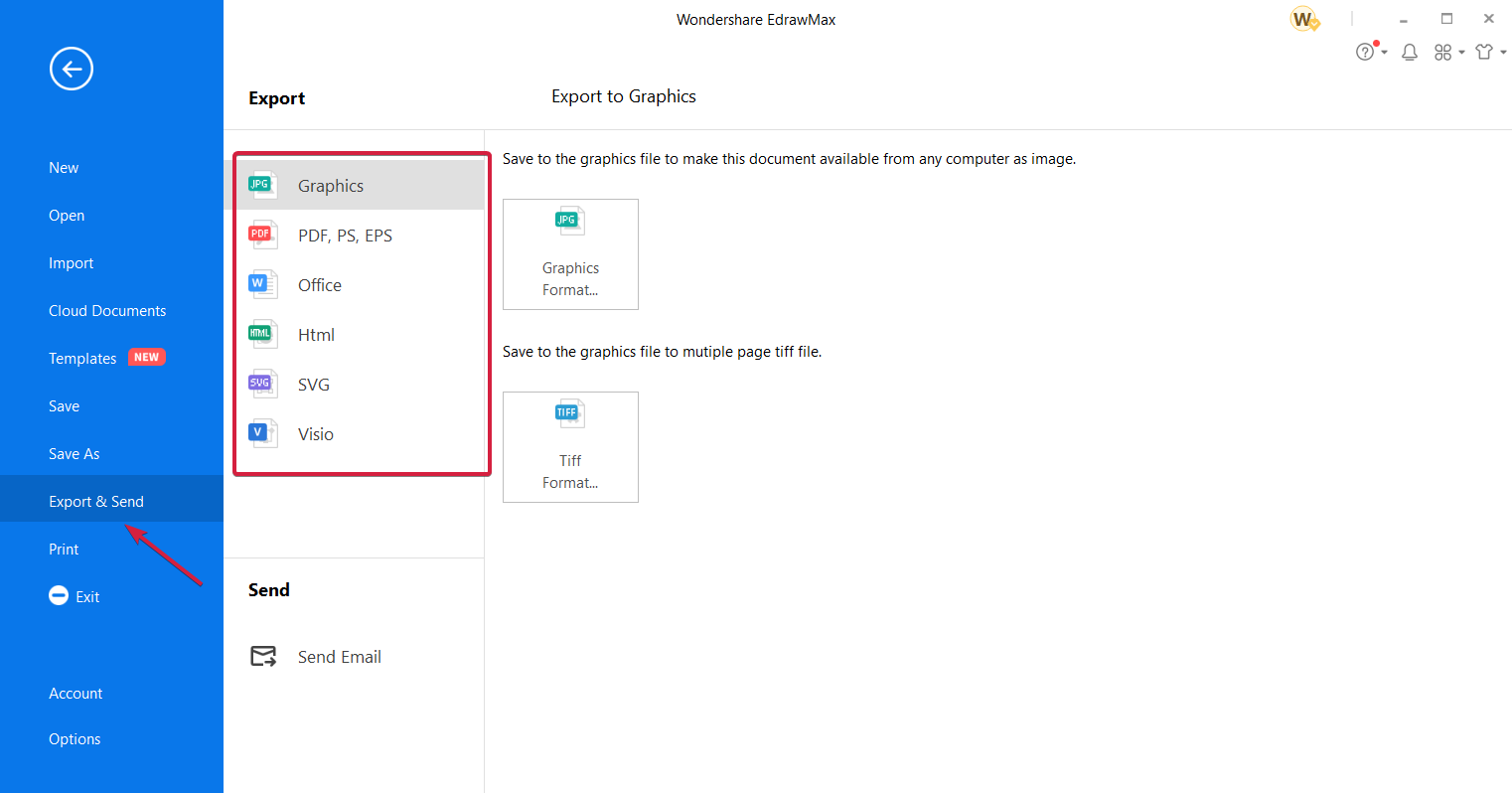
  3. To export your files in Visio format is just as simple. Click on Export & Send from the left pane, select the Visio format, then choose Visio VSDX Format.

Yes, it’s that simple and no data will be lost in the process so this way, you can easily convert your old files or collaborate with someone who uses Visio.

How to create a network diagram with Wondershare EdrawMax?

If you work with diagrams, you’ll feel at home in Wondershare EdrawMax because it has dedicated features for any type of work, including, IT, business, engineering, and education.

In fact, it comes with a lot of great predefined categories of diagrams so you don’t need to look too far to find exactly what you need.

Let’s see an example of how you can create an elegant network diagram for this field type. We chose this one because it’s right up our alley but you can do the same for any other diagram.

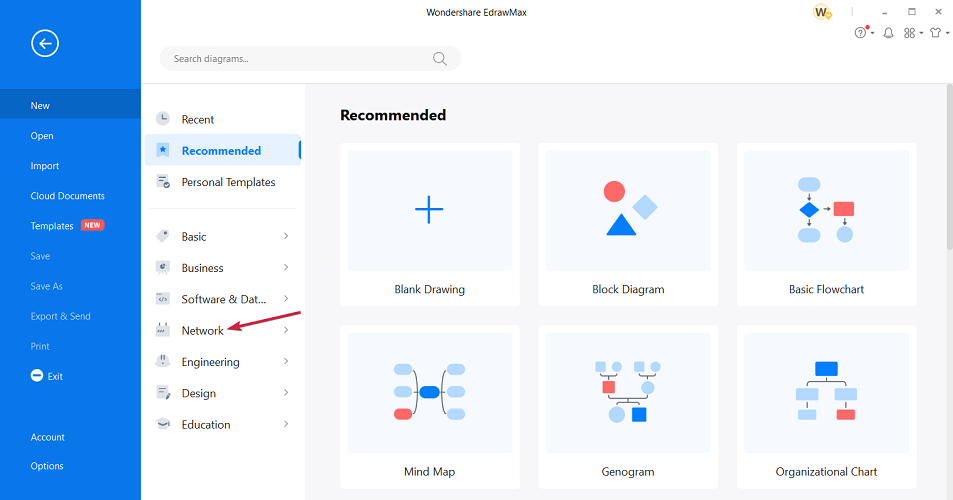
  1. Open Wondershare Edraw Max and click on Network. Of course, you can start from a Blank Drawing, but you will see that the templates can help you a lot.
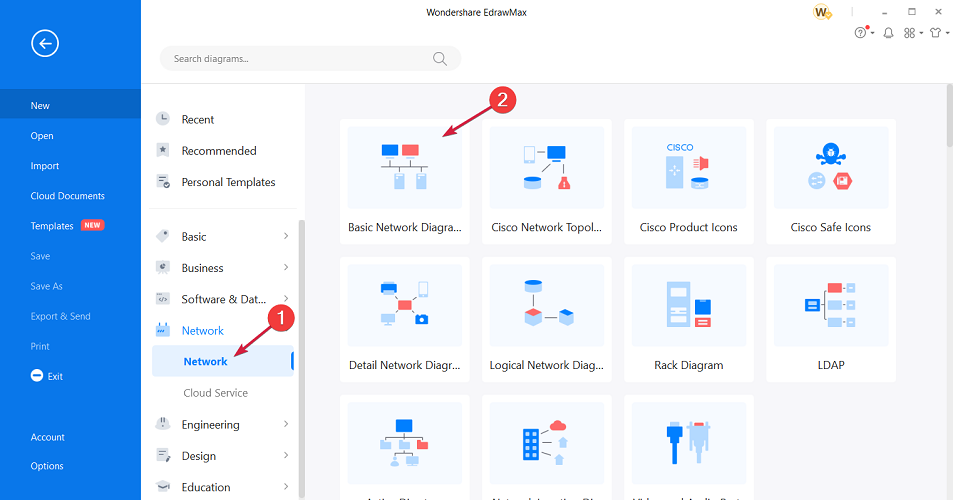
  2. The section will expand and now you can select again Network, and choose the Basic Network Diagram. As you can see, there are a lot of other possible options, from Cisco related products to video and audio ports.
  3. The main working window will appear and as you can see from our screenshot, you also get some pointers on how to use the different options and tools.
  4. On the left pane, you will see all the network and peripherals symbols that you can just drag-and-drop on your sheet.
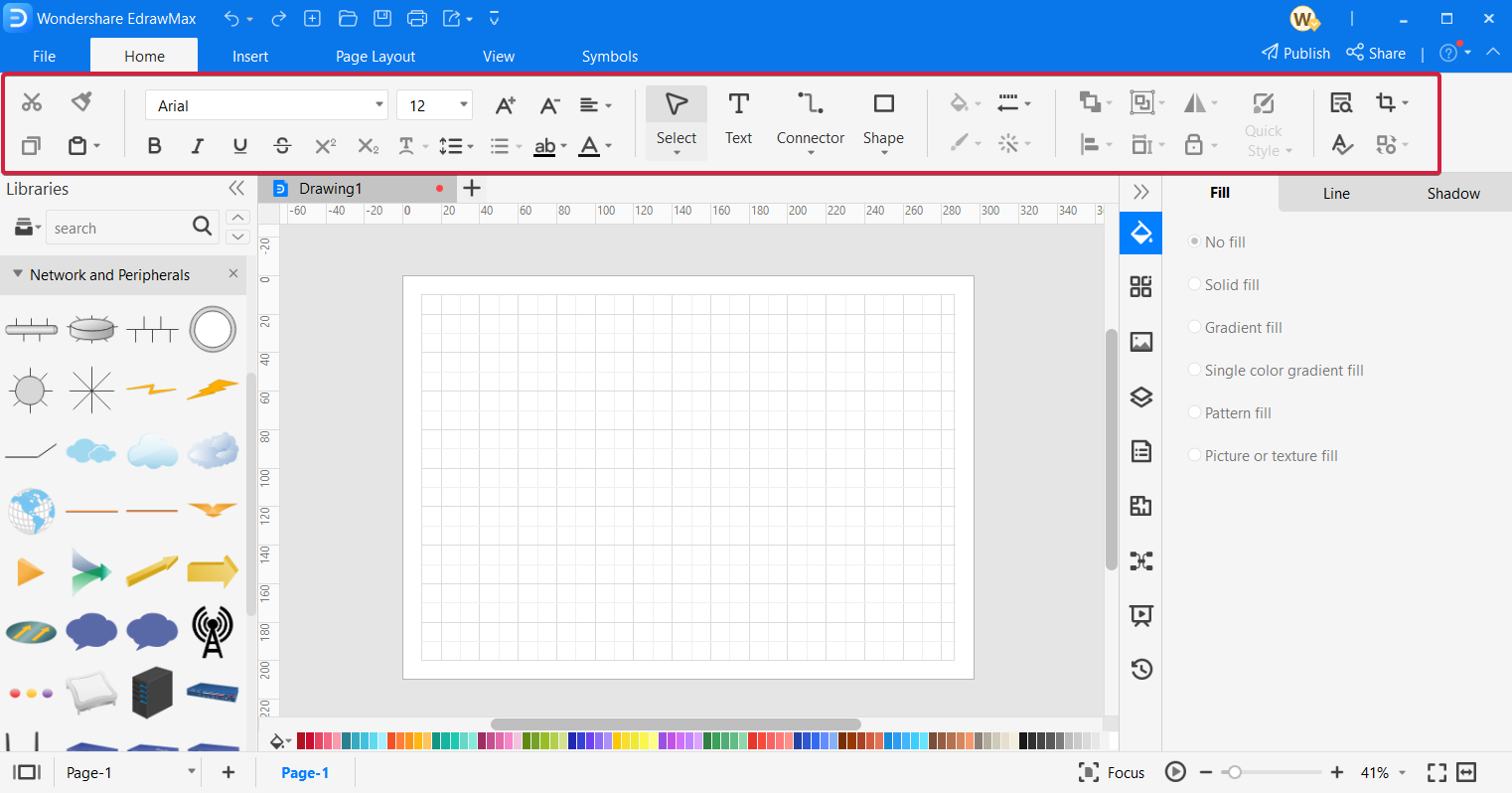
  5. And on the top, you have access to all the editing tools needed for editing and connecting your elements easily.
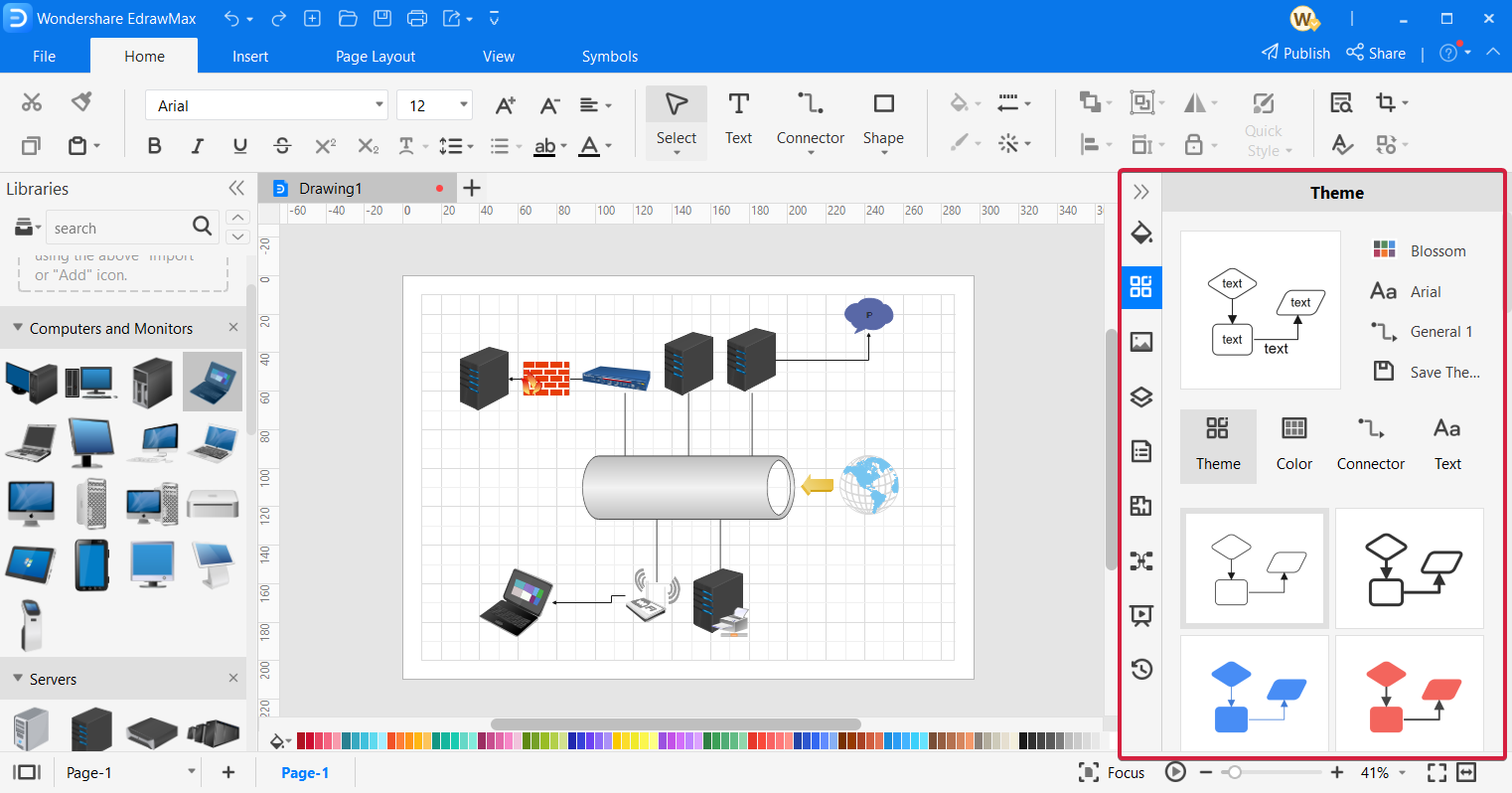
  6. On the right pane, you will be able to use a lot of design features to customize your diagram to your preferences. In just a few minutes, we created the network diagram. Of course, yours will be a lot more complex and comprehensive!
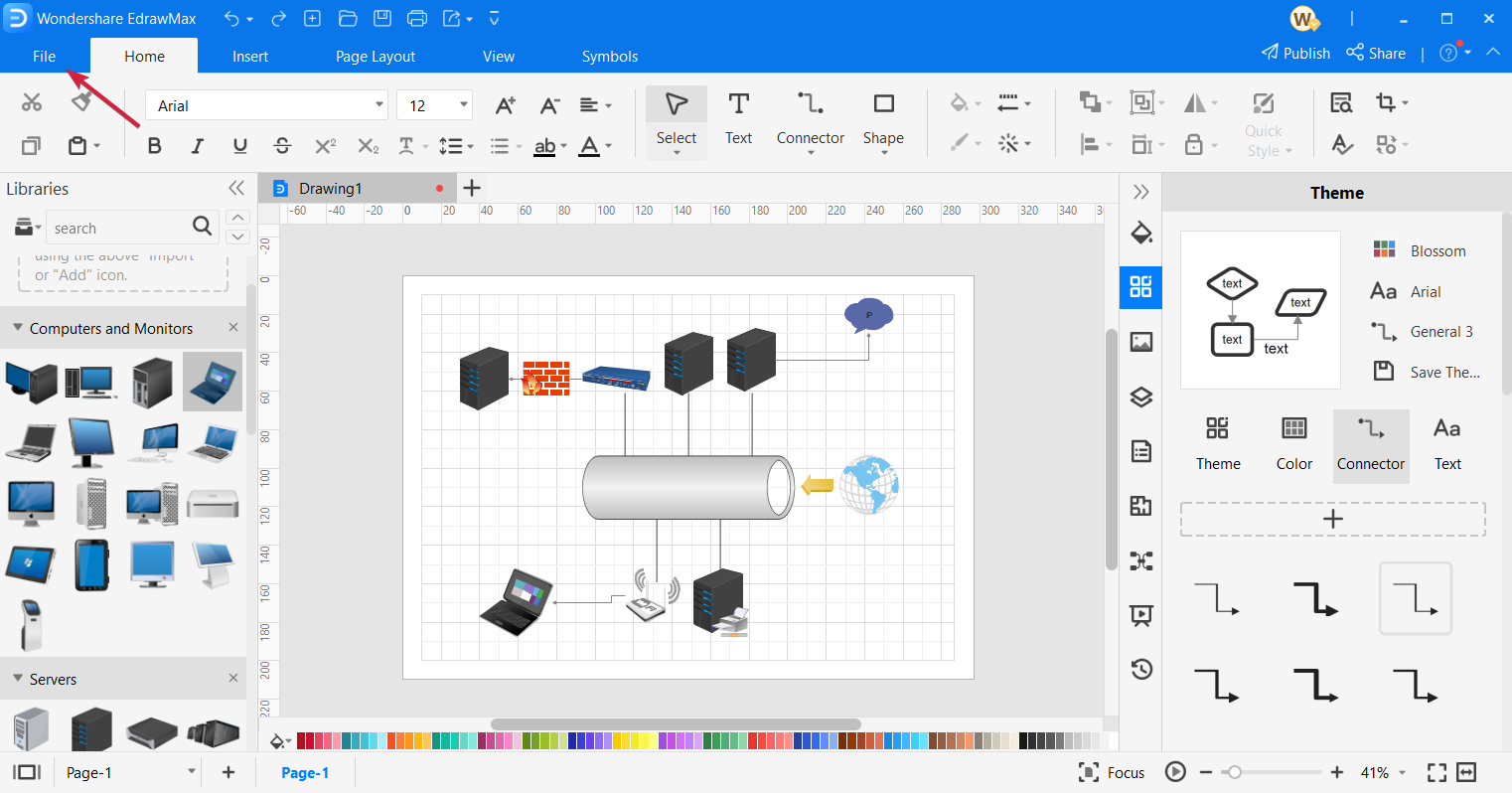
  7. Asuming you finished your work, now you can click the File option to save your file.
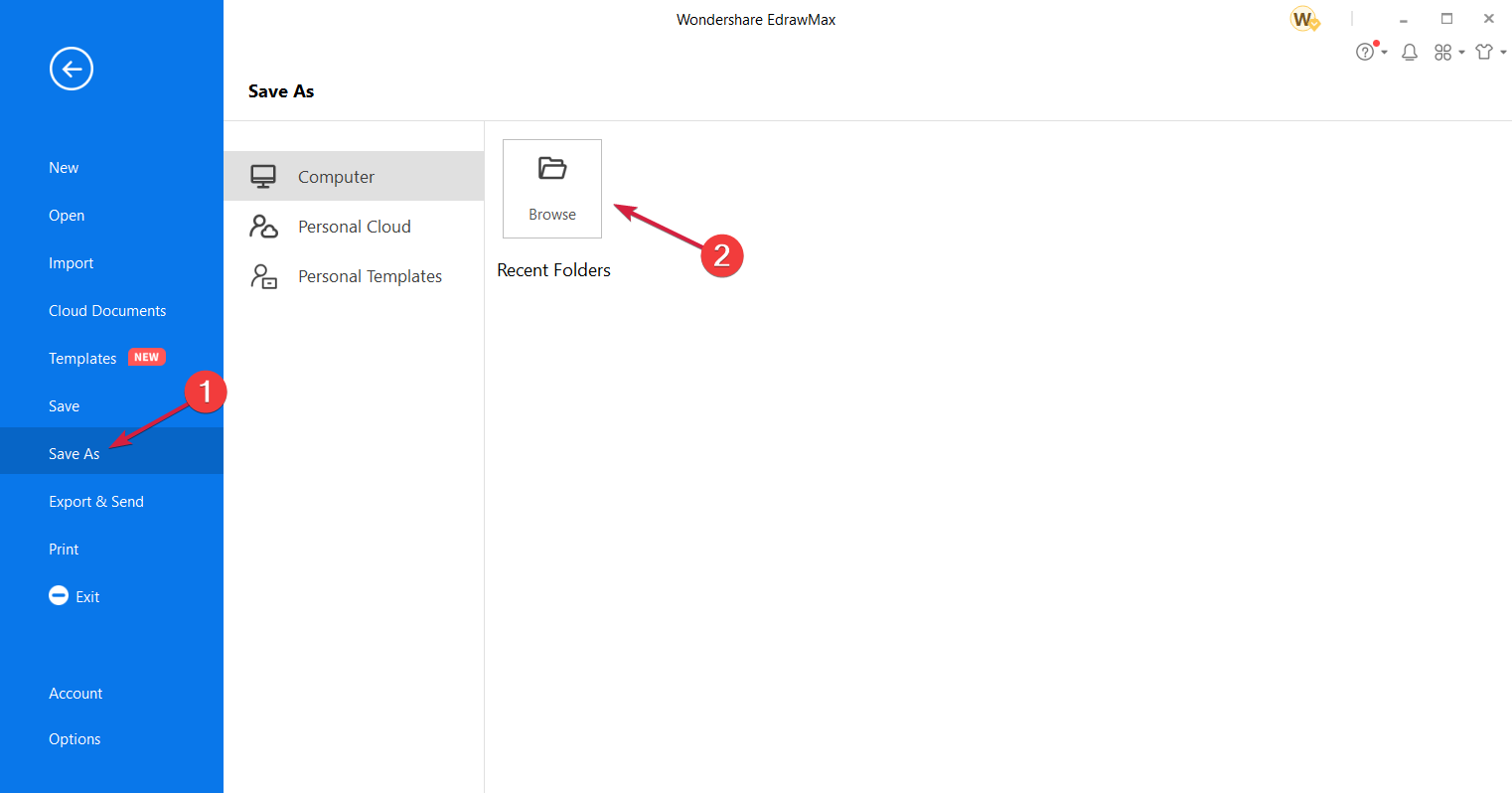
  8. Now you can click on Save As and select a destination on your computer or on your Personal Cloud. Yes, you also have plenty of space on your account to save your work and access it from everywhere in the world where you can access your online account.
  9. Of course, there’s also the option to export the diagram, select the file type and then send it via email.

As you could see, the path from a diagram idea and the finished result is really smooth and you’ve got all the tools to get excellent results. Good luck!

How to get Wondershare EdrawMax?

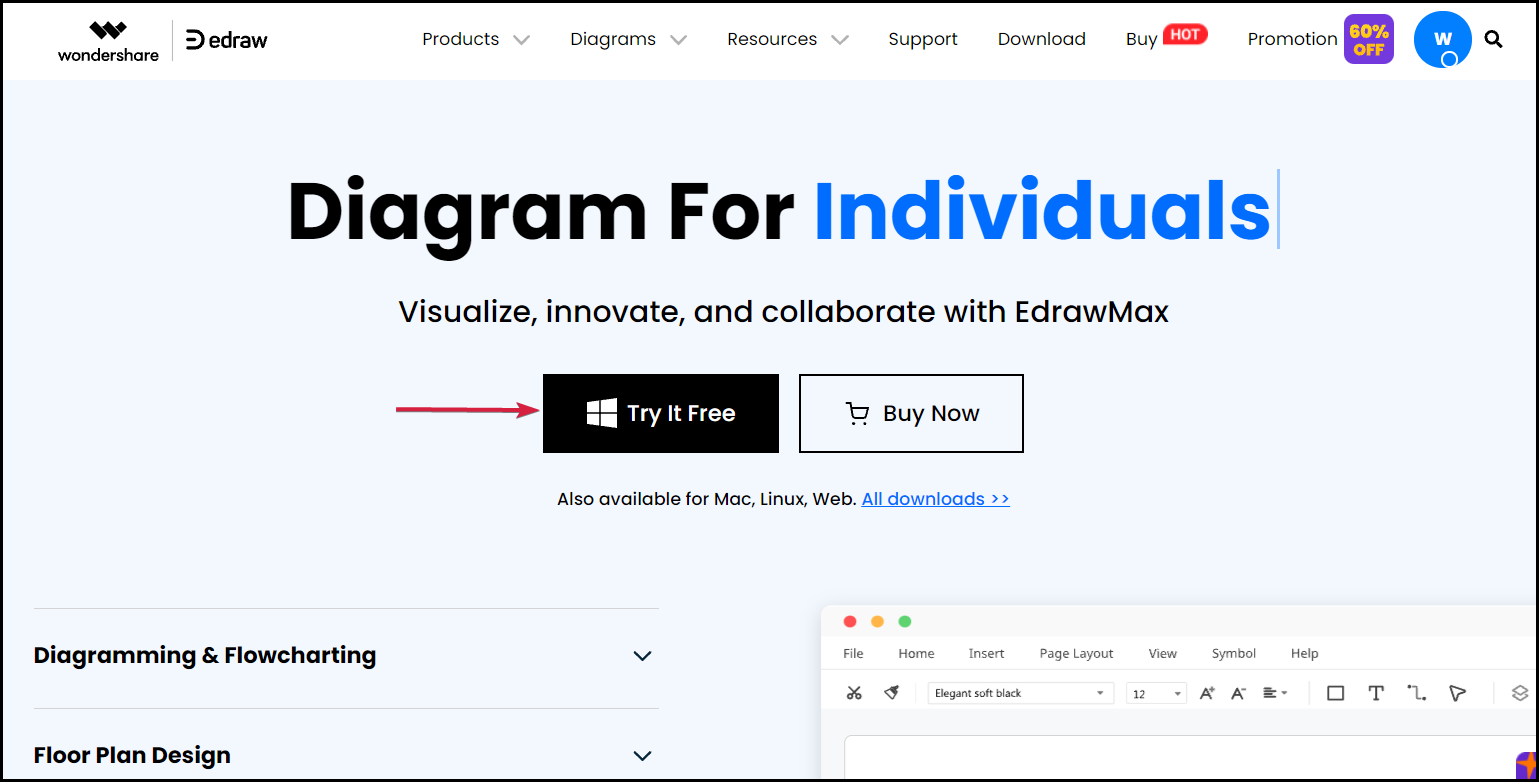
  1. Go to the EdrawMax dedicated webpage and click the Try it free button.
  2. You will be redirected to the downloading website and receive the file.
  3. After it finishes downloading, run the installer and start the app.

That’s it! You’re good to go and use this free diagram software. The whole download and installation procedure only lasts a few seconds.

However, it would be really smart to create yourself an account on the EdrawMax website. You will have a lot of advantages because you will be able to store and access your work from everywhere.

Not to mention that you can also use it in your browser with the web-based interface. That way, you won’t even need to download and install anything.

By the way, the flowchart software is also available for Mac and Linux so it covers all the platforms you may want to use it on.

Wondershare EdrawMax

Wondershare EdrawMax

This complete diagram software will help you get to professional level results in just minutes!
Free trialVisit website
Pros
Impressive array of template types available
Thousands of premade templates for inspiration
Compatible with Windows PC, Mac, Linux and Web-based platform
Visio file compatibility with import and export options
26,000 ready-made symbols
Great for IT, management, education and engineering fields
Cons
Can seem a bit complicated for beginners

Final notes

First of all, we’ve been impressed with how quickly we got from downloading the installer for EdrawMax to actually creating a diagram.

Then, all the tools and symbols are right there, placed intuitively within the interface so if you have an organized way of working, you will have no trouble learning its ropes right away.

It only took us a few minutes to put together a simple diagram but we could have gone all the way with the design and make it unique and memorable.

We discovered that we can even doodle or take notes which is great for collaboration and it convinced us that it is a great Visio alternative that you can try now for free.

And if you do, you can share your experience and impressions in a comment on the dedicated section below.

5+ best CD and DVD encryption software for Windows 10/11 PCs

There are many ways of encrypting CD/DVD. The most convenient method, however, is via the adoption of a durable CD/DVD encryption software.

There are many advantages to protecting your DVDs/CDs. Encryption prevents data loss as it won’t allow anybody without a password to make any changes to your disc.

On top of that, if you work with sensitive or private information, you can use encryption software to create read-only CDs or DVDs. That way you will be able to share your data with other users, but they won’t be able to make any changes to the disc without an admin password.

Good encryption software use multilayered protection technologies, as well as customizable password creation features.

If you need to share your discs with other people in your companies, look for a software that lets you work with permission settings and create different types of user passwords.

A typical CD/DVD encryption software is equipped with algorithms that encrypt the files or data on a target CD/DVD.

In this article, we have compiled some of the best available CD/DVD encryption software for you.

What is the best CD/DVD encryption software for Windows 10?

GiliSoft CD/DVD Encryption

best cd dvd encryption software

GiliSoft CD/DVD Encryption is a great tool to help your software to burn password-protected CDs/DVDs.

The software hosts a unique core technology that runs a multilayer protection. In addition, this tool has one of the most intuitive user interfaces among its contemporaries.

It provides clear directions on how to encrypt and decrypt files on CDs/DVDs.

The encryption process is really easy. In just a few steps, you will be able to set a password. You will get instructional prompts directly from the UI as you go.


The software also comes with a decrypt function which can be handy when you want to add more files to an already protected CD or DVD. This feature will let you burn files to your disc, as well as assist you in encrypting it again. Keep in mind that to decrypt your disk, you still need to use the password.

Also, the software’s size is relatively small. Hence, it can easily be installed on systems with low specs.

Other key features include:

  • Lightweight
  • Password strenght assesment
  • Online guides
  • Lifetime free updates 

This is a licensed product with a free trial included. If you are not satisfied with your purchase, you can get your money back in the first 30 days. Basically, it supports all Windows versions, ranging from Windows 2000 to Windows 10.

 GiliSoft CD/DVD Encryption

GiliSoft CD/DVD Encryption

Ensure the security of your files and folders contained on your CD or DVD drive with GiliSoft CD/DVD Encryption.
Free trial Visit website

Roxio Secure Burn Enterprise

best dvd encryption software

Roxio Secure Burn Enterprise is a security software that is equipped with relevant encryption tools, needed to protect confidential data on CDs and DVDs from unauthorized access.

The software can also be used to encrypt external storage devices like USB flash drives and pen drives.

It hosts a simple interface, which is ideal for new users, as all displayed options are well organized on the home menu.

The software’s drag & drop feature makes it very easy to use, and its automated security functions make encryption faster and more efficient.

In addition, the software is designed to meet up with industry-standard, while also fulfilling all legal requirements.

It is FIPS 10-2 compliant, and it employs a 256-bit AES encryption system, which is one of the best available security protocols.

Roxio lets you create your own security policies with administrative tools. You can set various access permissions for different users.

Other key features include:

  • Activity monitor for administrators
  • Set password protocols
  • Enables logging to keep track of data, computer, username, and more

Roxio Secure Burn Enterprise is a premium software, which offers paid (subscription) plans to users.

However, new users can download a free trial version, which provides you access to some of its basic features for a short period of time.

Roxio Secure Burn Enterprise

Roxio Secure Burn Enterprise

Protect your removable discs with advanced 256-bit AES encryption and set passwords and security policies for all users.
Free trial Visit website

Master Voyager

Master Voyager is a CD/DVD encryption tool that is well-equipped to encrypt sensitive files on a CD/DVD.

The software hosts a user-friendly interface, which facilitates swift and effective encryption of files, via the drag & drop function.

Basically, Master Voyager encrypts CD/DVD files using a rudimentary method that protects files with only a unique password.

Hence, to access your CD/DVD files, you don’t have to go through any decryption process. This applies to other external storage devices like USB flash drives, pen drives, and others.

In addition, Master Voyager is flexibly built to support all Windows versions, ranging from Windows XP to Windows 10.

Also, the software adopts the AES 256-bit protocol, which is one of the most reliable file encryption tools available.

Lastly, this program hosts an in-built CD/DVD burning option that facilitates the encryption of discs.

This action requires only a few clicks of buttons; hence, your encryption process is made more efficient, and you are able to save valuable time and resources.

Other key features include:

  • Rewritable CD eraser module
  • Multiple secure zones with different passwords
  • Can assign admin and user passwords
  • Email support

This is a licensed software. You can choose between 3 different versions. Master Voyager sells licenses for as many devices as you need, providing plans even for 500+ PCs.

⇒ Get Master Voyager

EncryptDisc

DataLocker’s Encrypt Disc is an all-around CD/DVD encryption software, which is equipped with a 256-bit AES encryption that protects every encrypted file on your CD or DVD.

The software is also FIPS 10-2 compliant, which provides you with legal cover, as well as necessary certifications.

Typically, EncryptDisc hosts the drag and drop mechanism, which makes your disc-encryption process easier and faster.

The software’s advanced design makes it suitable for protecting high-capacity encrypted files, in line with SOX, HIPAA, and other industry standards.

The encryption software is embedded on a disc, and all you need to do is to purchase the disc and create a password. You can then drag and drop files on the disc to finish the process.

Such encrypted disc can be shared as read-only media or you can decide to open the disc and add extra file or information on it.

Nevertheless, EncryptDisc is highly versatile, as it is compatible with virtually all Windows versions higher than Windows 7.

This software also allows you to create read-only discs, so you can easily share your data with your peers without allowing them to make any changes to it.

Other key features include:

  • Compatible with most CD and DVD formats
  • Disc burning functionality
  • Online guides and instructions

This is a licensed software with a demo version that is available upon request.

⇒ Get Encrypt Disc

Idoo Secure Disc Creator

Idoo Secure Disc Creator helps users to create encrypted data files on CDs and DVD.

It is equipped with a complex algorithm, which can partition (divide) a CD into two parts: a secure (password) file section and a public (insecure) section.

In this case, files are kept safe using the 256-bit AES encryption algorithm. This protects your files and makes it inaccessible without permission.

You just have to select the type of disc you want to create, add your files and decide which parts of your discs will be the public area and which will be encrypted.

Once you’re all set, you will need to insert and confirm your password. The software has a built-in password strength assessment feature.

Other key features include:

  • Compatible with all Windows versions starting Windows 2000
  • Compatible with Windows server
  • Quick and straightforward

This product comes in a free version as well as a premium version. 

⇒ Get Idoo Secure Disc Creator

DiskEncryptor

DiskEncryptor is a CD/DVD encryption software developed by Kernsafe and equipped to encrypt data contents stored on disk drives.

The software supports a wide range of external storage devices, including memory cards, floppy disks, USB flash drives, and others.

In fact, DVD images (ISO) and virtual CDs & DVDs can also be encrypted by this software.

DiskEncryptor uses a high-end encryption protocol, AES 256-bit, to protect encrypted files. Disc partitions can also be encrypted.

The tool also integrates well with Windows Explorer and you are afforded the opportunity of locking/unlocking your drive(s) with a password.

Furthermore, the software is lightweight (small-sized) and can be installed on all versions of Windows. It also functions perfectly well on both Intel and AMD computers.

Other key features include:

  • Lifetime updates for premium users
  • Lets you add name and company information in the About dialog box
  • Lightweight
  • Compatbile with all Windows versions starting Windows 2000

Disk Encryptor has a free and e premium version.

⇒ Get DiskEncryptor

Have you utilized any of the CD/DVD encryption software we mentioned above? Feel free to let us know by commenting below.

If you are interested in learning how to use different features of your PC, fix various problems and errors, check our How-To section.

If you are interested in learning more about software and want to see more recommendations that can make your life easier, check our Software Hub.

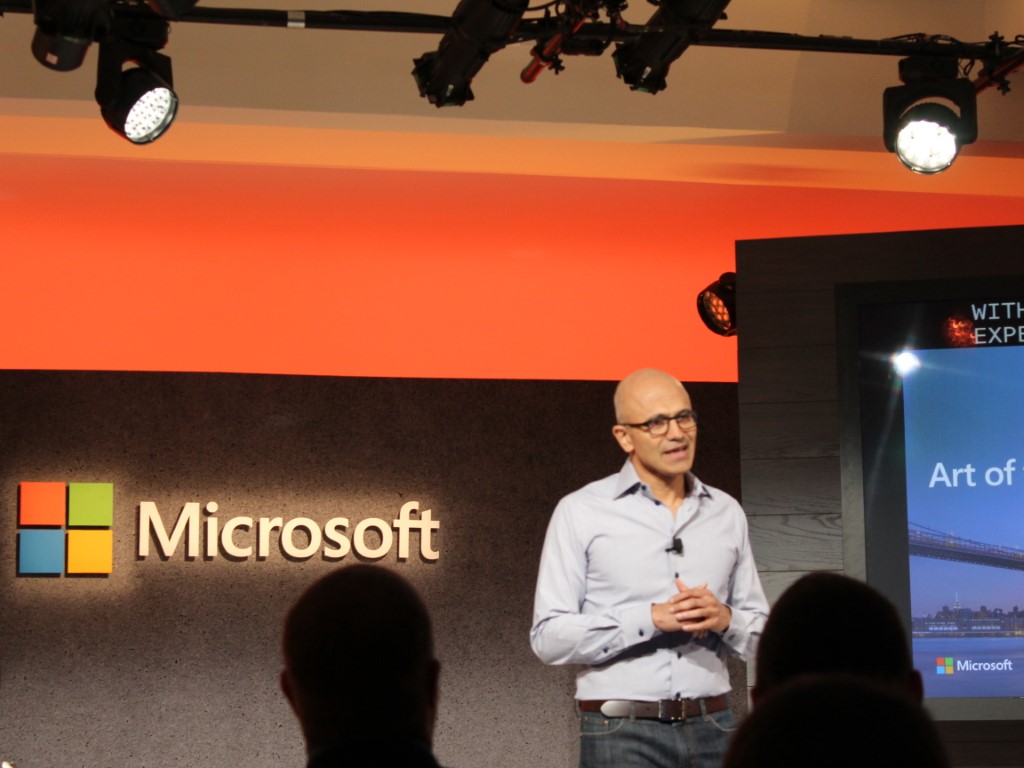
Microsoft CEO Satya Nadella releases annual report, talks about gains in security, modern work, and gaming

Microsoft CEO Satya Nadella recently released his annual report to shareholders, colleagues, customers, and partners. In the report, Nadella detailed the struggles many have faced throughout this year due to the pandemic, as well as the gains that Microsoft has made in security, modern work, and gaming.

At the top of the report, Nadella summarized how Microsoft delivered $168 billion in revenue, as well as the fact that Microsoft’s operating income grew 32 percent to $70 billion. The Microsoft SEO even detailed that the company is “built for this moment” when it comes to Digital Transformation.

Nadella’s report dives deep into the gains Microsoft made this year in Applications and Infrastructure, Data and AI, Developer Tools, Power Platform, Business Applications, and LinkedIn. For us consumers, though, the most interesting part comes where he discussed security, modern work, and gaming.

Here, the SEO talked about the past year’s updates to Teams, Microsoft Viva, and the introduction of Windows 11, and Windows 365. In the security section, meanwhile, Nadella went into Microsoft’s intelligence helping intercept 30 billion email threats and 31 billion authentication attacks. Finally, in gaming, Nadella touched on how with Xbox Game Pass, the acquisition of ZeniMax Media, Microsoft is “expanding our opportunity to reach every one of [gamers.]”

We’re just hitting highlights, but Nadella also pointed to examples of how Microsoft’s technologies drove change during the pandemic. That includes GitHub code used in the NASA Mars Mission, mixed reality being used for surgeries in Mt. Sinai Health Systems in New York, and how Team Rubicon used Dynamics 365 to manage the deployment of thousands of volunteers to set up 169 COVID-19 response sites.  You can check out Nadella’s full post on his LinkedIn for more.

New Windows 10 version 21H2 and 21H1 preview builds are available

Microsoft just released two new Windows 10 builds to the Release Preview Channel of the Windows Insider program.

There’s both a new Windows 10 21H2 build, as well as a Windows 10 21H1 build available, and fixes are the same between the two releases.

OOBE and VPN issues fixed in latest preview builds

Build 19043.1319 (KB5006738) is now available for Insiders that are running Windows 10 21H1  Meanwhile, users with Windows 10 21H2 received build 19044.1319 (KB5006738) 

The fixes in both these new builds cover a wide range of issues from the out of box experience, VPN connections, Bitlocker, and more, as follows:

  • Fixed an issue that prevents you from accessing the pre-provisioning page during the out-of-box experience (OOBE). This issue occurs when the credentials page for signing in to Azure Active Directory appears, and you press the Windows key five times.
  • Added a feature that facilitates certain cross-browser data transfers.
  • Fixed an issue with Assigned Access kiosks that are configured with Microsoft Edge as a kiosk application. These kiosks might sometimes fail to restart Microsoft Edge if users close the browser window.
  • Fixed an issue in which the use of App-V intermittently causes black screens to appear when signing in on the credentials page.
  • Fixed an issue that might prevent subtitles from displaying for certain video apps and streaming video sites.
  • Fixed an issue that prevents Windows 10 virtual private network (VPN) users from connecting to Windows Server 2019 Routing and Remote Access service (RRAS) servers.
  • Fixed an issue that prevents Software-Defined Networking (SDN) virtual machines from working when you configure the Generic Routing Encapsulation (GRE) VPN bandwidth limitation.
  • Fixed a Primary Refresh Token (PRT) update issue that occurs when VPN users sign in using Windows Hello for Business when the VPN connection is offline. Users receive unexpected authentication prompts for online resources that are configured for user sign-in frequency (SIF) in Azure Active Directory-Conditional Access.
  • Fixed an issue that causes Windows to go into BitLocker recovery after a servicing update.
  • Fixed an issue that might cause Kerberos.dll to stop working within the Local Security Authority Subsystem Service (LSASS). This occurs when LSASS processes simultaneous Service for User (S4U) user-to-user (U2U) requests for the same client user.
  • Fixed an issue in Code Integrity that might cause a memory leak.
  • Enhanced Microsoft Defender for Endpoint’s ability to identify and intercept ransomware and advanced attacks.
  • Fixed an issue in the OOBE that might cause Windows AutoPilot provisioning to fail.
  • Fixed an issue that prevents Kana input mode users from inserting a question mark (?) using the Shift-0 key combination.
  • Fixed an issue that sometimes causes the lock screen to appear black if you enable slideshow.
  • Fixed a reliability issue with LogonUI.exe, which affects the rendering of the network status text on the credentials screen.
  • Fixed an issue that causes Server Message Block (SMB) Query Directory Requests to fail when the buffer size is large.
  • Fixed a memory leak issue in lsass.exe on domain controllers in the forest root domain that occurs when you have multiple forests and multiple domains in each forest. The SID-Name mapping functions leak memory when a request comes from another domain in the forest and crosses forest boundaries.
  • Fixed an issue with the virtual machine (VM) Load Balancing feature, which ignores a site’s fault domain.

Remember that the versions we talked about in this article are only available for Windows Insiders. If you aren’t already part of the program, you can join by going to Microsoft’s dedicated page.

Are you testing one of the two new builds announced by the tech giant? Share your experience with us in the comments section below.

PowerToys experimental version 0.48.1 is out with Video Conference Mute tool and minor fixes

Microsoft has released a new experimental version 0.48.1 to users running the pre-release versions of its PowerToys suite of tools. The update includes all the improvements and bug fixes made available for version 0.47.1 as well as the long-awaited Video Conference Mute utility.

As the name suggests, the Video Conferencing Mute feature lets users quickly mute audio and video feeds in meetings globally with a keystroke. The PowerToys team is actively developing this Video Conferencing Mute utility, but there is no word on the possible timeframe for the official launch of the tool.

The latest release also addresses an issue with the tool which was previously causing “unintentional shortcut reassignment” for some users. Microsoft has also detailed some known issues and limitations in this release, and you find the full list below:

  • With some webcams, there is an incompatibility with Teams and the overlay image is not rendered, instead a corrupted frame is shown. If your camera has this quirk, please let us know the model in the [main tracking issue – #6246]
  • The application preview (Teams, Meet, etc.) may show the overlay image flipped horizontally but that is expected, the image will show correctly to the other people on the call.
  • In order to enable/disable the VCM, PowerToys should run as administrator
  • Changes to some of the VCM settings require the application to restart to pick up the new values such as a new overlay image.
  • In some cases, the overlay image can be shown flipped vertically (the workaround is to edit the image and flip it before selecting it).
    (#6246)
  • If the PowerToys Video Conference Mute webcam doesn’t show up in the video conference app, try restarting the app and if still doesn’t show up try restarting Windows.

It is important to note that PowerToys version 0.48.1 will only be automatically offered to users running the experimental version and it cannot be installed via WinGet. If you haven’t done it yet, you can head over to the GitHub releases page to manually download the experimental version of the suite of tools.

Surface Slim Pen 2 Tips & Tricks – how to get the most out of your new pen

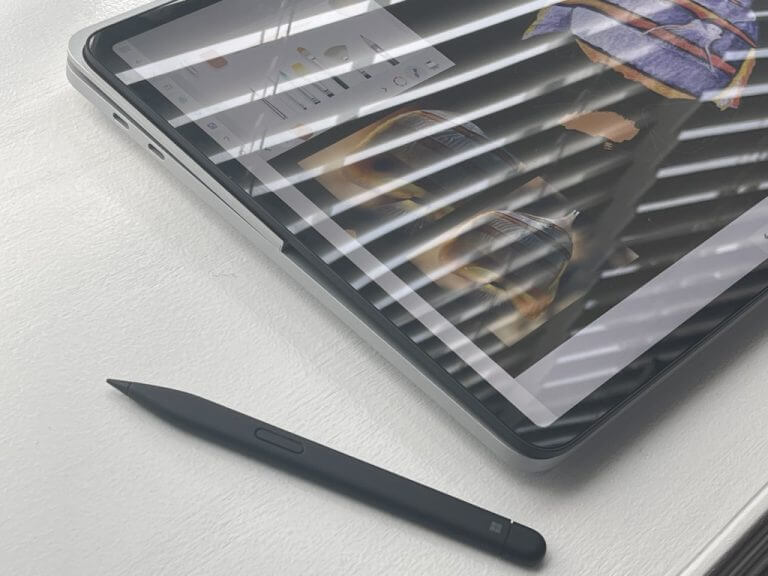
If you’re buying the new Surface Pro 8 or Surface Laptop Studio, then the Surface Slim Pen 2 should be a natural purchase. Available for $130, the newest Surface Pen brings some minor design advancements over the first generation, as well as a haptic feature that make inking on the Surface Laptop Studio & Surface Pro 8 more lively. That’s why we put together this guide for you with some tips and tricks and how you can get the most out of your new Surface Slim 2 pen.

Editor’s note: This guide is designed around the Slim Pen 2 & Windows 11. We have a legacy guide for older Surface Pens & Surface devices.

A note on the pen

We want to begin this piece by noting that the Surface Slim Pen 2 is designed for the newer Surface Pro 8 and Surface Laptop Studio. However, like most Surface Pens, it is backwards compatible with older Surface devices. You won’t be getting the special haptic feedback if you use Slim Pen 2 on an older Surface, but it is certified for legacy Surface devices. That includes the Surface Pro 3 -Surface Pro 7+, Surface Pro X, Surface Duo, Surface Go 2, Surface Laptops 1-4, Surface Studio 1-2, and Surface Book 1-3.

Change your haptic feedback settings

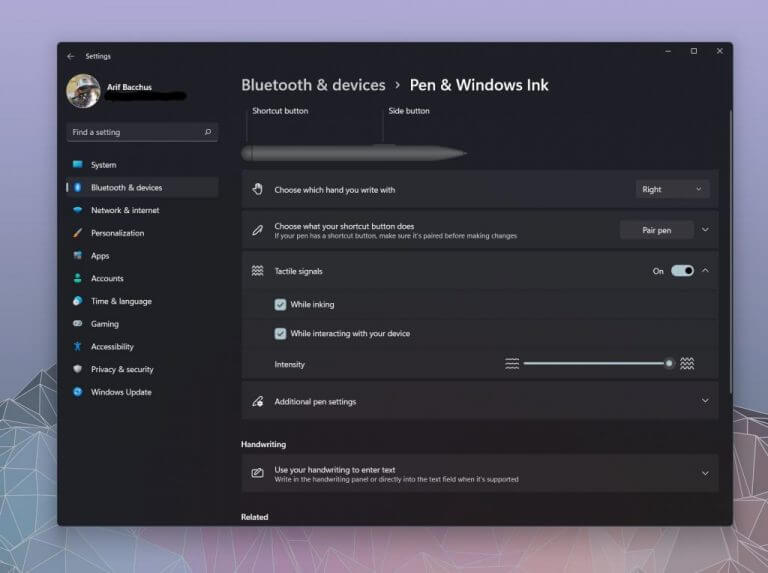
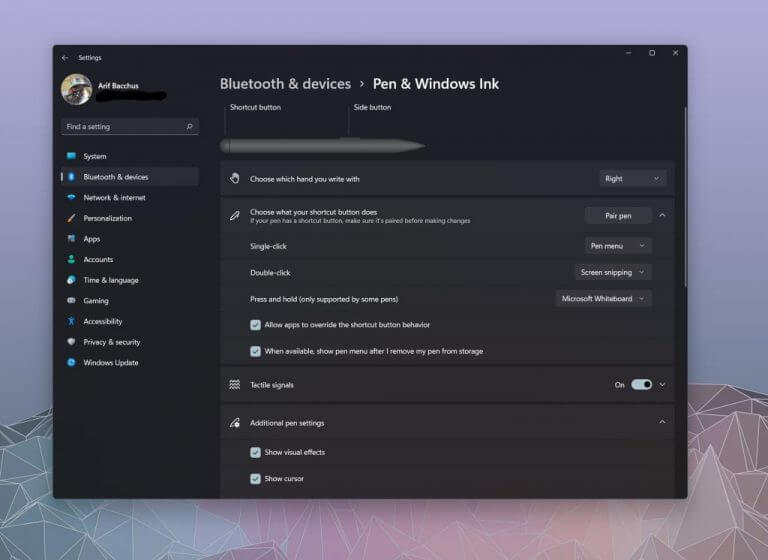
That said, let’s jump into our first tip which relates the haptic feedback. Officially Microsoft calls this feature of the Slim Pen 2 “tactile signals.” This is thanks to a haptic motor built into the bottom half of the pen, near the tip which provides slight vibrations as you ink on the screen. By default, the settings for these signals are set to medium-low. However, if you go to Bluetooth & devices in Windows 11’s settings menu, followed by Pen & Windows Ink, you can change the tactile intensity so that it’s all the way up. When you do this, you’ll be able to feel stronger friction as you drag the pen across the screen for your inking. It creates more of a pen-to-paper feel.

Find your lost Surface Slim Pen 2

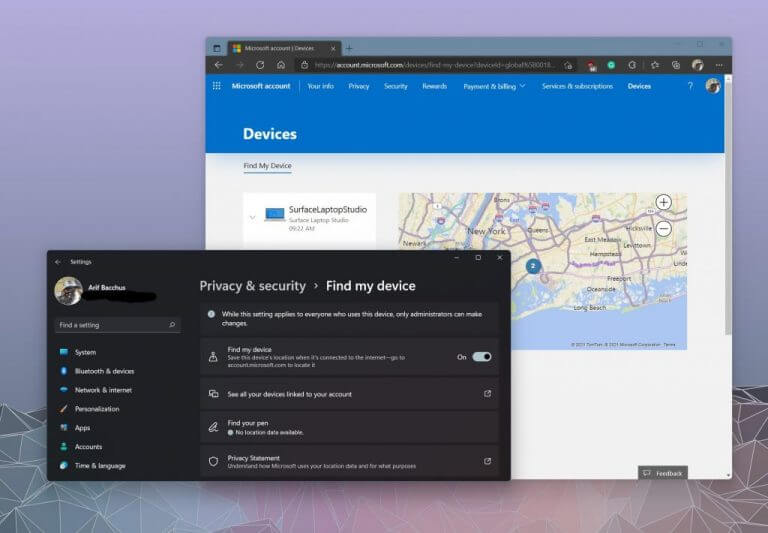
The second tip on our list involves finding lost Surface Pens. This not only applies to the Slim Pen 2, but any other Surface Pen you might own. Since a Surface Pen is usually tied to a Surface, you can locate it by using the Find my Pen Under Privacy & Security followed by Find by Device. This pulls the location data from your Surface and gives you a map of where Windows thinks your pen might be.  Of course, it’s not always accurate since it’s pulling data from Wi-Fi networks, and just showing you a general map. If you lost the pen inside your home, or at the office, you might be a bit out of luck.

Change your Windows Ink shortcuts

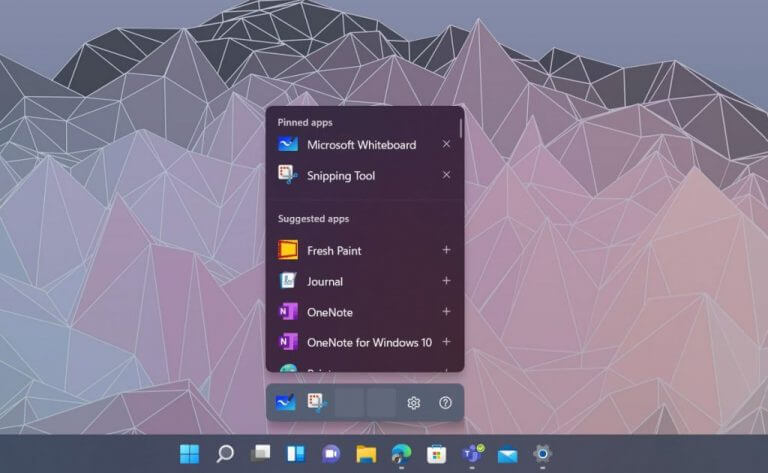
A signature feature of Windows 11 is the new inking menu that pops up whenever you pick up or connect a Surface Pen. In the case of the Slim Pen 2, once Windows detects a Slim Pen 2 is nearby and in your hands after being detached, you’ll see a pop-up menu above the taskbar with shortcuts to some suggested apps. You can switch these apps to your own liking if you please. Simply click the settings cog, and then the Edit pen menu. You can then add two more pinned apps to make it easier to jump into the inking action.

Change your pen pressure sensitivity in the Surface app

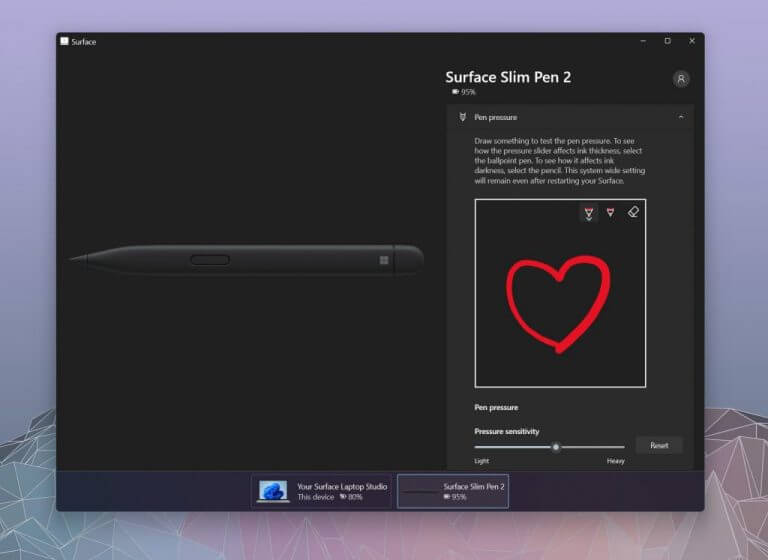
Surface Slim Pen 2 has a total of 4,096 pressure levels. That’s a lot of pressure to deal with, so you feel like the pen is too sensitive, though, you can tweak things down a bit. Just open the Surface App, and then click the bottom area to summon the Slim Pen 2 settings. You can then draw to test the pen pressure, and drag the slider around to change how light or heavy the pressure sensitivity is. The settings you choose will be system and app-wide and will remain in effect after you restart your Surface.

Change your Slim Pen 2 button functions

The last tip on our list involves the Slim Pen 2 button functions. Just like with the pressure sensitivity, you can tweak the buttons on your pen to fit your own needs. Open the Settings app, choose Bluetooth & devices, then choose Pen & Windows Ink. From there, you can click Choose with your shortcut button does. There will be options for what single-click, double-click, press and hold can do.  Under each of these menus, you can choose one of the pre-set options like Whiteboard or Screen Snip, or the Pen Menu and OneNote. Or, you can tweak things so that you can open a specific program or app.

How are you inking?

We hope that these tips and tricks help you get more out of your new Surface Slim Pen 2. If you decide to use our new tips, let us know how you’re enjoying your Slim Pen in the comments below. And, be sure to keep tuned for more, as we’re planning additional coverage on our favorite inking, drawing, and note-taking apps on Windows 10 and Windows 11.

Microsoft Teams public preview makes it easier to switch between different meeting views

Microsoft Teams is getting a new update that should give users a faster way to switch between different meeting views. The new View Switcher feature is currently available in public preview on the Windows and macOS desktop apps.

The Redmond giant first unveiled the View Switcher experience at its Ignite 2021 conference back in March. The “View Switcher” menu brings together all the Teams meeting views in one place. It lets users quickly choose between Gallery, Together mode, Focus, Large gallery, Gallery at top, as well as Full-screen options. Previously, users had to access all these options by clicking the ellipsis (. . .) option in the navigation menu.

To use this feature, you will need to click on the dedicated “View Switcher” icon available in the top left corner of the meeting window. From there, choose your desired meeting view from the list of options. However, keep in mind that the Focus mode option will only be accessible when another user shares content or screen.

The new View Switcher feature should be helpful for those who frequently switch between different views during a meeting. In case you missed it, Microsoft Teams has also added a new quoted replies feature that lets users reply to specific chat messages.

Xbox consoles will soon be able to automatically mute speakers when using headphones

Microsoft has started testing a new feature on Xbox consoles that will automatically mute speaker audio when gamers start using a headset. Currently, Xbox gamers have to manually turn off their speakers after connecting a headset to the console, and repeating that process every single time can quickly become a hassle.

This streamlined audio experience is currently being tested with Xbox Insiders on the Alpha and Alpha Skip-Ahead rings, with a possible release next month. Sony’s PS5 consoles can already mute speakers when you connect a headset to them, and it’s nice to see Microsoft’s Xbox consoles following suit.

The latest Xbox Insider “2111” build released yesterday also introduce new colorblind filters on Xbox Series X and Series S consoles. This system-level feature will apply to games, movies, apps, and menus, and the Xbox team hopes that it will make games that lack similar filters more accessible for people with color blindness or color vision deficiency.

Microsoft releases new Xbox system updates almost every month, and the company has another big new feature coming later this year with Xbox Cloud Gaming finally launching on Xbox consoles. This will allow Xbox Game Pass subscribers to quickly test games before downloading them, but Xbox Cloud Gaming will also bring next-gen games like Microsoft Flight Simulator to Xbox One consoles.

Xodo PDF reader updates on Windows 11 and 10 with several fixes and improvements

The Windows Xodo app updated to Version 5.0.21 today. This latest update made a number of fixes to the PDF reader and editor that corrected an animation bug and some editing and saving issues that had been experienced by users.

Here’s the full release notes for Xodo Version 5.0.21:

Fixes and Improvements

  • Fixed reordering animation issue which would cause a wrong page to be displayed when reorganizing pages
  • Fixed Outline editing which would not properly add a new outline child to a not expanded outline
  • Fixed Color mode saving state to ensure to display the selected color mode when starting up the application
  • Fixes for hangs and crashes

Xodo is a fully-featured PDF app for Windows devices running Windows 8.1, Windows 10, or Windows 11 that lets users create, edit, merge, print, and annotate PDF files.

Here’s some of Xodo’s main features:

  • View & Navigate — Xodo seamlessly renders even the most complex PDFs. View in single-page, continuous or thumbnail modes. Easily skip to chapters, sections or annotations. Search and zoom in on text.
  • Convert & Create — Use your mobile device to convert or scan images to PDF for easy viewing and annotation. Create new blank PDFs and use Xodo as an image-rich notepad.
  • Annotate & Comment — Highlight, underline or strikeout text. Attach sticky notes or add text. Insert lines, arrows, circles, polygons or draw freehand. Change colors, sizes, transparencies and more.
  • Sign & Fill Forms — Quickly fill in, save, and share PDF forms. Easily sign any contract, agreement, or statement by hand, then save your signature for easy future use.
  • Share & Print — Send your annotated documents to others via email. Print your PDF documents directly from your mobile device.
  • Access & Manage Documents — Easily select, rename, copy, move or delete documents or folders with Xodo’s built-in file manager. Access recent docs and automatically open them to the last page visited.
  • Multilanguage – English, Simplified Chinese, Portuguese, Spanish, German, Italian, and French

Want more Windows app news? Make sure to follow us on Twitter and Facebook.

Microsoft’s Xbox app updates on iPhone and iPad with a new white icon

The new white Xbox logo has been visible on the Xbox app’s page within Apple’s App Store for a week or so but it’s now finally started to appear on iPhones and iPads, replacing the previous green icon.

The new app icon (see top image,) which features a white background and a green Xbox logo, only seems to be in use on iPhones and iPads right now as the Android and Windows Xbox apps are still using the old green background/white logo. Both of these platforms are expected to get the new app icon soon though as this new aesthetic is part of Xbox’s 20th anniversary celebration which is beginning to ramp up.

Here’s the previous app icon for comparison.

Xbox, Game Pass, and Cloud Gaming app icons on iPhone

The official Xbox website is also now featuring a new white/green aesthetic while a special Xbox 20th anniversary broadcast on November 15th was announced this morning.

Do you like the new white app icon? Share your thoughts with the community in the comments below and then follow us on Twitter and Pinterest for more Xbox content.

‎Xbox
‎Xbox
Price:
Free

Dune’s Zendaya and Timothee Chalamet are now in the Fortnite video game

A variety of outfits and skins inspired by the new Dune movie launched in the popular Fortnite video game this morning on Xbox, PlayStation, Windows, and all other supported platforms.

Among the new Dune content are outfits based on Timothee Chalamet and Zendaya’s Paul Atreides and Chani, two back blings, an Ornithopter glider, a sand walk emote, and two pickaxes.

Most of the Dune items are available to purchase separately though those who choose to buy them all as part of a bundle will also receive an exclusive loading screen.

Dune is the latest of many franchises to take part in some form of promotion or collaboration with Fortnite. Amusingly, special promotions for DC Comics, Venom 2, Ghostbusters: Afterlife, Ariana Grande, and Universal Classic Monsters are also currently active in Fortnite.

Recent Fortnite collaborations include Street Fighter, Marvel’s Shang-Chi, Suicide Squad, Superman, Rick and Morty, Horizon Zero Dawn, Halo Infinite, and Tomb Raider.

The new Dune movie, a fresh take on the book series that’s unrelated to the previous live-action adaptions, premiered in some regions back in September but it’s set to debut in theaters and on HBO Max in the United States this week on October 22nd.

Are you a fan of Dune and will you pick up these new Fortnite items? Let us know in the comments below and then follow us on Pinterest, Facebook, and Twitter for more gaming news.

Fortnite
Fortnite
Developer:
Epic Games Inc.
Price:
Free


Fortnite - 1,000 V-Bucks

FPS Counter for PC [7 Best Picks for 2026]

FPS (frames-per-second) is the number of frames displayed per second in games. A game’s frame rate is of some significance as a higher FPS will ensure smoother gameplay. A game with a lower frame rate will generally have choppy action sequences.

As such, raising the frame rate with better graphics cards or by reducing graphical settings is one of the best ways to optimize games.

If you’re curious about what your laptop’s or desktop’s current frame rate is, you’ll need an FPS counter. A frames-per-second overlay counter displays what the frame rate is within a game. A few VDUs include frame rate counter options.

In addition, there are also software packages that include FPS counters. These are five Windows programs that provide frame rate counters for games.

What’s the best FPS counter?

Bandicam Screen Recorder (recommended)

Bandicam Screen Recorder is a great screen recording software that shows FPS on your screen. It is used mostly for screen recording but it also has a special game recording mode.

This is very helpful for all players that want to record or simply see their in-game FPS.

After installing and starting Bandicam, the program will show you the FPS count in the corner of your screen. The maximum frame rate of this program is 120 FPS.

You can find an instruction on how to use its FPS count feature on this official page.

The FPS counter has two modes – non-recording (displayed in green) and recording (displayed in red). Bandicam can be tested in the trial version but if you want to unleash all its features, you can buy it.

Here are some of the perks of using Bandicam Screen Recorder:

  • Records videos and captures screenshots in incredible quality
  • Excellent for recording gaming highlights
  • Does not slow down your PC
  • Affordable price
  • Easy-to-use
Bandicam Screen Recorder

Bandicam Screen Recorder

Capture all of your favorite gaming highlights and see if your PC is giving you it’s all with this amazing screen recorder!
Check priceVisit website

Fraps

Fraps is software for capturing game screenshots and recording gameplay. However, this is also benchmarking software with which you can add an FPS counter to DirectX or OpenGL games.

The registered version of Fraps is retailing at $37 on the software’s website, but you can also add the freeware version to Windows platforms from XP to 10 by clicking Download Fraps on this webpage.

You can’t record videos for very long in the unregistered package, but it still includes all the FPS counter settings.

Fraps include an FPS tab from which you can configure the counter’s settings. You can select to include the FPS counter in any corner. You also toggle the FPS counter overlay on/off with a customizable hotkey.

Furthermore, Fraps users can capture in-game snapshots that include the FPS counter as shown below.

⇒ Get Fraps

Dxtory

Dxtory is also software with which you can capture in-game snapshots and recordings. The software is great for recording DirectX and OpenGL game clips.

Games will also include an FPS counter at their top left corners when Dxtory is running.

Dxtory’s Overlay Settings tab includes a few customization settings for the frames-per-second counter. You can customize the colors of the overlay for movie (or game) and screenshot capture.

Furthermore, you can apply alternative status colors to recording and non-recording overlay frame rate counters. Unlike Fraps, the Dxtory’s FPS counter also works for Universal Windows Platform games.

⇒ Get Dxtory

FPS Monitor

FPS Monitor is a complete hardware tracking software that delivers information regarding FPS counter. 

Straight to the point, the program offers insights regarding GPU or CPU performance related to the gaming experience. So you always know when PC hardware resources are highly used. 

Also, you can make the most of it with an overlay option that lets users customize font, size, or color for each sensor you need to see.  

Furthermore, given that game performance is influenced by the PC components you need such software to display data about your computer processes. 

More so, on top of displaying system information in real-time in the game, the tech savvy users can see collected statistics about system performance and save it for further analysis. 

 ⇒ Get FPS Monitor

Razer Cortex

Razer Cortex is freeware game booster software that you can optimize and launch games with. The program automatically closes non-essential background software to free up RAM.

It also provides optimization tools to boost game frame rates with.

You can get instant frame rate feedback for games with Razer Cortex’s FPS counter. The great thing about Razer Cortex is that it also provides an FPS chart when you’ve stopped playing.

The FPS line graph chart shows you the maximum, minimum, and average frame rate during the playtime. As such, you can get a better idea of what the average frame rate for games is with the additional FPS chart.

⇒ Get Razer Cortex

GeForce Experience

If your laptop or desktop includes a GeForce graphics card, you can optimize your games with GeForce Experience.

You can utilize this software to optimize games’ graphics, record gaming videos, update GeForce drivers, and even add extra filters to games for saturation, HDR, etc.

Of course, GeForce Experience also includes an overlay FPS counter for games that you can position in all four VDU corners.

⇒ Get GeForce Experience

RadeonPro

RadeonPro is the equivalent of GeForce Experience for desktops and laptops with AMD graphics cards. This is great software to optimize games’ graphics and frame rates with. It also includes game recording, screenshot and post-processing effects options.

RadeonPro users can enable the software’s frame-per-second counter by selecting the FPS counter tab on the RadeonPro Settings window. From that tab, you can configure the counter’s display corner and adjust the counter’s hotkeys.

Aside from the frame rate counter, the software also includes some handy FPS settings such as Dynamic Frame rate Control and Lock frame rate up to monitor’s refresh rate, which locks the frame rate at the VDU’s refresh rate.

⇒ Get RadeonPro

You can check out your desktop’s or laptop’s frame rates with any one of those programs’ frames-per-second counters.

If you want more games guides or reviews you can find them in our rich dedicated section about gaming.

Note that some games include an FPS counter setting on their Graphics Options menus, and Steam also includes an in-game FPS counter option. If an FPS counter highlights that your frame rate needs boosting, check out this article.

[wl_navigator

Microsoft Teams and Word add new features for frontline workers

Microsoft has announced a couple of new features and capabilities for its Microsoft 365 apps. The company says that these updates are designed to help organizations better support their frontline workers in hybrid environments.

“We know those on the frontline need the right digital tools and purpose-built hardware for the specific ways they work,” explained Emma Williams, CVP for Modern Work Transformations at Microsoft. “In fact, we’ve seen more than a 150 percent increase in Microsoft Teams usage among frontline workers over the past year in industries such as retail, financial services, healthcare, and government.”

First of all, Microsoft is bringing its Approvals app to Word, which should help to make the approval process efficient and faster than ever before. This release facilitates the creation of approval requests for specific sections or entire Microsoft Word documents. The Approvals app is getting a new capability that lets users select DocuSign (a third-party provider) to create electronic signature approval requests natively.

thumbnail image 4 of blog post titled New Microsoft 365 and Teams solutions to empower frontline workers

Furthermore, the Viva Connections mobile app in Microsoft Teams is finally getting ready to drop its preview tag next month. The iOS and Android apps have been available for public testing since September, and they give frontline workers quick access to relevant news, conversations, and other resources.

In addition, there are a few new features for the Microsoft Teams Electronic Health Record (EHR) connector. The new additions announced today include the ability to schedule and launch virtual visits, waiting room, and SMS notifications for virtual visits. This update brings the ability for attendees to join a virtual visit in a browser directly from their mobile devices without downloading Teams.

Last but not least, Microsoft is also unveiling new AI-based privacy management solutions for Microsoft apps and services, and we invite you to check out this blog post for more details.

Windows 11 File History: How to Add Folder for Backup

Have you ever heard of the Windows 11 File History add folder function? We will like to explore it in this article and include all the essential elements.

Backing up information is an essential aspect of daily computer use. This is because a lot can get lost or destroyed, and backup is often the best practice to guard against this.

Many valuable elements of the Windows 11 OS guarantee the proper backing up of your files and documents. Specifically, let us look at the Add Folder OS option.

Where are File History settings in Windows 11?

On the new OS, you will be able to find these settings in the Control Panel in the path below:

Control Panel\All Control Panel Items\File History

This function comes in very handy and is vital for the following:

  • Auto backups – This saves you the time and energy to perform repetitive tasks on your devices.
  • Great for storage conservation – Since these backups could be linked to an external storage unit, you are not tasking your primary computer storage with any additional load.
  • Personal files storage – Unlike System Restore, which holds a complete image, the backup allows you to choose personal files that you consider essential.
  • Easy file recovery – If you accidentally delete a file or it becomes corrupted, you can quickly restore a previous file version from the backup.
  • Versioning – File History keeps multiple versions of your files, so you can return to an earlier version if needed.
  • Flexibility – You can choose which folders to include in the backup and where to store the backup files, such as an external hard drive or a network location.

With this out of the way, let us explore adding folders to your File History on Windows 11.

How do I add a folder to File History?

  1. Press Windows + R to open the Run dialog, type control, and hit Enter.
    windows 11 file history add folder
  2. Navigate to the path below or simply copy and paste it on the address bar of your Control Panel and hit Enter:
    Control Panel\All Control Panel Items\File History
    windows 11 file history add folder
  3. Then, connect your external storage to your PC.
  4. Alternatively, you may click Select drive on the left pane (this is the correct choice if you would instead use a network location).
    windows 11 file history add folder
  5. Select your drive and click Add network location.
  6. Select the Network folder to add to File History and click on Select Folder.
  7. Click OK, then select the Turn on button.
  8. Optionally, you may click on Advanced settings on the left pane.
    windows 11 file history add folder
  9. Choose your preferred settings for Save copies of files and Keep saved versions; the defaults may be just fine.
  10. Finally, click on Save changes.

If you have followed the steps above, you should have successfully been able to add a folder to your Windows 11 File History.

File History is an essential feature in Windows 11 that allows you to automatically back up essential files on your personal computer to an external drive or network location.

By regularly backing up your files, you can ensure that you have a copy of important documents, photos, and other data in case your computer’s hard drive fails or your files become corrupted.

Finally, let us know in the comments if you have any luck with this.

5+ best free and paid fire sprinkler system design software

Whether you want to design a pre-action, Dry Pipe, Wet Pipe, or Deluge fire sprinkler system, it’s important to know what computer-aided sprinkler design program to use.

A good fire sprinkler design software allows you to increase your flow and productivity while keeping your work error-free.

These programs can help designers do hydraulic calculations and manage 3D piping with CAD functions, automatic insertion of joints and hangers, ability to set terminals flow and pressure, and more.

If you are a company specialized in offering fire protection services, you would already know the importance of a fire sprinkler design program.

Instead of going into further details of the working of fire sprinkler design software, let’s take a look at how you should pick the proper tool.

How to pick the best fire sprinkler system design software?

This list was put together for engineering professionals that are looking to find a better tool to improve their design.

That is why, if you’re a specialist, you probably know exactly what’s missing from your arsenal. However, we will highlight a few focal points that might help you.

➡ Accurate representation

It’s very important to have software that respects the on-site 3D environmental variables. As you will see below, there are tools that even take the pipe elevation to make calculations.

A proper 3D representation will also help you see all the pipes, pumps, fittings, etc. in a realistic way and evaluate the system a lot better.

➡ Automatic calculations

Double-checking all your data during the project design is essential but if the automatic calculations within the software are error-free, that is only going to help you move faster with your design.

Automatic calculation table in AutoSprink

In the example above, you need to supply the information for an In-Rack system layout of sprinklers. You will get your results in seconds instead of making the calculations manually.

➡ Check system compatibility and requirements

Most of the CAD software tools are resource-hungry apps and need specific requirements to work properly.

So, before making the purchase, check if your system is compatible and even more, if possible, take it for a spin on your system to see if it can hold the workloads you’re expecting.

And now, let’s take a look at the best free and paid software for fire sprinkler system design that will help you to perform essential tasks more effectively and give you the confidence to take on any project irrespective of the size.

What are the best 3D fire sprinkler design tools for PC & Mac?

AutoSprink

AutoSprink is the industry leader when it comes to fire sprinkler design software. It is a premium solution, but you can download the demo to test it out for your projects.

AutoSprink is used for large commercial constructions projects for creating drawings, hydraulic calculations, stock listing, and coordination.

The sprinkler systems can be designed in 3D space with proper elevation. To perform the calculation, simply draw a Remote Area boundary around the heads you want to follow and run the Calc.

AutoSprink also offers an accurate 3D design environment to manage coordination in your design offering precise fitting for pipes. Not more, not less, just right!

The listing process is effortless as well, which is due to the fact that the systems with pipes, fitting, hangers, etc. are modeled in 3D.

Keep in mind that the latest version of AutoSprink comes with OpenGLSL Rendering offering much-optimized speed for zoom, pan, and orbit for frame rate.

It also allows the users to create multiple sheet tables with multiple views with minimal impact on drawing speed.

The Manufacturer Database gives access to tons of new parts from the clouds through the Parts Picker feature. You can also export the stocklists to AutoSprink FAB to reduce processing time for a stock listing.

On the flip side, AutoSprink is not the easiest fire sprinkler design program. As a result, you may need to attend some training sessions before getting used to the working of the software.

This solution only works on Windows PCs so if you’re looking for a macOS tool, AutoSprink is definitely not the one.

Let’s see some of its best features:

  • Ideal for large commercial constructions projects
  • Access to the Manufacturer Database for parts
  • Accurate 3D design environment
  • All the parts are modeled tridimensionally
  • Only available for Windows systems

⇒ Get AutoSprink

SprinkCAD 3D

From creating fire sprinkler system designs to performing complex hydraulic calculations, SpinkCARD 3D can do it all.

It is an amazing BIM (Building Information Modeling) suite that helps professionals across industries to create safer, efficient, and cost-effective fire sprinklers designs.

SprinkCAD 3D also offers Revit Tools at an additional cost so if you use Revit, you can benefit from those add-ons.

The optional add-on allows you to build custom Families using the family builder to draw arm-overs, springs, goose-necks, drops, and more at any elevation.

This program offers comprehensive tools to design sprinkler systems, perform hydraulic and fluid delivery time calculations, and more.

It is a Windows-compatible program and can be installed on Windows 7 and above running computers.

Coming to the bad bits, the software can be buggy at times with occasional freezes, which can be fixed with a software update, but something to consider.

SprinkCAD 3D is a premium software; however, you can request a demo and take the software for a spin before making a commitment.

Take a look at this tool’s best features:

  • Complete Building Information Modeling suite
  • Automatical hydraulic and fluid delivery time calculations
  • Demo available for testing before buying
  • Advanced 3D graphics
  • Wide array of tools for 3D design

⇒ Get SprinkCAD 3D

FireACad

FireACad

FireACad is one of the popular fire sprinkler system design software programs available for fire protection design companies.

If you have used SpinkCAD and AutoSprink before and you’re looking for an alternative, FireACad offers similar functionalities at a competitive price tag.

The software is capable of creating a 3D view to Navisworks or Revit MEP for BIM use very conveniently.

Using the tools, you can create a 3D solid pipe network, produce new calculations reports as required by the NFPA Code, produce drawing errors, change sprinkler stem on the spot, and work with AutoCAD using FireACad profile.

The tool can also write pipe size, length and end finish automatically. The users can either start with the built-in pre-designed details or create a custom one from scratch.

FireACad is capable of showing valid FireACard details and objects automatically and also show only specific layers on the drawing.

For performing hydraulic calculations and material lists, the software takes the information from the drawing.

FireACad is relatively easy to use if you have enjoyed any other fire sprinkler system design software before. However, for newbies, the software does require some commitment to be comfortable with.

Unfortunately, this software can only be used in Windows so it doesn’t support macOS.

Let’s review some of the most important features of this tool:

  • Produces new calculations reports as required by the NFPA Code
  • Writes pipe size, length and end finish automatically
  • Creates a 3D view to Navisworks or Revit MEP for BIM
  • Automatic hydraulic calculations and material lists
  • Competitive price tag

⇒ Get FireACad

Stabicad Sprinkler

Stabicad Sprinkler is a new Revit sprinkler module that allows its users to design and analyze the fire sprinkler system.

It comes with the ability to design and place multiple sprinklers with any desired connection and perform a hydraulic calculation based on the drawing.

From modeling sprinkler installation to the sprinkler head, this sprinkler module allows you to perform various tasks on Revit. The integrated calculation offers speed advantages while making the monitoring of drawn system easier.

The user interface is intuitive, and anyone with a good knowledge of other sprinkler design software can understand the working of this tool in no time.

Note that the calculation is performed based on local standards for sprinkler systems using the design conditions. The module also benefits from high-quality Revit families on MEP content controlled by the manufacturers.

The new sprinkler module also offers a solution for drawing with a flexible pipe in Revit thanks to the flexible drawing support in the module.

Stabicad Sprinkler module is a premium add-on and a great alternative for those who are already using Revit for designing and falling short of Sprinkler features offered in Revit.

With this add-on, you can extend the sprinkler design functionality of your Revit design suite. This tool is compatible with Mac computers in a dual boot configuration by using Bootcamp.

Let’s look at some of its best features:

  • Design and analyze fire sprinkler systems
  • Perform hydraulic calculations based on the drawing
  • Based on the Revit design suite
  • Integrated calculations
  • Professional level design

⇒ Get Stabicad Sprinkler

Canute FHC

FHC Hydraulic Calculation Software is used by fire protection engineers all over the world to design the most demanding fire protection systems to international standards.

And the tool is compatible with all present regulations in the industry, including EN 12845, BS 9251, FM Global, NFPA 13, NFPA 750, and LPCB / BRE.

With FHC you can simply use a set of drawing tools to build complex hydraulic models easily, directly on your screen.

You can see the pipe network updating instantly and that eliminates the input errors so you can concentrate on optimizing your hydraulic model.

That, in turn, will lead to less time spent on design time and lower installation costs with smaller pipe sizes or system pumps.

But probably the most important feature of this solution is the fast calculation algorithm that will show you the result in seconds so you can focus on developing a more economic design.

You can calculate the pipe friction loss easily by using the Hazen-Williams or Darcy-Weisbach pressure loss equations with a single click.

This makes FHC suitable for fire sprinkler systems, high and low-pressure water mist systems, and other such demanding designs.

Take a look at its most important features below:

  • Hazen-Williams or Darcy-Weisbach pressure loss equations for automatic calculus
  • EN 12845, BS 9251, FM Global, NFPA 13, NFPA 750, and LPCB / BRE conformity
  • Simple, yet effective set of drawings available
  • Ideal for designing sprinkler systems or low-pressure water mist systems
  • Built-in calculation algorhitms

⇒ Get Canute FHC

Trazar for macOS

If you need a duct system and fire protection design tool for macOS, Trazar is a rare find but it also works on Windows if you have a change of heart.

It’s actually a dedicated software for architectural, engineering, and industrial development that can help you design HVAC duct systems, sanitary and plumbing lines, fire protection, electrical power and lighting, and fire alarm systems.

Trazar is a complete MEP application that runs on BricsCAD for Windows, macOS, and Linux OS so you can use the lite version, Pro version, BIM version, Mechanical version, or Ultimate version of BricsCAD.

The catch here is that the app comes with a freeware version only for macOS users so you can at least give it a try without any implications.

With designing such an important system, security plays a crucial role so you can also share the files in read-only mode so that no one can alter or modify them.

However, you can still distribute them in read-write mode and give permissions only to certain users to make such modifications.

It’s very interesting that this software also comes with a voice command button to access certain tools and features that can make your work a lot easier.

Let’s see some of its best features:

  • Free for macOS but also compatible with Windows and Linux computers
  • Can be also used to design HVAC duct systems, sanitary and plumbing lines and more
  • Secure design sharing
  • Designed for engineering specialists
  • Automatic calculations

⇒ Get Trazar

Fire sprinkler systems are one of the fundamentals that make the building safe. However, the sprinkler system is more demanding than it appears.

Apart from creating a truly efficient sprinkler system that can protect the building from mishaps, you also need to be sympathetic to the overall visual look of the ceiling and other coverage areas.

This is where the fire sprinkler design software makes the task easier and a lot more efficient too. 

With the help of these tools, you can create an efficient fire sprinkler system design in 3D and also get support for hydraulic calculations, coordinates, and stocklist management.

Have you used any of these options before? Do let us know about your experience in the comments below.

6 effective ways to open Task Manager in Windows 10 or Windows 11 

If you’ve been a Windows user for a while, I’m sure you would’ve come across the Windows Task Manager at least once by now. Some users often find it difficult to open Task Manager in Windows 11, which is a major setback considering how important it is.

The last line of defense for every Windows user, the Task Manager is usually called upon when all your programs stop responding and your PC is stuck still and simply won’t budge from inactivity.

While the Task Manager can be used for much more than clearing non-responsive tasks and errors, here we’ll focus on how to open Task Manager so as not to digress from our topic.

Moreover, there’s not just one, but multiple ways that you can open the Windows Task Manager in your Windows. Let’s start with the simplest one.

1. Open the Task Manager with a keyboard shortcut

One of my personal favorites and probably the simplest one on this list, you can launch the Task Manager simply by pressing Ctrl + All + Delete together. When you press the shortcut keys, you’ll see the Windows Security screen pop open on your screen.

From there, click on Task Manager, and the Task Manager window will open up. From here, you’re free to use Task Manager however you’d like.

opening the task manager in windows 10

2. Use the Power user menu

You can also open the Task Manager from the Power User menu on your Windows computer. Put briefly, the Power User menu is a central place to access some of the most widely used Windows features.

To get started, press the Windows key + X option to open the Windows power menu. From there, select the Task Manager option, and you’ll have the Task Manager window in front of you.

opening the task manager from power user menu

3. Launch Task Manager from the taskbar

Navigate and right-click on the taskbar of your Windows 10 PC, or on the Windows icon in the taskbar on a Windows 11 PC and select the Task Manager from the diverse set of options available on your screen.

launching windows task manager from task bar

4. Use the Ctrl + Shift + Esc shortcut

Another shortcut on our list, the Ctrl + Shift + Esc shortcut, is slightly different from the Ctrl + Alt + Delete shortcut we’ve used above.

Pressing Ctrl + Shift + Esc will open Task Manager in just a few seconds on your screens, as opposed to Ctrl + Alt + Delete, where you’ll have to first go through the Windows Security menu. Use this one if you’re rushing and want to quickly launch the Task Manager.

5. Use the “taskmgr” from the Start menu search bar

To open Task Manager in Windows 10/11 from the taskmgr EXE file, do the following:

  • Go to Start menu search bar, type “taskmgr.exe,” and select the Best match.

The Task Manager will be launched on your screen. Alternatively, you can also enter “taskmgr.exe” in the Run dialog box and hit Enter to launch the application.

opening task manager from run dialog box

Related: Task Manager Not Responding? Here are 4 Ways to Fix It

6. Use the Control Panel

This is a rather long-winded way, but you can also make use of the Control Panel to open Task Manager.

To get started, go to the Start menu search bar, type in “control panel,” and select the best match.

In the Control Panel, go to the search option in the top-right corner, type in ‘task manager’ in the search bar, and select the Task Manager option when it comes up.

opening the task manager from control panel

If you’re also looking to refresh the look of your Task Manager in Windows 11, we have a separate post highlighting what the Task Manager is and what it’s used for.

We also invite you to check out our expert guide on how to enable dark mode in the new Task Manager. Be sure to also check out our guide on how to fix the Task Manager in case you run into trouble and it’s not functioning properly.

Open Task Manager in Windows 10/11

The Task Manager is another one of the free utilities from Windows that makes our day-to-day Windows workflow hassle-free.

Apart from helping you fix random hang-ups of Windows that pop up from time to time, it can also help you see and fix the processes that are running behind your PC, while at the same time, showing the app history, user, and service details of your Windows.

ForceDelete is a handy Windows utility to unlock and delete files or folders

Often, users runs into error messages like “cannot delete file: access is denied” or “the file is used by another program or user” when they are trying to delete files and folders on Windows. Essentially, this means that these files and folders are locked i.e., they are in use by some other app or system process or running in the background, and hence cannot be deleted.

ForceDelete is a handy utility to fix these issues and delete the locked files and folders forcibly. It helps delete files and folders which cannot be deleted and remove program folders that have been uninstalled already. It can also allow users to unlock files and folders locked by other processes. ForceDelete also allows users to shred files to permanently delete files and folders if you want. All such files and folders would be unrecoverable.

ForceDelete can also help users delete locked files and folders without terminating the processes. While this will help you delete the locked file you wanted, it will not affect any other program or process. All you need to do is uncheck the “Close Processes” option before deleting the file.

ForceDelete also adds two shortcuts into the context menu allowing you to easily unlock or delete files by right clicking the file. Of course, on Windows 11, these get added to the extended ‘Show more options’ fly-out menu. Apart from a GUI mode, there’s also a command line batch mode. You can run forcedelete.exe from the command line to batch delete files and folders as following:

forcedelete.exe [file1] [file2] … (The “file1” and “file2” could be a file or a folder)

ForceDelete is a straightforward, and easy to use application. And it’s free, and there are no ads! You can download ForceDelete for Windows XP and above. It’s a tiny installer, less than 1MB in size. If you do not want to install it and only intend to use the app occasionally, you can download the portable version which is a standalone executable file that runs without any installation or dependencies.

Xbox Gear Shop adds official Halo-Ween merch

Just in time for Halloween, the official Xbox Gear Shop has just added a new line of Halloween merchandise inspired by the popular Halo video game franchise.

This new Halo-Ween line includes a T-shirt, mug, tote bag, and a premium print, all featuring a new design by Gravity Doll.

“Halloween is a regional holiday celebrated on just parts of Earth,” reads the Xbox Gear Shop description. “Halo-ween, on the other hand, is celebrated throughout the galaxy and we have truly official merchandise for the fictional occasion.”

Xbox Gear Shop Halo merch

In addition to the Halo-Ween products, a new Halo Infinite tee featuring the Master Chief’s helmet is also now available.

Not a fan of Halo or Halloween? Check out the new official Xbox skateboard deck that launched in the Xbox Gear Shop earlier this month.

Xbox Series X Mini Fridge pre-orders go live today

Updated: 2/21/2023

Today’s October 19th which means that the online and in-store pre-orders for the highly anticipated Xbox Series X Mini Fridge are about to begin.

Target is the official retailer of the cool collectible in the US and will be taking orders today both in physical stores and on the official Target website. A product page for the Xbox Series X Mini Fridge isn’t up on the Target website yet but it should appear on this page once it’s live.

Canadian Xbox fans will be able to pre-order the Xbox Series X Mini Fridge from the official Xbox Gear Shop though it’s unclear if those pre-orders will go live today along with the US. However, both the US and Canada pre-orders will ship in December.

UK pre-orders will be available via GAME, France, Germany, Italy, and Ireland via Game Stop EU, and France, Italy, Spain, Netherlands, and Poland via Tonyk. Micromania will also be taking orders in France.

It should be noted that while the above stores are the official partners, pre-orders will also likely begin popping up from other retailers as well.

There’s currently no word on Australia, New Zealand, and other regions but Microsoft has confirmed that the Xbox Series X Mini Fridge will launch in more countries in 2022.

The Xbox Series X Mini Fridge began as an internet meme that made fun of the fact that Microsoft’s new Xbox Series X console kind of looks like a refrigerator.

Demand for the product soon began in earnest which caused Microsoft to fast-track production of a fully-functioning Xbox Series X Mini Fridge that’s a 1:1 scale replica of the Xbox Series X and even features Xbox light and sound effects.

Are you going to pre-order an Xbox Mini Fridge? Let us know in the comments below and then follow us on Pinterest, Twitter, and Facebook for more Xbox news.

Microsoft security analyst says Office 365 knowingly hosted malware

Hold on to your seats and keep your arms inside the carriage at all times, because this ride is about to get bumpy.

A British tech researcher, who quit working as a security threat analyst with Microsoft a few months back, has called on his former employer to act swiftly and remove links to ransomware on its Office365 platform.

Bet you didn’t see that coming, did you?

Former Microsoft employee exposes ransomware scheme

In a tweet sent on Friday, Beaumont said that Microsoft cannot advertise themselves as the security leader with 8000 security employees and trillions of signals if they cannot prevent their own Office365 platform from being directly used to launch Conti ransomware.

https://twitter.com/GossiTheDog/status/1449094895298392067?ref_src=twsrc%5Etfw%7Ctwcamp%5Etweetembed%7Ctwterm%5E1449094895298392067%7Ctwgr%5E%7Ctwcon%5Es1_&ref_url=https%3A%2F%2Fitwire.com%2Fsecurity%2Finfosec-expert-beaumont-slams-microsoft-over-hosting-malware-for-years.html

He was, of course, responding to a tweet from an infosec professional using the handle TheAnalyst.

According to the security company Palo Alto Networks, BazarLoader (sometimes referred to as BazaLoader) is malware that provides backdoor access to an infected Windows host.

After a client is infected, criminals use this backdoor access to send follow-up malware, scan the environment and exploit other vulnerable hosts on the network.

An overwhelming majority of ransomware attacks only Windows, with an analysis by the staff of the Google-owned VirusTotal database last Thursday showing that 95% of 80 million samples were analyzed. 

VirusTotal is a site where security researchers can submit any ransomware they find and have it scanned by anti-virus engines to see if it can be identified.

Beaumont, who has a well-earned reputation as a researcher who is quick to admit faults in his own industry, acknowledged that other technology companies also played a big role in hosting malware.

He also said that there’s somebody in the replies from Microsoft saying when things are detected by Defender, they’re automatically taken down in OneDrive.

That’s categorically not true, that functionality isn’t there. Microsoft needs to have a long, hard look at this problem.

Bazarloader had moved from Google Drive to OneDrive, according to these recent allegations.

Their content used to be taken down from Google Drive almost instantly because, we, Microsoft, reported it to Google. It is still online, days later, on OneDrive despite being reported, because Microsoft is fumbling it. Fix it.

Asked by Lee Holmes, the principal security architect for Azure Security, whether he had reported this to Microsoft, Beaumont said the Swiss researcher had done so.

I had to do things list send to CERT, get nowhere, send to DSRE, get nowhere, cc in managers etc. O365 has https://abuse.ch takedowns pending for months.

Beaumont added that Microsoft’s attitude towards the presence of malware on its Office365 platform had been like that for years.

However, this is not a Microsoft-exclusive problem nor a new issue, as we have seen malware hosted on other platforms in the past. 

According to research by the Bern University of Applied Sciences, Google and Cloudflare are currently among the top online malware-hosting networks.  

As such, the entire tech industry needs to be better about finding malicious content hosted on its servers before looking elsewhere for problems. 

In any case, hopefully, this incident will drive Microsoft to decisive action that can help protect millions of people and thousands of organizations from debilitating malware attacks.

What’s your take on this whole situation? Share your opinion with us in the comment section below.

8 Best Media Center Software for Windows PC [2026 List]

The Windows Media Center (WMC) was a part of Windows platforms up to Win 8.1. However, Microsoft has now discontinued the WMC, which effectively removed many of its multimedia options from Windows 10.

The Media Center gave you a central place to organize video, images, and music and establish a home theater setup. If you need a replacement for the WMC in Windows 10, there are a number of third-party media centers that can fill the void.

First, note that media center software is not the same as media players. Media players are primarily designed for music and video playback and lack some of the options you would expect to find in standard media centers.

All-in-one media centers enable users to organize their videos, games, music, and images and play multimedia content on both PC and connected TV within a home theater setup.

The software also includes options that enable users to stream TV programs and films, watch and record live TV, and play photo slideshows.

What is the best Media Center software for Windows 10?

PlayOn

PlayOn is a beneficial platform for any user who needs a solid media streaming service. As a media center, it offers one of the most qualitative media content online.

The most important concept of this program is that you can watch shows from streaming resources, using directly your PC to record them. At the same time, it is possible to enjoy your favorite movies offline.

Hence this software is everything you need for media consumption due to its rich library of content. You can practically record any movie you desire from streaming apps like Netflix, HBO, Disney+, Hulu, or Amazon and watch them later.

More so, a great advantage you can use is the mobile app that offers lots of content and a full HD 1080p quality recording feature. Other features assure ad skip, off-peak recording, syncing across multiple devices, auto-download recordings, and more.

Either you prefer the desktop version or the cloud one, both are effective and provide satisfying media services. There are some differences between those two, which you can check on their official website. 

Thus on the cloud version, you benefit from better video quality and closed captioning for your movies, assuring relaxing experiences when watching your favorite shows.

PlayOn

PlayOn

Enjoy awesome shows online with this media center that presents high-quality recording services.
Check priceVisit website

Plex

Plex is a more unique media center software with a client-server model. In other words, the software enables you to stream, or share, your media with multiple devices.

As such, Plex Media Server software is required along with a Plex front-end app, which you can add to Windows 10 from this web page.

The Windows app might be freely available, but it limits media playback to one minute unless you unlock it with in-app purchase or a monthly Plex Pass subscription.

Plex is a great software to organize music, videos, and image collections with. The software supports almost all music and video formats, and its library UI presents your media with artwork, bios, plot summaries, and more besides.

Users can obtain online content from many sources, such as NPR, Comedy Central, and Spike. The music player can also show you timed lyrics of songs, which is a novelty.

Unlike other media centers, Plex enables you to set up multiple user accounts and place restrictions on unsuitable content. Recent updates have also added DVR recording to Plex with access to 86 of Nielsen’s most-watched shows.

What really sets Plex apart from some of the other media centers is content streaming.

With a Plex Pass subscription, users can sync media between a wide range of devices, such as phones, tablets, digital media players, and game consoles.

You can also sync media to Google Drive, Dropbox, and Box cloud storage. So if you have photos, music, or videos on both a laptop and tablet, you can quickly open all the media on both devices with Plex apps.

⇒ Get Plex

Kodi

This software was originally XBMC (Xbox Media Center) but is now more widely known as Kodi. Kodi is one of the foremost third-party media centers that’s compatible with various platforms.

The software’s compatibility extends to Windows 10, Linux, Mac OS X, iOS, Android, Apple TV OS and Raspberry. Kodi is also open-source software that you can install by clicking Installer under the Get it on Windows 10 button on this web page.

Kodi media center supports all the main video and audio file formats for playback, and it enables you to stream content from various online media streaming services.

With a little configuration, users can access expansive TV show and movie libraries that include poster, disc, and banner art. You can watch and record live TV within the Kodi GUI.

The software has extensive GUI customization options with which you can configure Kodi’s skins (or theme), screensaver, background wallpaper, GUI audio effects, home page buttons, font, add-on shortcuts, and more besides.

Kodi also has some amazing music visualization effects.

However, the best thing about Kodi is its add-ons. Kodi has loads of add-ons for audio, videos, pictures, screensavers, games, weather, programs, and skins with which you can further enhance the software.

For instance, with the ROM Collection Browser users can browse and launch retro games within the media center.

Exodus is one of the more notable third-party add-ons for Kodi with which you can stream and watch a plethora of blockbuster movies and TV shows.

⇒ Get Kodi

MediaMonkey

MediaMonkey is a great choice for all of you which does not organize its video and music collection. If your ‘Music’ and ‘Movies’ folders are a mess – this is the right software. You can tag, categorize and make selections of your files.

If you have to switch from iTunes or Windows Media Player, you will be able to import your playlists and selections in Media Monkey and use it without any problems. You can customize the way it looks so you can personalize the lists with genres, albums, musicians, tracks.

You can also share your files from Media Monkey on TVs, DVD players, and other UPnP/DLNA devices. Watch your favorite videos in a few clicks.

You can install it on your Windows 7, 8, 10 devices without any problems – it is fully optimized for these versions. It can be used in more than 15 languages and it does not slow down your computer.

Thereby using this software you can better organize your media files and find every movie or song in one place, and just press a button when you’re in the mood for enjoyment.

⇒ Get Media Monkey

Jellyfin

Jellyfin is a software built by volunteers that offers a stunning media platform to enjoy the best productions.

Shortly, this app is completely free and offers valuable services like media distribution of movies, music, or TV shows. It is possible to collect any media content you want and access it right away.

Thus the given support is unlimited and satisfies all preferences in terms of entertainment. The server provided by this platform allows free downloading and media streaming in the blink of an eye.

Plus, you can set up your live TV and record any program you prefer to add to your library. And regarding support, you can watch your media on the fly.

Even if you prefer to watch away from the PC, on your Android or iOS device you can. So you can stream content on a Fire TV device or via Kodi installation in order to transport your media anywhere.

⇒ Get Jellyfin

MediaPortal

MediaPortal is a Kodi descendent as its original source code was forked from that media center. However, MediaPortal bears relatively little resemblance to Kodi. This is open-source media center software exclusively for Windows.

You can add either MediaPortal 1 or 2 to Windows from this page; although MP2 is the latest version it has fewer skins and plug-ins.

MediaPortal provides a visual extravaganza with some stunning skins to choose from.

The software has a more extensive selection of skins than Kodi that come in a variety of styles and have full-screen fan art, alternative themes, add-ons, and many customization options.

MediaPortal also has skins configured for more specific screen sizes, high-definition resolution, and touch screen devices.

In MediaPortal you can play your media files directly from HDD storage, DVD, or even Blu-rays. One advantage of using this software is that it automatically scans your HDD for media files so you don’t have to manually search for and open them as in Kodi.

Users can watch live TV from thousands of channels and record programs to their hard disks, and MediaPortal comes with its own TV Guide.

You can listen to and record radio, play image slideshows with transition effects, check the weather, and play Tetris and Sudoku games that come bundled with the software.

There are also 246 official plug-ins for MediaPortal, which include WiFiRemote that enables users to navigate the software with a variety of remote control devices.

⇒ Get Media Portal

Emby

Emby is another media center with a centralized database for multiple clients. Thus, Emby has its own server much the same as Plex.

It has apps for lots of operating systems and devices, and you can add Emby Theater to the more recent Windows platforms by pressing the Download button on this page.

Alternatively, you can add the software’s app to Windows 10 mobiles from its Store page. You’ll need an annual Emby Premiere subscription to play media in the apps.

Emby’s Home Theater app provides live TV and program video recording support. Its elegant media presentation displays cover artwork and metadata, and the GUI provides quick and straightforward browsing with its advanced search tools.

The Live TV Guide is a handy addition to the theater app, and with the Emby DVR, you can schedule TV recordings. Emby also has some handy plug-ins such as Cover Art, which you can enhance media images with, and GameBrowser that enables game support.

Media streaming is Emby’s greatest asset, and for that, it includes centralized database management that users can use with straightforward web tools.

Emby has 20 apps for Android and iOS mobiles and tablets, game consoles and digital media players, which include Amazon Fire TV, Roku, Android TV and Apple TV.

As such, you can bring your media together across a range of hardware. The media streaming also enables you to sync and back up music, video, and photos to cloud storage.

⇒ Get Emby

JRiver Media Center

JRiver MC was originally Media Jukebox, but the publisher has expanded the software so that it’s now a full-blown media center.

This is comprehensive media center software with extensive options and tools and support for audio, images, music, TV, and even DLNA network devices. JRiver MC is proprietary software for Windows, Mac, and Linux.

JRiver MC is especially good for video and TV playback. The software boasts an innovative Red October system that automatically configures DirectShow filters to ensure quality video playback.

The media center supports TV tuners from most manufacturers for live TV playback and even enables users to record high-definition TV.

Users can play online videos with JRiver MC’s integrated YouTube, Hulu, and Netflix services. The software also has five alternative view modes, and its Theater View is ideally suited for TVs and touch screen devices.

JRiver MC isn’t quite in the same league as Plex or Emby when it comes to media streaming, but with its DLNA (Digital Living Network Alliance) support you can still share your media across desktops, laptops, and other devices that support the DLNA protocol.

The software has a Media Network that you can share media on. The Media Network also supports external interfaces so you can configure Android and iOS devices as remote controllers or servers.

JRiver MC even has its own Id network hardware available in various configurations.

Those are five of the best alternatives to the Windows Media Center. With JRiver MC, Kodi, MediaPortal, Plex, and Emby you can transform your desktop or laptop into a home theater PC connected with TV.

Even if you don’t need a full HTPC, the software still provides a great platform to browse through and organize your music, video, and photo libraries and play media content with.

⇒ Get JRiver Media Center

For more assistance regarding this topic, you should confidently check out our multimedia dedicated section. If you have any other questions, feel free to leave them in the comments section below.

Reminder Software: 7 Best Apps to Use in 2026

How great would it be if we all had a second brain, one that organizes, keeps track of activities, sees the execution of tasks, and remind us of the upcoming events?

As much as I would love that to happen, it is clear that cybernetics has not reached the level of brain implants, and am certain it won’t be happening in the near future.

However, with the galloping rate of technological advancement, you can bet there is a solution to this.

We have reliable reminder software that keeps us in the loop of all the upcoming events and also keeps our lives organized.

Reminder software for Windows 10 users keeps our lives organized in various ways. They have an inbuilt calendar that allows us to plan effectively.

They also have a reminder system that notifies us of all the upcoming events. Some of the top-end reminder software even integrates with your computer and mobile devices to send you reminders via phone or emails.

These reminder services help to free your mind, so you can concentrate on what’s at hand. Read on to discover the 5 best reminder software to keep you on schedule.

What is the best reminder app for Windows 10?

Efficient Reminder (recommended)

Efficient Reminder is the first calendar software on our list because it’s indeed very versatile. With it, you can organize many more dates and events than other calendars.

You can personalize everything, starting with the interface and finishing up with importing your beloved holidays.

Furthermore, it’s incredibly easy to organize your life using these automated services of reminding important dates with labels, sync your PC data on mobile, or manage activities using day or month calendar view.

It is known that adult life can become very fast-paced, and you have to use your best tools to effectively manage your to-do’s. So this software comes as the needed helping hand to stay on top of important events.

Thus you should best use practical functionalities such as on-time reminders, supersonic syncing with mobile, powerful document editor, recycle bin option, and USB drive portable version.

With that being said, you have no reason to hesitate on this solution, cause it can provide strong planning services for business and personal life alike.

Here are the key features of Efficient Reminder:

  • Easily sync your planning on your mobile devices
  • Add attachments to your events
  • Categorize your information and dates
  • Encrypt data for maximum security
  • Backup and restore
  • Google alike search engine

You can choose between a free and paid version, but all its features can be unlocked in the paid version.

Efficient Reminder

Efficient Reminder

Keep track of all your tasks securely, across all devices!
Free trialVisit website

Wise Reminder

Wise Reminder is a lightweight alarm software compatible with Windows PCs running Windows XP or higher versions.

The software has a very simple and easy-to-use interface. You can create a list of your tasks, set the date and time you want to be reminded, and you will get a ringtone or mute alert, depending on what you select.

You can create one-time tasks or repetitive ones. You can set daily, weekly, monthly, or yearly reminders of your tasks. 

Once you finish a task, you just mark it as finished by clicking the tick symbol on its right. Your task will automatically transfer from the Unfinished to the Completed tasks list. You can reaccess and recover all finished tasks if you need to create reminders for them again.

Hence you can better manage your day-to-day activities with Wise Reminder thus remind accurately about important life events or even forgettable grocery lists.

Other key features of Wise Reminder include:

  • Fast postpone option
  • Available in multiple languages
  • Online Help Center
  • Custom ringtones

Wise Reminder is a good choice if you need to create simple tasks and reminders. It is free to download and it can run in the background with no problems as it barely uses any resources.

Wise Reminder

Wise Reminder

Use this simple and lightweight tool to set reminders and keep track of your tasks.
Free trialVisit website

2Day

Available for both Windows phone and PC, 2Day is a personal organizer app that is bundled with customization options and cloud synchronization.

It arranges the tasks chronologically and in an easy-to-understand manner. You will find ‘What is due today on top’ followed by ‘what is due this week’ all the way to ‘completed tasks’ and ‘tasks with no date’.

You can add reminders to each task so as not to forget any, and sync them across your devices.

2Day is not freeware, but it’s a one-time purchase that is affordable. Besides, it’s a universal app and comes with synchronization features that you won’t find in any other reminder software.

It has the ability to sync with Office 365, Exchange, Outlook, ToodleDo, and 2Day cloud. Other attractive features include live tile and a speech feature that lets you use voice to create tasks and reminders.

⇒ Get 2Day

Remember the Milk

Whether your method of choice for receiving reminders is through SMS, email, or instant messaging, Remember the Milk has them all.

Once updated with to-do tasks, the program sends reminders via texts or email to you and to any other person connected to the user account.

The app also lets you share to-do lists, tasks, and appointments with any contact.

A single click of the cow icon in the system’s tray reveals all your tasks.

Other worth mentioning brand-new features are integrating this software with Gmail or Google Assistant to help you organize your tasks switch such popular apps. More, you can attach files from Drive easily and stay in the loop using documents.

Plus, to ensure that you never forget a task, the app shows all the desktop notifications in the system tray (Windows 7 and Windows 8) and in the Action Center in Windows 10.

⇒ Get Remember the Milk

Remind-Me

Remind-Me is a simple, yet powerful calendar and event reminder app for Windows. It displays events, holidays, anniversaries, birthdays, or any other scheduled event in an attractive list format.

You can set the program to remind you every time your computer starts or at any specified time set by you.

Remind-Me has inbuilt support for sending emails when events occur. You can even attach a personal audio message recorded by you using your computer’s microphone.

The reminder software tool ensures that you cannot miss an important date or event. And the best part; it can sync with Google Calendar, Outlook, as well as with your smartphone or tablet.

Therefore using this platform you stay connected with all important life events, reminding what matters the most in terms of birthdays, holidays, or loved one’s anniversaries.

⇒ Get Remind-Me

Any.do Reminders

Any.do is a comprehensive productivity tool that provides to-do lists, calendars, reminders, and more.

You can use Any.do on multiple platforms. It is compatible with Windows, macOS, Android, and iOS devices. You can also access it directly from your browser. It comes with thousands of integrations of popular tools such as Zapier, Google Assistant, or Slack.

Moreover, in terms of reminder options, this software can provide highly efficient results thus refresh your memory about significant tasks you need to be done.

Using the smart reminders on your calendar can be a hero in certain situations, such as location-based reminders or recurring ones to always know your appointments or work meetings.

If to assume something, everybody knows the struggle of forgetting little details. This powerful tool is the right solution to remind yourself of big events like anniversaries, still of little gestures as silent your phone in specific public contexts.

Therefore, give a chance and try out such reminder tools to conquer your busy day and resolve anything with minimum managing effort.

Key features of Any.do reminders include:

  • Location-based reminders
  • One-time reminders for occasional tasks
  • Recurring reminders for daily, weekly, or monthly activities
  • Can be used on the go with real-time sync between devices

Any.do has a free version, as well as various subscription-based premium plans. 

⇒ Get Any.do

Desktop Reminder

Desktop Reminder is a versatile task planner for Windows that you can use to manage your task in an easy way.

It defines each task in the order of urgency with a corresponding alarm when the task/event will take place.

Its’ reminder system is very convenient —it can remind you even a month earlier about an important task.

Desktop Reminder comes with a 12 months calendar with calendar weeks well marked and a date navigator that bolds dates for existing tasks.

No need to input the time of the day for the task or the duration of the task. However, when time is defined, you get an alarm message at the designated time.

There is also a time-repeating feature that lets you set weekly, monthly, or yearly tasks e.g. on Mondays do XYX.

⇒ Get Desktop Reminder

Conclusion

When looking for good reminder software, it is important to factor in simplicity, tasks, and reminder settings.

In any case, it is important for many people to keep their lives organized. In a very busy modern world, time is probably the most important commodity. This is where these organizing tools will help Windows 10 users.

Look for a software solution that doesn’t require an extra hand to operate. Such programs often contain strong support and help section. The right program should also contain tools for setting tasks, deadlines, reminders, and options for prioritizing the tasks. All tools discussed above have a very efficient reminder system.

Hope by reading this article, you will find the right reminder software.

5+ best EDM making software to download for free

The thought of producing EDM (electronic dance music) may have crossed your mind several times especially if you are a content creator, budding music artist or a DJ.

For content creators, music is a big part of their production. However, the recent copyright laws have made it difficult to use free music available on the Internet. A copyright strike and you may end up losing your channel.

The best solution here is to either purchase a license to music or create your own EDM. EDMs are created using DAW (Digital Audio Workstation) software.

Every Digital Audio Workstation is different, as a result finding the one that caters to your needs is important.

While we cannot promise you to make the next Marshmallow, what we can certainly show you is the best DAW software for EDM.

In this article, we have gathered the top music production software to help you create any type of beats for EDM.

What are the best EDM software for PC?

Adobe Audition

Adobe Audition

Adobe Audition is the pinnacle when it comes to professional Digital Audio Workstations allowing you to edit, mix, record, and even restore audio.

Designed to deliver a polished mix with pristine sound, the Audition includes multitrack, waveform, and spectral display features that help accelerate production workflows.

Its complex toolset is matched by step-by-step tutorial guides to ensure the perfect usage of its audio transforming capacities.

Regarding sound effects, Audition offers plenty of free effects you can add to your tracks, like fade-in or fade-out for making your songs as original as possible.

Moreover, the benefits provided by this great tool helps to record, edit or mix your music professionally, resulting in a satisfying sound of your music. With its comprehensive audio tools, you’re able to produce tracks that will impress the most critics.

There are other plenty audio effects you can enjoy, such as reverb effect or parametric equalizer designed to improve your recordings. Another capability is the noise reduction option that removes every unwanted sound from your track, transforming it into a crystal-clear melody.

To conclude, such powerful software can assure your EDM music quality thus increase your chances to be heard worldwide.

Let’s quickly go through its key features:

  • Audio cleanup, restoration, and precision editing tools (spectral frequency display, Diagnostics panel, and effects)
  • Record, mix, and export audio content for videos and podcasts
  • Complex sound effect design and robust audio toolkit
  • Record, edit and integrate music clips
  • Step-by-step, interactive tutorial guides
  • Seamless integration with Adobe Premiere Pro and other Adobe Cloud Suite apps
  • Essential Sound panel for professional-quality audio
  • Remix (easily and automatically rearrange any song to fit any duration)
Adobe Audition

Adobe Audition

Adobe Audition is the best professional audio software for recording and producing audio!
Free trialVisit website

FL STUDIO

ImageLine’s FL Studio is a powerful DAW software that can help you create some of the sleekest beats. Apart from creating EDM, the tool is equally good for creating and recording any kind of music project.

The base version Fruity Edition of the tool lets you create basic melody and loops while the producer edition offers full song creation and audio recording features.

FL Studio comes packed with all the features that you need to produce today’s complex music including audio sends, sidechain controls, effects chain, advanced automation, and many more.

To aid complex score editing and manipulation, it comes with the best in industry Piano Roll that can be used to send a note to plugin instruments.

It also offers a flexible editing timeline with tracks that can hold notes, audio, and automation.

You can use over 80 plugins for instruments and effects covering synthesis, compression, equalization filtering, and distortion, etc apart from support for third-party plugins.

Other notable features offered by FL Studio include a vectorial interface, automation recording, VST, ReWire support, Live DJ Control, the ability to render 4K videos using FL Studio, and more.

FL Studio is both powerful and complex, but once you master its use, the possibilities are endless. The company offers a trial version of the same for you to try before making a purchase.

Let’s sum up its key features:

  • Intuitive and modern looking users interface
  • Support for 4K audio
  • Multiple display support
  • Excellent MIDI composition tools
  • Free future upgrades
FL Studio

FL Studio

Fruity Loops is the best software for creating EDM and can be handled easily by newcomers or professionals.
Check priceVisit website

Acid Pro 365

Magix is the same company that owns Vegas Pro video editing software. It also offers its music production DAW software Acid Pro. The Acid Pro comes in multiple versions.

Acid Pro was mainly known for its loop tools. However, the latest version of the software comes with a wider feature set than ever.

The user interface of Acid Pro is nothing different from other DAW tools with a model GUI offering intuitive loop-based composing.

It is standing on the new and powerful 64-bit architecture and comes with a new set of features that include instruments including synthesis, sampler and drum, new plugins, guitar, and mode.

It also comes with two new Vita Solo instruments Pop Brass and Orchestra Ensemble.

Then there is the exclusive Analogue Modelling Suite but only for Acid Pro 365 users offering classic-style effects of limiter, compressor, and transient modeler.

Acid Pro is an excellent tool for Windows-based producers to create music for beginners as well as professionals. There is a free 30-day trial available as well for you to try before making a purchase.

Acid Pro 365

Acid Pro 365

Check out Acid Pro 365 to create your music using professional tools, without having to worry about copyrights.
Check priceVisit website

Zulu DJ

Zulu DJ is a professional mixing software that offers enough features for a professional and is easy enough for a beginner to get started.

It is a premium software for the home edition and extra features like a multi-track mixer, audio editing tools, audio converter, and vocal voice changer and more can be added at an additional cost.

There is a free version of the DJ Zulu available as well, but some features get disabled after 14 days trial while others remain functional.

Zulu DJ claims to be a complete mixing solution offering powerful features along with an intuitive user interface.

Once the user loads a track, Zulu DJ scans and automatically detects beats. After that, It assigns a beat per minute and changes the tempo for perfect synchronization on the second deck.

It also comes with features like the ability to easily crossfade between tracks, real-time pitch, and tempo adjustment, seamless music mixing with auto-play mode, and support for multiple audio formats including MP3, Wav, and other popular formats.

You can also add effects like Distortion and Reverb in real-time. The VST plugin support allows you to add more functionality to the tool.

An easy-to-use interface, real-time automatic BPM detection, and the ability to add all the popular effects on the fly make DJ Zulu a good choice for anyone looking for mixing software.

Zulu DJ

Zulu DJ

Make your most enjoyable tracks using this proficient mixing program and go crazy with your music.
Check priceVisit website

Ableton Live

From producing music to performing Live, Ableton Live is among the simplest digital audio workstation you can find today. The latest version of Ableton makes it even better with a new set of features.

The Ableton Live is divided between two views – the arrangement view and the session view. The Session View enables you to play music live in real-time using scenes made from audio clips.

This allows you to combine a drum, bass, and guitar track in a single scene if needed and the next scene may only include bass and drum with guitar track removed.

The latest version also includes new devices – Wavetable, Echo, Drum Buss, and Pedal to create new sounds with the help of live instruments and effects.

Ableton Live can also capture and edit multiple MIDI clips using the arrangement view that enables quick and creative editing with tools like stretch and audio fade.

Hence this resourceful music producer tool offers the whole experience of recording your music and master it at full resonance. Regardless of your music genre, such efficient software guides you with every single note.

It also has Push 2 integration for viewing MIDI notes on Push display and Max For Live integration as well.

Ableton Live is a fully loaded professional tool that is ideal for mixing and EMD production. Grab the demo and try it to check if it meets your requirements.

⇒ Get Ableton Live

Bitwig

Bitwig is that new kid in the block but offers similar functionality as of Ableton Live which is also due to the fact that some of the former Ableton developers have helped in creating Bitwig.

Bitwig is a professional digital audio workstation for Windows and other platforms offering flexible workflow for recording, live performance, and sound design.

It comes with a complete package of 80+ instruments and effects along with over 10 GB of professional-grade sound content ready for production.

The flexible panel-based user interface offers three layouts: Arrange, Mix, and Edit so that you can focus on the work in hand with a required set of tools.

It also supports multiple monitor setups to boost your productivity. The Detail Editor enables you to make destructive edits to a clip using stretch, split, copy, pan, reverse, add, move, and pitch tools.

Bitwig is one of the few tools that support MPE ( Multidimensional Polyphonic Expression) which makes it capable of capturing and utilizing features of advanced MDI controllers on the market.

Other features offered by Bitwig include standard note editing tools, the ability to open multiple projects at a time, fades and crossfades for audio clips, and hardware integration.

Despite being the newest of the lot, Bitwig does offer all the essential features along with advanced features that are not yet available in other DAW software.

The demo of Bitwig is available for download, make sure you grab the demo before betting your money on it.

⇒ Get Bitwig

We have listed the top DAW software for EDM production and audio mixing. While some offer ease of use, others bring industry-standard tools to create the best piece of EDM in the coming time.

Have you found the DAW software that meets your requirements on this list? Do let us know your pick in the comments below.

Windows 11 might block you from using certain apps

It seems that Windows 11 might be entering a somewhat more stable phase of its life, but there are still some problems with the new OS that drives its users insane.

Apart from the taskbar acting up, as it did during the testing period, there are some applications that just won’t work with the operating system, or simply work sporadically.

There’s no apparent pattern here, just some random glitches and errors that make our lives a bit more difficult than necessary.

WinRAR and CCleaner reportedly blocked by Windows 11

Many Windows 11 users are actually sharing some pretty disconcerting gossip with the community. Some of the important apps that we use on a daily basis refuse to function with this OS.

We’re surely past the What is WinRAR? questions, as we are sure that everyone definitely knows about this powerful compression, archiving, and archive managing software tool.

Using this app, users can compress or archive multiple electronic files into single and significantly smaller size folders.

However, more and more reports are coming in that the software and Windows 11 are not on such good terms at the moment.

About one month ago I’ve installed Windows 11 (beta) and now it might be updated. Today I decided to a clean install the Windows 11 and tried to unzip the iso file downloaded a few days ago from Microsoft’s website, I was surprised that instead of launching app a message was shown that you are trying to install an app which is not verified from Microsoft. While a few hours earlier I’ve used WinRAR without any problem. Yesterday it was happened to CCLEANER.

Windows Explorer is also not responding to open the iso file.

We know that there are a lot of us that constantly rely on WinRAR to make it possible to compress and send files, so this is a real headache.

The only message users receive is You are trying to install an app that is not verified by Microsoft. Not a lot to go on, considering we never encountered this problem.

But the problems don’t end here, unfortunately. There are other applications going through the same ordeal, so make sure you know what you are dealing with.

CCleaner, formerly known as Crap Cleaner, is a utility used to clean potentially unwanted files and invalid Windows Registry entries from a computer, and it is one of the longest-established system cleaners, first launched in 2004.

We all know that, right? It was originally developed only for Windows, but in 2012, a macOS version was released. Also, an Android version was released in 2014.

But If you are now running Windows 11 and would like to use this tool, you better prepare to be surprised. You might not be able to do that at all, unfortunately.

As we mentioned above. there doesn’t seem to be any pattern here, just some random errors that prevent users from using certain applications.

Pretty strange, judging from reports, as people said that apps were working fine one day, only to discover that they were completely useless the next.

We’ll keep an eye out for any official Microsoft release regarding this matter and keep you informed.

Have you been struggling with such issues as well? Let us know in the comments section below.

Hard Drive Cleaner: 6 Best Software We Tested in 2026

Deep clean hard drive software restores your PC security and privacy by securely wiping data to ensure that others can’t retrieve your confidential files.

As technology progresses, a lot of things change about computers from one generation to the next.

However, one thing that never changes is the fact that they eventually get really messy. More specifically their hard drives always get clustered and obstruct the well functioning of the entire system.

How can I clean up my hard drive?

The easiest way is to use dedicated software. That brings us to the main subject of this article, which is the importance of having a hard drive cleaning service available on your PC.

Inevitably a time will come when you are going to need it and it’s great to have it prepared. Maybe you need it right now and don’t know what kind of software you should be looking for. We got you.

That being said, let’s see what the top picks are for when you are in dire need of software to help you clean your hard drive completely and sort junk from important data.

What is the best deep clean software for the hard drive?

Wise Disk Cleaner – Best overall

Another useful solution to delete unnecessary files from your hard drive is Wise Disk Cleaner. Consider this software for its strong cleaning features, able to restore your computer disk storage and offer you the much-desired freedom. 

First things first, let’s tackle internet browsing and the memory of your computer when you gather data over time.

The cache can affect your disk storage if you’re not careful enough to delete it from time to time. That’s where third-party software comes in handy. 

Wise Disk Cleaner can help you efficiently erase Internet history from any browser you may use; by that, your privacy gets efficient protection.

More so, cookies stored on your computer are eliminated in order to keep your online identity untracked and give you peace of mind when browsing. 

In relation to that, confidentiality is very important for each person who navigates online and offers data for different purposes. And because of that, using a storage cleaner is the perfect option for anyone in need of safe protection.  

With this friendly UI, you can resolve privacy issues in minutes and delete all sensitive data that you need to disappear from your PC.

Also, you can benefit from practical features like disk defragmentation, online data removal, or increased system performance. 

Moreover, you can use an automated disk defrag to rearrange the files from your PC on a regular basis, daily or monthly according to your PC’s needs.

So if disk partitions get too crowded and require defragmentation you can rely on this software to restore your drives. 

Wise Disk Cleaner

Try out this software to erase useless files and boost your system performance with Wise Disk Cleaner.
Check price Visit website

Minitool Partition Wizard – Straightforward & easy to use

Among the best partition organizing tool options, you have Minitool Partitions Wizard. With the help of this software, you can clean your hard drive really straightforwardly and efficiently for an uncluttered PC. 

Unlike in the past, when it was not so easy to find a cost-effective HDD cleaning option, you can now use multiple versions of software that provide essential support in reconfiguring your PC’s disk partitions.

Unfortunately, not all of these are valid for free or it can require some technical knowledge.

However, there are tools like the Minitool Partitions Wizard, which offer freeware services to completely clean your hard drive.

If you need more storage space on your PC, but the partitions are loaded with programs you need, such a tool can help with features like moving or resizing partitions, formatting partitions, merging/ split partitions or converting FAT to NTFS.

Other benefits are related to hard disk partition testing to see if there are any reading errors when disk write takes too long.

Also, Space Analyzer is a great feature that helps clean the drive by deleting files from partitions without the possibility of later recovery.

Thereby, you can use all these functions of organizing the hard drive for free, with the mention that certain features are available with a charge.

Minitool Partition Wizard

Get rid of full hard drive problems and use the Minitool Partition Wizard for an organized and space-balanced PC. 
Check price Visit website

Shredit – Customizable settings

Although Shredit sounds like an appropriate name for a program that aims to do the complete opposite of what Reddit does (shredding stuff vs. writing stuff) it’s quite a long shot to think that this was the actual inspiration for the software name.

Regardless of where its name comes from, one thing is for sure: Shredit is a meticulous application that allows users to safely delete files that are never to be seen or read again.

Just as the name implies, information is shredded and is rendered absolute in a manner of moments.

One of the things that Shredit excels at is the fact that it can prioritize large numbers of files or individual files all the same.

Users that are looking to delete specific files can thus have Shredit only focus on one item at a time, or have it shred things in bulk.

It can do even more than that, however, as there doesn’t have to be any information visible on a partition for Shredit to be able to clean it up.

Yes, Shredit can also be used to clean up free space, which will help make sure that whatever was there isn’t coming back.

When it comes to how intense the process is, the software lets users choose for themselves just how thorough they want it to be.

The software comes with multiple governmental standards which can somewhat attest to its capabilities to completely remove information from a hard drive.

Additionally, those that want a copy can either go for the digital version or the CD version.

The former is, of course, cheaper and you will also get it instantly which makes it a lot more convenient than having to wait for the physical one, not to mention that today not all machines even have CD-ROMs.

For instance, a lot of laptops today completely ditch the CD-ROM in favor of other attributes.

⇒ Get Shredit

CCleaner – Most user friendly

In many areas, CCleaner is pretty much the only popular solution for cleaning out your computer’s hard drive.

There’s a good reason for that, as CCleaner provides great options for doing that and the task can be easily completed with a nice array of extra features on top.

CCleaner offers multiple options when it comes to cleaning your hard drive and one of them is called Drive Wipe.

If you haven’t figured it out by now, Drive Wipe will completely erase data from your hard drive and you won’t have to worry about traces being left.

You can use this software only to erase the empty part of your partitions. This is done for the aforementioned reason of making sure that there’s nothing left there.

When deleting stuff, CCleaner offers users a wide range of options that come with different numbers of passes.

The more passes it has, the more effective an option is but also the more time it will take it to get the job done.

This is pretty much-giving users the option to choose depending on how much time they have on their hands.

Of course, a certain threshold dictates how effective a number of extra passes would be compared to the previous tier. The higher you go, the more the whole thing loses its efficiency and worth.

That being said, those that want to be as sure as possible that information has been completely wiped from the disk can use a wiping process with a higher number of passes, even if it won’t do a lot more after a while.

CCleaner also offers some other excellent features that allow users to completely refresh their systems such as the ability to repair registries.

The main focus of users that download this software, however, remains to clear out partitions and make sure that what is deleted stays deleted. When you find your computer running sluggish, this is definitely good software to keep in mind.

CCleaner Professional

Completely erase confidential data from your hard drive and get secured services with CCleaner!
Check price Visit website

BleachBit – very efficient for completely removing data

From a paid program we bounce back to the free software space. Our host for returning to this category is BleachBit, a service that is quite popular and for good reason:

It provides excellent data wiping and security protection features that make users love it.

There are multiple reasons why a person might be in need of using BleachBit. To start off, it’s what you would need when you don’t have any more room available on your computer’s hard drive.

As mentioned slightly previously, BleachBit also does a fine job of making sure that the user’s privacy is respected and protected.

To do this, BleachBit makes sure that what a user deletes won’t see the light of day again, making it thus very efficient for removing sensitive information.

BleachBit is good for things other than removing junk files as well. For instance, it’s great for completely wiping free space clean.

In fact, the software provides two distinct methods through which someone could wipe the disk clean, even the free space portion.

The easiest way in which you can achieve this is by navigating to the actual option that reads “Wipe Free Space”.

It can be found in the File tab once you open the app and it’s quick and effective. The other method is not as straightforward forward but depending on each individual’s style of navigating around a computer, it might be the easier or preferred solution for some.

The second way in which you can wipe a drive’s free space is by navigating to the Free Disk Space section of the app and using the Clean icon to launch the process.

The intriguing part about this whole deal is that there is no actual Cancel button so one might be tricked into believing that once the process is started, there’s no going back. In a theoretical sense, yes, that’s the way things are.

However, in a practical sense, you can completely cancel the process, just not with a Cancel button. Simply close the program and the wiping process will cease immediately.

⇒ Get BleachBit

Disk Redactor – best for savvy users

Being overly complicated and bombarding users with options and features is not really ideal, but those that give Disk Redactor a chance won’t have to worry about that.

The software is simple and can be easily used while it still provides all the necessary features and functionalities.

It’s a great fit for any user that is looking to completely wipe away any deleted files, and it even provides some options as to how you want the software to go about the process.

Depending on your need, having the correct option at the ready will prove most useful.

That being said, some of the options regarding the wipe process allow users to double the efforts, meaning that the app will wipe the disk twice.

If you’re not certain about something until you can prove without a trace of doubt that you’re right, the “run check disk” feature sounds like it was made especially for you.

It allows users to easily verify the state of the disk and to assure themselves or someone else that the information which was supposed to be wiped clean is indeed no longer present in any form on the drive.

There are disk-wiping solutions out there that can really go overboard when it comes to how many passes they incorporate in their wiping process.

However, Disk Redactor keeps it simple and provides a 1 pass wipe for the free version. While that’s not officially confirmed, it would be the only plausible option since the paid version is known to allow the enabling of a 2-pass wipe.

It wouldn’t make much sense if there was no difference in wipe thoroughness between the free and paid versions.

⇒ Get Disk Redactor

Why is my hard drive full?

No matter how big a hard drive is in size, it will eventually run out of free space due to the fact that there is way more stuff on the Internet for users to download than hard drive manufacturers are able to fit in their products.

Even if you have 2 TB of free space, it’s still just a matter of time before that runs out too.

And when it does, sorting out all the files and information and finding the junk you need to throw away amidst important documents and data won’t be so easy without help.

Conclusion

In conclusion, those that are looking for an efficient way in which they can wipe their disks clean surely have their pick of the litter.

There are even more software solutions available that have not been covered in this article, but these are some of the best available. Each of them brings something to the table and possesses certain characteristics that make it better for one user or another.

Digital information can be the bane of your existence in this day and age especially if it’s not disposed of properly and ends up in the wrong hands.

There’s no point in taking risks and given the fact that you can get quality disk-wiping services for free, there’s no reason why you shouldn’t make sure that there’s no way to recover deleted information.

Intro Maker for PC to Download in 2026

The intro is the initial part of your high-quality video which defines the content. The odds are not in our favor if it’s not attractive. To keep viewers engaged, you need high-end intro maker software to work on your side.

There are a few software tools that allow you to create outstanding intros, for various purposes. You just need to know where to find them.

Here we’ve created a list of the 5 best intro maker programs you can find right now, to make your job a lot easier. Some in the list are for creating eye-catching video intros only while others cover other areas too.

What is the best intro maker software for PC?

Adobe After Effects

Adobe develops top-class programs that are amazingly powerful and effective.

Truly one of the most impressive intro maker software tools for computers, Adobe After Effects will let you create a great intro in just a few clicks.

Yes, you read that right. Video editing using this tool is straightforward and fun. Actually, therein lies the main advantage of Adobe After Effects: it’s extremely customizable.

You may customize the intro you’ve made to your heart’s desire using industry-standard motion graphics and visual effects like no others.

These are also unique features that inspire you to enhance your work. Adobe After Effects works with other Adobe products, so a smoother workflow is guaranteed.

Here are some impressive Adobe After Effects key features:

  • You may create distinctive intros when inspiration strikes
  • Enjoy exciting effects from hundreds of options
  • Create VR videos to keep the audiences engaged at all times
  • Animated logos or characters to choose from
  • Thousands of tutorials online to help you master all the different features it offers
  • New exciting features are rolling out on a regular base

Above all, if you’re involved in teamwork, you’ll find Team Projects handy when it comes to integrating with software and hardware partners.

Adobe After Effects

Adobe After Effects

Convert your concept into reality with dynamic graphics and vivid effects with this professional software.
Free trialVisit website

Adobe Creative Cloud Express

For making intros, one of the most commonly used software tools is Adobe Creative Cloud Express. As you can guess, it’s been dedicated to social media creators who want to create impressive video clips with ease.

Therefore, it also lets you create a video intro quickly and with minimal hassle.

It has never been easier to create your intro, spice it up with beautiful templates, a cinematic soundtrack, or even your storytelling to amaze audiences.

Finally, keep in mind that this is one of the most efficient video editing tools of the moment that is preloaded with all the features that you might need in further editing as well.

Just take a closer look at some top-end features found in Adobe Creative Cloud Express:

  • An impressive set of design filters or animations
  • Words and images are automatically transformed into magazine-style web stories
  • Professional-quality soundtracks for your videos
  • Cinematic motion for professional results

Just use Adobe Creative Cloud Express to create limitless intros, as far as your creativity can go, then share them instantly and influence the world as you’ve done it several times before.

Adobe Creative Cloud Express

With infinite layouts and animations, you can create socially engaging designs that attract viewers.
Check price Visit website

Filmora PRO

The Filmora PRO video editor provides a plethora of functions for you to create a simple, yet captivating video intro. 

The interface is clean and simple to use, so even if you don’t have any prior expertise in video editing you can get started quickly using Wondershare Filmora PRO.

Improve your editing with easy-to-use object tracking, build custom animations to increase visual engagement, and reinvent your environment by changing backdrops. Add some special effects, and double your enjoyment with several green screens for a new approach to share your journey.

Filmora PRO is a professional editor with a multitude of sophisticated functions. It provides complete control over every aspect of your movie. If you don’t want to be constrained by your editor, choose Filmora PRO.

The following are some of the most essential features of Filmora’s PRO video editor:

  • It’s user interface is easy to navigate.
  • It is available for both Windows and Mac.
  • On the timeline, add up to 100 tracks.
  • There are several presets available, including title, transitions, and video effects.
  • It has a chroma key, color grading tools, and an audio keyframe.
  • Editing at a resolution of up to 4k.
  • Excellent video rendering speed.
  • Many different formats are supported.

Filmora video editor is a multi-purpose video editor with excellent capability and a feature set that is completely layered. With a straightforward interface, drag-and-drop editing, and a wide range of complex video editing tools, it makes professional video editing simple.

Filmora PRO

Filmora PRO

FilmoraPro is the solution if you want sophisticated software with all of the premium elements for professional video editing!
Free trialVisit website

Animaker

Animaker is great if you want to build a short YouTube video since its interface is simple to use and it has a variety of visuals, templates, and fonts that are just what you need when starting a video.

Animaker has a wide range of assets, especially characters with a wide range of emotions. 

Animaker is a good choice for creating human characters, whether you want to generate 2D animations, whiteboard films, or live videos.

With the character creator, you can design mini-me characters and create billions of persona combinations by customizing anything from accessories to facial characteristics. You may easily build engaging tales with cheerful characters and items that can be animated with smart moves and motion detection.

Have a look at the key features of Animaker Intro:

  • 100+ predefined and customizable templates and  30,000+ animated assets
  • 100M+ stock asset library for visuals and audio 
  • Powerful character creator with facial features and expressions 
  • Upload short videos, photos, and music
  • One-click animations with smart move and action plus
  • Download and share your work on social platforms

The nicest thing about Animaker is that it provides really high-quality visuals. The new infographic motif, in particular, is fantastic.  This video editing tool will make your short movies more visually appealing and engaging for viewers.

Animaker

Choose a video intro template and modify every aspect to make a stylish, branded video intro in less than 3 minutes!

RenderForest

Renderforest is a fantastic and free online tool for creating stunning movies, slideshows, animations, and intros. Renderforest is a startup that makes broadcast-quality production free for everyone.

It is critical if you are at the beginning with your business and wish to advertise products or services through explainer videos but with low costs for video creation. RenderForest is your low-budget ally when creating amazing intros.

Renderforest makes it very simple to create fascinating and one-of-a-kind whiteboard animations.  You get the chance to learn about mockup templates in a range of layouts. Browse the mockup categories to pick your ideal pack, then submit your file to get a realistic sample of your design on a variety of items.

With the online video creator, you can create animated promotions, brand reveals, slideshows, kinetic typography, music visualizations, and a suitable intro. Allow these themed themes to make movie making a simple and enjoyable procedure.

Here are the key features of RenderForest Intro Maker:

  • Minimal, 3D, Footage, Burning video templates for the best YouTube intros
  • Built-in editor in your browser
  • Easy, fast, affordable
  • Broadcast-quality intros and logo animations
  • Cloud storage for your creations

Renderforest Intro Maker offers a broad range of styles for any taste, video genre, and target audience, from vintage to modern, glitch to beautiful, all in one allows you to experiment with various animations.

Simple styles, like the Spinning Stripes Logo Reveal, or more sophisticated ones, like the Abstract Universe, are available in the library.

RenderForest

Take advantage of this opportunity to build a fascinating YouTube intro for free and receive a high-quality outcome in no time!

Canva

Captivate your online audience with eye-catching YouTube intros. Almost all successful YouTubers utilize an intro to introduce themselves to the viewer and to develop brand awareness. 

Canva does not require any professional video editing or motion design skills to create them. 

The drag-and-drop technique to create intros is simple and enjoyable, and it will have your YouTube channel and brand up and running in no time.

Canva’s free YouTube video editor allows you to create movies with scroll-stopping effects, stock B-roll material, and text animation combinations. Choose from hundreds of professionally designed layouts and themes that are ideal for all of your YouTube channel needs, whether you’re creating a commercial or enhancing your personal brand.

These are the main features of Canva Intro Maker:

  • High-quality, premium audio tracks and a library of animated motion graphics
  • Beautiful typography, illustrations, and stock footage
  • Filter templates by industry, style, color and more.
  • Animate, collaborative and photo effects feature for vivid intros
  • Choose your own background, color scheme and font style.
  • Share directly with your followers on social media or save it as an MP4 or GIF and upload it to your YouTube channel.

Canva’s intro creator is free to use, and your downloaded videos will not have any watermarks.

There is no limit to how many intros you may make and download. You only pay when you access Canva’s premium services, such as premium stock video, music, picture, and illustration material.

Canva

Capture your viewers’ attention and convert them into devoted fans and subscribers by creating a distinct intro.

MotionDen

MotionDen is an online intro maker that might surprise you. Even if you lack any previous experience, you’ll find using MotionDen extremely intuitive.

Their cache of templates clearly is the most attractive feature of this package.

They are well arranged into logical themes and sorted according to popularity or length, so finding the right template for your niche is a matter of seconds.

The video template is fully customizable in terms of text and colors, so you may create an awesome intro in no time.

However, do keep in mind that removing the dreaded watermark requires you to either pay $9 per video or $39 a month.

Take a look at other key features that you may enjoy:

  • Impressive ready-made professional templates
  • Full design control for those who look for the best
  • There’s an entire catalog of templates at your disposal
  • Intuitive customization editor

MotionDen doesn’t require a credit card or a trial period and lets you create up to five videos using any of the desired video templates.

⇒ Get MotionDen

Panzoid

This software makes it downright effortless for anyone to create a surprising intro. It is up to you to start your work from very scratch or choose one of the templates already created by the Panzoid community.

Those of you who don’t feel comfortable getting all the editing functions on your hands will find Panzoid ideal.

When adding customized text, transitions, filters, and elements feel overwhelming, Panzoid’s steps in with an editing suite simple enough to use and quite generous.

However, you just have to find a way to cope with that ultra-basic layout which feels kind of outdated.

The interface is a little confusing because you edit in 3D, but if you play about with it for a while, you’ll figure it out. After you’ve finished personalizing it with amazing effects, you may download the finished movie for free, even in 4K resolution.

Some of the key features you may like are:

  • Online community involved in creating custom content
  • Easy to the master tool, even by newbies
  • Refreshing templates to choose from
  • 3D vectorial editing

Panzoid also provides a free tool to assist you in creating your YouTube channel art. This editor has no watermarks and will do basic operations for you such as montages or placing a picture in a certain way.

⇒ Get Panzoid

Biteable

Using Biteable is like having a dedicated tool for creating a video intro quickly by using Mac and Windows computers.

Making an amazing video to boost your engagement and win more likes shouldn’t take too long, or at least that’s what Biteable claims.

The software has an extensive features list that includes ready-to-roll video templates, handy tips, calendar sync, and an interface that’s simple enough for total newbies to master quickly.

However, we’d better warn you that it’s not all sunshine and roses when it comes to its templates. As numerous as they may be, templates aren’t updated as frequently as you might expect.

Moreover, the lack of any square format templates for Instagram may be a downside for some of you.

Biteable key features you may appreciate:

  • Wide range of video templates to use
  • Extremely intuitive interface
  • Extra tips if you get stuck while working
  • Calendar sync for productivity

The nicest part of Biteable is how simple it is to use and navigate. Simply select a template or drag & drop frames till you’re happy. The developers claim to be the easiest video maker, and this appears to be true. Biteable also has its own animation studio, so there is always a plethora of high-quality stuff to pick from.

⇒ Get Biteable

If you are planning to make some amazing intros or sophisticated video editing, you can definitely go through more details about Adobe After Effects. That’s one of the best video editing software today.

If you’re still hungry for more tutorials, tips, and tricks, check out this Video Editing Software Hub. It’s filled up with goodies. Let us know in the comment section below which of these tools make a great asset for your needs!

Email Backup Software to use in 2026

Ever emptied your trash bin only to realize some months later that you deleted an email with important information that you urgently need?

Well, you are not the only one. And the most frustrating part is that Google could not retrieve the email. The truth is you can hardly tell how long Google keeps your deleted emails on their server.

Some speculate no more than 30 days, others no more than 90 days and the majority don’t even have an inkling. This is why it’s recommended to have email backup software so as to be on the safe side.

These tools have all you need to suit your backup needs, and they are incredibly easy to use. In this article, we will highlight 5 of the best free and paid utilities to handle your email backups.

How do I backup all my emails?

Ashampoo Backup Pro

Powered by a freshly optimized backup engine, the latest version of Ashampoo Backup Pro delivers one of the most powerful cloud-based backup solutions.

Backing up your data has never been more easy or more secure thanks to this all-in-one utility that supports all storage devices and all major providers.

More so, this ingenious software can backup your data with complex technology that will recover not only emails but even complete information of your operating system.

The cloud storage option also supports any user to backup data safely and store it directly on the cloud. In this way, you don’t have to worry about the device and can access it from anywhere.

With that being said, this future-based software is completely ready to help you regarding valuable email data or other essential backups.

Let’s quickly look at its key features:

  • File, mail, and complete hard drive partitions backup
  • Native backup support for OneDrive, Office 365, Dropbox, Google Drive, and many more
  • Quick access to all your backups without restore required with the backup viewer
  • Easy on your resources (unintrusive running without interrupting your daily tasks)
  • Backup your data on any device ( network drives, hard drives, USB flash drives, or in the cloud)
  • Set automatic backups according to your available resources (proceed, stop and resume backups when there are free resources only)

Ashampoo Backup Pro

Backup your data with ease using this cloud-based software compatible with any type of device!
Check price Visit website

Stellar Mail Backup

Stellar Mail Backup is an all-in-one backup utility that can take all your emails, tasks, notes, contacts, and more and back them up for your peace of mind.

Fully compatible with popular email clients such as Outlook or even the good old Windows Mail, this tool delivers best-in-class backup features all wrapped up in a highly interactive and easy-to-use interface.

You can even use it to perform differential backups and back up multiple profiles configured in your email app.

Moreover, with this email backup solution, you can stay care-free regarding your confidential data and keep backup copies to restore information anytime.

On the other hand, it’s possible to backup your essential emails on any system location such as local hard drive, external drive, or any connected network cloud.

Thereby do not hesitate about the security of emails and invest in this solution if you want complete protection over email data loss.

Let’s quickly look at its key features:

  • Comprehensive backup activities for all your items including signatures, calendar entries, emails, notes, tasks, and much more
  • Differential backups (USB flash drive, network drives, or local hard drives)
  • Schedule Email Backup at a specified frequency and further customization options included such as backup type or compression level
  • Selective email restoration
  • Password protection enabled for backup files

Stellar Mail Backup

Get a taste of peace of mind with this hassle-free backup utility that can back up and restore all your emails, notes, and tasks!
Check price Visit website

Recoverit

This particular tool can provide good help with your email backup, and many more file restoration on your PC.

For any user who needs proper security for managing essential information digitally, this third-party tool represents a perfect B plan. With a 95% data recovery rate, this software provides industry-class tools to recover emails.

Furthermore, it can recover 1000+ file types or file systems such as NTFS, FAT, or APES without any charge commitment. Also, you can recover your data from basically all devices like storage media, USB drives, SSD, external hard disk, etc.

In addition to email loss restoration, you can use this tool to recover your files in the worst scenarios, like an unexpected computer crash. By creating a USB bootable device you can get back your important data quicker than you think.

More so, another important feature allows you to recover your email information from over 2000 devices and storage media quickly.

Therefore, this tool has all you need for data recovery and can deliver great functionalities in crisis situations.

Let’s quickly look at its key features:

  • Advanced video recovery
  • System crashed computer recovery
  • 500+ scenarios files recovery
  • 2000+ storage devices restoration
  • Highest recovery success rate in the industry

Recoverit

Back up your files and recover deleted, lost or formatted data from your PC using Recoverit.
Check price Visit website

AOMEI Backupper

AOMEI Backupper is a well-established backup solution that has been appreciated for its reliable and flexible recovery capacities ever since 2010.

This software delivers powerful backup, restoration, and cloning tools all neatly organized in a simple and effective interface that you can navigate in just a few clicks.

AOMEI is one software developer that places reliability at the core of its endeavors, hence the Backupper is unsurprisingly both fast and stable in executing its tasks.

Furthermore, with such a rich-featured program you can entirely protect your private emails and more. It offers complete protection over your system with files backup and sync, system backup, or partition backup.

You can as well forget to backup your information without producing harm because AOMEI provides automated backup modes to always be safe.

Let’s quickly look at its key features:

  • Backup customization options (full, differential, and incremental backup)
  • Additional restore and/or clone features
  • Supports both OS and server infrastructure
  • Image deployment tool
  • System backup, file backup and sync, disk and partition backup
  • Multiple backup storage devices are available such as external drive, flash drive, NAS, network share, and clouds

AOMEI Backupper

Protect your data all-around using this efficient backup solution to always have a recovery plan.
Check price Visit website

SysTools Email Backup

SysTools Email Backup is a powerful software to backup and keeps safe your emails.

We recommend this tool, especially for the users of Gmail and Hotmail as the developers focused on these mailboxes (the most popular, in fact).

You will be able to save on your PC not only the emails from your mailbox but also all the contacts, calendar, and documents.

If you want to export the emails in Outlook, the tool will help you convert them into an Outlook format. MS Outlook installation is not mandatory for Gmail data backup.

Using the Gmail Backup Software, you can save Gmail backup data on your desired on-premise place or filter emails to download only required Gmail messages of a fixed time interval.

The tool comes in bundle offers, separately for Gmail, Outlook, and even email servers. You can also find a free version of the basic Gmail tool to download and test on your PC.

Let’s quickly look at its key features:

  • Office 365 erased data recovery
  • Recover data from corrupt exchange BFK
  • Inaccessible ZIP files recovery
  • 2 scanning modes during recovery
  • Recover SQL server backup files
  • Extract and save data in compressed format
SysTools Email Backup

SysTools Email Backup

Back up your emails and keep your data safe with this all-in-one software!
Try it nowVisit website

Handy Backup

Handy Backup provides several backup types so you can use them for different purposes. You can always back up a file, folder, or anything you would like to back up without having to back up the entire system.

It’s a great tool for those of you, folks, who want to archive/backup emails. You can secure your backups with passwords and 128-bit encryption.

Also, you can store your backed-up files on any storage, including local drives, external and network disks, FTP servers, commercial clouds (e.g. Amazon S3, Dropbox, Google Drive, or OneDrive), as well as S3- or WebDAV-driven private and public cloud services.

With Handy Backup, you can save emails from any server just in a few clicks.

The tool provides easy access for mail backup from almost any Web or local service and simplifying message export, import, or migration between email services.

It supports the most popular email clients, among them Outlook, Thunderbird, or Yahoo! Mail.

Let’s quickly look at its main features:

  • Backup Emails with IMAP protocol
  • Migrating email data to different mailbox clients
  • Backup local email solutions like Outlook or Thunderbird
  • Modern storage backup locations inlcuding drives, external disks, FTP servers or cloud
Handy Backup

Handy Backup

Save your emails from any server with a few clicks using this versatile backup tool!
Try it nowVisit website

Backing up your emails is a very reliable way to ensure you don’t lose any important information. Corporations prioritize data security and some of the measures they put in place among others include data backup.

So, no matter what web-based service you use, you should consider backing up your email accounts.

The above-mentioned email backup software programs are affordable, feature-rich, and very reliable solutions so you should consider trying them out.

eBook Converter Software to Download [2026 Guide]

You may be wondering why you are not able to view a certain eBook on your devices; this may be because the eBook format is incompatible with the device you are using.

Several eBook formats exist such as PDF, PDB, RTF, HTML, MOBI, FB2, EPUB, TXT, Plain text, Doc, Plucker, LIT, and many others.

These formats determine which devices you can use to open your eBook as well as its presentation. You can also convert your eBooks to other formats compatible with your target eBook readers.

In this post, we selected 5 of the best eBook converters that you can match with your Windows 10 running device for a seamless reading experience.

What are the best eBook converter for Mac & Windows?

Epubor Ultimate

Epubor Ultimate is one of the best eBook converter software for Windows PCs. This program enables you to read eBooks anywhere, convert them to your preferred format, and carry out DRM-removal functions.

While Epubor Ultimate is premium software that understandably comes with a price tag, its impressive features will not fail to pay off. Quickly.

One particularly fascinating feature of Epubor Ultimate is given by the input formats which include EPUB, PDF, AZW, AZW1, AZW3, AZW4, Mobi, PRC, TPZ, Topaz, TXT, and HTML.

Also, you can generate EPUB, Mobi, and PDF output formats after conversion. This software is compatible with Windows XP, Vista, 7, 8, and 10 versions.

Let’s quickly look at its key features:

  • Native support for popular file formats such as ePUB, MOBI, AZW3, PDF, TXT
  • Convert eBook to files that are compatible with your reading device
  • Remove DRM protection to read ebooks on multiple devices
  • Replace eBook covers and edit metadata
  • Available for Windows and Mac
Epubor Ultimate

Epubor Ultimate

The ultimate eBook conversion software is now available at a special price. Get it now while it lasts!
Check priceVisit website

Icecream PDF Converter

PDF files are known for how versatile they are, and since they can hold texts, images, and bookmarks, they make ideal candidates for eBook conversion too.

If you plan on doing that, no tool is better suited for the job than Icecream PDF Converter.

Of course, this is just one of the many jobs for which you can use this product. As an example, this tool can also handle Word to PDF, JPG to PDF, ePub to PDF conversions, etc.

Finally, Icecream PDF Converter also doubles as a basic PDF reader, since it has built-in technology and supports password-protected files.

Let’s quickly look at its key features:

  • Can convert many files to and from PDF
  • Available for all version of Windows
  • Now available at a discount price
  • Can be used as a PDF reader
  • Easy-to-use, intuitive interface
Icecream PDF Converter

Icecream PDF Converter

Toggle between eBook formats and Word or PDF with great ease by using this friendly converter, now available at a special price.
Check priceVisit website

SodaPDF

Soda PDF is a desktop application that allows you to convert and read any eBook on any device.

Available for any type of device, the Soda-PDF conversion app is a wonderful solution for reading PDF documents and books. One of the design features of Soda PDF is that it allows you to read the document in 3D, equivalent to flipping a book. 

Let’s read thoroughly some of the main features of Soda PDF conversion software:

  • Merge or split multiple PDF files
  • Multitasking function to work and view two eBooks on the same screen at the same time with Side by Side feature
  • Synchronous scrolling to roll through both eBooks contents in the same time
  • The Snapshot tool to crop your interests from the eBook and paste it on clipboard
  • With the PDF converter, you can adapt any eBooks based on your preferences
  • 30-day money-back guarantee

All-in-one, Soda PDF reader is your 3D interpreter of an eBook, with multi-functioning abilities. It’s great because you can read online and offline, from any device at any time.

SodaPDF

SodaPDF

Convert and read everything correctly with only a few clicks, so you may enjoy any style of eBook right away!
Check priceVisit website

Wondershare PDFelement

Wondershare PDFelement is an amazing PDF software that allows you to create PDF forms and documents. It helps you to edit, create forms, annotate, convert and protect your files in no time.

You can use this software on multiple platforms, so it’s a great solution for you if you want to make a PDF read-only on Mac or Windows.

PDFelement is the right choice for you if you need a PDF editor that works on multiple platforms, and supports PDF forms and annotations. So be sure to try it out now, and you’ll not be disappointed.

⇒ Get Wondershare PDFelement

Kitaboo

Kitaboo is a cloud-based platform used to create and publish fully responsive interactive content, including eBooks.

This award-winning solution is compatible with all platforms and devices, thus allowing you to fully enjoy your eBooks without any restrictions.

What’s more, this versatile tool requires no setup time and even provides precious insights and analytics for you to better contextualize your digital content.

Let’s quickly look at its key features:

  • Cloud-based technology to access and publish eBooks on all platforms and devices
  • Comprehensive analytics and user insights
  • Automated ePub Conversion
  • Augmented Reality incorporated to create immersive learning materials
  • Free updates for eBooks

⇒ Get Kitaboo

Convertio

Convertio is an online eBook converter that transforms files from one format to another. You can begin converting your files and then wait for them to be properly uploaded to your cloud storage.

Convertio performs an excellent job, and it can handle scanned pictures and scanned PDFs, as well as exporting them to a variety of editable formats, including Word. It can extract text from an image file and convert it to a well-formatted document. However, free conversion to Word is limited to 10 pictures.

Here are the most notable features of Convertio:

  • Batch scanned pictures and PDFs
  • Image and PDF files may be uploaded from Google Drive, Dropbox, or a URL
  • Recognizes more than 70 languages
  • After JPG conversion, you may share files to Dropbox or Google Drive
  • Create PDFs from other documents like Word, Excel, PowerPoint

When it comes to online video converters, Convertio is the best option. Convertio is an all-in-one online platform that provides you with eight online converters to allows free usage over the internet.

⇒ Get Convertio

Online Ebook Converter

Online Ebook Converter is a website application for converting eBooks from one file format to another.

With this free online eBook converter, you can convert your text to the PDF format optimized for ebooks.

This online eBook converter support several input formats such as PDF, ePub, HTML, LIT, LRF, .mobi, and other eBook file formats.

To convert your eBook files, choose the target format you want, and start converting.

⇒ Get Online eBook Converter

There you go, we believe that these desktop and online tools we mentioned above are the best in converting eBooks.

But there are many other converters out there. Do try any of them out and share your experience with us via the comments section below.

Academic Writing Software For Professional Research

If you’re looking for good academic writing software to boost your productivity, you’ve come to the right place. In this article, we’re going to list the best tools you can use to write academic papers fast and efficiently, as well as to better organize your notes and ideas.

Let’s take a closer look.

What are the best academic writing software tools?

Quillbot – Most versatile tool

QuillBot is a versatile tool that can rephrase your texts in order to help you reach your writing goals.

The software has built-in vocabulary enhancement instruments like the AI-powered thesaurus, allowing you to find a suitable synonym for any word you want with a simple click. Just as easy, it can rephrase your sentences within seconds after you enter the text into the input box.

QuillBot is a great tool for academic writing needs, but you can also use it for personal or business purposes. Its adaptability makes it suitable for any occasion.

It’s easy to use and integrates directly into Google Docs and Chrome Extension, enabling you to make the changes you want directly from the platform.

QuillBot

Rephrase your academic texts and enhance your vocabulary with this versatile software!
Free trial Visit website

Grammarly – Best spell checking

Grammarly is the best software for academic writing and the most famous on this list.

Its browser plugin corrects grammar mistakes and bad phrasing. It is extremely helpful when you need to recheck a text written very quickly or when you need to edit somebody’s work. It also provides you synonyms so you could diversify your texts.

This tool is the first on the list of academic writing needs. If you need to write something and when this needs to be done quickly – Grammarly is his best friend for the correct spelling.

It is not so complicated to use it – Install it on your browser, restart it, and you will have access to the best grammar-checking program.

Grammarly

Write complex texts with ease using this intuitive academic writing software!
Free trial Visit website

Nuance Dragon Anywhere – Great word recognition

Nuance Dragon Anywhere is a suitable solution for on-the-go users. It is a mobile dictation software that helps you create and edit documents by voice.

The software promises word recognition with 99% accuracy. It has an AI technology that learns your speech patterns for maximized precision.

There is no limit on document length or dictation session. You can speak for as long as you need, and the app generates your documents accordingly.

You can use Nuance Dragon to complete forms on the go, write various documents, including academic papers, complete paperwork, and more. Dragon Anywhere allows you to create various types of document formats. You can also sync it with Dropbox or Evernote.

It provides paperwork assistance with auto-texts for recurring information such as phone numbers, frequently used names, etc.

Nuance Dragon comes with a desktop app as well. You can sync your mobile and desktop app to easily access all your documents on any device.

Nuance Dragon Anywhere

Nuance Dragon Anywhere

Create quality papers on-the-go with this extremely accurate dictation tool.
Check priceVisit website

Scrivener – Ideal for complex documents

Scrivener is one of the best software programs for academic writing, and for good reason. If you regularly work with long and complex documents, this is the perfect choice.

Whether you’re writing a novel, research paper, script, or other types of text, Scrivener helps you collect research information, take notes, view research alongside your writing, and order fragmented ideas to create a cohesive paper. The software brings all the tools that you need in one place.

You no longer need to switch between multiple programs to research files: you can keep all of your materials, PDF files, movies, and web pages inside Scrivener. Simply split the editor to view your research materials in one pane while composing your text in the second one.

This is a very useful feature, especially if you need to transcribe an interview or conversation: keep the audio file playing in one pane, and transcribe the interview in the second one, leaving the document you’re working on.

Don’t worry about making any mistakes. You can always take a “snapshot” of the document you’re working on and restore an earlier revision if you’re not satisfied with the result.

Scrivener

Scrivener

Write, take notes, and view your research materials in one place with this compact writing tool!
Free trialVisit website

Microsoft Word – Best word processing software

Microsoft Word is unmissable when it comes to the best academic writing software for your Windows PC.

In addition to rich templates and comprehensive text editing tools, Microsoft Word has reviewing features. You can explore multiple styles for your academic paper and save and print documents in multiple formats (including PDF).

You can download the standalone version of Microsoft Word or write in your web browser thanks to Microsoft 365.

⇒ Get Microsoft Word

Citavi – Great for students

Citavi is a versatile software tool you can use for academic writing as well as for business.

If you’re a student, you can use Citavi to manage your sources, including those from your university’s library catalog. It can also save interesting text passages along with the source and page numbers.

If you’re having problems structuring your ideas, you can categorize your entries to outline your paper. Once you’ve decided on the structure of your paper, you can insert your saved quotations. Moreover, when you insert a quote, the tool automatically adds it to your bibliography.

If you’re a researcher, you’ll love this tool. You can use it to search resources worldwide, create tasks, analyze texts, save quotations and ideas, create drafts, and write reports, articles, books, etc. The software also supports teamwork, allowing you to collaborate with your peers.

⇒ Get Citavi

Ref-N-Write – Built-in academic phrases library

Ref-N-Write is a complex academic writing software tool that will help you finish your assignments or research in no time. You can use this software to perform a full-text search and navigate through all your documents, make sure that you use an appropriate tone for the field, look up specific vocabulary, and more.

Ref-N-Write is perfect for non-native English speakers. The tool offers an impressive academic phrase bank of 20,000 frequently used phrases in academic writing. This will help non-native English speakers paraphrase their text and improve their academic writing skills.

For more information, check out the video below:

⇒ Get Ref-N-Write

TypeSet – Ideal for research work

TypeSet is an incredible software solution that simplifies research and academic writing. It enables you to efficiently focus on finding the right information for your paper and then note down your ideas.

With TypeSet, you can now get your content into thousands of formats. This way, you’ll no longer waste time formatting your paper.

Citing your references is easier with TypeSet. All you need to do is click the “Cite” option in the toolbar, select your reference, and you’re done. The same is valid for bibliographies.

The software also checks your paper’s format, ensuring you didn’t miss any mandatory sections. Typeset’s version control feature lets you track progress on your document, restore an older version, and even compare different versions of your paper. In this manner, it’s easier for you to undo changes.

Most importantly, the tool’s math editor offers a wide library of expressions in mathematics, statistics, physics, biology, etc. This will come in handy if you’re doing research in those fields.

⇒ Get TypeSet

Paraphraser – Fastest academic rewriting

If your paper is not quite there when it comes to expressing your academic point, Paraphraser may be the fastest way to rephrase it in an elegant manner.

All you need to do is paste the text in the designated area, but in the free version, you are limited to 600 words. If you upgrade it to Pro, you will raise the limit to 1,500 words.

Then, just hit the Paraphrase button, and in a few settings, depending on the length of your text, you will get the result in a human-like rephrase style while keeping the original meaning of the context.

The tool has 3 free modes you can apply: Fluency, Standard, and Word Changer. If you go to the Pro plan, you get 3 more: Creative, Smart, and Shorten.

After creating the new content, Paraphraser offers the options to summarize the text, check it for plagiarism, and verify its grammar. You will be redirected to those tools on another page, but they are free as well.

You will also have the option of downloading the final text as a DOC file and using it for your project or simply copying the text with the click of a button.

⇒ Get Paraphrasing Tool AI

It’s very important to use a reliable academic writing tool when writing an academic paper. The research process is very complex, from searching for articles on Google Scholar to getting a tool that helps you organize your ideas comes in handy.

The tools listed above will help you get the job done faster and easier. Choose the one that best suits your needs.

Let us know in the comments below if you’ve used similar academic tools that we should include in our article.

We recommend that you use plagiarism software along with the above-mentioned tools. Making sure you submit original content is always a good idea.

7 Best UML Diagram Software [We Tested 15 in 2026]

UML (Unified Modeling Language) diagrams are visual representations of software systems. The diagrams are essential for software engineers who need to document software systems. There are various alternative types of UML diagrams, such as activity, class, object, component, and sequence diagrams.

This technique is essential for software engineers to visualize, document, and construct the artifacts of their systems plans. Such a best practice is not only efficient for developing software but it can be extremely helpful for business modeling.

Then UML diagrams can provide support in other fields because it structures the plan in sequence, following a logical pattern that actually represents the scheme of your final projects.

Software engineers will need diagram software to set up UMLs. As such, there are numerous diagramming software with which users can lay out UML diagrams. The best UML diagramming tools support most of the UML diagram classes and are compatible with the UML 2.0 specification. These are some of the best Windows software for UML diagrams.

What is the best UML diagram?

Edraw UML Diagram (recommended)

Edraw UML Diagram is the application of choice for many software engineers and designers. The software is fully compatible with 64 and 32-bit Windows platforms from Windows XP to Windows 10.

First, this diagram software is made for everyone who needs powerful visualizations of a software plan. Hence, take full advantage of progressive flowcharts and visuals, floor planning designs, or electrical engineering made simple.

The tool provides all the tools most users will need to set up UML diagrams. The software enables users to set up UML use case, activity, component, sequence, package, static structure, statechart, and collaboration diagrams among others. It includes UML templates with which users can quickly set up the diagrams.

Users can also select various color fill, line, and shadow customization options for inserted objects and add pictures to their diagrams. In addition, users can set up data flow models, SSDs, Booch OOD, ROOM, and Nassi-Shneiderman diagrams among others with Edraw.
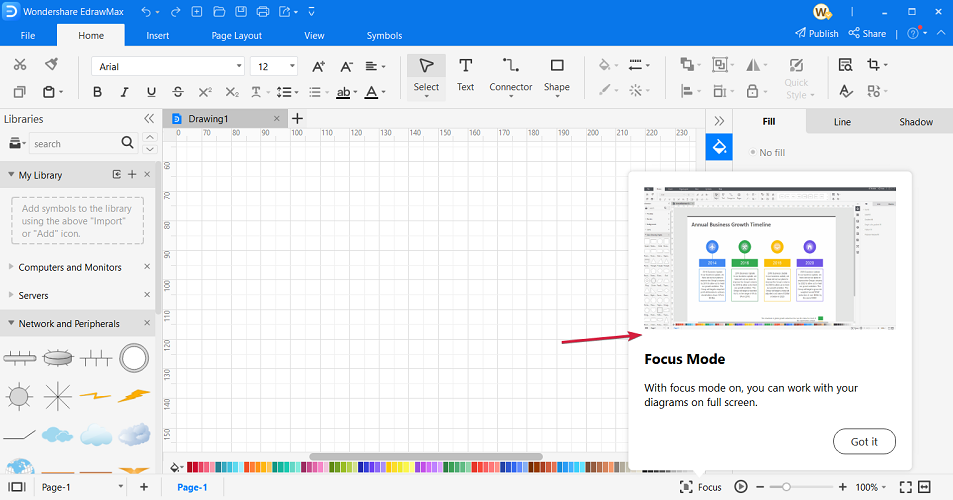
Edraw UML Diagram

Edraw UML Diagram

Get started with this strong UML diagram and flowcharting tool to build valuable projects quickly.
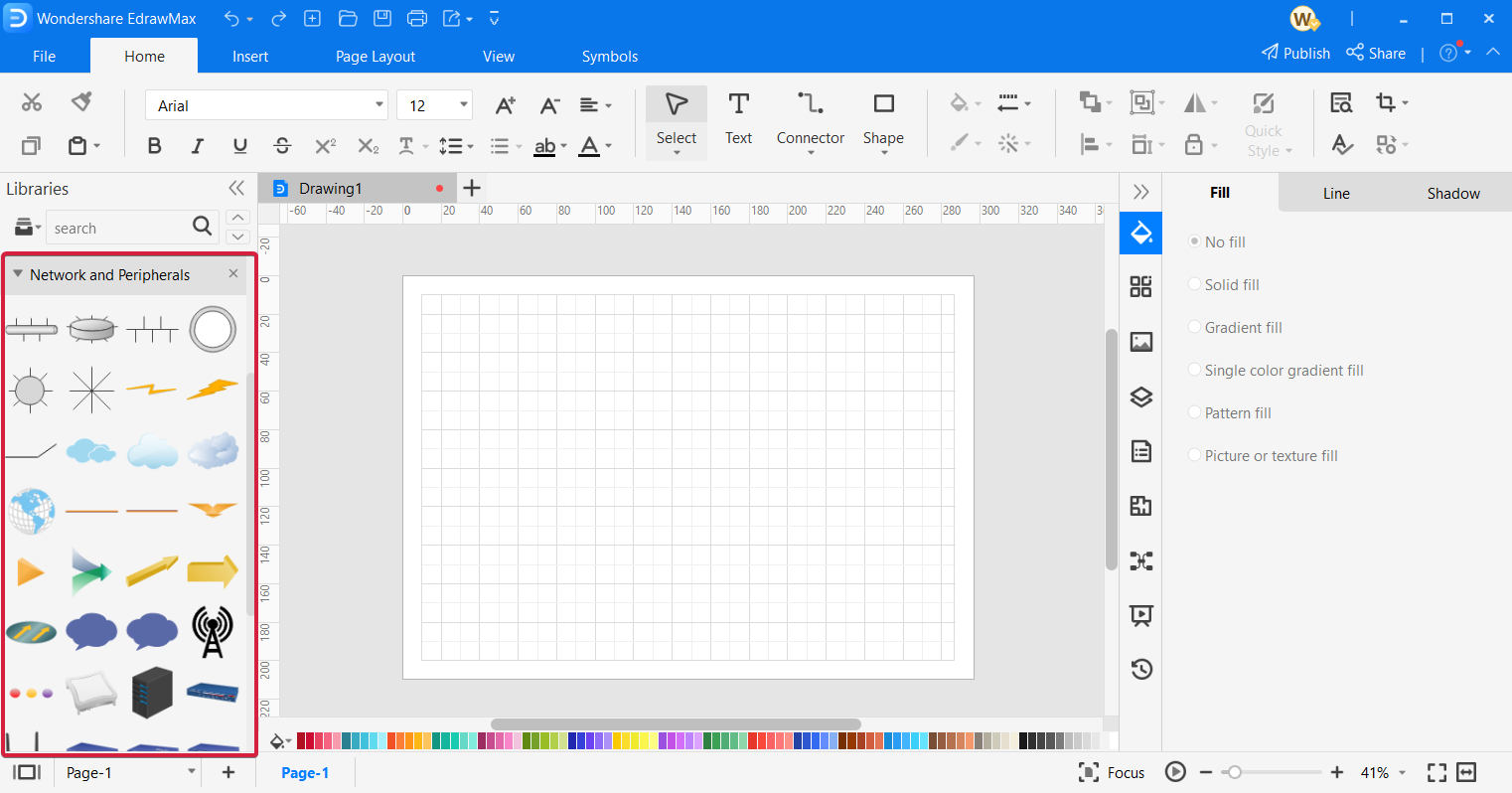
Check priceVisit website

Moqups

The next entry is an online app that helps individuals to design diagrams and wireframes in no time for complex projects.

Primary, you can use this software for multiple purposes that serve your final concept. So the capabilities involve designing to visualize projects, plan with diagrams, prototype presentation, and collaboration.

You can therefore use this tool in order to manage your project with diagrams or workflows, plus develop teamwork with Cloud collaboration services. Because feedback is crucial for any product, you can involve your teammates when you’re ready.

More so, it’s desirable to use this program due to its effective tools for project designing, at the same time stimulating the creative process as a team.

It’s worth mentioning that it includes crips elements for your diagrams or plans, with so intuitive drag-and-drop platform which also includes many widgets or smart shapes to quickly add it.

With that being said, Moqups presents valuable services to create respectable project planning with mockups, diagrams, or prototypes of all kinds.

Moqups

Moqups

Using this fantastic app, you can create, design, and visualize every aspect of your projects!
Check priceVisit website

Visio

As one of the MS Office suite applications, Microsoft Visio is the industry standard diagramming software with which users can set up a wide range of diagrams, which include UML classes.

There’s also a Visio Online Plan version that supports UML 2.5 diagram types. This probably isn’t the most economical UML diagramming application, but both Visio versions still pack in an expansive diagram toolkit that few other alternatives can match.

Visio supports the UML 2.0 specification and provides templates for six types of UML diagrams. Visio Professional users can set up class, sequence, database, activity, state, and use case UML diagrams with the software.

Visio includes a plethora of formatting and design options, and users can add clip art, photos, CAD drawings, callouts, containers, hyperlinks, and additional charts to their diagrams.

The software enables users to generate UML diagrams from imported source code and integrate real-time data in them with data linking. Visio users can also set up numerous other diagram types, such as flowcharts, Gantt, network, organizational charts, and more besides.

⇒ Get Visio

UML Designer

This UML software is a solution for graphical tools meant to edit and visualize UML models very easily.

Using software like this one it’s likely to create the most amazing graphical modeling workbench using Eclipse Modeling functionalities. So the service is based on the Sirius project that offers generic design structures for your UML maps.

Further, you can customize your workflow or diagrams and combine UML designs with domain-specific modeling, then working on multiple modeling types at the same time.

More exactly, it is possible to work on UML and DSL models at the same time and modify your diagrams however you need for your final concept.

In addition, in order to better understand how the software works or navigating options within the platform, there are cheatsheets you can access to learn the basics. Plus, you can benefit from extensive tutorials on the official website.

So choosing the UML Designer solution it’s assured that you can customize your best modeling diagrams and create your workflows seamlessly without much training.

⇒ Get UML Designer

UMLet 14.3

UMLet is a straightforward design tool with which users can quickly set up UML diagrams. This is open-source software for all Windows platforms that you can download from the UMLet website. Note that Java 1.6 is a system requirement for UMLet, so users need to have Java installed before they can run the software.

The tool is more specifically designed for UML diagrams. What sets UMLet apart from some of the other alternatives is that users modify diagram elements with text inputs instead of the more standard pop-up dialogs. UMLet users can set up custom elements for diagrams.

The software supports various UML diagrams, such as use case, sequence, deployment, activity, and state diagrams. In addition, this application includes a handy Mail to option with which users can email UML diagrams.

Plus, using this software you can create diagrams easily due to its user-friendly interface, building sequence diagrams from plain text in minutes. And also you can export your diagrams to PDF, JPG, SVG formats and share them quickly.

Lastly, operating this tool is very simple, with controls like double click to add elements, elements editing on lower-right text panel, or CTRL+Space for context help.

⇒ Get UMLet

StarUML 3

StarUML 3 packs in an abundance of tools for designing software models. Apple, IBM, Samsung, EA, Amazon, and Intel are some of the renowned companies that utilize StartUML 3 for software design. The application is compatible with Windows (XP to 10), macOS, and Linux platforms.

StartUML 3 is compatible with UML 2.0 metamodel diagrams. So its users can set up about 11 UML diagrams along with data flow, flowchart, and entity-relationship diagrams (for database design).

With the software’s Java and C++ extensions, StartUML 3 users can generate Java and C++ code from their UML diagrams and revere engineer code.

Besides, this software also includes some handy publishing options that enable users to share their models with HTML docs or export them to PDF for printing.

Moreover, using this platform you can profit from extensive features such as retina display support, extension manager for third-party extensions, model-driven development, fast modeling with shorthand edits, dark or light themes, etc.

⇒ Get StarUML 3

ConceptDraw Diagram

ConceptDraw Diagram is general-purpose diagramming software that users can utilize for software modeling. This is among the best diagram software alternatives to Microsoft Visio. ConceptDraw Diagram is compatible with Windows 10, 8, and 7 and Mac platforms.

ConceptDraw Diagram users can set up almost the full range of UML diagram types. The software includes a great range of drawing tools and item template galleries for diagrams.

Or ConceptDraw 12 users can set up UML diagrams by selecting one of its ready-made templates. The software incorporates live object tech, which is similar to Visio’s real-time data linking.

This application also includes great sharing options as it enables users to send diagrams via email, display them as presentations, export them to Adobe Flash or PDF formats, and save them as HTML for the web. Furthermore, ConceptDraw is fully compatible with Visio, which is a bonus for users who need to open Visio files.

So take your pick from those UML diagram applications. Visio and ConceptDraw are probably the best general-purpose diagramming software of those selected.

⇒ Get ConceptDraw Diagram

However, StartUML, Edraw UML Diagram, and UMLet 14.3 might be better value alternatives for users who only need to set up UML diagrams.

Outriders is joining Xbox Game Pass for PC on October 19

Outriders, Square Enix’s new loot shooter that launched day one on Xbox Game Pass for Console back in April, is joining Xbox Game Pass for PC tomorrow, October 19. If you previously played the game on Xbox consoles, you’ll also be able to transfer your progress to the Windows version that will be available with Xbox Game Pass for PC.

Launching day one on Xbox Game Pass for Console definitely helped Outriders to enjoy some big momentum earlier this year. As a brand new IP from People Can Fly, a Polish studio that previously worked on Microsoft’s Gears of War series, Outriders received praise for its solid gameplay and immediate support for cross-play multiplayer. It’s still not clear if developer People Can Fly is planning additional DLCs, but the four different classes in Outriders make the loot shooter highly replayable.

Xbox Game Pass for PC may have launched two years ago, it’s still not unusual to see some of the biggest games launch first or exclusively on Xbox Game Pass for Console. That was the case for AAA games like GTA V, Red Dead Redemption 2, or The Witcher 3, though things are slowly starting to change: We’ve seen this with Destiny 2 and Minecraft finally joining Xbox Game Pass for PC, or new games like Back 4 Blood launching simultaneously on Xbox Game Pass for Console and PC.

If you have yet to try the service, you can get your first month of Xbox Game Pass for PC for just $1 instead of $9.99. The game subscription service currently provides access to over 100 PC games from Microsoft and other developers, and upcoming Xbox Game Studios titles such as Age of Empires IV, Forza Horizon 5, and Halo Infinite will join the catalog on day one. Xbox Game Pass for PC also includes an EA Play for PC membership at no additional cost.

OUTRIDERS
OUTRIDERS
Developer:
Square Enix Ltd
Price:
$19.99

How to download and use Microsoft Mathematics on Windows 10

Microsoft has created all sorts of applications during the years, and many of these were discontinued completely.

A few of them had their functionality added to other software, so in a way, they are still present in some form.

One application that many users are looking for is Microsoft Mathematics. This was an educational software designed to help students solve math problems.

This application had a long history, and in today’s guide, we’re going to see whether or not Microsoft Mathematics is still available for download.

How does Microsoft Mathematics work?

Microsoft Mathematics is an educational app designed for solving science and mathematics problems.

Over the years, Microsoft released four versions of Microsoft Mathematics, with the last one being released in early 2011.

The software ran on the Windows platform until 2015 but now is available on the web and mobile devices as Microsoft Math Solver.

Is Microsoft Mathematics available for download?

The software isn’t available for download from Microsoft anymore. However, you might be able to find it on third-party websites.

Keep in mind that we don’t recommend downloading it from those websites since the file might be infected by malware.

How can I use Microsoft Math Solver on Windows 10?

  1. Go to the Microsoft Math Solver website.
  2. Now enter the equation that you wish to solve.
  3. Select the method that you want to use and see step-by-step instructions.

The web app is completely free and can be used to solve pre-algebra, algebra, trigonometry, and calculus tasks.

Each category can be expanded, allowing you to find exactly what you need with ease. It’s worth mentioning that each solution is followed by a graph, for visual representation.

Is Microsoft Math Solver better than Microsoft Mathematics?

Math Solver is a simplified version of Microsoft Mathematics and it’s designed as its successor. We have to admit that the app lacks certain features, such as statistics, triangle solver, and unit converter.

There’s also no option for physics equations, geometry, or chemistry which makes Math Solver less versatile.

However, the software can work on any mobile platform or any web browser, and it’s more convenient to use, and that’s its only advantage as far as we can tell.

Microsoft Math Solver available for PC

Math Solver is available for PC, or any other platform, in form of a web app, and you can run it from any web browser with ease.

However, the software isn’t available for download on the Windows platform. If you want to download it, you can only do that for the mobile version.

Is Math Solver free?

Yes, the app is free to enjoy without any restrictions, on any platform, so you can download it today and start using it.

The same applies to the mobile versions of this software, allowing you to use it on any platform without restrictions.

Does Google have a math solver?

Yes, Google has its own math solver, and it’s available as a component of Google Lens. In case you’re not familiar, this is a feature that allows you to scan text using your camera and perform searches.

Of course, this feature also works with equations, and you can easily solve any mathematical problem and see step-by-step instructions for it.

Since this feature is part of Google Lens, it’s only available on mobile devices, so you can’t use it on your PC.

Microsoft Mathematics has been retired, and the only way to obtain it is from third-party websites. However, the core concept of the software lives as the Math Solver app.

Even though this version doesn’t offer certain features, it’s developed and maintained by Microsoft, which makes it much more reliable and safer to use.

For more options to pick from, check out this list including the best mathematical equation writing software.

If you’re looking for more educational software, we have a great guide on how to download Encarta Kids, so don’t miss it.

What math software do you use? Let us know in the comments section below.