Windows 11 is apparently slowing down AMD CPUs by up to 15%

If your current setup contains an AMD CPU, you might want to sit down for this, as some disconcerting news is about to come your way. T

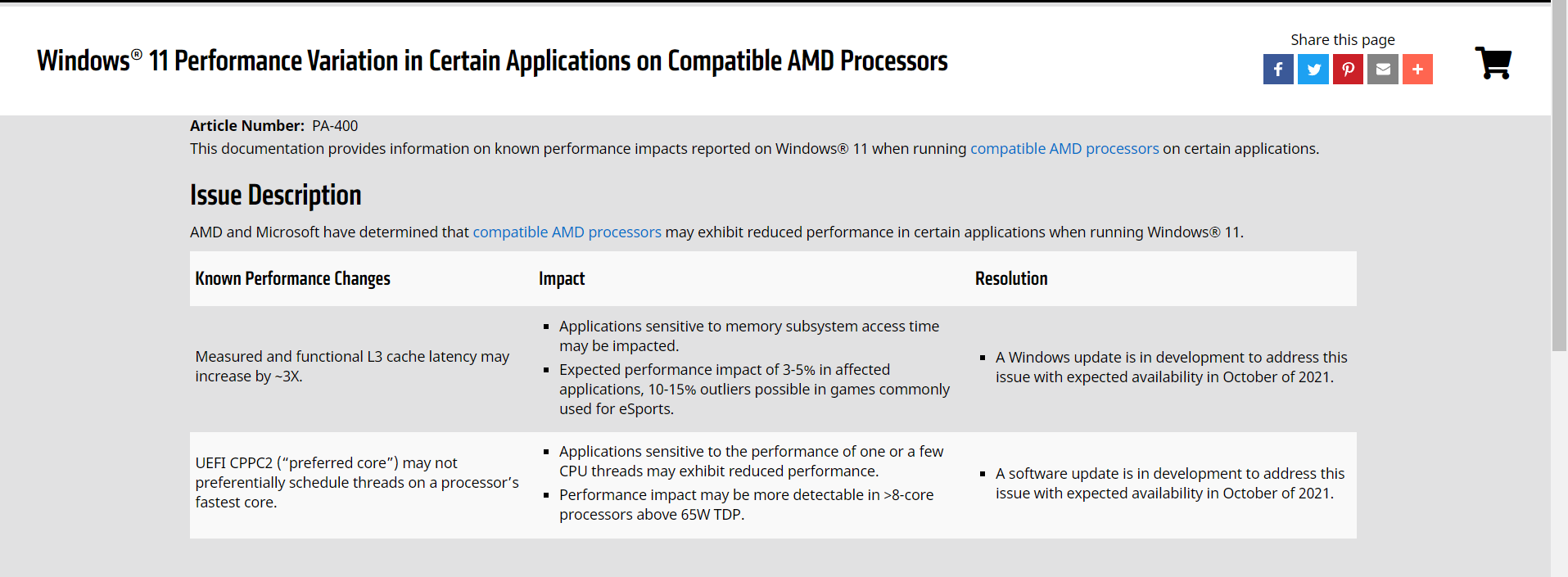
The hardware manufacturer has announced that all of its WIndows 11-compatible processors can suffer from reduced performance in some applications when used with the new operating system, with extreme outliers in eSports gaming titles resulting in up to a 10-15% reduction.

For apps, AMD says that the performance impact weighs in at 3–5%. A software update and a Windows Update are in the works to address the issues, with both expected to arrive this month.

UPDATE: Windows 11 patch for AMD Ryzen CPUs rolling out next week

Both AMD and Microsoft stated that patches for the two issues were heading out within this month. According to the giant companies, both the issues have been resolved and the patches will begin rolling out in a week’s time.

The CPPC issue has been resolved. The AMD driver power profile is in the release process and targeted for GA release on 10/21. If it is needed before GA, AMD can share the driver directly with customers upon request


As for the L3 cache latency issue, the status was also changed to resolved. Microsoft plans to release the fix in their 10C Windows Update which is targeted for 10/19.

The AMD driver power profile is currently in the release process & has already been delivered to OEMs but a general rollout of the driver is expected on 21st October.

These updates will fix the majority of the issues encountered in Windows 11 when running AMD’s Ryzen CPUs on desktops and mobile platforms.

AMD processors are taking a serious hit from Windows 11

These major errors impact every Ryzen CPU supported in Windows 11. That means all Zen+, Zen 2, and Zen 3 CPUs that comprise the Ryzen 2000, Ryzen 3000, Ryzen 4000, and Ryzen 5000 processors.

Furthermore, select AMD EPYC processors for data centers, along with some newer Athlon chips, are also impacted. You can see the full list here, just to get a better idea of what’s actually happening.

AMD officials state that the issue boils down into two categories, with the first one being the measured and functional L3 latency can increase by ~3X.

This means you can see the impact with measurement utilities and that it results in real performance degradation in games and applications.

This bug impacts applications that are sensitive to memory subsystem latency, causing a 3–5% reduction in performance.

Due to this, gamers can sense a 10–15% performance reduction outliers in games commonly used for eSports, which isn’t surprising given that games tend to be extremely sensitive to memory and cache latency.

As if the situation wasn’t bad enough, AMD’s major core feature, which directs single-threaded applications to the fastest two cores on the chip, also might not work as expected.

Of course, performance in lightly-threaded applications will be impacted. The company says this reduction may be more noticeable in chips with eight or more cores and a 65W or higher TDP rating.

AMD says it expects a Windows update to resolve the L3 cache issues, while a software update will remediate the problem with the UEFI CPPC2 preferred core technology.

We’re really not surprised to hear about these problems, as the release of Windows 11 wasn’t all rainbows and unicorns.

Internet connections have also been slower, and worse, the operating system upgrade bricked some HP and Dell devices, rendering them unusable.

Have you experienced any sort of issues after upgrading to Windows 11? Share your experience with us in the comments section below.

Microsoft makes its Emissions Impact Dashboard available for all cloud customers

Microsoft wants to give its customers more insights into how their usage of the company’s cloud services impacts the environment. That’s why the company announced today the general availability of its new Emissions Impact Dashboard, which follows the launch of the Microsoft Sustainability Calculator back in January 2020.

With the new Emissions Impact Dashboard, customers can have a detailed look at the carbon emissions associated with their usage of Azure and other Microsoft cloud services. “Organizations can measure the impact of Microsoft cloud usage on their carbon footprint, and they can drill down into emissions by month, service, and datacenter region,” the company explained.

Figure 1: The main dashboard focuses on showcasing overall emissions and usage over time, as well as carbon intensity, which is a metric of carbon efficiency specific to cloud usage.

Moreover, Microsoft’s new Emissions Impact Dashboard can also help customers estimate emissions savings from migrating apps and services to the Microsoft cloud. The Emissions Impact Dashboard runs on Power BI Pro, and its methodology for measuring greenhouse gas emissions was validated by Stanford University in 2018 and it aligns with ISO standards.

“The Emissions Impact Dashboard is part of our commitment to address our own environmental impact and help our customers do the same,” the company said today. Azure has become one of Microsoft’s fastest-growing businesses in recent years, and the company has been building new data centers all around the globe. It’s certainly not easy to conciliate a fast-growing, energy-intensive business with sustainability goals, though  Microsoft is committed to using 100% renewable energy for its data centers by 2025.

Microsoft’s Fall Ignite 2021 session catalog is now available

Microsoft is holding a second Ignite digital event for developers and IT Pros on November 2-4, and the full session catalog is now available on the official website. You can already register for the free event and start building your own schedule to make the best from the 394 sessions currently available.

This Fall Ignite event will focus on hybrid work, next-generation businesses, cloud computing, and security. With the event coming just a month after the launch of Windows 11, there’s a good amount of sessions dedicated to the new OS. Microsoft previously said that it has designed Windows 11 for the hybrid work era, and the company now needs to convince organizations that its new OS is more agile, collaborative, and secure.

You can also find many sessions dedicated to Microsoft Teams, Microsoft Viva, SharePoint, Power Automate, and other Microsoft 365 apps in the session catalog. Microsoft CEO Satya Nadella will once again speak during the opening keynote on November 2, and CVP of Microsoft 365 Jared Spataro and EVP of Cloud and AI Group Scott Guthrie will also have their own sessions on that day.

During Microsoft’s previous Ignite 2021 digital event in March, the company announced several updates for Microsoft Teams, Outlook, the Azure Power Platform, and more. The company also used the event to unveil Microsoft Mesh, a new Mixed Reality Platform designed to allow people in different physical locations to join collaborative and shared holographic experiences.

Dell launches redesigned Latitude Rugged laptops with Windows 11 option

Dell Technologies is announcing two fully redesigned Dell Latitude Rugged laptops. The first of the two include the Dell Latitude 5430 Rugged which Dell claims is the lightest, most powerful 5G-capable 14-inch semi-rugged laptop. Launching alongside is the Dell Latitude 7330 Rugged Extreme, which is being called the industry’s smallest 5G-capable 13-inch fully-rugged laptop.

Both of these devices come with the latest generation 11th generation Tiger Lake processors, Wi-Fi 6E, and 5G capabilities. Other unique features between the two models include improved daylight-readable and glove-touch capable screens of up to 1400 nits of brightness, as well as battery life of up to 25 hours. There are even options for Windows 11, though Windows 10 is still being offered, too.

Both models underwent military-grade STD-810H testing and can operate in optimum temperatures between -20 degrees Fahrenheit or 145 degrees Fahrenheit. The laptops also are water protected, with the 5430 being IP-53 resistant, and the 7330 being IP-65 resistant against pressurized water.

Dell did not share pricing at the time of launch, but these laptops aren’t designed for everyday consumers and are usually well over $1,800. Rather, the laptops are meant to be used in harsh environments like industrial, construction, and military purposes. Some of the competitors to the Dell Latitude Rugged lineup include the Panasonic Toughbook, or the HP Probook lineup.

Ninja Turtles and SpongeBob Xbox Series X consoles announced

To celebrate the recent launch of the Nickelodeon All-Star Brawl video game, Microsoft is giving away limited edition Xbox Series X consoles and controllers with looks inspired by SpongeBob Squarepants and Leonardo from Teenage Mutant Ninja Turtles.

The competition is open to gamers over the age of 18 who are residents of a region that has official support for the Xbox Live service. A full list of countries is available here while the full rules can be read here.

To enter, participants need to follow the official Xbox Twitter account and retweet this tweet.

The competition closes on October 24th.

Nickelodeon All-Star Brawl launched on Xbox One and Xbox Series X consoles earlier this month. It’s a family-friendly fighting game in the vein of Smash Bros and features characters from a number of popular Nickelodeon cartoons such as Hey Arnold! and Rugrats.

Are you going to enter this contest? Let us know in the comments below and then follow us on Twitter for more Xbox news.

Disney Magic Kingdoms finally adds Windows, Android, and iOS crossplay with latest update

The Disney Magic Kingdoms video game updated for both Windows 11 and Windows 10 devices last week.

This latest update added a variety of new content inspired by the Haunted Mansion ride and Walt Disney World’s 50th anniversary but a recent Facebook post on the official Disney Magic Kingdoms page also confirms that an even bigger change was made to the game; crossplay.

Until now, Windows players could only transfer process between other Windows devices despite the fact that the Windows version of the game has content and feature parity with both iOS and Android versions.

For example, I used to load up Disney Magic Kingdoms on my Surface Pro while at home and then check in on the game on my Lumia Windows phone while out and about. Now, after installing this latest update, I can also load the same save file on my iPhone and Android tablet as well.

Not only is this great for players who own devices on different ecosystems, but it also makes the process of transferring data to a different device much easier if switching to an iPhone or Android smartphone or dropping Mac for Windows. Previously, players needed to contact customer support directly and have someone manually move the data over to the new platform.

“Previously, those who played DMK on the Windows platform existed on their own little save file island, separate from the players using other devices,” the official announcement explains. “Now, Windows players have joined the rest of the ranks!

“In addition to this, iOS/Android users can also now play the Windows version of DMK using the progress made on the aforementioned mobile devices. (Please note that you must link your game to a social media account in order to facilitate this.) This means that you will likely see some new names on various leaderboards!”

One important part to emphasise is that players will need to connect their account to Facebook to create the cross-platform cloud save. Windows players can still connect their game to their Microsoft account if they want but a Facebook connection is also needed if looking to connect to an iOS or Android device.

Disney Magic Kingdoms is a free-to-play video game that lets players create and manage their own Disney theme park by unlocking characters and rides inspired by Disney properties. When the game first launched several years ago, it primarily featured Disney and Pixar properties but it’s recently also added a variety of Star Wars characters from both the Original Trilogy, Sequel Trilogy, and The Mandalorian such as Cara Dune, Luke Skywalker, Grogu, and Darth Vader. Some Bad Batch content has also been added recently.

Are you a Disney Magic Kingdoms player and have you been waiting for crossplay? Let us know in the comments and then follow us on Facebook and Pinterest for more Windows content.

Disney Magic Kingdoms
Developer:
Gameloft SE
Price:
Free

Just Dance 2022 video game will support Kinect on Xbox One consoles

Digital pre-orders for Just Dance 2022 went live for Microsoft’s Xbox One and Xbox Series X console families today.

The upcoming latest entry in the popular dancing game series is set to launch on November 4th and is confirmed to support Smart Delivery. This means that a single copy of Just Dance 2022 will work on both Xbox console generations and won’t require any additional purchases to work properly.

One thing that isn’t confirmed in the Microsoft Store listing, nor on the official Just Dance website, is whether Just Dance 2022 will support the Kinect sensor when played on an Xbox One console. Fortunately, the listing for the game on the Australian JB Hi-Fi website includes a product description that’s significantly longer than that on the Microsoft Store and also includes specific information regarding motion camera support for Microsoft’s Xbox consoles in addition to Nintendo’s Switch and Sony’s PlayStation 4 and 5.

The listing confirms that Just Dance 2022 will work with the Kinect on Xbox One consoles and the PlayStation Camera on PS4. The game won’t support any kind of camera or sensor accessory on the Xbox Series X or PS5.

The Just Dance Controller iOS and Android app can be used to control Just Dance 2022 across Xbox One, Xbox Series X, PS4, PS5, and the Nintendo Switch while Switch users can also use Joy-Con controllers.

It should be noted that owners of Xbox One S and Xbox One X consoles will need a Kinect adaptor to plug in a Kinect sensor. However, if you have one of these consoles and you currently use a Kinect with it, it’s likely that you already have an adapter and don’t need to worry about this.

A Kinect won’t work with the Xbox Series X (nor Xbox Series S) no matter what adapter you use due to Microsoft ending support of the popular gaming accessory with its current console generation. Funnily enough, Microsoft has recently worked with Sky to incorporate a variety of Kinect functionality into its new smart TVs, including motion gaming and voice controls.

Are you planning on buying Just Dance 2022? Let us know which control scheme you plan on using in the comments below and then follow us on Pinterest and Twitter for more Xbox gaming news.

Just Dance® 2022
Just Dance® 2022
Developer:
UBISOFT
Price:
Free

Four zero-days vulnerabilities and 71 flaws fixed via this month’s Patch Tuesday

Today is Microsoft’s October 2021 Patch Tuesday, and with it comes fixes for four zero-day vulnerabilities and a total of 74 flaws.

Microsoft has fixed 74 vulnerabilities (81 including Microsoft Edge) with today’s update, with three classified as Critical, and 70 as Important, and one as Low.

4 zero-days vulnerabilities fixed, with one actively exploited

These 81 vulnerabilities that are being patched during this month’s rollout are split into categories, as follows:

  • 21 Elevation of Privilege Vulnerabilities
  • 6 Security Feature Bypass Vulnerabilities
  • 20 Remote Code Execution Vulnerabilities
  • 13 Information Disclosure Vulnerabilities
  • 5 Denial of Service Vulnerabilities
  • 9 Spoofing Vulnerabilities

October’s Patch Tuesday includes fixes for four zero-day vulnerabilities, with a Win32k Elevation of Privilege Vulnerability vulnerability known to have been actively exploited in attacks.

Microsoft classifies a vulnerability as a zero-day if it is publicly disclosed or actively exploited with no official fix available.

The actively exploited vulnerability was discovered by Kaspersky’s Boris Larin (oct0xor) and allows malware or a threat actor to gain elevated privileges on a Windows device.

Kaspersky disclosed that the vulnerability was used by threat actors in “widespread espionage campaigns against IT companies, military/defense contractors, and diplomatic entities.” 

As part of the attacks, the threat actors installed a remote access trojan (RAT) that was elevated with higher permissions using the zero-day Windows vulnerability. 

Thus, Kaspersky calls this cluster of malicious activity MysterSnail and is attributed to the IronHusky and Chinese-speaking APT activity.

Microsoft also fixed three other publicly disclosed vulnerabilities that are not known to be exploited in attacks.

  • CVE-2021-40469 – Windows DNS Server Remote Code Execution Vulnerability
  • CVE-2021-41335 – Windows Kernel Elevation of Privilege Vulnerability
  • CVE-2021-41338 – Windows AppContainer Firewall Rules Security Feature Bypass Vulnerability

Other companies also released important updates

  • Adobe’s October security updates were released for various applications.
  • Android’s October security updates were released last week.
  • Apache released HTTP Web Server 2.4.51 to fix an incompete patch for an actively exploited vulnerability.
  • Apple released security updates for iOS and iPadOS yesterday that an actively exploited zero-day vulnerability.
  • Cisco released security updates for numerous products this month.
  • SAP released its October 2021 security updates.
  • VMware released a security update for VMware vRealize Operations.

This month’s security updates

Below is the complete list of resolved vulnerabilities and released advisories in the October 2021 Patch Tuesday updates. To access the full description of each vulnerability and the systems that it affects, you can view the full report here.

TagCVE IDCVE TitleSeverity
.NET Core & Visual StudioCVE-2021-41355.NET Core and Visual Studio Information Disclosure VulnerabilityImportant
Active Directory Federation ServicesCVE-2021-41361Active Directory Federation Server Spoofing VulnerabilityImportant
Console Window HostCVE-2021-41346Console Window Host Security Feature Bypass VulnerabilityImportant
HTTP.sysCVE-2021-26442Windows HTTP.sys Elevation of Privilege VulnerabilityImportant
Microsoft DWM Core LibraryCVE-2021-41339Microsoft DWM Core Library Elevation of Privilege VulnerabilityImportant
Microsoft DynamicsCVE-2021-40457Microsoft Dynamics 365 Customer Engagement Cross-Site Scripting VulnerabilityImportant
Microsoft DynamicsCVE-2021-41353Microsoft Dynamics 365 (on-premises) Spoofing VulnerabilityImportant
Microsoft DynamicsCVE-2021-41354Microsoft Dynamics 365 (on-premises) Cross-site Scripting VulnerabilityImportant
Microsoft Edge (Chromium-based)CVE-2021-37978Chromium: CVE-2021-37978 Heap buffer overflow in BlinkUnknown
Microsoft Edge (Chromium-based)CVE-2021-37979Chromium: CVE-2021-37979 Heap buffer overflow in WebRTCUnknown
Microsoft Edge (Chromium-based)CVE-2021-37980Chromium: CVE-2021-37980 Inappropriate implementation in SandboxUnknown
Microsoft Edge (Chromium-based)CVE-2021-37977Chromium: CVE-2021-37977 Use after free in Garbage CollectionUnknown
Microsoft Edge (Chromium-based)CVE-2021-37974Chromium: CVE-2021-37974 Use after free in Safe BrowsingUnknown
Microsoft Edge (Chromium-based)CVE-2021-37975Chromium: CVE-2021-37975 Use after free in V8Unknown
Microsoft Edge (Chromium-based)CVE-2021-37976Chromium: CVE-2021-37976 Information leak in coreUnknown
Microsoft Exchange ServerCVE-2021-26427Microsoft Exchange Server Remote Code Execution VulnerabilityImportant
Microsoft Exchange ServerCVE-2021-34453Microsoft Exchange Server Denial of Service VulnerabilityImportant
Microsoft Exchange ServerCVE-2021-41348Microsoft Exchange Server Elevation of Privilege VulnerabilityImportant
Microsoft Exchange ServerCVE-2021-41350Microsoft Exchange Server Spoofing VulnerabilityImportant
Microsoft Graphics ComponentCVE-2021-41340Windows Graphics Component Remote Code Execution VulnerabilityImportant
Microsoft IntuneCVE-2021-41363Intune Management Extension Security Feature Bypass VulnerabilityImportant
Microsoft Office ExcelCVE-2021-40473Microsoft Excel Remote Code Execution VulnerabilityImportant
Microsoft Office ExcelCVE-2021-40472Microsoft Excel Information Disclosure VulnerabilityImportant
Microsoft Office ExcelCVE-2021-40471Microsoft Excel Remote Code Execution VulnerabilityImportant
Microsoft Office ExcelCVE-2021-40474Microsoft Excel Remote Code Execution VulnerabilityImportant
Microsoft Office ExcelCVE-2021-40485Microsoft Excel Remote Code Execution VulnerabilityImportant
Microsoft Office ExcelCVE-2021-40479Microsoft Excel Remote Code Execution VulnerabilityImportant
Microsoft Office SharePointCVE-2021-40487Microsoft SharePoint Server Remote Code Execution VulnerabilityImportant
Microsoft Office SharePointCVE-2021-40483Microsoft SharePoint Server Spoofing VulnerabilityLow
Microsoft Office SharePointCVE-2021-40484Microsoft SharePoint Server Spoofing VulnerabilityImportant
Microsoft Office SharePointCVE-2021-40482Microsoft SharePoint Server Information Disclosure VulnerabilityImportant
Microsoft Office SharePointCVE-2021-41344Microsoft SharePoint Server Remote Code Execution VulnerabilityImportant
Microsoft Office VisioCVE-2021-40480Microsoft Office Visio Remote Code Execution VulnerabilityImportant
Microsoft Office VisioCVE-2021-40481Microsoft Office Visio Remote Code Execution VulnerabilityImportant
Microsoft Office WordCVE-2021-40486Microsoft Word Remote Code Execution VulnerabilityCritical
Microsoft Windows Codecs LibraryCVE-2021-40462Windows Media Foundation Dolby Digital Atmos Decoders Remote Code Execution VulnerabilityImportant
Microsoft Windows Codecs LibraryCVE-2021-41330Microsoft Windows Media Foundation Remote Code Execution VulnerabilityImportant
Microsoft Windows Codecs LibraryCVE-2021-41331Windows Media Audio Decoder Remote Code Execution VulnerabilityImportant
Rich Text Edit ControlCVE-2021-40454Rich Text Edit Control Information Disclosure VulnerabilityImportant
Role: DNS ServerCVE-2021-40469Windows DNS Server Remote Code Execution VulnerabilityImportant
Role: Windows Active Directory ServerCVE-2021-41337Active Directory Security Feature Bypass VulnerabilityImportant
Role: Windows AD FS ServerCVE-2021-40456Windows AD FS Security Feature Bypass VulnerabilityImportant
Role: Windows Hyper-VCVE-2021-40461Windows Hyper-V Remote Code Execution VulnerabilityCritical
Role: Windows Hyper-VCVE-2021-38672Windows Hyper-V Remote Code Execution VulnerabilityCritical
System CenterCVE-2021-41352SCOM Information Disclosure VulnerabilityImportant
Visual StudioCVE-2020-1971OpenSSL: CVE-2020-1971 EDIPARTYNAME NULL pointer de-referenceImportant
Visual StudioCVE-2021-3450OpenSSL: CVE-2021-3450 CA certificate check bypass with X509_V_FLAG_X509_STRICTImportant
Visual StudioCVE-2021-3449OpenSSL: CVE-2021-3449 NULL pointer deref in signature_algorithms processingImportant
Windows AppContainerCVE-2021-41338Windows AppContainer Firewall Rules Security Feature Bypass VulnerabilityImportant
Windows AppContainerCVE-2021-40476Windows AppContainer Elevation Of Privilege VulnerabilityImportant
Windows AppX Deployment ServiceCVE-2021-41347Windows AppX Deployment Service Elevation of Privilege VulnerabilityImportant
Windows Bind Filter DriverCVE-2021-40468Windows Bind Filter Driver Information Disclosure VulnerabilityImportant
Windows Cloud Files Mini Filter DriverCVE-2021-40475Windows Cloud Files Mini Filter Driver Information Disclosure VulnerabilityImportant
Windows Common Log File System DriverCVE-2021-40443Windows Common Log File System Driver Elevation of Privilege VulnerabilityImportant
Windows Common Log File System DriverCVE-2021-40467Windows Common Log File System Driver Elevation of Privilege VulnerabilityImportant
Windows Common Log File System DriverCVE-2021-40466Windows Common Log File System Driver Elevation of Privilege VulnerabilityImportant
Windows Desktop BridgeCVE-2021-41334Windows Desktop Bridge Elevation of Privilege VulnerabilityImportant
Windows DirectXCVE-2021-40470DirectX Graphics Kernel Elevation of Privilege VulnerabilityImportant
Windows Event TracingCVE-2021-40477Windows Event Tracing Elevation of Privilege VulnerabilityImportant
Windows exFAT File SystemCVE-2021-38663Windows exFAT File System Information Disclosure VulnerabilityImportant
Windows Fastfat DriverCVE-2021-41343Windows Fast FAT File System Driver Information Disclosure VulnerabilityImportant
Windows Fastfat DriverCVE-2021-38662Windows Fast FAT File System Driver Information Disclosure VulnerabilityImportant
Windows InstallerCVE-2021-40455Windows Installer Spoofing VulnerabilityImportant
Windows KernelCVE-2021-41336Windows Kernel Information Disclosure VulnerabilityImportant
Windows KernelCVE-2021-41335Windows Kernel Elevation of Privilege VulnerabilityImportant
Windows MSHTML PlatformCVE-2021-41342Windows MSHTML Platform Remote Code Execution VulnerabilityImportant
Windows Nearby SharingCVE-2021-40464Windows Nearby Sharing Elevation of Privilege VulnerabilityImportant
Windows Network Address Translation (NAT)CVE-2021-40463Windows NAT Denial of Service VulnerabilityImportant
Windows Print Spooler ComponentsCVE-2021-41332Windows Print Spooler Information Disclosure VulnerabilityImportant
Windows Print Spooler ComponentsCVE-2021-36970Windows Print Spooler Spoofing VulnerabilityImportant
Windows Remote Procedure Call RuntimeCVE-2021-40460Windows Remote Procedure Call Runtime Security Feature Bypass VulnerabilityImportant
Windows Storage Spaces ControllerCVE-2021-40489Storage Spaces Controller Elevation of Privilege VulnerabilityImportant
Windows Storage Spaces ControllerCVE-2021-41345Storage Spaces Controller Elevation of Privilege VulnerabilityImportant
Windows Storage Spaces ControllerCVE-2021-26441Storage Spaces Controller Elevation of Privilege VulnerabilityImportant
Windows Storage Spaces ControllerCVE-2021-40478Storage Spaces Controller Elevation of Privilege VulnerabilityImportant
Windows Storage Spaces ControllerCVE-2021-40488Storage Spaces Controller Elevation of Privilege VulnerabilityImportant
Windows TCP/IPCVE-2021-36953Windows TCP/IP Denial of Service VulnerabilityImportant
Windows Text ShapingCVE-2021-40465Windows Text Shaping Remote Code Execution VulnerabilityImportant
Windows Win32KCVE-2021-40449Win32k Elevation of Privilege VulnerabilityImportant
Windows Win32KCVE-2021-41357Win32k Elevation of Privilege VulnerabilityImportant
Windows Win32KCVE-2021-40450Win32k Elevation of Privilege VulnerabilityImportant

Have you been struggling with any of the errors and bugs listed in this article? Let us know in the comments section below.

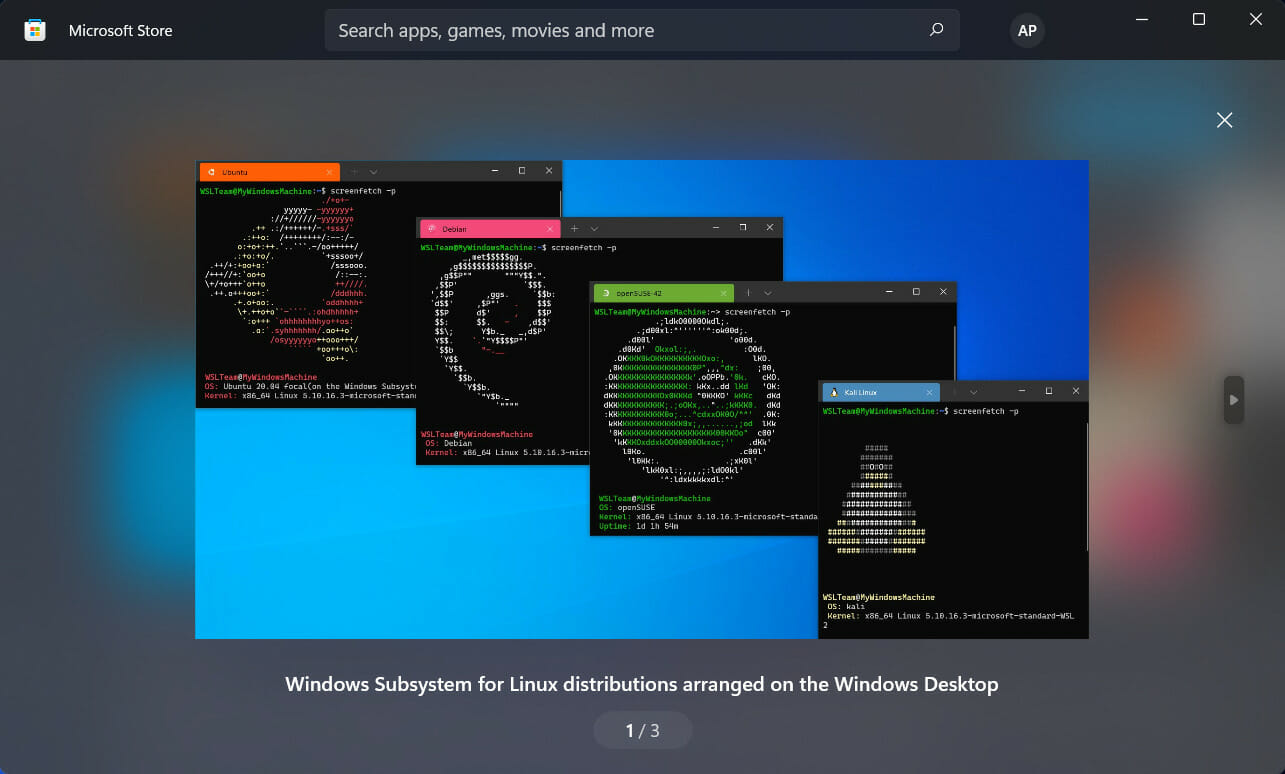
WSL is now available on the Windows 11 Store

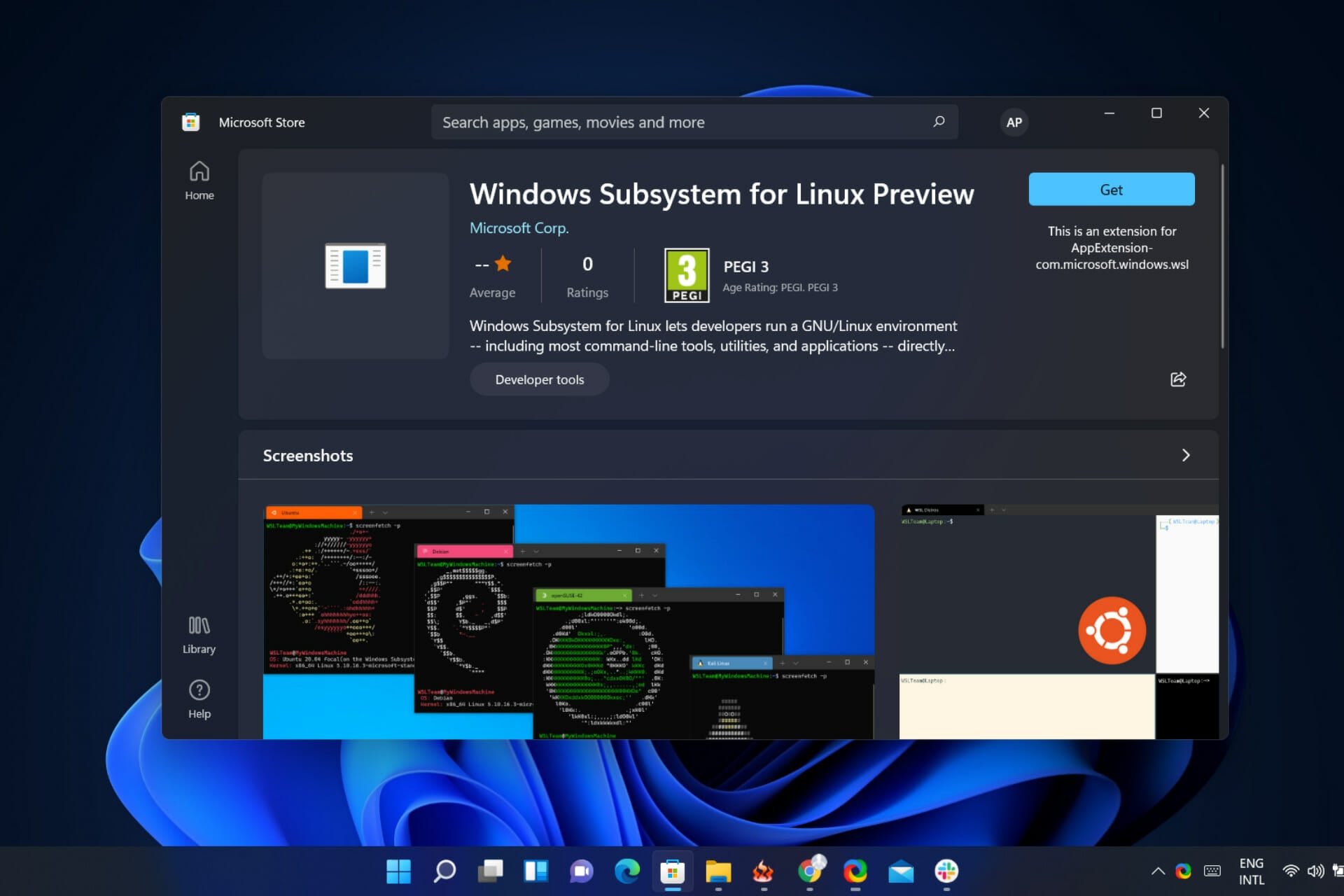
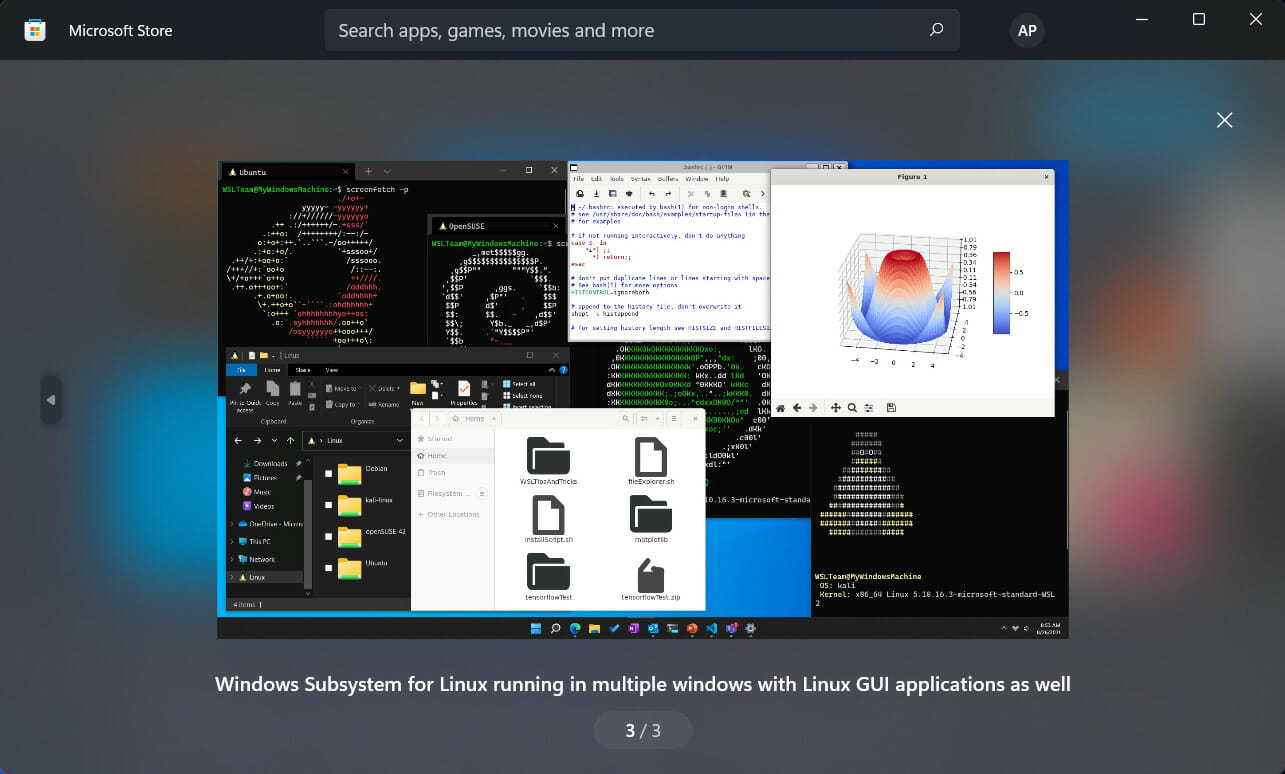
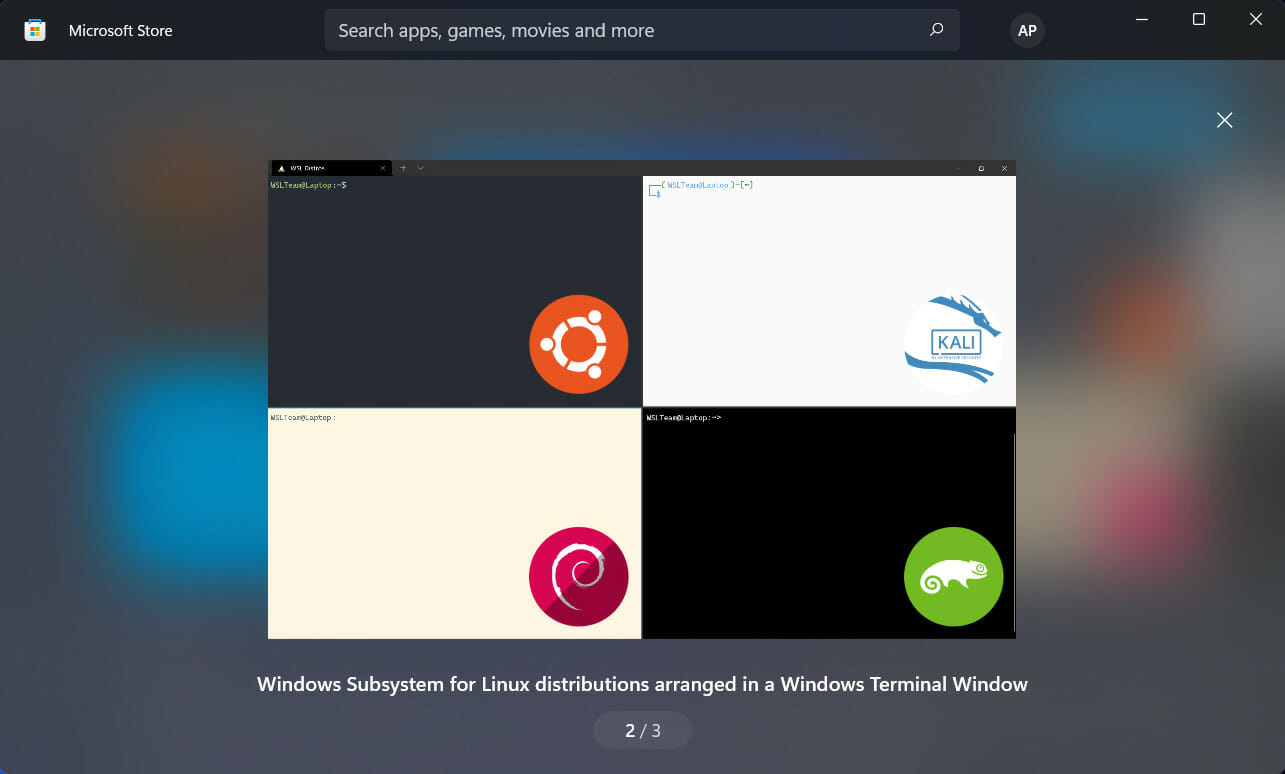
The Redmond company decided that the time was right for it to bring a preview of the Windows Subsystem for Linux (WSL) to the Microsoft Store on Windows 11.

This latest move is designed to help make it easier to get the latest WSL updates without having to go through Windows featured updates.

Get ready to find and install WSL from the Store

We know you’re probably wondering, and the answer is no, this is not a new version of the Windows Subsystem for Linux.

It’s actually the same WSL version that many developers already know, with Microsoft only changing where it gets installed and updated from.

As a matter of fact, if you already have the in-Windows version of WSL installed, you can install the WSL preview from the Store, too.

The Redmond-based tech giant will still let you have access to all of your exact same WSL distros, with the only difference being that the store version will always take precedence, however.

In order to use WSL in the Microsoft Store on Windows 11, you’ll have to be running build 22000 or higher and have the Virtual Machine Platform optional component enabled.

With that being said, the tech company says that now you’ll get WSL features faster, without worrying about changing the Windows version or having to go through the process of downloading Windows Insider preview builds.

This is a big change indeed, considering that in the past WSL had to be installed as an optional component in the operating system.

Essentially, it decouples the subsystem from Windows featured updates itself, just like how Paint, Notepad, and some of the other core experiences like the Xbox Game Bar in Windows 11 already are separated via the store.

There are already some new features in this preview, with some changes that make mounting VHD files easier, a new progress indicator help function, and the updated Linux kernel to 5.10.60.1.

If you can’t wait for another second and wish to download this version, do note that there are some known issues.

You might be unable to start wsl.exe from a Session 0 prompt and, heading into the future, the Microsoft Store version will be the priority for Microsoft.

The company says it is making WSL in the Microsoft Store the best way to install and use the software, but the inbox Windows version will still be supported and will be present in Windows 11.

Excited about finding this software in the Store? Share your thoughts with us in the comments section below.

Fatal Error c0000022: How to Fix it in 7 Steps

A few users have gotten the fatal error c0000022 error message. This means you can not continue with an attempted process.

After the error message, your computer may reboot, and some users seem to notice this error after performing a Windows update, which comes up whenever you turn on your system.

This guide is aimed at helping you resolve the error.

What does fatal error code C0000022 mean?

A fatal error is a computer problem in which some behavior prompts a program already running to close and stop working. The fatal error c0000022 usually refers to a faulty update or printer driver.

The majority of the time, when a fatal error occurs, a notice that only partially describes the nature of the error is displayed.

All modified data that hasn’t been saved to disk is lost in this situation.

What causes printer driver installation has been failed due to the fatal error c0000022 preventing product driver installation?

  • Hardware failure – Uninstall or remove the new peripheral if you just added it, and then try again if you receive a catastrophic error.
  • Software malfunctions – An application accessing improper data or code, attempting to do something illegally, or satisfying an infinite condition will result in the error.

These are the main two causes, and the solutions we discuss should help if you are hit with any of the following error messages:

  • Canon printer install error C0000022 on Windows 10 – This situation occurs usually when the installation process has been suddenly stopped, either by the user or by a system malfunction.
  • Canon ts3522 error Code C0000022 – Usually occurring during the Windows Update process, can happen either because of corrupt drivers, a disconnection from the internet, or a badly installed driver for the printer.
  • Update error C0000022 – As in the case of the previous variation, this problem appears when an update process has not been completed properly on a Windows PC
  • Error code – c0000022 Teams – Usually appears if a recent update missed a dependency in updating Netlogon. dll

How do I fix error code C0000022?

1. Repair your system with an advanced tool

As a first solution, we recommend you perform a system recovery using professional software that can restore your Windows 10 to a previous health point.

2. Hard reset your computer

  1. Press the Power button and hold it until the computer goes off completely.
  2. When the PC is powered off, the next step is disconnecting all peripherals and storage devices.
  3. Next, turn the machine back on.

A hard reset would fix the problem if the error c0000022 resulted from a minor bug from a Windows update or similar operation.

3. Perform a system test with System Diagnostics

  1. Connect your computer to an external outlet and power it off. Leave it plugged in throughout this operation.
  2. Press and hold the power button to turn off your computer.
  3. When the display turns on, start pressing the ESC button continuously.
  4. Press the corresponding key for the System Diagnostics option, usually F2.
  5. Scroll down to System Tests using your Arrow keys and hit Enter to select it.
  6. If the error c0000022 issue was due to a hardware malfunction, the test would point it out, and you can now be sure what to fix or replace.

After performing the System Diagnostics, you can access this user-friendly guide if you need more information about the black screen of death in Windows 10.

4. Use the System Restore feature

  1. Turn on your computer and press the ESC key repeatedly immediately after the screen comes on.
  2. Continue pressing ESC until you see the System Diagnostics menu.
  3. Select System Recovery; depending on the device, you may need to press F11 to enter this option.
  4. Select your language next and strike Enter.
  5. Next, navigating with the arrow keys, go to Troubleshoot and hit Enter.
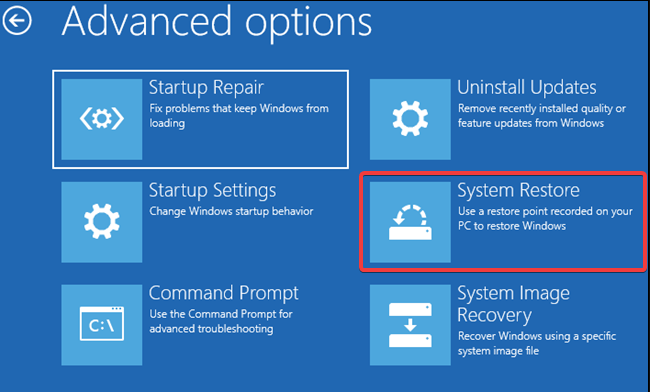
  6. Navigate to Advanced options and select System Restore. You will now see the System Restore wizard.
  7. Choose a restore point that predates the error c0000022 and click on Next.
  8. Finally, hit the Finish button to begin the system restore operation.

When creating a restore point, a system restore brings your machine back to its state. In addition, some helpful tools for fixing BSoD errors make the process much easier.

5. Uninstall the most recent update before the error c0000022

  1. Press the Windows key + I keys to open Windows Settings.
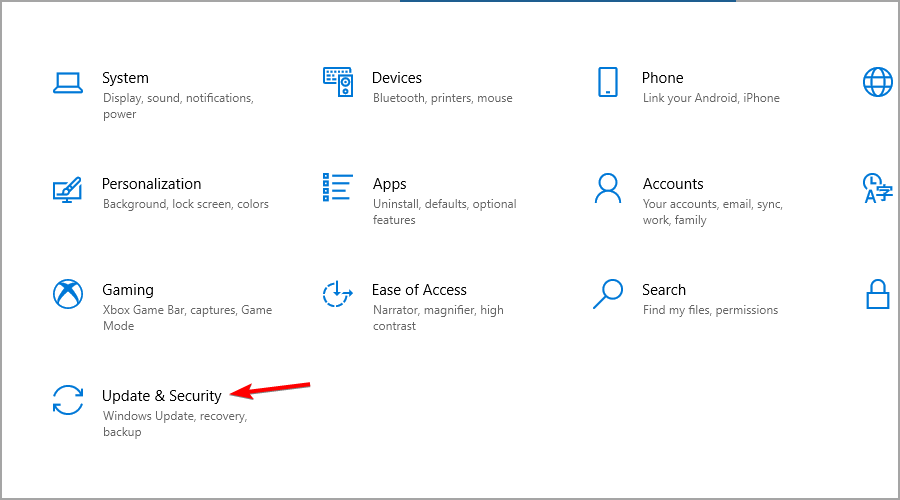
  2. Here, click on Update & Security.
    fatal-error-c0000022-windows-settings
  3. Next, go to View update history.
  4. Click on Uninstall updates.
    click-uninstall-updates-fatal-error-c0000022
  5. Find the most recent one, click on it, and hit Uninstall.
  6. Restart your computer.

6. Uninstall your recent updates using the DISM command

  1. Press the Win + X keys.
  2. Choose the Command Prompt (Admin) option.
  3. Next, enter the following command in the Command Prompt window and hit Enter:
    DISM.exe /online /get-packages
    get-packages-fatal-error-c0000022
  4. Find the update that you wish to uninstall and copy the name.
  5. Return to the Command Prompt window and enter the following command, replacing UPDATE NAME with the actual package identity:
    DISM.exe /online /remove-package /packagename:[UPDATE NAME]
  6. Finally, restart your computer.

7. Install the required Microsoft Security Bulletin update with Safe Mode

  1. Connect your computer to an external power outlet.
  2. Press the Power button to boot your computer.
  3. Start pressing the ESC key until you are taken to the Systems Diagnostics menu.
  4. Hit F11 to enter the System Recovery menu.
  5. Select your preferred language and hit Enter.
  6. Go to the Troubleshoot option and press Enter.
  7. Navigate to Advanced options and choose Startup Settings, then click on Restart.
  8. On this page, press the number that corresponds to the Enable Safe Mode with Networking option. This is usually 5.
    safe-mode-with-networking-fatal-error-c0000022
  9. Your PC will now begin to reboot into Safe Mode with network capabilities. In Safe Mode, click the link to get the latest Security Bulletin missing from your system.
  10. Click the Download button to get the update for your Windows architecture.
  11. Wait for the download to complete, and then go to the directory in which the file was downloaded. Then, double-click on the downloaded file and install it with the help of the on-screen instructions on your computer.
  12. Finally, restart your PC and confirm if the fatal error c0000022 remains.

This method is an efficient way that can help you encounter if your HP printer displays the fatal error c0000022.

The Fatal error c0000022 is caused mainly by a Windows update gone bad, especially if the Security Bulletin MS16-101 component is installed. However, it could also be a result of a hardware failure.

Follow the solutions presented in this guide to eliminate the error c0000022 and boot your machine without interruptions.

We also have a comprehensive guide on how to fix Fatal Error Coordinator Returned-1 that you can use for reference.

Feel free to ask questions or offer suggestions in the comments section below.

Your Brother Printer Won’t Connect via USB on Windows 11

Many are already using Windows 11, after its October 5th release and it seems to be going somewhat smooth, even though there are still a lot of things going wrong with the new OS.

Brother is warning that several of its printers may no longer work or display errors when used with a USB connection on the latest operating system.

If you own one of these bad boys, you will surely be interested in what happens next.

What can I do if my Brother printer won’t connect via USB on Windows 11?

The support article recently posted by the printer manufacturer states that updating to Windows 11 could prevent the operating system from detecting your Brother machine when connected via USB.

Furthermore, you might also be unable to change printer settings or connect multiple printers through USB.

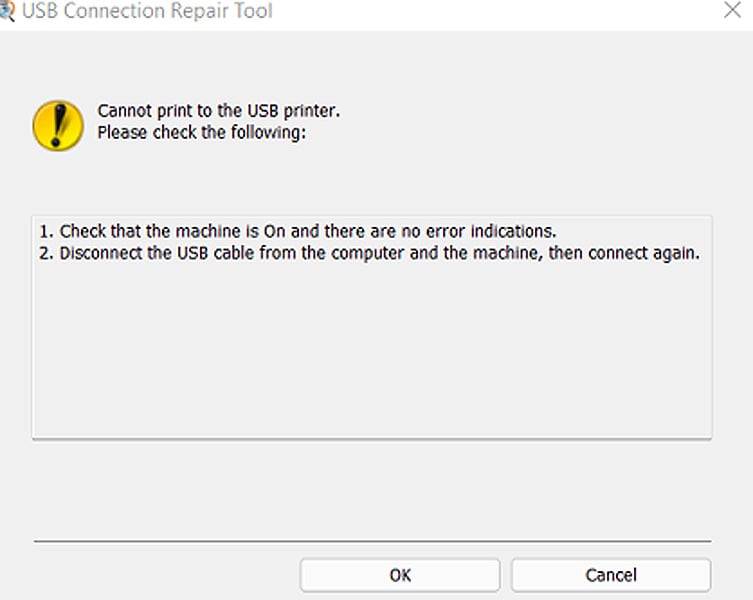
When printing, users of 106 different printer models may receive an error from the USB Connection Repair Tool, stating, Cannot print to the USB printer.

Brother USB Connection Repair Tool in Windows 11

As an upside, Brother officials said you can ignore the error, and the document should print successfully.

Another aspect that the manufacturer emphasized is that USB-connected printers will not be able to communicate with various printing utilities in Windows 11, including:

  • Device Settings Tool
  • Paper Size Setup Tool
  • Distributed Print Tool
  • Special ID Setting Tool
  • Wireless Setup Wizard
  • P-Touch Editor 5.4
  • Update Software
  • Transfer Manager
  • Transfer Express
  • Template Settings
  • Printer Setting Tool

For the time being, affected users are told to temporarily use a different connection method, such as a wireless or wired network connection.

The company says it’s investigating the issue and also working on a quick resolution.

While Microsoft did not acknowledge these printing issues, don’t be surprised if they place a safeguard hold on computers with Brother devices that prevent them from being upgraded to Windows 11.

The tech giant is already investigating eight other issues, including safeguard holds for networking software, Oracle VirtualBox, and the Cốc Cốc web browser.

Here are some of the printer models affected by this situation:

  • DCP-B7500D
  • DCP-B7535DW
  • DCP-J1050DW
  • DCP-J1100DW
  • DCP-J1140DW
  • DCP-J1200W(XL)
  • DCP-J572DW
  • DCP-L2531DW
  • DCP-L2535D
  • DCP-L2535DW
  • DCP-L2550DW
  • DCP-L3510CDW
  • DCP-L3551CDW,
  • DCP-L5500D,
  • DCP-L5600DN,
  • DCP-T220,
  • DCP-T310,
  • DCP-T420W,
  • DCP-T510W,
  • DCP-T520W,
  • DCP-T710W,
  • DCP-T720DW,
  • DCP-T820DW,
  • DCP-T825DW,
  • HL-B2000D,
  • HL-B2080DW,
  • HL-L2310D,
  • HL-L2335D,
  • HL-L2350DW,
  • HL-L2351DW,
  • HL-L2370DN,
  • HL-L2375DW,
  • HL-L2376DW,
  • HL-L2385DW,
  • HL-L2386DW,
  • HL-L2395DW,
  • HL-L3210CW,
  • HL-L3230CDN,
  • HL-L3230CDW,
  • HL-L3270CDW,
  • HL-T4000DW,
  • MFC-B7715DW,
  • MFC-J1010DW,
  • MFC-J1300DW,
  • MFC-J2330DW,
  • MFC-J2730DW,
  • MFC-J3530DW,
  • MFC-J3930DW,
  • MFC-J4340DW(XL),
  • MFC-J4440DW,
  • MFC-J4540DW(XL),
  • MFC-J491DW,
  • MFC-J5330DW,
  • MFC-J5730DW,
  • MFC-J5845DW,
  • MFC-J5930DW,
  • MFC-J5945DW,
  • MFC-J6530DW,
  • MFC-J6545DW,
  • MFC-J6730DW,
  • MFC-J690DW,
  • MFC-J6930DW,
  • MFC-J6935DW,
  • MFC-J6945DW,
  • MFC-J890DW,
  • MFC-L2710DW,
  • MFC-L2713DW,
  • MFC-L2715DW,
  • MFC-L2716DW,
  • MFC-L2730DW,
  • MFC-L2750DW,
  • MFC-L2751DW,
  • MFC-L2770DW,
  • MFC-L2771DW,
  • MFC-L3710CW,
  • MFC-L3735CDN,
  • MFC-L3745CDW,
  • MFC-L3750CDW,
  • MFC-L3770CDW,
  • MFC-L5700DN,
  • MFC-L5755DW,
  • MFC-L5900DW,
  • MFC-L6700DW,
  • MFC-L6900DW,
  • MFC-L8690CDW,
  • MFC-L8900CDW,
  • MFC-L9570CDW,
  • MFC-T4500DW,
  • MFC-T810W,
  • MFC-T910DW,
  • MFC-T920DW,
  • MFC-T925DW

Have you upgraded to the new operating system and are unable to connect your Brother printer via USB? Share your experience with us in the comments section below. And don’t hesitate to take a closer look at our article on how to download Brother printer drivers for Windows 11.

Best Windows 11 Razer Laptop: 7 Picks to Choose From

Razer is world-renowned for producing incredibly powerful gaming laptops, which not only perform exceptionally but also look amazing.

Now, as the long-awaited Windows 11 OS has been released, and because it offers very good gaming-related optimizations, the question about the best Razer laptops that can run the OS is raised by default.

When it comes to comparing Windows 11 and Windows 10, the new OS has a wide range of new features besides its more polished looks, which not only make it faster overall but also provide other functional options.

Choosing the right laptop for your needs can be as tricky as building a computer from scratch, as it involves knowing the capabilities of each of the components and how they stack up against each other.

To reduce the time you spend researching hardware and different configurations, we took the time to create a thorough list for you. Even more than that, all the laptops we present to you in this list are eligible for a free upgrade to Windows 11 from Windows 10.

How we chose the best Razer laptops that run Windows 11

To be able to create a thorough list, our team of expert testers has spent countless hours not only ensuring that the laptops we present to you are capable of running Windows 11 without any problems but also testing them thoroughly.

The tests to which every last laptop in this list was exposed, include both separated benchmark tests for each of the components, and at the same time tests for all the laptop configurations separately.

The latter element of the test process was done by exposing the laptops to multitasking, running, and working in resource-heavy apps like 3D printing software and video processing apps, and also tested out a series of some of the latest games found on the market.

Besides the effective testing methods described above, our team of testers has considered a wide range of elements when creating this list.

Tip icon Tip
Editorial tip

In order to ensure that you choose the best Razer laptop, these are some elements you need to take into consideration:

➡ Windows 11 system requirements
➡ CPU power
➡ GPU capabilities
➡ RAM size and type
➡ Storage space type and size
➡ Screen type and quality
➡ Design

The entire set of elements mentioned above are almost equally important amongst themselves, but with an emphasis on almost.

As we’re talking about Razer laptops that can run the new OS from Microsoft, having all the requirements needed is of paramount importance.

After, the capabilities of the laptops have been evidentiated, as these will give you the power you need to run the apps and games you need.

And last but not least, we will be discussing the design of each of these laptop options, both functional, and simply from the perspective of aesthetics.

What to consider when choosing the best Windows 11 Razer laptops

Windows 11 system requirements

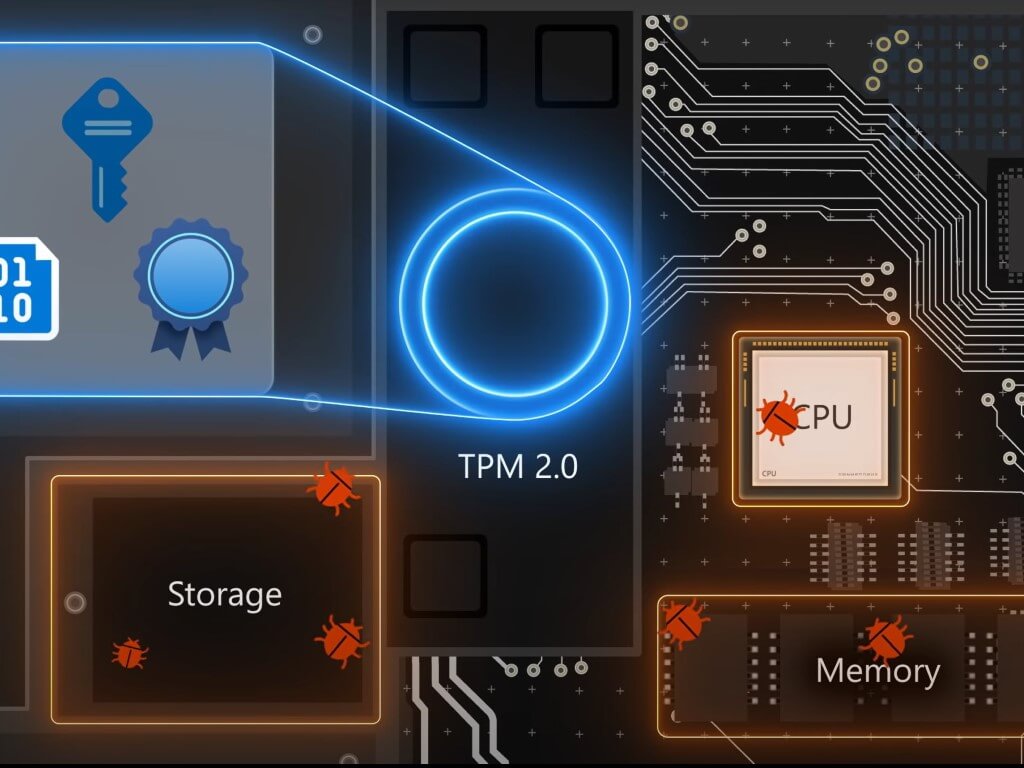
The most important element when it comes to the system requirements needed to run Windows 11 without issues is the TPM chip.

Even though this chip allows your system to use the latest security systems developed by Microsoft, all the laptops we will discuss in this guide already have this component installed. That being said, if you are interested in improving the OS, you can explore the best Windows 11 settings.

As a quick overview, here are some other requirements:

  • Processor: 1 GHz or faster with 2 or more cores
  • System memory: 4 GB minimum
  • Storage: 64 GB minimum
  • System firmware: UEFI
  • Security: TPM required, UEFI Secure Boot
  • Display: 9-inch minimum in diagonal, High definition (720p), 8 bits per color channel
  • Graphics: DirectX 12 API, WDDM 2.0
  • Connectivity: Bluetooth (excluding desktop PC), Wi-Fi or Ethernet connection
  • Digitizer: Precision Touchpad (if the touchpad is present)
  • Hardware buttons: Power button and volume up and down buttons required
  • Ports: USB ports (at least one), video output required

If you want to read more about the Windows 11 system requirements, you can do so, but rest assured that all the laptop options we present in this guide will be fully equipped for the task.

CPU power

The central processing unit, or CPU, is effectively the brain of your new laptop, so having a powerful version will improve the overall experience.

A good CPU will ensure that the computations your device is capable of performing every second are up to par with the tasks you’re trying to run.

Choosing from a list of CPUs can be a daunting task, and for this reason, our team of testers has compared the CPUs of all the devices presented in this guide and ensured that not only they can run Windows 11 without issues, but can run complex computations at the same time.

GPU capabilities

The GPU, or the graphics processing unit is another very important element found in any PC, but becomes even more important when we’re talking about laptops, and even more so when discussing gaming laptops.

A good GPU will ensure that the graphics created by the developers for games can be displayed correctly on your laptop or external screen, and can have a huge impact on the overall experience.

As we all know, it is of paramount importance to be able to experience gameplay without dealing with stuttering, lagging, or unsynchronized images, as this can stop you from having a fully immersive experience.

The power of the GPU will considerably affect the way your device can run games, and keeping the optimal FPS (frames per second) range can be extremely important, especially if you’re using your laptop for multiplayer, or professional gaming.

As you can observe in the graphic above, to have a smooth experience while gaming, and no stuttering whatsoever, the recommended value rate is 60 FPS.

Anything below that value, your game will most likely start to stutter occasionally, even though 30 FPS still allows you to play. This value is not recommended for competitive gaming, as other players with better FPS rates will have an advantage over you.

RAM size and type

Rapid access memory, or RAM, is another very important piece of hardware that ensures you will be able to run the latest games, as running a game involves a wide range of smaller processes that need to be run at the same time without any problems.

As in the case of the FPS rate mentioned above, more RAM means more multi-tasking capabilities, both when it comes to games, running multiple complex apps on your PC at the same time, and also hardware-intensive apps like 3D printing software.

Storage space

Even though our needs as computer users vary, as in the case of RAM, the more storage space you have available, the better. That being said, the configurations of laptops will vary considerably, so you will need to make a choice based on your priorities.

In some cases, the CPU might be faster, and the storage space could be lower. For this kind of configuration to suit you, you would need to be more interested in how fast the PC can run the software, and not necessarily keen on storing too much information on the PC.

In other cases, you might want a decent CPU, but with a greater storage capacity, as your interest would be angled towards storing data and only acceptable processing power.

It is safe to say that even if you find yourself in the first case, you can extend your storage space by either adding more memory to an internal slot or using an external SSD with fast data transfer speeds.

If you choose to go this route, please be advised that it is also recommended to invest in SSD encryption software to keep your data protected at all times.

Screen size and quality

It is always better to have a bigger screen, and it all comes down to how you plan on using your new system. In case you plan on using the laptop more on the road, then investing in a bigger screen can be useful for both gaming and working.

On the other hand, if you’re going to use your laptop at home the most, you could always connect it to an external monitor and have a full-on desktop experience without problems.

The important factor to consider in both these cases is the quality of the display, as this element will influence how good the image both on your internal or external display will look.

Design

The design of the actual laptop, besides the aesthetics, comes down to functionality. Some laptops will be heavier and thicker, while others will be more portable, and easier to move around a lot or carry in your backpack.

Having a good-looking laptop is important, but being able to use it wherever you travel becomes even more important. As always, it all comes down to user preference, so our Razer laptops list covers both aspects.

Tip icon Tip
Buyer’s tips:

➡ If you don’t want to worry too much about system configuration for the next couple of years, and don’t mind spending a good amount of money, the best choice is the powerful Razer Blade 15 – 2021 Edition.

This powerful device not only allows a free upgrade to Windows 11, but offers amazing processing power, and will run any software and games you want without any lagging or stuttering.

➡ With a bit of reduction in price and a small difference in the CPU and overall setup, the Razer Blade 14 impressed us with the benchmarks scores.

Even though it has a decrease in CPU, it has the same GPU as the previously mentioned option, which makes it a viable option at a better price.

➡ For the medium-range user, who would like to play some games, explore the web, and perform normal day-to-day activities on the device, we have two contenders available.

Both the Razer Blade 15 2020 Edition and Razer Blade 15 Base models provide you with enough power, with the latter being a bit more accessible in price.

➡ If you’re interested in a budget Razer laptop that can run Windows 11 without issues, and even allows playing games at medium graphics settings, the Razer Blade Stealth 13 is a very good option.

Besides the decreased price, this device is also lighter and slimmer than the other options presented in this list, making it more portable.

As you can see, our list contains a variety of laptops that caters to a large array of users.

We made sure to include high-end powerful machines that can run the latest games at full graphics, and medium-range devices which are a bit less capable and has a lower impact on your funds.

To finish the guide off, we also chose some affordable Razer laptops that can prove easier to carry while also offering great processing power.

Razer Blade 15 2021

  • Intel Core i9-11900H CPU
  • NVIDIA GeForce RTX 3080 GPU
  • 32GB RAM
  • 1TB NVMe SSD
  • 15-inch 4K display
  • Vapor Chamber Cooling
  • Wi-Fi 6
  • Free upgrade to Windows 11
  • High price

The 2021 Razer Blade 15 laptop model is an amazing option when it comes to both running the Windows 11 OS, and for gaming and any other power-intensive task you might throw at it.

An Intel Core i9-11900H CPU is the brain of this powerful machine, this 11th Gen 8-Core processor from Intel provides all the power you will need to run the latest games released on the market.

This powerful process can, of course, deal with any resource-intensive applications you run on the system without stuttering or interrupting your work, like 3D rendering software, and image processing apps.

When it comes to benchmark scores, this CPU has had 10% better overall scores than the next CPU model found in the laptop on position 2, which, considering the ranges, is quite a big difference.

As no powerful laptop is complete without a powerful GPU, this laptop comes with an NVIDIA GeForce RTX 3080, which is the same type found in the next laptop in our list.

As the latest games required your system to have at least 8GB of RAM, this powerful device offers 3 times that value, with a whopping 32GB RAM.

To enable you to install and save information, the Razer Blade 15 comes with a 1TB NVMe SSD, so high transfer speeds are guaranteed.

The 15-inch 4K display not only provides an ultra-fast refresh rate of 360Hz but immersive color ranges and image quality as well.

The entire system is cooled by a Vapor Chamber Cooling system, which is also surprisingly quiet.

Getting this laptop will ensure that the transition to Windows 11 will happen seamlessly, as it has a free upgrade for this OS bundled.


Razer Blade 14

  • AMD Ryzen 9 5900HX CPU
  • NVIDIA GeForce RTX 3080 GPU
  • 16GB NVMe RAM
  • 1TB SSD
  • 14" QHD 165Hz display
  • Vapor chamber cooling
  • THX spacial audio
  • Free upgrade to Windows 11
  • Only has one RAM slot
  • Medium-sized RAM

The Razer Blade 14 is another impressive laptop option from Razer, offering a powerful system that not only can run Windows 11 without issues but it can be upgraded to the new OS completely free.

The AMD Ryzen 9 5900HX CPU, even though it scores 10% lower than the first position, it clocked in 13% better scores compared with the CPU found in the next model on this list. This powerful CPU can take on most of the latest game releases, while also providing great capabilities for video rendering and software compiling.

The NVIDIA GeForce RTX 3080 GPU found on this device scored 30% better than the next option in our list, which is an astonishing difference in power and processing speeds. As it is built on the 2nd generation RTX architecture, the gaming experience on this device is incredibly immersive and life-like.

With 16GB RAM and a 1TB SSD installed, the Razer Blade 14 offers you more than enough power to run graphic-intensive applications at the same time, and also store your installed games, and other personal files.

To round off this powerful machine, a 14-inch QHD display that runs at 165Hz is installed, allowing fast gaming reactions and a great image experience when using graphics-related software.

The vapor chamber cooling ensures that your system will always be running optimally, without producing too much noise in the process either. Added to that, you also get a THX spatial audio feature that ensures all your gaming, music, and overall experiences on this laptop will offer the highest quality.


Razer Blade 15 2020

  • Intel Core i7-10875H CPU
  • NVIDIA GeForce RTX 2080 Super Max-Q GPU
  • 16GB RAM
  • 1TB SSD
  • 15.6” FHD 300Hz Touch Display
  • Vapor Chamber Cooling
  • The GPU could be more powerful
  • CPU provides enough power to run most games

The 2020 Razer Blade 15 laptop uses an Intel Core i7-10875H CPU which has a 2% better overall benchmark score than the next laptop option in our list. This CPU is built with 8 cores, and using the Turbo feature can reach frequencies of 5.1GHz. This provides you with enough power to run some of the latest games without issues.

When it comes to the GPU, the NVIDIA GeForce RTX 2080 Super Max-Q GPU installed in this device has performed with 21% better scores than the GPU found in the next laptop model we chose, which is an impressive amount when we also consider the CPU. Even though you shouldn’t expect to be able to play new games with the highest graphics settings, the game will still run with good FPS, at around 30FPS constantly.

16GB RAM provides you with more than enough power to run Windows 11 without any problems whatsoever, and will also be enough to run multiple applications at the same time, and also when it comes to most games on the market. The 1 TB SSD gives you space to store games, files, music, and movies without worrying too much about this topic.

The 15.6” FHD 300Hz Touch Display delivers blazing-fast response times in games and it also provides amazing quality for color-intensive work like image/video editing, CAD software, or 3D rendering. 

As in the case of most Razer laptops on this list, the laptop is equipped with a Vapor Chamber Cooling system, ensuring a thin design, great performance, and reduced noise pollution no matter how much you use it.


Razer Blade 15 Base

  • Intel Core i7-10750H CPU
  • NVIDIA GeForce RTX 2070 Max-Q GPU
  • 16GB RAM
  • 512GB SSD
  • Chroma RGB
  • 4K OLED 60Hz display
  • Small SSD
  • Medium-range GPU

This Razer Blade 15 Base uses a 10th Gen Intel Core i7-10750H CPU with 6 cores which can provide great processing speeds overall, but even more so while using the Turbo Mode, making it capable of reaching 5.0 GHz.

The NVIDIA GeForce RTX 2070 Max-Q GPU provides you with enough power to run most games on medium settings and also proves to be a good companion when dealing with image editing, video editing, 3D rendering, etc. Even though when compared to the GPU mounted on the previous laptop in this list, the benchmark results are sub-par, the quality is still very good.

When it comes to benchmark test results, the CPU proved to be 28% more efficient, and the GPU is 41% better than the model installed on the next item on this list.

It comes equipped with 16 GB RAM, which allows you to run Windows 11 without problems, deal with multiple applications at the same time, and proves extremely useful from the same perspective when running various games.

Besides a very capable CPU and GPU, this laptop provides very good connectivity features, ensuring internet at blazing speeds with Wi-Fi 6, and also a Gigabit Ethernet connection. As these are the latest developments when it comes to internet connectivity, it works perfectly for online work and streaming.

When it comes to peripheral connectivity, this laptop also has Thunderbolt 3, USB Type-A, and USB Type-C ports, and can transfer high-quality images to an external display by using a great HDMI connection.

The Chroma RGB keyboard is fully customizable, as it uses Razer Chroma, which enables hundreds of color-modes that can take your gaming to the next level.

The 4K OLED display has a refresh rate of 60Hz, and provides you with an incredible 1ms response, thus allowing a great gaming experience and high-quality movie playing without compromising on image clarity.


Razer Blade Stealth 13

  • Intel Core i7-1065G7 CPU
  • NVIDIA GeForce GTX 1650 Ti Max-Q GPU
  • 16GB RAM
  • 512GB SSD
  • 13.3"1080p 120Hz display
  • Razer Chroma Keyboard
  • Ultra thin and light
  • Small display for gaming
  • Average GPU
  • Medium-range CPU

The Razer Blade Stealth 13 is equipped with an Intel Core i7-1065G7 CPU which uses a Quad-Core 10th Gen setup to offer you great processing speeds for a variety of activities, from gaming to image and video rendering.

Even though this option is qualified as a budget laptop compared to the models presented in this list before it, we can’t deny that the Stealth 13 impressed us with its versatility.

The NVIDIA GeForce GTX 1650 Ti Max-Q GPU, even though not as powerful as the others, still offers an FPS of around 30 while running some of the latest games with medium graphics settings activated. The 4GB VRAM ensures that the images are consistently streamlined, and even helps for those moments in which the FPS levels drop, like loading cut-scenes, and other more intensive processes.

The 16GB of RAM makes this laptop capable of running a variety of applications at the same time without any significant stuttering but starts acting sluggish when trying to run both Photoshop and some 3D rendering software for example.

Even though the 512GB SSD might not be enough for some people, it is an acceptable amount considering the accessible price, and the overall performance of this machine.

A 13.3 inches 1080p display with 120Hz frequency offers a Bezel-less viewing experience that ensures great colors and resolution. This display setup might be a bit small for a full-on gaming experience, but you can always use an external monitor to take advantage of exploring virtual worlds.

The 100% sRGB color space of this display comes in very handy both in the case of playing games, but also when performing tasks where the color gamut is an important factor.


Bottom runners

Even though our list includes Windows 11-capable Razer laptop options for all price ranges, during our tests, there are a few other options that stood out, but for a specific reason were excluded from the main list.

These options are by no means bad, and thus, we decided to create a side list with some of these options, which might fit the needs of some users:

➡ Razer Blade 17 – 2020 edition

Even though when compared to the first position option presented in this guide, the Razer Blade 17 offers a bigger screen, it only has an NVIDIA GeForce RTX 2080 Super GPU, which has 30% lower scores in our benchmark tests.

That is a huge difference to start with, but even more, this laptop is more expensive than the 1st position option.

Because of these reasons, even though it is worthy of being part of this guide, it doesn’t match with other options when compared directly.

➡ Razer Blade Stealth 13 Ultrabook

This laptop model has already been presented in the carefully constructed list above, but this version is built with fewer perks than the one mentioned above.

It comes with an Intel UHD Graphics 620 GPU, and only a 256 SSD, which doesn’t make it specifically suited for gaming.

That being said, it is far more accessible when it comes to the price range, and would still provide you with a good Windows 11 experience nonetheless.


Choosing the right Windows 11 Razer laptop to invest in can be tricky if you don’t have the entire set of information presented in an easily digestible way.

Our team of testers and editors have spent their time researching and testing every aspect of these devices, so you won’t need to.

No matter if you’re constrained by your bank account or not, this list gives you some great options to choose from, and some even allow a free upgrade to Windows 11, which gives them a clear plus.

The same principles apply if we’re looking at the reason for your decision to invest in a Razer laptop. No matter if you’re planning on using it for professional or occasional gaming, or if you’ll create amazing digital artworks with image rendering software, you can find a suitable option in this list.

Don’t hesitate to share your opinion about this list and let us know which of these options you choose to go with. You can do so by using the comment section found below this guide.

Microsoft makes it easier to see and understand Edge processes in the Windows 11 Task Manager

An age-old problem of web browsing is coming across a website that might end up slowing down your PC. You can typically see this in Task Manager, by looking at the Edge process and seeing its overall memory consumption, but it’s usually a struggle to pinpoint the exact website that might be giving you issues (if you don’t use Edge’s own in-built Browser Task Manager.) Well, starting in Edge 94 on Windows 11, Microsoft is making big changes that should make this a thing of the past.

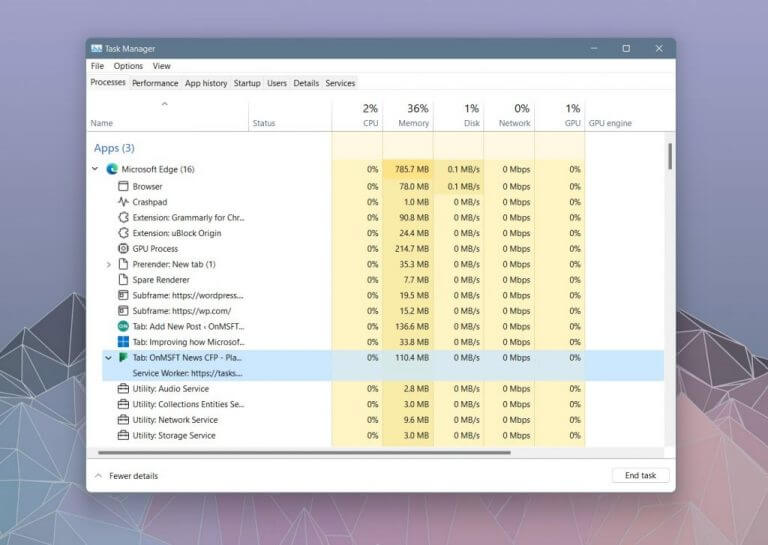
In Edge 94 on Windows 11, Microsoft enabled a detailed view of Microsoft Edge processes in Task Manager. For web browser processes in the Task Manager, you now can see the process type with a descriptive name and icon such as “browser,” “GPU Process,” or “Crashpad.” Meanwhile, for utility, plug-in, and extension processes, you will see the process type, and the name of the service, plug-in, or extension. Finally, for tabs and render processes, you’ll see the word tab, followed by the site name and icon.

This is how you can end up finding and “killing” a tab that takes up too many resources. We included a sample of this for you below. You can learn more about killing tabs through the Task Manager, and any adverse effects from doing so over on Microsoft’s blog.

Microsoft Edge processes in Task Manager might end up being shared, so you can click the arrow to expand a process, and see all subprocess associated with it. Since multiple items share a process, the item that has the arrow next to it will show you the total resource usage for that process. When expanded, the resource usage for the remaining rows will remain blank.

In addition to these changes, Microsoft is also updating the Browser Task Manager in Windows 11. It now looks a bit similar to Edge browser processes in the Windows 11 task manager. Microsoft says this is to help people better understand where system resources are going in Edge.

These changes are now available in the stable version 94 of Microsoft Edge. We’re seeing it on a non-insider Windows 11 PC, too. So, make sure Edge is fully updated, and check this feature out and let us know your thoughts in the comments below.

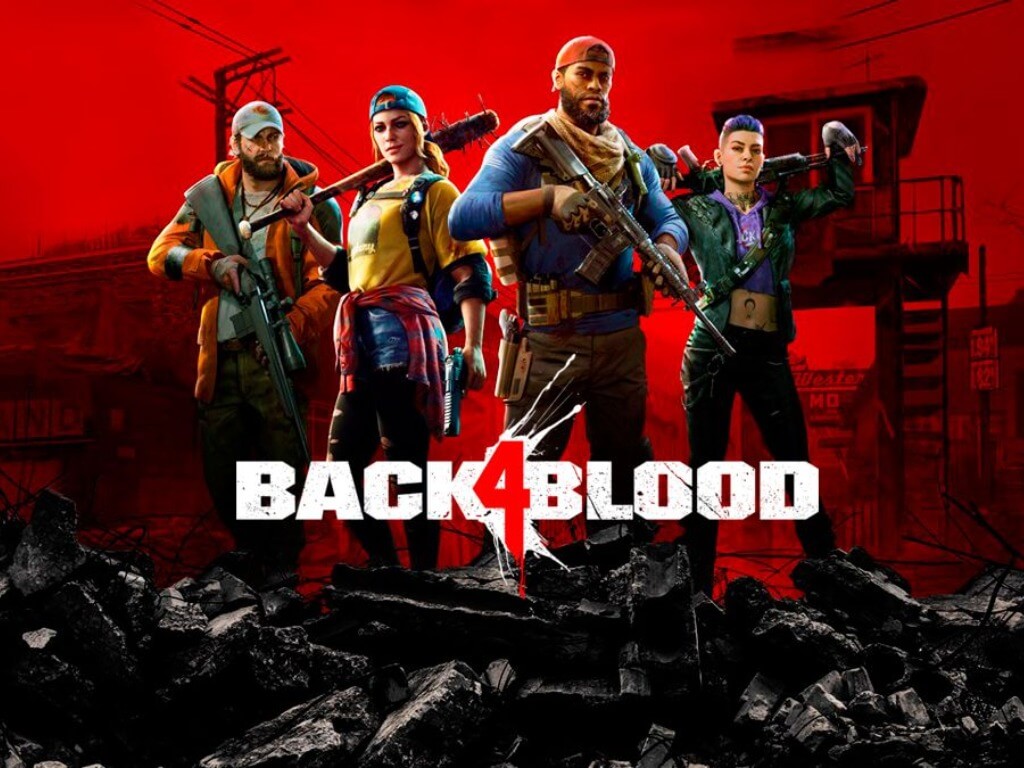
Back 4 Blood is now available on Xbox, PC, and Xbox Game Pass

Back 4 Blood, the much-anticipated zombie-themed co-op shooter from Left 4 Dead developer Turtle Rock Studios is now available on PC, PlayStation, and Xbox consoles. For players in the Xbox ecosystem, Back 4 Blood is also available today day Xbox Game Pass for Console and PC, as well as Xbox Cloud Gaming.

If you’ve played Left 4 Dead before, Back 4 Blood will feel instantly familiar with a 4-player co-op campaign and different types of “Ridden” zombies you’ll encounter between safe zones. However, Back 4 Blood spices things up with eight customizable “Cleaners” to choose from, upgradable weapons, and a card system to improve the game’s replayability.

Back 4 Blood also does a lot of things right by supporting cross-play multiplayer on day one, Smart Delivery on Xbox consoles, as well as cross-saves between Xbox and PC. This is a great game to have on Xbox Game Pass on launch day, and you can even try it without installing it thanks to Xbox Cloud Gaming.

Back 4 Blood is priced at $59.99 on the Microsoft Store, and you’ll get both the Xbox and PC versions of the game with your purchase. There’s also a $39.99 Season Pass that will provide access to new playable characters, special mutated monsters, and an upcoming new campaign.

Back 4 Blood
Back 4 Blood
Developer:
Warner Bros. Games
Price:
$59.99


Back 4 Blood: Deluxe Edition


Microsoft Edge Canary adds new PWA management hub for select Insiders

Microsoft Edge has started testing a new feature that should make it easier for users to manage Progressive Web Apps (PWAs) installed on their PCs. The software giant has announced that a new PWA hub is rolling out in preview to select Insiders in the latest Canary builds.

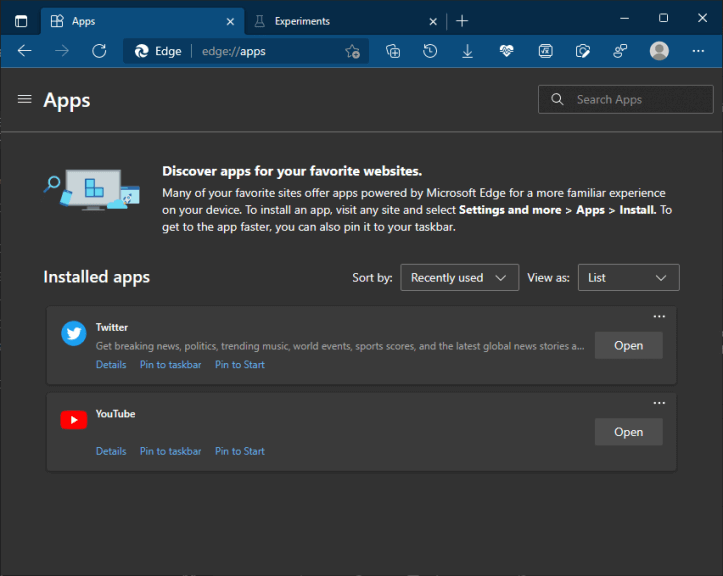
More specifically, the Edge Insider team has updated the existing apps page with a user-friendly UI that lists all the installed PWAs in a grid view. It features dedicated buttons to open the app and pin it to the taskbar or Start menu. Notably, each PWA has its own details page that lets users configure permissions and privacy settings. There is also an ellipsis menu that includes settings to add the app to run automatically at startup or create a desktop shortcut.

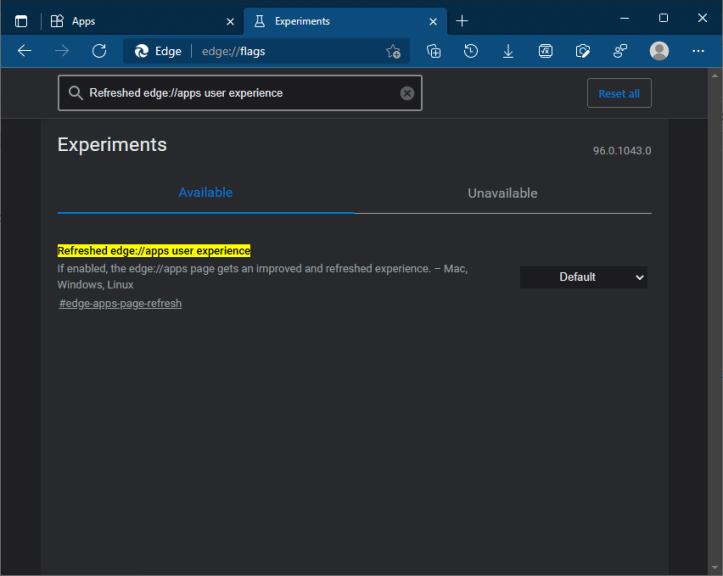
As noted by Reddit user Leopeva64-2, Edge Canary Insiders who have yet to receive this PWA hub update can enable it by following these steps:

  1. Open Microsoft Edge and go to the “edge://flags” page.
  2. Search for the “Refreshed edge://apps user experience” flag and enable it.
  3. Finally, restart the browser to apply the changes.

Once done, the new PWA hub should be active, and users can access it by heading to the edge://apps page. It provides options to sort apps (with the title, installation date, and recently used filters) or arrange them in a list or grid view. However, it doesn’t support uninstalling apps at the moment.

Overall, this redesigned hub is a welcome addition, and it should contribute to the push towards the adoption of PWAs. Unfortunately, the feature is currently available in Microsoft Edge Canary version 96.0.1043.0 or newer. We hope that the Edge Insider team will roll out this update to Dev and Beta channels in the coming weeks.

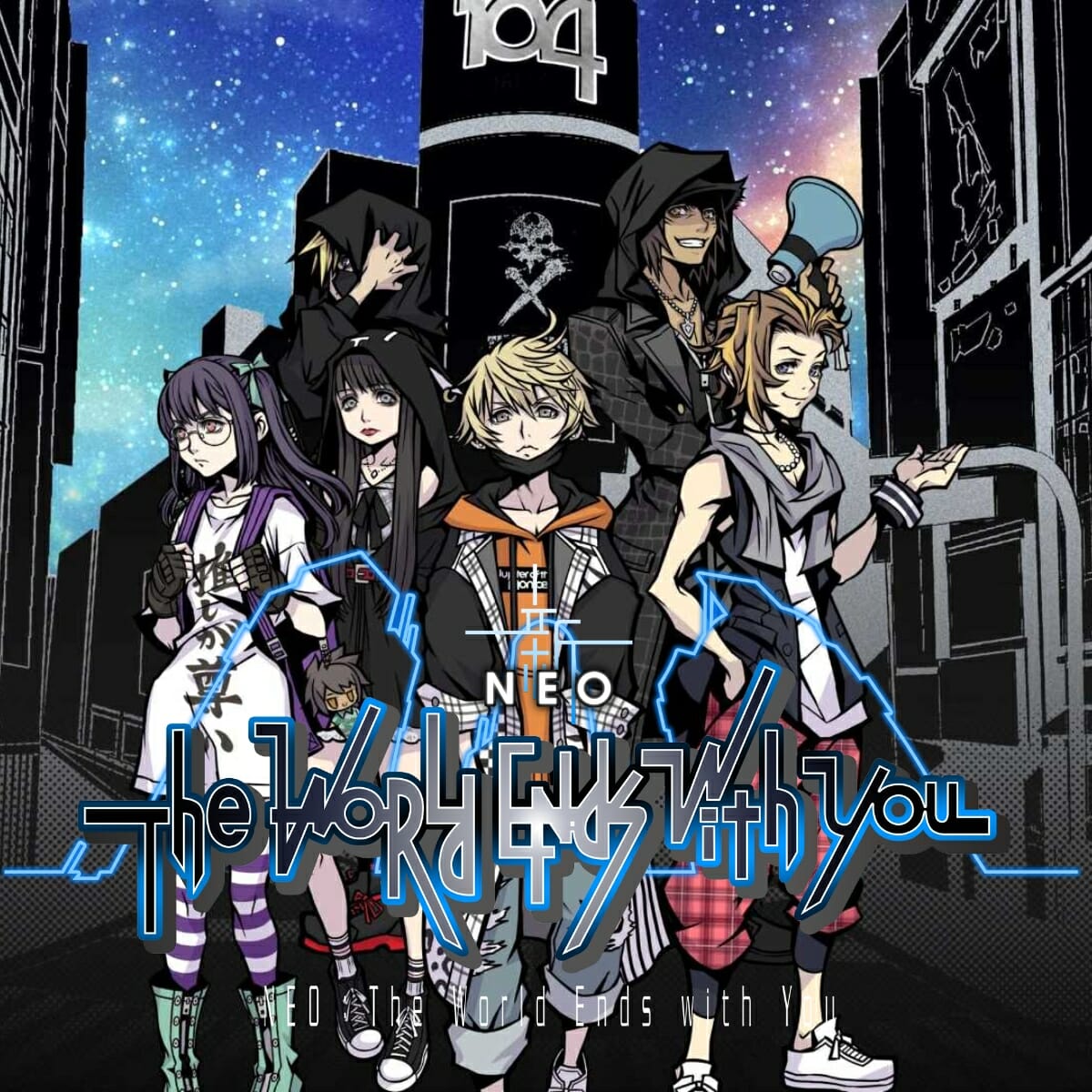
Neo: The World Ends With You game review: Fear the Reapers

It’s a fairly widely-held consensus that death, as a concept, sucks. We don’t know all that much about what happens afterward, vis-a-vis the immortal soul, and by and large, the idea of not being here anymore is pretty maudlin. Well, in Neo: The World Ends With You, death is very much a new beginning.

In Neo’s world, the chosen dead are drafted into a celestial contest known as the Reaper’s Game. This team-based competition is intended to judge the overall worth of humanity and requires teams to compete for 7 days across their city in a series of games that require puzzle-solving, combat, teamwork, and perception.

As the story begins, we are introduced to protagonist Rindo and his motor-mouth best friend Fret. Dragged into the Reaper’s Game without little explanation, they soon find themselves competing against teams of both chosen dead and seasoned reapers. The winners are granted whatever they choose, even a return to life, and so the stakes are immediately high.

Happy death-day

The game is set in a fictionalized version of Tokyo’s Shibuya commercial district and sees Rindo and company zipping between the various areas solving puzzles, chasing down leads that may or may not violate the rules of the Game, and fighting. They exist now in a realm called the UG, or Underground, and cannot be seen by the living, who still exist in the RG or Realground.

Rindo’s entourage grows steadily throughout the story, and each of his new companions has a specific power that helps the team progress. Rindo himself, for example, can hop back in time and alter his own fate, while Fret can invade people’s memories to learn valuable information. Bookworm Nagi can do battle with a person’s inner demons and free them from their negative funks.

Each of these abilities comes with its own mini-game or mechanic, which will often require you to scan the surrounding area to read the thoughts of the living. Sometimes, though, these abilities are not enough and the only option is to fight.

Bring on the Noise

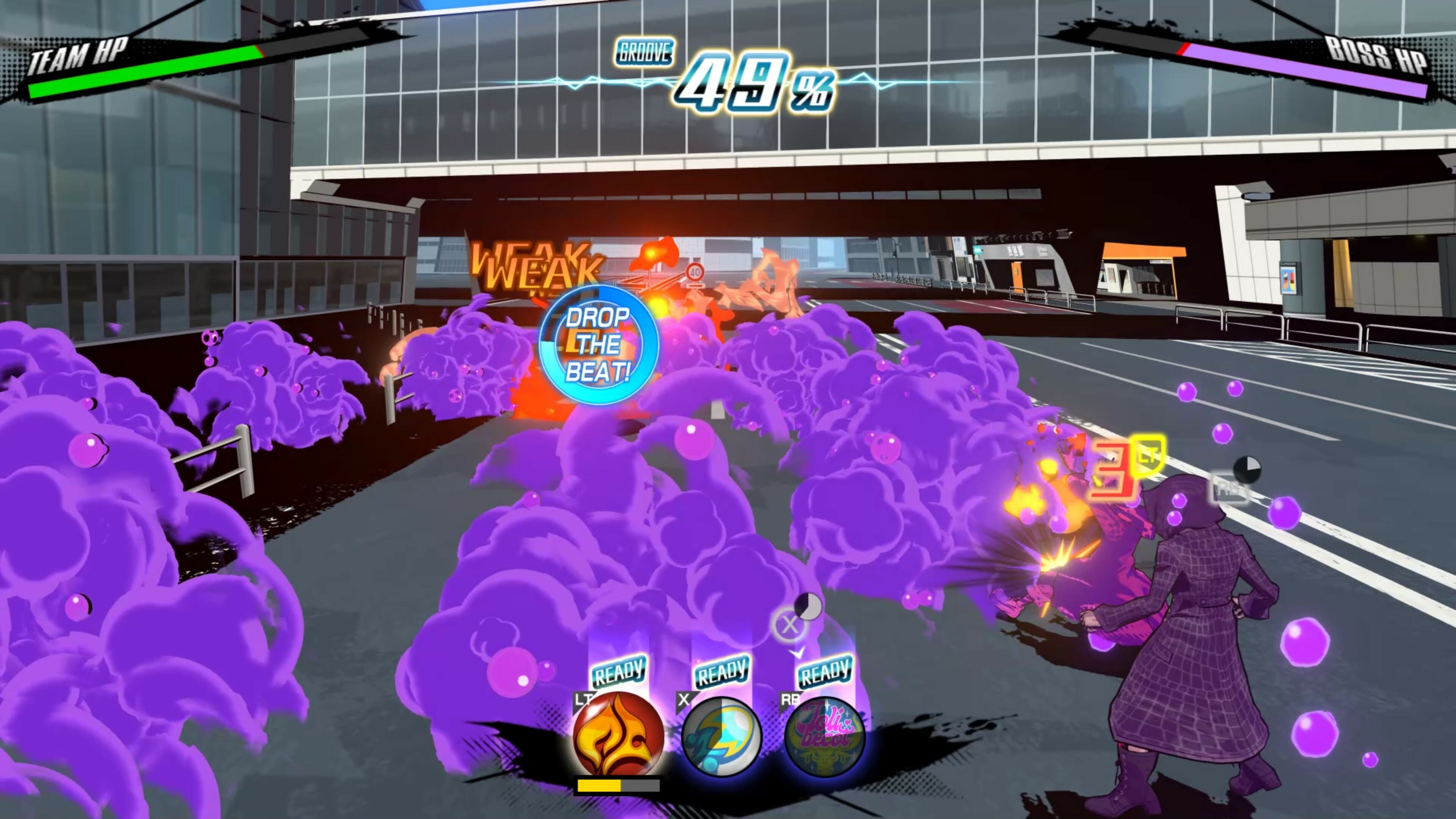
Enemies known as Noise can be detected when you scan the environment. These creatures, conjured from the negative emotions of the living, will follow you around and attach themselves to you. Hitting A will then begin the fight. If you’re brave, you can attach two or three sets of Noise at once and fight the groups one after the other. Each round is called a Reduction, and you’ll need to survive all Reductions with no rest or regen in between.

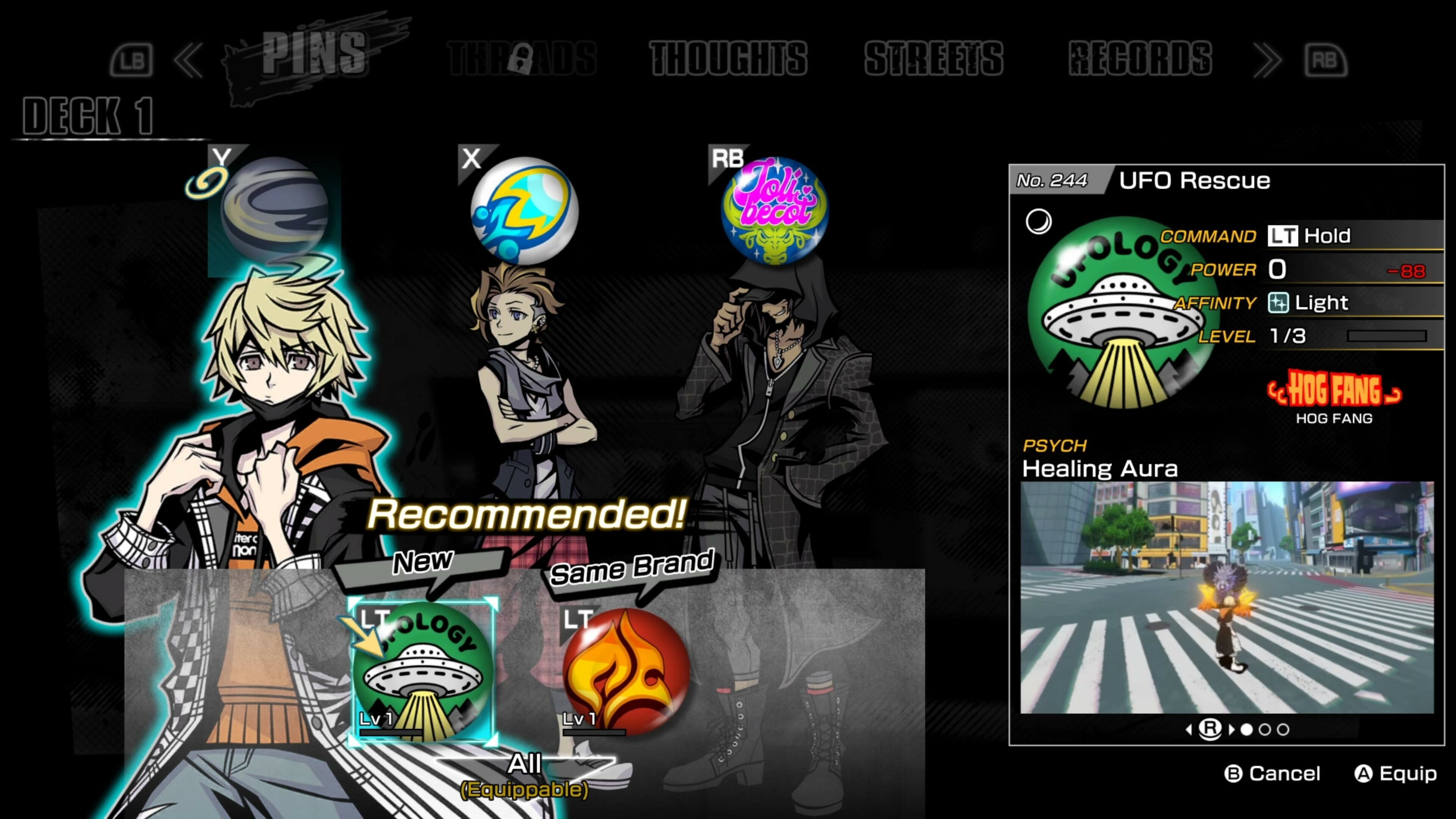
Combat abilities in Neo: The World Ends With You come from Pins. These are decorated badges that impart skills and buffs onto the carrier. Each of your characters can have one Pin equipped at a time. They offer some fairly outlandish combat abilities such as conjuring bicycles and cars to drop on enemies or giving the carrier power over the elements.

There are several types of attacks. Tap attacks offer quick-fire damage-per-second, while some attacks must be charged or held. Each Pin type is attached to a certain button, so switching between characters is as simple as pressing a different command. If you do it at the right time, signified by a symbol telling you to Drop the Beat, you’ll do increased damage and build your groove meter. Once that is filled, hitting the B button unleashes a devastating special attack.

Dress to kill

The writing and delivery in Neo: The World Ends With You are superb throughout. Some of the smaller characters fall into the classic JRPG trap of sounding like someone forcing a voice, but the main cast is great. There’s genuine chemistry between the main team, the primary villains are cool, and the narrative is compelling and interesting. You’ll want to keep playing through each because you’re looking for the same answers Rindo and Fret are.

If you played the original game back in 2007 then you’ll probably know what to expect and maybe even see some of the story beats coming, but if you’re fresh to the series, Neo: The World Ends With You has the ability to surprise you at every turn.

Earning Pins (of which there are over 300) becomes part of the addiction, as each offers new combat abilities like heals and elemental attacks. But you can also go shopping for food that offers temporary stat buffs, or clothes that come with skills and abilities attached. You will need to increase your Style rating in order to utilize the skills on certain clothing articles, and sadly it doesn’t alter your appearance.

Fight music

Another major element is your social network. You’re able to connect with other players (in-game, not in real life), Reapers, and even some citizens of Shibuya. Forming connections unlocks new innate abilities such as instantly converting collected Yen Pins into currency instead of forcing you to physically go to a store and sell it. You can also buy CDs to increase your music options as you run around Shibuya.

Music is perhaps the most impressive aspect of Neo. The soundtrack is nothing short of spectacular, jammed to the brim with toe-tappers, head-boppers, and floor-fillers. The original tracks are great, and each one works effortlessly in any area of the game. I’m not usually one to get too excited about a video game OST, but this one had my attention right from the outset.

It’s worth noting for those who have played the game on Nintendo Switch that this is a very no-frills port. There’s nothing new added to the story, no DLC or extra tracks – it doesn’t even include mouse support. People who exclusively play PC titles and prefer M&K may be just as disappointed by this. It’s a great game, but little real effort has gone into the port.

Achievements and completion

Neo: The World Ends With You is a pretty sizeable challenge. The main story is easily 40 hours long while aiming for completion will take almost double that. There are hundreds of Pins and music tracks to round up, as well as some conversations and interactions you’ll miss if you’re rushing through.

This being a port of a game already featured on console, there is a full suite of achievements to unlock. As the Epic store has added achievements to its titles as well, there are milestones to aim for no matter where you pick it up from. You can unlock all the achievements offline, but you will have to up the difficulty for a better chance of certain Pin rewards to unlock the True Pinthusiast achievement.

Final thoughts on Neo: The World Ends With You

Pros
Amazing, head-bopping soundtrack
A funny and likable cast of characters
A solid narrative and addictive combat
Cons
Can feel a little easy
The fixed cameras take some getting used to
Lots and lots of talking

Final Score: 4/5

Neo is charming, funny, colorful, and packed with things to do. The characters are likable, the story is intriguing, and the combat is addictive and accessible. This is the sort of game you put on for an hour and turn off four hours later.

The soundtrack is easily one of the year’s very best, while there’s enough going on to keep any JRPG fan invested. My only real complaint is that the port is so basic and more could have been done to make the PC version feel like a PC version. It’s nice to have a sharper resolution and that snappier frame rate, but that’s really all you get.

That said, anyone looking for an effortlessly playable adventure with a cool cast and heaps of style could do much worse than checking out Neo: The World Ends With You.

Neo: The World Ends With You is available on the Epic Store for $59.99. It is also available for Nintendo Switch, PlayStation 4, and Xbox One.

Disclaimer: Reviewed on PC. Review copy provided by the developer.

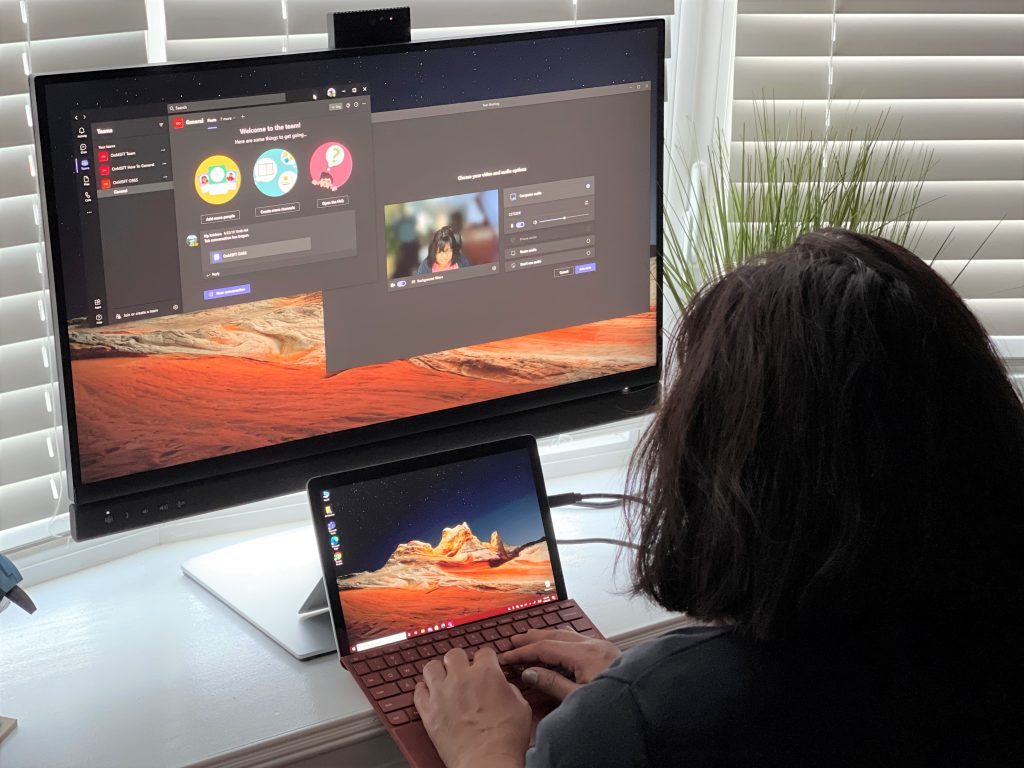
Microsoft Teams public preview can now provide faster and more relevant search results

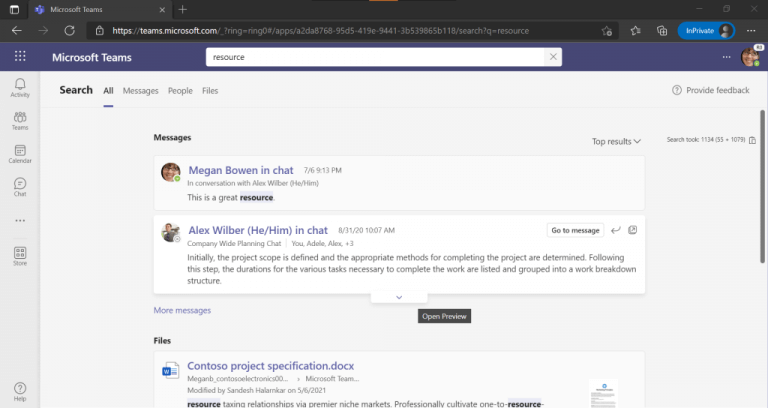
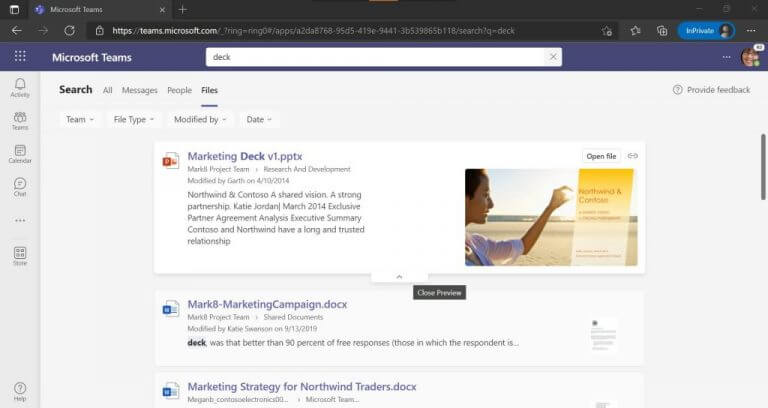
Last week, we reported that Microsoft Teams is getting a redesigned search experience that should provide faster and more intuitive results. The Redmond giant has announced that this update is now rolling out in preview on Windows and macOS.

“We have reimagined search and are bringing you a new experience. We got our early positive feedback for the richer, overhauled experience in various conversations earlier this year. Big thank you to everyone for their feedback, engagement and working together with Microsoft on this journey,” the company explained.

First up, Microsoft Teams has introduced a new landing page that groups search results into categories such as people, messages, and files. The search results page now features actionable buttons that let users directly go to a specific message/file or preview it. Other improvements include the addition of bookmarks, acronyms, as well as sorting options.

The new search experience also brings an improved messages tab that makes the filters more discoverable for users. This means that users can filter search results by type, date, @ mentions, attachments, and more. The messages tab has received a new “Top Hits” section that provides the most relevant search results at the top of the page. In addition, the People tab can now help users save some clicks by providing contextual information, including email, contact number, and organizational details.

Last but not least, the Microsoft Teams desktop app offers additional options for filtering files by type, date, and “modified by” in the search results. There is also the ability to preview files with metadata details before opening them. This should make it easier for users to find relevant files quickly and eliminate the need to jump between windows.

The largest powerful language model trained by Microsoft and NVIDIA

Microsoft and NVIDIA have today announced that they have successfully trained the largest most powerful language to date. The Megatron-Turing Natural Language Generation (MT-NLP) is meant to be the successor to the companies’ Turing NLG 17B and Megatron-LM models.

The MT-NLP has 530 billion parameters with the capability of a wide set of natural language tasks. According to the two companies, it also has comprehension, reasoning and natural language capabilities.

First breakthrough

The two companies have in the past worked on several innovations but this is considered the most powerful.

The quality obtained is a significant step towards the journey of unlocking AI in natural language. The two innovations DeepSpeed and Megatron-LM will be the major beneficiaries of the AI model development and open the pathway for large AI models to be affordable and faster to train.

Training

The training took place across 560 Nvidia DGX A100 servers, with 8 Nvidia A100 80GB GPUs for each.

Although the MT-NLP has the capability of inferring basic mathematical operations, it is not entirely accurate. It however surpasses memorization and can complete tasks.

Such models are crucial in amplifying the biases present in data in which they are trained. 

Although Microsoft acknowledges there have been challenges, they are committed to addressing them by making continuous milestones through continued research while minimizing potential harm to users. 

For now, users can enjoy the milestones made as we wait to see what is next in store.

What are your thoughts on the collaboration between Microsoft and NVIDIA? DO you have any expectations? Let us know in the comment section below.

Users can now create Windows 11 installation media with Rufus for unsupported PCs

If your PC failed to meet the minimum requirements, there is some good news for you. Rufus, one of the most popular applications that allow users to create bootable installation media, has brought some recent beta builds for those who wish to upgrade to Windows 11.

Skip TPM

As you may recall, TPM 2.0 was among the key requirements to upgrade to Windows 11. It turns out that Rufus allows users to create installation media that can skip both TPM and Secure Boot verifications. Essentially, if you create a USB drive with the app, you can bypass the requirements and install the OS on unsupported PCs.

This comes as a reprieve to those who had lost hope in installing Windows 11 or those who had planned to start saving for a new device that meets the set requirements. 

Well, it seems users are keen on finding out how it works and install Windows 11.

Build up of problems

While this method offers a simple way out for users to install the new OSS, Microsoft is keen on warning users to avoid using this method. If users install the OS on a device that does not meet system requirements, they are setting themselves up to a myriad of problems. 

Frequent crashes or the Blue Screen are just some of the struggles you are likely to encounter on your device.

Windows Insiders made a report that devices that failed to meet system requirements had a 52% chance of crashing while PCs that had passed the requirements test had a 99.8% crash-free experience. 

If you are not sure whether your device meets the system requirements, you can use the PC Health app.

Would you risk your PC to bypass the system requirements to install Windows 11? Let us know in the comment section below.

FIX: The computer constantly restarts after installing Windows

A never-ending loop of the computer restarting can be inconvenient, but you’ve arrived at the safe zone of finding answers.
Some of the difficulties that might cause this difficulty after installing Windows include antivirus software, unwanted updates, hardware concerns, or a botched installation of the operating system.
Regardless of the circumstance, we will walk you through simple troubleshooting techniques to quickly end the reboot loop.

Although Windows 10 offers a lot of cool, new features, it can still bring some problems, as well.

In the list below, we’re going to show you what to do if the fresh installation of Windows 10 forces your computer to reboot constantly.

What can I do if the PC reboots after installing Windows 10?

Here are a few other problems that users are facing and can be solved using our guide:

  • Windows 10 continuous, endless reboot – Sometimes the PC can get stuck in an endless reboot. Try some of our solutions.
  • Windows 10 reboot loop – Usually caused by a problematic update, and to fix it, you need to find and remove that update.
  • Windows 10 reboot randomly – Can be caused by hardware problems, so be sure to inspect your hardware.
  • Windows 10 install reboot loop – This is a common problem that can be fixed by installing Windows 10 again.

1. Check your antivirus

According to users, sometimes your antivirus can cause this problem, especially if it’s not fully compatible with Windows 10.

Many users reported that this problem occurred with Avast antivirus, but after removing it, the issue was resolved completely.

Keep in mind that you might not be able to access Windows 10 normally due to this problem, so you might have to use Safe Mode to remove Avast.

Once you enter Safe Mode, be sure to uninstall Avast or the antivirus that you’re using and check if that solves the problem.

Keep in mind that antivirus tools might leave behind certain files and registry entries that can cause the problem to reappear.

To completely remove an antivirus, it’s recommended to use a dedicated removal tool. Most antivirus companies offer dedicated removal tools for their software, so be sure to download one for your antivirus.

Once you completely remove your antivirus, check if the problem is resolved. If your antivirus was the problem, you might want to consider switching to a different antivirus solution.

One of the most compatible and trusted antivirus solutions for Windows 10 you could consider trying is TotalAV.

With the multi-layered protection functionality, your PC is continuously monitored even when it is connected to the internet and blocks any malicious activity that may cause damage to your PC.

An intuitively simple interface allows you to identify security concerns at a glimpse, which can be resolved immediately from the interface, such as installing Windows updates.

2. Prevent your PC from rebooting

  1. Boot your computer in Safe Mode.
  2. Go to Search, type sysdm.cpl, and open it from the results.
  3. Click the Advanced tab, and then click the Settings button under Startup and Recovery.
    Windows 10 continuous, endless reboot
  4. Uncheck Automatically restart option, then click OK and reboot your computer.
    Windows 10 continuous, endless reboot

Note: This probably won’t solve your problem but it will provide you with more information. Next time your computer restarts, you’ll probably get a BSoD.

You can use the message or the error code you get from the blue screen to search it on our large collection of BSoD solutions.

3. Fix the Master Boot Record

  1. Restart your PC several times during the boot sequence until a list of options appears.
  2. Select Troubleshoot, then Advanced options, and select Command Prompt.
  3. Run the following commands:

bootrec /FixMbr

bootrec /FixBoot

bootrec /ScanOs

bootrec /RebuildBcd

4. Run the chkdsk command

  1. Restart your PC several times during the boot sequence and start Command Prompt as shown in the previous solution.
  2. Enter chkdsk /r X: (replace X with the letter that matches your system partition and keep in mind that letters might be changed if you start Command Prompt outside of Windows)
    Windows 10 reboot loop
  3. Keep in mind that this process can take 20 minutes or more, depending on the size of your drive.

5. Roll back to a previous build

  1. Restart your PC during the boot phase few times until the list of options appears.
  2. Choose Troubleshoot, then go to Advanced options, select See more recovery options, and choose Go back to the previous build.
  3. Select your user account and enter your password.
  4. Click the Go back to the previous build button and follow the instructions on the screen.

Note: Once your PC is restored to the previous build, the problem should be resolved. If you can’t find this setting, you can also use System Restore to go back to the previous build.

If an update caused this problem, you might want to prevent this update from installing. To see how to do that, check out our how to prevent Windows from installing automatic updates article.

6. Check your hardware

Sometimes your hardware can cause this problem to appear, and in order to fix it, you need to disconnect all USB devices from your PC and check if the problem still appears.

Several users claim that the issue was their Wi-Fi adapter, so you might want to try removing it to solve this problem.

In a few instances, users reported that their CPU was the cause, but before you replace any major hardware component, be sure to perform a detailed inspection of your hardware.

7. Check your startup applications

  1. Start Windows 10 in Safe Mode.
  2. Press the Windows Key + R and enter services.msc, then click OK or press Enter.
    Windows 10 reboot randomly
  3. Navigate to Services tab, check Hide all Microsoft services and click on Disable all.
    Windows 10 install reboot loop
  4. Go to the Startup tab and click on Open Task Manager.
    Windows 10 continuous, endless reboot
  5. Select the first item on the list, right-click it, and choose Disable from the menu. Repeat this step for all the startup applications.
    Windows 10 reboot loop
  6. Close Task Manager, go to the System Configuration window and click Apply and OK to save the changes.
    Windows 10 reboot randomly
  7. Restart your PC.

Note: If the problem doesn’t appear anymore, you need to enable disabled startup applications and services one by one or in groups until you find the way that is causing the problem.

Once you find the problematic application, you can remove it or update it and check if that solves the issue.

For any information about the most popular OS, like news, tips, and how to fix various problems, explore our Windows 10 section. Use our Tech Troubleshooting Hub to get answers to any PC general questions and curiosities.

We hope that some of these solutions helped you to solve the restarting problem, if you have any suggestions or comments, please reach out to the comments section below.

FIX: These files can’t be opened message on Windows 10/11

Windows Security sometimes displays a These files can’t be opened message when trying to open certain documents.

It is designed to protect you from running malicious files, but it can also appear while trying to run regular files.

Some variations of the same message are the following:

  • Your internet security settings prevented one or more files from opening – This issue can appear on older versions of Windows
  • Opening these files might be harmful to your computer

As mentioned, the message appears on older Windows OS versions as well, so if you’re running on Windows 7 or newer you might expect to get it. Additionally, Internet Explorer users reported this issue as well.

So in this article, we’ll offer a few easy solutions to bypass the problem.

How do I fix These files can’t be opened message?

  1. Make sure that the file you’re trying to run isn’t blocked
  2. Check your antivirus
  3. Change your Internet Options
  4. Reset Internet Explorer settings to default
  5. Move the file to a different location
  6. Rename the file
  7. Create a new user account
  8. Try running the application as an administrator

1. Make sure that the file you’re trying to run isn’t blocked

  1. Locate the file that is giving you this error message, right-click it and choose Properties from the menu.
    Your internet security settings prevented one or more files from opening Windows 7
  2. Go to the General tab and look for the Unblock button.
  3. Click the button and click Apply and OK to save changes.

After making these changes, you should be able to run this file without any problems.

Keep in mind that the Unblock button might not be always available, and if you don’t see this button, it means that the file is already unblocked.

2. Check your antivirus

According to users, if you’re getting Windows Security these files can’t be opened the message, the problem might be your antivirus software.

Certain antivirus tools can sometimes flag ordinary files as potentially dangerous thus causing this message to appear.

To fix this problem, users are suggesting to open your antivirus settings and disable certain antivirus features. If that doesn’t work, perhaps you’ll have to disable your antivirus altogether.

In some cases, you might even have to remove your antivirus.

Several users specifically mentioned that Norton antivirus caused this problem to appear on their PC, and in order to fix the problem, they had to uninstall it.

Bear in mind that almost any third-party antivirus can cause this issue to appear, so try removing your antivirus and check if that helps.

If removing the antivirus fixes the problem, perhaps you should consider switching to a different antivirus solution.

If you’re looking for a reliable antivirus that won’t interfere with your system, you should consider using Bitdefender.

This antivirus is actually the best on the market with a lot of security features that can protect your PC, your connection, and your web identity.

The most recent tests have shown that Bitdefender returns a very littler number of false positives – which is exactly what this issue is about. So with Bitdefender, your system is protected and you can run your daily processes smoothly.

3. Change your Internet Options

  1. Press Windows Key + S, enter internet options, and open this app.
    Windows Security opening these files might be harmful to your computer
  2. In the Security tab, select Internet.
  3. Also, click the Custom level button.
    Windows Security these files can't be opened Windows 7
  4. Locate Launching applications and unsafe files and set it to Prompt.
  5. Now click OK to save changes.
    Your internet security settings prevented one or more files from opening Windows 7
  6. Repeat the previous steps for Local intranet, Trusted sites, and Restricted sites.
  7. After doing that, select Local intranet and click the Sites button.
    Windows Security opening these files might be harmful to your computer
  8. Now disable all options and click OK.
    Your internet security settings prevented one or more files from opening Windows 7

After making these changes, check if the problem is still there. If the issue doesn’t appear, the problem should be resolved and everything should start working again.

4. Reset Internet Explorer settings to default

  1. Open Internet Options window as shown in the previous solution.
  2. In the Advanced tab and click the Reset button.
    Windows Security these files can't be opened Windows 10
  3. Check Delete personal settings.
  4. Click the Reset button.
    Windows Security opening these files might be harmful to your computer

After doing that, Internet Explorer settings will reset to the default and the problem should be resolved.

A similar workaround should work for any other default browser you might be using.

5. Move the file to a different location

Sometimes, the mentioned message can appear if the path to the file you’re trying to run is too long.

So, perhaps you can fix the problem simply by moving the file to another location.

Copy the file you’re trying to run to a root directory, such as C: or D:, and try to run it from there.

If the issue doesn’t appear, it means that this was the cause of the error.

6. Rename the file

Renaming the file you’re trying to run is another simple and sometimes efficient trick.

Simply right-click the file and choose Rename from the menu.

Now change the file name to setup.exe or a.exe. You can use any name you want, just make sure that it’s shorter than the original one.

Try to run it again afterward and check if the problem is still there.

7. Create a new user account

  1. Open the Settings app by pressing Windows Key + I.
  2. Now navigate to the Accounts section.
  3. Choose Family & other users from the menu on the left.Family & other users
  4. In the right pane, click Add someone else to this PC.
  5. Now choose I don’t have this person’s sign-in information.
  6. Select Add a user without a Microsoft account.
  7. Enter the desired name for the new account and click Next.

After creating a new user account, switch to it and check if the problem is still there. If the issue doesn’t appear on the new account, you should move your personal files from your old account to the new one.

8. Try running the application as an administrator

  1. Locate the application that is giving you this error.
  2. Right-click the application and choose Run as administrator.
    Your internet security settings prevented one or more files from opening Windows 7

If this method works, you’ll need to repeat it whenever you want to run this application.

However, you can make the process a bit more straightforward and force the application to always run with administrative privileges. To do that, follow these steps:

  1. Right-click the problematic application and choose Properties from the menu.
  2. Go to the Compatibility tab and check Run this program as an administrator.
  3. Now click OK and Apply.
    Windows Security these files can't be opened Windows 8.1

After making these changes, you’ll force the application to always run with administrative privileges and the problem should be resolved.

Even though Security warnings can be false alarms, they should not be completely ignored. Learn more about the topic from our Security Hub.

We hope that you were able to fix the file opening error message easily by using one of our solutions. We’d like to hear which worked for you, so drop us a line in the comments sections below.


We provide solutions for similar issues, so make sure to check our Troubleshooting Guides.

Profile error occurred in Chrome [Fix]

Google Chrome is one of the most popular web browsers on the market. It offers a wide range of features and also allows you to create your own profile.

By having your own profile, you can save your history, passwords, and extensions and sync Chrome across multiple devices.

While this is a great feature, some users report Profile error occurred messages in Chrome, and today we’re going to show you how to fix it.

How can I fix the Profile error occurred message in Chrome?

1. End all Chrome processes

fix all processes end in Chrome
  1. Open Task Manager. You can do that quickly by pressing Ctrl + Shift + Esc.
  2. When Task Manager opens, navigate to the Processes tab.
  3. Locate a Google Chrome process, right-click it and choose End Task.
  4. Repeat the step from above to close all Google Chrome processes.
  5. After doing that, close Task Manager and start Google Chrome again.

A few users report that closing all Chrome processes fixed the problem for them, so be sure to try this solution.

2. Restart your PC

Sometimes, the simplest solutions are the most effective. According to users, you can fix the Profile error occurred message by restarting your PC. After it does, Chrome should be able to start without any issues or errors.

Sometimes. minor glitches can occur but you can usually fix them with a single restart. Keep in mind that this isn’t a universal solution, so it might not work for every user.

3. Disable the antivirus software

Antivirus is one of the most important applications that you have on your PC. Unfortunately, some antivirus tools can interfere with your Google Chrome profile and cause the Profile error occurred message to appear. To fix this issue, disable your antivirus software.

If you are using Windows Defender, you can manually disable it from the Windows Security Settings. This won’t uninstall the Antivirus but temporarily pause all its actions.

To disable Windows Defender:

1. Type Windows Security in the Start search bar and open the panel.

2. Click on the Virus and Threat Protection icon.

Security Panel

3. Select Manage Settings.

manage settings

4. Click the button under Real-time protection to turn it off.

disable real-time protection

A dialog box will ask if you want to make these changes, select Yes.

Now your Antivirus is disabled. To turn it back on, just click the Real-time protection button again. At this point, your Chrome Profile error should be remediated, unless it is caused by something else.

If that doesn’t help, you might want to remove your antivirus software and check if that solves the problem. If you decide to remove your antivirus, be sure to use a dedicated removal tool to remove it completely.

Such program will remove any unwanted software from your device, including the bundled programs.

If you want to completely uninstall applications, including stray files, and get rid of annoying toolbars and plug-ins then uninstaller software is the best choice.

⇒ Get Iobit Uninstaller

4. Remove the AVG Toolbar

  1. Open Chrome and click the Menu button up top and choose More tools > Extensions.
  2. Locate AVG Toolbar in the list of extensions and click the trash can icon to remove it.

AVG Antivirus can cause problems with Chrome to appear. This antivirus tends to install AVG Toolbar into your browser so it can better protect you from online threats. This is a completely optional feature and even without it, AVG will provide you with almost the same protection.

As for the Profile error occurred message, users report that it occurs if you don’t completely remove the AVG Toolbar from your PC. According to users, they fixed the issue by removing avgtpx64.sys from Windows/system32/drivers directory. After doing that, the problem should be resolved.

If you feel uncomfortable removing files from the Windows folder, you can fix this problem by using the AVG Removal Tool. Many antivirus companies, including AVG, offer dedicated tools that remove any leftover files and registry entries from your PC.

If you still have problems with AVG, simply download this tool from AVG’s website and run it on your PC. The tool will completely remove all files associated with AVG. After doing that, the problem with Google Chrome should be fixed.

5. Delete Web Data file

  1. Close Google Chrome completely.
  2. Press Windows Key + R and enter %localappdata%. Press Enter or click OK.
  3. When the Local folder opens, navigate to the GoogleChromeUser DataDefault folder.
  4. Locate the Web Data file and delete it.
  5. Optional: Delete Web Data-Journal file.
  6. Optional: Delete the Local State file.

After deleting the files, start Google Chrome again and check to see if the issue is resolved.

6. Delete your Google Chrome profile

  1. Open Google Chrome and click the Menu button and choose Settings.
  2. Scroll down to the People section.
  3. Select your profile and click the Remove button.
  4. A confirmation message will appear. Click the Remove button to confirm.
  5. After doing that, restart Chrome. Now, create your Chrome profile again and check if that solves the problem.

All your information is stored in the cloud, so even if you remove your Google profile you won’t lose any important information.

After creating a new profile, all your data such as browsing history, extensions, and passwords will be restored. A few users suggest deleting all additional Google profiles except your own, so be sure to try that as well by following the instructions from above.

7. Rename the default folder

data default chrome
  1. Make sure Chrome is completely closed.
  2. Navigate to the C:Usersyour_usernameAppDataLocalGoogleChromeUser Data folder. For more information on how to navigate to that directory, check Solution 4.
  3. In the User Data folder, you should see the Default folder.
  4. Right-click the folder and choose Rename from the menu.
profile chrome error
  1. Rename the folder to Default.backup or use any other name.
  2. Start Chrome again and check if the problem is resolved.

This is a simple solution and several users reported that it works for them, so feel free to try it out.

A few users also suggested creating a new Default folder and moving the following items from the old Default folder to a new one:

  • Preferences file
  • Bookmarks file
  • Extensions folder
  • Local Storage folder
  • History

To find which of these components is corrupted, simply start Chrome after copying one list entry to the new Defaults folder. If you see an error message, it means that the component that was copied last is causing the problem.

8. Avoid using certain software

If you need to remove junk files, CCleaner is probably one of the best tools. This application can also remove cache and browsing history for all your browsers in a single click, which makes it rather useful.

Despite its usefulness, it seems that CCleaner can cause certain problems with Google Chrome.

According to users, the Profile error occurred message can be caused by CCleaner. To fix the problem, refrain from using CCleaner to clean Chrome’s history and cache. In addition, try using a different cleaning tool or simply uncheck the option to clean Chrome’s history.

If that doesn’t work, you might want to update CCleaner to the latest version and check if that solves the issue.

9. Update Java

According to users, you can fix the Profile error occurred message with ease simply by updating Java to the latest version. If you have Java installed, you should see a notification in the bottom right corner saying that an update is available.

Click the notification and follow the instructions on the screen to update it. Alternatively, you can visit Java’s website and download the latest version. If you don’t have Java installed this solution won’t apply to you.

10. Check if you’re using the latest version of Chrome

  1. Click the Menu button in the top right corner and choose Help > About Google Chrome.
  2. A new tab will now appear showing you the current version of Chrome. The application will automatically check for updates and download them.
  3. Be sure to check if you’re using the stable version of Google Chrome. If about tab says Chrome Beta or Chrome Canary, be sure to download and install the latest stable version instead.

11. Reinstall Google Chrome

  1. Press Windows Key + I to open the Settings app.
  2. Go to System section.
  3. Click on Apps & features in the left pane. List of installed applications will appear in the right pane. Locate Google Chrome on the list, select it and click on Uninstall button.
  4. Follow the instructions on the screen to remove Chrome.

Alternatively, you can use Programs and Features to remove Chrome. To do that, follow these steps:

  1. Press Windows Key + S and enter programs. Choose Programs and Features from the menu.
  2. When Programs and Features window opens, locate Google Chrome on the list of installed applications and double-click it.
  3. Follow the instructions on the screen to remove Google Chrome.

After removing Chrome, you just need to install the latest version.

A few users reported that they removed the Google folder from C:Usersyour_usernameAppDataLocal directory, so you might want to do that as well.

If you want to completely remove Chrome, along with its all associated files and registry entries, be sure to use an uninstaller tool such as Revo Uninstaller or similar.

Keep in mind that removing all these files isn’t mandatory, but if a regular reinstall doesn’t fix the problem, be sure to remove all files associated with Google Chrome and then try again.

12. Create a new Windows account

  1. Open the Settings app and go to the Accounts section.
  2. Choose Family & other people from the left pane. Now click on Add someone else to this PC in Other people section.
  3. Now click I don’t have this person’s sign-in information.
  4. Click Add a user without a Microsoft account.
  5. Enter a desired user name for the new account and click Next.

After creating a new user account, switch to it and try running Chrome with it. If the problem doesn’t appear on a new account, you might have to transfer your personal files to it and use it as your main account. This isn’t the best solution since it requires you to move your files, but if all other solutions don’t work, you might want to try this one.

We hope that you’ll find at least one of these solutions useful and that it will help you create your Chrome profile.

If you have some comments, suggestions, or maybe know some other solutions, reach us in the comments below, we would love to hear your opinion.

Hand Drawn Animation Software: 6 Best for your PC [2026 Guide]

Hand-drawn animation gives you more freedom to express your artistic talent as you can basically do anything on a character.

It thus goes without saying that the final animation looks crisper and usually has more detail than in 3D, despite the latter being more “real”.

The results are especially wonderful if you deploy the best software for hand-drawn animation- of which you are not short of choices.

Now, the purpose of this write-up is to answer the question of what is the best software for hand-drawn animation because as I have explained, it’s the tool to help you accomplish whatever your creative instincts want.

Note: Hand-drawn animation is also known as cel or 2D animation. As a result, some of these 2D animation software titles feature the terms 2D/animation prominently.

That said, some developers have adopted imaginative names for their programs and don’t even mention the said terms.

As we often do, we have been researching and finally settled on the best apps to help you produce hand-drawn animation that turns heads. Have a look.

What is the best hand-drawn animation tool for PC?

Adobe Animate – Quickly publish to multiple platforms

When it comes to graphics design, few software developers are so much in the spotlight as Adobe. Of course, it seems that even the 2D animation genre has its own dedicated program in the form of Adobe Animate.

This incredible program breaks the barrier between what can be considered professional software and user products, bringing top-notch tools into a very intuitive interface.

2D animation and control have never been simple thanks to Adobe Animate, from your typical 2D flash video to minimalist anime and kid’s cartoons.

You can use Adobe Animate to design interactive animations for games, TV shows, and the web, and even bring cartoons and banner ads to life.

Even if you’re not a professional, you can still use it to create animated doodles and avatars, and add action to eLearning content and infographics.

Once you’re done, you can use Adobe Animate to quickly publish to multiple platforms in just about any format, and reach viewers on any screen.

Here are some of Animate’s key features:

  • Fluid Brushes
  • Onion Skinning
  • Infographics
  • Layer parenting

Adobe Animate

Create cool hand-drawn animation using awesome and useful features with Adobe Animate
Check price Visit website

Adobe Character Animator – Emmy Award-winning desktop app

Adobe Character Animator is a motion capture software that is integrated with After Effects. To create hand-drawn live animations, you can use both a microphone and a webcam, as well as hotkeys.

Adobe Character Animator, an Emmy Award-winning desktop application software program, uses live motion capture and a multi-track recording system to operate layered 2D puppets created in Photoshop or Illustrator.

It comes pre-installed with Adobe After Effects CC 2015–2017, and it’s also accessible as a standalone program as part of a Creative Cloud all-apps subscription. It is used to create both live-action and stop-motion animation.

It has been utilized on The Simpsons to have Homer talk live on television, as well as by Stephen Colbert to have an animated live Trump. Essentially, you act in the real world, and the character responds virtually.

Character Animator is used by Hollywood studios and internet content makers to bring their characters to life in real time. It works in tandem with other Adobe applications like Premiere Pro and After Effects.

Adobe Character Animator

Animates characters in real-time so quickly that you can live stream while working to wow viewers at every step of the process.
Free trial Visit website

Krita – Real-time animation playback controls

Krita is arguably the best free hand-drawn animation software, designed primarily to give artists the flexibility to create and deliver riveting animations.

The software is a favorite of thousands (if not more) of animators worldwide, and that’s not just because it comes free, thus being accessible.

It’s principally due to it being infinitely better than many of even the commercial hand-drawn animation software out there.

It has a simple interface (akin to the legendary Adobe Flash) to help you access and use its impressive assembly of innovative features.

I am referring to tools like the detailed timeline controls which come in handy when setting the speed of action. This helps you present your ideas in a way that rhymes with your audience’s needs.

On the same note, Krita’s real-time animation playback controls allow you to easily review your animation as you fine-tune cartoons and overall play for the best impression.

This software’s onion-skin display is the industry’s best. You will thus effortlessly see several frames simultaneously so that you can make the right decisions as far as further creations or changes to drawings are concerned.

The program is in general filled to the brim with such features making it a top choice for both amateurs and professionals.

Krita

Go to the next level with animation stories using this full-features digital solution.
Check price Visit website

AutoDesk MotionBuilder – Enriching 3D animation

The next software is an effective 3D animation key for creating character animation and complex action scenes

First, the tool is not exactly for beginners as it comes with professional animation tools, yet it can be used with some tutorials.

It’s possible to create a galaxy of animations and explore this world with complex edits and stop-motion tools.

More exactly, you benefit from 3D character animation tools that let you explore motion animation with fine-tuning technologies.

In addition, MotionBuilder has an object manipulation feature that allows you to alter the animation in different ways.

All in all, this tool is a worthwhile choice for animation capture and editing for playback animation or character animation.

⇒ Get Autodesk MotionBuilder

Toon Boom Harmony – Create frame-by-frame paperless animation

A top-notch professional animation software for hand artists, Toon Boom has all the features you need to draw characters that rival the epic Disney Mickey Mouse cartoons.

It’s such powerful that several mega advertising firms, film producers, and game developers won’t touch any other tool for their animations and storyboard processes.

Its most praised property is its rigging ability. The program comes with specialized tools to help users easily build simple or advanced rigs. Its master controllers further save you time when animating complex rigs.

The program’s advanced color palettes are similarly excellent and provide superb control over the texture and color frames.

More excellence comes from the shift and traces feature. This tool (available in camera view) helps streamline your work reducing the time it takes to create frame-by-frame paperless animation.

Moreover, the accomplished onion skin view consolidates all your essential onion-skinning tools neatly to help you focus better on the animation task at hand.

Other greats are the easily modifiable deformers, the amazing interactivity, file export tools…the list is endless.

You can try it for 21 days before subscribing to your favored version.

⇒ Get Toon Boom Harmony

Moho Debut (Anime Studio) – Best for cutout animations

According to the developer, Moho Debut has been used in several Oscar-nominated films, and considering its quality, this should not come as a surprise.

The key to this program is its efficiency and speed: Moho Debut should be your first go-to option if you’re looking for a tool that enables you to bring ideas to life within minutes.

Formerly Anime Studio debut, the secret to this program’s rock star performance is the design which reduces the number of steps required to run a process.

The latest release is bound to work even faster thanks to the revamped layers panels and the added back-end panel that allows quicker customization of color and brightness.

Also helping you produce results swiftly is the hundreds of thrilling ready-to-animate characters, backgrounds, props, and scenery from which you can speedily design using the built-in wizard.

That you can pin bones to alter, shift, or reshape assets flawlessly is exciting as well as convenient.

Overall, for its fans, this is absolutely the best software for hand-drawn animation especially for cutout animations and skeletal movements.

⇒ Get Moho Debut 12

The best software for hand-drawn animation should come with all the tools you need to draw, animate, and render whatever piece of art dabble in.

And it should be so smooth. You might also want to check our list of the best whiteboard animation software for slick presentations.

We have discussed the list so it’s now your time to pick the program you have loved. Do it and let the world savor your extraordinary artistic oomph!

4 Best decentralized email clients for Windows 10/11

Email privacy is a very important issue nowadays. Reports about hacked email accounts or leaked passwords pop up almost every day.

Taking into account these email security issues, many email users installed additional email security software to protect their electronic messages. Others preferred to switch to a different email client that had better reviews in terms of security.

Speaking of alternative email clients, decentralized email platforms are an excellent choice when it comes to email privacy and security. These solutions rely on blockchain technology to transfer and save your emails.

There are a series of advantages to using decentralized emails:

  • There are no central servers to store your messages, emails are store in the blockchain
  • Third-parties can’t access your emails, only you can access them
  • Hacking attempts are quickly identified and rejected

So, if you’re looking for a reliable decentralized email client to use on your Windows 10 computer, you’re in the right place.

In this post, we’re going to list the best decentralized email platforms available today as well as their main features.

Which are the top decentralized email services to use today?

ProtonMail

ProtonMail is not based on blockchain technology but uses very strong end-to-end encryption protocols that make it impossible for anyone to access your emails.

Absolutely all your emails are secured automatically and nobody can decrypt, read, or share them with third parties.

Your emails are encrypted on every network nod. Emails are encrypted even before they reach ProtonMail’s infrastructure. Then, when the network redirects your message to the recipient, it transmits it in an encrypted form.

This double encryption solution reduces the risk of message interception to zero.

ProtonMail doesn’t require you to add any personal information when creating your email account. There are no IP logs stored either.

It is worth mentioning that the ProtonMail code is open source and you can check it out on GitHub at any time. The project gets its fund through donations and paid accounts.

ProtonMail

ProtonMail

Get the strongest protection for your email information using ProtonMail to encrypt high sensitive data.
Check priceVisit website

Mailbird

Mailbird is a popular, lightweight email client used by over 2 million people worldwide presently.

It is mostly preferred for the productivity hacks that it brings, with all the customizable features and options that are just one click away. Indeed, when using Mailbird you can make the most of your tasks and enjoy an intuitive and smooth email experience at the same time.

This said, not only you get all your emails and contacts from multiple accounts in one single place. Mailbird also supports integration with other useful apps like Google Calendar, Twitter, or Asana so that you can easily manage all your tasks from the same app.

In terms of privacy, the app supports full encryption of your account to and from their servers. Mailbird stores your emails only on your local device, as expected. 

Mailbird lets you set up any number of identities for each account that you use. Thus, you get to choose whether you want to send emails via the main account’s SMTP server or one tied to the address (to avoid delivery problems). 

Mailbird

Mailbird

Manage multiple email accounts and contacts in a single Inbox with this top decentralized email client for Windows.
Free downloadVisit website

CryptaMail

As its name suggests, CryptaMail is an email platform that automatically encrypts all your emails making them 100% private and secure.

With CryptaMail, you’re the only one who can access your emails, there are no central servers and third-parties involved in the email platforms’ architecture.

As the team behind the project explains: Even we cannot locate your messages or derive your password, ever. ONLY those who know your password have access.

Your messages are not stored on a physical server, they are kept on the blockchain which guarantees the secure transmission of transactions. CryptaMail is built on the NxtCoin protocol.

The platform is currently in beta but you can already test it and reserve your username.

⇒ Get CryptaMail

Proemtheus

The decentralized email technology is at the beginning. There are many interesting decentralized email projects in the works and we’re sure they’ll become available to the general public in the near future.

One of them is Proemtheus. While this email platform is still a work in progress, the idea behind it is really interesting and useful.

Proemtheus is planning to reverse how email works by detaching your emails from the network. Instead, your emails are transmitted and validated by all the users taking part in the blockchain.

In this manner, all your emails are encrypted and you become immune to ransomware and other similar threats.

Hence this software comes with great features in terms of email security, with the mission to protect the users and rethink the conventional idea of data-centric media companies.

⇒ Get Proemtheus

There you go, these are the best decentralized email platforms and projects that are available to users at the moment.

Many email users are becoming more and more aware of the privacy issues that major email platforms bring and want to take full control over their data.

We’re sure that decentralized email platforms are heading to mass adoption and will become really successful in the future.

Music Library Software: 6 Best to Organize your Songs

Managing and/or organizing a music library could be somewhat cumbersome. This is especially hard if you have loads of multi-genre music files on your computer.

In trying to sort through these files, you often end up spending too much time, which could have been channeled to more productive endeavors.

However, with the advent of music library software, you can now navigate your music library with unimaginable convenience. In fact, you can now find, play and listen to your favorite songs with the best music apps for Windows 10, eliminating the unnecessary hassle and saving you valuable time in the process.

Basically, a typical music library software affords you the flexibility of customizing your music library to suit your needs. Hence, it offers you the opportunity to organize your library’s hierarchy in alphabetical order, time (date) order, genre-based order, and so on.

While there is numerous music library software in the market, only a handful of them is specially built to run on the latest version of Windows – Windows 10. And we’ll be looking at six of the best Windows 10 music library software available.

Best music library software to organize your songs

iMusic

iMusic from Apple developers is a software that allows you to organize music as you wish on a Windows 10 computer. 

This application is a music manager and downloader that allows you to effortlessly manage, record, and download music. It can also transfer music across iPhone/iPad/iPod/Android phones and iTunes/Mac/PC.

With the Backup & Restore feature you can back up and restore your iTunes library as needed, and sync it with other devices you play music on. 

The asset to clean up broken downloaded music tracks in your iTunes Library is essential for a playlist to sound properly. This feature can also fix mislabeled songs, automatically add missing covers, and delete duplicate tracks.

iMusic can download high-quality tracks from over 3,000 music websites to your Mac or PC. It means you may download MP3 files straight from YouTube, Spotify, Pandora, last.FM, Vimeo, Dailymotion, Facebook, VEVO, and other services.

In addition to downloading individual songs, you can use iMusic to download the whole YouTube music playlist to MP3 with a URL.

More in the key features we can find a powerful toolbox for converting MP4 to MP3, car playlist, DVD burn, and built-in Music Player.

iMusic

iMusic

Sync music from iTunes Library to Android devices and add music/playlists from Android devices to iTunes Library for better management.
Free trialVisit website

MediaMonkey

MediaMonkey, from Ventis Media, is arguably the best music library software for Windows 10. The software is a versatile media library tool, designed to run on Windows 10 and lower versions, as well as Android and iOS mobile devices.

MediaMonkey is an advanced tool, which is capable of organizing over 100,000 media files on your computer, making every music/video file on your system accessible within a few clicks.

You can transfer music and videos across Windows and Android, Apple devices (iPhone, iPad, iPod), TVs and other DLNA media players, and cloud services.

MediaMonkey allows you to convert incompatible formats and equalize volume levels while you play high-quality music to your TV, stereo, or any other UPnP/DLNA, Chromecast, or Bluetooth device.

By customizing and exploring MediaMonkey’s features with extensions or skins, you can make it really your own by converting music and video formats so that all of your stuff is compatible with all of your devices.

Furthermore, you are afforded the opportunity of synching with external storage media or mobile devices.

⇒ Get Media Monkey

MusicBee

MusicBee is another top-rated Windows 10 music library software. It is supported on all Windows versions between Windows 10 and Windows 7. Learn more about its latest version by visiting MusicBee for Windows 11, which offers improved design integration and performance enhancements.

MusicBee is designed to help you organize your music library, such that it takes only one click to find and play any song on your PC.

The software hosts an expandable platform, which allows you to integrate with notable music apps and hubs like podcasts, SoundCloud, web radio stations, and so on.

The most noticeable feature of MusicBee is that it offers complete installation and administration help on its official website.

It has plenty of other cool features like lyrics support, tag editing, scrobbling with last.FM, theatrical mode, UI customization, and stylish skins and visualizers.

Additionally, if you have an Android phone, you may download the MusicBee Remote application to control your PC/laptop player through mobile via wi-fi.

MusicBee is a freeware, which is funded by donations from all over the world. As such, it is available for download at absolutely no cost.

⇒ Get MusicBee

Windows Media Player

Windows Media Player, from Microsoft, is a versatile music library and media player, specially designed for Windows. The software is flexibly built to support both Windows PC and Windows mobile. There are also special editions for third-party OS like Mac.

Windows Media Player hosts powerful sets of music organizing and media player features, which work side-by-side to provide you with quick and unrestrained access to your media library.

The Now Playing mode is a lesson in minimalism: it displays only the controls you need, so nothing gets in the way of your music or movie. A new taskbar thumbnail with playing controls makes previewing more convenient and enjoyable.

The Now Playing mode is a lesson in minimalism: it displays only the controls you need, so nothing gets in the way of your music or movie. A new taskbar thumbnail with playing controls makes previewing more convenient and enjoyable.

You may also rip audio CDs to digital format using WMP (MP3 or WMA), but doesn’t have the burning DVD function.

Windows Media Player is offered to all Windows users at absolutely no cost. That is, you can download and install the music library software for free.

⇒ Get Windows Media Player

iTunes

iTunes, from Apple, is a renowned media player and music library software, designed for Windows and macOS computers. The software is supported on all modern Windows OS, from Windows 7 to Windows 10.

Basically, iTunes is designed to download, manage/organize, find and play music (and other media) files on Windows PC and Macbook. It offers an advanced music library, which is built to collect, store, and organize music files on your system.

Subscribe to Apple Music to have access to millions of songs, purchase music from the iTunes Store, listen to Radio, or play music imported into iTunes.

Find and subscribe to podcasts that will entertain, inform, and inspire you. Browse free episodes and shows on a wide range of topics. In the categories, you may find movies and TV series to buy, as well as movies to rent.

Other features of iTunes include Tag Editor, CD ripping, Dynamic Playlists, Party Shuffle, Music Import, Library Sharing, Sound Check, Artworks & Themes, Music Streaming, Internet Radio Streaming, Podcasts Support and more.

iTunes hosts a freeware license, which means it is available to Windows and Mac users for free.

⇒ Get iTunes

Foobar2000

Foobar2000 is a versatile music library software, designed for Windows PC and Android. The software is one of the most widely used music library tools and players, with a global client base of about 30 million users.

It hosts a fully customizable interface, which affords you the flexibility of organizing your music library to suit your style. Furthermore, you are afforded the opportunity of converting audio files from one format to another.

Foobar2000 is a fantastic choice for playing FLAC, WAV, MP3, or any other file that it can easily play.
When it comes to listening to music, Foobar2000 is all about simplicity because it doesn’t take up much memory and the sound quality is fantastic.

It is simple to install, supports batch conversion, offers an option for extra processing during conversion, metadata editing, and, of course, playback.

It contains iPod plugins and will play FLACs and most other audio formats by default. It’s also useful for converting FLACs to MP3 to use in portable devices and other apps.

Foobar2000 is freeware, which means it is available for free download.

⇒ Get Foobar2000

In conclusion, the above-listed tools are some of the best Windows 10 music library software out there. So, if you are running a Windows 10 PC, and you are in need of a durable music library solution, the software reviewed herein are the recommended solutions for you.

Our website holds a wide variety of music software articles. Make sure to check them out! If you’re interested in audio software, our dedicated section has got you covered. Millions of users are already using a high-quality music streaming service called Qobuz. Unfortunately, this awesome service is not available worldwide, as it only provides its services in 12 countries.

QNAP Backup Software: Best We Tested in 2026

No matter if you run a business or not, if you want to store data, QNAP(Quality Network Appliance Provider) Systems is probably the answer you are looking for.

Qnap Systems, Inc. is a Taiwan-based information technology device manufacturer specialized in network storage solutions for individuals and businesses (NAS).

Qnap is also one of the world’s leading manufacturers of high-end video surveillance (NVR) devices and high-definition network media players for small and medium-sized businesses.

This article lists the best backup software compatible with the Qnap products.

What are the best QNAP tools?

Acronis Cyber Backup (recommended)

When it comes to efficiently protect your entire Windows Server environment, there is no better choice than Acronis Cyber Backup.

Designed for small, medium, and even large business environments, it creates complete data copies. Therefore, losing/damaging the original data is no longer a dreadful scenario.

As a leading QNAP NAS backup software, Acronis Cyber Backup lets you pick out specific Microsoft application data or back up the complete systems on an hourly, daily, or weekly basis.

Some Acronis Cyber Backup key features you’re about to enjoy:

  • Multiple storage options: NAS, Acronis Cloud, SAN, Google, Azure, and more
  • Built-in protection against malware and ransomware
  • Shadow Copy technology to capture the state of the application while backups run
  • Coverage for Windows and Mac OS (physical and virtual machines)
  • Mobile apps for iOS and Android devices
  • Full data integrity
Acronis Cyber Backup

Acronis Cyber Backup

When looking for the best QNAP NAS backup software, Acronis Cyber Backup is the undisputed choice.
Check priceVisit website

AOMEI Backupper

AOMEI Backupper is a program that allows the user to create a backup in an extremely easy way. It is currently one of the best free programs in circulation of its kind.

In addition, many features are available for free without the need to purchase a license. AOMEI Backupper allows you to create custom backups based on your needs.

You can make a backup copy of the Operating System, an entire hard disk, or an internal partition and specific files. All backups are generated by creating an image file.

This software manages both incremental and differential backups and can configure and activate backups based on specific events.

One of the features available only in the paid version of the software is the Clone function. This function allows you to transfer and replicate the data and the configuration of a storage unit.

Of course, it is possible to clone the contents of a mechanical hard disk in another of the same type or into an SSD (or vice versa).

In case you wish to replace your hard disk with an SSD, using AOMEI Backupper is a great solution.

You will have to clone the disk and replace it and you will improve the performance of your computer.

In the Utilities section you can find other useful tools. Those will allow to check the integrity of the image file, create bootable emergency support, and merge multiple incremental backups into a global one.

A well appreciated and used tool by users is AOMEI PXE. The latter gives you the possibility of having a pre-boot execution environment, able to boot a computer using an ethernet network connection, and a server.

In that case, you do not need a unit of mass storage. Thanks to this solution you can easily restore or distribute a backup image created previously.

In short, AOMEI Backupper is a great tool for creating and managing backups. It offers many options to work well and most of the tools are also available in free software.

AOMEI Backupper

AOMEI Backupper

Keep your QNAP data protected with industry-standard backup technologies that allow you to create and manage multiple types of backup files.
Free trialVisit website

QNAP Hybrid Backup Sync

Hybrid Backup Sync is a multi-function backup solution. You can easily back up data from a Qnap NAS on various local, remote, and cloud storage.

Hybrid Backup Sync helps you prevent data loss in the event of system damage and critical hardware failure. It also includes multi-position backup, immediate recovery, and flexible synchronization.

In fact, Qnap Hybrid Backup Sync consolidates backup, restore, and synchronization functions into a single QTS application for easy data transfer to local storage spaces.

This process allows you to improve data backup efficiency, file synchronization, and disaster recovery, remote and on the cloud.

In short,  Qnap Hybrid Backup Sync provides a complete disaster recovery and data storage plan.

Hybrid Backup Sync supports online storage and synchronization services in the cloud such as Microsoft OneDrive, Google Drive, Alibaba Cloud, Amazon S3, Dropbox, and many others.

Thanks to its highly flexible graphical user interface, Hybrid Backup Sync allows you to perform multiple backup tasks. You can have at your disposal a simple centralized task management function.

The latter gives you the possibility to check detailed information about the status of the activity and its details.

With this solution, you can:

  • Create multiple backup processes
  • Restore or synchronize from the overview page
  • Confirm the use of storage space and quickly check the status of current processes with positive outcomes, warnings, and errors highlighted, and the total number of errors.

You can also monitor backup processes from other NAS to manage all the processes centrally. Hybrid Backup Sync supports alarm recording, to quickly review warnings and error messages and avoid critical delays in activities.

⇒ Get QNAP Hybrid Backup Sync

Iperius

Iperius is a powerful and versatile software for creating backups in the network. The tool is compatible with any type of NAS (Qnap, Buffalo, Netgear, Synology, D-Link, Thecus, etc.).

It is one of the best network backup software, thanks to its speed, multiple options, and low consumption of resources.

Iperius is a flexible and highly configurable software tool. You can use it to create complex backup strategies on NAS. You can also take data from shared folders to copy them to a central server.

This type of backup allows a wealth of configurations without equal, thanks to the different types of incremental, full or differential backup, AES compression, and encryption, the execution of external processes, and the possibility of planning multiple and even parallel backups.

⇒ Get Iperius

Total Recovery PRO

TotalRecovery Pro is a powerful, all-in-one software, provided by Farstone. This software can manage data backup and hard disk imaging applications that offer local and network functionality to users.

The user can independently manage all the computers in the network with TotalRecovery Pro. It is possible to create a complete image of a hard disk or a single hard disk partition.

Once created, you can store the hard disk on a local computer, via network sharing or on an FTP server.

You can use the image for quick backup, recovery, and transfers all information from a server’s hard drive to a new hard drive.

You can also compress and distribute the image file across multiple disks or partitions.

TotalRecovery Pro includes the following backup features:

  1. Hard Drive Imaging: System backup and recovery with complete copies of all files, installed software, partition information, and system settings.
  2. Data Clone: ​​Clone your hard drive data to another hard drive. You could also clone an entire partition to another partition on the same hard drive.
  3. File Backup: manually or automatically backup selected files/folders, file extensions, etc.
  4. Dissimilar Restore: Restores a complete system image on a machine with different hardware configuration or on a virtual machine.

⇒ Get Total Recovery PRO

NetBak Replicator

A fast and easy option in order to use backup software is certainly QNAP NetBak Replicator.

It is a free backup software characterized by real-time synchronization, scheduled and automatic backup of entire disks, multimedia files, and e-mails from various Windows PCs to the QNAP NAS.

It also supports backup to a remote server from FTP or WebDAV over the Internet. The two advantages of this backup software are its simplicity, and its availability online and for free.

⇒ Get NetBak Replicator

CrashPlan

CrashPlan+ from Codefortytwo Software is an online backup program, compatible with Qnap. The program makes basically a copy of all files on the Internet.

You can store data on CrashPlan servers, and the program backs up documents several times. You can choose between different plans and price ranges that should be able to meet all kinds of needs.

Would you like to backup your external backup hard disk? No problem, CrashPlan + can do this too. The option for backing up to multiple destinations implies that, if something happens to your PC, it can be restored to another computer.

How? Copying the relevant documents on a local CrashPlan server.

The first step is to understand which plan is suitable for your needs. CrashPlan + offers three basic plans:

  • CrashPlan + (10 GB of online storage and a computer)
  • CrashPlan + Unlimited (4 a month for unlimited online storage and a computer)
  • CrashPlan + Family Unlimited (9 a month for online storage unlimited between 2-10 computers).

CrashPlan + Unlimited is, actually, suitable for most users.

Once you have identified the plan that best meets your storage needs, you can customize the payment. You can opt for an installment plan (month by month) or annual passes (one or two years).

You can also try CrashPlan for free for 30 days. Once the software is downloaded, you can start the first backup.

The procedure is very simple: in Settings/Backup you have to choose your own plan, then CrashPlan will automatically perform the backup with the programmed frequency.

It is a good idea to set the backup to Always. In this way, you can copy your documents as soon as you edit and save a file.

Like all backup systems, the first backup takes a long time. However, the next ones are much faster because CrashPlan compresses the data before uploading it on the server.

⇒ Get Crashplan

This article has provided you with some great potential backup options compatible with Qnap.

Having a data recovery plan in place ensures that all your important files are secure and all your private information stays protected.

Those options have covered stand-alone and online versions as well as more complex software. Let us know which one you picked.

Microsoft Translator hits 100-language milestone, reaches 5.6 billion users

Microsoft Translator has received a new update that brings support for 12 new languages and dialects. Microsoft has announced that its AI-based text translation service can now offer real-time translation in more than 100 languages, and it has 5.66 billion users worldwide.

“One hundred languages is a good milestone for us to achieve our ambition for everyone to be able to communicate regardless of the language they speak,” Xuedong Huang, Microsoft technical fellow and Azure AI CTO explained in a blog post. The list of newly added languages and dialects includes Dhivehi, Bashkir, Georgian, Macedonian, Kyrgyz, Mongolian (Cyrillic), Mongolian (Traditional), Tibetan, Tatar, Turkmen, Uzbek (Latin), as well as Uyghur.

The software giant notes that the incorporation of a multilingual AI model called “Z-code” and Deep Neural Networks (DNN) brings more accuracy and fluency to its text translation service. The free tool is currently being used by thousands of organizations across the globe, including the Volkswagen Group. The new update aims to bring people closer by removing language barriers.

Microsoft says the latest update is available to download for the Microsoft Translator app on both Android and iOS. These languages are also supported in the Bing Translator service and Microsoft Office.

‎Microsoft Translator


Microsoft Translator

Microsoft explains the Windows 11 security requirements, tries to hack into Windows 11

One of the biggest controversies with Windows 11 is the minimum hardware requirements. Microsoft has held that these requirements are for reliability, security, and compatibility, but we haven’t really seen these claims put to the test. A recent Microsoft Mechanics video, though, showcases the security features of Windows 11, with Microsoft even going as far as to show how it works by trying to hack into a Windows 11 PC.

In the 17-minute video, Dave Weston, Microsoft’s own Windows security expert, explains the reasoning behind hardware requirements and how it can protect your Windows 11 PC against modern malware and other attacks. He spends a lot of time focusing on the benefits of TPM 2.0 and the secure boot aspect of Windows 11 by showing off and hacking a Windows 10 system with the features turned off.

The video begins by showcasing how remote desktop connections can leave your PC open to remote hacks if TPM and Secure boot are not enabled. He pulls the IP, username, and password for the remote machine from a database, gets into the system remotely, runs a CMD prompt on a remote system as an admin, unlocks the bootloader, and launches a bootkit. He then remotely shuts down the system, only to maliciously re-write the MBR. Again, this is with Secure Boot turned off, and the system set to Legacy in the BIOS mode.
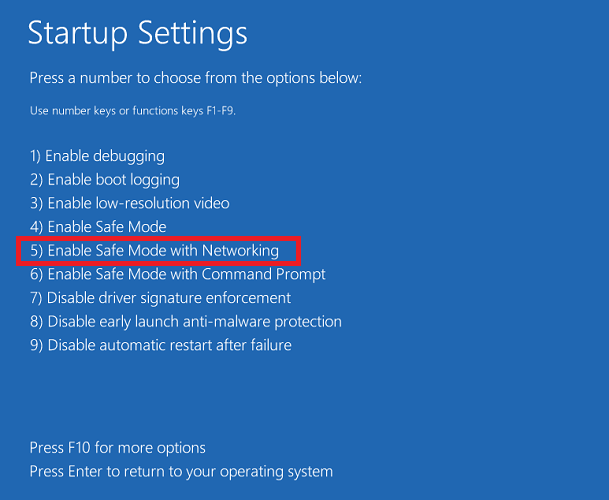
In addition, the video also highlights the benefits of virtualization-based security and enhanced sign-in security. Weston shows how the features, when turned off on Windows 11, can leave a device open for in-person physical hacking through direct memory access via Thunderbolt. He uses a device connected to the victim’s PC to spoof a fingerprint and then logs into that PC using just a gummy bear.

Essentially, with Windows 11’s virtualization-based security, the encryption keys, signature, and code, are all separated by hardware from the operating system, making the previous physical hack impossible. And, UEFI, Secure Boot, and Trusted Boot help prevent rootkits and boot kits that modify the early boot BIOS by checking the bootloader’s signature to make sure it’s not modified.

Microsoft Notepad could be getting a Windows 11-inspired makeover

After Microsoft’s classic Notepad app made its way to the Windows 10 Microsoft Store last year, the text editor could soon receive a Windows 11-inspired makeover. Last week, a Microsoft employee has apparently shared some pictures of the redesigned NotePad app before deleting them, but it wasn’t long before eagle-eyed users noticed the changes.

During the weekend, developer FireCubeStudios tweeted two screenshots of the app, with one image showing a revamped Settings section and the other image showing subtle changes to the app menu bar. The image showing the Settings section also includes a build number that’s higher than the production version of Notepad.

Notepad has been around for almost 30 years and included in all versions of Windows, and the text editor has received very few updates over the years. Now that Notepad is a Microsoft Store app, Microsoft can update it separately from OS updates, just like Paint and other inbox apps that ship with Windows 10 and Windows 11.

Despite its age and pretty basic UI, Notepad remains a popular app among Windows users who prefer its simplicity over the versatility of OneNote. The latter is also getting a Windows 11 redesign, and Microsoft is currently working on unifying its two separate OneNote apps for Windows into a single client in 2022.

Windows 11 New Features: 11 Best You Really Should Try

It’s official. Microsoft has released Windows 11 as their next operating system. After being tested for months by Insiders, you can now get it on your PC as well.

The new OS is available in a form of a free upgrade, so if you want to give it a try, go ahead and update. However, many users are still on the fence, and they aren’t sure whether they want to upgrade.

They don’t see it worth switching to, and they plan to keep using the old one instead. This is perfectly acceptable, and if you’re one of those users, you’ll be able to use Windows 10 until late 2025.

If on another hand you want to upgrade, in today’s guide we’re going to give you a list of the best features on Windows 11 that might persuade you to make the switch.

Is Windows 11 free?

Yes, just like previous major releases, Windows 11 is available as a free upgrade to all users. You can go ahead and get it like any other system update.

If you’re planning to upgrade, just be sure to back up your files beforehand, either manually or by using specialized backup software.

How do I get Windows 11 upgrade?

  1. Press Windows Key + I to open the Settings app.
  2. Now go to Update & Security section.
  3. Click on the Download and install button.
  4. Wait for the process to finish.

What are the best features of Windows 11?

New UI design

The biggest change is the new interface, and we have to admit that it looks similar to macOS or Chrome OS. We did an in-depth comparison between Windows 11 and macOS, so you might want to check it out.

Almost every single interface element has been changed, and now all windows and context menus have rounded corners.

This is a welcome addition, and it makes the interface look fresh and sleek. File Explorer went through a revamp as well, and it features only the most used actions in the toolbar, unlike we were used to in Windows 10.

The context menu went through an update, and with the addition of icons, you can distinguish easily between certain actions. It’s also a bit bigger than its predecessor, which some users might not like.

Windows Widgets

Widgets make a comeback with their specific panel and various options to configure them. You can swipe this menu from the right side of the screen, on tablets, or use the Taskbar icon.

This feature has replaced Windows Tiles and this is a step in the right direction since it will help you keep your Start Menu free from clutter.

New Start Menu and Taskbar

Another big change is the Taskbar, and in this version, it’s positioned at the center. Of course, you can move the Start Menu to the left, if you prefer.

Start Menu went through some changes as well, and Microsoft streamlined it by hiding all the installed apps behind the All apps button.

By doing so, you can only see pinned apps as well as recently opened files and programs. This is a welcome change, and you won’t even feel overwhelmed with apps when you open the Start Menu.

Snap Layouts and Snap Groups

Snap Layouts is a new multitasking feature that allows users with bigger displays to split them in various ways. Simply hover over the maximize button in any window and choose one of 6 available layouts.

Your layout will be memorized, and in case you minimize all open windows, you can restore all of them simply by hovering over the application icon in the Taskbar, and selecting a group that this app belonged to.

These are great multitasking features that will surely come in handy for users who tend to have multiple windows open at all times.

Microsoft Teams is now integrated

Built-in Microsoft Teams – a simple and efficient move for Microsoft, as Teams is now present in Windows 11 out of the box.

This great communication and collaboration platform comes integrated directly into the system. And yes, this means that Skype is no longer available by default. However, you can still enable it on Windows 11 if you want to use it.

Docking and multi-monitor support

This version of Windows comes with better multi-monitor support and now, when you disconnect a second display, Windows will memorize all apps that you had open on it.

Once the secondary screen is plugged back in, all programs that were on the external display will open again, allowing you to continue exactly where you left off.

This is an amazing quality of life improvement, and it will come in handy for all laptop owners running Windows 11 on their devices.

Built in Game and Xbox Pass

The best way to game is on a PC, but Microsoft hasn’t really been a big part of that. In a try to make the Store a gaming platform and properly compete with Steam, several enhancements have been added.

Xbox Game Pass games (Source: Xbox)

Xbox Game Pass will be built directly into Windows 11 via the Xbox app, and gamers will have access to 100+ games for a monthly fee. Games can be bought directly from the PC.

If you want to learn more, we suggest reading our Xbox Game Pass for Windows 11 article and see what this subscription can offer you.

DirectStorage for a faster loading

One Xbox feature that came to Windows 11 is DirectStorage, which allows games to be loaded faster from the NVMe drive.

The new OS allows users to load content directly from NVMe to GPU without using so much CPU, meaning less time spent waiting and faster loading time.

Microsoft Store

Just like most apps, Microsoft Store was revamped, and it features a more simplified user interface. All content is now sorted into four categories that you can easily access from the sidebar.

The biggest change isn’t the new look, it’s the support for different app types. As you remember, in the past, you could only download Universal apps from the Store.

Windows 11 changes that, and with it, you can download Win32. NET. UWP, Xamarin, Electron, React Native, and even Android apps.

This is a step in the right direction since you’ll now have a centralized hub for all your app downloading needs.

To learn more, make sure you read our article dedicated to Microsoft Store in Windows 11 for detailed information.

Auto HDR for an impressive gaming experience

Auto HDR is also brought to Windows 11 in a matter similar to the Xbox. Games played on PCs will now benefit from an HDR stream without any intervention from the game developer or activation from the player.

As stated by Microsoft’s officials, over a thousand games will be enhanced, so even the older titles will look more detailed and vibrant than before.

Android Apps

Android Apps are coming to Windows, and you’re going to run them thanks to the new Intel Bridge Technology without relying on emulation.

Android apps running on Windows 11 (Source: Microsoft)

You will be able to launch Android apps directly from Windows and get them from Microsoft Store, thanks to Amazon integration.

This sounds like a great feature, and it will be perfect if you don’t want to use Android emulators on your PC.

How can I download Windows 11 ISO?

  1. Visit the official Windows 11 download page.
  2. Select Windows 11 in Download Windows 11 Disk Image section and click Download.
  3. Choose the desired language and click on Confirm.
  4. Lastly, click on 64-bit Download.
  5. Wait for the download to finish.

Does Windows 11 require a TPM?

Yes, Windows 11 requires a TPM in order to install. In case you’re not familiar with this feature, we recommend reading our Windows 11 and TPM guide for more information.

Many processors have this feature built-in, and if your CPU is officially supported, you won’t have any problems installing the update.

If you’re planning to run the new OS on unsupported hardware, you should know that there’s a way to install Windows 11 without TPM 2.0.

These are just some of the most interesting features that Windows 11 has to offer. The biggest change is the user interface, and we have to admit that it looks sleek and better than the one on its predecessor.

Other options that we found interesting were the new gaming enhancements, and if you have hardware that can support them, you’ll experience a massive boost in performance.

What are your thoughts on Windows 11? Share them with us using the comments section below.

Windows news recap: unsupported PCs have a path to upgrade to Windows 11, AMD acknowledges performance issues, and more

Welcome back to our Windows news recap, where we go over the top stories of the past week in the world of Microsoft’s flagship operating system.

At the last minute, Microsoft provides a path to upgrading unsupported hardware to Windows 11

Whilst Windows 11 got a heated start with its strict hardware requirements, it appears that an upgrade path has surfaced at the last minute for PCs that are unsupported, allowing them to upgrade to Windows 11 regardless, albeit with a caveat that they might not receive security updates.

Microsoft is launching a new Feedback portal for Teams, Edge, and Windows

A new Feedback portal is set to launch in preview by the end of the year, offering a one-stop-shop for providing feedback on Microsoft 365 apps and services, as well as bringing support for leaving feedback on Windows in 2022.

AMD acknowledges Windows 11 performance issues for some PCs with Ryzen CPUs

Performance issues have arisen with some PCs that have Ryzen CPUs, when using Windows 11. AMD has acknowledged the issue. The impact can be up to 15% in some games.

Amd Ryzen Cpu

Microsoft’s Surface app updates for Windows 11, 10, and 8.1 devices with new improvements

The Surface app has been updated across Windows 11, 10, and 8.1, bringing 36 new languages, smart charging, and other minor changes.

Microsoft Surface app icon

That’s it for this week. We’ll be back next week with more Windows news.

The latest WinRAR Update addresses the Windows 11 Context Menu issue

It seems Microsoft’s users have a lot to get used to with the new features and those continually getting updated. The context menu is among the latest updates, and users are having problems maneuvering. 

Microsoft updated the context menu to align with Windows 11’s new look, and now it only shows essential options.

Grouped elements

Elements in the context menu have all been grouped, and users will see a ‘show more options’ entry making it tiresome to find some commands.

Well, it seems WinRAR noticed the issue and decided to fix it. If you have been having problems or just outright hated the new context menu, WinRAR is here to save the day. 

New WinRAR category 

WinRAR has a version 6.10 beta category which is the latest version. This version brings all the items on the context menu to the screen. Users, therefore, don’t have to go through a hard time going through archives as the ‘show more options’ is not required.

This is a huge step by WinRAR, and more developers are likely to follow suit and update their apps. Windows 11 is relatively new, so developers may still be cooking something to take advantage of the new context menu.

Since Microsoft will do a complete rollout of Windows 11 by the end of summer 2022, no one is in a hurry. WinRAR is making sure all PCs get the correct update of the OS.

Do you like the updated context menu for Windows 11? Let us know in the comment section below

5 Best Home Maintenance Software [2026 Guide]

Your home is probably your most significant investment like it is for most people. Keeping up with regular maintenance is essential for protecting that investment and home maintenance software is the ideal tool for this.

Home maintenance isn’t a simple task, since you need to keep a close eye on several aspects. In order to make this task a bit simpler, we want to show you a couple of tools that might help you out.

We picked five of the most useful home maintenance programs to make your choice less challenging, and we recommend that you check out their features before deciding on which one is the best for your needs. You can consider as well smart home software that can deliver practical help for your home features and necessities.

Home maintenance tools for personal use to get right now

Home Zada

The first entry on our list is Home Zada, and with this tool, you’ll be able to improve the value of your overall home, avoid early replacement costs, and keep your home both healthy and safe by staying in control of its maintenance at all times.

This tool comes with a property calendar that is automatically created for you, and that includes all essential tasks. In this way, you can stay updated with all your chores or little tasks that have to be done.

To be more clear, using such practical software you can manage your home smart by taking care of maintenance issues, inventory, home value or financial aspects, and many more.

Moreover, it’s possible to organize your home tasks efficiently, by adding email reminders or alerts so you will never forget again what needs to be done. Even if we talk about doing laundry or walking the dog, you have it under control.

Then again you will be able to track all your expenses, photos, and documents for minor repair projects. Hence, every tiny inside or outside problem can be scheduled and managed accordingly.

Here are some features that Home Zada offers:

  • A smart engine will automatically create individual To Dos that are based on your personal preferences.
  • You can personalize your maintenance schedule based on your preferences and home.
  • The curated “How to” information is offered by the program’s library of seasonal checklists.
  • You can integrate your property calendar with Gmail, Hotmail, and Outlook among other online tools.
  • You can share your home maintenance schedule in a Zada Listing when you sell your home.

With the help of Zada software, you will be able to save on utility costs and improve your home’s value.

Home Zada

Home Zada

Be on top of your home value and expenses as time goes by, using a greatly rounded software like this one.
Check priceVisit website

Home Management Wolf

This is another reliable home management application that is able to help you protect your home and possessions as well.

Home Management Wolf makes it easy to manage your home and properties. More, you can control multiple aspects of your home life, including maintenance issues, mortgage payments, repairs, assessed value, and so on.

Furthermore, with this software, you have an overview of all the resources invested and how much you invested over time. The Financial Analysis section helps you track all big payments and keep everything centralized.

In addition, you will be able to save any type of document of mortgage contracts, renters insurance, and more for having them as quick references.

Another great feature is Home inventory because it provides data about the home value, plus categorizes information of every purchase for your home that you possess.

Check out the most impressive features that are included in this program:

  • This tool is easy to learn and simple to use as well.
  • This software includes a home inventory and asset tracking tool for one or multiple residences.
  • The program is able to analyze finances to help you know where your money is going.
  • It also stores home warranty and insurance information as well.
  • This tool will allow you to create a to-do list for every home.
  • You will be able to save receipts and invoices for any item.
  • This tool comes with auto backup options and lifetime free upgrades.
  • You can import unlimited digital photos to log all your valuables and assets.

⇒ Get Home Management Wolf

HomeBinder

Another great home maintenance tool is HomeBinder. Using this tool you can manage your home maintenance needs, and it will also organize your valuable reports if you want to see your home.

This software is all about home maintenance and centralized data regarding all your home needs or aspirations. Using this platform you have all home knowledge centralized in sections to always have property-specific data.

HomeBinder allows you to store photos, material information, or project costs for easier repair and tax decreases at a potential sale.

Using this tool, you will be able to share the seller’s reports to market your home better during the sale process.

Here are some top features that this application has to offer:

  • You can store the contractor information so that you will never lose a plumber’s number.
  • You will be able to schedule reminders to stay on your regular maintenance.
  • You can keep your model numbers, warranty information and user manuals online if you need them.
  • You can schedule email reminders for regular home maintenance needs including air filters for instance.
  • HomeBinder will notify you of any company recalls for products in the house.
  • You can start an online home inventory to prepare for a fire or theft.
  • You can share a maintenance guide with your potential buyers.

⇒ Get HomeBinder

The Complete Home Journal

The Complete Home Journal is a simple but powerful application that allows you to quickly track, maintain and manage any improvements made to your home.

First, using this practical home management tool you’ll be able to monitor your improvements about all rooms of your house, including kitchen or bathroom remodeling.

Also, you can keep an inventory for every room of your home and document your assets to stay in the loop about every single section of your property.

In addition, this software allows users to track multiple homes and it is perfect for recording the details of a new construction project as well.

Check out the best features that are included in this software:

  • You will be able to track improvements made to your home.
  • You can keep a complete inventory of everything that is in your home either by room or by other categories.
  • You will be able to create detailed reports for your home journal and inventory information which can be an invaluable tool for home resale.
  • This software will turn out to be really helpful also for insurance purpose in case of loss.

The Complete Home Journal package comes with the Interior, Exterior, and Mechanical Home Journals and besides these, you will also get the Home Purchase Journal, To-Do Lists, and Contact Manager. Images taken from your digital camera can be stored for your home inventory and journal entries.

⇒ Get Complete Home Journal

MyLifeOrganized

If you’re looking for powerful task management tools for your home, this might be the perfect application for you.

MyLifeOrganized provides the right information in the perfect spot, and it is designed to send you smart reminders. This tool is more than just a home management software because it can also take care of your tasks that are outside of your home.

Moreover, you can organize your home using to-do lists that will turn out of great help, plus you will also be able to create subtasks to add last-minute ideas.

Check out the best features included in this program:

  • This tool is compatible with Windows.
  • You can create new tasks and To Do lists easily.
  • An elegant To Do list will help you focus on the essential items and also act accordingly on the spot.
  • MyLifeOrganized comes with a clean and straightforward interface that allows you to rearrange tasks within a plain list.
  • You can also organize the tasks into a tree.
  • You can create flexible hierarchical lists and add all kinds of dependencies between them.

For instance, when you are at the mall, MyLifeOrganized can send you a notification with a shopping list. After you get home, a reminder with a list of actions will wait for you there as well. MyLifeOrganized can also sync across all your devices, and you will always be on top of your tasks.

⇒ Get MyLifeOrganized

This is where our top choices for the best home maintenance software come to an end. These programs come with their own set of unique features, and most of them are targeted for maintaining and managing your home and assets.

They also provide features for inventories and for making To-Do lists to make your life easier. These tools are compatible with Windows. After you check out their complete features, decide which one is the best for you and your home’s needs.

How to Fix Valorant FPS Drops on Windows 11

Valorant is still a relatively new freemium first-person shooter game, which more players are now playing on Windows 11. A decent FPS (Frame Per Second) rate is important for the smoothest gameplay in Valorant, like all other shoot ‘em ups.

However, some players have posted on support forums about notable Valorant FPS drops arising when playing it in Windows 11. Valorant’s frame rate has been noticeably lower for those players after upgrading to Windows 11. One player said this in a Microsoft forum post:

Anyone else having FPS drops when upgraded to Windows 11? I know it is still on beta, but I used to have +200 FPS on Valorant. Now I’m getting 130, same as in Resident Evil 6. I used to have around 120 FPS, but now I’m having drops to 80 or less.

Has your own Valorant game had a similar FPS drop on Windows 11? If so, the potential resolutions below might restore your Valorant game’s frame rate to something like it was in Windows 10.

How come Valorant’s FPS drops in Windows 11?

Valorant isn’t the only game players have noticed notable FPS drops for in Windows 11. Some players have reported significant frame rate drops across all games they play on that platform. So, FPS drops for games isn’t an uncommon Windows 11 issue.

Remember that Windows 11 is a very new OS at the moment. So, it shouldn’t come as that big a surprise that there are few gaming performance issues on Windows 11. Microsoft might need a bit more time to address them.

As you can see from the image above, games can be playable at around 30 FPS, but this FPS value is not optimal when it comes to multiplayer games or competitive gaming.

Nevertheless, there are a few things that can have a notable impact on Valorant’s frame rate in Windows 11. These are some of the most causes for a Valorant’s FPS dropping in the latest platform:

  • Outdated graphics card drivers: Low frame rate issues can often arise because of antiquated GPU drivers.
  • Game DVR feature: The Game DVR feature in Windows 11 consumes system resources, which can lower the FPS rate for gaming.
  • Background programs: Lots of startup items draining system resources can cause Valorant’s FPS rate to drop.
  • In-game graphical settings: Higher in-game graphical settings lower average frame rates.
  • High mouse polling rate: A mouse polling rate of 1,000 Hz or higher reputedly causes frame rate drops for games in Windows 11.

How can I fix big Valorant FPS drops in Windows 11?

1. Check for Windows 11 updates

  1. Click the Start taskbar icon.
  2. Then select Settings on the Start menu that opens.
    Settings windows 11 valorant fps drops
  3. Click the Windows Update tab.
  4. Press the Check for updates button.
  5. Restart your PC if prompted to do so.

2. Turn on Game Mode in Windows 11

  1. Click Start from the taskbar.
  2. Choose Settings.
  3. Then select the Gaming tab in Settings.
  4. Click Game Mode on the Gaming tab.
    Gaming tab windows 11 valorant fps drops
  5. Turn on the Game Mode option to enable it.
    Game Mode option windows 11 valorant fps drops

3. Select a high performance power plan

  1. Right click the Windows logo from the taskbar, and select the Run shortcut on the menu.
    Run shortcut windows 11 valorant fps drops
  2. Next, input this text in the Open box and click OK: control powercfg.cpl
  3. Click Show additional plans on the Power Options Control Panel applet if the High performance setting isn’t visible. 
    High performance radio button windows 11 valorant fps drops
  4. Thereafter, select the High performance radio button.

4. Lower Valorant’s in-game graphical settings

  1. Launch Valorant, and open the game’s Video settings tab.
  2. Select the Graphics Quality tab shown directly below.
    Valorant's graphics options windows 11 valorant fps drops
  3. Make sure the Multithreaded Rendering option is enabled.
  4. Change the Anisotropic Filtering option to 1x.
  5. Select None for the Anti-Aliasing setting.
  6. Turn off the VSync setting.
  7. Reduce the material, texture, detail, and UI graphical quality settings to low (or at least medium if they’re on high).
  8. Also, turn off the options for clarity, bloom, shadows, and distortions.

5. Update your graphics card’s driver

  1. Press the magnifying glass button on the taskbar.
    Search button windows 11 valorant fps drops
  2. Enter Device Manager in the search tool’s text box, and open it.
  3. Double-click the Display adapters category and Right-click your PC’s graphics card, then select Update driver.
    Update driver option windows 11 valorant fps drops
  4. Thereafter, click the Search automatically for drivers option within the Update Drivers window that opens.
    Search automatically for drivers option windows 11 valorant fps drops

If the Update Drivers utility doesn’t update your graphics card’s driver, there might still be a newer one available.

Scanning your PC with a driver updater utility will list devices on it that have outdated drivers. Then you can update your GPU’s driver with the driver updater software like Outbyte Driver Updater.

6. Clean-boot Windows 11

  1. Press the Windows + R hotkey and type msconfig
  2. Click Selective startup on the General tab and uncheck the checkbox for the Load startup items option.
    The Load startup items option windows 11 valorant fps drops
  3. Click the Services tab and select the Hide all Microsoft services checkbox.
    The Hide all Microsoft services option windows 11 valorant fps drops
  4. Click Disable all to deselect all the checkboxes for third-party software services, and press OK.
  5. Select the Restart option on the dialog box.

7. Disable the Game DVR feature

  1. Click the Search button on the taskbar, type regedit and choose Run as administrator.
  2. Then open this key in the Registry Editor: Computer\HKEY_CURRENT_USER\System\GameConfigStore
    The GameConfigStore key windows 11 valorant fps drops
  3. Double-click the GameDVR_Enabled DWORD to open the Edit DWORD window.
    Edit DWORD Value window windows 11 valorant fps drops
  4. Input 0 within the Value data box.
  5. Double-click GameDVR_FSEBehaviourMode in the same registry key to bring up its Edit DWORD window.
  6. Type the value 0 within the text box, and click the OK button.
  7. Next, go to this registry key location: Computer\HKEY_LOCAL_MACHINE\SOFTWARE\Microsoft\PolicyManager\default\ApplicationManagement\AllowGameDVR  
    The AllowGameDVR key windows 11 valorant fps drops
  8. Double-click the value DWORD in the AllowGameDVR key.
  9. Delete the current value from the data text box, and then enter 0 to replace it.
  10. Click OK when done.
  11. Close the Registry Editor, and click the Restart button on the Start menu.
  12. Click OK to close the Edit DWORD window.

8. Lower your mouse’s pooling rate

The polling rate is a speed specification for how often a mouse’s cursor gets updated. Reducing the polling rate for gaming mice can reputedly help resolve FPS drops for Valaront and other Windows 11 games.

If you’re utilizing a gaming mouse, you might be able to change its polling rate with its dedicated settings software. So, open the settings app for your mouse if it has one. Then look for and reduce a Pooling Rate or Report Rate option to about 500Hz.

Polling Rate optio windows 11 valorant fps drops

Some gaming mice also include dedicated pooling rate buttons or switches. If your mouse has such a button, you can reduce its pooling rate to 500Hz with that.

Who can I contact about fixing Valorant’s FPS drops in Windows 11?

Valorant has a support service for helping players fix technical issues with the game. You can get in touch with that support service via Submit a Request page on Valorant’s website. You’ll need to be signed in to the Valorant site to submit a support request there.

The suggested resolutions above could feasibly give Valorant’s FPS rate a notable boost in Windows 11. With its frame rate fixed, Valorant’s gameplay will be somewhat smoother than it previously was.

Not all those potential resolutions are necessarily exclusively for Valorant either. Some of those resolutions might also fix FPS drops for other Windows 11 games as well.

Aside from those resolutions, there might be other ways you can fix Valorant FPS drops in Windows 11. Some of the tips in our How to fix high FPS drops guide might also come in handy for boosting Valorant’s FPS rate.

Microsoft is launching a new Feedback portal for Teams, Edge, and Windows

Microsoft is planning to launch a new Feedback portal for its Microsoft 365 apps and services. The Feedback portal will be available in preview by the end of this year, with support for more products, including Windows, coming sometime in 2022 (via ZDNet).

The Redmond giant has provided some insight about the upcoming Feedback portal on the Microsoft 365 Admin Center, as spotted by Twitter user Carl Knecht, earlier this week. Microsoft says this portal will be built on top of its  Dynamics 365 Customer Service, and it will let users submit new feedback on products, comment on, and upvote feedback provided by other people.

Additionally, users will also be able to view status updates and responses to previous feedback in the My Feedback section. However, it will be up to the users to access the new Feedback portal or provide feedback with the dedicated option available within Teams, Edge, and other Microsoft 365 apps.

In March, Microsoft quietly shut down its various Office 365 UserVoice forums, which allowed users to suggest ideas, comment, and vote for them. This move was apparently a part of its effort to transition the feedback mechanism to in-house tools. The new Feedback portal will probably replace these UserVoice forums, and it will help users share feedback about the productivity apps with the company.

As of this writing, Microsoft has not provided a precise ETA on when this new Feedback portal will begin rolling out in preview, but we’ll let you know as soon as we get more information. The portal will only be available worldwide in English at first, and support for additional languages will be coming shortly after.

Best Android Apps for Windows 11 [Top 10 Ranked]

The Windows 11 announcement and reveal stream unfolded many mysteries regarding this operating system.

Lots of new things have been implemented, the user interface has been overhauled, and the focus of the OS was shifted to delivering the best gaming experience.

Another huge thing that caught people’s attention is the integration of Android apps into the OS. This means that users will be able to use those apps on their PCs.

This is a great step towards homogenizing the platforms and creating apps that work on different devices, no matter what hardware they use, without the need to code them differently.

For now, users will be able to install apps through the Amazon Store, but they will also be able to sideload any other Android apps they wish.

What are the best Android apps for Windows 11?

Duolingo

Duolingo is a popular language-learning tool on the market right now. It combines funny games and interactions with learning one of the many languages available inside the app.

The developers thought about creating an app that introduces people to new languages of their choice in an interactive way.

Game-like lessons and fun characters will help you slowly gain knowledge, master new words, and develop solid speaking, listening, and writing skills.

Behind the app, there is proven scientific research of the best teaching methodology that will foster long-term language retention.

Whether you’re learning a new language for travel, school, a career, or simply out of plain interest, Duolingo is the best way to go about it. And it’s also completely free!

The learning curve consists of quick bite-sized lessons and modules that don’t have long to complete and seem like a breeze. You won’t even notice how many you’ve completed.

Here’s a list of Duolingo’s best features:

  • Progress tracking and achievements
  • Over 35 available languages
  • Scientifically proven learning method
  • Every language course is completely free
  • Over 300 million satisfied learners worldwide
Duolingo

Duolingo

That’s your chance to expand your knowledge and learn a new language thanks to Duolingo!

Minecraft

Minecraft is one of the world’s most popular games at the moment! This sandbox survival and adventure game lets you explore a randomly generated world filled with wonders.

The app is perfect for people of all ages, being simple and straightforward at its core, and at the same time pretty complex if you try to tackle its world-building.

What can you do in Minecraft? The correct answer would be, what can you not do? The possibilities are endless since you can build anything anywhere and use lots of different materials to do so.

The overall look of the game is quite goofy since the whole world is practically made out of blocks, however, this gives it a heartwarming feeling.

When playing Minecraft, you are the arbiter of your actions, and you are free to create your own story. Explore the seas, mine in the dangerous caves, or climb snowy mountains!

Be a farmer, and build a small shack, tame animals and keep them in pens, or try to arm yourself with the most powerful armor and weapons and try to defeat the Ender Dragon.

Let’s take a look at its awesome features:

  • Procedurally generated world
  • Multiplayer and singleplayer experience
  • Endless possibilities
  • Constantly updated
  • In-game marketplace for awesome adventure maps
Minecraft

Minecraft

A blocky adventure game made for everyone. Explore its mysteries alone or with your friends!
Check priceVisit website

Spotify

Spotify is widely known for being one of the best podcast & music apps. You can install it on any device and listen to your favorite songs everywhere.

Create playlists, like songs to listen to them later, customize everything from the profile name to the name of your playlists, and more.

Spotify lets you creatively express yourself through the music you listen to. You can also tell the app what kind of artists and music you love listening to.

Then, the software will automatically suggest songs that might interest you. This way, you will never run out of music, and you’ll expand your library with new cool ones.

The software is free, but it runs ads. If you want an ad-free experience, there are a couple of affordable monthly subscriptions to upgrade to.

That’s not all! You can have multiple people listening to music on the same account as long as they are using the same network!

Here’s a list of the app’s best features:

  • Playlist customization
  • Discover weekly
  • Affordable subscriptions
  • Remote control
  • Ever-expanding song library
Spotify

Spotify

Listen to your favorite artists, and watch interesting podcasts with Spotify right away!

Today

Today is an app that will keep you up with the latest breaking news from BBC-ONE. Never miss any big thing that is happening in the world.

Catch up with all the new trends, viral videos, important news, political statements, and more with The Digest section.

Enjoyed by thousands of people worldwide, it will provide you with highlighted stories that are popular among readers so you can also check them out.

Today has news and article from a wide variety of topics, from sports, actors, films, shows, to the royal family or the upcoming weather.

Watch your favorite news channel from anywhere around the world on a multitude of devices!

Here are some of the app’s best perks:

  • Constantly updated
  • Brings news from BBC-One
  • Compatible with multiple devices
  • Highlights feature
  • The Digest section
Today

Today

Do not hesitate to keep up with the latest news from one of the world’s most famous channel!

Google Translate

I’m sure most of you know about Google Translate. It also comes in the form of an app, and it’s quite popular since it’s really good.

Translate words, sentences, and even entire paragraphs of text in any language easily, just by copying and pasting it in the tool.

The format of the text doesn’t really matter, since any size will work just fine. The accuracy of the translations is pretty good, and Google is constantly working to improve it.

If you ever need to translate something really quick, let’s say, when you’re at a pub, during a vacation, an app such as Google Translate can be a life-saver.

What’s even better is that it’s completely free! You don’t need to pay a dime. Simply install it and you’re good to go. Google Translate also has a really simple interface so anyone can utilize it.

Let’s have a look at its main features:

  • Hundreds of languages to choose from
  • Automatic language detection
  • Correct grammar implementation for all supported languages
  • Synonyms and idioms included
  • Completely free
Google Translate

Google Translate

Go beyond language barriers and communicate with people from all over the world thanks to Google Translate!

Sonic The Hedgehog 2

Who doesn’t know the overenergetic hedgehog and its less famous companion, Tail, the fox?

We all grew up with this classic Sega arcade game so it’s easy to embrace any of this hero adventure with a huge smile on our faces.

You will get to race with the two friends in exciting environments like the Chemical Plant or Casino Night and enjoy epic boss battles such as the one with the fierce Dr. Eggman.

Of course, get your hands on the high score challenge from the half pipe Special Stage. Hey, you can even play with Knuckles, another trusted friend character.

There’s also a new Boss Attack mode that challenges you to destroy all the bosses in one run which will be pretty hard to do.

For the first time ever, you will be able to explore the Hidden Palace Zone to discover new enemies and hazards to pass.

Let’s look at this game’s best features:

  • Get a glimse of the mysterious Hidden Palace
  • New enemies and missions
  • Boss Attack mode was added
  • Epic boss battles
  • Enhanced graphics and remastered soundtrack
Sonic The Hedgehog 2

Sonic The Hedgehog 2

Get on board with another exciting adventure of Sonic and his friends in an extraordinary environment!
Check priceVisit website

Bloons TD 6

If you’re a fan of the tower defence genre, you will be thrilled about Bloons TD 6 game, especially because now you can even play in the new 4 player co-op mode.

Moreover, now you can create your own Chllenges and Odysseys and challenge your friends and the community.

For those who are not familiar with the game, Odysseys are missions that contain 3 to 5 maps that are connected by their themes, rules, and rewards.

There are also a lot of bosses that will put the very best defences to the test. Earn Trophies and go to the Trophy Store to exchange them for customization items for your monkeys, Bloons, and more.

Get ready for 22 powerful Monkey Towers with their own upgrade paths and activated abilities so choose well to climb the ladder to the top of the players ranking.

You will be able to choose from 13 different Heroes, each with 20 signature upgrades and 2 special abilities! Game on!

Let’s review some of this game’s most awesome features:

  • Single player offline mode so you can enjoy the game anywhere
  • 56 unique maps with great graphics
  • Over 100 meta-upgrades to add power when you need it the most
  • Plenty of Heroes and Monkey Towers to choose from
  • Engaging and exciting gameplay
Bloons TD 6

Bloons TD 6

If you’re a tower defence gamer, Bloons TD 6 brings that excitement you were looking for in such a game.
Check priceVisit website

iHeartRadio

Are you tired of the same local radio stations that play the same music on and on? iHeartRadio can be the way out to get new and exciting content.

It’s a free app that brings you access to thousands of radios from across the country but that’s not all.

You can create your own custom station by selecting your favorite songs and artists, then the app creates a playlist from a huge library of over 18 million songs and 400,000 artists.

The Live stations, as well as the custom ones, cover all the genres you might think of including Country, Pop, Rock but also talk shows, news, sports, and even comedy.

iHeartRadio is also the best way to get rid of commercials on your own custom-made selection. Now you only need a road and a destination!

Do you want to stay home and do your workout? You can find music for that too and save the playlist for another day.

Take a look at this app’s most impressive features:

  • Ad free music and shows through the entire day
  • Available on most platforms
  • Create your own station and playlist
  • Personalized recommendations based on your taste
  • 18 million songs and 400,000 artists to choose from
iHeartRadio 

iHeartRadio 

Get the mest music and radio stations from all over the country customized to your taste.

Free Movies Plus

There’s nothing more pleasant to unwind after a day’s work than to watch a nice movie with your friends or family.

The on-demand market is already saturated but there are still ways to get some good movies for free, without ads and other distractions.

Free Movies Plus is a great app that promises amazing movies if you create yourself an account on their website.

Of course, there are mostly old movies but the genres cover all possible tastes, from westerns and musicals to comedies and action.

So, there’s everything for everyone, and the fact that they’re free, it’s worth at least taking a look at this app.

The content is ordered on categories and genres so it’s easy to browse your favorites and the app is very simple and friendly so it won’t give you any trouble.

We have to mention that it comes with a system that prevents the processor from sleeping or the screen from dimming so you can enjoy the movies without interruptions.

Let’s have a look at its main features:

  • Cross-platform compatibility
  • Lots of free movies to choose from
  • Friendly interface and easy browsing
  • Simple categories based on genres
  • No ads and interruptions
Free Movies Plus

Free Movies Plus

Remember the movies from the old times with a free app and content for the perfect entertainment evening.

Tik Tok

We’ve reached a point where probably everyone knows about Tik Tok and even though Facebook still has more users, this app is on most youngsters’ phones.

It’s hard to say anything about a platform that we all know about but it’s clearly the top content creation platform nowadays.

To give it a short description, Tik Tok is a version of YouTube. The content is more concise and compact, and it’s a lot easier to switch from a funny cat to a funny dance and then to some blooper.

Of course, the content gets customized to your liking in time. So if you only gave likes to certain videos, their genre will appear more often than others.

And if you have anything interesting to say or do, Tik Tok is the perfect place to create your own recording in seconds to be viewed by your friends or anyone.

There are a lot of effects, filters, and AR objects that you can choose from to personalize your clips for any purpose.

Let’s see what are Tik Tok’s main features:

  • Create your own story and videos in just a few seconds
  • Simple and friendly interface
  • Share your thoughts or your talents with everyone out there
  • Lots of editing tools available
  • Miriads of effects and filters to create exclusive content
Tik Tok

Tik Tok

Join the best content creation community and show your talent to everyone!
Note icon NOTE
We brought you a rich list of Android apps from the Amazon Store but the list of Windows 11 approved apps will be published by Microsoft later this year.

Do Android apps affect Windows 11 PCs?

The central focus of this new addition is to create a future where apps will work and function the same regardless of the device. Microsoft is trying to get rid of platform-specific apps.

Additionally, the company has stated that it wants to make Windows 11 feel the same on all devices that support it. This means that the OS will function identically on a Windows tablet or a laptop.

Lastly, opening the Windows market to Android apps offers a great selection of tools dedicated to productivity, content creation, and utility.

If you’re curious about what will happen to the popular emulators, check out this article dedicated to the fate of Android emulators after Windows 11.

Will we only be able to use apps from the Amazon Store?

When Windows 11 was officially announced, Microsoft stated that they have improved the Amazon Store and made it more responsive and fluent on the new OS.

Speaking about stores, did you know that the MS Store will also receive an overhaul on the new Windows? Here’s a great article about the latest Microsoft Store changes.

This statement made users believe that the only way to download Android apps on Windows 11 would be through the Amazon Store.

However, that is not the case. Later, a Microsoft employee said that you will be able to sideload any other Android apps on the new operating system.

This is some great news since we’re not limited to the Amazon Store! We can download the Google Play Store, or simply upload APKs in our PCs, and they will work as intended.

We have to thank Intel for this feature

This awesome feature was made possible thanks to Intel’s Bridge Technology, a runtime post-compiler that lets software run on x86-based devices natively.

Instead of forcing Android developers to convert their apps to Windows versions, Microsoft and Intel brought the technology to Windows.

Don’t worry if you’re owning an AMD CPU! You will be able to run Android apps just fine. The project is not limited only to Intel CPUs.

Still not convinced to upgrade to the new operating system? Here’s a thorough comparison between Windows 10 & Windows 11. Check it out and see for yourself!

We hope that you’ll find our selection of Android apps useful. If you have any suggestions regarding this subject, feel free to tell us in the comments section below.