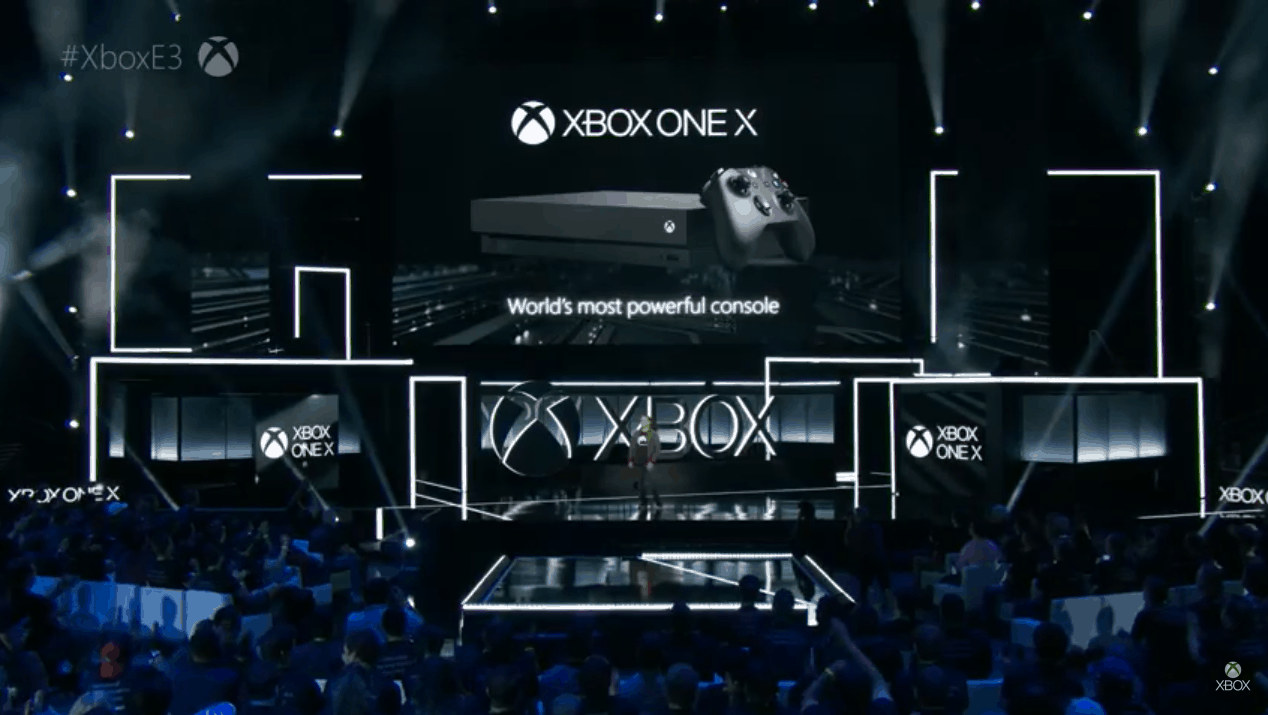
E3 2017: Everything we liked and didn’t like from Microsoft’s Xbox One X reveal

With it now being more than a week since Microsoft’s 2017 E3 presentation, I decided to ask On MSFT’s Kit McDonal and Laurent Giret what excited them the most and where they felt the company could have improved.

Kit McDonald: For me, I’ve been mostly excited about Minecraft cross-play. Ever since Microsoft bought Mojang, it’s been clear that they’ve wanted to push Minecraft further. They’ve been teasing for a while now that they were hoping to merge Minecraft into one ecosystem for players to enjoy the game together, but when asked, they were always tight-lipped.

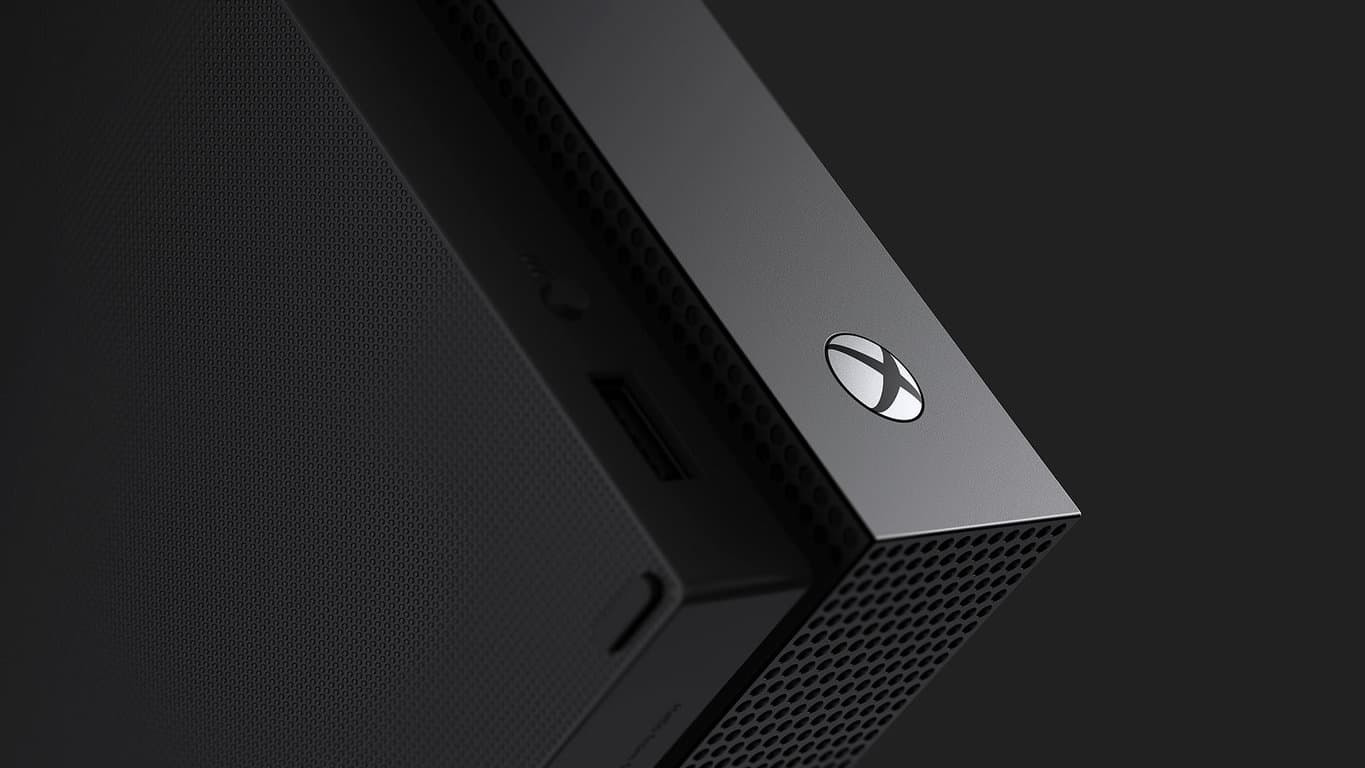
Laurent Giret: I was really pleased with the final Project Scorpio reveal: I think the Xbox One X branding is good, the design of the console is impressive, and it’s consistent with the Xbox One S. As for the $499 pricing, it’s quite expensive for a gaming console, but it’s actually very affordable for a 4K gaming machine (much more than a high-end gaming PC). Besides, the Xbox One S is still available to purchase and will support all upcoming Xbox One games, so gamers on a budget will still have options.

Brad Stephenson: I thought the Xbox One X console reveal was pretty solid as well and while its price is notably more expensive than its rival consoles, there’s no denying the value for money in regards to its tech plus there’s also the fact that $499 is exactly what the original Xbox One console sold for in 2013 (albeit with the Kinect). Not a bad deal really. It was a shame that the next Tomb Raider game wasn’t on display in 4K as a title like that could really help sell consumers on the Xbox One X. Honestly though, the console is a must-buy for me. It’s just a matter of when (likely before the end of the year).

Kit: The presentation seemed to go a lot smoother than what I was expecting. Moments such as the new Porche being revealed and the sportscast of the Darwin Project made the show an enjoyable watch. I can’t wait to play some of the new titles across both Xbox One and Windows 10 this year.

Laurent: The Original Xbox Backward compatibility was another big announcement I enjoyed. This probably won’t matter much to most Xbox gamers, but it makes the Xbox One more PC-like, and overall it’s a good incentive to invest in the Xbox ecosystem.

Brad: While some of the bigger titles like Anthem and Assassin’s Creed: Origins looked great, it was the smaller entries that piqued my interest. Super Lucky’s Tale admittedly borrows way too much from the Super Mario and 3D Sonic games to be called a completely original title but it is exciting to see a family-friendly game such as this on the Xbox One (and Windows 10) and given so much exposure during Microsoft’s E3 presentation. Another game that stood out for me was The Last Night which immediately became my favorite new game of E3. I’m generally over the use of 8-bit sprites in modern games but The Last Night makes the retro style look fresh and the entire game has a glorious aesthetic that’s somehow modern and old-school at the same time. I can’t wait to play this title. Was there anything you guys didn’t like?

Laurent: The Xbox One has suffered from two perception issues: Being slightly underpowered compared to the PS4 and Sony having better first-party exclusive games. Microsoft fixed the first issue with the Xbox One X this week but the second one still remains. Yes, Forza Motorsports 7 was a great demo for the Xbox One X but it’s is clearly not for everyone, unlike the more arcade and casual Forza Horizon 3, and unfortunately Sea of Thieves and Crackdown 3 are probably not the blockbuster exclusive games that the Xbox One X needed to make a big splash this holiday season.

Kit: I’m pretty easy to please actually. There wasn’t really anything I disliked from Microsoft at E3 this year. My biggest rant is about Bethesda but that’s a whole other topic.

Laurent: Microsoft probably had the more-impressive E3 press briefing this year but I think it lacked the ‘one more thing’ to please the more hardcore fans. This could have been Xbox Play Anywhere support for Gears of War: Ultimate Edition, or the release of Halo 5: Guardians on Windows 10 (Microsoft teased us with Halo 5 Forge on the Windows Store last year). These two franchises are very popular and their absence was really disappointing.

Brad: As an Xbox One owner who uses his Kinect every day, I was disappointed to see a complete lack of the console accessory during the presentation. With Cortana now available on the console, Microsoft has the capability to turn the Xbox One into some sort of Alexa or Google Home competitor and I’m fairly confident we’ll see some degree of this happen in 2017 or 2018. I’m not necessarily surprised the Kinect wasn’t mentioned given the need to promote the Xbox One X but some sort of small mention would have been nice. A new Dance Central game or a replacement for Xbox Fitness would have been amazing and would have gone a long way in reassuring all of the Kinect users who are beginning to feel abandoned. Maybe we’ll hear more about Kinect at Gamescom?

What did you like or dislike about Microsoft at E3 this year. Did they make you want to buy and Xbox One X or any of the new 4K-enabled games? Was there anything that was missing? Let us know in the comments below.

Details of Microsoft’s massive new sales reorg emerge

The sirens have been blaring and the warning lights spinning for a little over a week after information leaked about Microsoft’s plans to have a massive sales force layoff in the hopes of reshaping the company’s future, once again.

As D-day approaches for a lot of unfortunate employees at Microsoft, specific details surrounding the particulars of the company’s reorg are emerging.

According to a report from Mary Jo Foley from All About Microsoft, executive vice president Judston Althoff circulated a memo today which explained the company’s restructuring plans during and after the presupposed layoffs.

Microsoft will now have three units focused on seizing commercial and public fields sales. The three units titled Enterprise Operating Unit, Enterprise Services and Commercial Software Engineering teams and Commercial Software Engineering will all work closely with counterparts Marketing and Operations and the technical core group to offer sales and support for all business types.

More than just a name change and new targets, Microsoft is looking to put more focus on vertical targets that have seemingly be grossly under supported by the company.

The idea behind the entire move is to make Microsoft nimble enough to go after what Althoff believes are six important verticals including Manufacturing, Financial Services, Retail, Health, Education, and Government. While the listed vertices are already among the targets Microsoft is currently pursuing, the new team’s focus will be on addressing the horizontals such as how to accommodate a Modern Workplace, business applications, apps, and infrastructure as well as Data and AI.

In the SMC segment, Microsoft is focusing on both corporate accounts and small and mid-size businesses (SMBs). The SMC team will be divided into a handful of teams, namely Global Demand Center, which is designed to deliver direct revenue, sales leads and”consumption at scale”; Inside Sales; Marketing & Operations; Field Sales for SMC customers; and One Commercial Partner.

We’re not sure how this will play out when Microsoft begins to report its number for the following quarters. However, it not a far leap to assume this reorg will eventually better help Microsoft address its Small to Medium sized business experience which could, in turn,  give the company a leg to stand on in that area against the likes of Amazon and Google in the ongoing productivity and cloud war with the addition of One Commercial Partner.

As Mary Jo is reporting, an all hands on meeting was held today to presumably address the concerns of those affected by the reorganization. With that being said, we’re sure to hear more about Microsoft’s shuffling of departments and employees in the coming days.

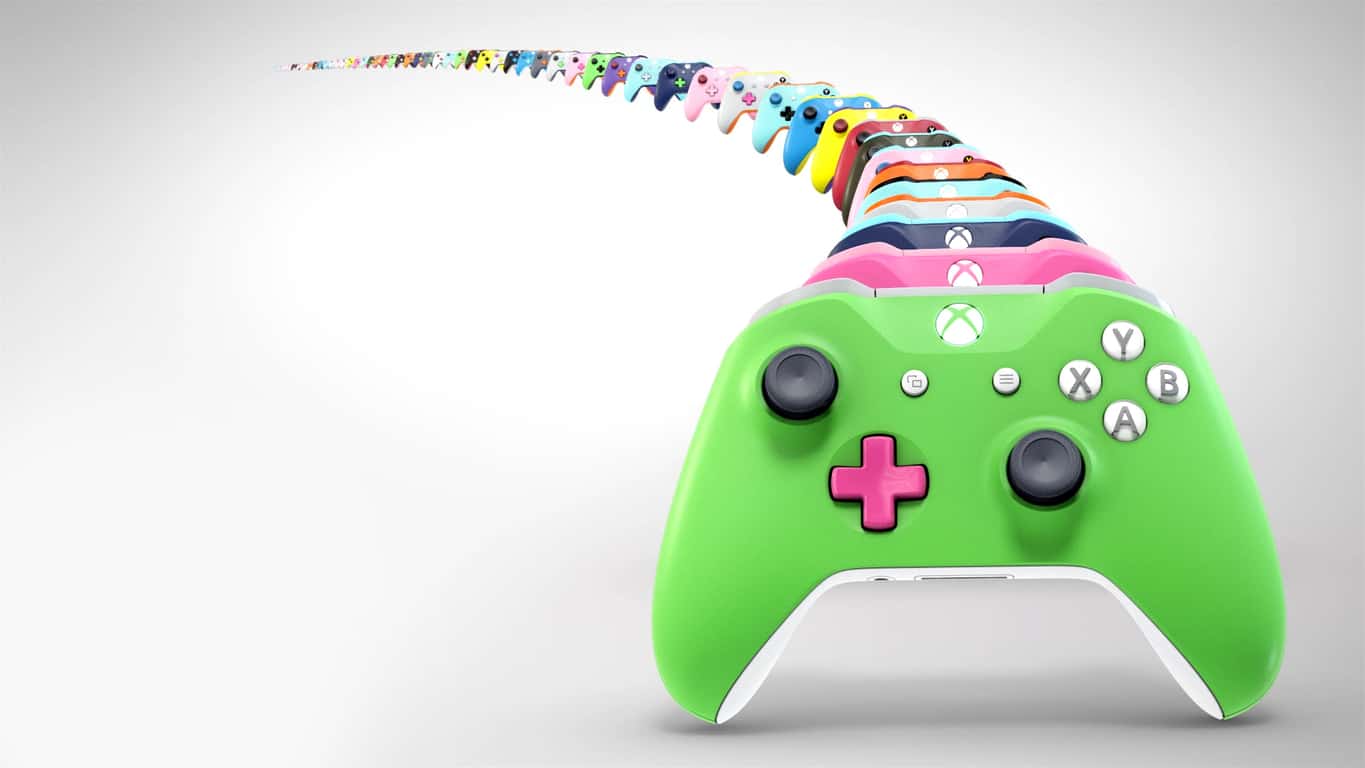
From now until July 10 you can get free rubberized grips when buying Xbox Design Lab controllers

Microsoft is giving Xbox gamers a bigger reason to customize their controllers using the Xbox Design Lab.  As noted by Neowin, from now until July 10th, you can get free rubberized grips when buying a custom controller from the Xbox Design Lab.

Normally priced at $5.99, for the next week, the rubberized grips will be included for free on any order from the Xbox Design Lab.  Interestingly, the offer is also valid in the United Kingdom France, and Germany.

rubberized grips
A look at the rubberized grips

Safe to say that with the rubberized grips, you won’t be slipping up during those intense gaming sessions.  You can head to the Xbox Design Lab website now to customize your controller and choose from over a billion color combinations, metallic finishes.  For extra customization, you also can customize the colors of the back, bumpers, triggers,  D-Pad, thumbsticks, ABXY, view and menu button.  And, you can even engrave the controller with a personalized message of up to 16 characters.

As a reminder,  the Xbox Design Lab recently expanded to the UK, Germany, and France. But, you should also be aware that you can’t return or exchange a Xbox Design Lab controller order, so be sure to preview it before you make your final purchasing decision.

Do you think you will be picking up a custom Xbox controller because of this latest offer? Or do you settle for the standard controller instead? Let us know your thoughts in the comments below.

Sony uses Xbox One X E3 Anthem footage on Playstation YouTube gameplay video

It’s no surprise that Xbox One X stole the show at E3 2017 a couple of weeks ago. After all, it was the only hardware being shown off and it had a slew of beautiful new titles that Microsoft plans to release with it later this year. One such was Anthem, the new open world third-person RPG title from Bioware. Even though its release date is still up in the air, the buzz around Anthem has already pushed Sony to take advantage of the hype.

What was an Xbox One X exclusive developer preview created for E3 2017 has now been edited by the competing publisher. Last week, Sony posted the ‘Anthem – Official Teaser Trailer’ for PlayStation 4 on their official YouTube (via Neowin).

But what fans found most curious about the repeated video is the evidence of editing. As spotted by Eurogamer, fans pointed out that the Xbox One controller buttons were actually edited over by the PlayStation buttons.

Image Credit: Eurogamer

Xbox One X is reported to use the same checkerboarding techniques as Sony to run some of its games at 4K resolution. At least it was for the Anthem gameplay footage shown at E3. For Sony, that seems to be all it needs to know to pass edited Xbox One X gameplay as its own. We’d love to hear what you think!


Microsoft now selling its Modern Keyboard with Fingerprint ID in the US, Canada and China

Earlier this year, Microsoft released a $99 Surface Keyboard to go with its new Surface Studio all-in-one PC, but the company is now selling an even better version without the Surface branding (via Windows Central) . Welcome Microsoft’s Modern Keyboard with Fingerprint ID, which is basically the Surface Keyboard with a handy fingerprint sensor to use with Windows Hello.

The sensor is hidden in a normal key, and it can sign you in instantly with a simple press (be aware that Windows Hello is only supported on Windows 10 PCs). The new keyboard works with Bluetooth or a wired connection, and the Redmond giant promises up to 4 months of battery life with the included rechargeable batteries.

Microsoft is only selling its new keyboard in the US, Canada and China for now, and the company has yet to announce its availability in other markets. If you’re interested, you can get it for $129.99 on the US Microsoft Store.

Here are the best education apps for PC

The Windows Store offers many interesting education apps that you can use for learning purposes. However, there are around 1000 educational apps in the Store, so how do you know which apps are the best? This article aims at answering this question.

We are going to divide these apps into two categories: education apps for adults and education apps for kids.

The best education apps for adults

Reading Trainer

This amazing app can help you improve your reading speed. If you don’t have the time to enroll in formal speed reading classes, then Reading Trainer is the perfect app for you.

The app features many useful eye-exercises to increase your vision span, as well as tips and trick to improve your ability to concentrate. Try it out and you’ll see that you will double your reading speed in just a few days.

The statistics function lets you see and track your progress. The results of each training exercise are charted for your review. If you’re a student, or you work as an executive, secretary, or sales professional, this app is definitely going to help you.

You can download Reading Trainer for $3.99 from the Windows Store.


TED

TED brings some of the world’s most fascinating people who revolutionized the fields they activate in and challenges them to prevent their achievements and vision in 16 minutes.

You can filter task using various criteria, such as newest releases, most popular talks, trending now, etc. At the same time, TED also offers a series of playlists, focusing on particular domains or ideas.

Interested to see how education radicals, tech geniuses, medical mavericks, business gurus, and music legends think? Then download the TED app for free from the Windows Store.


Khan Academy

Khan Academy is an app that offers you the chance to learn almost anything for free. The app covers a massive number of topics, such as biology, chemistry, physics, economics and finance, history, and more.

You can use this app to learn about the fundamentals of computer science or learn about how you can better manage your personal finances. Time spent using this tool is time invested in your personal education and growth.

You can download Khan Academy for free from the Windows Store.


Duolingo

Do you want to learn a foreign language, but you somehow never found the time and resources to get started? If the answer is yes, try Duolingo.

This app helps you learn Spanish, French, German, Portuguese, Italian, Irish, Dutch, Danish, and English in an interactive manner.

Duolingo is free, bringing college-quality education without the price tag. The UI is fun, you’ll lose hearts for incorrect answers and you can track your progress with shiny achievements.

You can download Duolingo for free from the Windows Store.


Memorize it!

If you need to learn something by heart, this app can help you. It will make the process easy through visual clues, anagrams and other memory techniques. The more you practice, the better you get.

The app’s UI is very simple and intuitive. Use the text field to enter the information that you need to memorize. Then select the best method to help you memorize the information.

The app is designed for various types of learning strategies. If you’re a visual learner, you can create gaps in the words; if you’re an auditory learner, you can use the audio playback feature and read along as the app reads the text aloud.

You can download Memorize it! for free from the Windows Store.


Critical Thinking Insight

This app features a series of reasoning skills tests and mindset evaluation tools that are used by HR specialists. The tests are divided into several categories:

  • My Learning Mind – Ages 11-17
  • My Thinking Mindset
  • My Thinking Skills
  • Quant Challenge
  • My Leadership Potential

After the app delivers your results, you also receive specific coaching suggestions to help you improve your skills.

You can download Critical Thinking Insight for free from the Store.


The best education apps for kids

Kindergarten Kids Learning

This app features a series of learning games and puzzles for kindergarten and preschool children. Parents and educators can use this app to teach children the alphabet, rhymes, counting, tracing, colors, shapes, the name of various vegetable, fruit and sports charts in an interactive manner.

You can download Kindergarten Kids Learning for free from the Windows Store.

  • Related: 6 of the best antivirus software with parental control

The Endless apps

If you want to teach your kids how to read or count, you can use the Endless Alphabet, Endless Reader and Endless Numbers apps.

Endless Alphabet helps kids learn their ABC’s and build their vocabulary with an adorable bunch of monsters. Each word features an interactive puzzle with talking letters and a short animation illustrating the definition.

Endless Reader introduces “sight words”. Kids need to recognize these words by sight in order to achieve reading fluency. This is an excellent learning method as many words have unusual spelling, beginners cannot yet use phonics knowledge.

Endless Numbers challenges kids to recognize numbers, sequences, quantity, numerical patterns, and do simple additions. The adorable Endless monsters will guide kids along the way.

You can download Endless Alphabet, Endless Reader and Endless Numbers from the Windows Store and try them for free.


Typing Fingers LT

Typing Fingers is a useful app to teach the efficient the ten-finger typing system. The tool offers a series of fun typing games for kids that allow all users, including adults, to improve their typing skills.

After you complete all levels, you’ll get a Typing Fingers diploma. The levels are built up gradually, so you learn how to use your keyboard in a fun and easy way.

You can download Typing Fingers for free from the Windows Store.


We’ll end our list of the best education apps here. If you’ve got any recommendations for similar apps, use the comment section below to let us know.

Parents can explore quiz focused learning through Blooket multiplayer, which offers interactive games that help kids practice knowledge in a fun and safe environment.

RELATED STORIES YOU NEED TO CHECK OUT:

Windows 10 news recap: Samsung Flow on non-Samsung PCs, France drops privacy complaints, and more

Welcome back to our Windows 10 news recap. We are continuing the trend of our weekly “Windows 10 news recap” series where we go over the top stories of the past week in the world of Microsoft’s flagship operating system.

Windows XP regains some market share, Windows 7 drops, according to NetMarketShare

Taking a u-turn from May, June saw Windows XP regaining some previously lost market share in NetMarketShare’s statistics, while Windows 7 fell slightly.

NetMarketShare June 2017

In wake of ransomware attacks, India presses Microsoft for discount on Windows 10 upgrades

Following multiple ransomware attacks lately, India is pressing Microsoft to discount Windows 10 upgrades, in order to encourage more people and businesses alike to upgrade to the latest, more secure operating system.

Windows 10 Build 2017

France drops privacy law complaints against Windows 10

Last year, France’s national information comission raised concerns about the data collected by Windows 10. At the time, Microsoft said that Windows 10 followed privacy regulations. Now, the commission has said that Microsoft has made changes that has reduced data collection by half and that it now complies with privacy regulations.

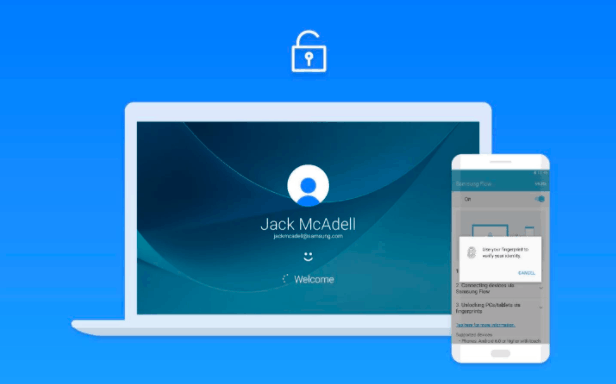
Samsung Flow updated, now supports any Windows 10 PC, unlock a Windows 10 PC with a Samsung phone

Previously only available on Samsung-based Windows 10 PCs, Samsung is now bringing Samsung Flow to all compatible Windows 10 PCs, allowing PCs to be unlocked using a Samsung phone, as well as cross-device notifications, and more.

That’s it for this week – we’ll be back next week with more Windows 10 news!

Xbox news recap: More Xbox One X news to be announced at Gamescom, Xbox One game storefront gets revamped and more

Welcome to our weekly Xbox news recap series, where we go over the top stories of the past week in the world of Xbox. Let’s get started.

More Xbox One X news to be announced at Gamescom

When asked whether or not fan favorite Halo 5: Guardians would be Xbox One X enhanced, Xbox boss Phil Spencer simply said that we would hear more about these titles at Gamescom later this year – although Phil himself will be unable to attend. While we didn’t get any kind of confirmation about what we should be looking for, the context prompting this answer can tell us a few things. The most important thing to take away here, though, is that older games like Halo 5 might just be on the menu for the Xbox One X 4k treatment. Don’t get your hopes up yet, but keep an eye towards Gamescom.

Xbox One game storefront gets revamped

Not a massive change here, but a convenient one. While users previously had to click through several tabs in order to get to the category of games they wanted to shop for, Microsoft has revamped the UI a bit to make it more convenient for people to look for things right from the main dashboard. While this isn’t the Fluent Design reimagining of the Xbox One UI that we believe may be coming soon, it’s a nice change.

Xbox One S E3 promo

Original Xbox games through Backwards Compatibility won’t change aspect ratio

Shouldn’t surprise most people, but it needed to be cleared up – when you boot up Fusion Frenzy or the original Splinter Cell on your Xbox One, you won’t be getting a better aspect ratio. Phil Spencer attributes this the the fact that giving widescreen to these games would be a significant undertaking, and would require way more resources per game than they can currently put into such a widespread project. Besides – most people would probably prefer the nostalgia of having that aspect ratio unchanged, so you can enjoy the early 2000’s in all their low-polygon glory.

Phil Spencer sets his eyes on Japanese markets

The Xbox One never took off in Japan. This is due to quite a few things – the dominance of Sony and Nintendo as a platform outside of America and the UK, the overwhelming preference for mobile gaming in Japan, or whatever else. Whatever you think the reason may be, Xbox’s Phil Spencer attributes the lack of attention from Japan to the lack of games on the platform that would resonate with Japanese audiences. In order to address the issue, Phil Spencer cited the upcoming release of a JRPG called Code Vein, along with an Xbox One X upgrade for Final Fantasy XV, as reasons why the Xbox One X may do better in Japan.

Microsoft, Xbox One

Only the Xbox One X will download 4k assets

Not groundbreaking, but it’s nice news for those who don’t want to waste space on their console – the Xbox One X will be the only console downloading 4k assets for games. While the Xbox One and Xbox One S can play any 4k enabled game, they’ll only be downloading the 1080p assets that they can actually play. 4k assets will only be taking up space on the hard drives of those who can utilize them, making sure that nobody’s wasting their time or space on something unnecessary.

Xbox One S One X

Thanks for joining us. To keep up to date with all the latest Xbox news, keep a close eye on our Xbox One tag.

How to bypass “It looks like someone else might be using your account” message

Sometimes you might not be able to log in to your account, and you’ll get It looks like someone else might be using your account error message. This issue can affect your email, Skype and Xbox account, so today we’re going to show you how to fix this problem on Windows 10.

How to bypass “It looks like someone else might be using your account” message?

Fix – “It looks like someone else might be using your account”

Solution 1 – Make sure that you’re using the correct password and email

Sometimes It looks like someone else might be using your account message appears while trying to log in to your email account. Even though this message says that someone else might be using your account, it’s possible that the message appears because you entered the wrong password a couple of times. To fix the issue, make sure that your login information is correct and try to log back in again.

It’s also possible that you’re signed in to your email account on another PC and that’s what’s causing this error. To fix it, make sure that you sign out of your email account on all other devices and try to log back in again.

Solution 2 – Wait for Microsoft to fix the issue

Sometimes this error can be caused by a temporary glitch on the server. Although these issues are rather rare, they can sometimes occur and prevent you from accessing your email. If it’s a server side issue, you’ll need to be patient and wait until Microsoft resolves it.

Solution 3 – Check for spyware

Few users reported that they were unable to access their email account due to spyware infection. According to them, it seems there was a spyware logging in to their email account. If you are also getting It looks like someone else might be using your account message, we strongly advise you to scan your system for malware and spyware.

Solution 4 – Recover your account

If you’re getting this error and you’re concerned that someone else might be using your account, you should try to recover it. Simply try to log in and choose the option to recover your password. You’ll need to enter your personal and recovery information, so be ready to do that. You need to be sure to enter as much information as you can in order to restore your account.

After doing that, you should be able to log in back again. Now you can go to the Account Settings section and view the recent activity. By doing that you can see all logins and password changes so you’ll know if your account was compromised.

Solution 5 – Contact Microsoft’s phone support

If you’re still unable to access your email account, be sure to contact Microsoft phone support. Several users reported that Microsoft operators were able to resolve the issue remotely, so be sure to contact them.

Fix – “It looks like someone else might be using your account” Skype

Solution 1 – Reinstall Skype

Several users reported that It looks like someone else might be using your account message appears on their PC when trying to access Skype. To fix this problem, you need to move few files and reinstall Skype. This is relatively simple, and you can do it by following these steps:

  1. Close Skype completely.
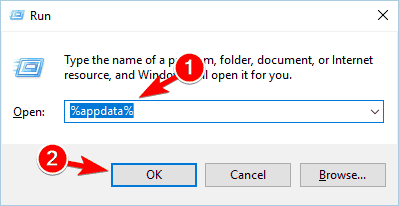
  2. Now press Windows Key + R and enter %appdata%. Press Enter or click OK.
  3. Navigate to the Skype folder and then open the folder that represents your Skype username.
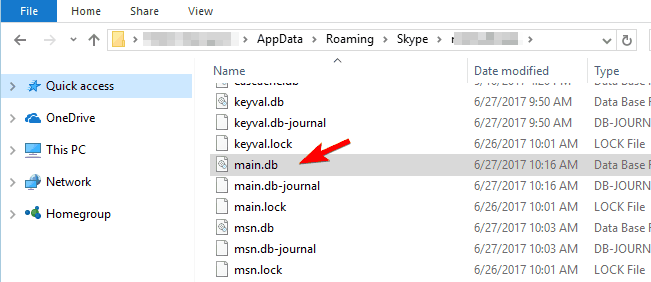
  4. Locate main.db file and copy it to your desktop.
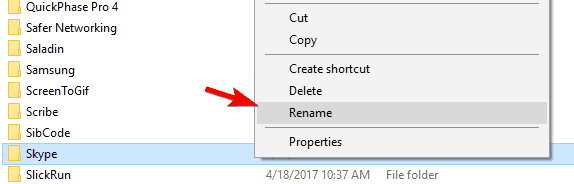
  5. Go back to AppData\Roaming folder. Locate Skype folder and rename it to Skype_old. If you’re unable to rename the folder, be sure to completely close Skype. If needed, use Task Manager to terminate Skype process.
  6. After renaming the folder you need to uninstall Skype.
  7. Download the latest version of Skype and install it.
  8. Optional: Some users are suggesting to create a new Skype account using Gmail, so you might want to try that.
  9. Log in to your account.
  10. Now you need to go to AppData\Roaming\Skype directory and navigate to your account folder. We already explained how to perform this in Steps 2-3.
  11. Once you open that folder, paste the main.db file from your desktop to it. If you see a messaging asking you to overwrite your files, choose Yes.
  12. Restart Skype and try to log in to your account again. After logging back in, you’ll have all your contacts and messages available.

Solution 2 – Change your Skype and Microsoft password

If you’re getting this error message while trying to sign in to Skype, it’s possible that your account is compromised. To fix this problem, you need to change your Skype and Microsoft password. Few users reported that changing the password solved the issue for them, so be sure to try it.

Fix – “It looks like someone else might be using your account” Xbox

Solution – Change your password

It looks like someone else might be using your account error message can also appear if you’re trying to access your Xbox account. This usually means that your account is compromised, so we advise you to change your password as soon as you can. After changing your password, the issue should be completely resolved.

It looks like someone else might be using your account message can appear on different platforms and it can prevent you from accessing your accounts. This message usually appears if your account is compromised, so if you’re getting this message be sure to try some of our solutions.

READ ALSO:

Windows 10 Mobile gets Bitpay Bitcoin wallet app

Windows Phone users feel left out on numerous occasions, but those that dabble in Bitcoin will be happy to know that Bitpay has released an official Windows Mobile app just for them. The new app is featured in the Windows Store and it allows Windows Mobile users to access Bitcoin through Bitpay.

Those that would prefer another provider should know that there is also a Copay Bitcoin app. That one is also featured in the Windows Store and it is available right now. It is considered to be more efficient thanks to the various benefits users can get from the consumer platform built by Bitpay.

The most important functions such as buying and selling Bitcoin as well as transforming it into another currency (USD) are available, as well as the ability to send funds to a desired location. There are a lot of other features included in the new Bitcoin app on the Windows Store.

Loads of integrations

Straight off the bat, it has to be mentioned that the new app features a lot of integrations with various functions and functionalities, with integration at the highest level with BitPay Visa cards. Users are able to fully manage, spend and load their funds which enhance the overall experience tremendously.

Amazon gift cards are also in high demand, so it’s pretty neat that the app features integration with Amazon gift cards, bringing even more versatility for users. Additionally, users can also make use of hardware wallets like TREZOR for instance, or Ledger. This is possible through the integration that the app has with these services.

Ease of access and the highest convenience

There are many characteristics that boost the user experience such as the ability to create multiple wallets or to use email services and push notifications in the mix.

Security is obviously a very important feature and the app doesn’t lack support in that department with its intuitive multisignature protection measures or security based on individual devices which stores keys locally instead of a cloud service.

Variety and customization

This is another area where the app shines with support for customizing wallets all the way to names and background/background colors. Users are also able to have their choosing of currency pricing, from a total selection of over 150 solutions. They can also choose whether they want their denomination in bits or BTC, which can be a really useful feature.

All in all, the new app is a really valuable tool for Bitcoin enthusiasts that use the Windows 10 Mobile platform. From the Windows Store, people can freely check it out and see if it has what they need to efficiently conduct their business.

RELATED STORIES TO CHECK OUT:

5 best malware tracker maps to see security attacks happen in real-time

The Internet used to be a safe place when it was first launched. Fast forward 30 years later to present day, the situation has dramatically changed. To put is plain and simple: malware is everywhere.

Antivirus and antimalware solutions are now compulsory in order to avoid getting your computer infected with malicious code. Unfortunately, the number of malware attacks have intensified lately, affecting users worldwide. The WannaCry, Petya and GoldenEye ransomware are only three of the most infamous ransomware attacks that made hundreds of thousands of victims in recent months.

If you want to keep up to date with the latest malware attacks, you can use dedicated malware tracker maps. These tools rely on massive threat intelligence networks to depict malware attacks in real time, including information about the malware type, origin of the attack and its victims.

Cyber threat real time maps

Norse Corp malware map


Norse Corp is the world’s largest threat intelligence network, relying on over eight million sensors to collect data. Its malware tracker map helps you stay informed, offering you real-time visibility into global cyber attacks.

The Norse online malware map allows you to filter the results by geolocalisation and protocols. You can track malware attacks from a specific region of the globe, or watch attacks unfolding all over the planet.

You’d never guess the scale of active malware attacks until you’ve analyzed a real-time malware tracking map. There are literally tens of thousands of attacks taking place every second.

You can check out the live Norse Corp malware tracking map here.


Kaspersky cyberthreat real-time map


Kaspersky Lab, one of world’s leading antivirus providers, also offers users a real-time malware map. Kaspersky’s map features an interactive Earth globe that allows you select a specific country and see detailed information about the number of ongoing malware attacks. The tool also offers statistics about the frequency of attacks for that country.

If you’re looking for a more general perspective on the ongoing malware attacks, you can click outside the globe to watch all the attacks unfold.

Kaspersky’s malware map also feature a buzz section, where you can find out more information about the most severe malware attacks that took place recently. You can also add the map to your website via the dedicated widget.

You can check out Kaspersky cyberthreat real-time map here.


FireEye Cyber Threat Map


FireEye’s cyber threat map offers users a general view on the most severe malware attacks taking place at a given moment. The company also provides visitors with statistics about the top target countries over the last 30 days, the top 5 reported industries, as well as the number of attacks reported on a given day.

You can check out FireEye’s real-time cyber threat map here.


CheckPoint’s live cyber attack map


CheckPoint’s real-time cyber threat map lists the malware attacks detected at a given moment, including information about the attack type, the attacking country and the target country.

In the upper left-hand pane, you can see statistics about the number of attacks reported on the current day and the day before, top target countries and top attacking countries.

You can check out CheckPoint’s cyber threat map here.


Fortinet cyber attack map


Fortinet’s malware attack map is an interactive tool that offers you both general and country-specific information. The map shows animated ongoing attacks, as well as information about the type and severity of the attacks.

To view specific statistics about the incoming and outgoing attacks for a particular country, simply select that country on the map and click on the details bar.

You can check out Fortinet’s cyber threat map here.

The malware attack maps listed above offer you real-time information about ongoing cyber attacks. However, they do not protect you from malware. Since prevention is better than cure, check out the articles below for more information on how to stay safe online:

Windows App Studio to shut down December 1, long live Windows Template Studio!

The UWP app creation tool Windows App Studio is retiring, according to a recent Microsoft blog post. The Windows App Team announced today that with the evolution of Windows Template Studio, the developer tool will be phased out and shut down completely by the end of the year.

Starting in the middle of next month, only existing users will be able to sign in. As the year progresses, the team hopes to see users transition over to Windows Template Studio. Here is the projected schedule for the Windows App Studio shutdown:

  • July 15, 2017
    • Only existing users can sign in
    • Finished application projects can be downloaded
    • No new dynamic collections data sources allowed to be created
    • Dynamic data will be allowed to be downloaded with a migration path provided
  • September 15, 2017
    • Application editor will stop working
    • Dynamic collections API will stop providing data to your existing applications
  • December 1, 2017
    • Windows App Studio will be shut down

Windows Template Studio is, for all intents and purposes, a better version of the Windows App Studio for Visual Studio 2017. Furthermore, it is open source and you can download it free on Github.

Microsoft reportedly planning a big Cloud First re-org for July 5th

Microsoft has been living the “mobile first, cloud first” mantra almost ever since Satya Nadella took over as CEO three years ago, but now it seems poised to re-org the company to better reflect its “cloud first” roots.

According to a (paywalled) report in the Puget Sound Business Journal (via Windows IT Pro), the company is expected to reveal the re-org on July 5th, making somewhat of a big splash right after the US Independence Day holiday.

Microsoft has been doing well with Azure, solidifying a second place position behind industry leader Amazon Web Services, and the company continues to push the benefits of the cloud, especially when tied to Office 365 and Windows, but working across a number of platforms.

Where this leaves the “mobile first” part of the equation is still yet to be revealed, as although there are consistent rumors of some kind of a Surface mobile device in the works, Microsoft’s main mobile strategy at the moment seems to be to get Microsoft services on iOS and Android, and to squeeze the last remaining bits of life out of Windows 10 Mobile and Lumia.

We’ll keep you posted of course on all the latest from Microsoft as news breaks.

In wake of ransomware attacks, India presses Microsoft for discount on Windows 10 upgrades

The past two months has been rough in terms of cybersecurity, particularly for India where upgrading to Windows 10 is considered a minority. With the recent WannaCry and “NotPetya” attacks exploiting older Windows operating systems, India has made an official request to Microsoft for a citizen discount to upgrade. Reuters reports an exclusive interview with India’s cyber security coordinator Gulshan Rai confirms that Microsoft has “in principle agreed”.

Rai told reporters that the government began its initative to push Windows upgrades not long after the WannaCry attack in May. Unfortunately, the cost of a new OS sets many of their citizens and businesses back. In India, Windows 10 Home runs 7,999 rupees (about $123 US) with Pro versions nearly doubled, Reuters pointed out. Even though Rai stated that nearly 200,000 ATMs were upgraded, that number doesn’t begin to touch the iceberg of the some 1.3 billion people in the country.

So how cheap is Microsoft expected to give away their ‘most secure’ home operating system? Exact numbers haven’t been released, and Microsoft spokespersons so far have refused to comment. However, Rai told Reuters that the one-time upgrade to Windows 10 will be discounted for the entire country, even going so far as saying that he expected the software to be “less than a quarter of the current price”.

The expected “throw-away prices” could encourage other countries to do the same, which could significantly impact projected revenue. No official confirmation has been released by Microsoft or other government officials at this time,


New LEGO Ninjago video game coming to Xbox One in September

Another LEGO-inspired game is set to be released for Xbox One this fall. Available on September 22, 2017 in the US, and coming to the UK later in October 2017, LEGO Ninjago will be available on Xbox One and Windows 10.

Here is the official announce trailer of LEGO Ninjago on Xbox One and Windows 10 PCs.

Following the storyline of the movie, LEGO Ninjago follows seven ninjas; Lloyd, Jay, Kai, Cole, Zane, Nya, and Mater Wu as they defend their island home, Ninjago, from the clutches of the evil Lord Garmadon and his Shark Army.

The ninjas of Ninjago must battle across 8 unique locations, each location featuring its Challenge Dojo, with plenty of LEGO collectibles and upgrades to pick up along the way.

LEGO Ninjago features Battle Maps too, so you can play against your friends and family locally with up to four players or via Xbox Live!

Stay tuned for more LEGO game news and we will let you know when LEGO Ninjago is ready for pre-order!

Windows 10 build 16232 bugs: Install fails, apps won’t launch, and more

Microsoft continues the Fall Creators Update build series with build 16232. This release adds a series of new security features to the OS, but also brings issues of its own.

If you’re planning to install build 16232 on your computer, check out this article to learn what to expect in terms of bugs.

Windows 10 build 16232 reported issues

  • Install fails

Many Insiders still can’t install this build version on their PC. The install process often gets stuck or fails with various errors.

I’m stuck on bluid 16215, have not been able to install any other build so far, they all fail either with 0x80070643 or simply won’t install after reboot. I really want to get out of 16215 since it’s a very buggy build, specially not being able to write ´´ for an spanish speaking person is awfull…. any way, let’s go for the third try on build 16232.

If you can’t install this build, try running the Windows Update Troubleshooter.

  • System Reserved Partition is unavailable

If you can’t access the System Reserved Partition using Disk Management, you’re not the only one. Many Insiders report that error 0x80240034 prevent them from access the respective partition.

  •  Apps won’t launch

Build 16232 sometimes breaks various apps. More specifically, when users double-click an app to open it, an error message appears on the screen, informing them that the app can’t be launched.

After I updated my computer to Build 16232.100 , my MSN WEATHER APP is not working.      Every time I click on Microsoft Weather , I get this message : THIS APP CAN’T OPEN . CHECK THE WINDOWS STORE FOR MORE INFO ABOUT WEATHER.

As a quick workaround, try resetting the respective app. Go to Settings > Apps & Features > select the problematic app > click on Advanced options > reset it.

  • Windows can’t print

Insiders report that they can’t print due to an allegedly printer setup error.

I get the error “Windows can’t print due to a problem with the printer setup.” That was from Word. Notepad++ gives “Can not start printer document.” When I try to print a test page, I get the message “Operation could not be completed (error 0x0000003d). The printer queue is full.” […]  I currently have build 16232. Print fails from both Microsoft Office apps and other apps.

  •  ‘The extended attributes are inconsistent’ error

Many Insiders report getting ‘The extended attributes are inconsistent’ error when they try to launch an app or install updates on their PCs.

To fix this error, reboot your computer and then go to Settings > Update & Security > Troubleshoot > select Windows store apps. The built-in troubleshooter should fix this problem.

  • Chrome hangs on full screen

Insiders also report that Chrome freezes for about half a minute when they use the full screen option. This problem doesn’t occurs on other browsers.

I am using Windows 10 Build 16232. In this build in Chrome Browser Full screen playback issue. If i play from YouTube video on full screen my laptop will hang for 40-60 Seconds. But other browser this not happen.

These are the most common build 16232 bugs reported by Insiders. As you can see, this build release is pretty stable and doesn’t feature any bugs that may break your PC.

If you encountered any issues after installing build 16232 on your computer, tell us more about your experience in the comments below.

RELATED STORIES YOU NEED TO CHECK OUT:

FIX: The Code Segment Cannot Be Greater Than or Equal to 64

The ERROR_RING2SEG_MUST_BE_MOVABLE error is a system error and it’s often followed by The code segment cannot be greater than or equal to 64K message. Today we’re going to show you how to fix it.

How to fix ERROR_RING2SEG_MUST_BE_MOVABLE error?

1. Update Windows

  1. Press Windows Key + I to open the Settings app.
  2. Navigate to Update & security section. Select Windows Update from the menu on the left and click on Check for updates button.

  3. Windows will now check for updates and download them automatically in the background.

2. Scan your PC

Sometimes malware can interfere with Windows and cause this and many other errors to appear. If you suspect that your system is infected by malware, be sure to perform a full system scan as soon as you can. If your PC is malware-free, you should proceed to the next solution.

3. Temporarily disable your antivirus

The code segment cannot be greater than or equal to 64K can sometimes appear due to your antivirus application.

Some antivirus apps perform system-wide changes and enforce their security policies causing these types of errors to appear.

To check if your antivirus is the problem, you need to disable it temporarily. If the issue doesn’t occur with your antivirus turned off, you might want to check its configuration and disable the problematic options. Alternatively, you can uninstall your antivirus and switch to a different one.

4. Perform an SFC scan

  1. Press Windows Key + X to open Win + X menu and select Command Prompt (Admin) from the list.

  2. When Command Prompt starts, enter sfc /scannow and press Enter to run the command.
  3. Windows will start repairing your files. This process can take a while, so be sure not to interrupt it.

5. Boot into Safe Mode

Sometimes these errors can be caused by installed applications, but you should be able to fix them by entering Safe Mode. This is a special segment of Windows that runs with default applications and drivers, so you can use it to troubleshoot problems. To enter Safe Mode on Windows 10, do the following:

  1. Open Start Menu and click the Power button. Press and hold the Shift key on your keyboard and click on Restart option.

  2. You’ll see a list of options. Select Troubleshoot > Advanced options > Startup Settings and click the Restart button.
  3. Once your PC restarts, you’ll see a list of options. Press the appropriate keyboard key to select any version of Safe Mode.
  4. Once the Safe Mode starts, check if everything is working properly.

If the error doesn’t appear in Safe Mode, it’s most likely that the cause is a third-party application.

6. Uninstall recently installed applications

  1. Open the Settings app.
  2. Go to System section and click on Apps & features. Choose Sort by install date option, and search the list for recently installed application. Select the application you want to remove and click the Uninstall button.

  3. Follow the instructions in uninstall wizard to remove the application.

As previously mentioned, third-party applications can interfere with your system and they can cause The code segment cannot be greater than or equal to 64K error to appear. To fix the issue, you need to find and remove recently installed or updated applications by following these steps:

Alternatively, you can remove recently installed apps by doing the following:

  1. Press Windows Key + X and choose Programs and Features from the menu.

  2. Once Programs and Features window opens, click on Installed on to sort applications by install date. Now your applications are sorted and you can remove desired apps simply by double clicking them.

After removing recently installed applications, check if the problem still persists.

7. Perform a clean boot

  1. Press Windows Key + R and enter msconfig. Press Enter or click OK.

  2. Go to Services tab. Check Hide all Microsoft services checkbox and click on Disable all.

  3. Go to Startup tab and click on Open Task Manager.

  4. Once Task Manager opens, you’ll see a list of all startup applications. Select applications one by one and click the Disable button. Once you disable all startup apps, close Task Manager.

  5. Now go back to System Configuration window and click Apply and OK to save changes.

  6. Restart your PC.

8. Create a new user account

  1. Open the Settings app, go to Accounts section and choose Family & other people. Click on Add someone else to this PC in Other people section.

  2. Select I don’t have this person’s sign-in information.

  3. Click on Add a user without a Microsoft account.

  4. Enter the desired user name for the new account and click on Next.

9. Perform System Restore

  1. Press Windows Key + S, enter system restore and choose Create a restore point from the menu.

  2. System Properties window will now appear. Click on System Restore button.

  3. System Restore will now start. Select Choose a different restore point and click Next. Alternatively you can choose Recommended restore option to revert your PC quickly to a recent restore point.

  4. Check Show more restore points option and select the desired restore point. Now click the Next button.

  5. Follow the instructions on the screen to restore your PC to the previous state.

If the problem still persists, you might want to try restoring your PC using System Restore feature. This feature automatically creates restore points after driver or new software installation allowing you to easily restore your system if anything goes wrong. If you’re getting this error frequently, you might be able to fix it by following these steps:

After your PC is successfully restored the problem should be resolved completely.

ERROR_RING2SEG_MUST_BE_MOVABLE and The code segment cannot be greater than or equal to 64K errors can appear on any PC, but you should be able to fix them with ease by using one of our solutions.

READ ALSO:

Windows 10 now supports interdimensional travel

Several Reddit users have begun to notice a rather amusing Easter egg hidden in the latest Windows 10 Insider build for those on the Fast Ring. The quirky little discovery involves the text used in a popup error box that states after the usual “[program] has stopped working” text that “Windows is opening a portal to another dimension…”

Windows Insider image by mrzoops

Of course, the Windows 10 PCs with this build aren’t actually opening portals (as far as we know) but it’s fun nonetheless and could lessen the frustration of a program crashing for those Windows Insiders that are helping test builds of the Windows 10 operating system. It’s highly unlikely this will make its way to public copies of Windows 10 though so if you’re an Insider, enjoy it while you can.

Have you noticed this or any other Easter eggs on your Windows 10 PC? Share them with the On MSFT community in the comments below.

OG Xbox video games will not change aspect ratio on Xbox One, plus Achievements update

Microsoft’s Phil Spencer has confirmed in a tweet that original (OG) Xbox video games that gain backwards compatibility support on the Xbox One will not receive any aspect ratio changes from their original release version.

Basically, if an OG Xbox game had widescreen aspect ratio originally it will also have it on the Xbox One but if it didn’t on the OG Xbox, it won’t on the Xbox One. In the same Twitter thread, Spencer also communicated further with Xbox gamers about the possibility of adding Achievements to OG Xbox games. It had previously been stated that they would not receive any but this conversation seems to hint that the Xbox Team is still open to the idea and is looking at potential ways to enable them.

Spencer confirms that adding Xbox Achievements to OG Xbox titles would require them to patch each game individually and that that is something that would simply take too much time and resources. He also says they could potentially reward players with Achievements simply for playing games but that he’s not a fan of that approach. There’s also talk of one solution that would work by tracking the save file of a game however that’s something that hasn’t even been looked at yet as it might be too difficult to work out with the way the games and system are designed.

Is aspect ratio and Xbox Achievements important to you or would you just be happy to play OG Xbox games on your Xbox One? Let us know in the comments.

Windows 10 KB4022716 bugs: BSoD, black screen issues, and more

Windows 10 KB4022716 is a huge update, bringing more than 30 bug fixes to the table. Unfortunately, this patch also brings quite a few issues of its own, as users report.

Although most of these issues are minor ones, they are nevertheless annoying. Update KB4022716 also brings two severe issues that prevent users from using their computers: black screen issues and BSoD errors.

In this article, we’re going to list the most common KB4022716 bugs reported by users, so that you know what to expect in terms of bugs.

Windows 10 KB4022716 reported bugs

KB4022716 won’t install

Many users can’t install the latest update for Windows 10 Creators Update due to various issues: the download won’t start, the install won’t complete or ends with an error code, etc.

Am trying to install Windows 10 the latest update 28 June (KB4022716) for Outlook search/indexing issue, but unfortunately am not able to install and saying that, (Windows Update Standalone Installer, The update is not applicable to your computer.)

If you can’t install KB4022716, try running the Update Troubleshooter. Download the tool for free from Microsoft’s website, install it and then launch it.

READ ALSO: Windows Update issues after installing Windows 10 Creators Update [Fix]

Black screen issues

Users report that KB4022716 also causes black screen issues. The only solution to fix this problem is to uninstall the update.

Hi I just installed KB4022716 today. I have 4 Displaylink USB adapters. When the screen timeout happens moving the mouse results in a black screen and a flashing mouse cursor. If I uninstall KB4022716 the problem goes away.

KB4022716 kills your browser

If you can’t use your browser after installing KB4022716, you’re not the only one. Many users report that this update often prevents Chrome, Firefox and IE from launching. Apparently, Edge is the only browser that’s still functional after users install KB4022716.

Installed and restarted, then Google Chrome, Firefox and Internet Explorer all have trouble to start.
Google Chrome just starts and close without any error message. Firefox started and crashed. Internet Exporter shows problems to start. Edge appears to be working, didn’t try enough.
Using System Restore to go back before the update. Everything works normal. Tried again to install the update, and the problem came back.

Display doesn’t come back from sleep

Users report that their computers won’t come back from sleep after installing KB4022716. In the best case scenario, all users get is a black screen with a white mouse cursor. It appears that this problem is prevalent for Surface devices.

After installation of KB4022716 this morning, my previously stable Surface Book […] consistently fails to wake properly from sleep. If I get anything at all, it’s a blinking cursor on a black screen. Pressing and holding the power button eventually brings up a “slide to shut down” screen, and cancelling this gets me back to the Windows desktop.

It seems that this update introduced a huge bug in the lock screen. For the time being, the only solution is to simply uninstall it.

Blue Screen of Death issues

Update KB4022716 also freezes computers after a few minutes of usage, forcing users to perform a hard reset. Interestingly enough, after restarting their computers, users no longer experience BSoD issues.

After using my PC for a few minutes, it freezes […] Also, after restarting my PC, this does not happen, regardless of how long i use it. It only happends after I fully turn off the power in my room and then starting the PC “for the first time”.

These are the most frequent KB4022716 issues reported by users. If you’ve encountered other bugs after installing this update, tell us more about your experience in the comments below.

RELATED STORIES YOU NEED TO CHECK OUT:

Windows Task Manager can now track GPU performance

Every Windows user can recall at least one instance where they didn’t know what to do and Windows Task Manager saved the day. One thing that always bugged people out about it, however, is the fact that it didn’t have any GPU performance tracking features.

GPU tracking is finally coming

That’s no longer the case as now Microsoft has finally decided to implement such a feature. The new GPU performance tracking feature is a part of the new Fall Creators Update for Microsoft’s Windows 10 OS and the first glimpses of it can be seen in the Preview build. To be more specific, the feature is part of the Windows 10 Insider 16226 build that is currently being tested on Microsoft’s preview platform.

The integration will be seamless as the feature will be available under the Performance section, where users have been able so far to check out CPU performance related information. Microsoft must have wanted to make the wait worthwhile as it went the extra mile with the new GPU tracking capabilities.

Now, users are not only able to track GPU performance but also separately track individual parts of the GPU. For those that aren’t savvy enough to know the name of their own GPU, this new feature is extra helpful since it provides that information alongside info about the driver used by the GPU. This can be very useful information and if nothing else, it’s good to have it “just in case”.

Work in progress

As mentioned earlier, these new features are currently being tested on the Insiders Preview build for Windows 10, which means that they are still under development. Things can be added or subtracted until the build releases officially to the public, meaning that there is still plenty of time for the developers to work on and enhance these features.

Its Preview status also means that there might be slight errors here and there and obviously some bugs that the team hadn’t gotten a chance to fix yet. All these things are currently under review and part of the crew’s to-do list.

Even if it’s arriving with quite a bit of delay, the new GPU tracking function will be most welcomed by Windows 10 users old and new, since it’s such a useful feature to have. Being able to immediately read important information regarding the computer’s GPU and how it’s performing is an important enough feature that would make people wonder why Microsoft hadn’t implemented it earlier.

RELATED STORIES TO CHECK OUT:

Windows 10 build 16226 brings back File History Backup

For those that aren’t really familiar with the file history backup feature in Windows 10, it’s a very useful feature that backs up files automatically. In case something happens to the original files, the feature uses the backups stored on a different drive in order to restore them. It’s a great feature to have because it backs up files while also keeping them close by. That way, restoring files is very easy. Many people have gotten attached to this feature as it can prove useful in situations where very important files just disappear, get corrupted, deleted or anything else.

Short hiatus

Precisely because it’s such a loved feature, users took it hard when the feature disappeared altogether earlier this month. This happened with build 16212 which wasn’t supposed to be on the Insider platform to begin with. One week after that, Microsoft updated the Insider platform with build 16215 and fans really hoped that the disappearance from the previous iteration was just a mistake that was now corrected. Unfortunately, that wasn’t the case as file history backup was still missing when build 16215 dropped.

Return to glory

Windows users that really got into depending on the file history backup feature have reasons to celebrate as it would seem that the feature has made a return. It’s worth noting that Microsoft did not release any public statement regarding why the feature has returned or why it disappeared in the first place. However, users might be less preoccupied with that and more so with its presence in build 16226.

Coming back better than ever?

As previously mentioned, there has been no explanation given as to why the feature was suddenly removed, leaving users to speculate. While their guess is as good as anyone’s, a solid theory would be that Microsoft just wanted to modify the feature so that it’s bigger and better. Indeed, removing the feature temporarily would allow Microsoft to do what was needed in order to enhance the file history backup feature.

Support and integration with OneDrive’s On-Demand feature

One strong possibility that has been rumored is that Microsoft actually intended to provide the feature with support for their latest endeavor, On-Demand. For those that aren’t familiar with the latest addition to OneDrive, Microsoft added a new feature called On-Demand that allows users much more control over their files on the cloud platform and gives them more liberty as to what they can do with the files saved on the cloud at any given time.

Overall, it’s great that the feature is making a return after its small hiatus and hopefully, some answers will arrive with it as well. Most likely, Microsoft will let users know the reason for the removal as well as introduce some new functionalities or additions to file history backup as it was known.

RELATED STORIES TO CHECK OUT:

Microsoft to move 100 staff to Manchester city centre in the UK

Microsoft is moving 100 employees over to the Manchester city centre, a massive hub for business in the UK. The employees will be placed at a new development in the city centre by the name of Neo, an extraordinarily fancy place that’s equipped with an on-site gym, an open-air terrace, screening rooms, and more. While it hasn’t been made clear just what these employees are going to be working on in this building – if it’s anything specific at all – this is definitely a nice place for Microsoft to plant a flag in.

According to Bruntwood, the organization behind the Neo building, the facility “houses a number of bold and innovative features, including Bluetooth-enabled mobile door access, a customer steering group, an on-site community and engagement manager curating a year-round programme of social and business support events and a £250,000 interactive digital art space, launched with an inaugural installation by internationally-renowned artist Brendan Dawes.”

The employees selected to move into the Neo building will be taking residency very soon, with a vague time period of “July 2017” being given out.

Microsoft releases KB4032693 and KB4032695 to Windows 10 PC

Microsoft recently rolled out KB4032693 to Windows 10 Version 1511, and KB4032695 to Windows 10 Version 1507. These two updates feature exactly the same quality improvements. No new operating system features are being introduced in these updates.

Both updates fix the annoying issue where Internet Explorer prints blank pages.

KB4032693 & KB4032695 patch notes:

  • Addressed an issue introduced by KB4022727 where Internet Explorer and Microsoft Edge printing from a frame may result in 404 not found or blank page printed.
  • Fixed a reliability issue in Windows Search.
  • Addressed issue where CRM UI may hang when pressing the reply button in mail workflow.

Microsoft warns that KB4032693 and KB4032695 may sometimes crash Internet Explorer 11 when you visit some websites. The problem may occur if the website is complex and uses certain web API’s. Microsoft is working to fix this problem.

You can download KB4032693 and KB4032695 from Microsoft’s Update Catalog website.

Apart from the Internet Explorer issue mentioned above, users haven’t reported any other bugs after installing these updates. If you’ve encountered other issues after installing KB4032693 and KB4032695, use the comment section below to tell us more about your experience.

A quick reminder for Windows 10 Version 1507 users

As a quick reminder, Microsoft ended support for Windows 10 Version 1507 last month. If you haven’t updated to a newer OS version yet, you can continue using Windows 10, but you won’t receive updates anymore. To update to the latest version of Windows 10, go Microsoft’s software download page and click ” Update now”.

The Update Assistant will download on your computer and will help you upgrade to Windows 10 Creators Update for free.

RELATED STORIES YOU NEED TO CHECK OUT:

Microsoft is working with Token to bring a Windows Hello-compatible biometric identity ring

Microsoft is partnering with Token to bring Windows 10 users a new way to unlock their Windows 10 device. Starting in December 2017, Token will offer a ring that will enable you to unlock your Windows 10 PC, car lock, door lock, or anything else that requires a biometric password to unlock. Token will also be able to replace your transit pass, and any other access cards you may have.

Microsoft hopes that this new partnership with Token will provide Windows 10 users with a new way to stay secure and remove the need for creating and using passwords. According to the post on the Windows 10 blog, 80% of people use the same password across multiple accounts, unknowingly making it incredibly easy for hackers to steal your passwords and cost you a lot of money.

Using an extra step to enhance your security profile, including enabling multi-factor verification, can be a lifesaver for your passwords. Microsoft created Windows Hello as an alternative to using a password to unlock your Windows 10 device. Windows Hello is fast and reliable and has enterprise-level security to protect Windows Hello from malicious online threats.

Microsoft believes that its partnership with Token will provide an additional level of security. The use of a biometric ring will allow you to unlock all your Windows 10 devices without worrying about remembering a password for every little prompt.

Microsoft hopes Token will provide a new way to login to Windows Hello that is easier and more secure than ever. Stay tuned for more information from Microsoft on its partnership with Token.

Microsoft updates Arrow Launcher, brings ability to hide system status bar

Microsoft recently dropped an update for Arrow Launcher on Android, and it’s packed with a couple of new features (via Windows Latest.). The update brings the most current version of the app to 3.6.0.34513, and you can read up on all the changes below.

WHAT’S NEW:

  • Option to hide/show system status bar
  • Show Outlook email in Recent page( only apply to Outlook app sign in user )
  • Support dragging apps from frequent apps card
  • Enable checkbox and image auto fit in Notes card/page;
  • UI adjustment
  • Bugs fix, stabilization/performance improvement

Arrow Launcher was previously updated for some last month, picking up the “Arrow Hub” card and the ability to sync files between Android phone and computer. Microsoft is clearly working on improving the app, so be sure to keep your feedback coming by submitting your feedback from inside the application.

As always, you can find the download link for Arrow Launcher below. And, be sure to drop us a comment to let us know how the experience is going for you!

Microsoft Launcher
Microsoft Launcher
Price:
Free

Call of Duty: Ghosts coming to Xbox One Backward Compatibility today

Call of Duty: Ghosts is joining Call of Duty: Black Ops II and four other Call of Duty games on the Xbox One Backward Compatibility list today. Xbox’s Major Nelson just announced the news on his Twitter account, and this follows the addition of five other games earlier this week.

Call of Duty: Ghosts pretty much has a special place in the popular shooter franchise, as it was the first episode to be released on both 7th gen and 8th gen consoles back in Fall 2013. While the Xbox One version of the game offers better graphics, the Xbox 360 version runs at 60 FPS and features the same game modes as the Xbox One version. Moreover, it’s also $20 cheaper on the Xbox Store, in case you’re wondering.

Here is the official game description:

Outnumbered and outgunned, but not outmatched. Welcome to Call of Duty®: Ghosts, an extraordinary step forward for one of the largest entertainment franchises of all-time. This new chapter in the Call of Duty® franchise features a fresh dynamic where players are on the side of a crippled nation fighting not for freedom, or liberty, but simply to survive. Fueling this all new Call of Duty universe, the franchise’s ambitious new next-gen engine delivers stunning levels of immersion and performance all while maintaining the speed and fluidity of 60 frames-per-second across all platforms.

Call of Duty: Ghosts is not the first Backward Compatible game to also have an Xbox One version (Rayman Legends, Saints Row IV, Halo Wars and others are in the same spot), but it’s always nice when publishers don’t force you to buy the same game twice to keep playing it on your Xbox One. Hopefully, Microsoft will take note and make Halo 3 and 4 backward compatible too!

How to snap your apps to your screen in Windows 10

Windows’ Snap lets you drag app windows to the sides of your display to “snap” them side-by-side. It cuts the pain out of trying to use two apps at once by turning the creation of a two-pane layout into a matter of clicking and dragging.

Screenshot of Windows 10 snapping a window

Microsoft debuted Snap with Windows 7. Since then, the window management feature has proved to be very popular, giving you a convenient way to multi-task on your PC. Snap was expanded in Windows 10 with several new options that can make you even more productive, reducing the time needed to set up a complex window layout of multiple apps.

Screenshot of Windows 10 2x2 Snap layout

In Windows 10, Snap was expanded to now offer a four-pane view. You can drag windows to the corners of your screen, giving you a layout where each app has a quarter of the total area. You can fine-tune the arrangement by dragging the window borders. The adjacent window will resize itself automatically to preserve the clean split.

Screenshot of Windows 10 Snap settings page

This behaviour can be changed using Snap’s new options in the Settings app. Open the app and head to the “System” category. Select the “Multi-tasking” page to customise how Snap works. To disable the automatic resizing of snapped windows, toggle the “When I resize a snapped window, simultaneously resize any adjacent snapped window” button to the off position.

Screenshot of Windows 10 Snap with automatic sizing

The settings page also lets you choose what happens when a window is snapped into an existing layout. This is controlled by the “When I snap a window, automatically size it to fill available space” toggle button.

Screenshot of Windows 10 Snap without automatic sizing

This option isn’t particularly well-known or well-labelled. To understand what it does, snap a window to one side of the display and then adjust its width. When you snap another window to the other side, you’ll see the new app takes up all the available space, if the setting is enabled. Otherwise, it will rigidly occupy its half of the display, potentially overlapping the first app or leaving a gap between the two.

Windows 10’s implementation of Snap also comes with suggestions for the apps you may want to use side-by-side. When you snap a window to one side of your screen, you’ll see thumbnails of all your other open apps appear in the remaining space. Clicking one will immediately snap it into the layout. You can disable this with the “When I snap a window, show what I can snap next to it” button in Snap’s settings.

Snap is one of the best Windows features that you might not find until you trigger it accidentally. It lets you jump into a powerful multitasking layout in a matter of seconds, boosting your productivity. If you decide that Snap isn’t for you, you can disable it entirely from within Settings. Head to the “Multi-tasking” page in the “System” category and turn off the “Arrange windows automatically by dragging them to the sides or corners of the screen” option.

Microsoft announces their acquisition of Cloudyn, will help Azure users manage cloud services

As the battle for cloud computing supremacy rages on, Microsoft and others are arming themselves with as many tools, services and partnerships as possible to remain competitive.

Microsoft recently acquired cloud management solution Cloudyn to add to its competitive edge.

This acquisition fits squarely into our commitment to empower customers with the tools they need to govern their cloud adoption and realize the strategic benefits of a global, trusted intelligent cloud. Cloudyn gives enterprise customers tools to identify, measure and analyze consumption, enable accountability and forecast future cloud spending.

Cloudyn has not only been a Microsoft partner for some years, the company has supported cost management for Azure for quite some time as well. We told you about reports of the acquisition two months ago, but now Microsoft has made it official.

Microsoft’s deal with Cloudyn isn’t just a strategic one but a realized opportunity for Azure customers. Cloudyn solutions have a proven track record for enabling its customer’s significant returns on investments in the cloud to the tune of 286 percent by establishing cloud efficiencies.

Even though the acquisition is as fresh as wet paint at the moment, Cloydyn integration for Azure users should be coming soon.

Windows AutoPilot will help IT manage Windows 10 deployments

Microsoft today announced a new Windows 10 innovation which aims to help IT pros manage Windows 10 deployments. Called Windows AutoPilot, the suite of capabilities is powered by cloud-based services and joins several new enhancements to Mobile Device Management and new Device Health features in Windows Analytics, all with the ultimate goal of modernizing the way IT pros interact with Windows devices.

According to Microsoft, Windows AutoPilot Deployment is a new cloud service which will “allow IT to customize the Windows 10 out of box setup experience using a cloud configuration.” It works alongside existing Azure Active Directory and Intune mobile device management (MDM) services and will “enable a new PC to be easily transformed into a business-ready device.”

The Windows AutoPilot Deployment Program will be piloted by Surface this summer, and will also roll out to OEMs, distributors, and resellers to help them link devices to an organization. Microsoft Store for Business and the Microsoft Partner Center will also provide Windows AutoPilot capabilities, helping organizations and partners configure and link devices.

Several Windows AutoPilot features will also make their way into the Windows 10 Fall Creators Update, all of which can be seen below.

  • Windows AutoPilot Reset – a new reset mechanism to reset a fully configured device while maintaining MDM management and AAD connection state and automatically get the device back into a fully configured state.
  • Enhanced Personalization with Windows AutoPilot Deployment – ability to pre-assign a device to a specific employee in the organization via cloud-configuration.
  • Self Service Active Directory domain join – self-service deployment to get new Windows 10 devices into Active Directory domain joined state along with Microsoft Intune enrollment.

The company is also announcing new simplified management features for the Windows 10 Fall Creators Update. These features include the ability to deploy and configure Windows Defender Application Guard, configure security baseline settings, and the capability to configure Windows Firewall rules. Also new is the option to show progress during the device provisioning process. Information on the other new enhancements to Mobile Device Management and new Device Health features can be seen below.

  • A device joined to Active Directory domain can be automatically registered in Azure Active Directory and automatically enrolled in Microsoft Intune or another MDM service.
  • The Windows 10 Fall Creators Update will also add new kiosk configuration and management features, supporting new multi-app scenarios
  • Device Health functionality is designed to ensure employees have the best possible experience   with Windows 10. It helps identify issues that could affect a person’s experience, before they may even notice, while also identifying steps needed to resolve those issues proactively.

Microsoft previously detailed several new security features heading to the Windows 10 Fall Creators Update, so it is great to see that the company is committed to making Windows 10 secure, fast, and easy to manage. As always, let us know your thoughts on this latest news by dropping us a comment below.

Windows 10 Groove Music app will get a new Mini View

Starting with the Windows 10 Creators Update, developers can now implement a new Picture in Picture mode (aka Compact Overlay windows) in their apps, which is great for allowing apps to be shown above your web browser or other windows. Very few apps support this new compact overlay mode for now, including Microsoft’s own Skype and Movies & TV UWP apps, but it looks like Groove will be the next app to get it.

According to MSPoweruser, select Windows Insiders can now test a new Mini View for the Groove Music app, which when enabled creates a smaller player window that will stay above your other apps. The mini view features playback controls including a playback bar, and it also lets users watch music videos from the Groove Music service.

credit: MSPoweruser

It’s not clear when the new Mini View will roll out to everyone, and we don’t have it yet on our Fast Ring PCs. That’s not entirely surprising, as Microsoft announced yesterday that it would stop testing new versions of native Windows 10 apps with Windows Insiders. If you already have access to it, let us know in the comments if you think this new addition will make Groove a more versatile music player on Windows 10 PCs.

Showtime’s stand-alone streaming service is now available on the Xbox One

Showtime Networks has just announced that its standalone streaming service is now available on Microsoft’s Xbox One console (via The Verge). The OTT service for cord-cutters initially launched two years ago on a variety of other platforms from Apple, Sony and Roku, and it’s good to see it finally land on the Xbox One in addition to the pre-existing Showtime Anytime app (a similar offering for subscribers of the Showtime television service).

Xbox One owners can try the standalone OTT service for seven days before paying the $10.99 monthly subscription. The catalog includes entire seasons of Homeland, Billions, Ray Donovan, The Affair, Shameless, I’m Dying Up Here, the brand new season of the cult-classic TV show Twin Peaks, in addition to many other movies, TV shows and sports programming. You can download Showtime’s new Xbox One app over here, sound off in the comments if you think this is a very welcome addition on Microsoft’s gaming console.

Dungeon Defenders 2 fix will be coming to Xbox One soon

Since its launch last week, Dungeon Defenders 2 on Xbox One has experienced a load of problems ranging from server issue to complete game crashes. The game developers have been attempting some temporary server fixes over the past few days but few seem to have fixed the problems entirely.

The official Twitter account announced today however that a proper game patch has been submitted to the Xbox Store and that it should go live once approved. No timeframe has been revealed for when this will get pushed out to users though.

Have you been playing Dungeon Defenders 2 on your Xbox One? Let us know if you’ve been having problems in the comments below.

Pinball FX3 announced for Xbox One and Windows 10

Zen Studios has just announced a sequel to their popular Pinball FX2 video game aptly titled, Pinball FX3 for Xbox One and Windows 10. “Pinball FX and Zen Pinball (as it’s called on PlayStation) have been serving players for years and years, and the time has come to go next-level and take a major step forward in the pinball evolution. Pinball FX3 will now be the Zen supported pinball platform on all console and PC platforms,” the official statement reads. “Pinball FX3 is a massive game packed full of new features designed to turn pinball into a true community experience. Built around multiplayer-matchups, user-generated tournaments and league play, Pinball FX3 is now so much more than just leaderboard rankings – it elevates the competitive pinball spirit that has thrived since the early days of pinball more than a century ago.”

Pinball FX3 is said to come with a new mode for single players that will help introduce them to pinball video games. One of the biggest criticisms of Pinball FX2 was how it hid a lot of the tables’ gameplay elements and goals from the casual player so this should be a welcome addition for many.

The new game is also expected to unlock the majority of the tables gamers had bought in previous versions for free. “We are happy to announce that you will be able to import the majority of your Pinball FX2 purchases to Pinball FX3 for FREE,” says the announcement. “We’re giving you all of the new features and upgrades at no cost – and there are a TON of them, giving you reasons to never stop playing your tables. We like to think that Pinball FX3 is an endless ocean of replayability!”

Pinball FX3 is due for release in summer 2017. A specific release date will likely get announced soon. Are you excited for Pinball FX3? Let us know in the comments below.

Microsoft wins three Game Critics Awards for E3 2017

This year, Microsoft had one of the biggest conferences – being the only company that came out with a big piece of hardware, they had plenty to talk about – and a ton of games to make nice and shiny for the cameras. To reflect on some of the big announcements, the Game Critics Awards – run by a collection of several gaming media outlets – has granted Microsoft (and/or its platform) a few accolades on what they brought out to the show floor earlier this month.

Best Hardware/Peripheral
Xbox One X
(Microsoft)

Best Racing Game
Forza Motorsport 7
(Turn 10/Microsoft Studios for PC, Xbox One)

Best Independent Game
The Artful Escape
(Beethoven & Dinosaur/Annapurna Interactive for PC, Xbox One)

Microsoft was directly related with the Xbox One X (obviously) and the creation of their iconic Forza Motorsport series, although the Artful Escape is an indie game that’s launching exclusively with Microsoft platforms. While Sony and Nintendo are both going into a great year as well, Microsoft had some great showings to get us all excited for 2017’s gaming prospects. While these awards don’t mean much until we all go out and play the game for ourselves, it’s a nice window into what the critics think of their potential.

Microsoft and Accenture team up to get 400,000 employees on Windows 10

Microsoft has been touting its Windows 10 upgrade numbers claiming that over 500 million people have taken the operating system for a spin. The fact that 500 million people have upgraded to Windows 10 is, in context, rather impressive because it’s primarily not taking into consideration Microsoft’s core user base.

Over the next couple of years, Microsoft should see its Windows 10 upgrade numbers increase as its core user base of enterprise workers begin to roll out the operating system to offices.

Helping Microsoft’s push of Windows 10 into the enterprise sector is Accenture, the global management consulting and professional services firm.

Announced today, Accenture and Microsoft are teaming up to deliver Window 10 to 400,000 of its employees over the next couple of years.

For Accenture, the transition will probably smoother than most as the company has been a relatively long time customer of Microsoft services including the use of Office 365 and hosting “the biggest OneDrive in the world with over 6 Peta-bites.” Accenture, perhaps like many, has also been testing Windows deployment over some time dating back to September 2015 where the business first began running application compatibility of Windows 10.

As we noted yesterday, Microsoft is trying out a new upgrade targeting framework for Windows 10 for Insiders. However, for businesses, upgrade methods are a bit more robust and both Microsoft and Accenture have found them to be integral in helping the company move to Windows 10.

The In-Place Upgrade Tool played a key part in supporting deployments at pace and scale. The best part is the tool eliminated the need to come into an Accenture office to have an IT person perform the upgrade. Employees could make the upgrade wherever and whenever.

Going forward, the stories tied to Microsoft’s increasing market share numbers for Windows 10 may not be as headline-grabbing as the leaps and bounds found when consumers upgraded for free, but they’ll be just as if not more important when the OS starts showing up in offices.