Why we’re still worried about Halo Infinite

Halo Infinite, the much-anticipated successor to Halo 5: Guardians will now launch in Fall 2021, developer 343 Industries announced earlier this week. The new Halo game was expected to be a launch title for the Xbox Series X on November 10, but after 343 Industries gave us a disappointing first look at the game’s campaign back in July, the studio had no choice but to delay the game to next year.

In the Inside Infinite update posted on Halo Waypoint two days ago, Halo Infinite Creative Director Joseph Staten and members of 343 Industries’ art and graphics teams tried to explain what’s currently going on inside the studio. It’s clear that a lot has happened since the July Xbox Games Showcase, when former Studio head Chris Lee mentioned a campaign that would be several times larger than the last two Halo games combined.

“We’re in the homestretch now and the team is working hard to put all the pieces together and polish the game while still navigating unprecedented challenges in our personal and professional lives. There’s a lot of work to be done, but I’m so proud of how much the team has accomplished and the tremendous progress being made every day,” a confident Lee wrote on July 23.

Almost three weeks later on August 11, Lee announced that Halo Infinite had been delayed to 2021. “The decision to shift our release is the result of multiple factors that have contributed to development challenges, including the ongoing COVID-related impacts affecting us all this year,” the exec explained at the time.

This was how Halo Infinite was supposed to look like at launch.

Later in August, we learned about some important management changes as 343 Industries, with Bungie veteran Joseph Staten came back to oversee the game’s Campaign. It was also made public that 343 Industries had teamed up with the external studio Certain Affinity to work on Halo Infinite, and we learned later in October that 343 Industries Studio head Chris Lee was no longer working on Halo Infinite while remaining a Microsoft employee. We probably don’t know everything about these management changes, but they certainly didn’t help the developers working on a massive game during a worldwide pandemic.

As you may know, Halo Infinite’s big campaign reveal in July instantly became a subject of controversy and mockery, with many fans expressing disappointment about the game’s outdated graphics. Microsoft initially reacted positively to the criticism and even embraced all the memes about “Craig the Brute,” but we’re still wondering how Microsoft didn’t realize the disaster that was about to happen. Overall, there was a huge technical gap between the first E3 2018 trailer showing 343 Industries’ new  Slipspace engine, and this first look at the game’s campaign two years later. We’re close to the huge downgrade that Ubisoft’s Watch Dogs game got between its much-hyped E3 trailer and its 2013 release.

“We have been working very closely with the community on nearly every facet of the project,” Chris Lee said back in July before all the backlash. “From the earliest planning where we focused on broad feedback around art style and story to actual hands-on playtesting and focus feedback with confidential groups of community representatives over the past two years, Halo Infinite is being created in partnership with the community,” the exec said. Again, we have to wonder how these feedback groups weren’t able to warn 343 Industries that something was clearly wrong with Halo Infinite before the July gameplay reveal.

Fast forward to today, 343 Industries is still in damage control mode and the studio is now telling us that what we saw in July wasn’t the game we were going to get. Ani Shastry, Development Manager for the Graphics team on Halo Infinite, said that that campaign demo was “a very much work-in-progress slice of the technology,” adding that “much of the graphics team’s capacity, along with that of some key technical artists, was focused on achieving high resolution and performance leading up to the demo, which meant several of these features didn’t quite get the level of polish and bug fixing that was warranted.”

Neill Harrison Director of Art Management at 343 Industries elaborated on why facial animations looked so dated in that July campaign demo. “I can confirm that the facial animation on NPCs was not fully implemented in that build, which resulted in Craig’s incredibly deadpan/lifeless look. All characters are modelled in a neutral pose, prior to blendshapes & animation being applied. So, poor old Craig was never intended to be seen in that condition which is not something that was evident during the gameplay. It was only later, in the close-up freeze frame of his one bad moment, where it came to light and the legend of Craig was born,” Harrison explained.

Halo Infinite Craig The Brute
“Craig the Brute” has become the symbol of Halo Infinite’s development troubles.

Shastry and Harrison both confirmed that 343 Industries was hard at work on improving the graphics of Halo Infinite, and key areas of progress include “better quality of global illumination, ambient occlusion, shadows, volumetric lighting, sky, and atmosphere,” said Shastry. As for facial animations, “There’s been further work done on the material fidelity and more variety added for Brute faces, we’re also working to add some hairdos and beards which was something we hadn’t gotten to in July,” explained Harrison.

This week, the team mostly talked about Halo Infinite’s multiplayer mode instead and showed one of the game’s work-in-progress multiplayer maps. The team also shared several images of the game’s new coating system that will benefit armor, weapon, and vehicle customization. Joseph Staten, the new Halo Infinite Creative Director was the only person to discuss the game’s single-player campaign in more details.

“My first week on the job, I played the entire Infinite campaign. Twice. I was, in a word, stunned—in the best possible way—by what the team had done. Infinite is, by far, the most expansive and vertical Halo world, ever. Why did the team do this? Because they understand that wonder and freedom are key to the Halo experience.

I could feel the classic Halo “30 seconds of fun” beating at the heart of Infinite’s world. But I had never felt more powerful, more mobile, more in command of a rich set of tactical choices. This was the Halo we imagined back in 2000, finally come to life, after 20 years of technical and creative innovation.”

While it’s good to hear that Halo Infinite should have a good campaign, most Halo fans will probably ignore it to go straight to the free-to-play multiplayer mode. In retrospect, 343 Industries showing the Halo Infinite campaign first was probably a mistake, and creating the biggest Halo campaign ever with a vast open-world may well be a huge waste of resources. Ultimately, multiplayer is what will make Halo Infinite thrive or be forgotten very quickly if most shooters fans continue to stick will the latest Call of Duty.

It’s also important to note that Joseph Staten, the man in charge of Halo Infinite’s campaign previously worked as Creative Director on Crackdown 3, a game that was also delayed multiple times and ended up to be a big disappointment for fans of the franchise. As a reminder, Crackdown 3 was announced as a launch title for the Xbox One X on November 2017, but following a poor reception at E3 2017, the game was first delayed to Spring 2018. Later that year, Microsoft delayed the game again to February 2019, and at that point there wasn’t much left to be saved, to be frank. Even the much-hyped multiplayer mode with cloud-powered destructible environments looked nothing like the ambitious technical demos we had seen many years before.

I hope that Staten learned some valuable lessons from the Crackdown 3 debacle, and 343 Industries really can’t afford to miss the mark with Halo Infinite. It’s safe to say that hardcore Halo fans generally consider the previous Halo games from 343 Industries to be inferior to those released in the Bungie era, and Halo is no longer the juggernaut that it used to be. As a matter of fact, Microsoft may soon own a more popular FPS franchise with Doom, assuming the company’s upcoming acquisition of ZeniMax Media goes as planned in the first half of 2021.

Can 343 Industries really fix Halo Infinite before its Fall 2021 release, which will coincide with the franchise’s 20th anniversary? We certainly hope so, and the first multiplayer elements we’ve seen this week are certainly promising. Creative Director Joseph Staten said that Insider flighting will start next year, and that’s when we’ll see if 343 Industries really is on the right track.

Still, it’s worth keeping in mind that Staten didn’t save Crackdown 3 despite its multiple delays, and the complexities of shipping Halo Infinite on Xbox One consoles in addition to Xbox Series X|S and PC are certainly not making the developer’s job any easier. The just-released Cyberpunk 2077, which was one of the most-anticipated games of the year, looks really bad on the base Xbox One and PlayStation 4 consoles, and it’s highly likely that the now 7-years old Xbox One could force Halo Infinite developers to make some compromises.

It’s been five years since the release of Halo 5: Guardians on Xbox One, and the release of Halo: The Master Chief Collection on PC clearly showed that there are a lot of gamers who still love that franchise. Halo used to be one of Xbox’s crown jewels, but 343 Industries never really succeeded to recreate the magic of the original Halo trilogy created by Bungie. The same can probably be said about the Gears of War franchise now being developed by The Coalition, even though Gears 5 is one of the best-looking games you can play on Xbox consoles today.

In the long run, I do believe that critically-acclaimed Bethesda IPs such as Doom, Wolfenstein, or Fallout could become Microsoft’s most popular franchises, with Halo and Gears taking the back seat. Bethesda is one of the few publishers to keep investing in single-player games, an area where Sony saw great success during this console generation. Doom Eternal was certainly one of the best shooters released this year, and developer iD Software deserves credit for successfully rebooting a franchise that’s been around since 1993.

Doom Eternal
Is Doom now bigger than Halo?

We’d love to see 343 Industries pull the same trick with Halo Infinite, though again, the game’s multiplayer is what will ultimately matter. Since the release of Call of Duty IV: Modern Warfare back in 2007, Halo has slowly started to become irrelevant, and 343 Industries’ attempts to catch up with Halo 4 and Halo 5: Guardians didn’t really work. It remains to be seen if Halo Infinite can change that with a free-to-play multiplayer mode, though the game will face some serious competition in Fall 2021 with another Call of Duty game, maybe a next-gen Battlefield game, and probably more heavy hitters.

We really hope that with Insider flighting starting next year, beta testers will be able to help 343 Industries create the best multiplayer experience ever seen in a Halo game. Games like Fallout 76 and Anthem never really recovered from their disastrous launches, and the failure of the latter has now put Bioware, which previously disappointed fans with Mass Effect Andromeda, in a very uncomfortable position. 343 Industries is not there yet, but with Halo Infinite rumored to be one of the most expensive games ever made, the studio could be in real trouble if the much-anticipated game fails to meet expectations.


FIX: VPNhub not working (5 tested solutions)

VPNhub is a popular free VPN service that can protect your privacy and secure your connection.

However, much like any other software service, VPNhub is subject to various technical issues.

To be more specific, you can notice VPNhub not working at times, and it sure helps to know what you can do in this situation.

This short guide will guide you through restoring VPNhub’s functionality in no time.

How can I fix VPNhub not working?

Set appropriate permissions for the mobile versions

If you’re using VPNhub on Android or iPhone, you must allow it some permissions.

VPNhub will ask you if it’s alright for it to create profiles on your device and manage your connections.

If, for whatever reason you decided to deny this permission when prompted, VPNhub won’t work on your device.

In this case, your best course of action would be trying to re-establish a VPN connection from within the app.

Only this time, when the permissions dialog comes up, you should allow it to manage your connection and create a VPN profile.

Reinstall VPNhub

Nowadays apps (especially Internet-exclusive ones) perform numerous version checks when being launched.
VPNhub is one of these apps that check if you’re running the latest version. If you do, all is fine and you can proceed.

Upon detecting an older version, it may prompt you to perform an update.

On the other hand, it’s 2020 and everything should be taken with a grain of salt, including the certainty of these version checks.

So, to make sure, just go to the app’s store page and check if you’re indeed running the latest version.

If you want to make double sure, uninstall the app and reinstall it.

Pick another VPN server

If you didn’t know, now is the perfect opportunity to learn that VPNs can get overloaded.

Sometimes, during heavy usage, certain VPN servers could collapse under the pressure.

Not in the dramatic sense, mind you. The server just can’t take any more connections and starts dropping existing ones or refuse new ones altogether.

Fortunately, you can rule out this cause by simply switching to another server.

If VPNhub starts working normally, you’ll know that the server was the cause. If not, keep trying our other suggestions.

Check your Internet connection

It goes without saying that you need a working Internet connection so that a VPN can run on top of it.

However, it’s easy to get distracted during interruptions, so this is more of a kindly reminder.

Check your Internet connection, see if you’re online to begin with, before trying to run VPNhub.

Additionally, you could switch to your mobile data plan to check if your Wi-Fi isn’t the likely cause of VPNhub’s connectivity issues.

Use a more reliable VPN service

  1. Purchase a VPN subscription (we recommend PIA)
  2. Download the VPN
  3. Install it on your devices
  4. Launch the VPN client
  5. Log into your account
  6. Connect to the server of your choice
  7. Enjoy private, secure browsing

As we’ve briefly explained before, free VPN services tend to get overcrowded because, you know, they’re free, and people enjoy free stuff.

In this case, you (and probably many other users) may experience lag, slow connection speeds, and even server downtime.

Just switch to a premium VPN service such as Private Internet Access, and put all these connectivity issues behind you.

Private Internet Access is an excellent VPN service that has an outstanding network of over 20,000 servers.

Even if some of its servers won’t work, you can simply switch to another one and carry on with your business.

Private Internet Access

Private Internet Access

Looking for a better alternative to VPNhub? Private Internet Access is here for the rescue.
Check priceVisit website

All things considered, if VPNhub is not working on your devices, there are some things you could try before you give up.

If none of our troubleshooting-related suggestions work, you could simply switch to a better VPN alternative, such as PIA.

[wl_navigator]

Fix: Bumble Not Available in Your Country (4 Tested Methods)

Bumble is a popular multi-platform, location-based dating app where women often get to make the first move.

It works on Android and iOS devices, but you can also use it on your desktop/laptop computer through its Bumble Web app.

The bad news is that you may discover that Bumble is not available in your country.

Like numerous other online location-based services, Bumble is subject to geoblocking so you might get a registration error if you don’t use a VPN.

However, this doesn’t mean that there’s nothing you can do about it and that you should give up.

Check out our guide below and learn how you can access Bumble from anywhere in the world.

How can I fix Bumble not available in your country?

Use a VPN

  1. Get an ExpressVPN subscription plan
  2. Download the VPN and install it
  3. Launch the VPN client
  4. Log into your account
  5. Connect to a supported location (the US, for instance)
  6. Download Bumble
  7. Create a Bumble account

If you plan on using Bumble on Android or iOS devices, you must install the VPN prior to downloading the app.

The reason why we recommend this course of action is that Bumble might not be available on the Play Store or App Store from unsupported locations.

ExpressVPN

Use a dedicated IP address and spoof your location for Bumble usage with this excellent VPN source.
Free Trial Visit Website

ExpressVPN is one of the best VPNs that support GPS spoofing. So, in addition to changing your IP-based location, this VPN solution will also include fake GPS coordinates tied to the server you’re connected to.

Connect to obfuscated VPN servers

We’ve analyzed Bumble’s guidelines and Terms & Conditions but couldn’t find any mentions of restricted VPN usage.

However, some users reported that Bumble might not be totally on board with VPN usage and might even serve lifetime bans on detected accounts.

While it sounds quite serious, users who can’t access the app first have almost nothing to lose.

On the other hand, there might be a way to have your cake and eat it, too: using obfuscated VPN services.

These VPNs can easily disguise their traffic to appear like regular HTTPS traffic.

As a result, services such as Bumble may not be able to detect VPN usage as easily, if at all.

Few VPN services support obfuscation mode, and ExpressVPN is one of the best in the business.

Use Smart DNS technology

Unblocking Bumble with a Smart DNS service is a faster alternative to VPNs, mainly because this method doesn’t involve encryption.

Additionally, Smart DNS tools don’t hide your IP address, which further favors speed.

However, you must understand that using a Smart DNS instead of a VPN will provide you with zero protection against malevolent agents.

Your IP address will be visible, your connection won’t be re-routed through secure servers and your traffic won’t be encrypted at all.

All you have to do is install the Smart DNS service of your choice and choose a supported location (i.e. a country where Bumble works).

On the bright side, you probably won’t risk getting your account banned.

You can get a specialized Smart DNS service or you can turn to a VPN service that has built-in Smart DNS technology, such as Surfshark (buy here).

The best part about it is that you can use the Smart DNS service separate from the VPN secure tunnel.

You just have to access the Surfshark accounts page, whitelist your IP address. Then, copy the primary and alternate DNS servers provided there and use them on your device.

Find out how to configure DNS settings on Windows 10.

Use proxy servers

Using a proxy server to access Bumble from an unsupported country may be less effective than using a VPN.

You can find proxy servers all around the Internet, and the best part about it is that they’re free.

On the other hand, the fact that they’re free also means that there may be a lot of users connected to them, which will dramatically reduce your speed.

Additionally, proxy servers are more prone to detection than regular or obfuscation-ready VPNs.

Or, you can use a proxy server on top of a VPN connection.

For example, you can use Shadowsocks in Surfshark (buy here) if you want to connect to a second location. Alternatively, you can try multi-hop VPN connections to stay connected to two VPN servers.

All in all, if Bumble is not available in your country, you could give a shot at our suggested methods above.

A VPN is undoubtedly the most effective way to go about it, as it offers anonymity and security.

However, if you’re not ready for a VPN subscription purchase commitment, you could try some of our other suggestions.

5 Best Slim Backpacks For Laptop

Backpacks are great when you travel a lot for work or recreational purposes. You might be the type of person who likes to take only the necessities with you when traveling, so a smaller and lighter laptop would fit you better.

Here is a list of specially crafted slim backpacks that can carry your laptop and other things safely.

What are the best slim backpacks for laptops?

Lenovo B210

  • High quality, durable, and water-repellent fabric
  • Large storage capacity fitting up to 15.6-inch laptops
  • Conveniently places compartments and pockets
  • No water bottle holder

The Lenovo B210 is a casual backpack that utilizes snow yarn polyester water-repellent fabric.

It has a streamlined design for modern-day life, offering an integrated laptop compartment that fits most laptops up to 15.6-Inches.

The backpack also features a range of internal pockets for necessary accessories and the main compartment for books and other bigger items.


BOPAI Super Slim

  • Concealed zip pocket for wallet and phone
  • Waterproof material
  • Large storage capacity
  • High-quality material
  • No water bottle pocket

The BOPAI Super Slim backpack is one of the best laptop backpacks on the market. It is made from waterproof microfiber leather and ballistic nylon.

The backpack has a stylish and compact design, and it can store laptops up to 15.6-Inches, protecting them with soft flannel.

In addition, the laptop is equipped with extra hidden pockets to store your valuables, as well as six interior pockets of varying sizes that can hold everything from your tablet to your phone and keys.


YOREPEK Slim

  • More than 10 independent storing compartments
  • Anti-theft Lock included
  • S-shaped shoulder straps with padded back cushion
  • USB-port and headphones hole
  • The side pocket can fit only small bottles

The YOREPEK travel backpack can be used for trips or weekend getaways, as well as work. It comes with lots of inside pockets for miscellaneous items, and side pockets to hold your water bottle.

The backpack is made out of water-resistant polyester and durable nylon fabric. Additionally, it features a charging port and a headphone passage. The backpack has a lot of storage and it can hold laptops up to 15.6-Inches.


KOPAK Slim

  • Anti-theft laptop compartment under the shoulder strap
  • The padded back offers comfortable support
  • Ergonomic and S-shaped padded straps
  • Patented dual-layer zipper on the main compartment
  • More than 10 inside pockets of varying sizes
  • Small side pockets

The KOPAK Slim travel backpack is comfortable, stylish, and safe. It comes with side pockets for your water bottle, a charging port, and also features a hidden pocket for your valuables.

This backpack is amazing for everyday use, because it is waterproof and durable, protecting any laptop up to 15.6-Inches you use it with. On top of everything, the backpack is really light.


WENIG Laptop Backpack

  • More than 10 compartments of varying sizes
  • Soft lined laptop sleeve for extra protection
  • S-curved shoulder straps
  • Light and comfortable
  • The side pockets are small

The WENIG Laptop Backpack is a secure and cool looking backpack, made out of waterproof and durable material. It can store laptops up to 15.6-Inches, and it has lots of pockets.

The backpack has a charging port and a combination lock for extra security, a special strap pocket for your cards, and an anti-theft hidden back pocket.


You should now have all the information you need to help you buy the best slim laptop backpack. All the aforementioned products are great choices.

Feel free to leave any kind of feedback regarding laptop backpacks in the comments below.

[wl_navigator]

6 best construction drawing software [Free, Paid]

It’s widely accepted that, generally, the construction field is a business that requires a hands-on approach since there’s really no other effective way of erecting buildings and monuments without a specialized crew.

However, lately, there has been an increase in transitioning various domains of activity towards digital, and fortunately, the construction business makes no exception.

Therefore, nowadays one can find a fine selection of great tools such as FINALCAD, Zoho Creator, and Synapcus, that can help builders, engineers, and construction site managers get a better grip on their projects.

What are the best construction software on the market?

Autodesk Construction Cloud

best construction software

Typical of the high-end software developed by Autodesk, Construction Cloud is an all-around suite for professionals working in the domain.

It focuses on all the aspects of a construction project, starting with the design stage, going through the planning part, taking it to the building phase, and then making the project fully operational.

Those using Construction Cloud will stay permanently connected to the ongoing workflows as well as to any team member, for heads up.

And, given the impact and dimension of construction projects, having a permanent an overview of everything related to the project is critical, and it helps minimize the risks, reduce the costs and maximize efficiency across all teams.

Autodesk Construction Cloud

Autodesk Construction Cloud

Try this complete suite for construction projects, to get an overview of all project stages and make sure that all teams are fully involved.
Check priceVisit website

FINALCAD

FINALCAD construction-specialized software

FINALCAD is a software solution aimed to help construction workers such as engineers, architects, builders, and construction site supervisors move to the next level regarding project management by helping them get things done in a more organized manner so that they spend more time actually building instead of processing paperwork.

Among the capabilities of this software solution, one can find an effective team building option, which also plays the role of a social component.

Using this feature, customers will be able to communicate in an internal social media of sorts; users can share progress photos, create posts in a newsfeed, follow field performance, share reports and get in touch with other teammates.

Relying on such a tool as FINALCAD means that plans and paperwork can be converted into a digital form and become accessible to users who collaborate on the same project.

FINALCAD stores previous activity, so keeping track of things is no longer mandatory when it comes to strenuous, time-consuming projects.

Issues can also be communicated in a much faster way than by using the traditional pen-and-paper combination since the software lets users snap photos and upload them in a quick and painless manner.

The fact that such projects that are usually huge resource consumers can suddenly be conducted and supervised without the need for rudimentary consumables such as paper also means fewer costs.

⇒ Try FINALCAD


Zoho Creator

Zoho Creator construction software

Zoho Creator is a software solution that comes with wide applicability, thanks to its app deck, which integrates various tools that can be used to solve a lot of problems. Take construction management for instance, since it’s one of the things that this program can take care of.

Zoho Creator was developed with flexibility in mind, given that it can be integrated to work on a broad range of devices.

Among the features that the program advertises to come in handy at the right time, you can find facile document management, convenient RFI (Request For Information) sending and receiving, task assignment, punch-list management, timely purchase orders placement, and a portfolio-level dashboard.

Keeping all the necessary documents within a single place instead of scattering them around is a handy head-start, especially in the construction business where paperwork is generally overflowing everywhere you look.

More so, construction site supervisors can benefit from a more accurate overview of workers and the status of their projects, whether they’re completed, open or overdue.

Task management is another important feature that Zoho Creator has in store for its users since it enables them to assign tasks, but also set deadlines, adjust priority levels and send automated notifications to their employees about tasks that are pending or upcoming.

⇒ Try Zoho Creator


Synapcus

Synapcus interface

Synapcus is a project management software solution that is oriented towards construction businesses such as architectural offices or real estate developers and helps its customers manage their goals, time, and budget in an efficient fashion.

This tool both enables and encourages users to divide their project into multiple phases, referred to as work packages, stressing out the importance of splitting projects into multiple slices, especially if they are complex ones, for easier management.

Users can generate performance specifications, as well as determine budgets or milestones for each slice of a project.

Synapcus also provides its users with a team-building component that takes several details into consideration, including qualifications, HR availability, and cost factors, in an attempt to identify the right employees for the job.

The program can check the capacity the employer desires and provide an estimation of costs based on real, actual hourly wage rates.

Nothing goes to waste or unnoticed, as every little expense that comes out of the project will be recorded within work packages. Additionally, users can track budget overruns, performance levels, and overtime hours on both project and enterprise levels.

Last, but not least, users will be able to export their projects to Excel, generate complex reports, and access everything mentioned above from their smartphones.

On top of that, Synapcus comes with a Skype interface and an activity wall, so it’s easy to keep in touch with any development that may occur in their absence.

⇒ Try Synapcus


build7

build7 overview

build7 is one of the best software solution designed to help construction workers, architects, site supervisors, and contractors manage their projects in a hassle-free, efficient environment by bundling up every useful tool and tying all loose ends.

The program is designed to work on various devices, ranging from your Windows computer to your smartphone or your tablet, so flexibility-wise it’s doing just great. Users can manage their projects in a whole lot of ways by simply logging into the tool from the device of their choice.

build7 comes with a fully-equipped toolbox that lets users bid, schedule new or existing tasks, manages their projects, views in-depth graphs and charts regarding their results, generates invoices in a seamless way.

It also lets users access data about their employees and perform other management tasks such as assigning staff to tasks or dismissing them altogether.

The dashboard of this software solution lets users view a quick overview of their projects, exceeded budgeted hours, total deliveries, number of created, pending, received, or expired invoices, a timecard, brief weekly statistics about employees (absent or ones who have birthdays) and a little notebook since note-keeping is never a bad thing.

⇒ Try build7


ConstructionOnline

ConstructionOnline interface

It’s as suggestive as it gets: ConstructionOnline is a construction software solution that was designed to help project managers get a firmer grip on their business and organize things the way they want to without all the hassle that comes with being an efficient manager.

The tool is available on multiple platforms, including mobile, so as to eliminate the need of carrying a laptop to the construction site or being tied to your office computer whenever there’s something that needs to be adjusted within the project.

ConstructionOnline can help construction business managers estimate jobs’ costs, customize orders, select their clientele on a more honest basis, integrate accounting operations seamlessly, manage calendars and schedules, keep track of projects with daily tracking, punch lists, To-Dos, and reporting, as well as manage teams without significant efforts.

Among its remaining, unmentioned capabilities you can find means of communications via messages, announcements, RFIs, transmittals, submittals and call logging, image galleries support, company tools such as overviews,  project templates, and dashboards, and last, but not least, sales tools that include ClientLink logins and lead tracking.

⇒ Try ConstructionOnline


Whether you’re a construction site supervisor, an architect, or a project manager, you might consider unloading a huge part of that burden on some of these construction-specialized software solutions.

Tools like the ones mentioned here have been designed to help you focus on running your construction business as best as you can without having to worry about factors such as paperwork, team management, or invoices too much.

We’d say Autodesk’s solution is the best, but deciding on the best construction software depends on your needs and budget.

  • What software is used in construction?

From the construction planning part to team management and subcontractors billing, you’ll find various software used in construction in our exhaustive guide.

  • What is the best free home design software?

Try DreamPlan, for instance; it has a forever free version and a user-friendly interface.

[wl_navigator]

FIX: VPN error 868 connection failed on Windows 10/11

If you’re trying to connect to a VPN on Windows 10 but get error 868, it means that the connection failed.

Here’s the complete message:

Error 868: The remote connection was not made because the name of the remote access server did not resolve.

It can quickly become irritating if you keep receiving this error message.

But don’t worry since you can get rid of it and establish a successful VPN connection on Windows 10 by following the steps below.

How do I fix VPN error 868 on Windows 10?

Check the IP address or domain name of the remote server

  1. Right-click the Windows 10 Start button and select Network Connections
  2. Select VPN on the left side of the Settings window
  3. Select your VPN connection and click Advanced options
  4. At Connection properties, click Edit
  5. Make sure that the Server name or address is correct

Perhaps you accidentally entered the wrong server name or address. Or, maybe the remote server changed this information in the meantime.

It could be the reason why you keep seeing VPN error 868 connection failed whenever you attempt to connect on Windows 10.

Change your DNS settings

A padding to disable MSIE & Chrome friendly error page
  1. Right-click the Windows 10 Start button and select Network Connections
  2. Click Change adapter options
  3. Right-click your Internet connection and select Properties
  4. Double-click Internet Protocol Version 6 (TCP/IPv6)
  5. Select Use the following DNS server addresses
  6. Set Preferred DNS server to 8.8.8.8
  7. Set Alternate DNS server to 8.8.4.4
  8. Click OK

If the VPN error 868 connection failed is caused by incorrect DNS settings on Windows 10, then you can try changing your DNS configuration. It will fix the incorrect DNS resolver problem.

You can quickly test this theory by setting the IP address in the VPN connection properties instead of the domain name (see the previous solution for more details).

The preferred and alternate DNS servers we mentioned in our example above are free, public, and belong to Google Public DNS. But you can also try Cloudflare or OpenDNS.

Or, if you’re using a premium VPN service like Private Internet Access (buy here), you don’t have to worry about manually changing your DNS configuration.

The app runs its exclusive DNS servers every time you connect to the VPN.

Use a VPN client instead of a manual VPN connection

PIA

Instead of setting up a manual VPN connection for every server you want to connect to, use a commercial VPN client. It’s prone to less errors.

Take Private Internet Access, for instance. It automatically installs the required TAP drivers and adds an exception to your firewall on setup. It even has private DNS servers to fix any DNS resolver issues.

PIA has a native app ready for all major operating systems: Windows, Mac, Linux, Android, and iOS. With one paid subscription, you can connect up to 10 simultaneous devices.

More about PIA:

  • OpenVPN and WireGuard fast and secure protocols
  • A zero-logging privacy policy
  • 24/7 live chat support
  • 30-day money-back guarantee
  • No free trial
Private Internet Access

Private Internet Access

Eliminate VPN errors on your PC by turning to a reliable VPN service instead of setting up manual VPN connections.
Check priceBuy it now

Open ports in the firewall for VPN traffic

  1. Press the Win key, type firewall, and select Firewall & network protection
  2. Click Advanced settings and Yes if prompted by User Account Control (UAC)
  3. Select Inbound Rules
  4. Open the Action menu and select New Rule
  5. Set Rule Type to Port
  6. At Protocol and Ports, here’s what you have to do:
    • For PPTP: port 1723 over TCP and protocol 47 GRE*
    • For L2TP/IPsec: ports 500, 1701 and 4500 over UDP
    • For IKEv2: ports 500 and 4500 over UDP
    • For SSTP: port 443 over TCP
    • For OpenVPN: ports 53, 1194, 1197, 1198, 8080 and 9201 over UDP + ports 80, 110, 443, 501 and 502 over TCP
    • For WireGuard: port 51820 over UDP
  7. Set Action to Allow the connection
  8. At Profile, select Domain, Private and Public
  9. Enter a name and click Finish
  10. Head over to Outbound Rules and repeat these steps

*For protocol 47 GRE, set the Rule Type to Custom (instead of Port). Then, select Protocol and Ports and set Protocol type to GRE.

If you’re an advanced PC user, you can open a CMD window with admin rights and use the netstat -a command to check if the ports are opened or closed.

Find out more about how to open firewall ports on Windows.

Add an exception to the Windows firewall

  1. Head over to Firewall & network protection
  2. Click Allow an app through firewall
  3. Click Change settings (admin rights needed)
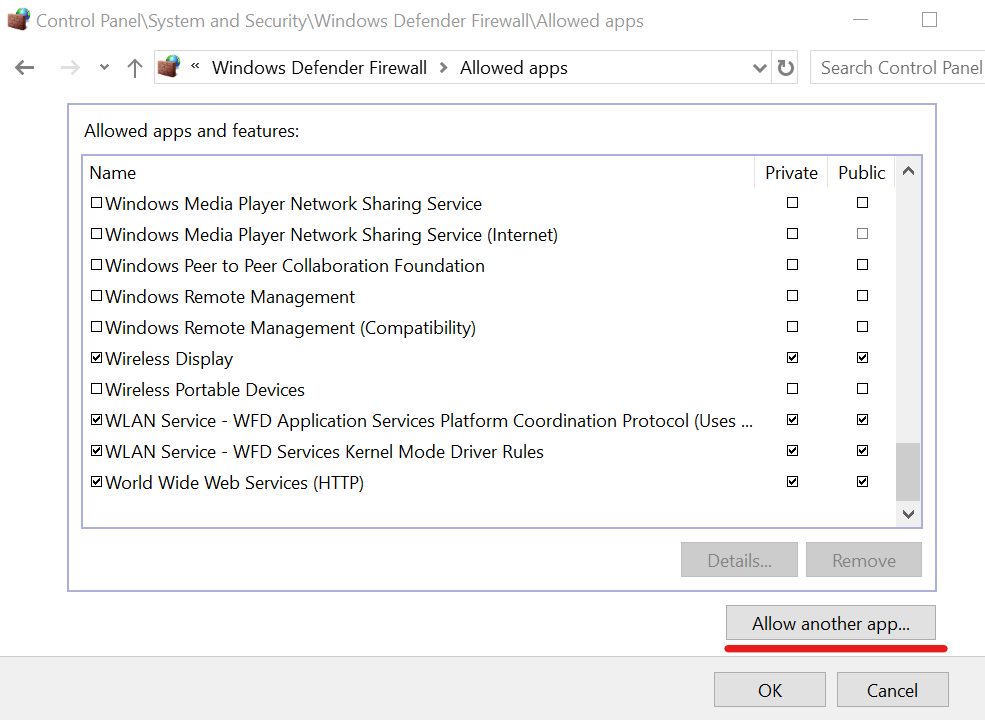
  4. Find your VPN app on this list, then enable the Private and Public associated boxes
  5. If your VPN isn’t here, click Allow another app to locate it

Another reason why you could be seeing VPN error 868 connection failed message on your Windows 10 computer is that your firewall is blocking VPN traffic.

You can easily check this by temporarily disabling the Windows firewall and trying to connect to the VPN again.

Nevertheless, we strongly recommend re-enabling the firewall and adding an exception instead, due to security reasons.

When using a premium VPN service like Private Internet Access (buy here), you don’t have to worry about this problem since PIA makes all the necessary firewall changes on setup.

Check if your antivirus is blocking VPN traffic

If you don’t have a third-party anti-malware solution installed on your PC, then you can skip this step.

It means that Windows Defender is responsible for your security, and you already added an exception to the firewall if you tried the previous solution.

Otherwise, your anti-malware tool might be the culprit for VPN error 868. You can easily tell if it shows a notification message every time you try and connect to the VPN.

You can quickly fix this problem by finding the whitelist (exception) settings of your antivirus software solution and adding your VPN service there.

Enable VPN passthrough on your router

Your router has its own firewall, depending on its firmware. As such, you should access the admin panel of your router, head over to the advanced settings section, and check the VPN passthrough settings.

Keep in mind that the configuration is different for each VPN protocol, such as PPTP and L2TP. So, make sure to only enable VPN passthrough on the protocol you need.

It’s not a good idea to enable this open for all VPN protocols just to be sure. Because you would expose your home network to hacker attacks.

We also suggest checking out routers with built-in VPN functionality.

Refresh your network settings

flush DNS servers in Windows 10
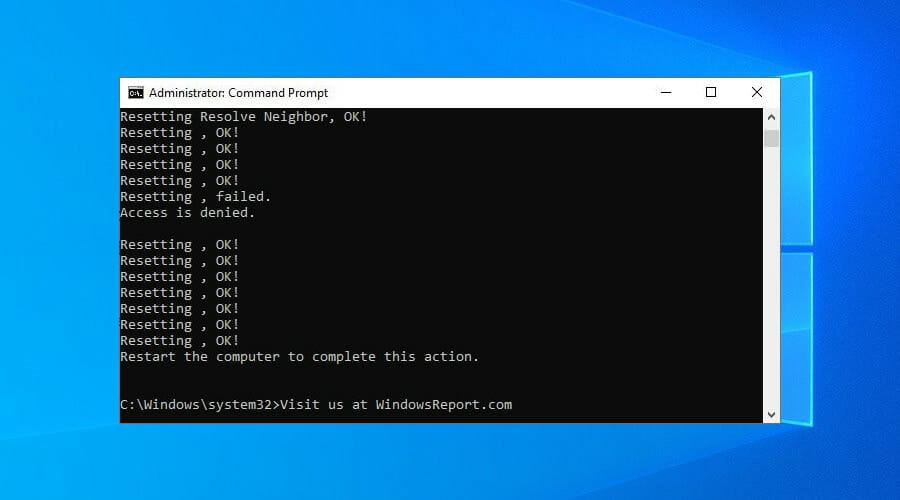
  1. Run Command Prompt with elevated rights: press Ctrl + R, type cmd, hold Ctrl + Shift and press Enter
  2. Copy and paste the next lines (press Enter between each line)
ipconfig /flushdns

ipconfig /registerdns

ipconfig /release

ipconfig /renew

NETSH winsock reset catalog

NETSH int ipv4 reset reset.log

NETSH int ipv6 reset reset.log

exit

Restart your computer to finalize the process.

By flushing your DNS and resetting Winsock, you are refreshing your network connectivity settings. It could help fix VPN error 868 connection failed on Windows 10.

Reset the TAP drivers

uninstall TAP drivers from Device Manager
  1. Right-click the Start button and select Device Manager
  2. Expand the Network adapters menu
  3. Find any TAP drivers, right-click each entry, and select Uninstall device
  4. Open the Action menu and select Scan for hardware changes

Most VPN apps require TAP driver. So, if there’s anything wrong with it, the TAP driver can cause various errors.

But you can quickly repair this problem by uninstalling the TAP device from Device Manager. It should get automatically reinstalled after scanning your PC for hardware changes.

With Private Internet Access (buy here), you just have to visit the help menu to reinstall the TAP drivers with one click.

More solutions worth trying

  1. Update system drivers for network connectivity
  2. Restart the RasMan service in CMD using net stop RasMan and net start Rasman
  3. Disable any proxy servers you might be using on Windows 10
  4. Try connecting to the VPN from another network (e.g. public WiFi, 4G)
  5. Update your router’s firmware to the latest version
  6. Set up port forwarding on your router
  7. Check the quality of your Internet connection by running a speed test

Conclusion

To recap, you can fix VPN error 868 connection failed on Windows 10 by verifying the IP or domain name of the remote server, changing your DNS settings, and opening ports in the firewall.

You can also check if your antivirus is blocking VPN traffic, enable VPN passthrough on your router, and try other solutions.

However, we also recommend using a premium VPN service like Private Internet Access (buy here). It’s a more reliable solution than setting up manual VPN connections or using free VPNs that compromise your security.

Destiny 2 is now optimized for Xbox Series X|S consoles

Destiny 2 has been optimized for the Xbox Series X|S. As of yesterday, Nick Heikkila, principal producer for Bungie has recently taken to the Xbox Wire to announce upgrades and optimization for Destiny 2 that come at no cost to current Xbox Series X|S owners.

Thanks in large part to the Series X|S Smart Deliery, the upgrades are being rolled out to game owners now and bring the following new features:

Improved load times

The improved load times promised enhancements throughout several of Destiny 2’s systems. From launching the game to loading UI elements, and even navigating through menus; multiple heavily trafficked portions of the game were upgraded to become smoother and more responsive.

4K resolution gameplay / Steady 60 FPS 

Destiny 2 will be playable at an incredible 4K resolution on the Xbox Series X. Additionally, both the Series X and the Series S play at a crisp 60 frames per second.

120Hz Crucible Mode

This new optional mode provides Xbox Series X owners with the ability to increases their maximum FPS on compatible displays to a blistering 120. In high-level PvP where every frame matters, this new mode provides players with the fastest and most responsive Crucible matches available on console.

Customizable Field of View

Aside from the aesthetic, the field of view slider also carries numerous gameplay implications. When your view is wide, you can see more enemies, but those enemies are also much smaller and harder to aim at. Alternately, you can drag the slider and narrow your view. Now, the targets are much larger, but your peripheral vision is limited.

Cross Generation Gameplay and Cross Save

Well, since nothing in the future is impossible, the answer is an easy “yes.” Bungie worked with Xbox to ensure that Xbox Series X|S owners can continue playing with Xbox One owners. Bungie also developed Cross Save, a feature that allows players to carry their characters and progress between multiple platforms.

In addition to the upgrades, Bungie is also celebrating its November update that brought new levels in the Beyond Light release that include Europa, Deep Stone Crypt and Stasis. For Destiny fans there is a lot to be try out this holiday season on both Xbox One and Series consoles alike.

FIX: Bixby Voice not available in your country (3 solutions)

Bixby Voice is a popular voice assistant available on certain Samsung devices.

Unfortunately, some Samsung device owners have discovered that Bixby Voice is not available in all countries.

Despite the app’s generous list of countries (over 200), some users still have to find workarounds to bypass geoblocks and access Bixby Voice anywhere.

Check out our guide and find out how you could install and use Bixby even in unsupported countries.

How do I fix Bixby Voice not available?

VPN

  1. Turn off your location services (GPS)
  2. Remove the SIM card from your device
  3. Clear Bixby’s cache and uninstall it
  4. Reinstall Bixby Voice
  5. Reboot your device without inserting your SIM
  6. Buy a VPN subscription (we recommend Surfshark*)
  7. Install it on your Samsung device
  8. Launch it and log into your account
  9. Connect to a US server (Bixby works in the US)
  10. Access Bixby Voice

If Bixby Voice starts working, you can put the SIM card back in your Samsung device.

Some users reported that using a VPN should spoof your location, making it seem like you’re in the US.

Thus, Bixby Voice should start working on your device as if you were in the US.

However, if your device has other means of picking your location without relying on your Internet connection and/or SIM card, things could get a bit complicated.

Surfshark

Surfshark

Surfshark’s unique GPS spoofing capabilities could help you unblock Bixby Voice in your country.
Check priceVisit website

*We strongly recommend Surfshark since it’s the best VPN that can spoof your GPS location, in addition to your IP-based location. It offers a 7-day free trial for Android users (no credit card required) and a 30-day money-back guarantee.

Reinstall Bixby Voice

  1. Launch Bixby Voice
  2. Access the settings section
  3. Log out of your Samsung account
  4. Clear the cache and uninstall the app
  5. Perform a clean Bixby Voice install
  6. When prompted, log into your account

Some users have reported that Bixby Voice doesn’t work on their devices even if they’re in a supported country.

Instead of being able to access the app, they would see the following error message:

Bixby Voice isn’t available in your country.

However, some of these errors seem to have appeared as a result of cached data build-ups.

In some cases, logging out of the Samsung account, clearing the cache, reinstalling the app, and logging back in seemed to have restored its functionality.

Update apps and flash CSC (advanced)

  1. Locate the following APKs:
    • Samsung Voice Input
    • Voice Wake-Up
    • Bixby Home
    • Bixby Service
    • Bixby Global Action
    • Bixby Voice
  2. Install each APK on your Samsung device
  3. Locate a USA CSC
  4. Perform a full backup of your device
  5. Flash the USA CSC to your device
  6. Clear data/cache of all apps you installed above
  7. Press the Bixby button

If you did everything correctly, you should have Bixby Voice up and running on your Samsung device in no time.

Note that this method could work (technically) on non-Samsung devices as well.

Important: if you’ve never flashed anything to your Samsung device, you should not try this method, unless you’re fine with potentially bricking your device, voiding its warranty, or rendering it unusable.


All things considered, if Bixby Voice isn’t available in your country, there are a few tricks you could try out.

Obviously, the easiest fix would be spoofing your location with a VPN. And Sufshark (buy here) is the best VPN for changing your GPS location and IP address.

Still, using a VPN is not a foolproof solution for all users and Samsung devices.

If you have the technical know-how and are familiarized with advanced Android operations such as flashing custom files to your device, you could try the advanced method listed on our page.

[wl_navigator]

Best smartwatch with Always-on display

Smartwatches have developed so much in the last years, they became miniature powerhouses capable of tracking your movement, answering calls, playing music, and many more useful things.

Not only is a smartwatch almost as practical as your phone, but it is also highly customizable. You can either opt for a fancy looking one, a minimalist design, or a long-lasting battery if you don’t like charging your watch that often.

What are the best smartwatches with an always-on display?

Samsung Galaxy Watch Active 2

  • Comes in aluminum or stainless steel
  • Variety of faces, bands, and finishes
  • ECG and fall detection
  • Sleep tracking
  • The battery can last up to 5 days
  • Water-resistant up to 5 ATM
  • Bixby needs improvement

The Samsung Galaxy Watch Active 2 is one of the best watches on the market, rocking a minimalist and cool design. It goes beyond tracking steps and calories to offer actionable insights on every movement and running style to heart rate.

The watch automatically detects your most popular activities and tracks them. In addition, the Tyzen OS allows access to a series of useful apps and customization.


Samsung Galaxy Watch 3

  • ECG, blood pressure, and trip sensor
  • Sleep tracking
  • Over 8GB of storage
  • Excellent fitness tracker
  • Over 2 days of battery life
  • Water-resistant up to 5 ATM
  • The product is expensive

The Galaxy Watch 3 is another watch using the Tyzen OS that has a professional look, coming with a leather strap. This product is the 3rd and the latest version of the Samsung Watch, keeping the iconic rotating bezel design.

It is the best smartwatch on the market, having a vast library of watch faces and a much slimmer design than its predecessors. In addition, it comes with a plethora of features and compatibility with most smartphones.


Fossil Gen 5

  • Wear OS is compatible with iPhone and Android Phones
  • Good battery life
  • Heart Rate and Activity Tracking using Google Fit
  • Thousands of watch faces personalizing your look
  • First con
  • Second con

The Fossil Gen 5 manages to banish the issues of poor performance and battery life of Wear OS to the past, thanks to the 1GB of RAM and newer Snapdragon Wear 3100 processor.

The watch has custom power modes that allow you to change how much your battery lasts depends on the situation. In addition, the Wear OS has all the useful Google apps, such as Google Maps or Google Pay.


Fitbit Charge 4

  • Battery life lasts up to seven days, or up to five hours using GPS
  • 90-day free trial of the Fitbit Premium
  • Heart rate sensor
  • Sleep tracking
  • Lack of color display

The Fitbit Charge 4 is a fitness-oriented smartwatch that will help you during your exercise. It has integrated GPS for course tracking, Spotify support, more sleep tools, and a motivating new metric called Active Zone Minutes.

The watch has a really slim design and it fits comfortably on your wrist. It also comes with different watch faces and apps for customization.


Apple Watch Series 6

  • 5GHz Wi-Fi and U1 Ultra Wideband chip
  • Blood oxygen sensor
  • ECG sensor and app
  • Bright always-on screen
  • Water-resistant up to 50m
  • Only works with an iPhone

If you are an iPhone user, you should consider the Apple Watch Series 6, which has full integration with IOS. The watch features a great number of apps, both from apple and 3rd party.

The watch is comfortable to wear and it has a minimalist design, with a large range of strap options and new styles including the Solo Loop and Solo Braided Loop.


These smartwatches are the top of the line, most feature-rich, and high-quality products. They are all great choices if you want a watch that has an always-on display.

[wl_navigator]

How to turn on RTX ray tracing in Minecraft for Windows 10

One of the defining traits of Minecraft as a videogame is its blocky art style, and while many of us can argue that it does bring a certain personal charm to the videogame, some gamers still see it as a deterrent.

That being said, it’s no wonder that everyone was excited by the prospect of introducing realistic special effects, especially when NVidia proposed the idea of introducing RTX ray tracing earlier this year.

Well, in a recent post on their personal blog, Nvidia revealed that RTX ray tracing is now available for testing in Minecraft, along with 30 other games.

Earlier this year, NVIDIA, Mojang and Microsoft released the Minecraft with RTX Windows 10 beta, a special Insider standalone client that introduced stunning path-traced ray tracing to the world’s most popular game. Now, ray tracing and DLSS are available to all, having become part of the official Minecraft Windows 10 client!


How do I enable RTX ray tracing in Minecraft?

Mojang and Nvidia wanted to make it as easy as possible to get access to the new feature, but the procedure varies based on whether you are a new player or if you’ve already been playing the Beta.


1. New players


2. Minecraft with RTX for Windows 10 beta players

  1. Open the Xbox Insider Hub application
  2. Navigate to Insider Content and click on Minecraft
  3. Select Manage, click Unenroll, and then Done
  4. Wait a few minutes, then check for Minecraft updates in the Windows Store app
  5. If no updates appear to be available, uninstall Minecraft completely,
  6. Install a fresh copy from the Microsoft Store

Note: We advise that you back up your existing worlds, saves and profiles.

If you’re having issues and no updates seem to be available for your Minecraft game, do the following:

  1. Uninstall Minecraft
  2. Log out from the Insider Hub
  3. Exit the Xbox Companion App, and Microsoft Store
  4. Restart your PC
  5. Log back into the Microsoft Store and download a fresh copy of Minecraft

Keep in mind that Nvidia RTX ray tracing is not supported by all Nvidia GPUs, so this update will not be available for all players.

The good news is that this will not lead to a separation of worlds, since players that have the RTX-enabled worlds can still play together with other, the only difference being that other players will simply see their worlds with vanilla graphics.


What’s your take on this fantastic news? Is your computer capable of running Minecraft in RTX mode?

If so, lets us know how much of a difference does it make by leaving us a message in the comments section below.

[wl_navigator]

Microsoft Teams rolls out Virtual Breakout Rooms, introduces Holiday themes for Together Mode, custom backgrounds

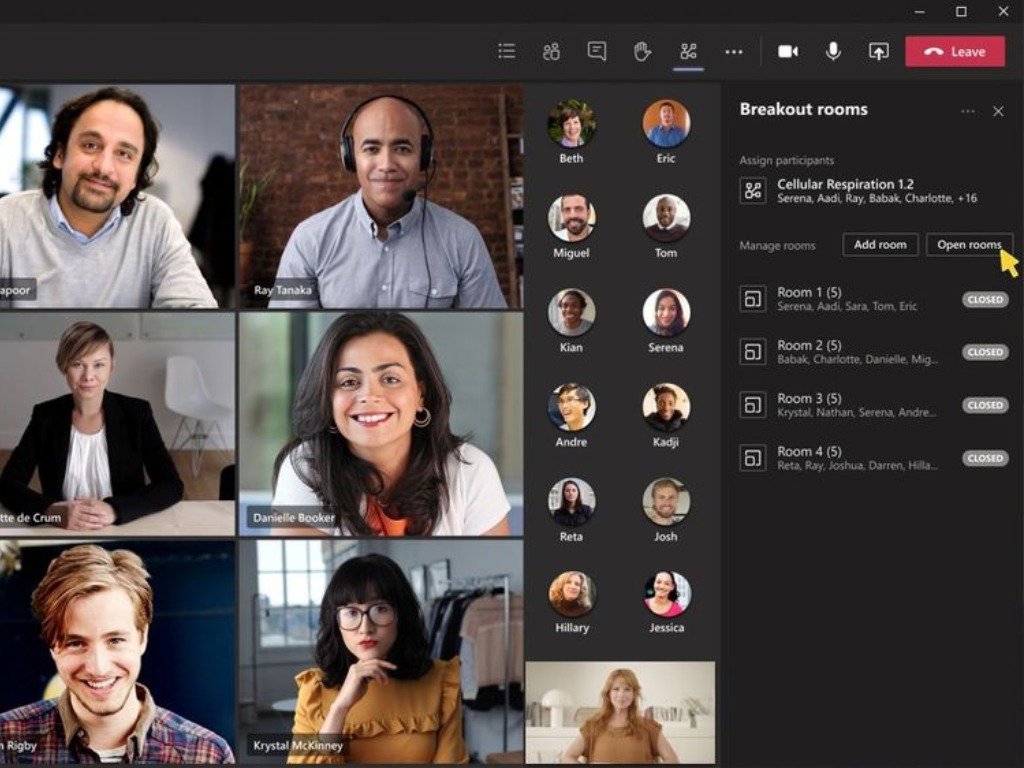
Last week, Microsoft started rolling out the Virtual Breakout Rooms feature to a limited number of GCC tenants, allowing meeting organizers to split participants into multiple smaller groups for discussions. The company has just announced that it’s expanding availability to more users. (available in all GCC tenants this week).

“Since breakout rooms are Teams meetings, all the innovation that makes Teams meetings inclusive, interactive, and intelligent are available within. Attendees can discuss a topic in their breakout room while in a virtual coffee shop in Together mode. Or students can bring up the Microsoft Whiteboard and draw out their ideas. This is also true of our security features that help make your Teams meetings a safe and secure place to meet,” the company explained.

To get with the new breakout rooms feature, make sure that you have enabled the new meeting experience within Settings. For those interested in learning more about creating and managing Breakout Rooms during meetings, be sure to check out this support page.

Alongside the new breakout rooms feature, the company is also launching some new experiences in Microsoft Teams today. Microsoft is now rolling out new holiday-themed Together mode scenes and custom backgrounds to make virtual holiday gatherings more fun. “With these new scenes, it will feel easier than ever for your team to do everything from tackling a tough problem to hosting a holiday party,” Microsoft said.

Lastly, the company has also introduced a bunch of new holiday-themed custom backgrounds for video calls and meetings. Users will be able to download these holiday backgrounds from this website. You can find detailed guidance about using custom backgrounds in our separate post.

It’s good to see that the company is working to bring joy to the Teams meetings and office parties this holiday season. The team has invited users to share their holiday celebrations and ideas with others using the #HolidaysWithTeams tag. “Happy holidays from the Microsoft Teams team. We hope these new experiences and tips bring joy to your workplace and make meetings and office parties more festive this holiday season,” the company said today.

Together Mode and Large Gallery for Teams meetings are now available on the web in preview

Earlier this year, Microsoft launched a new meeting experience on the desktop, which introduced a large gallery view and Together mode, helping Teams users to deal with the meeting fatigue and make meetings feel more real. The company has now announced that these features are now available in preview on the Teams web clients.

For starters, the new Large gallery view allows users to see up to 49 participants on the screen at once. The feature is available for video calls with 10 or more participants. Alongside the new Large gallery view, Microsoft is also launching Together Mode, allowing people to share a background with up to 49 participants.

To get started with the new meeting experience in Microsoft Teams, you can click (…) in the meeting control bar and then select “Together Mode” or “Large Gallery.” It is important to note that you should be running the latest versions of Microsoft Edge or Google Chrome to use this feature.

Microsoft says that virtual desktops, including VMWare, Citrix are not fully supported in this release. If you’re not currently enrolled in the public preview program, feel free to check out the support article for details.

4 Best-Automated Purchase Order Software

For supply chain executives, an automated purchase order software is a boon. The purchase function in an organization involves choosing suppliers and incorporating them, purchase order agreements, and more.

Purchase order processes are often an intricate process, unmanageable, and disorganized with several stakeholders onboard. Automated procurement management programs, therefore, are the best solution for companies struggling with intricate manual processes.

These programs help users get rid of the recurrent manual workflows, like purchase order creation, and save time. Among its other advantages are, improvement in efficiency, delivery times and decision-making skills, electronic document management, error reduction, and more.

Here is a list of some of the best-automated purchase order software programs based on simplified business operations.

What are the best automated purchase order tools for businesses?

Chargebee

Chargebee is a leading procurement software that automates the billing processes driving workflows without limiting delivery. Moreover, users can incorporate functional strategies from their subscription evaluation with the software.

Chargebee allows subscribers to get involved in, and upgrade using self-service websites, and create upsell possibilities using one-time and frequent add-ons. It can also take advantage of the compounding attributes of the periodic revenue.

It helps users create their own pricing options, and halt subscriptions and not cancel them. Users can also increase the renewal time frame before they expire, and recover all the expenses with Smart Dunning.

What’s more? Users can also convert every potential customer into monthly recurring profit with the PCI-Compliant Checkout designed for conversions. That’s not all, as users can also focus on developing their business without any data security and compliance concerns.

Chargebee

Chargebee

Automatically reconcile payments, transfers and fees to avoid spreadsheets, missed payments or human errors.
Check priceVisit website

Preecoro

A powerful automated purchase order software for businesses, Precoro is a user-friendly platform. Apart from automated purchasing, it also helps with simple sourcing and spends analytics.

This easy to use software helps users manage orders fast and easy. The best part is, users can manage orders from any number of suppliers and get exhaustive online reports for any period.

Users can have a hold on expenditures with custom support workflows and cost allotment by departments, locations, or even users. This automated software helps make purchasing processes explicit with robust budgeting tools and data using real-time reports.

The tool features all functionalities that support automated sourcing, checklist, records, and contract management. This streamlining of workflow helps maintain smooth relationships with suppliers.

It automatically creates purchase orders, conveys POs to suppliers, matches supplier accounts to POs and contracts, and controls purchase requests – all on one platform.

Moreover, it allocates orders to budgets for managing expenses within cost centers. The real-time reports and the custom compliant workflows generated by it, lets users get control.

⇒ Get Precoro


Esker Purchasing

Esker purchasing offers automated purchasing solutions that start the P2P cycle right away. The software is cloud-based that enhances spend requests and ordering of goods/services.

This means that every expense request receives the necessary approval and each invoice is matched with a PO. Moreover, it makes user adoption amazingly easy with its power to interface with different users in different company departments.

From purchase requests to acceptance of goods or services, every transaction is tracked. This helps complete reporting on requests, items bought, orders processed and payments done.

The software also comes with an easy to use and customizable dashboard featuring integrated KPIs. Here, users can manage daily tasks and organize preferences, track productivity, and reward best performers, and identify problems and opportunities.

The automated authorization workflow allows the accurate level of approval which is applied to each request. It also helps the expenses to be within the agreed-upon budget.

Users are also allowed to access products from chosen suppliers that enable the purchase to be within the company purchasing practices. In addition, requesters receive the items they want from a catalog of authorized items in the specified period. The buyer can confirm receipt of the approvals received, by completing the order online.

The mobile application, allows managers to authorize purchase requests and review favorite KPIs and metrics from any location, anytime.

⇒ Get Esker


DocParser

Best Automated Procurement Management Software

DocParser is a software that automates business operations and helps extract data from sales orders, purchase orders, warranty agreements, and more. This automated purchase order software summarizes business files to the basics and shifts the data obtained to its destination. It eliminates the need for manual data entry and automates business.

The program makes it easy to extract necessary data from invoices, for instance, references, dates, totals, and line items. After setting up the software, it automatically processes new documents and generates easy-to-use organized data.

From PDF to Excel or CSV, the data obtained can be downloaded in different file formats for manual post-processing, backup or to upload to any other platform. It can also update third-party programs in real-time, for instance, Google Sheets, Salesforce or and so on. It can move the extracted data from purchase orders to the user’s order management system, or wherever else they want it to be.

Besides, it pulls key data from rental & leasing contracts, warranty & insurance agreements, etc., efficiently and reliably. Furthermore, it can convert standardized programs, application forms, reports, payroll, or any other HR documents into applicable data and in a preferred format.

From extracting data from PDF documents in bulk to strongly and efficiently pulling tables from PDF product catalog, there’s a lot that this software can do.

⇒ Get DocParser


In a nutshell, automated purchase order software programs make life easier for businesses. These tools are a great alternative to manual tracking of each supplier separately for conformity and performance.

The programs help users to optimize internal processes and tasks efficiently while saving time. So, make your choice from the above list and speed up your purchase order process.


[wl_navigator]

SyncGo Desktop Calendar [Review]

As the technology evolved, we realized we could perform many more tasks within the same time window. Ironically, we also ended up understanding that we don’t have as much time as before and that it’s easy to forget the things that you planned on doing.

Given the variables, it’s no wonder that time management tools, schedulers, and calendar tools have become extremely popular.

The only real problem now is centralization since it is easy to schedule an appointment on one calendar app and then miss it because you were watching another calendar tool.

Well, that will soon be a thing of the past, especially if you use a tool like SyncGo Desktop Calendar.

What is SyncGo Desktop Calendar, and how can it help me?

SyncGo Desktop Calendar, also known as Desktop iCalendar for veteran users, is a desktop tool that anyone can use whose sole purpose is to bring together your Google Calendar, Office365 Calendar, iCloud Calendar on your Windows desktop.

Simply download and install the service, connect it to the appropriate calendar services, and all of the tasks, events and to-dos spread out across those services will be brought together into a single place.

The service is available not just on your desktop, but also on your smartphone as well, and scheduling and deleting tasks can be done from both devices, since two-way synchronization is supported.

Speaking of synching, you don’t have to worry about always being in places with Internet service, since the tool can be used offline, and it will sync and update later with the latest changes.

A calendar tool with an elegant design

Given that this tool will be used mostly for work and productivity purposes, you’re probably expecting some boring UI that is reminiscent of excel tables or spreadsheets, but that isn’t the case.

Those of you that used Windows Vista at some point in your life will probably remember the cool calendar and weather app that you could use that looked ultra-modern on the side of the desktop.

Well, SyncGo Desktop Calendar borrows from that design and greatly improves upon it thanks to the latest GUI (Graphical User Interface) rendering framework.

This makes SyncGo Desktop Calendar clearer and sharper , and it allows you to easily customize the skin of the calendar, such as changing the font, color, and background.

Speaking of the old Vista calendar and weather tool, SyncGo Desktop Calendar will also display the local weather conditions for you in the form of a live 5-day weather forecast by using your current location, using Windows’ Location Services.

SyncGo has all the tools a calendar app may ever need

SyncGo Desktop Calendar can be downloaded as an exe file, or as an AWP, but regardless of your choice, you’ll benefit from the same reliable and resourceful tool.

Your calendar can be easily managed at a micro or macro level by shifting between Day, Week, Month, Year, and List Views.

New entries can be added, and canceled events can be removed just as easily via drag-and-drop, and SyncGo Desktop Calendar also lets you print out your entire schedule if you need a physical version at hand.

SyncGo Desktop Calendar

Organize your time better and sync all events and tasks you have across several calendar apps into one single elegant UI.
Free trial Visit website

⇒ Download SyncGo Desktop Calendar from the Microsoft Store

Closing thoughts on SyncGo Desktop Calendar

Pros
Great for syncing events and schedules across several calendar service
Intuitive, minimalist, and familiar design
Available as an exe and an AWP
Lightweight and always at hand
Works offline as well
Highly customizable
Cons
Some may not the Vista-like look

Having a busy schedule is something that we all face these days, so keeping track of all events and making use of what little time we have is the closest thing to 100% efficiency possible.

However, it is impossible to remember everything that you have planned ahead of time, and not everyone can hire a secretary, so a good calendar app that can bring together all other calendar apps is the next best thing.

Thus, if you find yourself in the above-mentioned scenario, go ahead and give SyncGo Desktop Calendar a try. Not only is it incredibly affordable, but you can also test it for free during a 30-day Trial during which you have more than enough time to figure out whether the investment is worth it.

Do you need a tool like SyncGo Desktop Calendar in your life? Let us know by leaving your feedback in the comments section below.

New updates improve security in Microsoft Edge and Office

It’s the famous Patch Tuesday moment and we’ve got the long-awaited updates at last. We’re mostly interested in the important security updates.

Patch Tuesday, as you may know, culminates with the release of cumulative updates for all major versions of Windows 10, so everyone will be receiving them.

But each version of Windows 10 is different from the other so that obviously applies to the cumulative updates.

This time, however, all the new Patch Tuesday updates have addressed the security issues when using Microsoft Edge Legacy and Microsoft Office products.

New updates improve security in Microsoft Edge and Microsoft office products

According to the Microsoft release, the new KB updates address a security vulnerability by preventing applications that run as a SYSTEM account from printing to FILE: ports.

They also mention that in order to prevent this issue in the future, you will have to ensure that your applications or services will run as a certain user or as a service account.

Microsoft also included key security updates for the following products: Microsoft Edge Legacy, the Microsoft Graphics Component, Windows Media, Windows Fundamentals, and Windows Virtualization.

We also have to mention that the Microsoft Edge Legacy vulnerabilities were listed as critical.


However, we look at them you need to remember that Patch Tuesday updates are very important.

In most parts, you will receive the updates automatically but if you want to stay ahead, visit this detailed guide where we’ve posted a detailed changelog, and we provided the direct download links for the Windows Update Catalog.

If you’re not familiar with Patch Tuesday updates, we have a very comprehensive article with best practices that will guide you through the process step by step.

What’s on your mind regarding this latest cumulative update? Let us know how you feel with a comment in the section below.

[wl_navigator]

Patch Tuesday updates may lead to losing user certificates

The December Patch Tuesday is here so, naturally, many users have been updating their PCs eager to find all the new features and fixes that have arrived with Windows.

As you already have guessed, all the versions of Windows 10 were touched by these updates, but they are different based on the number and type of changes that were applied to each version.

For instance, let’s look at the KB4592438 and KB4592449 updates, which are now available for Windows versions 20h2 si 2004 and 1903 si 1909 respectively.

Patch Tuesday may cause system certificate issues

According to the Microsoft update bulletin for the new KB4592438 update, when you update a device from Windows 10 version 1809 or later to a later version of Windows 10, the system and user certificates might be lost. 

Devices will only be impacted if they have already installed any Latest cumulative update (LCU) released September 16, 2020 or later and then proceed to update to a later version of Windows 10 from media or an installation source which does not have an LCU released October 13, 2020 or later integrated.

According to Microsoft officials, this issue happens mainly when the devices are updated using outdated media or bundles by using an update management tool like WSUS or Microsoft Endpoint Configuration Manager.

They added that the issue can also appear if you’re using outdated physical media or ISO images that are missing the latest updates.

You should also know that if you are using Windows Update for Business or if you connect directly to Windows Update you will have no problems.

How to get around this problem?

To counter this situation, avoid performing these updates by using update manageent tools, outdated physical media or ISO images.

However, if you have already run into this problem, you can uninstall the update. To do that, go to the Windows Update window, click on View your update history and go to Uninstall updates.

Now it’s a matter of right-clicking the problematic update and selecting the Uninstall button.

Microsoft mentioned that they are working on a resolution and that they will provide updated bundles and refreshed media in the following weeks.


If you want to read more about this December Patch Tuesday, we have prepared this dedicated article that also comes with the download links that you can use to get the updates for your computer.

The next Patch Tuesday falls on January 12, so until then we’ll surely come back with details. Until then, make sure to keep your PC safe from any threats and install the security updates.

If you don’t know exactly how to go through this Patch Tuesday update, we have an excellent article with best practices that will explain the process step by step.

Let us know in the comments section below whether or not you intend to apply the cumulative updates right now.

[wl_navigator]

Only 62 CVEs discovered in December during Patch Tuesday

Along with December comes the last round of Patch Tuesday updates, and with it also come the much-awaited CVE reports from Microsoft.

While 2020 hit a record-breaking number of detected CVEs, enough to surpass those of 2019 by August, users are still curious to see whether this ascending trend will continue.

Some may remember how back in October the number of CVEs finally dropped, only to go back up again in November, which is all the more reasons to see what December will bring.

Take a closer look at this quick rundown on the number of CVEs that have been tracked down this year:


Number of detected CVEs is under 100 for the second time in 2020

Vulnerabilities found in Adobe products

As far as Adobe-related CVEs are concerned, only 4 were detected that affected Adobe Prelude, Experience Manager, and Lightroom.

Of the 4 detected CVEs detected, only the one that affected Lightroom was rated Critical.

Vulnerabilities found in Microsoft products

As always, CVEs that targeted Microsoft products are more numerous, and the affect the following services:

Microsoft Windows, Edge (EdgeHTML-based), ChakraCore, Microsoft Office and Office Services and Web Apps, Exchange Server, Azure DevOps, Microsoft Dynamics, Visual Studio, Azure SDK, and Azure Sphere.

Of the 58 detected CVEs, they were rated as follows:

  • 9 are rated as Critical
  • 46 are rated as Important
  • 3 are rated Moderate in severity

Which were some of the most severe CVEs?

Despite being few in numbers, a few CVEs did stand out, either because of their severity, or because of the way they acted.

All in all, here are some of the most important CVEs discovered this month:


December seems to be the month with the fewest detected CVEs in the entirety of 2020, bringing the grand total for this year to 1250.

Keep in mind that if you use any of the Adobe or Microsoft products listed above, it is important to update your PC as soon as possible, either using the Windows Update menu, or via direct download links.

If you want to learn more about the importance of Patch Tuesday updates, check out this guide where we will guide you through the best practices.

For a complete list of all identified CVEs for the December Patch Tuesday updates, also take your time to check out this useful article.

Have you identified any CVEs that weren’t covered by Microsoft yet? Don’t worry, they’ll probably fix those as well by next month, so just keep your eye on the changelogs.

Let us know what you think about this month’s vulnerability briefing by leaving us a message in the comments section below.

[wl_navigator]

FIX: VPN error 806 (GRE blocked) on Windows 10/11

Error 806 is a VPN error message that occurs on Windows 10 and older Windows. It goes like this:

A connection between your computer and the VPN server has been established but the VPN connection cannot be completed. Error Code 806 – The most common cause for this failure is that at least one Internet device (for example, a firewall or router) between your computer and the VPN server is not configured to allow Generic Routing Encapsulation (GRE) protocol packets. If the problem persists, contact your network administrator or Internet Service Provider.

The description message says the VPN error 806 likely occurs due to incorrect settings involving GRE passthrough.

Don’t worry since you can fix this issue without expert PC skills, whether you’re running Windows 10 or an older Windows.

How can I fix VPN error 806 in Windows 10?

Open port 1723 over TCP

  1. Press the Start button, type firewall, and select Firewall & network protection
  2. Click Advanced settings
  3. Click Yes if prompted by User Account Control (UAC)
  4. Select Inbound Rules
  5. Open the Action menu and select New Rule
  6. Set Rule Type to Port
  7. At Protocol and Ports, select TCP and set Specific local ports to 1723
  8. Set Action to Allow the connection
  9. At Profile, select Domain, Private and Public
  10. Specify a name and click Finish
  11. Go to Outbound Rules and repeat these steps

Open GRE port for protocol 47

enable Windows firewall Routing and Remote Access
  1. Using the steps we described in the previous solution, create a new inbound rule in the advanced firewall settings
  2. Set Rule Type to Predefined
  3. Set Predefined to Routing and Remote Access
  4. At Predefined Rules, select all Routing and Remote Access entries
  5. At Action, select Allow the connection and click Finish
  6. Create a new outbound rule by following the same steps

Discover more about opening firewall ports on your PC.

Use a reliable VPN service

PIA

If you manually configured a VPN connection on Windows 10, you might occasionally stumbled upon errors like 806.

To avoid this issue on the long term, we suggest opting for a commercial, reliable VPN service such as Private Internet Access. It sets up the secure tunnel automatically whenever you connect to a VPN server.

You can even set up your computer to accept incoming VPN connections by requesting port forwarding in PIA, without having to change any router settings.

More about PIA:

  • OpenVPN, WireGuard, PPTP, and L2TP support
  • 10 simultaneous connections
  • A no-logging privacy policy
  • 24/7 live chat support
  • 30-day money-back guarantee (no free trial)
Private Internet Access

Private Internet Access

Use PIA to set up a secure tunnel on your Windows 10 PC without encountering errors like 806.
Check priceBuy it now

Add an exception to the firewall

  1. Go to Firewall & network protection
  2. Click Allow an app through firewall
  3. Click Change settings (you need admin rights)
  4. Look for your VPN app in this list and tick its associated boxes for Private and Public
  5. If you can’t find your VPN app here, click Allow another app to find and add it

If your firewall didn’t whitelist your VPN when you created the secure tunnel, it might be the reason why you keep seeing VPN error 806 on Windows 10.

Whitelist the VPN app in your antivirus

If you don’t have a third-party antivirus, it means that Windows Defender is in charge of your firewall settings.

So, if you already added an exception for your VPN app using the Windows firewall, you don’t need to go through this stage anymore.

Otherwise, fire up your anti-malware solution and make sure to add your VPN app to the whitelist section. It will stop your antivirus from blocking your VPN.

If you frequently encounter this problem, check out the best antivirus solutions with VPN.

Allow PPTP passthrough on your router

Access the admin page of your router and look for PPTP and/or PPTP passthrough settings.

Enable these options for incoming and outgoing settings to ensure that your home router doesn’t block VPN traffic when using PPTP.

An alternative solution is to buy a router with ready VPN functionality.

Conclusion

To recap, you can fix VPN error 806 on your Windows 10 computer by opening port 1723 over TCP and port GRE over protocol 47, or by adding an exception to the system firewall.

You can also whitelist the VPN app in your anti-malware tool and configure router settings to allow PPTP passthrough.

But a more convenient solution is to get a reliable VPN service like Private Internet Access (buy here).

Which of our solutions worked for you? Do you have any other suggestions? Leave us a comment in the dedicated section below.

[wl_navigator]

Teams updates preview channel names to align with Windows and Office Insider programs

Microsoft is giving its Teams platform the Insider treatment with the launch of Teams Public Preview.

According to a Microsoft Teams blog post, the Teams division has come up with Teams Public Preview to encompass various development channels that now include Beta, Private Preview, and Public Preview.

Similar to the Windows, Office, and Edge preview programs, Teams users will be able to try out new features at a pace that fits their workflow based on familiar naming conventions.

Beta Channel
Ideal for early adopters and IT Pros who want to test features as they are being built. We look for bugs and regressions from this audience before releasing the features to the next channel. This was previously called Ring 1.5 and is available to participating Teams TAP customers and only under NDA and program requirements. This channel requires the most time commitment and is only available via self-customer nominations.

Private Preview Channel
Insiders in this channel will see more stable features for validation and piloting adoption. There will be faster updates and adoption help from Microsoft. Pre-release feature support is provided directly by Teams engineering. This channel was previously called Ring 3 and, like Beta channel, is available to participating Teams TAP customers only under NDA and program requirements.

Public Preview Channel
We are launching Public Preview with this announcement. This is for customers who want to evaluate a feature or developers who want to build a solution before broader deployment. There are no program requirements or commitments. This is an opt-in program, controlled via IT admin policy. Please read about how to configure this policy here. For Developer Preview please read here.

It should be noted that Public Preview is currently only available through admin approval. 

As with Windows and Office, Teams users who want to go this route will need to opt into the preview program with a pretty straightforward process that includes:

  1. Select your profile to display the Teams menu.
  2. Select About → Public preview.
  3. Select Switch to Public preview.

Microsoft’s new Teams Public Preview announcement comes alongside the December 2020 Preview Pack released via the public preview channel that’s now testing Windows 10 native notifications, meeting reactions, larger gallery and Together Mode for web, and 2×2 view on VDI.

FIX: VPN not working with Airtel Broadband

Several Airtel Broadband users have complained about a network connection issue when trying to connect over a VPN.

It seems that the VPN is not working on Airtel Broadband at all.

Here’s an example claiming that the Indian ISP blocks virtual private network connections:

I took one broadband connection on 24th may 2017.
Internet is working fine for me. The issue i am facing from 24th may 2017 with SR : 82813214 is:
1>couldn’t login through VPN application to reach my office network through this internet connection.
2>Its working fine when i am trying with airtel 4g dongle and airtel postpaid sim.
3>It also working fine in one of my collegue working with me in same company.

themanas on Airtel Broadband Complaints forum

If you’re also facing this issue, discover our quick-fix solutions below.

How do I fix VPN not working with Airtel Broadband?

Reset your router

  1. Turn on the modem and wait until the LED light is stable
  2. Using a pen tip or any protruding material, press and hold the reset button for 20 to 30 seconds
  3. Wait for the modem to reset/restart

Create a port trigger on your router

  1. Turn off your VPN
  2. Access your router admin page using https://192.168.1.1
  3. Find and click Advanced Setup
  4. Select NAT > Port Triggering
  5. Fill in the fields required by your VPN provider
  6. Apply changes and restart your PC

Setting up port forwarding mode at the router level has been proven effective on Airtel’s old Beetel modem (BXI 450).

But you can also try it on newer routers to see if it works.

Use a reliable VPN

use PIA for Arris router

It’s critical to use a VPN that works well with Airtel Broadband. You should avoid using free VPN because they aren’t reliable.

We suggest opting for Private Internet Access (PIA). It’s a trustworthy VPN service that you can set up on Windows, Mac, Linux, iOS, and Android devices.

You can also set up PIA at the router level since it has OpenVPN manual configuration mode. If your router doesn’t support VPN client mode, you could get a second router that does and use a bridge-mode configuration.

And, if you’re thinking of configuring your home network to accept VPN connections, you can do this with PIA, too, because it supports native port forwarding.

More about PIA:

  • OpenVPN and WireGuard protocols
  • Kill switch and exclusive DNS
  • A zero-logging policy
  • 24/7 live chat support
  • 30-day money-back guarantee
  • No free trial
Private Internet Access

Private Internet Access

Use PIA if your VPN connection isn’t working with Airtel Broadband.
Check priceBuy it now

Conclusion

To sum up, if your VPN connection isn’t working on Airtel Broadband, you can try resetting your router and setting up port triggering.

However, a better solution is to turn to a premium VPN client like Private Internet Access (buy here).

[wl_navigator]

5 Best SSHD Laptops To Invest In [Buying Guide]

Almost all the mid-range and top-end laptops come with NVMe or SATA SSD installed out of the box. However, NVMe SSD storage on these laptops is usually limited to 128, 256GB, 512GB of storage with an expansion slot.

While buying a laptop with SSD and HHD combo is an option, you still have to deal with the slower HDD speeds. This is where the SSHD laptops are an ideal option. The hybrid drive (SSHD) will run considerably faster than an HDD but is a less expensive alternative to a pure SSD.

In this article, we have listed the best SSHD laptops that offer plenty of storage and better speed compared to standard HDDs and is cheaper than high capacity SSD devices.

What are the best SSHD laptops to buy?

ASUS TUF506IV

  • Great 1080p gaming performance
  • Good value for money
  • New AMD CPU
  • Good battery life
  • Can get loud under load

With its 32GB of RAM, 512GB of SSD storage and 2TB HDD, the ASUS TUF506IV is a solid workhorse for content creators and creative professionals.

Under the hood, it houses AMD’s mighty Ryzen 7 4800H CPU paired with NVIDIA RTX 2060 GPU for optimal gaming performance. The full HD 15.6″ display offers decent color accuracy and gets adequately brighter.

Additionally, it features a full-sized Ethernet port, an excellent RGB keyboard, good audio, and plenty of I/O ports.


Dell 7855 G7 15

  • Strong overall and gaming performance
  • Good design
  • Good battery life
  • Plenty of storage
  • Shallow keyboard

With a solid gaming performance, sleek and minimal design, and good build quality Dell 7855 G7 15 is a good mid-range gaming product that you can consider in this segment.

This variant of the Dell 7855 G7 15 offers 32 GB of RAM, 256GB of SSD storage and a massive 2TB of SSHD storage drive. It also comes with a 15.6″ Full HD display.

Other features of the laptop include Intel Core i7 8th Gen CPU, GTX 1060 6GB MAX-Q graphics, plenty of ports, and Windows 10 OS.


ASUS ROG Strix SCAR II

  • Snazzy looks
  • High refresh rate display
  • Decent performance
  • Excellent keyboard
  • Odd camera placement

The last-gen ASUS ROG Strix SCAR II is one of the few laptops to features a 1TB SSHD drive out of the box. With a solid build quality, unique I AM Gamer design, and solid performance, it is still an excellent choice in the segment.

It features a 15.6″ Full HD 144Hz display with good color accuracy and brightness. It houses the older 8th Gen Intel Core i7 CPU, paired with GTX 1070, 16GB of RAM and a 256GB NVMe SSD drive.

Apart from the usual yet solid connectivity features, the ASUS ROG Strix SCAR II has an excellent full RGB keyboard.


MSI GT76 Titan DT 10SGS-055

  • Blistering performance with desktop CPU
  • Full RGB lighting keyboard
  • Excellent speakers
  • Decent battery life
  • Requires two power adapters

If money is not a concern, the MSI GT76 Titan DT 10SGS-055 is a laptop that houses the performance of a gaming desktop in a heavy but portable chassis.

The MSI GT76 Titan DT features the latest Intel Core i7 10900K desktop CPU, paired with RTX 2080 Super for excellent ultra settings gaming and work performance. It also comes with plenty of storage that includes 64 GB of RAM, 2TB of NVMe SSD and 2TB of SSHD.

This massive laptop does have a fairly large 17.3″ 4K display with plenty of I/O options along with an excellent full RGB keyboard.


MSI GF63 9SCX

  • Slim and lightweight
  • Good keyboard
  • Solid performance
  • Dim display

If you can overlook the aesthetics and a dim and dull display, the MSI GF63 9SCX offers solid gaming performance for the price along with a massive 1TB SSHD storage unit.

It also comes with a 256GB of NVMe SSD for OS installation. Under the hood, it features an Intel Core i5 9th Gen CPU, GTX 1650 graphics that offers good gaming performance.

The 15.6″ display is not the best but gets the job done. However, in outdoor conditions, the display lacks the brightness making it hard to read.


SSHD laptops are an excellent choice if you want to store a lot of media files on your laptop without occupying your SSD space or compromising on speed. All the laptops listed in this article offer SSD and SSHD storage to store large files.

[wl_navigator]

How to change the default video player on your browser?

There are certain situations when you want to stream a video in your browser just to find out that the default player doesn’t offer all the options and the control you want, or worse doesn’t even support the specific format.

A great solution that is sure to get you out of this predicament is changing the video player of your browser by installing an extension that is compatible with your operating system.

Such extensions allow you to play audio and video files directly from the browser without using third-party software. So let’s see what are the main extension that can dramatically improve your streaming experience.

How do I change the video player on my browser?

Opera

1. Send to MPV player

This extension detects any type of stream-able media be it video or audio and offers a “send to MVP” option. Thanks to this add-on you are able to watch or listen to media streams much easier with just a few clicks.

An optimized extension was created to be as lightweight as possible. One perk you’ll like is that the background page of the extension is in non-persistent mode, so the extension doesn’t need any resources when it is inactive.

What sets it apart from other similar extensions is the fact that it’s much lighter because the media detection algorithm does not demand usual observation.

⇒ Download Send to MPV player

2. Flash Player for YouTube 

Another great option for Opera is an add-on that changes the default YouTube player to Flash and offers better resolution choices than an HTML5 Player.

It is very lightweight, doesn’t take up memory space, and also doesn’t require a lot of CPU usage. This extension is perfect if you have a slow device because it consumes fewer resources, CPU, and RAM.

⇒ Download Flash Player for YouTube

Chrome

1. Play in VLC

Play in VLC is an extension designed to bring you a multimedia experience directly from your browser by offering the perks of great third-party software without taking-up memory space.

You can watch your favorite movie streams or listen to music in the VLC player with just one move. The extension detects all the audio and video from the web page and displays the media sources in the badge area. All you need to do is left-click on the button in the toolbar in order to send these media sources to the VLC player.

⇒ Download Play in VLC

2. Media Player

This browser extension is created to play music and video files from any type of online source. At the basis of this tool is the popular video.js project. Media Player is designed to enhance the user experience by applying custom plug-ins.

All you have to do is drag and drop the video files into the player or press the big play button, this way you’ll be able to watch any offline or online video in no time.

If you want to load subtitles for your videos, you need to make sure you also drop the subtitle files as well. In order to detect, their search for an SRT or VTT format.

⇒ Download Media Player

3. Media Player Video/Audio

A great extension that brings the awesome benefits of a media player and at the same time saves you the time you’d waste downloading video software.

You can play any type of online audio or video file at a much higher quality than are accustomed to. Change your internet viewing habits to a home cinema experience by adding this user-friendly extension to your browser.

⇒ Download Media Player Video/Audio

Mozilla Firefox

1. HTML5 Video Everywhere

Developed by the founder of the popular social platform, Tik-Tok, this add-on was created with the users’ preferences in mind.

With this smart extension, you can take advantage of an improved media experience when you access your favorite streaming sites like YouTube, Vimeo, Dailymotion, Break, Metacafe, or Lego.

Don’t miss out on this browser’s built-in video player that provides higher performance and a more stable experience.

⇒ Download HTML5 Video Everywhere

2. Video Player

You can make the best of your streaming time with this high-quality extension that supports audio boosting to 300% and provides a playback rate speed of up to 8 times.

Easy to use and with a minimal interface this extension can play media files from a local disk or a remote source.

This extension offers to play video or audio from a local disk or a remote resource. It uses the standard catching method to play remote sources with minimal interruption. You can even groove to your favorite musician by repeating one song or an entire album, thanks to this smart player.

⇒ Download Video Player

Playing videos or listening to audio using specially created extensions that can be incorporated into your browser is a great way to add some quality to your interactive online activities.

The extensions that we presented you with in this article are compatible with most operating systems, are easy to set up and very user-friendly.

We’d like to hear your opinion on this subject so please feel free to comment by accessing the comment section below.

How to use Cortana file finder feature on Windows 10

Microsoft has just released a new Windows 10 Preview for those on its Windows Insiders program. Surprisingly, it brings a new feature for Cortana, along with the usual fixes.

Cortana fans should know that this feature lets them use the very same digital assistant they’ve known for years to open and find files with ease.

To be more precise, Cortana will help users find files using their voice rather than sifting through documents by typing words.

The advantages of this new feature are obvious. Brandon LeBlanc, program manager for the Windows Insider program, says:

You can now use Cortana on your PCs to translate their thoughts into direct actions to open and find files and save time spent navigating to apps/folders to locate and open files.

How can I use the Cortana file finder feature on Windows 10?

Cortana file finder feature

The feature that we are talking about is included in Cortana version number 2.2011.26701.0 or up. That’s available for download in the Windows Insider channels via the Microsoft Store.

Assuming that you run this version already, feel free to ask Cortana to look for files based on parts of file names or on author names. You may find a recently edited file as well (Hey Cortana, find my recent files).

Moreover, you can ask to search for different file types – .txt files, ppt and .pptx ones, .doc and .docx files, and not only. To find a document of a particular type, it’s enough to say: Hey Cortana, find my recent doc files.

If users of a Microsoft account can take advantage of Cortana to find files saved on their computers, enterprise users who sign in to Cortana with their corporate credentials can also search for files saved on SharePoint and OneDrive for Business.

Could this new Cortana feature make you more productive when finding and opening files? Let us know your opinion in the comments area below.

[wl_navigator]

Microsoft SharePoint hits a new milestone of 200 million monthly daily active users

In a blog post penned by Jared Spataro, Microsoft announced a new milestone in the company’s history. SharePoint, the cloud-based service that helps organizations share and manage content, recently hit the 200 million monthly active users mark in the cloud.

According to the blog post, SharePoint usage has doubled in nearly the last year actually surpassing that 200 million monthly active user mark. Microsoft says this is all driven by user feedback and support since 2011. Another key reason is accelerated Microsoft 365 adoption, and the way SharePoint plugs in with Azure and the Microsoft Graph and other Microsoft experiences like Teams, OneDrive, Office, custom PowerApps, and SPFx apps, and more. In the words of Microsoft:

SharePoint powers content collaboration across Microsoft 365. It underpins the document sharing scenarios in OneDrive with Word, Excel, PowerPoint, and 320 other file types. It drives our new Microsoft Lists experiences. It enables end-users to create beautiful pages and portals with video from Microsoft Stream and conversations from Yammer to engage employees.

The COVID-19 pandemic is also a driving factor, too, with educators, and businesses having to deal with remote work and learning, and a dependable service for content access and management around the globe. This is why Microsoft was also recognized by Gartner as a Leader in the Content Services Platforms Quadrant for 2020. Now the fourth year in a row, the company says it places higher in both Completeness of Vision and Ability to Execute than any other company in the Leaders’ quadrant.

For all the success, Microsoft is still planning to invest in SharePoint going forward. Spataro’s post ends by noting that Microsoft is planning to “bring to market many new SharePoint-powered experiences in collaboration, media, protection, intelligence, custom solutions, and more in 2021.”

Gears 5: Hivebusters Expansion is coming on December 15 and will be free with Xbox Game Pass Ultimate

Gears 5 is getting its first solo expansion on December 15 with the Hivebusters Expansion. The new DLC will include a 3-hour campaign featuring Lahni, Keegan and Mac, the 3 heroes from Gears 5’s Escape mode on a suicide mission to destroy a Swarm hive.

Just like the regular Gears 5 campaign, the Hivebusters Expansion will support 3-player co-op, split-screen or online. However, each of the 3 heroes will have its own Ultimate Abilities to use again Locust enemies, a notable difference compared to the Gears 5 campaign where only Jack, the robot companion has special abilities.

The Gears 5: Hivebusters campaign expansion will also add 16 new achievements to unlock for 210 Gamerscore. Gears 5 was recently updated for Xbox Series X|S consoles, and this new DLC will support the same optimizations on Microsoft’s next-gen consoles including reduced load times, variable refresh rates, and 4K HDR Ultra visuals on Series X.

The upcoming DLC is available for $19.99 pre-purchase from the Microsoft digital store today ahead of its launch on December 15. If you’re an Xbox Game Pass Ultimate subscriber, you’ll be able to play it for free on day one on Xbox, PC, or Android via Cloud gaming. Also launching on December 15 is Gears 5: Game of the Year Edition, a new $59.99 bundle that includes the base game, the upcoming Hivebusters campaign expansion, Halo: Reach Character Pack, plus 30 days of boost.

Gears 5: Hivebusters
Developer:
Xbox Game Studios
Price:
Free

How to uses slash commands like /files and get more out of Microsoft Teams

If you’re familiar with computers, you likely have used the command prompt once to accomplish a common or admin task in Windows 10. But did you know that Teams also has its own command line or sorts? That’s right, from the top of the search bar in Microsoft Teams you can input certain commands. We’ll be looking at some of those today.

What are slash commands?

Slash Commands

Slash commands in the Teams app on the web or the desktop app allow you to perform common tasks. You’re able to do things like update a status, going to a specific channel, or show recent files. You can use these by clicking your mouse in the search box and typing a “/” Once you do that, you can see all the commands available for you. Do note that you can also press Alt+K (Windows) or Option+K (Mac) to open the command list. You’ll likely appreciate slash commands because they can save you time during a busy day.

What are some common slash commands?

Command What the command does
/activity See a coworker’s activity
/away Set your status to away
/busy Set your status to busy
/call Call a certain number or contact
/dnd Set your status to do not disturb
/goto Go to a team or channel
/files See your recent files
/mentions See your @mentions

When you first check out the slash commands, you’ll see a long list of supported ones. Right now, there’s a total list of 18 commands that are supported. Everyone using Teams has access to these, and if something isn’t working for you, then your organization likely disabled a feature that needs the command. Some of our favorite commands are above.

Not to be confused with keyboard shortcuts

Though we’ve focused on slash commands, these really should not be compared or confused with keyboard shortcuts. These are two different things. Slash commands are for common tasks in Teams, but keyboard shortcuts are rather focused on the general navigation of Teams. We explained those in a separate post. As always, we also remind you that you can check out our dedicated Teams hub for more Teams news and information.

7 Best Dictaphone Recorder Software For Pc [2026 Guide]

Dictation recorder software usually works similarly to a dictaphone. Such tools allow your computer to be used in order to send dictation to your typist by email, the Internet, and also over the computer network. They also come with digital audio recording features.

There are a lot of dictation recording programs on the market by we gathered some of the best in order to show you their best features and to make your choice much easier. Check them all out and decide which one’s the best for you.

What dictation recorder tools can I find for Windows 10?

Express Dictate

dictation software

Using this program, you will be able to record and send dictation directly from your computer. This is a voice recording program that allows your PC running Windows to send dictation to your typist via email, Internet, or computer network among others.

Check out the best features that are included in this software below:

  • This is a professional dictation voice recorder that works like a traditional dictaphone.
  • You will be able to send a dictation instantly via the Internet.
  • This digital dictation software will significantly improve turn-around time, and it will let you work wherever you want to.
  • You will be able to enjoy excellent signal processing quality.
  • The program comes with automatic non-destructive editing with various record modes including record-overwrite, record-insert, and more.
  • The long silences will not be recorded thanks to voice-activated recording.
  • You will get the ability to assign priority to individual dictations.
  • The software supports encryption, and this is perfect to secure patient or client data for transmission over the Internet.
Express Dictate

Express Dictate

Free, basic recording software for PC or Mac that successfully replaces a dictaphone to digitize your audio material.
Free downloadVisit website

Dragon Professional Individual

best dictation software

Dragon Professional by Nuance is another dictation software that you can use to turn voice into typing directly onto your computer. This tool also allows for voice commands that turn into actions.

The new version of Dragon has been improved to recognize various accents and voice particularities, taking voice recognition to up to 99%.

Besides, the tool will memorize your most used words and phrases, to save dictation time. Actually, Dragon is focused on productivity all the way, given the fast speech recognition capabilities and instant on-screen reproduction, allowing for rapid corrections, if necessary.

The tool is compatible with Windows-only devices, including tablets or smartphones, and it has been adapted for touchscreen used, as well.

Note that in terms of browsers, it will work only with Internet Explorer or Chrome.

Dragon Professional Individual

Dragon Professional Individual

Efficient, user-friendly dictation software, optimized for touchscreen devices, that will help you get your work done within minutes.
Check priceVisit website

Dragon Home

Another product in the same Dragon family, this time Dragon Home, the basic version of the Dragon speech recognition software.

It boasts the same efficiency when it comes to voice recognition and rendering. It is extremely useful when it comes to creating and formatting documents with only voice commands.

As opposed to the previous recommendation, Dragon Home won’t automatically turn your recordings into texts, and won’t sync customizations with the mobile app, in care you’re also using it.

However, for the sole purpose of transcribing and dictating, it will do the job perfectly.

Dragon Home

Dragon Home

Basic, but reliable speech recognition, dictation and transcription software to bring your ideas to life.
Check priceVisit website

SoniClear

what is the best dictation software

SoniClear is a dictation voice recorder that will make recording dictation easier than using a dictation machine. You will get enhanced digital quality and also the convenience of managing your dictation files on your computer.

Check out the best features of this software:

  • You can send dictation files for transcription via the Internet or LAN.
  • Using this program, you will be able to experience the high-quality and convenience of recording dictation on your computer running Windows.
  • The default source audio will be from your sound card microphone.
  • If your computer comes with a built-in microphone, the program will record automatically from the mic.
  • If your computer does not come with a built-in mic, you have to plug a computer microphone into the mic-in jack of your sound card.
  • The default recording type is Meeting, and you will have to change it to Dictation.
  • When you are using the program for the first time, you will probably have to adjust the record volume.
  • When you finished dictating, you have to click the stop button.
  • If you’re satisfied with the results, your recording is done, and if you’re not, you can click the undo button and try again.
  • You also have the ability to record in sessions.

Groups of users can also post recordings into a common server location to provide a dictation repository. You can check out more of this software’s features and try out SoniClear by downloading it from its official website to see how it works.

⇒ Get SoniClear


Olympus Dictation Management System (ODMS)

With the latest software Olympus Dictation Management System (ODMS) you have a complete solution to create your daily businesses documents easily, quickly and efficiently.

Check out the best features included in this program:

  • Olympus has many years of experience in audio and dictation.
  • You will be able to choose between the ways in which you can turn speech into text: classic, automatic, and advanced transcription.
  • Classic transcription involves dictating and sending your dictation to the typist; the typist will make the transcription and the author will approve the document.
  • The automatic voice transcription involves dictating and sending the file to a speech recognition module, and then the document has to be approved by the initial author.
  • The advanced voice transcription involves the dictation module, the transcription module, and also the speech recognition capabilities.
  • You will receive the right tools to implement a professional dictation workflow and set up a complex central administration.

The program comes with a new and improved interface for increased usability. The user interface is a really important component of professional dictation, and it can really boost your efficiency and productivity as well. Check out more about Olympus Dictation Management System (ODMS) on its official website.

⇒ Download Olympus Dictation Management System

Dictation Buddy

Dictation Buddy is a Windows-based software that records your voice and saves the recording as a compressed sound file that you will be able to play, edit, send, or publish.

Take a look at the most important features that are included in this software:

  • You can use Dictation Buddy to transcribe a recording or to record phone conversations.
  • You can record, and playback compressed sound files using fast and efficient Windows codecs.
  • You will be able to record from any line or sound card from your computer.
  • The automatic sound activation means that the recording will start when the audio sounds are detected.
  • This tool also comes with speech enhancements for playback.
  • The automatic save facilities mean that the sound files are automatically saved when a conversation or a dictation ends.
  • The files will be saved in a directory specified by the user.
  • You will also get accelerated playback for easy searching and the ability to edit your recording.
  • You will be able to send your recording via email.

The software is easy to use, and it includes an audio wizard to help you select the best recording parameters. The global hotkeys allow for quick access to the primary functions.

⇒ Dictation Buddy

BigHand

bighand speech recognition software

BigHand Dictate is currently one of the world’s leading dictation software having more than 280,000 users in more than 2,550 organizations.

Take a look at the features that are included in this program:

  • You will be able to use your resources in a smarter way to manage higher workloads and to spend more time on billable work.
  • You will be able to track, assign, edit, and approve a regular flow of work for increased clarity and efficiency.
  • Using this software, you will be able to get a return on investment.
  • This program makes dictation faster to complete and easier to manage.
  • The program enables you to record onto a vast variety of devices and then to easily share your dictation.
  • You will also be able to prioritize and track your voice files as well.

You can send your work to the support staff for transcription, to a speech recognition engine, or an outsourcing agency. Check out BigHand Dictate on its official website.

⇒ Get BigHand

These are some of the best dictation recorder tools that you can currently find on the market and that is compatible with computers running Windows. Go to their official websites to check out their complete set of features. After you analyze them, you will be able to make the best choice for your dictation needs.

[wl_navigator]

Minecraft with Ray Tracing on Windows 10 goes out of beta, free content also available on Bedrock and Java editions

After Nvidia brought ray tracing support to the beta version of Minecraft for Windows 10 earlier this year, all PC gamers with Nvidia RTX cards can now enjoy ray tracing on Minecraft for Windows 10 today. The sandbox game’s new Render Dragon technology is quite the visual makeover as it introduces brightened blocks, water reflections, more realistic shadows, and rich global illumination.

“Players who install Minecraft ray tracing will by default see everything enhanced with a special physically based rendering texture pack, which interplays with the ray-traced effects to further enhance the experience. There are plenty of maps and worlds with this feature – all available on the Minecraft Marketplace,” the Minecraft team explained today.

In addition to this new ray tracing update for Minecraft for Windows 10, players can also download a new free world named Colosseum RTX, and a second one named Dungeon Dash RTX will follow soon. Developer Mojang has also announced the release of free content for both Bedrock and Java editions of Minecraft to celebrate the Minecraft Community this holiday season.

“For Bedrock, we’re releasing new character creator items and maps over the course of four weeks. We also have plenty of surprises for our Java players! These gifts will be released each Monday, and we will also be giving away a free week of Java Realms between December 8 and January 13 to both new and existing subscribers,” the team explained today.

Apple’s new $550 AirPods Max vs $250 Surface Headphones 2: 2 headphones for the price of one?

Apple this morning announced their latest product, over the ear headphones known as AirPods Max. Priced at a whopping $550, there’s a lot of initial reaction and comparisons to Microsoft’s Surface Headphones. So, if you’re part of that wave, we’ve got your back. Here’s how the two compare on price, features, and a lot more.

Price

Surface Headphones with Surface Pro 4

First off, there’s the price. Microsoft’s Surface Headphones come in two generations. You can find the first-gen Surface headphones for much cheaper at around $100-$120 on most reseller websites like eBay. The latest Surface Headphones 2, though, comes in at $250. Both products also come in multiple colors. Surface Headphones 2 come in Light Gray and Matte Black, though first-gen Surface Headphones only in Light Gray.

Apple’s AirPods Max, though, comes in five colors: Space Gray, Silver, Green, Sky Blue, and Pink. They’re priced at $550. Looking at just the price, you can see the difference here. You can pick up two Surface Headphones for the price of one Apple AirPods Max. But is it worth it? Let’s dive deeper.

Connectivity

Airpods Max In Use

Next up, there’s connectivity. This is quite important for headphones. We’re giving Microsoft the upper hand here, for a couple of reasons. First off, Surface Headphones have a 3.5 mm headphone connector, letting you connect the headphones up to a PC or any other device manually to a headphone jack. Secondly, it also features multi-device support and Bluetooth, letting you pair and switch between PCs, Macs, iPhones, and other devices. There’s even a companion app on Windows, iOS, and Android, too to help you manage how you use the headphones with your non-Windows devices

Looking at the AirPods Max, there’s quite the situation if you’re not into Apple’s ecosystem of devices. While AirPods Max supports Seamless Switching and pairing between Mac, iPhone, and iPad devices, we presume it would work the same way with AirPods do with Windows. This isn’t exactly as seamless when it comes to pairing compared to Surface Headphones. Anyway, AirPods Max also lacks a 3.5 mm connector, so you can’t use the Apple cans with your PC with a cable.

And, as far as we can tell, managing the AirPods Max will only work through iOS, unlike Surface Headphones, which can be managed on iOS, Android, or Windows via the Surface Audio App. Finally, Apple’s headphones also have a proprietary Lightning connector for charging, whereas Surface Headphones are USB-C.

Design

Surface Headphones Case

Now, there’s the design. Of course, these two products differ significantly in design. We already dived deeper into Surface Headphones design back when we reviewed it. Basically, the Surface Headphones feature a padded canopy on the top and memory foam around the ear cups. We really like this design.

The outside of the cups (on the side) also rotates for volume control and noise cancellation and has touch controls to help control your digital assistant or play and pause music You’ll also find a dedicated mic mute button, as well as the power button on the cup, too. This is a unique design that helps keep the headphones light and thin, around 0.64 pounds, 8 inches in length, and 1.89 in thickness.

Design Aiirpods

Apple’s new AirPods Max are different. Apple says that the headphones have a “breathable knit mesh canopy, spanning the headband, is made to distribute weight and reduce on-head pressure.” The headband is made of stainless steel and looks to be quite flexible. The earcups are also able to independently pivot, too.

Weight comes in at .85 pounds, and the length at 7.37 inches, and thickness at 3.28 inches. But let us not forget Apple’s Digital Crown. The AirPods Max features this signature feature from the Apple Watch on the top of the cup. This is to control volume, answer calls, and activate Siri. Another button on the cup will also let you switch between the audio and noise cancelation modes.

Sound and noise cancellation

Airpods With Iphone


Now, for sound and noise cancellation. Microsoft’s Surface Headphones feature up to 30dB for active noise cancellation, and 40 dB for passive noise cancellation (to hear outside). Microsoft claims there are 13-levels of active noise cancellation, too. Its Omnisonic speakers (Microsoft’s term for audio immersion,) meanwhile come with a 40nm Free Edge driver. The frequency response is 20-20 kHz, and audio Codecs are SBc and aptX. Digital Assistants, meanwhile, can be configured on-device based on what operating system or phone you’re using Surface Headphones with.

Just like AirPods Max, the Surface Headphones also sport audio pause, which means the music will pause if you slip it off your ears. There’s a total of eight mics on board, with two being in each cup. These are all the technical specs we can find listed online about Surface Headphones.

Apple’s AirPods Max, however, are jam-packed with all kinds of sensors for tracking your head, and for spatial audio. The drivers and speakers are Apple-designed and are dynamic. It has an optical sensor, position sensor, accelerometer, in each cup, and a gyroscope in the left ear cup. There’s also a total of nine microphones onboard, 8 for active noise cancellation, and three for voice pickup. Oh, and let’s not forget Siri, which is always-on with the Apple headphones, letting you hear messages, respond to messages, check the weather, and more.

There’s also a transparency mode, to let you hear outside noise, and adaptive EQ, which automatically tunes the low- and mid-frequencies of the music to the shape of an individual’s ear. We’ll also mention Apple’s headphones have the H1 headphone chip in each ear cup, too. Apple says this chip “uses computational audio to create a breakthrough listening experience.”

On paper, it would seem as though Apple has the upper hand here over Microsoft. For the high price, its headphones have a lot of technology packed in Apple’s new cans.

Battery life and conclusion

Apple says that AirPods Max can last up to 20 hours on a single charge for watching movies, talking, and more. Microsoft’s Surface Headphones, meanwhile, can go on for up to 18.5 hours of music listening time or up to 15 hours of voice calling on Microsoft Teams. Note that Apple’s headphones have a special carry case, which can put the headphones in an ultra-low power state to preserve charge. Surface Headphones have one, too, but the case doesn’t support this feature.

Alas, looking at both headphones, the choice is yours to make. For Microsoft fans, the Surface Headphones 2 are the best buy. You get the ease of use with different devices, and Windows 10. Apple fans, or those with Apple devices, might be better off with AirPods Max. Those pair of cans play nicer with iOS and Macs and even might have better sound quality.

The best laptops for robotics programming

Robots are deployed in a wide variety of manufacturing industries. Industries that utilize robots need robotic programmers to program their robots. Those are programmers who generate code for robot controllers with various scripting languages.

Robot programmers utilize offline programming and 2D and 3D simulator software. They need laptops with good processors and at least eight GB RAM that can handle the most complex robotic programming software.

Laptops with bigger displays and full-size keyboards are also more preferable for programming.

What are the best laptops for programming and robotics?

Dell XPS 15 (Ninth Gen)

  • Super quick processing
  • Plenty of RAM
  • Premium aluminum design
  • It’s a pretty pricey laptop

The Dell XPS 15 is a great laptop for all programming fields. Its ninth-generation i9 processor boasts a super quick 4.5 GHz clock speed.

This laptop provides up to 32 GB RAM and one TB storage, which is more than sufficient for robotic programming. It also has a crisp and vibrant 15.6-inch 4K resolution display.

The Dell XPS 15 has some nice features too. Its integrated fingerprint reader on the power button enables users to log in quicker.

The Dell XPS 15’s backlit keyboard is ideal for low lighting conditions, and its Dell Mobile Connect software also enables users to integrate their mobiles with this laptop.


Asus ZenBook Pro Duo UX581

  • Good build quality
  • Its secondary SidePad Plus display is a handy productivity tool
  • Excellent 15.6-inch display
  • Top-notch system performance
  • Audio quality isn’t great

With a ninth-generation Intel 8-core processor and up to 32 GB RAM, the ZenBook Pro Duo UX581 provides top-notch multitasking performance.

Its NVIDIA GeForce RTX 2060 is a beast of a GPU for 3D robotic simulator software. This laptop also boasts a luxurious 4K resolution display.

The ZenBook Pro Duo UX581 also features a unique dual-screen design. Its secondary touchscreen Sidepad Plus display can provide an expanded visual workspace for programming code and content.

So, that’s a feature of robotic programmers and other productivity users will appreciate.


Razer Blade 15

  • Its best model has an excellent 4K OLED display
  • Advanced Razer Chroma RGB keyboard lighting effects
  • Excellent monitor refresh rate (120Hz-300Hz depending on model)
  • Plenty of storage space
  • Minimal display bezels
  • It can get quite hot at times

This is a 15.6-inch gaming laptop with a powerful configuration that ensures it can handle the most system resource-intensive software for robotics programming.

It incorporates a 10-gen i7-108750H processor, 16 GB RAM, one TB SSD storage, and an NVIDIA GeForce RTX 2080 GPU.

The Razer Blade 15 also has a great keyboard backlighting. The Razer Blade 15 Advanced Model features per-key Razer Chroma lighting effects that users can customization.

Although not really useful for programming purposes, that’s still a nice feature nonetheless.


LG gram 17

  • Excellent 17-hour battery
  • Lightweight design
  • Expansive 2,560 x 1,600 VDU displays more code
  • Plenty of ports
  • Decent backlit keyboard
  • Poor audio

The LG gram 17 is an expansive, yet lightweight, 17-inch laptop that doesn’t sacrifice portability for size. Its 10th generation Intel i7-1065G7 CPU, combined with 16 GB RAM, makes it a powerful workstation for the most system resource heavy robotic programming.

Furthermore, LG gram 17 also has a decent keyboard that’s spacious and responsive.

The inclusion of a Numpad on its right side is a welcome addition for programming. Its keyboard also features two backlighting levels, which is handy for finding keys in low light conditions.


VivoBook Pro

  • Lots of ports
  • Plenty of storage space
  • Full-size backlit keyboard
  • Its best model has a 4K UHD display
  • Reasonably priced
  • Quite heavy

The VivoBook Pro is a good value laptop with a seventh-gen Intel i7-7700HQ CPU, 16 GB RAM, one TB HDD +256 GB SSD storage, and GTX 1050 GPU.

Although its processor isn’t the latest generation, this laptop still delivers decent performance for heavy-duty productivity software and multitasking.

This 15.6-inch laptop also has a nice design and a full-size keyboard. The VivoBook Pro incorporates a smooth aluminum chassis with light gold color. Its ergonomic backlit keyboard has responsive 1.4 mm keys and a Numpad robotic programmers can utilize.


Those are five of the best laptops to program robots with. Their strong processing and RAM quantities make them more than sufficient for the most heavy-duty programming and multitasking.

Overall, they’re great laptops for all productivity users and aren’t bad for gaming either.

[wl_navigator]

Cyberpunk 2077 reviews round-up: A great open-world RPG that still lacks some polish

The first reviews for Cyberpunk 2077, one of the most-anticipated games of 2020, have been published yesterday and they’re quite polarized. Following the blockbuster success of The Witcher 3 which crossed 50 million sales earlier this year, developer CD Projekt Red had a lot of pressure on its shoulders to deliver another iconic RPG, especially since Cyberpunk 2077 has been hyped to the extreme since its original announcement back in 2012.

If The Witcher video games series was based on a series of novels and short stories that started in 1993, Cyberpunk 2077 is based on a dystopian tabletop RPG launched in 1988. The game is set in Night City, a large American city entirely created by CD Projekt Red, and the developers obviously spent years on the meticulously crafted open world where players should be able to spend hundreds of hours.

Cyberpunk 2077 has been delayed several times, and CD Projekt Red also took some flak for breaking its promise to stay away from the crunch issues that have been plaguing the development of so many AAA games in recent years. Despite the ongoing hype, there’s definitely some controversy about Cyberpunk 2077, including the way the game deals with nudity, trans people, drugs, and more, though the developer deserves credit for not shying away from adult themes.

Cyberpunk 2077 video game on Xbox One

As of this writing, the PC version of the game received widespread critical acclaim with a 91 score on Metacritic, though several reviews have pointed out the huge amount of bugs still present in the game despite the multiple delays. Cyberpunk 2077’s RPG mechanics also don’t appear to really revolutionize the genre, though there’s nothing really wrong with that.

While Night City may likely appear to be intimidating at first, many reviews emphasized that the megacity is a true work of art. Carolyn Petit from Polygon had one of the best descriptions of it:

To its credit, the Night City of Cyberpunk 2077 is not just an amalgamation of imagery lifted from other influential sources, but an original creation that incorporates many signifiers of cyberpunk genre flavor (lots of Japanese kanji in neon, airships slowly drifting through the sky) while also feeling like a place we haven’t seen before.

Steam may issue forth from every surface, but this isn’t the shadowy aesthetic allure of Blade Runner. Night City is something altogether uglier and more chaotic than that, with its skyline of awkward megabuildings resembling a landscape assembled by a child out of chunky toy blocks.

Cyberpunk 2077 is CD Projekt Red’s first game that plays out in first-person, and gamers will be able to customize pretty much everything about V, the player controller protagonist. While The Witcher 3 series had a charismatic main character with Geralt of Rivia, Cyberpunk 2077 has Jonny Silverhand, a supporting character played by A-list actor Keanu Reeves. As expected, the movie star did a great job at making Silverhand a great sidekick.

“Keanu Reeves, known as Johnny Silverhand, is the one constant in every “Cyberpunk” playthrough, and probably the game’s best hook for its story. Reeves steals every scene he’s in, and dominates the game in ways I once again won’t dare spoil. Cyberpunk’s most objectively great quality is that it contains hours and hours of an extremely committed and multifaceted performance from Keanu Reeves. His starpower and presence is not wasted here,” wrote Gene Park from The Washington Post.

Among the not-so-positive reviews, Kotaku’s Riley MacLeod pointed out that the developers may have been too obsessed about trying to be edgy, and that can ultimately hurt the storytelling and gameplay. “It tries too hard, stuffing itself with a tangle of complicated roleplaying game systems; with so many cyberpunk tropes, plots, and slang; with neon and holograms and so many in-game ads, most of them for sex; with car chases and hacking and corporate espionage and double-crossing powerful people; with a world where the human body is made obsolete with money and technology, while also chewed up and spat out for the sake of capital,” wrote MacLeod.

Jeff Grub from Venture Beat also explained why despite CD Projekt Red’s ambition to push boundaries, Cyberpunk 2077 is probably more like a synthesis of the best open-world games from the past couple of years.

What Cyberpunk really is, however, is a big open-world action role-playing game. What it’s not is a look at gaming’s future. Instead, it feels like a summation of where we’ve come in gaming since the Xbox 360 generation. It feels like a game built by people looking around to see what works — like Grand Theft Auto’s open world, Watch Dogs’ hacking, Assassin’s Creed’s quest-filled maps, Fallout’s combat and character progression, Mass Effect’s dialogue system, Batman: Arkham Knight’s crime scene investigations, and every games’ skill trees.

It’s very rare to see games launching in a non-buggy state these days, and a huge open-world game like Cyberpunk 2077 could probably have stayed a couple more weeks in the oven. “This game is boiling over with glitches, particularly toward the game’s climax. As the game neared its end, every main character of the game was touched by some hilarious, scene-breaking glitch — including the very final shot of the story before the credits rolled. Whether this world holds together is a question I just can’t answer yet,” explained Gene Park from The Washington Post.

It’s worth noting that CD Projekt ReD didn’t provide codes for the Xbox One and PlayStation versions of the games to the media. The publisher also asked all testers to not use their own gameplay videos in reviews, probably to prevent bugs and glitches from becoming viral ahead of the game’s release. The PC version of the game supports ray-tracing and seems well optimized, though performance on consoles remains a mystery. As a reminder, a true next-gen version of Cyberpunk 2077 for Xbox Series X|S and PlayStation 5 consoles won’t be available until next year, and we hope CD Projekt Red will share more information soon.

Last but not least, Game Informer pointed out today that Cyberpunk 2077 can be hazardous for gamers prone to epileptic episodes. As it turns out, the game includes epileptic triggers in several zones where flickering lights are used. “During my time with Cyberpunk 2077, I suffered one major seizure and felt several moments where I was close to another one,” wrote Game Informer’s Liana Ruppert.

As game developers have been slowly but surely learning to make their games more inclusive, this is a clear misstep from CD Projekt Red and we hope this is something the developers will fix. In the meantime, if you’re prone to suffer from epileptic episodes, it’s probably best to play the game with caution.

Cyberpunk 2077 will be available on November 10 on Xbox One, Playstation 4, Google Stadia, and PC, and we’ll publish our hands-on with the Xbox One version later this week. We’ll be comparing the differences between the Xbox One S and Xbox One X versions in backwards compatibility mode, and we hope to publish our full review soon.

Cyberpunk 2077
Cyberpunk 2077
Developer:
CD PROJEKT RED
Price:
$29.99

New Together mode scenes are now rolling out for Microsoft Teams Meetings

Microsoft is rolling out support for more background scenes in Microsoft Teams meetings. The company began the rollout earlier this month, and now it’s starting to show up in some tenants.

As the name suggests, Together mode allows meeting participants to sit beside other co-workers in virtual shared environments. With these new background scenes, users will be able to pretend that they are holding a Teams meeting in a coffee shop, an auditorium, or a conference room.

To try new scenes, enable Together mode in a meeting, and select the “Change scene” option. Keep in mind that some of these scenes like cinema, curved conference theater, and the auditorium can be used for larger meetings with up to 49 participants. However, the coffee shop and boardroom scenes are suitable for smaller meetings.

For now, users manually need to adjust their workstation camera to improve the effectiveness of the combined video feeds. To address this issue, the company is working on a new feature that should automatically scale and center participants in their virtual seats. We hope that the company will ship this enhancement in the coming months. Have you spotted the new Together mode scenes on your PCs? Sound off in the comments section below.

Denmark to get a new Microsoft datacenter, with a focus on sustainability

Microsoft is continually making international investments to expand its digital and physical footprint and yesterday, the company made its most “most significant investment in its 30-year history in Denmark.”

In a press release on the Microsoft Stories Europe website, the company announced a new sustainable data center in Denmark. According to Microsoft, the new data center is part of the company’s #DigitalLeapDenmark initiative that is not only intended to spark growth of Danish enterprises but do so while using 100 percent renewable energy.

Microsoft is estimating that its Denmark servers can be up to 93 percent more energy efficient than traditional enterprise data centers, an evaluation given by advisory and investment company The Footprint Firm which helps companies move toward “climate-positive” and sustainable solutions.

More specifically, the Denmark data center will help provide Danish customers access to the Microsoft Cloud at much faster speeds by mitigating distance-related complications.

“This is a proud day for Microsoft in Denmark. Building a hyper-scale data center in Denmark means we’ll store Danish data in Denmark, make computing more accessible at even faster speeds, secure data with our world-class security, protect data with Danish privacy laws, and do more to provide to the people of Denmark our best digital skills training. This investment reflects our deep appreciation of Denmark’s green and digital leadership globally and our commitment to its future.” -” Brad Smith, President, Microsoft.

Part of Microsoft’s Denmark investment comes with a pledge to bring “digital upskilling to 200,000 Danes,” which includes various training programs, certifications, digital education opportunities, and job-seeking tools. With over 2,000 partners collaborating with Microsoft in the area the company’s “upskilling” efforts should result in higher-paying more sought-after jobs over time for more Danes.

5 Best VPNs for Hotel Wi-Fi to stay safe & unblock websites

Checking in to a hotel usually means using its Wi-Fi to gain Internet access. Sometimes it’s password-protected, and sometimes it’s not.

Unfortunately, hotel Wi-Fi has security risks since you never know who might be monitoring your connection to the outside world.

If you don’t want to worry about this, we suggest getting a top VPN for hotel Wi-Fi. It will protect you from eavesdroppers and DDoS attacks, and even help you unblock websites.

Here’s what you should look for in a reliable VPN for hotel Wi-Fi while travelling:

  • Military-grade encryption
  • A large network of VPN servers
  • No IP or DNS leaks
  • A zero-logging policy
  • 24/7 live chat support

We found the best VPN clients that incorporate all these features. You can find quick overviews of them below.

What are the best VPNs for hotel Wi-Fi?

ExpressVPN – best overall

best vpn for hotel wifi

ExpressVPN is one of the best VPNs for hotel Wi-Fi, thanks to its superior connection speeds and top-of-the-line security features. It brings over 3,000 VPN servers in 94 countries.

This tool supports OpenVPN with up to 256-bit military-grade encryption. It runs zero-knowledge DNS servers and includes IPv6 leak protection. ExpressVPN supports 5 simultaneous device connections.

More about ExpressVPN:

  • No logs or leaks
  • Watch Netflix US anywhere
  • 24/7 live chat support
  • 30-day money-back guarantee
  • 7-day free trial for Android and iOS

ExpressVPN

Don’t worry about your device security and online privacy when you can turn to this reliable VPN.
Check price Visit website

CyberGhost VPN – secure killswitch and DNS leak protection

best vpn for hotel wifi

CyberGhost VPN is the best free VPN for hotel Wi-Fi because it’s a premium VPN that you can use for free for a limited time only. It’s compatible with Windows, Mac, Linux, iOS, and Android.

This VPN service has an impressive network of more than 6,500 VPN servers in 89 countries. It supports OpenVPN with up to 256-bit military-grade encryption.

Furthermore, CyberGhost VPN has private DNS servers and split tunneling. It supports up to 7 simultaneous connections.

More about CyberGhost VPN:

  • No identifying logs
  • No IP or DNS leaks
  • Watch the best Netflix libraries, including US, UK, and Canada
  • Up to 45-day money-back guarantee
  • 24/7 live chat support
  • 1-day free trial for Windows
  • 7-day free trial for Android and iOS

CyberGhost VPN

Get this dependable VPN to stay safe and unblock Netflix on hotel Wi-Fi.
Free trial Visit website

NordVPN – best to bypass online restrictions

best vpn for hotel wifi

NordVPN is already a household name that needs no introduction. It’s one of the most popular VPNs on the web and works great for keeping you safe while connecting to hotel Wi-Fi.

This VPN service has a network of more than 5,100 VPN servers in 59 countries. You can set it up on all popular platforms, including Mac, Windows, iOS, and Android.

NordVPN uses OpenVPN with up to 256-bit military-grade encryption. To amp up your security level, you can also use Double VPN, Onion-over-VPN or obfuscated servers.

More about NordVPN:

  • A zero-logging policy
  • No leaks
  • Unblock Netflix US and other catalogues
  • 30-day money-back guarantee
  • 24/7 live chat support
  • No free trial

NordVPN

Stay safe and secure when connecting to hotel Wi-Fi, thanks to this practical VPN service.
Check price Visit website

Private Internet Access – greatest US server network

best vpn for hotel wifi

Private Internet Access (PIA) has more than 3,300 VPN servers in 48 countries. You can set it up on your Windows laptop, Macbook, iOS or Android mobile, with up to 10 simultaneous devices.

You can use the modern WireGuard protocol or stick to OpenVPN with up to 256-bit miliary-grade encryption. It has exclusive DNS servers, a browser ad blocker, along with SOCKS5 and Shadowsocks proxy.

Additionally, PIA includes a kill switch, port forwarding, and split tunnelling.

More about PIA:

  • No traffic logs
  • No IP, DNS or WebRTC leaks
  • Unblock Netflix US anywhere
  • 30-day money-back guarantee
  • 24/7 live chat support

Private Internet Access

Secure your Internet connection when using hotel Wi-Fi, thanks to this reliable VPN service.
Check price Visit website

Surfshark – best budget-friendly VPN

best vpn for hotel wifi

Surfshark is an incredibly popular VPN for hotel Wi-Fi because it offers affordable subscription plans and unlimited device connections. It comes with more than 1,700 VPN servers in over 63 countries.

Surfshark supports WireGuard and OpenVPN with up to 256-bit military-grade encryption. It can be installed on all popular devices such as Windows, Linux, Mac, Android, and iOS.

Furthermore, you can use exclusive DNS servers, obfuscated servers, multi-hop VPN connections, a kill switch, and split tunnelling mode. It also includes the Shadowsocks proxy.

More about Surfshark:

  • A no-logging privacy policy
  • No IP or DNS leaks
  • Watch unlimited Netflix streaming
  • 30-day money-back guarantee
  • 24/7 live chat and email support
  • 1-day free trial for Android and iOS

Surfshark

Get this budget-friendly VPN to protect your device from hackers on hotel Wi-Fi.
Check price Buy it now

To recap, you need a top VPN for hotel Wi-Fi to keep you safe and help you access unavailable websites.

And, if your VPN doesn’t work with hotel Wi-Fi, don’t worry since you can easily fix any problem.

Posted in VPN

Fix: VPN not Working on VirtualBox [4 Easy Solutions]

VirtualBox is an awesome virtual machine tool.

It turns your PC into an OS emulator for various platforms and operating systems, including older Windows versions, Linux, and Mac. And it’s completely free to use.

Since VirtualBox supports VPN, a lot of users turn to it as a solution for securing their network connection.

But VPN connections don’t always work on VirtualBox.

Here’s a relevant message from the VirtualBox forum:

Hello, I have installed Windows XP on a Virtual Box space, everything is ok but when i tried to access the VPN it didn’t want, this is the first time i try to access the VPN with the Virtual Box, with my normal PC to ISP the VPN works great, but it doesn’t want to get connected through Virtual Box Windows XP image. Please help. Thank you

zakaria on VirtualBox forum

Resolve the problem by following the steps we listed below.

Why I cannot access VPN through VirtualBox?

Enable Paravirtualization in NAT adapter

vpn not working on virtualbox
  1. Launch VirtualBox and go to Settings > Network
  2. Find and select Adapter
  3. Set Attached to NAT
  4. Click on Advanced and select Adapter type: Paravirtualized Network
  5. Enable VPN service on the host PC and start the virtual machine

Once done, you should be able to use the VPN of the host computer on the guest computer or virtual machine.

Switch to DNS proxy

  1. Run VirtualBox on the default NAT setup
  2. Open a terminal inside VirtualBox
  3. Copy and paste the following line to enable DNS proxy:
VBoxManage modifyvm "VM name" --natdnsproxy1 on

If the DNS solution doesn’t make your VPN work properly with VirtualBox, proceed to the next.

Install two network adapters (NAT & Host-Only)

  1. Set up a NAT adapter
    • This allows the guest PC to share the host VPN network and other related settings. However, your virtual engine (guest computer) would still be unable to access connections on the host computer.
  2. Set up a Host-Only networking adapter
    • It will fix the previous problem and provides you with an IP address that can be accessed from the host PC. Then, you should be able to connect to the host’s VPN network.

You should now have a two-way connection, between both computers (virtual and actual). Consequently, VPN network sharing is made easy.

Use a VPN client

If you’re looking for an easy solution to bypass the VPN connection issue with VirtualBox as well as to protect your online privacy, consider using a premium VPN client.

All you have to do is download and install a VPN app, connect to a VPN server, and then open your virtual machine. And we can’t think of a better option than Private Internet Access.

PIA supports numerous VPN servers, a zero-logging privacy policy, WireGuard and OpenVPN protocols. It allows 10 simultaneous device connections and works flawlessly with Private Internet Access.

More about PIA:

  • Made for Windows, Mac, Linux, Android, iOS, and routers
  • Exclusive DNS servers
  • Split tunneling and kill switch
  • 24/7 live chat support
  • 30-day money-back guarantee
  • No free trial

Private Internet Access

Use this reliable VPN before firing up VirtualBox, in order to secure your device and protect your online privacy.
Check price Visit Website

Conclusion

To summarize, you shouldn’t worry if your VPN connection fails to work with VirtualBox. Instead, you can enable Paravirtualization in the NAT adapter or switch to DNS proxy mode.

You can also set up two network adapters for NAT and Host-Only. But the best way to remain secure and anonymous online is by turning to a reliable VPN service like Private Internet Access.

Fix: VPNBook not connecting to the Internet (6 easy methods)

VPNBook is a free VPN service that lets you hide your digital identity in no time. However, like any other digital service, it may face certain issues.

One of the most discussed problems is VPNBook not connecting to the Internet.

It’s easy to see why such an issue can be debilitating to the regular Internet user.

Instead of anonymizing your connection, this issue can make it impossible to get online.

The good news is that there are a few fixes you could try to get VPNBook up and running again.

How to fix VPNBook not connecting

Update OpenVPN

If you’re no stranger to VPNBook, you probably understand how it works.

As opposed to using traditional VPN solutions, VPNBook relies on the OpenVPN client for some of its servers. OpenVPN has to be configured manually on each device.

Given that OpenVPN is, to some degree, the backbone of the VPNBook project, you must make sure that you’re at least running the latest version of the client.

For that reason, if VPNBook is not connecting to the Internet, try downloading the latest OpenVPN client, configure it properly, and try again.

Note: VPNBook PPTP servers make use of devices’ built-in VPN capabilities. For instance, you can configure PPTP on Windows and Android using each device’s internal capabilities.

Check credentials

For security reasons and probably to prevent exploitation of its free service, VPNBook frequently replaces the set of credentials displayed on its website.

With that in mind, you might want to check that the credentials you’re using haven’t been changed in the meantime.

Using invalid credentials can render your VPN connection unusable, thus making it impossible for you to access the Internet through it.

Visit the official servers page on the VPNBook website, scroll down and check if your credentials match the ones on the website.

Reinstall TAP adapter

Much like any other VPN solution, VPNBook makes use of a special driver that must be installed on the target computer.

This is usually called TAP adapter, TAP driver, TAP adapter driver, or generally a combination of the terms above.

Most VPNs bundle the driver, so you don’t have to spend a lot of time looking around for it. Even OpenVPN does.

However, this driver could become outdated or corrupted without warning.

For that reason we recommend you check if you have the latest version installed. If you do, try reinstalling the driver to rule out corruption problems.

Check servers

The servers offered on the dedicated page by VPNBook may be modified without warning from time to time.

For instance, a ca222.vpnbook.com server could no longer work overnight, but a ca223.vpnbook.com server could take its place without you even noticing.

Check the servers page as often as you can to prevent this issue.

Switch to TCP

Some ISPs or network administrators may have UDP filters and blacklists in place, which would render VPN unable to connect to the Internet.

All VPNBook bundles include TCP 443, TCP 80, UDP53, and UDP 25000 profiles.

Make sure to try them all out before calling it quits. More importantly, if you notice that UDP doesn’t seem to work at all, try using a TCP profile instead.

Alternative VPN services

  1. Purchase a premium VPN subscription (we recommend PIA)
  2. Download and install the VPN
  3. Launch the VPN client on your computer
  4. Connect to the server of your choice
  5. Enjoy browsing the Internet privately

Using a premium VPN service could be, or at least seem less appealing than a free service such as VPNBook.

However, paid VPN services are constantly developed and serious issues such as connection issues are not frequent at all.

Private Internet Access, for instance, has a huge network that counts almost 20,000 servers all around the world.

Thus, even if one server doesn’t seem to work, you can simply switch to another one to solve any connectivity issues.

Private Internet Access

Private Internet Access

Looking for an alternative to VPNBooks that doesn’t have connectivity issues? Try Private Internet Access.
Check priceVisit website

Final thoughts on VPNBooks not connecting to the Internet

All in all, if you’re using VPNBook and suddenly discover it doesn’t connect to the Internet, there are a few things you could try before calling it quits.

Given that the service revolves around partially configuring settings manually, you’ll have to make sure that credentials and server addresses are accurate.

If you’ve tried everything configuration-related and nothing seems to work, you could switch to a premium alternative.

Sure it’s less convenient that you’ll have to pay for it, but at least you’ll dodge connectivity issues with grace.

[wl_navigator]