Forza Horizon 6 PC Requirements and Save Sharing Details Are Finally Here

Playground Games just dropped the official PC hardware requirements for Forza Horizon 6, along with news about cross-platform saves. The racing game launches on May 19, and the studio is continuing its trend of making the series optimized for a wide range of computers. You will not need a massive desktop to get the game running smoothly, which is a relief for anyone gaming on a strict budget. Do note that Microsoft has added a gift card and bonuses to Forza Horizon 6 pre-orders.

The PC requirements for every budget

The development team shared a chart showing exactly what you need to play the new title at different settings. If you want to push 4K resolution with all the new ray tracing features turned on, you will need an expensive setup. However, the minimum specs are quite reasonable. You only need an older card like the NVIDIA GeForce GTX 1650 Ti or a Radeon RX 6500 XT to run the game on lower settings at 1080p.

The studio also confirmed that handheld devices like the Steam Deck and the ROG Xbox Ally will support the game right at launch. While the company did not provide exact frame rates for these portable machines, the low barrier to entry suggests the hardware should handle the game fairly well.

The game runs on an updated version of the ForzaTech engine and supports modern graphics generation tools like DLSS 4.

The everywhere save feature takes your progress anywhere

Alongside the technical hardware details, Playground Games announced full support for cross-platform saves. This means you can start a race on your Xbox console in the living room and pick up exactly where you left off on your PC. All your unlocked cars, earned credits, and story progress will sync automatically through your connected Xbox account.

This feature makes it much easier to jump between different systems without losing your hard work. You never have to worry about managing separate garages or completing the exact same events twice just because you switched devices.

With these flexible hardware requirements and shared progression, getting into the upcoming racing title looks simpler than before.

Sony PlayStation 5’s Dynamic Pricing Finally Reaches the US

Sony is reportedly expanding its controversial dynamic pricing model to the United States. While this variable discount strategy originally appeared limited to several European countries, recent evidence shows it is now active in the American PlayStation Store. The change became obvious during the recent Spring Sale, catching many players off guard. 

Depending on a hidden algorithm, you might see a completely different price tag for the same digital game compared to your friends. This means hunting for the best digital deals just got a lot more complicated for console owners, reports Push Square.

There are different discounts for different players

The popular deals account Cheap Ass Gamer was among the first to document the pricing differences. The highly rated platformer Astro Bot serves as the main example of this new strategy. The game is currently showing up with two very different price tags. Some users log in and see a 34 percent discount, bringing the cost to $39.59.

Meanwhile, others look at the same page and receive a steeper 55 percent discount, dropping the final price to just $26.99. The standard retail price remains $59.99, meaning everyone gets some savings. However, the sheer size of that discount clearly changes from person to person.

There aren’t many clauses regarding the rules for buyers

The biggest issue for consumers is the total lack of transparency. Sony has not explained exactly how it decides who gets the better deal on any given day. The company is keeping the internal details of its pricing algorithm strictly private. We do not know if it targets new console owners, rewards long-time subscribers, or simply rolls the dice randomly to test purchasing habits.

It might just be running an experiment to see what price points generate the most sales. Then again, this could simply be the permanent new normal for all digital PlayStation purchases moving forward.

Here’s what happens next

Right now, there is no official word from the platform holder regarding the situation. Sony has historically stayed quiet on controversial store updates, so a public explanation might never happen. For now, the only real strategy for players is to check the store regularly and compare prices with physical copies at local retailers.

Until the company decides to share its rulebook, you just have to log in and hope you fall into the luckier discount bracket when a game you want goes on sale.

How to Tell If a Text Was Written by AI: Practical Signals That Matter

How can you tell if the paragraph in front of you was penned by a person burning the midnight oil or by a language model quietly spinning words in the cloud? The question is no longer academic. Educators, editors, and peer reviewers now face coursework, articles, and even grant proposals that may contain AI-generated passages slipped in without disclosure. Spotting them early protects assessment integrity and helps everyone credit the right author.

The good news is that machine text still leaves fingerprints – little patterns that appear when you read closely or run a few diagnostics. They are subtle rather than glaring, which is why intuition alone is not enough. Most successful reviewers mix careful human reading with a short checklist of practical signals. Do that often and you start noticing suspicious regularities almost by reflex, the same way seasoned copy editors sense a buried typo before they consciously see it.

One quick tactic is to run a snippet through an online detector when you need to detect ChatGPT text, but tools alone never close the case. They give you probabilities, not verdicts. A high confidence score should push you to look harder; a low score is not a free pass. Ultimately, you have to combine machine feedback with your own observations about structure, diction, and narrative flow.

The Pulse of Sentence Variety

Human writers bounce between spurts of energy and pauses for thought. That rhythm shows up on the page as a mix of short, punchy lines and longer, winding ones. AI, in contrast, tends to march to a steadier drumbeat. Because large language models generate each next word by maximizing probability, they often produce sentences of similar length and moderate complexity. If you paste an essay into a word-length analyzer and the histogram forms a tidy cluster instead of a jagged skyline, keep your eyebrows raised.

Burstiness vs. Flatline

Try reading a suspected text out loud. Do you find yourself inhaling at predictable intervals, almost like reciting metronomic poetry? That can be a sign of uniform sentence length. Equally telling is the lack of genuine stumbles – humans occasionally misuse a semicolon, double back to reframe an idea, or drop in a one-word exclamation for emphasis. Those irregularities create “burstiness,” a quality researchers still struggle to model faithfully. AI can fake the odd, abrupt phrase if asked, but the surprises rarely feel organic; they read like staged spontaneity.

Vocabulary Tells on Itself

Even well-prompted AI loves safe, middle-register vocabulary. It will happily produce “important,” “significant,” or “crucial” in back-to-back sentences where a human might risk “game-changing,” “earth-shaking,” or a sly metaphor. Look for semantic lawns mowed to a uniform height – few weeds, no wildflowers. That sameness is especially noticeable in adjectives and adverbs. Over several paragraphs, the prose begins to feel like an airport lounge: spotless, functional, but curiously scent-free.

Predictable Adjectives and Function Words

Psycholinguists track something called the type-token ratio, the number of unique words divided by total words. Strikingly low ratios can hint at AI authorship because the model keeps recycling high-probability terms. Another metric, burstiness of rare words, matters too. Humans often clump technical jargon in a single paragraph, then switch to plain English; AI disperses jargon evenly, smoothing peaks and valleys in a way no hurried graduate student ever would.

Logic Flow and Idea Handoffs

Machines excel at sentence-to-sentence coherence, but they still falter at big-picture architecture. Read an op-ed allegedly written by a student. Does every paragraph end with a miniature conclusion that hands off perfectly to the next like a relay baton? That flawless sequencing can actually be suspicious. Humans occasionally jump, digress, or foreshadow clumsily. These imperfections create texture.

Transitions That Feel Too Smooth

Check transitional phrases. A model often leans on “additionally,” “moreover,” and “consequently” in rigid cycles. A seasoned human may throw in a casual “on top of that” or a sudden rhetorical question. Over-polished flow becomes conspicuous when the topic is complex. Paradoxically, the harder the subject, the more likely a genuine writer is to show seams – hesitations, asides, even mild contradictions later reconciled. AI rarely grants itself that luxury.

Metadata and Revision Clues

Sometimes the giveaway hides outside the prose. Look at file metadata, version history, or learning-management timestamps. A forty-page report appearing in one upload, with no earlier drafts tracked, strains credulity. Humans revise, save, and resave. AI can generate near-final output in seconds; the digital footprint reflects that speed.

Time-Stamped Miracles and Instant Drafts

If a student’s cloud document logs only a single two-minute editing session for a 2,500-word essay, alarms should ring. Similarly, examine the comment history. Genuine authors often leave themselves bracketed notes like [check source] or [rewrite intro]; AI-generated drafts exported straight from a chat window arrive squeaky clean. Of course, savvy users may fake revision trails, but verifying consistency between claimed drafting time and observable metadata still catches many careless submissions.

Putting Signals Together Responsibly

None of these clues is ironclad. A disciplined writer can produce even sentence lengths, and a distracted one might rely too heavily on “moreover.” That is why probability scores from commercial detectors must sit alongside human judgment. Here, a single mention is due: Smodin, among the most widely used detectors in classrooms today, emphasizes that its probability meter is a starting point, not a finish line. Treat every flag as an invitation to ask follow-up questions, request earlier drafts, or hold a short oral check-in about the work.

False positives carry real costs: accusing a student or author without strong evidence strains trust. Equally, ignoring repeated red flags risks endorsing ghostwritten scholarship. The sweet spot is balanced skepticism. Cross-check burstiness metrics, vocabulary distribution, transition patterns, and metadata footprints. If three or more indicators converge, conduct a deeper inquiry rather than jumping straight to penalties.

Xbox March Update Brings New Console Features and Cloud Games

Microsoft just dropped the details for its March Xbox update. The company is testing a bunch of fresh features with its Xbox Insiders before rolling them out to everyone else. If you like keeping your gaming setup organized, you will enjoy the new dashboard tools. You can also look forward to massive cloud gaming upgrades, fresh background art, and some exciting hardware news from the recent Game Developers Conference.

There are dashboard tweaks and quick resume control

Let us start with the home screen. You can now pin up to ten different groups to keep your favorite games and apps exactly where you want them. The update also includes a custom color feature so you can truly personalize your system theme. To top it off, new dynamic backgrounds featuring games like Sea of Thieves and Towerborne are now available for your console.

Another huge request finally made the cut. You can now turn off Quick Resume for specific games. This is perfect for online multiplayer titles that always disconnect or glitch out when you leave them running in the background.

Your profile navigation is getting a minor bump, too, as the guide will now show off your five most recently earned badges.

Massive cloud gaming upgrades

Microsoft is expanding its cloud service in a big way. The company allows you to stream over one thousand owned games directly from your library to supported devices. It also added more games to the Handheld Compatibility Program. This makes finding titles that play well on portable screens much easier.

If you prefer different control setups, you will find over 190 games now support a mouse and keyboard through the cloud. Over 260 titles also feature custom touch controls for mobile play.

It also gives a sneak peek at Project Helix

During the Game Developers Conference, Microsoft shared an early preview of Project Helix. The company describes it as a next-generation console built to run both standard console games and PC games. While we wait for more details on that specific hardware, a dedicated Xbox mode for Windows 11 devices will start rolling out in April.

Dell Unveils “Pro 5 Micro,” a Compact Business PC With Power of Intel’s Panther Lake Processors

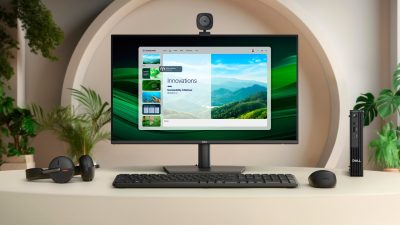
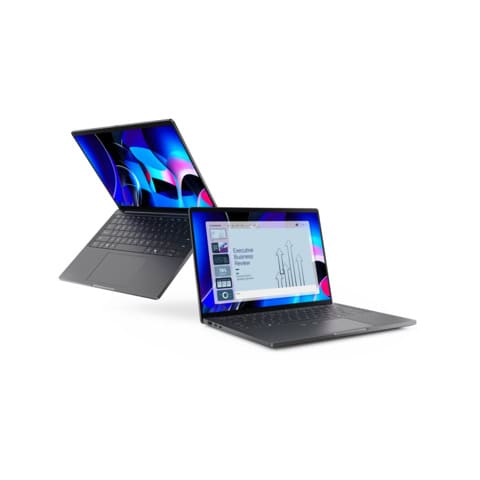
Today, Dell announced a bunch of laptops under its Pro Notebooks lineup, powered by Intel and AMD processors. However, among the announced devices the highlight is the Dell Pro 5 Micro. It is the company’s new PC designed for business users, and it’s bringing some of Intel’s Panther Lake processors into a surprisingly compact form factor. Speaking of which, ASUS also recently launched the NUC 16 Pro, which targets high-end mini PC market.

Dell brings Panther Lake power to a compact business PC

The new mini PC supports up to an Intel Core Ultra 7 366H vPro processor, alongside configurations with the Core Ultra 5 335 vPro. These chips come with built-in NPUs, enabling support for Microsoft’s Copilot+ platform (the first for the Pro series desktop PC), with AI performance reaching up to 50 TOPS.

Image: Dell

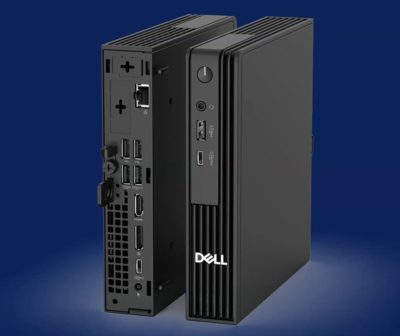
Despite its compact 182 x 178 x 36mm design, the system is immensely powerful. It supports up to 64GB of DDR5 RAM across two SODIMM slots, along with dual M.2 PCIe 4.0 SSDs. There’s also an additional slot for wireless connectivity, with options going up to Wi-Fi 7 and Bluetooth 6.0.

It’s worth noting that you can power the Dell Pro 5 Micro with a 90W AC adapter. Notably, it is also compatible with a 100W USB Type-C charger. In other words, you can power the device and connect it to a display using just a single USB-C cable, keeping the setup clean and minimal.

Image: Dell

You get plethora of ports

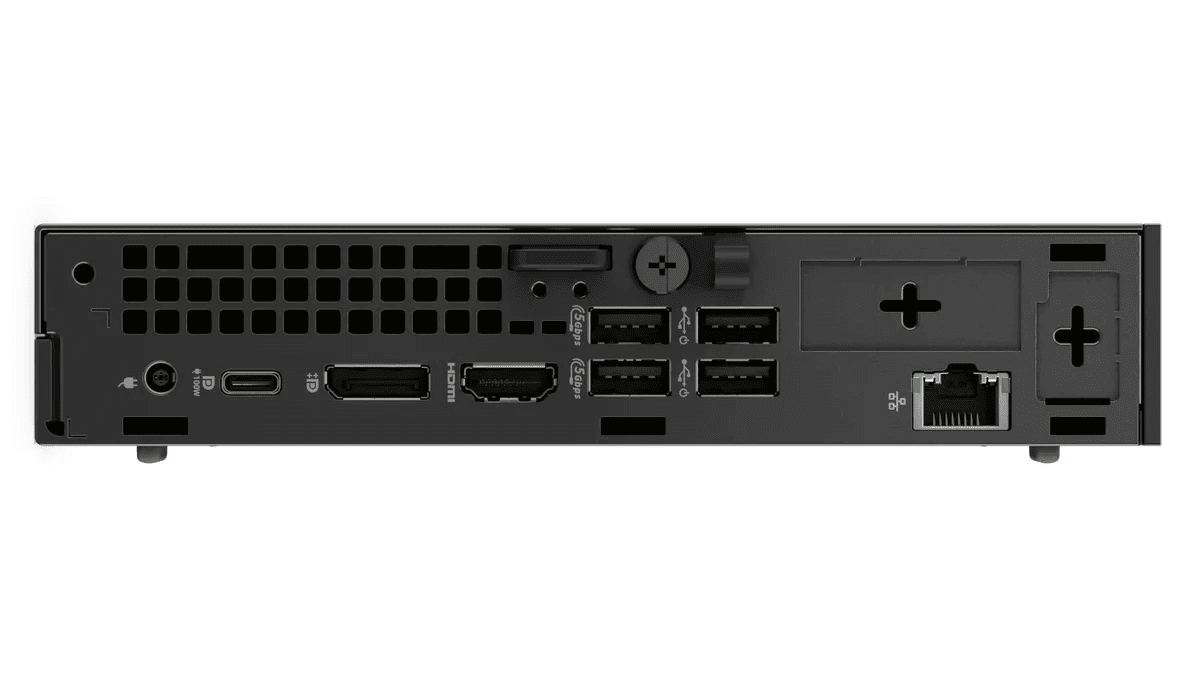
Not to forget, it comes with configurable port with a modular design. You can choose to an extra HDMI, DisplayPort, Ethernet, or USB port, or even go VGA, PS/2, or a serial port if your setup still depends on them. Port selection is comprehensive for this mini PC. It includes:

  • 1 x USB Type-C
  • 1 x USB 3.2 Gen 2 Type-C
  • 3 x USB 3.2 Gen 1 Type-A
  • 2 x USB 2.0 Type-A
  • 1 x DC power input
  • 1 x Gigabit Ethernet
  • 1 x HDMI 2.1
  • 1 x DisplayPort 1.4a
  • 1 x 3.5mm audio jack
Image: Dell

Dell has further highlighted thermal improvements this time around. The company claims the Pro 5 Micro runs 10% cooler than its predecessor, which could matter a lot in a busy workplace environments. Last but not least, the device will officially launch on March 31.

Dell’s Latest Pro Notebooks Are Copilot+PCs with Ryzen AI & Intel Core Ultra Power

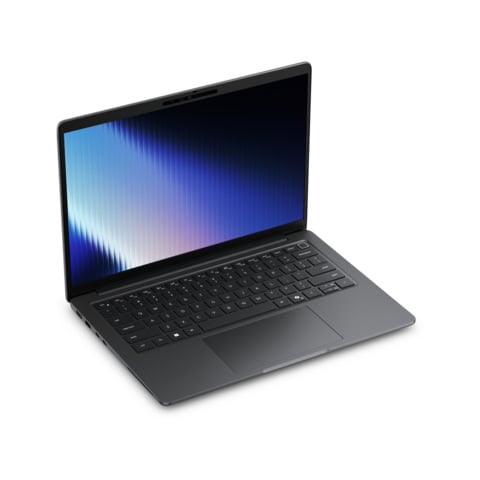
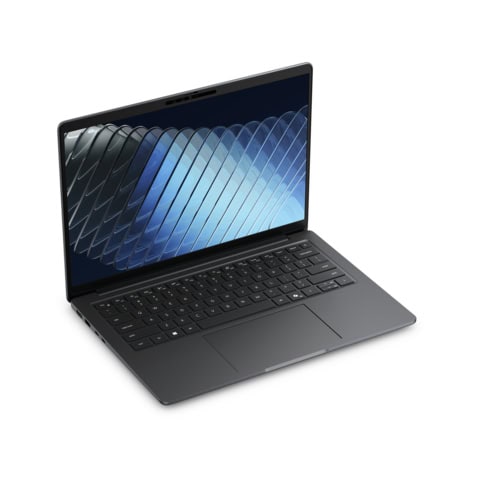
Dell has just unveiled its latest Pro notebook lineup, and this time, the focus isn’t just on thinner designs but also on packing in more power and AI capabilities across the board. The new Dell Pro notebooks span multiple tiers, targeting everyone from executives to entry-level business users.

Dell Pro lineup goes thinner, lighter, and more configurable

Under the hood, the lineup supports the latest Intel Core Ultra Series 3 and AMD Ryzen AI 400 processors, bringing on-device AI and Copilot+PC experiences. Dell says a redesigned modular motherboard allows for larger fans, better thermals, and improved battery efficiency, while also enabling more flexible configurations.

Speaking of the Dell Pro Premium, it’s built for executives. It’s up to 7% thinner, uses a magnesium alloy chassis, and comes in a 14-inch form factor. It also offers a Tandem OLED display and an 8MP HDR camera, while being the lightest model in the lineup.

Image: Dell

Meanwhile, the Dell Pro 7 is designed for consultants and sales professionals. The laptop is available in 13-inch and 14-inch sizes, including 2-in-1 variants. It’s up to 18% thinner, features an aluminum build, and seek edge-to-edge Gorilla Glass touchscreen. The OLED display comes with up to 500 nits of brightness, while you also get an 8MP camera and mini-LED keyboard tech for better efficiency.

Image: Dell

Next in the lineup is the Dell Pro 5, which focuses on scalability. You get two modes, offering 14-inch and 16-inch displays, with Intel and AMD CPU choices, memory, and storage options. It’s up to 12% thinner than before and up to 21% thinner than competing designs. Dell says the laptop is available with OLED displays offering 400- and 500 nits brightness and is paired with a 70Wh battery for longer sessions.

Image: Dell

Last but not least, you have the Dell Pro 3, which is suitable for entry-level users. It weighs approx. 2.89 pounds, comes in 14-inch and 16-inch sizes, and includes features like Wi-Fi 7, optional WWAN, 400 to 500 nit displays, and a durable metallic finish.

Dell Pro 5 Micro is a compact Copilot+ mini PC

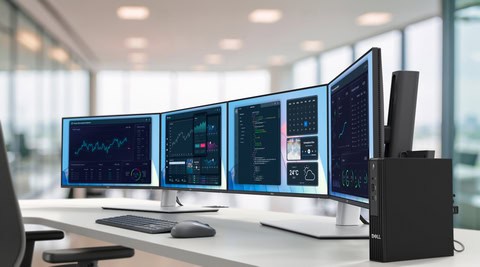
Not to forget, the company has also announced the Dell Pro 5 Micro, which offers desktop-class performance in an ultra-compact form factor designed for a less spacious working environment. The said Copilot+ mini PC comes with a plethora of connectivity options and supports up to five external monitors at one go.

Image: Dell

Microsoft Ranks 5th in Metacritic 2026 Publisher List, Outperforms Sony and Nintendo

Microsoft has secured a strong position in Metacritic’s 2026 publisher rankings, finishing 5th based on its 2025 releases. According to Pure Xbox, the company achieved an average Metascore of 80, outperforming both Sony and Nintendo.

Metacritic’s annual rankings evaluate publishers based on the critical reception of their games, and Microsoft’s cross-platform strategy played a key role in this year’s results.

PS5 Ports Help Microsoft Climb the Rankings

Microsoft ranked ahead of Sony, which landed in 21st place with an average score of 74, and Nintendo, which placed 12th with 77. The top five publishers included Square Enix, Capcom, Gamirror Games, Thunderful, and Microsoft.

A major factor behind Microsoft’s success was its growing focus on bringing Xbox titles to PlayStation. Its highest-rated game of 2025 was the PS5 version of Forza Horizon 5, which achieved an impressive score of 92. Indiana Jones and the Great Circle, also released on PS5, followed as the second-highest-rated title.

These cross-platform releases significantly boosted Microsoft’s overall Metascore, showing the impact of expanding beyond the traditional Xbox ecosystem.

Mixed Results Across Microsoft’s Portfolio

Despite strong highlights, not all releases performed equally well. Microsoft’s portfolio includes titles from major subsidiaries such as Bethesda, Activision, and Blizzard, and around 19% of its 2025 releases received mixed or negative reviews.

Among the top-performing Xbox releases, Tony Hawk’s Pro Skater 3 + 4 stood out as a major success under Activision, while The Outer Worlds 2 emerged as the best-performing title from Xbox Game Studios.

On the other hand, some releases fell short of expectations. Call of Duty: Black Ops 7 and additional Indiana Jones DLC received weaker reviews, dragging down the overall average.

Cross-Platform Strategy Proves Its Value

Microsoft’s performance highlights the growing importance of cross-platform publishing. By releasing games on PlayStation, the company reached a wider audience and improved its critical reception.

This approach aligns with Microsoft’s broader strategy, including efforts to make development easier for upcoming initiatives like Project Helix. Expanding accessibility across platforms appears to benefit both players and overall game quality.

However, the industry may be moving in different directions. While Microsoft embraces cross-platform releases, reports suggest that Sony is scaling back its own efforts in this area.

Microsoft’s strong showing in the rankings comes amid other ongoing changes within the Xbox ecosystem. The company is reportedly rebranding Xbox Full Screen Experience to Xbox Mode, signaling UI and platform updates.

There are also discussions around potential changes to Xbox Game Pass pricing, which could further reshape Microsoft’s gaming strategy moving forward.

Overall, Microsoft’s 5th-place finish reflects a shift in how the company approaches game distribution. Cross-platform releases are no longer just an experiment; they are becoming a core part of Xbox’s long-term strategy.

Report: AMD’s Ryzen CPUs Could See Up to 15% Price Hike Soon

The PC market is already facing issues due to the ongoing global memory shortage. However, the situation, which many hope will gradually improve, seems to be getting worse. Last week, a report by ET News hinted that Intel is preparing to hike the price of popular Core Ultra CPUs by up to 10%. Well, AMD, another major player in the CPU market, is reportedly gearing up to hike the price of its Ryzen CPUs.

AMD reportedly joins Intel in CPU price hike wave as shortages worsen

According to a report from earlier today by Nikkei Asia, AMD is also joining the CPU price hike trend alongside Intel (via TechPowerUp). Per the report, AMD could raise Ryzen processor prices by around 15% year-over-year. A report from late last year also pointed towards a price hike of Ryzen CPUs.

Both AMD and Intel have reportedly already informed their partners that the price increases will take effect by the end of March and into April. Speaking to the news outlet, a server maker executive working with NVIDIA, AMD, and Intel said, “Previously, the average lead time for a CPU was around one to two weeks, but now the wait time has prolonged to an average of eight to 12 weeks.” In the worst-case scenario, the wait could be as long as “six months.”

That timing suggests consumers may start seeing higher CPU prices very soon, especially as inventory shortages hit across the board. The situation appears to be driven by a mix of high demand and limited supply. With companies prioritizing server and data center chips to fulfill the AI industry’s needs, production capacity for client PCs has reportedly taken a hit.

As a result, inventory levels for enthusiast-grade CPUs are running low, and restocks are taking significantly longer than before. Major OEMs like HP and Dell are reportedly facing a big gap between demand and available stock for PC systems. It’s also worth noting that a report from yesterday hinted that ASUS may raise PC prices by up to 30%, starting in Taiwan, due to a global memory crunch. Moreover, Ayaneo has also temporarily paused sales of its Next 2 Windows handheld due to similar reasons.

Intel Arc Pro B70 and B65 Launch With Up to 32GB VRAM for AI Workstations

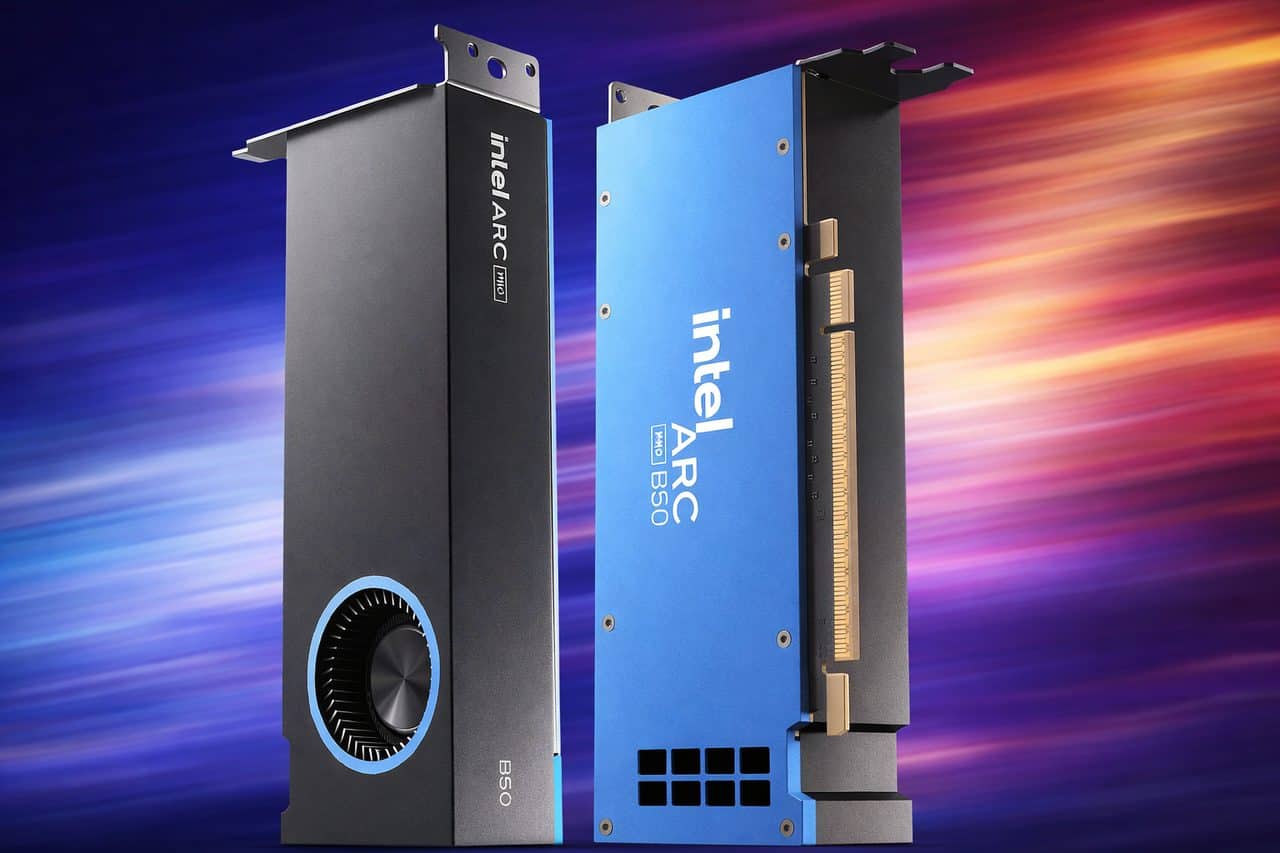
Intel is expanding its professional GPU lineup once again. Not long after introducing Core Ultra 7 270K Plus and Core Ultra 5 250K Plus, the company has now unveiled new Arc Pro graphics cards built specifically for AI and workstation workloads.

According to Neowin, Intel announced the Arc Pro B70 and Arc Pro B65 during its Pro Day 2026 event, positioning both GPUs as scalable solutions for modern AI-driven environments.

Built for AI, content creation, and engineering workloads

The new Arc Pro GPUs target demanding professional use cases such as content creation, engineering simulations, and AI inferencing. Intel also highlights support for multi-user and multi-agent AI scenarios, signaling a strong push into enterprise AI infrastructure.

Both GPUs rely on Intel’s Xe2 architecture and scale up to 32 Xe cores alongside configurations with up to 32GB of VRAM. This combination aims to handle larger datasets and more complex AI models without bottlenecks.

Intel pushes AI efficiency and multi-user performance

Intel is putting heavy emphasis on AI inference efficiency with these new cards. The Arc Pro B70, in particular, is positioned against competitors like NVIDIA’s RTX Pro 4000, with several bold claims.

The company states that its GPU can deliver up to 2.2 times larger context windows, allowing models to process more data at once. It also promises up to 6.2 times faster responses in multi-user and multi-agent environments, which are increasingly common in enterprise AI deployments.

Another key highlight is up to 2 times better tokens-per-dollar efficiency, suggesting improved cost performance for businesses running AI workloads at scale.

Designed for scalable and flexible deployments

Intel designed the Arc Pro B70 and B65 for both single-GPU systems and multi-GPU setups. This flexibility makes them suitable for everything from individual workstations to edge AI deployments and small-scale data centers.

The GPUs use an open and validated software stack, which Intel says will provide better compatibility and flexibility compared to more closed ecosystems. This approach could appeal to enterprises looking to avoid vendor lock-in while scaling AI operations.

Pricing, availability, and partners

The Arc Pro B70 launches on March 25, 2026, with Intel setting a starting price of $949 for its own branded version. Meanwhile, the Arc Pro B65 will arrive in mid-April, but it will only be available through board partners rather than directly from Intel.

Partners such as ASRock, Gunnir, Maxsun, and Sparkle are expected to offer custom versions of the GPUs.

Unlike Intel’s gaming-focused Arc lineup, these new models focus entirely on professional and enterprise use cases, including workstation builds and edge AI systems.

Intel continues expanding Arc ecosystem

The announcement comes alongside other recent Intel updates, including precompiled shader improvements for Arc GPUs and new mobile processors like the Core i7 HX series.

With the Arc Pro B70 and B65, Intel is clearly doubling down on AI and workstation markets, aiming to compete more aggressively with established players in professional graphics and AI acceleration.

Intel Releases New Wi-Fi and Bluetooth Drivers With Stability Improvements

Intel has been rolling out several updates recently, including new Core Ultra processors and Arc GPU improvements. Now, the company is back with a more routine release focused on connectivity.

Intel has released new Wi-Fi and Bluetooth drivers (version 24.30.1) for 64-bit versions of Windows 10 and Windows 11, bringing stability improvements, performance tweaks, and a notable change for older hardware.

Improved stability and broader hardware support

The latest driver update supports a wide range of Intel wireless adapters, including newer Wi-Fi 7 models such as BE200, BE201, BE202, BE211, and BE213. It also covers popular Wi-Fi 6E and Wi-Fi 6 chipsets like AX210, AX211, AX411, AX101, AX201, and AX203, along with several older Wireless-AC adapters.

With version 24.30.1, Intel focuses on improving overall connection reliability. Users may notice fewer drops, better consistency, and smoother performance across supported devices.

Performance tweaks and regulatory updates

Intel has also included functional and security updates in this release. While the company did not highlight major feature additions, the update delivers small performance improvements and fixes tied to vendor-specific features.

In addition, the driver introduces regulatory updates for regions including Oman, Brazil, and Pakistan. These changes ensure compliance with local wireless standards and requirements.

AX200 support has been officially removed

One of the most important changes in this release is the removal of support for the Intel Wi-Fi 6 AX200 adapter. Since the hardware is now discontinued, Intel no longer includes it in newer driver packages.

Users still running AX200-based systems will need to stick with older driver versions, as future updates will not support this adapter.

Bluetooth update remains minimal

Alongside the Wi-Fi driver, Intel also released the Bluetooth driver version 24.30.1. However, the company did not provide a detailed changelog for this update.

It includes general functional improvements, but no major new features or notable fixes were highlighted.

A small but useful update

While this release may not be as exciting as Intel’s recent hardware announcements, it delivers practical improvements for everyday users. Those experiencing connection instability or performance issues should consider updating.

For users with supported hardware, this update offers a simple way to improve network reliability. However, AX200 owners will need to plan around the end of support moving forward.

Via Neowin

Copilot Mobile App to Soon Get “Chat-First Design”

After resdesigning Copilot Notebooks, Microsoft appears to be gearing up to update the Copilot mobile app. And this time, the focus seems on simplifying how users interact with the AI assistant.

Microsoft is ready to push a chat-first Copilot experience on mobile

According to a new entry (ID 559310) on the official Microsoft 365 Roadmap, first spotted by Windows Report, the company has detailed what it calls “refreshed chat-first design” for the Microsoft 365 Copilot mobile app.

In the roadmap entry, the company notes, “This update includes a modernized design language, streamlined navigation, and other improvements that make it easier and faster for users to start, continue, and manage chats on the mobile app.”

Although it sounds like a much more of a redesign thing, Microsoft is trying to implement the idea of chat becoming the primary way users interact with productivity AI tools. Rather than simply jumping between features, users will likely rely more on a central chat interface to manage tasks, documents, and workflows.

The update, which is scheduled to rollout sometime in April, will be up for Copilot app users on both Android and iOS. As of now, Microsoft hasn’t shared a precise timeline beyond the April rollout window, but the update is marked for general availability.

Let’s not forget that Copilot Notebooks is also scheduled to get a few updates next month. You’ll be soon be able to use Copilot Notebooks to create Word document and PowerPoint presentations.

Switch 2 Handheld Mode Boost Delivers Better Graphics and FPS for Classic Games

Nintendo has rolled out a new system update for its latest console, introducing a feature aimed at improving how older games run on newer hardware.

With update 22.0.0, the company added “Handheld Mode Boost,” a feature designed to enhance backward compatibility for original Nintendo Switch titles when played on Switch 2.

Handheld Mode Boost upgrades older games on Switch 2

“Handheld Mode Boost” allows compatible games to run in handheld mode using their docked (TV mode) settings. This effectively removes previous limitations tied to the original Switch’s portable hardware profile.

Since Switch 2 features a 1080p handheld display, many older titles now render at higher resolutions and appear noticeably sharper. The upgrade brings a more refined visual experience without requiring developer patches.

According to Digital Foundry, the improvements go beyond simple resolution scaling. Games benefit from cleaner image output, improved texture filtering, and better lighting in certain scenarios. Even titles that originally ran at lower resolutions now look significantly clearer on the upgraded screen.

Performance gains and limitations to consider

The update also delivers measurable performance improvements in several games. Titles such as Mario Kart 8 Deluxe, Luigi’s Mansion 3, Persona 5 Royal, and Xenoblade Chronicles 2 show enhanced visual quality, while more demanding games like DOOM, DOOM Eternal, and Alan Wake benefit from smoother performance.

In some cases, gains are substantial. Digital Foundry reports that Resident Evil 5 runs significantly faster compared to its original docked performance on the first Switch, with estimates suggesting up to roughly double the GPU performance in certain scenarios.

However, the feature comes with trade-offs. Increased power consumption is expected due to higher performance targets, and touch input may be disabled in some games when running in boosted mode. Additionally, the feature only applies to backward-compatible Switch titles and does not impact native Switch 2 games.

Despite these limitations, Handheld Mode Boost effectively acts as a system-wide upgrade for older titles, offering a noticeable improvement in both visuals and performance for players revisiting their game libraries.

In other news, reports suggest Nintendo may introduce a new Switch 2 model in the EU featuring a removable battery, while the company is also expected to scale back production following weaker-than-expected sales in the U.S.

Via VideoCardz

These 7 Games Are Confirmed for Xbox Game Pass in April 2026

After a packed month, featuring some blockbuster titles like Cyberpunk 2077, along with several more releases coming later this week, the Xbox Game Pass catalog already looks busy for April 2026. The gaming service is reportedly getting a mix of day-one launches, classic RPGs, and a few unexpected additions across genres.

Xbox Game Pass April 2026 lineup brings Kiln, Clair Obscur: Epedition 33, and more

Starting on April 2, Barbie Horse Trails joins the Game Pass library alongside the award-winning Clair Obscur: Expedition 33.

A few days later, Final Fantasy IV lands on April 7 with its Pixel Remaster version. You can expect the return of a classic story with updated visuals and gameplay experience. Notably, Replaced, a long-awaited cyberpunk platformer, lands day one on April 14.

That’s followed by Vampire Crawlers on April 21, which takes a different approach with its roguelite deckbuilding mechanics. Toward the end of the month, Kiln adds a party brawler multiplayer twist on April 23. Meanwhile, Aphelion closes things out on April 28 with a cinematic sci-fi adventure.

Speaking of games, it’s worth noting that 43 new games are landing across Xbox Series X|S, Xbox One, and PC. Not to forget, two fresh Xbox Game Pass additions, including Absolum and Nova Roma (Game Preview), are landing tomorrow.

Sony Confirms PS5 Pro PSSR Shares Core Tech With AMD FSR

We recently saw Sony introduce PSSR upscaling with the PS5 Pro, but new details now clarify how closely it aligns with AMD’s FSR. Fresh insights from a Digital Foundry interview reveal that both technologies come from the same underlying foundation, despite differences in execution.

Shared Origins in Project Amethyst

During the interview, PlayStation lead architect Mark Cerny confirmed that Sony’s PSSR and AMD’s FSR upscaling rely on a co-developed algorithm. This shared foundation comes from internal work known as Project Amethyst, which focuses on modern reconstruction techniques using machine learning.

Although both solutions stem from the same research, each company adapted the technology differently to match its hardware environment. That divergence explains why the results feel similar while the implementation varies significantly.

INT8 vs FP8: Different Paths to Similar Results

The main difference between PSSR and FSR lies in how each platform handles precision. AMD uses FP8, or 8-bit floating point, in its latest FSR 4.1 implementation on PC hardware. Sony, on the other hand, relies on INT8, or 8-bit integer processing, on the PS5 Pro.

These choices are tied directly to hardware constraints. The PS5 Pro uses a hybrid architecture that builds on an RDNA 2 base while incorporating newer ray tracing capabilities and custom machine learning hardware. This setup favors INT8 efficiency, even if FP8 can offer slightly higher precision on newer GPUs.

Image Quality Differences Are Minimal

Despite the technical differences, the visual output between PSSR and FSR remains very close. Cerny described the results as “rather close,” suggesting that most players will not notice meaningful differences during gameplay.

Internal comparisons indicate that INT8-based upscaling performs slightly below FP8 on newer RDNA 4 GPUs, but it still delivers better results than older analytical approaches like FSR 3.1. Earlier experimental builds using INT8 already showed strong performance on RDNA 2 and RDNA 3, reinforcing the viability of Sony’s approach.

PC Limitations vs Console Optimization

On PC, AMD currently restricts its machine learning-based FSR 4.1 to RDNA 4 GPUs, such as the Radeon RX 9000 series. Older graphics cards fall back to FSR 3, which does not use machine learning.

This creates a contrast between platforms. The PS5 Pro benefits from a tailored implementation that enables advanced upscaling on fixed hardware, while many PC users need newer GPUs to access similar features.

Future Possibilities for Older GPUs

The shared technological foundation raises the possibility that INT8-based upscaling could eventually reach older AMD GPUs. Early demonstrations proved that such methods can run on RDNA 2 and RDNA 3 hardware, but AMD has not confirmed any plans to bring this capability to existing PC users.

For now, this remains a theoretical opportunity rather than an announced feature.

Sony’s Next Steps for PSSR

Sony appears to be taking a measured approach to expanding PSSR. Reports indicate that the PSSR Enhance toggle will not receive further updates, while more advanced features like frame generation remain under consideration but are not expected in the near term.

As both Sony and AMD continue refining their upscaling technologies, the gap between console and PC solutions continues to narrow, even as each platform follows its own technical path.

Via VideoCardz

Microsoft Teams Mobile to Get “Catch Up” Feature for Chats and Meetings

Microsoft is expanding its mobile experience with a new productivity-focused feature for Teams users. While we already know that Teams Rooms on mobile will receive live meeting transcription, Microsoft is now introducing another update aimed at improving message visibility.

According to Microsoft 365 Admin Center (Message ID: MC1260707), the company is rolling out a new “Catch up” feature in Microsoft Teams mobile.

Catch up helps users quickly review missed activity

The new “Catch up” feature gives users a streamlined way to stay on top of conversations they may have missed. It aggregates activity across chats, meeting chats, and followed channels or threads into a single, easy-to-digest view.

Users will see a new card-based interface inside the Chat section. By tapping the “Catch up” option, they can browse recent messages displayed as individual cards, making it easier to scan updates quickly.

The feature also introduces simple swipe gestures for faster message management. Swiping right marks a message as read, while swiping left keeps it unread for later review.

Mobile-only feature with no admin setup required

Microsoft confirms that “Catch up” is exclusive to mobile devices and does not impact the desktop version of Teams. The feature will be enabled by default, so admins do not need to configure anything before rollout.

However, Microsoft recommends that administrators inform users about the change and update any internal documentation if necessary. The goal is to help organizations reduce missed messages and improve response times across teams.

The rollout will begin with a targeted release to users in April 2026, followed by general availability in early May 2026.

As for other updates, Microsoft has delayed native screen sharing support on macOS, and the company has also confirmed that the Teams Meeting add-in is preventing some users from accessing Outlook Classic.

Via Neowin

Xbox Game Pass Explained: Plans, Price, Features, and How It Works

Xbox Game Pass, in short, is a monthly subscription-based gaming pass that comes in multiple tiers and gives you access to hundreds of games across console, PC, and cloud. And yeah, it kind of flips the whole “buy every game” idea on its head. If you have not checked in on the service recently, a lot has changed. This Xbox Game Pass guide will help you learn everything you need to know.

Everything you need to know about Xbox Game Pass

What Exactly Can You Expect Out of Xbox Game Pass?

If you have paid for and used media streaming platforms like Prime Video or Netflix, it’s similar, but this one is for games. Rather than paying a high price for something big, you just pay one monthly fee and jump into a huge, constantly changing library.

Here, we’re talking everything from day-one releases, like Minecraft Dungeons II, which is coming this fall, to smaller indie picks you probably wouldn’t have tried otherwise. Stuff like Call of Duty sitting right next to something like Hollow Knight. That mix is kind of the whole point.

That said, Game Pass in 2026 looks very different from what it used to be. In October 2025, Microsoft overhauled the pricing, rebranding tiers, shifting features, and pushing Game Pass Ultimate’s price up 50% from $19.99 to $29.99 per month. A recent report also claims that Microsoft might be adjusting Xbox Game Pass pricing once again.

What are the different Tiers of Xbox Game Pass?

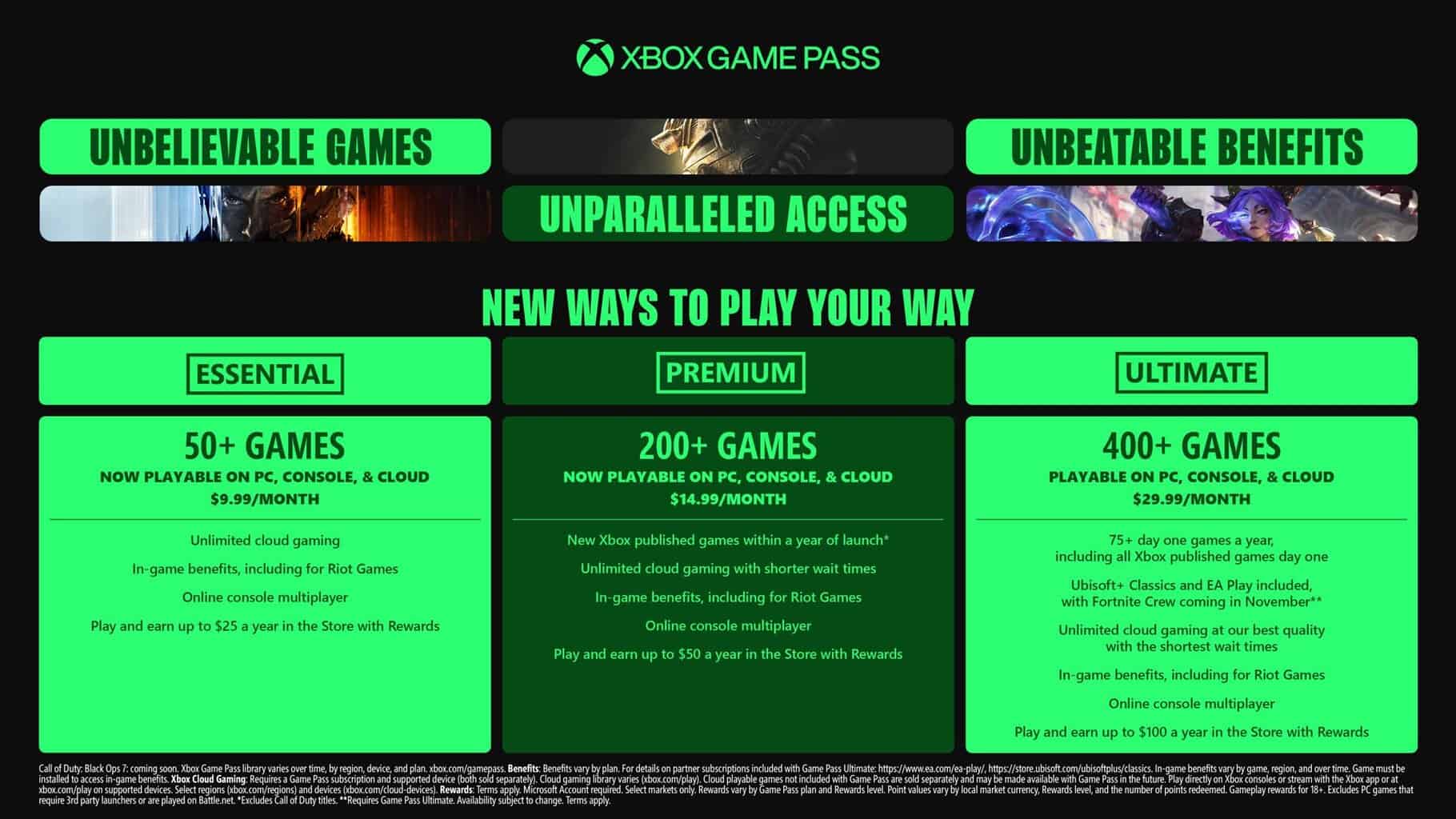
There are four plans right now, each designed for a different type of player.

  • Xbox Game Pass Essential at $9.99 per month is the entry-level tier. It covers online console multiplayer, around 50 games on console and PC, Xbox Cloud Gaming access, and member discounts in the Microsoft Store. Day one titles, EA Play, Ubisoft Plus Classics, and Call of Duty are not included. This Xbox Game Pass plan is best for players who stick to a few multiplayer games and want the lowest cost option.
  • Xbox Game Pass Premium at $14.99 per month steps things up with 200+ games across console, PC, and cloud. New Xbox-published titles join the library within 12 months of launch, though Call of Duty is excluded even on that delayed basis. EA Play and day one access are still not part of this tier. For players who want a large library across platforms without paying the highest price, this is the best value of the four tiers.
  • Xbox Game Pass Ultimate at $29.99 per month is where you get the full package. You get 400+ games, day one first-party releases including Call of Duty, EA Play, Ubisoft Plus Classics, Fortnite Crew, and Xbox Cloud Gaming at up to 1440p with priority queue access. Microsoft has committed to 75-plus day one launches per year on this tier. The price is steep compared to what Ultimate used to cost, but frequent players who use all the bundled perks will find the value adds up quickly.
  • PC Game Pass at $16.49 per month is built for Windows-only players. You get the full 400+ game library, day one titles including Call of Duty, EA Play, and Ubisoft Plus Classics. There is no console access, no Xbox Cloud Gaming on mobile or TV, and no Fortnite Crew. For PC-only gamers, it gives you most of what Ultimate offers at roughly half the price, making it one of the strongest deals in gaming subscriptions right now.
Image credit: Microsoft

How Do Games Come and Go From Xbox Game Pass?

This is something every Xbox Game Pass subscriber should understand. All Microsoft first-party titles from Xbox Game Studios, Bethesda, and Activision Blizzard remain permanently on the service, with rare exceptions related to licensing issues. However, third-party games usually rotate out following predictable patterns, with monthly removal typically ranging from 5 to 12 games.

The good news for you is that Xbox Game Pass additions consistently outpace departures. It’s important to note that Microsoft usually gives advance notice before a game leaves, and subscribers get exclusive discounts to purchase departing titles if they want to keep them. Your save data stays safe through Xbox cloud saves even if you unsubscribe.

Do You Need an Xbox Game Pass Subscription for Xbox Play Anywhere?

Xbox Play Anywhere is a feature that gives you dual ownership of a game on both Xbox consoles and PC through a single purchase or subscription. In short, there is no additional cost for Xbox Play Anywhere. When you own a digital game that supports Xbox Play Anywhere, the ability to play on your Xbox console, Windows 10/11 PC, and supported gaming handheld device is included at no additional charge. If you start a game on your Xbox and want to continue on PC or a handheld like the ROG Xbox Ally, your save carries over seamlessly.

Image credit: Microsoft

Does Xbox Game Pass Work on PC?

Yes, through the Xbox app on Windows 10 and Windows 11. The Xbox app now lets subscribers launch games directly from the cloud without installing them locally. If you use NVIDIA GeForce Now, you can also link your PC Game Pass account to stream your library through that service on top of Microsoft’s own cloud infrastructure.

Does Xbox Game Pass Have a Family Plan?

No, it’s not available right now. Microsoft reportedly tested the Friends and Family plan in limited markets from September 2022 through August 2023. At the time, it cost roughly $21.99 per month for up to five users. However, the company discontinued it without a wider launch. At the time, Phil Spencer reportedly acknowledged the plan remains on the roadmap. Well, in early 2026, Phil Spencer retired from the company. As of now, there’s no word on the relaunch of such a plan.

Image credit: Microsoft

How to Buy or Cancel an Xbox Game Pass Subscription?

You can sign up directly on your Xbox console through the Game Pass tab, or online at xbox.com. To cancel, go to My Microsoft Account on xbox.com and end your subscription before the next billing date. You can also check our dedicated guide to cancel Xbox Game Pass Ultimate. For PC players, we have another guide that talks about canceling Game Pass on PC. You will keep full access until the end of your current paid period, and your saved data remains even after cancellation.

Which Xbox Game Pass Plan is the Best for You?

If you only play a couple of multiplayer games and want the lowest cost, the Essential at $9.99 is enough. Those looking for a large library across console and PC and can live without day one releases, Premium at $14.99 is the best value per dollar. If you game heavily, want every major release on launch day, including Call of Duty, and get value from EA Play and Ubisoft Plus Classics, Ultimate at $29.99 is worth it. If you only play on PC, PC Game Pass at $16.49 gives you almost everything Ultimate does at a much lower price.

How Do You Save Money on Game Pass?

Microsoft does not offer an official annual discount on any Game Pass tier. However, prepaid three-month or longer subscription codes from retailers like Amazon, Best Buy, and CDKeys can be applied to your account and often go on sale. The Microsoft Rewards program is also worth using. You can earn points through Bing searches, daily tasks, and playing Game Pass games, then redeem those points for Game Pass codes or Xbox gift cards to effectively reduce your monthly cost.

Not to forget, you can also check our guide on different ways to get Xbox Game Pass for free. Just in case you are looking to gift an Xbox Game Pass to your family and friends, here’s another guide worth checking.

What is Xbox Cloud Gaming?

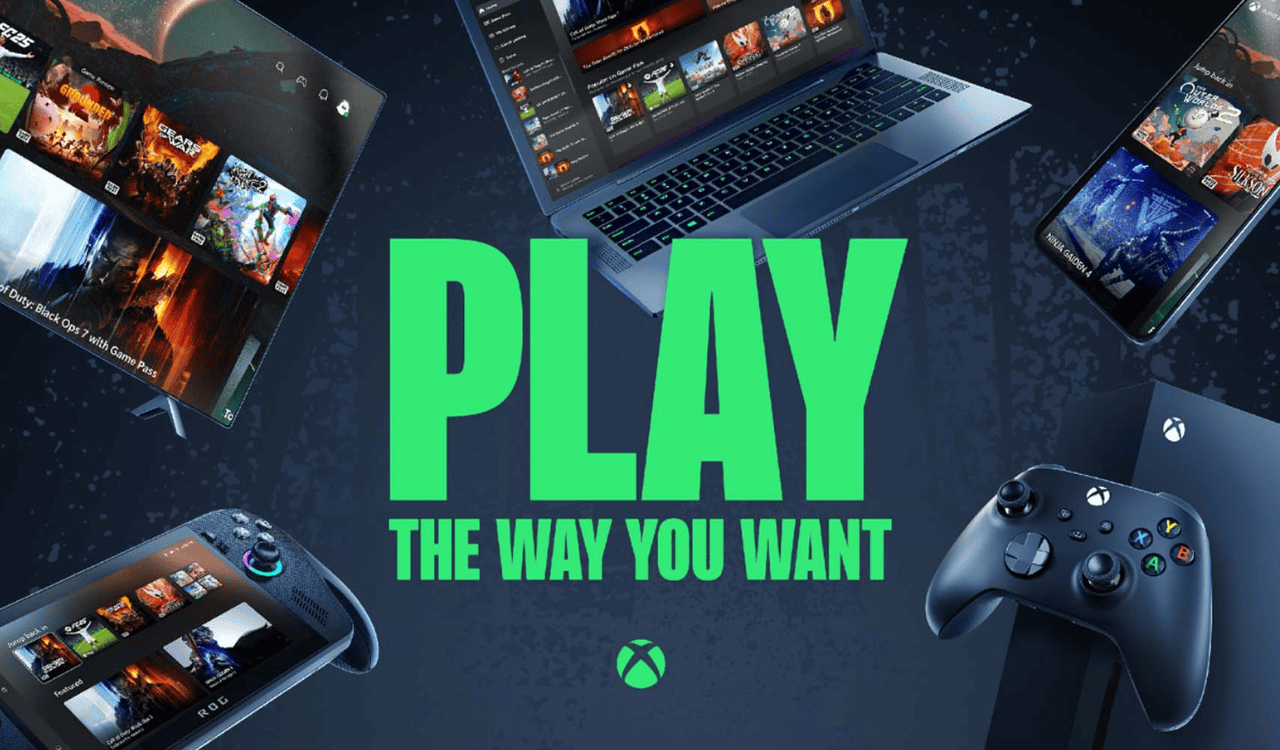
Xbox Cloud Gaming lets you play games anywhere you have a compatible internet-connected device. It works across phones, tablets, laptops, smart TVs, and web browsers, streaming games directly from Microsoft’s servers so you can jump in without downloading or installing anything.

Xbox Cloud runs on servers built around Xbox Series X hardware, meaning you are effectively streaming from the most powerful console specs available. It is included in Essential, Premium, and Ultimate but not in PC Game Pass. Queue times vary by tier, with Ultimate getting priority access and the best streaming quality at 1440p.

Image credit: Microsoft

Cloud Gaming is also a smart way to test a game before committing to a large download. If you are an Ultimate subscriber and unsure about a title, streaming it for 15 minutes costs you nothing and saves potentially hours of download time.

Does Xbox Game Pass include online multiplayer?

Yes. Essential, Premium, and Ultimate all include online console multiplayer. On PC, multiplayer is generally free through the game’s own servers, so it is not a feature you need Game Pass to unlock there.

Can I keep my games if I cancel my Xbox Game Pass subscription?

No. You lose access to Game Pass titles the moment your subscription ends. You can buy games at a subscriber discount before cancelling, and your save data is preserved through Xbox cloud saves.

Do all Game Pass games support cross-save between Xbox and PC?

Most first-party titles do through Xbox Play Anywhere. Some games use their own systems. Not every third-party title in the library supports cross-save.

Is Call of Duty on Xbox Game Pass?

Yes, major Call of Duty titles are available on Game Pass, including Call of Duty: Black Ops 6 and Black Ops 7. These are available on day one for Xbox Game Pass Ultimate and PC Game Pass subscribers.

Can I stream Game Pass games on my phone or TV?

Yes, through Xbox Cloud Gaming on Essential, Premium, and Ultimate. It works on Android phones, supported smart TVs, Amazon Fire TV Stick 4K, tablets, and web browsers on most devices.

Microsoft 365 Copilot Declarative Agents Get GPT-5.2 Boost with Better Reasoning

Microsoft is continuing its rapid AI rollout across its ecosystem, and this time the focus is on improving how Copilot actually thinks and works.

After the announcement of GPT-5.4 Mini and Nano, Microsoft has quickly integrated them into AI Foundry. The company is now shifting its focus to upgrading Microsoft 365 Copilot Declarative Agents to GPT-5.2.

GPT-5.2 brings stronger reasoning and workflow intelligence

The upgrade centers on improving how Copilot handles complex, multi-step tasks inside enterprise environments.

With GPT-5.2, Copilot agents can now better plan, iterate, and execute tasks that require structured thinking. This includes workflows that involve multiple steps, decision-making, and interaction with various tools.

Microsoft is also enhancing how Copilot connects with APIs, enterprise data sources, and internal systems. The result is more reliable automation and smoother orchestration across business workflows.

Better document analysis and structured outputs

Another major improvement comes in how Copilot processes and presents information.

The new model improves document understanding, especially when dealing with long or complex content. Summaries are clearer, more accurate, and easier to follow.

Outputs are also more structured, with better formatting for tables, summaries, and responses. This makes Copilot more useful for business scenarios where clarity and consistency matter.

What users and admins should expect

Users will likely notice higher-quality responses and more consistent outputs across workflows.

Some prompts and behaviors may change slightly due to the improved reasoning capabilities, but these changes are expected to enhance overall performance.

The rollout is happening across tenants worldwide, with full availability expected by the end of March 2026. As usual, not all organizations will receive the update at the same time.

Admins do not need to make configuration changes, but Microsoft recommends taking a few proactive steps:

  • Inform Copilot agent builders about the upgrade
  • Test key workflows, especially top business use cases
  • Verify accuracy, tone, reasoning, and formatting
  • Adjust prompts if necessary to align with the new model behavior

This upgrade reflects Microsoft’s broader push to make Copilot more reliable and practical for real-world use.

At the same time, the company is reportedly trimming unnecessary Copilot features in Windows 11 while expanding its AI teams. The long-term focus appears to be on building stronger AI models and advancing toward more capable, enterprise-ready systems.

Microsoft and NVIDIA Team Up to Accelerate Nuclear Energy Development With AI

Microsoft and NVIDIA are teaming up to bring AI into nuclear energy development, aiming to speed up one of the world’s most complex and heavily regulated industries. The move reflects growing pressure to deliver always-on, carbon-free energy as AI workloads and digital infrastructure demand surge globally.

Nuclear energy faces long-standing bottlenecks

Nuclear power has long been seen as a reliable clean energy source, but progress has remained slow due to outdated workflows, fragmented data systems, and lengthy regulatory processes. Microsoft and NVIDIA now want to change that by introducing AI across the entire nuclear lifecycle.

AI transforms the nuclear lifecycle

At the core of the partnership is the use of advanced AI models and simulation tools to streamline permitting, design, construction, and long-term operations.

By combining Microsoft’s cloud and AI ecosystem with NVIDIA technologies such as Omniverse, CUDA-X, and AI Enterprise, the companies are building a unified digital environment tailored for nuclear development.

Faster permitting and reduced paperwork

One of the biggest bottlenecks in nuclear projects has been permitting and compliance. AI now helps automate document generation, reduce manual paperwork, and improve audit readiness. This allows engineers to focus more on safety-critical decisions rather than administrative overhead, while also accelerating approval timelines.

Digital twin technology plays a central role in the initiative. These real-time simulations allow teams to test designs faster, monitor construction progress, and detect potential delays before they escalate. As a result, projects can move forward with greater predictability in both cost and timelines.

AI-driven systems are also improving plant operations after deployment. Predictive maintenance powered by sensors and machine learning models helps identify issues before failures occur, increasing uptime and overall grid reliability.

Early adoption shows strong results

Early adoption already shows measurable impact. Aalo Atomics reportedly reduced permitting time by 92% while saving around $80 million annually. Southern Nuclear is using Copilot-powered agents to assist with engineering and licensing workflows, while Idaho National Laboratory has automated complex safety and engineering documentation processes.

Microsoft is also expanding its nuclear AI ecosystem through partnerships with companies like Everstar and Atomic Canyon, bringing specialized tools into its Azure platform. This broader network aims to standardize how nuclear projects leverage AI, reducing fragmentation across the industry.

A push for faster, scalable clean energy

The overall goal is clear: deliver nuclear energy faster, at lower cost, and with improved reliability, without compromising strict safety and regulatory standards. As global energy demand rises alongside AI adoption, scalable nuclear power could become a critical backbone for future infrastructure.

While Microsoft and NVIDIA continue to collaborate on major initiatives like this, the two companies have expressed differing views on the timeline for artificial general intelligence. At the same time, Microsoft’s broader AI strategy faces added complexity due to its evolving relationship with OpenAI.

Meanwhile, NVIDIA is pushing further into infrastructure innovation, with plans to explore space-based data centers through new modular systems, highlighting how rapidly the intersection of AI and energy is evolving.

MSN Notifications Not Working? Try These 6 Fixes Today

MSN quietly does a lot for you, keeping you updated with news alerts and more. However, when MSN notifications suddenly stop working, it starts to get frustrating fast. After looking into it, we found that many users have reported the same issue. That said, the best part is that the issue is almost always fixable.

What can I do if MSN notifications are not working?

1. Check Windows Notification Settings (Works when the app is installed)

This is the first place to look. If Windows has notifications turned off for MSN at the system level, nothing else matters; you won’t get a single notification. In order to fix that, follow these steps:

  1. Open Settings on your Windows PC
  2. Go to System > Notifications
  3. Scroll down to find MSN or Microsoft News in the app list
  4. Make sure the toggle is switched on
  5. Also, check that banners and sounds are enabled under the app’s notification options

If this was already off, turning it on might be all you need to fix MSN notifications on Windows 11 or Windows 10.

2. Check Browser Notification Permissions (If you’re using MSN in a browser)

If you use MSN in a browser, notifications may have been blocked at some point and never re-enabled.

  1. Open your browser settings
  2. Find the Notifications or Site Permissions section
  3. Locate MSN in the list
  4. Set it to Allow
  5. Refresh the MSN page and test

3. Turn Off Focus or Do Not Disturb Settings

Focus Assist is designed to reduce distractions while you work. If it’s active, MSN notifications may not come through.

  1. Open Settings
  2. Select System
  3. Open Focus or Do Not Disturb
  4. Turn it off or add MSN as an allowed app
  5. Check if it is scheduled to activate automatically, and disable that

4. Check Background App Permissions

If you use the MSN app, background restrictions can block notifications.

  1. Open Settings
  2. Select Apps
  3. Find MSN and click Advanced Options
  4. Set Background App Permissions to Always

For browser users, check if tab sleeping or power-saving features are active, as these can also affect notification delivery.

5. Sign Out and Back Into Your Microsoft Account

Account sync issues often cause inconsistent MSN notifications.

  • Open the MSN app or your browser
  • Sign out of your Microsoft account
  • Restart your device
  • Sign back in and check if notifications resume

6. Reset Browser or Reinstall the MSN App

If nothing else works, resetting clears hidden configuration issues.

  1. For browsers: go to settings and reset all options to default
  2. For the MSN app: go to Settings > Apps > MSN > Advanced Options > Reset
  3. If needed, uninstall and reinstall MSN from the Microsoft Store, then sign back in

Why are MSN notifications not working for you?

One of the following reasons might be the culprit for why you are not getting MSN notifications:

  • Disabled Browser Permissions: If you’ve previously blocked notifications in your browser (Edge, Chrome, etc.), MSN cannot push alerts until you manually re-enable them. This is one of the most common reasons users miss notifications.
  • Windows Notification Settings: Even if MSN itself is working, Windows can block notifications at the system level. Settings like Focus, Do Not Disturb, or general notification toggles can prevent alerts from appearing.
  • Background Restrictions: Both Windows and modern browsers limit background activity to save battery or system resources. If MSN is restricted from running in the background, notifications may not trigger in real time.
  • Account Sync and Personalization: MSN notifications rely on your Microsoft account sync. If sync is disrupted or personalization settings aren’t applied correctly, your notification preferences may not work, even if everything else seems fine.

MSN notifications can fail for several small reasons at once, from permissions to system settings, so it’s worth checking each factor carefully instead of assuming it’s a bug. Often, the fix is straightforward once you find the right setting, even if it seems tricky at first. And while you’re tweaking your MSN experience, you might also want to explore ways to personalize it further, whether that’s restoring MSN as your homepage, managing what appears in your Bing News feed (like blocking certain sources), or even taking a break with some of the best free MSN online games available right now.

Why am I not getting MSN notifications?

Notifications are usually blocked at the browser or Windows level. Checking permissions in both places resolves it in most cases.

Do Focus settings block MSN notifications on Windows 11?

Yes. When Focus settings are active, MSN notifications are stopped without alerting you, so it’s worth checking even if you don’t remember turning them on.

Can battery saver mode block MSN notifications?

Yes, battery saver limits background activity, which can stop alerts until it’s off.

Do MSN notifications work in all browsers?

They work best in Edge and Chrome, but behavior can vary depending on your settings and browser version.

Do I need MSN running to get notifications?

Yes, the app must run in the background to deliver push notifications in real time.

Do I need to be signed in to get MSN notifications?

Yes, you need to be signed in with your Microsoft account for MSN notifications to work; otherwise, alerts won’t sync or appear.

Windows 95 Had a Smart Fix for App Installers That Broke System Files

Microsoft’s Windows history keeps revealing surprising engineering decisions, especially as former insiders continue to share behind-the-scenes stories. After recent criticism of Windows’ fragmented GUI development, another Microsoft veteran has now shed light on how the company tackled one of its earliest reliability nightmares.

According to insights shared by longtime Microsoft engineer Raymond Chen, Windows 95 had to deal with a major issue: installers breaking the operating system by overwriting critical system files.

When installers broke Windows 95

Back in the Windows 95 era, software distribution worked very differently. Applications often shipped with their own copies of system components, known as redistributables, which ensured programs could run even if the required files were missing.

Microsoft provided clear guidance to developers: Only install system components if they were missing or outdated.

However, many developers ignored these rules. Installers frequently overwrote system files without checking versions, replacing newer files with older ones. This created widespread compatibility problems, where newer apps or system features would suddenly stop working after installing unrelated software.

Microsoft’s workaround: the SYSBCKUP folder

To address the issue without breaking installers, Microsoft introduced a clever workaround: the SYSBCKUP directory.

This folder acted as a safety net for important system files:

  • Windows stored backup copies of commonly overwritten components
  • After installation, the system compared installed files with backups
  • If an installer replaced a file with an older version, Windows silently restored the newer one
  • If a newer version was installed, the backup folder was updated accordingly

This approach allowed Windows 95 to maintain system stability without interfering with how installers expected to work.

Why earlier fixes failed

Before SYSBCKUP, Microsoft experimented with other solutions, but none worked well in practice.

Blocking file overwrites caused installers to fail outright, often showing errors that confused users. Another attempt involved using dummy files, but installers frequently performed checksum validation, which made this workaround ineffective.

The SYSBCKUP method struck the right balance. It preserved compatibility with poorly designed installers while still protecting the integrity of the operating system.

A simple fix that solved a complex problem

While the solution may seem simple by today’s standards, it proved highly effective at the time. It allowed Windows 95 to remain stable in an ecosystem where software installation practices were inconsistent and often unpredictable.

Interestingly, some of these historical challenges still echo in modern Windows development. Microsoft is currently working on optimizing Windows 11 performance, with efforts that resemble earlier internal initiatives like Project 20/20.

At the same time, the company continues to tweak performance-related features, recently removing a controversial SSD optimization workaround in Windows 11.

These ongoing changes suggest that while technology has evolved, the core challenge remains the same: balancing compatibility, performance, and reliability across a massive and diverse software ecosystem.

Via Neowin

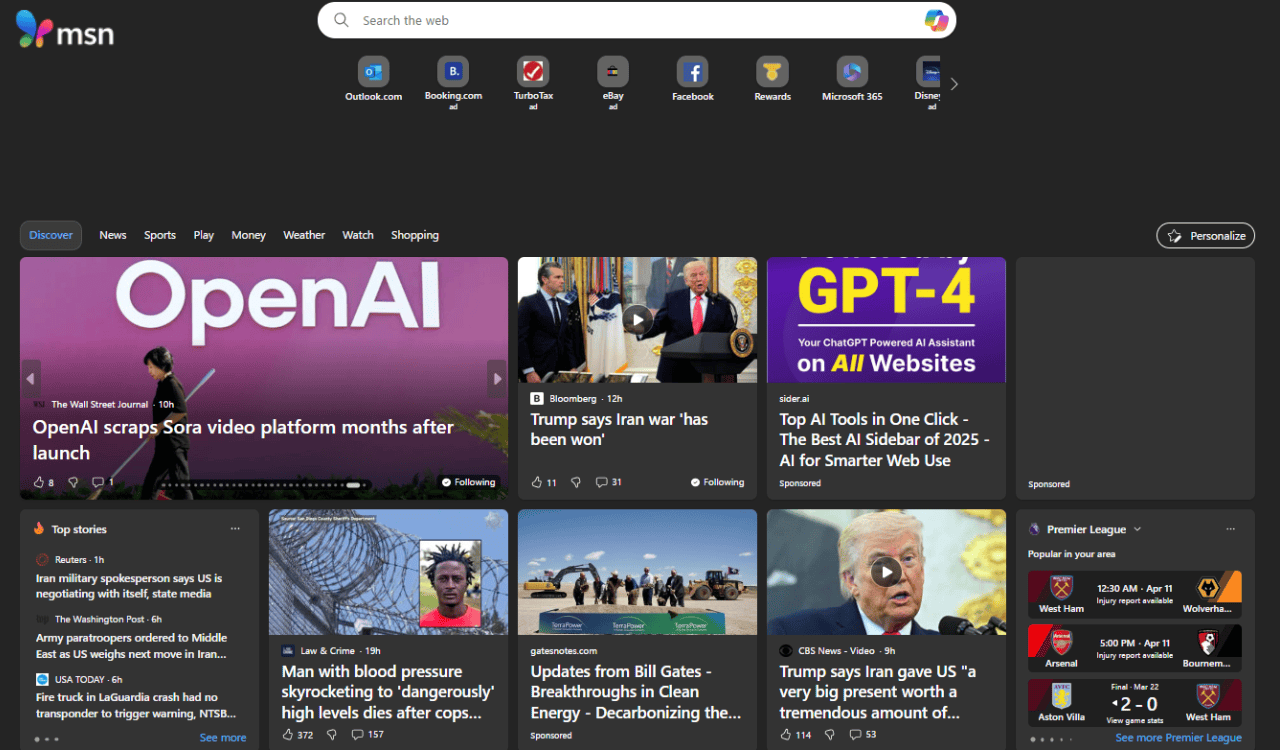
Sora AI Video Tool Axed by OpenAI Amid High Compute Costs and Low Returns

OpenAI appears to be pulling back from its AI video ambitions, despite recently integrating the Sora 2 model into Bing Video Creator. The move comes as the company refocuses on profitability and scalable AI products.

Sora App Faces Shutdown After Cost Concerns

According to Neowin, OpenAI is preparing to shut down the Sora app, citing unsustainable infrastructure demands. The company reportedly struggled to justify the high compute costs required to run AI video generation at scale.

Sora, which generated significant early interest, failed to maintain long-term traction. Its revenue potential did not match the ongoing expense of powering advanced video models, leading OpenAI to reconsider its position in the space.

The shutdown will also affect developers, as Sora APIs used for AI video generation are expected to be discontinued. OpenAI has not yet confirmed an exact timeline but stated that more details will be shared soon.

OpenAI Prioritizes Profitable AI Segments

The decision signals a broader strategic shift. OpenAI is now prioritizing areas with stronger monetization, particularly developer tools and coding-focused AI products, which continue to see growing demand across the industry.

This pivot reflects increasing pressure on the company to generate sustainable revenue, especially given the high operational costs tied to large-scale AI systems.

At the same time, OpenAI is quietly expanding its commercial strategy. The company recently hired a Meta ads veteran to explore advertising opportunities, even as it maintains that ads are not yet rolling out globally in ChatGPT.

AI Video Takes a Backseat, For Now

While Sora’s shutdown may seem like a step back, it doesn’t necessarily mark the end of AI video at OpenAI. Instead, it suggests that the company is waiting for more cost-efficient infrastructure before revisiting the space.

In the meantime, OpenAI is doubling down on practical, high-return features. This includes its recently introduced in-chat shopping experience in ChatGPT, as well as deeper investments in enterprise and developer ecosystems.

The move comes amid wider changes in OpenAI’s business strategy. The company recently struck a deal with AWS, while its long-standing partnership with Microsoft is reportedly facing increasing tension.

Together, these developments highlight a company in transition, moving away from experimental showcases toward products that can deliver consistent, scalable revenue.

OpenAI Brings Seamless Shopping Experience Directly Into ChatGPT

OpenAI is pushing forward with ambitious plans to transform ChatGPT into a full-fledged “super app,” combining multiple tools while introducing native shopping capabilities directly inside the chat.

The company is working toward integrating ChatGPT with Atlas and Codex into a unified platform, aiming to centralize AI-powered productivity, development, and everyday tasks into a single experience.

ChatGPT gets a built-in shopping experience

At the same time, OpenAI has announced the rollout of in-chat shopping features, which are becoming available this week to Free, Go, Plus, and Pro users.

The feature relies on a new system called the Agentic Commerce Protocol, which allows e-commerce platforms to plug their product catalogs directly into ChatGPT. Instead of offering generic recommendations, the AI can now surface real products that users can actually purchase.

Browse, compare, and buy without leaving chat

With this update, users can search for products using natural language and receive tailored suggestions based on their needs. ChatGPT can present multiple options, compare pricing and features, and guide users through the decision-making process.

The biggest shift is that purchases can happen entirely within the chat interface. This removes the need to jump between websites, creating a more streamlined and conversational shopping flow.

The system also opens the door for broad retailer participation, although OpenAI has not confirmed any specific merchant partnerships so far.

Bigger vision meets growing tensions

While the shopping rollout highlights OpenAI’s push into consumer experiences, the company’s broader strategy may introduce friction with existing partners.

Reports suggest that OpenAI’s evolving business direction, including new infrastructure deals, has strained its relationship with Microsoft. In fact, Microsoft is reportedly considering legal action tied to OpenAI’s recent AWS agreement, signaling potential turbulence in one of the tech industry’s most important partnerships.

Despite that, OpenAI appears focused on building a unified AI ecosystem that blends productivity, coding, and commerce into a single destination.

Via Neowin

Microsoft Entra ID Fixes MFA Limits With External Support

For a long time, businesses using Microsoft Entra ID faced a roadblock when trying to secure their employee accounts. If a company wanted to use a third-party tool for multi-factor authentication, making it work alongside Microsoft’s native systems was complicated. Microsoft has just announced that this is finally changing this week.

Microsoft just announced that its new external multi-factor authentication feature is now officially available to everyone.

You can now use your preferred security providers in Entra ID

Until now, organizations were mostly stuck using Microsoft Authenticator or dealing with clunky workarounds to verify user identities. The new update removes those old limits. IT teams can now plug their preferred security providers directly into Entra ID. Whether a company uses Duo, Ping Identity, or another system entirely, those services will now function just like Microsoft’s own tools.

Administrators can set up rules and require extra login steps using the exact provider they already pay for.

There are benefits to mixing and matching

This shift gives companies much more freedom. They no longer have to rip out their existing security setups just to play by Microsoft’s rules. Instead, they can keep the tools that their employees already know how to use. It simplifies the daily login process for workers and reduces headaches for technical support teams.

Microsoft is clearly listening to customers who want more flexibility in how they protect their internal data. The update is live right now, and administrators can start turning it on from their settings dashboard.

By opening up the platform, Microsoft fixes one of the biggest complaints administrators had about managing user access.

Via Neowin

Snapchat Launches AI Clips To Turn Your Still Photos Into Short Videos

Snapchat just announced a new feature called AI Clips that does exactly that. By using this new tool, you can take any standard picture from your camera roll and transform it into a short, five-second video. It brings a new level of creativity to the app and gives users another fun way to share memories with friends easily.

How Snapchat’s new AI Clips feature works

When you want to use the feature, the process is very simple. You select a photo, and the application analyzes the image to generate movement. It fills in the blanks to create a short clip that lasts about five seconds. The results can range from realistic background motion to more strange animations depending on the original picture.

This format is built directly into the Snapchat interface. Anyone can try it out immediately.

Snapchat is rolling it out to Lens Studio

The technology is also opening doors for developers. Creators can access the tools behind AI Clips through Snapchat’s Lens Studio. This means they can build custom lenses and filters that use the same photo-to-video generation. It is a big step for the platform as it tries to keep users engaged and compete with other video-heavy social networks.

We can expect to see a lot of interesting video clips popping up in stories soon on Snapchat that use the new functionality.

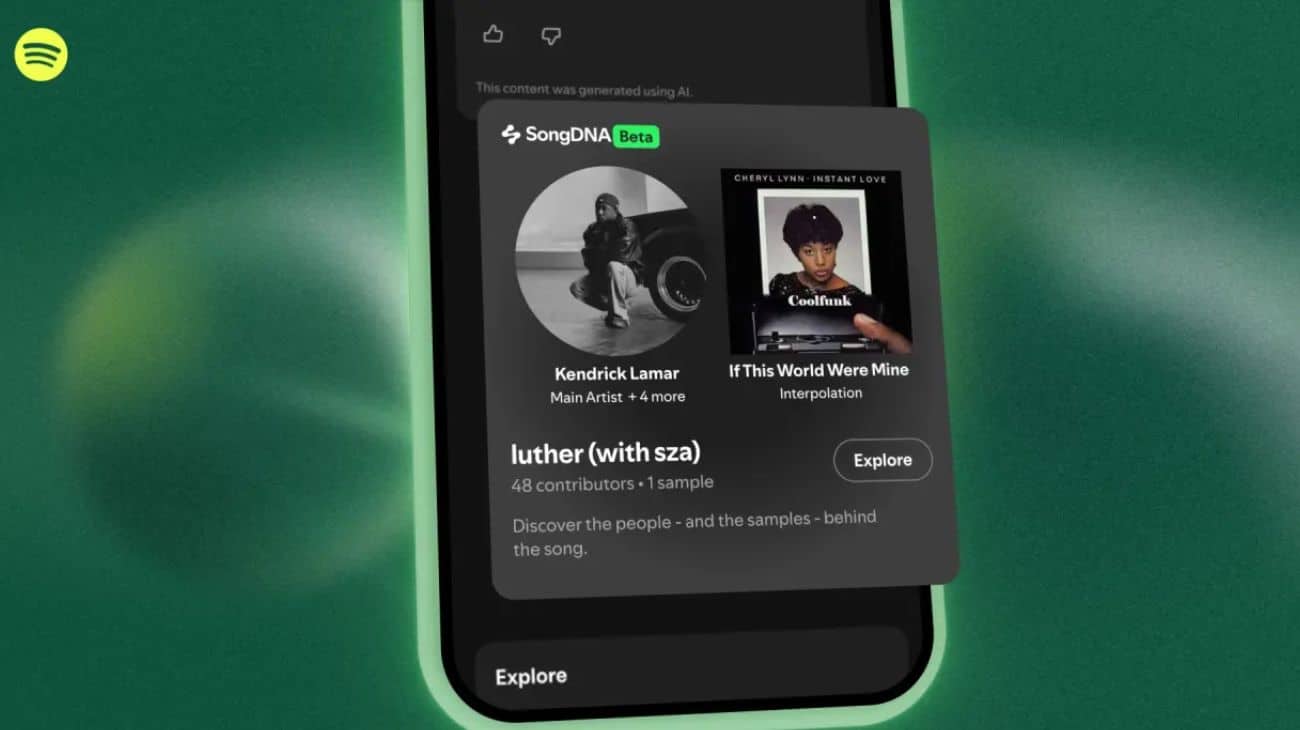
Spotify SongDNA Lets You See How Tracks Are Connected

Have you ever listened to a catchy track and wondered where that familiar beat came from or who produced it? Spotify just rolled out a new beta feature called SongDNA to answer exactly those questions. Instead of burying song credits in a boring text list, this interactive tool creates a visual map of the people and the history behind the music you stream.

The update is available now for Premium users and changes how you explore new sounds.

Here’s how the new SongDNA tool works

When you open the Spotify app and look at the Now Playing screen, you will see a new SongDNA card. Tapping on this card opens an interactive web of information. You can see the main artist alongside the songwriters, producers, and audio engineers who helped bring the track to life.

But it goes beyond just listing names. If a song uses a sample from an older hit, SongDNA shows you exactly where that audio originated. You can click on a producer to see what other popular songs they have worked on. You can also explore cover versions and interpolations. It acts like a musical family tree. If you enjoy falling down a rabbit hole of music history, this tool makes the process incredibly easy.

Who gets access to the feature?

Right now, Spotify is testing SongDNA in beta. It is rolling out globally to Premium subscribers on both Android and iOS devices. A wider official launch is expected to happen sometime in April.

Artists and their teams also get special access through the Spotify for Artists platform. They can manage how their credits appear and make sure the behind-the-scenes contributors get the right recognition.

The data powering this feature comes directly from the artists, record labels, and the WhoSampled database that Spotify recently acquired.

Via Android Authority

Microsoft Fixes Gmail Sync Problems in Classic Outlook App

Microsoft finally squashed a bug in classic Outlook that suddenly stopped Gmail and Yahoo accounts from syncing properly. Starting in late February, many users noticed their emails just completely stopped loading. The software threw out weird error codes instead of asking people to sign back in.

The good news is that Microsoft applied a fix to its servers last Friday to get things moving again, as reported by Bleeping Computer.

How to get your emails syncing again

The main fix is already live on Microsoft’s end. But you might still be stuck waiting if your login token has not expired yet.

Usually, it takes about an hour for that old token to clear out after you change a password. Once it finally expires, Outlook will pop up a window asking you to sign in to your Gmail or Yahoo account again. After you log in, your inbox should start pulling in new messages like normal.

If you do not want to wait around for an hour, there is a manual workaround. You can force the sign-in prompt to appear right away by heading into the Windows Registry Editor. You just need to find the Outlook Identities key and delete the specific registry entry for your stuck email address.

Microsoft is also looking into a few other weird glitches in classic Outlook right now. Some people are seeing connection errors when they try to make new groups. Others have noticed their mouse pointer completely disappearing while they try to use the app.

If you run into those, Microsoft wants you to send in diagnostic logs so it can figure out what is going wrong.

Microsoft Adds Gift Cards and Bonuses to Forza Horizon 6 Pre-Orders

Microsoft is offering a small but noticeable bonus for players planning to buy Forza Horizon 6 early. According to recent details observed by True Achievements, some pre-orders for the Premium Edition now come with a $5 Xbox gift card, along with a few extra in-game perks. It is not a huge deal on its own, but it does make the higher-priced edition a bit more appealing, especially for players who were already thinking about jumping in on day one.

Here’s what the pre-order bonus includes

The offer is tied to select purchases of the Premium Edition, and it mainly focuses on adding a bit of extra value rather than changing what comes in the bundle itself. Buyers can get a $5 Xbox gift card after purchase, which can be used on games, add-ons, or other content through the Xbox store.

Alongside that, the Premium Edition still includes the usual extras. This typically means early access to the game, additional car packs, and expansion content that will release later. These are standard perks for Forza Horizon’s premium tier, so the gift card feels more like a small incentive on top rather than the main attraction.

It is worth noting that the availability of the gift card bonus may depend on the region and retailer. Some players might not see the offer at checkout, while others will get it automatically as part of the deal.

The move fits into Microsoft’s broader approach of nudging players toward higher-tier editions without drastically changing pricing. Instead of discounts, the company often adds small extras like store credit or bonus content to make premium versions look more worthwhile.

For players who were already planning to get the Premium Edition, this is an easy game. For everyone else, it probably will not be enough to change their decision, but it does make the offer slightly more competitive compared to a standard purchase.

Xbox and Netflix May Bundle Services, Early Talks Suggest

Xbox and Netflix have reportedly discussed the idea of offering a combined subscription, though nothing has been finalized yet. The talks are described as early and exploratory, with both sides “kicking around ideas” rather than working on a confirmed product. Still, the concept is easy to understand.

As subscription fatigue grows, companies are looking for ways to package services together and keep users locked in reports Insider Gaming Network.

The bundle could make sense for everyone

A bundle between Xbox Game Pass and Netflix would bring together gaming and streaming under one payment. That could make things simpler for users who already pay for both. It could also help both companies hold onto subscribers in a crowded market.

Xbox has been expanding Game Pass as its main offering, while Netflix has been slowly building its own gaming library. There is some overlap in direction, even if the core services are still very different. A bundle could connect those efforts without merging them fully.

At the same time, there are clear challenges. Pricing would need to feel fair, and both companies would have to agree on how revenue is shared. There is also the question of timing. With both platforms still evolving, it may be too early to lock in a long-term bundle.

For now, this remains an idea rather than a plan. But it shows how major platforms are thinking about the next step. Instead of competing only on content, they may start competing on how well they package it together.

Microsoft Explains Why Project Helix Will Be Easier To Make Games For

The next generation of Xbox hardware is still wrapped in plenty of mystery, but we are finally getting a clearer picture of how it will work for the people actually making the games. According to a recent interview with Xbox Portfolio GM Chris Charla with IGN, the upcoming Project Helix console is being designed to be noticeably easier for developers to work with compared to the current Series X and S.

Helix can build one version of a game for multiple platforms

The main goal driving this change is a unified development process. The Xbox team wants studios to be able to create a single build of their game that works perfectly across the Project Helix console, personal computers, and cloud streaming devices like smart televisions.

Charla pointed out that developers who are already taking advantage of the Xbox PC platform and the Play Anywhere feature are essentially sitting in pole position for the next generation of hardware. By focusing on these existing tools today, creators can ensure their games run natively and smoothly on Project Helix on day one.

For teams starting their projects on storefronts like Steam, Charla suggests focusing on the Xbox PC version first, using that specific build as the foundation for the eventual console release. This straightforward approach should help studios save time and resources, ultimately leading to more games hitting the platform faster.

We can expect to hear more specific details on how developers will tap into Project Helix’s unique hardware features in the coming months.

Microsoft and NVIDIA Disagree About the Arrival of AGI

NVIDIA CEO Jensen Huang recently made waves when he claimed humanity has already achieved artificial general intelligence (AGI). In an interview on the Lex Fridman podcast, Huang was asked for a timeline on when an AI could run a tech company and generate millions of dollars. 

His response was bold and immediate: “I think it’s now.” While that makes for a great headline, the legal team at Microsoft might be sweating over that specific definition.

For most people, AGI means an AI model that can adapt, think, and solve complex problems across different subjects just like a real human. However, the legal definition between Microsoft and OpenAI is much more specific, and millions of dollars hinge on it.

When Microsoft poured billions into OpenAI, they baked a crucial escape clause into their partnership. If OpenAI officially achieves AGI, they no longer have to give Microsoft exclusive access to their future, most powerful models.

According to their specific contract, as explained by Windows Central, OpenAI can only trigger this clause if they create a model capable of generating $100 billion in profit. Right now, even the best AI models are losing money, not making it. Notably, the NVIDIA CEO also addressed concerns about the DLSS 5 enhancements recently.

The AI chip maker and research company are setting the stage for a messy breakup over AGI

The problem is that NVIDIA and OpenAI seem eager to shift the goalposts on what actually counts as AGI. If OpenAI’s board decides they have met the philosophical benchmark for AGI, even without hitting the massive profit requirement, it could spark a massive court battle.

Microsoft is already quietly preparing for a future where they rely less on OpenAI, restructuring its own internal teams to build new tools.

If the two tech giants cannot agree on when the future has officially arrived, a very public and very messy breakup feels inevitable.

Fallout Shelter Returns to Xbox Store After Brief Removal

After a sudden disappearance from the Microsoft storefront last month, the popular management game Fallout Shelter is finally back and ready to download. This unexpected removal happened right around the time the highly anticipated second season of the Fallout television show wrapped up its run on Amazon Prime.

While fans are genuinely thrilled to see the title return to the console library, there is a major catch for anyone hoping to build their underground vault using a computer.

It is going to be a sudden return with a major catch for players

The game is officially available again for Xbox Series X, Series S, and Xbox One owners. Those who missed out on claiming the free title before it vanished can now grab it and start earning their achievements. However, computer players are completely out of luck this time around.

The updated store page now includes a clear message stating the game is no longer playable through Xbox.com or the PC application. In the past, players could easily jump between their console and their computer.

The game even supported the Play Anywhere feature to share progress. That useful cross-platform functionality seems to be gone for good, as reported by True Achievements first.

Here’s the main question! Why did the management game vanish in the first place?

Bethesda has not given any official reason for pulling the game last month or bringing it back with restricted access. The studio stayed quiet during the initial removal and remains silent now. However, looking at recent player feedback offers a very strong clue. For several months, community forums were filled with complaints from computer users.

People reported the game constantly freezing, locking up, and completely failing to load on their machines. Instead of rolling out a software patch to repair these severe bugs, it looks like the publisher simply decided to pull the plug on the broken version entirely.

For now, the wasteland building simulator is strictly a console experience, leaving computer fans searching for answers.

Xbox May Rethink Game Pass Pricing, Claims a Report

Asha Sharma recently stepped in as the new head of Xbox, and she is already looking at ways to shake things up. According to a fresh report from The Information, Sharma is actively exploring how to make Xbox Game Pass and future hardware more appealing to a wider audience.

This early strategy might involve rethinking the current pricing model and introducing new, lower-priced subscription tiers for gamers who want access without breaking the bank.

The news brings a fresh look at subscription costs

The report points out that Sharma wants to win over new players who might be sitting on the fence. To do this, Xbox might offer cheaper ways to access its massive game library. While there are no official details confirming exactly what these tiers will look like, rumors have circulated for a while about a possible ad-supported version of Game Pass.

A lower price point could easily draw in those who find the current monthly cost a bit too high, especially when fans just want to play games without paying for extra perks.

Since Game Pass prices have historically only gone up, adding a cheaper tier would be a welcome change for many console and PC owners.

The company is also exploring future bundles with Netflix

Interestingly, the same report mentions that Sharma has been talking directly with Netflix co-CEO Greg Peters. The two executives reportedly discussed the idea of offering subscription bundles together down the road. Right now, there are no concrete plans in place, but Peters noted he is completely open to the possibility if it works for both the companies and the consumers.

Sharma is still settling into her CEO role at Microsoft Gaming, so it makes sense that she is actively reviewing every option on the table.

Fans will just have to wait and see which of these early brainstorming ideas actually becomes a reality.

Via Purexbox

Ayaneo Pauses Sales of ‘Next 2’ Windows Handheld as Memory Crunch Bites

Ayaneo has reportedly hit brakes on one of its most ambitious Windows 11-based handheld yet. The company, which announced the Next 2 Windows handheld back in late November, has temporarily paused its preorders after memory costs surged beyond sustainable levels (via Android Authority).

Ayaneo’s Next 2 handheld becomes the latest victim of rising memory cost

According to an update on its IndieGoGo page, Ayaneo confirmed that all existing orders will still be fulfilled, but new purchases are now off the table. The issue comes down to rapidly increasing DRAM and storage prices, which reportedly spiked after supplier shifts around the Chinese New Year.

The Next 2 handheld, which starts at $1,999, is already one of the most expensive Windows handhelds on the market. However, Ayaneo says it was prepared to take a small loss. Now, production costs are nearing double the original pricing, making continued sales unrealistic.

Memory crunch has become a global issue

This situation hints at an ongoing trend across the PC market. Rising memory, SSD, and internal component costs have started impacting both desktops and handhelds. Earlier today, reports came in hinting that ASUS is preparing for up to a 30% hike in PC pricing, starting first in Taiwan. If speculations are to be considered, the ongoing global memory shortage could continue until 2028 or even 2030 in a worst-case scenario.

Ayaneo calls this a temporary suspension, noting that sales could resume if prices stabilize. However, with memory shortages expected to linger for long, the road ahead looks uncertain.

Epic Games Lays Off 1,000+ Employees, Shuts Down 3 Fortnite Modes Amid Engagement Drop

Epic Games has announced a major round of layoffs, confirming that over 1,000 employees are being let go starting today. The move comes as the company faces mounting financial pressure, driven in part by a reported decline in Fortnite engagement since 2025.

In a statement shared publicly on a blog post, Epic Games CEO Tim Sweeney addressed the decision. Here’s a part of Sweeney’s statement:

Today we’re laying off over 1000 Epic employees. I’m sorry we’re here again. The downturn in Fortnite engagement that started in 2025 means we’re spending significantly more than we’re making, and we have to make major cuts to keep the company funded. This layoff, together with over $500 million of identified cost savings in contracting, marketing, and closing some open roles puts us in a more stable place. Some of the challenges we’re facing are industry-wide challenges: slower growth, weaker spending, and tougher cost economics; current consoles selling less than last generation’s; and games competing for time against other increasingly-engaging forms of entertainment.

Some of Epic’s challenges also appear to be internal. Despite Fortnite still being one of the most successful games globally, the company admits it has struggled to deliver that same consistent “Fortnite magic” with every season.

It also notes that its return to mobile is still in early stages, alongside ongoing efforts to optimize the game for billions of smartphone users worldwide. On top of that, being at the forefront of the industry has come with its own setbacks, with long-term bets that are only now starting to take shape.

The company also clarified that these layoffs are not related to AI. Instead, Epic says it views AI as a tool to improve productivity, intending to enable more developers to focus on building better content and technology. Epic further says affected employees will receive severance packages

Three Fortnite modes are also scheduled to shut down permanently

That being said, the company is also making bigger changes to its portfolio. Several Fortnite experiences are set to shut down in 2026, including Rocket Racing in October, while Ballistic and a Festival mode will be discontinued as early as April.

Article feature image source: Epic Games

Black Ops 7 & Warzone Season 3 Release Date, Time & What to Expect

Call of Duty is gearing up for another major seasonal update, with Season 3 for Black Ops 7 and Warzone now officially set to arrive soon. After a content-heavy Season 2, expectations are building around what’s next, especially with new maps and gameplay tweaks already being teased.

Call of Duty: Black Ops 7 & Warzone Season 3 Release Date & Time

Yesterday, we got confirmation that Season 3 will kick off on April 2nd. Although the official timings aren’t out, we expect this season to follow the usual 9 AM PT / 12 PM ET / 5 PM BST release time across all platforms. Here’s how that expected launch window translates across key regions:

  • China (CST): 12:00 AM, April 3
  • Korea/Japan (KST/JST): 1:00 AM, April 3
  • Australia (AET): 3:00 AM, April 3
  • New Zealand (NZDT): 5:00 AM, April 3
  • India (IST): 9:00 PM, April 2

What to Expect From Call of Duty Season 3

Details are still limited, but early teasers suggest a focus on precision and power, which may hint at new weapons or killstreaks. If Season 2 is anything to go by, players can likely expect a mix of multiplayer updates, Warzone map changes, and possibly new modes or limited-time events.

While specifics around events are still unclear, this time of year, the content might be in line with seasonal themes, possibly related to Easter. Ranked Play is also getting a refresh across both multiplayer and Warzone, along with new rewards. Not to forget, the promo art teases a new operator called “Javelin,” who appears to be using the M27 from Black Ops 2, hinting at what’s coming in the battle pass.

Image: Activision

Multiplayer details, however, are still under wraps, but new maps and modes are expected. Zombies won’t get a new map at launch, though more content is planned for midseason, alongside the return of legacy weapons in a new unlock format. Warzone, meanwhile, is up for map changes on Avalon, with more pathways, ziplines, and updated traversal options, plus Ranked Resurgence map rotation. More announcements are expected closer to the Season 3 release.

Free-to-Play MMO Albion Online Hits Xbox Consoles Next Month

Albion Online is expanding to new platforms, and console players are finally getting their chance to jump in.

According to True Achievements, Albion Online is launching on Xbox Series X|S next month, bringing the full sandbox MMO experience to consoles with several optimizations.

Albion Online arrives on Xbox with full optimization

The Xbox version has been tailored specifically for console players, featuring a redesigned user interface and full controller support. Sandbox Interactive has also reworked key systems such as the marketplace and inventory screens to ensure smoother navigation using a gamepad.

In addition, Xbox Game Pass Perks will be available at launch, offering players in-game rewards to help them get started in the world of Albion.

A sandbox MMO built around player freedom

Developed by Sandbox Interactive, Albion Online is a free-to-play MMORPG set in an open fantasy world where players shape their own path.

The game stands out thanks to its player-driven economy, where most items are crafted, traded, and sold by the community. Instead of traditional classes, Albion uses a classless system, meaning your abilities and playstyle depend entirely on the gear you equip.

Players can focus on combat, crafting, farming, or trading, while engaging in solo adventures, small group activities, or massive, large-scale battles. The game also includes features such as housing, resource gathering, and territory control.

Cross-platform progression carries over

One of the key features of the Xbox release is full cross-platform progression. Players who already have accounts on PC, Mac, Linux, or mobile devices will be able to continue their progress seamlessly on Xbox.

This ensures that new and existing players can join the same persistent world without losing progress or starting over.

Albion Online launches on Xbox Series X|S on April 21, 2026, marking a major step in expanding the game’s reach to console audiences.

In other Xbox news, the upcoming Xbox Partner Preview event is set to take place this week. Microsoft has also recently added 30 new titles to Xbox Play Anywhere, while the company is rebranding Xbox Full Screen Experience to Xbox Mode within the Xbox app.