Windows 11 Dev Channel Update KB5074157 Brings Start Menu, Taskbar, and Bluetooth Fixes

KB5074157 Dev Channel update brings new fixes and stability improvements to Windows Insider testers, with Microsoft now rolling out the same changes previously seen in the Beta Channel.

According to a recent blog post from Microsoft, the update focuses on taskbar behavior, Start menu reliability, Bluetooth reporting, and several system-level bugs.

KB5074157 fixes in the Dev Channel

Taskbar, system tray, and Start menu

  • Fixed an issue where the auto-hidden taskbar appeared too early and blocked bottom-screen interactions.
  • Fixed a bug where the Start menu, Notification Center, and Quick Settings sometimes failed to open on mouse click.
  • Fixed a memory leak that caused performance degradation over time.
  • Fixed an issue affecting Arabic and Hebrew users where the Start menu opened on the wrong side when icons were not centered.
  • Fixed a touch-related bug where swiping inside a pinned apps folder dismissed the Start menu.

Login and lock screens

  • Fixed a bug where the password icon appeared blank on the login screen.

Settings and Bluetooth

  • Fixed crashes triggered by interactions with audio devices.
  • Fixed an issue where the keyboard character repeat delay setting worked in reverse.
  • Fixed an issue that prevented Bluetooth device battery levels from showing for some users.

Xbox full-screen experience on PC

  • Fixed unexpected game and app behavior when using the Xbox full-screen experience.
  • Additional validation remains in progress.

Other fixes

  • Fixed clipped text in msinfo32 when using high display scaling.
  • Fixed MSIX installation failures from .appinstaller files caused by invalid argument errors.
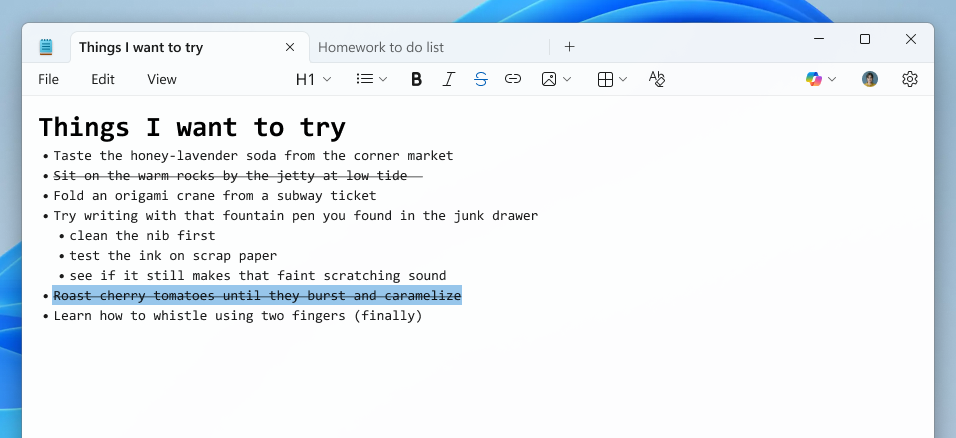
  • Fixed missing underscores in Notepad when using specific fonts at 125% scaling.
  • Fixed an issue where explorer.exe could hang during first login, preventing the taskbar from loading.

These fixes apply only if you enabled the option to receive the latest updates as soon as they become available. Keen-eyed users may also notice that this update mirrors the KB5074157 build from the Beta Channel, which Microsoft has now pushed to Dev.

Microsoft has also reiterated that switching from the Dev Channel to the Beta Channel will soon become impossible. The Dev Channel will start receiving earlier and less stable builds, so users who prefer a safer testing experience should consider switching channels while they still can.

Microsoft Updates Notepad With Markdown & AI Upgrades, Paint App Gets AI Coloring Book

Apart from dropping Windows 11 Dev channel update KB5074157 for Insiders, Microsoft has quietly updated popular apps. As you may have guessed, they are Notepad and Paint. Starting today, new updates for Notepad and Paint are rolling out to Windows Insiders in the Canary and Dev Channels on Windows 11.

Notepad gets Markdown upgrades and faster AI responses

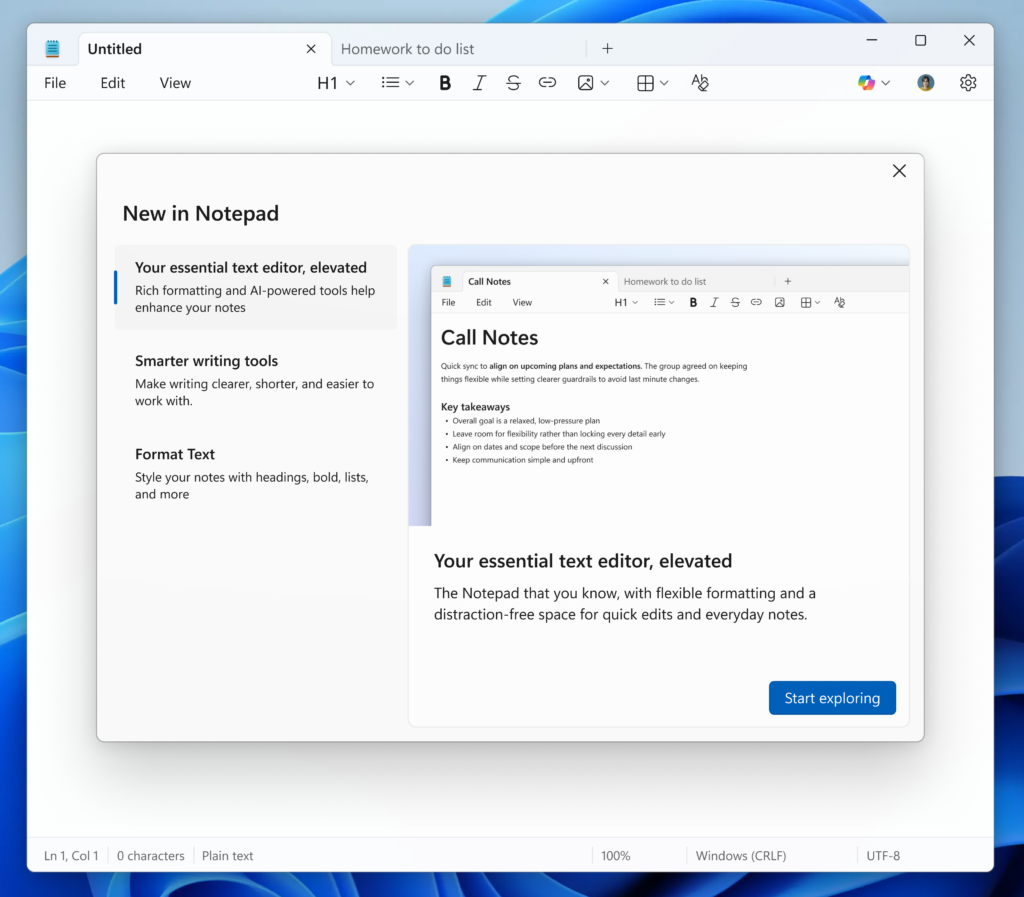
Notepad updated version 11.2512.10.0 focuses on making the app more useful without losing its lightweight structure. Microsoft is expanding its Markdown support with strikethrough formatting and nested lists, which will allow users to organize notes in a more efficient way. You can access these options through the formatting toolbar, keyboard shortcuts, or by editing Markdown syntax directly.

There’s also a new welcome experience designed to surface Notepad’s most useful features. The dialog appears when you launch the app and offers a quick overview of what’s new. You can close it anytime and bring it back later using the megaphone icon in the toolbar.

On the AI front, Notepad’s Write, Rewrite, and Summarize tools now support streaming results. Instead of waiting for a full response, text will begin appearing almost instantly, making these features feel quicker and more interactive. A Microsoft account is required to use these AI-powered tools.

Paint is pushing the narrative of AI creativity

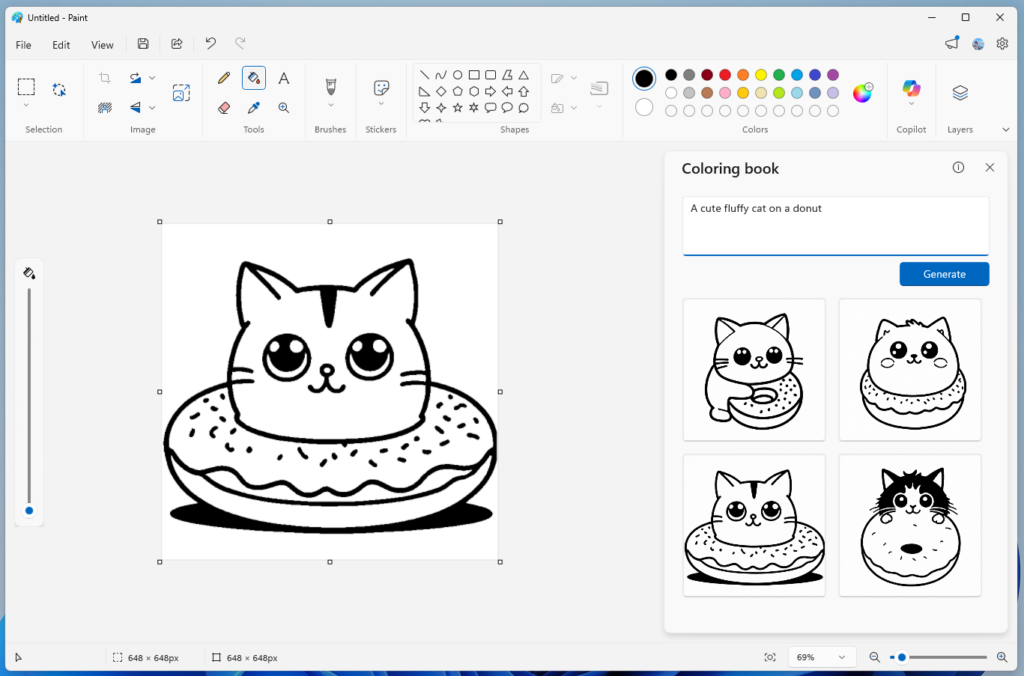
Paint version 11.2512.191.0 introduces two notable updates. The first is Coloring book, which, Microsoft says, is an AI-powered tool that generates printable-style coloring pages from a text prompt. It’s available under the Copilot menu, and allow users to describe scenes like “a fluffy cat on a donut” and instantly generate multiple designs. Coloring book is exclusive to Copilot+ PCs and requires a Microsoft account.

Image credit: Microsoft

Paint is also getting a fill tolerance slider. Microsoft says this will give users more control over how the Fill tool behaves. You can now adjust how strictly Paint fills areas, making it easier to achieve precise results or more creative effects.

As always, Microsoft is encouraging Insiders to share feedback through the Feedback Hub as these updates continue to roll out.

Windows 11 KB5074157 Dev Update Brings Modern Account Settings UI & WebP Wallpaper Support

Microsoft today released Insider Preview Build 26220.7653 (KB5074157) in Dev Channel for Windows 11 25H2. Just to be clear, this is similar build was released earlier this week in the Beta channel. The update introduces some changes to the Account Settings.

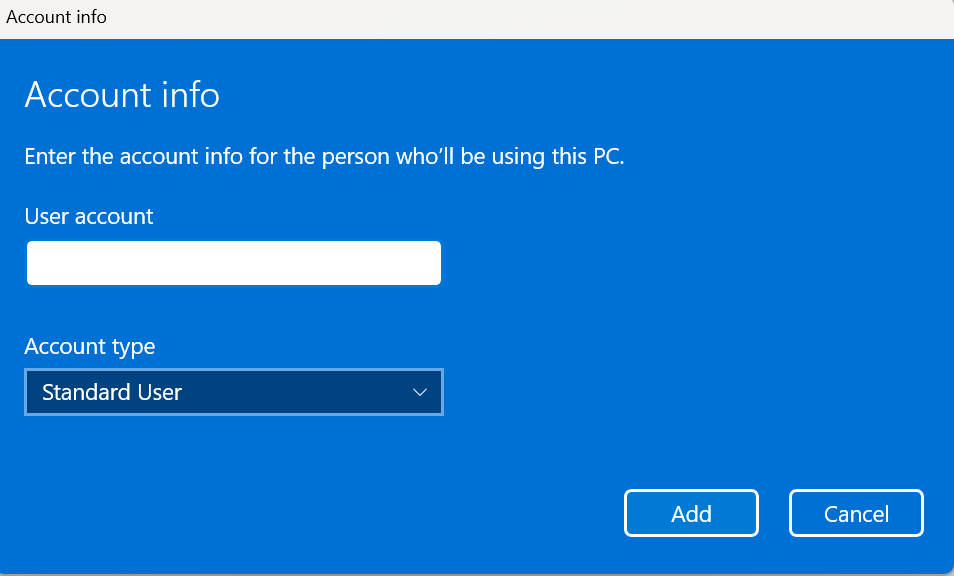
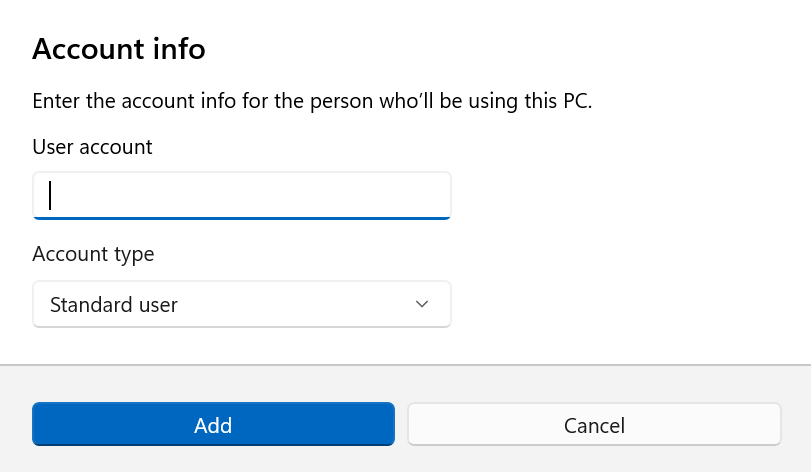
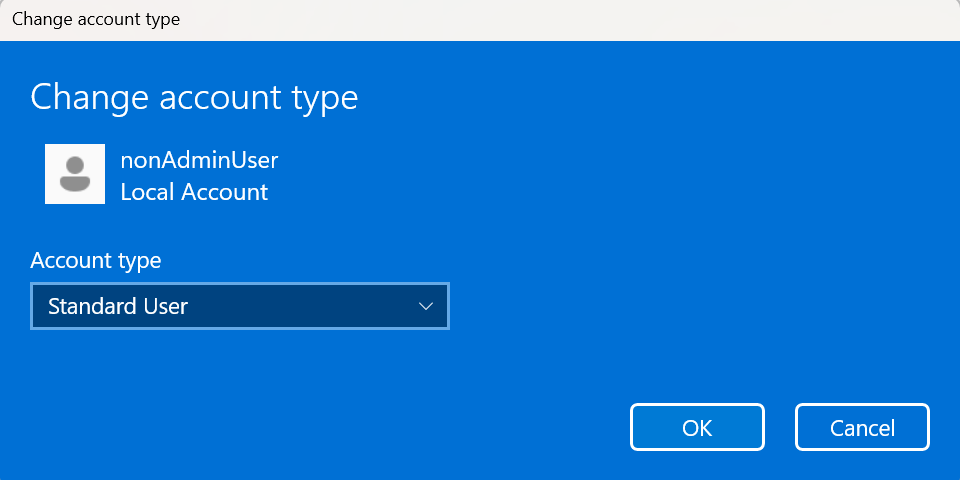
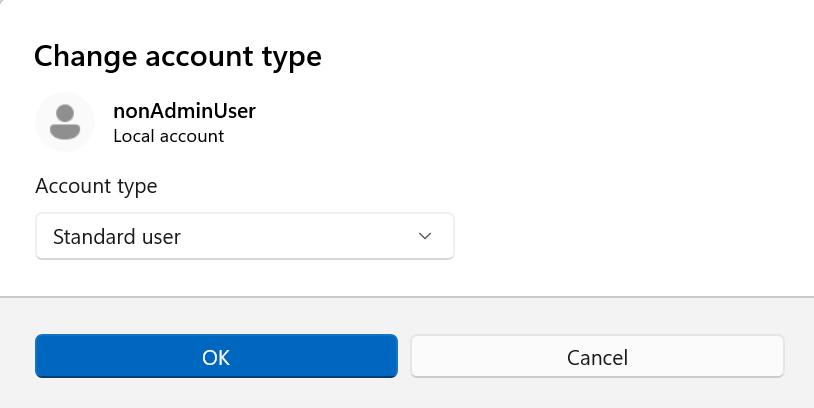
Microsoft has updated the “Add account” and “Change account type” dialogs under Settings > Accounts > Other users. The company notes that it is “based on [the] modern WinUI framework with support for dark mode.”

The visibility of the above dialog option will depend on whether a domain-joined work or school account is configured on the device. Moving on, KB5074157 update also ensures that Copilot prompt suggestions now load instantly in Click to Do. Microsoft says that it has removed the brief delay some users noticed before. That said, this improvement to Click to Do won’t be rolling out to Insiders in the EEA or China.

There’s also a small but welcome personalization update. Windows 11 now supports .webp images as desktop backgrounds. You can set it via Settings > Personalization > Desktop Background. It’s a minor addition, but it offers flexibility around the widely-adopted image format.

Ubisoft Cancels Prince of Persia Remake & 5 Others, Delays 7 & Shuts 2 Studios in Major Reset

Earlier today, Ubisoft announced (PDF) a major organizational, operational, and portfolio reset. As part of that major reset, the company has confirmed the cancellation of six games, delays to seven others, and the closure of two studios as it restructures the company for long-term sustainability.

Ubisoft overhauls strategy as it announces game cancellations, delays, restructuring, and studio closures

Among the ones canceled is Prince of Persia: The Sands of Time Remake. That project alone has faced numerous delays since its reveal. Ubisoft also cancelled four unannounced titles, including three new IPs, along with one mobile game.

At the same time, Ubisoft confirmed it has delayed seven upcoming games to “ensure enhanced quality benchmarks are fully met.” One unannounced title originally planned for FY26 has now been pushed to FY27, which hints at Ubisoft’s more selective release strategy.

On the studio front, Ubisoft has closed its Halifax mobile studio and its Stockholm studio, while continuing restructurings at RedLynx, Massive Entertainment, and Ubisoft Abu Dhabi. Unisoft adds that these decisions will help in its cost-cutting efforts and a plan to reduce fixed costs by roughly €500 million by March 2028.

Unisoft’s new operating model

As part of the reset, Ubisoft is also rolling out a new operating model built around five Creative Houses. Notably, each one of them will now be responsible for specific genres and franchises:

  • Creative House 1 (Vantage Studios): Assassin’s Creed, Far Cry, Rainbow Six
  • Creative House 2: The Division, Ghost Recon, Splinter Cell
  • Creative House 3: For Honor, The Crew, Riders Republic, Brawlhalla, Skull & Bones
  • Creative House 4: Anno, Prince of Persia, Rayman, Might & Magic, Beyond Good & Evil
  • Creative House 5: Just Dance, Uno, Hungry Shark, Idle Miner Tycoon, Ketchapp titles

Ubisoft says the reset is necessary due to rising AAA development costs and tougher market conditions, even as successful AAA releases carry higher upside than ever. Last but not least, the company admitted the changes will heavily impact its FY26 and FY27 financials. At the same time, Ubisoft maintains that the reset is designed to restore creative leadership, improve execution speed, and deliver higher-quality games over time.

Article feature image source: Ubisoft

Windows 11 Notepad, Snipping Tool & More Apps Reportedly Not Opening for Many With 0x803F8001 Error

If you just woke up to find out that your Windows 11 apps are refusing to open suddenly, you’re not alone. After I came across a report by Windows Central, I checked in to see if I could replicate the same error on my Windows 11 PC. Guess what? The system threw the same error message as mentioned in their report.

Many Windows 11 users are reporting that apps like Snipping Tool, Notepad, and others aren’t opening

However, for me, it only happened once while opening the Snipping Tool. I got a similar error as reported by the news outlet. To give you a clear idea of what I’m talking about, here’s the screenshot of the “Check your account” dialog box that popped up for me. Since Snipping Tool refused to open at that moment, I couldn’t take a screenshot.

Image credit: X/@therealzomb

While Notepad has been opening fine for me, I’m quite unsure about the Xbox Ally Armoury Crate. Per the news outlet, both are refusing to open and throwing error code 0x803f8001. This is reportedly accompanied by a file system error (-2143322111) on affected systems.

A Microsoft Forum user reportedly also detailed the issue via a forum post, under which many reported similar issues. In a reply, Harold Milan, who appears to be an independent advisor, added details about the nature of the error code.

Microsoft Store error 0x803F8001 & possible solution

Milan notes that you usually get Microsoft Store error 0x803F8001 when the Store fails to properly verify app licenses, which can prevent built-in or Store-based apps from opening or updating. Most of the time, this is caused by a corrupted Store cache, a temporary sync problem with your Microsoft account, or a glitch in Store registration; not because of any actual data loss.

As far as workarounds or fixes are concerned, the independent advisor suggests starting by resetting the Microsoft Store cache using wsreset.exe, then signing out of and back into the Microsoft Store to refresh app licenses. The advisor further recommends temporarily disabling any VPN or proxy that could interfere with Store connectivity, and re-registering the Microsoft Store through an elevated PowerShell command.

Trying these workarounds, starting with a cache reset and account sign-in refresh, has reportedly helped many users restore normal app functionality without reinstalling Windows or losing personal files. All that said, it’s clear that the issue has been affecting many users around the world. Microsoft and ASUS are reportedly aware of the situation. If there’s any information from their side, I’ll update this piece.

Microsoft Shares Workarounds After KB5074109 Severely Broke Outlook on Windows 11

The first Patch Tuesday update for Windows 11 in 2026 has caused absolute havoc, with users complaining about multiple issues. In fact, the company had to push out emergency updates to fix some of the problems.

Microsoft shares workarounds for broken Outlook for POP email accounts after installing Windows 11 KB5074109

Last Friday, several users also reported that KB5074109 breaks Outlook, especially for POP email accounts, an issue Microsoft has since confirmed. In more severe cases, the update has triggered reboot loops, forcing affected users to rely on temporary workarounds shared online.

However, if you are among those affected by issues related to Classic Outlook profiles with POP accounts and PST files after installing the KB5074109 update, there is now a workaround shared by Microsoft.

In an official document spotted by folks at Neowin, Microsoft mentioned that until a permanent fix is available, it’s best to use webmail. Microsoft also mentions that other workarounds may be complicated. The other two options given by Microsoft are moving PSTs out of OneDrive and uninstalling the problematic KB5074109 update.

If you’ve been affected by the aforementioned issues, you may have noticed one of the following symptoms:

  • Outlook hangs and shows “Not Responding.”
  • Inability to reopen Outlook without ending its process in Task Manager or restarting the computer.
  • Emails not appearing in the Sent Items folder despite being sent.
  • Outlook redownloading emails.

As mentioned earlier, Microsoft doesn’t seem to have a permanent solution for this issue yet. However, the company confirmed that it’s looking into the problem. Hopefully, this will get fixed soon.

The issues are sadly piling up

The update, KB5074109, has reportedly also broken Sleep Mode on some PCs, while others are dealing with frequent app crashes and system lockups. Although the update does address a false security alert linked to the WinSqlite3.dll file, it has introduced new problems elsewhere.

Microsoft has warned that KB5074109 could lead to insecure Windows Deployment Services (WDS) deployments on Windows Server systems. At the same time, some PCs are failing to install the KB5074109 update altogether, throwing various error codes during installation.

Last but not least, NVIDIA users are reporting random black screens after installing the latest patch, while enterprise users say KB5074109 has disrupted Azure Virtual Desktop connections, leading Microsoft to issue an updated advisory.

Xbox January 2026 Update Brings Xbox App on Arm-Based Windows 11 PCs

Windows on Arm has been picking up momentum over the past year, with Microsoft now openly talking about it. Windows 11 handhelds have become more capable, DirectX improvements have boosted graphics performance, and Arm-powered PCs are no longer just about battery life. Microsoft has just made that clear with the Xbox January 2026 update.

Windows on Arm gets the Xbox app, bringing Game Pass catalog and cloud gaming

As part of the latest update, the Xbox app is officially available on all Arm-based Windows 11 PCs. That’s a milestone for anyone looking to pursue gaming on Windows on Arm. With Xbox app support now available on Arm devices, you can download and play games directly through the Xbox PC app.

In a specific documentation from earlier today, Microsoft claimed that more than 85% of the Xbox Game Pass catalog is already compatible with Arm-based Windows 11 PCs. But the company isn’t stopping there just yet, as it has plans to expand support even further.

For games that still don’t run locally, Xbox Cloud Gaming remains the only option. Speaking of that, Microsoft has also recently expanded its cloud gaming service to new regions, including India and more. That’s not all; if you’ve got the latest Hisense TVs, you can enjoy Xbox Cloud Gaming on those devices too.

As far as gaming on Windows on Arm is concerned, Prism plays a massive role. For those unaware, it’s Microsoft’s emulator for running x86 and x64 apps on Arm devices. Notably, it now also supports AVX and AVX2 instructions. That change alone adds support for many modern PC games that previously struggled or failed to launch on Arm devices.

Game Save Sync Indicator, Windows Performance Fit, and more

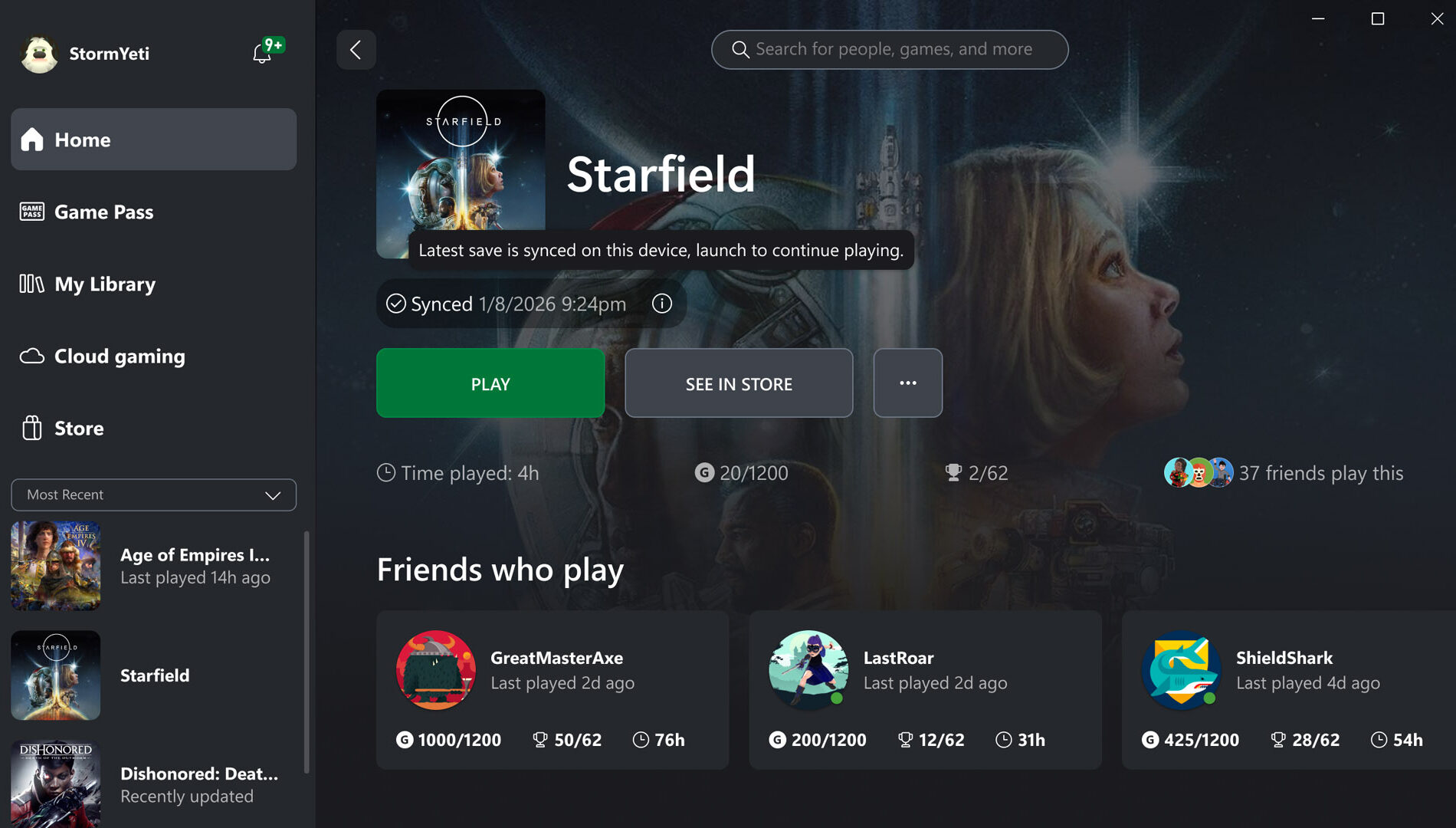
Microsoft is rolling out the Game Save Sync Indicator across PC and handheld experiences. This feature gives you real-time visibility into your cloud save status, so you’ll always know when your gameplay progress is synced.

Marketing-Sync-Indicator-v3-eeb4ccca8c936ca05f55-1900x1080
Image credit: Microsoft

The company has also brought in Windows Performance Fit to guide players. As the name suggests, the feature helps players figure out which games would perform well based on a device’s hardware. This way, players can feel more confident before hitting download.

Last but not least, Microsoft has also walked through Epic Anti-Cheat support. With EAC now available on Arm-based Windows 11 PCs, popular titles like Fortnite and Gears of War: Reloaded can finally run as intended, removing one of the biggest hurdles for multiplayer gaming on Arm devices.

Behind the scenes, Windows and Xbox continue working closely with OEMs, silicon partners, and game studios. The idea is to improve compatibility, enhance performance, and make gaming feel seamless across desktops, handhelds, and Arm-based laptops.

All that said, Microsoft is hinting that Arm-based Windows PCs are no longer on the sidelines of PC gaming. They’re very much part of the roadmap, and Microsoft is set to do pretty much everything to take that momentum even higher.

Yahoo, AOL Services Down Now With “Too Many Requests” Error Amid Ongoing Outage; Yahoo Mail Hit Hardest

It’s another day, and we’ve another outage. This time, Yahoo and AOL appear to be experiencing a widespread outage, with thousands of users reporting problems accessing services across multiple platforms. Reports began spiking rapidly on Downdetector on January 21, suggesting the issue is affecting users globally rather than a single region.

Yahoo, Yahoo Mail & AOL services knocked down in latest outage

At the time of writing this, over 10,000 users have reported issues with Yahoo. Meanwhile, over 11,000 user have reported issues with Yahoo Mail and over 6300 reports related to AOL. The volume and speed of incoming reports point to a significant disruption across Yahoo-owned services.

Users looking to access Yahoo and AOL products reported encountering error messages such as “Edge: Too many requests,” particularly when trying to load Yahoo Mail, the Yahoo homepage, or AOL services. The error has been seen across browsers and devices, suggesting a backend or infrastructure-related issue rather than a localized problem.

As of this writing, Yahoo has not issued an official statement acknowledging the outage. However, according to Tom’s Guide, some users who reached out to Yahoo Mail’s support handle on X received responses seeking clarification. The social media team has asked affected users to share more details but has not offered an explanation or a timeline for a fix.

For now, users may need to wait until services are restored, as the issue appears to be on Yahoo’s end rather than something individual users can fix.

This is a developing story, stay tuned for further updates….

Insider Says Final Fantasy 7 Rebirth Remains on Track For Xbox

Final Fantasy 7 Remake Intergrade has received an official release date for new platforms, and fresh rumors indicate that Final Fantasy 7 Rebirth remains on track for Xbox. The update adds momentum to Square Enix’s expanding multiplatform strategy for the long-running remake trilogy and suggests broader platform parity moving forward.

Rebirth reportedly still scheduled for Xbox in 2026

According to a report from Insider Gaming, well-known leaker NateTheHate has reconfirmed that plans for Final Fantasy 7 Rebirth on Xbox remain unchanged. The insider responded to a social media question asking whether the previously rumored 2026 release window still applied. His response was brief but clear: “Yes.”

This reconfirmation aligns with earlier reports claiming that Rebirth would launch on Xbox and Nintendo Switch 2 in 2026, following its PlayStation debut. While Square Enix has not officially announced these versions, the repeated consistency across multiple sources continues to strengthen expectations within the gaming community.

Square Enix has already confirmed that Final Fantasy VII Remake Intergrade will arrive on Xbox Series X|S and Switch 2 in January 2026. That announcement marked a major shift for the remake trilogy, which previously remained tied to PlayStation platforms.

With the first entry heading to Xbox early next year, many expect Rebirth to follow later in 2026 as part of a staggered release strategy. Such a move would allow Square Enix to gradually bring the entire trilogy to new audiences without overlapping major launches.

In other gaming news, three new titles have just dropped on Xbox Game Pass, while Marathon has climbed to the top of Steam’s charts after opening preorders.

Kingdom Hearts Integrum Masterpiece Reportedly Headed to Nintendo Switch 2

Nintendo Switch 2 continues to dominate sales in Japan, and major publishers are lining up new releases for the console. A new report now suggests that one of Square Enix’s most requested franchises could finally make a full return to Nintendo hardware.

Insiders point to a native Kingdom Hearts port

According to The Gamer, multiple insiders claim that Kingdom Hearts Integrum Masterpiece is in development for Nintendo Switch 2.

Unlike previous releases, the port is reportedly native, not cloud-based, which means players would download and run the games directly on the system.

Integrum Masterpiece bundles the core trilogy, making it an attractive entry point for both newcomers and long-time fans. Because of the collection’s size, community discussions suggest the release could ship as a Game Key Card rather than a traditional cartridge.

Nintendo fans have long criticized cloud-only releases on Switch, especially for action-heavy RPGs. A native version would address those concerns and signal stronger hardware confidence from publishers. Many players now hope this move could open the door for more Kingdom Hearts titles to arrive on Switch 2 in full, offline form.

For now, neither Nintendo nor Square Enix has confirmed the project. The information remains based on insider reports, and an official announcement has yet to appear.

In related news, Nintendo reportedly explores new Switch 2 hardware models, while rising memory costs could push Switch 2 prices higher in the future.

OpenAI Says AI Data Centers Won’t Raise Local Power Bills

Recent projections don’t favor OpenAI, with analysts warning the company could lose up to $14 billion this year due to rising AI infrastructure costs. Still, OpenAI continues to double down on expansion and now responds directly to mounting public concerns around its data center strategy.

According to The Verge, OpenAI says its growing network of AI data centers will not increase local electricity bills, according to their latest blog post. The company claims it will fully fund required energy infrastructure upgrades itself, rather than shifting costs onto residents or municipalities.

OpenAI promises communities protection from rising utility costs

Critics have warned that large-scale AI data centers could strain power grids, raise electricity prices, and increase water consumption. In response, OpenAI states that its facilities will cover grid upgrades and related infrastructure investments independently.

That position mirrors similar assurances from Microsoft, which has made comparable claims while expanding its own AI-focused data centers.

Environmental impact remains a key concern

OpenAI also says it will work closely with communities near its planned “Stargate” data center locations. The company plans to reduce water usage, improve cooling efficiency, and limit environmental impact tied to large-scale computing operations.

Local resistance to new AI data centers has grown in several regions, where residents and officials worry about long-term pressure on energy systems, water supplies, and local infrastructure.

OpenAI’s stance reflects a broader trend across the tech industry, where companies now emphasize “mitigating the impact of data centers” on both the environment and local economies. As AI adoption accelerates, scrutiny over sustainability and cost-sharing continues to intensify.

Speaking more broadly about the AI sector, Satya Nadella recently warned that artificial intelligence must prove real-world value, especially as development and operational costs keep rising.

As AI Costs Rise, Microsoft CEO Urges Focus on Real-Life Impact

With the rising cost of artificial intelligence, some analysts predict that OpenAI could lose up to $14 billion this year. Against this backdrop, Satya Nadella, CEO of Microsoft, has shared fresh insight into the current state of AI and its long-term sustainability.

Nadella warns AI must deliver real value

As reported by Neowin, Nadella warned that artificial intelligence must demonstrate clear, real-world usefulness or risk losing public support. His comments arrive just weeks after he dismissed some AI criticism, telling skeptics to “move on.”

This time, Nadella stressed that AI needs to deliver tangible benefits beyond hype or theoretical breakthroughs. Without practical results in everyday use, he suggested, trust and enthusiasm around AI could fade.

Rising costs and market pressure

The warning comes as concerns grow over the financial impact of large-scale AI investments. Microsoft shares have dropped roughly 10%, a decline some observers link to the company’s aggressive AI push and the rising costs of AI development and infrastructure.

Microsoft has also stated that AI data centers will not increase electricity bills for U.S. consumers, though skepticism remains among analysts and the public.

Nadella’s remarks highlight a broader industry shift toward measuring AI success through practical impact rather than speculative growth. Despite the concerns, Microsoft continues to push AI into the mainstream, with a strong focus on real-life adoption across products and services.

The message from Microsoft’s leadership appears clear: AI’s future depends less on promises and more on proven, everyday value for users.

Xbox Game Pass Kicks Off Late January With Three New Releases

Xbox Game Pass lineup updates for the end of January continue to roll out, and the first wave has arrived. Three games from the recently announced lineup are now available to download and play.

According to PureXbox, subscribers can access all three titles starting today across supported platforms.

Three new Xbox Game Pass games drop today

Death Stranding Director’s Cut

Death Stranding Director’s Cut is now playable on Xbox Series X|S, PC, and Cloud via Xbox Game Pass.
The game puts players in the role of Sam Porter Bridges, a courier navigating a fractured, post-apocalyptic United States to reconnect isolated communities.

The Director’s Cut expands the experience with new missions, enhanced traversal tools, and additional gameplay features designed for modern hardware.

RoadCraft

RoadCraft has also launched on Game Pass, currently available on PC, with Series X|S and Cloud listings already in place.
The game focuses on large-scale disaster recovery, letting players operate construction and maintenance vehicles to rebuild roads, bridges, and critical infrastructure.

RoadCraft supports solo play and cooperative modes across physics-driven environments that react dynamically to player actions.

Ninja Gaiden: Ragebound

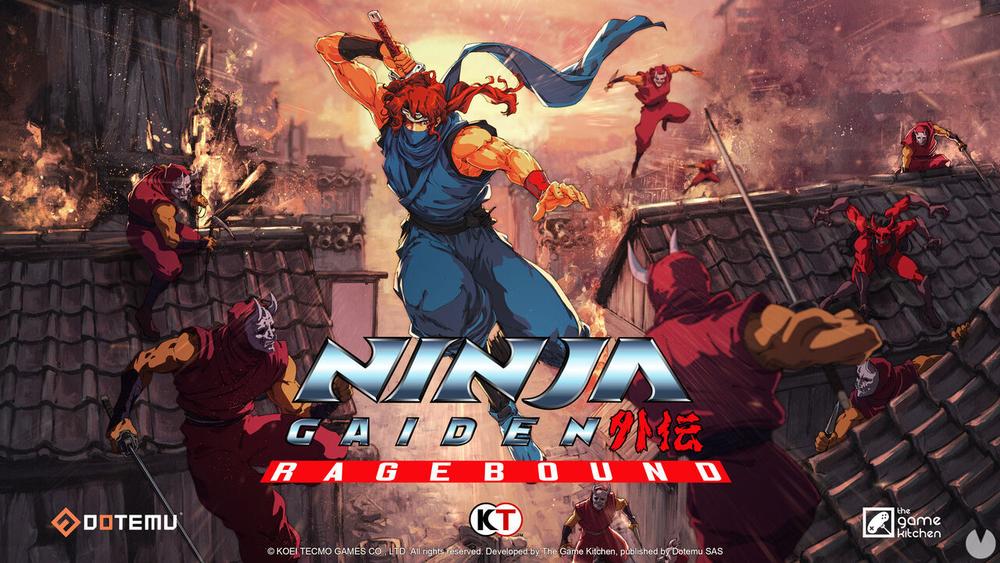
Ninja Gaiden: Ragebound joins Xbox Game Pass today on Series X|S, PC, and Cloud. This 2D action-platformer spin-off introduces a new protagonist, Kenji Mozu, and delivers fast melee combat, precise platforming, and retro-inspired visuals.

The game emphasizes skill-based encounters and challenging boss fights familiar to longtime Ninja Gaiden fans.

Alongside the new releases, Xbox Game Pass has added 48 titles to the Steam Your Own Game library. Microsoft also prepares for Xbox Developer Direct 2026, which is set to reveal upcoming games and updates across the Xbox ecosystem.

More Game Pass additions are expected before the end of January as Microsoft continues to expand the service’s catalog.

Bungie Fixes Steam Bug That Installed Destiny 2 After Marathon Pre-Orders

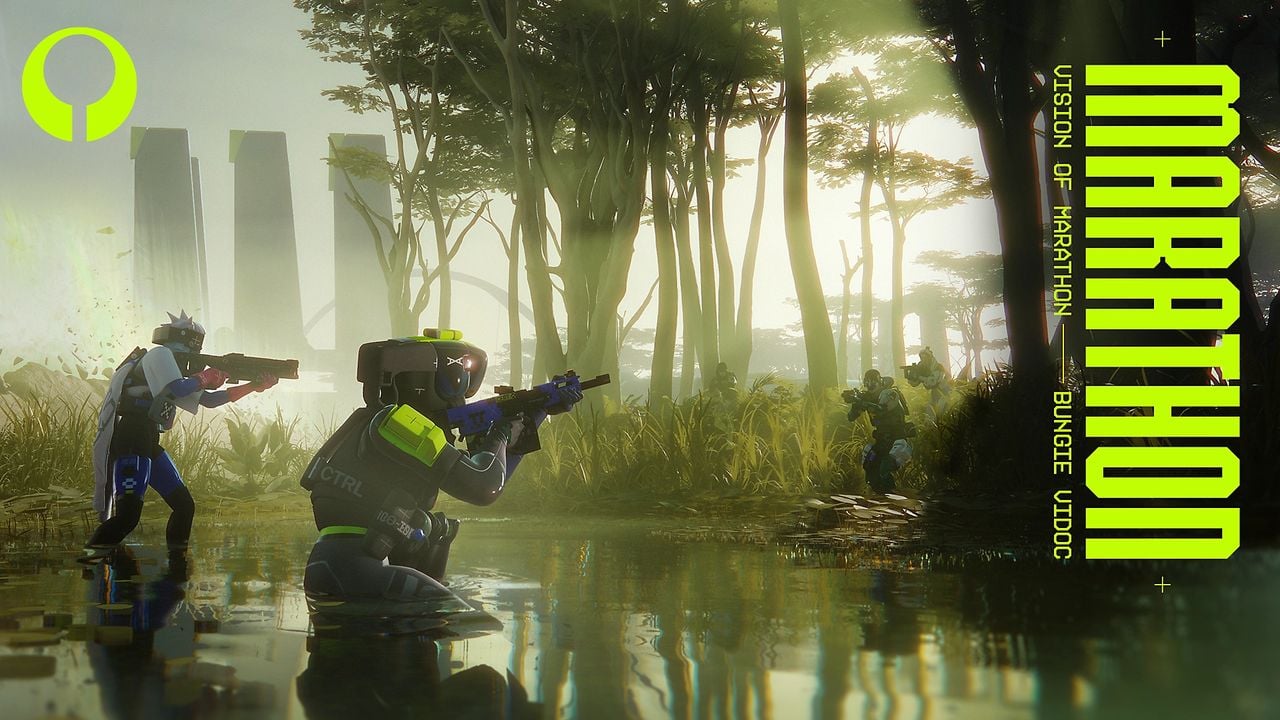
Bungie’s upcoming blockbuster title, Marathon, has been trending lately, and thankfully for all the right reasons. Earlier this week, a leak from the Xbox Store revealed the release date of the game along with its trailer. Since it wasn’t a fake trailer, Bungie had no option but to officially release the trailer and announce the release date.

Marathon pre-orders triggered an unexpected Destiny 2 install

Marathon is coming on March 5, 2026. Now that pre-orders have begun, the game appears to be breaking Steam’s top sellers chart. That being said, some Marathon players got more than they bargained for after hitting the pre-order button on Steam. Funnily enough, pre-loading Bungie’s upcoming extraction shooter on Steam reportedly began installing Destiny 2 as well.

The mix-up caught the attention of many, as this wasn’t happening to just one player. Thankfully, the issue didn’t last long. In a post shared on X, spotted by Eurogamer, the official Marathon dev team confirmed that the bug has now been fixed. According to the studio, pre-ordering Marathon will no longer trigger an unexpected Destiny 2 install.

https://twitter.com/MarathonDevTeam/status/2013752445231305147

Another issue fixed, too

In addition, Bungie also confirmed it has fixed another related issue where Collector’s Edition owners were running into errors when activating their Steam codes. Despite the hiccup, the Marathon craze doesn’t seem to have slowed at all. It’s currently ranking just below heavily discounted AAA titles and long-standing hits like Counter-Strike 2 and Arc Raiders.

Let’s not forget that Sony and Bungie have also officially partnered to launch a Marathon Limited Edition DualSense controller. Sadly, it’s limited to the US, for now, and costs $169.99.

Have you pre-ordered Marathon? Did the Destiny 2 install affect you, too? Let us know in the comments below. Also, here’s the pre-order trailer for you to savor.

Bungie’s Marathon Jumps to Top of Steam Paid Charts After Preorders Go Live

Marathon’s release date confirmation has sparked strong interest across the gaming community, with early sales momentum already visible across major storefronts.

Marathon climbs Steam’s paid sales chart

According to Windows Central, preorders for Marathon went live and quickly pushed the game up Steam’s Top Sellers list. Marathon currently sits as the second best-selling paid game on Steam.

Only ARC Raiders ranks ahead of it in paid sales. Free-to-play titles such as Counter-Strike 2, Warframe, and Marvel Rivals appear higher on the overall chart due to microtransaction revenue.

Despite competing on the same chart, Marathon’s position stands out as it relies entirely on upfront purchases rather than ongoing in-game spending, similarly to ARC Raiders.

Strong demand ahead of March launch

The strong Steam performance reflects rising anticipation ahead of Marathon’s launch scheduled for March 2026. The extraction shooter has also ranked highly on PlayStation preorder charts, with only Resident Evil Requiem placing ahead of it.

This suggests interest in Marathon is not limited to PC players, with console users showing similar enthusiasm ahead of launch.

Bungie plans to release Marathon on Xbox Series X|S, Windows PC, and PlayStation 5 on March 5. Sony has also announced a Marathon-themed limited edition DualSense controller for players interested in themed hardware.

There was also a strange bug on Steam that installed Destiny 2 after preordering Marathon, but it has been since fixed.

In other gaming news, Clair Obscur: Expedition 33 has reportedly broken an all-time Game of the Year record, marking another major milestone during a busy period for the industry.

Claude Gains Health App Integrations as Anthropic Expands Into Healthcare

After OpenAI’s push into healthcare, Anthropic is moving in the same direction by expanding Claude with new health-focused features. The company has now shared more details about how Claude can work with personal health data.

Claude can connect to health apps and records

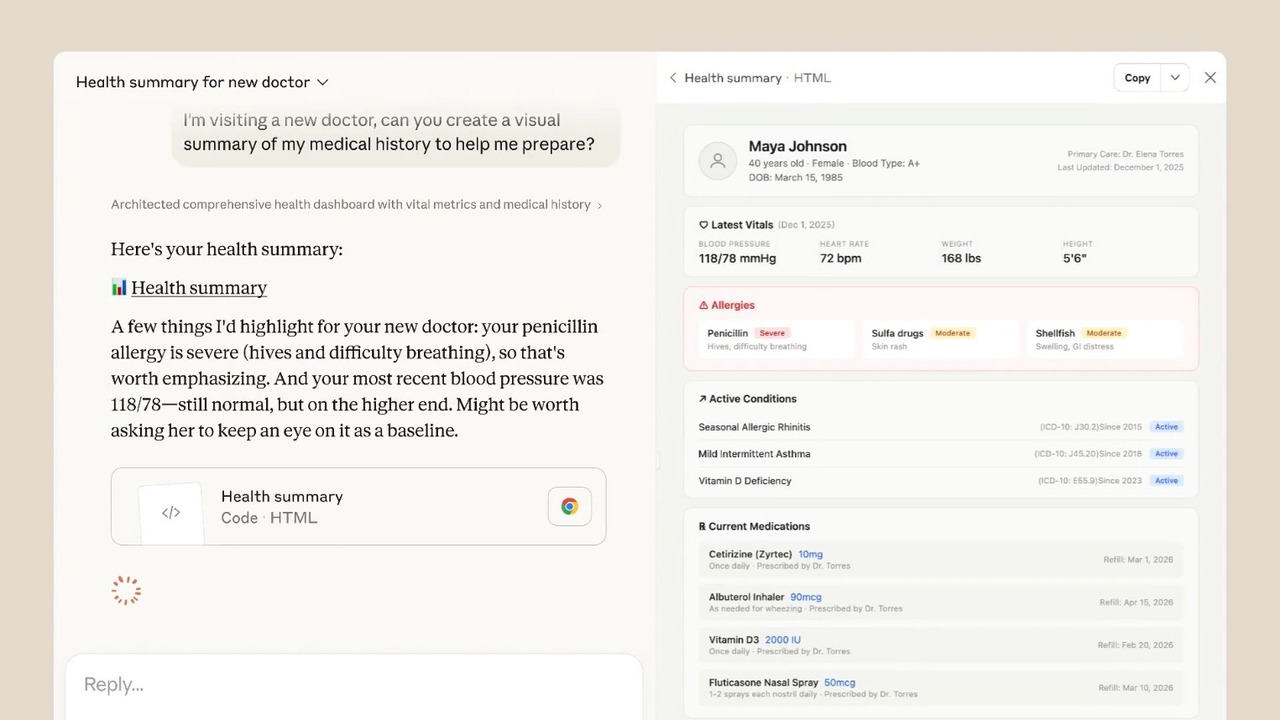
As Neowin reports, Anthropic has introduced health data integrations for Claude, allowing users to connect health apps and medical records directly to the AI assistant. The feature is available in beta for Claude Pro and Max subscribers in the US on Android and iOS.

Users can link Claude to platforms such as Apple Health and Android Health Connect. Once connected, Claude can summarize medical history in plain language, explain test results more clearly, and highlight patterns across fitness and health metrics.

Anthropic stresses that users must explicitly opt in before sharing any health information. Health-related conversations are not used to train AI models and are not saved to chat memory. Users can also review, edit, or revoke data access at any time.

The company says the goal is to help users prepare for medical appointments by presenting understandable insights and trends from their health data. Healthcare is not Anthropic’s only focus, however, as the company is also developing a new Cowork feature for Claude aimed at improving collaboration in future updates.

OpenAI Unveils Education for Countries to Bring AI Into National Education Systems

Despite projections that it could lose up to $14 billion this year, OpenAI continues to push forward with ambitious plans, including a dedicated AI device and new large-scale initiatives focused on education and workforce development.

The company is betting that long-term adoption of AI tools across governments, schools, and institutions will offset near-term financial pressure.

Education for Countries targets national AI-ready education systems

OpenAI announced Education for Countries on January 21, 2026, as a new pillar of its broader OpenAI for Countries initiative. The program focuses on helping governments modernize education systems and prepare future workforces using AI.

OpenAI plans to work directly with governments, ministries of education, university consortia, and researchers to integrate AI into national education strategies. A major goal involves expanding access to ChatGPT Edu and advanced AI models like GPT-5.2 to support teaching, learning, and research.

The initiative also emphasizes customization, allowing AI tools to align with local curricula, learning priorities, and national education goals. OpenAI will support large-scale research to measure how AI affects student outcomes and teacher productivity.

Training, research, and safeguards form core pillars

Education for Countries includes OpenAI Certification programs and tailored training for educators and students. OpenAI will collaborate with the OpenAI Academy to deliver practical AI skills for classrooms and universities.

The initiative also aims to build a global partner network that includes governments, researchers, and education leaders who can share best practices for AI adoption. Initial participating countries include Estonia, Greece, Jordan, Kazakhstan, Slovakia, Trinidad & Tobago, Italy (through CRUI), and the United Arab Emirates.

OpenAI says the program prioritizes safe, age-appropriate AI use, with pilot programs and protective measures designed specifically for classroom environments.

In related developments, ChatGPT has begun rolling out age-prediction features to better protect underage users, while OpenAI has also launched a limited promotion offering ChatGPT Plus for free to select accounts.

PowerToys Latest Version Out With Command Palette Upgrades & CursorWrap

Microsoft has rolled out PowerToys version 0.97, which focuses mainly on usability, customization, and speed. In the latest PowerToys version, you’ll find a bunch of changes in Command Palette, but that’s far from the only highlight this time around. There’s a lot more, so keep reading.

PowerToys version 0.97 revamps Command Palette

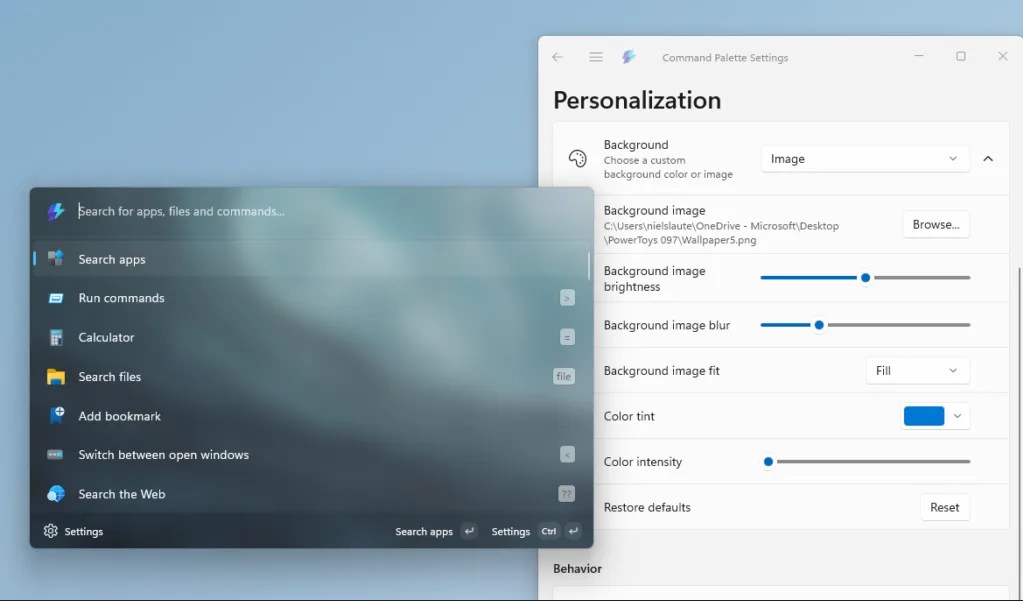
Command Palette continues to evolve into a central control hub. Version 0.97 introduces a new Personalization page, allowing users to add background images and apply color tinting. It’s a small touch, but it makes the tool feel far more personal.

Search behavior also gets smarter. PowerToys now supports fallback ranking, letting users manually reorder commands when results overlap. This adds more control over how searches behave, especially for power users with multiple extensions enabled.

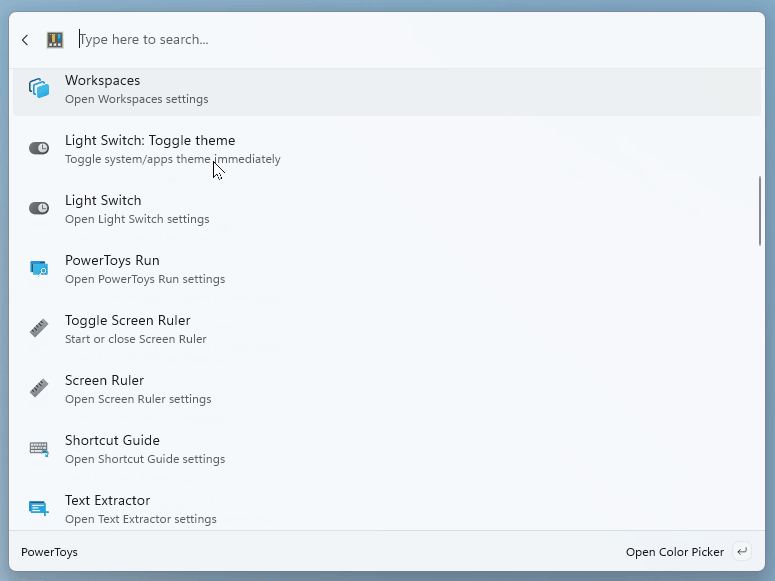
Another long-requested addition is native PowerToys control inside the Command Palette. You can now toggle utilities like Light Switch, change FancyZones layouts, pick colors, and even preview files using Peek, all without leaving the launcher.

Other additions include Pinyin support for Chinese languages, a built-in Remote Desktop extension, custom search engines for web queries, and drag-and-drop support for File Indexer and Clipboard History.

CursorWrap debut, faster access, and better automation

PowerToys 0.97 also introduces CursorWrap, a new mouse utility designed for multi-monitor setups. When enabled, the cursor wraps around the edges of the active display. Move past one edge, and it instantly reappears on the opposite side. It’s simple, but extremely effective.

The Quick Access flyout now launches faster thanks to being detached from the main Settings process. Users can disable it entirely or assign a custom shortcut. A new monochrome tray icon option is also available.

On the automation side, CLI support expands to FancyZones, Image Resizer, and File Locksmith, making PowerToys even more flexible for advanced workflows. PowerToys 0.97 is available now via in-app updates or the official release page. If you rely on Command Palette daily, this one’s worth installing immediately.

Microsoft continues expanding its service updates, with new watermarking features now under testing in Edge for Business and Copilot 365.

The company also plans to introduce an improved folder search experience in Outlook in the near future, so stay tuned.

Clair Obscur: Expedition 33 Breaks All-Time Game of the Year Record

Clair Obscur: Expedition 33 has continued its remarkable awards-season run, cementing its status as one of the most celebrated games in recent years. The game is dominating Game Developer Choice Awards nominations, and it shows no signs of stopping.

Expedition 33 breaks long-standing Game of the Year record

As reported by The Gamer, Clair Obscur: Expedition 33 has now secured more than 436 Game of the Year awards from outlets and industry organizations worldwide. That total pushes the game past the previous record holder, Elden Ring, which had accumulated 435 wins.

The milestone follows Expedition 33’s major victory at The Game Awards 2025, where it emerged as a standout winner. Its sustained presence at the top of critics’ lists highlights consistent praise across multiple regions and award bodies.

Expedition 33’s dominance has remained steady throughout the awards season, even as the game faced criticism related to its use of AI-assisted tools. Those concerns prompted the game’s director to issue an official statement addressing the controversy.

Despite that debate, the title continues to lead industry recognition and maintain strong momentum within the gaming market.

In other gaming news, Xbox Developer Direct 2026 is just around the corner, with new announcements and updates expected soon.

Outlook Search Folders Move to Settings With New Filters on the Way

Microsoft Outlook has faced a rough few weeks, with users reporting broken POP accounts and other bugs that make the email client difficult to use. The problems appear linked to a recent Windows update, and while Microsoft has acknowledged some Outlook-related issues, a full fix has yet to roll out.

Despite the ongoing reliability concerns, the company continues to push ahead with new Outlook features, as outlined in the latest Microsoft 365 Roadmap.

Search Folders move to Settings in Outlook

According to the roadmap, Microsoft plans to move Search Folders into the Settings area of Outlook. The goal is to improve discoverability and better align Outlook with modern email organization workflows, especially for users managing large inboxes.

By relocating Search Folders, Microsoft aims to make advanced filtering tools easier to find, rather than keeping them buried in legacy menu structures that many users overlook.

New Search Folder types and filtering options

The update also introduces new Search Folder types designed to streamline inbox management. These include predefined views such as mail with attachments, old mail, large mail, and additional categories aimed at common cleanup and review tasks.

Users will also gain the option to filter Search Folders by specific mail folders, giving them more precise control over how messages get grouped and displayed. This should help users focus on relevant content without scanning entire inboxes or archives.

The feature remains in development, but Microsoft expects it to arrive in February for both desktop and web versions of Outlook.

In related news, Microsoft has also begun blocking Intune-managed email access on non-compliant devices, reinforcing its broader push toward stricter security and device management policies across its ecosystem.

Microsoft 365 Copilot May Soon Watermark AI-Generated Content

Microsoft has been pushing Copilot for years, positioning Copilot+ PCs as the next generation of computing. However, many users now push back against aggressive AI integration, rising hardware costs, and concerns around the misuse of AI-generated content.

Microsoft plans AI watermarks in Copilot for Microsoft 365

According to the Microsoft Roadmap, Microsoft plans to introduce AI-generated content watermarking in Copilot for Microsoft 365. The goal focuses on limiting misuse and clearly identifying AI-created media.

The roadmap notes that Copilot will apply watermarks to AI-generated images, audio, and video. Microsoft continues development, but current information points to a rollout starting in February, with availability across desktop and mobile platforms.

Microsoft’s approach mirrors existing solutions from Google, which already uses SynthID. This system embeds invisible digital watermarks into AI-generated content, allowing platforms and investigators to trace its origin without affecting visual or audio quality.

While Microsoft has not detailed its technical implementation, the roadmap suggests a similar invisible watermarking approach rather than visible labels.

The watermarking move arrives as Copilot faces ongoing criticism. Users have raised concerns about Copilot’s ability to access personal files, and the tool has appeared in recent controversies involving UK police usage.

Although watermarking could reduce misuse and misinformation, it may not fully address broader trust issues surrounding AI integration and data access. As Microsoft expands Copilot across Windows and Microsoft 365, user skepticism around AI governance and transparency continues to grow.

Nintendo Switch 2 Prices Could Rise as Memory Costs Surge

Nintendo Switch 2 price increase speculation is growing as analysts warn that rising component costs could push Nintendo to charge more for its next-generation console.

Nintendo Switch 2 production costs reportedly rising

Nintendo has enjoyed strong momentum, with the Nintendo Switch 2 dominating console sales in Japan. However, new reports suggest that future pricing could change.

According to TheGamer, analysts at Niko Partners say Nintendo now spends significantly more on RAM and storage components for the Switch 2. These rising hardware costs could eventually affect the console’s retail price.

Memory shortages linked to AI demand

Analysts point to global demand from AI data centers as the main reason behind higher RAM prices. Large-scale AI infrastructure requires massive amounts of memory, which has driven up costs across the tech industry.

Because RAM plays a critical role in the Switch 2’s hardware design, increased prices directly raise production costs. Nintendo may decide to absorb these expenses initially, but a price adjustment remains possible if costs continue to climb.

Industry observers believe any price increase could appear either at launch in certain regions or later through revised production runs.

Alongside pricing concerns, reports also suggest that Nintendo may work on additional Switch 2 models. These rumors remain unconfirmed, and Nintendo has not shared official details.

For now, fans continue to watch closely as Nintendo balances rising component costs with consumer expectations, especially after the Switch 2’s strong early performance in Japan.

ChatGPT Rolls Out Age Prediction Model to Improve Safety For Younger Users

OpenAI has been busy developing its first AI-focused device, but the company is also tightening safety controls inside ChatGPT by rolling out a new age prediction system.

According to BleepingComputer, OpenAI has started deploying an age detection model designed to estimate whether a user is under 18 and automatically apply stricter safety rules.

ChatGPT gets a built-in age prediction system

The new model aims to reduce potential misuse by younger users and limit access to adult or high-risk content. OpenAI says the system analyzes behavioral signals such as conversation topics, interaction patterns, and even the times of day ChatGPT is used.

Because the model relies on usage patterns rather than direct age input, OpenAI acknowledges that it may sometimes misclassify adults as teenagers, especially when behavior resembles that of younger users.

Content restrictions and age verification options

When ChatGPT flags a user as under 18, access to certain categories becomes limited. Restricted topics can include graphic violence, gore, risky viral challenges, and content that promotes unhealthy behaviors.

Users incorrectly identified as minors can verify their age to regain full access. OpenAI allows verification through a live selfie or by submitting a government-issued ID. Once verified, the account restores the standard adult experience.

Even with age prediction enabled, OpenAI says users can still learn, create, and ask questions, though within tighter safety boundaries.

The age prediction rollout is not the only update in progress. OpenAI continues testing new tasks and workflow features aimed at expanding how users interact with ChatGPT.

At the same time, reports suggest OpenAI could face losses of up to $14 billion this year due to high infrastructure and computing costs. Despite that, the company recently launched a limited promotion offering free access to ChatGPT Plus for select users, signaling continued efforts to grow adoption while refining platform safety.

Windows 11 KB5074109 Breaks Sleep Mode on Some PCs

Microsoft has already addressed several problems caused by the KB5074109 update, including a shutdown bug that required an emergency patch. New reports now show that the update also disrupts Sleep mode on certain systems, expanding the scope of issues tied to this release.

KB5074109 breaks classic S3 Sleep mode

According to Windows Latest, KB5074109 breaks the classic S3 Sleep mode on some PCs. S3 represents the traditional Windows sleep state, commonly used on older hardware, where the system keeps active sessions in RAM while powering down most components to save energy.

After installing the update, affected systems display a blank screen when entering Sleep. The PC remains powered on and never transitions into a low-power state. Users report the system freezes completely, forcing a hard shutdown by holding the power button.

Reports show the Sleep problem occurs every time affected users attempt to use Sleep mode. Users confirmed the behavior on multiple PCs running both Windows 11 Pro and Windows 11 Home.

Uninstalling KB5074109 restores normal Sleep behavior. Reinstalling the update immediately causes the issue to return, strongly linking the problem to this specific patch.

Citrix Director shadowing also impacted

KB5074109 also breaks Citrix Director shadowing after January’s Windows 11 patching. Citrix Director still downloads the Remote Assistance invite file (.msrcincident), but Windows fails to open it and reports the file as corrupted.

Event logs show Remote Assistance starts, errors out, and exits almost immediately. Citrix has confirmed the issue and continues to investigate it.

As a workaround, Citrix recommends switching to HDX Screen Sharing, its newer native shadowing method. Citrix linked the problem to KB5074109, which includes a security fix for CVE-2026-20824 related to Windows Remote Assistance.

These new reports add to the growing list of KB5074109 issues. Users have already reported app crashes and lockups, black screen problems on NVIDIA GPUs, and Outlook bugs that make the app nearly unusable.

With power management, remote administration, and productivity tools all affected, pressure continues to build on Microsoft to deliver broader fixes. Many users now hope the company will respond quickly and resolve these problems once and for all.

Windows 11 Update KB5074109 Linked to App Crashes and Lockups

Microsoft released KB5074109 for Windows 11 recently, but the update continues to cause serious issues. Users already reported Azure Virtual Desktop failures and shutdown problems, and although Microsoft pushed emergency updates, new bugs keep appearing.

Reports point to full system lockups after the KB5074109 update

As reported by Neowin, new complaints describe complete system freezes and repeated app crashes after installing KB5074109. One user, SPMech, experienced a total system lockup when changing viewport shading modes in BforArtists, a fork of Blender.

The PC stops responding entirely, with no blue screen, error code, or visible crash report. Standard recovery options fail once the freeze occurs.

Reinstalling both the affected application and the Windows update did not solve the issue. The freezes stopped only after uninstalling KB5074109 and pausing Windows Update. At the time of writing, Microsoft has not acknowledged this specific problem publicly.

Because the entire system locks up, the problem likely involves drivers or the Windows graphics stack rather than a single app. This explanation matches earlier reports linking KB5074109 to black screen issues on systems running NVIDIA GPUs.

In a separate case, another user named Eva Kwon reported that payroll and remote-access applications close immediately after login once KB5074109 is installed. These crashes occur consistently and prevent normal system use.

Overall, KB5074109 continues to frustrate Windows 11 users. The update has already caused reboot loops, broken POP email accounts, and made Outlook unusable for some users. Until Microsoft delivers a broader fix, uninstalling or pausing the update remains the safest option for affected systems.

Chrome on Windows 11 will soon let you drag and download multiple files from web apps to File Explorer

Google is working on a change in Chrome for Windows that could fix a long-standing drag-and-drop frustration.

Right now, dragging multiple files from websites such as Google Drive, Dropbox, or GitHub to your desktop often fails. In many cases, only one file downloads, even if several are selected. This forces users to repeat the same action again and again.

Drag and download multiple files at once in Chrome on Windows

A recent Chromium commit spotted by Windows Report confirms active work on proper multi-file drag-and-drop support on Windows. The change lets Chrome treat one drag action as a group of files instead of a single item. This allows web apps to tell the browser that several downloads belong to the same action.

For users, the idea is simple. Select several files on a web page. Drag them to a folder on your PC. All files save together, just like they do in desktop apps. This could help anyone who often downloads batches of email attachments, exported reports, or groups of files from cloud storage tools.

For instance, you might be cleaning up your inbox in Outlook on the web or Gmail and want to save several attachments from a single email thread. Today, you often have to click each file one by one. If you try to drag them together, only one file may end up on your desktop.

With this change in Chrome for Windows, the experience would feel more natural. You could select all the attachments, drag them to a folder in File Explorer, and see every file save at once. It would work the same way users already expect from desktop email apps.

Behind the scenes, this builds on Chrome’s existing drag-and-drop system for downloads, which has been limited to one file per drag. The new behavior allows websites to pass details for several files at once, so Chrome can start each download automatically after you drop them into File Explorer.

The work currently focuses on Windows. There is no confirmed version or release timeline yet. The feature will likely reach testing builds such as Canary first before rolling out more widely.

Chrome is also testing Windows 11 native notifications for default browser changes and a Mica-style title bar.

Bethesda’s Fallout 3 and New Vegas Remakes/Remasters Reportedly Not Releasing Anytime Soon

If you’ve been holding out hope for surprise shadow drop of Fallout 3 or Fallout: New Vegas remakes/remasters, it’s probably time to reset expectations. That’s according to Jez Corden, who, in his report for Windows Central, notes that both projects do exist internally, but neither is anywhere close to release.

Don’t Expect Fallout 3 or New Vegas Remakes Anytime Soon

In other words, don’t expect Bethesda to quietly drop either remake/remaster anytime soon. That said, Corden notes that when these projects eventually surface, Fallout 3 is likely to release before the New Vegas. So, what’s Bethesda working on , you may ask, right? Well, the studio is reportedly actively developing Fallout 5.

To catch you up, Todd Howard previously hinted that the next mainline entry is designed to keep players engaged for hundreds of hours. The game is also expected to connect with the Fallout universe, including the latest TV adaptation.

Meanwhile, the franchise hasn’t exactly gone quiet. Fallout 4 recently received a sizable update. The rumors around Fallout 3 and New Vegas shadow dropped reportedly surface online after fans spotted some Steam enteries for both Fallout 3 and New Vegas were missing. However, Corden mentions those activities are “due to updates for localized versions of the existing games, and aren’t to do with any impending “shadow drop” for Fallout 3 and New Vegas remakes / remasters.”

Bethesda reportedly also has some other works in process

On the live-service side, Fallout 76 remains a major focus. The game is set to receive a current-gen upgrade this year, alongside ongoing content updates such as Burning Springs. Howard has even stated that Fallout 76 is currently where much of the studio’s effort is concentrated.

Add in the Fallout TV series and even a newly announced Fallout Shelter reality show, and it’s clear the franchise is expanding fast. Remakes/remasters may be coming, but for now, those are in the “long-term plans” category rather than the near future.

Duet Night Abyss Joins Steam As A Free to Play Game

Duet Night Abyss has quietly launched on Steam as a free to play game after launching earlier on mobile and PC via other stores. This anime-style action RPG is designed around a dual narrative structure that lets players experience the world of Atlasia through two protagonists whose stories intertwine.

The free to play Steam game has got “mixed” reviews so far

The combat blends melee and ranged weapons with fast-paced hack-and-slash action, encouraging players to swap loadouts fluidly in battle. A major talking point before launch was the game’s monetization.

As reported back in August 2025, developers chose to remove traditional gacha systems and stamina limits, which allows characters and weapons to be unlocked through play rather than random pulls. This move set Duet Night Abyss apart from many free-to-play RPGs and aimed to focus monetization primarily on cosmetics and optional purchases.

Despite a player-friendly model, early reception on Steam has been “mixed.” The title currently holds a 66% positive rating, with players praising its progression freedom and monetization philosophy, but criticizing aspects like UI complexity and combat feel. With its Steam launch now live, the game’s community and content roadmap will be something to watch in 2026.

Have you tried the free Steam game yet? If yes, let us know more about it in the comments below.

Russia Warns Rockstar Over GTA 6’s Content, Threatens Outright Ban Across the Country

Grand Theft Auto 6 (GTA 6) is undoutedly the most anticipated games of this year. Rockstar has locked in November launch after delaying it. As you may know, the game hasn’t launched. But, that hasn’t stopped Rockstar Games from being on the firing line of a Russian official over game’s content.

Russian leader calls for GTA 6 ban in the country over male stripper content

While every fans are hoping to get their hands-on GTA 6, a senior Russian leader has publicly criticized the game’s content, calling it immoral and dangerous for young audiences. The comments have sparked fresh debate around censorship, regional versions, and whether GTA 6 could be blocked entirely in certain markets.

In an interview with NEWS.ru, Mikhail Ivanov, deputy chairman of the World Russian People’s Council, recently took aim at GTA 6 during an interview (via MP1st). Per Ivanov, Rockstar is deliberately pushing content that clashes with traditional moral and spiritual values. His strongest criticism focused on adult-themed scenes, including reported male strip club content.

Ivanov claimed such material could negatively influence younger players. He warned that the game risks becoming a tool of cultural corruption rather than entertainment. As a result, he urged authorities to ban GTA 6 from being sold in Russia unless Rockstar agrees to changes.

That very comment may cause trouble in the coming days over GTA 6’s Russia launch. The stance of Ivanov is clear, either Rockstar develops a special, censored version of GTA 6 for the Russian market, or the game should face an outright ban. Ivanov also suggested that other countries are already taking steps to block similar content, hinting the move as a wider cultural defense. That being said, no similar reports have come from any other country yet.

Rockstar has yet to comment

So far, Rockstar and parent company Take-Two Interactive have not responded to the remarks.
Many still believe that GTA 6 has been scheduled to release slated for a November 19, 2026 release, though delays into 2027 are still rumored. In fact, its long development cycle has reportedly even been discussed in political circles outside Russia. Whether this pressure leads to regional censorship remains to be seen.

Would Rockstar ever ship a toned-down version? Or is a regional ban more likely? Whst do you thonk? Let us know in the comments below.

“Life Is Strange: Reunion” Brings Max & Chloe Back for One Final Story on PC & Consoles This March

After years of speculation, Life is Strange: Reunion is finally happening. Yes, you read that absolutely correct. Square Enix has confirmed that the long-awaited finale to Max and Chloe’s story will launch on March 26 for Xbox Series X|S and Xbox on PC. It’s the ending many thought would never happen.

Life Is Strange: Reunion launches on Xbox, PlayStation & Steam

Life is Strange: Reunion reunites Max Caulfield and Chloe Price as full co-leads for the first time. The story brings both of them back at the very famous Caledon University after years multiple events shaped their lives massively. Just to be clear, their reunion isn’t just treated as a reset or an easy fix; the emotional baggage of Arcadia Bay will remain intact.

Max once again has access to her Rewind ability. However, it has evolved in unexpected ways. She can now manipulate conversations, investigate hidden truths, and even restart key moments after jumping into photographs. Time, once again, is fragile.

Chloe’s done changing, as she’s now a manager of a touring band, and has her perspective. No universities and their rules can bound her anymore. Quick wit, her signature Backtalk ability, and an utter willingness to cross lines Max won’t-these are what will make her just as vital in uncovering the mystery at Caledon.

A story based on choices made in the past

Your past choices continue to matter. How Chloe lived or died in Arcadia Bay, and what happened between them, both have a bearing on the story and the future they’re fighting for. Both Max and Chloe provide a different perspective as their bond is integral to how the story evolves.

Deck Nine Games describes this Reunion as full circle for moment for both fans and developers. Life is Strange: Reunion launches March 26 on Xbox Series X|S and Xbox on PC. You can even pre-order it now. Speaking of comebacks, let’s not forget that Final Fantasy 7 Remake Intergrade is releasing on Xbox and Nintendo Switch 2 this Thursday.

Final Fantasy 7 Remake Intergrade Release Date for Xbox and Switch 2

If you have waited to play Final Fantasy 7 Remake Intergrade on Xbox Series X|S and Nintendo Switch 2 all this time, there is some good news for you. For those unaware, the title has been around for a while now. It debuted first on Sony’s PlayStation 4 (PS4). Square Enix later brought it to PS5. Folks on PC got it later, but those on Xbox and Switch 2 had to wait.

Final Fantasy 7 Remake Intergrade release on Xbox Series X|S and Nintendo Switch 2 on January 22

Well, that wait will apparently be over in just two days. Yes, you read that right. Last week, Square Enix officially confirmed that Final Fantasy 7 Remake Intergrade will launch on Xbox Series X|S and Nintendo Switch 2 on January 22. With that, the modern Final Fantasy 7 remake officially breaks free from its long-standing PlayStation exclusivity.

The announcement about the Xbox debut was made first back in June last year, alongside the confirmation that the full Final Fantasy 7 Remake trilogy would come to Xbox Series X|S and Nintendo Switch 2. So, it’s safe to say that Intergrade is the first major step of the big rollout plan. The company also made the demo of the game available for Xbox and Switch 2 players back in December last year.

As reported, the game weighs around 100GB. So, if you are planning to play it on Nintendo Switch 2, you should be ready to clear out a few extra GBs. With the Xbox Series X|S and Switch 2 launch, Final Fantasy 7 Remake Intergrade will now be playable on every major platform.

Speaking of Xbox, Microsoft has also announced a bunch of new games that are joining Game Pass later this month and in early February. Worth noting that seven new titles are also leaving the service on January 31, so it’s your best chance to jump onto them.

As for Final Fantasy 7 Remake Intergrade, which platform are you looking to try it on first? Are you jumping in on Xbox or Switch 2?

Xbox Game Pass January Wave 2 Lineup Brings Warhammer 40K: Space Marine II as 7 Titles Leave

If you have been waiting for Microsoft to drop the Xbox Game Pass titles, well, it’s here. The wave 2 lineup includes some big releases, day-one drops, and a few quiet surprises. Warhammer 40,000: Space Marine II, which joins the service later this month alongside Death Stranding Director’s Cut, is among the few notable titles coming to Xbox Game Pass this month.

Xbox Game Pass set to get Warhammer 40,000: Space Marine II and more this month

Meanwhile, some games are already live on Xbox Game Pass. For example, Resident Evil Village is now available across cloud, console, and PC. The game offers a closer look at Ethan Winters’ haunting journey back into the spotlight. MIO: Memories in Orbit, a day-one Game Pass release, is joining alongside, as we previously reported in late 2025.

Tomorrow, January 21, a few big games are dropping on Xbox Game Pass. Death Stranding Director’s Cut is one of them, giving you the chance to jump into Hideo Kojima’s surreal world with expanded content. The same day, RoadCraft, a physics-driven rebuilding sim, and Ninja Gaiden: Ragebound, a fast-paced side-scroller, will join the service.

Moving on, The Talos Principle 2 lands on January 27, followed by Anno: Mutationem and Drop Duchy on January 28. January 29 is the day for MySims: Cozy Bundle and Warhammer 40,000: Space Marine II to join the catalog. On February 2, you’ll get a chance to grab Indika, while Final Fantasy II releases on February 3. There are also a few titles leaving Xbox Game Pass on January 31. You can check them out at the end of this piece.

Image credit: Microsoft | Xbox

Games Joining Xbox Game Pass in the rest of January & early February

TitlesRelease Date
Resident Evil VillageJanuary 20 (Available Today)
MIO: Memories in OrbitJanuary 20 (Available Today)
Quarantine Zone: The Last CheckJanuary 20 (Available Today)
Death Stranding Director’s CutJanuary 21
RoadCraftJanuary 21
Ninja Gaiden: RageboundJanuary 21
The Sims 25th Birthday BundleJanuary 22
Sea of Thieves Season 18, Act 2January 22
The Talos Principle 2January 27
Grounded 2 Garden UpdateJanuary 27
Dead by Daylight – Stranger ThingsJanuary 27
Anno: MutationemJanuary 28
Drop DuchyJanuary 28
MySims: Cozy BundleJanuary 29
Warhammer 40,000: Space Marine IIJanuary 29
IndikaFebruary 2
Final Fantasy IIFebruary 3

Games Leaving Xbox Game Pass This Month

Here are all the games that will be leaving the Game Pass service later this month. As usual, you can save up to 20% off your purchase to keep them playing after the deadline ends.

  • Shady Part of Me
  • Cataclismo
  • Starbound
  • Lonely Mountains Snow Riders
  • Paw Patrol World
  • Citizen Sleeper 2: Starward Vector
  • Orcs Must Die! Deathtrap

Which of the games are you excited to try this month? Let us know in the comments below.

Microsoft Tests Watermarking and Protected Clipboard in Edge For Businesses

Microsoft Edge fans already noticed the latest update makes it easier to hide Copilot, but Microsoft has more planned for the browser. This time, the focus shifts to enterprise security and IT management.

As Neowin reports, Microsoft is previewing two new security features designed for IT administrators who manage Microsoft Edge at scale.

New Edge security features target enterprise environments

Microsoft aims to simplify security management while giving organizations stronger control over sensitive data inside the browser. The new tools focus on visibility, prevention, and policy enforcement across managed environments.

Watermarking protection for sensitive browser content

One of the upcoming features introduces watermarking protection. This capability lets admins apply a persistent watermark to sensitive data displayed in Edge, helping prevent accidental sharing or leaks.

Right now, Edge uses a hardcoded watermark string that has a confidentiality warning, the user’s name, and a timestamp. Microsoft plans to add dynamic watermarks later, along with more granular control over how and when watermarks appear.

To test this feature, admins need:

  • Access to the Edge Management Service portal
  • A Microsoft E3 or E5 license
  • Edge version 142 on the Targeted Release channel

Protected Clipboard enforces DLP policies

The second feature in preview is Protected Clipboard. This tool enforces Data Loss Prevention (DLP) policies when users copy and paste data between managed and unmanaged cloud apps.

Protected Clipboard focuses on stopping both data exfiltration and unauthorized data ingestion, especially in mixed enterprise environments where users switch between corporate and personal apps.

To use Protected Clipboard, organizations need:

  • The latest version of Edge for Business
  • A Microsoft 365 E3 or E5 license with Purview-managed DLP policies
  • Intune MAM support
  • Access to the Edge Management Service portal

Both features remain in preview, and Microsoft has not shared a timeline for general availability. The company continues to refine requirements and capabilities based on enterprise feedback.

For security-conscious users, this news follows recent fixes for major Edge security issues. In related news, Google Chrome briefly appeared in a Microsoft promo ad by mistake, though Microsoft quickly removed it.

OpenAI Launches Surprise Promotion With Free ChatGPT Plus Access

Despite reports that OpenAI could face losses of up to $14 billion this year, the company continues to push new initiatives. Alongside work on its first dedicated AI device, OpenAI has quietly launched a limited-time promotion for ChatGPT users.

ChatGPT Plus goes free for selected accounts

As spotted by BleepingComputer, OpenAI currently offers the ChatGPT Plus subscription for free to a small group of users. The plan usually costs $20 per month in the U.S.

The offer does not apply to all accounts. Only selected users can activate it through a special promotional link shown in their ChatGPT interface or email.

OpenAI subscription tiers explained

OpenAI now structures ChatGPT access across three main plans:

  • ChatGPT Go at $8 per month
  • ChatGPT Plus at $20 per month
  • ChatGPT Pro at $200 per month

Earlier promotions focused on giving existing Plus subscribers an extra free month. This new deal marks the first time OpenAI has extended free Plus access to a broader set of users.

The timing of the promotion matters. OpenAI plans to introduce ads into the ChatGPT Free and Go plans, which could change how casual users experience the service.

At the same time, the company continues to test new task automation and workflow tools. A recent update also improved ChatGPT’s memory features, allowing the assistant to better retain user preferences across conversations.

For users eligible for the free Plus offer, the promotion provides a chance to test advanced features before ads arrive on lower-tier plans.

OpenAI Could Face $14 Billion Loss in 2026 as AI Costs Surge

While OpenAI works on its first dedicated AI device, new projections suggest the company may face a steep financial hit this year.

As Windows Central reports, OpenAI could lose around $14 billion in 2026, pointing to one of the largest annual deficits in the AI sector. The estimate highlights how expensive large-scale AI development has become, even for market leaders.

Massive infrastructure spending drives losses

OpenAI continues to pour money into infrastructure expansion, including new data centers and increased computing capacity. These investments aim to support more powerful AI models and the growing demand from enterprise and consumer users.

Training advanced large language models remains one of the biggest cost drivers. The process requires enormous amounts of computing power and energy, which pushes operating expenses higher each year.

Revenue growth struggles to keep pace

Despite the projected losses, OpenAI reportedly generates up to $13 billion in annual revenue from ChatGPT subscriptions and API access for large language models. However, the company also spends as much as $1.4 billion annually on computing alone, creating a widening gap between income and expenses.

This imbalance raises concerns about long-term sustainability if costs continue to grow faster than revenue, especially as competition in the AI space intensifies.

Amid these grim predictions, OpenAI plans to test advertising in the Free and Go tiers of ChatGPT in the US, signaling a push toward new monetization strategies. The company also experiments with new tasks and workflow features behind the scenes, which could target business users and boost future revenue.

Together, these moves suggest OpenAI is actively searching for ways to balance innovation with financial stability as AI development costs continue to climb.

Microsoft Forces Azure Monitoring as SQL Server Tools Reach End of Support

Microsoft is moving another core database management component into the cloud, continuing its broader shift away from traditional on-premises infrastructure.

According to Neowin, the company has confirmed that SCOM Management Packs for SSRS, PBIRS, and SSAS will reach the end of support in January 2027, effectively pushing customers toward Azure-based monitoring.

What these tools do and why they matter

SCOM Management Packs help IT administrators monitor SQL Server Reporting Services, Power BI Report Server, and SQL Server Analysis Services. They alert admins when reporting or analytics services stop working, fail to respond, or crash entirely.

For many enterprises, these packs play a critical role in maintaining uptime and diagnosing issues across on-prem SQL environments.

Azure becomes mandatory with SQL Server 2025

Microsoft plans to consolidate monitoring into Azure, meaning organizations that upgrade to SQL Server 2025 will need to rely on cloud-based services such as Azure Monitor.

This creates a direct problem for enterprises that deliberately kept workloads on-premises for security, compliance, or legacy reasons. Once support ends, staying fully on-prem while remaining up to date becomes far more difficult.

Higher costs and training challenges

Moving monitoring into Azure introduces ongoing usage-based billing, which may increase IT costs for smaller and mid-sized companies. Teams will also need training to adapt to new Azure monitoring workflows, adding both time and operational overhead.

The situation worsens for partners as Microsoft has already removed the free grace period previously offered under Extended Service Terms, increasing the risk of unexpected charges.

This shift aligns with Microsoft’s long-term cloud-first strategy and its efforts to consolidate enterprise tooling inside Azure. At the same time, the company continues pushing AI into mainstream enterprise workflows and has recently tightened security controls by blocking email access in Microsoft Intune for non-compliant devices.

For many enterprises, the message grows clearer: staying current with Microsoft’s ecosystem increasingly means moving critical management and monitoring functions into Azure, whether organizations want to or not.