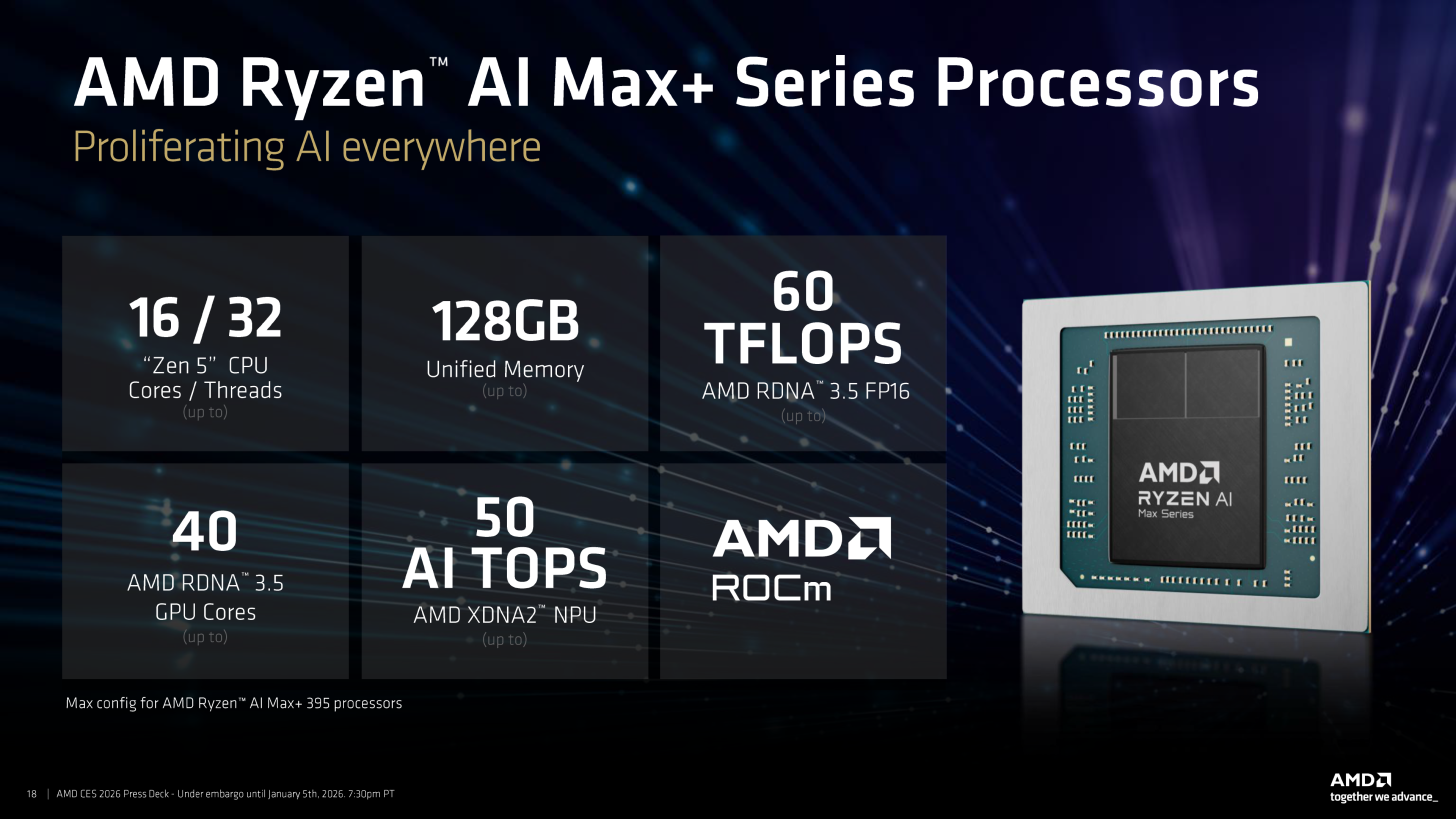
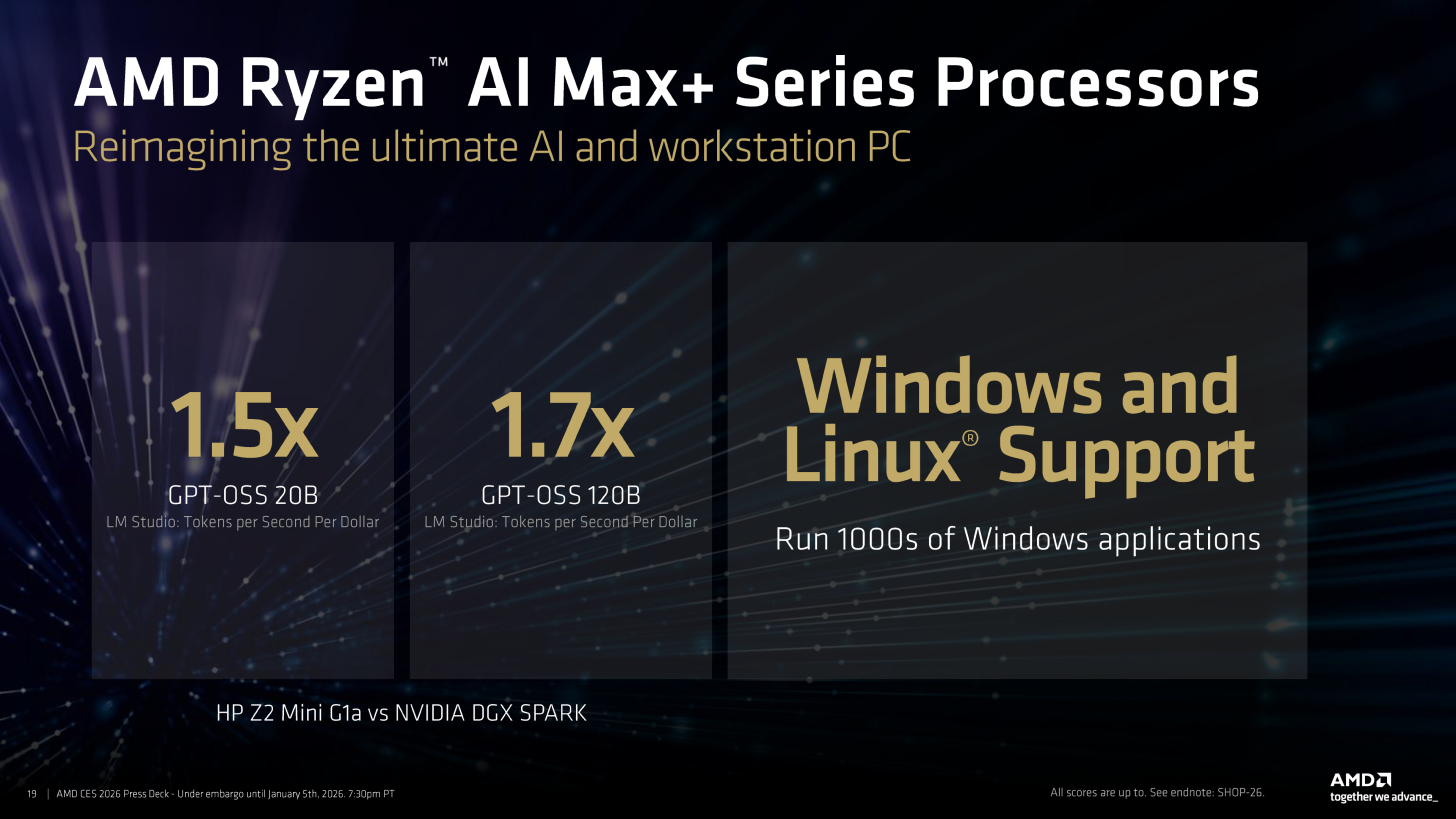
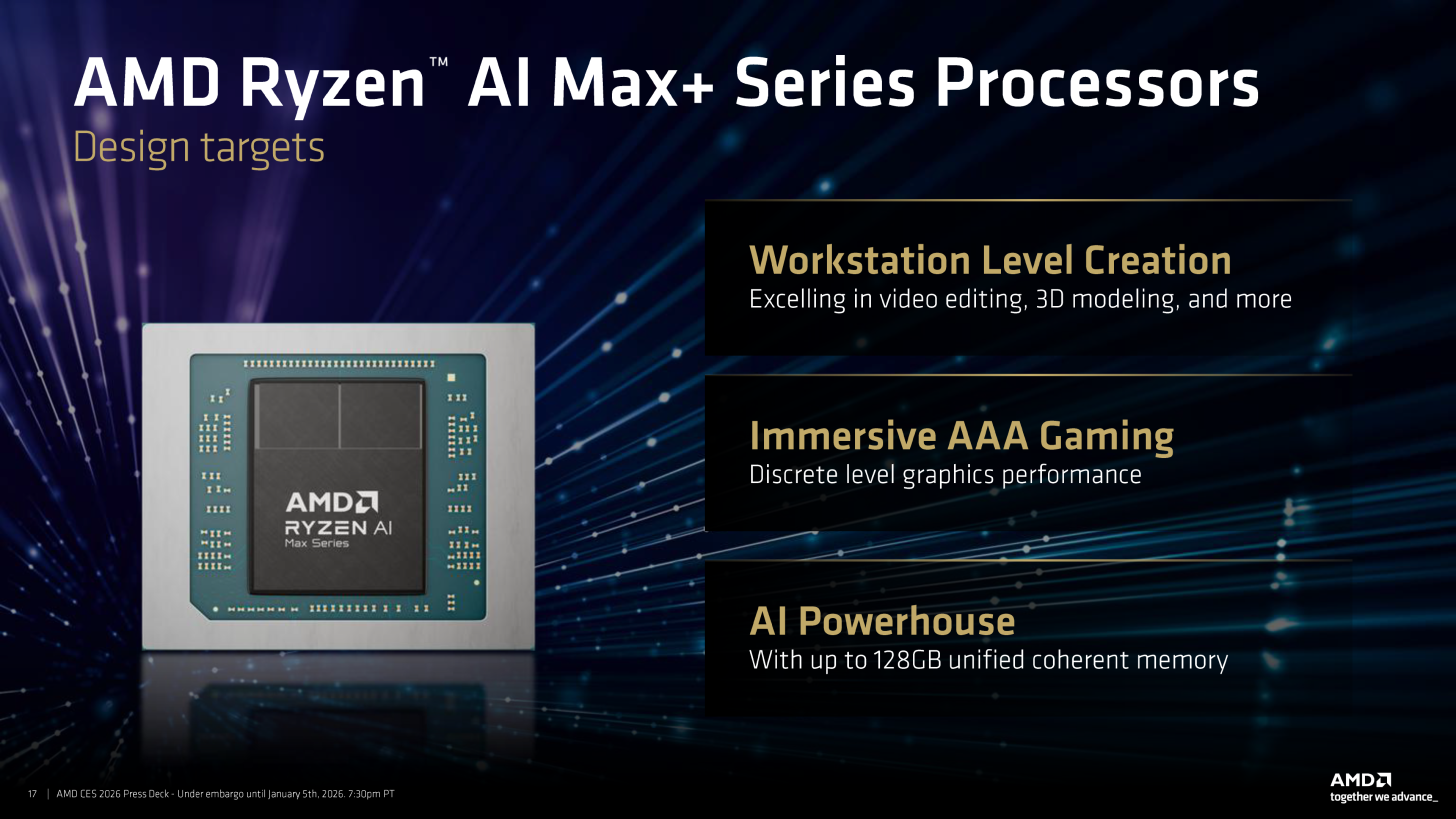
At the CES 2026 event in Las Vegas, AMD has expanded its Ryzen AI Max+ Series with two new processors, the Ryzen AI Max+ 392 and Ryzen AI Max+ 388. Both processors promise to deliver high-performance AI compute, integrated desktop-class graphics, and unified memory architecture to premium ultra-thin laptops, workstations, and compact mini-PCs.
The latest Ryzen AI Max+ processors combine high-efficiency Zen 5 cores with Radeon 8060S Series graphics and second-generation XDNA NPUs. You can expect versatile performance for resource-intensive creative workflows, AI workloads, and modern-day gaming requirements.
AMD says the processors allow OEMs to deliver Copilot+ PCs optimized for both productivity and immersive entertainment, without compromising user experience or form factor. Speaking of specs, the Ryzen AI Max+ 392 features 12 cores and 24 threads, a boost frequency up to 5.0 GHz, 76MB of cache, and AMD Radeon 8060S graphics. All combined deliver up to 50 TOPS of AI compute at a configurable TDP of 45–120W.
The slightly smaller Ryzen AI Max+ 388 offers 8 cores and 16 threads, a boost frequency up to 5.0 GHz, 40MB of cache, and the same Radeon 8060S graphics and 50 TOPS NPU performance. AMD says that both processors have been designed for high efficiency and versatility to enable large language model acceleration, media rendering, and gaming in compact form factors.
AMD says systems powered by the new Ryzen AI Max+ processors will be available beginning Q1 2026 from major OEM partners, including Acer and ASUS, with additional systems expected later in the year. Not to forget, the company has also unveiled Ryzen AI 400 Series Processors at CES 2026.
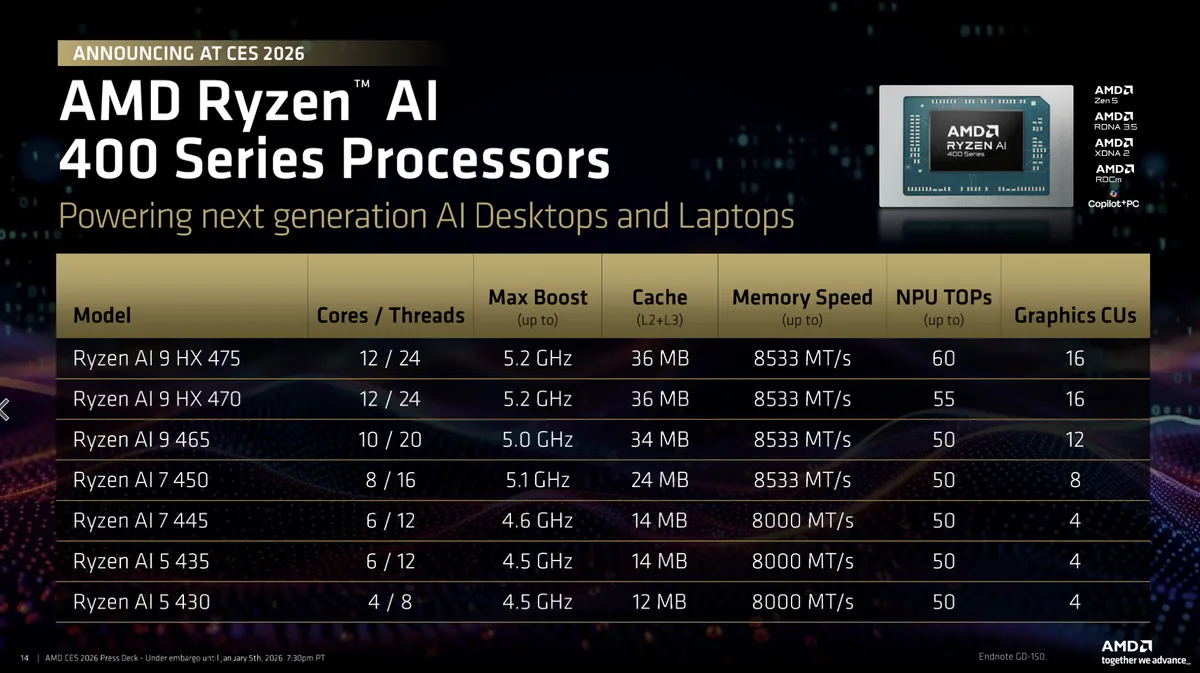
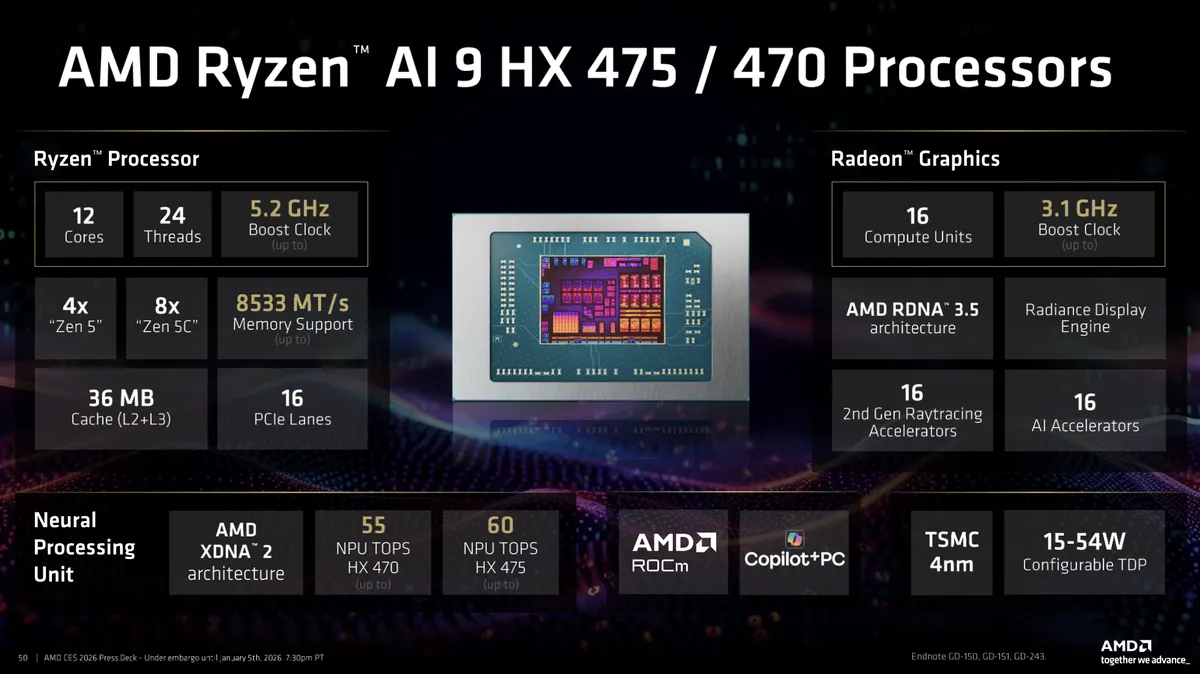
AMD has kicked off CES 2026 with style, adding new processors to its lineup. Speaking of which, the first ones that have been unveiled as next-generation AI processors for both consumer and enterprise PCs are the Ryzen AI 400 Series and Ryzen AI PRO 400 Series.
The new chips offer the fastest, most intelligent, and secure Windows PCs yet, powered by Zen 5 architecture and second-generation AMD XDNA 2 NPUs. AMD says that every processor in the lineup offers up to 60 TOPS of NPU AI compute, exceeding the requirements for seamless Copilot+ PC experiences.
Image credit: AMD
The lineup features up to 12 high-performance CPU cores, integrated Radeon 800M Series graphics, and faster memory speeds, which promise high-end performance, multi-day battery life, and advanced AI compute across laptops and desktops.
As far as enterprise users are concerned, the Ryzen AI PRO 400 Series is designed with IT teams in mind. It combines advanced AI performance with AMD PRO Technologies, including multilayered security, platform stability, and streamlined manageability. This ensures enterprise devices benefit from the same AI features as consumer PCs.
Image credit: AMD
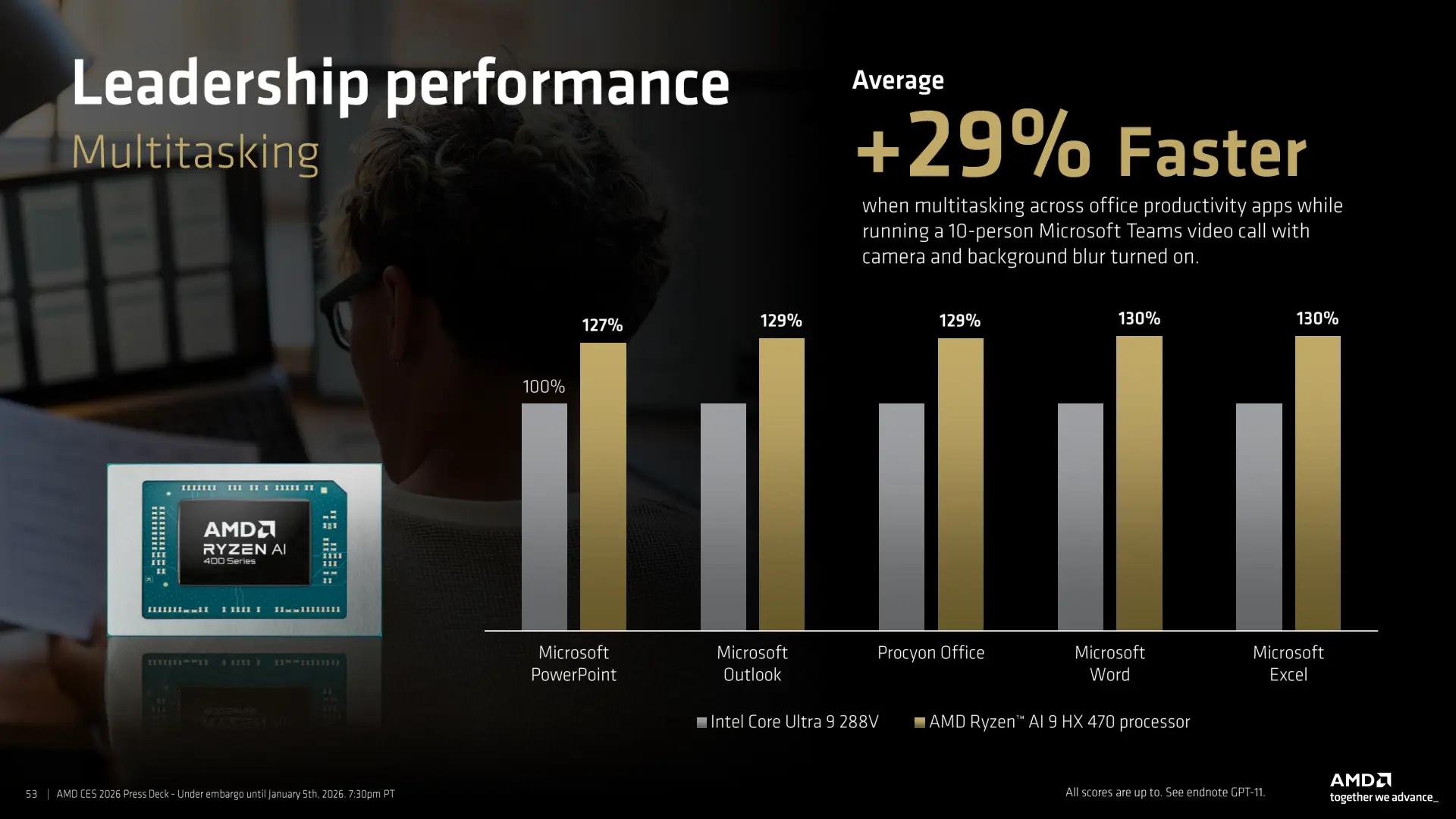
According to AMD, performance benchmarks reveal that the Ryzen AI 9 HX 470 processor is 29% faster at multitasking than Intel’s Core Ultra 9 288V. In office productivity tests with a live 10-person Microsoft Teams call, the processor scored 127% in PowerPoint, 129% in Outlook and Procyon Office, and 130% in Word and Excel. In all the tests, the processor surpassed Intel’s Core Ultra 288V.
Image credit: AMD
Speaking of availability, AMD says that systems powered by these processors will be available from major OEMs, including Acer, ASUS, Dell, HP, GIGABYTE, and Lenovo, starting Q1 2026, with desktops arriving later in Q2 2026.
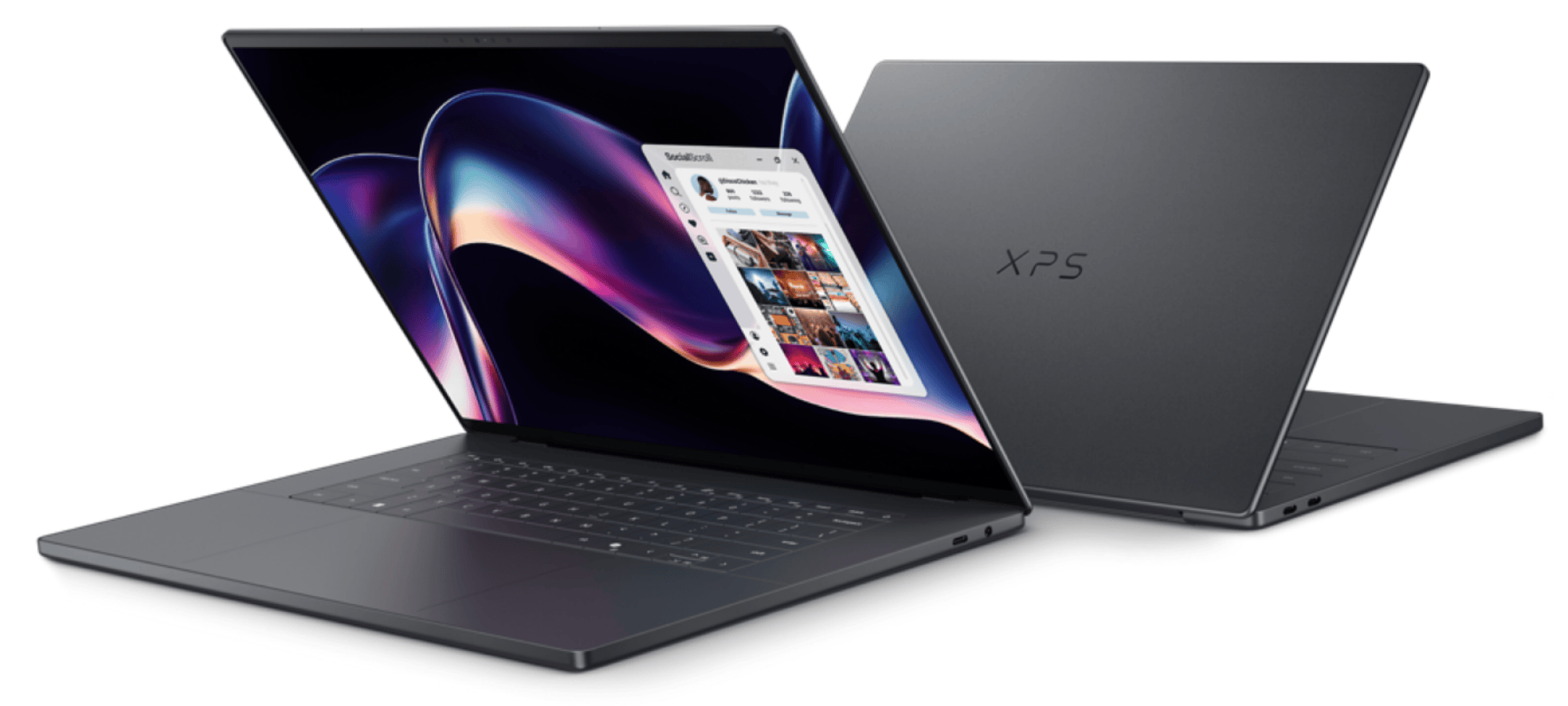
If you were once a fan of Dell’s XPS lineup, but wondering if it will ever be back, the company has some good news for you. At the ongoing CES 2026 event, Dell has brought XPS back from the dead. The company, in its announcement blog post, mentions, “XPS is back and better than ever! We have reimagined the XPS lineup with you in mind. Iconic, high-quality design. Refined interfaces. Optimized performance. Stunning displays. Best battery life in the industry.ᴵ More portable than ever. Meet the new Dell XPS 14 and XPS 16, plus preview what’s coming next for the XPS portfolio.”
New XPS 14 and XPS 16 focus on a thinner design and real usability upgrades
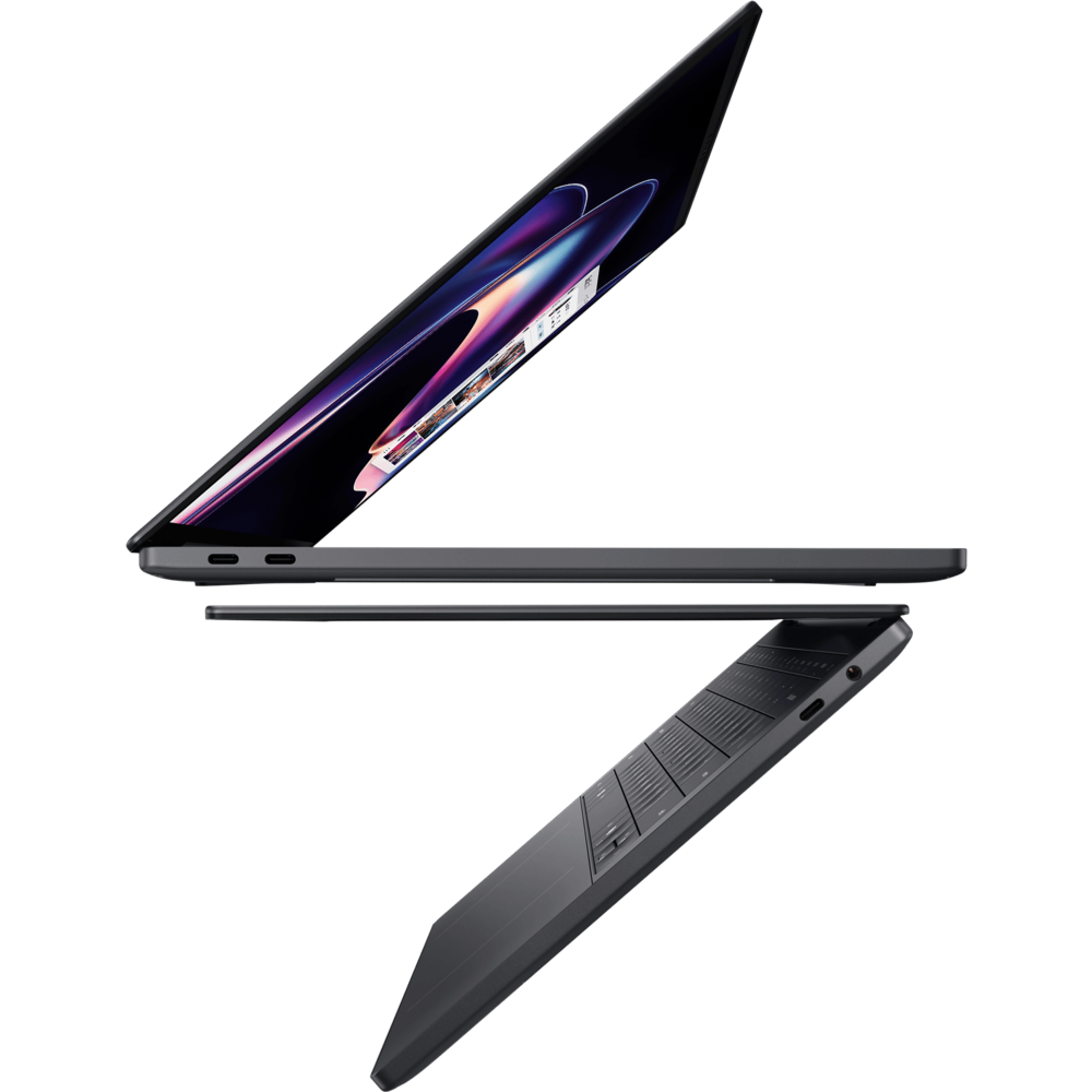
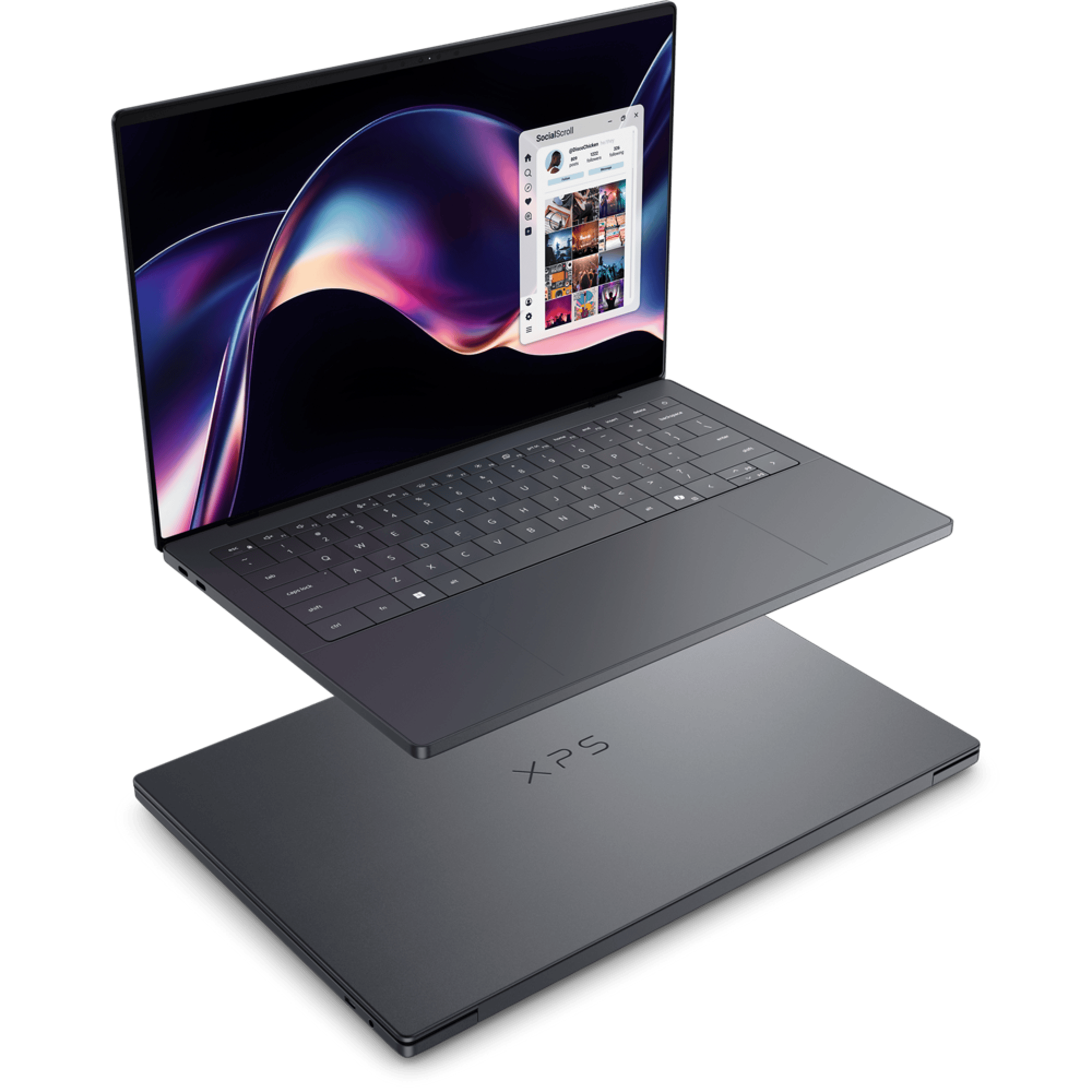
The revived XPS 14 and XPS 16 land with noticeable design and usability changes. Most importantly, Dell has ditched the controversial capacitive touch function row in favor of a proper physical function key row. It’s a welcome change that XPS fans and reviewers have been asking for years.
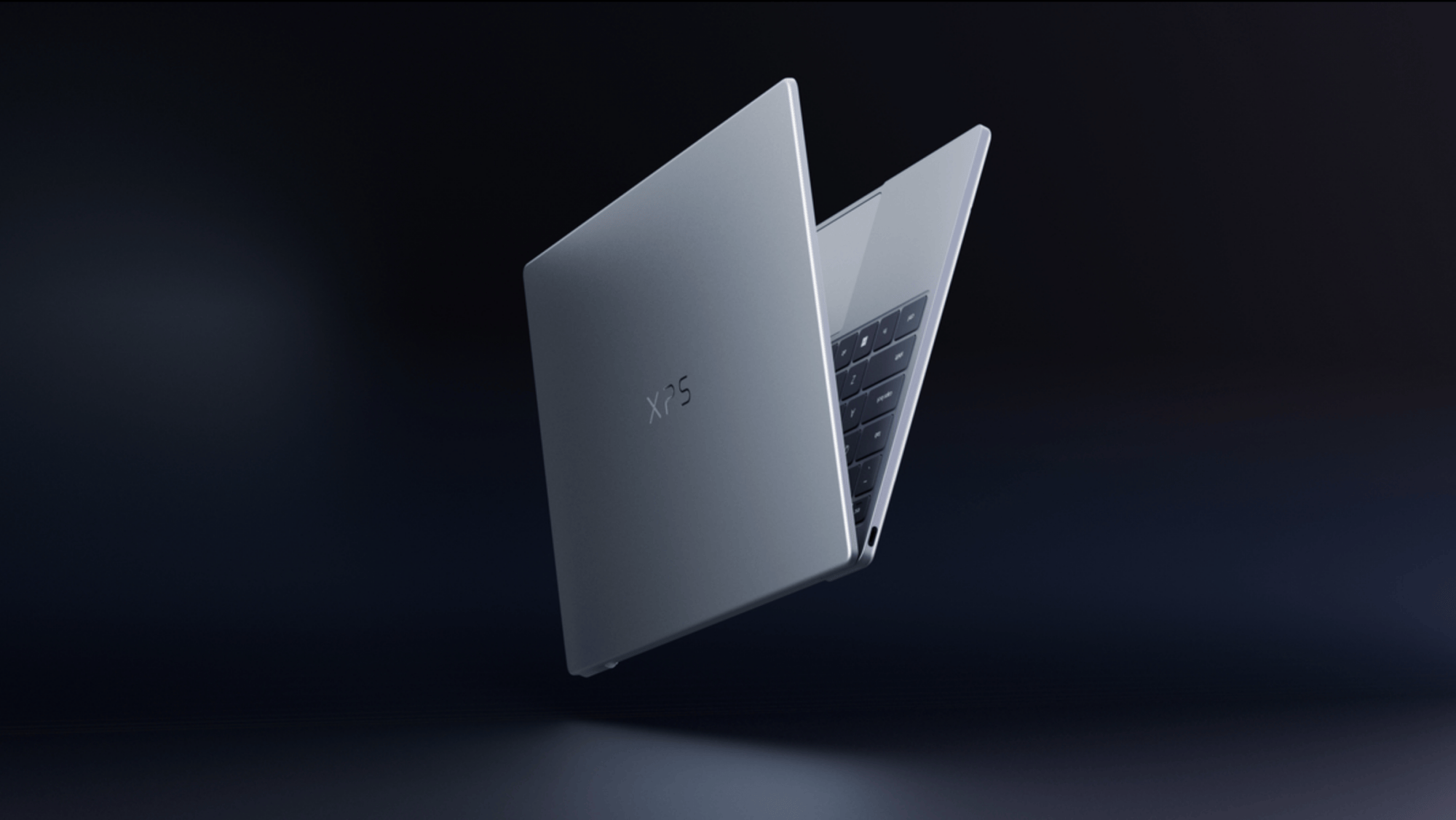
For the first time, the XPS logo also appears directly on the lid, another small but meaningful nod to long-standing user feedback. Both laptops feature redesigned unibody chassis made from aluminum and Gorilla Glass, which makes them Dell’s thinnest laptops in their respective size category.
The XPS 14 and XPS 16 start at just 0.58 inches thick. The 14-inch model weighs as little as 3 pounds, while the 16-inch variant starts at 3.65 pounds. Dell has also reworked thermals with larger, thinner fans to improve cooling without adding bulk.
Familiar power, better displays, and big battery claims
Under the hood, Dell uses the Intel Core Ultra X7 processors at launch, with Core Ultra X9 options coming later down the line. You also get Intel Arc graphics, up to 64GB of RAM, and up to 4TB of SSD storage. Notably, there are no discrete GPUs this time around.
As far as display specs are concerned, you will get a base 2K LCD panel with a 1–120Hz variable refresh rate, which Dell claims will boost the battery life. There’s also an optional 2.8K tandem OLED touchscreen for those who want richer visuals. Dell claims up to 27 hours of Netflix streaming and more than 40 hours of local video playback.
Select configurations go on sale January 7, starting at $2,049.99 for the XPS 14 and $2,199.99 for the XPS 16. More affordable versions, priced under $2,000, are expected in February. Dell has also confirmed that a thinner and cheaper XPS 13 is coming later in 2026.
The CES 2026 event officially kicks off today in Las Vegas, but that hasn’t stopped tech companies from pulling the curtain back early. NVIDIA has joined the show ahead of schedule and announced its next major update to Deep Learning Super Sampling (DLSS). The company has unveiled DLSS 4.5 with a focus on higher image quality and ultra-high refresh rate gaming.
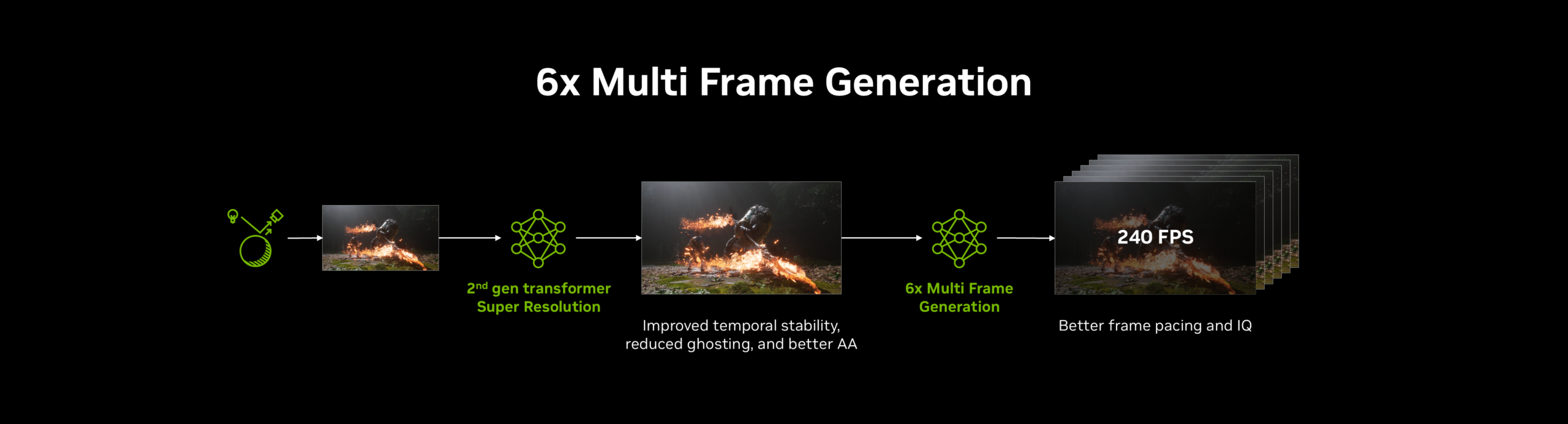
DLSS 4.5 introduces NVIDIA’s second-generation Super Resolution transformer model, alongside a new 6x Multi Frame Generation mode built specifically for RTX 50-series GPUs. The update allows AI to generate up to five additional frames for every single rendered frame, targeting smooth 240Hz gameplay.
NVIDIA’s DLSS 4.5 brings second-generation Super Resolution
DLSS 4.5 is rolling out today across all RTX GPUs, though NVIDIA says the update runs fastest on RTX 40- and 50-series cards. Meanwhile, the new transformer model is designed to improve overall image quality while reducing artifacting issues seen with DLSS 4, including ghosting, shimmering, and edge instability.
Image credit: NVIDIA
According to NVIDIA, the updated model uses five times more compute power than the original transformer model. It was trained on a significantly expanded high-fidelity dataset and is optimized to take advantage of the faster Tensor Cores found in newer GeForce RTX GPUs. The company says the model better understands in-game scenes. This allows it to improve lighting accuracy, motion clarity, and fine edge detail.
6x Multi Frame Generation targets 240Hz gaming on RTX 50-series GPUs
Besides image quality upgrades, NVIDIA is also working on a more aggressive frame generation option. The new 6x Multi Frame Generation mode caters to 4K 240Hz gaming and will launch in spring 2026 for RTX 50-series GPUs. Unlike DLSS 4, which capped frame generation at three AI-generated frames, the new mode pushes that number to five.
Image credit: NVIDIA
Besides that, NVIDIA has also announced Dynamic Multi Frame Generation, which automatically adjusts frame generation levels based on workload intensity. When you’re playing resource-intensive games, the system increases frame generation to ensure smooth output. When the load eases, it scales back to reduce unnecessary processing.
Image credit: NVIDIA
Notably, DLSS 4.5 support extends to more than 400 games and apps through the NVIDIA app starting today. It allows users to enable the update even in titles that haven’t been officially patched. NVIDIA has confirmed that both 6x Multi Frame Generation and Dynamic Multi Frame Generation will arrive in spring 2026, exclusively for RTX 50-series GPUs.
ASUS Republic of Gamers (ROG) just raised the bar for gaming monitors at CES 2026. The company has unveiled wide range of next-gen OLED monitors that promise crystal-clear visuals, faster refresh rates, and stronger panels designed for long-term use. For the uninitiated, ROG continues to lead globally in OLED monitors, and these new RGB OLED displays are just a few example of why the brand has been highly-rated for a longtime now.
But, before we jump onto the monitors, let’s duscuss a bit about RGB Stripe Pixel OLED tech. As ASUS notes in the announcement, it offers ultrasharp images and crisp text. The tech reduces color fringing, making everything, from in-game HUDs to cinematic cutscenes, look sharper and nore clearer. ROG says this feature will be available across several new monitors, including QD-OLED and Tandem OLED panels.
New ROG monitors ASUS unveiled at CES 2026
ROG Swift OLED PG34WCDN & Strix OLED XG34WCDMS: Both 34-inch WQHD monitors feature QD-OLED panels, featuring respecrive 360Hz and 280Hz refresh rates, and 0.03ms response time. They include ROG BlackShield film, which increases panel hardness by 2.5 times and boosts black levels by 40%. Gamers can expect HDR compliance (DisplayHDR 500 True Black), 99% DCI-P3, and full 10-bit color. Connectivity includes DisplayPort 2.1a, HDMI 2.1, and USB-C with Power Delivery.
ROG Swift OLED PG27UCWM: This 27-inch 4K Tandem RGB OLED monitor removes the white subpixel from standard WOLED panels. As a resukt, you get up to 27% larger color volume and richer visuals at high brightness. Meanwhile, the Dual Mode allows you switch between 4K@240Hz or FHD@480Hz, with 0.03ms response time. Moreover, Dolby Vision support and Delta E<2 color accuracy make this a strong contender for competitive gaming.
ROG Swift OLED PG32UCDM Gen 3: The 32-inch 4K QD-OLED monitor keeps its 240Hz refresh rate and 0.03ms response time, now upgraded with BlackShield™ film for extra durability and deeper blacks. Connectivity includes DisplayPort 2.1a, HDMI 2.1, and USB-C 90W Power Delivery. HDR and Dolby Vision support round out the high-end gaming experience.
Besides hardware, ROG OLED monitors come with OLED Care Pro with Neo Proximity Sensor to prevent burn-in, and DisplayWidget Center for easy monitor management. Meanwhile, ROG Gaming AI adds smart features like Dynamic Shadow Boost and Dynamic Crosshair for better visibility and precision during gameplay. Not to forget, at the CES 2026 event, Qualcomm announced Snapdragon X2 Plus processor, while HP refreshed its entire Omnibook lineup.
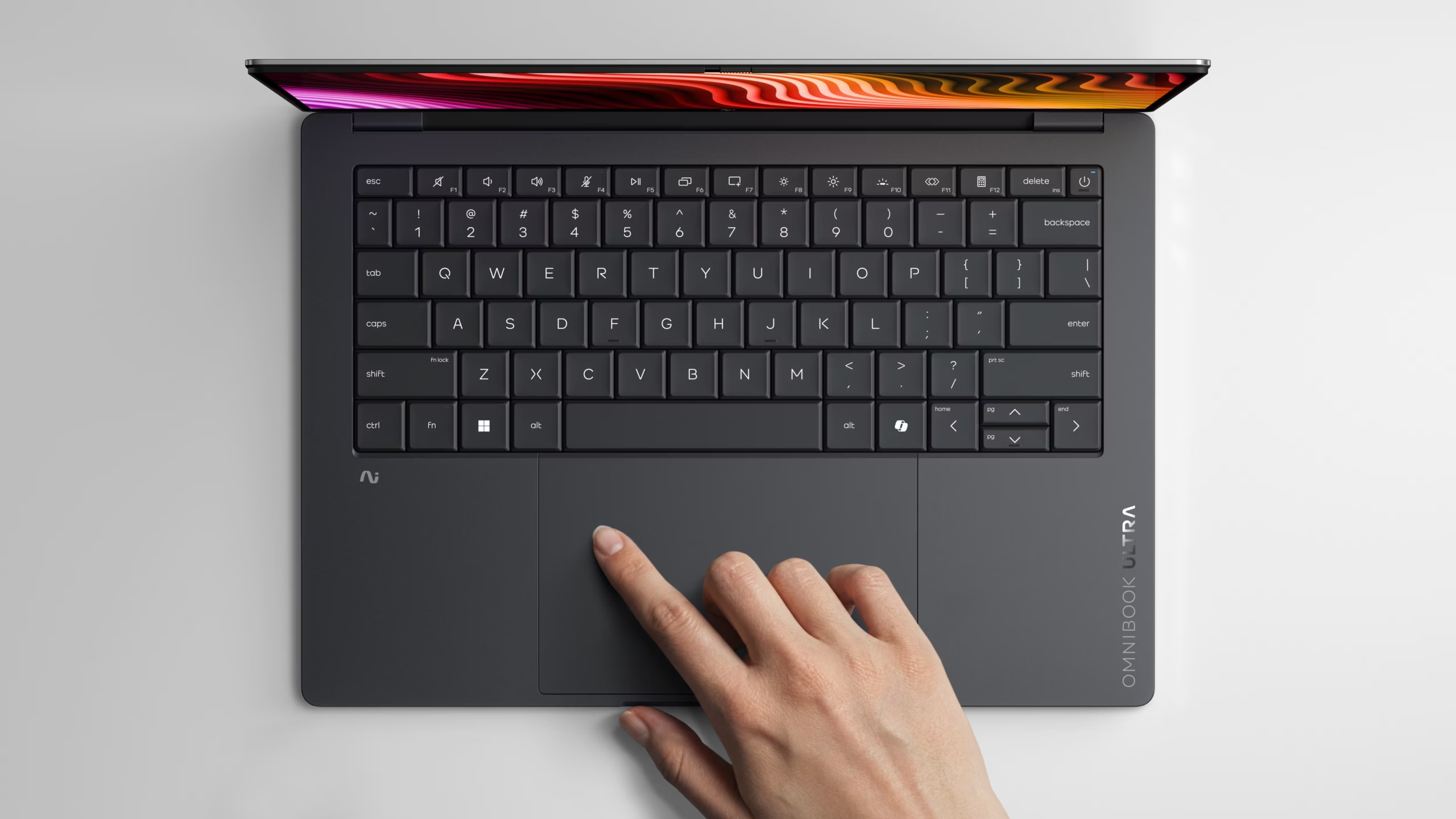
HP has kicked off CES 2026 with a complete refresh of its consumer-focused OmniBook laptops, and without a doubt, the new lineup is impressive. While the company announced multiple devices across five series, one laptop in particular, the new HP OmniBook Ultra 14, stands out among the rest for obvious reasons.
The OmniBook Ultra 14 boasts a thinner, lighter, and more durable design. HP claims that the laptop is 52% lighter than its predecessor and 5% slimmer than the 2025 MacBook Air 13 (M4). Durability is another key highlight of this laptop, as it has passed 20 MIL-STD-810 tests. In short, HP is promising a rugged build for everyday use.
Moving on, the new HP OmniBook Ultra 14 comes with a redesigned keyboard along with the company’s haptic touchpad and a brighter OLED display. All combined offers a premium look and feel of the flagship. Under the hood, the Ultra 14 packs serious performance.
HP notes that the laptop comes with a Qualcomm and Intel chipset, with the Qualcomm variant boasting an HP-exclusive Snapdragon X2 Elite processor. That chip comes with an 18-core CPU running at 5.0GHz and an 85 TOPS NPU to handle demanding AI workloads. Meanwhile, Intel Core Ultra and AMD Ryzen 400 options will also be available across the refreshed lineup.
Other OmniBook series, like the value-packed 3- and 5-series, start at around $500 and are expected in February, while premium 7- and X-series laptops will arrive later in Spring. The OmniBook Ultra 14 itself is expected later this month, with a starting price of roughly $1,550, including the Snapdragon variant.
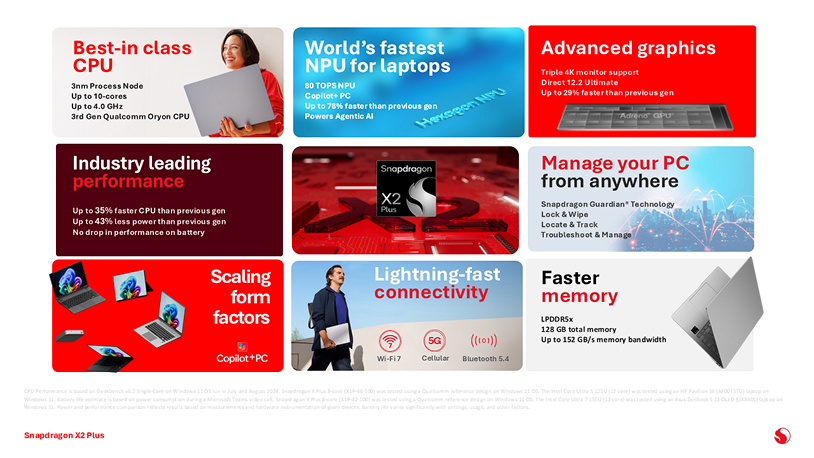
Speaking of the new Snapdragon X2 Plus, it is built around Qualcomm’s third-generation Oryon CPU. Per the company, the new SoC offers up to 35% faster single-core CPU performance compared to the Snapdragon X Plus lineup. Thanks to its power-efficient CPU architecture and a 3nm process node, the new chip consumes around 43% less power than its predecessor.
Not to forget, Qualcomm is offering the X2 Plus in two variants, catering to different performance and pricing tiers. Since AI has gone mainstream, Qualcomm is ensuring that the X2 Plus processor delivers, which is why the SoC features an upgraded Hexagon NPU with up to 80 TOPS of AI performance. It’s double what the Snapdragon X Plus processor came with, and ensures even more advanced on-device AI experiences across Windows 11 Copilot+ features.
Image: Qualcomm
On the graphics front, the Snapdragon X2 Plus processor is equally good, as it comes with the integrated Adreno GPU, which is up to 29% faster and supports up to three external 4K displays. Connectivity remains another department where the Snapdragon X2 Plus excels. According to Qualcomm, the new SoC offers optional integrated 5G, Wi-Fi 7, and Bluetooth for a more flexible wireless experience.
Qualcomm is also positioning the latest platform as enterprise-ready, with features like biometric authentication, automatic presence detection, and chip-to-cloud protection through the Qualcomm SPU and Microsoft Pluton. Moreover, it’s worth noting that Windows 11 Copilot+ PCs powered by Snapdragon X2 Plus processors are expected to arrive from major OEMs in the first half of 2026.
A quick look at features of the Snapdragon X2 Plus processor family:
Third-generation Qualcomm Oryon CPU up to 10 cores
Sliced-based GPU architecture for lifelike graphics
Fastest NPU in a laptop with 80 TOPS
Incredibly energy efficient for multi-day battery life
Truly mobile PC, with no drop in performance when on battery
80 TOPS NPU engineered for next-gen agentic AI and seamless multitasking
CES 2026 will officially kick off tomorrow, but Google has decided to step in early with an announcement focused on Google TV users. In an announcement from earlier today, Google mentioned that it has previewed how Gemini will enhance the Google TV experience.
The company explained that Gemini will help users interact with their TVs more naturally across a wider range of brands and devices, including projectors. First and foremost, Gemini will now focus on offering visual responses based on user queries. In short, it means you’ll see relevant images, videos, and real-time sports updates directly on the TV screen.
The company mentions that features like “Deep dives” can break down complex topics into narrated overviews designed to be easy for the whole family to understand. That’s not all; Gemini will now integrate deeply into Google Photos. Thanks to the integration, you’ll now be able to search personal photo libraries using natural language. For example, you can ask Gemini to find photos of specific people, pets, or moments without manually scrolling through albums.
Google is also focusing on the creativity part, as it mentions that the new Photos Remix feature will let you apply artistic styles to images or turn memories into cinematic, immersive slideshows that can be enjoyed on the big screen. In addition, using the Nano Banana image generation model and Veo video generation model, you’ll also be able to reimagine photos or create original media directly on your TVs.
If you ever find it hard to fiddle with TV settings, Gemini will come in handy for you. You can prompt the AI assistant using natural language, and it will help you optimize audio, brightness, and much more. All that said, it’s important to note that the Gemini-powered Google TV experience will roll out first to TCL-branded devices, with support for additional Google TV models expected in the coming months.
Xbox is entering 2026 at a slow pace, as this week’s game launches won’t be that eye-popping. However, you’ll get some of the intriguing indie titles that are worth keeping an eye on. Here’s what’s coming to Xbox this week (from January 5 through January 9).
I Am Future: Cozy Apocalypse Survival: The game will drop on January 8, and it’s all about “relaxing survival.” The game is set in a flooded, post-apocalyptic city that lets you build a rooftop base rather than fighting for your life. You can grow crops, do fish farming, and tinker with new tools and gadgets. More importantly, you will manage a team of adorable robots to automate your rooftop base.
Hero Seekers: The game will land on Xbox on January 9, in which you can expect turn-based combat, dungeon crawling, and party management. You can build a squad of at least five heroes, each with different traits and abilities. It’s worth noting that the game is now available to pre-order for $17.99.
Owlen and the Spirits of the Past: This game is all about emotional experience. You play as Owlen, which is a small owl traveling through mystical worlds guided by ancient spirits. You will fly through magical circles to bring life back to plants, trees, and wildlife. You can start playing this game on January 9, that’s when it will release on Xbox. Notably, the game is now available to pre-order for $9.59.
S.P.E.A.R: This is the final game to release this week on Xbox, and it’s coming on January 9, too. It’s a fast-paced action-platformer that puts you in the role of an NPC armed with a makeshift spear, fighting glitches and solving puzzles to save his own game.
Sadly, Microsoft hasn’t announced any Game Pass additions for this week yet. But, we know that MIO: Memories in Orbit & Nova Roma will join Xbox Game Pass later this month. In fact, Xbox Game Pass is in for a busy 2026; check all the games coming this year. As the week progresses, we expect to hear more about it.
Speaking of which, ASUS has reportedly also confirmed that the price hike across select PC hardware products takes effect today, January 5, 2026. The confirmation comes from an internal company letter sent to partners and customers, noting what ASUS calls “strategic price adjustments” rather than a blanket hike.
The company hasn’t specifically mentioned the list of products on which the increased prices would apply. But, we are assuming that ROG Xbox Ally handhelds, as well as ROG Ally handhelds, are among the ones to see a price hike. Notably, the company also mentions that the changes apply to certain product combinations. That means some specific products are likely to get a price hike starting today, and not everything will see a price hike.
According to ASUS, one of the reasons behind this price hike is the ongoing situation with memory and storage components, including DRAM, NAND, and SSDs. As mentioned earlier, these parts have seen a sharp jump in prices, as suppliers have shifted manufacturing capacity toward AI-focused workloads. ASUS mentions that this has resulted in a structural supply chain gap. As a result, pricing has become more volatile across the PC and IT infrastructure market.
ASUS, meanwhile, also mentions a strong global demand for PCs and enterprise hardware, combined with ongoing macroeconomic uncertainty. Although the company notes that it absorbed higher expenses for an extended period, the price adjustment is apparently necessary to maintain stable supply, product quality, and service levels.
In the past few weeks, there have been multiple reports suggesting that other hardware companies also warned about a steep price hike in the coming days. Well, for ASUS fans, the day is today. If we come across the list of products that saw the price jump, we’ll update it here.
You can check out the official document below:
Image credit: Windows Central | VideoCardz | DigiTimes
Over the weekend, the League of Legends players faced widespread login issues. As a result, thousands of players across the globe couldn’t access the game. According to reports, the issue was first reported on late Friday, with multiple reports claiming that the Riot Games client didn’t load or authenticate their accounts.
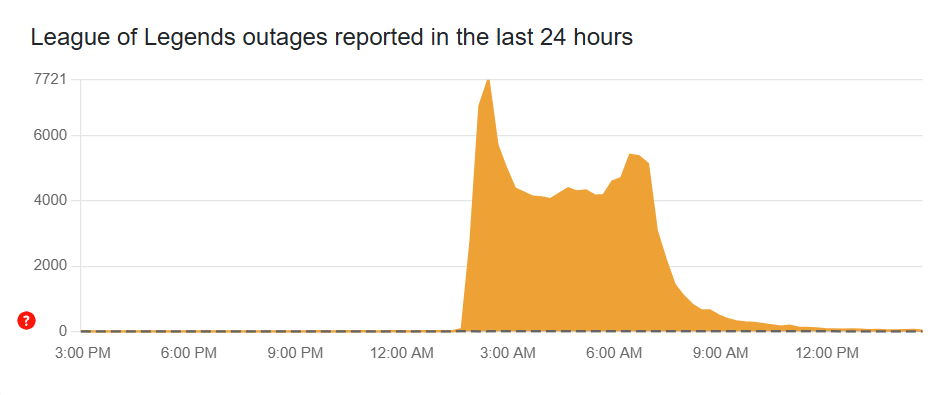
Downdetector, which is one of the most popular outage tracker websites, also showed similar data. Over 7700 user reports were recorded at the time, with most of the reports claiming login issues and frozen clients. Users from North America, Europe, and parts of Asia were affected by the issue.
In a post on X, Riot Games acknowledged the issue and confirmed it was investigating the cause behind it.
We’re aware of an issue that’s impacting games and preventing some players from logging in. Ranked queues are temporarily disabled while we work on a fix. Thanks for your patience.
While the players were having login issues, League of Legends fans quickly found a possible cause of the issue. Players who dug through error logs and system messages hinted that the issue might be related to an expired SSL client certificate. In simple words, the game’s security certificate was no longer valid, which apparently caused Riot’s system to reject genuine login attempts. Again, this hasn’t been confirmed by Riot Games yet.
As a preventive measure, Riot Games has temporarily disabled ranked cues while the team works on restoring the stability of the client. That being said, Riot’s official status service initially displayed that there were no issues, which eventually added to players’ frustration while the client was out of order.
Many players reportedly also tried common fixes such as reinstalling the client or running Riot’s Hextech Repair tool, but that didn’t solve the problem. Some even shared a temporary but risky workaround. The login issue was apparently resolved after manually setting their system back to January 3, which effectively bypassed the expired certificate. This worked for a few players, but it isn’t recommended by Riot Games.
As of now, there’s no update from the team, but looking at Downdetector data below, it seems the issue has been resolved for now. That said, we still await official confirmation.
Image credit: owndetector | Time Zone: IST
Were you also affected by the issue, and if you were, has the workaround solved the problem? Let us know in the comments below.
If you’re still hoping to step back into Tamriel anytime soon, there is some bad news for you. A new report suggests that The Elder Scrolls 6 is still several years away from release. That is disheartening for fans given that Bethesda Game Studios had shifted its primary focus to the project following Starfield’s 2023 launch.
The update comes via Reece Reilly, a YouTuber and industry insider who claims to have access to developers at Bethesda Game Studios (via ComicBook). Reilly says that Bethesda and Xbox are currently mulling over 2028 release as the earliest possible release window for The Elder Scrolls 6. However, he adds that a 2029 release is also possible. But, that depends on how the game development progresses.
You are not seeing Elder Scrolls 6 till 2028 at the earliest but there’s a high probability that it comes out in 2029.
They aren’t giving a rough date cause quite frankly it will do more harm than good especially after announcing this game too early, personally at this stage I… pic.twitter.com/2NVe0FONxh
The insider further highlights that 2028 should be viewed as an optimisic release window than a final target. Reilly further notes that Bethesda is deliberately avoiding even a rough release date, as doing so could backfire after the game was announced far earlier than its development warranted.
The report also raises questions about platform strategy. With next-generation PlayStation and Xbox hardware rumored to be delayed due to memory crunch, The Elder Scrolls 6 could end up as a cross-generation title, rather than a next-gen exclusive. While a next-gen-only release isn’t impossible, the current timeline makes that less likely.
As always, Bethesda hasn’t confirmed any release window, and plans could still change. For now, patience remains the only certainty for Elder Scrolls fans.
If you’ve been expecting the PlayStation 6 or the next Xbox to release around 2027 or 2028, this news might not please you. A new report suggests that Sony and Microsoft are considering delaying their next-generation consoles due to a significant rise in RAM prices amid industry-wide shortage. Guess what? The AI boom is to blame for the same.
The news comes via Insider Gaming, which reports that the spike in demand from AI companies building massive data centers has pushed memory costs up by several hundred percent in recent months. This has caused a shortage in supply across the tech industry. While PC gamers have already been reported to be affected by the sharp RAM price surge, it appears that the shortage may also hit console players.
Per the news outlet, both Sony and Microsoft are reportedly concerned about whether they can mass-produce next-gen hardware at a competitive price. As a result, internal discussions are said to be underway about pushing the launch of the PS6 and Xbox successor beyond the previously assumed 2027–2028 window. The companies are now aiming for 2029 or later as the new, real possibility for the launch.
Although the ongoing memory crunch is said to affect the future PS6 and Xbox consoles, the current ones could become more expensive. While both companies have already raised prices on the PS5 and Xbox Series X/S in 2025, additional increases could follow in 2026 as new units are manufactured at higher costs.
Xbox is believed to be more vulnerable in the short term, having been caught off guard by RAM shortages. Sony, however, is said to have stockpiled a larger supply of memory, potentially keeping the PS5 prices intact for now. But that’s not a guarantee. All that said, if RAM availability doesn’t improve, both platform holders may have little choice but to pass rising costs on to consumers.
Meta appears to be serious about where it’s heading with artificial intelligence (AI). The tech giant has officially acquired Manus, a Singapore-based AI startup that made headlines earlier this year and quickly became talk of the Silicon Valley. That happened right after a demo video went viral, showcasing that its AI agents are capable of screening job candidates, planning vacations, and analyzing stock portfolios.
The startup initially also claimed that its AI system outperforms OpenAI’s Deep Research. In short, the hype around Manus is undeniable. Although, both companies have confirmed the dea, they didn’t mention the money involved. But, thanks to an exclusive report by The Wall Street Journal, we now know that Meta has agreed to acquire Manus for more than $2 billion. Zuckerberg’s company is reportedly matching the valuation the startup was seeking for its next funding round.
For Meta, which has already committed nearly $60 billion toward AI infrastructure, Manus stands out as an AI product that is not only advanced but also profitable.
Despite early skepticism around its aggressive subscription pricing, ranging from $39 to $199 per month, Manus says it has converted millions of users and surpassed $100 million in annual recurring revenue. That figures likely played a key role in Meta’s decision to move forward with the deal.
Meta has confirmed that Manus will continue operating independently for now. As part if the deal, Manus’ AI agents will be gradually integrated into Meta’s apps, including Facebook, Instagram, and WhatsApp. Meta has officially confirmed that Manus will cut ties with Chinese investors and fully exit the Chinese market once the transaction is completed.
There are several options if you wish to purchase a Windows 11 product key online. While the Microsoft Store might be the obvious choice, you can make big savings by seeking a third-party seller.
However, before jumping on the first deal you find, you must consider whether it’s a genuine license.
Today we explore how Windows 11 product keys work, where to find a legit but affordable seller, and the process for upgrading to Windows 11.
Why Purchase a Genuine Windows 11 Product Key and How much it Costs
There is one critical reason why you should purchase a genuine Windows 11 product key, especially if you’re still running an older OS: on October 14, 2025, Microsoft ended support for Windows 10. This means no more free security updates, technical assistance, or new features for the operating system. Moving forward, your computer will become more vulnerable to cyber threats, bugs, and compatibility issues, so it’s the perfect time to upgrade or choose Windows 11 for a new system.
A Windows 11 product key is a unique code that authenticates your copy of the operating system. This proves that you have purchased a legitimate, non-pirated version of the software.
A genuine Windows 11 key guarantees that you are using an official, stable, and tested version of the OS. This minimizes the risk of errors or malware that can compromise your computer’s performance and security.
In some cases, Windows will still work for a period of time without authenticating, but to enable all features and updates, you’ll eventually need a key. This ensures you’ll receive the latest security patches, performance improvements, and feature updates from Microsoft. You’re also entitled to Microsoft customer support, including technical assistance and troubleshooting, if needed.
Speaking of the Windows 11 product key price, there are some factors to consider. When purchasing from Microsoft.com, lifetime licenses are quite expensive – $199.99 to buy a Windows 11 pro product key and $139 for Windows Home.
That’s why we advise seeking a reputable third-party seller for your Windows 11 digital key. These are often available for a fraction of the regular cost.
Where to Buy Windows 11 Product Key?
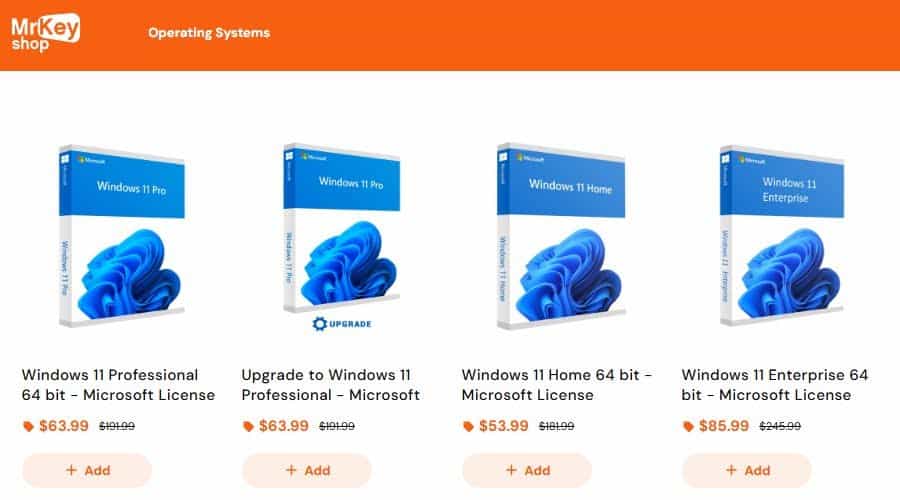
If you’re wondering how to get a Windows 11 product key, Mr Key Shop is our current go-to seller, truly one of the best websites to buy software keys. The comprehensive software key shop provides genuine licenses under EU law that can be used immediately.
All you have to do is add your chosen version to your cart, make payment via card, PayPal, or other common methods, and you get an email with the key and instructions for downloading, installing and activating Windows 11.
Mr Key Shop supplies keys for Windows 11 Pro, Home, and Enterprise editions, and you can even bundle other software, such as Microsoft Office or antivirus suites. For example, you can buy Office 2024 Professional Plus at a very competitive price.
Windows 11 Professional key is $63.99.
The online store’s software key savings don’t just stop with Windows 11. You’ll find a wide variety of other popular software, including Microsoft Office and Server, Autodesk, Adobe, VPNs, AOMEI, EaseUS, antivirus programs, and much more!
Mr Key Shop’s legitimacy is backed up by a 4.7 out of 5 rating on Trustpilot and a 4.78 on Trusted Shops.
It also offers a money-back guarantee if you made the purchase by accident or you are not satisfied with your product.
Different Editions of Windows 11 Explained
Not sure which version of Windows 11 to choose? Windows 11 Home is the standard edition of Windows 11, designed for home users. It includes all the essential features, such as Microsoft Store, Xbox Game Pass, Windows Hello, and enhanced multi-monitor support. As well as other core functions like Snap Layouts, Widgets, and Microsoft Teams integration.
Home is ideal if you mainly browse the web, play games, or use regular software for personal projects.
For businesses and IT pros, the natural choice is Windows 11 Pro, which includes additional features such as BitLocker encryption for protecting sensitive data, virtualization, and advanced networking and remote access features like Domain Join and Group Policy. Pro also supports two CPUs and RAM up to 2TB.
Go with Professional if you need advanced security features, want to connect to a corporate network, host remote desktops, or need support for higher-end hardware.
System Requirements for Windows 11
To use Windows 11 on your system, it must meet the following specs:
Processor: At least1 GHz or faster, 2 cores, 64-bit or SoC.
RAM: 4 GB or more.
HDD: 64 GB or larger storage device.
System Firmware: UEFI, Secure Boot capable.
TPM: Trusted Platform Module (TPM) version 2.0.
Graphics Card: Compatible with DirectX 12 or later with a WDDM 2.0 driver.
Display: High definition (720p) greater than 9 inches diagonally, with 8 bits per color channel.
Internet Connectivity and Microsoft Account: Required for setup, updates, and some features on personal use versions.
If upgrading from Windows 10, it will tell you if your system meets the minimum requirements.
Can You Use a Windows 10 Key for Upgrading to Windows 11 Free?
Yes, you can use a Windows 10 key to upgrade to Windows 11 for free. There is only one licensing system, so if you are licensed to use Windows 10, you are automatically entitled to upgrade to Windows 11. Microsoft is encouraging users to make the switch, so they’ve made the process pretty straightforward.
To make the jump, you must already have a genuine version of Windows 10 installed and activated, then you can begin the process from the Windows Update area.
Even if you have a Windows 10 key that has yet to be activated or buy Windows 10 today, you can upgrade to Windows 11 for free once activated.
The only restriction is that you can only upgrade for free to the same Windows version. I.e., Windows 10 Home or Windows 11 Home. If you want to use Windows 11 Pro, you will need to purchase a new key.
How to Download and Install Windows 11
If you purchase a Windows 11 product key from a site like Mr Key Shop, you will be emailed the instructions and a secure link to download. However, if you want to prepare before purchasing a key or have another source, follow these steps:
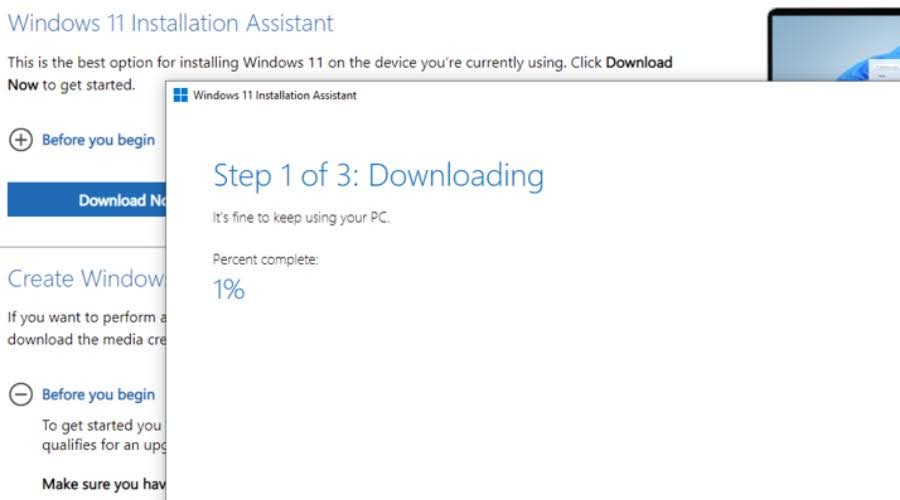
1. Visit the official Microsoft website and follow the link to download the Windows 11 Installation Assistant.
2. Double-click the downloaded file and run the installation program.
Note: You may need to right-click and run the tool as administrator.
3. The tool will first check if your PC meets the hardware requirements for Windows 11.
4. Accept the license agreement and confirm that you wish to upgrade to Windows 11.
5. The assistant will then download and install Windows 11 on the system.
6. The installation will run in the background, and your PC will restart multiple times. By default, this upgrade method keeps your settings, apps, and files.
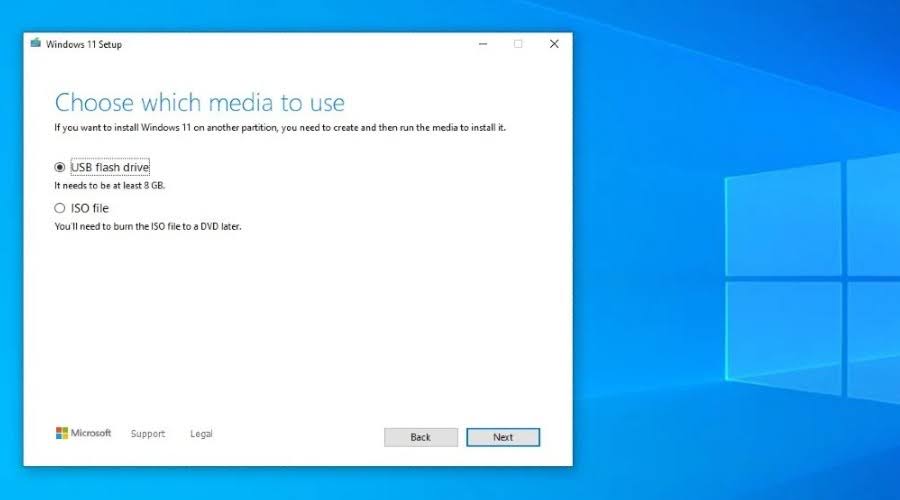
7. Alternatively, to create installation media (such as a USB drive or DVD), go back to the Microsoft site, scroll down, and choose the option that suits your PC.
8. Launch the downloaded MediaCreationTool.exe tool and select the type of media to create.
9. Restart your computer and boot from the installation media. To do this, press the appropriate key during the boot process (usually F12 or ESC) and select the bootable media from the boot menu.
10. Follow the on-screen instructions to install Windows 11.
How to Activate Windows 11 Using Your Product Key
If you are installing a fresh copy of Windows, changing versions, or otherwise need to activate Windows 11, follow these steps:
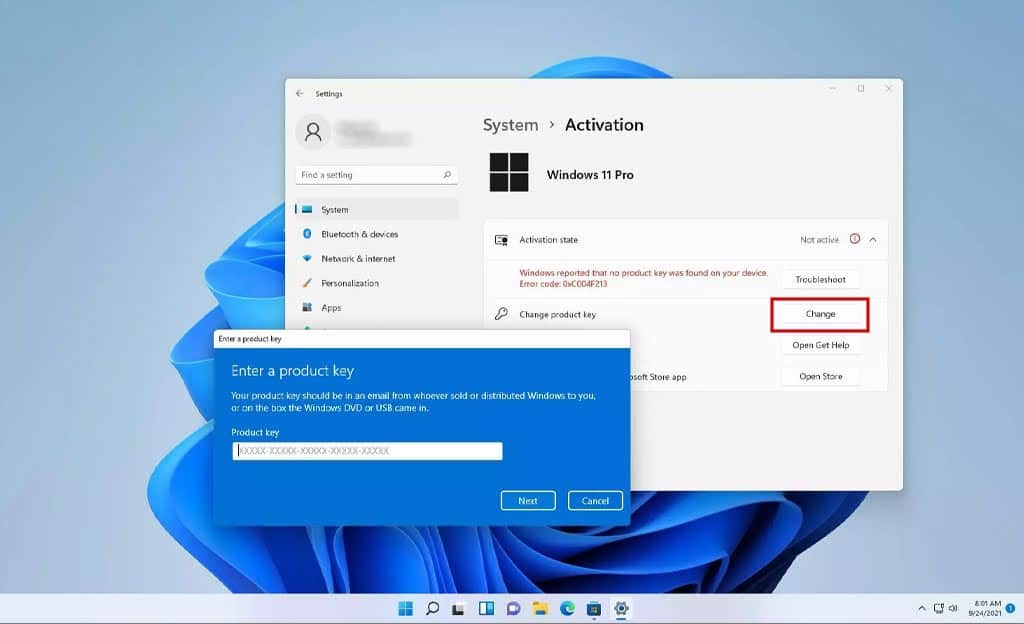
1. Go to Start > Settings > System > Activation. Here you can see the activation status.
2. Click Change product key and enter your 25-character Windows 11 product key.
3. Click Next to activate Windows 11.
Note: The only way to activate windows 11 without product key info is to use a digital license (also known as a digital entitlement). This ties the activation status to your Microsoft account or device hardware.
It is issued automatically when you upgrade from a valid Windows 10 license or purchase a license through the Microsoft Store.
What Happens If You Don’t Activate Windows 11?
If you don’t activate Windows 11, here are a few things you can expect:
Locked personalization options, such as the ability to change wallpaper or color schemes.
A persistent watermark on your desktop telling you to activate Windows.
Your device will only support a limited set of important and security updates (not all of them) and may not upgrade to versions with newer features.
Microsoft will periodically pop-up an annoying prompt to activate Windows 11.
You have no right to technical support or future upgrades.
How to Tell If a Windows 11 Product Key Is Legit
It’s important to check the legitimacy of Windows 11 product key sellers before making a purchase, as there are certainly scammers out there.
The first thing to note is the price. Prices upwards of 70% off are not unheard of, but if you get down to ridiculous prices like $10-$15, it’s a strong indicator that the key isn’t genuine or was obtained unlawfully and could be revoked later.
Other things to look out for include the user reviews. Check third-party review sites like Trust Pilot or Trusted Shops to see any possible critical issue.
You should also examine the legal info: Does the site outline how it issues product keys, the legal regulations, and does it have a refund policy?
Last but not least, payment methods are a great indicator of reliability. Look for sellers that offer common payment methods, especially credit cards or PayPal, which allow customer disputes and chargebacks. If they only accept crypto payment, it probably isn’t legitimate.
If you already purchased a license, you can check the status of activation by going to Start > Settings > System > Activation.
Alternatively, type CMD in the start menu search bar on Windows and open the Command Prompt. In the window, type slmgr /dli and press Enter.
It will then show the license info. Retail or OEM are common for regular users. However, Volume, MAK, or KMS suggests the key may not be legitimate for a standard home user and could be deactivated by Microsoft in the future.
Tips to Save Money on Windows 11 Licenses
So, how do you get the cheapest Windows 11 license? Aside from upgrading for free, if you must purchase a fresh product key, choose Windows 10.
Why?
Windows 10 product keys are cheaper than Windows 11, but you can still upgrade to 11 for free!
Microsoft’s long-lost dual-screen phone vision has quietly come back to life. Here, we’re talking a canceled version of Windows designed specifically for foldable phones. The OS, internally known as Andromeda OS, is now running on the Surface Duo, thanks to a fan-led effort.
Microsoft scrapped Andromeda seven years back. For the uninitiated, it was designed for dua-screen devices. Unfortunately for Andromeda, the Surface Duo launched with Android instead. That was it, Andromeda faded into history. But, it has now come to life from graves, thanks to developer Gustave Monce, who according to Windows Central, has successfully ported a leaked build of Andromeda OS onto the original Surface Duo. The build, which surfaced recently, dates from after the project was canceled.
No wonder, it’s not there yet in terms of usabiloty, but it it definitely offers the clearest look yet at what Microsoft was working on behind closed doors. Andromeda reportedly look and feel very different from traditional Windows. The home screen doubles as a digital notebook. Meaning, it is always ready for notes and pen input.
You can swipe from either side of the system to make Start Menu and Cortana pop up. Multitasking is at the center of Andromeda. You can simoly open one app on a single screen, but can be dragged across, with the system handling multitasking automatically.
You can also see Live Tiles spread across a dual-screen Surface Duo feels like a glimpse into an alternate timeline. This was meant to be Windows in your pocket, built around productivity, inking, and modern UWP apps. As mentioned earlier, the experience isn’t polished, as the OS is buggy, with broken features like sleep behavior and posture detection.
Monce has acknowledged the issues and says only limited fixes are possible due to the OS never being completed. Installing Andromeda isn’t for the faint of heart either. Flashing the OS wipes Android data, though advanced users can set up a dual-boot configuration.
With Andromeda now running in the wild, Microsoft’s abandoned dual-screen phone dream finally has a form people can touch, even if it arrived years too late.
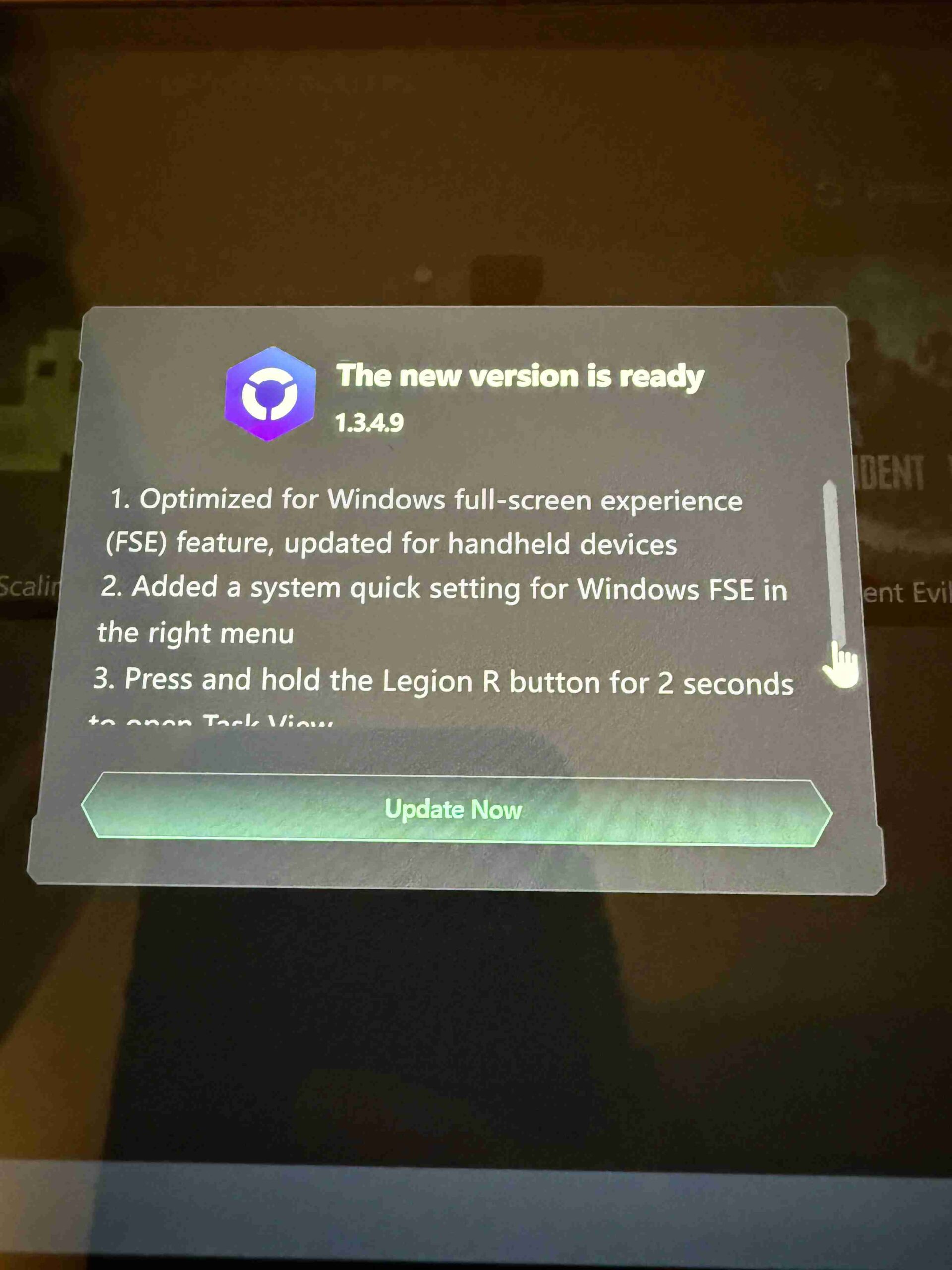
Now, it seems the company decided to give some sort of New Year gift to the fans, as reports are coming in that a new update to Legion Space is now rolling out to Lenovo Legion Go devices, which is adding better support for the Xbox Full Screen Experience. For the uninitiated, that’s the the same console-like interface Microsoft first highlighted on the Xbox Ally.
According to a Reddit post spotted by folks at Windows Central, the latest update bumps Legion Space to version 1.3.4.9 and it ocuses on making Windows feel more natural on handheld hardware. Once the update is installed, the Legion Go users get smoother performance behavior, more intuitive controls, and deeper integration with the Xbox Game Bar when Xbox Full Screen Experience is enabled.
Image credit: Reddit/u/Danzavier
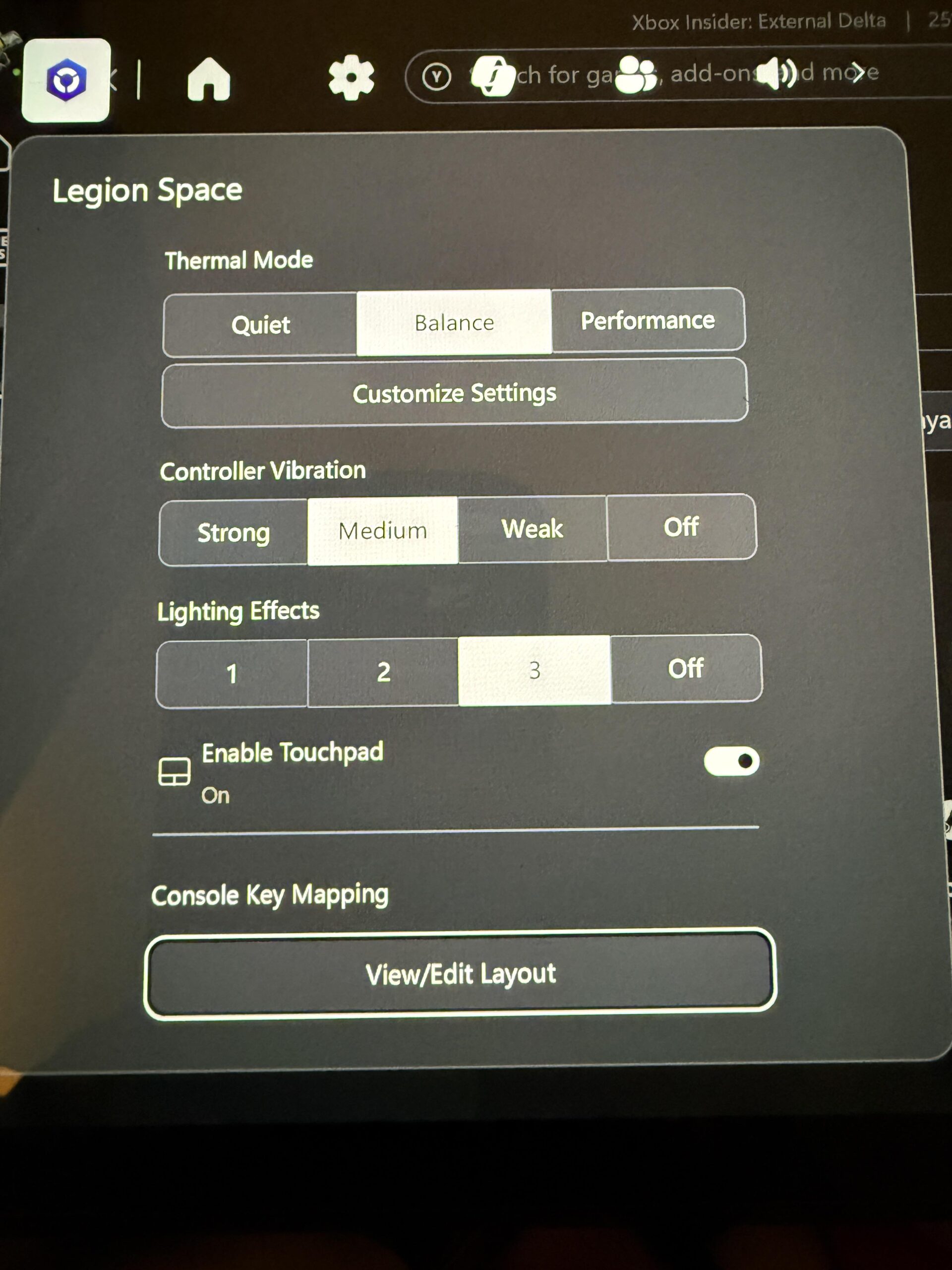
Image credit: Reddit/u/Danzavier
Lenovo has reportedly also added a new quick toggle for Xbox Full Screen Experience inside Legion Space. There’s also a dedicated Legion Space widget within the Xbox Game Bar. From there, players can quickly adjust performance modes, RGB lighting, vibration intensity, and other system settings without hampering gameplay experience.
Per the report, the update has also improved the input behavior. A short press of the Legion R button still opens Legion Space. However, a long press now open up the Windows Task Switcher, which mirrors the familiar Win + Tab shortcut. Behind the scenes, when you enable the Xbox Full Screen Experience, it now marks the device as a “handheld” in Windows. In other words, it helps the system allocate resources more efficiently.
It’s worth noting that this update doesn’t automatically turn on Xbox Full Screen Experience. Players will still need to enable it manually through Windows Settings, where the feature began rolling out to gaming handhelds last month.
The update is repprtedly being rolled out gradually for users with the original Legion Go, Legion Go S, and the newer Legion Go 2. With Microsoft already teasing bigger plans for Xbox Full Screen Experience in 2026, Lenovo’s latest move suggests handheld gaming on Windows is only getting started.
The decision appears to have resulted from an official confirmation in the past, in which Sony said that the majority of active PlayStation Plus subscribers are now playing on PS5. With that transition largely complete, the company is now changing its subscription strategy around its latest hardware.
Now that the PS5 shift is confirmed, January’s PS Plus lineup will be the first real test for Sony. While Sony hasn’t confirmed any titles yet, industry analysts expect the selection to be more aligned toward PS5 exclusives and more recent AAA releases. The new games will be available starting January 6, 2026, across the Essential, Extra, and Premium tiers.
As mentioned earlier, Sony is also expected to remove some titles from the PlayStation Plus Extra and Premium catalogs later in the month. Those removals are likely to take effect on January 20, 2026. Again, that hasn’t been confirmed by Sony either.
Only time will tell whether the company’s PS5-first approach will be feasible. What do you think about Sony’s shift in its approach? Let us know in the comments below.
Since its Chromium launch, Microsoft Edge has supported extensions from the Chrome Web Store, but only after users enabled a visible control in settings called “Allow extensions from other stores.” That toggle existed for years and clearly signaled when Edge allowed extensions from outside Microsoft’s own store.
Microsoft has quietly removed that long-standing toggle in stable Edge, even though Chrome Web Store extensions continue to install and work as before.
Before: Microsoft Edge previously showed an “Allow extensions from other stores” toggle in the Extensions settings. Users had to enable it to install Chrome Web Store extensions. image Credit: Venkat | WindowsReport.
At the time, Chrome Web Store extensions continued to install and work normally. This showed that Microsoft was adjusting the interface rather than limiting extension support.
The same behavior is now present in the stable release of Edge.
The toggle is gone in stable Edge on both:
Signed-in profiles
Non-signed-in local profiles
Chrome Web Store extensions still install normally and appear under “other sources.” There is no opt-in prompt or permission switch shown during installation.
After: The toggle no longer appears in Edge’s stable release, even though Chrome Web Store extensions continue to install and appear under “other sources.” Image Credit: Venkat | WindowsReport.
Edge now allows Chrome Web Store extensions without showing the control that previously handled that access.
The Extensions page still includes a link to the Chrome Web Store at the bottom, and that part of the experience has not changed.
Microsoft has not announced this change or mentioned it in Edge release notes.
For users who pay attention to browser settings, the change may feel abrupt. A long-standing control has disappeared without warning or explanation.
Even though extension behavior remains the same, the lack of communication stands out. Changes tied to extensions and security settings usually come with clear notice.
By removing the toggle, Microsoft now treats Chrome Web Store compatibility as a built-in part of Edge rather than an optional choice.
This makes it easier for users who rely on Chrome extensions, but it also changes how control and consent appear inside the browser. Many users may only notice the change when they look for the missing setting.
The Stranger Things DLC, developed by Blockception, is now live on the Minecraft Marketplace. You can explore key locations from all four seasons, from the Starcourt Mall shenanigans to dark encounters in the Upside Down.
Image credit: Mojang
The OG characters like Eleven, Dr. Brenner, and Suzie return, bringing their unique abilities that make tackling quests a strategic affair. Villain fans can even step into the shoes of Vecna, wielding mind-control powers to wreak havoc.
The Stranger Things DLC for Minecraft Bedrock Edition is available now on the Minecraft Marketplace for 1510 Minecoins, which is roughly $9 in the US. One of the DLC’s standout features is the character-switching mechanic.
While the adventure is designed for cooperative play, solo players can swap between characters to access abilities as needed. As you progress, Hawkins evolves, unlocking new adventures and challenges. There are a few platform restrictions to keep in mind. Nintendo Switch players are unable to access the DLC, while mobile gamers need at least 6GB of RAM for smooth gameplay.
GTA 6 has to be one of the biggest projects in the gaming industry that has seen multiple delays. The game was originally planned to be released in the Fall of 2025. However, Rockstar delayed GTA 6 to May 2026. While everyone hoped that this might be it, news from last month had many GTA fans frustrated.
Rockstar pushed GTA 6 release to November 19, 2026, saying that the game needs some final touch-up before it’s out for eagerly waiting fans. At this point, it’s hard to tell that this might be the final release date, given that the game has already seen multiple delays.
That said, a new rumor may have just hinted at Rockstar Games’ long-awaited marketing roadmap for Grand Theft Auto VI. While fans are still hoping for another trailer this year, a reliable insider suggests that Rockstar is planning something much bigger, just not anytime soon.
According to Infinity Gamer on X, a source with a solid track record on GTA VI leaks, Rockstar’s full marketing campaign is expected to officially begin on May 9, 2026. The insider claims that this date will mark the end of Rockstar’s silence, with regular reveals rolling out in the months that follow.
New leaked #GTA6 important dates: – Full marketing starts on 9 May 2026 ( silence finally breaks ) – Cover art reveal on 30 May 2026 – Trailer 3 on 14 June 2026 – Gameplay 1 on 15 September 2026 ( 7 minutes long ) – Gameplay 2 on 13 October 2026 ( 9 minutes long ) pic.twitter.com/e5bZzUOo1j
The leak suggests that GTA VI’s cover art could be revealed on May 30, followed by Trailer 3 on June 14. If the rumor turns out to be true, this would be the first new footage since Rockstar’s last official trailer, which broke viewing records but left fans with more questions than answers.
Gameplay reveals are reportedly planned for later in the year. The first gameplay showcase is scheduled to arrive on September 15, lasting approximately seven minutes. A second, longer gameplay presentation is scheduled to follow on October 13, lasting approximately nine minutes. All combined, these demos would offer the most in-depth look yet at Rockstar’s next open-world epic.
Everything said, Rockstar Games hasn’t confirmed anything as of now. So, we recommend that you take this rumor with a pinch of salt. What’s confirmed is that GTA 6 is currently scheduled to launch on November 19, 2026. It’ll be PlayStation 5 and Xbox Series X|S exclusive at launch.
Are you also excited for GTA 6? If yes, what are the things you expect Rockstar Games to add to the game to make it an epic release? Drop your thoughts in the comments below.
If you are Rainbow Six Siege fan, you must be aware of the major issue many players faced over the weekend. Ubisoft, as a result, shut down all the servers following a widespread in-game hack. For the uninitiated, the incident was first reported on Saturday morning. Players reported seeing suspicious R6 credits, ultra-rare weapon skins, and unexpected bans/unbans on several accounts.
The issue wasn’t limited to just one platform, as players across PC, PlayStation, and Xbox reported the issue. Ubisoft, however, did its part and resolved the issue. If you are among those unaware, you must be wondering, what’s all this about, right?
Well, according to official post on X (formerly Twitter), Ubisoft acknowledged the issue in the early hours of Saturday, noting that it was “aware of an incident currently affecting Rainbow Six Siege” and was “working on a resolution.” The company shut down all Rainbow Six Siege servers as the team investigated the unusual account activity.
As mentioned earlier, players reported seeing zero or billions of R6 credits, while some had rare skins suddenly appear in their inventories. Others experienced account bans or, in some cases, unexpected unbans. Ubisoft quickly clarified that players wouldn’t face bans if they spent the incorrectly credited amounts. Despite this assurance, the company emphasized that corrective measures would be required to restore account integrity.
To address the issue, Ubisoft has initiated a rollback of all transactions starting from Saturday, December 27, 6 AM ET. “Extensive quality control tests will be executed to ensure the integrity of accounts and effectiveness of changes,” Ubisoft explained, highlighting the complexity of the process. The company also noted that timing for restoring servers remains uncertain, emphasizing that the matter is being handled with “extreme care.”
As of Sunday afternoon, the official status page still shows “unplanned outage” for all platforms, while Ubisoft continues monitoring the situation. The Marketplace remains offline. Meaning, anyone trying to purchase in-game content will hit the wall until the rollback is complete.
While Ubisoft works to restore normal operations, Rainbow Six Siege players will have to wait patiently as the company ensures accounts are corrected without causing further issues. It’s best that you avoid spending suspiciously altered credits and to follow official Ubisoft channels for updates. Once the rollback and quality control checks are complete, servers are expected to return to normal operation. However, it’s unclear when will that happen; if it does, we’ll let you know.
Sony is expected to reveal the PS Plus Essential games for January 2026 on December 31, but the company has yet to confirm any titles. There are also no reliable leaks pointing to what’s coming next month. However, PlayStation Plus fans on Reddit have started spotting early signs of changes coming to the service.
According to users on the PlayStation Plus subreddit, the Japanese PlayStation Store currently lists four games set to leave PS Plus Extra on January 20, 2026. While Sony hasn’t officially acknowledged the removals, store listings often preview upcoming catalog changes.
The four games reportedly leaving PS Plus Extra are Like A Dragon Gaiden: The Man Who Erased His Name, Monopoly Plus, Sayonara Wild Hearts, and SD Gundam Battle Alliance. If this is true, players have just a few weeks left to finish or try these titles before they exit the service.
Meanwhile, PS Plus members should also note that the December 2025 Essential games must be claimed by January 5. That lineup includes LEGO Horizon Adventures, Killing Floor 3, The Outlast Trials, SYNDUALITY Echo of Ada, and Neon White. December stood out as an unusually strong month, offering five Essential games instead of the usual three.
PS Plus Extra also had a standout December, adding Red Dead Redemption Remaster and Skate Story as day-one releases. With January approaching, attention now turns to whether Sony can keep that momentum going into 2026.
What are you hoping to see in the next PS Plus Essential drop?
Sound problems on Windows 10 usually come from incorrect audio output settings, driver failures, or Realtek-specific issues after updates. This guide walks you through the most reliable fixes in order.
Loose or damaged cables cause immediate audio loss.
Reconnect your speaker, headphone, or HDMI cable.
Test a different port.
Try another audio device.
Re-seat USB audio devices.
2. Check if Windows selected the wrong audio output
Windows often switches output devices after updates, HDMI connections, or Bluetooth pairing. If you recently connected a wireless device and lost sound, you may run into similar symptoms to those in the guide on the Bluetooth no sound issue.
Click the speaker icon.
Select the arrow next to the device name.
Pick Speakers (Realtek High Definition Audio) or your intended output.
3. Verify the Volume Mixer
Apps can mute individually. Here is how to get rid of this problem:
Right-click the speaker icon.
Select Open Volume Mixer.
Increase volume for System Sounds and the affected app.
4. Make sure your playback device is enabled
Windows sometimes disables Realtek outputs.
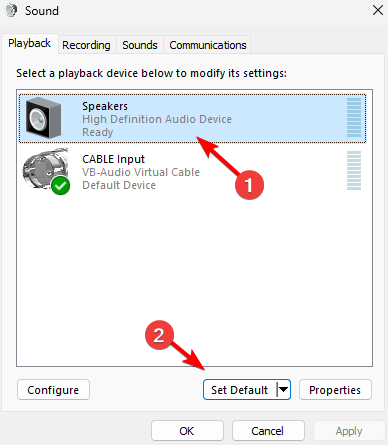
Press Win + R, type mmsys.cpl, press Enter.
Open Playback.
Right-click Speakers (Realtek High Definition Audio) → Enable.
Right-click again → Set Default.
5. Restart Windows audio services
If these services stop, your PC loses audio entirely.
Press Win + R, type services.msc, press Enter.
Restart:
Windows Audio
Windows Audio Endpoint Builder
Realtek Audio Service (if present)
6. Update, roll back, or reinstall Realtek drivers
Most Windows 10 no-sound problems come from Realtek driver corruption, especially after updates. Similar issues are detailed in the guide on how to fix no sound in Windows 11.
Open Device Manager using Win + X.
Expand Sound, video and game controllers.
Right-click Realtek High Definition Audio.
Try these steps in order:
Update driver
Roll back driver (if the problem started after an update)
Uninstall device → restart PC
Install OEM drivers when needed
If Realtek disappears or Windows installs a generic driver, download the audio package from your device manufacturer (Dell, HP, Lenovo, ASUS, MSI).
7. Disable audio enhancements
Enhancements sometimes block audio processing.
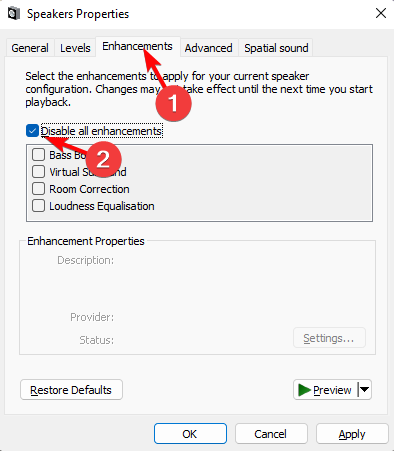
Run mmsys.cpl.
Right-click your Realtek device → Properties.
Open Enhancements.
Select Disable all enhancements.
8. Fix front-panel jack detection issues
Realtek often misreads plugged-in headphones.
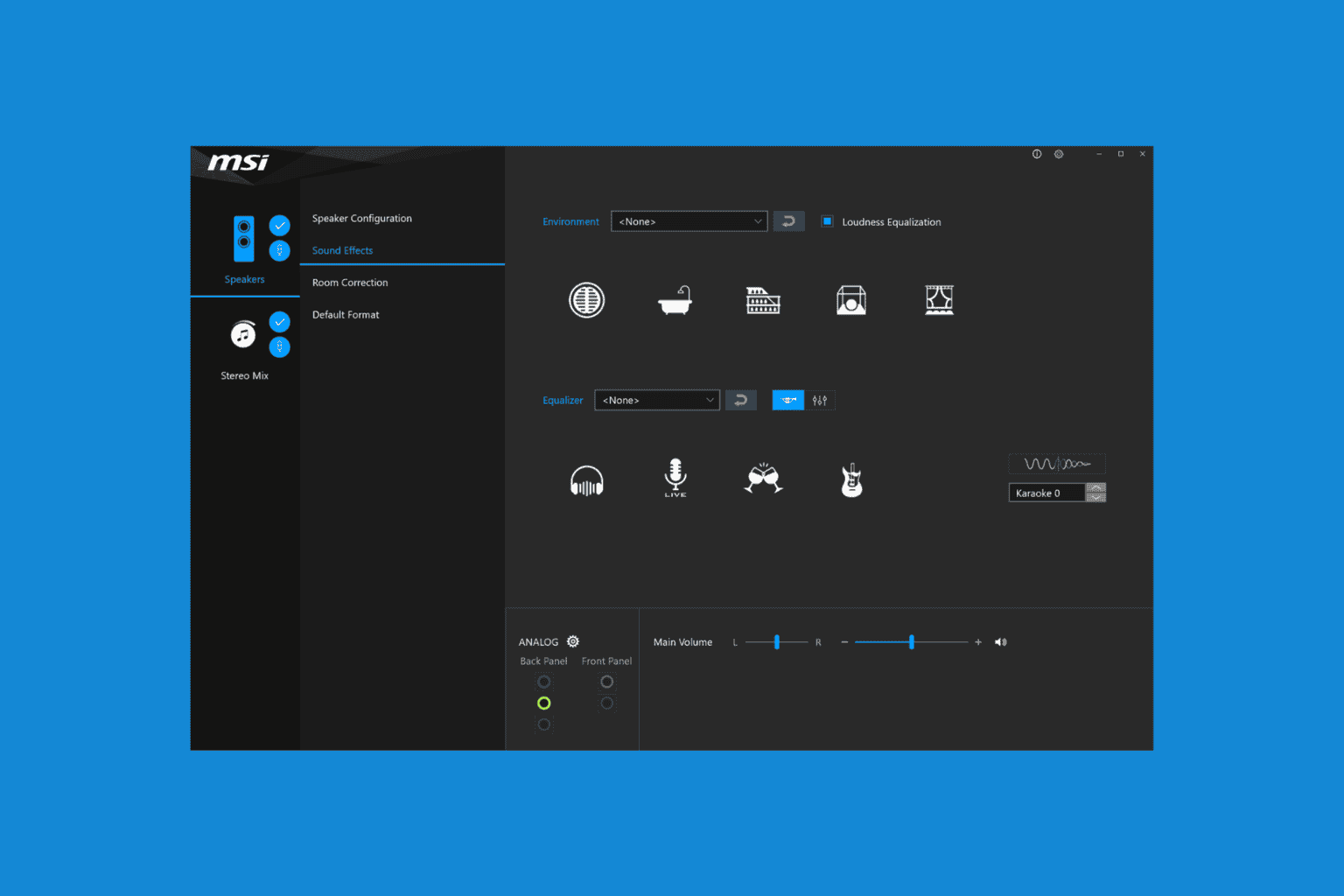
Open Realtek Audio Console.
Disable Jack detection or enable independent front-panel output.
Restart your PC.
9. Reset audio settings
Resets clear routing and app-specific issues.
Open Settings > System > Sound.
Open Advanced sound options.
Select Reset.
Restart.
10. Use the Windows audio troubleshooter
It detects broken services, driver failures, and sample rate conflicts.
Open Settings.
Go to Update & Security > Troubleshoot.
Select Playing Audio → Run the troubleshooter.
11. Repair sound after a Windows update
Updates often break Realtek functionality.
Open Settings.
Go to Update & Security.
Select View update history.
Click Uninstall updates and remove the problematic update.
12. Reset audio components with Command Prompt
This refreshes core audio services.
Run Command Prompt as administrator.
Enter the following:
net stop audiosrv
net stop AudioEndpointBuilder
net start AudioEndpointBuilder
net start audiosrv
13. Reinstall chipset drivers
Bad chipset drivers block Realtek detection.
Visit your PC manufacturer’s support page.
Download the latest chipset driver package.
Restart your system.
FAQs
Why does Realtek disappear from Device Manager?
Driver corruption or replacement by a generic Windows driver.
Why does Windows switch the audio device automatically?
Because HDMI, USB, and Bluetooth outputs take priority when connected.
Why does only one app have no sound?
It may be muted in Volume Mixer or bound to the wrong output in App volume and device preferences.
Why do headphones show as not plugged in?
Realtek jack detection misread the connection. Disable it in Realtek Audio Console.
Microsoft Defender gives your PC strong real-time protection, but you don’t always want a full system scan.
Sometimes, you only need to check one folder, perhaps a downloads directory, a USB drive, or a project folder that seems suspicious. Windows 11 and Windows 10 let you run quick, targeted scans directly from File Explorer or from the Windows Security app.
The fastest way to scan any location uses File Explorer.
Open File Explorer.
Go to the folder you want to check.
Right-click the folder.
Select Scan with Microsoft Defender.
View the results in Windows Security.
This works on both Windows 10 and Windows 11.
2. Run a custom scan from Windows Security
A custom scan helps when you want full control over what Defender checks.
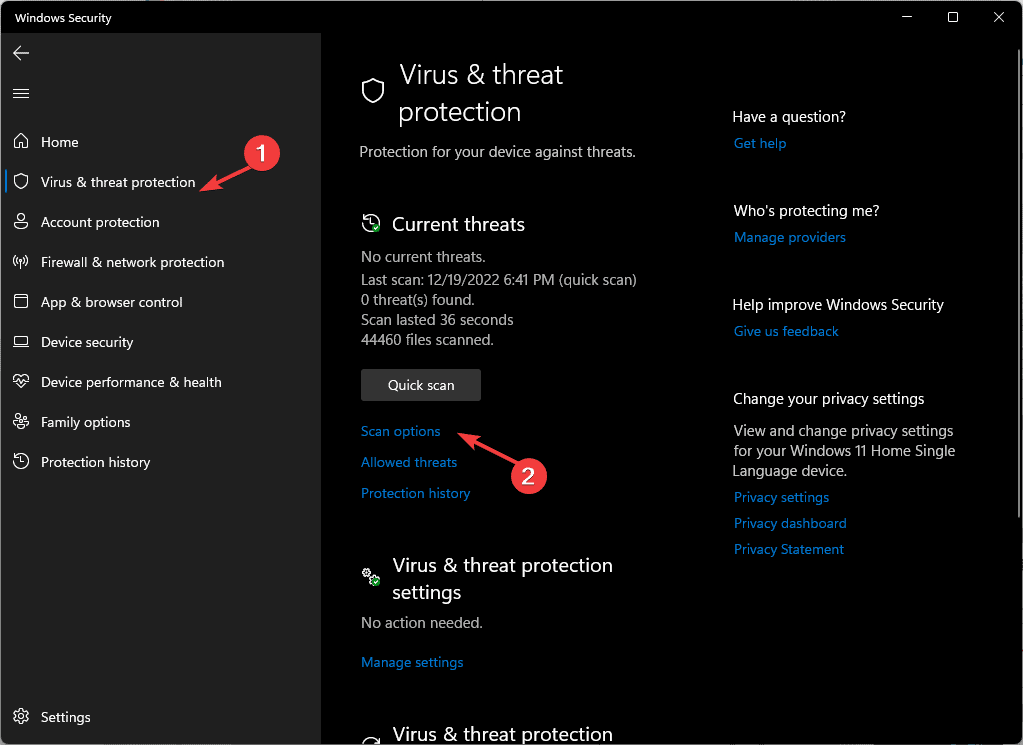
Open Start and select Windows Security.
Open Virus & threat protection.
Select Scan options.
Choose Custom scan.
Click Scan now.
Pick the folder you want to scan.
3. Protect critical folders with ransomware protection
You can lock important folders to block unauthorized changes.
Open Windows Security.
Go to Virus & threat protection.
Select Manage ransomware protection.
Enable Controlled folder access.
Select Protected folders.
Add the folders you want to secure.
4. Exclude or whitelist a folder (if you trust its contents)
Some folders contain large or sensitive files such as VMs or project assets. You can exclude them from scans if you trust their contents.
Open Windows Security.
Select Virus & threat protection.
Select Manage settings under Virus & threat protection settings.
Open Add or remove exclusions.
Add your trusted folder.
Keep in mind that certain protected content, such as encrypted documents, behaves differently during scans. If you want a deeper understanding, see how antivirus tools handle encrypted files. This explains why some files may not scan normally.
What about scanning ZIP and compressed folders?
When you run a folder scan, Defender also checks archived content. If you want to understand the limits and behavior of scanning compressed archives, take a look at how antivirus tools scan ZIP files.
Do VPN features in antivirus apps change how scans work?
Some antivirus apps bundle extra tools such as a free VPN, which affects how they handle network traffic. This doesn’t change Microsoft Defender’s ability to scan your local folders, but it matters if you switch between Defender and a third-party suite.
FAQs
Can I scan multiple folders at once?
Yes. Use Custom scan and select a parent folder that contains the subfolders you want to check.
Does Microsoft Defender detect malware on external drives?
Yes. You can scan USB drives, SD cards, and external HDDs with both right-click scanning and Custom scan.
Do I still need third-party antivirus software?
Most users don’t. Defender covers malware, phishing, and ransomware effectively.
Why doesn’t the “Scan with Microsoft Defender” option appear?
A third-party antivirus may remove Defender’s context menu entry. Disable or remove it to restore the option.
Resetting an app in Windows 10 helps you fix crashes, missing features, startup failures, and corrupted data.
Windows 10 includes several built-in tools that let you repair, reset, re-register, and reinstall apps depending on how severe the issue is. Usually, its a misbehaving app that you want to reset totally, and we will help you below do it without making your PC burn.
Windows 10 includes a built-in reset button for Microsoft Store apps and many desktop apps. This method wipes the app’s data and restores it to factory defaults.
Select Start, open Settings, then select Apps.
Choose Apps & features to see everything installed.
Select the app you want to fix and choose Advanced options.
Scroll down and select Reset.
Confirm the prompt to delete the app’s saved data.
Why this works?
Resetting removes corrupted cache, local files, and broken configuration entries that cause instability. If you run into system-level reset errors, see this guide on fixing Windows 10 “There was a problem resetting your PC“.
2. Repair an app before resetting it
Repairing keeps your data while Windows replaces missing or broken files. Many Windows 10 apps support this option.
Open Settings and select Apps.
Choose Apps & features.
Select the app and choose Advanced options.
Choose Repair and wait for Windows to complete the fix.
When to use this?
Use Repair when the app loads but freezes or runs slowly.
3. Run WSReset to fix Microsoft Store apps
Store apps in Windows 10 often break because the Store cache becomes corrupted.
Press Windows + R to open Run.
Type wsreset -i.
Select OK and wait for the Microsoft Store to reopen.
Why this works?
WSReset clears and rebuilds the Store cache so apps can update and launch properly. Clearing the cache helps for app errors just like resetting temporary internet files to their default location does for browser-related issues.
4. Re-register apps with PowerShell
This method restores system-wide app registrations that Windows 10 uses to launch Microsoft Store apps.
Right-click Start and choose Windows PowerShell (Admin).
Wait while Windows 10 restores all Store app registrations.
Why this works?
Re-registration fixes issues where apps refuse to open or appear blank. If File Explorer stops responding while performing these actions, you can also look into how to reset File Explorer to restore normal behavior.
5. Reset apps with Command Prompt (advanced)
Command Prompt lets you remove broken app packages when the normal uninstall/reset options fail.
Right-click Start and select Command Prompt (Admin).
Run the following command to find the package:
Get-AppxPackage appname
Identify the full package details.
Remove it with:
Get-AppxPackage appname | Remove-AppxPackage
Reinstall the app through the Microsoft Store afterward.
Why this works
CMD deletes corrupted packages that the Settings app cannot remove.
6. Use the Windows Store Apps Troubleshooter
Windows 10 includes a dedicated troubleshooter that automatically detects and fixes Store-related problems.
Open Settings and select Update & Security.
Choose Troubleshoot.
Select Additional troubleshooters.
Choose Windows Store Apps.
Run the troubleshooter.
Why this works
The tool fixes account issues, update failures, and licensing problems. Similar automation can help with features like resetting File History when backups stop working.
7. Manually delete leftover app files (advanced)
Reinstalling an app may require removing leftover configuration files that Windows 10 doesn’t delete automatically.
Open File Explorer.
Enter %localappdata% in the address bar and delete leftover folders from the app.
Enter %appdata% and remove additional remnants.
Reinstall the app.
Why this works
Leftover files can conflict with clean installations and cause the same issue to return.
Tips
• Restart Windows 10 after every Repair or Reset. • Keep Microsoft Store apps updated. • Use PowerShell only when Settings can’t fix the app. • Back up local app data if the app supports exporting.
FAQs
What does resetting an app do in Windows 10?
Resetting removes the app’s stored data and restores it to its original state.
Why can’t I find the reset button for a specific app?
Classic desktop programs don’t always support reset. You may need to repair, uninstall, or reinstall them manually.
Will I lose data when resetting an app?
Yes. Resetting clears all app-specific data. Use Repair if you want to preserve it.
Does PowerShell re-registration affect all users?
Yes. PowerShell commands modify system-wide app registrations for every user account.
Creating a logo can be an intimidating task, especially for small businesses, startups, and freelancers who are just getting started. You may want something that looks professional, unique, and fitting for your brand. But what if you don’t have the budget for a custom design, or the expertise to use complex design tools? That’s where Design.com comes in.
In this review, I’ll dive into whether Design.com’s AI logo generator can truly help you create a unique logo in minutes. From initial concept generation to customization and final exports, I’ll walk through every aspect of the tool to determine if it lives up to its claim of delivering high-quality, unique logos quickly.
1. Introduction to Design.com’s AI Logo Generator
Design.com is one of the leading AI-powered logo makers, combining speed, ease of use, and professional-grade output. The platform is ideal for Windows users or anyone looking for a simple yet powerful solution to create a brand identity without the need for specialized design knowledge.
By using an AI logo generator, Design.com promises to make logo creation both fast and highly customizable. But with so many tools available today, what makes Design.com’s AI Logo Generator stand out? Let’s break it down.
2. The Process: How Fast Can You Really Generate a Logo?
Quick, Efficient, and Straightforward
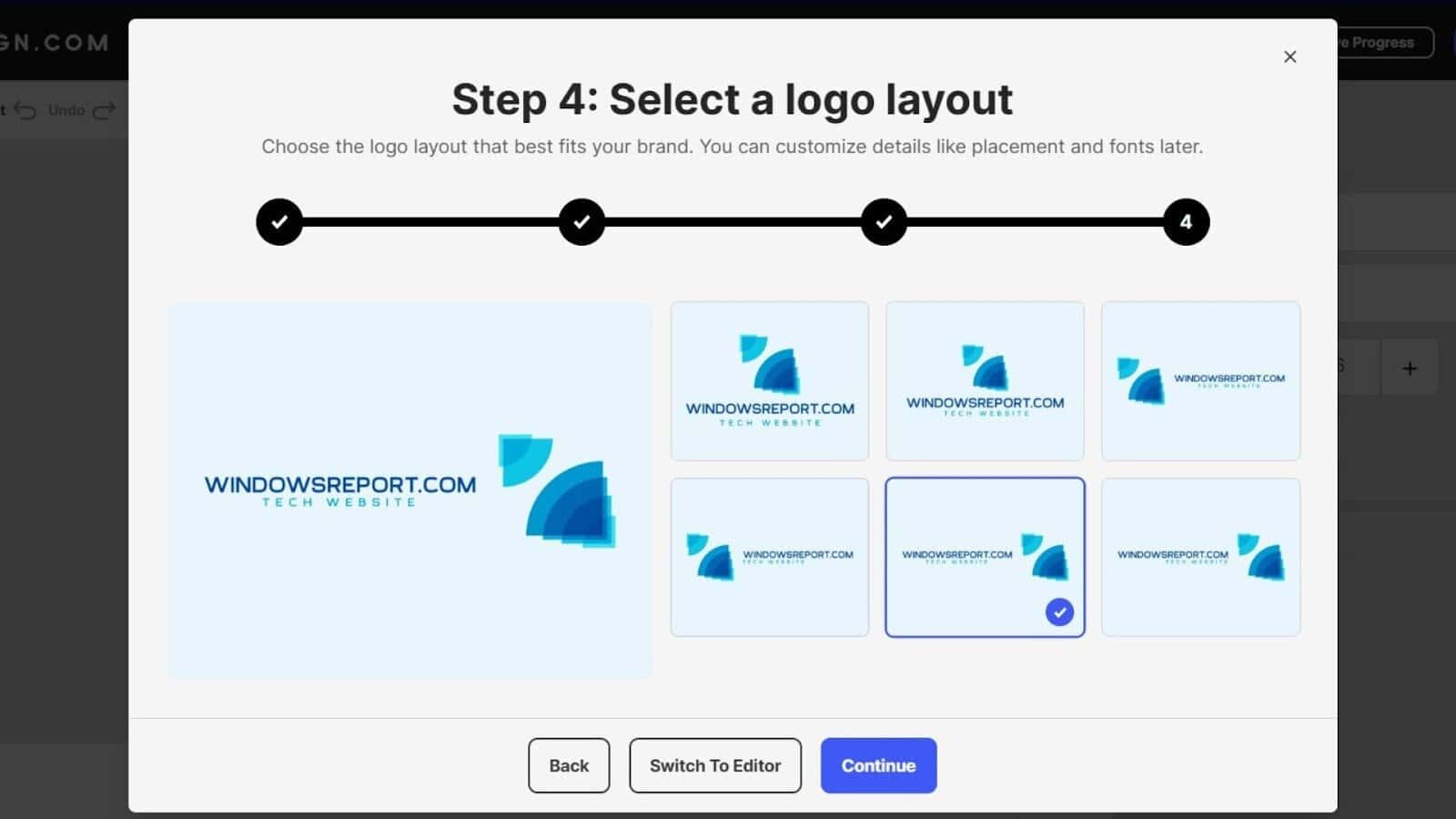
The first thing I noticed about Design.com’s logo creation process was just how quick it was. In a matter of seconds, I was presented with multiple logo ideas. All I needed to do was provide a business name and choose the industry.
Speed vs. Quality
The AI logo generator didn’t just produce quick results — it also provided logos that were usable right away. Instead of generic, stock-looking templates, I received designs that felt customized for my brand. Whether you’re looking for bold typography, a simple wordmark, or a creative emblem, the platform offers a wide variety of styles immediately.
Within a few clicks, the logo generation process was complete, and I had multiple distinct options to work with. For anyone on a Windows machine needing a fast turnaround, this speed is essential.
3. Customization: Can You Really Make It Unique?
Easy Adjustments for Personalization
While the initial designs were strong, I wanted to make sure I could take them further — could I make them stand out more, or was the AI output too generic? The answer is: yes, Design.com gives you ample control over the final design.
Here’s what you can adjust:
Font selection: Choose from 750+ fonts, including exclusive fonts that aren’t available elsewhere.
Icon adjustments: Easily swap out icons and adjust their positioning.
Color themes: Change color schemes to better align with your brand’s identity.
Text placement: Reposition text and icons to ensure your logo looks perfectly balanced.
What stood out during customization was the range of flexibility offered. While the AI engine provides great starting points, the editing tools are intuitive enough for Windows users who are beginners, yet flexible enough for those who want more control.
4. AI Logo Generator: A Broad Library of Styles and Templates
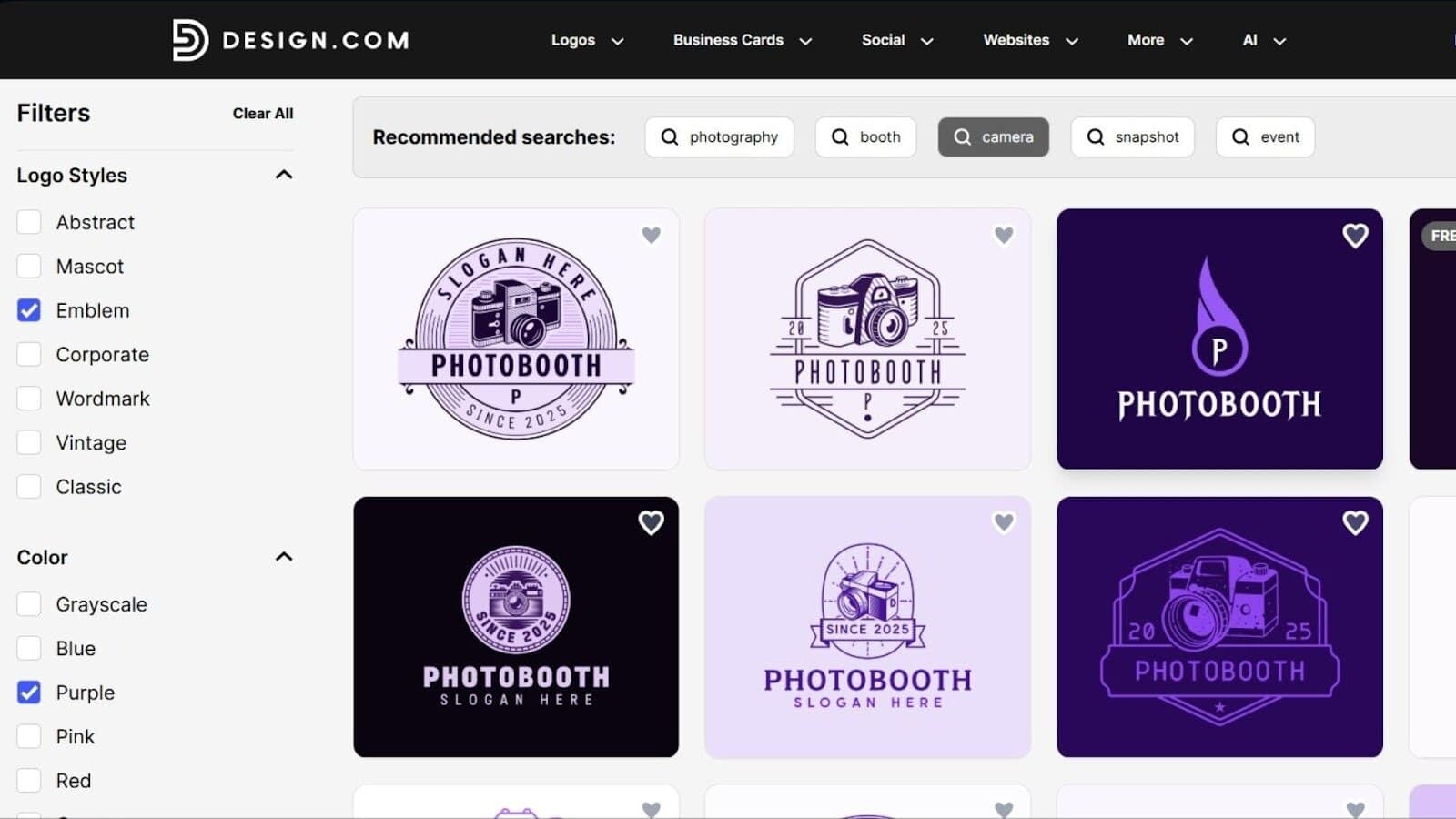
One of the key strengths of Design.com’s AI Logo Generator is the extensive library it draws from. It offers a massive selection of logos, each customizable to your needs. Here’s what makes it stand out:
360,000+ logo templates
1 million+ design templates covering all branding materials
Variety of styles: abstract, emblem, corporate, classic, modern, wordmark, vintage, and more
With this extensive library, you can feel confident knowing that you won’t be stuck with a one-size-fits-all design. Even with minimal customization, I was able to select designs that felt professionally done and tailored to the industry I was working in.
5. Real-World Application: Exporting Your Logo
Once the design process was finished, I moved to the next step: downloading the logo in the necessary formats. This is another area where Design.com delivers. Unlike many logo-making tools, Design.com provides high-quality export options that are perfect for both print and digital use.
File Formats Available:
Vector files: SVG, EPS, PDF
Raster files: PNG, JPG
Animated files: GIF, MP4
Transparent backgrounds
Icon-only versions
For Windows users who plan to use their logo for website headers, social media, print materials, or merchandise, the ability to export in multiple file types ensures you can use the logo anywhere, without losing quality.
6. How Unique Are These Logos?
A common concern with any AI logo generator is whether the logos will feel too generic or overused. After testing several designs, I found that Design.com offers high-quality, unique logos, especially once you begin customizing the initial designs.
Why the AI Logos Feel Unique:
Extensive library of designs and icons: With over 360,000 templates and millions of combinations, the AI offers far more diversity than many competitors.
Customization flexibility: The ability to swap fonts, change colors, adjust layouts, and fine-tune design elements ensures that no two logos need to look alike.
Professional templates: The system draws from professionally designed templates, meaning the logos you create have a more polished, “studio-quality” feel compared to other AI generators.
While it’s always possible that some designs could be similar to other users’ logos, Design.com does its best to offer variety and originality in its results. For most users, the logos generated here will be unique enough to stand out and serve as the foundation for a strong brand.
7. Who Is Design.com Best For?
The AI logo generator from Design.com is perfect for:
Small business owners who need a logo quickly and affordably
Freelancers and creators looking to launch a personal brand
Startups on a tight budget or timeline
Windows users who don’t have access to expensive design software or professional help
Entrepreneurs who need to generate a logo fast without compromising on quality
For Windows users, the platform’s ease of use and speed make it a top choice, especially if you need to get a brand identity up and running without spending weeks on design work.
8. Pricing and Value
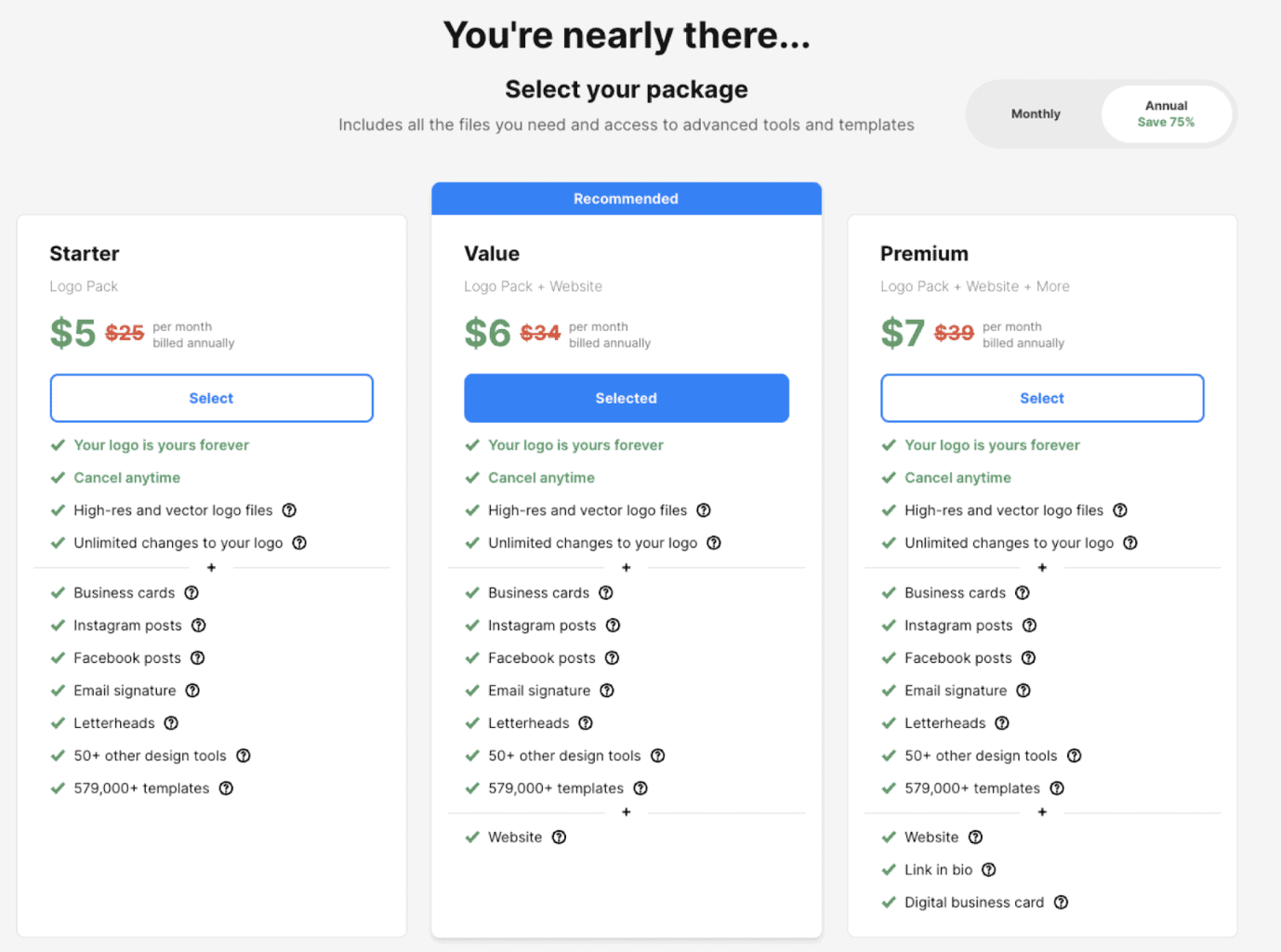
Design.com offers a range of pricing plans to suit different needs. Here’s a quick look at the options:
Starter — $5/month (billed annually): Includes unlimited edits, high-resolution logo downloads, business cards, email signatures, letterheads, and access to 1 million+ design templates.
Value — $6/month (billed annually): Everything in the Starter plan, plus access to the AI website builder and more branding tools.
Premium — $7/month (billed annually): Everything in the Value plan, plus digital business cards, link-in-bio pages, and additional branding tools.
The free plan gives users access to basic features, including a free website builder, free link-in-bio, and free digital business card tools — though these come with Design.com branding in the footer and some limited features.
For Windows users seeking high-quality results at an affordable price, Design.com offers great value, especially when compared to other logo-making tools that charge high fees for limited features.
Final Verdict: Is Design.com’s AI Logo Generator Worth It?
In short: yes, Design.com delivers exactly what it promises — the ability to create a unique, professional logo in minutes. The AI logo generator is fast, highly customizable, and offers a broad library of design templates, making it easy for anyone — including Windows users — to create a polished logo without design experience.
The added benefit of an entire branding suite (business cards, social media posts, website templates) makes this a complete solution for new businesses or anyone looking to establish a brand quickly.
Whether you need a logo for a startup, a freelancer project, or a small business, Design.com offers an efficient, affordable, and user-friendly way to create a logo and launch your brand.
With fast logo generation, easy customization tools, and a complete export system, Design.com is an excellent choice for anyone needing a unique logo quickly and affordably.
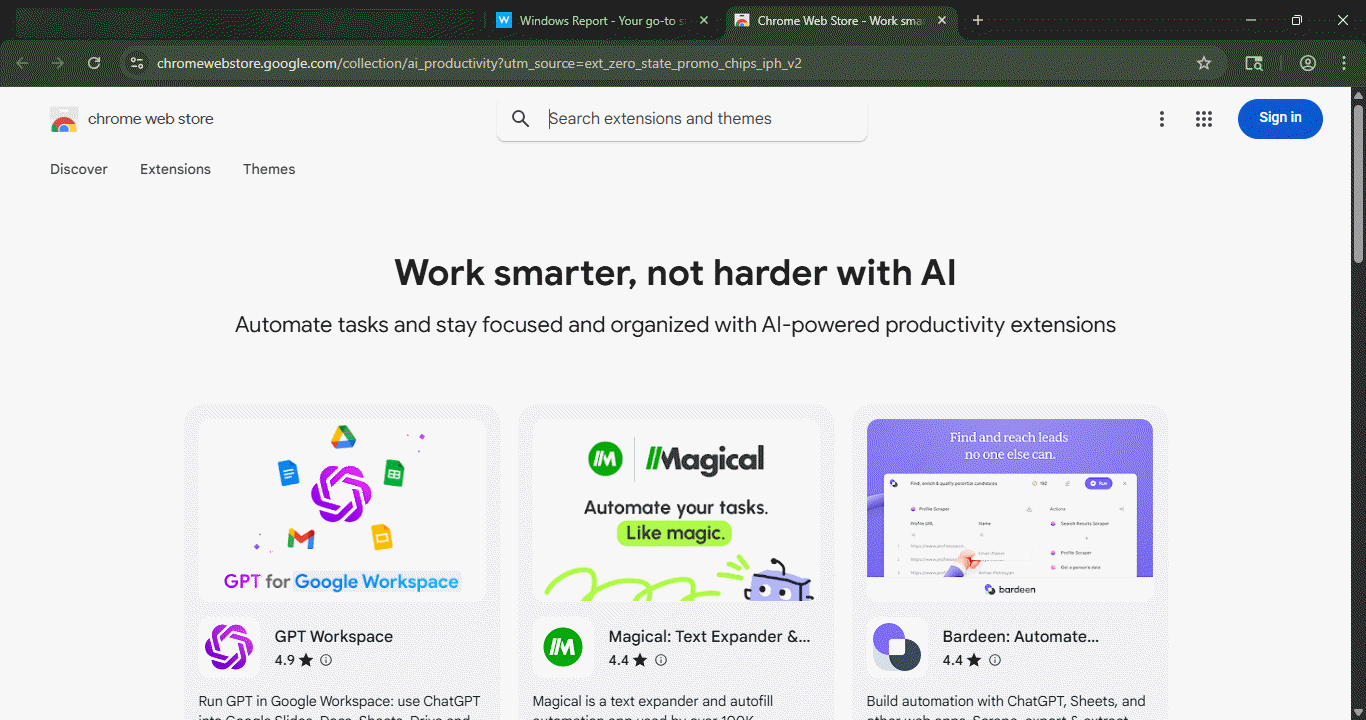
Google is testing a new way to introduce Chrome extensions to users who have not installed any add-ons yet. Chrome shows a popup that encourages users to explore extensions, with AI tools placed front and center.
The message appears inside the browser and uses the phrase “supercharge your browser.” It is not tied to a website and does not appear as part of a web page.
We observed this popup on a Chrome profile with no extensions installed. Profiles that already have one or more extensions do not appear to see the message, which suggests the notification is aimed at first-time or extension-free users. This makes the popup feel more like an onboarding prompt than a general promotion.
AI extensions take priority
The popup includes several action buttons, such as “Enhance with AI,” “Boost productivity,” and “Find coupons.” Clicking any of these options opens the Chrome Web Store with the relevant extension category already selected.
For instance, choosing “Enhance with AI” takes users directly to the AI category, which lists extensions focused on writing help, summaries, search tools, and browsing assistance. Instead of promoting a single extension, Chrome highlights entire categories.
The Chrome Web Store highlights AI-powered productivity extensions in a dedicated collection linked from Chrome’s new extension notification. Image Credit: Venkat | WindowsReport.
The Chrome Web Store offers thousands of extensions across categories such as AI, productivity, and shopping. For users who have just installed Chrome and have not added any extensions yet, this popup acts as an introduction to what add-ons can do. It also points users to themes, which let them change how Chrome looks.
If you use a Windows PC and want to build a brand without learning complex design software, two names pop up often: Design.com and Adobe Express. Both run in the browser, both use templates, and both help non-designers create logos and branded content.
They do not serve the same role, though. Design.com focuses on AI logo generation and full brand kit creation, while Adobe Express centers on template-based design and social content, with logo creation as one part of a broader toolkit.
Let us compare how they perform on Windows PCs in the areas that matter most for creators and small businesses: logo quality, customization, branding tools, workflow, and value.
1. Logo quality and design foundation
Design.com
Design.com builds everything around a strong logo foundation. It uses an AI logo generator backed by the world’s largest logo library, with over 360,000 logo templates and more than 1 million total design templates across marketing and branding assets.
The system combines AI generation with exclusive assets. It includes:
Over 62,000 custom vector shapes
Over 750 fonts, including 525+ exclusive fonts
Logos that are exclusive to Design.com
Designs checked for originality and quality
On a Windows PC, logo ideas appear very quickly after you input your brand name and industry. The variety feels broad, with different styles such as abstract, emblem, wordmark, modern, or classic. Because the templates come from professional designers, the starting point already looks close to studio work.
Adobe Express
Adobe Express offers a logo creation flow based on templates and prompts. You pick styles and layouts and then adapt them with your brand name and preferences. The quality feels solid, especially if you like clean, modern, minimal designs.
However, Adobe Express does not focus on exclusive logo templates in the same way. Its strength lies more in graphic design templates for social, print, and web, rather than a massive, dedicated logo library.
Verdict for logo quality Design.com wins for sheer volume, exclusivity, and logo focused depth. Adobe Express provides clean and attractive options, but its logo feature sits inside a broader template system that aims to cover many content types.
2. Customisation options and control
Design.com
Design.com offers a two layer editing experience. You first get quick AI generated ideas, then you refine them in an editor that stays friendly for non designers. You can:
Change fonts using the large library with 750+ choices
Replace icons with thousands of exclusive shapes and symbols
Adjust colors and build a palette that fits your brand
Add or remove slogans
Switch between different layouts such as stacked, horizontal, or icon only
For more control, the advanced editor allows you to fine tune:
Letter spacing
Element spacing
Icon proportions
Alignment between text and symbol
On a Windows PC, this feels close to a lightweight design tool without the complexity of traditional software. You get clear control over the final look without a steep learning curve.
Adobe Express
Adobe Express also provides a flexible editor. You can change fonts, colors, icons, and placements using familiar Adobe style controls. The interface feels polished and works well for users who like drag and drop adjustments.
Its font options draw from Adobe’s strong typography heritage, which helps if you care a lot about type. However, the tool does not position itself as a deep logo specific editor. It treats the logo canvas similarly to other template canvases in the app.
Verdict for customization Both tools allow solid customization, but Design.com leans more into logo specific control and offers exclusive shapes and fonts dedicated to branding. Adobe Express works well for general design tasks and quick logo tweaks but feels less specialized in fine logo refinement.
3. Template ecosystem and brand expansion
Design.com
Design.com builds a full branding system around your logo. Once you finalize a logo, the platform automatically applies your colors and fonts across more than 50 different branding tools, including:
Business cards and digital business cards
Websites
Social media posts and stories
Presentations
QR codes
Flyers and posters
Letterheads and menus
One standout feature is automatic brand consistency. Templates inherit your logo colors across social, print, and web designs. You do not need to manually set hex codes or styles each time. For a Windows user, this means you can create a whole brand kit in a single browser session and keep everything visually aligned.
Adobe Express
Adobe Express shines with a large collection of social, print, and web templates. You can design:
Social media graphics
Posters
Presentations
Simple web assets
It gives strong support for campaigns and content creation. You can carry your logo into templates and keep a consistent look if you work carefully with styles and saved brand elements.
However, Adobe Express does not center around logo driven automated brand kits in quite the same way. It provides serious design power, but you need more manual oversight to keep every asset consistent.
Verdict for template ecosystem Design.com focuses on brand kits and ensures automatic, logo driven consistency across dozens of asset types. Adobe Express offers a rich template environment, especially for social and print, but expects you to handle consistency more manually.
4. File formats and export flexibility
Design.com
Design.com gives a very complete range of export formats for logos and other design assets. You can download:
Vector files: SVG, EPS, PDF
Raster files: PNG and JPG
Animated files: GIF and MP4
Icon only versions
Transparent background versions
All logos are commercially safe and checked for originality and quality. This matters when you intend to print, scale, and use your logo across many platforms from your Windows PC.
Adobe Express
Adobe Express supports strong export options for logos and graphics, especially in modern raster formats. Vector support depends on specific workflows and subscriptions across the Adobe ecosystem. It excels at exports that fit social and digital channels.
For users who need deep vector control, Adobe still expects them to use tools like Illustrator. Adobe Express fills the quick design role instead of the full production ready export suite.
Verdict for exports Design.com clearly aims at full logo production readiness with vector, raster, and animated formats from within the logo platform itself. Adobe Express handles digital and social output well but relies on other Adobe tools for full professional vector workflows.
5. Branding tools and extra services
Design.com
Beyond logos and templates, Design.com includes:
Free logos for some use cases
Free website builder
Free link in bio pages
Free digital business card
These freemium web products include Design.com branding in the footer and some feature limits, but they offer a fast way to get an online presence.
Design.com also provides:
Domain registration tied to your brand
Printing options for business cards, mugs, apparel, caps, mousepads, and more
Free delivery for printed items
Extended logo licenses that allow you to remove a logo template from the public library and gain exclusive use
All designs on the platform remain commercially safe and quality checked, which gives peace of mind for business use.
Adobe Express
Adobe Express focuses more on digital design rather than end to end brand services. It does not handle domains or print fulfillment directly. Instead, it integrates with the broader Adobe ecosystem and fits into workflows that may later involve Photoshop, Illustrator, and other tools.
This suits users who already live inside Adobe’s world or who work on creative content more than full brand logistics.
Verdict for branding extras Design.com offers an integrated path from logo to website, domain, printed goods, and expanded assets without leaving the platform. Adobe Express stays closer to content design and expects external solutions for domains and physical branding.
6. Workflow on Windows PCs
Both tools run in the browser and work well on Windows PCs, but they fit different user profiles.
Design.com on Windows
Best suited for creators who want to go from zero to full brand kit very quickly
Ideal for freelancers, small businesses, and startups that need a ready to use identity
No design software installation needed
Smooth for users who want AI driven ideas plus structured brand expansion in one place
Adobe Express on Windows
Works well for users who create a lot of social graphics, simple documents, and campaigns
Fits designers who already subscribe to Adobe products
Good for content first workflows where the logo is one part of ongoing creative work
7. Pricing and value perception
Design.com offers a free plan along with three paid tiers, all designed to give Windows users complete control over their brand. The free plan includes the ability to generate logos and use freemium versions of the website builder, link in bio, and digital business card.
Paid plans include full logo ownership, high resolution and vector formats, unlimited edits, and access to more than 582,000 branding templates plus 50+ additional design tools. The three paid tiers are:
Starter – $5/month billed annually: High resolution and vector files, unlimited logo changes, business cards, email signatures, social media posts, letterheads, and access to the full branding toolset.
Value – $6/month billed annually: Everything in Starter plus a complete website that automatically adopts your brand colors and typography.
Premium – $7/month billed annually: Everything in Value plus a link in bio and a digital business card, expanding your brand across multiple digital touchpoints.
Adobe Express uses subscription options tied to Adobe’s wider creative ecosystem. Logo creation is included as part of its general design toolkit, along with strong social and print templates, but it is not structured around branding plans in the same focused way as Design.com.
Verdict for value Design.com provides clear, brand-centered pricing that gives Windows users a fast path to professional logo creation and full brand deployment. Adobe Express remains a good option for users who are already invested in Adobe’s broader design tools.
Final verdict: Which works better for PC creators?
For Windows users who want a logo first brand system, Design.com fits better. It provides:
A wide set of branding tools, from cards to websites
Broad, production ready export formats
For Windows users who already rely on Adobe tools and center their work on content creation and social graphics, Adobe Express remains attractive. It delivers high quality templates, familiar font control, and smooth integration with other Adobe services.
If you need to answer a simple question:
“I want to create a logo and full brand identity on my PC in one place.” Choose Design.com.
“I want a flexible general design tool and I already like Adobe.” Choose Adobe Express.
Microsoft is rolling out a modernized Run dialog in Windows 11 with a refreshed interface and deeper system integration. The feature isn’t enabled by default yet, but you can turn it on manually if your device runs the required Insider build.
A refreshed Run dialog arrives in Windows 11
Microsoft has started testing a redesigned Run dialog that looks cleaner and more modern than the classic Windows pop-up. The updated UI stands apart from other Windows 11 dialogs and better matches the operating system’s current design language.
Because Microsoft relies on a staged rollout, many users won’t see the new Run dialog enabled automatically, even on compatible systems.
How to enable the new Run dialog from Settings
If your system already includes the toggle, you can enable the modern Run dialog directly from Settings.
Press Win + I to open Settings.
Go to System and open Advanced.
Turn on the Run dialog to activate the modern version.
How to force-enable the Run dialog using ViVeTool
If the toggle doesn’t appear yet, you can force-enable the feature using ViVeTool. Many Windows enthusiasts use this tool to unlock hidden features before Microsoft enables them for everyone.
Download ViVeTool from its GitHub repository and extract it to a folder, such as C:\ViVeTool.
Press Win, type cmd, right-click Command Prompt, and select Run as administrator.
Just to be clear, you need a Windows Insider Preview build that includes update KB5072043 to try the new Run dialog. ViVeTool forces hidden feature flags before Microsoft’s staged rollout reaches your device, so you may encounter unfinished visuals or minor bugs.
It’s almost Christmas, meaning everyone is chilling, playing games, and having fun with family and friends. However, if you’re into PC gaming and tried to log into your Steam account only to find you couldn’t, it isn’t just you. Steam is down for many users right now, as DownDetector shows over 13,000 user reports. So, it’s not confined to one region at the moment; players across the globe are experiencing an outage right now.
What makes this worse is that the Steam Winter 2025 Sale is live now. So, if you are planning to grab some handy discounts on your favorite games, you won’t be able to do so at the moment. According to PC Gamer, right before 2 PM ET today, the service started experiencing issues. Valve hasn’t announced any routine maintenance, so it’s hard to guess what’s actually happening right now.
In addition, the unofficial Steam Status website is displaying WebSocket errors at the time of writing. What’s worse is that the entire Steam store, Web API, and community features are reportedly offline right now. As of now, there’s no word from Valve on what exactly has happened or why the service is experiencing an outage right when players are flocking to the site to grab massive discounts and chill with their buddies during the holidays.
If you were also shocked by seeing the sudden price drop on Cyberpunk 2077: Ultimate Edition and thought it was a Christmas gift or simply too good to be true, you’re not alone. For some time, the game was live on Nintendo Switch 2 eShop with a massive 75% discount.
Meaning, the original price of the game, $99.99, was slashed into an eye-popping deal worth ~ $17.50. The listing went viral, with many players wondering.
CD Projekt Red has finally confirmed that the massive discount was merely the result of an internal submission error. According to the studio, incorrect pricing information was submitted during the promotional setup process, which temporarily pushed the game live at an incorrect price.
The discounts for Cyberpunk 2077: Ultimate Edition and The Witcher 3: Wild Hunt – Complete Edition displayed on Nintendo Switch 2 eShop in the Americas on December 22, 2025 were incorrect.
The situation is a result of an error we made when submitting the discount. We have…
What made the situation more confusing was that an official Nintendo press release also included a 75% discount. Players got the impression that the deal was intentional. As a result, many made the initial jump and were able to grab the offer before it got rectified.
CD Projekt Red clarified that the pricing issue didn’t affect just one title. The error also affected the pricing of The Witcher 3: Wild Hunt – Complete Edition, which displayed unintended discounts during the same window.
Once the mistake was identified, the publisher worked with Nintendo to correct the listings and restore the intended pricing structure. The good news is that early buyers still get the same discount as shown. CD Projekt Red confirmed that no refunds have been reversed and no licenses have been revoked, meaning anyone who managed to grab the deal will be able to keep it.
Fixed Pricing | Image credit: Reddit/u/Joseki100
The issue specifically impacted the Nintendo Switch 2 eShop in the United States on December 22. Since then, the incorrect pricing has been fully corrected, and new, planned discounts are now live on the store.
Were you able to make the early move and grab the massive discount? If yes, let us know in the comments below.
Microsoft is doubling down on artificial intelligence, and the company is now changing how internal discussions around AI happen (via The Information). After rolling out new Copilot-powered features like the AI Explainer in PowerPoint, Microsoft is shifting focus toward hearing directly from the people building these tools.
A new bottom-up approach to AI discussions
Satya Nadella has been involved directly with the team leading Copilot. Unlike traditional executive briefings, senior managers do not lead or present during these sessions. Instead, Nadella is reportedly working directly with frontline engineers and lower-level technical staff working directly on AI projects, taking center stage (via Business Insider). They share real challenges, early ideas, and product-level insights directly with the CEO.
Teams channel enables unfiltered feedback
Microsoft supports this initiative through a dedicated Microsoft Teams channel that collects input from across the organization. This setup allows Nadella to receive real-time, unfiltered feedback without relying on polished executive summaries. By removing layers of hierarchy, Microsoft aims to surface practical insights faster and spot issues earlier in development cycles.
Why this matters for Microsoft’s AI strategy
This move signals a broader shift toward a bottom-up leadership model as Microsoft positions itself for an AI-first future. Reports suggest Nadella wants to highlight hands-on engineering perspectives, accelerate innovation, and keep leadership closely aligned with real product challenges.
The approach fits Microsoft’s wider AI push, where rapid iteration and direct developer feedback can make a measurable difference.
What’s your take on meetings led by engineers instead of executives? Share your thoughts in the comments.
Lenovo’s entire upcoming ThinkPad lineup for 2026 may have leaked, courtesy of folks at Windows Latest. In our previous coverage, we reported on the leaked ThinkBook Plus Gen 7 Auto Twist, a 14” 2.8K OLED laptop with Dolby Atmos speakers, a motorized dual-rotation hinge, and Intel Core Ultra 3 processors.
Well, the massive leak also included the ThinkPad X9 15p Aura Edition, which looks to be a true performance powerhouse. Designed for professionals, creators, and small to medium businesses, it features a 15.3” OLED display with 1,100 nits peak brightness, Intel Core Ultra X9 Series 3 processor, up to 64GB LPDDR5x memory, a six-speaker audio system, and the largest haptic touchpad ever on a ThinkPad. It also brings back the full-size SD card reader, making it ideal for professionals handling heavy multimedia workloads.
6x speakers (B2B + Tweeter)2x microphones with Elevoc Noise Cancellation
Dimensions
339.5 x 228.5 x 7.25–17.9 mm
Weight
Starting at 1.5 kg / 3.08 lbs
Color
Thunder Grey
Security
DTPM, ThinkShield, MoC touch fingerprint reader on power button, Webcam shutter
Connectivity
Wi-Fi 7Bluetooth 5.4
Source: Windows Latest
Finally, you have the ThinkCentre X AIO Aura Edition, which brings a nearly squarish 16:18 27.6-inch QHD display, designed for creators, programmers, and data professionals. The device will be powered by Intel Core Ultra X7 Series 3 processors, support an optional Smart AI camera with Lenovo DeskView, and can split its screen between AIO content and an external device, effectively doubling as both a monitor and PC.
ThinkShield, Mini Kensington® Security Slot™, Chassis Intrusion Switch
Connectivity
Up to Wi-Fi 7Bluetooth 6.0
Source: Windows Latest
With CES 2026 around the corner, Lenovo appears ready to showcase a ThinkPad lineup that balances innovation, performance, and versatility. What do you think about these upcoming devices from Lenovo? Will you be keen to buy any of them? Do let us know in the comments below.
Earlier today, we reported on the leaked ThinkBook Plus Gen 7 Auto Twist laptop, which rotates using an electromotor, which won’t be showcased as a concept but as a consumer-facing product. Speaking of which, Windows Latest has also leaked ThinkPad X1 Carbon Gen 14 Aura Edition and ThinkPad X1 2-in-1 Gen 11 Aura Edition. Just to be clear, these will be Lenovo’s flagship offering.
Image credit: Windows Latest
Both laptops will pack the Intel Core Ultra X7 Series 3 processors with up to 12Xe GPU and an integrated NPU with 50 TOPS under the hood. Lenovo is focusing on repairability and sustained performance with these devices. According to the report, both laptops use a new design that places internal components on both sides of the motherboard to save space for better cooling and easier repairability. iFixit reportedly rated them 9 out of 10 in terms of repairability. That’s not all; you’ll find an unusually large haptic touchpad in these upcoming devices.
The laptops will come with 20% better heat dissipation alongside the capacity to “maintain 30W of sustained load.” You’ll also find a new 10MP camera with a wide field of view (110 degrees) and advanced distortion correction on both the ThinkPad X1s. Meanwhile, the 2-in-1 model comes with a new magnetically docked pen that can be changed and stored easily.
Full specifications of ThinkPad X1 Carbon Gen 14 Aura Edition and ThinkPad X1 2-in-1 Gen 11 Aura Edition
Despite recent backlash surrounding Call of Duty: Black Ops 7, the Call of Duty franchise continues to dominate U.S. player engagement across Xbox and PlayStation. Weekly charts still place the series at the top, reinforcing its position as the most-played shooter ecosystem in North America.
Call of Duty’s combined ecosystem skews comparisons
Player rankings rely on the Call of Duty HQ metric, which merges engagement from Call of Duty: Black Ops 6, Call of Duty: Warzone, and Black Ops 7. This aggregation inflates overall activity and complicates direct comparisons with standalone releases like Battlefield 6.
Even so, the data highlights Call of Duty’s ability to retain players across multiple modes and entry points, something rival franchises still struggle to replicate.
Black Ops 7 launch shows mixed results
Reports indicate Black Ops 7 fell short of internal expectations, particularly in Europe. Opening-week sales reportedly dropped well below both Battlefield 6 and Black Ops 6, signaling fatigue among parts of the franchise’s audience despite strong U.S. engagement. The disconnect suggests regional differences in player preferences, rather than a global collapse in interest.
Battlefield 6 slips but remains stable
According to Circana player engagement data for the week ending December 13, 2025, Battlefield 6 ranked around seventh place, down from sixth the previous week. The drop came despite the availability of its free-to-play REDSEC battle royale mode.
Landing between sixth and seventh still reflects a healthy player base. However, the ranking underscores Battlefield’s struggle to match the scale and stickiness of Call of Duty’s broader ecosystem.
Some players now gravitate toward alternative live-service and extraction-style shooters such as ARC Raiders. This shift suggests Battlefield’s current battle royale formula no longer resonates as strongly as it once did, especially against competitors offering more persistent progression and evolving gameplay loops.
Battlefield 6 was also a part of recent controversy after fans spotted the use of AI in the new premium Battlefield 6 bundle. For now, Call of Duty’s multi-title strategy keeps it firmly on top, while Battlefield faces mounting pressure to realign with changing shooter trends.