Frostpunk 2 Confirmed to Launch on Xbox & PS5 on September 18

Frostpunk 2 is officially landing on PlayStation 5 and Xbox Series X|S this fall, with a release date now confirmed for September 18, 2025. This marks the series’ return to consoles after the first Frostpunk earned praise for its strategic depth and bleak storytelling.

This time, developer 11 bit studios says it has reworked the experience to feel more natural on controllers. Production Coordinator Igor Skibinski explained that the original interface couldn’t just be copied over.

The team redesigned key systems to make gameplay more intuitive, especially when navigating New London’s social and political chaos on a gamepad.

Frostpunk 2 will launch digitally, but fans will also get the option to pick up one of two new boxed editions. The Icebreaker Edition includes the base game on disc, a pop-up model of New London, a digital novella titled Warm Flesh, and a digital artbook covering the game’s development.

The more elaborate Whiteout Edition builds on that with a layered shadow box that lights up, plus a Deluxe upgrade that unlocks three future DLCs. Buyers also get collectible items like a Frostpunk-themed keychain, postcards, stickers, and one of two embroidered faction patches, either the disciplined Technocrats or the radical Icebloods.

There’s no word yet on a version for Nintendo Switch 2, but we are assuming it’ll be out, given that it comes with support for mouse input and offers solid specs.

NASCAR 25 Launches October 14 on Xbox and PS5 with Revamped Career Mode

After a long break and a rough last outing, NASCAR is finally returning to home consoles. “NASCAR 25” is launching October 14 for Xbox Series X/S and PlayStation 5. A PC version is also on the way, though it’ll arrive later on Steam.

This is a big moment for racing fans. The last console title, “NASCAR 21: Ignition,” was widely criticized for being broken at launch. It had so many bugs and gameplay issues that it pushed NASCAR to rethink how it approached gaming. That led to iRacing stepping in.

Known for its top-tier simulator racing software, iRacing has become the go-to platform for real-life racing leagues and drivers. Now, it’s leading NASCAR’s console comeback with its first standalone game.

“NASCAR 25” isn’t just a visual upgrade. It covers all four of NASCAR’s key series: Cup, Xfinity, Craftsman Truck, and ARCA Menards. The new career mode lets you handle everything from car builds and team contracts to managing staff and facilities. There’s also online multiplayer, so the competitive side is covered too.

This isn’t just about launching another racing title. It’s about rebuilding trust after a shaky few years in gaming. With iRacing at the wheel, this could be the most polished NASCAR game in a long time.

Xbox could announce more PS5 and Nintendo Switch ports soon, according to industry insider

Microsoft isn’t finished porting its games over to competing platforms, and additional ports could be coming. Christopher Dring of The Game Business has shared an interesting tidbit in a recent conversation with Circana’s Mat Piscatella.

Speaking about the health of the U.S. games industry, Dring stated, “Xbox is going to put out more game ports to other platforms, including Nintendo Switch 2 and PS5, sometime in the next few weeks.” With Microsoft’s recent approach to pushing Xbox titles outside of its own ecosystem, it seems like more multiplatform incursions are only a matter of time.

Earlier this year, titles such as Pentiment, Hi-Fi Rush, and Sea of Thieves migrated onto PlayStation and Nintendo consoles. That was a hint that Microsoft is willing to put their games where there’s a market.

So, what’s next? A possioble guess would be Starfield. Bethesda has been hinting at new content and updates in the recent months, and rumors about a potential PS5 version is a possibility. If Microsoft needs another big-impact port, that would be a likely choice.

Well, nothing is confirmed yet, but Dring’s remark has fueled new speculation. If these announcements indeed are being made “in the next few weeks,” we won’t have to wait very long to find out what’s on the horizon.

Microsoft Lifts Windows 11 Update Block for PCs Using Easy Anti-Cheat

Microsoft has finally removed a system block that stopped some PCs from installing the Windows 11 24H2 update due to crashes tied to Easy Anti-Cheat.

The issue first surfaced last month, affecting a subset of gaming systems using Intel’s newer Alder Lake and vPro processors. The bug caused blue screens, specifically a MEMORY_MANAGEMENT error, when certain games tried to load outdated Easy Anti-Cheat drivers.

Microsoft even rolled out emergency update KB5063060 to fix BSOD crashes linked to EasyAntiCheat_EOS.exe and ntoskrnl.exe. Many of those drivers were installed before April 2024 and came bundled with online games like Apex Legends, Elden Ring, War Thunder, and others. Microsoft responded by pausing the 24H2 rollout for these affected devices.

It marked them with safeguard ID 52325539 to help IT admins track the problem. The system block was enforced through Windows Update and also triggered alerts when users tried upgrading manually using media creation tools.

As of July 24, Microsoft has lifted that block. Devices that aren’t under any other safeguard hold can now get the 24H2 update through Windows Update. Microsoft says the only time this bug will resurface is if the outdated drivers are actually used by a game during startup. Simply having them installed won’t cause a crash.

For those still stuck, Microsoft recommends launching and updating frequently played games. Many titles automatically push newer Easy Anti-Cheat versions this way, depending on the publisher.

Battlefield 6’s First Trailer Promises Brutal Modern Combat and Bigger Battles

Finally, after months of multiple teases, EA and Battlefield Studios have released the first official trailer for Battlefield 6. It doesn’t feature live gameplay yet, but the video has a bold vibe to it, and fans are already overanalyzing every shot.

We are launched into war-torn Manhattan in the opening moments, the Brooklyn Bridge having collapsed as a result of a missile attack. A fictional U.S. President makes a national address amidst the sound of air raid sirens. It is the Battlefield 6 universe where a private military company gone rogue, Pax Armata, emerges from the ruins of NATO to fight global war.

From there, the trailer cuts between some dramatic set pieces. We get squads breaching cities ruins, helicopters skimming low over water at morning, and jets streaking through exploding skyscrapers. The visuals emphasize destruction and verticality, two things that characterized previous Battlefield titles but were lacking in 2042.

EA has not shown us gameplay yet, but one image has stuck wirg fans. In one frame, four soldiers against a skyline on fire, each looking to fit Battlefield’s traditional roles: assault, engineer, medic, and support. According to EA, this latest title will mix class-based design with modifiable gear, trying to find a balance between nostalgia and player choice.

A full multiplayer reveal wil happen on July 31. That’s when fans can expect more details on maps, modes, destructibility, and how the game handles large-scale battles.

AdGuard now joins in to block Windows Recall

Just a few days back, Brave browser announced that it’ll block Windows Recall by default. Before that, Signal was the first app to block the controversial feature. Now, AdGuard is joining in, too.

AdGuard today announced that it has added a new option in its latest Windows update that directly blocks Microsoft’s controversial Recall feature. While Recall is only found on the new Copilot+ PCs for now, AdGuard says users should be prepared, as these devices may become more common.

Here’s what’s changed

If you enable Tracking Protection in AdGuard for Windows v7.21, the app will automatically disable Recall. That means Windows won’t silently log your screen activity in the background, which AdGuard sees as a serious privacy risk.

AdGuard Recall block
Image: AdGuard

Microsoft designed Recall to act like a visual timeline. It takes screenshots at regular intervals to help you find what you were doing earlier, whether that’s a document, a website, or an app.

However, privacy experts, including AdGuard, argue that the feature goes too far. It can capture sensitive information like passwords, banking details, or private messages, all without a user ever realizing.

Even though Microsoft says Recall is off by default and screenshots are encrypted and stored locally, AdGuard isn’t convinced. The company believes PIN authentication can be easily bypassed and that Microsoft’s filters may not catch everything.

So instead of waiting for problems, AdGuard has acted accordingly. If you already use AdGuard on Windows, just make sure Tracking Protection is on; the new Recall block will be part of that.

Microsoft urges Windows driver developers to use Rust, here’s why

Microsoft is now urging Windows driver developers to start using Rust, a modern programming language known for preventing memory-related bugs. The company says this shift is already making a difference, especially on Surface devices, where Rust-based drivers are actively being written and shipped.

These early results come from Microsoft’s Surface team, which has been contributing to an open-source project called windows-drivers-rs on GitHub. The project includes libraries, tools, and example code that help other developers write drivers in Rust.

According to the team, using Rust has led to stronger security and better reliability in drivers that communicate directly with hardware. Memory safety is one of Rust’s biggest strengths.

Compared to C and C++, which are still widely used in driver development, Rust catches more errors before the code even runs. That means fewer crashes and fewer security issues, something Microsoft sees as essential for improving the stability of the entire Windows ecosystem.

Microsoft is also working on improving support for Rust in its driver toolkit. The company has plans to enhance platform compatibility, close feature gaps between Rust and its traditional Windows Driver Kit, and offer more open-source components to make development smoother.

windowsdriversrs-surface (1)
Image: Microsoft

By backing windows-drivers-rs and publicly encouraging adoption, Microsoft is making it clear that Rust isn’t just a side experiment. The company wants developers across the ecosystem to start treating it as a serious option for building safer, more reliable Windows drivers.

Intel confirms major job cuts, targets 24,500 layoffs by end of 2026

Intel has confirmed that a massive layoffs that could see nearly 25,000 employees out of work by the end of this year. The company quietly confirmed the job cut in its latest earnings report that a majority of the previously planned cuts are already underway.

According to reports, Intel’s teams in California, Oregon, Arizona, Texas, and even overseas in Israel have been affected by the layoffs. Employees in Folsom, Santa Clara, Hillsboro, and Aloha were hit by job cuts early on.

Back in late 2024, Intel had around 99,500 core employees. Now, The Verge reports that it’s aiming to bring that number down to just 75,000, roughly a third of its global workforce gone.

Along with job cuts, Intel is also dialing back global operations. A few planned projects in Germany and Poland are now off the table. The company is moving test and assembly operations from Costa Rica to bigger sites in Vietnam and Malaysia. It’s also slowing down construction on a huge $28 billion factory in Ohio.

Intel’s new CEO, Lip-Bu Tan, says this isn’t just about saving money. The company has been losing ground to competitors like TSMC and has struggled to keep pace in the AI chip race. “We’re focused on execution and efficiency,” Tan said. “It’ll take time, but we’re working to improve performance and sharpen our roadmap.”

Microsoft Quietly tests Copilot in Edge InPrivate Browsing Mode

Microsoft is testing a controversial change in Edge Canary: the AI assistant Copilot now appears in InPrivate browsing mode.

In Edge’s InPrivate mode, features like Copilot are normally turned off to protect user privacy by ensuring activity isn’t saved or tracked. The Copilot button normally doesn’t appear at all.

We noticed that in the Edge Canary version, the Copilot button now appears in InPrivate windows. When clicked, it opens the sidebar as usual without showing any warning. You can ask it to summarize a webpage or highlight the main points, and it responds as expected.

Copilot sidebar appears on Edge’s InPrivate homepage, suggesting AI interaction even in private mode.

In our testing, Copilot in Edge’s InPrivate mode worked, but with limitations. It didn’t remember past conversations, personalize responses based on activity, or save chat history. It also didn’t use information from Bing searches or Microsoft account interests unless you sign in manually.

Copilot showing Contextual prompts in Edge’s InPrivate mode.

In short, Copilot in Edge’s InPrivate browsing now allows you to ask questions and get help based on the current page, without saving or personalizing any information about you.

Copilot running in Edge’s InPrivate window, summarizing a news article from Windows Report.

Microsoft hasn’t made any official announcement about Copilot coming to InPrivate mode. This may be part of an experiment or A/B test in Edge Canary builds.

Users must sign in to save conversations. Image Credit: WindowsReport.

It also raises an important question: Should AI tools that analyze content and user input be part of a mode designed for privacy? InPrivate browsing isn’t designed for this kind of assistant, and users who value strong privacy may not be comfortable with the change.

That’s not all. Microsoft has now introduced Copilot to the Edge new tab page, displaying an AI-powered feed there as well. The company is also displaying a comparison banner highlighting Edge’s AI features when users search for Chrome on Edge.

Would you welcome Microsoft bringing Copilot into Edge’s private browsing mode? Share your thoughts in the comments below.

Microsoft’s CEO Satya Nadella Finally Opens Up About Recent Layoffs

Microsoft recently laid off about 9,000 employees, raising serious questions despite strong business performance. The layoffs, undoubtedly, affected multiple divisions and were the largest layoffs at the company since early 2023.

Now, in a company-wide memo, CEO Satya Nadella has addressed the recent layoffs. He said, “These are among the most difficult decisions we have to make,” adding that many people leaving were friends, mentors, and key contributors.

While thanking them for their work, he also mentioned that Microsoft is still growing and investing more than ever. So, a genuine question might arise here: why the cut jobs?

Well, that’s the contradiction many are fuming about. Microsoft is reportedly doing well in the AI and cloud services division. Capital spending is at an all-time high, yet thousands were let go.

Well, Nadella offered a vague explanation to this by saying, “Progress isn’t linear, it’s dynamic.” He pointed to a major pivot underway, from a traditional software company to an “AI-first” organization. Nadella sees AI as the next big platform, on the scale of the PC revolution.

He wants Microsoft to become an intelligence layer that helps customers build their own tools, not just use Microsoft’s. Going forward, the company will focus on three things which are security, product quality, and AI transformation.

Nadella closed by urging employees to stay focused and flexible. “We must be willing to unlearn and learn again,” he said. That being said, for those laid off, the change feels less like a shift and more like a shock.

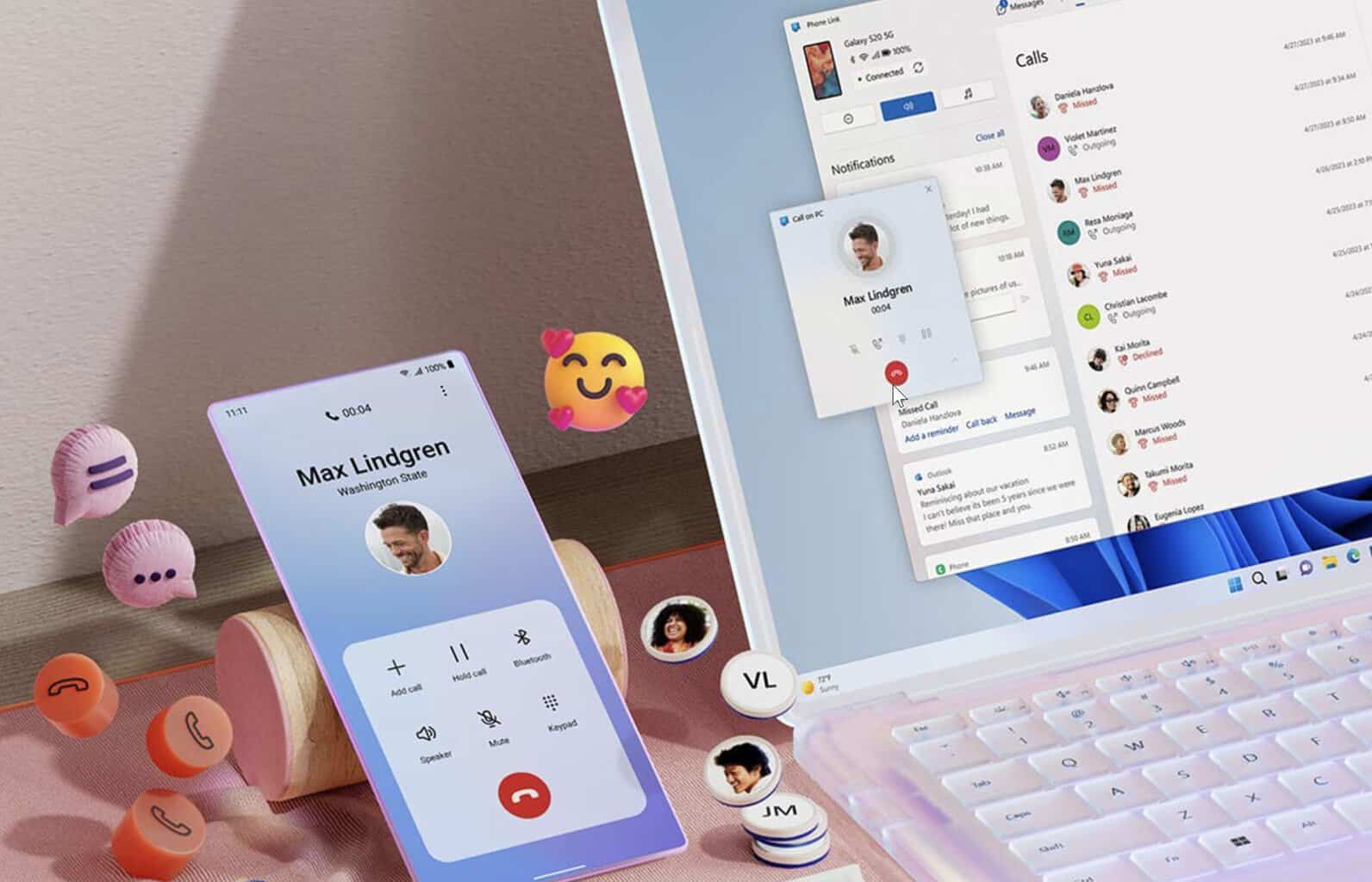
Microsoft gives Link to Windows app a makeover with smarter controls & remote PC access

Microsoft has started rolling out a fresh update to its Link to Windows app. If you’re part of the Windows Insider program and own an Android phone, you might notice the app looks a bit different and offers a lot more.

The latest update gives the app a modern makeover, turning it into a kind of command center for your PC. You can now check your computer’s battery level, see if it’s connected to Wi-Fi, and quickly access things like your clipboard or recent file transfer, all from your phone screen.

New Link to Windows Home
Image: Microsoft

What really stands out, though, are the new remote features. You can now lock your PC using your phone, send files directly, or even mirror your Android screen to your Windows desktop. Getting started has also been made less clunky. You don’t need to fiddle with your PC first.

To try it out, you’ll need the latest Windows Insider Preview build and Phone Link version 1.25062.83.0 or newer. Then, head to the Play Store, join the beta for Link to Windows, and update to version 1.25071.155 or higher.

After that, pair your phone and PC, making sure you’re signed in with the same Microsoft account, and check that your phone is listed under “Manage devices” in Windows Settings.

Xbox Free Play Days: Try Sword Art Online, For Honor, and More This Weekend

Microsoft has announced another weekend of Xbox Free Play Days, featuring five games that you can try from Thursday, July 24, through Sunday, July 27. Some require an Xbox Game Pass membership, but two titles are free for everyone, even if you don’t subscribe.

Let’s start with what’s included for Xbox Game Pass Ultimate, Core, and Standard members. Totally Reliable Delivery Service brings its chaotic co-op delivery gameplay to the lineup. On the other hand, Sword Art Online: Fractured Daydream offers large-scale online battles with familiar anime characters.

Then, you have the Railway Empire rounds out the selection for simulator fans who want to build their railroad business from the 1830s into the 20th century. Meanwhile, For Honor and Terra Memoria are available to all Xbox players, no membership needed.

For Honor’s medieval combat and faction-based multiplayer is a staple in the lineup and will stick around a bit longer, through July 31. Moving on, Terra Memoria adds a cozy, retro-style RPG to the mix with robots, crystals, and a canceled train that starts it all.

Each title is available at a discount if you decide to keep playing. Your progress, Gamerscore, and achievements all carry over to the full game after the weekend. Prices vary, but discounts include Sword Art Online for around $40 and Railway Empire for under $8.

You’ll find the Free Play Days games listed in the Subscriptions tab on your Xbox console. On the web, head to the individual game’s page on Xbox.com while signed in with your Microsoft account to install directly.

Copilot Discover Could Soon Redesign News Feed in Windows 11 Widgets

Microsoft is testing a new AI-driven experience for the Widgets board in Windows 11, and it’s a lot different from what we are used to.

A new report by Windows Central reveals that Microsoft might replace the current MSN-powered feed with a more personalized version called Copilot Discover. This new layout, seen below, doesn’t just look cleaner, it responds faster too. The scrolling feels smoother, the cards are larger with improved fonts, and there’s more room to interact.

Copilot Discover feed
Image Credit: Zac Bowden | Windows Central

When you hover over a story now lets you give it a thumbs up or down, follow or block a news outlet, and even bookmark posts. Some stories open directly within the Widgets board itself, which cuts out a lot of friction.

While the content still comes from MSN, the feed is shaped by AI based on your preferences. This suggests Microsoft is continuing to expand Copilot’s influence across the OS, not just as a sidebar assistant, but now also as your default content filter.

It’s worth noting that you’ll find a dedicated Widgets tab instead of the usual layout mixing widgets with news. The Weather card can’t be resized or moved anymore. And the board doesn’t expand to full screen like before.

There’s also a Notifications button up top, alerting users about breaking headlines or market updates. You can even tweak these or turned off completely. It’s still unclear if this redesign will roll out widely. Microsoft hasn’t confirmed anything, but we may see this in upcoming Insider builds.

Microsoft Reportedly Hires More AI Talent from Google DeepMind

Microsoft has quietly brought over more than 20 employees from Google’s DeepMind AI division in recent months, according to a CNBC report. The hiring spree shows how aggressively the company is building its in-house AI team under Mustafa Suleyman’s leadership.

The most recent recruit is Amar Subramanya, a 16-year Google veteran who helped shape the Gemini assistant. He now joins Microsoft AI as a corporate vice president, working on Copilot and Bing.

In June, Microsoft hired Adam Sadovsky, who spent nearly 18 years at Google and served as a senior director at DeepMind. Like Subramanya, he is now a corporate VP at Microsoft AI.

Nt to forget, Microsoft’s AI team also hired Sonal Gupta earlier this month. She led engineering at DeepMind and now works on Suleyman’s AI team. Jonas Rothfuss joined in May after a year as a research scientist at DeepMind.

Suleyman himself co-founded DeepMind in 2010. He left Google in 2022 to launch Inflection AI, then moved to Microsoft last year, bringing much of his team with him.

The AI talent hunt has been in news over a few weeks now as top tech companies compete to stay ahead in the AI race. Meta recently offered $100 million signing bonuses to AI engineers, according to OpenAI’s CEO Sam Altman. Google, on the other hand, bought AI coding startup Windsurf in a $2.4 billion deal.

Four Mysterious xCloud Program Codenames Surface in Microsoft’s API Hinting at New Game Pass Tiers

Microsoft could be planning another major update to Xbox Game Pass. First spotted by Gamerant, a Bluesky user named Redphx recently uncovered four unknown xCloud program codenames, Callisto, Dia, Europa, and Ferdinand.

Apparently, the user found these details while digging through Microsoft’s publicly accessible API. To catch you up, these names don’t match any of the current xCloud offerings, and they may point to a fresh wave of Game Pass tiers or features.

As you may know, Microsoft runs three clear xCloud programs: Xbox Game Pass Ultimate, a bring-your-own-game option (BYOG), and a Fortnite-only free tier. No doubt, the recntly discovered xCloud program names are vague. But, it seems that they’re tied to xCloud in some capacity.

Microsoft last revamped its Game Pass lineup in late 2024. That change introduced Game Pass Standard and replaced Xbox Live Gold with Core. Since then, fans have speculated about more cloud-specific tiers. This leak gives that idea new weight.

Intrestingly, at least a dozen games in the API are already flagged under one or more of these four names. Titles like Assassin’s Creed Origins, Hellblade 2, Genshin Impact, and Undertale all show links to Callisto, Dia, Europa, and Ferdinand. Even GTA V appears, though only the Xbox One version.

For now, Microsoft hasn’t commented on the leak, and the names don’t appear in public-facing plans. But the presence of recognizable game titles tied to these programs adds credibility.

Trump to Google, Microsoft: Stop Hiring in India, Focus on American Workers

U.S President Donald Trump wants American tech companies to stop sending jobs overseas and start hiring more at home.

Speaking at a recent tech policy summit in Washington, he called out companies like Google and Microsoft for what he sees as years of relying on foreign workers while cutting jobs in the U.S.

“Those days are over,” Trump said to a room full of tech execs, advisors, and industry leaders. “We want tech companies to be all in for America.”

He criticized what he called Silicon Valley’s “globalist mindset,” accusing major firms of hiring in India, investing in China, and parking money abroad, all while laying off U.S. workers.

At the event, Trump signed three executive orders targeting outsourcing, hiring practices, and the future of U.S.-based tech. One order focuses on speeding up data center projects and removing federal red tape that slows down AI infrastructure.

Another one aims to keep taxpayer-funded AI research politically neutral. Organizations receiving federal AI money will now need to prove their models don’t follow one ideology. “AI should be accurate, not political,” Trump said. “We’re getting rid of woke.”

Finally, the third order backs U.S.-made technology and pushes for stronger export support, faster rollout cycles, and less dependence on foreign-made software or hardware.

Microsoft Reportedly Working On Major Visual Studio Upgrade with AI at the Center

Microsoft is reportedly preparing a major revamp of Visual Studio, and this time, AI is front and center. An internal memo seen by Business Insider reveals the company is already testing what it’s calling “Visual Studio 18” as it gears up for the next round of developer tools.

Do note that this won’t be just a routine update. Microsoft is already worried about the new AI-powered IDEs like Amazon’s Kiro and other tools built on its own open-source VS Code. So, it all makes sense now.

According to the memo, Microsoft started “dogfooding” the new version earlier this year. In other words, employees are already using it internally. While we don’t know the official release date yet, a previously published blog post spotted by the news outlet hinted at official launch sometime this summer.

Jay Parikh, who now leads Microsoft’s CoreAI team, is the man behind this big upgrade. The main goal behind this upgrade is to make Visual Studio smarter, more responsive, and better equipped to support developers. The upgrade could mean better real-time code suggestions, analysis, and automation.

Some AI features are already rolling out in Visual Studio 17.14.9, including support for Anthropic’s latest models and updates to the Model Context Protocol, which helps models interact with external data.

Ransomware attacks on rise after hackers exploit SharePoint’s server vulnerability

What began as a stealthy cyberattack on SharePoint Servers has now escalated into full-blown ransomware attacks, Microsoft confirmed in an update to a previously published blog post.

The company has announced that a hacking group it tracks as “Storm-2603” is exploiting a known vulnerability in Microsoft SharePoint Server to drop ransomware into victim networks. Instead of just stealing data, the attackers are now using ransomware to lock down systems and demand payment.

It’s worth noting that this cyberattack has already impacted at least 400 organizations, according to Dutch cybersecurity firm, Eye Security. That number is up sharply from around 100 known victims just a few days ago, and security experts believe the real count is much higher.

Vaisha Bernard, the firm’s lead hacker, said many victims may have gone unnoticed due to the widespread nature of the breach. “There are many more, because not all attack vectors have left artifacts that we could scan for,” she said.

The list of affected groups is still incomplete, but some high-profile breaches are beginning to surface. The National Institutes of Health confirmed that one of its servers was compromised. As a precaution, other systems were isolated. That’s not all, the U.S. nuclear weapons agency was reportedly also breached in SharePoint hack.

Other reports suggest the Department of Homeland Security and several additional U.S. agencies may also have been affected. Both Microsoft and Google have said that Chinese hackers are actively exploiting the flaw, but China has denied any involvement.

Microsoft won’t raise Xbox game prices to $80, at least not yet

While some publishers have already started hiking the price of AAA games, Microsoft has decided to take some more time. The company has announced to stick with a $70 ceiling for its first-party titles, at least through the 2025 holiday season.

That includes The Outer Worlds 2, which had originally been listed at $80 when pre-orders opened in June. Now, Microsoft says the game, and other big holiday releases, will stay at $69.99.

In a statement to Windows Central, Microsoft said, “We’re focused on bringing players incredible worlds to explore, and will keep our full priced holiday releases, including The Outer Worlds 2, at $69.99 – in line with current market conditions.“

It’s not clear what caused Microsoft to halt the price hike. Nintendo had already broken the $80 barrier earlier this year with Mario Kart World, hinting that others might follow. But for now, Xbox is holding the line.

Obsidian, the developer behind The Outer Worlds 2, confirmed the new pricing via a post on X and followed up with refund details on its official forums. Players who already pre-ordered the game will see the adjustment applied differently depending on platform.

On Steam, a balance correction will push funds back to players’ Steam Wallets. Xbox buyers will be charged the original $80 ten days before launch, but a $10 refund credit will follow.

On top of that, the same applies to pre-orders on the PlayStation Store. For Battle.net users, all pre-orders will be canceled, with a fresh pre-order option coming soon at the updated price.

Lovart Launches to Bring a Creative Director to Your Desktop, Minus the Branding Agency Overhead

Lovart is officially launching out of beta today, and with a beta community of 800,000 users who joined during its testing phase, this might shake things up.

The concept is simple. Lovart creates a full brand identity from scratch using AI. Many have tried to crack it, but Lovart has managed to fill a gap others haven’t. It gives individuals and small teams the ability to fully design a brand identity like a pro, without draining their budgets.

Think of it as Adobe, but smarter. Lovart doesn’t just execute commands; it actively thinks alongside you. Powered by a team of specialized AI agents, it can make real-time suggestions, flag design inconsistencies, and even guide creative direction just like how a seasoned Creative Director would. Only this one fits on your desktop, costs under US $90 per month, and cuts the turn-around time to just minutes.

It was inevitable with not only students having become reliant on AI in the classrooms, or video productions integrating AI like Vidu to cut costs, that the technology has made its way into not just design platforms, something we’ve already seen from companies like Adobe or Canva – but rather in an end-to-end branding workflow like Lovart.

Unlike other design agents that focus solely on one-way output, Lovart is more collaborative with the AI agents. It acts more like a Creative Director that you can actually talk to, rather than a typical AI design tool.

Through its intuitive messaging interface, which feels like chatting on Slack, users can interact with Lovart in real-time, make suggestions, ask for changes, and get thoughtful responses. It’s not just generating designs. It’s having a conversation about them.

In fact, what powers Lovart is a reasoning engine the company affectionately calls the MCoT or the “Mind Chain of Thought.” It’s not just thinking about the design requirements. It’s thinking at a higher level, about the context within which this design might impact the business.

So if it’s anything from social posts and storyboards to UI flows, packaging and Visual Identity guidelines, Lovart is capable of creating a design that not only gets the job done, but with creative flair.

“At Lovart, we don’t have product managers. We have designers who teach AI how to think, in a way that you might expect from a Creative Director,” said Melvin Chen, CEO of Lovart. “The canvas is the desk. The agent is your teammate.

Together, they recreate the most natural way design happens that captures nuance, emotion and brand essence within a single prompt, enabling anyone to bring their creative visions to life, even without a design background.”

lovart mockups

Diving further into Lovart, the platform features a blank canvas called ChatCanvas, which under the hood is responsive to shared visuals and dialogue between the user and the AI. Powering the canvas however are multiple AI agents.

Each agent is specialized in a specific task like designing a logo or creating packaging, but congregates around a single mission. They collaborate with one another to ensure consistency between each created design asset and that the designs are all on-brand.

But what’s even more unique about Lovart is that it has Autonomous Design Intelligence, which is always learning and analyzing both the user’s workflow style and design preferences so that it can apply the emotional tones and context it learns from its users and apply them throughout the designs that it creates.

This can apply to how Lovart helps its users to plan a workflow and even source design references. In fact, Lovart even offers AI-enabled smart suggestions that can flag layout issues or recommend creative ideas.

As an end-to-end creative solution, Lovart supports cross-model generation that supports video, audio and of course images and pulls from the popular AI models including GPT Image-1, Flux Kontext, VEO3, OpenAI-o3, Gemini Imagen, Kling AI, Hailuo, Tripo AI, Recraft v3, Runway Gen-4, Ideogram 3.0, Rodin, and more. 

Advanced Tips for Securing Your Online Gaming Accounts

Online gaming has become the talk of the town these days. Nowadays, millions of people are getting attracted to it and exploring the various facets of online gaming. It has also become a community-building tool where you can connect with friends and even a great platform for earning money. 

However, this has also given a lot of room to hackers who would unethically want to misuse your personal data and barge in and take away your hard-earned rewards. So, it’s essential that we take cybersecurity seriously and become aware of ways by which we can secure our online gaming accounts. In this article, we will be discussing the ten best practices to protect your accounts from unwanted threats.

Before You Dive In: Secure Your Purchases Too

No, before we jump into the security tips, there is something important. I want to mention. Have you ever thought about how you’re buying your in-game stuff? I mean, yes, protecting your account is super important, but where and how you make your purchases matters just as much.

The craze for online gaming is going up right now; buying in-game currency and stuff is also at its peak. That is why making sure that your purchase is secure is super important. 

Take Rainbow Six Siege, for example. If you are grabbing credits for it, it’s way safer to stick to trusted platforms like the R6 Credits Marketplace. This way, you’re not handing over your info to some sketchy third-party site.

I have seen people get scammed or accidentally download malware just because they wanted a “better deal,” so always double-check the source. It is a simple move, but it really helps keep your entire gaming setup secure.

Practices To Follow To Protect Your Accounts

  1. Turn on multi-factor authentication

2FA is like an additional layer of security that will protect your account more diligently. With this method, even if a hacker has access to your password, they won’t be able to log in to your account until it passes through the second level of authentication. This second layer can be anything, like getting an OTP on your phone, your personal email ID, etc. 

  1. Pick a Strong Username and Password

First things first, choose an extremely strong username and password right from the start. When you do so, the chances of someone breaking into your account are lowered. While making a strong password, you must make sure that your password comprises 12 characters that are supposed to be a mix of uppercase and lowercase letters, digits, and special characters. 

So instead of using weak passwords like ‘mypassword1’ ,you can use something like, ‘My#7*Pass10&Word#@is5’

  1. Monitor Your Account Activity

It’s a great idea to keep monitoring your account activity every now and then. You must keep an eye out for any unusual or unexpected activities in your gaming account. It is crucial because hackers might be making attempts to access your account a month before they succeed in their attempts. All you have to do is go into your account settings and check if you see any devices logged in that are not yours. Another layer of check you can apply here is to keep constantly checking if there have been any alterations to your existing game items.

  1. Avoid Using Public Wi-Fi for Gaming

Whenever we are in a public space, and we are out of mobile data, we look for any free public Wi-Fi networks, like in railway stations, cafes, airports, etc. However, doing so might turn dangerous!

There might be hackers waiting for an opportunity to get access to your data and misuse it. Hackers can perform attacks like “man-in-the-middle,” where hackers can intervene and access the communication between you and the gaming servers. 

  1. Download Games from Authentic Sources

Have you ever been so invested in a game that you just click download without thinking twice? It can be a mod, a cheat, or some free bonus content someone shared. I get that it’s tempting, but honestly, that is where things can go really wrong. 

Downloading stuff from unknown websites is risky. You never really know what is in those files. It could be malware, spyware, or some virus that will mess up your system while you are busy trying to level up. 

So next time you’re about to download something, take a second, and be sure that you trust the source before you click on it.  

  1. Cover Your Webcam

Whenever you are gaming, it’s a great idea to cover your webcam with a cloth or laptop cover. This is just to ensure that someone might not be spying on you over the internet. 

Even webcams could be a potential entry point for hackers. There have been many situations where people have been exploited due to the remote access of a device’s camera.

  1. Update Your Security Software

I know updating the security software seems like a useless thing, but trust me. It is the first thing you should do to protect your device from any malware that might attack. 

This software is specially designed so that we can have any malicious activities in our accounts detected right before they impact us adversely. 

Cybercriminals keep cooking up new ways to exploit systems to gain personal information. If we don’t keep the security software up to date, the new threats won’t be recognized in your system, and it will fail to protect your system from attacks like phishing, keylogging, etc.

When you are gaming on a public network, make sure you use a VPN(Virtual Private Network). A VPN will mask your IP address by encrypting your internet connection. This will protect your network and personal information.

  1. Be careful what you click on or download.

Sometimes hackers might send you links to websites that are fake websites that resemble the actual websites. Once you click on these links, you will be asked to enter your credentials (email and password). 

This gives hackers access to your personal information, in-game information, etc. So it’s a great idea to verify the source and check where the email has come from, and avoid clicking links from an unfamiliar source.

  1. Avoid pirated games

Pirates games are copies or original games that are unauthorized for use. These games are hosted on unofficial channels or torrent sites. 

These platforms bypass the rightful means to purchase or download the games. Now, although getting something free might sound appealing, it comes bundled with risks that might affect your system massively.

Cybercriminals know that people download free games, which is why they play their tricks and bundle these free games with viruses. 

Although the game file might look normal internally, it might be carrying a virus or a Trojan. This software allows the attackers to steal your login credentials, keep track of your personal information, etc.

  1. Keep a Backup of Your Gaming Account Data

When your account gets subjected to cyber attacks, the worst thing that can happen is that you end up losing all your progress, rewards, game items, etc. 

So, having a backup of your gaming account data is something you must do before it’s too late! It is important that you keep backing up your progress from time to time. This can include both manual backups and cloud backups. 

We must do that so that our data is secure in situations where our account might go through a compromise, hacking, or errors on the platform. 

Conclusion

Online gaming nowadays is more than just fun. So, it’s vital that you take your game account’s security as seriously as you take the gaming experience. In this article, I have tried to cover the most important checklist, which will really be handy in keeping your gaming world safe and secure. 

Google Chrome Prepares PlayReady DRM Support for Windows 11

Google is getting ready to add Microsoft’s PlayReady DRM support to Chrome on Windows 11, helping the browser match Edge in streaming high-quality content like 4K videos.

PlayReady DRM, developed by Micrsofot, is the same technology used by platforms like Netflix and Disney+ to protect premium content, especially 4K videos. Until now, Chrome has relied solely on Google’s Widevine DRM, which has limited playback quality on certain services.

Google has been working on supporting hardware-secure PlayReady playback in Chromium since November 2024 or earlier. A tracking bug was created to oversee progress, and the feature is currently behind an experimental flag.

According to the bug report, Chrome doesn’t support PlayReady DRM on ARM64 with WOW emulation or on Windows x86 platforms. At one stage, Chromium is expected to support both hardware-secure Widevine and PlayReady side by side.

The flag became available in April. Once enabled, Chrome registers Microsoft’s PlayReady module and can play protected content using hardware-level security, required for some of the highest-quality streams.

“Enable or disable the use of hardware-secure Content Decryption Module (CDM) for protected content playback. – Windows”

This flag enables hardware-secure CDM support for protected content playback in Chrome (Image Credit: WindowsReport)

In June this year, Google made changes to Chrome 138. First, it disabled the feature to fix how Chrome checks if PlayReady should be used. Just 11 days later, development resumed to enable it again for further testing.

PlayReady hardware secure playback on Windows is implemented behind the
feature flag, `HardwareSecureDecryption` which was disabled by default.
Now, we want to enable it.

Because PlayReady may use persistent hardware identifiers to ensure secure playback, Google is also adding a new privacy indicator in the browser’s address bar (omnibox). This will let users know when a site is accessing protected content and give them the option to allow or block it—similar to how Chrome handles access to location, camera, or microphone.

With PlayReady support, Chrome users will be able to stream premium video content in higher quality. This brings Chrome closer to Edge, which already supports PlayReady on Windows.

How to Enable PlayReady DRM Support in Chrome

If you’re using a stable version of Chrome (138 or later) on Windows 11, you can try PlayReady support by enabling the experimental flag:

  1. Launch Chrome
  2. Go to chrome://flags
  3. Search for Hardware Secure Decryption
  4. Enable the flag and restart Chrome

How to Test and Confirm PlayReady is Working

  1. Open Chrome
  2. Visit a supported demo page like bitmovin.com/demos/drm or Shaka Player’s DRM test site
  3. Play a protected video
  4. Open chrome://media-internals in a new tab
  5. Check under the CDMs tab. It should show something like:

Key System: com.microsoft.playready.recommendation

Robustness: Hardware Secure

Name: PlayReady Content Decryption Module

Status: Enabled

PlayReady DRM is shown enabled under chrome://media-internals. Image Credit: WindowsReport.

Chrome is preparing to launch PlayReady DRM support on Windows 11. The feature is working in stable version already and will include a new privacy UI, but it remains disabled by default as development continues.

That’s not all. Chrome is finally getting Vertical Tabs and may detect your location when open, allowing for region-specific adjustments that help comply with local laws and regulations. Additionally, Chrome might block spam site notifications that you rarely engage with.

Edge users have had PlayReady DRM for a while. Soon, Chrome on Windows 11 will get it too. What’s your take on this? Let us know your thoughts in the comments below.

Process Explorer Windows 11: How to Download and Use It

Process Explorer for Windows 11 is a free, advanced task management tool from Microsoft Sysinternals. It lets you analyze running processes, troubleshoot performance issues, and detect hidden activity in real time.

What Is Process Explorer?

Process Explorer is a portable utility that shows:

  • Hierarchical process trees
  • CPU, memory, GPU usage per process
  • Handle and DLL activity
  • VirusTotal integration to scan active processes
  • Deep insight not available in Task Manager

➡ It’s part of the Microsoft Sysinternals Suite.

For deeper event level monitoring, see our Sysinternals Sysmon guide to learn how to track detailed system activity on Windows.


How to Download Process Explorer in Windows 11

download process explorer windows 11
  1. Go to the official download page:
    👉 Download Process Explorer from Microsoft
  2. Click Download Process Explorer to get a .zip file
  3. Extract the file and run:
    • procexp.exe (32-bit)
    • procexp64.exe (64-bit)

✅ No installation required — it runs as a standalone executable.

1. View Process Tree

open process explorer windows 11
  • Launch Process Explorer
  • See the hierarchical view of all running processes
  • Tree lines show parent-child relationships clearly

2. Analyze CPU & RAM Usage

  • Top graph shows total usage
  • Each process displays real-time stats
  • Right-click any process > Properties for full details

3. Search for Open Handles or DLLs

  • Press Ctrl + F
  • Enter the name of a file, folder, or DLL
  • Quickly find what’s locking a file

4. Check for Malware with VirusTotal

  • Go to Options > VirusTotal.com > Check VirusTotal.com
  • Process Explorer will hash each process and compare it with VirusTotal database

5. Replace Task Manager

  • Go to Options > Replace Task Manager
  • Press Ctrl + Shift + Esc and it will now open Process Explorer

Why Use Process Explorer?

  • Find hidden or malicious processes
  • Kill frozen apps more effectively
  • Troubleshoot slowdowns and high CPU
  • Track what’s using specific files or ports
  • Ideal for developers, sysadmins, and advanced users

Autoruns works well alongside Process Explorer by revealing every startup item on Windows, and you can learn how it operates in the Autoruns Sysinternals guide to improve your ability to spot unwanted persistence.


Is Process Explorer compatible with Windows 11?


Yes, it runs flawlessly on all Windows 11 editions and builds.

Does Process Explorer require installation?

No. It’s portable — just download, extract, and run.

Is Process Explorer better than Task Manager?

For advanced users, yes. It offers more visibility, real-time analytics, and custom actions.

Can Process Explorer remove malware?

It doesn’t remove malware directly, but it helps you detect suspicious behavior and terminate rogue processes.


Microsoft finally fixes confusing Windows Firewall errors with KB5062660 update

Some Windows 11 users have been seeing strange firewall errors pop up after every reboot. Now, that’s been finally fixed with the KB5062660 preview update from yesterday (via Bleeping Computer). If you install it, those repetitive warnings should stop.

Everyone else will get the fix next month during the August Patch Tuesday rollout. Earlier this month, Microsoft told IT admins to ignore the alerts entirely and that the firewall was working fine.

Apparently, the problem stems from a new feature that was in development and wasn’t fully tied into the system yet. The issue showed up in systems running the June 2025 preview update for Windows 11 version 24H2.

After restarting, users would find repeated entries in the Event Viewer from Windows Firewall with Advanced Security. Each one flagged a failure to read the config and displayed a message that simply said “More data is available.”

That’s not all; the logs kept showing up every time the PC restarted. And for users scanning their Event Viewer, it looked like something was broken. Things got confusing on July 8, when Microsoft accidentally marked the issue as resolved. But, that wasn’t the case. They pulled the status shortly after and said a fix would be coming soon.

Brave becomes first browser to block Windows Recall by default

Earlier this year, Signal blocked Recall, and now, Brave is stepping in with a similar move. Starting with version 1.81 on Windows, Brave will block Microsoft Recall from seeing any part of your browser activity.

Recall was first introduced in May and immediately drew backlash. It quietly captured screenshots every few seconds and saved them locally in plain text. That made it easy for anyone with access to the device, including malware, to sift through someone’s digital history.

Microsoft paused the rollout, promised changes, and reintroduced the feature with more controls. But Brave isn’t waiting to see how that plays out. The browser now tells Windows to treat every tab as private. That’s enough to keep Recall from logging anything, even if you’re not using incognito mode.

Brave is the first major browser doing this by default. There’s still a toggle in the privacy settings if someone wants to re-enable Recall, but the default is off. Unlike Signal’s approach, Brave doesn’t block all screenshots. It only stops Recall.

Remember, accessibility tools keep working. Users can still take screenshots when they need to. All in all, Brave is trying to make sure your web activity isn’t stored in a searchable archive.

U.S. Nuclear Weapons Agency Reportedly Breached in SharePoint Cyberattack

A critical flaw in Microsoft’s on-prem SharePoint Server has opened the door to one of the year’s most serious cyberattacks. Microsoft has recently confirmed that Chinese hackers are behind it.

The company, in a recently published blog post, says the attackers exploited a zero-day vulnerability to infiltrate organizations worldwide. While Microsoft rolled out security patches quickly, the damage was already done.

Now, according to a report by Bloomberg, the U.S. Energy Department, which comes under the National Nuclear Security Administration, has also been affected by the SharePoint attack.

For the initiated, the National Nuclear Security Administration is the agency in charge of overseeing nuclear weapons and responding to radiological emergencies. While officials say no sensitive data was stolen, the idea that hostile actors got this close to nuclear-related infrastructure is enough to raise serious concerns.

The Energy Department says most of its systems were protected by Microsoft 365’s cloud protections. To catch you up, this isn’t the first time the agency’s been hit in a cyberattack. The agency’s business systems were compromised during the 2020 SolarWinds hack as well.

One thing is clear that the SharePoint attacks appear widespread, with reports of stolen credentials and remote code execution across multiple sectors. Microsoft hasn’t named all the affected organizations, but more details are expected soon in its advisory. For now, it’s best to install the important security updates released by Microsoft.

Viewfinder, the standout puzzle game, launches on Xbox this August

Viewfinder is finally coming to Xbox. Thunderful Publishing and Sad Owl Studios have confirmed that the award-winning puzzle adventure will hit Microsoft’s platforms on August 12, just as the game turns two.

The indie title first launched in 2023 for PS5 and PC, earning praise for its clever concept, using photos to reshape the world in real time.

It immediately became a favorite of many, thanks to its perspective-bending gameplay and surreal level design, giving players freedom to solve problems in unexpected ways.

Since then, Viewfinder has quietly built a reputation as one of the smartest puzzle games around. Xbox fans have been waiting patiently, and the August release finally brings the game to Xbox Game Pass and digital stores across Xbox Series X|S and Xbox One.

As for Nintendo Switch players, the wait isn’t quite over. A version is still in the works, though Thunderful only says it’s targeting a winter release. That could mean anything from December to early 2026.

NVIDIA DLSS 4 Arrives to Killing Floor 3 & WUCHANG: Fallen Feathers on July 24

NVIDIA continues to expand support for its DLSS 4 technology, bringing major performance improvements to some of the most anticipated PC games of the year.

Starting July 24, both Killing Floor 3 and WUCHANG: Fallen Feathers will launch with out-of-the-box support for DLSS 4 with Multi Frame Generation, alongside DLSS Frame Generation and Super Resolution.

Tripwire Interactive’s Killing Floor 3 returns players to a dystopian future where they team up as Nightfall specialists to take on hordes of bio-engineered creatures. DLSS 4 will help GeForce RTX players boost frame rates while maintaining high visual fidelity, with NVIDIA Reflex improving responsiveness during intense firefights.

Also launching on the same day, WUCHANG: Fallen Feathers offers a gritty, action RPG experience set in the late Ming Dynasty. Players will take on the role of a pirate warrior navigating a dark world filled with monstrous threats.

Thanks to DLSS 4 and its Multi Frame Generation capabilities, gamers using RTX 50 Series GPUs can expect up to 5.9 times the performance at 4K and max settings.

wuchang-fallen-feathers-geforce-rtx-3840x2160-nvidia-dlss-4-multi-frame-generation-desktop-gpu-performance
Image: NVIDIA
wuchang-fallen-feathers-geforce-rtx-2560x1440-nvidia-dlss-4-multi-frame-generation-desktop-gpu-performance
Image: NVIDIA
wuchang-fallen-feathers-geforce-rtx-1920x1080-nvidia-dlss-4-multi-frame-generation-desktop-gpu-performance
Image: NVIDIA

Meanwhile, The First Descendant will add DLSS 4 as part of its preview for Season 3 on July 24. The update includes a new area, a Field Colossus Raid, and a NieR: Automata crossover event. This adds to an already impressive list of DLSS features available in the game, including Ray Reconstruction and DLAA.

In addition, Wildgate officially launched yesterday. The PvP multiplayer shooter features DLSS Super Resolution support from day one, promising smoother gameplay and sharper visuals for GeForce RTX users.

Intel’s Latest Arc Beta Driver 101.6972 Boosts ‘Rematch’ Performance & Fixes ‘Returnal’ Crash

Intel just rolled out its Arc GPU Graphics Driver 101.6972 (Beta), and it comes with some handy upgrades for gamers.

There’s early support for “Killing Floor 3,” “Wuchang: Fallen Feathers,” and the big Unreal Engine 5 update for “Valorant.” But the real highlight is performance, especially for Arc B-series cards.

If you’re playing “Rematch” on an Arc B-series GPU, expect a decent boost. Intel says the update brings up to 12% better frame rates at 1440p and around 9% at 1080p when using Ultra settings.

The update also fixes some nagging issues. “Returnal” was crashing when ray tracing was turned on; however, it has been fixed. Additionally, “Fragpunk” had some strange black textures, and Microsoft Flight Simulator 2024 was randomly crashing in free flight mode. Those bugs are patched too.

Intel didn’t forget about integrated graphics either. Core Ultra Series 2 chips with built-in Arc iGPUs get fixes for Photoshop’s PugetBench errors and smoother performance in Topaz Video AI.

Intel has confirmed that some bugs are still lingering around. “Fortnite” may crash if you choose Performance mode with lower graphical fidelity. And both “Call of Duty: Warzone 2.0” and “Black Ops 6” still have some graphical weirdness around water.

Battlefield 6 leak hints at October 10 release

The countdown to Battlefield 6 has begun. EA’s long-awaited game’s first trailer drops July 24. However, if a recent leak (via Game Fragger) is accurate, fans might not need to wait too long to play.

According to a datamine from the Battlefield Labs test build, shared by the known leaker group 1BF Telegram, the game could launch on October 10, 2025. Battlefield entries typically drop in October or November, and the marketing rollout is already picking up speed.

Here’s what’s fueling the speculation. The datamine includes a reference to a “Phantom Edition,” although nothing else is known about what it offers. In addition, media and content creators have reportedly been invited to preview the game between July 29 and 31.

EA is also rumored to be planning a “CoD Next” style event with gameplay, dev talks, and more reveals during that window. Adding to the buildup, fans have spotted signs of an open beta in the EA App.

It’s expected to begin August 4 and feature class-specific weapon rules along with alternate playlists for more flexible gun use. EA hasn’t confirmed this yet, but the date matches what the community has been expecting.

Thousands are already camped in the YouTube lobby for the reveal trailer premiere, and if the beta starts next month, Battlefield 6 could follow the same rapid-launch pace as other big shooters.

Battlefield 6 Reveal Set for Tomorrow (July 24), Modern Setting Teased in First Look

EA DICE has officially confirmed the next chapter in the Battlefield series, and it’s simply titled “Battlefield 6.” The reveal came on Tuesday with a dramatic teaser image that looks like it’s pulled straight from in-game footage. According to a post on the official Battlefield X account, the first full trailer will premiere on July 24.

The teaser shows four soldiers standing atop a crumbled building, staring out at what appears to be a devastated version of New York City.

There’s a wrecked skyline, an aircraft carrier floating in the East River, and a fiery explosion near the Brooklyn Bridge. Overhead, a pair of fighter jets, likely Russian Su-57s, blaze past, tailed closely by what looks like an F-16.

This all points to a modern-day setting, shifting away from the near-future chaos of Battlefield 2042 or the World War-era entries like Battlefield 1 and Battlefield V. We expect EA DICE is aiming for a more grounded combat experience this time.

As for gameplay details, DICE hasn’t confirmed whether a single-player campaign is part of the plan. That said, the studio has hinted that the new game will build on fan feedback, which could mean a stronger focus on narrative alongside the large-scale multiplayer battles the series is known for.

While the teaser didn’t mention a launch date, a fresh leak suggests that Battlefield 6 may release on October 10. You can expect more details during the trailer premiere later this month.

Windows 11’s July Optional Update KB5062663 Fixes ReFS, Printer Glitches, and Input Bugs

Microsoft has rolled out its July optional update (KB5062663) for Windows 11 version 23H2 and 22H2, and it brings some important bug fixes. If you’ve been dealing with issues tied to file backups, PDF search errors, or broken IME input, this update might be worth installing.

Let’s start with storage. Microsoft has patched a frustrating issue where backup apps using the Resilient File System (ReFS) could choke your system’s memory when handling large files. Another file system bug that returned weird errors like “No More Files” when searching shared PDFs has been fixed, too.

Typing problems with the Microsoft Changjie IME for Traditional Chinese and phonetic keyboards for Hindi and Marathi are also fixed. These bugs caused everything from broken word selection to totally unresponsive keyboards after the previous KB5062552 update.

It’s worth noting that this optional update also fixes network-related hiccups. Devices with cellular connections were sometimes slow to reconnect peripherals after waking from sleep. That’s now fixed.

Printer names should also show up more clearly when setting up using IPP Directed Discovery. Microsoft has even addressed a rare issue that caused devices to become unresponsive after the May security patch. If you noticed missing taskbar icons tied to accessibility tools, this update also restores them.

You’ll find the KB5062663 update under Settings > Windows Update. It’s optional, so skip it if nothing on the list affects you. You can also grab it directly from the Microsoft Update Catalog.

Microsoft’s New Surface Laptop 5G for Business Ships August 26 With Intel Core Ultra (Series 2)

Microsoft has announced a new Surface Laptop 5G for business users, and it’ll be available soon. The new laptop device, powered by Intel’s Core Ultra Series 2 processor, starts shipping August 26 in the US.

The updated Surface Laptop joins the company’s growing lineup of Copilot+ PCs, designed to support AI-powered workflows, 5G connectivity, and enterprise-grade management.

This Surface Laptop 5G packs a 13.8-inch display, six adaptive antennas, and a 40+ TOPS NPU to handle AI tasks locally. Microsoft says the antenna system adapts in real time based on how you’re holding the device or moving through different networks.

Not to forget, a layered body structure also helps radio signals pass through while keeping things sturdy. You’ll find both NanoSIM and eSIM options here, tested with over 100 carriers in more than 50 countries.

Microsoft says the new Surface is built with business in mind. IT admins can pre-configure eSIMs remotely and use tools like Windows Autopilot for zero-touch setup.

That’s not all; the Surface Management Portal inside Intune offers full control over performance, compliance, and device health. Microsoft’s Security Copilot also plugs into this setup, helping teams detect threats and respond quickly.

While the 5G model ships in late August, Microsoft has already opened availability for the new 12-inch Surface Pro and 13-inch Surface Laptop starting yesterday. Business customers can order directly or through partners like Verizon Business, which will also begin stocking devices in select stores soon.

Microsoft is once again urging customers to move off Windows 10 before support ends on October 14, 2025, and adopt AI-ready Surface Copilot+ PCs with features like Recall, Click to Do, and natural-language search.

Windows 11 Gets Cool AI Features for Copilot+ PCs

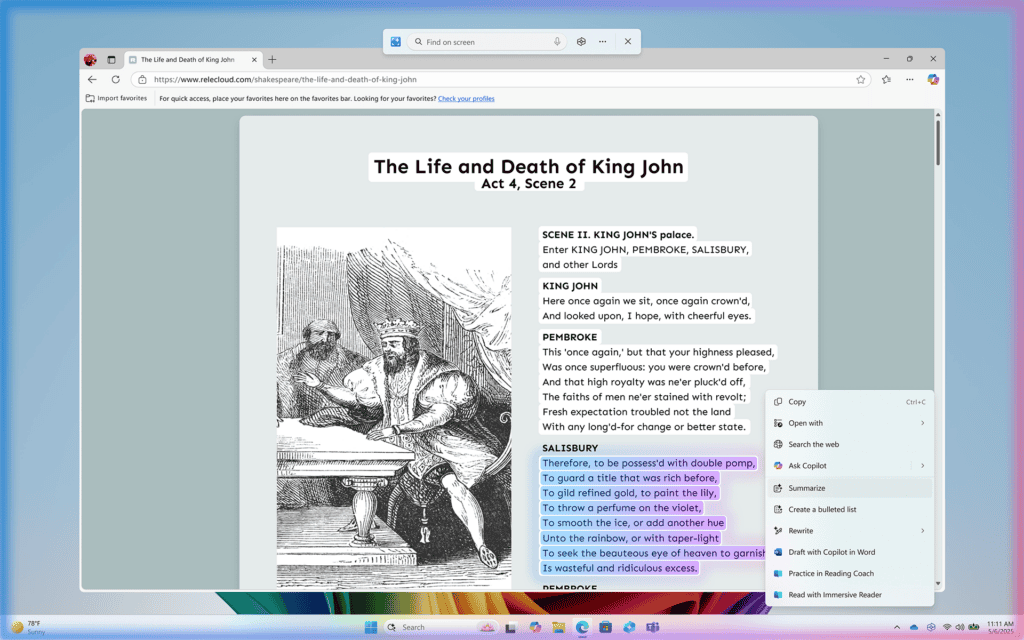
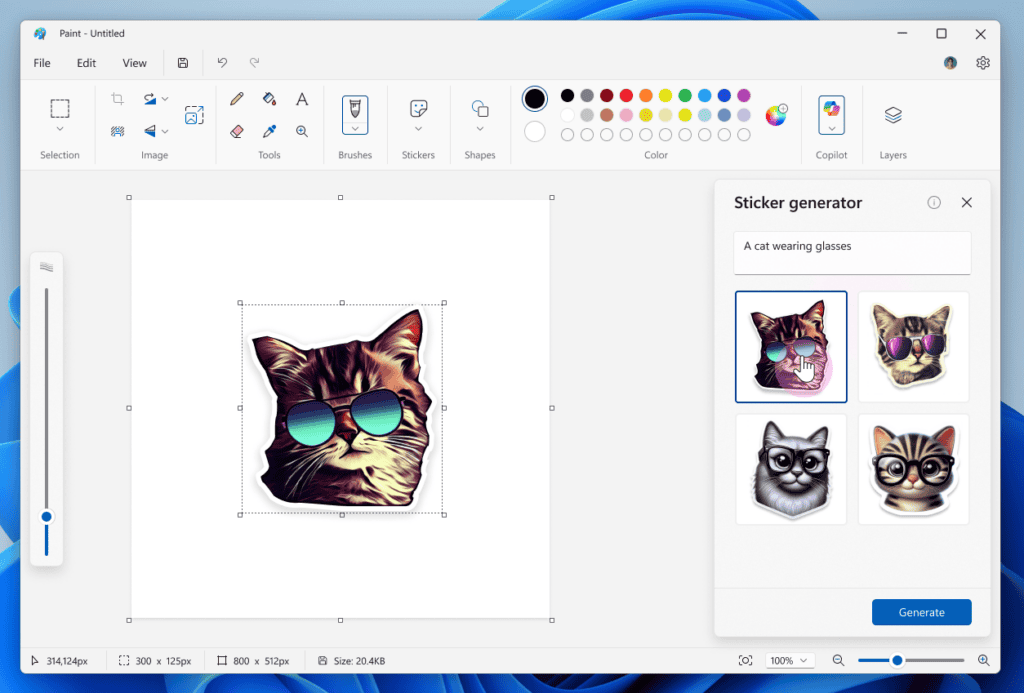
Windows 11 adds intuitive AI tools on Copilot+ PCs, including intelligent Settings search, Click to Do, Photos relight, Paint stickers, Snipping Tool upgrades, and quicker recovery. These new additions make it easier to manage settings, boost creativity, and bounce back quickly after unexpected restarts, all using AI built into everyday Windows tools.

First, the Settings app gets a built-in AI agent. Users can now type natural prompts like “turn on quiet hours” or “connect Bluetooth” to apply changes with a click or undo them, with AI handling hundreds of Windows options. This agent is live now on Snapdragon Copilot+ PCs, with Intel and AMD support on the way.

Click to do
Image: Microsoft

Next up is Click to Do, a contextual toolkit that lets users highlight text or images and instantly take actions like drafting in Word, practicing pronunciation via Reading Coach, or scheduling meetings in Teams. This is especially useful for Power and productivity users.

Creative tools in Photos and Paint also get AI boosts. The new “Relight” tool adds virtual lights to photos for standout editing. Paint’s sticker generator lets users type a prompt, such as “cat in sunglasses,” and get instant custom stickers, plus smart object selection to isolate items within images.

Paint-Stickers-1024x693
Image: Microsoft

On top of that, Snipping Tool receives two major upgrades. “Perfect screenshot” automatically captures clean, correctly sized selections, and the new “Color picker” tool pulls HEX, RGB, or HSL values from anywhere on screen. This is ideal for designers and developers.

Under the hood, Windows 11 has also sped up recovery after crashes. A new “Quick machine recovery” mode cuts reboot time from 40 seconds to just 2 seconds while making the process user-friendly with clearer visuals.

Fable May Not Launch in 2026 After All, Xbox Insider Hints at 2027 Release

Microsoft’s reboot of Fable might be drifting even further from its last known release window. While the company previously confirmed the game had slipped to 2026, a new update suggests fans may need to wait another year.

During a recent XboxEra podcast, insider Shpeshal Nick said that two of his sources believe Fable might not launch until 2027. The delay isn’t due to development issues, according to him, it’s just taking longer than expected.

This lines up with what Xbox Game Studios head Craig Duncan said earlier this year when he confirmed the 2025 target was being pushed to 2026. “We’re actually going to give Fable more time,” he said. “It’s definitely worth the wait.”

For the uninitiated, Fable was first announced back in 2020. If the game actually launches in 2027, that’ll be a seven-year gap between reveal and release. It’s a long wait, but it’s become a pattern in AAA development, where games often miss their original timelines. For example, GTA 6 was originally hyped for fall 2025. That’s now coming in late spring 2026.

Unlike the doomed Perfect Dark reboot, which lost its studio earlier this year, Fable still has a strong team behind it. Playground Games, best known for Forza Horizon, continues to lead the project.

So far, there’s been no official update from Microsoft about a second delay. But if Fable really is slipping to 2027, fans might be in for a much longer wait than expected.

Microsoft Confirms Chinese Threat Groups Exploited SharePoint Server Vulnerabilities

Microsoft has confirmed that Chinese state-backed hacking groups exploited critical flaws in on-premises SharePoint servers. The company published a detailed security blog on July 19 highlighting how attackers used CVE-2025-49704 and CVE-2025-49706. These vulnerabilities do not affect SharePoint Online in Microsoft 365.

Three Chinese-affiliated groups, Linen Typhoon, Violet Typhoon, and Storm-2603, have been linked to live exploitation. Targets include internet-exposed SharePoint servers without the latest updates.

Microsoft has released patches for SharePoint Server Subscription Edition, 2016 (1, 2) and 2019 (1, 2). These updates also address related issues CVE-2025-53770 and CVE-2025-53771.

Security teams are urged to install these updates immediately. Microsoft warns that more actors may soon weaponize the flaws. Along with patching, organizations should rotate ASP.NET machine keys and restart IIS. Microsoft also recommends enabling AMSI in Full Mode and using Defender Antivirus or similar protection.

The company said Defender for Endpoint can help detect follow-on activity tied to these exploits. While investigations continue, Microsoft is tracking more groups that may be testing or using these vulnerabilities.

So far, only on-prem SharePoint systems are affected. Cloud-based SharePoint Online remains secure. Given the rapid adoption of these exploits by multiple actors, Microsoft stresses the urgency of applying fixes. Moreover, IT admins managing on-prem environments should act quickly to avoid becoming the next target.