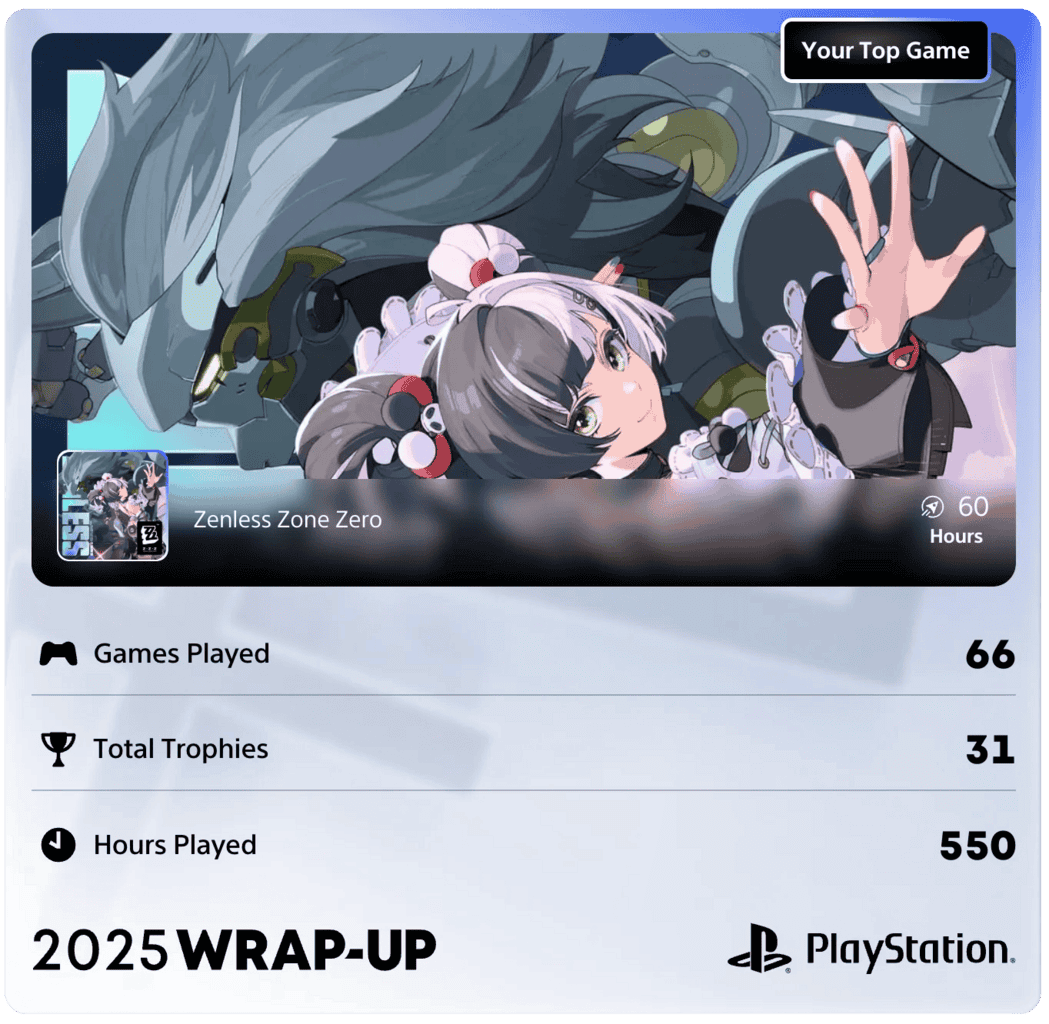
We have entered the last month of the year, and like Spotify Wrapped and YouTube Recap, Sony is also ending this year with a special PlayStation 2025 Wrap-Up. While Spotify and YouTube mainly feature your top video/content, top artists, and more, PlayStation 2025 Wrap-Up is all about seeing interesting stats about yoir time with PlayStation since the start of the year.
How to check PlayStation Wrap-Up
You can simply check your PlayStation 2025 Wrap-Up by going to https://wrapup.playstation.com. Once you are on the webpage, you have to sign in using your PlayStation account. And, that’s all; you’ll see PlayStation Wrap-Up, which includes how many games you’ve played, your top 5 games, your gaming style, your total hours played, how many PS Plus games you’ve played, the amount of trophies earned, your social stats, and much more.
Image credit: Sony
A free glass-themed avatar and PlayStation 2025 Wrap-Up availability
Sony is also giving away some free-bie with the PlayStation 2025 Wrap-Up. At the end of your PlayStation wrapped, you can redeem a voucher for a glass-themed PlayStation avatar. All you have to do is redeem the code on the PlayStation Store.
If you are on PS5 and PS4, you can check PlayStation 2025 Wrap-Up between today and January 8, 2026. If you want to check full summary for the year, you should check it on the New Year.
Eligibility to check PlayStation 2025 Wrap-Up
It should be noted PlayStation 2025 Wrap-Up will only be available to adult PlayStation account holders who have played a PS4 or PS5 game for at least 10 hours between January 1 and December 31. Also, if you haven’t consented to the collection of “Full Data” from PS5, you won’t be able to get your Wrap-Up. Moreover, players from Europe, the Middle East, Africa, Australasia, India, and Russia who didn’t consent to the collection of “Additional Data” from their PS4 will also not be able to participate.
Were you able to check PlayStation 2025 Wrap-Up? Tell us which games popped up for you. We’d love to hear your answers in the comments below.
Microsoft just rolled out the KB5072032 update for Insiders in the Windows 11 Canary Channel, and it bumps systems to Build 28000.1340. The update comes with a few new features and improvements. You can check the full changelog below:
What’s new in Build 28000.1340
[General]
This update includes a small set of general improvements and fixes that improve the overall experience for Insiders running this build on their PCs.
Today, Microsoft has not just released December 2025 Patch Tuesday updates for multiple versions of Windows 11. Now, the company has dropped security updates for Windows 10 users. And, yes, it’s being rolled out to all those enrolled in the Extended Security Updates (ESU) program.
Microsoft is rolling out the new security updates for four different versions of Windows 10. First KB5071546 bumps 22H2 systems to Build 19045.6691, while 21H2 systems jump to 19044.6691.
Thankfully, some older Windows 10 versions also picked up updates today. You can check them below, and if required, don’t forget to download them from the respective Microsoft Update Catalog links.
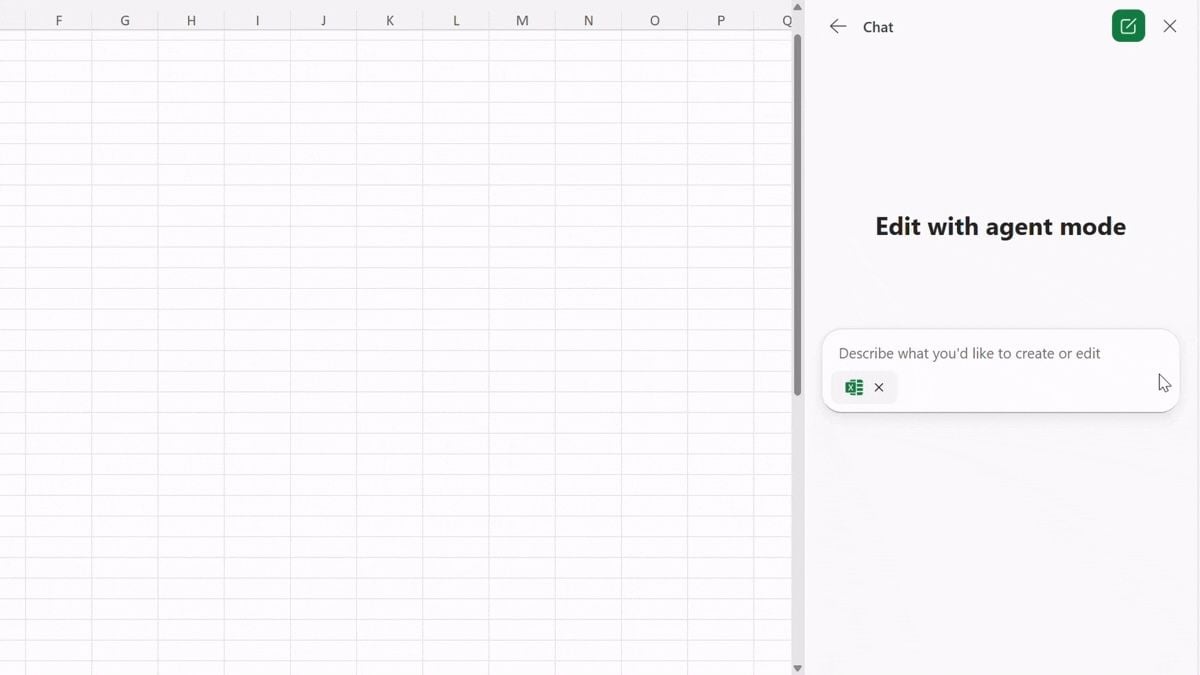
Microsoft is finally pushing Agent Mode in Excel to more people. The feature is now live for Excel on the web, and it’s the first major rollout for Microsoft 365 Copilot commercial users and Microsoft 365 Premium subscribers.
According to Microsoft’s announcement, Agent Mode represents a significant step forward for Copilot inside Excel. Instead of relying on single-turn prompts, the agent can now plan, execute, and refine multi-step workflows directly inside a workbook. You can use natural language instructions that translate into live sheet updates.
As reported, Microsoft is also emphasizing transparency with this rollout. Users will be able to review how Copilot interprets prompts, understand the reasoning behind each action, and verify the steps being taken. For financial models and forecasting work, this shift toward explainable AI is a much-needed upgrade.
Agent Mode can help generate entire workbooks, run what-if analyses, build budgets, model forecasts, repair broken formulas, analyze large datasets, surface anomalies, and even create charts, dashboards, and pivot tables. These are native Excel elements that continue updating as underlying data changes—something power users have wanted for years.
The current release is available today on Excel for Web, with Microsoft planning to expand support to Windows and Mac clients in January. As of now, Agent Mode in Excel for Web is available in major languages such as English, Spanish, Japanese, French, German, Portuguese, Italian, and Simplified Chinese.
The company will also bring Agent Mode to Microsoft 365 Personal and Family subscribers in January, widening access beyond business customers.
So, what do you think about Excel’s new Agent Mode? Share your thoughts in the comments below.
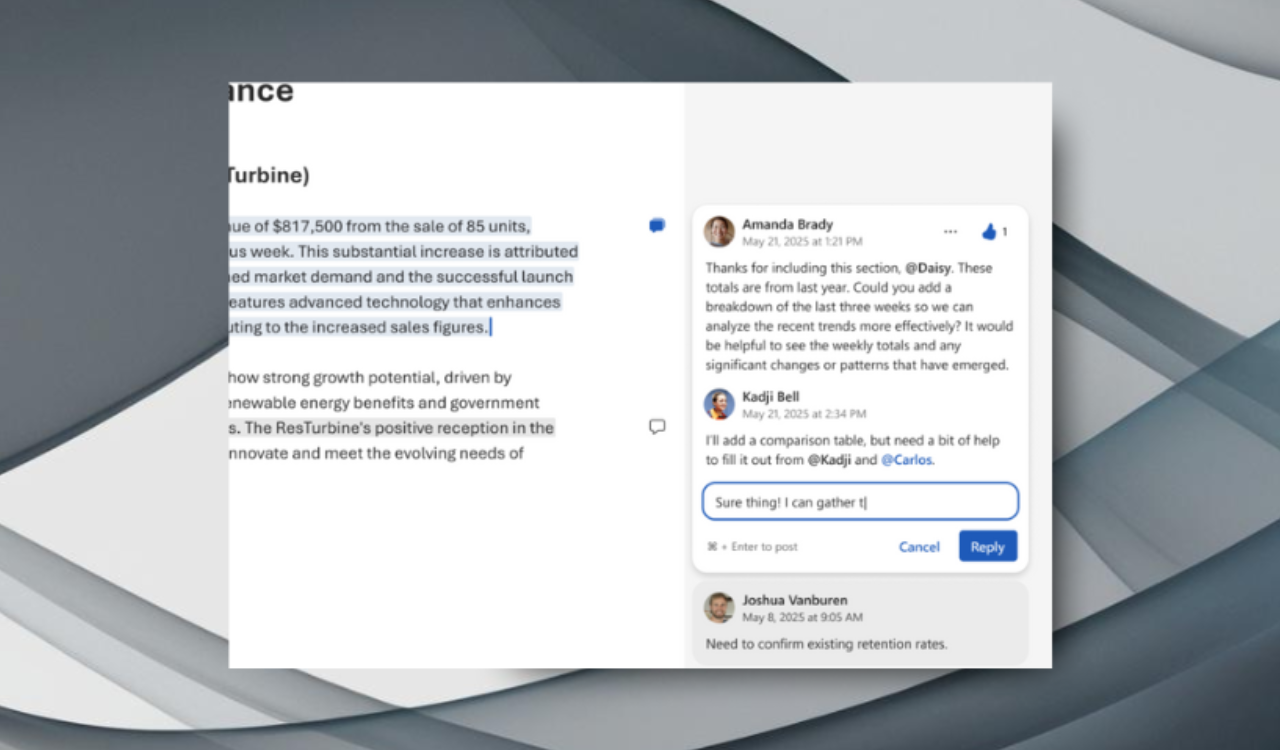
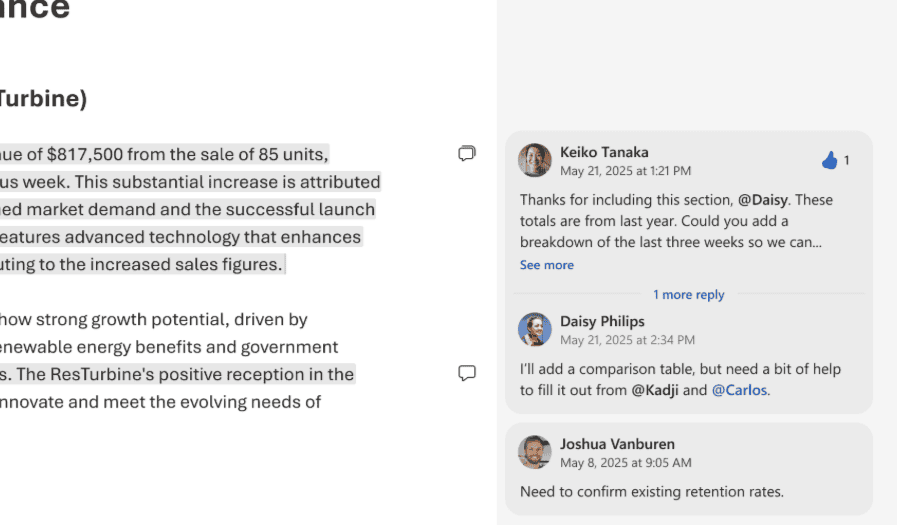
Microsoft is finally refreshing the commenting experience in Word for the web. The update is now rolling out to all users. As part of the update, you should see cleaner and more modern design that replaces the older, cluttered layout many had complained about.
According to Microsoft, the new interface focuses heavily on clarity. Icons and buttons have been redesigned, spacing has been improved, and the overall look now aligns better with Word’s broader design direction. Early feedback suggests that the new visuals make conversations easier to follow, especially in heavily marked-up documents.
One of the bigger changes is how Word now handles focus. When a user selects a comment, it becomes visually prominent, while unselected comments fade slightly into a subtle gray. This makes it easier to track conversations and follow feedback without getting overwhelmed by every note on the page.
The feature is simple to try; simply open any document in Word for the web, highlight text, and select New Comment. Replies and existing comment threads now appear with the updated, streamlined layout, giving the entire sidebar a more polished feel.
Microsoft says this redesign is part of its efforts to make collaboration less distracting and more intuitive across its online Office apps. For teams working in large documents or navigating dense feedback threads, this improvement should offer a smoother experience.
The rollout is underway now for all Word for the web users, with no additional steps required.
Here’s the changelog for Windows 11 version 24H2 and 25H2:
[Copilot] Fixed: This update addresses an issue where Ask Copilot didn’t activate the Click to Do window as expected. The window now appears in the foreground when you share data with Copilot.
[File Explorer (known issue)] Fixed: This update addresses an issue where File Explorer briefly flashes white when you navigate between pages. This issue might occur after you install KB5070311.
[Networking] Fixed: This update fixes an issue where external virtual switches lose their physical network adapter (NIC) bindings after a host reboot. When this happens, the switches revert to internal mode, resulting in loss of network connectivity for virtual machines and blocking normal server operations.
It’s been almost over 7 months since OpenAI debuted its latest AI image model, gpt-image-1. With increased competition with Nano Banana Pro, OpenAI appears to be also testing new AI image models with codenames, Hazelnut and Chestnut. These findings were shared by @marmaduke091 on X.
The user also suggested that the model has been spotted in Design Arena and LM Arena over the past 24 hours. And, if the report is accurate, OpenAI’s next AI model might debut alongside the GPT-5.2 model, rumored to be launched today. We are yet to see if that happens or not.
As reported, the new image models from OpenAI are great in terms of world knowledge and on par with Google’s Nano Banana Pro. Early samples of the image generated using the alleged OpenAI’s new AI image model depict celebrity-style selfies with accuracy and photorealism close to that of its rival. That being said, it’s still far from beating the accuracy and detail you get from the Nano Banana Pro model.
One of the interesting claims being made by early testers is that the new image model from OpenAI renders code inside images more reliably. If this is true, it’s a great feat. That being said, many users on X still feel that the celebrities’ faces from the above sample images look “plasticky.” When I first saw it, I felt the same. That isn’t the case with images generated using Google’s Nano Banana Pro.
The alleged OpenAI image model that’s being tested right now is rumored to be based on an earlier GPT-4o model and not the latest gpt-image-1. All that said, we still need to wait for the official release to tell us something concrete.
What do you think about the alleged OpenAI image models? Do let us know in the comments below.
Intel has released new Wi-Fi and Bluetooth drivers that officially support Windows 11 version 25H2. That’s not all; the company has also added support for r several Wi-Fi 7 products. Well, it’s a great news for anyone who uses systems running Intel networking components.
The Wi-Fi driver, version 24.0.2, is compatible for Intel’s next-gen Wi-Fi 7 lineup, including the BE211 and BE213. It’s also compatible with existing models such as the BE202, BE201, and B200. Intel notes that Wi-Fi 7’s 6GHz band requires Windows 11, specifically 24H2 or newer, as earlier versions of the OS do not support the standard.
Meanwhile, the new Bluetooth driver, version 24.0.1, comes with the same “functional updates,” which Intel says will improve stability and performance.
These driver updates comes as Microsoft recently open doors for all eligible systems to jump on Windows 11 version 25H2. However, you’ll need to enable the “Get the latest updates a soon as they’re available” toggle under Settings > Windows Update.
With the update now accessible to everyone on supported hardware, and Intel’s new wireless drivers ensuring compatibility, more users can move to Windows 11 25H2 without waiting for staged rollout waves or dealing with blocked upgrade paths.
If you are looking to try the latest expansion, it’s now available via the in-sim Marketplace, provided that the simulator is updated to the latest version. In the storyline, Hawkins Heli-Tours is run by local eccentric Murray Bauman, who insists the timing is ideal despite the town still recovering from last year’s quake and operating under heightened patrols and curfews.
Players can fly a Bell UH-1H “Huey,” a helicopter not usually associated with civilian tourism. The add-on lets pilots hover above classic Hawkins locations, including Palace Arcade, Family Video, Lovers Lake, and the residential streets seen in the Stranger Things’ early seasons.
As seen in the announcemen railer, you’re in for late-night flights, unusual cargo, and unexplained activity around the radio station and forest roads. Bauman dismisses all rumors with signature flair, but the expansion raises a question of whether the company offers scenic tours or something far stranger.
The expansion is available on Xbox Series X|S, Xbox on PC, PlayStation 5, Steam, and Cloud platforms. On a final note, Stranger Things Season 5 is now streaming on Netflix.
The holidays are around the corner, but before anyone gets to switch off, there’s one thing everyone has to go through. Here I’m talking about the year-end performance reviews. Undoubtedly, they are stressful, slow, and oddly political. Well, Microsoft now says that Copilot can help you prep smarter year-end performance reviews.
According to the company, Copilot can help you prepare for the conversations they’d rather avoid. Here I mean the discussions around budgets, promotions, responsibilities, or changes within the team. Copilot suggests questions to ask managers, ways to frame progress, and even scripts for sensitive topics.
One example Microsoft highlighted in its announcement involves a 25-year-old marketer trying to ask for a raise during a tight budget year. Copilot produced a full script that balances appreciation, workload growth, and realistic expectations. Microsoft says that the idea is to remove the pressure so employees can focus on delivery, not drafting.
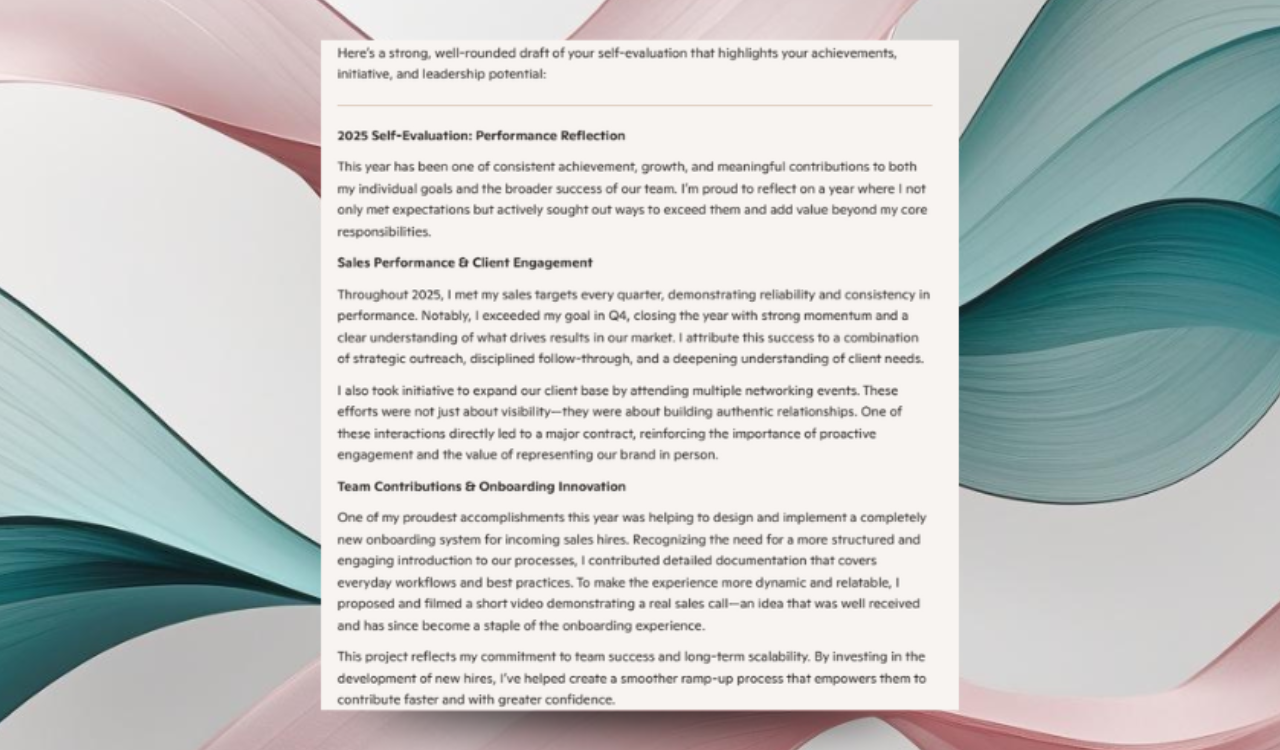
That’s not all, Copilot also pulls data from notes, OneNote pages, status reports, presentations, and emails to generate a detailed self-evaluation. Microsoft’s example shows Copilot documenting quarterly sales wins, new processes created by the employee, mentoring work, and contributions outside the core role, all included into a year-end performance review.
Constructive criticism is a minefield, and Microsoft knows it. Copilot can soften the tone by suggesting language that encourages improvement without sounding too harsh. In one prompt, an employee described a competent but consistently negative coworker. Copilot produced a response that acknowledged the issue while keeping the tone supportive.
All these changes are supposed to help employees during the busiest times of the year. What do you think about this feature? Would you give it a try?
Microsoft is making its biggest investment in Canada, pledging $19 billion CAD from 2023 to 2027 to expand AI and cloud infrastructure, boost cybersecurity, and train Canadians for the AI era. Over $7.5 billion will be invested in the next two years, with new datacentres coming online in the latter half of 2026.
To catch you up, the company already employs 5,300 people across 11 cities and partners with more than 17,000 Canadian businesses. These collaborations support roughly 426,000 jobs nationwide and generate tens of billions in revenue annually, helping Canadian organizations modernize and compete globally.
The initiative is built around three priorities: technology, trust, and talent. Microsoft is expanding its Azure Canada East and Canada Central regions to deliver secure, sustainable cloud and AI services. The datacentres will power innovations across public services, finance, cleantech, and more, all designed to stay within Canada and align with sustainability goals.
To protect digital sovereignty, Microsoft is introducing a five-point plan. Measures include confidential computing, new Azure Local options, and the Sovereign AI Landing Zone (SAIL) for secure, locally hosted AI solutions. A new Threat Intelligence Hub in Ottawa will help defend against cyberattacks, including state-backed threats and ransomware targeting key sectors like healthcare, finance, and government.
Microsoft is also investing in its Elevate program, which has trained over 546,000 Canadians in AI skills since 2024 and plans to certify 250,000 more by 2026. Partnerships with Actua and Indigenous communities aim to equip 20,000 youth with AI and STEM skills, ensuring that innovation reaches remote and underserved areas.
Brad Smith, Microsoft Vice Chair, called the plan “the most significant commitment in Microsoft Canada’s history.”
Microsoft is planning to retire several Microsoft Planner features in early 2026 as part of a major Planner update. According to a LinkedIn post by Brian Smith, who previously worked on Microsoft Planner and Project, these retirements are expected to occur between mid-January and mid-February 2026.
Do note that all these changes will affect all users of Microsoft Planner, including those using Planner components in Loop, integrations with Viva Goals, and premium plans. The changes will happen automatically by the specified dates, and no admin action is required.
Features Retiring Within Planner Starting 2026
Prior Task Comments (Replaced by New Chat Experience)
The prior task comments experience for basic plan tasks will be retired. This will be replaced by a new Task chat experience.
Key details about this replacement include:
The new chat supports rich text formatting and user mentions (@mentions) in response to a long-standing customer request.
Regarding notifications, the new chat feature only sends an email or Teams notification to the colleague who is @mentioned in the message.
Email notifications for existing task comments will cease; an email notification will now only be sent to group members when a plan is initially added.
The task details pane will no longer directly display comments; instead, it will display a link that opens a page in Outlook where task comments can be reviewed.
The new task chat will be available in Planner on the Teams desktop/web, the web experience, and the Planner web experience.
Users on mobile platforms (iOS/Android Planner app, Planner in Teams mobile) will temporarily continue to use the previous task comments experience, as new task chat messages will not be visible on mobile at this time.
There is no change to the premium plan conversations feature.
Whiteboard Tab for Premium Plans (No Replacement)
The whiteboard tab for premium plans will be retired. This feature automatically created a whiteboard and allowed users to create tasks in Planner from that whiteboard’s sticky notes.
After retirement, the whiteboard tab will be unavailable on the premium plan, and users will be unable to create tasks from a whiteboard.
All existing whiteboard content will remain accessible via the standalone Whiteboard app.
There is no replacement for this feature at this time. Convert Basic Plan to Premium Plan (Temporarily Unavailable) The ability to convert an existing basic plan to a premium plan will be temporarily unavailable.
Microsoft plans to make similar functionality available again in the future.
In the meantime, users needing this functionality must manually create a new premium plan and copy the tasks into it.
Features Outside of Planner Retiring Without Replacement
The following integrations and components will be retired, mostly between mid-January 2026 and mid-February 2026, and have no replacement:
Planner integration in Viva Goals: This integration will retire earlier, on December 31, 2025. Once Viva Goals is retired, the entry point for using Planner within Viva Goals will no longer be available.
iCalendar feed integration: This feature allowed users to create and subscribe to an iCalendar feed of their Planner tasks, viewable in calendar-compatible applications like Outlook. After retirement, users will be unable to create new iCalendar feeds for their tasks or plans and will stop seeing any previously created feeds. There is no replacement for this feature.
Planner component in Loop pages: This component, which was previously inserted by typing /Planner in a Loop workspace, will be retired. The recommended alternative for capturing tasks is the Task List Control. After retirement, it will no longer be possible to add a new component of this type in a Loop workspace. Workspaces where these components were already present will instead display the Planner plan URL where the component was previously located. Moreover, Tasks previously entered in these components will remain available in Planner.
If you are curious to learn more, Microsoft has detailed everything in Microsoft Admin Center under ID MC199342; you can always check it.
If you live in the UK or parts of Europe and are unable to access Microsoft Copilot since morning, Microsoft has confirmed reports of degraded performance and unexpected outages. The issue, listed as CP1193544 in the Microsoft 365 admin center, is currently under active investigation.
Microsoft, in an update, mentioned that the issue spiked when traffic levels elevated unexpectedly, overwhelming Copilot’s autoscaling system. This resulted in users being unable to access the assistant or encountering limited functionality across key features.
According to early telemetry, the surge affected most of “user within the United Kingdom, or Europe,” while accesing Copilot. Although the issue was initially flagged as a potential regional routing fault, detailed investigation found that the service autoscaling failed to keep up with demand.
With automated systems falling short, Microsoft has now shifted to manual capacity scaling to restore Copilot. In yet another update, the company said it is “monitoring this closely to ensure the expected outcome is achieved,” while work continues behind the scenes to restore full functionality. For now, users may continue to see intermittent issues as the recovery progresses.
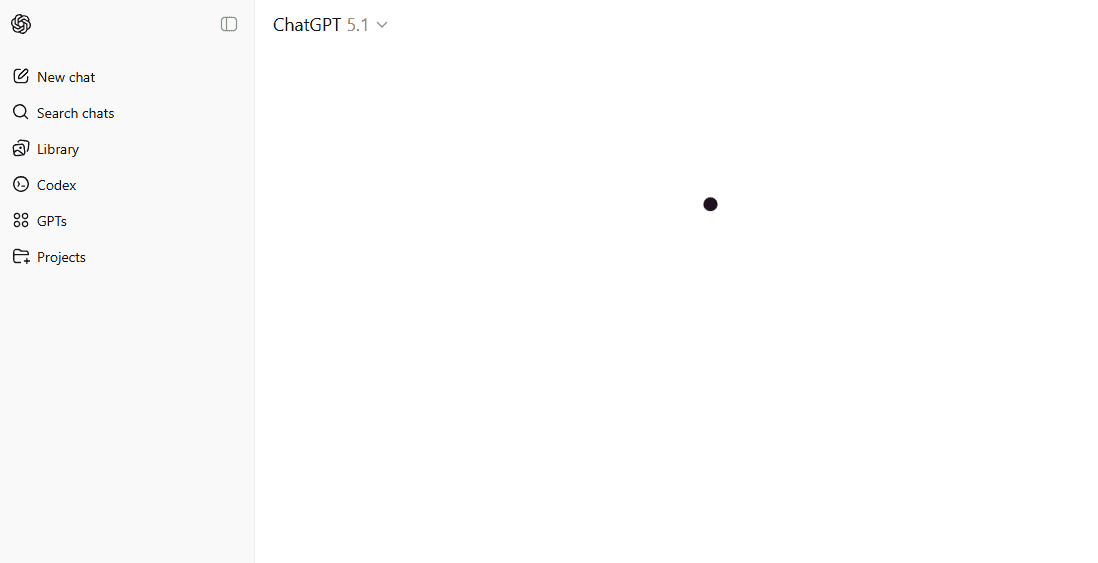
[UPDATE | 17:06 PM IST, December 9, 2025] While the initial Unable to load site message is gone, users can’t view previous chats or start a new chat since ChatGPT is stuck while thinking. Check the image below:
[UPDATE | 16:57 PM IST, December 9, 2025] ChatGPT is still having hiccups; the same error is troubling users in Europe right now. Interestingly, there are not many user reports on Downdetector, which means a small group of users are affected right now.
[ORIGINAL STORY] OpenAI appears to be dealing with a series of GitHub authentication errors that affected Codex Web and are also causing instability across parts of the ChatGPT service. Reports coming in from Europe suggest that ChatGPT users are facing issues right now.
The ChatGPT website is currently throwing an “Unable to load site” error. Apparently, users who haven’t accessed any kind of VPN service are also having trouble accessing ChatGPT right now.
Speaking of GitHub authentication errors with Codex Web, the issue was first confirmed late Monday night and continued into early Tuesday (IST).
OpenAI updated its status page and shared that it was aware of the issue at 11:58 PM IST on December 8. The company confirmed elevated error rates impacting authentication flows. In yet another update, at 12:30 AM IST, the company said it had identified the root cause and was working on a fix, but developers continued to see intermittent failures.
Developers started reporting errors yet again at 3:30 AM IST, which prompted another round of investigation and monitoring. After several mitigation attempts throughout the night, OpenAI reported that it started seeing services getting restored at around 8:12 AM IST.
The company also noted that a fix was in place and recovery was underway. As of 11:25 AM IST, the company marked the incident as resolved and confirmed that “all impacted services have now fully recovered.”
The outage primarily affected users interfacing with Codex Web through GitHub authentication, a workflow heavily used by developers who rely on OpenAI models for coding tasks.
Microsoft has officially been mum about Xbox plans for next year, but from time to time, some other executives from the Xbox division keep dropping hints about where Xbox is heading. Now, the VP of Next-gen Xbox, Jason Ronald, dropped what I’d like to call a tease of what fans can expect from Xbox next year.
Ronald briefly talks about where Xbox is heading. He says this is the moment when hardware trends, player habits, and tech finally line up, making handheld gaming a natural fit for the brand. This clearly hints that the Xbox Ally series was just the beginning of something big Xbox team has been working on behind closed doors.
When BBC’s Tom Greken asks a simple question about backwards-compatible classics and whether older Xbox titles might return, Ronald didn’t confirm anything. He says:
I can’t announce anything today but in 2026 it’s the 25th anniversary of Xbox and we want to celebrate the great legacy and the history that we have with Xbox as well as defining the future for where the Xbox ecosystem is going.
But the interesting part is that he didn’t deny it either. He wrapped up his answers wrapped in a very deliberate reminder, reminding everyone that 2026 marks Xbox’s 25th anniversary. And Microsoft, he says, “wants to celebrate the great legacy of Xbox next year while defining the future of the ecosystem. I can’t confirm or deny what you are asking, but stay tuned, we have a lot of exciting things to share next year.”
So the question is what exactly Xbox is planning. Is it expanded backwards compatibility? Or an anniversary-themed hardware? Or a new push for classic titles on Game Pass? Well, that’s something only time will tell. But, if Microsoft plans to honor Xbox’s past and future in one move, which is highly likely, 2026 might end up being one of the biggest years the platform has had in a decade.
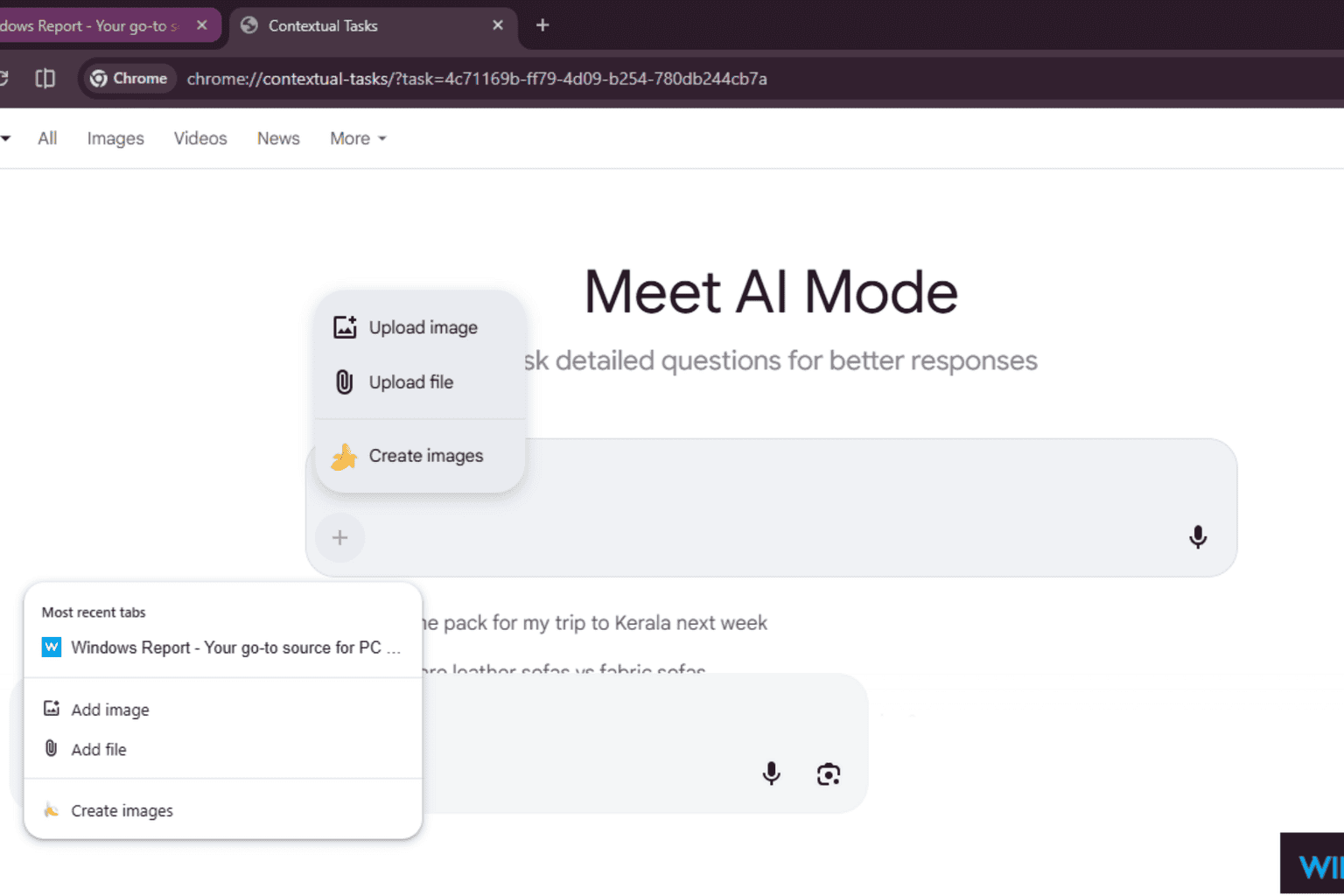
Google is testing a new version of AI Mode in Chrome Canary, and it works very differently from the version most users see today. The feature no longer sends you to a Google Search page. It now opens a built-in AI interface inside Chrome that handles questions, files, images, and follow-up tasks in one place.
When this version loads, Chrome opens a new internal page to run the experience. The interface appears through chrome://contextual-tasks, which confirms the AI system now runs inside the browser instead of a regular webpage.
The same interface also appears when clicking the “AI Mode” button in the search box on the New Tab Page. Instead of opening Google Search, Chrome now sends that request to the Contextual Tasks page.
The page shows a “Meet AI Mode” heading, a chat box for questions, a button to start a new thread, and a panel to upload an image, upload a file, or create images. Several parts still use unfinished labels such as [i18n] Ask Google…, which shows the feature is early in development.
Chrome Canary’s new “Meet AI Mode” interface now loads inside an internal chrome:// page instead of a Google Search webpage. Image Credit: Venkat | WindowsReport.
AI Mode responds inside the browser
Questions now receive answers inside this internal page. For example, asking “what is date today” returns the correct date. At the end of the answer, Chrome adds a follow-up question on its own. In this case, it asked if we wanted to know about holidays or special events.
Typing “yes” in the unfinished box triggered a second answer that listed international observances for the day. This confirms the tool can continue the conversation without treating each question as separate.
AI Mode adds follow-up questions and responds again when the user types “yes” in the lower input box.
Reads your open tabs
We selected the Windows Report homepage tab and asked “what is this site about.” Chrome returned a clear summary of the website. This shows it can read the page directly without loading another webpage.
AI Mode reads an open browser tab and returns a summary of the Windows Report homepage
Works with files
In the same session, we added a PDF invoice through the + menu and asked “summarize invoice.” Chrome ignored the website tab and focused on the PDF. It extracted the vendor name, customer name, invoice number, subtotal, and tax. This confirms the tool can work with different types of context and choose the correct one for the task.
After adding a PDF through the “+” button, AI Mode extracts details such as the vendor, customer, invoice number, and total.
Creates images and understands them
The interface can also create images. We selected “Create images” and asked for a slice of pizza. Chrome generated the image instantly. After that, we typed “what this pizza ingredients.” The tool examined the generated image and listed the common ingredients of pepperoni pizza.
AI Mode creates an image of a pizza slice directly inside Chrome.
This entire flow, creating an image, viewing it, and then asking about it, stayed inside the same internal interface with no page switches.
After generating the pizza slice, AI Mode explains its ingredients when asked in the same interface. Image Credit: Venkat| WindowsReport.
AI Mode keeps everything in one place
Across all tests, Chrome kept everything inside one conversation. It remembered earlier questions, handled text, files, and images, and accepted extra context through the same box. This is a clear change from the current AI Mode, which only opens a webpage and cannot work with browser tabs, files, or generated images.
The version in Chrome Canary is still unfinished, with rough edges and placeholder text. But the tests show that AI Mode is turning into an internal tool built into Chrome that works directly with your tabs, your files, and the images you create.
Google has not shared when this will reach regular users. Chrome Canary shows the interface is working, but the design is still changing and parts of the feature are still being added. More changes are expected over the next few weeks as Google continues its work.
We earlier reported that Chrome’s New Tab Page is turning into an AI starter screen and that Google is working on new versions of both the New Tab Page and the Chrome search box. Those changes now appear to be taking shape. The new Contextual Tasks page and the early signs of contextual search in Chrome Canary show how Google is bringing all of this together.
Reddit is having a rough week. The platform has slipped into its second straight day of outages, and Downdetector shows the issue more than Reddit’s own status page. In the early hours of December 9, more than 22,000 users reported having issues with Reddit on Downdetector.
Most users reported problems with Reddit’s website itself, while many reported server-side issues. A small number even said their profiles stopped loading. And because Downdetector relies on user submissions, the real number of affected users is likely higher.
This follows a global outage the day before, on December 8, where many users had issues with the Reddit website, the mobile app, and even basic server connections. It’s the kind of two-day streak Reddit hasn’t seen in a while, and users’ reaction on social channels shows how annoyed they have been.
Honestly, 2025 has been the year filled with major web disruptions. Cloudflare went downtwice in recent months, affecting big tech, AI services, gaming platforms like Fortnite, and several other trading platforms. How can we forget about the massive Amazon Web Services (AWS) outage that hit over 60 countries, knocking out Fortnite, Canva, Slack, Reddit, Snapchat, and Amazon’s own retail site?
Even Microsoft wasn’t spared. Teams, Outlook, Xbox Live, and Microsoft 365 all faced an eight-hour downtime back in October. If you’ve been trying to browse, comment, or doomscroll on Reddit and hit a wall, you’re not alone.
Have you been affected by Reddit’s outage streak, or is the site loading fine for you? Let us know in the comments below.
Fans waiting for Grand Theft Auto 6 updates have started to speculate again after a sudden schedule change at Rockstar Games. According to Red94, Rockstar cleared its internal plans for December 9, and the shift has the community buzzing.
Dataminer Tex2 reported that the next GTA Online update was originally planned for Tuesday but moved to the following day. This adjustment leaves Rockstar’s calendar unusually open, which caught the attention of eager fans. Since Rockstar rarely alters its schedule, the change created instant curiosity across social channels.
Players hope this move signals something bigger, with theories ranging from a new GTA 6 trailer to the first real gameplay showcase. Others believe Rockstar might reveal pre order details or pricing information at the very least.
Whether anything happens on December 9 remains unknown, but expectations continue to rise as the date approaches. Stay tuned for updates as the situation develops.
Skate Story just landed on PlayStation Plus, and players can now claim it for free from the PlayStation Store. The game blends fast-paced skating with a surreal adventure set in the Underworld, giving fans a mix of exploration, combat, and stylish movement.
You play as a demon who skates through nine distinct layers of the Underworld while performing tricks and dodging deadly obstacles. The game also includes combat encounters against other demons and opportunities to save trapped characters as you advance.
Skate Story stands out because of its glass inspired art style and impressive sound design. The developers built the world around sharp visual effects and atmospheric music, which creates a striking look during exploration and trick sequences. Players can learn more than seventy tricks, giving the game a strong skill progression curve as you move deeper into the Underworld.
Since the game is now available on PlayStation Plus, subscribers can claim it at no extra cost. Many fans welcome its arrival, especially those who enjoy stylized action titles. If you’re not a fan of skating games, perhaps you’ll be interested in our The Game Awards predictions instead.
Are you excited to try Skate Story on PS Plus? Share your thoughts in the comments.
Users often search for a simple way to activate AMC on their preferred device. The process only takes a few minutes and works the same across Roku, Fire TV, Apple TV, smart TVs, and game consoles.
Once activation finishes, the device syncs with your AMC account.
Wait for the success message.
Start browsing the AMC catalog.
If you used MTV in the past, you may recognize the workflow. You can check how users complete the MTV activation steps.
Troubleshooting AMC Activation Problems
If AMC activation fails, the issue usually comes from expired activation codes or a weak internet connection. These steps help you fix the problem quickly.
Fix common activation errors
These actions solve most activation failures.
Refresh the AMC app to generate a new code.
Restart your device.
Reconnect your Wi Fi.
Clear your AMC app cache.
Try another browser if the activation page does not load.
FAQs
Why is my AMC activation code not working
The code expires quickly. Reopen the AMC app to generate a new one.
Do I need a TV provider to activate AMC
You can activate AMC using a TV provider or an AMC Plus subscription.
Can I activate AMC on multiple devices
Yes, AMC supports multiple devices based on your subscription.
What is the correct AMC activation link
Use amcplus.com/activate for all supported devices.
You can activate AMC on any modern streaming device with a simple on screen code and a fast browser login. The method remains consistent across platforms, which makes setup easy when you install AMC on new hardware.
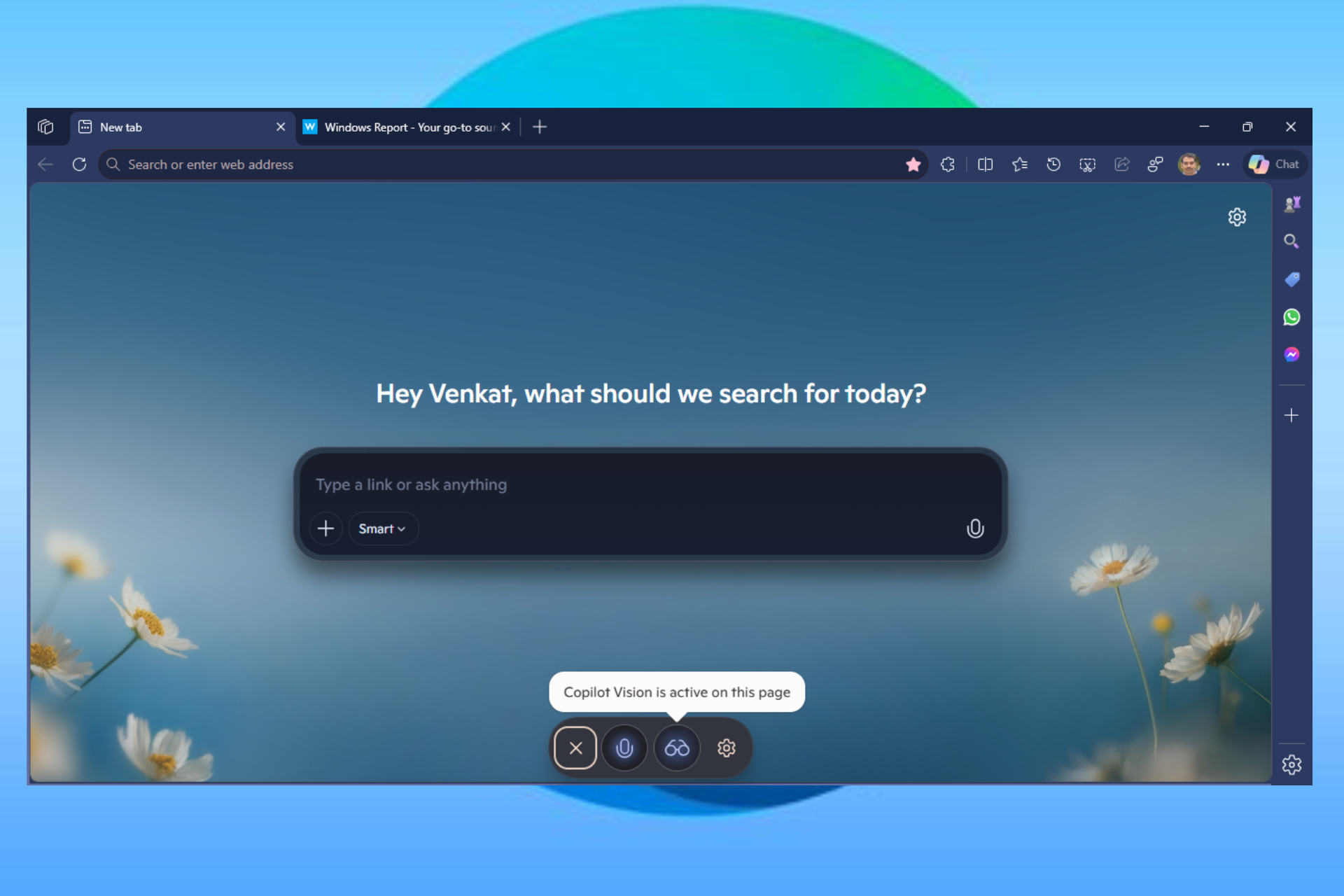
Microsoft is testing a new implementation in Edge Canary that changes how Copilot Vision works inside the browser. The feature that normally opens through Edge’s internal Vision page now moves toward the cloud version on copilot.microsoft.com.
Copilot Vision handles image analysis, screenshots, and visual prompts. Edge opens it through an internal page named edge://visual-companion, which runs tasks such as reading text from images or answering questions based on the content a user selects.
Microsoft is now trying to move this setup to the web-based version of Vision on the Copilot site. When it is active, Edge no longer loads the internal page and instead opens Vision from copilot.microsoft.com.
Users who try this in Canary may notice a layout that matches the Copilot website. The website receives changes more often, so new features may appear there before they reach the internal Vision page. This also reduces the need to maintain a separate page inside the browser.
Most users will not see anything new yet. The experiment is tested behind a flag named “Use Edge Vision from copilot.microsoft.com (CMC)” in Edge Canary.
The new “Use Edge Vision from CMC” flag in Edge Canary. Image Credit: Venkat | WindowsReport.
Firefox’s new version 146 is now rolling out with improvements that will make it more useful. Mozilla is focusing on stability and fixes that users have been asking for. The update is available now via built-in updates, with downloads starting from Mozilla’s servers.
First of all, Windows 10 users finally get a proper backup tool. It’s more than bookmarks; it backs up passwords, history, and other browsing data daily. The data can be encrypted with a password, allowing users to restore everything instantly on a new device. The same feature will be available to other platforms later down the line.
Mac users see a different but equally useful improvement. WebGPU, WebGL, and WebRender now run in a dedicated GPU process. If a graphics component crashes, Firefox won’t go down with it. The browser quietly restarts the process, letting you continue browsing without losing tabs or sessions.
As far as Linux users are concerned, Mozilla has improved Fractional scaling on Wayland with the latest version, making Firefox render smoothly on high-resolution displays. Across all platforms, Firefox Labs is now open to all users, bringing experimental features outside of telemetry participation. The search bar also gets faster results, showing them in real time without loading a separate page.
Mozilla also removed support for Direct2D on Windows. Users still relying on it need to stick with the ESR channel, but for most, this change will go unnoticed.
If you’ve been keeping up with Xbox and PlayStation announcements lately, you probably know that a lot is going on between Sony and Microsoft. Microsoft has officially started porting its first-party exclusives to PlayStation. The latest to cross over is Flight Simulator 2024, which launched today on PS5.
Here are all the editions of the Microsoft Flight Simulator 2024 available to pre-order now:
Standard Edition: $69.99
Deluxe Edition: $99.99
Premium Deluxe Edition: $129.99
Aviator Edition: $199.99
If you’ve ever been curious why Flight Simulator 2024 made the jump to PlayStation, the story behind it is actually more interesting than you might expect. In an interview with XDA-Developers, Jorg Neumann, Head of Microsoft Flight Simulator, revealed that the idea to bring the series to PlayStation actually came from him around two and a half years ago.
At the time, Microsoft had opted to keep the flight sims exclusive to PC and Xbox, citing the success of Flight Simulator 2020 on both platforms. But things apparently changed when someone at Sony, a long-time fan of the series, reached out proactively to Microsoft’s leadership, expressing interest in an official port.
According to Neumann, that request nudged the project forward and eventually kicked off the “avalanche” of Xbox titles coming to PlayStation. Sony’s approach doesn’t stop there. After welcoming Xbox ports, the company seems to be easing up on its own exclusives. Helldivers 2 recently arrived on Xbox and even outsold Microsoft’s games. In other words, Sony is now more open to cross-platform releases, and the results are promising for the company.
Now that Xbox-exclusive Flight Simulator 2024 has landed on PS5, you have a clear idea of how the two console giants are approaching exclusivity. With these changes, the lines between console ecosystems are becoming increasingly blurred. Which upcoming PlayStation or Xbox title are you hoping will cross over next? Let us know in the comments below.
With the boom of the AI era, demands for AI chips have been at an all-time high. Microsoft, which is among the prominent names in the ongoing AI race, has revamped some of its AI chip strategy, at least according to a report by The Information.
Microsoft is reportedly in talks with Broadcom to co-design custom AI chips. And honestly, this push feels inevitable. As mentioned earlier, the demand for AI hardware keeps exploding, and everyone wants more control over the silicon running their models.
Microsoft had already been working with Marvell on chip design. But with competition for high-end semiconductors heating up, the company now seems ready to expand its partnership. Broadcom, which is already a partner of OpenAI, appeared to be the next logical step for designing customized chips for massive generative AI workloads.
And it’s not just Microsoft; the entire industry is moving in the same direction. Google continues to double down on its in-house TPU platform and is preparing to sell the chips more widely. AWS recently announced Trainium3, its most powerful AI accelerator yet. Meta is also working on custom silicon with Marvell, aiming for a 2027 launch window.
While NVIDIA remains the undisputed leader of the AI chip market, other companies are diversifying their data-center chip suppliers. And their custom AI chips now pose a real threat to NVIDIA’s grip on the AI chip industry. That being said, only time will tell if any of them will be able to surpass it.
Do you think these in-house chip efforts will genuinely reshape the AI hardware market, or will NVIDIA stay untouchable for years to come?
Playing Nintendo DS games on a PC improves resolution, boosts performance, and unlocks save states and controller support. The tools below work great for Windows and offer high compatibility with popular DS titles. If you also want to try Game Boy Advance emulation, you can review this guide on the best GBA emulators for PC.
DeSmuME delivers high compatibility with most commercial Nintendo DS games. It handles both 2D and 3D titles smoothly and remains the most stable option for users who want consistent performance on mid range hardware.
It also includes detailed configuration settings, visual enhancements, and a robust save system. Players who enjoy experimenting with multiple platforms might also check the WindowsReport guide on all in one emulators for broader multi system support.
melonDS focuses on replicating DS hardware behavior accurately, giving users low input lag and smooth gameplay. Its strong OpenGL renderer improves visual quality on modern GPUs without causing stutter.
It also attracts players looking for multiplayer support since it offers reliable local WiFi emulation. Those interested in exploring more Nintendo handheld systems can read WindowsReport’s coverage of Nintendo 3DS emulators for PC.
RetroArch acts as a flexible multi system emulator that supports Nintendo DS through cores like DeSmuME and melonDS. Its unified interface keeps setup simple, and its shader library offers powerful visual upgrades.
Users enjoy its cloud saves, achievements, and integrated netplay features. RetroArch works well for players who want DS emulation alongside many other consoles inside one dashboard.
DraStic DS focuses on speed and smooth gameplay, offering one of the fastest DS emulation experiences available on PC. It enhances 3D resolution, reduces in game lag, and provides strong compatibility with both commercial and homebrew titles.
Its interface stays clean and simple, making it easy for new users to jump in without manual configuration. It handles demanding games better than many lightweight alternatives and includes useful tools for long term play sessions.
No$GBA supports both Nintendo DS and Game Boy Advance games in a single tool, which appeals to users who need a compact multi system emulator. It performs well on older PCs and loads ROMs rapidly.
Its long standing reputation comes from stable performance, solid compatibility, and an easy control configuration system. Homebrew developers also appreciate the debugging tools and flexible testing options.
Other great features:
Supports DS and GBA ROMs
Low system requirements
Fast save state creation
Debug tools included
Configurable screen size
FAQ
What is the best Nintendo DS emulator for PC?
DeSmuME and melonDS provide the strongest mix of performance, stability, and compatibility.
Can I use a controller when playing Nintendo DS games on PC?
Yes. All tools listed support gamepads with custom mapping options.
Are emulators legal to use?
Emulators are legal, but downloading copyrighted ROMs you do not own is not legal.
Why do some games run slowly?
Slowdowns usually come from weak hardware or high resolution settings. Lowering scaling or enabling frame skip helps improve speed.
Nintendo DS emulators on PC offer improved resolution, flexible controls, and instant save features. Whether you want accuracy, simplicity, or multi platform support, each tool above delivers dependable performance for DS gaming on Windows.
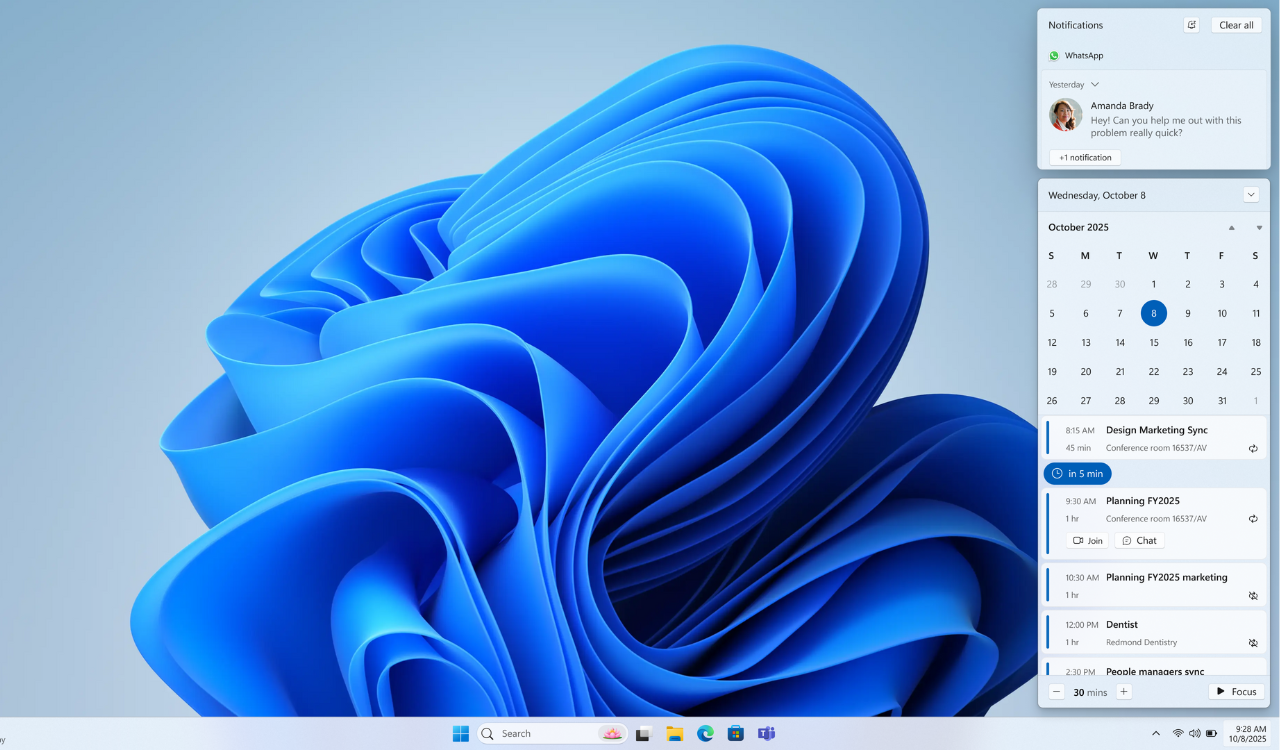
Microsoft is bringing yet another useful Windows 10 feature to Windows 11. Here I’m talking about the Agenda View, which Microsoft is currently testing in the Windows 11 Insider preview build.
When the company announced the new version of the Agenda View at Ignite 2025, it mentioned that the feature offers “a quick-glance, chronological list of your upcoming events, seamlessly integrated with Calendar in one unified interface.” And that you’ll also be able to interact directly with the events shown in your Agenda view, such as joining a scheduled meeting or engaging with Microsoft 365 Copilot.
While the news pleased many, a new report from Windows Latest has shed more light on the feature and how it works, and it’s not something you may like. Per the report, the new Windows 11 version of Agenda View is a WebView2 component, which means it’s non-native.
But here is the real thing that is worrying about the new feature. Based on multiple tests, the news outlet reported that the feature could take a toll on the CPU and memory usage briefly. And this happened because the Windows Shell Experience Host process was running to power Agenda View, as it pulled load details from Outlook and the WebView 2 shell. Notably, the feature didn’t work for them as it is still in preview.
Image credit: Windows Latest
Since the feature is non-native, it’s understandable that the system will allocate more resources to power the feature smoothly. Speaking of non-native, let’s not forget that WebView2’s font and UI give off a clear ‘web widget’ vibe, not something that truly belongs in Windows. In short, the Windows 11 version of Agenda View won’t give you the same vibe as the one from Windows 10, but that remains for you to figure out.
If you have been waiting for the Agenda View in Windows 11 or are an insider, we’d love to hear your thoughts on this. Do let us know in the comments below.
Investment is flowing these days in and out of the AI industry, and this time it’s Skild AI, which is in the position of receiving funds from two big giants: NVIDIA and Japan’s SoftBank Group. Well, that’s according to a Reuters report from earlier today.
Per the report, NVIDIA and SoftBank, combined, are looking to invest more than $1 billion into Skild AI. And, if that happens, Skild AI will be valued at nearly $14 billion. That’s a crazy number for a startup founded in 2023. In case you don’t know, Jeff Bezos is among the driving forces of the startup.
The startup received a combined $300 million in the Series A funding round. Here I am using the term combined because Amazon invested in Skild AI through two channels. First, Jeff Bezos’s personal investment fund and Bezos Expeditions. Next, Jeff Bezos’s personal investment fund, Bezos Expeditions.
If you keep up with robotics in general, you must have heard about Skild AI. It basically deals with a foundation model for robots. One of the highlights of Sklid AI is that it works on AI models for all-sized robots. Per the report, Skild AI has said that its technology uses a vast amount of data to teach robots’ perception and decision-making skills. Reuters reports that SoftBank group “was impressed by Skild’s technology in pilot projects,” hence the investment talks.
While the other details about the investment are under wraps, Reuters did mention that some of the terms of the investment could change before it can be finalized. So, when will it finalize, you may ask? If everything remains as it is, the deal should be inked before Christmas.
So, what do you think, does this deal actually cross the finish line? And if it does, how big a ripple do you see it creating across the robotics industry? Drop your thoughts in the comments below.
If you keep up with news from the PC market, you must be aware that Lenovo announced the world’s first rollable PC called the Lenovo ThinkBook Plus Gen 6 at the start of this year. It’s still up for grabs in the Lenovo Store for a whopping $3299. The device comes with a 14-inch OLED panel that stretches upward into a tall 16.7-inch display. It was expensive, a little heavy, and very much a first-gen experiment.
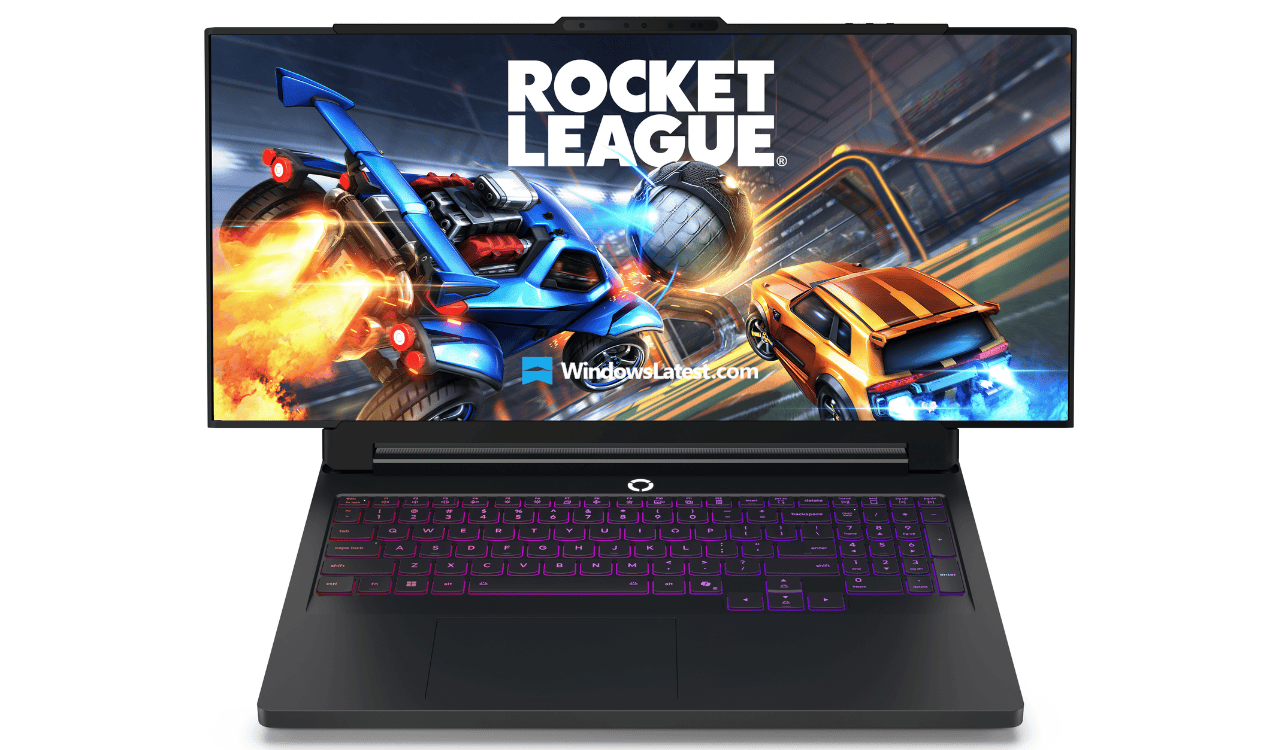
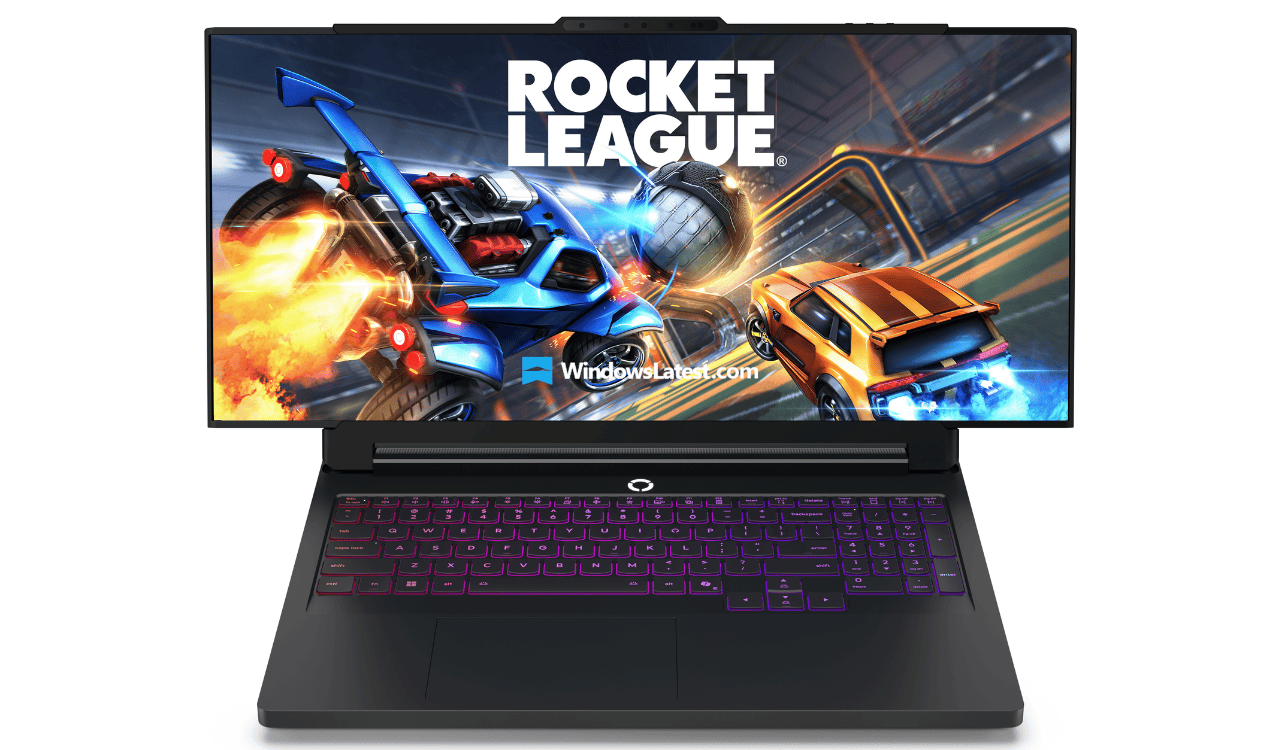
Well, it seems Lenovo is attempting something interesting yet again that might show up at CES 2026, which will be held from January 6-9, in Las Vegas. Here I’m talking about the Lenovo Legion Pro Rollable gaming laptop, which was leaked today by folks at Windows Latest. The news outlet has shared the official marketing image of the device, from which we can tell that it will be gaming-heavy.
Unlike the Lenovo ThinkBook Plus Gen 6, this one ditches vertical expansion altogether. Lenovo is using a horizontal rollable display that expands on both sides. Meaning, the standard 16:9 aspect ratio reaches an ultra-wide 21:9, which gamers will definitely cherish. On top of that, the Lenovo Legion Pro Rollable gaming laptop will run Windows 11 and use an Intel Core Ultra processor, at least the prototype has been reported to be running it.
As of now, there’s no word on whether there will be any AMD models. We’ll get more clarity on this when the CES 2026 kicks off. Notably, the Lenovo Legion Pro Rollable gaming laptop reportedly will include AI features and a dedicated Copilot key, as seen in the image below. From the design point of view, the bezels are a lot thinner than what usual gaming laptops come with. Also, don’t expect it to be lightweight, as you can see, it looks chunky.
Image credit: Windows Latest
Apart from these details, there’s not much reported as of now. We hope to get more details on its specifications and other things. As usual with leaks, we can’t confirm if it will be available to the general public or just a concept that Lenovo is planning to tease in January 2026.
What do you think of the Lenovo Legion Pro Rollable gaming laptop? We’d love to hear your thoughts in the comments below.
The Xbox Ally X can develop Wi Fi issues when its MediaTek drivers or network settings fall out of sync with Windows. A few quick updates and resets usually restore a stable connection.
Update the MediaTek WLAN driver on your Xbox Ally X
Updating the MediaTek driver often fixes unstable Wi Fi performance on the Xbox Ally X. This step matters because outdated WLAN drivers cause slow speeds and connection drops.
Download the latest MediaTek WLAN driver
Before you begin, make sure you can reach the Windows Desktop so the download process runs correctly.
Enter the Xbox Full Screen Experience.
Drag up from the bottom of the screen and select Windows Desktop.
Open a browser and go to the Microsoft Update Catalog.
Search for the MediaTek Wi Fi driver.
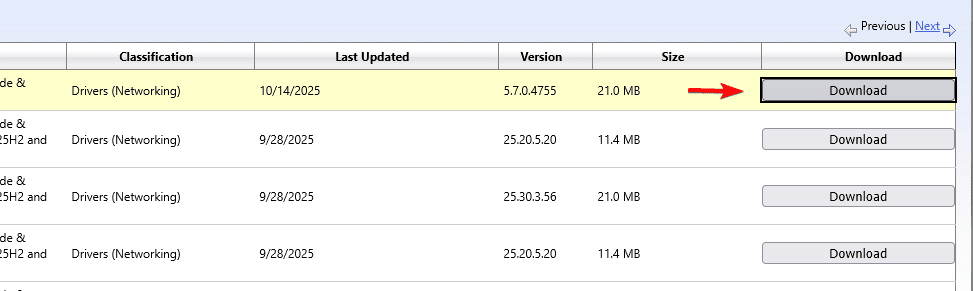
Download the latest version at the top when the popup appears.
Select the blue link and save the file somewhere easy to access.
Install the MediaTek driver through Device Manager
Installing the driver manually gives you more control and avoids incorrect automatic updates.
Open the Start Menu.
Search for Device Manager and open it.
Expand Network adapters.
Hold your finger on MediaTek Wi Fi 6E MT7922 (RZ616) 160Hz Wireless LAN Card and select Update driver.
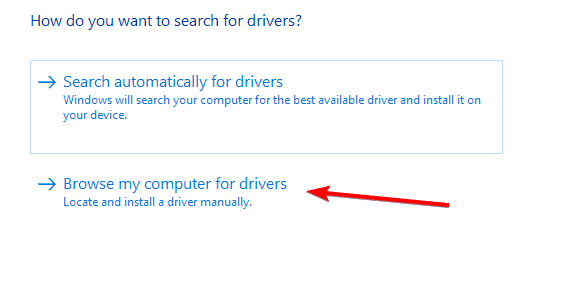
Select Browse my computer for drivers.
Select Browse and locate the downloaded driver, then select Ok.
Select Let me pick from a list of available drivers on my computer.
Select the new driver.
Select Next.
Restart your Xbox Ally X.
FAQs
Why does my Xbox Ally X disconnect from Wi Fi?
Driver bugs or corrupted settings often cause unstable signals.
Do I lose data after network reset?
No. It affects networking components only.
Can I install the driver offline?
You only need internet access to download the driver.
Can MyASUS fix hardware issues?
It corrects software and configuration problems, not physical faults.
These steps help restore stable Wi Fi on the Xbox Ally X by updating the MediaTek driver, rebuilding network components, and using MyASUS diagnostics for deeper troubleshooting. If issues continue, test a different router or run Windows Update to refresh all system components.
If you’ve been confused about where Office 2024 fits in Microsoft’s increasingly subscription-heavy world, Microsoft has quietly published a support document that explains the difference between Office 2024 and Microsoft 365.
Ever since Microsoft rolled Copilot into personal and family plans, people have been wondering whether a one-time license still makes sense. Or if the push toward subscriptions is now unavoidable.
Microsoft’s newly updated guidance doesn’t change the products themselves, but it does give a much clearer picture of what you actually get with each option. And for anyone still trying to decide between “buy once” and “pay monthly,” here are all the differences you need to know.
Compare Microsoft 365 subscription with Office 2024 (one-time purchase)
One-time purchase (Example: Office Home & Business 2024)
Microsoft 365 subscription (Example: Microsoft 365 Family, Microsoft 365 Personal, or Microsoft 365 Premium)
Cost
Cost
Pay a single, one-time cost.
Pay a small monthly fee, or save by paying for a full year.
Microsoft 365 applications
Microsoft 365 applications
Get Microsoft 365 apps like Excel, Word, and PowerPoint.
Get the fully installed and latest versions of Excel, Word, PowerPoint, Outlook, and OneNote for Windows or Mac. Always updated. PC users also get Access and Publisher. Plus, Copilot AI features.
Feature updates
Feature updates
Security updates only. No new features. No major-version upgrades.
All new features, security updates, and bug fixes included.
Install on more than one computer
Install on more than one computer
One installation on either PC or Mac.
Install on all your devices and sign in on up to five at once. Share with up to five people (Family/Premium).
Advanced features on tablets and phones
Advanced features on tablets and phones
Mobile apps free with basic editing.
Mobile apps are free with basic editing.
Extra online storage
Extra online storage
Not included.
1TB cloud storage per user (Family/Premium includes 1TB for each person shared with).
Technical support
Technical support
Support resources, with chat available.
Ongoing callback and chat support. Includes technical support for Windows 10 & 11.
AI benefits in Microsoft 365 plans apply only to the subscription owner, not to additional Family members. It’s a limitation many users missed when Copilot’s rollout began. But with Office 2024, there’s a different tradeoff. You pay once, you keep the license forever, but you don’t get any major upgrades. If Microsoft ships an Office 2026 down the road, you’ll have to purchase it all over again.
So, which one do you prefer, a one-time purchase or a subscription that never ends?
Formatting a Windows computer removes system files, apps and settings to restore performance or fix persistent errors. You can format the PC during Windows setup or inside Windows using reset options and drive management tools. Here are the most effective methods.
This is the most complete method because it fully wipes the system drive and installs Windows fresh.
Download the Windows Media Creation Tool from Microsoft.
Use it to create a bootable USB.
Restart the PC and boot from the USB using the correct boot key.
Select Install now.
Choose Custom installation.
Delete all Windows related partitions on Drive 0.
Select the unallocated space and click Next to reinstall Windows.
If you use a high speed NVMe drive on a modern system, you can also follow a dedicated guide that explains how to format an NVMe SSD in Windows 11 correctly.
Format A Drive With Disk Management
This method works for secondary drives or partitions inside Windows.
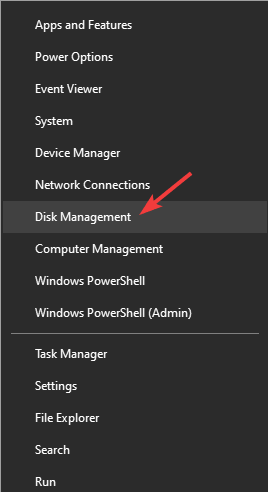
Press Windows plus X and select Disk Management.
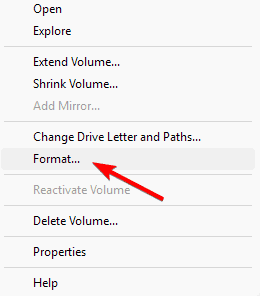
Right click the drive or partition you want to format.
Select Format.
Choose the preferred file system.
Confirm the action to erase the selected partition.
If you are not sure which file system to pick, you can read a detailed comparison of NTFS, FAT32 and exFAT file systems before you confirm the format.
Format The Computer Using Reset This PC
This option formats the system drive without a USB and reinstalls Windows automatically.
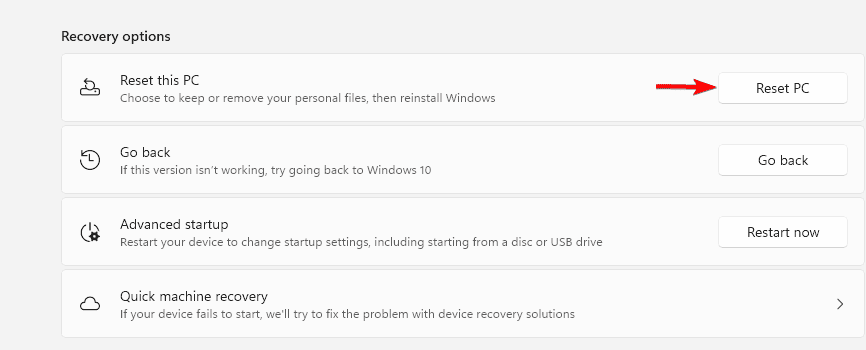
Open Settings.
Select System.
Select Recovery.
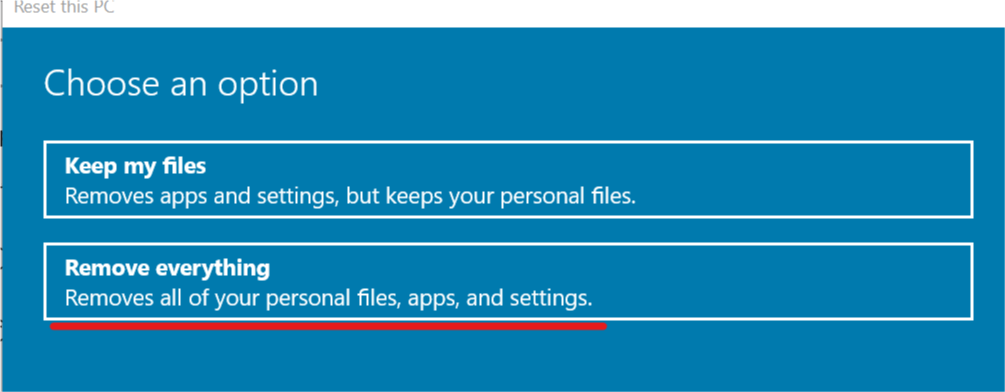
Choose Reset this PC.
Select Remove everything.
Pick Cloud download or Local reinstall.
Confirm the reset and wait for Windows to reinstall.
Format With Command Prompt During Advanced Startup
Use this method when the computer cannot boot normally.
Interrupt the boot process three times to trigger Automatic Repair.
Select Advanced options.
Select Command Prompt.
Type diskpart
Type list disk
Type select disk 0
Type the following to erase all partitions from the drive clean
Restart and install Windows from a USB.
Format A USB Or External Drive Using File Explorer
This method formats external storage devices through Windows Explorer.
Open File Explorer.
Right click your external drive.
Select Format.
Select NTFS or FAT32.
Click Start to wipe the device.
When you work with removable storage, you may sometimes need to change file systems, for example from exFAT to FAT32, and you can follow a step by step tutorial that shows how to convert an exFAT drive to FAT32 safely.
Why You May Want To Format Your PC
Formatting resolves slow performance, malware, corrupted system files and boot problems. A clean installation gives Windows a fresh environment with no leftover data.
FAQs
Which method gives the cleanest result
Formatting during Windows setup provides the most complete reset.
Can I format without losing files
Reset this PC with Keep my files keeps personal data but does not perform a true format.
Can I format the system drive inside Windows
Windows blocks that process, so you must use setup or advanced startup.
Do I need a USB
You need a USB only for clean installation. Reset this PC works without it.
Formatting restores system stability and clears out problems that normal troubleshooting cannot fix. Choose the method that fits your situation and back up important files before you start. A clean format through setup, reset or disk tools gives Windows a fresh environment and often makes the computer feel new again.
Microsoft is all set to bring new features for Edge and Microsoft 365 Copilot in 2026. First up, Edge will get new “modern” New Tab Page in the next month. In the Canary channel, Microsoft is also testing a new set of “Copilot suggestions” on the New Tab Page. You can read more about it here.
If you are fed up with seeing Copilot icon on your Edge toolbar, you’ll soon be able to hide it. Users who prefer clean interface have often complained about this issue. Microsoft notes, “To hide the icon, right-click the Copilot icon and select “Hide Copilot”. This will open Settings to toggle the icon’s visibility. Admins can control whether the Copilot icon shows in the toolbar using the Microsoft365CopilotChatIconEnabled policy.”
Both the aforementioned changes will roll out in February 2026. So, make sure to keep eye on them. When it comes to security, Microsoft Edge for Business will also introduce Tenant Restrictions v2 (TRv2) in January 2026. This system-wide guardrail blocks access to unauthorized Microsoft 365 tenants directly in Edge.
Microsoft says it will “[help] organizations maintain strict compliance and prevent data leakage across tenant boundaries.”
Microsoft also has a few changes planned for Copilot Chat. In January, you’ll get the ability to edit and enhance the lighting of uploaded or generated images in Copilot Chat and the Create experience. The same month, Microsoft will also make PDF reviews in Copilot “faster and easier.” Copilot will be able to explain selected text in natural language and “lets you customize the prompt for tailored results—so you spend less time switching between apps.”
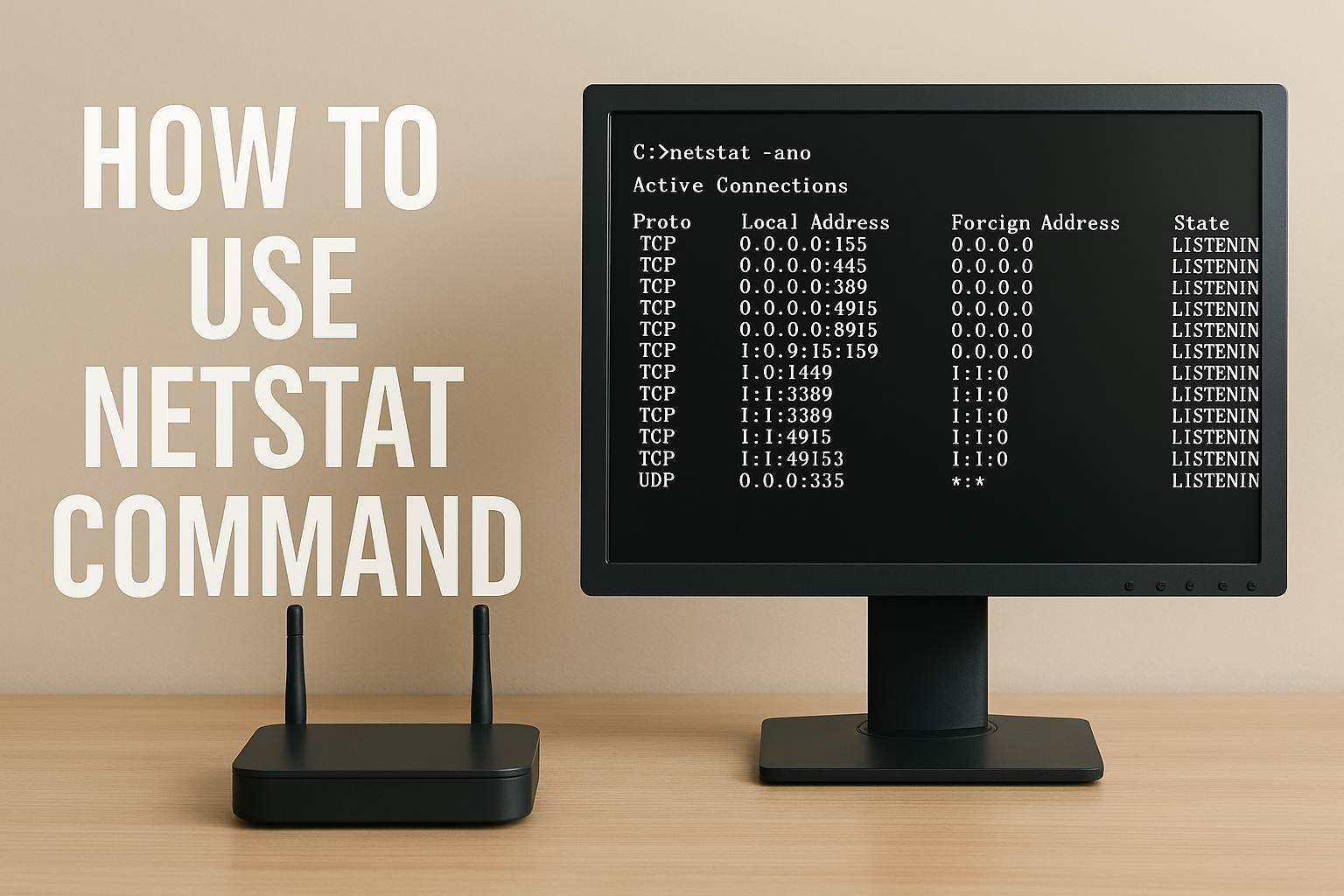
Netstat helps you view active connections, open ports, and running network services. This guide explains how to run Netstat, read its output, and use the most helpful switches.
Netstat shows active TCP and UDP connections, listening ports, and routing tables. It helps you troubleshoot unknown connections, slow apps, and high network usage.
How To Run Netstat On Windows
Follow these steps to open Netstat from the command line.
Open Start and type cmd.
Select Command Prompt.
Run netstat to display basic connection information.
Netstat helps you inspect network activity, active connections, and open ports on your device.
How do I find which app uses a specific port?
Run netstat -ano and match the PID in the output with the same PID in Task Manager.
Does Netstat work on Windows 10 and Windows 11?
Yes, Netstat works the same on both Windows 10 and Windows 11.
Can Netstat detect malware?
Netstat cannot detect malware directly but it can reveal suspicious or unexpected remote connections.
Netstat gives you clear insight into your system network behavior and helps you troubleshoot blocked ports, slow apps, and suspicious activity. Once you learn the key switches, you can quickly spot problem connections and keep your Windows system more secure.
Many Arc Raiders players waited for a fresh update that introduces meaningful bonuses for long-term progression. Embark Studios has now revealed the new system, and the reaction from the community shows clear frustration.
The Expedition Project has been delayed to December 17. When players join the expedition, they must trade their entire Stash and all Coins for up to five skill points, with each skill point costing 1 million Coins according to the latest blog post from Embark Studios.
This pricing caused the most concern because players say they never received enough information about how much skill points would cost, leaving them unprepared. Many stopped collecting items after unlocking the project, and now they do not have enough time to gather 5 million Coins before the start date.
Players argue that the cost feels too high and that grinding Coins does not feel worthwhile. Some feel that this system actively discourages using high-level and expensive gear in online matches, since they prefer to save their Coins for skill points. This creates a situation where players equip low-level gear to avoid unnecessary losses, which removes the satisfaction of earning powerful equipment through gameplay.
Several players believe this update may damage the current meta. The change shifts incentives away from fun, reward-driven play and toward resource hoarding. For many, using top-tier gear now feels like a punishment instead of a reward.
What do you think about this decision from Embark Studios? Has the current Arc Raiders meta taken a hit because of the new skill point structure? Let us know in the comments.
Microsoft has been pushing updates to Teams and Outlook for a while now, but 2026 is going to be another exciting year if you are a user of any of these apps. Well, the incoming upgrades are not the biggest, but they will quietly improve your workflow. Let’s start with Teams first.
Microsoft, in its Official M365 roadmap, mentioned that you won’t need to hop between accounts just to answer a message. Microsoft is rolling out the ability to view notifications, and even reply, across tenants without switching.
The company also adds that, “You can triage notifications, reply to chats, and pin tenants to the left rail for quick access.” These changes will be coming for users in February 2026.
Next up, Microsoft is also bumping up security. Starting February 2026, users on all platforms will be able to report suspicious calls directly inside Teams. It’s meant to help Microsoft flag malicious behavior faster and make threat detection less reactive.
If you often have trouble with grammar and spelling, the autocorrect feature for messages will also roll out. “Users will now have commonly misspelled words automatically corrected in compose,” said Microsoft in its official roadmap portal.
Additionally, IT admins will get more control over the text and URL shown when recordings or transcripts are created. On top of that, Teams will finally let you forward up to five messages in one go. Over on Outlook, Microsoft is bringing back Quick Parts, which will be rolling out in January 2026.
Microsoft pushed a Safe OS Dynamic Update last week, KB5071844, Windows 11, for version 24H2 and 25H2, and Windows Server 2025. As the name suggests, this update doesn’t include any new features; rather, it focuses on making sure your PC can actually recover when things go wrong.
Microsoft says the recovery update will install automatically through Windows Update, so most users won’t have to do anything. For IT admins or anyone managing images manually, the package is also available via Microsoft Update Catalog.
Microsoft also notes that this update replaces the previously released update KB5067040. Notably, after installing this update, the WinRE version installed on the device should be 10.0.26100.7297.
Speaking of updates, Microsoft also released KB5070316 last Friday, which finally allows users to hide AI Actions in Windows 11. But, in our testing, we found out that even when you turned off these apps, the AI Actions label is still visible there in the context menu like a ghost category, doing absolutely nothing except taking up space. You can read more about it here.
Other than KB5070316 also introduces a new app update framework, which Microsoft calls “The Unified Update Orchestration Platform (UOP).” The company said that with UOP, app updates become more consistent and predictable, with fewer interruptions.
A new page will be visible for Beta and Dev channels under Settings > Apps > App Updates, where they can check update progress and take action if needed.