How does Patch Tuesday work?

So maybe you’ve started paying more attention to how things are evolving with your Windows system. This means that you’ve surely heard about the term Patch Tuesday, but most probably you don’t know what it is.

As a quick summary, Patch Tuesday is an unofficial term used to refer to when Microsoft regularly releases updates for its software products.

It gets its name from the fact that it occurs on the second, and sometimes fourth Tuesday of every month, and Microsoft formalized Patch Tuesday back in 2003.

Now that you have a brief understanding of what it is, you should know how it works.

What goes behind implementing Patch Tuesday?

Patch tuesday

Down to its core, Patch Tuesday is just the implementation of all bugs fixes and updates that have occurred since the last update. They are all released as a singular package, with the occasional hot-fix follow-up if it ever comes with bugs or issues for users.

Most of the time though, Patch Tuesday updates usually involve security updates. This makes implementing them a must if you want to stay safe from the latest threats.

Why should I get patch Tuesday Updates?

These updates are not to be confused with daily updates. Those consist of malware database refreshes for Windows Defender and Microsoft Security Essentials.

These updates are usually pushed through by Microsoft and made available to anyone. Of course, the main condition is that they have the Windows Update feature enabled.

While you could postpone installing Patch Tuesday updates, this isn’t recommended. This is because Patch Tuesday is usually followed by Exploit Wednesday, a day where cyber attacks are on the rise and they target those that haven’t installed the latest updates.

That’s pretty much everything there is to know about Patch Tuesday. If you have any further questions about it, let us know in the comments section below.

RELATED ARTICLES YOU SHOULD CHECK OUT:

8 Best Tech Christmas Gifts [Latest Gadgets]

Just a couple of weeks to go for Christmas and it’s raining deals already. It’s that time of the year when shopping is in full force, for their loved ones and so, Christmas deals on tech gifts are too hot to resist.

Tech gifts are high on the priority list due to their versatility. From gaming deals to the latest smartphones and other devices, there is an attractive deal for each of them.

Online or offline, Christmas tech deals are pouring in and so, this is the opportunity to grab the festive bargain.

We have handpicked some of the hottest Christmas deals on tech gifts and created a list just for you.

Hot Christmas tech deals

SAMSUNG 85-Inch Class QLED 4K

christmas-tech-deals

The new-age Samsung QLED Smart TV is the desired device for anyone who enjoys the Christmas spirit watching holiday movies in 4K resolution with an AI processor and blasting sound.

You can benefit from lively motion due to its fluid display that has 120Hz with the Motion Xcelerator Plus feature. Plus, the new speakers model gives crystal-clear sound.

A worth mentioning feature is the Quantum Dot for glowing colors, plus HDR and Dual LED backlights to enhance your visual experience.

In addition, this Samsung Smart TV is the new wave in terms of image quality. You have the Quantum 4K processor that turns anything into 4K. Even more, you have multiple voice assistants to choose from like Alexa, Bixby, or Google Assistant.

Apple 10.9-inch iPad 2022

christmas-tech-deals

The next massive acquisition you can have this Christmas is the new iPad with a colorful aspect and redesigned architecture, including the Liquid Retina display and 10.9 inches.

You can use this Apple device for numerous activities like business tasks, drawing your art and sketches, and multitasking on different projects. All of that is due to its A14 bionic chip with 6 core processor and 4-core GPU.

In terms of camera quality, you have 12mp front and back wide cameras with a center stage tool for impeccable calls and pictures.

One of the biggest advantages of this product is the Magic Keyboard Folio and Apple pencil to get more flexibility for getting the job done.

Leica D-Lux Type 109 12.8MP Digital Camera

Hottest Christmas Tech Deal of 2018

A camera is just the right gift for those who love to shoot. This digital camera is perfect for video capture that records in different resolutions. It offers easy field use for professionals due to its compact size.

Furthermore, it’s easy to use as it places its main controls in easily accessible positions. It’s equally easy to zoom in using the attached lens.

It features Leica DC Vario-Summilux 10.9–34 mm f/1.7–2.8 ASPH lens that offers a super-fast aperture. Along with it, is the dynamic zoom range that’s almost equal to 24mm- 75mm on a 35mm type sensor. Wireless connectivity, Image Shuttle app, and the NFC module are some of the other significant features that make it a must-buy.

— Editor’s Note: If you’re interested in other gift ideas and tools to get your PC ready for Christmas, check out our wide collection of guides.

Amazon Echo Dot (3rd Gen)

Hottest Christmas Tech Deal of 2018

Smart speakers are in and the Echo Dot is just what you want this Christmas as a gift. The latest version comes with a massive improvement in audio quality. It sports a smart new design without a price hike.

Although it’s not the smartest, it offers a great experience with basic questions like music, news updates, light switching, and jokes.

Nokia Steel Smartwatch

Hottest Christmas Tech Deal of 2018

Nokia Steel Watch makes for a perfect Christmas Tech Deal for 2018 for the fitness freaks. It’s a simple, yet sleek looking watch that’s doing pretty good in the wearable category. It flaunts a minimalistic design and comes with a step-counting dial to keep a track of your sets.

Excellent battery life with no charging required for eight months. Moreover, it works with regular watch batteries. It comes with a user-friendly Nokia Health Mate App that displays all the stats.

Unlocked Samsung Galaxy S9 

When it comes to gifting phones from Christmas tech deals of 2018, no one can miss Samsung. Get the unlocked and sim-free version of the Samsung Galaxy S9 with the 12MP front camera to impress. Perfect for selfies, this phone offers a shiny metal body with a 5.8-inch screen.

64GB inbuilt storage, 3000mAh battery, and 8MP rear camera are some of its other specifications. S9 runs on Android 8 Oreo and is available in three color variants – Black, Blue, and Purple.

Lutron Caseta Wireless Smart Lighting Starter Kit

This is an innovative gadget that allows users to enter a well-lit home even while they are away. It allows users to have a smart light control using the app from any location, anytime.

While it makes the existing bulbs to act smart, it also allows users to control the app with voice or touch. It’s a perfect Christmas gift for the gadget freaks who love to experiment with something new.

Soundcore Liberty Lite Wireless Earbuds

Hottest Christmas Tech Deal of 2018

This smart little pair of earbuds by Soundcore makes a steal this Christmas. It offers breathtaking sound quality through the Graphene drivers.

Moreover, the headphones can run at a stretch of 3.5 hours on a single charge with added 9 hours in the handy charging case. Ultra-fast pairing and water-resistant features make it a must-buy this season.

So, grab these hard-to-resist Christmas tech deals of 2018 while still hot, and surprise your loved ones.

Microsoft Surface Book users report battery swelling

Microsoft Surface laptop battery complaints are not entirely uncommon. Surface users have previously posted on the Microsoft support forum about battery draining. However, an MVP on the Microsoft support forum has also revealed a series of posts pertaining to Surface laptop battery swelling.

He added that Microsoft seems willing to replace Surface laptops with swelling batteries that are within three years of original purchase date. However, a good number of Surface laptops with swelling batteries might be older than three years. Thus, not all users might be able to get free replacements for Surface laptops with swelling batteries.

I’ve contact Microsoft Technical support, after holding the line for almost 25 mins, a Microsoft Agent told me that my Surface is passed 3 years warranty, it was bought on March 2016. upon asking what are my options, he replied “I can only advise you to purchase a new Surface device”
I replied by “I bought a microsoft Surface book for 1700$ cash, you can’t tell me to pay another 1700$ after 3 years! what should I do with my current surface book? they simply said that they cannot help in any way.
I then asked him, if i want to repair it at my own expense, can i? he said “Microsoft Service Center can’t receive any product with expired warranty for battery swollen issues”. they know that their products have issues, yet this is their answer.

Microsoft remains tight-lipped

Microsoft has seemingly not provided much of a response to the battery swelling issue. Apparently, the company urges users to tell MS support if their Surface laptops have swelling batteries. If the laptops are within warranty at least, users can return them to Microsoft for free repairs or replacements.

The bigger question is whether Microsoft should be prepared to replace Surface laptops with swelling batteries purchased longer than three years ago. The big M is not legally obliged to replace laptops, or other devices, that fall outside their warranty periods.

Do not continue to utilize a Surface laptop with a swelling battery. Users who suspect their Surface laptops have swelling batteries should first get in touch with Microsoft to enquire as to whether it can be repaired. Unless the Surface device is still within its warranty period, however, there is no guarantee the big M will freely fix or provide a replacement for it.

Editor’s Note: If you’re interested in reading more news and other posts on Microsoft Surface, check out our wide collection of guides.

Best virtual audio cable software for Windows PCs

You probably never thought you were ever going to need software to emulate cables but here you are, looking at a list of the best virtual audio cable software solutions. So let’s cut to the chase, you can probably agree that sound works in mysterious ways and sometimes you can’t seem to get to the root of the issue. Well, that’s where specialized tools such as VB-Audio CABLE, JACK Audio Connection Kit, Loopback, and Carla step into action. These software solutions were specifically designed to help you route the sound however you see fit in a quick and convenient manner, without having to use real audio cables. While some of them are just audio drivers in disguise, others offer more sophisticated solutions such as routing audio and MIDI data between apps or taking audio signals and using them as global inputs for any other source.

What are the best virtual audio cable software tools?

Virtual Audio Cable

Virtual Audio Cable

Virtual Audio Cable is a software tool for Windows computers that does exactly what you’d expect it to do: acts as a virtual version of an audio cable and makes sure that the sound reaches its desired destination every time.

The behavior of this program is similar to the “Stereo Mix” feature of some hardware audio cards, better known as “What You Hear”. Virtual Audio Cable enables you to transfer up to 256 different audio signals between any applications simultaneously.

No audio hardware is required to use Virtual Audio Cable on your computer, but it becomes a necessity if you want to either hear the results or record signals from external sources.

Download Virtual Audio Cable

This tool can be used on computers without audio cards to record audio signals that are generated by applications.

VB-Audio CABLE

VB-Audio CABLE

VB-Audio CABLE is a specialized software solution that can help you emulate a physical audio cable between apps on your computer by routing the audio signals generated by programs to any other app.

Since this tool acts as an audio driver, it should be very easy to decide the route of your audio signal by simply changing the input and output devices from within the apps you’re interested in connecting via sound.

Download VB-Audio CABLE

Many programs and games allow you to decide what audio input and output devices should they use, just in case multiple such devices are available on your computer. VB-Audio CABLE took this feature and used it as its advantage to become widely accessible.

JACK Audio Connection Kit

JACK Audio Connection Kit

JACK Audio Connection Kit is an ensemble of tools that can help you manipulate audio signals in terms of deciding what their routes should be on your computer in a quick, hassle-free manner.

This tool is but the backbone of a system designed to help you get various audio applications to communicate with each other, and with audio hardware as well. It’s similar to what a cable does to a guitar and an amplifier, but in this case, you get to decide which signal goes where.

Download JACK Audio Connection Kit

JACK Audio Connection Kit can be easily installed on your computer thanks to the intuitive wizard that’s embedded within the installer, but configuring it once it’s installed might prove to be a bit difficult.

There are a lot of guides and a rich FAQ section on the official website that can help you simplify this part.

Carla

Carla

Carla is a modular software host for audio plugins that features support for a wide range of audio drivers and plugin formats. Some of this tool’s most important features are its transport control, parameter automation via MIDI CC, and remote control over OSC.

Supported plugin formats:

  • LADSPA (LRDF included);
  • DSSI;
  • VST2;
  • VST3;
  • AU;
  • LV2;
  • SF2 + SFZ file support;

Supported audio drivers:

  • JACK (preferred);
  • ALSA
  • DirectSound;
  • CoreAudio;

Carla comes with a sleek, dark-themed interface that packs its controls in an organized, non-cluttered manner and is somewhat customizable. You can keep the custom theme but use system colors, or even disable it altogether, even though it won’t look as nice.

Download Carla

The first time when you run Carla, you might want to scan your whole system for plugins. Your plugin folders can be customized in the configuration section of the program.

After you add new plugins, make sure to hit the refresh button so that the tool can receive the correct feed details.

Closing thoughts on best virtual audio cable software

Bottom line, if you find yourself working with various audio applications all the time and you can’t seem to find a good way to get all signals properly organized, it may be a sign that you need a helping hand from specialized software solutions.

Carla, JACK Audio Connection Kit, and Virtual Audio Cable are some of the best tools that can help you route the audio signals to and from many applications or devices, depending on your needs.

Best practices for Microsoft Patch Tuesday

If you own a Windows PC and like keeping it updated constantly, then you are familiar with what Patch Tuesday is.

For those of you who don’t know, Patch Tuesday is generally the second Tuesday of every month when Microsoft releases their latest updates across all of their products. This is a time when everyone is eager to get the latest patches installed and see what new things are brought to the table.

Of course, if you want to be successful in installing Patch Tuesday updates on your PC without any problems and as fast as possible, you’ll need to follow some steps first.

How do I get ready for Patch Tuesday?

1. How to avoid Patch Tuesday issues and errors

PT forums

Read up on specialized forums what the new updates are supposed to bring and see whether or not they are worth installing at all.

Additionally, every security update issued by Microsoft comes with a bulletin that’s published by the Microsoft Security Response Center at about the same times the patches are released.

If you read up and see that future updates may have issues that affect your work, in particular, make sure Windows Auto Update blocks automatic updates.

While this is just a temporary solution, it may be a good idea to wait it out until hotfixes are released. For more info on how to do this, check out this dedicated guide

As always, customers are advised to follow these security best practices:

  • Install vendor patches as soon as they are available
  • Run all software with the least privileges required while still maintaining functionality
  • Avoid handling files from unknown or questionable sources
  • Never visit sites of unknown or questionable integrity
  • Block external access at the network perimeter to all key systems unless specific access is required

On the other hand, using a third-party PC repair tool with powerful features oriented towards keeping your system and all the apps healthy is recommended.

2. How to download Patch Tuesday updates faster?

If you’ve read the documentation and see that the chance of encountering issues is minimal, you can go ahead and set Windows Auto Update to enabled. By doing this, your PC will automatically download the patch and prepare to install it as soon as it is available in your region.

Like any other update, if you don’t want to waste time waiting for it to finish, simply make sure nothing is taking up any of your bandwidth.

3. How does Patch Tuesday affect companies?

PT companies

When it comes to companies that own hundreds of computers, implementing Patch Tuesday updates is a bit trickier. This is because implementing a companywide patch management process requires top-level support.

Though these steps may vary, the larger point is the updates should not be installed as they become available.

You would then need to create a core patch management team, and have a testing process that also involves stakeholders in testing, which takes up time and resources.

This usually results in some brief company downtime, but if the IT department is well organized, this shouldn’t take too long.

Closing thoughts on best practices for Patch Tuesday

Patch Tuesday isn’t all that important for casual users, but for those that need their PC to be in tip-top shape at all times, it is one of the most important times of the month.

While admittedly Microsoft has never been successful at delivering issue-free updates, they always came through with hot-fixes immediately. All things considered, if you value your PC’s integrity, knowing how and when to apply Patch Tuesday updates can be critical in the long run.

If you found our article about Patch Tuesday to be useful, let us know in the comments section below, and we will bring you more on the topic.

RELATED ARTICLES YOU SHOULD CHECK OUT:

Best Christmas songs to listen to this winter for extra hygge

Christmas songs are one of the main trademarks of the winter holiday season. What better feeling than to come back home and hear your favorite Christmas songs playing on your Windows computer?

There are many Christmas songs you can listen to, from classic Christmas songs to Christmas songs for kids. In this article, we’re going to list the best Christmas songs and filter them by music genre.

Best classic Christmas songs

1. Diana Krall’s Christmas Songs (suggested)

Diana Krall's Christmas Songs

This is Diana Krall’s first full-length Christmas album. It offers 12 wonderful Christmas songs performed in a blues/ jazz note. According to Microsoft’s review of the album, these songs deliver a smoky, sophisticated, and slightly melancholy atmosphere, perfectly suited for romantic afterglow holiday affairs.

2. Christmas by Michael Bublé

Christmas Michael Bublé

If you’re a Michael Bublé fan, this is the right Christmas song album for you. The album features a series of popular Christmas songs, such as It’s Beginning To Look A Lot Like Christmas, Santa Claus Is Coming To Town, Santa Baby, I’ll Be Home For Christmas and many more.

Buy the album from Amazon, grab a cup of tea, sit back in your armchair and enjoy Christmas.

3. 50 Greatest Christmas Songs

greatest christmas songs


If you want to listen to the most popular Christmas songs performed by well-known singers, such as Elvis Presley, Frank Sinatra or Billie Holiday, then this is the perfect choice for you. This album includes 49 songs with a total duration of 2 hours and 6 minutes.

You can buy the 50 Greatest Christmas Songs album for $16.99 from the Windows Store. It’s worth every penny!

  • Editor’s Note: If you’re interested in other gift ideas and tools to get your PC ready for Christmas, check out our wide collection of guides.

4. Greatest Christmas Songs

Greatest Christmas Songs windows

Greatest Christmas Songs brings you the piano version of 23 wonderful Christmas songs. This album will cast a fairy-tale-like mood over your entire house, while the well-known Christmas notes will put a smile on your face.

You can purchase the Greatest Christmas Songs album for $8.99 from the Windows Store.

5. Classic Christmas Songs

Classic Christmas Songs 2016

The Classic Christmas Songs album brings you 49 popular Christmas songs performed in a modern manner. Your ears will like the classical guitar notes blended with the singers’ warm voices.

The Classic Christmas Songs album can be yours for $9.99.

6. Popular Christmas Songs – Feliz Navidad

Popular Christmas Songs album

If you like classical music, you’ll definitely like this Christmas song album. Popular Christmas Songs – Feliz Navidad offers you 20 Christmas songs performed in a classical music manner. All songs are instrumental and are dominated by harmonious harp notes blended with beautiful flute notes.

You can purchase Popular Christmas Songs for $9.99 from the Windows Store.

7. The Classic Christmas Album by Tony Bennett

Classic-Christmas-Album-Tony-Bennett

Tony Bennett is a name that doesn’t need any introduction. Immerse yourself in the Christmas atmosphere of yesteryear with this impressive Christmas album.

Buy The Classic Christmas Album from Amazon.

Get it now on Amazon

8.  Frank Sinatra’s Ultimate Christmas

Frank Sinatra's Ultimate Christmas

Who doesn’t love Frank Sinatra? What better way to celebrate Christmas than to listen to classic Christmas songs sung by Sinatra?

Get this Christmas album from Amazon and enjoy 20 classics from Sinatra such as ‘White Christmas,’ ‘Silent Night,’ ‘Jingle Bells’ and ‘Santa Claus Is Coming To Town.’

To end the Christmas evening in style, gather the whole family around and watch one of Sinatra’s movies.

Best Christmas songs for kids

Children love listening to Christmas songs. As soon as you hit the play button, your children will start dancing and singing along. To fuel their energy, you can purchase one of these Christmas song albums for children.

If you’re not big on songs, perhaps a Christmas card will do and we’ve got just the right Christmas fonts to make it all special. That’s about it for our Christmas song list. Happy holiday season!

4 trendy Gears of War Christmas sweaters to gift this season

Wearing fashionable sweaters is no big deal during winters, but wearing an ugly sweater is. Yes, the trend of ugly Christmas sweaters is back. The latest entry to the ugly Christmas sweater combat is the Gears of War Christmas Sweater. For the ardent Gears of War fans, this is the time to rejoice.

The heavy knitted sweater and the other merchandise sports the famous omen logo from the video game. The collection is a bliss for the Gears of War junkies who like to hoard all the collectibles from the game maker. The range includes games, apparels, accessories, and more.

While there’s an exclusive range of Gears of War 4 merchandise available on Amazon, sweaters, sweatshirts, and hoodies are also up for grab. From kids to adults, there’s one for everyone. But, what better than gifting a sweater that features the favorite character from the famous game this winter?

So, for those who have a crazy fan of this game at home, Gears of War Christmas sweater will make for a perfect gift.

We recommend this quick list of Gears of War sweaters as a gifting option this Christmas.

4 Gears of War Christmas sweaters not to miss

Loot Crate Gears of War Hoodie – Unisex Sizing

Trendy Gears of War Christmas Sweaters to Gift

This exclusive merchandise by Loot Crate features two different logos from the game, in the front, and on the back. It’s a black hoodie from the Gears of War Christmas Sweaters range made of 80% cotton and 20% polyester. This medium duty, thick hoodie is perfect for the start of the winters or as a day wear.

It’s an officially licensed brand that offers quality merchandise with perfect size options. Best of all, it offers Unisex sizing, that makes it a great Christmas gift this season.

Get it here on Amazon

Guiping Gears of War Youth Hooded Sweatshirt

Trendy Gears of War Christmas Sweaters to Gift

This is available in XL size and is specially designed for kids. Available in single color, black, this Gears of War Hooded Sweatshirt is made of 100% cotton. The hood is double lined with identical drawcords. While this is perfect for everyday use, its’ also good for physical activities like running, jogging, exercise, and fitness.

The brand uses the latest garment technology and prints individually. Handwash is suggested to maintain quality and avoid deformation.

Get it here on Amazon

KissKid Gears of War Adults Baseball Uniform Jacket

Trendy Gears of War Christmas Sweaters to Gift

It comes in ten sizes and features a double lined hood with identical drawcords. The brand uses latest garment technology for best quality and comes individually printed. This black hoodie sports the Gears of War logo on the back.

Perfect for daily use, it is also a great wear for physical activities. Handwash is recommended to maintain quality and avoid deformity. This lightweight Gears of War Christmas sweater is a great gift for the loved ones.

Get it here on Amazon

  • Editor’s Note: If you’re interested in other gift ideas and tools to get your PC ready for Christmas, check out our wide collection of guides.

Diamonds Jun Gears of War Children’s Pullover Hooded Sweatshirt

Trendy Gears of War Christmas Sweaters to Gift

This black Gears of War Children’s Pullover Hooded Sweatshirt is made of cotton. Printed with the famous omen symbol from the game in the front, it’s perfect for daily wear. The sweatshirt comes with a double lined hood along with matching drawcord. The brand uses modern garment technology and comes with individual prints.

It features no pockets and to prevent deforming, handwash is recommended

Get it here on Amazon

Finding the perfect Christmas gift can be daunting, but our recommendations make shopping easier. Grab these trendy Gears of War Christmas sweaters this season as great surprise gifts.

RELATED ARTICLES:

4 expensive tech Christmas gifts to impress your loved ones

If you’re planning to buy a Christmas gift for a person who already has everything, you’d better be ready to spend a nice fortune on a cool present if you really want to him/her.

Now, if you’ve got no idea what Christmas gift to get for a rich person, keep reading this guide. We’ll list 5 gift ideas that will definitely impress even wealthy people.

We tried to find some really nice gifts that are expensive enough to impress the recipient but also affordable enough not to break the bank. Enjoy!

Expensive tech Christmas gifts

Bowers & Wilkins P9 Headphones

Bowers & Wilkins P9 Headphones

Bowers & Wilkins doesn’t need any introduction. This pair of over the ear headphones are crafted from high quality Italian Saffiano luxury leather which helps to create an overall classy design.

The forged foldable aluminum arms offer excellent durability. Think of these headphones as an investment. You pay a few hundred dollars but you get an accessory that will last a lifetime.

Get it now from Amazon

Kardon GO+Play portable speaker

Speaking of enjoying the perfect sound experience, here’s another idea for a Christmas gift: the Harman Kardon GO+Play portable speaker.

I personally own one (the black version) and I wouldn’t trade it for any other speaker. It generates really deep bass frequencies that make your windows vibrate – literally.

You can stream music wirelessly via Bluetooth and the built-in rechargeable battery can power you for up to 8 hours of playtime.

The speaker is made of premium materials and the flawless fabric finishing and stainless steel handle create a very nice design.

Get it from Amazon

Now, it this portable speaker is not expensive enough for you, then check out this Bang & Olufsen BeoSound 2  wireless music speaker system.

Leica D-Lux

Leica D-Lux expensive christmas gift

This 12.8 MP digital camera sports a 3-inch LCD screen and is perfect for vintage lovers. It has a clean minimalist design that make it stand out in the crowd. Simple yet sophisticated or form follows function, as Leica says.

D-Lux is equipped with one of the fastest lenses on the market for outstanding zoom performances.

Get it now from Amazon

If your budget allows you to step up the game, then check out this pricey Leica Q 24.2 MP digital 35 MM camera.

Leica Q camera

  • Editor’s Note: If you’re interested in other tools to get your PC ready for Christmas (or gift ideas for that matter), check out our wide collection of guides.

DJI Phantom 3 Professional Drone

DJI Phantom 3 drone

If you’re looking for a really impressive drone model to buy it as a Christmas gift, there are plenty of devices in the $200- $300 range.

But if you want a drone that will definitely impress your loved ones, then the DJI Phantom 3 is the right choice for you. This is the perfect gift for vloggers or photography enthusiasts.

Here’s what this drone packs:

  • 4K UHD video camera
  • 4 propellers and another extra set of 4 propellers in case you need to replace one
  • Vibration absorber
  • 16GB micro-SD Card
  • Spare Battery
  • Aluminum case

Get it now from Amazon

As always, if you’ve got some extra money to spend, you can get the DJI Phantom 4 model.

DJI Intellectual Phantom 4 drone

So, which of these gadgets are you going to buy?

For more gift ideas, check out the guides below:

Download KB4533028 for Windows 10 2004

Microsoft has rolled out KB4533028 cumulative update. That is a cumulative update for the Windows 10 Insider preview build 19035. It is another step closer to an RTM release for Windows 10 2004, which is reaching completion.

As per usual, Microsoft’s senior manager for the Windows Insider Program, Mr. LeBlanc, announced the update for preview build 19035 on Windows Blogs. He confirmed that this update is available for Windows Insiders on both the Slow and Fast rings. Mr. LeBlanc also added that the KB4533028 update is primarily for testing the 20H1 service pipeline.

So, this update only includes minor Windows 10 2004 bug fixes. Mr. LeBlanc confirmed that Microsoft has completed a Windows Update driver update experiment. He stated:

We’ve completed the experiment related to how we deliver driver updates through Windows Update. Devices that were involved in the experiment will no longer see the Optional Updates link under Settings > Windows Update. This also resolves an issue where after successfully installing printer drivers from the Optional Updates section, the same driver is still showing as available for install. Thanks to the Insiders who have provided feedback on this feature.

Microsoft thanked users for feedback on the MS Store Notepad version. The big M confirmed that it has pulled the MS Store Notepad version from the 19035 preview build. Users will need to repin the Notepad to their taskbars or Start menus after installing the 19035 preview build.

BattlEye issues are here to stay

Microsoft also confirmed that the BattlEye anti-cheat software incompatibility issue continues to persist with the latest Windows Insider preview build. Thus, Microsoft’s compatibility hold for rolling out Windows Insider preview builds to devices with BattlEye installed continues. However, users can still install the 19035 preview build by uninstalling BattlEye.

Download KB4533028

You can automatically download KB4533028 on your computer via Windows Update. Once again, this update is only available for Insiders.

It is now expected that the Windows 10 2004 will reach RTM (finalized) stage in December 2019. Microsoft has not confirmed when it will release Windows 10 2004. However, with that OS version now feature ready, the software giant might launch it earlier than usual.

RELATED ARTICLES TO CHECK OUT: 

How to Fix Creative Cloud Desktop High CPU Usage [3 Ways]

Adobe’s Creative Cloud is a proprietary platform off of which you can download, install, manage, launch and uninstall Adobe products. This means everything from Photoshop to Lightroom, all from one unique platform.

When you first install it, it will sit idly in the background, performing routine checks to see if the programs you have are of the latest version or not.

However, it would seem that some users are having issues with the Adobe Creative Cloud. They have been reporting on forums that the desktop app is sometimes using a lot of CPU resources, even when it is simply sitting idly.

The CPU usage is 113% mainly due to creative cloud -> Adobe Service Desktop.exe. This has been so for almost half an hour, but when I stop the service, CPU usage drops immediately. When I restart the computer, nothing changes, high CPU usage again.

As far as users describe the issue, even high-end PCs seem to be having this problem.

That is why we’ve made this step-by-step guide so that you can work on your PC efficiently, without Creative Cloud taking up all of your CPU resources.

How can I stop Creative Cloud from using too much CPU?

1. Disable font syncing and file syncing

  1. Open Creative Cloud
  2. Go to the Preferences Panel
  3. Select the Creative Cloud tab
  4. Go to Fonts
  5. Right under TYPEKIT ON/OFF, select Offadobe cc cpu
  6. Go to the Files tab
  7. Right under SYNCKIT ON/OFF, select OffAdobe CC CPU
  8. Confirm the changes
  9. Restart the PC

2. Suspend any antivirus program running in the background

Since suspending an antivirus program varies from product to product, please go to the antivirus developer’s website for more information on the matter.

3. Uninstall and reinstall Adobe’s Creative Cloud apps and then Creative Cloud itself

3.1. Uninstall Adobe’s Creative Cloud apps

  1. Click the Creative Cloud icon in your taskbar
  2. Go to the Apps tab
  3. Click on the More icon (it looks like three horizontal dots)
  4. Click on the app you want to uninstall, and choose to Uninstall
  5. Follow the on-screen instructions for each app
creative cloud CPU 3

3.2.Uninstall and reinstall Creative Cloud

  1. Download the official Creative Cloud Uninstaller
  2. Extract the archive
  3. Run the uninstaller
  4. Follow the on-screen instructions

In order to make sure you don’t have any leftover data left, you will need to use the Adobe Cleaner.

  1. Download the Adobe Creative Cloud Cleaner Tool for Windows
  2. Right-click it when it is finished downloading
  3. Select Run as Administrator
  4. Follow the on-screen instructionscc cpu 4
  5. Restart your PC
  6. Reinstall the Creative Cloud

By following these steps you should be able to stop Creative Cloud from using too much CPU.

Did you find this guide useful? If so, let us know if it helped you in the comment section below.

Fix: Apps tab missing from Adobe Creative Cloud desktop app

Anyone that uses an Adobe product is probably familiar with what Creative Cloud is. For those of you who don’t know, Adobe’s Creative Cloud is a platform from which you can install, manage and launch all of your Adobe products.

Every time you install an Adobe product, the Creative Cloud gets installed by default, and you need it to install more programs afterward.

The problem is that some users have encountered issues with their Creative Cloud desktop app, and they went on forums to report it:

I downloaded Creative Cloud on my desktop PC earlier wanting to activate the free trial of some CC apps (mainly Premiere Pro), however, when I launched the CC app, there was no “Apps” tab in the CC app. There were the other tabs, “Learn”, “Files”, “Font”, “Stock” and “Bēhance” but no “Apps” tab to download from.

This step-by-step guide will show you what you need to do to make the Apps tab appear in the Creative Cloud again.

How can I make the Apps tab appear in the Creative Cloud app?

1. If you belong in an organization

A lot of organizations limit the apps you can install and therefore disable the Apps tab in the Creative Cloud desktop app. If you encounter any of these issues, then you need to contact your administrator:

  • The Apps tab is missing from your Creative Cloud desktop app
  • The Apps tab displays the message: You don’t have access to manage apps

2. If you don’t belong to an organization

You will need to uninstall and re-install the Adobe Creative Cloud app, which involves the following steps:

  1. Navigate to you install directory of Adobe products
    • This is typically C:Program Files (x86)Common filesAdobe
  2. Locate the AAM Updater, OOBE folder, and Adobe application manager folder
  3. Delete them
    • The folders are usually set to Hidden, so be sure to set your windows explorer to see hidden files and folders
    • If you encounter issues deleting any of the folders, open the Task Manager and stop all Adobe-related processes
  4. Download and install Adobe’s Cleaner tooladobe cleaner tool
  5. Run the Cleaner tool
  6. Download the Creative Cloud desktop app again
  7. Restart your PC
  8. Install the Creative Cloud tool

By following these steps, you will now be able to see the Tabs menu in your Adobe Creative Cloud desktop app.

This means that you will now be able to install any Adobe product, as long as you own them, and update them to whatever version you need.

Did you find this guide useful? Let us know if you have any other Adobe-related issues in the comments section below.

RELATED ARTICLES YOU SHOULD CHECK OUT:

Best email and password organizer books to buy

In this age, where we create a new online account every few days, having to manage and store the credentials has become a task in itself. While password managers are a great way to store your credentials, some people may have security concerns when it comes to password managers.

Another way to store your credentials is to use a spreadsheet. Again, it is still saved on your computer or cloud storage account.

Email address and password organizer books can help you resolve this issue. In this article, we have listed the best books to keep your most sensitive data safe by writing it down.

What are the best email and password organizer book deals?

The Personal Internet Address and Password Logbook

email password book

The Personal Internet Address & Password Logbook is a premium hardcover spiral book for those who are tired of losing track of the websites they visit.

It comes with a removable cover bank and a funky cover design. Tabbed A-to-z pages make it easy to look for any information in alphabetical order. You can write down any additional information in the back of the book as well.

Pros:

  • Tabbed pages to find the information quickly
  • You can note down the name, address, username, password, and notes
  • Durable hardcover binding

Cons:

  • Can be small for some people

⇒ Get it now

Internet Password Keeper Book

email password book

Internet Password Keeper Book is an effective way of keeping track of websites, password and user names. The book is made of quality materials with a sturdy plastic cover that resists rips, tears, and folds.

This compact spiral-bound book has tabbed pages to enter information in alphabetical order. Each tab can hold up to 30 entries and there is a total of 65 pages that are usable.

Pros:

  • Durable password keeper book with spiral bound
  • 65 tabbed pages to access information easily

Cons:

  • The cover could be more sturdy

⇒ Get it now

My Password Book

email password book

If you want a slightly large book with plenty of pages, My Password Book has you covered. It comes with a total of 130 usable pages offering plenty of space to store your information.

It is an ideal book to write down the long passwords, long website addresses, and multiple security questions. Similar to other books, My Password Book also comes with tabbed pages providing easier access to information.

Pros:

  • Innovative visual concept for a quick search
  • 8 writing lines per section
  • 8 customizable pages and anonymous design

Cons:

  • Lacks individual page tabs

⇒ Get it now

LARGE PRINT Password Book

email password book

As the name suggests, LARGE PRINT Password Book is a pretty large book and is ideal for seniors who like more room to write.

It comes with 112 pages with A-Z organized tabs. The cover of the book has no information indicating it is a password book. LARGE PRINT Password Book is also an excellent gift idea for people who have a hard time remembering passwords and usernames.

Pros:

  • Large-sized password and email address book
  • Comes in plain cover for better security
  • Up to 112 pages with A-Z tabs

Cons:

  • Unconventional data format

⇒ Get it now

Password Book Green

email password book

Password Book Green allows you to organize the pages with tabs. You can record username, websites address, phone number, password, and more.

A wire binds all the pages so the book can lay completely flat. The pages are of good quality, and the cover feels sturdy. Password Book Green comes in 4 different colors offering more customization options.

Pros:

  • Large size spiral password keeper
  • Pages are removable and organized with tabs

Cons:

  • Outside tabs are not laminated

⇒ Get it now

Final thoughts on email and password organiser book

Password organizers are more useful than you may think. With a password keeper book, you don’t have to worry about data theft over the internet. However, it is important to keep the book safe from prying eyes to prevent unauthorized access.

Best 2 software to open CAN files with

If you have a .CAN file that you are trying to open but your computer can’t find the appropriate program to open it, you are not alone. A .CAN file type is primarily associated with “.CAN Encryptor/Decryptor” and is used for encrypting files. Since .CAN files are not the most common file types, the programs to open these files aren’t usually installed on most computers. In this article, we have listed a couple of software solutions that can help you to open and view .CAN files on your PC.

What programs can I use to open .CAN files?

MP Navigator

Program to open CAN files

MP Navigator is a Canon proprietary software. This application software allows you to scan, save, and print photos and documents. You can also edit images and attach them directly to email through the app.

Needless to say, MP Navigator is also capable of opening valid .CAN files. Here’s how to use it:

  • Download and install MP Navigator from the official Canon website
  • Launch MP Navigator and click on File > Open.
  • Navigate and select the .CAN file you want to open
  • Click OK and MP navigator will open the file
  • You can minor adjustments to the file using the built-in editing tools

Download MP Navigator

XnView MP

Program to open CAN files

XnView MP/Classic is among the most popular and widely used free image viewer that supports several file formats. It allows you to edit your photo file and enhance it using features like colour adjusting, image resizer, cropping, metadata editing and more.

Here is how to use XnView to open .CAN files:

  • Download and install XnView MP from the official website.
  • Launch XnView MP and click on File > Open.
  • Navigate and select the .CAN file you want to open.
  • If successfully loaded, you can edit and make changes to the image using the built-in editing tools.

Some notable features in XnView MP include batch renaming, batch converter, duplicate image finder, image compare and a slideshow creator.

Download XnView

Final thoughts software to open .CAN files

Most PC users rarely come across the .CAN file format while doing day to day tasks on their computer, which makes it difficult to find the right program to access this specific file type.

In this article, we have listed the two best software solutions that can help you to open and view these files with ease. Go through the list and let us know your pick in the comments.

RELATED STORIES YOU MAY LIKE:

Exploit Wednesday & Uninstall Thursday: Stay safe after Patch Tuesday

Those of you that are actively following the continuous development of Microsoft products surely know about Microsoft Patch Tuesday.

For those of you that are just casual users, Patch Tuesday is an unofficial term used to refer to when Microsoft releases software updates for its products. It is also called that way because it is always the second Tuesday of each month.

While Patch Tuesday may be popular, fewer people know about Exploit Wednesday and Uninstall Thursday.

What exactly are Exploit Wednesday and Uninstall Thursday?

What is Exploit Wednesday?

ewedJust like you read the patch notes to see what are the new features included in the latest update, cybercriminals analyze the patch notes to see what the weak points are.

The day after Patch Tuesday there is usually a rise in the number of attacks against unpatched systems. This has been dubbed by some as Exploit Wednesday or Day Zero.

More so, plenty of malicious parties will also hold off on exploiting bugs found in Windows software until after Patch Tuesday.

How do I stay safe during Exploit Wednesday?

Malware launched during Exploit Wednesday specifically targets those that have not updated their system yet. Because of this, there are a few things you can do to avoid being a target:

  1. Install Windows updates as soon as they go live
    • One efficient way to do this is to set Windows Automatic Updates to Enabled
  2. Run only software that requires few privileges
  3. Do not access files from unknown or questionable sources
  4. Never visit sites of unknown or questionable integrity
  5. Do not allow external access at the network perimeter to all key systems

While these steps should be followed at all times, Exploit Wednesday is when you should be particularly careful.

What is Uninstall Thursday?

uthuMore of a joke in the Microsoft Community, it pokes fun at Microsoft’s tendency to never deliver a Patch Tuesday update without critical issues for some users.

Thus, Uninstall Thursday is basically the day after you realize what exactly in Patch Tuesday is causing issues with your PC, and you uninstall that particular component.

Normally, Uninstall Thursday is followed quickly by a day in which Microsoft releases hotfixes, so it is sometimes short-lived or doesn’t get to happen at all.

How do I stay safe during Uninstall Thursday?

Unfortunately, there isn’t much you can do about Uninstall Thursday, except for the following:

  1. Read the changelogs carefully to see what updates there are so you know what component you should uninstall
  2. Wait until Microsoft releases a hotfix for your particular problem

By following these steps, you should be able to get through every Patch Tuesday, Exploit Wednesday and Uninstall Thursday with minimal casualties (or hopefully, none at all) to your PC’s well-being.

What are your experiences with patch Tuesday and the days that follow it? If you found this article helpful, let us know in the comments section below.

RELATED ARTICLES YOU SHOULD CHECK OUT:

FIX: Battlefield 4 crashes and low FPS on Windows 10/11

Battlefield 4 players have reported various issues on Windows 10, such as crashes, low performance and missing .dll files. All these problems can ruin your Battlefield 4 experience, but fortunately for you, there’s a way to fix all of these problems.

Fix Battlefield 4 Issues On Windows 10

  1. Disable SLI / Crossfire
  2. Update your graphic card drivers
  3. Disable hardware acceleration in your browser
  4. Change Registry settings
  5. Disable automatic driver installation and download an older version of graphic card drivers
  6. Close EVGA Precision X
  7. Disable antivirus/firewall and run Origin as administrator
  8. Lower the graphics quality and game resolution
  9. Create a new cfg file
  10. Change anti-aliasing and anisotropic settings
  11. Move dxgi.dll to Battlefield 4 installation directory
  12. Install Visual C Redistributables
  13. End BTTray.exe process using Task Manager
  14. Disable Origin in-game
  15. If you run Windows 64bit, set BF4 to 64bit as well
  16. Clean boot your computer

1. Disable SLI / Crossfire

It has been reported that Battlefield 4 has some issues with SLI and Crossfire on Windows 10, and if the latest drivers don’t help you with crashes, maybe it’s the best solution to temporarily disable SLI or Crossfire.

To disable SLI follow these instructions:

  1. Open NVIDIA Control Panel.
  2. Go to 3D Settings > Set SLI Configuration.
  3. Make sure that Do Not Use SLI Technology is selected.
  4. Click Apply to save changes.

If you use AMD cards, you can disable Crossfire by following these steps:

  1. Open Catalyst Control Center.
  2. Click Graphics > Crossfire.
  3. Uncheck Enable Crossfire.
  4. Click OK to save the changes.

After disabling SLI or Crossfire your game performance might drop, but the game should be more stable.

2. Update your graphic card drivers

According to players, Battlefield 4 crashes after 5 minutes of gameplay. It seems that there’s a memory leak that causes performance to drop from 150 fps to 40 fps before the game crashes. This makes the game impossible to play, but there’s a solution available.

This sounds like a serious issue because it significantly reduces game performance, but there’s a way to fix that. To fix this issue you just need to go to your graphic card manufacturer’s website and download the latest drivers. It has been confirmed that Nvidia has released a new set of drivers that fixes this issue, so make sure that you download them as soon as you can.

2.1 Update drivers automatically and avoid the nuisance

It can be annoying to update drivers manually, so we suggest using a special tool to automatically do this. By using this kind of tool you will avoid file destruction and even irreversible damage to your computer while updating the right version of drivers.

3. Disable hardware acceleration in your browser

Users report that Windows 10 uses hardware acceleration for browsers differently then previous versions of Windows, and this is one of the reasons for frame rate drop in Battlefield 4.

Since you launch Battlefield 4 using your browser, the issues with hardware acceleration persist throughout the game, but you can fix this by disabling hardware acceleration in your browser. We’ll show you how to disable hardware acceleration in Internet Explorer, but if you use a different browser, make sure that you disable hardware acceleration for a browser that you use.

  1. Click the gear icon in the top right corner.
  2. Choose Internet options.
  3. Click the Advanced tab.
  4. Check Use software rendering instead of GPU rendering.
  5. Restart your computer.

After the restart, try running Battlefield 4 again. Hopefully, you’ll see some performance improvement.

4. Change Registry settings

This solution applies to you only if you have Battlefield 4 DLCs installed, but you can’t run any maps from DLCs. When trying to run a map from DLC you’ll get a Requires Additional Expansion Pack message that will prevent you from starting the selected map. In order to fix this issue, you need to change a few values in your registry, so let’s see how to do that.

  1. Go to Battlefield 4 installation directory. By default it should be C:Program Files (x86)Origin GamesBattlefield 4.
  2. Go to the Update directory. You should see one or more Xpack folders. Each of these folders represents one DLC. You need to remember the names of the folders, because you’ll need them later.
  3. Start Registry Editor. You can start Registry Editor by pressing Windows Key + R and typing regedit. After typing regedit press Enter or click OK to open Registry Editor.
  4. When Registry Editor opens, navigate to the following key in the left pane:
    • HKEY_LOCAL_MACHINESOFTWAREWow6432NodeEA GamesBattlefield 4
  5. You should see some keys named Xpack. These keys represent the Xpack folders from Step 2.If certain Xpack keys are missing in the registry but there are folders with the same name in the Updates folder in Step 2, you’ll need to add them manually. Basically, you need to have all Xpack folders from Step 2 added to your registry.
  6. Right-click the Battlefield 4 key, choose New > Key.
  7. Enter the name of key so that it matches the name of the Xpack folders from Step 2. For example, if Xpack3 is missing from the registry, name the new key Xpack3.
  8. Right-click the newly created key, in our example Xpack3, and choose New > String value.
  9. Name the newly created String value Installed.
  10. Double click Installed.
  11. In Value data field type True and press OK to save the changes.

Repeat steps 6 to 12 until you’ve added all Xpack keys for all Xpack folders from Step 2.

5. Disable automatic driver installation and download older version of graphic card drivers

Windows 10 automatically updates your drivers, and sometimes that can create issues with certain games, such as Battlefield 4 in our case. So in certain cases it’s better that you disable automatic driver updates:

  1. Open Control Panel.
  2. Go to System & Security.
  3. Click the Hardware tab and select Device Installation Settings.
  4. Select No, let me choose what to do.
  5. Now select Never install driver software from Windows Update.

After doing that you can uninstall your current graphics card driver and download the older version from your graphic card manufacturer. Remember to download an older version of the driver only if the latest version isn’t working properly for you.

6. Close EVGA Precision X

EVGA Precision X is an overclocking tool for Nvidia graphic cards, and it has been reported that the latest version of this tool causes some issues with Battlefield 4. According to users, they can’t even launch the game because it crashes to desktop all the time.

So far, only solution is to disable EVGA Precision X while playing Battlefield 4, or if you really need to use EVGA Precision X, you can switch to the previous version that works great with Battlefield 4.

7. Disable antivirus / firewall and run Origin as administrator

If the game is giving you unexpected errors, doesn’t start or stops working suddenly, you can try to run Origin as administrator. Just find Origin shortcut, right-click it, and choose Run as administrator from the menu.

If running Origin as administrator doesn’t help, you might have to temporarily disable your antivirus and firewall and try to start the game again.

8. Lower graphic quality and game resolution

Users have reported DirectX function, free virtual memory and total resource memory errors. These errors are caused by the lack of graphics card memory, and the only way to fix this is to lower your in game graphic settings and game resolution.

In the worst-case scenario, you might have to upgrade your graphics card with a new one that has more memory.

9. Create a new cfg file

Creating a new .cfg file might help you with frame rate issues and lag, so let’s see how to create a .cfg file in Windows 10.

Open Notepad and add the following lines to it:

  • GameTime.MaxVariableFps 60
  • PerfOverlay.DrawFps 1
  • PostProcess.DynamicAOEnable 0
  • RenderDevice.Dx11Enable 0
  • RenderDevice.ForceRenderAheadLimit 1
  • RenderDevice.TripleBufferingEnable 0
  • WorldRender.DxDeferredCsPathEnable 0
  • WorldRender.FxaaEnable 0
  • WorldRender.MotionBlurEnable 0
  • WorldRender.SpotLightShadowmapEnable 0
  • WorldRender.SpotLightShadowmapResolution 256
  • WorldRender.TransparencyShadowmapsEnable 0

Now you need to save file as user.cfg. To do that do the following:

  1. In Notepad click File > Save as.
  2. In Save as type, field select All files from the menu.
  3. Enter user.cfg file in the File name field.
  4. Now save the file to Battlefield 4 installation directory. By default it should be C:Program Files (x86)Origin GamesBattlefield 4.

10. Change anti-aliasing and anisotropic settings

If your game freezes or crashes during the loading screen, you can try changing anti-aliasing and anisotropic settings in Nvidia Control Panel.

  1. Open Nvidia Control Panel.
  2. Go to Manage 3D settings.
    manage-3d-settings
  3. Find anti-aliasing and anisotropic settings and change their values to Use application settings.

If you use AMD graphic card, you can change these options from Catalyst Control Center in a similar way.
If changing anti-aliasing and anisotropic settings doesn’t help, you can try to turn off cloud storage option in Origin and update PunkBuster.

11. Move dxgi.dll to Battlefield 4 installation directory

If you’re getting an error saying that dxgi.dll is missing, you can easily fix this by moving the dxgi.dll to Battlefield 4 installation directory. To do that, follow these steps:

  1. Go to C:WindowsSystem32.
  2. In System32 locate the file called dxgi.dll.
    battlefield4_issues_dll
  3. Copy the file to the Battlefield 4 installation directory. By default it should be C:Program Files (x86)Origin GamesBattlefield 4, but the location might be different on your computer.

12. Install Visual C Redistributables

If you’re getting error saying that Msvcr110.dll or Msvcr120.dll is missing you need to reinstall Visual C Redistributables. You won’t have to download anything because you can install Visual C Redistributables from Battlefield 4 installation directory.

Just go to C:Program Files (x86)Origin GamesBattlefield 4_InstallerVCvc2012Update3redist folder and install x86 and x64 version of VCredist.exe.

13. End BTTray.exe process using Task Manager

It was reported that Battlefield 4 minimizes every time you press the Caps Lock button on your keyboard. This can be extremely frustrating if you press it by accident while playing, but there’s a way to fix that.

  1. Start Task Manager. You can start Task Manager by pressing Windows Key + X and choosing Task Manager from the list.
  2. When Task Manager starts you need to find the process called BTTray.exe and end it.
  3. Now you can start the game, and the game won’t minimize if you accidentally press Caps Lock again.

We have to mention that you’ll have to repeat this step every time you want to start Battlefield 4 in order to avoid this problem.

14. Disable Origin in-game

Some players suggested that disabling Origin in-game may fix Battlefield 4 issues. The instructions for this workaround are very easy to follow: simply go to Origin > Application settings > Origin in Game > disable Origin in-game.

15. If you run Windows 64bit, set BF4 to 64bit as well

  1. Launch Origin and go to My Games
  2. Right click on BF4 > select Game Properties
  3. Set the game to x64 on launch
  4. Uncheck the option ‘Disable origin in-game”
  5. Apply the new settings > launch BF4 to check if this workaround solved the problem.

16. Clean boot your computer

This solution is particularly useful for low-spec and mid-spec computers. By performing a clean boot, your computer can use more resources to run the game. Also, if the BF issues that you’re experiencing are caused by software incompatibility problems, this solution should fix them.

  1. Go to Start > type msconfig > hit Enter to launch System Configuration
  2. Go to the General tab > select Selective startup > uncheck Load startup itemsdisable startup items
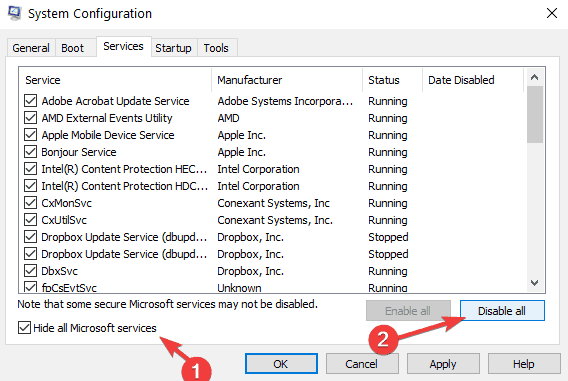
  3. Go to the Services tab > check Hide all Microsoft services > click Disable alldisable microsoft services
  4. Click Apply > click OK > Restart your computer and launch the game

We hope that our solutions were helpful, and we have also covered Battlefield 4 crashes, so you might want to read that for more information.

RELATED STORIES TO CHECK OUT:

Best software to open .DAT files with

Unlike other file extensions that usually let you know what program opens them, .DAT files are different. These files can be literally anything, from a plain old text document to an image. The problem is that since .DAT files can be anything, they can also contain viruses. This also makes .DAT the go-to format for most hackers and spammers. Fortunately, even antivirus programs can open .DAT files. Thus, it is better to be safe than sorry, and opening a .DAT file for the first time with a good antivirus is the right thing to do. There are plenty of such programs out there, so choosing the right one can be a bit problematic. That is why we’ve compiled a list of the best antivirus programs that you can open .DAT files with.

Top antivirus programs to open .DAT files with

Bitdefender Total Security 2020

Bitdefender Total Security 2020Topping out our list is an entry that tops out most general lists when it comes to the best antivirus programs, Bitdefender Total Security 2020.

This is not just a simple antivirus that you install, it is an entire suite of protection services that keep your PC, mail, e-wallet and pretty much anything else protected from cyber threats.

Pros:

  • The UI is constantly updated to be more intuitive and easy to use
  • Solid protection against phishing attacks
  • Proactive scanning of social networking profiles
  • Privacy protection and online transaction security

Cons:

  • Takes time to install

Get now

Kaspersky Anti-Virus 8.0 for Windows Servers Enterprise Edition

KaqsperskyKaspersky is a great antivirus program that is more suited for those that love automated programs so they don’t bother going through the hassle of too many manual check-ups.

It runs silently in the background, actively removing threats as it encounters them, and most of the time you won’t even know how infected your PC would have been unless you look in the virus vault.

Pros:

  • Advanced digital threat protection 30-day money-back guarantee
  • Virtual keyboard feature protects against standard keyloggers
  • Comes with a mobile protection package

Cons:

  • Support is not 24hours

Get now

Norton AntiVirus Plus

81WWbm1pOiL._SX679_Another big game in the antivirus world, Norton AntiVirus Plus is perfectly capable of taking care of all of your data protection needs.

It is constantly updated so you always have the latest protection against all known threats, and you won’t get headaches using it thanks to the intuitive UI.

Pros:

  • Efficient virus detection support
  • Constantly updated
  • 24/7 Customer support
  • Intuitive UI

Cons:

  • May take up a few system resources

Get now

Webroot SecureAnywhere AntiVirus

WebrootThe strongest point of Webroot SecureAnywhere AntiVirus is the small amount of system resources that it needs to run efficiently. This program will run in the background almost unnoticed, yet it will still provide you with above-average protection.

Additionally, the interface is relatively simple to read, although those of you that are less tech-savvy may need to read a guide or two.

Pros:

  • Fast and thorough scans
  • Low system resource usage
  • GoodURL blocking is on par with the leaders
  • Feature-rich
  • Long-term plans offer decent discounts

Cons:

  • The price tag on a singular device subscriptions

Get now

ESET NOD32 Antivirus

NOD32The final entry on our list isn’t necessarily the worst. ESET NOD32 Antivirus has been side by side the PC community, protecting it from online threats for what seems like ages.

It doesn’t use up a lot of resources, and the UI and configuration options make it an excellent choice for professionals and amateur users alike.

Pros:

  • Low system resource usage
  • Ultra configurable
  • You get great discounts with multi-device packages
  • Expert-level controls

Cons:

  • Inconsistent results over multiple tests

Get now

Closing thoughts on programs to open .DAT files with

Any of the entries on our list are perfectly capable of opening .DAT files without any worries of infecting your PC with any surprise malware.

More so, some of them will automatically scan the file the moment you copy it into your PC, so you can pretty much skip the opening it part altogether.

All in all, if you want to be protected from online threats, or work in an environment that requires you to keep your data extra safe, you can’t go wrong with any of the programs listed above.

Best 5 screen suction cups that you can buy

A screen suction cup is a tool you can use whenever you are repairing a device that has a screen. It basically acts as a regular suction cup, sticking to a device’s screen.

The suction power is enough to get a good grip on the screen but gentle enough to not damage it. More so, they are usually designed to be easy to use by anyone, not just specialized personnel.

There are plenty of such devices on the market for you to buy, so choosing one that is good can be a bit confusing. That is why we’ve compiled a list of the best ones that you can buy.

What are the best screen suction cups that I can buy?

KISEER Heavy Duty Suction Cups

KISEER Heavy Duty Suction Cups

If you’re looking to repair a device that has a screen, and you want to be gentle yet efficient, then you’ll need a good screen suction cup like the KISEER Heavy Duty Suction Cups.

These suction cups come in packages of two, and they are made from durable material and are extremely easy to use, even if it is your first time trying.

Pros:

  • The suction cup is made of industrial plastic and thick rubber, durable and not easy to bend
  • Suitable for all electronic screens, glass, metal, and other smooth surfaces
  • The package comes with 2 suction cups

Cons:

  • The rubber cup is too rigid

⇒ Get it now

ACENIX Suction Cup

ACENIX Suction Cup

The ACENIX Suction Cup is a bit different in design compared to the other screen suction cups, but overall the functionality stays the same.

You still have to press the rubber cup against the screen, and then you need to pull on the handle to remove it. The design that makes it so special is good for all grip types.

Pros:

  • Can be used to dismantle iPhones and iPads easily
  • High-quality materials
  • Non-slip tough shaft ensures greater comfort and convenience

Cons:

  • Only one included in the package

⇒ Get it now

Kaisiking Heavy Duty Suction Cups

Kaisiking Heavy Duty Suction Cups

The Kaisiking Heavy Duty Suction Cups are called that way for good reason. Not only is it capable of generating a large amount of suction force, but it is made of durable materials, allowing them to last you a long time.

More so you get two of these screen suction cups in a package, so if one does break, you’ll have a back-up.

Pros:

  • Made of durable ABS and natural rubber material
  • Designed for electronic equipment, LCD screens, glass, and smooth surfaces
  • Strong suction power
  • Rubber suction cup with heavy-duty locking handles

Cons:

  • Feels flimsy sometimes

⇒ Get it now

Not all screens are suitable for suction cups, but there are alternatives out there. If you need to pry open a telephone screen without damaging it, you could use an ultra-thin prying tool.

COHK Metal Spudger

COHK Metal Spudger

If you own a device that cannot be opened via suction cup, then you may need a tool like the COHK Metal Spudger. This acts as an ultra-slim crowbar that you can use to pry open devices without scratching them.

Additionally, it is also very flexible, allowing it to mold along with the shape of whatever you want to open.

Pros:

  • Ultra-thin steel pry tool for opening iPhones, iPads, Samsungs and many more
  • This tough tool nimbly opens modern small electronic casings
  • Professional Tools for replacing batteries, touchscreens, LCDs, covers, hard disks, etc.
  • Springy steel blade features a smart tip design and a handle with a great no-slip grip

Cons:

  • You need to be very careful when using it

⇒ Get it now

SHOWPIN 3 in 1 Smartphone Repair Kit

SHOWPIN 3 in 1 Smratphone Repair Kit

The SHOWPIN 3 in 1 Smartphone Repair Kit is an interesting entry on our list since it is actually a kit and not just a single product.

It contains a screen suction cup with plier handles, a metal screen pryer, and a screen wiper for you to clean things up after the job is done.

All products are made from good quality materials, and the kit is great at opening any type of device that has a screen attached to it.

Pros:

  • Kit contains a screen suction cup, a screen prying tool, and a screen wiper
  • Versatile and can be used on all device types
  • Neat screen suction mechanism

Cons:

  • Suction cups with plier handles may not suit everyone

⇒ Get it now

Closing thoughts on screen suction cups

Modern devices have a very sensitive screen that you can’t just open like you used to with older phones. Because of their construction, it is easy to bend or even break a screen altogether.

That is why using a more modern method of removing a screen is necessary, even if it does involve using something as simple as a suction cup.

5 Best Energy Management Software for Business in 2026

In an average corporate/business setting, the major sources of power consumption are usually servers/data centers (if any) and computer systems (laptops and desktops). There is also the issue of negligence (of energy saving) on the part of employees, while using their computers. The end result is heavy monthly power bills, which are not cost-effective. To address this issue, an employer needs to be “power-conscious” and to do this, he/she can easily adopt the services of a durable power management software. Power management solutions offer different features, which are primarily designed to grant users more control over the energy use of their computers. Two prominent features, in this regard, are report analysis and automated controls. In this post, we are going to be reviewing five of the most durable power management software for Windows PC.

Best power management software for Windows 10

1E Night Watchman

power management software1E Night Watchman is a top power management software that has been in existence for about two decades now. The software is among the pioneers in the power management industry (for computers), and it is, without doubt, one of the most reliable. Recognized as one of the best in the industry, 1E Night Watchman offers a wide range of energy saving features for users.

The software provides detailed analyses and reports on your computers’ power usage and energy consumption. These analyses can be executed collectively or on individual basis. Either way, you are able to gain more control over your computers’ power options. Also, the reports generated by these analyses are derived from accurate algorithms, which monitor your PC usage.

In addition, 1E Night Watchman offers you a set of customizable power management options, which can be modified according to the functionality of your device(s). It also offers you a set of functions, which enables you to execute certain tasks on your computer system while in sleep (energy saving) mode.

To employ the services of 1E Night Watchman, you would be required to fill an online form, detailing certain information about your business. Shortly after filling the form, a quote would be sent to your email.

Once the set up is complete, you can go ahead and enjoy the innumerable benefits of the power management software.

Download 1E Night Watchman

Verdiem Surveyor

power management softwareVerdiem Surveyor is a power management software developed by Aptean, and it is specifically designed Windows PC. Verdiem Surveyor was developed more than 17 years ago, in 2001. Today, it can stand toe-to-toe with any power management software, with respect to service delivery and customer satisfaction.

This power management software is built with algorithms that enable you to accurately monitor and detect the power consumption of each computer system on your network.

The software is fairly easy to use. It relies on an integrated interface, which facilitates the effective power management of all connected systems from a central location. Verdiem Surveyor allows users to accurately evaluate their energy expenditure (in multiple currencies) to ascertain the cost (value) of energy saved. It also hosts certain features that can be configured to further enhance your devices’ power saving capability.

Furthermore, the software affords you the opportunity of automating certain functions like; “when the PC is put to sleep”, “when the system wakes” and a host of other power saving options. Schedules can also be created for multiple and customizable groups of systems. Also, with the software’s EvokeIT function, users can wake remotely linked system(s) and execute certain security functions.

Lastly, Verdiem Surveyor offers custom pricing, and you will be required to fill a form, in order to get a suitable pricing (quote) plan for your business.

Download Verdiem Surveyor

PowerHawk

power management softwarePowerHawk was developed by Tangent, a leading provider of specialized computer-based solutions. The software is a server-based solution which enables the control of power and energy management options from a centralized device.

One major benefit of PowerHawk is that, you don’t need to install the software on individual computers; power settings are sent directly to every computer on the network, via the “Active directory .msi package”. Furthermore, it can be used on virtually all computer systems due to its relatively low system requirements. This makes it ideal for managing power consumption on old PC versions.

Additionally, PowerHawk allows you to create a schedule of power settings. This can be on hourly, daily or weekly basis. Also, the software allows for flexibility in power consumption, as different set of instructions can be modified to serve the needs of different groups of PCs on your power management network.

You can also override a set of default power commands on your computer or modify it, as you see fit.

Nevertheless, PowerHawk offers a free version, specially designed for personal use on a single computer. Also on offer is the premium version, albeit at an affordable price. To enlist the software’s services, simply fill the form on their website.

Download PowerHawk

Powerpro Manager

Powerpro Manager software

Powerpro Manager is one of the most prominent power management software in the market. As claimed by the software’s developers, Powerpro Manager saves up to $35 per computer, in energy cost, every year. The software is compatible with different versions of Windows, from Windows 10 down to Windows 2000.

In addition, Powerpro Manager is server-based utilizing a central server console to control the power settings of all computers connected to the network. With this, you are able to save time and optimize your power management process.

Also, configuration updates on power management are automatically deployed, even when your computer is in sleep mode or outrightly shut down.  Statistical analysis on power consumption is carried out by the software, detailing the power usage of each computer on the server.

Furthermore, basic power options like “turn-off monitor”, “standby”, “shutdown”, “hibernate” and so on can be executed directly on the software, and it promptly sends out a confirmation message before shutting down the target computer.

Powerpro Manager is compatible with Wake-On-Lan, which can be adopted to wake any computer on your power management network.

Powerpro Manager offers a free version, which is equipped to support up to fifty computer systems. This makes the software ideal for small and medium scale businesses. The premium version, on the other hand, requires a paid subscription, and it comes with special support services.

Download Powerpro Manager

PwrSmart Software

power management softwarePwrSmart Software is an effective energy saving software that helps users control the power settings of their computers. It minimizes power consumption by automatically powering down computers when not in use. This energy saving software hosts a user-friendly interface, which provides instant control upon installation.

In addition, PwrSmart hosts a set of power packages, which have been created for different scenarios. This makes the software fairly easy to use for new users, as you can easily draw out any package from the pool of available power management packages to serve your needs.

Furthermore, the software is compliant with relevant power management standards, thereby ensuring that you get the best of energy saving experience. Also, users are notified of upcoming power schedules like system hibernation or standby, and you can easily customize such notifications.

Lastly, PwrSmart is compatible with different versions of Windows, and it can be accessed from remote locations. It offers a custom-pricing plan, which is dependent on the number of computers on your network. However, you can use the software on a free trial for a brief period, before subscribing to a paid plan.

Download PwrSmart Software

Have you made use of any of the aforementioned power management software above? Let us know by commenting below.

RELATED STORIES TO CHECK OUT:

Best Digital Photo Frames with Wi-Fi

Digital photo frames are devices designed to store and display thousands of images, either as a slideshow or a specific one of your choice. Some picture frames are also able to play videos.

However, the latest advancement in the digital picture frame industry is the addition of Wi-Fi connectivity. The use of Wi-Fi makes it possible to share and receive pictures from loved ones via their digital photo frame equipped with Wi-Fi.

This improvement eliminates the distance barrier and makes it possible for family members to share precious moments with you, and vice versa.

In case you need something with extra functionality, we wrote about the best digital photo frames that play videos, so be sure to check them out.

Knowing that there are thousands of photo frames with Wi-Fi, each one with their own perk and disadvantage over the other, we have scoured Amazon and picked our top five digital picture frames with Wi-Fi.

What are the best digital photo frames with Wi-Fi that I can buy?

FULLJA Digital Picture Frame – Best overall

  • 10.1-inch touchscreen display
  • 1280×800 resolution, 170-degree viewing angle
  • Wi-Fi image upload for up to 30 users
  • 16 GB storage
  • Expandable via SD or USB drive
  • Occasional freezing
  • No USB-C connection

This is a 10.1-inch device and it comes with a 1280×800 touchscreen display and 170-degree viewing angle. It’s equipped with 16GB storage, but it also supports SD cards up to 32GB and USB drives.

It supports automatic rotation so you don’t have to configure anything. Regarding the file transfer, it supports Wi-Fi and it can work with up to 30 senders.

Additional features include video playback, music, slideshows, a weather app, an alarm, a calendar, and a motion sensor. Overall, it’s a great device and perfect for sharing memories.

Skylight Frame: 10 – Incredibly simple to use

  • 10-inch touchscreen display
  • 1280×800 resolution
  • Cloud storage
  • No app required
  • Added costs for certain features
  • Can’t change the orientation of the frame

This digital frame comes with a 10-inch touchscreen, and it uses 1280×800 resolution. It uses cloud storage, and to use it, you need a Skylight email address.

The device doesn’t require any apps, it’s easy to set up and will take you just a few minutes to do so. In case you’re not a fan of email, there’s a dedicated app available as well.

Navigating is easy with the touchscreen display, and you can swipe through photos, browse the gallery, zoom, or delete the photos with ease.

Feelcare 10.1 Smart WiFi Digital Picture Frame – Secure sharing

  • 10.1-inch touchscreen display
  • 1280×800 resolution
  • Dedicated app for quick file upload
  • microSD and USB slot
  • All app communication is encrypted
  • Uploading images from PC is not possible
  • Slideshows are too slow

This digital frame has a 10.1-inch display, 1280×800 resolution, and a touchscreen display. For file upload, it uses a dedicated app for file upload, and no account is recreated.

If you prefer more traditional transfer methods, USB and microSD slots are available as well. The device supports automatic rotation, so all your pictures will rotate depending on the orientation of the frame.

All communication with the digital frame is encrypted, and the company doesn’t have access to your photos, so you can rest assured that they are completely private.

FRAMEO 10.1 Digital Photo Frame – Offers many features

  • 10.1-inch 1280×800 touchscreen display
  • Supports popular image formats
  • 16GB internal storage
  • microSD card slot for expansion
  • Auto-rotate feature
  • The app has limited features
  • No way to upload images from PC

This digital frame supports popular image format and MP4 files, but keep in mind that videos are limited to 15 seconds max. As for the specs, this is a 10.1-inch device with a 1280×800 resolution.

You can upload files via the dedicated app, and there’s 16GB of storage available, but it can be expanded with a microSD card up to 32GB.

The device is highly customizable and you can rotate it, hang it on a wall, adjust the play order, zoom level, hide images, add captions, and more with ease.

MaxAngel Digital Picture Frame – Easily expandable storage

  • 10.1-inch touchscreen display
  • 1280×800 resolution
  • Dedicated app for image upload
  • 16GB storage space
  • Supports microSD cards up to 32GB
  • No way to transfer images directly from the PC

Just like other entries on this list, this is a 10.1-inch 1280×800 device with a touchscreen. It comes with a user-friendly interface and it’s easy to set up.

The device has 16GB storage and it can support cards up to 32GB for expansion. Uploading images is possible via the dedicated phone app.

Automatic rotation is available, meaning that all your images will rotate automatically. If needed, you can also hang this digital frame on the wall.

Digital picture frames are a great investment for large families with thousands of photos. You get a chance to display and relive these moments without the stress of searching for old photo albums.

These picture frames with Wi-Fi are a huge step up, as you can easily share pictures with your loved ones from any part of the world. It doesn’t matter if you’re looking for a simple picture frame or you’re looking for one with the latest cutting-edge technology, we’ve picked out the best five we’re certain will cover all your needs.

In case you’re looking for something more user-friendly, we have a great guide on digital photo frames for the elderly to consider.

While Amazon has a ton of awesome digital picture frames with Wi-Fi, we have chosen the top five that stood out to us based on available storage, technological advancement, and aesthetics.

Download Outlook Web App for iPhone, iPad

Business Office 365 subscribers have a new reason to be happy about. Microsoft has just pushed out a set of Outlook native apps especially designed for the iPhone and iPad.

Outlook is a program that basically allows users to access their email addresses adding a bunch of other neat functionalities like calendar or contacts. Of course, the native version also brings some “additional capabilities that are only possible through native integration of the app with mobile devices.” This means gesture support and voice control are also added to the menu.

Try the Outlook native app for iPhone, iPad

download outlook web app ipad iphone
More than that, your inbox can now be accessed offline without requesting an Internet connection. The whole list of features includes:

  • Organize your email quickly with Conversation View, Mark as Junk, Flag, and Categories
  • Quickly search or browse email in all folders including Outlook Favorites
  • Manage your schedule with ease
  • Schedule meetings using attendee free/busy and room finder
  • View shared calendars including delegate support
  • Use your voice to look up a contact or bring up your schedule
    Keep business data secure
  • Remote wipe erases only your corporate data in OWA for iPad and leaves your personal data on the device alone
  • Separate passcode for OWA for iPad provides an additional layer of security

The native app brings pretty much the same functionalities as its browser correspondent the Outlook Web App and we’re happy to report it’s not just another patched up app.

By releasing the Outlook up only to active Office 365 subscribers, Microsoft is trying to bring more iOS users in. Last month it did the same when it released the Office Mobile suite for iPhone only to this specific target group. However, the apps are free to download from the App Store. But not everybody feels that Microsoft is playing a fair game. A month ago, Forrester analyst Frank Gillett commented:

Anyone [with Office 2013] should be able to access the app. They’re continuing the artificial advantaging of one product over another to change customer behavior. We think that’s a major mistake.

The same can be said of the Outlook app, but it remains to be seen if the strategy finally pays out.

Download OWA for iPad
Download OWA for iPhone

5 Best Stick PCs For Streaming

For those of you that don’t know, a stick PC is a single-board computer that’s pretty much the size of a USB stick that can be plugged in directly into an HDMI port, without the need of an HDMI cable. These stick PC‘s are quite impressive given their size, but they in no way can replicate the power of an actual PC or even a laptop of a fanless mini-computer. In fact, their use is pretty simplistic and usually for a precise purpose, such as streaming media more efficiently. Note: Deals are subject to change. Keep in mind that the price tag often varies. We recommend going on the vendor’s website to check the price. Some of the products may be out of stock by the time you’ve made your purchasing decision. So, hurry up and hit the buy button.

What are the best stick PCs that I can buy right now?

ASUS Chromebit CS10

best stick pc ASUS Chromebit CS10If you want a device that fits in your hands and that will easily turn any HDMI device into a Chrome OS computer, then the V is the right choice for you.

It is a great stick PC for streaming online content such as Netflix, and can even support 4K content. More so, it features USB ports that lets you extend the storage even more via USB sticks.

Pros:

  • Smallest Chrome OS device
  • Turn any HDMI display into a computer and 100 GB Google Drive space
  • Dual-band a/b/g/n/ac 802.11 Wi-Fi
  • Bluetooth 4.0
  • 16 GB Flash memory storage
  • Included HDMI extender cable and 4 hook and loop stickers
  • Thousands of Chrome OS apps at your disposal
  • Power supply: 18 W power adapter

Cons:

  • Heats up fairly easily
  • Start lagging over long uses

Check Price

Intel Compute Stick CS125

Intel Compute Stick CS125The Intel Compute Stick is a very good device that you should consider if you want to enjoy a new level of home entertainment since it lets you transform any HDMI display into a full computer.

It comes with Windows 10 pre-installed and all you need to do to make it work is simply plug it in into an HDMI port-compatible display, or you can even use an HDMI adapter.

Pros:

  • Quad-Core Intel Atom x5 Z8300 Processor
  • Windows 10 (32 bit)
  • Intel HD graphics
  • 2 GB DDR3L 1600 MHz soldered down single-channel memory
  • Integrated Wireless 802.11ac (Intel Dual Band Wireless AC 7265)
  • One USB 3.0 and One USB 2.0
  • Bluetooth 4.0

Cons:

  • Doesn’t work well for 4K streaming
  • Not compatible with all TV brands

Check Price

Azulle Access Plus

Azulle Access PlusIn essence, a stick PC is a device that will turn any HDMI-compatible display into a PC, and that’s precisely what you’ll get if you buy the Azulle Access Plus.

It sports good enough stats to warrant its place on our list, and it comes at an affordable price. It features quite a large storage space that can also be expanded upon, making it great for carrying content around as well.

Pros:

  • 4GB of DDR3L RAM,
  • 32 GB of onboard storage
  • Micro SDXC card Slot providing up to 128GB of storage
  • Built with a quad-core processor
  • 4GB of DDR3L RAM
  • Can stream HD 1080P content thanks to its Intel HD Graphics card (Gen 8)
  • Offers both Wifi connectivity and an Ethernet port

Cons:

  • Overall poor quality

Check Price

ASUS VivoStick TS10-B017D

best stick pc streaming ASUS VivoStick TS10-B017DWhen they designed the ASUS VivoStick TS10-B017D, they probably looked at what stick PCs usually have problems with, and they focused on fixing just that.

The only entry on our list to have a built-in fan, the ASUS VivoStick TS10-B017D is great for usage over long periods of time, so binging and streaming media will not be a problem at all.

Pros:

  • Measures only 5.3 x 1.4 x 0.6 inches
  • Quad-core Intel Atom x5-Z8350 processor
  • Bluetooth 4.1 and 802.11ac Wi-Fi
  • VivoStick features an internal cooling fan to prevent overheating
  • 1x USB 2.0
  • 1x USB 3.0 ports
  • ASUS VivoRemote app for intuitive control from mobile devices

Cons:

  • Nothing noticeable

Check Price

W5 Pro

best stick pc streaming W5 ProThe W5 Pro occupies a spot on our list thanks to it being the most basic and budget-friendly stick PC given the specs that it brings.

While the capabilities that it sports are average, the fact that you can turn a TV or monitor into a mini-computer for such a low price is quite impressive.

Pros:

  • Windows 10 Pro Version Preinstalled
  • 4GB DDR,64GB eMMC,Support Micro SD card up to 128GB
  • Built-in 2.4G/5G AC WiFi and Bluetooth 4.2
  • Intel HD graphics,
  • Supports 4K HD
  • Two USB ports (one 2.0 and one 3.0)

Cons:

  • Price tag too high given the specs

Check Price

Closing thoughts on stick PCs for streaming

Stick computers are by design meant to be used for singular purposes, and streaming content off of the Internet is probably the most resource-intensive task of them all.

As such, if streaming is your primary concern, but you lack the funds to replace your regular TV with a Smart TV, then a stick PC can be the next best thing for you.

5 Best Linux Gaming Consoles To Check Out In 2026

Gaming had been a major chokepoint for the Linux platform over the last couple of years. Following its launch in the early ‘90s, the open-source operating system had difficulty competing in the gaming arena for decades. Thanks to the significant upgrades in recent years, gaming on Linux has now improved.

Steam and Feral Interactive are among the premier digital distribution platforms that have made great strides in terms of improving a player’s Linux gaming experience. For its part, Steam built a range of gaming consoles under the Steam Machines family. At its core, Steam Machines are computers that double as a gaming console. In addition to Steam Machines, there are other Linux gaming console products already available in the market today. Without further ado, let’s check out some of these consoles.

Alienware Steam Machine (recommended)

Alienware Steam Machine
If you’re looking for an immersive gaming experience complete with a vast selection of games in full 1080p HD on your TV, then the Alienware Steam Machine is a nice find. The console packs the high-performance NVIDIA GeForce GTX GPU 2GB GDDR5 graphics and Intel Core processors. Players can also have a holistic command of games using the Steam Controller that ships with the console.

Released in November 2015 by Alienware, the console also lets players stream Steam games to their TV from their home network. Players can gain quick access to a massive library of Steam games, entertainment, and a community of gamers worldwide even without a membership fee.


Zotac NEN (suggested)

ZOTAC NEN
NEN is a sleek Steam Machine with a discreet form factor. Released in November 2015 by Zotac, the gaming console is powered by the sixth-generation Intel Core i5-6400T quad-core Skylake processor and NVIDIA GeForce GTX 960 graphics hardware. Like other gaming consoles, NEN comes with a controller to run a vast array of games, including first person shooters and real time strategy games. The gaming console also packs dual trackpads, HD haptic feedback, dual-stage triggers, and back grip buttons.


Maingear DRIFT

Maingear DRIFT
Maingear DRIFT combines the latest hardware from Intel, Nvidia, and AMD to provide ultra HD gaming in the living room. The customizable gaming console boasts of its uni-body aluminum chassis that houses the same power as a full desktop PC.

Game storage often requires massive memory capacity. But with Maingear DRIFT, storage doesn’t have to be one of your worries. The console offers several storage options, including two SSDs and a large HDD. If those options are not enough, you can upgrade the console for a richer games library.

Maingear, the console’s manufacturer, designed the gaming device with a small form factor and a closed loop liquid cooling that requires no maintenance. The console also packs an impressive airflow. Users will also be able to personalize the console’s color with Maingear’s automotive paint finish. Powered by Valve’s Steam OS, DRIFT provides excellent performance to players with a smooth interface. DRIFT is available to purchase from Maingear for $1,099.

Editor’s Note: If you’re interested in other gaming laptops, headsets and controllers, check out our wide collection of guides.


Materiel.net Steam Machine

Materiel
Materiel.net Steam Machine packs a modern architecture that offers an impressive HD visual experience to players. Powered by Steam OS, the Steam Machine allows players to launch Steam games on TV. The console also provides users the ability to share content including music and videos.

The Steam machine features the Intel Core I5 and NVIDIA GTX 960. Its scalability also means you can upgrade the graphics card, RAM, processor, and storage to enjoy the latest games. The console is available to order from Materiel.net’s website.


Scan 3XS ST

Scan 3XS ST
3XS Systems worked closely with Valve and NVIDIA to develop the ST-series of gaming consoles, a small form factor gaming PC built to consume little space in the living room. Compared to traditional gaming consoles, Scan 3XS ST is more quiet and only a quarter of a PC’s size, with a dimension of 382 x 105 x 350 mm.

Users can also customize the ST-series system using different GPUs, CPUs, RAM, and storage devices available for the console. You can snag the gaming console from Scan.


While Windows remains the de-facto platform for gaming, Linux now wants to catch up with those gaming consoles. If there are any other Linux gaming console hardware not mentioned above, let us know about them in the comments below.

5 Best Nighthawk Routers For Strong Wi-Fi Coverage

Netgear is a famous network hardware manufacturer, and its products are one of the best on the market. This is especially true for its Nighthawk series of routers. Nighthawk series offers amazing features and quality,  so we decided to bring you to the best Nighthawk routers that you can buy. Note: Deals are subject to change. Keep in mind that the price tag often varies. We recommend going on the vendor’s website to check the price. Some of the products may be out of stock by the time you’ve made your purchasing decision. So, hurry up and hit the buy button.

Top Nighthawk router deals to get

NETGEAR Nighthawk X10

NETGEAR Nighthawk X10 best nighthawk routers

Netgear Nighthawk X10 is a tri-band device and it provides speeds up to 800/1733/4600 Mbps depending on the band you’re using. The device offers a range of 2500 feet, which should be more than enough for your needs.

Additional features include 6 Gigabit Ethernet ports, 4 amplified antennas, Beamforming+, MU-MIMO, Dynamic QoS and two USB 3.0 ports.

Pros:

  • 2500 feet range
  • Tri-band device with AD7200 speed
  • MU-MIMO, Beamforming+, WPA2 wireless security.

Cons:

  • Minor software issues

Check price

NETGEAR Nighthawk Pro Gaming XR500

NETGEAR Nighthawk Pro Gaming XR500 best nighthawk router

Another amazing high-end router that you should check out is Nighthawk Pro Gaming XR500. This is a dual-band device and it supports speeds up to 2.6Gbps.

The device has two USB 3.0 ports and four Ethernet ports. The router has support for QoS ensuring that you have a lag-free gaming experience on your device. The device has four external antennas as well as support for MU-MIMO.

Pros:

  • Software that optimizes gaming traffic
  • 6Gbps speeds
  • QoS support

Cons:

  • Minor issues with QoS

Check price

NETGEAR Nighthawk Smart WiFi Router (R7000)

NETGEAR Nighthawk Smart WiFi Router (R7000) best nighthawk router

NETGEAR Nighthawk Pro Gaming XR500 offers 1800 feet range and dual-band support. The device offers speed up to 600Mbps and 1300Mbps, and it can provide a wireless connection for up to 30 devices.

Four 1Gbps Ethernet ports are also available, so you can connect wired devices as well. There are 3 amplified antennas, as well as single USB 3.0 and a single USB2.0 port. Regarding the security, there’s WPA, Guest Wi-Fi, DOS, Firewall, and VPN.

Pros:

  • 1800 feet range
  • Smart parental controls
  • Beamforming +, Dynamic QoS, Smart Connect
  • WPA2, Guest Wi-Fi, Firewall

Cons:

  • Few complaints regarding firmware upgrades

Check price

NETGEAR Nighthawk X8

NETGEAR Nighthawk X8 AC5000 best nighthawk router

This is a tri-band device and it delivers speeds up to 600/2166/2166Mbps. There are six Gigabit Ethernet ports, so you can connect wired network devices as well.

In order to provide you with a lag-free gaming experience, there’s a Dynamic QoS feature. The device is easy to set up thanks to the dedicated app, and you can use the application to manage your Internet connection with ease.

Pros:

  • Tri-band device
  • Speeds up to 600/2166/2166Mbps
  • Dynamic QoS, MU-MIMO, four external antennas

Cons:

  • The interface could be better

Check price

NETGEAR Nighthawk Smart WiFi Router

NETGEAR Nighthawk Smart WiFi Router best nighthawk router

This is one of the more affordable members of the Nighthawk router family. The device has a range of up to 1500 feet and dual-band support. Regarding the speed, this router will deliver up to 450 and 1300Mbps.

Additional features include 4 Gigabit Ethernet ports, a single USB 3.0 port, Beamforming+, Dynamic QoS and Smart Connect.

Pros:

  • 1500 feet range
  • Dual-band
  • 450/1300Mbps speed
  • Beamforming+, Dynamic QoS
  • Easy setup with a dedicated app

Cons:

  • Few users reported connection issues

Check price

Final thoughts on best Nighthawk routers

Nighthawk routers are one of the best on the market, and they will be a perfect addition to your home network, so be sure to get one of these models as soon as you can.

This specific deal is part of our bigger selection of the best router deals you can find. You might also want to check out our dedicated Black Friday hub for tech deals.

Best smartphone armbands for running

Keeping track of your fitness achievements is very important for motivation as being able to keep up with them translates to continued progress.

If you own a smartphone and you want to use it to track your fitness progress, then you’ll need an armband. Check out some of the best ones below!

Fitness armbands for smartphones

Shocksock Armband

This phone armband from Shocksock fully protects your phone and also looks good. Insert your phone, tuck in the protective flap, secure it with the adjustable velcro strap and you’re ready to go.

Designed specifically for the Lumia 640, this armband features a touchscreen sensitive film as well as a headphone jack opening.

Thanks to its dual slot design, you can easily adjust the band size to perfectly fit your arm. You can even fit the armband over clothing or wear it on your forearm.

The best part of this armband is that its material can be easily hand washed and doesn’t retain moisture or bacteria.

⇒ Get it now

VanGoddy Workout Armband

This fitness armband is made of durable, super strong material and is equipped with a reinforced high-grade plastic interior to prevent moisture build up on your phone. It comes with two-piece adjustable velcro straps that can extend from 16.5 in to 22 inches to fit small and large arms.

VanGoddy recommends this armand for the following phone models: the Nokia Lumia 1020, Nokia Lumia 625, Nokia Lumia 928, Nokia Lumia 925, Nokia Asha 210, Nokia Lumia 720, Nokia Lumia 520, Nokia Lumia 525, Nokia Lumia Icon, Nokia X+, Nokia X, Nokia Lumia 930, Nokia Lumia 635, Nokia Lumia 630, Nokia 225, Nokia X2.

⇒ Get it now

MoKo Universal Waterproof Armband

The MoKo armband is perfect for phones up to 6 inches large and also offers some extra space for you to put your credit card, ID, cash, etc.

Its slim transparent cover supports full touch screen functionality, even underwater. This means that your phone is safe no matter what sport you’re practicing. Moreover, this case offers water and dirt protection as well.

You can also use the MoKO armband to hang your phone around your neck thanks to the detachable lanyard if you’d like.

⇒ Get it now

MyValor Premium Workout Armband

MyValor’s workout armband allows you to take your Lumia phone with you when you’re working out, jogging, doing outdoor activities or anytime you’re on the go.

Itsadjustable velcro restraint strap is designed to comfortably accommodate most arm sizes. As far as the compatible phones are concerned, the armband is designed to fit extra-large phone models up to 6.30 x 3.4 x 0.65 inch.

Its manufacturer recommends it for the following Lumia models: Lumia 950 XL, Lumia 640 XL, Lumia 1320 and Lumia 1520.

⇒ Get it now

Which armband are you planning to buy?

RELATED STORIES YOU NEED TO CHECK OUT:

5 Best Mini Drones For Every Need

Having a mini drone can have its advantages. For one thing, the small size makes it incredibly lightweight and portable, allowing it to stay for longer hours into the air. Additionally, the lack of bulky electronics means that they are also cheaper than regular drones, and can even make good toys for children. If you too are looking to buy a mini drone, then you better know which are the best on the market. That is why we’ve decided to compile a list of what we think are the best mini drones that you can buy, by taking specs, performance and cost into account. Note: Deals are subject to change. Keep in mind that the price tag often varies. We recommend going on the vendor’s website to check the price. Some of the products may be out of stock by the time you’ve made your purchasing decision. So, hurry up and hit the buy button.

What are the best mini drone deals to grab today?

Holy Stone HS170 Predator

Holy Stone HS170 PredatorThere’s a reason why the Holy Stone HS170 Predator is probably the most popular drone on Amazon. Not only does it sport an attractive design that will surely make kids want it, but it is extremely beginner-friendly as well.

More so, it is easy to control in the air thanks to the gyro-stabilizing system, and the affordable price makes it great to have in almost any household.

Pros:

  • Headless security system
  • 2. 4GHz technology adopted for anti-interference
  • More stable and flexible with 6-axis gyro stabilization system
  • Wind-resistant control range of about 30-50 meters

Cons:

  • Flight time of 6-8 minutes on a 45-minute charge

Check price

Vandoras Mini Drone

Vandoras Mini DroneIf you’re looking for a mini drone that will make your children happy, then the Vandoras Mini Drone is the right choice for you. Not only does it have a compact and playful design, but the easy controls and stabilizing system makes it ideal for children and beginners alike.

More so, it is incredibly agile and can perform a wide range of acrobatics in the air, just as long as you don’t ram it into the first chandelier.

Pros:

  • You can release the throttle stick and the drone will keep the current height
  • Super simple control
  • Super easy fly for beginners and hobby users.
  • One key 3D rolling special effects
  • Flip in 4-Ways Flip
  • Continuous roll steady performance
  • Headless Mode can help to control it easier and prevent it from losing the direction.
  • Equipped with the latest 6-axis Gyro flight control systems
  • Small and portable

Cons:

  • Slight battery issues

Check price

Potensic Upgraded A20

Potensic Upgraded A20The Potensic Upgraded A20 is a mini drone that takes the “mini” part of its description quite literally, being the smallest entry on our list, even when fully unfolded.

This tiny flying machine has quite a bit of power in it and can be easily controlled even inside the house since you don’t have to worry about damaging anything if it hits it at full speed.

Pros:

  • 2 detachable batteries and 3 adjustable speed levels
  • You could control the drone fly toward any directions by Remote Controller
  • Has Altitude Hold, Headless Mode and One Key Taking-off / Landing
  • It’s the width of an iPhone 5
  • Extremely lightweight and easy to carry

Cons:

  • Cheaply made, but at least you won’t cry if it breaks

Check price

Force1 UFO 3000

Force1 UFO 3000Yet another mini drone that will surely catch the eye of your children, the Force1 UFO 3000 is an incredibly flashy and nimble flying machine.

The LED propeller guards make it very nice to look at, and the miniature size make it an excellent kid’s toy, so that if he flyes it around the house, at least it won’t do too much damage.

Pros:

  • Super easy to fly with 1-Key Start/Stop and easy joystick directional controls
  • Features durable propeller guards ringed with glowing blue and green LEDs
  • Outdoor/indoor drone features 4 channels, 2 speeds, Altitude Hold and Headless Mode
  • Can also perform 360° mini flips
  • Measures 5.5-inch x 5.5-inch and flies up to 18 minutes with 2 included rechargeable batteries
  • They make great toys

Cons:

  • The occasional quality control issues

Check price

SNAPTAIN H823H

SNAPTAIN H823HThe SNAPTAIN H823H is a mini drone designed specifically for kids and boasts a design that makes it look like a flying dune buggy more than anything else.

More so, it is extremely easy to control, so even if your kid is the one piloting it, you don’t have to worry about him breaking it, or at least not too easily.

Pros:

  • Will hover at a certain height when you release the throttle stick.
  • The robust and fantastic 360°flips and rolls
  • 6-Axis Gyro flying control system.
  • Has Headless Mode
  • One Key Return
  • 3-speed control to meet the needs for beginners, intermediate and experts.
  • Mini pocket size makes it ultra portable.

Cons:

  • Connectivity issues

Check price

Closing thoughts on mini drones

While mini drones aren’t necessarily designed for children, their small size and low cost make them ideal as an expendable child’s toy, or as a means to learn how to fly a real drone.

As such, whether you want to gift your kid a flying saucer, or are trying to make a friend pick up drone flying, there’s no way you could go wrong with a mini drone.

4 Best Jaybird Headphones For The Ultimate Listening Experience

If you’re a fan of Logitech gear and love listening to music on your headphones, then you probably know about Jaybird and all of the cool gear that they manufacture especially the wireless Bluetooth sports headsets. If you too want to buy a pair of Jaybird headphones but aren’t exactly sure which model fits you best, then check out our list of the best Jaybird headphone sets that you can currently buy. Note: Deals are subject to change. Keep in mind that the price tag often varies. We recommend going on the vendor’s website to check the price. Some of the products may be out of stock by the time you’ve made your purchasing decision. So, hurry up and hit the buy button.

What are the best Jaybird headphone deals available?

Jaybird RUN

best headphones Jaybird RUNIt doesn’t matter how active your life is or how intense the sports you play are, the Jaybird RUN is a pair of headphones that will easily be able to keep up the pace.

This is thanks to the great comfortable design, sweat, and water-resistant build and long battery life that will keep them going long after you’re already tired.

Pros:

  • Secure comfort-fit, no matter the shape of your ea
  • Sweat-proof and water-resistant and sensitivity
  • Can adjust the lows, mids, and highs
  • The Jaybird app can locate your buds if they go missing
  • 12-hour battery life
  • Single control button

Cons:

  • Price tag
  • Easy to misplace

Check Price

Jaybird RUN XT

best headphones Jaybird RUN XTThe Jaybird RUN XT is the second generation of the all-terrain Jaybird True wireless earbuds. They combine an ultra-comfortable active fit design and premium sound in a fully waterproof and sweat-proof IPX7 casing.

The headphones’ battery provides 4 hours of playtime per charge and holds an additional 8 hours of power in the included charging case for longer and more intense workouts.

Pros:

  • Secure comfort-fit, no matter the shape of your ea
  • Sweat-proof and water-resistant and sensitivity
  • Can adjust the lows, mids, and highs
  • The Jaybird app can locate your buds if they go missing
  • 12-hour battery life
  • Single control button
  • Premium sound with custom EQ – a unique, personalized music experience

Cons:

  • A disarming price tag
  • Easy to misplace

Check Price

Jaybird X4

best headphones Jaybird X4The Jaybird X4 is your everyday sports headphones made to withstand weather conditions that would put other models to shame, while still being comfortable thanks to the soft foam tips.

It has a long-lasting battery life that can be recharged fairly quickly, and it can deliver high-quality sound despite the small size, making it great for extended jogging sessions.

Pros:

  • 8 hours of playtime a single charge
  • Charging time: 2 Hrs
  • Sweatproof
  • Fully waterproof (Ipx7) protection
  • Sport fit plus comfortable, versatile design
  • Comply Ultra foam tips
  • Premium sound with custom EQ uncompromising sound quality

Cons:

  • Price tag
  • Fragile to physical shocks

Check Price

Jaybird Tarah

best headphone Jaybird TarahStaying true to the Jaybird brand name, the Jaybird Tarah is a pair of wireless headphones that provide you with everything you need to listen to music while going through intense workouts.

The sweatproof and water-proof design along with the 6-hour playtime allow the headphones to keep up with you even over extended periods of intense fitness activities.

Pros:

  • 6-hour playtime
  • Sweatproof and waterproof (IPX7) protection
  • Includes ultra-soft and flexible silicone ear gels
  • Premium sound quality with custom EQ
  • Can manage music and calls without interruption
  • 10 minutes of charging provides a full hour of playtime

Cons:

Check Price

Closing thoughts on jaybird headphones

Staying healthy is good, but it isn’t always that pleasant, so it goes without saying that we may occasionally see the need to spice things up a bit.

For example, working out with music playing in the background can do wonders, but finding headphones that will keep up with the strain, sweat and water is pretty hard.

As such, if you’re the active type and are looking for a good set of headphones, then the Jaybird product line is a good place to start

5 Best Roland Digital Pianos For A Professional Sound

Roland is a well-known manufacturer of electronic musical instruments. This brand has been with us form some years now and has released a wide variety of musical instruments that have had an impact on the music industry as a whole. Among the musical instruments that they make, they also deal with the creation of digital pianos, which are top quality in themselves. If you too are looking to get a Roland digital piano, then you should check out our list of the best Roland digitals pianos available. Note: Deals are subject to change. Keep in mind that the price tag often varies. We recommend going on the vendor’s website to check the price. Some of the products may be out of stock by the time you’ve made your purchasing decision. So, hurry up and hit the buy button.

What are the best Roland digital pianos that I can buy?

Roland A-800PRO-R

best digital piano Roland A-800PRO-RIf you’re looking for keyboard controllers that you can use in the studio, on-stage, or anywhere you feel inspired, then the A-800PRO is the last digital piano that you will ever need.

It manages to perfectly blend Roland craftsmanship with Cakewalk’s legendary ease-of-use, the A-800PRO has the features and feel you need to get the most out of your music performances and productions.

Pros:

  • Velocity-sensitive 61 keys with channel aftertouch
  • 45 assignable controls
  • USB Bus Powered
  • 8 Dynamic Pads for finger drumming and MIDI triggering
  • Works with any DAW on Mac or PC
  • Durable Roland-quality manufacturing and craftsmanship

Cons:

  • May have certain firmware issues

Check price

Roland FP-90-BK

best digital piano Roland FP-90-BKIf you love the sound of an authentic piano but wish you could actually carry it everywhere with you without the need of a truck, then the Roland FP-90-BK is just the model that you need.

If features authentic acoustic piano sounds, and the keys made from wood and molded materials feel even more authentic, making any living room music session feel like a grand opera recital.

Pros:

  • An authentic grand piano touch from the PHA-50 keyboard
  • Uses the latest Supernatural Piano Modeling technology
  • Four speakers provide powerful and rich sound
  • A premium selection of electric piano, strings, organ, and synth sounds
  • 30 registrations for storing favorite sound setups, including layers and splits for live performance
  • Can connect your smartphone or tablet via Bluetooth wireless technology and play along with audio from your apps
  • Maximum Polyphony:384 notes

Cons:

  • The price tag

Check price

Roland JUNO-DS88

Roland JUNO-DS88If you’re looking for a synthesizer that can double as pretty much any musical instrument, then the Roland JUNO-DS88 is the model that you need.

It is great for emulating the look and feel of an actual acoustic piano, but the abundance of electronic features also make it a great music console that you can carry on your lap.

Pros:

  • Gig-ready instrument with pro sounds, enhanced performance features, and battery-powered operation
  • 88-note Ivory Feel-G Keyboard
  • Includes all the sounds from the popular JUNO-Di
  • Includes newly updated acoustic and electric pianos, additional organs, and other stage essentials
  • Wave expansion slot
  • Sample import function for playing user WAV files on the JUNO-DS88’s keyboard
  • Easy sound manipulation and editing
  • Eight Phrase Pads

Cons:

  • Roland service is subpar in case of issues

Check price

Roland FP-60-BK

best digital piano Roland FP-60-BKThe Roland FP-60-BK is the go-to digital piano when you are just starting to learn how to play, thanks to the abundance of features that are there to help those that are less musically-inclined.

The Roland FP-60-BK is designed to emit a sound quality that sounds as authentic as possible, and the keyboard is meant to emulate the feel of that of a real grand piano.

Pros:

  • Supernatural piano sound engine with 288-voice polyphony 
  • Phat-4 keyboard with escapement and ivory feel keys
  • Connect your smartphone or tablet wirelessly via Bluetooth and play along with favorite songs 
  • The advanced on-board speaker system 
  • Also includes electric pianos, strings, organs, and synth sounds from Roland flagship instruments

Cons:

  • Too simplistic for intermediate and advanced users

Check price

Roland F-140R-CB

Best digital piano Roland F-140R-CBIf you’re looking to add a little spice to your life with a musical instrument, but don’t have much of a budget, and you also live in a small apartment, then the Roland F-140R-CB is the model for you.

Not only is it small and stylish, but it is also designed not to disturb anyone if the living quarters are small. One such feature is the headphone support, allowing you to be the only one to hear what you are playing at any given time.

Pros:

  • A stylish, affordable instrument for smaller living spaces
  • PHA-4 Standard Keyboard features high-resolution sensing
  • Sophisticated onboard rhythm feature with intelligent accompaniment
  • 72 different rhythm styles, including 6 pianist styles
  • 305 additional tones that include electric pianos, strings, organs, guitars, brass, synthesizers, and many others
  • Headphones 3D Ambience effect
  • Connect your smartphone or tablet via Bluetooth technology to turn sheet music pages wirelessly

Cons:

  • Sounds a bit too electronic

Check price

Closing thoughts on Roland digital pianos

Roland is a great brand when it comes to electronic music devices, and the same can be said about their line of digital pianos, keyboards, and synths.

While they may not shine like other dedicated brands, they are still great for beginners or those that are on a tighter budget but still want to enjoy the wonders of playing a grand piano.

5 Best VR Headsets For Movie Theaters

VR headsets are used more and more in multimedia entertainment, be it for games or watching movies, as they are great for rendering 3D or 360 videos where immersiveness is taken to a whole new level.

While pretty much all VR headsets can be used to watch movies, some are better than others. That is why we compiled a list of what we think are the best VR headsets that can be used as home movie theaters.

Note: Deals are subject to change. Keep in mind that the price tag often varies. We recommend going on the vendor’s website to check the price. Some of the products may be out of stock by the time you’ve made your purchasing decision. So, hurry up and hit the buy button.


What are the best VR sets for home movie theatres?

Oculus Rift S

  • Improved optics deliver bright, vivid colors and reduced screen-door effect
  • Ergonomic design
  • High-precision touch controllers
  • Oculus Insight Tracking
  • The price tag
  • You need a powerful PC

If you want to try VR movies in a way that will envelop and draw you in completely, then the Oculus Rift S is the right headset for you, thanks to the improved optics, and ergonomic design that will make you forget you are wearing it.

More so, if you want to switch from watching movies to gaming, then you should know that the Oculus Rift S is one of the best and most immersive VR headsets that money can buy today.


Oculus Quest

  • Simply set up the device with your Oculus mobile app
  • Oculus Quest has everything you need to explore VR, right out of the box
  • Oculus Insight tracking system instantly reflects your movements in VR
  • Oculus Touch controllers precisely recreate your hands, their gestures, and interactions
  • Oculus Quest works with your environment, so you can play standing or sitting, in spaces big or small
  • Non-expandable memory

One of the highlights of the Oculus Quest is how truly independent of other devices it is, offering you levels of freedom that you never thought were possible with a VR device.

Everything you need is incorporated right into the helmet, so you don’t need a connection to an external PC or console, and it also comes with the controllers included, so there’s no need to order anything else.


Samsung Gear VR

  • Easy to use touchpad
  • Wide field of view
  • Precise head-tracking
  • Compatible with: Samsung Galaxy S7, S7 edge,Note5,S6 edge+,S6,S6 edge
  • Improved fit, including room for most eyeglasses and improved padding
  • Requires Samsung phone
  • The screen quality depends on your phone model

If you want to experience watching movies in VR, but your budget is quite tight, then you should consider buying a Samsung Gear VR, which is a VR headset that requires a phone as a source for the media.

All you need to do is insert your Samsung phone into the slot, and open VR compatible movies from sites such as YouTube, and you will be able to enjoy them in a way that could not be possible if just watching from in front of a screen.


Oculus Go Standalone Virtual Reality Headset

  • State-of-the-art 3D graphics
  • Qualcomm Snapdragon 821 processor
  • Access to live music with MelodyVR
  • Over 1,000 games, social apps, experiences, and more
  • Problems with the remote

If you’re looking to experience watching movies in a whole new manner, then the Oculus Go Standalone is the right VR headset for you. This is thanks to the Fast-Switch WQHD LCD screen and the 2560×1440 resolution that lets you get immersed in the movie that you are watching.

More so, the 3D audio allows sounds for your favorite blockbusters to surround you in a way that makes you feel as if you are actually there in the middle of the action.


Valve Index

  • Incredibly accurate screen quality
  • Excellent audio
  • Access to Steam Ecosystem
  • The price tag
  • Requires a powerful PC
  • Budget overkill if you just want to watch movies

If you’re looking to simply watch movies in a VR setting, there’s no way you could go wrong with the Valve Index. However, this VR headset is extremely powerful, and using it just for movies would be absurd, as it is made to render incredible expansive and large 3D VR ecosystems, such as games.

Nonetheless, if you do have it for games, know that you can use it to watch movies without any issues. But if just want to watch movies, you’d be better off going for some of the other entries on our list.


The VR environment is evolving more and more, and movies that are designed for them are becoming more realistic and more immersive.

This means that if you too are planning on purchasing a headset to view movies in a 3D way like never before, then you should buy a VR headset that suits your needs.

Remember that watching movies isn’t a resource-intensive task, so if you are planning on buying a headset just for that, don’t bother breaking the budget on something too high-end.


[wl_navigator]

Posted in VRTagged

5 Best LED-Backlit LCD Monitors For Vibrant Colors

Having an LED-backlit LCD offers you great advantages, which include reduced energy consumption, better contrast and brightness, greater color range, more rapid responses to changes in sceneries, and photorefractive effects.

Given the perks that come with having one, it’s no wonder more and more people are looking towards the LED-backlit LCD as a prime criterion when looking for computer monitors.

Because of that, we’ve compiled a list of the most popular LED-backlit LCD monitors that you can currently buy.

Note: Deals are subject to change. Keep in mind that the price tag often varies. We recommend going to the vendor’s website to check the price. Some of the products may be out of stock by the time you’ve made your purchasing decision. So, hurry up and hit the buy button.

Which are the best LED-backlit LCD monitors available?

Acer V246HQL – Best overall

led lcd monitors Acer V246HQL

The Acer V246HQL is a typical everyday monitor that you can use for general purposes, such as work, or watching the occasional movie or TV show.

It boasts a 23.6-inch Widescreen LED LCD Monitor with a resolution of 1920 x 1080 and a 16:9 aspect ratio. The Led Backlight also provides the monitor with good image quality and lighting, while maintaining good color balance.

Pros:

  • Full HD (1920 x 1080)
  • Stand: TILT, Detachable Foot Stand,
  • Extremely affordable

Cons:

  • Some users consider the materials to be of inferior quality

Check Price

ASUS VS248H-P – No ghosting

lled lcd monitors ASUS VS248H-P

The VS248H-P is an extremely simplistic Full HD LED monitor. It comes with an HDMI interface, and it is optimized for good image and color quality.

The monitor also features a slim design, making it great for multi-monitor setups while having limited desk space, and the borders are pretty slim as well.

Pros:

  • Slim design
  • 24-inch display
  • response time of 2ms (GTG) which eliminates ghosting
  • Smart view technology
  • Exclusive splendid video intelligence technology

Cons:

  • The monitor stand isn’t very secure
  • Users reported it having a short life expectancy

Check Price

ASUS VS228H-P – Uses SmartView technology

led lcd monitors ASUS VS228H-P

If your main concern is a budget monitor that gives pretty much what you pay for, then the ASUS VS228H-P is the right choice for you, as it balances out an affordable price tag with more than decent specs.

These include full 1080p support and Splendid Video Intelligence technology which enhances color, brightness, contrast, and sharpness to provide optimal viewing of photos and videos.

Pros:

  • Slim Design
  • Full HD Wide Screen LED display
  • Quick 5 ms response time
  • Smart View technology
  • Splendid Video Intelligence technology

Cons:

  • Screen pixels are prone to randomly dying after extended use

Check Price

ASUS VE278H – Incredible contrast

led lcd monitors ASUS VE278H

The ASUS VE278H comes with a giant 27-inch Full HD LED display which delivers an ultra-smooth visual playback and features easy-to-use controls

What’s more, the ASUS VE278H comes with two built-in HDMI ports so you can connect multiple PCs, game consoles, and other devices.

Pros:

  • Widescreen 27.0-inch display
  • 16:9 aspect ratio
  • 1920 x 1080 resolution
  • Splendid Video Intelligence technology
  • 50,000,000:1 ASUS Smart Contrast Ratio
  • Has built-in speakers

Cons:

  • The picture quality seems lacking at certain times
  • Speaker sound quality goes down at high volumes

Check Price

Dell E2318HR – Great connectivity

led lcd Dell E2318HR

The Dell E2318HR features a flat-panel display that has an active matrix, thin-film transistor, liquid crystal display, and LED backlight, giving it all the benefits of your typical LED-backlit LCD monitor.

While image quality may not stand out at all compared to other entries on our list, it is more than enough given the extremely small price tag that comes along with it.

Pros:

  • Comes with a stand riser, stand base, VESA screw cover, power cable, HDMI cable, and drivers
  • 1920 x 1080 Full HD resolution
  • Tilt adjustment capability
  • Plug-and-play capability

Cons:

  • May experience power-cycling issues

Check Price

User preferences have always dictated the way the market evolves, and the need for durability is what made LED-backlit LCD monitors come into existence.

Thus, if you’re looking for a monitor that isn’t necessarily extraordinary in terms of specs, but which is a great long-term investment in terms of consumption and lifespan, then an LED-backlit LCD monitor is the right choice for you.

Before you leave, you might want to check our guide on ideal brightness and contrast settings for your monitor.

This specific deal is part of our bigger selection of the monitor deals you can find. You might also want to check out our dedicated Black Friday hub for tech deals.

Best Desktop Computers For Live Streaming

Live streaming your content on the Internet for the rest of the world to see sounds like a whole lot of fun, but need to take into consideration that you will need quite a powerful rig to pull it off. First of all, it has to be powerful enough to run the latest games at the highest settings. More so, it needs to also have enough memory to allow that game to be streamed in real-time over the Internet, so you also need a good Internet connection. The bottom line is you need a PC that is purely defined by raw power. Of course, there are many powerful gaming PCs on the market, so finding one that suits your needs can be a bit tricky. However, you could also try checking out our list of the best desktop PCs for live streaming to spare you some of the trouble. Note: Deals are subject to change. Keep in mind that the price tag often varies. We recommend going on the vendor’s website to check the price. Some of the products may be out of stock by the time you’ve made your purchasing decision. So, hurry up and hit the buy button.

What are the best computer for live streaming deals?

CORSAIR ONE PRO i182

CORSAIR ONE PRO i182None of the other entries on our list come even close to the raw power of the CORSAIR ONE PRO i182.

If features versions that even have the latest i9 processors, and the graphics card’s power is overkill even if you play the latest games in the highest settings while live streaming.

Pros:

  • Incredibly fast and amazingly compact, with a sophisticated minimalist design.
  • Delivers optimal performance for content creators, from game designers to video Editors and beyond.
  • Clad in a 2mm thick bead-blasted aluminum shell.
  • Intel Core i9-9920x 12-core Processor
  • NVIDIA GeForce RTX 2080 Ti graphics
  • 32GB of award-winning Corsair DDR4 memory
  • Smaller than a backpack.
  • Air one Pro i182’s Processor and graphics card are Cooled using a patented assisted convection Liquid Cooling system

Cons:

  • Not very silent
  • The price tag

Check Price

iBUYPOWER Pro

best live streaming iBUYPOWER Pro desktop pcIf you’re looking to kickstart your live streaming career but lack the funds to start off strong with an expensive rig, then the v gaming PC is the right choice for you.

You’ll be amazed at how much power this PC brings to the table, especially when you take a look at how much it costs. Processors, graphics card and memory are top-notch and they will ensure that your gaming performance runs well for your spectators.

Pros:

  • Intel Core i7-8700K Six-Core Processor 3.7 GHz (4.7 GHz Max Turbo)
  • Intel Z370 Chipset
  • 16GB 2666MHz DDR4 RAM
  • 1TB HDD
  • 240GB SSD
  • Genuine Windows 10 Home 64-bit
  • NVIDIA GeForce RTX 2070 8GB Dedicated Gaming Video Card
  • VR Ready
  • HDMI, DisplayPort, and DVI
  • 4 x USB 3.1
  • 2 x USB 2.0
  • 1x RJ-45 Network Ethernet 10/100/1000
  • Audio: 7.1 Channel
  • Liquid Cooling
  • 802.11AC Wi-Fi
  • Tempered side glass
  • 16 Color RGB lighting remote controlled case
  • iBuyPower gaming keyboard, and mouse
  • Affordable

Cons:

  • Inferior build quality compared to the rest of the entries

Check Price

CYBERPOWERPC Gamer Supreme SLC8420A

CYBERPOWERPC Gamer Supreme SLC8420AThe CYBERPOWERPC Gamer Supreme SLC8420A features monstrous processing power combined with the latest and greatest graphics cards to handle even the most demanding games on the market.

The massive amounts of RAM allows you to easily manage demanding processes, such as 3D rendering and games at the highest video settings, even while streaming for an online audience.

Pros:

  • Intel i7-7700K 4.2GHz Quad-Core
  • Intel Z170/Z270 Chipset
  • 16GB DDR4
  • 120GB SSD
  • 2TB HDD
  • 24X DVD±RW Dual-Layer Drive
  • Genuine Windows 10 Home 64-bit
  • NVIDIA GTX 1070 8GB Video Card
  • x DVI
  • 1x HDMI
  • 1x Display Port
  • 6 x USB 3.0
  • 2 x USB 2.0
  • 1x RJ-45 Network Ethernet 10/100/1000
  • Internal Wi-Fi 802.11 AC Wireless Networking
  • Audio: 7.1 Channel
  • Keyboard and mouse included
  • Liquid Cooling
  • Internal Wi-Fi 802.11 AC Wireless Networking
  • USB 7 Color gaming keyboard

Cons:

  • May have issues when ass USB ports are occupied
  • The SSD is rather small
  • The price tag

Check Price

CyberPowerPC Gamer Xtreme VR GXiVR8100A

best desktop pc live streaming CYBERPOWERPC Gamer Xtreme VR GXiVR8100AThe CyberPowerPC Gamer Xtreme VR GXiVR8100A is optimized for gaming while also being VR ready. This is thanks to the high-performance CPU and the ultra-powerful GPU which allow even the latest gaming titles to run as if they were 8-bit pocket games.

If you also take the massive amounts of RAM that is included, you have the recipe for the ultimate gaming station for you to impress your public with when streaming.

Pros:

  • Intel Core i7-8700 3.2GHz 6-Core
  • 16GB DDR4
  • 120GB SSD
  • 1TB HDD
  • Genuine Windows 10 Home 64-bit
  • NVIDIA GeForce GTX 1060 3GB Video Card
  • 1x DVI
  • 1x HDMI
  • 1x DisplayPort
  • 5x USB 3.1
  • 2 x USB 2.0
  • 1x RJ-45 Network Ethernet 10/100/1000
  • Audio: 7.1 Channel
  • Keyboard and mouse included
  • Tempered glass side case panel

Cons:

  • The system does not come with a WiFi adapter
  • SSD is rather small

Check Price

SkyTech Shadow

best desktop pc live streaming SkyTech Shadow GTX 1050Despite being the last entry on our list, the Skytech Shadow offers fast and powerful performance for the budget-minded PC gamer.

It has a powerful Nvidia GTX 1050 graphics with AMD FX-4300 processing, allowing you to play the latest titles at some of the highest settings imaginable, without breaking your budget.

Pros:

  • AMD FX-4300 3.80GHz
  • 4.0 Turbo Quad Core
  • 1 TB 7200RPM Hard Drive
  • AMD AM+ 760G Chipset Motherboard
  • 8 GB 1866 MHz Gaming Memory DDR3 with Heat Spreader
  • 24X DVD ±RW Optical
  • Genuine Windows Professional 10 64-bit
  • GTX 1050 2 GB GDDR5 Graphics Card
  • 1 x DL-DVI
  • 1 x Display Port 1.4
  • 1 x HDMI 2.0b
  • 9 x USB (7 X USB 2.0; 2 X USB3.0)
  • Wi-Fi Ready
  • No bloatware
  • Free keyboard and mouse
  • Incredibly affordable

Cons:

  • Overall build quality is lower than that of the other entries

Check Price

Closing thoughts on desktop computers for live streaming

Live streaming games has become a recognized sport, with really good streamers hoarding in a lot of money if they manage to do well with the crowds.

Of course, since your PC is pretty much your moneymaker here, you’d want to have the best one that your current budget can afford since you’ll definitely get an investment return in no time if you’re very good at it.

5 Best Karaoke Machine With Display & Lights

A Karaoke night is something fun to try, and you don’t have to have a golden voice to start one, just a good song and a Karaoke machine that has all the things that you need. If you aren’t familiar with all the songs, then you’ll need a display to read the lyrics off of, and if you want to create a beautiful atmosphere, then maybe a mini light show would come in handy. That being the case, we’ve compiled a list of what we think are the best Karaoke machines that meet these criteria. Note: Deals are subject to change. Keep in mind that the price tag often varies. We recommend going on the vendor’s website to check the price. Some of the products may be out of stock by the time you’ve made your purchasing decision. So, hurry up and hit the buy button.

What are the best Karaoke machines with lyric display and lights?

Karaoke USA GF842

best machines display lights Karaoke USA GF842If you’re hosting a Karaoke party, or are just trying to practice singing, but lack the funds for a premium-quality karaoke machine, then you should try the Karaoke USA GF842.

It features everything a standard Karaoke machine should have, from a great 7-inch lyrics display to flashings lights that go on and off base don the music’s rhythm.

Pros:

  • 35W Peak Digital Power Amplifier
  • 7-inch TFT Digital Color Screen
  • Record Voice and Music Mix
  • Instant playback LED lightings that synchronize and flash with the rhythm of the music
  • Can accommodate personal devices like smartphones, tablets, pads, mp3 players and more
  • Upgraded Panasonic mic cartridges which produce better sound quality

Cons

  • Not made to last for too long
  • Overall quality matches the price

Check Price

iKaraoke KS780-BT

iKaraoke KS780-BT best display light karaoke machineIf you would like a Karaoke machine that is extremely versatile in terms oh what it can read music off of, then the iKaraoke KS780-BT is the right choice for you.

You can connect it to a mobile device via Bluetooth, or read music off of CDs, USB sticks, MP3 players and more. Additionally, the lighting effects will really set the mood, especially if you close all the lights in the room.

Pros:

  • Can connect to your Bluetooth enabled Smartphone, Tablet or MP3 Player
  • Can read music CDs
  • Can read off of USB sticks
  • Lets you record your songs
  • Multi-color lighting effect to set the mood for your parties or family fun
  • Big 7-inch screen to read the lyrics off of

Cons:

  • It forces you to look downwards at the screen to read the lyrics

Check Price

Singing Machine iSM1060BT

Singing Machine iSM1060BT karaokeIf you like to hold karaoke parties, but you also like to watch singing shows, then you’ll fall in love with the Singing Machine iSM1060BT.

The unique design will make you feel like you’re on stage, and the 2 microphones and display screen will make duets feel like the two of you are real stars.

Pros:

  • Unique design makes you feel like you’re on stage
  • 2 wired microphones, 8 GB Flash Drive with built-in Karaoke App
  • All-digital Karaoke systems,
  • Dual Pedestal Speakers
  • Echo Control
  • HDMI Output Jack, Hi-Def Karaoke Video, Line-in
  • Monitor
  • Resting Tablet Cradle

Cons:

  • Sound quality is subpar

Check Price

Singing Machine STVG785W

Singing Machine STVG785W best karaoke machine display lightsThe Singing Machine STVG785W is here to start pumping your favorite music out of a lightweight package. All you need to do is jack it into your TV and rock your music from your favorite CD+Gs.

The disco light feature will also be great for the overall atmosphere, while you never lose track of the lyrics thanks to the great 7-inch LCD color display.

Pros:

  • 7-inch LCD color monitor
  • Disco LED lights
  • Records voice and music to USB
  • RCA output jacks to connect to your TV for scrolling lyrics
  • Aux in to connect to other audio devices.
  • Includes one microphone

Cons:

  • Price tag
  • Isn’t built to last

Check Price

iKaraoke KS878-BT

iKaraoke KS878-BT best karaoke machine display lightsYet another entry in the pedestal-type Karaoke machine category, the iKaraoke KS878-BT is here to make you feel like the next great contestant.

The machine is easy to set up as there is no actual installing involved. More so, the 7-inch display will let you keep track of the lyrics, and you can even record yourself for later.

Pros:

  • Can connect to devices via Bluetooth
  • can read music off of CDs, USBs
  • You can record music via the second USB port
  • Multi-colored lighting effects
  • Cradle for your Android or iOS device
  • 7-inch LCD screen
  • Comes with 2 wired microphones

Cons:

  • The pedestal is shorter than it might seem
  • Volume levels are rather low

Check Price

Closing thoughts on Karaoke machines with lyrics display and lights

When you’re in the heat of the moment and are hitting the high notes of your favorite songs, it is easy to get lost and maybe forget a word or two.

That is why having a Karaoke machine with lyrics display is great, as you always know which words are coming next. Additionally, having a Karaoke machine that can put on a light show can be great for an extra dash of fun to any party.

5 Best Karaoke Machines With Wireless Mic

Having a Karaoke party means going wild and having the time of your life, so you’d want to make the most of it. This means getting a karaoke machine that has 2 microphones, in case you and someone else want to go for a duet. More so, you’ll want a model with wireless microphones so you don’t get tangled if you’re also dancing. That is why we’ve made a list of what we think are the best Karaoke machines that meet these criteria. Note: Deals are subject to change. Keep in mind that the price tag often varies. We recommend going on the vendor’s website to check the price. Some of the products may be out of stock by the time you’ve made your purchasing decision. So, hurry up and hit the buy button.

Top karaoke machines with wireless mics

EARISE T26

EARISE T26 best karaoke machine wireles microphoneThe EARISE T26 is a powerful indoor and outdoor Bluetooth speaker that delivers great-quality audio and hard bass.

Because of its  Bluetooth and AUX input, streaming music from any device such as your mobile phone, notebook, iPhone or iPad is made easier than ever before.

The portable and lightweight design makes it an excellent choice for when you are making outdoor parties, and the battery will keep up with your needs for a good couple of hours.

Pros:

  • Compact and portable
  • Bluetooth with a working range of 33 feet
  • HD Stereo-quality sound
  • A long-lasting battery of up to 4.5 hours

Cons:

  • Doesn’t have a screen for lyrics
  • Speaker isn’t made to last

Check Price

Best Karaoke machine with two microphones

A Karaoke party just isn’t the same if you don’t have a second microphone so you can start a duet.

That is why many karaoke machines have started offering support to 2 microphones at a time, and if they are also wireless, tangling the two becomes a thing of the past.

Karaoke USA GF844

best machine Karaoke USA GF844If you’re looking for a Karaoke machine that offers both portability, and the 2 microphones for an excellent night of duets, then the Karaoke USA GF844 is the right choice for you.

It has a long battery life that makes it last for as long as the party does, and the audio is great, allowing you to showcase you and your partner’s voices.

Pros:

  • Works as a Karaoke, music, and portable PA system
  • Includes two wireless microphones with a  range of 30-feet
  • Has 2 treble speakers and 1 dedicated bass speaker
  • The battery lasts for about 5 hours

Cons:

  • Microphones aren’t very durable

Check Price

TONOR PA System Karaoke Machine

TONOR PA System Karaoke MachineIt doesn’t matter if you’re singing in a duet to show off your voice, or if you’re both equally terrible and just want to have fun, the TONOR PA System Karaoke Machine is the right choice for you.

The two wireless microphones are of very good quality, while the speakers will emit music of the highest available clarity, making your night one to remember.

Pros:

  • Easy to set up, and no pairing is required
  • You can play music by inserting your USB flash drive or connecting to your Bluetooth devices.
  • The microphones feature UHF wireless design

Cons:

  • Microphones have a short battery life

Check Price

SoundBeast Minotaur

SoundBeast Minotaur best karaoke machine wireles smicIf you want to enjoy a true Karaoke experience where you also get the chance to read the lyrics off of a screen, then the SoundBeast Minotaur is the right choice for you.

It features a 7-inch screen where you can read the lyrics to your favorite songs, it can store around 300 songs, and the audio quality is also quite notable.

Pros:

  • 35W Peak Digital Power Amplifier (25W RMS )
  • 7-inch TFT Digital Color Screen
  • Record Voice and Music Mix.
  • USB Flash/ SD Card Compatible
  • Has 2 Microphones
  • Can store up to 300 MP3G Songs

Cons:

  • Overall it is not very durable

Check Price

Best Karaoke machine with Bluetooth microphones

Plenty of people believe that the Bluetooth method of connection is far better than a typical radio wireless connection because it is more stable and the sound quality is better.

Given the advantages, it’s no wonder you’d like a Karaoke machine that features Bluetooth connectivity for their two microphones.

KaraoKing Bluetooth Karaoke machine

KaraoKing Bluetooth karaoke machine bestIf you have a voice that is more than decent, and you want to show it off at a karaoke party, then you’ll need a karaoke machine that will truly bring out some quality sound.

The KaraoKing Bluetooth Karaoke machine is a great high-quality product that will let you sing your heart out thanks to its long battery life, solid and sturdy build, impeccable sound quality, and 2 wireless microphones that are perfect for duets.

Pros:

  • High-quality speaker
  • Features two wireless microphones for great duets
  • Has dancing lights and a mini disco ball
  • Connect with USB, AUX, Bluetooth, and FM radio
  • Has built-in wheels to make it easier to move around

Cons:

  • The price tag

Check Price

Closing thoughts on Karaoke machines with wireless microphones

Having a Karaoke party means that you and your guests are having a lot of fun, and it would be a shame to ruin the party if the karaoke machine would suddenly stop working.

More so, if you have a lot of songs that need two people, then you better have an extra mic at hand and a machine that can support it.

Lastly, you’d probably want a Karaoke machine that has wireless mics, since you never know how they can get tangled or someone can trip on them while partying.

5 Best Bose Headphones For Superior Sound Quality

Bose headphones are well-known in the electronics market as being some of the best that money can buy. They are available in all formats that you can imagine, from your typical wired headphones to your sports-dedicated earbuds.

Because Bose has many models to choose from, we’ve compiled a list of what we think are the best Bose models that you can buy, in case you’re thinking of getting a pair.

Note: Deals are subject to change. Keep in mind that the price tag often varies. We recommend going on the vendor’s website to check the price. Some of the products may be out of stock by the time you’ve made your purchasing decision. So, hurry up and hit the buy button.

What are the best Bose headphones that I can buy?

Bose QuietComfort 25

The Bose QuietComfort 25 is your typical pair of wired headphones from Bose, but with an atypical set of features that sets it apart from other similar headphones.

Not only does it manage to deliver high-quality sounds, but it is extremely comfortable to wear, and it is compatible with all of your iOS devices.

Pros:

  • Deep, powerful sound for the music you love
  • Lightweight
  • Comfortable around-ear fit
  • Inline mic/remote
  • Significant noise reduction
  • Distinctive design in Black or White

Cons:

  • The price tag
  • Ear pards sensitive to wear and tear

Check Price

Bose SoundTrue II

Best Bose SoundTrue II headphonesThe Bose SoundTrue II makes your music sound deep, clear and full of life, and they also have the look to prove it. They feature a lively design with a slimmer profile and fresh, new colors to match anyone’s style.

They aren’t just good to look at, they are also extremely comfortable to wear, thanks to the softly padded headband and memory foam to cushion around your ears.

However, don’t let this fool you since they’re durable enough to survive your busy life, and include a matching carrying case.

Pros:

  • A slimmer profile and fresh, new colors
  • Softly padded headband
  • Memory-foam ear cushions,
  • The single cable does detach for easy storage with less tangling.
  • Comes with fold-flat ear cups and a matching carrying case
    Inline mic/remote

Cons:

  • It doesn’t include active noise-canceling technology.
  • The price tag

Check Price

Best Bose wireless headphones

Bose is also specialized in making high-quality wireless headphones that boast supreme sound clarity, a long battery life, and they usually come with very good noise-canceling technology as well.

If you’re thinking that the battery life may be an issue, you should know that they last for a good couple of hours, and you’ll probably be tired of listening to music before the battery even gives out.

Bose QuietComfort 35 II

Bose QuietComfort 35 II

If you’re a fan of Bose’s signature sound quality, then you should definitely try the Bose QuietComfort 35 II. This pair of wireless headphones feature an enhanced bass and active noise-cancelling technology that will allow you to focus solely on the beats that are playing.

However, these headphones are smart enough to recognize when they should turn off the ANC, as they can easily recognize speech, and allow you to hear everything that is said around you.

Pros:

  • Three levels of noise cancellation
  • Alexa-enabled
  • Noise-rejecting dual-microphone system
  • Balanced audio performance at any volume
  • Hassle-free Bluetooth pairing
  • Bose AR-enabled

Cons:

  • The massive price tag

Check Price

Bose SoundSport Free

best headphones Bose SoundSport FreeIf you’re more of an outdoors kind of person, then a pair of headphones that can stand the harsh elements of nature is just what you need, such as the Bose SoundSport Free.

These headphones are built to last, thanks to the sweatproof and water-proof casing, and the truly wireless connection gives you the ultimate form of freedom so that you can move at any pace.

Pros:

  • Truly wireless connection
  •  Earbuds are sweat and weather resistant with an IPX4 rating
  • Earbuds come with 3 different pairs of StayHear+ Sport tips
  • Up to 5 hours of playtime with each charge and an additional 10 hours with the included charging case
  • They have an integrated dual-microphone array located on the right earbud to allow you to use them during calls when connected to
  • a smartphone that supports Bluetooth.

Cons:

  • Call audio will only be heard in the right earbud
  • Battery life is rather low
  • Charging times are a bit long

Check Price

Bose Soundlink wireless headphones

If you’re looking for truly immersive sound quality in a pair of wireless headphones, then you should direct your attention to Bose’s Soundlink series of wireless headphones.

Not only do they sport a minimalistic and modern design, but their battery life is unparalleled among Bose products, allowing you to enjoy music for as much as you like.

Bose SoundLink II

Best headphones Bose SoundLink IIIf you buy yourself a pair of Bose SoundLink II wireless headphones, then you’ve just guaranteed yourself the best immersive sound at any volume that you can imagine.

The dual-microphone system is there to reject noise while allowing you to speak clearly even in the windiest conditions, and the Active Noise-Cancelling technology will totally isolate you from any outside interference.

One of the highpoints of the Bose SoundLink II is the incredibly long battery life of up to 15 hours, while you also get around 2 hours of playtime for just a 15-minute charge.

Pros:

  • Deep, immersive sound
  • Improved EQ best in class performance for wireless headphones.
  • Features the latest Bluetooth technology
  • Advanced microphone system
  • HD voice for clear calls in windy or noisy environments
  • Up to 15 hours playtime with a rechargeable lithium-ion battery
  • Can easily switch between two Bluetooth devices
  • Wireless range up to 30 feet (9 meters)

Cons:

  • The price tag
  • Earpads are prone to wear and tear

Check Price

Closing thoughts on Bose headphones

It is common knowledge that if you are expecting great quality, you are expected to pay a big price tag. This is the same principle by which Bose headphones go, as they are not too accessible to the masses, but those that do afford them don’t regret the extra money they spent at all.

The sound quality that these headphones offer is hard to rival by any other brands, and the fact that Bose sells models for pretty much any situation makes them an ideal place to start searching for your next pair of headphones.

3 Best Sennheiser Momentum Earbuds For Exceptional Sound Quality

Sennheiser is a well-known company that deals with the production of microphones, headphones, telephone accessories and aviation headsets for personal, professional and business applications. This alone recommends them as being great at what they do, and they’ve recently tried their hand at the wireless earbuds market for general consumers. If you want to see which are the best Sennheiser earbuds that you can buy, check out the list below. Note: Deals are subject to change. Keep in mind that the price tag often varies. We recommend going on the vendor’s website to check the price. Some of the products may be out of stock by the time you’ve made your purchasing decision. So, hurry up and hit the buy button.

What are the best Sennheiser earbud deals currently available?

Sennheiser Momentum True Wireless earbuds

best Sennheiser Momentum True Wireless earbudsThe Sennheiser Momentum True Wireless earbuds are a monument towards German engineering thanks to the innovative features and high-quality materials that it is made of.

The intuitive touchpad technology lets you have fingertip control for music, calls and voice assistant and the transparent hearing allows you to be aware of your surroundings and chat without having to remove your earbuds.

It is also built to last thanks to the high-quality materials which make it resistant to some surprisingly harsh environmental hazards, especially by earbud standards.

Pros:

  • Exceptional sound clarity
  • Fingertip control for music, calls and voice assistant
  • Features transparent hearing keeps you aware of your surroundings
  • True Wireless listening environment
  • Durable materials that are IPX4 rated

Cons:

  • Short battery life
  • The price tag

Check Price

Note: if the Sennheiser Momentum True Wireless earbuds are out of stock, check out this great alternative down below.

Sennheiser HD1 Wireless Headphone

best Sennheiser HD1 Wireless HeadphoneThe Sennheiser HD1 Wireless Headphone offers contemporary styling, ease of use and exceptional sound quality which is hard to match among wireless earbuds.

It features great connectivity features via Bluetooth 4.2, and the Qualcomm aptX and ACC codec processing deliver immaculate Hi-Fi sound.

The ergonomic design makes it an excellent choice if you will be using them over long periods of time, and the three-button remote makes controlling it extremely easy.

Pros:

  • Bluetooth 4.2 Wireless Technology
  • Features enhanced Hi-Fi sound quality
  • Delivers signature HD1 sound powerful bass response, detailed vocal projection and a great sound stage
  • Has NFC one-touch pairing
  • Can connect to 2 devices simultaneously
  • Supports 3-way calls
  • Up to 6 hours of  battery life
  • Range up to 10 meters

Cons:

  • Quite pricey
  • The battery life of only 6 hours
  • Not as great as the True Wireless counterpart

Check Price

Accessories for the Sennheiser Momentum Wireless earbuds

The Sennheiser Momentum True Wireless earbuds are extremely portable, and with great portability comes a great chance of you misplacing them.

If you have the habit of losing accessories that are small in size, do yourself a favor and buy the proprietary carrying case, which will keep them safer and more visible.

Sennheiser Momentum earbuds carrying case

best Sennheiser Momentum earbuds carrying caseIf you already own a pair of Sennheiser Momentum True Wireless earbuds, then you probably know how carrying them around can be a bit of a drag.

More so, given their inherently high price tag, you’ll probably want to do all in your power to keep them safe for as long as possible.

That is why the Sennheiser Momentum earbuds carrying case is the perfect accessory for you,as the color matches the original casing, and it offers all the protection your earbuds may ever need.

Pros:

  • Made of supreme quality, durable EVA
  • Crush resistant
  • Anti-shock
  • Water-resistant material
  • Internal mesh pocket gives extra storage space

Cons:

  • A high price tag for a simple carrying case

Check Price

Closing thoughts on Sennheiser Momentum True Wireless earbuds

Few wireless earbuds come as close to perfection as the Sennheiser Momentum True Wireless earbuds, at least when it comes to sound clarity and design.

All in all, if you do have the budget to afford a pair of Sennheiser Momentum True Wireless earbuds, at least you know that you won’t be buying any other earbuds anytime soon.

5 Best All-In-One Karaoke Machines [Top Picks]

Karaoke machines offer that last bit fun to make any party great. Whether you are a budding singer or simply trying to pretend to be a rockstar for a day, a good karaoke machine can make it all happen. While buying a karaoke system, it is important to understand your requirements so that you don’t end up buying something that is not suited for your needs. In this article, we have listed the best all-in-one Karaoke machine deals that you can get right now. Note: Deals are subject to change. Keep in mind that the price tag often varies. We recommend going on the vendor’s website to check the price. Some of the products may be out of stock by the time you’ve made your purchasing decision. So, hurry up and hit the buy button.

Top all-in-one Karaoke machine deals to get

Singsation All-In-One Karaoke System 

best Karaoke machines

If you are looking for a karaoke machine that can be used by children as well the adults, this All-In-One Karaoke System from Singsation offers quality and fun at an incredible price.

All-In-One Karaoke System supports Bluetooth connectivity that can be paired with a smartphone using any Karaoke app. Other features in the machine include 10 different voice effects, 8 sound effects to add fake lough, DJ scratch, and multi-color light modes.

Pros:

  • All-in-one karaoke system
  • Comes with speakers, Bluetooth Microphone and Multi-color light modes
  • Works with all the Karaoke apps

Cons:

  • The speakers are loud enough for small rooms

Check price

LimeDoom Dual 10

best Karaoke machines

If you are looking for a full-blown Karaoke system with PA System that includes Mixer and amps, LimeDoom Dual 10 offers great value for money.

LimeDoom Dual 10 comes with Rock Ville 800 Watt complete PA System package with Mixer/Amp, 2 10” speakers and wired microphones.

It also supports Bluetooth function to connect to karaoke apps via Android and iOS devices wirelessly.

Pros:

  • Excellent quality complete karaoke system with all the equipment
  • Dual mic setup included for a duet performance

Cons:

  • Wireless mics are average

Check price

Memorex MKS-SS2 SingStand 2

best Karaoke machines

If you are looking for a minimalist karaoke setup without the big bulky speakers and amplifiers, Memorex MKS-SS2 SingStand 2 fits the bill perfectly.

It is a single piece karaoke setup that is designed to securely hold and connect all your media devices. It also allows you to download free karaoke songs.

Additionally, it also comes with an additional microphone jack, enhanced voice controls and built-in speakers at the base.

Pros:

  • Affordable one-piece karaoke system
  • Built-in amplified speakers at the base
  • Enhanced voice controls and additional microphone jack

Cons:

  • The stand feels a little wobbly

Check price

RHM Home Karaoke System

best Karaoke machines

RHM Home Karaoke System is an all-in-one wireless PA speaker system that can be used as a sound system for your TV as well as a karaoke machine for party nights.

RHM Home Karaoke System comes with 2 high-quality wireless microphones with DSP chip in both the microphone. Bluetooth connectivity for wireless streaming allows you to pair the device with Bluetooth enabled smartphones and tablets. Additionally, it also comes with an AUX and a USB port.

Pros:

  • Minimalist karaoke system with premium quality speakers
  • Two high-quality microphones with DSP chips
  • Additional input options

Cons:

  • Microphone charge drains faster

Check price

Rockville 8″ Powered Pro

best Karaoke machines

Rockville 8″ Powered Pro is a classic karaoke machine that comes with Rockville 400 Watt 2-way DJ/PA power speaker with an 8” Woofer offering excellent sound output for the price.

The Rockville 8″ Powered Pro embraces the future by offering 2 high-quality wireless microphones with individual volume controls. The compact and lightweight system offers distortion-free sound even at max SPL.

Rockville 8″ Powered Pro offers simple setup, great sound, loads of fun for the right price.

Pros:

  • Excellent value for money karaoke system
  • LED lights included in the box

Cons:

  • The speakers can be louder

Check price

Final thoughts on all-in-one karaoke machines

Karaoke machines usually serve multiple purposes. You can use them to spice up your house party or it can also be used as a PA system in the office or public space.

Depending on your requirement you can pick any of the karaoke systems from this list.

2 Best Monster DNA Headphones For Superior Sound Quality

Monster is not a very common name when it comes to the headphones market, as it is a company mainly known for its production of large speakers and other bulky audio equipment. However, they did try their hands at creating user headphones, and what they manage to create is something truly remarkable. They created the Monster DNA headphones, and they are definitely top tier. If you too want to buy a pair of Monster DNA headphones, then you should look over this list of Monster DNA headphone products that we compiled, as we think it may be helpful. Note: Deals are subject to change. Keep in mind that the price tag often varies. We recommend going on the vendor’s website to check the price. Some of the products may be out of stock by the time you’ve made your purchasing decision. So, hurry up and hit the buy button.

What are the best Monster DNA deals currently available?

Monster DNA

best Monster DNA headphonesThe Monster DNA is a unique sight to behold, features a peculiar design and a triangular shape of the speakers that make it seem incredibly sleek and high-end.

With Monster DNA, you don’t have to choose between deep bass or crystal details, as these headphones are tuned for live music experience as if you were there.

These headphones feature a dual audio input jacks let you link your Music Share headphones together and share the audio so that both you and a friend can enjoy great music together.

They also come in a wide variety of colors, and the vinyl cover is removable and interchangeable so that you can give the headphone a look that is as unique as you are.

Pros:

  • Dual audio ports
  • Lightweight and comfortable
  • Advanced noise isolation
  • Tangle-free, Control Talk Cables

Cons:

  • The price tag
  • Build quality is subpar

Check Price

Monster DNA Pro 2.0

Monster DNA Pro 2.0 headphonesWhile technically an upgraded version of the Monster DNA, the Monster DNA Pro 2.0 brings little to the table to warrant it being called a whole new product.

While each individual aspect has been indeed increased by a little, some differences may actually go unnoticed by most users.

Pros:

  • Lightweight
  • Noise Isolation with no batteries needed
  • Dual Music Share audio input jacks
  • Pillow Soft Noise Isolation

Cons:

  • Similar-sounding headphones can be bought with less money
  • Sound quality goes down at higher volume

Check Price

Closing thoughts on Monster DNA headphones

Monster DNA headphones are indeed a sight to see when you first encounter them, and the fact that you can use them to create music parties with a friend is indeed a neat feature.

However, many other headphones out there offer the same audio quality, or maybe even better, for the same amount of cash, or maybe even less.

This doesn’t mean that the Monster DNA headphones aren’t good, just that they aren’t probably going to be the first pick of anyone that is looking for performance and not design.